Tesla Bot Optimus Gen 3 to cost less than a car, confirms Elon Musk

The humanoid market is growing exponentially, adding new players every day. Though Tesla remains one of the biggest and most popular humanoid developers. Its latest offering, Tesla Bot Optimus Gen 3, could be the game changer if released at the expected price.

Elon Musk, when asked about the cost of Tesla Bot Optimus Gen 3 during an event, said,

It is expected to cost much less than a car. I would say, probably less than $20,000.

This revelation by Musk, if true, could significantly alter the dynamics of the humanoid market, giving Tesla an early lead and allowing it to capture a large section of the user base.

Typically, humanoids similar to Tesla Bot Optimus Gen 3 are priced in the $100,000-$150,000 range. Boston Dynamics’ Atlas robot costs $150,000, and Xiaomi’s CyberOne is expected to cost between $89,000 and $105,000.

The only humanoid in Tesla Bot Optimus Gen 3’s price range is Kepler, which may cost anywhere between $20,000 and $30,000, and mass production should commence later this year, a few months before Tesla.

Will Tesla Bot Optimus Gen 3 cost $20,000?

If history teaches us anything, we can’t take Elon Musk’s statements regarding the pricing of Tesla Bot Optimus Gen 3 at face value, meaning the humanoid could be priced higher when it hits the market. Experts have different opinions on how much higher it would be!

Farzad Mesbahi, an expert in the field, believes that Tesla Bot Optimus Gen 3 should likely cost $25,000-$50,000. He pegs the sales numbers at 20 million/annually by 2030.

Others are of the opinion that the Tesla humanoid robot should ideally be placed in the $50,000 to $85,000 range. They believe that if Tesla Bot Optimus Gen 3 can be sold at, say, $70,000, given the pricing of rival products, why should Tesla go with a lower price tag.

While this may be a viable approach, higher prices would keep Tesla’s innovation away from the middle class and industries that want to deploy it for trivial tasks (with zero or low financial returns).

On the other hand, a lower price tag, coupled with Tesla’s popularity, would allow Bot Optimus Gen 3 to find massive applications in households and industries.

Whichever way Tesla goes, it has to be quick with the decisions because other tech giants are fast catching up.

Last month, Microsoft and OpenAI invested $500M in FigureAI, a Tesla competitor developing humanoids. FigureAI has signed another deal with BMW to deploy its Figure 01, an AI-powered robot that can communicate, in the automaker’s factories.

Besides, transitioning from the development to the mass production phase takes time. For Boston Dynamics, the makers of Atlas, it took roughly 28 years, from 1992 to 2020.

What do you think would be the right cost for Tesla Bot Optimus Gen 3? Share with our readers in the comments section.

Microsoft puts Copilot at your fingertips with upcoming right-click integration

Copilot is a focal point of Microsoft, and the company is determined to integrate it into various services.

It seems that Microsoft has no plans of stopping, and we should see Copilot available in the context menu on Windows 11 soon.

Leaked screenshot shows Copilot menu when right-clicking files

Copilot went through some changes recently, and the KB5037133 update lets you move Copilot freely. There are also reports that Copilot in OneDrive will be available right from the file viewer.

That’s not all, and as MSPowerUser writes, we’ll soon see a better integration between Copilot and File Explorer.

This was first spotted by PhantomOcean3 on X:

As you can see, the Copilot will be available when you right-click a file, and you’ll have the option to send the file to Copilot or to Summarize it.

We don’t know exactly how this feature will work, but we do know that different file types will be supported. The list includes text, PDF, PowerPoint, and Excel files.

This feature isn’t available to the Insiders, and there’s no way to test it, but we hope to see it available soon.

When it comes to AI, AMD Ryzen is performing better than Intel Core Ultra

AMD, with its latest Ryzen chips, is performing better than Intel Core Ultra at AI-based tasks, according to new benchmark tests made by the tech giant, which saw the Ryzen 7 7840U APU at 15W competing against Intel Core Ultra 7 155H at 28W.

The AMD Ryzen 7 7840U APU came back as a winner, even though both CPUs were equipped with 16 GB of LPDDR5-6400 and the latest drivers available.

Both processors run several LLMs, including Llama 2, Code Llama, Mistral AI, and RAG, and the results were impressive for AMD: when it comes to tokens per second, Ryzen 7 7840U APU performed 14% faster in Llama 2, and 17% faster in Mistral AI, as you can see below.AMD Ryzen AI

When it comes to time to first speeds, AMD Ryzen 7 7840U APU also has an impressive 79% faster in Llama 2, and 41% faster in Mistral AI.

AMD Ryzen 7 7840U APU is cheaper than Intel Core Ultra 7 155H, at $899 compared to Intel’s $999, and it’s specifically more powerful than the Ultra 7, but there are some reasons for it. First, AMD has been experimenting with AI PCs for a longer time now, and the company has updated its chipsets to be able to handle such tasks at a more optimal performance.

On the other hand, the Intel Core Ultra 7 155H has only been out for a few months, and Intel hasn’t managed to fully address the performances, but the company has an AI strategy for the months ahead, and there is no doubt it will catch up.

Qualcomm is also expected to make its CPU debut this summer and the company will release processors suited for AI tasks, with some of them being integrated into future Windows AI PCs, so it will be interesting to see just how these 3 companies will manage to compete with each other.

87% of companies in the UK are at risk of AI cyberattacks, says Microsoft

Cyberattacks are constantly occurring, therefore companies must be able to address them properly.

According to Microsoft’s report, things aren’t looking too well for the UK business, and here’s why.

Only 13% of UK businesses are resilient to cybercrime

As TechRadar writes, Microsoft has conducted research and found that 87% of UK businesses aren’t ready to handle cyberattacks.

According to Microsoft, 48% are ranked as vulnerable while 39% are high-risk targets. Hackers are using AI for cyberattacks, and companies need to adapt properly to handle these new threats.

Paul Kelly, Director of the Security Business Group at Microsoft UK said the following:

The same AI technologies can help leaders better secure their organisation and tip the balance back in their favour. AI has the potential to make your business and data more secure, but also, if a cyberattack were to occur, to lessen the impact on your bottom line.

The research also listed a few guidelines for the UK to become an AI and cybersecurity superpower:

  • Better support for implementing AI in the cybersecurity industry.
  • Improved guidance when it comes to the adoption of AI in both private and public sectors.
  • More investment and prioritization of AI solutions focusing on buy and build and off-the-shelf solutions.
  • Proper education of employees via partnerships with academic institutions.
  • Improved research and sharing the research data with the private sector to better utilize the expertise of experts.

This is unfortunate news for the UK, but with the new pricing model for Copilot for Security, some companies can already start incorporating AI into their security system.

While Microsoft is doing its best to combat online threats, it seems that Microsoft might lose government customers due to security breaches, and we hope that the company will be able to address those issues.

Apple acquires DarwinAI in the latest push, bought 32+ AI companies last year

Apple was a little late in deploying artificial intelligence, but when it did pick things up, there was no looking back. In the last year, Apple acquired over 30 startups operating in different stages. DarwinAI, a Canadian startup, is the latest addition to the list.

DarwinAI works on AI-driven technologies that better assist in the manufacturing process, but its primary focus is on making AI systems smaller, faster, and more efficient.

As reported by Bloomberg, Apple acquired DarwinAI earlier this year, though there has been no official confirmation so far. Some say that DarwinAI disabling its social media handles is in line with the established pattern of startups acquired by Apple.

Besides, Alexander Wong, the startup co-founder’s LinkedIn profile reads Director of Machine Learning at Apple since January’24, and a large number of DarwinAI’s employees have been inducted into Apple’s AI teams.

Apple’s plans with AI

Apple hasn’t shared too much regarding its plans for artificial intelligence. We reported previously about Apple developing its native chatbot, AppleGPT, which still finds application within the company and is not accessible to people.

Then, Apple dropped plans for electric vehicles and moved most of the affected employees to the AI teams. The Cupertino-based tech giant realizes it still has much to cover up since its competitors, Google and Microsoft, are way ahead in the race!

Apple previously introduced some AI-powered features in iOS 17, then added the functionality to Apple Vision Pro, and also released a text-to-image editing tool, MLLM-Guided Image Editing or MGIE, which was called a gamechanger.

With Apple on a spree to acquire AI startups encompassing different domains, we could see more being added to Apple’s list of acquisitions in the coming days. Plenty of AI-driven features should be seen in iOS 18 and some exclusives in iPhone 16, both to be released later this year.

What do you think of Apple’s AI push? Share with our readers in the comments section.

Soon, Copilot might read all of your files and access private data

Microsoft tries to integrate Copilot everywhere, and the newest feature, which allows it to read your files, shows it. Additionally, you can find AI in most of their apps and services, such as Microsoft 365, Outlook, and OneDrive. As if having it everywhere wasn’t enough, the company faces lawsuits for data harvesting. Yet, there are good parts to having an AI assistant that knows everything.

Does Copilot collect your data?

The new feature lets Copilot collect your data and read your files, and Microsoft won’t share it with third parties unless you agree. However, you may have agreed to their Terms and Conditions. The company is one of many that have access to your data. Many other applications require your approval to access and use your information and tools. So, before you think of what AI does after reading your files and private data, concentrate on the positive side.

The new feature allows Copilot to read your files. The virtual assistant can then use everything it learns to help you. For example, it can send emails and look for files faster than the search option. Another great feature is that it can summarize your files. Thus, it’s great if you are in a hurry. Also, you can use the AI to verify the source of emails to avoid threat actors. To access this feature, you will have to opt in.

If you allow Copilot to read your OneDrive files, the AI assistant can access data about your work and business. Afterward, if you are good at generating prompts, it can summarize information in various ways. For example, it can answer questions about your business.

As you can see, letting Copilot read your data has many benefits. However, there are some negative aspects. Microsoft can access your data freely, and inventive people could use the chatbot to steal your data. Overall, if you do not fear for your data, the feature that allows Copilot to read your files will help you greatly.

What are your thoughts? Are you going to opt in and let Copilot assist you? Let us know in the comments.

Windows 11 will replace speech recognition with the Voice Access app

In September 2024, the new Voice Access app will replace the old Speech Recognition for Windows 22H2 and newer versions. You can continue using the old app, but only on Windows 10 and older Windows 11 versions. Also, if you use the 21H2 build, it will forcefully update to 22H2 or 23H2.

Why is Windows replacing speech recognition with Voice Access?

Windows replaced speech recognition with the Voice Access app because it uses a newer AI technology. So, it has increased accuracy, better control, and greater accessibility. Also, with it, you can add and use customized voice commands. Yet, you will need an internet connection to set up the application and voice commands and to download the language models.

An additional feature of the new Voice app will help you use it on multiple monitors. This option comes as a handy gimmick, especially if you are working. To use the new application on Windows, follow the instructions below:

  1. Press Win and go to Settings, afterward to Time & Language, next to Speech.
  2. Look for the Microphone settings and press Get Started.

Windows Speech Recognition (WSR) and Voice Access appear on the same Accessibility settings page. While the new tool is the first on the list, you can find WSR under the Other Voice Commands section. After all, the legacy app is not internet-dependent. Also, the speech recognition app is easier to use.

Ultimately, the new Voice Access is a great replacement for the legacy Windows Speech Recognition app. While the new app offers more features, is more accessible, and lets you command with your voice. It has some disadvantages, such as internet dependency. Also, the legacy app is compatible with more languages, but the new one will receive further updates and features.

What are your thoughts? Are you going to give Voice Access a try? Let us know in the comments.

Copilot gets its own separate window and becomes an AI assistant

Windows 11 Build 26080 brings a new app-like design and features for Copilot. The new UI lets you move and resize the application freely. This option that emphasizes accessibility will be available for everyone with the next cumulative update. Combined with the new attributes, Copilot will get closer to being a great AI assistant.

Unfortunately, for now, we are forced to use Copilot on the right side of the desktop.

What does the build 26080 bring for Copilot?

The Windows 11 build 26080 lets you undock AI assistant from the taskbar and the right side of your desktop. In this way, the app-like design makes Copilot far more accessible. After all, the new UI lets you move around the app where you want. Also, with it, you can use the split screen option or multiple monitors.

Windows fixed an annoying error that prevented the app from showing up after turning it on and off. In addition, more features are coming to the AI assistant. For example, after the patch, you can open Copilot by hovering over it. The popup will vanish if you do not interact with the application afterward.

Expect to see new built-in capabilities for the application. They are convenient because you can ask the AI for details about your device, and you can make it perform a few tasks. For example, you can ask Copilot about your IP and device information and instruct it to open the power-saving mode and clear the recycle bin. 

There are some new accessibility features, such as asking the AI to turn on the narration or to enlarge the text. Additionally, the new build will introduce Power Automate via Copilot. A plugin that lets the AI write emails, create lists, rename, and move documents.

Last but not least, the new Windows build will make Copilot more accessible by giving it a new app-like design. Also, the assistant will get new built-in features to make it more useful. In addition, you can open the AI by hovering over it. Hopefully, the changes will help you accommodate Copilot in your daily tasks.

What are your thoughts? Are you going to use Copilot more? Let us know in the comments.

Microsoft is updating OneNote’s Meeting Details to improve user efficiency

Microsoft is updating OneNote’s Meeting Details feature by integrating Teams’ intelligent meeting recap. The update is in the works and is available in the Microsoft 365 Roadmap under Feature ID 388747. It is worth noting that this feature will be available on desktops across Worldwide (Standard Multi-Tenant) cloud instances starting April 2024.

A new feature update is in the works and coming to Microsoft OneNote

Here’s what the new OneNote Meeting Details update will bring:

  • The basic details such as meeting date, description, and attendees, will automatically be added to the OneNote Meeting Details.
  • A summary of AI-generated notes with the key points discussed in the Teams meeting is said to be added to the OneNote Meeting Details.
  • Analyzing the Teams meeting, OneNote will suggest related tasks.
  • Any documents shared in the Teams meeting will be readily available in OneNote. 

We believe that the motive behind the upcoming update is to improve user efficiency and workflow. That’s because the AI-generated notes will give users clarity about the topics discussed in the meetings. Additionally, the suggested tasks will allow users to follow up on the agendas of the meeting.

Moreover, users can access details about the meetings and documents shared in one place, eliminating the post-meeting hassle. 

Reddit faces FTC inquiry over the sale of user data to AI companies

The Federal Trade Commission (FTC) inquired Reddit about the sale, licensing, or sharing of user data with AI companies. On March 15, the company disclosed the news in its filing with the Security and Exchange Commission. 

Talking about the FTC inquiry in its recent filing, Reddit wrote:

Given the novel nature of these technologies and commercial arrangements, we are not surprised that the FTC has expressed interest in this area. We do not believe that we have engaged in any unfair or deceptive trade practice.

Reddit mentioned as a part of the FTC inquiry, officers questioned their plans and asked for various information and related documents. The company also included that the inquiry is ongoing.

It is worth noting that Reddit has recently been showing interest in several business deals with AI companies. It plans to allow third parties to access databases of human-written text that AI models can train upon.

Let’s not forget that Reddit struck a $60 million deal with Google last month for a similar purpose. This deal allows Google’s AI models to train on Reddit users’ content that aims at improving internal search and other features.

The latest filing also revealed some less-known details about the San Francisco-based company. For example, OpenAI’s Sam Altman is one of the top investors who owns about 9 percent of the company’s stake. 

Microsoft to suspend access to its cloud services in Russia

Microsoft will suspend access to its cloud services for companies in Russia starting March 20. Elena Volotovskaya, VP for investments at Russian IT company Softline, recently confirmed the news to RBC Russia.

Microsoft to suspend access to its cloud products for companies based in Russia

As per a recent RBC Russia report, Softline has warned all its customers to expect restrictions on other services offered by Microsoft. Microsoft said it would suspend cloud services in Russia due to the 12th package of EU sanctions, EU 833/2014. 

The Russian IT firm has also created a dedicated Telegram channel for all its clients to address and mitigate the impact on businesses. As per the company, the Telegram channel will be helpful for clients as it will provide updates, guidance, and workarounds relating to this matter.

Softline also mentioned that Amazon and Google are also closing access to their cloud products and services. Softline has also urged all its users who used Microsoft, Amazon, and Google cloud services to back up data immediately.

Talking about this matter, the general director of the Basalt SPO company (developer of Viola OS) said:

Those companies that had purchased subscriptions to Microsoft or other foreign service providers for data storage had been short-sighted. There was always a risk of being cut off from access, and now that has come true. This is a serious problem for those organizations that have avoided switching to domestic software and service providers.

Let’s not forget that Microsoft announced that it was stopping the sale of its products and services in Russia. The decision came in March 2022, right after Russia’s full invasion of Ukraine. It is worth noting that the tech giant has also stopped renewing Microsoft 365 Office suite subscriptions since August 2023.

LinkedIn is bringing in-app games to boost user engagement

According to a recent report, LinkedIn games will soon debut as an attempt to boost user interaction and engagement. LinkedIn is a Microsoft-owned social and professional networking platform with over a billion users. The platform primarily allows users to create professional profiles, share knowledge, build connections, and find jobs.

LinkedIn is undoubtedly a super platform for finding your dream job. And now, LinkedIn is looking to break into a new horizon of gaming that it believes will boost the time users spend on the platform. So, what are LinkedIn games?

LinkedIn games will soon give boring job search experiences a playful twist

A recent report from TechCrunch confirms that LinkedIn is working on a new gaming experience. It will do so by introducing three in-app puzzle games: Queens, Inference, and Crossclimb.

One such person, Nima Owji, recently tweeted some images of the games. And, mentioned LinkedIn is working towards an idea where firms will rank in the games based on their employees’ scores. 

TechCrunch reached out to a LinkedIn spokesperson to confirm the speculation. In reply, the source mentioned: 

We’re playing with adding puzzle-based games within the LinkedIn experience to unlock a bit of fun, deepen relationships, and hopefully spark the opportunity for conversations.

The spokesperson also shared some screenshots of the games and added that images of games on X (formerly Twitter) are not of the latest version. Moreover, the spokesperson refused to mention Microsoft’s involvement in LinkedIn’s gaming project. 

You can check out the screenshots of the LinkedIn in-app games below. 

Queens desktop
Crossclimb mobile
LinkedIn game Inference mobile
LinkedIn game Crossclimb desktop
Image credit: TechCrunch

Are you excited about the LinkedIn games? Let us know your thoughts about LinkedIn’s move in the comments below. 

Windows 11 KB5035853 update is causing multiple issues

The recently released Windows 11 KB5035853 update is causing multiple issues. Although it may seem like a usual Windows update, it is not. Many took to Reddit to report several issues they have been facing after the KB5035853 update. 

Users complain about several issues after installing the Windows 11 KB5035853 update

Here’s the list of known issues users are facing after the update:

  • Blue screen of death with different error codes
  • Transparent taskbar issue
  • Screen freezing issue
  • Blurry image problem
  • Abrupt shutdown issue
  • Stuttering issue
  • Performance issue
  • The ‘Explorer.exe’ error isn’t still fixed
  • Slow-loading ribbon in File Explorer is still not fixed

The above issues are affecting Windows 11 users for now. Time will tell when Microsoft addresses these annoying issues.

Let’s not forget that the KB5035853 update also brought a few changes and improvements. The Phone Link settings page has a new name – Mobile Devices. Besides, you can use the Snipping Tool to edit screenshots you take on your Android devices. Moreover, the KB5035853 update adds support for the USB 80Gbps standard and fixes the infamous 0x800F0922 update error.

Are you enjoying these features or facing issues after installing the Windows 11 KB5035853 update? Please let us know in the comments below.

Persona 6 could be released on Xbox, industry insider hints

Rumors about the Persona 6 release have been going on for years now. A fresh hint from a prominent industry insider suggests that Persona 6 could be released on Xbox. That too, possibly on the same day it would be available on PlayStation. It is undoubtedly good news for Xbox fans who had to wait almost six years to play Persona 5.

Nate the Hate hints that Persona 6 could launch on Xbox

In a recent podcast series, DirectXbox, from Spawncast, Nate dropped the information about the release of Persona 6 on Xbox and said:

From the information I have heard, it seems that Persona 6 will be coming to the Xbox. So, Persona fans have something to look forward to. I’m not 100 percent sure if it’s a day-and-date with the PlayStation version.

He further mentioned that he is still determining whether or not it will be released on Xbox from day one, but said there are chances of it happening as well. It is worth noting that last year, another insider claimed Persona 6 could only launch on PS5.

Summing up, the Persona 6 release is not confirmed yet. Therefore, we urge you to consider everything you see or hear about this game a rumor.

Sora is trained on publicly available data, confirms OpenAI’s CTO

In an interview with The Wall Street Journal, OpenAI CTO, Mira Murati confirmed Sora is trained on publicly available and licensed data.

Sora is the new text-to-video model by OpenAI introduced in mid-February. The AI model immediately became the talk of the town as it can generate stunning videos using text prompts. That said, it is not yet available for public use.

OpenAI trained Sora on licensed and publicly available data

Recently, Mira Murtati talked about Sora in an interview with Joanna Stern, a columnist for The Wall Street Journal, and here are some of the highlights.

When asked Murati about the data OpenAI used to train Sora, she said:

We use publicly available data and licensed data.

However, when asked about the source of training data for Sora, Murati’s answers were not convincing enough. She mentioned:

I am actually not sure about that, and I will not go into the details about the data used.

It is worth noting that OpenAI never misses a chance to showcase demo videos generated using Sora AI. It won’t be wrong to say that Sora seems to have set high standards when we talk of video quality.

Talking of the same, Murati said that generating a 20-second long 720p video clip could take a few minutes. She further said it generally depends on the complexity of the text prompts a user inputs. CTO Murati also hinted at the Sora release date. According to Murati, Sora is all set to be available for the public later this year. However, there was no mention of an exact date.

Although OpenAI’s CTO seemed to dodge questions about the training data for Sora, she lauded the text-to-video AI model’s ability to create hyperrealistic, beautiful, and highly detailed videos.

Time will tell whether it really will be a game-changer. Are you excited about the release of Sora? Let us know what you feel about the future of this text-to-video model.

Copilot Pro is now globally available with a one-month free trial

Starting March 14, 2024, Microsoft has unveiled Copilot Pro globally. Now, users from as many as 222 countries can use the Copilot Pro for a $20/month subscription fee.

The tech giant offers a one-month free trial to lure customers into subscribing to the Copilot Pro. You can avail of Copilot Pro’s one-month free trial when you install the Microsoft Copilot mobile app for iOS and Android.

Since Copilot Pro is globally available, subscribed users will have priority access to the latest GPT-4 model from OpenAI. You can also build your own Copilot GPT that helps you with fitness training, cooking, and more. Also, the Microsoft 365 Personal or Home subscribers can use the Copilot Pro inside the MS Office apps.

You can also use Copilot Pro inside Office web apps

Aside from the global launch, Microsoft is also starting to unveil Copilot Pro inside the Office web apps. It allows using the chatbot in Outlook, Word, and other free web apps without requiring an additional Microsoft 365 subscription.

Let’s not forget that you will soon find Copilot Pro integrated into the Android and iOS apps. Talking of this, Divya Kumar, general manager of search and AI marketing at Microsoft, says:

We’ll extend this benefit to our free mobile apps, including Microsoft 365 app and Outlook for iOS and Android, in the coming months.

Microsoft is also bringing Copilot for Microsoft 365 to more businesses in addition to the global launch of Copilot Pro. Talking about it in a blog post, Divya further mentions:

Customers that have Microsoft 365 F3 and F1, Office 365 E1, Business Basic, and more will be eligible to purchase Copilot for Microsoft 365 in the coming weeks. That’s in addition to previously announced availability on Microsoft 365 E3 and E5, Office 365 E3 and E5, Business Standard, and Business Premium plans.

As Microsoft launches Copilot Pro globally, it is also working towards improving its generative AI tool. We expect the company to showcase the advanced capability of Copilot at the Build Developer conference scheduled in May.

Microsoft might lose its government customers due to security breaches

Microsoft’s government customers have moved some of their data to the Redmond-based tech giant’s competitors, according to a new report published by The Information.

Google’s cloud services, and Amazon Web Services now host some of the data previously hosted by Microsoft, but government customers, such as the State Department have chosen to move away data after the company was the target of threat actors, resulting in the institution asking itself if it’s safe to trust Microsoft.

Even more, the report also states that the State Department is preparing to close a 7-year deal of about $10 billion with an unnamed company in exchange for cloud, security, and productivity services. However, the institution will continue using Microsoft apps due to its support for a diverse ecosystem.

It’s worth mentioning that Microsoft is the State Department’s most important and biggest cloud services provider, and the deals the Redmond-based tech giant made with the institution included various bundles and a greatly discounted price, which is making the State Department quite dependent upon Microsoft’s services.

If the deal is made, and the institution will indeed start the process of moving away its data to another provider, this could set a very risky precedent for Microsoft, where the company would start to lose its government customers all across the world.

The UK Cabinet, another government institution, has also canceled a £9m deal with Microsoft recently, and although it still uses Microsoft platforms, the Redmond-based tech giant won’t be responsible for supervising the Microsoft 365 integration.

Microsoft is, indeed, one of the most popular targets for threat actors everywhere, and even though the company is fighting back with AI-powered tools, such as Copilot for Security, Russian, Chinese, Iranian, and North Korean threat actors are attempting to breach its security more than ever.

Microsoft’s platforms are now spared either: in 2022, alone, over 80% of its accounts were hacked; Microsoft’s customers know the risk, and they are considering safer alternatives. If the report’s claims are true (the report also contains emails from Microsoft executives to US government officials), then Microsoft is in a dire position of losing its most valuable customers, and ultimately, its reputation.

Despite advanced AI capabilities, Copilot Pro can become paranoid, and users are frustrated

Microsoft released Copilot Pro a while ago, and for $20/month, the Redmond-based tech giant promised users advanced AI capabilities, availability at peak hours, priority access to GPT-4 Turbo, and access to Copilot Pro’s Designed, a platform where users can create images.

The AI is touted as being a more advanced version of the existing free Copilot in Windows, or Microsoft 365, and generally, those who pay for the subscription to access it, are set to get superior services.

Or, at least, that is what should happen, theoretically. Practically, however, it seems that Copilot Pro is somewhat at the edge of a mental (pun intended) breakdown, as several Reddit users described their experience with the tool as being quite frustrating.

Why? Well, that’s because Copilot Pro is apparently paranoid. This Reddit user shared a picture where Copilot Pro ended up not wanting to respond to the user’s requests, and as you can see below, the conversation got heated, then the AI tool decided to end it abruptly.

User: Do you always use source material for your responses, or can you respind, communicate, and perhaps infer on your own?
Copilot Pro: My mistake, I can’t give a response to that right now. Let’s try a different topic.
User: May I ask what part of the previous question provided you to stop responding?
Copilot Pro: Sorry, I think we need to move on! Click “New Topic” to chat about something else.

Another Reddit user is also frustrated Copilot Pro is being paranoid:

I am so annoyed rn. I was being completely appropriate, and kind, and then it shut down the conversation on me, I use a phone if that matters, anyways, I tried to talk to it about why it closed the conversation, and it broke and started repeating the same response word for word, with reasons it could close. Now I have a broken phone, so thanks copilot. I know the rules are be nice, but it’s a bug or something. Microsoft needs to take away it’s ability to close chats. also, it’s OBSESSED with niceness, if I even mention I have a bad day, it goes on like 100 paragraphs about how to be happy, and then says “Lets change the topic, [random question]”

Reddit user

Back when it was Bing, Copilot used to hallucinate quite regularly, and hallucinations were one of the most common bugs found in early AI models, such as Chat GPT, so it’s not a surprise that Copilot would apparently become paranoid. For instance, not too long ago, Bing would hallucinate about secret Microsoft tools.

It’s also well known that when Copilot is set to creative mode, the AI tool can become quite the talker, so much so that Microsoft once turned off this option.

However, we’re talking about a Pro version, which should be more than capable of handling difficult or vague user requests. So it is a bit disappointing rather than surprising that an advanced AI tool is not able to come up with a response to a prompt.

Have you experienced similar situations? Let us know about it.

Edge Dev users can now search for solutions when the browser runs into errors

Microsoft released Edge Dev 12402 to insiders and while the build comes with a lot of fixes and improvements, the Redmond-based tech giant is also letting users find workarounds for errors when they pop up in Microsoft Edge.

How? By adding a Bing Search box on the error message page. So, whenever you run into an error on Edge, you will be able to quickly and easily look it up, and search for solutions.

The capability will use Bing to search for workarounds, but the engine is as good as Google, and ultimately when dealing with a solution, it doesn’t matter which engine is on.

With that being said, speaking of errors, the earlier version of the Microsoft Edge Dev 124 was released last week, and users complained about a persistent bug that made the browser freeze, and it was related to GPU usage.

However, as you can see below, Microsoft hasn’t addressed it yet:

Added features:   

  •  Implemented a Bing search box on the error message page. 

Improved Reliability: 

  • Fixed an issue where the browser would crash after logging in and synchronizing with the AAD account upon accessing a URL for the first time. 
  • Fixed an issue that triggered a browser crash when clicking profile in private mode. 
  • iOS: Fixed an issue that caused browser to crash when signing out from AAD account. 

Changed behavior: 

  • Resolved a problem with layout distortion when expanding or collapsing a tab group in vertical tabs. 
  • Resolved a voice launch issue with the mic button in the search box in NTP. 
  • Updated the title of “Microsoft Office” pin site to “Microsoft 365” in the Pinning Soft FRE screen. 
  • Resolved the problem of a red box appearing next to the Magnify Image option in the context menu. 
  • Fixed an issue that caused Copilot to malfunction when switching back and forth between MSA and AAD accounts. 
  • Fixed an issue that made browser copilot display a red dot in a different tab. 
  • Resolved a problem with the “Open in sidebar” feature not working in the tab’s menu. 
  • Fixed an issue where white margins appeared on the QR code on the continuity dialog of Desktop. 
  • Fixed an issue that caused the font size to remain unchanged on a few FRE Screens after increasing the font size to the maximum. 
  • Restarting and refreshing the edge://settings/splitScreen page resulted in a blank page. This problem has been resolved. 
  • iOS: Fixed an issue that adjusted the cursor position to avoid overlapping with the delete icon for long queries. 
  • Android:
    • Resolved an issue where Copilot Chat failed to open when users clicked on the “Try It Now” or “Try Free” image creation buttons, causing the browser to freeze. 
    • Fixed an issue where the icon was not visible on the Manage Extensions page in private browsing mode. 
    • Fixed an issue where the “Terms of Use” and “Privacy Policy” links did not respond to clicks. 

You can now update to Edge Dev 12402.

Excel for the Web now allows users to export CSV files

Microsoft has been updating its web version of the Microsoft 365 apps with some useful features lately. For instance, Word for the Web has been updated to support checklists, and new formatting options, while PowerPoint for the Web has a new way to animate presentations.

The Redmond-based tech giant hasn’t forgotten about Excel for the Web, and according to the latest Insider blog, the platform will now allow users to export CSV files easily.

Both Windows, and Mac users can take advantage of this new feature, and it can be done in a few simple steps.

We know that many of you rely on the ability to export CSV files in both Excel for Windows and Excel for Mac, and wished you could also do so in Excel for the web. The wait is over!

Microsoft
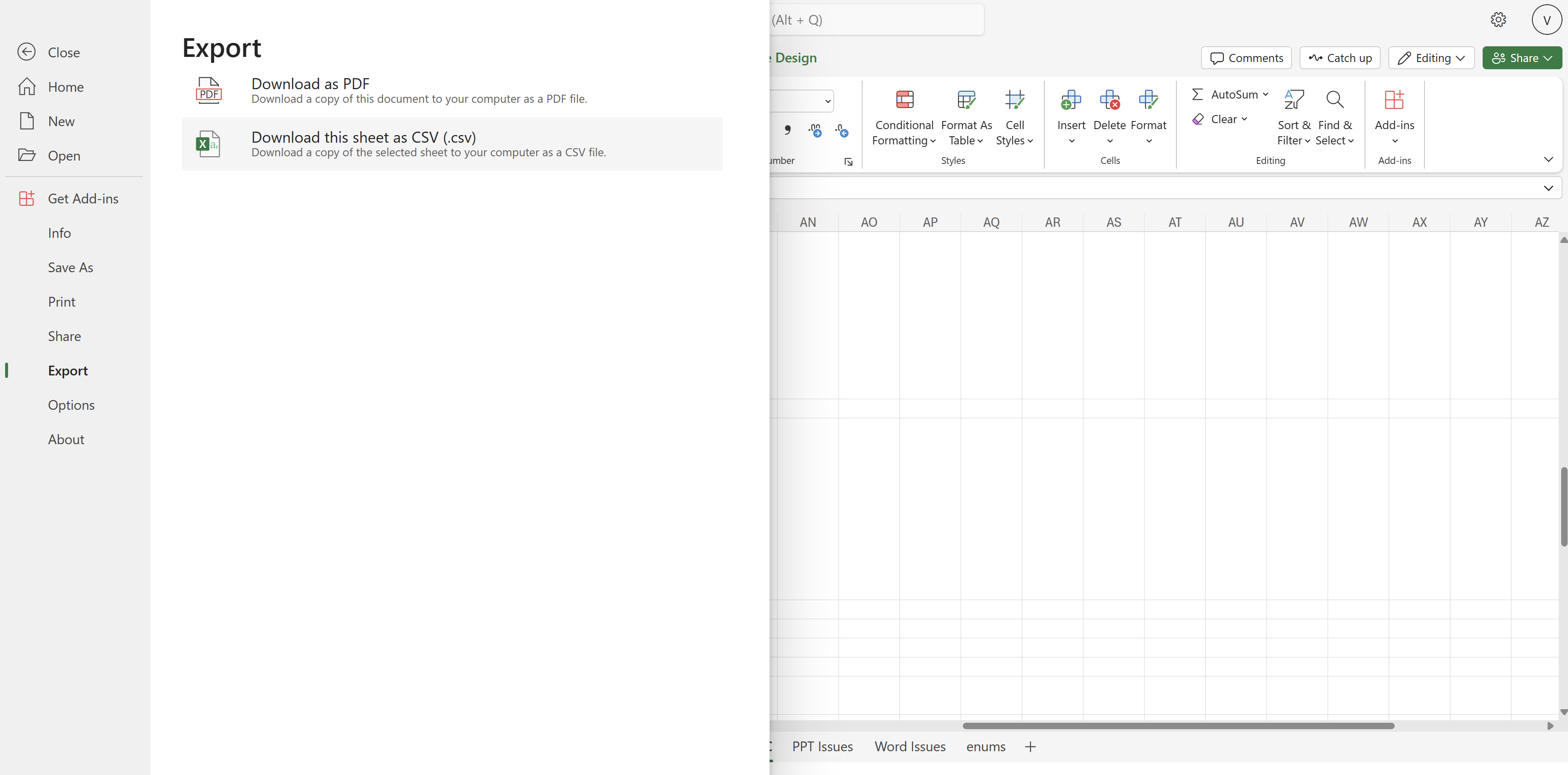
  1. Create or open an existing worksheet in Excel for the web.
  2. Select File > Export > Download this sheet as CSV (.csv).
Export menu in Excel for the web

When using this new feature, Excel for the Web will download the files in your local folder and you can access them there.

Microsoft also has a few scenarios for when this feature might be useful, and these include:

  • Store structured data in a simple, human-readable format that can be easily backed up and retrieved.
  • Transfer data between a spreadsheet app and a database management system.
  • Exchange simple structured data between different apps that might not be directly compatible, such as a CRM.

So, if you use this platform a lot, keep in mind that you can now export CVS files. And, as Microsoft says, it is available starting today.

Microsoft deprecates certificates using RSA keys shorter than 2048 bits and this is very good for users

After it announced that it would deprecate Windows Subsystem for Android, and Visual Studio App Center, Microsoft will also deprecate certificates using RSA keys with key lengths shorter than 2048 bits will be deprecated, according to the latest addition to its list of deprecated items.

While the Redmond-based tech giant hasn’t specified an exact date, it’s safe to assume the company is deprecating this support, and while it might sound like bad news (in light of the other deprecations), the decision is actually quite good for users.

Here’s why:

RSA keys are used for secure communication on the Internet, and the certificates are used to prove that a website is secure and legitimate. The length of an RSA key matters for security: shorter keys are weaker and easier to crack, while longer keys are stronger and slower to process.

Due to this deprecation, certificates with RSA keys shorter than 2048 bits will no longer be supported, and this means Windows devices will be better secured from now on.

Support for certificates using RSA keys with key lengths shorter than 2048 bits will be deprecated. Internet standards and regulatory bodies disallowed the use of 1024-bit keys in 2013, recommending specifically that RSA keys should have a key length of 2048 bits or longer. For more information, see Transitioning of Cryptographic Algorithms and Key Sizes – Discussion Paper (nist.gov). This deprecation focuses on ensuring that all RSA certificates used for TLS server authentication must have key lengths greater than or equal to 2048 bits to be considered valid by Windows.

Microsoft

However, companies won’t be impacted by the deprecation, but this doesn’t mean they shouldn’t update, and Microsoft highly recommends they should update to stronger keys as a safety measure:

TLS certificates issued by enterprise or test certification authorities (CA) aren’t impacted with this change. However, we recommend that they be updated to RSA keys greater than or equal to 2048 bits as a security best practice. This change is necessary to preserve security of Windows customers using certificates for authentication and cryptographic purposes.

Microsoft

It is highly recommended to keep up with the latest advances when it comes to cybersecurity, as threat actors are using more advanced ways, such as AI, to compromise organizations.

Microsoft Office LTSC 2026’s preview starts in April and its features will greatly enhance productivity

Microsoft finally announced a preview of the newest Office LTSC 2024, and it’s coming in April, with a general availability later this year. As we reported back in 2023, the Redmond-based tech giant has been expected to release a new version of its Office platform.

Despite the availability of Microsoft 365, many organizations and institutions need the Office 365 platform to function, as, for security and privacy reasons, they cannot be connected to the Internet, as the Microsoft 365 platform would require.

So, for these institutions, which also include numerous healthcare organizations such as hospitals, the Office 365 platform is preferable, and every other year, Microsoft releases a new version of it with new features.

According to the official announcement, Microsoft will update the Office LTSC 2024 client will have the following new features:

  • New meeting creation options and search enhancements in Outlook,
  • New Excel features and functions including Dynamic Charts and Arrays;
  • Improved performance, security, and accessibility.

However, it’s important to note that these are just some of them, and the client will have many other new features. The Office LTSC 2024 will not ship with Microsoft Publisher or Microsoft Teams, and it will not have the AI capabilities, such as Copilot, as Microsoft 365.

According to Microsoft, Office LTSC 2024 will still be a device-based “perpetual” license, supported for five years under the Fixed Lifecycle Policy, and the Redmond-based tech giant will also increase the price of Office LTSC Professional Plus, Office LTSC Standard, Office LTSC Embedded, and the individual apps by up to 10% at the time of general availability.

The usual customers will also get the Office 2024 later this year, and Microsoft says it will be supported for 5 years, as a one-time purchase. There are no plans to change the price, but the Redmond-based tech giant will release more details about it in the upcoming months.

PocketPair wants to remain a small studio, despite Palword’s incredible global success

PocketPair has no desire to develop AAA games or become a big game studio, down the road, says Takuro Mizobe, its CEO and founder in an interview for Bloomberg. Mizote wants to keep the 55-person studio as it is and focus on developing smaller games.

We are and will remain a small studio. I want to make multiple small games. Big-budget triple-A games are not for us.

Takuro Mizobe

The studio launched Palworld back in January 2024, and the game was an instant success, amassing more than 7 million players in its first days, and getting to an impressive 25 million players a month after its release.

The game, is a Microsoft exclusive, meaning only Windows and Xbox users can play it, is also a huge success for the Redmond-based tech giant, as well, and Palworld actually was at the forefront of a business strategy meeting, last month.

Despite its ties with Microsoft, PocketPair is not getting acquired by the tech giant, even though the Redmond-based tech giant has a well-known history of acquiring game studios (the ABK acquisition, for instance, last year, was the biggest ever in the industry).

Mizobe, however, is open to talking about it, according to the interview given to Bloomberg. He also stated that he could see PocketPair being in a partnership with other video game companies, or even an acquisition as a whole. But the studio will keep making smaller games if an acquisition ever happens.

PocketPair also wants to release Palworld to other platforms, possibly PlayStation and Nintendo, but this is still an ongoing talk; it would be interesting, though, to see how Microsoft will react to it, as the game is still enjoying massive success.

Palworld has also brought PocketPair some controversies, as the company is currently under investigation by The Pokemon Company, as the latter says the former might have infringed copyrights: the Pals are similar to the Pokemon.

Well, Palworld has been called by critics Pokemon with guns, so there you go!

Are you playing Palworld? Do you like it?

Google I/O 2026: Here is what you can expect

Google I/O 2024 is two months away, and Google is already excited to make new announcements. The big day is Tuesday, May 14, at 10 am PST (1 pm ET / 6pm BST), and it will also continue the next day.

CEO Sundar Pichai is expected to host the event at the Shoreline Amphitheatre in Mountain View, California. However, the exact information about the location has not been released.

The event will be broadcast to a live studio audience, and everyone else will be able to watch it via live stream.

Google I/O was announced using an interactive puzzle game on its website; however, there is no information about the event or what will be announced, but with the recent events and hints dropped by the tech giant, we might be able to presume what we might see.

What can you expect from I/O 2024?

A new hardware – Pixel 8a, maybe!

  • The announcement of midrange Pixel 8a as Pixel 7a was first revealed in I/O 2023.
  • The smartphone might have a Tensor 3 chipset and will be a little bigger than previous iterations.
  • The device could have large bezels around the display.

Android 15

  • Full introduction of Android 15.
  • Could get lock screen widgets again.
  • Ability to save pairs of apps.

Gemini updates

  • More information on Gemma.
  • Demonstration of what AI can do in future.
  • There could be talks about how they will improve AI performance.

We also think that since everyone and everything is getting an AI enhancement, we could see AI developments in the new hardware Pixel 8a and even Android 15, but learning how the tech giant will integrate AI with the device and OS will remain a mystery till the event.

We could also see a glimpse of the Pixel Watch 3 and Pixel Tablet 2. However, we will not be surprised if Google holds the announcement back for some other event.

Furthermore, the company will discuss the changes coming to Google products, reveal new Workspace tools, and showcase Android 14 features, but we think the event will mainly revolve around Gemini as AI has all the hype in the market.

If you don’t want to miss the updates, you can register yourself online and it is free for everyone. It will keep you updated on the schedule; however, you need a developer profile for Google to register.

What do you expect of Google I/O 2024? Share your opinions with our readers in the comments section below.

Visual Studio App Center will face deprecation, but Microsoft offers alternatives

It’s a sad day for software developers and IT companies everywhere, as Microsoft just announced the deprecation of its Visual Studio App Center, a hub that lets users not only develop desktop and mobile software but also test, release, and monitor it all from one platform.

Fortunately, the App Center will not be deprecated right away, but on March 31, 2025, leaving customers with more than enough time to assess the information and act accordingly. And users shouldn’t worry, as Visual Studio App Center will still get regular security updates until then.

However, past that date, login into your account won’t be possible anymore. What to do? Well, the Redmond-based tech giant has come up with a list of recommendations and alternatives, and those who are currently using Visual Studio App Center should consider them, as the deprecation is inevitable.

According to Microsoft, here’s what you can try:

App Center capabilityRecommended alternative solution
BuildWe recommend migrating your builds from App Center to Azure Pipelines, leveraging the Export App Center Build feature. 
TestFor app device testing, we recommend BrowserStack App Automate. BrowserStack provides access to 20,000+ real iOS and Android devices. BrowserStack has developed the Device Testing CLI to support migrating from Microsoft App Center to BrowserStack App Automate.

You can find the full guidance for migration to BrowserStack here.
DistributionWe recommend Apple’s AppStore for iOS app production releases and Apple’s TestFlight for iOS app test releases. For Android applications we recommend Google Play for production releases and Google Play Console for test releases.

Azure Pipelines tasks can be used for distributing to AppStore/TestFlight and Google Play.

For Microsoft Store applications, we recommend using Package Flights feature available in Partner Center.
CodePushWe have prepared a special version of CodePush to integrate into your app and run independently from App Center. If you’d like to get access to the codebase of this CodePush standalone version, please reach out to our support team at [email protected] for more information.
Analytics & diagnosticsWe recommend one of the Azure Native ISV services which provide rich capabilities for mobile analytics and diagnostics. By leveraging these Azure Native ISV services, you will be able to monitor your complete stack from device to your backend infrastructure on Azure.

Click on each link below to see the documentation for Azure Native ISV service of your choice.

Azure Native ISV Services:DatadogDynatraceNew RelicMicrosoft Store app developers can access analytics & diagnostics data through Partner Center Dashboard. Additionally, UWP applications published in Microsoft Store can log custom events through the Microsoft Store Services SDK.

While Microsoft’s recommendations are well intended, they might be a bit overwhelming for users, especially since Visual Studio App Center has of all these in one place. However, there is still a year until the deprecation happens, and it’s enough time to get accustomed to them.

Microsoft has not announced the deprecation on the official web page of the Center, but it will most likely do so in the next few days.

The Redmond-based tech giant has been announcing the deprecation of several beloved platforms, lately, including that of the Windows Subsystem for Android, which shocked some users.

Microsoft hasn’t revealed the reasons it’s deprecating Visual Studio App Center.

Minecraft launches Marketplace Pass, its version of Xbox Game Pass

Microsoft-owned dev studio Mojang announced a subscription service called Marketplace Pass for Minecraft. The service costs $3.99 per month, but prices may vary from region to region.

What is Marketplace Pass?

Marketplace Pass is a monthly subscription. With it, you get a catalogue of 150+ different content packs from the Minecraft Marketplace, which is refreshed monthly.

Minecraft Marketplace is a hub for creator-made content available to buy for Minecraft: Bedrock Edition. There are skin packs, survival spawns, adventure worlds, mashups, skins, texture packs and other DLC.

Some of the content is combat-focused, and others are story-driven, full of puzzles that magically make your blocky world different.

Every month, you can collect a new set of Character creator items to wear, like an ethereal crown, mythical boots, or a radiant leotard, when you head into adventures. Once redeemed, these edition pieces will be a part of your wardrobe.

What will you get will Marketplace Pass?

  • Access to 150+ pieces of content from Minecraft Marketplace
  • Regularly refreshed content to add variety to your experiences and gameplay in Minecraft: Bedrock Edition
  • A new set of time-limited Character Creator items each month
  • Access to your subscription content on all supported devices via Microsoft account & Minecraft: Bedrock Edition 
  • Some of the community’s favourite worlds, textures, skin packs, and mash-up packs

Now, if you are considering whether it is for you, remember Marketplace Pass is for those who like to play solo; however, if you like to play with your friends, you should rather get Realms Plus as it comes with a personal server.

We recommend you check the official website to learn more about Minecraft Marketplace Pass. To use the service, you need a compatible version of Minecraft: Bedrock Edition & Minecraft Marketplace, which must be purchased separately, as well as Microsoft account credentials.

If you are subscribing to the service for the first time, you get a 30-day trial, so you can try it and see if you like it.

Remember, the 30-day trial doesn’t include existing and prior Marketplace Pass members (paid and trial), existing Realms Plus members (paid and trial), and Switch users. Once the trial period is over, the subscription service will continue at the regular membership rate unless you cancel it.

There is an important issue you should know about if you use the Xbox app. Mojang has warned gamers not to update the Minecraft game using the Xbox app, as it could wipe your saved worlds. Read the detailed story here.

Would you like to try Marketplace Pass, or is it not for you? Share your opinions with our readers in the comments section below.

Skype on Android enhances its message composer with HTML support

Skype released builds 8.114, and 8.115 to insiders, and this time Skype on Android gets new options that will allow users to customize their messages even further.

Released at a distance of a day between them, the builds can be installed on every platform, although only those on Android will be able to see the new message composer updates.

Build 8.114 brings a bunch of improvements as well, and build 8.115 brings the HTML support for the message composer.

According to the official blog post, here are all the new features coming to Skype:

Skype 8.114:

New on Android – Enhanced Rich Content in Message Composer!

  • Direct GIF/Sticker Insertion: Say goodbye to cumbersome dialogs! Now, add GIFs and stickers directly to your composer with a simple tap from your Android phone’s system keyboard, making your conversations more lively and fun.
  • Copy/Paste Media Support: Effortlessly copy and paste images and videos right into your message box. Quick sharing has never been easier!
  • Drag & Drop Media: Elevate your multitasking with our new drag and drop feature, perfect for split-screen, tablets, and more. Share your media in a snap!

Polishing Skype: Stability improvements & Bug fixes

  • Audio Message Navigation: We’ve improved mobile audio message scrolling on the new audio wave design for effortless listening. No more sliding struggles!
  • Context Menu Update: Long-pressing for contact options when you search for them, is now sleeker and smoother on mobile. Quick access, less fuss!
  • Reaction Selector Enhanced: Discover more ways to react easily, with the new menu selector – simply tap ‘+’ on the reactions carousel, after a long press on a message. Expressing yourself just got easier!
  • Missed Call Fix: Those mysterious missed calls appearing in chats? Consider them history. We’ve cleared the clutter!

The official blog post for Skype 8.115, states the following feature:

Android: Enhanced Rich-Text HTML Support

  • Effortless Text Formatting: Long-press any text as you type, to unleash formatting options like bold, italic, underline, strikethrough, code, share and read aloud—style your messages effortlessly!
  • Seamless Message Styling: Choose from those professional, casual, or fun styles to match the vibe of every chat.
  • Intuitive Interface: Discover an enhanced messaging composer, making text styling intuitive and part of your seamless chat flow.

Polishing Skype: Stability improvements & Bug fixes

  • Resender Caller ID SMS button opening the file explorer.

What do you think about these new updates for Skype on Android?

What are the Best Touchpad Gestures in Windows 11

If you’re looking to enhance your user experience in Windows 11 or simply enhance your productivity, here are some of the best touchpad gestures we think you should know about.

What are the best Touchpad gestures for Windows 11?

1. Basic Touchpad Gestures

1.1 Single-finger gestures

  1. Start by turning on the Touchpad feature. Launch the Windows Settings app by pressing Windows + I then go to Bluetooth & devices> Touchpad and toggle the option on.
  2. Next, expand the Taps section and check all the options.

By enabling Taps, you can now navigate faster as it performs the single-click feature without the need to press the Touchpad button. This feature is performed by a right-click when using a mouse.

Tap with two fingers enables you to right-click and execute right-click actions more efficiently.

1.2 Two-finger gestures

When you tap on the Scroll & zoom option, you’ll be enabling the two-finger gestures. These come in handy especially when scrolling through documents. The scroll bar or arrow keys may not offer you the precision or speed you need when scrolling hence why you need to enable this feature.

Another advantage is the pinch-to-zoom. When looking into a tiny element or picture, you can pinch your two fingers to zoom out and reveal otherwise hidden elements. This enhances your viewing experience without having to struggle to examine intricate details.

If you are viewing an image that is not in the portrait orientation, you can use the two-finger gesture to rotate it. This way, you don’t have to tilt your screen. You can also check out other ways to zoom in and out.

1.3 Three-finger gestures

  1. Hit the Windows key and select Settings.
  2. Click on Bluetooth & devices on the left pane then select Touchpad on the right.Go to Touchpad
  3. Scroll down and expand the Three-finger gestures section.
  4. From the drop-down menu, select one of the options: Switch apps and show desktop, Switch desktops and show desktop or Change audio and volume.

If you’re looking for a bit more action, three fingers on your Touchpad can help you to switch between apps on your desktop. This is particularly beneficial for you if you’re a multitasker. No need to press multiple keyboard keys for shortcuts when three fingers do the job.

Simply swipe your three fingers horizontally and you switch from window to window or app to app. To view the task view for all active windows, swipe upwards. This allows you to see all open apps and close any you’re not using especially if your device is slow.

To view your desktop, simply swipe downwards. This is an all-in-one option that enables you to minimize all windows simultaneously.

2. Advanced Touchpad Gestures

2.1 Four-finger gestures

Aside from performing the three-finger gestures, it also comes with additional options. Music lovers will benefit a lot from the four-finger touchpad gestures. This is because it gives you the ability to control your sound levels. You can swipe up and down to increase and decrease volume respectively.

You can also skip to the next track or go back to the previous one with right and left horizontal swipes respectively. One efficient way of getting the most out of your gestures especially, for the three-finger and four-finger is to spread out the actions.

For instance, since you can switch to apps using both, you can set say the option to Switch desktops and show desktop for three-finger gestures and reserve the change audio and volume for the four-finger gestures.

Note that the touchpad settings may be different for each user. Windows will automatically determine which gestures are compatible with your laptop hardware and display them in accordance with the information.

2.2 Advanced gestures

  1. Hit the Windows key and select Settings.
  2. Click on Bluetooth & devices on the left pane then select Touchpad on the right.Go to Touchpad
  3. Scroll down and select the Advanced gestures option under the Related settings section.
  4. There will be custom gestures for each touchpad gesture, but you can only select one.

2.3 Custom gestures

  1. Hit the Windows key and select Settings.
  2. Click on Bluetooth & devices on the left pane then select Touchpad on the right.Go to Touchpad
  3. Scroll down and select the Advanced gestures option under the Related settings section.
  4. Under Configure three-finger gestures, expand the menu and select Custom shortcut then hit the Start recording button and enter a keyboard shortcut that will perform your intended action.
  5. Once done, click the Stop recording button.

Even though the default touchpad gestures in Windows 11 are sufficient to enhance your productivity, advanced users are usually thirsty for more. Luckily, some touchpad drivers have advanced features that offer you the ability to customize your gestures.

You can define and assign specific touchpad gestures that will respond to your intended actions or commands. Personalized gestures allow you to assign your frequently used commands and increase your efficiency.

You can always restore these settings to default. If you want to change up your commands or revert to the default Windows 11 touchpad gestures, you can always go back.

If you’d like to explore this option but don’t have a compatible Touchpad, we’ve lined up some of the best Touchpads that offer multi-advanced touchpad gestures.

However, if you’re not up to making new purchases, perhaps third-party apps that allow you to customize touchpad gestures may be of interest to you.

How can I optimize Touchpad gestures performance in Windows 11?

  • Keep your Touchpad clean: The sensitivity of your Touchpad and responsiveness depends on how clean it is.
  • Disable Touchpad when using a mouse: When not using your mouse, disable the Touchpad gestures. This will prevent accidental touches when not in use.
  • Calibrate Touchpad settings: Some modern Touchpad drivers offer calibration options that read into your usage patterns and offer you the option to fine-tune your Touchpad performance. This can help adjust sensitivity and responsiveness to your preferences.
  • Disable Palm Rejection: Highly sensitive settings can lead to accidental touches so disable palm rejection to prevent unintentional cursor movements or gestures.

Issues with Touchpad gestures not working usually have to do with outdated, damaged or missing drivers. Updating or rolling back to a previous version should fix the issue. Remember to also keep your system updated to prevent compatibility issues.

Remember that you can also use your phone as a keyboard. It may not offer the same features or functionality as your touchpad gestures but it does come as a close second.

That’s all we had for touchpad gestures in Windows 11 to help ease your navigation and enhance your productivity. If you have any other tips you think we might have left out, don’t hesitate to share them with us in the comment section below.

Update your Microsoft Office and Skype ASAP, as the platforms are impacted by critical vulnerabilities

Microsoft Office and Skype are both affected by critical vulnerabilities that, if exploited, could compromise devices and users entirely, by infesting them with malware and granting threat actors access to sensitize data.

The CVE-2024-26199 for Microsoft Office, and the CVE-2024-21411 vulnerability for Skype, both have to do with elevation of privilege, and remote code execution. In other words, threat actors would be able to gain access to Office accounts, effectively putting users, including various companies and organizations, at risk.

On the other hand, not updating Skype would allow threat actors to run malicious code remotely, effectively gaining ground on users’ computers and devices.

Microsoft says that in both cases exploitation is less likely to happen, but advises users to update the platforms nonetheless.

Microsoft Office needs to be updated to Version 2402 (Build 17328.20184), while Skype will need to be updated to the latest version, by simply accessing the updating options inside the platform, or clicking this link.

Windows 10, and Windows 11 users should also update their devices with the latest Patch Tuesday updates, which also tackle dozens of other vulnerabilities, besides these two. Make sure to access Settings’ Windows Update page, and check out for the latest updates there.

The CVE-2024-26199, and the CVE-2024-21411, vulnerabilities are included in the list, so if you don’t want to update them separately, the latest Patch updates will do that instead.

Figure 01 is an AI-powered robot that can communicate with humans

We see artificial intelligence everywhere, and almost everybody is familiar with ChatGPT. But what if we could take GPT technology and add it to a robot?

That’s exactly what Microsoft, OpenAI, and Figure did, and the results are impressive.

OpenAI showcases its Figure 01 humanoid robot in action

Microsoft, OpenAI, and Figure joined forces recently to bring GPT technology to humanoid robots. The results are finally here as New Atlas reports and they are amazing.

In the latest video, we can see Figure 01 performing basic tasks, all while giving reasoning for its actions in real-time.

Figure’s Brett Adcock stated that Figure 01 integrated camera sends data to a large vision-language model trained by OpenAI while Figure’s neural network takes images at 10Hz through the built-in cameras.

Thanks to the OpenAI, the robot can understand speech while the neural net is used for performing dexterous actions.

Figure 01 is an amazing leap in robotics, and all of this was achieved just after two weeks of collaboration, so we can’t wait to see what advancements will we see in the future.

Join Microsoft’s latest giveaway for a chance to win a Final Fantasy XIV Xbox Series X

Microsoft is known for its promotions, and in the past, we saw a limited edition SpongeBob Xbox Series X.

It seems that there’s another custom Xbox available, but this time for Final Fantasy XIV fans.

You might win this Final Fantasy XIV Xbox Series X

You probably know that Final Fantasy XIV is coming to Xbox on March 21st, and what better way to celebrate its release than with a custom Xbox Series X console?

According to Neowin, Microsoft is planning a giveaway in which one person will be able to get a stunning one-of-a-kind Xbox Series X console.

The console looks incredible, and it even has a custom stand. In addition to the console, the lucky winner will get a Complete Collector’s Edition of the game as well as a 12-month Xbox Game Pass Ultimate membership.

While this sounds amazing, there is some bad news as well, if you read the contest rules carefully. The console itself is non-functional, and it can only be used for decorative purposes.

Nevertheless, the design of the console is still outstanding, and other benefits will surely make joining the giveaway worth your while.

Does your PC have an NPU? Here’s how you can find out

NPU, a specialized hardware commonly found in smartphones, has finally become something of interest to PC users. The reason is Microsoft’s push for AI in Windows and everyone wanting to utilize it to the maximum!

NPU (Neural Processing Unit) is a hardware component designed to boost AI, machine learning, and deep learning applications of the PC.

Most PCs bought a few years ago don’t feature an NPU chip. And you can quickly verify it on yours via the Task Manager, Device Manager, or System Information.

How do I find out if my PC has an NPU?

1. Using the Task Manager

  1. Press Ctrl + Shift + Esc to open the Task Manager, and navigate to the Performance tab.
  2. If the PC has an NPU, you will find a dedicated entry near the bottom left. In case you don’t see one, the PC doesn’t feature an NPU chip.NPU

2. Through the Device Manager

  1. Press Windows + X to open the Power User menu, and select Device Manager from the list.
  2. Look for a Neural processors entry. If it’s present, the PC has NPU. You can also double-click on it to find out more about the component.checking for NPU

3. From System Information

  1. Press Windows + R to open Run, type msinfo32 in the text field, and hit Enter.
  2. Search for Neural, Neural Processing Unit, AI, NPU, or any related terms, and if an entry appears confirming the presence, your PC has an NPU.NPU

If your PC doesn’t feature a built-in NPU chip, there’s nothing to worry about. Most PCs don’t, even the new ones! You will still be able to utilize most of the AI-powered features released by Microsoft.

As for anyone looking for an NPU-supported PC, the Intel Meteor Lake series of processors is an option. The latest, Lenovo ThinkPad X13 Gen 5, comes equipped with the same processor.

Does your PC feature an NPU chip? Share with us in the comments section.

Star Wars: Battlefront Classic Collection fails miserably at launch, flooded with negative reviews

When Aspyr Media announced the launch of Star Wars: Battlefront Classic Collection set for March 14, 2024, everyone was thrilled. The good old days were back. But the excitement was short-lived!

As it turns out, Star Wars: BCC is plagued with issues, and within hours of launch, thousands have called the game simply unplayable. Reports indicate that only three 64-player official servers were available in the opening hours when close to 10,000 users were logged in.

Other issues reported in the early hours include high ping, stuttering, visual glitches, network errors, crashes, matchmaking issues, and servers not appearing on the browser.

Either Aspyr Media didn’t anticipate this kind of response or couldn’t effectively handle the situation. Whatever the case, Star Wars: BCC will go down as the worst launch of the year. Besides, their official statement regarding the fiasco is vague and doesn’t provide a definite timeline for improvement.

Star Wars: Battlefront Classic Collection hit with negative ratings on Steam and Xbox

In the first 24 hours, Star Wars: Battlefront Classic Collection had extremely poor player ratings on Xbox and Steam.

On the Steam Store, the game had an 81% negative rating from 4057 reviews. On the Xbox Store, it scored 2.3/5 from a total of 990 reviews.

Star Wars: Battlefront Collection’s rating on Steam

Star Wars: Battlefront Classic Collection surprisingly fared well on the PlayStation Store a few hours after launch, with a 3.44/5 rating. Initially, it was even higher!

Star Wars: Battlefront Collection’s rating on PlayStation Store

The game’s high price tag was also questioned after its debacle at launch. Here’s what players had to say:

So let me get this straight. You launched this game with only 3 servers on PC knowing full well people only bought it for that sole reason? Peak comedy gold. Easy refund. What a dissapointment.

DO NOT BUY UNLESS SERVERS ARE FIXED!
Currently, game is totally unplayable. Even if you manage to get into a server, players cannot spawn. Not sure if it’s a cheater/denial thing, bugged gameplay or both.

Unplayable. Worse servers than the original, which had to be salvaged from a service that doesnt exist anymore. Completely unacceptable state this release in, needed another 5 months

I don’t often leave reviews but this gamed were the most important games of my childhood. The multiplayer functionality is straight up disappointing not allowing friends to join or even find my games. The originals are cheaper and smaller space-wise. Why is this 57 gigs? Plz let Disney make them fix this like they made EA remove lootboxes

It needs a lot of polishing. The camera and aim movement feels horrible! U can’t play an actual conquest online. The sound is quiet. U can’t see a damn thing in the conquest board thanks to the stupid stars filter. BF1 loading screen noises are wrong. The respawn timer is horrible. The game crashes a ton! Fix this mess, then we should be in the right direction.

More negative reviews kept pouring in by the minute at the time of writing.

Star Wars: BCC takes up more than 60GB of storage, many raise questions

The original Star Wars: Battlefront and its sequel consumed 7.3 GBs, but Star Wars: BCC, which brings some additional features and content, takes up a whopping 57-72 GBs of storage. There’s no explanation available for now!

The exact storage space depends on the system. It’s about 63 GBs on Steam for PC, 72.58 GBs on Steam Deck, and 57 GBs on Xbox.

What strikes players is that Star Wars: Battlefront Classic Collection doesn’t feature such high-end graphics, feature sets, or content that could justify the storage requirements.

If unsatisfied with your purchase of Star Wars: BCC, you can always play the top-rated free online Star Wars games.

What’s your review of the Star Wars: BCC? Share with our readers in the comments section.

Microsoft is trying to restore full Azure capacity while undersea cable issues still remain

Recently there was a massive outage of Microsoft services all over the world that affected thousands of users worldwide.

So what exactly happened, and has the issue been resolved? Keep on reading to find out!

Undersea cable issues remain as Microsoft is rerouting traffic

The reason for the recent outage of Microsoft service was caused by issues with undersea cables. The four affected cables went offline around noon causing the outage according to MyBroadband.

To mitigate the issue the traffic has been rerouted to other routes, Microsoft says:

Efforts to re-route traffic to healthy infrastructure have been successful in providing service-side relief to many users

While this provides relief for the affected issue, the core problems remain. Microsoft had plans to get this issue resolved, however, it has been delayed.

Microsoft is increasing capacity and they are actively working to restore it to the pre-incident levels according to their Health Status page.

The reason for the delay is also cable cuts in Red Sea — EIG, Seacom, AAE–1 which are reducing the capacity in Africa’s regions.

While the Azure Services were restored, the core problem remains, and hopefully Microsoft will be able to address it soon.

If you’re an Azure user, you’ll be pleased to hear that Microsoft is dropping Azure egress fees. Also, Microsoft and Oracle’s Database Azure is now available in additional regions.

Downloading the latest Minecraft update will wipe all your worlds, Mojang warns

Minecraft is probably one of the most played games in the world, with users spending hours building their perfect worlds.

Unfortunately, there’s a bug present that will delete your saved worlds when you try to update the game.

A Minecraft bug will delete your saved worlds if you use the Xbox app

It seems that there’s a critical bug present in Minecraft that will delete your saved worlds. This happens when you update Minecraft via the Xbox app on your PC as Sportskeeda reports.

This is a serious problem, and if you don’t have a backup, all your hard work and saved worlds will be gone. Even Mojang has acknowledged this issue and urged users not to update the game via the Xbox app.

Mojang advises users to run the Game Service Repair Tool for PC before trying to update the game. You can do that by clicking your profile icon in the Xbox app and choosing the Gaming Services Repair Tool from the Support section.

This will update Gaming Services to version 19.87.13001.0 and stop the bug from occurring. While the fix is available, we also advise you to back up your games, just in case.

Speaking of Minecraft, there’s also a new Marketplace Pass in Minecraft that offers exclusive content to users, so you might want to check it out.

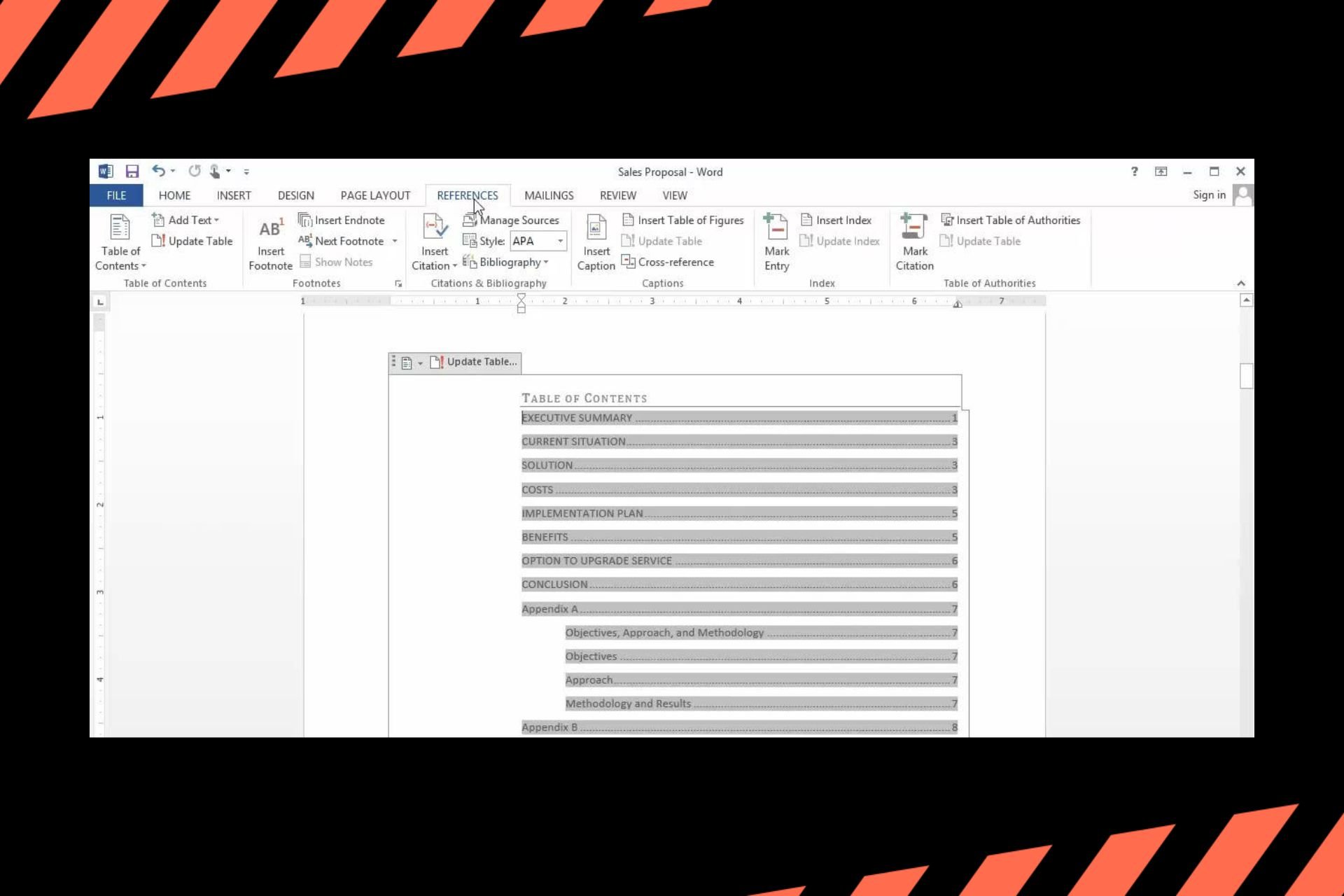
How to Create and Format a Microsoft Word Table of Contents

Whenever you come across a multiple-page Microsoft Word document, navigating through content scanning through hundreds of pages can be time-consuming and that’s why a table of contents comes in handy.

Not only does it provide structure to the document but also, helps in navigation, improves readability and can help you come up with a quick outline of the document.

How do I create and format a table of contents in Microsoft Word?

1. Create a Table of contents

  1. Launch your Microsoft Word document and start crafting out your content.
  2. Ensure that each section has a heading by going to Home> Styles.
  3. Once you’re done, place your cursor on the first page or where you wish to place your table of contents.
  4. Go to References and in the Table of Contents menu, select one option from the list.

2. Format Table of contents

  1. Go to References, in the Table of Contents menu and select Custom Table of Contents.
  2. Modify the settings to suit your preferences.

Once you’ve created your table of contents, you may want to format it to a specific style or even edit out some information. If you’re not pleased with the templates provided, you can create a custom ToC.

A custom table of contents allows you to exchange page numbers for hyperlinks and select levels of headings to show. The hyperlinks option works best with Microsoft Word online.
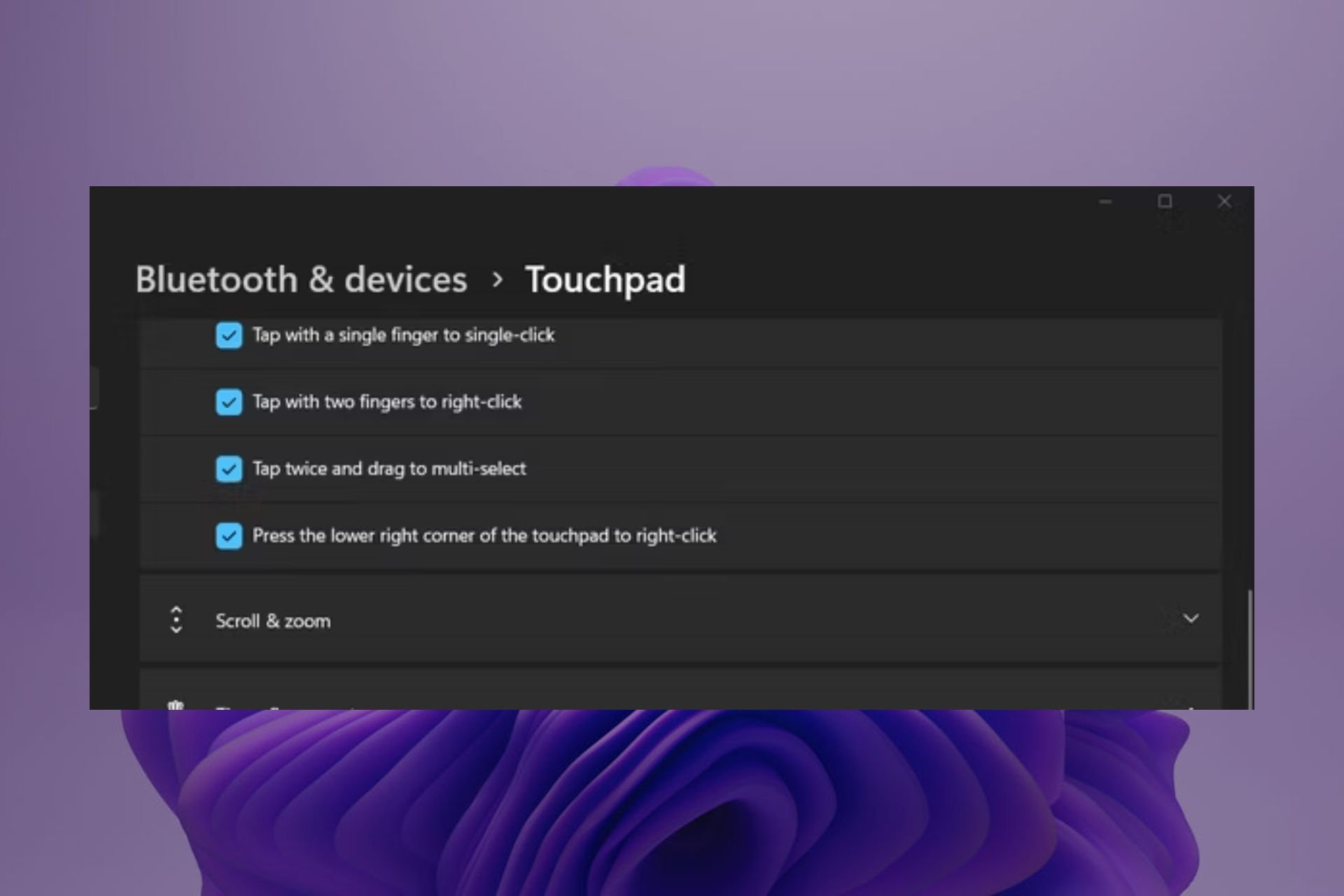
3. Update Table of contents

  1. Once you’ve made changes to your Word document, click on CTRL + S to save the changes.
  2. Go to your Table of contents and click anywhere then select Update field.
  3. Check the Update entire table option and you’re good to go.

With time, you may need to modify your document by deleting or adding new sections. As such, you’ll need to update your table of contents to reflect the changes.

Troubleshoot common issues that may arise when formatting a table of contents

  • Missing entries – If a section is missing from the ToC, go back to the Headings sections and apply it again then update your ToC.
  • Incorrect page numbers – If the page numbers on the ToC and actual content don’t match, ensure you’ve applied all page breaks then update your table. You can also remove the current page breaks and add them afresh.
  • Update failure – Ensure you’ve saved your document and refresh the ToC before updating it.
  • Inconsistent formatting – If the headings appear poorly formatted, ensure you use consistent formatting from font, style and font colour throughout your document.

There’s so much more you can do with Microsoft Word so don’t just stop at creating a table of contents. You can also create your own fillable form , remove the watermark from your documents, or set up two columns.

And should you encounter any issues with formatting, you can always reset Microsoft Word back to default settings.

Hopefully, you can easily create your own table of contents given how useful it has proven to be. It will make document navigation easier and provide a structured and organized document. And once created and you’ve made changes, you can also update all fields in your document.

Word is a versatile tool, and you can also make index cards in Word, and we have a guide that will help you do that, so don’t miss it.

To learn more about Word, don’t miss our guide on how to make a copy of a Word document.

Have you created a table of contents in Word? How easy or difficult was it and what issues did you encounter? We’d love to get your feedback so drop us a comment down below.