Microsoft will deprecate the Test Base for Microsoft 366 entirely in the future months, as the Redmond-based tech giant announced that the platform will transition to an end-of-life (EOL) state on May 31, 2024.
Test Base for Microsoft 365 will transition to end-of-life (EOL) on May 31, 2024. We’re committed to working closely with each customer to provide support and guidance to make the transition as smooth as possible. If you have any questions, concerns, or need assistance, submit a support request.
Microsoft
The platform will no longer be usable after its retirement, which is quite disappointing because it was a very useful tool to test apps, at a global scale, and in a remote way.
According to Microsoft, Enterprises/Businesses, Independent Software Publishers, System Integrators (SIs), and IT Professionals who want to validate their line-of-business (LOB) applications through integration with Microsoft Intune, are the perfect candidates for this platform, as it could accommodate each customer’s needs.
From expanding the testing matrix to ensuring technical integrity, compatibility, and usability of applications, Test Base for Microsoft 365 gave customers all the necessary tools to develop viable apps. In addition, the platform also tested applications for security and privacy issues within virtual machines.
Creating a Test Base for Microsoft 365 required an active Azure subscription, but overall setting up and working inside the platform was quite simple. Customers to complete a few details, and then they could create projects where they could test their applications.
The whole platform is not just easy to use, but also intuitive and versatile. Microsoft hasn’t specified the reason why it’s deprecating the platform, but there is a chance the Redmond-based tech giant will reveal it in the months coming up to the deprecation.
The company recently announced the deprecation of the beloved WSA (Windows Subsystem for Android) platform, and many users of it were disappointed by the news. However, in that case, the lack of Google Play support is what drove Microsoft to deprecate it, as financially speaking, the platform was a dead end.
Could it be the case with Test Base for Microsoft 365?
Xbox and Booosteroid have a history together, with many Xbox titles being available on the platform, but according to the latest announcement on Xbox Wire, Xbox players can now access Game Pass and Microsoft Store Xbox games on Boosteroid, starting today.
We’re bringing more high-quality, immersive PC games by giving players another option to stream select games purchased through Microsoft Store on Windows, or available with a Game Pass membership. Our partnership continues to accelerate access to players by letting them choose how and where they play their games.
Xbox
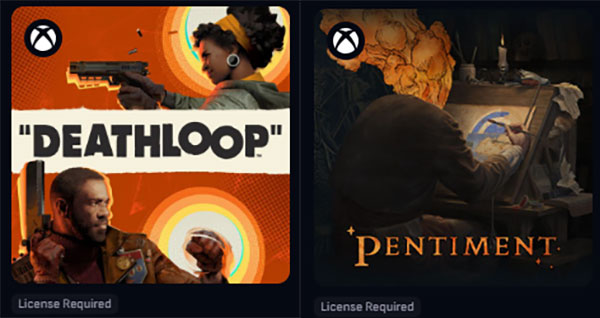
The first Xbox titles that can be played on Boosteroid are Deathloop, Dishonored, Dishonored 2, Dishonored: Death of The Outsider, Gears 5, Gears Tactics, Ghostwire: Tokyo, and Pentiment, and users will be able to cross-play and cross-save with their Xbox console and Windows PC for these games.
However, Xbox is not planning to stop here, and the company will add more games from its catalog to the Boosteroid platform in the months to come. Plus, aside from making its games available to many cloud gaming services, Boosteroid will see the addition of Xbox titles from Activision Blizzard, Bethesda, and Xbox Game Studios.
This means you’ll be able to stream games such as Starfield, Diablo IV, and many others on Boosteroid. Setting it all up is also quite easy, as Xbox says:
Log into your Boosteroid account on any supported device.
Go to Library > Xbox.
Browse the Xbox PC library and select the game you want to play.
Click on the Play button to launch the game on Boosteroid.
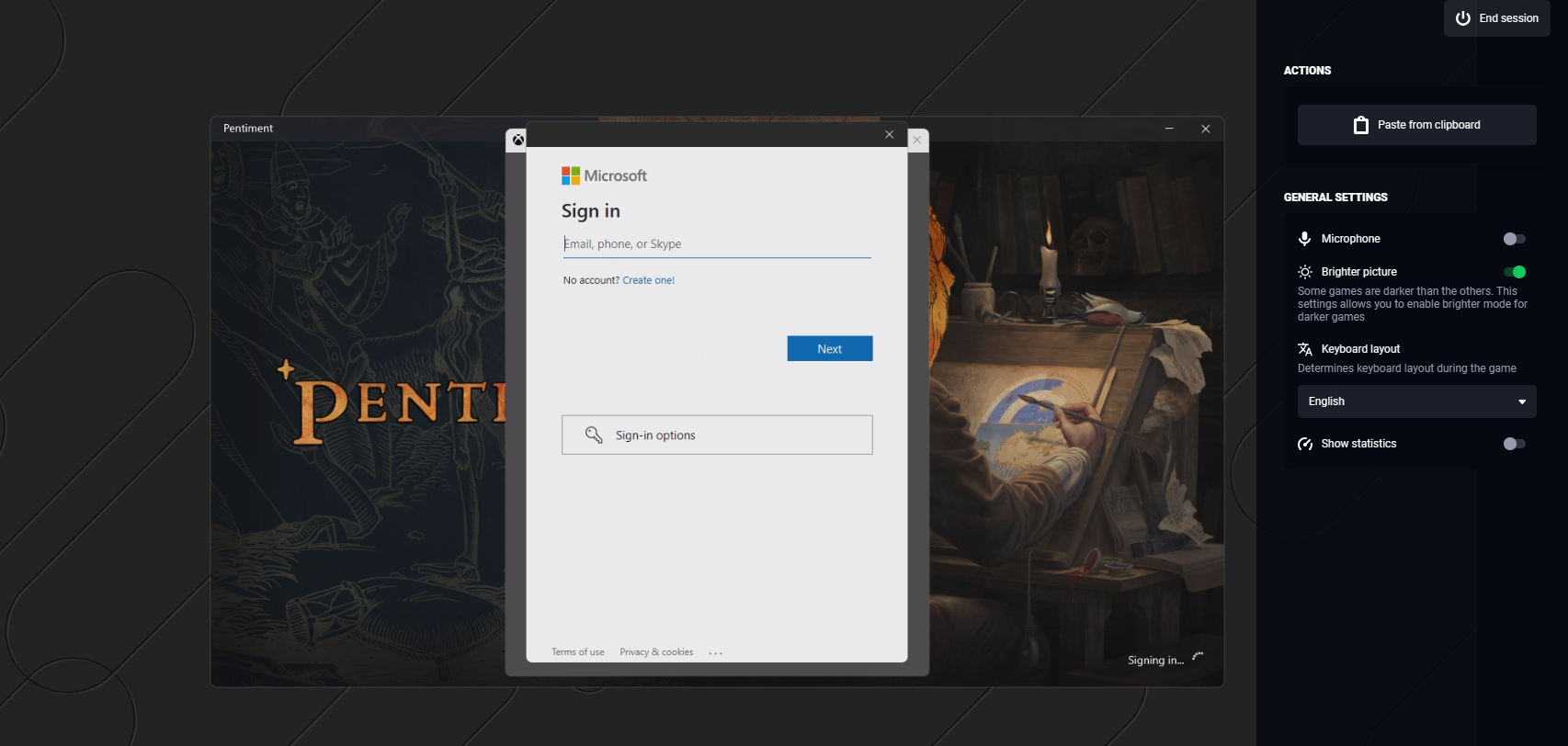
Log into your Microsoft account that owns the game or has your Xbox Game Pass membership.
Confirm your Microsoft account and you’re good to go.
You’ll have to keep in mind that running Game Pass and Microsoft Store games on Boosteroid will vary in experience depending on your location, Internet connection speed, hardware, and software, so you might have a better experience on one certain device in one certain location, than other locations.
Word for the Web, the version of Microsoft Word that can be accessed on an Internet browser, introduces new formatting options that bring it closer to its standard desktop version.
According to the official blog post, Word for the Web now has no less than 3 exciting new features: support for headers/footers, multi-column layouts, and line numbers.
What can you do with them? Well, according to Microsoft, you can:
Add headers and footers to your document—this supports consistency and organizational goals and adds a more professional look to your documents.
Change the layout from single- to multi-column—this helps you increase the readability of your content, optimize the space, offer design flexibility, and much more.
Display line numbers—this is particularly useful when you need to refer to specific lines in a document, such as a script or a legal contract.
Microsoft
They’re also quite easy to use.
1. Open a new or existing Word document inside Word for the Web.
2. To add headers and footers, select Insert > Header & Footer, and then choose your preferred settings.
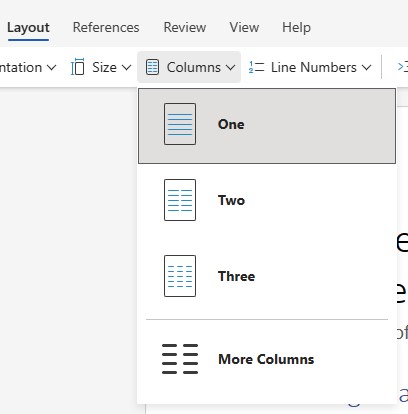
3. To add columns, select Layout > Columns.
4. You can select one of the preset options (One, Two, or Three), or More Columns, depending on your preferences.
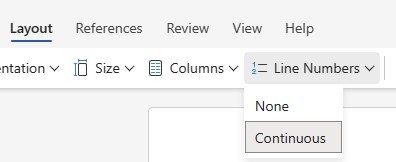
5. To add line numbers, select Layout > Line Numbers > Continuous.
These new capabilities are now available to all users, immediately, and you can also leave your feedback about them, and Microsoft will consider it in the next patches.
Word for the Web has seen several other updates lately, with the most recent being the ability to create checklists. Believe it or not, the feature was not available to this version of the Word app, and similar to these features, that one also brought Word for the Web closer to the classic Word experience.
While it’s not much, considering this is just a web-based version of the vastly efficient Word platform, it still gets the job done for many tasks.
On February 29, Dell held its quarterly conference call where it released information about its fourth-quarter results, and its COO, Jeff Clark, revealed that the company is also enjoying the benefits of AI adoption, as Dell saw an increased demand of almost 40% for its AI servers, compared to the previous quarter.
There was a huge demand for the H100, H800, H200, and MI300X, GPUs, which pleased manufacturers NVIDIA, and AMD, and Clark stated that while this demand continues to outpace GPU supply, and users are excited about AI, he also said that the future of AI is on-premises, as 83% of all data is currently stored this way.
We believe the long-term AI action is on-prem, where customers can keep their data and intellectual property safe and secure. AI will ultimately get deployed next to where the data is created, driven by latency.
Jeff Clark, Dell
Clark’s opinion is the opposite of Microsoft’s actions. Microsoft, arguably one of the biggest players in the AI industry at the moment, has been actively investing in, developing, and releasing AI-related technology, and is planning to integrate its future Windows versions with AI.
The company has also been investing in multiple data centers that can support AI development, as well as AI data storage, across the world, the latest of these investments being done in countries all over Europe: from Spain to France, Germany, Italy, Greece, and many others.
Even more, Microsoft has taken a pledge to make these data centers environment-friendly, with many of them being able to function in a carbon-negative, water-positive, and zero-waste situation.
These data centers will be the ones that will support the local AI infrastructure, and Microsoft will use them to update these countries’ systems with AI technologies. But they will also support AI-based cloud technologies, and they will effectively be able to become storage units for AI data.
But if the general shift is directed towards on-premises AI, as Dell argues (and it has the data to prove it), then why isn’t Microsoft seeing it? It could be very well that the Redmond-based tech giant might be trying to become the trendsetter here: as in, if the company builds more data centers specifically for AI development, then the industry will follow, and this would become the norm.
The AI journey is only at the beginning, as Clark said in the Dell conference call, so it’s too early to call the shots on the topic of AI on-cloud vs. AI on-premises.
Microsoft has been at the forefront of AI research ever since the concept gained popularity, and the Redmond-based tech giant has been investing in new AI models and new methods to train them.
The results are not shying away: the latest AI innovation comes in the form of ResLoRA, developed by a group of AI researchers at the School of Computer Science and Engineering, Beihang University, Beijing, China in collaboration with Microsoft.
The method is capable of advanced AI training in a much faster time, and it’s suited to train AI models with specific capabilities, including natural language generation (NLG), natural language understanding (NLU), and task-to-image tasks.
ResLoRA is an improved version of LoRA, which is an existing PEFT (techniques to fine-tune large language models efficiently) method used for fine-tuning LLMs. When LoRA couldn’t be updated to suit the needs of the current AI training technologies, the scientists at Microsoft added extra paths (or residual paths) to it.
Then, while using the model, they merged the extra paths to get better results in training. They managed to do it: ResLoRA achieved better performance with fewer training steps and without any extra parameters or inference costs compared to LoRA.
The paper, which can be read in its entirety here, explains that ResLoRA works well for tasks such as natural language generation (NLG), natural language understanding (NLU), and text-to-image tasks, and it’s capable of providing advanced training to AI models in regards to them, much faster.
Microsoft made the code for ResLoRA available on GitHub, and AI enthusiasts can use it to train their own AI models with advanced capabilities in generative tasks. Plus, as the team behind it says, the tech requirements are not impossible.
Our experiments run on 8 NVIDIA Tesla V100 GPU. The results may vary due to different GPU models, drivers, CUDA SDK versions, floating-point precisions, and random seeds.
AI modeling and training are known to consume a lot of power and need advanced computing to work, but ResLoRA doesn’t ask for much.
The method seems to be light years away from models such as Project Rumi, Orca 13B, or many others that Microsoft helped research and develop. But with AI technology growing at an incredible rate, this is expected.
In the wake of several highly publicized security breaches, Microsoft’s CVP and chief cybersecurity advisor announces expanded security efforts to safeguard the company’s software development process.
Microsoft’s Bret Arsenault announced a renewed commitment to software security for the company that incorporates a new Secure Future Initiative (SFI).
SFI was originally announced by Microsoft vice chair and President Brad Smith back in November of 2023 under three tenants of advancing engineering development that include transforming software development, implementing new identity protections, and driving faster vulnerability responses.
Fast forward to earlier this week and Arsenault is adding to that initiative with additional details and updates to SFI.
Evolving development lifecycles
Since announcing SFI, Microsoft has quickly evolved its previous security development lifecycle to a more flexible continuous SDL that supports CodeQL to 100 percent of its commercial products.
While our code repos go through rigorous SDL assessment leveraging traditional tooling, as part of our SFI work we now use CodeQL to cover 86% of our Azure DevOps code repositories from our commercial businesses in our Cloud and AI, enterprise and devices, security and strategic missions, and technology groups. We are expanding this further and anticipate that completing the consolidation process of the last 14% will be a complex, multi-year journey due to specific code repositories and engineering tools requiring additional work.
Microsoft also broadened its adoption of memory safe languages, donated to the Rust Foundation to help advance the Rust programming language, as well as investing $3.2M into the Alpha-Omega project, and partnering with Google, Amazon, and Alpha-Omega tangentially on the Open-Source Security Foundation (SSF). Through this strategic support initiative, Microsoft predicts it will hasten its ability to cover, analyze and deploy more open-source projects in the near-future.
Fending off identity attacks with tighter protections
Microsoft has also improved its SFI efforts by enforcing the used of standard identity libraries that includes Microsoft’s own Authentication Library (MSAL).
Furthermore, over 99% of internal service-to-service authentication requests, using Microsoft Entra for authorization, now utilize MSAL, highlighting our dedication to boosting security and efficiency in inter-service communications. Ultimately, these milestones further harden identity and authorization across our vast estate, making it increasingly difficult for threats and intruders to move between users and systems.
Eventually, Microsoft would like to automate more of its security infrastructure, and by the end of the year it predicts it will be able to fully automate the management process through Microsoft Entra ID and Microsoft Account (MSA) keys by standardizing the identity libraries used in the company’s most used apps.
Transparency into future security efforts
While it might feel counterintuitive to be transparent about security efforts that aim to undercut evolving threats, Microsoft “remains unwavering in its commitment to continuously evolve our security posture and provide transparency in our communications.”
Without giving any solid dates or times, Microsoft is saying that in the ‘coming months’ it will share further progress on its SFI efforts to strengthen the security process surrounding its software development process.
Google is set to release Chrome 123 on March 19, 2024, and aside from the home network protection capabilities that are going to be introduced to the browser with this version, the tech company will also debut a new way to compress website data.
This new method called shared dictionary compression, will be tested in the upcoming Chrome 123, and it is capable of delivering impressive results, almost reducing the waiting time when accessing websites to 0.
The shared dictionary compression works by detecting and replacing identical data with a piece of data that indicates that it already appeared on the website. In other words, this kind of compression will use a single data unit for all the identical data found on a website.
This way, the compression of a website by using a shared dictionary can be done right from the start, which will greatly reduce the time users wait for the website to load.
Chrome already has a compression method called Brontli, which was the second in a series of methods that started with gzip. Brontli is set to be replaced by the new ZStandard method in the upcoming Chrome 123, and users will be able to see better loading times for websites when browsing the Internet.
Users can also join the trial for the new shared dictionary compression capability that Chrome will generally release sometime in the next months to years. If you’re interested in joining the trial, you can do so by accessing this link. The trial will end on May 1, 2024, and it can be done on Chrome versions 117 to the current 122.
The shared dictionary compression can also be enabled on websites with massive traffic by accessing chrome://flags/#enable-compression-dictionary-transport, and setting the Compression dictionary transport flag to Enabled.
chrome://flags/#enable-compression-dictionary-transport > Compression dictionary transport > Enabled
However, this will only work if the website is accessed on Google Chrome.
Microsoft Teams introduced support for Android Auto, effectively allowing Teams users to connect their Android mobile phones to their cars. This feature will enable them to join meetings from the Teams calendar view, quickly call their speed dial contacts, and see their recent Teams calls while in their car.
Microsoft Teams’ support for Android Auto is not the first time the Redmond-based tech giant has sought to integrate its services into automobile devices. Microsoft recently partnered up with transportation unit manufacturer, Bosch, to integrate cars with generative AI, so that drivers can enjoy safer road trips.
This new capability is part of a wider array of new features released to Microsoft Teams in February 2024, and according to the official blog post, Teams users on mobile will greatly benefit from them.
Take, for instance, the Teams private line capability: we reported on it a while ago, when we spotted it in the Microsoft 365 Roadmap, but the feature is now available to users and, as Microsoft says, administrators can now enable a private second phone number for a user so they can receive incoming calls directly, bypassing delegates, admins, or assistants. A unique notification and ringtone distinguish calls to the private line.
Plus, Teams’ Operator Connect, which is another option for providing Public Switched Telephone Network (PSTN) connectivity with Teams and Phone System, has been expanded to 94 countries, and it will give companies more options to choose from when it comes to managing mobile services.
Android devices are also the topic of another Microsoft Teams update: the daily maintenance restart window for Teams Rooms on Android devices, which enables an automatic maintenance period for Teams Rooms on these devices, every morning between 2 AM and 3 AM, in the local time zone, but IT admins can change or customize the time period as they see fit.
By default, a Teams Rooms on Android device is set to restart between 2:00 AM and 3:00 AM based on its local time zone, unless it is being used during that time. In that case, the restart is postponed to the next day. IT administrators can disable this feature or modify the restart window from the device settings.
Microsoft
The Redmond-based tech giant also added Copilot for Finance to Microsoft Teams, which will help professionals make better and faster financial assessments, create customer account summaries, and generate meaningful presentations based on the available data.
So, as you can, February was a big month for Microsoft Teams.
Many users were shocked by this decision, since the company didn’t give an official reason for this decision, until today.
Microsoft veteran speaks out on the abrupt Windows Subsystem for Android retirement
As reported by Windows Central, Microsoft’s Andrew Clinick, who worked as Partner Group Program Manager of WSA for two years, decided to shed some light on this sudden decision.
Store revenue pays the bills and salaries of the wsa team. WSL acrues to azure and vs so has a profit center. WSA without a store is awesome but doesn't help windows financially
According to him, WSA failed to generate profit, and the lack of Google Play support was the nail of the coffin for this feature.
Many, including us, doubted the success of this feature because Amazon Appstore offers a fraction of the apps that are available on the Google Play store.
Andrew was asked why didn’t Microsoft just host the apps themselves, but it was impossible to find apps to host that don’t rely on Play services.
Turns out standing up a store and attracting apps is mighty difficult. Then you factor in that Google play services isn't there. Difficult to find an app with a large audience that doesn't use Google play services
It seems like Microsoft is on a spree to release products and introduce new features. The latest in the series is Feed Labels, an upcoming feature in Microsoft Advertising that lets you group products across different feeds using a common attribute, be it category, brand or language.
For instance, if you sell products across different countries, simply create a Feed Label and apply it to all the concerned feeds.
Now, when you create a campaign and choose the pre-set Feed Label, the system will run ads that showcase products across the feeds that are a part of it.
Source: Microsoft’s blog
Also, based on the chosen Feed Label, the system will automatically identify the feeds from the selected Merchant Center stores to be included in the ad campaign. Though, the option to showcase all products in a single campaign is also available.
In the official blog post, Microsoft confirms that the Feed Labels feature will start rolling out by mid-March2024, and all advertisers should have access to it by the end of the month.
Remember, Feed Labels are different from Custom labels. Microsoft, in the official blog post, explains it as,
Custom labels are useful for creating granular bid strategies and reporting within a campaign, while feed labels are useful for creating broad targeting strategies across multiple feeds and campaigns.
Feed Labels will help advertisers take their minds off the trivial things and let them focus on creating ideas for campaigns. At least, that’s our initial impression of the feature. For a first-hand review, we will have to wait for the official rollout later this month.
Also, Microsoft’s release of Performance Max on the advertising platform will help you leverage the capabilities of AI for effective campaign management.
What’s your initial impression of Feed Labels? Share with our readers in the comments section.
According to the Microsoft 365 roadmap website, Microsoft is developing the ability to send video clips to the channels, set to roll out in April 2024. The description of the feature says:
You can now use Teams video clip in channel, in addition to chat. Record yourself, your screen, or an audio-only clip and attach the video clip to your channel post or reply.
As the description indicates, you can record yourself and your screen to explain a new project, showcase your Excel skills to your buddy, or provide details about a case. When rolled out, the feature will be available on Windows, Android, Mac, and iOS.
The feature aims to help users express themselves efficiently in the team channels and is good for communication and collaboration; however, it could be potentially misused. People might send inappropriate content, use the feature for spamming, or share irrelevant content.
With that being said, this feature is good for effective communication, but we must always remember to practice secure communication practices while using it to maintain a healthy work environment.
What are your thoughts on this feature? Share your opinions in the comments section below.
Google has introduced some new features to its AI chatbot that allow you to modify the responses given by Gemini.
This sounds impressive at first glance, and it works even better in practice, so keep on reading to learn more.
Gemini update gives you the ability to modify responses more intuitively
Google recently updated Gemini, and this change was spotted by Gadgets 360. This update gives users the ability to modify a specific part of the response with just a few clicks.
In the past, users had to regenerate the entire response, but that’s not the case anymore. Simply select the part of the response you want to modify and click the pencil icon to edit it.
From the menu, you’ll get the option to regenerate the response, make it longer or shorter or remove it completely.
You can also apply prompts to the selected text and change it accordingly. Of course, it’s just as easy to revert the changes, and it takes just a single click.
This is an amazing feature, and it will allow users to fine-tune their responses and get perfect results every time. We hope that other AI chatbots will soon follow suit and add a similar feature.
The event description for Microsoft’s March event says
Tune in here for the latest in scaling AI in your environment with Copilot, Windows, and Surface.
The Redmond tech giant will announce new Surface hardware, new features for Windows 11, and Microsoft Copilot, and the event is targeted at the company’s business customers.
Surface Pro 10 will come with an OLED display, and the new Surface Laptop 6 will have thin display bezels, a haptic touchpad, rounded corners, one USB-A, and two USB-C ports.
These upcoming devices are expected to have improved CPU and NPU pairing and are supposed to perform better than their predecessors as they will come packed with Intel Core Ultra and Snapdragon X Elite-based processors.
With Copilot integrated into Windows 11 and superior hardware, Microsoft is planning to call them AI PCs. These devices will launch in the coming weeks.
The ones with Intel hardware will be available from the beginning of April, while the ones with ARM-powered hardware will be out in June. The prices for the new Surface devices are presently not mentioned anywhere, guess we have to wait for the event.
For the first time, both Microsoft Surface Pro 10 and Surface Laptop 6 will have the ARM. However, if you want to learn more about them, we need to wait a bit longer.
The company will also discuss new Copilot and Windows features, probably connecting them with the next-generation NPU found in the new devices. Rumor has it that Microsoft is also working on AI Explorer, which will act as an advanced Copilot, cataloging every action on your PC so that all of it becomes searchable with the help of natural language.
You can expect the company to announce the much anticipated Windows 11 update, Windows 11 version 24H2, and upcoming AI improvements and new features in the operating system.
Microsoft Surface fans have high expectations for this hardware event, as they have been waiting for a new Surface device for two years.
With new hardware and advanced technology emerging every year, Microsoft has to introduce exciting features and advanced hardware devices to ensure they remain competitive in the market.
We will keep tabs on the event and talk about the announcements more after the event. If you have any questions or suggestions, feel free to mention them in the comments section below.
In a surprising turn of events, Remedy has announced lowering the minimum system requirements for Alan Wake 2 on PC, starting with version 1.0.16.1.
In a post on X (formerly Twitter), the team shared the new system requirements.
We've been optimizing the PC version of Alan Wake 2, and as a result the minimum PC system requirements have been lowered. Please check the updated image!
These changes take effect with update 1.0.16.1, out on PC now.
The difference, as clearly visible in the post, is with respect to the GPU (Graphics Processing Unit). While the minimum GPU requirements previously were GeForce RTX 2060 and Radeon RX 6600, it’s now lowered to GeForce GTX 1070 and Radeon RX 5600 XT.
New system requirements for Alan Wake 2
Also, those on the GTX 10xx series should get a decent performance after the rollout of the latest version, 1.0.16.1. This isn’t just a performance-based update but will also let millions run Alan Wake 2 on PCs that were previously unsupported.
However, there are still concerns about the 16 GB RAM requirement, an Intel i5-7600K or AMD equivalent CPU, and 90 GB free SSD storage.
While it’s understandable, given the experience (graphics and rendering) developers intend to deliver, slightly cutting back on these will allow millions more to play the action-packed horror game!
On supported PCs, you can download the Alan Wake 2 from the Epic Games store.
If you have already played Alan Wake 2, share your review with our readers in the comments section.
According to Microsoft’s announcement, the Viva Engage customers wanted to use the tool for blogging so that’s what they’ve got now.
The new Articles tool helps them insert rich media in their post like on WordPress, but also keeping everything under corporate supervision.
This new feature is addressed to the communication specialists within organizations to be able to convey their message to all the staff. It’s just like an inside corporate blog. After the post is live, everyone within the organization members will be able to view, react and comment.
What’s new about Articles in Viva Engage?
With Articles, you will be amble to write long-style posts and newsletters using the whole range of formatting tools
For example, you will be able to use quote blocks, images, and even code blocks within the posting. Also, the design will be automatically adapted to mobiles, and email inclusion.
You can also schedule the content for publishing content at a certain time and admins will have access to analytics data for each post.
However, the most important part is that you will be able to work with Copilot to create and improve the content and, obviously, that will make everything faster for the communication managers.
Another interesting feature is that you can split the content feeds within your organizations. In other words, you could have separate blogs created by the leaders and employees and send notifications based on the content of the posts.
Certainly, the new Articles feature from Viva Engage will spring up the action and communication within organizations. Or, at least, the internal blogs will look a lot better.
Does your organization use Viva Engage? Tell us about your experience in the comments section below.
Flight Simulator is a popular gaming series, and if you want to take it to another level, you can add various new content to it.
The game has a very active community that constantly releases new add-ons, and today we’re going to show you a couple of great ones that we came across recently.
These community add-ons will introduce new airports to Flight Simulator
As reported by TechRaptor, Flight Simulator has some impressive add-ons, and the first on our list comes from Flightbeam Studios. This one adds San Francisco International Airport (KSFO) to the game.
According to the developers, they have passed an important milestone and we expect to see finished results before the summer.
Another airport is being developed but by a different group called VueloSimple. Currently, they are developing Ivato International Airport in Madagascar. No release date is available, but we hope to see it soon.
The last mod is a something bit different, and it comes from Red Wing Simulations and it lets you fly LZ 129 Hindenburg Zeppelin in the game.
These are some impressive add-ons, and we have to give credit to the passionate and dedicated community.
If you run the Spotify app, be it on a mobile or PC, do check the data usage when on a limited plan. As it turns out, a few are complaining about Spotify’s high data usage, sometimes to the tune of 100-300 GBs, even when the app usage was barely a few hours per day.
In a recent case, a user through a Reddit post claimed that Spotify consumed 300GB after using it for a few hours daily. This is extremely high with no possible justification!
When I checked the data consumption on my devices (a Windows PC and an iPhone), it was in the normal 1-5 GB range. I personally use it less than an hour a day for a handful of songs and podcasts.
So, the problem is most likely limited and does not affect everyone, as is evident from what many others have to say.
I believe it wouldn’t use up that much data. I have a 100GB plan and throughout workdays I do spend around 3 hours daily, sometimes more sometimes less, watching some YouTube, or anime while going places. The highest total I’ve gotten was on a work trip abroad since mostly on mobile data since my hotel room had horrible wifi, and it was 60gb. Now if they watched that much on 4-8k, possible. But afaik in most cases you won’t even get it as an option… So I’m likely to believe that it’s not quite possible.
I listen to Spotify on my phone A LOT. I’m talking podcasts and music for the bulk of my 8 hour shift, and during my commute in and out of the office and I’m only at 65 gb for the month.
Verified workarounds to reduce Spotify’s high data usage
Choose Low quality for Cellular streaming: Open Spotify Settings from the top-right corner > go to Audio Quality > choose Low under Cellular streaming.
Turn on Data Saver mode: In Spotify Settings, go to Data Saver > enable the Data Saver toggle, as well as the ones for Download audio only and Stream audio only.
Limit Spotify’s data usage in Settings: You can turn off an app’s access to mobile data from the built-in device settings. Doing so would only let it connect to the Internet when on Wi-Fi.
Besides, Spotify should not be set to download playlists and podcasts automatically. This turned out to be the underlying cause for most.
With one of these tricks, you should be able to lower Spotify’s data usage, but raising a ticket with Spotify support is vital as it will highlight the problem to the developers.
Recently, we have told you a few things about a new text-to-video tool called Sora AI, and why it will change the ad and video industry as a whole.
While it’s still in the testing phase, Open AI released a lot more demo videos that are equally amazing, showing the new LLM capabilities.
The new Sora AI clips are breathtaking
https://www.youtube.com/watch?v=Ua5dGqBDlb4
In the clip above, you will see only a few examples collaged by AI-nstein, but there are a lot more featured on the Open AI’s Sora webpage you can browse and watch.
It’s pretty hard to talk about all of them, but as you can see, the AI bot managed to recreate the image of the world globe into a virtual character’s eye and it has drawn a very realistic alien roaming through New York as it belonged there.
But that’s not all. Sora AI can combine cartoon charters and blend them into realistic representations and depict virtual animals playing and acting.
The text-to-video bot still has weaknesses. Some, as described by the Open AI team, are the difficulty of getting the right spatial details, mixing directions and following the camera path:
The model may also confuse spatial details of a prompt, for example, mixing up left and right, and may struggle with precise descriptions of events that take place over time, like following a specific camera trajectory.
Open AI
As there is a lot of fuss nowadays about the legitimacy of AI-generated content, the Sora AI team wants to include C2PA metadata in the clips to prevent misleading these videos with actual real footage, or to prevent any inappropriate prompts:
Once in an OpenAI product, our text classifier will check and reject text input prompts that are in violation of our usage policies, like those that request extreme violence, sexual content, hateful imagery, celebrity likeness, or the IP of others. We’ve also developed robust image classifiers that are used to review the frames of every video generated to help ensure that it adheres to our usage policies, before it’s shown to the user.
Open AI
Besides that, the new Sora AI demo clips are amazing and show a promising future for video-generated content. However, this might be bad news if you’re working in the film industry.
What do you think about Sora AI? Share your thoughts in the comments section below.
At the Reimagine Education 2024 event, Microsoft announced innovative ways to use its AI tools to explore new possibilities, establish strong foundations, and prepare students for the future.
One of them was the introduction of Copilot to the additional educational audience. Microsoft Copilot with commercial data protection is available with all the Microsoft 365 Education offers, including the zero-cost license.
Now, a private preview program for Copilot with commercial data protection will be available for students younger than 18 starting in the Spring of 2024.
Microsoft announced:
Starting April 1, 2024, Copilot for Microsoft 365 will be available for higher education institutions to purchase as an add-on for their students aged 18+.
To be able to access it, a student must have Microsoft 365 or Office 365 A3/A5 licenses.
Microsoft further mentioned in the post:
Integration across Microsoft 365 applications provides seamless performance, so you can:
Stay on top of all your chats, remote classes, meetings, and calls with Microsoft Teams.
Create, comprehend, and elevate your documents in Microsoft Word.
Keep up with your inbox and manage follow-ups in Microsoft Outlook.
Turn your inspiration into stunning presentations in Microsoft PowerPoint.
Analyze, comprehend, and visualize data with ease in Microsoft Excel.
The company also ensures that Copilot’s commercial and academic version comes with a Customer Copyright Commitment, meaning the users won’t have to worry about copyright claims while using the services.
Apart from this, Microsoft also announced the introduction of free AI features to streamline teachers’ tasks along with The Microsoft Education AI Toolkit.
Additionally, they also mentioned in the event that Microsoft Defender for Endpoint, a feature specially designed for protecting student devices, will soon be available at a discounted price to Microsoft 365 A5 customers.
If you want to watch the complete event, you can watch it here. What are your thoughts on this matter? Share your opinions in the comments section below.
Cyber attacks are getting advanced in nature, and it’s becoming increasingly difficult to tackle them. In the latest developments, a new WordPress brute force attack is employing the end user’s browser to target thousands of websites.
First reported by Sucuri Security, the new brute force attack is an advanced iteration of the already prevalent Web3 Crypto Wallet Drainers, an active threat for over a month that uses drainers to steal crypto assets from compromised wallets.
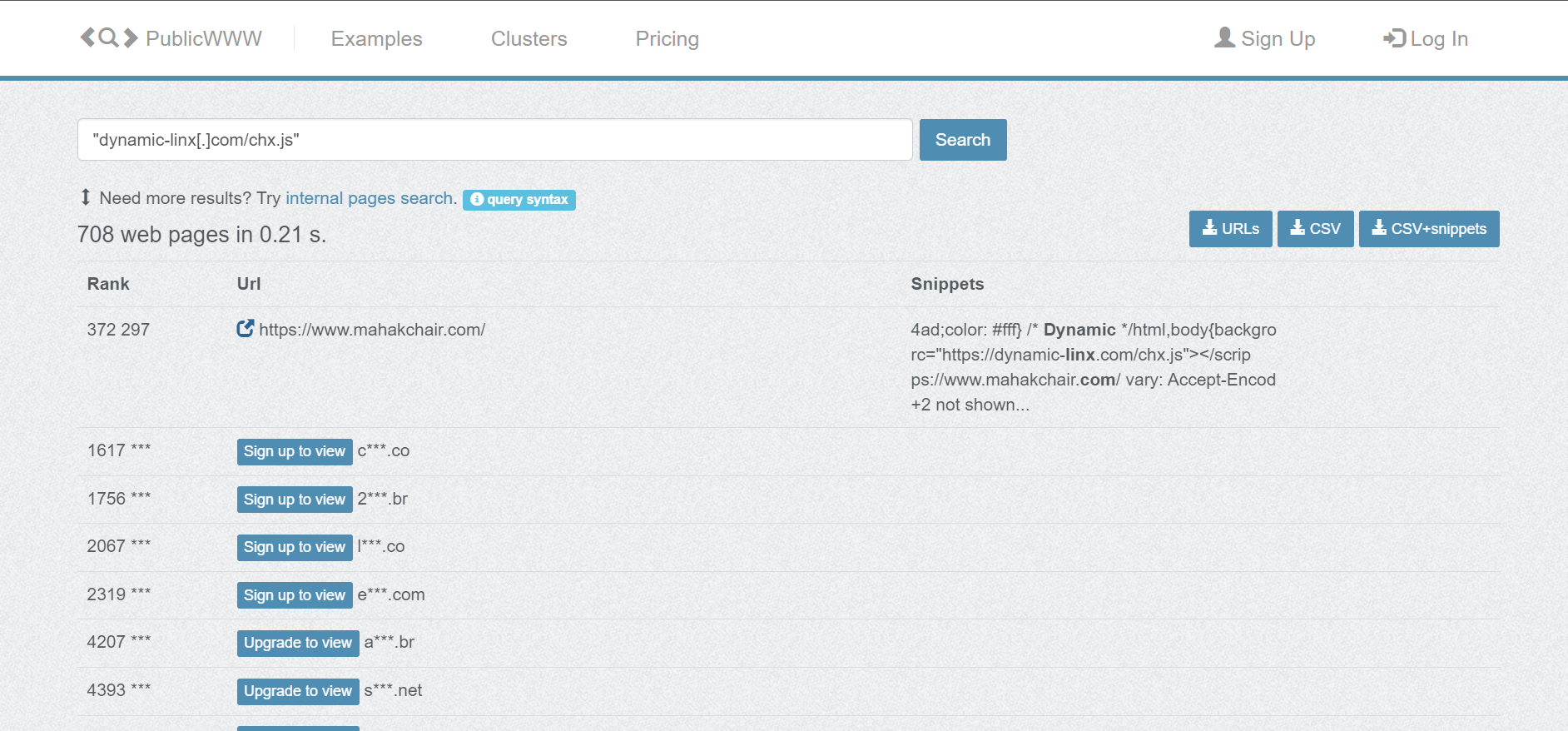
According to Sucuri Security, the new 3Kb long script, dynamic-linx[.]com/chx.js, has been injected on over 700 websites and counting. Once a website is compromised, attackers can automatically use the visitors’s web browser to attack more, and the chain continues!
The challenge for cyber security experts here is filtering requests from real, legitimate users who were exposed to such websites.
How does the attack work?
It’s a complex multi-step process, and we have tried to break it down for you in simple terms:
Threat actors identify WordPress websites that can be compromised, extract details of admins with access to them, and then inject the dynamic-linx[.]com/chx.js script.
When you open a compromised webpage, the script gets into motion, your browser asks hxxps://dynamic-linx[.]com/getTask.php for a task. The task is basically conducting a brute-force attack on another website using the provided set of credentials.
If the brute-force attack from the end user’s browser succeeds, it automatically creates and sends a small text file with the correct credentials to the threat actors.
Once a task is completed, another is automatically shared with the browser, which continues until the infected webpage remains open.
For the unversed, a Brute Force Attack works by bombarding the authentication servers with a wide array of login credentials (starting with simpler ones and then moving to complex sets) with the hope that one would work.
According to Sucuri Security, the only plausible reason why threat actors moved from Web3 Crypto Wallet Drainers to WordPress brute force attacks is that the former couldn’t be scaled and was easy to detect. As a result, infected websites were soon blocked.
So, threat actors could be trying to infect as many websites with different unnoticeable scripts before launching an attack that’s more profitable.
Measures to prevent the attack
At present, with minimal information about the scale and intricacy of the WordPress brute force attack, having a secure password and deploying IP-based restrictions on access to critical parts of the website could help.
Brute force attacks are getting complex in nature, and protecting your website or data is becoming all the more difficult. So, it’s time you gear up and choose an advanced website security software!
For users, a combination of an antivirus and firewall will provide the necessary web-based protection. Besides, practicing good cyber hygiene will keep you safe from similar attacks.
If you know more about the attack that could help our readers, share it in the comments section.
GitHub released a new Learning Pathway for businesses called AI-powered development with GitHub Copilot. It has eight guides to help you and your team understand the AI. Furthermore, with it, you can use GitHub Copilot as an assistant. With its help, you will deliver better products in a shorter time. In addition, the new Learning Path covers multiple commonly asked questions. So, you should check it out. Maybe they already covered some of your curiosities.
What is GitHub Copilot used for?
GitHub Copilot is for coding, and it can complete your code, verify it, and add suggestions. Furthermore, it can explain everything to you. In addition, with the new Learning Pathway, it will be easier for you to comprehend its features, and you will be able to use most of them better. Also, you can explore the eight guides available at your own pace. After all, it is important to learn about the GitHub Copilot and not to rush for an achievement. On top of that, at the moment, the new Learning Pathway covers just the essentials.
The eight guides available on the new Learning Pathway cover various subjects, such as quality and security improvements, user and data management, improved learning, contractual protection, and more. So, you and your team should take your time and go through each one of the sections. On top of that, from this pathway, you will also learn how to improve your prompt generation. After all, it is one of the most important practices when you work with AI.
In a nutshell, the new Learning Pathway from GitHub will offer you the essentials needed to start using GitHub Copilot. Furthermore, with it, you will understand AI better and gradually generate better results. In addition, the new Learning Pathway is free, and you don’t need to rush through it, especially since it covers commonly asked questions.
In addition, each guide contains insights from representatives of ASOS, CARIA, Cisco, Lyft, Philips, Redfin, and Shopify. So, give the Learning Pathway a try. By the way, consider using GitHub Copilot Enterprise because it has the most features.
What are your thoughts? Are you going to give it a try? Let us know in the comments.
GSC Game World announced the arrival of the S.T.A.L.K.E.R Legends of the Zone Trilogy on Xbox Series X/S and Xbox One. The Trilogy includes all three popular S.T.A.L.K.E.R. games: Shadow of Chornobyl, Clear Sky, and Call of Pripyat. Available via backward compatibility, players can enjoy the game in a high-fidelity mode.
You can purchase these titles separately for USD 19.99 each or get the Legends of the Zone Trilogy bundle from the Xbox Store for USD 39.99.
Every element from the original games has been maintained and faithfully ported to console thanks to the hard work of GSC Game World and their partners at Mataboo.
This all makes for a great opportunity for Xbox gamers everywhere to get some foundational knowledge of S.T.A.L.K.E.R.’s universe in the lead-up to the launch of S.T.A.L.K.E.R. 2: Heart of Chornobyl, coming day one to Game Pass on September 5, 2024.
He further mentioned that bringing these hardcore PC games to an Xbox controller was not easy. As the series is a blend of first-person shooter, horror, immersive sim, and exploration genres, getting it right was vital.
He also said:
Speaking with GSC Game World PR Specialist Zakhar Bocharov, we wanted to learn more about what this process was like, bringing these cult-classic, hardcore PC titles to console, and some of the innovative design and UI adjustments the team had to make to bring all three games to Xbox.
Zakhar Bocharov, GSC Game World PR Specialist, stated:
S.T.A.L.K.E.R. has been a PC franchise for a long time, so the key priorities were concentrated around adapting the experience for consoles as a whole (including, but not limited to, native controller support for console interfaces).
We created everything from scratch, ensuring that the game was both easy to control and comfortable to play.
From the weapon selection wheel, aiming system, to menu navigation, the development team had to work on everything to make sure the game could be compatible to an Xbox controller. Also, they ensured that the essence of the classic PC game, its unique gameplay loop, and the feeling of conquering the hostile environment of The Zone stayed intact.
Bocharov also mentioned:
We wanted to bring S.T.A.L.K.E.R. to consoles for quite some time, and we worked closely with our trusted partners at Mataboo to make that happen. Despite the new release date for S.T.A.L.K.E.R. 2, we decided to keep S.T.A.L.K.E.R. Legends of the Zone Trilogy in early 2024 to give the players some time to complete the originals before hopping into the sequel. S.T.A.L.K.E.R. 2 is a direct continuation of the plot and a standalone title, but obviously knowing the previous events and characters would help you to enjoy certain story moments, nods, and Easter eggs better.
The version available for Xbox consoles is similar to the classic PC version of S.T.A.L.K.E.R. The Development team is working on releasing a patch with graphical enhancements and other features to the game soon.
The console version will also have mod support through mod.io, but this feature will also be released at a later date.
Launching the trilogy as the release date of S.T.A.L.K.E.R. 2 approaches seems like a strategic move by both Microsoft and GSC Game World. They aim to set the market for the upcoming title, intending for players to get hooked on the trilogy, learn about its background, and provide feedback and insights to the companies in anticipation of the new release.
Have you played S.T.A.L.K.E.R. on your PC? If yes, share your experience and your thoughts about launching it to the console world.
Apparently, many reported seeing Bing’s Deep Search feature in Edge, but not everyone can find it. An X post from Berry Schwartz as spotted by MSPU blew the whistle on the rebirth of this feature which was initially introduced late last year.
Microsoft initially abandoned testing the feature and that’s why its return comes as a surprise.
The company is testing it now with plans of introducing Deep Search everywhere, according to Microsoft’s Mikhail Parakhin.
We are testing it everywhere, the plan is to release everywhere, too.
If nothing has changed, Deep Search is a tool that uses Bing’s web index and GPT-4 to expand the search query with a more accurate description and search results.
For example, let’s say I’m researching loyalty programs in different countries and search for “how do points systems work in Japan”. Deep Search might generate a more comprehensive description like this:
Provide an explanation of how various loyalty card programs work in Japan, including the benefits, requirements, and limitations of each. Include examples of popular loyalty cards from different categories, such as convenience stores, supermarkets, and restaurants. Show a comparison of the advantages and disadvantages of using loyalty cards versus other payment methods in Japan, including current rewards and benefits. Highlight the most popular services and participating merchants.
Parakhin also mentioned on X that Deep Search had more hype than anticipated and meanwhile, the Microsoft team has worked on fixing the caching and making it more robust.
Do you see the Deep Search feature in Bing? Tell us all about your experience in the comments section below.
If you were excited about open beta, you’ll be happy to hear that the final release is not too far behind.
Final Fantasy 14 Online is coming to Xbox later this month
It seems that Final Fantasy 14 open beta was a success on Xbox Series X/S since the release date for the full game has just been announced according to NotebookCheck.
Microsoft has recently released its Xbox Partner Preview’s March update and it states that the game is coming out on March 21st.
To make this news even better, you can get the game’s starter edition for free via a Game Pass Ultimate subscription starting from March 21st to April 19th.
The starter edition has the same basic content as the free trial, but you don’t have restrictions on levels, in-game currency, and other features.
If you’re not familiar with the series, you can still enter the open beta on Xbox and give the game and its first two expansions a try.
In a blog post, Microsoft recently announced that the Customer Lockbox feature is generally available for all companies with Microsoft 365 E5 or Office 365 E5 subscriptions.
The objective of this feature is to ensure that Microsoft can’t access content in your Cloud PCs to do service operations without your direct instruction or order.
It supports requests to access data in SharePoint Online, Windows 365, Exchange Online, OneDrive for Business, Microsoft Copilot for Microsoft 365, and Teams.
In the post, the Redmond tech giant mentioned how the feature should work:
Microsoft support engineers may need to access your content to determine the root cause of an issue and address it. Windows 365 Customer Lockbox requires the engineer to request access from you as a final step in the approval workflow.
With Customer Lockbox, you have the option to approve or deny the request for your organization, and provide direct-access control to your content.
Customer Lockbox is included in Microsoft 365 E5 or Office 365 E5 subscriptions and can be included in other plans that have Information Protection and Compliance or an Advanced Compliance add-on subscription.
To enable Customer Lockbox controls on your Microsoft 365 subscription, go to Microsoft admin center> Sign in. Now, navigate to Settings>Org settings>Security & Privacy> Customer Lockbox.
Click Customer Lockbox, place a checkmark next to Require approval for all data access requests, and click Save to confirm.
Now that you have enabled the feature go to Support, then click Customer Lockbox Requests. You’ll see the list of data access requests, if any. To allow or reject a request, select it and choose Approve or Deny.
If you want to learn more about Customer Lockbox Requests, Microsoft has a dedicated page with detailed information.
Microsoft is committed to improving and increasing the security of its Windows 365 services for companies with Cloud PCs running Windows 11, and introducing the Lockbox feature is proof of this commitment.
What do you think about this feature? Share your thoughts in the comments section below.
Back in 2021, we reported about Remote Access Trojans (RAT) malware attacks delivered through email phishing attacks and it seems like it’s happening again. This time, the attackers who seem to be Russian, trigger other channels like Zoom, Skype and Google Meet.
From the Zscaler’s ThreatLabz security report, the threat actor spreads SpyNote RAT to Android users and NjRAT and DCRat to Windows users.
The RAT is downloaded from fake websites
According to the security firm study, this situation started in December 2023 and it is ongoing so you really need to be cautious on what apps and files you download.
Zscaler’s diagram explains how the scam unfolds. It all starts with visiting a fake download page for the aforementioned communication tools. When you click the download button for Android, you get a malicious APK, and when you click the download for Windows button, you get an infected BAT file.
If you execute the files on your phone or PC, you eventually download the RAT payload.
For instance, the fake join-skype[.]info website was created in early December for Skype malicious download while the online-cloudmeeting[.]pro fake website is mimicking the Google Meet download page.
In the same way, if you downloaded a file called updateZoom20243001bit.bat to install Zoom, your PC finally got a malicious payload in the form of ZoomDirectUpdate.exe, a WinRAR archive that contains the DCRat payload.
What happens if my device got infected with a RAT?
Eventually, the malicious batch script will run a PowerShell script, which, in turn, downloads and executes the remote access trojan.
That means that the attacker will have access to your device and will be able to steal passwords, accounts, credential, possibly getting to your credit card data and steal money from your accounts.
As you see, it’s very dangerous and you should check the legitimacy of the website you’re downloading an app from. We should also discuss how you got to the fake website in the first place. Maybe you have clicked on a link in a fake email that seemed like coming from Zoom, Skype or Google Meet offering you benefits or advertising a false update.
If your device is already infected, use a strong antivirus or reset your device to factory settings to remove the threat. If you didn’t download it yet, watch out for the tale tail signs to discover if the website is real or fake and always use the original source to get the app you need.
Did you download any of the apps above lately? Tell us all about that in the comments section below.
Despite constant improvements, this service has received some harsh criticism lately, so let’s see what the fuss is about.
Copilot image generation gets heavily criticized due to inappropriate content
Copilot is constantly evolving, and the service just got Suno, Adobe Express, and Spotify integrations. However, it seems that some Microsoft employees aren’t happy with Copilot’s image generation.
As reported by Digit, the criticism comes from Microsoft’s principal software engineer Shane Jones. In a letter to the US Federal Trade Commission and Microsoft’s board of directors, he requested for the service to be investigated.
According to him, the Copilot image generator was capable of generating inappropriate content that included violence, underage drinking, drug use, and more.
He also mentioned political bias and presence of the conspiracy theories. He asked for more awareness to prevent any potential misuse of this feature.
Microsoft has publicly addressed these concerns stating the following:
The company is committed to addressing any employee concerns in line with its policies and appreciates efforts to enhance the safety of its technology.
Hopefully, Microsoft will investigate and address these concerns shortly and make Copilot image generation safer to use.
Dead Island 2, released almost a year ago and brought to Xbox Game Pass in Feb’24, has made it to the Most Popular list. The game sits comfortably at the top spot, above Minecraft and Palworld in the US.
As for the UK, Dead Island 2 ranks second in the Most Popular list, just below Minecraft.
Microsoft has never officially shared the metrics used to assess the popularity of a game, but based on reports, it’s most likely the number of downloads, playtime, engagements, and ratings.
Why is Dead Island 2 so popular?
Dead Island 2, with an age rating of 17+, is an action-packed role-playing game (RPG) where players battle zombies in a not-so-serious gameplay. The official website describes the game as, Horror, dark humor and over the top zombie-slaying, in an epic pulp adventure.
Source: Steam
Some users do state that the first 45 minutes tend to be boring, but once you are past the initial stage and acquire advanced weapons, it gets exciting.
I hated this game for the first 40 mins but then it got fun really fast.
Besides, the penalty for a failed mission is minimal, ensuring that you can quickly recover and get back to playing.
The only downside is the short gameplay. If you are an avid gamer, it won’t last more than 12-14 hours of extensive gaming. And the missions are all somewhat similar!
Dead Island 2 is slated for a Steam release on April 22, 2024, so PC users won’t miss out on the fun!
If you have played Dead Island 2, do share your review in the comments section.
In this article, we will walk you through the top 10 most addictive Xbox games. Loved by millions of users globally. So much so that they became addicted to that game itself.
It’s worth mentioning that 7 out of 10 games on this list are available on Xbox pass so you may want to know how to get Xbox game pass on Windows system.
Unlike games with linear storylines, Minecraft offers no specific goals or objectives to clear.
So what makes it so special? The DIY nature of the game. In Minecraft, players have the freedom to build, explore, and create anything. The only limit is your imagination.
In Minecraft, you can create working machines, and replicas of real-world landmarks and collaborate with other users to create a big project.
Also, this game is filled with hidden messages and secrets. For example, you can survive a fall from a height of 32,000 blocks (the maximum height limit) by landing in a specific water configuration.
If you’re someone whose childhood revolved around pirate stories, then The Sea of Thieves is the perfect game to fulfill all your childhood dreams through a controller.
In Sea of Thieves, you get to create your own pirate legend including his appearance, sailing through the sea, crew up with your friends, and of course attacking enemies to protect or collect the money.
Sounds boring? Solving riddles and maps to unearth hidden treasures, fighting sea monsters like the Kraken or the Megalodon, collecting specific animals, and transporting cargo is what makes it so addictive.
If all goes well, you become a pirate legend, granting access to special quests and areas in the Sea of Thieves.
For every racing game enthusiast, Forza Horizon 5 is a true definition of what is called heaven, as I’ve seen players building a custom PC so that they can use the best steering wheels available to Windows computers. The hype is real!
You get to choose from 500+ cars, most of which are based on real-world counterparts licensed from various manufacturers across numerous eras, just to provide an authentic experience.
Apart from the wide range of cars, you get access to outstanding graphics set in a fictionalized representation of Mexico which will blow your mind for sure.
Unlike other games on the list, Stardew Valley is a relaxing, open-ended farming simulator where you cultivate crops, raise animals, and manage your resources to turn your overgrown plot into a thriving farm.
Sounds boring? You get to explore the town, build relations, personalize your farm, and most importantly relax while playing this game. You set your own goals and pace and decide if you want to focus on farming or take a break to go fishing by the river.
To me, Stardew Valley feels like a break from the high-end multiplayer games where they eventually become a burden to complete rather than a source of happiness.
Elden Ring is the perfect example of how impactful storytelling can be in games. Unlike other games, Elden Ring unfolds eventually through dialogues and details.
But that’s not it. Challenging bosses are waiting to be conquered. It challenges your patience, precise timing, and how quickly you adapt to an entirely new fighting style.
Overall, Elden Ring is an immersive and challenging open-world RPG that encourages you to go into the wild, win over new enemies, explore, and piece together a cryptic narrative.
Playing soccer in rocket-powered cars. Sounds a little silly, but when you team up with your friends, you get quick bursts of adrenaline-fueled fun.
The reason why Rocket League is so addictive is the premise was kept super simple while offering a high skill ceiling for experienced players. But the best part of Rocket League is thrilling competitive matches.
These matches are short and dynamic, which eventually creates a competitive atmosphere. In the end, you get nail-biting finishes to engage every user till the end of the match.
For me, the ability to create custom maps, and game modes and sharing with friends was enough to fall for this game, but there are various other reasons why Halo Infine is one of the most addictive Xbox games.
The open world of Halo, Zeta Halo, is constantly evolving, so you are in an endless loop of new maps, challenges, and even biomes that will be enough to engage you for a long time.
But how many games for famous for their music library? Halo Infinity is one of very few on the list. The music dynamically adapts to the current situation and features both brand-new tracks and iconic pieces from previous Halo games.
And yes, a series of Easter eggs are there in case the gameplay was not enough to make you addicted.
The Elder Scrolls V is filled with hidden messages such as messages translated from the ancient dragon language hinting at the location of the first Word Wall players encounter later in the game.
By strategically using spells and glitches, it is possible to achieve feats like becoming an invincible dragon. Sounds so cool. Right? Well, that was just one example.
The game is also heavily inspired by various real-world locations and cultures while creating Skyrim. Such as architecture is heavily inspired by Scandinavian and Nordic cultures.
Also, the game features over 337 unique books, allowing players to delve deeper into the game.
I’ve played hundreds of simulation games, but no one was close to this one in terms of how addictive it can get once you start taking this game seriously.
The game features Chirper, a fake social media platform where citizens express their opinions. While it may not have a substantial effect on the actual gameplay, it adds a layer of humor and joy.
You also get natural disasters, functional in-game radio with various music stations, and sure strategic gameplay to keep thoughts busy even if you are not playing.
Overall, if you want to simulate the real world as closely as possible, Cities: Skylines is the perfect option.
This game needs no introduction, even if you’re not a football fan.
But if you’re a football fan, then playing as your favorite player feels like a dream. The ability to build virtual teams by acquiring virtual player cards is nothing but a mind-boggling experience.
The best part is, that once you start acquiring powerful players to create a dream team, you become a FIFA addict as it keeps you engaged and motivated to play more.
While the term addictive game is totally subjective, we went through multiple forums to find the most addictive Xbox games for you. Have also added a few based on the current trends.
In case you didn’t know, Microsoft has its own in-house Linux distribution that it uses for various purposes.
It seems that this distribution went through some changes recently, so in today’s guide we’re going to take a closer look at what’s now with this distro.
Microsoft rebrands CBL-Mariner Linux
That’s right, Microsoft has its Linux distribution, known as CBL-Mariner, which stands for Common Base Linux. However, as Phoronix reports, that’s not its name anymore.
The distribution is changing its name to Azure Linux as evidenced by its new name on the GitHub repository. This coincides with the release of the new 2.0.20240301 version.
It’s not just the name, the code has been updated as well, and now instead of MARINER_VERSION, you can find AZL_VERSION.
So far, the reason for this change remains unknown, and maybe Microsoft has some big plans for Azure Linux in the future.
Academy Awards are coming, and Microsoft uses this opportunity to accommodate you to some of Windows 11 features. After all, it allows you to stream, record, and use the AI to answer your questions. Furthermore, you can use Copilot to manage your time and tasks. Also, you can use the AI to learn more about the nominees.
Can I use Copilot to watch the Oscars?
You can use Microsoft Copilot for free, especially for the Academy Awards event. All you need is to log in using your Outlook or Hotmail address. Afterward, you can use more features like the text to image generation. Furthermore, you can use it to discover new ways to entertain your guests. Also, you can ask Copilot for more information about the nominated movies, actors, and TV shows. On top of that, you can use the AI to create lists and manage your groceries before the event.
However, Copilot is not the only tool that can improve your experience. In addition, you can use some of the Windows 11 features, like screencast (Win + K), recording (Win + Alt + R), and screen capture ( Win + PrtScn). Furthermore, you can use Microsoft Edge add-ons to watch the Academy Awards with your friends. Also, Microsoft recommends the following plugins: Teleparty, TwoSeven, and Hulu Watch Party.
Make sure to bring your creativity along while you are planning the night. After all, if you use creative prompts, Copilot will be able to understand your needs better. So it will generate greater things to do while watching the show. Also, you can use Microsoft Sheets to list your predictions about the Academy Awards.
Ultimately, you can use all of the available features. Furthermore, if you host the party at your place, you could take the party to the next level. In addition, if you have a Surface Laptop Studio 2 or other Surface devices, as suggested by Microsoft, you could easily share it with your friends to do various tasks together. For example, you can use Edge for tools like a dice roller, stopwatch, timer, and flip a coin.
What are your thoughts? Are you going to watch the Academy Awards? Let us know in the comments.
NVIDIA’s latest GeForce Game Ready Driver 551.76 is designed for games that utilize DLSS 3 and Reflex technology. It will significantly boost performance, delivering an unmatched experience.
The new Game Ready Driver supports the NVIDIA Beta app, so installing it won’t be too much of a hassle. So, you can get it both from the NVIDIA Beta app and the official website.
About GeForce Game Ready Driver 551.76
The driver fixes a series of bugs, as per the Reddit post, including:
Stability issues in Talos Principle 2 when DLSS FG is enabled.
NVENC-encoded videos won’t throw an error message or corrupt the output on GeForce GTX 16XX GPUs.
Steamwebhelper.exe won’t block the notebook display mode switch.
Two known issues that exist on GeForce Game Ready Driver 551.76 and are being worked on are:
Issues with Netflix on Microsoft Edge. NVIDIA recommends using the dedicated Windows Netflix app as a workaround.
PC may freeze on the GeForce GTX 10/RTX 20 series if you turn on both Windows Hardware- Accelerated GPU Scheduling and NVIDIA SLI.
Judging from the initial response from people who installed the driver, the gaming experience did get a significant boost, primarily due to RTX HDR.
RTX HDR has been a game changer for my home theater.
I was playing Quantum Break on a daily basis with RTX HDR and today after this driver update, on default settings, the change in tone mapping was immediately noticeable to me.
Soon, Excel will have a new checkbox feature, which you can use to visualize data. On top of that, you can use checkboxes for TRUE and FALSE values. Also, if you know your way around the application, it will come in handy for you. After all, there is nothing easier than following checkboxes. In addition, you can use commands to count them and to check the progress. This feature will help you keep an eye on how things develop.
How do I insert a checkbox in Excel?
To insert checkboxes in Excel, the first thing you need to do is to access the Developer Tab. If you don’t have it available, try going to Excel Options and selecting Customize Ribbon. Afterward, look for Developer on the right panel and check it. Then, go to the Developer Tab and press Insert.
From the list, click on the ☑. Now, you can add the checkbox to a cell. Furthermore, you could use Shift + Arrow keys to select as many columns or rows as you need. Then, press Ctrl + D to overwrite the cells with the contents of the first one.
However, you can forget all about that. After all, with the new checkbox feature, Microsoft will add Cell Controls. From there, you can insert better checkboxes in your cells. Furthermore, the new option will make it easier for you to add them whenever you need them. On top of that, they don’t look as bad as they used to, and you can track them easier.
What can you do with the new checkbox feature?
Given that you can use the checkboxes for TRUE and FALSE values, the new feature allows you to do some amazing things. For example, you can create attendance and count the number of people who check-in. You can also add timestamps. Furthermore, you can use them at work to count your tasks. However, we’d recommend a third-party tool, like Asana or ClickUP.
In addition, you can use the new checkbox feature to make shopping lists. For example, you can use the cell format option and add a New Formatting Rule. Furthermore, you can select the cell with a ticked checkbox and add it as the new rule. Also, by using this setting, you can change the color of the cells and make the ticked ones more visible. Moreover, using multiple checkboxes, you can verify the progress with Countif.
Ultimately, the new checkbox feature is a great addition to Excel. After all, some of us were waiting for something similar. It would have been nice to have it earlier, but we can’t complain. It is amazing at saving time. On top of that, checkboxes are much better and far more accessible now.
By the way, if you want to learn more, check out the following tutorial.
What do you think? Is the new checkbox feature useful? Let us know in the comments.
Orca-Math, the new Mistral 7B model, is everything you need for math problems. After all, researchers trained it using an impressive method. In addition, according to research, the AI is capable of overshadowing larger models, such as Gemini PRO or ChatGPT 3.5.
Furthermore, the Orca AI retains a few of the math problems given to improve its system further. The team behind it hopes to soon introduce smaller, larger language models similar to Orca.
Is there an AI that can do math?
Various AIs can do math. Take, Orca-Math as an example. However, some are better than others, primarily based on difficulty levels. In addition, you are one of many who took math tests, as AI does it too. Through them, researchers can determine which model is faster, more efficient, and overall better than others. On top of that, they need to score at least 80 on the GSM8K test. Fortunately, according to Arindam Mitra’s post on X, Orca-Math scored 86.81.
Introducing Orca-Math, our Mistral-7B offshoot excelling in math word problems! ??
– Impressive 86.81% score on GSM8k – Surpasses models 10x larger or with 10x more training data – No code, verifiers, or ensembling tricks needed pic.twitter.com/ncV1VUEAK5
There are multiple training methods for AI. For example, some researchers use a lot of different math problems, while others use fewer problems but increase their difficulty every time the AI clears them. To train Orca-Math, researchers used multiple tools: one to generate problems, GPT-4 to answer them, and another to check them. In the end, they used the results to enhance Orca Math.
Afterward, researchers used a Suggester and Editor tool to improve the difficulty and complexity of the problems. As a result, they created a system that increases the capabilities and effectiveness of the AI.
In a nutshell, Orca-Math is a small LLM with excellent capabilities that can surpass other LLMs. This math AI is a step further toward better ones. Furthermore, the project proves proper training can make smaller LLMs more efficient. Also, if you are interested, know that Microsoft published their 200K Orca-Math word problems.
What are your thoughts? Are you going to use Orca-Math when it becomes available? Let us know in the comments.
Generalized Instruction Tuning, or GLAN, is Microsoft’s new training method for AI. Furthermore, GLAN is similar in some ways to our education system. After all, it breaks data into chunks, helping the AI understand it faster. In addition, the Generalized Instruction Tuning has a range of studies, difficulties, and disciplines.
What is instruction tuning in language models?
Instruction tuning is a training model that focuses on input and output. For example, you can ask the AI to generate a list of 5 of the most visited places in your city. Afterward, it will search for them and list them accordingly. In addition, it is a specialized form of fine-tuning. Furthermore, according to Medium, large language models (LLMs) receive tasks such as writing emails, sentence editing, etc. However, GLAN takes this training to the next level.
GLAN breaks down data into domains, sub-domains, and disciplines with help from LLMs and us. Furthermore, it divides data into subjects and creates a syllabus for each. In addition, GLAN uses this style to generate tasks and instructions for the LLMs. Also, this approach allows LLMs to learn faster with fewer limitations. On top of that, this training method is more precise because it uses the input and output system.
The Generalized Instruction Tuning training is flexible and scalable. Also, GLAN doesn’t have to recreate datasets to implement new skills or domains. Furthermore, the Generalized Instruction Tuning generated a great array of instructions for the LLMs, and it uses prompts created and verified by large language models.
On top of that, according to MarkTechPost, GLAN provided excellent results in various subjects, such as coding, mathematical reasoning, tests, and general instructions. Moreover, it doesn’t need specific training data.
Ultimately, GLAN is an effective and reliable training method for the LLMs. Furthermore, it allows the customization of data without starting it from scratch. Thus, GLAN is quite flexible, and it helps LLMs to learn data methodically and faster than before.