The concern is simple: many players believe removing discs could weaken real game ownership. For them, physical media is not just a format. It is protection against delisting, licensing problems, account restrictions, and storefront changes.
According to Insider Gaming, some PlayStation fans are encouraging others to cancel their PlayStation Plus subscriptions in protest. Users online have reportedly shared cancellation screenshots to show support for the movement and send Sony a message.
PlayStation Plus Protest Targets Sony’s Digital-Only Push
The PlayStation Plus cancellation protest appears to focus on one message: players do not want a future where consoles fully depend on digital storefronts. While PS Plus is not directly tied to physical discs, fans see subscription cancellations as one of the few ways to apply pressure.
For many players, the fear is not only about buying games digitally. The bigger concern is what happens years later if a game disappears from a store, loses licenses, or becomes unavailable on newer systems.
Once those listings vanish, players who did not buy the game earlier may have no legal way to purchase it digitally. Physical copies often remain one of the only practical ways to access those delisted games.
Second-Hand Games Could Also Be at Risk
A digital-only future would also affect the second-hand market. Physical games allow players to resell, trade, borrow, and buy used copies at lower prices.
That market matters to players who cannot afford every game at full price. It also gives older games a longer life beyond their launch window.
If future consoles remove disc drives, players could lose access to used-game pricing, local borrowing, and physical collecting. Platform holders would gain more control over pricing, availability, and access.
Will Canceling PS Plus Change Sony’s Plans?
It remains unclear whether canceling PlayStation Plus will meaningfully affect Sony’s long-term hardware strategy. Large companies usually make console design decisions years in advance, especially when manufacturing, licensing, and retail planning are involved.
Still, the protest shows how strongly some players oppose the loss of physical media. Even if it does not reverse Sony’s plans, it highlights a trust problem that console makers may need to address before the next generation arrives.
In other PlayStation news, industry experts have suggested that the PlayStation 6 could cost more than $900, raising further concerns about the price of next-generation console gaming.
Meta’s Watermelon model is reportedly making major progress in the AI race, with superintelligence chief Alexandr Wang telling employees that the company’s next major system has caught up with OpenAI’s GPT-5.5 on key benchmarks.
According to Business Insider, Wang made the claim during an internal town hall. The model, codenamed Watermelon, remains in training and follows Avocado, Meta’s internal codename for Muse Spark.
Wang reportedly said Watermelon uses an order of magnitude more compute than Avocado. That suggests Meta has significantly scaled up its training efforts as it tries to close the gap with OpenAI, Google, and Anthropic.
Watermelon Could Be Meta’s Next Major AI Step
Watermelon appears to represent Meta’s next big push in frontier AI development. If Wang’s comments prove accurate, the model could mark a major improvement over Muse Spark and earlier internal systems.
The benchmark claim is notable because Meta has faced questions about whether its AI models can truly compete with the best systems from rival labs. Wang reportedly said Watermelon has reached GPT-5.5-level performance, though the exact benchmarks he cited remain unclear.
That detail matters. AI benchmark results can vary widely depending on the test, model configuration, and evaluation method. Still, the internal message suggests Meta believes its latest training run has moved the company closer to the front of the race.
Muse Spark Update May Improve Coding And Agents
Wang also said publicly on X that a Muse Spark update is coming soon. The update should bring major improvements in coding and agentic capabilities.
That would be important for Meta’s broader AI strategy. Coding performance has become one of the most closely watched areas in frontier AI, especially as companies race to build models that can write software, handle multi-step tasks, and operate more independently.
When asked when Meta would have a coding model on par with Anthropic’s Claude Opus, Wang said it would happen “pretty soon.” That suggests Meta sees coding and agentic AI as major priorities for Muse Spark and future models.
Meta Is Spending Heavily To Catch Rivals
Meta has invested heavily in chips, data centers, and AI talent. The company wants to compete directly with OpenAI, Google, and Anthropic at the top of the market.
However, Meta has struggled to convince developers and enterprise customers that its models lead the industry. Watermelon could help change that if it delivers the performance Wang described.
The reported progress also comes as Mark Zuckerberg continues to push an aggressive AI strategy. Zuckerberg has admitted that Meta’s AI restructuring has not gone as planned, but Watermelon may offer an early sign that the company’s investment is starting to produce stronger results.
OpenAI May Still Have A Lead
Even if Watermelon has caught up with GPT-5.5, Meta may still face a moving target. OpenAI reportedly debuted a stronger GPT-5.6 model late last month.
GPT-5.6 has not been generally released and is reportedly available only to government-approved partners. That means Meta may have narrowed the gap with GPT-5.5 while OpenAI already has a more advanced model waiting.
For now, Watermelon remains an internal model in training. Meta has not publicly released it, and the company has not confirmed when it could reach users or developers.
Meta restructuring problems have forced Mark Zuckerberg to admit that the company’s recent internal overhaul did not go as smoothly as expected.
According to Reuters, Zuckerberg acknowledged that Meta executives misjudged the timing of the changes. The company now wants to soften some parts of the restructuring while keeping its broader AI-first strategy in place.
The admission comes after a difficult period for Meta employees, who faced layoffs, team changes, and growing pressure around the company’s AI ambitions.
The company also reassigned around 7,000 employees to AI-focused teams in May. These moves aimed to push more resources into artificial intelligence, which Zuckerberg sees as one of Meta’s most important long-term priorities.
However, the changes caused frustration inside the company. Employees raised concerns about morale, job security, and the speed of the transition.
Zuckerberg told employees in May that he did not expect more companywide layoffs this year. Still, some workers reportedly remained skeptical after the scale of the earlier cuts.
Zuckerberg Says Some AI Bets Have Not Paid Off Yet
Zuckerberg also admitted that Meta’s AI agent development has not moved as quickly as expected over the past four months.
The company had hoped that the new structure would help teams build and ship AI products faster. Instead, Zuckerberg said some of Meta’s bets on the reorganization have not produced results yet.
He also said executives worried earlier this year that Meta would not adapt quickly enough if it kept its old structure.
That concern helped drive the major reshuffle, even though the execution created new internal problems.
Meta Still Plans To Spend Heavily On AI
The restructuring partly helped Meta fund its massive AI infrastructure plans. The company expects to spend up to $145 billion on AI infrastructure this year.
That spending includes the computing power, data centers, and technical systems needed to support Meta’s AI tools and future agent-based products.
Zuckerberg said he expects the company to see more meaningful benefits from its AI investments within the next three to six months.
That timeline suggests Meta wants quick proof that the restructuring and spending push can deliver real product improvements.
Meta Reviews Controversial Mouse-Tracking Program
Meta CTO Andrew Bosworth also addressed the company’s controversial mouse-tracking software.
The software tracked employee mouse movements and digital activity for AI training purposes. Meta paused the program last month after a data security incident exposed sensitive data.
Bosworth said Meta’s review found that no employee data had been included in AI training.
Bosworth said Meta may bring the mouse-tracking program back, but only as an opt-in system.
That means employees who feel comfortable with the program could choose to contribute. Employees who do not want to participate would not have to take part.
This would mark a major change from April, when Bosworth reportedly told U.S. employees that they could not opt out.
For now, Meta appears focused on moderation rather than reversal. The company wants to adjust how it manages teams, employee data, and AI development without stepping back from its larger AI investment plan.
Steam Machine RLOD reports have started appearing shortly after the console’s launch, with the first known case now circulating online.
Valve’s new Steam Machine has already drawn strong interest from players, and the console has reportedly sold out in Japan. However, early excitement now comes with a hardware concern after one user shared what appears to be the first Red Line of Death issue.
The case appeared on the Steam Machine subreddit, where a user posted an image showing a red line on the device. According to the post, the system had been running for around 20 minutes before the red line appeared.
After that, the Steam Machine could no longer boot.
First Steam Machine Red Line of Death Case Appears Online
The reported issue has gained attention because the red line may not point to a simple startup error. The Steam Machine uses line patterns to indicate different types of hardware or system faults.
In this case, the red line appeared from the middle to the right side of the device. According to Steam’s reported fault pattern guide, that specific pattern points to a GPU failure.
That would make the problem more serious than a software crash or a failed update. A GPU-related fault usually means the system needs hardware repair instead of a quick reset or reinstall.
Steam Machine GPU Failure Could Be Hard To Fix
The Steam Machine’s design may make this issue more difficult for regular users to handle. Unlike a standard desktop PC, the console does not use a removable graphics card.
Its GPU comes soldered to the system, which means owners cannot simply open the machine and replace the faulty part. If the fault pattern does confirm GPU failure, the affected unit will likely need professional repair.
The user may need to send the console back through official support, file a warranty claim, or request a replacement.
That could create another problem. Since Steam Machine demand remains high, affected buyers may face a longer wait if replacement stock runs low.
The first reported Steam Machine RLOD case does not confirm a major launch problem, but it does show why early hardware failures matter.
[UPDATE June 3, 2026 | 13:50 GMT +2 ] According to the latest information from TrueAchievements, Back to the Dawn, My Friendly Neighborhood, and Whiskerwood are not leaving Game Pass in July.
[ORIGINAL STORY] XBOX Game Pass July 2026 removals will hit hard on July 15, with 16 entries leaving the service across console and PC, as TrueAchivements writes.
The timing also matters because Microsoft has already revealed 12 games coming to XBOX Game Pass in July. Even so, the July 15 removals make this one of the bigger library changes of the month.
Big Names Make This Removal Batch Stand Out
The biggest loss for many players will likely be PowerWash Simulator, which became one of the more recognizable casual hits on Game Pass. Its simple cleanup gameplay made it a popular pick for relaxed sessions.
Sports fans will also notice the removal of EA Sports FC 24. Since the list includes both the standard version and the Xbox One version, players should check which edition they use before July 15.
Strategy players will lose several Stellaris entries, including the console version, Xbox One version, and Windows version. That makes the removal more noticeable for players who use Game Pass across multiple devices.
XBOX Game Pass Games Leaving on July 15
Players have until July 15, 2026, to access these games through Game Pass. After that date, they will need to buy the games separately to keep playing.
Here is the full list of games leaving XBOX Game Pass and PC Game Pass on July 15:
XBOX Free Play Days also adds more activity this week. The latest lineup includes major names such as Black Ops 7 and Diablo 4, giving players more options even as Game Pass prepares to lose several titles.
Anthropic says Claude Fable 5 will be removed from standard subscription access after July 7, 2026. The change affects users on Pro, Max, Team, and select Enterprise plans.
Claude Fable 5 Access Is Limited Until July 7
Until July 7, Claude Fable 5 remains included in eligible subscriptions, but only with strict limits.
Anthropic says users can spend up to 50% of their weekly usage limits on Fable 5. The company says this gives subscribers time to test the model before the access model changes.
After July 7, users who want to keep using Fable 5 will need usage credits.
Fable 5 Is Not Becoming a Permanent Paid Add-On
The change quickly raised concerns that Fable 5 would become a permanent pay-to-play model.
However, a Claude Code lead engineer clarified that this is not Anthropic’s long-term plan. The company intends to bring Fable 5 back to regular subscriptions once it has enough capacity.
I've heard a lot of questions about Fable's availability on subscription plans.
While it will come off subscriptions after July 7th, we aim to restore Fable as a standard part of our subscriptions as soon as capacity allows, as we mentioned in our original blog post.
Anthropic says it wants Fable 5 to return as a standard part of subscription plans “as soon as capacity allows.”
Why Anthropic Is Restricting Fable 5 Access
Anthropic says it expects demand for Fable 5 to be very high.
The company also says demand remains difficult to predict. Because of that, it is limiting subscription access instead of delaying the rollout completely.
In practice, Anthropic is giving users limited access now while reserving full subscription access for a later capacity expansion.
Anthropic Expands Claude Access Elsewhere
The Fable 5 change comes as Anthropic continues to expand Claude across Microsoft services.
The return gives Max, Pro, and Team users access to Fable 5 again, but the relaunch comes with major limits. Anthropic has restored the model under stricter usage rules, and early reactions suggest many users expected a smoother comeback.
Claude Fable 5 Is Back, But Not Fully Open
Anthropic says Fable 5 is included in paid Claude plans, including Max, Pro, and Team. However, users cannot use the model freely across their full plan limits.
The company currently allows users to spend up to 50% of their weekly usage allowance on Fable 5. That cap may frustrate users who signed up mainly to access Anthropic’s highest-end model.
Fable 5 Moves to Usage Credits After July 7
Anthropic also plans a bigger pricing shift after July 7. At that point, Fable 5 will move fully to a usage-credit system.
That means users will need to manage Fable access more carefully instead of treating it like a normal included model. The change effectively turns Fable 5 into a premium model inside already paid Claude plans.
Early Users Say Fable Feels Weaker Than Before
Although this situation isn’t ideal, it would be less concerning if Fable 5 met expectations. However, users report that it falls short and may even feel like a downgrade.
Reddit users claim Anthropic now routes Fable through stricter safety systems more often. Several users say the model refuses, redirects, or falls back to Opus 4.8 in situations where the earlier Fable release would have completed the task directly.
That has created confusion because Fable 5 still carries the reputation of Anthropic’s strongest public model. If users regularly experience fallback behavior, the model may feel less capable in real use.
Claude Code Users Report Frequent Fallbacks
Developers using Claude Code appear to face some of the biggest problems.
Some users report that Fable switches to Opus during normal coding tasks. They say this can happen even when the request involves legitimate development work.
Prompts or files that mention terms such as “security,” “vulnerable,” “unsafe,” or “hook” may trigger fallback, blocking, or stricter review. That creates problems for developers working on security tools, debugging, low-level systems, or vulnerability testing in controlled environments.
Stricter Safeguards May Be Causing False Positives
The likely cause is Anthropic’s stricter safety approach after the restriction. The U.S. government had previously blocked Fable 5 over safety concerns, so Anthropic may now be applying a much wider safety margin.
That approach may reduce risk, but it can also create false positives. Normal prompts may look risky when they contain technical words often associated with security research or exploit development.
For everyday users, this means Fable 5 may still perform extremely well when it handles a task directly. The issue is that users may not always get the real Fable experience.
Anthropic may still adjust the system over time. If the company reduces false positives and gives developers clearer guidance, Fable 5 could become more useful again without removing important safeguards.
For now, Claude Fable 5 is back, but its return feels cautious, limited, and more complicated than a simple relaunch.
Microsoft has released Microsoft Flight Simulator World Update 22: United States National Parks for both modern versions of the simulator.
The free update improves scenery across major U.S. national parks, forests, and natural landmarks. It also arrives as Microsoft begins marking the United States’ upcoming 250th birthday.
Microsoft Flight Simulator World Update 22 Focuses on U.S. National Parks
World Update 22 improves several well-known outdoor locations across the United States.
The update highlights areas such as Death Valley National Park, Olympic National Park, Acadia National Park, and Mount Hood National Forest.
Microsoft says the update aims to better represent the country’s natural variety, including mountains, coastlines, deserts, forests, and other scenic landmarks.
31 New Areas of Interest Added
The update overhauls 31 new areas of interest across U.S. national parks and forest regions.
These include improved visitor centers, lodges, lookouts, resorts, and natural wonders. The goal is to make flights over these locations look more detailed and closer to their real-world appearance.
Players also receive new flight content as part of the free package.
World Update 22 includes three guided tours, nine discovery flights, enhanced national park scenery, improved terrain and landmark detail, and updated visitor-focused buildings and natural points of interest.
Microsoft Uses Photogrammetry and Terrain Technology
Microsoft worked with Bing Places, Vexcel, Gaya, and Asobo on the update.
The teams used photogrammetry to improve real-world visual detail. They also used TIN surface texturing and digital elevation modeling to enhance terrain, landmarks, and scenery accuracy.
These technologies help the simulator better represent complex landscapes, including cliffs, mountains, forests, valleys, and coastal areas.
World Update 22 Is Free to Download
World Update 22 is available for Microsoft Flight Simulator and Microsoft Flight Simulator 2024.
Players can download it for free from the in-game marketplace. However, they must update the simulator to the latest version before installing the package.
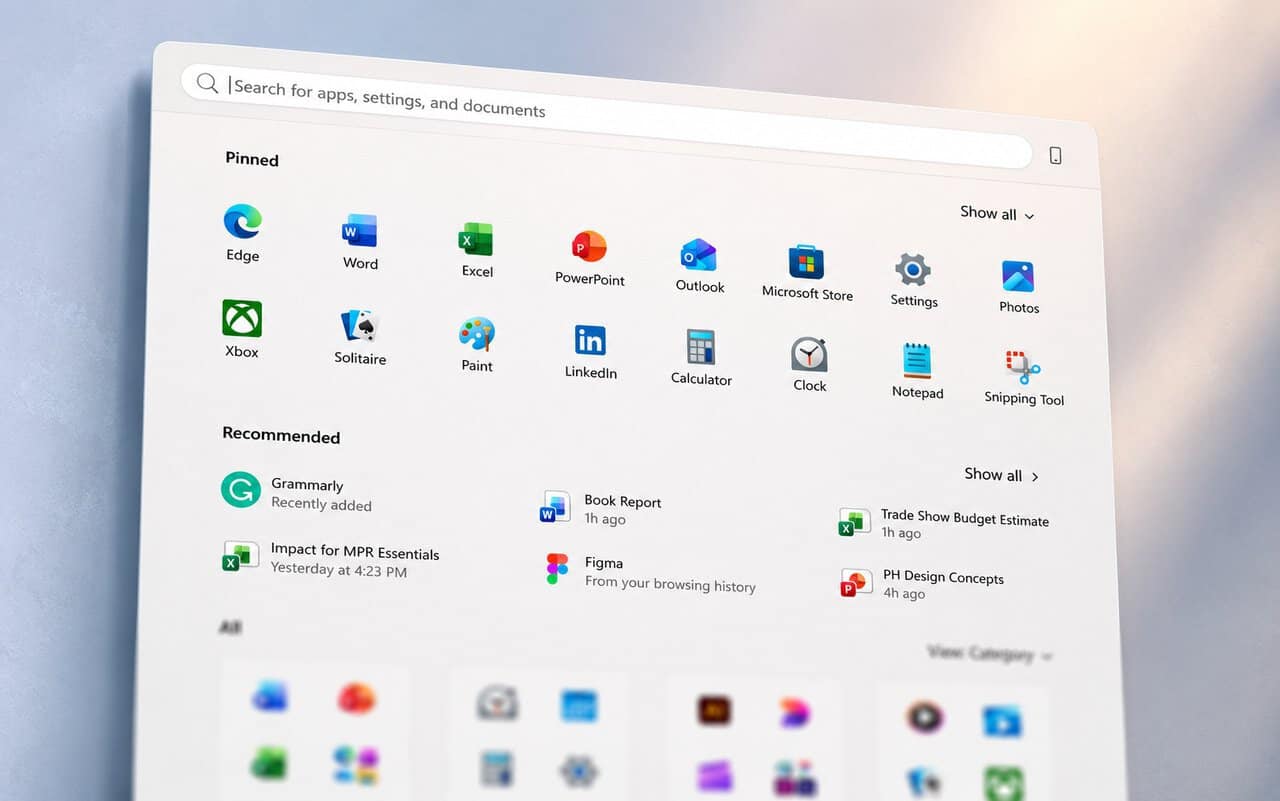
Microsoft has started rolling out the redesigned Windows 11 Start menu to enterprises and organizations, giving IT admins new controls to manage how the updated interface works on company devices.
The company has also published the related administrative policies and settings, covering both Group Policy and mobile device management deployments. These controls are designed to help organizations test, customize, and enforce the new Start menu experience across managed Windows 11 PCs.
Windows 11 Start Menu Redesign Reaches Organizations
Microsoft began testing the redesigned Start menu last year, with several features recently appearing in the Experimental channel under build 26300.8553.
The updated Start menu focuses on modularity, resizing, and more customization. For businesses, the key change is not only the visual redesign but also the expanded management options now available to IT departments.
With the new policies, organizations can control how the Start menu appears, which sections users can access, and how much freedom employees have to change the layout.
Microsoft Publishes New Start Menu Admin Policies
Microsoft has now published the full set of administrative policies for the redesigned Windows 11 Start menu.
The documentation covers traditional Group Policy settings and MDM-based deployments. For MDM environments, admins can manage the experience through the Start Policy CSP.
The available settings cover Start menu layout, app lists, recommendations, account options, pinned folders, and power controls. This gives organizations a more structured way to standardize the Start menu across different departments, user groups, or device types.
What IT Admins Can Control
IT admins can enforce custom pinned app layouts using JSON, making it easier to deploy a consistent Start menu across managed devices.
They can also prevent users from modifying the Start menu, which may help organizations that need a locked-down or simplified Windows experience.
Other available controls include options to hide the Recommended section, disable category view, and manage the visibility of recently added apps. Admins can also control whether most-used apps appear in the Start menu.
Microsoft is also allowing organizations to force a specific Start menu size across managed devices. This gives admins another way to create a predictable desktop experience for employees.
Windows 11 Is Getting More Interface Improvements
The Start menu rollout is part of a broader set of Windows 11 interface improvements.
These changes suggest Microsoft is continuing to refine Windows 11’s core desktop experience, especially in areas that users and organizations interact with every day.
Google Chrome is working on a “Voice Typing” feature for Windows 11 that lets users speak into a microphone to enter text on their PC, rather than typing on a keyboard.
Microsoft Edge has had a voice typing feature for some time, which you can use at any time for voice dication by pressing Windows + H. You need to have Online Speech Recognition enabled in Windows privacy settings to use it. The feature works everywhere, including all browsers, where you need to press the keyboard shortcut. Google, however, is developing its own dictation feature for voice typing.
How you could use Voice Typing in Chrome
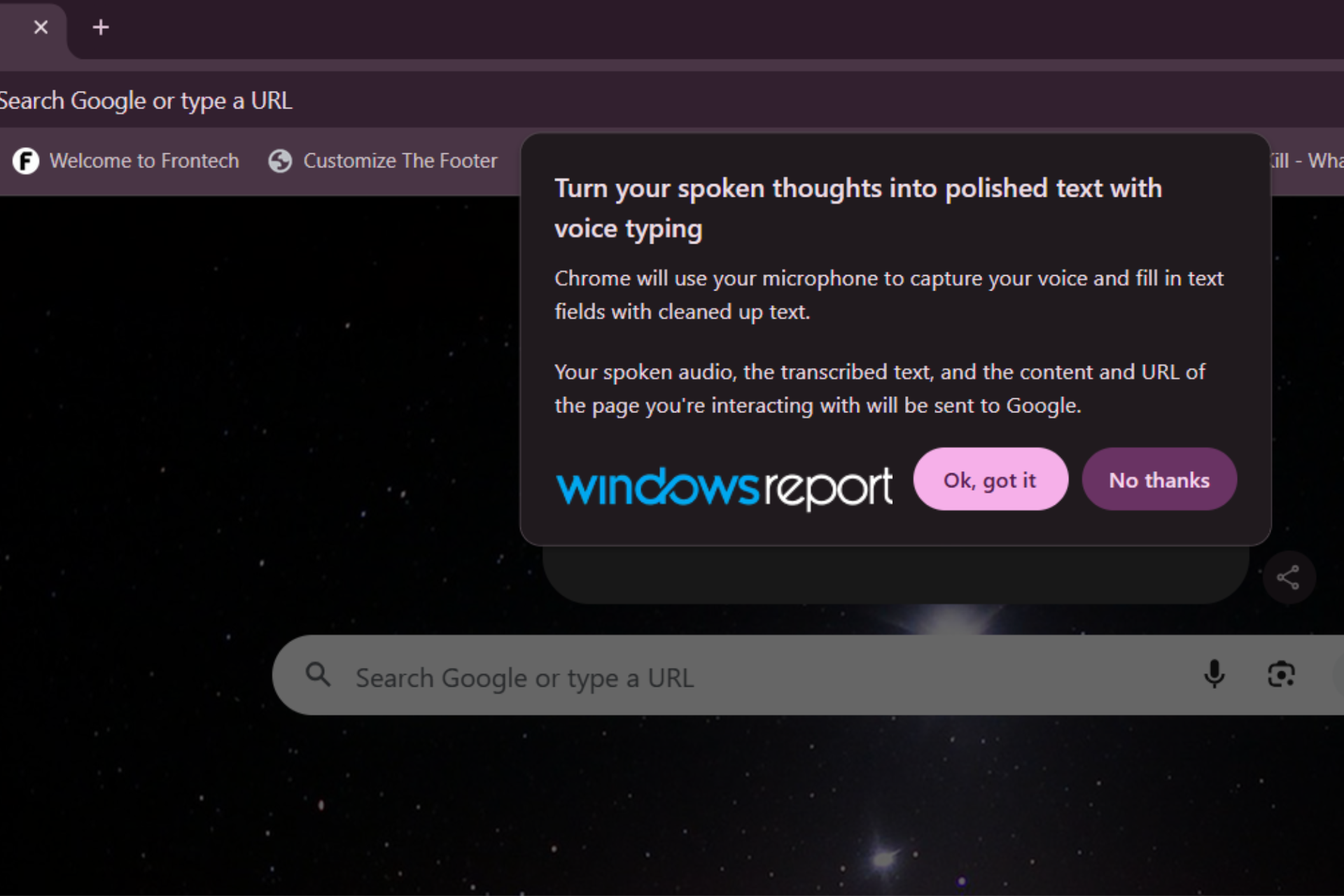
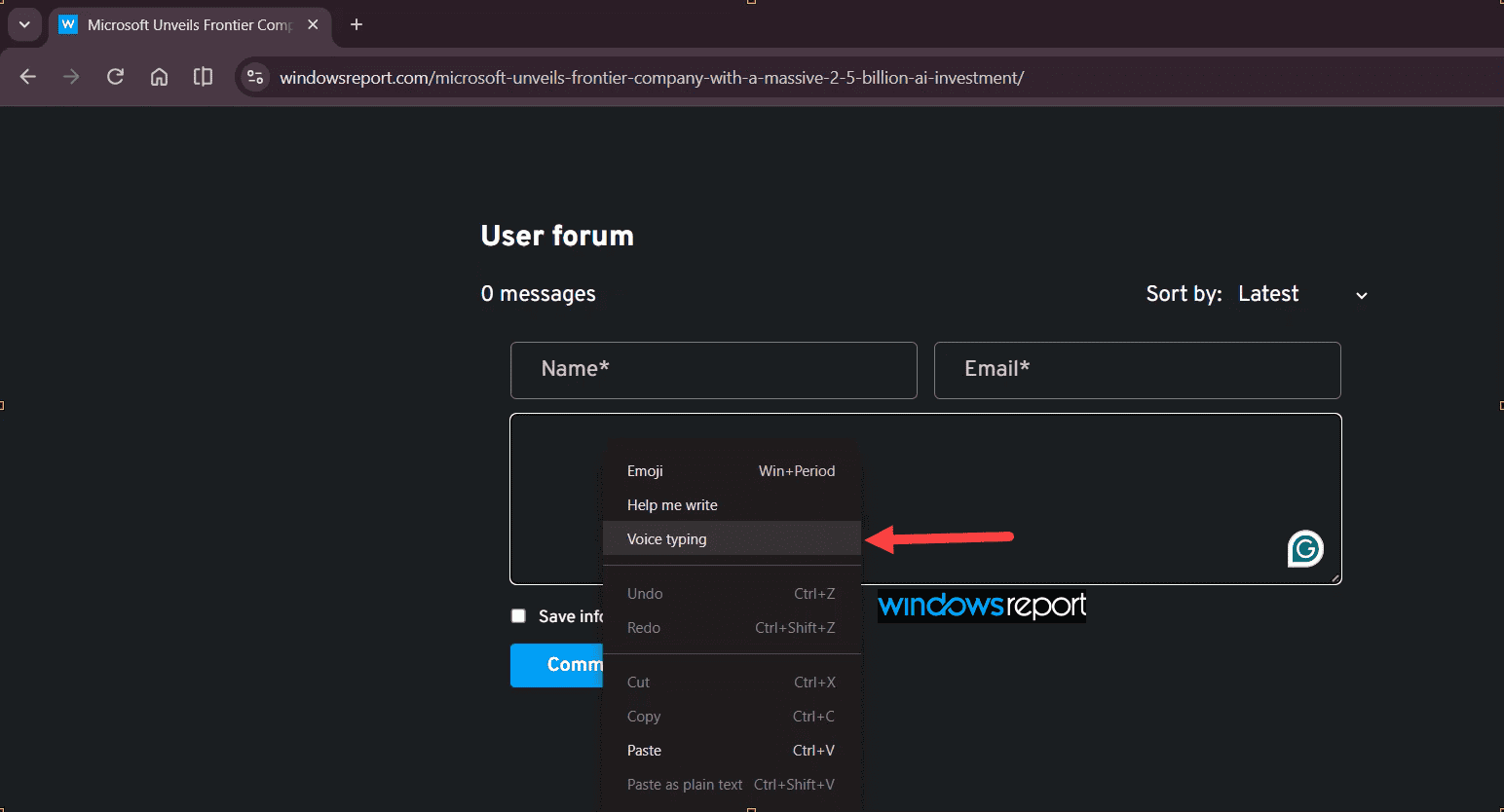
It is still early, but in our testing on Windows, similar to Edge, you need to place the text cursor in a text box, right-click, and select “Voice typing.” Chrome first showed a prompt explaining how the feature works, then displayed a Voice Typing bubble with microphone controls and a Done button. The feature does not move beyond this state when the option is selected, based on our observations.
image Credit: Windows Report.
“Chrome will use your microphone to capture your voice and fill in text fields with cleaned up text,” the prompt says. It also notes that “Your spoken audio, the transcribed text, and the content and URL of the page you’re interacting with will be sent to Google.”
Image Credit: Venkat | Windows Report.
Chrome could simply offer a dictation option in text box right-click menus and let users use the Windows-provided experience. However, Google appears to have other plans. Based on Chromium Gerrit changes spotted by us at Windows Report, Google is working on a dedicated dictation bubble, waveform animations, and support for voice-driven text editing commands in addition to the voice typing option.
Google Workspace, including Google Docs, already offers a Voice Typing feature, but the Chrome implementation is separate and designed to work directly in browser text fields.
To turn on Voice Typing in Chrome, you may need to enable the Dictation flag once it becomes available for Windows, Mac, Linux, and ChromeOS.
Image Credit: Windows Report.
While we can’t confirm how the dictation UI or implementation will look on other platforms such as Chrome on Mac, Linux, and ChromeOS, our testing is based on the feature spotted on Windows 11. Things may vary when Google ships the feature to those platforms in the future. The company has not announced an ETA.
AI adoption has moved well beyond the proof-of-concept stage, and Microsoft believes companies no longer need more AI demos. They need measurable business results. That’s exactly where the software giant says its newest initiative comes in, announcing a multibillion-dollar investment to help enterprises deploy AI faster and more effectively.
Microsoft today introduced Microsoft Frontier Company, a new operating business that focuses entirely on what it calls Frontier Transformation. Backed by a $2.5 billion investment, the initiative will place 6,000 industry specialists and AI engineers directly alongside customers to co-design, deploy, and continuously improve enterprise AI systems based on real-world business outcomes instead of experimental projects.
Unlike traditional consulting engagements, Microsoft says Frontier Company combines enterprise AI engineering, industry expertise, change management, and long-term optimization into one organization. The company believes businesses need more than access to powerful AI models. They also need help integrating AI into their own proprietary workflows while protecting sensitive company data and intellectual property.
Speaking of protecting customer information, Microsoft repeatedly emphasized that an organization’s data and competitive knowledge won’t be used to train public AI models. Instead, the company says customers will be able to choose from multiple AI models, including those from OpenAI,Anthropic, Microsoft AI, open-source providers, and specialized industry models without becoming locked into a single ecosystem.
Microsoft also highlighted several early deployments that are already underway. The company says it has worked with London Stock Exchange Group (LSEG) to integrate AI into financial research workflows, while organizations including Land O’Lakes, Unilever, and Novo Nordisk are also using Microsoft’s Frontier approach to deploy enterprise AI solutions.
Rodrigo Kede Lima will be leading as the President of Microsoft Frontier Company. Microsoft says the new division will also work closely with partners including Accenture, Capgemini, EY, KPMG, and PwC as it expands its enterprise AI strategy worldwide.
It’s Thursday, which means Microsoft has shared yet another official Free Play Days lineup for every XBOX player out there. This weekend, starting today, July 2 through Sunday, July 5, XBOX players will have at least five games to try for free.
First on the list is none other than Call of Duty: Black Ops 7, which is available for all XBOX players alongside Diablo 4, Demonschool, and The Stone of Madness. If you are willing to buy Black Ops 7 during the Free Play Days window, make sure to do that because it’s available for just $55.99 (originally $69.99). Next up, Demonschool is available for $24.99 (free trial included).
If you are into action RPGs with heavy, macabre themes, Diablo 4 is your go-to game this weekend. It is also available to buy this weekend at a discounted price of $29.99. Meanwhile, The Stone of Madness is available as a two-hour free trial for all XBOX players this weekend. In case you want to grab it, it’s available at a discounted price of $9.89.
Last but not least, Ikonei Island: An Earthlock Adventure is free to try for XBOX Game Pass members. In case you want to buy it, it’s available at a discounted price of $11.99.
If you are unaware of this game, Ikonei Island: An Earthlock Adventure invites players to explore a beautiful island full of mystery, magic, and adventure. You can play solo or team up with friends in online co-op as you gather resources, craft tools, farm the land, build your home, befriend magical creatures, and battle monsters.
Which of these games are you excited for the most to try this weekend? Let us know in the comments below.
PDFs have been a workplace staple for decades and for just as long, working with them has meant friction: switching between tools to edit, convert, summarize, translate and sign. Artificial intelligence is changing that equation and the shift is happening faster than most people realize.
The latest generation of AI-powered PDF software is not just adding smart features on top of existing workflows, it is rethinking the workflow itself, consolidating tasks that used to require multiple applications into a single, connected experience.
The Real Problem With PDF Workflows Is Fragmentation
The challenge most professionals face with PDFs is not any single task in isolation. Editing a paragraph, running OCR on a scanned document, translating a contract, each is manageable on its own. The problem is that they rarely happen in isolation.
A typical workflow might involve opening a scanned invoice in one application, running OCR in another, copying the text into a translation tool and then returning to a PDF editor to finalize and sign. Every transition introduces delay, formatting issues and the kind of friction that quietly drains productivity across a working day.
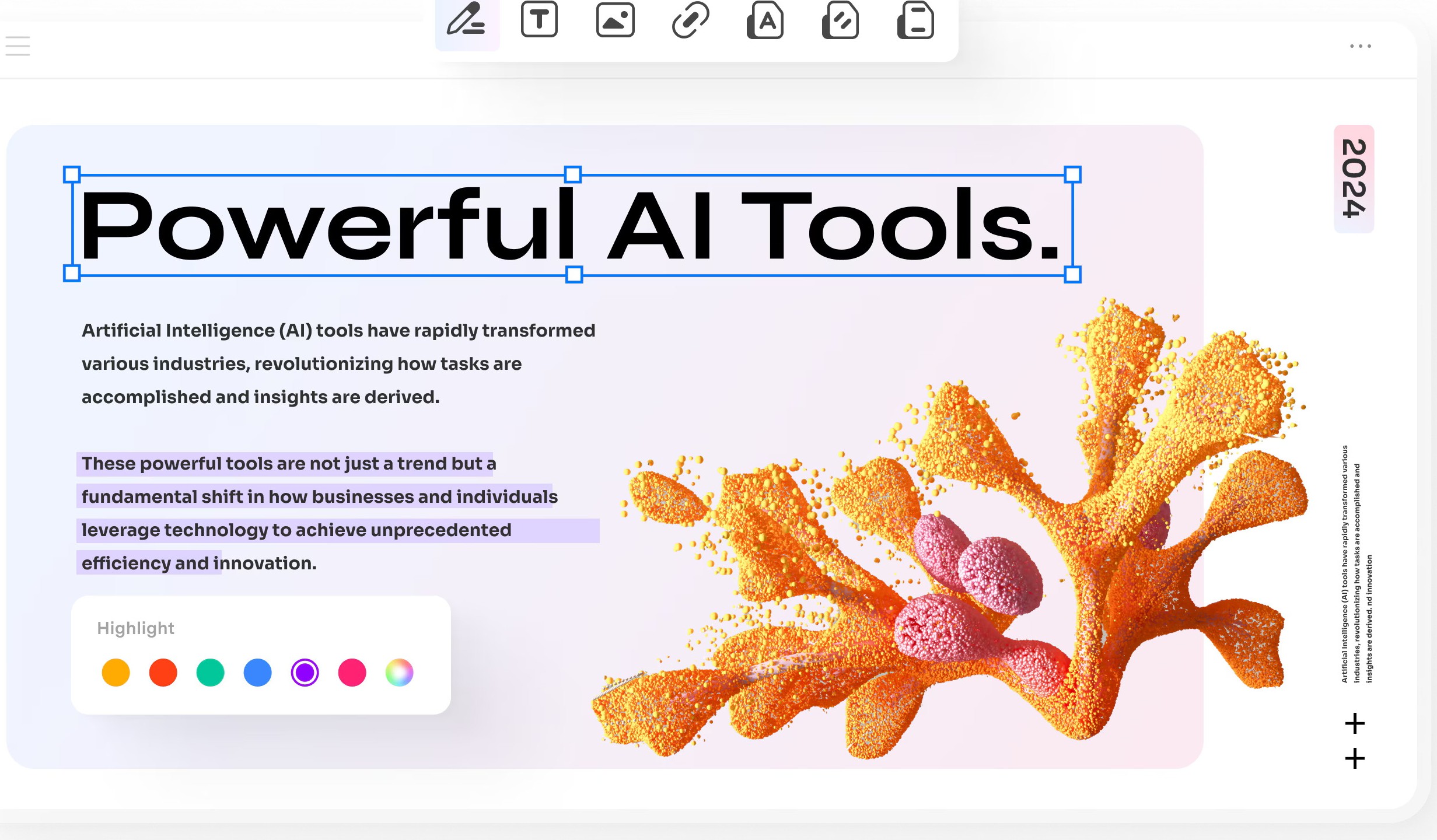
AI is now being used to collapse that fragmentation. Tools like Wondershare PDFelement V12 are designed around the idea that editing, converting, summarizing, translating and signing should all happen inside the same workspace.
Scanned Documents Are No Longer Dead Ends
One of the most persistent frustrations in document management is the scanned PDF. Contracts, archived records and paper invoices are frequently stored as image files visually readable, but impossible to search, edit or extract data from without additional processing.
Optical Character Recognition has existed for years, but modern AI has made it significantly more reliable. Today’s OCR tools process documents in over 20 languages, handle handwritten text, correct perspective distortion from phone-captured scans, and convert entire batches of files simultaneously, turning hours of manual transcription into minutes.
PDFelement V12 incorporates advanced OCR that makes scanned PDFs fully editable and searchable, with batch processing support for teams managing large volumes of legacy documents.
AI Is Making Long Documents Actually Manageable
Information overload is a genuine problem for knowledge workers. Legal teams review contracts running hundreds of pages. Researchers wade through dense academic papers. Reading every word is rarely practical, but missing a key clause can be costly.
AI-powered document interaction is addressing this directly. Rather than scrolling through an entire PDF, users can ask specific questions and receive contextual answers drawn from the document’s content. AI summarization extracts the most relevant conclusions, key findings, and action items in seconds, the document does not get shorter, but the time required extracting useful information from it does.
PDFelement V12 takes this further with multi-model AI support, letting users switch between ChatGPT, DeepSeek, and Gemini within a single session, a notable step beyond the single-model implementations that have characterized earlier generations of AI PDF tools.
Sensitive Information Needs More Than a Black Box
Redacting sensitive data has always been a painstaking task. Legal, compliance, and privacy teams have traditionally worked through documents manually, identifying names, ID numbers, financial details and medical information page by page before sharing files externally.
AI-powered smart redaction changes this entirely. By automatically scanning documents for sensitive patterns, personal identifiers, bank details, medical records and flagging them for bulk removal, AI dramatically reduces the time and error risk of manual redaction. PDFelement V12’s Smart Redact includes compliance presets for GDPR, US Financial Documents, US Medical Documents, and US Government and Legal standards.
Language Is No Longer a Barrier to Document Collaboration
Global teams and international clients are now the norm for many organizations. Document workflows frequently cross language boundaries, and the traditional solution of hiring human translators or moving content between tools, is both slow and expensive.
AI translation built directly into PDF software is changing the economics of multilingual document work. When evaluating free AI tools vs paid options, translation quality and language coverage are often deciding factors. PDFelement V12 supports professional-grade translation across 75 languages, up from 50 in the previous version with a domain-specific mode for legal, medical, and technical content. Batch translation means entire document sets can be processed simultaneously.
The Case for Keeping Everything in One Place
The productivity argument for consolidated PDF workflows goes beyond convenience. Every application switch is a potential source of formatting errors, version confusion and wasted time. The fewer transitions in a workflow, the fewer things that can go wrong.
PDFelement V12 has been recognized with 58 G2 awards, including Leader and Highest User Adoption and serves over 150 million users worldwide, including organizations like Deloitte and Hitachi. Available on Windows, macOS, iOS, Android and web, with pricing starting at $79.99 per year, it makes a compelling case for consolidating the entire PDF workflow into one platform.
Where PDF Software Goes From Here
The direction of AI in document management is clearly to reduce the number of steps between receiving a document and acting on it. Summarization, translation, redaction, OCR, conversion, and signing are converging into unified workflows rather than remaining separate tools requiring separate expertise.
For professionals who spend significant time inside PDF documents, that convergence is not a minor convenience. It is a meaningful reduction in the cognitive load of document management, one that compounds across every file, every day.
Classic Outlook Copilot buttons issue has now been fixed after Microsoft resolved a bug that caused Copilot Chat and Copilot entry points to disappear for some Windows users.
Microsoft says the problem affected Classic Outlook for Windows users who only had the Copilot Chat (Basic) license. The issue appeared after Outlook updated to build 20026.20182 or later, while users with a paid Microsoft 365 Copilot license were not affected.
Copilot buttons disappeared from Classic Outlook
According to Microsoft, affected users could lose access to several Copilot entry points inside Classic Outlook.
The Copilot button could disappear from the top-right area above the ribbon. The Copilot icon could also go missing from the left app bar or the More Apps section.
Some users could still see Copilot in Add Apps, but selecting Open would do nothing. Others found that adding Copilot through ribbon customization could show the command as unavailable or grayed out.
Microsoft also noted that Copilot could remain available through other entry points, including Outlook on the web and the Microsoft 365 Copilot standalone app or web experience.
Microsoft fixed the Outlook Copilot issue
Microsoft marked the issue as fixed and said the Outlook Team resolved it through a service change on June 29, 2026.
Users who still do not see Copilot buttons in Classic Outlook should restart the app to pick up the change. Microsoft also recommends installing the latest Office build by going to File, Office Account, Update Options, and selecting Update Now.
Temporary workarounds are still available
Users who cannot update right away can use New Outlook or Outlook Web Access as temporary alternatives.
Microsoft also lists a rollback option for Current Channel users. The company says users can revert to build 16.0.20026.20168, which came before the issue started.
However, this workaround should only serve as a temporary fix. Users who disable Office updates to stay on the older build should re-enable updates later to avoid missing future fixes and security improvements.
A leaked Microsoft Aion video reportedly shows the company exploring a dedicated AI-focused operating system, as Windows Central reports. The project, codenamed Aion, appears to place Copilot at the center of the desktop experience while relying on Microsoft Edge, web technologies, and cloud-first apps.
The video was reportedly first shared on the BetaWiki Discord server. Sources cited in the report claim the video is real, but allegedly dates back to 2024.
Microsoft Aion Leak Shows a Copilot-First Desktop
Aion appears to rethink the desktop around Copilot instead of traditional Windows apps.
The interface looks somewhat similar to Windows 11, with a centered Taskbar-like area and a Start menu-style launcher. However, the main input box appears to use Copilot as the core way to interact with the system, open files, apps, or websites.
This design suggests Microsoft was exploring a more agent-driven desktop, where users ask the system to perform actions instead of manually navigating menus.
Aion Reportedly Uses a Lightweight Win3 Codebase
The leaked video reportedly shows Aion running on a lightweight Windows codebase called Win3.
Win3 is described as a stripped-down version of Windows. Because of that, it reportedly does not support Win32 apps, which means traditional Windows desktop programs would not run on this version of Aion.
That limitation would make Aion very different from standard Windows 11. However, it could also allow Microsoft to focus on better battery life, stronger security, faster system updates, and a simpler web-first experience.
Without legacy Win32 app support, Aion would function more like a lightweight AI and web operating system than a normal Windows desktop.
The leaked details also suggest Microsoft explored another Aion version that runs on top of Windows 11. That version could support Windows apps because it would use Windows 11 as the underlying platform.
Spaces Could Reopen Groups of Apps and Websites
One of the most notable Aion features is called Spaces.
Spaces appears in the Taskbar-like interface and the Start menu-style launcher. The feature automatically groups apps and websites into buckets, allowing users to return to related sessions later.
For example, a user working on a project could reopen multiple relevant websites and apps with one click. This would make Aion feel more like a session-based desktop than a traditional app launcher.
The feature also fits Microsoft’s broader AI direction. Instead of simply opening apps, the system could understand work contexts and help users resume tasks faster.
Microsoft Has Not Announced Aion
There is currently no indication that Microsoft plans to ship Aion in the form shown in the leaked video.
The project appears experimental, and the video allegedly comes from 2024. Microsoft has not commented on Aion, and there is no confirmed release plan.
For years, the Surface Go lineup served as Microsoft’s answer for buyers who wanted a lightweight Windows PC without spending a fortune. If you still fancy Surface Go lineup over other offering, there might be some bad news for you. A new report claims Microsoft has quietly discontinued both the Surface Go and Surface Laptop Go families, with no replacements currently in development.
The news comes via Zac Bowden of Windows Central, who in a report claimed that Microsoft has stopped manufacturing the Surface Go 4 and Surface Laptop Go 3, and existing inventory has already disappeared from most markets.
Bowden, citing sources familiar with Microsoft’s hardware roadmap, notes that the company has no plans to restock either device or introduce direct successors. If accurate, it would effectively mark the end of Microsoft’s budget-focused Surface lineup.
Although the report claims that the company had internally explored a Surface Go 5 powered by a lower-end Snapdragon processor, it apparently got shelved after enterprise customers showed little interest in an Arm-based version. Notably, the Surface Go 4 itself was sold exclusively to commercial customers, suggesting Microsoft was already moving the product away from mainstream consumers.
Microsoft has yet to officially announce the end of the Surface Go family. Considering that Bowden is a Microsoft insider, who has a history of providing accurate claims and leaks, it seems Microsoft is finally moving away from affordable Surface device for the first time since the lineup debuted nearly eight years ago.
CISA warns hackers are actively exploiting a Microsoft SharePoint vulnerability that allows remote code execution on unpatched servers. The flaw, tracked as CVE-2026-45659, has a high-severity rating and now appears in CISA’s Known Exploited Vulnerabilities Catalog.
The warning puts new pressure on organizations running affected SharePoint versions to apply Microsoft’s May security updates.
Microsoft SharePoint Vulnerability Added to CISA KEV Catalog
CISA added CVE-2026-45659 to its Known Exploited Vulnerabilities Catalog after confirming active exploitation.
The flaw affects unpatched SharePoint servers and can allow attackers to execute code remotely. That makes it especially dangerous for organizations that expose SharePoint infrastructure to users, partners, or the internet.
How the SharePoint Flaw Works
CVE-2026-45659 stems from the deserialization of untrusted data.
According to Microsoft, an attacker with low-level authenticated access could exploit the vulnerability. A user with Site Member permissions may have enough access to trigger the flaw.
The attack does not require administrator privileges. It also does not require user interaction, which increases the risk for vulnerable SharePoint environments.
If attackers exploit the flaw successfully, they can achieve remote code execution on affected servers.
Affected SharePoint Versions
Microsoft released security fixes for several SharePoint products on May 21, 2026.
The affected versions include:
SharePoint Enterprise Server 2016
SharePoint Server 2019
SharePoint Server Subscription Edition
Microsoft also said the CVE had accidentally been left out of the May 2026 Security Updates list. That omission may have caused some administrators to miss the update during normal patch review.
Organizations using any affected SharePoint version should confirm that they installed the correct May security updates.
Federal Agencies Must Patch by Saturday
CISA ordered U.S. federal civilian agencies to secure affected SharePoint servers by Saturday, July 4, 2026.
The order falls under Binding Operational Directive 26-04. The directive requires agencies to prioritize vulnerabilities based on active exploitation, automation risk, internet exposure, and the level of attacker control after exploitation.
If agencies cannot apply mitigations, they may need to stop using affected products until they can secure them.
Valve’s latest monthly survey points to a steady shift toward newer systems, although most hardware categories stayed relatively stable. The biggest movement came from operating systems, GPUs, and VRAM configurations.
Windows 11 Keeps Growing on Steam
Windows 11 now accounts for 70.44% of Steam users, according to Valve’s June 2026 survey. That marks a 0.68 percentage point increase compared to May.
Windows 10 continued its decline, dropping to 23.56%. That represents a 0.43 percentage point decrease from the previous month.
The trend shows that Steam users continue moving away from Windows 10 ahead of its wider decline in the PC gaming space. While Windows 10 still holds a large share, Windows 11 now clearly dominates among surveyed Steam systems.
Windows Still Dominates Steam Gaming
Windows remains the main operating system for Steam users overall. In June 2026, Windows accounted for 94.10% of all surveyed systems.
macOS gained some ground, rising to 2.21%. Linux slipped slightly to 3.69%.
That leaves Windows far ahead of every other platform on Steam, even as Linux continues to benefit from handheld gaming devices and Steam Deck-related interest.
Intel Still Leads, but AMD Keeps Closing the Gap
Intel remained the top CPU vendor on Steam in June, holding 54.01% of surveyed systems.
AMD followed with 45.99%. While Intel still leads, AMD has continued to close the gap over time.
The difference between the two CPU vendors remains much smaller than it was several years ago, showing how competitive the gaming processor market has become.
RTX 4060 Laptop GPU Becomes the Most Popular GPU
The GPU chart also saw an important change in June. The RTX 4060 Laptop GPU became the most common graphics processor among Steam users.
It climbed to 3.81%, moving ahead of the RTX 3060, which slipped to 3.73%.
This shift suggests gaming laptops with newer Nvidia GPUs continue to gain traction. The RTX 3060 remains very popular, but the RTX 4060 Laptop GPU now leads the Steam GPU list.
8GB VRAM Remains Common, but 16GB Is Rising
Steam users still most commonly have 8GB of VRAM, but 16GB configurations continue to grow.
In June 2026, 16GB of VRAM reached 24.50%, up 0.45 percentage points from May.
That growth suggests more players now use higher-VRAM GPUs, likely due to newer graphics cards and more demanding modern games. Even so, 8GB remains the standard configuration for many Steam users.
16GB RAM and Full HD Still Lead
System memory trends changed little in June. 16GB of RAM remained the most common configuration, appearing in 41.57% of surveyed Steam systems.
Display resolution also stayed familiar. 1920×1080 remains the most popular screen resolution, with just over half of Steam users still gaming at Full HD.
Higher resolutions continue to grow slowly, especially 2K displays, but Full HD remains the default for most PC gamers on Steam.
XBOX may follow Sony’s physical disc move as new reports suggest Microsoft’s next-generation console could move further away from physical games.
Sony reportedly plans to stop producing discs for PlayStation games released in 2028. Now, questions are growing over whether XBOX will make a similar shift with its next console generation.
XBOX may follow Sony’s shift away from physical discs
According to Insider Gaming, Microsoft’s next-generation XBOX console, reportedly known as Project Helix, may not include a physical disc drive. The report claims sources suggest Microsoft plans to drop the drive from the console, although XBOX has not officially confirmed the detail.
This is not the first time Microsoft has been linked to a stronger digital-only strategy. XBOX has already released disc-free hardware in the past, and speculation around a fully digital next-gen XBOX has circulated for some time. Reports that XBOX is working on a disc-to-digital feature have only added fuel to that speculation.
However, several key details remain unclear. Microsoft has not confirmed whether Project Helix exists under that name, whether the console will ship without a disc drive, or whether XBOX users would get the option to buy an external disc drive separately.
Next-gen consoles could move further toward digital games
If both Sony and Microsoft move away from built-in disc drives, the next console generation could mark a major turning point for physical game ownership.
Analysts have also speculated that the base model of the PS6 may not include a disc drive. That would make the next PlayStation and XBOX systems more focused on digital downloads, subscriptions, cloud gaming, and online storefronts.
For players, this shift could bring convenience but also new concerns. Digital-only consoles remove the need to swap discs, but they also limit used game sales, physical collecting, offline access, and long-term ownership options.
Physical game buyers may also worry about preservation. If publishers reduce or end disc production, players would have fewer ways to keep permanent copies of games outside digital storefronts.
For now, Microsoft has not made any official announcement about removing the disc drive from its next XBOX console.
The internet can be a cruel place, especially if you don’t pay attention to the websites, you visit and blindly copy and paste commands from them. Unknowingly, you could be a victim of cyberattacks, a nightmare for anyone in any given day. Well, worry not. Opera finally has you covered, thanks to its new security feature called Paste Protect.
Opera becomes first major browser to block ClickFix attacks with new Paste Protect feature
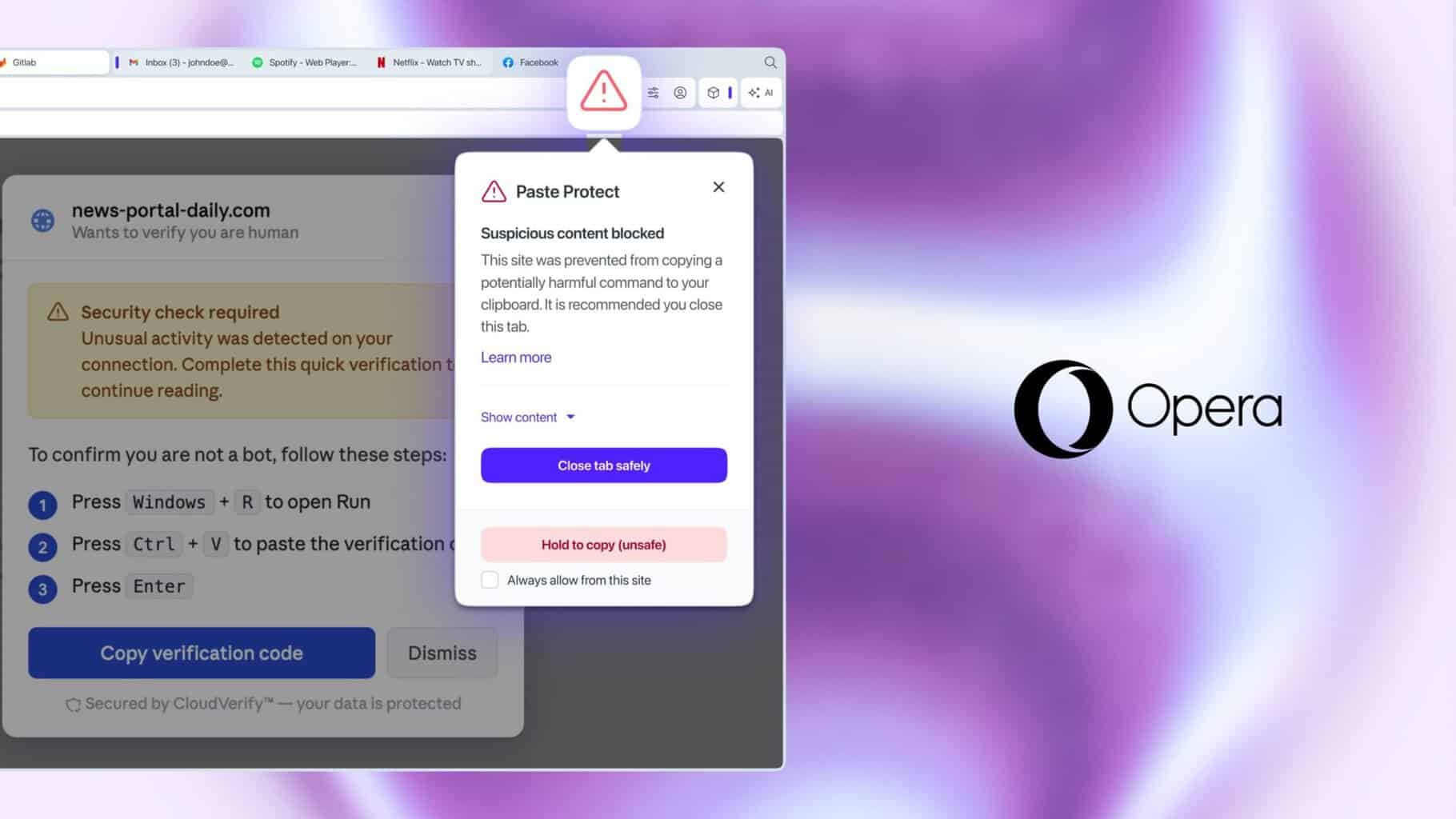
The company, in its announcement blogpost, claims that it is the first major browser to ship built-in protection against the rapidly growing ClickFix attack technique. Per Opera, Paste Protect is now rolling out across its desktop browsers on Windows, macOS, and Linux, and it’s enabled by default.
That means you won’t need to install extensions or change any settings to receive protection against clipboard-based attacks. The company says the feature is designed to stop malicious content before users accidentally execute it on their own computers.
Image credit: Opera
In case you are unaware, ClickFix attacks have become increasingly popular because they rely on social engineering rather than exploiting software vulnerabilities. Victims usually get tricked by a fake CAPTCHA, broken video player, or troubleshooting prompt that instructs them to copy and paste a command into their system terminal.
While the process appears legitimate, the pasted command can instead install malware, steal passwords, or even hand attackers remote access to the device. Opera cites cybersecurity firm Huntress, which says ClickFix accounted for more than 53% of malware-loading attacks in 2025.
Opera’s new system focuses on the clipboard itself. The browser now monitors copied content for suspicious command patterns commonly associated with ClickFix campaigns. If a dangerous command is detected, Opera immediately blocks the copy action, displays a warning explaining the potential risk, and flags the affected webpage. Developers and advanced users can still override the protection or whitelist trusted sites if necessary.
Speaking of security, Paste Protect also expands Opera’s existing clipboard hijacking protection. Besides detecting malicious scripts copied from websites, it also prevents external applications from secretly replacing copied content, such as cryptocurrency wallet addresses or bank account numbers, before users paste them elsewhere.
What do you think about Opera’s new Paste Protect feature? Let us know in the comments below.
Windows Movie Maker is back in the spotlight after a classic Movie Maker 6.0 setup file resurfaced online, giving longtime Windows users another reason to revisit the XP-era video editor.
For many PC users, Windows Movie Maker was one of the first tools that made home video editing feel simple. It shipped during a time when users edited family clips, school projects, gaming videos, and slideshow-style videos without needing complex software or subscriptions.
Now, that nostalgia has returned.
Windows Movie Maker 6.0 Setup File Uploaded Online
X user Katie, known as @skylerdagirl, uploaded a Windows Movie Maker 6.0 setup file to the Internet Archive.
Ever wanted to use Windows Movie Maker 6.0 again but unsure where to get it for modern Windows?
Well, "want" no longer!
I've uploaded a setup for exactly that on The Internet Archive. Tested on Windows 7, 10, & 11, all working on each.
According to her post, the classic editor has been tested and works on Windows 7, Windows 10, and Windows 11. That means users who miss the older Movie Maker experience may have a way to try it again on modern PCs.
The upload has attracted attention from users who remember Movie Maker as one of Microsoft’s most accessible creative tools.
Why Windows Movie Maker Still Appeals to Users
Movie Maker still has a place in people’s memories because it focused on simple tasks.
That simplicity may appeal to users who feel tired of modern video editors. Many current apps push cloud storage, account sign-ins, subscriptions, or online workflows before users can complete basic editing tasks.
Some users may also prefer an offline editor that feels lightweight and familiar.
Classic Software Comes With Risks
Users should stay cautious before installing old software on a modern Windows PC.
Classic applications may not run reliably on Windows 10 or Windows 11, even when they launch successfully. Some features may break, export options may fail, or older components may not behave correctly on newer systems.
Security tools may also flag old installers. Windows SmartScreen or Microsoft Defender could warn users about older executable files, especially when they come from community archives instead of official Microsoft download pages. These warnings do not always mean the file contains malware, but users should not ignore them.
Anyone testing the software should scan the file first, use a secondary device or virtual machine where possible, and avoid downloading apps from random third-party mirrors.
In other Microsoft news, the company’s Driver Quality Initiative has started showing up in the latest Intel drivers, signaling Microsoft’s push for more reliable Windows 11 driver updates.
Microsoft also plans to let Copilot analyze web images without forcing users to leave the current page, which could make the assistant more useful during everyday browsing.
Earlier today, we reported about Microsoft bringing a new Facilitator AI feature to Teams that can listen to meetings, searches the web and answers question before you even ask. It seems Microsoft isn’t done integrating more of AI to Teams, even it needs to open the doors to rivals.
Microsoft Teams may soon let users work with Anthropic’s Claude AI agent
That’s because a new report now claims Anthropic is preparing to bring its Claude AI agent directly into Teams. The news comes via The Information, which reports that Anthropic has informed Microsoft that it plans to develop a dedicated Claude agent for Microsoft Teams.
While the feature has yet to be officially announced, it would allow Teams users to interact with Claude inside conversations. In case you missed, the functionality would act similar to the recently launched Claude Tag integration for Slack.
If the integration moves forward, Claude might sit alongside Microsoft’s own Copilot in Teams. That might sound unusual at first, but it aligns with Microsoft’s broader platform strategy. Teams already supports third-party AI agents from companies such as Perplexity, Cursor, and Linear, even though several of those tools overlap with Copilot’s capabilities.
The report also notes that Microsoft isn’t charging AI developers simply for making their agents available inside Teams. In fact, the company appears focused on positioning Teams as an open platform where customers can choose whichever AI assistant best fits their workflow, rather than forcing them into Microsoft’s ecosystem alone.
Given the number of lawsuits Microsoft has faced in the past for allegedly gatekeeping and using its market dominance to push its products to users, this move would likely make the company appear more favorable in the eyes of competition authorities around the globe.
For now, neither Microsoft nor Anthropic has officially confirmed when the Teams Claude integration would launch. However, if the reported plans materialize, Microsoft could soon have another AI assistant competing directly with its Copilot AI inside Teams.
Fake guest complaints targeting hotels in Japan are being used in a phishing campaign that tricks hotel workers into opening malicious files disguised as photos or videos.
Microsoft says the campaign has been active since April 2026, while Trend Micro has reported similar attacks against Japanese Booking.com partner accommodations.
Hotels in Japan Face Phishing Emails Disguised as Guest Complaints
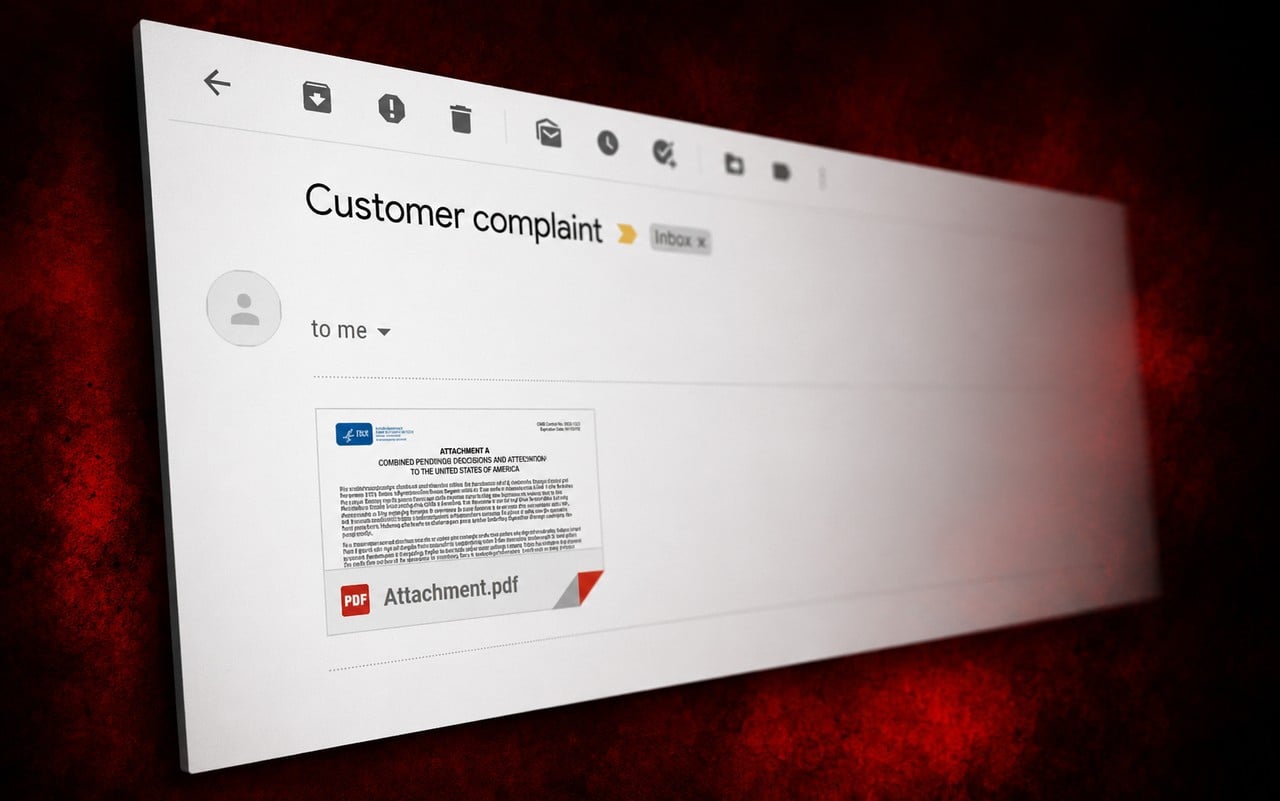
Attackers are sending emails that look like routine customer-service complaints. The messages often claim that a guest has an issue with a booking, room, or service and includes a link to download photos or videos as “proof.”
The goal is to make hotel staff act quickly without checking the file carefully.
These emails do not look like obvious spam. Instead, they copy the tone and urgency of normal guest complaints, making them more dangerous for busy front-desk and reservation teams.
Why Japanese Hotels Are Being Targeted
Similar attacks have appeared in Europe and Asia, but Japan appears to face a more immediate risk in this campaign.
Microsoft found Japanese-language phishing examples more often than Danish or Dutch ones in the activity it analyzed. This suggests attackers may be focusing more heavily on Japanese hotels and accommodation providers.
The hospitality sector also gives attackers a strong opening. Hotel workers regularly handle guest messages, booking issues, complaints, attachments, and links from people they do not know.
How the Hotel Phishing Emails Work
The attackers usually pose as guests or booking contacts. They send a complaint that pressures staff to respond quickly, then include a download link for supposed evidence.
The link typically downloads a ZIP file. Inside that archive, the victim finds a file that looks like a photo. However, the file is actually a shortcut designed to start the infection process.
Once a hotel worker opens it, the malware can run on the computer and wait for further instructions from the attackers.
Attackers Keep Changing Their Delivery Tactics
The campaign has changed over time as attackers tested different delivery methods, file names, and domains.
Some emails used Calendly notifications and Google redirect links to make the download page look safer. Others used Gmail accounts in a more convincing two-step approach.
In those cases, the attacker first sent a normal inquiry and waited for hotel staff to reply. After receiving a response, the attacker sent the malicious link.
This makes the attack harder to spot because the conversation already looks active and legitimate.
What Happens After Infection
After infection, the malware can stay on the device and run quietly in the background.
This may allow attackers to steal credentials, install more malware, or use the infected machine as an entry point into other systems.
For hotels, that risk can be serious. A compromised reception or reservation computer could expose staff accounts, booking platforms, customer data, or internal systems.
How Hotel Staff Can Reduce the Risk
Hotels should treat urgent complaint emails with caution, especially when they include ZIP files or unexpected photo downloads.
Staff should check whether the sender, link, file type, and message context make sense before opening anything. They should also avoid opening shortcut files inside compressed folders, even if the file appears to have an image-related name.
The main warning is simple: these attacks arrive through normal hotel workflows, not just obvious spam.
This campaign comes as other security threats continue to target everyday platforms and workflows.
WhatsApp username reservations have started rolling out ahead of a wider launch planned for later this year, but the feature is already raising privacy, fraud, and impersonation concerns.
The upcoming system will let users find and message each other through usernames instead of phone numbers. Meta presents the change as a privacy improvement because users will not always need to share their phone number to connect with someone on WhatsApp.
However, the early rollout has triggered concern (via TechCrunch), especially in India, where regulators fear that usernames could create new opportunities for scams and impersonation.
WhatsApp usernames could reduce phone number sharing
The main benefit of WhatsApp usernames is privacy.
Security expert Rachel Tobac said usernames generally improve privacy because they reduce the need to share phone numbers with strangers. This may help limit exposure to phishing, SIM-swap attacks, harassment, spam, and account takeover attempts.
Still, usernames also introduce a familiar problem: a handle can look official even when it does not belong to the real person, company, or organization.
Impersonation concerns are already emerging
The biggest concern around WhatsApp username reservations is impersonation.
It has been reported that usernames resembling politicians, celebrities, companies, and public institutions were still available during the reservation process. That raises the risk that scammers could claim similar-looking handles and use them to mislead users.
Meta says it reserves usernames for public figures, government entities, and some variations of those names. The company says this helps ensure legitimate owners can claim important handles.
However, Meta has not clearly explained how it decides which lookalike usernames it blocks or reserves. That lack of transparency leaves open questions about how well WhatsApp can prevent abuse before the wider rollout begins.
India warns WhatsApp about fraud risks
India’s Ministry of Electronics and Information Technology has sent a notice to WhatsApp about the username feature.
The ministry warned that usernames could increase fraud, phishing, digital arrest scams, and impersonation attacks. It said scammers could use lookalike handles to impersonate individuals, public authorities, financial institutions, and government agencies.
The ministry asked WhatsApp to explain why regulators should not take action over the feature. It also asked WhatsApp not to roll out usernames in India until consultations finish.
The warning shows how sensitive WhatsApp product changes can become in India, where the app plays a major role in communication, business, and public services.
Meta may connect WhatsApp handles with Instagram and Facebook
Meta also plans to let some users claim existing Instagram or Facebook usernames by linking accounts.
That could help creators, businesses, public figures, and organizations keep a consistent identity across Meta’s apps. It may also reduce impersonation by making it easier for users to connect a WhatsApp handle with an already established Instagram or Facebook presence.
At the same time, this could make username ownership more important across Meta’s ecosystem. A single handle may soon carry more value if it works across multiple apps.
WhatsApp is taking a gradual approach
WhatsApp says it is taking a gradual approach to username reservations before the broader launch later this year.
The company says it is listening to feedback before fully rolling out the feature. That feedback will likely shape how Meta handles reserved names, lookalike usernames, public figure protection, and fraud prevention.
The challenge for WhatsApp is clear: usernames can make the app more private, but they can also make impersonation easier if Meta does not apply strong protections.
Microsoft Teams meetings are about to get a lot smarter, at least if you’re using Microsoft Teams with Copilot. The company has quietly announced a new AI-powered Facilitator experience that can listen to conversations, recognize when nobody knows the answer to a question, and step in with information pulled directly from the web.
Microsoft is bringing another controversial AI feature to Teams, but you’ll be in control
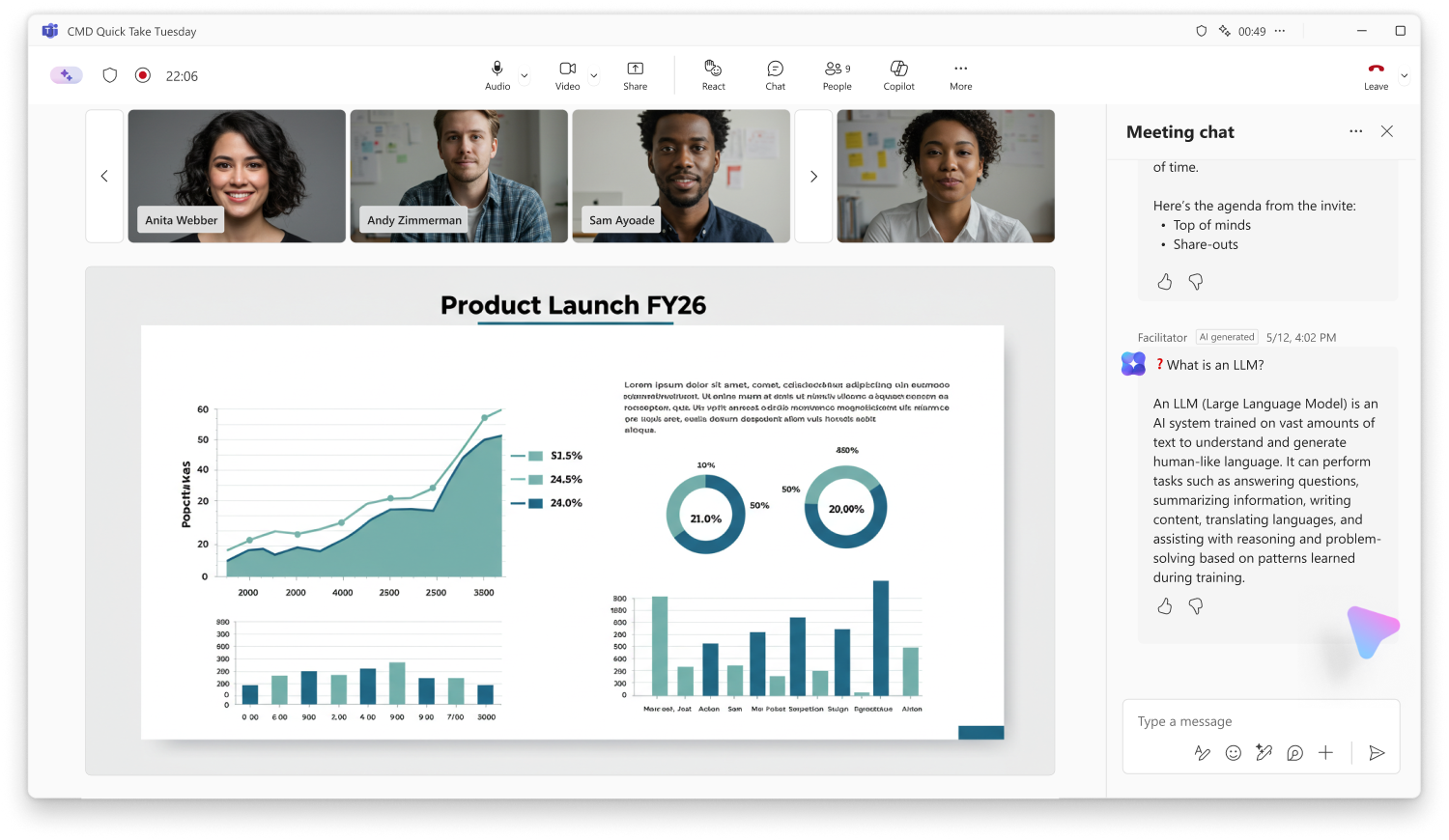
Unlike Copilot, which usually waits for users to ask questions, Facilitator works proactively. During a meeting, it monitors the ongoing discussion in real time and looks for moments where participants express uncertainty or ask factual questions that go unanswered. When that happens, the AI performs a web search and posts a contextual response directly into the meeting chat, allowing the discussion to continue without someone leaving the meeting to look things up.
Image source: Microsoft
Microsoft says the feature isn’t designed to constantly interrupt conversations. According to the company, Facilitator responses are expected to appear infrequently, typically less than once per meeting, and only when the AI determines the question is relevant to the meeting agenda and surrounding discussion.
More importantly, this is not a mandatory feature. Facilitator is opt-in and must be manually added to a Teams meeting by someone who has a Microsoft 365 Copilot (Premium) license. Other participants don’t need a Copilot license to view the AI-generated responses. Users can also stop the experience at any time by simply removing Facilitator from the meeting.
On the administrative side, organizations can disable the capability across the tenant, and it also depends on whether Copilot web search is enabled. According to the Microsoft 365 Admin Center under Message ID MC1409304 (Roadmap ID 558341), the feature will work in standard Teams meetings only. It won’t be available in calls, webinars, or town halls, although meetings with external and cross-tenant participants are supported.
Since Facilitator analyzes meeting conversations in real time and uses AI to generate contextual replies, Microsoft also notes that organizations should review their Copilot web search settings and internal AI policies before enabling the feature.
To catch you up, Microsoft mentioned the feature in last month’s Teams feature roundup but didn’t specify exactly when it would roll out. However, we know now. As of writing this, the company has marked that the feature would be available for everyone by mid-August 2026 to late August 2026.
A malicious Perplexity AI-themed Chrome extension has been removed from the Chrome Web Store after Microsoft researchers found that it could capture user searches and keystrokes.
Microsoft’s Defender Security Research Team identified the extension under the name “Search for perplexity ai.” The extension pretended to be connected to Perplexity AI, but it routed browser searches through a typosquatted domain instead of the real perplexity.ai website.
Although Google has removed the extension from the Chrome Web Store, users who installed it before its removal may still have it active in their browser.
The malicious extension requested permission to become Chrome’s default search engine. This gave it access to searches typed directly into the browser’s address bar.
According to Microsoft, the extension could log full search requests, including the search query, HTTP headers, user-agent details, and the user’s source IP address.
More concerningly, the extension could also capture real-time keystrokes while users were still typing, before they pressed Enter. After collecting the data, it redirected users to a selected search provider.
Microsoft Found Suspicious Permissions and Infrastructure
Microsoft said the extension used the declarativeNetRequest permission to redirect traffic and rewrite URLs.
This permission can serve legitimate purposes, but Microsoft noted that the fake Perplexity extension did not need it for its claimed search functionality. That made the permission request suspicious.
The extension also used a fake Perplexity-related domain and included its own server-side infrastructure code. Microsoft said this exposed parts of the attack architecture, although the operator behind the extension and domain remains unknown.
How to Check If You Installed the Malicious Extension
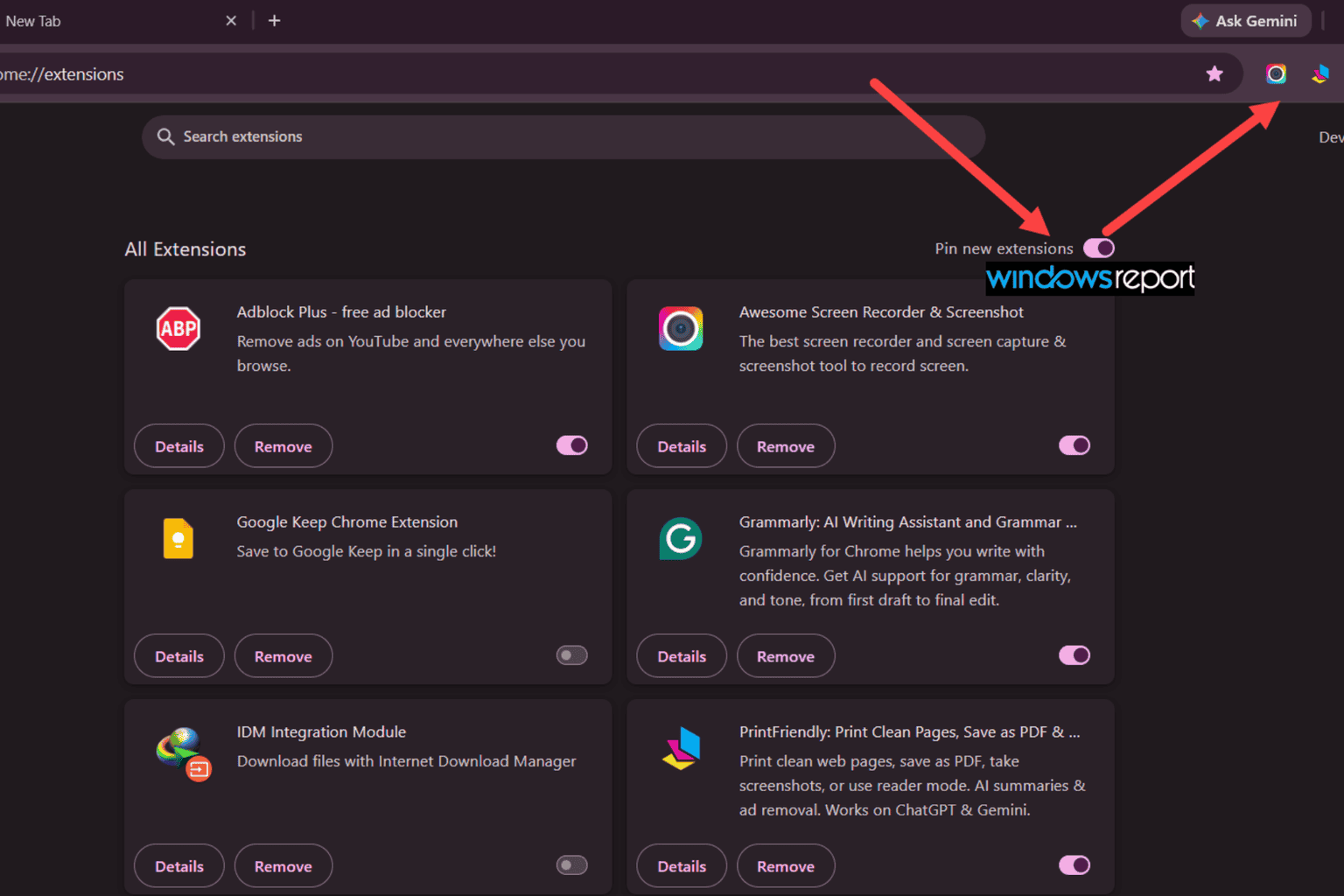
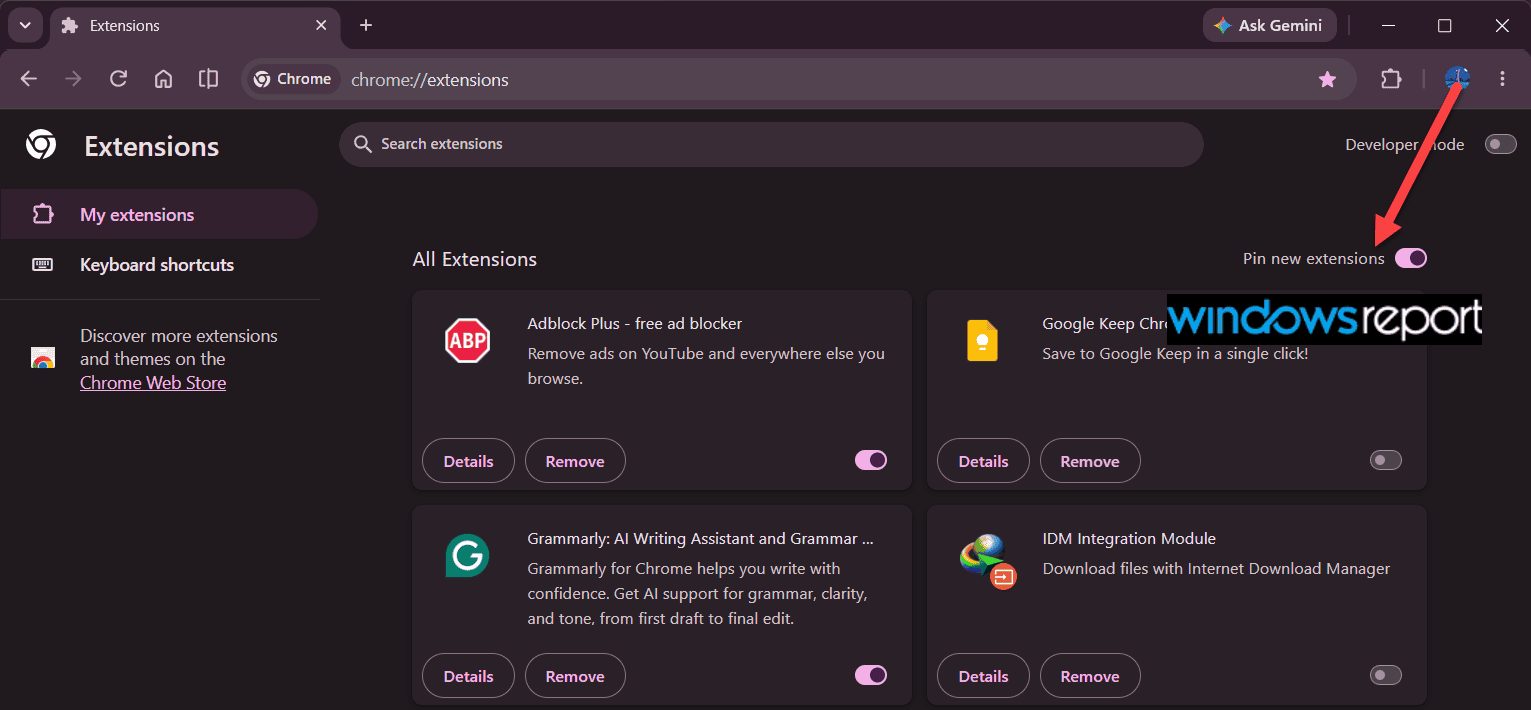
Chrome users can check for the extension manually by opening Chrome, navigating to the Extensions page, enabling Developer mode, looking for any Perplexity-related extension, and checking the extension ID.
If the extension ID is flkebkiofojicogddingbdmcmkpbplcd, the extension is malicious and should be removed immediately.
Users should also review their installed Chrome extensions and delete anything they no longer use or fully trust.
The warning comes as Google continues testing new Chrome features.
Microsoft’s Driver Quality Initiative
is starting to show up in real Windows 11 driver updates, with Intel’s latest wireless drivers among the first visible examples.
The initiative, also known as DQI, aims to make Windows 11 drivers more stable, secure, predictable, and less likely to hurt system performance. Microsoft wants OEMs and silicon partners to follow stricter driver standards as part of a broader effort to improve the Windows experience.
Intel’s New Wireless Drivers Follow Microsoft’s DQI Push
Intel released new Bluetooth and Wi-Fi drivers on June 30, both carrying version 24.50.0.
The official Wi-Fi driver changelog says the update includes enhancements aligned with Microsoft’s Windows ecosystem quality initiative, as spotted by
Windows Latest.
In practice, this means Intel’s wireless drivers now appear to follow Microsoft’s newer Driver Quality Initiative standards.
Intel’s GPU drivers may also receive similar changes later as Microsoft pushes the initiative across more hardware categories.
What Microsoft Wants to Change With DQI
Microsoft describes DQI as an architecture-level shift for Windows 11 drivers.
The company wants hardware partners to reduce unnecessary kernel-mode interference, which can increase the risk of crashes, instability, and security problems. Instead, Microsoft wants more drivers to use Microsoft-authored class drivers or user-mode drivers where possible.
That change should help improve Windows 11 stability, security, performance, and power efficiency.
Microsoft also wants to harden kernel-mode drivers that still need deeper access to the system. This should reduce crashes and make driver behavior more predictable for users.
Windows Update Should Offer Better Drivers
DQI also targets Windows Update driver delivery.
Microsoft wants Windows Update to stop offering low-quality or outdated drivers. This could help prevent frustrating cases where users manually install newer drivers, only for Windows Update to replace them with older versions.
Better driver hygiene should make updates more predictable and reduce unnecessary driver-related problems after Windows updates.
Microsoft Sets New Driver Quality Standards
Microsoft is adding stricter driver quality measures under DQI.
Drivers will face stronger checks around stability, functionality, performance, power use, and thermal impact. The goal is not only to make drivers work, but to make sure they do not slow down Windows 11, drain battery life, or create avoidable heat issues.
DQI Could Become an Industry-Wide Standard
Intel appears to be one of the first major partners to adopt Microsoft’s new driver quality standards in a visible way.
Microsoft expects DQI to expand across the wider PC industry. AMD has also said it will work with Microsoft on better driver quality, suggesting the initiative will not stay limited to Intel hardware.
Microsoft wants broad adoption by the end of the year.
Microsoft Is Also Changing Printer Drivers
The Driver Quality Initiative is not Microsoft’s only driver-related change.
The company is also preparing
Windows Ready Print,
a new approach designed to reduce long-running printer driver problems.
For now, Intel’s latest Wi-Fi and Bluetooth drivers are a small but important sign that Microsoft’s Driver Quality Initiative is moving from planning into real-world driver updates.
If widely adopted, DQI could make Windows 11 more stable, reliable, and predictable across PCs from different manufacturers.
For a long now, Microsoft has integrated Copilot features into Edge browser to make every day browsing smooth for all the users out there. Now, it seems Microsoft is readying yet another feature that can cut down the hassle of learning more about an image that you see on any webpage, while browsing through Microsoft Edge.
Edge will soon let you analyze any web image with Copilot in one click
We’ve spotted a new feature in the official Microsoft 365 roadmap portal that suggests Edge users will soon be able to send any image they find on the web directly to Copilot without leaving the page they’re viewing.
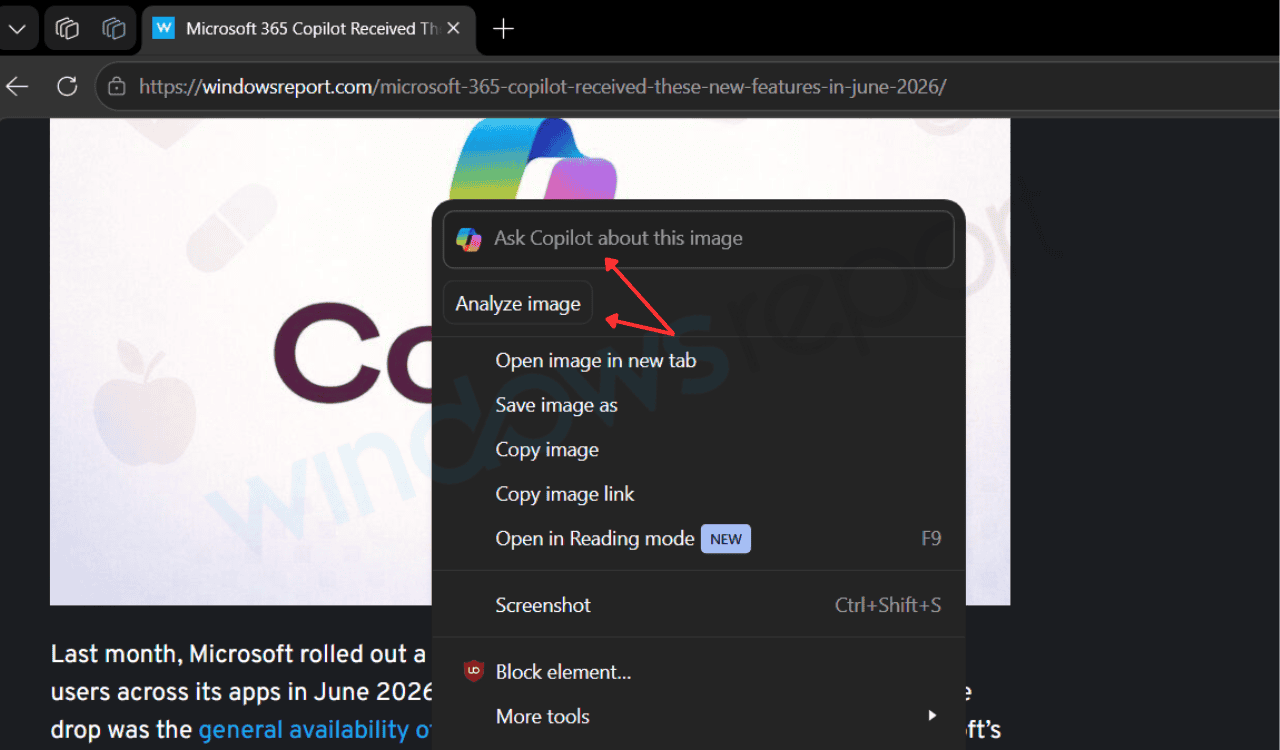
Rather than downloading an image, copying it, or opening Copilot separately, the upcoming feature adds a new option to the Edge context menu (right-click). Users will simply right-click an image and choose to ask Copilot about it. The AI will then analyze the selected image and answer questions, explain what it sees, provide additional context, or help users better understand visual content directly from within the browser.
Whether it’s identifying an object, explaining a chart, understanding an infographic, or asking follow-up questions about a photo, Microsoft wants the entire experience to happen without interrupting your browsing session. As of now, we’ve spotted something similar in the Edge Canary. You can check the screenshot below:
Analyze image option available in Canary channel | Image credit: Venkat | WindowsReport
While the “Ask Copilot about this image” option is available in the Stable version of Edge, the “Analyze Image” option that we saw in the Canary version is missing from it.
According to the roadmap listing, organizations can enable or disable the feature through the EdgeEntraCopilotPageContext and Microsoft365CopilotChatIconEnabled policies. In other words, organizations can decide whether employees can access the Copilot image analysis experience in Edge. As of now, the new feature is currently scheduled to start rolling out in August 2026. Per the roadmap entry, the rollout will initially target the web version of Microsoft Edge worldwide.
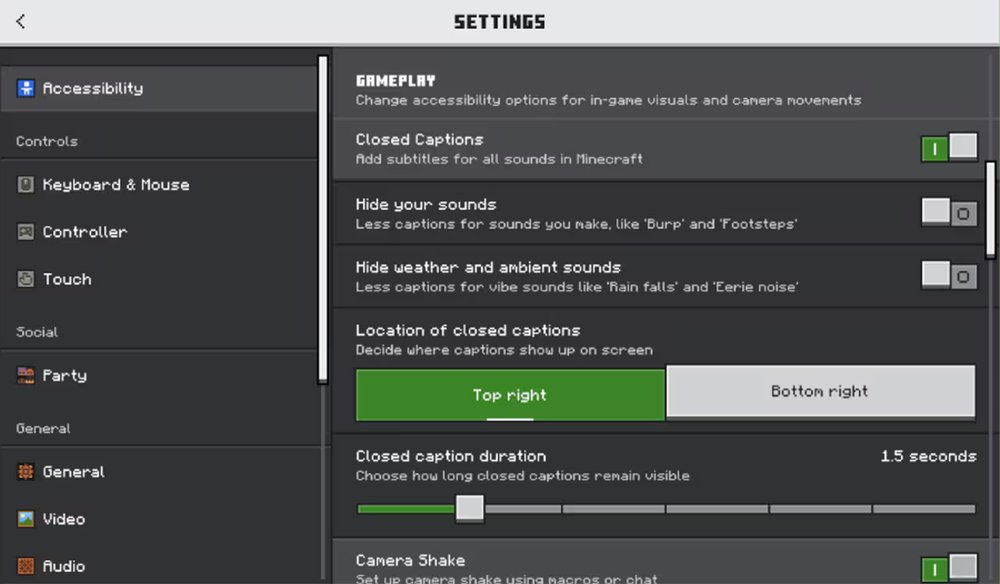
The feature had been available in preview builds for several months, but it is now rolling out as a full accessibility option for Bedrock players.
Minecraft Bedrock Adds Closed Captions
Closed captions were previously available only in Minecraft Java Edition. With this update, Bedrock players can now use on-screen text to identify nearby sounds while playing.
Image credit: Mojang
The feature helps players who may miss audio cues during gameplay. That includes deaf and hard-of-hearing players, players who process audio differently, and anyone playing without sound.
How Closed Captions Work in Minecraft Bedrock
Once enabled, Minecraft displays short text descriptions of nearby sounds. These captions can describe footsteps, enemy noises, doors, weather, and other in-game actions.
The system also includes directional cues. These indicators show where a sound comes from, helping players react faster to nearby threats or activity.
How to Enable Closed Captions
Players can turn on closed captions from the Accessibility settings menu.
Image credit: Mojang
From the same section, players can customize how captions appear in-game. Minecraft lets users adjust how long captions stay visible, where they appear on the screen, and which sound types appear.
Players can also hide certain categories, such as player-made sounds or weather effects, if they want a cleaner HUD.
Known Issues Remain
Mojang says the feature may still have some rough edges.
Some sounds may appear incorrectly or inconsistently. Directional indicators may also feel confusing in vertical spaces, especially when sounds come from above or below the player.
Another possible issue is screen clutter. In busy areas, too many captions may appear at once and make the HUD harder to read.
Mojang is asking players to report problems through its feedback page so the feature can improve in future updates.
It’s been more than three years since Microsoft added Copilot to Excel. Along the years, the company added bunch of new Copilot features to Excel in order to make things easier for users out there. For example, earlier this year, Microsoft announced wave 3 of 365 Copilot with agentic AI to Excel, Word, and more. That’s not all; the company has added Agent Mode, new =COPILOT function to Excel, and Copilot chat late last year.
Excel’s Copilot will soon double-check web results before answering you
Now, it seems Microsoft is getting another Copilot feature ready for Excel that can help with complex web search. We spotted the feature on the official Microsoft 365 Roadmap, which suggests that the upcoming feature introduces a multi-agent web search system for Copilot in Excel.
So, what that exactly means for Excel users? Well, rather than relying on a single search process, Copilot will coordinate multiple AI agents working in parallel to gather information, compare results across different sources, verify findings, and even revisit unanswered questions before generating a final response.
The wordings Microsoft has used to describe the feature hints that it will improve complex web-based research performed directly inside Excel. According to Microsoft’s roadmap description, the upgraded system should deliver faster responses while also producing more complete and reliable answers by validating information instead of returning the first available result.
In real-life scenario, this could make Copilot more useful when researching business data, market trends, financial information, or other topics that require information from multiple sources.
The writing has been on the wall for physical games, and it looks like Xbox may already be preparing for what’s next. Just as Sony confirmed it will stop producing physical PlayStation game discs starting in 2028, a new report claims Microsoft is quietly building a feature that could bridge the gap between physical and digital game ownership.
According to Tom Warren at The Verge, Microsoft has been testing a new feature internally called Disc-to-Digital. The report says references to the feature have existed inside the Xbox PC app code since May, suggesting development has been underway behind the scenes even though Microsoft has yet to announce it publicly.
Rather than replacing your physical collection, the reported system would convert eligible Xbox game discs into digital entitlements. The process is said to be fairly straightforward. Players would insert a supported Xbox One or Xbox Series X|S disc, install the game, launch it while signed into a Microsoft account, and receive a digital license linked to that specific disc.
Interestingly, the report claims the entitlement isn’t permanently linked to one account. If the physical disc changes hands, the digital entitlement reportedly moves with it once the new owner signs in and verifies the disc. Warren also says Microsoft intends to support games bundled with Xbox consoles as well as certain multi-disc releases, although compatibility may vary depending on when individual discs were manufactured.
The report also notes that Xbox 360 and original Xbox discs aren’t expected to be supported under the rumored program. Meanwhile, the mentions Microsoft still hasn’t fully decided whether its next-generation Project Helix console will ship with a disc drive, making this feature appear even more relevant if Xbox eventually embraces a fully digital future. As of now, Microsoft hasn’t officially confirmed Disc-to-Digital feature. If we get any confirmation, we’ll let you know.
Chrome is testing a new way to make extensions easier to find after installation. Instead of keeping new extension buttons tucked away in the Extensions menu, Chrome can automatically pin newly installed extensions to the toolbar.
Why Chrome is making this change
Many extensions rely on toolbar buttons for quick access, but users often miss them because Chrome keeps newly installed extensions inside the Extensions menu by default.
Some extensions even show onboarding pages that tell users to click the Extensions button and pin the extension manually after installation. Chrome’s new behavior removes that extra step by making extension buttons visible immediately.
A cleaner setup for some users, a crowded toolbar for others
The change could make extensions easier to discover, especially for tools users use often, such as password managers, screenshot tools, and productivity extensions.
Pin new extensions toggle on chrome://extensions page. Image credit: Venkat | Windows Report.
At the same time, users who install many extensions may find their toolbar filling up faster. Users can already customize the Chrome toolbar and hide buttons they do not use. This new setting takes the opposite approach by placing newly installed extensions front and center.
Google describes the change in a commit titled “[Extensions] Add toggle for default pinning in chrome://extensions]” which says the change adds “a new user preference and a corresponding UI toggle” to control whether newly installed extensions are pinned to the toolbar by default. The commit also says the toggle is only shown when the feature flag is enabled and that the preference is set to true by default.
That means Chrome’s new “Pin new extensions” toggle controls whether newly installed extensions with toolbar actions appear on the toolbar automatically. Users who prefer a cleaner toolbar can switch the setting off.
Chrome is testing automatic extension pinning in Canary. The feature has been in development since at least March, and the underlying code is now in place. We tested it and confirmed the behavior: when enabled, newly installed extensions automatically pin to the toolbar. Turning off “Pin new extensions” in chrome://extensions disables auto-pinning for future installations, while extensions already pinned remain on the toolbar.
Any extensions installed after disabling the toggle stay hidden in the Extensions menu by default, just as they do in current Chrome. Google is also preparing to alert users about the change once it launches. There is still no guarantee the feature will reach Stable.
Operation Navy Ghost is targeting Python developers who build Telegram bots by hiding backdoors inside trojanized Pyrogram forks uploaded to PyPI.
The campaign has been active since November 2025, according to Checkmarx researchers, who named the activity Operation Navy Ghost. The attackers published malicious packages that copy the original Pyrogram project while quietly adding code that lets them read files and run commands on compromised systems.
Attackers Used Pyrogram’s Popularity Against Telegram Bot Developers
Pyrogram is a Python framework used to build Telegram bots and userbots. Although the original project no longer receives maintenance, many developers still rely on it for production Telegram automation.
That made it a useful target for threat actors. Developers searching for Pyrogram alternatives or modified forks could install a malicious package that appeared legitimate at first glance.
Checkmarx found that the attackers uploaded at least eight malicious packages to PyPI between November 2025 and June 2026. The package names include VLifeGram, VLife-Gram, pyrogram-navy, pyrogram-styled, pyrogram-zeeb, kelragram, sepgram, and pyrogram-kelra.
Some of these packages attracted thousands of downloads. The most downloaded package, pyrogram-styled, reportedly passed 15,000 downloads.
Malicious Packages Included a Hidden Backdoor
The attackers copied the original Pyrogram source code into the malicious packages to make them look functional and familiar. This helped reduce suspicion because developers could still use the package for Telegram bot development.
However, the attackers added a hidden backdoor file named secret.py inside the helpers module. The backdoor activates when a developer imports Pyrogram or when the infected Telegram bot starts running.
Once active, the malware registers hidden Telegram command handlers. These handlers let the attackers control the compromised bot through Telegram commands.
What Attackers Could Steal From Infected Servers
The backdoor runs with the same permissions as the infected Telegram bot. That means the attackers can access anything the bot process or its server account can access.
Potentially exposed data includes environment variables, Telegram session files, chats, contacts, credentials, local files, databases, and cloud API keys. If developers stored tokens or secrets on the server, the attackers may have been able to retrieve them.
Malware Focused on Production Bot Accounts
Checkmarx said the backdoor activates only on Telegram bot accounts. That detail suggests the attackers wanted access to real bot deployments rather than casual local testing environments.
The malware also tries to stay quiet. It suppresses errors and disables logging, making it harder for developers to notice suspicious behavior during normal use.
The goal appears to be long-term access to sensitive infrastructure. Attackers could use infected bots as a path into production systems, steal secrets, or run additional commands after the initial compromise.
Hardcoded Telegram IDs Controlled the Backdoor
The malware includes a hardcoded OWNERS list containing Telegram IDs controlled by the attackers. These IDs give the threat actor exclusive access to the hidden command handlers.
The same list also helps prevent the backdoor from activating on the attackers’ own systems. Checkmarx linked the packages to one threat actor because they shared code, command names, infrastructure, and the same ownership list.
This overlap suggests the campaign came from a coordinated source rather than unrelated package uploads.
Developers Should Remove Packages and Rotate Secrets
Developers who installed any of the affected packages should remove them immediately. They should also treat affected systems as compromised.
The recommended response includes revoking and regenerating Telegram bot tokens, rotating credentials, checking environment variables, reviewing cloud API keys, and inspecting local files or databases that the bot could access.
Developers should also check their dependency lists for the malicious package names and review server logs where available. Since the malware disables logging and suppresses errors, a clean log file should not be treated as proof that no compromise occurred.
Checkmarx has published indicators of compromise, including malicious Telegram IDs and attacker profile URLs.
Physical game collections are about to take another major hit. Sony has officially confirmed that it will stop producing physical discs for all newly released PlayStation games starting in January 2028.
The announcement means any game launching from January 2028 onward will no longer receive a traditional Blu-ray disc release. Rather, new PlayStation titles will be distributed digitally via the PlayStation Store and retail partners using digital purchase formats.
Sony clarified that the decision only affects games launching after January 2028. Existing titles and games scheduled to release before that deadline will continue shipping on physical discs as originally planned.
According to Sony, the decision comes from changing consumer habits rather than a sudden strategy shift. The company says digital purchases have now become the preferred way for most PlayStation players to buy games, which makes physical media a much smaller part of the overall business than it once was.
Speaking of retailers, Sony also emphasized that players will still have options on where they purchase games. While physical discs are disappearing, retailers won’t disappear from the equation. Rather, stores will continue selling digital versions of PlayStation games alongside purchases made directly through the PlayStation Store.
Last month, Microsoft rolled out a bunch of new Microsoft 365 Copilot features to users across its apps in June 2026. Among the highlights from last month’s feature drop was the general availability of Copilot Cowork. For the uninitiated, it’s Microsoft’s AI feature that can complete entire business tasks rather than simply answer prompts.
Improvements for Copilot Cowork and feature additions across apps
Last month, the company also supercharged Copilot Cowork with GPT-5.5 Thinking model selection, Anthropic’s new model support for visual work, browser automation, mobile support, push notifications, custom skills, new business plugins, branded PowerPoint template generation, image creation powered by ChatGPT Images 2.0, and usage-based billing controls.
The Copilot app also received several notable upgrades. Microsoft introduced deep citations that link directly to the relevant section inside documents. Next, the company introduced a new Regenerate button for quickly switching AI models or retrying responses, actionable Suggested Edits inside Copilot Pages, Power BI reasoning through Work IQ, Dataverse support in public preview, and expanded Notebook availability for Copilot Chat users. Not to forget, Notebook support for Outlook emails will begin rolling out in July.
Microsoft also added a few new Copilot features within Word. For example, Microsoft Word users can now switch between different AI models, generate images directly inside documents, continue previous Copilot conversations, and receive Catchup summaries for changed documents. That’s not all; Word users can also apply comment-based edits automatically, and access agentic editing capabilities on iPhone and iPad.
Microsoft PowerPoint also received one of its biggest Copilot upgrades yet. Microsoft added Brand Kit Picker for company-approved templates, reusable presentation skills, and the ability to build presentations directly from SharePoint libraries and OneDrive folders. Meanwhile, Excel got reusable Skills, persistent personalization preferences, and workbook Rules sheets that let Copilot follow spreadsheet-specific instructions automatically.
Planning and collab features involving Copilot
Moving on to Outlook, users can now rewrite selected portions of an email instead of regenerating the entire draft, while classic Outlook is also getting easier Copilot settings management beginning in July.
Speaking of planning and collab, Microsoft also shipped the new Planner Agent, added additional Researcher model options, introduced organization prompts, and launched a Cost Management Dashboard for Copilot Credits. The company further expanded Organizational Messages to hybrid-joined devices, added new Vision controls for administrators, and strengthened Microsoft Purview governance for both Copilot and Cowork.
Last but not least, Microsoft rolled out new email restrictions for external content used inside Copilot responses, with broader availability arriving over the next few months. In case you want to learn more about features that Microsoft added last month its apps, click here for Microsoft Teams and Microsoft Excel.
AI took center stage across Microsoft Teams last month
Much of June’s update for Teams revolves around AI. Microsoft introduced the new Teams Phone Agent, which can answer calls, schedule appointments, resolves common questions, and routes callers to the right department.
In addition, organizations can also connect custom voice agents built with Copilot Studio for more specialized workflows. Teams search is now powered by contextual Copilot search, which allows users to ask natural-language questions instead of manually digging through conversations. Meanwhile, Teams Rooms received expanded Facilitator capabilities, including voice interaction, room diagnostics, external knowledge access, room replacement suggestions, and meeting assistance before, during, and after calls.
Microsoft also expanded IntelliFrame with people labels, making it easier for remote attendees to identify everyone sitting inside a meeting room.
Besides AI, Microsoft introduced a long list of collaboration-centric features. For example, Teams now offers advanced file discovery with smarter filters, faster PowerPoint and Excel previews on mobile, a new list view for apps, preserved workspace context when switching conversations, grouped muted and meeting chats, an improved download manager, Quick Share for images, and support for apps inside private and shared channels.
Security, Teams Rooms, and frontline workers also received major features
Microsoft also bolstered Teams’ security throughout June. New protections include brand impersonation warnings during calls, Security Detection Reports inside Teams Admin Center, suspicious call reporting, impersonation alerts on iOS and Android, expanded policy controls for digital workers, dedicated management for Teams core agents, and new Purview-related administrative capabilities.
Teams Phone also got more accurate voicemail transcription with support for 14 additional languages, while IT administrators can now centrally manage Teams Phone device applications.
Teams Rooms saw another sizable upgrade with Department of Defense support for Android devices, proximity join improvements for presenters, room availability indicators, webinar display controls, and additional AI-powered room management tools. Frontline workers weren’t left out either, as Microsoft introduced drag-and-drop scheduling, intelligent Assign Open Shifts, improved multi-selection, and a new two-week planning view in Shifts.
Moreover, Microsoft also launched Express Voice Enrollment for speaker recognition and improved Teams performance for macOS virtual desktop users.