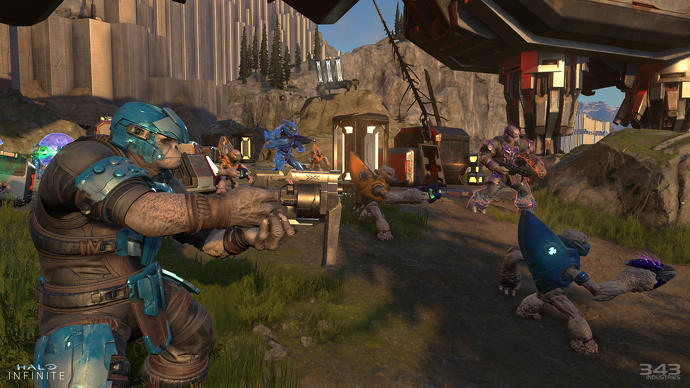
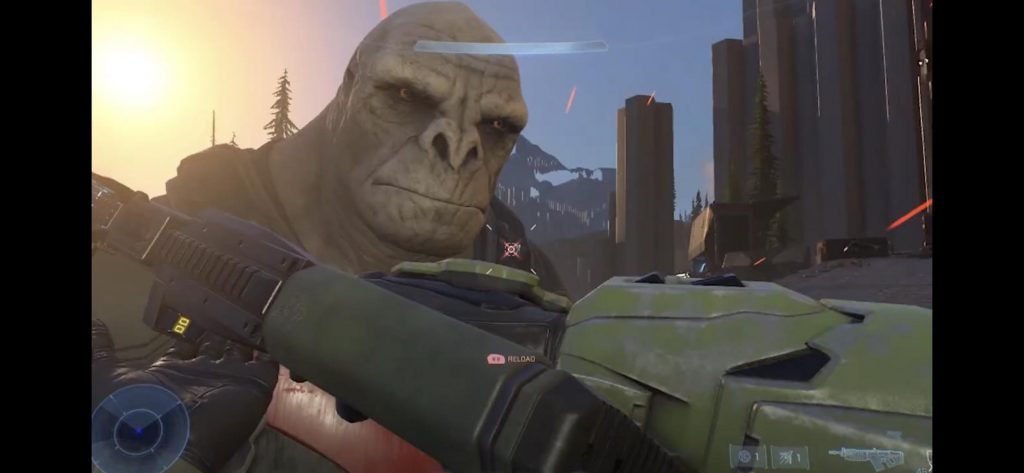
Cyberpunk 2077 is the result of several years of work on behalf of CD Projekt Red, and the outcome is quite spectacular.
This massive Sci-Fi video game features a massive world to explore, incredible character customization options, and an amazing story.
However, all of these have in common one thing: a lot of work needs to be put into them, and many users have reported that they are having issues saving their game.
Since this game is so loved by many, we’ve decided to create this step-by-step guide that will show you exactly what needs to be done to make sure that your game progress gets saved.
How do I save my game properly in Cyberpunk 2077?
1. Modify your antivirus’ permission settings
Some antivirus tools block access of software to certain file locations by default as a safety measure, and in that case, your job is to simply modify your antivirus’ settings.
If you’re using Bitdefender, modifying your settings will be extremely easy, and it can be done as follows:
Open the Bitdefender dashboard
Access the Protection tab on the left
Click on Application Access under the Safe Files applet
Flag the check mark for Cyberpunk 2077
Bitdefender
With Bitdefender, you gain complete and easy control over what your apps can access on your PC!
Type in windows security to access the Windows Defender Security Center
Go to Virus & threat protection
Select the Virus & threat protection settings option.
Under Controlled folder access, click the Allow an app throughControlled folder access link
Click the Add an allowed app button.
By following these steps, you should no longer have issues saving your game progress in Cyberpunk 2077 anymore.
However, keep in mind that it is not possible to save the game during combat, braindance and some quests, so make sure that is not actually the issue before proceeding with the troubleshooting steps below.
Which solution did you use to get rid of the game saving issue in Cyberpunk 2077? Let us know how you handled the problem by leaving us your feedback in the comments section below.
Sometimes you can’t use certain file types unless you convert them to a different format. This is a fairly simple process, and you just need to use specific software to convert the files.
In today’s article, we’re going to show you how to convert a ZIP file to PDF, and this is actually much simpler than you think, so let’s get started, shall we?
How can I convert a ZIP file to PDF?
1. Use WinZip
When it comes to ZIP files, WinZip is the best tool out there that can work with ZIP files. The software has a built-in feature that allows you to convert ZIP to PDF files with just a few clicks.
Regarding the supported file types, WinZip can zip any file, and it can extract ZIP, RAR, 7Z, TAR, TGZ, and other file types. The software also works as a file manager, and there’s even a file splitter feature available as well.
WinZip also supports file sharing, and it has support for cloud storage, which makes it one of the most versatile file archivers on the market.
Other great features:
Simple to use
File encryption
Compatible with most archive formats
File manager, file splitter
PDF conversion
WinZip
If you want to manage ZIP files better and convert them to PDF easily, give WinZip a try.
Make sure that the TO PDF option is selected and click on Convert.
Once the file is converted, download it.
Converting ZIP files to PDF doesn’t have to be a complicated process, and if you wish to convert ZIP files, we suggest using WinZip software for the best results.
Which solution did you use to convert your Zip folders? Let us know your preferences by leaving us a message in the comments section below.
In a world where the data is the new gold, protecting the data has become more important than ever before. Encryption can help you protect information stored, sent and received.
This task is made easier by the AES encryption software. While 256-bit encryption software offers greater protection, 128-bit AES encryption provides quite sufficient security for your data.
The difference between 256-bit encryption and 126-bit encryption is the key length. Apart from the key length, both of these standards offer similar protection and for the most part, impenetrable.
In this article, we explore the best 128-bit AES encryption software that you can use to keep your most valuable data safe through encryption.
If you have heard of WinZip before, you probably know it for its file managing capabilities. However, it also allows you to encrypt your zip archives with 128-bit encryption. You can also use 256-bit encryption if you want.
Apart from the encryption features, WinZip allows you to create zip archives with multiple files. Thus making it easier to move, share and organize multiple files at one place.
WinZip offers best in class file compression and can extract all the major file formats, including XZ, RAR, and TGZ. With the built-in repair tool, you can repair any damaged Zip archive.
Additional features of WinZip include easy sharing via email, cloud, social media, and IM, PDF conversion, watermarking, and Windows file management.
Key features of WinZip:
Best in class 128-bit encryption and 256-bit encryption.
Cloud backup feature
Windows file management
PDF conversion
Cloud integration with Google Drive, Dropbox, and OneDrive
WinZip
Enjoy data archiving and 128-bit AES encryption with the help of this incredibly useful software utility.
Folder Lock is a complete data protection solution for your PC and portable drives. This intuitive utility allows you to lock and password protects your files with Windows kernel level locking.
With Folder Lock, you can encrypt your personal files using 128-bit and 256-bit military-grade encryption to create storage lockers to keep your important files encrypted. These dynamic locks can grow in size as your data need increases.
It also comes with a backup option. You can upload all your private data onto a cloud server automatically in real-time. Furthermore, you can use Folder Lock to encrypt your USB/CD storage devices as well.
Key features of Folder Lock:
128-bit and 256-bit encryption
External device encryption support
Automatic backup manager with real-time sync
Password lock files, folder, drives and programs
Folder Lock
Encrypt your data and keep it safe from unauthorized access with the help of this extremely secure software utility
If you are looking for an advanced encryption tool with simple settings, AxCrypt is a good alternative. It offers strong 128-bit and 256-bit encryption and comes with tons of other file management features.
This multilingual tools supports popular languages including English, Dutch, French, German and more. There are also cloud storage capabilities supporting popular cloud services such as Google Drive, and Dropbox.
The collaboration feature allows secure files to be opened by other AxCrypt users with their own password. The built-in password manager is a good addition and will enable you to access your credentials anywhere.
AxCrypt comes in both a free and premium version. The free version of the software is limited by features.
Boasting fast on-the-fly operation, CryptoExpert is a Windows desktop encryption software that offers secure data vault for all your data. You can create files of 10 GB or more with your choice of encryption algorithm including BLOWFISH, CAST, 128-bit/256-bit AES encryption and more.
CryptoExpert offers transparent access to files, and folder and allows you to read and write encrypted files on the fly. All the secure vaults appear as local drives to all Windows application.
Kruptos 2 Professional is a premium encryption software that can lock and encrypt all your sensitive files and folders including your photos, video, credit card data and tax returns in a safe vault.
Kruptos 2 Professional offers 128-bit and 256-bit AES encryption. Furthermore, you can read all the encrypted files from anywhere and on any device.
With its cloud encryption, you can encrypt your Dropbox, Microsoft OneDrive, Apple iCloud or Google Drive files with fully integrated and seamless cloud encryption and data shredding.
Key features of Kruptos 2 Professional:
Cloud encryption support for Dropbox, Google Drive and Apple iCloud
AES (Advanced Encryption System) function by the use of asymmetric algorithm using 128-bit block encryption and supporting key sizes of 128.
It is used to secure sensitive materials and over the years has become de facto encryption standard for the private sector. AES security standard can be applied to restrict access to both hardware and software.
How good is 128-bit AES encryption?
AES-128 offers more than enough security margin for the near future. While 256-bit AES, in theory, appears to be stronger than 128-bit AES encryption, in practice 128-bit is good enough to secure all kinds of sensitive data.
The 128-bit symmetric key is computationally secure against a brute-force attack, and theoretically, it would take 1 billion years to crack the cryptographic key.
What is the highest level of encryption?
While there are multiple encryption algorithms today, AES 256-bit encryption is so strong that it has become the official encryption standard for the private sector.
Encryption software has become important when it comes to protecting sensitive data from hackers and privacy intruders.
All the encryption software listed in this article offer 128-bit AES encryption offering industry-standard safety, making it almost impossible to decrypt the encrypted data.
Gifts are the best way to express love and gratitude to your loved ones. And, what better occasion than Christmas to find a suitable gift for each one of them.
There are deals and offers galore on Christmas gifts for Cricket fans, waiting for buyers to grab them at the earliest. From apparels and accessories, or food & drink to games and gadgets there are endless options to chose from.
Yes, there are gift choices even for those having a crazy cricket fan at home. Whether it’s a book on their favorite batsman or a mug with some quirky cricket statements, there’s a long list of such gifts. But what about gifting a tech gift relevant to the cricket fans this Christmas?
It wasn’t that tough after all to find some fun tech gifts for the cricket fans. Here we have listed our favorite picks to take a cue from.
What is the best gift for a cricket fan for Christmas?
Amazon Fire 7 tablet sports a cool 7-inch screen with upto 8 hours of battery life. The larger screen with the extended battery life is perfect to keep your cricket nerves calm while on the go. What’s more?
This tablet also comes along with Amazon’s smart assistant, Alexa to answer questions, read cricket scores, play music, etc.
You can also ask Alexa about the latest news, seek help to manage the calendar, and lots more. For cricket fans, it’s about not missing a single update on the running match and this would make a perfect Christmas gift for them.
Bose SoundSport Wireless is a powerful set of Bluetooth headphones that give a tough fight to the Apple AirPods. Bose is already famous for its sound quality, and it maintains its reputation with these best sounding and highly-trusted earphones.
It generates a booming bass that enhances the cricket commentary listening experience.
Comfortable, easy to use, and great-sounding, these Bluetooth wireless headphones are a perfect tech gift for cricket fans in 2021.
Radio is still in, especially if it’s something like the Sony ICFP26 Portable AM/FM Radio. This sleek, little radio features DAB/FM and is available on a budget. This radio is compact enough to be slipped into your pocket.
It offers pretty good sound quality to keep up with the cricket commentaries on the move. From listening to music to sports, this portable sound package is perfect as a gift this Christmas.
To experience a visual extravaganza for the much-awaited cricket match, the latest HDR TV is a must. It’s a sheer pleasure to watch 4K sport on the new TCL 55S517 4K HDR TV with a 55-inch screen. The Dolby Vision high dynamic range (HDR) adds to the watching experience.
It offers great sound quality with amazing picture quality for the cricket fans to enjoy their match to the fullest. The voice control remote is another added bonus.
Amazon Echo Spot is one of the most popular voice assistants available today. From answering questions, playing music, reading news, to reading cricket scores, it can do all that you can think of.
Not just that, it can also transform into a smarthome device by switching lights on and off or turning on the heating device. While it’s a great gift for families and children, it’s also a perfect Christmas gift for cricket fans.
A wireless charger is all that is required these days for people on the go. While smartphones are downright essential, keeping the battery charged at all times is equally important. So, for those who add cannot miss those cricket score updates wherever they are, Native Union Drop Wireless Charger serves the best.
This sleek wireless charging pad works with pretty much all the latest phone brands. It’s as easy as placing the phone on it and the charge is on.
Winter brings an exciting cricket season with some of the well-known international tournaments to watch out for. So, grab any of these Christmas gifts for cricket fans and help them keep up with their passion.
Photos take a lot of space on our drives and in no time you will run out of space, especially if you have a small SSD or HDD installed. Of course, you can always buy an external drive for backup but that is not going to be for free.
The next, immediate solution that you can take is to performe a nice session of archiving your photos and other data on your drive. This will get you tons of free space in no time and will secure your data.
You can even store them easier on an external drive or in the Cloud if they are nicely archived. There are a lot of archiving tools out there that can help you to bulk compress images but we found only the best for you.
How do I compress multiple pictures in Windows 10?
WinZip is by far the best tool if you want to archive your data and your photos. In fact, unzipping has become a synonym for archiving. It’s really fast to create the archives but it is also like a vault when it comes to your files.
That’s because it can encrypt them with banking-level technology. And after you finish with archiving and encrypting, WinZip is also offering cloud integration with OneDrive, Google Drive, Dropbox, and more. Just upload the files or send the link to anybody.
Winzip will also help you send some photos by creating special small volumes to be added as attachments. Do you have a really big stash of photos? Then you can even make the archiving process automatic.
And if you’re not yet convinced, you can try it before you buy it so just give it a chance.
WinZip
WinZip will help you archive and organize your photo collection like never before.
WinRAR is one of the most popular file compression software and its best feature is that it is the only one that can officially be used to create RAR files althou, of course, every other archiving software can uncompress them.
WinRAR’s speed and compression rate are pretty good so you should keep it in mind as a possible alternative for WinZip. Although it can archive your photo collection pretty fast, its user interface is not the most modern and appealing.
7Zip is on our top 3 for a good reason and that’s because it can handle almost all compressed file formats you throw at it. And it also does a pretty good job at creating its own archives in the 7z format.
7Zip is able to compress huge files of up to 16 billion gigabytes but if you want it to produce a very compressed file you will have to wait a while because the tool is a bit slow.
Don’t expect too much from the interface either. It looks rather old and it’s full of context menu entries that may confuse you. But for free software, it will do.
What’s great about PeaZip is that in addition to regular compression and decompression you will be able to transform an archive format into another.
You can also use this nice too if you want to secure your files because it offers AES256 encryption doubled by a two-step authentication, and a password manager.
Ashampoo ZIP FREE can compress your images fast and easily and it supports creating and extracting a lot of archive formats including ZIP, 7-ZIP, CAB, TAR (TAR, TAR.GZ, TAR.BZ2, TAR.XZ), and the LHA formats.
The interface is fresh and modern and this tool also comes with a 256-bit AES encryption. What’s excellent about Ashampoo ZIP FREE is that you can have unlimited size of the archive, and unlimited files inside the archive if you use the ZIP and 7-ZIP formats.
It can also be used to repair broken ZIP files so it can come in handy for that kind of situations.
We hope you found our selection with the best tools to bulk compress images on Windows 10 extremely usefull and you found your match. Let us know in the comments section below how everything turned out with your image collection.
Since it’s a social media site where people can connect and share ideas and events, Facebook is seen as controversial in many countries. It’s usually due to political or religious reasons.
As a result, you might not be able to access the online service at all if you’re living or traveling to these regions due to geoblocks. Examples include Bangladesh, Iran, China, and Egypt.
It’s not the end of the line, though. You can still unblock the Facebook website, online service and app using the tools below.
Please note that we don’t encourage you to use these software programs for bypassing government censorship if it means breaking the law. Use them at your own risk.
How can I unblock the Facebook website and get around bans?
Use a VPN
A VPN is the best way to bypass government censorship and access blocked websites.
It redirects you to another country where Facebook isn’t banned, making your ISP believe that you’re actually connecting from somewhere else.
Furthermore, a VPN encrypts your entire data traffic to make sure that your computer won’t leak your true IP address and location.
It’s challenging to find a VPN service with geoblocking features that can unblock the Facebook website, but we think that NordVPN nails it.
You just have to connect to a VPN server in a country where Facebook isn’t blocked (like the US), and then fire up you web browser or launch the Facebook app.
More about NordVPN:
Works with Windows, Android, Mac, iOS, Linux
OpenVPN and NordLynx (built around WireGuard)
Double VPN, Onion-over-VPN, and obfuscated VPN servers for anti-censorship
24/7 live chat support
30-day money-back guarantee (no free trial)
NordVPN
Use NordVPN’s powerful advanced features to bypass government censorship and unblock Facebook anywhere.
Specially built as an anti-censorship tool, Tor is an anonymous network that anyone can use for free to get around country bans and access restricted content, including Facebook.
All you have to do is download the Tor Browser, set up obfuscation mode at startup, and then unblock the Facebook website.
On the other hand, Tor isn’t as versatile as a premium VPN service like NordVPN (buy here). You can’t use it to unblock streaming content like Netflix, for instance.
Use Psiphon
Psiphon is an Internet circumvention tool that uses a combination of several technologies to fight online censorship: VPN, SSH, and HTTP proxy.
It’s completely free to use. You can download Psiphon for Windows, Android, and iOS. Similar to a VPN, you just have to connect to a server location where Facebook isn’t blocked.
However, compared to NordVPN, Psiphon supports fewer servers in fewer countries. It doesn’t support Mac, Linux, routers, or 24/7 live chat support.
And you can’t use the cool anti-censorship featured provided by NordVPN (buy here), like staying connected to two VPN servers at once or disguising your VPN traffic to fly under the radar.
Use a proxy
We saved this option for last because it’s the least reliable for unblocking the Facebook website.
While a proxy server hides your IP address and offers some level of protection, it’s simply not as effective as a VPN, Tor, or even Psiphon. The encryption isn’t powerful enough.
Although there are numerous free proxy lists that you can find on the web, most ISPs have already identified and blocked them due to government requests.
If you still want to use a proxy server, we suggest checking out Shadowsocks.
Conclusion
To sum up, you can use a VPN, Tor, Psiphon or a proxy server to circumvent government censorship and unblock the Facebook website.
However, there’s no foolproof solution. And you could get in trouble for using any anti-censorship method if it means breaking the law.
What method are you using to defeat online censorship and unblock Facebook in your country? Let us know in the comment section below.
Microsoft Surface Laptop Go owners are getting treated to the device’s first-ever firmware update today, which’s bringing some improvements to the Windows Hello experience among other things.
The Surface Laptop Go has been on the market for about two months and in that time, the device has been pretty self-sufficient and with Windows 10 S Mode out of the box, there has been little need for owners to venture into update land through any wants or needs.
However, for anyone like myself who has been using the Surface Laptop Go as an Insider machine, you may have noticed the device stop reading fingerprints after the latest release.
The fingerprint reader remains a completely useless glowing slap in the face to the Surface Laptop Go’s level of security for me, so much so that when attempting to reset the recognition, the device claims that it can’t even map to the button.
Hopefully, today’s firmware update 3.15.12011.10134 addresses this issue and also improves the “reader performance” as well. Other improvements rolled into this update include optimizations to the
Surface System Telemetry Driver – System Device
Surface Touch Firmware
Surface UEFI Firmware
The firmware update is gradually rolling out, so some devices may not be seeing the release just yet, but it should land in the Settings App soon enough for most. For those with less patience, you could also try downloading it from Microsoft’s Download Center as well.
Let me know in the comments below, if you own a Surface Laptop Go and if you’ve had any issues with its performance or features so far.
QuickBooks is known as one of the main accounting software services created by Intuit in order to make the payment process faster and easier for both small and medium-sized businesses.
In order to take full advantage of the various benefits of the QuickBooks application, you need a high-quality card reader that can ensure a smooth work-flow and handle a multitude of transactions on a daily basis.
In this article we want to give you the best recommendations regarding a card reader for your QuickBooks package.
What is the best card reader to use with QuickBooks?
This three-track card reader from MagTek deserves a top mention because it comes with two magnetic heads that allow the card to be read in just one swipe regardless of what direction the magnetic stripe is facing.
You can swipe the card backward or forward at a speed of 60″ per second thanks to the complex configuration. Another perk is that the USB keyboard emulation sends data created for hosting systems and applications that allow keyboard input.
Another great card reader that works perfectly with Quickbooks is this smart device from MagTek. It provides a configuration that allows you to swipe the card backward or forward at a speed of up to 60″ per second.
It comes with two magnetic heads, which means that it can be read with one swipe without worrying about what direction the magnetic stripe is facing.
This three-track magnetic card reader provides a built-in, 6 feet USB cable that allows you to connect it to any type of PC.
This magnetic card reader has gained a reputation among users for being a great match with QuickBooks apps and services.
A device that consists of a USB emulation keyboard interface that doesn’t need any driver or software, in order to function. All you need to do is plug in and play.
It has the capacity to read up to 3 tracks of information: ISO7811, AAMVA, CA DMV and many other card data formats.
You’ll definitely get the job done much faster thanks to the bi-directional swipe reading feature that works even on damaged cards
This magnetic credit card reader is able to read up to three tracks of information when the card is swiped in either direction and works great with the QuickBooks services.
It offers compatibility with a variety of card formats such as ISO7811, AAMVA, CA DMV, and many others. The configuration system is very user-friendly and can be customized to your basic needs.
A pack of two magnetic credit card readers that offer QuickBooks compatibility and can read three tracks Hi and Lo coercivity magnetic stripe cards.
Thanks to the bidirectional swipe reading that works with TXT, notepad, Word, Excel, POS systems, you can rely on over 1,000,000 card swipes, an aspect that will improve your work-flow significantly. It also supports a multitude of card formats like ISO7811, AAMVA, CA DMV.
These magnetic credit cards offer compatibility with a multitude of USB operating systems like Windows and MAC OS.
As you can see there are a few aspects you should consider when it comes to a credit card reader that also offers QuickBooks compatibility and we presented you with some of the best options of the moment.
We’d also like to hear your opinion so please share your thoughts with us by using the comment section bellow.
Cyberpunk 2077 is a Sci-Fi RPG created by CD Projekt Red, the same developers that brought the Witcher to the gaming world.
The game is an amazing display of how far technology has come, but it did get off to a rocky start at launch, being plagued by issues like crashes, not being able to launch and more.
Unfortunately, a lot of the players that did make the game work are complaining about performance issues, such as FPS drops, performance spikes, long loading times, and more.
Because the game is so popular, we’ve decided to look into several solutions that can se used to fix the problem, and we will be listing them to you in a step-by-step manner in the guide below.
How do I fix performance issues in Cyberpunk 2077?
1. Check your PC’s system requirements
Your go-to solution whenever you are facing performance issues in games is to check out whether your PC meets the minimum system requirements or not.
In fact, most of the times not having a powerful PC can prevent you from launching the game entirely.
If your PC does meet the minimum system requirements but still has low FPS, then your next best solution is to simply play the game at lower video settings.
While the game will indeed no longer look as appealing, at least it will be able to play it.
3. Update your device drivers
If your PC is powerful enough to run Cyberpunk 2077, it amounts to nothing if the drivers running it are outdated, especially the GPU‘s drivers.
That being the case, a good third-party software utility can come in handy to repair, update, and find all the missing drivers that your PC needs, and one such tool is Outbyte Driver Updater.
Not only will it completely bring your PC up to date driver-wise, it is also incredibly easy-to-use, and lightweight.
Outbyte Driver Updater
Cyberpunk 2077 will run faster and better with updated drivers. Use Outbyte Driver Updater to boost your PC now!
Microsoft Lists is a new data storage and organisation system that blends spreadsheets, databases and web apps together. Lists is really a new interface atop the existing SharePoint Lists infrastructure. We’ve previously shown how to create a new list within Lists itself; now, we’ll go in-depth on list configuration by using the SharePoint interface.
Lists does a good job of making itself as accessible as possible. The SharePoint backend is only revealed when you go looking for it. When you’re viewing a list, click the Settings icon in the top-right, then “List settings” to open the configuration options in SharePoint.
The SharePoint List Settings screen is much denser than what you get within the Lists app. You have extensive management options for customising the list’s fields, validation, permissions and metadata.
General Settings
Starting from the top, the “General Settings” contain global controls which apply to the list itself, or all data within the list. We’re not going to cover every option here as many of them are only used within the SharePoint Lists UI, not the Lists app.
Some notable settings can be found in “Advanced settings”. “Item-level permissions” allows you to control what users can see on shared lists, such as all items or only items they’ve created themselves.
The “Attachments” option can be used to disable the ability to add attachments to new items in lists, which is on by default. Further down the screen, there’s settings to control whether list items can display in search results and whether they can be downloaded to users’ devices.
Columns
Back on the main list settings screen, the “Columns” section is worth further attention. Clicking a column name will allow you to edit its properties. The options available here will depend on the column’s data type. Some examples you might see include the ability to set maximum character lengths (for text fields), set the default value for new items and toggle whether the field is a required input.
Interactive data types, such as the multiple choice select component, will have more settings. These may include the ability to change the type of input used, allowing you to choose between radio buttons or a dropdown menu. Most – but not all – of these options are available when editing columns within the main Lists app. Using the SharePoint settings screen exposes all the possible settings, giving you the most control over how data is stored and presented.
You can create a new column using the “Create column” link on the List settings page. You’ll need to choose a column name, select the data type and fill out the settings fields for that data type. The “Add to default view” checkbox should be left selected to make sure the field shows up by default in the Lists interface.
Views
On the subject of views, you can manage these within the “Views” section at the bottom of the settings page. You can create new views and edit existing ones. A “view” defines the fields to show in the Lists UI. You start with a single “All Items” view by default. When you add additional views, you can access them in Lists by clicking the name of the current view in the top-right.
The View settings screen allows you to choose which fields to display and the order to display them in. You can also set up the sorting order for rows of data and configure default filters. In the column selection section, you’ll see several off-by-default fields which are usually hidden. Turn them on to add default metadata to the List view, such as the name of the item’s author (“Created By”) or its modifiation time (“Modified”).
Further down the view settings screen, you’ll find sections that allow you to configure whether totals are displayed at the bottom of columns, whether data should be grouped together and how many data items should be displayed on a single screen. The final section, “Mobile”, lets you choose whether to make this view available on mobile devices. The default lists for desktop and mobile can be set independently of each other, so it’s possible to provide a customised view for smaller devices.
The SharePoint settings screens are far less accessible than Lists itself is. You may not need to use them often though, as the most commonly used capabiltiies are supported within Lists’ own configuration panels.
The power of Lists comes in its versatility – you can get started with a basic list very quickly and then add more advanced capabilities over time. Eventually, you may reach a point where you need a SharePoint option that isn’t exposed in the Lists UI. When that time comes, click “List settings”, break through the Lists facade and begin utilising the capabilties – and complexity – of SharePoint instead.
Microsoft has been working hard to make Chromium Edge stand out and it started testing a feature in Edge Canary back in September.
This basically allowed users to freeze tabs in the background when not being used. This technology is based on Chrome‘s built-in freezing feature, which easily pauses scripts on a page when you’re looking at it.
Now, Microsoft is ready to deploy this feature to all users running Microsoft Edge Beta 88. As expected, it is meant to deliver a significant decrease in CPU and battery usage.
Numbers look quite promising. In fact, that’s precisely what Microsoft reveals:
Using sleeping tabs on Microsoft Edge typically reduces memory usage by 32% on average. It also increases your battery life as a sleeping tab uses 37% less CPU on average than a non-sleeping tab.
What’s this new sleeping tabs feature in Edge all about?
The new feature is meant to force inactive background tabs to automatically go to sleep. This releases system resources after a pre-defined amount of time.
Do note that that sleeping tabs in Microsoft Edge will make tabs go to sleep only after 2 hours of inactivity.
Even so, this makes a huge difference when it comes to redirecting those valuable CPU and battery resources for newly opened or active tabs, as well as other applications on your computer.
You should see a fade on the tab when it is asleep, so feel free to click it whenever you want to bring it back to life.
On top of all these, recent updates include an option to put tabs to sleep even after 5 minutes of inactivity and new group policies to manage sleeping tabs.
Keep in mind that you can find more related settings for this by entering edge://settings/system in the URL bar. Don’t forget to let us know your feedback on sleeping tabs in the comments area below.
Cyberpunk 2077 is the latest rage in terms of RPG games, and many have awaited the official launch despite being delayed so many times.
Well, the game is out, but many users have been facing issues with it, many of them reporting that they are having problems launch the game in the first place.
Because the game is so popular, we’ve decided to create a step-by-step guide on how you can fix this issue, and finally make Cyberpunk 2077 launch properly on your PC.
How do I make Cyberpunk 2077 launch properly on Windows 10?
1. Make sure that your PC meets the minimum system requirements
One cannot deny that Cyberpunk is a mammoth of a game, and that you need a powerful gaming PC to run it properly.
As mentioned above, Cyberpunk 2077 need a powerful PC to run, the core being your device’s GPU.
However, it’s not enough to have the hardware if the device drivers are only, missing, or installed in a faulty way, and that is when a dedicated driver updater can come in handy.
The best driver updater currently on the market is Outbyte Driver Updater, and not only will this tool scan your PC for outdated drivers, it will also fix the broken one, and find you the missing ones.
The program is lightweight, since the library of drivers is entirely online, and it is constantly updated to the latest version, so you know your PC will always be taken care of.
Outbyte Driver Updater
Your GPU’s drivers are the main cause of visual bugs, and games not launching. Play whatever you want by using Outbyte Driver Updater!
Have you tried any other trick that worked that we haven’t covered? Let us know by leaving a message in the comments section below and we will update the article accordingly.
If you’re a fan of RPG games, especially the critically-acclaimed Witcher series, then you’re probably well-aware of Cyberpunk 2077, a brand new Sci-Fi RPG launched in December 2020.
Unfortunately, PC players got off to a rocky start since the game was still released with a lot of bugs despite several delays aimed at polishing the final product.
Because of the game‘s popularity, we’ve decided to compile a step-by-step guide on how you can solve many of these crashes.
How do I fix game crashes in Cyberpunk 2077?
1. Update your GPU drivers
Like most games nowadays, it is important that your PC meets all the system requirements if you want them to run properly.
If your PC does meet the hardware requirements, make sure that the drivers are updated as well.
One great way of updating your drivers to the latest version fast and without issues is via a dedicated driver updater, and few on the market are as good as Outbyte Driver Updater.
Not only will this tool detect all of your missing, broken, or outdated drivers, but it will find them and download them for you as fast as your Internet speed allows it.
More so, the tool is designed to be used by all users, and it supports all drivers and hardware components thanks to the host of libraries that back it up.
Outbyte Driver Updater
Games won’t run if your GPU drivers are updated to the latest version. Make sure that isn’t an issues anymore with Outbyte Driver Updater!
Go to bin, select x64, and launch the game from Cyberpunk 2077.exe
3.2. Steam players
Launch Steam
Go to the Library section
Right-click on your game
Select Properties
Go to the Local files tab
Click on Browse local files
Go to bin, choose x64, and launch it from Cyberpunk2077.exe
3.3. Epic Games players
By default, the game’s launcher should be found in the following location:
C:Program FilesEpic GamesCyberpunk 2077binx64
4. Verify the integrity of the game cache
4.1. GOG players
Launch GOG Galaxy and log into your GOG account
Go to Owned games and choose Cyberpunk 2077
Select Customize
Choose Manage installation
Click on Verify / repair
4.2. Steam players
Launch Steam
Go to the Library section
Right-click on your game
Select Properties
Go to the Local files tab
Click on Verify integrity of game files…
4.3. Epic Games players
Launch Epic games
Go to the Library section
Go to the game click on the three dots next to it
Select Verify
5. Reinstall the game
While the game is indeed massive and this solution will take a while, regardless of how fast your PC is, reinstalling the game is a sure-fire way of making sure that files will the installed correctly.
Just remember that while you are doing it, it would be best if you closed all other apps so that nothing interferes with the setup.
By following these steps, you should be able to get rid of any crashes when trying to play Cyberpunk 2077.
Do you know of any other solutions that you’ve tried and have proven to be useful? Let us know by leaving your feedback in the comments section below, and we will update the article accordingly.
Although Microsoft doesn’t like to publically talk about its next-generation operating system, Windows 10X, it seems as though the company has made some big internal progress on it. According to Windows Central’s Zac Bowden, Microsoft has apparently just complied a final build of Windows 10X.
Trying to confirm, but I believe the final build of Windows 10X has been compiled at build 20279. MS will continue to fix bugs internally between now and when the first 10X devices start shipping.
As a reminder, while Windows 10X was once intended for dual-screen devices like the now-delayed Surface Neo, but Microsoft has re-worked its purpose. Now, the operating system is believed to be shipping on new lightweight and budget PCs only, which are expected to be seen sometime next year. This means rumor still has it that Windows 10X won’t be available for existing PCs or tablets like Surface Go 2.
Anyway, Bowden does offer an interesting note. December 10 was intended as the “final build” day for Windows 10X, but Microsoft isn’t quite done with the OS just yet. The company is still working on bug fixes between now and whenever new PCs start shipping with the operating system onboard.
With this in mind, it definitely looks as though 2021 will be exciting for Windows. While the Spring might again bring a small regular Windows 10 release, we could see Windows 10X launch alongside it, on new devices. Then, in the fall, see the rumored “Sun Valley” redesign with the “Cobalt” update.
As for the show itself, Sony exclusive Last of Us II went home with seven awards ranging from Game of the Year to Innovation in Accessibility while other winners such as Animal Crossing: New Horizons took home Best Family Game and Microsoft’s Flight Sim owned the Best Sim/Strategy category.
We’ll save you the three-hour viewing and list of the winners from last night’s award show here (GameSpot has the full list).
Game of the Year
WINNER: The Last of Us Part II
Animal Crossing: New Horizons
Doom Eternal
Final Fantasy VII Remake
Ghost of Tsushima
Hades
Best Game Direction
WINNER: The Last of Us Part II
Final Fantasy VII Remake
Ghost of Tsushima
Hades
Half-Life: Alyx
Best Narrative
WINNER: The Last of Us Part II
13 Sentinels: Aegis Rim
Final Fantasy VII Remake
Ghost of Tsushima
Hades
Best Art Direction
WINNER: Ghost of Tsushima
Final Fantasy VII Remake
Hades
Ori and the Will of the Wisps
The Last of Us Part II
Best Score And Music
WINNER: Final Fantasy VII Remake
Doom Eternal
Hades
Ori and the Will of the Wisps
The Last of Us Part II
Best Audio Design
WINNER: The Last of Us Part II
Doom Eternal
Half-Life: Alyx
Ghost of Tsushima
Resident Evil 3
Best Performance
WINNER: Laura Bailey as Abby (The Last of Us Part II)
Ashley Johnson as Ellie (The Last of Us Part II)
Daisuke Tsuji as Jin Sakai (Ghost of Tsushima)
Logan Cunningham as Hades (Hades)
Nadji Jeter as Miles Morales (Marvel’s Spider-Man: Miles Morales)
As for other reveals from the night, fans were treated to gameplay footage for Back 4 Blood, a new Cyberpunk 2077 Forza Horizon 4 DLC, Dragon Age 4 Endless Dungeon, new Warframe content, CoD: Black Ops Cold War Season 1 gameplay, a trailer for Elite Dangerous, Evil Dead gameplay, Elder Scrolls Online and so much more.
The three-hour event has been archived on YouTube for anyone who wants to comb through the piles of news, trailers, and gameplay shown during last night’s award show.
As the name suggests, text predictions will suggest words and phrases while the user is composing an email in English. Outlook users will be able to accept suggestions by pressing the tab or the right arrow key. If they continue to type while ignoring the suggestions, the text predictions will disappear automatically.
At launch, the feature will be on by default, and users will be able to turn off the text predictions by heading to the Mail options in Outlook for Windows. “Disabling this feature in Outlook for Windows will not affect text predictions in Outlook on the web or Outlook for iOS. Eventually, text predictions will support additional languages, which will not require an update to the application or settings.” the company explained.
The addition of text predictions will be a welcome one for Outlook users, and it’s handy for people who deal with a large volume of emails. Do you think that the new experience will help you to be more productive? Let us know in the comments down below.
Microsoft Lists is a data management solution mixing elements of Excel spreadsheets, Access databases and third-party low code solutions such as Airtable. In this guide, we’ll show you how to get started creating a new list from scratch – if you’re looking for a more general overview of Lists, try reading our Getting Started guide first.
Login to your work or school Microsoft 365 account and launch Microsoft Lists from the app launcher. Click the “New list” button at the top of the app, then select the “Blank list” option.
Give your list a name and assign it a colour and icon. The latter two are purely decorational elements to help lists stand out against each other within the app’s UI.
At the bottom of the form, you’ll need to choose where to save the list to. The default “My lists” option will result in a personal list which only you have access to. Within the dropdown menu, you’ll find the ability to save to a SharePoint team site. Selecting a site will make the list available to everyone with access to that site.
Once your list has been created, you can begin to define columns of data. A single “Title” column is created by default. You can rename this by hovering its name, selecting “Column settings” and then choosing “Rename”.
To add new columns, click the “Add column” button. You’ll need to choose a data type for the data you’ll enter in the column. A large variety of options are available. They vary from basic text to interactive elements such as a multiple choice selection.
After you’ve selected a data type, a flyout pane will appear from the right. Here, you can name your column, add a description and set the default value for newly added cells. The exact options you’ll see here will vary depending on the data type you selected. There’s too many possible permutations to cover in one article – we encourage you to experiment with different data types, explore the settings which are available and evaluate the differences in how they display data.
Once you’ve added some columns, you’re ready to start populating your list with data. Click the “New” button in the top-left to bring out the “New item” flyout from the right.
You’ll need to supply values for each of the columns in your list. The form fields will automatically use appropriate inputs for the data type of each column.
In our example, we’ve created a List which could be used to organise draft articles for OnMSFT. We write the title manually (Text column), select a Category from predefined options (Choice column) and add a thumbnail (Image column). Any item in a list can also have optional attachments associated with it.
With some data in your list, you can now sit back and admire it. Lists automatically presents the data in each column using an appropriate format for the data type. This is where the real differentiation from tools like Excel occurs – although Lists requires a bit of time to setup, the result is a far more visual experience than the typical Excel spreadsheet supplies.
Lists combines the predefined structure of a database with the accessible presentation of a spreadsheet. At the same time, it offers interactive capabilities and seamless integration with services like low-code solutions such as Microsoft’s Power Automate and Power Apps. In future articles, we’ll introduce the advanced list editor which defers to SharePoint to provide even more control over how your data is stored and presented.
Firefox browser has a built-in print function that allows you to print documents and web pages directly from the browser. However, several users have reported Firefox printing blank page issues recently.
Firefox can show blank previews and print blank pages if the configuration is corrupted. In some instances, Firefox prints only the second-page blank, and it can also occur due to incorrect page settings. Fortunately, you can fix this issue with a simple browser reset.
In this article, we explore a few troubleshooting steps to help you resolve the Firefox printing blank pages issue on your Windows computer.
What to do if Firefox prints blank pages?
1. Try a different browser
Before moving on to explaining how to remediate this issue, we must mention that it is very likely to not face it at all if you switch to a more stable browser with a smaller footprint.
We recommend Opera One because it has a very straightforward user interface that does not require much getting used to. You can customize it to your liking with themes and add-ons and create your own personal workspace.
The browser comes with a free VPN that will help you keep your browsing activity private and let you surpass geo-restrictions. It also has a built-in ad-blocker, social media and email integrations.
Hold the Shift key on your keyboard and launch the Firefox browser.
When the Firefox Safe Mode dialogue appears, click Start in Safe Mode. This will start the browser in Safe Mode.
Try printing a web page to see if the printing works in the Safe Mode. If it works, the issue could be occurring due to an incompatible extension.
Stop the Firefox extension
Launch Firefox.
Click the Menu icon and select Add-ons.
Select the Extensions tab.
Click the Disable button for all the extensions one by one to disable all the extensions.
Relaunch the Firefox browser and trying printing again.
If you can print now without the blank page issue, open the Add-ons section again. Enable add-ons one by one till you find the problematic add-on. Click the Remove button to uninstall the add-on.
3. Check Firefox page settings
Launch the Firefox browser.
Click the menu icon and select Print.
From the print preview window, make sure Scale is set to Shrink To Fit.
Next, make sure the Portrait orientation is set.
Click on the Page Setup button.
Click the Margins & Header/Footer tab and make sure the page margins are set correctly. The default setting is 12.7 mm.
Click OK to close the window.
In the Print Preview window, click Print.
Select the correct printer and make sure Print to File is not selected.
Try printing the page and check for any improvements.
4. Check for printer issue
Before resetting your Firefox browser, try printing the webpage using other browsers such as Chrome or Microsoft Edge. You can see whether your problem is with Firefox, your printer, or the website you are visiting.
If the page prints blank pages in other browsers, then the issue could be with the printer. Follow your printer’s troubleshooting instructions to fix the problem.
5. Reset Firefox printer setting
Type about:config in the Firefox address bar and hit enter.
Click on the Accept the Risk and Continue button.
In the Search field, type print_printer.
From the search result, click the Delete (trashcan) icon for the print_printer.
Click the Firefox menu button and select Exit.
Restart Firefox and try printing again to see if the error persists.
6. Reset all Firefox print settings
Click the Menu button and select Help.
Next, select Troubleshooting Information.
Scroll down to Profile Folder and click on Open Folder. This will open a Profile Folder in Explorer.
Keeping the Explorer window open, Exit/Close Firefox.
In the profile folder, copy the prefs file and paste it into a backup folder.
Open the original prefs file in a text editor like WordPad or WordPad++.
Remove all lines in the prefs file that start with print_.
Save the file by pressing Ctrl + S.
Restart Firefox and check if the printing error is resolved.
If you see any other issues that might have occurred due to the edited file, replace the edited prefs file with the backup prefs file.
CAB file is an archive file format that some still use. Although this is an archive format, it’s not as popular as ZIP or RAR, and users don’t know how to properly extract it.
In today’s article, we’re going to show you how to extract the CAB file on Windows 10 fast and without any issues.
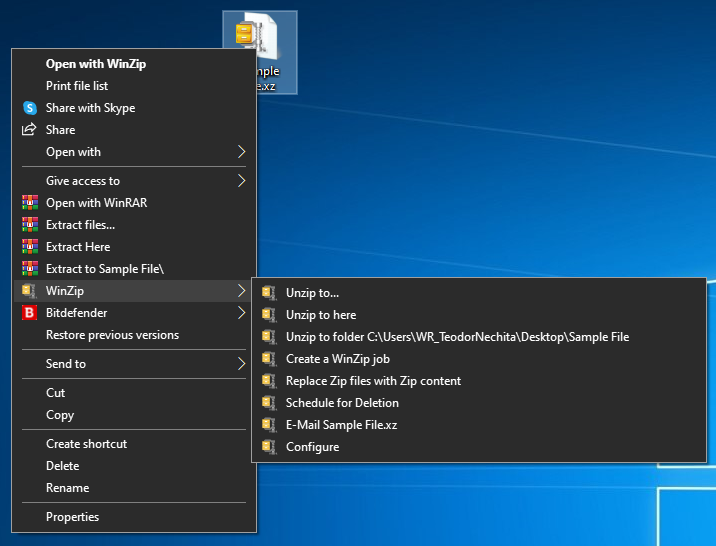
WinZip is a well-known file archiver software, and it’s the best way to extract CAB files. The software offers native support for CAB files, and you can extract them simply by opening them with WinZip.
The software also supports ZIP, RAR, 7Z, TAR, ISO, IMG, and other popular archive formats. WinZip can compress any file type, and there’s an encryption option available, so you can easily protect your files.
WinZip can also be used to manage, backup, and split files; there’s even support for cloud storage sharing. WinZip is the best choice if you need a tool that can handle CAB files out of the box.
Other great features:
Can handle all popular archive formats
Native support for CAB format
File encryption
File management, file splitting
Cloud storage support
WinZip
WinZip is a file archiver software that can easily open and extract CAB files.
These commands are helpful since they can extract CAB files without relying on any third-party software. However, you’ll need to have the same familiarity with the command line to use these methods.
If you’re not a fan of the command line, you should be able to open and extract CAB files like any other file simply by double-clicking it, and Windows should be able to handle it.
ARK II, a sequel to ARK: Survival Evolved, was officially announced today during The Game Awards. The game will star Vin Diesel, as a character named Santiago, and is set to be a console exclusive for Microsoft’s Xbox Series X and Xbox Series S consoles.
This means that owners of a last-gen Xbox One console will need to upgrade to a newer one if they want to experience this blend of prehistoric and Sci-Fi action.
“We are excited to be working with the Studios Wildcard team on bringing ARK II staring Vin Diesel exclusively to Xbox Series X|S consoles,” Xbox’s Aaron Greenburg enthused via his personal Twitter account.
Proud to announce, tonight at the TGA’s:
???? ARK II starring Vin Diesel as Santiago
???? ARK: The Animated Series exploring Helena’s story
Catch the Official hi-rez ARK II trailer rendered in-engine using game assets, and an extended Animated Series trailer, tomorrow A.M!
Surprisingly, an ARK animated series was also announced today. The series will revolve around the character of Helena and will boast a rather impressive cast of actors ranging from David Tennant, Russel Crowe, and Gerard Butler to Michelle Yeoh, Karl Urban, and Elliot Page. On a personal note, it was a pleasant surprise to see Australia’s Deborah Mailman on the cast list. Some may recognise her from the Secret Life of Us, Redfern Now, Offspring, and The Sapphires.
In addition to the above trailer, two tracks from the game’s soundtrack have been made available to listen to for free via the game’s composer Gareth Coker. You can check them out below.
DISM is a useful tool that can help you if you encounter any issues with your Windows installation. However, many users reported getting the DISM error 1009.
This can be a problem and prevent you from repairing your installation, but today we’re going to show you how to get rid of DISM error 1009 once and for all.
How can I fix DISM error 1009 an initialization error occurred?
1. Install the latest updates
Press Windows Key + I to open the Settings app.
Go to the Update & Security section and click the Check for updates button.
Once the latest updates are installed, the DISM errors will be resolved.
In case you can’t download the update, you’ll need to download and install the update manually. To do that find the KB code of the update you want to download. You can do that in the Update & Security section.
After getting the update code, follow these steps:
Now download the update for your system and install it manually.
2. Perform an in-place upgrade
Download Media Creation Tool.
Start the application and select Upgrade this PC now.
Wait while the software prepares the necessary files.
Follow the instructions on the screen until you see the Ready to install window. Now select Change what to keep.
Make sure that Keep personal files and apps is selected. Click Next and follow the instructions.
After the process is finished, your system will be upgraded to the latest version and the Error 1009 the configuration registry database is corrupted message will be gone.
3. Reset Windows 10
In case all other methods failed to fix your problem, the only thing that you can do is to reset Windows 10 to default. This process will remove all installed applications and files and reset your system.
Performing a Windows 10 reset is simple, and we wrote an in-depth guide on how to factory reset Windows 10, so be sure to check it out and follow the instructions from it closely.
Error 1009 the configuration registry database is corrupted can cause a lot of problems, but we hope that you managed to fix it using one of our solutions.
The Initiative, Microsoft’s new Xbox Game Studio based in Santa Monica revealed their first game at The Game Awards ceremony today. As it was previously rumored, this is a reboot of Perfect Dark, an IP previously created by Rare in 2000 as the spiritual successor to their critically-acclaimed Goldeneye 007 game on the Nintendo 64.
“With Perfect Dark, we’re aiming to deliver a secret agent thriller set in a near-future world,” wrote Darrell Gallagher, Studio Head at The Initiative today. “We have built the Perfect Dark team at The Initiative by bringing in some of the most talented game makers from around the industry who all share a passion for storytelling, world-building and creating memorable game experiences. With the full backing from Xbox Studios to re-imagine one of the best loved IPs from gaming history, we couldn’t be more excited to share some of our early ideas.”
We don’t have many details about this new Perfect Dark game for now, except that it will be an Action/Adventure First Person Shooter coming to Xbox Series X and S. The Initiative, which was only created two years ago, is planning to share more details in the near future. The new studio has already attracted many veterans from the video games industry since its foundation, and we can’t wait to see how all this top talent is going to bring this beloved IP back to life.
Microsoft has just announced some big news for Windows Insiders in the Dev channel. The software giant started releasing build from a new FE_RELEASE development channel a couple of weeks ago, and the Windows Insider has just announced a new branch split with two new separate builds coming from the FE_RELEASE and the RE-PRELEASE branches.
Starting today Windows Insiders in the Dev Channel who were previously receiving builds from the FE_RELEASE branch can opt in to install the RS_PRERELEASE build 21277, which brings support for x64 emulation on Windows 10 on ARM PCs. Microsoft will continue to release builds coming from the FE_RELEASE branch in the coming weeks, and the new build 20277 is available today for Dev Channel Insiders who do not choose to install the RS_PRERELEASE build 21277 in Windows Update;
“Insiders who choose to stay put will continue to automatically get builds from the FE_RELEASE until we move all Insiders in the Dev Channel to receiving RS_PRERELEASE builds sometime after the holidays. We still need Insiders running FE_RELEASE builds and giving us feedback on these builds so its ok if you choose to stay on these builds,” the Windows Insider team explained.
Keep in mind that it won’t be possible to install FE_RELEASE builds once you choose to install a RS_PRERELEASE build on your PC. These separate branches will also have a different set of fixes and known issues, and here’s the list for the Build 20277 (FE_RELEASE) below:
Fixes
We fixed an issue that could result in the WinRE volume label being lost after multiple upgrades.
We fixed an issue that could result in apps failing to update with error code 0x80073D02.
Known issues
We’re looking into reports of the update process hanging for extended periods of time when attempting to install a new build.
Live previews for pinned sites aren’t enabled for all Insiders yet, so you may see a grey window when hovering over the thumbnail in the taskbar. We’re continuing to work on polishing this experience.
We’re working on enabling the new taskbar experience for existing pinned sites. In the meantime, you can unpin the site from the taskbar, remove it from the edge://apps page, and then re-pin the site.
We’re working on a fix for an issue resulting in some users seeing error 0x80070426 when using their Microsoft account to sign into various apps. If you encounter it, rebooting your PC may resolve this.
We’re working on a fix for an issue where, in recent Dev Channel builds, no drives appear under Settings > System > Storage > Manage Disks and Volumes. As a workaround, you can manage your disks in the classic Disk Management tool.
Microsoft did also provide a list of changes, fixes and known issues for the build 21277 (RS_PRERELEASE), but the introduction of x64 emulation on Windows 10 on ARM PCs is the big deal. “In the spirit of the Dev Channel, this capability is still in development and will continue to improve in both compatibility and performance over time, so some of the apps you try running in emulation may not work initially,” the Windows Insider team explained today.
To test x64 app emulation, Microsoft recommends to do so on the Surface Pro X, the Lenovo Flex 5G, or the Samsung Galaxy Book S, three devices that should provide the best app performance. The Windows Insider team also recommends to install a preview version of the Qualcomm Adreno graphics driver (click here for Surface Pro X, and here for the Lenovo and Samsung devices), as well as a preview version of the ARM64 C++ redistributable to support running both ARM63 and x64 C++ applications at the same time.
“In this preview, you can install x64 apps from the Microsoft Store or from any other location of your choosing. You can try key x64-only productivity apps like Autodesk Sketchbook, as well as games like Rocket League. Other apps, like Chrome, which run today on ARM64 as 32-bit apps, can run as 64-bit using the new x64 emulation capability. These apps may benefit from having more memory when run as 64-bit emulated apps,” the Windows Insider team explained today.
Windows 10 on ARM only supported 32-bit app emulation when it shipped a couple of years ago, and these emulated apps also had performance issues. Introducing x64 app emulation on Windows 10 on ARM is a big milestone to improve app compatibility on the platform, though Microsoft is still pushing developers to recompile their Windows apps for the ARM64 architecture.
If you’re on Dev Channel, the 21277 (RS_PRERELEASE) build will be offered as an optional update through the “seeker” experience in Windows Update. If you don’t opt in to install this build, you’ll receive the build 20277 today with the aforementioned fixes and known issues, and you’ll also keep receiving builds from the FE_RELEASE branch in the coming weeks. This isn’t that different from “Skip Ahead” ring that Microsoft used to have in addition to the Fast Ring, though the Windows Insider team is still saying that Dev Channel builds coming from the RE_PRERELEASE and FE_RELEASE are still not matched to a specific Windows 10 release.
It’s not clear if these are going to be the last Insider flights for this year, though the Windows Insider team said today that all Insiders in the Dev Channel will start receiving builds from the RS_PRERELEASE channel after the holidays. After a couple of weeks of minor builds with no new features, things are starting to look more interesting for the Windows Insider program in January.
RAR files, as well as ZIP files, are a great way to compress essential data and save them. You can even encrypt them, password protect them, and, most importantly, they save you a lot of space on your drive.
However, it’s frustrating to have important files and not be able to extract them just because you get the “WinRAR cannot execute file” error. This issue can be caused by a file corruption problem or WinRAR itself.
If WinRAR cannot extract the file we will try to guide you step by step and help you solve this awful situation to your advantage.
How can I fix WinRAR diagnostic message cannot execute?
1. Make sure that the file is an archive
The WinRAR cannot execute file error can also appear if you are trying to unarchive a file that is not an archive. An.exe or.bin file can be a non-archive file and cannot be extracted.
Your file should have the extension of an archive like ZIP, RAR, ISO, GZ, 7Z, TAR GZ, TAR, or others.
2. Use WinZip
First of all, if you’ve had enough of WinRAR errors, it’s a good idea to try WinZip, the best archiving software that you can find.
This recommendation is based on the fact that this tool supports more than 24 popular formats, including the RAR files, so you will have a great shot at solving this error immediately.
And if the archive is somehow damaged, WinZip also has an archive repair feature that can easily fix it. After the problem is fixed, you can continue using this awesome tool that offers many other advantages like file encryption, file splitting, PDF to Word conversion, and many more.
If you don’t have enough reasons to switch to WinZip, you can use this excellent tool to perform file backup operations. That comes in handy with the file-sharing support and the integrated cloud storage.
If you’re not yet convinced, hit the button below and go for the free trial version. You will surely be able to make up your mind then.
WinZip
WinZip will help you forget all about the WinRAR errors with great versatility and great performance.
Right-click the archive and select Extract Files or Extract Here.
If you chose the first option, you will need to specify the path or choose the location from the tree.
If you choose to Extract Here, the files will be extracted into the current folder of the archive.
4. Open the file with File Explorer
Click on the archive.
Click on Properties from the Home tab and open it.
On the General tab set Open with File Explorer.
Unblock the Security option and click OK on the bottom of the page.
Go to Extract in the View tab on the selected file and click on Extract All.
This is all you can do when you receive the WinRAR cannot execute file error. We are confident that by using an error-free tool such as WinZip you will solve this problem but you can also use our other solutions. Besides, WinZip might also help with Error 0x8096002A in Windows.
We hope that one of them helped you solve this issue but if you have any additions or suggestions, let us know in the comments section below.
Unfortunately, ZIP archives are not without problems and the issues that arise are various, one of them is the Windows 10 Error 42125 ZIP archive is corrupted, and it appears when trying to open the compressed file.
There are different reasons why you may get this error message but rest assured the solution is pretty simple to solve in just a few easy steps.
In this article we will go through what you can do in order to fix this error in the most efficient way, so make sure to keep on reading.
How do I fix 7zip error while extracting zip archive?
1. Use an alternative unzipper
Before going into more depth with how you can fix the Windows 10 Error 42125 ZIP archive that is corrupted when trying to extract your compressed files, we would suggest that you consider another utility for this matter.
Knowing how to combine and divide zip files might be useful while preparing to present a big number of files at work. Or perhaps you wish to efficiently share your trip photos with your relatives and friends.
Multiple zip file extraction in Windows isn’t possible by default, but with the right third-party software, it’s a breeze. This is a feature for most third-party apps to zip and unzip any type of file.
When attempting to download a large file from a server, you may have download troubles; however, if it is divided into a number of archives, the entire process becomes easier.
2. Use the Repair option
Right-click on the corrupted RAR file.
Next, select Open with WinRAR.
Click on theToolsoption and select Repair archive.
Select the Browse button to locate and select the corrupted file.
In the Repaired file field, choose the destination where you want the repaired RAR file to be saved.
Wait for the repairing process to be completed
ClickOK.
3. Uninstall the graphics card drivers
Click on the Start button.
In the search box, type devmgmt.msc, and then press Enter.
Select the graphics card device and right-click on it.
Now select Properties.
Under the Driver tab, you just need to click on the Uninstall button.
If you want the driver completely removed from the computer, check the option that says Delete the driver software for this device.
Confirm your action by clicking OK.
Make sure that once this procedure is finished, you head over to the manufacturer’s website and reinstall the latest driver version.
4. Update WinRAR
Launch WinRAR on your Windows PC.
Click on Help and then select About WinRAR.
Next, in the About WinRAR window look for the WinRAR version info and the edition.
Click the Latest version of WinRAR under English WinRAR and RAR releases. Make sure to choose the correct edition 32-bit/64-bit depending on your PC’s Operating System.
Click Continue to download WinRAR.
Run the installer and proceed with the installation.
With this last step, we conclude our list of suggestions and we hope that one of them has helped you solve the Windows 10 Error 42125 ZIP archive is corrupted.
After completing the above steps you should be able to open your compressed files, without any problem whatsoever.
If you have additional suggestions or recommendations, please let us know in the comments section below.
Google Drive is one of the best and renowned online cloud storage services that is great for both work and personal use. The app is filled with a plethora of features that make managing your folders a breeze.
You can upload entire folders to the cloud and create new ones inside of it. If you are using Google Drive daily, you probably want to sort your folders and categorize them.
Perhaps you want to move a folder around because you found another use for it. Even though folders can’t be moved into Team drives yet, you can do this in Google Drive by simply following these two easy steps.
Click on My Drive and Sign In if you aren’t already.
While inside your Drive, click and hold on the folder you wish to move.
Drag the folder to the designated location.
Drop your folder there.
Note: Dragging and dropping your files is the easiest method to move them, but it is more difficult to be precise when you’re using a tablet or your laptop’s mouse pad.
Click on My Drive and sign in if you are not signed in already.
Right-click on the folder you want to move.
Select Move to.
Navigate to the folder you want the file moved to through the pop-up window.
Select it and press Move.
This is the easiest and safest way to move your folders around in your Google Drive. There is no risk of accidentally placing them in the wrong place. Thanks to the awesome Google developers, the process is easy and precise.
Moving your files around is pretty easy. Thankfully, you do not need any software, since the option is already built into Google Drive. The aforementioned steps will teach you everything you need to know.
If you have anything important to add to this article please feel free to do it in the comment section below.
The holiday season is here and Christmas is just around the corner. Everyone is hunting for gifts and great deals to complete their wish-lists or to make their acquaintances happy.
If you are an avid gamer that loves to play racing games or flight simulators, and you are looking for a pedal to immerse yourself into those games, there are plenty of options for you.
Since one of the most used and versatile ports used today is the USB, we comprised a comprehensive list with the best gaming pedals that have a USB port.
What are the best foot pedals for gaming with USB?
The Infinity USB Digital is a robust and sturdy foot pedal. It is very responsive to light pressure and it is also heavy enough to stay in place when you press on it with your foot. The pedal comes with three programmable buttons.
The long USB cable allows you to place your pedal away from your computer. This is a great budget choice for the people who want a simple pedal that does its job properly.
If full immersion is what you seek, the Thrustmaster TFRP Rudder is one of the best foot pedals on the market. The pedals have a comfortable design that allows you to place and rest your entire foot on them or on the special removable footrest.
This product is perfect for those who love playing flight simulators such as War Thunder, and who want to enhance their flying experience. The rudders are compatible with Windows, PlayStation, and the Xbox series.
The Saitek Pro Flight Rudder Pedals are another great choice. They are made completely out of plastic, but their design is very comfortable, with wide enough space between the two pedals.
In addition, the pedals are precise and very sensitive so you don’t need to use a lot of force when pushing them down with your foot. The middle screw allows you to adjust the tension of the sliding pedals.
The CH Products Pro Pedals have a minimalist design, featuring a large and sturdy base and heel-rests on the pedals. The rudder is made out of grey colored plastic and the heel-rests are black.
The product is plug-and-play, not requiring any drivers to install, and is compatible with Windows and Mac OSX. In addition, you can customize it with special programable software.
The iKKEGOL USB Double Foot Switch is another budget alternative that has two programmable mechanical switches. The product works with all games, keyboards, mouses, and other accessories for your PC.
Moreover, the pedals have sustained key pressing for acceleration in games or push-to-talk, and the software required for key mapping is easy to install.
Foot pedals are an excellent choice, especially when it comes to playing flight or racing simulator games.
The article will help you decide what to buy because it offers a great variety of choices.
Countless users started to complain about a similar situation in the past few days – there is no HDR when they try to watch Netflix in the new Microsoft Edge Chromium.
Their system is full HDCP 2.2 complied, HDR used to work just fine the other days, and the issue is limited to HDR only.
Moreover, Microsoft Edge will easily play 4K videos on Netflix, which leads to further questions regarding these HDR issues. Here’s what one user says:
It’s easy to check by pressing SHIF+ALT+CTRL+D to see video info. It should be displaying hevc, hdr, prk but right now no hdr codec is displaying (and video colors look washed up when you turn hdr in Windows and watch non-hdr videos).
How can I fix HDR Netflix issues in Microsoft Edge?
First of all, in the address bar, type in edge://flags/ and press Enter.
Scroll to find the Force Color Profile option.
Then, click the drop-down and select sRGB.
Finally, click on Restart at the bottom to keep the changes.
A quick tip that’s confirmed to work is described above. You can use the Force Color Profile option too, at least until an official fix is released.
At the same time, HDR in YouTube works flawlessly, leading to the possibility of taking into consideration DRM protection issues.
Netflix clearly has DRM protection. Things are no different for HBO Max which also does not play videos on Microsoft Edge. Turning hardware acceleration on and off leads to the same result.
However, installing Chrome does wonders and makes users forget all about these repeated Netflix/HBO Max issues.
Let us know in the comments area below if you are also willing to make the switch to another browser or if Edge remains your choice even under these circumstances.
Last week, Microsoft launched its Teams Public Preview program, allowing users to preview and test upcoming features. One important update that may have flown under your radar is the December 2020 Preview Pack, which brings some new features, including Windows 10 native notifications and Meeting reactions, specifically for testers. Here’s a look at everyone you need to know.
Indeed, Teams users who choose to join the Public Preview program in their organization can now test Windows 10 native notifications. The feature brings an option to choose between using Teams’ default notification setup and the Windows 10 native notification style.
As a reminder, it’s one of the most requested features that was previously limited to select users. The new functionality is supported on Windows 10 build 10.0.17763.288 or later and was spotted by Twitter user Maarten Eekels.
Windows notifications instead of Teams client notifications work in the preview client! Finally, #MicrosoftTeams notifications "listen" to your focus / quiet hours settings in Windows ? pic.twitter.com/DJYJPWRw5T
To access this setting, users need to go to Profile > Settings > Notifications and select the “Windows” option available in the Notification style dropdown menu. Once set, the app will now use the Windows OS notification system to push all notifications (such as @ mentions, reactions, etc.).
For now, the new capability is supported on the Teams web app, and it’s not yet available for Mac users. Notably, the feature is currently listed as currently under development in the Microsoft 365 Roadmap, with a release set for December 2020. Until now, the feature has been delayed several times, and it’s still not clear if the company plan to release it later this month or the timeline will be updated again.
Next up, Meeting reactions is another interesting feature that was announced as a part of Microsoft’s new Teams Public Preview program for testers. With this feature, users will be able to react during meetings using emojis like “insightful,” “curious,” or “heart” to express their feelings.
Live reactions in @MicrosoftTeams are coming soon. ???? ❤️ ????
It has been designed to supplement non-verbal cues that are often difficult to notice in video meetings. The new reactions button can be accessed in the Teams’ menu bar, as shown above. The Microsoft 365 Roadmap listing indicates that the live reactions feature will begin rolling out in January 2021 for all users. (Just to clarify, Reactions has not begun flighting yet). (Update #2: ok now Meeting Reactions are available, after all):
Acknowledging the evolving work landscape, Lenovo just announced a host of new products from its ThinkSmart lineup designed to assist in workers transitioning to longer ‘work-from-home’ orders.
As we approach the end of 2020, we look back on a year full of trials and trepidations punctured by waves of uncertainty. Costs to businesses are stratospheric and the human impact is unmeasurable. Throughout the ongoing crisis, users have embraced video conferencing and collaboration to stay productive and stay engaged with colleagues and customers like never before. As a result, businesses have accelerated digital transformation initiatives to facilitate short term work-from-home policies and envisage longer-term hybrid working models.
Perhaps, as an answer to the subpar webcams the company places in its laptops, Lenovo is now offering a new dedicated webcam called the ThinkSmart Cam.
The ThinkSmart Cam is certified to work with Microsoft Teams and Zoom rooms as well supporting up to 4K resolution at 30fps or 1080 at 60fps for crisper looking images. The field of view is 100 degrees on the horizontal, 68 on the vertical, and 125 on the diagonal giving users the flexibility to host a video conference from more areas in the home than directly in front of their computer. Lenovo is also tossing in AI computing to help automate zooming and framing of users for more natural video conferencing experiences. The ThinkSmart camera can be easily mounted on the edge of a laptop lid or mounted with wall or TV mounts.
Lenovo is also releasing the ThinkSmart Bar which should boom conference sound throughout an entire room or house for people who like to work while walking around their areas. The ThinkSmart Bar uses 4 speakers, built-in DSP for echo and noise-cancellation as well as supporting a microphone frequency range of 300Hz to 8KHz. At a little over 8lbs and about 800 x 56 x 90, the ThinkSmart Bar isn’t a very discrete device and commands a dedicated area in the home office. Once again, Lenovo is touting Zoom and Microsoft Teams Room support for easy workflow integration for most.
Last up is the modular ThinkSmart Edition Tiny computer. Packing an Intel Core i5 vPro processor running Intel Unite software underneath Windows 10 20H1 IoT the Edition Tiny makes for a flexible desktop or meeting hub for people. The Edition Tiny also comes with some decent specs for running a home office that include 8GB DDR4 memory, 256GB SSD and is powered by a 10th Gen Intel chip. Lenovo also tosses Intel’s Active Management Technology in there to boot.
One last announcement from the ThinkSmart team is its ThinkSmart Manager 2.0 app that’s been updated to connect to and mange ThinkSmart Hub 500, Hub, Cam, Bar, ThinkSmart Edition Tiny and supported Logitech peripherals. Version 2 comes with an updated UI that includes an executive dashboard in-meeting analytics view for Microsoft Teams Rooms and is available via Lenovo’s website.
Today’s announced devices will be available as soon as January with the Cam and ThinkSmart Edition Tiny rolling out in January of 2021 and the ThinkBar coming out February 2021 followed by the ThinkSmart Manager 2.0 in March of 2021.
Zip archives are the easiest and fastest way to archive and share multiple files, but many users reported the Zip archive is corrupted message in Avast.
Even though the corrupted archive message can be worrying, we’re going to show you how to properly deal with it.
How can I fix the Zip archive is corrupted Avast error?
1. Use alternative software
If you’re getting a Zip archive is corrupted message, perhaps you can fix the problem by using WinZip. The software supports over 20 popular archive formats, so it should be able to open any archive.
The software can archive or encrypt any file type with ease, and there’s even a repair feature for corrupted archives that will surely come in handy.
WinZip is a great file archiving software, and it can even work as a file splitter and file manager, which makes it one of the best archiving software on the market.
You can use it for all major file formats. It is secure, with a file encryption feature that helps you make sure all your data is private.
Winzip allows you to access files on local PCs, in-network, or in the cloud. It offers easy access to Dropbox, Google Drive, OneDrive.
WinZip
Easily open any archive and protect your files with WinZip.
If you get a Zip archive is corrupted message in Avast, there’s no need to worry. This is a standard message and it appears when the Avast scanner can’t open the compressed file.
This doesn’t mean that the file is infected, it just means that Avast was unable to open it. Even if the file is infected, it won’t be able to cause any damage unless you disable your antivirus and open the file manually.
It’s not advised to delete these files, because they might be related to certain software or with your system, so removing them can lead to additional problems, so it’s best to ignore them.
The zip archive is corrupted message in Avast isn’t a security concern, and if you ever encounter it, you should be able to fix it by following the solutions from this article.
If you want to share your experience with us, don’t hesitate to use the comment section found below this article.
Learn more about Zip files by exploring our useful page on the subject for details.
Are you having issues with other software? Our PC Software section has more useful articles that you need to check out.
Cyberpunk 2077, the much-anticipated game from CD Project Red is launching today on Xbox One, PlayStation 4, and PC, and many players discovering the game on the base Xbox One and PS4 today might be disappointed. All the first reviews published earlier this week were for the PC version of the game, and probably for good reason: It appears that Cyberpunk 2077 has serious performance issues on old-gen consoles.
I’ve personally tried the game on both the Xbox Series X and Series S, which currently run the Cyberpunk 2077 in backwards-compatibility mode before CD Projekt Red releases free next-gen upgrades next year (the same is true for Playstation: Cyberpunk 2077 runs in backward compatibility mode on the PS5 for now). On the Xbox Series X, you get the Xbox One X version of the game which uses a 60 FPS Performance mode by default, but players can also choose a 30FPS Quality mode in Settings. The game feels very smooth in Performance mode on the Series X, and I didn’t notice a big difference in graphics after trying out the Quality mode.
Cyberpunk 2077 running on Xbox Series X
On the Series S, you’ll get the Xbox One S version of the game, which is locked to 30FPS with no 60FPS Performance mode. There is a noticeable difference in terms of visual quality, but the performance feels solid and so far I didn’t encounter anything that made my eyes roll.
Cyberpunk 2077 running on Xbox Series S.
Cyberpunk 2077 is technically an 8th-gen game on consoles, and it currently runs best on PCs with NVIDIA RTX GPUs. According to CD Projekt Red, over 8 million people pre-ordered the game ahead of launch, and 59% did so on PC. Unfortunately, for the 41% of early enthusiasts that pre-ordered it on consoles, those who have yet to get their hands on a PS5 or Xbox Series X|S may well want to get their money back.
While I haven’t been able to test the game myself on PS4 or base Xbox One consoles, you can already find plenty of videos on Twitter and YouTube showing how poorly the game runs on these consoles, with a general lack of detail and textures often taking forever to load. This would really be something to make fun of if 3.2 million console users didn’t pre-order Cyberpunk 2077.
Pro tip for those interested in #Cyberpunk2077… if you’re interested in purchasing the game, don’t buy it for PS4/Xbox One. You must at least have an PS4 Pro/Xbox One X otherwise you’re gonna experience shit like this. ???????? pic.twitter.com/48iJ2TQplb
If you do have an Xbox Series X|S or PS5, the game seems to run without any issues on these consoles, and I personally didn’t get far enough to encounter any of the bugs that many PC reviews mentioned earlier this week. Cyberpunk 2077 makes a good first impression, and it all starts with the creation of your character, which you can customize in many, many ways, including tattoos, piercings, and even genitalia.
So far, the game does a pretty good job at explaining its core mechanics, and it’s a competent shooter with an important focus on stealth and hacking. I personally enjoy games that can be completed without killing anyone, and I’ll try to do that for my first playthrough.
There’s no doubt that Cyberpunk 2077 is one of the best games of 2020, but you might still want to wait for the true next-gen version coming on Xbox Series X|S consoles next year. “The journey has just begun and we are hard at work on the upcoming fixes and updates to the game,” developer CD Projekt Red said on Twitter today. Blockbuster games rarely launch in a perfect state these days, and Cyberpunk 2077 is unfortunately no exception despite the multiple delays.
Still, we’re very excited about the game and we ask you to stay tuned for our full review to be published next week. If you have been playing the game on Xbox One today, let us know in the comments if you’re having a good experience so far.
Zip archive are used for plenty of years because of their versatility. You can compress data and free impressive amounts of space from your drive by doing so.
Many of you have worked with Zip files and know the answer to our title question. But if you need to know all about unzipping files in Windows 7 and Windows XP, the following guide will be more than clarifying.
As you might have guessed, the zipped adjective comes from the best archiving and unarchiving tool WinZip. So unzipping will naturally start with downloading and installing this awesome tool by clicking on the big button below.
WinZip is the best tool for unzipping simply because it’s fast, it can handle multiple archives at the same time and it supports more than 24 archive file types, including ZIP, ZIPX, TAR, TAR GZ, RAR, 7Z, GZ, IMG, GZIP, GZ, and many others, even ISO images.
This tool is also great because it comes with a lot of other interesting features like the 128-bit and 256-bit AES encryption or the PDF to Word and Word to PDF conversion.
You can try WinZip before buying so it will have enough time to amaze you.
WinZip
WinZip is the best tool for unzipping files in all Windows OS, including Windows 7 and Windows XP.
Right-click the file and chooseWinZipfrom the menu
Choose one of the 3 options for unzipping the archive as it follows
Unzip to will direct you to indicate the folder where you want to unzip the file
Unzip to here will unzip the file to the folder where the archive is located
Unzip to folder is a predefined location for unzipped files that you can define in WinZip.
Extract the archive from WinZip
Open WinZip
Click on File from the top left corner and locate the file that you need to extract (you can also simply drag the archive in the WinZip window)
Select the destination where you want to unzip the file and enjoy.
This is our guide on how to unzip files in Windows 7 / Windows XP. It’s pretty simple, right? You can leave us a comment below if you’ve had any problems during the process.
It’s been a few days since Microsoft released PowerToys version 0.27, but the software giant has already rolled out a maintenance update for Windows 10 users. PowerToys v0.27.1, which is described as a “patch release,” improves the stability and quality of various tools, including FancyZones and Color Picker.
We just rolled out 0.27.1 of #powerToys. It has 5 bug fixes we felt were important enough for a release outside our normal release cycle.https://t.co/j3TK16h45X
According to Microsoft, we should expect to see the next major release (PowerToys version 0.29) by the end of December. This update should bring the much-anticipated video conference mute feature which is currently available for users on the experimental version. The company has also teased a new feature for Fancy Zones that makes it easier for users to create custom layouts.
Here’s the full list of improvements and fixes in PowerToys version 0.27.1:
#8330 – FancyZones not waiting for me to release Shift. The primary bug is fixed. We discovered an edge case #8511that is not resolved in this larger fix. We felt the larger fix was worth getting out without the edge case being solved.
#8378 – Memory leak in FancyZones. Our fix actually improved performance when showing the zones on high res and high DPI scaling screens
#8339 – FZ editor is correctly handling multi monitor when the laptop built-in display is turned off.
#8322 -Editor Crash on removing colors from the history where there is none
#6594 – Color Picker hangs while holding activation keystroke
As always, you can download the latest version of PowerToys from GitHub if you prefer to download the update manually. You can also head over to the issues page to check out the complete list of bug fixes and commits made in this release.
Halo Infinite, the much-anticipated successor to Halo 5: Guardians will now launch in Fall 2021, developer 343 Industries announced earlier this week. The new Halo game was expected to be a launch title for the Xbox Series X on November 10, but after 343 Industries gave us a disappointing first look at the game’s campaign back in July, the studio had no choice but to delay the game to next year.
In the Inside Infinite update posted on Halo Waypoint two days ago, Halo Infinite Creative Director Joseph Staten and members of 343 Industries’ art and graphics teams tried to explain what’s currently going on inside the studio. It’s clear that a lot has happened since the July Xbox Games Showcase, when former Studio head Chris Lee mentioned a campaign that would be several times larger than the last two Halo games combined.
“We’re in the homestretch now and the team is working hard to put all the pieces together and polish the game while still navigating unprecedented challenges in our personal and professional lives. There’s a lot of work to be done, but I’m so proud of how much the team has accomplished and the tremendous progress being made every day,” a confident Lee wrote on July 23.
Almost three weeks later on August 11, Lee announced that Halo Infinite had been delayed to 2021. “The decision to shift our release is the result of multiple factors that have contributed to development challenges, including the ongoing COVID-related impacts affecting us all this year,” the exec explained at the time.
This was how Halo Infinite was supposed to look like at launch.
Later in August, we learned about some important management changes as 343 Industries, with Bungie veteran Joseph Staten came back to oversee the game’s Campaign. It was also made public that 343 Industries had teamed up with the external studio Certain Affinity to work on Halo Infinite, and we learned later in October that 343 Industries Studio head Chris Lee was no longer working on Halo Infinite while remaining a Microsoft employee. We probably don’t know everything about these management changes, but they certainly didn’t help the developers working on a massive game during a worldwide pandemic.
As you may know, Halo Infinite’s big campaign reveal in July instantly became a subject of controversy and mockery, with many fans expressing disappointment about the game’s outdated graphics. Microsoft initially reacted positively to the criticism and even embraced all the memes about “Craig the Brute,” but we’re still wondering how Microsoft didn’t realize the disaster that was about to happen. Overall, there was a huge technical gap between the first E3 2018 trailer showing 343 Industries’ new Slipspace engine, and this first look at the game’s campaign two years later. We’re close to the huge downgrade that Ubisoft’s Watch Dogs game got between its much-hyped E3 trailer and its 2013 release.
“We have been working very closely with the community on nearly every facet of the project,” Chris Lee said back in July before all the backlash. “From the earliest planning where we focused on broad feedback around art style and story to actual hands-on playtesting and focus feedback with confidential groups of community representatives over the past two years, Halo Infinite is being created in partnership with the community,” the exec said. Again, we have to wonder how these feedback groups weren’t able to warn 343 Industries that something was clearly wrong with Halo Infinite before the July gameplay reveal.
Fast forward to today, 343 Industries is still in damage control mode and the studio is now telling us that what we saw in July wasn’t the game we were going to get. Ani Shastry, Development Manager for the Graphics team on Halo Infinite, said that that campaign demo was “a very much work-in-progress slice of the technology,” adding that “much of the graphics team’s capacity, along with that of some key technical artists, was focused on achieving high resolution and performance leading up to the demo, which meant several of these features didn’t quite get the level of polish and bug fixing that was warranted.”
Neill Harrison Director of Art Management at 343 Industries elaborated on why facial animations looked so dated in that July campaign demo. “I can confirm that the facial animation on NPCs was not fully implemented in that build, which resulted in Craig’s incredibly deadpan/lifeless look. All characters are modelled in a neutral pose, prior to blendshapes & animation being applied. So, poor old Craig was never intended to be seen in that condition which is not something that was evident during the gameplay. It was only later, in the close-up freeze frame of his one bad moment, where it came to light and the legend of Craig was born,” Harrison explained.
“Craig the Brute” has become the symbol of Halo Infinite’s development troubles.
Shastry and Harrison both confirmed that 343 Industries was hard at work on improving the graphics of Halo Infinite, and key areas of progress include “better quality of global illumination, ambient occlusion, shadows, volumetric lighting, sky, and atmosphere,” said Shastry. As for facial animations, “There’s been further work done on the material fidelity and more variety added for Brute faces, we’re also working to add some hairdos and beards which was something we hadn’t gotten to in July,” explained Harrison.
This week, the team mostly talked about Halo Infinite’s multiplayer mode instead and showed one of the game’s work-in-progress multiplayer maps. The team also shared several images of the game’s new coating system that will benefit armor, weapon, and vehicle customization. Joseph Staten, the new Halo Infinite Creative Director was the only person to discuss the game’s single-player campaign in more details.
“My first week on the job, I played the entire Infinite campaign. Twice. I was, in a word, stunned—in the best possible way—by what the team had done. Infinite is, by far, the most expansive and vertical Halo world, ever. Why did the team do this? Because they understand that wonder and freedom are key to the Halo experience.
I could feel the classic Halo “30 seconds of fun” beating at the heart of Infinite’s world. But I had never felt more powerful, more mobile, more in command of a rich set of tactical choices. This was the Halo we imagined back in 2000, finally come to life, after 20 years of technical and creative innovation.”
While it’s good to hear that Halo Infinite should have a good campaign, most Halo fans will probably ignore it to go straight to the free-to-play multiplayer mode. In retrospect, 343 Industries showing the Halo Infinite campaign first was probably a mistake, and creating the biggest Halo campaign ever with a vast open-world may well be a huge waste of resources. Ultimately, multiplayer is what will make Halo Infinite thrive or be forgotten very quickly if most shooters fans continue to stick will the latest Call of Duty.
It’s also important to note that Joseph Staten, the man in charge of Halo Infinite’s campaign previously worked as Creative Director on Crackdown 3, a game that was also delayed multiple times and ended up to be a big disappointment for fans of the franchise. As a reminder, Crackdown 3 was announced as a launch title for the Xbox One X on November 2017, but following a poor reception at E3 2017, the game was first delayed to Spring 2018. Later that year, Microsoft delayed the game again to February 2019, and at that point there wasn’t much left to be saved, to be frank. Even the much-hyped multiplayer mode with cloud-powered destructible environments looked nothing like the ambitious technical demos we had seen many years before.
I hope that Staten learned some valuable lessons from the Crackdown 3 debacle, and 343 Industries really can’t afford to miss the mark with Halo Infinite. It’s safe to say that hardcore Halo fans generally consider the previous Halo games from 343 Industries to be inferior to those released in the Bungie era, and Halo is no longer the juggernaut that it used to be. As a matter of fact, Microsoft may soon own a more popular FPS franchise with Doom, assuming the company’s upcoming acquisition of ZeniMax Media goes as planned in the first half of 2021.
Can 343 Industries really fix Halo Infinite before its Fall 2021 release, which will coincide with the franchise’s 20th anniversary? We certainly hope so, and the first multiplayer elements we’ve seen this week are certainly promising. Creative Director Joseph Staten said that Insider flighting will start next year, and that’s when we’ll see if 343 Industries really is on the right track.
Still, it’s worth keeping in mind that Staten didn’t save Crackdown 3 despite its multiple delays, and the complexities of shipping Halo Infinite on Xbox One consoles in addition to Xbox Series X|S and PC are certainly not making the developer’s job any easier. The just-released Cyberpunk 2077, which was one of the most-anticipated games of the year, looks really bad on the base Xbox One and PlayStation 4 consoles, and it’s highly likely that the now 7-years old Xbox One could force Halo Infinite developers to make some compromises.
It’s been five years since the release of Halo 5: Guardians on Xbox One, and the release of Halo: The Master Chief Collection on PC clearly showed that there are a lot of gamers who still love that franchise. Halo used to be one of Xbox’s crown jewels, but 343 Industries never really succeeded to recreate the magic of the original Halo trilogy created by Bungie. The same can probably be said about the Gears of War franchise now being developed by The Coalition, even though Gears 5 is one of the best-looking games you can play on Xbox consoles today.
In the long run, I do believe that critically-acclaimed Bethesda IPs such as Doom, Wolfenstein, or Fallout could become Microsoft’s most popular franchises, with Halo and Gears taking the back seat. Bethesda is one of the few publishers to keep investing in single-player games, an area where Sony saw great success during this console generation. Doom Eternal was certainly one of the best shooters released this year, and developer iD Software deserves credit for successfully rebooting a franchise that’s been around since 1993.
Is Doom now bigger than Halo?
We’d love to see 343 Industries pull the same trick with Halo Infinite, though again, the game’s multiplayer is what will ultimately matter. Since the release of Call of Duty IV: Modern Warfare back in 2007, Halo has slowly started to become irrelevant, and 343 Industries’ attempts to catch up with Halo 4 and Halo 5: Guardians didn’t really work. It remains to be seen if Halo Infinite can change that with a free-to-play multiplayer mode, though the game will face some serious competition in Fall 2021 with another Call of Duty game, maybe a next-gen Battlefield game, and probably more heavy hitters.
We really hope that with Insider flighting starting next year, beta testers will be able to help 343 Industries create the best multiplayer experience ever seen in a Halo game. Games like Fallout 76 and Anthem never really recovered from their disastrous launches, and the failure of the latter has now put Bioware, which previously disappointed fans with Mass Effect Andromeda, in a very uncomfortable position. 343 Industries is not there yet, but with Halo Infinite rumored to be one of the most expensive games ever made, the studio could be in real trouble if the much-anticipated game fails to meet expectations.


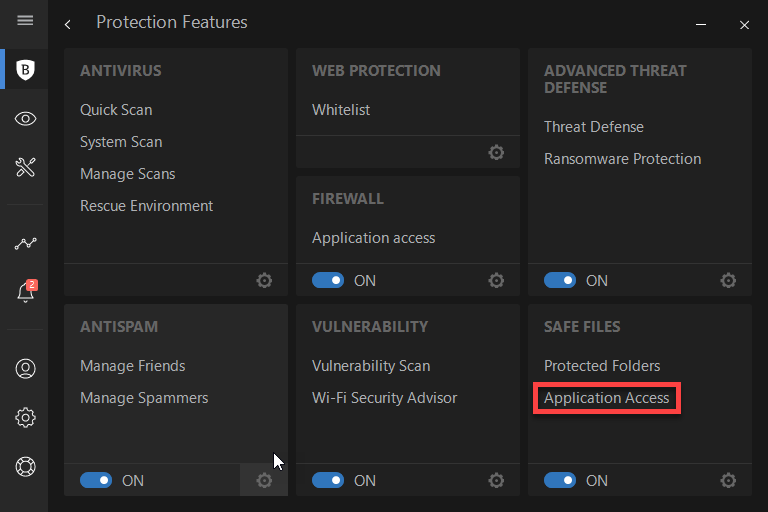

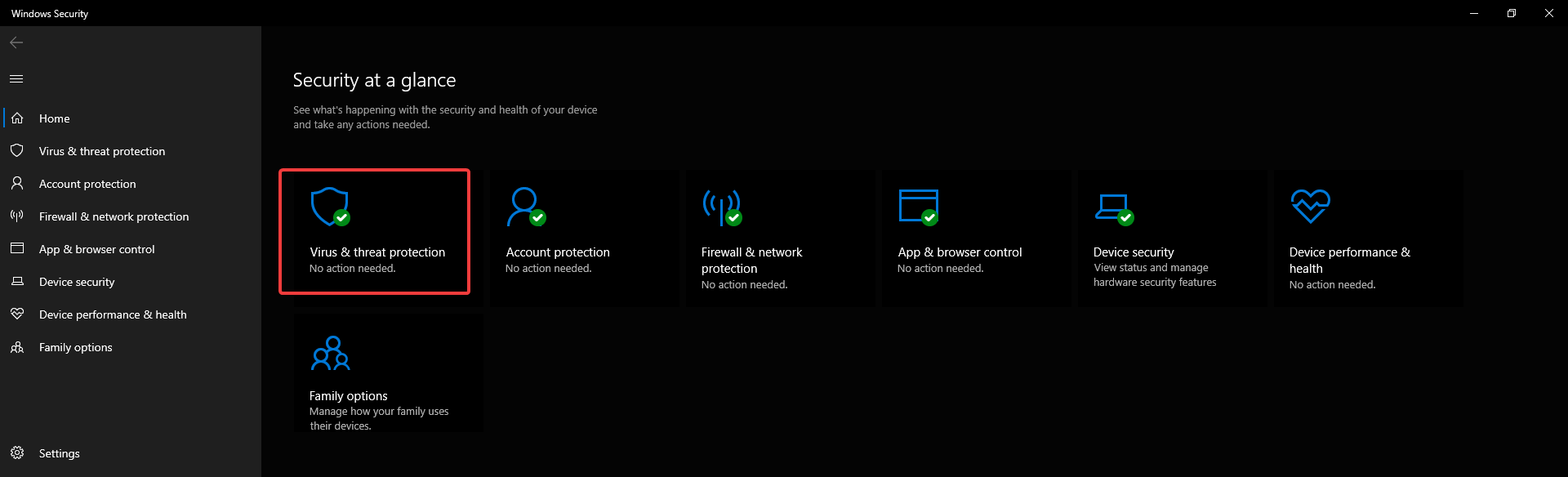
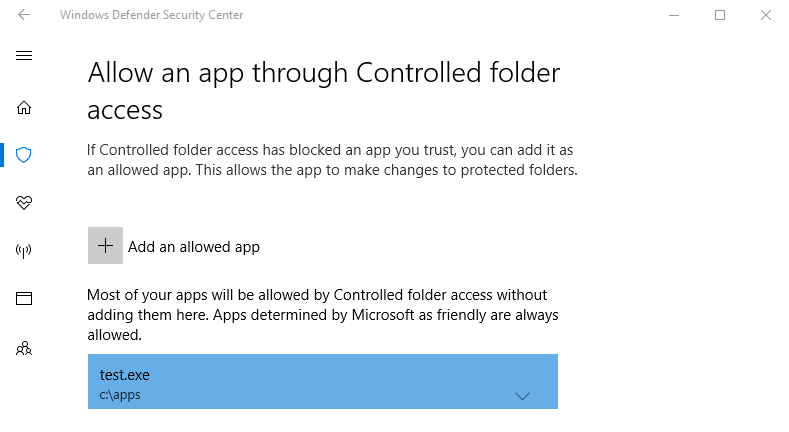
![How to convert ZIP files to PDF in Windows 10 [Full Guide]](https://windowsreport.com/wp-content/uploads/2020/12/Convert-ZIP-to-PDF-featured-img.png)



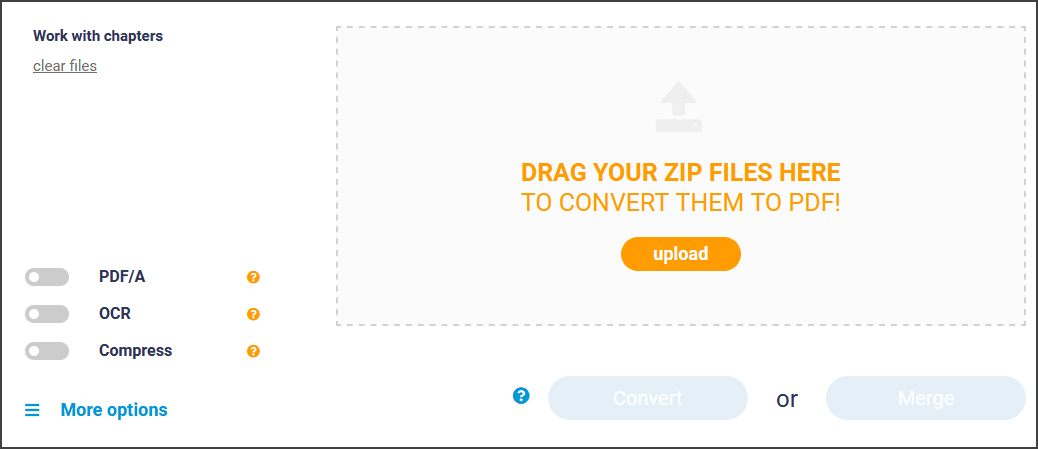
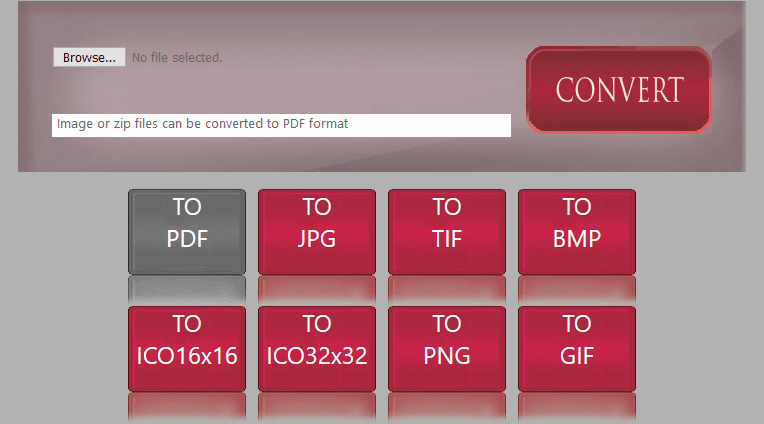
![5 best 128-bit AES encryption software [Complete guide]](https://windowsreport.com/wp-content/uploads/2020/12/Best-128-bit-AES-encryption-software-Complete-guide.jpg)




![6 best Christmas gifts for cricket fans [Tech & Sports ideas]](https://windowsreport.com/wp-content/uploads/2019/12/christmas-gifts-cricket-fans.jpg)


















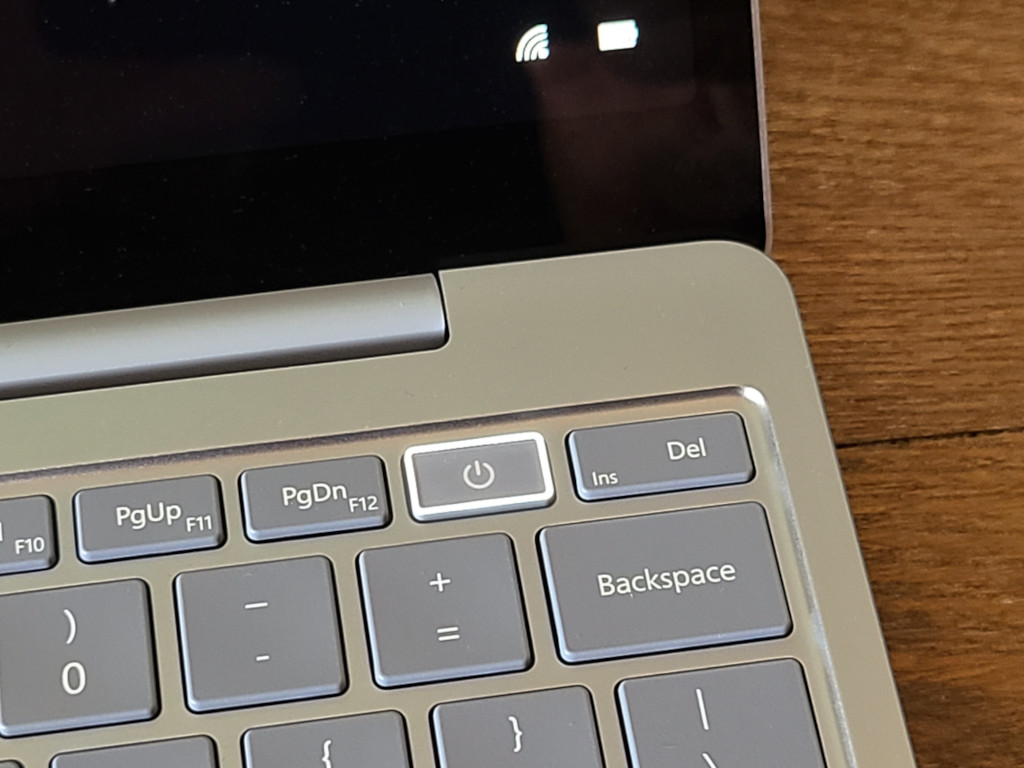








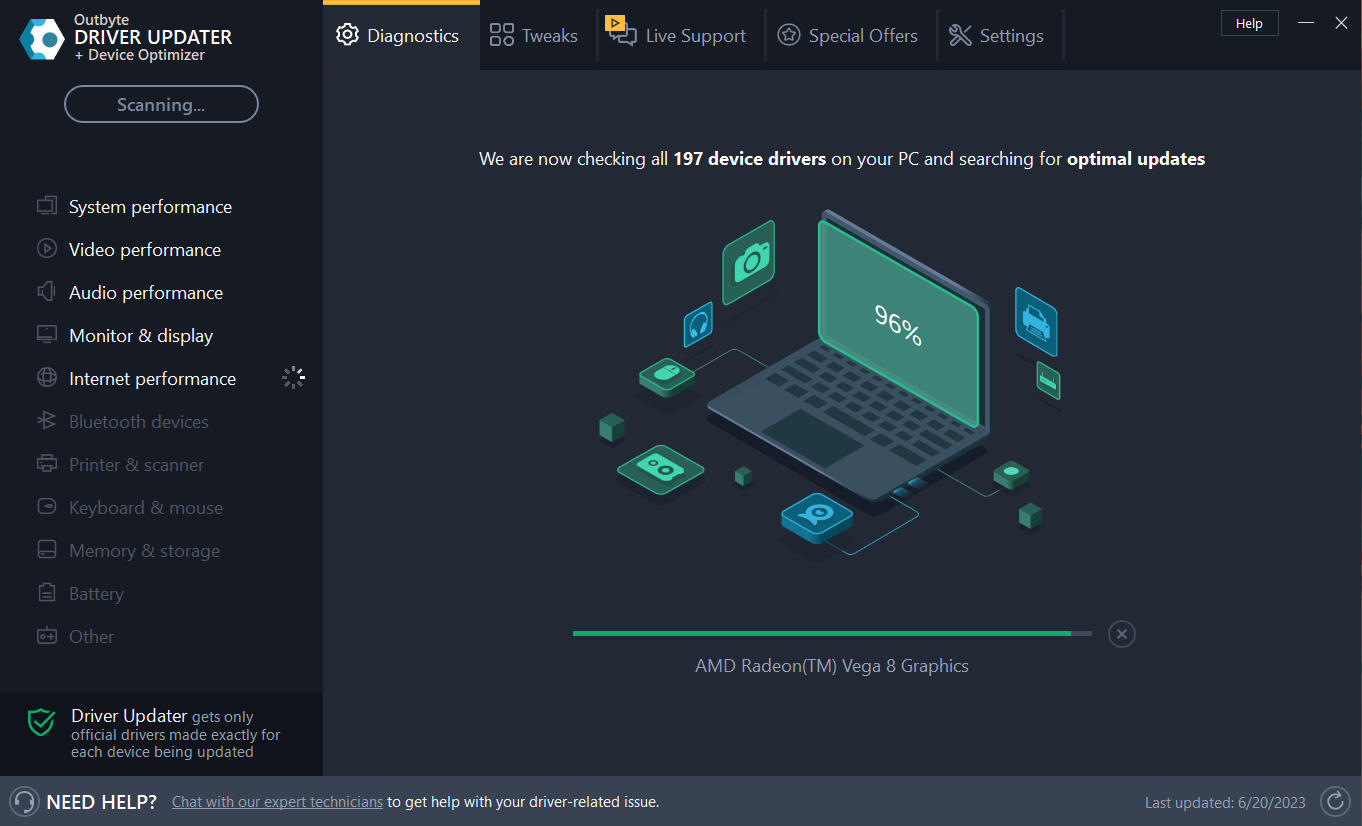

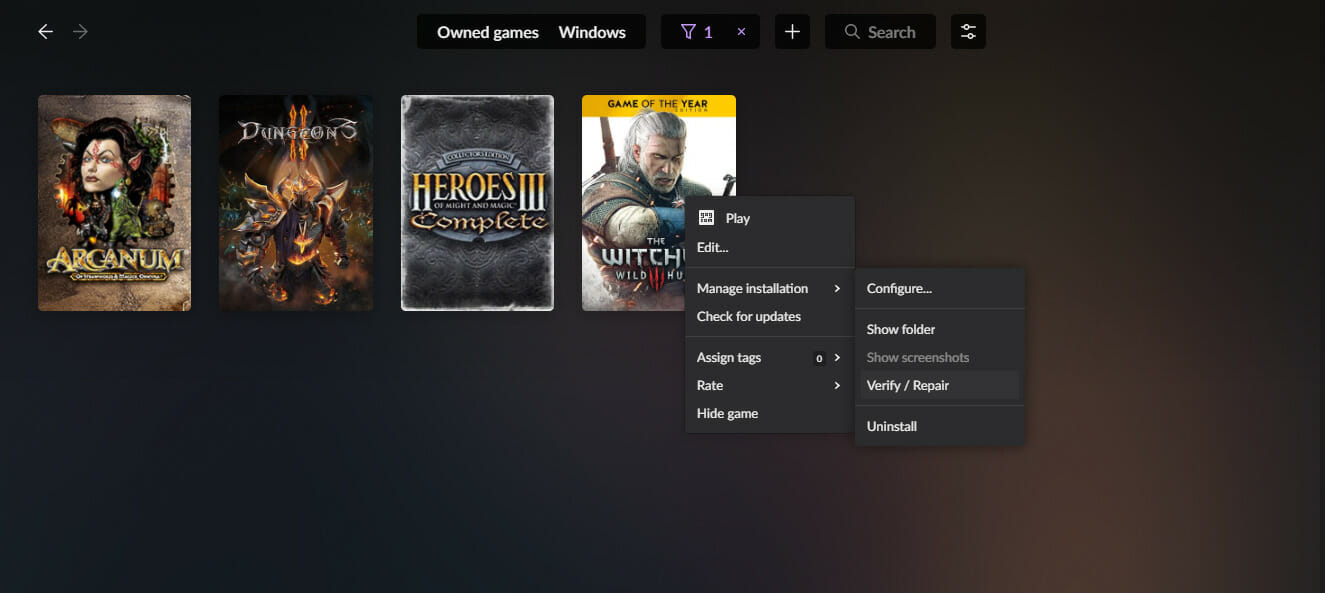
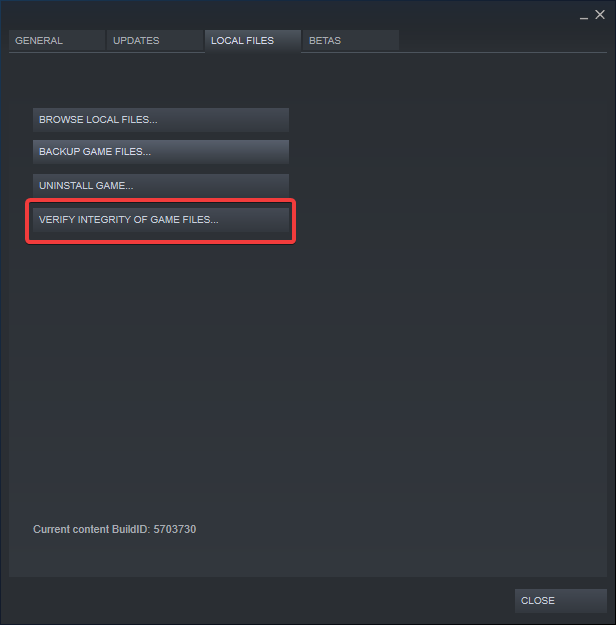
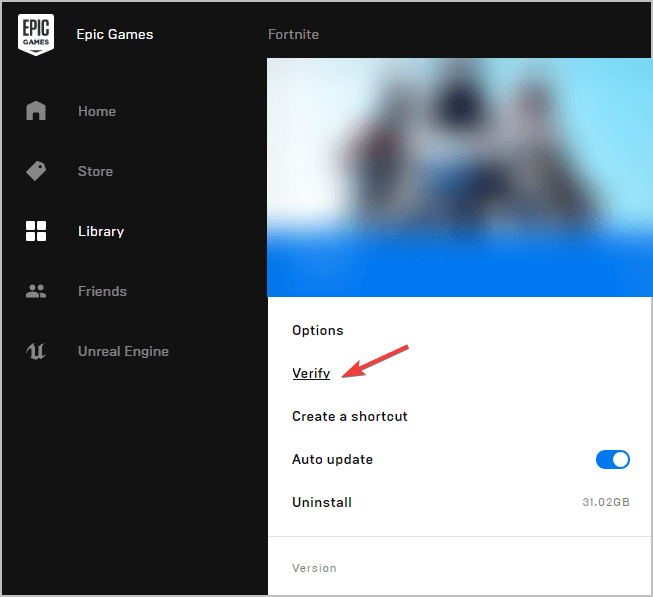
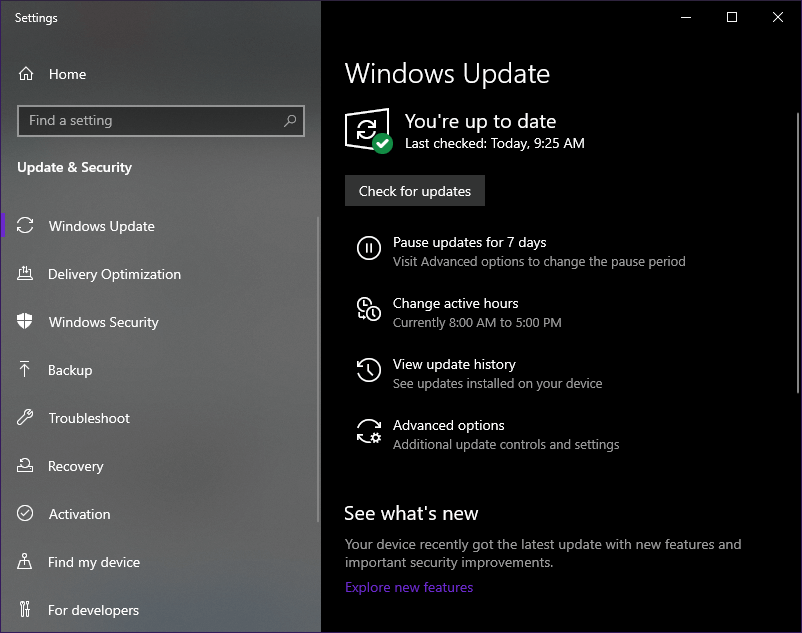


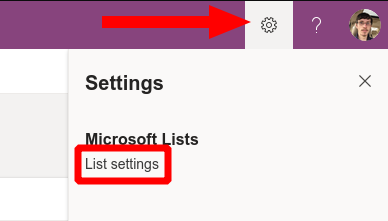
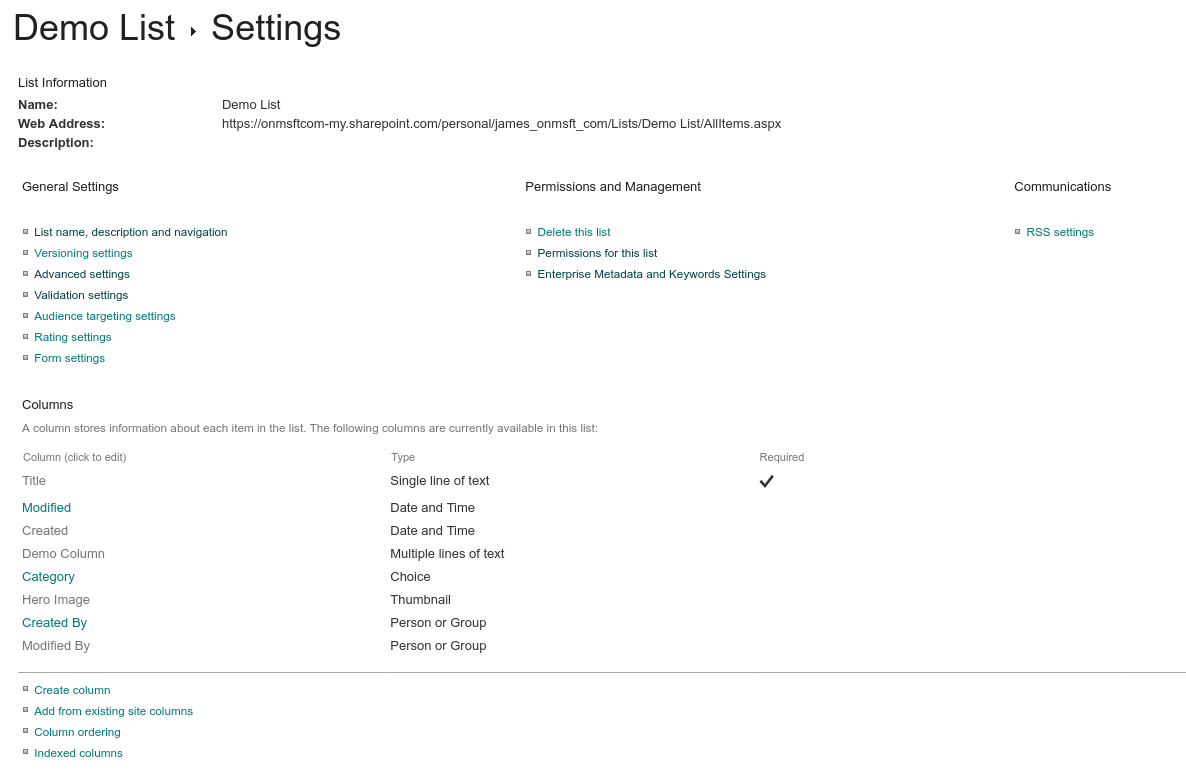
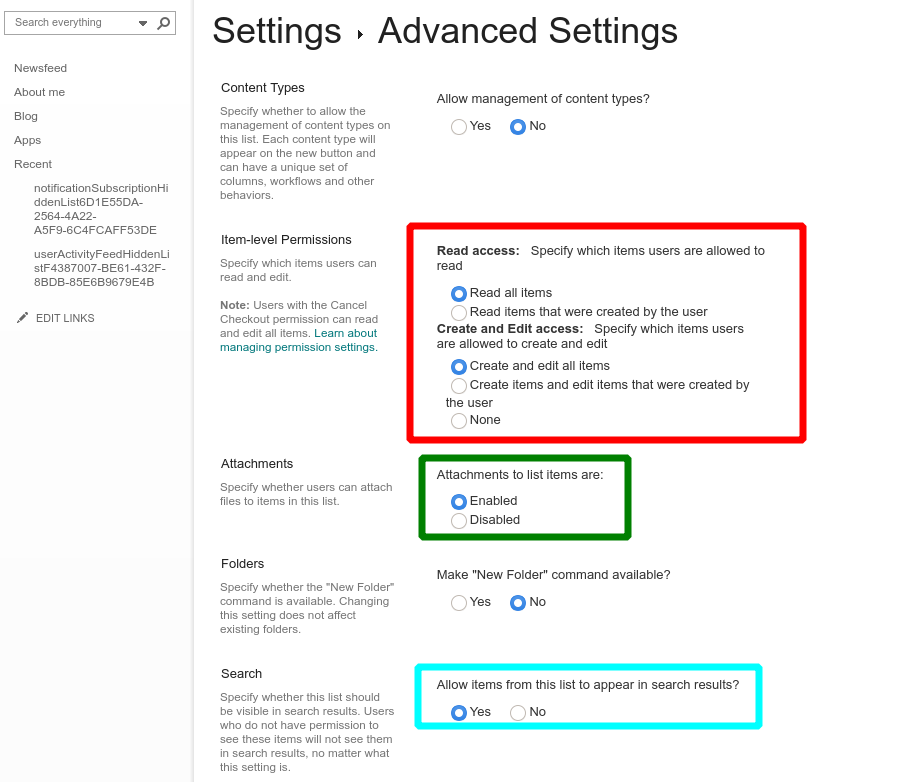
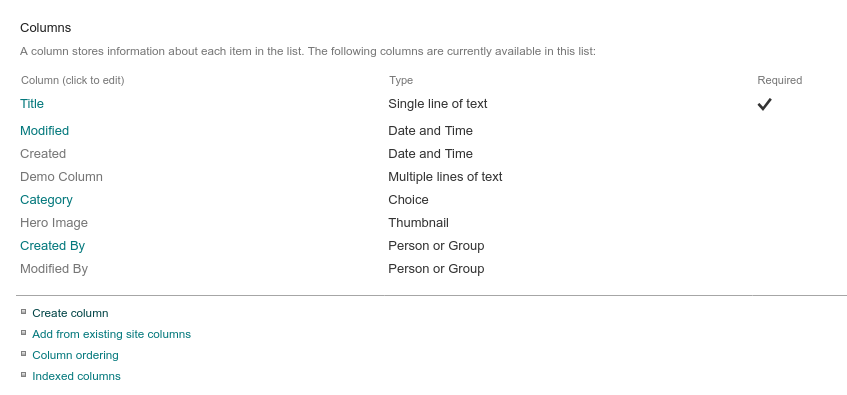
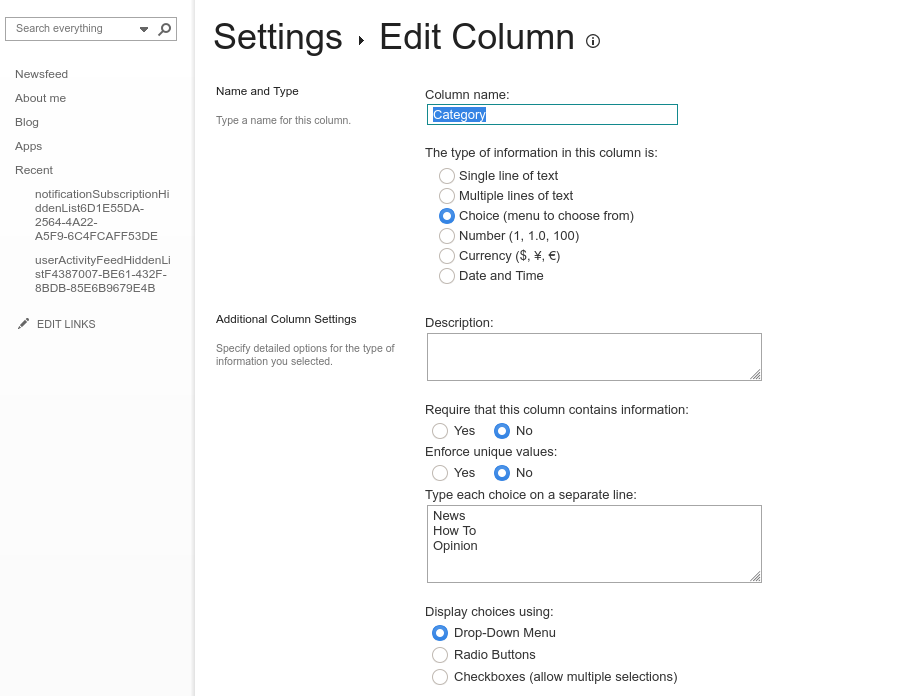
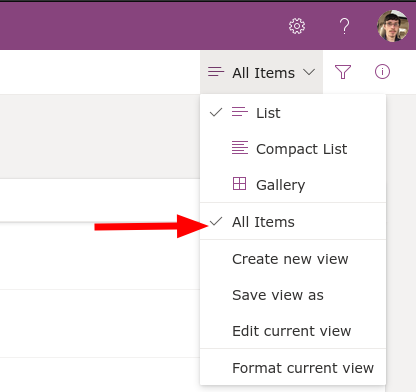
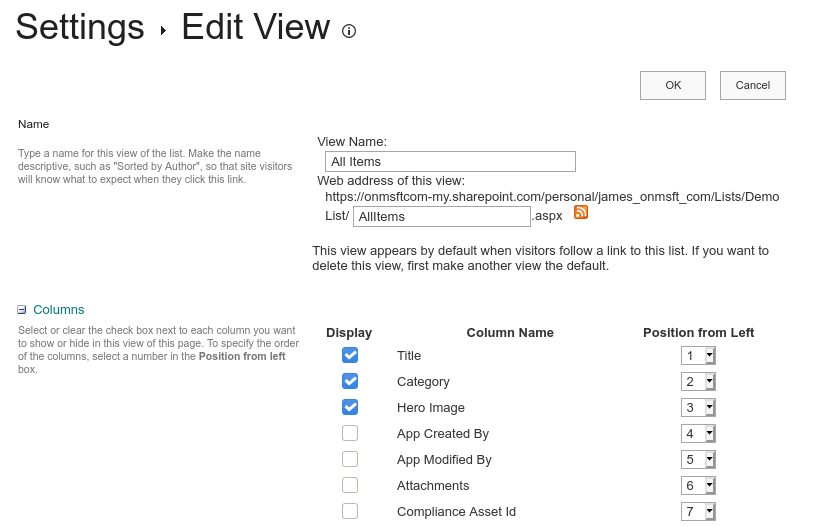
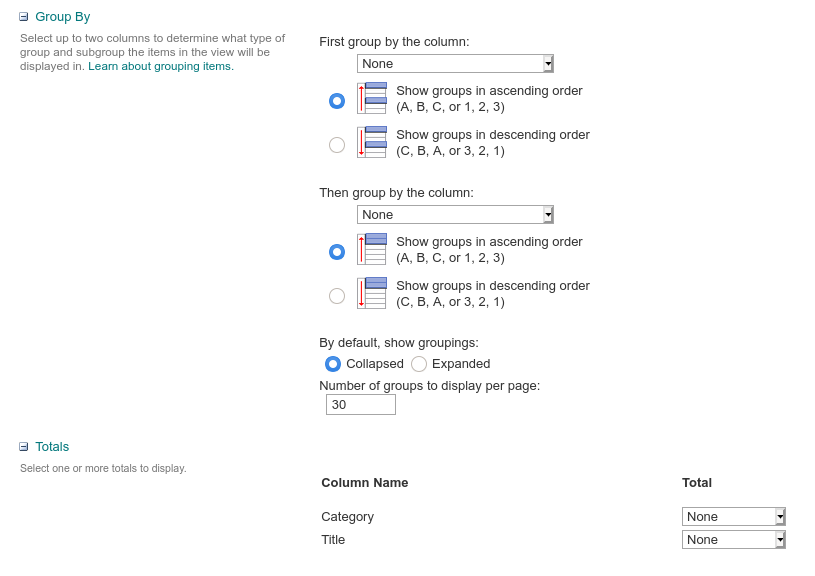
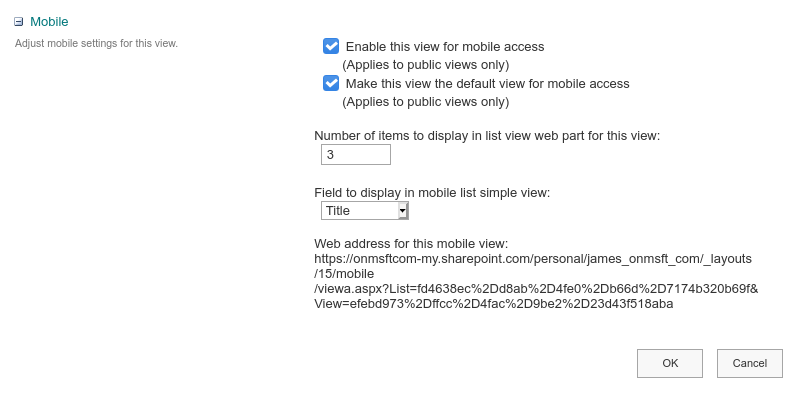

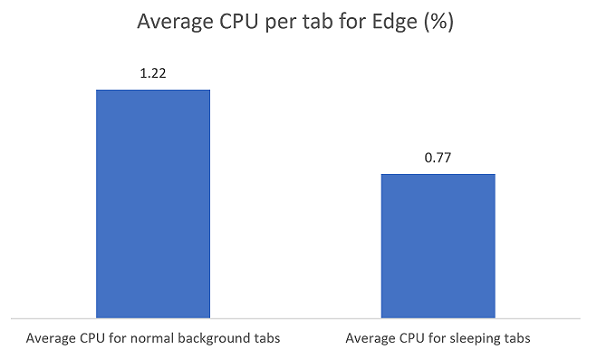




![FIX: Cyberpunk 2077 has flatlined [Crash Error]](https://windowsreport.com/wp-content/uploads/2020/12/Cyberpunk-2077-2.jpg)
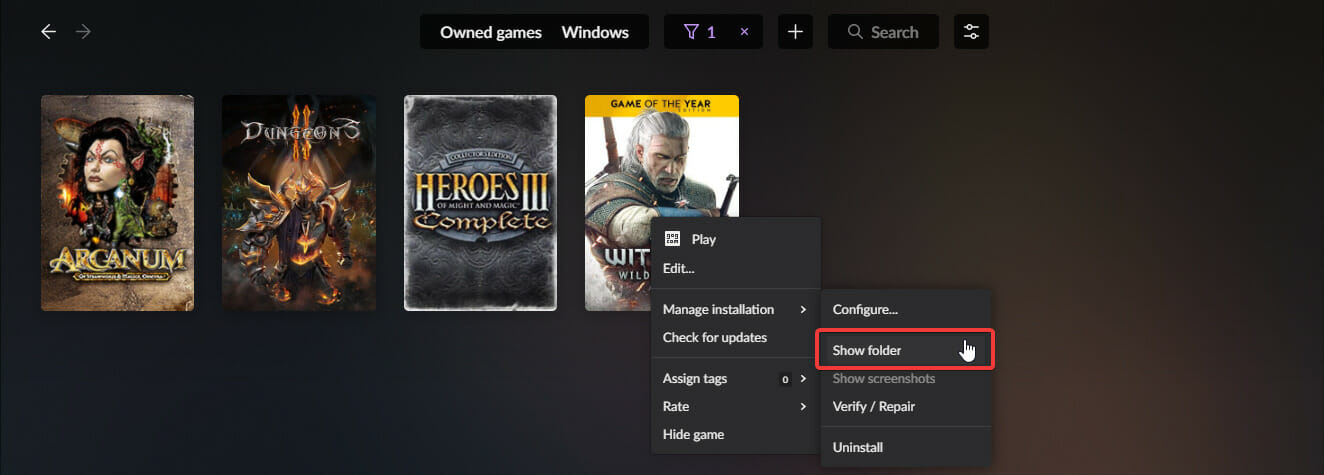
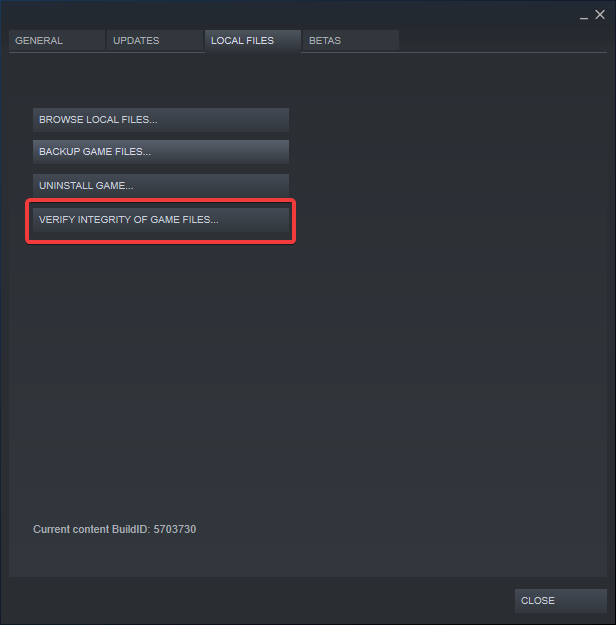

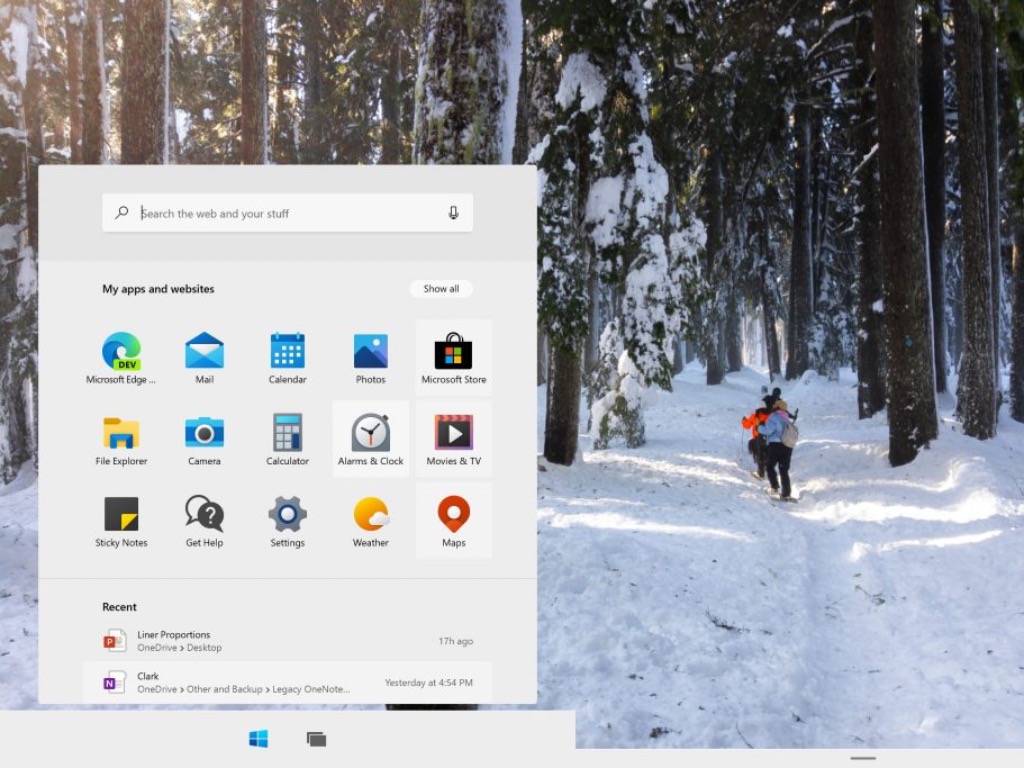

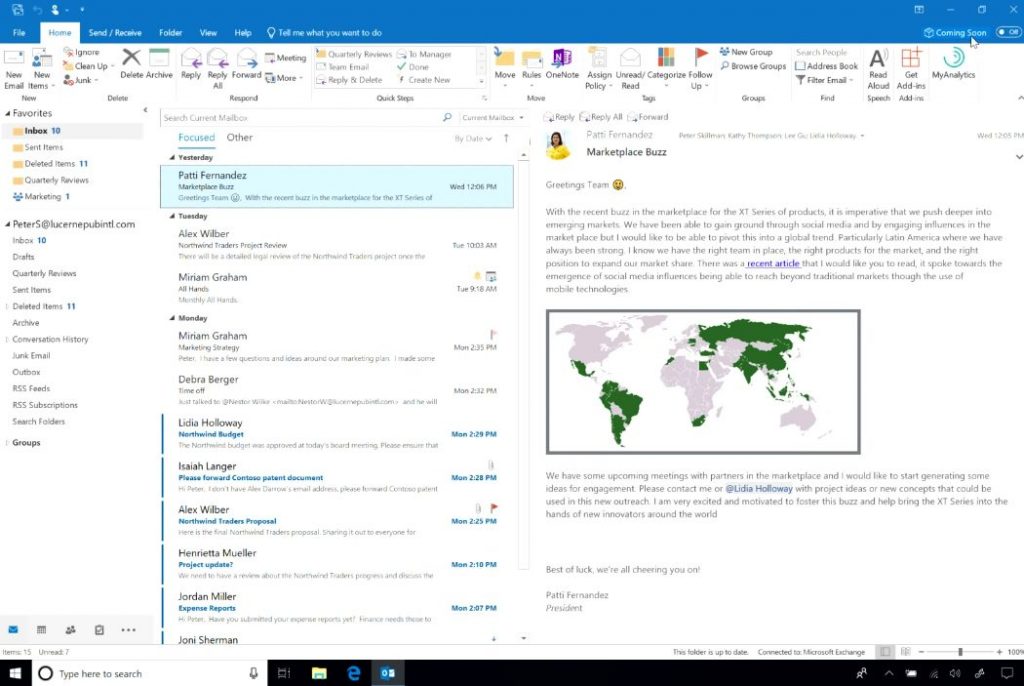


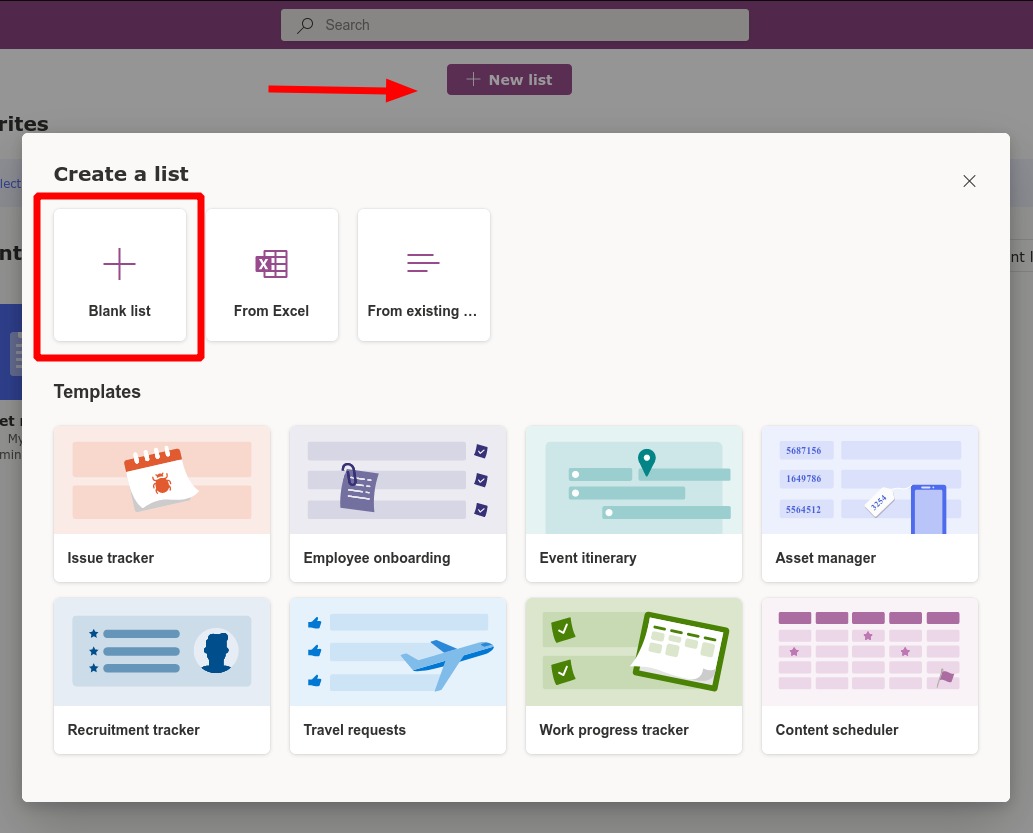
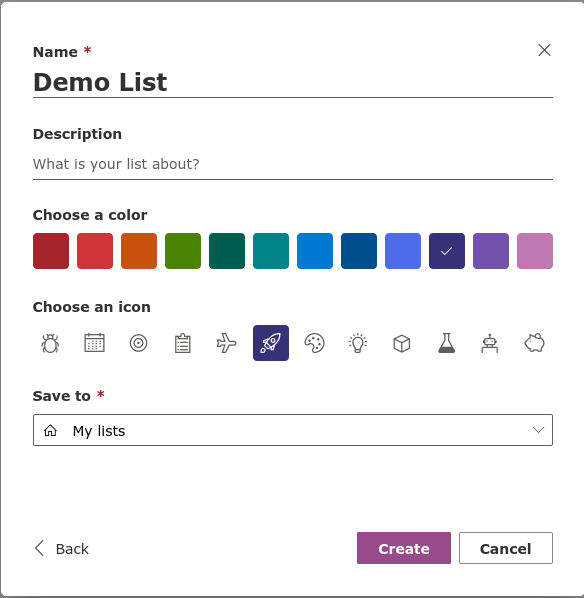
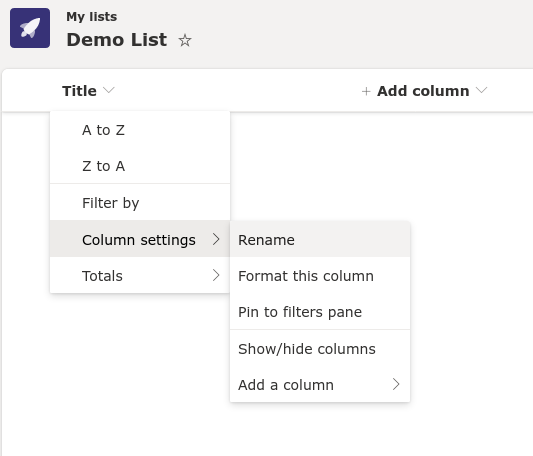
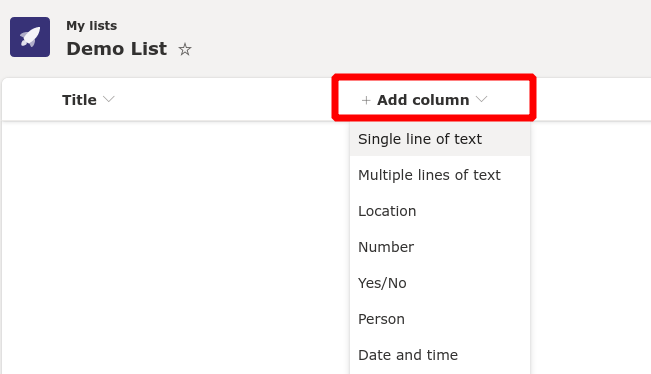
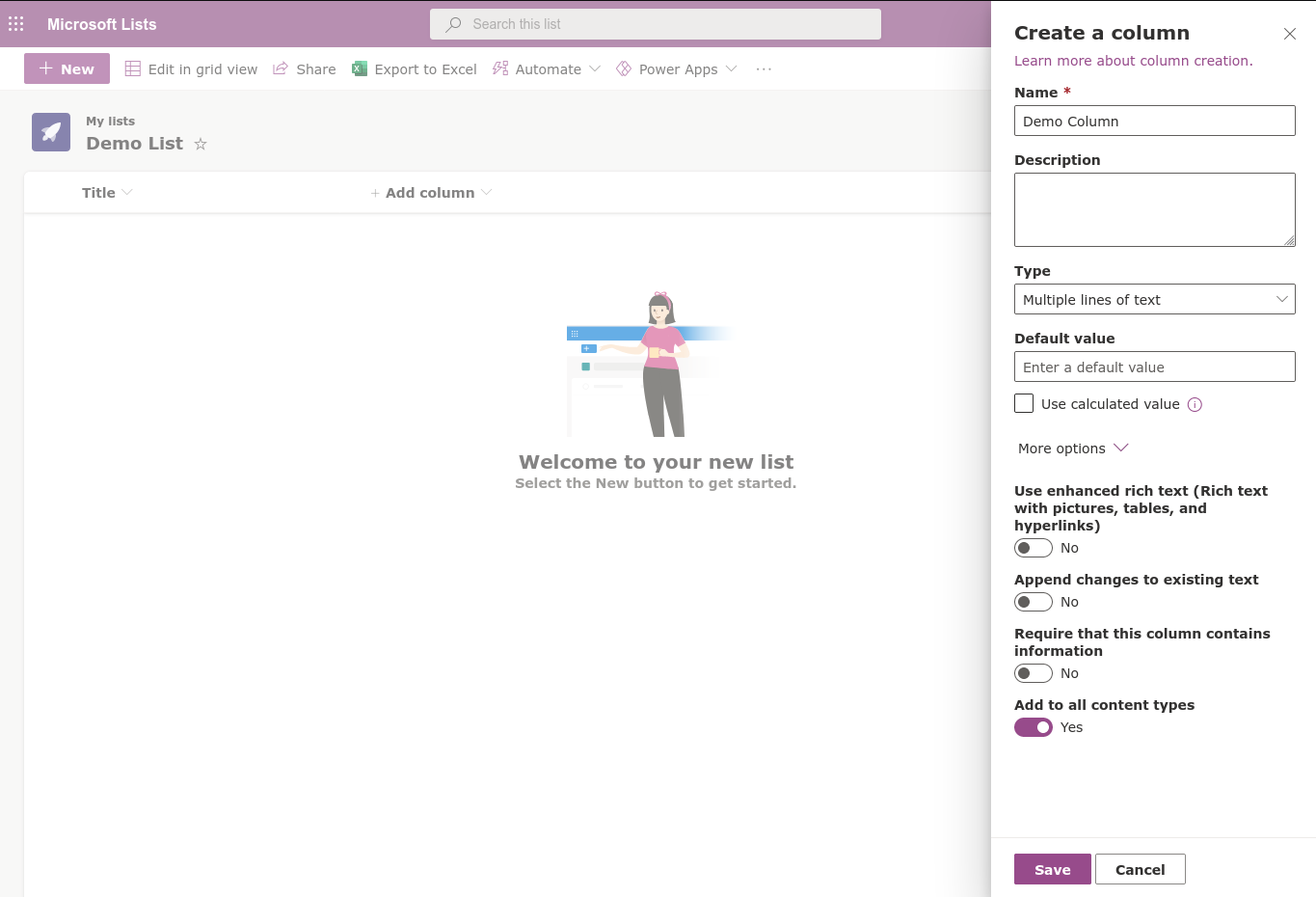
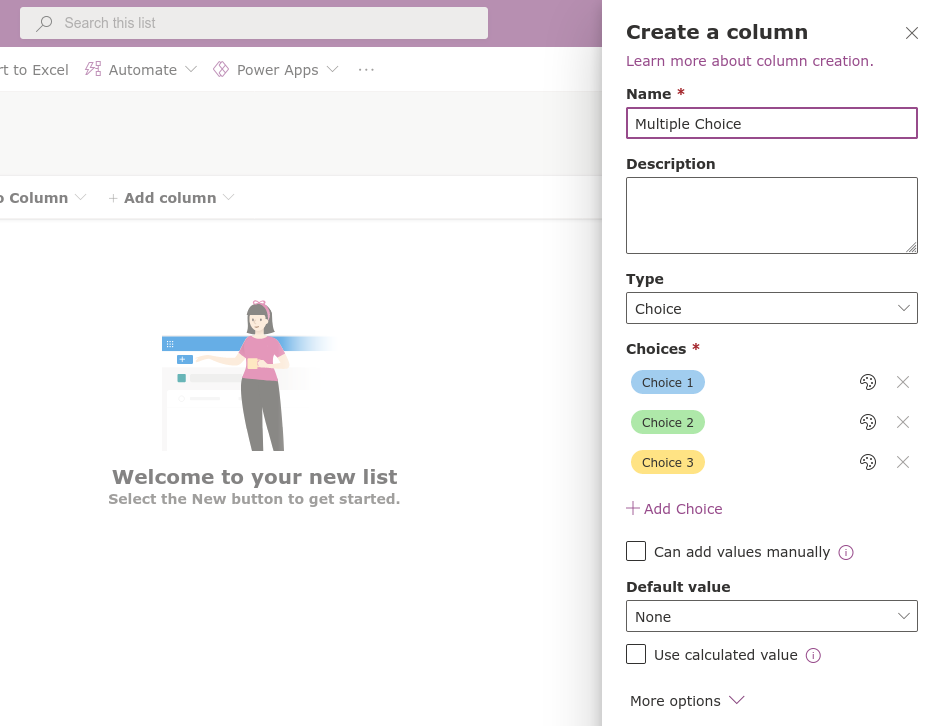
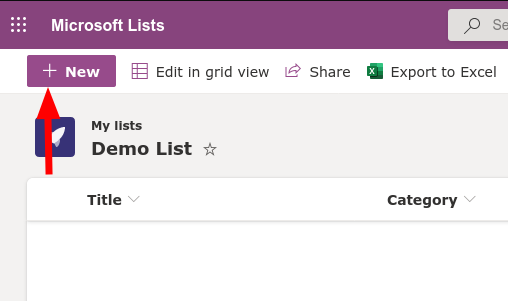
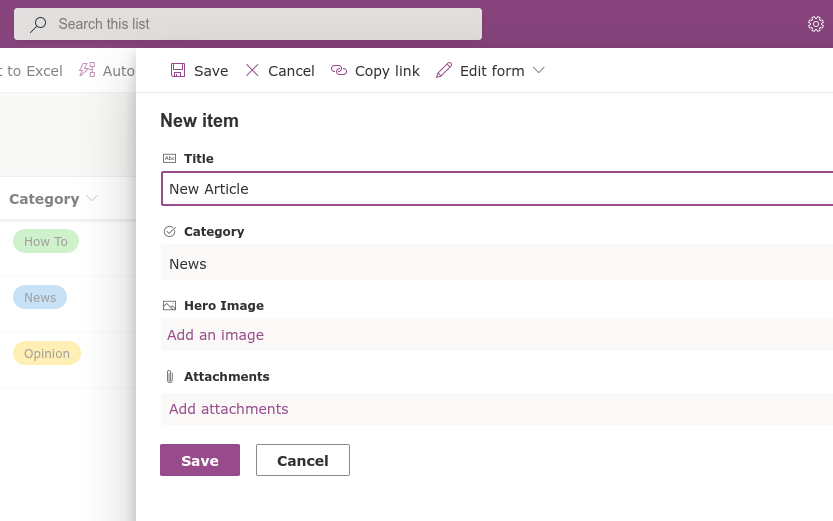
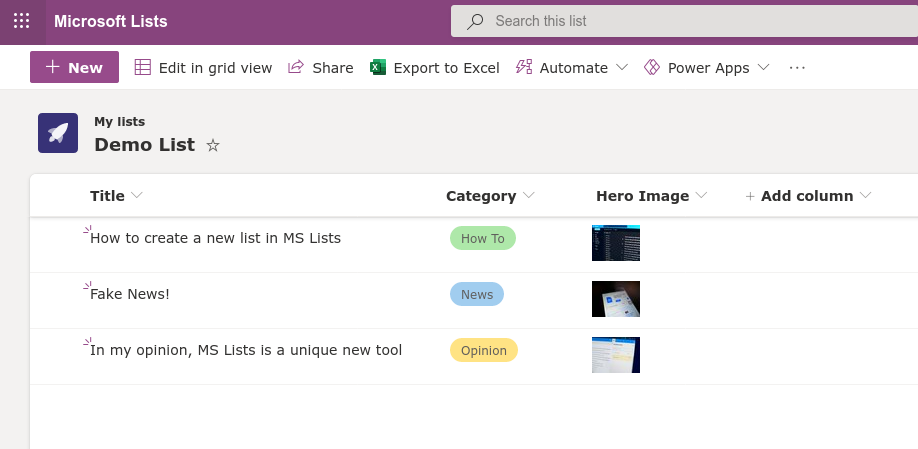

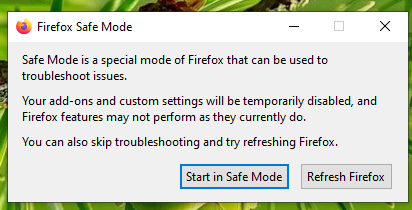
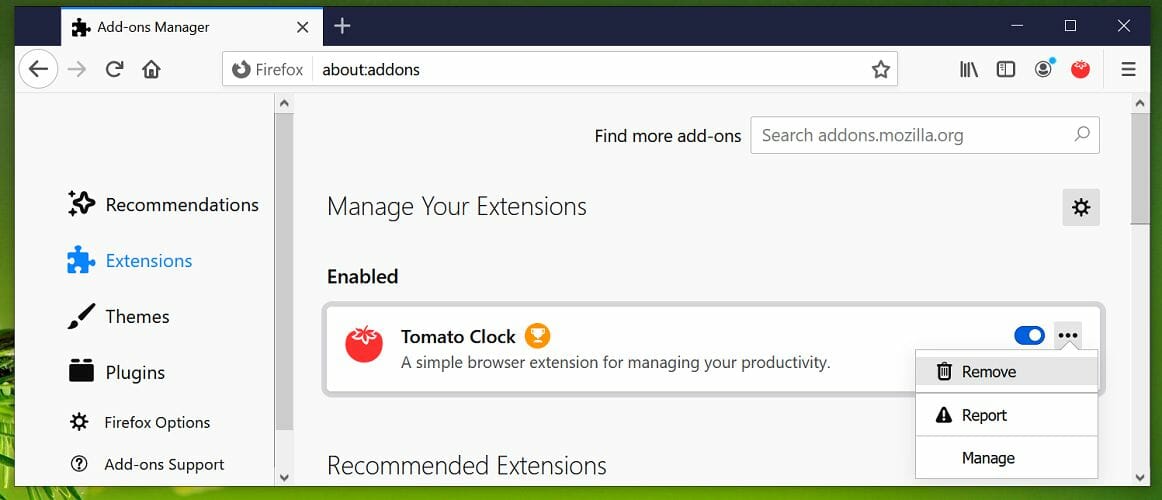
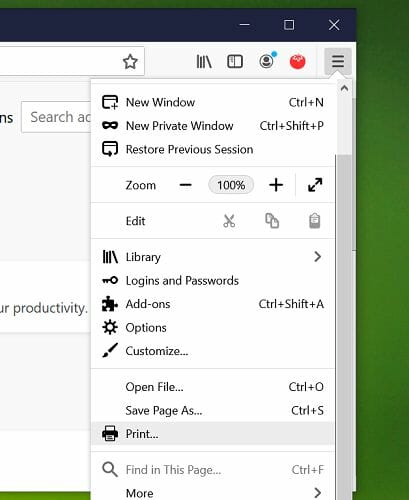
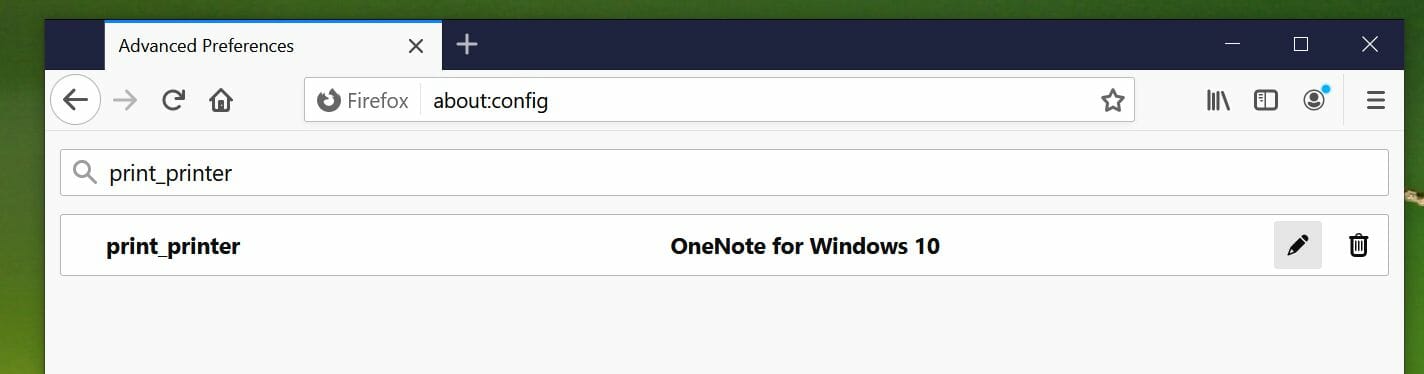
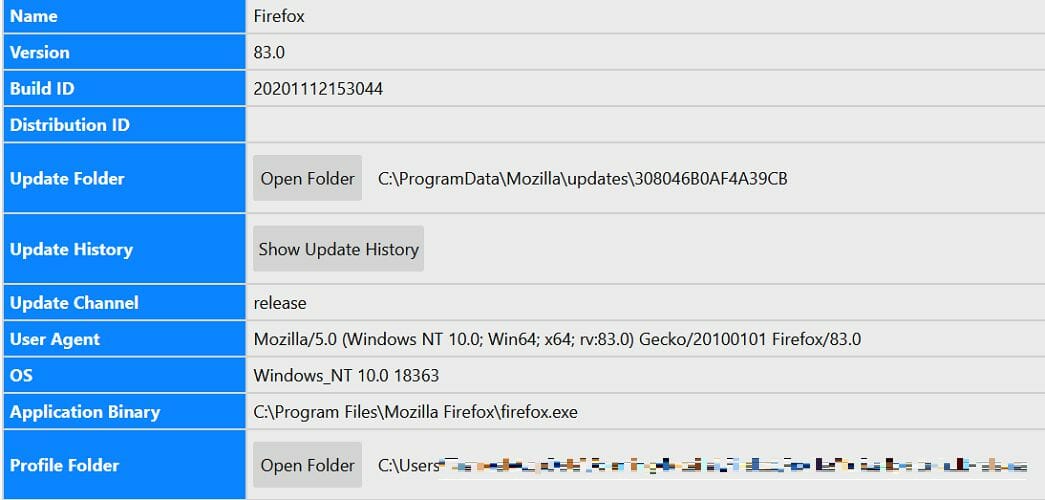
![Extract CAB file in Windows 10/11 [Complete Guide]](https://windowsreport.com/wp-content/uploads/2020/12/extract-cab-file-windows-10.jpg)



![Fix: DISM error 1009 in Windows 10/11 [Initialization error]](https://windowsreport.com/wp-content/uploads/2020/12/dism-error-1009.jpg)



![Fix: WinRAR Cannot Execute File Error [4 Quick Solutions]](https://windowsreport.com/wp-content/uploads/2020/12/WinRAR-cannot-execute-file-error.jpg)


![7-Zip data error while extracting [Corrupted archive]](https://windowsreport.com/wp-content/uploads/2019/11/6-open-source-file-archivers-to-save-some-disk-space.jpg)
![How to move folders in Google Drive [Full Guide]](https://windowsreport.com/wp-content/uploads/2020/12/drive-1.jpg)

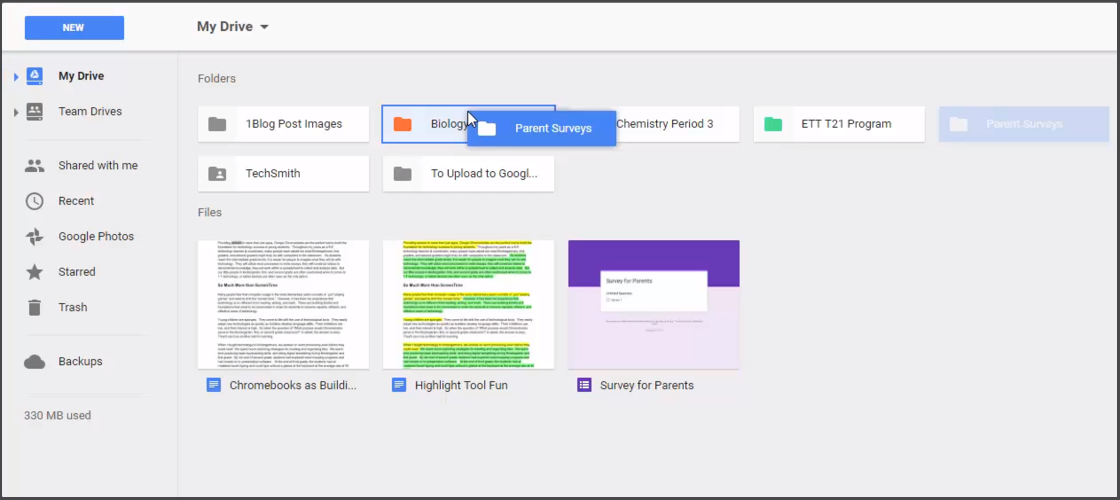
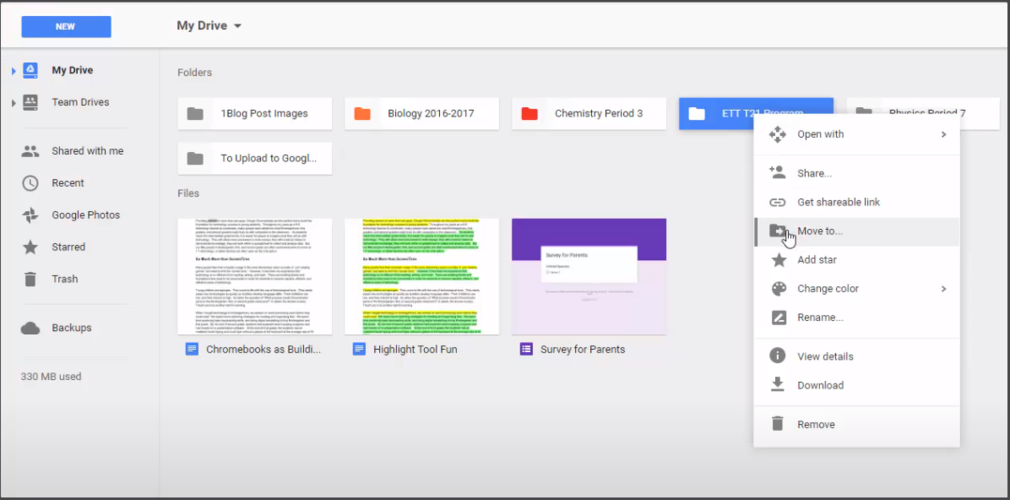
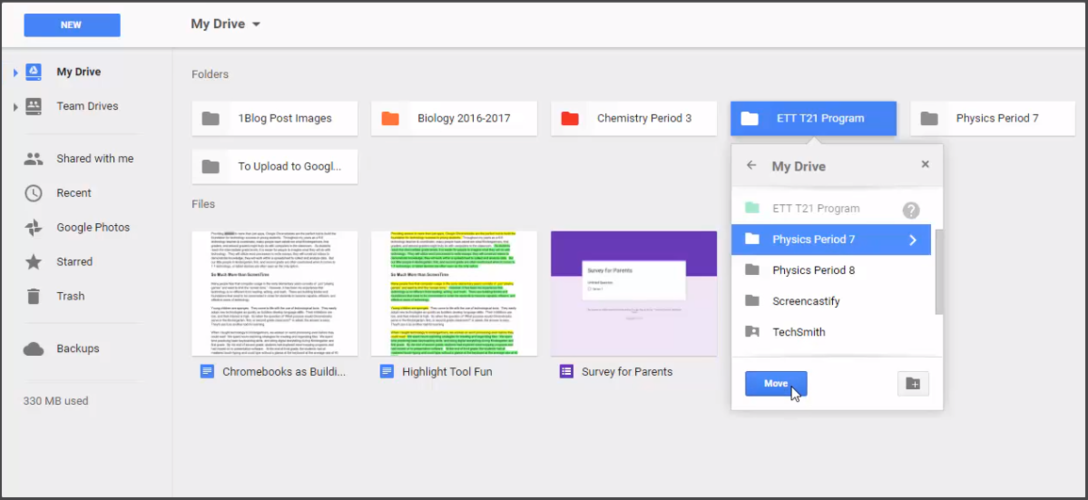
![5 Best USB foot pedals for gaming [Christmas deals]](https://windowsreport.com/wp-content/uploads/2020/12/pedal9-1.jpg)







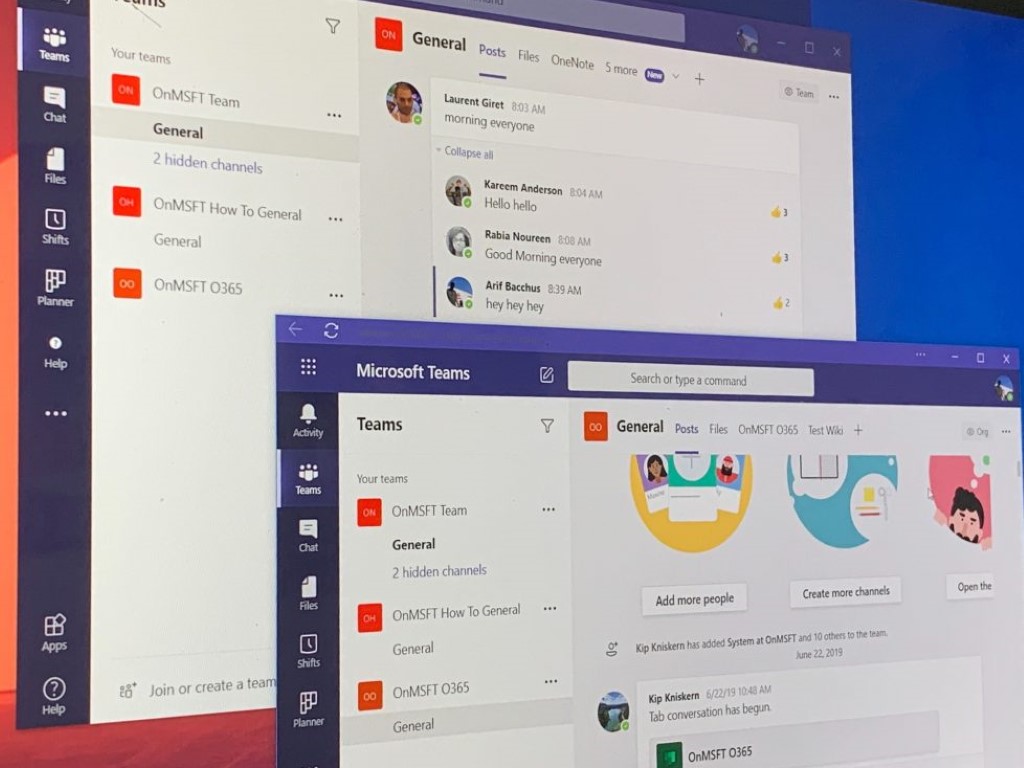
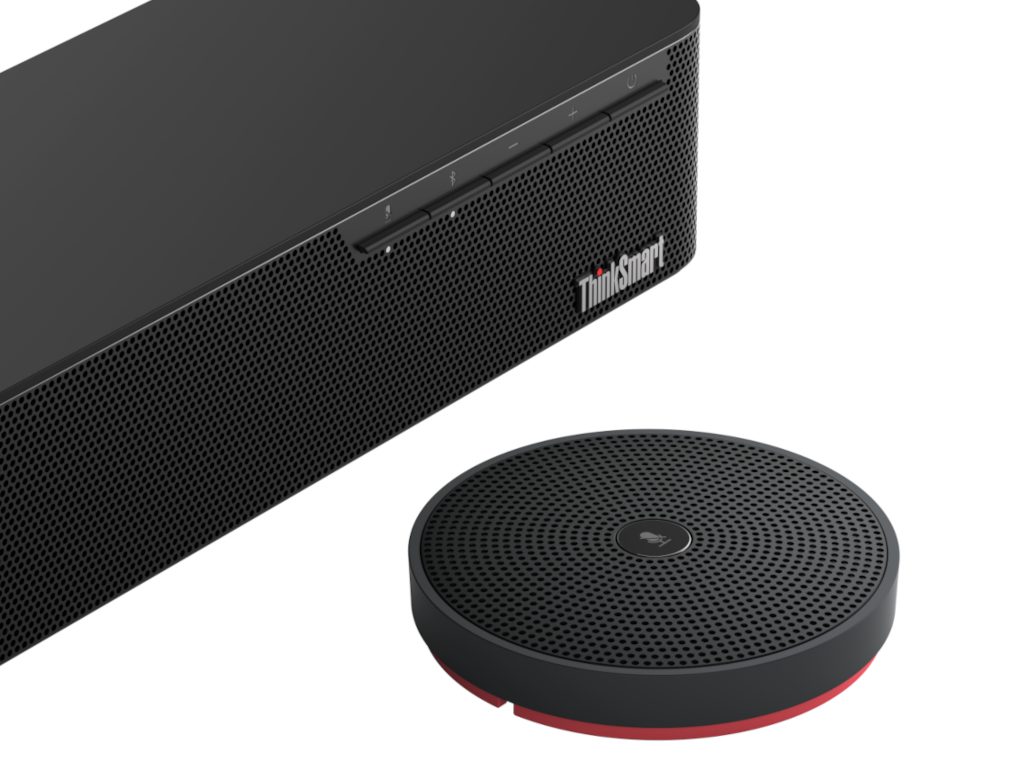




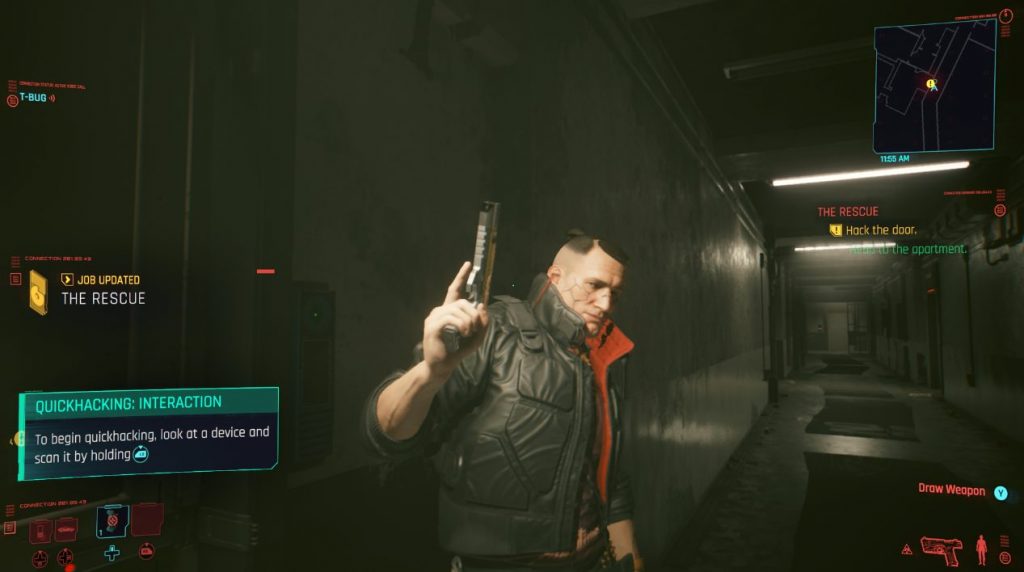
![How to unzip files in Windows 7 / Windows XP [Full guide]](https://windowsreport.com/wp-content/uploads/2020/12/Unzip-files-in-Windows-7-Windows-XP.jpeg)