“Public Beta is an important step towards GWENT’s final release. We’re opening the gates to everyone who wanted to play, but didn’t make it into the Closed Beta, and at the same time we’re introducing some pretty significant content and gameplay changes like adding animated versions of cards for every card in the game, new starter decks, or how weather cards work,” CD PROJEKT RED’s co-founder Marcin Iwinski says in an official statement. “I’m extra curious how all of the community feedback we’ve incorporated will resonate with both current players and those who’re just starting. Please keep the feedback coming, we’re listening!”
In addition to new changes to existing cards and the launch of many more animated cards, this public beta version of the game also contains a new tutorial fully voiced by The Witcher 3’s actors, customizable avatars and frames, and a variety of Challenges for players to complete. A newly released gameplay trailer teases a full story mode for Gwent however it’s not available to play yet in the public beta.
Gwent got its start as a mini-game in The Witcher 3 on Xbox One but became so popular with players that it was decided to expand upon the concept and make it its own title with more cards and features. The game is expected to launch properly by the end of 2017 and a Windows 10 version is also on the way and will have cross-play and cross-save functionality with the Xbox One version.
Have you played Gwent yet? Let us know in the comments below.
While this is pretty surprising, especially because it’s beating the insanely popular Injustice 2 and Overwatch games, its sudden boost in sales is likely due to a sudden decrease in its digital code price (Amazon was selling it for around $7). Kinect Sports Rivals was also fairly well received when it first came out so it makes sense that those Xbox One owners who hadn’t played it yet might be wanting to buy it, especially with it being so affordable now.
Kinect Sports Rivals is a game that uses the Xbox One’s Kinect sensor to not only play the game but also scan in digital versions of the players. This body scanning feature received a significant amount of promotion back in 2014 and was used to showcase just how much better the Xbox One’s Kinect was compared to the Xbox 360 one.
Did you enjoy Kinect Sports Rivals and would you like to see more Kinect games on the Xbox One? Let us know in the comments below.
Microsoft Inspire is here, presenting Microsoft partners with a chance to really get to know the tech giant, and its employees. While most consumers probably aren’t going to be getting much out of the conference, it’s a truly meaningful event that lets all of the industry insiders get on the same page – and it’s a place for some great speeches, to boot.
Microsoft’s Gavriella Schuster, CVP of Worldwide Channels and Programs, wrote up a blog post today talking about Microsoft Inspire, and highlighted some of the best parts of previous conferences.
Microsoft Inspire is about more than celebrating cutting edge technology and the partner community’s mutual achievements. Our flagship partner event provides attendees with the opportunity to really connect with Microsoft employees, with industry experts, and with other partners. Even more than that, Microsoft Inspire is about bringing passionate individuals together to give a voice to technology and to drive positive change.
You can check out the blog post to read some of last year’s speeches, but it’s the list of speakers this year that’s especially exciting. Satya Nadella, Ron Huddleston, Judson Althoff, Gavriella Schuster, Toni Townes-Whitley, and Kirk Koenigsbauer are just some of the speakers this year, creating a massive roster of influential people to listen to.
Those of you who would have the opportunity to come to Microsoft Inspire can get your all-access pass right here.
Endless Space 2 is now live. The game challenges you to take on the role of the leader guiding a civilization making its first steps into the depths of interstellar space.
This sci-fi turn-based strategy game will take you to far away, mysterious star systems where you’ll discover the secrets of ancient races, develop advanced technologies, and encounter new life forms.
Unfortunately, for many players, this will be a bumpy ride. Gamers report that Endless Space 2 is sometimes affected by a series of technical issues that range from FPS drops and stuttering to random crashes.
Endless Space 2 reported issues
FPS drops
I purchased Endless Space 2 last night and have been enjoying it immensely. I haven’t ran into any game-breaking issues or bugs but there is something that is bothering me. Every 10-15 seconds, my frames will drop from a solid 60 to somewhere in the low 30’s and then return back to 60 immediately. This isn’t a huge issue because it is a turn-based game and it is barely noticeable, but sometimes when I am panning the camera it hitches for a second.
Endless Space 2 won’t load
when endless space 2 is on the loading screen, the bar gets full, but it just stays that way, it doesnt stop responding or anything, it just does nothing.
Multiplayer sync issues
ALWAYS , when I finished my turn as host, my brother is still doing his turn. I than open ANY INFO screen, like Diplo, Marktplace , doesn’t matter which screen …
and in the meantime brother ends his turn, I am getting a desync on my side as host. My brother had never any. (we already played over 200 turns) We could continue the game, without any problem, but since that time, I will get now every turn that desync message !
The election screen won’t work
I am not only unable to go to the next election stage, but unable to skip it. This only happens every so often. Not all elections for me.
If you’ve encountered this problem, try pressing Alt + F4 then load the autosave. The game should bring you back right after the election process.
Players can’t harvest basic resources
Funny bug. Even didn’t happen during beta. Though the strategic resource has always been a pain in the xxx. Like say the first strategic resource you get is titanium, you can never harvest the other one in any way. And the tech has already been researched.
Endless Space 2 crashes
Recently, my game has been crashing roughly every ten turns. […] I thought I could fix an ‘Acces Violation’ by running the game as an admin from the installation directory, which, interestingly, let me play a full 140-turns-game without a crash. Closed the game, turned the PC off, went to bed, played again on the next day, played for 40 turns (as an Admin), CRASH. Now they seem to leave me alone for around 30 to 40 turns after a reboot, then the game crashes every ten turns until I reboot my PC.
Endless Space 2 lags
Anyoone else getting really laaggy performance and stuttering in the late game? Enjoying ES2 a lot, but this is definitely annoying as heck.
Players can’t attack alien races
Has anyone else have an issue where even if you declare war against a race your still unable to attack them?
These are the most common Endless Space 2 issues reported by gamers. If you’ve come across any workarounds to fix the bugs listed above, feel free to add the troubleshooting steps in the comment section below.
Millions of people use pirated Windows worldwide, it’s a fact. And in all honesty, it makes sense for them to do so. Especially in developing countries, where the price of a Windows license is equal to someone’s monthly salary.
The most significant benefit of a pirated Windows copy is, of course, the fact that it’s free. If you’re not a power user, using a non-genuine copy won’t affect your experience, especially with all these online activators and hacking tools.
Pirating Windows has been a practice for years, and it’s also very active with Windows 10. People who use this kind of Windows usually have only the price in mind, but they ignore the risks of pirated Windows.
Since we care about our readers’ security and don’t encourage using pirated software, we will list the most common risks of using a pirated version of Windows 10.
So, if you’re currently using pirated Windows 10, please remember this information.
Why using pirated Windows 10 is risky?
It’s all about a ‘good’ activator
Let’s start with an application that makes this pirated Windows 10 thing possible – Windows Activator.
We won’t dig deep into how this tool works, but the principle is quite simple. You install the pirated operating system, open the Activator, press one button, and have a fully functional Windows 10 OS.
The performance of your pirated Windows 10 highly depends on the Activator’s quality. If the Activator is a ‘good’ one, you should be able to run Windows 10 smoothly for months.
If you pick a ‘non-reliable’ activator, you can end up with a broken system from day one.
But no matter what ‘quality’ Activator you use, you never know when your system may break. When that happens, you’ll be in big trouble.
Missing updates
May pirated copies of Windows 10 fail to receive updates. And since updates are perhaps the most important aspect of the system, you’ll break a big circle.
Back to Activators, some allow you to receive Windows updates on a pirated Windows 10 copy. Still, you never know when the next update will interfere with your modified configuration and make your system non-genuine.
Perhaps the most significant threat of not receiving regular updates is that you’ll miss security patches, making your system vulnerable to various attacks. But we’ll get to that later in this article.
In plain English, you can’t expect to run a non-genuine copy of Windows 10 and receive regular updates forever. You do the math yourself and decide whether it’s worth it.
Performance may suffer
To make your pirated Windows 10 version work, pirates must make certain changes within the system’s ecosystem. These changes often cripple the system, making some other features unusable.
So, there’s a big chance you won’t be able to use everything users with a genuine system can.
Performance depends on how good a pirated copy is. So, you might install a copy that won’t even run on startup or stumble upon a nearly perfect copy. Once again, that’s all plain gambling and can lead to much trouble.
Risk from security attacks
A huge percentage of cyber attacks worldwide happen on pirated systems. And it’s not just systems. Online piracy statistics reveal that downloading or streaming from unofficial sites poses similar risks.
Why? Well, as we said above, you won’t be able to receive all security updates on a pirated Windows copy, which makes your computer a perfect target for various cybercriminals.
So, think again: do you want to lose your sensitive data to some cybercriminal just because you’re using a non-genuine version of Windows 10?
Keep your Windows 10 PC protected with the best antimalware tools. Find our top picks in this article.
Can’t use all apps and services
And finally, if you’re a fan of Microsoft’s services and apps, we have bad news: they won’t work on a pirated system.
Of course, there are also pirated versions of Microsoft’s programs, like Office, but installing another program can only lead to more problems. And by more problems, we mean more security holes that can attract hacking sharks.
Also, buying apps from the Microsoft Store won’t be the most pleasant experience. Because Microsoft will notice that you’re purchasing a non-genuine system, you might end up with a banned account.
Wrap up
As you can see, using a pirated copy of Windows 10 brings a handful of risks that can go way deeper than just breaking your system. So, even if the original product’s price is too high for someone, it’s usually not worth it in the long run.
What do you think about using pirated Windows 10? Are you willing to take the risk, or you’d rather play it safe and legal?
Let us know your thoughts in the comments section below.
It looks like Microsoft is continuing to roll out more of its new Fluent Design in the background. According to a report by Windows Central, the Groove Music app on Xbox One has received an update with some elements of the new design language.
For those that may not know, Microsoft’s Project NEON was announced at Build 2017 as being renamed into Microsoft Fluent Design System. beyond making apps look sleeker, the goal is to create a responsive and ‘harmonious’ interaction across devices.
The Groove Windows 10 PC and Mobile apps have already seen some a touch of the Fluent Design tweaks. With the Xbox One update, the most noticeable change is the signature transparent menu bar that blurs the background content. Otherwise, the implementation seems to be minor for now.
The Groove Music Xbox One app update is available for many users, but not everyone just yet. No doubt we’ll see more of the Microsoft apps dressing up in Fluent Design as we move closer towards the Windows 10 Fall Creators Update later this year.
Earlier this year, Microsoft announced that their transition to open source has been an undertaking. While the tech giant intends to push the availability of their data on a broader scale through GitHub, Microsoft had admitted difficulty with the sheer scale. Git, after all, wasn’t created for such massive files systems.
Enter the Git Virtual File System, Microsft’s way to maintain the 3.5 million files for Windows. Three months later after the announcement of their transition to the GVFS, nearly 4,000 engineers have transitioned their work over to the new Windows Git making it the largest repository available (via TechCrunch.)
Originally, the Windows OneCore team held baited breath on March 22nd when 2,000 engineers had completely transitioned to the Git experience. Since then, Windows has slowly been transitioning more and more engineers into the repository, processing some impressive numbers daily.
There are over 250,000 reachable Git commits in the history for this repo, over the past 4 months.
8,421 pushes per day (on average)
2,500 pull requests, with 6,600 reviewers per work day (on average)
4,352 active topic branches
1,760 official builds per day
Adding onto the availability as an open source project and improving behind the scenes, Microsoft also took the opportunity to improve the Git proxies. The transition was so game changing for Windows that their recent blog post states other tech companies like Google and Facebook may be interested in learning from the new GVFS for future use.
If you’re a creative person, the Windows Store currently has a pretty good selection of free apps that let you edit pictures, create vector graphics or any type of art and more. And as Microsoft just announced, you can now save up to 75% off premium in-app features for all apps included in the Windows Store’s collection of creative apps.
Here are some details about these free apps and the premium features you can unlock at a discount:
The premium features of drawing app Sketchable, including Layers, Masks and Stencils are currently 25% off ($14.99) , 25% off)
You can unlock all templates and remove ads in Zen Coloring Book for just $1.99
Alphalina Designer’s Basic and Pro ultimate features and tools are currently 75% off
All in-app purchases for home and interior design app Planner 5D are 50% off
The Windows Store collection also includes PicsArts, Mood Board, Pixel Art Studio, Color Scheme and Live Home 3D, and we invite you to check these apps if you want to learn more about their discounted premium features.
There are a lot of things on the way in the Fall Creators Update, but none of them are quite as enticing as the new Fluent Design interface that Microsoft seems to be adopting in most facets of the operating system. While elements of Fluent Design have already spread to other key core apps in Windows 10, the latest update to Windows Store for Windows Insiders in the Fast Ring also now gives Windows 10’s digital app store a brand new acrylic coat of paint.
The new design is great, and offers exactly what Microsoft is promising for the Acrylic focus of the Fluent Design language: backgrounds with a little bit of transparency, making your windows feel more like, well, acrylic windows. It’s a slick look, and while we’ve only been able to see it in the Windows Store, that’s enough to get a good understanding of what Microsoft is trying to get Windows 10 to look like. We’re excited to see how the design translates to other applications.
If Microsoft has already started deploying Fluent Design to things like the Windows Store in their Insider builds, we can expect a big uptick in more Fluent Design in the near future. With a general uniformity between the Microsoft apps already existing, the acrylic windows here should be pretty simple to adapt into all manner of programs.
If you want to try out the fancy new Windows Store, you should be able to download it from the Windows Store updates menu now – given you’re on the latest Insider build in the Fast Ring. And, once you’ve updated, let us know your impressions in the comments below.
Dealing with restaurants can be a pain, sometimes. Whether you just don’t want to talk to someone on the phone, have some specific questions that you can’t find the answers to online, or if it’s after-hours and you need to find something out, you can’t always rely on getting a hold of someone for all your questions. If you buy into Microsoft’s vision, this is where the new Bing Business Bots are supposed to come in (via VentureBeat.)
The Bing Business Bot is ready to go for restaurant owners who have been trying to make a better customer support framework. The process of setting it up is simple: the bot will ask you a few basic questions about your business (parking, open hours, etc.) and make a bot on Skype, and similar chat applications. When a customer asks one of those questions to the bot, it’ll provide the answer you gave it.
The bot will become smarter over time, too. If it’s asked a question it doesn’t know the answer to, it’ll come back to you and have you fill in the blank for future customers curious about the same thing. While the Bing Business Bot is currently only able to support restaurants, it’ll be expanding its horizons to other sectors of business in the near future.
On the Windows blog, Panasonic announced the new Toughbook 33, a new Windows 10-powered 2-in-1 device that looks like it can handle just about anything you can throw at it. The Toughbook 33 is inspired by mobile professionals that need a device that will work in all kinds of weather conditions, which is why the Toughbook 33 was constructed to meet MIL-STD-810G and IP65 standards. Able to handle most drops, this Toughbook is running Windows 10, using an 7th gen i5 or i7 Intel processor, a 3:2 QHD display, and IP55 digitizer pen with Windows Ink support.
The Toughbook 33 can use the infrared webcam with Windows Hello support or the integrated fingerprint reader to log in quickly and securely to keep your work documents safe. The Toughbook 33 2-in-1 laptop works with Cortana and Microsoft Edge with two swappable batteries available, offering 10 hours of battery life or for up to 20 hours in “Long Life Battery” mode when you need the extra battery life. The Toughbook 33 can run as well as a laptop or a tablet, depending on what your job demands.
Panasonic Toughbook 33 tablet mode
Here is a look at the other features available from the Panasonic Toughbook 33:
1080p webcam and an 8MP rear camera
Up to 10 hours battery life, or up to 20 with the optional Long Life Battery configuration; twin-battery design for hot-swap battery replacement
Choice of Barcode or Serial (true) or 2nd USB, Choice of Insertable SmartCard or Contactless Smartcard or Fingerprint readers
12.0” 3:2 QHD 2160×1440 wide-view angle display with direct bonding, and a 1200 nit sunlight-viewable screen
Magnesium alloy chassis, MIL-STD-810G and IP65 all-weather design, in addition
Available with two different vehicle docks for new deployments: a tablet vehicle dock and a 2-in-1 vehicle dock. For Panasonic’s large customer installation base of Toughbook 31 vehicle docks, Panasonic is also offering a drop-in-replacement 31 Vehicle Dock Adapter (VDA) with removable Lite Keyboard.
The Panasonic Toughbook 33 pricing will start at $3,649.00 and will be available for pre-order later this month.
A couple of days ago, Microsoft announced that three Japanese games joined the Xbox One backward compatibility list. These titles were not very exciting, as they were not released in English, but today, Microsoft followed up to release a whopping 5 new titles to Xbox One via Backward Compatibility. As always, we’ve given the titles a look and have included the details for you below.
The American Colonies, 1775. It’s a time of civil unrest and political upheaval in the Americas. As a Native American Assassin fights to protect his land and his people he will ignite the flames of a young nation’s revolution. In Assassin’s Creed® III, eliminate your enemies with an array of new weapons including guns, bows, tomahawks, and trusty hidden blades. The game has been in development for over 3 years and features the new Ubisoft-AnvilNext engine, a stunning technology that will revolutionize gaming with powerful graphics, lifelike animations, immersive combat, and advanced physics. With an all new setting, assassin and engine, Assassin’s Creed® III takes you back to the American Revolutionary War, but not the one you’ve read about in history books.
As the ninja Shinobi (Joe Musashi) you must stop who the criminal organization called “Zeed” who has kidnapped the children of the Oboro clan. Test your ninja skills through five missions of increasing difficulty as Musashi must make his way to Zeed’s headquarters and free all the hostages. Zeed’s leaders, known as “Ring of Five”, are determined to stop you as you’ll face one at the end of each stage.
Tenchu, the world-famous ninja action game, is now on Xbox LIVE Arcade. Control your favorite characters as you use a variety of ninja weapons to defeat your enemies and complete your missions. Use traps in multiplayer mode to kill your friends for massive points!
Introducing the ultimate arcade action experience for hardcore video game fans! Matt Hazard: Blood Bath and Beyond is an homage to the greatest side scrolling action video games of all time. Starring classic action hero Matt Hazard and all his greatest enemies, it features tons of weapons, nonstop explosions, and gorgeous 3D environments. Battle everything from evil ninjas to killer penguins. Survive incredible boss battles. And – of course – enjoy side-by-side 2 player gameplay. Enjoy nonstop run and gun survival at its finest in an over the top modern vision of timeless video game themes.
Explore the visually lush dream world of IloMilo. Challenge yourself with exciting puzzles as you dive deeper and deeper into the story. Play along with a friend or family member and share the journey. Beautiful and full of charm, the game is equally appealing to seasoned gamers and young families alike. The puzzles are easy to learn, but challenging and deeply rewarding to find all the hidden surprises. Experience the unique, fun new co-op experience where you and a friend or family member can take control of ilo and milo and help guide each other through the exciting puzzles
With the addition of these five titles, those who own these games will surely be busy in the days ahead. As always, we invite you to keep it locked into OnMSFT, as more games will likely be added to the Backward Compatibility catalogue very soon. Also be sure to drop us a comment with your other thoughts and remarks.
The end of May is almost upon us, so that means it’s time for a new round of Games with Gold titles. Free for Xbox Live Gold members in June are: Watch Dogs, SpeedRunners, Assassins Creed 3, and a bonus piece of DLC for Phantom Dust. As always, we’ve included all the details for you below the official Xbox video.
Xbox One Games With Gold:
SpeedRunners: June 1-30
Cut-throat multiplayer running game that pits 4 players against each other, locally and/or online. Run, jump, swing around, and use devious weapons and pick-ups to knock opponents off-screen! One of the most competitive games you’ll ever play.
Play as Aiden Pearce, a brilliant hacker, whose criminal past led to a violent family tragedy. Now on the hunt for those who hurt your family, monitor and hack all who surround you by manipulating everything connected to the city’s network. Access omnipresent security cameras, download personal information to locate a target, control traffic lights and public transportation to stop the enemy. Use the city of Chicago as your ultimate weapon and exact your own style of revenge.
The American Colonies, 1775. It’s a time of civil unrest and political upheaval in the Americas. As a Native American Assassin fights to protect his land and his people he will ignite the flames of a young nation’s revolution. In Assassin’s Creed® III, eliminate your enemies with an array of new weapons including guns, bows, tomahawks, and trusty hidden blades. The game has been in development for over 3 years and features the new Ubisoft-AnvilNext engine, a stunning technology that will revolutionize gaming with powerful graphics, lifelike animations, immersive combat, and advanced physics. With an all new setting, assassin and engine, Assassin’s Creed® III takes you back to the American Revolutionary War, but not the one you’ve read about in history books.
From the makers of Mass Effect comes the dark fantasy epic: You are a Grey Warden, one of the last of a legendary order of guardians. With the return of mankind’s ancient foe and the kingdom engulfed in civil war, you have been chosen by fate to unite the shattered lands and slay the archdemon once and for all. (1) Immerse yourself in a shattered world on the brink of annihilation; (2) Experience complex moral decisions that have game-changing consequences; (3) Sculpt your hero in your own image or fantasy; (4) Engage in bone-crushing, visceral combat against massive and terrifying creatures
Gold members will get free multiplayer content DLC for the re-release of Phantom Dust starting June 1st. It is a $14.99 value and includes a variety of valuable skills and abilities to help you defeat your enemies.
Once the month of June has started, you can get these games by clicking on the Gold area on your Xbox One, on your Xbox 360, or on the Web. Once you download, these games will automatically appear in the ready to download section of your Xbox One. As always, we would love to hear your thoughts on these games, so please do drop us a comment below!
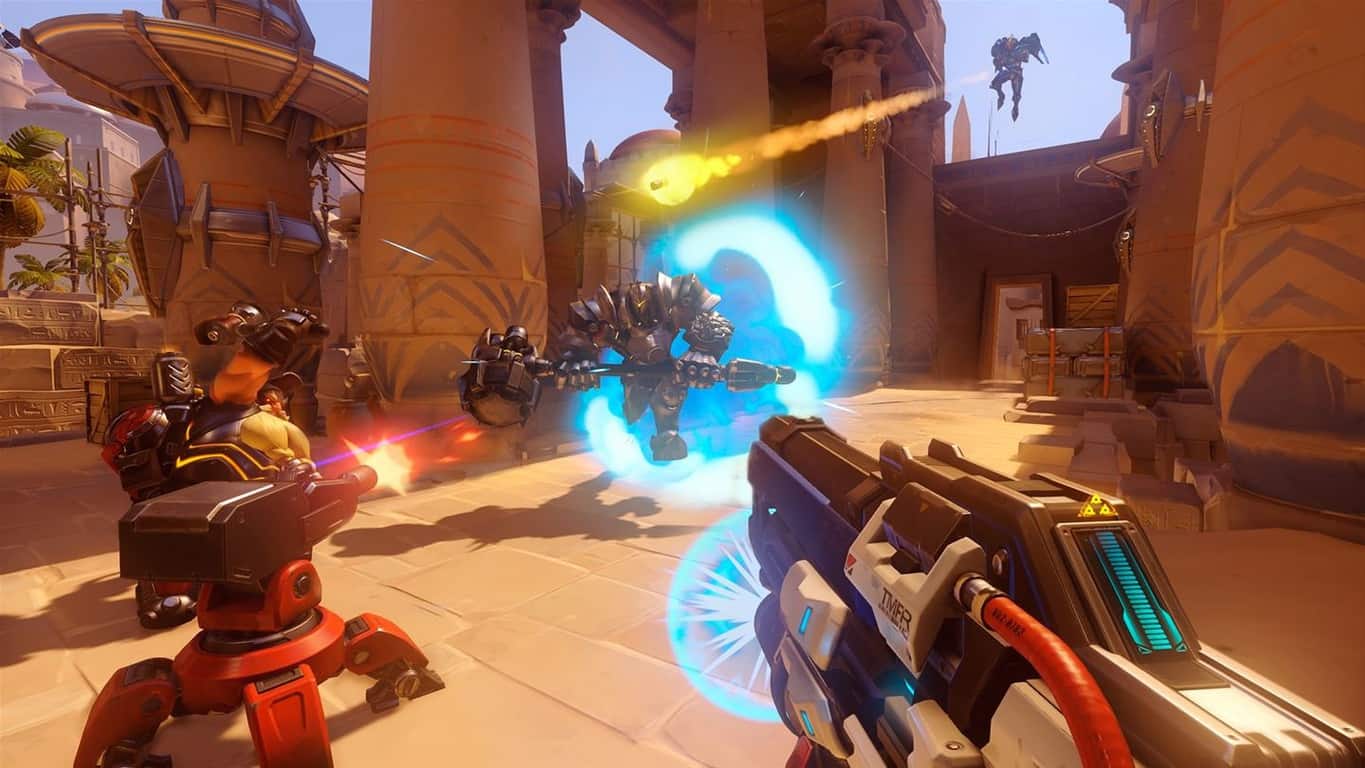
In a post on Major Nelson’s blog, Microsoft’s Larry Hryb announced the availability of Overwatch Game of the Year Edition on Xbox One. In addition to this exciting news, Overwatch Game of the Year Edition is being offered at a 35% discount for Xbox Live Gold members, available now for just $38.99.
According to a story on The Verge, Microsoft claims a Chinese gaming company, iGSKY, has been hacking Xbox accounts since 2015. On its website, iGSKY, offers cheap in-game credits and other bonuses on Xbox Live. However, in actuality, Microsoft alleges, iGSKY is taking those items from actual Xbox Live accounts.
Microsoft claims that iGSKY has made over $2 million in purchases through hacked accounts and using Xbox Live users’ credit cards. The iGSKY website offers deep discounts on in-game points for games like FIFA 17, Forza Horizon 3, Grand Theft Auto V, and other games.
A Microsoft spokesperson gave an official statement to The Verge:
“Microsoft is committed to providing customers with safe and secure online experiences. We filed these lawsuits to protect our Xbox customers from the illegal trafficking of stolen property.”
The Verge offered more details on how Microsoft came to bring the suit against iGSKY:
“Microsoft’s in-house fraud investigators began looking at the site in December, making a number of purchases on iGSKY to build the case. In one case described by senior investigator Jeremy Beckley, Microsoft’s fraud team purchased 11,000 FIFA points on iGSKY.com, paying $60. Immediately afterward, Xbox Live received an email and password change for an eight-year-old account, which then proceeded to purchase 11,000 FIFA points for $127.54. It’s unclear how the group gained access to the account, although there was no indication of a broader breach of Xbox services.
iGSKY delivered the credentials to Microsoft’s investigations team in an email, along with instructions to spend the points as soon as possible. Shortly after that, the original owner of the account contacted Xbox customer support, complaining that he had been locked out of his account and unauthorized purchases had been made.”
By using this evidence, Microsoft is bringing a number of charges against iGSKY, and although it will be very difficult to shut down the website, Microsoft can make it harder for the website by shutting down its PayPal accounts.
Microsoft just wrapped up its Surface-themed event in Shanghai, China, where the company announced new Surface hardware as well as new efforts to develop its presence in the Chinese market. Indeed, the company unveiled Windows 10 China Government Edition, a new version of Windows 10 specifically designed for the Chinese government and state-owned entities.
The new Windows 10 SKU has been created by CMIT, the joint venture between Microsoft and China Electronics Technology Group (CETC). Terry Myerson, Executive Vice President of Microsoft’s Windows and Devices Group explained in a blog post that the company has “earnestly cooperated with the Chinese government on the security review of Windows 10.” He continued:
The Windows 10 China Government Edition is based on Windows 10 Enterprise Edition, which already includes many of the security, identity, deployment, and manageability features governments and enterprises need. The China Government Edition will use these manageability features to remove features that are not needed by Chinese government employees like OneDrive, to manage all telemetry and updates, and to enable the government to use its own encryption algorithms within its computer systems.
Chinese manufacturer Lenovo will be one the first companies to ship new PCs with Windows 10 China Government Edition in the country. For now, three gorvernment entities will pilot the new OS: border agency China Customs, the City of Shangai and the state-owned company Westone Information Technology.
“Windows 10 is the most secure version of Windows ever, and we’re humbled that governments around the world like the U.S. Department of Defense, the Australian Health Department, and the Italian Ministry of Defense are choosing Windows 10 for their security, and now the Chinese government has a version of Windows created specifically for it,” explained Myerson. “We are committed to work tirelessly to meet their needs,” he added.
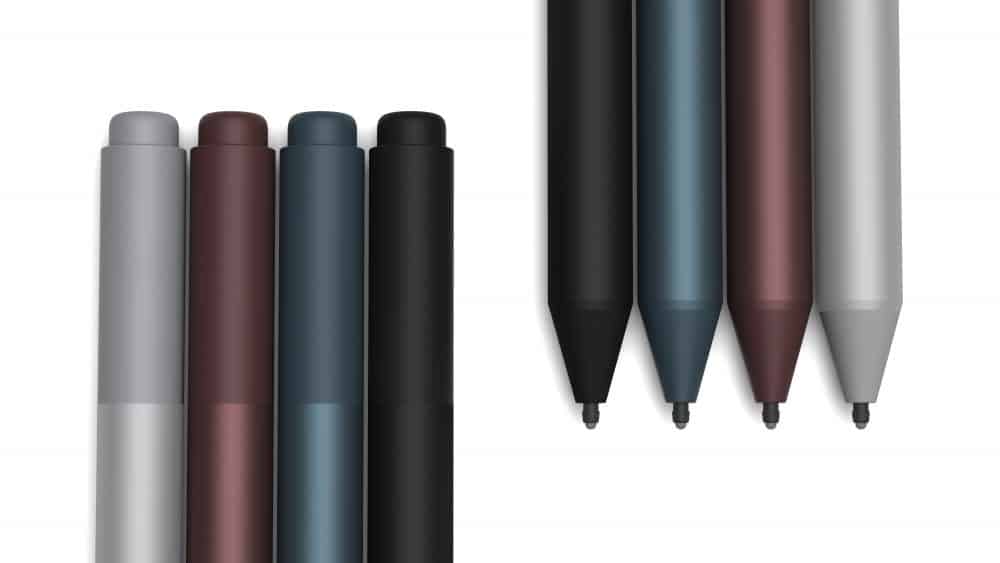
Microsoft today at an event in Shanghai announced a new Surface Pen. The new pen drops the pen clip seen on older pen versions, and now features tilt detection and 4,096 pressure levels and 21 milliseconds of latency. It’s being called the fastest digital pen on the planet and “natural and impressive.” according to Panos Panay.
The total of 4,096 pressure levels is more than quadruple the 1,024 in the current pen. Panos Panay also explained that the activation force has been reduced, and use of the pen now requires less on-screen pressure. Coming in Platinum, Black, Burgandy, and Cobalt Blue, the pen is compatible with most Surface models, including the Surface Studio, Surface Laptop, Surface Book, Surface Pro, Surface Pro 4, Surface Pro 3, and Surface 3. It keeps the same AAAA battery, and right click button, and eraser, and you can read the official description below.
The new Surface Pro provides people with the most responsive and natural digital inking experience thanks to the new Surface Pen. Writing and drawing on your new Surface Pro with the new Surface Pen feels like writing or drawing on paper, with features such as tilt for shading, increased pressure sensitivity levels and faster inking. The new Surface Pen not only helps you express your thoughts, ideas and drawings on screen, it reflects your personal style with four new color choices.
Microsoft says that the new Surface Pen doubles the accuracy of the previous pen, and the latency is so low that it is “virtually imperceptible to the human eye.” This, in turn, makes the Surface Pen twice as responsive as the Apple Pencil, according to the company.
Ok, this isn’t going well: Microsoft for whatever reason is in Shanghai to make some surface related announcements. Since their live blog is failing miserably so far, with not a single entry, and our previous attempt at peeking in on a Chinese live feed also failed (you can watch a working feed here, but it’s dubbed in Chinese and very hard to hear Panos and company). Anyway, here’s what we know so far (we’ll keep updating as news comes in):
Terry Myerson opened the event with some news about Microsoft’s Chinese government version of Windows 10.
Then the expected announcement of HoloLens coming to China was made:
Panos has just introduced the new Surface Pro. LTE, Surface Dial support, 4096 levels of pen sensitivity, 165 degree hinge. It’s the lightest Surface so far, and designed to “feel softer.” 12.3″ PixelSense Display, 3:2 aspect ratio, 267 Pixels Per Inch.
The new Surface Pro comes with a new, faster, more responsive Surface Pen.
You can use USB C with the Surface Dock if "you choose to do so" #MicrosoftEvent
— Michael Gillett | #WIMVP (@MichaelGillett) May 23, 2017
Even though the Creators Update vastly improved Microsoft’s native browser, it’s still a long road before the masses start using it as their go-to browser. It’s fast, well-designed and uncluttered, but is that enough to beat the likes of Chrome, Firefox, or even Opera?
Not if the problems keep piling up.
As we already mentioned, the latest major update addressed some of the most common needs of an average user. However, while Edge received some welcomed features, it still suffers from old issues that were there for quite some time. Users report a large variety of issues and we listed he most common ones with solutions included if available.
So, if you have issues with Edge, there’s a great probability that you’ll find the answer in this list. Make sure to check it out.
How to resolve Edge issues in Windows 10 Creators Update
Edge can’t connect
It seems that a lot of users have connection problems with the native browser after the update.
When it comes to connection problems, it’s always worth a while to check your hardware before moving on to Edge-related troubleshooting. Follow these steps and make sure that everything is as it should be:
Restart your router.
Restart your PC.
Use LAN cable instead of wireless connection.
Reset Network. Navigate to Settings app > Network & the internet > Status, and reset active network.
Use an alternative browser in order to determine is the problem general or related strictly to Edge.
If everything works fine and you’re certain that Edge is the core of the problem, take these steps into consideration:
Clear browsing data: Navigate to Edge > Menu > Settings > Clear Browsing Data. Check all boxes and confirm the selection.
Run SFC scan.
Right-click the Start menu and run Command Prompt (Admin).
In the command line type sfc/scannow and press Enter.
After the process is finished, any possible system errors should be resolved.
Reset Edge settings.
Boot into Safe mode.
Navigate to hidden folder C:\Users\username\AppData\Local\Packages\Microsoft.MicrosoftEdge_8wekyb3d8bbwe.
Delete all the content and restart your PC.
Have in mind that this will clear all settings and saved data from Edge. Since Edge can’t be uninstalled in a standard manner, this is the closest you can get.
Audio/Video issues
Another problem that emerged right after the update is related to audio/video, where ome users were unable to stream videos while others had audio-related problems on certain websites.
There are a few steps you can perform in order to resolve audio/video playback glitches in Edge. Make sure to check them all before taking the last resort in one of the recovery modes:
Clear browsing data: Navigate to Edge > Menu > Settings > Clear Browsing Data. Check all boxes and confirm the selection.
Disable the flash player: Navigate to Edge > Menu > Settings > Advanced Settings, and toggle off Use Adobe Flash Player.
Enable software rendering:
In the Windows Search bar, type internet options and open Internet Options.
Open the Advanced tab.
Under Accelerated graphics, check the ”Use software rendering instead of GPU rendering” box.
Save your selection and check for changes.
Disable SmartScreen:
Right-click the Start menu and open Control Panel.
Click on System and Security.
Open Security and Maintenance.
Under the left pane, click on Change Windows SmartScreen settings.
Disable Smart Screen.
Uninstall all installed extensions: Navigate to Edge > Menu > Extensions, and right-click Remove to uninstall the extension.
Disable TCP within browser settings:
Open Edge.
In the address bar, type about:flags.
Navigate to the Networking section.
Uncheck the Enable TCP Fast Open box.
Restart the browser.
Extensions can’t be installed
In order to get closer to competition like Chrome or Firefox, Edge needs responsive and useful extensions. It seems that the base of the available add-ons is growing, but that’s not of much use if you’re unable to install them. In order to address this problem, we advise you to take the steps below:
In the Windows Search bar, type power shell. Right-click PowerShell and run as administrator.
In the command line, copy-paste the following command and press Enter:
Get-AppxPackage *pocket* | Remove-AppxPackage
Now, copy-paste the following line and press Enter:
Now you should be able to install preferred extensions seamlessly.
Edge crashes
In the midst of the various issues that emerged after the update, one of the most annoying must be crashing. Edge was introduced as a more stable and less resource consuming browser, but all that doesn’t mean anything after the latest patch, where users experience sudden crashes immediately after starting. Others experienced crashes after an extended period of use.
There’re multiple ways to address this issue, and steps you should take are presented below:
Clear browsing history: Navigate to Edge > Menu > Settings > Clear Browsing Data. Check all boxes and confirm the selection
Tweak registry. Make sure to act with caution and follow these steps closely:
Press Windows key + R to bring the elevated console.
Type regedit in the console and press Enter.
Navigate to: HKEY_CURRENT_USER\Software\Classes\LocalSettings\Software\Microsoft\Windows\CurrentVersion\AppContainer\Storage\microsoft.microsoftedge_8wekyb3d8bbwe
Right-click the microsoft.microsoftedge_8wekyb3d8bbwe key and open Permissions.
Under Group or user names, click on the Account Unknown at the bottom to highlight it.
In the lower Permissions box, check the Full control box and click OK to confirm the selection.
Re-register Edge process. You can do that by utilizing PowerShell system command:
Press Windows key + R, type %localappdata% in the elevated command line, and press Enter.
Navigate to the Packages folder and delete the Microsoft.MicrosoftEdge_8wekyb3d8bbwe folder from it.
In the Windows Search bar, type power shell. Right-click PowerShell and run as administrator.
In the PowerShell command line, copy-paste the following command and press Enter:
While we’re at critical issues that render the browser completely unusable, it’s worth mentioning the excessive freezes that some of the users reported. Namely, after the update, Microsoft’s native browser started misbehaving, which was followed by freezes that force users to kill the process in the Task Manager. For that purpose, we prepared some of the best-known workarounds that should help you resolve this issues.
Multiple instructions are presented below, so make sure to check them out:
Clean the browsing history: Navigate to Edge > Menu > Settings > Clear Browsing Data. Check all boxes and confirm the selection.
Disable Adobe Flash Player: Navigate to Edge > Menu > Settings > Advanced Settings, and toggle off Use Adobe Flash Player.
Disable Windows Internet Explorer 11: Navigate to Control Panel > Programs > Turn Windows features on or off. Find Internet Explorer 11 on the list and uncheck the box.
Re-register Edge:
Press Windows key + R, type %localappdata% in the elevated command line, and press Enter.
Navigate to the Packages folder and delete the Microsoft.MicrosoftEdge_8wekyb3d8bbwe folder from it.
In the Windows Search bar, type power shell. Right-click PowerShell and run as administrator.
In the PowerShell command line, copy-paste the following command and press Enter:
Right-click the Start menu and open Network Connections.
Right-click your active network and open Properties.
Click to highlight the Internet Protocol Version 4 (TCP/IPv4) and open Properties.
Change the DNS input from automatic to manual.
Under the Preferred DNS server line, type 8.8.8.8.
Under the Alternate DNS server line, type 8.8.4.4.
Click OK to confirm changes and check for the improvements.
Wrap Up
Finally, if the issues are persistent and your patience is gradually decreasing, you can use an alternative browser until Microsoft addresses them in the upcoming patches. You can export your browser data into some other browser and hope for the resolution.
Additionally, if you have any questions or suggestions, we’ll be glad to help you — the comments section is just below.
To get fans excited for the reveal of the new Surface Pro devices (which were leaked a few days ago) Microsoft’s Panos Panay has tweeted out a new video via his Twitter account showcasing the Surface Pro, Surface Studio, Surface Book, and the new Surface Laptop accompanied by the message, “I love our fans. Here’s to you. #Surface” You can watch it below.
A huge update to the third-party MyTube app is rolling out right now in all regions. This update, Version 3.0, features a complete redesign of the app and adds support for it on Microsoft’s Xbox One video game console. Here’s the complete version notes:
New, more modern and simpler UI
Launching on Xbox for the first time
Switch to and from background audio with zero pause
myTube to myTube casting: Cast from myTube on your phone to myTube on your PC or Xbox
Videos watched in myTube will now appear in your YouTube history
You can now select subtitle language
Channel search integrated into channel page
Option to use YouTube’s official web player in order to support YouTubers financially
Main tile will now show subscriptions
Probably one of the best changes with this update, besides the Xbox One functionality, is the addition of the YouTube web player which allows users to view ads on videos. While this may seem like an odd feature to want for the average user, it’s an important feature as it means this unofficial YouTube app won’t completely strip revenue from YouTube accounts.
Are you a fan of MyTube? Let us know if you like the new version of the app in the comments below.
Recent user reports suggest that Windows 10 Enterprise ignores various privacy settings. According to Mark Burnett, an independent IT security analyst, the OS lets users enable their preferred privacy settings only to ignore them after the fact:
More specifically, here’s what Burnett found out:
Despite having Teredo and IPv6 disabled, the system still connects out to perform IPV6 Teredo tests
With SmartScreen disabled, the system is still connecting to SmartScreen.
Despite having telemetry and the tracking-related services disabled, the system still connects to these services. Adding a few extra reg hacks doesn’t help blocking telemetry services.
With every policy set to not sync settings and the sync-related services disabled, the system still syncs settings.
The system still sends error reports, although error reporting is disabled.
Online KMS validation disabled doesn’t yield the desired results.
With every possible setting to block connections to Microsoft disabled (except updates), a bunch of advertising-related connections are still visible.
Ultimately, Microsoft doesn’t honor it’s own Group Policy settings. For more details about this strange Windows 10 Enterprise behavior, you can check out Mark Burnett Twitter page. You’ll also find screenshots for all the privacy issues listed above as well.
Windows 10 users have been constantly worrying about Windows 10’s privacy settings and Burnett’s report only confirms their worst fears, suggesting that Microsoft is actively defying its users’ wishes.
I’m really glad that people do research like this. It’s possibly the only thing that pushes back against full abuse of large organizations selling a complex product. The average expert user doesn’t have resources to investigate not to mention non-expert users.
Burnett’s discoveries have also caused quite a stir on Reddit as well. Microsoft has yet to issue any comments on this situation.
RELATED STORIES YOU NEED TO CHECK OUT:
Windows 10 privacy gets major changes to win over suspicious users
Beyond, the headache of broken or incompatible software and a looming frustration over security support, many admins are afraid of change or updates due to how users adopt new features.
After jumping through hoops to champion an update and also navigating the minefield of potential complications may come a disheartening reality that the average employee either finds the benefits of the upgrade confusing or worse yet, insignificant to their workflow.
Fortunately, the Office team is rolling out a new feature to help mitigate some of those admin woes.
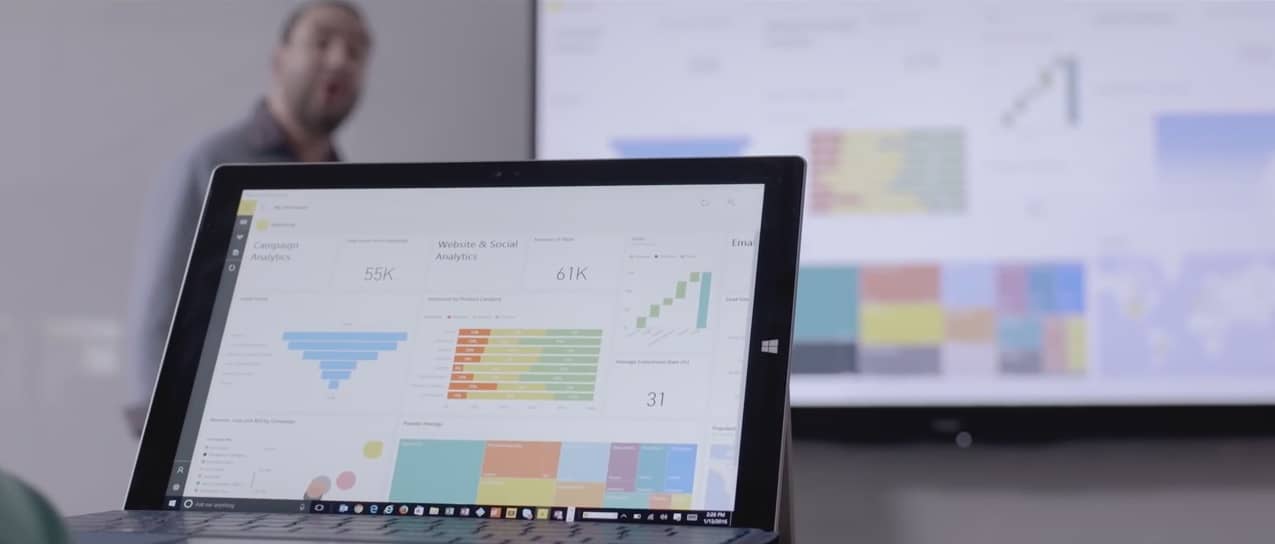
“Today, we’re pleased to announce the public preview of the Office 365 adoption content pack in Power BI, which enables customers to get more out of Office 365.
The content pack combines the intelligence of the usage reports with the interactive analysis capabilities of Power BI, providing rich usage and adoption insights. With these insights, admins can drive more targeted user training and communication that helps them transform how their organizations communicate and collaborate, enabling a truly modern workplace.”
The new Adoption Pack update brings admins insights they can act on such as cross-product views of how users communicate as well as navigate certain software. On the coattails of insights, admins will also be able to view trends with a an easy to set up dashboard equipped with Understanding adoption, Communication, Collaboration and Activation areas.
Admins can also leverage pre-organized filters to grab insights quicker as well as identify who the power users are to drop into more accurate usage buckets.
As with most Microsoft software these days, the Office team is looking for as much feedback as possible to make the new update even better down the road. Beyond visiting the Office blog for more information, interested parties (global admins or product admins for Exchange, Skype for Business, or Sharepoint) are encouraged to explore the Adoption Pack in Power BI and leave feedback.
Fresh off the May 2 Education focused event in New York City, and Build 2017 in Seattle, Microsoft is taking their next show to Shanghai, China to show the world what’s next. The event won’t be live streamed (but we’re hearing it will be live blogged on the Surface blog Update: the live blog will be hosted on Microsoft’s Shanghai Event page, we’ve just been informed Update #2: Actually, Microsoft’s live blog will happen on this page on the Windows blog, whew), but we’ll be following along closely. Since the initial announcement of this event, quite a few stories have developed. So, here is a look at what you can expect tomorrow at 7-8:30 PM Shanghai time (4AM-5:30 AM PT) during the event.
A new “Surface Pro:”
Panos Panay, Corporate Vice President of Devices at Microsoft has been confirmed to be at this event, so we’re definitely going to be getting some news in regards to the company’s Surface lineup. In fact, earlier last week, new “Surface Pro” marketing images leaked on the web, fueled by a tweet from the well known and well-credited leaker Evan Blass.
From these images and Evan’s subsequent tweets, it would appear that reports from the past have been confirmed. The new Surface won’t actually be named the Surface Pro 5, which has been said to not exist, but rather “Surface Pro,” since the new model is not undergoing much of a design change. The “Surface Pro” could have new internals, colors, and a few under the hood changes.
Surface Pro
New Surface Pro Type Covers, Surface Pen:
As we reported earlier today, Panos Panay recently tweeted a picture showing four new colored Type Covers, which appear to feature the Alcantara material.
This so, we might well be hearing more about new Surface Type Covers at one point during this event. We also could learn more about some new Surface-branded accessories, including updated Surface pen, which was leaked earlier in the week. Judging from the leaks, the pens could possibly come in new colors, to more closely align with the colors of the recently announced Surface Laptop.
New Surface Pens
More third party Cortana devices:
Reports from Windows Central floating around the web indicate that Microsoft could possibly use this event to announce some third party Cortana devices. We’ve already seen the Harman/Kardon speakers at Build 2017, but given the release of the Cortana Skills Kit, and news that HP and Intel are also working on a Cortana speaker, it won’t be surprising if there is more Cortana news as well.
Harmon Kardon Cortana
More about the Windows 10 Fall Creators Update?
At the October event last Fall, Microsoft detailed to consumers what they could expect in the Windows 10 Creators Update. If Microsoft holds true to their media events from the past, we might as well end up getting some demos of those upcoming features.
Given the tagline of “show the world what’s next,” Microsoft could also dive deeper into the features of the next featured update to Windows 10, with less emphasis on the developer, and more on the consumer. And, knowing Microsoft, and how the Office apps manage to make their way into these big events, there might be mention of the Office Apps, and some more information about availability in the Windows Store.
Windows 10 Build 2017
So there you have it, there is what you can expect from the Shanghai event. Be sure to keep it tuned to OnMSFT, as we will be up early to cover this event, and will be bringing you all the best Microsoft news and information all day long.
Torrent is one of the fastest ways to download large files, including games, movies, and TV shows from the web. The program allows your computer to download data from other devices while helping other users download the bits of data you’ve already downloaded.
In other words, torrent applications turn your PC into a vital part of a large throng of computers sharing large data files.
However, torrent programs have developed a bad name online due to piracy despite their many legitimate uses.
Among its many fair uses is the distribution of freeware and filmmakers’ works. All you need is the right software to make sure you are using torrents appropriately.
So we have gathered a list of the best free torrent clients for Windows PC.
What are the best free torrent clients you can use for PC?
The qBittorrent app is one of the best torrent clients for your Windows PC because of its balanced combination of speed, simplicity, and nifty features.
While other torrent clients provide all the functions possible or keep a simple UI, qBittorrent offers the best of both worlds. Not only does it aim to meet the demands of users, but it also uses as little CPU and memory as possible.
qBittorrent includes an integrated torrent search engine, media player, encryption, prioritization of torrents and the files within those torrents, IP filtering, and torrent creation.
Torrent2exe is a free torrent client that integrates torrent data into a single executable file and performs all the necessary steps for users. The program lets you enter a torrent’s URL in the Torrent2exe website or upload your own torrent file.
You can then start downloading an EXE file designed to carry out the download and seeding process for you.
Other best features include:
Download and upload speed limits
Seeding
It is not necessary to install the program for a single torrent download
The program’s additional features (auto startup, updates, file associations) become available after installation
Deluge, despite its name, can be as lean as you want the program to be. It’s one of the oldest torrent clients that users can expand using plug-ins, which lets them customize the app in many ways.
The torrent client lets you add alphabetical downloading, change speed according to network conditions, move downloaded files to specific directories, create graphs, schedule things, integrate with Chrome or Firefox, or rename downloads in batches.
Other best features include:
Protocol Encryption, DHT, Local Peer Discovery (LSD), Peer Exchange (PEX), UPnP, NAT-PMP, Proxy support, Web seeds, global and per-torrent speed limits
In Thinclient mode, a Deluge daemon handles all the BitTorrent activity and is able to run on headless machines with the user interfaces connecting remotely from any other platform
Three main user interfaces (UIs): GTK UI for the desktop, web UI for the browser, and console UI for the command line
Miro is a cross-platform media player that permits the download of files. That means the program can act as a torrent client as well.
Miro lets you share your files across a specific network. The program includes a built-in browser for files, so you won’t have to exit the application when searching for movies or games.
While Transmission is the most popular torrent client for Mac and Linux users, it is also available on Windows PCs.
The open-source project includes freely distributable code. As a Windows port of the original program, Transmission-Bt is well-regarded, though it is plagued by some serious security incidents, including ransomware.
uTorrent is a lightweight torrent client maintained by BitTorrent. Despite its longevity, the program has been criticized because it is ad-supported. In fact, many users have observed that the latest update to the app brought with it a boatload of advertising and bundled software packages.
You can prevent the heavy load of ads, though, by reviewing each step of the installation process. Nonetheless, uTorrent is a useful, effective, and light program that does not consume too much of your PC’s resources.
FrostWire lets you look for torrent files on several websites at the same time. It includes some filters to narrow down results according to file size and seed count. The program also includes adding custom streams and a vast swarm of Internet radio stations.
You can connect to many torrent search engines and Cloud sources to find millions of public domain, Creative Commons, and free downloadable files. See the search results within the app itself – not in the browser.
Other best features include:
Preview & Play. Stream files from the cloud before you download them. Start playing the BitTorrent media downloads way before transfers are complete.
Download Only The Files You Want. Download any file with just one click – select a single file from a torrent or download the entire package.
Media Player & Library. Easily access, browse, and play all your media in one place.
The FileStream.me torrent client allows you to enter torrent links or upload torrent files into your account and have the app upload the files for you.
Then you can download the files through your browser. There is a free version of the app that comes with apps. Torrents are also limited to 300MB in the free version, while three days are allotted for the downloads.
FileStream.me, thankfully, hides your personal information, including your IP address. It also lets you resume downloads, allows streaming video and audio files, and imposes no limit to your monthly access.
Like Filestream, ZbigZ also downloads and seeds torrents for you and then allows you to download the files as regular HTTP data.
It is a preferable torrent client, especially if your ISP limits your access to torrent downloads. The program limits torrents to 1 GB and download speeds to 150 KB/s.
Vuze is billed as the most powerful BitTorrent client in the world. It comes in two versions: the free version of Vuze Leap and the premium Vuze with full features.
Both versions provide torrent download, media playback, and support for magnet file links. The premium edition, however, adds plugins, remote control via web or mobile, and video conversion.
BitComet is an ad-free torrent client with the power to manage any download despite its old-school design. The program looks like Windows Explorer at first glance, though it won’t try to install tons of toolbars in your browser and does not bombard you with ads.
Though not as user-friendly as the other torrent clients, BitComet packs enough power to handle various downloads.
Other best features include:
Long-Term Seeding: Speed up downloading and revive dead torrents
Torrent Share: Exchange torrent while downloading
Magnet URI
Preview while Downloading
Cross Protocol Downloading: Benefit from HTTP/FTP/eMule download sources while BitTorrent downloading
Align File to Piece Boundary
DHT network: Start BitTorrent download without connecting to any tracker
Bittorrent Protocol: Also support Multi-tracker, DHT, utf-8 extension, and UDP tracker Protocol v2
WebTorrent Desktop turns web pages into torrent clients, thus crowdsourcing the distribution of files, including videos and images.
The open-source app bridges the BitTorrent and WebTorrent peers, while also serving up a chic UI. It displays torrents in image-rich swaths that are playable in a built-in media player.
That is despite a file still being downloaded. WebTorrent’s desktop version supports video streaming to AirPlay, Chromecast, and DLNA.
Tribler is a torrent client that prides itself in taking your privacy seriously. That is because the program adds add a layer of security to the BitTorrent cloud by routing traffic through various proxies.
In other words, it functions much like the Tor network. Additionally, Tribler includes torrent search and a media player that supports the streaming of files being downloaded.
Halite BitTorrent Client is a lightweight and open-source app with compact features.
It has a serviceable package of tools, including selective downloads, priority queues, magnet links and trackerless torrent support, port forwarding and randomization, 64-bit support, and interface translations to various languages.
BiglyBT is an open-source torrent client that doesn’t even feature any ads inside, offering a smooth ride.
It works seamlessly on Windows, macOS, Linux, and Android and is regularly updated.
But the best part of BiglyBT is that it can work very well with VPNs. Otherwise, you will find all the features of any modern torrent client and more.
For instance, it offers migration tools for popular torrent clients, including uTorrent. It also lists torrents other users have downloaded and those you download.
Other best features include:
Modern and comprehensive interface
Ad-free and open-source software
Swarm Discoveries for finding related torrent lists
Tag Discovery to find out what other users have tagged content with
A security researcher found a way to retrieve the encryption keys used by the WannaCrypt (AKA WannaCry) ransomware without paying the ransom of $300. This is big because WannaCry uses Microsoft’s built-in cryptographic tools to do what it needs to do. While Windows XP was not widely affected by the cyber-attack, the following technique may be applied in the case of other ransomware infections.
Wcry, now available on Windows XP
The tool is called Wcry and it plucks the key right out of the affected system’s memory. This solution is currently available for Windows XP and only when the PC in question hasn’t been rebooted or its memory overwritten.
Wcry was developed by Adrien Guinet, a French researcher, who posted the solution on GitHub for free.
How it works
According to Guinet, the software has only been tested under Windows XP and it runs perfectly. The note found next to the app also reads that “in order to work, your computer must not have been rebooted after being infected. Please also note that you need some luck for this to work (see below), and so it might not work in every case!”
In Windows XP, there is a flaw which prevents the erasure of the keys from the memory and this flaw is lacking from newer operating systems. It is important that the prime numbers are still in the memory.
Guinet says that:
This software allows to recover the prime numbers of the RSA private key that are used by Wanacry. It does so by searching for them in the wcry.exe process. This is the process that generates the RSA private key. The main issue is that the CryptDestroyKey and CryptReleaseContext does not erase the prime numbers from memory before freeing the associated memory.
As you can use the tool for more ransomware infections, it will prove to be very useful for providing tech support.
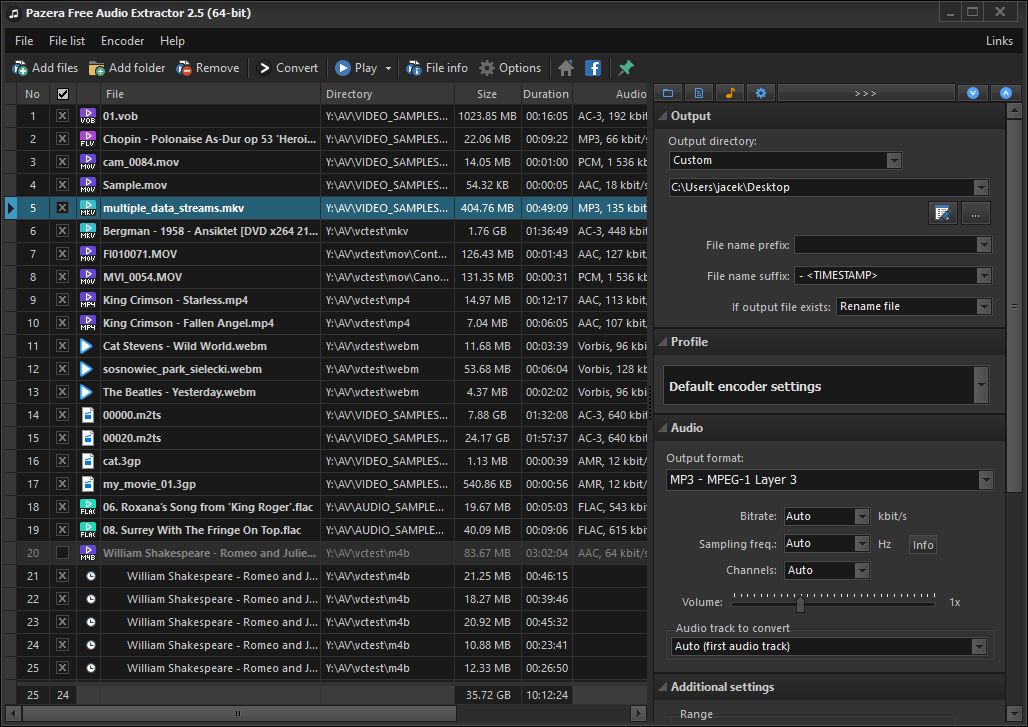
The Pazera Free Audio Extractor is a free piece of software that allows devices running Windows to extract audio files from videos and to save them on the local system. This can be useful in situations when you want to play an audio track on your mobile device and don’t want to add also the video or when you might want to extract a song or other audio from a video to re-use it in another way.
Pazera Free Audio Extractor features
This free software comes packed with all the necessary tools required to extract and convert audio to a selected format and is compatible with all 32-bit and 64-bit versions of Windows.
On the left side of its interface, you’ll find all the media files you have added, their names, paths, durations and more information. On the right, you’ll see the output setting and the following options:
Set the output directory, select the file name
Select a profile
Set the output audio format
Set audio bitrate, channels, sampling frequency, volume, and more parameters
Select the audio track for extraction
Set start and end time offsets
Add more FFmpeg parameters
When you begin the process, you will have to wait for the audio to be extracted and converted to the desired format.
The software comes with lots of options for customizing the whole process: you just have to add videos and click on Convert. You can also add video files by dragging and dropping or you can add individual files. The program also supports batch conversions for even faster processes.
Welcome back to our Windows 10 news recap. We are continuing the trend of our weekly “Windows 10 news recap” series where we go over the top stories of the past week in the world of Microsoft’s flagship operating system.
WikiLeaks releases CIA spyware, known as Athena, that targets all Windows versions from XP to 10
Continuing the trend of the US intelligence agencies treasure trove of tools and exploits being leaked, WikiLeaks has now published details, and a demo, of spyware used by the CIA, that can affect devices from Windows XP to Windows 10.
Huawei to launch new portfolio of MateBook Windows 10 devices next week
Hackers could use Chrome on Windows 10 to steal passwords – Google is working on a fix
While Microsoft Edge and Internet Explorer are usually the ones being called out for security flaws, this time it is Google’s Chrome web browser. A flaw discovered in Chrome can be used to steal passwords stored with the browser, with just a file:
Once downloaded, the request is triggered the very moment the download directory is opened in Windows File Explorer to view the file, delete it or work with other files (which is pretty much inevitable). There is no need to click or open the downloaded file – Windows File Explorer will automatically try to retrieve the “icon“. The remote SMB server set up by the attacker is ready to capture the victim’s username and NTLMv2 password hash for offline cracking or relay the connection to an externally available service that accepts the same kind of authentication (e.g. Microsoft Exchange) to impersonate the victim without ever knowing the password.
Currently, the attacker just needs to entice the victim (using fully updated Google Chrome and Windows) to visit his web site to be able to proceed and reuse victim’s authentication credentials. Even if the victim is not a privileged user (for example, an administrator), such vulnerability could pose a significant threat to large organisations as it enables the attacker to impersonate members of the organisation. Such an attacker could immediately reuse gained privileges to further escalate access and perform attacks on other users or gain access and control of IT resources.
Apple makes it easier to install Windows 10 Creators Update on macOS Sierra with Boot Camp
Microsoft (MSFT) news recap is a weekly feature highlighting the top Microsoft news stories of the past week. Sit back, grab some coffee, and enjoy the read!
Skype online community moving to Microsoft Community next week
The move to Microsoft Community will bring Skype customer support staff into the community for the first time – helping you get answers to your questions quickly.
We also want to strengthen the relationship between our customers and our developers. Joining the Microsoft Community will allow us to deliver your insights and feedback directly to our engineering teams.
Microsoft is taking Build 2017 on tour, to visit Beijing, Warsaw, more
Build 2017 may well have passed, but the fun for developers isn’t finished yet, as Microsoft is going on tour with the Build Tour. Here are the locations included:
June 5-6: Shanghai, China
June 8-9: Beigjing, China
June 12: Munich, Germany,
June 13-14: Seoul, Republic of Korea
June 14-15: Helsinki, Finland
June 19-20: Warsaw, Poland
June 21-22: Hyderabad, India
June 29-30: Syndey, Australia
Microsoft’s project management tool Planner now has an iOS app
Through the Irish project they would ensure they contributed to the country’s environmental wellbeing and support of the economy. Operating in a sustainable way is an important part of our vision of creating a Cloud for Global Good,
That’s it for this week – we’ll be back next week with more Microsoft news!
Microsoft accidentally teased a new Control Center feature that’s now in the works for Windows 10 in the recently released Windows 10 build 16199 for PCs in the Fast Ring, the latest preview of what will eventually become the Windows 10 Fall Creators Update. When the company made the announcement and detailed build 16199, the company accidentally included an image showing a brand new icon on the Windows 10 taskbar — which was quickly deleted.
The settings icon doesn’t appear to be present in the newest Insider Preview builds. Windows Central’s Zac Bowden says that, according to his sources, the company is currently testing a new feature called Control Center which will house all the Quick Actions currently available in the Action Center alongside more toggles and options, including a brightness slider. So, it turns out that the new icon is more than just a plain shortcut.
Relocating the Quick Action buttons
The new entirely customizable Control Center removes the Quick Action buttons (brightness controls, Wi-Fi, and Tablet Mode) from the Action Center and relocates them to a dedicated panel which can be activated via the new Settings icon on the taskbar. There are more features that will be announced sometime in the future, so Microsoft might decide to postpone or cancel this feature before we get it for testing. For now, though, it seems that it’s still in the development process and appears to be present in some of the latest internal Windows 10 builds.
During Build 2017, we found out the Ubuntu is on its way to the Windows Store. What does this mean for developers? Rich Turner, a Senior Program Manager at Microsoft, published a blog post where he highlighted the implications of Ubuntu’s arrival to the Windows Store. He first reminded users what EVP for Windows & Devices Group Terry Meyerson announced about the Windows Subsystem for Linux:
1. We continue our partnership with our friends at Canonical to bring Ubuntu to the Windows Store app
We are also working with the great teams at SUSE and Fedora to bring their Linux distros to the Windows Store & Windows Subsystem for Linux (WSL)
You will be able to download these distros from the store and install them side-by-side on your PC(s)
You’ll be able to run one or more distros simultaneously if you wish
And at OSCON 2017 I delivered a talk on the architecture and history of Bash/WSL, and outlined these new features. Thanks to the great OSCON audience & attendees for all your great support & engagement.
Ubuntu’s availability in the Windows Store will impact developers
Along with the popular Linux distribution coming to the Store, Suse and Fedora are coming to the Windows Subsystem for Linux, which means that developers will be able to enjoy faster and more reliable downloads. They’ll also have the opportunity of installing Linux distributions to secondary fixed drives and they’ll be able to run various distributions more closely with production environments.
What’s even more interesting is the fact that developers will be able to run more than just one distribution at a time and this will turn out to be great for working on machines that span different environments.
Turner also highlighted the fact that WSL was designed to be “distro-agnostic” and this is the very first time they’re exercising this specific aspect. He was also very grateful and appreciative of the help received during the testing processes and advised testers to file all encountered bugs or problems in the GitHub issues repo.
The latest features are set to arrive in an upcoming Windows Insiders build.
Welcome to our weekly Xbox news recap series, where we go over the top stories of the past week in the world of Xbox. Let’s get started.
Far Cry 5 and a new Assassin’s Creed title confirmed
Far Cry and Assassin’s Creed are Ubisoft’s biggest franchises by far, and it’s recently come to light that their newest installments are in the works. While the Assassin’s Creed news is confined to some internal documents, we’ve actually got a tweet from the Far Cry Twitter that teases us for a new adventure in the Far Cry universe. Those who are familiar with Ubisoft’s style are probably already preparing themselves for several big reveals in the company’s E3 conference next month.
Destiny 2 gets its gameplay reveal
Destiny 2 is something that fans have been waiting for for years now. With several expansions, countless events, and one of the most passionate communities in console gaming, Destiny is ready to build upon the foundation of the first game with something completely new. A gameplay reveal event showed us something that’s extremely familiar – with a few welcome twists – and served to get us all excited about what the future holds. On PC, the game is going to be at an unlocked framerate and those who played the game during the conference say it’s extraordinarily smooth. On Xbox One and PS4/PS4 Pro, the game is locked at 30. No word yet on how Scorpio will perform.
Custom gamerpics have arrived on Android’s Xbox beta app
Custom Gamerpics were a long awaited feature for countless Xbox users, and they’ve finally made their debut. In an effort to try and get that feature out there and have more users upload their own gamerpics, Microsoft has added the ability to use custom gamerpics on their Xbox beta app. If you’re willing to try out the less stable of the Xbox apps on Android, it’s definitely worth checking out.
Life is Strange getting a sequel, won’t be at E3
Life Is Strange was an incredibly well received adventure game that came out back in 2015 and was something truly incredible to behold, with some of the best storytelling we’ve gotten in a while. Finally delivering on the promising rumors that there may be a sequel, the folks at DontNod have confirmed that there will be another game in the franchise. It seems that this is all we’ll get for a while, however, since they’ve confirmed the game won’t be showing at E3. Keep an eye out for Gamescom in a few months, where we’ll be more likely to get a solid reveal.
Scalebound won’t be revived, despite rumors
Some Platinum Games fans got riled up recently, as a reddit user showed that Microsoft renewed their trademark for the cancelled game “Scalebound.” While this was extremely dubious “evidence” for the game’s survival to begin with, hopes were dashed once again as Windows Central’s sources said, in plain English, that the game was not in development anymore.
Thanks for joining us. To keep up to date with all the latest Xbox news, keep a close eye on our Xbox One tag.
While WannaCry ransomware threat seems over, that doesn’t mean everything is safe. Truthfully, we never know when a more powerful cyber attack will hit again, so it’s important to stay vigilant and protect your systems.
Protect your PC against WannaCry ransomware attacks
This tool will protect your computer against ransomware attacks by creating infection markers on the protected computer. This way, your PC will prevent the ransomware from running and encrypting data on your machine. Most importantly, Minerva anti-ransomware will protect your machine against all known variants of the WannaCry ransomware. You can download this tool from Github.
For more information on how this tool works, check out the video below:
Prevention is better than dealing with a problem after it starts and for this reason, we strongly recommend you take all the necessary actions to block ransomware attacks.
Here’s what you can do to better protect your computer:
Install the latest security updates from Microsoft.
As Microsoft puts it:
[…] this attack demonstrates the degree to which cybersecurity has become a shared responsibility between tech companies and customers. The fact that so many computers remained vulnerable two months after the release of a patch illustrates this aspect. As cybercriminals become more sophisticated, there is simply no way for customers to protect themselves against threats unless they update their systems. Otherwise they’re literally fighting the problems of the present with tools from the past. This attack is a powerful reminder that information technology basics like keeping computers current and patched are a high responsibility for everyone […]
Bethesda recently released an update for Prey v1.03 and you can learn all about the patch notes below.
New fixes included in the update
The update brings more fixes for preventing save games from being corrupted; this fix also returns corrupted saved games to their previous and uncorrupted state.
The items will no longer be incorrectly deleted from your inventory when changing levels.
There’s also a fix for when the stamina is not recovering.
The issue where you were not able to repair items has been fixed.
The player will no longer spawn out of level.
The fabricated weapons are now empty.
The flaw where humans were incorrectly turning hostile has been fixed and they’ll return to the normal friendly state.
Now you have the possibility of skipping the end game credits.
Aaron Ingram will no longer be a coward if he’s spooked by a typhoon.
There is a fix for more issues making changes in the settings.
The FOV slider is now available in the advanced options menu.
On Bethesda’s community page, you also get information on how to access the Steam Beta.
You just have to follow these specific steps:
Log into Steam.
Right-click on Prey from your Library.
Go to Properties.
Select Betas.
Look at the drop-down menu that appears and select the public-beta-patch.
Select OK.
Wait until the game is updating.
After the game is updated, Prey[public-beta-patch] should appear in your Library. In case it still displays as Prey, you are advised to repeat the steps above.
Important notes
You should also be aware of the fact that the public-beta-patch branch shares the same game Saves as the default branch. If a previously corrupted Save is fixed, then remember that if you want to switch back again to the default branch will reintroduce the chance of corruption. Also, if a Save file has been previously edited manually, there is the risk that it won’t work properly. On another note, here is where you can find Prey’s bugs and its fixes.
WikiLeaks has published details of a new piece of spyware created by the CIA. Named Athena, the spyware is able to target all Windows versions from Windows XP to Windows 10. With this piece of spyware, it can hijack an entire PC, allowing the perpetrator to steal data and send it elsewhere, such as CIAs servers, as well as delete data and perform additional infections of a PC by installing more malicious software.
Within the spyware are 2 modules. The primary module is Athena, which can attack Windows XP to Windows 10. Additionally, there’s Hera, which can attack Windows 8 to Windows 10.
The spyware was co-developed by the CIA and Siege Technologies, a New Hampshire-based cyber security company. On a post on its website, WikiLeaks said:
Once installed, the malware provides a beaconing capability (including configuration and task handling), the memory loading/unloading of malicious payloads for specific tasks and the delivery and retrieval of files to/from a specified directory on the target system. It allows the operator to configure settings during runtime (while the implant is on target) to customize it to an operation.
This is the latest in what is expected to be a flurry of leaks of exploits used by the United States’ intelligence agencies.
The Xbox Team included so many cars in the Forza games that it’s extremely hard to keep up with all of them — excellent news for gamers.
Leaked forthcoming Forza car list
A developer build of Forza Horizon 3 was leaked to the public by accident on Windows 10. After this event, a large number of forthcoming DLC cars were also exposed by the Forza community on Reddit. Users have compiled a list of cars rumored to be available in Forza Horizon 3 and were said to be discovered in the game’s files. While the cars were not yet confirmed at the time they have leaked four months ago, the Forza community said that they’re a “good bet to appear somewhere in the game’s future (in a car pack/expansion/forzathon/barnfind)”. Have a look at the Reddit post showing the leaked cars.
Explore the open world of Forza Horizon 3
Forza Horizon 3 for Xbox is more than a car game, it’s a game targeted at car enthusiasts. With the new Horizon Blueprint feature in the game, you can now have the power of creating and instantly sharing instantly your custom designs. You are even able to hire friends to star in your Horizon Festival and help you win more fans.
The game features new thrilling ways of driving with Danger Sign Jumps, Convoys, Drift Zones, and Showcase events that will pit gamers against a fleet of speedboats, a giant zeppelin, and more.
You are now able to personalize everything: your own driver, customizable cars, and even vanity license plates and horn sound. Drive your favorite cars listening to the best music from eight radio stations or you can play your personal music collection.
On the Xbox web page, the developer lets you know about the possibility to start an online co-op driving adventure:
In addition to 12-player online free roam and multiplayer racing, Forza Horizon 3 for Xbox One gives you an all-new 4-player online co-op allows you and your friends to enjoy the variety, competition, and rewards of a Horizon campaign together for the first time.