Nintendo’s Switch 2 hits 3.5 million sales in just four days

If you were wondering how well the Nintendo Switch 2 would do, here’s your answer. Nintendo says it’s already sold over 3.5 million units globally in just four days, making it the company’s fastest-selling console ever. That’s more than the original Switch managed back in 2017. So yeah, this thing’s flying off the shelves.

What’s Nintendo Switch 2 packing?

The Switch 2 isn’t just a spec bump. It’s got a bigger 1080p screen, supports 4K when docked, and runs on faster internals that make games look and feel better. The new Joy-Con 2 controllers are magnetic and now come with built-in mouse support, which is a weirdly handy touch.

There’s also a new feature called GameChat. It lets you voice or video chat and even share your game screen with friends. Think Discord, but built right into the system.

Launched with Mario Kart, Donkey Kong’s up next

Switch 2 launched with Mario Kart World, a massive open-style racer with dynamic weather, 24-player support, and some wild new tracks. It’s already a hit.

Next month, Donkey Kong Bananza drops—a new 3D platformer that looks like classic Nintendo chaos in the best way. It’s out July 17. The console starts at $449.99. You can also grab it in a bundle with Mario Kart World for $499.99. You can check all the details here.

MAINGEAR ULTIMA 18 Brings RTX 5090 Power & 4K 200Hz Display

If you’re looking for a no-compromise gaming laptop, MAINGEAR’s new ULTIMA 18 is about as close to a desktop as it gets. The company just announced its most powerful laptop yet, built in partnership with CLEVO, and packed with top-tier specs across the board.

MAINGEAR new ULTIMA 18 Built for creators and heavy multitaskers

At the center is an 18-inch 4K (3840×2400) display with a 200Hz refresh rate, full DCI-P3 color, and G-SYNC support. It’s powered by Intel’s Core Ultra 9 275HX chip and goes up to NVIDIA’s mobile RTX 5090 GPU with 24GB of GDDR7.

According to MAINGEAR, the ULTIMA 18 supports up to 192GB of DDR5 RAM, PCIe Gen 5 SSDs, and runs on a 98Wh battery with a compact 330W charger; there’s also USB-C charging.

MAINGEAR ULTIMA 18 - 2
Image: Maingear
Maingear Ultima 18
Image: Maingear
MAINGEAR ULTIMA 18 - 4
Image: Maingear
MAINGEAR ULTIMA 18 - 3
Image: Maingear
MAINGEAR ULTIMA 18 ports - 1
Image: Maingear
MAINGEAR ULTIMA 18 ports
Image: Maingear

Storage maxes out at four M.2 slots (one Gen5x4, three Gen4x4), and connectivity includes two Thunderbolt 5 ports, HDMI 2.1, dual 2.5 Gb LAN ports, Wi-Fi 7, and Bluetooth 5.4. There’s also a 5MP Windows Hello camera with IR and a dedicated Copilot key on the keyboard.

Sound is powered by five onboard speakers and Sound Blaster Studio Pro 2. The system also features NVIDIA Advanced Optimus to switch between integrated and discrete graphics on the fly.

The ULTIMA 18 starts at $3,599 and is available now via maingear.com with both prebuilt and customizable options.

NVIDIA’s RTX 5050 specs leaked: 2560 CUDA cores, GDDR6 memory, and Blackwell chip

NVIDIA’s next budget gaming GPU may have just surfaced ahead of schedule. A German PC retailer has listed specs for what looks like the GeForce RTX 5050 laptop GPU, and the details line up with earlier rumors about a desktop variant, too.

According to a screenshot spotted by @momomo_us on X, the upcoming RTX 5050 will come packed with 2560 CUDA cores, 20 ray tracing units, and a 128-bit memory interface—matching rumors of its desktop sibling. Unlike the higher-end RTX 50 series cards, though, this one sticks with GDDR6 memory, hinting at slightly more modest bandwidth.

NVIDIA RTX 5050 leaked specs
Image: X/@momomo_us

NVIDIA’s RTX 5050 will reportedly use the GB207 chip, the smallest in the Blackwell family. Like the rest of the Blackwell lineup, it’s said to be built on TSMC’s 4nm process. That should give it better power efficiency and clock speed flexibility, especially between the laptop and desktop versions.

The RTX 4050 also had 2560 CUDA cores, but with a 96-bit memory bus and only 6GB of GDDR6. If these early specs hold up, the RTX 5050 could offer more balanced performance with its 128-bit interface, making it an appealing entry point into the RTX ecosystem.

While NVIDIA hasn’t confirmed the RTX 5050 yet, this leak hints at an imminent launch. The company is widely expected to roll out both laptop and desktop variants. For gamers on a budget, this could be the card to watch. But if you’re chasing top-tier frame rates, the RTX 5080 remains the heavyweight champ.

Microsoft Edge now lets IT quietly share secure passwords with employees

Microsoft is giving IT departments a better way to handle shared logins with a new Edge for Business feature, which is now generally available. According to the company, secure password deployment lets admins push encrypted, autofill-ready credentials directly to users—cutting down on risky workarounds like emails or sticky notes.

These passwords live in the Edge password manager, tied to users’ work profiles on managed Windows devices. They’re ready for autofill but can’t be seen, copied, or exported—unless the target site exposes the password in plain text. This keeps access simple for employees while locking out unnecessary risks.

spd_wallet
Image: Microsoft

Behind the scenes, the feature is controlled through the Microsoft 365 admin center, where IT teams can assign, update, or revoke credentials. The entire system is built on Microsoft’s Information Protection SDK and linked to Entra ID, so encryption and decryption are automatic and identity-based—no key management needed.

Microsoft does flag a minor caveat. While users can’t access the passwords directly, someone with enough motivation might still uncover them using developer tools in the browser. That’s why Microsoft recommends using the DeveloperToolsAvailability policy to lock those tools down.

spd_login
Image: Microsoft

Secure password deployment is free for Microsoft 365 Business Premium, E3, and E5 customers. To get started, admins need Edge or Global admin roles and can set it up from the Customization Settings tab of any Edge policy in the admin center.

This update doesn’t completely eliminate the challenges of password sharing, but it’s a cleaner, more secure solution for organizations that deal with shared logins regularly.

Microsoft pushes emergency Windows 11 update to fix game crash bug tied to anti-cheat software

Just a day after rolling out its regular June Patch Tuesday updates, Microsoft released an out-of-band fix for certain Windows 11 users—specifically, gamers running version 24H2. The issue? A compatibility issue between the system and Easy Anti-Cheat, a tool bundled with many popular multiplayer games.

According to Microsoft’s documentation, the problem led to unexpected restarts when launching games that use Easy Anti-Cheat. The software is designed to block cheating in online games, but in this case, it ended up crashing with the June 2025 security update, causing system instability.

Out-of-band update KB5063060 aims to patch things up

To address the issue, Microsoft has released KB5063060 (build 26100.4351). This cumulative update is being targeted specifically at users affected by the Easy Anti-Cheat bug. Those who couldn’t install KB5060842, this month’s standard security update, can now receive the same fixes and protections through today’s patch.

Microsoft says the root of the issue was limited to systems where Easy Anti-Cheat was installed, which is common in games like Fortnite, Apex Legends, and others. If your device was blocked from receiving June’s update, this patch should now enable it.

Easy Anti-Cheat issue still lingers

While this update resolves the unexpected restart issue, Microsoft notes that another open bug remains, affecting PCs with Intel Alder Lake+ and vPro processors. Systems with these chips may still crash when launching affected games. The company recommends updating to the latest version of each game, which usually comes bundled with a newer version of Easy Anti-Cheat.

You can get the update via Windows Update or manually from the Microsoft Update Catalog.

Chrome Tests Material You-Inspired Redesign for Google Lens Overlay

Google Chrome is testing a new user interface (UI) for the Lens overlay, featuring animated visuals and a Material You-style design.

Google is currently working on a refreshed version of the Google Lens selection overlay within Chrome, aiming to modernize its visual design and introduce animated user interface (UI) elements.

Google Lens Overlay Updated Visuals UI

The update is available behind an experimental Chrome flag titled “Lens overlay updated visuals”, currently available in Canary builds across platforms including Mac, Windows, Linux, and ChromeOS.

image Credit: Venkat/WindowsReport.

The redesigned overlay improves the interface users interact with when selecting areas of the screen using Google Lens—a tool commonly used for text recognition, translation and screen searches.. It may also allow page searches from the address bar.

Once the flag is enabled, the overlay adopts a Material You-style vertical menu, updated animations, and a more polished design. The new interface introduces rounded corners and a stacked contextual menu offering three primary options: “Copy text,” “Translate,” and “Copy as image.”

Also SEE: Chrome Could Soon Get Google’s AI Mode: First Look

What’s new in Google Lens Overlay UI Update

A colorful gradient animation bar appears at the top of the selection box, adding a dynamic, modern touch to the interface.

The selection area now features rounded, touch-friendly handles, making resizing more intuitive.
While Google has not explicitly stated that this redesign uses Material You, the update incorporates many of its visual principles—such as smooth animation, clean layouts, elevated menus, and rounded UI elements.

Subtle color accents and animations—like the rainbow gradient bar—are part of the Google Lens overlay update.

Also Check: Google Prepares Chrome for AV1 Streaming on Windows: Faster 4K, Less Buffering

We don’t know when the updated Lens overlay will roll out to the stable version of Chrome, but users can expect it after successful testing and feedback in Canary.

Clipchamp makes video editing faster, brings ability to delete parts of transcript to trim video

Microsoft is giving Clipchamp users a faster way to cut down video content, and it starts with the transcript. In a quiet but meaningful update, announced via a Tech Community post, the company confirmed that users can now edit videos by simply deleting parts of the transcript. You don’t have to scrub through timelines.

The feature uses AI to transcribe spoken dialogue in your video. Once the transcript appears, you just highlight and delete any unwanted lines of text. Next, Clipchamp will cut those corresponding sections out of the video. It’s a big change for anyone dealing with long-form footage like webinars, podcasts, or meeting recordings.

Editing without the timeline

Let’s say there’s an awkward silence during a team call or a Q&A section that drags a little too long. Instead of clicking around the timeline to make cuts, you can just select that portion in the transcript and hit delete. It works well for cleaning up:

  • Off-topic conversations in meeting recordings
  • Filler or stumbles in podcast episodes
  • Long explanations in a presentation
Edit Captions Microsoft Clipchamp (1)
Image: Microsoft

The new workflow lives under the “Transcript” tab in the editor, which is replacing the old “Captions” tab. You can still generate and edit closed captions by going to the menu above the video stage and choosing “Transcribe media.”

According to Microsoft’s post, the transcript-based editing tool is rolling out to Clipchamp for work users starting June 2025. Personal users will get access “soon,” but there’s no date announced just yet.

OpenAI’s o3 model gets a massive price cut to compete with Google’s AI model

Just ahead of its o3-pro rollout, the company has dramatically cut the price of its o3 model by nearly 80%. o3 delivered top-tier performance on AI benchmarks like Codeforces, SWE-bench, and MMMU.

It also came with built-in tool support for web browsing, Python, and more. But despite its capabilities, the model saw slower developer adoption. The reason? Price.

With Google’s Gemini 2.5 Pro offering similar results at a fraction of the cost—and Claude 3.7 edging it out in some coding tests—OpenAI’s o3 was facing real competition. But that’s a thing from the past now.

OpenAI slashes price of the o3 model to compete with Gemini 2.5 Pro

OpenAI has dropped o3’s pricing from $10 to $2 per million input tokens and from $40 to $8 per million output tokens. It’s a move aimed at regaining developer interest, and it could shift the balance in the ongoing model wars.

“Excited to see what people will do with it now,” wrote CEO Sam Altman on X. He also hinted that the newly announced o3-pro will offer even more performance for a price that “you’ll also be happy with.”

OpenAI’s o3-pro model, launching later today, is positioned as the company’s new flagship for reasoning. Internally, it’s expected to beat Gemini 2.5 Pro’s June update on several benchmarks. It’s worth noting that o3-pro has landed at $20 per million input tokens and $80 per million output tokens.

OpenAI rolls out new o3-pro AI model to ChatGPT Pro subscribers

OpenAI has launched o3-pro, a high-compute AI model designed to deliver more reliable answers, especially for math, science, and coding. It replaces o1-pro in the ChatGPT Pro plan starting today. So what’s new?

Well, o3-pro has full tool support. That means the model can tap into things like Python, file uploads, memory, visual inputs, and even web search when the prompt demands it. However, it takes a bit longer to respond. OpenAI says the delay is worth it if you need “reliability over speed.”

OpenAI’s new o3-pro model is now live for ChatGPT Pro users

The new model is available through the model picker in both the Pro and Team tiers. Enterprise and Education customers are set to get access next week. Developers can already start using it via API, with pricing set at $20 per million input tokens and $80 per million output tokens.

It also supports a 200,000-token context window, with OpenAI suggesting the use of background mode to avoid timeouts. According to OpenAI’s internal tests, users prefer o3-pro over the standard o3 model in categories like education, science, business writing, and software development. It also scored higher in clarity, accuracy, and instruction-following.

o3-pro benchmark results
Image: OpenAI
o3-pro benchmarks
Image: OpenAI
03-pro benchmarks
Image: OpenAI

Also read: OpenAI Reportedly Strikes Deal with Google Cloud to Ease ChatGPT Server Load

Not all features are live just yet

A few features aren’t live yet. Temporary chats are disabled due to a technical issue, and image generation isn’t supported within o3-pro—you’ll need to use GPT-4o or other models for that.

Canvas, a tool used to collaborate on long-form content or code, also isn’t yet compatible. It’s worth noting that the o3-pro model was last trained on data up to May 31, 2024. Moreover, OpenAI also slashed the price of the o3 model by 80% to compete directly with Google’s Gemini 2.5 Pro.

OneDrive is Down for Many: “Too Many Requests” Error Blocks Access — Here’s How to Fix It

First it was ChatGPT, now it’s OneDrive. Microsoft’s cloud service appears to be struggling today, with users reporting sudden errors when trying to access files or sync data.

A vague but frustrating “Too many requests” message that’s blocking people from using OneDrive altogether. At the time of writing, a Reddit thread on r/Windows11 has nearly 50 upvotes and over 20 comments, confirming that this isn’t an isolated issue.

What’s going on with OneDrive, and why is it throwing the “Too Many Requests” error?

Multiple users, including myself, are finding themselves locked out of their cloud storage, receiving an error that simply says: “There are too many requests.”

OneDrive Too Many Requests

This typically points to Microsoft’s servers being overwhelmed, possibly due to high traffic or a regional outage. For now, it doesn’t look like this is affecting every account, but it’s hitting enough people to cause disruption.

Some users report that even trying to reload files or sync from the desktop app triggers the same message. Others say their files aren’t loading at all.

How to fix the OneDrive “Too Many Requests” error?

Microsoft hasn’t officially acknowledged the outage yet, but there are a few things you can try:

  • Try a different device: Some users say mobile apps or browser versions work when the desktop app doesn’t.
  • Switch networks: Occasionally, changing from Wi-Fi to mobile data can bypass temporary throttles.
  • Sign out and sign back in: It’s basic, but sometimes forces a fresh sync request.
  • Use incognito mode or clear your cache: This can help avoid session-related errors.
  • Wait it out: If the issue is rate limiting from Microsoft’s servers, it may resolve itself shortly.

We’ll keep an eye out for any official word from Microsoft, but for now, if you’re seeing the “too many requests” message, you’re not alone.

OpenAI Reportedly Strikes Deal with Google Cloud to Ease ChatGPT Server Load

Just days after Satya Nadella said OpenAI’s partnership with Microsoft is still strong, a new report suggests the ChatGPT maker is expanding its cloud ties beyond Redmond. According to Reuters, OpenAI has reached a deal with Google to use its cloud infrastructure.

The agreement would allow OpenAI to tap into Google Cloud’s servers for powering services like ChatGPT and Sora. The report cites three unnamed sources familiar with the matter and claims the deal was finalized in May after months of talks.

OpenAI turns to Google Cloud amid growing compute needs

OpenAI’s need for more servers has grown rapidly in recent months. Between the rollout of faster image generation via GPT-4o and mounting demand across platforms, the company has been pushing its infrastructure to the limit.

Back in May, Sam Altman even acknowledged the load, saying GPUs were “melting.” Just this week, ChatGPT was down for hours due to server issues.

While Microsoft remains OpenAI’s largest investor and primary cloud partner through Azure, this move signals that OpenAI is no longer relying on a single provider. The terms of the deal with Google have not been disclosed, and there’s no official word yet from either company.

What makes this all the more interesting is the fierce rivalry between the two companies. OpenAI and Google are racing to push out more capable models, reduce API costs, and secure partnerships across hardware and software ecosystems. Just last month, Google unveiled Gemini 2.5 Pro. OpenAI responded with its o3-pro model and an 80% API price cut.

Sony’s Bend Studio Confirms Layoffs as It Gears Up for New Game

Another round of layoffs has hit the gaming industry, and this time it’s coming from within Sony’s own ranks. Bend Studio, the team behind Days Gone, is letting go of several employees as it begins work on a new project.

The news came from a Bloomberg reporter, Jason Schreier, who revealed that nearly 30% of the studio has been affected. That’s about 40 staff members—gone. Bend Studio confirmed the layoffs in a brief post on X. It noted, “Today, we said goodbye to some incredibly talented teammates as we transition to our next project,” the studio posted. “Their impact will always be part of our story.”

This comes just a few months after Bend remastered its 2019 open-world zombie title, Days Gone, which was one of its most prominent releases in recent years. Before that, the Oregon-based team worked on titles like Syphon Filter, Resistance: Retribution, and Uncharted: Golden Abyss for handheld consoles.

Bend’s full statement acknowledged the difficulty of the moment. “We hold immense respect for everyone who got us here,” the studio said, adding that it remains committed to its future projects.

Whether Bluepoint will face similar cuts remains unclear, but the industry trend doesn’t seem to be slowing down.

Windows on Arm is finally clicking — most apps now just work natively

There was a time when using Windows on Arm meant a lot of waiting. Apps didn’t always run well, emulation felt slow, and the whole thing seemed half-baked. But things have changed. According to Arm, more than 90% of the time (via Windows Central) people spend on their Windows devices is now inside apps that run natively on Arm.

The list of supported apps isn’t just growing—it already includes a bunch you probably use every day. Slack, Spotify, WhatsApp, Google Drive, Canva, NordVPN, and Adobe Lightroom now run natively. Even heavier tools like Blender and DaVinci Resolve are part of the lineup. These apps don’t just load—they respond quicker and use less battery.

Take Google Chrome for example. It now runs fully native on Windows on Arm, and it shows. Page loads are quicker, scrolling feels snappy, and it uses less power, especially when you’ve got a dozen tabs open. Tests even show it running about three times faster than the older emulated version.

Familiar tools feel lighter as well

Microsoft Office apps like Word, Excel, and PowerPoint also run natively now. They’re more responsive and still support existing plug-ins. Video calls on Zoom now start faster, feel more stable, and won’t drain your battery as quickly. Developer tool Pieces for Developers even saw big drops in memory response time, all thanks to local, on-device processing.

All that said, you don’t need to wonder if something will run. Most apps already do, and they run well. For people who just want their PC to feel fast and reliable without thinking about architecture, Windows 11 on Arm is starting to feel like a normal, modern setup.

Firefox 139.0.4 quietly fixes the weirdest bugs — from triple-click fails to blank desktop images

Ever triple-clicked text in Firefox and had nothing happen? Or tried to set a desktop background only to end up with a weird blank filename? If so, the latest Firefox 139 update might be exactly what you needed.

Mozilla is rolling out version 139.0.4 of the Firefox browser, a minor patch that fixes some very specific (and slightly annoying) bugs. It doesn’t come with new features, but it’ll make your browser feel a lot less janky.

Here’s what just got better with Firefox 139.0.4 update:

  • Switching between apps or browser panels no longer freezes Firefox on some systems.
  • Drop-down menus in the preferences page now behave when using the in-page search.
  • Triple-clicking to select text? That works again — even in tricky spots.
  • Setting an image as your desktop wallpaper on Windows now uses the right filename (no more blank .BMP files!).

Alongside those fixes, the Firefox 139.0.4 update also patches two high-impact security vulnerabilities. One involved memory corruption when working with canvas surfaces (CVE-2025-49709), and another was an integer overflow deep in the JavaScript engine (CVE-2025-49710).

Also read: Firefox’s Surprising Android Menu Redesign: A First Look at the Upcoming Changes

You can grab the update the usual way: head to Menu > Help > About Firefox, or download it from Mozilla’s site, or the Microsoft Store. Speaking of Firefox, Mozilla recently announced that it is removing some of the services, like Orbit and Deepfake Detector. You can also check the system requirements for Firefox 139.0.4 here.

Don’t want Copilot AI in Notepad on Windows 11? Here’s how to disable it

Notepad isn’t what it used to be. What was once a clean, no-nonsense text editor now comes bundled with Copilot AI, spelling checks, autocorrect, and even Markdown formatting. Copilot, for instance, can rewrite or generate text right inside Notepad. That might sound useful on paper, but for a lot of users, it’s just noise.

While some users like these new tools, many still prefer the original, distraction-free Notepad they’ve relied on for decades. Here’s how to disable Copilot AI in Notepad in Windows 11 to bring it back to its clean, classic form:

How to turn off/disable Copilot and other features in Notepad

  • First, open Notepad from the Start menu.
  • Next, click the gear icon in the top-right corner to open Settings.
  • Then, under AI Features, switch off the Copilot toggle. This disables any text rewriting or AI tools and removes the Microsoft account requirement.
Disable Copilot and other features in Notepad Windows 11
Image: Rishaj Upadhyay | Windows Report
  • After that, scroll to Spelling and turn off both Spell check and Autocorrect if you don’t want typing corrections.
  • Now, head to the Formatting section. If your version includes it, toggle this off to disable Markdown-based formatting.
  • Finally, confirm your changes by clicking Turn off if a prompt appears.

Also read: How to Use Explain With Copilot in Notepad on Windows 11

Once you’ve disabled Copilot and other features in Notepad on Windows 11, you’ll be left with a more focused version of Notepad. You surely will get a modern look, but free from AI and auto-editing.

Microsoft Edge Now Lets You Enable or Disable Extensions for Specific Sites

Microsoft is testing a new feature in Edge that allows users to control extensions on a per-site basis. This feature has been spotted in the Dev version of the browser.

Extensions improve the browser with additional features and customization options. While users can enable or disable all extensions globally, there has been no option to manage them per site—until now. This feature may soon become available to all Edge users.

Enable Extensions for a Specific Website in Edge

Going forward, users can click the Extensions button in the toolbar and toggle extensions for the active site at once. To apply changes, clicking the Refresh button in the Extensions menu is required.

Similarly, all extensions can be enabled for a specific site using the same toggle method. This provides a simple and easier method for managing extensions on a site-by-site basis.

While Google previously tested a way to block extensions per site in Chrome, it appears the feature was either not implemented or its current status remains unclear.

Microsoft Edge has a built-in feature that alerts users when browser extensions reduce performance. Now, it allows users to block extensions they no longer need from running on specific sites.This is a useful customization option for managing extensions.

Hat tip @xeno.

“Just Gonna Leave it Here” — Microsoft subtly mocks iOS 26’s Vista-style “Liquid Glass” design

At WWDC 2025, Apple announced iOS 26. The centerpiece of the keynote? A shiny new design language called “Liquid Glass.” It’s all about blur, depth, and frosted translucency across the OS, stretching from the lock screen to apps and widgets.

If you’ve been around long enough, this probably looked familiar. Within hours, an Instagram reel from the official Windows account started making the rounds. It subtly highlights just how much “Liquid Glass” looks like Windows Vista’s Aero Glass UI from 2006.

Windows Vista Aero UI Glassy
Image: Instagram/@Windows

The video doesn’t say much, because it doesn’t have to. In simple words, it says Apple’s newest interface is similar to classic Vista, followed by a blunt caption: “Just gonna leave this here.” That’s it. No narration. No commentary. Just pure visual shade.

The reel went viral not because it said something new, but because it reminded everyone that Apple’s “new look” might not be that new after all. Microsoft hasn’t officially commented, but this kind of quiet internet trolling says a lot.

Microsoft releases June 2026 Office security updates for Office 2016, SharePoint, and Online Server

Microsoft has released its June 2025 update for Office products, covering a wide range of security and non-security fixes across Office 2016, SharePoint, and Office Online Server. These updates are part of the company’s regular Patch Tuesday rollout and are designed to patch vulnerabilities and improve reliability in core Office applications.

Microsoft has pushed updates for Word (KB5002710), Excel (KB5002735), PowerPoint (KB5002689), Outlook (KB5002683), and Office 2016 (KB5002616 and KB5002730). Each patch is linked to a Knowledge Base (KB) article that outlines the specific fixes, most of which relate to improving security and addressing potential exploit risks.

Admins should install these patches to maintain a secure environment and avoid any exposure to known threats.

Also read: Microsoft to block more file types in Web, New Outlook

SharePoint Server users—especially those running Subscription Edition (KB5002736), 2019 (KB5002729), and 2016 (KB5002732)—will also find critical updates available. Microsoft has included new builds for both core servers and associated language packs (2016 and 2019). These help resolve backend issues and enhance server stability for collaborative environments.

Office Online Server (KB5002728) and SharePoint Workflow Manager (KB5002737) aren’t left out either, with updates focused on security improvements.

Microsoft strongly recommends that system administrators review the official documentation, identify applicable updates, and install them as soon as possible. Keeping these services up-to-date is key to ensuring smooth operation and safeguarding against modern attacks.

For full details and KB links, visit Microsoft’s official June 2025 Office Updates page.

Microsoft to block more file types in Web, New Outlook

Microsoft is quietly tightening security around email attachments in Outlook for the Web and the new Outlook app on Windows. Starting July 2025, Microsoft is blocking two more file types for Outlook attachments—”.library-ms” and “.search-ms.”

This update builds on a policy first rolled out in 2019. Back then, Microsoft expanded its list of blocked file types to prevent users from accidentally opening risky attachments. With additional attachment file type blocking, Microsoft wants to protect Outlook users from sneaky malware and threat actors who hide behind obscure file formats.

Also read: Microsoft Outlook: Best Ways to Organize Emails

In a recent post on the Microsoft 365 Admin Center (MC1090702), the company said this latest update affects both Outlook for the Web and the new Windows app. While most people probably haven’t even seen .library-ms or .search-ms files, they’re being blocked by default now.

But don’t worry—if your organization still uses those formats, admins can override the change by adding them to the “AllowedFileTypes” list in their OwaMailboxPolicy settings. Microsoft isn’t forcing the update on everyone; it’s just adjusting the defaults for better protection.

Also read: New Outlook for Windows gets .pst support & Copilot upgrades with June 2025 update

The rollout begins in early July, and Microsoft calls this a “major change.” No manual action is needed unless those file types are still part of your workflow. For system admins, the full update is available in the Admin Center—just search for message ID MC1090702.

If you’re curious, which file types are still allowed? Microsoft says popular ones like .pdf, .docx, .xlsx, .jpg, and even .zip are safe. The full list of blocked and allowed extensions is up on the company’s support site.

Windows 10 June 2026 Patch KB5060533 brings security fixes, but Noto font issue lingers

Microsoft is rolling out its monthly Patch Tuesday updates again, this time targeting Windows 10 and Server versions still in support. For users on 20H2, 21H2, and 22H2, the update arrives via KB5060533, bumping your system to builds 19044.5965 and 19045.5965, depending on the version.

Security-focused, with no public bugfix list

This round is mostly about behind-the-scenes security enhancements. Microsoft kept the changelog brief, simply noting, “This update contains miscellaneous security improvements to internal Windows OS functionality.”

There aren’t any feature changes or bug-specific fixes listed, but as always with B releases, stability and patching remain the core goal.

Also read: Windows 11 June 2025 Patch Tuesday update brings system restore changes, fixes, and a font hiccup

The font issue refuses to go away

Microsoft confirmed that the Noto fonts issue affecting Chinese, Japanese, and Korean (CJK) text remains a known problem here, too. In browsers like Edge and Chrome, CJK text may appear blurry at 100% scaling (96 DPI). The only workaround remains the same—increase display scaling to 125% or higher to improve clarity.

Even some legacy Windows 10 editions received updates:

Version 1809: KB5060531, build 17763.7434

Version 1607: KB5061010, build 14393.8148

Version 1507: KB5058387, build 10240.21034

Also read: Windows Update not Working or Loading: Easily Diagnose & Fix

All of these are available through the Microsoft Update Catalog, especially helpful for offline installs or enterprise IT use.

Windows 11 June 2026 Patch Tuesday update brings system restore changes, fixes, and a font hiccup

Microsoft has just released its June 2025 Patch Tuesday updates for all supported versions of Windows 11, including 24H2, 23H2, and 22H2. If you’re on the latest 24H2 release, you’ll receive KB5060842, while users of 23H2 and 22H2 versions will receive KB5060999.

After updating, you’ll land on builds 26100.4349 (24H2), 22631.5472 (23H2), and 22621.5472 (22H2), depending on your version.

Windows 11 June Patch Tuesday adds System Restore changes

This month’s update is mostly about under-the-hood security fixes, but there’s one small change that could come in handy someday. Windows 11 24H2 now saves system restore points for up to 60 days—double the usual 30.

Microsoft confirmed this in the update notes, stating, “After installing the June 2025 Windows security update, Windows 11 version 24H2 will retain system restore points for up to 60 days.” Not to forget, that 60-day limit is expected to stick around for future 24H2 versions too.

Also patched: sign-in issues, blurry fonts, and more

The same update also fixes a bug in Windows Hello that prevented logins using self-signed certificates under the Key Trust model—something that’s more relevant to business setups than personal PCs.

Also read: Windows Update not Working or Loading: Easily Diagnose & Fix

But there’s one nagging issue for some users: if CJK (Chinese, Japanese, Korean) text looks blurry in Chrome or Edge, you’re not imagining it. A March update introduced new Noto fonts for better fallback rendering. But at 96 DPI, those characters can look off. Microsoft’s advice? Bump up scaling to 125% or 150%.

You can grab the updates through Windows Update or manually from the Microsoft Catalog (KB5060842 and KB5060999). For enterprise setups, Microsoft quietly pushed hotpatch KB5060841, too, carrying the same system restore changes.

Chrome Could Soon Get Google’s AI Mode: First Look

Google is testing the addition of “AI Mode” in Search within the Chrome browser Canary. The company is integrating an AI Mode button into the New Tab Page search box ( called “Realbox”). We’ve managed to enable AI Mode in Chrome—here’s our first look at how it works.

What Is Google’s AI Mode?

Google’s AI Mode in Google Search allows users to ask questions and receive AI-generated responses, with options for deeper exploration through follow-up queries and web links. The AI breaks down queries into subtopics, conducts simultaneous searches, and delivers responses based on high-quality web content. If the AI has low confidence in its answer, it provides web links instead.

AI Mode is available in English for users aged 18 and above in the U.S. with personal Google Accounts (excluding Google Workspace accounts).

Users can access AI Mode via google.com/aimode, the Google Search bar, or the Google app. Additionally, users can opt into the “AI Mode” experiment in Search Labs for access to expanded AI features.

AI Mode in Chrome

Google is now integrating AI Mode into Chrome, where it could appear in the New Tab Page search box, known as the “Realbox.” Clicking the AI Mode button opens a compose box, allowing users to ask questions and receive responses—including complex inquiries.

Search results for queries entered via the AI Mode button in the New Tab Page search box could be displayed under the AI Mode tab in Search.

Google has already integrated Gemini into the Chrome address bar and made it available as a Personal Assistant from the tab bar, similar to Copilot in the Edge Sidebar. AI Mode is yet another addition to Chrome. Meanwhile, Microsoft is experimenting with Copilot Mode in Edge, which features built-in Search, a New Tab Page, and an AI-powered feed.

We’ve also seen Microsoft testing Circle to Search in Edge—a Google feature currently available on premium mobile devices. With AI Mode integrated into Google Search, Microsoft is advancing Copilot Mode. While AI Mode in Chrome is still in testing, Microsoft has recently rolled out Copilot Mode.

Steam Next Fest is live—hundreds of PC game demos are up for grabs this week

Valve didn’t wait too long after Xbox Games Showcase week to start its own gaming celebration. The June 2025 edition of Steam Next Fest is now live, bringing a flood of free PC game demos you can try right from your desktop.

If last week’s reveal events left you with a long wishlist, this is your chance to sample the games in action. The event highlights hundreds of demos—from gritty survival games to chill indies—many of which were featured in recent presentations.

Also read: Intel’s latest graphics driver fixes Overwatch 2 (DX12) app crash

Try upcoming games like Stellar Blade, Neon Abyss 2, and more

You’ll find popular titles like Stellar Blade, Pioner, Dead as Disco, and Neon Abyss 2 already climbing the charts. Valve’s event hub makes it easy to sort demos by genre, theme, or even quirky mechanics, making discovery a bit more fun than your average store scroll.

Steam Next Fest runs through June 16 at 10 AM PT. If you’re holding out for full-game deals, Valve’s Steam Summer Sale kicks off June 26. Until then, this is your hands-on sneak peek at what’s coming next.

Intel’s latest graphics driver fixes Overwatch 2 (DX12) app crash

Intel has dropped a new graphics driver update, version 32.0.101.6881, but don’t expect a big overhaul. This WHQL-certified driver update comes from Intel with a single fix aimed at Overwatch 2.

If you’ve been crashing on launch while using High or Ultra settings on an Intel Arc A-Series GPU, this update should fix that. The bug involved DirectX 12 and was causing the game to crash right at startup. That’s it—no performance boosts, no new features, just one much-needed patch for Blizzard’s hero shooter.

Not to forget, the driver also brings a long list of known issues. From crashes in Returnal and Spider-Man 2 with ray tracing on, to graphical glitches in Call of Duty: Warzone 2.0, users across Arc A- and B-Series GPUs may still hit snags. Adobe Premiere Pro issues also remain for Core Ultra Series chips.

The new driver supports a wide range of hardware—from Intel Arc GPUs to 11th Gen Core processors and newer. It’s available now for 64-bit Windows 10 and 11 via Intel’s website.

Mozilla is shutting down even more tools, including Orbit and Deepfake Detector

Mozilla is trimming its Firefox services lineup. After announcing the end of Pocket and Fakespot, the company has now confirmed that Orbit and Deepfake Detector are also shutting down.

Pocket, the popular read-it-later app Mozilla acquired in 2017, will stop working on July 8, 2025. Users have until October 8 to export their saved content. Fakespot, which flagged fake product reviews, is also being retired.

Orbit and Deepfake Detector are next to go

Folks over at Neowin spotted a shutdown notice for Deepfake Detector, Mozilla’s AI-text analysis extension. It will go offline on June 26. The same date applies to Orbit, Mozilla’s privacy-focused AI sidebar for Firefox.

Orbit gave users private, on-device summaries using Mistral 7B, but Mozilla says the built-in Firefox sidebar with third-party bots like ChatGPT will take its place.

These cuts are part of Mozilla’s shift to double down on Firefox. With fewer resources than big-tech-backed browsers, the company says it needs to focus where it counts.

Xbox Game Pass quietly hits 35 million subscribers, but Microsoft stays quiet

Xbox Game Pass may have crossed 35 million subscribers sometime in mid-2024, based on a LinkedIn listing spotted by user Timur222 (via GameRant). Microsoft hasn’t officially confirmed the number or timing, but the milestone lines up with previous growth trends.

The service turned eight on June 1. Microsoft last shared a firm number—34 million—in early 2024. Before that, updates were more frequent, but subscriber growth has slowed in recent years. Now, the company tends to highlight growth in specific segments, like PC Game Pass, rather than the full total.

Xbox Game Pass hits 35 million, according to a LinkedIn profile

Industry estimates suggest the platform may now have over 38 million users. That would match the record revenue Microsoft recently reported for Xbox Game Pass, though no specific earnings were disclosed.

Microsoft will likely wait for a round number—40 million or more—before giving another official update. Until then, it’s loading the service with big titles from the Xbox Games Showcase, including Ninja Gaiden 4, which drops in late 2025.

Microsoft pushes Surface, Copilot+ PCs as top picks for video editors and filmmakers

Microsoft wants you to think of Surface when it comes to serious video work. In a new push, the company is highlighting its Copilot+ PCs—specifically the Surface Pro and Surface Laptop—as ideal tools for video editing, production, and creative workflows.

Surface wants to be your next on-the-go editing rig

Filmmakers and content creators juggle fast turnarounds, color grading, audio syncing, and visual effects—all without room for lag. That’s where Microsoft thinks Surface can step in.

The Surface Pro and Surface Laptop now run on Snapdragon X Elite and Plus chips, with built-in NPUs capable of 45 trillion operations per second. In simpler terms: fast enough for real-time 4K edits, AI effects, and quick rendering.

The OLED touchscreen on the Pro and the bright HDR panel on the Surface Laptop also help with visual precision when you’re editing in the field.

Also read: How to Optimize Your PC for Video Editing in a Few Steps

Both devices are also lightweight—just 1.5 pounds for the Pro and 2.7 pounds for the Laptop—and promise up to 16 and 23 hours of battery life, respectively. USB-C ports (and one USB-A on the Surface Laptop) make room for drives, cameras, and monitors when working on set.

Also read: Microsoft subtly warns Windows 10 users to upgrade with a new ad

It’s not just about hardware—it’s AI too

Microsoft is tying the Surface line tightly to its AI ambitions. Copilot is baked in, offering suggestions like royalty-free music, project help, or script tips. Snapdragon Sound support also means wireless audio checks won’t sound muddy, even in the rough cut stage.

Editing tools like Adobe Premiere Pro and DaVinci Resolve are optimized for the platform, and even beginners can jump in with Clipchamp, Microsoft’s own browser-based video editor.

Also read: ASUS urges Windows 10 users to upgrade to Windows 11 before support ends

Future Windows handhelds to have similar full-screen Xbox-style UI

Microsoft is finally stepping into handheld territory with more than just compatibility. The full-screen Xbox-style UI—first seen on the new ROG Xbox Ally series—isn’t staying exclusive for long. Microsoft told The Verge it’s bringing this handheld-friendly interface to other Windows handhelds “starting next year.”

Xbox-like UI for future Windows handhelds—really?

This new interface ditches the usual desktop-and-taskbar layout in favor of a gamepad-ready shell, similar to SteamOS on the Steam Deck. On the ROG Xbox Ally, it cuts down on memory and power use, while offering quicker navigation with a controller. That’s something regular Windows installations have struggled to deliver on handhelds.

This isn’t coming out of nowhere. Microsoft engineers had already started sketching out a “Handheld Mode” back in 2022, complete with mockups showing a tile-based layout and touch-friendly controls. The goal? Fix how awkward Windows feels on small, touch-first gaming hardware.

Also read: Microsoft details lightweight Windows 11 on Xbox Ally handhelds

It’s no secret Valve’s Steam Deck got a head start. SteamOS, powered by Proton, runs many Windows games without needing Windows at all. Microsoft didn’t rush to respond, and that gave Valve time to improve compatibility and expand to other hardware.

Also read: ASUS ROG Ally X’s price increases in the U.S. — possibly due to tariffs

Now, with Xbox-branded UIs landing on portable PCs and coming to more devices in 2025, Microsoft is trying to take back control. Not just by offering better compatibility, but by building an experience that feels native to the form factor.

Windows MR headsets might work again soon—thanks to one Microsoft developer

Microsoft quietly dropped support for Windows Mixed Reality headsets with the rollout of Windows 11 24H2. That move instantly bricked compatibility for a range of headsets from Acer, HP, Lenovo, Dell, Asus, and Samsung.

That’s not all; even SteamVR’s access vanished. But a surprising comeback may be in the works—and it’s not coming from Microsoft officially (via UploadVR).

One dev, a big idea, and a new driver called “Oasis”

Software engineer Matthieu Bucchianeri is building something called “Oasis”—a native SteamVR driver that bypasses the broken MR runtime entirely. This would let headsets like the Reverb G2 work with SteamVR directly, just like a Valve Index or HTC Vive.

Bucchianeri isn’t just tinkering. He’s a veteran developer with deep VR and hardware experience. His résumé includes work on the PS4 and PlayStation VR at Sony, rocket systems at SpaceX, and HoloLens at Microsoft.

He also co-created tools like OpenXR Toolkit and VDXR, and he’s been vocal about where the industry has gone wrong, particularly Meta’s past OpenXR approach. Per Bucchianeri, getting Oasis to function took a mix of heavy reverse engineering and persistence.

He insists it doesn’t break IP laws, but he’s keeping the code closed to avoid brushing up against internal Microsoft NDAs or confidential documentation.

What’s the catch?

For now, Oasis only works with NVIDIA GPUs. That’s because AMD locks down its VR direct mode more tightly, though talks are ongoing. Bucchianeri hopes to release the driver for free this fall, opening the door for cheap, secondhand Windows MR headsets to plug back into PC VR.

Feature image source: Unsplash/@Laurens Derks

Windows 11 now lets you mirror your Android screen right from the Start menu

We’ve been covering a lot of new updates around the Phone Link feature lately, and here’s another genuinely useful one. Microsoft is now testing a shortcut in Windows 11 that lets you mirror your Android phone’s screen directly from the Start menu—no need to open the Phone Link app manually.

As spotted by Windows Latest, this new feature adds a screen mirroring trigger to the Start menu’s phone companion panel. If your Android device is already linked to your PC via Phone Link, you’ll see your phone icon there. One click, and you can instantly start mirroring the screen.

Windows-11-Start-menu-with-Phone-Link
Image: Windows Latest

This builds on an already solid set of features in Phone Link. Users can transfer files between devices, send texts, take calls, and even use their phone as a webcam for the PC. Now with this Start menu integration, the workflow feels even more streamlined.

The screen mirroring shortcut is currently limited to select Android smartphones and is only available for testers in the Windows Insider Program. Microsoft is expected to expand availability to everyone in June.

Windows 11 25H2 is quietly shaping up to be smarter about battery life

It’s true that there haven’t been many leaks regarding Windows 11 25H2 at the moment. However, a few have started to pop up gradually. Well, the latest Windows 11 25H2 leak hints at smarter power management that adapts to how you interact with your device, possibly saving battery.

Folks over at Guru3D (via ExtremeTech) reported that Microsoft is working on a new User Interaction-Aware CPU Power Management feature, which should roll out with the Windows 11 25H2 update.

First tested in build 26200.5603, this setting helps Windows understand when you’re not actively using your laptop and then cuts back on CPU power to extend battery life.

Also read: Microsoft is dropping major clues that Windows 11 25H2 is happening

Your laptop now knows when you’re not around

Let’s say you stop typing, don’t touch your mouse, or leave the screen idle for a bit. Windows will now recognize that lull and gently shift into a lower-power state using CPU limits defined by the device manufacturer. No performance dip kicks in if you’re gaming or watching video—it’s smart enough to stay out of the way when things are active.

Also read: Microsoft says a “really bad” bug halted Windows 11 25H2 rollout to Canary channel

As soon as you move your mouse or start typing again, the CPU bounces back to full performance with no delay. The result: more efficient energy use during downtime without compromising responsiveness.

According to details shared by Guru3D, this new system uses tweaks within Processor Power Management (PPM), but only kicks in when it makes sense. If you’ve ever wanted your battery to last just a bit longer while your laptop’s idle on a desk, this might do the trick.

There’s no confirmed release date yet, but Microsoft is expected to ship this feature with Windows 11 25H2 later this year.

Windows 11 Insider Build 26200.5641 (Dev) & 26120.4250 (Beta) adds cleaner Start menu

Microsoft has been trying and testing new layouts for the Start menu again. In the latest Windows 11 preview builds—26200.5641 for the Dev Channel and 26120.4250 for the Beta Channel—the Start menu gets a much-needed refresh that simplifies navigation and adapts to larger screens.

new-start1
Image: Microsoft

The two-page layout is gone. Now you get a single, scrollable view with your pinned apps at the top, followed by a Recommended section—fully optional this time—and an all-apps list shown as a grid or grouped by category.

Larger displays now benefit from an expanded layout with up to eight columns of pins, six recommended slots, and four category columns. A small but useful addition is a new toggle to expand or collapse the Phone Link pane directly from the Start menu.

Also read: Microsoft shares a glimpse of rejected Windows 11 Start menu design

New accessibility tools and simplified settings

Narrator now includes a Screen Curtain feature that blacks out the display while keeping it fully accessible for screen reader users. This helps maintain privacy while navigating. It’s enabled using Caps Lock + Ctrl + C.

customize-widgets-lock
Image: Microsoft

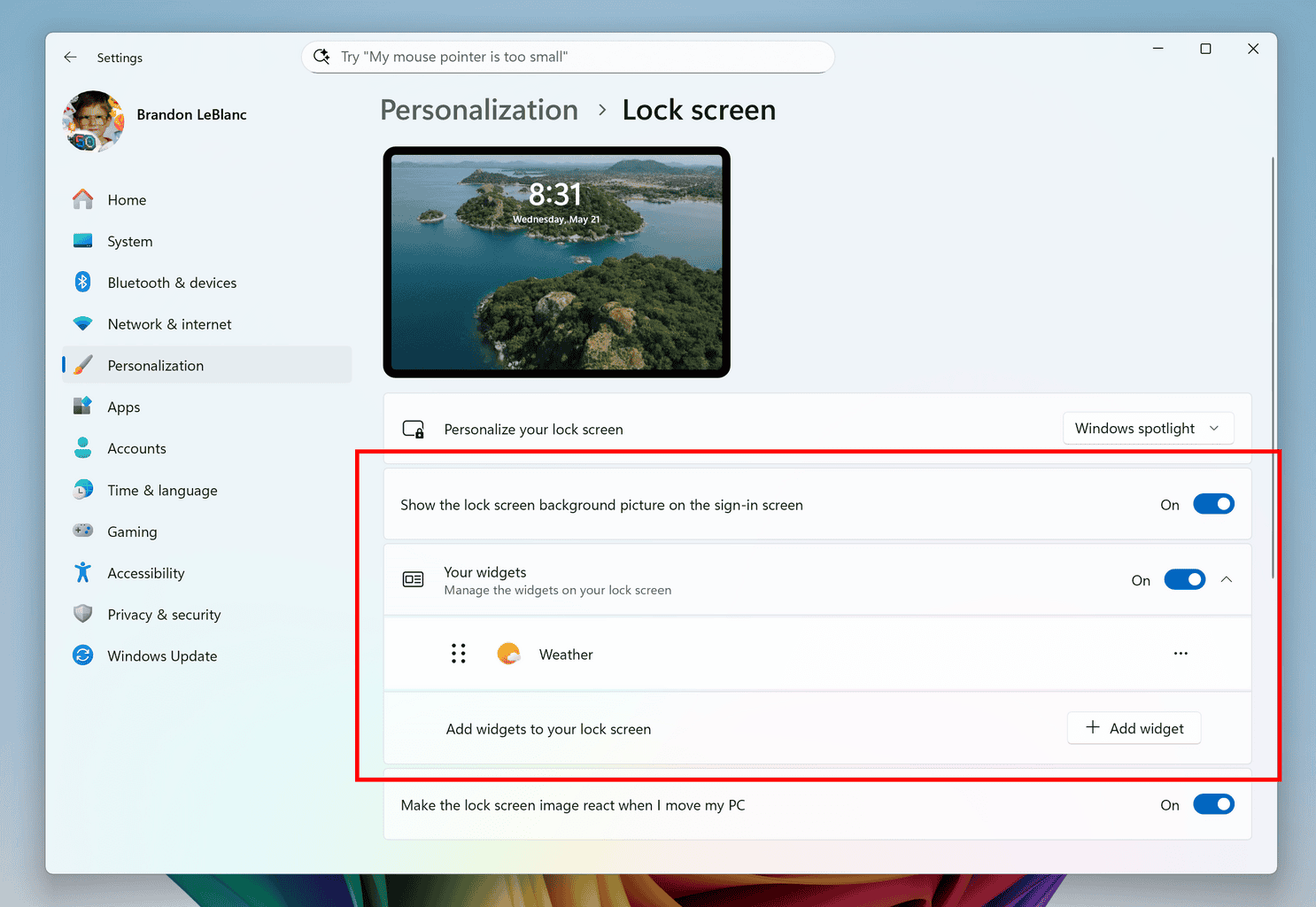
The narrator also opens with a new welcome guide that walks users through features and recent updates. The lock screen is getting smarter, too. Users can now choose which widgets appear before logging in.

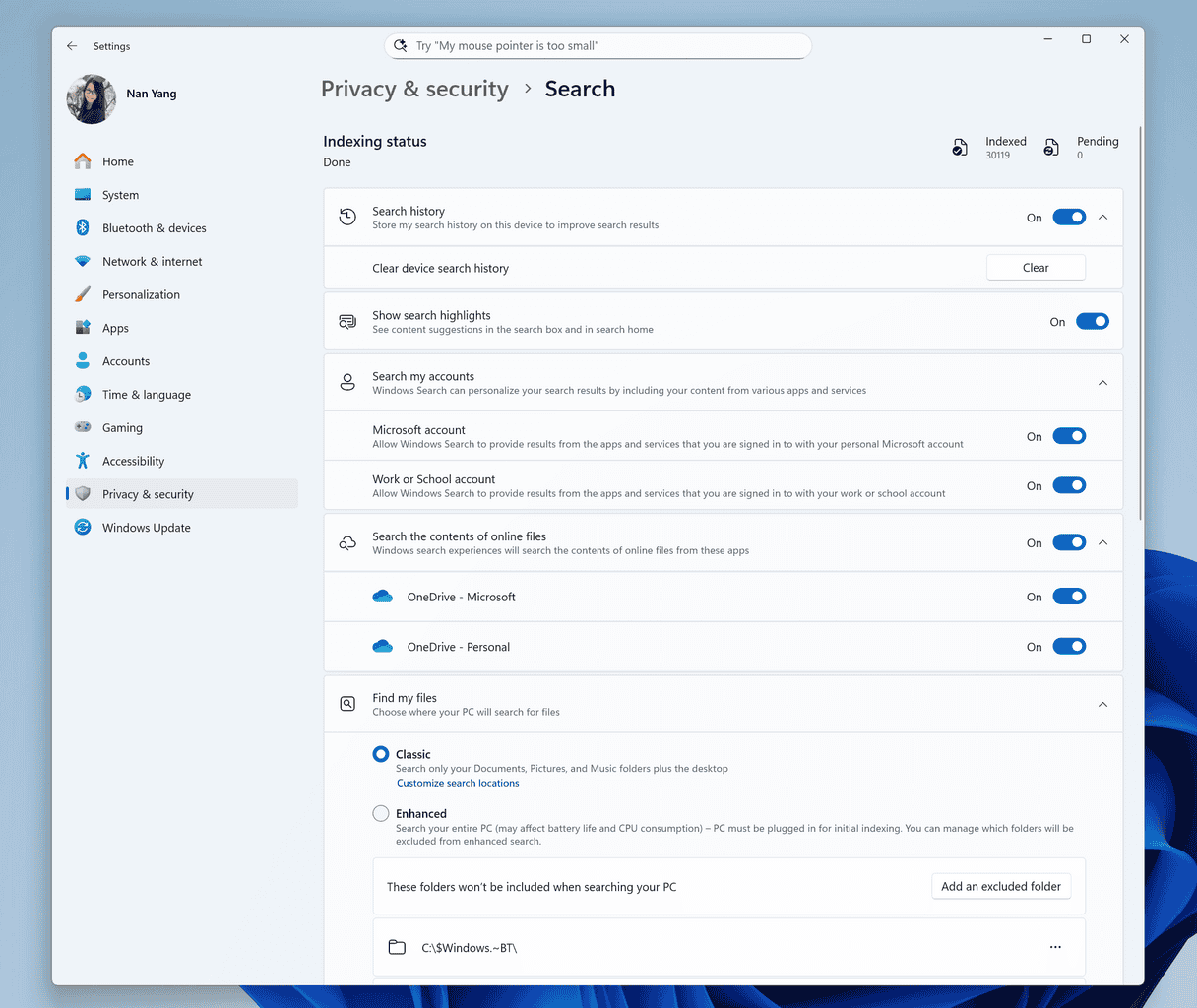
Microsoft is merging “Searching in Windows” and “Search Permissions” into one streamlined section called “Search” under Privacy & Security settings.

Search-Settings-Screenshot-2
Image: Microsoft

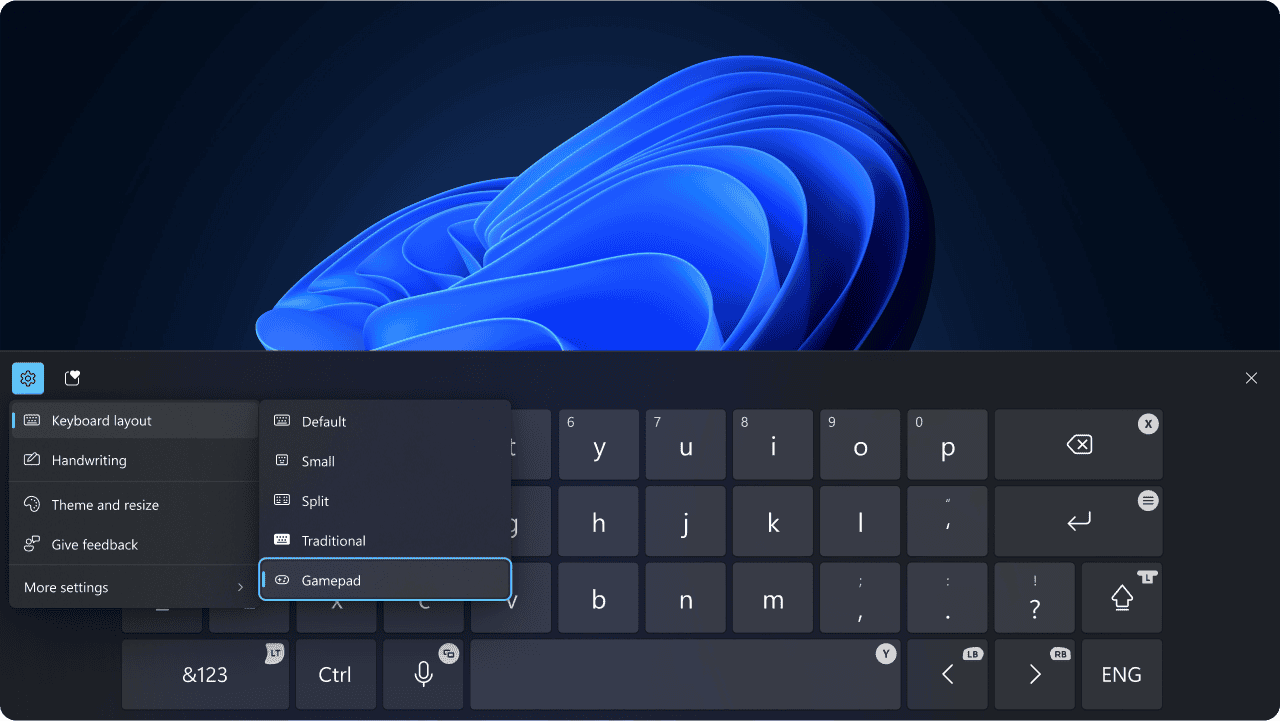
Improvements also extend to the gamepad keyboard. It now handles flyout menus, child keys, and language switching more smoothly.

Keyboard-Menu-1
Image: Microsoft

Word suggestions and focus management are more refined, and the keyboard now works reliably on the lock screen for PIN input.

Xbox fans are fuming over $80 price tag for The Outer Worlds 2

This year’s Xbox Games Showcase was packed with some great announcements. However, one particular announcement sparked more frustration than hype: the price of The Outer Worlds 2.

Obsidian’s long-awaited sci-fi RPG finally got a release date—October 29, 2025—and a new cinematic trailer. But as soon as pre-orders went live, players noticed something else: The Outer Worlds 2 is launching at $79.99 for the standard edition and $99.99 for the Premium Edition. That did not go down well.

Within hours of the announcement, fans flooded Reddit and Steam with complaints. One post, featuring a screenshot of the Steam page, went viral.

“Well, the pre-order prices are live and they’re ******* expensive!” said one Redditor, comparing it to a Premium Edition they grabbed earlier this year for just $50.

The Outer Worlds 2 price launch
Image: Reddit/@Successful_Page_4524

Others on Reddit had similar reactions to The Outer Worlds 2’s price. What’s interesting is that in the UK, prices are listed at £69.99 and £89.99. That’s the same pricing we’re seeing for Bethesda’s DOOM: The Dark Ages, another Xbox-owned title from yesterday’s showcase.

Also read: Microsoft details lightweight Windows 11 on Xbox Ally handhelds

This pricing trend isn’t limited to Microsoft. Nintendo lit the fuse earlier this year when it priced Mario Kart World at £74.99/$79.99. Since then, the dominoes have begun to fall. To be fair, both The Outer Worlds 2 and DOOM: The Dark Ages will be available on Xbox Game Pass on day one. However, that only helps if you’re already subscribed.

PC and Xbox players benefit. PlayStation players? Not so much. For now, The Outer Worlds 2 lands on October 29, and if you’re not on Game Pass, better brace your wallet.

YouTube Asks Users to Check Reason for ‘Interruptions’ Amid Ad Blocker Warnings—Directs Them to Help Page

YouTube has started displaying messages asking users to find out why they are experiencing “interruptions,” linking to a YouTube Help document. This comes as Manifest V3 led to the downfall of the UBlock Origin extension, with its developer claiming that the extension now works best on Firefox.

It’s no surprise that Google has begun pushing notifications to users who have enabled ad blockers, urging them to turn them off, citing that “Ad blockers violate YouTube’s Terms of Service.”

Here is the warning message recently received by Firefox users, according to a Reddit thread:

Ad blockers violate YouTube’s Terms of Service. It looks like you may be using an ad blocker. Video playback is blocked unless YouTube is allowlisted or the ad blocker is disabled. Ads allow YouTube to be used by billions worldwide.. You can go ad-free with YouTube Premium and creators can still get paid from your subscription.Allow YouTube ads. Try YouTube Premium. Not using an ad blocker? Report issue”

YouTube is encouraging users to disable ad blockers, arguing that doing so supports the revenue of content creators. It also suggests subscribing to YouTube Premium. From Google’s perspective, this might seem fair, but for users, it feels like they are being forced to watch ads. Not everyone can afford YouTube Premium, yet many still prefer an ad-free experience.

Recently, we noticed that YouTube displays ‘Experiencing Interruption’ warnings when uBlock Origin is enabled in Firefox. The message, along with a link, directs users to a YouTube help page urging them to check browser extensions, including ad blockers:

“Check your extensions, including ad blockers. Check whether your browser extensions that block ads are affecting video playback. Alternatively, try opening YouTube in an incognito window with all extensions disabled to see if the issue persists.”

This issue is not limited to Firefox, as Brave users with ad blockers enabled have also reported receiving similar warnings, according to a community forum post.

All in all, Google wants users to refer to its official help page for resolving issues related to blocked YouTube videos due to ad blockers.

Microsoft details lightweight Windows 11 on Xbox Ally handhelds

Microsoft has officially revealed its new line of ROG Xbox Ally gaming handhelds. Both ROG Xbox Ally and Xbox Ally X are powered by AMD Ryzen chips and a customized version of Windows 11.

Built for gaming and designed from the ground up, the new Xbox Ally devices run a streamlined version of Windows 11 Home that sheds all the usual desktop weight. The Verge reports that Microsoft tapped longtime Xbox OS engineers to cut the clutter and tailor the system for handheld performance.

“We were able to take people who have been working on the Xbox OS for 20 years or more and have them work directly on the Windows codebase and start reimagining what that operating system looks like for this form factor,” said Jason Beaumont, VP of experiences at Xbox.

“When the player boots into the full-screen experience, there is a whole bunch of Windows stuff that doesn’t get loaded.”

That includes skipping the desktop, taskbar, and background processes you don’t need mid-game. The result? Faster startup, better focus, and more resources for your games.

According to Xbox’s Brianna Potvin, players can gain back “about 2GB of memory” just by skipping unnecessary Windows components. She also noted the device pulls “one-third of the idle power” compared to launching into full desktop mode.

Roanne Sones, CVP of gaming devices and ecosystem, added that Microsoft is also trimming down pop-ups and system noise to “continue to listen to feedback from players to make continued improvements.”

All that said, it’s Windows 11 reworked with gamers in mind—and these new Xbox Ally handhelds might just prove that less really is more.
The Expanse: Osiris Reborn is Mass Effect-style RPG coming to Xbox Series X|S & more

Owlcat Games is diving into sci-fi with The Expanse: Osiris Reborn, a third-person, story-driven action RPG based on the hit TV series and books. Known for isometric titles like Pathfinder and Warhammer 40K: Rogue Trader, the studio is shifting gears to deliver a cinematic, choice-heavy RPG more in line with Mass Effect.

Also read: Did Phil Spencer Dropped Hint of Halo: Combat Evolved Remaster Coming in 2026?

Set during the first two-and-a-half seasons of the show, players take on the role of a Pinkwater Security mercenary trapped on Eros Station. You’ll build your own captain—Martian, Belter, or Earther—assemble a squad, fly your ship, and travel to iconic locations like Ceres and Mars.

Also read: Fallout 76 just added fishing—and you can now catch radioactive trout with your friends

Owlcat promises party-based combat with real-time gunplay, branching dialogue, and romance options. Some actors from the show are even returning, though no names yet. The team openly cites Mass Effect as a core influence, and they’re leaning into the moral complexity and grounded sci-fi tone that defines The Expanse.

Also read: Persona 4 Revival Announced At Xbox Games Showcase 2025

No release date yet, but The Expanse: Osiris Reborn is coming to PS5, Xbox Series X|S, Steam, Epic, and GOG. And despite juggling other projects, Owlcat says this is their “flagship.”