Xbox users really want Microsoft to do something about the console’s home screen

It’s been almost a year since Microsoft introduced a new home screen for Xbox to the community, and users are not entirely pleased with it. The new UI is more spacey, and at first look, it doesn’t appear to be overcrowded. It looks clean and spacious, and very intuitive to use, but despite this, many users agree that it lacks originality.

It’s also not customizable, which angers a lot of people from the Xbox community, including this user who took it to Reddit to express their disappointment.

As a massive fan of console menus, I must say that the current UI is really not that great. I’ve always thought that Microsoft should let us have more control over them. Even just simple things like being able to pin games to the bar, or controlling the order of tabs, to larger things like letting us toggle on/off home music, or allowing us to change the way the guide looks.

I really want to be able to have more control over the way my home menu looks. It’s just kinda flat and has zero personality as of now.

Reddit user

As the Reddit post has gotten more popular, other Xbox users expressed their anger at Microsoft for not only taking away their power to customize and personalize the home screen, but also splashing it with ads every time the Redmond-based tech giant has the chance.

Everyone was talking about ads upon login a year or so ago and I never saw one, thought they were crazy. I finally got one today that popped up before my home screen loaded. It made me irrationally angry.

Reddit user

how are they gonna push ads?!

Reddit user

100%, I hate the new UI, full of bloat that I don’t care about and no ability to remove it.

Reddit user

However, Xbox users are also disappointed that Microsoft doesn’t consider their feedback about the home screen. Despite dozens of similar opinions about it, the Xbox Insider Program ignores it.

We’re asking for this every week at Insiders but they keep ignoring it.

Reddit user

Everywhere where they “take feedback” from insiders from the Insider Program they are getting spammed with actual good feedback about the homescreen.

They never actually really care about the feedback. Not just about the homescreen, but in general. They don’t even ask important questions anymore through their app, the last couple of weeks they asked what type of pizza toppings we prefer. Yes, i am 100% serious.

Reddit user

The Redmond-based tech giant recently released Game Hubs to the Xbox App for PC, which is a new platform meant to improve the gaming experience, and along with the new Game Hubs, the company also said it will gradually release a new sub-navigation experience allowing users to choose from different new settings.

However, these changes are all coming to the Xbox App for PC, which ironically are not intended for the console, yet.

The users’ anger is justified, and Microsoft should indeed give back some customization options to the Xbox community. Some even agreed that Microsoft can keep an area for ads if the company sees fit, but users should at least get to personalize their Xbox experience.

What do you think about it? Do you think Microsoft had taken it too far?

Google Cloud brings the text-to-live image feature to Imagen & other updates for Gemini, Gemma, and MLOps

All the popular tech companies are working on their AI technology to improve user experiences. On April 10, 2024, Google Cloud announced model updates for Gemini, Gemma, Imagen, and platform capabilities that continue to enhance Vertex AI.

Imagen, a task-specific generative AI model, has become an important tool for companies that leverage AI-driven creativity at a large scale. It has received significant updates. Let’s discuss them.

Text-to-Live image capabilities

One of the standout features discussed was the preview of Imagen 2.0’s text-to-live image capabilities. This feature empowers creative and marketing teams to transform text prompts into animated images, like GIFs.

Google Cloud mentioned that live images will be delivered at 24 frames per second with a resolution of 360*640 pixels, and the time taken to generate the image will be 4 seconds. The search giant assured us that they plan to improve the quality and reduce the time taken by providing further updates.

Focused design of enterprise apps

Imagen 2.0’s design emphasizes its suitability for enterprise applications, with its focus on delivering extraordinary results in themes like food imagery, nature, and animals.

The model is capable of generating a diverse range of camera angles and motions successfully while maintaining consistency throughout.

To maintain the integrity and authenticity of the generated content, Imagen 2.0 for live image generation also comes equipped with powerful safety filters and digital watermarks.

Advanced photo editing features

Along with text-to-live image capabilities, Imagen 2.0 also comes with photo editing features, including inpainting and outpainting. These will allow you to remove unnecessary elements from your image and add new elements, as well as expand image borders to create a wider field of view.

The digital watermarking feature, powered by Google DeepMind’s SynthID, lets you generate invisible watermarks, thereby providing a layer of security and verification for images and live images generated by the Imagen family of models.

Big companies like Shutterstock and Rakuten are already using Imagen 2.0 to create high-quality, accurate images at the enterprise level.

The text-to-live image capabilities will expand Imagen’s potential applications, allowing companies across different industries to unlock new avenues of creativity.

Other announcements

Furthermore, Google Cloud’s Vertex AI platform introduced a suite of updates to revolutionize AI development and deployment. Gemini 1.5 Pro is now available in public preview, allowing developers to access the world’s largest context window, facilitating multimodal reasoning over vast amounts of data.

This capability can be used in diverse fields, from customer service automation to financial document analysis

With the expansion of MLOps capabilities for gen AI, including new prompt management and evaluation services for large models, organizations can manage and deploy models in production, thereby streamlining the transition from experimentation to scale.

Vertex AI also offers integration with Google Search, which will enhance response accuracy, providing a better user experience while surfing the web.

In the blog post, Amin Vahdat, VP/GM ML, Systems, and Cloud AI, Google also mentioned the expansion of data residency guarantees and said:

Today we’re also expanding data residency guarantees — which cover data stored at-rest for Gemini, Imagen, and Embeddings APIs on Vertex AI — to 11 new countries: Australia, Brazil, Finland, Hong Kong, India, Israel, Italy, Poland, Spain, Switzerland, and Taiwan. Customers can now also limit machine learning processing to the United States or European Union when using Gemini 1.0 Pro and Imagen.

In conclusion, these announcements about advancements in AI tech via Vertex AI and Imagen AI show a significant leap forward with the aim of empowering enterprises to leverage the potential of generative AI.

What are your thoughts on the matter? Share your opinions with our readers in the comments section below.

Microsoft accidentally left one of its Azure servers without password protection

Microsoft surprisingly left one of its Azure servers open without a password on the internet for a month or more. So, until a few days ago, anyone had access to it and its information. On top of that, the server had company data, such as login credentials for other databases and systems.

Unfortunately, Microsoft’s negligence of this Azure server might have repercussions. After all, we don’t know how long the data was available. So, threat actors might have found ways to break into other secured servers, including the operating services available. This incident could lead to additional data leaks and compromise services.

How did Microsoft find out about the Azure server data breach?

The researchers from SOCRadar were the first to notice the Azure server breach on February 6 and notified Microsoft. Also, they are the ones who confirmed that the company fixed the issue. However, like many times before, Microsoft refused to comment on the incident.

Microsoft refused to give additional information about the Azure server breach. However, this is not the first time the company has done that. After all, the US government has an ongoing dispute with the tech giant due to its poor security systems.

The US Cyber Safety Review Board accused Microsoft of carelessness. After all, the security breach considered preventable allowed threat actors to steal 60,000 emails and a list of employee email addresses from the US State Department.

In addition, we don’t know if Microsoft changed all of the passwords from their Azure servers and systems. On top of that, we don’t know who accessed the company’s data.

In the past, Microsoft faced various data breaches and leaks. According to Firewall Times, there have been 21 incidents since 2010. Also, the company is responsible for most of them. For example, in 2019, a data breach caused by a server misconfiguration exposed the information of 250 million Microsoft customers dating back to 2005. In addition, it took Microsoft more than 20 days to fix the issue.

Ultimately, Microsoft should prioritize the security of its Azure servers. On top of that, the company should focus on its safety features, especially since threat actors keep finding ways in. Also, the tech giant could assign some of its AI developers to work on security. After all, Microsoft keeps adding employees to their AI teams.

What are your thoughts? Do you think that Microsoft should focus on its overall security? Let us know in the comments.

Copilot isn’t the new Metaverse, but its value will sit more on huge companies than your average Joe

The term Metaverse was coined back in 1992, in the Snow Crash S.F. novel and it was defined as virtual worlds where real people are represented by their virtual avatars. The most prominent iteration of this concept is Second Life.

Much later, Facebook was rebranded as Meta to cash in on second wave of this concept by including the VR and AR goggles and enhance the immersion. They even rebranded Oculus Quest to Meta Quest, but let’s face it, it didn’t catch on.

Now, a user on Reddit is asking if Copilot could be the next Metaverse after watching the Microsoft Business Application Summit, and it really got me thinking.

It is hard to compare Copilot with Metaverse

The person obviously didn’t take the real meaning of the Metaverse term, but I see where this is going. Copilot is getting so much hype and attention these days that we’re all wondering how long this overexcitement will last.

We’ve all played with Copilot on our PCs or smartphones, but except for some laughs and giggles, most of us didn’t get much of the the advertised benefits. And it’s easy to see why: Copilot and other AI bots had such a steep evolution that we didn’t even get to know how to use it. Recently, Microsoft announced the launch of what they call a Copilot Adoption Community to teach employees on how to use it.

That’s where we get to the root of this matter. Microsoft didn’t created Copilot for the average Joe, but for organizations. They are now training (or already did) specialized bots for finance, collaboration, security, taxes, automation, etc. This post is too short to take into consideration all the applications of Copilot and its base LLM, GPT.

For the rest of us and our PCs, Copilot will turn into an AI personal assistant that is just a few steps up than the good ol’ Siri (that frankly, was useless from the beginning).

Copilot is useful where the money is

So, no, Copilot is not Metaverse, and I don’t think it could become one. Of course, there’s the Matrix saga plot where the AI takes control of all of us and creates a virtual simulation for our minds to live in. All jokes aside, Copilot’s real value is not from its presence on our PCs. That’s just the marketing awareness side. The real money is in the companies and employees who are now learning how to use it.

The Metaverse, or at least the way it was implemented, was and is a market, a meeting place. Copilot is a tool. While you can sell almost anything in a place where people are gathering, a tool can be used to do almost any task in the digital world. They are only comparable in the hype that they received during their evolution.

I am almost certain that the Metaverse will soon coexist with LLMs and if someone manages to join them in a clever way, we will have another huge spark for it. In the meantime, Microsoft is cashing in on their AI bot because they implemented in all the cloud, office and security solutions. And they jumped in because Copilot shortly started to reduce their costs, improve productivity and ultimately, grow their businesses.

Other LLM developers moved slowly and implemented their solutions locally. Google is slowly getting Gemini AI into all their products such as Gmail. The latest feature is one that will help you formulate email replies. That’s great, but it’s free, and you probably wouldn’t pay for something like that unless you have to reply to hundreds of emails a day. Again, the answer is into company productivity, not your personal comfort.

However, if everybody is talking about Copilot, that means Microsoft did their job, and that translates into more business contracts for them.

By the way, are you working with Copilot at work? How is it for you? Let’s talk about this in the comments below.

Looking to get a gaming PC? This GeForce RTX 3060 bundle is a steal!

Building your PC can be satisfying, and if you’re planning to upgrade your PC or build a new one from scratch, you might be interested in this bundle.

Newegg is currently offering a bundle and you can get several key components cheaper than ever before.

Use this GeForce RTX 3060 bundle and build your gaming PC

As PC Guide writes, Newegg is offering GeForce RTX 3060 12GB GDDR6 at a 6% discount, and while this isn’t impressive, you can get additional components in a bundle and save some money.

You can choose one of the following components:

  • MSI MEG Ai1300P 1300W Power Supply
  • AMD Ryzen 5 5600G
  • Team T-FORCE VULCAN Z 16GB (2x8GB)

If you choose the following components, you can all the key components for about $731. In case you already have one of these components, you can swap it for an MSI B550 GAMING motherboard or GIGABYTE G24F 2 monitor.

Overall, it’s a great deal if you’re planning to get a new graphics card along with some additional components, so be sure to use this bundle.

Speaking of discounts, you can get desktop PCs for $600-$700 at Costco. In case you prefer laptops, you can get ASUS Aorus 15 at a discount.

If you’re a fan of Acer, you can get Acer Nitro 17 for 18% off on Amazon, so don’t miss it.

Microsoft Planner will increase the number of maximum tasks per Premium account to 1500

To all who use Microsoft Planner to schedule their days, come up with checklists, and set their daily, weekly, and monthly tasks, we have good news: the Redmond-based tech giant will increase the number of maximum tasks per Premium account to 1500, according to the latest entry in the Microsoft 365 Roadmap.

Create and manage up to 1,500 tasks within a Microsoft Planner premium plan (formerly known as a Project for the web project).

Microsoft

The new changes will impact Premium users everywhere starting May 2024.

The Redmond-based tech giant came under a lot of fire a while ago, when users bumped into a lot of issues when accessing the new Planner’s public preview.

Microsoft promised new capabilities to its Planner app, last year at the Ignite 2023, including the addition of Copilot, the creation of personal plans, and many more features that would make Planner users excited.

However, not everything went as planned, and many users were not able to access the new version, which left many disappointed. A month has passed since then, and many users are now able to access it.

In May, with the increase of the maximum number of tasks in Microsoft Planner to 1500, users will be able to organize months in advance at the tiniest detail.

Plus, it’s worth mentioning that users can also access Microsoft Planner within Teams, now, after the Redmond-based tech giant released the platform last month. For more details about how to access it from Teams, you can check our story.

Microsoft is working on a system that restores lost fragments of code, and digital documents

Microsoft is working on a system that uses AI to restore missing parts of a digital document using only some fragmented parts of that document.

In a paper published recently, the Redmond-based tech giant patented the technology under the name of Automated notebook completion using sequence-to-sequence transformer, and it could be a revolutionary way to restore and remaster older digital documents, such as old video games, for instance, with AI, by being able to restore old fragments of code.

The system can automatically complete parts of a digital notebook by employing the following process. Each digital document has two types of cells: markdown cells, which contain text, and code cells, which contain code.

The system works by creating examples of inputs and outputs. It does this by hiding (or masking) the content of either a markdown cell or a code cell and then using the content of the other cell as an input. The hidden content is used as the output for that example.

After creating these examples, the method trains a natural language processing model (a type of AI that understands and generates text) using these examples. The trained model can then predict the content of a hidden cell based on the content of the other cell, and it comes with several results, which are then tested until one of them resembles the original best.

The method can further include executing the natural language processing model to generate multiple hypotheses of solutions that are consistent with content in the grading cell.

In other words, the system teaches the computer to fill in the blanks in a notebook by showing examples of how the blanks have been filled in before.restore fragments of code

While the system can be used in various applications, from language programming courses to restoring digital documents of various natures (the paper mentions Word, Excel, and even PowerPoint documents), in theory, it can also be used to restore old and lost fragments of code, which can potentially become a way to remaster old video games by only using some parts of the code.

This is a sort of an unfortunate issue in the gaming industry: for instance, back in 2014, when Ubisoft announced the release of the HD version of the popular Heroes of Might and Magic 3, the company said it would only release one edition of the game because it didn’t have all the original code of the complete edition.

This was quite unfortunate because the company found some fragments of the original code, but it was rendered unusable. However, with a tool like this system, those fragments could be used to restore the original code entirely.

Given how much focus Microsoft is putting into AI development, this system might actually be released sooner or later, depending on how accurate AI is. But with Copilot in GitHub being able to assist programmers, the system can actually be released in a few years.

Costco clearance: Awesome desktop PCs for $600-$700, but you need a membership (or a friend with one)

Costco has a warehouse clearance sale so now it’s time to grab some awesome deals on a lot of laptops and desktop PCs at incredibly low prices.

We’ll tell you about some of the most awesome deals and a scoop that could turn out to be golden on a gaming desktop PC.

Best Costco warehouse clearance deals right now!

The no.1 deal for laptops is this Lenovo LEGION Pro 5i gaming laptop with a 16-inch 165 Hz screen and 2560×1600 pixels resolution. It comes with a 13th Gen Intel Core i9-13900HX and a GeForce RTX 4060 graphics card at only $1.199, down from $1.499. Hurry up and snag it because this gaming powerhouse is in very limited supply.

Another steal is Dell Inspiron 15.6″ touchscreen Laptop with the 8-core AMD Ryzen 7 7730U and AMD Radeon onboard graphics. It comes with 16GB of RAM and a 1TB PCIe NVMe M.2 SSD for storage for only $499 ($250 OFF!). It has Windows 11 installed and it’s great as a school or second laptop because it’s very light and portable.

We have saved the best for last because someone posted on Reddit that they’ve got this CyberpowerPC GX13400BS for only $600. A commenter in the thread added that he saw the exact rig on Costco for $700 in the clearance offers. However, you need a Costco membership to see it, if it’s still available.

From the user, we understand that the PC comes with an Intel Core i5 i58400 CPU and GeForce RTX 3060 Ti, and a similar configuration is priced at around $900 – $1000, so his purchase was a real steal. If you have a Costco membership, check out the listings. You may also find them at your local Costco shop.

If you get new deals from Costco, let everyone know in the comments section below.

Get your blasters ready as Star Wars Outlaws is set to release this summer

Recently we saw several great Star Wars games, so it’s no wonder that companies want to cash in on the popularity of the franchise.

Start Wars Outlaws is the latest upcoming Star Wars game, and we finally got some news about the game’s story and the release date.

Star Wars Outlaws is set to release on August 30

According to Neowin, the Star Wars Outlaws story trailer was recently released, and it has revealed important information about the game.

This is an open-world action-adventure game, and it’s developed by Massive Entertainment. In case you’re not familiar, it’s the team behind The Division and Avatar: Frontiers of Pandora.

The story revolves around Kay, a thief, and she needs to repay a debt to a crime boss Sliro, and to do that, she needs to perform a heist.

During the game, our protagonist will have to cross paths with other groups such as Pyke Syndicate, the Hutt Cartel, the Ashiga Clan, and Crimson Dawn.

Regarding the availability, the game is set to launch on August 30 on Xbox Series X/S, PlayStation 5, Amazon Luna, and PC.

If you’re an Xbox gamer, you’ll be pleased to hear that Game Hubs are now available on the Xbox app. Many are also speculating that Microsoft is making a handheld Xbox, but that hasn’t been confirmed yet.

GTA+ price increase leaves Xbox users fuming, and rightfully so

GTA V is still rather popular, mostly due to GTA Online, and while the online mode is great, it does require a subscription on consoles.

However, it seems that the cost of a subscription just went up, and many gamers aren’t happy with it.

GTA+ price was just increased, but only for Xbox users

Bad news for GTA Online players, as the price for GTA+ was recently changed as Sportskeeda writes.

This was spotted by Tez2 on X, claiming that the price went up from $5.99 to $7.99 for Xbox Series X/S users. However, the price for PS5 users remains the same.

Gamers are outraged by this change, and many have voiced their concerns on Reddit:

ain’t gonna lie, gta+ is completely irrelevant now on xbox, 7.99 for these crappy benefits is a joke, and also why does this increase only apply to xbox?

Just rockstar things. But, some people still pruchase it.

I’ll rather do money exploits than paying for this scam.

So far, there hasn’t been an official statement from Microsoft or Rockstar, so we don’t know why has the price changed.

In other news, GTA 6’s launch schedule will negatively affect PC gamers, but looking at the recent GTA+ price change, PC still might be a better option in the long run.

Microsoft Edge will finally discard inactive/sleeping tabs automatically, but users can reload them anytime

Microsoft Edge will soon automatically discard inactive/sleeping tabs, allowing the browser to consume less power and run better. According to the latest entry in the Microsoft 365 Roadmap, Edge will receive a couple of new policies in May 2024, allowing users to set up the browser to auto-discard tabs.

It can be done through the new AutoDiscardSleepingTabsEnabled policy which automatically enables when the SleepingTabsEnabled policy is enabled.

Tabs that have been sleeping for a long time will be discarded to save memory. When a user navigates back to a discarded tab, the tab will need to be reloaded. This can be managed through the AutoDiscardSleepingTabsEnabled policy. This policy will be enabled if the SleepingTabsEnabled policy is enabled.

Microsoft

This is excellent news for those Internet browsers who have tens of tabs opened in Microsoft Edge. We often forget about many tabs out there, allowing them to chew on memory, which makes our devices slower.

With this new policy, all those tabs that haven’t been used in a while will be discarded, and if users want to go back to them, Microsoft Edge will reload them. This comes with a drawback: all the browsing information of that tab will be lost, so filling up tables, or reading an article means users will have to restart the process.

However, it’s not inconvenient compared to the memory that’s been used by having all those tabs open in the first place.

The new policies are coming in May. But Microsoft Edge is also getting some other useful features: for instance, users will be delighted to know that the browser will skip ads when translating video’s audio and subtitles.

We don’t know yet if Microsoft intended Edge to skip ads when translating, but it’s happening, and it could the browser the advantage it needs over its competitors.

Acer unveils new Nitro 14 and 16 gaming laptops, promises high-end performance

Acer is well-known for its devices, with the Nitro series being very popular among gamers due to its great performance.

If you’re a fan of this series, today we’re pleased to inform you that Acer has added two new members so let’s see what they offer.

Acer has just announced new Nitro 14 and 16 gaming laptops

The two new laptops were recently announced on Acer’s website, and both models will be powered by Ryzen 8040 Series CPUs.

Acer Nitro 14 specifications:

  • Up to an AMD Ryzen 7 8845HS processor
  • Up to NVIDIA GeForce RTX 4060, with DLSS 3.5 technology
  • Up to 32 GB of LPDDR5X SDRAM
  • Up to 1 TB PCIe Gen 4 NVMe
  • 14.5-inch IPS display with up to 2560×1600 resolution.
  • 76 Whr battery
  • USB 4 and USB 3.2 Type C ports, dual Type-A ports, HDMI 2.1, microSD slot

Acer Nitro 16 specifications:

  • Up to AMD Ryzen 9 8945HS CPU
  • Up to an NVIDIA GeForce RTX 4060 with DLSS 3.5
  • Up to 32 GB of DDR5 SDRAM
  • Up to 2 TB PCIe Gen 4 NVMe
  • 16-inch IPS display up to 2560×1600 resolution
  • 76 Whr battery
  • USB Type C, 3x USB Type-A ports, HDMI 2.1, microSD slot

It’s also worth mentioning that both models support Ryzen AI and Acer PurifiedVoice 2.0 technology that will block external noise using AI. Lastly, Acer PurifiedView is there to ensure optimal performance during video calls.

These are both great devices, and we should see them available in May in the US. The starting price for Nitro 16 is set at $1,399.99 while Nitro 14 will cost $1,299.99. As for worldwide availability, Nitro 14 will be available in June.

In case you need something different, you can get Acer Nitro 17 now at a discount, so don’t miss it.

Get the biggest deal on Lenovo Tab Extreme 2 in 1 laptop

The tablet convertible or 2-in-1 laptop is not that crowded although the idea to get a tablet that can be turned into a business or leisure laptop is extremely appealing for portability. There are some interesting devices out there such as Microsoft’s Surface, Samsung’s Galaxy Tab, or even the iPad Pro. However, none of them can really compete with the huge 14.5-inch Lenovo Tab Extreme tablet that turns into a very powerful business laptop when docked with the full keyboard and a stylus.

Lenovo Tab Extreme was already a pretty good deal at Best Buy for $1099, but now it’s $150 off and you can grab it for $949.

The device is not only one of the biggest tablets you can buy right now, but it’s also great for a business device in terms of tech specs. It’s powered by a Mediatek Dimensity 9000 4nm architecture chipset, which is aided by 12GB of RAM and 256GB of storage.

Galaxy Tab S9 Ultra is close to these specs but Lenovo Tab Extreme’s display has a 3000×1876 pixels resolution while the slightly bigger screen of the Samsung tablet is 2960×1848 pixels. However, Lenovo’s tablet also comes with the docking station that includes a big keyboard and a stylus (Precision Pen 3) which is a big plus.

Other significant advantages of Lenovo Tab Extreme are the microSD slot, the great battery life and the two USB-C ports. Adding to all that, there’s a 2160p (4K) front camera on board that is excellent for those video call meetings.

We don’t know how long this Best Buy offer will last so hurry up and grab it right now.

Microsoft will invest in the cloud computing and AI infrastructure of Japan

Microsoft plans to invest $2.8 billion in Japan to boost its AI and cloud computing and AI infrastructure. Additionally, the company wants to train 3 million people to use AI through its digital skilling programs. On top of that, the Redmond giant wants to build its first Microsoft Research Asia lab in the country.

In Microsoft’s 46-year history in Japan, there wasn’t an investment like this one. Through it, the company hopes to accelerate Japan’s digital transformation and adoption of AI. As a result, the Redmond giant could improve its cybersecurity collaboration with the Government of Japan.

How will Microsoft accelerate Japan’s adoption of AI?

This investment allows Microsoft to bring advanced computing resources with cutting-edge graphics processing units (GPUs) within Japan. Thus, it will be easier for the company to speed up AI workloads. By the way, this investment doubles the initial one made by Microsoft towards this goal.

Japan’s Ministry of Economy, Trade, and Industry and Microsoft collaborate on the Generative AI Accelerator Challenge (GENIAC) program. This project aims to help innovative startups and established enterprises develop foundational models as a core technology for generative AI.

Microsoft will enhance people’s capabilities to use AI in different fields

The company’s plan to train 3 million people will focus on organizations, developers, and students. In addition, Microsoft will expand its Code Without Barriers program in Japan. So, the tech giant will provide dedicated training for women interested in AI to address gender equity in AI. 

Furthermore, in collaboration with the United Nations Institute for Training and Research (UNITAR), Microsoft will bring free and accessible online training materials on AI, cybersecurity, and digital skills to Japan. Also, the company will use GitHub Copilot to assist advanced developers and tech companies. Apart from this, Microsoft will provide vocational high schools with AI programs.

The Microsoft Research Asia lab will open in Tokyo. It will focus on research in important areas relevant to the country’s needs. Thus, the lab will prioritize AI and robotics, societal AI and well-being, and scientific discovery. The new Microsoft Research Asia lab should also strengthen the company’s historical collaborations with universities from Japan.

In addition, Microsoft will provide $10 million in resource grants to The University of Tokyo and the Partnership on Artificial Intelligence Research between Keio University and Carnegie Mellon University.

Japan’s Cabinet Secretariat will collaborate with Microsoft to enhance its cybersecurity systems. They will focus on information sharing, talent development, and technology solutions. Also, Microsoft will provide advice and its advanced cloud and AI-driven security services.

Ultimately, Microsoft’s $2.8 billion investment in Japan will contribute to the country’s economic goals. After all, they will expand the digital infrastructure, create a skilled AI workforce, strengthen cybersecurity, and accelerate Japan’s adoption of AI. Hopefully, the company won’t affect the country’s security or environment with its cooling systems for AI.

What are your thoughts? Do you think that Japan will benefit from Microsoft’s investment? Let us know in the comments.

Microsoft will update Windows Copilot to allow users to build AI plugins

The Microsoft Build 2024 event is slowly approaching, and while we already told you what to expect (lots of AI, obviously), the Redmond-based tech giant has revealed almost all the sessions taking place at the conference, and some of them are quite exciting.

Microsoft will unveil new Windows AI features, as well, as new C# 13 capabilities. The Redmond-based tech giant will also present the new Advanced Paste with Local AI in PowerToys, with Clint Rutkas showcasing his excitement for the new feature on X (formerly known as Twitter).

Windows enthusiasts everywhere will also finally get to see the Next Generation of Windows on Arm, which is going to be NPU-based. However, one of the most useful new capabilities is the update of the Windows Copilot to support AI plugin development.

In a session called Build richer experiences with Copilot in Windows, Microsoft will show Windows users how to personalize their Windows experience by developing AI plugins.

In this breakout session we will take a deep dive into how you can extend Copilot with your Windows native app. It’s a great session to complement the hands-on lab on building a Copilot plugin for your Windows app. At the end of this session you’ll understand the components that make a plugin, how Copilot invokes actions defined by your app and how to design a plugin that is relevant and valuable to your users.

Microsoft

While we don’t know what the actual process of building an AI plugin implies, it’s not hard to guess. Not so long ago, Microsoft announced the Copilot GPT Builder, a platform that allows Windows users to build their own Copilot without coding knowledge.

The Copilot can be customized with prompts, and users can choose to publish it or keep it for themselves. The AI plugin builder will most likely follow the same process. This way, all Windows users, including those who don’t have technical backgrounds, can build their own AI plugins.

Microsoft is planning to add many restrictive policies to its upcoming Paint LiveCanvas

Microsoft teased the new Paint LiveCanvas a while ago, which is an upcoming AI-based capability on the platform that will allow users to create drawings, sketches, and projects with the help of Artificial Intelligence.

The Paint LiveCanvas were spotted a while ago and they are part of the new Paint NPU platform, which might be released to Windows 11, later this year.

It’s worth mentioning that this is not Cocreator, the existing AI tool that creates images in Paint. No, LiveCanvas is entirely a new concept that not only creates art but interacts with the user, as well.

However, it seems that the Redmond-based tech giant might splash it with some restrictive policies, according to the strings spotted by Windows enthusiast, @PhantomOfEarth.

Some strings read the following:

Looks like the input image has been blocked as per Microsoft’s Responsible AI guidelines. Please modify your image and try again.

Unsafe content warning

Paint LiveCanvas can only be used with a Microsoft account, it seems, contrary to Cocreator, which can used without having to log in.

Microsoft account is required

Sign-in with your Microsoft account to use LiveCanvas.

More guidelines policies:

Looks like the generated image has been blocked as per Microsoft’s Responsible AI guidelines. Please modify your image and try again.

It seems that the capability can run into errors, as well:

An internal error has occurred. Please modify your settings and try again.

And as always, image sizes seem to be a big problem for AI:

Image size exceeds limits.

The provided input image exceeds the maximum allowed dimensions of 2000×2000 pixels. Please resize the image to meet the specified limits and try again.

So, ultimately, despite the hype around this upcoming advanced AI capability, if we are to take into account these policies, Microsoft would need to work more on the advanced part. While some policies are alright, especially the responsible AI guidelines, the fact that advanced AI technology wouldn’t support a certain image size makes it invaluable right from the start.

The Redmond-based giant should develop Paint LiveCanvas to offer solutions, and complete tasks, not come up with errors.

What’s your take on this?

Windows 11’s Snipping Tool has been updated with a QR code, emojis, and HDR color corrector

Microsoft has quietly updated Windows 11’s Snipping Tool to support the detection of QR codes in screenshots, the addition of emojis inside these screenshots, and a brand-new HDR color corrector.

According to Windows enthusiast, @PhantomOfEarth, these new features will be coming soon to the app, most likely with the next Insider builds.

You’ll be able to place emojis on every part of the screenshot, and edit them to your needs: you can make them bigger, or smaller, and you can move them around.

With the QR code support, Snipping Tool will be able to detect QR codes, as the spotter says, not generate them. So, you won’t be able to generate QR codes to access the screenshot from your Android device, for instance, but that feature might be added in the future.

After all, the Redmond-based tech giant recently updated the tool to allow users to edit screenshots from Android devices by connecting them to Windows 11.

Ultimately, the HDR color corrector will correct the colors of the captures taken on HDR displays, allowing them to be darker. The new corrector is an optional feature that can enabled/disabled at will, and the changes might be instant.

These new features were spotted this week, which is interesting, as many users claimed the Snipping Tool is missing its ruler. Apparently, the Redmond-based tech giant removed it, but there is a way to get it back if you need it.

However, the solution might not be preferable to many, as it requires users to install an older version of Snipping Tool. So, say goodbye to the upcoming emojis, QR codes, and HDR color corrector.

If you still want to install an older version of Snipping Tool for the ruler, we have a guide on how to get the old Snipping Tool app back on Windows 11.

So, Snipping Tool is getting some useful features, while losing other useful features. Is this a win-win situation a la Microsoft?

Microsoft finally added Game Hubs to the Xbox App for PC, after teasing it earlier this year

Earlier in 2024, Microsoft announced Game Hubs, a new platform coming to the Xbox App that encompasses all things gaming, and it was built upon users’ feedback.

Game hubs were built on your feedback around depth, progression, and more ways to connect with your games. With game hubs, you’ll be able to track your progress over time, discover the latest content and add-ons, connect or compete with your friends, get the latest news from developers, and more.

Xbox

Back then, the Redmond-based tech giant said the new platform comes with several sections focused on improving the gaming experience. These are:

  • The essentials
  • Featured content
  • Friends who play
  • Achievements
  • All add-ons
  • HowLongToBeat
  • From the developer

Now, almost 2 months later, Game Hubs are available in the Xbox App for PC users, according to the company’s latest blog post.

Today, we’re excited to share that all PC players can now enjoy game hubs inside the Xbox app on PC. Navigate to any game in your library or in the sidebar to track your progress, discover the latest content and add-ons, connect and compete with your friends, and get the latest news from developers.

Xbox

The Redmond-based tech giant has also started to roll out a new sub-navigation experience in the Xbox App for PC, allowing users to choose from several new settings, and explore a new layout under the “What’s happening” section.

We have started previewing a new sub-navigation experience under the “What’s Happening” section of the Game Pass tab in the Xbox app on PC with a subset of players and with all Xbox Insiders. 

Xbox

These are all part of the April console update which is now starting to roll out to users everywhere. The update brings several enhancements to the app, including improvements to Discord Voice and game captures.

You can read the full blog post here.

Copilot in Excel debuts two new complex formulas to manage multiple tables

It’s been a while since Copilot made its introduction in Excel, but Microsoft has made sure to update the AI tool regularly, with useful features.

Some of these features are the addition of formulas to Copilot that make the AI tool comprehend, edit, and come up with complex solutions to manage data from dozens of tables, effectively enhancing productivity, and coming up with solutions to a variety of inputs.

A couple of new formulas are slated to be added to Copilot in Excel this month, according to the latest entry in the Microsoft 365 Roadmap. Copilot will support the XLOOKUP and SUMIF formulas which allow the AI model to look up for certain data faster, and sum it up according to the input received from users.

The XLOOKUP function is used in Excel to find things in a table or range by row. The SUMIF function is used to sum the values in a range that meets the criteria that users specify. Copilot will now be able to use these functions.

Utilize complex formulas such as XLOOKUP and SUMIF to create formula columns bringing together data from multiple tables.

Microsoft

The two functions should be available to use by the end of the month, according to the roadmap. However, if you haven’t tried Copilot in Excel yet, maybe this is the sign to do it. We have a comprehensive guide on everything you need to know to start using it.

You can use it to ease your work, but if you don’t know where to start, here are 4 ways you can use this AI assistant.

You can edit, create tables, ask Copilot to validate and verify data, and even retrieve data from you from other platforms, such as Word, or PowerPoint. The AI assistant can also be used to summarize information, and in Excel that can be quite useful in reports.

Microsoft is also releasing a Copilot Adoption Community for organizations to teach their employees how to use Copilot at work. If you haven’t used it before, maybe you should wait until your organization opens up the community.

Microsoft will introduce Copilot Adoption Community, a platform where employees learn to work with AI

Are you using Copilot at work? ‘Cause if you’re not, and your company has access to it, you might soon learn how to use it to enhance your productivity within a new platform, the Copilot Adoption Community.

According to the latest entry in the Microsoft 365 Roadmap, Viva Engage is set to introduce a new templatized Copilot adoption community that employees can join to learn how to use Copilot at work. Microsoft says employees can ask questions about AI there, seek help from their colleagues and managers, and even share prompts with others.

The Copilot Adoption Community will also provide them with useful articles, tips, and how-to guides to learn all about the AI model.

Plus, managers won’t have to worry about coming up with ideas to motivate employees to try out Copilot, as the platform will be released with templates designed to grow the engagement between Copilot and employees. We’re talking about checklists, suggested members, and suggested content. The template will even contain an automatic Q&A panel for those who want to start conversations.

We are introducing new capabilities in Engage that will help organizations with their M365 Copilot rollout and adoption journey by bringing together employees in a community of practice. This community will provide a place for employees to ask questions, seek support from both their peers and IT admins, share best practices, and learn more from articles and quick tips on how best to use Copilot. This templatized Copilot adoption community will take away much of the work from the community manager with a set-up checklist, suggested content, suggested members (based on Copilot license assignment), and other features like conversation starters and top Q&As to help with community member engagement.

Microsoft

The Copilot adoption is not going as Microsoft envisioned a year ago. Instead, according to our latest survey, only 11% of users who have access to the AI tool use it professionally. On the other hand, when it comes to personal use cases, 50% of those users have Copilot to guide them.

11% is low, considering Copilot has been around for quite a while, and Microsoft is placing all the bets on AI as an essential part of work, and life, in the future, but people are hesitant.

With the new Copilot Adoption Community, which is coming to all platforms, the Redmond-based tech giant intends to approach the adoption from a more humane side: have employees encourage each other to use the AI tool at work.

Will it work? We’ll see. What do you think?

Microsoft Teams finally lets webinar organizers block the sending of attendee emails

Webinar organizers on Microsoft Teams will soon be able to block the sending of attendee emails from the platform during these events, according to the latest entry in the Microsoft 365 Roadmap.

This feature allows the organizers of webinars to block the sending of attendee emails from Microsoft Teams.

Microsoft

The new ability will be available in Microsoft Teams for desktop and Mac devices, starting May 2024, and it will make webinars less overwhelming for everybody. Why? Because it gives webinar organizers more control over the communication process of the event.

Usually, when a webinar is organized, there are often automated emails sent to attendees. These can include invitations, reminders, updates, and follow-up messages. However, these emails can become quite overwhelming to participants, possibly discouraging them from attending any other future webinars.

In situations where the organizer doesn’t want these emails to be sent out, they will soon have the possibility to do so, by blocking them entirely and choosing a different way to communicate with attendees.

Organizers will have the option to stop the sending of these emails by enabling the new feature, however, they will have to find other means to get the info out, if they want to, so that attendees can be informed.

However, the process of doing so can become more organic, and it can lead to increased engagement, so, as you can see, the feature has its perks, aside from the obvious flexibility.

Speaking of webinars, Microsoft Teams will introduce a private chat channel for organizers and presenters that will allow them to privately talk to each other without the attendees knowing. The feature is set to be released in June, and it could make a webinar flow better, without interruptions.

The new private chat channel will be available on desktop, and Mac platforms, meaning organizers and presenters accessing Teams from different devices, such as Windows or Mac devices, will be able to communicate in the same private channel.

Are you excited about these new features coming to Teams?

Edge scores an own goal on X, trolled by Firefox, Vivaldi, and Brave for a recent tweet

Microsoft Edge is a popular browser in the Windows ecosystem that has introduced some great features in the last year. Its official X handle is quite active, posting regularly on the social media giant. But one of the recent trending posts with over 2M views led to extensive trolling of Microsoft Edge!

The episode started with Edge posting a tweet aimed at creating awareness about the dangers of running an outdated browser.

The first few hours went by fine, with a healthy engagement between Microsoft Edge’s official handle and its active users.

Soon, someone at Firefox’s social media team saw a chance at trolling Edge and took it. And why not? Healthy banter between market competitors should always be encouraged.

Then came Brave with its hilarious response to Microsoft Edge’s (now failed) awareness campaign.

Amongst major browsers, Vivaldi was the last one to jump in, but it had quite a humorous jibe.

While one expects that this would have put an end to the trolling, users, too, took a dig at Edge. Probably, for all the times it automatically reappeared on the desktop, kept sending notifications, or launched at startup.

Talking about yourself? ??

You ain’t that bad. Better than chrome?

But, the trolling amongst users was limited. Most of the responses, as expected, were positive, not because it’s an exceptional browser (not denying it either), but because most users don’t bother complaining, especially under the comments section of a post on a social media platform!

Anyway, we had a great 15 minutes going through the comments section of the post, and the responses by Firefox, Brave, and Vivavdi were spot on!

Don’t make an impression of Edge based on these comments. Edge has AI-powered features, making it one of the first browsers to do so. Besides, recent improvements in Microsoft Edge have helped it increase its market share.

Do you have any comments for Microsoft Edge, or maybe continue the trolling? If yes, share it with our readers in the comments section.

The LogoFAIL vulnerability allows image file attacks on your device

AMD partners started rolling out firmware updates to fix the LogoFAIL vulnerability. To do this, they upgraded AGESA (AMD Generic Encapsulated Software Architecture) to version 1.2.0.B. In addition, they added a patch for the LogoFAIL UEFI vulnerability. On top of that, Aorus Elite V2 and Gigabyte B550 received the update last month.

Asus, MSI, and ASRock are also starting to roll the LogoFAIL UEFI vulnerability patch. However, the AMD firmware is a bit late in updating. After all, Intel started releasing patches in December 2023.

How does the LogoFAIL vulnerability work?

According to Kaspersky, the LogoFAIL vulnerability (CVE-2023-40238) allows threat actors to exploit the process of customizing boot logos on computers. When you turn your PC on, the UEFI firmware starts first and displays the manufacturer’s logo.

You can use the feature to change your logo. However, it also allows hackers to do it. Thus, they can access your PC before the OS starts and gain control over it. On top of that, they can do it remotely and use UEFI bootkits.

Hackers can exploit the LogoFAIL vulnerability to modify system files and run malicious codes with the highest privileges. On top of that, the malware can still exist after reinstalling the OS and replacing the hard drive.

Cybercriminals can trigger the vulnerability by changing the resolution of the Boot image. As a result, they cause a calculation error. Through it, they can inject malicious code into a memory area for an executable code.

Some manufacturers like Lenovo, Intel, and Acer allow you to change your Boot logo. So, they make it easier for hackers to attack your device. Also, some security features, like Intel Boot Guard and AMD Hardware-Validated Boot, don’t protect you against the LogoFAIL vulnerability because it happens before the boot.

The UEFI firmware allows the usage of multiple image formats such as BMP, GIF, JPEG, PCX, PNG, and TGA. As a result, there are more chances for threat actors to attack your system.

Ultimately, AMD systems started to roll updates to patch the LogoFAIL vulnerability late. Also, it is hard to get rid of it. However, some systems, such as Apple laptops or Dell devices, don’t permit a Boot logo change or have many restrictions.

What are your thoughts? Did you know that you could change your Boot logo? Let us know in the comments.

Gemini 1.5 Pro is here! Get ready to experience the next level of audio recognition

All major tech giants are working on AI models, and speaking of which, it seems that Google has released a new version of Gemini.

The Gemini 1.5 Pro has been released, and it offers some interesting features, so let’s dive into it and see what’s new.

Gemini 1.5 Pro is here, comes with an audio recognition feature

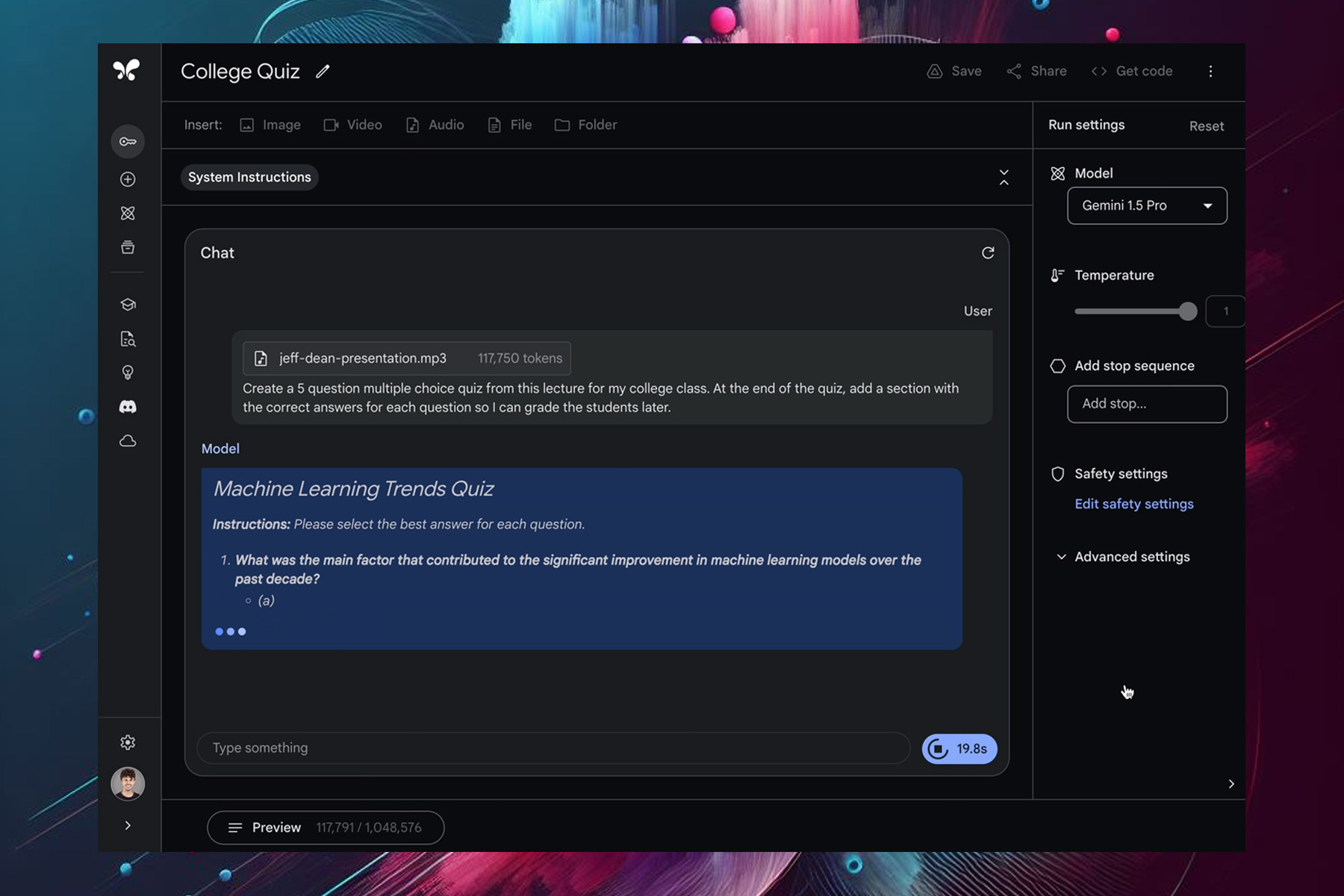
Google has recently updated its AI model, and Gemini 1.5 Pro is available in more than 180 countries through Google AI Studio’s public preview, as MSPowerUser writes.

Gemini now has a 1 million context window that allows developers to better analyze and understand information.

That’s not all, this version also has an audio recognition feature, so it can process spoken language. File upload is also supported, so you can upload an audio file and Gemini will analyze it.

Here’s what developers had to say about this feature:

You can upload a recording of a lecture, like 117,000+ token lecture from Jeff Dean, and Gemini 1.5 Pro can turn it into a quiz with an answer key.

The update also brings greater control and functionality to the developers, and there’s also support for system instructions so you can easily specify roles, formats, and goals.

Lastly, there’s JSON mode available that allows structured data extraction from both images and text. cURL is currently supported, and Python SDK support is coming soon, according to developers.

That’s not all from Google, there are also reports that Gemini will bring replay suggestions to Gmail for Android soon, so stay tuned.

Big discount alert: Get $600 off on Dell’s Alienware x16 R2 RTX 4090 gaming laptop

If you’re searching for a gaming laptop that appears awesome and has sufficient power to smoothly run the latest AAA games, there is a deal that cannot be ignored. The Alienware x16, a gaming laptop which shows style along with strength, is on sale now at $600 less than its first cost.

Why should I buy this Alienware x16 R2 gaming laptop?

To start, the Intel Core Ultra 9 processor is at the center of this beast along with an Nvidia GeForce RTX 4090 GPU – yes, an RTX 4090. This graphics card is a monster that pledges to keep your games running flawlessly for many upcoming years. And having 16GB of RAM on the graphics card itself, along with another 32GB in the system, means that you will not experience any lag or stuttering.

So you may question, what about storage? This machine has an impressive 2TB of SSD storage, giving plenty of room for your games and media. Yet, considering how large current-day games are, it’s possible that eventually you will start looking at offers for external hard drives.

Next, we talk about display. The Alienware x16 has a 16-inch FHD+ screen with 480Hz refresh rate and 3ms response time. Although this is good, people who really love gaming understand that using an external monitor can reduce the response time to only 1ms which gives you even more smooth gaming experience.

Yes, it still has the hefty price of $3000, but it’s still worth every buck. These types of offers do not stay available for long so if you have been imagining about owning a top-level gaming system then maybe now would be an ideal opportunity to make your dream come true.

Yet, the tech world doesn’t stop spinning with just one deal. If you’re in search of something that’s a bit more budget-friendly, or maybe a different kind of tech altogether, there is always more deals and discounts to explore. From laptops priced under $70 to huge markdowns on high-end models such as the Dell XPS 17; there are no limits for choice. And we should also mention renewed deals, where you can get top-notch laptops for a very low price.

Therefore, if you are a dedicated gamer, a working individual or simply someone requiring new technology, there is no shortage of options available. Be vigilant and you could discover an ideal deal that matches your requirements and financial resources.

If you are looking for low to mid-range options, discover our top picks for budget gaming laptops.

Do you believe the Dell Alienware x16 is a value-for-money purchase at the discounted price? Share with our readers in the comments section.

Moment 5 will now be available to all Windows 11 users

The Windows 11 Moment 5 Update was first released on February 29, 2024, for people who manually install updates from the Windows Settings app, but it was an optional non-security update

However, starting April 9 with the April 2024 Patch Tuesday updates, the Moment 5 update has become mandatory and available for all Windows 11 users.

Unlike the previous iterations, Moment 5 is smaller and has introduced a handful of features like Snap Layouts and  Windows Spotlight.

The update also brought changes to existing features like the Nearby Share feature, Copilot, and more. To learn all about Moment 5 in detail, you can check out this guide.

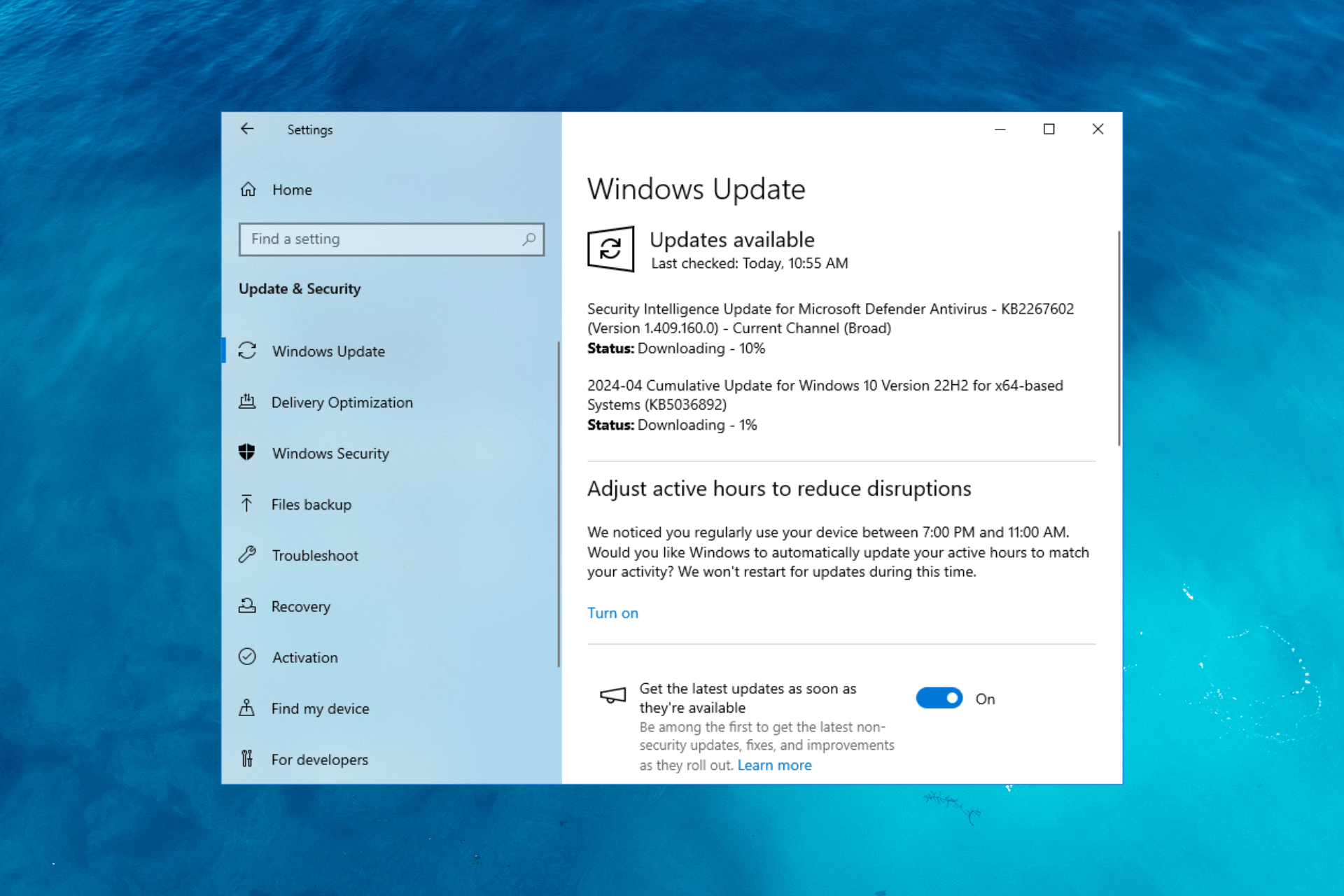
You can install the update manually by launching the Settings app. Once there, navigate to Windows Update, and click Check for Updates.

However, if you want to install the update manually, you can go to Microsoft Update Catalog, search for KB5036893, and click Download. Then, run the downloaded file and follow the on-screen instructions to complete the process.

Have you downloaded the Moment 5 update? If yes, then tell us how you feel about the changes and features introduced in the comments section below.

This feature in Spotify AI Playlist will quickly become your favorite

Spotify’s first AI-powered feature, AI Playlist, quickly lists out a series of songs that match the vibe of your prompt, allows you to preview or remove them, and finally create a playlist. At its core, the idea is simple and effective!

At present, the AI Playlist feature is not available to all. It has only been rolled out in the United Kingdom and Australia. Besides, since AI Playlist is in the Beta phase, we didn’t have high expectations from it. But as it turns out, we were wrong!

What we liked the most was the ability to refine the initially generated playlist. For instance, quick follow-up prompts like more pop or less upbeat will revise the generated list of tracks instead of creating a new one altogether. These are just two examples. Find out more to quickly and effectively refine playlists.

Spotify has confirmed that there will be improvements in the final version at the time of public release, but even in its initial state, AI Playlist is great. The official blog post reads,

You can use prompts that reference places, animals, activities, movie characters, colors, even emojis. The most successful playlists are generated with prompts that contain a combination of genres, moods, artists, or decades. It’s a brand-new tool, and still in beta, so we’ll continue to iterate and innovate on the experience. Stay tuned for what’s to come!

Considering its early stage, the only thing AI Playlist lacks at the moment is support for non-music prompts. For instance, if I want to create a playlist based on recent events, it’s not possible.

Besides, you may have trouble getting the best results from Spotify’s AI Playlist in the first few attempts or maybe for a day or so, but once you get the hang of the prompts, it will be a seamless experience. And you will be able to create a refined playlist in no time!

Spotify has been in the news for the last few months. An update for Spotify Desktop introduced the Jam feature, while there were also concerns about Spotify’s high data usage.

What do you think of Spotify’s AI Playlist? Share with our readers in the comments section.

Elevate your gaming potential with Razer BlackShark V2 Pro, which comes with superior audio quality, and all-day comfort

In a press release, Razer announced the Razer BlackShark V2 Pro for PlayStation and Xbox, the ultimate headset for taking your gaming experience to the next level.

The headphones ensure crystal-clear audio, advanced noise isolation, and multi-day use on a single charge. They boast 70 hours of battery life with Type C charging.

The ultra-soft flowknit memory foam cushioned ear pads make them comfortable to wear all day long, and the steel-reinforced headband and slider ensure robustness and flexibility.

Nick Bourne, Head of Razer’s Console, Mobile& Streaming Division, said:

The BlackShark headset is an icon among esports pros and hardcore gamers for a reason. Leveraging our position as the top gaming headset brand, we tuned these headsets for Xbox and PlayStation, working closely with pro gamers to refine the fundamentals of an esports class headset while introducing upgrades that we know highly competitive gamers are seeking.

He also mentioned that with the help of elite esports pros such as Hakis (Alliance) and Shotzzy (OpTic Gaming), both PlayStation and Xbox editions are tested and fine-tuned to meet the demands of top-most console gaming.

Key features of the BlackShark V2 Pro for PlayStation and Xbox:

Top-notch audio with HyperClear Super Wideband mic

The headband comes with a HyperClear Super Wideband mic, which ensures crystal-clear voice communication and immersive soundscapes

Brandon Dashy Otell, Professional Call of Duty player for OpTic, says:

This headset’s a game-changer: super light, insanely comfortable, and competition-ready—plus, the mic clarity is unbeatable; truly the definitive console headset for esports.

With the help of TriForce Titanium 50mm Drivers, it can deliver unparalleled audio clarity and pinpoint sound cues, giving the players a competitive edge.

Pro-tuned FPS audio profiles

Razer collaborated with popular esports athletes and prepared sound profiles specially optimized for renowned titles like Call of Duty, Apex Legends, and Fortnite.

Pro-Tuned FPS audio profiles

However, you can also adjust the game/chat audio settings from the headset without installing extra software.

Featuring Razer HyperSpeed Wireless, a 2.4GHz wireless connection, ensures high-performance and low-latency competitive play with audio synced to the game

The headset comes with built-in Bluetooth and Razer’s SmartSwitch on-device control, which helps you switch between a 2.4GHz or Bluetooth connection easily.

 Light as a feather and has a comfortable design

BlackShark V2 Pro, despite being power-packed with features and supreme quality material, only weighs 320 grams, i.e., 11.29 oz, which means you can wear them during your long gaming sessions without feeling fatigued.

The headset also provides superior comfort and comes with passive noise cancellation as it has soft, plush memory foam ear cushions for distraction-free gaming days or nights.

Flawless Reliability

BlackShark V2 Pro’s excellent battery life, which ranges from 48 hours on console to 70 hours on PC, makes it a great pick for uninterrupted and long gaming sessions without the hassle of recharging them often.

It comes with a 3.5mm jack and is suitable for consoles, computers, mobile devices, and even handheld gaming devices with either a USB-C port or Bluetooth audio feature.

Here is the detailed information provided on the Razer BlackShark V2 Pro’s official website:


Razer BlackShark V2 Pro for Playstation & for Xbox
DriversRazer TriForce Titanium 50mm Drivers
Surround SoundSpatial Audio with Windows Sonic on Xbox Series X|S, Xbox One, and Windows 10/11
PlayStation Tempest 3D Audio on PS5™
HapticsNo
Connectivity2.4GHz HyperSpeed Wireless or Bluetooth
Battery lifeUp to 70 hours
*Tested with PC (Up to 48 hours with PlayStation & Xbox)
Platform supportsPS5
Xbox One / Xbox One S / Xbox One X/ Xbox Series X|S
PC, Mac
Smartphones, tablets, and handheld gaming devices with Bluetooth audio capability or USB-C port

Prices

Both Razer BlackShark V2 Pro for PlayStation and Razer BlackShark V2 Pro for Xbox are priced at $199.99USD / €219.99 MSRP and available on Razer.com, RazerStores & Authorized Resellers starting
April 9, 2024.

 The White Edtion headsets of the series are also available at the same price and in the same stores, but you can also get them from the nearest Best Buy store in the USA.

In addition to this, Razer BlackShark V2 X for PlayStation and Razer BlackShark V2 X for Xbox are available at $49.99USD / €59.99 MSRP on Razer.com, RazerStores & Authorized Resellers starting
April 9, 2024.

Would you like to try these headsets? Share your opinions with our readers in the comments section below.

You can now go live on TikTok from a desktop using Logitech’s Streamlabs

TikTok is a heaven for live streamers all over the world but until now, you could do that only from your mobile. Gamers just got a breakthrough here because now you can use Logitech’s Streamlabs desktop app to stream directly on TikTok.

At the last year’s end, Streamlabs got the same feature to broadcast on Twitter (X) and Elon Musk demonstrated the feature himself playing Diablo IV.

Since then, gamers rushed to post their exploits on X and probably that’s going to happen with TikTok as well.

However, Streamlabs has some limitations for streaming on TikTok. The maximum video bitrate is 10Mbps and the maximum audio bitrate is 1Mbps. Logitech recommends a video bitrate of 8,000Kbps for 1080P streaming at 60FPS (the maximum possible resolution and frame rate) and 6000Kbps for 30FPS.

The good news is that there is no clip length limitation, but you should know that TikTok only supports H.264 encoders.

How do I broadcast live on TikTok from a PC using Streamlabs Dektop?

After you download Streamlabs Desktop and install it on your PC, if you launch the app, it will ask you to connect to a media platform so select TikTok. Then, log into your TikTok account and authorize Streamlabs to access it.

Finally, select TikTok to go live and hit the button to start. If you don’t have permission to stream, Logitech advises to select the Apply for TikTok Live Permission. You will be redirected to the TikTok application page to clear the permissions problem.

The only problem is that Streamlabs doesn’t support native chat in TikTok streaming sessions.

Here are some of the top tips from Streamlabs:

  • Use the Streamlabs Desktop Dual Output feature to simulcast on TikTok, plus one horizontal-orientated platform to expand your reach. Learn more about Streamlabs Dual Output in our handy guide.
  • Set up your TikTok LIVE stream with custom overlays and alert themes by installing one from the Streamlabs Library. There are thousands to choose from.

Soon enough, your gaming adventure will be out there for everyone to see on TikTok. How cool is that?

If you try the new TikTok live streaming with Streamlabs, let us know how it went in the comments section below.

Microsoft Edge to skip ads while translating video’s audio and subtitles

Microsoft Edge is constantly being improved with new features, one of them being video translation.

It seems that this feature was updated recently, and that might change how Edge works with ads.

Video translation in Edge might skip ads

A few months ago, we wrote about the video translation feature in Edge, but the feature was in the early stages and it wasn’t working.

Video translation was spotted in Egde Canary recently with some basic settings, but still unable to translate anything.

Speaking of which, this feature was updated and now it supports Hindi, German, Spanish, Italian, and Russian languages.

While the feature is still not working, when trying to use it you’ll get a message saying: The language you selected needs to be installed and we’ll alert you when your video is ready.

To enable this feature, you need to do the following:

  1. Open Settings and navigate to Languages.
  2. Select Translation.
  3. Lastly, enable Offer to translate videos on supported sites.

After doing that, you should see a translate icon when hovering over a video and you’ll be able to access it.

Currently, YouTube has the option to translate videos, and you can enable it by going to Settings and choosing Subtitles and the desired language or the Auto-translate option.

On the other hand, this feature on Edge offers both audio and subtitle translations, so it’s more advanced than its YouTube counterpart.

Also, it seems that the translate feature will skip ads or at least won’t translate them, but since the feature isn’t working yet, we haven’t had the chance to properly test it.

Overall, this sounds like an amazing feature, and we can’t wait to see it in action in future versions of Edge.

Google Axion boasts 30% higher performance and superior efficiency, set to take on Microsoft and Amazon

Google is designing custom Arm-based CPU chips, Axion, initially to be used in its data centers and then rolled out for Google Cloud customers later in the year.

With Axion, Google aims to tap into the cloud services segment, where it already has a presence, and not compete with players in the hardware market.

The California-based tech giant won’t be selling these chips. Instead, it will employed to facilitate and support the native cloud service, Google Cloud, which the customers can subscribe to.

Talking about Axion, Google Cloud’s Vice President Mark Lohmeyer, in an interview with Reuters, said,

We’re making it easy for customers to bring their existing workloads to Arm. Axion is built on open foundations but customers using Arm anywhere can easily adopt Axion without re-architecting or re-writing their apps.

Axion is meant to enhance the performance of general-purpose workloads such as web and app servers, open-source databases, media processing, data analytics engines, in-memory caches, CPU-based AI training and inferencing, and more!

Highlighting the performance and efficiency of Google Axion, the official blog post reads,

Axion processors combine Google’s silicon expertise with Arm’s highest performing CPU cores to deliver instances with up to 30% better performance than the fastest general-purpose Arm-based instances available in the cloud today, up to 50% better performance and up to 60% better energy-efficiency than comparable current-generation x86-based instances.

Axion is also an environmentally friendly option, delivering more computing power at the same electrical consumption, making it both sustainable and financially viable for users.

Arm CEO Rene Haas also spoke about Google Axion.

Google’s announcement of the new Axion CPU marks a significant milestone in delivering custom silicon that is optimized for Google’s infrastructure, and built on our high-performance Arm Neoverse V2 platform. Decades of ecosystem investment, combined with Google’s ongoing innovation and open-source software contributions ensure the best experience for the workloads that matter most to customers running on Arm everywhere.

With Axion, Google intends to decrease its dependence on Intel and NVIDIA. Microsoft, too, has previously launched custom silicon chips to ramp up its cloud infrastructure. And much like Microsoft’s custom chips, Axion will also help train AI models!

Other tech giants are also making strides in the AI space. Intel launched Gaudi 3, NVIDIA is working on its own AI chips, Microsoft is in the process of integrating Copilot while also boosting AI capabilities for enterprise users, and Apple has acquired multiple AI startups.

What do you think of Google Axion? Share with our readers in the comments section.

GPT-4 with Vision is available, allowing JSON mode and function calling

Recently, Open AI released GPT-4 to everyone in Copilot. Now, we have great news for coders. The LLM developer announced that they have launched GPT-4 Turbo with Vision, or GPT-4V in the API.

According to the documentation, GPT-4V comes with a JSON mode and function calling that will help coders with visual data processing. It also features 128,000 tokens in the context window, just like GPT-4 Turbo.

Basically, GPT-4V will be able to process images from a link, or by passing the base 64 encoded image directly in the request. Microsoft also provided a python code example of usage:

from openai import OpenAI

client = OpenAI()

response = client.chat.completions.create(
  model="gpt-4-turbo",
  messages=[
    {
      "role": "user",
      "content": [
        {"type": "text", "text": "What’s in this image?"},
        {
          "type": "image_url",
          "image_url": {
            "url": "https://upload.wikimedia.org/wikipedia/commons/thumb/d/dd/Gfp-wisconsin-madison-the-nature-boardwalk.jpg/2560px-Gfp-wisconsin-madison-the-nature-boardwalk.jpg",
          },
        },
      ],
    }
  ],
  max_tokens=300,
)

print(response.choices[0])

Open AI points out that there are some important limitations to GPT-4V. Within this example, the model is prompted about what are the contents in a certain image. The LLM understands the relationship between certain objects from the image but can’t provide further information about their location. You can ask it for instance what color is a pencil on the table but you’ll probably get no answer or a wrong one if you ask it to find the chair or the table.

The GPT-4V guide, also explains how to upload 64 encoded images or multiple images. Another interesting mention is that the model is not ready to process medical images such as CT scans. If there is a warning about that particular usage type, probably someone tried doing that for diagnosis.

You will also find a guide on how to calculate token costs. For instance, the high mode cost for a 1024 x 1024 square image in detail is 765 tokens.

What do you think about the new GPT-4 Turbo with Vision? If you’ve tried it, tell us about your experience in the comments section below.

New Windows 10 Update brings Bing Spotlight integration on desktop & more

Windows 10 KB5036892 was released on April 9, 2024, and the new update brought on exciting features. One of them is Bing Spotlight integration on the desktop.

Bing Spotlight integration

Spotlight on the desktop feature, when turned on, will display new Bing-powered images as your desktop wallpaper all by itself. To enable the feature, open the Settings app, go to Personalization, then Background. For the Personalize your background option, select Windows spotlight from the drop-down menu.

Just like the lock screen, if you want to learn about the image on your desktop, you can click the Learn More button, which will redirect you to Bing for more information.

Add content to your lock screen

Starting with this update, you can add content like MSN cards that can appear on your computer. To set it up, you need to go to Personalization under the Settings app and select Lock screen. Now choose the Lock screen status from the drop-down as you like. So, you can choose weather, updates on sports, traffic finance, and more to get displayed on your lock screen.

Windows Hello for Business

Windows Hello for Business was introduced to Windows 10 a while ago. With the latest update, IT professionals can use mobile device management (MDM), and disable DisablePostLogonProvisioning to prevent a prompt from appearing when users sign in to an Entra-joined machine.

Taskbar will have special skills in the European Economic Area

In EEA, the search box on the Taskbar will now show you search highlights, providing you with quick information and other updates.

Along with this, Microsoft also fixed an issue that caused the on-screen keyboard to act funny. Once you update, you might also see an option to upgrade to Windows 11 if your device is eligible for upgrade. However, you might not see it right away.

To access the features, you need to install the update. Launch the Settings app, navigate to Windows Update, and click Check for Updates.

However, if you want to install the update manually, you can go to Microsoft Update Catalog, search for KB5036892, and click Download. Then, run the downloaded file and follow the on-screen instructions to complete the process.

If you don’t see the features right after installing the update, you need to wait sometime, as Microsoft has already mentioned that the features will roll out gradually.

The Rust CVE-2026-24576 vulnerability lets hackers access your system

Cybercriminals discovered how to exploit the critical security vulnerability (CVE-2024-24576) in the Rust standard library. Through it, they can threaten Windows systems with injection attacks. Cybercriminals can use this technique to execute malicious programs on your device.

In addition, according to the Common Vulnerability Scoring System (CVSS), this issue with the Rust standard library is critical. After all, hackers don’t need you to interact with their malware to exploit it remotely with low-complexity attacks.

What does the critical security vulnerability (CVE-2024-24576) mean?

According to the Rust security team, the critical security vulnerability (CVE-2024-24576) means the Rust standard library can’t handle special characters used in batch arguments. So, when Rust programs execute the Command API to use batch files, wrongdoers can control arguments and find a way in. Afterward, they can run malicious commands on your system.

The CVE-2024-24576 vulnerability doesn’t affect other operating systems or Rust programs that don’t use batch files. Additionally, the flaw is present only in Rust versions before 1.77.2.

The Rust security team had a challenge patching the vulnerability due to the complexity of the cmd.exe. So, they couldn’t escape all the arguments. However, they found a way around it by modifying the Command API. After the update, if the API can’t escape an argument, it will return an InvalidInput error.

If you need to bypass the standard escaping, use the CommandExt::raw_arg method. It will allow you to handle trusted inputs or to make your escape.

Even if there are a few critical security vulnerabilities like (CVE-2024-24576), the White House Office of the National Cyber Director (ONCD) considers that tech companies should use memory-safe languages like Rust. After all, they minimize the memory-safe vulnerabilities hackers use to execute malicious codes. On top of that, they cause crashes and data corruption.

Ultimately, to fix the critical security vulnerability (CVE-2024-24576) of the Rust storage library, upgrade it to 1.77.2. In this way, you will prevent threat actors from exploiting it. Thus, they won’t be able to use special arguments to execute malicious commands.

What are your thoughts? Do you use Rust applications? Let us know in the comments.

Microsoft is shoving default Copilot prompts in Edge’s address bar, but they’re irrelevant and annoying

Microsoft tends to push its products to users, and it has been doing that for years, and Copilot is no exception.

It seems that the company is doing the same by having Copilot prompts right in the address bar in Edge.

Microsoft is testing Copilot prompts in the address bar in Edge

Copilot in Edge has been present for a while, and it has been confined to the sidebar, so you didn’t have to use it, unless you needed it.

This was useful since you could activate it when needed, and you would get a list of prompts you could use.

It seems that Microsoft is making some changes, and Copilot prompts are now available in the address bar in the Dev version of Edge.

This can be rather annoying since you’ll get a different prompt whenever you open a new tab thus making the prompts irrelevant.

To make this feature more useful, Microsoft could make it work with your recent searches or trending searches, but in its current form this feature feels useless.

While there’s no way to get rid of these suggestions, they at least don’t appear in the Private Browsing mode.

It’s not uncommon for Microsoft to push its products, and speaking of which users are furious by the new Outlook. As for Copilot, some users are disappointed by Copilot, so perhaps Microsoft needs to reconsider its strategy.

Spellcheck for Notepad is rolling out, Windows Insiders first to test it

As you may remember, Microsoft is planning to add the spellcheck feature to Notepad, and it seems that we finally have some news about this feature.

It appears that this version of Notepad is rolling out for testing, so here’s what you should know.

Spellcheck for Notepad is slowly rolling out to Windows Insiders

We already wrote that Microsoft was working on a version of Notepad with spellcheck feature not that long ago, and now it seems that this version is rolling out, as MSPowerUser writes.

According to Windows Blog, the feature is rolling out to Windows Insiders in the Beta and Release Preview Channel:

UPDATE 4/9: The below update for Notepad (version 11.2402.22.0) that introduces spellcheck has begun rolling out to Windows Insiders in the Beta and Release Preview Channels.

The spellcheck feature will be enabled by default and it will underline misspelled words allowing you to correct them by selecting the misspelled word or by using Shift + F10 shortcut.

Of course, you’ll be able to ignore certain words in the document or add them to the dictionary to permanently ignore them.

You can also disable spellchecking for certain file types or temporarily disable it for the current file. Overall, it’s a welcome feature and we hope to see it available soon.

This is not all that Microsoft has in store, and the new Microsoft Store is 40% faster than before, and the Settings app will get some new features in the upcoming feature update.