Gamers couldn’t hide their excitement when the news broke that Final Fantasy XIV was coming to Xbox. Soon, we had an open beta for the game. And now, on March 21, 2024, Final Fantasy XIV Online will finally be available to all players with a new currency, the FFXIV Coins!
These coins will be used for purchases and payments and can be bought from the Microsoft Store. The developer’s official website describes FFXIV Coins as,
Payment for service fees and optional item purchases will require FFXIV Coins, which can be purchased from the Microsoft Store. Please purchase FFXIV Coins before using the Mog Station or FINAL FANTASY XIV Online Store.
With the Xbox Series X/S Version of Final Fantasy XIV, you can only use the FFXIV Coins for payments. For other platforms, regular payment options will be available.
The process of redeeming is more complicated than anything we have ever seen. For instance, after purchasing coins from the Microsoft Store, you have to log into the game and then have the FFXIV Coins credited to your Square Enix account.
As you would expect, users are unhappy and voicing disapproval
A few took to X (formerly Twitter) to voice their disapproval.
It's so funny that we've been begging SE to make account management and billing more simplified for 10 years and instead of doing that they made it even more complicated for no reason https://t.co/BKTCJjjVdOpic.twitter.com/WpRIWZyPA5
Others voiced their frustration on forums like Reddit, where several threads were created to discuss the change. Also, a large bunch of users are confused about how this would affect them.
Frankly, id suggest any xbox player just buy the starter edition for pc regardless just for that to avoid the hassle of these “coins”
Why anyone would want to play this on Xbox is beyond me lol
Having to pay for Gamepass and this FFXIV Coins stuff really makes Xbox the worst version to play
Xbox was already the worst way to play this game, but I feel like the coins are just a meme at this point.
The new FFXIV Coins payment method is to help Microsoft earn its share, but honestly, it’s too complicated.
They must come up with a simpler way, or else the Final Fantasy XIV’s release on Xbox won’t create as much hype. It’s been available on other platforms, and players will prioritize those over Xbox for peace of mind.
What do you think about the introduction of FFXIV Coins? Share with our readers in the comments section.
On 18 March 2024, Dell released a new firmware update, M2B104, for the Alienware AW3225QF gaming monitor.
The update, listed on Dell’s website, is marked as Critical because it introduces patches for critical issues. As per the official page, fixes and enhancements included in the Alienware AW3225QF Monitor Firmware Update package version M2B104 are:
Fix over-sensitivity of abnormal temperature detection potential mis-trigger Abnormal Thermal detection message pop-up.
Fix potential image clipping at the edge of the left or right side of the panel.
The 10.96 MB firmware update, compatible with Windows 10 (both 32-bit and 64-bit) and Windows 11, takes roughly 10 minutes to install.
To install, download the Alienware_AW3225QF_FWUpdate_M2B104_Windows.exe file from Dell’s official website > run the setup > follow the on-screen instructions to complete the process.
Before you start, plug the gaming monitor into the PC and ensure the connection between the two is not lost during installation. If that happens, your Alienware AW3225QF monitor may stop working.
Based on the initial feedback, most users are satisfied with Dell’s prompt response to their queries and, with it, quickly rolling out the firmware update to address the existing issues.
Have you installed the firmware update? Share any bugs or issues, if present, with our readers in the comments section.
However, another leak confirms that an unannounced Xbox console, identified as model number 2089, has been certified in South Korea. It is also said to be labeled as an Xbox dev kit.
Rumors have been circulating since 2023 that Microsoft is planning a mid-gen hardware refresh for the Xbox Series consoles. These reports also suggest that the new version could only be a digital-only version of Series X.
Furthermore, during Microsoft’s legal dispute with FTC due to the acquisition of Activision Blizzard, some court documents even revealed the design of this disc-less Xbox Series X. The documents also revealed that the device is cylindrical in shape instead of the conventional rectangular one.
However, the news of South Korea’s National Radio Research Agency (NRRA) certifying an unannounced piece of Microsoft hardware has confused us.
The March 18 regulatory listing was first spotted by X (formerly Twitter) user KoreaXboxNews labels the device as an XDK console, which means it is an Xbox dev kit, which is a modified version of a system with inbuilt debugging tools & other features used for game development.
This is not the first time Microsoft has gotten an XDK certificate from the Eastern company; the same thing happened at the time of the Xbox Series X and Series S dev kits on June 11, 2020, and after three months, the consoles were officially announced.
Microsoft's new Xbox Dev Kit (XDK) console was certified by the National Radio Research Agency in Korea today. This means that you can use the device in Korea. It is… pic.twitter.com/jZAuYlynV4
— Xbox News for Koreans ?? – 네이버 Xbox 정보 카페 (@KoreaXboxnews) March 18, 2024
The new device is denoted as model number 2089, wherein the Series X and S dev kits are mentioned as 1882 and 1881/1883. Like Xbox Series X and Series S, NRRA NRRA identified China and Vietnam as the countries of origin of the console.
If we look at past records and Microsoft patterns, we can hear about the new Xbox console after three months, which means it will be in June this year. Also, the existence of a regulatory listing means this console could soon be shipped to developers.
Microsoft has already confirmed that the company is working on the Xbox Games Showcase for June 2024; we may also hear about the new console.
As the disc-less Xbox Series X rumors hit the market, there was speculation about the console’s price, color, design, and more. Some think the console would be white, while others claim the price could be between the Series X and Series X.
However, these seem to be just the rumors as of now; Microsoft has not confirmed any news related to the latest console, and it looks like we will have to wait at least till June for any confirmation.
What do you think about the new Xbox console? Share your opinions with our readers in the comments section below.
Windows Hello allows users to protect their PC and important data by using their PIN, fingerprint, or face.
This is a very popular feature, and due to its popularity, it might become a default authentication method for users in Google Chrome.
Windows Hello might become the default authentication method in Chrome
As you know, Chrome already offers Windows Hello authentication, and you can use it to verify your identity when auto-filling passwords or when using autofill for payments.
Currently, this feature allows you to choose a different verification option, such as your password, but that won’t be the case anymore.
The new dialog doesn’t offer any other verification options, so you’re forced to use Windows Hello. This is a welcome addition since it requires unauthorized users to know your PIN as well or to use biometric authentication.
Currently, Chrome uses the Wincred OS Authentication mechanism, but moving forward it will switch to UserConsentverifier API. The reason behind this change is the latency that occurs when using Wincred.
The service won’t be fully retired, and if Windows Hello is configured, the OS authentication will use the UserConsentverifier API. If not, Wincred will be used instead.
This is an exciting feature that should improve the security of your passwords and payment information, and we can’t wait to see it available, but it’s not the only feature coming to Chrome.
Microsoft’s push for AI in Windows and across all its native software has been evident in the last few months. Now, the Redmond-based tech giant is holding an exclusive event to share the company’s plans for AI, both development and deployment.
According to reports in The Verge, Microsoft has emailed invites to journarlists to attend the May 20 AI event, scheduled for morning, a day before the Microsoft Build 2024 event starts.
The May 20 event won’t be live-streamed and will only be open to media persons who received an invite.
What can you expect from the May 20 event?
Microsoft is set to showcase the ARM-based Surface Pro 10 and Surface Laptop 6 for the first time during the event. This dispels previous rumours of the two arriving as early as March.
Also, during the May 20 event, we will find out more about Microsoft’s plan for AI integration in Windows. The new AI-based File Explorer could be a highlight!
Lastly, Microsoft Copilot may take the central stage. The tech giant has extensively worked on the AI-based chatbot and integrated it into practically everything for users to leverage the power of AI, Microsoft Security Copilot being a prime example!
We will be keeping a close eye on it and will bring more updates to you. For now, do share what you think is Microsoft’s vision of AI in the comments section.
Ever since Apple started letting users choose the default browser on iOS devices in compliance with the Digital Markets Act (DMA), third-party browsers have witnessed a significant increase in downloads.
As expected, the Opera browser is the next in line to show a similar trend. In an official press release, Opera claims to have secured a 164% increase in user base between March 5 and March 7, as Apple showed the Choose Your Default Browser prompt.
Reacting to the developments, EVP Mobile at Opera, Jorgen Arnesen, said,
The day the ballot screen started to appear, we saw a spike in the growth of our daily active users, especially for Opera for iOS. We see this as indicative of two things: for one, the importance of regulation to provide a more level playing field, and for another, that users are hungry for new and innovative products that can deliver a superior online experience
In almost all regions across the EU, Opera witnessed a massive surge in downloads. It was 402% in France, 143% in Spain, 56% in Germany, and 68% in Poland.
The increase was significantly higher for iOS than for Android because the latter always allowed changing the default browser.
What surprised many was Apple recommending Microsoft Edge as the default browser, especially at a time when the fight over EU rules was becoming murkier. It appears that Apple’s recommendations were based on App Store reviews.
Earlier, Microsoft, too, complied with DMA. Subsequently, it allowed users in the EU to uninstall Edge and Bing web search through the native Windows settings.
Remember, an increase in installs doesn’t necessarily indicate that users will permanently switch to other browsers from Safari. Many may have just installed other browsers out of curiosity and might soon uninstall them. We will have to wait another few weeks to get a clear picture!
Which browser do you think would be the best choice for iOS after the enforcement of DMA? Share with our readers in the comments section.
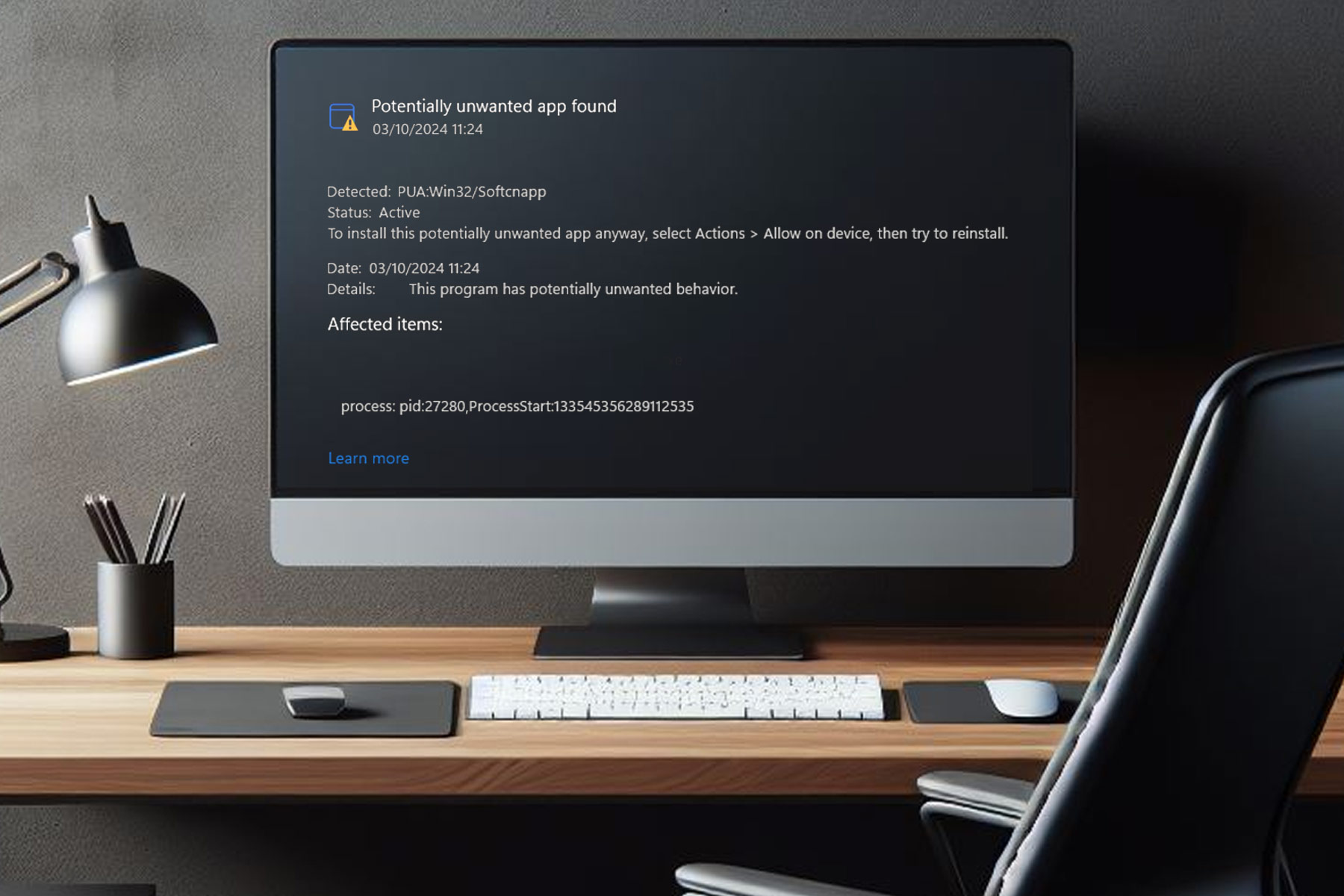
Viber is a popular messaging app, and it’s available on multiple platforms, including PC.
However, there are reports by users saying that Windows Defender labels Viber as a potentially unwanted app, so we decided to investigate these claims further.
Windows Defender marks Viber as an unwanted application, here’s what you should know
This is a recent issue, and it was been reported on the Viber subreddit a few days ago. Naturally, users were concerned, but the good news is that developers are already working on this issue.
I got the same and i deleted viber as of now and created a support ticket. Let’s see what happens…
Edit: Support team told that they are trying to fix the issue ASAP.
Many are speculating that the problem was caused by a recent Viber update:
i think its something having to with an update bc i remember some days ago viber wanted to an update also my windows defender found whatever this is in everything that has to do with viber, vuber updates etc
Users speculate that this is likely due to data-collecting features in Viber:
I think that it probably has to do with them adding more and more ads in viber. As I understand this “PUA:Win32/Softcnapp” collects data in order to provide personalized ads. But this is just my thought on the matter.
More proactive users scan the file with additional scanners, and it seems that only Microsoft is listing it as malicious, thus making it most likely a false positive:
I just downloaded the install from viber.com and scanned it on virustotal.com but it says only Microsoft listed it as malicious. (PUA:Win32/Softcnapp to be exact)
One user claims Rakuten Viber personnel recommended updating antivirus definitions by following these steps. This worked for several users:
Please update the security signature files in your Windows Security settings as a workaround.
Select Start > Settings > Update & Security > Windows Security > Virus & threat protection > Select Check for updates (or Virus & threat protection updates in previous versions of Windows) > Under Security Intelligence, select Check for updates
If nothing else works, you can always get a previous version from a reliable third-party source and use it instead:
I just uninstall it and roll back to the latest safe version which is the Viber 21.9.
While this seems concerning, it’s most likely a false positive, and updating the security definitions should fix the problem.
Microsoft has been actively upgrading its native video conferencing app, Teams. A few days ago, we saw improvements to the Microsoft Teams app for Android and iOS. This time around, Microsoft shared a series of upgrades meant to enhance the app experience for end users and IT administrators.
Third-party developers who have their apps listed on the Teams App Store stand to gain a lot. Microsoft prioritized their feedback and, based on it, rolled out a wide array of features, including AI-capabilties.
So, in the latest series of changes listed on the official blog, Microsoft has something for everyone!
List of latest improvements to Microsoft Teams
Aimed at end users
Microsoft Teams now allows users to rate and review apps, thus helping developers refine them and aiding users in making an informed choice.
With the introduction of ratings, Teams App Store search will also transform. Apps rated higher will be shown first, usage being another vital parameter. Besides, support for more keywords is being added.
Microsoft is simplifying the app installation experience, ensuring consistency and minimizing the number of steps.
Image source: Microsoft
Aimed at administrators
New User Requests tab on the App Details page for administrators to identify which apps users want. They will also have information about who the request is coming from.
The Teams Admin Center dashboard will display the most requested apps, helping admins prioritize their deployment. A Browse by app requests filter is also added.
Users will automatically receive a notification with the app installation link once their request is approved by the administrators.
Improvements to the app management and deployment. Admins now have better control and can also specify individual groups, in addition to users, while configuring app access.
Changes made by the admins to reflect in real-time, eliminating any confusion that previously occurred due to the 24-48 hour delay.
Aimed at app developers
Microsoft’s Instant App Tabs will simplify the app onboarding experience, increasing the user base.
Developers can configure apps to send activity notifications without explicit admin approval. Also, Team members, like owners, can now install apps with RSC.
Improvements to the Adaptive Card, set to enhance attention.
Better deep linking to ensure users can easily navigate, and if required, be shown prompts to request an app.
Most of the features discussed earlier are either already available or will be rolled out in a phased manner over the next few months. Check for any updates, and if the feature is still not there, wait for a few weeks.
Amongst the many changes, the Microsoft Teams AI Note Taker has captivated thousands and is extensively employed in meetings. Try it once!
The new update brings caret browsing to PDFs, which will make navigation easier. Firefox View has been improved, and now you can sort tabs based on their activity or tab order.
This version also populates Windows Taskbar lists more efficiently, thus making your browser experience smoother.
Qwant has expanded to all languages in the France region, as well as Belgium, Italy, Netherlands, Spain, and Switzerland. Similarly,
Ecosia is now available to all languages in the German region along with previously mentioned regions, including also Sweden and Austria.
As for macOS changes, this version of Firefox uses macOS fullscreen API for all types of fullscreen windows thus improving macOS user experience.
The update brings various security fixes, and developers will be pleased to hear that there’s now support for AbortSignal.any and HTTP(S) and relative URLs when creating WebSockets.
Overall, it’s a decent update, and we expect to see it later today, so be sure to get it.
We all know Microsoft has been swiftly moving Control Panel features to Settings for quite some time so that users can accommodate the changes. It looks like with Windows 11 24H2, we might see more of these changes, as spotted by WindowsLatest.
Power & Battery
The preview builds showed many changes, including advanced options in the Power & Battery category. Starting from 24H2, if you use a laptop to run Windows 11, you will get the Lid, power, and sleep button controls option under the Settings app.
However, if you are a desktop user, you will get the Power button controls option in the Settings app, but you won’t find the hibernate option in the dropdown menu.
After the Moment 5 update, in Settings on a desktop, we got the options to change the Power mode and Screen & Sleep time. There is an additional option, Hibernate, in the Screen and Sleep timeouts dropdown menu for laptops.
Display Color Management
With Windows 11 24H2, you can use the legacy tool from the Color profile section under Display settings. The feature helps you improve the display output and map the color profile to multiple displays.
Launch the Settings app and go to Display>Color profile>Add profile button. Then, choose a color profile file, load it, and apply the new color profile. Windows had an automatic color management option to adjust colors on the supported screens earlier.
Storage Pool’s advanced toggle
Now, you can delete a Storage Pool right from the Settings app with the Delete this Storage Pool option. Earlier, you needed to go to the Control Panel and navigate to System and Security>Storage Spaces to manage them.
Another change in this feature is that in the Control Panel, you need admin privileges to make changes, but under Settings, you don’t have elevated rights to perform any action.
Drive Encryption for Windows 11 Pro
With Windows 11 24H2, like Windows 11 Home users, Windows 11 Pro users will also get the Device Encryption option in the Settings app.
To access it, go to Privacy & Security>Device Encryption. You can use it to encrypt data in the installed drives, but for USBs, you need to use the BitLocker page in the Control Panel.
Microsoft is far from done moving features and settings from Control Panel to Settings, and in the future, you may find yourself surrounded by more changes and feature migrations.
Windows 11 24H2 is in preview and is expected to become generally available in Q3 or Q4 of this year. If you want to know if your CPU can handle this update, we have a detailed guide for you.
What are your thoughts on the matter? Share your opinions with our readers in the comments section below.
The release dates of PS5 Pro and GTA 6 are, coincidentally, closely aligned. The former will be shipped in late 2024, while the latter will be out by early 2025 for consoles, Xbox and PlayStation. If reports are to be believed, PS5 Pro and GTA 6 will be the perfect duo and the first choice for many.
Leaked specifications, shared by Insider Gaming, suggest that PS5 Pro will be the most powerful gaming console to date. It offers 8k resolution support, 45% faster rendering, 4x Ray Tracing, and 3x faster performance than PS5 and Xbox Series X.
Had there been any other console releases lined up, PS5 Pro would have faced some competition, but this time around, it doesn’t have to put in too much effort, at least when GTA 6 hits markets!
Phil Spencer confirms Xbox is not planning any hardware overhaul
Microsoft is not expected to release any improved consoles in the next year. Its gaming division CEO, Phil Spencer, has, on multiple occasions, denied plans to release an upgraded Xbox. In an interview with Bloomberg, Spencer said,
That’s not the feedback we’re getting right now. Right now, we’re pretty set on the hardware we have.
All reports so far suggest a 2027-28 release date for the next-gen Xbox console with significantly upgraded and improved hardware. Until then, PS5 Pro is expected to retain the top console spot and will outperform Xbox!
Gamers excited about playing GTA 6 on PS5 Pro
Based on what we see across forums like Reddit, it’s evident that a large part of the gaming community, especially fans of the GTA franchise, are excited about playing GTA 6 on PS5 Pro.
Stable 60fps and 1440p is all I want. Anything more is a bonus.
I hate that I’m gonna buy this lmao. I wouldn’t even consider getting the Pro if it wasn’t for GTA 6. I NEED to experience the game at launch the best way I can.
I am buying a good TV and a ps5 pro purely for Gta 6.
As expected, a few initially planned to wait for the PC release of GTA 6, but since it’s scheduled for early 2026, almost a year after the console release, the PS5 Pro automatically emerges as the best available option. Seems like everything is just falling into place for Sony!
The release of GTA 6 will further widen the gap between Xbox and PlayStation sales figures, and the former will have a lot of catching up to do.
Of course, a lot of the things we discussed are speculative and based on leaks, but this is the most possible scenario at the moment.
Would you get a PS5 Pro to play GTA 6 or wait for the PC release? Share with our readers in the comments section.
Monitors for work and gaming are going through a renaissance as customers become a bit more sophisticated in their requirements following a work-from-home scramble for panels at the height of the pandemic, and Lenovo is offer one of the best bangs for bucks with the Lenovo Legion Y32p-30.
Odd naming convention aside, the Lenovo Legion Y32p-30 is a gaming monitor that packs a punch with its impressive features and performance for around $599. Yes, $600 USD is still expensive for a gaming monitor, however, customers walk away with a panel that offers support for KVM switching, 1.07 billion colors, PiP/PBP, 4K resolution, 144Hz refresh rates, a headphone arm, and more.
However, for a dedicated gaming monitor boasting similar features and specs, some monitors come in at $800 or more, so Lenovo’s Legion Y32p-30 remains competitively priced against options such as the Gigabyte M32U, albeit still expensive if gaming isn’t the majority reasoning for purchasing.
Design and Ergonomics
Primarily, the Legion Y32 is an understated looking monitor that can pass for a gaming and work-space monitor. Unlike some more dedicated gaming monitors that embezzle themselves in LEDs, angular designs, and garish branding, the Legion Y32 gets praise for its minimalist elegance. The monitor’s design is understated yet sophisticated. The slim bezels create an immersive viewing experience, allowing you to focus on the screen content without distractions.
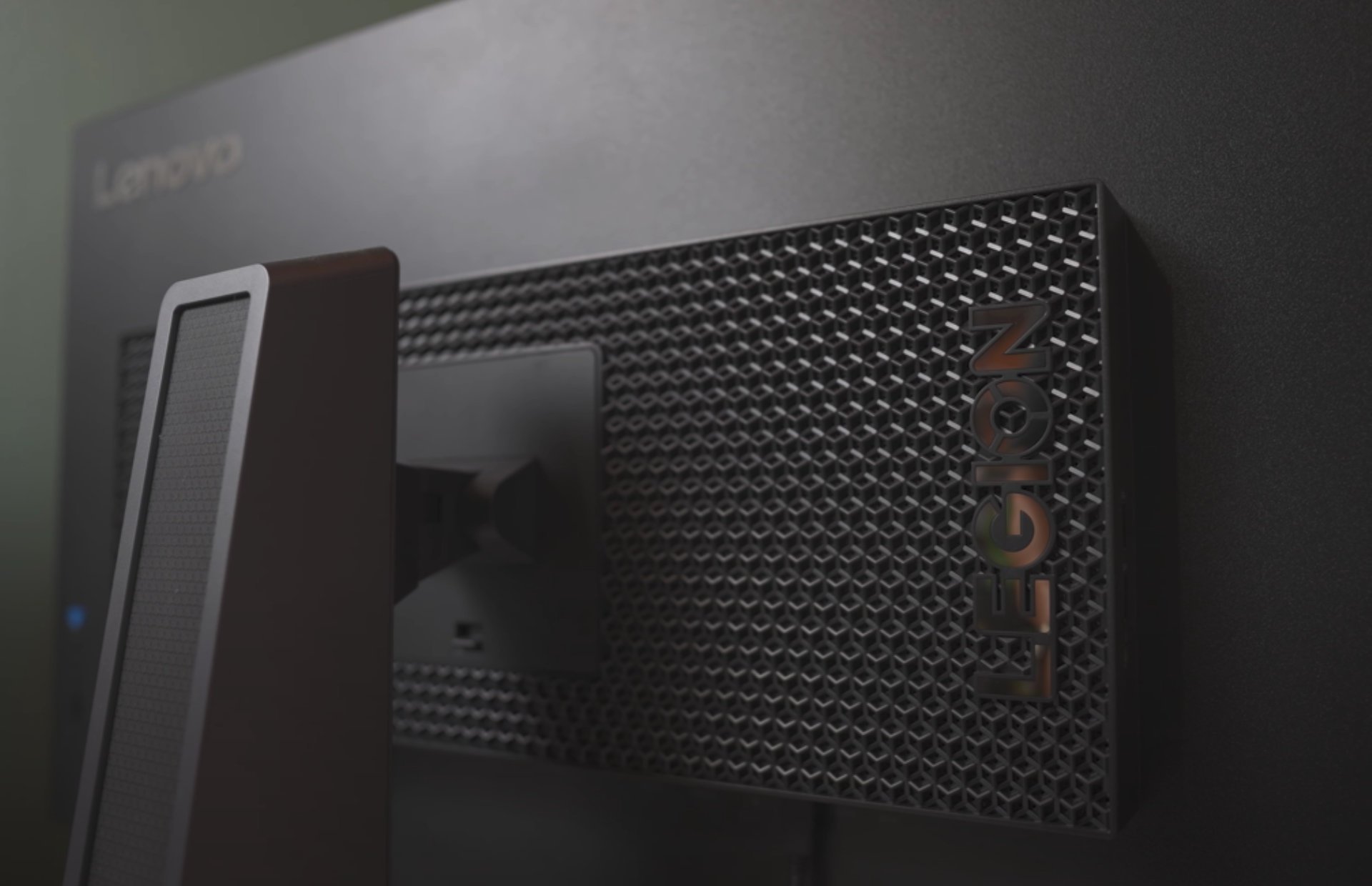
Yet, there are still shimmers of gaming-focused design that echo in its appearance with a subtle RGB-strip LED light box that help indicate power and rest modes for the monitor, as well as a honeycomb pattern around the boxed incasing for the components centered on the back of the display.
As for the build, the monitor feels solid and well-built with a hefty 22lbs weight to the display and 30lbs when the base is attached. The base provides stability, and the stand allows for height adjustment, swivel, and tilt, all at the cost of space. The Y-designed stand takes up a generous portion of desk space if chosen as the presentation mode over connecting the panel via Vesa mount.
The matte black finish of the Legion Y32p-30 exudes a professional vibe that I prefer over the glossy or shiny plastic looking solid black choices other OEMs use for their monitors.
The Y32p-30 is thin, and its “near edgeless” bezels create an immersive viewing experience.
I chose not to utilize the VESA mount support for this monitor, largely due to its weight but I was able to enjoy the flexibility of the base stand with its ability to swivel, tilt, and leverage height adjustments. The 30-degree swivel, 5-degree downward tilt, and 22-degree upward tilt cater to your comfort.
Lastly, I must mention the attached headphone arm that can be accessed from a pivot point on the side of the panel. The integrated headphone arm attachment is a thoughtful addition, and it keeps your headphones within arm’s reach, minimizing clutter on your desk or the necessity for your own hack-built solutions in the future.
For the gaming focused customer, the attachment ensures that your headphones are easily accessible without taking up additional space and it’s especially useful during intense gaming sessions or work calls.
Display
The Legion Y32p-30 boasts a sharp 4K resolution that delivers stunning visuals. Whether you’re gaming, streaming, or working, the high pixel density ensures crisp images and text. But that’s not all—the monitor also supports a refresh rate of 144Hz, providing smooth motion and reducing motion blur during fast-paced gaming sessions. The combination of 4K and 144Hz is a treat for both gamers and content creators.
Lenovo’s Legion Y32 offers a large 32-inch IPS LCD screen with ample real estate for gaming, productivity, and multimedia tasks as well as support for 144Hz max refresh rate and several adaptive sync technologies. The 4K resolution ensures sharp visuals, making it ideal for content creators and gamers alike.
However, while the box and specs say support for HDR 400, the monitor doesn’t really pack the hardware to do that feature justice.
I believe most gamers will appreciate the buttery-smooth motion thanks to the high refresh rate. Whether playing fast-paced shooters or exploring open-world games, the Legion Y32p-30 kept up in my limited gaming capacity.
As for the nitty gritty of display features, Lenovo’s response time includes up to five overdrive modes for gamers to tweak to their desired gaming experience.
The Legion Y32 can utilize backlight strobing but not when actively engaged in ActiveSync, not settings for the length of strobing or timing, and can only be initiated when refresh rate hits around 90Hz and above.
In addition to above average specs and features for response times in the Legion Y32, there is also the 95 percent DCI-P30 color gamut.
Lenovo claims that the monitor comes factory-calibrated with Delta E<2 color accuracy. This makes it suitable for creative tasks like photo editing, graphic design, and video production.
Connectivity
One of the standout features for the Legion Y32 is its built-in KVM switch which allows seamless switching between two different computers using the same monitor, keyboard, and mouse. It’s a productivity boon for multitaskers.
Anyone who may have a dedicated gaming tower as well as laptop designated for productivity at the same workstation will appreciate the convenience of the KVM as the Legion Y32 makes for a really nice productivity experience with its sharp contrast and brightness levels for graphics or video editing.
In addition to the ability to switch devices on the fly the Legion Y32 also hosts a bevy of connectivity options that include a USB-C with 75W of power deliver port, HDMI 2.1 support for 4K 120Hz performance on consoles like PS5 and Xbox Series X|S. Gamers can enjoy next-gen gaming with little compromise.
The inclusion of a powered USB-C port allows for easy connectivity to compatible devices. You can charge your laptop, transfer data, and even use the monitor as an external display—all through a single cable.
Other mainstays of connectivity for the Legion Y32 include a 3.5mm Audio Out, a USB3.2 Gen 1 Type B port and two USB3.2 Gen Type-A connectors.
Audio Considerations
There isn’t much to write home about in regard to the audio on for the Y32p. While the Legion Y32p-30 ticks many boxes, its built-in speakers are underwhelming. If you’re an audiophile or need high-quality sound, consider investing in external speakers or a good headset.
Price and Competition
Beyond the neat bezel-less display, the next connectivity arrangement, The Legion Y32p-30’s main drawback is its price. It’s undeniably expensive, especially when compared to other 4K monitors. However, the combination of 4K resolution, 144Hz refresh rate, and additional features often justified the cost for me.
The ability to switch from gaming to content creation and on to more productivity tasks is a flexibility not offered by competitors in the same sector as the Legion Y32p-30.
Similar monitors, like the Corsair Xenon 32UHD144, share comparable specs but also come with a hefty price tag.
Summary
The Lenovo Legion Y32p-30 combines gaming prowess with productivity features. Its sleek design, 4K display, KVM switch, and USB-C hub make it a versatile choice. While the contrast could be better, the overall package is compelling. As for the headphone arm attachment, it’s a small detail that enhances convenience and organization.
The Lenovo Legion Y43p-30’s 4K resolution, 144Hz refresh rate, USB-C port, KVM switching, headphone arm, wide color gamut, and PiP/PBP features make it a well-rounded choice, but be prepared to invest a bit more, and consider supplementing the audio experience with external speakers. If you’re willing to splurge, the Legion Y32p-30 delivers thirty-two inches of visual glory.
When managing a large team, a single Windows license might be too expensive hence why a Windows Server would suffice. However, these licenses vary in costs so we’re here to unpack some of the cheapest options that still do the job.
Factors to consider when choosing a Windows server
Licensing model – For each Windows server, its pricing model will be based on several factors. The most common is per core or processor so you need to evaluate the metrics used and decide whether it’s a good match for your organization.
Edition/version – For each server, the edition or version simply means the features offered. The higher or newer the version, the more costly it is. A good way to select one is to check off all the critical features that are a must-have then select your version.
Hardware/software requirements – While costs play a part in selecting a Windows server, your hardware will also determine whether it will be able to run it. The more storage you require, the more expensive it is.
Security – The security of your server is paramount as it protects your devices against potential vulnerabilities. Before you integrate any third-party security solutions, the built-in security features must be secure enough.
Compatibility and scalability – A growing business is bound to expand so ensure your select server has the capacity to accommodate increased workloads without compromising performance.
What are some of the cheapest Windows servers?
Windows Server Essentials
This is a Microsoft Product that easily integrates with most devices. It’s easy to use and perfect for small organizations with devices from 25 upwards to 50. Since it’s a Microsoft product, its built-in features such as backup and restore help secure critical data.
You also get remote access to files owing to its cloud-based integration with Azure services. The simplified management interface is also a winner especially if you don’t have resources for training new admins.
Pros
Cost-effective
Cross-platform compatibility
Supports creation of cloud-native apps
Cons
High dependency on the Microsoft ecosystem
Limited scalability options
Basic features with limited functionality
Microsoft has sunset support for Windows Server older versions
The winning feature for RHEL has to be that it’s open-source. Aside from being inexpensive, it also has a robust security system that makes it one of the most stable and reliable servers. It also supports physical, virtual and cloud systems making it extremely versatile and flexible.
Although it is subscription-based, once you purchase your select version/edition, you gain access to all others. This is a perk that allows you to select the most suitable version for your organization without having to worry about associated risks.
When it comes to scalability, you’re at liberty to grow at your own pace and as the need arises. This is because RHEL offers the option to access new technologies and build your infrastructure on the go.
Pros
Highly scalable
Long-term support
Supports multiple file storage systems
Benefits from a community of users, developers, and partners for improvements
For those looking for custom Windows servers, Contabo is a strong contender. Some organizations may have extensive requirements or specific hardware needs that cannot be tailored in other servers but with Contabo, you get a dedicated server hosting.
Another winning feature is the option to downgrade and upgrade. Most servers only offer upgrading but with Contabo, you can downgrade too. Licensing is offered based on per core and processor so if you’re looking for a steal, getting similar hardware could cut down costs.
Pros
No additional setup fees
Full control of administrative controls
Secure infrastructure with DDoS mitigation
Cons
Limited supported Windows server versions
May require training given the complex configuration settings
Kamatera is a cloud-based server which makes it highly flexible. Since it is cloud-managed, the security is advanced with a cloud firewall and a private network. You don’t have to worry about connectivity as it has data centers spread out globally to avoid high-latency connectivity.
The on-demand scalability is also great for businesses whose growth curve is unpredictable. Depending on your business’s needs, you can scale upwards or downwards.
If you can’t afford any of the above options, a refurb server is always an option. This is a previously owned server but the original owner or reseller has restored it to its near-original state and sells it at a cheaper price.
Aside from the cost savings, you also stand to benefit from some configurations as they still support some older hardware. This is especially helpful for businesses with some specific hardware requirements.
You however need to do proper vetting and ensure you’re purchasing from a reliable reseller. Most of these servers have been previously used and if the usage patterns are not efficient, its longevity may be limited.
Pros
Environmentally friendly
Warranty and support for possible defects
Highly customizable
Cons
Refurbished servers are not readily available
Incompatibility with newer hardware
Unreliable if the previous owner did not maintain it
Additional tips to get the most out of your Windows server license
Stay updated: The only way to mitigate security risks is to update the latest security patches as and when they’re available. Windows server may not get updates as regularly as Windows but ensure you’re on top of things.
Backup data: Having a comprehensive backup solution is one way of preventing a significant loss such as data corruption because it affects the entire system.
Leverage built-in features: Windows server has features such as virtualization, Active Directory, hyper-v and other security features that can optimize its performance and improve productivity.
Another tip we recommend is to extend your trial period. Using a command line, you can squeeze out more trial days for your license as you source for funds or at least until you’re ready to upgrade.
You can also bypass Windows 11 system requirements to use older servers but the downside is that performance may be degraded and compatibility issues may be the order of the day.
Clearly, there are vast differences between a Windows license and Windows server license. And while the cost of the server plays a critical role in selection, you should also consider other noteworthy factors such as workload and hardware requirements to ensure your choice aligns with your organization’s needs.
Hopefully, our article has summarized all this and with our select options, you can now choose a Windows server that minimizes costs and maximizes value. We also have an awesome collection of hybrid home servers so check out our article for more options.
Are you using a Windows server you consider to be among the cheapest options and checks out all other essential boxes? We’d love to hear about it. Drop us a line below.
In the quest to make Xbox Game Pass popular, Microsoft is getting rather generous in distributing rewards via Xbox Game Pass Quests and Microsoft Rewards.
You can now participate in the current Quests from your phone or Xbox, complete simple objectives to earn rewards, claim and track your points, and then go to Microsoft Rewards to redeem them for Xbox gift cards. To participate, you need to be a Game Pass Ultimate and Console plan member.
Unlike Sony’s PS Stars, you can take part in amazing competitions and donate to charity. Another great way to get store credit is through Microsoft Rewards.
With this scheme, the Redmond tech giant encourages you to use the Microsoft Bing web browser. Earning points with Microsoft Rewards is simple; you only need to do daily tasks like web browsing, buying apps and games, and completing one or two quests.
Once you get enough points, you can redeem them against store credit and spend them on the Microsoft Store. The process has been simplified and improved, and users are taking full advantage of it.
Users, as reported on Reddit, are very happy with Rewards; here is what MAGGhost, a Reddit user, has to say:
OMG FINALLY!!!!! Sweden has now more opportunities to earn points aside from searching. Thanks Microsoft, daily streaks were never a thing before.
So, if you maintain a daily streak with Microsoft Rewards, you may win additional points. As confirmed by fellow Reddit users, the scheme has reached Poland, Norway, and even Asia.
We hope Microsoft Rewards will become available worldwide. Is it available in your region? If yes, share your experience with our readers in the comments section below.
Researchers at Google are working on making its AI technology smarter every day. One of the latest research projects that they are working on is VLOGGER.
VLOGGER is explained as
A method for text and audio driven talking human video generation from a single input image of a person, which builds on the success of recent generative diffusion models.
Our method consists of 1) a stochastic human-to-3d-motion diffusion model, and 2) a novel diffusion based architecture that augments text-to-image models with both temporal and spatial controls.
According to the blog post on GitHub, this approach allows for the generation of high-quality videos of desirable length. Without the need for training for every person, it doesn’t depend on face detection cropping; it can generate the complete image and take a broad spectrum into account, which is important for synthesizing humans who communicate.
As of now, VLOGGER is not available for use as it is still under development, but when it hits the market, it could be a great way to communicate in a video conference on Skype, Teams, or Slack.
Google is quite confident in the project and has tested it through various benchmarks; here is what it says:
We evaluate VLOGGER on three different benchmarks and show that the proposed model surpasses other state-of-the-art methods in image quality, identity preservation and temporal consistency. We collect a new and diverse dataset MENTOR one order of magnitude bigger than previous ones (2,200 hours and 800,000 identities, and a test set of 120 hours and 4,000 identities) on which we train and ablate our main technical contributions. We report the performance of VLOGGER with respect to multiple diversity metrics, showing that our architectural choices benefit training a fair and unbiased model at scale.
How does VLOGGER work?
VLOGGER is a framework that acts as a two-stage pipeline and works on stochastic diffusion architecture that powers text to image, video & even 3D models but also adds a control mechanism.
The first step is to take an audio waveform as an input to generate intermediate body motion controls like gaze and facial expressions. Next, the second network uses a temporal image-to-image translation model to identify these movements and a reference image of a person to generate frames for the video.
Another important feature of VLOGGER is the ability to edit existing videos. It can take a video and change the expression of the person in the video.
Furthermore, the VLOGGER can also help in video translation; it can take an existing video in a specific language and edit the lips & face area to make it consistent with new audio or different languages.
As VLOGGER is not a product but a research project and is not complete, it can’t be relied upon. Yes, it can create realistic-like motion, but it may not be able to match how a person really moves. Given its diffusion model, it could show unusual behavior.
Its team also mentioned that it is not versed in large motions or diverse environments and can only work for short videos.
According to the features mentioned on the GitHub page, it can help create talking and moving virtual avatars, chatbots, and more.
Do you think it could be helpful for you? Share your opinions with our readers in the comments section below
Microsoft says its AI assistant model, Copilot, will be a successful product in the future, as for now, the Redmond-based tech giant is aware of its limitations.
At the Morgan Stanley Technology, Media, and Telecom 2024 conference, Jared Spataro, corporate vice president of Modern Work & Business Applications at Microsoft believes Copilot will be a great moneymaker for the Redmond-based tech giant over the long term.
However, investors will need to keep their expectations low, for now, as Microsoft is still dealing with adoption issues when it comes to the AI tool.
But for this group, I would say, my job here is to temper your expectations. Over the long term, we think this will be a great moneymaker for us
Jared Spataro
Spataro admitted that Copilot might somehow not be worth the $30/month price it currently has in Microsoft 365, when it comes to some versions of it, such as Copilot in Excel, but it’s more than worth it for other apps, such as Teams or Outlook.
So if you look at Copilot in Excel, like, we all can’t wait until it’s an Excel jockey and can do a lot, but it’s coming. It’s learning and people have very high expectations. Same is true of PowerPoint and it’s going to disappoint there because we’re still learning the commanding surface of Excel.
Jared Spataro
The Microsoft executive agrees that Copilot is having a bit of trouble with adoption: customers and organizations, especially, are having a hard time figuring out how to integrate the Microsoft Copilot AI into the equation.
People are definitely trying understand, who should I get this for? Is this for everyone in my organization? Is this for a certain segment or population? And it’s just based on hard facts. Are we saving enough in terms of time? Are we generating enough value? Previous Microsoft-commissioned research found Copilot testers worked 29 percent faster, and 77 percent that used it for two weeks found it indispensable.
Jared Spataro
However, Microsoft conducted studies showcasing that commercial customers, such as startups and SMBs can save up a great of money by investing in AI tools, such as Copilot. A study says that $1 invested in AI, generates a return of $3.5X, while another states that 47% of small business owners see AI as a game changer.
Even so, our survey clearly shows that users are somehow reticent to work with Copilot: If Copilot included fees or subscriptions, 46% of current users would stop using it.
But Spataro is optimistic about Copilot: in the future, the AI tool will be capable of sophisticated information retrieval and sophisticated task completion on all platforms currently available, and users will be more inclined to integrate it into their work.
It’s also worth mentioning that Copilot was available on Windows 10, and Windows 11, to more than 75 million users at the beginning of 2024, so this number has most likely increased since then.
You’re probably familiar with the situation where you don’t get any replies to your emails and you have to insist with follow ups. It can become pretty annoying after a while because you really need that important information to reach your recipient.
The key to solve this problem is to use the Add reminder feature in Outlook.
How do I use Add reminder in Outlook?
The trick here is that when you send an email, you can set a reminder for both you and the recipient. However, this works only if the recipient also uses Outlook.
To do this, just create a new email, and click on Follow Up in the Tags group and choose Add Reminder from the dropdown menu.
Not only you will flag the message for them, but you will also be able to trigger a reminder for them at a certain date and time.
Moreover, the email will also be embedded into their To-do list if they use one. That’s it! No mere excuses that they didn’t see your email.
However, the only recommendation is that you don’t abuse this feature. If the recipients become annoyed by your reminders, they might block you. Not only that your emails will be ignored, but they won’t be seen at all.
Nvidia has started its annual developer conference, and many are looking forward to new products from Nvidia.
Many are excited about the upcoming products and services, so here’s what we can expect to see.
The Nvidia AI developer conference starts today, new chip announcement is expected
As you may know, Nvidia is dominating the data center AI chip market, and last year it held around 80% of the market. However, its market share is expected to drop since there’s strong competition coming from Intel and AMD.
As Yahoo Finance reports, investors are eager to find out more about the new chip announcement, since the new chip will determine the company’s fate as the lead manufacturer of the AI chips.
Many are eager to see the new B100 chip that should succeed the H100 model. In addition to new chips, we expect to see new software products as well.
Nvidia is holding GTC in person first time since 2019, with around 16,000 attendees, and everybody is excited about the Chief Executive’s keynote which should take place at 1:00 p.m. (2000 GMT).
Most of us previously thought that switching to another Windows edition requires a clean installation. And process turns out to be both time-consuming and complex for a few. But a new script, Inplace_Upgrade_Helper, allows you to do that rather quickly!
Developed by TheMMC and available on GitHub, Inplace_Upgrade_Helper works both on Windows 10 and Windows 11. With it, you can easily switch from the Home edition to Pro, Pro Education, or Enterprise.
As per the official description, the script offers the following four functions:
Run setup and let it automatically choose the best edition: Itdoesn’t change anything
Lets you upgrade to the preferred Windows edition: Setup doesn’t automatically read the built-in BIOS, UEFI, or firmware key.
Perform a forced Windows edition upgrade without affecting the apps or stored data: It modifies the Registry and OEM-GLVK keys. It’s an unsupported method, so the developer recommends creating a backup beforehand.
On running the batch file, you will be asked to choose your preferred edition for upgrade. It will provide 20 options, including Windows Pro for Workstation, Windows SE, and Windows 10 IoT Enterprise.
Different upgrade options
The Inplace_Upgrade_Helper_readme.txt file shared alongside the tool describes its purpose and all the steps in detail.
The only problem, the script (batch file) and the instructions are in German, which may confuse a few. And when you are up for a task like this, even slight confusion could prove disastrous!
Inplace_Upgrade_Helper_readme.txt file
As for the functioning of the tool, developers describe it as (translated from German using Google Translate),
This is not an activation tool, only official pre-installation keys are used. Simply copy this batch to the setup.exe in the installation medium and start it.
It’s vital to highlight that Inplace_Upgrade_Helper does not activate Windows but simply relies on the publically available OEM-GLVK keys. Developers confirm that they are working on translating the tool, and an English version should be released soon.
Until then, it’s best to rely on an effective translator or, if you are confused, not use the tool at all!
Have you used Inplace_Upgrade_Helper to switch Windows between editions? Share your review with our readers in the comments section.
Microsoft apparently made some drastic changes to the Power Apps license, which would force customers to move into more expensive licensing, according to a now-deleted blog post.
The new rules would have seen multiple software-developing organizations using the platform, having to move users from the Power Apps license to the Dynamics 365 Enterprise, which is, more or less, ten times more expensive.
Under previous rules, users would be able to access data in Dynamics 365 Enterprise, as long as they didn’t modify it in restricted labels. However, under the new rules, the definition of restricted labels changed in a way that would have increased licensing costs.
The rules would also add more non-restricted policies to the list of restricted data, and accessing them would have required a full Dynamics 365 Enterprise license, effectively forcing customers to pay more for the same services they once had with their Power Apps license.
For a comparison, imagine this:
A Power Apps subscription is currently priced at $20 per month.
Dynamics 365 subscriptions are priced as follows:
Dynamics 365 Team Member is $8 per user per month
Dynamics 365 CRM Enterprise licenses are $95 per user per month
An organization of 1000 employees paying for 1000 Power Apps subscriptions would pay $240,000 per year, while the same organization would pay $1.14 million per year for the monthly Dynamics 365 CRM Enterprise licenses, almost 10 times more.
However, after being questioned for clarification, Microsoft decided to delete its blog post where the company discussed the changes, and it released a statement through The Register, saying:
We are not introducing any changes or updates to our licensing requirements for Dynamics 365 or Power Apps solutions. The new Solution Checker provides an improved and simplified way for customers to understand licensing requirements and optimize user licensing.
The Solution Checker specifically addresses adherence to the most common Dynamics 365 Sales license requirements when building custom Power Apps applications. These new capabilities, along with upcoming new tools and features reports, first cover Dynamics 365 Sales and will be extended to additional Dynamics 365 Customer Engagement workloads soon.
Kubernetes are often used by developers, but it was recently discovered that the default installation of Kubernetes had a severe security flaw.
The good news is that this isn’t an ongoing issue anymore, but keep on reading to learn how to properly protect yourself.
A critical Kubernetes security flaw was recently patched
As TechRadar writes, this flaw was discovered by Akami researchers, and it was tracked as CVE-2023-5588.
To utilize this vulnerability, hackers had to apply malicious YAML files on the cluster. This would allow them to perform remote code execution with SYSTEM privileges on all Windows endpoints within a cluster.
Essentially, the attackers were able to completely take over all Windows nodes in a cluster. This isn’t the only issue, the same researchers found another flaw and tracked it as CVE-2023-3676.
This flaw had a severity of 8.8 and was triggered by the lack of sanitization of the subPath parameter in YAML files. This allowed hackers an opportunity to perform a malicious injection and run their code.
To prevent issues such as these, it’s crucial to verify the configuration of YAML files. Luckily, the issue was patched last November, and if you’re using v1.28.4, v1.27.8, v1.26.11, or v1.25.16 you’re safe.
We all use LLM right now, whether is ChatGPT, Gemini, or the newest Grok-1 released as open source. But do you know how they work to provide you with an answer?
Ishan Anand, a software developer who also admits he’s passionate about spreadsheets, conducted an experiment to explain the mechanism behind LLMs that everyone can understand.
He embedded a small version of GPT-2 into an Excel spreadsheet and tracked its algorithm on how it answers a simple question.
How does ChatGPT 2.0 work in Excel?
First, you must understand that GPT -2 was released in 2019, and it has not been possible to converse. The first conversational AI bot came in 2022 with GPT-3.
While it was all over in the media headlines, GPT-2 could only use 1,5 billion parameters while GPT-3 extended that figure to 175 billion parameters.
Open AI didn’t release it as a conversational bot simply because it had limited input tokens. Ishan Anand’s GPT-2 in Excel can only handle 10 tokens of input which is a tiny amount for any possible query.
However, in his experiment, he tested the LLM to complete the sentence Mike is quick. He moves… If you watch the video above, you will see exactly how GPT-2 used the spreadsheet to come with the deduction that the missing word was quickly.
The point of the developer was to make us believe that if we understand Excel spreadsheets, we can also understand how a LLM works. If you want to experiment yourself, you can grab the spreadsheet from the GitHub page. You can also read more about it on Tom’s hardware.
Did you understand the explanation in the video? Let’s discuss in the comments section below.
If you share personal matters with ChatGPT or ask questions where private information is disclosed, stop that right away. A recent study suggests that chatbots, including ChatGPT, could be hacked, and all your conversations/chats may be accessible to attackers!
In the study conducted at Israel’s Ben-Gurion University, researchers have found a side channel exploit present in almost every popular AI-based chatbot, except Google Gemini, that could reveal the entire conversation with high accuracy, though not 100%.
In an email to Ars Technica, Yisroel Mirsky, head of the Offensive AI Research Lab at the Ben-Gurion University, said,
Currently, anybody can read private chats sent from ChatGPT and other services. This includes malicious actors on the same Wi-Fi or LAN as a client (e.g., same coffee shop), or even a malicious actor on the Internet—anyone who can observe the traffic. The attack is passive and can happen without OpenAI or their client’s knowledge. OpenAI encrypts their traffic to prevent these kinds of eavesdropping attacks, but our research shows that the way OpenAI is using encryption is flawed, and thus the content of the messages are exposed.
Researchers shed light on the vulnerabilities in AI-based chatbots
The study is complex and slightly tricky for a regular user to comprehend. In simple terms, researchers exploited the side channel vulnerability to acquire tokens (data that helps LLMs translate user inputs) and then used them to infer the conversation with a 55% accuracy.
Researchers leveraged the side channel attack technique because, with it, instead of directly attacking the system, they could gather the information it shared inadvertently. This way, they could bypass the built-in protection protocols, including encryption.
These tokens were then run through two specially trained LLMs (Large Language Models), which could translate the contents into text format. This is practically impossible if you take a manual approach.
However, since chatbots have a distinct style, researchers were able to train LLMs to effectively decipher the prompts. One LLM was trained to identify the first sentence of the response, while the other worked on inner sentences based on the context.
In the email to Ars Technica, they explain it as,
It’s like trying to solve a puzzle on Wheel of Fortune, but instead of it being a short phrase, it’s a whole paragraph of phrases and none of the characters have been revealed. However, AI (LLMs) are very good at looking at the long-term patterns and can solve these puzzles with remarkable accuracy given enough examples from other games.
This breakthrough is also mentioned in their research paper.
We observed that LLMs used in AI assistant services exhibit distinct writing styles and sometimes repeat phrases from their training data, a notion echoed by other researchers as well. Recognizing this characteristic enables us to conduct an attack similar to a known-plaintext attack. The method involves compiling a dataset of responses from the target LLM using public datasets or via sending prompts as a paid user. The dataset can then be used to further fine-tune the inference model. As a result, the inference model is able to reduce entropy significantly, and sometimes even predict the response R from T perfectly, word for word.
The researchers have shared a demo video of the entire process, from Traffic Interception to Response Inference, on YouTube.
So, your ChatGPT chat isn’t as safe as you thought, and hackers may easily read it! Even though the side channel exploit wasn’t present in Google’s chatbot, researchers have hacked into Gemini AI and Cloud Console previously.
A dangerous Apex Legends hack happened during the Apex Legends Global Series, and the finals of the event have been delayed after two streamers were hacked while having a match. After being hacked, Noyan “Genburten” Ozkose of DarkZero started to see other players through walls, and Phillip “ImperialHal” Dosen of TSM was given an aimbot.
On Twitch, you can see the exact moment one of the streamers is being hacked. Being able to see other players through walls, as well as being given an aimbot meant the players would have been cheating. Fortunately, one of them was able to spot it moments after being hacked and left the game shortly. The other streamer continued playing, but the game was ultimately abandoned.
The Anti-Cheat Police Department released a statement on X (formerly known as Twitter), confirming the hacks, and saying that they could be further used to spread malware on affected devices.
PSA: There is currently an RCE exploit being abused in @PlayApex. It is unsure whether it comes from the game or the actual anti-cheat (@TeddyEAC ). I would advise against playing any games protected by EAC or any EA titles once they have fixed this or can comment.
Currently,…
— Anti-Cheat Police Department ?️ (@AntiCheatPD) March 18, 2024
PSA: There is currently an RCE exploit being abused in @PlayApex. It is unsure whether it comes from the game or the actual anti-cheat (@TeddyEAC ). I would advise against playing any games protected by EAC or any EA titles once they have fixed this or can comment. Currently, the RCE is being abused to inject cheats into streamers machines, which means they have the capabilities to do whatever, like installing ransomware software locking up your entire PC.
What to do to prevent or combat this hack? From changing the passwords to the Discord platform, and emails, to enabling MFA (multi-factor authentication). Affected users are advised to not share any personal and sensitive information, and reinstalling the OS (in this case Windows) is mandatory, as soon as possible.
Attention to all players who participated in the ALGS tournament, I strongly recommend that you take immediate measures to protect your personal information. It is advisable that you change your Discord passwords and ensure that your emails are secure. also enable MFA for all your accounts if you have not done it yet perform a clean OS reinstall as soon as possible. Do not take any chances with your personal information, your PC may have been exposed to a rootkit or other malicious software that could cause further damage.
Due to the ongoing hacking issues, the Apex Legends Global Series finals have been delayed, but Apex Legends Esports announced that more details will be released soon.
Persona 3 Reload, the complete remake of the PlayStation 2 classic was released for Xbox in February 2024. However, the Expansion Pass DLC has upset a lot of gamers due to its hefty price tag of $34,99.
Well, we have great news because, as reported by Wario64 on Reddit, it seems that if you have a Game Pass Ultimate account, you can get Persona 3 Reload for free.
The fun part is that you don’t even need to keep the Game Pass Ultimate. You can downgrade right after getting the Persona 3 Reload DLC and keep it.
We don’t know yet how long will this offer will stand, but according to the Reddit thread, not everyone has access to it. We have confirmation that it is available in the U.S., so hurry up and grab it while it lasts.
The Persona developers also announced that they will release additional DLCs in May and September, and we’ll keep you posted with the latest information.
If you didn’t know it yet, Persona 6 could be released on Xbox soon. If you like the Persona game saga, let us know about that in the comments section below.
Spotify recently added a new feature, Jam, to its desktop app. This feature allows you to share a synced listening experience in real-time with others. The Jam feature is better than sharing links to your favorite songs or playlists with your people.
The feature is rolling out for Spotify Premium members on a desktop app. To use it, right-click the song or playlist and choose the Start a Jam option from the context menu.
Once you start a jam, the Queue will open on the right sidebar. Click the Invite button to copy a link and share it with people no matter where they are. If you want to share the playlist or sing with the person in the same room, ask them to scan the QR code.
Remember, only Spotify users with premium subscriptions can join your Jam remotely. However, free and premium Spotify users can jam with you in person. Free users can also join an in-person Jam via their mobile app.
If your friend shares a link to join the Jam, click on it to open the Jam invite link in your web browser. A pop-up will then enable you to open the link in the Spotify desktop app. Once the link is in the desktop app, you will get the pop-up to join the Jam.
All participants in the Jam session can change songs, albums, playlists, or podcasts from anywhere in the app. However, the Jam host can turn off the Let others change what’s playing feature, which allows participants to change the song.
Another change introduced is the new Queue experience. With the latest update, the Queue now opens in the right sidebar, enabling you to browse content in the main area while watching the current Jam session or what’s playing.
While in Jam, the Jam options will show at the top of the Queue in the right sidebar. You can choose to keep the Now Playing View or click the Friend Activity feed to check what your friends are listening to.
Once the update was rolled out, many people complained they couldn’t open Now Playing and Queue together, which frustrated them. Here is one of the users Charbreon mentioned on Reddit:
The queue is showing up on the side bar where I almost always have view on (I like being able to see the info sometimes so I leave it on). It wasn’t doing that earlier when I was using Spotify. I’ve tried to restart everything and it’s still happening. Is this happening for anyone else? If this is a new update it kinda sucks not having the queue in the bigger area.
Another one commented:
There’s already four pages of negative feedback about this on their shitty “community forums.” It would be incredible if they actually paid any attention to user feedback, especially from paying customers, but I will eat my hat if anything actually changes.
Edit: WOW, to add insult to injury, you can no longer click on album art, whether small or in the oversized “Now Playing” sidebar, to jump to the currently-playing playlist. They have now literally removed all of the features I used MOST OFTEN on their app.
Unrelated, does anyone have a recommendation for porting Spotify libraries over to a different platform?
After the update, you will see the homepage whenever you launch the app. You can now use the right sidebar to switch between the Queue and what’s playing, but you can’t see track length in the queue sidebar.
You can hover over the song playing and click Expand, but it opens the now playing on the right side in a limited view, hiding most of the queued songs. To check the queued songs, you need to expand the queue.
The Jam could be helpful for those who would like to jam with their friends; however, it is not an essential feature and might not be used as often.
Spotify made many changes to introducing this feature, claiming it would help us to browse quickly, but instead, it has cluttered everything and even removed the important things.
This is not the first time Spotify has made a controversial move. However, to avoid backlash like this, we think companies should get user feedback before making major UI changes.
What are your thoughts on the matter? Share your opinions with our readers in the comments section below.
That’s not all, and according to NewsBytes, Chrome Canary now has Live Translate. If this feature rings a bell, it’s because it was previously available only on Pixel phones.
This feature isn’t enabled by default, and to activate it, you need to head to the Accessibility settings and enable Live Caption.
As for availability, if you’re on Chrome Canary 124, you can already try it. We expect to see this feature available in Dev and Beta channels soon.
The stable release should get Live Translate on April 10, so stay tuned to not miss it.
Microsoft is well known for its software products and services, such as Windows, Office 365, or Microsoft 365, rather than its hardware products. But besides its Surface devices that proved over and over again why there are some of the best Windows laptops around, apparently, Microsoft has been experimenting with other kinds of hardware, as well.
More specifically, we’re talking about the Microsoft Z1000, a 1 TB SSD apparently manufactured by the Redmond-based tech giant itself, and discovered recently by tech enthusiast, @yuuki_ans, who shared the pictures of it on X (formerly known as Twitter).
There isn’t much to say about the Microsoft Z1000 SSD: it is a 1TB NVMe M.2 drive capable of sequential read speeds of up to 2,400MB/s and write speeds of 1,800MB/s. According to the pictures leaked by @yuuki_ans, it is also made up of a CNEX Labs controller, Toshiba NAND flash chips, and Micron’s DDR4 RAM cache.
It has an exact capacity of 960 GB spread across 4 Toshiba BiCS4 96-layer eTLC chips, each carrying 256 GB, and it also has a 1GB Micron DDR4 RAM chip, that boosts the SSD’s performance.
The Microsoft Z1000 SSD also has additional unused solder pads, which means the Redmond-based tech giant might have wanted to upgrade it with additional space, up to 2TB, or maybe 4TB storage.
This wouldn’t be the first time Microsoft experimented with hardware: the Redmond-based tech giant announced in 2023 the Azure Cobalt 100 and Maia 100 processors, its first in-house AI chips, designed to power Azure cloud-based services.
Maia is the first complete liquid cooled server processor built by Microsoft. The goal here was to enable higher density of servers at higher efficiencies. Because we’re reimagining the entire stack we purposely think through every layer, so these systems are actually going to fit in our current data center footprint.
Microsoft
While these chipsets are indeed different from the SSDs, this shows that Microsoft is indeed capable of coming up with its own hardware; should we expect these SSDs to hit the market soon?
Well, most likely, not. The Redmond-based tech giant won’t focus on them unless it wants to change its business strategy and try other endeavors. But until then, just know it’s entirely possible.
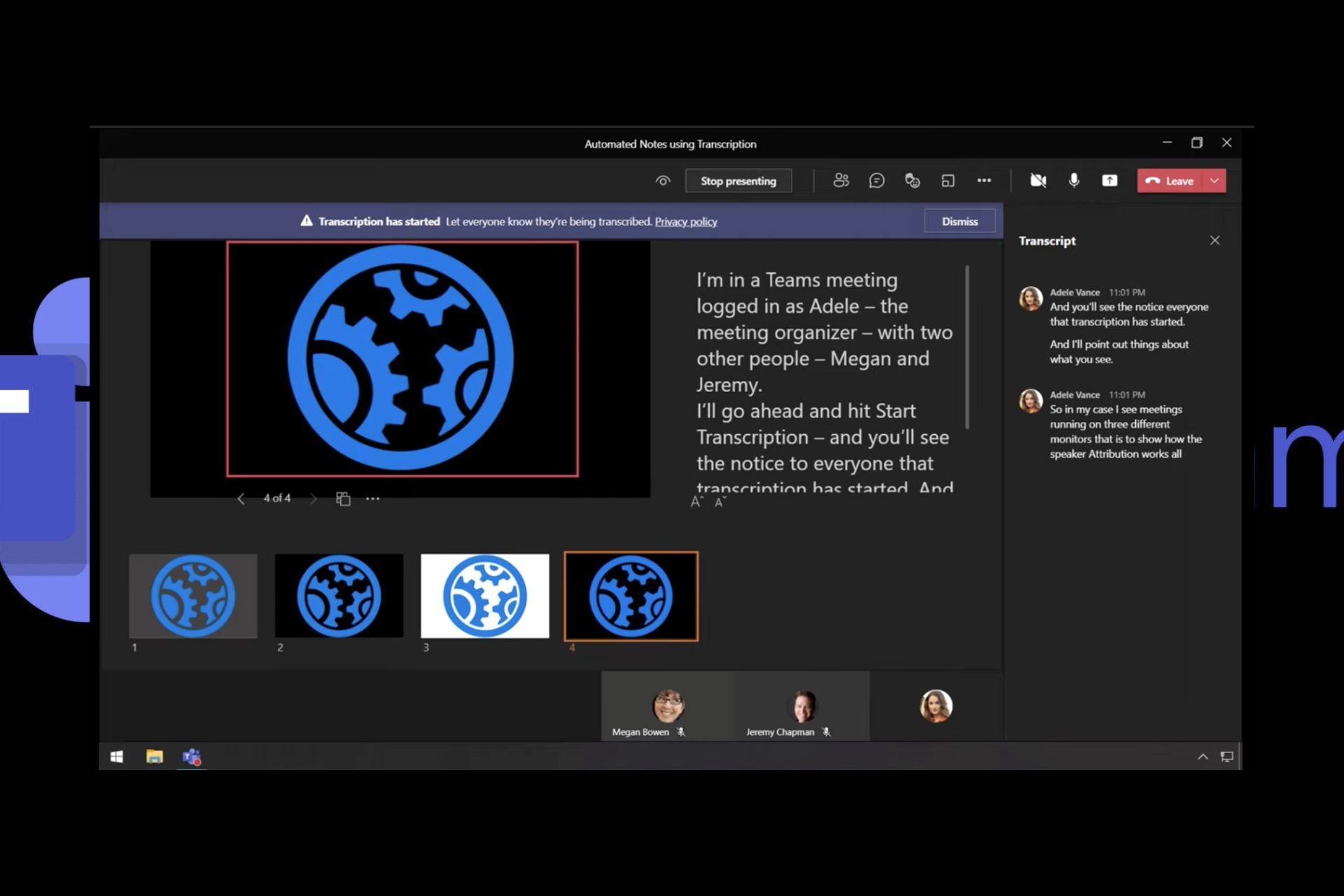
During a Microsoft Teams meeting, it can be difficult to multi-task concentrating on what is being said while manually taking notes and that’s why the AI note taker is a significant addition to the platform.
How does the Microsoft Teams AI note-taker work?
The Microsoft Teams AI note taker uses speech recognition technology to transcribe audio from the meeting in real time. It also has a high level of accuracy as it can detect various languages, multiple accents and diverse pronunciations for inclusivity.
To ensure you don’t waste time scrolling back and forth to look out for sections you might have missed, the AI note taker has a summary of topics discussed in the meeting. This way, you can jump directly to a specific section and catch up.
Also, if you’re looking for what a specific participant said, you can jump to the mentions section. By using this tool, not only do you save time, but also ensure active participation in the meeting for a more productive outcome.
How do I use the Microsoft Teams note-taker?
NOTE
You’ll need a Microsoft Teams premium subscription and enabled the transcription feature to use the AI note taker.
Once you’ve concluded and recorded your Teams meeting, launch your Microsoft Teams app or on the web and click on Recap.
Here, you’ll find your recorded meeting.
You can also navigate to the Mentions tab to view by meeting participants and see what they said.
When you navigate to the AI notes, you’ll find a transcript of the meeting.
If you scroll down, you can also find the AI-suggested tasks.
What are some drawbacks of using the Teams note taker?
Cost: Although an excellent tool, the note taker requires a premium subscription which may not make financial sense in the long run, especially for a small team.
Accuracy: Whereas the note taker has proven to be diverse and flexible when it comes to transcription, it might take notes that are out of context and confuse a non-participant.
Compatibility: The feature is not compatible with all devices or operating systems so this limits its usage.
The benefits of the Microsoft Teams’ AI Note taker are obvious from saving your time to enhanced collaboration. It therefore makes it a no-brainer for any organization that is looking to enhance its productivity.
You can even install two Microsoft Teams on your Windows 11 and compare their performance. This will inform your decision whether to pay for the premium version or go with an extension.
And it’s not just Microsoft Teams that you can have your notes automatically transcribed. You can make use of other AI-note-taking apps for your Windows 11 that can help you get through your tasks a little faster.
Have you used the Microsoft Teams AI note taker? Would you say it’s a valuable addition to the platform? We’d love to get your thoughts on the good and bad so drop your comments down below.
At a time when more and more companies are integrating artificial intelligence into their products, Microsoft has a clear lead. From Copilot, an AI-based chatbot, to a new AI-powered File Explorer, the list is endless. And now, Microsoft has added a Magic Erase feature to OneDrive on Android.
First reported by Android Authority, the AI-driven Magic Erase feature strings were spotted in Microsoft OneDrive v7.1 beta 1.
As per the information deduced from the strings, Magic Erase comes with an Auto Apply feature, which ensures that changes are automatically saved. Besides, there will also be a warning highlighting that this is an AI-powered feature and some changes may not be perfect.
The exact warning reads, This feature uses AI to infill the removed area and may not be perfect or what you expect. If you find the results to be unexpected, please send us feedback.
Google Photos has had a similar Magic Eraser feature for over a year now, and it is pretty refined. Magic Eraser allows you to quickly remove unwanted object(s) from the picture in one go. Google’s feature also provides quick suggestions about clearing undesirable objects and people from the photo.
Last month, Microsoft added an AI-powered eraser in Windows Photos, the native image viewer on Windows PCs. So, we expect the AI-driven Magic Erase to make its way to the stable version of OneDrive on Android soon. As for iOS, there’s no official confirmation so far.
Have you tried OneDrive’s Magic Erase? Share your feedback with our readers in the comments section.
Elon Musk’s X launched their first AI named Grok-1 based on a 314 billion parameter Mixture-of-Experts model, as the publisher explained on a blog post.
For those who don’t know yet, Musk has chosen this name as a reference to Hitchhiker’s Guide to the Galaxy.
Previously, Grok was only available to Premium X users, but now, Musk has kept his promise to launch an open source version.
Before anything, don’t get to excited because the new X model is not yet tuned up for optimal usage.
This is the raw base model checkpoint from the Grok-1 pre-training phase, which concluded in October 2023. This means that the model is not fine-tuned for any specific application, such as dialogue.
X.ai blog
Anyway, if you want to get the code and play with it, you can find it on the Grok-1 GitHub page. It is released under the Apache 2.0 license so you can mod it freely.
However, there is not so much information about Grok-1. The folks from X only disclosed a few hints:
Base model trained on a large amount of text data, not fine-tuned for any particular task.
314B parameter Mixture-of-Experts model with 25% of the weights active on a given token.
Trained from scratch by xAI using a custom training stack on top of JAX and Rust in October 2023.
X.ai blog
However, interestingly enough, the cover of the post, which we also displayed on top, was created withMidjourney based on a prompt proposed by Grok: A 3D illustration of a neural network, with transparent nodes and glowing connections, showcasing the varying weights as different thicknesses and colors of the connecting lines.
If you decide on trying the new model, tell us all about it in the comments section below.
Microsoft and other tech companies encountered issues with the EU’s DMA laws recently. If you’re not familiar, these laws are in place to prevent the monopolizing of services and ensure a fair market.
As a result, Microsoft is now testing a feature that allows you to switch to a different chat provider in Copilot.
The new build lets you select a different chatbot in Copilot
Microsoft is currently testing this feature, and there are only two options available, Copilot, and Copilot Enterprise. Although the choice between providers is extremely limited, we expect to see additional options soon.
By having the option to choose their chat provider, enterprise users can protect their privacy since the Enterprise version offers improved data protection.
This is a welcome change since now users will be able to customize their Copilot experience and choose the best version for their needs.
This build is currently available for testing in the Dev channel, so go ahead and check it out if you’re interested.
Apple is reportedly looking to license Google’s Gemini AI for its next iPhones, and the tech company is also considering collaborating with OpenAI to integrate GPT into the upcoming iOS 18, which will be unveiled in the following months.
According to Bloomberg, Apple has even developed its own AI model, called Ajax, and even experimenting with a basic chatbot, Apple GPT. However, compared to Microsoft or Google, the company lacks the technology to develop a potent AI, and instead, it’s looking to other directions to update its phones with it.
For now, the talks are ongoing, and there are still matters to be discussed on branding, agreements of the AI implementation, and the technology itself, but more details about it should be unveiled at the upcoming WWDC which will be held in June, when the company is expected to unveil the next iOS.
Apple and Google have a history, so this is not entirely unexpected: Google is reportedly paying Apple $18 billion a year to be the default browser on Apple devices, so now, that the tables are somehow turning, it will be interesting to see how the partnership between the two companies will develop further.
Either way, this is not entirely good news for Microsoft, and its Copilot cohort: the company has been investing quite the resources in AI, and it’s making this technology the essence of the Windows experience. AI is also a prominent part of its B2B products, such as Microsoft 365, and Microsoft Teams, and the Redmond-based tech giant is seen somehow at the forefront of the whole technology.
A possible partnership between Google and Apple, when it comes to AI, could potentially diminish Microsoft’s market share in the AI industry, and it could become a case similar to the Google Chrome and Microsoft Edge rivalry. Even though Edge is on par with Chrome, or even better, for that matter, it still lives under Chrome’s shadow.
If Apple gears up its upcoming iPhone with the Gemini AI, Microsoft will have to catch up swiftly and effectively.
Recently, Windows 10 build 19045.4233 was released to the preview channel for Windows Insiders with Windows 10, version 22H2. The update includes changes to the Lock screen, Windows spotlight, and Windows Hello for Business,
With this update, you can add traffic, weather and financial information to your lock screen and other customization features per your preferences, making it quite useful. Here’s what the blog post on Microsoft says:
New! This update adds more content to your lock screen. In addition to weather, sports, traffic, and finance content will appear. To turn on this feature, go to Settings > Personalization > Lockscreen. Note this feature might not be available to all users because it will roll out gradually.
You can check out our detailed guide to learn ways to customize your lock screen. The next significant change is the addition of Windows Spotlight to your wallpaper. To avail of the feature, you need to enable it on your lock screen.
The feature changes the lock screen’s background every day, and you can click a button available on the lock screen to learn about the picture on the Spotlight. Here’s what Microsoft said in its blog post:
New! This update adds Windows Spotlight to your desktop background. This feature displays new images as your desktop wallpaper. If you want to know more about an image, click or tap the LearnMore button, which takes you to Bing. To turn on this feature, go to Settings > Personalization > Background >Personalize your background. Choose Windows spotlight. Note this feature might not be available to all users because it will roll out gradually.
The update also brings Windows Hello for Business; using the feature, IT administrators can use mobile device management to turn off the prompt when the user signs in to an Entra-join device. Here’s what Microsoft said about the feature:
New! This update affects Windows Hello for Business. IT admins can now use mobile device management (MDM) to turn off the prompt that appears when users sign in to an Entra-joined machine. To do this, they can turn on the “DisablePostLogonProvisioning” policy setting. After a user signs in, provisioning is off for Windows 10 and Windows 11 devices.
The update also brought many other changes to Windows 10, including support for daylight saving time and fixes for issues affecting the COM+ component, deadlock issues in CloudAP, and more. You can check out the Windows Insiders blog for details.
We are glad to know that Microsoft is still introducing new features and addressing issues promptly on Windows 10, given the end of support time is approaching.
The features are currently available for Windows Insiders but will soon be released for the general public. We have a separate guide for those who want to join the Windows Insider program.
What do you think about the new features? Share your opinions with our readers in the comments section below.
If you have an Asus Rog Ally portable game console and run into problems running apps and games, that is caused by the latest Windows updates, coupled with the AMD .8001 graphics driver update.
As reported by Windows Latest, users also had to confront nasty BSoD errors, FPS drops, stuttering and more.
Apparently, the major culprit is the already infamous Windows 11 KB5035853, which is creating havoc among PC and laptop owners as well.
According to a Reddit thread, many users complain about the same issues on Asus Rog Ally with BIOS versions 336 and 337.
What can I do to fix the issue on Asus Rog Ally?
Although the issue is affecting your console pretty seriously, you can still fix the problem pretty fast.
There are three tested solutions to get rid of this problem right now. First, disable the in-game overlay feature from the AMD Adrenaline app. You will find this setting in Settings > Preferences.
Another solution is to uninstall the March 2024 Windows Update. To do that, search for Uninstall Updates in the Start menu and press Enter, then find the KB5035853 update and hit the Uninstall button.
Ultimately, you can try resetting the AMD Adrenaline app from its Advanced Settings menu. The problem with this solution is that you will need to create a new profile after resetting the app.
In conclusion, people are very mad about the problems caused by the KB5035853 update. It seems that for now, the safest thing to do is not to install it in the first place or uninstall it until further notice.
Have you had problems with the latest Windows update on Asus Rog Ally? Tell us all about that in the comments section below.