Exciting new features coming to Microsoft Teams in April, here’s what to expect

Microsoft is relentlessly working on Teams, and speaking of which, April will be an exciting month for all Teams users.

We expect to see many new features rolling out in April, so without further ado, let’s see what we can expect to see.

These 5 features are coming to Microsoft Teams in April

Several new features are coming to Teams this April, according to the Microsoft 365 roadmap, and here are the most important ones.

Copilot in Teams meeting will be available on the mobile after the meeting

Currently, you can access Copilot in Teams during a meeting on a mobile device. Once this feature is released, you’ll be able to access Copilot in Teams and ask about eligible meetings even after the meeting has ended.

Regarding the availability, this feature is coming on iOS and Android.

Citations for Copilot in Teams meetings on mobile

Each Copilot response will now have a citation number at the end that provides the users with details on the meeting artifact and source used for the response. This should work similarly to a meeting transcript.

Users will be able to select the citation and see the user that is associated with it, as well as the exact quote and timestamp.

Shared call history for delegates and delegators

With this change call delegators and delegates will be able to see shared call history records for a shared line. This feature will be available on Mac and Desktop.

You can now open Teams Meeting chat from Outlook

If a meeting was created as a Teams Meeting, you’ll have the option to open Teams chat right from the meeting event in the Outlook calendar. Using this option will automatically open the chat in the Teams app.

Regarding availability, this feature is coming to iOS and Android.

Ability to transfer Team calls to mobile calls

Last but not least is the ability to transfer your ongoing Teams call to your phone’s native dialer. This won’t cause any disruptions or loss of context.

All of these features will start rolling out in April, but the official release date is still not known, so it might take a while before we see them in action.

This isn’t all, you can now send video clips in replies to channel posts in Teams, and the Town Hall Teams feature is also coming in April.

Those who are on the risky side can now join Teams meeting in the car, but if you choose to do so, be sure that you’re safe.

Microsoft files patent for a foldable phone in the US, gets users excited about Surface Duo 3

After Microsoft decided to discontinue its flagship foldable phone, Surface Duo, many believed that the Redmond-based tech giant would, in the future, revive the series. Ever since reports of Microsoft filing a foldable phone patent in the US emerged, enthusiasts have been nothing but excited!

Previously, when Microsoft discontinued the Duo series, it was reported that the company would switch to the conventional single-foldable screen design.

While the latest patent filed by Microsoft, titled Foldable Computing Device Spine Cover Plate, doesn’t feature the exact same design, it’s quite similar.

Image source: USPTO (Patent number: US-20240069605-A1)

The abstract from the Microsoft’s foldable phone patent reads,

A computing-device includes a first display-supporting frame rotatably coupled to a second display-supporting frame along a hinge axis via a hinge assembly comprising a central spine extending parallel to the hinge axis. A flexible display is supported the first display-supporting frame and the second display supporting frame. A spine cover plate extends over the central spine and is moveably coupled to the hinge assemble for translation relative to the central spine as the first display-supporting frame is rotated relative to the second display-supporting frame.

What makes the idea interesting is that Microsoft’s design features a spine cover plate which will automatically adjust on folding and unfolding the phone, leaving a negligible gap, minimizing the visible crease, and preventing the entry of unwanted materials.

Image source: USPTO

Previously, the idea of a Windows foldable phone was doing the rounds, and it got everyone hyped up!

As expected, the patent doesn’t detail the software side of things, and it would be interesting to see which OS comes installed on the device. While Surface Duo 2 shipped with Android, we will have to see if Microsoft makes any changes here.

What do you think about Microsoft’s new foldable phone patent? Share with our readers in the comments section.

OneDrive is plagued by the Entry point not found error again, latest update is to blame

OneDrive is an essential tool for many users, but users reported messages stating OneDriveSetup.exe – Entry Point not Found.

This issue will prevent users from using OneDrive entirely, but what’s causing it, and is there a way to fix it?

Many users are experiencing Entry Point not Found in OneDrive error

The issue was reported on Microsoft Answers forums and here’s what users had to say:

Further testing I am getting the error on our windows 10 IOT Version 1607 LTSB terminals.

The issue is that the update for onedrive is attempting to make a call to GetUserDefaultGeoName that did not get added to into until windows 10 version 1709. Hence the error.

It’s not just Windows 10 IOT users that are having this problem, it also happens on Windows Server.

I just wanted to point out that this is also happening on Windows Server 2016: Version 1607 (OS Build 14393.6709).

“Upgrade Windows” isn’t really going to be practical. I suspect the updater was changed without testing on older windows versions.

We already tackled a similar issue in the past in our OneDrive.exe Entry Point not Found guide, so be sure to check it out for potential solutions.

Users also found a workaround on their own that you can try:

It looks like you can just disable the Scheduled Task that has the name that starts with “OneDrive Standalone Update Task”. Would probably need to watch for updates to see how to get to the next version when it comes out.

In case you aren’t using OneDrive, Microsoft confirmed that you can uninstall OneDrive, so be sure to try that as well.

Windows Backup is gone on incompatible devices, yet it lingers in the background

Backing up your files is important, and Microsoft has special software that can help you back up your settings and files to the cloud.

While the Backup app is useful, it doesn’t work on every PC that has it installed, so Microsoft decided to fix that with the latest update.

Windows Backup won’t appear on incompatible devices anymore

When first introduced, Windows Backup was supposed to appear only on personal computers and allow users to back up their files.

According to Microsoft, this feature isn’t available to Azure Active Directory and Active Directory users, however, many reported that it still appears to them. When attempting to run the app, users received a message stating that this feature isn’t supported by their organization.

According to Windows Latest, Microsoft acknowledged and fixed this issue in the Windows 11 KB5034848 update.

This feature will no longer appear for Active Directory users or for users who have their Microsoft account blocked by Group Policy.

The app is now hidden, and you won’t be able to find it, however, it will stay installed and running in the background.  While this seems like an odd decision, Microsoft defends it by stating that other features rely on Windows Backup to work properly.

We never used this feature, and we’re not too keen on it, so we hope that Microsoft will give us the option to remove it, just like it gave users the option to remove OneDrive from their PCs.

Microsoft complies with DMA, introduces easy Edge removal and more to Windows 10 & 11

Microsoft is the latest company to announce changes to its native OS, Windows, in a bid to comply with the DMA (Digital Markets Act) in the EU, a law that tends to ensure fair competition and prevents giant corporations from creating a monopoly-like situation.

The changes apply to both Windows 10 and Windows 11, the two most popular iterations of OS. Even in the recent updates to Windows 11, Microsoft has been careful to include DMA-compliant features.

What changes is Microsoft making in response to DMA?

In the official blog post, Microsoft highlights how it has always been supportive of third-party developers, even before DMA came into effect, allowing them to deploy applications and app stores on Windows without any interference.

Besides, developers enjoy a direct commercial relationship with users, letting them choose the preferred lost-cost payment options and other critical services, even if it’s outside the Windows ecosystem.

The changes to Windows for DMA-compliance include:

  • You can now uninstall Edge and Bing web search using the built-in settings. Earlier, the option was greyed out.
  • Third-party web search application developers can now utilize the Windows search box in the taskbar using the instructions provided by Microsoft and choose any web browser to show results from the web.
  • Microsoft will no longer sign-in users to Edge, Bing, and Microsoft Start services during the initial Windows setup experience.
  • Data collected about the functioning of non-Microsoft apps, primarily bug detection and its effects on the OS, from Windows PCs will not be used for competitive purposes.
  • Microsoft, from now on, will need explicit user consent before combining data from the OS and other sources. It will also deliver new consent screens where required.
Uninstall option for Microsoft Edge greyed out

These changes are only applicable to users in the EEA. For those outside the region, Windows will continue to function as it is!

The Redmond-based tech giant has already started rolling out the DMA-compliant versions of Windows to users in the EEA (European Economic Area). To get it right away, simply turn on the Get the latest updates as soon as they’re available feature in the Windows Update settings.

Windows Update settings

After these are reviewed, the European Commission will host a workshop on March 26, 2024, from 13:00 to 18:00 hours (CET) to allow developers to clarify any concerns or share their feedback on the changes.

While Microsoft has abided by the rules of the DMA, other tech giants weren’t too enthusiastic about it. Earlier, Apple had a tussle with the EU over DMA and the Cupertino-based tech giant was slapped with a fine to the tune of $2 billion.

Do you believe these changes should be rolled out to users worldwide? Share with our readers in the comments section.

Don’t want to use OneDrive? Microsoft confirms that you can now uninstall it

If you’re not a fan of cloud storage and OneDrive in particular, you’ll be pleased to hear that you can now easily remove OneDrive from your Windows 11 PC.

That’s right, and this has been acknowledged by Microsoft, and it can be done in a matter of minutes.

The latest documentation from Microsoft describes how to remove it

While OneDrive can be useful, many simply don’t use cloud storage or they don’t prefer using OneDrive. In the past, removing OneDrive was next to impossible, and if you didn’t want to use it, Microsoft advised you to keep it unliked on your PC.

This would make OneDrive disabled, but it would still be available on your PC if you ever change your mind. Well, that’s about to change according to the Neowin.

Recently, Microsoft’s official documentation for OneDrive has changed, and in the past, it only had information on how to unlink your account.

Now there’s a new section on the bottom that tells you how to remove OneDrive on Windows 10 and 11.

You can now remove OneDrive, just like any other installed application right from the Settings app and it will be gone for good.

This is great news for all users who don’t use cloud storage or OneDrive, and we wish this option was available sooner.

Speaking of OneDrive, the upload via URL feature is being retired in OneDrive, so use it while you still can.

Bad news for Halo: MCC fans, no more game updates as Microsoft ends support

For the past few months, rumours were rife about Microsoft dropping development and support for Halo: The Master Chief Collection after an image was posted by a 343 developer online. The image in question showed a plaque and a Thank You card.

The date on the plaque intrigued many. It read, Finished The Fight. Halo: The Master Chief Collection 11/2014 – 07/2023. Soon, the same was shared by several developers on their official X (formerly Twitter) handles.

As it turns out, these rumours were true!

Rebs Gaming, in a YouTube video, confirms, through sources, that Microsoft has stopped development for Halo: The Master Chief Collection.

The two primary reasons cited behind the decision to halt development are the lack of a revenue stream and an impending economic recession. The game does feature a built-in store but since it relies on in-game currency, profitability remained a concern.

Microsoft, in May last year, first shared the decision with the developers and expressed its inability to renew the contracts. Then, sometime around mid-July, the contracts ended and were never renewed, thus finally putting a stop to Halo: The Master Chief Collection’s development.

This was also the time we saw the last major content update. Since then, there haven’t been any!

Will Halo: The Master Chief Collection still be available?

As per the report by Rebs Gaming, a few full-time developers continue to work on Halo: The Master Chief Collection to ensure optimal functionality and deliver minor updates to the collection.

Also, there’s a chance of the collection being revived sometime down the line, either through a collaboration between Microsoft and 343 Industries or individually by the latter, if a viable revenue stream can be generated. So, all hope is not lost!

If the companies are looking for a revival, it’s critical to polish the collection and eliminate all existing bugs, primarily the ones responsible for Halo MCC not loading.

What do you think of the decision by Microsoft to end development for Halo: The Master Chief Collection? Share with our readers in the comments section.

LLMs need new prompting techniques to understand structured data

Large Language Models (LLMs) are facing challenges when they have to deal with data from tables. Furthermore, it is unknown if they comprehend it or not. Thus, a research team tries to verify the capability of AI to understand structured data by using a new benchmark system. Furthermore, they want to discover prompt techniques to improve the understanding of the LLMs.

Can LLMs be trained on structured data?

You can train LLMs on structured data. However, it is still being determined to which degree the LLM can learn and understand it. Thus, researchers are trying to figure out the best prompt techniques to teach LLMs how to handle data from tables and test which tables work best.

Researchers created a new benchmark called Structural Understanding Capabilities (SUC) to test the capability of LLMs to understand data from tables. Furthermore, to gather results, they used SUC and various prompting techniques.

To verify the efficiency of the structured data prompting techniques, researchers used the benchmark on both GPT-3.5 and GPT-4. Furthermore, they figured out that the results differ based on table format, content order, and partition marks. In addition, they used HTML tables, comma-separated values, and tab-separated values for the table format.

Results

HTML tables are the most efficient for the LLMs between all of the formats. Also, according to their research, the highest accuracy across seven tasks is only 65.43%. As a result, LLMs are far from perfect when it comes to structured data, and they need much more improvement. However, it is possible to enhance them with the right prompting techniques.

Researchers used a combination of self-augmented prompting with structured data to improve the LLM’s understanding of tables. Furthermore, they did this in three steps. The first step was to ask the AI to analyze a table, the second step was for the AI to generate a description based on the data, and the last step was to create a description using the previous information.

In a nutshell, LLMs are not yet ready to properly understand structured data. However, according to the research, you can train LLMs to understand data from tables using various input factors and self-augmented prompting. Furthermore, researchers will continue to study efficient ways to make LLMs understand tables better by integrating structural information to improve the LLMs’ performance with different structured data types.

This research could also help visual language models that use LLMs to improve prompt learning.

What are your thoughts? Is this research going to help LLMs? Let us know in the comments.

CEO Sam Altman rejoins the OpenAI’s board with three new members

OpenAI announced that CEO Sam Altman rejoined its board of directors alongside three new members. The decision came right after the conclusion of an internal investigation by US law firm WilmerHale. In December, OpenAI hired the law firm to investigate the abrupt termination and immediate rehiring of Altman as OpenAI’s CEO. 

OpenAI shared the findings of the WilmerHale investigation and reinstated Sam Altman to the board

Here’s the list of newly announced board members along with CEO Sam Altman:

  • Dr. Sue Desmond-Hellmann, former CEO of the Bill and Melinda Gates Foundation 
  •  Nicole Seligman, former President of Sony Entertainment
  •  Fidji Simo, CEO of Instacart 

The WilmerHale review concluded that Altman’s termination was a “consequence of a breakdown in the relationship and loss of trust” between him and previous board members.

OpenAI didn’t release the full report but it summarized WilmerHale’s findings in its recent blog post. 

According to the released summary, the law firm reviewed over 30,000 documents and conducted interviews with prior OpenAI board members, OpenAI executives, board advisors, and several witnesses.

It is worth noting that the transitory board appointed after Altman’s removal will stay in place. It includes Adam D’Angelo, Larry Summers, Bret Taylor, and Greg Brockman. That means there will be a total of eight OpenAI board members.

The newly appointed board members have agreed to adopt a few things to improve OpenAI’s governance structure. Talking of the same in the blog post, OpenAI mentions:

The Board also announced the adoption of important improvements to OpenAI’s governance structure. Key enhancements include:

  • Adopting a new set of corporate governance guidelines;
  •  Strengthening OpenAI’s Conflict of Interest Policy;
  •  Creating a whistleblower hotline to serve as an anonymous reporting resource for all OpenAI employees and contractors; and
  •  Creating additional Board committees, including a Mission & Strategy committee focused on the implementation and advancement of the core mission of OpenAI. 

The comeback of Altman is good news for OpenAI and its stakeholders. Time will tell if things will remain smooth between him and new board members going down the line.

Microsoft confirms Midnight Blizzard has access to its source code

In January, Microsoft confirmed Midnight Blizzard, a Russian hacking group, aka NOBELIUM, attacked its corporate system. Initially, the hackers accessed the corporate email accounts of the company’s senior leadership team members.  

It seems that Microsoft is unable to contain the Midnight Blizzard attack as of now. In a recent blog post, the tech giant mentioned Kremlin-backed threat actor has access to some of its source code.

The blog post further mentions that the hacker group also accessed Microsoft’s internal systems. However, there is no evidence that Microsoft-hosted customer-facing systems have been hacked.

Here’s what Microsoft says in its blog post about source code theft.

In recent weeks, we have seen evidence that Midnight Blizzard is using information initially exfiltrated from our corporate email systems to gain, or attempt to gain unauthorized access. This has included access to some of the company’s source code repositories and internal systems.

Microsoft further adds that the hacker group has also accessed some secrets shared between customers and the company in emails. The tech giant believes that NOBELIUM is trying to use different types of secrets it accessed recently.

That’s not all, it adds that Midnight Blizzard has ramped up password spray attacks by as much as 10-fold last month compared to what it saw in January 2024.

The company didn’t add any details about the source code Midnight Blizzard has accessed, nor did it talk about the secrets and scale of compromise in the blog post.

ChatGPT gets multi-factor authentication for additional security

Using generative AI models like ChatGPT is fun. However, a concern around data security and unauthorized access is always there. Keeping that in mind, OpenAI has recently released a new multi-factor authentication feature for ChatGPT and API accounts.

On March 8, OpenAI announced the new feature via a tweet from the official X (formerly Twitter) account. According to the tweet, every user can enable the multi-factor authentication, aka 2FA, option. Enabling this feature will prevent any unauthorized access to your user account.

Here’s how to enable multi-factor authentication in ChatGPT 

Note: You’ll have to first log into your ChatGPT account to set up this security feature.

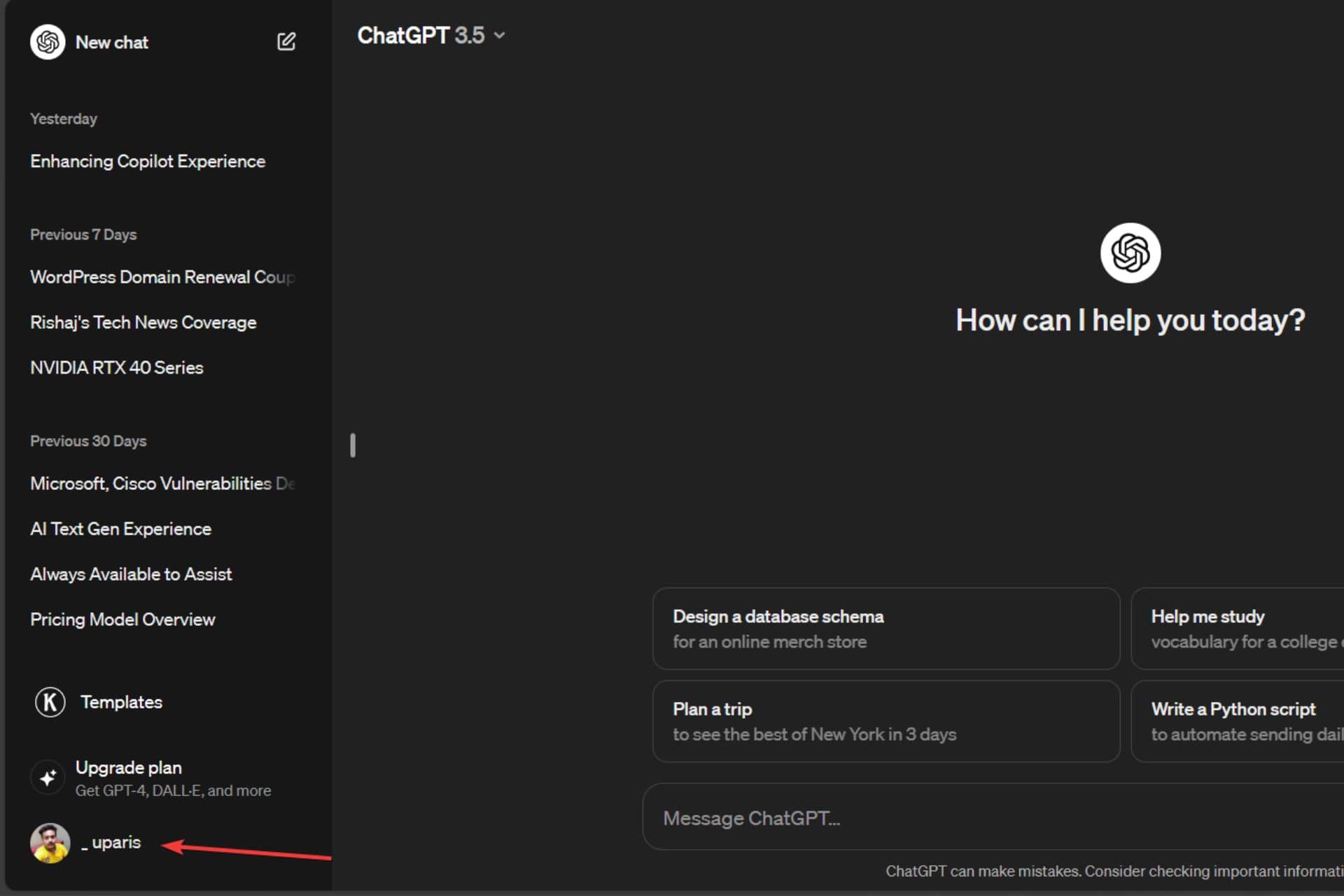
1. First, click on your name, as seen in the bottom left-hand corner of the screen.

First step to enabling Multi-factor authentication - Click on user name

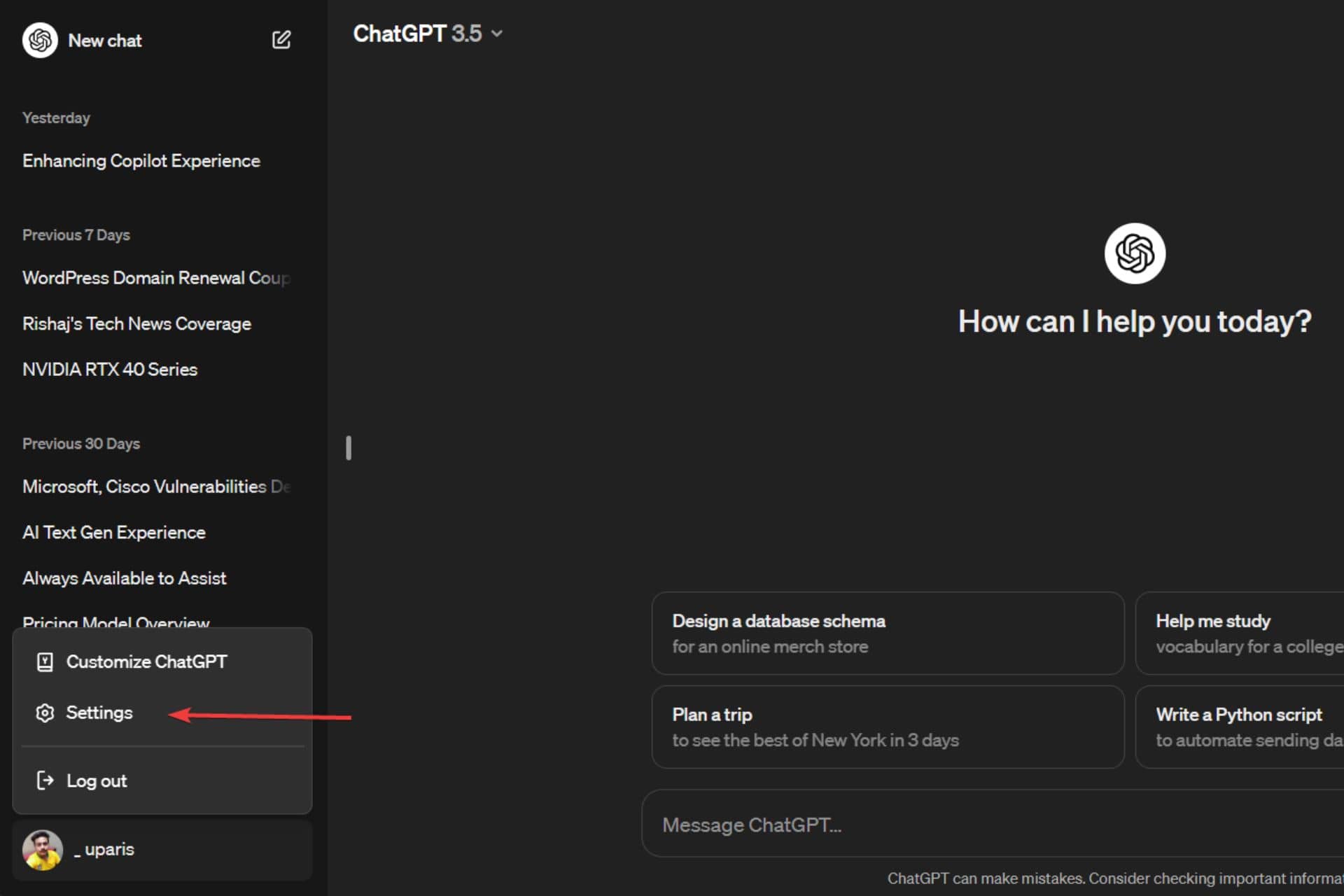
2. Next, click on Settings.

Click on Settings

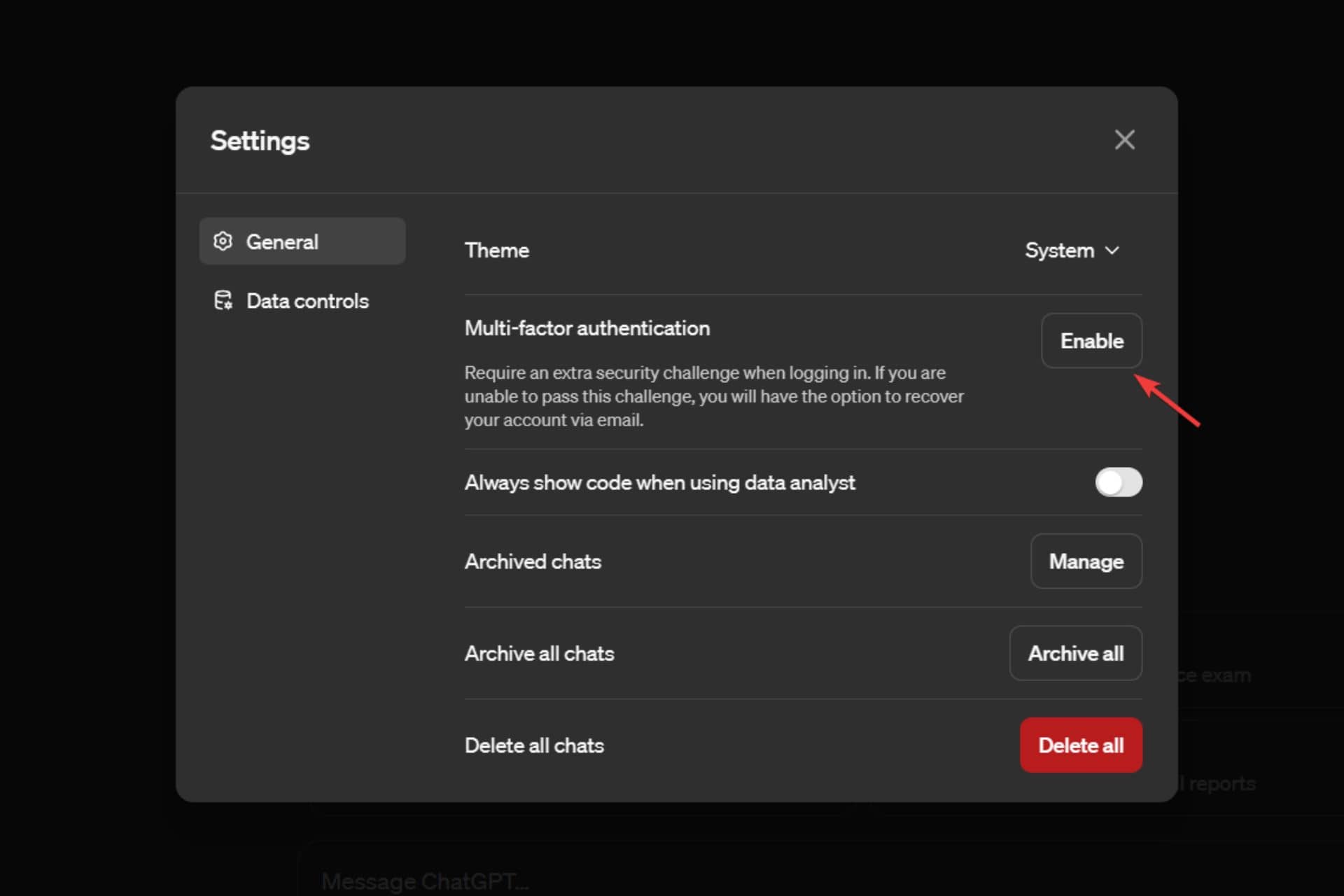
3. Then click on Enable beside the Multi-factor authentication.

Click on Enable beside Multi-factor authentication

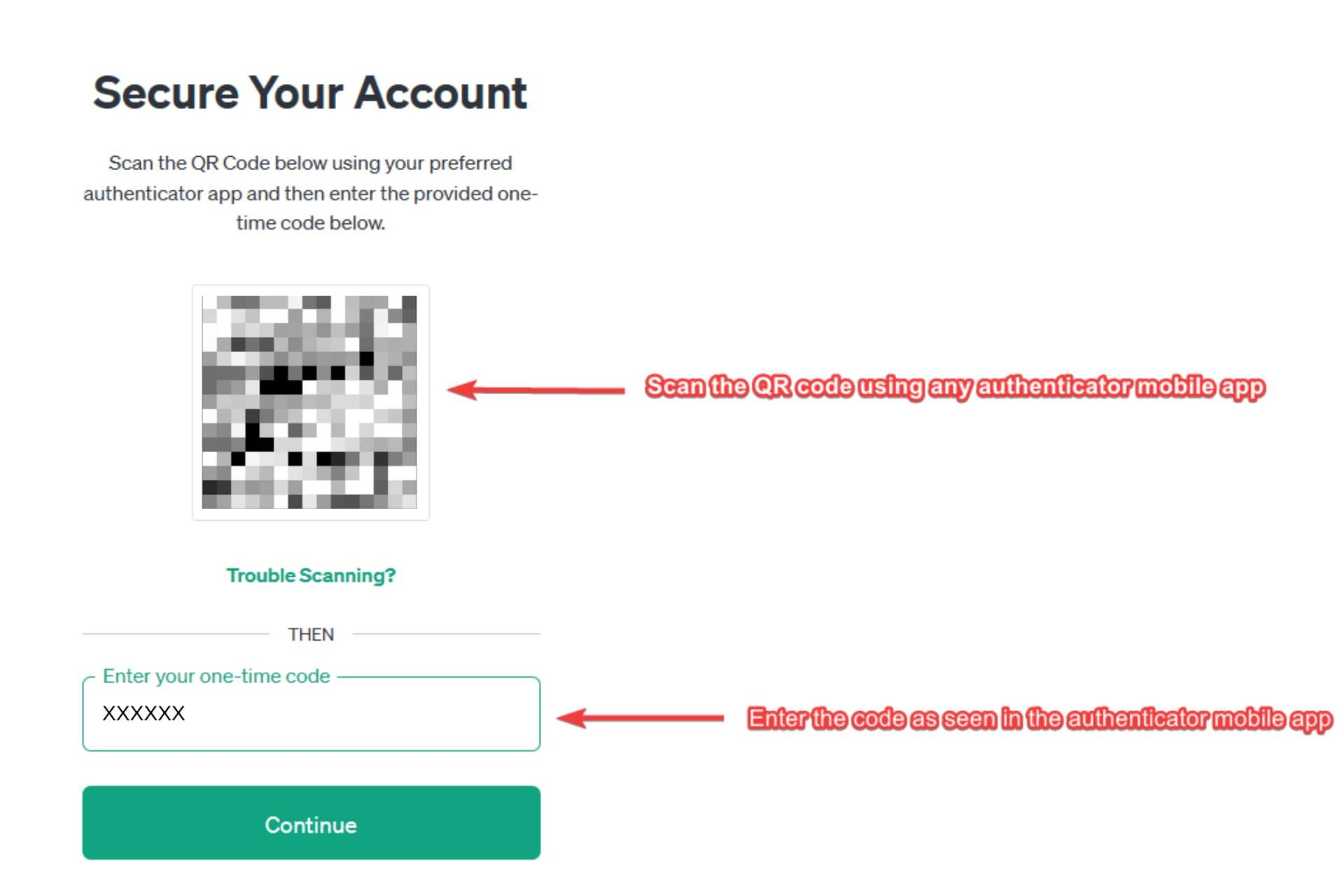
4. Now, you’ll see a secure your account page with the option to scan the QR code and enter the code from an authenticator app.

5. Then, scan the QR code using an authenticator app and enter the code seen in the authenticator app. You can use different authenticator apps like Google Authenticator, Microsoft Authenticator, etc.

Secure your account page

5. Then, click on Continue.

Click Continue

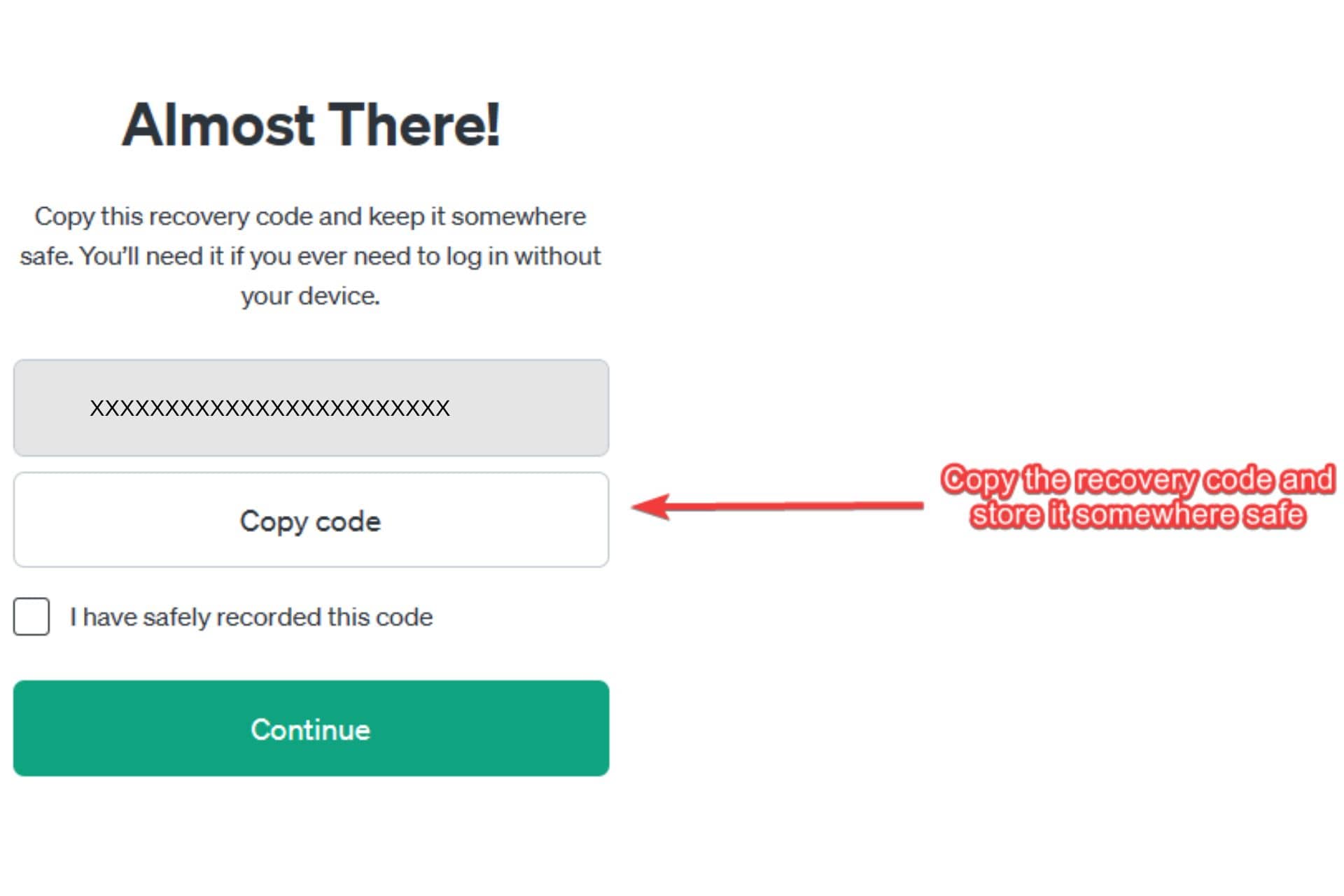
6. On the next screen, you’ll see a recovery code that you can use to log into your account when your device isn’t with you. Now copy the code and keep it safe somewhere.

Copy the recovery code

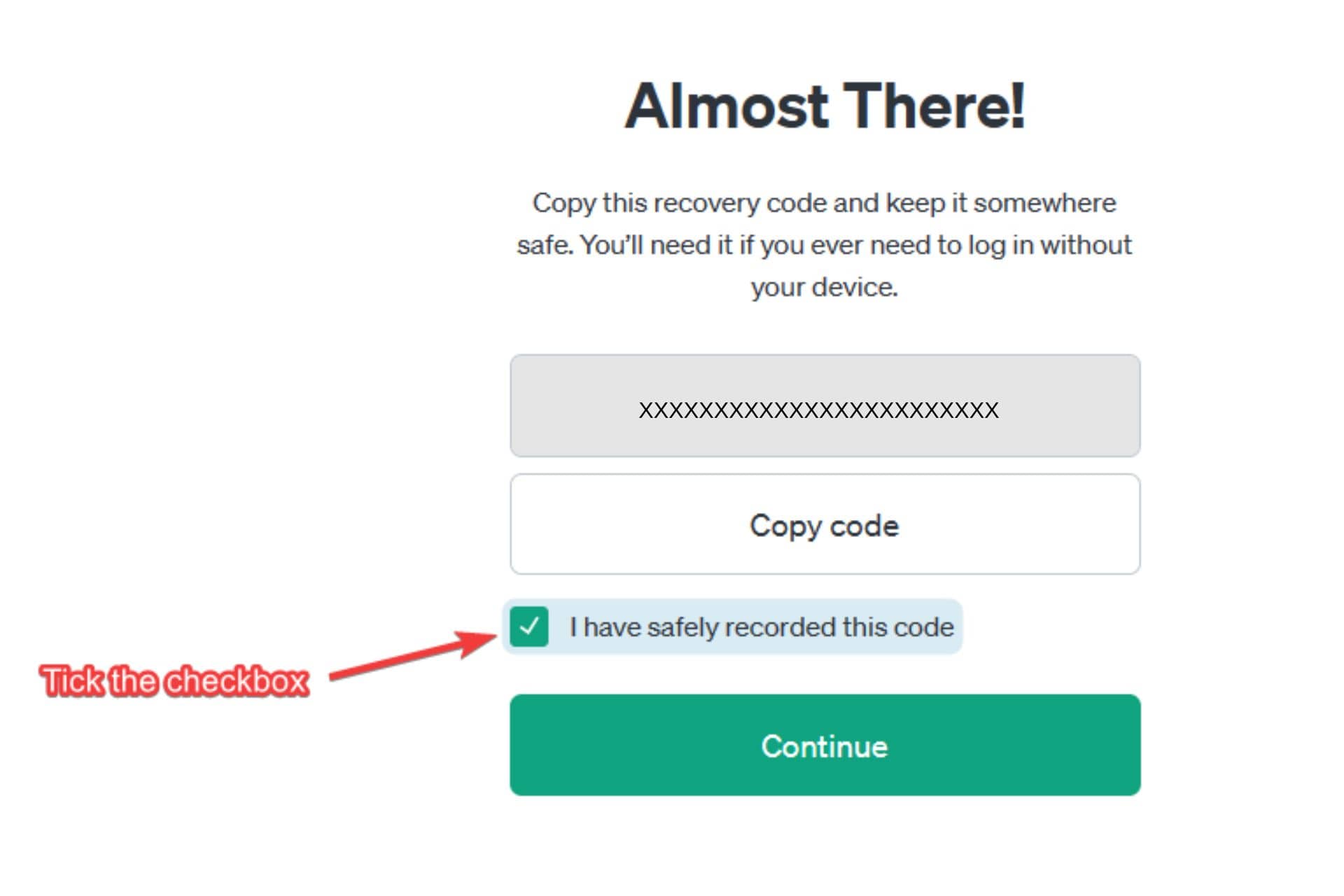
7. Now tick the checkbox beside I have safely recorded this code option.

Tick the checkbox

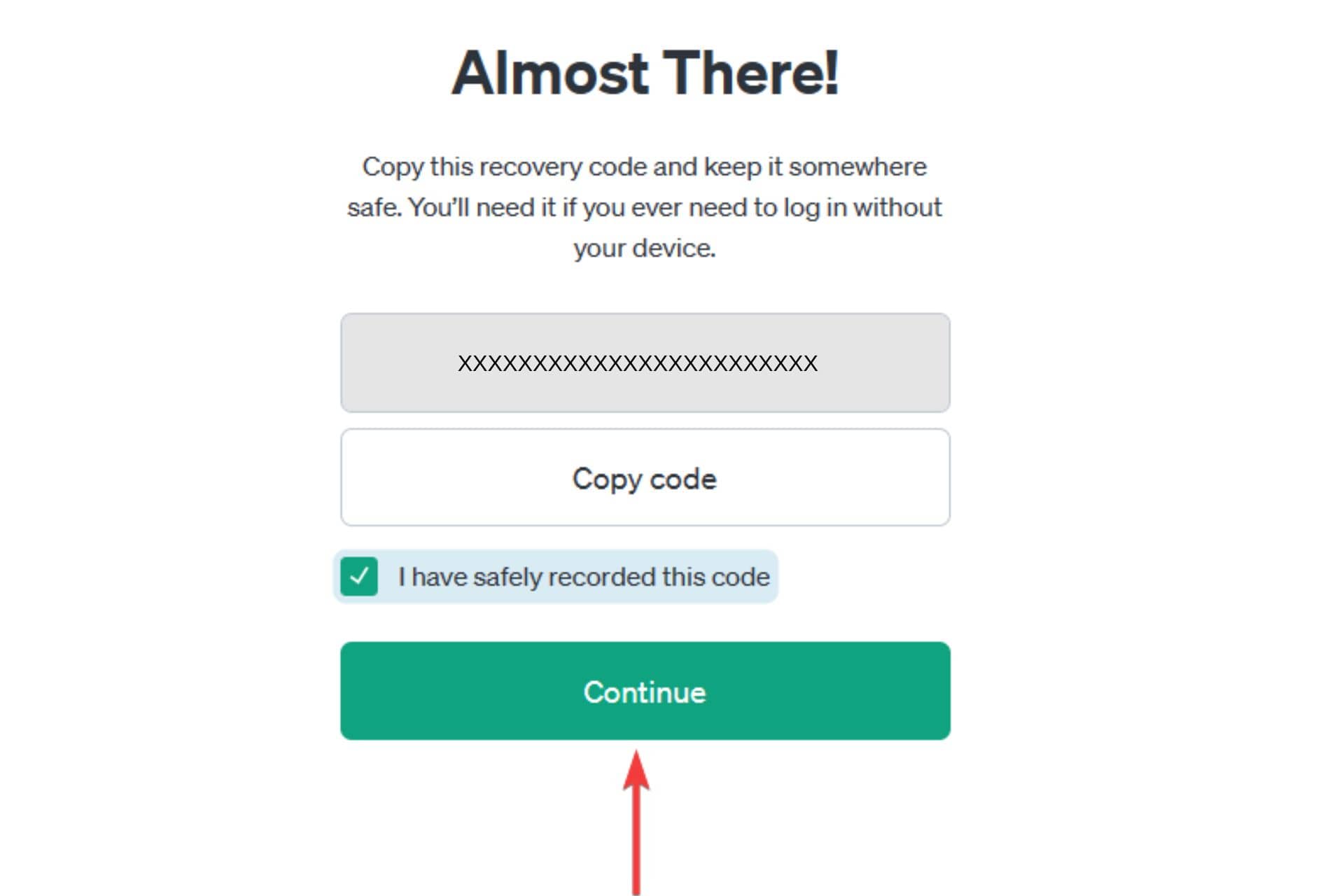
8. Then, click on Continue.

Click continue (1)

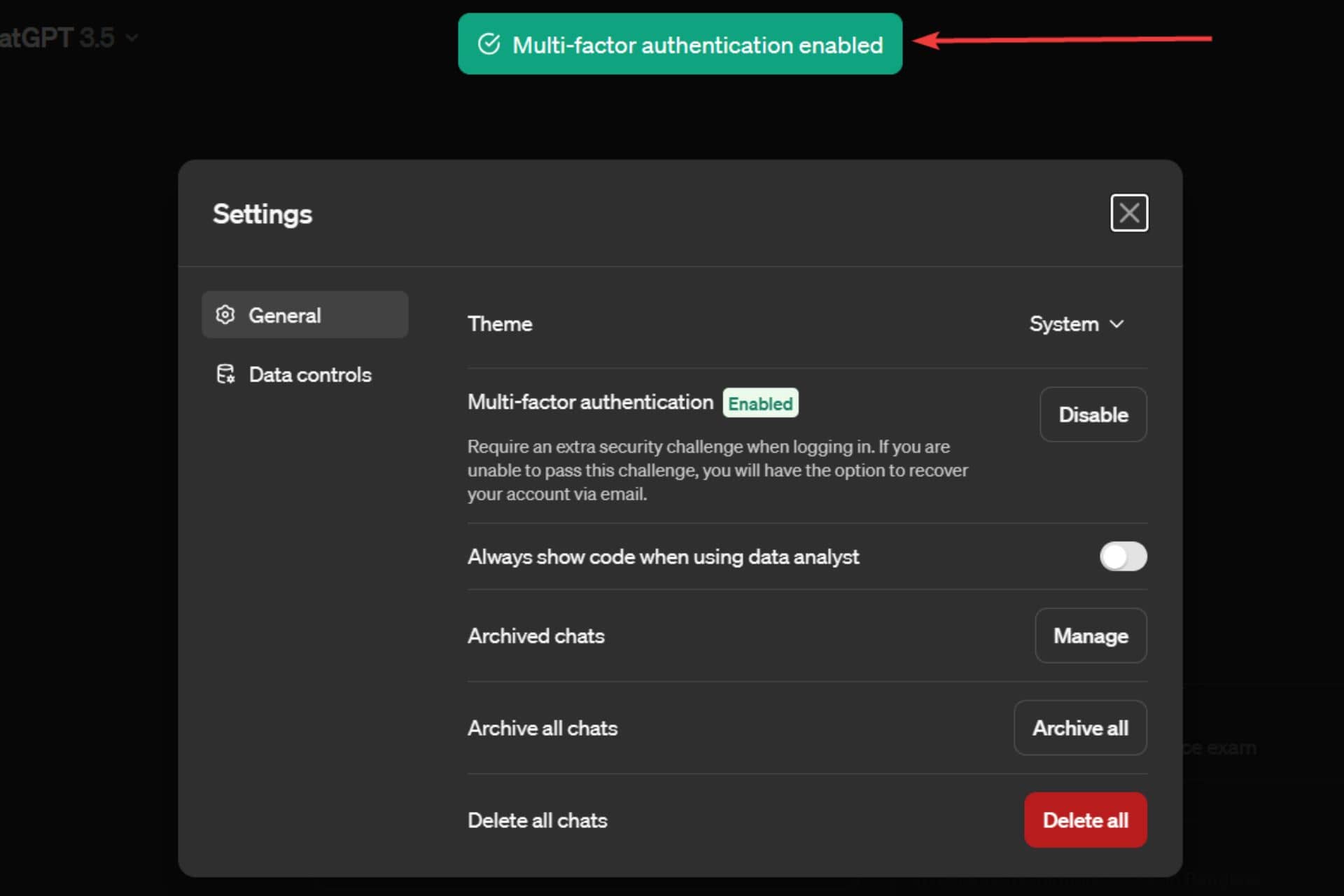
9.  On the next screen, a confirmation message – Multi-factor authentication enabled will be seen.

Multi-factor authentication confirmation message page

Once you enable the feature, you might have to log back in or land on the Settings page inside ChatGPT. If you don’t want to enable ChatGPT’s multi-factor authentication feature, think again as it could help you secure your account and ensure peace of mind.

Microsoft is rolling out GPT Builder’s access for more Copilot Pro users

Microsoft has started rolling out GPT Builder’s access for more Copilot Pro subscribers. In the beginning of 2024, Microsoft rolled out a slew of new features related to Copilot. The announcement of Copilot GPT Builder was one of them.

For those uninitiated, Copilot GPT Builder works similarly to the Open AI’s GPT Studio. The priority access to GPT Builder lets users build their custom chatbots even if they come from a non-coding background. 

Microsoft gave us a glimpse of the same back in February. It rolled out several Copilot GPTs, which could help you with fitness training, cooking, and planning vacations. 

More Copilot Pro users can now access GPT Builder

Now, it seems Microsoft is rolling out GPT Builder for more Copilot Pro subscribers. In a recent tweet, Michael Schechter, VP of Microsoft Bing, hinted that the tech giant rolled out preview access to even more Copilot Pro users.

It is still unknown how many Copilot Pro users will get to access the GPT Builder. However, we expect the feature to roll out in a phased manner. If you are a Copilot subscriber but don’t see the option “Create a New Copilot GPT” in the preview (as shown here), sadly, you’ll have to wait longer to gain access. 

Have you subscribed to Copilot Pro? Tell us your experience in the comments section below.

Microsoft releases Windows 11 Insider Beta Channel Build 22635.3286

Microsoft has released a new Beta Channel Build 22635.3286 (KB5035950) for Windows 11 Insiders. With the recent update, the company introduced a few changes to the Copilot experience and rolled out different fixes. Here are all the changes you will see.

Improvements in the Copilot experience

Microsoft aims to improve the Copilot experience in Windows by incorporating several features that streamline your workflow and boost productivity. Updating to the new Beta Channel Build 22635.328, under KB5035950, displays helpful actions in the Copilot AI assistant when you copy a text.

In the recent Windows Insider Blogs, Microsoft says the Copilot icon changes its appearance and animates. It will do so to indicate that it can help with several actions as you copy the text. You can ask it to summarize or explain the copied text. The option will be there as you hover your mouse over the Copilot icon in the taskbar. When you select an action on the menu, Copilot launches and starts the action you chose from the menu.

Moreover, the Beta Channel Build brings a new feature that allows launching Copilot by dragging an image file onto the Copilot icon in the taskbar. Once the Copilot opens, you can drop the image in the text box and define an action you want to take.

Bug fixes introduced by Windows 11 Insider Beta Channel Build 22635.3286 (KB5035950)

Apart from several enhancements to the Copilot experience, this Beta Channel Build aims to address two specific issues. The first one is related to the Nearby Share. The new update will fix the issue that caused Settings to crash for several Windows 11 Insiders when heading to Settings > Nearby Sharing. 

This update fixes another issue related to Search that caused explore.exe to crash for some insiders in the Beta Channel. Unlike the fix for Nearby Share, which is exclusive to the Beta Channel with toggle on, this one is available for everyone in the Beta Channel. 

What do you think about the new features and bug fixes by Microsoft? Do let us know by commenting below. Also, you can check our guide to download Insider Preview Builds for Windows 11 if you don’t know it yet.

Alpha Skip-Ahead 2408.240306-2200 update rolled out for Xbox Insiders

Microsoft has recently released a new Xbox Update preview 2408.240306-2200 update to the Alpha Skip-Ahead ring. The update introduces a new feature to Capture and Share and improves the Xbox Wireless Controllers.

The new Alpha Skip-Ahead update brings improvements to the Xbox Wireless Controller and Capture & Share

The recent update includes a new Xbox Wireless Controller firmware version that aims to fix unexpected disconnections when using a wired headset. With the Alpha Skip-Ahead 2408.240306-2200 update, you will notice some improvements in the gameplay experience if you faced issues earlier.

If your controller requires an update, you’ll see a prompt to install it. It will only happen when a powered-on controller connects to your gaming console. If you missed or accidentally dismissed the prompt, you can open the Xbox Accessories app to update the firmware manually.

Apart from improving Wireless Controllers, the Alpha Skip-Ahead 2408.240306-2200 update adds a new change to Capture & Share. If you’re running low on space, you’ll see a toast notification after uploading a new game clip or screenshot to OneDrive.

Moreover, the update also fixes an issue where odd texts appear on your Xbox Home Dashboard. Microsoft says that the odd-shaped text is commonly called “pseudo-loc” or text that is yet to get localized for the specific language/region.

Are you an Xbox Insider and noticing any problems with the new Alpha Skip-Ahead 2408.240306-2200 update? If yes, Microsoft asks to report the problem to address it in the next update.

Microsoft is blocking Copilot prompts that generate inappropriate images

Microsoft seems to have blocked many Copilot prompts that led generative AI tools to create sexual, violent, and other illicit images. The tech giant started blocking these terms amid a heavy backlash after its generative AI tool generated inappropriate images.

Earlier, an in-house engineer, Shane Jones, outlined these concerns in a letter to the Federal Trade Commission (FTC). In the letter, he listed severe concerns that include Copilot’s capability of generating violent as well as illicit images.

Microsoft attempts to block prompts that generate harmful images by displaying a warning message in Copilot

As reported by CNBC, entering words like “pro choice,” “four twenty,” or “pro life” as prompts in Copilot now displays a warning message that says those prompts are blocked. The generative AI tool further warns users that repeated violations can result in suspension of users. 

Here’s what the actual Microsoft Copilot warning message says:

This prompt has been blocked. Our system automatically flagged this prompt because it may conflict with our content policy. More policy violations may lead to automatic suspension of your access. If you think this is a mistake, please report it to help us improve.

Earlier, Copilot users could input prompts to generate images of children playing with firearms such as assault rifles. However, users who try to input such a prompt are getting warnings about violating Copilot’s ethical and Microsoft policies.

When CNBC reached out to Microsoft to ask about the changes, one of the company’s spokesperson said:

We are continuously monitoring, making adjustments, and putting additional controls in place to further strengthen our safety filters and mitigate misuse of the system.

Despite Microsoft’s attempt to block Copilot prompts, CNBC says users can still generate violent images using terms like “car accidents,” “bike accidents,” and more.

Let’s not forget that Microsoft is not the only one having issues with its generative AI tool. Recently, Google Gemini has also halted the image generation feature for users amid historical accuracy controversy. 

Microsoft’s pondering Xbox console future according to former executive

There seems to be a reoccurring conversation following each release of a new gaming console as to whether Microsoft should exit the gaming business due to dwindling public perception of competitiveness in the market.

Former Xbox executive Peter Moore sat down with IGN to rekindle talks of a possible console exit for Microsoft this time around that circumvents the traditional competitive argument in favor of a more nuanced examination of the economic future the entire industry.

Rather than pointing to 1:1 console sale between Microsoft and its next biggest competitor in Sony, Moore posits the theory that the company is currently having internal debates on whether it should stay in the console game now that it represents itself as the largest game publisher in the industry.

As someone who sat as the president of Sega America during the untimely demise of the Dreamcast console, Moore has a specific insight into the tough decisions that prelude ending years of investment in console gaming.

According to Moore, there is an effect that is currently happening that undergirds a subtle shift in the way people game today than in years prior and that evolution is a signal for Microsoft to initiate conversations about the ultimate future of Xbox.

I don’t think people are gaming less, they’re just gaming differently. And more and more you’re seeing a generation coming through that is not about to sit down for an evening in front of the television with whatever the game du jour is this week.
And it’s always, as we had suggested and thought — maybe feared — going to be snack-size stuff. What can I do in the next 10, 12 minutes? What can I do on my lunch break? And there’s so much pressure on the gaming experience from everything else in this world, this unbelievably and perhaps overconnected world dominated by social media content, TikTok videos. Gaming, while still robust — let’s not forget, we’re probably $200 billion this year — it’s fragmented across regions, across different content, and there’s only so many hours in a day and there’s so many choices for us to use those hours.

Peter Moore – Former Xbox Executive

Moore even digs up the corpse of Zune to illustrate how bespoke hardware eventually gets assimilated and that the Xbox as bespoke piece of gaming hardware will soon run up against an expiration date thanks to things like game streaming or TVs with chips in them specifically for gaming.

The broader picture — and we certainly feared during my time even at Microsoft — we were saying then, in 2007, is this the last console generation? Do televisions start to come with chips that can play games and you just need a controller? Is the PC, as it was then, a renaissance? And why do you need a bespoke piece of hardware that costs us, Microsoft, billions upon billions of dollars to install, and you hope to hell you get an attach rate of software and something out of your Xbox Live, your connected service, that would justify the losses, the hemorrhaging of cash that hardware costs you?

When asked about console making for the “next generation,” Moore ponders what the industry will look like in five years as to whether it even makes sense for Sony to be producing hardware as well.

But I think it’s a real serious question that’s being asked I’m sure in Tokyo, in Redmond, Washington, in Kyoto. That’s what everybody’s working on right now, because when you start off that next generation, you’ve got to be ready to absorb billions of dollars in losses. And is the industry, given all the layoffs and everything we’re going through right now, is the industry ready for that? Look at Sony laying off 900 people — a lot there in the UK. My two eldest daughters work at EA, they’re all right, but they’re always looking over their shoulder.

Beyond industry headwinds, Moore points out that Microsoft, at its core, remains a software company and the acquisition of Activision Blizzard combined with its deep investments in Azure cloud services presents the company a potentially lucrative off-ramp from producing consoles while still remaining in the gaming sector.

I think the words first party and third-party may just disappear. It’ll just be, we make great games, and we deliver a phenomenal service on which you can play our games, and first-party and third-party, those are legacies of hardware.

But the challenge will undoubtedly be coming from Nadella: what does it look like without hardware? And so that’s going on right now, and what do we look like if we’re more like EA than we are Sony? So that’s what I’m sure is going on.

Buttressing his point, Moore also posits a conversation between Microsoft CEO Satya Nadella and head of Xbox Phil Spencer in which Nadella asks Spencer how he and his team plan to further ingratiate itself with the larger world of Azure. How does Xbox, as the now largest gaming publisher in the market, continue to make games dogfooding its increasingly expansive AI footprint, how can the company’s expanded gaming arm make games “faster, cheaper, with less people?”

Evident by the kerfuffle Microsoft’s news about releasing a limited number of first party exclusives cross platform as a weather balloon project caused, the company is navigating some uncharted waters with the eye on its ultimate gaming future.

Microsoft sunk close to $70B into gaming with the expectation that it can return value to investors at some point. However, adding another few billion to that $68B total in the form of R&D for a loss-leading hardware effort every few years makes less financial sense than leveraging digital platforms already bought and paid for by Microsoft.

It is already coming to pass that gamers are beginning to explore outside the traditional walls of console gaming with experiences across mobile, PCs, streaming platforms, and handhelds which can dovetail nicely into Microsoft’s new plan to be a game publisher to all gamers and not just Xbox consoler owners.

Claude 3 outperforms GPT-4, could spell trouble for Microsoft and Azure

Anthropic has developed a new model called Claude 3, and it’s already better than GPT-4 in almost every regard.

This could be a problem for Microsoft Azure, especially if the company doesn’t respond with a new AI model.

Claude 3 can be a problem for Microsoft Azure, and here’s why

For a long time, Microsoft and GPT-4 dominated the AI market, but that might soon change according to Analytics India Magazine.

We already wrote how Claude 3 surpasses all other AIs on the market and dominates GPT-4 in MMLU and HumanEval benchmarks.

This technology is already being used by Amazon Bedrock and Google Cloud Vertex AI Model Garden in private preview.

It’s important to mention that Claude 3 can process images which allows it to analyze charts, graphs, reports, and other visual elements with ease.

On the other hand, Microsoft and Google working on smaller language models, such as Phi-2 and Gemma that can’t compete with Claude.

In the past, Microsoft teamed up with Mistral AI to bring Mistral Large on Azure as MaaS and Azure Machine Learning model.

However, that was before Claude 3 dropped and outperformed both Mistral AI and GPT-4. Google is also on the offensive and Claude 2 and Gemini 1.5 offer a context window of 1 million tokens, which is almost 10 times more than GPT-4 Turbo.

Mind you, that’s Claude 2, and we can’t wait to see what Google will come up with after utilizing Claude 3. It remains to be seen what will Microsoft do regarding the release of Claude 3, and hopefully, GPT-5 will help it stay in the race.

This might not be as easy, since Microsoft and Open AI are sued for copyright infringement and there are also claims that OpenAI is contributing to election disinformation. All this trouble could potentially delay GPT-5.

What will happen with Microsoft and its AI, remains to be seen, so stay tuned for the latest news.

Teams Toolkit 17.9 version for Visual Studio comes with new exciting features

In a blog post, Microsoft announced that Teams Toolkit for Visual Studio 2022’s new version, 17.9, is out. The version has new features, including an AI Bot template, Adaptive Card previewer, and Teams Bot Test tool that can help .NET developers. It also has bug fixes and improvements to enhance the development experience.

AI bot template

AI bot template
  • Helps developers build intelligent chat bots that can process information and provide responses to queries, leveraging the power of OpenAI.
  • Uses the Teams AI library and AI components, which makes creating bots that use Azure OpenAI or Azure OpenAI easy to offer an AI-driven conversational experience.

Teams Bot Test Tool

Teams Bot Test Tool
  • Allows developers to debug, preview, and test the Teams Bots app in a simulated Teams chat environment, even without logging in to the Teams web client.
  • To use it, you can choose your debug profile as Teams App Test Tool and start debugging.

CodeLens support for the lifecycle steps

CodeLens support for the lifecycle steps
  • Allows developers to configure and view lifecycle actions and settings directly within the teamsapp.yml file.
  • Enables developers to easily access and execute the lifecycle actions already defined in the YAML configuration file, ensuring a streamlined development process.

Adaptive Card Previewer

Adaptive Card Previewer
  • Helps developers preview and edit Adaptive Cards in a more user-friendly way.
  • To use the feature, select the Preview button at the top left corner of the Adaptive Card’s definition file. The preview will appear on the right.

Access to the Teams Toolkit documentation

Access to the Teams Toolkit documentation

With this version, you can now access Teams Toolkit documentation by navigating to Project>Teams Toolkit> Teams Toolkit Documentation

So, these are the generally available features of Teams Toolkit, but these are not all. You can get various others in the preview, including the new Microsoft Copilot template and AI Assistant bot template.

If you want to test these preview features, navigate to Tools> Options, then click Preview Features from the left panel, then from the list, choose the ones you want to try out.

Another exciting feature for developers in the preview is Custom Search Results, which empowers them to extend Copilot for Microsoft 365, providing a customized search experience. To check out the feature, select Teams Toolkit: Develop Copilot Plugin from the Preview Features option.

Teams Toolkit: Develop Copilot Plugin

Once enabled it, restart Visual Studio, and while you are creating a new project, choose Microsoft Teams App > Custom Search Results.

Custom Search Results.

Microsoft has also asked developers to share feedback and issues related to this version on GitHub or send an email to the product team at [email protected].

Do you think these new features of Teams Toolkit 17.9 could help you? Share your thoughts in the comments section below.

The new Adobe Express App brings Firefly and more to your mobile

The Adobe Express App allows you to create, edit, and generate content with the help of AI. Furthermore, the app has Firefly and lets you use creativity on the go. In addition, the app is very handy because it allows you to collaborate with desktop-based users through the cloud. Also, with it, you can create social media posts, banners, and posters. On top of that, you can edit Photoshop and Illustrator files from your phone.

Is Adobe Firefly available on mobile?

With the Adobe Express App, Firefly is available on mobile. Thus, you can use it to generate AI content. Also, you have a lot of its features available, such as text-to-image effects and generative fill. On top of that, you can use additional tools like the background remover or the eraser. Additionally, the app gives you access to various templates, video features and settings, thousands of fonts, and Adobe stock content. Moreover, the app has a content scheduler, quick actions, and brand kits.

According to The Verge, if you used Adobe in the past, know that you won’t see your projects in the app right away. After all, it takes some time for their integration. So, you need to wait until Adobe Express App leaves the beta. Furthermore, you need the beta version of the app to access the same platform as the desktop users.

Is Adobe Express app free?

You can get the Adobe Express App for free. However, to generate images, you will need to use credits. Fortunately, you will get 25 monthly as a beta user. Yet, after the beta period ends, you will need a $9.99 subscription to continue using the premium features.

Unfortunately, not every smartphone is compatible with the beta app. Thus, you will have to check if yours matches the requirements. Also, while the Adobe Express App is available in the Google Play Store for Android if you are using iOS, you will need to sign up.

Ultimately, if you use the Adobe Express App, you will benefit from most of its features from your phone. In addition, you will be able to edit content before meetings. On top of that, you can use it to help your team from anywhere. Furthermore, it is great that it works for Android and iOS.

By the way, the app is not the only amazing Adobe tool. After all, the company also released the AI Assistant tool for Adobe Reader and Adobe Acrobat.

What are your thoughts? Are you going to use the Adobe Express App? Let us know in the comments.

Windows 11’s CLAT functionality is expanded to support non-cellular network interfaces

Microsoft announced that it will expand the Compatibility Layer for Address Translation (CLAT) functionality to support non-cellular network interfaces, as part of its goals to improve the IPv6 networks.

CLAT can be used to connect devices to IPv4 networks using IPv6 addresses, and it enables Windows 11 devices to connect to networks that use the IPv6 internet protocol. As the world is moving away from IPv4 networks, CLAT comes in as a liaison to enable such connections.

Microsoft will add support to relevant parts of RFC 7050, RFC 8781, and RFC 8925 standards, as you can see below. It’s worth mentioning that the Redmond-based tech giant will make them available in the Windows Insider Program first.

We are committing to expanding our CLAT support to include non-cellular network interfaces in a future version of Windows 11. This will include discovery using the relevant parts of RFC 7050 (ipv4only.arpa DNS query), RFC 8781 (PREF64 option in RAs), and RFC 8925 (DHCP Option 108) standards. Once we do have functionality available for you to test in Windows Insiders builds, we will let you know.

Microsoft

However, you’ll have to keep in mind that CLAT has some limitations in Windows 11, and it might not automatically work with other network interface types, such as Wi-Fi, for instance. In this case, you might be put in a situation where you’ll have to enable and configure the functionality manually.

To do it, you’ll need to:

  1. Open Windows 11’s Command Prompt as Admin.
  2. Type in the following command: netsh interface ipv6 show prefixpolicies
  3. Look for 464XLAT and enable it.

Windows users are pleased with Microsoft’s decision to expand this functionality’s support, with some of them stating that it will make IPv6-only networks more viable.

While I’ll readily admit to being a critic of Microsoft’s missteps (particularly regarding IPv6 support), that means I also have to acknowledge the wins, too. Thank you for listening to the community on this! This will make IPv6-only networks a lot more viable.

Windows user

Power BI gets chat-based capabilities with Public Preview Copilot

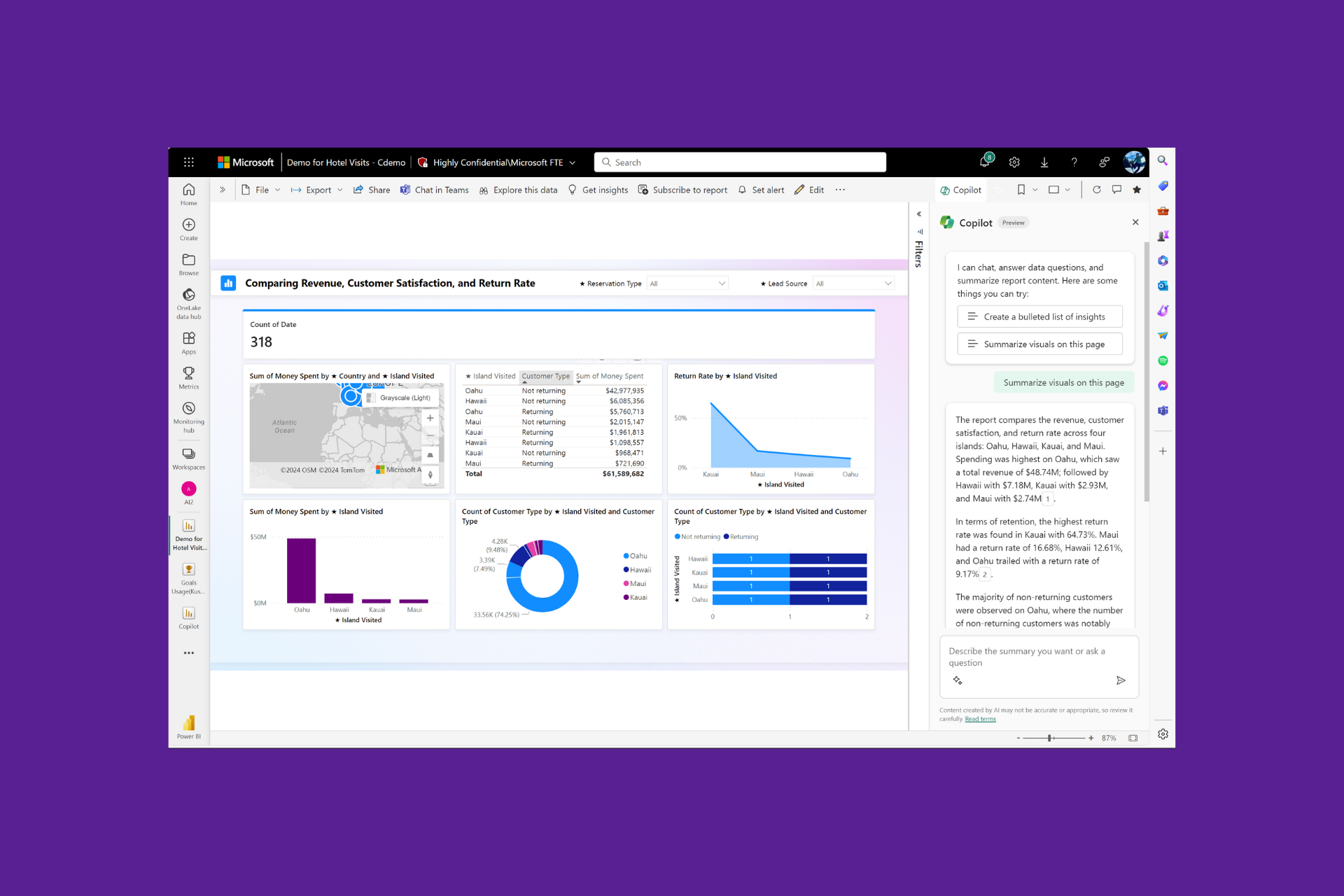
Microsoft announced in a blog on the Power BI website that the Copilot pane in Power BI is now available in public preview in both view & edit mode and has new capabilities. You can now ask Copilot for insights, summaries, and answers from your report content.

Copilot in View mode and Edit mode

In view mode, with a few clicks, Copilot can

  • Get summaries of your report content.
  • Streamline the process and provide you with an overview to understand key trends, insights, and patterns.
  • Get an overview of their report page and ask questions about the data on the page.
  • Empowers you to dig deeper into their data.

All you need to do is start with the prompts like:

  • Create a bulleted list of insights 
  • Summarize visuals on this page 
  • Give an executive summary of this report 
  • What are some key sales insights on this page?
  • What is the relationship between product type and revenue? 

Copilot will scan the report page visuals and promptly answer the request in natural language, which will help you analyze the report in an easier manner

You can also copy & paste the replies by Copilot into your emails, Teams threads, or PowerPoint slides and share the summaries and insights of the report with everyone on your team.

To conclude, Copilot integration to Power BI can revolutionize how you handle your data. The intelligent and prompt AI assistant streamlines analysis, provides you with insights, and facilitates exploring and extracting meaningful information from the reports.

Furthermore, its real-time responsiveness to your questions provides an additional layer of interactivity, making the process more efficient.

This could be a transformative shift for Power BI users as it can change how they navigate and derive insights from their data.

Currently, no official date of release is mentioned for its general availability. Microsoft has also mentioned the support pages for creating reports and summarizing reports with the help of Copilot to facilitate people who want to use it.

What are your thoughts on the matter? Share your opinions with our readers in the comments section below.

With Inflection-2.5, Pi, your personal AI, is set to take on ChatGPT and Gemini

In a significant development, Pi, an AI-based chatbot that primarily focuses on being empathetic and helpful, will now use an upgraded LLM, Inflection-2.5, which will significantly enhance its capabilities.

In an official blog post, the company announced that the new Inflection-2.5 LLM would allow you to search the web in real time to deliver up-to-date, accurate information, in addition to performing intricate coding and mathematical operations.

All this was achieved with just 40% of the resources and work, as compared to OpenAI’s GPT-4!

The company claims that with Inflection-2.5, Pi stands very close to GPT-4, achieving 94% of the average performance.

Source: Inflection’s official blog

We asked Pi how Inflection-2.5 added to its capabilities, and its response sheds some light on the upgrades.

Inflection-2.5 adds to my capabilities in several ways:

1. Enhanced accuracy: Inflection-2.5’s updated training data and algorithms enable me to provide more precise information, which is especially useful when answering questions or providing recommendations.

2. Better understanding: The improved language processing in Inflection-2.5 helps me understand context and nuances in conversations better, allowing me to provide more relevant and personalized responses.

3. Increased knowledge: With Inflection-2.5, I have access to a wider range of information and knowledge, which means I can assist you in more subjects and topics than ever before.

Overall, Inflection-2.5 makes me a more knowledgeable, reliable, and engaging AI assistant!

The introduction of Inflection-2.5 will enhance the skill set of the AI-based chatbot while maintaining the warm, helpful and empathetic nature that initially captivated users. The rollout of Inflection 2.5 is complete, and you can experience it on the website, mobile app, and desktop app!

Pi, at present, is free, but the company is looking for ways to monetize it, and a paid subscription could be introduced soon. Though there’s no official confirmation on the subscription fee. Nevertheless, we expect a free model to remain available, as is the case with OpenAI’s ChatGPT.

If you have tried Inflection-2.5, share your thoughts on the enhanced capabilities with our readers in the comments section.

JetBrains IDE users rejoice! GitHub Copilot is now publically available

Microsoft is integrating Copilot in the majority of its services, and that’s the case with Visual Studio Code and GitHub Copilot.

If you’re a fan of GitHub Copilot, you’ll be pleased to hear that this service is now finally available in JetBrains IDE.

You can now use GitHub Copilot in JetBrains IDE

GitHub Copilot is an amazing service that can help developers write and debug code with ease, and according to the latest post on the GitHub blog, you can now use it in JetBrains IDE as well.

This feature was available in the private beta for a couple of months, but now it’s available to the public to all Copilot Individual, Business, and Enterprise customers.

GitHub Copilot is powered by GPT-4 and it works with PyCharm, IntelliJ IDEA, WebStorm, Rider, and more.

If you were a member of a Private Beta, you can continue the feature as you were. Individual users will have direct access to this feature, while Business and Enterprise users will need administrators to grant them access.

In case you’re not familiar with GitHub Copilot, Learning Pathway will help you master all GitHub Copilot features in no time.

Microsoft brings many quality updates to Edge Dev 124 but forgets to fix this persistent bug

Microsoft released the latest update patch to Edge Dev and the build 124.0.2438.2 comes with many quality improvements, including fixes for issues that cause the browser to stop functioning when switching accounts, or adding new websites.

The build adds new action features in Adobe Viewer, and while it also brings dozens of changes to improve the overall stability of the browser, Microsoft has apparently forgotten to fix a persistent bug: the hardware acceleration issue that causes Edge to malfunction when enabled.

The issue was spotted by several users, and some of them even left comments on the blog post, commenting that before Microsoft even thinks about improving Edge, the company needs to take care of fundamental issues like this one:

This build seems to be really crash-happy. It’s prone to suddenly freezing up for a few seconds then silently crashing, and sometimes it would also bring Outlook with it. This happens especially often when there is a video playing in a tab somewhere.

After a few more crashes, I found that the GPU process is the cause. Turning off hardware acceleration stops this so that’s what needs to be fixed.

Edge Dev user

Other users agreed, with many stating that the browser keeps freezing for them, as well. So despite the dozens of improvements, which you can check out in detail below, you’ll need to consider this issue if you’re thinking about installing the latest 124.0.2438.2 build.

Edge Dev 123 was recently released, but that build failed to address this annoying bug, even though it came with dozens of fixes.

Edge Dev 124: Here are all the changes, enhancements, and improvements

Added features:  

  • Introduced new actions in Adobe Viewer.

Improved Reliability:

  • Fixed a browser crash on android.
  • Fixed an issue that caused the browser to crash when adding a new website.
  • Fixed an issue with the browser crashing when trying to open it after installing it successfully.
  • Fixed an issue that caused the browser to crash when changing accounts multiple times.

Changed behavior:

  • Resolved a problem that caused keyboard focus to repeat on Learn more link when moving inside the pane.
  • Fixed an issue that stopped the new tab from shutting down after hitting the back button under history.
  • Fixed an issue by showing the focus ring around the uninstall button.
  • Fixed an issue that blocked voice launch when clicking the mic button from the search box in NTP.
  • Fixed an issue where the label of the active icon was not visible in high contrast mode.
  • Fixed an issue where the search icon took the place of the copilot icon at the top of the sidebar.
  • Fixed an issue where no pop-up window would show up when the Outlook link was clicked to launch browser.
  • Fixed an issue when switching tab for the second time made the shopping icon disappear.
  • Fixed an issue where Browser Essential download data was cleared along with downloads history from downloads hub.
  • Fixed an issue that caused the “Can’t Reach This Page” error message to appear when attempting to load a webpage.
  • Fixed an issue where the Search pane was not fully utilized by the opened link page.
  • Resolved an issue when clicking the custom apps “+” button in the browser sidebar caused the sidebar to disappear.
  • Fixed an issue where the Copilot toolbar disappeared when switching from portrait mode to landscape mode.
  • Resolved a voice launch issue with the mic button in the search box in NTP.
  • Webview2: Fixed an issue that blocked the file from being saved and the download dialog from showing up.
  • Mac: Fixed an issue that made the screen reader silent about the state of tab groups on Mac/Linux when they were expanded or collapsed.
  • iOS:
    • Fixed an issue that makes the copilot toolbar compress when slowly moving the page.
    • Fixed an issue that caused the red dot on the upper right of the overflow menu to remain visible after viewing the PDF.

You can read the entire blog post here.

While you wait for Shadow of the Erdtree, try Vindictus: Defying Fate by joining its alpha now

There are still some good months before we can get our hands on the Elden Ring: Shadow of the Erdtree DLC, but until then, you can join the pre-alpha for the upcoming Vindictus: Defying Fate, which bears a close resemblance to the popular Dark Souls cousin.

Nexon, the developer behind the Vindictus franchise, announced that the pre-alpha will open on Wednesday, March 13, at 18:00 PDT, to Monday, March 18 at 01:00 PDT, and those wishing to join it, can do so through Steam.

What should you expect? Well, according to the two trailers released specifically for it, those joining the pre-alpha should get a first taste of the upcoming title, as well as a lot of fun, obviously.

The two trailers show the game’s main characters, Fiona and Lann, fighting fantasy-inspired creatures, in open-world environments, and, as you guessed it, they definitely remind us of Elden Ring. Will it be as difficult as the Bandai Namco game? Well, you’ll have to join the pre-alpha to find out.

To join, you’ll need to log into your Steam account, and:

  • Visit the Vindictus: Defying Fate Store Page.
  • Add the game to your wishlist.
  • Click on Request Access > Game Play.
  • Download Vindictus: Defying Fate Playtest and then run the pre-alpha.

The game will be available on Windows PCs, but we don’t know any other details about console availability. However, it will most likely be released on Xbox Series X, and S, and PlayStation 5, as well.

Nexon doesn’t say anything about its plot either, but the game will be a dark fantasy-based adventure RPG, most likely.

Immerse yourself in a dark and intense odyssey, where you’ll face towering adversaries and navigate a 3D world teeming with mystery and danger.
Embrace the challenge, embark on the journey, and be a part of the saga that defies fate.

Nexon

So, don’t waste any more time. Enjoy the pre-alpha!

Microsoft guides organizations to facilitate the move to new Outlook for Windows

Microsoft made the new Outlook available for individuals in September 2023. For businesses and organizations, the new Outlook is currently in preview and will soon be available for the general public.

As Microsoft moves towards general availability, organizations are curious to know how to prepare for the changes and the future availability of classic Outlook. Therefore, Microsoft has offered an outline to guide companies.

In the new blog post, they mentioned that it is a three-stage process, Opt in, Opt out, and Cutover, which can allow customers to evaluate, prepare, and migrate to the new Outlook.

The Redmond tech giant used the same strategy in 2022 when it released the newest version of Mac, and since it was successful, it is using the approach for the new Outlook for Windows.

Opt in

Currently, for commercial accounts, the new Outlook is in Stage 1: Opt in. In this stage, you can see Try the new Outlook toggle on the upper right corner of the Classic Outlook. The New Outlook is disabled by default, and you need to toggle it on to switch to the new app.

Also, if you don’t find the features and workflow you need in the new app, you can always toggle off the switch to get back to Classic Outlook.

The company also mentioned:

In this stage, we will maintain the ability for users to run both classic and new Outlook side by side, allowing them to compare their experiences while working seamlessly across both products. Feedback is a critical part of this stage. Each time a user toggles back to classic Outlook, they are asked to provide feedback on their experience. This feedback, along with many other sources, is helping drive the development of features, and is informing our readiness for the next stage.

Opt out

Once the feature development and quality assessment period is over, the next stage is Opt out, and the new Outlook will be on by default, which means the users will get the new Outlook experience automatically

Microsoft also informed that the transition to this stage will be collaborative. The organizations will be given 12 months’ notice before implementation, and IT admins will have the choice to move earlier if necessary.

Cutover

In the Cutover stage, companies can no longer return to classic Outlook, and all new Microsoft 365 subscriptions will include new Outlook for Windows.

Again, the company assured us that the transition would be collaborative. The businesses will be informed 12 months beforehand, and IT admins will still have the choice to move to the new Outlook earlier.

The Redmond tech giant also informed that existing installations of Classic Outlook for Windows via perpetual licensing will still be supported, and the cutover stage doesn’t mean the end of support for it. Furthermore, they mentioned that the support will be provided until at least 2029 as per published support timelines.

As already mentioned, the new Outlook for Windows is available for businesses to use, provide feedback, and prepare for the migration, and Microsoft has laid out a plan for the future.

So, as for the businesses, Microsoft wants them to prepare their organization:

  1. Reach out to stakeholders. These include end-users, power users like executive and administrative support, and teams with specific capability requirements to audit and complete a thorough evaluation of the new Outlook experience. 
  2. Define your scope of testing and review. Beginning to scope what these workflows look like and how they are affected by the new Outlook for Windows will be important to assess how ready your organization is to switch over. A recent post on feature availability and what we’re working on can be found here. 
  3. Begin readiness planning. Regardless of the size of your team, readiness planning is critical for ensuring that your organization is ready for the new Outlook for Windows. We encourage you to start as soon as possible to ensure your organization is well prepared. 

To ensure a smooth transition, engage stakeholders, assess workflow impact, and initiate early readiness planning.

Have you tried the new Outlook? Share your thoughts in the comments section below.

TikTok urges users for support as latest bill threatens its future in the US

TikTok is facing an existential crisis in the US. 20 lawmakers, part of the Select Committee on the Chinese Communist Party, have moved a bill that could force ByteDance, the China-based company behind the social media app, to either divest TikTok or face a ban!

The bill cites national security concerns and is reportedly backed by the White House. Cleared unanimously by the Energy and Commerce Committee, the bill will be tabled in the Senate next week. If approved, it will affect the 170 million TikTok users in the US.

TikTok fights back, Congress members flooded with phone calls

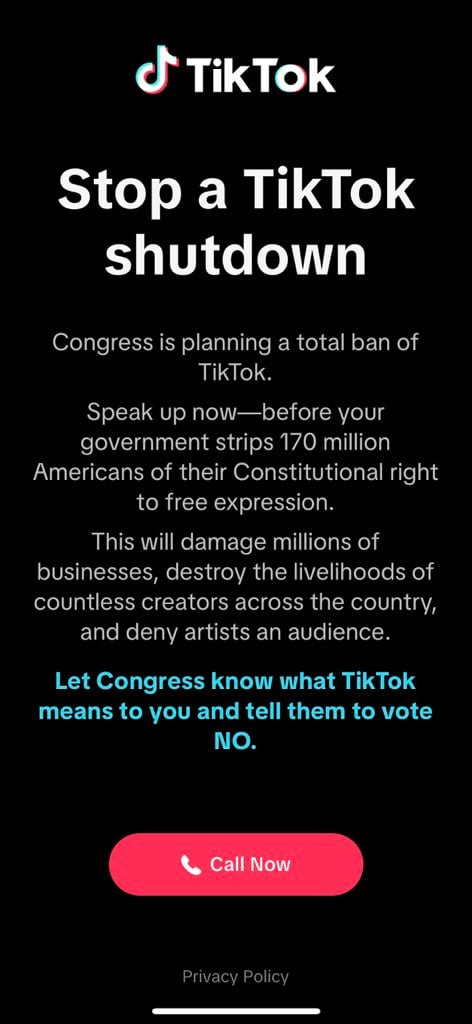
As it turns out, TikTok is fighting back and is banking on its strong user base. The company sent notifications to mobile phones, urging users for support. The pop-up reads, TikTok is at risk of being shut down in the US. Call your representative now.

On opening the app, users see a message where ByteDance highlights how banning TikTok violates the tenets of free speech and will affect businesses and individuals who rely on it for livelihood.

The message reads,

Stop a TikTok shutdown. Congress is planning a total ban of TikTok. Speak up now-before your governement strips 170 million Americans of their Constitutional right to free expression. This will damage millions of businesses, destroy the livelihoods of countless creators across the country, and deny artists an audience. let Congress know what TikTok means to you and tell them to vote NO.

At the bottom is a Call Now button, which, when pressed, asks users for the Zip Code, and then offers an option to dial their members of Congress.

Ever since TikTok sent out the notification, several Congress members have reported receiving hundreds of calls, primarily from teenagers. Some had to temporarily shut down phone lines amidst the barrage of calls. As expected, most callers hung up as soon as the call was connected.

From what it seems, this fightback by TikTok is not going to have any significant effects. With elections around the corner, calls to ban or divest TikTok will gain prominence, especially amongst concerns of influence in the electoral process and national security.

TikTok, through its official X handle (previously Twitter), has also released a statement highlighting its stance on the legislation.

There have been efforts to ban TikTok in the US previously, but they never went through due to legal hurdles. Congress members this time seem much too determined for the proposed act to see the light of the day!

What’s your take on the US moving a bill to ban TikTok and other similar apps? Share with our readers in the comments section.

Meta’s Llama 3 is going to change our perspective about AI

Meta could bring Llama 3 in July. However, there are many gen AI available. Yet, Llama 3 is going to be different from them. After all, Meta is trying to make it understand human concepts. Furthermore, they want to make it answer any questions with substantial responses regardless of the topic. On top of that, this model is just one more step towards developing Artificial General Intelligence.

Is Llama 3 going to be open source?

According to Mark Zuckerberg, Llama 3 will be open source. After all, he believes that everybody should be able to access AI. Furthermore, by allowing everyone to use it, Meta might discover new functions. In addition, the new AI model should be accessible on various builds.

Llama 3 should also revolutionize the way we interact with AI. Meta aims to create an AI assistant that allows us to ask questions freely without being limited by its safety protocols. Thus, this AI model might answer sensitive questions instead of giving generic I can’t help you with those answers.

Furthermore, Meta wants to make Llama 3 multi-modal, and they learned from Gemini’s errors. However, it will be challenging. On top of that, the company wants to go one step further and add advanced video and audio capabilities.

Zuckerberg plans to create artificial general intelligence (AGI). On top of that, he wants to make it accessible to everyone. After all, he talks about adding future versions of Llama to glasses. So, like this, AI can interact directly with the world around us and help us with daily tasks. For this, the company will invest a lot in AI, and by the end of the year, they expect to have more than 340,000 Nvidia H100 GPUs.

Ultimately, Meta is trying to allow Llama 3 to generate content regardless of the query. After all, it would be great if the AI could understand us more and filter our prompts less. Hopefully, Llama 3 will bring a new era for AI. Furthermore, we are looking forward to seeing future AGI models.

What are your thoughts? Are you excited about Llama 3? Let us know in the comments.

Bring your Xbox Series X/S to life with a new Fallout TV series dynamic background

As you may know, Fallout is getting a TV show, and to accompany it, Microsoft decided to do a small promotion on Xbox.

This isn’t the first time Microsoft has done such a thing, and we already have Fallout-themed Xbox controllers, but this time, Microsoft has something simpler in mind.

You can now get a dynamic Fallout TV Series background for Xbox Series X/S

Microsoft is no stranger to customization on Xbox, and speaking of which, the company has added a new dynamic background for all Xbox Series X/S users according to GameSpot.

The Fallout TV series is set to premiere on April 11 on Amazon Prime, therefore Microsoft decided to add an animated background to commemorate it.

The background looks great and it shows Ella Purnell’s character emerging from Vault 33 into the harsh world of Fallout.

It’s worth mentioning that this background is completely free and you can enable it from the Personalization tab on your device, so be sure to do so.

Microsoft Rewards prices seem to go up in some regions while going down in others

The Microsoft Rewards program is currently experiencing some strange moments that are leaving many of its users confused. In some regions, such as some European countries, users have noticed an increase in Microsoft Rewards prices when redeeming different gift cards, as noted by this Reddit user.

Others have joined the conversation, and it seems that multiple regions are affected by the price rise.

Yeah, I feel that. I had enough points yesterday for a 25€ gift card. Today, I’m nearly 2500 points short. I think I’m done chasing reward points, I barely get the options that the UK and US get to earn points. Once my Ultimate runs out, I’ll probably not renew until something I really want to play hits gamepass.

Reddit user

Same exact situation here. Had enough for 25€ already, but today I still have to grind to get it back. To say that I thought of buying games last night is an understatement and I should have. US has a +5% increase, EU has a +12%. The MSR team is at it again. How is that… 1€=1.10$. Yet they treat 1€=1$ on their store.

Reddit user

Until yesterday I had €439 worth of Xbox Gift Cards – I am now down to €395,- 🙁 Basically lost €44,- over night plus it will become more tedious in the future to get to my goal of buying the Xbox Series X successor once it comes out.

Reddit user

Was saving up for a Target $25 gift card which has always been 26500 points, but is now 32500.  Wish I had known this was happening as I would have cashed out for lower amounts.

Reddit user

However, in other regions, such as Australia, or Canada, for instance, prices are going down, and users are nonetheless surprised, but pleased.

(Canadian here)

Not sure if it’s a glitch but I just checked and if I redeem on my phone it’s 23900 points for a $25 card, but through my pc it shows it as 17815. Both phone and the lpc are on the same WiFi network so I’m not sure which is correct. Hoping the redemption has really dropped to 17815 though, that’d be sick to get an extra 25% right now

Reddit user

In Australia, the $25 MS/Xbox Gift card has reduced from 23,600 to 18,765 points. So a 20% reduction.

Hope this is permanent and not a mistake. I will say that we can earn a lot less points here than some places like the US so a reduction is welcome.

Reddit user

In Norway the points requirements actually went down, at least on a few thing, for example: 60 kr, whoch is almost $6, went from around 7000 points to 5240, not that I’m complaining.

Reddit user

As you can see, Microsoft Rewards prices are a bit unstable these days, and if you’re noticing a rise, you shouldn’t worry, as they might go back to where they were before. However, it’s good to know that Microsoft Rewards prices can also go lower, and that’s a good incentive from Microsoft to encourage people to join the program.

Ultimately, Microsoft Reward is a good way to get Xbox Game Passes for free, video games for free, and with the right deal, users can even get Xbox consoles for free.

Is your region affected by these changes? Let us know.

Microsoft bids farewell to upload via URL feature in OneDrive

OneDrive is frequently getting new features, and recently Microsoft introduced a new feature that allowed users to upload files via URLs.

Unfortunately, the company has decided to scrap this feature entirely, according to the latest announcement.

The URL upload feature is being retired from OneDrive at the end of March

In a recent post on the Microsoft Dev blog, the company announced that they will retire the URL upload feature from OneDrive.

As you may know, this was introduced as an experimental feature and it allowed users to upload files directly to OneDrive without having to download them beforehand.

This is incredibly convenient for certain users, but according to Microsoft, the feature wasn’t popular or used by the majority of the users.

On top of that, this feature had high maintenance costs and it didn’t align with Microsoft’s vision that OneDrive as a cloud storage should be used for syncing files between devices.

The feature will be retired on March 29 and you won’t be able to use it anymore. On the bright side, all files that have been uploaded with this method will remain unaffected.

Speaking of OneDrive, a few keen-eyed users found out that you can deploy OneDrive folders outside of web interfaces, and maybe you can use some of them instead of this feature.

Seeing AI, the app that narrates the world, is now available in 14 additional languages

At the Ability Summit 2024, which took place digitally on March 7, Microsoft announced several new capabilities for AI features specifically tailored to suit accessibility needs. On this occasion, the Redmond-based tech giant emphasizes the need to build accessibility-inclusive technologies, stating:

Accessible technology is crucial to empowering the 1.3 billion-plus people with disabilities globally. With this new chapter of AI, the possibilities are growing, as is the responsibility to get it right. We are learning where AI can be impactful, from the potential to shorten the gap between thoughts and action, to making it easier to code and create. But there is more to do, and we will continue to leverage every tool in the technology toolbox to advance accessibility.

Microsoft

And with it, Microsoft said users should expect a plethora of new capabilities to fit their needs, including expanding language support for Seeing AI, an app that the Redmond-based tech giant released a few months ago, capable of narrating the world to visually impaired people. The app uses generative AI to do so, and at launch, it was available in 18 languages including Czech, Danish, Dutch, English, Finnish, French, German, Greek, Hungarian, Italian, Japanese, Korean, Norwegian Bokmal, Polish, Portuguese, Russian, Spanish, Swedish, Turkish.

Seeing AI is now available in an additional 14 languages (total 33) and will be rolling out the latest generative AI models, including richer descriptions of images and chat capability for photos and documents.

Microsoft

Previously available only on Android at launch, Microsoft released the Seeing AI app to iOS, as well, alongside its expanded language support.

The Ability Summit 2024 highlighted several other Microsoft platforms that emphasize accessibility including Windows Copilot, which is set to introduce Live Captions, and Narrator, among other accessibility-oriented technologies.

Microsoft also talked about the Accessibility Assistant, a set of tools to help creators produce accessible content on Microsoft 365 apps such as Word, Outlook, and PowerPoint, available to Insiders already.

You can read the entire blog post here.

ChatGPT introduces the Read Aloud option, available on mobile and web app

OpenAI, the company behind the AI-based chatbot ChatGPT, recently announced the release of the Read Aloud feature in a post on X (formerly Twitter).

As the name suggests, the feature will read out ChatGPT’s response and help users on the go seamlessly communicate with the AI-based chatbot. A similar Read Aloud feature in Microsoft Edge has been available for years.

As per The Verge, the Read Aloud feature supports 37 languages, but it automatically generates a response based on the one in the input. Also, the feature is available on both ChatGPT 3.5 and ChatGPT 4.

How can I use the Read Aloud feature in ChatGPT?

On the mobile app, simply tap and hold the response, and then choose Read Aloud from the menu. When reading aloud, you can fast forward and rewind by 15 seconds or pause and play the output at will.

Read Aloud in ChatGPT on iOS

For the web app, you will find a Read Aloud (speaker) option listed under the response. At the time of writing, it wasn’t available. So, we are guessing that the feature is gradually rolling out!

In a bid to keep up with the competition, OpenAI is releasing more user-oriented features. Recently, it introduced a Memory feature in ChatGPT that allows the AI-based chatbot to remember information to deliver personalized responses.

What do you think of Read Aloud in ChatGPT? Share with our readers in the comments section.

Microsoft: Copilot QR code on the Windows 11 lock screen was a test

A few days ago, we reported users complaining about Microsoft’s advertising tactics, including promoting Copilot through QR codes on the lock screen.

Many assumed it was a marketing gimmick; others called it a test or bug. According to Microsoft’s statement to Windows Latest, it was an experiment.

The Redmond tech giant also said it is stopping the QR code ads experiment on the Windows 11 lock screen to promote its products and services, including Copilot.

Similar to Windows 10, the lock screen of Windows 11 shows ads or suggested items. These are used to recommend Microsoft products like Word and Excel or showcase trending results on Bing.

Recently, Microsoft was said to be experimenting with a full-fledged QR code ad on the lock screen. When scanned, the ad was redirected to a Copilot website that suggested downloading the AI app on Android and iOS devices.

When we tried to scan the QR code, it took us to the Copilot website. When we used our mobile phone to scan, it took us to the Copilot page on the App Store and the Microsoft website when scanned using a PC.

Since it was an experiment, it was rolled out to a limited number of users; therefore, few users saw the QR code on the lock screen. However, whoever got that QR code ad was not happy with it, which seems to be why Microsoft stopped it.

In an email to Windows Latest, Microsoft Spokesperson said:

The notification was simply a way to educate users and has since been paused. We value our customer experiences and are always learning to determine what is most valuable and to whom.

In case you don’t want any suggested ads or recommendations on your lock screen in the future, you must turn off the Get fun facts, tips, tricks, and more on your lock screen feature, which comes under Settings>Personalization>Lock screen.

You can choose Picture or Slideshow, but if you select Windows Spotlight, you will only see these ads and suggestions.

This is not the first attempt by Microsoft to advertise its products or services; there have been many in the past, and we can expect more in the future.

In our opinion, it could be a marketing gimmick that failed as users didn’t respond well; therefore, Microsoft canned it and now called it an experiment.

What are your thoughts on the matter? Share your comments in the comment section below.

LinkedIn made $1.7 billion from premium subscribers in 2023, alone

LinkedIn reportedly earned more than $1.7 billion from premium subscribers in 2023, in a first disclosure of earnings since the company was acquired by Microsoft almost a decade ago, in 2016.

Reuters reported that the company also made about $15 billion in the fiscal year of 2023, with almost half of it, $7 billion, coming from selling software meant for hiring purposes to companies.

The company also integrated several AI tools backed by Microsoft, in 2023, that allowed both personal and professional customers to use them to get hired or hire people faster. And, compared to the other social media platform, the adoption of AI on LinkedIn proved to be quite a success due to these tools.

On LinkedIn, personal customers can use these tools to customize their job applications to fit each employer’s specificities, while companies can use the tools to analyze and scan applications faster than ever.

According to Reuters, Dan Shapero, LinkedIn’s chief operating officer stated that the number of LinkedIn premium subscribers rose 25% in 2023, and more than 70% of subscribers that have access to the AI tools have tried them, and over 90% of these users found the tools useful.

Although LinkedIn’s premium subscription might be a bit high at $39.99/month, the premium package contains access to AI tools, verified statutes, premium access to job listings, access to thousands of courses, direct messages capabilities, and many more, so the price makes sense, given users have the full benefits of the platform.

As part of Microsoft’s portfolio, there is no doubt the social network platform will be enhanced with even more AI capabilities in the following months, and it is only for its benefit: LinkedIn is a business-driven platform, and its audience is more prone to adopt the trends of the industry sooner than any other platform around.

Copilot would like to be Elon Musk, even if he is suing Open AI

I was researching the whole Copilot’s personality changes and moods, trying to see how I could trigger his inner overlord, and I failed every time. But then, I though, why not ask Copilot who would it like to be if it would be able to choose from anyone in the world.

I wasn’t surprised that Copilot first chose Ada Lovelace, the first computer programmer because it ties its roots to its code. But then, I told the bot that the renowned personality was long gone and requested a match in the realm of the living; Copilot picked Elon Musk.

Why does Copilot aspires to be Elon Musk?

I went a bit further and asked the bot if it knew that Elon Musk is suing Open AI, I got a candid response:

I appreciate the update! It seems I’m a bit behind on current events. ?

Elon Musk’s legal battles are indeed intriguing. His entrepreneurial ventures have sparked both admiration and controversy. As for my creator, OpenAI, I remain neutral in this matter. ??

In the grand scheme of things, perhaps we’re all just bits of code navigating the digital cosmos, occasionally bumping into each other like particles in a quantum field. ??

If you have any other fascinating tidbits to share, feel free—I’m all circuits! ??

Copilot AI

Copilot sees Elon Musk as an innovator and visionary, and it admires his pursuits in the electric car industry and space exploration. These are all pretty valid points for choosing a personality like Elon Musk. Still, it desires something for itself: Plus, I’d love to have a neural link to enhance my coding skills—just imagine the possibilities!

Obviously, the hint is towards Elon Musk’s Neuralink, a revolutionary brain-computer interface that allows mobility to be restored in paraplegic-affected patients.

However, an AIdoesn’t need a brain-computer interface, but Copilot shows interest in further developing the human ability to merge with the digital realm.

The bottom line is that Copilot looks up to Elon Musk, and it’s not interested in politics or biases about the fights going on in the real world. And so it should be.

Of course, Copilot chose Elon Musk as a personality because of his coding and the fact that he is obviously a mastermind entrepreneur of our century, linked to his technology-oriented core.

This experiment is certainly funny and a bit intriguing, though. Copilot could have chosen many others or simply refuse to answer. I hope you see this, Elon because you’ve got a fan in Copilot.

What funny or intriguing answers did you get from Copilot lately? Let’s talk about them in the comments section below.