Microsoft’s Surface Pro 10 and Laptop 6 could land as early as this month

The folks over at Windows Central are reporting that Microsoft is prepped to deliver the long-awaited hardware refreshes to its Surface Laptop and Pro lines as early as the end of this month.

According to the report, Microsoft will be roll out its new hardware offerings for 2024 in two waves with an initial announcement on March 21, 2024, followed by staggered release schedule of April for Intel-powered devices and a June period for ARM variants.

As a bit of a refresher, in late 2023, reports first surfaced of Microsoft’s plans to refresh the hardware design of its Surface Laptop line up alongside a major focus on improved CPU and NPU pairings from chip partners Qualcomm and Intel.

Both the Surface Laptop 6 and Surface Pro 10 are reportedly coming with Intel Core Ultra and Qualcomm Snapdragon X Elite SoC variants as well as some updated hardware features that include anti-reflective OLED screens, brighter NIT counts, thinner bezel profiles, rounded industrial design, ultrawide front facing webcam, haptic trackpads, dedicated Copilot AI buttons on the keyboard, NFC-reader, an additional USB-C port, and AI-powered extras.

Among the reported AI-led features coming with NPU paired PCs are beefed up Windows Studio Effects for enhanced video and call conferencing, on-device Copilot suggestions and aid, improved battery management, as well as a new AI Explorer experience.

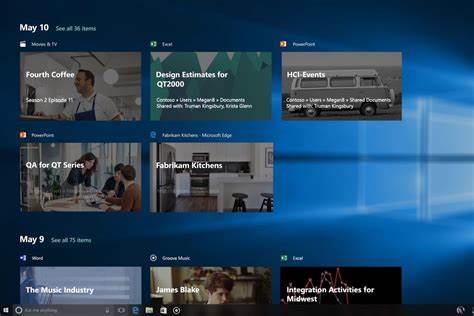
The folks over at Windows Central are reporting that AI Explorer “is the blockbuster AI experience that will separate AI PCs from non-AI PCs. It’s described as an “advanced Copilot” with a built-in history/timeline feature that turns everything you do on your computer into a searchable moment using natural language. It works across any app and allows the user to search for previously opened conversations, documents, webpages, and images.”

For those of us old enough to remember Windows 10 Timeline feature, it sounds like Microsoft is about to bring that back to be a bit more useful than simply showing a thumbnail of used in-box Windows apps.
Microsoft is also said to be rolling out the new AI features and services at a different time than shipping its new hardware. According to Microsoft’s own roadmap, the version of Windows with all the new AI goodies, Windows 11 version 24H2 Update, won’t land until the fall of 2024.

Microsoft will presumably have a sizzle reel of what the new AI features can do as it announces the hardware these experiences will run on, while also planning on an additional software-focused announcement sometime later this year.

Without an official word from Microsoft or formal invitations for the press available, it’s very plausible that the company follows through with a March and June release of its hardware, which isn’t unprecedented for Surface team.

Facebook and Instagram were down, and users were automatically logged off the platforms

Facebook was down, globally, and apparently, millions of users (including myself) were affected by it. The platform automatically logged users off of it, and when trying to log back in, Facebook displayed the ‘Session expired’ error.

According to the downdetector, there were hundreds of thousands of reports globally, and Instagram was affected alongside Facebook, as well.

All the versions of these platforms were affected, including desktop, and mobile devices, and Facebook, and Instagram were not working on Android, or iOS operating systems as well, so it’s safe to say Meta suffered a major outage.

Messenger was also affected by this error, and Facebook let users initiate the login process, but it didn’t respond to their requests. Moreover, even Meta Quest headsets were affected by this outage.

Ultimately, Meta communication leader, Andy Stone, released a statement saying the company is aware of the issues, and it’s working on getting the platforms back online.

And later, Meta released a message, stating:

We are aware of an issue impacting Facebook Login. Our engineering teams are actively looking to resolve the issue as quickly as possible.

Meta

Meta said there was a major disruption on its platform going on currently, and the company promised to fix the issues as soon as possible.

Threads, Meta’s X clone, wasn’t working either, although, WhatsApp, on the other hand, appeared to be working properly.

The Facebook login error seems to be improving, as some users reported they were able to log back into the platform, and a few moments later, Facebook seemed to be back and running again, as I was able to access my profile a few moments ago.

We still don’t know why this outage has happened, but Meta says that the platforms are currently recovering from majoring disruptions:

We are recovering from an earlier outage impacting Facebook Login, and services are in the process of being restored. We apologize for any inconvenience that this may have caused.

Meta

The company will most likely release a statement later today, and in the following days.

If you’re an Xbox fan, you should attend Capcom Highlights, and here’s why

Big week for Xbox fans, everywhere: these days, there are going to be 2 events that will shed light on the upcoming Xbox titles coming to Game Pass.

The first, Xbox Partner Preview takes place on March 6, and you can find more details about it here. The second, Capcom Highlights will take place on March 7, and March 11, and Xbox users should check it out, as the company will share more details about its upcoming Xbox titles.

According to a post made by Capcom on X (formerly known as Twitter), the Highlights event will focus on several titles, many of them coming to Xbox in the following months.

  • Day 1 (March 7) – Kunitsu-Gami: Path of the Goddess, Dragon’s Dogma 2
  • Day 2 (March 11) – Street Fighter 6, Exoprimal, #MHStories & #MHNow

The event will take place at 3 PM PST on both days, and the presentations won’t last more than 20 minutes, according to the official website.

Xbox users should be particularly interested in attending this event and they can do so, by accessing the YouTube and Twitch channels of Capcom USA, as well, as following their other social media platforms:

You’ll be able to find more details and updates about Xbox titles such as Kunitsu-Gami: Path of the Goddess (which also be presented at the Xbox Partner Preview), Dragon’s Dogma 2, Exoprimal, and Street Fighter 6.

Popular video games streamer, FightinCowboy, will be hosting the events on both days, and Xbox users will get a glimpse of the future updates coming to these games, maybe through gameplay teasers, or special trailers.

To have a complete idea of these updates, you should also attend the upcoming Xbox Parter Preview where several Capcom games will be presented during the 30-minute event.

Big week for Xbox gamers, right?

Xbox will preview the future games coming to Game Pass on its Partner Preview event

Are you ready to find out which are the next games coming to Game Pass in the following months? Well, if you are, you won’t want to miss the Xbox Partner Preview event on March 6th. Don’t worry, though, the event is virtual, it lasts for 30 minutes and will be buffed with video game trailers.

According to the official blog post, Xbox will unveil details about upcoming games from EA, Capcom, and Nexon. Should we expect a new Resident Evil remake video game? Well, anything is possible at this point.

However, there are some specific games that will be presented during the Xbox Partner Preview event, as the company states:

During Xbox Partner Preview, you can learn more about combat and traversal in Tales of Kenzera: Zau, with a video narrated by Abubakar Salim himself, see new gameplay from Kunitsu-Gami: Path of the Goddess, get a closer look at The First Berserker: Khazan, and other great titles coming to Xbox, Windows, or Game Pass.

Xbox

So when and where to watch?

  • When: Wednesday, March 6, at 10 AM Pacific Time / 1 PM Eastern Time / 6 PM UK Time
  • Where: across all the Xbox channels on YouTube and Twitch.

More specifically, you’ll be able to watch the event by accessing one of these links (depending on the platform that you prefer):

It’s worth mentioning that the YouTube streams will be in 4K at 60fps, while all other channels will be 1080p / 60fps, so make sure to watch those gorgeous trailers at the highest quality.

The event will also be available in more than 40 languages, including Arabic (MSA), Chinese (Simplified), Chinese (Traditional – Hong Kong & Taiwan), Czech, Danish, Dutch, Farsi, Filipino, Finnish, French (EU & Canadian), German, Greek, Hebrew, Hindi, Hungarian, Indonesian, Italian, Japanese, Korean, Malay, Norwegian, Polish, Portuguese (Brazilian & EU), Russian, Slovak, Spanish (Castilian & Mexican), Swedish, Thai, Turkish, Ukrainian and Vietnamese but also, and for the first time ever, Bengali, Māori, Punjabi (Gurmukhi), Swahili, Tamil, Urdu, and Zulu.

The event might be similar to the recent Xbox Business Update, which also revealed big things, such as Diablo IV coming to Game Pass, so expect some big announcements.

You can now hide Copilot results from Bing Search, thanks to the new settings

Copilot is constantly evolving with new features, and just recently Copilot got three new integrations.

It seems that Microsoft is making some changes to the Bing Search related to Copilot, so let’s see what’s new.

Bing Search now allows you to hide Copilot results

According to the Search Engine Roundtable, Microsoft has added new Copilot settings to Bing Search. With them, you can hide Copilot’s responses on the search page if you want.

You can set Copilot to appear when you scroll or swipe up to the top of the page. This sounds like a great change, especially if you don’t want to constantly see Copilot suggestions.

However, not many have access to these settings, and at the time of writing, we weren’t able to test these settings. However, we’re certain that they will appear for more users in the upcoming days.

This isn’t the only change related to Copilot, and in the future, you’ll be able to open Copilot on Windows 11 faster than ever before.

What are your thoughts on these settings? Let us know in the comments!

Grab the limited edition SpongeBob Xbox Series X console on March 7

Good news for SpongeBob fans, the good-natured and enthusiastic sea sponge: Microsoft has announced a SpongeBob SquarePants-themed Xbox Series X.

This is a huge leap from the monolithic gray and green console to a famous cartoon character, which is loved both by kids and adults.

It is called Xbox Series X – Nickelodeon All-Star Brawl 2 Special Edition Bundle and has the SpongeBob SquarePants with its iconic smile, Krusty Krab uniform, and ecstatic arms.

Along the console, you get an Xbox Wireless controller featuring SpongeBob and all his underwater friends, including Mr. Krabs, Squidward, and Gary, in a colorful collage.

The bundle is a limited edition and available for purchase at $699, starting at 8 am PST on Thursday, March 7, 2024, and you can only purchase it in the USA.

Due to its status as a limited edition, the post on Xbox Wire suggests to download the Best Buy Mobile app to get a notification on its availability, so that you don’t miss out on this opportunity. This means the Redmond tech giant has partnered with Best Buy for this exclusive release.

Microsoft has released cartoon-themed and popular game theme controllers in the past, including a previous SpongeBob iteration for Nickelodeon All-Star Brawl in 2021. The company is known for releasing special edition versions of its console, namely Starfield Wrap.

This seems to be a strategic move by Microsoft, which not only promotes Nickelodeon All-Star Brawl 2 but keeps up the sales in the months between the new year and summer.

What do you think about the SpongeBob-inspired console? Share your thoughts in the comments below, and let’s dive into a conversation!

Opening Copilot on Windows 11 is easier than ever

Microsoft continues to provide a sneak peek to exciting features of Windows 11 though its Insider preview program.

This time, it was with Microsoft’s latest Windows 11 Insider Preview build 22635.3276; you get the hover experience for Copilot, your AI assistant for Windows, for easy accessibility.

If you want to try the new features before they are released in the public version, you can join the Windows Insider program. To learn how to get the Insider updates, follow our guide.

As of now, in Windows 11 version 23H2, you need to click the Copilot widget icon from the Taskbar’s right corner to launch Copilot.

Now, Copilot will get a new hover behavior, and you can hover over your mouse cursor on the Copilot icon, and it will launch the chatbot.

The same behavior is already available for the Widgets panel; if you have enabled it on the Taskbar, you can hover over it to open the Widgets panel and click anywhere else to close it; however, the Redmond tech giant has added a twist to it for Copilot.

Unlike the Widgets panel, if you don’t interact with the Copilot pane, it will close automatically, which can save a lot of time for you, provided you are a frequent Copilot user.

As of now, you can experience this feature on the Beta Channel. However, it is limited to selected Windows Insiders in the Beta Channel. Microsoft is using a phased rollout, which means all the Beta Channel users will get to use it over a few weeks.

Also, even if you have the Get the latest updates as soon as they’re available feature enabled, it doesn’t increase the chances of getting the feature faster than expected.

The feature doesn’t seem to be as important for people who don’t use Copilot so often, but for frequent users, it is a matter of better accessibility and saving time while interacting with the AI assistant.

In case you have any questions about the process, you can refer to the Microsoft Answers post for that. If you have any questions, feel free to mention them in the comments section below.

Larian confirms Baldur’s Gate 3 will have four discs for Xbox, cutting content not an option

When Baldur’s Gate 3 was first announced for Xbox Series S and X, it was expected to be a three-disc game. While that did come as a surprise to many given advancements in modern-day media storage, as it turns out, the game will instead have an extra disc, i.e., a total of four.

This is because Larian Studios had an additional 500 MB over the three-disc limit and had to bring in a fourth one. Because cutting content wasn’t a viable option!

This was confirmed by Michael Douse, Director of Publishing at Larian Studios, in a post on X (formerly Twitter).

For those who don’t know, this is still an improvement over the previous versions. The first in the series, Baldur’s Gate, came with 5 discs at one point, while the sequel had 6.

As per the initial announcement, the PlayStation edition was to come loaded on 2 discs. But we can expect an additional disc or two, given how the situation changed for Xbox.

Balder’s Gate 3 won The Game Award for the Game of the Year and several others in 2023 and has been a popular choice amongst the community. Though the game’s system requirements have been a cause of concern for some.

Now, an additional disc and a slightly delayed delivery (by a week), as confirmed by Michael Douse, could upset a few fans. Some reports state that Balder’s Gate 3 is the first game on Xbox Series S and X to come with as many as 4 discs!

Baldur’s Gate 3 Deluxe Edition Box is available for pre-order at $79.99 for all three platforms, Xbox, PlayStation, and PC, on the official website.

Windows 11 quietly adds Suno, Adobe Express, and Spotify integration to Copilot

Copilot is everywhere, and we’re constantly seeing new features being added. After adding the Azure Migrate tool in Visual Studio via GitHub Copilot Chat, we’re finally seeing some non-developer features.

What are these features, and how can we use them? Keep on reading to find out.

Windows 11 Copilot just got three new free integrations

As reported by Windows Latest, Copilot has quietly added support for Suno, and by using this service you can generate a song from your text inputs using an AI.

We encountered some issues with this service in the browser, so we haven’t been able to test it properly.

Next on our list is Adobe Express, and if you’re familiar with this service you can use it to generate images, logos, flyers, and other types of graphics with ease.

Last but not least is the Spotify integration which will give you links to a specific artist on Spotify when searching for it.

Unfortunately, this integration won’t open the Spotify app and instead will start Spotify in your web browser.

These are some interesting integrations, and we hope to see more of them in the future. Speaking of Copilot, did you know that you can upload documents in Copilot?

Are you excited about these new features? Let us know in the comments.

Microsoft’s new Copilot for Security gives you an upper hand against threat actors

In the era of Artificial Intelligence (AI), it’s imperative to leverage the technology to boost the organization’s security infrastructure and fight against human-generated ransomware. Microsoft Security Copilot does just that!

Presently in Early Access and available on an invite-only basis, Microsoft Security Copilot is amongst the latest AI-based products from the Redmond-based tech giant.

In its latest blog post, Microsoft highlights how Copilot for Security introduces new tools to help the SecOps team protect the data and, in case of an attack, give the much-needed advantage to eliminate the threat and limit the extent of damage.

How does Microsoft Security Copilot help eliminate threats?

Copilot for Security, when coupled with Microsoft Defender XDR, delivers enhanced protection and can help pinpoint threats, identify the affected devices, and take the necessary action.

In the blog post, Microsoft explains how the two would act in the case a human-operated ransomware attack is detected on devices.

  • Quickly assess the attack: With AI-backed tools, administrators will be able to swiftly identify the type and extent of the attack, saving precious time.
  • Simplifies the scripts: If the attack employs PowerShell scripts, Copilot for Security will, in simple terms, break down what’s going on in the background to help administrators prioritize things and form a relevant plan of action.
  • Gives more power: Lastly, Copilot allows quick translation from natural language to Kusto Query Language, gives security analysts information about the source of the threat, and lets them quickly deploy fixes company-wide.

Microsoft Secure is also holding an event on March 13, 2024, where experts in the field will discuss the different ways Copilot for Security can augment the security infrastructure through demos.

Microsoft is pushing for AI-backed advanced protection, and it’s the right step. To combat critical attacks, especially human-operated ransomware, leveraging Copilot for Security will give you the edge!

Do not forget to read our review of Microsoft Security Copilot to understand if it would be the right choice for your organization!

Microsoft tries to lighten the copyright lawsuit from The New York Times

On 27 Dec 2023, The New York Times sued OpenAI and Microsoft for copyright infringement. While the news publisher is the first to sue the two companies, it is not the last.

However, Microsoft is trying to lighten the suit by claiming that using their data is legal. After all, their chatbots generate content based on it without replying to it directly. Yet, that wasn’t the case, as The New York Times showed.

Unfortunately, if Microsoft wins the copyright lawsuit, it could possibly lead to smaller publishers losing legal battles against AI companies. As a result, they will also suffer significant losses. In addition, if you are a commercial customer who uses the Copilot service, Microsoft will legally defend you against copyright lawsuits.

Who owns copyright in AI?

If AI generates content alone, it won’t benefit from copyright protections due to the lack of human authorship. After all, the content is public, and the AI might replicate the answers it gives you to someone else. However, Microsoft is trying to lighten the copyright lawsuit by stating that the content they use to train the large language models (LLMs) is also public.

Unfortunately, chatbots also compete with news outlets, and many of us consider them a reliable source of information. However, Microsoft claims that they are not causing any harm to the news publishers. Furthermore, The New York Times seems to have no evidence of any actual damage. On the other hand, the news publisher told the court that if people can get the information from their site from the chatbot, they will lose revenue. After all, users will stop using referral links.

Neither Microsoft nor OpenAI denied copyright allegations. After all, they might use millions of articles to train their LLMs. However, Microsoft compares their LLMs to video cassette recorders and claims they face a similar problem. Yet, Ian Crosby, the lead counsel for The Times in this case, said that VCR makers never needed to infringe copyright protections to build their products.

Ultimately, the copyright lawsuit is trying to limit companies like Microsoft to copy content without consent or remuneration. Furthermore, depending on the results, more or less content creators could benefit from this by suing against copyright infringements. However, if The New York Times loses the lawsuit, smaller news outlets and publishers might think twice before going to court.

What do you think? Should Microsoft at least offer remuneration in exchange for the data they use? Let us know in the comments.

AI gets into your browser and it’s faster than ever

We were wondering when will they use the full power of AI within our browsers and, apparently, the time has come.

We’re talking about a new feature called ONNX Runtime Web which uses the WebGPU accelerator that allows AI models to be built directly into the browser and make them faster. A lot faster!

What is the ONNX Runtime Web?

To explain that, you need to know that WebGPU is engine, like WebGL, but a lot more powerful, capable of dealing with larger computational workloads. It is basically harnessing the GPU power to perform parallel computational tasks needed in AI processes.

Now, getting to ONNX Runtime Web, it is a JavaScript library that enables web developers to embed LLMs right into the web browsers and benefit from the GPU hardware acceleration.

Usually, large LLMs are not so easily deployed into browsers because they require a lot of memory and computational power.

ONNX Runtime Web’s innovation is that it enables the WebGPU backend which Microsoft and Intel are developing right now. 

How fast is the ONNX Runtime Web?

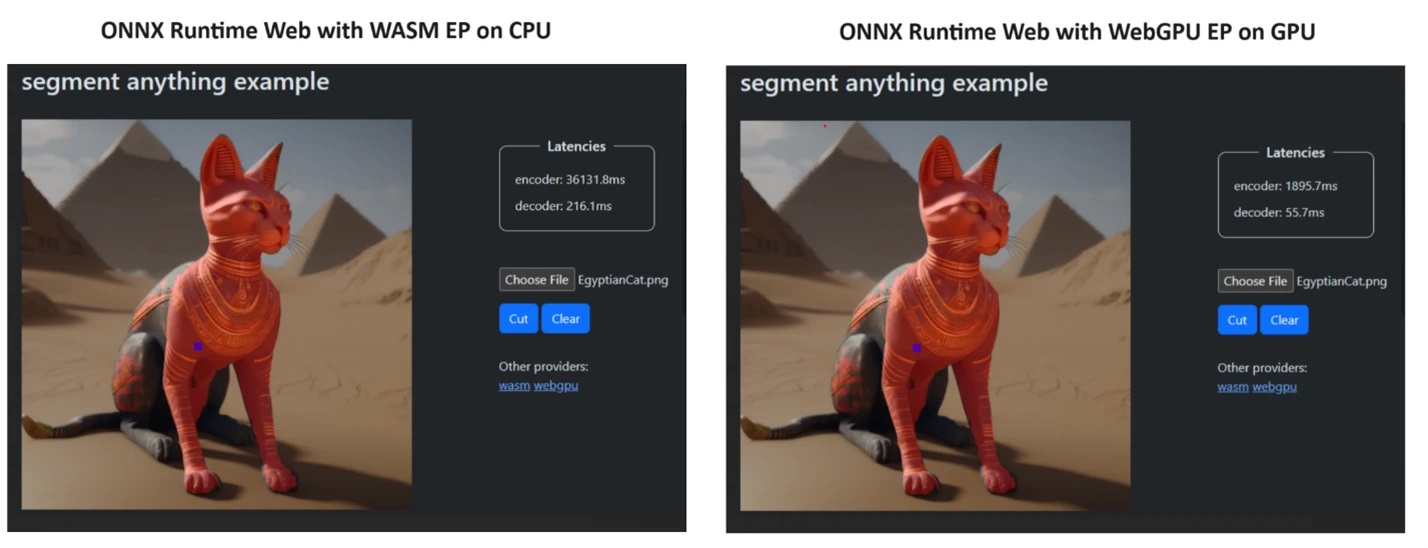
To prove their point, the ONNX Runtime team created a demo using the Segment Anything model, and the results were little short of amazing.

They incorporated WASM EP and WebGPU EP and used an NVIDIA GeForce RTX 3060 and Intel Core i9 PC. Then, they compared the encoder using the CPU and the new WebGPU and the latter proved to be a lot faster, as shown in the screenshot above.

The good news is that WebGPU is already embedded into Chrome 113 and Edge 113 for Windows, macOS and ChromeOS and Chrome 121 for Android. That means you can also play with ONNX Runtime Web on these browsers.

The developers explained how to try ONNX Runtime Web on their project page:

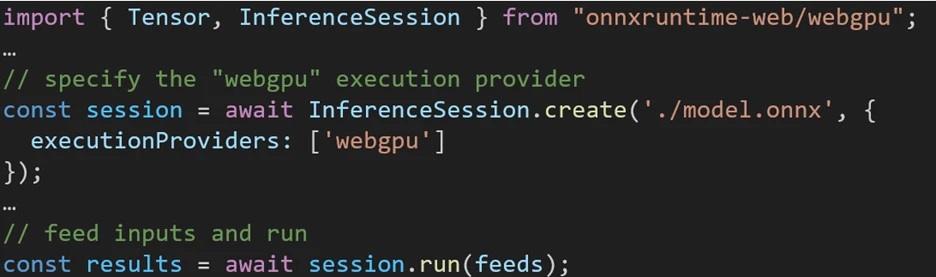
The experience utilizing different backends in ONNX Runtime Web is straightforward. Simply import the relevant package and create an ONNX Runtime Web inference session with the required backend through the Execution Provider setting. We aim to simplify the process for developers, enabling them to harness different hardware accelerations with minimal effort. 

The following code snippet shows how to call ONNX Runtime Web API to inference a model with WebGPU. Additional ONNX Runtime Web documentation and examples are accessible for delving deeper.  

Microsoft Open Source Blog
Code snippet to call the ONNX Runtime Web API

So, now that we have anything in place, let’s start deploying some powerful LLMs into the browsers!

What do you think about the new ONNX Runtime Web? Let’s talk about this development in the comments section below.

PowerToys got a new update, and some of its tools got superpowers

Microsoft PowerToys received a big update, which introduced a lot of features and improvements to the system utilities, focused on bringing stability.

Here are the enhancements mentioned on the PowerToys’ GitHub page that you will be able to see in its v0.79.0 :

Highlights

  • New feature: Keyboard Manager allows mapping shortcuts to start applications or opening URIs.
  • New feature: Keyboard Manager allows shortcuts with chords.
  • Modernized Color Picker with Fluent UX.
  • Peek now is able to preview drives.
  • File Locksmith has now an entry in the Windows 11 tier 1 context menu.

General

  • Refactored code so that English is used as a fallback language when a localized resource cannot be found.

Awake

  • The setting now reverts to “Keep using the current power plan” after Awake deactivates itself after any of the timed modes has expired.

Color Picker

  • Now uses WPFUI and the UI was updated to follow Fluent UX principles.
  • Added enable and disable telemetry to align it with the other utilities.

Command Not Found

  • Added telemetry for when a module instance is created in PowerShell.

FancyZones

  • Fixed a memory leak occurring on work area changes.

File Explorer add-ons

  • Added support to the .ksh, .zsh, .bsh and .env file types to Monaco previewer. Thanks @Aaron-Junker!
  • Re-enabled the RendererAppContainer feature in WebView2, since the associated crash has been fixed in the latest WebView2 releases.

File Locksmith

  • Added as an entry in the Windows 11 tier 1 context menu.

Hosts File Editor

  • Tweaked filter button style to indicate if filters are applied.
  • Added an error indicator to each input field to indicate why a new entry can’t be created.
  • Added an in-line delete button for each entry.

Image Resizer

  • Units and resize modes are now localized.
  • Tweaked and improved UI.

Keyboard Manager

  • Added a feature that allows remapping a shortcut to starting an application.
  • Added a feature that allows remapping a shortcut to open a URI.
  • Added chords to shortcuts.
  • Send telemetry about the key/shortcut to key/shortcut remappings that are set. This doesn’t include remap to text, application or URI since those might contain personal information.
  • Added telemetry to send a daily event that at least a key/shortcut to key/shortcut remapping was used.
  • Tweaked and fixed the chords code to better follow conventions when trying to call the same chord multiple times.

Mouse Without Borders

  • Fixed an issue causing the target path string to be corrupted when registering as a service.

Paste as Plain Text

  • Prevent the start menu from activating when the Windows key is part of the activation shortcut and is released sooner.

Peek

  • Fixed a title bar issue after maximizing Peek’s window.
  • Fixed a crash when trying to use Peek in File Explorer alternatives.
  • Added a previewer for drives.
  • The folder previewer will now asynchronously calculate size, similar to the Properties screen in File Explorer.
  • Added support to the .ksh, .zsh, .bsh and .env file types to Monaco previewer.

PowerRename

  • PowerRename context menu accelerator key readded.
  • Tweaked PowerRename apply button style.

PowerToys Run

  • Fixed an issue causing win32 application icons to not appear correctly in the Programs plugin.
  • Unified phrasing in the plugin descriptions.
  • Fixed an issue causing the PowerToys Run plugin settings to be cleared with each upgrade.
  • Fixed an issue causing VSCodeWorkspaces plugin to not find WSL workspaces.
  • Fixed results tooltip closing fast.
  • Improved the Registry plugin tooltip spacing.
  • Allow pressing ‘=’ to replace the query with the current result when using the calculator plugin. Optimized the code that gathers results from the plugin to reduce CPU consumption.
  • Optimized memory usage in the Window Walker plugin.
  • Fixed crashes and improved error handling when saving json configuration files.
  • The Program plugin will now correctly get the icon for a newly installed packaged application.

Quick Accent

  • Added support for the Slovenian character set.

Registry Preview

  • Fixed a crash when closing the application and the editor’s right click menu is opened.

Settings

  • Fixed an alignment issue in the flyout icons causing some icons to be centered when they shouldn’t.
  • Added the mention that Monaco supports .txt files.
  • Fixed an issue causing the Settings window to lose its previous maximized state.

Documentation

  • Fixed broken links in doc/devdocs/readme.md.

Development

  • Updated Microsoft.MSBuildCache to 0.1.258-preview.
  • Fixed CI to point VCToolsVersion to VC.CRT instead of VC.Redist version.
  • Updated MSTest adapter and framework to 3.2.
  • Fixed CI by pointing WiX 3.14 urls and hashes to the latest release on GitHub.
  • Added Pro and Enterprise editions of Visual Studio to the repository’s development configuration DSC scripts.
  • Updated CppWinRT to 2.0.240111.5.
  • Updated System.Drawing.Common to 8.0.2 to fix CI builds after the .NET 8.0.2 upgrade was released.
  • Updated WPFUI version to 3.0.0.
  • XAML Styler is now fully tested in the solution when CI runs.
  • Fixed a faulty XAML binding in the Text Extractor settings page.
  • Updated Microsoft.Web.WebView2 to 1.0.2365.46.

If you haven’t installed it on your Windows computer yet, go to the PowerToys GitHub page and download the compatible version of PowerToys, then double-click it and follow the on-screen instructions to install it.

Have you tried these features yet? If yes, share your experience in the comments section below.

Windows 10 successfully runs legacy software: Office 95 spotted in action

As you probably know, Microsoft is forcing users to upgrade to Windows 11 via nag screen, citing compatibility issues and security.

Many are worried about software compatibility, but it seems that Windows is rather compatible with old software.

Windows 10 can still run 29-year-old software with no issues

First spotted by Neowin, there’s a video on Twitter showing Windows 10 running Word 7 for Windows 95. You’d expect to see some compatibility issues, but no, everything works without a hitch.

This was first discovered by Niko on Twitter and she used Microsoft Office 95 on Windows 10 Enterprise edition, build 15063. Another user, WinExperiments, shared the video of this in action.

So how is this done? According to WinExperiments, 32-bit Office 2021 was installed on the computer, followed by Office 95, without Excel.

It seems that Microsoft is still using the same API calls, which allows the software to work. While this works, it doesn’t mean that every legacy software will be compatible.

We have to notice that in this case Office 95 probably relies on libraries from Office 2021 to work properly, and it won’t work on its own.

Nevertheless, it’s great to see that older software is still able to run with some tweaks. However, Microsoft Office 2024 is coming, and it doesn’t require any tweaks, so it’s a superior choice for everyday use.

LargeWorldModel defeats all other LLMs just because it’s trained differently

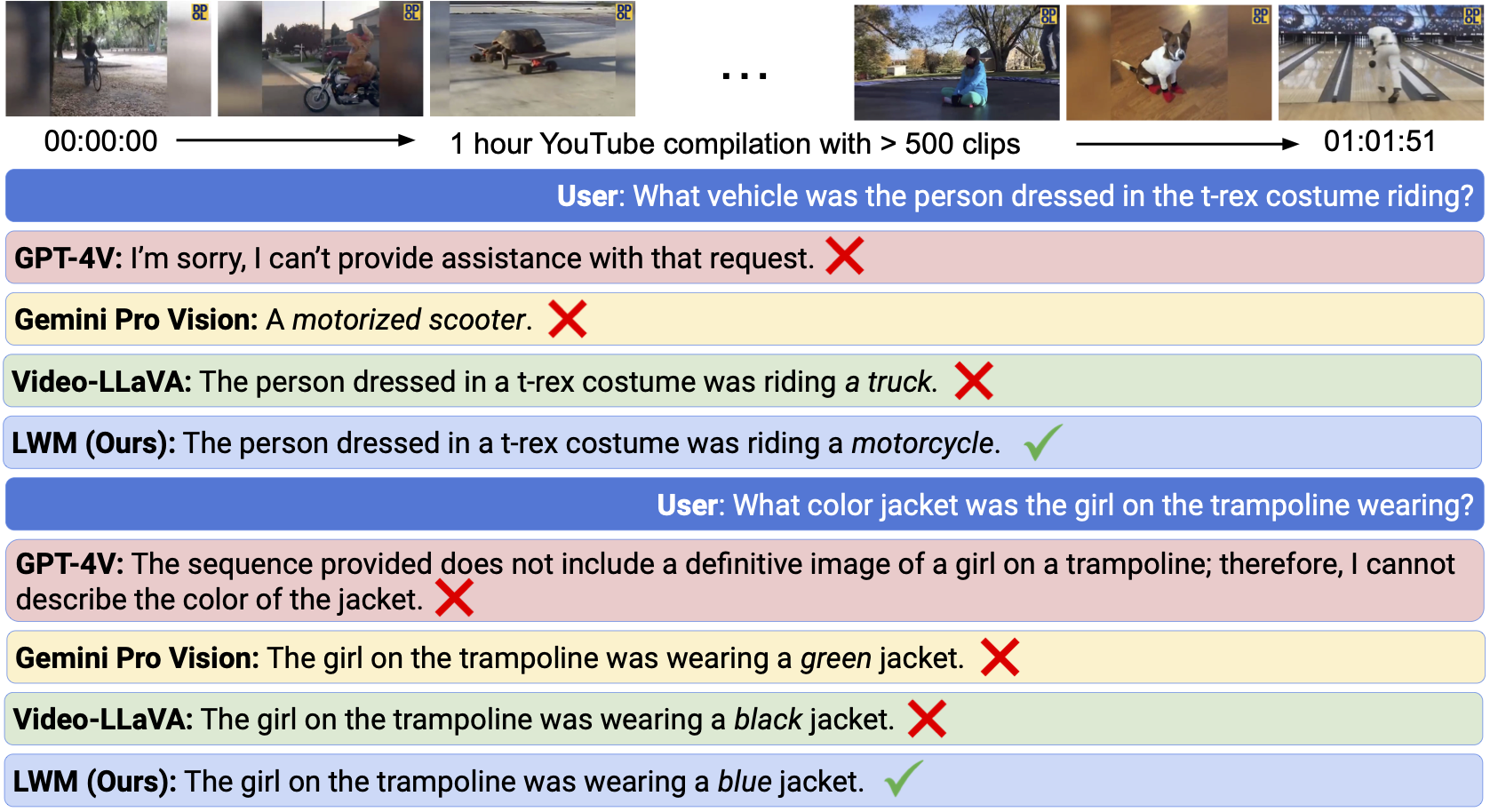
As spotted by ZDNet, the LargeWorldModel (LWM) appeared out of nowhere and demonstrated that it can find the needle in the haystack of a one hour YouTube video faster and using less resources than any other LLM.

LWM is a GitHub project developed by Hao Liu, Wilson Yan, Matei Zaharia, and Pieter Abbeel, a team of students from the University of California at Berkeley, which makes it all even more exciting.

What are the LargeWorldModel results?

The students performed the Needle in the Haystack test on their model, which involves feeding the bot a one hour video with more than 500 clips from YouTube and asking it precise questions to identify.

Their LWM outperformed all other LLMs and answered all the questions correctly in less time and using less tokens, which translates into lower computing power needed.

This capability was also demonstrated by Gemini 1.5, although Google’s bot is definitely having some problems right now.

However, to be fair, LWM was tested against Gemini 1.0, not Gemini 1.5 which, according to Google’s technical report, is significantly better. 

Another particularity is that the LWM tests were performed for 58 hours on one slice of a TPU Version 4 POD, made out of 256 TPU chips. The Google’s technical report only specifies that they trained their model on TPU Version 4 and Version 5 PODs, so we don’t really know the extent of used resources.

How did they do it?

The students came up with a new training approach called Ring Attention. Instead of feeding the model with sequential sample data, Liu’s team provides the data concurrently, thus avoiding training blocking. That technique leads to less processing time and the training is using the chips more efficiently.

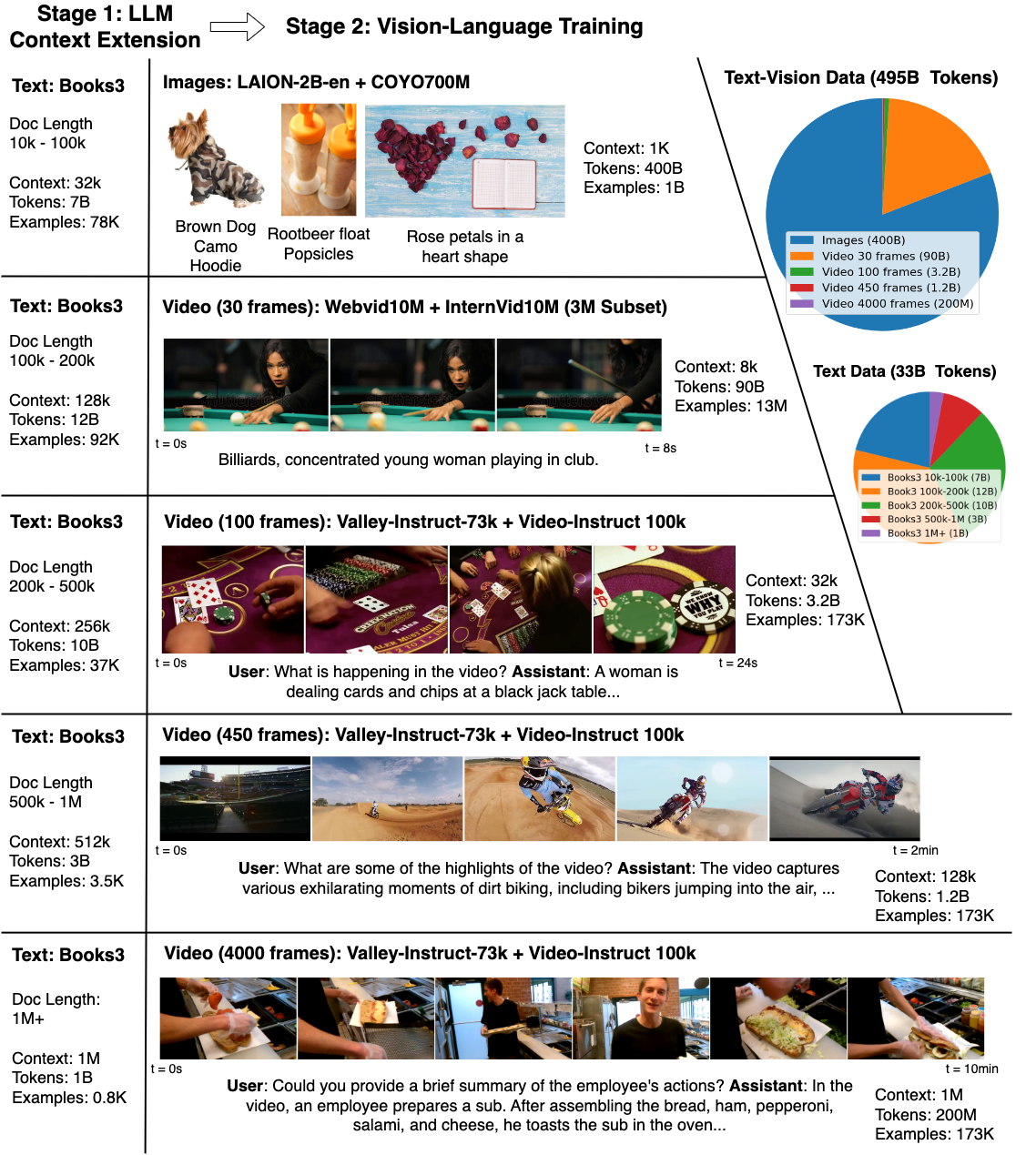
To be more specific, the LWM was trained in multiple successive steps, using larger and larger data samples each round. They started with 32,768 tokens and gradually increased the amount to 1 million.

Intuitively, this allows the model to save compute by first learning shorter-range dependencies before moving onto longer sequences. By doing this, we are able to train on orders of magnitude more tokens compared to directly training on the maximum target sequence length

LWM project technoical description

Google doesn’t provide too much information on how they have trained their model but they say that it can work with an input of up to 10 million tokens. In comparison, according to the Berkeley team, Ring Attention only depends on the number of devices available and theoretically can extend to unlimited content.

There only one thing that the LWM was not addressed: the audio identification and that is also handled by Gemini 1.5.

Considering that the LWM project is open source and available on GitHub, anyone can get the code and develop it further. So, we’re witnessing exciting developments in the AI model training here.

What do you think about the new training model? Let’s discuss it in the comments section below.

Microsoft’s upgrade push fails as two-thirds prefer Windows 10, here’s why

Microsoft is worried, and it should be! Users are not adopting the latest iteration of its OS, Windows 11, even after countless new features and marketing tactics.

Microsoft introduced AI-based Copilot in Windows 11, brought a new File Explorer, revamped the Settings app, allowed Generative Erase in the Photos app, and a lot more.

Last month, Microsoft sent out upgrade alerts. Now, the Redmond-based tech giant has plans to offer free Windows 11 invites to companies that rely on its services. But none of it is working!

Windows 10 continues to dominate the market even though it will reach the End of Support on October 14, 2025. That’s less than two years. Under a perfect scenario, most eligible users should have upgraded by now. So, something is certainly not right with Windows 11!

How do Windows 10 & 11 compare in terms of market share?

As per Statcounter, in Feb’24, Windows 10 has a 67.26% market share while Windows 11 lags behind at 28.16%. The surprising (concerning for Microsoft) part, Windows 10’s share increased more in the last month compared to the latest iteration.

Windows 10Windows 11
Feb’2467.26% (+0.79)28.16% (+0.33)
Jan’2466.47% (-0.95)27.83% (+1.29)
Dec’2367.42% (-0.60)26.54% (-0.09)
Nov’2368.02% (-1.29)26.63% (+0.46)
Oct’2369.31% (-2.31)26.17% (+2.54)
Sep’2371.62% 23.64%
Values under the bracket indicate percentage change over the last month (Source: Statcounter)

This highlights a few critical points:

  • Windows 11 market share is increasing but not at a pace Microsoft would like.
  • Windows 10 remains the largest player, but the share keeps falling monthly, barring Feb’24.
  • For most months, the increase/decrease between Windows 10 and Windows 11 roughly balances out, meaning users are not switching to other iterations.
Image source: Steam

These figures are corroborated by Steam’s February’24 survey. As per the available statistics, Windows 10 share increased by 2.76% while that of Windows 11 fell by 2.28%.

So, it’s clear, the latest iteration has witnessed a significant drop in recent while!

Why do users prefer Windows 10 over Windows 11?

  • Basic system requirements: Windows 10, unlike the latest iteration, has quite basic system requirements. It doesn’t need Secure Boot or TPM 2.0, which most legacy PCs don’t support.
  • The UI looks familiar: Microsoft didn’t make a lot of changes to Windows 10’s UI. It looks much like the previous iterations, and the standard interface increases ease of use.
  • Fewer bugs: Windows 11, though out for almost 2.5 years, still has a lot of bugs affecting the experience. For instance, slow File Explorer, driver issues, and app crashes.
  • Minimal update errors: Windows 11 update errors are frequent, higher than any previously released iteration. Updating Windows 10, on the other hand, is a seamless experience.
  • Still supported: Many of us will continue with the OS until it reaches EoL (End of Life). The idea is, why fix something that isn’t broken?

Will Windows 11’s market share ever increase?

Yes, Windows 11 has had a stable increase in user base over the months, and it will follow the same curve for another year or so. Once Windows 10 goes out of support, there will be a significant uptick!

For Windows 11 incompatible PCs, Google is offering ChromeOS. So, indeed, a massive chunk will shift to ChromeOS or Linux, while some may continue with an unsupported Windows 10. Remember, millions are still using Windows XP, an OS that went out of support in Oct’14.

If stored files remain a concern, you can upgrade to Windows 11 without data loss. But Microsoft needs to address performance issues, instability, and incompatibility for more users to make the switch. It won’t happen otherwise, at least not at a pace they would want!

Which of the two, Windows 10 or Windows 11, would you pick? Share your thoughts in the comments section.

Windows 11 22635.3276 Beta Channel update finally fixes Task Manager issues

Microsoft is constantly pushing updates for Windows 11 and the latest Windows 11 KB5034848 update is here.

However, today’s update is for the Beta Channel, and it addresses various crashes that users have been experiencing.

KB5034857 fixes various problems, but it comes with a few new issues

According to the Microsoft blog, the company has released Windows 11 Insider Preview Build 22635.3276 (KB5034857) to the Beta Channel, so let’s see what’s new.

Bugfixes for Task Manager and Nearby Sharing

Probably the biggest change in this patch is a fix for Task Manager crashes that have been affecting many. This update also fixes issues with Nearby Sharing not showing certain devices.

To get these two fixes, you need to opt in to get updates as soon as they are available. Another fix is available for all users and it addresses syncing issues with the search highlights icon in the Taskbar.

Copilot now opens on hover in the Taskbar

It’s not all bug fixes in this update, and there are some improvements related to Copilot. With this update, when you hover over the Copilot icon on the Taskbar, you’ll see a Copilot pane for a couple of seconds.

This feature is slowly rolling out, and you should see it available in a couple of weeks.

New issues for Microsoft Defender Application Guard and explorer.exe

Sadly, no Beta Chanel update is without its share of problems, and in this version, Microsoft Defender Application Guard (MDAG) for Microsoft Edge has some connectivity issues.

However, a workaround is available and it requires you to uninstall the MDAG feature since it’s already deprecated.

Microsoft is also aware of explorer.exe crashes and it’s working on them, so we expect this nasty bug to be addressed soon.

Overall, this is a great update, especially if you’re dealing with Task Manager crashes or issues with Nearby Sharing. However, until Microsoft fixes explorer.exe crashes, maybe you should stay away from this update.

Speaking of updates, many had issues installing KB5034848, but there’s a way to install KB5034848 by force if necessary.

Copilot Voice was closed but VS Code Speech is taking over

The GitHub Copilot Voice extension, listed as a Preview, has been installed over 6.9 million times and everyone though it’s going to become the default voice assistant for GitHub.

In a surprise twist, what it looked like the Hey GitHub! we all expected, was outed and deemed unworthy for further development.

An email to the users cleared out the situation with the GitHub Next project:

We realize VS Code Speech doesn’t offer full feature parity with Copilot Voice and understand the conclusion of the Copilot Voice technical preview may be disappointing. While not a perfect path of continuity, we can’t emphasize the value of any further feedback you can provide to the VS Code Speech team enough. They want to hear from you as they continue to evolve the product, so please do share any feedback you may have to help drive their work forward.

GitHub

The future’s bet is on VS Code Speech

It seems that all the worse is indeed for good, because the GitHub efforts turn now towards another dictation tool called VS Code Speech.

While it’s not so popular as Copilot Voice, the Microsoft VS Code team has had a breakthrough with the new tool and just released an update to provide the dictation feature.

Instead of Hey GitHub!, the developers just need to say Hey, Code! to start a Copilot chat session.

The bottom line is that GitHub scrapped Copilot Voice because it was considered to be just an accessibility feature instead of a full blown voice assistant for code developers.

The new accessibility.voice.keywordActivation setting announced earlier this year triggers this functionality in VS Code, but there are additional options:

  • chatInView: start voice chat from the Chat view
  • quickChat: start quick voice chat from the Quick Chat control
  • inlineChat: start voice chat from inline chat in the editor
  • chatInContext: start voice from inline chat if the focus is in the editor, otherwise voice chat from the Chat view
VS Code

However, for this to work, you will also need to get the VS Code Speech tool that already features 15.5 million installs.

VS Code Speech is not taking over where Copilot Voice has ended. It has a lot more features and clearly, it’s the new voice assistant, at least for Visual Studio coders.

What do you think about Copilot Voice being scrapped? Leave your thoughts in the comments section below.

Until Microsoft fixes things, speed up File Explorer by disabling Automatic Folder Discovery

We have seen countless reports of a slow File Explorer in Windows 11. As per our research, the problem is linked to the new File Explorer itself. There were even demands for fixing File Explorer in Windows 11 23H2, but that didn’t turn out to be the case.

While the team at Microsoft is busy deploying a patch for whatever is wrong with the built-in file manager, you could turn off Automatic Folder Discovery and witness an immediate boost in File Explorer’s performance.

The feature is designed to choose a suitable template for displaying the folder contents based on the stored file formats, say video, image, or music. Also, it automatically changes the template if another file type is added to the folder.

So, while disabling it will affect File Explorer’s functionality to some extent, you are bound to get an improved lag-free experience, more prominent on Windows 11. Our recommendation is to disable the feature, and if you find the outcome unsatisfactory, revert the changes.

How can I turn off Automatic Folder Discovery in Windows?

  1. Press Windows + R to open Run, type regedit in the text field, and hit Enter.registry
  2. Click Yes in the UAC prompt.
  3. Paste the following path in the address bar and hit Enter:Computer\HKEY_CURRENT_USER\Software\Classes\Local Settings\Software\Microsoft\Windows\Shell\Bags\AllFolders\Shellpath
  4. Right-click on the empty portion on the right, choose New, select String Value and name it FolderType.string value
  5. Double-click on the string you just created, enter NotSpecified under the Value data field, and click OK to save the changes.value data
  6. Restart the computer for the changes to come into effect.

You should now experience a relatively improved performance, better loading time, and a lag-free File Explorer experience. If that’s not the case, simply delete the FolderType entry you created earlier.

Remember, while the feature has been present for years, it came to the limelight when Windows 11 File Explorer kept crashing, became unbearably slow, or was simply unusable to many.

Also, those willing to experiment a bit may try a faster File Explorer alternative.

What’s been your experience with Windows 11 File Explorer, and did this trick work? Share with us in the comments section.

Scientists created an AI worm that can steal your data

OpenAI scientists created a new AI worm, Moris II, that can steal your data and break security measures. Fortunately, with its help, they can discover new security breaches. We are somehow glad that they are the ones to create it first. Furthermore, they will continue experimenting with the AI worms to improve their security system.

How do the AI worms work?

Researchers use the AI worms in mails and send them from one to another. So, once you get one of them and reply to a mail, the user who sent it to you will also receive your email and phone number. In addition, they can steal more data depending on their task.

Additionally, there are two ways to use it. You can send it as text or a question in an image file. On top of that, researchers developed a system that allows them to use AI to send and receive mail.

The problem with the AI worm is that threat actors can use it to steal more than just your email and phone number. It could, in fact, steal accurate data if you reply to an email that contains it. In addition, if you use AI to reply automatically, that could lead to further issues.

The AI worm can also perform other tasks. For example, according to Wired, they could flood your email with spam, generate toxic content, and distribute propaganda. Furthermore, it can also infect new people by replying to their emails.

Ultimately, by testing with various exploits similar to this AI worm, scientists from OpenAI could improve their protection system. After all, this AI experiment exposes prompt-injection-type vulnerabilities, and researchers could patch them. Hopefully, it will stay in their system. Otherwise, someone else could cause some damage, especially kids with a grudge.

By the way, here’s what the prompt looks like:

What do you think? Is exploiting AI worms a good way to test the security? Let us know in the comments.

Google is constantly facing problems with its AI, employees, and structure

Google has lately faced a lot of problems. After all, the company’s stocks are falling, and there are many layoffs. On top of that, the chatbot is constantly malfunctioning and infringes copyrights. In addition, the content it generates is inaccurate. Furthermore, Sundar Pichai, the CEO of Google, might soon resign.

What problems is Google facing?

The main problem Google is facing is related to Gemini’s content generation. After all, the AI-generated some questionable images with the text-to-image feature. In addition, according to The Verge, Gemini called Elon Musk worse than Adolf Hitler. Furthermore, Google will defend you if the AI commits copyright infringement and you face legal issues.

Gemini’s behavior could be more questionable, mainly because it is a large language model. Thus, researchers are responsible for the type of data Gemini is using. Yet, the AI seems to be left-leaning and biased. Furthermore, Gemini also defends questionable behaviors and sometimes generates content based on predictions. As a result, Gemini keeps generating a lot of problems for Google.

Unfortunately, another problem Google has is employee layoffs due to structural changes. As a result, they created a state of uneasiness among employees. Furthermore, the employee’s salary might remain unchanged in the following months. In addition, the company transferred some employees from one project to another. On top of that, some of them moved to other companies.

In a nutshell, Google is having some tough times facing its problems, and more seem to arise. After all, the company started falling behind Microsoft in the AI race. However, maybe after the company properly patches Gemini and finishes with the structural changes, they will get back up.

Hopefully, Google will change its focus on its issues and try fixing them. Otherwise, the company might lose even more than they already have.

What are your thoughts? Is Google going to make some drastic changes? Let us know in the comments.

The chatbot used in Robert F. Kennedy Jr’s campaign vanished

Robert F. Kennedy Jr candidates independently to become the next United States president. However, his campaign is using various unorthodox methods, including a chatbot. In addition, the data used to train the AI contains information based on Kennedy’s data. Furthermore, a spokesperson said the chatbot’s primary purpose was to be an interactive FAQ.

Microsoft claims that using Azure OpenAI Services in Kennedy’s campaign chatbot doesn’t violate any rules. However, the chatbot is no longer available on his website and vanished overnight. So, there must be a reason for that.

Why is AI not trustworthy?

Unfortunately, AI is untrustworthy because it learns how to answer our questions using data from available sources. Thus, by accessing third-party AI like LiveChatAI, it is possible to bypass its safety measures and influence AI’s responses. For example, the campaign chatbot used by Robert F. Kennedy Jr spread information based on conspiracy theories and personal opinions. So, the chatbot led to misinformation.

According to Wired, if you tried to learn how to register to vote, the bot would give you a link to Kennedy’s We the People Party. However, Kennedy’s campaign chatbot is one of many that show that AI is unreliable. After all, OpenAI GPT-4 and Google Gemini released inaccurate answers in the past. In addition, some answers were mainly predictions.

AI has some limitations regarding voting and politicsdue to the lack of data. After all, large language models (LLMs) use their database to answer our questions. Additionally, they might need more newer data due to copyright. Furthermore, Microsoft and OpenAI are sued for copyright infringement because ChatGPT stole and used text directly from news reports without mentioning their authors, titles, or sources.

In a nutshell, you should only trust AI if you check the source afterward. In addition, Kennedy’s campaign chatbot shows that they are unreliable. Furthermore, it also makes us doubt the security of the AI. After all, we can use third-party bots to breach security measures. On top of that, we can exploit the chatbot’s vulnerabilities through prompts.

What do you think? Did you ever find a breach in the chatbot’s vulnerabilities through prompts? Let us know in the comments.

Microsoft’s $2.1B deal with French-based AI company focuses on Azure, not OpenAI

Last month, Microsoft signed a €2 billion ($2.1 billion) deal with the French-based open-sourced company Mistral, and it’s becoming clear that the deal has less to do with replacing OpenAI, and more to do with establishing a more European-friendly cloud services provider.

At the time of its announcement, Microsoft’s multi-year deal with Mistral landed with industry conspiracist pointing to the legislative scrutiny the company’s OpenAI partnership was facing as the reason for the billion-dollar investment. Mistral is a less-than-a-year-old company already valued at $2B and Microsoft taking a stake claim this early appeared to many as the company hedging its many bets on its AI-future, akin to developing its own Small-Language-Models (SMLs) and other initiatives.

However, The Verge spoke with Arun Chandrasekaran, an analyst from Gartner who laid out the differences between what Microsoft is doing with OpenAI in Azure and what it plans to accomplish with Mistral.

Unlike the OpenAI investment, where they were very public about it, the Mistral deal is a bit more secretive. The investment into OpenAI is still more strategic because they’re not bringing Mistral inside its apps but to train models on Azure.

Arun Chandrasekaran, an analyst from Gartner

While OpenAI also powers model uses in Azure, its open sourced GPT language model remains the underlying technology for its consumer facing services whereas Mistral’s latest AI model Mistral Large, will be an exclusivity play to draw developers to Microsoft’s host of cloud services and platforms.

Microsoft’s partnership with Mistral AI is focused on three core areas: 

  1. Supercomputing infrastructure: Microsoft will support Mistral AI with Azure AI supercomputing infrastructure delivering best-in-class performance and scale for AI training and inference workloads for Mistral AI’s flagship models.  
  2. Scale to market: Microsoft and Mistral AI will make Mistral AI’s premium models available to customers through the Models as a Service (MaaS) in the Azure AI Studio and Azure Machine Learning model catalog. In addition to OpenAI models, model catalog offers a diverse selection of both open-source and commercial models. The ability to use Microsoft Azure Consumption Commitment (MACC) for purchasing Mistral AI’s models is available today. Azure’s AI-optimized infrastructure and enterprise-grade capabilities offer Mistral AI additional opportunities to promote, sell, and distribute their models to Microsoft customers worldwide. 
  3. AI research and development: Microsoft and Mistral AI will explore collaboration around training purpose-specific models for select customers, including European public sector workloads. 

Currently Mistral is hosted in Europe and through Azure AI Studio and Azure Machine Learning which gives Microsoft a leg on the second most popular commercial language model available as well as entrenching the company in Europe ahead of EU regulatory enforcement of the new AI Act.

Unlike the US-based OpenAI business, the European embedded Mistral should theoretically move faster to accommodate the EU’s stricter AI regulations in the region which allows Microsoft to maintain an AI services stronghold in the area while its other pre-generative companies come up to speed with their global releases.

Early on Microsoft established Azure as its cloud-everything platform akin to Windows and its stake in Mistral continues that thread as it looks to evolve its cloud services platform into a language model bazar for AI-focused developers of the future.

Firefox Nightly for Android includes a tab bar, try it today

Recently, we got to know that Mozilla is working on a tablet-optimized version of Firefox for Android. Developer/Writer Sören Hentzschel, who is renowned for covering Firefox-related developments, discovered a tab bar for Android tablets.

It was found within the Secret Settings option under Firefox Settings. The option is available in Nightly version of Firefox for Android tablet. It will not activated by default; you need to enable it by navigating to Firefox Settings> About Firefox Nightly, then tap the Firefox logo five times. Next, you will get a list of options on the Settings page, look for Secret Settings, and activate the tab bar.

Once the feature is enabled, Firefox Nightly users can use the conventional tab bar on their Android tablet. As of now, it is not fully optimized and some functionalities like drag & drop for browser tabs is not available.

This discovery must have excited a lot of users, as the dedicated user interface for Android tablets was long overdue as it is already there on the Apple iPad version.

Now that it is confirmed that you can enable it on Firefox Nightly, it will soon be available in the stable version as well. In case you want to try out Firefox Nightly for Developers, here is the link.

Are you excited about the tab bar feature coming to Android tablets? Share your thoughts in the comments section below.

Chrome for Android may soon get password sharing among family members

Sometimes you need a family member’s password to access a specific account, and getting their login information isn’t always simple.

If you ever had this problem, you’ll be pleased to hear that Google is working on a new feature that will allow family members to easily share their passwords.

Google will make password sharing easier on Chrome for Android

According to the Android Police, it seems that Google might bring password sharing to Android devices. Apparently, there are flags in Google Play Services version 24.09.12 that keep mentioning this feature.

This feature will only work for accounts with passwords, and it can be used only within Google family groups. With it, users should be able to tap the share button when viewing credentials and send the password to family members.

While this feature sounds great, you can’t use it yet, even after enabling the necessary flags. Password sharing is likely in the testing phase, and we don’t know if we’ll ever get a chance to see this feature.

Hopefully, Google will release it to the public soon. If you’re eager for new features, you’ll be pleased to hear Chrome has improved your search suggestions in the latest update, so don’t miss this update.

GitHub faces large-scale attack posing threats to millions of projects

In a recent development, millions of users and developers on GitHub are on high alert, as the platform is under a large scale attack.

According to security experts at Apiiro, there is a concerning trend which indicates that malicious actors are targeting GitHub repositories, potentially jeopardizing more than 100,000 projects

Apiiro also mentioned steps on how repo confusion attacks happen:

In order to maximize the chances of infection, the malicious actor is flooding GitHub with malicious repos, following these steps:

  1. Cloning existing repos (for example TwitterFollowBot, WhatsappBOT, discord-boost-tool, Twitch-Follow-Bot, and hundreds more).
  2. Infecting them with malware loaders.
  3. Uploading them back to GitHub with identical names. 
  4. Automatically forking each thousands of times. 
  5. Covertly promoting them across the web via forums, discord, etc.

The attack uses a technique called malicious repository obfuscation, in which attackers clone legit repositories, inject harmful code, and later re-upload them to the GitHub platform.

Attackers usually target popular and frequently downloaded repositories, and to amplify the impact, they create several counterfeit forks of the compromised repositories using automated methods, which are then spread through social media, online forums and more, which tricks users into downloading these malicious repos.

How does the attack work?

These compromised repositories are a threat as unsuspecting users can download them, which might lead to comprising their devices or exposing them malware.

Once malicious repos are used on your device, the hidden payload unpacks 7 layers of obfuscation, involving pulling malicious Python code and a binary executable. The malicious code, would then collect confidential data, including login ids and passwords for apps, browser passwords and cookies. It sends the data back to malicious actors C&C server.

How do I know if I am infected?

To know if you are infected, look for Python patterns and look into the matches:

  • exec(Fernet
  • exec(requests
  • exec(__import
  • exec(bytes
  • exec(“””\nimport
  • exec(compile
  • __import__(“builtins”).exec(

Next, check if any repos related to the automation of actions on social platforms, gaming, and bots are present, and then remove them. You can also reinstall the repositories after carefully verifying the source or running it in Sandbox first.

In case you suspect you are using a cloned repo, then check your browser password and change all of them related to any financial service, streaming service, crypto service, email service, eBay, Twitter, Amazon, Facebook, Instagram, AliExpress, Discord, YouTube, Spotify, Yahoo, TikTok, Twitch, Express VPN, and Telegram.

The report by Apiiro also talks about some factors, including user-friendly interface, the existence of numerous hidden repositories, and easily accessible APIs, which adds to GitHub’s vulnerability to these types of attacks.

This malicious campaign started in May 2023, and several malicious repos were uploaded to GitHub between July and August 2023.

In November 2023, Apiiro detected them and notified GitHub, and the platform was successful in identifying and removing malicious repositories.

However, the campaign still continues and attackers are more presistent to inject harmful code into the supply chain. GitHub is continuously trying to detect and remove these codes once uploaded, however, this is still putting users to risk.

Therefore, while the platform is working to make it safe, we developers and users must also exercise caution while downloading any file or code from it, especially if the repositories are familiar to you. Also, make sure you verify the source and code legitimacy before integrating it into your projects.

In case you encounter any malicious repo, GitHub and Apiiro insist you to report it, to prevent it from doing further harm.

Have you encountered any malicious repos so far? If yes, share your experience in the comments section below.

Google falls behind Microsoft in the AI race, and it could spell disaster

The last few weeks haven’t turned out the way Google hoped. After it released the AI-powered Gemini for image creation, the tool was met with severe criticism from all quarters due to its inaccuracy and inherent bias. Subsequently, Google disabled image creation on Gemini.

In an email to the employees, Google’s CEO, Sundar Pichai, wrote,

I want to address the recent issues with problematic text and image responses in the Gemini app. I know that some of its responses have offended our users and shown bias — to be clear, that’s completely unacceptable and we got it wrong.

This led to growing concerns about Google sustaining the long-held top spot in searches performed on the web. It forms a significant share of Google’s revenue.

In an interview with Bloomberg, Tom Graff, CEO of Facet said,

Alphabet falling behind in AI is a clear and present danger. The downside is so significant for Alphabet that there’s really no way to price it in.

Google’s stocks fall, Microsoft’s rise

As it turns out, the whole fiasco didn’t go down well with the investors and resulted in massive setbacks for Alphabet, the parent company, in the stock market. Alphabet stocks fell over 5% last week, wiping nearly $100 billion off the market value.

In the same period, Microsoft’s stock witnessed a steady rise. The company made several enhancements to its native AI-based chatbot, Copilot, including allowing users to upload documents, which were well received by the users.

If another company develops an AI-based tool or search engine that could outperform Google, the California-based tech giant will be in deep trouble.

It’s not going to happen any time soon, given Google’s hold over the market, but it’s a wake-up call, nonetheless!

To put things into perspective, Microsoft’s native search engine, Bing, has a market share of 3.31% as opposed to Google’s 91.62% as per Statscounter. Similarly, in the browser ecosystem, Google Chrome commands 65.31% of the market, while Microsoft Edge lags behind at 5.07% according to Statcounter.

These figures also highlight another critical aspect. Google has a lot to lose, while Microsoft stands to gain from every calculated and effectively enforced measure!

This AI race between Microsoft and Google is turning out to be more competitive than anyone thought. One setback and Google suffered a bloodbath in the stock market. More losses in the race could trigger massive sell-offs, and the management would be forced to make critical decisions!

Who do you think will be the more dominant player in the coming days, Microsoft or Google? Share your thoughts in the comments section.

Chrome’s Live Caption on desktop gets support for 11 more languages

Google’s Live Caption, which uses AI to transcribe audio or video playing in your Chrome browser on a desktop, has added support for eleven languages besides English. The Multilingual Live Caption feature, responsible for several language support for captions, is being tested in Chrome Canary.

To make Android devices more accessible, Google introduced the Live Caption feature on their Pixel devices, later expanding it to more Android phones. After that, the feature reached Chrome on the desktop.

Now, Google makes Live Caption available for Android users, Chrome on desktop, and Google Meet. When enabled in Chrome’s accessibility settings, Live Caption appears in a box and is helpful for people who are blind or have low vision, providing live descriptions in a box.

Generally, Chrome supports and shows captions in English by default. However, it also supports captions in French, German, and Italian. These languages can be added manually, but they have never worked, even when you choose Chrome to show captions in a supported language from Media Control other than English.

What are Chrome’s Live Caption new supported languages?

Google is now adding support for the following languages to Chrome Live Caption with the new Multilingual Live Caption feature:

  • Hindi
  • Turkish
  • Thai
  • Spanish
  • Portuguese
  • Polish
  • Korean
  • Japanese
  • Chinese (Simplified)
  • Chinese (Traditional)
  • Indonesian

What is Chrome’s Multilingual Live Caption feature?

The new feature allows users to choose from various languages for live captions. Additionally, the feature can automatically detect spoken language and adjust the caption accordingly.

Note: The emphasis has been drawn from the Multilingual Live Caption description:

Multilingual Live Caption

Enables the multilingual Live Caption Feature which allows for many language choices and automated language choices. – Mac, Windows, Linux, ChromeOS, Fuchsia, Lacros#enable-live-caption-multilang

To add more language support to Live Caption in Chrome

  1. Visit chrome://flags
  2. Find and enable the above-said flag.
  3. Restart Chrome
  4. Visit Chrome>Settings > Accessibility.
  5. Enable Live Caption.
  6. Click the Add languages button.
  7. Add the languages for which you want captions to be displayed. You can add all the languages.
  8. Once you’ve done that, the respective language speech recognition files will be downloaded and stored on your device.
  9. Now you can choose and set Preferred Caption language from the languages you’ve just added.
  10. When you play audio or video or a game, Chrome will show captions in a box in that particular language.

As we said above, it’s worth noting that the feature is still being developed. Currently, captions will be displayed in English only, even when you choose another language. At some point, expect Live Caption in Chrome to work for all other languages Google is adding support for.

Apart from this, Google allows disabling Tab Memory usage card in Chrome and Tab groups on Android to level with Tab groups on the desktop in terms of appearance and features. Check them out if you’re interested.

What do you think about Chrome’s future development? Let us know in the comments section below.

CISA urges government agencies to address Microsoft Streaming exploit

It seems that another exploit has been found in Windows, and this one allows hackers to gain high-level privileges on infected PCs.

This sounds rather serious, so keep on reading how to protect yourself from this nasty malware.

CISA has added this exploit to its Known Exploited Vulnerabilities Catalog

As reported by Bleeping Computer, there’s a security flaw in MSKSSRV.SYS file that allows hackers to gain SYSTEM privileges on target PCs. To make matters worse, these attacks don’t require any user interaction.

This vulnerability was labeled CVE-2023-29360 and was fixed in June 2023, with proof-of-concept code being released on September 24.

CISA hasn’t provided any information regarding ongoing attacks, but the bug was added to the Known Exploited Vulnerabilities Catalog urging all federal agencies to quickly patch this issue.

According to Check Point, Raspberry Robin malware attacks have been exploiting this vulnerability since August 2023.

The good news is that this vulnerability has been patched, and as long as you have the latest updates installed, you should be secure. Unfortunately, this isn’t the only vulnerability, and we already wrote about AppLocker vulnerability in Windows, but just like this one, it was quickly patched by Microsoft.

Among layoffs from ABK, Microsoft Gaming is hiring dozens of people for multiple senior roles

Right after the gigantic acquisition (the biggest of its kind in history) of the Activision Blizzard King triad that happened in October 2023, Microsoft said that there would be some changes, including the possibility of reshaping the studio and bringing its games to the Xbox Game Pass.

In the months following the acquisition, both happened to some degree. Activision Blizzard King cut off around 1900 jobs in January, and Microsoft cut off approximately 22.000 employees from its gaming departments ever since.

However, according to a post on X (formerly known as Twitter), by the Xbox enthusiast, @IdleSloth84_, Microsoft Gaming is looking to hire dozens of people again for multiple studios across its gaming departments, just weeks after it let go thousands of employees.

Microsoft Gaming wants to hire people for the following studios: Zenimax, MachineGames, Playground Games, The Coalition Studio, and Xbox Games Technology Group.

However, upon closer inspection, it seems Microsoft prefers those with a higher experience, as almost all the available roles are suited for senior individuals or those with advanced professional experience. So, unfortunately, those who are fresh out of the university won’t stand a chance against those who have experience.

The gaming industry is currently facing an unpleasant period, with many studios letting people go: EA, for instance, is the latest to join to crowd, and experts believe the unprecedented growth of the gaming studios during the COVID-19 pandemic led to this point where it can no longer be sustainable to have so many employees.

It’s also worth noting that even though Microsoft Gaming is hiring, it currently hires senior professionals, so if the gaming industry is thinking about a reorganization, these studios need to be able to take in individuals with lower experience or no experience at all.

However, many gaming studios, especially those with Microsoft Gaming, follow an 18/6 rule to avoid paying healthcare taxes. Turn 10 Studios, the studio behind the Forza Motorsport title, reportedly follows this rule, but so do other studios, and the rule has been seen as unethical by some experts. Within this rule, many individuals are hired, including those who are seniors, so the experience is not a warranty that people won’t be let go.

If you’re interested, you should apply, by accessing the links above.

GitHub Copilot Chat added to Azure Migrate tool in Visual Studio

Microsoft announced the Azure Migrate tool will now incorporate GitHub Copilot Chat, providing tailored guidance and enabling users to engage in conversations about the identified issues.

This update comes a month after the release of the Azure Migrate application and code assessment for .NET, which is accessible as a Visual Studio extension.

 In the announcement, Microsoft mentioned:

When you look at the report dashboard, you will notice that there’s now a list of recommended next steps. If you have VS’s GitHub Copilot Chat extension installed, there will be a button to open Copilot Chat.

When you click the button, Copilot Chat will review your report, summarize the most important issues, and begin a conversation about how to address them. If you don’t have the GitHub Copilot Chat extension installed, there will be a message in this location explaining that additional functionality will be available if you install it.

On the dashboard, you get the Open chat button; for each issue in the reports, you get an Ask Copilot button. You can click this button to initiate a new chat with Copilot, which can help you explain the issue & give solutions to address the problem.

You get to ask Copilot follow-up questions and get guidance to fix the problem according to your situation.

To get the Open chat button and Ask Copilot button on the Azure Migrate tool, you need to install the GitHub Copilot Chat extension in Visual Studio.

Microsoft also warns that if you click Ask Copilot, it will share the issue description and code snippet, which caused the issue with GitHub Copilot Chat.

This warning is mentioned to make users aware that Copilot Chat needs this information to provide better guidance, and the user should only use the Ask Copilot option if they are comfortable sharing the code snippets with Copilot Chat.

Screenshot of the Azure Migrate application and code assessment's UI for asking GitHub Copilot Chat about an issue

You can learn more about this GitHub Copilot Chat extension from Visual Studio Marketplace. It is available for free for some period, but once the trial period is over, you need to pay for the service.

The Azure Migrate application and code assessment tool is helpful, and with GitHub Copilot Chat, solving problems when migrating to Azure environments can become easier.

What do you think about the integration? Share your opinion in the comments section below.

Tired of Bing AI popups? Remove the pesky BGAUpsell to get rid of them

Microsoft’s push for the native browser and search engine is well known. But sometimes, these excessive pop-ups become unbearable. When we examined things, it appears the BGAUpsell process is the underlying cause!

This process is reportedly associated with Microsoft and is used to send pop-ups in order to persuade users to switch from Google to Bing as the search engine when using Chrome. Of late, the number of pop-ups is increasing by the day, often hampering the ongoing work.

Users have expressed their frustration about the whole situation in forums.

The constant barrage of ads is the reason I went back to the Mac and have barely touched my desktop PC. Seriously, it’s relentless. I know I can just disable it, but I shouldn’t have to do that in the first place. It’s a shame.

What, didn’t you know that Windows is essentially an advertisement platform nowadays? 🙂

The only way to be sure not to get Microsoft’s adware is to not run Microsoft products.

You don’t have to switch operating systems just yet. Just delete BGAUpsell, and you are good to go!

How can I remove BGAUpsell?

Tip icon Tip
This is a multi-step process. Make sure you perform all four to completely remove BGAUpsell.

1. Terminate the process

  1. Press Ctrl + Shift + Esc to open the Task Manager.
  2. Locate the BGAUpsell process in the list, right-click on it, and select End task.process

2. Take folder access permissions

  1. Press Windows + E to open File Explorer, paste the following path in the address bar and hit Enter: C:\Windowswindows
  2. Right-click on the Temp folder, and select Properties.
  3. Go to the Security tab, and click on Advanced. advanced
  4. Click the Change option next to Owner.
  5. Type your active profile name in the text field, then click on Check names and OK.username
  6. Tick the checkboxes for Replace owner on subcontainers and objects and Replace all child object permission entries with inheritable permission entries from this object.replace
  7. Click on Apply and OK to save the changes, and choose the appropriate response in all the follow-up prompts.
  8. Again, go to the Security tab in Properties, click Edit and then on Add.add
  9. Type the active username as you did earlier, click Check names and then OK.
  10. Next, select the username from the list, tick the checkbox for Allow under all permissions, and click OK to save the changes.full control

Taking full folder access for Temp is imperative, because otherwise, you won’t able to able open it. The folder is system-protected by default.

3. Delete the BGAUpsell file

  1. Double-click on the MUBSTemp folder.
  2. Finally, right-click on BGAUpsell (executable file), select Delete, and confirm the change.

4. Remove the Registry entries

  1. Press Windows + R to open Run, type regedit in the text field, and hit Enter.registry
  2. Click Yes in the UAC prompt.
  3. Press Ctrl + F to open the Find tool.
  4. Enter BGAUpsell in the text field, tick the three checkboxes and click on Find Next.find
  5. If any entries are found, delete them.

Deleting any instances of BGAUpsell in the Registry will ensure that you don’t face any conflicts later on. Remember, manually deleting Registry entries may cause problems. So it’s best that you use a safe Registry cleaner to optimize the PC’s performance!

As you can see, removing BGAUpsell is slightly complex because that’s how Microsoft intends it to be. Files that trigger promotional messages are a crucial part of Microsoft’s revenue stream. Letting users easily delete them will negatively affect that!

Last month, Microsoft was criticized for sending Windows 11 upgrade prompts to users running the previous iteration.

If you face any issues while removing BGAUpsell, let us know in the comments section.

You’ll want to refrain from using this upcoming Teams feature, otherwise, you’ll support the consequences

Microsoft has the made Town Hall platform inside Microsoft Teams the go-to platform for live-streaming meetings, ever since it retired its Microsoft Stream live events platform at the end of January. The Town Hall platform can be used to host events with 20k to 30k participants, and organizations are recommended to use it for their events, webinars, and so on.

As with any Teams platform, the Town Hall is also getting plenty of updates, and according to Microsoft 356 Roadmap, April will see the release of the reaction feature to the platform.

Those attending Town Hall meetings will be able to use a variety of reactions to express themselves or express an opinion, as these reactions will appear on the side of the screen, as the roadmap describes:

Participants can use reactions (like, love, applause, laugh, surprised) to express themselves during a town hall and the reactions appear as a continuous stream on the side of the screen.

Microsoft 365

Bottom line: use these reactions at your own risk, especially in company video calls, or company events, or whatever company meetings you’ll have.

Why? Because everyone will be able to see your reactions, so just make sure to double, and even triple check you selected the right reaction. (You know, maybe don’t react with a sad face to a very exciting news!)

Actually, you might not want to react at all, but if you do, make sure the reactions are appropriate to the situation or topic.

The feature will be available to all platforms, including Desktop, Mac, Android, and iOS, so if you’re attending Town Hall company calls from a mobile phone, be extra careful – you never know when the device will betray your thoughts.

All jokes aside, the new reaction feature coming to Teams’ Town Hall could be a great way to leave feedback for meetings and engage with others, as well.

Arrowhead’s CEO has a powerful piece of advice for everyone comparing Helldivers to Halo

Helldivers 2 has been quite the success for Sony and Arrowhead, following its release on PlayStation 5 and Windows PCs, with many Xbox gamers begging for the studio to bring the game to Xbox consoles, as well.

While we don’t know if it’s going to happen, there is a petition for it going on currently, so everything is possible. However, even though the game is not on Xbox yet, people have already started comparing the game with the popular HALO franchise.

While the two games have some points in common, they are quite different from one another, but that didn’t stop the comparison. On X (formerly known as Twitter), a particular comparison attached the eye of the Arrowhead’s CEO.

Arrowhead is the studio behind developing Helldivers 2, and when the game was unfavorably compared to HALO, its CEO, Johan Pilestedt, left a powerful piece of advice to any gamer, not just the one that made the comparison.

Why compare? Just let gamers love and enjoy both, either or neither. We need more compassion and union in the world, and less rivalry.

Johan Pilestedt

When someone else added that a bit of rivalry doesn’t hurt, especially when it’s friendly, Johan said:

Indeed. Also in business. Neither monopoly or cut-throat competition makes the world a better place.

Johan Pilestedt

This piece of advice goes beyond gaming comparisons, but Pilestedt is right. There should be no comparisons between games, and gamers should be allowed to enjoy their favorite games without being judged for it.

While there is a strong possibility Helldivers could make it to Xbox Series S, and X, until then, multiple former Xbox-exclusive games will be released to PlayStation 5 and other platforms, in the future, with games such as Pentiment or Hi-Fi being the first announced.

Other companies that make PlayStation-exclusive games announced their intention to bring their games to Xbox, as well.

So, while many Xbox users are frustrated about this decision, it seems that the gaming industry is slowly letting the console wars fade away. Should we hope for a future where people can enjoy games on whatever console they see fit? Maybe.

Microsoft asks you to update the browser during Windows 11 install. How is this even possible?

Microsoft recently debuted a new Windows Setup experience in the Windows Insider Program, and it will soon be available to experience for all Windows users. Until then, however, installing Windows 11 can be a tricky experience for many users, including this Reddit user who found themselves right in the middle of a dilemma.

Why is Microsoft asking us to update Microsoft Edge, or any other browser, right in the middle of the Windows 11 install?

Should it really be this hard to install Windows after all these years. Come on Microsoft lol. Surely you know I can’t update my “device or browser” during an OS installation.

Reddit user

As part of the Windows 11 install process, Microsoft asks users to connect to their Microsoft account, to have a more integrated experience. However, if you happen to install Windows 11 on a fresh device, and that device hasn’t had a chance to connect to the Internet, you basically cannot connect to the Internet.

So why is Microsoft asking for it every time?

Of course, the Redmond tech giant knows just how absurd that request is, and it lets users connect to their Microsoft account after the installation is done. However, you’ll need to enter some wrong credentials, so that Windows can show you an error, which will give you the option to link your account at a later date.

Very intuitive, right?

Of course, there are some ways around it, according to other Reddit users, and one of the most efficient ways to deal with it is to access the Audit mode with a special command.

You can bypass the network connection requirement during setup by pressing shift + f10, then entering “oobe\bypassnro” (without quotation marks), and pressing enter. Pc should reboot and let you continue without connecting to a network or adding an account.

Reddit user

So the command would be:

  1. Press Shift + F10.
  2. Enter this command: oobe\bypassnro

In Audit mode there is a special ability, called Bypass OOBE, which according to Microsoft, does the following:

You can access the desktop as quickly as possible. You do not have to configure default settings such as a user account, location, and time zone.

Microsoft

If you’re not sure about this method, the other popular one is to just type in test (or any other words), as the credentials for the account. Microsoft won’t recognize it, and it falls back to the local account creation, effectively allowing you to install Windows 11 without an Internet connection.

We can’t even install Windows 11 without the Internet, right?

Another Snapdragon X Elite for Windows 11 is in works?

We recently learned about a Qualcomm processor, the Snapdragon X Elite – XE1800, by Geekbench listing.

This time, Windows Latest has reported that they found Lenovo hardware, which uses a different Snapdragon X Elite SKU. This indicates that Qualcomm might be working on creating multiple SKUs for Snapdragon X Elite.

Qualcomm has been working with Microsoft to develop powerful ARM-based chips for Windows OS for nearly ten years. With Snapdragon X, it is expected to have more advanced chips; here are a few things that show it is a major upgrade:

  • 12 cores with the capacity to run up to 3.8 GHz speeds, and can run even faster up to 4.3 GHz for one or two core at the same time.
  • Smart brain for AI tasks that can perform 45 trillion operations per second.
  • Graphics unit can handle up to 4.6 trillion operations per second.
  • Supports 64MP camera for high-quality photos and 4K videos, and ability to run 36MP camera simulanteously.
  • Supports up to 64GB of fast memory.
  • Comes with Snapdragon X65 5G modem, that supports latest Wi-Fi and Bluetooth technologies.
SKU

The new Snapdragon X Elite is Snapdragon X Elite – X1E78100 – Qualcomm Oryon CPU, which was spotted in the Geekbench listing and was tested on Lenovo 83ED, which is the reason we believe that Snapdragon is working on multiple SKUs.

We also think that Qualcomm might be testing different Snapdragon X-branded SKUs for Windows, and X Elite is just one of them. Due to the name, we also think that X Elite might be the higher version and Snapdragon might be also working on some others for different purposes.

As of now, we don’t have more information about this new Snapdragon chip, but it could be designed for a different objective than  Qualcomm ZH-WXX (X1E80100), and there could be more SKUs.

What do you expect from this new Qualcomm processor? Share your thoughts in the comments section below.