Earlier today we revealed that the latest Windows 10 Insider Fast Ring build had support for Offline files in OneDrive. There is now some bonus news to report, as it appears that the latest Windows 10 Insider Fast Ring build also lets you uninstall certain stock apps from your device.
The options to uninstall stock apps are accessible by navigating to the Settings menu, clicking on Apps & Features, and then pressing on an app to uninstall it. At the moment, however, only certain apps can be uninstalled, such as Phone, Maps, Mail, and Calander. Other apps which are core to the Windows 10 experience such as People, Store, Sticky Notes, Photos, and Alarm and Clock are greyed out and can not uninstalled.
Uninstalling native Windows 10 apps.
Which stock apps would you like to see uninstalled from Windows 10? Let us know your thoughts on this latest discovery by dropping us a comment in the section below.
Back in August, Microsoft introduced the UWP Community Toolkit to help developers build new capabilities on top of the Windows SDK for Windows 10. It included an open source toolkit for developers building UWP apps in alignment with the Windows 10 SDK.
Microsoft has been taking feedback from developers since launching the UWP Community Toolkit and now is releasing an updated version, UWP Community Toolkit 1.1. The updated Toolkit is available now and includes the following updates:
.NET Foundation. We are excited to announce that the UWP Community Toolkit has joined the .NET Foundation, a vibrant community of open-sourced projects focused on the future of the .NET ecosystem.
Updates and new features. The focus of this release is to improve the quality of the toolkit by addressing feedback we received through GitHub and the Store Sample App. Full list available in the Release Notes, including:
Services: added LinkedIn service (i.e. read user profile and share activity), Microsoft Graph service (i.e. send and read emails from UWP via Office 365 or explore Azure Active Directory graph) and updates to the Facebook and Bing services
Sample app. The UWP Community Toolkit Sample App has been updated to include the new features of this release. The Sample App is the best way to preview the features of the toolkit.
Documentation. As the project joins the .NET Foundation, we moved the documentation to a new location, directly connected to GitHub.
The UWP Toolkit can help develops build a Universal Windows app capable of running on any Windows 10 device, from phones, Xbox, PCs, and HoloLens. Developers can get started with the Toolkit here, and if you want to see more about the future roadmap for the Community Toolkit, you can head over here.
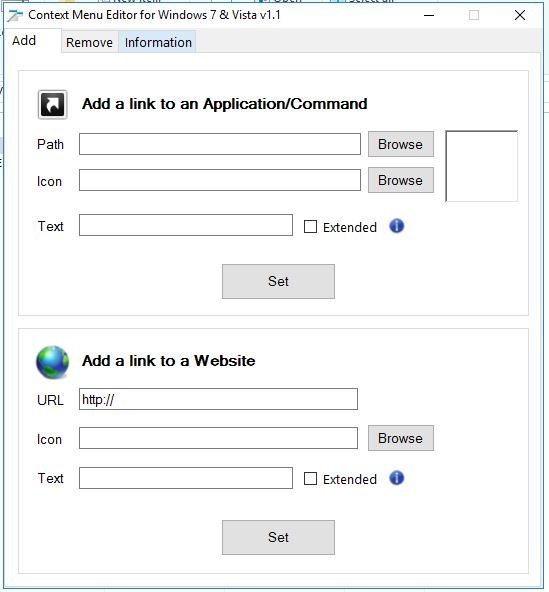
The context menu opens when you right-click, and users have been wondering about editing right-click menu in Windows 10.
Sadly, this isn’t natively possible, and the only way to do it is by using customization software for Windows. If you want to learn more, we suggest you keep reading.
Is it possible to edit right-click menu in Windows 10?
Yes, Windows 10 is customizable, and you can edit the context menu. Do keep in mind that the editing feature isn’t available natively, and the only way to do that is by using third-party software.
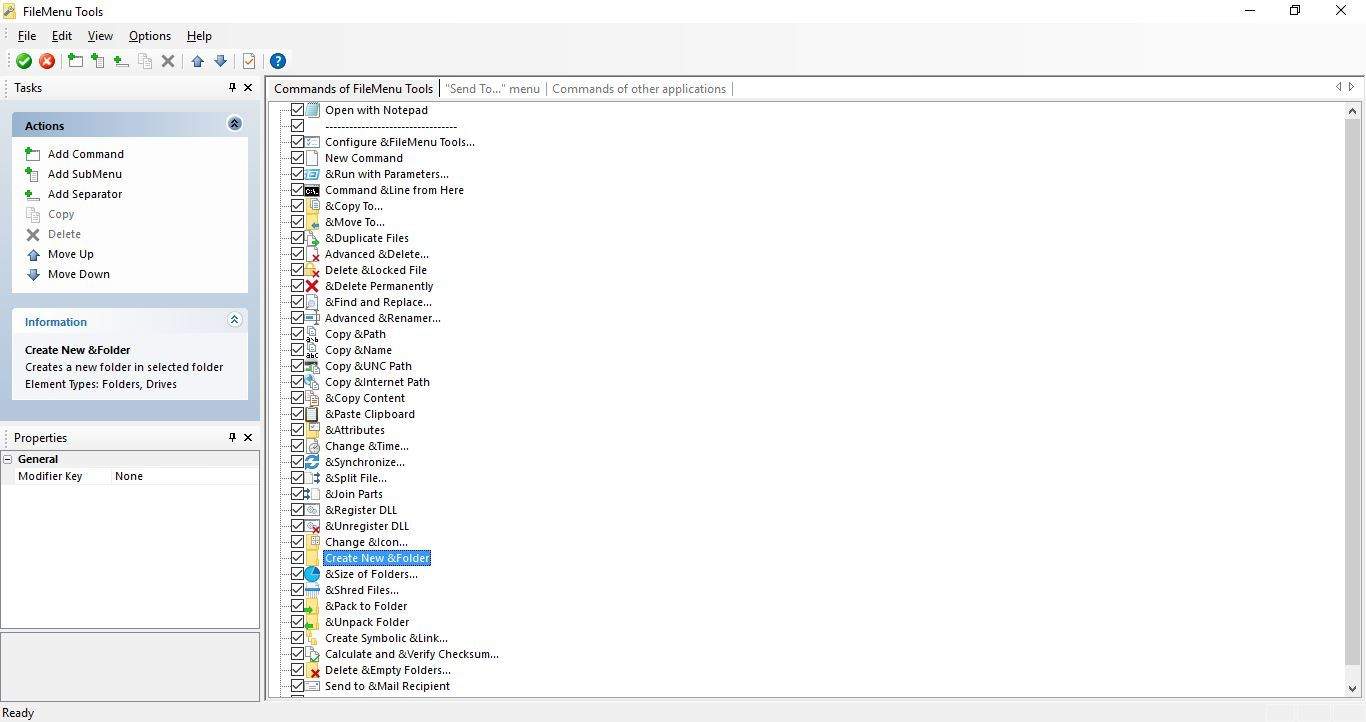
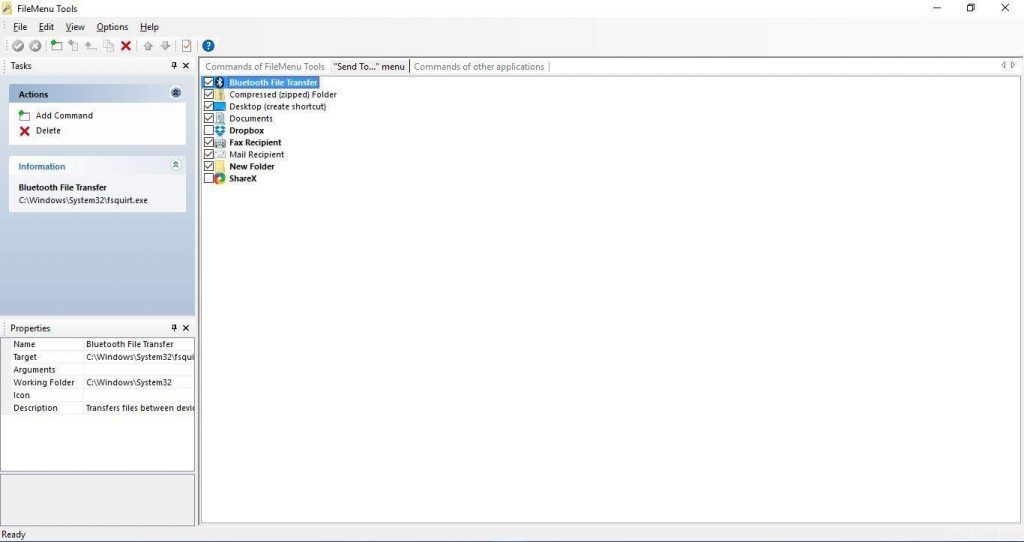
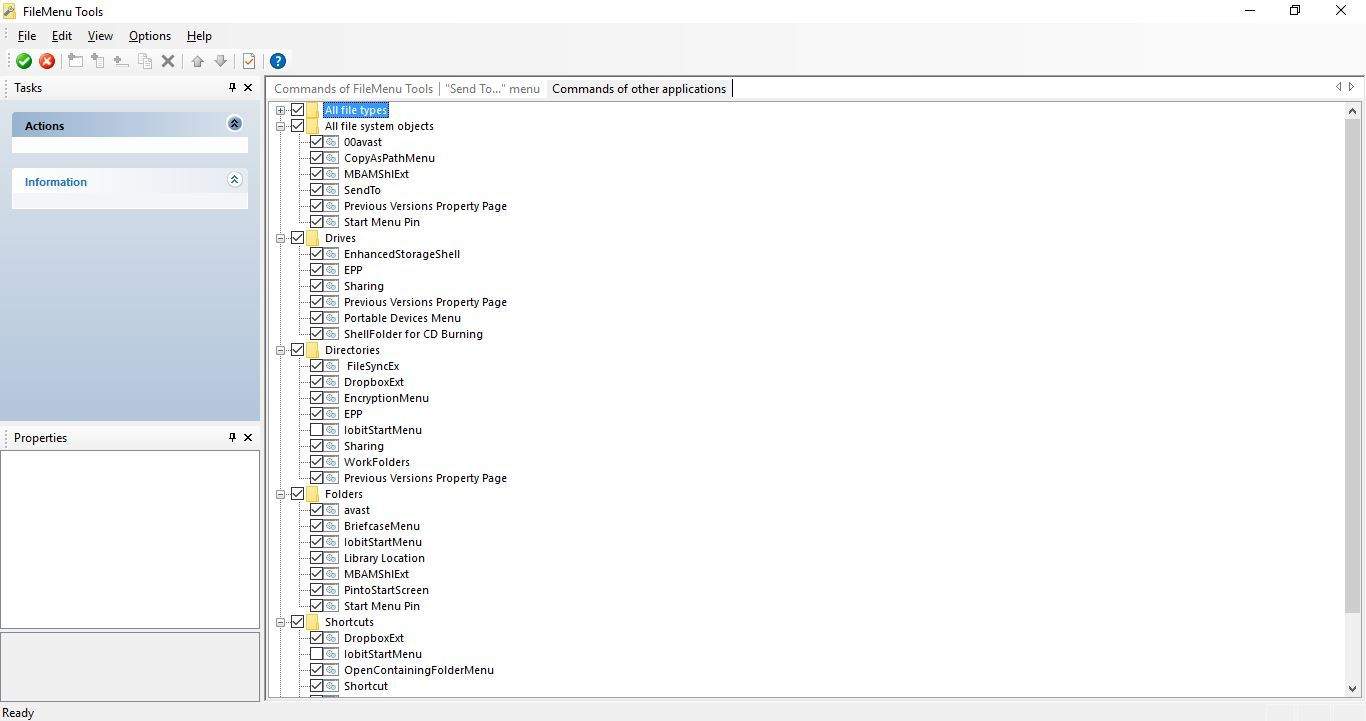
When you’ve opened the program’s window below, click Commands of FileMenu Tools if it’s not already selected.
Press the Add Command button to add a new shortcut.
You can select Run program from the Action drop-down menu.
Click inside the Program box and press the … button to choose a file for the shortcut to open.
Delete New Command from the Menu Text box and enter the file title there.
Then click the Apply Changes button.
You should right-click the desktop to open the context menu, which now includes a new FileMenu Tools submenu with a variety of extra options. That will also include the new file shortcut you added to it. Click the shortcut and select a program to open the file with.
3. Customize the Send to menu
Open FileMenu Tools.
Next, click Send To menu on the software’s window as below.
You can delete items already on the Send tosubmenu by selecting them and clicking Delete.
To add an item to the Send tosubmenu, select Add Command on the left.
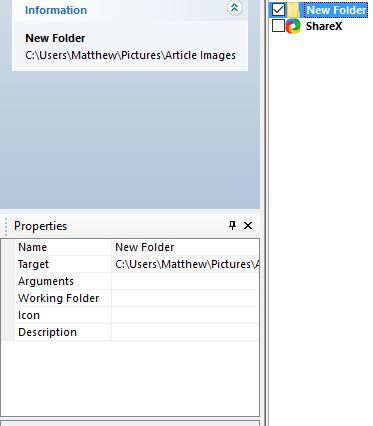
Select the Name box and enter a title for the item.
Click the Target box and enter a folder path for the Send to item. Alternatively, you could click the … button to choose an exe file.
Press the Apply Changes button to apply the new Send to menu settings.
If you want to edit right-click menu on Windows 10 or the new submenu, this is the best way to do it.
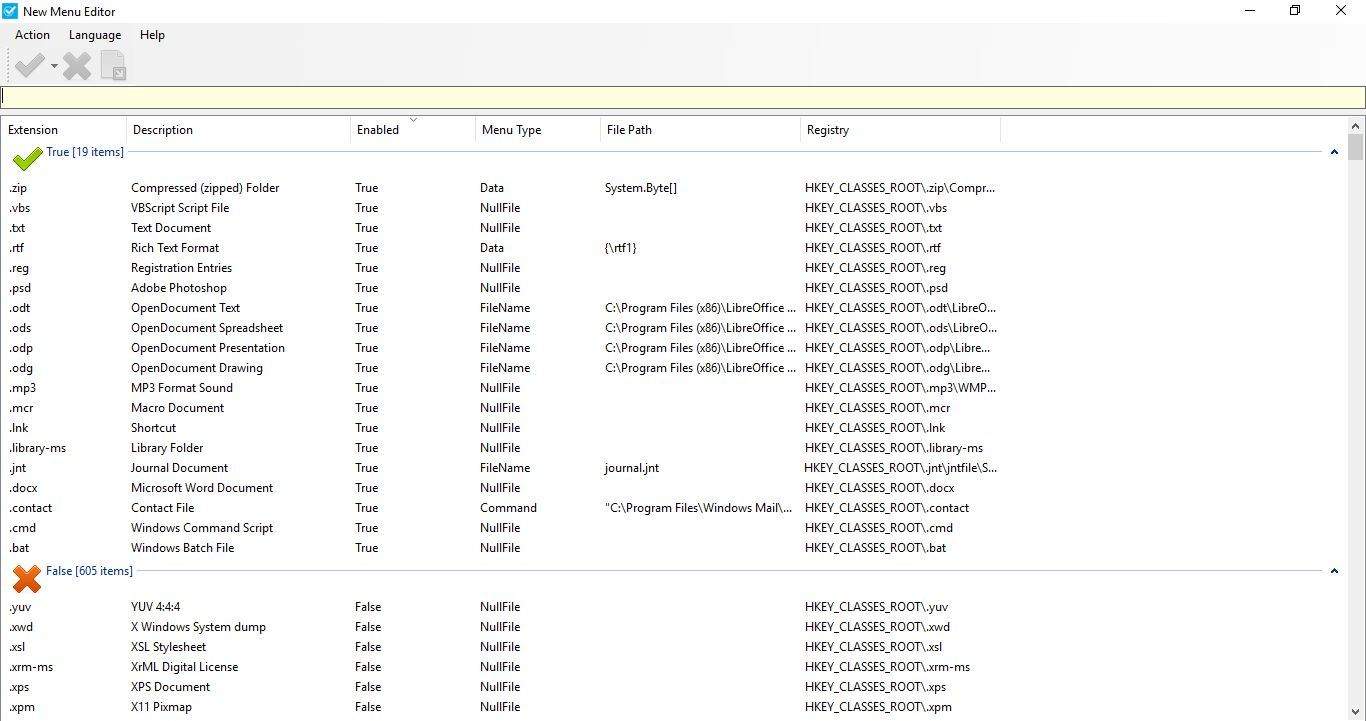
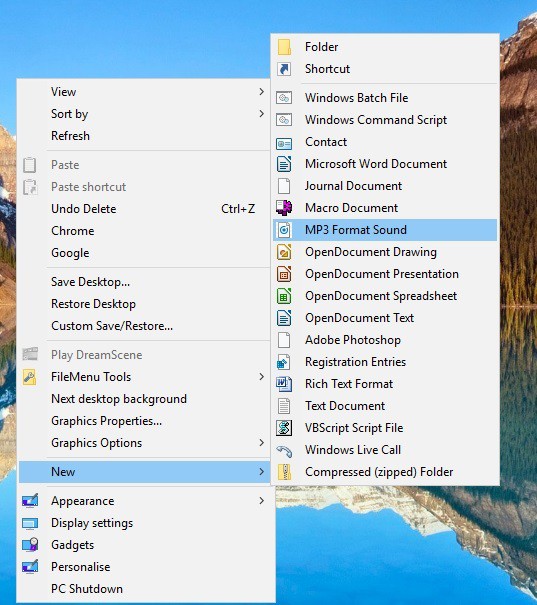
Select a file format to add to the New menu from the False list.
Click the green tick button.
Then you should find the file format on the Newsubmenu after a few minutes (but if you don’t restart Windows). You can right-click the desktop and select New to open the submenu shown directly below.
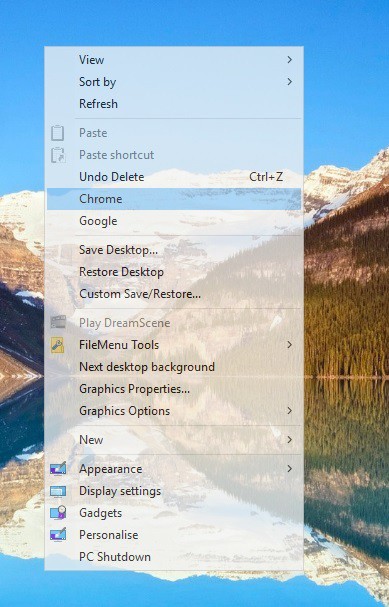
When the software is running, right-click its system tray icon and select Menu Transparency.
Select a transparency value from the menu.
Then right-click the desktop to open your new, transparent context menu, as shown below.
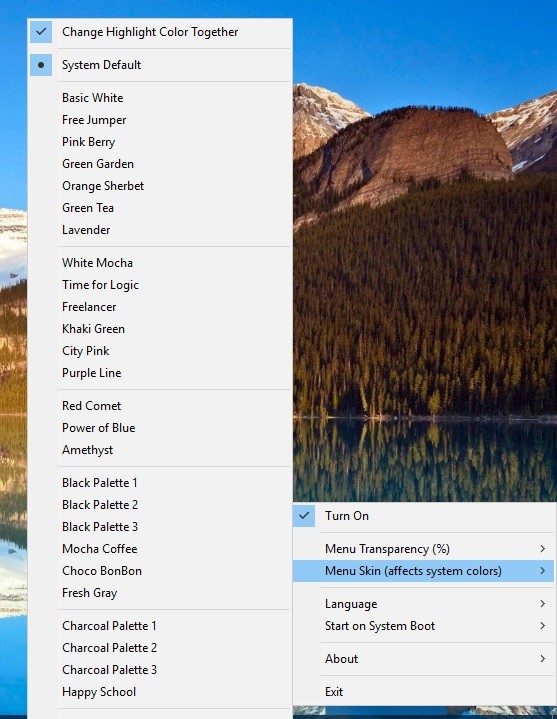
To add new colors, click Menu Skin on the software’s menu to open the submenushown directly below.
Select a color option from that menu, and right-click the desktop again to open the customized context menu as below. Note that this can also modify menu colors in other applications.
So, you can customize the context menu with those programs in many ways. The context menu provides a new way to set up shortcuts to software, files, websites, and system options.
Microsoft got in some hot water with a number of Windows users last year when they were trying to give away their latest operating system for free. The problems arose because perfectly content Windows 7 and Windows 8.1 users felt Microsoft was too pushy with their free offer. Namely the often vilified Get Windows 10 app.
Probably almost every Windows user is familiar with the Get Windows 10 app at this point. It sat in the notification tray to help Windows 7 and 8.1 users reserve their free upgrade. But problems arose as the app persistently reminded users to upgrade with a notoriously hard to spot button for opting out. There was so much customer ire over upgrading there are now even lawsuits springing up against Microsoft because of their tactics for promoting the free offer.
So it was a surprise to Windows 7 and Windows 8.1 users when they saw KB 2952664 and KB 2976978, respectively, show up in Windows Update yesterday. Some fear these updates are heralding the return of the dreaded Get Windows 10 app. This is because these updates were prerequisites for the main update which ushered the Get Windows 10 app into Windows 7 and 8.1 notification trays.
As Microsoft says in the bulletins for KB 2952664 and KB 2976978:
This update performs diagnostics on the Windows systems that participate in the Windows Customer Experience Improvement Program. These diagnostics help determine whether compatibility issues may be encountered when the latest Windows operating system is installed. This update will help Microsoft and its partners ensure compatibility for customers who want to install the latest Windows operating system.
To be clear, the return of these updates is not the return of the Get Windows 10 app. But at this point there is no definitive word from Microsoft for why these specific updates that check upgrade compatibility are returning. Recently at Ignite, Microsoft announced Windows 10 is on 400 million active devices, and that the adoption of Windows 10 has been one of the fastest in company history.
However, while this number sounds impressive, other reports say that Windows 10 market share ever so slightly slipped in last month’s data. Microsoft previously announced that it would miss its self-stated goal of getting 1 billion Windows 10 powered devices in three years.
So could some new special offer to upgrade be in the mix to reignite Windows 10’s adoption? Maybe. Anything could be possible with the holiday season just around the corner. But is the Get Windows 10 app making a return? Most likely not. Microsoft issued very firm statements the free upgrade offer would end in July and the Get Windows 10 app with it. But until Microsoft clarifies why they reintroduced prerequisites for an app that was one of their largest PR problems over last year, imaginations will be left to run wild.
Four months after Microsoft relaunched Microsoft Ventures as a formalized venture fund, the company’s new VC arm has announced yesterday that it has already invested in 13 startups working in several B2B industries. Additionally, a new Microsoft Ventures website has also been launched to give more details about the companies that have been backed by the technology giant so far. Nagraj Kashyap, Microsoft Ventures Corporate Vice President explained:
Our new website highlights our portfolio, where you can learn more about the promising technologies we’re betting on to disrupt how business is done today. In the world of business SaaS, we’ve invested in Helpshift and Outreach . In cloud infrastructure, we’ve invested in Rescale. In productivity and communications, we’ve invested in three companies – Comfy, Layer and Kahoot in the world of education. In machine learning, we’ve invested in CrowdFlower and more recently, CognitiveScale. And in security, we’ve invested in Aqua Security and Team8.
If you made the count, that’s only 10 companies but Geekwire reports that the three remaining startups have yet to publicly announce their funding rounds. Speaking at the GeekWire Summit in Seattle yesterday, Microsoft’s executive vice president of business development Peggy Johnson shared that Microsoft Ventures is currently focused on startups working on machine learning and artificial intelligence. “That’s one of the pillars of our strategy, infusing AI. It’s the infusion of AI into everyday services that I’m really excited about,” she explained.
Additionally, the former Qualcomm exec told Geekwire that Microsoft’s new venture capital arm has helped the company build more connections with Silicon Valley companies working on the next big thing. “Before, we might have had the ad-hoc discussions, but now we’re actually in the deal flow. We get to see these technologies,” she added.
A few weeks ago, action-adventure game ReCore was the first Xbox Play Anywhere to be released on both the Xbox One and Windows 10 PCs. The game is brand new IP from Microsoft Studios and set players in the feet of Joule Adams, a young woman who must survive in the mysterious world of Far Eden with the help of her Corebot companions.
If you’ve been considering buying the game since its worldwide release during the third week of September, you will now be able to try the game for free to help you make your decision. According to a new blog post published on Xbox Wire today, a free 30 minutes game trial is now available to download on both the Xbox One and Windows 10 PCs. Even better, all your progress will be saved if you decide to buy the game, allowing you pick up exactly where you left off after the end of the trial.
To try the game for free, just go the store listing on the Windows Store or the Xbox Store on your console and you’ll see the free trial option. Lastly, an update for the game will roll out today on all platforms. A separate blog post on the official ReCore website explained what’s new:
In this update, you will experience decreased loading times, see audio and visual improvements, and notice improvements to issues you may have experienced with waypoints, achievement tracking, collision locations, checkpoints and respawn points.
And for anyone who has experienced a Window 10 issue where the full game of ReCore downloads again during an update, a separate Windows fix is available now. All Windows 10 players are encouraged to download the Windows update (Version 1607) immediately to avoid this issue.
At $39.99, Recore is not an AAA title but it’s definitely worth trying. If you haven’t done it yet, we invite you to check our review over here.
Vodafone Business Services, the enterprise arm of Vodafone India, has tied up with Microsoft as a Cloud Service Partner to offer Office 365 to businesses for enterprise-grade productivity and collaboration services.
As part of the tie-up, announced in a press release today, Vodafone Business Services (VBS) will enable Indian businesses of all sizes to access Office 365 with the service delivery and support entirely managed by Vodafone. For the businesses, the partnership would mean that Vodafone is their single point partner for both Connectivity and Cloud.
We are pleased to partner with Microsoft to bring the Office 365 suite to our enterprise customers. We are confident that the pay-per-use Software as a Service (SaaS) model will make our customers’ business future-ready by giving them predictable IT costs and taking care of the technology upgrades and scalability worries. Vodafone is acknowledged as an enterprise mobility leader. With our cloud platform and tie-up with Microsoft, we are now well positioned as a total communications partner to our enterprise customers.
– Nick Gliddon, Director, Vodafone Business Services
Awarded as the ‘Enterprise Mobile Service Provider of the Year’ recently for the sixth year in a row (2011-16), VBS provides total telecommunications solutions across both mobility and fixed line platforms, as well as IoT and Cloud, to large Indian and multinational companies, public sector enterprises, SMEs, and startups.
According to the report, Microsoft’s consoles currently have 57.9% market share in Latin American countries. 39.8% of total consoles are Xbox 360, 12% are Xbox One, and surprisingly 6% is still held by the original Xbox console which is beating Nintendo’s new WiiU console (at 3%) and Sony’s PlayStation 2 (4.5%).
Of the other consoles, Nintendo’s Wii ties with the Xbox One at 12% and the PlayStation 3 and PlayStation 4 are sitting at 10.5% and 9% respectively.
Microsoft has a history of performing better against its rivals in Latin America than in other regions. One example of this is with their Windows Phones which have famously struggled to compete with Google’s Android and Apple’s iPhone devices in North America but managed to rank as the second-highest mobile platform in Latin America back in 2013. The situation with Windows Phone has obviously changed since then however.
Are you surprised by the Xbox brand’s success in Latin America? Let us know in the comments below.
Sudoku is a simple logic puzzle and a number placement game that is very popular, and it has been with us since the late 70’s where it was only available in the printed form. Surprised? Yes, this game has quite a history, and it keeps on getting better. Nowadays, accessing the game has become much easier, thanks to the unlimited Sudoku apps which are available across multiple platforms. You can now access the game on your mobile devices as well as on your PC.
Sudoku apps are a must have as they help to pass time and are great for zoning your cognitive abilities. While the rule of the game is pretty simple, it can be a very challenging puzzle to solve as it comes with various levels of difficulties. Instead of solving the only one puzzle that features on the daily newspaper, why not download Sudoku apps and play the games as many times as possible. So let’s look at the popular Sudoku apps that you can enjoy on your Windows 10.
Pure Sudoku Deluxe is an intellectually stimulating puzzle game for Windows 10 PC. The game is very easy to navigate and its interface is simple and uncluttered. Pure Sudoku offers players four levels of difficulty, from ‘very easy to difficult’ so it’s suitable for all skill levels. The free version offers enough to jog your memory and keep you engaged but you have to subscribe to the Deluxe version to get the best of Sudoku experience.
Sudoku Pro
Sudoku Pro is one of the most popular puzzle games and comes with attractive features and a nice interface. The game offers players five levels of difficulty which are easy, medium, hard, expert, and hyperSudoku. It starts with a tutorial so you can never get lost even if you are a novice in the world of gaming. In addition, the game offers you hints, redo, undo, and other options like the draft mode to help you out.
Microsoft published their Sudoku game in the store and it comes with attractive features to help you out in difficult levels. The game has five levels which are, very easy, easy, medium, hard, and expert. The game provides hints in places where you are stuck and shows all the entries with incorrect or duplicate values. Other features include tutorial, statistics, leaderboards, daily challenges, X-Box integration, and a notes section.
Sudoku Free is another puzzle game for Windows 10 which offers players a lot of options. The game has four levels of difficulty which are easy, normal, hard, and evil. At the top of the puzzle, you will find the regular features like hints, undo, redo, draft mode, and lock mode. Lock mode allows you to lock the cells you are sure are right when playing the game. The game also comes with other advanced features like ‘Statistics’ which let you know how you have performed and ‘Timer’ that shows the time you took to complete the puzzle.
Sudoku HD is a decent puzzle game that offers four levels of digital sleuthing difficulties, providing a fair challenge for children aged 7 and above all the way to the puzzle-hungry adults. The app comes with unlimited puzzles and also gives you the ability to create your own. The interface is nice and the game also provides necessary assistance tools that can be of great help in the event you get stuck. The app also has a timer that lets you know how long it took you to complete the puzzle.
Sudoku Mix is a beautiful puzzle game that comes with 5 different game modes and many levels. The modes include Quick Sudoku, Regular Sudoku, Jigsaw Sudoku, KenKen or Calcudoku, and Futoshiki. Instructions for each mode are provided which helps you discover Sudoku variants that will challenge you. Each mode has four levels of difficulty designed to challenge all skill levels. The game also has the ‘Save’ and ‘Resume’ features that allow you to pause the game and continue later from where you stopped.
Just Sudoku is a user-friendly puzzle game that will keep your mind engaged for hours. The game lets you increase the level of difficulty as you progress and comes with a real surprise – a built-in MP3 player. In addition to a wide variety of challenging puzzles, the game also provides players with informative tutorial and helpful hints. There is an integrated logical solver that enables players to know the next possible number, making it very easy and fun to play.
Playing Sudoku games is a great way to free your mind from the hassle and bustle of a busy day. To some people, playing these games is a daily routine. It is for this reason that you will find so many games of this kind on the internet. However, not all of these games are compatible with Windows 10. The list above contains the very best of Sudoku apps for Windows 10. Feel free to share and let us know of any other Sudoku app for Windows 10 that you feel deserves a place on the list.
VR is the future! VR is the future of our education, work, but what’s also important, VR is the future of our entertainment. And gaming is currently a branch of the entertainment industry where VR’s presence is currently the strongest.
People are still getting accustomed to wearing wearing virtual headsets, and yet the offering of games is already so rich, that we had a hard time deciding which games we should put before others, to make an ultimate list of the best VR games you can currently find of the world’s leading game distribution platform, Steam.
So, if you already have a virtual reality device, or plan to get one soon, but you still haven’t made up your mind about which game should you play first, we hope our list will help you decide. So, sit back, relax, and check out our list of top 15 VR games you can find on Steam.
The best VR games on Steam
Hover Junkers
In case you get bored by regular shooters on your PC or a console, you can completely switch a perspective with Hover Junkers. This game is unlike the majority of games developed for the VR environment, because its mojo is not exploration or creation, but plain shooting action.
Hover Junker takes place in the future, where Earth has nearly run out of water, so almost everyone has already left the planet in search for fresh source of life. Those who remained went pretty crazy, and are building hover ships out of junk, and fight each other in a dusty desert.
This is a multiplayer game, which means you can make your own team of shooters, and fight against opponents. Players use Vive’s two controllers and a headset to move around, take cover, and shoot at the opponents. So, if you’re into shooters, and want try a new way of playing this genre of games, you should definitely try Hover Junkers.
Hover Junkers is currently available on Steam for the price of $32.
The Gallery Episode 1: Call of the Starseed
Be careful while playing this game, because you might get used to its virtual environment so much, that you’ll have trouble returning to the real world. All jokes aside, the first episode of The Gallery series has everything you can expect from a well-developed VR game. It is so rich with details, and has so many options, that you’ll feel like everything from the game is actually happening.
This exploration is inspired by the mystery of dark 80’s fantasy and adventure films, so if you’re into this genre, your going to love Call of the Starseed. The game takes plane on a mysterious island, where you search for your missing sister called Ellie, who disappeared under unknown circumstances.
Truth be told, Call of the Starseed is quite short for an adventure game, as you can complete it in just a few hours of continuous playing. That’s pretty much the biggest con of this game, but if you take into consideration how rich with details this game is, it’s more than worth your attention. So, if you’re just getting started with VR, Call of the Starseed is probably the best choice to start your adventure.
The Gallery Episode 1: Call of the Starseed is available on Steam for the price of $28.
Elite: Dangerous
Elite: Dangerous is among rare VR games that comes with tradition and history, because the franchise is more than thirty years old. This space exploration sandbox game is quite versatile, as it features a few gameplay aspects, including exploring, trading, and of course, fighting with opponents.
Elite: Dangerous is arguably the best Elite experience so far, because the game puts you in the role of a spaceship pilot. So, if you ever wanted to drive you own spaceship through the infinite space, this game will make it possible for you. You control the spaceship with a controller, so it feels pretty realistic, like you’re really on a mission in space. There are also thousands of planets to explore, which completes the space exploration experience.
This is a multiplayer game, which means you’ll encounter real pilots on your journey. This gives the game even more charm, as playing a space exploration game has never felt so real. Of course the story is not so rich, but the game’s accent is intentionally on exploring and experiencing the atmosphere in space, rather than developing a complex plot.
Elite: Dangerous is available on Steam for the price of $25.
Surgeon Simulator: Meet the Medic
When Surgeon Simulator 2013 meets Team Fortress 2, you already know you something crazy and extraordinary will come out. This game is like a regular Surgeon Simulator 2013, but only featuring Team Fortress 2’s characters, Medic and Heavy.
You play as Medic, and your goal is to perform various surgical procedures, such as heart and brain transplants on a stomach-opened Heavy laying on your table. But let’s be honest, you’re not going to play by the rules, as you’ll eventually find yourself breaking poor Heavy’s ribs with a sledgehammer, or ripping off his organs with a machete.
The game features a huge variety of tools, from real surgical instruments, to a woodcutter’s axe or Hippocrates’ statue. You can use these tools to perform any twisted surgical fantasy you have, and not get charged for violating human rights. And of course, don’t let a toony look of the characters fool you, because this game is not for everyone’s stomach.
Unlike the original Surgeon Simulator 2013, which is available only on Oculus Rift, Surgeon Simulator: Meet the Medic is available on Stream for free!
Job Simulator (Multiplatform)
In today’s gaming industry, there’s a simulator game for basically anything. And VR is like a paradise for simulation games, because it gives them a different dimension, and makes them as real as it gets. That’s exactly the reason why we have another simulation game on our list.
With Job Simulator you can pick up from a few actual professions: a gourmet chef, an office worker, a convenience store clerk, and more. So, if you ever wanted to one of these jobs in real life, you can take a shot in the virtual world.
The game is set in the future, where robots have replaced all human jobs, so you basically enter a simulation to see how humans used to do jobs in the past. Basically, it’s a simulation game in a simulation game.
Each job you take is a unique experience, just like in a real life, of course. So for example, if you choose to work in a fast food restaurant as a chef, you’ll have to fulfill orders, prepare food, wash the dishes, and more.
Job Simulator is available on Steam for the price of $28.
Project CARS
The ‘regular’ Project CARS offers some of the best racing experiences you can find. Now, imagine that racing experience in VR! The VR version of Project CARS for HTC Vive allows you to hop into your favorite racing cars from the game, and feel the amazing environment in first person.
Besides making you feel like a professional driver on a real racing track, this game offers some more amazing features. It supports VR mouse support and Gaze control. In case you don’t know, Gaze control allows you to select game menu items simply by looking at them.
Of course, there are some corrections to be done, like the ability to look through windows, but Project CARS VR really set the bar high for future VR racing games, and that cannot be ignored. All in all, if you’re looking a smooth racing simulation, or you’re already familiar with Project CARS, but just want to ‘change the perspective’, you can’t go wrong with the VR version of this game.
If you want to buy Project CARS, and play it in VR, the game is available on Steam for $29.99.
Star Wars: Trials on Tatooine
The VR world without at least one Star Wars game just wouldn’t seem right. In that manner, ILMxLAB delivered the very first VR-supported Star Wars game called Star Wars: Trials of Tatooine to all fans of the franchise. This games allows players to feel the atmosphere in another galaxy by interacting with familair characters, and of course, swinging lightsabers.
But, swinging your lightsaber is pretty much all you’re going to do in this game. Whether it’s just for your amusement, or for the sake of stopping Stormtroopers who throw lasers at you. Just because this game doesn’t offer a rich gameplay, it looks more like a well-done demo, than a full-fledged game, but it’s still enough to give you satisfaction of being in the Star Wars universe.
This game maybe doesn’t deserve to be on this list, in terms of gameplay or storyline, but it’s still the very first Star Wars game on VR, so we’re sure it’ll have its army of players. This doesn’t mean that Lucasfilm won’t release a new Star Wars VR game in the future, which’s going to be more noteworthy than this one. So, we’ll just count Star Wars: Trials of Tatooine as a preparation for bigger things.
Lucasfilm decided to offer Star Wars: Trials of Tatooine for free to all you Jedi out there, so if you want to play it, just download it from Steam.
Euro Truck Simulator 2
Similarly to other games that have ‘regular’ versions, the VR version of Euro Truck Simulator 2 just changes the perspective of the game. Actually, we can’t say that the game completely changes perspective, it’s still in first person, you just don’t see anything besides the road and the interior of your cabin.
If you’re familiar with Euro Truck Simulator 2, there’s nothing more we can tell you about the VR version. Just like it’s the case with Project CARS, Euro Tuck Simulator 2 doesn’t have a separate, VR version, but users need to turn on the VR mode in the ‘regular’ game.
Euro Truck Simulator 2 is one of the first ‘full’ games that received VR support. So, we definitely should give them credit for pioneering this mode. So if you already own the original game, just connect it with your VR device, and you’ll be able to drive your truck through European roads and highways, but in the more realistic dimension.
If you want to buy Euro Truck Simulator 2, the game is available on Steam for the price of $19.99.
theBlu
Fan of marine biology? Have you ever wanted to dive into a magnificent, deep, blue ocean and experience life of its beautiful residents? Well, get your VR device on, and play some theBlue. This game brings you into the depths of the ocean, and introduces you to its habitats.
You’ll be able to swim next to huge blue whales, stingrays, medusas or even anglerfishes. TheBlu offers one of the best, detail-richest environments in the VR world, making this simulation the ultimate underwater experience. You don’t have any missions or action in this game. Its sole purpose is exploring and meeting beautiful ocean habitats from the close distance. You can even pause time, so you can take a better look at a colorful fish passing by.
TheBlu offers three modes to players – Whale Encounter, Reef Migration and Luminous Abyss. All three modes showcase different parts of the ocean, and provide different experience.
Whale Encounter puts you on the ship wreck, with a huge, 80-foot blue whale. In this mode, you can meet with, and take a close look at the biggest animal on the planet. Reef Migration places you on the edge of a coral reef, where you can find the huge variety of species, from coral fishes, to turtles and jellies. And finally, Luminous Abyss takes you to the very depth of the ocean, where not even light reaches. You’re just equipped with a flashlight, and there’s a variety of extraordinary fishes, characteristic for this part of the ocean.
theBlue is available on Steam for the price of $9.99.
Onward
If you’ve ever wanted to be a part of a military squad, and fight on the battlefield, but without the risk of taking an actual bullet, Onward is the game for you. Many players around internet say that Onward is currently the best tactical shooter you can find on VR.
This game is all about action, and it features all you need to shoot up a few bullets towards your enemies. It offers a huge variety of weapons, including from assault rifles, snipers and pistols to accessories smoke grenades, and knives. There are no gun cross-hairs or HUDs, as the game requires a pure skill from a player. Onward is a multiplayer game, so you can team up with your friends on the front-line.
At the time of writing this article, Onward is still in early access, so we cannot deliver the most accurate review of the game. But according to various gameplay videos, and presentations, expectations are pretty high. We just hope the game will live up to them.
You can buy Onward on Steam for the price of $22.99.
Keep Talking and Nobody Explodes
Keep Talking and Nobody Explodes offers a playing experience we can’t find in other VR games. Goal of this game is to deactivate a bomb using a huge bomb manual with instructions. In this cooperative game only one player wears a VR headset, while other players give him/her instructions of how to deactivate a bomb.
Only downside of this game is a manual itself, because it requires either an extra computer, or pinging 23 pages worth of paper. But if printing a 23-page manual is not a problem, gather your friends, and prepare for racing with time and some serious bomb squad actions.
Keep Talking and Nobody Explodes requires intense cooperation between players, as only one wrong move can ‘blow’ your team up. Recommended number of players for this game is 2 to 6. So, if you have your own bomb squad, that can deactivate even the most complex circuits, you should definitely try this game.
Keep Talking and Nobody Explodes is available on Steam for the price of $14.99.
Vanishing Realms
Vanishing Realms is one of the pioneering RPG games for VR. Developer (one man team) of this game did a great job of bringing one of the first action RPG experiences to VR, as the game looks absolutely fantastic. Vanishing Realms is not just an exploration game, like the majority of VR games, as it features all elements of the RPG genre, including fighting, magic, crafting, and more.
This dungeon crawler puts you in the skin of a hero attempting to rescue the world from evil forces. The Vanishing Realms world is very well-designed, as it looks just like a regular RPG game for any other platform. Some players might find moving mechanism a little bit awkward, since you teleport yourself all the time instead of walking, but the VR technology isn’t that advanced yet to allow you to just walk through the whole game, so it’s a solid compromise.
You’ll probably love the combat system, because it will make you feel like you’re really in a dungeon, fighting skeletons and other demos. So, even though Vanishing Realms could use some improvements, it’s probably the best RPG game you can find on VR right now, so we give them credit for that.
Vanishing Realms is available on Steam, and you can get it for the price of $19.99.
The Solus Project
The Solus Project is a celestial, exploration-survival game. This is a single player game, where your job is to explore a newfound planet as a male of female colonist. The main trump of this game is its beautiful looks, as you’ll feel like you’re indeed on a magnificent planet, which every corner needs to be explored.
The game is full of contrast, as it constantly switches from claustrophobic caves and interior structures, where you pretty much do what’s required, to more spacious outdoor areas, where you have more freedom of exploring. The game also has some survival elements, as there are a lot of factors, like whether conditions, that can affect your well-being.
The Solus Project is available in both ‘regular’ (PC and Xbox One), and VR versions, but the one for HTC Vive definitely gives you more options, and adds up to the game’s stunning graphics.
The Solus Project is available on Steam, for the price of $18.99.
Raw Data
Raw Data is another great first person shooter for VR you can find on Steam. This is a game for all you data analysts, or wannabe data analysts, as it puts you against an evil corporation, whose data you need to steal to save the world. You can choose between multiple characters, with each one having its own pros and cons.
Raw Data feels like a wave-shooter, but it’s much harder than you might think at first. There are a lot of angry robots and other enemies you need to knock down to progress. The game features a pretty solid combat system, with a high variety of weapons. Besides regular pieces, like guns or lasers, you can also fight with robots in a fair one on one, using just your fists.
When it comes to gameplay details, Raw Data is probably the most feature-rich VR shooter in the market. It uses full body avatars in multiplayer, so your friends can see your every move. This, however, still needs to be polished a bit, because the game uses the inverse kinematics (IK) method to predict your movements, and it can go wrong sometimes, making you look a little bit awkward. But, all that aside, the game still offers an amazing shooter experience for VR.
The game is available on Steam, and you can purchase it for the price of $36.99.
Tilt Brush
We can’t have a new technology without at least some impact from Google. This time, a tech giant released a app-game called Tilt Brush, that allows you to paint in 3D space using your virtual reality headset. As Google said, the main goal of this game is to boost players’ creativity, and encourage them to make amazing creations, in this new form of art.
And indeed, when playing Tilt Brush, you can let your internal artist loose, and create amazing 3D paintings, using various techniques. You just need to put your VR device on, and your room immediately becomes your workspace. You use light brushes, watercolor, sketching pens, and many more tools and pallets, to create your paintings. The only limit is imagination.
Of course, you’re not going to produce masterpieces that Google showcased in its Tilt Brush trailer, as you’re paintings will probably look like live Paint drawings at first, but with some practice, you never know how good yo may become.
Tilt Brush is available on Steam, for the price of $27.99.
Google’s 3D painting tool concludes our list of the best VR games you can currently find on Steam. As you can see, even though the VR technology is still in its early phase, things you can do with our headset are pretty amazing. You can explore space, oceans, fight against aliens, perform surgeries, make artistic masterpieces, and much more.
We can only imagine what what will the VR world bring us in the coming years.
What’s your favorite VR game from our list, or in general? Is there any title we’ve missed when making this list? Tell us in the comments below.
Cumulative updateKB3194496 for Windows 10 brings a series of important fixes and system improvements, making the OS more reliable. However, KB3194496 has also been plagued by installation issues since the day it was released. Microsoft has officially acknowledged the issue and is actively looking for a fix.
For the time being, the company hasn’t been able to develop a hotfix for these installation issues, but there are two workarounds available to force the installation process of KB3194496.
The first solution is to manually download and install the update. This is a straightforward process that doesn’t require you to make complex changes in your system.
The second workaround involves changing the Registry and should be used by tech-savvy users only. If, for a reason or another, you couldn’t install KB3194496 manually, follow the steps listed below to force the installation process of KB3194496.
1. Go to C:\Windows\System32\Tasks\Microsoft\XblGameSave and delete the folder XblGameSave.
2. Now open the Registry Editor and locate the following key:
3. Delete the XblGameSave key.
4. Restart your PC.
5. Download and install KB3194496 again.
This workaround was published on Microsoft’s Forum, and soon after it was posted many Windows 10 users confirmed this solution fixed the annoying KB3194496 install issues.
This solved it for me. 10th time is a charm!
I regedit’ed and deleted all XblGameSave entries it would let me. Some it would not and I was unable to easily change permissions. Not being an XBox’er, I could care less if I had a XBox problem and worse case, I reimage (I make a new image every first of the month). Five minutes and the update was done.
Try this solution and tell us in the comment section below if the problem is now solved.
According to a report by Reuters, Yahoo Inc built a secret custom software program to search all of its customers’ email messages for specific information, at the request of U.S. intelligence officials. The report cites three unnamed former employees and “a fourth person appraised of the events,” saying that the company scanned “hundreds of millions of Yahoo Mail accounts” at the request of the National Security Agency or the FBI.
It’s unclear what information Yahoo passed on to the intelligence agencies. Microsoft, Google and Twitter have all denied conducting similar searches. In a statement provided to media, a Microsoft spokesperson said:
“We have never engaged in the secret scanning of email traffic like what has been reported today about Yahoo.”
… but declined to comment on whether or not they had been approached with such a request. Google said that they had “never received such a request.” A Twitter spokesperson told TechCrunch “We’ve never received a request like this, and were we to receive it we’d challenge it in a court.”
The decision to comply with the government’s request was contentious within Yahoo, ultimately causing former Chief Information Security Officer Alex Stamos to leave the company, later landing at Facebook.
Mayer and other executives ultimately decided to comply with the directive last year rather than fight it, in part because they thought they would lose, said the people familiar with the matter.
Yahoo in 2007 had fought a FISA demand that it conduct searches on specific email accounts without a court-approved warrant. Details of the case remain sealed, but a partially redacted published opinion showed Yahoo’s challenge was unsuccessful.
Some Yahoo employees were upset about the decision not to contest the more recent edict and thought the company could have prevailed, the sources said.
They were also upset that Mayer and Yahoo General Counsel Ron Bell did not involve the company’s security team in the process, instead asking Yahoo’s email engineers to write a program to siphon off messages containing the character string the spies sought and store them for remote retrieval, according to the sources.
That security team, bypassed in the decision to comply, found the program within weeks. They initially thought the company had been hacked (something they were probably already well familiar with). Stamos then resigned, according to Reuters, telling his subordinates that hackers could have accessed the stored emails due to a programming flaw.
As internet companies face increasing scrutiny over their abilities to protect user data from not only hackers but governments, and governments continue to push for more access in order to pursue their enemies, user security of online assets is going to become an ever bigger problem.
Do you trust Microsoft with your data in the cloud? Do you trust anyone?
FIFA 17 is an exciting game, allowing players to make their childhood dream come true and become the best football players on the field. Unfortunately, many gamers are reporting that the title’s injury rate is unrealistic, forcing them to substitute players way too often. As such, gamers are disappointed, claiming that the high injury rate is ruining the FIFA 17 experience.
EA needs to fix FIFA 17 in that injuries happen over and over again basically almost every game. It’s so annoying because we have to keep buying injury cards which are very expensive. It’s basically every time my player gets slide tackled they are automatically injured for at least 3-4 games. EA please fix your game ASAP!!
Gamers are now urging EA to sort the foul system and penalize players who play dirty. The injury frequency is too high, forcing them to buy injury cards which are going for 1500+ — three times what’s earned playing a single match — making it impossible to make coins without spending money.
Having to substitute players is not the biggest issue for FIFA 17 gamers. The main problem they’re complaining about is the long length of time their players are out.
It’s not just the frequency of injuries, I don’t even mind having to sub someone occasionally, it’s the length of time. Why are they suddenly out for 5 or 6 games?? That’s stupid, you shouldn’t be without a player you’ve paid for for that long.
The rate of injury is lower now than on the beta version, but still remains unrealistic. For the time being, EA has yet to issue any comment on this situation.
How has your FIFA 17 experience been so far? Is the “injury rate” for your players within limits?
Even more games are joining the growing list of former Xbox 360 games available for Xbox One Backward Compatible play. Major Nelson (a.k.a. Larry Hryb) tweeted today about the newest classics that you can play on Xbox One. So of course we took a closer look for you.
Sonic and the All-Stars cast line up on the starting grid once again to battle for supremacy in the ultimate race. It’s not just racing, it’s racing transformed! Fully Transformable vehicles which change from car to plane to boat mid race, each with their own unique gameplay. Over 20 legendary All-Stars each with their own transformable vehicle. A multitude of modes including Grand Prix, Battle Arenas and the incredible World Tour. Unleash ingenious weaponry and your character’s All-Star move to beat the opposition. Race up to ten players online, or challenge your friends in four player split screen. 16 dynamic tracks which challenge you on land, water and air.
Explore the entire Galactrix universe in the exciting return of the Puzzle Quest franchise with its signature addictive RPG/Puzzle hybrid gameplay. This game requires the Xbox 360 hard drive for storage.
Escape to a puzzle game fantasy world filled with amazing creatures, powerful weapons, and addictive role playing in this sequel to the award-winning Puzzle Quest.
Impressively, there are already over 250 games on the Backward Compatibility list. As always, Major Nelson has your back. Can’t recall if a game was made Backward Compatible? Make sure to check out his site for the full list, today’s titles included.
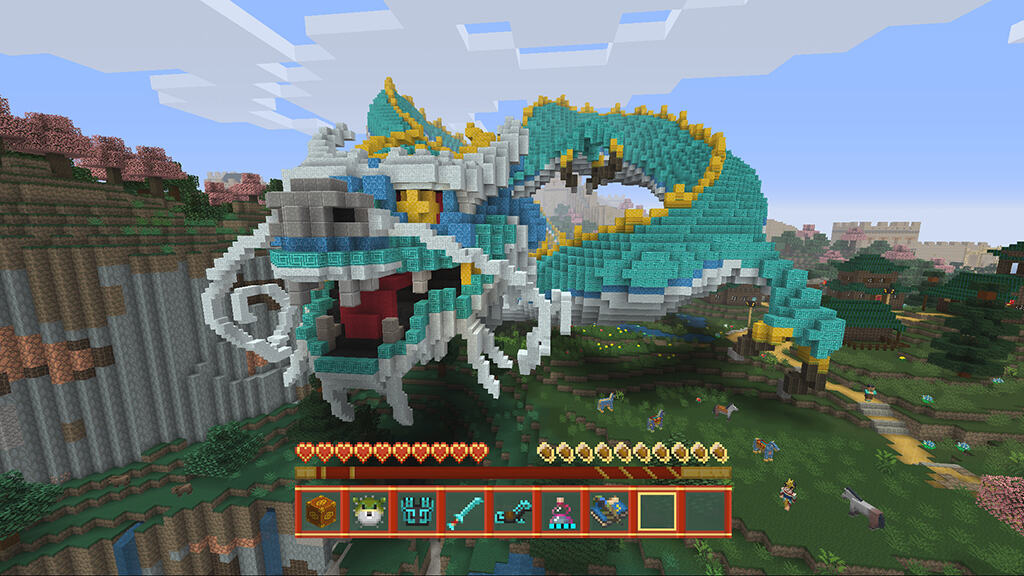
During Minecon last month, we learned about a few upcoming additions to Minecraft, with each version was getting an update. For consoles, Minecraft was getting a little something extra. The Chinese Mythology Mash-Up DLC pack released today side by side with a small free update of new features.
The Chinese Mythology Mash-Up is extra purchasable content that you can buy for $4.99. The pre-crafted world was inspired by the exotic reaches of China with “ancient cities to explore, gargantuan sculptures to gawp at and cherry blossom aplenty.” The expansion has a total of forty new skins and thirteen themed music tracks. Players are able to play the Battle Mini Game on the newly decorated map.
A slew of new blocks and more life for your Arctic biomes also coming to your games in the free console update. Starting either today or tomorrow, you’ll be patching in:
Polar Bears
Customizable Banners
Beetroots
New Soup recipes
Igloos
Bone Blocks
End Bricks
Grass Path
Frosted Ice
Magma
Nether Wart
Red Nether Brick
The update is available for Xbox and U.S. Wii U consoles today with the rest to follow closely behind tomorrow. Let us know in the comments if you’re excited about all of this new Minecraft content.
Dan Plastina from Microsoft has taken to the Azure Enterprise Mobility and Security Blog to announce that Microsoft has officially released Azure Information Protection. The release comes after it was announced back in June and after a first preview back in July.
The release means that Azure Information Protection is now Generally Available. According to Dan, the following should be expected in AIP:
Classify, label, and protect data at the time of creation or modification. Use policies to classify and label data in intuitive ways based on the source, context, and content of the data. Classification can be fully automatic, user-driven, or based on a recommendation. Once data is classified and labeled, protection can be applied automatically on that basis.
Persistent protection that travels with your data. Classification and protection information travels with the data. This ensures that data is protected at all times, regardless of where it is stored, with whom it is shared, or if the device is running iOS, Android, or Windows.
Enable safe sharing with customers and partners. Share data safely with users within your organization as well as with external customers and partners. Document owners can define who can access data and what they can do with it; for example, recipients can view and edit files, but they cannot print or forward.
Simple, intuitive controls help users make the right decisions and stay productive. Data classification and protection controls are integrated into Office and common applications. These provide simple one-click options to secure data that users are working on. In-product notifications provide recommendations to help users make the right decisions.
Visibility and control over shared data. Document owners can track activities on shared data and revoke access when necessary. IT can use logging and reporting to monitor, analyze, and reason over shared data.
Deployment and management flexibility. Protect data whether it is stored in the cloud or on-premises, and choose how your encryption keys are managed with Bring Your Own Key (BYOK) and Hold Your Own Key (HYOK) options.
As part of the release, Azure Information Protection client for Office also gets general availability, the HYOK feature enters preview, and new mobile apps for iOS and Android will replace existing RMS Sharing Apps. For the complete details, be sure to head over to this webpage. Once you’ve checked it out, let us know what you think by dropping us a line below.
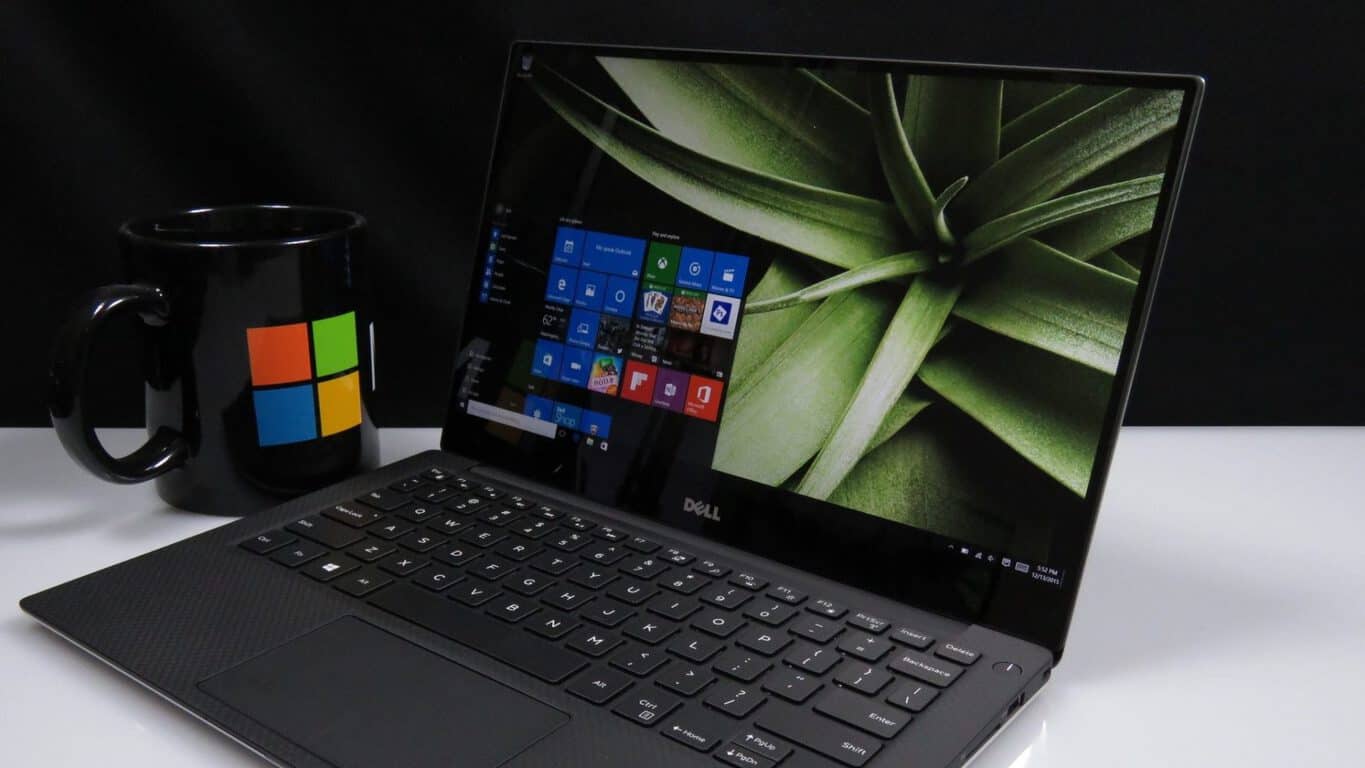
Dell has announced that the newer version of their XPS 13 notebooks is now available for purchase in the U.S., Canada, and the UK. The newer versions include the next generation Intel ‘Kaby Lake’ CPUs for faster performance and better battery life (via Windows Central.)
Dell XPS 13
Available in the US for $799.99, the UK for £999 and in Canada at $1,299.99, the notebook comes in Rose Gold, and silver. The updated versions also boast a New larger 60WHr battery for up to 22 hours on FHD and up to 13 hours on QHD+. 1535 Wireless-AC technology for strong and reliable WiFi connection is also included.
In case you missed it, you can check out our review of the Dell XPS 13 by clicking here. We found the device pretty impressive and at the time we called it our new favorite Windows 10 laptop. We’re sure that the latest versions with Kaby Lake and larger battery will just make a great machine even better. As always, though, also be sure to let us know what you think of the Dell XPS13 by dropping us a comment in the section below.
As you may recall, over this weekend, a select group of Windows 10 users reported that Windows 10 Build 1493.222 left their computers in an infinite installing update loop. Now a few days after, Microsoft has finally broken their silence on the issue, and has said it is preparing a “clean-up script” for failed Windows 10 version 14393.222 installs (via Neowin.)
Official word on an incoming fix was first spread on this Microsoft Support Forms page, where a Microsoft forum moderator named Jason posted that patience is required during research and subsequent work while the fix is being made. He writes:
“Hello Insiders!
We’ve been working diligently on this issue and are finalizing a clean-up script that will fix the underlying issue preventing the install of KB3194496 (Cumulative Update 14393.222) for affected users. Your patience during our research and subsequent work is greatly appreciated.
Thank you as always and stay tuned!”
Several other Windows Insiders on the same forum, however, have posted workarounds for the issue, all of which are risky and involve altering the system registry and deleting certain folders. So, if you’re experiencing the infinite installing update issue, you might want to try the workarounds seen in the forum (at your own risk!) until the official fix has been released by Microsoft. As always, let us know what you think of this latest set of news, and your other thoughts by dropping us a comment below.
Update: Microsoft has since issued a clarification, reiterating that a solution is forthcoming, and that the issue affected a small number of Windows Insiders:
“We are aware of an issue with the recent Windows 10 cumulative update that impacted a small number of customers in the Windows Insider Program that were running a previous build of the OS. We expect to have a solution in place for these customers soon, and will be communicating with Insiders via the Feedback Hub.”
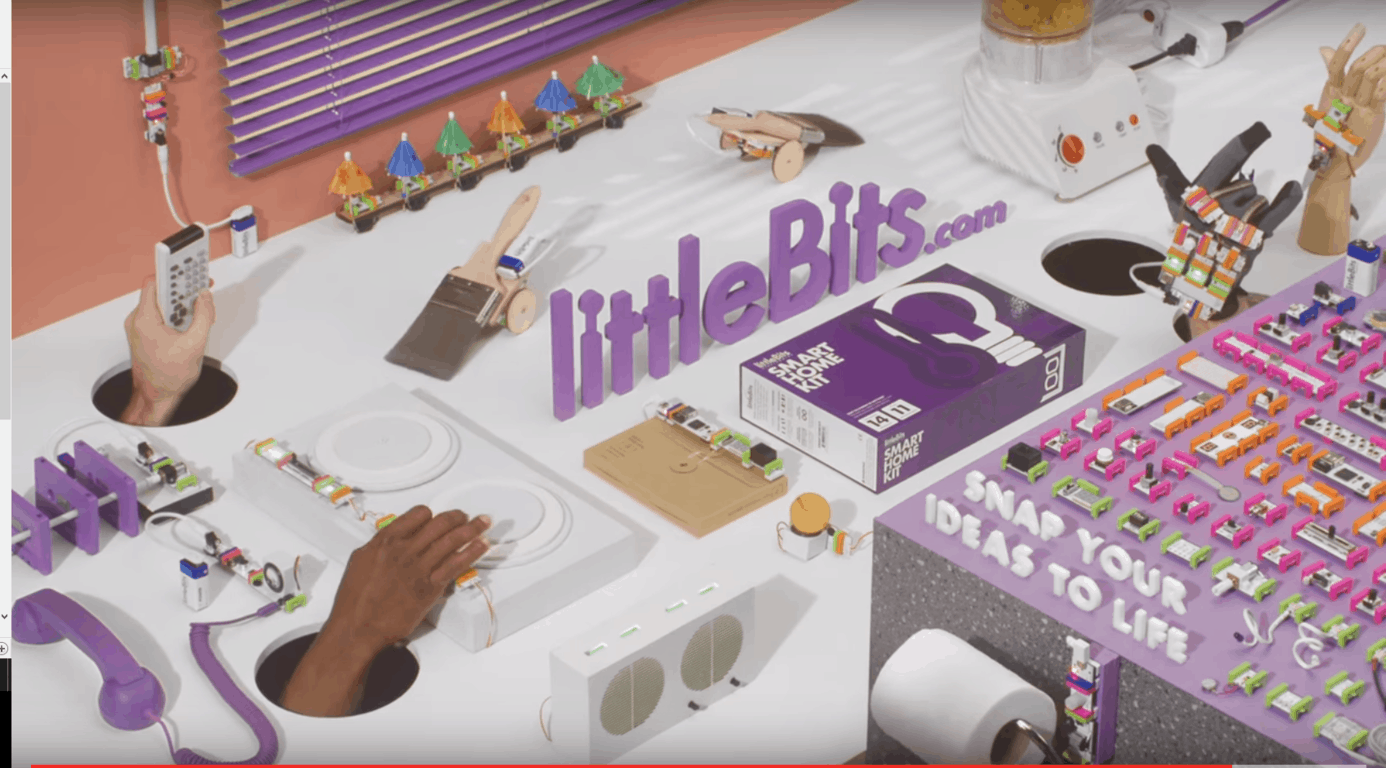
If you or someone you know have a curious and creative mind, then Microsoft has now got a product for you. Microsoft Online Stores have started to sell littleBits, a kit which helps children design and prototype interactive creations.
littleBits
Priced at 99.00 the kit includes everything needed to invent electronics in mere seconds. The bits included in the kit snap together with magnets, and make it easier to alter or change an invention on the fly. Additionally, the included 9V battery, motor, and a reusable case and MotorMade make it easier to use the kit to attach wheels, cardboard, and other materials to the included materials. For added fun, a project booklet is also included with step by step directions for projects such as an Art Bot and Three Wheeler. Other included items in the kit are:
Buzzer
Light Sensor
Bargraph
Button
Dimmer
Power
Bright LED
2 Wires
Screwdriver
Will you be picking up this kit? Are you glad to see Microsoft fueling the creative minds of the youth? Let us know what you think by dropping us a comment below!
The popular strategy game, Age of Empires: Castle Siege, is updating today on Windows 10 PCs and tablets, Windows 10 Mobile smartphones, and iOS devices. Named, Patch 1.21, this update contains some of the biggest changes the game has received since it launched, namely the addition of a brand new age, Age 10.
As a result of the new age, the majority of buildings and units now have new tiers to upgrade to, a new festival item has been added to the store, and some fixes to the leagues have also been made. Here’s the release notes:
A New Age has come to Castle Siege! The upgrades will bring a new golden look to your Empire. As well there is upgrades to:
The Keep, upgrade cost 14 days- 3,500,000 wood
Walls; 5 additional walls
Guard House, upgrade cost 12 days- 1,500,000 stone
Archer Tower; 1 additional Archer tower, upgrade cost 8 days – 700,000 stone
Ballista Tower; 1 additional Ballista tower, upgrade cost 12 days – 1,600,000 stone
Musket Tower; 1 additional Musket tower, upgrade cost 12 days – 1,600,000 stone
Catapult Emplacement, upgrade cost 10 days – 3,200,000 wood
Barracks, upgrade cost 10 days – 2,400,000 food
Archery Range, upgrade cost 10 days – 2,400,000 food
Stable, upgrade cost 10 days – 3,200,000 wood
Siege Workshop, upgrade cost 10 days -3,200,000 wood
Caltrops, upgrade cost 10 days – 2,400,000 food
Fire Traps, upgrade cost 2 days – 500,000 wood
Engineer Traps, upgrade cost 2 days – 200,000 food
The following units: Infantry, Spear Infantry, Raider, Ladder Invader, Archer, Cavalry, Battering Ram, Siege Tower, Catapult, Trebuchet, Grenadier
Training Scenario Gold: Successfully completing Training Scenarios will now award gold to players. This is a great way to improve your skills and get some additional funds. Everyone can get the new gold reward, even if you already completed the scenarios.
League Improvements:
Leagues will now reward gold to everyone who participates in the league. 1st through 3rd place will still earn a higher prize. The higher league you are in, the more gold you will earn so keep climbing the ranks.
Adjusted the amount of crowns required for each league. Leagues will now be more competitive.
As requested from the community, we changed alliance settings so that Emperors and Lords can delete Wonder announcements. Emperors will now also be able to remove the “alliance settings changed” messaging.
Age of Empires: Castle Seige is a rather exceptional game as it connects to the Xbox Live network on all of its versions including iOS. This connectivity allows for cloud saves, crossplay, and the unlocking of Xbox Achievements regardless of which device the user is playing it on.
Are you a fan of Castle Siege? Let us know which age you’re up to in the comments below.
SnelStart is a software development business for small and medium sized organizations based in the Netherlands. After the integration of Azure in 2010, it has seen a significant increase in productivity including the addition of 12,000 elastic databases and more to come. As more software is developed, SnelStart is able to meet the demands of clients and provide their needs within three months compared to the former half a year, not to mention they can ship out updates and changes within twenty-four hours.
SnelStart already caters to 55,000 customers with a smaller staff of a hundred employees. Thirty five of them are IT staff. The small staff is mostly thanks to the removal of overhead with Azure’s SQL database. They can focus primarily on creating software instead of hosting and maintaining their own servers.
“Working with Azure means we can deliver software faster, quickly react to customer demands, and scale solutions when demands increase,” Software Architect at SnelStart Henry Been said.
Thanks to their close relationship with Microsoft Azure, they hope to continue working forward towards a progressive 1,000 elastic database pools per month to keep their growing customer base.
Want to dive deeper into SnelStart’s relationship with Azure SQL Database? Check out the Azure blog post.
In an age of knowledge and information, the right to have access to internet is almost a basic human acknowledgement. However, as a new video from Microsoft points out, over half our global population still doesn’t have it. In many areas across the world, the idea of having broadband or WiFi is still just a vision for the future, one that Microsoft intends to help with the use of TV white space.
As opposed to standard WiFi connections that have a range of 600 feet, TVWS is created with the use of television channels. Connections can even be made up to 10 kilometers across land, over water, and through solid structures.
Laikipia County, Kenya is in the greater Nanyuki area with a 400,000 population. Deep in the heart of the country, mobile internet is nearly unaffordable. TV white space can change that by offering connection for only $3/month. This is also made possible with the use of databases in the Azure cloud.
Mawingu Solar Cyber cafe is one of the hubs that have kept the people in Laikipia County connected. It is a very small internet cafe that brings people together with the information that they need and deserve.
Since the implementation of TVWS as a reliable internet connection, 8,000 people have been connected. Another 200,000 is projected for the next three years according to IT Minister of Nanyuki John Vasco Akali.
The use of TV white space was also implemented in other areas of the world such as making hotspots in Filipino sari-sari stores. It’s been a few years since we first heard about Microsoft’s plans to tap into the forgotten stations. As knowledge reaches further across the globe, more countries are developing a presence on the internet. And that bodes well for both them and Microsoft in the future.
You can learn more about Mawingu and Microsoft’s other “cloud for global good” initiatives at news.microsoft.com/cloudforgood.
FIFA 17 has been available for a week now, but playing this game hasn’t been a smooth experience for all Windows 10 users. Many gamers still can’t enjoy this amazing game because of various issues, such as: game crashes, freezes, graphics issues, player customization bugs, and more.
Of course, some issues are triggered by insufficient system resources, as gamers installed FIFA 17 although their computers don’t meet the necessary technical requirements.
As a quick reminder, the recommended specs for FIFA 17 are:
Operating System: Windows 8 or 8.1 or 10 (only) 64-Bit
CPU: Intel i5-2550K @ 3.40GHz OR AMD FX-6350 Six-Core OR Equivalent
RAM: 8 GB
Hard Drive Space Required: 15 GB
Minimum Supported Video Cards for FIFA 17: ATI Radeon HD 6870 OR NVIDIA GTX 460
DirectX Version: 11.0
Single System Multiplayer: 2-4 players and 1 keyboard on a PC and Origin.
Unfortunately, there are users who are reporting FIFA 17 issues although their computers meet the game requirements. In this article, we’ll list the most common problems reported by Windows 10 PC owners.
FIFA 2017 issues on Windows 10
FIFA 17 won’t launch. When gamers click on the Play button, nothing happens. According to their feedback, EA suggests that low PC specs are to blame for this error, but gamers insists their computers’ specs are better than recommended.
this is ridiculous, we paid for a game which it doesn’t even start and without any error message or any notification what is wrong. I have an alien-ware gaming notebook and usually I play games on the highest resolution, so the pc config cant be a problem.
PC freezes in some stadiums. The game exits before gamers enter the stadium. Some of the affected stadiums are: Anfield, making it impossible to play The Journey, St Mary’s Stadium or Stade Municipal. The Journey Mode is particularly affected by this issue.
Frezees on pc in the journey mode, ultimate team and anything mode are some broken stadiums. You can play for exemple with O DROMO, you cant play with STADE MUNICIPAL. how we can we solve it?
Gamers can’t apply a particular face for their players. This bug is not a critical one, but is nevertheless a very annoying one, preventing gamers from customizing their players. A variation of this bug allows gamers to apply a particular face, but on the pitch the player looks different from what they originally selected. Other gamers are also reporting that the players’ faces are black or orange.
There should be an option to download and apply GAME FACE like in preivous FIFA games. I really want to apply GAME FACE that I generated and used in previous FIFA games for player career mode, is there a fix or GAME FACE is not supported in FIFA 17?
The problem definitely sticks out like a sore thumb in Pro Clubs. Literally everyone has the same face. Hopefully EA can fix this soon.
DXGI_ERROR_DEVICE_REMOVED error freezes the screen. This error is prevalent for the The Journey mode, and prevents gamers from actually playing the game. More specifically, the game enters on the loading screen, where it shows Alex at the tunnel, and then the screen suddenly freezes.
Hey, I’m having this problem while playing The Journey, on FIFA 17 for PC. I started The Journey, and everything went just fine. […] Then, I click to play the game against Liverpool and it enters on the loading screen, where it shows Alex at the tunnel. Then, the screen freezes, and the only thing left to do is ALT+F4. It shows a message saying “DXGI_ERROR_DEVICE_REMOVED”. Please, someone help me, I really want to play this game.
Mouse and PC shooting is broken in all game modes.
I am using mouse and keyboard and classic control scheme. Unless I hold down lmb to full power and totally sky the ball over the net every shot is on the ground. […] I have tried many times and put the shot meter at different levels but it seems broken.
The CM role is unavailable when creating a player. The option to assign the CM role to a player is unavailable for many gamers.
There are missing player roles in create a player. It is impossible to make a player with a CM role. 🙁
Gamers are unable to buy FIFA 17 points. It appears that the transaction to buy FIFA points doesn’t proceed further. Gamers should be able to confirm the order so that they can get the FIFA points, but nothing happens when they click on the option “Proceed to review order”. This bug is affecting web app and console purchases as well. An EA community manager has already replied to this thread, but no solution is available yet.
Go to Ultimate Team Browse Packs Go to Gold packs. Choose the option to buy a gold pack with FIFA points. Fill in the credit card details and personal details in the origin pop-up. Click the button “Proceed to review order” –> Nothing happens at all after clicking the button. Tried multiple times, but nothing happens. It just stays on the same pop-up.
These are the most common issues reported by FIFA 17 players so far. Unfortunately, there are no workarounds available for these bugs, but we hope EA pushes a fix soon, at least for some of these problems.
We are aware that these are not the only issues affecting gamers. If you’re experiencing FIFA 17 bugs, you can report the issues on EA’s dedicated forums.
It’s more than clear to anyone who’s been paying attention that Microsoft’s cross-platform strategy is no passing fancy. The company is committed to supporting every relevant platform in its transition to a “cloud-first, mobile-first” productivity company across the board. Certainly, Microsoft has been consistently providing excellent first-party apps for iOS and Android, sometimes before producing Windows 10 versions, and the company has integrated Windows 10 very tightly with Android smartphones.
Windows Hello Companion Device Framework (Source: wccftech.com).2nd Factor Authentication in Windows 10 Anniversary Update (Source: wccftech.com).
They clearly indicate that Windows 10 Hello will support more types of devices for authenticating, meaning that although the company may want its users to continue using Windows 10 machines, it’s not nearly so important that they use Windows 10 Mobile devices for 2nd-factor authentication. We’ll be keeping our eye on this development to see how many other technologies will make it to competitive platforms.
A little more than a month ago, Microsoft announced that its scalable data warehouse service Azure SQL Data Warehouse was now available in 18 regions worldwide. Following this expanded availability, the company is now providing companies an easier way to try the service with Data Platform Studio, a new migration tool provided by long-time partner Redgate. Matt Usher Program Manager, SQL Engineering at Microsoft explained all the details in a new blog post on the Azure blog:
Redgate’s Data Platform Studio (DPS) provides a simple and reliable way to migrate on-premises SQL Server databases to Azure SQL Data Warehouse. DPS automates the data upload and applies the most appropriate compatibility fixes and optimizations. It reduces the timeframe for a first data migration from days to hours, giving companies an easy way to explore the potential of the SQL Data Warehouse.
In the following video, David Bick and Tom Hodgson from Redgate explain how to use Data Platform Studio to load existing data into Azure SQL Data Warehouse:
Data Platform Studio is currently free to use for one-off migrations, and you can get more information about it on the official website. If you were considering trying Microsoft’s scalable data warehouse solution, let us know in the comments if you think this new migration tool is going to make a difference in your decision.
In the Alvord Desert in Oregon, a Microsoft engineering team is looking to help the North American Eagle break the land speed record with help from the power of Windows Internet-of-Things (IoT) Core.
The North American Eagle (NAE) is a supersonic car, supposedly able to reach speeds upwards of 800 mph, is on a quest to break the all-time fastest land speed record. In an attempt to become the fastest woman to reach this milestone, Motorsports athlete Jessi Combs was clocked at 477.59 mph, just shy of the women’s land speed record of 512 mph set in 1976.
NAE owner Ed Shadle hopes to smash the current land speed record of 763.035 mph that was set by a British team in 1997. Microsoft can help the NAE team achieve their goal by providing insight into the Eagle’s performance, with live telemetry information from the cockpit, as well as other atmospheric and NAE system information.
The NAE team is getting some help from Microsoft to find out where the NAE needs to improve in order to achieve the fastest speed after each test run. Two Microsoft employees, software engineer Matt Long and cloud architect Mark Nichols, the brains behind the Pegasus II mission, configured a special sensor for the NAE, capable of collecting cockpit telemetry information as well as send the driver real-time message notifications.
“[It] performed flawlessly, getting us half-second snapshots of telemetry and broadcasting to a global audience. Jessi’s first run had an audience of about 4,500 viewers. She even received messages from well-wishers in Russia, which were recorded. And we sent over 500 million data points of telemetry.”
Download the Pegasus Mission NAE (North American Eagle) app for Windows 10 and Windows 10 Mobile to get live updates on what the NAE has planned next.
Back at E3, Microsft announced some exciting new features for Xbox Live members. The online gaming community for Xbox One owners would be receiving new social features called Clubs, Looking for Group, and Arena. Both Clubs and Looking for Group (LFG) became available to Xbox One Preview members earlier last month. These features enable Xbox One gamers to more easily find other like minded players based on specific games or types of gameplay, and also allow gamers to form their own social clubs.
Microsoft just announced today that the third new social feature, Arena on Xbox Live is rolling out today to Preview members. Arena on Xbox Live is a tournament system for Xbox One games which Microsoft describes saying it will “make eSports more accessible for gamers everywhere, regardless of skill-level.” At launch, Preview members will only be able to play one game in the new Arena on Xbox Live system, but it’s a fairly popular one. Killer Instinct will be the first game that Xbox Live members will be able to enter tournaments for.
A preview of the new Arena on Xbox Live via Xbox Wire
Arena on Xbox Live will roll out today for Preview members on Xbox One and the beta Xbox app for Windows 10. The update includes more than just the Arena feature, here is the full list:
Arena on Xbox Live: Beginning today, Arena launches to Preview on Xbox One with the pilot title and legendary fighting game, Killer Instinct. During Preview, you can look forward to competing in daily Killer Instinct tournaments across Xbox One and the Xbox app (beta) on Windows 10 PC. For the initial roll out, Arena will only be accessible to Preview members through practice tournaments on Xbox One in the U.S., with plans to add additional features and expand to the broader Preview audience later in To start competing, all you have to do is register on the Tournament tab in the Killer Instinct Game Hub. We’re really excited about the potential of Arena and eager to hear your thoughts as we evolve it and make eSports more accessible for gamers everywhere, regardless of skill-level.
Achievement Rarity: You might have already seen some buzz about Achievement Rarity from @XboxQwik and @majornelson. If you missed it, Achievement Rarity, a top fan request on Xbox Feedback, launched to Preview a few weeks ago. Now, you’ll be able to discover just how unique an Achievement is among players of a given game and celebrate the Achievement itself with a special notification and diamond icon highlighting it. Unlock one today and let us know how you like the new animation.
New Looking for Group (LFG) Features: Starting today, you will be able to create LFG posts for future gaming sessions – up to seven days in advance! Additionally, based on your feedback, you can now create LFG posts directly in a Club and control who sees them: just members of the Club or everyone on Xbox Live. When creating LFG posts, you can also note what language the party will be speaking and filter your LFG searches based on the language.
Group Messaging on Xbox Live:Last week, we launched Group Messaging on Xbox One and the Xbox app (beta) on Windows 10 PC. Group Messaging helps you coordinate and keep in touch with your friends and fellow gamers by sending a single group message to everyone in the group. You can also add people to the group and dynamically change the conversation topic. Group Messaging will soon work across the Xbox app (beta) on iOS and Android devices.
If you are a Preview member you can start testing out Arena and these other latest feature updates starting today. Let us know what you think of the new features in the comment section below.
Enterprise file sharing solution provider Egnyte has announced today at Salesforce’s Dreamforce customer conference that it has chosen Microsoft’s Azure as its primary cloud partner (via TechCrunch). With this new alliance, the company’s cloud offerings will be featured in Microsoft’s Azure marketplace even though the company will continue to work with other existing partners such as Amazon Web Services.
Egnyte currently uses an hybrid open architecture which provides customers end-to-end solutions that can integrate with several Microsoft solutions such as Azure AD, Office 365, Sharepoint Online and more. Egnyte CEO Vineet Jain shared in a press release:
At Egnyte our strategy has always been around openness. We want to empower businesses to build their digital workplace with an ecosystem of best-in-class applications that fit the needs of each employee to get work done efficiently. Microsoft has been a leader in the enterprise for many years, providing the strongest suite of services for business on the market. By developing a complete end-to-end collaboration with Microsoft we are able to offer businesses of all sizes an opportunity to build their digital workplace with the best solutions on the market today.
The CEO also explained to Techcrunch that he remained focused on growing his company independently. “While it appears there is a tighter alignment that could lead to something else, you don’t have to read between the lines. From my perspective, it’s about the tight alignment in go-to market,” he added.
Microsoft Surface tablets have been found to be useful for many different fields. One field we don’t hear about too often is professional sports. For the NFL, Microsoft partnered up to bring Surface tablets to the sidelines for coaches and teams to provide stills, plays, and stats. An advantage that can have a significant outcome on the game. But for New England Patriots coach Bill Belichick, sometimes the Surface just doesn’t cut it.
In the past, the Surface was wrongfully blamed for a network error that caused the Patriots a loss. “The concept is good, when it works it’s good, when it doesn’t work then it doesn’t work,” Belichick explained at a press conference. Even thought it wasn’t the device’s fault, it appears the coach still holds some animosity towards the Surface. Yesterday, he tossed his device towards the corner of the table (via The Verge). From what could be seen, the protective covering that keeps it working through elements and rough use seems to have managed to let the Surface survive unscathed.
Some reporters are beginning to wonder if Microsoft lost brand credibility in the $400 million deal. Some commentators even call them iPads. Whether the Patriots coach was angry at the Surface’s performance this or just taking out his aggression at the poor plays made early by his team against the Buffalo Bills hasn’t been made clear. One thing is certain, we hope that the NFL invested in Microsoft’s Surface protection plan.
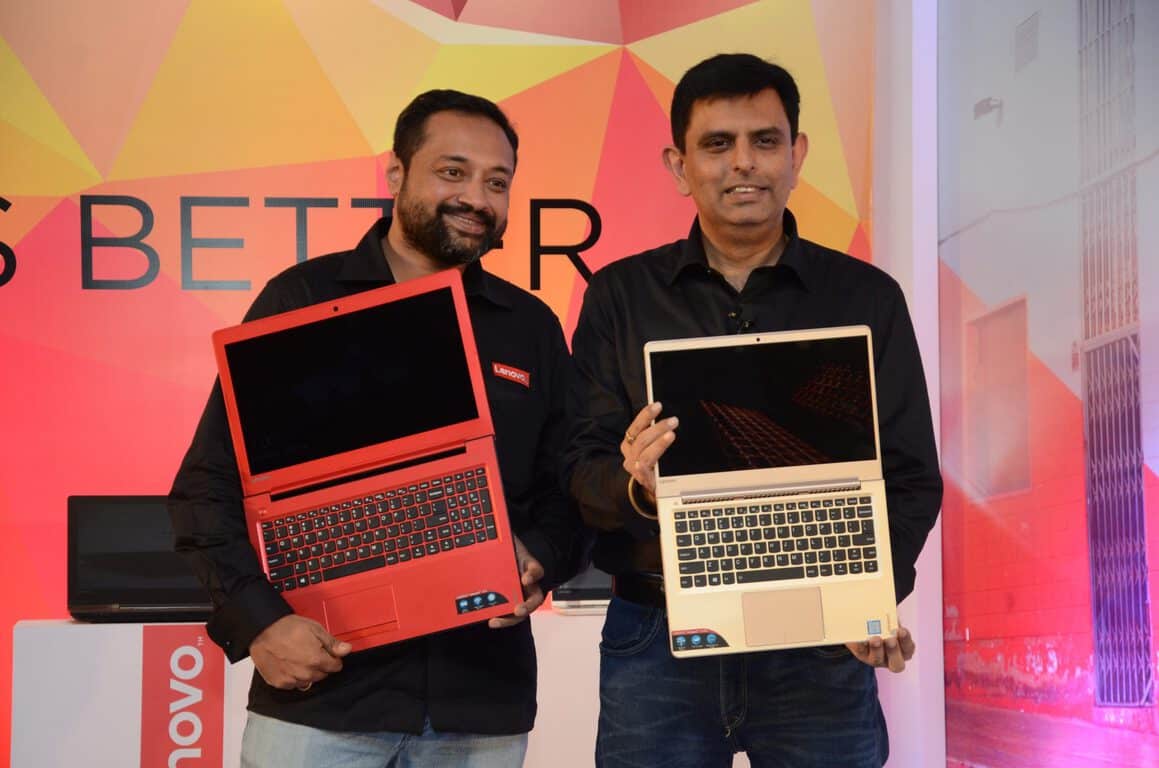
Lenovo has announced its latest line-ups of laptops in India for the upcoming holiday season. The new laptops range from lighter, faster and more powerful models, and all aim to combine the combine technical prowess and striking design to redefine the computing experience. As is usual, we’ve included all the details on these latest Lenovo laptops for you below.
IdeaPad 310: INR 28,390
Lenovo’s Ideapad 310 comes with the latest Intel 7th Gen Core processors. This means you will have plenty of processing power for casual surfing, streaming, and playing. Featuring Stereo speakers with Dolby technology and a 15.6” FHD screen, this device has clear, crisp visuals & quality sound.
5 hours battery life
37.9 cm x 26 cm x 2.29 cm
2.2kg in weight
HD 720P Webcam with Array Mic
4G DDR4 RAM
1TB 9.5MM 5400RPM Harddrive
15.6 FHD 1920×1080 display.
N16V-GMR1 DDR3L 2G Graphics
Intel® Core™ i5-7200U Processor (3M Cache, up to 3.10 GHz)
1 USB 3.0, 2 USB 2.0 Ports
4-in-1 Card Reader (SD, SDHC, SDXC, MMC)
IdeaPad 310
IdeaPad 510: INR 61,690
The Lenovo IdeaPad 510 is for those who are looking for incredible multimedia, video editing and big gaming performance. The devices is packed with up to NVIDIA GeForce 940MX 4G discrete graphics, and Full HD IPS (1920 x 1080) 15.6-inch screen for eye-popping visuals and clearer, crisper quality of sound.
5 hours battery life
2.2 Kg in weight
37.9 cm x 26 cm x 2.29 cm
HD 720P Webcam with Array Mic
8GB (DDR4 2133) RAM
2TB 9.5MM 5400RPM Harddrive
15.6 1920×1080 FHD IPS Display
N16S-GTR DDR3L 4G Graphics
Intel Core i7-7500U Processor (4M Cache, up to 3.50 GHz)
2 USB 3.0, 1 USB 2.0
4-in-1 Card Reader (SD, SDHC, SDXC, MMC)
IdeaPad 510
IdeaPad 510 S INR 51,090
The Lenovo IdeaPad 510 S is super slim and lightweight, but features heavyweight performance for whenever you’re on the move. The device is designed to enhance your multimedia experience and has exceptional sound and visuals, with amazing speed and storage.
Up tp 6 hrs battery life
Starting at 3.7 lbs (1.7 kg) in weight
335.6 mm x 235 mm x 19.3 mm
0.3MP webcam w/ single mic
8GB DDR4 RAM
1TB HDD
14.0” Full HD 1920×1080 display
Integrated/ 2GB AMD graphics
Intel Core i5 7th Gen i5 7200u processor
2 x USB 3.0; 1 x USB 2.0 w/ always-on charging
4in1 card reader (SD,SDHC,SDXC,MMC)
Optional backlit keyboard
IdeaPad 510 S
IdeaPad 710s: INR 73,390
Lenovo’s IdeaPad 710 S is a powerhouse designed for those with mobile lifestyles. The device sports a sleek, narrow bezel and is 50% thinner than those of most rival laptops.
Up to 8 hrs battery life
1.1kg in weight
307 mm x 214 mm x 13.9 mm
720P 30fps webcam
8GB DDR4 RAM
512 GB SSD
13.3” QHD+ 3200 x 1800 display
Integrated Intel or up to Intel Iris graphics
Intel Core i7 7th 7500U processor
2 x USB3.0 (1 USB always-on charging),
4-in-1 card reader (SD, MMC, SDHC, SDXC)
Backlit keyboard
IdeaPad 710S
Lenovo MIIX 310 INR 17,490
Weighing in at mere 20.5 ounces (580g) and only 9.2mm thin , the MIIX 310 can be carried just about anywhere. The device packs a detachable keyboard, and can fit safely into any backpack, tote, or bag for added portability.
Up to 10 Hours battery life
580 grams in weight
24.6cm x 1.73cm x 0.92cm
2 MP front camera 5 MP rear camera
2G DDR3L 1600 onboard RAM
32G EMMC SSD
10.1 inch 1280×800 LED Display
INTEL Atom TM Processor (x5-Z8350, 2M Cache, up to 1.92 GHz)
1 x Micro USB 2.0 for data
MIIX 310
Lenovo Yoga 510: INR 40,990
If you’re serious about entertainment, then this device is for you. This 2-in-1 device has a screen that folds down to through 360°, giving you the flexibility to edit music playlists in laptop mode, kick back with a movie in tent mode, or play your favorite apps in tablet mode.
Up to 8.3 hours with video playback
From 3.9 lbs (1.8 kg) in weight
336.4 mm x 232 mm x 20.9 mm
720P camera with dual array mic
Up to 8GB RAM
Up to 1TB HDD, 500GB SSHD, 500GB + 8GB SSHD / Hybrid HDD or up to 256GB SSD
Up to 14 inch full HD 1920×1080 resolution display
NVidia GFX 2 GB Graphics
7th Gen Core i5 i5 7200u processor
1 x Always-on USB 2.0, 2 x USB 3.0, HDMI, Giga LAN 4-in-1 SD card reader (SD, MMC, SDHC, SDXC), Audio Combo Jack
Yoga 510
What are your impressions of these devices? Which one are you looking forward to picking up this Holiday season? Please let us know what you think by dropping us a comment below.
Microsoft CEO Satya Nadella and President Brad Smith have kicked off their four-day visit to Europe to showcase customers’ digital transformation, announce cloud investments, and discuss cloud policy. The tour will include stops in Dublin, Paris, Berlin, and London, during which time the two leaders will meet with European customers, partners, developers, and government leaders.
At Dublin today, Satya Nadella and Brad Smith highlighted the importance of democratizing cloud computing and urged tech companies, the community, and governments to work together to achieve this.
A Cloud for Global Good
During his keynote, Nadella announced the release of a new book titled ‘A Cloud for Global Good.’ The book details 78 public policy recommendations in 15 categories to help make cloud technologies more ‘trusted, responsible, and inclusive’.
Cloud computing has the potential to solve some of our world’s most challenging issues, but, as with all technological advancements, it raises important questions for society. We must work together to build a cloud for global good. Our hope is that the ideas shared in this book will help move technology forward while ensuring no one is left behind.
– Brad Smith, President & Chief Legal Officer, Microsoft
The book includes topics like “next-generation skills, enhancing security and privacy in the digital age, environmental sustainability, keeping communities safe, and securing a bright future for children.”
The popular live action game Quantum Break, which also has a TV spin-off, is now available on Steam. The third-person science fiction shooting game is developed by Remedy Entertainment, whose recognizable work also includes Max Payne and Alan Wake.
The game was first released on Xbox One and Windows 10 PCs in April. It was formerly published by Microsoft on the Windows Store, but it wasn’t available for PC gamers up until the recent release of the physical version – the Timeless Collector’s Edition. The physical release was scheduled for September 14, but apparently needed more perfection and time to master.
Though the game is not entirely bug-free and there have been reports about frame rate drops and several other issues that had been addressed recently. The Windows Phone version of the game powers DirectX12, while the Steam version supports only DirectX11, but there should be no compatibility issues running it on Windows 7 and 8.1.
Remedy Head of Communications, Thomas Puha, stated in August that both editions of the game, including the Windows Store and the Steam version, will be supported in further developments. There are no Steam reviews available at the moment, but one interesting thing to note is that the Steam version of Quantum Break doesn’t require Windows 10. More Steam releases are expected to land in June.
The hardware requirements for Quantum Break are:
2.7GHz Intel Core i5 processor
8 GB of RAM
NVIDIA GeForce GTX 760 or AMD Radeon R7 260x GPU
68GB of storage.
Here’s the official game description to awake your curiosity:
In the aftermath of a split second of destruction that fractures time itself, two people find they have changed and gained extraordinary abilities. One of them travels through time and becomes hell-bent on controlling this power. The other uses these new abilities to attempt to defeat him – and fix time before it tears itself irreparably apart. Both face overwhelming odds and make dramatic choices that will determine the shape of the future. […]
Quantum Break is full of the vivid storytelling, rich characters and dramatic twists Remedy Entertainment are renowned for. Your choices in-game will affect the outcome of this fast-paced fusion between game and show giving the player a completely unique entertainment experience.
The game is worth $39.99 on both, Windows Store and Steam, and the physical version, “Timeless Collector’s Edition” has the same pricetag. The package includes a guide, five game discs, a Steam Key, a “making of” Blu-ray disc and book, a soundtrack collection of the game and a cool game poster. The physical version of the game should be available on Amazon, but is currently out of stock.
Let us know in the comments how did you find the previous and current version of the game.
The first day of the Microsoft Ignite event was full of announcements, but one particular piece of news attracted the attention of OneDrive fans: the comeback of placeholders. At the conference, Microsoft announced that placeholders would return under the name of “On-Demand Sync“.
If you don’t know what that is, placeholders used to let OneDrive users reserve a place on their PC for certain files or folders that were stored in the cloud. This procedure did not take up any storage space and allowed you to keep browsing and see or use all the files found in the cloud from the OneDrive folder without taking any space on your machine. Whenever you needed to use a certain file or folder, you could just click on them and only then would the OneDrive service start downloading them on your computer.
The feature has been available since Windows 8, but Microsoft then found it confusing for some reason and changed it with Windows 10. Even so, during the past year there have been some clues that placeholders might make a comeback and now we finally got the confirmation, even if the company uses a different name for them now.
Sadly, there is no official information as to when should we expect to see the On-Demand Sync feature arriving on Windows 10, but given the fact that it was recently revealed, we don’t think it should take that long. There’s no wonder many people complained that this feature was taken down, since it’s a very smart move to save up space and also access all the files in one go.
It seems that, unlike other occasions, Microsoft actually listened to its users and made this change. All that’s left is for users to do is to wait and see it implemented.
For some reason, Microsoft pays more attention to the development of Outlook on other platforms, than on its native environment. In other words, the company provides more frequent updates, and delivers more features to Android and iOS versions of Outlook, than to the Windows 10 version.
However, as Outlook is one of the most popular email services for Windows, Microsoft decided that it’s worth delivering frequent updates and new features to this version, as well. The first feature already available on Android and iOS, that’s going to arrive to Outlook Mail on Windows 10 is Focused Inbox.
Focused Inbox is the feature that allows you to set the priority of emails, something like in Gmail. Instead of showing all messages equally, with Focused Inbox, you’ll see messages with higher priority first.
As for the other features that should make their way to Outlook Mail for Windows 10, Microsoft also plans to bring @-mentions and cloud attachments, but nothing more was specified.
Microsoft officials confirmed that the company wants to bring the same Outlook experience to every platform. This means that updates and new features are going to be released at the same time. Time will tell if Microsoft respects this promise.
All these features should arrive on Windows 10 and Windows 10 Mobile versions of Outlook by the year’s end. Of course, as soon as they’ve been implemented, we’re going to make sure to tell you about it.
What else would you like to see in Outlook for Windows 10? Tell us in the comment section below. And don’t leave aside that managing emails’ statuses with Outlook’s Sync option will soon be possible as well.
Microsoft has been trying to convince Windows 7 and Windows 8.1 PC owners to upgrade to Windows 10 for more than a year now. The company tried various methods to achieve this goal, ranging from free upgrade offers to forced upgrade methods.
To a certain extend, Microsoft reached its goal, but the company definitely wishes Windows were more popular. According to the recent AdDuplex reports, Windows 10 adoption is on the rise, particularly thanks to the Anniversary Update OS.
Starting from November, the Windows 10 adoption rate will receive another boost because OEMs will no longer be allowed to sell Windows 7, 8.1 computers. In other words, if you’ve been thinking about buying a good old reliable Windows 7 PC, you should act fast.
This change doesn’t shock anybody since we all know Microsoft is planning to kill support for Windows 7 and Windows 8.1. The company will continue to push security fixes to Windows 7 via Windows Update until Jan. 14, 2020, while Windows 8.1 will be supported until Jan. 10, 2023.
If you want to avoid using Windows 10, there are still some methods you can use even after November 1st:
Existing inventory PCs that come with older Windows versions before the deadline can still be sold.
You can take advantage of the downgrade rights: PC with Windows 10 Pro preinstalled come with downgrade rights to Windows 8.1 Pro or Windows 7 Professional. The offer is valid for as long as Microsoft provides support these two old OS versions.
Custom images: Corporate customers dispose of volume licenses for Windows allowing them to incorporate their preferred Windows versions.
System Builder OEMs: small PC makers who buy OEM System Builder media can continue to build and sell those PCs.
Create your own Windows version: there are plenty of solutions that tech savvy users can use to save and and install older Windows versions.
Microsoft recommends all users to upgrade to its latest OS. Newer Windows versions are more stable and secure, and constantly receive new features. It is worth mentioning that only the supported Windows versions are eligible for technical assistance in case something stops working.
Sunset Overdrive developer, Insomniac Games, has tweeted out a couple times this week, stating that it would like to bring the game to Windows 10, however, it is up to Microsoft’s Xbox division to make the call on whether to bring the game to Windows 10.
we'd love it if it could happen but ball is in Xbox's court on it
Now, a spokesperson for Microsoft has reached out to GameSpot to say that the company is “proud” of the game, calling Insomniac Games a “great partner” and that they “love working with them,” however, when asked if Sunset Overdrive would be made available for Windows 10 in the future, the response was the standard non-answer:
We have no further news at this time.
So, for fans of Sunset Overdrive or PC gamers wanting to get ahold of it, there’s no news on when, or if, the game will arrive on Windows 10 PCs at this time.