Microsoft Stores begin selling littleBits

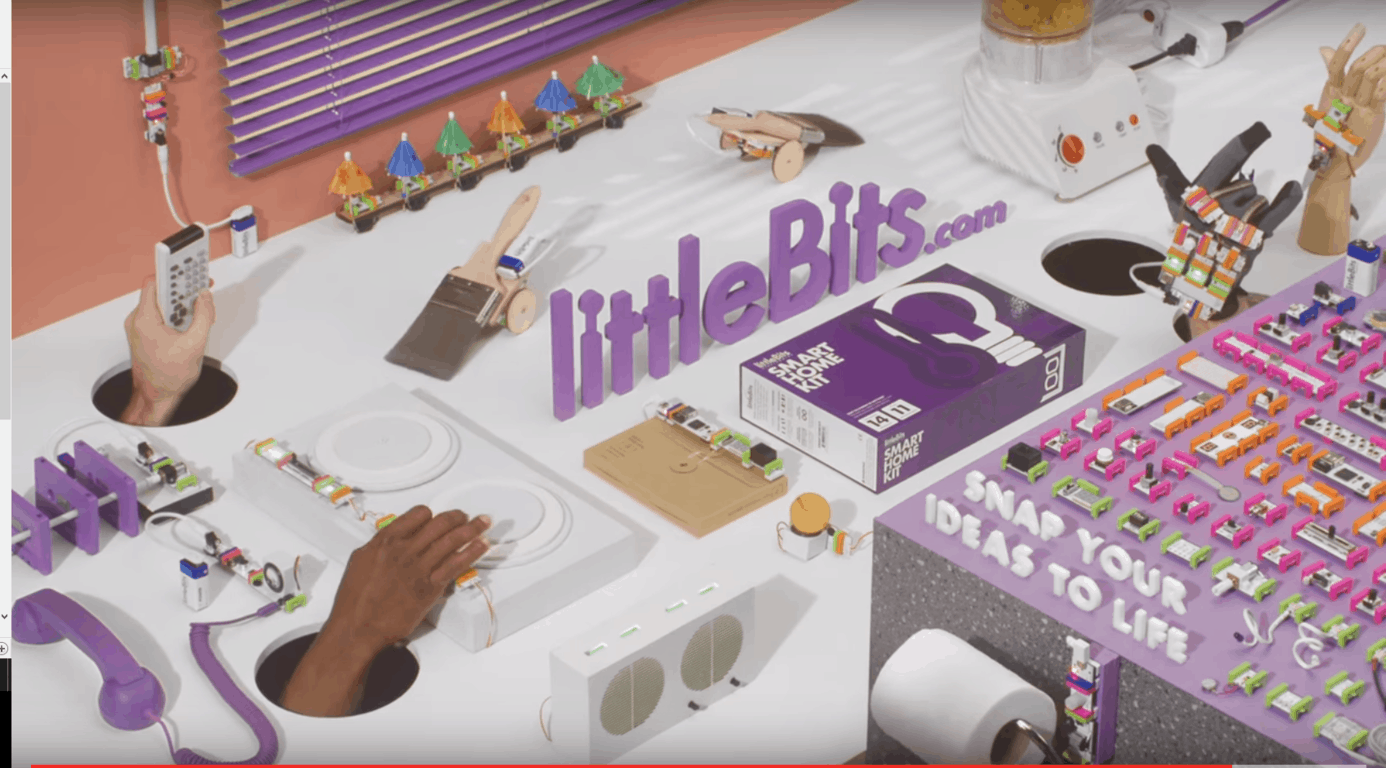
If you or someone you know have a curious and creative mind, then Microsoft has now got a product for you. Microsoft Online Stores have started to sell littleBits, a kit which helps children design and prototype interactive creations.

littleBits
littleBits

Priced at 99.00 the kit includes everything needed to invent electronics in mere seconds. The bits included in the kit snap together with magnets, and make it easier to alter or change an invention on the fly. Additionally, the included 9V battery, motor, and a reusable case and MotorMade make it easier to use the kit to attach wheels, cardboard, and other materials to the included materials. For added fun, a project booklet is also included with step by step directions for projects such as an Art Bot and Three Wheeler. Other included items in the kit are:

  • Buzzer
  • Light Sensor
  • Bargraph
  • Button
  • Dimmer
  • Power
  • Bright LED
  • 2 Wires
  • Screwdriver

Will you be picking up this kit? Are you glad to see Microsoft fueling the creative minds of the youth? Let us know what you think by dropping us a comment below!

Windows 10 video game Age of Empires: Castle Siege gets its biggest update yet

The popular strategy game, Age of Empires: Castle Siege, is updating today on Windows 10 PCs and tablets, Windows 10 Mobile smartphones, and iOS devices. Named, Patch 1.21, this update contains some of the biggest changes the game has received since it launched, namely the addition of a brand new age, Age 10.

As a result of the new age, the majority of buildings and units now have new tiers to upgrade to, a new festival item has been added to the store, and some fixes to the leagues have also been made. Here’s the release notes:

A New Age has come to Castle Siege! The upgrades will bring a new golden look to your Empire. As well there is upgrades to:

  • The Keep, upgrade cost 14 days- 3,500,000 wood
  • Walls;  5 additional walls
  • Guard House, upgrade cost 12 days- 1,500,000 stone
  • Archer Tower; 1 additional Archer tower, upgrade cost 8 days – 700,000 stone
  • Ballista Tower; 1 additional Ballista tower, upgrade cost 12 days – 1,600,000 stone
  • Musket Tower; 1 additional Musket tower, upgrade cost 12 days – 1,600,000 stone
  • Catapult Emplacement, upgrade cost 10 days – 3,200,000 wood
  • Barracks, upgrade cost 10 days – 2,400,000 food
  • Archery Range, upgrade cost 10 days – 2,400,000 food
  • Stable, upgrade cost 10 days – 3,200,000 wood
  • Siege Workshop, upgrade cost 10 days -3,200,000 wood
  • Caltrops, upgrade cost 10 days – 2,400,000 food
  • Fire Traps, upgrade cost 2 days – 500,000 wood
  • Engineer Traps, upgrade cost 2 days – 200,000 food

The following units: Infantry, Spear Infantry, Raider, Ladder Invader, Archer, Cavalry, Battering Ram,  Siege Tower, Catapult, Trebuchet,  Grenadier

Training Scenario Gold: Successfully completing Training Scenarios will now award gold to players. This is a great way to improve your skills and get some additional funds. Everyone can get the new gold reward, even if you already completed the scenarios.

League Improvements:

  • Leagues will now reward gold to everyone who participates in the league. 1st  through 3rd place will still earn a higher prize. The higher league you are in, the more gold you will earn so keep climbing the ranks.
  • Adjusted the amount of crowns required for each league. Leagues will now be more competitive.

As requested from the community, we changed alliance settings so that Emperors and Lords can delete Wonder announcements. Emperors will now also be able to remove the “alliance settings changed” messaging.

Age of Empires: Castle Seige is a rather exceptional game as it connects to the Xbox Live network on all of its versions including iOS. This connectivity allows for cloud saves, crossplay, and the unlocking of Xbox Achievements regardless of which device the user is playing it on.

Are you a fan of Castle Siege? Let us know which age you’re up to in the comments below.


The app was not found in the store. ?

SnelStart relies on Azure to roll out 1,000 SQL databases every month

SnelStart is a software development business for small and medium sized organizations based in the Netherlands. After the integration of Azure in 2010, it has seen a significant increase in productivity including the addition of 12,000 elastic databases and more to come. As more software is developed, SnelStart is able to meet the demands of clients and provide their needs within three months compared to the former half a year, not to mention they can ship out updates and changes within twenty-four hours.

SnelStart already caters to 55,000 customers with a smaller staff of a hundred employees. Thirty five of them are IT staff. The small staff is mostly thanks to the removal of overhead with Azure’s SQL database. They can focus primarily on creating software instead of hosting and maintaining their own servers.

“Working with Azure means we can deliver software faster, quickly react to customer demands, and scale solutions when demands increase,” Software Architect at SnelStart Henry Been said.

Thanks to their close relationship with Microsoft Azure, they hope to continue working forward towards a progressive 1,000 elastic database pools per month to keep their growing customer base.

Want to dive deeper into SnelStart’s relationship with Azure SQL Database? Check out the Azure blog post.


Video highlights Microsoft’s efforts to bring affordable Internet access to Kenya via TV white spaces

In an age of knowledge and information, the right to have access to internet is almost a basic human acknowledgement. However, as a new video from Microsoft points out, over half our global population still doesn’t have it. In many areas across the world, the idea of having broadband or WiFi is still just a vision for the future, one that Microsoft intends to help with the use of TV white space.

As opposed to standard WiFi connections that have a range of 600 feet, TVWS is created with the use of television channels. Connections can even be made up to 10 kilometers across land, over water, and through solid structures.

Laikipia County, Kenya is in the greater Nanyuki area with a 400,000 population. Deep in the heart of the country, mobile internet is nearly unaffordable. TV white space can  change that by offering connection for only $3/month. This is also made possible with the use of databases in the Azure cloud.

Mawingu Solar Cyber cafe is one of the hubs that have kept the people in Laikipia County connected. It is a very small internet cafe that brings people together with the information that they need and deserve.

Since the implementation of TVWS as a reliable internet connection, 8,000 people have been connected. Another 200,000 is projected for the next three years according to IT Minister of Nanyuki John Vasco Akali.

The use of TV white space was also implemented in other areas of the world such as making hotspots in Filipino sari-sari stores. It’s been a few years since we first heard about Microsoft’s plans to tap into the forgotten stations. As knowledge reaches further across the globe, more countries are developing a presence on the internet. And that bodes well for both them and Microsoft in the future.

You can learn more about Mawingu and Microsoft’s other “cloud for global good” initiatives at news.microsoft.com/cloudforgood.


FIFA 17 issues on Windows 10 plaguing many gamers

FIFA 17 has been available for a week now, but playing this game hasn’t been a smooth experience for all Windows 10 users. Many gamers still can’t enjoy this amazing game because of various issues, such as: game crashes, freezes, graphics issues, player customization bugs, and more.

Of course, some issues are triggered by insufficient system resources, as gamers installed FIFA 17 although their computers don’t meet the necessary technical requirements.

As a quick reminder, the recommended specs for FIFA 17 are:

  • Operating System: Windows 8 or 8.1 or 10 (only) 64-Bit
  • CPU: Intel i5-2550K @ 3.40GHz OR AMD FX-6350 Six-Core OR Equivalent
  • RAM: 8 GB
  • Hard Drive Space Required: 15 GB
  • Minimum Supported Video Cards for FIFA 17: ATI Radeon HD 6870 OR NVIDIA GTX 460
  • DirectX Version: 11.0
  • Single System Multiplayer: 2-4 players and 1 keyboard on a PC and Origin.

Unfortunately, there are users who are reporting FIFA 17 issues although their computers meet the game requirements. In this article, we’ll list the most common problems reported by Windows 10 PC owners.

FIFA 2017 issues on Windows 10

  • FIFA 17 won’t launch. When gamers click on the Play button, nothing happens. According to their feedback, EA suggests that low PC specs are to blame for this error, but gamers insists their computers’ specs are better than recommended.

this is ridiculous, we paid for a game which it doesn’t even start and without any error message or any notification what is wrong. I have an alien-ware gaming notebook and usually I  play games on the highest resolution, so the pc config cant be a problem.

  • PC freezes in some stadiums. The game exits before gamers enter the stadium. Some of the affected stadiums are: Anfield, making it impossible to play The Journey, St Mary’s Stadium or Stade Municipal. The Journey Mode is particularly affected by this issue.

Frezees on pc in the journey mode, ultimate team and anything mode are some broken stadiums. You can play for exemple with O DROMO, you cant play with STADE MUNICIPAL. how we can we solve it?

  • Gamers can’t apply a particular face for their players. This bug is not a critical one, but is nevertheless a very annoying one, preventing gamers from customizing their players. A variation of this bug allows gamers to apply a particular face, but on the pitch the player looks different from what they originally selected. Other gamers are also reporting that the players’ faces are black or orange.

FIFA 17 issues

There should be an option to download and apply GAME FACE like in preivous FIFA games. I really want to apply GAME FACE that I generated and used in previous FIFA games for player career mode, is there a fix or GAME FACE is not supported in FIFA 17?

The problem definitely sticks out like a sore thumb in Pro Clubs. Literally everyone has the same face. Hopefully EA can fix this soon.

  • DXGI_ERROR_DEVICE_REMOVED error freezes the screen. This error is prevalent for the The Journey mode, and prevents gamers from actually playing the game. More specifically, the game enters on the loading screen, where it shows Alex at the tunnel, and then the screen suddenly freezes.

Hey, I’m having this problem while playing The Journey, on FIFA 17 for PC. I started The Journey, and everything went just fine. […] Then, I click to play the game against Liverpool and it enters on the loading screen, where it shows Alex at the tunnel. Then, the screen freezes, and the only thing left to do is ALT+F4. It shows a message saying “DXGI_ERROR_DEVICE_REMOVED”. Please, someone help me, I really want to play this game.

  • Mouse and PC shooting is broken in all game modes.

I am using mouse and keyboard and classic control scheme. Unless I hold down lmb to full power and totally sky the ball over the net every shot is on the ground. […] I have tried many times and put the shot meter at different levels but it seems broken.

  • The CM role is unavailable when creating a player. The option to assign the CM role to a player is unavailable for many gamers.

There are missing player roles in create a player. It is impossible to make a player with a CM role. 🙁

  • Gamers are unable to buy FIFA 17 points. It appears that the transaction to buy FIFA points doesn’t proceed further. Gamers should be able to confirm the order so that they can get the FIFA points, but nothing happens when they click on the option “Proceed to review order”. This bug is affecting web app and console purchases as well. An EA community manager has already replied to this thread, but no solution is available yet.

Go to Ultimate Team Browse Packs Go to Gold packs. Choose the option to buy a gold pack with FIFA points. Fill in the credit card details and personal details in the origin pop-up. Click the button “Proceed to review order” –> Nothing happens at all after clicking the button. Tried multiple times, but nothing happens. It just stays on the same pop-up.

These are the most common issues reported by FIFA 17 players so far. Unfortunately, there are no workarounds available for these bugs, but we hope EA pushes a fix soon, at least for some of these problems.

We are aware that these are not the only issues affecting gamers. If you’re experiencing FIFA 17 bugs, you can report the issues on EA’s dedicated forums.

RELATED STORIES YOU NEED TO CHECK OUT:

Microsoft confirms that Android and iOS devices will get Windows Hello authentication support

It’s more than clear to anyone who’s been paying attention that Microsoft’s cross-platform strategy is no passing fancy. The company is committed to supporting every relevant platform in its transition to a “cloud-first, mobile-first” productivity company across the board. Certainly, Microsoft has been consistently providing excellent first-party apps for iOS and Android, sometimes before producing Windows 10 versions, and the company has integrated Windows 10 very tightly with Android smartphones.

At Ignite 2016, Microsoft provided some confirmation that they will be pushing one Windows 10-specific feature to iOS and Android devices. Specifically, it looks like the company will definitely be expanding Windows 10’s Hello authentication technology to support iOS and Android “companion devices.”

Consider the following slides:

Windows Hello
Windows Hello Companion Device Framework (Source: wccftech.com).
Hello Windows
2nd Factor Authentication in Windows 10 Anniversary Update (Source: wccftech.com).

They clearly indicate that Windows 10 Hello will support more types of devices for authenticating, meaning that although the company may want its users to continue using Windows 10 machines, it’s not nearly so important that they use Windows 10 Mobile devices for 2nd-factor authentication. We’ll be keeping our eye on this development to see how many other technologies will make it to competitive platforms.

Microsoft works with Redgate to help make Azure SQL Data Warehouse migrations more efficient

A little more than a month ago, Microsoft announced that its scalable data warehouse service
Azure SQL Data Warehouse was now available in 18 regions worldwide. Following this expanded availability, the company is now providing companies an easier way to try the service with Data Platform Studio, a new migration tool provided by long-time partner Redgate. Matt Usher Program Manager, SQL Engineering at Microsoft explained all the details in a new blog post on the Azure blog:

Redgate’s Data Platform Studio (DPS) provides a simple and reliable way to migrate on-premises SQL Server databases to Azure SQL Data Warehouse. DPS automates the data upload and applies the most appropriate compatibility fixes and optimizations. It reduces the timeframe for a first data migration from days to hours, giving companies an easy way to explore the potential of the SQL Data Warehouse.

In the following video, David Bick and Tom Hodgson from Redgate explain how to use Data Platform Studio to load existing data into Azure SQL Data Warehouse:

Data Platform Studio is currently free to use for one-off migrations, and you can get more information about it on the official website. If you were considering trying Microsoft’s scalable data warehouse solution, let us know in the comments if you think this new migration tool is going to make a difference in your decision.

North American Eagle attempts land speed record with help from Windows IoT Core

In the Alvord Desert in Oregon, a Microsoft engineering team is looking to help the North American Eagle break the land speed record with help from the power of Windows Internet-of-Things (IoT) Core.

The North American Eagle (NAE) is a supersonic car, supposedly able to reach speeds upwards of 800 mph, is on a quest to break the all-time fastest land speed record. In an attempt to become the fastest woman to reach this milestone, Motorsports athlete Jessi Combs was clocked at 477.59 mph, just shy of the women’s land speed record of 512 mph set in 1976.

NAE owner Ed Shadle hopes to smash the current land speed record of 763.035 mph that was set by a British team in 1997. Microsoft can help the NAE team achieve their goal by providing insight into the Eagle’s performance, with live telemetry information from the cockpit, as well as other atmospheric and NAE system information.

The NAE team is getting some help from Microsoft to find out where the NAE needs to improve in order to achieve the fastest speed after each test run. Two Microsoft employees, software engineer Matt Long and cloud architect Mark Nichols, the brains behind the Pegasus II mission, configured a special sensor for the NAE, capable of collecting cockpit telemetry information as well as send the driver real-time message notifications.

Long gave his thoughts on how the Windows 10 IoT Core system performed for Combs’ attempt at the women’s land speed record:

“[It] performed flawlessly, getting us half-second snapshots of telemetry and broadcasting to a global audience. Jessi’s first run had an audience of about 4,500 viewers. She even received messages from well-wishers in Russia, which were recorded. And we sent over 500 million data points of telemetry.”

Download the Pegasus Mission NAE (North American Eagle) app for Windows 10 and Windows 10 Mobile to get live updates on what the NAE has planned next.

PegasusMission NAE
PegasusMission NAE
Developer:
pegasusmissions
Price:
Free

Arena on Xbox Live coming to Xbox One in preview

Back at E3, Microsft announced some exciting new features for Xbox Live members. The online gaming community for Xbox One owners would be receiving new social features called Clubs, Looking for Group, and Arena. Both Clubs and Looking for Group (LFG) became available to Xbox One Preview members earlier last month. These features enable Xbox One gamers to more easily find other like minded players based on specific games or types of gameplay, and also allow gamers to form their own social clubs.

Microsoft just announced today that the third new social feature, Arena on Xbox Live is rolling out today to Preview members. Arena on Xbox Live is a tournament system for Xbox One games which Microsoft describes saying it will “make eSports more accessible for gamers everywhere, regardless of skill-level.” At launch, Preview members will only be able to play one game in the new Arena on Xbox Live system, but it’s a fairly popular one. Killer Instinct will be the first game that Xbox Live members will be able to enter tournaments for.

A preview of the new Arena on Xbox Live via Xbox Wire

Arena on Xbox Live will roll out today for Preview members on Xbox One and the beta Xbox app for Windows 10. The update includes more than just the Arena feature, here is the full list:

  • Arena on Xbox Live: Beginning today, Arena launches to Preview on Xbox One with the pilot title and legendary fighting game, Killer Instinct. During Preview, you can look forward to competing in daily Killer Instinct tournaments across Xbox One and the Xbox app (beta) on Windows 10 PC. For the initial roll out, Arena will only be accessible to Preview members through practice tournaments on Xbox One in the U.S., with plans to add additional features and expand to the broader Preview audience later in To start competing, all you have to do is register on the Tournament tab in the Killer Instinct Game Hub. We’re really excited about the potential of Arena and eager to hear your thoughts as we evolve it and make eSports more accessible for gamers everywhere, regardless of skill-level.
  • Achievement Rarity: You might have already seen some buzz about Achievement Rarity from @XboxQwik and @majornelson. If you missed it, Achievement Rarity, a top fan request on Xbox Feedback, launched to Preview a few weeks ago. Now, you’ll be able to discover just how unique an Achievement is among players of a given game and celebrate the Achievement itself with a special notification and diamond icon highlighting it. Unlock one today and let us know how you like the new animation.
  • New Looking for Group (LFG) Features: Starting today, you will be able to create LFG posts for future gaming sessions – up to seven days in advance! Additionally, based on your feedback, you can now create LFG posts directly in a Club and control who sees them: just members of the Club or everyone on Xbox Live. When creating LFG posts, you can also note what language the party will be speaking and filter your LFG searches based on the language.
  • Group Messaging on Xbox Live: Last week, we launched Group Messaging on Xbox One and the Xbox app (beta) on Windows 10 PC. Group Messaging helps you coordinate and keep in touch with your friends and fellow gamers by sending a single group message to everyone in the group. You can also add people to the group and dynamically change the conversation topic. Group Messaging will soon work across the Xbox app (beta) on iOS and Android devices.

If you are a Preview member you can start testing out Arena and these other latest feature updates starting today. Let us know what you think of the new features in the comment section below.

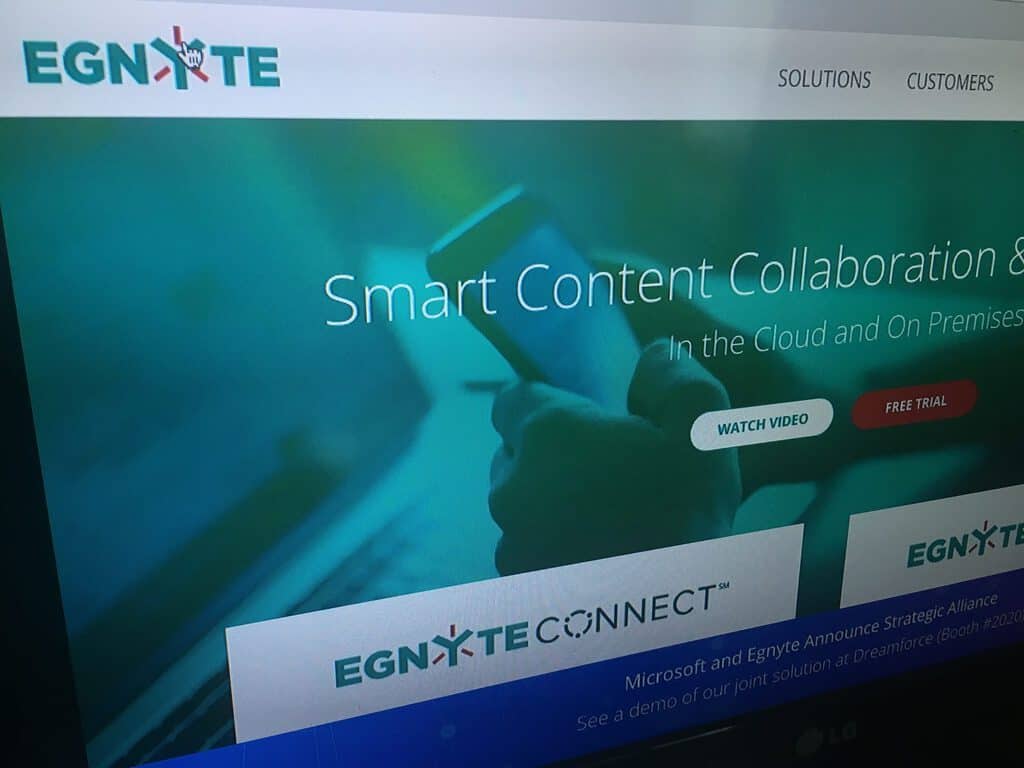
Online storage provider Egnyte announces Microsoft Azure partnership At Salesforce’s Dreamforce conference

Enterprise file sharing solution provider Egnyte has announced today at Salesforce’s Dreamforce customer conference that it has chosen Microsoft’s Azure as its primary cloud partner (via TechCrunch). With this new alliance, the company’s cloud offerings will be featured in Microsoft’s Azure marketplace even though the company will continue to work with other existing partners such as Amazon Web Services.

Egnyte currently uses an hybrid open architecture which provides customers end-to-end solutions that can integrate with several Microsoft solutions such as Azure AD, Office 365, Sharepoint Online and more. Egnyte CEO Vineet Jain shared in a press release:

At Egnyte our strategy has always been around openness. We want to empower businesses to build their digital workplace with an ecosystem of best-in-class applications that fit the needs of each employee to get work done efficiently. Microsoft has been a leader in the enterprise for many years, providing the strongest suite of services for business on the market. By developing a complete end-to-end collaboration with Microsoft we are able to offer businesses of all sizes an opportunity to build their digital workplace with the best solutions on the market today.

The CEO also explained to Techcrunch that he remained focused on growing his company independently. “While it appears there is a tighter alignment that could lead to something else, you don’t have to read between the lines. From my perspective, it’s about the tight alignment in go-to market,” he added.

Patriots football coach punishes his Microsoft Surface after loss against the Buffalo Bills

Microsoft Surface tablets have been found to be useful for many different fields. One field we don’t hear about too often is professional sports. For the NFL, Microsoft partnered up to bring Surface tablets to the sidelines for coaches and teams to provide stills, plays, and stats. An advantage that can have a significant outcome on the game. But for New England Patriots coach Bill Belichick, sometimes the Surface just doesn’t cut it.

In the past, the Surface was wrongfully blamed for a network error that caused the Patriots a loss. “The concept is good, when it works it’s good, when it doesn’t work then it doesn’t work,” Belichick explained at a press conference. Even thought it wasn’t the device’s fault, it appears the coach still holds some animosity towards the Surface. Yesterday, he tossed his device towards the corner of the table (via The Verge). From what could be seen, the protective covering that keeps it working through elements and rough use seems to have managed to let the Surface survive unscathed.

Some reporters are beginning to wonder if Microsoft lost brand credibility in the $400 million deal. Some commentators even call them iPads. Whether the Patriots coach was angry at the Surface’s performance this or just taking out his aggression at the poor plays made early by his team against the Buffalo Bills hasn’t been made clear. One thing is certain, we hope that the NFL invested in Microsoft’s Surface protection plan.

New Lenovo Windows 10 laptops launch in India

Lenovo has announced its latest line-ups of laptops in India for the upcoming holiday season. The new laptops range from lighter, faster and more powerful models, and all aim to combine the combine technical prowess and striking design to redefine the computing experience. As is usual, we’ve included all the details on these latest Lenovo laptops for you below.

IdeaPad 310: INR 28,390

Lenovo’s Ideapad 310 comes with the latest Intel 7th Gen Core processors. This means you will have plenty of processing power for casual surfing, streaming, and playing. Featuring Stereo speakers with Dolby technology and a 15.6” FHD screen, this device has clear, crisp visuals & quality sound.

  • 5 hours battery life
  •  37.9 cm x 26 cm x 2.29 cm
  • 2.2kg in weight
  • HD 720P Webcam with Array Mic
  • 4G DDR4 RAM
  • 1TB 9.5MM 5400RPM Harddrive
  • 15.6 FHD 1920×1080 display.
  • N16V-GMR1 DDR3L 2G Graphics
  • Intel® Core™ i5-7200U Processor (3M Cache, up to 3.10 GHz)
  • 1 USB 3.0, 2 USB 2.0 Ports
  • 4-in-1 Card Reader (SD, SDHC, SDXC, MMC)
ideapad-310
IdeaPad 310

IdeaPad 510: INR 61,690

The Lenovo IdeaPad 510 is for those who are looking for incredible multimedia, video editing and big gaming performance. The devices is packed with up to NVIDIA GeForce 940MX 4G discrete graphics, and Full HD IPS (1920 x 1080) 15.6-inch screen for eye-popping visuals and clearer, crisper quality of sound.

  • 5 hours battery life
  • 2.2 Kg in weight
  • 37.9 cm x 26 cm x 2.29 cm
  • HD 720P Webcam with Array Mic
  • 8GB (DDR4 2133) RAM
  • 2TB 9.5MM 5400RPM Harddrive
  • 15.6 1920×1080 FHD IPS Display
  • N16S-GTR DDR3L 4G Graphics
  • Intel Core  i7-7500U Processor (4M Cache, up to 3.50 GHz)
  • 2 USB 3.0, 1 USB 2.0
  • 4-in-1 Card Reader (SD, SDHC, SDXC, MMC)
IdeaPad 510
IdeaPad 510

IdeaPad 510 S INR 51,090

The Lenovo IdeaPad 510 S is super slim and lightweight, but features heavyweight performance for whenever you’re on the move. The device is designed to enhance your multimedia experience and has exceptional sound and visuals, with amazing speed and storage.

  • Up tp 6 hrs battery life
  • Starting at 3.7 lbs (1.7 kg) in weight
  • 335.6 mm x 235 mm x 19.3 mm
  • 0.3MP webcam w/ single mic
  • 8GB DDR4 RAM
  • 1TB HDD
  • 14.0” Full HD 1920×1080 display
  • Integrated/ 2GB AMD graphics
  • Intel  Core i5 7th Gen i5 7200u processor
  • 2 x USB 3.0; 1 x USB 2.0 w/ always-on charging
  • 4in1 card reader (SD,SDHC,SDXC,MMC)
  • Optional backlit keyboard
IdeaPad 510 S
IdeaPad 510 S

IdeaPad 710s: INR 73,390

Lenovo’s IdeaPad 710 S is a powerhouse designed for those with mobile lifestyles. The device sports a sleek, narrow bezel and is 50% thinner than those of most rival laptops.

  • Up to 8 hrs battery life
  • 1.1kg in weight
  • 307 mm x 214 mm x 13.9 mm
  • 720P 30fps webcam
  • 8GB DDR4 RAM
  • 512 GB SSD
  • 13.3” QHD+ 3200 x 1800 display
  • Integrated Intel or up to Intel  Iris graphics
  • Intel  Core i7 7th  7500U processor
  • 2 x USB3.0 (1 USB always-on charging),
  • 4-in-1 card reader (SD, MMC, SDHC, SDXC)
  • Backlit keyboard
IdeaPad 710S
IdeaPad 710S

Lenovo MIIX 310 INR 17,490

Weighing in at mere 20.5 ounces (580g) and only 9.2mm thin , the MIIX 310 can be carried just about anywhere. The device packs a detachable keyboard, and can fit safely into any backpack, tote, or bag for added portability.

  • Up to 10 Hours battery life
  • 580 grams in weight
  • 24.6cm x 1.73cm x 0.92cm
  • 2 MP front camera 5 MP rear camera
  • 2G DDR3L 1600 onboard RAM
  • 32G EMMC SSD
  • 10.1 inch 1280×800 LED Display
  • INTEL Atom TM Processor (x5-Z8350, 2M Cache, up to 1.92 GHz)
  • 1 x Micro USB 2.0 for data
MIIX 310
MIIX 310

Lenovo Yoga 510: INR 40,990

If you’re serious about entertainment, then this device is for you. This 2-in-1 device has a screen that folds down to through 360°, giving you the flexibility to edit music playlists in laptop mode, kick back with a movie in tent mode, or play your favorite apps in tablet mode.

  • Up to 8.3 hours with video playback
  • From 3.9 lbs (1.8 kg) in weight
  • 336.4 mm x 232 mm x 20.9 mm
  • 720P camera with dual array mic
  • Up to 8GB RAM
  • Up to 1TB HDD, 500GB SSHD, 500GB + 8GB SSHD / Hybrid HDD or up to 256GB SSD
  • Up to 14 inch full HD 1920×1080 resolution display
  • NVidia GFX 2 GB Graphics
  • 7th Gen Core i5 i5 7200u processor
  • 1 x Always-on USB 2.0, 2 x USB 3.0, HDMI, Giga LAN 4-in-1 SD card reader (SD, MMC, SDHC, SDXC), Audio Combo Jack
Yoga 510
Yoga 510

What are your impressions of these devices? Which one are you looking forward to picking up this Holiday season? Please let us know what you think by dropping us a comment below.

Microsoft releases ‘A Cloud for Global Good’ book about democratizing cloud computing

Microsoft CEO Satya Nadella and President Brad Smith have kicked off their four-day visit to Europe to showcase customers’ digital transformation, announce cloud investments, and discuss cloud policy. The tour will include stops in Dublin, Paris, Berlin, and London, during which time the two leaders will meet with European customers, partners, developers, and government leaders.

At Dublin today, Satya Nadella and Brad Smith highlighted the importance of democratizing cloud computing and urged tech companies, the community, and governments to work together to achieve this.

a-cloud-for-global-good
A Cloud for Global Good

During his keynote, Nadella announced the release of a new book titled ‘A Cloud for Global Good.’ The book details 78 public policy recommendations in 15 categories to help make cloud technologies more ‘trusted, responsible, and inclusive’.

Cloud computing has the potential to solve some of our world’s most challenging issues, but, as with all technological advancements, it raises important questions for society. We must work together to build a cloud for global good. Our hope is that the ideas shared in this book will help move technology forward while ensuring no one is left behind.

– Brad Smith, President & Chief Legal Officer, Microsoft

The book includes topics like “next-generation skills, enhancing security and privacy in the digital age, environmental sustainability, keeping communities safe, and securing a bright future for children.”

Find out more on ‘A Cloud for Global Good’ at microsoft.com/cloudforgood.

Get Quantum Break for Windows 7, 8.1 from Steam

The popular live action game Quantum Break, which also has a TV spin-off, is now available on Steam. The third-person science fiction shooting game is developed by Remedy Entertainment, whose recognizable work also includes Max Payne and Alan Wake.

The game was first released on Xbox One and Windows 10 PCs in April. It was formerly published by Microsoft on the Windows Store, but it wasn’t available for PC gamers up until the recent release of the physical version – the Timeless Collector’s Edition. The physical release was scheduled for September 14, but apparently needed more perfection and time to master.

Though the game is not entirely bug-free and there have been reports about frame rate drops and several other issues that had been addressed recently. The Windows Phone version of the game powers DirectX12, while the Steam version supports only DirectX11, but there should be no compatibility issues running it on Windows 7 and 8.1.

Remedy Head of Communications, Thomas Puha, stated in August that both editions of the game, including the Windows Store and the Steam version, will be supported in further developments. There are no Steam reviews available at the moment, but one interesting thing to note is that the Steam version of Quantum Break doesn’t require Windows 10. More Steam releases are expected to land in June.

The hardware requirements for Quantum Break are:

  • 2.7GHz Intel Core i5 processor
  • 8 GB of RAM
  • NVIDIA GeForce GTX 760 or AMD Radeon R7 260x GPU
  • 68GB of storage.

Here’s the official game description to awake your curiosity:

In the aftermath of a split second of destruction that fractures time itself, two people find they have changed and gained extraordinary abilities. One of them travels through time and becomes hell-bent on controlling this power. The other uses these new abilities to attempt to defeat him – and fix time before it tears itself irreparably apart. Both face overwhelming odds and make dramatic choices that will determine the shape of the future. […]

Quantum Break is full of the vivid storytelling, rich characters and dramatic twists Remedy Entertainment are renowned for. Your choices in-game will affect the outcome of this fast-paced fusion between game and show giving the player a completely unique entertainment experience.

The game is worth $39.99 on both, Windows Store and Steam, and the physical version, “Timeless Collector’s Edition” has the same pricetag. The package includes a guide, five game discs, a Steam Key, a “making of” Blu-ray disc and book, a soundtrack collection of the game and a cool game poster. The physical version of the game should be available on Amazon, but is currently out of stock.

Let us know in the comments how did you find the previous and current version of the game.

RELATED STORIES YOU NEED TO CHECK OUT:

OneDrive On-Demand Sync will soon be available on Windows 10

The first day of the Microsoft Ignite event was full of announcements, but one particular piece of news attracted the attention of OneDrive fans: the comeback of placeholders. At the conference, Microsoft announced that placeholders would return under the name of “On-Demand Sync“.

If you don’t know what that is, placeholders used to let OneDrive users reserve a place on their PC for certain files or folders that were stored in the cloud. This procedure did not take up any storage space and allowed you to keep browsing and see or use all the files found in the cloud from the OneDrive folder without taking any space on your machine. Whenever you needed to use a certain file or folder, you could just click on them and only then would the OneDrive service start downloading them on your computer.

The feature has been available since Windows 8, but Microsoft then found it confusing for some reason and changed it with Windows 10. Even so, during the past year there have been some clues that placeholders might make a comeback and now we finally got the confirmation, even if the company uses a different name for them now.

Sadly, there is no official information as to when should we expect to see the On-Demand Sync feature arriving on Windows 10, but given the fact that it was recently revealed, we don’t think it should take that long. There’s no wonder many people complained that this feature was taken down, since it’s a very smart move to save up space and also access all the files in one go.

It seems that, unlike other occasions, Microsoft actually listened to its users and made this change. All that’s left is for users to do is to wait and see it implemented.

RELATED STORIES TO CHECK OUT:

Focused Inbox coming to Outlook, along with more features

For some reason, Microsoft pays more attention to the development of Outlook on other platforms, than on its native environment. In other words, the company provides more frequent updates, and delivers more features to Android and iOS versions of Outlook, than to the Windows 10 version.

However, as Outlook is one of the most popular email services for Windows, Microsoft decided that it’s worth delivering frequent updates and new features to this version, as well. The first feature already available on Android and iOS, that’s going to arrive to Outlook Mail on Windows 10 is Focused Inbox.

Focused Inbox is the feature that allows you to set the priority of emails, something like in Gmail. Instead of showing all messages equally, with Focused Inbox, you’ll see messages with higher priority first.

As for the other features that should make their way to Outlook Mail for Windows 10, Microsoft also plans to bring  @-mentions and cloud attachments, but nothing more was specified.

Microsoft officials confirmed that the company wants to bring the same Outlook experience to every platform. This means that updates and new features are going to be released at the same time. Time will tell if Microsoft respects this promise.

All these features should arrive on Windows 10 and Windows 10 Mobile versions of Outlook by the year’s end. Of course, as soon as they’ve been implemented, we’re going to make sure to tell you about it.

What else would you like to see in Outlook for Windows 10? Tell us in the comment section below. And don’t leave aside that managing emails’ statuses with Outlook’s Sync option will soon be possible as well.

Windows 7, 8.1 computers will no longer be sold starting November

Microsoft has been trying to convince Windows 7 and Windows 8.1 PC owners to upgrade to Windows 10 for more than a year now. The company tried various methods to achieve this goal, ranging from free upgrade offers to forced upgrade methods.

To a certain extend, Microsoft reached its goal, but the company definitely wishes Windows were more popular. According to the recent AdDuplex reports, Windows 10 adoption is on the rise, particularly thanks to the Anniversary Update OS.

Starting from November, the Windows 10 adoption rate will receive another boost because OEMs will no longer be allowed to sell Windows 7, 8.1 computers. In other words, if you’ve been thinking about buying a good old reliable Windows 7 PC, you should act fast.

This change doesn’t shock anybody since we all know Microsoft is planning to kill support for Windows 7 and Windows 8.1. The company will continue to push security fixes to Windows 7 via Windows Update until Jan. 14, 2020, while Windows 8.1 will be supported until Jan. 10, 2023.

If you want to avoid using Windows 10, there are still some methods you can use even after November 1st:

  • Existing inventory PCs that come with older Windows versions before the deadline can still be sold.
  • You can take advantage of the downgrade rights: PC with Windows 10 Pro preinstalled come with downgrade rights to Windows 8.1 Pro or Windows 7 Professional. The offer is valid for as long as Microsoft provides support these two old OS versions.
  • Custom images: Corporate customers dispose of volume licenses for Windows allowing them to incorporate their preferred Windows versions.
  • System Builder OEMs: small PC makers who buy OEM System Builder media can continue to build and sell those PCs.
  • Create your own Windows version: there are plenty of solutions that tech savvy users can  use to save and and install older Windows versions.

Microsoft recommends all users to upgrade to its latest OS. Newer Windows versions are more stable and secure, and constantly receive new features. It is worth mentioning that only the supported Windows versions are eligible for technical assistance in case something stops working.

RELATED STORIES YOU NEED TO CHECK OUT:

Microsoft “proud” of Sunset Overdrive, no ETA on Windows 10 PC version

Sunset Overdrive developer, Insomniac Games, has tweeted out a couple times this week, stating that it would like to bring the game to Windows 10, however, it is up to Microsoft’s Xbox division to make the call on whether to bring the game to Windows 10.

Now, a spokesperson for Microsoft has reached out to GameSpot to say that the company is “proud” of the game, calling Insomniac Games a “great partner” and that they “love working with them,” however, when asked if Sunset Overdrive would be made available for Windows 10 in the future, the response was the standard non-answer:

We have no further news at this time.

So, for fans of Sunset Overdrive or PC gamers wanting to get ahold of it, there’s no news on when, or if, the game will arrive on Windows 10 PCs at this time.

Steam Hardware survey for September 2016 shows drop in Windows 10 usage

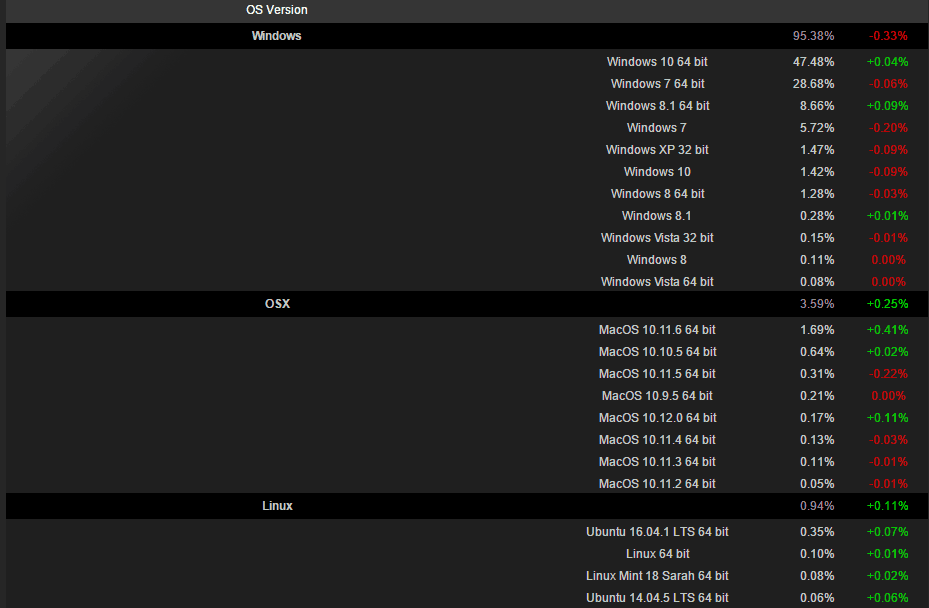
Yesterday, we reported that NetMarketShare’s latest market share report showed a decline in Windows 10 market share, while Windows 7 saw an increase. Today, Valve have released their latest Steam Hardware & Software survey, which shows overall usage of desktop operating systems on its Steam gaming platform, of those who opted to share usage statistics. For the past few months, Windows 10 usage had been on the increase, until now.

Steam Hardware survey September 2016 - click to enlarge
Steam Hardware survey September 2016 – click to enlarge

Corroborating NetMarketShare’s report, Steam also shows a drop in Windows 10 usage, a drop of 0.05%.  Windows 10 64-Bit usage increased by 0.04%, however, the 32-Bit edition dropped by 0.09%, leading to the overall decline of 0.05%.

While this is not a significant change, it does further confirm that Windows 10 share is either decreasing or stalling.

Interestingly, Windows 8.1 64-Bit usage increased by  0.09%, followed by Windows 7 usage dropping by 0.26%, which goes against NetMarketShare’s statistics showing an increase in Windows 7 use.

Looking at the overall picture, Windows usage decreased by 0.33% to 95.38%. Whereas OSX, now macOS, increased by 0.25% to 3.59%. Linux also saw an increase, by 0.11% to 0.94%.

Let us know what you think of the latest statistics in the comments below!

Windows 10 news recap: Windows 10 market share reportedly drops, Adobe making Adobe XD a UWA and more

Welcome back to our weekly “Windows 10 news recap” series where we go over the top stories of the past week in the world of Microsoft’s latest operating system. Let’s get started.

NetMarketShare: Windows Phone market share increases, Windows 10 drops while Edge holds steady

Windows 10’s market share is reported to have dropped in September, according to NetMarketShare’s latest statistics on usage.

Users reporting issues installing Windows 10 build 14393.222

A “widespread” issue is appearing when users are trying to install build 14393.222, resulting in the update failing or getting PCs caught up in an infinite loop.

Adobe to deliver “completely new” Adobe XD Windows 10 experience, coming late 2016

Adobe is starting with the Universal Windows Platform on its Adobe XD software, also known as “experience design”, as it announces a “completely new” experience for Windows 10, set to arrive in late 2016.

Here are the builds that released this week:

Microsoft’s Windows 10 Insider Program turns two years old

Two years ago today, Microsoft launched the Windows Insider Program – a program whereby Microsoft can ask their customers for feedback on products, as well as an avenue to report issues that they’ve discovered.

It has assisted in finding issues surrounding Windows 10 builds on both PC and mobile, and given users a voice when there’s something they feel is missing. Originally announced via a blog post on the Windows Blog, the Insider Program was designed to allow IT Pros access to the Windows 10 Technical Preview, but over time it grew into an all-out feedback hub, literally. Now, thousands of feedback items are posted monthly and teams across Microsoft are engaged in reading what is being said.

Jen Gentleman, one of Microsoft’s evangelists, announced the 2 year anniversary on Twitter, citing its launch of October 1, 2014:

It will be interesting to see what changes are ahead for the program.

Windows 10 KB3194496 breaks mouse and keyboard

Microsoft recently pushed KB3194496 to the general public, bringing a series of important bug fixes. We expected this cumulative update to become available on Patch Tuesday, but it appears Microsoft considered the update was stable enough to be rolled out to all Windows 10 users.

Maybe it would have been better if Microsoft had waited a bit longer. In this manner, the company would have had the chance to gather thorough user feedback and patch eventual issues. As a quick reminder, update KB3194496 was pushed to the Windows 10 public channel just one day after it had become available for Release Preview and Slow Ring Insiders.

Unsurprisingly, perhaps due to Microsoft’s haste, cumulative update KB3194496 brings issues of its own. Users have reported KB3194496 is breaking mouse and keyboard functionality. More specifically, they can’t use the mouse and the keyboard buttons don’t respond.

KB3194496 breaks mouse and keyboard functionality

So I have a friend who just finished installing the KB3194496 cumulative update for windows 10 a few hours ago. Window’s did it’s typical “Installing X%” and rebooted, but when it rebooted it was trying to do an automatic system repair. It then cuts immediately to a blue screen telling him to choose a keyboard layout, but he can’t use the mouse and the keyboard buttons don’t respond.

Several users already confirmed having the same issues after installing cumulative update KB3194496, and around 100 people already viewed the thread describing this issue. All signs indicate this is not an isolated problem.

Have you already download KB3194496 on your Windows 10 computer? Is everything running smoothly for you? Are you also experiencing mouse and keyboard issues? Tell us more about your experience in the comment section below.

RELATED STORIES YOU NEED TO CHECK OUT:

Microsoft brings Search and URL redirects to their Azure Information Protection Documentation with September 2016 update

Microsoft has recently updated its Azure Information Protection Documentation to include a new name that better reflects the company’s rebranding efforts and to include some of the recent product and service announcements revealed during Ignite 2016.

First things first, readers should notice that documentation unique to Azure Information Protection is now being integrated into the rest of the literature. Perhaps, even more, convenient than a single source of info is the new starting page of the documentation that will now suggest or recommend the most updated information for readers, avoiding the infinite scroll issues of other detailed online documents.

Microsoft has also included a Search box to accompany the many changes to the updated documentation reading experience. The new Search box now enables readers to jump to accurate information along with new URLs to document pages that redirect.

Carol Bailey, a Microsoft technical writer, also covers the many nuances in today’s update to Azure Information Protection Documentation for 2016 in her recent posting on the Enterprise Mobility and Security Blog.

The list of articles which contain significant changes since last month’s update to the documentation is fairly long and rather dense.

To see the listing, which includes:

among other detailed document changes, visit the Enterprise Mobility and Security Blog for more details.

Track your anime and manga addiction with the new MALClient Windows 10 app

Have you ever wanted an easier way to access all of your favorite anime? Also, perhaps you’ve been looking for a way to get the latest updates on when an episode releases, as well as to mark when you first started watching the title and follow it through to the end. If so, then an updated Windows 10 app might just be what you’re looking for.

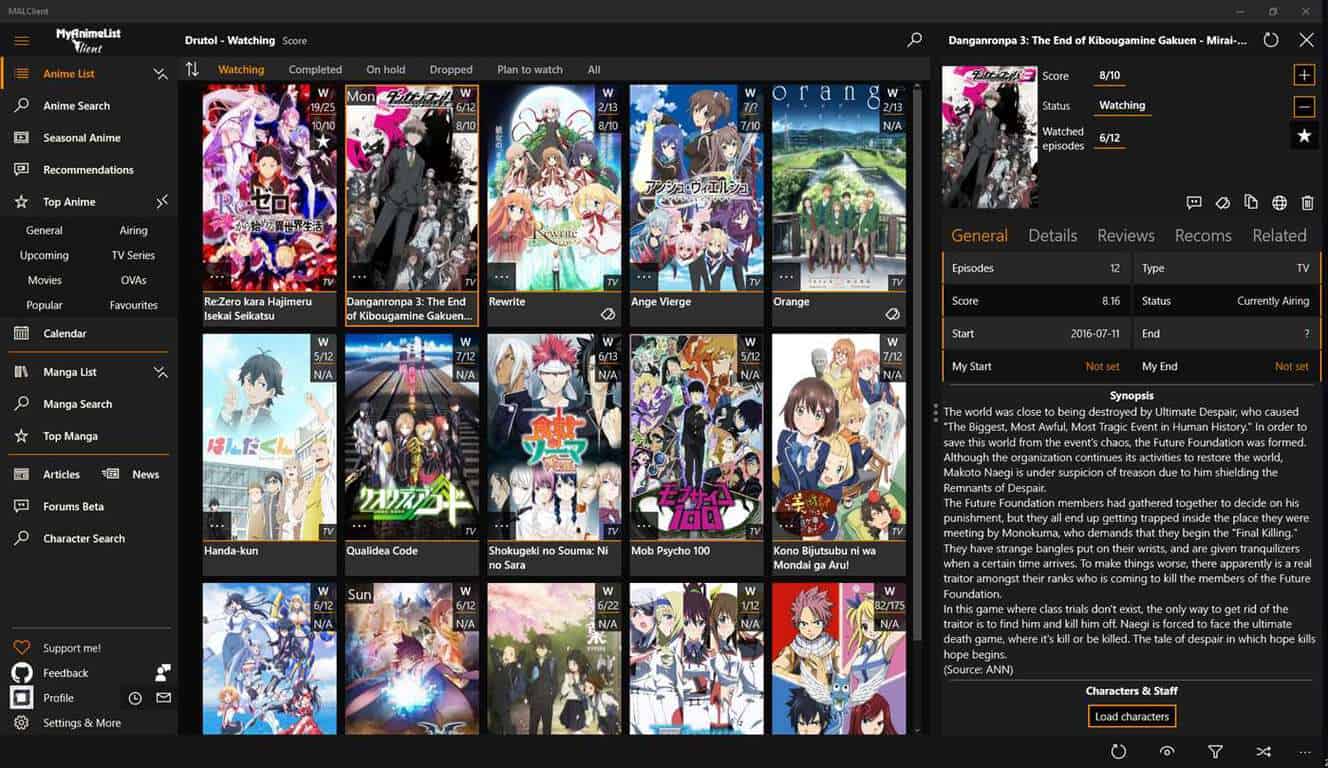
Mardonus from the Windows Phone subreddit shared an update on their anime/manga tracking UWP. Named MALClient in regards to My Anime List, the popular anime and manga website for enthusiasts, the app unofficially provides basically the same services as the site. The ad-free application displays your preferred entertainment from myanimelist and hummingbird.me so you won’t miss anything new. It was first introduced earlier this year in April and now it’s back with a rather large update that completely turns the app on its head.

MALClient is also useful for finding new and upcoming anime or manga with a new search feature that lets you find characters or titles. You can also have full conversations with the private messaging or via the profile comments. Here’s a beefy full list of the impressive update’s features from the store page:

  • Manga and Anime support.
  • Browse your own list as well as other’s.
  • Update your anime entries, including tags.
  • Check anime reviews.
  • Lurk&Post on Forums.
  • Browse related anime.
  • View top anime and manga.
  • Search for new anime in MyAnimeList/Hummingbird database.
  • Pin anime series with customizable tiles.
  • Search for characters!
  • Character&Staff details.
  • Read MAL news & articles.
  • Read and send MAL messages.
  • View your history.
  • Profile comments.
  • Add and remove favourite shows, characters etc.
  • Check your own profile stats , favourites etc..
  • View currently airing anime.
  • Dark and Light themes.

MALClient is already a smooth and feature-rich client app that works as intended without any advertisements to bog it down or in-app purchases except for various increments of donations. But that’s not all that is in store. Mordonus has additional plans for the application in the future like adding watched topics and maybe even clubs that would let users become more social in their favorite genres.

The creator did take to answering a couple of the questions brought up by users about the update to MALClient. Mordonus clarified that there was only one way to log in due to the API credentials used by the third party client and that further options aren’t likely. On a more technical note, MALClient is also open sourced so you can view the GitHub repository online to learn more about it.

Are you looking for your next anime or manga binge? Try out MALClient by downloading from Microsoft’s Windows Store with the link below.

MALClient
MALClient
Developer:
Drutol
Price:
Free

STARZ launches their official Xbox One app

Four years ago, Microsoft pitched the Xbox One as an all-in-one living room solution that included a focus on television entertainment, so much so that the effort has seemingly cost the company the goodwill of many avid gamers and ultimately stunted the adoption of the console for the foreseeable future. While spending much of the last three years’ cow-towing to ‘gamers’ of sorts and backpedaling on its vision of a television and media focused set top box, the company’s entertainment division seems to be keeping its eye on bringing a familiar living room experience to customers.

Announced a few days ago in a press release from integrated global media and entertainment company Starz, owners of an Xbox One and (presumably) Xbox One S will now be able to stream the network’s original shows as well as its licensed entertainment from a new app released on the console. Even though there are STARZ apps being delivered to the Apple TV, iPad, iPhone, Roku, Sony, Android TV and a host of other platforms, the Xbox One app is being described by the company as:

The STARZ app on Xbox One is a single destination for all subscribers who want to stream STARZ premium content. Its intuitive content discovery design and navigation offers ease of use and a compelling user experience, regardless of how the consumer purchased a subscription to STARZ. Subscribers to the STARZ sister networks, STARZ ENCORE and MOVIEPLEX, will also use this single destination app for access to stream. STARZ subscribers* may now download the app for free through the Xbox Live® service on their Xbox One and watch exclusive STARZ Original series including the upcoming season two premieres of “Blunt Talk” and “Ash vs. Evil Dead” on Sunday, October 2; as well as hundreds of movies and first-run films.

Interestingly enough, the STARZ app will use the current subscribers account as access when pair with an Xbox Live membership. Unlike the STARZ app for the App Store, Google Play, or Roku, it appears as though Xbox One owners will need a previous subscription to access content from the app rather than having the ability to purchase a cable-less offering for $8.99.

The new app should be available for download on the Xbox Store today. Any STARZ subscribers out there? Let us know what you think of the quality of the app as it compares to other offerings such as Showtime, HBO GO, or FXX.

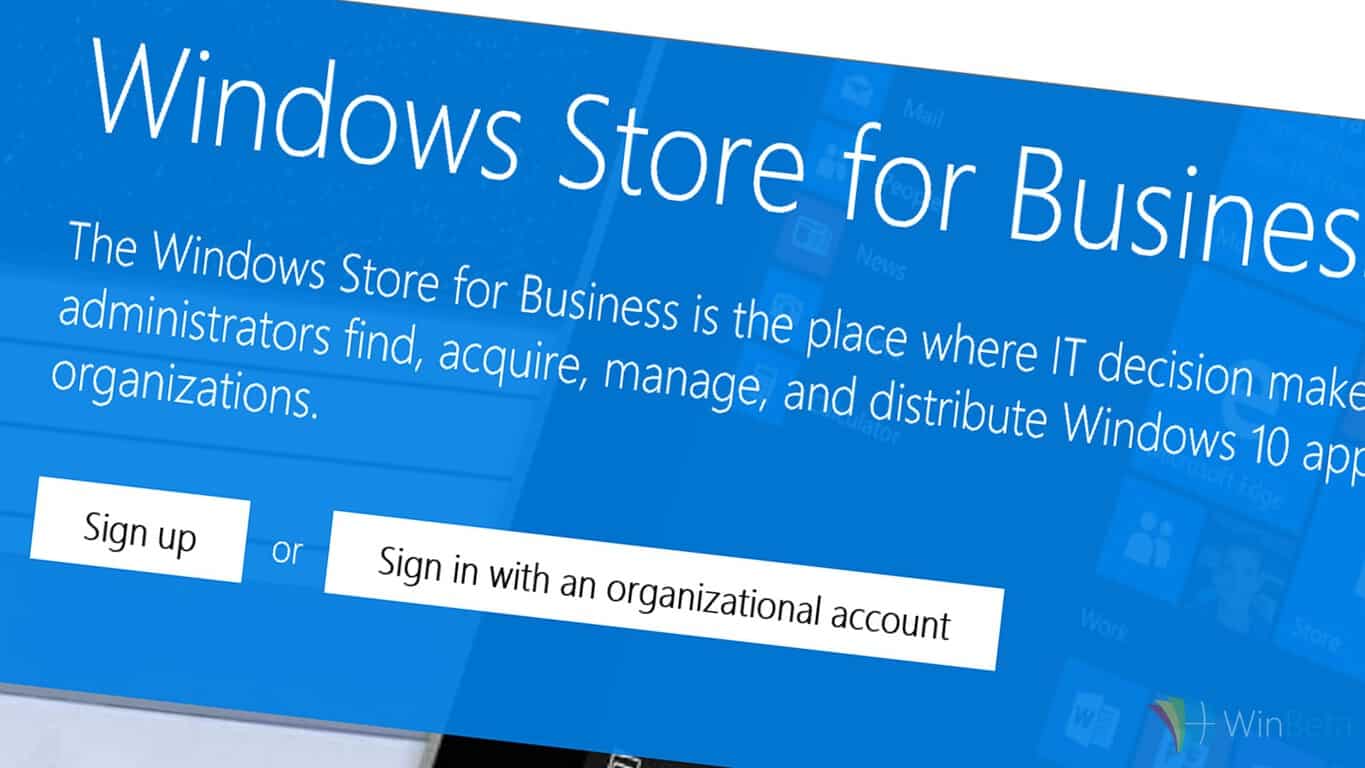
Windows Store for Business adds offline licensing

Back in November 2015, Microsoft launched the Windows Store for Business along the release of Windows 10 version 1511 to give IT administrators some tools to manage and distribute Windows apps. The portal is pretty good incentive to get more business customers and developers embrace the new operating system and Microsoft also allowed developers to sell organizational licenses to companies straight through the store earlier this year.

Today, the company continues its iterative approach by announcing that the Windows Store for Business now supports offline licensing. For developers, two licensing and distribution solutions are available:

  • Store-managed (online) is your default option, in which the Store service installs your app and issues entitlements for every user in the organization who installs the app.
  • Organization-managed (offline) is an optional additional choice, in which the organization can download your app binary with proper entitlements, distribute the apps using their own management tools and keep track of the number of licenses used.

In the blog post, the Windows Apps team notes that several apps are already enabled for organization-managed licensing and distribution in the Windows Store for Business including the Office apps, Outlook Mail and Calendar, OneDrive, Teamviewer, JT2GO from Siemens and more. Developers looking to enable offline offline licensing for their apps will have to log in to the Windows Dev Center dashboard and follow these steps:

  1. Open the app you would like to enable for offline licensing and create a new submission.
  2.  In Pricing and availability, go to the Organizational licensing.
  3. Make sure the box for Make my app available to organizations withStore-managed (online) volume licensing is checked.
  4.  Also check the box for Allow organization-managed (offline) licensing and distribution for organizations.
  5. Make any other desired changes to your submission, then submit the app to the Store.
Developers can enable offline licensing in the Windows dev Center.

Developers can enable organization-managed licensing and distribution for both free and paid apps. For users, apps distributed with offline licensing will work and update like regular apps though IT administrators may choose to manage app updates. More information on organizational licensing is available on this support page if you need it.

Salesforce moves to block Microsoft’s acquisition of LinkedIn in European Union

When Microsoft announced its intentions to acquire LinkedIn back in xx, it won a bidding war with Salesforce.com, purportedly winning the business focused social network even though Salesforce had a higher bid. Salesforce CEO Marc Benioff has been taking potshots at Microsoft ever since, up to and including yesterday where he fired off a couple of new tweets reacting to some statements Scott Guthrie made at a Deutsche Telekom conference.

Now today, according to PC World, Salesforce is pushing the European Union to block the acquisition:

Salesforce Chief Legal Officer Burke Norton will argue to the EU’s competition authority that Microsoft’s control of LinkedIn’s dataset following an acquisition would be anticompetitive.

…

“Microsoft’s proposed acquisition of LinkedIn threatens the future of innovation and competition,” Norton said in a statement on Thursday. “By gaining ownership of LinkedIn’s unique dataset of over 450 million professionals in more than 200 countries, Microsoft will be able to deny competitors access to that data, and in doing so obtain an unfair competitive advantage.”

In response, Microsoft President and General Counsel Brad Smith countered in a statement:

“Salesforce may not be aware, but the deal has already been cleared to close in the United States, Canada, and Brazil. We’re committed to continue working to bring price competition to a CRM market in which Salesforce is the dominant participant charging customers higher prices today.”

So, shots fired on both sides, once again, even though Salesforce and Microsoft also announced Skype for Salesforce yesterday, bringing Skype for Business directly into Salesforce.

It’s clear that with LinkedIn, and a new emphasis on Dynamics CRM, that Microsoft is taking aim at Salesforce, and Marc Benioff and his company aren’t about to sit still while that happens. If nothing else, this should be interesting!

Microsoft announces Orlando, Florida as site of Ignite 2017

Microsoft’s Ignite conference for IT professionals and business people is drawing to a close today in Atlanta, but the company is already getting ready for the next one.

In a tweet on the Microsoft Ignite Twitter account, the dates and place for next years Ignite have been announced, next year’s show will take place in Orlando, Florida on September 25-29, 2017:

This will be Microsoft’s third Ignite conference, a mega-event that has combined the Microsoft Management Summit, Microsoft Exchange, SharePoint, Lync, Project, and TechEd conferences all into one huge event. Last year’s Ignite was held in Chicago in May, and was scheduled to return to the Windy City this year until the schedule was changed from Spring to Fall, and the show was moved to Atlanta.

As she was this year, General Manager Julia White will host next year’s show, by all accounts a very successful four days of deep dives into Office, Office 365, SharePoint and much more.

Windows 10 Maps app updated with dark theme option for non Insiders

Microsoft has pushed a new update to the Windows 10 Maps for non Insiders today. The app has been bumped to version 5.1609. 2651.0, which is the same version that the company pushed to Windows Insiders on the Fast Ring just two weeks ago. The latest bits brings dark theme options for both the app and the maps, and you can choose to enable them in the settings. Additionally, the changelog mentions a new feature to quickly check traffic for your commute. Here are the full release notes:

  • Enjoy dark or light app colors—they now change to match your system settings.
  • Quickly check traffic for your commute, including live cameras, where available.
The dark theme options in the settings.
You can enable a dark theme for the maps as well.

The Windows 10 Maps was one of the few remaining native apps that didn’t have a dark theme option so it’s nice to finally get it. You can download the new update from the download link below, let us know in the comments what do you think of this new dark theme option.

Windows Maps
Windows Maps
Price:
Free

Xbox Fitness users given several Challenges to help unlock Achievements

Five brand new Xbox Challenges went live this week for Xbox Fitness on Microsoft’s Xbox One console. Only one has been advertised within Xbox Fitness but the other four are discoverable when snapping the Achievements app or viewing the Xbox Fitness Game Hub.

Xbox Challenges are like Xbox Achievements but instead of rewarding gamers with Gamerscore points, they provide them with in-game content. Xbox Challenges were plentiful when the Xbox One console first launched but interest in them has waned recently with few developers bothering to take the time to implement them in their games.

While the exact details of these Xbox Challenges’ rewards remain hidden until unlocked, it’s safe to assume that once unlocked they will give gamers Xbox Fitness Loyalty Card stamps as that’s what previous ones have done in the past.

The creation of these appear to be in response to users who had become worried that they would be unable to unlock all of the Xbox Achievements in the game before its Xbox Live Gold content goes offline at the end of 2016 and purchased content follows suit mid-2017. The hardest Xbox Fitness Xbox Achievements require the earning of the 50th, 60th, 70th, 80th, 90th, and 100th Loyalty Cards which are given to players after a certain number of stamps are earned. Even with doing at least one workout a day for a year, it would be difficult to get enough to qualify for these cards. The extra stamps rewarded by the new Xbox Challenges, however many they could be, will go a long way in helping users reach their targets and potentially 100% the game before its closure.

It’s important to note that only one of these new Xbox Challenges is currently active and that it expires in October. The names and descriptions of the other four suggest that they will also be time-sensitive and could average to around one a month until January 2017. Here are their names and descriptions:

  • Falling for Fitness: Earn two million Fit Points in one month!
  • Fit Friday: Throw 1,125 punches in two month!
  • Winter Wonderland: Unlock Winter Wonderland by winning 20 drill challenges.
  • Jump into the New Year: Jump, climb, and squat your way to 500 meters.
  • Marching into 2017: Earn a new Personal Best to unlock Marching into 2017.

Are you a fan of Xbox Fitness and will you be trying to complete it before it shuts down? Let us know in the comments below.

Windows 10 Fitbit app adds New York Adventures and HoloLens support

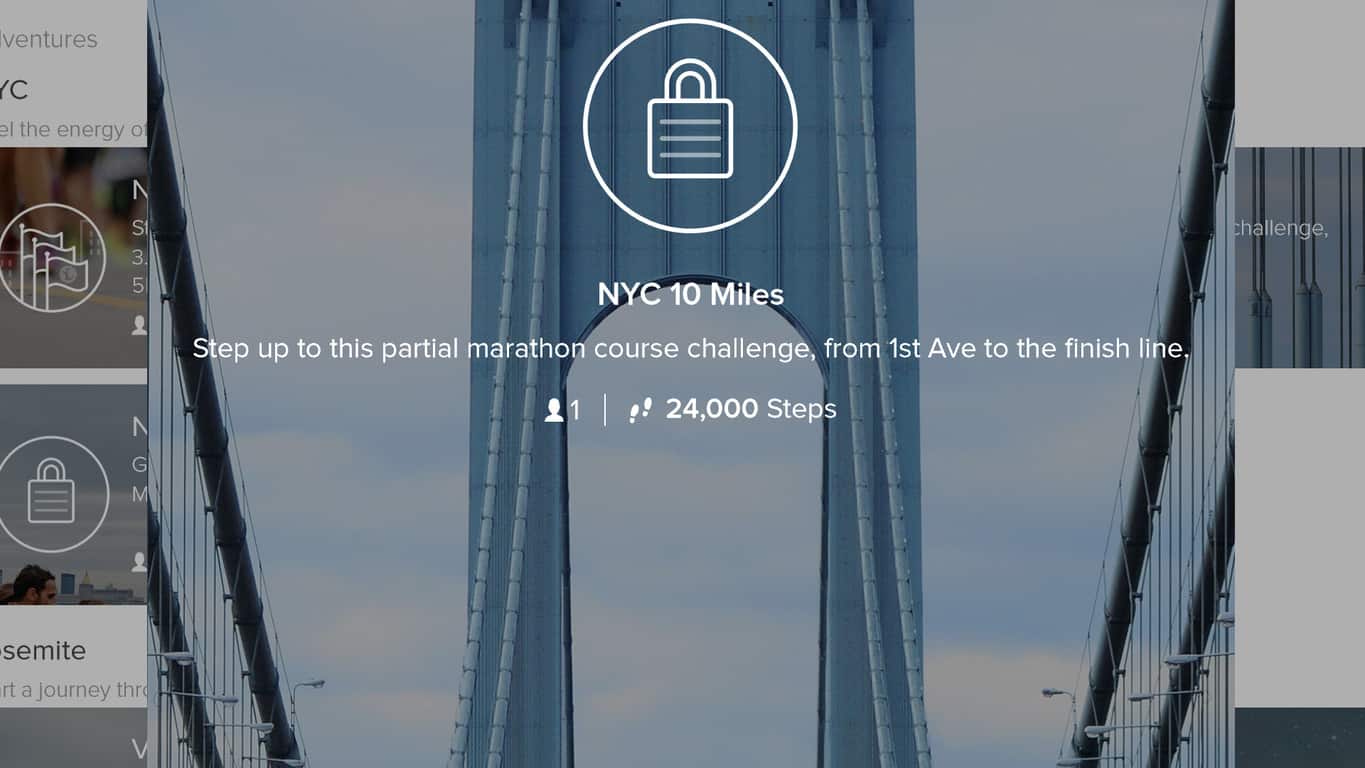
The official Fitbit app updated for Windows 10 devices today with added support for Microsoft’s HoloLens and several new features. Among these new features is the inclusion of three new Adventures set within New York City. Adventures were introduced in the previous update and are essentially virtual map experiences of real-world locations with progress along the digital map correlating to actual steps taken by the user.

This update also improved the display performance of celebrations on the Fitbit app Dashboard and graphs in the reports area, fixed several bugs, and added the ability to save unlocked landmark photos in an Adventure as a desktop background. Here’s the official app description for the Fitbit app:

Live a healthier, more active life with Fitbit, the world’s leading app for tracking all-day activity, workouts, sleep and more. Use the app on its own to track basic activity and runs on your phone, or connect with one of Fitbit’s many activity trackers and the Aria Wi-Fi Smart Scale to get a complete picture of your health—including steps, distance, calories burned, sleep, weight, and more.

TRACK ACTIVITY: Accurately record your steps and distance with MobileTrack when you carry your phone. For all-day tracking of stats like calories burned, active minutes, and sleep, pair the app with a Fitbit tracker.

RUN SMARTER: Enhance runs, walks and hikes by using MobileRun to track your pace, time and distance. You can also control your music, get voice cues or use your phone’s GPS to map your routes.

RECORD WORKOUTS: Use your Fitbit tracker to track your exercise, then check the app to see your stats, their impact on your day, and how your performance is improving.

The Fitbit app has continually updated to maintain feature parity with its iOS and Android counterparts. Do you use the Fitbit app and have you tried one of the new Adventures yet? Let us know in the comments below.

Fitbit
Fitbit
Developer:
Fitbit
Price:
Free

Black Theme in Office 2016: How to Enable it

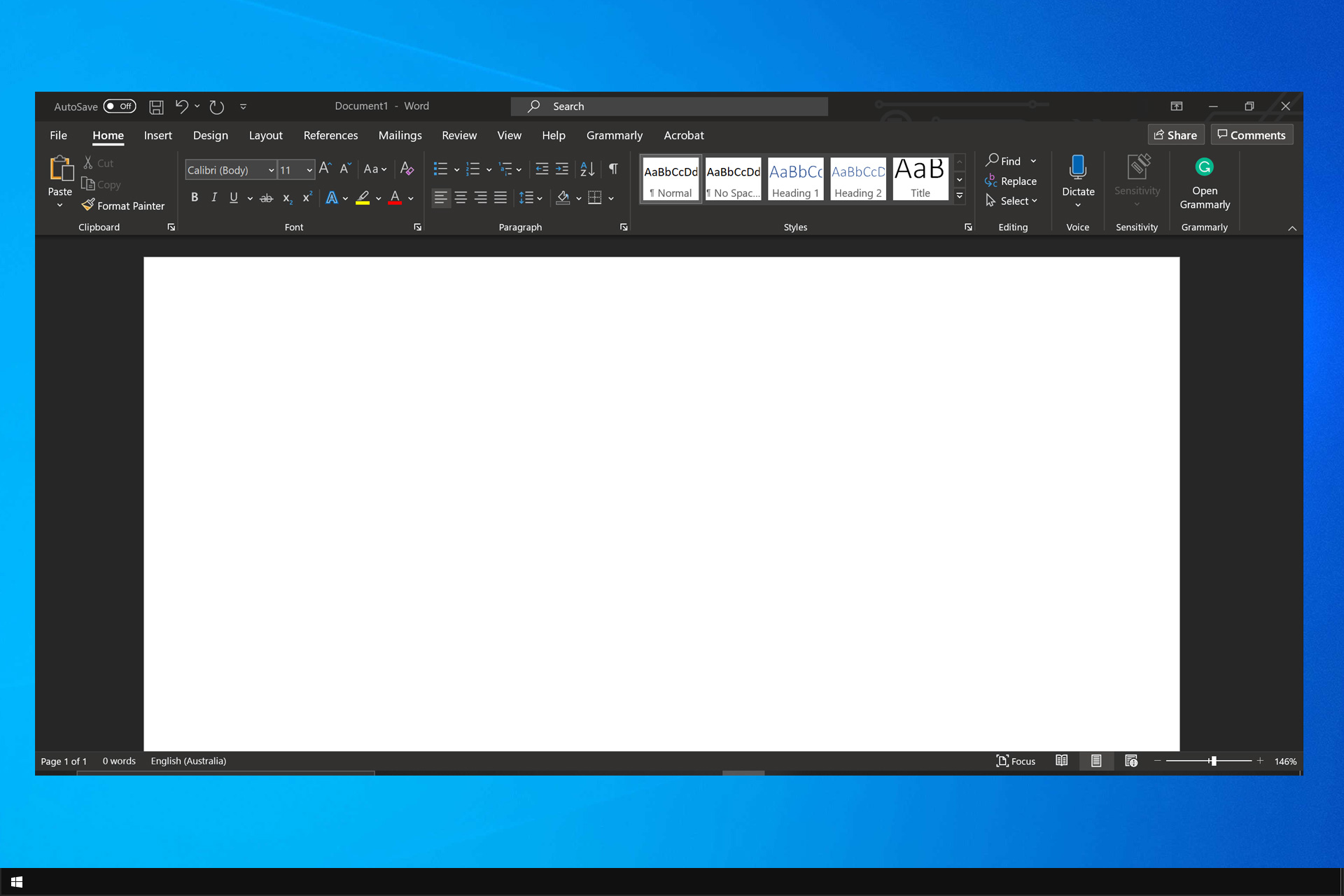
Many users prefer to use dark themes on their software, and many are wondering how to enable Office 2016 black theme on their PC.

This is fairly simple to do, and it requires you to change a couple of settings. Speaking of which, Windows 10 dark theme can be easily enabled, so you might want to try that as well.

Without further ado, let’s see how we can enable the dark theme in your Office software.

How can I turn on black theme in Office 2016?

1. Change application options

  1. Launch the Office program you want to enable the black theme for.
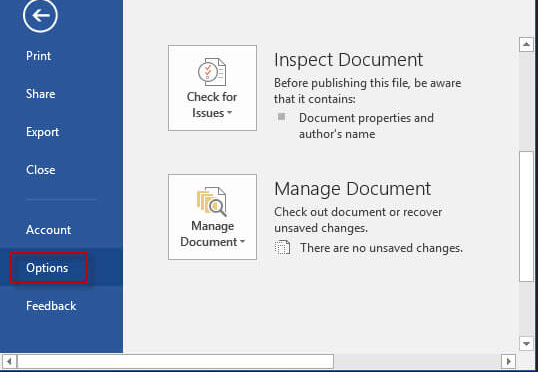
  2. Go to the File and select Options.

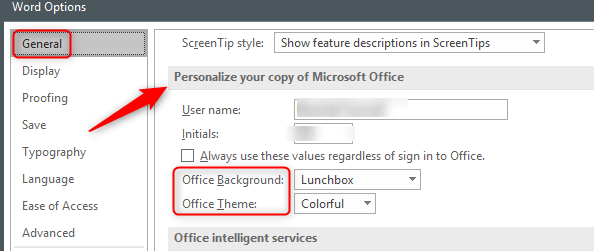
  3. Go to Personalize your copy of Microsoft Office section.
  4. Select Black in the drop-down menu and click on OK.
    personalize office

2. Change Office Theme setting

  1. Launch any Office program.
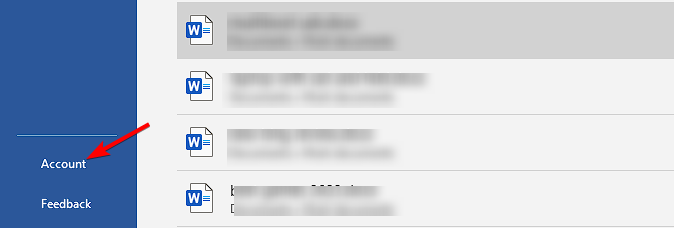
  2. Go to the File menu, and select Account.
  3. Go to Office Theme and select Black in the drop-down menu
  4. The Black theme is now enabled for all your Office programs.

The three other themes, Colorful, Dark Grey and White are still available in Office 2016, and you can enable them at any time.

As you can see, enabling the dark theme is pretty simple in Office 2016. Now that you know how to do it, perhaps you would be interested in a guide that shows you how to remove recommended documents in Office?

Have you already tried out the dark theme in Windows 10? Tell us more about your experience in the comment section below.

Grab UWP storage app Disko for free today

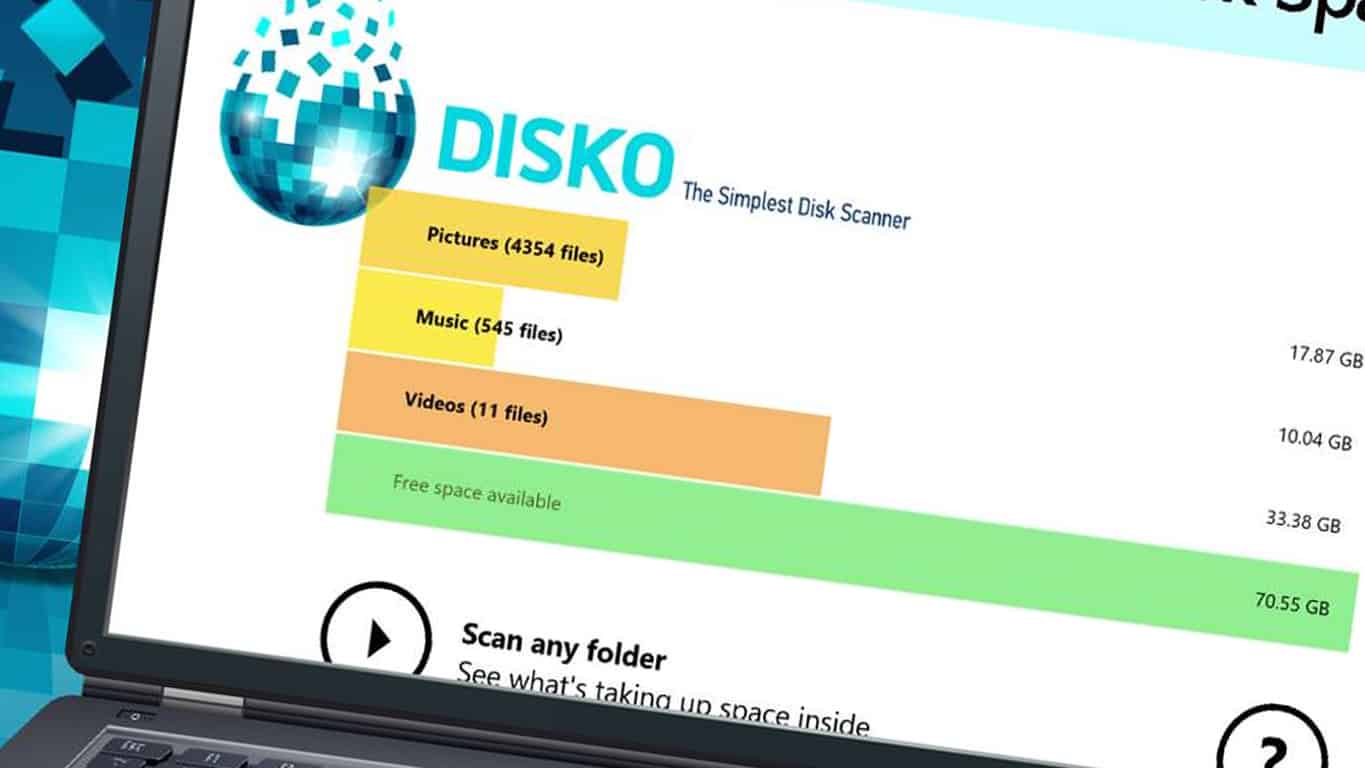
The disk management app, Disko, is currently free in the Windows Store for today and tomorrow. The app usually retails for $9.99 so now is a pretty good time to check it out. Disko is essentially a system memory management tool that scans a Windows 10 device and detects how much memory is being used and which files and programs are using up the most. It can also search for duplicate files and is designed to prevent the deletion of important system files. Here’s the official app description for Disko:

Running out of disk space? Disko is here to help! With Disko’s Auto-Scan, get a disk space usage report without pressing a single button. Then, use Disko to delete unwanted or duplicate files to reclaim your space. Disko tells you what’s taking up your disk space, and then helps you declutter with a few taps. This little app starts scanning your disk as soon as you launch it and lets you delete files while it scans. Its powerful scan engine can analyze more than 10,000 files per minute across your entire system.

Safety first! Disko moves your unwanted files to the Recycle Bin. Just empty the Recycle Bin when you’re done – this will reclaim your disk space and flush the junk away. Disko protects your system by operating in a sandboxed environment – you can use it to delete your unwanted files and folders, but built-in safeguards prevent it from deleting system files. Disko is built exclusively for Windows 10. It is only available from the Windows Store, so you know it’s safe.

Disko is a Universal Windows Platform app and is compatible with Windows 10 PCs and tablets as well as Windows 10 Mobile smartphones. Have you tried Disko yet on your device? Let us know your thoughts about it in the comments below.

File Scanner Pro by Disko
Developer:
Avanquest Apps
Price:
Free

Windows 10 build 14936 available for Fast ring Insiders

Microsoft has pushed a new Windows 10 build for Insiders in the Fast ring. The new build is labelled 14936, and, unlike the previous release, is available on both Windows 10 PC and Mobile.

Windows 10 build 14936 brings a couple of new features, and system improvements. With this release, Microsoft continues to improve the experience in Microsoft Edge, but also brought some functionality enhancements. We should note once again that this build still counts as the ‘early Redstone 2 build,’ so major improvements are not available yet.

Just like we suggested a week ago, Microsoft released three new extensions for Edge. If you’ve been following the situation, you probably guessed that these extensions are Microsoft Shopping Assistant, Turn Off the Lights, and Tampermonkey.

Additionally, Microsoft has introduced some changes to NAS devices and home file servers. So, users might need to adjust their settings in order to be able to access the home network folder again.

After updating to the latest Insider Preview builds, you may have noticed that shared devices on your home network have disappeared from your home network folder. You may have also noticed your mapped network drives are not available. If you change your network to ‘private’ or ‘enterprise,’ it should start working again.

And finally, , the Windows Subsystem for Linux has been improved with Ubuntu version 16.04. The new new version replaces the older Ubuntu 14.04. However, Microsoft said that this change would affect only new instances (lxrun.exe /install or first run of bash.exe). Existing instances with Trusty won’t receive this update automatically.

Known issues and improvements in Windows 10 build 14936

As always, Microsoft presented the list of known issues and system improvements. Once again, the list of known issues is pretty small, which is a good thing, and indeed a lot of Insiders have been reporting that this build works very well. But as always, we’ll check that by ourselves, by searching for reported issues from more Insiders.

Here’s what has been improved in Windows 10 build 14936:

Improvements and fixes for PC

  • “We fixed the issue causing Narrator to continually speak the progress of a song e.g. update with the current time of the progress bar every second if you navigate to the progress bar while a song is playing in Groove Music.
  • We fixed the issue where using the tab key to navigate the Settings app wouldn’t work.
  • We fixed an issue resulting in Explorer.exe frequently crashing for some Insiders, particularly for those with multiple network switches.”

Improvements and fixes for Mobile

  • “We fixed the issue causing the pin pad to not be visible to unlock the phone even after rebooting the phone.
  • We fixed the issue where some phones lose the ability to use their SIM cards.
  • We fixed the mobile hotspot issue where it works the first time but subsequent attempts to use the feature won’t work until the phone is rebooted.
  • We fixed an issue causing some devices such as the Lumia 650 from failing to install a new build with Error 0x80188308.
  • We fixed the issue causing some build updates to fail with an 800703ed error code.
  • We fixed the issue where Action Center no longer closes if you swipe up on the empty space (area of Action Center that doesn’t show any notifications).
  • We fixed an issue where notifications were unexpectedly showing the app logo within the notification when viewed in Action Center.
  • We fixed an issue for devices that shipped with Windows Phone 8.1, such as the Lumia 930 and 1520, where if you plugged in a headset during an ongoing call, the audio would not be routed to the headset.”

And, here’s the list of known issues:

Known issues for PC

  • “Optional components may not work after upgrading to this build. To get it working again, go to “Turn Windows features on or off”, scroll down and check the right optional component and click ok.  After a reboot, the optional component will be enabled again.
  • Tencent apps and games will cause your PC to bugcheck (bluescreen).
  • Running sfc /scannow in an elevated command prompt will fail at 20% with the error “could not perform the requested operation.””

Known issues for Mobile

  • “If you have your default storage set to a SD card for apps, installation of apps like WhatsApp, Facebook Messenger and WeChat will fail with an error. As a workaround, set your default location to your device’s onboard storage.”

To download the latest Windows 10 build, just head over to the Settings app > Updates & security, and check for updates. If you’ve already downloaded the build, tell us more about your experience in the comment section below.

RELATED STORIES YOU NEED TO CHECK OUT:
List of wheels supported by Forza Horizon 3 on Windows 10 PC

Forza Horizon 3 is finally available for the general public. You can now engage in nerve-racking races, push the pedal to the medal and eclipse competition. Select your favorite car, and do everything you can to be the first to pass the finish line.

A fast car is essential if you want to win the race. Also, a reliable wheel can give you an extra boost, allowing you to better control the vehicle. It’s important to know what the wheels supported by Forza Horizon 3 on Windows 10 PCs are because this allows you to avoid annoying situations when can’t properly control the car.

Forza Horizon 3 supports the following wheels:

  • Thrustmaster T150
  • Thrustmaster T500 RS
  • Thrustmaster TMX V1
  • Thrustmaster TMX V2
  • Thrustmaster T300RS
  • Thrustmaster TX
  • Thrustmaster RGT
  • Logitech MOMO Force Feedback Racing Wheel
  • Logitech G920
  • Logitech G929
  • Logitech G25
  • Logitech G27

The Logitech G27 and the Thrustmaster TX wheels, as well as other TX variants, can be used, but they have some limitations with their in-game functionality. In other words, these wheel support the default settings, but gamers may experience issues when using customized settings.

The good news is that additional wheels, such as the Fanatec wheels, will soon be supported thanks to a series of updates that will be pushed to Windows 10. These updates will also bring improvements for the wheels currently supported. For example, gamers already reported the Logitech G25 wheel has FFB issues on tarmac, and it is very poor even on dirt roads.

For the time being, Forza Horizon 3 supports only 12 wheels, which disappointed many fans:

The lack of better wheel support on PC is very disappointing.
There is no decent support for Fanatec most recent models, so what are the people with $600 Fanatec GT2 & GT3 are supposed to do? throw them out the window and go buy “the new one”?

Have you already installed and played Forza Horizon 3? Tell us more about your experience in the comment section below.

RELATED STORIES YOU NEED TO CHECK OUT:

Mute sound on webpages with Silent Site Sound Blocker for Google Chrome

Audio content on Internet comes in two versions: the one that you intentionally play (YouTube videos, Spotify songs, etc.), and the annoying one that plays automatically (ads, or notifications). When you want do disable the second kind, all browsers require you to do it manually, which can be as annoying as hearing that sound.

For Google Chrome users, that doesn’t have to be the case anymore. With one handy extension for Google’s browser, you can block sound from any site you want, and avoid hearing unwanted audio. The extension is called Silent Site Sound Blocker, and you can download it from Chrome’s Web Store for free.

This extension serves as an audio firewall for Google Chrome, and gives users complete control over audio playback in the browser. It comes with a few modes and options, so you can choose the regime that fits you the best.

Here’s what modes Silent Sound Blocker offers:

  1. “Allow Whitelisted Only — This setting plays audio only if the site is found on the whitelist.
  2. Block Blacklisted Only — This plays audio on all sites except on sites that are on the blacklist.
  3. Silence All Sites — This blocks audio playback on all sites.
  4. Allow All Sites — This allows audio playback on all sites.”

By default, the extension allows playback only from whitelisted sites (the first mode), but you can easily change that. Whenever you open a site that tries to play audio content, a prompt asking you for permission to play the sound will pop up. From there you have an option to whitelist the site, play audio and reject it only once, or completely blacklist the site. You can also whitelist and blacklist sites manually.

This prompt shows every time a site tries to play audio, as there’s no way to disable it. This, as well, can be annoying to some users, but it’s definitely better than hearing that guy who tries to show you how to make a million in one month.

All in all, this is a very useful extension, if you don’t want to disable audio on each site manually. You can download it for free, from the Chrome Web Store.

RELATED STORIES YOU NEED TO CHECK OUT: