Back in April we wrote about the cool features Narrator had received, improving the tool’s performance, the keyboard commands unification or the fact that Cortana and Edge results became readable among other features. This month, Microsoft rolled out a series of interesting improvements related to navigation, auto-suggest announcements and faster text-to-speech.
The May features are available in build 14328 or newer. If you want to help Microsoft refine their Narrator, send it your feedback via Narrator’s own feedback command of pressing CAPS LOCK+E twice to enter comments about your experience. If you press CAPS LOCK+E once this means you are not satisfied with the tool. The updates focus on five main areas.
1. Scan mode – which is actually a new navigation mode. When this mode is on, use the up and down arrows to move through applications and web content. You can press SPACE to activate an item of your choice: follow a link, press a button in an app, etc. Scan Mode supports common keys found in other screen readers to make navigation easier and more familiar. Scan Mode is turned on /off by pressing CAPS LOCK+SPACE.
2. Verbose modes – six levels of verbosity are now available, giving you more information about the text characteristics. At Verbose mode zero, you will hear the text. At verbose mode 1, you will hear if the text is a heading. At verbose mode 2, information about text formatting will be provided: you will know if the text contains bullets, words in bold, italics or color.
3. Punctuation modes: you now have more control over how much punctuation you hear when reading a text. The settings for punctuation include none, some, most or all.
4. Faster text-to-speech: three new voices have been added to Narrator for a faster rate of speech. The current voices can utter 400 words per minute, while the new ones are almost twice as fast.
5. Auto-suggest announcements: will now get a verbal hint with an audio indication when Windows 10 apps make suggestions. This feature is extremely useful when used with Cortana, as you get suggestions when you enter a term in the search box.
Microsoft has proven it really takes into consideration user feedback, rolling out three important updates for gamers and game developers. The update focuses on Windows 10 and brings unlocked frame rate support for UWP, AMD Freesync, and NVIDIA G-SYNC.
Windows 10 is definitely the place to be for gamers considering the massive influx of quality games in recent months. Fabulous games such as Quantum Break, Gears of War, Forza Motorsport 6, Rise of the Tomb Raider or Hitman are all now part of the Windows 10 game offer and support Direct X12.
Thanks to this update, you will be able to play your UWP games with unlocked frame rates, with Gears of War and Forza Motorsport 6: Apex will be the first games to support this feature. The update will be rolled out gradually, but if you want to try it out faster you can download it from Microsoft.
This is only the beginning since developers have promised new Direct X12 titles will land in the near future:
Looking further into the future, you can expect to see some exciting developments on multiple GPUs in DirectX 12 in the near future, and a truly impressive array of DirectX 12 titles later this summer and fall.
As for AMD Freesync and NVIDIA G-SYNC support, this feature will synchronize game rendering frames with the refresh rate of the monitor. If you activate the “Disable vsync” option in a game, frames will be rendered out of sync with the monitor refresh. In this manner, the game is rendered as fast as the graphics card allows it. The only issues is that tearing will occur because of lack of sync, which means that parts of two different frames are on the screen at the same time.
G-SYNC and FreeSync solve the game/monitor synchronization problem by determining when the game is ready to render a new frame. When the game is ready, the graphics driver tells the monitor to refresh the display. This allows your game to render as fast as the graphics card is capable without any tearing, but requires monitors which support adaptive refresh technology.
Now that another annoying issue is solved, it’s time to hit the play button!
Microsoft rolled out its May updates for both the Surface Pro 4 and Surface Book, mainly focusing on the camera by bringing the same upgrades to both devices. By comparison, the updates rolled out last month offered important performance and graphics improvements as well as better power management.
The list of updates for the Surface Pro 4 and Surface Book includes:
Intel Corporation driver update for Intel(R) AVStream Camera 2500
Intel Corporation driver update for Intel(R) Control Logic
Intel Corporation driver update for Intel(R) CSI2 Host Controller
Intel driver update for Intel(R) Imaging Signal Processor 2500
Intel Corporation driver update for Microsoft Camera Front
Intel Corporation driver update for Microsoft Camera Rear
Intel Corporation driver update for Microsoft IR Camera Front
Surface Camera drivers set (v30.10586.7035.1976, 4/21/2016) improves Windows Hello stability.
Intel(R) AVStream Camera 2500 driver update (v30.10586.7035.1976)
Intel(R) Control Logic driver update (v30.10586.7035.1976)
Intel(R) Imaging Signal Processor 2500 driver update (v30.10586.7035.1976)
Microsoft Camera Front driver update (v30.10586.7035.1976)
Microsoft Camera Rear driver update (v30.10586.7035.1976)
Microsoft IR Camera Front driver update (v30.10586.7035.1976)
For some users, the updates take place automatically while others will have to manually select them. To check whether the updates have already been installed on your device, go to your update history. If the updates have not been downloaded, go to Settings > Update & Security > Windows update > Check for updates.
The Surface Pro 4 and Surface Book are one of the main money making engines for Microsoft. Surface revenue for Q3 increased by 61% in constant currency driven by the two devices, breaking the curse that had been haunting Microsoft for years in regards to Surface sales.
By the way, if you have been thinking about buying a Surface Pro 4 or Surface Book device, there’s never been a better time than now: Microsoft is offering the Surface Book i5 128/256 GB models with a $150 discount. RELATED STORIES YOU NEED TO CHECK OUT:
Valiant Hearts: The Great War is a four-part episodic game inspired by World War 1 letters and resembling a graphic novel full of emotion and action. Your task is to solve puzzles and sneak through enemy lines in order to help your heroes survive the world’s first global war. You are in maze of trenches full of dirt and horror, and throughout the game you will experience various emotional states by playing each of these characters. You are never alone in your quest as your canine friend, Walt, is following your every step.
In this desolate world, there is also a place for love. Help a young German soldier find love and you will see that even love can find a way to survive on the battlefield. The game takes you back to famous WW1 locations, allowing you to revisit historical battle fields on the Western Front.
The game supports 18 languages and is approximately 2.66 GB. In-app purchases are also available, ranging from $0.99 to $9.99 for the episode 1-4 multipack. However, according to users, there is currently an issue with the in-app purchases:
Really good game. I hope it will get lots of popularity in WP store. But you should make better resolution, do something about control (it’s too slow) and fix the store bug. Even if I want to buy another chapter, I just can’t.
I really like this game. Played through the first free episode and was hooked. Wanted to buy all episodes at once. But the in app purchase is broken. Whatever I try it says I have no internet. Tried this on both PC and mobile with same results! Too bad!
Self-driving cars represent the hottest trend in the automobile industry. Progress is already visible even if current models do not offer the safety level users demand. Luckily, major tech companies are making major research in this field with encouraging results. Microsoft has also joined their ranks and showed off its first smart car.
You would normally expect to hear about Microsoft in the computer tech news column, but we are pretty sure that soon the company’s name will be featured in major self-driving car news articles. The smart car project is part of Microsoft’s Intelligent Revolution Platform and represents a cooperative effort between Microsoft and engineering firm IAV.
Microsoft first introduced this car at CES 2016, and three months later we can see it on the roads. The company’s self-driving car bears a Volkswagen logo, and apart from the “Connecting highly automated driving” message on its hood, there is nothing extraordinary about on the outside.
From a technological point of view, the car can accomplish various tasks such as slowing down when pedestrians are near, stopping at red lights and of course, driving itself. The car can do all these things thanks to the “connected world” where everybody is wearing a device which is connected to the car. The car knows that pedestrians are close because they are wearing Microsoft Band devices and stops at the red lights thanks to the Wi-Fi signal the red light sends to the car.
Indeed, some of these connections seem too complicated for the real world as not everybody will wear Microsoft Bands. On the other hand, as the IAV representative explained in the video that smartphones could be used to provide the car with information about the location of pedestrians because everybody uses smartphones nowadays. Another possible solution would be for Microsoft to use the Kinect sensor in its self-driving cars. Other connections are quite feasible because red lights could be equipped with Wi-Fi emitting devices to let smart cars know they have to stop.
The most interesting thing is the way Microsoft incorporated its technology into the car since Cortana is already used to access weather apps. This is not the first time when the tech giant integrates its programs into a car, as Office has already been brought to your car. With this development, it is quite possible that Microsoft develops a version of Cortana especially for smart cars. Speaking of apps, developers could also create specific apps for self-driving cars to feed them various information such as the location of pedestrians.
As a company that deals extensively in intellectual property, Microsoft understandably employs an army of lawyers. Between defending their own IP and defending against claims of infringement, Microsoft’s lawyers are also likely a busy group. Recently, one of the company’s lead IP lawyers, Andy Culbert, has headed out for new opportunities, specifically to join law firm Perkins Coie and continue working as a professor at the University of Washington’s School of Law.
The attorney who crafted Microsoft’s patent litigation strategy resigned from the Redmond company to split his time between Seattle-based law firm Perkins Coie and the University of Washington’s School of Law.
Andy Culbert became Microsoft’s (Nasdaq: MSFT) first intellectual property attorney 18 years ago. Throughout his tenure, Culbert worked on several landmark patent cases – including one before the U.S. Supreme Court that established the framework for U.S. companies to seek infringement damages internationally.
Microsoft has over 35,000 patents in its portfolio, a fact that’s not been lost on Android manufacturers who paid the company billions of dollars over the years in licensing agreements. Culbert was instrumental in overseeing that portfolio, as well as generally applying his expertise and experience to ensuring that Microsoft’s investments in R&D were fully protected.
Microsoft will miss him, according to their statement:
“Andy made extraordinary contributions to Microsoft during his 18-year tenure as head of our patent litigation practice,” David Howard, Microsoft’s deputy general counsel, said in a statement, “and we wish him the best as he begins the next chapter of his career.”
Culbert joins a firm in Perkins Coie that employs over 1,000 attorneys in almost 20 cities around the world, and his heavily involved in the technology industry. He will also continue work at UW, where he was acting as a professor throughout most of his tenure at Microsoft.
Microsoft is slowly rolling out extensions support for its new web browser, Edge. While that’s good, folks have been wondering that since the Edge is an Universal app, will the mobile version support extensions as well.
We can confirm right now that the software giant is indeed working on bringing extension support to Edge on Windows 10 Mobile. This is not something that will hit home this year via the Anniversary Update. We understand this is due to technical difficulties, so chances are the Redstone 2 update will see the feature released to the masses.
To bring the feature to mobile devices, Microsoft must first get its head around the fact that mobile devices have limited resources to go around. We don’t want to end up using multiple extensions only to find our web browser and smartphone slowing down to a halt.
Microsoft must also find a way to get extension icons to seamlessly integrate into the web browser. To get everything to work, it will take some time, and that is why we’re glad the company released a roadmap for us to keep up with the progress being made.
Until then, we can continue taking advantage of extensions for the desktop version of Microsoft Edge. Already, there are several extensions available which includes, AdBlock, OneNote Web Clipper, Pinterest, Microsoft Translator and more. Once the feature is available to the wider public, developers will then be able to submit their extensions to the Windows Store, main hub for anyone who wants to download extensions for Edge.
At the time of writing, only Adblock and Adblock Plus are available in the store, but folks are required to have the latest Windows 10 Insider build before seeking them out.
Keep in mind these extensions are still in testing. We’ve experienced an issue after using Adblock Plus where Microsoft Edge refuses to launch properly. A complete refresh of the system seems to be the only fix at this time.
While we usually look at OneNote and other Microsoft software as tools made to help businesses do their best work, we should remember that they’re excellent options for anybody trying to keep track of their day-to-day tasks – including students. Brendan Cawley, engineering and technology teacher and first-year head teacher at the Coláiste Pobail Setanta school in Dublin, Ireland came to the OneNote blog today to write about how OneNote has changed the way that his school’s students approach their schoolwork.
After the school’s opening in 2008, Coláiste Pobail Setanta has been doing its best to innovate and make sure that they were always taking advantage of the cutting edge of education. With this desire to stay up to date, it only makes sense that the school would take a dive into the digital age and start moving their operations into OneNote. The school supplied its students with Surface Pro 3 machines back in September of 2015, and OneNote has been a staple of education for them since.
Each department in the school has set up their own template for their students to use, and takes advantage of all of the features of Office to keep students up to date and doing their best work. The school uses shared resources in OneNote to upload content like PDF’s, PowerPoints, and YouTube videos to students, making sure that important learning resources can be instantly shared. In September of 2015, 240 students were given Surface Pro 3s to use in conjunction with this new system, and it seems to have resulted in some real success for both the students and their teachers.
The evolution of education to the digital world is a step that always needed to happen. The nature of an always-connected world is something that should resonate with all students and educators as it gives everyone an opportunity to keep an ongoing conversation that stays productive throughout an entire semester – not just during class time. Coláiste Pobail Setanta’s work to bring itself into the 21st century is commendable and speaks to just how committed they really are to giving their students every opportunity to becoming a more empowered citizen.
Microsoft is hosting its INTEGRATE 2016 conference at the BizTalk 360 event in London today where the company shared its vision on a seamlessly integrated cloud solution for its customers that combined cloud-native and hybrid deployments. As noted by a recent JP Morgan analysts report, Microsoft’s focus on hybrid cloud deployments has made it a natural fit for companies looking to dabble in establishing semi-cloud based infrastructures while still maintaining on-premises control of already built-out server investments.
During its time at BizTalk 360, Microsoft made note that due in part to a combination of BizTalk Server and Logic Apps the company can continue to tout its enterprise integration pitch.
We remain focused on delivering a hybrid integration platform that allows customers to extend their current on-premises BizTalk Server investments to the cloud through Logic Apps. Customers can now not only leverage extensive B2B/EDI capabilities, easily connect LOB applications to numerous SaaS and enterprise connectors but also consume Azure Services like Azure Machine Learning and Azure Functions through Logic Apps. Our goal is to evolve Logic Apps as an enterprise grade integration platform that brings core BizTalk Server capabilities to the cloud.”
With the upcoming release of a new BizTalk server 2016 and collection of Logic Apps, Microsoft is once again prepared to support new cloud and hybrid enterprise scenarios by enabling customer’s easier connection options to both on-premises setups as well as cloud-native applications. Furthermore, access to these solutions with Logic Apps as means access to other vast Azure resources such as Machine Learning and scalable workflows.
Microsoft also touts its recent addition to its IFTTT-like cloud-based solutions in Microsoft Flow. Microsoft Flow will, in the coming months, represent an integral part of the company’s integration solution for businesses looking to move to the cloud in some fashion.
Our newest SaaS offering that offers a code-less method for business users to solve integration problems. Microsoft Flow is a key part of our integration solution; focusing mainly on scenarios like notifications, data collection and business approvals.”
To find out more about Microsoft’s plans for cloud integration and hybrid solutions, visit the company’s Azure blog or head to its Feedback forums.
Microsoft just released a new build for Windows 10 Preview nearly two weeks after the previous release. The new build is dubbed 14342, and brings a handful of system improvements. As usual, the build is for now available to Insiders on the Fast ring only, but will eventually make its way to users on the Slow ring, as well.
Build 14342 mainly focuses on Microsoft Edge, introducing a couple of handful improvements and new features for Microsoft’s browser. Microsoft changed the way extensions for Edge are installed, with users now able to download them directly from the Store. The new build also brings the highly anticipated AdBlock and AdBlock Plus extensions to Microsoft Edge.
Within this newest build, real-time web notifications, swipe navigation, and apps for websites to Microsoft Edge are included. With real-time notifications, Edge will be able to send users notifications from websites directly to the Action Center. Swipe navigation allows users to swipe back from any part of the page to return to the previous page. And finally, apps for websites allows users to open certain websites with their official Windows 10 apps like you would do on smartphones. However, while no websites currently support this feature, Microsoft will work on it in the future builds.
The list of improvements continues, including an updated Skype UWP Preview (users can now set the dark theme), an updated Windows Ink Workspace icon, updated visuals for the User Account Control dialog (dark mode also added), and Feedback Hub improvements.
Bash on Ubuntu on Windows 10 received some improvements, concluding our list of new features and improvements in the newest Windows 10 Preview build 14342. Here’s what’s changed in Bash on Ubuntu on Windows 10:
“Symlinks within the Windows Subsystem for Linux are now functional on the mounted Windows directories. This fix helps support many scenarios including the npm installer.
Users with non-Latin Windows usernames are now able to install Bash on Ubuntu on Windows.
Many more improvements can be found in the WSL release notes here!”
What’s fixed in build 14342, and known issues
As for every previous Windows 10 Preview build, Microsoft revealed everything that was fixed and what its known issues are.
Here’s what’s fixed:
“We have fixed the issues blocking the Desktop App Converter Preview (Project Centennial). You can now run the converter on the Enterprise edition as well as Pro edition of Windows. You will need the latest converter and base image from here to take advantage of all the improvements which will be available later today.
We fixed the issue causing Tencent online games from not working in current builds from the Development Branch.
We have fixed the issue causing DRM-protected content from services like Groove Music, Microsoft Movies & TV, Netflix, Amazon Instant Video or Hulu from being playable with playback with 0x8004C029 or 0x8004C503 errors.
We fixed an issue resulting in audio crashes for users who play audio to a receiver over S/PDIF or HDMI, and use a driver that supports real-time encoding via technologies like Dolby Digital Live or DTS Connect.
Polished the animation when invoking Cortana on the Lock screen. And also resolved an issue where tapping the link to fix mic issues wouldn’t fix them.
We fixed an issue resulting in the ok/cancel buttons in the network flyout being clipped on high DPI devices.
We fixed an issue where you might see Windows Hello messages on the screen while you were already logging in with a fingerprint.
We fixed the issue where if you were in an app and clicked on a link with a URL longer than 260 characters, it would bring up the “Open with…” dialog instead of opening with your default browser.
We fixed an issue resulting in not being able to use your mouse in the Photos app to either move photo while zoomed or adjust crop region.
The ALT + Y keyboard shortcut to choose “yes” now works with the updated UAC UI.
Updated new Credential UI to add support for pasting into username and password fields
Polished icons used to identify pages in the Settings app – in particular, updated battery icon to be more consistent with the weight of the other icons.
Made some polish improvements to the Action Center, and resolved an issue where icon in Taskbar wasn’t displaying correctly at 175% DPI.
We fixed an issue where the image used in Screen Sketch would be rotated 90 degrees for native portrait devices (such as the Dell Venue 8 Pro). Also polished the experience of cropping images in Screen Sketch.
We fixed Clock and Calendar flyout issues on the taskbar with the 24-hour time format where the agenda items would display using 12-hour format instead of the 24-hour time format and certain items would be off by 12 hours.
We fixed an issue where the Clock and Calendar flyout couldn’t be dismissed by clicking on the date and time in the taskbar a second time.
We updated the “set location” notification so tapping anywhere in the notification will now enable you to set a default location.
We fixed an issue where certain shortcuts weren’t working in UWPs, for example CTRL + C, CTRL + V, and ALT + Space.
We fixed an issue where tapping the battery icon wouldn’t open the Battery flyout when in Tablet Mode.
We fixed an issue where clicking elements in the Start navigation pane might result in the Store opening instead.
We fixed an issue where background audio tasks might show up in the volume controls.
We added a “Clear Input History” option to the IME Settings page.
We fixed an issue where doing an action on a file in a folder pinned to Quick Access after using the address bar to get there might result in File Explorer unexpectedly navigating to Quick Access.
We fixed an issue resulting in Cortana crashing if you shared an avatar with Cortana from the Xbox Avatars app.
We fixed an issue causing the search box on the Language Settings page to not work.”
Here are the known issues:
“Feedback Hub is not localized and the UI will be in English (U.S.) only, even with language packs installed.
Feedback Hub takes about 20-30 minutes after updating to this build to download and populate itself if launched from Start. If you launch Feedback Hub from All apps – it will force the app to hydrate.
Symantec products such as Norton Antivirus and Norton Internet Security are causing PCs to bluescreen (bug check).
The QQ app from Tencent crashes. We’re working on a fix for the issue.
If you are using a non-English keyboard, you can’t accept Bash prompts.
We are investigating an issue where if you’re running Insider Preview builds in certain languages, the All apps list on Start appears empty. A workaround for this is to use search to launch apps.
You may see square boxes in certain apps when using some of the new emoji – we’re still getting things set up, this will be resolved in a future build.”
Traditionally, issues mentioned by Microsoft are not the only problems that plague users upon install. As usual, we’re going to write an article about problems in Windows 10 Preview build 14342 reported by actual users, so stay tuned to find out how this build works for others.
Of course, if you encounter some problems by yourself, please let us know in the comments so we can include it in our report!
RELATED STORIES YOU NEED TO CHECK OUT:
Microsoft Office 365 for Education gets its own roadmap
While many people are moving in mass to more touch-enabled or voice-assisted ways of computing, there is still a significant group of individuals that developers creating new and innovative experiences need not forget.
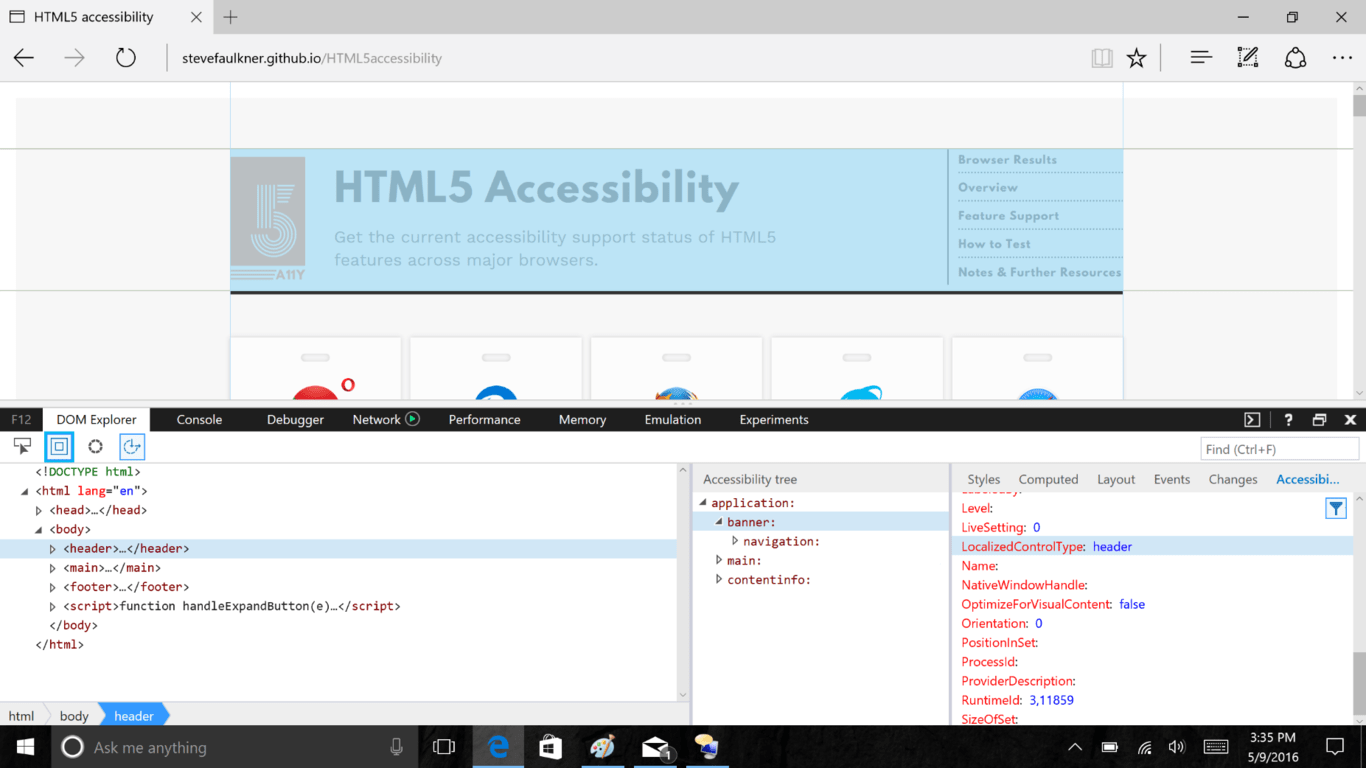
With that in mind, the Windows team is offering some information about how it built a more accessible user experience with HTML5 and UI Automation. In a semi-lengthy post on its Microsoft Edge Dev Blog, the Edge team walk through several new accessibility features that it tapped into to give its users great experiences when using the browser in Windows 10.
In this post, we’ll walk through some concrete examples of how our new architecture improves the end user’s experience, and specifically how markup defines the experience of navigating with assistive technologies like screen readers. Our examples focus on Narrator, but any screen reader using UIA will be able to take advantage of these improvements.”
Reading over the 2,500-word post, developers will find information on an upcoming refresh to the HTML5 Accessibility platform and can access a version of the update in preview form on GitHub. The refresh improves criteria for mapping to the accessibility API, keyboard accessibility, and accessibility of error states. Developers will also find information on how Microsoft plans to improve its accessibility experience with HML5 semantic elements, code examples on JSFiffle, relating landmark navigation using elements in HTML5, as well as enabling a the new F12 Accessibility Tree view.
F12 accessibility tree view
The list of old, new, and soon to be incorporated accessibility features are presented at length in the post. Developers interested in improving their experiences by using HTML5 and UIA should have a gander at the blog.
The Windows team is also planning to offer the listed features to “all Windows 10 customers with EdgeHTML 14” that will be included with the Windows 10 Anniversary update scheduled for later this summer.
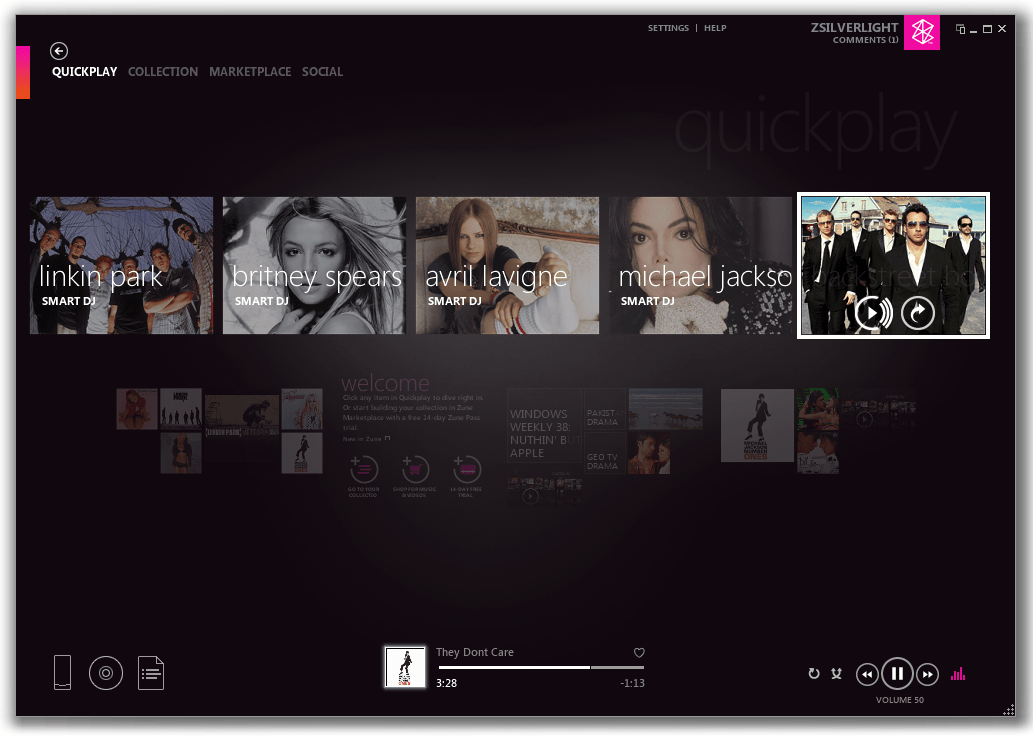
Like many of its revamped properties, Microsoft’s Groove music app has been a continual work in progress and seemingly far removed from the good old days of Zune. Since the deprecation of the Zune platform many have been aching for the Groove or former Xbox Music products to mimic if not completely ape the aged Zune experience.
While Microsoft has all but buried the Zune platform, UI, and features in favor of its Groove app, a developer on Reddit has decided to revive the Zune spirit, but for a modern user experience in Windows 10.
The app, Bloom Music Player, is in open beta now and has been an ongoing process for the past few weeks. The developer, who goes by ducttape36 on Reddit, showed off a design concept of the music player that has swelled over the past couple of weeks with overwhelming demand from Zune enthusiast and disgruntled Xbox Music or Groove users for an actual product.
Today, via the Windows Phone Reddit page, ducttape36 has provided a link and full features list for a beta version of the app in the Windows Store. For those anxious to return to the Zune environment, the new “replacement software” offers:
Customize your player with dark and light themes and a background picture.
Fast searching just by typing while on the main screen.
Organize your music with a simple tag editor.
Enjoy beautiful visuals on the ‘Now Playing’ screen.
Create your own playlists or set criteria for automatic playlists.
Browse music from the online store.
Transfer music to your Windows Phone directly from the app.
Along with features, the developer also notes some known issues with the beta-tagged experience that include:
The tag editor is a bit unstable and may cause songs to be listed as duplicates in your collection.
Android phones aren’t supported for syncing yet.
Performance is pretty slow, especially for collections with >10,000 songs.
DRM music does not work and unfortunately, won’t work until MS opens up their Groove Pilot Program again.
There is no automatic syncing with devices yet, only manually transferring be drag and drop or right-clicking media.
Without being fully supported by the Groove team, the app does not offer Groove Music Pass functionality within the app nor will the app play friendly with DRM content.
While the beta is free to download, users are encouraged to donate to the effort; donations are one way to help expedite the development of homegrown apps for many developers.
If you’re still locked out of your Groove Music app on mobile due to the 14322 or 14332 build bug, or just want to a modern looking Zune client, head over to the Windows Store for a look.
Sometime today, the Senate Judiciary Committee (SJC) will hold a hearing on what safeguards are needed for protecting trade secrets. Specifically, the SJC will take a look at the Defend Trade Secrets Act, which would create a US federal guideline for trade secret protection now and into the future. Microsoft knows the importance of protecting trade secrets not only for their own products like Cortana, but also to for their competitors.
Trade secrets have been a way of protecting innovation and technology from being stolen by other companies. Before the Internet, trade secrets were secret soda formulas, customer mailing lists, and product manufacturing methods that kept companies a step ahead of their competitors.
With some of the new technology that is being created today, trade secret protection is more important than ever before. Microsoft’s Cortana is one perfect example. While Cortana acts as your virtual assistant by setting up meetings, appointments, and performing other tasks, there is an incredible amount of technology and software that is developed by Microsoft and works behind-the-scenes to create a unique experience that is different from other virtual assistants, like Google Now or Siri.
Cortana on Windows 10
Cortana is powered by Microsoft-engineered voice recognition, language translation, context algorithms, location data, and uses a wide range of other Microsoft technologies, software, and cloud services in order to get Cortana to help you organize all of your tasks in real time. Microsoft’s Cortana represents untold hours upon hours of research, testing, and other refinements as Cortana is adapted to be used with other applications and on other devices.
Although US patent and copyright laws are already in effect, US federal trade secret protection is important because it allows Microsoft to continue to innovate in ways other companies cannot. Trade secrets represent an alternative to patents in that they allow companies to maintain control of their technology for longer periods of time while giving up the legal monopoly that patents provide. It’s an important tradeoff that allows companies to pick the best means of protecting their intellectual property.
Microsoft’s Jule Sigall, Assistant General Counsel of IP Policy & Strategy explains the need for US federal trade secret protection:
“A trade secret is unique among forms of intellectual property in how it is legally protected. While it is a federal crime to steal a trade secret, a business that has its trade secrets stolen must rely on state law to pursue a civil remedy. Owners of copyrights, patents, and trademarks can go to federal court to protect their property and seek damages when their property has been infringed, but trade secret owners do not have access to such a federal remedy.”
Microsoft is pleased to support the Defend Trade Secrets Act and will continue to work with the US Congress in the hopes that this legislation passes.
Star Trek Online is a free-to-play massively multiplayer online role-playing game (MMORPG) already available for Windows PC, and will make its way to Xbox One and PS4 this Fall 2016. Star Trek Online allows players to create their own Star Trek story as a Captain of a Federation starship, a Klingon warrior, or be a commander of a Romulan Republic Warbird.
Star Trek Online is now in its sixth year on the PC and represents every era of Star Trek; you can even play as characters from Star Trek: Voyager, including Seven of Nine, The Doctor, Harry Kim, Neelix and Tuvok.
There is no new information on what the console graphics will look like as the Star Trek console announcement trailer only features scenes that are available on Star Trek Online for Windows PC. Executive Producer of Star Trek Online, Stephen Ricossa, assures that he will not forget the PC users that helped make Star Trek Online such an incredible game experience.
“Deferred lighting, light probes, and improvements to our High Dynamic Range lighting system combine to provide more realistic lighting that feels like a true refresh to the game. These technologies, and the skilled artists that bring them to bear, create an experience that is not only more immersive, but simply put, more beautiful. To the community that has been with us for over half a decade, I want you to know that these improvements will be coming to the PC version of the game later this year as well.”
Currently, Star Trek Online has over 100,000 player-generated missions, new factions, and features celebrity voice work from every movie and TV episode. Ricossa is looking to convert everything that made the online Windows PC experience so incredible and to translate it to Xbox One and PS4. There will also be some additional upgrades to make the transition to consoles as smooth as possible.
More information will be released in the next few months, and so stay tuned.
Professor Clint Tuttle recently concluded his class this spring at the University of Texas at Austin with an inspirational song parody of sorts. To the tune of Justin Bieber’s song “Love Yourself,” Tuttle busts out his acoustic guitar in front of his lecture podium and sings to his students about how one day when they have graduated and are working they will appreciate learning about Microsoft Excel in his class.
In his lyrics, Professor Tuttle says he is writing this song to remind his students that even though for all those times they “sat up working really late… And those Excels that had you cursing my name,” Excel is really useful.
His song goes on to make his case to his students why Excel is important with verses like:
My students don’t like it but then they see the light
And they never like to admit that I was right
And after college they get jobs,
And they see what’s going on
But now they know,
That Excel is more a friend than foe
And of course the song is filled with some nerdy uses of Excel functions and terminology in his plea to his students with lines like:
Many years from now, when you have left UT
And you use your these skills well please think of me
You’ll probably use conditional formatting
Those nested ifs will come in handy you’ll see
And
Pivot Tables kick…butt
And you got your functions on!
Use countif, sumif, even vlookup too
Maybe 3-d charts too
Hopefully Professor Tuttle’s unique appeal to his class will stick in his students mind and they will appreciate all the long hours they spent agonizing over Excel during college. Because the Professor is right, Pivot Tables do kick butt in the working world.
From a very big Xbox One bundle at a not so big price, to the buy a Lumia 950 XL get a 950 free promotion, it is very apparent that Microsoft and its retail partners are coming up with all sorts of deals for their customers. Today, though, and as reported by Neowin, we’ve come across yet another deal. This time, with some strings attached, an Australian mobile carrier is offering up a Xbox One bundled with Lumia 950 or 950 XL, for “free.”
The fact that Windows Phone users appear to be dropping the platform for Android is not stopping the Australian mobile carrier Optus from this offer. In fact, the deal is very encouraging, as if a customer signs up to a Lumia 950 or 950 XL on a two-year plan of $80 or more, the Xbox One is $0 up front. There are, however, some conditions, and if the plan is cancelled or left early, the full remaining cost of the Xbox one, the Lumia devices, and the contract will need to be paid off. The details on the offer can be seen below.
Microsoft Lumia 950 & 950XL Xbox bundle offer: Sign up to a Microsoft Lumia 950 & 950XL on an $80 or above My Plan Plus or My Plan Business plan from 10th May 2016 and have the option to bundle an Xbox One 500GB for $0 upfront over 24 months, whilst Xbox One 500GB stocks last. If you leave your plan early you will need to pay out the full remaining cost of your phone and the Xbox One 500GB, including any amount that Optus was going to cover.
30 Days Try Optus Offer: If customers are returning the Microsoft Lumia 950 & 950XL device under the 30 Day Try Optus offer, customers must also return the Xbox One 500GB in its original box and in good working order with all power cords and associated accessories (including gaming console and controllers) within 14 days of cancellation.
While the deal is truly awesome, this is not the first time that this Australian carrier offered up a free Xbox to its customers. Back in November of 2015, Optus also gave away a free Xbox for the first 300 customers that preordered a Lumia 950.
So, what do you think of this promotion? If you live in Australia will this be a big reason for you to pick up a new Lumia device? Let us know your thoughts by dropping us a comment below.
Microsoft is now offering 50% off the Fashion Cutouts add-on in the PicsArt app until May 15th. The app is a rather comprehensive all-in-one image editing tool which contains numerous filters and photo manipulation settings as well as its own built-in social network of users where artists and photographers can share their creations. Here’s the official description:
Creativity is more than just a photo filter—PicsArt provides you with everything you need to make amazing photo edits, artistic camera shoots, photo collages, create digital drawings, and communicate with other creatives who have joined our mission to beautify the world. 250 million people have already downloaded this free app for powerful image editing and photo montages, using hundreds of tools and effects that you can find only in professional photo editing programs. PicsArt inspires you to create beautiful images anytime, anywhere. Transform your photos into works of art and let the world discover them!
PicsArt was a popular app on Android and iOS before launching on Windows phone in late 2013. It has gone through numerous updates since then and was upgraded to the new Universal Windows Platform app format in December 2015. It’s now available on Windows phones running Windows Phone 8 and upwards and Windows PCs with Windows 8.1 or Windows 10. PicsArt is free to download but makes a profit from a variety of add-ons such as the Fashion Cutouts one that is discounted right now. Other popular add-ons include Bianca’s Lettering Art, After Dark, Stardust, a package of galaxy-themed images, a special Father’s Day frame kit, and Polygon Art.
Most of the add-ons fall around the $1 or $2 mark but there is an option to remove ads in the app for around $7. The Fashion Cutouts add-on is usually $1.98 but with this discount, it’s $0.99.
Are you a fan of PicsArt? Let us know if you enjoy using it in the comments below. Would you recommend it to other users?
Intense debate has surrounded Lumia Icon lately and the main question was the following: to get or not to get the Windows 10 upgrade? After long suspense, Microsoft released the news and confirmed that Windows 10 Mobile Insider Preview will support Lumia Icon. So far, so good. However, Lumia Icon remains in the spotlight because it appears that the users who upgraded the OS recently cannot roll back to Windows 8.1.
Users reported bad video rendering, apparently Cortana is slow in taking commands or it keeps popping up, and the Live tiles do not work among other things. If the Windows 10 experience let you down, but you could not roll back to your previous OS, there are two workarounds you can try.
Here’s what you can do if your Lumia Icon can’t roll back to Windows 8.1
1. Use the Device Recovery Tool
This tool will reset and recover your phone software but the downside is that it will erase all content stored on your phone (apps, games, text messages, call history, photos, everything).
Start the recovery program and connect your phone to your computer.
If you’re asked, select the proper USB mode on your phone, Nokia Suite or Modem.
Follow the indicated steps to complete the downgrade.
2. Use ROM Recovery Tool
This solution is to be used at your own risk because it could damage your phone. If you do not want to take this risk, go to a repair shop to have the downgrade done for you.
Open an administrator command prompt in the Recovery Tool folder.
Locate the ROM Recovery Tool. Theoretically, you should find in C:ProgramDataMicrosoftPackagesProducts
Find the FFU file (.ffu) for your device. Example: C:ProgramDataMicrosoftPackagesProductsrm914RM914_3058.50000.1425.0005_RETAIL_eu_hungary_4 29_05_443088_prd_signed.ffu
Enter the following into Command Prompt:
thor2 -mode uefiflash -ffufile “add the .ffu file location”.
Your phone should begin the flashing process. Wait until the process is completed.
Once the flashing process is completed, enter the following line into Command Prompt to reboot your phone.
Microsoft is teaming up with Real Madrid player, Marcelo Vieira, to promote the importance of digital literacy in young children in Brazil and abroad through a collaboration with the Real Madrid Foundation and Microsoft’s YouthSpark initiative.
“My dream is to take this project to all the world’s children, because with technology … the possibilities of any child are endless,” admits Vieira while discussing the program. So far, the program has launched in three locations in Colombia, Brazil, and in Virginia in the United States but there are plans to roll out the program to all of the foundation’s schools.
Once a school begins the program, they are given a special kit which contains a video from Vieira alongside the tech donated by Microsoft such as free access to specific activities on Office 365.
Orlando Ayala, Microsoft chairman and corporate vice president of Emerging Markets, proudly admits states that, “With technology and programs like YouthSpark, we are complementing the Real Madrid Foundation’s educational program to fight the biggest educational challenge of the 21st century: the lack of digital literacy.”
Microsoft’s YouthSpark is a program run by the company with the aim of introducing and training children in the latest technology by assisting targeted organizations with their goals. In this instance, YouthSpark is working with the Real Madrid Foundation to bring tech education to over 40,000 in 72 countries but other recent examples of their assistance range from ambitious projects like investing three million dollars in a program in Vietnam to helping an Irish girl with her resume.
Have you been inspired by a YouthSpark program? Let us know which on in the comments below.
Windows 10 is currently available as a free upgrade for all Windows 8.1 and Windows 7 users, but the free upgrade period will end soon. After the free upgrade period ends, only way to get Windows 10 would be to purchase your own copy, but there’s another way to download Microsoft Windows 10 for free after the Windows 10 upgrade period ends on July 29th.
As you know, only owners of legitimate copies of Windows 7 and Windows 8.1 are eligible for free upgrade, but you can also download Windows 10 for free, even if you don’t meet the required conditions, or even if you don’t use Windows operating system at all.
Microsoft is testing Windows 10 constantly with new updates in its Insider program, and there is always demand for more testers that will try new features before they are released to public. All Insider members can legally download and install Windows 10 and use it free of charge on their PC.
There’s no particular requirements on you can join the Insiders program and test new Windows 10 updates, therefore even if you don’t own Windows 7 or Windows 8.1, or even if you don’t use Windows at all, you can still get Windows 10 for free by joining the Insiders program.
Click Get Started button and enter your Microsoft account username and password.
Read the Terms of Service and check your areas of interest.
Click the PC button.
Scroll down to the More options section and click Windows Insider site link.
Scroll the all the way down and select which build you wish to download.
Now select your language and choose which version of the Preview Client you want to download. If you have 64-bit system, it’s advised that you download 64-bit version for best performance.
Download process will start, but since Windows 10 .iso file is somewhat large, you might have to wait a while for download to complete.
Once the .iso file is downloaded, you’ll have to burn it to a DVD or create a bootable USB flash drive.
If you wish to keep your files, just insert the Windows 10 DVD or USB flash drive and run setup.exe from it. If you wish to perform a clean installation and remove all your files, set the USB or DVD as a first boot device from BIOS and install Windows 10. To see how to do that, check your motherboard manual for detailed instructions.
After you’ve installed Windows 10 Preview, you can use it freely as long as you want.
There had been certain confusions regarding Windows 10 Insider Preview and the final release of Windows 10. Users thought that by joining the Insiders program they would obtain a genuine Windows 10 license, but that’s not the case. This issue sparked a lot confusion, therefore Microsoft’s Gabe Aul gave its clarification in this blog post.
If you wish to use Windows 10 Preview and be a member of Insider program, you can do that for free as long as you like, regardless of what version of Windows you’re currently using, but if you wish to leave the Insiders program and get a genuine Windows 10 license, you’ll have to upgrade from a genuine copy of Windows 8.1 or Windows 7 just like everybody else.
Getting a free version of Windows 10 isn’t that hard, and the free Windows 10 Preview is available for download with no limitations. Only issue with Windows 10 Preview might be occasional bugs and few issues, but you can use it for free without any limitations.
This update contains the following changes:
• Fixed five bugs affecting vision-impaired users
• Fixed six issues that could result in an app crash
• Fixed an issue where the playback bar got stuck while in “repeat one” mode
• Fixed an issue that prevented the system media controls from updating when rapidly hitting next
With the latest flight for PC (build 14342), you should also have a fix for the following previously advertised known issue:
• [FIXED]: Playing music in Groove within 2 minutes after logging into your PC will result in 0xc10100ae playback errors. If you wait more than 2 minutes after logging in to play music in Groove Music you will avoid this issue
The app is rolling out now to Windows Insiders on the Fast Ring running PCs, phones, and HoloLens devices. Go hit that update button now, and let us know in the comments what you think of this release.
As an effort to inform and assist developers as they transition to the Universal Windows Platform, The Windows App Team will start releasing a series of blogs called the Windows Dev Center Tips. The series will focus on helping developers become more aware of the options available during the app publishing process starting with options that have just been announced at Build 2016 earlier this year.
The options to be covered include:
Publish or update a public app
Package flighting
Publishing hidden apps
Side-loading and enterprise distribution
Third party and legacy distribution options
Notes about confidentiality and purchasing
The Windows blog created a decision tree to outline the decisions that publisher’s options and highlight topics that will be covered in the upcoming blog series.
Decision tree for app publishers
New developers and old will most likely find the tips and tricks from the blogs useful. The Windows Dev Center Tips blog series will be pushing out over the next few weeks, and we’ll be certain to cover each one as they are released.
It’s no surprise that websites that run slower will cause a significant loss of traffic. However, according to Google and Bing’s research, even the smallest delays under half a second have been proven to harm a site’s success. While in-browser developer tools are often used for getting an idea of what is going on behind the scenes, Microsoft has posted a blog today explaining how the Windows Performance Toolkit can resolve their issues and increase their performance.
The Windows Performance Toolkit is available for installation in the Windows Assessment and Deployment Kit, a general kit that includes other optional tools and features. Because it is efficient at finding traces in and out of the browser, the WPT is often used by the Microsoft Edge performance team to analyze both applications and operating systems in depth. The performance toolkit includes the Windows Performance Recorder that captures and records tracers and the Windows Performance Analyzer that analyzes those traces. Both of these help developers better understand how they can debug their performance loss.
Along with the Event Logging for Windows (ETW), CPU and memory usage across all Windows applications can be analyzed. That includes tasks that in-browser developer tools can’t normally reach such as GPU usage, disk usage, and system wide memory usage. It can even identify characteristics across the whole system and sift through multiple tabs in multiple processes at the same time.
At the Edge Web Summit 2016, developer Senior Program Manager Todd Reiifsteck covered the step by step instructions on how to debug and improve performance with a live demonstration. The demo page was published on the site and Github for developers to get a hands-on experience with the toolkit.
For more details on how to use the Performance Toolkit or to read more about their demonstration, visit the blog. Download the WPT for free at the Microsoft Dev Center.
The Lenovo Solution Center (LSC) software has always been a problem and it doesn’t appear if the issues will end any time soon: a new vulnerability has been located in the software that can cause security risks.
The vulnerability could allow attackers with local network access to a user’s computer to execute what is known as arbitrary code, according to researchers from Trustwave SpiderLabs. Attackers can use the flaw to elevate certain privileges that are tied to LSC’s backend. This then open the door for hackers to trick LSC into running arbitrary code directly into the local system, according to Karl Sigler, a SpiderLabs researcher at Trustwave.
This could become a major issue for Lenovo seeing as its LSC software is installed on almost every one of its modern computers. The software acts as a dashboard for monitoring system health among other things, so no doubt it will be used by many not aware of the faults.
“By convincing a user who has launched the Lenovo Solution Center to view a specially crafted HTML document [such as] a web page or an HTML email message or attachment, an attacker may be able to execute arbitrary code with SYSTEM privileges,” explained a note from the DHS-sponsored CERT at the Software Engineering Institute at Carnegie Mellon University.
What we are seeing here is the latest flaw in a long list of others that occurred in the past year. It has become custom for one to view LSC software as a security risk similar to that of Java and Flash. If Lenovo fails to rectify the issue, it will likely hurt the company’s bottom line in the future. Lenovo is one of the top PC makers, a title that can go away at any given moment if changes are not put into place.
Luckily, Lenovo released a fix to end the risk of attack from outside sources. It can be downloaded right here from the company’s official website. Bear in mind that only folks using Windows 7, Windows 8, Windows 8.1 and Windows 10 will be eligible to grab the update seeing as LSC is not available for other platforms.
Recently, the company had to release updates to improve its companion apps for Windows 10 in hopes that its many users would stop leaving terrible ratings.
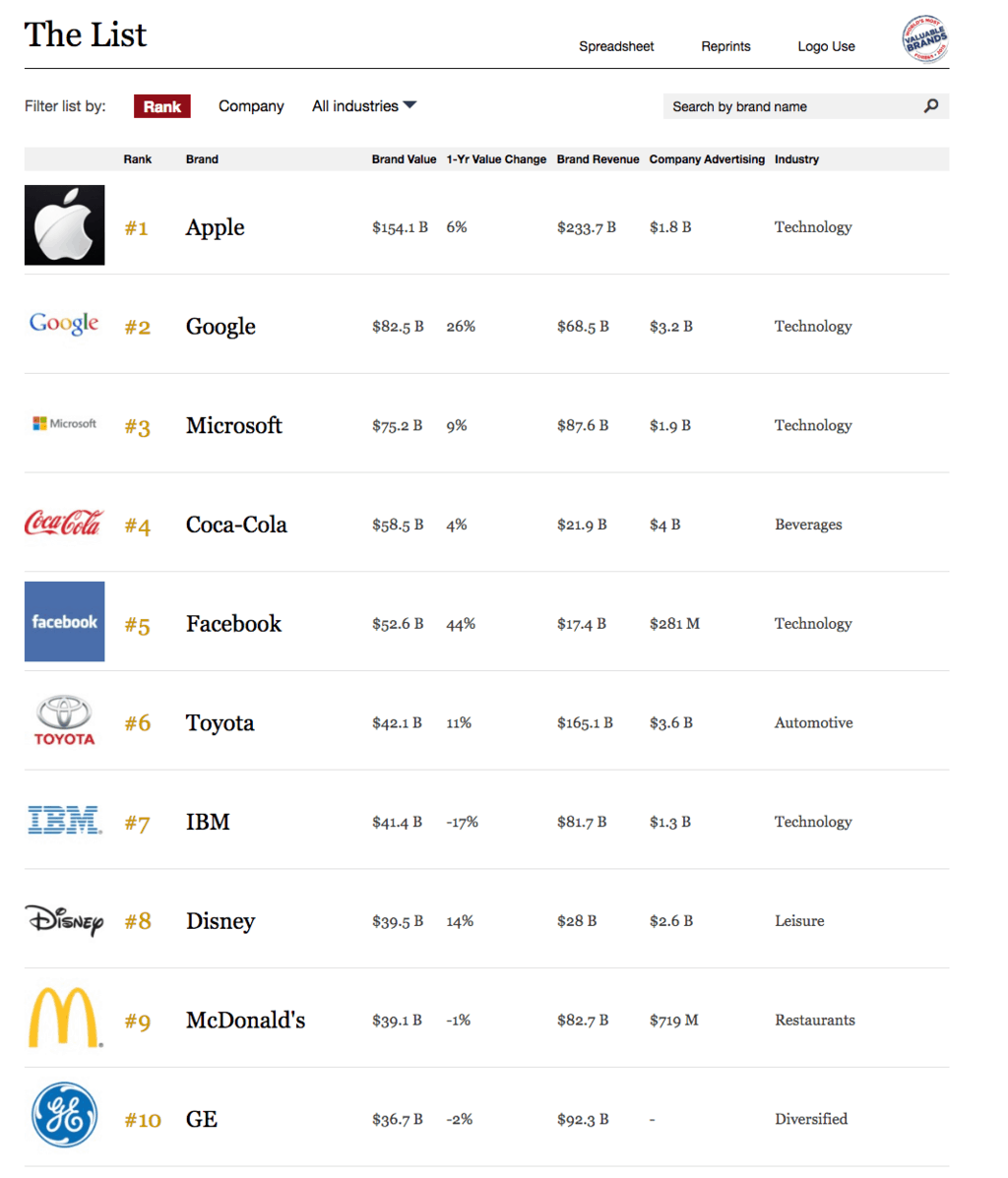
Forbes has just released their annual study of the world’s most valuable brands and Microsoft has scored the third spot on the podium behind its tech rivals Apple and Google. The Cupertino giant has won the crown with a $154.1 billion brand value, which is quite far ahead of its competitors Google ($82.5B) and Microsoft ($75.2B).
Forbes began valuing the richest brands in 2010 and Apple has finished first sixth times in a row. To establish its yearly ranking, the magazine has considered more than 200 global brands to select a final list of 100 most valuable brands worldwide spanning 16 countries across 19 broad industry categories. To be selected in the pool, brands were required to have more than a token presence in the US and US Brands count for 52 brands in the full list. You can have a look at the top ten below (the full list is available over here):
Forbes Most valuable brands list 2016
Other interesting bits from the Forbes list, Facebook appears as the fastest-growing brand in the top 100 for the second time in a row with a yearly growth of 44%. On the other side, IBM’s brand value fell 17% to $41.4 billion this year, which is not all that surprising, according to the magazine the company “a reported 16 straight quarters of revenue declines and revenue in the latest quarter was the company’s lowest in 14 years.”
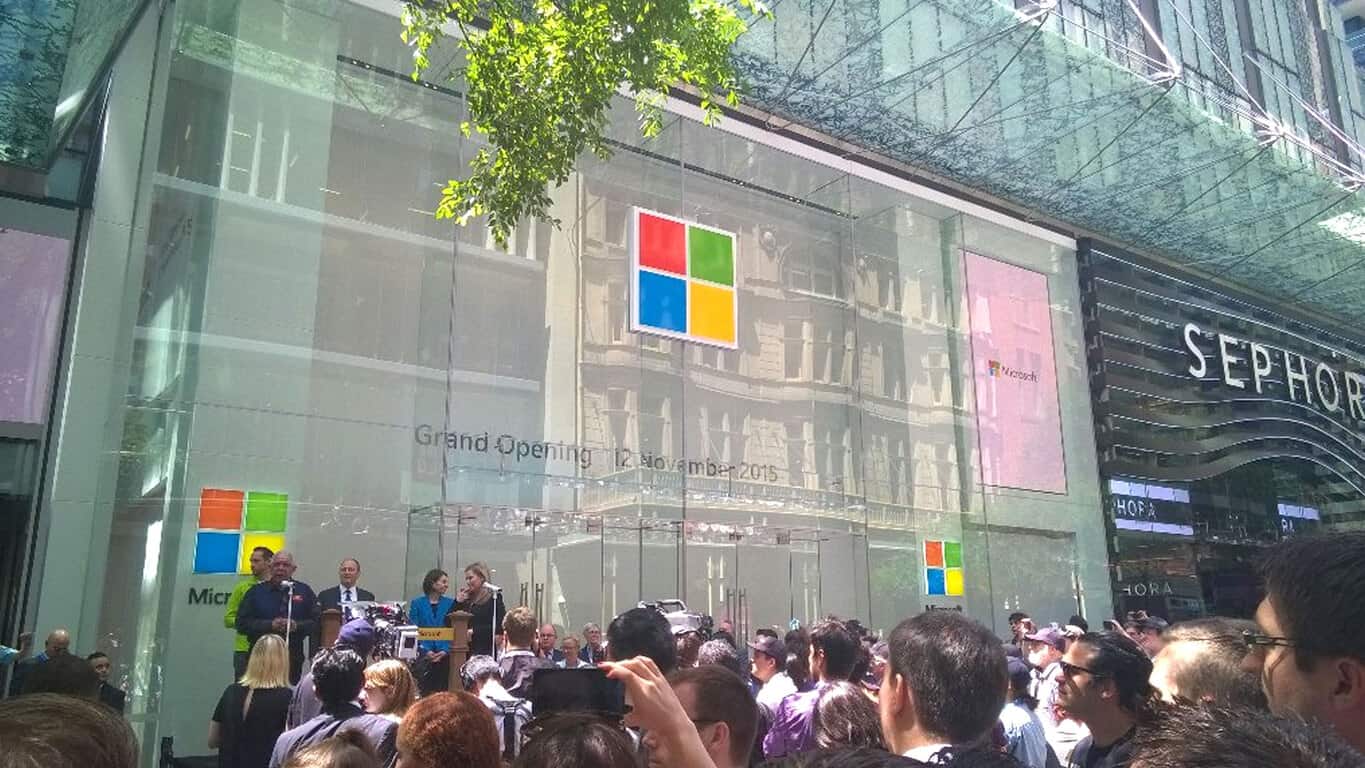
David Reibstein, professor of marketing and branding expert at the University of Pennsylvania’s Wharton School, added that “brands get their value from how customers perceive them. What makes it valuable from a company perspective is that customers are willing to pay a higher price or are more likely to buy.” While we can’t deny that the Apple brand has become quite iconic today, the Microsoft brand has also slightly evolved over the past few years as the Redmond giant pursued its retail strategy and hardware efforts. Can you believe that Microsoft opened a flagship store at 677 Fifth Ave. in New York City last year? Also, with its premium line of Surface devices (with some luxury accessories, such as this Signature Type Cover made from Alcantara), Microsoft is clearly targeting the high-end of the market and “creative professionals” which have mostly been Apple customers so far. Microsoft
While there probably won’t be Microsoft enthusiasts spending the night outside Microsoft Stores to buy the next Surface devices like Apple fans and iPhones, but are you surprised to see Microsoft in the top three valuable brands worldwide? Please tell us what you think in the comments.
Google is making some rather bold moves with its platform as of late and in an announcement today from the company, its next move is to ban short-term cash loan advancement ads. The short-term cash advance ads are more commonly referred to as “Payday” loans and feature same-day (or near same-day) money deposits fraught with incredibly high-interest rate returns.
Google’s announcement of the Payday ban is grounded in its belief that the ads along with the loans themselves are “deceptive or harmful” to its users, which is what Google’s search algorithms and platform are intended to help defend against.
As the second-placed search engine in the US and various regions internationally, Microsoft’s Bing platform will undoubtedly be called into question after the July 13, 2016, stop-date Google has in place for its ban. Similar to Android and iOS on the smartphone front, Bing and Google have gone back and forth implementing and aping design and functionality traits from one another as both services compete for eyeballs (albeit Google still holds a lion’s share of views and visits). With Google taking the initiative to step in and ban PayDay loans, Bing users may look to Microsoft to do the same.
While Google’s move appears to be centered around the user’s best interest, it raises some obvious questions about its effect on the search engine market as a whole as well as the ethics of human intervention in algorithmic practices.
Advocates say about 20 percent of payday loans happen online. Reports have found that some payday lenders had advertised their products when people searched the web for phrases like “desperate for money” or “I need money to pay my rent.
The standard PayDay loan agreement is a multi-step sign-up process that requires pages of legalese and an exchange of information that requires a user’s full attention. Needless to say, people aren’t accidently signing up for the loans no matter how deceptive the advertisement appears online. With Google’s new announcement, the company has taken it upon themselves to intervene in how it displays ads to handpick and remove ads that a portion of users are obviously in need of information about.
In that vein, today we’re sharing an update that will go into effect on July 13, 2016: we’re banning ads for payday loans and some related products from our ads systems. We will no longer allow ads for loans where repayment is due within 60 days of the date of issue. In the U.S., we are also banning ads for loans with an APR of 36% or higher. When reviewing our policies, research has shown that these loans can result in unaffordable payment and high default rates for users so we will be updating our policies globally to reflect that.”
On that note, advocacy groups are seeking the same sort of intervention from the likes of Yahoo and Microsoft.
Microsoft and the Bing team have had no official comment on the matter and perhaps are waiting to see the full ramifications of Google’s stance on PayDay loans. Perhaps the ban will send users in need of a Payday loan to Bing or maybe the Bing team would rather avoid the often slippery and messy slope of intervention that Google is bearing on itself?
Jeannette M. Wing is a corporate vice president tasked with running the Microsoft Research laboratories. Today, Wing appeared before the Senate Commerce, Science, and Transportation Committee. Wing was speaking at the hearing on “Leveraging the US Science and Technology Enterprise,” on the behalf of a special American Academy of Arts and Sciences Committee.
Specifically, Wing was speaking on behalf of the Academy of Arts and Sciences Committee on New Models for US Science and Technology Policy. This committee was formed in response to a fear that the US is falling behind other countries in the area of basic research. Wing’s testimony centered around the idea that basic research plays a fundamental role in American discovery and innovation.
Basic research is used to develop our understanding of our environment but doesn’t have a specific goal or product in mind. Basic research has helped lead to major advances in biotechnology, computer science, and aerospace. In turn, these American basic research advances have led to strong growth in the US economy.
Wing details what leads to American economic growth and prosperity in her written Senate Commerce Committe testimony:
“I hope it is evident that while basic research may have no intended end goal, it is, in fact, the foundation of American prosperity and progress. Steady, sustainable increases in federal investment would go a long way to restoring American leadership.”
Wing pointed out that while there are clear advantages to using basic research, the US has not utilized enough public and private investment in research and development. The US continues to fall behind other countries when it comes to basic research.
Wing further pressured lawmakers to take specific steps to make sure that Americans will get the most benefit from the US federal government’s investments in basic research. Wing also outlined what the US needs to do to make sure that the US remains the world’s innovation leader
We live in a world where technology is always advancing for the better of humanity, and today we’ve just discovered some more proof for that testament. Microsoft Research is introducing a new SwimTrain “exergame” technology which will reflect the characteristic of group fitness swimming.
Developed together by both The Korea Advanced Institute of Science and Technology (KAIST) and Microsoft Research Asia, the project is an app for a smartphone. Ultimately, when the phone is used with a waterproof case and a pair of underwater headphones, the app will let swimmers join virtual teams to cooperate and compete. SwimTrain will also use all the built-in smartphone tech to evaluate progress, coordinate a team, and provide sensory feedback, keeping the swim “train” running, and entertained, all while getting fit.
On the technical side, the project functions by mapping swimmers into virtual train cars and allowing them to pace through three distinct phases: the competitive phase, the cooperative phase, and the rest phase. To prevent information overload, however, each swimmer is only given information from immediately ahead and behind.
This technology is no doubt very interesting and is just the latest project from the Microsoft Research team. As we previously have reported, back a few weeks ago, the same team also revealed a new smart tattoo technology.
This week at the ID@Box Game Fest, which is all about independent Xbox game developers, some of the best games from the ID@Xbox program are available to play for free. After checking out the Xbox Wire post about the occasion, we’ve given a few of the games a look and have included Microsoft’s descriptions and download links below.
Come with us, and leave your mortal world behind. This is SMITE, the online battleground where the Gods of Old wage war in the name of conquest, glory and eternal battle. Whether this is your first Multiplayer Online Battle Arena (MOBA) game or you’re a seasoned veteran, the intense action and irreverent mythology of SMITE will make you a believer.
They were called Tenno. Warriors of blade and gun – Masters of the Warframe armor. Those that survived the old war were left drifting among the ruins. Now they are needed once more. The Grineer, with their vast armies, are spreading throughout the solar system. A call echoes across the stars summoning the Tenno to an ancient place. They summon you. Come Tenno, you must join the war.
Magic: Duels: Stainless Games and Wizards of the Coast
Summon mythical creatures. Cast legendary spells. Match wits with your opponent and emerge victorious in epic online duels. With hundreds of earnable cards and countless strategies, building your deck and challenging your friends in Magic: The Gathering has never been more fun.
All the games on ROBLOX are created by gamers like you! Play solo or with friends in a variety of indie games exclusive to ROBLOX. Find Strategy, Platformer, Role Playing, Tycoon, Shooter, Survival games and more! ROBLOX is free to play, although you can buy ROBUX, our virtual currency, to upgrade the look of your ROBLOX avatar or to get optional in-game power-ups.
Happy Wars is a large-scale online multiplayer action game, involving up to 16 players per match. Go wild in over-the-top melees in a fantasy setting featuring comical characters! Assign any of the 6 unique character classes to your player character, personalize it by adding customization parts from a wide variety of choices, and engage in heated sieges and cast spells in grand magical battles with players all over the world!
Each month, regular updates will add classics like Star Trek: The Next Generation, Terminator 2: Judgement Day, Twilight Zone, Creature from the Black Lagoon, Monster Bash, Medieval Madness, Funhouse, Attack from Mars, Circus Voltaire, Big Shot (and many others for years to come!) along with online tournaments and additional modes to challenge yourself and compete against your friends.
These are just a few of the great independent titles which are free to play for this week. You can check out the other titles, including an entire set of other pinball-related games, by visiting this web page. The ID@Xbox Games Fest is set to continue for the rest of this month, so be sure to stay tuned to WinBeta for all the latest Independent developer news and information.
Skype has announced today that it’s partnering with Indian ICT Solutions and Services company Sify.com, making it easier for Skype users in the country to pay for Skype Credit and subscriptions. Until now, Skype users in the country were only able to buy Skype credit or subscriptions with International credit cards but starting today Sify.com will enable Indian debit, credit cards and NetBanking to be used for these purchases. The Skype team shared a walkthrough of the process below:
Select the subscription or the amount of Skype Credit you’d like to buy
On the checkout page, enter your Indian billing address and you’ll be able to pay using your local credit, debit card or NetBanking
Pay by credit, debit card or NetBanking.
Judd Harcombe, Head of Emerging Market Business Development at Skype shared today on Sify.com:
“Together with Sify, we are making it easier for Skype users in India to purchase Skype credit and subscriptions. India is a key market for Skype and we want to help our users in India connect with friends and family abroad.”
Does this new partnership make it easier for you to use Skype?
Electronic Arts had a successful fourth quarter with strong financials and numbers. As per the earnings report, EA is the top publisher for PlayStation and Xbox One in the “Western world for the fiscal year 2016 as per EA estimates”. During their latest earnings report, the company also highlighted that Star Wars Battlefront is a highly successful new franchise, selling over 14 million units in fiscal year 2016, which was way ahead of company’s expectations. So, it makes sense for the developer to think about a successor to the popular game.
The company confirmed during the earnings call that Star Wars Battlefront 2 is in development and is expected to launch sometime in 2017 (via Gamespot). EA CFO Blake Jorgensen confirmed it will have “bigger and better worlds” and will make use of the content from the “new movies” — although he didn’t name which ones. Jorgensen further said that the company plans to release on new Star Wars game every year for the next three to four years, which sounds great.
Colorwave has launched a beautiful yet expensive Xbox One controller known as “Xbox One Elite Titan Controller“. The controller carries a whopping $299 price tag, which is way more than the standard controller which ships with the console itself (via Windows Central).
The controller’s front is made of gold carbon fiber graphics with a gloss finish while rest of the controller are painted jet black gloss, giving it a premium look compared to the standard controller. The company mentioned that it’s a limited edition piece and the initial run is only of 50 pieces which means that you may have to act fast if you want to get this controller.
Colorwave said on the product page:
Carbon fiber is a man-made material that has revolutionized the aerospace industry, auto racing and artificial limbs. Although carbon fiber is incredibly strong and lightweight, it also has a distinctive woven pattern that makes it appealing to the masses. Because of its appeal, ColorWare created a custom gold carbon fiber graphic for the Xbox One Elite Controller. This limited edition custom Xbox one controller with the gold carbon fiber graphics is called Titan.
The Xbox One Elite Titan Controller is heavier than the standard controller, has three sets of thumbsticks and two d-pads — one looks like the original while theo ther one is designed for cross-directional movements. Additionally, there are four detachable paddles which can be controlled by an app specifically designed for the Elite Controller. Users can use the app to “program back paddles, and remap any of the 14 digital inputs from the controller.”
Here’s a video showing Colorwave’s Xbox One Controller:
Included in the box are carrying cases, a set of 4 paddles, a set of 6 thumbsticks, 2 D-pads: faceted and standard, a USB cable, AA batteries and a quick set up guide and product manual. The case is compatible with Windows 10 and Xbox One console.
Microsoft has pulled the torrent app, Torrenty, from the Windows Store after it was found to prompt the download of apps infected with adware.
ZNET’s Ed Bott was one of the first to discover the suspicious app after opening the current version on his PC and noticing a rather strange button that prompted him to update. “That “1 Update(s) Pending” message doesn’t look like an ad; it appears to be part of the user interface,” he describes. “Clicking that button opened a web page that immediately tried to download a program called Setup.exe. With Microsoft Edge set as the default browser, the software downloaded in a matter of seconds, with a Run button appearing at the bottom of the browser window.”
The app’s endgame was apparently to install a browser add-on that enables a variety of unwanted popups and ads on top of a user’s internet browser.
In addition to pulling the app from the Windows Store, Microsoft also responded with the following statement: “Microsoft has a thorough review process for app submissions, based on a strict set of certification requirements. No approach is perfect, so we encourage people to report any issues they may encounter with Windows Store. For most issues, customers can use the “report concern to Microsoft” link in the Store. For infringements concerns, people can use our online tools or email [email protected] directly.”
In addition to being one dodgy Windows 10 app, Torrenty’s main purpose was to download and upload files via the popular BitTorrent file sharing method. While there are some legitimately legal files that can be shared via BitTorrent, the method is mostly known for being notoriously popular for spreading illegal copies of TV shows and movies. Part of the reason for its popularity is due to the fact that with BitTorrent, there is no one download location, parts of the shared file are hosted by other users who have already downloaded the file themselves.
Have you downloaded any untrustworthy apps from the Windows Store? Share your experiences with the community in the comments below.
Electronic Arts finally revealed Battlefield 1 a few days ago and it was well received by fans and just the general gaming population. Unlike previous games in the franchise, Battlefield 1 is set in World War 1 and for this very reason, the game’s first trailer managed to surpass the excitement for Call of Duty: Infinite Warfare in mere 24 hours.
We’ll definitely enjoy what Call of Duty: Infinite Warfare has to offer when it is released in November, but there’s just something about Battlefield 1 that excites us even more. That’s probably because it is set in an era not touched upon in a long time by a major video game studio. Ever since the rise of the Xbox One and the PlayStation 4 over two years ago, games have been set in modern times or in the future.
Gamers have become tired of jumping around in jetpacks and fighting robots or humans with superhuman strengths on a yearly basis. They are also slowly becoming bored of games set in today’s time, so DICE and EA made a great decision to turn the clock back and we’re fully certain it will pay off in spades. The trailer looks great, and it seems we might get the chance to cut down our enemies on horseback, too.
Now, many have been championing the death of Call of Duty: Infinite Warfare on social media, but that is far from the truth. The reality of the situation is that Battlefield 1 will play second fiddle to what Activision and Infinity Ward has to offer. This is because millions enjoy Call of Duty’s gameplay, so it matters not to them if every game in the franchise takes place on an alien planet where they get to fight giant rock monsters and a robotic planet that sings the blues.
Call of Duty games are all about jumping in and experiencing quick enjoyment. This is not the case for Battlefield, seeing as its maps are large and the overall gameplay is more complicated. Not everyone has the time to learn the nuances, which means a quick match in Call of Duty would be more enticing.
We haven’t seen much when it comes to gameplay, meaning that despite what trailers have shown, anything is possible when gameplay for both games is revealed next month at E3 2016.
Until then, keep calm and bear in mind that while both games are similar due to genre, they are very different in terms of gameplay.
Xbox Live has always been a Microsoft service that I’ve loved and appreciated. The Xbox Achievements add an extra layer of content to games, the leaderboards are great for creating a more social experience, and the seamless cloud saves and backups mean gamers can delete games from their Xbox console, Windows phone, or PC and reinstall them at a later date to pick up where they left off. Well, this is what I thought until today when I found out that my assumptions concerning Xbox-branded games were completely wrong.
While I love my Windows phone (It’s a Lumia 930 for those that are curious), ever since I got it it’s had this bug which prevents it from making system backups to the cloud. For a year and a half I’ve spoken to a variety of in-store, on the phone, and online chat support and have tried every possible solution but nothing seems to squash the bug. The only way to fix it apparently is to do a hard reset to return it to its factory settings. This seemed like a hassle though and, to be honest, the lack of backups has never bothered me too much because all of my apps such as Evernote, Dropbox, etc all save data to the cloud and all of my Windows phone games support Xbox Live, which means cloud saves for them too, right?
Due to a separate bug which has been causing my Windows phone’s System memory to expand exponentially to the point that it now fills up around 28 Gig out of the 35 Gig total memory, and fills up any space that I free up immediately, I decided that I should probably do that hard reset that I had been putting off for so long.
Still unable to make a backup to the cloud, I connected the Windows phone to my Surface Pro via USB to make a local backup of files but discovered that there was no way to backup apps this way. Wanting to make sure I wasn’t missing anything, I began chatting with Lumia and Xbox support staff on Twitter. While the Lumia support promised that any game with the Xbox branding would have its own cloud save, they admitted to not being sure and suggested I talk to the Xbox support who informed me that while my copy of Age of Empires: Castle Siege would be fine (I assumed it would because I use cloud save-based crossplay with the game to play it on my Surface Pro as well), all of the data from Angry Birds Star Wars 2 would be completely lost.
Despite being branded as an Xbox Live Windows phone game and having Xbox Achievements and Xbox Live leaderboards, Angry Birds Star Wars 2 does not support Xbox Live cloud saves.
I was given the phone number for North America’s Xbox Live customer and business support and, after a friendly chat with a genuinely friendly staff member, was asked to wait while they confirmed what I had told them with their gaming expert. Moments later, the staff member returned and explained, quite clearly, that Microsoft treats Xbox 360 and Xbox One console games differently than their phone and PC games and that while the console games are given full access to Xbox Live’s features, proper Xbox Live functionality on phone and PC titles is limited to games published directly from Microsoft.
This really surprised me as obviously there are a variety of video games on the Xbox 360 and Xbox One which are published by other companies yet still support cloud saves and all of the other Xbox Live functionality. This news also conflicts greatly with Microsoft’s recent efforts to merge phone, PC, and console into one system with Windows 10.
Microsoft treats Xbox 360 and Xbox One console games differently than their phone and PC games
It’s also incredibly misleading as the Xbox Live branding is promoted in such a way that implies that all games with the Xbox label use all of Xbox Live’s features. If games are just slapping on the Xbox green banner and not using the features players have come to expect, what’s the point?
Wanting to learn more from this experience, I asked if there was possibly a list of the Windows phone and PC Xbox games that did or didn’t support cloud saves but was told that for information on individual games, I should contact the game developers directly as the cloud saves for non-Microsoft published Xbox games actually use the developer’s own servers and not Microsoft’s.
This made me think that perhaps they had misunderstood me and that they thought I was referring to the numerous non-Xbox-branded Windows phone games on the marketplace but they confirmed that they were indeed talking about the Xbox games.
I’m not sure what to do now. With Windows phone’s inability to make local backups and the glitch that’s preventing me from making a cloud backup, I may just have to say goodbye to the app I had invested hours in and opened daily for the past year and a half. There is the possibility that when my phone gets the Windows 10 Mobile update (whenever that is) that the new operating system will fix the cloud backup and System memory bugs but that requires waiting for that to rollout and weeks, possibly months, of using a phone doesn’t even have enough space to take a single Instagram photo.
Xbox Live branding is promoted in such a way that implies that all games with the Xbox label use all of Xbox Live’s features
Of course, the easy solution is to just say goodbye to that one game, but it’s hard to do that to a game you’ve been opening on a daily basis to claim the daily prize (My collection of weird-looking Star Wars bird characters is massive now!). There are also several Xbox Achievements I have yet to unlock as well and the thought of starting over is frustrating beyond words.
Update: In the 24 hours following the writing of this article, my phone’s System memory became so full that even opening apps became impossible. I performed the hard reset and, as expected, all progress in Angry Birds Star Wars 2 was lost. Leaderboard scores remained, but all unlocked levels were locked again and my entire library of birds was deleted.
This whole situation really surprised me and I honestly wouldn’t have believed the Xbox Live service was so fractured if I hadn’t heard it from a variety of Lumia, Xbox, and Xbox Live support and staff members directly.
So, what’s the takeaway from all this? If your Xbox-branded PC or Windows phone game is published by Microsoft, it will have full Xbox Live functionality and you can delete and reinstall to your heart’s content. If it’s published by someone else however, contact the developer or publisher directly and ask for specific details. While my particular situation may be unusual, the practice of deleting games and other apps from devices to free up space is very common and a cloud backup won’t restore game data if the game has been deleted manually by the user.
Have you experienced something like this? Will it affect which games you download in the future? Let us know in the comments below.
Protecting your Windows 10 account with a password is always a great idea, however, it can happen that you sometimes forget or lose your Windows 10 password. This is a very unpleasant situation because you cannot access Windows 10 at all, but fortunately there’s a way to recover lost Windows 10 password.
I lost my Windows 10 password, how to reset it?
Solution 1 – Go to Microsoft’s password reset website
If you use your Microsoft account to log in to Windows 10, you can easily reset your password by going to the Microsoft’s password reset website. To reset your Microsoft account password, you need to do the following:
Choose I forgot my password option and click Next.
Now you’ll need to enter personal information in order to confirm your identity. If you have a phone number or other email associated with your account, you can use them to speed up the verification process and reset your password.
After completing the process and setting a new password, you should be able to access Windows 10 by using your new Microsoft account password.
Solution 2 – Use Windows 10 installation media and Command Prompt
This is a more advanced solution, and in order to perform it successfully you’ll need a Windows 10 installation media, such as a DVD or USB. After you’ve obtained the installation media, you need to go to BIOS and set your installation media as the first boot device. For detailed instructions on how to do that, check your motherboard manual. Once you’ve set your installation media as the first boot device, you need to start Windows 10 setup and do the following:
When Windows 10 setup starts, press Shift + F10 to open Command Prompt.
Enter wpeutil reboot in Command Prompt to restart your machine.
Do not start Windows 10 setup. Once you get to the login screen click Utility Manager and you should see Command Prompt.
In Command Prompt enter the following:
net user new_user /add
net localgroup administrators new_user /add Note: We used new_user as an example, but you can use any other username you want for this step.
Restart your computer.
Another user by the name of new_user should be available. Log in to that account.
Press Windows Key + X and select Computer Management from the list.
In Computer Management window navigate to Local Users and Groups, and locate the account you cannot access. Right click it and choose Set Password.
Enter the new password for that account and click OK to save changes.
Log out of your current account and try accessing the old account with the new password.
We have to mention that this solution works only for local accounts, and if you use Microsoft account to log in, you should try our previous solution. By using this method you won’t be able to access any encrypted files, so keep that in mind.
Even if you use Microsoft account to log in to Windows 10, by creating a new user account you should be able to access your personal files and folders and copy them to your newly created account in case you cannot reset your Microsoft account password.