White House cyber policy director calls Microsoft a security threat

In recent years, Microsoft’s actions have come under scrutiny globally, be it acquisitions, eliminating competition, or reportedly unfair practices. And a recent statement by a White House cyber policy director calling Microsoft a national security threat has been getting a lot of attention.

In an interview with The Register, AJ Grotto, a former senior White House cyber policy director, claims that Microsoft owns 85% of the market for federal government’s productivity software service and an even higher share when it comes to operating systems, making them a dominant supplier of IT services for the federal government.

Grotto goes on to say,

It gives them an awful lot of leverage over the government when it comes to negotiating terms because the government can’t easily walk away from a vendor it’s so reliant upon. You know, Microsoft, in many ways, has the government locked in. And so, it’s able to transfer a lot of these costs associated with security breaches over to its customers, including the federal government.

When asked if Microsoft is at all concerned about the recent episodes and is willing to change, Grotto highlighted that the Redmond-based tech giant has a lot of leverage. He recalled the SolarWinds episode and Microsoft’s actions that followed.

If you go back to the SolarWinds episode from a few years ago, Microsoft was essentially up-selling logging capability to federal agencies. As a result, it was really hard for agencies to identify their exposure to the SolarWinds breach.

For the unversed, Microsoft’s default security and service package for federal agencies didn’t include logging capabilities earlier. This led to an 18-month-long negotiation between Microsoft and the government, which ultimately led to the former providing default logging.

Grotto believes that it shouldn’t have taken Microsoft this long, given it’s the largest cyber security service provider globally and reported $20 billion in revenue in security services last year, double from the year before. He calls providing default logging capabilities to the federal agencies a non-concession.

When asked if he believes Microsoft is a national security threat, Grotto said,

Given Microsoft’s dominance not just within the federal governemnt but really in, sort of, the broader IT market place, I think it is fair to say that systematic compromises that affect Microsoft and its products do rise to the level of national security risk.

Government must focus on encouraging and catalyzing competition

Former White House cyber policy director AJ Grotto believes the government must encourage and catalyze competition.

What has enabled Microsoft to pass more risk than it should on to its customers is that fact that it has, in many cases, the customers locked in, with the federal governemnt being no different because switching costs are just so high.

Grotto goes on to underline the security benefits of having a diversified software base as opposed to relying on a single or dominant vendor. With the latter, you always run the risk of facing massive issues if a problem emerges with the vendor’s products as it scales up.

But switching to alternatives also comes at a cost and isn’t as straightforward as many would imagine. First comes the price of the new product, followed by the time and expense of training the workforce, and many would have a hard time with the transition.

While elaborating on what changes could help get Microsoft to improve the security infrastructure, Grotto called for higher scrutiny of Microsoft’s actions and holding it to account through media or Congressional action hearings. And then he goes on to highlight another side of the situation,

At the end of the day, Microsoft, any company, is going to respond most directly to market incentives. Unless this scrutiny generates changed behavior among its customers who might want to look elsewhere, then the incentives for Microsoft to change are not going to be as strong as they should be.

Everything AJ Grotto revealed is in line with the information already available in the public domain, and cyber experts have repeatedly raised concerns about it. Recently, we reported about the US government not sanctioning Microsoft for its security failures.

Although some government customers have moved away from Microsoft, the bigger picture remains pretty much the same. It will be exciting to see how things pan out, whether Microsoft benefits from the leverage it holds or the government finally sees more potential in the alternatives.

What do you think about Microsoft being called a national security threat? Share with our readers in the comments section.

New Windows 11 Build makes sharing a breeze, lets you email yourself more easily

Microsoft is always testing new features in the Insiders program, and speaking of which, a new build was recently released.

The new version comes with various features, and one of them is an improved sharing feature, so let’s dive into it and see how it works.

Build 22635.3500 lets you send emails to yourself right from the Share window

How many times did you have to send yourself an email to share something? We know that we have, and while this isn’t the most elegant solution, many use it since it’s readily available.

Microsoft is aware of this, and the company decided to test a native feature in Build 22635.3500 that lets you do just that.

Currently, the share option is somewhat limited, and while it’s possible to send emails to yourself, it involves entering your email address, copying the link or data, and sending the email.

In this build, there’s now an option to send email to yourself right from the Windows share window. However, this feature seems to be limited to Gmail as Windows Insider Blog states.

This is a small quality-of-life improvement that will make sharing a bit simpler and faster, so don’t hesitate to try it if you’re a member of the Beta Channel.

As for other new features in this Build, the Sign out button is now hidden in the Start menu on Windows 11.

You can’t install Windows 11 24H2 if you don’t have a SSE 4.2 CPU

The new Windows 11 24H2 is coming soon, but Insiders got to test it in various iterations, including the LTSC version for OEMs. However, according to a few users who’ve tried to boot it, there are some issues to deal with from the start.

Bob Pony reported on X that Windows 11 Build 26080 now requires a CPU with SSE 4.2 to run, otherwise, the system will loop reboot indefinitely.

What is SSE 4.2 and why does Windows 11 requires this feature?

As you might have imagined, SSE is an acronym for Streaming SIMD Extensions, a set of instructions embedded into the latest CPUs to enhance multimedia and mathematical operations. Some applications such as Adobe Creative Cloud require SSE 4.2.

The problem is that Windows 11 requires SSE 4.2 because it has a component called POPCNT (Population count – a string of bits, not the actual people count). Intel implemented POPCNT beginning with the Nehalem microarchitecture and AMD implemented it starting with the Barcelona microarchitecture.

Nehalem architecture was introduced by Intel in 2008 and AMD has it in AMD 10h CPUs from 2007 so, if you have a relatively new machine, your processor comes with SSE 4.2 and you can relax.

However, you can still check if you have it. To do that, open System Information and find the Processor section. Then, check the CPU specifications online for your processor to see if it is SSE 4.2 compatible.

For instance, I looked up my Intel CPU of the official website and found out that it is SSE 4.2 ready. You may also use a dedicated tool for CPUs such as the Intel Processor Identification Utility or any other such tool.

Now, we don’t know exactly if Microsoft knows about this exclusion or if Windows 11 really needs this feature to run, but right now, it seems that the new update won’t boot without it.

However, there are a lot of chances that if you have an older PC with a 2006 or older CPU, it won’t boot Windows 11 anyway because of other system requirements.

Do you have an older PC? Tell us your thoughts in the comments section below.

No more restrictions as Tiny11 Builder can now debloat any version of Windows 11

Windows 11 is a great operating system, but it comes with applications and services that many tend not to use. This is why many are using Tiny11 or similar tools to debloat their Windows 11 installation.

Speaking of which, the new version of Tiny11 was just released, and it makes debloating Windows easier than before.

The new version of Tiny11 Builder works with any version of Windows 11

In case you don’t know, Tiny11 Builder allows you to convert a specific Windows 11 ISO into a lightweight version by removing unnecessary applications.

While this was useful, it only worked with certain versions of Windows 11, but that’s not the case anymore, as XDA Developers writes.

According to the tiny11builder Github page, the new version was just released, and now the tool works with any version of Windows 11, language, or architecture.

This is all possible thanks to the improved scripting capabilities of the PowerShell:

You can now use it on ANY Windows 11 release (not just a specific build), as well as ANY language or architecture. This is made possible thanks to the much-improved scripting capabilities of PowerShell, compared to the older Batch release.

According to the developer, it can remove the following apps:

What is removed: Clipchamp, News, Weather, Xbox (although Xbox Identity provider is still here, so it should be possible to be reinstalled with no issues), GetHelp, GetStarted, Office Hub, Solitaire, PeopleApp, PowerAutomate, ToDo, Alarms, Mail and Calendar, Feedback Hub, Maps, Sound Recorder, Your Phone, Media Player, QuickAssist, Internet Explorer, Tablet PC Math, Edge, OneDrive

While this sounds great, there are some minor issues such as remnants of Edge in the Settings. Also, Outlook and Dev Home might reappear after some time.

If you’re concerned about safety, this is an open-source project, so anyone can inspect the code and the developer stated that the tool does use non-Microsoft utilities:

My main goal is to use only Microsoft utilities like DISM, and no utilities from external sources. The only executable included is oscdimg.exe, which is provided in the Windows ADK and it is used to create bootable ISO images.

However, if you want to be 100% safe, it’s always best to use unaltered Windows 11 ISO files. To learn more about this tool, visit our guide on Tiny11 vs Bloatynosy on Legion GO for more information.

Surface Pro X and Surface Studio 2 latest update includes new firmware and stability fixes

Microsoft released updates for Surface Pro X Wi-Fi and the second-generation Surface Studio, which include new firmware, improvements and fixes to the known issues.

Surface Pro X

Here are the changes introduced in the April 2024 firmware update for Surface Pro X:

  • Addresses potential security vulnerabilities and improves system stability.
  • Extends device security certificate authority.

And the list of new drivers:

Driver VersionWindows Device Manager
10.703.140.0Surface UEFI – Firmware
1.0.2020.0Qualcomm(R) Bluetooth Radio Driver – Bluetooth
1.0.2020.0Qualcomm(R) Bluetooth UART Transport Driver – Bluetooth

This update is for Surface Pro X Wi-Fi. To download it, you must have Windows 11 version 22H2 and newer on your device. You can install the update using the Windows Update feature. The update doesn’t include extra steps before or after installation and doesn’t have any known issues.

Surface Pro X Wi-Fi will get firmware updates for three more years as Microsoft plans to end its support on October 5, 2027.

Surface Studio 2

The update is available for Surface Studio 2 devices that have Windows 10 November 2021 Update, version 21H2 or higher and Windows 11 version 21H2 & newer.

To get the update, you need to install it manually. It is 629.1 MB in size. As of now, no known issues are included in this update.

Here is the improvement included in the update:

This update addresses a potential security vulnerability related to Intel Security Advisories INTEL-SA-00923

The release also included the following components:

Windows Update NameDevice Manager
Intel – System – 2334.5.1.0Intel(R) Management Engine Interface #1 – System devices
Intel – SoftwareComponent – 1.70.101.0Intel – SoftwareComponent – 1.70.101.0
Surface – Firmware – 11.8.95.4551Surface ME – Firmware
Surface – Firmware – 536.902.768.0Surface UEFI – Firmware

As for the end of life support, Surface Studio 2 is approaching it, and the official documentation says it will no longer be supported by October 2, 2024.

Have you installed the recent release? If so, share your experience with our readers in the comments section below.

Microsoft highlights advantages of running Linux on Azure, reliability and security are the key aspects

A few years ago, we reported that Linux is more popular on Azure than Windows Server, with over 50% of VM Cores running the former. The number has gone over 60% since then, given the fact that Linux systems are more cost-effective, customizable, and straightforward to manage on Microsoft Azure.

Now, Microsoft shared an official blog post detailing the benefits of using Linux on Azure, a cloud computing platform often used for the development and deployment of applications. It reads,

Run Linux workloads on Azure for reliability, security, and innovation. Build your entire app in Azure, using Linux and open source services. Choose from a wide range of Linux distributions, leverage cost-saving benefits with Azure Hybrid Benefit, and get seamless integration with distros like SUSE, Ubuntu, and Red Hat.

Microsoft emphasizes security, performance, cost-savings, and innovation as the key benefits of Linux on Azure, in addition to the wide array of open-source services.

For all-around security, you have Microsoft Defender for Cloud, which is now powered by AI (Artificial Intelligence). Microsoft has emerged as a key player in the landscape, integrating AI with its native tools and services.

Microsoft Defender for Cloud
Microsoft Defender for Cloud (Image source: Microsoft)

The blog post then goes on to highlight Microsoft’s contributions to the open-source Linux platform and examines how applications can developed and deployed on Azure without any resource constraints. For more information, read the complete blog post.

A recent study concluded that Microsoft Azure is the best managed AI-powered cloud service. Microsoft is also working on enhancing the AI-backed feature set in Azure, with the recent $2.1 billion deal with Mistral a step towards it.

What’s your first thought about Linux on Microsoft Azure? Share with our readers in the comments section.

OpenAI hits back at Elon Musk, denies lawsuit allegations

OpenAI has recently denied all the allegations made by one of its early investors Elon Musk in his lawsuit. In March, Musk filed a lawsuit against OpenAI and its CEO Sam Altman over the violation of its foundation principles by partnering with Microsoft.

OpenAI’s lawyers deny Elon Musk’s lawsuit allegations in the recent court filing

Now the legal team of OpenAI hits back at Elon Musk in their recent filing. OpenAI’s lawyers said that the allegations made in the lawsuit are nothing more than “revisionist history.” They claim it’s Musk’s effort to boost his AI company, xAI, which recently unveiled Grok-1.5 Vision.

Talking of the same in the recent court filing seeking dismissal of the lawsuit, OpenAI’s legal team stated:

Years ago, plaintiff Elon Musk abandoned OpenAI when his bid to dominate the venture failed. Now that he has launched a competing artificial intelligence firm, Musk seeks to leverage the success OpenAI has achieved and to direct OpenAI’s affairs for his commercial benefit.”

OpenAI’s lawyers further dismissed the claims made by Musk about OpenAI’s promises not to monetize its technology. Previously, Musk said that the OpenAI’s certificate of incorporation quoted a pledge to make its product available to the public.

However, OpenAI lawyers also refuted such claims. They said that the billionaire Elon Musk had failed to show any evidence related to such a contract. Interestingly, OpenAI says that the pledge wasn’t open-ended. Talking about the same in the recent filing, OpenAI’s lawyers added:

In its certificate of incorporation, OpenAI, Inc. expressed its intention to ‘seek to open source technology for the public benefit when applicable,’ thus recognizing from the outset that its mission required ‘an ongoing conversation about what work should be open-sourced and what shouldn’t.

It is worth mentioning that the next hearing will take place on April 24, 2024. So, it will be interesting to see if the court dismisses the lawsuit filed by Elon Musk or not.

The new Microsoft Store web installers allow downloading app executables with fewer clicks

Microsoft has announced Microsoft Store installers for the web. The newly announced installers for the web make it easier for you to install apps directly from the web version of the Microsoft Store.

Microsoft has been focusing on improving the app store lately. More recently, the company introduced a new home page design for the Microsoft Store app to prioritize new apps over installed ones.

However, the latest introduction of Microsoft Store installers changes how the web version of the company’s app store works down the line. Now, you can download app executables right from the Microsoft Store website, thanks to the new installer for the web.

The new Microsoft Store web installers ensure faster app downloading with just two clicks

Rudy Huyn from Microsoft announced the change through a lengthy post on X (formerly Twitter). Apparently, the new Microsoft Store web installer ensures faster app downloading without requiring extra actions as before.

Earlier users had to make three clicks to install an app from the web version of the Microsoft Store. First on the website, second on the deep-link dialog, and third on the mini-window of the Store. 

Although the process was cumbersome, Microsoft always had it to mitigate malicious scripts. However, user experience was the one thing that it impacted. Notably, the same has changed with the new undocked version of the Store. Talking of the same and the benefits it brings for the users, Huyn wrote:

We built an undocked version of the Store using the same logic and code as the larger app, managing prerequisites, entitlements, downloads, and installations in the same way. However, this time, it was packaged in a much smaller and undocked executable.

Benefits of the new web installers

Huyn further outlines the benefits of the new Microsoft Store installers for the web which are as follows: 

  • Now, downloading an app will only require two clicks, one for downloading the package and the other to launch it. 
  • The lightweight installers work much faster than the Microsoft Store app and are up-to-date.
  • It has all the latest features and supports all products even on systems with older versions of Microsoft Store or without it.
  • Lastly, new web installers let you get multiple apps at once. 

He mentioned positive feedback from users and developers who participated in the initial three rounds of the test is the main reason behind the official announcement.

As per the testing data, the new method of installing apps from the web version of Microsoft Store saw an average 12% installation increase. Whereas, the percentage for the number of applications launched after installation stood at 54%.

What do you think about the new Microsoft Store installers for the web? Let us know your thoughts in the comments below.

Microsoft brings some widget improvements in Windows 11 with the latest build release

On April 19, 2024, Microsoft released the Preview Build 26200 for Windows 11 Insiders in the Canary Channel bringing some improvements to the Windows 11’s widgets in the taskbar. The latest build release also fixes a few known bugs and issues.

Canary Channel Preview Build 26200 brings improvements to widgets in the taskbar of Windows 11

The build 26200 brings two major improvements relating to widgets in Windows 11. Firstly, this build allows developers to send notifications from their widgets to the taskbar button. In short, if something happens and you want to see it, the widgets will pop through an animation from the taskbar to let you know. 

While this sounds like a change, many of you might not want widgets to act this way. Therefore, Microsoft has added an option to turn off such widget behavior.  

Not to forget the rollout of widget improvements in Windows 11 is limited and not all can see the changes yet. Microsoft has only made this feature available for users in the European Economic Area (EEA). However, if the feedback is positive, the Redmond giant might widen the rollout in the coming days.

With the build 26200, Microsoft is also reverting the energy-saver icon in the system tray that changed in the previous build release. Now, you will see the old look with the popular leaf icon.

Fix for Copilot auto-launching restart issue is coming soon

Besides talking about improvements to widgets in Windows 11, Microsoft noted that it is investigating an issue related to Copilot auto-launching after the restart. It also said that the rollout of auto-launch behavior on boot it introduced with the previous build isn’t related, which stopped in March.

The software giant says that it is working on the fix and might release it soon. The Redmond giant also addressed other issues related to voice access and writing through Windows Ink in the updated Copilot.

In a recent blog post, Microsoft mentioned that Canary Channel Build 26200 fixes a few known issues. You can check them out below.

Fixes for known issues

Taskbar & System Tray

  • Fixed an issue that caused a dead zone you couldn’t click inside of next to the notification center.
  • Fixed an issue that was causing the page icons in quick settings to not work in secondary settings pages.
  • Fixed an issue where keyboard focus wasn’t shifting to the top item of the new page correctly after switching pages in quick settings.

Input

  • Fixed a tabtip.exe crash, which could impact the ability to input text.

Windowing

  • Fixed an issue which could cause RemoteApp windows to get cut off when using 200% scaling.

Multiple Desktops

  • Fixed an issue where the option to set a different wallpaper on each desktop wasn’t working.

Do you find the widgets improvements in the taskbar of Windows 11 handy? Let us know your thoughts in the comments below.

Surface Laptop 4 gets fixes for display and USB-C charging issues

Microsoft recently released the April 2024 firmware update to fix multiple issues on the Intel-based Surface Laptop 4. The latest firmware update is available for the Surface Laptop 4 with Intel Processor running on Windows 10 November 2021 Update, Version 21H2, or greater.

The April 2024 firmware update fixes USB-C charging and display issues in the Surface Laptop 4

The latest release fixes bugs that affected the USB-C charging and display output of the Surface Laptop 4. It also improves the audio stability in the Surface Laptop 4 and addresses potential security vulnerabilities.

The Redmond giant recently updated the Surface Laptop 4 update history page with all the improvements, which reads:

Improvements and fixes:

  • Addresses the issue that prevents charging when system is connected via USB-C and goes into hibernation.
  • Resolves scenario that lead to display issues when the device is connected to Surface Dock 2.
  • Addresses potential security vulnerability and improves system stability.
  • Improves audio stability and reliability.

Besides fixing multiple issues in Surface Laptop 4, the latest update also brings new drivers for the device. You can check them out below.

Windows Update NameDevice Manager
Intel Corporation – Bluetooth – 23.30.0.3Intel(R) Wireless Bluetooth – Bluetooth
Intel – net – 23.30.0.6Intel(R) Wi-Fi 6 AX201 160MHz – Network adapters
Surface – Extension – 6.16.8.0Surface Dock 2 Firmware Update – Extensions
Realtek Semiconductor Corp. – MEDIA – 6.0.9561.5Realtek High Definition Audio(SST) – Sound, video and game controller
Surface – Firmware – 8.300.139.0Surface System Aggregator – Firmware
Source: Microsoft

Let’s not forget that both Intel and AMD-based Surface Laptop 4 will continue to receive driver and firmware updates for at least six years. This means that Microsoft will end support for the device on April 2027 given its April 2021 launch. If you prefer manual installation, visit the firmware and driver download page for Surface Laptop 4.

Did the recent firmware update fix the display or charging issues on your Surface Laptop 4? Please let us know in the comments below.

Microsoft now hides the Sign out button in the Start menu of Windows 11

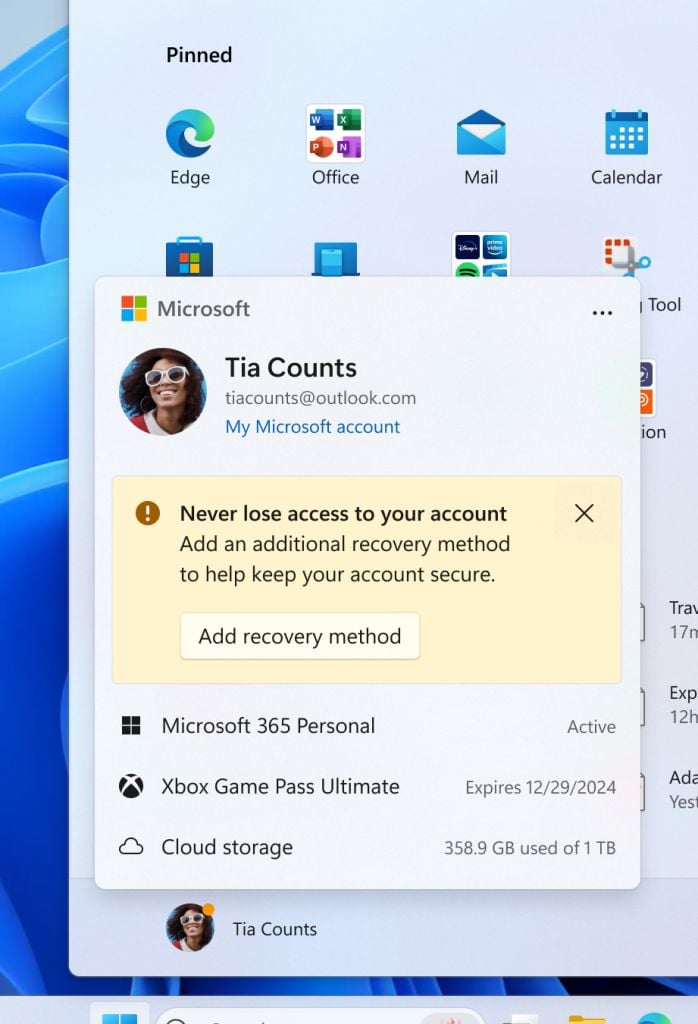
As if showing app recommendations in the Start menu weren’t weird enough, Microsoft now hides the Sign out button in Windows 11 behind a three-dot menu of the new Account Manager. Not to forget, Microsoft’s decision to show app recommendations in the Start menu was criticized by a former employee and Windows 11 users.

The recent Windows 11 Insider Preview Build 22635.3500, under KB5036985, released for the Beta channel users brings this change. Microsoft mentions the new thing as Account Manager in its recent blog post.

The new design change gives you a glanceable view of your current subscriptions. You’ll also see a few account-related notifications and a prompt to add a recovery method. Microsoft says that the new design makes it easy to manage account settings.

Microsoft hides Sign out button in Windows 11 behind a three-dot menu

Well that all sounds like a change, but something is missing in there that will make you go mad over Microsoft. Now, the Sign out and Switch User buttons are missing with this update. You will have to access the Sign out button from the submenu hidden behind a three-dot menu.

What’s more ridiculous is Microsoft thinks that displaying OneDrive storage and an Xbox Game Pass subscription expiry date is okay.

Although Microsoft hasn’t mentioned the hidden Sign out button in Windows 11, it has outlined changes it made to the Start menu. Here’s what Microsoft mentioned in the blog post:

This update starts the roll out of the new account manager on Start menu. When you sign in with a Microsoft account, the new design gives you a quick glanceable view of your account benefits and makes it easy to manage account settings.

Besides hiding the Sign out button, Microsoft also gives the Lock button a new home. You can find the Lock button in the power menu with the Shut down, Restart, and Sleep options.

Sign out option hidden in three-dot menu in the new Account Manager
Image credit: Microsoft

From the users’ point of view, the so-called Account Manager doesn’t seem to add any value since the Subscription data and account notifications are already there on the Settings app’s home page. If you thought that enough, well there’s more.

The Settings homepage has a new banner that asks you to subscribe to Xbox Game Pass. If you’re already subscribed, you’ll see game recommendations as if that’s what users look for in the Settings app.

Not sure what Microsoft has been doing recently, but it is another thing that might get criticized. What do you think about Microsoft’s move to hide the Sign out button in Windows 11? Please pour in your thoughts in the comments below.

TikTok is reportedly working on an AI voice-cloning feature for its app

After rolling out TikTok Notes, the company is reportedly readying a new AI feature for the app that can clone your voice in only 10 seconds. TheSpAndroid which first reported TikTok’s upcoming AI voice-cloning feature, spotted a few code strings that point towards the feature.

During the code digging, the news outlet found two references – TikTok Voice Library and Create Your Voice with AI. So, it is clear that TikTok doesn’t have a specific name for the AI voice-cloning feature.

It also accessed the initial UI of the feature within the app and saw the terms and conditions for TikTok Voice Library. An alleged screenshot of the feature shared by the news outlet reads:

Create an AI version of your voice in just 10 seconds! You’ll be able to use it with text-to-speech in TikTok videos. 

TikTok’s new AI voice-cloning feature will require you to record your voice in the app

It is worth noting that the AI voice-cloning will require recording your voice. As per the source, you’ll need to read out some text provided by the app to record your voice.

Notably, TheSpAndroid couldn’t create any voice samples since no texts appeared in the app during the initial testing of the feature. When trying to record the voice manually by pressing the record button, the news outlet faced some unknown errors. 

Your generated AI voice will remain private and can be deleted anytime from the voice library within the TikTok app. This will ensure your voice stays safe and no one can misuse it. That said, there’s no information on the official launch of the feature as we write.

Not to forget, TikTok recently asked for support from its users as the latest bill might end its existence in the US. While the company is battling for its existence in its biggest market, it seems that isn’t stopping it from experimenting with new things in its app.

Are you excited about the upcoming AI voice-cloning feature on TikTok? Share your thoughts about the same in the comments below.

Mozilla finally announces Firefox Nightly for Linux on ARM64

Mozilla announced that Firefox Nightly is now available for Linux on ARM64. This means users can now download the Firefox browser as binary for ARM64 (AArch64) architecture on Linux.

When Mozilla launched the Firefox Nightly .deb packages, users demanded the same for ARM64 builds. Users can access the Firefox browser as both .tar archives and .deb packages depending on their installation requirements and liking.

If you favor the traditional way, you can access the .tar.bz2 binaries on the Mozilla downloads page. To do so, you need to select the option that says Firefox Nightly for Linux ARM64/AArch64.

Whereas, for updates and installation via Mozilla’s APT repository you can follow instructions to install the firefox-nightly package.

It is worth noting that Mozilla has been quite transparent about the stabilization and development of the ARM64 builds. In a recent announcement post, Mozilla mentioned:

Although we are confident in the quality of Firefox on this architecture, we are still incorporating comprehensive ARM64 testing into Firefox’s continuous integration and release pipeline. Our goal is to integrate ARM64 builds into Firefox’s extensive automated test suite, which will enable us to offer this architecture across the beta, release, and ESR channels.

Mozilla encourages users to download, test, and provide feedback about the new ARM64 Firefox Nightly binaries. If you find any bugs or issues while testing Firefox Nighty on ARM64, report it to Mozilla’s Bugzilla.

Doing this will aid the development process and ensure the final stable release for the ARM64 users. More recently, Mozilla strengthened security with untrusted integrity in Firefox Nightly on Windows.

LG Electronics to meet Microsoft to discuss the prospects of AI integration into its products

LG Electronics will meet Microsoft to discuss AI business in the upcoming month. Cho Joo-wan, the CEO of LG Electronics, and Microsoft CEO Satya Nadella are reportedly up for discussing future AI collaboration. It is worth noting that in February Cho and Meta’s CEO Mark Zuckerberg discussed AI collaboration.

Cho, then, said that the discussion was around the prospects of LG Electronics utilizing Meta’s large language model, Llama. So, LG Electronics’ meeting with Microsoft makes it pretty clear that the South Korean electronics giant is stepping on the pedal to catch up with the ongoing AI race.

The CEOs of Microsoft and LG Electronics will meet at the MS CEO Summit in May

According to industry sources, Cho Joo-wan will attend the MS CEO Summit on May 14 in Seattle. There Cho will meet Nadella for the first time. Besides, sources add Cho and Nadella will discuss plans to integrate AI into LG Electronics products. Notably, both CEOs can also discuss new ways to improve LG Electronics’ productivity.

Not to forget, LG Electronics is popular for its manufacturing capabilities in different sectors like TVs, ACs, home appliances, and more. Therefore, the collaboration with Microsoft is undoubtedly beneficial for the electronics giant.  

Talking to Pulse News Korea, an unidentified industry source shared the potential benefits of AI collaboration between Microsoft and LG Electronics. The source said: 

LG Electronics sells millions of appliances, wearables, and IoT devices worldwide. By integrating generative AI into LG products and collecting and analyzing data, synergy can be achieved.

Another industry insider commenting on the future of Microsoft and LG Electronics AI collaboration said:

If LG Electronics’ products and data converge with Microsoft’s technological prowess, both companies could lead in future businesses, including AI.

Moreover, Cho will also be participating in LG Electronics Tech Conference and Non-Deal Roadshow (NDR) events in the U.S. Worth mentioning that this is the very first time the CEO of LG Electronics is directly taking part in such corporate events.

GitHub Copilot hits milestone with 1.3 million users; indicating rapid growth in AI coding sector

Microsoft’s GitHub Copilot, an AI-powered code suggestion tool, became generally available to all developers at 10 USD/month or $100 USD/year on June 21, 2022. The tool was initially previewed in 2021 before becoming generally available.

This AI pair programmer is becoming popular, and its number of users has reached more than 1.3 million. When you type code or comment, GitHub Copilot can efficiently suggest the next line of code. Not only this, but it can also suggest complete methods, whole unit tests, boilerplate code, and complex algorithms.

GitHub Copilot is developed in collaboration with OpenAI, uses advanced generative AI to improve coding accuracy and efficiency.

Many developers have mentioned that GitHub Copilot has sped up the coding process with accuracy. Here are some reviews:

Enhance Your Data Science Projects With Generative AI
For past few months, I’ve been personally using several generative AI products, and GitHub Copilot is one of them, I mainly used it to assist me to code my Data Science projects, and I can say that it really helpful for someone like me who learned Python coding in a non formal way. It helped me a lot in terms of refactoring my code that align with the best practice, another thing that amaze me is the ability of understanding the context of the code that i wrote, so the suggestion can be more accurate to my needs, not to mention that i can easily integrate it to my main IDE (Visual Studio Code) in a simple click.

One of the Reddit user, genitor says:

Definitely worth it, and it seems to be getting better all the time. It’s great for generating code that follows patterns that already exist in your code, and for generating helpful comments/messages/etc.

It’s also getting spooky good at generating the code that you were about to write, too. Just make sure to double check it.

I personally feel like the productivity increases it creates are well worth the $10/month.

Another Reddit user, k3liutZu mentioned:

I just love when it autocompletes my test boilerplate, and once a test is done it autocompletes my other tests which follow the same pattern.

However, there are a few people who don’t quite like the service as they have mentioned rather than writing the code, they are spending time verifying the code that the AI assistant suggested.

Some advised that Junior developers should not use the service, as they need to learn and skill up on their own and then use the AI assistant to speed up their work.

Despite differing opinions about the product, the numbers of active users is increasing for GitHub Copilot, despite the occasional inaccuracies, and majority of developer community seems to like it.

With Microsoft commitment to integrating AI in its products has surely revolutionized the way we work, and we expect the company will continue to enhance its products for the betterment of technology and people around.

Have you used the paid version of GitHub Copilot? If so, share your opinions with our readers telling howu useful you find it in the comments section below.

How to Stop the Xbox App from Automatically Signing in to Windows 11

The Xbox app has an auto-sign feature where it automatically signs into your Windows 11 device using your Microsoft account.

While this can be convenient for most gamers, sometimes when it signs into the wrong account, it can be problematic especially if you’re on a shared computer and would like to keep your sign-in credentials private.

How do I stop Xbox from automatically signing in to Windows 11?

1. Disable Xbox automatic sign in

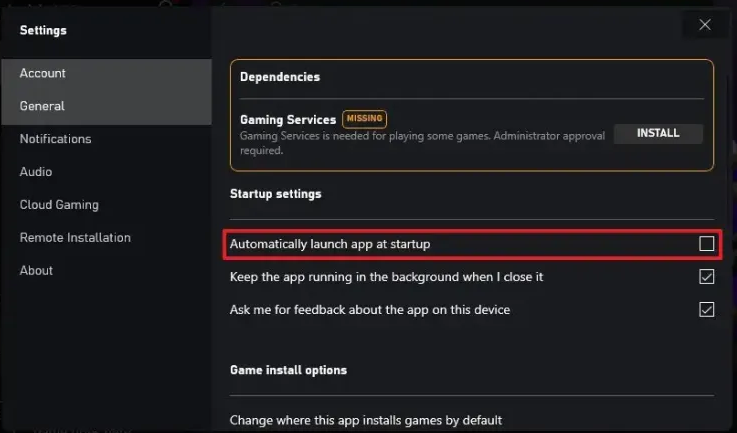
  1. Launch your Xbox app and go to Settings.
  2. Go to General.
  3. Uncheck the Automatically launch app at startup option under Startup settings.

2. Delete accounts and cache folder

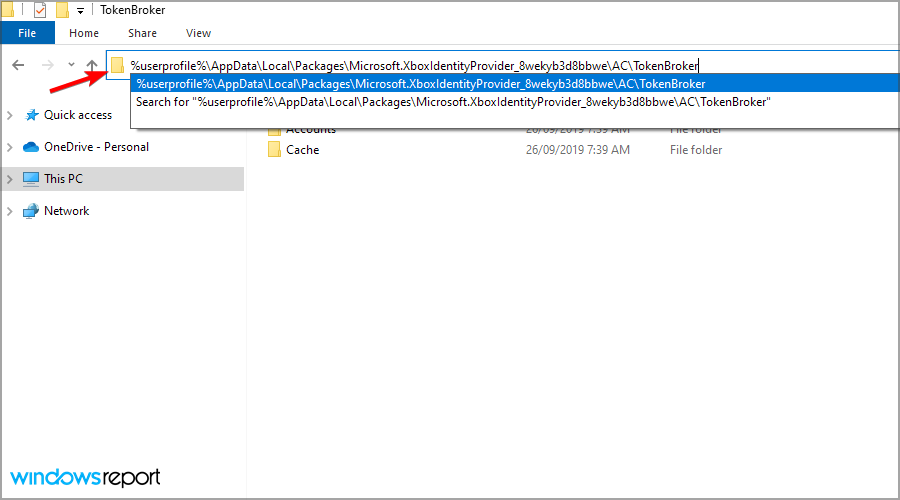
  1. Open File Explorer using the Windows key + E shortcut. In the address bar paste the following line:
    %userprofile%\AppData\Local\Packages\Microsoft.XboxIdentityProvider_8wekyb3d8bbwe\AC\TokenBroker
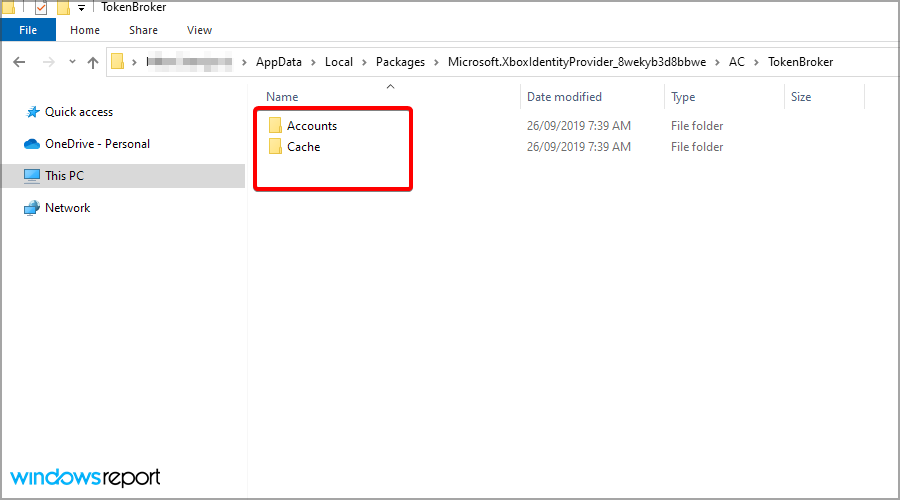
  2. If there are Accounts and Cache folders available make sure that you delete them.
  3. After removing the cache, log out of your Xbox app, restart your PC and see if it automatically signs in to your Windows 11.

Clearing this information means deleting all associated passwords and any other credentials tied to your Xbox account. You’ll have to log in afresh the next time you start up Windows.

3. Remove your password from Windows Credential Manager

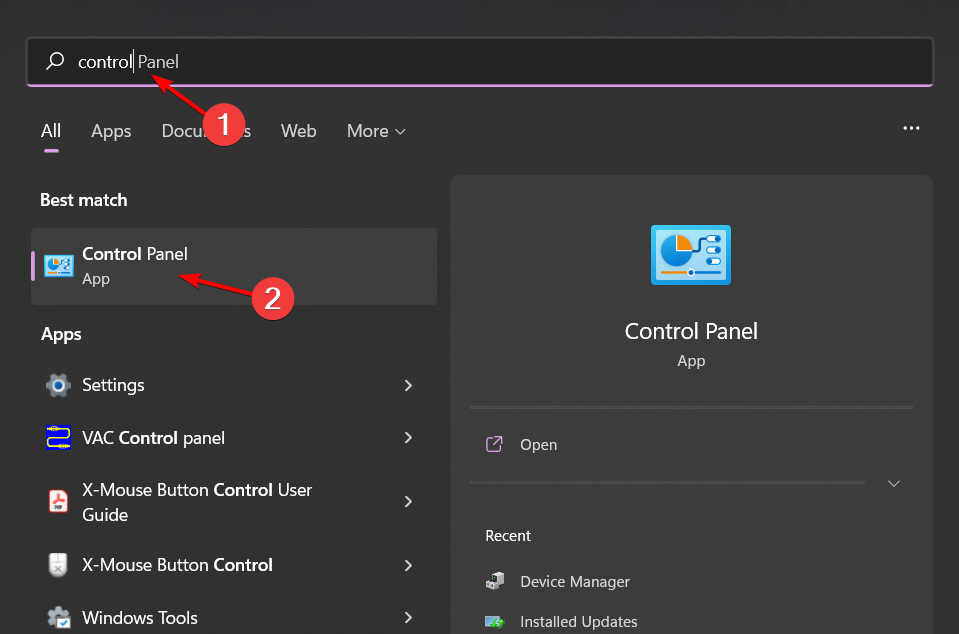
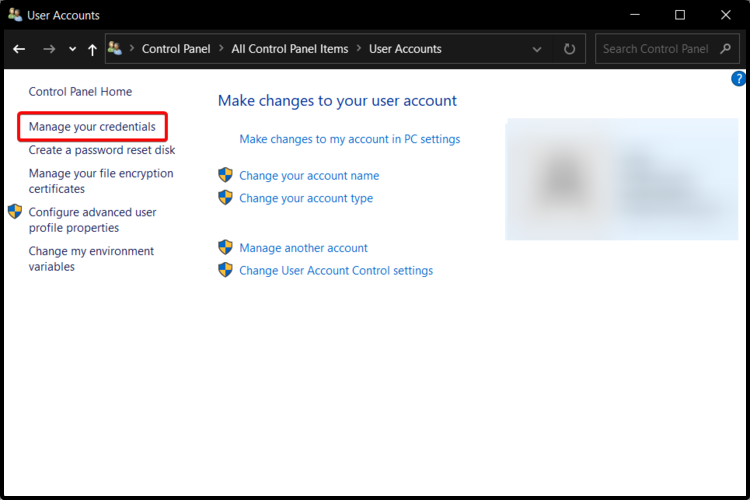
  1. Click on the Windows Search icon on the taskbar, type Control Panel and click Open.control-panel-search fallout new vegas runtime error
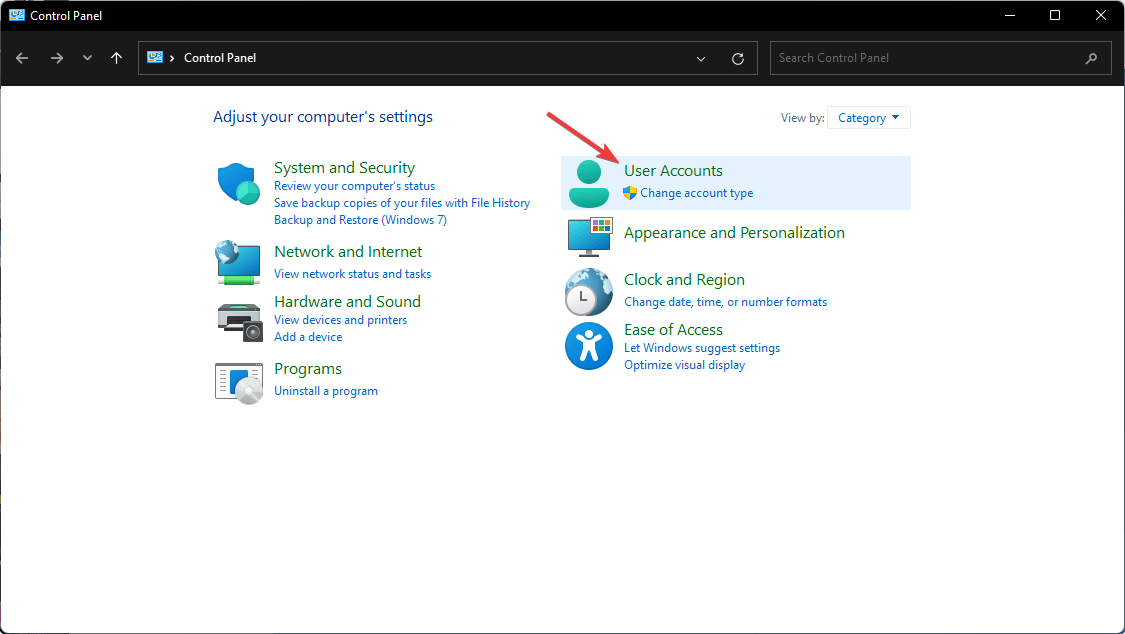
  2. Select User Accounts.going user accounts control panel
  3. Click on Manage your credentials on the left-hand side.Open Manage your credentials
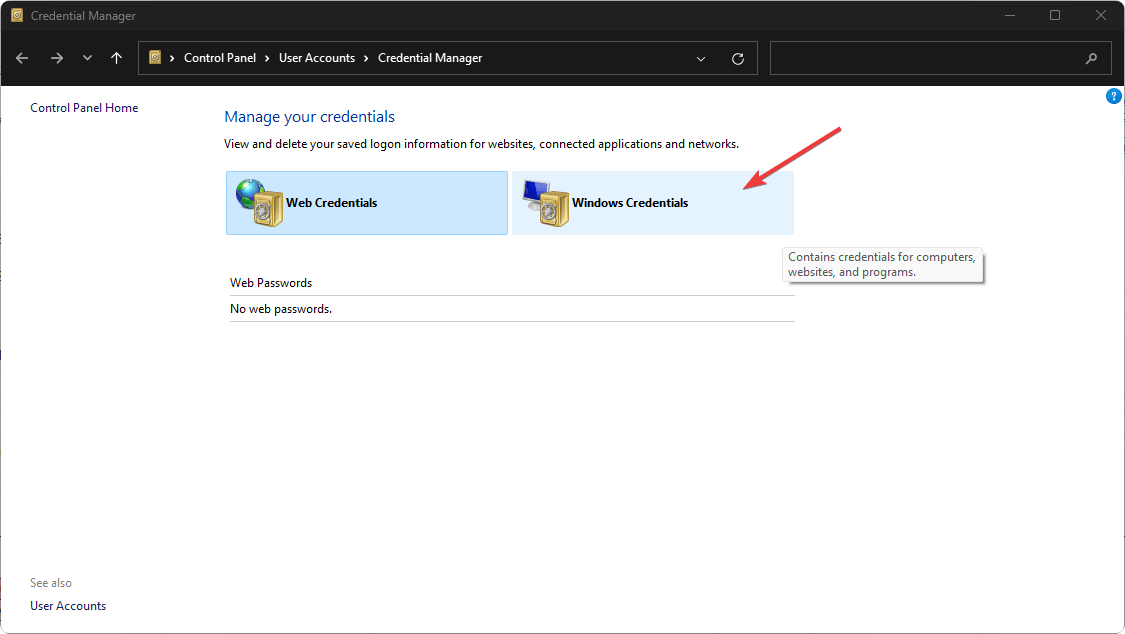
  4. Select Windows Credentials in the new window.going windows credentials windows 11
  5. Expand the unfamiliar user account, and in the drop-down menu, click Remove to get rid of that user.
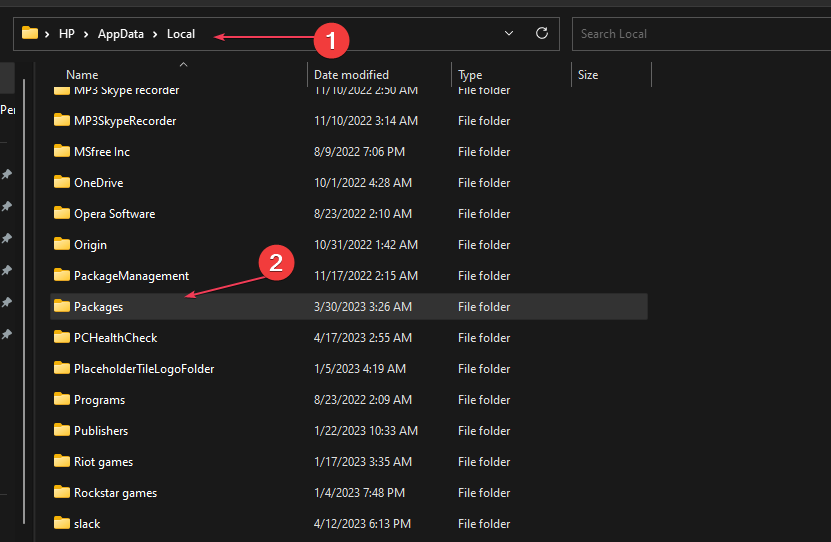
  6. Next, press the Windows + E keys to open File Explorer.
  7. Navigate to the following path: C:\Users\username\AppData\Local\Packages (change the Username to the name of your user account).
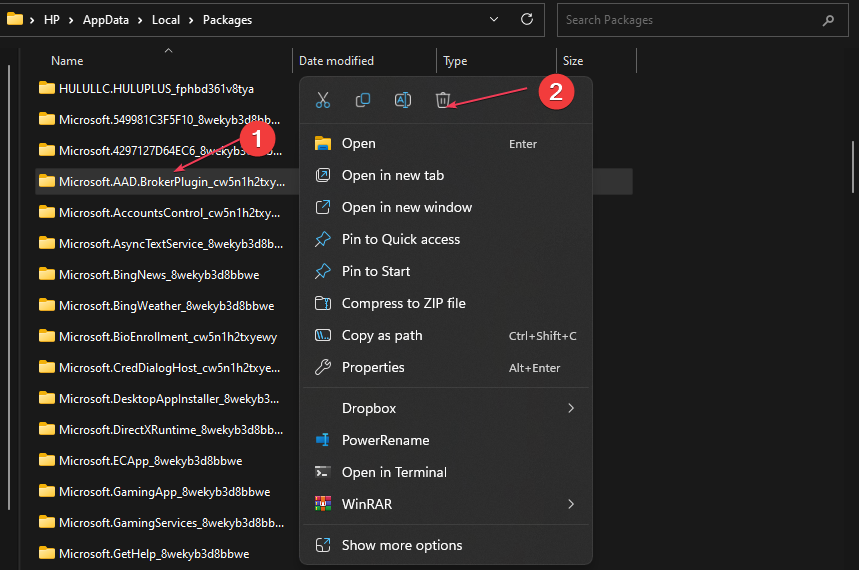
  8. In the Packages folder, locate Microsoft.AAD.BrokerPlugin_cw5n1h2txyew and right-click on it. Select Delete from the context menu and restart your PC.
  9. Sign in with the Xbox Console Companion.

4. Enable 2FA Authentication

  1. Navigate to your browser and go to your Microsoft account. 
  2. From the top-right corner, click My Microsoft account.
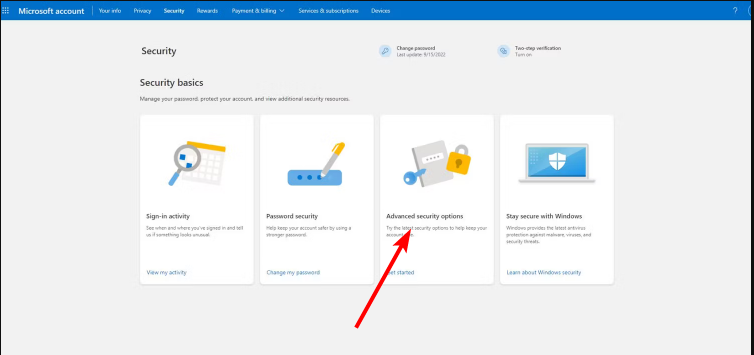
  3. Go to the Security tab. Then, on the next page, click Other ways to sign in.
  4. Click Use my password.
  5. Select Advanced security options.
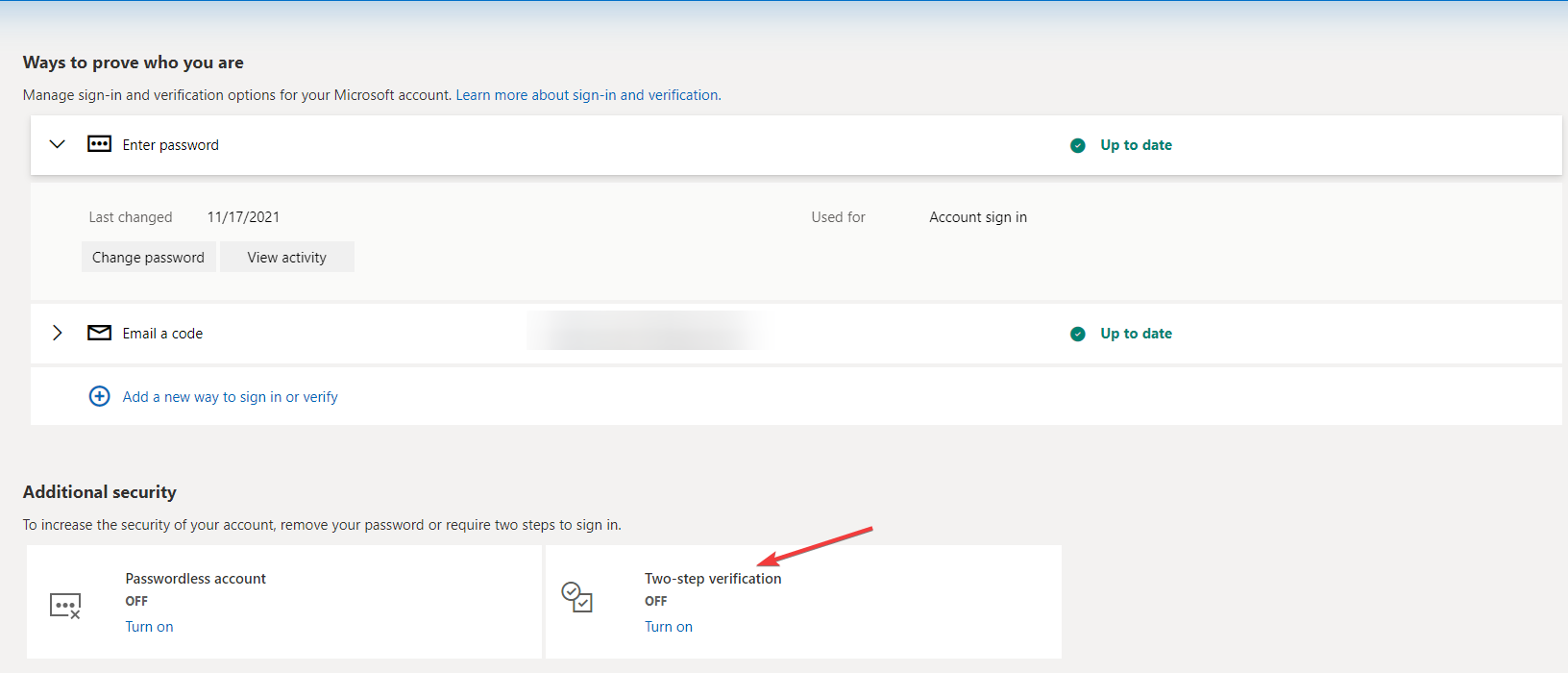
  6. Under Additional security, click Turn on for Two-step verification.Turn 2FA -microsoft authenticator wrong code

After removing your password, enabling the two-factor authentication for your Microsoft account will not only add an extra layer of protection but also lock out unauthorized devices and apps from signing in without a verification code.

This in turn will prevent the Xbox app from automatically signing in to your Windows 11.

5. Reinstall the Xbox app

  1. Clean your registry with a reliable registry cleaner.
  2. Log into your Microsoft Store with your desired Xbox account, install a game, and launch it.
  3. Close the game.
  4. Now go back to the Microsoft Store, install the Xbox app.
  5. Next, press the Windows+ I keys to open the Settings app.
  6. Type Windows PowerShell (Admin) and select the matching result from the list of options.
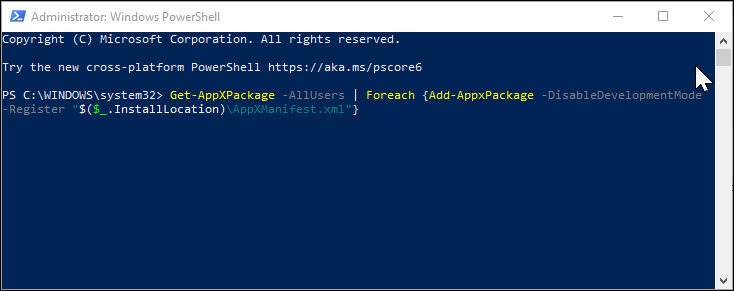
  7. In the PowerShell window, enter the following command and hit enter to execute:
    Get-AppXPackage -AllUsers | Foreach {Add-AppxPackage -DisableDevelopmentMode -Register "$($_.InstallLocation)\AppXManifest.xml"}
  8. Wait for the command to execute, and then restart your PC.
  9. After the restart, check whether the Xbox app is automatically signing in to your Windows 11.

6. Reinstall the Gaming services app

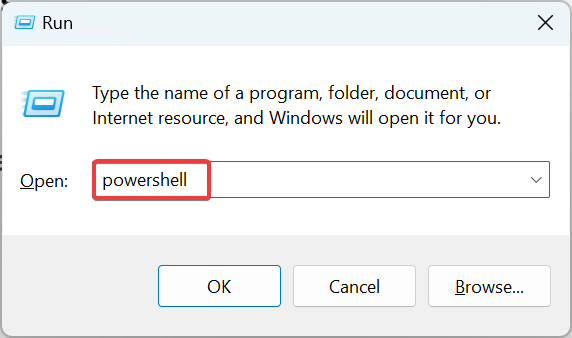
  1. Press Windows + R to open Run, type powershell, and hit Ctrl + Shift + Enter.powershell
  2. Click Yes in the UAC prompt.
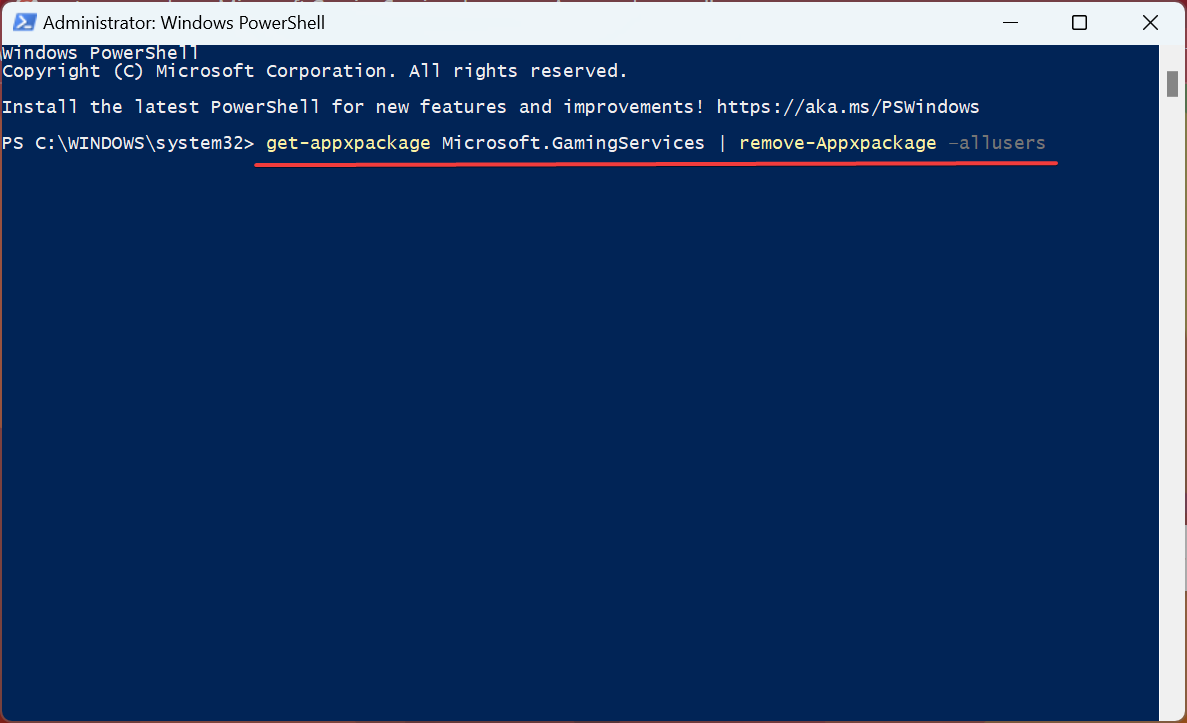
  3. Now, paste the following command and hit Enter:get-appxpackage Microsoft.GamingServices | remove-Appxpackage –allusersreinstall gaming services to fix windows 11 xbox app not downloading games
  4. Next, execute the following command:start ms-windows-store://pdp/?productid=9MWPM2CQNLHN
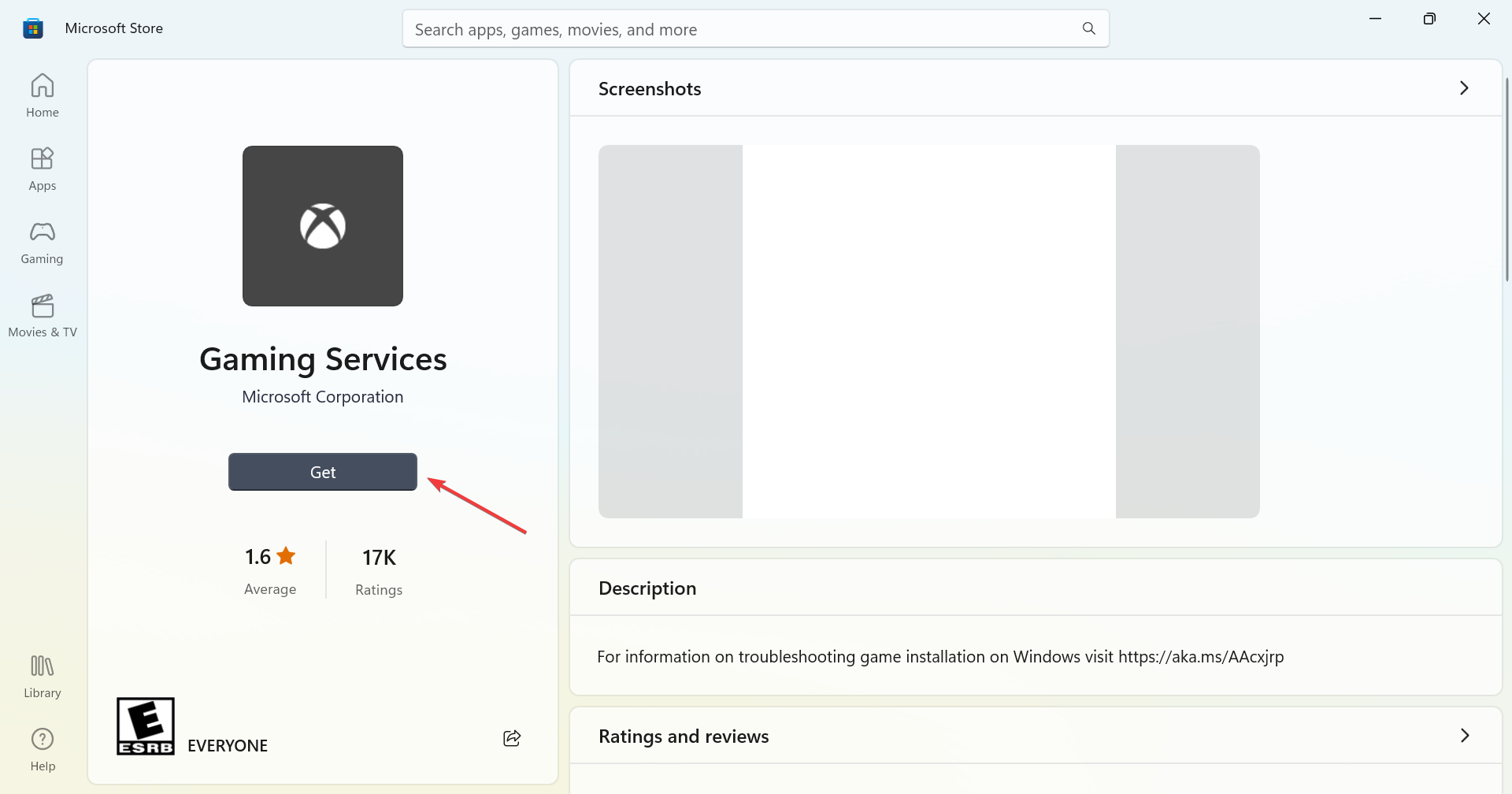
  5. Finally, click on the Get button to reinstall the Gaming Services.get

Finally, the Xbox app automatically signing into your Windows 11 may not be a huge problem per se especially if it is the right account. However, for the sake of your privacy and security, it is important to disable automatic sign-in and exercise more control.

And if none of the above steps have been helpful, another option would be to create a local account temporarily. Alternatively, you can also copy your user profile to a new one and see if this resolves the problem.

Aside from automatic sign-ins, Xbox may also fail to sign in at times but nothing a Windows update can’t fix. However, if the Xbox app is not working on your Windows PC, that may require more muscle like resetting the app to default settings.

And it’s a wrap from us but we’d like to know whether you’ve managed to stop Xbox from automatically signing in to your Windows 11. Which solution worked for you or do you have any other not mentioned above? Drop us a line in the comment section below.

Irresistible deal alert: Get Asus Zenbook 14 OLED powered by Intel Core Ultra 7 CPU at $799

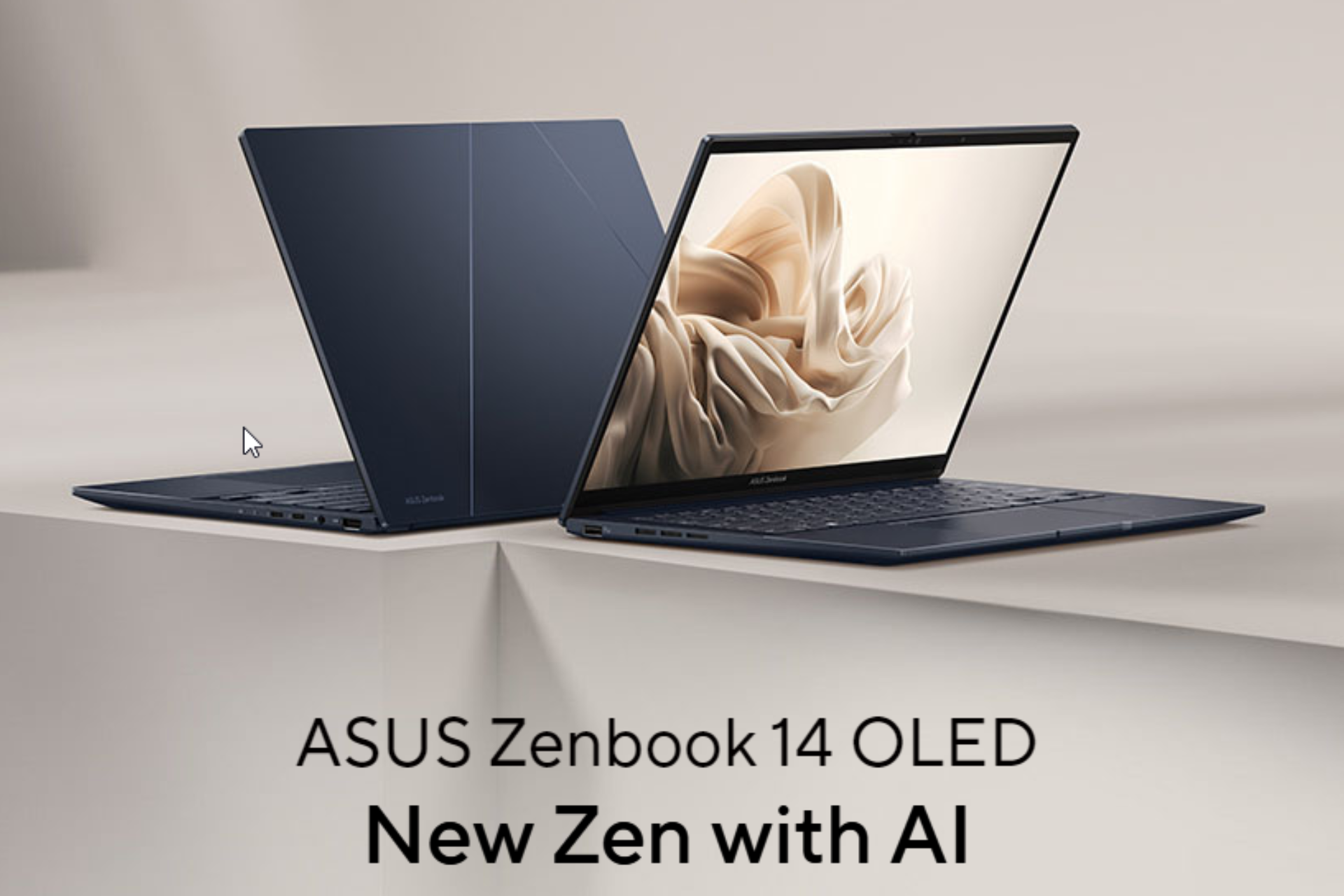
ASUS – Zenbook 14 OLED 14 WUXGA touch laptop, powered by Intel Core Ultra 7, designed for power users and multitaskers, released in March 2024 is now available for $799.99 on Best Buy. You can also get it for $66.67/mo suggested payments with 12-Month Financing. The original cost for this laptop is 1049, as of now you can save up to $250.

This machine is ideal for casual gamers as it has Intel Arc graphics plus it is portable due to its 14 inches screen and small size, so you can easily carry it around.

ASUS Lumina OLED touchscreen, powerful new Super-linear speakers with sound by harman/kardon, AI Engine and FHD 60 Hz OLED, you can immerse your sense and get lifelike visual experiences

Here are the detailed specifications of the laptop

CategoryTech specs
Operating systemWindows 11 Pro
Touch screenYes
Color Jasper Gray
Processor Intel Core Ultra 7 Series 1
Up to 5.1 GHz
with a total of 16 cores
CPU base close frequency 1.4 gigahertz
Graphics Intel Arc
Memory16GB
Storage 1TB storage
NPUIntel AI Boost
CPU TDP28 W
Battery life75Wh, 15+ hours
Battery typeLithium-ion
DisplayASUS Lumina 3K 120 Hz OLED (1920 x 1200 (WUXGA))
HDR brightness: 500-night peak
Aspect ratio: 16:10 
Screen-to-body ratio – 87% 
HDR display
Corning Gorilla GlassYes
Thickness14.9 mm
Weight 2.82 lbs / 0.59″
Refresh rate 60Hz
Sound Dolby Atmos
Sound by harman/kardon
Anti-fingerprint touchpadYes
Emoji hotkeyYes
Quiet Keyboard technologyYes
AiSense cameraYes
Two-Way AI Noise CancelationYes
Windows Hello Infrared (IR) cameraYes
Backlit KeyboardYes
2-in-1 DesignNo
I/O Ports 2 Thunderbolt 4 USB-C
Audio combo jack
HDMI 2.1
USB 3.2 Gen 1 Type-A
Physical webcam privacy shieldYes

With this stunning sturdy build laptop, you also get two freebies:

  • Microsoft – Xbox Game Pass Ultimate 1 Month Membership – Activation Required [Digital]
  • Norton 360 (3 Device) with LifeLock Identity Advisor (1 Adult) Internet Security Software + VPN (6 Month Subscription) – Android, Apple iOS, Mac OS, Windows [Digital]

What do you think about this laptop and Best Buy’s deal? Share your thoughts with our readers in the comments section below

How to Stop the Xbox App if it Keeps Pinning Itself on the Taskbar

We all love the convenience of the Windows 11 taskbar to reach out for our frequently used apps but when an app like Xbox keeps pinning itself without your intervention, it can be annoying.

The Xbox app or any other program may keep re-pinning itself on the Taskbar after you’ve removed it if it is corrupt or its registry files have been modified.

If space is the main issue and your Taskbar items appear squeezed, you can always increase your Taskbar’s size. Otherwise, you can just remove it.

How do I keep my Xbox app off my taskbar?

1. Disable Xbox from Startup programs

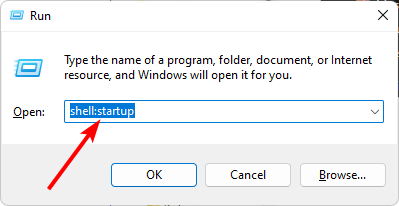
  1. Hit the Windows + R keys to open the Run command.
  2. Type in shell:startup in the dialog box and hit Enter to open the Startup folder.
  3. Select the Xbox app you want to disable then click on the trash icon to delete.

2. Adjust the Default Layout settings

  1. Hit the Windows + E keys to open File Explorer.
  2. Click on View>Hidden items and navigate to the following path: C:\users\Yourusername\AppData\Local\Microsoft\Windows\Shell
  3. Right-click on the LayoutModifications file and select Edit.
  4. Delete the following line: taskbar:UWAAppuserModeIID=”Microsoft.GamingApp_8wekyb3d8bbwe!Microsoft.Xbox.App”/>
  5. Unpin the Xbox app then restart your PC.

3. Disallow pinning of programs from the Group Policy Editor

  1. Hit the Windows + R keys to open the Run command.
  2. Type gpedit.msc in the dialog box and hit Enter to open the Group Policy Editor.gpedit.msc virus & threat protection
  3. Navigate to the following path: User Configuration\Administrative Templates\Start Menu and Taskbar
  4. Double-click on Do not allow pinning programs to the Taskbar.
  5. Click on the Disabled box then click on Apply then OK to effect the changes.
  6. Restart your PC and check whether the Xbox app is still pinning itself on the taskbar.

4. Reinstall the Xbox app

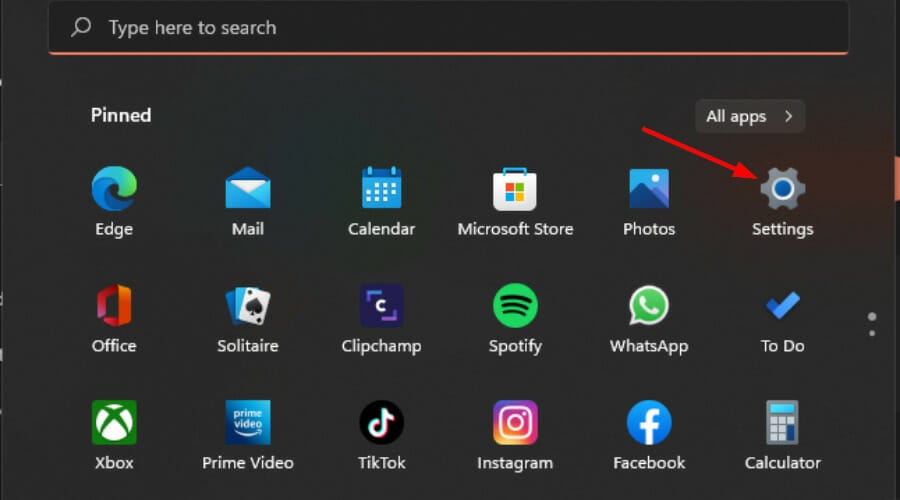
  1. Hit the Start Menu icon and click on Settings.settings windows 11
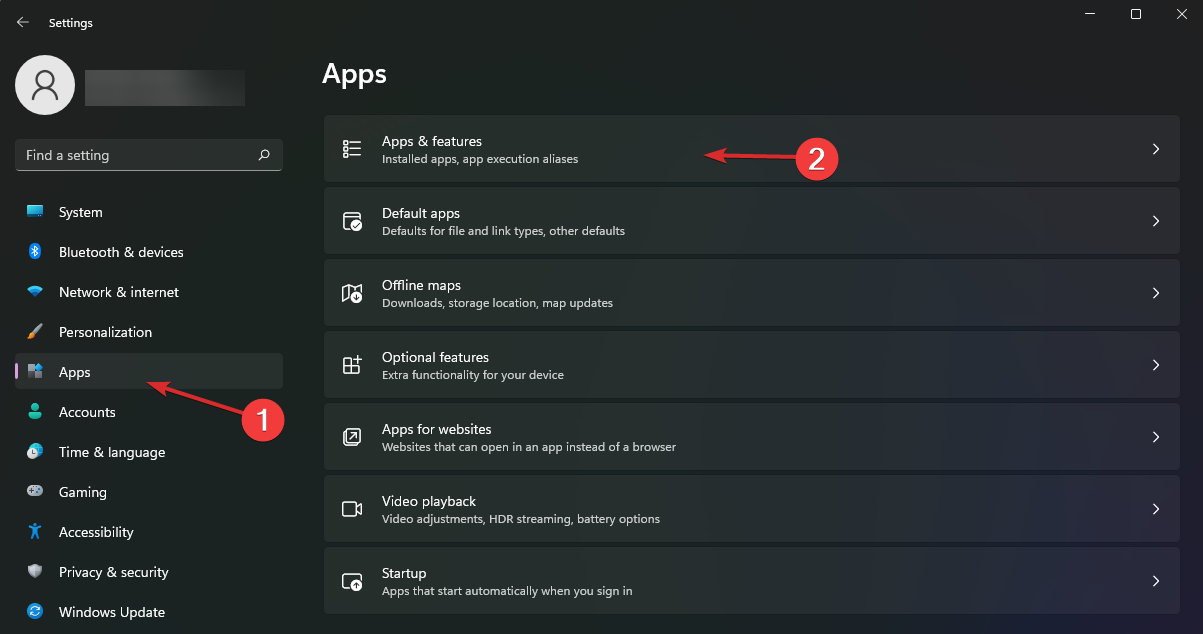
  2. Click on Apps on the left pane then select Apps & features on the right pane.
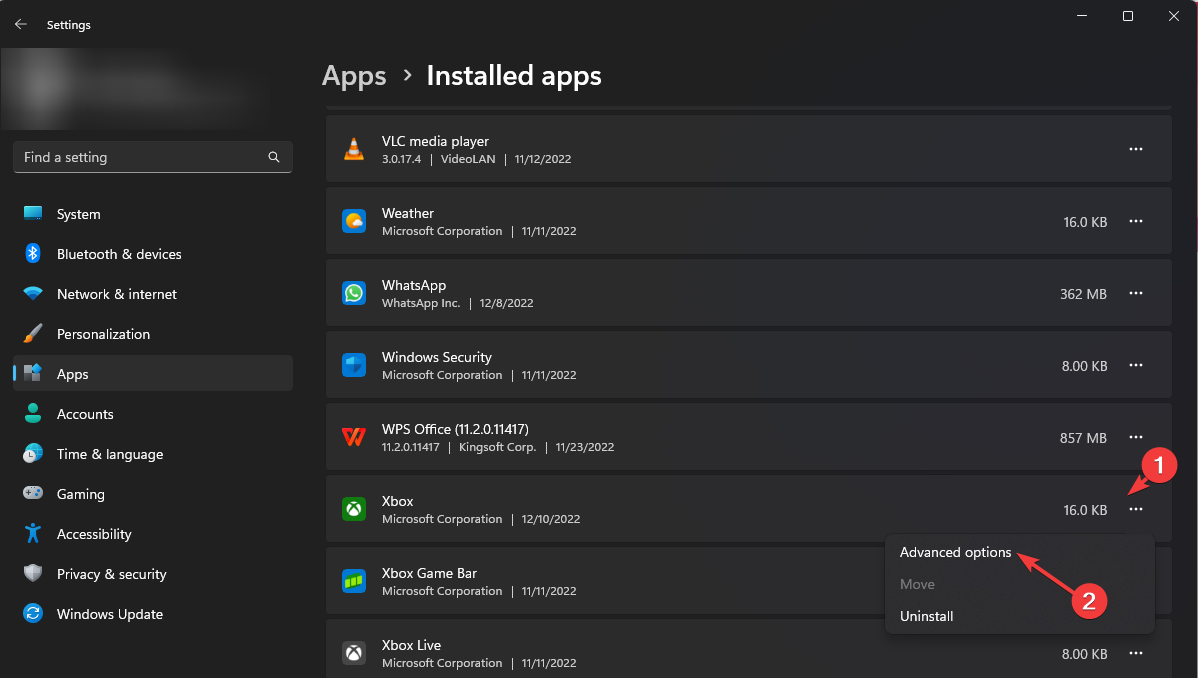
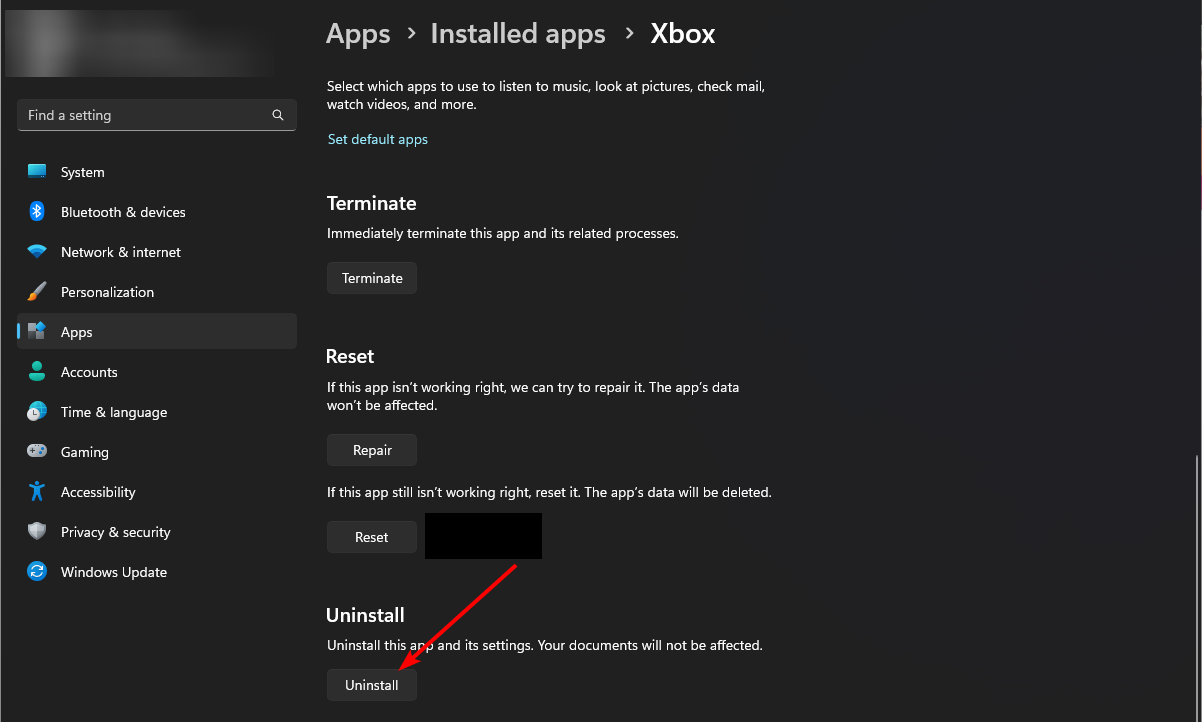
  3. Locate the Xbox app, click on the three ellipses, and select Advanced options.
  4. Click on the Uninstall button.
  5. Go to the Microsoft Store, search for the Xbox app and install it.

If there was a problem with the initial installation of the Xbox app, a fresh install can resolve these issues. Just remember to clean up any remnant files before installing again to prevent replicating the same issue.

5. Create a new user profile

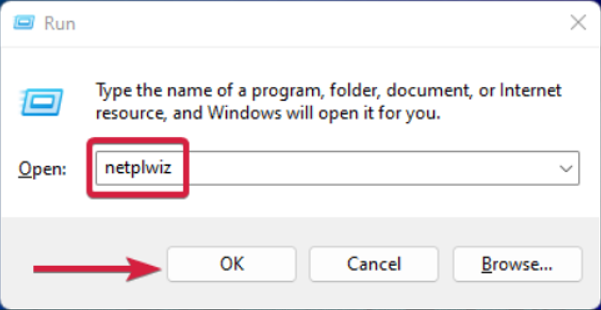
  1. Press Windows + R to launch the Run console, enter netplwiz in the text field, and click OK.
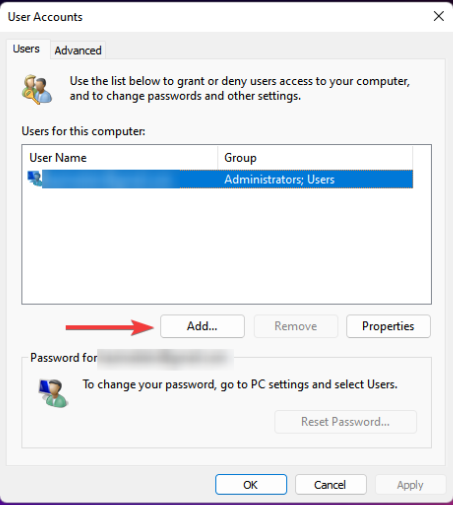
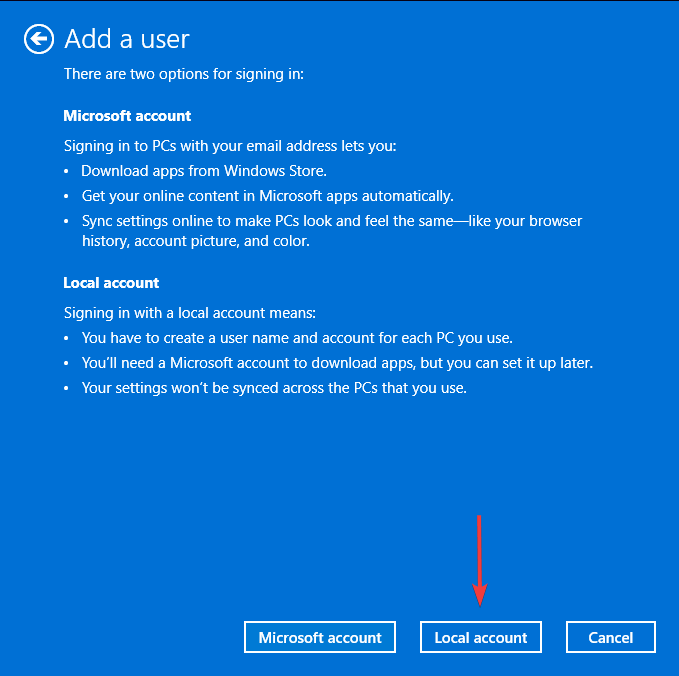
  2. Click Add in the User Accounts window.
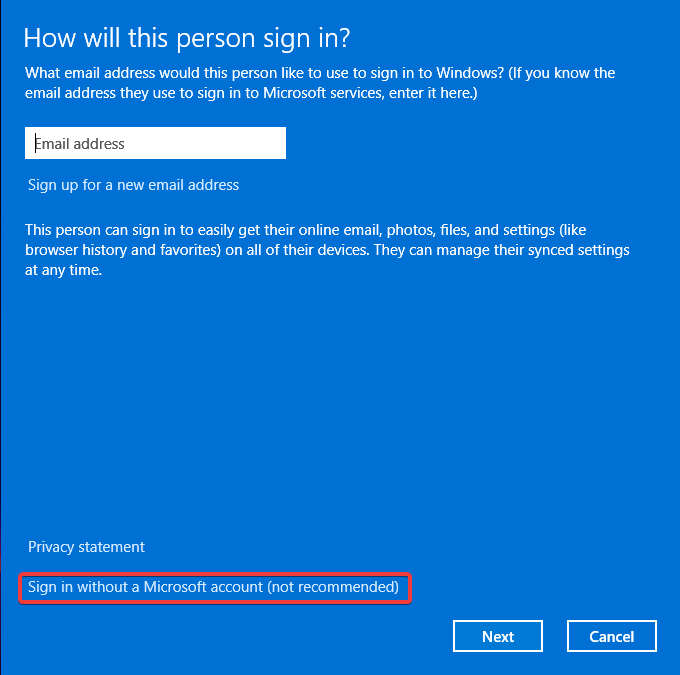
  3. Select Sign in without a Microsoft account (not recommended).
  4. Click on Local account button.
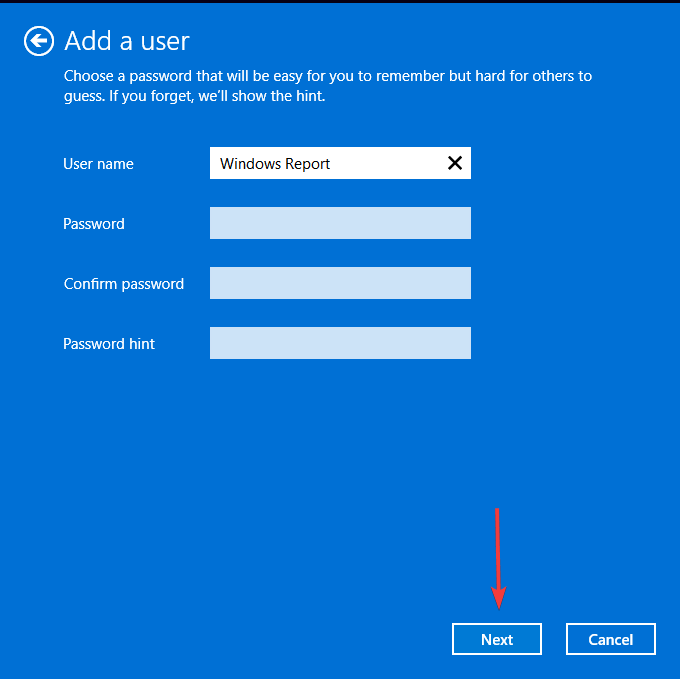
  5. Enter a username and password (optional) for the new user account, and a hint, in case you set a password. Once done, click on Next.
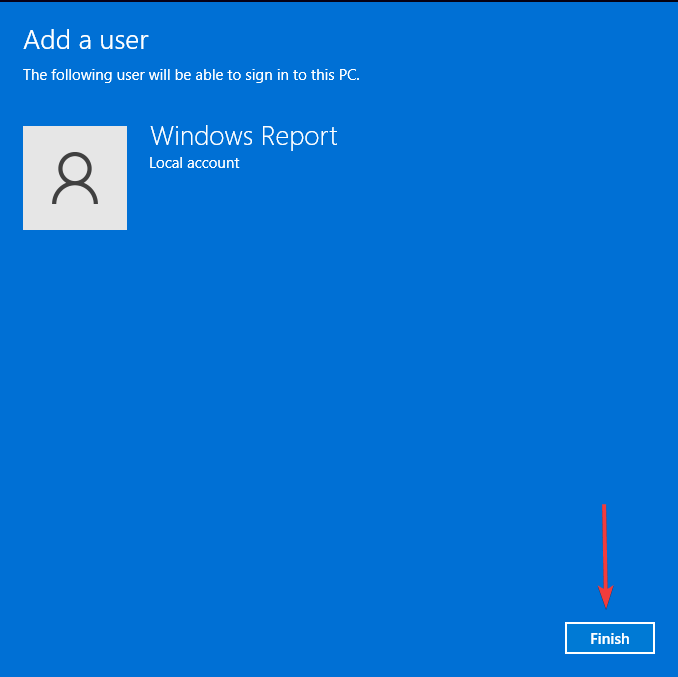
  6. Click on Finish to create the Local account.

The purpose of a new user profile is to isolate the issue and see if it’s a profile-related problem. If your user profile is corrupt, some apps or functions may behave abnormally, so the Xbox app keeps pinning itself deliberately even after you unpin it.

Aside from the Xbox app that keeps pining itself on the Taskbar, you may also find that your pinned apps are not showing. If so, we have the answers on how to get them back.

And if the icons are too small, you can increase your taskbar icon size. Elsewhere, if you don’t like a cluttered desktop look, you can always hide your taskbar permanently.

That’s all we had for this article but if you have any other solution we may have missed, feel free to share it with us in the comment section below.

Analyze pages more efficiently with Ask Copilot and tagging in Edge

Edge and Copilot have a deep integration, and Microsoft plans to expand it further with additional features.

So, what are these new features, and when can we expect to see them in action?

Microsoft is testing Ask Copilot in Microsoft Edge

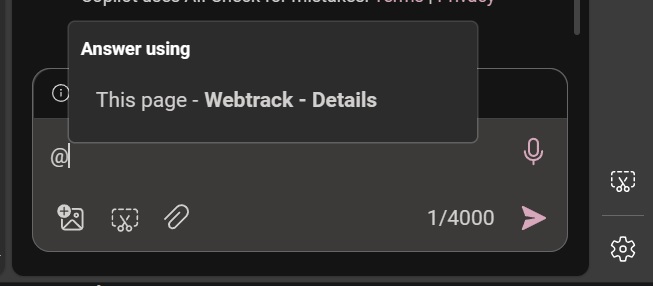
These two features were spotted by Windows Latest, and the first feature is dubbed tagging since it allows you to tag the page you want for Copilot to scan for data.

Often Copilot will crawl the web instead of the currently opened page or document thus giving you incorrect information.

This feature fixes that since it allows you to select the source that you want Copilot to use. You can choose between This page or Relevant sources.

In addition to providing correct information, Copilot is also about 30% faster since it needs to process and analyze only a single page.

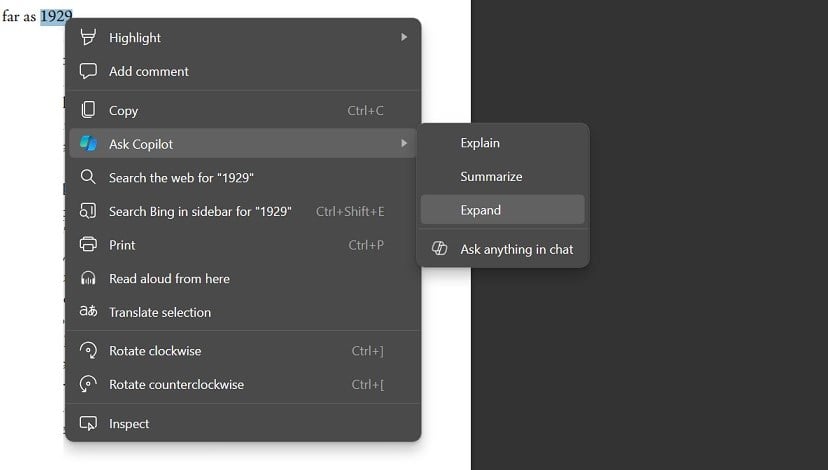
Another new feature is the Ask Copilot, it’s a menu that will appear when you right-click selected text or page.

From this menu you can choose one of the following options: Explain, Summarize, Expand, or Ask anything in the chat.

After that, the Copilot will analyze the selected text and apply the chosen command. The feature works with web pages and PDF files alike.

Regarding availability, tagging is already available, while Ask Copilot is currently being tested in Edge Canary.

This isn’t the only news regarding Microsoft’s AI assistant, as the company is currently testing Draft with Copilot in Edge.

As for other software integrations, Copilot in Excel will get support for conditional formatting soon.

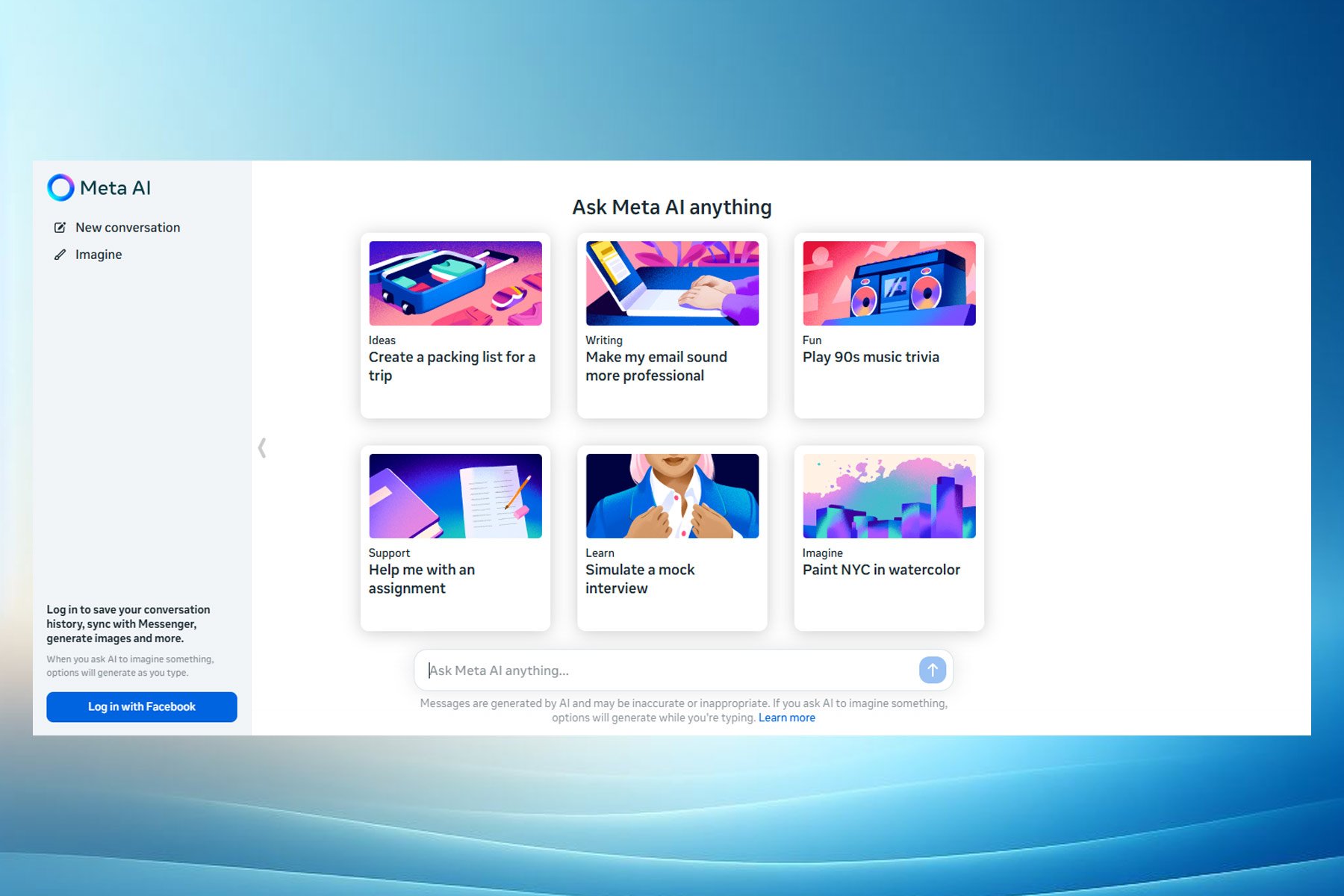
Meta is determined to win the AI race with its new free assistant

At this point, it feels like most AI companies are releasing new AI assistants capable of surpassing the previous ones. Sometimes, it is hard to keep up with them and decide which one to use. A few months ago, ChatGPT was on top, then Gemini, then Copilot, and the list goes on with other models. Now, Meta brings a new AI assistant powered by their Llama 3 model, which could be better than ChatGPT.

Meta will add the new AI assistant to Facebook, WhatsApp, Instagram, and Messenger. In addition, you can access it through the Meta.AI website.

Is the Meta AI assistant better than its competitors?

According to The Verge, the Llama 3 model used for the AI assistant outperforms its competitors in benchmarks. Also, the tech giant claims that it is better at coding too. On top of that, two of the Llama 3 models available are open source. Additionally, Meta will release a third multimodal version in a few months.

One of the models has 8 billion parameters available, while the other has 70 billion. Also, they will both be accessible on major cloud providers. Meanwhile, the upcoming third Llama 3 model has 400 billion parameters and over 15 trillion tokens.

The new Llama 3 has a seven times larger training dataset and four times more code than Llama 2. So, once available, it will improve the Meta AI assistant. However, Mark Zuckerberg says it won’t be open-source for safety reasons since the tech giant trained it on AI and public data and has a larger corpus than the Common Crawl.

The new assistant offers premium AI features for free

Meta wants to create the most intelligent AI assistant that people can freely use. So, the new model can use both Google and Bing searches. Furthermore, its image generator can create gifs, short animations, and high-resolution images faster than other models.

The new AI assistant from Meta might surpass others because the company tries to give it most of the existing features of other models. Thus, if Meta succeeds, we might stop using other assistants since this one offers premium AI features for free. However, there could be a usage limit to prevent overcrowding.

Even if OpenAI will release the new GPT-5, it won’t be a problem for the company. According to Zuckerberg, the main goal of Meta is to be the leading AI in the world. So, the tech giant is already planning Llama 4 and 5.

Unfortunately, the new AI assistant from Meta is only available in the U.S. and Australia, Canada, Ghana, Jamaica, Malawi, New Zealand, Nigeria, Pakistan, Singapore, South Africa, Uganda, Zambia, and Zimbabwe. So, it will take some time until it is globally available.

In summary, the new AI assistant from Meta could become the most used on the market. After all, it offers premium features for free, has a giant database, uses both Bing and Google, and generates images and short animations faster than other models.

What are your thoughts? Are you eager to use it? Let us know in the comments.

Microsoft Office 2026: Things we know so far

Microsoft announced the release of the commercial preview of Microsoft Office LTSC 2024 for Windows and Mac devices, which could help us understand what we can expect from Office 2024.

We know that Microsoft has announced that Office 2024 will be available this year and will replace Office 2021. So far, there is no official release date for this version.

In the tech blog post by Microsoft, we got to know that Office LTSC 2024 will include all the features present in the previous Office version and some new features available in Microsoft 365 Apps for Enterprise.

The company also mentioned:

 Office LTSC is built for specialized use cases that require a long-term servicing channel such as regulated devices that cannot accept feature updates for years at a time, manufacturing process control devices that are not connected to the internet, or medical testing equipment running embedded apps that must stay locked in time.  

Although the LTSC version is different from the Office Home version, it provides us with some clues about the latter. The upcoming version will replace Office 2021 and will also be a one-time purchase version that will have Word, Excel, and PowerPoint.

This servicing channel will be supported for five years under the  Fixed Lifecycle Policy, in parallel with Windows 11 LTSC, which will launch this year.

The Redmond tech giant mentioned earlier that Office 2024 would be supported for five years and that the price wouldn’t be different from the previous iteration, which was $150 for a license on a single machine.

The Windows for Office 2024 LTSC version will include Excel, Word, Access, OneNote, PowerPoint, Outlook, and Skype for Business; the Mac version has Word, Excel, OneNote, PowerPoint, and Outlook. However, this version does not include all the AI and cloud-based collaboration features.

As of the Office 2024 Home version, we will get all the apps except Skype for Business. As for Outlook, the availability is uncertain due to the fact Microsoft has made Outlook for Mac and Windows (not the classic one) a free app.

What are you expecting from Office 2024? Share your thoughts with our readers in the comments section below.

Microsoft’s strategy worked: Its games on PlayStation Store top the popularity chart

When Microsoft first started focusing on the software side of gaming and subsequently released Xbox exclusives on other consoles, many were skeptical, calling it the end of Xbox. But as it turns out, things look promising for Microsoft, with its games outselling Sony-owned titles on the PlayStation Store.

First reported by Derek Strickland on Tweaks Town, Microsoft presently has 7 titles compared to Sony’s 5 in the top 25 best-selling games list. This includes games from studios recently acquired by Microsoft, such as Activision Blizzard, a deal valued at $69 billion.

Games from Microsoft-owned studios on the top-selling list include

  • Call of Duty
  • Overwatch 2
  • Fallout 4
  • Sea of Thieves
  • Minecraft
  • Fallout 76
  • Grounded

Sea of Thieves and Grounded were two Xbox exclusives recently released on PlayStation.

As for Sony, the five titles that made it to the top 25 best-selling games are:

  • MLB The Show 24
  • Helldivers 2
  • Destiny 2
  • Stellar Blade
  • Rise of the Ronin

Remember, the rankings change every day, and the data used is for April 18, 2024.

Microsoft’s recent acquisitions play a key role in scoring this win

Even though Microsoft is losing the console war, with PlayStation outselling Xbox, Microsoft-owned games performing way better on the PlayStation Store shouldn’t come as a surprise. Microsoft’s recent strategies in gaming, from acquiring studios to bringing Xbox exclusives on other platforms to going all digital, have paid off!

Sony, on the other hand, has not shown much interest in bringing its exclusive titles to the Xbox console, although games like Helldivers 2 did make it to the PC.

Concerning the future of Xbox, reports suggest that the next Xbox will be more like a PC, allowing users to play a wider set of games from different platforms. This will surely be something to look out for and may help Xbox reclaim the lost share in the console market!

Which Microsoft game on the PlayStation Store is your favourite? Share with our readers in the comments section.

Meta AI got powered up by Llama 3, now available in other countries

As you may know, Meta has released the Llama 3 model recently, and the new model offers new features and amazing performance.

The model is available for testing, and you can try it by using Meta’s chatbot web page.

Meta AI is now available in 13 additional countries

Following the launch of the new LLM model, Meta has decided to extend the availability of its chatbot to more countries as MSPowerUser writes.

The chatbot is available now available in the following:

  • Australia
  • Canada
  • Ghana
  • Jamaica
  • Malawi
  • New Zealand
  • Nigeria
  • Pakistan
  • Singapore
  • South Africa
  • Uganda
  • Zambia
  • Zimbabwe

The AI was previously limited to Meta’s mobile apps such as Facebook, Instagram, WhatsApp, and Messenger, but now it’s available in web browsers.

At the time of writing, we weren’t able to use the service in Firefox, but it worked perfectly in Chrome without a Facebook account.

If you’re located in one of the countries that supports Meta AI, be sure to give it a try. As for global availability, we expect to see it soon although no official information is available.

Microsoft’s latest patent describes a sustainable computing technology that can be integrated with Windows

Sustainable computing is a concept that has been gaining ground in the tech industry over the last few years. With movements such as the Right to Repair advocating for serviceable devices gaining traction, and our survey confirming people everywhere agree with legalizing and turning it into a law, it’s clear that many of us want devices that can last longer, and that can be repaired in case they go south.

However, a vital part of these devices’ longevity is their ability to manage resources in a way that doesn’t overstimulate them.

In other words, all of our devices cannot consume just the right amount of computing power necessary for different tasks, but they are equipped with software that regulates consumption, such as battery-saving settings. These are limited in their rights, and once enabled an array of other options won’t be available to use.

But Microsoft is working on a solution. The company, which already supports the Right to Repair movement and has designed its upcoming Surface devices to be highly serviceable, is working on a sustainable computing technology that can be theoretically integrated with Windows.

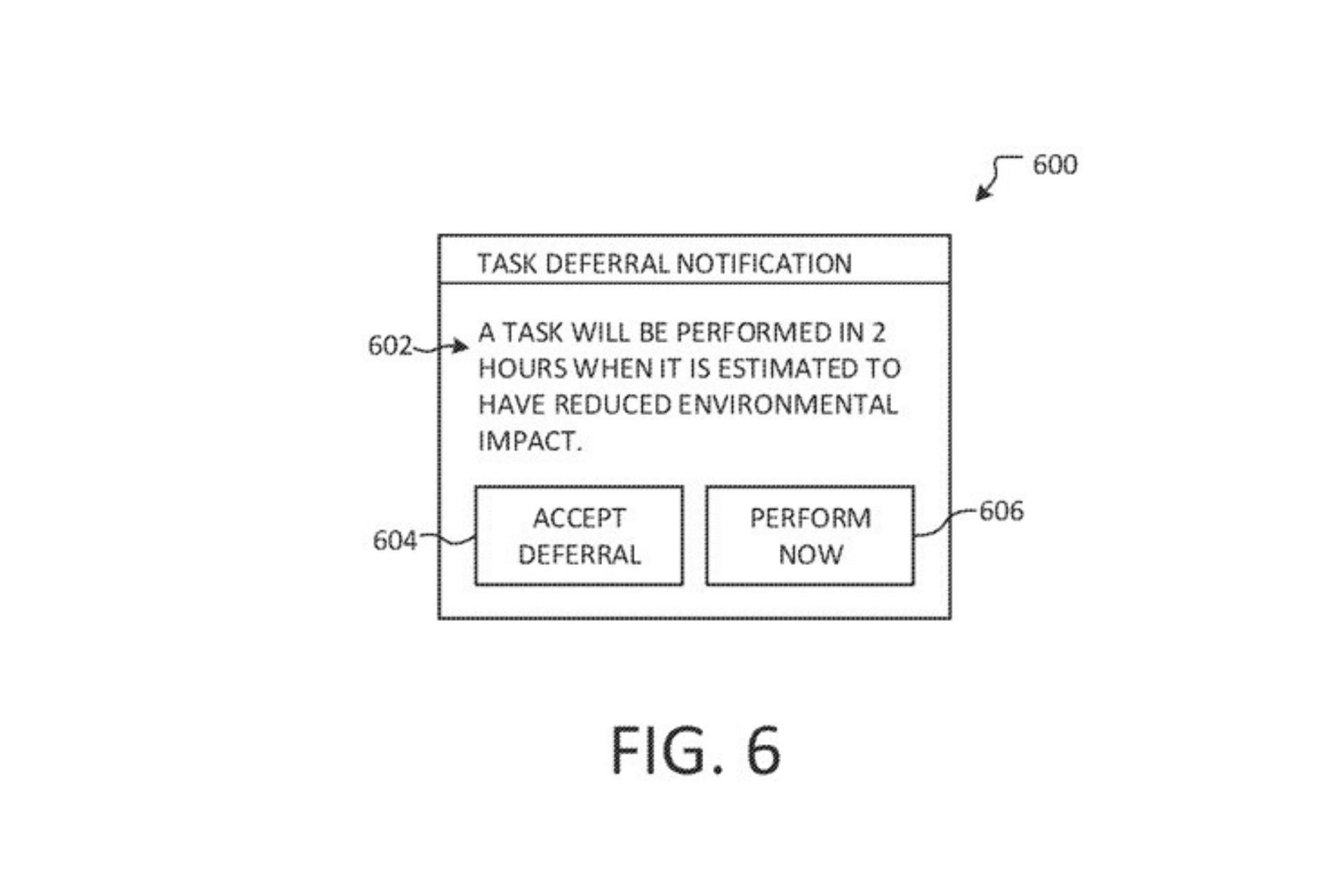
The patent calls the technology a Sustainability-aware computing device behavior management, and it’s a system that helps manage how a computer device behaves in a way that’s good for the environment.

The way it works makes it quite intriguing, as it can automatically detect just how sustainable your energy provider is: the platform gets information about how sustainable an energy grid is from a data provider.

Then it makes a forecast about sustainability, which a computer device can receive and store. The device uses this forecast to manage its functions.

It can do certain things at times that are less harmful to the environment, which means it uses less energy when the environmental impact is predicted to be high.

The device can update the stored forecast regularly or when it finds out that its location (and maybe the energy grid it’s connected to) has changed.

One of the most intriguing parts of this technology is its ability to cache the sustainability forecast, and it uses that cache to initiate further sustainable actions, instead of consuming more energy to get the information from the data provider.

The computing device may cache the sustainability forecast for the time period, thereby potentially reducing the amount of sustainability forecast requests that is received in aggregate from a population of computing.

According to the patent, the technology can be implemented in an array of devices, from laptops to desktops, mobile phones, or tablets, and even Internet-of-Things devices, as it could be part of operating systems, such as Windows, Android, and so on.

It will be appreciated that the disclosed techniques may be applied to any of a variety of computing devices, inclduing, but not limited to, mobile computing devices, tablet computing devices, laptops computing devices, desktop computing devices, server computing devices, and Internet-of-Things (IoT) computing devices.

This sustainable computing technology would also manage peripherals connected to devices, automatically, using the same process. The patent describes a situation where an external hard drive would be put to sleep automatically, to consume less power.

A computing device may have an associated peripheral device, such that usage and/or behavior of the peripheral device is similarly managed based at least in part on a sustainability forecast. During a period of comparatively high impact, the external storage may be put into a lower power state and/or backups may be deferred until the forecasted impact associated with energy grid use decreases.

Given Microsoft’s goal to be as sustainable as possible (after all, the company did promise the upcoming AI data centers are designed to be sustainable and carbon-negative), this technology will most likely see the light of day in a future version of Windows, but maybe as a stand-alone technology, as well.

Speaking of light and sustainable computing, Microsoft patented another technology, a while ago, which focuses on dimming each pixel of a display individually. The technology would allow for a selective dimming option: one part of the display could be brighter, while another part would not be affected, all at the same time. It creates a more immersive experience when gaming, and it also, inadvertently, is sustainable, as it consumes less power than it has to.

So, Microsoft clearly thinks sustainable computing is the future.

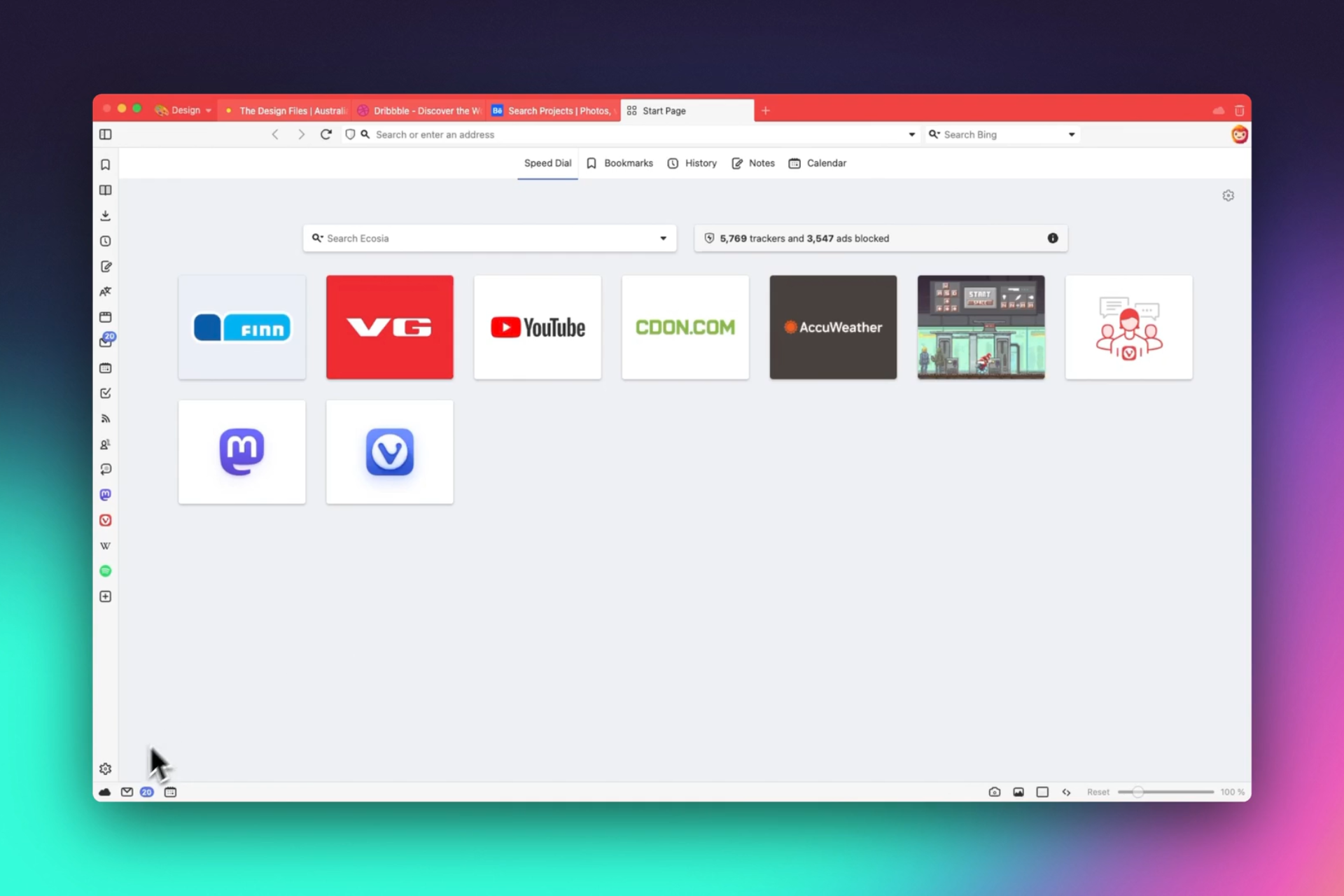
Vivaldi started updating their browser for the upcoming fleet of ARM-basted laptops

Recently, Google released a Chrome version for ARM and now, Vivaldi released what they call an ARM64 architecture preview package for testing. However, the publishers say that you should proceed with caution because they didn’t test it on actual ARM64 devices:

As an extra bonus we also include Windows arm64 “architecture preview” packages for those of you with suitable hardware. These builds are not yet part of our automated test system and have only been lightly tested on one piece of hardware. Serious issues may exist and should be expected. Nonetheless, any testing and feedback would be greatly appreciated!

Vivaldi news

What’s new from Vivaldi browser?

For those of us who love staying on the cutting edge of tech, this is pretty exciting news. But what does it mean for the average user? Vivaldi’s update is not just any ordinary tweak. It’s a step forward into a territory that’s gaining traction due to the upcoming wave of Windows laptops powered by Qualcomm’s Snapdragon X Elite CPUs.

These processors are designed to compete with the likes of Intel, AMD, and Apple’s M1 chips, boasting 12 high-performance cores and impressive clock speeds. The promise of better performance on ARM architecture is tantalizing, but Vivaldi cautions that this version is in its infancy. Expect some bumps along the road.

If you’re someone who’s always looking for the best performance and efficiency from your devices, this update could be a game-changer. Imagine your browser running smoother and faster, making your online experience more enjoyable.

The release of ARM-compatible versions by both Google Chrome and Vivaldi signals a growing interest in catering to ARM-based hardware. This isn’t just about making apps run; it’s about optimizing them to take full advantage of the hardware’s capabilities. And with major PC makers like Acer, ASUS, Dell, and Lenovo gearing up to release notebooks equipped with the Snapdragon X Elite chip in 2024, the future looks promising. The tech world is clearly gearing up for an ARM-powered revolution.

In conclusion, the ARM architecture is slowly but surely claiming its place in the tech ecosystem, and with Vivaldi’s latest update, we’re getting a glimpse of what’s to come. Tell us what you think about this in a comment below.

VASA-1 could become the main generator for deepfakes that will make or break elections

Microsoft’s VASA-1 is a new tool that allows you to create deepfakes with just a photo and an audio clip. After all, wrongdoers can use it in various ways. Fortunately, at the moment, the framework is not accessible because developers are still researching it.

According to Microsoft, Russian and Chinese hackers use similar tools to VASA-1 to generate complex deepfake videos. Through them, they spread misinformation about existing socio-political problems to influence U.S. elections. For instance, one of their methods is to create a fake video of a less-known politician talking about pressing matters. In addition, they use phone calls generated with AI to make it more credible.

What can threat actors do with VASA-1 and similar tools?

Threat actors could also use VASA-1 and tools like Sora AI to create deepfakes featuring celebrities or public people. As a result, cybercriminals could hurt the reputation of the VIPs or use their identity to scam us. In addition, it is possible to use video-generating apps to promote fake advertising campaigns.

It is possible to use VASA-1 to create deepfakes of experts. For instance, a while ago, an advertising company generated a video of Dana Brems, a podiatrist, to promote fake practices and products, such as weight loss pills. Additionally, most threat actors doing this type of fraud are from China.

Even if the deepfakes generated with VASA-1 are complex, you don’t need advanced knowledge to use it. After all, it has a simple UI. So, anyone could use it to generate and steam qualitative videos. Besides that, all others need is an AI voice generator and a voice message. So, others might use it to create fake court evidence and other types of malicious content. Below you can find the post of @rowancheung showcasing it.

Are there any ways to prevent VASA-1 deepfakes?

VASA-1 shows how much AI grew in a few years, and though it feels a bit threatening, officials set new rules in motion. For example, we have the EU AI ACT, the first regulation of Artificial Intelligence, which bans threatening models. Furthermore, Microsoft ensures us that VASA-1 won’t be available too soon. However, it exceeded its training and accommodated new features.

Unfortunately, the existence of VASA-1 shows that it is possible to create an AI generative tool capable of creating deepfakes. So, experienced threat actors could make their own malicious version.

Ultimately, we won’t be able to create deepfakes with VASA-1 too soon. However, this technology has the potential to become a real security threat. So, Microsoft and other companies should be careful when testing it to avoid leaving vulnerabilities. After all, nobody wants another AI incident.

What are your thoughts? Are you afraid that someone could use a deepfake generator against you? Let us know in the comments.

Build your dream PC with this ASUS motherboard and liquid cooling discounts

Getting a high-quality motherboard and cooling isn’t always easy due to pricing, but if you’re looking to upgrade or build a new PC, we have some good news for you.

ASUS has a great discount on motherboards and liquid cooling, so you’ll be able to find something that matches both your needs and budget.

These ASUS motherboards are at a discount, so be sure to get one

According to ASUS Edge Up, the company is having a discount on various motherboards and liquid cooling, so this might be a perfect time to get a new motherboard.

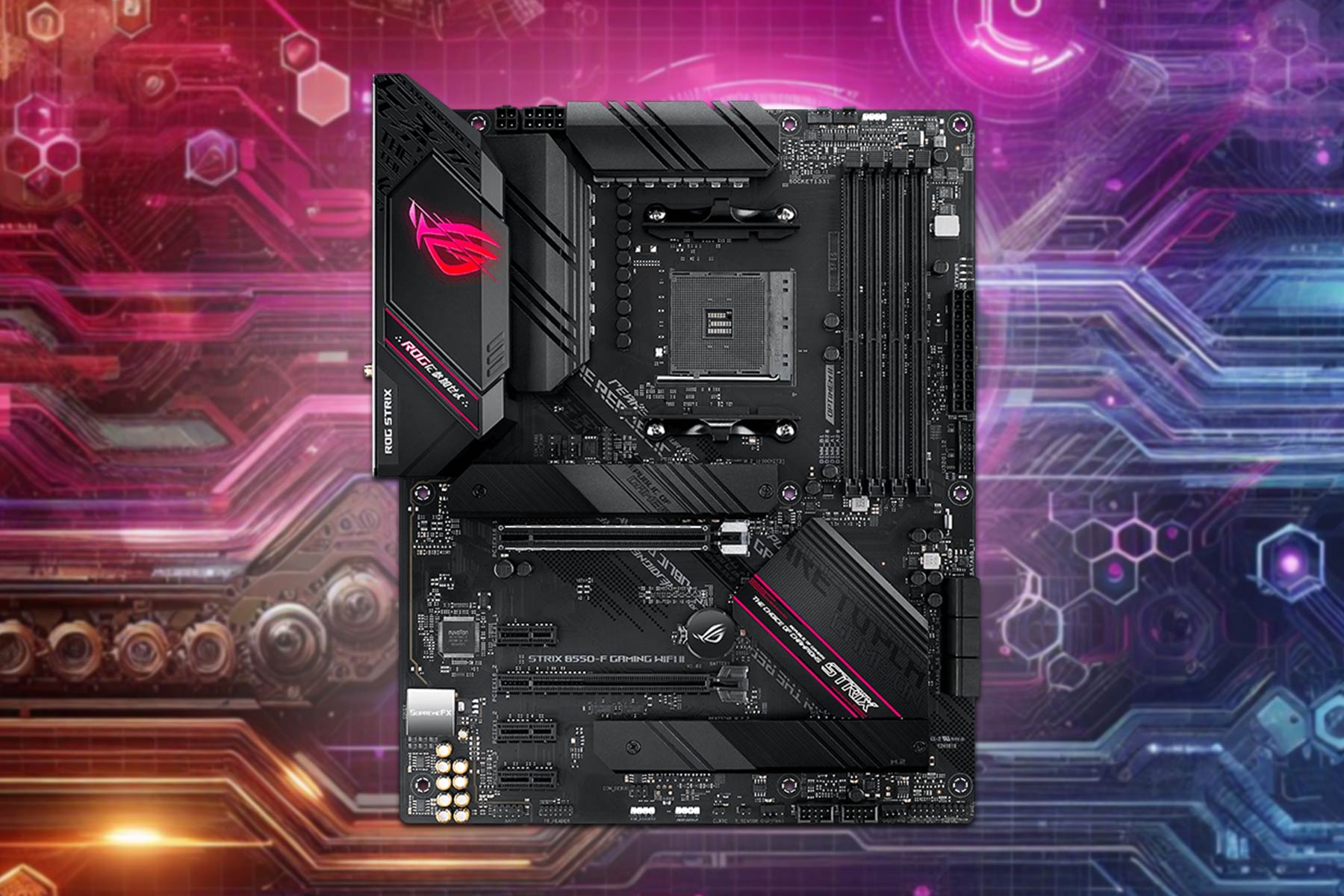
For budget gamers, there’s ROG Strix B550-F Gaming WiFi II and it comes with the following specs:

  • Support for Zen 3 architecture
  • 1 x PCIe 4.0 x16 slot (x16)
  • 1 x PCIe 3.0 x16 slot (x4)
  • Support for Dual channel 5100MHz RAM
  • 2x M.2 slots, one PCIe4 and one PCIe 3.0

You can combine it with ROG Ryuo III 240 ARGB which offers, a 240mm radiator and AniMe Matrix display. Regarding the price, you can get the motherboard for $169.99 and cooling for $139.99 on Amazon.

If you’re a fan of Intel and on a budget, then TUF Gaming Z790-Pro WiFi might be up your alley:

  • LGA 1700 socket with support for 13th Gen processors
  • Single PCIe 5.0 x16 slot
  • 4xDIMM slots for DDR5 7800+ memory
  • 20Gbps USB, Thunderbolt 4
  • 4x M.2 slots

As for cooling, there’s TUF Gaming LC 360 ARGB with a 360mm radiator and premium durability.

You can get the motherboard for $249.99 and cooling for $114.99 on Amazon.

For users that need more power, there’s ProArt X670E-Creator WiFi, with the following specs:

  • AM5 socket for Ryzen 7000 series
  • 4xDDR5 slots, maximum capacity is 128GB
  • 2x PCIe 5.0 x16 SafeSlots (x16 single or x8/x8 dual)
  • PCIe 4.0 x16 slot (Max. x2)
  • 2 x M.2 PCIe 4.0 slots

ProArt LC 420 is recommended and it comes with a large radiator, three 140mm Noctua fans, and an illuminated meter on the pump cover.

The motherboard is priced at $419.99 while the cooling costs $239.99 on Amazon.

For high-end gamers, there’s ROG Strix Z790-E Gaming WiFi II, which comes with the following:

  • LGA 1700 socket for 13th Gen Instal CPUs
  • 4x DIMM slots for DDR5 7800+ memory
  • 1 x PCIe 5.0 x16 Safeslot (x16)​ [CPU]​
  • 2 x PCIe 4.0 x16 slots (x4) [Chipset]
  • Five M.2 slots

To keep your PC cool during gaming sessions, ROG Ryuo III 360 ARGB will help you keep your device at optimal temperature.

Regarding the pricing, you can get both from Amazon. The motherboard will cost you $439.99 while the cooling is priced at $189.99.

These are all amazing motherboards, so if you’re planning to upgrade or you’re building a new PC, be sure to check them out.

In case you’re looking for a graphics card, you can get GeForce RTX 4070 Ti SUPER for 28% off, if you’re quick enough.

Google finally brings Dark Mode to Drive on web

Dark Mode is a standard feature across apps and websites these days. Over the last five years, nearly all have integrated it, owing to increased user requests. Now, it seems Google, too, has finally caved in because the Drive’s web version finally has a Dark Mode.

And it’s not like Google didn’t receive many requests for it. The California-based tech giant admits that Dark Mode was a highly requested feature in the official announcement blog. It reads,

Today, we’re introducing a highly requested feature: Dark mode in Drive on web. This new setting aims to provide you with a more comfortable, customizable viewing experience for Drive.

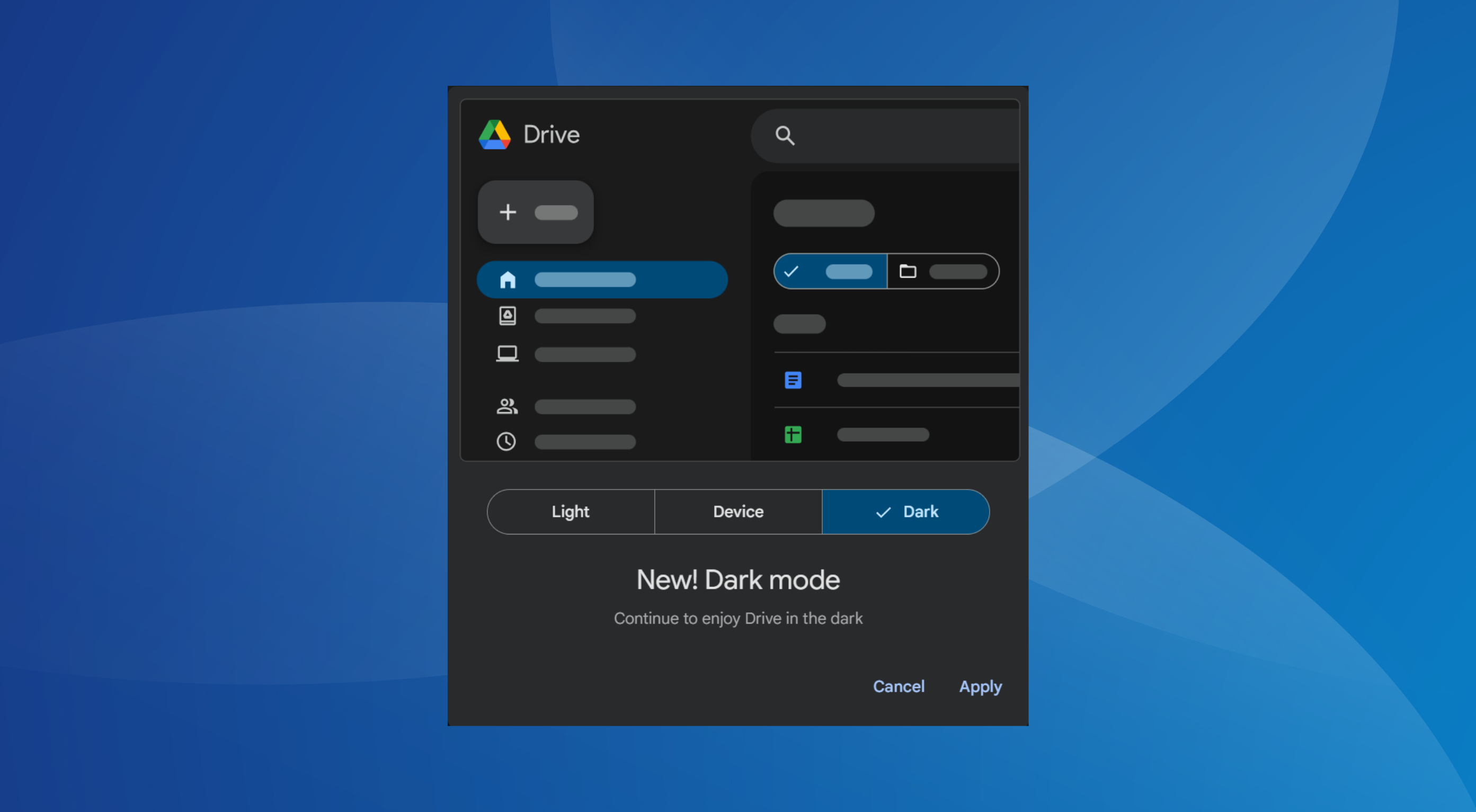
After integration, when I opened Google Drive, it came up with a popup notifying me about the change as well as the option to choose between Light, Device, and Dark modes.

Dark Mode notification on Google Drive

It only pops up the first time. On subsequent visits, the mode set initially will be applied. But you can always manually enable/disable Dark Mode from Drive’s web settings!

How do I enable Dark Mode on Google Drive web?

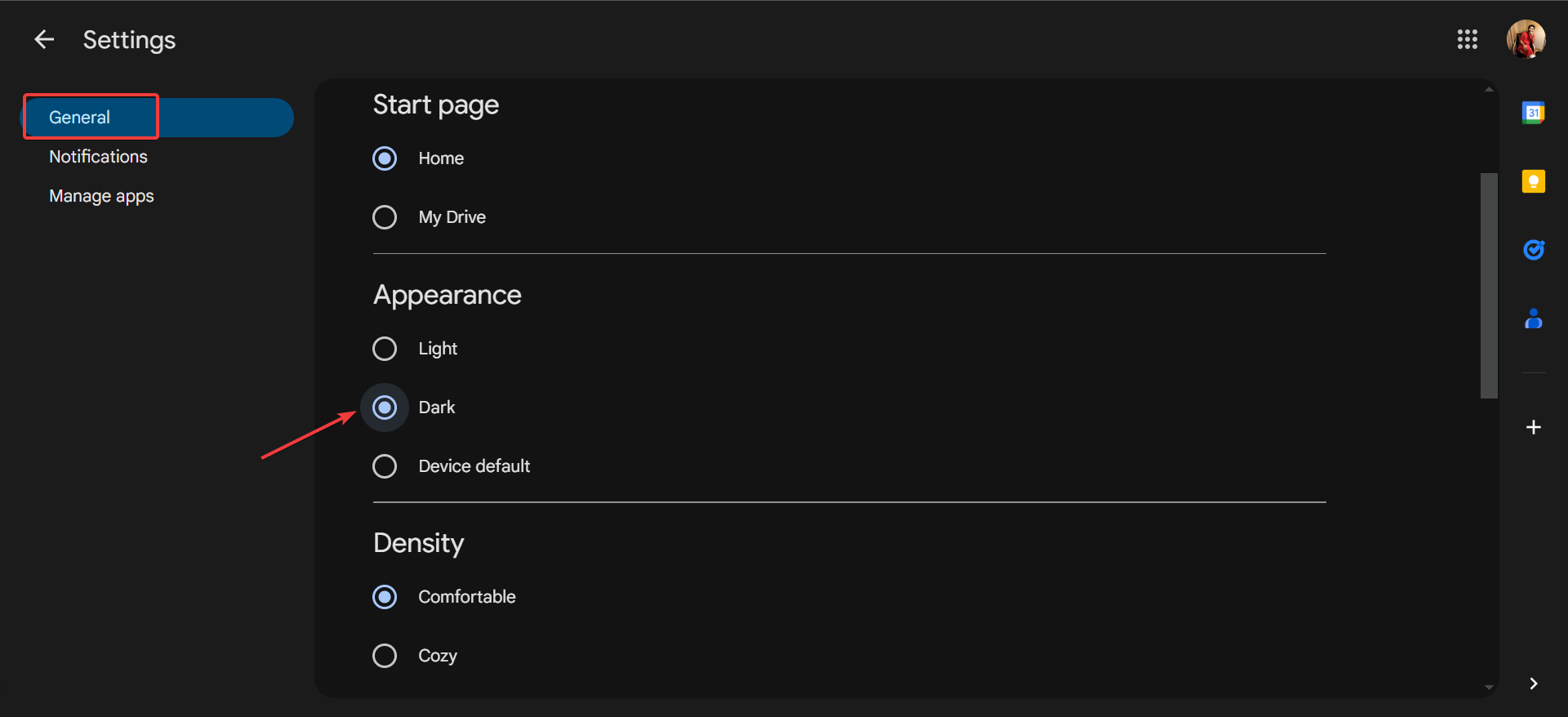
  1. Open Google Drive, click on the gear icon near the top left, and then select Settings.
  2. In the General tab, select Dark under Appearance and the changes will be applied immediately.dark mode

If you don’t see the Dark Mode option yet, remember that it’s a gradual release and may take up to 15 days to show up for everyone, according to Google.

As for the availability, you will get Dark Mode only on the following accounts:

  • Google Workspace customers
  • Google Workspace Individual subscribers
  • Personal Google accounts

Dark Mode has become an essential feature, given the battery savings and reduced stress on the eyes. And with it coming to Google Drive, you don’t need third-party extensions to switch to Dark Mode.

Google is also working on an ultimate Dark Mode for Chrome that automatically applies across websites, irrespective of whether the website supports the mode.

Don’t you want Google to introduce the mode on more of its offerings? Share with our readers in the comments section.

When you will buy the next Xbox console, it will be more like a PC

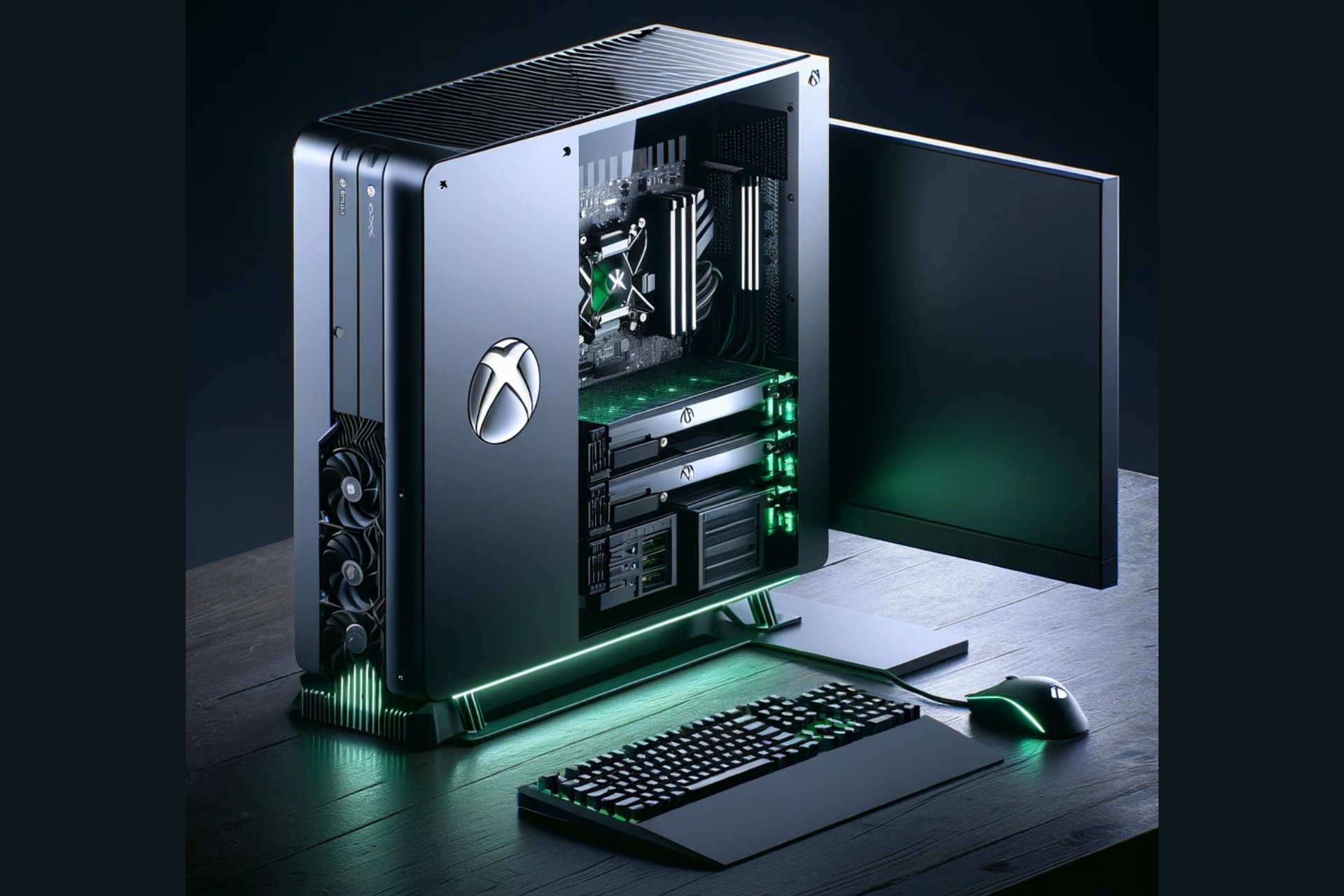
The featured image was generated using DALL-E and it’s not an actual image of an Xbox console

If you’re old enough, like me, to remember the arcade games from pubs, recreation centers, and basically every street corner, you also know that the game consoles were created to transport all that fun into our homes. Back then, the PC was just a big calculator connected to a screen, and no one thought that it could actually be used for games.

The hype of the gaming consoles continued a long time because it was a lot more convenient to start up your games without needing to boot up an OS and deal with other resource-hungry software that compete with what we actually want to do: play!

The gaming market monopolies are at an end

In modern days, gaming consoles were kept alive only by game exclusivities and developer-distributors monopoly and that story is about to be played out as well. Sony is starting to release more and more versions of their games from PS to PC, while Microsoft, with they Xbox on every screen policy is obviously bringing all that Blizzard-Activision goodness on Windows as well.

In the meantime, the Redmont giants is opening up their app stores to all developers and platforms, and bring all the Xbox games to PlayStation, disrupting monopoly across the board.

In fact, Phil Spencer, the visionary behind Xbox, says in an interview for Polygon that everyone should be free to buy their games from their preferred store:

Yes, [Consider] our history as the Windows company. Nobody would blink twice if I said, ‘Hey, when you’re using a PC, you get to decide the type of experience you have [by picking where to buy games]. There’s real value in that.

However, he went further with that idea pointing out that this vision should also apply to gaming consoles.

Then, there is the hardware problem. When you’re buying a console, you can’t upgrade it like a PC. The fear of console modding and other hardware restrictions has limited the potential for console manufacturers and even the developers. The PC components market is moving a lot faster and the upgradeability of the systems gives them the high ground.

The implications of Spencer’s plan are vast and could lead to more possible outcomes. For one, it could lead to a more competitive marketplace within consoles, driving down prices and offering more choices to consumers. It also represents a significant shift in how console makers generate revenue, potentially moving away from the reliance on exclusive titles to a more diversified income stream. But perhaps the most exciting aspect of Spencer’s vision is the potential for innovation it unlocks. By breaking down barriers between platforms, developers could reach wider audiences, and gamers could enjoy a richer tapestry of gaming experiences.

What does this mean for the future of Xbox?

If Spencer’s vision comes to fruition, the Xbox of tomorrow could be shaped up more like a PC, blending the best of both worlds: the convenience and user experience of a console with the openness and versatility of a PC. This isn’t just about playing PC games on Xbox; it’s about reimagining what a console can be. It’s a bold move that could redefine the gaming landscape, making Xbox a central hub for gaming across platforms.

The journey towards this future is filled with technical and regulatory challenges, but Spencer seems confident that he can make it happen.

The bottom line is that for you and I, the consumers, but also the developers, it’s a future that promises more freedom, more choice, and more possibilities. It’s clear that the lines between consoles and PCs are blurring, and Xbox might be leading the change.

What is Sony or Nintendo going to do about that? Adapt, diversify, but make it quick, because things are quickly about to change.

Will you buy that new console if it’s just like a desktop PC? Let’s discuss that in the comments below.

Microsoft Teams webinar organizers can stop attendees from sharing their webinars on social media

In a surprising turn of events, Microsoft has decided that it’s time to give Teams webinar organizers even more control over their projects, by allowing them to stop attendees from sharing their webinars on social media.

The new option will be released in June 2024, and it will impact Teams on all platforms, including Web, Desktop, and Mac versions, according to the latest entry in the Microsoft 365 Roadmap.

Disable the ability for attendees to share the webinar event page to social networking sites for public events post-registration.

Microsoft

While I don’t know which webinar organizer would want to stop participants from sharing their webinar on social media, something that would automatically give the webinar more exposure, thus possibly other participants, it’s good that Microsoft Teams allows them to have the option, at least.

Truth is, the option is useful in corporate situations to control possible exposure to a private corporate webinar.

The Redmond-based tech giant is releasing a bunch of similar features aimed at organizers and presenters. For example, Microsoft Teams will allow webinar organizers to block the sending of attendee emails, which the platform usually does every time someone sets up a webinar, as a way to remind participants to attend.

The platform will also be updated to support a private chat channel for organizers and presenters in Microsoft Teams webinars. This update, slated for release in June, is a way to privately chat about the management of the webinar without participants knowing what’s going on.

These features will all give greater control to organizers to set up their webinars as they want, without having to worry about annoying future participants with too many emails, or even creating a bigger event than it should be.

In many ways, with these features Teams will become a preferred platform for webinar hosting, since the experience of attending one on the platform can be highly customized.

What do you think about it?

HP Omen 17: Perfect blend of gaming power and AI integration

HP has a track record of amazing devices, and speaking of which, the company has just introduced the latest member of the Omen series.

Join us while we take a closer look at the newly announced Omen 17 model.

Omen 17 is a gaming laptop with Copilot integration

HP has just introduced a new laptop, called Omen 17, as XDA Developers writes. Regarding the hardware, you can find the following:

  • 17.3-inch display that comes with Full HD or Quad HD resolution
  • The Quad HD display can support up to 240Hz refresh rate
  • Up to Ryzen 9 8945HS CPU with Ryzen AI
  • Up to Nvidia GeForce RTX 4070 GPU
  • 1TB SSD and up to 32GB RAM

Additional features include a 1080p webcam, a single USB-C port, three USB Type-A ports, HDMI, an Ethernet port, and a headphone jack.

Omen 17 might be a gaming laptop, but it’s AI-focused, and it utilizes AI to improve video and voice quality. It even comes with a trial of Otter.ai Pro which lets you record, transcribe, and summarize meetings.

Lastly, the laptop also has a dedicated Copilot key that you can use to quickly and easily open the AI assistant.

Overall, this is a great device, and it will be available starting April 24th with a starting price of $1,349.99.

If you’re looking for something different from the OMEN series, then you might be interested in this HP OMEN 40L discount.

For more casual users, there’s also a great HP Dragonfly Pro One 14 discount that you shouldn’t miss.

Microsoft Edge on Android is adding Actions to the Omnibox; here’s how they can be useful to you

Currently, Microsoft is testing mobile Omnibox Actions for the Edge browser on Android. This will allow you to open Copilot, Bing Translator, Microsoft Rewards, weather, and more right from your address bar.

The feature is tested in Edge Canary. A similar feature is already available in Google Chrome on both desktop and Android, which supports actions that let you perform tasks like launching a clear browsing data tab or checking updates from the address bar.

This is not it; Chrome has a long list of actions you can perform right through your address bar. Earlier, Microsoft Edge used to support actions behind Omnibox pedal suggestions and another flag.

However, Edge now doesn’t display actions in the Omnibox on the desktop, but the Redmond-based tech giant is working on bringing similar types of actions to the Omnibox for users to save time.

new Omnibox action 1

For example, a new Omnibox action displays a weather pedal in the Omnibox that redirects you to a weather website when you type Weather as a query.

Similarly, an Ask Copilot pedal or icon that launches Copilot will appear in the Omnibox when you type Copilot. We can compare this experience to using the Gemini shortcut in the Chrome address bar on the desktop to chat with Gemini.

new Omnibox action 2

Another omnibox action appears when you type translate, and Edge will show you Translator with the action to Open Quick Translator, which takes you to the Bing translate website. Here are some more:

  •  Image creator – launches Copilot that creates images with words you submit
  • Rewards – Displays the Microsoft Rewards action that opens the Rewards dashboard

How can I Enable Omnibox Actions in Microsoft Edge on Android?

You can launch Microsoft Edge on an Android phone. In the address bar, type edge://flags and press Enter. In the search bar, type mobile omnibox action. Now, enable all the highlighted flags and restart Edge.

edge://flags

Next, launch the browser and start typing in the Omnibox to check out the actions. These actions are currently working on Microsoft Edge for Android in Canary. However, we don’t know when it will make it to the Stable Channel.

However, as they are being tested by Microsoft, there are chances that they will eventually become a stable release, as the action commands include using Copilot from the address bar.

What do you think about this new feature? Share your thoughts with our readers in the comments section below.

Microsoft plans to triple data centers, environmentalists express concern

In the last few years, Microsoft has made significant investments in ramping up its data center infrastructure in a bid to train and run LLMs and meet the growing global demands for AI.

As per a report published in Business Insider based on an internal document titled Commercial Cloud and AI Demands: Fueling our Expansion, Microsoft plans to triple the data center capacity by the first half of the 2025 fiscal year. This requires 200 MW (megawatts) every month. As for mid-2024, Microsoft intends to double the new data center capacity.

Microsoft has, on several occasions, made public its plans to scale up data centers to develop advanced AI solutions. The Redmond-based tech giant recently purchased a 136-acre site to set up a data center in Georgia.

Last month, Microsoft and OpenAI partnered to build a data center for its supercomputer, Stargate, which reportedly cost $100 billion.

Environmentalists raise an alarm

Data centers require processors and related components to train generative AI models. Anticipating a growing demand, Microsoft plans to buy 1.8 million AI chips in 2024. This will undoubtedly have a huge impact on the environment!

As a result, environmentalists worldwide have expressed concerns about this massive increase in data centers and its effects on energy and water consumption. Similar concerns were raised in the past when the whole cryptocurrency mining craze was at its peak, and many had assembled power-intensive setups in their garage.

Data center

Remember, the data center landscape is dominated by just a few tech giants. A report by Synergy highlights how the data center capacity is doubling every four years, and only three companies, Microsoft, Google, and Amazon, account for 60% of it.

So far, it’s unclear whether Microsoft is already witnessing an increased demand for generative AI and is ramping up data centers to accommodate it or is simply planning for the future. Though, the latter looks more probable, given Microsoft’s recent expansion in the AI landscape worldwide!

What do you think about Microsoft’s expansion plans for data centers? Share with our readers in the comments section.
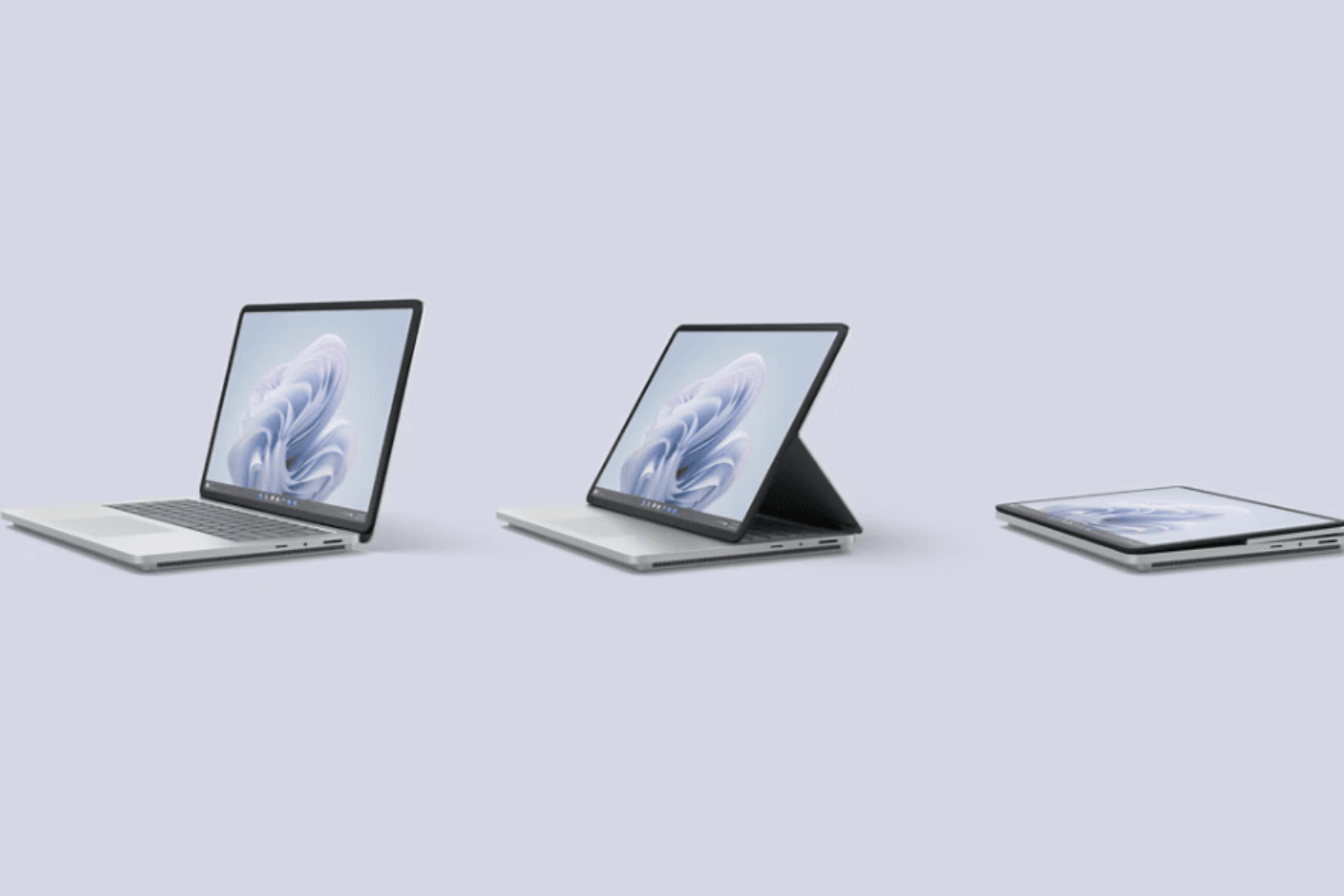
Microsoft 365 GCC customers will get the Cloud policy service which greatly strengthens the security

Microsoft promises a safer environment for GCC customers by updating the 365 productivity platform with the new Cloud policy service, which allows Microsoft 365 admins to forge policies, configure them, and deploy them in Microsoft 365 apps.

Through the new Cloud Policy service, these new policies will be automatically enforced to users upon signing in.
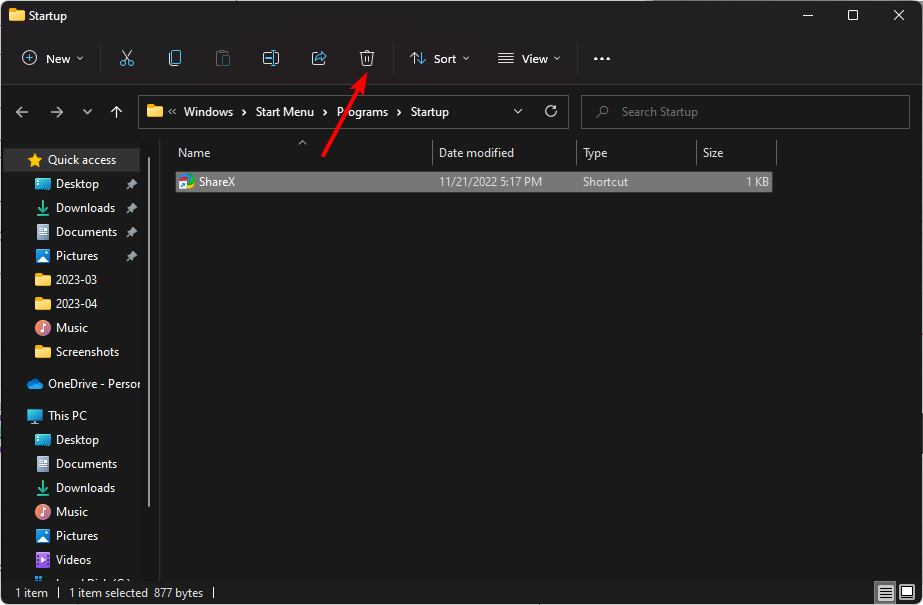
The Redmond-based tech giant will release the new service to Microsoft 365 GCC customers in June 2024, according to the latest entry in the Microsoft 365 Roadmap, and it will happen in stages. Initially, there will only be policies for Microsoft 365 Apps for enterprise on Windows, but more platforms will be included down the road.
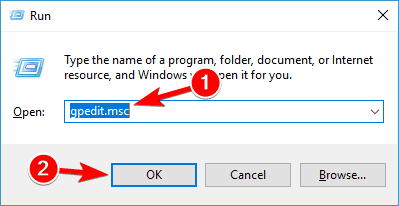
Here’s what the entry says:

The Cloud policy service will begin rolling out for Microsoft 365 GCC customers late June 2024. The Cloud Policy service allows Microsoft 365 administrators to configure policies for Microsoft 365 apps and assign these policies using Microsoft 365 or Entra ID groups. Once configured, these policies are automatically enforced as users sign in and use Microsoft 365 apps. The initial release will support policies for Microsoft 365 Apps for enterprise on Windows and future updates will bring support for additional applications and platforms. For additional information about the Cloud Policy service, refer to Overview of the Cloud Policy service for Microsoft 365 Apps for enterprise.

Microsoft

The new Cloud policy service will be particularly useful in these specific situations, where data privacy and security are essential. Managers and government organizations will be able to build specific policies to suit their environments and make sure bad actors can be detected when trying to break in.

Coupled with the new Copilot for Security, this new enhancement should protect government infrastructures from the new AI-based cyberattacks, as well. Unfortunately, according to a Microsoft report, these sorts of attacks are becoming more and more popular and complex, making them hard to beat.

But with efficient policies known only to executives, it should make it harder for bad actors to undergo cyberattacks.

Microsoft will update Copilot in Excel to support formula conditional formatting

The Redmond-based tech giant first released Copilot in Excel last year, but initially, the AI model was capable of simple tasks, such as summarising and editing information in there. However, gradually Microsoft updated it to support different formulas.

For instance, a while ago it introduced two new complex formulas to manage multiple tables, and it also got the ability to generate multiple formula columns from a single prompt.

According to the latest entry in the Microsoft 365 Roadmap, Copilot in Excel will also be soon capable of formula conditional formatting. This will allow the AI model to handle complex tasks, meaning users won’t be alone in handling such tasks anymore, as Copilot can be of assistance.

Additional support for complex conditional formats beyond the basic top and bottom or conditional operators. For example, Copilot analyzes two factors when highlighting all rows where the product is bikes and sales is greater than 100.

Microsoft

The new formula conditional formatting enhancements will be released to Copilot in Excel in May 2024, and those dealing with a lot of Excel information on a daily basis, at their work, should use it.

Why? It could greatly streamline workflows and enhance productivity, as the AI model can extract information from different Excel documents and analyze and process them using the formatting options. The good thing about Copilot is that the AI model is a unified experience meaning it should, theoretically, understand and extract information from different documents.

This makes it a valuable tool to use: it reduces time and provides a relatively stress-free experience with dealing with detailed information such as Excel data.

Razer Kishi Ultra controller can turn almost any portable into a handheld gaming console

Razer, a company known for its gaming hardware and accessories, has recently unveiled a new mobile game controller that’s causing quite a stir in the gaming community. The Razer Kishi Ultra is designed to bridge the gap between mobile gaming and the more traditional PC or console gaming experience.

Unlike its predecessors, which were criticized for their lack of ergonomic design, the Kishi Ultra boasts a look and feel that mirrors the comfort and layout of standard PC and console controllers. This innovative design not only caters to hardcore gamers who are venturing into mobile gaming but also enhances the gaming experience on devices like the iPad Mini, transforming them into formidable gaming handhelds.

Razer Kishi Ultra works with almost any mobile device

Razer Kishi Ultra

The best part about Razers’s Kishi Ultra is its compatibility with a wide range of devices, including Android phones, iPhones, and even smaller Android tablets up to eight inches. It can also double as a PC game controller when connected via a USB C cable. Razer’s focus on ergonomics and gameplay is obvious in the Kishi Ultra’s full-sized handle and button layout, which may rival Razer’s pro console controllers.

One of the standout features of the Kishi Ultra is its Mecha-tactile responsiveness in the D-Pad and ABXY buttons, along with full-sized trigger buttons and thumbsticks. It even includes programmable L4/R4 buttons for customized control setups. For Android and Windows 11 PC users, the controller offers Razer Sensa HD Haptics, providing a multi-sensory gaming immersion that surpasses traditional console controller vibrations.

Chroma lighting on Razer Kishi Ultra

The Kishi Ultra also comes equipped with Razer Chroma RGB lighting and supports the Razer Nexus app, which grants access to thousands of games compatible with the new controller. Priced at $149.99, the Kishi Ultra is now available right from Razer’s website. Additionally, Razer has released a new version of the Razer Kishi V2 mobile game controller with a USB C port, available for $99.99.

Razer Kishi V2

The Razer Kishi Ultra might be a game-changer for mobile gaming because now you will think twice before thinking of buying that handheld mobile game console. With just $150 you can turn your already powerful smarphone or tablet into a mobile gaming rig.

We remind you that Raser also launched the BlackShark V2 Pro headphones for Xbox and PlayStation to enhance your gaming experience.

What do you think about the new Razer Kishi Ultra mobile controller? Share your thoughts in a comment below.