Microsoft has been updating Outlook with some really useful features lately, including the implementation of a brand-new UI, in March 2023.
However, despite the new interface, or the support for older formats (Outlook users are now able to access old emails), Outlook still lacked this simple feature that would allow users to find important documents in a matter of seconds.
But, according to the latest entry in the Microsoft 365 Roadmap, Outlook will finally let users do that by enabling them to add shared folders to favorites. The app already allows users to add folders to their favorites, however, those shared with multiple other users were not available.
Most of the time, these shared documents are also the most important ones, especially when talking about a working environment, where multiple users have to contribute to a document.
In time-tight situations, such as deadlines, or meetings, it’s also very important to have access to them easily, without wasting precious time. Well, according to Microsoft, this new feature will allow users to save the shared folders to favorites, ensuring quick access to them.
Plus, Outlook users won’t have to wait for long: the new capability will be available to them starting May 2024. There will be a preview first, most likely happening in early May, then the feature is going to be generally released later that month.
Customers will have the ability to add shared folders to their favorites. This enhancement offers users increased flexibility and convenience, allowing easy and quick access to important shared content directly from their Favorites list. #newoutlookforwindows
Microsoft
The Redmond-based agrees that adding Outlook’s shared folders to favorites will offer more options to users, and it will also enhance productivity all around, allowing them to quickly get work done.
Are you excited about this new feature coming to Outlook? Let us know in the comments section below.
Software piracy is a huge problem for developers since it allows users to use their software without a license.
Even though Copilot doesn’t promote piracy in any way, it can still help you find pirated software, if you know how and where to ask.
Copilot was caught showing links to piracy websites
We all know that Microsoft doesn’t condone piracy, and it came as a shock to us when we learned that Copilot can give you links to websites that are used for illegal file sharing.
This was first discovered by users on Reddit, if you type the right query into Bing, the Copilot will be happy to assist you with its suggestions.
We tested this, and while it didn’t work in Firefox, it worked perfectly in Microsoft Edge. Of course, users were quick to joke around that this is one way to attract users to use Edge on their PC.
Others were quick to point out that Bing is superior to Google, probably due to not censoring search results such as these.
nowaday Google is straight up trash as a search engine… when i need to do some search Bing is far superior…
Bing never complain whenever I’m using VPN and search something. Google will ask you a ton of stupid captcha that never get the correct answer, or very very slow verification.
However, the comments were filled with users suggesting to stay away from these types of websites since they are usually filled with malware.
This seems like a bug on Microsoft’s end, and during our testing, we were able to get these results from Copilot in Bing, but not from the Copilot web app. Hopefully, Microsoft will fix this bug soon.
Today, those Teams users working in customer care support have a reason to celebrate, because Microsoft just added the new Queues app to the platform’s roadmap, and it’s scheduled to be released in June 2024, according to the Microsoft 365 Roadmap.
So what is the new Queues app? The Queues app is a new tool for Teams that will bring together the customer support team to answer customer calls. The team can take incoming calls and make outgoing calls for the call queues or auto attendant they are assigned to.
They can also check how the status of the call queue and work smoothly with the manager and other team members to ensure the calls are resolved in a good manner.
People who have permission from Teams admins can watch their call queues and auto attendants in real time, make reports on how the queue and agents are doing, change their call queues and auto attendants using Teams settings, and add or remove team members to meet business needs.
The new Queues app is a solution for collaboratively handling customer calls natively in Teams. Starting with surfacing call queue calls, your team members can use the Queues app to handle inbound calls, be it PSTN or VOIP. They can make outbound calls on behalf of the call queues or auto attendant that they are assigned to. And they can review the call queue statistics and seamlessly collaborate with their lead and colleagues within the flow of work. Authorized users, with permissions from Teams admins, can monitor their call queues and auto attendants in realtime, generate reports on queue and agent performance, configure their call queues and auto attendants using Teams settings, and opt in or out their team members to optimize for business needs.
Microsoft
This is going to be a Premium-only feature, and it will be generally available to desktop platforms starting June 2024, as we mentioned earlier.
The Queues app can be a game changer and it is definitely going to provide a stress-free experience when handling customer calls, including difficult ones. Why? Well, difficult customers will be managed by a team of experienced customer care agents, instead of just one, and this automatically increases the chances of the issue being resolved right away.
Besides the new Queues app coming to Microsoft Teams Premium, the Redmond-based tech giant unveiled that the platform is also getting the AV1 codec that only requires a 200 Kbps bandwidth for screen sharing. What does this mean? You will be able to experience sharp visual and fluid motion if you have a poor internet connection.
It’s quite exciting to be a Microsoft Teams user in 2024.
Ever since reports of Diablo 4 coming to Xbox Game Pass first emerged, users have been excited about the release. So are Microsoft and Activision Blizzard because this is the first release on the platform by the latter after the $69 billion acquisition.
But installing Diablo 4 on a PC using Game Pass won’t be as simple. You will need to download Battle.net beforehand, sign in with the credentials, and then proceed to the Diablo 4 installation!
How can I install Diablo 4 on the PC?
Launch the Xbox App on your PC and sign in with the account used for the Game Pass subscribtion.
Search for Diablo 4, and then click the Install button.
Now, click on Install Battle.net in the prompt that appears.
Wait for the download to complete.
Use your Battle.net login credentials to link it with your Microsoft account. If you don’t have one, sign up for a Battle.net account.
After connecting the accounts and downloading Battle.net, you can now install Diablo 4.
While it does sound like too much effort to get Diablo 4 on PC via the Game Pass, all this is a one-time thing and wouldn’t take more than five minutes. Even the Steam version of Diablo 4 needs a Battle.net account, although you are not required to download the app.
Can you imagine your boss reading an AI-generated review of your job performance, only to find that you might have not done your job well enough?
Well, if it sounds like a Black Mirror episode, then hold your horses, because the Redmond-based tech giant recently published a patent describing a technology that would intelligently identify a user’s relationship with a document.
The patent, which can be read in its entirety here, involves a technology that wants to understand what a user does with a document using an application.
The AI-powered technology collects data about the user’s activities on the document over a certain time. It then looks at this data to figure out what kind of activity the user is doing on the document. After that, it sends a signal that includes this information to a device where it’s stored with the document.
The technology’s main goal is to determine which individual contributed most to a document, especially shared documents in applications such as OneDrive, but it’s not limited to it. The inventors behind the technology claim that it would address the current limitations of not being able to compare activities made on a shared document.
Currently, a signal indicating creation and/or editing actions performed on the document may be stored with the documents, but this signal provides very limited information about the edits made to the document. It does not provide any information about the user’s relationship with the document, as it does not differentiate between a user that makes minor edits and one who contributes extensively to the content.
Since the technology is AI-based, it can be integrated into Copilot for platforms such as Microsoft 365, but it could backfire, especially when talking about employees’ activity. Why? Well, with this technology, Copilot in Microsoft 365 would be able to not only track their activity but also report on it, as well.
We’re talking about an AI tool that can track the time spent on your work but also analyze the quality of the work that you did based on certain parameters that can be customized to each situation.
Ultimately, it can generate a report of the activity for later use.
Is this useful? Well, yes, it is. It can easily streamline workflows, and emphasize productivity. It can used together with Microsoft 365, a productivity platform (its mobile app recently announced a new Create section), so that companies can reach their goals faster.
However, it could become a kind of dystopian situation, to say the least: your manager might use this technology to keep a closer eye on the performance of their employees.
Can you see yourself being fired at the hand of Copilot? Well, it could happen, but it’s worth mentioning that, for now, this technology is only at a patent level, so it might take a while until it gets integrated with existing tools.
When the MEGA Showcase Microsoft Xbox 360 Building Set was first released in Oct’23, Xbox and Lego fans were excited, but the price tag acted as a deterrent for many.
So, if you didn’t get the MEGA Showcase Microsoft Xbox 360 Building Set back then, you can buy it for $99.99 at Target, $50 down from the original price of $149.99.
It’s a Target-exclusive discount because when we checked the prices on Mattel Shop, it’s still $149.99.
The MEGA building set is the replica model of one of the most popular consoles to date, the Xbox 360, released in 2005. Besides the console, it also contains pieces for a light-fitted controller and a Halo 3 disc (almost pre-built).
The Xbox 360 building set includes an external hard drive, illuminated interiors, and a disc drive that lights up when you place the Halo 3 disc.
The Xbox 360 replica, comprising 1342 pieces, is identical to the actual console. Though building it takes time and effort, that’s something you won’t regret. The physical achievement notification shipped alongside the replica aptly reads, Achievement unlocked 75G – Build an Xbox.
We are always looking for ways to extend the battery life, from changing to built-in Windows settings to the BIOS configuration. You don’t need to worry about it anymore. Select Lenovo laptops now ship with an auto sleep sensor!
The sensor will initially be available in Lenovo’s ThinkPad X13 Gen 5, ThinkPad X13 2-in-1 Gen 5, and ThinkPad X1 2-in-1 Gen 9 14” laptops.
All about the auto sleep sensor on Lenovo ThinkPad X13 and X1
Developed by Elliptic Labs, the AI Virtual Human Presence Sensor detects when you are not present in front of the device and automatically enables sleep mode.
While it conserves battery life and reduces the power bill, another vital aspect can’t be ignored.
The auto sleep sensor in Lenovo laptops eliminates the possibility of unpermitted access. Anyone without login credentials can’t use the PC after you step away, which is a concern in organizations and co-working spaces.
The best part, the AI Virtual Human Presence Sensor is all software-based. Subsequently, integrating it with other PCs and laptops would be simple to implement. Besides, this will allow lower-end PCs to feature an auto sleep sensor, something currently exclusive to devices in the higher price range.
As per Business Wire, Laila Danielsen, CEO of Elliptic Labs, said,
Adding the Lenovo ThinkPad X13 Gen 5, ThinkPad X13 2-in-1 Gen 5, and ThinkPad X1 2-in-1 Gen 9 14” models to our growing list of laptops in the market is a clear sign of the PC industry’s attraction for our AI Virtual Smart Sensor Platform. With this announcement, we’re now shipping on (27) laptops models, and all of these are currently available in the market. For 2024, including this release, we’ve launched on nine total laptops. We remain focused to execute on the opportunity to bring more devices to market that are smarter, greener, and more human-friendly.
In the coming days, we should see more Lenovo laptops shipping with the AI Virtual Human Presence Sensor. Other manufacturers, too, are expected to adopt the technology, given the minimal cost implications.
If you are considering these Lenovo laptops for the auto sleep sensor, there’s another good news! The Lenovo ThinkPad X13 Gen 5 series, with an iFixit repairability score of 9/10, is expected to last for years without ever taking it to the certified service center.
Do you believe Elliptic Labs’ AI Virtual Human Presence Sensor will witness mass adoption? Share with us in the comments section.
Multimedia can be demanding on your device, especially on laptops, with video playback negatively impacting your battery life.
This is why Microsoft and Google are working together to implement a new feature that will improve battery life on laptops.
Chrome might soon use the Windows audio offload feature
When playing any audio in Chrome, the audio playback utilizes the CPU with small buffers. This results in frequent wakes, higher power consumption, and higher battery usage.
This isn’t efficient since the CPU isn’t optimized to handle audio tasks. To tackle this issue, Microsoft suggests using an audio offload feature along with large audio buffers.
This should move the audio processing to the dedicated hardware accelerators with larger buffers. As a result, the CPU should remain in a low-power state thus saving battery life.
Hackers targeted Top.gg, the Discord community with over 170,000 members. If you use the app, you might already know about the group. After all, they share many great bots you can use for various purposes, such as gaming, music, giveaways, management, and more. Thus, wrongdoers considered exploiting Discord bots to spread their malware and gain control over personal information from other groups.
In addition, the community promotes discord servers and acts like a store for the bots. Also, the platform enhances gaming experiences, provides moderation tools, and offers fun features for other gaming communities.
How did threat actors target the Discord Community?
To target Discord communities, threat actors used a supply chain attack. This method allowed them to sneak malware into the platform, affecting developers and other members. The ones responsible used various tactics in the past, such as stealing GitHub accounts, distributing malicious Python packages (PyPI), using a fake Python infrastructure, and social engineering. The main goals of the wrongdoers are to spread Discord bots with malware to steal data and sell it for money.
Unfortunately, according to BleepingComputer, cybercriminals started targeting the Discord community in 2022. At first, they used PyPI to upload malicious packages similar to open-source tools. While seeming legitimate, they contained malware.
As a result, some developers contacted the virus and got their accounts hijacked. Afterward, hackers altered the developer’s project files to spread the virus to other Discord bots. On top of that, they used fake dependencies to redirect the user to the attacker’s fake mirror. The fake mirror is a website or server that looks legitimate to trick you into downloading malware or sharing personal information.
Ultimately, wrongdoers target important Discord communities like Top.gg because other groups use their bots and tools. Thus, threat actors can use this opportunity to spread their malware and steal and sell our data. To defend against attacks, you can review your code, check the updates, scrutinize sources, and use code signing and multi-factor authentications. Furthermore, if you are a Discord server owner, consider verifying the bot’s reviews, ratings, and permissions.
What are your thoughts? How do you defend your community and work against cyber criminals? Let us know your practices in the comments.
Amongst all tech giants, Microsoft is pushing for artificial intelligence most extensively. It’s integrating AI into more and more products and improving the feature set on the native OS, Windows. Besides that, Microsoft has an ideal AI PC in mind, plans for which have already been shared with OEMs.
So far, Microsoft hasn’t disclosed these plans to Windows users. But, with each passing day, we are getting more and more information about Microsoft’s idea of AI PCs. It’s got both additional hardware and software support!
NPU is critical to the artificial intelligence capabilities of the PC since it aids in performing AI-related and machine-learning tasks. It’s a hardware chip embedded in the CPU. Only new-age PCs that boast AI capabilities ship with an NPU. Most older ones don’t have it!
The latest CPU (Central Processing Unit) and GPU (Graphics Processing Unit) requirements indicate Microsoft’s effort at delivering superior performance. Besides, the two, CPU and GPU, will complement the NPU, elevating the AI standard.
As for Copilot, it is Microsoft’s flagship AI-based chatbot set to take on the likes of Gemini. Microsoft has been focused on enhancing Copilot, adding more features, improving functionality, and boosting device support. The dedicated Copilot key will ensure easy access.
How are OEMs responding to the change?
OEMs have been enthusiastic about AI PCs as they have a chance to recover from losses accrued since the post-COVID era. AI support is one of the major reasons PC prices are expected to rise in 2024.
So far, we have seen significant developments at Intel’s end toward an AI PC. Its latest, the Intel Core Ultra series, codenamed Meteor Lake, adds AI capabilities to the PC. The recently released Lenovo ThinkPad X13 Gen 5 seriesships with the Meteor Lake processor.
Image source: Intel
Intel, in its official blog post, explains the idea of artificial intelligence on a PC,
Compared to generative AI and the massive large language models (LLMs) trained on tons of public data, the AI that will happen on your PC is more accessible on pretty much every level. The concept is easier to digest, and because it’s trained on your data, without needing to access the cloud, the benefits are more immediately appealing to a broader population.
Detailing how it would work, Intel’s blog post reads,
In the near-term, the AI PC world involves personal assistants and smaller AI models running directly on your PC, using your data to offer personal, private, more secure AI enhancements for things you already do every day – taking meeting minutes, organizing a fantasy football league, automating enhancements for photo and video editing, or laying out the perfect itinerary for a family reunion based on everyone’s arrival and departure times.
Image source: Intel
AMD has also been making strides in the field of AI. Results from several tests conclude that AMD Ryzen is better than Intel Core Ultra. Remember, the latter has only been out for a few months, and Intel has big AI plans. So, we may witness improved performance from Intel Meteor Lake.
However, there’s some apparent confusion between Microsoft and device manufacturers on the definition of AI PCs.
As per Microsoft, an AI PC has a dedicated Copilot key, which puts the Lenovo ThinkPad X13 Gen 5 and the Asus ROG Zephyrus series out of contention due to the absence of the Copilot key, even though they ship with AI capabilities. Other products released before Microsoft shared its guidelines will also miss the AI PC tag.
Microsoft’s own offering, the Surface Pro 10 and Surface Laptop 6, released recently, have an AI PC sticker, which aligns with the tech giant’s approach to promoting AI-ready PCs.
The cost of AI PCs is a concern
With additional hardware like NPU, the latest CPU and GPU, and changes to the design, the cost of production will increase. Subsequently, you will have to shell out a higher sum to get an AI PC compared to a regular PC now.
While an AI-powered PC will benefit some, it won’t make much of a difference for most of us. Besides, even PCs without an NPU can run Windows Copilot and other OS-oriented AI features. So you are not missing out on anything!
Are you willing to pay more for an AI PC? Share with us in the comments section.
Updating your Apex Legends game should come with new improvements but players are getting kicked out with an error code clog.
It is possible that the update files were corrupted during the installation preventing Apex from launching. And if there are compatibility issues with the new update and your hardware, you’ll also have difficulty logging in.
The server may also be experiencing downtime so be sure to check the server status for downtime and maintenance schedules.
How do I fix Apex error code: clog?
1. Clear game cache
1.1 Clear Apex cache
Press the Windows + R to open the Run dialog box. Type %ProgramData%/Origin in the text field.
Next, in the opened directory, delete all the folders except for the LocalContent folder.
Then, open the Run command dialog box again. Type %AppData% in the text field, and clear the Origin folder.
Alternatively, open the Run command dialog again, and type %userprofile% in the box.
Open the AppData folder, navigate to the Local folder, and delete the Origin folder.
Restart your PC.
1.2 Clear Steam cache
Press the Windows + R to open the Run dialog box. Type %ProgramData%/Origin in the text field.
Next, in the opened directory, delete all the folders except for the LocalContent folder.
Then, open the Run command dialog box again. Type %AppData% in the text field, and clear the Origin folder.
Alternatively, open the Run command dialog again, and type %userprofile% in the box.
Open the AppData folder, navigate to the Local folder, and delete the Origin folder.
Restart your PC.
At the same time, ensure your internet connection is working and stable.
2. Run the game as an administrator
Once you clear the cache, restart your PC, press the Windows key + S keyboard shortcut to open the search tool. Enter Apex Legends as the search keyword. Right-click it and select Open file location.
Next, right-click the Apex Legends EXE to select Properties.
Click the Compatibility tab then select the Run this program as administrator setting and select the Disable fullscreen optimizations option.
Click the Apply option then press the OK button to exit the window.
Locate Apex Legends and click the three dots icon to open Settings.
Choose Repair.
If none of these solutions works, try spamming. It may not be practical as there’s no given number of times you have to press Enter repeatedly to regain access but it’s worth a try. According to most players, this can range from four to fifty times or more.
If it’s too much work, you can wait it out or contact EA support. They may have more information on how to resolve the error code: clog and any other such as error code: clock.
It’s a wrap from us but we’re keen to hear from you. Those unorthodox or unusual fixes for this error are all welcome in the comment section.
It seems that Microsoft has another custom console ready, but this time for the new South Park game.
Join the giveaway and get the chance to win a custom Xbox Series X
We have seen several great South Park games in the past, and the latest game, South Park: Snow Day was just released, and to celebrate its launch, Xbox is having another giveaway, according to TrueAchivements.
As per Xbox’s recent tweet, there will be four consoles available, each with a unique design and controller.
Each console has one of the four main protagonists on its case and a custom controller to match. To join the giveaway, you just need to follow the official Xbox account on Twitter and repost the giveaway with the right hashtag.
The giveaway lasts until April 22nd, so if you’re a South Park fan, or if you just want a chance to win a new Xbox, be sure to join.
After Microsoft Teams received a design makeover, it now receives a well deserved improvement on how it encodes video in virtual meetings.
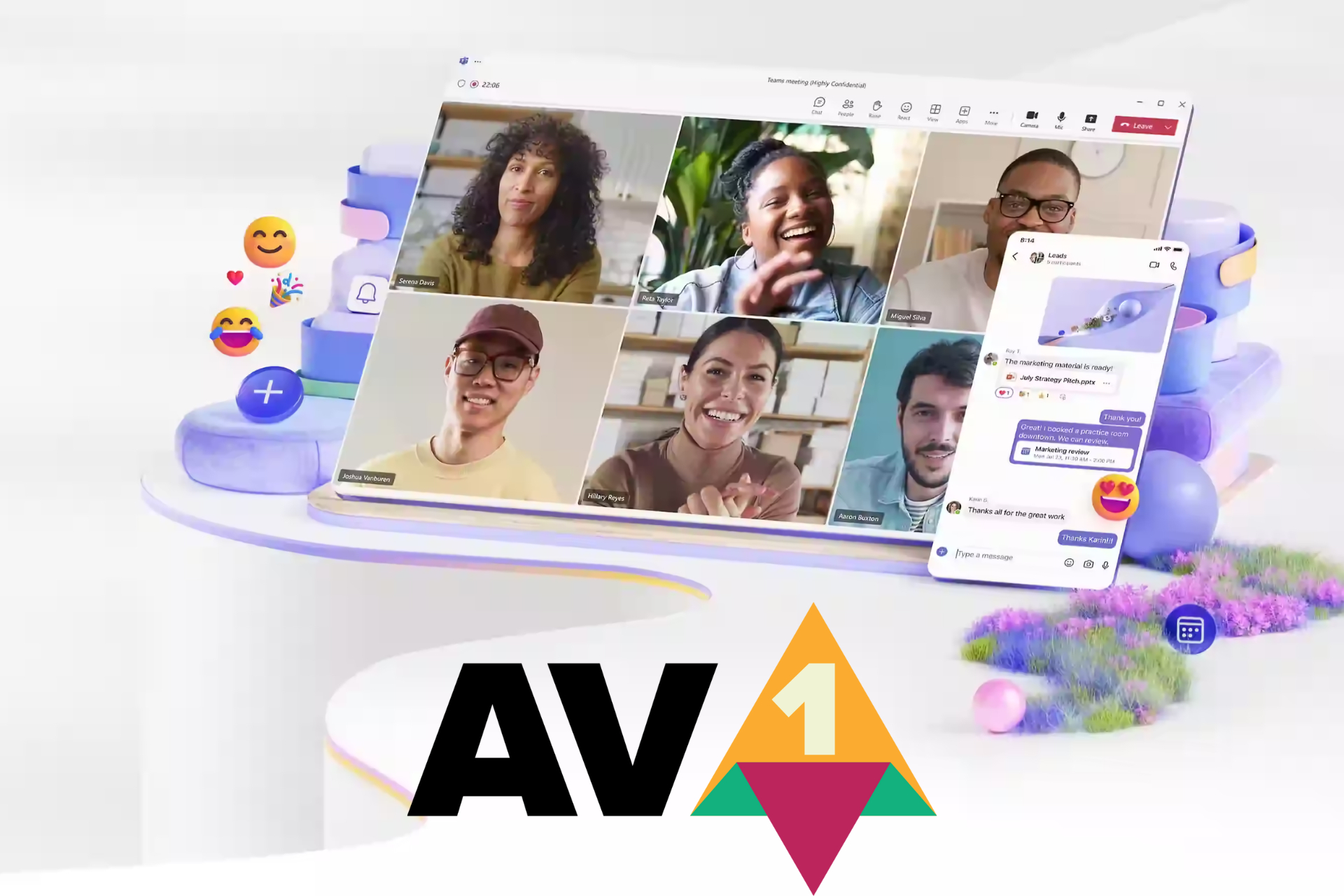
Up until now, Teams used the H.264 codec, which needs about 1.2 Mbps bandwidth for video broadcasting. Now, Microsoft introduced the AV1 codec to Teams, that only requires a 200 Kbps bandwidth for screen sharing which is a 63% lower.
That means you will be able to experience sharp visual and fluid motion if you have a poor internet connection.
What is the AV1 codec bringing for your organization?
We also need to look at the broader picture. This is not only about you having a video meeting in the middle of nowhere while having a weak connection.
The lower bandwidth requirements also prevent potential network congestions inside the local network of your organization. That translates into lower server load and, finally, to lower costs.
According to Microsoft’s announcement, this move will also impact energy consumption and reduce the carbon footprint of the organization.
However, obviously, the major benefit in adopting the AV1 codec is the improvement of the technical conditions of the video communication channel.
We can’t help to wonder why it took Microsoft so long to make this happen. Apple included the AV1 codec capability to the A17 Pro chip for iPhone 15 Pro and Pro Max since September, last year. In the same way, Google included the AV1 decoding capability in its Tensor G3 SoC chip.
The bottom line is that the AV1 codec and decoding is perfect for streaming and video transmissions and it will soon be available for all the video capable devices.
How do you feel about Teams using the AV1 video codec? Let’s talk about that in the comments section below.
Windows has a couple of built-in tools to help troubleshoot common issues but a dedicated app like Microsoft Support and Recovery Assistant is of great help for Microsoft-related programs and services.
What is the Microsoft Support and Recovery Assistant?
Overview
Microsoft has a handful of products and services under its belt and the Microsoft Support and Recovery Assistant is one of them. It is a dedicated tool that diagnoses and resolves any issues with Office, Microsoft 365, Teams and Outlook provided your device meets the system requirements.
Microsoft Support and Recovery Assistant takes away all the numerous trial and error steps involved whenever an error occurs by simplifying the troubleshooting process. You get to save time and effort and enhance your experience when using Microsoft products and services.
Main features
Auto-diagnosis – Instead of doing guesswork when you encounter an error on the Microsoft products covered, this tool will do an auto-diagnosis for you.
Troubleshoot – Once a diagnosis has been made and the issue identified, the tool will provide comprehensive troubleshooting steps as a resolution.
Monitoring -The tool works in the background to detect any issues and notify you of any problems in their infancy stage.
Detailed reports – When making the diagnosis, the tool gathers all relevant information about the issue. This can be helpful especially when communicating with IT professionals who may require this information.
How do I download Microsoft Support and Recovery Assistant?
Which problems can the Support and Recovery Assistant fix?
General system performance issues – If any of the covered Microsoft products and services are having performance issues like Outlook running slow, the Microsoft Support and Recovery Assistant can help with stability and optimization.
Application errors – Office error codes and crashes are also covered by the Microsoft Support and Recovery Assistant.
While the tool does offer comprehensive troubleshooting assistance, it does not have the capability of resolving every issue. Issues related to hardware, network errors or any other issue that is outside Microsoft’s scope may need additional assistance.
Your device’s manufacturer, IT support or even Microsoft support may be able to offer guided assistance in such cases.
And if you’re looking for an overall app that deals with speed, optimization and general performance enhancement, you need to check out PC Manager.
Have you tried the Microsoft Support and Recovery Assistant? Would you say it does what it’s supposed to do or is there room for improvement? We’d love to get your thoughts on this so do leave a comment down below.
Xbox Cloud Gaming has been present for years, but it seems that it will finally get some much-awaited features.
Microsoft is currently testing mouse and keyboard support for Xbox Cloud Gaming, and here’s what we know so far.
Mouse and keyboard support in Xbox Cloud Gaming is now available for testing
Currently, to use Xbox Cloud Gaming, you need to use an Xbox or a verified controller. This can be a problem for PC gamers who are used to a mouse and keyboard, but that won’t be a problem anymore as IGN writes.
According to Xbox Wire, you can now use a mouse and keyboard while playing games in Edge, Chrome, and Xbox app on your PC.
The feature is available only to users enrolled in PC Gaming Preview, and to use it you need to enable Preview features in the browser. This can be done on the Xbox Play page by going to your user settings.
Currently, there are only 14 games that support this feature and some of them include Fortnite (only in the browser), ARK Survival Evolved, Grounded, Sea of Thieves, Halo Infinite, Atomic Heart, High on Life, Sniper Elite 5, and more.
This is great news for all PC gamers who tend to use this feature, and we hope to see mouse and keyboard support available to everyone soon.
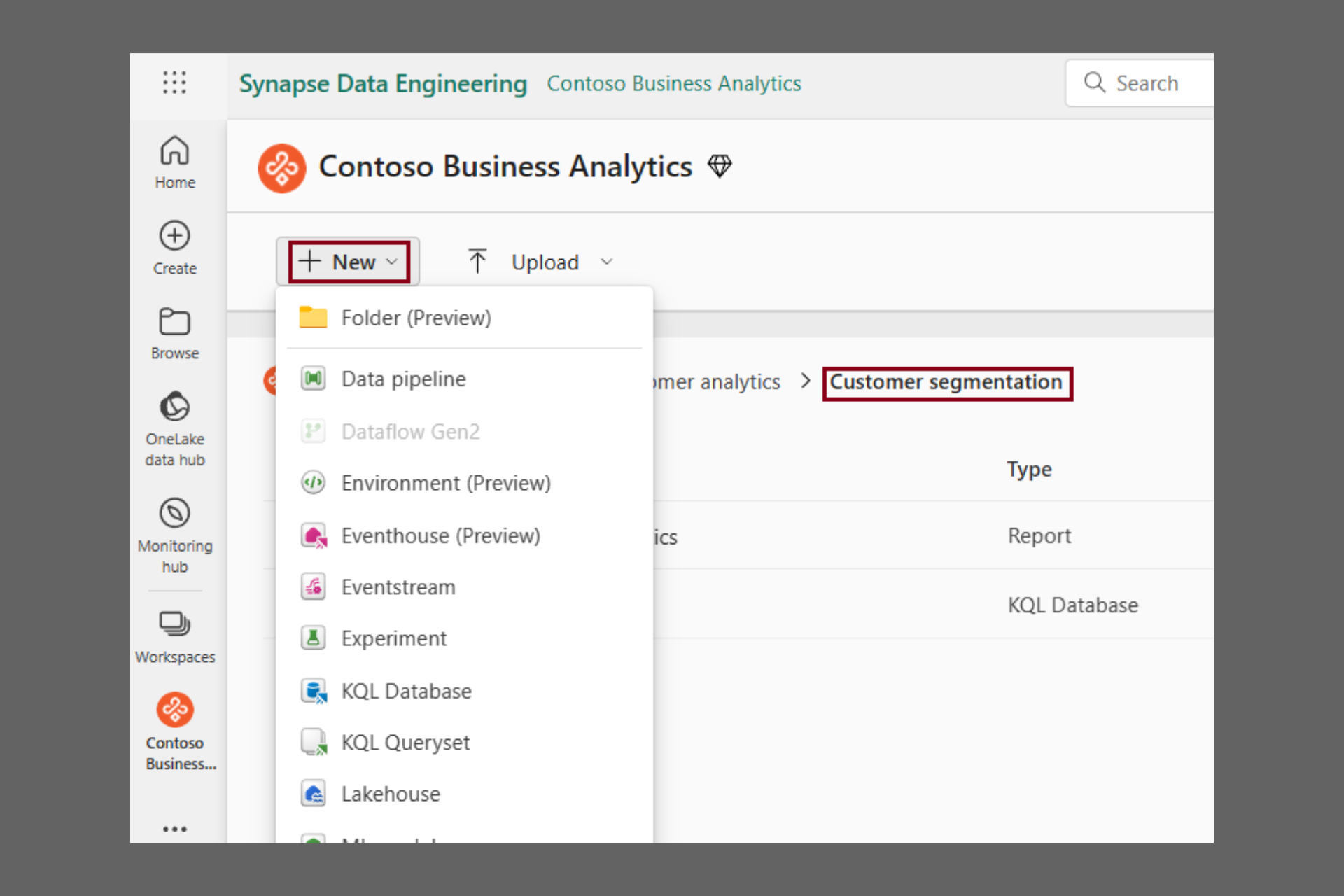
One of the most important is that now you can create folders into your workspaces, an feature that Microsoft says that came from the clients’ suggestions.
What is the Folder feature all about?
The problem is that while you develop a project in Microsoft Fabric, the workspace gets cluttered and you lose focus on certain items which become harder to find.
What Folder does is to help you group and categorize the fabric items into an efficient structure based on categories, deployment stage, quality of data and more.
Source: Microsoft
The usage is pretty simple: You can create a new folder from the +New menu. Then you can create subfolder for up to 10 levels deep.
You can add any type of Fabric item inside the folders and then, you can also move them one by one or by selecting multiple items.
According to Microsoft’s announcement, you may also create new items inside the folders from the same +New drop-down menu.
Also, if you’re a Power BI developer, there is also possible to upload .pbix files directly into a folder. However, you will have to wait a bit longer (in the following months, according to Microsoft) if you want to publish a report from Power BI Desktop to a folder in the workspace.
Of course, you may also delete, rename, or move a folder in a similar way to what you do in Windows Explorer or OneDrive, but only if the folder is empty.
What do you think about the new Folder feature in Microsoft Fabric? Let us know in the comments section below.
Lately, Microsoft has been rolling out a series of changes to enhance the Windows experience. The latest in the list is Microsoft allowing IT administrators to expedite obtaining and deployment of non-critical Windows 11 security updates.
According to the Redmond-based tech giant, expedited security updates via Intune and Microsoft Graph have been a success, and it’s time to extend the capability to non-security updates.
In its blog post, Microsoft explains the benefits of expedited non-security quality updates,
By expediting non-security quality updates, you can quickly obtain many fixes that are considered critical by your peers. Additionally, we want you to be able to deploy out-of-band (OOB) updates to devices faster than ever. In short, you can now improve the stability, performance, and functionality of devices by addressing quality issues before the next security update.
For now, expedited deployment of quality updates is limited to the latest iteration of the OS, i.e., Windows 11.
You could also use Microsoft Graph, but that is a slightly complex process with a long list of requirements.
With the ability to deploy Windows 11 quality updates as soon as they are released, you will be able to reduce crashes, enhance stability, and boost performance.
What’s your take on Microsoft allowing expedited non-security updates? Share with our readers in the comments section.
It seems that there’s a critical issue affecting Windows 10 Enterprise LTSC 2019 and Windows 10 IoT Enterprise LTSC 2019 domain controllers.
Microsoft was quick to respond, and it has already released an emergency update for it, so be sure to get it.
The latest update fixes the Local Security Authority Subsystem Service issue on Windows 10 LTSC
As MSPowerUser writes, the emergency update KB5037425 was just released for Windows 10 Enterprise LTSC 2019 and Windows 10 IoT Enterprise LTSC 2019.
The update addresses the bug in the Local Security Authority Subsystem Service (LSASS) that causes high memory usage and system crashes.
It seems that the problem was introduced in a previous update on March 12th, and it affects domain controllers who are in charge of user authentication in the network environment.
The KB5037425 update is available only via the Microsoft Update Catalog, but before you install it, ensure that you have Servicing Stack Update (SSU) KB5005112 installed.
Google is testing the ability to automatically archive and delete inactive tabs in Chrome on Android. The experimental feature, called Tab Declutter, aims to simplify tab management by automating the process.
This feature is very important since other browsers have similar features, and it will help reduce resource usage on your PC.
How does the new tab declutter feature work?
The mechanism is pretty simple. After a set period of inactivity, Chrome will automatically archive inactive tabs. You will no longer see the archived tabs but you will be able to retrieve them if needed.
As for deleting the tabs, you can set Chrome to remove them after a longer period of inactivity. This feature will free up memory and improve the browser’s performance.
Obviously, you will have control over the archival threshold and the period of time after which the browser takes action. Although the tab declutter option may be extremely beneficial, there is a fine line between conserving memory and that second you realize you’ve lost an important tab you forgot to bookmark.
Similar functionality in other browsers
It’s worth noting that Firefox on Android already allows moving tabs that haven’t been viewed for two weeks into an inactive section.
As we’ve mentioned, Chrome’s tab declutter is tested for the Android version but we have high hopes that it will be extended to the desktop version as well. That’s because we’ve seen a similar approach on the Arc browser’s desktop version (still under development when we wrote this article). The tool allows you to archive individual tabs and automatically archives unpinned tabs after 12 hours. Chrome’s approach to archiving tabs could be similar.
The specific details, user interface (UI), and options are still awaited as the feature is under development. We’ll have to wait to see how Chrome for tab decluttering feature evolves and we will keep you updated with its development.
Mozilla has a service called Monitor Plus that notifies users if their data is exposed to third parties online.
However, it seems that one of the partners on this service was involved in data selling which resulted in a swift ending of collaboration with Mozilla.
Mozilla cuts ties with Onerep after conflict of interests
We wrote about Mozilla Monitor Plus not that long ago, and while the service itself is great, it seems that some of its partners have been involved in data selling.
As Ars Technica reports, Mozilla had to cut ties with one of its key providers, Onerep. This comes after reports that Onerep CEO was the founder of dozens of people-search services since 2010.
Among these services is the notorious Nuwber which is known for selling the type of information that Mozilla Monitor Plus is trying to prevent.
Onerep’s CEO stated that he had an ownership stake in Newber, however, the aforementioned service had no information sharing with Onerep. He also stated that he’s no longer involved in any people-sharing sites.
Vice president of communications at Mozilla in his statement said the following:
Customer data was never at risk, the outside financial interests and activities of Onerep’s CEO do not align with our values.
Currently, Mozilla is working on a transition plan, and the service will continue to operate without any disruptions for the time being.
Amidst reports of trouble mounting for Xbox, with retailers cutting back the stock and publishers choosing other platforms, Phil Spencer, CEO of Microsoft Gaming, has an idea that could aid Xbox in reclaiming the lost glory.
In an interview with Polygon during the GDC (Game Developers Conference), Spencer talked about a less restrictive Xbox ecosystem where you can get games from different stores, unlike the present situation where you are restricted to one.
When asked if Itch.io and Epic Games Store could make it to Xbox, Spencer said,
Yes, [Consider] our history as the Windows company. Nobody would blink twice if I said, ‘Hey, when you’re using a PC, you get to decide the type of experience you have [by picking where to buy games]. There’s real value in that.
He believes players on Xbox should have the same experience. Basically, more freedom when it comes to picking up games, which benefits both the players and the console maker. Spencer went on to add,
If I want to play on a gaming PC, then I feel like I’m more a continuous part of a gaming ecosystem as a whole. As opposed to [on console], my gaming is kind of sharded — to use a gaming term — based on these different closed ecosystems that I have to play across.
Xbox isn’t the only console that limits your options. PlayStation and Nintendo do the same thing. So, if Xbox could make this multi-store thing a reality, the sales gap between Xbox and PlayStation consoles might narrow down.
And if we are talking about Epic Games and Itch.io, why not Steam? It has one of the biggest game collections and is compatible with most platforms. It would be our first choice for Xbox!
A team of researchers from MIT Computer Science and Artificial Intelligence Laboratory (CSAIL) found a way to make image-generation LLMs such as DALL-E 3 and Stable Diffusion a lot faster.
They managed to simplify the process into a single-step, but without compromising the image quality.
Right now, AI is using a so called diffusion model to generate an image. That involves recreating a noisy-state image and progressively giving it structure until it gets clear. It sounds pretty simple, but in fact, it takes a lot of steps to get from a fuzzy nonsense to a clear, crisp image.
The CSAIL researchers have a new framework that transforms that multi-step approach into a single action.
Researchers use a new method called Distribution Matching Distillation
According to the press release, MIT’s approach is called DMD, or Distribution Matching Distillation, and matches the generative adversarial networks with diffusion models to achieve an unprecedented speed for image generation.
Our work is a novel method that accelerates current diffusion models such as Stable Diffusion and DALLE-3 by 30 times. This advancement not only significantly reduces computational time but also retains, if not surpasses, the quality of the generated visual content. Theoretically, the approach marries the principles of generative adversarial networks (GANs) with those of diffusion models, achieving visual content generation in a single step — a stark contrast to the hundred steps of iterative refinement required by current diffusion models. It could potentially be a new generative modeling method that excels in speed and quality.
Tianwei Yin, lead researcher on the DMD framework
The idea behind the new DMD framework is to use two diffusion models. This way, they succeed to overcome the instability and mode collapse issues from GAN models.
The results were amazing and if you watch the clip above, you will see that the new DMD is generating roughly 20 images per second compared with Stable Diffusion 1.5 that needs 1.4 seconds to generate a single image.
According to TechSpot, the MIT researchers are not the only ones applying a single-step approach for image generation. Stability AI and their method called Adversarial Diffusion Distillation (ADD) can generate an image in only 207 ms by using only a Nvidia A100 AI GPU accelerator.
Image generation becomes faster every day and we hope that this will also apply to video-generation models like Sora AI.
What do you think about the new technology? Share your thought in the comments section below.
Artificial intelligence can increase the growth rate of small businesses. After all, this technology can handle repetitive tasks and guide us through administrative ones. In addition, AI allows us to increase our work efficiency, and with the remaining time, we can improve and implement other features in our SMBs. This technology will make our small businesses evolve continuously and keep pace with global competitors. However, many of us need to learn the value of artificial intelligence and its tools.
How can AI be used for small businesses?
On the market, there are various AI models that you can use to boost your small business. After all, they can do many tasks for you, especially repetitive ones like taking orders or answering customer’s questions. Additionally, you can allow AI to learn more about your SMB. Afterward, you can use it to gather all sorts of statistics. On top of that, while they could be better at structured data, they can handle simple spreadsheet tasks. Also, AI can generate promotional content such as text, videos, and images for your small business.
According to a study by Edelman Mexico and Microsoft, 78% of small businesses from Canada want to adopt AI, and 68% encourage their employees to use the tool. Additionally, over 66% of the companies using AI report that it improved their productivity and work quality.
Small businesses are an important part of Canada’s economy. According to research, they represent 98% of all employer businesses. On top of that, SMBs generate more than half of the GDP (gross domestic product) attributed to the business sector. Thus, by increasing the overall productivity of SMBs with AI, the whole country will benefit from economic growth.
Ultimately, Microsoft took this opportunity to help SMBs improve with the help of AI. As a result, the company offers business managers, owners, and employees tools and guides for a better understanding of artificial intelligence. By doing this, Microsoft ensures that some small enterprises attain AI-powered automation and properly use AI-driven analytics to improve their decision-making. As a result, Canada will be one step further in terms of full AI integration. Furthermore, small businesses will have the possibility to thrive in the global marketplace.
What are your thoughts? Are you going to integrate AI into your work? Let us know in the comments.
As Microsoft’s Windows OEM partners prepare new ARM-based devices for release in a couple of months, Google is finally dropping its long-awaited ARM native Chrome browser.
Despite Microsoft providing an ARM-based version of Windows to the public for years, Google has been reluctant to produce its own ARM-native solution for browsing in Chrome.
However, over the past two months Google has been testing its native ARM Chrome variant in its Chrome Canary channel and ARM chip maker Qualcomm has confirmed that Google will start rolling out an official version “starting today.”
While Microsoft has dabbled with Windows on ARM for close to a decade, it wasn’t until the release of the Surface Pro X had the company seriously contended with its emulation layer of development to provide an Intel-like facsimile for users.
Two more devices in with an updated Surface Pro X and the eventual Surface Pro 9 ARM variant, the company has tweaked its emulation layer enough that its core OS and most of x86 developed apps operate feeling almost native to the platform without additional developer intervention.
With over sixty percent of the browser market in hand, Google Chrome has been a particular sticking point for Microsoft’s Windows on ARM ambitions due to its previously unoptimized experience.
However, with a native ARM Chrome release, Google’s browser experience will make for a bonus to these new devices Windows OEM plan to sell alongside the Snapdragon X Elite chips this summer.
We’ve designed Chrome browser to be fast, secure, and easy to use across desktops and mobile devices. Our close collaboration with Qualcomm will help ensure that Chrome users get the best possible experience while browsing the web on current Arm-compatible PCs.
Hiroshi Lockheimer – Google Senior VP Android, Chrome, ChromeOS
While Google has previously supported Chrome development for ARM based devices that run ChromeOS, this is the first time the company will address the much larger Windows-powered audience.
A native ARM based Chrome experience coupled with a soon to be released ARM-based version of DaVinci Resolve maybe the combo tech journalists and influential YouTuber’s need to start recommended Windows on ARM devices alongside or in replace of Apple M-Series computers.
Microsoft’s Copilot platform will imbue its enterprise chat app with new additional AI features soon that include improved calls, meeting summaries, messaging composition, and more.
Since Copilot appeared on the scene, Microsoft has been quick to lean on its pre-generative artificial intelligence to boost new features in its services such as Teams, and soon the chat platform will gain the ability to support Intelligent call recaps, pre-messaging composition, a singular UI for both audio-translated scripts and written chats as well as a new hybrid camera tech that bounces between remote and at work attendees during calls.
The new blog post covers what Microsoft announced at its Enterprise Connect 2024 conference, starting with a new Discover Feed that, “is a personalized feed that surfaces the most relevant content in channels, based on the people you work with or the topics you might be interested in.”
Teams will also use AI and machine learning to beef up its Voice Isolation technology by recognizing a user’s voice profile and suppressing all other “unwanted background noise.” A version of voice isolation is currently enabled within Teams, but the feature looks to be getting an upgrade soon.
Microsoft is also looking to help users craft fewer meandering messages to other employees with its new Copilot Compose enhancements that will act like an AI enhanced auto fill. Users will simply be able to enter a few words and Copilot will attempt to write out a succinct message. In addition, users will also be able to direct the tone of an auto filled message with prompts that include “make it funny” or “add a call to action.”
Intelligent Call recap is another feature Microsoft showed off at Enterprise Connect 2024 that will craft AI generated notes and actions items pulled from screening calls. Microsoft plans to have Intelligent Call recap work across VoIP and PSTN call with transcripts and summaries support available in the first half of 2024 for Copilot for Microsoft 365 subscribers.
Microsoft’s Copilot AI will also soon take over Teams adjacent hardware with the new IntelliFrame feature which will enable automatic camera switching between the available cameras during a call. ” When IntelliFrame is enabled in a meeting, it will use Cloud AI to check if there is a better angle of someone who is blocked from sight, and switch to that video feed in the meeting stage.”
IntelligentFrame isn’t a one-way street with Microsoft Teams also providing support for Multiple Camera view selection. When there are multiple video feeds all pouring in from the same Teams Room instance, remote attendees will be able to switch from different views leveraging the cameras nearest by.
Microsoft will also leverage machine learning and AI to update its filters to include a new Frosted Glass background effect that “helps keep your meetings private and professional while enabling more customization in how you show up.” Frosted glass is as it sounds, it allows users to apply a bokeh-like effect that can be customzied with the use of a transparent PNG to tailor it to business or personal brands.
Lastly, there is the Live translation of captions coming to Teams in April. Soon organizers will be able to select up to 10 languages that will support the “live translation of captions in town halls that attendees can choose from for a more exclusive experience.”
Microsoft also announced another handful of features and support plans for Teams at Enterprise Connect 2024 that includes the expansion of Teams Phone Mobile support with AT&T Business, Odido.nl, Vodafone Business and Virgin Mobile + O2 in the UK.
Teams Rooms and Devices will get an update on Windows as well as get integrated into the general Teams app for Windows with support for configuring up to three additional languages.
Microsoft will also be cleaning up the UI in Teams Rooms for Windows with a new Join Meeting window layout, home screen for Teams Rooms on Android, Feedback Page for Android, and a new Microsoft Planner experience within Teams all set for availability next month.
UGREEN is well-known for its amazing products, and the company is currently working on its first NAS devices. What does UGREEN have in store for us? Keep on reading to find out!
Support UGREEN NAS on Kickstarter, and get it for 40% off on NASync
UGREEN NASync is the company’s first NAS series, and if you’re not familiar with NAS, it works as a data management center that allows users to access various data via the network.
NAS can be perfect for both home and business users alike since it allows easy and seamless data sharing in the entire network.
The company is working on 6 models, and all models are running on the UGOS Pro system and come with 8GB DDR5 RAM that can be easily expanded. Here’s a quick overview of all the models:
DXP2800
X86 12th Generation N Series with 4 cores and 4 threads
eMMC 32GB flash memory
RAM can be expanded up to 16GB
2x SATA drive bays and M.2 SDD slots
Maximum storage capacity: 22T*2+4T*2
JBOD/Basic/RAID0/RAID1 support
Single 2.5GbE port.
1xType-C Gen2 + 1xUSB3 Gen2 on the front
1x USB3 Gen1 on the back
4K HDMI support
DXP4800
Same CPU as the previous model
Same RAM and eMMC capabilities
4x SATA bays and 2x M.2 slots
JBOD/Basic/RAID0/1/5/6/10 support
Maximum storage capacity: 22T*4+4T*2
Two 2.5GbE LAN ports
Same USB ports on the front, USB3.2 Gen1 on the rear
SD 3.0 card reader
4K HDMI support
DXP4800 Plus
X86 12th Generation Intel® Pentium® Gold CPU with 5 cores and 6 threads
Up to 64GB RAM
128GB SSD flash memory
Same number of SATA and M.2 ports as the previous model
RAID support is identical to the DXP4800
Max storage capacity is the same as on DXP4800
Same USB ports as the previous model
Same SD 3.0 and 4K support
DXP6800 Pro
X86 12th Generation Intel® CoreTM i5 with 10 cores and 12 threads
Up to 64GB RAM
128GB SSD as flash memory
6 SATA bays and 2 M.2 slots
Max storage is set at 22T*6+4T*2
Supported RAID modes: JBOD/Basic/RAID0/1/5/6/10
Two 10GbE LAN ports
Single PCIe X4 port
2x Thunderbolt 4 ports
2x USB3.2 Gen2 ports
SD 4.0 card reader
8K HDMI support
DXP8800 Plus
Uses the same CPU as the previous model
Same RAM and flash memory capabilities as DXP6800 Pro
8x SATA bays and 2x M.2 slots
The same RAID configuration as the previous model
Maximum storage capacity is 22T*8+4T*2
Two 10GbE LAN ports
Single PCIe X4 port for expansion
Same number of Thunderbolt 4 and UXB 3.2 Gen 2 ports as DXP6800 Pro
Same 8K HDMI and SD 4.0 card reader support
DXP480T Plus
Same CPU, RAM, and flash memory capabilities as the previous model
RAID support for JBOD/Basic/RAID0/1/5/6/10
4x M.2 slots and 4T*4 maximum storage
1x 10GbE LAN port
Two Thunderbolt 4 ports
Single USB 3.2 Gen2 panel on the rear
8K HDMI support
Built-in Wi-Fi
It’s safe to say that this lineup of NAS devices looks incredible, and it’s perfect for both home and business users alike.
The Reddit community also voiced their opinion on the upcoming NAS, and a few of them are worried about the lack of video output which might troubleshooting the OS a bit harder.
Another small criticism is the lack of support for other operating systems, but we’re positive that UGOS Pro is more than capable of handling all tasks.
As we already said, UGREEN is currently fundraising on Kickstarter, and if you contribute, you can get 40% off on all modes, so if you’re looking to get a high-quality NAS, this might be the right choice for you.
Hackers use the phishing-as-a-service (PAAS) platform known as Tycoon 2FA to target Microsoft 365 and Gmail accounts. Their method bypasses two-factor authentication (2FA) systems. Also, the PAAS tool is similar to other Adversary-in-The-Middle (AiTM) phishing platforms such as Dadsec OTT. Thus, cyber security specialists believe that cybercriminals reuse the code.
The Tycoon 2FA quickly became one of the most widespread AiTM phishing kits. As a result, more than a thousand domains are using it. Unfortunately, cybercriminals worked fast and updated their tool to a new version that enhances its obfuscation and anti-detection capabilities. Also, they added a feature that changes network traffic patterns.
How do the Tycoon 2FA attacks work?
Threat actors who use Tycoon 2FA send fake emails with embedded URLs or QR codes. By accessing them, you will get to a security challenge. After completion, they will extract your email address from the URL. Then, you will be redirected to a fake login page. Once you log in, you will encounter a fake two-factor authentication. From there, the hackers will get access to bypass security measures and steal your data. In the end, you will get to the official Microsoft site.
Unfortunately, the alleged developer of the Tycoon 2FA kit sells ready-to-use Microsoft 365 and Gmail phishing pages starting at $120 for ten days. However, the payment is subject to change based on the top-level domain. Also, according to Sekoia’s analysis, more than 530 crypto transactions covered over $120. On top of that, more threat actors are using the tool due to its low price.
Last but not least, hackers are using a newer version of Tycoon 2FA to trick you into stealing your login information. Then, they gain access to use it at will or to sell it. The tool is cheap, and many wrongdoers are using it. On top of that, the alleged developer sells phishing pages with different top-level domains. The whole stealing process starts with a fake email. Thus, always verify the source and never open or download files from unknown people. In addition, for your safety, check the URL of the web pages you visit, especially if you are in a hurry.
What are your thoughts? Do you ever check the source of your emails? Let us know in the comments.
Google’s new Search Generative Experience (SGE) feature uses AI to recommend similar sites to your query. However, the function could be more problematic because it features scam sites. Most of them have malware, and they will redirect you to fake giveaways, spam subscriptions, and unwanted extensions. Thus, if you use it, you could be tricked by the wrongdoers who exploit it to gain your trust, data, and access to your device.
How does SGE work?
The SGE feature makes searching for various content easier. It answers your questions and suggests follow-up queries to understand the topic better. Additionally, it showcases SEO-optimized sites with topics and keywords similar to your search. Unfortunately, cybercriminals discovered ways to exploit the Search Generative Experience feature and used search-poisoning techniques to get their articles featured. On top of that, the SGE feature will give you a limited amount of information to make you open the suggested sites.
Below, you can find an example from Lily Ray of how the Search Generative Experience works in favor of hackers.
Threat actors usually conduct search poisoning campaigns. They make malicious websites and use SEO techniques to promote them. Also, most of them have similar goals. In addition, according to BleepingComputer, most websites showcased by the SGE are part of the same SEO poisoning campaign.
Some malicious sites use a feature similar to YouTube push notifications to make you subscribe and spam you with desktop notifications. Others will try to make you install extensions you don’t need. Some websites also try to sell you security software to gain affiliate commissions. They will also attempt to steal your data through random giveaways.
Ultimately, you could use security extensions and pop-up blockers to defend yourself from malicious websites if you want to use the SGE feature. Also, always doubt the AI. As you can see, it can generate problematic answers to your queries. So, until its official release, consider staying away from it. Hopefully, the anti-spam protections will work better for the official edition of the Search Generative Experience, especially since wrongdoers improve their techniques.
What are your thoughts? Are you going to use the SGE feature? Let us know in the comments.
In a patent published recently, Microsoft is working on developing a so-called Pixel Luminesce for Digital Display technology, that would allow users to control each pixel of a display individually.
In other words, the technology would allow for a selective dimming option: one part of the display could be brighter, while another part would not be affected, all at the same time. According to the paper, this could obtained by controlling each pixel through a special part called an EM gate driver.
This part controls how bright the pixels are by sending them a signal. Then a luminance controller would tell the EM gate drivers to send a special kind of signal called a pulse-width modulated signal to the rows of pixels.
Some rows of pixels would get a signal that starts with an “on” pulse, and some would get a signal that starts with an “off” pulse. The intriguing part is that this can happen at the same time or at different times.
The selective display dimming would greatly enhance the performance of the device and it also comes with some exceptional perks, such as:
Brightness: The pulse-width modulated signal can control the brightness of the pixels. By changing the length of the “on” and “off” pulses, the display can make some of its parts brighter or dimmer, at the same time.
Color Accuracy: The timing of the signals can also affect the color of the pixels. If the signals are sent at the right times, the display can show the colors more accurately.
Refresh Rate: The rate at which the signals are sent can affect how quickly the display can change what it’s showing. This is important for things like watching videos or playing games, where the screen needs to change rapidly.
Power Consumption: The use of pulse-width modulation can also affect the power consumption of the display. Displays that use this technique can often save power, which can make the device’s battery last longer.
With selective dimming technology, Microsoft could greatly improve the quality of the display, making images look clearer, colors look more accurate, and videos play more smoothly.
Just imagine being able to dim certain parts of the screen while playing a horror video game: it would revolutionize the way immersion happens.
One of the greatest perks is that the device would use less power, allowing for more sustainable but performant displays.
This isn’t the first time Microsoft has been interested in selective display dimming technologies. Although not at this degree, Windows 11 already has an adaptive dimming option that dims the screen when the user is not looking at it.
The Redmond-based tech giant has also been updating Windows 11 with gaming-specific features, the latest being the AI-powered Auto Super Resolution, which greatly enhances gaming performances. So, this technology could be released with a future Windows update.
According to Kyle Corbitt, former director at Y Combinator, engineer at Google, and co-founder at Emberall, who spoke to an alleged Microsoft engineer, GPT-5 might be coming out in late April.
In his post on X, Corbitt also said that Llama 3 will be released in June, and it will beat Mistral.
GPT-5 AND LLAMA 3 TIMELINE LEAKS
Highest confidence rumors I've heard are late April for GPT-5 and early June for Llama 3 (expected to beat Mistral at all sizes).
Anyone hear something different? Reply in thread to confirm.
Apparently, the information leaked from a Microsoft engineer who is already working on GPT-6. In a later comment, Corbitt says that he is not sure that the new GPT version will be called GPT-5, GPT-4.5, or GPT-4J with enterprise extensions.
On another post, the former Google engineer disclosed the conversation with his Microsoft peer about GPT-6 and the problems they have with the new version.
Spoke to a Microsoft engineer on the GPT-6 training cluster project. He kvetched about the pain they're having provisioning infiniband-class links between GPUs in different regions.
Me: "why not just colocate the cluster in one region?" Him: "Oh yeah we tried that first. We…
Again, Open AI just released GPT-4 Turbo for free and we already know that GPT-5 was planned for a release later this year. However, nobody expects a late April launch, although it’s not impossible.
What do you expect from GPT-5? Bring your thoughts to the comments section below.
According to a recent report by Proofpoint researchers, the Iran-aligned TA450 hackers, who also go by MuddyWater, Static Kitten, and Mango Sandstorm, reportedly used a pay-related social engineering lure, i.e., embedded links in PDF attachments in their phishing campaigns.
The phishing campaign started on March 7, 2024, and continued until March 11, 2024. During this time, TA450 sent emails with PDF attachments that contained malicious links. This isn’t an unusual method for the TA450 hackers; earlier, they used to add malicious links to the email body directly.
This time, they evolved and added an extra step to make it undetectable. They used malicious links in this one as well but employed a slightly different technique. They sent multiple phishing emails with malicious PDF attachments and other embedded links to the same victims.
The links led to several file-sharing websites, such as Onehub, TeraBox, Egnyte, and Sync, and the researchers suspected that the email had also been compromised.
Suppose a victim opens the attachment and clicks on the link. In that case, it will download the Zip archive file, which consists of a compressed MSI that would install AteraAgent, a remote administration software that TA450 exploits.
Once installed, the software grants TA450 access to the victim’s device, leading to potential data theft and other malicious acts.
This method worked effectively on targeted Israeli employees at large multinational organizations, and the hackers’ group has been targeting Israeli entities specifically since at least October 2023 with the start of the Israel-Hamas war.
The campaign’s success can be partially attributed to the use of sender email accounts that align with the lure’s content, thereby increasing the authenticity of these phishing emails.
This is the first time the group has used this method, which can be marked as an escalation of the sophistication of the attacks, making it quite difficult for average users to spot.
If you consider the impact, sending multiple phishing emails to the same targets increases the probability of successful infiltration.
Other new attacks also surfaced. One campaign employed an Office trick to fool the victims, and Perception Point spotted it; read the full story here.
With rising risks and increasing attack sophistication, we, the users, must always be cautious when opening unsolicited emails and documents. And, as for security researchers, they must also look out for these types of attacks more aggressively.
What are your thoughts on the matter? Share your opinions with readers in the comments section below.
Later in 2023, Microsoft allowed Edge users to easily set up their Edge Wallet, a tool where credit cards, passwords, and other financial devices can be stored. It’s also available as a PWA, and that makes it easier to set it up in the Edge browser.
As per Edge’s updates, its Wallet is also getting security updates, and Microsoft makes sure users won’t be at risk when storing their sensitive information there.
However, despite the regular updates, some users still believe Edge Wallet is quite risky, and while it is a comfortable solution, users might be at risk of losing their credentials to hackers.
This Reddit user, for instance, has an alternative to Edge Wallet: the Microsoft Autofill extension. Released 2 years ago, the extension has become one of the most popular of its kind, and it can be used on all Chromium-based browsers, including Google Chrome, and Microsoft Edge.
What’s the difference between them? Well, the user says the extension is more secure than Edge Wallet because it requires more steps when authenticating, and Microsoft Autofill also doesn’t store sensitive data in plain text, something that Edge Wallet does.
While this extension is not ideal, one has to manually sync the passwords, but it provides a lot more security features on the local device, for one the data is not stored in plain text on the local device from what I have seen and one can set it to ask for a password confirmation of the main Microsoft account each time or once per session before it (i.e before the password is decrypted) autofills in the password.
Reddit user
The Edge Wallet is more risky because it doesn’t store passwords this way:
In Edge, only the password is encrypted in the local database, the rest of the credentials like website url, username, etc are stored in plain text. What is worse is that this local database also holds a list of websites in plain text for which a user has requested it not to store passwords.
Reddit user
However, if you don’t prefer either of the native Microsoft password managers, there are always third-party password managers that you can try. For instance, you could choose one of these password managers that are also capable of emergency access.
However, if you don’t agree with the security of the Edge Wallet, and you don’t mind the extra steps, you could stay with Microsoft Autofill, as well. You know what they say, better safe than sorry.
If you are always on the go and need a light 2-in-1 laptop without compromising on performance, the Surface Pro 9 is one of the best Windows tablets.
Right now, you can get the Surface Pro 9 and keyboard combo for just $999.99, down $540 from the regular price of $1539.99, at Best Buy.
This is the lowest price the combo has been listed for so far. But that’s not it!
You can save more by trading in another similar device. Also, you get 1 month of the Xbox Game Pass Ultimate membership and a 6-month subscription to Trend Micro – Internet Security. Added benefits alone help you save $30!
Surface Pro 9 specifications
Processor
12th Gen Intel Core i5-1235U
OS
Windows 11 Home
Display
13 inches
Resolution
2880 x 1920
Storage
256 GB
Memory (RAM)
16 GB
Battery life
Upto 15.5 hours
Camera
Front: 5 MP, Rear: 10 MP
With the keyboard attached, the Surface Pro 9 works like any regular 2-in-1 laptop. Remove it to use the device as a standalone tablet with the stylus that ships alongside, and get your creative juices flowing!
The firmware update for Surface Pro 9, released last month, improves the device’s performance and stability, making it the go-to option if you are on a budget. Surface Pro 9 has the perfect blend of performance and design!
Dragon’s Dogma 2 has become an instant hit, breaking records within hours of release, be it on Steam, Xbox, or PlayStation. However, the game appears to have some bugs and performance issues. The good news, users have found a way to fix the lag, slow loading and FPS drop in Dragon’s Dogma 2.
The trick is to get rid of NPC (Non-player characters) because, as it turns out, these hog up the CPU and drastically reduce the performance.
After doing this, players have reported an immediate increase in FPS in the 15-30 range.
On the other hand, concerns have been raised about this approach, given that getting rid of NPCs also means reduced content. So, are you willing to compromise on that?
Since the way NPCs are handled is theorized to be very taxing on your CPU, killing off NPCs should boost your performance. However, what’s the point of killing off NPCs to boost your frame rate if you’re also killing content.
Since this is a new hack, players have gone all in. We have seen cases where players wiped out NPCs from entire towns in a bid to improve the FPS. Though the game’s performance was optimized, such drastic measures will affect the experience. So, try to find the perfect balance!
Besides, you won’t have to do this to fix Dragon’s Dogma 2 lag for long. Developers are already working on patches and will soon release them on all three platforms: Xbox, PlayStation, and Steam.
To all Dragon's Dogma 2 players!
We're planning to release patches including the following updates and fixes in the near future, and will release them as soon as they are ready for distribution on each platform.
Basically, you have two options. Either wait for a patch or find a list of NPCs that can be cleared without affecting the game’s storyline and content. Several players are working on such a list, so it won’t be difficult to find one!
Long before Copilot ever saw the light of day on Windows, Microsoft dabbled with the idea of a virtual assistant. If Clippy is on everybody’s mind when talking about old virtual Windows assistants, then you should know that it is not the oldest assistant created by Microsoft.
Instead, that title goes to Microsoft Rover, a cute virtual assistant dog that the Redmond-based tech giant first introduced in Microsoft Bob, a video-game-inspired Windows version that the company released in 1995 intending to make Windows a more friendly and family-oriented experience.
As you can see in the image below, Rover would appear on Microsoft Bob and would offer suggestions and recommendations to users while interacting with them.
Microsoft Rover was capable of many things, similar to what Copilot is capable of today in Windows 10, and Windows 11, however with a plethora of limitations, of course. But the tool was capable of finding files, editing them, showing users how to interact with Microsoft Bob, interacting with users, and even telling them jokes aka Rover’s Ramblings.
The Redmond-based tech giant later used the technology used to develop Rover for developing the more popular Clippy, which many Windows users now consider the original Copilot. Even though Clippy retained most of the Rover’s abilities, such as searching for files, editing them, and so on, Rover wouldn’t be entirely deprecated.
Instead, we can still experience the virtual assistant dog in Windows XP, where it is used in a more formal way to look around for files on Windows even search the Internet, or change certain preferences.
In a way, Microsoft Rover on Windows XP is a very rudimental, although effective Copilot, which helped XP users, back then, make sense of the new interface that Microsoft introduced with the legendary operating system.
Microsoft Rover is no longer available for newer Windows versions, such as Windows 7, 8, 10, or 11, and even though some users are willing to get it back, the Redmond-based tech giant hasn’t said anything about the old assistant.
However, in the age of Copilot, when Microsoft is flashing the AI tool up and down, it’s always good to remember that the company has been doing it for a long time: Rover, for instance, turns 30 years old in 2025.
So, while then it was maybe way too early for such technology, now it seems that the world is catching up.
If you are a fan of the Dell XPS 14 or XPS 16, released last month, there couldn’t be a better time to get one. The base model for both, XPS 14 and XPS 16, is available for a flat $200 discount!
The two laptops have received excellent reviews from buyers and are known to deliver top-notch performance paired with a bezel-less display.
The maximum discount you can get on Dell XPS 14 is $310 for the high-end model, while that for Dell XPS 16 is $510. For regular use, our recommendation is to get one of the lower-end models!
Specifications of Dell XPS 14 and XPS 16
Dell XPS 14
Dell XPS 16
Processor
Intel Core Ultra 7 Processor 155H (24MB Cache, 16 cores, up to 4.8 GHz)
Intel Core Ultra 7 Processor 155H (24MB Cache, 16 cores, up to 4.8 GHz)
Operating System
Windows 11 Home
Windows 11 Home
Graphics
Intel Arc
Intel Arc
Memory
16GB LPDDR5x Dual Channel at 6400MT/s
16GB, LPDDR5X, 6400MT/s
Storage
512GB M.2 PCIe NVMe Solid State Drive
512GB M.2 PCIe NVMe Solid State Drive
Display
14.5″ FHD+ (1920 x 1200) Infinity Edge, Non-touch
16.3″ FHD+ (1920 x 1200) Infinity Edge, Non-Touch, Anti-Glare