Wmpshare.exe: What it is and how to get rid of it

Like other .exe (executable) files making up Windows, wmpshare.exe helps your Windows PC successfully run routine tasks.

Specifically, the wmpshare.exe is responsible for processes relating to Windows Media Player such as sharing media files.

Subsequently, when the wmpshare.exe file fails to start or encounters problems after starting, your computer will report issues when you attempt to run a task associated with it.

Sometimes the machine will give notifications or just display an error code on the screen. Interestingly, some users don’t understand the wmpshare.exe file and mistake it for malware.

Others don’t know how to reply to prompts made by the application and will even attempt to stop it in the task manager.

wmpshare.exe

Well, this article is all about wmpshare.exe, its role, and how to troubleshoot errors it may cause in Windows.

Should I uninstall wmpshare.exe?

The file is found either in a subfolder in %PROGRAM_FILES% or as a subfolder in %WINDOWS% in C: based on the version of Windows you have installed.
Then, as I earlier highlighted, this file belongs to Windows and contributes to the overall efficient execution of the operating system’s media player function.

For this reason, uninstalling wmpshare.exe would be unwise- not unless everything else totally fails.

Common errors sssociated with WMPshare.exe

Here are some of the frequent errors brought about by the wmpshare.exe file and their possible interpretations:

  • Exe corrupt: This may mean that the file is damaged, for instance, by a malware.
  • Exe- no disk: This likely indicates that the file service is still making references to a CD/DVD drive that’s no longer accessible.
  • Controlled folder access blocked wmpshare.exe from carrying out changes to the folder “%userprofile%music”: This ‘bug’ appears when the file is blocked from accessing certain folders by controlled folder access.
  • Library files archive bit reset by wmpshare.exe:  The library archive bit reset could be indicating that backups involving shared media files are encountering problems when run.
  • Exe not responding: The app. is frozen perhaps due to stretched system resources.
  • Exe – Application error: This may be resulting from bad code or insufficient memory when running it.
  • Exe – Access denied: The antivirus maybe blocking the file, the file could be corrupted, or your user account may be lacking the rights to access the file.
  • Exe- error: This may mean that the wmpshare.exe or a closely associated program is no longer installed in your computer.

How to fix wmpshare.exe errors

The file responds to the listed hitches variously. For example, wmpshare.exe can stop or repeatedly retry to execute your request.

It may also seek to modify the faulty settings in the registry depending on the action it is supposed to accomplish.

This explains why you often once in a while see error messages mentioning that wmpshare.exe is attempting to carry out changes to some folders.

However, it doesn’t always succeed and it may take your intervention to fully resolve some of the critical wmpshare.exe issues.

Let’s look at the steps that you can undertake to rectify the common mishaps:

  1. Scan The System Files For Errors
  2. Use DISM to Restore Health
  3. Exit The Homegroup
  4. Turn Off Controlled Folder Access
  5. Run System Restore
  6. Download and install the latest Windows Update
  7. Scan For Viruses
  8. Disable The Network Sharing Service In Windows Media Player
  9. How To Recover A Missing/Damaged Wmpshare.Exe File

Fix 1: Scan The System Files For Errors

The file may show this warning if it finds relevant files being corrupt.

Here is what to do if you’re getting notifications that the file has been blocked from accessing the %userprofile%music folder by controlled folder access:

Steps:

  1. Click on the start button.
  2. Type cmd.exe in the search box to locate the Command prompt.
  3. Right-click cmd.exe and select run as administrator.wmpshare.exe corrupt
  4. Click yes to proceed to cmd.
  5. Now type sfc /scannow then press enter.
  6. Wait as the tool checks the system for any errors.
  7. Restart your computer.

In addition, you can run complete system scans using dedicated repair tools for your PC. These tools allow you to perform in-depth scans and then quickly replace any broken system file in just a few moments.

Fix 2: Use DISM to Restore Health

DISM (Deployment Image Servicing & Management) tackles some of the file corruption challenges that the sfc tool may be unable to.

Specifically, it uses Windows Update (thus it needs internet access) to repair corrupt system files.

It’s recommended that you run the sfc /scannow before the DISM Restore Health commands.

 Steps:

  1. Click on the start button.
  2. Type cmd.exe in the search box then locate the Command prompt.
  3. Right-click cmd.exe (from the results) and select run as administrator.
  4. From there, click on Command Prompt (Admin) option.
  5. Now type these commands (press the enter key after each entry).

                    DISM.exe /Online /Cleanup-image /Scanhealth 

wmpshare.exe wants to make changes

                   DISM.exe /Online /Cleanup-image /Restorehealth 

Also, remember to allow each of the commands to run:

6. Close the command prompt and restart the computer.

Fix 3: Exit The Homegroup

Homegroups are networks of PCs created to easily share resources such as files (music, videos, pictures, documents, etc.) and printers among users.

In Windows 7, the file relies on the existing HomeGroup sharing settings.

You can therefore remove your computer from the HomeGroup and check to see if the problem will disappear.

Steps:

  1. Open your HomeGroup by tapping the Start 
  2. Click Control Panel.
  3. Type homegroup in the control panel’s search box.
  4. Click HomeGroup.
  5. Choose Leave the HomeGroup.error 'WMPSHARE.EXE corrupt file
  6. Confirm that you want to leave by clicking Leave the HomeGroup once again. wmpshare.exe- no disk
  7. Wait as the PC exits the HomeGroup then click Save changes.
  8. Hopefully, you’ll get rid of the wmpshare.exe-caused problem.

Fix 4: Turn Off Controlled Folder Access

Controlled folder access enhances protection against malware targeting Windows. The feature’s role inspects apps before they are allowed to access files residing in protected folders such as wmpshare.exe.

Unfortunately, this powerful feature sometimes prevents wmpshare.exe from operating properly resulting in random errors.

You can either allow wmpshare.exe through or Turn off the property entirely.

How to let wmpshare.exe through:

  1. Open the Windows Defender Security Center by searching for Defender from the start
  2. Click on the Virus & threat protection tile on the menu bar (left).wmpshare.exe wants to make changes
  3. Select Virus & threat protection then click on Virus & threat protection
  4. Scroll down until you view the Controlled folder access option.
  5. Click on Allow an app through Controlled folder access.wmpshare.exe*32 slows my system down
  6. Now press the Add an allowed app (+)icon(as shown) and browse to its location (C:program filesWindows media player) to add wmpshare.exe program to the allowed app. list.

If allowing the file through still refuses to work, consider turning off controlled folder access permanently.

How to turn off Controlled folder access:

  1. Select Start then choose 
  2. Navigate to Update & Security  and click Windows Security.
  3. Select Virus & threat protection  tile on the menu bar (left). wmpshare.exe wants to make changes
  4. Click Manage settings Under Virus and threat protection settings.Library Files Archive Bit reset by wmpshare.exe
  5. Under the Controlled folder access option, click Manage Controlled folder access.
  6. Set the button next to the Controlled folder access tab to Off.wmpshare.exe

Fix 5: Run System Restore

Changing the settings of Windows could interfere with the normal running of wmpshare.exe sparking errors.

If you have just undertaken some significant modifications, attempt to roll back such changes by restoring Windows to its previous condition.

This will, hopefully, stop the error.

Steps: 

  1. Click start
  2. Type control panel on the search dialog then press enter.
  3. On the results, select control panel to open it.wmplayer.exe broke
  4. On the control panel search box, type recovery and press enter.wmpshare.exe
  5. Click Open System Restore then Next.windows 7 wmpshare.exe
  6. Select the most recent update, app., or driver on the displayed results then choose Scan for affected programs.wmpshare.exe
  7. A list of the items to be deleted when you remove this current restore point will be displayed. Select Next then Finish if you’re comfortable with the deletions. (You are free to pick an older restore point depending on the recent changes).
  8. Run through the steps to the end. This should undo recent modifications.

Fix 6: Download and install the latest Windows Update

Microsoft is constantly releasing updated files for all its Windows operating systems. Now, a wmpshare bug may occur because your system is out of date. You thus need to download and install the latest Windows updates to eliminate a stubborn issue.

Steps:

  1. Click on the Start
  2. Search for update from the search dialog box (type update then press enter).wmpshare.exe
  3. Select check for updates (see above).wmpshare.exe
  4. Click Install Updates(If you see any ).

Fix 7: Scan For Viruses

Hiccups from the file are at times generated by malicious programs like Trojan horses and worms.

Scanning your computer for malware infections could hence save you from endless frustrations caused by the wmpshare file.

The steps will depend on the antivirus you have installed.

Fix 8: Disable The Network Sharing Service In Windows Media Player

The Windows Media Player Network Sharing Service facilitates the sharing of music among network computers and/or devices.

You can opt to disable the service and see how your system reacts as you seek a lasting solution especially where you rarely cross-share music files.

Steps:

  1. Click on the Start button.
  2. Type services.msc in the search dialog and press Enter.Error when trying to run Windows Media Player
  3. Under the displayed list of services, look for the Window’s Media Player Network Sharing Service. Right-click it and select Properties.wmpshare.exe
  4. Tick on the Disabled option in the startup-type drop down box.wmpshare.exe
  5. Click Apply.

This temporarily halts the service unless and could fix your snags. 

Fix 9: How To Recover A Missing/Damaged Wmpshare.Exe File

There’s always a probability of your operating system failing to locate the wmpshare.exe file, for example when it prints the message “cannot find wmpshare.exe” on the screen. 

Now, a damaged/missing wmpshare.exe file is more involved to remedy.

Indeed, it mostly takes a fresh installation of your Windows operating system to appropriately restore the file (and eliminate the current challenge).

Here is how to reinstall Windows 10.

FPS Counter Software to Download in 2026

If you’re looking for a reliable FPS counter for your gaming sessions, we’ve got 5 recommendations for you.

As you all know, a higher FPS value is synonym for smoother gameplay. Low FPS rates lead to game lag, choppy images and all kinds of other technical issues. As you can see, running an FPS software is extremely important as it allows you to quickly pinpoint the root-cause of some of the most frequently encountered game issues by PC gamers.

Without further ado, here are the download links for the best FPS counter tools for Windows 10:

7 cool smart Valentine’s Day gifts for the man who has everything

Selecting a Valentine’s Day gift for the man who has everything can be tricky. No flowers and chocolate for him please, not this time.  A tech gift might seem an unlikely choice for a valentine present.

Notwithstanding, technology is the top of the chart currently as everyone uses one form of tech item or the other. So giving him a gift that would excite him is achievable.

Just run through a selection of nice guy’s toys and watch as he grins like a little boy. Here is a list to choose from to make this year’s love celebration day an unforgettable one.

Top Picks for Valentine’s Day Gift for the Man Who Has Everything

Audio-Technica Turntable

Audio Technica LP120

Nothing can separate a man and his music box. So giving him this sound box definitely makes the best Valentine’s day gift for the man who has everything. This modern turntable has a high torque direct drive motor and USB output for direct connectivity to a laptop.  With a forward and reverse capacity, music can be played back and forth for listening pleasure.

The Audi0-Technica turntable comes with adapter cables, USB cable for PC and compatible software necessary to digitize LPs. As for other features, the audio technical has a selectable internal stereo phono pre-amplifier which allows for a direct plug to other components without a dedicated input to a turntable.

What’s more, with a three speeds rpm (33/45/78) this is the perfect Valentine’s Day gift for the man who has everything.

⇒ Get it now on Amazon

Fizzics Waytap Beer dispenser

Fizzics waytap beer dispenser

A beer dispenser to enjoy with the boys during games is an ideal tech gift for him this valentine. Engineered with a sound technology that boosts the aroma, texture, and taste of the beer. Amazingly the Fizzics Waytap can be used for all beer styles.

This dispenser converts the natural carbonation of the beer to a compacted micro bubble making it richer and creamier. Works well with 4 standard AA batteries, easy to use, lightweight and very ideal for outdoor activities.

The perfect Valentine’s Day gift for the man who has everything.

    ⇒ Get it now on Amazon

Cinema Light box

Fruz Home Cinema Light box

Make this valentine a special one by giving him this light box to show true heart feelings. A light box with which to leave love messages always is a great Valentine’s Day gift for the man who has everything.

Can be used anywhere with its 140 characters, letters and symbols to personalize messages. It comes with a smart USB power cable and has no need for batteries.

This cinematic light box is easy to move around and great for display on any occasion. Some of its features are 33 LED lights, 13 symbols, 4 blank cards, 103 letters and 20 number cards and more.

⇒ Get it now on Amazon

August Smart Lock Pro

August Smart Lock Connect

To always be in the know of who is coming in and going out, this smart lock should come in handy. An amazing Valentine’s Day gift for the man who has everything. Consider this gift to control and monitor the door, lock and unlock the door from anywhere with your phone.

August smart lock is brilliantly structured to recognize the owner’s body scent. It automatically locks or unlocks the door as one moves further or approaches the door. One can also enjoy voice control using an Alexa device.

⇒ Get it now from Amazon

Whistle 3 GPS Pet Tracker & Activity Monitor

Whistle 3 GPS pet tracker

This Valentine’s Day gift for the man who has everything is sure to wow him. The whistle 3 pet tracker helps to keep track of his pet’s activity and location at all time. It makes use of GPS technology and cellular for the fastest and most accurate nationwide tracking activity.

Connected by one of America’s largest network, this device serves as a cell phone for pets. Whistle 3 provides email or notifications and text whenever pets live their safe zones and wander too far.

Users are guaranteed the longest- lasting battery of 7 days. A notification or reminder of the need to charge is usually sent to users.

⇒ Get it now on Amazon

iTronic 700 Electric Wine Opener

iTronic 700 wine opener

This is a lovely valentine gift for him to always open drinks when chilling with the boys or partying. It is configured with a simple push button for easy operation. The iTronic wine opener can open 180 bottles on a single charge.

Irrespective of the nature of wine bottle, for as long as it is the traditional design, iTronic 700 electric wine opener will open it.  As an added feature, it has a foil cutter that removes seals easily when it is not in use.

It’s a thrilling Valentine’s Day gift for the man who has everything.

⇒ Get it now on Amazon

Golf Swing Trainer/Analyzer

Blast golf swing trainer and analyzer

For the golf lover, this Valentine’s Day gift for the man who has everything is an excellent choice. The golf swing trainer/ analyzer take the game to an all new level, giving accurate metrics and great insights.

It is simple to use, captures and analyses full swing as well as put stroke metrics for all shot. Performance tracking is easy and recording/ automatic video clipping of swing is possible.

⇒ Get it now on Amazon

Conclusion

The challenge of picking a Valentine’s Day gift for the man who has everything should not arise if following this list. The fact that he has everything sometimes makes it a lot easier.

Simply go for small but valuable things that can go unnoticed and steal the day. Creating the feeling of love and appreciation for that special someone this valentine is important. So make this year’s Valentine on February 14th a special one with these amazing gifts.

You can add up other items from the list or more. So, let this celebration of love add new spice and rekindle the flames of love in your friends and loved one.

RELATED POSTS TO CHECK OUT:

5 Valentine’s Day tech deals that never crossed your mind

If wondering what and where to find the best ever Valentine’s Day tech deals then here comes the catch. Let this Valentine serve as an avenue to say thank you to that special someone.

A tech gift at Valentine is the sure way to go in an ever-increasing technology-driven world. This article presents some of the best deals for Val tech gifts for February 14th, 2019.

Mad-rush Time: Valentine’s Day Tech Deals

Wearable Technology: Fitbit Versa Special Edition Smart Watch

Fitbit special watch

Wearable technology is the way to go for the best Valentine’s day tech deals shopping for someone. And the Fitbit Versa Special Edition Smart Watch not only offers one a sleek and ergonomic device but a total package. The user enjoys not only health and vitality experience but a personal assistant to organize one’s activities.

It comes with the heart monitor to check vital signs, in-built GPS tracker for location. Also, the Fitbit’s rich library of +300 songs helps make this Valentine a special one. Users get 15+ exercise modes plus exercising coaching tips to make it more fun than just a workout.

With the available apps, it makes it easy to keep track of fitness progress and transfer the information to phone and PC.

⇒ Get it now on Amazon

Valentine’s Day Blue Light Computer Glasses

Gamma Ray glasses

How else can one enjoy a pleasurable Valentine except with a device that helps increase one’s safety? The Gamma-ray 003 anti-ultraviolet glare glasses are just the perfect Valentine’s Day tech deal to watch out for. These special UV glare glasses have become more relevant to today’s technology world than before.

With a large number of persons peeking at the screen of their smart devices, PCs and more one needs to protect the eyes. The Gamma Ray 003 helps protect the eyes using amber tinted lenses that reduce eye strains. With these glasses, there is a reduced risk of harmful blue light emissions from smart devices to the eyes anytime.

Its overall design looks sturdy, structure; manufacturing material makes a promise for durability and more.  The breakage, satisfaction, and money back guarantee/ warranty makes it a win-win situation for shoppers.

⇒ Get it now on Amazon

Kasa Smart Wi-Fi Plug by TP-Link HS105

Gift this smart home device to help a friend keep all the home appliances organized this Valentine’s Day and more. The Kasa Smart Wi-Fi HS105 smart plug is arguably one of the best Valentine’s Day tech deals available right now. What makes the HS105 smart plug beautiful is the ability to manage all electrical devices from anywhere within the home. Once the app is installed on your Smartphone then it’s time to go!

The HS105 is definitely the easiest way to control one’s home remotely from a single location. And the energy monitoring feature amongst others helps ensure optimal performance without interruptions.

⇒ Get it now on Amazon

Tech Tools Stainless Steel Heated Travel Mug

Tech tools travel mug

Help that special someone keeps his coffee and tea warm round the clock in the Tech tools heated travel mug. Users can get the best Valentine’s Day tech deals available in this travel mug to enjoy as much as 16 ounces of warm beverage. Other valuable benefits of the mug are the ability to determine the temperature to keep one’s coffee or tea warm always.

The 12 volts adapter is compatible with the car charging system on the go. While the analog indicator can help the user monitor the heat levels. With such a sturdy rubber base, the tech tools travel mug remains user-friendly and non-slippery.

⇒ Get it now on Amazon

Canon Selphy CP1300 Photo Printer

canon selphy photo printer

How best to enjoy the thrills of the Valentine except with the use of the Canon Selphy CP1300 photo printer. The CP1300 photo printer helps bring those precious moments to live. You can capture every special moment with family, colleagues, and friends this Valentine’s day.

And that’s why it’s one of the best Valentine’s Day tech deals on offer for someone special. It offers water-resistant prints and users can snap photos on their smart device and print away!

And that’s how to create special memories for your desk and walls. The Canon CP1300 photo printer produces over 100 prints per charge. Other features enjoyable by the user include Wi-Fi connectivity, SD card slot and USB ports for easy accessibility.

⇒ Get it now on Amazon

Conclusion

Make this Valentine a special one for valued friends and loved ones. Picking from the above list of best Valentine’s Day tech deals on offer can help create the special moments you desire this season.

Each product offers durability, the right pricing and more to make this an awesome Valentine day celebration with tech gifts.

RELATED GUIDES YOU NEED TO CHECK OUT:

Fixes outweigh known issues in latest Fast Ring Windows 10 Insider preview 18334 (Updated: both Fast and Skip Ahead rings now available)

The Windows team appears to be suring up its latest Windows 10 Update release candidate as the newest Insider build is mainly a list of fixes, improvements and remaining outstanding issues.

Here is a list of everything that’s been fixed or addressed in Windows 10 Insider preview build 18334 for Fast Ring testing.

REMINDER: The new tamper protection setting in the Windows Security app protects your device by helping to prevent bad actors from tampering with the most important security settings. The setting is designed to be on by default, however the default state is not currently in effect for current Insider Preview builds. You may see a new recommendation in the Windows Security app suggesting you turn this setting on.

  • We fixed an issue resulting in a recent increase in taskbar icons becoming blank.
  • We fixed an issue where your cursor color and size settings wouldn’t persist upgrade.
  • We fixed an issue where hardware keyboard text prediction settings wouldn’t persist upgrade.
  • We fixed an issue resulting in Settings crashing when going to Color Filters.
  • We fixed an issue resulting in Sign-in Settings crashing recently under certain conditions.
  • We fixed an issue where changing the state of the Hey Cortana toggle in Settings wouldn’t stick.
  • We fixed an issue where the Cortana section of Settings was visible in regions where Cortana wasn’t supported.
  • We fixed an issue where the icons and text in the new Settings header were misaligned an certain window sizes.
  • We fixed an issue resulting in an unexpected blank space in the navigation pane in Privacy Settings.
  • We fixed an issue resulting in Microsoft David speaking when previewing voices under Settings > Time & Language > Speech, regardless of which actual voice was selected.
  • We fixed an issue resulting in unexpected double spaces when listing the active hours under Windows Update Settings.
  • When you set focus to search the search box will now have an accent colored border.
  • We fixed an issue where the Search box in the taskbar was no longer dark when dark mode was enabled.
  • We fixed an issue where recent activities in Search would use a white icon in light theme even if a dark icon was available.
  • We fixed an issue that could result in the Start menu resetting back to default on reboot for some users.
  • We fixed an issue resulting in Shutdown and Restart options in Start’s power menu not showing up in a remote desktop session.
  • We fixed an issue where having Cortana open would result in an invisible File Explorer window being shown as open in the taskbar.
  • We fixed an issue resulting in unexpected “The item you selected is unavailable” errors when interacting with jump list list items.
  • We fixed an issue where explorer.exe would crash if you shared a file via Nearby Sharing and then turned off Nearby Sharing.
  • We fixed an issue where the File Explorer title bar would blend into black backgrounds when dark theme was enabled.
  • We fixed an issue resulting in an error when extracting files on the last 2 flights.
  • We fixed an issue where attempting to set default file association for a filetype that was not explicitly declared as supported by a Win32 app would fail.
  • We fixed an issue resulting in mouse lag when certain XAML dropdowns were open.
  • We fixed an issue where unzipping files would throw an error.
  • We fixed an issue where when files were grouped by date, files that were actually downloaded last month would say “A long time ago” if it was January and the files were downloaded in December.
  • We fixed an issue resulting in some apps not going full screen properly if the app started from being snapped to the side of the screen. This issue also resulted in the taskbar appearing on top of full screen videos in this scenario, and could result in apps slowly shifting offscreen if repeatedly toggle between snapped and fullscreen.
  • We fixed an issue resulting in some languages not being able to type in UWP apps recently – Buginese, Friulian, and Gothic were among those impacted.
  • We fixed an issue impacting the Japanese IME in certain apps, like Microsoft Teams, where if you tried to finalize a converted string by typing, the converted string would disappear.
  • We fixed two issues impacting the ability to adjust brightness in recent flights.
  • We fixed an issue that could result in notifications unexpectedly being drawn at the wrong scale fact (too large, or too small).
  • We fixed an issue where the value in Narrator Settings “Change the level of detail Narrator provides about text and control” might be empty.
  • We fixed an issue where Windows Sandbox may launch to a black screen for some users.
  • Narrator now announces headings at all verbosity levels.
  • Improved reading of pull-down menus in the Skype desktop client with Narrator.
  • Improve pitch change detection by increasing the pitch deltas for capitalization reading option “Change how capitalized text is read” to “Increase pitch”.
  • Improved reading while using Narrator’s text movement commands.
  • Ensured that Narrator’s dialog reading behavior was more reliable.
  • Ensured that focus is set on the Start menu when minimizing Narrator Home.
  • Narrator now announces the value of the Calendar Date picker control as a user navigates with the Tab or Shift + Tab key.
  • Narrator no longer announces blank tooltips.
  • Removed the “not selected” phrase from speaking with Narrator unless multiple selection is possible.
  • Continued to refine reading experiences for Chrome as well as some interaction with controls such as combo boxes and expandable buttons.
  • Made moving by heading more reliable with Narrator and Chrome.
  • Resolved an issue when changing the navigation mode on the Baum VarioUltra when used with Narrator.
  • Small app update news for those in Skip Ahead: We’re rolling out Weather app version 4.28.10351.0 to you, which addresses an issue in which the Weather live tile either wouldn’t work at all, or worked but highlighted the wrong location (depending on your configuration). Thanks everyone who reached out about this, we appreciate your patience while we investigated the issue – the app update will be rolling out to other rings soon.

As is customary this far into development, the list of known issues has become disproportioantely smaller than the list of fixes. He is what remains on the docket for the Windows team to address.

  • The Windows Security app may show an unknown status for the Virus & threat protection area, or not refresh properly. This may occur after upgrade, restart, or settings changes.
  • Launching games that use anti-cheat software may trigger a bugcheck (GSOD).
  • Creative X-Fi sound cards are not functioning properly. We are partnering with Creative to resolve this issue.
  • While night light functionality is back up and running, we’re continuing to investigate issues in this space.
  • When performing Reset this PC and selecting Keep my files on a device that has Reserved Storage enabled the user will need to initiate an extra reboot to ensure Reserved Storage is working again properly.
  • Some Realtek SD card readers are not functioning properly. We are investigating the issue.
  • After upgrade, there might be two Narrator voices talking at the same time. Reboot the machine once, this issue will go away.
  • Some of the Real-Time Protection options for Malwarebytes Premium are not able to be turned on.
  • MSA user after password change may not be able to login at next attempt. Reboot fixes the problem.
  • If Magnifier is enabled and set to docked mode, machine will crash and reboot on sign-in creating a boot loop. We recommend anyone who uses Magnifier to disable docked mode for this flight. A fix for this will be in an upcoming build. For users who upgraded and encountered this reboot condition, you can try turning off Magnifier by pressing Win + Esc at sign-in, then change the Magnifier View to Lens or Full screen in the Magnifier settings.

Known issues for Developers

  • If you install any of the recent builds from the Fast ring and switch to the Slow ring – optional content such as enabling developer mode will fail. You will have to remain in the Fast ring to add/install/enable optional content. This is because optional content will only install on builds approved for specific rings.

And wait, there is more…

Head of the Windows Insiderprogram additionally announced a Skip Ahead build that should be rolling out to that channel sometime later today.

Update: build 18334 is now available for both Fast and Skip Ahead rings:

With this new build, it will undoubtedly come an additonal list of known issues for testers to address that we’ll be happy to point out.

Play State of Decay for free and test Windows gaming improvements at the same time with latest Windows 10 19H1 build 18334 (Updated: Both Fast and Skip Ahead builds now available)

Microsoft has just released the Windows 10 19H1 build 18334 for Fast Ring Insiders today, and this is quite an unusual release for the team. Indeed, the only new feature in this build is “technology tailor-made for gaming to Windows,” but the team didn’t share further details today.

Instead, Fast Ring Insiders are asked to play Microsoft’s zombie survival game State of Decay for free for a limited time and share their feedback with the team. Microsoft is apparently looking to get feedback about DirectX bug, and that’s almost all that we know. It’s worth noting that State of Decay launched first on Xbox 360 and Steam back in 2013, but it hasn’t been released on the Windows 10 Microsoft Store, unlike its sequel State of Decay 2 (an Xbox Play Anywhere game released last year on Xbox One and Windows 10).

If you recently joined the Skip Ahead ring, Windows Insider Chief Dona Sarkar said that you should receive the build 18334 later today.

Update: Skip Ahead Insiders can join in the fun too:

You can learn more about to install the State of Decay test game below:

What’s new in Build 18334

Gaming Improvements

We’re excited to bring technology tailor-made for gaming to Windows. Help us validate these systems work as expected, and play State of Decay for free (limited time only!). Just tell us about any problems you encounter with installing and launching the game.
Note: we only have a small number of available slots currently, so don’t wait too long to sign up. But if you don’t get in this time, don’t worry, we’ll be expanding over the next few weeks so you’ll have more chances. Thanks for making Windows gaming better!

Instructions:

  • If you have an Xbox Live Gamertag, go to step 2 below. If you don’t have a Gamertag, use your Microsoft Account (MSA) to log into https://account.xbox.com and create an Xbox account. Once completed, you will see your Gamertag in the top right of the page.
  • Install the Xbox Insider Hub app on the PC you’ll be flighting on (link opens in Store app).
  • Sign in to the Xbox Insider Hub with your Gamertag.
  • Select Insider Content in the upper left.
  • Select State of Decay.
  • Click Join.
  • If not redirected, click the Show in store button to launch the Store app.
  • Install the State of Decay test game to your machine from the Store app
  • Launch State of Decay and try it out! NOTE: State of Decay is rated M for Mature.
    • As part of the game launch, you’ll be prompted to install DirectX. This is for testing purposes, so go ahead and do the install, and the game will launch afterwards.
  • If you find any issues with the install, or if the game fails to launch, please file a Feedback Hub bug under the Microsoft Store category (pick Download or Install depending on your issue), and include WindowsGamingFeedback in the title.

Known issues:

  • BattleEye software (used by Fortnite, PlayerUnknown’s Battlegrounds and other popular games) does not work correctly with builds flighted to the Windows Insider Fast ring since December. If you have a PC that is not already enrolled in Windows Insider Fast, and you play games that use BattleEye software, we recommend you don’t join Windows Insider Fast on that PC.
  • If you don’t have access to the State of Decay test game, be sure to use the same Microsoft Account (MSA) and Gamertag for the Xbox Insider hub and the Microsoft Store app.
  • If you experience an error related to DirectX, please first file a Feedback Hub bug following the instructions above, and then try the following:
    • Launch the game again. This should trigger the DirectX installer to run which should fix any issues caused by previous install failures.
    • If the above doesn’t work, uninstall State of Decay by right-clicking Start, selecting Apps and Features, and then selecting Uninstall for the State of Decay entry. Then try the download and install again.
    • If you continue to see the same error even after the steps above, you can also try downloading and installing DirectX manually: https://www.microsoft.com/en-us/download/details.aspx?id=8109
  • If the Install button in the Store doesn’t work, please first file a Feedback Hub bug following the instructions above, and then try the following:
    • Restart your PC and try the install again.
    • If the above, doesn’t work, click Start, search for ‘wsreset’ and run that command, then try the install again.
  • There is an intro video that plays at the start of the State of Decay test game which is squeezed into a thin line on left side of screen. Please ignore this issue; the game works fine once the title screen appears.
  • If you have a Microsoft Account on your machine which is a Child account and have Parental Controls turned on for that account, the State of Decay test game won’t install. We are investigating a fix for this in a forthcoming Windows flight.
  • You can install and run the State of Decay test game in a Virtual Machine (VM) if you aren’t able to test on real hardware; the download and install will work fine, but you will experience slow performance when running the game itself. Note: downloading and installing is still very helpful to find issues!

Besides these mysterious gaming improvements that Microsoft will be testing with Fast Ring Insiders, the build 18334 also brings a long list of bug fixes and known issues which you can check on our separate post. As usual, please let us know in the comments if you encounter any issues after installing this build.

Microsoft’s Azure goes big on low cost data analytics

Despite Microsoft playing second fiddle to Amazon in the cloud computing wars, the company’s scrappy cultural mindset has argubly led to more consumer-friendly developments in recent months.

Corporate vice president of Microsoft Azure Julia White is dropping the news bomb on the business’ latest optimization efforts that are leading to greater cost/benefit metrics for customers.

In the most recent study by GigaOm, they found that Azure SQL Data Warehouse is now outperforming the competition up to a whopping 14x times. No one else has produced independent, industry-accepted benchmarks like these. Not AWS Redshift or Google BigQuery. And the best part? Azure is up to 94 percent cheaper.

Azure’s new price-performance improvements are also being applied across  Azure Data Lake Storage and Azure Databricks in addition to updates to cloud security and industry analytics.

White claims that Azure has the most comprehensice set of compliance offerings around and is subsequently the most trusted cloud service in the market thanks in part to its advance idenitiy governance and access management with Active Directory support.

On the insights side of the wall, combing data gathered in Azure with Microsoft’s robust visualization tool PowerBI, customers recieve unparalleled insights and analysis, according to White.

Leveraging Microsoft’s Common Data Model, Power BI users can easily access and analyze enterprise data using a common data schema without needing complex data transformation. Customers looking for petabyte-scale analytics can leverage Power BI Aggregations with Azure SQL Data Warehouse for rapid query. Better yet, Power BI users can easily apply sophisticated AI models built with Azure. Powerful insights easily accessible to all.

Last but not least is the intangible metric of future-proofing Microsoft’s Azure optimizations offer. In order to achieve the marker of future-proofed technological development, White offered the addidional annoucemments of:

  • General availability of Azure Data Lake Storage: The first cloud storage that combines the best of hierarchical files system and blob storage.
  • General availability of Azure Data Explorer: A fast, fully managed service that simplifies ad hoc and interactive analysis over telemetry, time-series, and log data. This service, powering other Azure services like Log Analytics, App Insights, Time Series Insights, is useful to query streaming data to identify trends, detect anomalies, and diagnose problems.
  • Preview of new Mapping Data Flow capability in Azure Data Factory: Visual Flow provides a visual, zero-code experience to help data engineers to easily build data transformations. This complements the Azure Data Factory’s code-first experience to enable data engineers of all skill levels to collaborate and build powerful hybrid data transformation pipelines.

Being in the number 2 spot in the battle for cloud marketshare is argubly serving Microsoft as it is forced to compete on multiple vectors effectively for mindshare and user satisfaction.

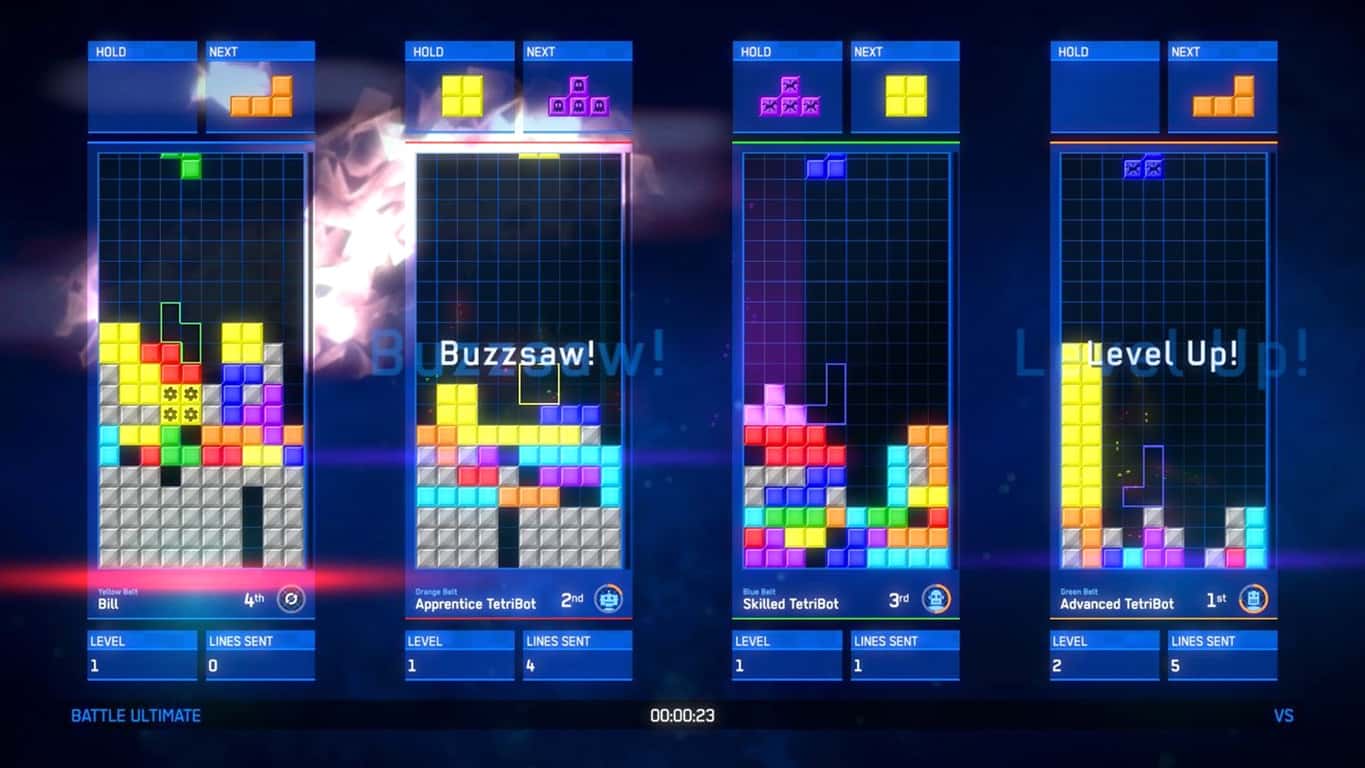
Tetris Ultimate and other video games removed from the Xbox One store

As spotted by TA, #WarGames, Ghostbusters, and Tetris Ultimate have been removed from the Xbox One storefront. This means that the digital versions will no longer be purchasable on Xbox One consoles but will still work if they are already installed or a physical disk version is present. Those who had previously purchased them should still be able to download them as well.

Unfortunately, #WarGames and Tetris Ultimate are only available digitally on Xbox One so it looks as if this could be the end of both titles for the majority of players who haven’t bought them.

The Xbox 360 games, Le Tour de France 2009, Le Tour de France 2011, Le Tour de France 2012, Le Tour de France 2013 – 100th Edition, and The Testament of Sherlock Holmes have also had their digital versions removed. Fortunately, disk versions of Le Tour de France 2011 through 2013 are available.

The removal of digital video games from online storefronts isn’t a new phenomenon and is often the result of expiring brand licences. One recent example of this was the removal of several Lord of the Rings-related video games in early-2019.

This remains one of the biggest issues many have with the transition to digital content. If rights aren’t extended, whole video games can be lost forever.

Are you disappointed by the removal of these games? Let us know which ones you’ll miss the most in the comments below and then follow us on Pinterest for more Xbox gaming content.

Time to get an Xbox One! Xbox 360’s BBC iPlayer app to stop working next month

The BBC iPlayer app will cease to work on Microsoft’s Xbox 360 consoles from March 27th. The app launched on the console back in 2012 and is the official Xbox 360 app for viewing BBC licenced television programs and movies.

This discontinuing of support for the Xbox 360 app isn’t too surprising given that a BBC app is now also available on the Xbox One, the family of consoles that succeeded the Xbox 360 generation and has been on the market now for over 5 years. There are many reasons to upgrade to an Xbox One console from and Xbox 360 and now it having a BBC app that works is just one more.

Of course, BBC apps are also available on a variety of smart devices as well so the death of the Xbox 360 BBC iPlayer app shouldn’t be that much of an inconvenience for most households.

Will you miss using the Xbox 360 BBC iPlayer app? Let us know why or why not in the comments below and then follow us on Pinterest for more Xbox content.

Proteus Arduino Simulator Free Download for PC

Proteus is a great Arduino simulator. If you arrived on this page, this means that you want to download the tool on your computer.

We want to tell you right from the start that you took the right decision. Proteus is a very versatile emulator that comes with a user-friendly interface. This makes it very simple to use.

This Arduino simulator packs a plethora of useful features that will help you to complete your projects in no time. You can see for yourself by hitting the install button below.

Proteus is available as a free trial download. You have access to all the features offered by the professional version of the tool. However, the Save option and microcontroller design simulator are unavailable.

Proteus VMS is available for download in 4 different version. There are also two bundles that you can choose from: Proteus VSM for ARM and Proteus Platinum Edition.

Download the version that best suits your needs.

Microsoft opens AI/VR technology incubator in China

While US and China relations remain tenuous for the time being, US-based software company Microsoft is forgoing political formalities and opened the Nanchang City AI+VR Innovation Center last month according to China’s Xinhua news agency.

Based on a report from Venture Beat, we’re getting details of Microsoft new AI+VR Innovation Center initiatives which appear to be “a cloud and mobile technology incubator geared towards startups and established manufacturing companies.”

The Nanchang City AI+VR Innovation Center was launched mid-January, and is expected to bustle in top talent in both artificial intelligence and virtual reality pools all coalescing in the Nanchang City Honggutan New District and ideally providing a boon to the local economy in the process.

Interestingly enough, while Microsoft is head over heels in love with AI development, its outward stance on virtual reality has, at times, seemed less enthused, to the point that the company actively pivots from using the term in its own efforts, opting instead for the phrase “Mixed Reality” to the befuddlement of many observers.

Microsoft planting an AI and VR incubator in China is no random occurrence as China has become a hotbed of VR activity and enthusiasm over the past few years. The Chinese government believes that while casual interest in virtual reality may have bottomed out in 2017, they expect it to recover, to the tune of becoming a $13 billion dollar industry by next year, 2020 based on gains in 2018.

From growth in the standalone headset market to local streaming options offering VR movie using their own 4K headsets, the market for virtual reality in China is burgeoning much faster than it is in the US or parts of western Europe. Microsoft spotting an opportunity in China and placing its incubator there can be seen as a two-prong strategy to bolster its anemic VR efforts while also reestablishing the Microsoft brand in China outside of pirated Windows image.

Microsoft starts Unboxed YouTube series, starting with this one on AI for Good

Microsoft is starting a new “Microsoft Unboxed” video series on YouTube, which will explore the different aspects of what the company has been working on. The show is being hosted by Sonia Dara and Colleen O-Brien, both of whom are also Microsoft employees.

Microsoft’s investments in AI to make the world a better place is the discussion in the first video published today, which is titled “AI for Good.” As you may know, this is also the name for Microsoft’s recent initiative to solve humanitarian issues with technology to “create a more sustainable and accessible world” according to the show’s co-host Colleen. You can watch the video below to see what they mean.

The show will air every Thursday at 9 AM PST (the same time zone Microsoft’s headquarters falls in). Starting with the company’s AI for good initiative was a pretty good idea, but it will be interesting to see if future episodes will cover other innnovative things that Microsoft has been doing in AI, software and hardware.

Microsoft investors unearth positive Bookings gains from FY19 Q2 earnings report

Microsoft recently announced its FY19 Q2 earnings and in doing so, took a moderate hit to its stock evaluation in after hour trading due to what investors saw as only moderate growth for the company.

The hit after the announcement resulted in a shaving of roughly $4.00 of its prior $106.38 mark, however, Microsoft’s stock has since recovered and at times, exceeded its prior earnings evaluation.

Part of the up and down nature of Microsoft’s post-earnings reviews may have something to do with investors reclaiming their knee-jerk reactions and seeing what Seeking Alpha’s research analyst Bert Hochfeld may have uncovered from the company’s earnings news.

According to Hochfeld, the extent of Microsoft’s actual cloud profitability was overshadowed by mitigating one-time factors, that, if revenue remains constant, should highlight the steep rise in the company’s overall cloud business.

  • Beneath the headlines – the company achieved a major acceleration in growth in its commercial business – with bookings rising by 22%.
  • Commercial is now close to 70% of revenues.
  • Profitability was constrained by various one-time factors, but the profitability of Azure and Microsoft’s cloud business overall is rising at steep rates.

Similar to much of the industry’s conclusive analysis, Hochfeld recognizes Microsoft’s pivot and but underneath the success of revenue generating decisions lay profitable outcomes not quite highlighted in all of the company’s earnings reports.

Microsoft has actually been able to execute that pivot and come out growing and generating cash on the other side.

I have enjoyed my ride down the Microsoft river and I will continue the journey. I can’t ignore 76% Azure growth or some of the other gaudy metrics the company has reported, particularly for Office 365 and its various flavors of Dynamics 365.

As Microsoft and Amazon continue to chew up cloud computing market share with big-name partnerships and contracts, the race to profitability will become an increasingly important metric to keep an eye on.

Microsoft Translator gets new compliance certifications

Microsoft Translator has been GDPR complaint for some time now, and according to  today’s announcement, the service is now compliant with three other certifications. According to the tech giant, their service is now certified for the ISO, HIPAA, and SOC compliance standards.

For those who don’t know what all of these fancy abbreviations mean, Microsoft has taken the necessary steps to make sure that the service complies with each of the three certification standards. To be complaint with the US Health Insurance Portability and Accountability Act, the service needs to be able to reliably handle healthcare related information responsibly so that the data is safe from falling into the wrong hands.

On top of this, the service is also compliant with the Service Organization Controls framework standard which hosts a number of safeguards for user data, especially when it comes to that relating to financial information. The International Organization for Standardization certifications are also adhered by the service, as follows:

  • ISO 27001 Information Security Management Standards
  • ISO 9001:2015 Quality Management Systems Standards
  • 27018:2014 Code of Practice for Protecting Personal Data in the Cloud
  • 20000-1:2011: Information Technology Service Management
  • ISO 27017:2015: Code of Practice for Information Security Controls

The company cites its certifications as its commitment to security and user privacy. With tall three of them in mind, those that might have been skeptical to use the Microsoft Translator service in the past should now be able to rest easy knowing their data is secured by multiple standards.

Microsoft continues push into healthcare with Microsoft 365 for health organizations, more

Microsoft has just announced several new tools to help health organisations collaborate and communicate more effectively. Under the “Microsoft 365 for health organizations” banner, the company will first bring new advanced messaging features to Microsoft Teams, including Priority notifications and Message delegation.

With Priority notifications, team members can be alerted of an urgent message every two minutes (for up to 20 minutes) until a response has been sent to the recipient. Priority notifications will work on both desktop and mobile, but they’re currently in private preview.

As for message delegation, it will allow clinical staff members to delegate message to other team members in case of emergency, like when a surgery is about to begin. This other feature is coming “soon” to Microsoft Teams, the company said today.

In addition to these two new healthcare-focused capabilities, Microsoft also announced the integration of FHIR-enabled electronic health records (EHR) data within Teams. This is will allow health organisations to check EHR data Infor Cloverleaf, Dapasoft, Datica, Kno2, and Redox right within Teams.

Microsoft also announced today the general availability of its Healthcare Bot, which will allow health organisations to create their own virtual health assistants and chatbots. “The Microsoft Healthcare Bot service is fully extensible to help organizations adjust the bot to solve their own business problems, and can connect to health systems, like EHRs,” the company explained.

The Redmond giant will be present at the HIMSS19 healthcare IT event in Orlando, Florida next week to share more details about its new capabiilites in Microsoft 365 for healthcare professionnals. In the meantime, you can learn more about Microsoft 365 for Healthcare on this page.

Microsoft recruits twins to begin push for Office 365 over Office 2019 desktop

Microsoft’s Office 365 and Office 2019 offerings can be a bit confusing for some. On the face of it, they both have Office in the title, implying the two software solutions should do roughly the same thing.

Another cosmetically confusing aspect to the productivity suites is that 2019 and O365 can mean the same thing for some looking to update or purchase Office for the first time in years. 2019 is a year with 365 days in it, just like every other Office offering prior, so how are the two substantively different and why does one offer a monthly payment plan?

It would seem Microsoft is not immune to the same sort of customer critique as the company has recently released a series of videos intended to explain the difference between Office 2019 and Office 365 by using the analogous examples of identical twins using the productivity suites in head to head competitions.

The Twins Challenge: Office 365 crushes Office 2019 is a series of three videos with identical twins tasked with completing the identical task using either Office 2019 or Office 365.

Beyond highlighting the more stagnant nature of Office 2019 development and use cases, Microsoft uses the series to press upon customers the additional benefits of moving to an Office 365 subscription.

In fact, while they have similar names, there’s a world of difference between the two. Office 365 includes fully installed Office applications—including the latest versions of Word, Excel, PowerPoint, and Outlook. And these apps keep getting better over time, with new capabilities delivered every month. Most importantly, Office 365 is connected to the cloud, so you can access your content from any device, coauthor with anyone in real-time (regardless of whether or not they’ve purchased a copy of Office), and use the power of artificial intelligence (AI) to create more impactful content with less effort.

On the flipside, Office 2019 also delivers full installs of the Office apps we know and love—but they’re “frozen in time.” They don’t ever get updated with new features, and they’re not cloud-connected. Also, Office 2019 doesn’t support real-time coauthoring across apps, and it doesn’t have the amazing AI-powered capabilities that come with Office 365.

Some of the highlights the help Microsoft and its twin contestants declare Office 365 the winner include the more Google-like real-time co-authoring capabilities, its cloud connectivity, and artificial intelligence that helps create reports, resumes, or identify areas of opportunities within in Office.

While the videos are a cute analogy for the similarities and differences between Office 365 and Office 2019, it should be noted that Microsoft’s latest quarter showed particularly that Office 365 adoption is helping fuel its Productivity and Business Processes division and it should come as no surprise that it would like to push that solutions a bit more.

Skype desktop app gets background blurring in video calls

After introducing background blur on video in Microsoft Teams last year, Microsoft is bringing the same AI-powered feature to its Skype desktop app. The purpose of background blur is to help your correspondents focus on you during video calls, and to block any potential distractions coming from your environment.

“Background blur in Skype and Teams uses artificial intelligence (AI)—trained in human form detection—to keep you in focus during your call,” the Skype team explained. “This technology is also trained to detect your hair, hands, and arms, making a call with background blur just as relaxed and easy as a regular video call.”

During a video call, you can turn on background blur by hovering over the video button. The feature is only available on desktop for now, and the team didn’t say if this feature will eventually come to mobile.

It’s important to note that the feature may not be 100% reliable. “We do our best to make sure that your background is always blurred, but we cannot guarantee that your background will always be blurred,” the team said. As a result, it’s probably best to always clean your room before starting that important Skype video call.

Google might add a to Chrome

Google, Microsoft, Mozilla, and co are usually looking for new ways to speed up their browsers. Then the publisher that can genuinely claim its browser is the fastest will have bragging rights. Google is now trying out a new Never-Slow Mode to speed up Chrome’s page loading.

References to a Never-Slow Mode have been spotted on the Chromium Gerrit. That is a Chromium code collaboration tool where Chrome developers outline new features for Google’s flagship browser.

The Never-Slow Mode prototype code states: Adds `–enable-features=NeverSlowMode` to enforce per-interaction budgets designed to keep the main thread clean (design doc currently internal).” The code’s flag description also states, “Enables an experimental browsing mode that restricts resource loading and rutime processing to deliver a consistently fast experience.

The Never-Slow Mode will basically speed up browsing for slower connections if Google implements it. It will do that by establishing maximum size limits for page resources, such as images, stylesheets, and scripts.

The max values specified for images, stylesheets, and scripts are one megabyte, 100 kilobytes, and 50 kilobytes. The browser will not load resources that eclipse the established maximum thresholds, which will speed up page loads.

If Google does introduce Never-Slow Mode, it will probably add the feature as an experimental flag first. Then users would need to toggle it on or off via Chrome’s flags page. However, Never-Slow Mode’s flag description also states, “WARNING: ‘may silently break content!’” Therefore, the flag description also highlights that Never-Slow Mode doesn’t work perfectly at the moment.

It is worth noting, however, that Google Chrome users can already remove images from webpages to speed up browsing. To do so, click the Customize Google Chrome button and select Settings.

Then users can click Content Settings > Images to open the options shown directly below. Toggle the Show all option off to remove pictures from pages, which will certainly speed up browsing. Users can also turn off JavaScript and Flash multimedia with Chrome’s content options.

Furthermore, users can strip pages down to text only alternatives with the Text Mode extension. That is an extension that converts webpages to black-and-white alternatives without any images, videos, or ads. Users can add Text Mode to Google Chrome by clicking the Add to Chrome button on the extension’s page.

So, Chrome might not really need the Never-Slow Mode. Nevertheless, Google might still introduce the new mode with future Chrome updates.

RELATED ARTICLES TO CHECK OUT: 

Wscadminui.exe: What it is and how to troubleshoot it

The wscadminui.exe file comes bundled together with the Windows 10 installer package and it’s another super important part of the Windows Security Center.

This file, just like other executable files in Microsoft Windows has several versions including 10.0.15063.0, 10.0.16199.1000, and 10.0.16299.15.

Now, besides improving Windows 10 users experience by the app., the file plays an important role in stabilizing the overall functioning of your system.

But the file has also been associated with some issues, such as the Wscadminui.exe – Bad Image error, faulty application path, among others.

We will be looking at these errors, some of which have made some users mistake it for a malware, and how to fix them in this article.

But before then, let’s look at the basics.

What is wscadminui.exe?

The file first appeared on the scene in July 2015 with the release of Windows 10.
Officially describe as Windows Security Center Elevated UI App, it has since been updated several times to improve its performance.

Should I uninstall wscadminui.exe?

The answer is a big no.

First, as I mentioned earlier on, the app greatly improves the running of your Windows 10 operating system. Indeed, most of your PC won’t run without executable files like wscadminui.exe.

Furthermore, the file is developed by Microsoft meaning it’s trustworthy.

Escadminui.exe common errors

Like other .exe files, the file is known to trigger various errors in Windows 10 machines. Here are some of the most common wscadminui.exe hitches:

  • Cannot find wscadminui.exe: This could mean that the file maybe missing from the registry.
  • Wscadminui.exe – bad Image: Bad Image error happens if the file has been interrupted or is corrupted.
  • Wscadminui.exe is not a valid Win32 application: Generally this error occurs when Windows tries to run the executable file only to fail possibly because of an incomplete file download.
  • Faulting Application Path: wscadminui.exe: This arises sometimes due to wrong RAM sticks configuration or out of date drivers for essential hardware such as a motherboard.
  • Wscadminui.exe is not running: The app. could have been stopped by a third-party conflicting application.
  • Windows failed to start – wscadminui.exe: With this, it is possible that the services enabling the file to run relevant tasks have issues.
  • The file wscadminui.exe is missing/corrupt: The issue here could be interpreted to mean that the file is damaged or compromised by a malware.
  • Error starting program: wscadminui.exe: In most cases, the program’s starting errors result from the user lacking administrative rights, a virus infection, or Windows compatibility problems.
  • Wscadminui.exe has encountered a problem and needs to close: This issue has a plethora of triggers chief among them a program crash.

How to fix wscadminui.exe errors

The good news is that workarounds exist for many of these issues.  Here is how to troubleshoot some of the aforementioned errors:

  1. Scan The File To See If It’s Corrupt
  2. Restore Your System To An Earlier Working State
  3. Update Windows
  4. Reboot Your Computer
  5. Scan Your PC For Viruses
  6. Halt The Wscadminui.Exe From The Task Manager

Method 1: Scan The File To See If It’s Corrupt

The wscadminui.exe file may refuse to run effectively because its installation has been corrupted.

Here is what to do:

  1. Click on the start button.
  2. Open the command prompt by typing cmd.exe in the shown search box.
  3. Now right-click on command prompt(admin). Wscadminui.exe
  4. Click on yes if and when prompted (to progress to cmd).
  5. Next type sfc /scannow and press enter.Wscadminui.exe
  6. The tool will inspect the entire system to see if it’s in an OK condition. Wait for it to finish then restart your PC.

Fix 2: Restore Your System To An Earlier Working State

System restore allows you to cancel any changes that you could have made in Microsoft Windows that resulted in the file experiencing problems.

Rolling back these changes could thus help permanently eliminate a couple of wscadminui.exe problems:

Steps:

  1. Click start
  2. Type control panel(on the start menu’s search dialog). Press enter.
  3. Click control panel from the results.Wscadminui.exe
  4. Now type recovery on the control panel’s search box. This brings up the system recovery options.Wscadminui.exe
  5. Tap on Open System Restore and click Next.windows 7 wmpshare.exe
  6. Choose the latest update, driver, or app from the listed options then click Scan for affected programs.Wscadminui.exe
  7. A fresh list of the items targeted to be deleted after removing the current restore point is displayed. If satisfied with the present selection, click Next then  You can alternatively select an older restore point appropriately.
  8. Follow the remainder of the steps.

Fix 3: Update Windows

Installing the recent updates from Microsoft helps you keep your system safe from emerging security issues as well as repairing existing problems in files, drivers, and other programs.

You can try to update your system by downloading and adding the latest updates to eliminate some of the issues:

Steps:

  1. Click Start.
  2. Type update in the search dialog box (then press enter).Wscadminui.exe
  3. Choose check for updates.Wscadminui.exe
  4. Select Install Updates(If any come up).

Fix 4: Reboot Your Computer

Rebooting your computer clears any unnecessary data and program files occupying the memory and which could be affecting your machine.

For this reason, restarting the PC can resolve several wscadminui.exe-connected errors.

Furthermore, some Window’s executable files are known to stop/crash when the system resources such as CPU are overstretched.

This problem is again easily fixed by restarting your computer.

Fix 5: Scan Your PC For Viruses

Malicious code attacks your computer in critical system areas including in locations where the wscadminui.exe file reside.

This could be contributing to some of the persistent errors associated with the file.

The solution here is to start your antivirus and scan your PC for an infection.

Steps:

The steps depend on the security software you have in your computer. You can refer to your antiviruses’ manufacturer’s website if you run into trouble.

Fix 6: Halt The Wscadminui.Exe From The Task Manager

If you’re searching for a quick solution, use the task manager to stop the file. This should at least temporarily block the processes linked with the app. and hence some of the glitches.

Steps:

  1. Start Window’s Task Manager, press the CTRL+Alt+Del buttons to access the task manager.Wscadminui.exe
  2. Go to the Details
  3. Locate and click the Wscadminui.exe file from the highlighted list.
  4. Right-click it then select End task.

 RELATED STORIES YOU NEED TO CHECK OUT:

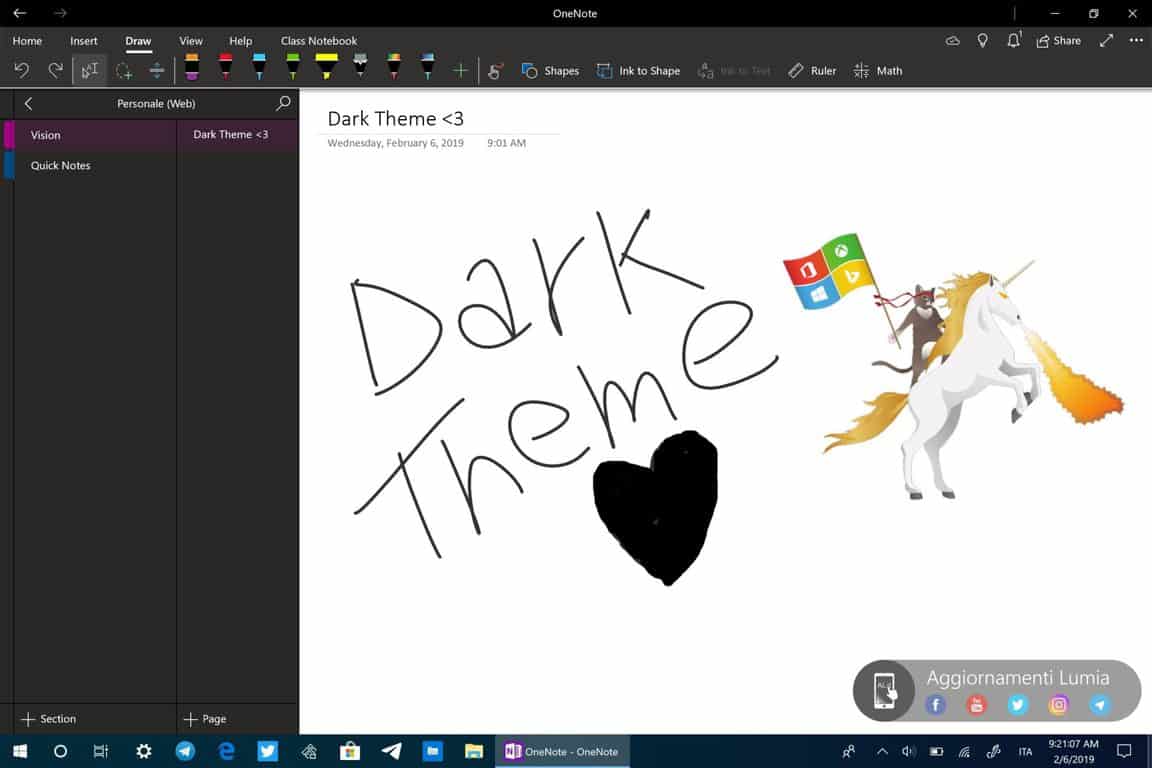
OneNote Windows 10 app will get a new dark theme and navigation improvements

OneNote is one of the few inbox apps that ship on all Windows 10 PCs, but it curiously didn’t get a dark theme option like most of the other UWP apps from Microsoft. Well, that should be changing soon as Italian blog Aggiornamenti Lumia has shared some screenshots showing the new dark theme today.

Laura Butler, head of Microsoft’s Notes and Tasks team confirmed that the dark theme is currently being worked on, teasing upcoming major navigation improvements along the way.

As we’ve seen with many other Microsoft apps in dark mode, the company has opted for a dark grey background color, but the white background will apparently still be there when you open a specific note in the app. There’s no word yet about when this new dark mode will be available for Insiders testing, but it could be a while a Butler said that the app isn’t fully available internally. In the meantime, let us know in the comments if you like what you see in those screenshots.

Crackdown 3 Wrecking Zone technical test will be open to Xbox Insiders starting tomorrow

Microsoft has just dropped some exciting Crackdown 3 news ahead of the game’s release on February 15. Indeed, the company will be running a technical test of Wrecking Zone, the game’s multiplayer mode featuring cloud-powered destruction starting tomorrow, February 7.

The technical test (the team insists that “this is not a beta”) will be available exclusively for Xbox Insiders through the Xbox Insider app. The first playtest will kick off tomorrow at 12PM PST/8PM UTC (you won’t be able to install the client before 9AM PST/5PM UTC tomorrow), and Microsoft is planning additional sessions over the weekend.

“Wrecking Zone is built on brand-new technology that utilizes the cloud in ways never been done before, enabling players the ability to destroy entire buildings and cause mayhem on an unprecedented scale. We’ve been playing and simulating games internally every day, but nothing beats real-world data and feedback from you,” the blog post on Xbox Wire reads.

In case you missed it, the team over at IGN published a video showing a full round Crackdown 3’s Wrecking Zone mode last week, and you can watch it below:

The first previews for Crackdown 3 have been published last week, and early impressions seem to be pretty mixed. Wrecking Zone in particular will ship with just three maps at launch, and this week’s playtest will just include the Agent Hunter game mode on the Blackout Zone map.

Last but not least, in case you missed it while it was free back in November, the original Crackdown Xbox 360 game is once again free to grab on the Xbox Store. The game is backward compatible on the Xbox One and enhanced for the Xbox One X with 4K graphics.

Crackdown
Crackdown
Developer:
Microsoft
Price:
Free

Want to stay on Windows 7 past next year with extended support? Here’s what it will cost

Microsoft has announced its pricing plan for businesses who wish to remain on Windows 7 but still want to continue receiving security patches and support. According to a report from Petri, starting next year the tech giant intends to start with $50 for the first year of support for Windows 7 Professional, then double in price each year. For Windows Enterprise users, an additional 50% will be added to the cost, which will also double annually:

  • Year 1 (January 2020 through January 2021): Windows 7 Pro is $50 per device, Windows Enterprise (add-on) is $25 per device.
  • Year 2 (January 2021 through January 2022): Windows 7 Pro is $100 per device, Windows Enterprise (add-on) is $50 per device.
  • Year 3 (January 2022 through January 2023): Windows 7 Pro is $200 per device, Windows Enterprise (add-on) is $100 per device.

Microsoft is pushing its increased pricing likely as an incentive to move users over to the Microsoft 365 platform. Additionally, some business users might benefit from Microsoft’s recently announced Desktop App Assure incentive, which provides assistance for those who might run into problem with their Windows upgrade.

As it stands, only time will tell how many businesses will continue to use their current Windows 7 setups, upgrade to Windows 10 and risk running into problems, or subscribe to get assistance from Microsoft. Feel free to share your thoughts on this below.

New Microsoft Technology Centre opens in the heart of Sydney, Australia

Microsoft this week opened the Microsoft Technology Centre (MTC) in the heart of Sydney, Australia. This new high-tech location is designed to assist businesses and government employees in digitising their workflow and services by adopting the latest in Microsoft Cloud and AI technology.

According to the official news release, Microsoft Australia has already formed a partnership with the NSW Government where it will focus on “building a data-centric approach to good government, important cyber, platform and capability development initiatives” as well as DXC Technology, a major Australian IT services provider.

The partnership with DXC Technology will involve the company and Microsoft Australia working together to move both of their “leading enterprise and public sector clients in Australia to the Microsoft Azure cloud.”

Microsoft Australia’s managing director, Steven Worrall, said of the arrangement, “This is a significant and important investment by Microsoft in the Australian market. The Microsoft Technology Centre will help our customers accelerate their digital journeys by bringing together the right resources – people and technology – in one location to demonstrate what can be achieved in their organisation and then to work with them to bring that to life. We are delighted that both the NSW Government and DXC Technology and their clients are trailblazers that will be among the first to benefit from our investment in the MTC and Microsoft’s ongoing commitment to Australia.”

A brief video tour of the Sydney Microsoft Technology Centre has been released revealing the modern design of the location, its various social spaces, the showcase of Microsoft hardware and services (like HoloLens), and its incorporation of functional technology concepts such as an AI-powered juice bar. You can watch it below.

“Microsoft Azure is a trusted, secure and high-performance cloud with an already comprehensive and growing array of services,” DXC Technology’s managing director, Seelan Nayagam, enthused. “Together we can provide solutions that our government and commercial clients can confidently deploy today while being prepared for changing market conditions or expectations. The combination of our deep understanding and experience and Microsoft’s cloud and technical expertise is going to be a game changer for existing and new clients to realize and expand their digital transformation ambitions.”

For more of the latest Microsoft news, make sure to follow us on Pinterest, Twitter, and Facebook.

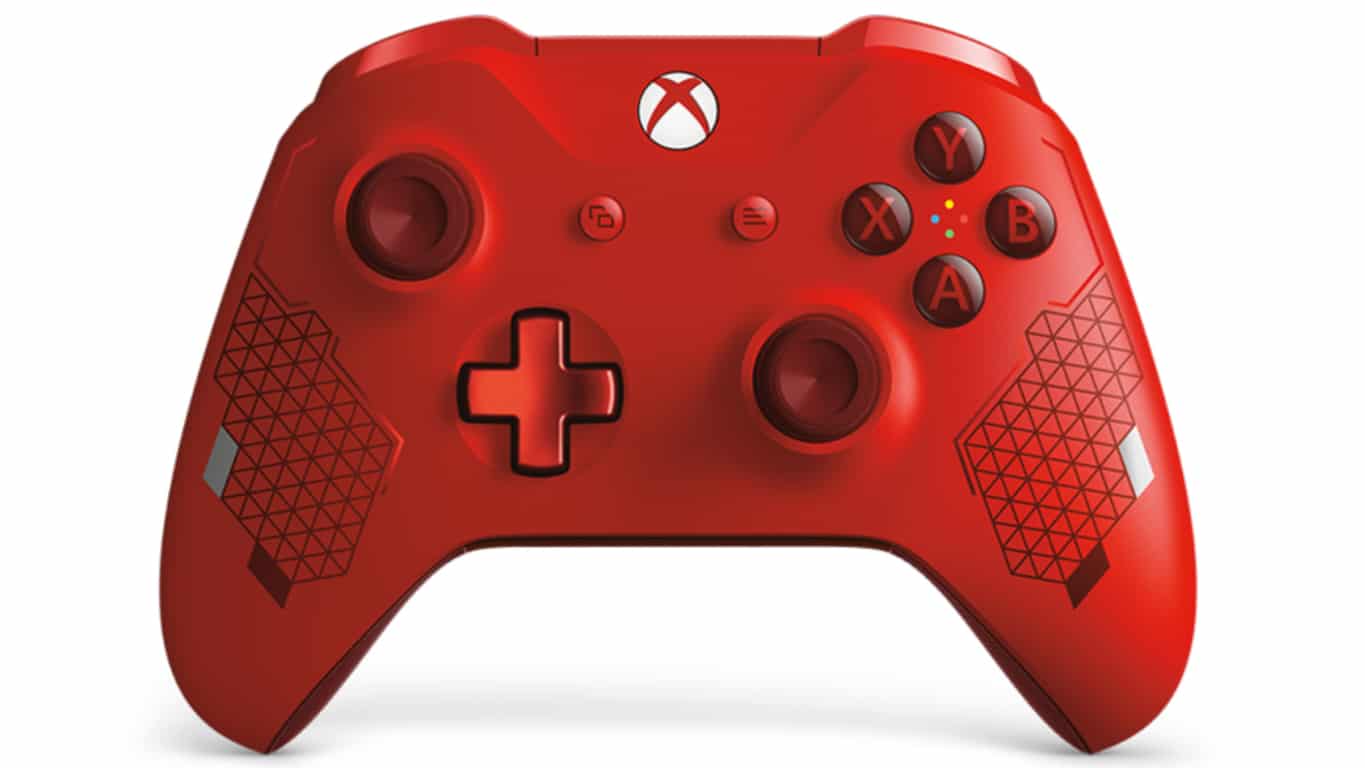
New Sport Red Xbox One Controller announced for March release

Microsoft today announced the Sport Red Special Edition Xbox Wireless Controller. This new controller, which is due to launch on March 1st, contains all of the same features as the regular Xbox Controllers but boasts a limited edition red and silver design.

“Inspired by the world of active wear and sports lifestyle, the Xbox Wireless Controller – Sport Red Special Edition is the second controller in the Sport Series,” the official announcement reads. “This red controller exudes energy–it features metallic red and silver accents on the front of the controller as well as a metallic red D-pad. The red diamond rubberized grips on the back of the controller will increase your comfort during long gaming sessions and help you stay on target.”

The Sport Red Special Edition Xbox Wireless Controller, like other modern Xbox controllers, will work with both Xbox One consoles and Windows 10 computers. A charging stand, featuring the same Sport Red design, has also been announced.

Sport Red Xbox Controller Charging StandAre you planning on picking up this new controller? Let us know why or why not in the comments below and then follow us on Pinterest for more Xbox gaming content.

Update: The controller is now up for pre-order on the Microsoft website here.

How to recover Sticky Notes in Windows 10/8/7

As you all know, Sticky Notes is a handy Windows 10 app. Users can stick notifiers to the desktop with that app. However, deleted notifications don’t go in the Recycle Bin. Thus, users seemingly can’t restore deleted notes if they need to.

Steps to recover deleted Sticky Notes

1. Open the StickyNotes.snt File in Windows 10, 8, and 7

Yet, users can still recover Sticky Note’s desktop notifications from a StickyNotes.snt file in Windows 10 versions earlier than build 1607 (the Anniversary Update). That’s a file which stores note content for the Sticky Notes app in Windows 8 and 7 and earlier Win 10 build versions.

Users might find deleted note content within that file. This is how users can open the StickyNotes.snt file in Windows 10.

  • Click the File Explorer button on the taskbar.
  • Then click the View tab.
  • Select the Hidden Items option if it’s not already selected.

  • Then enter ‘%APPDATA%MicrosoftSticky Notes’ in File Explorer’s path bar, and press the Return key.

  • Right-click the StickyNotes.snt file and select Open with > Choose another app to open the window shown directly below.

  • Select to open the StickyNotes.snt file with MS Word if you can. Alternatively, open the StickyNotes.snt file with Notepad or another word processor.

Then the StickyNotes.snt file will open in the selected application as shown directly below. The file includes a lot of jumbled text. However, Sticky Note users can also find the actual text of deleted notes within that file.

Copy the actual note text with the Ctrl + C hotkey so that you can paste it back into a sticky with the Ctrl + V hotkey.

Users can also recover recently deleted Sticky Notes in more update Windows 10 versions by opening the plum.sqlite file at: %LocalAppData% Packages Microsoft.MicrosoftStickyNotes_8wekyb3d8bbwe LocalState.

Open that file in MS Word, or alternative word processor, as shown directly below. Then you might find the text for some deleted notes near the bottom of the document.

— RELATED: Create password-protected notes with ZenR Notes

2. Recover Deleted Sticky Notes With Outlook

Sticky Notes now synchronizes notes with Microsoft accounts. Consequently, users can now recover deleted notes with Outlook 2016 and the Windows 10 Mail app so long as they have a synched MS account set up.

Click Deleted Items in Outlook 2016, and press the Restore button. Then users can select to move deleted notes back into your Notes folder. Thereafter, the notes will reappear in Sticky Notes.

3. Back Up Your Sticky Notes

Sticky Notes users can also back up their notes. Then they can recover deleted notes with the backup copy. This is how users can back up their note storage in Windows.

  • Open File Explorer in Windows.
  • Browse to this folder path: %LocalAppData% Packages Microsoft.MicrosoftStickyNotes_8wekyb3d8bbwe LocalState.
  • In Windows 8 and 7 (and earlier Win 10 build versions), users should enter ‘%AppData%MicrosoftSticky Notes’ in Run and click OK.

  • Then select either the plum.sqlite file in Win 10 or StickyNotes.snt file in earlier Windows platforms.
  • Click the Copy to button to select a folder to copy the file to.

  • Users can drag the backup plum.sqlite or StickyNotes.snt file into the LocalState or Sticky Notes folders when they need to restore deleted notes. Then the window shown directly below will open.

  • Select the Replace the file in the destination option to restore deleted notes.

So, users can restore deleted notes by opening the StickyNotes.snt or plum.sqlite files, keeping backup copies of the notes, or moving erased notes from Outlook’s Deleted Items folder. In addition, users can automatically back up Sticky Note’s storage file with File History.

RELATED ARTICLES TO CHECK OUT: 

How to enjoy a smooth Windows 7 to Windows 10/11 upgrade

Microsoft has now launched a Windows 7 solution called Desktop App Assure that will aid users to upgrade easily to Windows 10. The tool is already available in ten different languages across the globe.

The good old Windows 7 is already living its last days, as Microsoft is pushing more efforts into making users see reasons to upgrade to Windows 10. The company promises the transition will go smoothly and there will be no software compatibility issues.

Note that in January 2020, Windows 7 support will be coming to a halt. This means that running on the 2009 OS are running out of time, so now is the better time to move on to Windows 10.
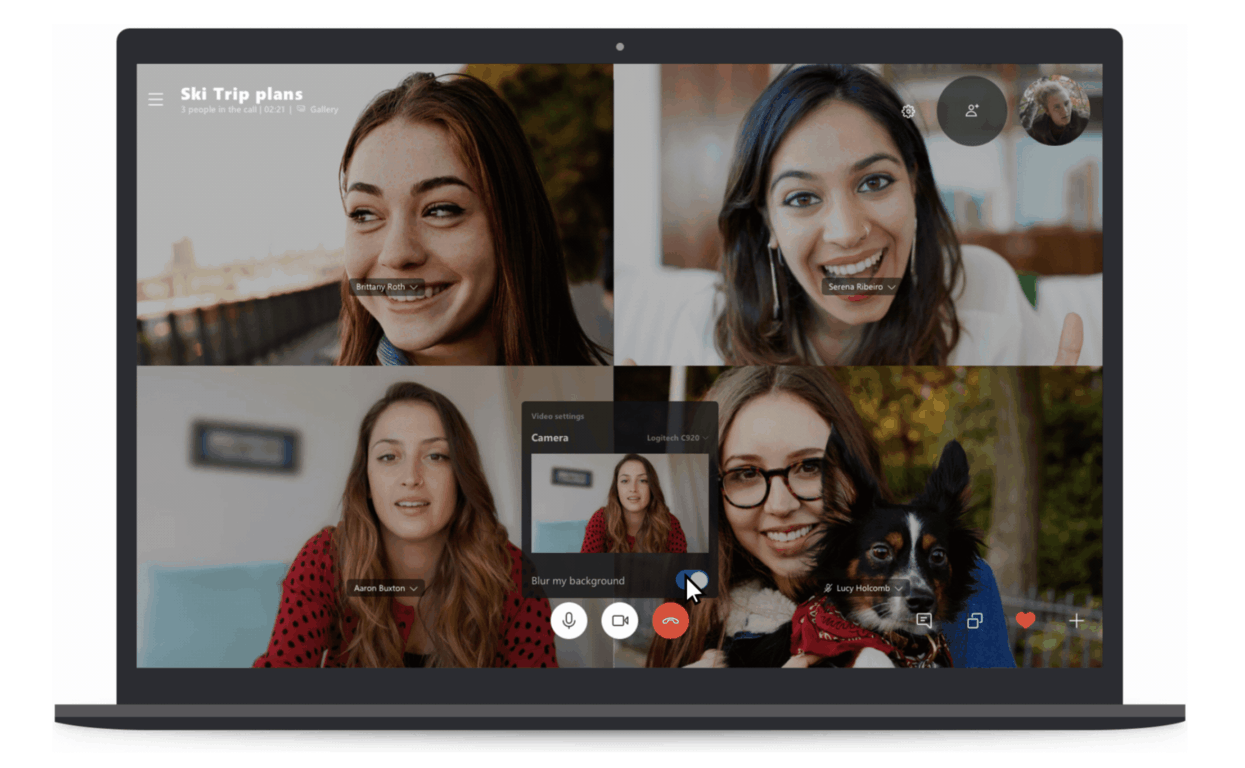
Microsoft wants a smooth transition

The Desktop App Assure solution is a new service from Microsoft FastTrack that was created with the main purpose of helping users deal with app compatibility challenges.

All kinds of tests had been carried out on this new solution by Microsoft and it has been discovered that a small number of applications may be needing additional tweaks in the process of migrating from Windows 7 to Windows 10. This means that all the other apps and programs should perform excellently well on the new OS architecture.

Microsoft has guaranteed free debugging to all users who will have the misfortune of experiencing technical issues after the upgrade. All these are part of their efforts to creating an easy transition from Windows 7 to Windows 10.

A Microsoft engineer works with you to address valid app issues at no additional cost to you with an eligible subscription. We also provide guidance to customers who face compatibility issues transitioning from Office clients to Office 365 ProPlus. This is a service provided by FastTrack and not a software package.

If you want to know more about the Desktop App Assure solution, check out Microsoft’s official page.

RELATED GUIDES YOU NEED TO CHECK OUT:

Microsoft to roll out a standalone Chromium-based Edge installer

Microsoft announced in late 2018 that they were going to switch EdgeHTML over to push a new Chromium-based Edge browser, thereby creating its own Google Chrome Browser version.

The company confirmed that a test version of the new Microsoft Edge browser would be released early 2019. Microsoft’s engineers also stated that the date for the release of the test version of Microsoft Edge is not yet known, but it is expected to be announced in the early months of the year.

While the exact release date is still unknown, we expect the company to roll out the first version of its Chromium-based sometime at the end of March or the beginning of April.

It was believed that the preview version would be available to the Window Insider Program only. However, the company had made it clear that this is going to be a standalone installer. In other words, everyone will be able to get a feel of how the latest Chromium Microsoft Edge browser functions.

The browser can be installed even if one is configured for Windows Insider Builds or not.

The company is making efforts towards getting as many Insider builds as possible to go live. Microsoft is making sure that the first preview version is going to offer a great experience to all users.

If the big M want to impress potential Edge users, that’s the best strategy to use. The first impression always matters. If the first versions of the Chromium-based Edge browser are very fast, highly responsive and support all the features and options that users need, then chances are this will be a successful experiment for Microsoft.

Again, while there is no Estimated Time of Arrival (ETA) concerning the stable version of the Chromium-based Edge, it will most likely go live when the next major OS upgrade is released.

RELATED POSTS TO CHECK OUT:

Xbox Live support to expand to iOS, Android and Nintendo Switch

Xbox Live is one of the biggest gaming subscription networks in the world with millions using the service daily.

Microsoft is planning to expand Xbox Live support to gamers on Android, iOS devices and the Nintendo Switch. If we’re lucky, the Redmond giant is going to confirm this piece of news at the game developers conference scheduled to take place on March 18-22 at San Francisco.

Xbox Principal Program Manager Jeffrey Shi and Xbox Software Engineer Ramsey will be there. Most likely, they will be the heralds of this news.

Xbox Live cross-platform support will enable Microsoft to reach billions of potential gamers and save time while expanding the services.

Innovation gets live

Microsoft has already preparde quite a few games with Xbox Live support for these platforms. One of these titles is Minecraft, which requires an Xbox Live login. The company is planning to expand the feature to more titles.

Furthermore, this new multi-platform strategy will give developers access to use Xbox Live’s infrastructure for multiplayer as well.

Breaking barriers by crossplay revolution

Xbox Live will officially bring and engage communities closer together regardless of the platform they are based on if developers begin participating in the new cross-platform SDK.

Other initiatives under this multi platform strategy include Project xCloud and the next-generation Xbox.

It looks like Microsoft will keep going forward with its cross-platform SDK for Xbox Live. The update could be exactly what the next-gen gaming platforms need taken into account the growth in popularity of mobile gaming.

RELATED POSTS TO CHECK OUT:

Microsoft Studios rebrands to Xbox Game Studios

Microsoft Studios, the company’s video game publishing division and home of 13 video games studios is becoming Xbox Game Studios today. Matt Booty, Head of Xbox Game Studios announced the rebranding during today’s Inside Xbox live show.

“As we’ve expanded our focus beyond the console, the Xbox brand has also evolved from its original roots. Today, Xbox is our gaming brand across all devices, no matter how or where you want to play, or who you want to play with. In that spirit, I’m pleased to share that we are changing the name of our game development organization from Microsoft Studios to Xbox Game Studios,” explained Booty.

Xbox Game Studios expanded in quite a big way last year, with Microsoft acquiring nothing less than seven new game development studios including Obsidian Entertainment (Fallout: New Vegas), Turn 10 Studios (Forza Horizon 4), and Ninja Theory (Hellblade: Senua’s Sacrifice). “As a gaming organization, we have never been in a better position to deliver a diverse line-up of exclusive games for Xbox fans now, and in the future,” said Booty, and we can’t wait to see what these new studios will bring to the table in the near future.

Shadow of the Tomb Raider is coming to Xbox Game Pass on February 7

Microsoft has just announced a major new addition to the Xbox Game Pass catalog during its Inside Xbox live show. Shadow of the Tomb Raider, the latest entry in the popular action-adventure franchise will be available on Xbox Game Pass starting this Thursday, February 7. The game will join Tomb Raider: Definitive Edition as well as its sequel Rise of the Tomb Raider, so that will make all the whole trilogy available for subscribers.

Shadow of the Tomb Raider was released back on September 14, and it’s actually quite surprising that Microsoft has been able to add the game to Xbox Game Pass so early. The game is about to get its fourth DLC, “The Price of Survival” on February 12th, and developer Eidos Montreal still has some more additional content in the pipeline.

Microsoft also announced four new other games coming to Xbox Game Pass later this month: The Walking Dead: Season 1 and Pumped BMX Bro are both coming on February 7 along Shadow of the Tomb Raider, and they will be followed by De Blob on February 14 and then Batman: Return to Arkham on February 21. This is in addition to Crackdown 3, the next Xbox One/Windows 10 exclusive to be released on February 15.

If you have yet to subscribe to Xbox Game Pass, you can currently get your first month of subscription for just $1 instead of $9.99. The catalog currently includes over 100 Xbox One and Xbox 360 games, and Microsoft keeps adding quality titles month after month.

Microsoft announces Xbox One S Anthem bundle

As the gaming world prepares for the next biggest title to hit consoles with Electronic Arts Destiny-like successor, Anthem, Microsoft is seizing an opportunity to push a couple of more Xbox One S off the shelves with a new tie-in.

Along with a full-game download of Anthem Legion of Dawn Edition (which includes four legendary armor packs, a legendary weapon, and more), the Xbox One S Anthem Bundle includes an Xbox One S console with a 1TB hard drive, an Xbox Wireless Controller and 1-month trials to EA Access, Xbox Game Pass and Xbox Live Gold.

The Xbox One S Anthem bundle will available for purchase on February 22, 2019, the same day as the release of the game across digital and retail stores.

However, eager fans can pre-order the bundle from their nearest Microsoft Store (if in the US) or online at Xbox.com for anyone not fortunate enough to have a local store within distance. Other retail outlets such as Gamestop should also have pre-orders available for purchase.

Just a few days ago, Microsoft reported that it had one of its best gaming quarters yet as digital services revenue increased due in part to more people signing up for Xbox Live, Game Pass and in-game purchases from behemoth franchises such as Fortnite.

However, Microsoft also reported a quarter where hardware revenue saw a slight decline and offering a new bundle alongside the hotly anticipated Anthem game might go a long way inflating those numbers for next quarter.

Tune in to Inside Xbox on Mixer later today to get another exclusive free “MixPot”

Microsoft’s Inside Xbox Live show is coming back later today at 2PM PT, and those of you who watch it live on Mixer will be able to grab another free “MixPot.” This time, the team will offer an exclusive Onyx Compass skin for Sea of Thieves, as well as invites for the upcoming private beta for Tom Clancy’s The Division 2.

Ubisoft’s upcoming post-apocalyptic shooter will be released worldwide on March 15, but the private beta is set to kick off on Thursday, February 7th at 10am CET through February 11th 2019 at 10am CET. The game will ship after several other AAA games coming this Spring including Far Cry: New Dawn, Metro Exodus, Anthem, and Devil May Cry 5, and hopefully it will be able to find its audience during this busy period.

Today’s Inside Xbox episode should deliver some new Xbox Game Pass additions, as well as lots of news about Crackdown 3, Sea of Thieves, and more. Make sure to connect your Microsoft account to your Mixer account before watching it live on mixer.com/xbox.

Microsoft announces the launch of the Accenture Microsoft Business Group

Microsoft and Accenture have just announced a new partnership aptly called Accenture Microsoft Business group, which, from the announcement, appears to be a sort of service solution for more than 45,000 dedicated professionals.

Accenture and Microsoft have a longstanding collaborative relationship that has already resulted in a grouped effort called Avanade, but yesterday’s, February 4, 2019, announcement seems to be going after scale in the enterprise arena.

Regarding yesterday’s news, Accenture’s chief technology & innovation officer and chairman of the board for Avanade Paul Daugherty described the combined efforts as such,

“The Accenture Microsoft Business Group is a major step forward in our decades-long relationship with Microsoft. It brings Accenture’s broad industry experience and transformation skills together with Microsoft’s powerful digital technologies and Avanade’s specialization in the Microsoft ecosystem. The demand for digital transformation, powered by the cloud, has never been greater. We are bringing the leading capabilities of our companies together to meet this demand and deliver innovation to our clients.”

As for the details of the deal, it appears that Accenture’s role will be to be more of the client facing portion to this global services and solutions offering while Microsoft will help provide the actual infrastructure and technologies.

The collaboration will focus on, “helping clients migrate to Microsoft Azure and effectively harness the power of data, artificial intelligence, optimize Microsoft business processes with Microsoft Dynamics and foster modern work and collaboration with Microsoft 365.”

Microsoft and Accenture have already found similar success in their Avanade partnership delivering some 35,000 Microsoft-related projects to more than 4,000 professional clients over the globe. With the spin-up of Accenture Microsoft Business Group, the two companies look to expand on that success and client portfolio many times over.

TomTom to become main provider of location data for Microsoft Azure and Bing Maps

Microsoft is partnering with location technology specialists TomTom to bring its traffic data statistics over to the tech giant’s Bing Maps program, as well as to their Azure cloud computing service. The Redmond-based tech giant explained that the partnership will enhance Azure Maps by bringing features to allow businesses to build “map-based dashboards to visualize IoT spatial analytics to mobility scenarios for vehicle movement” on their blog post.

Bing Maps users will likely benefit from TomTom’s infrastructure, which will enable users to perform various such as tracking parking meter rates in real time, plus the tracking of street traffic, carbon footprint, noise pollution, and others. TomTom also has the technology to support self driving vehicles, which could also enable Microsoft to integrate its maps into those systems in the future. The tech giant is giving access to these statistics to business users who may want to incorporate them into their apps, but if at least a couple of these made it to Bing Maps, it could help serve to give Google a run for their money. Microsoft’s Partner Group Manager of Azure Maps and connected vehicles Tara Prakriya, explained that:

“This deep partnership with TomTom is very different from anything Microsoft has done in maps before. TomTom hosting their services in the Azure cloud brings with it their graph of map data. Manufacturing maps in Azure reduces the latency to customer applications, ensuring we offer the freshest data through Azure Maps. Azure customers across industries end up winning when their geospatial data and analytics, TomTom data, and Azure Maps services are all running together in the same cloud.”

TomTom will also benefit from the partnership, as Azure will become their primary resource for cloud management. This will give them access to Microsoft’s vast array of services and APIs as they expand their services in the future. It’s a move we recently made ourselves, for those of you who might not already know.

Deal: Get 40% off anime movies and TV seasons on Xbox One and Windows 10

The annual Anime Month campaign is now live in the Microsoft Store on Windows 10 devices and Xbox One consoles.

For the whole month of February, a wide selection of anime movies and TV series will have their prices heavily reduced with some being slashed by as much as 40%.

Some of the discounted anime series worth checking out this month are Dragon Ball Z, Yu-Gi-Oh!, Digimon, One-Punch Man, Cardcaptor Sakura, Ranma ½, and Tiger and Bunny while some recommended anime movies are Digimon Adventure tri, Sailor Moon R: The Movie, A Letter to Momo, Patema Inverted, and Road to Ninja: Naruto The Movie.

Discounts are available to all users and don’t require Xbox Live Gold or any other subscription service. As with all movies and shows bought in the Microsoft Store, all of these anime films and series are viewable on Windows 10 devices, Xbox 360 consoles, Windows phones, and Xbox One consoles.

Have you bought any anime from the Microsoft Store this month? Share your recommendations with the community in the comments below and then follow us on Pinterest for more geek content.