Telstra extends partnership with Microsoft in Australia

Australian telco, Telstra, announced today that they would be extending their partnership with Microsoft. Telstra’s director of global applications, Gianpaolo Carraro, said in a statement that one of the motivators for the continuing relationship was Microsoft’s impressive productivity and collaboration services which work well with their own networks, mobility, and enterprise technologies. The renewed agreement will bear fruit almost immediately with a new initiative for Australian businesses that will further integrate Microsoft’s Office 365 and Skype for Business solutions into the workforce.

“The partnership means Australian businesses can have the full scope of Office 365 cloud productivity and collaboration apps, video conferencing and meeting broadcast capabilities, along with Telstra voice services into Cloud-PBX delivered either in the cloud or at a customers’ premise,” he revealed. “Skype for Business (Microsoft’s meetings and voice communications offering in Office 365) will be paired with Telstra managed voice services and network assessments to deliver a comprehensive productivity and collaboration solution. With these enhanced capabilities, Australian businesses will benefit from the increased productivity of a truly mobilised workforce, where employees have the ability to work anywhere, anytime and on any device.”

Carraro acknowledges the difficulties in implementing new strategies on a scale as large as this and mentions that Telstra would be incorporating Kloud and Readify services during the transition period. “We know that adopting new applications can be a complex process, especially when each of our customers’ have their own unique requirements. So this new capability will be backed by Telstra’s professional consulting capabilities through recent acquisitions of Kloud and Readify to support them as they embark on this technology journey,” Carraro enthuses. “We can be on hand to help assess, design, customise, implement and manage new applications right across an IT environment. We can also make the digital transformation journey easier by providing solutions and offers that are scalable, flexible and of course secure.”

Telstra is Australia’s largest telecommunications provider and has a strong history of working with Microsoft. The company actually hired former Microsoft exec, Stephen Elop back in March of this year and the revamp of the Sydney and Melbourne flagship Telstra stores were heavily influenced by Microsoft technology and the Windows 10 operating system in particular.

Toy Odyssey and Firewatch are ready to play on Xbox One

Firewatch and Toy Odyssey are now both available to buy, download, and play on Microsoft’s Xbox One video game console.

Firewatch is a first-person story-based exploration title set within the Wyoming wilderness. It has been critically acclaimed for its atmosphere and compelling story moments. Here’s the official game description:

The year is 1989. You are a man named Henry who has retreated from his messy life to work as a fire lookout in the Wyoming wilderness. Perched high atop a mountain, it’s your job to look for smoke and keep the wilderness safe. An especially hot, dry summer has everyone on edge. Your supervisor Delilah is available to you at all times over a small, handheld radio—your only contact with the world you’ve left behind. But when something strange draws you out of your lookout tower and into the forest, you’ll explore a wild and unknown environment, facing questions and making choices that can build or destroy the only meaningful relationship you have. A Note: Firewatch is a video game about adults having adult conversations about adult things. If you plan on playing with a younger gamer, that might be good to know going in.

Buy Firewatch on Xbox One

Toy Odyssey on the other hand, is an action-platformer set within a warped world inspired by the nightmares of childhood imagination. Here’s its official description:

Toy Odyssey is a Metroidvania style action-platformer that takes you back to a world made from the nightmares of your childhood. Join Brand, an action figure come to life. in his fight against the darkness to save his owner, Felix. Nightmares are only the start of his troubles. Brand needs to uncover the secrets of the house before it’s too late. Explore the entire house, combat chaos, and save other toys in the battle against evil. Create a huge arsenal and upgrade any items you find. Build the ultimate bedroom fortress to keep the darkness at bay. Unravel the house’s mysterious past, and learn to overcome all odds.

Buy Toy Odyssey on Xbox One

Have you played Toy Odyssey or Firewatch yet? Let us know which game you’d recommend in the comments below.

Halo 5: Guardians gets 4 brand new maps and 12 updated maps

Halo 5: Guardians is a first-person shooter developed by 343 Industries and published by Microsoft Studio for the Xbox One console. 343 Industries started to formulate the concepts and objectives of Halo 5 shortly after the release of Halo 4, a game released back in November 2012. Halo 5 was announced for the Xbox One during the Electronic Entertainment Expo 2013, but was released last year in October 2015. Halo 5: Guardians boasts a new game engine that allows it to maintain 60 frames per second.

The game received positive reviews from critics. According to most of them, the gameplay, level design, visuals and multiplayer modes are great. However, when it comes to the single-player campaign, it seems that a many critics and players were disappointed.

Recently, 343 Industries added four new maps to Halo 5: Guardian while also updating a few others for the game’s Big Team Battle Mode. It seems these maps were made using the Halo 5’s Forge tools and were created in partnership by 343 and fans. The four new maps are called Traffic Jam, Unearthed, Estuary and Dispelled. It seems that the tweaks to the existing dozen Big Team Battle maps have not only improved gameplay but also its aesthetics.

With twelve updated maps and the addition of four brand new maps, this refresh is the largest update to a playlist in Halo 5 to date. […] In order to pull off such a large task, we coordinated with two incredible parts of the Halo community – the Forge experts, and the diehard Big Team Battle players. These communities worked tirelessly to consistently host custom game lobbies in order to make sure each map was thoroughly tested.

You can check out the new maps on Haloway Point’s latest blog post.

Are you playing Halo 5: Guardians on your computer? Tell us your thoughts about this great first person shooter game!

RELATED STORIES TO CHECK OUT:

How to automate tasks in Windows 10

There’s probably an app or a website that you use/visit every day on your computer. If you’ve already developed such a routine, you can even save some time by having that app or website opened automatically for you, so you don’t have to search for them every single time.

Well, Windows 10 has a handy tool that will make it possible. The tools is called Task Scheduler, and you can use it to automate basically any task you want. While this tool can’t perform more complex tasks, like leveling up a character in your favorite online game, it can do some basic, but still useful, actions, like opening an app, a website, or sending an email.

While such a simple action like opening a website might not be a deal breaker to you to start using this feature, you can use it for something else, like defragmentating your computer while its on idle. This feature has been present on Windows since way back, and luckily, Windows 10 still has it. So, let’s finally see how to automate a task in Windows 10, and save yourself some time and effort.

How to run Task Scheduler in Windows 10

As we said, you can use Task Scheduler to perform various types of tasks. In this article, we’re going to show you the most basic action you can do with this tool.

With Task Scheduler, you can basically run anything that’s installed on your computer. To just give you an idea of how this feature works, we’re going to perform a simple task of automatically opening our site. Here’s what you need to do:

  1. Go to Search, type task scheduler, and open Task Scheduler.
  2. Now, right-click on Task Scheduler Library from the left pane, and go to New folder… This will create a new folder were you’re going to store all your created tasks. Creating a new folder for your tasks is not required, but it’s better to create one, for easier management. However, if you’d like to store all your taks in the default folder, you can skip this step.
  3. Now, to create a task, go to Action > Create Task.
  4. On the General Tab, you can give a name to your task, and describe it. You can also choose users who will perform this task. task-scheduler-windows-10-1
  5. Once you’ve set a name and description for your task, head over to the Triggers tab, and choose New. In this tab, you can manage the time of your task. There are a lot of options, you can set the task to be performed only once, every day, every week, etc. You can also set a specific time of when the task is going to be performed. Since there are so many options, feel free to experiment with them by yourself. For the sake of this article, we’re going to set up our task to be performed only once, at a specific time of  11:55 PM.task-scheduler-windows-10-2
  6. Now, head over to the Actions tab. Here you can choose what program or app will be automatically opened at a select time. Just click New> Start a program > Browse, and pick up a program you want to run. In our case, we’re going to open Google Chrome. If you choose to open a browser, like we did, just paste a URL to a website you want to open in the Parameters section. task-scheduler-windows-10-3
  7. If you want, you can set additional conditions in the Conditions tab. For example, start the task only when computer is on idle for 10 minutes, start the task only when your laptop is plugged in, etc.
  8. Once you’ve set everything up, just click OK, and wait for your program/site to be opened.

There you go, this is how you can open any program or a website automatically with Task Scheduler. Of course, this is just the most basic action you can perform with this tool, because it supports many complex, and more useful operations. We just wanted to give you an idea of how this tool works in Windows 10, and if you want us to dig deeper into this feature, just let us know in the comments.

For example, if you want to set up an automatic defragmentation of your disks with Task Scheduler, like we mentioned above, just check out this article for more info.

RELATED STORIES YOU NEED TO CHECK OUT:

Windows Store on HoloLens supports voice-enabled app installation

Microsoft continues to build onto the already convenient features of the HoloLens. Just a few hours ago, Microsoft announced on Twitter that users could finally use voice commands to search, install, and open apps from the Windows Store.

According to Windows Central, users can hover in front of the application and simply say what they want to do. Voice commands will be able to take the place of hand gestures. They are more convenient and more precise, providing a large amount of accessibility to users that cannot properly do the ‘pinch’ technique.

As the article explains, the feature was being worked on for a while now. The voice tags for many commands were added in the Windows 10 Anniversary Update and now we are seeing them being utilized in the Microsoft Store.

Microsoft releases SQL Server Data Tools version 16.4

On the more technical side of news, the SQL Server Data Tools (SSDT) team has announced their most recent update to 16.4.

The update to 16.4 is making Schema Compare supported in SqlPackage.exe. It will also be supported by the Data-Tier Application Framework API. It was clarified in the SSDT team blog corresponding with the update that files created in Visual Studio with Schema Compare (.scmp) will now be accepted. The files can now be created, loaded, compared, and otherwise used now by the Data-Tier Application Framework API.

The Schema Compare file specifies the source and target, which can be either a database or a dacpac file. Note: Schema Compare files that have a database project as the source or target are not supported at this time. Your schema compare file can, though, reference the dacpac file from your database project’s build output.

Another major feature of the update was the addition of the Integrated Workspace Mode for SSDT Tabular. This analysis service makes it possible to create and organize data internally. They’ve even made it easy to switch tabular projects on explicit work space servers over to the new feature so that you can continue your task without much hassle. More details were released on the Analysis Services and PowerPivot Team Blog:

In integrated workspace mode, SSDT Tabular dynamically starts its internal SSAS instance in the background and loads the database so that you can add and view tables, columns, and data in the model designer, and if you add additional tables, columns, relationships, and so forth, you are automatically modifying the workspace database, as well. Integrated workspace mode does not change how SSDT Tabular works with a workspace server and database. What changes is where SSDT Tabular hosts the workspace database.

The update also came with a vast amount of bug fixes and improvements for database tools and analysis reporting services.

You can download the SSDT 16.4 for Visual Studio from the SQL Server Tools library. Likewise, the Data-Tier Application Framework 16.4 is available from the Download Center.

Word Puzzle is that latest Xbox One Backward Compatible title


Backward Compatibility on Xbox One is one of the most requested considerations that fans have put out there for the Xbox engineering team to work on. The library of games that have been made available from Xbox 360 classics to the more modern console is staggering. So it’s often that fans provide feedback and beg for their favorite suggestions to be added to the growing list of backward compatible games  for the Xbox One.

Today, Larry ‘Major Nelson’ Hryb posted on Twitter about the next addition: Word Puzzle.

As a refresher, Word Puzzle, is simply that. It is a puzzle game that is based on the classic word searches that you’d find at the grocery store magazine, only with a bit more color. It was introduced as an Xbox Live Arcade game for the Xbox 360 back on November 7, 2007.

It’s definitely not Skate 3. Many fans have been disappointed with Mike Ybarra since he mentioned the potential of the game appearing as an Xbox One backward compatible game nearly one year ago.

In fact, Word Puzzle only had about 202 votes to bring it to the Backward Compatible list. Compare that to the thousands of gamers that have voted for more popular titles such as Skyrim, Call of Duty, Mass Effect, and more on Xbox’s User Voice.

Nevertheless, Word Puzzle will become Backward Compatible and there are plenty more to come. If you’re feeling adventurous, check it out on the marketplace where you can even try the free demo.

Microsoft details primary principles of maintaining and creating a collaborative environment

According to the company’s Windows Devices blog, Microsoft believes there are three main areas of maintaining and creating a collaborative environment in the workplace. Microsoft outlines the main points that are paramount to what it calls “the collaboration coefficient.”

In the video below, Microsoft shows how companies can create and maintain a healthy, collaborative environment by using Surface products but focusing mainly on the Surface Hub.

A big corporation, especially one as big as Microsoft, relies on these three rules to foster a collaborative environment for content creation:

  1. Building a collaborative culture grounded in a growth mindset that celebrates individuals and rewards group outcomes.
  2. Deploying a simple, knowable technology toolkit, leveraging the convergence of recent digital advancements.
  3. Designing intelligent, connected environments that encourage engagement and reduce collaborative friction while offering employees choices.

To figure out how to create and maintain a collaborative environment, Microsoft tapped Forrester Consulting for answers. Forrester found some interesting insights and offered Microsoft some recommendations for maintaining the office environment they needed to be successful in content creation. Here are Forrester’s recommendations:

  • Have an open dialogue with information workers about their work environment.
  • Create a cross-functional group to explore collaborative computing solutions.
  • Explore new types of collaboration spaces.
  • Unify in-room and remote collaboration experiences.
  • Engage in proof-of-concept pilots.
  • Roll out an integrated solution to the wider organization.

Microsoft used Forrester’s recommendations to find ways they could transfer the creative content creation experience at the company and transferred that experience to other companies through the use of the Surface Hub.

This app lets HoloLens export image data to your PC

Just a few days ago, everybody was talking about how Microsoft off-loads the processing required for the HoloLens device to a PC nearby. Now, you can find the app that helps you to do so in the Windows Store under the name Holographic Remoting Player.

This is a companion app that lets you connect a PC to apps compatible with Holographic Remoting. This means you are able to stream any holographic content from your PC to the Microsoft HoloLens in real time with the help of a Wi-Fi connection.

Basically, the app lets HoloLens export sensor data to the PC using the Wi-Fi. On the PC, you can do all the processing you want and then import the final images back in the headset. Contrary to some people’s expectations, performance is still good at 60 frames per second. This would allow even more complex data to be placed on the image the headset user sees.

But this is not the only feature the Remoting app brings to the users. For instance, you can simulate inputs with the Unity Play Mode, which is very useful for developers. Moreover, you have the option of Unity Remote Debugging, which lets you run an app you built on the HoloLens by connecting to the headset through Unity in Play Mode. This lets you access the Unity Editor screen, offering input and letting you work on debugging your code directly from here.

You can find the HoloLens on sale in the Microsoft Store for $3,000. It is targeting power users, developers and enterprises. It will be interesting to see how enterprises decide to use HoloLens and if it will tobe successful in this domain. At the same time, we are curious to see how many regular users would buy it.

RELATED STORIES TO CHECK OUT:

Latest Windows 10 Mobile build install fails with error 0x800703ed

Windows 10 Mobile build 14926 is definitely not a friendly build. Thousands of Insiders complained about SIM and PIN issues that prevented them from using their phones. Now, the Insiders who decided to take their chances and install the latest Windows 10 Mobile build are reporting they can’t install the update due to error 0x800703ed.

To start in a funny manner, we’d say it’s better to encounter error 0x800703ed when trying to install the build than to be able to get the update and then realize the terminal can’t detect your SIM card and the keyboard is unavailable.

Error 0x800703ed prevents Insiders from install the latest Mobile build

Failed 4 times on my Lumia 640 ATT Update 10.0.14926.1000 – Error 0x800703ed

There is also a workaround available to fix this issue: all you need to do is remove the SD card before starting the update and the build will install without any problems. However, if you do decide to install build 14926 on your Windows phone, keep in mind that most likely, you’ll encounter SIM card issues and you won’t be able to unlock your terminal.

Fortunately, there’s also a workaround available for the SIM card and PIN issues as well. You can perform a hard reset and this will solve the issue, but you should opt to use a back-up build in order to restore the content previously saved on your device.

In earnest, we recommend you to wait until Microsoft pushes a hotfix for these annoying issues detected on the latest Mobile build. Or you can simply wait even longer, until the tech giant releases a new build. Windows 10 Mobile build 14926 simply brings too many issues for the time being.

RELATED STORIES YOU NEED TO CHECK OUT:

Microsoft Brad Smith promotes the Cascadia Innovation Corridor

Microsoft recently poured resources and money into re-establishing its presence in the Great North, otherwise known as Canada, and it seems the company is now sending its president and chief legal officer Brad Smith to the area to hammer home just how important the company views the region.

Vancouver and Seattle have many things in common and many complementary strengths. We also have an opportunity to contribute to a region that is stronger than its individual parts. Working together, we can build a globally competitive 21st-century innovation corridor that connects and enhances both regions. This, in fact, is a unique opportunity to create a social and economic opportunity for the nearly 12 million people who live in Washington state and British Columbia today.”

To reiterate, today’s announcement comes just a little less than three months after Microsoft’s consolidation efforts to bring its desperate Vancouver offices under one roof. Once completed, roughly 560 Microsoft employees will be moved into a new 142,000 square foot engineering facility called the Excellence Center in Vancouver, British Columbia.

To reference GeekWire on the matter:

Other details of the facility include the construction of two community rooms capable of housing 150 employees, a new open space designed to house innovative software and hardware projects (think HoloLens) called the Makers Garage as well as several other collaborative areas pocketed throughout.”

As more software companies seek shelter in the California’s tech bastion of Silicon Valley, it seems Microsoft is committed to expanding beyond San Francisco and even its home base in Seattle to bolster its international presence while keeping ties to its Redmond campus.

Microsoft Flow, PowerApps, and Azure Functions help create cloud apps quickly and easily

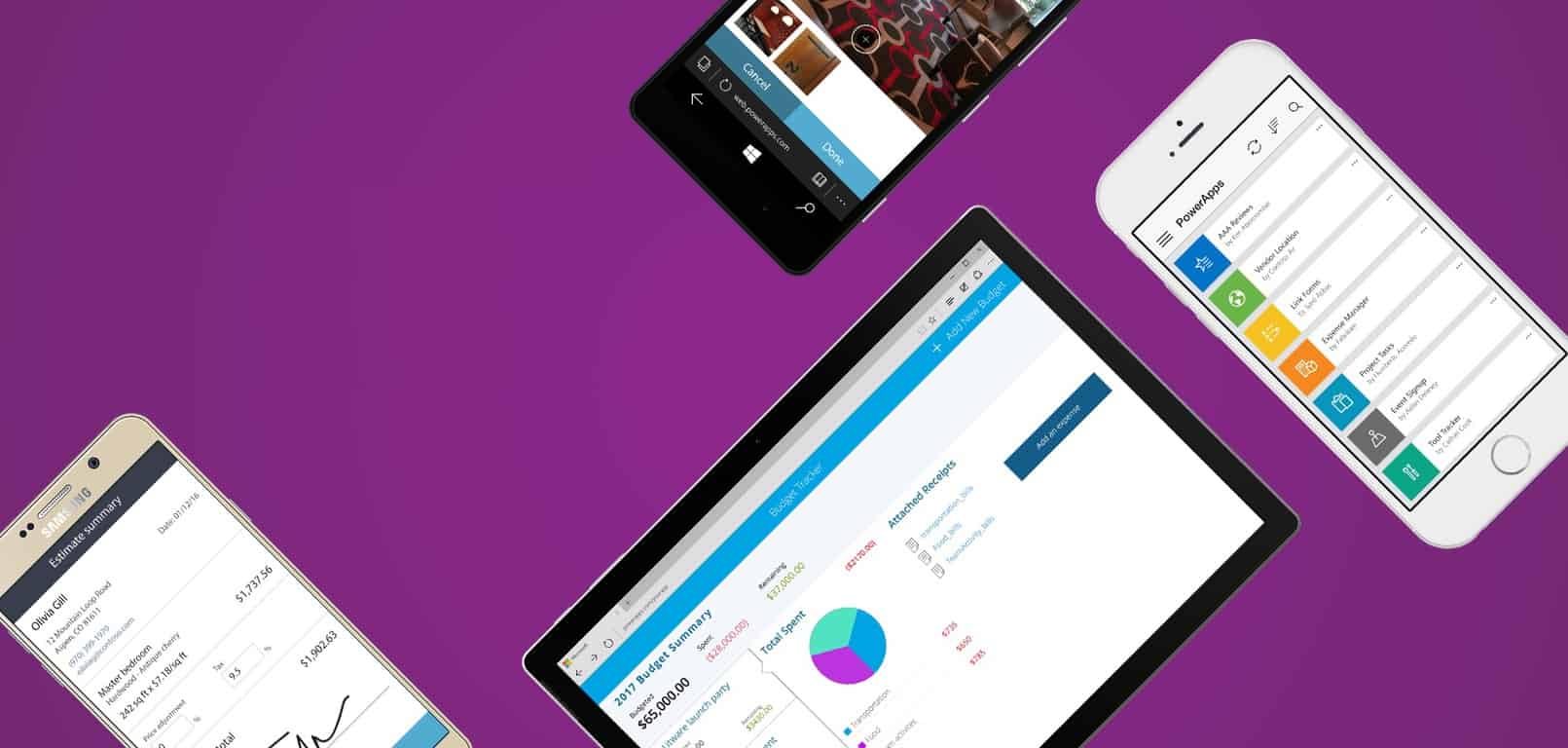
With most data content moving towards cloud storage and computing, it seems it was only a matter of time before the applications that trafficked this content would themselves become a product of cloud development. Accordingly, Microsoft is looking to help developers and businesses make the leap into cloud development by using its suite of software that includes Microsoft Flow, Microsoft PowerApps and Azure Functions.

By incorporating the gamut of services, Microsoft believes customers can quickly design their workflow and execute changes with greater flexibility. As James Staten, Microsoft’s chief strategist of Cloud + Enterprise would put it, “This is potentially a seismic shift in how we think about enterprise computing.”

Now that Microsoft Flow, Microsoft PowerApps, and Azure Functions are in preview for select customers, Microsoft can get early telemetry on how the future of enterprising computing will evolve as well as offering a helping hand in delivering solutions that address company support, contact, on-premises, or cloud-based management.

Using Microsoft’s full stack of cloud-based computing options for the enterprise, companies can unburden themselves with having to spend time and resources on worrying about servers thanks to Microsoft Power Apps or creating sophisticated processing workflows by using Azure Functions instead.

Think about it: with PowerApps your business users can quickly create apps, and with Microsoft Flow, create business processes with a few clicks. With Flow’s bigger cousin, Azure Logic Apps, you can quickly connect to any industry-standard enterprise data source such as your local ERP system, a data warehouse, support tools and many others via open protocols and interfaces such as EDIFACT/X.12, AS2, or XML. And you can easily connect to a wide variety of social media and internet assets, like Twitter, Dropbox, Slack, Facebook and many others. With Functions, you can catch events generated by Logic Apps and make decisions in real time.”

Microsoft PowerApps Common Data Model

Microsoft further pitches the preview services as “Lego blocks,” meaning that they work independent of one another but when combined, swapped out or interchanged, offer greater value to customers. Once again, Microsoft is positioning its cloud apps as a necessity for an evolving enterprise industry looking to prioritize productivity and ease-of-use.

The Microsoft Accelerator in Bangalore picks its latest batch of startups

The Microsoft Accelerator in Bangalore, India will soon welcome a ninth wave of local startups. According to a report from Tech in Asia, 13 startups have been chosen to join the four months program designed to help participants work on their go-to-market strategy.

This time, the local startup accelerator selected later stage startups companies who mainly work in the artificial intelligence and/or data analytics fields. Five companies have already accomplished series A rounds, and more than half the selected startups have an international presence. Here are the 13 startups that will join the program:

  • AllizHealth, a company building a wellness & health analytics platform
  • Betaout, a marketing automation platform
  • Epictions, an intelligent marketing platform designed to
  • Faircent, a community loan exchange platform
  • FarEye, A customizable SaaS based mobility platform
  • Germin8, a a Social Media Intelligence company
  • Meddiff Technologies, a company developing medical teleimaging solutions
  • Moveinsync, a a transport management platform
  • Surukam Analytics, a company working on an artificial Intelligence solution to automate decision-making processes and workflows
  • Talview, a video-mobile recruitment technology platform
  • Transaction Analysts, a company developing payment solutions through smart card based prepaid cards
  • Uncanny Vision (), a company company focused on Computer Vision on Embedded systems and IoT devices
  • Whodat, an Augmented Reality Company focused on help consumers make informed decisions before buying a product!

Bala Girisaballa, CEO of Microsoft Accelerator in Bangalore explained to Tech in Asia why the startup accelerator mostly chose startups focusing on AI and data analytics:

We are at the cusp of a new era where everything is about intelligence. It’s no longer about automation, it’s about tons and tons of data and what we do with it… Give it another ten years, I think artificial intelligence and data analytics will be in the DNA of every company.  I don’t think any company can be outside of this realm. This to me is a fundamental shift, and not just another vertical. It’s changing the sinew or fabric or DNA of every organization.

While the Microsoft Accelerator doesn’t take ram which takes no equity from the participants, it is important for Microsoft to remain a key player in the local startup ecosystem. Two years ago, a survey from the Economic Times rated the startup accelerator as the number one accelerator program in the region.

New Microsoft video highlights the company’s role in the Republican and Democratic National Conventions

The Democratic and Republican National Conventions may have ended a few months ago, but Microsoft has published a new video to highlight their bipartisan role in the two political conventions.

The video gives a look at the faces from behind the scenes at Microsoft such as the Republican Advisor at Campaign Tech Team; Ginny Badanes, Microsoft’s Director of Federal Government Affairs, John Sampson and even Convention Engagement Director Manuela Goulden. Other faces closer to the convention such as RNC CIO Max Everett and DNC CIO Andrew Binns also make appearances and discuss the Microsoft relationship as well.

Of course, the video also showcases the Microsoft technology which was in use at the DNC and RNC. Examples include Office 365, Azure, and Microsoft supplied Surface devices. Then, in line with this, Microsoft’s public engagement at the conventions is also highlighted. For example, a lounge space was created with news events, receptions and more.

Surface being used at the RNC and DNC

Skype also had a presence at the DNC and RNC, and was used by the conventions for live point to point calls, and live TX integration through a partnership with the AP. At the DNC, meanwhile, Skype was used to bring Skype callers from viewing parties into the main stage to talk to a speaker on the last day of the convention.

Microsoft’s relationship with the Media was also touched on and the company highlights that CNN and MSNBC use Microsoft’s Pulse product to track the sentiment of audiences in real time.

Microsoft Pulse in Action

Last up  is the fact that Microsoft worked to make sure that they left a lasting legacy in each convention city. In one instance, Microsoft partnered with Cleveland to create an app which will help the visitor bureau in the future. In Philadelphia, meanwhile, Microsoft opened the Microsoft Reactor, which is a space to assist people in reacting positively to the world around them through the use of the latest technology.

Microsoft Reactor Center

What do you think of Microsoft’s involvement in the DNC and RNC? The company notes that it wants to empower people as they run for office and help them accomplish their efforts once they hold offices. Do you agree with this incentive? Let us know what you think by dropping us a comment below!

Mattel teams with Minecraft to deliver 3D printed skins, available at Minecon

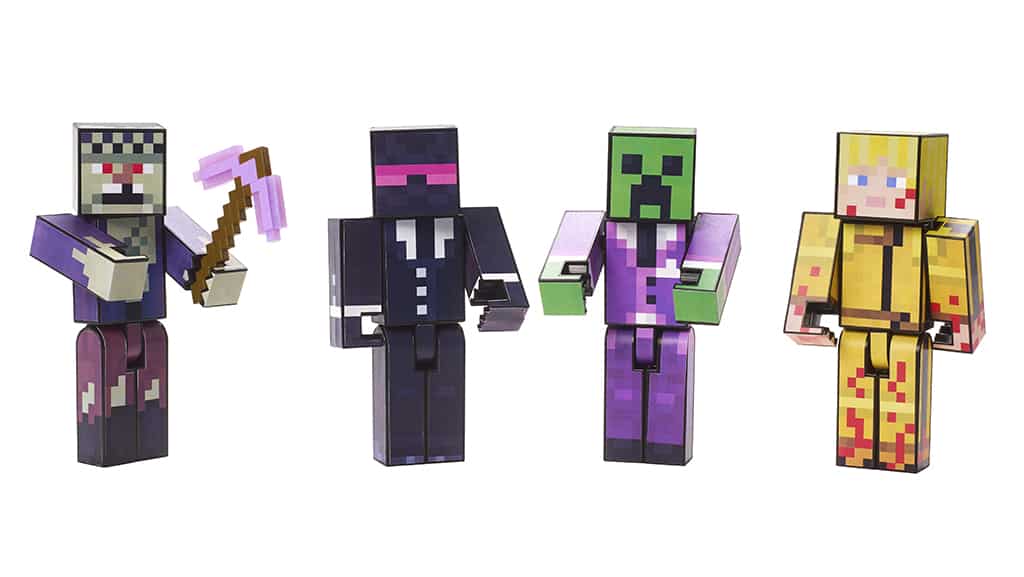
As Minecraft developer Mojang is gearing up for Minecon 2016 in Anaheim this weekend, the game studio has announced today that it has partnered with American toy manufacturing company Mattel to bring your Minecraft avatar to life. Minecon attendees will be able to use the company’s skin printing service to create a skin for a nice figurine with the Minecraft avatar of their choice:

It’s seriously cool. You craft the look of your unique figure by using an actual skin from the game. Mattel creates and prints a custom label based on your in-game skin (or one of the exclusive soon-to-be-revealed MINECON 2016 designs!), and then you stick it onto the figure.

Minecon attendees will be able to design their own Minecraft figurine.

To try the skin-printing service, attendees will have to purchase a Survival Mode Player One Figure ($15.00 + tax) at the the Mattel booth and also print their label over there. To get prepared, Mojang is inviting all attendees to check the skin editing app Skin Studio which is available on iOS and Android devices.

Additionally, Mojang has announced today the release of a new Minecraft Snapshot tagged 16W38A and you can find the full list of changes and bug fixes below:

Notable changes:

  • The poor squids shouldn’t spawn in lava anymore. At least I would not enjoy spawning in lava
  • We have a new gamerule: maxEntityCramming
  • Mooshrooms now really appreciates to walk on mycelium. Probably it feels soft and cosy on their hooves

Bugs fixed in 16w38a:

  • [Bug MC-3841] – Attacking an unsaddled pig while holding a saddle saddles the pig
  • [Bug MC-36927] – Durability of Golden Swords occasionally dropped by Zombie Pigmen is not random (always 25)
  • [Bug MC-46456] – Written books given by command crashes when copied in crafting table if “Author” is missing
  • [Bug MC-61997] – squids spawn in lava
  • [Bug MC-66946] – 2-block tall hitbox on small armor stands.
  • [Bug MC-67406] – Small armor stands display items differently than normal ones
  • [Bug MC-70424] – Baby Zombie Pigmen’s sword slightly tiled forward
  • [Bug MC-70738] – Killing Guardian with Lava does not give Cooked Fish
  • [Bug MC-80551] – You can place redstone, doors, rails etc. onto 7/8 layers of snow
  • [Bug MC-86130] – Shields changes its base color when damaged & repaired / Crafting different in colors results in damage
  • [Bug MC-86164] – armor stands can’t be renamed by name tag
  • [Bug MC-89921] – Elytra not rendered on entities/mobs
  • [Bug MC-91383] – Horses (now only skeleton horses and zombie horses) drop different amount of loot than before
  • [Bug MC-92772] – Saddled pigs don’t drop saddle with doMobLoot=false
  • [Bug MC-92776] – Ink sacs are fished in stacks of 1 instead of 10
  • [Bug MC-93435] – Cobblestone walls listed in “Building Blocks” tab
  • [Bug MC-93609] – Player is floating above the saddle of a mule
  • [Bug MC-93824] – Feeding golden carrot to breed horse works if InLove is greater than 0
  • [Bug MC-94476] – Killing Rabbits with Looting does not give more raw rabbit
  • [Bug MC-94947] – Chicken “steping” sound still works when the chicken is swimming
  • [Bug MC-95450] – Villager Loot Table missing
  • [Bug MC-95469] – Middle click / pick block on farmland gives dirt
  • [Bug MC-96499] – Boats collide with any entity (Arrows, Paintings, etc.) even if Marker:1b is on (armor stand)
  • [Bug MC-98260] – Water bottles have inconsistent NBT tag depending on how you obtain them.
  • [Bug MC-99602] – Impossible to detect Water Bottle from ocean in player’s inventory
  • [Bug MC-100950] – Boats can travel / remain on the fog of lingering potion / dragon’s breath
  • [Bug MC-101615] – Silverfish do more damage to players on easy difficulty than on normal difficulty
  • [Bug MC-101642] – Iron golem / VillagerGolem is holding red flower client side 400 ticks too long
  • [Bug MC-103339] – Mushroom Cows do not path to mycelium, but grass. Causes unintended spawning requirements
  • [Bug MC-105071] – Random green/gray dot in anvil GUI
  • [Bug MC-106485] – Banner applied to a Shield doesn’t change the shield correctly
  • [Bug MC-106747] – Wither bosses break structure blocks / structure voids
  • [Bug MC-106842] – Target selector stops parsing its arguments if an entry is not =
  • [Bug MC-106896] – Crash when using backspace after deleting all the characters in the name of anything with a custom one
  • [Bug MC-107054] – lit_furnace item model but no item
  • [Bug MC-107055] – 2 models for old wooden slab’s item
  • [Bug MC-107062] – Hitting backspace in the anvil naming field when empty causes the game to crash

For those of you who can’t wait for the release of the 1.11 build of Minecraft, the game developer added that it will reveal “info about several new exciting 1.11 features” during Minecon 2016. The annual event will take place on September 24-25 at Anaheim Convention Center and those of you who can’t attend will be able to watch the live stream on the dedicated website.

StoreParser website brings back the Xbox One game deals

One week ago, Microsoft had blocked StoreParser, an automatic price checking service for Xbox games, from listing Xbox Store deals. A short 7 days later, the website is now back and is once again listing the Xbox One game deals.

StoreParser is Back
StoreParser is back

As seen in the screenshot above, the website is now listing the same Xbox deals which Major Nelson previously noted are available on his website. In fact, Major Nelson had mentioned on Reddit that the StoreParser website was using an unapproved store API, which is likely why Microsoft had blocked the website from accessing store listings.  Some in the Xbox community, nonetheless, had protested the move by Microsoft and might happy now that the website is back up.

Are you glad to see that StoreParser is back? How did you search for Xbox Deals while the website was shut down? As always, please let us know your answers to these questions, and your other thoughts by dropping us a comment in the section below!

How to remove the MoneyPak virus on Windows 10? [Full Guide]

Computer viruses are a major threat, and one of the worst kinds of malware is ransomware. This type of malware will prevent you from accessing your files and applications.

Fortunately, there’s a way to fix this problem. There are different types of malware, and today we’re going to show you how to remove the MoneyPak virus from Windows 10.

As we previously mentioned, MoneyPak is ransomware and just like any other ransomware, it will lock your files and prevent you from accessing them.

This malware will give you a message saying that your computer was locked by the FBI Department of Defense Cyber Crime Center due to copyright infringement and you need to pay a fine.

Of course, this is a complete scam, and your computer isn’t actually locked due to copyright infringement. This is just a scam created by cybercriminals to take your money.

Therefore you should never send money to anyone if you ever get such a message on your PC. Now that you know that MoneyPak is just a scam, we’ll show you how to remove it from your Windows 10 PC.

How do I remove the MoneyPak virus from Windows 10?

1. Use a third-party antivirus software

The best way to prevent and remove malicious software from your devices is by using a trusted and powerful antivirus software.

There are many options on the internet, but not all of them do a great job. Therefore, you should look for an antivirus tool that utilizes machine learning and other advanced AI techniquest.

Why? Because these apps can deal with newly emerging threats and old ones alike. Their algorhitms constatantly monitor your files and learn from them.

If they find any suspicious activity, they will quarantine and further surveillance the files. This will ensure that not even the most hidden and clever malware will not bypass them.

Besides finding and removing any potentially dangerous files, this tool in particular comes with other layers of security, such as internet privacy and protection of data.

Not only will you device be protected, but your sensitive data will not get leaked and your local IP is safe from any unathorised access.

TotalAV

Keep yourself safe and your precious data protected with this professional antivirus tool.
Check Price Visit Website

2. Use System Restore

  1. Restart your computer a few times while it boots to start Automatic Repair.
  2. In some cases, you can enter this mode by pressing F8 or by using the Shift + F8 shortcut.
    • These shortcuts may work, but usually, the safest way is to restart your computer a few times.
  3. When Automatic Repair starts, choose to Troubleshoot, then Advanced options and System Restore.
  4. Select your account and enter its password and click Continue.
  5. Click on Next and select Choose a different restore point, then click Next again.
  6. You should now see the list of all available restore points.
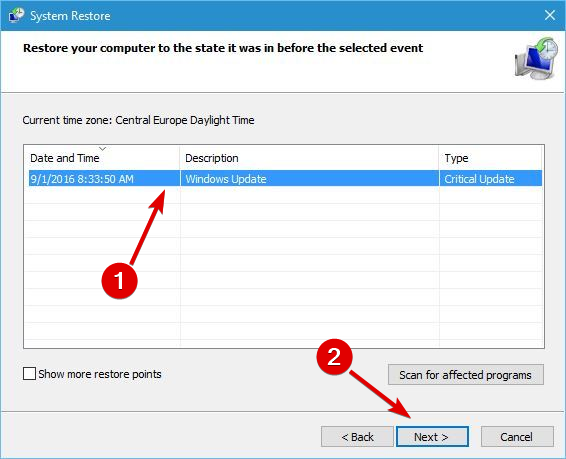
  7. If available, check Show other restore points to reveal all restore points that you have available.
  8. Select the desired restore point and click Next.
  9. Follow the instructions on the screen to complete the System Restore process.

One of the simplest ways to fix this problem is to use System Restore. Using System Restore you should be able to revert your PC, and malicious file will most likely be removed from your computer.

You won’t be able to perform System Restore from Windows 10 due to the MoneyPak virus, but you should be able to circumvent this problem by following the steps above.

3. Use Kaspersky Rescue Disk

  1. Download and install the Kaspersky Rescue Disk CD
  2. Burn it on a CD or create a USB flash drive and insert it into the infected computer and boot from it.
  3. When your PC boots from the CD or USB flash drive, select the Kaspersky Rescue Disk Graphic Mode option and press Enter.
  4. When your PC boots, you’ll see a graphical environment and Rescue Disk software running.
  5. To go My Update Center tab and click the Start update button to download the necessary updates.
  6. Go back to the Objects Scan tab, select all options and click Start Objects Scan button.
  7. When Kaspersky Rescue Disk locates the MoneyPak virus, choose the Delete option. If any other viruses are found, be sure to delete them as well.
  8. After the scan is completed and all viruses are removed, restart your PC and check if the problem is resolved.

Since this virus blocks all access to your PC, you’ll need to use bootable media to remove it. To do that, you’ll need to download Kaspersky Rescue Disk ISO.

Solution 3 – Download and run Norton Power Eraser from Safe Mode

Since Windows 10 is blocked by MoneyPak, you’ll need to download and run Norton Power Eraser from Safe Mode. If you can’t access Safe Mode at all due to this virus, you should skip this solution and try a different one. To start your PC in Safe Mode, do the following:

  1. Restart your PC few times during the boot to start Automatic Repair.
  2. Select Troubleshoot > Advanced options > Startup Settings and click Restart.
  3. When your computer restarts you’ll see a list of options. Press F5 to start Safe Mode with Networking.
  4. When Safe Mode starts, you’ll need to download Norton Power Eraser.
  5. After the file is downloaded, run it and click Accept.
  6. Click the Scan for Risks button.
  7. Norton Power Eraser will ask you to restart your PC in order to perform a Rootkit scan. If you don’t want to perform a Rootkit scan, you can easily turn it off from the settings menu. To perform a Rootkit scan, click the Restart button.
  8. When your computer restarts, be sure to enter Safe Mode again.
  9. Follow the instructions on the screen to complete the scan.
  10. After the scan is completed and all viruses are removed, your PC should be able to start normally.

Solution 4 – Delete the virus manually from Safe Mode

According to users, you can fix this problem by manually removing the virus from your PC. To do that, you’ll need to enter Safe Mode. If you can’t access Safe Mode, you should skip this solution. To remove MoneyPak virus manually, follow these steps:

  1. Enter Safe Mode.
  2. When Safe Mode starts, press Windows Key + R and enter %appdata%. Press Enter or click OK.
    remove-moneypak-virus-appdata-1
  3. AppData > Roaming folder will now open. Go to the MicrosoftWindowsStart MenuProgramsStartup folder. You should see ctfmon shortcut in there. Delete the shortcut.
  4. Close this folder.
  5. After doing that, press Windows Key + R and enter %localappdata%. Press Enter or click OK.
    remove-moneypak-virus-appdata-2
  6. When AppData > Local folder opens, navigate to the Temp folder.
  7. Now you need to find the problematic .exe file. Usually that’s one of the latest files that has random letters in its name followed by .exe.part, for example ZloN8OV9.exe.part or rool0_pk.exe. Keep in mind that the name of this file can be different. After you find the problematic file, delete it.
  8. Locate V.class file and remove it. Also, locate and remove update00.b file. If you notice any suspicious files that were added to the Temp folder, you can also delete them. Alternatively, you can also delete all files and folders from the Temp folder.
  9. Optional: Sort the files in Temp folder by date and remove any files that are created at the similar time as the malicious file. If want, you can also delete all files from your computer that are created at the similar time.

Keep in mind that you need to permanently delete malicious files, therefore hold the Shift key to permanently remove those files from your PC.

Solution 5 – Install the latest version of SpyBot or Trend Micro

Users reported that they managed to fix this problem by installing the latest version of SpyBot Search & Destroy application. In addition to SpyBot, some users reported that Trend Micro tool helped them fix this issue, so you might want to try using it as well. Another tool that can help with this problem is Malwarebytes, so be sure to install the latest version on your PC. Keep in mind that you can only download and use these tools in Safe Mode.

Solution 6 – Disable your Internet connection

According to users, this virus relies heavily on your Internet connection, and if you unplug your Ethernet cable or turn off your router, you should be able to start your PC without any problems. After starting your PC, try following the steps from Solution 4.

Several users reported that they were unable to remove the malicious file roper0dun.exe from their PC because it was used by rundll32 process. To fix this error, you need to stop rundll32 process and then delete the malicious file. Unfortunately, this virus prevents Task Manager from starting, so you’ll have to use Command Prompt to stop rundll32 process. To do that, follow these steps:

  1. Press Windows Key + X to open Win+X menu and enter choose Command Prompt (Admin).
    remove-moneypak-virus-cmd-1
  2. When Command Prompt starts, you need to list all running processes. To do that enter tasklist command and press Enter.
  3. List of all running processes will appear. Locate rundll32 process or any process that is currently using the malicious file and write its PID. Usually that’s a four-digit number. If you have multiple rundll32 processes be sure to write down PIDs for all of them.
    remove-moneypak-virus-cmd-2
  4. After that, enter taskkill /PID xxxx /F command into Command Prompt. Be sure to replace xxxx with the four-digit number that matches the PID from previous step. If you want to end multiple processes, be sure to repeat this command and replace the PID.
    remove-moneypak-virus-cmd-3
  5. After ending these processes, try to delete the problematic file again. If you can’t delete this file because another process is using it, be sure to repeat the steps above to end the process and try to delete the problematic file again.
  6. After removing the problematic file, enable your network connection and check if the problem is resolved.

Solution 7 – Disable Startup processes

If you want to fix this problem, you can disable all problematic startup processes, but to do that first you need to enter Safe Mode. After doing that, follow these steps:

  1. Open Task Manager by pressing Ctrl + Shift + Esc.
  2. When Task Manager opens, go to the Startup tab.
  3. List of all startup applications will appear. Locate unknown or suspicious applications, right click them and choose Disable. Alternatively, you can right click any startup item and check its properties to see the location of that process. MoneyPak files are usually located in AppData or Temp folders and they use rundll32.exe file, so if you see any files located in these folders or using this .exe file, be sure to disable them.
  4. After disabling the problematic process, restart your PC.
  5. If everything works normally, download anti-malware software to remove this malicious program, or remove it manually.

Solution 8 – Check your registry

Sometimes these malicious files can make changes to your registry, but you should be able to fix this problem by following these steps:

  1. Start Windows 10 in Safe Mode.
  2. Press Windows Key + R and enter regedit. Press Enter or click OK.
    remove-moneypak-virus-regedit-1
  3. When Registry Editor opens, go to the HKEY_CURRENT_USERSoftwareMicrosoftWindowsCurrentVersionRun key in left pane.
  4. In the right pane you’ll see several entries. Locate the one that has random name and double click it to check its location. Usually this file will have a random name such as pg_0rt_0p.exe and it will be located in Temp or AppData folder. Write down the location and the file name because you’ll need it for the next step. Delete the entry with the random name from your registry.
    remove-moneypak-virus-regedit-2
  5. Close Registry Editor and go to the folder where the malicious file is stored.
  6. Locate the malicious file and delete it permanently.
  7. Be sure to sort files in that folder by Date Modified and delete any files created at the similar time as the malicious file.
  8. After doing that, restart your computer and scan your PC with anti-malware software just in case.

Solution 9 – Download and run BitDefender Removal tool

Antivirus company BitDefender released its own tool that removes MoneyPak virus, and in order to fix this problem you need to enter Safe Mode and download BitDefender Removal tool. After downloading the tool, run it and wait for it to scan your PC and remove the malicious application. After removing the virus, restart your PC and check if everything is working properly.

MoneyPak virus can create a lot of problems since it will prevent you from accessing Windows 10, but you should be able to remove this virus by using the appropriate anti-malware tool, or by deleting it manually from your PC.

READ ALSO:

PhotoScape X Pro relaunches as UWP app, available in Windows Store now

The Windows desktop program, PhotoScape X Pro, has made its way through the new Universal Windows Platform (UWP) app conversion process and is now available to purchase and download in the Windows Store. The new UWP app is a comprehensive image editing package that can perform a range of tasks from changing lighting in an image to editing animated gif files.

Here’s the official app description:
All-in-One: Photo Editor, Batch Editor, Viewer, Collage, Animated GIF, Film Effect, Light Leak, Miniature Effect, Filter, Brush, Sticker, Pattern, Frame, Shape, Border, RAW images and More. PhotoScape X is a fun and easy photo editor that enables you to fix and enhance photos. You can try a time-unlimited free trial of PhotoScape X Pro before making a purchase.

And here are all of the app’s features:

  • Editor: Rotate, Resize, Crop, Color Adjustment, Film Effect, Light Leak, Backlight Correction, Bloom, HDR, Dehaze, White Balance, Curves, Paint Brush, Spot Healing Brush, Red Eye Correction, Liquify.
  • Batch: Batch edit multiple photos.
  • Viewer: Photo Browser, Full Screen Viewer, Batch Rename, Batch Resize, Batch Format Change, Lossless Rotate, Share (Email,Twitter,Facebook,Picasa,Flickr), Exif Viewer.
  • Share: Sharing on Social Networks: Facebook, Twitter, Picasa, Flickr.
  • Full Screen: See your photos in full-screen view or as a slide show.
  • Collage: Merge multiple photos on the collage frame to create one final photo.
  • Combine: Attach multiple photos vertically or horizontally to create one final photo.
  • GIF Creator: Create Animated GIF.
  • Print: Print photos.
  • Screen Capture: Capture your screenshot and save it.
  • Color Picker: Zoom in on images, search and pick a color.
  • Rename: Change photo file names in batch mode.
  • Language: English, Español, Deutsch, 日本語, 简体中文, 한국어

PhotoScape was previously announced as one of the first programs to use Microsoft’s Desktop Bridge initiative which was developed as a convenient way to get traditional Desktop programs into the Windows Store app store. Have you used PhotoScape before? Let us know your thoughts on it in the comments below.

PhotoScape X Pro
PhotoScape X Pro
Developer:
Mooii Tech
Price:
$39.99

Ginger: Beyond The Crystal is a cool new platformer on Xbox One

A new video game platformer is on its way to the Xbox One and it’s called, Ginger: Beyond The Crystal. Developed by Badland Games, Ginger: Beyond The Crystal features many of the popular aspects of the numerous platformers that have come before it such as power-ups, a variety of levels and worlds to progress through, hidden bonuses, supporting characters to help the player, and a variety of baddies for the player to defeat. The game is expected to provide over 15 hours of gameplay value.

Here’s the official game description for Ginger:

Beyond The Crystal on Xbox One: A world destroyed by a crystal explosion, a mysterious threat hanging over its inhabitants, and a goddess who creates a hero. This is Ginger: Beyond The Crystal. The towns are devastated and their inhabitants disappeared, but there is still hope. Ginger must reestablish the connection with the goddess by purifying corrupted crystals that have spread throughout the worlds. It won’t be easy; the worlds are full of enemies and traps across 15 different levels. Luckily, you will not be alone. Some characters will give you special abilities that will help you solve puzzles and defeat your enemies. There are three different worlds to discover, each one with its own enemies and incredibly fun bonus levels to test your skills.

Features:

  • 3 worlds to repopulate
  • 15 levels of adventures and platforms
  • 15 hidden bonus levels to probe your skills
  • An epic soundtrack right out of your dreams

Pre-order Ginger: Beyond The Crystal on Xbox One

Ginger: Beyond The Crystal is due to release on the Xbox One on October 25th and Xbox One owners can now pre-order it and pre-download it to their console from today. As always though, the game won’t be playable until its official release date.

Are you going to pre-order Ginger: Beyond The Crystal on Xbox One? Let us know in the comments below.

Batman Episode 2: Children of Arkham available now on Xbox One

The second chapter in Telltale Games’ Batman series, Batman: The Telltale Series Episode 2: Children of Arkham, is now available on the Xbox One. This second chapter continues the storyline from the first and, like other Telltale Games video games, will carry-over decisions and actions that were made during Chapter 1.

Here’s the official game description:

With Gotham City’s first family mired in corruption, and an old friend now a dangerous adversary, the life of the Dark Knight is turned upside down. What was Thomas Wayne entangled in, and why was he killed? Determined to learn the truth about his father, Bruce sets out to question those involved in Gotham’s criminal past. But which mask will he wear – The billionaire, or the bat? Huge decisions will forever change the Batman and the lives of those around him, as he meets the Children of Arkham.

Buy Batman: The Telltale Series Episode 2: Children of Arkham on Xbox One

There will be five chapters in total for Batman: The Telltale Series. No release dates have been revealed for the remaining three entries but they are expected to drop sometime before the end of the year.

Today has turned out to be quite a big day for Batman fans. Not only has the second chapter of the Telltales game begun to rollout but pre-orders for the re-release of Batman: Arkham Asylum and Batman: Arkham City are also now online ahead of their late October release dates. Both games are being promoted as part of a bundle called, Batman: Return to Arkham, and will contain all of the downloadable content that was released for them on the Xbox 360. The third season premiere of the live action Batman television series, Gotham, also aired today in North America. Not a bad day to be a Batman fan!

Are you enjoying this latest Telltale Games series? Share your impressions with the community in the comments below.

Batman: Return to Arkham pre-orders now available in some Xbox One regions

The remasters of the two Xbox 360 Batman video games, Batman: Arkham Asylum and Batman: Arkham City, are now available in some regions in the new Xbox One bundle named, Batman: Return to Arkham. The package is currently showing up in the Australian Windows Store with a functioning pre-order option ahead of its October 19th release in that region. Xbox One users in other parts of the globe should begin seeing it in their stores soon as well.

Here’s the official description for the Batman:

Return to Arkham package and the two individual games: Return to Arkham and experience two of the most critically acclaimed titles of the last generation – Batman: Arkham Asylum and Batman: Arkham City, with fully remastered and updated visuals. Batman: Return to Arkham includes the comprehensive versions of both games and includes all previously released additional content.

Batman: Arkham Asylum exposes players to a dark and atmospheric adventure that takes them into the depths of Arkham Asylum –Gotham City’s high security psychiatric hospital for the criminally insane. Use Batman’s legendary gadgetry, strike from the shadows, and confront The Joker and Gotham City’s most notorious super villains.

Batman: Arkham City sends players soaring into Arkham City – a heavily fortified sprawling district in the heart of Gotham City. Batman Arkham City introduces a brand-new story that draws together an all-star cast of classic characters and murderous villains from the Batman universe, as well as new and enhanced gameplay features.

Pre-order Batman: Return to Arkham on Xbox One

Batman: Arkham Asylum and Batman: Arkham City were developed by Rocksteady Studios and were both praised by fans and critics alike for their original storylines, character moments, impressive fight mechanics, and overall representation of the world and characters from the Batman comic books and TV shows. The third game in the series, Batman: Arkham Origins, was a prequel to the first two and is not considered a proper entry in the series due to it being developed by WB Games Montréal. The fourth game, Batman: Arkham Knight, was released on Xbox One in 2015 and saw the return of Rocksteady to the series. It has been officially declared as the final entry in the main Arkham series however a virtual reality version of the games, Batman: Arkham VR, is planned for a late 2016 release on Sony’s PlayStation VR.

Are you a fan of the Batman: Arkham franchise? Will you buy Return to Arkham? Let us know in the comments below.

Dragon Age and Just Cause video games discounted on Xbox One

Dragon Age: Inquinsition and Just Cause 3 are among the numerous video games discounted this week on Microsoft’s Xbox One and Xbox 360 video game consoles as part of the Deals With Gold campaign.

On the Xbox One, the Dragon Age: Inquisition – Trespasser, Dragon Age: Inquisition – The Descent, and Dragon Age: Inquisition – Jaws of Hakkon add-ons have all had their prices reduced by 67% while the main game, Dragon Age: Inquisition – Game of the Year Edition, is now 60% cheaper. Likewise, Just Cause 3 and its more feature-filled alternative, Just Cause 3 XL Edition, are also going for 60% off right now.

The Magic Duels add-ons; Mythic Coin Pack, Large Coin Pack, and Huge Coin Pack are 40, 20, and 30% cheaper respectively and Dovetail Games Euro Fishing is now 33% off its regular sale price.

Over on the Xbox 360, the video games Risen, Risen 2: Dark Waters, Risen 3: Titan Lords, and Sacred 3 are now 75% cheaper under the Deals With Gold campaign and Sacred Citadel has had its price slashed by 80%. Guncraft: Blocked and Loaded is 60% off its usual price and King of Fighters XIII, Deathsmiles NA, and Akai Katana are all now half price.

The Deals With Gold discounted prices usually last for around a week and are only available to Xbox One and Xbox 360 console users who have signed up for the paid Xbox Live Gold premium subscription. This membership originally was designed to let console owners use media streaming apps such as YouTube and play in online matches but is now geared more towards offering discounted video games for customers to buy and keep or even give free games outright via the Games With Gold promotion. Games With Gold gives Gold subscribers two full Xbox 360 and two full Xbox One video games a month. These games can be played as much as needed but as long as the owner continues to pay monthly (or annual) Xbox Live Gold subscription fees.

Are you an Xbox Live Gold subscriber and will you buy any of this week’s Deals With Gold games? Let us know in the comments below.

Improve Windows 7, 8.1 privacy with DoNotSpy78

Windows is constantly gathering information about users and sends it back to Microsoft, allegedly for improving the user experience. Many users don’t like the idea of their activities being tracked and the good news is that there are many third-party software packages available that improve your system’s privacy.

Usually, users make a fuss about Windows 10 privacy, but previous Windows versions also collect information about you, although not as much and as intrusively as Microsoft’s latest OS does. If you’re running Windows 10 and you want to protect your privacy, we recommend you check out our list of the best privacy protection software available for this OS version.

If you haven’t upgraded, and you’re running Windows 7 or Windows 8.1, we have a good piece of news for you as well. You can install DoNotSpy78 and allow this tool to prevent Windows 7 or 8.1 from threatening your privacy.

Microsoft added many new so called diagnostic features from Windows 10 to older versions of the OS via Windows Update. As stated before, the tech company reassures its users that these tools are used only to provide a better service. However, some of these features are highly intrusive and record your keyboard input, your speech, scour the content of your messages, and so on.

DoNotSpy78 allows you to choose what information to share with Microsoft, and what parts of you computer these diagnostic tools can access.

Here’s what features DoNotSpy78 brings:

  • Disable Telemetry
  • Disable Steps Recorder
  • Disable Biometrics
  • Disable Error Reporting
  • Disable Windows Registration
  • Disable Internet OpenWith
  • Enable Do Not Track Header
  • Disable Location
  • Disable Sensors
  • Disable Handwriting Data Sharing
  • Disable Media Player Usage Tracking
  • Prevent Media Player Metadata Retrieval
  • Disable Windows Media DRM Internet Access
  • Disable Windows Defender
  • Disable Infection Reports.

DoNotSpy78 has a simple, easy to use interface. The items colored in green are safe to disable, while those colored in red, such as Windows Defender, could cause various OS issues if disabled.

You can download DoNotSpy78 for free from Pxc-coding. Take note that this software comes with adware, but you can get an adware free installer is you donate to the developer of this tool.

RELATED STORIES YOU NEED TO CHECK OUT:

CCleaner 5.22 adds full support for Windows 10 Anniversary Update

CCleaner is known to be one of the best software cleaning utilities for Windows  OS. Windows cleaning tools have always been the best services utilized by Windows users to optimize their system’s performance and ensure effectual workability of their machine.

The constant update of any software is essential as it brings support for new apps, additional built-in features, and a yet more bug-free platform. The new 5.22 update of CCleaner comes with the capability of fully supporting Windows 10 and as the reviews of CCleaner have shown that it is the most popular and the best-suited utility for cleaning unwanted files, optimizing space and increasing performance speed.

It looks like that the CCleaner team has paid intensive attention towards making its software compatible with the now popular Windows 10 and not just that, also ensuring the fast and smooth operation of their app with the Windows 10 Anniversary Update. So, if you have downloaded the Windows 10 Anniversary update, you should experience zero compatibility issues when running the updated CCleaner 5.22 app.

Other than basic compatibility upgrades, CCleaner now comes with advanced Microsoft Edge cookie and history cleaning functionality, along with improvements in the 64-bit architecture of Windows 10.

Other features include:

  • Updated Firefox extension management
  • Improved 64-bit build architecture on Windows 10
  • Updated ZoneAlarm 2016 cleaning
  • Minor bug fixes
  • Minor GUI improvements.

CCleaner has no doubt achieved tremendous fame in the past as well because of its super easy to use interface, but now the added compatibility with Windows 10 Anniversary Update is like a cherry on top.

You can download CCleaner 5.22 fro free from Piriform. You can also purchase CCleaner PRO for only  $24.95.

Here are the September 2016 updates for .NET Core

Microsoft released last week an update to its free open-source framework .NET Core 1.0 for Windows, macOS, and Linux. The new version 1.0.1 is the first .NET Core Long Term Support (LTS) update and includes the following security and reliability updates:

  • Segfaults on Linux 4.6
  • Access violation on Windows
  • F# template has been updated for .NET Core 1.0
  • Update ASP.NET Core templates to reference ASP.NET Core 1.0.1
  • Update ASP.NET Core templates to correctly publish CSHTML files

While it’s possible to install two versions of .NET Core side-by-side, apps that previously used .NET Core 1.0.0 will automatically use the newer version once you install it. We invite you to read the full blog post to get instructions on how to configure your app to only run on .NET Core 1.0.1.

Additionally, the company has also released the ASP.NET Core 1.0.1 framework (also a Long Term Support release) and Entity Framework Core 1.0.1, please find below a summary of the updates and fixes:

  • Microsoft Security Advisory 3181759 : Vulnerabilities in ASP.NET Core View Components Could Allow Elevation of Privilege
  • MVC updates for FIPS compliance
  • HTTP Verbs mapping error GET and DELETE – mvc 5038
  • ResponseBody and the corresponding stream is replicated in future requests in some cases
  • Several Entity Framework Core updates

Lastly, the company explained that future updates to .NET Core including the adoption of MSBuild and .NET Standard 2.0 will be introduced in a future release. In the meantime, you can download .NET Core 1.0.1 on your operating system of choice over here.

You can help the Picturex developers spread the word to support Windows 10 app development

Picturex has long been known as a way to safely and securely exchange photos during events such as weddings, birthday parties, and even vacations. While the app is currently available for iOS, Android, and Windows Phone 8.0, the developers are now calling on you to contribute to support Windows 10 UWP app development.

Ultimately, the Picturex team hopes that you can spread the word and help them deliver an update that would enable users  to enjoy Picturex on their Windows 10 laptop, PC, tablet, or phone. The update would also bring the app visually on par with the iOS and Android versions.

Picturex will also soon launch a big design makeover for iOS and Android versions of the app, and the UWP app would be the next steps towards redesigning Picturex for Windows 10 users. Additionally, as soon as the goal of 500 social shares is achieved, the developer plans to start working on the Windows 10 (UWP) version and hopefully launch it sometime this fall 2016.

The Picturex team consists of a small team of mobile and internet enthusiasts who wanted to make photo-exchanging with friends and family faster, while still respecting every single user’s privacy. The team is  MIT Innovation AG, an innovative development company, and is based in Switzerland.

If you would like to sign on to help the Picturex team, be sure to head over to this webpage. Once you’ve checked it out, come back to WinBeta and drop us a comment below let us know why you’ve decided to support them!

Heading to Microsoft Ignite 2016? Grab the app before you go

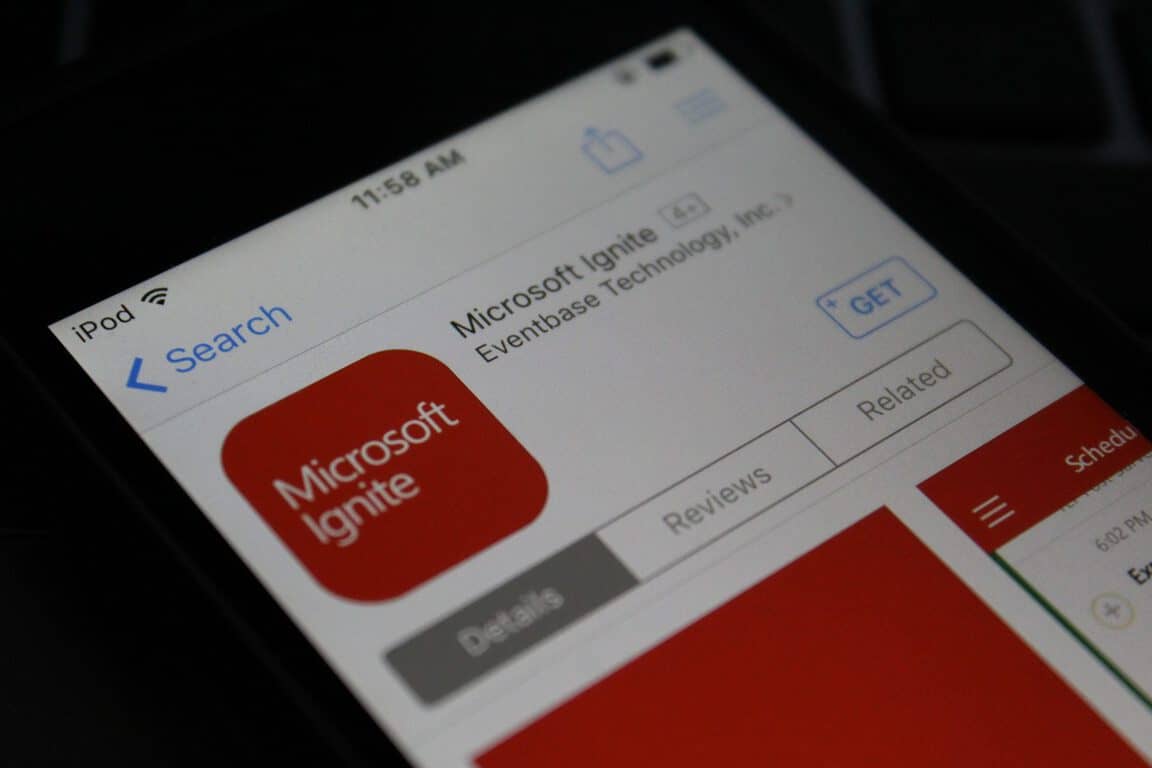
Microsoft’s Ignite conference may be sold out, and is just a week away, but if you’re heading to the event, you can grab up an official app now. The app ultimately will help you manage your personal agenda, view session details, submit feedback, and much more.

Just like with the official Build app, the Ignite app is available across platforms for users on iOS, Android, and Windows. The app is open for registered attendees only, but for complete details on the app, check out Microsoft’s description below.

  • My Schedule: Access and modify the list of sessions, speakers, and exhibitors that you have added as favorites in the app or on the conference website.
  • Schedule Builder Schedule Builder: View and search the full conference session list. Select a session to favorite it, view details, submit session evaluations, and take notes.
  • Exhibitors: Find sponsors & exhibitors you want to meet. On-site Guide: Find important event information and read about key event highlights to enhance your on-site experience.
  • Maps: Find your way around the venue.
  • Social & News: Read current news and follow and join the conversation through our social channels.

Ignite 2016 runs from  September 26-30th in Atlanta Georgia and will feature Microsoft partners, developers, professionals, and tech enthusiasts all under one roof. Day one of the event features an opening Keynote, Innovation Keynote, and much more.

The rest of the event is jam-packed with other events such as Interactive Digital Labs, Certification Testing, and a Women in Technology Reception. We will be closely following the news coming out of Ignite, so be sure to follow us on Twitter, or like us on Facebook to stay up to update with all the latest Microsoft news and information. And, as always, please drop us a comment to let us know your thoughts on this official Ignite app.

Microsoft Ignite
Microsoft Ignite


The app was not found in the store. ?


The app was not found in the store. ?

Microsoft, Google, Yahoo to ban sex determination searches in India

Back in July of 2016, Inda’s Supreme court concluded that Microsoft, Google, and Yahoo had violated sex determination laws. Now a little over two months later from the original ruling, the three major search engines have all finally agreed to ban sex determination searches in India (Via Bloomberg)

Examples of searches included in the ban are searches for female foeticide and infanticide. There is, however, the legitimate concern  that a ban on searches would also block  non-promotional content such as research reports and news articles. On this matter, India’s health ministry did not immediately say how this would affect the ban. According to Bloomberg, Google, nonetheless,  has taken action to prevent searches and advertising to comply with local laws. Microsoft, though, did not respond to Bloomberg’s requests for comments.

What is your take on this situation? As always, please let us know what you think by dropping us a comment in the section below!

Microsoft to open its third Transparency Center, this one in Beijing

Microsoft has announced that it is set to open a third Transparency Center in Bejing, China. The new center joins the two centers already existing in Belgium and the United States, and further continues the company’s push to increase trust in Microsoft’s products.

The new Asia Transparency Center will enable government IT experts to test and analyze Microsoft products closely and ultimately gain confidence that their software will stand up to security needs. The Transparency Center is also designed to provide these IT experts with deeper insights and understanding of Microsoft’s security measures, while still maintaining a proprietary and protected environment for Microsoft products.

Microsoft’s Transparency Center is all part of efforts put forth by Bill Gates back in 2002 when Microsoft’s Government Security Program (GSP) was first announced. The program has since expanded and 70 agencies from almost 40 national governments are now part of the program. More details on events to celebrate the opening of the new Microsoft Transparency Center will arise in the fall, and Microsoft is even mentioning that new Microsoft Transparency Centers that will be announced in the coming weeks.

Windows 10 news recap: Skype gets texting, Desktop Bridge open for business and more

Welcome back to our weekly “Windows 10 news recap” series where we go over the top stories of the past week in the world of Microsoft’s latest operating system. Let’s get started.

Microsoft lets go of team working on Windows 10 for Band, could delay or cancel release of Band 3

If you were holding out for the Band 3, it might be time to consider other options – as Microsoft reportedly scraps the team working to bring Windows 10 to the Band, leaving the future of its Band device in question.

Office Lens now available for Windows 10 PCs, tablets, even HoloLens

Microsoft has released Office Lens for Windows 10 PC, tablet and HoloLens, allowing users to save whiteboards and drawings in greater quality without having to modify anything manually.

Skype Preview app for Windows 10 enables SMS support and more

After a lot of back-and-forth surrounding cross-device SMS, Microsoft finally appears to have settled on integrating it into Skype, with SMS support being added in the latest preview build.

The first wave of Windows 10 apps using the Desktop Bridge are headed for the Windows Store

The classic Win32 programs are now making their way to the Windows Store in a UWP wrapper, allowing them to be sandboxed, thanks to the Desktop Bridge.

Here’s the build that released this week:

Microsoft (MSFT) news recap: Microsoft loves open source, Garage gets a new look and more

Microsoft (MSFT) news recap is a weekly feature highlighting the top Microsoft news stories of the past week. Sit back, grab some coffee, and enjoy the read!

Microsoft Garage, home to creative apps like Arrow Launcher, gets site redesign

Microsoft has released an updated design to its Garage website, offering a bigger emphasis on the projects its employees are working on, rather than describing the platform itself.

Microsoft has the most open source contributors on GitHub, beating Facebook and Google

90s Microsoft is out. Microsoft has been crowned as having the most open source contributors on GitHub.

Microsoft Edge fires back, claims even better battery life with Anniversary Update

Continuing its fight on claiming to be the most energy-efficient browser, Microsoft comes back saying that the Anniversary Update leads to better battery life in Microsoft Edge.

Global DNS outage hits Microsoft Azure customers

Uh oh – Microsoft’s pride-and-joy, Azure, suffered a global DNS issue this week, which impacted services around the world who rely on the uninterrupted cloud services provided by Microsoft.

That’s it for this week – we’ll be back next week with even more Microsoft news.

Latest Xbox One Preview build fixes Background Audio, Clubs and more issues

Microsoft is rolling out the latest Xbox One Preview build to those who are in the Xbox Preview program. This latest build brings fixes for several issues, including Background Audio, Clubs and more. This brings the Xbox One to build rs1_xbox_rel_1610.160914-1900.

Here are the fixes in this build:

Home
When installing a game or app, the install progress on the game or app’s dashboard tile should not be correctly displayed.

Dashboard
The featured tiles in the Community section should now be actionable.

Clubs
Non-members should no longer encounter a “Something went wrong” error when invited to a Hidden Club party.

Guide
When selecting “You might like” under Parties, you should no longer encounter an error.

Background Audio
Background Audio should no longer stop when launching the power menu.

For the known issues, there’s still a fair few:

Settings
Users with a console set to use Chinese, Japanese, or Korean language may be unable to access View details & customize under Privacy & online safety > Xbox Live privacy in Settings. Workaround: View details & customize Live privacy settings on Xbox.com.

Xbox Universal Store
When using Cortana to search the store for genres (ie. “Hey Cortana, search the Store for Horror”, search results fail to populate.
Workaround: Search for genres via text.

Notifications
When receiving voice messages from another user, you may not receive a notification.

Clubs
When viewing Clubs, you may still see the option to start a Club Party even if you are not a Club member.

Head over to Settings > System > Console Info & Updates to update now.

Microsoft Garage, home to creative apps like Arrow Launcher, gets site redesign

Microsoft’s Garage platform has been making strides recently with its Video Breakdown project, along with releasing 5 apps built by interns at the company. Microsoft Garage allows employees at the company to try out new technologies, develop for competing companies and just have a go at doing something a little different.

Now, their own site has received a bit of a makeover. Before we get into it, let’s take a look at the old design:

microsoft-garage-old
Microsoft Garage’s old design

Then the new design:

microsoft-garage-new
Microsoft Garage’s new design

From looking at the updated design, it appears that the aim was to put the actual projects as the front-and-centre, as the featured projects are now shown at the top-left, with the latest and recently updated floating to the centre and right. They’ve also cut out the huge welcome text and placed it in the initial slider towards the top.

Throughout the design, they have added a little more padding to areas – such as the menu, which now has a gap beneath the menu item and the header background, while also improving the look of the overall font.

Let us know you think of the changes in the comments below!

Thanks to Travis for the tip!

Edge is better than Chrome, Microsoft runs a new test to prove it

According to battery tests performed on portable computers, Microsoft’s Edge browser defeated Google’s Chrome and it’s more efficient even than Firefox and Opera. Google did everything possible to change that and released Chrome 53, the improved version of the popular browser, with a new material design and battery life improvements, but it seems that the efforts were not enough to beat Edge.

Microsoft has conducted a new series of battery tests in the Windows 10 Anniversary Update, build 14393.105, and the results were in Edge’s favor. The tests were performed on three Surface Books that were connected to a wireless network and the team measured the power consumption of the processor, graphics processing unit and Wi-Fi antenna, using onboard Maxim chips and the extracted information was analyzed using the Performance Monitor (Perfmon).

Only the latest versions of Edge, Firefox, Chrome and Opera were tested and Microsoft’s browser came out as a winner, offering 43% more battery life. The Windows team took into consideration the benchmark test carried out by Google on its Chrome 53, in which the company demonstrated that the browser had been improved and was more efficient than the older versions. However, Microsoft has proved that its Edge browser can last 90 minutes longer than Chrome 53, so it holds the power consumption crown.

“Microsoft Edge remains the most efficient browser on Windows 10, offering 24 to 43 percent more efficiency across a sample of typical activities including video playback, multi-tab productivity, shopping, social media, and more. We repeated our Netflix streaming test on the Anniversary Update, and Microsoft Edge lasts up to 23 to 69 percent longer than the other browsers we measured.”

Unfortunately, there are many Windows users who don’t make Edge their default browser, and they prefer Chrome or Firefox for various reasons. Truth being said, Edge has other serious problems: it consumes more RAM when running in the background and freezes a lot more often than Chrome.

RELATED STORIES TO CHECK OUT:

Xbox One Backward compatibility: more than 250 games now available

Xbox 360 is an old console now, but that doesn’t mean that all games released for it should also die. It seems that Microsoft wants to make many users very happy, as it is now bringing many titles initially released for the Xbox 360 console to Xbox One.

Currently, there are more than 250 Xbox 360 games that can be played on Xbox One and according to recent reports, other games will be added to the compatibility list in the near future.

We remind you that Microsoft has brought the Backward compatibility feature to the Xbox One in November 2015. Back then, the list of Xbox 360 games compatible with the Xbox One contained only 100 titles, but in the meantime, the company made it possible to add more.

The new games that have just been released for the Xbox One via the backwards compatibility feature are: Virtua Fighter 5 Final Showdown, Bound by Flame and The Maw.

The most popular titles that have been released for the Xbox One via this feature are:

  • Halo Wars
  • Halo: Reach
  • All the Gear of War games released for the Xbox 360.

It seems that the sales on the Xbox One are not going so well and Microsoft is trying to boost them by bringing these types of features. If you are an “old” gamer, we are pretty sure that you will prefer to purchase the Xbox One instead of the PlayStation 4 because you will be able to play some good old titles released a few years ago for the Xbox 360.

What are your thoughts about the Xbox One Backward compatibility feature?

India Azure customers receiving new Pay-As-You-Go feature for data centers in the region

For people in India who may have been considering using Azure in the near future, now might just be the perfect time to dive in. Microsoft has officially opened up its Azure “pay-as-you-go” payment plan to India, adding it to the list of 139 other countries that have made the plan available. The plan makes it so that using Azure now has no commitments – you’re paying only for what you use. Assuming you’re alright with the prices that Microsoft has set up for each part of its service, you should be able to get a pretty nice deal for an Azure experienced tailored to your needs.

If you’re still not sold on Azure, don’t worry. There’s a free trial available for those who aren’t totally convinced, and it’s providing a pretty solid cushion of credit for you to use while you feel out what Azure is capable of. The trial comes with ₹12,100, which translates to just about $180. After you’ve exhausted your free credit, you can upgrade to the pay-as-you-go service without any issues. If there’s anything you’re unclear about, you can read Microsoft’s frequently asked questions regarding Azure’s free trial and the pay-as-you-go plan.