Start menu could return to Windows before Threshold’s release

Start menu could return to Windows before Threshold's release -- Windows 8.1 to be updated?

Talk of the Start menu has been rife in recent days and it something that people have been begging for since the release of Windows 8 saw it wrenched from the operating system. Now it seems as though we could see the return of the Start menu sooner than expected.

There has been speculation that Threshold — the codename for the next big Windows release — could be the release that sees Microsoft adding the Start menu back. But if Mary Jo Foley is to be believed we may not have to wait that long. Writing for ZDNet, Foley cites unnamed sources who claim that the Start menu is due to make a reappearance.

Internally it is being referred to as “mini-Start” there are no hints as to just what form the menu may take, but the fact that it is not just being called the Start menu should probably be taken as indicative that it is going to be different to the menu found in Windows 7. The obvious conclusion to jump to would be that it is a smaller menu.

May it will be a miniature version of the Start screen — not quite the Start menu we all came to know and love, but getting close to it. There is no official word on quite what form mini-Start will take but the question that is going to be on everyone’s lips is “when will we see it?”.

The obvious suggestion would be that it will show its face when Threshold is released, but Foley suggests that it could see the light of day before then. She refers to a rumored “Update 1” for Windows 8.1. Could this service pack style be the vehicle that is used? If so, we the Start menu could be back with us as early as spring next year!

What form do you want the Start menu to take? Would you be happy with a straight lift from Windows 7 or would you prefer something slightly different?

Windows 8 Gas Price App GasBuddy gets Windows 8.1, 10 Support

If you’re looking for a Windows 8 app that could provide real-time gas prices to help you find the cheapest gas in your area, then the new GasBuddy app for Windows 8 should be your choice. Even more now, that the app has received Windows 8.1 support in latest update
windows 8 gas price app
Gas is expensive these days and we must look for every possible way to find cheap gas whenever possible. If you own a Windows 8 tablet, then you need to know that the GasBuddy app is available in the Windows Store and now, thanks to the latest update, it also comes with Windows 8.1 support.

Get the most comprehensive real-time gas prices, and find the cheapest gas in your area and beyond with the new GasBuddy for Windows 8! Now with all new 8.1 features like re-sizable window support and support for all sizes of tiles (with real-time gas trend live tile support)! Enjoy!

Read Also: Windows 8 Font Packs & How to Change Them

By using GasBuddy for Windows 8 you can find the cheapest gas near you or search locations throughout North America. You can also save gas stations to have quick access in the future. Windows 8.1 support means that the big live tile can now be used and also the re-sizeable windows. Of course, several bug fixes have been put in place and the performance has been improved. So what are you waiting for? Start saving gas with GasBuddy!

Download GasBuddy for Windows 8

Adobe Flash Player for Windows 10 Receives Security Updates

Microsoft and Adobe have both announced the availability of a new security update for the Flash Player for Windows 8 and Windows 8.1 users. Read below to find more about this security improvement.
adobe flash player windows 8.1
Adobe updates frequently its Flash Player and we have previously talked about an update that put an end to a lot of bugs, and also those that were causing the Flash Player to not work in Windows 8.1. Now, Adobe and Microsoft have released together a security bulletin that updates the Adobe Flash Player for Windows 8.1, Windows 8 and the other supported Windows versions.

Adobe has released security updates for Adobe Flash Player 11.9.900.152 and earlier versions for Windows and Macintosh and Adobe Flash Player 11.2.202.327 and earlier versions for Linux. These updates address vulnerabilities that could cause a crash and potentially allow an attacker to take control of the affected system. Adobe is aware of reports that an exploit designed to trick the user into opening a Microsoft Word document with malicious Flash (.swf) content exists for CVE-2013-5331. Adobe Flash Player 11.6 and later provide a mitigation against this attack.

Read Also: Windows 8.1 Refresh Problems Caused by Missing Files

So, as we can see, Adobe and Microsoft have taken care together of various crashing problems reported by Windows 8 and Windows 8.1 users with the Flash Player. If you have set automatic updates to on, then you have probably received them; if not, you can go to Windows Update and perform a check to get them installed.

Save Almost $500 on Windows 8 Dell Latitude and Lenovo ThinkPad Tablets

New Windows 8.1 tablets are getting launched on the market, but you might be wasting a good deal on older Windows 8 tablets that currently have great prices on Amazon. We talk below about the Windows 8 Dell Latitude and the Lenovo ThinkPad Tablets.

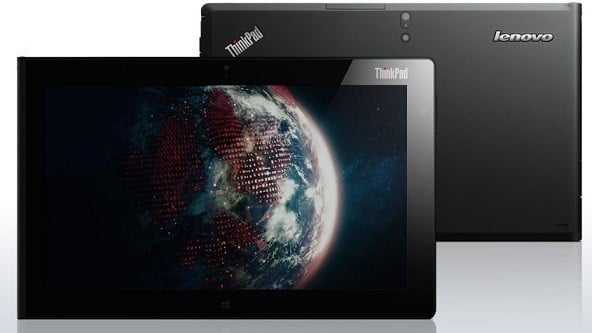
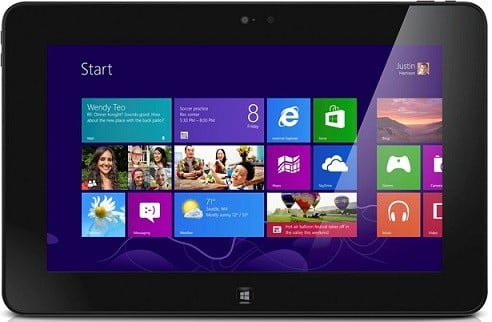
Cheap Windows 8 tablets are quite a lot on the market, but what some of you might overlook are the older Windows 8 tablets that have been launched earlier during this year, but have gone out of the spotlight. I’ve managed to find two such tablets on the Amazon retailer websites – the Dell Latitude 10 and the ThinkPad Tablet 2 10. Find below their discounted prices and their tech specs.

What needs to be said is that these prices could go up or down, so hurry up and buy them if you find them worthy. You save more than $220 on each of these two, which is quite the deal.

Dell Latitude 10 – $376

dell latitude windows 8 tablet

discounted price – $376, original price – $599, you save $222

  • Intel® Atom™ processor Z2760 (1.8GHz with Intel® Burst Technology, 1.5GHz HFM, 600MHz LFM)
  • Windows 8, 32-bit, no media, English
  • Office Trial, MUI
  • 10.1″ IPS (1366 X 768) Wide View Angle LCD, Corning® Gorilla® Glass, Capacitive 5 Finger Touch
  • 2GB2 DDR2 SDRAM at 800MHz
  • 64GB of Solid State Storage
  • Intel® Graphics Media Accelerator (533MHz)
  • 1.43 lbs

ThinkPad Tablet 2 – $488

thinkpad tablet 2


discounted price – $488, original price – $720, you save $232

  • Intel® Atom Z2760 processor
  • Windows 8
  • 10.1″ IPS Panel (1366×768), with 5-point multitouch
  • 2GB LP DDR memory
  • 64GB SSD storage
  • Integrated 802.11 a/b/g/n Wi-Fi, Bluetooth 4.0, GPS
  • MicroSD card, Mini HDMI, USB 2.0
  • 2.0MP front 720p HD, 8MP back w/LED flash webcams
  • Built-in speakers, Microphones, 3.5mm combo audio jack

Windows division loses two program management directors to Bing — fresh blood on the way?

Windows division loses two program management directors to Bing -- fresh blood on the way?

It’s not just Steve Ballmer’s position that is up for grabs at Microsoft at the moment, there are plenty of other changes taking place as well. Two directors who were involved in the changes introduced in Windows 8 and Windows 8.1 have left the company’s operating system division and moved across to the Bing teams.

The duo are Ted Dworkin, who was involved in the development of the Windows Store, and Jensen Harris who was the director of program management for the Windows User Experience.

Of the two, Harris is probably the better known, largely thanks to the fact that he introduced the new user interface of Windows 8 and then Windows 8.1.

Microsoft has reportedly confirmed the moves to GeekWire, but at the moment there is no word on the specific roles that Dworkin and Harris will be taking on, nor who might be in line to replace them on the Windows side of things.

So it looks as though Microsoft is really shaking things up at the moment, which could be indicative of an injection of fresh blood to work on Threshold.

Windows 8, 10 App Check: Wheel of Fortune

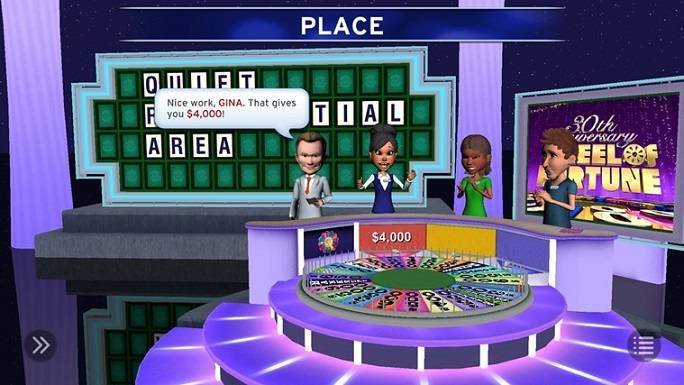
Wheel of Fortune is a very popular game on all kinds of platforms, being desktop or mobile. Now, the game has been released in the Windows Store for Windows 8 users by Sony. Below are more details.
wheel of fortune windows 8
Sony has recently released the very popular Wheel of Fortune game in the Windows Store for Windows 8 users. You might not believe it, but that game is actually four decades old, so it has managed to acquire quite a lot of followers and aficionados. There are more than 1,000 puzzles that you can play as a single-player, or join in with friends and family in the multiplayer mode.

Read Also: Play Backgammon in Windows 8: Five Best Apps

Celebrate over 30 years of Wheel of Fortune – it’s a new spin on America’s #1 Game show, more fun and easy to play than ever before! Step up to the wheel and take a spin through a rich Wheel of Fortune experience. With over 1,000 puzzles from show writers and a variety of gameplay modes, you will feel like a real contestant. Wheel of Fortune is available for all Win 8 devices, and has been specially designed for All-in-One personal computers that support simultaneous multiple touch points on screen.

Those of you who have the following Windows 8 devices – Dell XPS 18, Sony Tap 20, Sony Tap 21, HP Rove, Lenovo Horizon and the Acer Rio, you should know that you can challenge your friends in-person with a split-screen mode. The game also comes with the immersive single player “Spin Solo” Mode that will show you 30 years of Wheel of Fortune History. So, what are you waiting for? Start spinning

Download Wheel of Fortune for Windows 8

What would you like to see in the 2015 release of Windows?

Windows Threshold (unofficial logo by WInBeta.org)

Details regarding the next major version of Windows have begun appearing online, detailing a few things we might expect to see in the 2015 release. But it’s still early days, so anything heard at this stage can only be considered a rumor. That doesn’t stop us from speculating and wishing though, so we’d like to know what you want to see in the next version of Windows.

Don’t be shy. Let us know! However big or small the feature, idea or concept. We’d like to know what you’d love Microsoft to do with Windows in 2015. Would you like to see the return of Aero? A better mold between the desktop and Modern UI? Better Apps? A new Desktop interface? Heck, what about a new cursor? Leave us your crazy and interesting ideas below.

We’ll even share ours too! I’ll go first just to get it going: I’d love to see a brand new Desktop Interface with an overhauled Taskbar to match the Modern UI. I want borderless Windows, much like Office 2013. I’d also like new window animations because why the hell not?

We might even pick the best and most creative ideas and feature them in an upcoming post. So make sure your ideas are cool!

(Windows Threshold logo us unofficial. Created by WinBeta.org)

Best 6 Windows 8 Apps This Week

It’s that time of the week again when we sat down and review only the best new Windows 8 apps that have been released in the Windows. For this week, we have Mint, Disney Infinity Toy Box, Trend Micro SafeSurfing, Origami HD and others that you will find below

More and more Windows 8 apps are being released in the Windows Store, as it keeps on growing. According to some recent data, the application growth in Windows Store has broken the 2,000 new apps mark this week. This has last happened more than five months ago. At the moment, the total number of apps in the US Windows Store has reached more than 96,000 apps which represents an increase bigger than 2000.

If you’ve missed our past Windows 8 roundups, here are links to the last three of them, as well as to the latest discounted Windows 8 apps and games, part of the weekly Red Stripe Deals:

Without further ado, here are the 6 best new Windows 8 apps that have been released in the Windows Store for the past week.

Mint

mint windows 8 appMint is one of the best personal finance tools available for United States and Canada consumers and now it has finally been released as a Windows 8 app. Follow the above link to read more details about this important banking app that teaches you how to save money and how to keep your finances in a single place.

Disney Infinity: Toy Box

disney infinity toy box windows 8The Disney Infinity: Toy Box game has been recently made available in the Windows Store as a Windows 8 game that has quite the size – 2GB. Disney has been one of the most active companies in the Windows Store and with the launch of the Disney Infinity: Toy Box game, it keeps Disney lovers pleased.

Trend Micro SafeSurfing

safe surfing windows 8.1

Trend’s new Micro SafeSurfing browser has been released especially for those of you who want to ensure that they have a safe and secure browsing session on their Windows 8 tablets. Internet Explorer 11 is pretty good, indeed, but if you are looking for a great alternative, then you should try this one.

Origami HD

windows 8 app origami

Making origami shapes straight from your Windows 8 tablet is really fun with Origami HD. The Windows 8 app has a lot of free shapes that you can use, but there’s option of buying the more advanced ones. Follow the above link for a short review of the app.

MusiXmatch Lyrics Player

windows 8 music player lyrics

If you are looking for a Windows 8 music player that could also display the lyrics, so you could be a real karaoke star, then look no further than MusiXmatch Lyrics Player. It also comes with the option of letting you buy songs and sharing with your friends.

Bing Maps Preview

bing maps windows 8

I understand why Google Maps is missing for Windows 8 consumers, but the fact that even Bing Maps is getting such a huge delay is rather outrageous. Finally, Bing Maps is here, not yet in final form, as this is only the preview. But it’s still better than nothing.

Winter Holiday Themes to Dress up Windows 8.1, 10 [Download]

Christmas is almost here and winter is already reigning supreme. If you want to dress up your Windows 8.1 laptop, computer or tablet into the holiday spirit, here are some themes that you can download.
holiday theme windows 8.1
Not so long ago, we were sharing with you some Christmas themes that you can install on your Windows 8.1 tablet, laptop or computer. Now, it is time to share with you some more winter holiday oriented themes, all of which are completely free, of course. So, without further ado, here they are:

Winter themes for Windows 8.1

Microsoft Explains how Client Hyper-V Works in Windows 8.1, 10

When Microsoft launched Windows 8, the company also included native Client Hyper-V support, which means you don’t have to install any extra software to be able to run Virtual Machines. Now, with the coming of Windows 8.1, a few things have been improved.
hyper v windows 8.1
On the Extreme Windows Blog, Garvin Gear is explaining a particularity of Client Hyper-V in Windows 8.1 – the Enhanced Session Mode. As Garvin observes, the Enhanced session mode brings following new capabilities for Virtual Machine Connections: Display Configuration, Audio redirection
Printer redirection, Full clipboard support (improved over limited prior-generation clipboard support), Smart Card support, USB Device redirection, Drive redirection, Redirection for supported Plug and Play devices.

The best news: you don’t need a network connection to the VM session like you would with Remote Desktop Connection. Enhanced Session Mode is enabled by default on Windows 8.1.

So, if your Windows 8.1 device has hardware virtualization capabilities, then you can run Client Hyper-V. One of the great improvements of Hyper-V in Windows 8.1 is the Enhanced Session Mode. You can also follow this complete guide on this important feature that Client Hyper-V brings in Windows 8.1.

Did Microsoft quietly extend Windows 7 retail sales life after quietly killing it?

Did Microsoft quietly extend Windows 7 retail sales life after quietly killing it?

Just yesterday, we reported that Microsoft quietly discontinued the sale of Windows 7 to retailers. Now, within a few hours, it appears that Microsoft may have changed their minds. According to the Windows lifecycle webpage, the retail software end of sales life of Windows 7 shows “to be determined.”

“End of sales refers to the date when a particular version of Windows is no longer shipped to retailers or Original Equipment Manufacturers (OEMs). Examples of OEMs are Dell and Toshiba – PC manufacturers who often preinstall Windows software. When a version of Windows reaches its end of sales date, it’s a good time to think about upgrading,” Microsoft explains on the lifecycle website.

We reported yesterday that Windows 7 had reached its end of sales life on October 30th of this year – with an end of PC sales on October 30th of 2014. Now, it appears that Microsoft either accidentally entered the wrong dates or decided to quietly extend the end of sales date, as the lifecycle page now says something completely different.

As of right now, Windows 7 end of software sales is “to be determined” and end of PC sales is “to be determined.” Did Microsoft have a change of heart, seeing as how Windows 7 is still quite popular? Or did Microsoft originally publish the wrong dates. We will update you once we receive word from Microsoft.

Update: Microsoft has confirmed the October 30th end of sales life for Windows 7 – but has not provided a clear date on when the sales of PCs would end. “We apologize for any confusion this may have caused our customers. We’ll have more details to share about the Windows 7 lifecycle once they become available. Additionally, we are confirming that the Retail software end of sales date for Windows 7 did happen on October 30, 2013,” a Microsoft spokesperson stated.

Windows 8, 10 Reddit App ReddHub Receives Important Update

An official Reddit app for Windows 8 and Windows 8.1 is still lacking in the Windows Store, but there are some reliable Reddit apps to be used. Reddit on ReddHub is such an app and it has recently received an important update
reddit app windows 8
A while ago, we have shared with you how to track your Reddit feed on Windows 8 or Windows 8.1 with Redditopia. However, if you are looking for another reliable Reddit app for your Windows 8 tablet, you might Reddit on ReddHub which has recently received an important update in the Windows Store.

Love funny pictures? What about cute animals? Or interesting Topics? Want to kill some time on things you enjoy? ReddHub is your go to source! ReddHub is the next evolution of client apps for Reddit.com and the premier reddit app for Windows 8. While maintaining a rich modern experience, ReddHub is feature rich and designed from the ground-up to make it easy to browse your favorite reddit content whether you’re using touch or keyboard! Do you love Reddit? Then you will love ReddHub.

Explore Reddit from your Windows 8 tablet

The update brings a tweaked night theme for improved reading and users can now re-select the currently viewed link. Besides this, the broken subreddit ‘about’ panel scrolling has been fixed and search to auto-focus the search box has been put in place.

Of course, several other minor bugs for improved stability and performance have also been released by the developer. Do you know of any other reliable Reddit Windows 8 app?

Download Reddit on ReddHub for Windows 8

End of an era: Microsoft quietly discontinues the sale of Windows 7 to retailers

Microsoft quietly discontinues the sale of Windows 7 to retailers

Bad news for those of you who, for some reason, need to purchase Windows 7 from your local retailer. Microsoft has quietly discontinued the sale of the operating system as of October 30th of this year. You still have one year – October 30th 2014 – to purchase a desktop or laptop with Windows 7 pre-installed before Windows 7 fades away forever.

Microsoft launched Windows 8.1 on October 17th of 2013, nearly a year after Windows 8 was released. With Windows 7 set to reach its “end of sales” date on October 30th of 2014, now is the time to think about moving up to Windows 8 if you haven’t already done so – or snag up a copy of Windows 7 before it reaches its end of sales. 

“End of sales refers to the date when a particular version of Windows is no longer shipped to retailers or Original Equipment Manufacturers (OEMs). Examples of OEMs are Dell and Toshiba – PC manufacturers who often preinstall Windows software. When a version of Windows reaches its end of sales date, it’s a good time to think about upgrading,” Microsoft explains.

So while Microsoft has already stopped selling Windows 7 retail boxes, many retail outlets such as Amazon and Newegg continue to sell it. And once the “end of sales” date passes, don’t be surprised if you still see retail outlets selling Windows 7-powered PCs.

It’s hard to believe that the Windows 7 era has already ended as it feels like just yesterday we were tinkering around with a Beta build. Windows 7 SP1 will continue to receive support from Microsoft in the form of security updates up until January of 2015 (mainstream support) and January 2020 (extended support).

Update: It appears that Microsoft has changed the end of sales life. The Windows lifecycle website now shows Windows 7 end of sales as “to be determined.” Read more about it here.

Update 2: Microsoft has confirmed the October 30th end of sales life for Windows 7 – but has not provided a clear date on when the sales of PCs would end. “We apologize for any confusion this may have caused our customers. We’ll have more details to share about the Windows 7 lifecycle once they become available. Additionally, we are confirming that the Retail software end of sales date for Windows 7 did happen on October 30, 2013,” a Microsoft spokesperson stated.

Windows 8.1, 10 Update Makes Bing Desktop Available for Download

To be able to search from desktop in Windows or Windows 8.1, you will need to download either Google or Bing. But now I’ve discovered that a fresh update makes it available for download via Windows Update.
bing desktop windows 8.1I have turned off automatic updates in the Windows Store and Windows Update so that I could be notified of what exactly has been made new or changed by Microsoft. So, if you too are doing the same thing, then there’s a chance that you have noticed what I did – that Microsoft has made the Bing Desktop tool available for download as a Windows 8.1 updated.

Online searches straight from the desktop

As you can see above image, I’ve installed Bing Desktop v 1.3.1 on today’s date and the update was an optional one. It’s a clever way for Microsoft to bing desktop windows 8promote its search engine. By using Bing Desktop in Windows 8 or Windows 8.1, you can search Bing straight from the desktop, without having to open a browsers to do it. Of course, the results will appear in a new browser page.

Read Also: Microsoft Bing News App Crashes in Windows 8.1

Besides the search function from the desktop, you can see the weather in your location, news headlines and trending images and videos. If you haven’t installed Bing Desktop through the Windows 8.1 Update tool, you can use the direct link from below to do it.

Download Bing Desktop for Windows 8.1

Discounted Windows 8 Apps & Games This Week #3

The third week for the Windows 8 Red Stripe Deals is here and we have three more Windows 8 discounted apps and games. This time, Microsoft is discounting Skulls of the Shogun, Pylon and SuperPhoto. Read below the description of these Windows 8.1 apps.
red stripe deals windows 8
Last week, Microsoft has discounted the following Windows 8 apps from the Windows Store – Halo: Spartan Assault, FlightRadar24 and Hills of Glory 3D. For this week, as always, Microsoft has discounted 2 of the most played games in the Windows Store and a top productivity app. Here they are:

Skulls of the Shogun

skulls of the shogun

Original price: $8.99 Sale price: $4.49

Skulls of the Shogun is one of the best Windows 8 games currently available in the Windows Store and we have also included in our top. 20 levels of hand-painted, story-driven single player campaign mode await you. Can you be the ultimate samurai?

Washing up on the shores of the afterlife, players meet and join forces with vibrant ghost-samurai warriors, magical animal-monks, and mustachioed samurai generals on the way to capture Skulls of the Shogun. With its roots in classic turn-based strategy gaming, Skulls of the Shogun retains that depth while adding a smooth, streamlined interface, realtime physics, and over the top samurai action. Players immerse themselves in battle with fun and unique game play features amidst lush, eerie environments. Also featuring up to 4-player local and networked multi-player and an original score inspired by old samurai films and dub, Skulls of the Shogun offers simple-yet-deep, refined and offbeat game-play.

Pylon

pylon

Original price: $4.99. Sale price: $2.49

Pylon is a great RPG Windows 8 game that takes places in a beautiful 3D world and real-time combat, complex and customizable are its main features. You will fight against elite monsters and scary bosses. Are you up for the task?

Adventure into mysterious lands, battle dangerous monsters and collect heaps of epic loot! Explore the world of Pylon, a classic and robust Action RPG! Enjoy fluid combat, diverse abilities and a variety of expansive environments packed with creatures, treasure and more… Pylon fuses lightning fast Hack ‘n Slash combat with tactical gameplay. Switch between three different classes, all with the same character. Or, create a hybrid class and customize it with a wide array of special combat skills and abilities, then upgrade them! Equip and wield a variety of Weapons and Armor, each with different uses in gameplay. Duel-wield wands and swords, heft a shield or smash enemies with huge maces! Socket magical armors with powerful gems loaded with countless combinations of bonuses and enhancements.

SuperPhoto

superphoto

Original price: $3.99. Sale price: $1.99

Photo editing at its best – this is what SuperPhoto for Windows 8 is all about. Filters, 3D, Combos, Bokeh, Frames, Textures, Patterns, Brushes 100+ cool unlocked effects are there to help you take picture editing to the next level on your Windows 8 tablet.

Unique, outstanding effects you’ll love. You’ll have endless fun and turn your photos into amazing art pieces with just one click!

Microsoft ‘Digital Crimes Unit’ takes out another botnet

Microsoft 'Digital Crimes Unit' takes out another botnet

Microsoft is starting to sound very much like our evening TV lineup. The company sports a ‘Digital Crimes Unit’, after all. While it all may sound very CSI-like, the division is actually responsible for quite a lot of policing of the internet. Botnets are a very real threat, even more so to casual users who aren’t aware of what to look for when visiting sites, downloading free software and clicking on links and files within email.

Today, the Microsft arm-of-the-law struck again, this time disrupting “a rampant botnet in collaboration with Europol’s European Cybercrime Centrer (EC3), the Federal Bureau of Investigation (FBI) and leaders in the technology industry, including A10 Networks Inc”. The Sirefef botnet, which goes by the more common name of ZeroAccess, has been a threat to the online community by targeting search results from Bing, Google and Yahoo. The criminal enterprise has pilfered an estimated $2.7 million each month. In the process more that two million computers of unsuspecting users have been infected.

Microsoft promises that “today’s action is expected to significantly disrupt the botnet’s operation, increasing the cost and risk for cybercriminals to continue doing business and preventing victims’ computers from committing fraudulent schemes”. The software giant is quick to point out that this was one the most robust threats online today. ZeroAcces relied on peer-to-peer infrastructure that provided easy access for cybercrimminals to gain remote access to the compromised computers.

“ZeroAccess is used to commit a slew of crimes, including search hijacking, which ‘hijacks’ people’s search results and redirects people to sites they had not intended or requested to go to in order to steal the money generated by their ad clicks. ZeroAccess also commits click fraud, which occurs when advertisers pay for clicks that are not the result of legitimate, interested human users’ clicks, but are the result of automated Web traffic and other criminal activity”, the company states.

Microsoft has now filed a civil suit against the operators of ZeroAccess in US District Court, asking for the blockage of communications between US-based computers and the 18 identified IP addresses being used. The company is, understandably, thumping its chest a bit here, but the FBI seems to be with them in the celebration. “If the hacker community has not yet taken notice, today’s disruption of the ZeroAccess botnet is another example of the power of public-private partnerships,” FBI Executive Assistant Director Richard McFeely said.

Microsoft’s Ben the PC Guy hits the streets with a Google Chromebook, see what happens

Microsoft's Ben the PC Guy hits the streets with a Google Chromebook, see what happens

Just last week, we were introduced to a video from Microsoft that blatantly bashes the Google Chromebook. In essence, the video touts the Chromebook as being a brick and not a real laptop. Today, we’ve stumbled upon an unlisted video on the company’s official YouTube channel which features Ben the PC Guy walking the streets of Venice, California, with a Google Chromebook. Uh-oh!

“Google says its everything you need in one laptop, we’re going to show it to some real people and see if that’s really the case,” Microsoft’s Ben Rudolph stated in the video. Throughout the video, Ben downplays the features of the Google Chromebook by mentioning facts like “Chromebook doesn’t run Photoshop” and “Word, Excel, PowerPoint – cant install on this one.” One “real person” even stated that the Chromebook “wasn’t practical.”

“I don’t think theres anything I need in that laptop,” says one woman in the video about the Chromebook. Overall, the tone of the video is anti-Chromebook. Ben eventually showcases a Windows laptop/tablet and touts its features and price point, along with the ability to be productive. Forget Chromebook, everything you need in one laptop – well – that would be a Windows 8 laptop.

We’ve embedded the video below for your viewing pleasure. Check it out and let us know what you think – before the video gets pulled!

Windows 8.1, 10 App Check: LastPass

If you have a lot of passwords that you use on a daily basis, then you probably need to use LastPass, one of the best password managers that have been recently made compatible with Windows 8.1. Below are more details.
lastpass windows 8.1
We have given a full review for the Windows 8 app version of LastPass, so go ahead and read it if you want to find out all the details about this awesome password manager. This post is a reminder for Windows 8.1 users out there that LastPass has been made compatible with Windows 8.1 in a recent upgrade.

The Windows 8 LastPass app has refreshed its user interface and updates have been put in place full for Windows 8.1 compatibility and support. The latest version of LastPass has seen an overhaul not only for Windows 8.1, but for other mobile versions, as well.

Read Also: How to Change Windows 8 Logon Screen

The app is completely free to download and install from the Windows Store (download link is below), buy you also have the option of paying $12 per year for the premium version to sync your infrmation across all of your devices.

Download LastPass for Windows 8.1

Trend Micro SafeSurfing is a Safe Browser for Windows 8.1, 10

Browsing from your Windows 8.1 can be dangerous if you go to the wrong websites and if you don’t maintain a healthy behaviour. The Windows 8.1 app Trend Micro SafeSurfing wants to make your browsing more secure.
safe surfing windows 8.1
Internet Explorer 11 is a very safe browsers for Windows 8 and Windows 8.1 users, and it recently has been made available for Windows 7 users, as well. But if you’re looking for a browsing app for your Windows 8 tablet that has increased security, then you should try Trend’s new Micro SafeSurfing browser.

Surf the internet comfortably and safely with Trend Micro SafeSurfing. SafeSurfing integrates protections from the industry leading Trend Micro Internet Security into a modern web browser to protect you and your family while providing a browsing experience optimized for a variety of Windows 8 devices. Integrated web threat protection, search results ratings, web mail rating, social networking protection and Facebook privacy scanning provides the safety you need online while a refreshing new user experience makes using your new Windows 8 tablet more enjoyable.

Safe browsing on a Windows 8 tablet

This is how the safe browser’s description goes in the Windows Store. So, as you can see, the app comes with a lot of security features, such as integrated web threat protection, search results ratings, web mail rating, social networking protection and Facebook privacy scanning. It will automatically block the user from opening unsafe websites, which is its main features.

Read Also: UC BrowserHD is Great Windows 8 Alternative to Internet Explorer

When opening the Trend Micro SafeSurfing for Windows 8 and Windows 8.1 tablets, you will be required to choose between Google, Facebook and Bing for your online browsing. Follow the link from below to get Trend Micro SafeSurfing on your Windows 8 tablet completely free.

Download Trend Micro SafeSurfing for Windows 8

EnhanceMy8 is a Great Tweaking and Maintenance App for Windows 8.1, 10

Tweaking and maintaining your Windows 8.1 device at optimum working conditions is no easy task, but with the right tools, it doesn’t seem that hard. EnhanceMy8 is one such tool that you can use. Below are more details about it.
tweak windows 8.1
When it comes to optimizing your Windows 8.1, you have several tools at your disposal, such as Defraggler that defragments your Windows 8.1 computer or AVG PC TuneUp that cleans the Windows 8 Store and Windows 8.1 apps. Of course, you can also choose to clean the Windows 8 or Windows 8.1 registry, as well as delete unwanted files with CCleaner. Now, if you have all those tools, then perhaps it’s time add one more and its name is EnhanceMy8.

You can make Windows 8 much faster and safer with EnhanceMy8. Here are the tweaks and tools that it comes with:

  • Disk Cleaner – Automatically find and delete un-needed files and folders
  • Defragmenter – Reduce the amount of fragmentation in file systems and registry
  • System Info – Get maximum detailed information about your hardware and software
  • System Tools – Utilize a collection of system tools that you haven’t even heard about
  • Security Tweaks – Easily configure the new security settings of Windows 8

Read Also: Install Windows 8.1 on SSD – Steps to Follow

Also, it has recently received improved support for Windows 8.1; the changelog reads like this:

Addresses some issues with Windows 8.1 compatibility, and adds significant performance improvements to Disk and Registry Cleaners

The Pro version of EnhanceMy8 comes with some extra features, such as hard drive information, defragmenter, performance, security and network tweaks, system tools and many others.

Download EnhanceMy8 for Windows 8.1

Windows 8.1, 10 Mint App now Available in the Windows Store

Mint is one of the best apps to manage your personal finance and banking and now it has finally in the Windows Store for Windows 8 and Windows 8.1 consumers. Read below more details.
mint windows 8 app
Managing your personal finances has now become fancier as the banking app Mint.com has arrived for Windows 8 and Windows 8.1 users. The banking app was long overdue and its launch in the Windows Store is welcomed.

When it comes to Windows 8 banking apps, we here have reviewed the official Bank of America Windows 8 app and have complained that American Express hasn’t yet released one for Windows 8 clients. But let’s see what Mint for Windows 8 can offer.

Mint pulls in all your personal finance accounts into one place, so you can manage your money from anywhere. Track your spending, create a budget, and save more.

Here are some of its most important features:

  • See all your personal finance accounts—checking, savings, and credit cards
  • Get live updates for your accounts right on your Start screen (Windows-exclusive feature!)
  • Save time with automatically categorized transactions
  • Understand where you’re spending with easy-to-read charts and graphs
  • Track your budget
  • Track your cash spending

Read Also: Turn Your Windows 8 Device Into a Mobile Credit Card Terminal

The Windows 8 Mint currently connects to US and Canadian financial institutions only, being restricted to users from other countries. Mint has also released an app for Windows Phone 8 users.

Download Mint.com Personal Finance for Windows 8

Make Origami on your Windows 8, 10 Tablet with Origami HD

Making Origami on your Windows 8 tablet can be quite fun if you know the right apps to do it. Origami HD for Windows 8 is one of the best Windows 8 origami apps to choose. Below are more details
windows 8 app origami
Your Windows 8 tablet could be used for many things and one of them is making origami. There are a few apps in the Windows Store that can teach you how to make origami straight from your Windows 8 tablet. One of them is Origami HD and we’re going to take about it in a few words. Origami HD for Windows 8 is a collection of origami schemes that has step-by-step instructions for both adults and children.

Make Origami in Windows 8

This Windows 8 application will teach you how to make origami animals, sea creatures, objects and other kind of figures. The step-by-step diagrams to follow are very easy to understand. You will find more than 90 schemes in 7 categories, but for some of them you will have to pay. But when I checked, most of the available origami were free.

Read Also: Windows 8 App Check: Flow Free

Recently, the app has been updated and new category “Halloween” and app style have been put in place. Follow the link from below to download it to your Windows 8 or Windows RT tablet and start creating awesome origami!

Download Origami HD for Windows 8

Holiday Deal: Buy a Windows 8.1 Tablet or PC, Get $25 as Gift Card

Black Friday and Cyber Monday have ended but there are some more sweet deals that Microsoft has prepared for you. Read below to see what we’re talking about.
holiday deal windows 8.1Microsoft has published recently on the Windows Experience Blog a new holiday deal for those of you who are looking to buy a tablet or a Windows 8.1 PC this month of December. In October, Microsoft also released the Windows Store gift cards option and now Redmond is announcing a new sweet deal. Brandon LeBlanc from Windows said the following:

To celebrate apps this season, when you buy a new touch PC or tablet running Windows 8 or Windows 8.1 at a participating U.S. retailer you’ll receive a promotional $25 Windows Store gift card to purchase your favorite apps and games in the Windows Store. The offer runs until December 28th, 2013 – or while promotional gift card supplies last.

Read Also: Windows 8.1 Tablets with Intel Bay Trail 64-bit Chips Coming in Q1 2014

The participating retailers in the holiday gift card deal from Microsoft include Amazon, Best Buy, Office Depot, Walmart, Microsoft Stores, Staples, Office Max Fry’s Electronics, Staples, Newegg.com, and Sam’s Club. The deal ends on December 28, so hurry up.

Windows 8, 10 Battleship HD Game gets Updated

Battleship HD is one simple, yet great Windows 8 app that has already a lot of Windows users. Now, a new update has been made available in the Windows Store. Read below more details.
best windows 8 app battleship
We love battleship games for Windows 8 tablets, that’s why in the past we have reviewed the Airplanes app, that is a great looking variation of the classical battleship game. Also, recently we have included the Battleship HD game for Windows 8 in our list with the best weekly Windows 8 apps. Now, I’ve noticed a new update that has been made available by the developer.

Battleship – a classic strategic game for two people, but with additional weapons, making the game more exciting and addictive. The game has a upgrading system levels, increasing that you will have access more extra weapons. Purpose of game – hit all the enemy ships.

The release note reads like this:

  1. The problem with incorrect moves AI had been fixed
  2. Optimizations were added to work of server
  3. For each new level the user will get bonus 100 points
  4. In the arrangement of ships had been added information on the cost of additional weapons
  5. Fixed: problem with buying skins ships
  6. Added: support for switching between the skins of the ships in the settings menu

Read Also: Best 10 Windows 8 Tower Defense Games

If you haven’t downloaded the app yet but you are looking to do it, then follow the link from below. For me, this game reminds of childhood and the awesome battleship games (that we called morskoi boi) we played during class.

Download Battleship HD for Windows 8

MetroTwit App Receives Windows 8.1, 10 Support

If you are not happy with the official Twitter app for Windows 8, you can make use of MetroTwit, one of the best Twitter clients on could use. And now, it has received support for Windows 8.1, as well.
metrotwit windows 8.1
MetroTwit is one of the most used Twitter clients in the Windows Store. Actually, it has been released much earlier than the official Twitter app, so maybe that’s why it has managed to amass such a big number of users. Now, according to the latest release notes, it has receives Windows 8.1 support.

MetroTwit is the Twitter client for Windows 8 you’ll love to use. INSPIRED BY METRO. MetroTwit celebrates an elegant and clean user interface that’s beautiful to look at and a pleasure to read. LESS IS MORE. It looks simple because it is simple. MetroTwit is proudly just a Twitter client and brings out the best Twitter has to offer with simple yet intuitive features. MADE FOR WINDOWS 8. Designed from the ground up, MetroTwit is a native Metro application that showcases the best Windows 8 has to offer.

Read Also: Twitter Plans to Fight Child Porn Using Microsoft’s PhotoDNA Technology

The official release notes read as follows:

  • Added username autocomplete when composing tweets
  • Added support new Windows 8.1 snap sizes
  • Fixed crashes

You can use MetroTwit in Windows 8.1 to track your Twitter feeds with interactive tiles, pin multiple columns on the homescreen and have access to the usual Twitter functions. If you haven’t downloaded the app, follow the link from below to download it from the Windows Store.

Download MetroTwit for Windows 8

Microsoft Store Digital Storage Deals for Cyber Monday

For this Cyber Monday, Microsoft has prepared quite a lot of deals in its Microsoft Store. Here are the offers that you can benefit on digital storage, as you can save up to $100!

We’ve went together through what seems to be the best Cyber Monday deal from Microsoft, some other Windows 8 offers and Xbox + Surface and also Xbox games. We now turn our attention to what Redmond has prepared in the Digital Storage department. The deals are very hot, and you can save up to $100 on a 120 GB SSD. The print screen from below shows all the deals that are currently available in the Microsoft Storage for digital storage, but hurry up, as stock is expected to get exhausted quickly!

microsoft cyber monday digital storage

Microsoft has originally made these digital storage deals available for Black Friday, but Redmond has decided to extend them through Cyber Monday, as well. So, hurry up if you want to get a cheap storage device!

Microsoft Store Windows 8 Cyber Monday Deals: Laptops, Ultrabook, AIO

Cyber Monday is here and you need to hurry to the Microsoft Store for some smoking hot Cyber Monday deals for 2013. Microsoft is discounting Windows 8 laptops, Ultrabooks and All-in-one devices. Here they are.

Sweet Windows 8 deals are here!

We’ve just given you an overview of Microsoft’s Cyber Monday deals for Xbox, Surface and Xbox games and now it’s time to put under the spotlight Windows 8 laptops, ultrabooks and even All-in-one computers. Hurry up, as the deal expires today. So, here are the juicy offers. Note that they come with Windows 8 but you can be update to Windows 8.1 for in the Windows Store.

Microsoft’s Cyber Monday Deals for 2013

Cyber Monday is today and you should hurry up to make the most of these deals that will quickly fade away. Read below to find out what exactly is discounted and what you can get for the 2013 Cyber Monday from Microsoft
microsoft cyber monday deals
Black Friday is gone and I hope that you managed to get some sweet deals from the Microsoft store. But the shopping bonanza hasn’t ended as Cyber Monday is here and Microsoft has prepared some sweet Cyber Monday deals for 2013, as well.

Microsoft is discounting several Xbox 360 games that we’re going to enlist below, as well as many other sweet, sweet deals that include a Xbox One bundle, as well as a seriously discounted original Surface tablet. Find all of them below.

Xbox Cyber Monday deals

  • Xbox One Day One Complete Bundle – discounted price of $699.95, was $749.95, (save $50)
  • Xbox One Day One Ultimate Bundle – discounted price of $799.99, was $869.93, (save $69.94)
  • Xbox 360 4 GB Console with KinectSave – discounted price of $179.99, was $299.99, (save $120)
  • Xbox 360 250 GB Holiday Value Bundle – discounted price of $249.99, was $299.99 (save $50)

Surface Cyber Monday deals

  • Surface Free Cover Holiday Bundle – discounted price of $528.99, (save $79.99)
  • Surface Pro – discounted price of $649.00, was $799.00, (save $150.00)

Xbox Games Cyber Monday deals

These games have a dicounted price from 50% off the regular price until 75% off.

You can also have a look at our other article on this:

You will also find in the Microsoft Store a lot of deals on bags and sleeves, touch and music accessories, so hurry up. Also, by using Bing Rewards, you get an additional 5% of your already discounted product. So, say, for a $500 laptop you will pay only $475. Ain’t that extra cool?

Internet Explorer 8 still the top browser, Internet Explorer 11 jumps up in market share

Internet Explorer 8 still the top browser, Internet Explorer 11 jumps up in market share

The month of November has come to a close and new data from NetApplications has been released giving us an idea of how well Microsoft’s Internet Explorer browser is doing in terms of market share. Internet Explorer, in its entirety, commands the browser market for the month of November with a 58.36% share. Mozilla’s Firefox comes in second place with a 18.54% share, while Google’s Chrome rounds out the top three with a 15.44% share.

Internet Explorer 8 continues to be the top Internet Explorer browser with a 21.74% share, slightly down from the previous month’s 21.76%. Internet Explorer 10 snags a 17.50% share and comes in second place. Internet Explorer 9 drops to 9.25%. The browser that shipped with Windows XP back in 2001, Internet Explorer 6, still holds a 4.92% share.

Internet Explorer 11, Microsoft’s latest browser, owns a 3.27% share as of November 2013. This is up from the previous month’s 1.31% share. Microsoft made available the Windows 7 version of the browser, which helped increase the market share.

Microsoft claims that Internet Explorer 11 makes the web 40% more secure just by using the browser. “Internet Explorer 11 is the first browser to make Internet connections more secure and reliable by reducing the use of vulnerable ciphersuites, such as RC4 and by using the latest security standards, TLS 1.2, by default,” the IE team claims. 

Which browser do you use?

How to Turn off the Facebook Chat in Windows 8.1, 10 App

Those of you who have installed the official Facebook app on their Windows 8 or Windows 8.1 devices might have troubles turning off the Chat function. Below are some basic advices on how you can do that.
facebook new windows 8.1 app
Facebook has finally unveiled an official app for Windows 8 users when Microsoft has launched the Windows 8.1 update. Since then, the Windows 8.1 Facebook app has received a good number of updates that we’ve covered. We’ve talked recently about video calling and chat problems with the Windows 8.1 Facebook app, but now it’s time to go a little deeper and explain briefly how can we turn off the chat function,

What you need to do is to go to the Facebook Windows 8.1 chat app, click on accounts, then click your Facebook account, and click ‘manage it online’. On the page you’ll be able to disable the chat functionality. If this doesn’t work in the Windows 8.1 app, then you need to go to the web browser and disable this from there, unfortunately.

Read Also: Windows 8 App Check: Vkontakte

Facebook is releasing frequent updates for its Windows 8 app, so stay subscribed to Wind8apps and we will definitely let you know about the upgrade once it’s made possible. If you happen to know a 100% working method to turn off the chat in Facebook on Windows 8, then please let us know by leaving your comment.

Windows 8, 10 App Check: Gardener’s Calendar

The recently released Gardener’s Calendar app for Windows 8 in the Windows Store is one of the best gardening tools to be used with your Windows 8 tablet. Gardening and technology wonderfully mixed together!
windows 8 gardener calendar
The Gardener’s Calendar app for Windows Phone users has been very popular and now the developer has decided to bring it in the Windows Store for Windows 8 users, as well. So, those of you who own a Windows 8 tablet and are looking to make some smart gardening, then you really need to download this useful app that reminds you now to forget watering plants.

Improve the care of your garden and houseplants with Gardener’s Calendar for Windows 8. This Windows 8 app works by customizing the most important activities to the moon cycle. Also, there’s Windows 8.1 support, as the app works with Live Tiles in all supported sizes which means you can take care of your plans without having to open the app itself.

Gardener’s calendar provide the best way, to synchronize your garden care with the moon cycles. Moons gravity influence soil water and growth of the flowers and herbs. If you start to follow laws of the nature, you will see great results in growth and quality of your garden or indoor plants. This application will provide you information, when is the best day for planting, sowing, watering or mow the lawn.

Read Also: AccuWeather for Windows 8: One of The Best Weather Apps

You can check out the weather forecast for the next few days at your location, which is a specific feature for the Windows 8 app and isn’t present in the Windows Phone version. Here are some other important features that the app comes with:

  • Daily list of events
  • Weekly and monthly review
  • 11 different activities associated with the cycle of the moon
  • Support for multiple languages – English, German, Hungarian, Czech, Slovak
  • 10-day weather forecast based on GPS device position

Download Gardener’s Calendar for Windows 8

Microsoft warns Windows XP, Server 2003 users of zero day flaw

Microsoft warns Windows XP, Server 2003 users of zero day flaw

Customers still on Windows XP, and there are many thanks to corporate IT departments, have a number of reasons to be concerned. The biggest of which is that the operating system is scheduled to die this coming April. No, it won’t suddenly stop working, you’ll still be able to boot up your computer and continue on your merry way, but Microsoft will no longer support it. That’s important, because it means that bugs and security flaws will not be patched.

Now Microsoft is warning of one of those flaws, in the form of a new zero day vulnerability in the vintage OS. Advisory 2914486 states that the company “is investigating new reports of a vulnerability in a kernel component of Windows XP and Windows Server 2003. We are aware of limited, targeted attacks that attempt to exploit this vulnerability.” The software giant does promise that this bug does not affect newer versions of Windows, only those on XP and Server 2003 have reason for concern.

Security researchers at Sophos explain the problem as a “bug is in the NDPROXY.SYS driver, which co-ordinates the operation of Microsoft’s Telephony API (TAPI).” The researchers go on to announce that instances have been found in the wild. Sophos also claims that, due to the nature of the exploit, it presents a rather tough problem, when it comes to finding a solution. That’s never what you wish to hear, especially if you have hundreds of these systems deployed in your business.

At the moment, there is no solution for the problem. The company states only that “upon completion of this investigation, Microsoft will take the appropriate action to help protect our customers. This may include providing a security update through our monthly release process or providing an out-of-cycle security update, depending on customer needs.” In other words, all Microsoft can really do right now is tell customers to stay calm and hope for the best.

Discounted Windows 8 Apps & Games This Week #2

It’s the second week for the Windows 8 Red Stripe Deals, which means we have three more Windows 8 discounted apps and games. This time, Microsoft is discounting Halo: Spartan Assault, FlightRadar24 and Hills of Glory 3D. Read below for more details

Last week’s Red Stripe Deals on Windows 8 saw the following apps and games be discounted – Reckless Racing Ultimate , Einstein Brain Trainer HD and Joining Hands 2. Now, three new items have been discounted in the Windows Store, with two games and one top app, as always. And without further ado, here they are:

Hills Of Glory 3D

hills of glory windows 8Original price: $N/A. Sale price: $1.99

Hills of Glory 3D along with Halo: Spartan Assault are one of the best Windows 8 games you could play right now. And this deal is the right occasion to get this awesome game downloaded to your Windows 8 tablet.  An awesome WW2 reverse Windows 8 tower defense game that has stunning 3D graphics is bound to keep you glued to the screen!

It’s time to save Europe and make History. We’ll land in Italy, fight many battles to reach Germany and end this War. We need you to maintain our most critical positions!

Halo: Spartan Assault

red stripe deals windows 8 haloOriginal price: $N/A. Sale price: $3.49

You might think that this game is better played with a mouse and a keyboard, but once you get used to it with a Windows 8 tablet, you just can’t let it go. 30 action-packed missions await you as you have to fight the Covenant and xplore the origin of the Spartan Ops program and Halo 4’s Spartan Commander.

Halo: Spartan Assault brings the excitement of Halo combat to touch-based devices for the very first time. Battle your way through 30 action-packed missions against the Covenant as you explore the origin of the Spartan Ops program and Halo 4’s Spartan Commander, Sarah Palmer.

FlightRadar24

flight radar windows 8Original price: $N/A. Sale price: $1.49

Probably the best apps to see air traffic radar and see airplane traffic around the world in real-time on your Windows 8 tablet and computer. FlightRadar 24 has roughly 95% of the European continent covered, as well as North America and the rest of the world. Just input your location and have a detailed flight map at your disposal.

Turn your Windows 8 PC into an air traffic radar and see airplane traffic around the world in real-time. Discover why millions are already using FlightRadar24. FlightRadar24 is, or has been the number one travel app in more than 50 countries including Germany, France, United Kingdom, Japan, and Australia. We are frequently featured in the media and recent media mentions include Bild (Germany), Le Monde (France), and CNN (US).

Windows 8, 10 App Check: CyberLink PowerDVD Mobile

cyberlink powerdvd mobile windows 8

CyberLink is one of the best known software developers in the world when it comes to media products. Many didn’t know that the company has released an official PowerDVD Mobile app for Windows 8 and Windows 8.1 users

With CyberLink’s PowerDVD Mobile app from the Windows Store you get to do a lot of things, such as watching movies, viewing photos, and even listening to music in the best quality. The app is also compatible with Windows 8.1, as CyberLink has added support for Microsoft’s latest operating system.

The app has so many features, that it’s easier just to enlist them here:

  • Video, photo & music playback and editing
  • Play MPEG and MKV videos
  • Watch videos from Facebook and YouTube
  • Support for all major subtitle formats
  • Playback and control DLNA streaming from servers in your home network
  • Support of multiple audio tracks MKV/MP4 file
  • Create playlists for your videos, photos & music directly on your Windows 8 tablet
  • Edit and add cool effects to your photos and see the dates when they were taken
  • Pin playlist on Windows 8 start interface

Besides this, CyberLink’s PowerDVD Mobile Windows 8 app has received quite a lot of updates in the Windows Store, which bring many new options, as follows: DLNA DMC functionality, gesture-controlled video zoom-in/out, live tile support, content searching via the Charm bar, “Repeat one” feature for music playback.
Of course, the biggest downside is that it has a price that isn’t accessible for everybody – $14.99. There is also a free 30-days trial available so you can try the app and see if it’s worth the money. It is available in the following languages – German, Spanish, Japanese, French, Italian, Korean, Chinese (Simplified), Chinese (Traditional), English (United States) and has an approximate size of only 11.6 MB.

⇒ Get Cyberlink PowerDVD Mobile for Windows 8

Windows 8.1, 10 Slow Boot Time After Upgrade with Laplink PC Mover

A frustrated HP user is saying that his laptop currently running Windows 8.1 is having a terribly slow boot and reboot times, after he made the Windows 8.1 upgrade with the Laplink PC Mover software. Below are more details.
laplink pc mover windows 8.1
Slow boot times and problems with slow performance  have been reported before in Windows 8.1. Here are few of the issues that we have covered in the past – Slow USB 3.0 Problems in Windows 8.1, Lag and Slow Performance for Yoga 13 Users, Slow Search Charm Bar. Now, according to a HP user, he is having a slow boot time after upgrading to Windows 8.1 using the Laplink PC Mover software. Here is what he said:

I bought a new HP Envy installed with 8.0. I upgraded to 8.1 before transferring old Vista computer files to the new computer using Laplink PC Mover. Everything seemed to be great. However, once the transfer was completed, it now takes 4 minutes to reboot. I am wondering if I may have transferred some settings or drivers that are causing the problem.

What I’m afraid of is that I may have transferred some outdated data or driver that is causing the problem.  On the other hand, when I search for slow boot times in 8.1 there are plenty of complaints. So maybe it has nothing to do with the transfer at all. GeekBuddy from Comodo disabled the start-ups for some programs on the new computer, but the boot time after they were done is still a solid 4 minutes.

Related Read: You Can Now Transfer Office 2013 to a Different PC or User

We’re reaching out to LapLink with this post so that they could provide an explanation or at least some helping tips. A clean install of Windows 8.1 is the right way way to choose when setting up a new operating system, but if you want to take with you all the previous apps and settings, then it’s understandable why one would choose Laplink. Have you experienced any similar issues?

Valid Key Media Center Activation Doesn’t Work in Windows 8.1, 10

More and more problems appear everyday with Windows 8.1 and our duty is to report them to help the community. Now, a new issue is being reported by an user who says that he can’t activate Media Center in Windows 8.1 even if he has a valid key

Thank God I am running Windows 8.1 Pro!

As it seems, even if you have a valid product key, this doesn’t mean your problems are over in Windows 8.1. A fresh new problem has been made official on the Microsoft Community support forums that we scour daily to try and solve annoying problems related to Windows 8 and Windows 8.1. Here’s what the user is saying:

I had updated to windows 8.1 media center , after the installation it had asked to enter the key for activation. i had enter the key and it had accepted the key and display the massage windows is activated. after few days now it gives the notification to enter the product key. and when i enter the same key , its not accepting the key and gives the massage. This key didn’t work , please check it and try it again. i dont know what to do despite of entering a valid key.

Read Also: Chrome Looks Blurry in Windows 8.1: What to do

Now, this is a serious problem, actually. Let’s say that you have a valid key, you bought the product or you are a student, anyway, you have a legit software. So, when you see that you can’t activate the much-needed Media Center in Windows 8.1, then it definitely breaks your nerves. If you somehow know a solution for this fix, do share it with us so we can help all those in trouble.