Microsoft has released a new update for Surface Pro 9 with 5G (SQ3 Processor). The new version addresses video glitches, screen flashing/flickering issues, and unexpected crashes.
Qualcomm(R) Audio RPC Daemon Device – System devices
1.0.3933.9300
Qualcomm Secure Processor Device – System devices
The update is available for Surface Pro 9 with 5G (SQ3 Processor) devices with Windows 11 Update, version 22H2 update or higher.
To install the update on your device, go to Settings>Windows Update. You can also manually install the update from this website. All you need to do is choose the version compatible with your device’s OS. Once done, double-click the file to initiate the installation The file size is 382.6 MB, so ensure you have enough space.
Have you installed this firmware update for Surface Pro 9 5G? If so, share your experience with us in the comments below.
In a post on X(formerly Twitter), Leopeva64, a tech enthusiast, first reported how the different menus have lost the acrylic effect and now appear rather opaque.
Microsoft has made some of the Edge menus faster thanks to a WebUI 2.0 architecture migration, but something I've noticed is that in these menus the Acrylic effect no longer works:https://t.co/2lsEh1zdXgpic.twitter.com/QmoUweS7iy
In the images and video shared by Leopeva64, it’s clear that the acrylic effect is no longer visible in the Favorites and Browser essentials menu. However, it’s there if you were to open the History or Downloads menu.
For the unversed, Microsoft, in an official blog post, confirmed that Browser essentials was the first component to be converted for testing WebUI 2.0, and the results were positive. It also said that more features would soon be upgraded to WebUI 2.0.
When we tried to find out if Microsoft Edge users were on board with the change, it seemed like most weren’t. They preferred the previous UI over the new one. At least, that’s the general consensus!
On the bright side, WebUI 2.0 is resulting in significantly improved performance on Microsoft Edge. While highlighting the improvements in Browser essentials after the change, the Microsoft Edge team said,
Starting with Edge 122, the Browser Essentials UI is now much more responsive. The UI is now 42% faster for Edge users and a whopping 76% faster for those of you on a device without an SSD or with less than 8GB RAM!
If the browser is slow for you, discover our quick and simple tricks to speed up Microsoft Edge.
Now that you know how the acrylic effect no longer works after the transition to WebUI 2.0, what do you think of the new markup-first architecture? Share with our readers in the comments section.
For those who don’t know, Framework is a laptop manufacturer that offers a totally different, modular approach to building laptops. In 2 to 5 minutes you can build it from scratch by just attaching some modules into a chassis.
Now, the company has updated the offer for their most popular, Laptop 13 laptop with Intel’s Core Ultra Series 1 CPUs and AMD Ryzen 7040 series GPUs. To be more specific, you can go as high as the Intel Core Ultra 7 165H with 22 threads and opt for an AMD Ryzen 7 7840U for graphics. Both transform this laptop into a tiny 13-inch beast and bring it up to the new Copilot+ PC standards.
In the clip above, Framework explains exactly how they upgraded their Laptop 13.
Moreover, the prices of the new Laptop 13 configurations are amazingly low, starting at $899. If you already own a Framework Laptop 13, you can upgrade it now with a new Core Ultra motherboard for $449. That’s the beauty of this whole modular system, to upgrade your laptop just like you can do with desktop PCs. Actually, it’s even more straightforward because all the modules are snap on, without the need of any engineering or hardware knowledge.
Laptop 13 is really versatile on its configuration. You can opt for a SSD with up to 2TB of storage and 64GB of DDR5-5600, and even get the right battery for your needs.
That’s not all. Framework also offers a new, 2.8K resolution display and a new webcam for Laptop 13. And yes, you can buy them individually and replace them like the bricks on a Lego set.
You can currently pre-order Laptop 13 in 14 countries, including the U.S., so you should check their website for more information.
What do you think about the new Framework Laptop 13? Let’s talk about it in the comments below.
The 16th local legend of Microsoft Flight Simulator is Short SC.7 Skyvan. iniBuilds developed it for Microsoft, but the Short Brothers aerospace company manufactured the real-life version. Its production started in 1963 and ended in 1986.
What was the Short SC.7 Skyvan used for?
Initially, companies used the Short SC.7 Skyvan aircraft for cargo transport and skydiving. Also, it was the go-to for difficult air transport missions, and many companies such as Olympic Air, Macair Airlines, and Ryan Air Services used it.
Some people called it the Flying Shoebox.
Aircraft specifications
The Short SC.7 Skyvan has two engines, a long and narrow wing on top of its fuselage with supports for additional strength, and it is all-metal. Compared to regular passage aircraft, Skyvan doesn’t have a pressurized fuselage. Also, its design allows the maximization of the cargo space. On top of that, it has twin fins and rudders that improve its control and stability.
In addition, the aircraft has a rugged tricycle landing gear that lets it take off from various airfields. For example, it can take off from grass and gravel. Also, the model is efficient at loading and unloading goods because it has a large cargo door and an integrated ramp.
Despite lacking a pressurized fuselage, the Short SC.7 Skyvan aircraft operated from high-altitude airstrips from Nepal, carried the antenna for the Apollo mission, and the military used it for logistical support. The Skyvan can carry 19 passengers, 5157 pounds (2338 kg) of cargo, or a mix of both. Additionally, it can reach 715 horsepower thanks to its two Garrett AiResearch TPE-331-2-201A turboprop engines. That’s why it cruises at 173 mph, stalls at 69 mph, and reaches a top speed of 201 mph.
You can try the Skyvan in different biomes
The game lets you experience the Short SC.7 Skyvan aircraft in various environments. For example, you can land on a beach, take off from a side mountain, or explore the desert.
Microsoft Flight Simulator has sixteen liveries for the Short SC.7 Skyvan, and you can find a few of them below:
Airliner – White
Surveyor – White
Military – Green
Skydive – Clownfish
Military – Grey
Skydive – White
Military – Green Camouflage
Skydive – Pink
Surveyor – Red
Ultimately, flying the Short SC.7 Skyvan aircraft in Microsoft Flight Simulator can be a relaxing experience. However, you will need at least 7.88 GB available for the add-on and $14.99 to buy it from the in-sim Marketplace. If you don’t have the game, you can play it using the Xbox Game Pass, or buy it from Steam and other sources.
Are you going to try the Skyvan aircraft out? Let us know in the comments.
Windows Recall is a newly announced feature that has sparked a lot of controversy since it allows artificial intelligence to track everything you do on the PC.
Some users wanted to avoid it altogether, but it seems to be available on all editions of Windows 11.
Windows Recall is everywhere, even on LTSC and Server editions
Despite being available on Windows 11 LTSC, it won’t run if the device doesn’t meet the hardware requirements.
To make matters worse, even Windows Server 2025 has Windows Recall since it’s available as part of the Windows Feature Experience Pack as Bob Pony confirms.
Surprisingly, Windows Server 2025 has Windows Recall (It's part of the Windows Feature Experience Pack) but of course it won't run due to the device not meeting the requirements for it. Windows Copilot is no where to be found in Windows Server 2025, except for Microsoft Edge! https://t.co/Sykzmae9f3pic.twitter.com/I2HBPrTBHM
The controversy has resulted in a probe by the UK data watchdog agency, and hopefully, they will confirm that Windows Recall isn’t violating user privacy in any way, so stay tuned for an update.
Microsoft just announced that Loop components can now be used in OneNote apps on the web, Windows, and Teams. You can choose from multiple Loop component types to create on OneNote, making collaborative notetaking easier than ever. Let’s know more about them.
What are Loop Components?
Loop Components are the pieces of content, including tasks, lists, and tables that remain consistent across all shared locations (among Microsoft 365 apps). They facilitate collaboration seamlessly across various platforms including Microsoft Teams, Outlook, Word, Whiteboard, and the Loop app, ensuring you are working with the latest information.
It is the most portable piece of a Loop workspace; you can use it in notebooks. With it, you can focus on your content while collaborating with others in real time without switching between apps.
How can I use Loop components for collaborative notetaking?
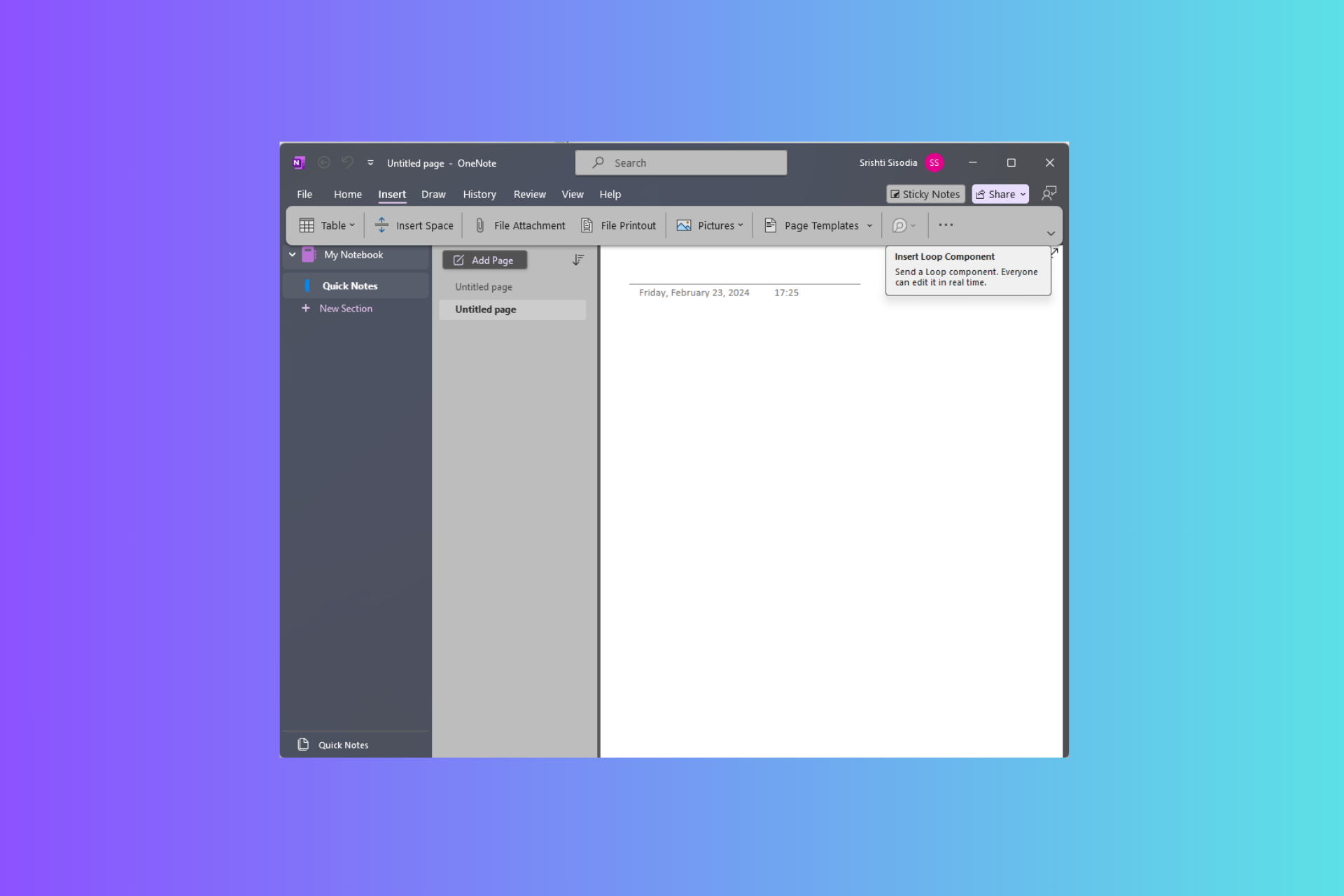
To use Loop components in OneNote, go to the ribbon menu Insert group, then select Loop Components. From the drop-down menu, select the type of Loop component you want to use. Now, type in or enter content in the component.
Once done, go to the top-right corner of the Loop component, click the Copy link icon, and paste it into other apps like Word, Teams, Whiteboard, or Outlook. To notify someone via email, you can use @followed by the person’s ID within the Loop component.
What makes Loop components so useful?
Versatile component types – This type offers a range of options, including task lists, Kanban boards, and progress trackers, which can be directly accessed from the Insert tab on the ribbon in OneNote.
Real-time collaboration—These components stay synced across Microsoft 365 apps, enabling seamless collaboration across various platforms, such as emails, chats, meetings, and documents. You can paste them into OneNote from any eligible M365 app.
Improved collaboration features – Additional collaboration features, including @mentions, comments, and reactions, allow you to communicate directly within the components.
Live Updates – These components are always live, so the information is always up to date. This provides real-time visibility into who is viewing or editing them on the OneNote page, fostering teamwork and transparency among team members.
Here are some scenarios mentioned by Microsoft in the official blog that you can try:
Create or paste a task list Loop component to keep track of your work items, while staying in sync with Planner and To Do.
Create a progress tracker Loop component within a page in the OneNote-powered Notes tab of your Teams channel to collaborate with your team members on a project. Tag owners to specific work areas to track and accelerate progress.
Collaborate in real time on shared agendas and notes with your team members for your upcoming meetings right from your notebook. Enhance your workflow by having your shared notes next to your personal notes on the same notebook page.
Improve organization and reduce context switching by consolidating Loop components on OneNote pages.
Loop Components in OneNote is now available to everyone on the web and Teams apps, and starting in June 2024, it will be available to users on the Windows app.
If you have a commercial Microsoft 365 subscription and still can’t use Loop components in OneNote, you must read this note by Microsoft to rule out this possibility:
Loop components are being gradually rolled out and are made available through your work account. Within OneNote, Loop components are available only if your organization allows creation of links that can be edited or viewed by anyone in the organization. Loop components are being rolled out to Windows, Web, and Teams but are not yet available in OneNote for mobile or Mac/iOS. Loop components in OneNote app for the Web and Teams may be available only to targeted release users in your organization and available via Insiders Beta for the OneNote Windows desktop app.
Will Loop components in OneNote be helpful to you? Share your thoughts with our readers in the comments section below.
It’s hard and awkward to see some people for the first time in virtual meetings, as sometimes, no matter how much research you’ve done on them, you can’t just break the ice. Several tech giants, including Google with its Gmail, have been trying to address the issue by presenting users with icebreakers.
However, these icebreakers are often repetitive and general, and they don’t help, aside from adding to the awkwardness of the interaction (no one finds the ‘how are you?’ intriguing enough; instead, it can be considered quite frustrating).
But rest assured, if you’re shy or introverted or you didn’t have enough time to do your due diligence and learn about the people you’re meeting with, Microsoft has a solution that could revolutionize this very specific field.
The Redmond-based tech giant has recently published a patent describing a technology that helps people find good conversation starters (icebreakers) for a specific person in a group in virtual meetings.
The tech uses many capabilities, including databases, ranking systems, search engines, and possibly machine learning models, to develop ultra-personalized icebreakers for every situation. Here’s how this system would work.
Firstly, it identifies the target group and a related reference group, then finds common features (like interests or characteristics) in the target group and the reference group.
The system will then develop a frequency analysis that checks how often these features appear in the reference group. Based on the frequency, it selects relevant icebreakers for the person in the target group and displays them on user devices for use in virtual meetings.
But the tech is also quite versatile: it uses a ranking system to rank icebreakers in virtual meetings, and if the situation sees fit, the system might let you use a specific icebreaker again. Otherwise, it will not, creating a new icebreaker instead.
For example, if in the last meeting with this target group, the icebreaker “you all speak Russian” was presented, then the same icebreaker would be less valuable to users, and a different icebreaker would be ranked higher.
The versatility also includes using no icebreakers at all in virtual meetings where people are somewhat familiar.
For example, a degree of familiarity may be determined between users in the target group such that if they have sufficient familiarity with each other, then no icebreaker information item is presented.
You might ask yourself: but how does it know if you’re familiar with a certain group of people? Well, this is the thing and probably the main drawback of this technology. It scans the Internet (and all the public information out there) to find information about all those participating in virtual meetings, and then creates icebreakers based on it.
This means the system will use information from their social media accounts (including Facebook and LinkedIn), emails, subscriptions (such as Xbox Game Pass or Xbox Live), and even Netflix to find out where they studied, what their favorite video games are, what they recently purchased, or what films or shows they recently watched. All this information might be stored in a database component, which will be used to create ultra-personalized icebreakers for you to use in virtual meetings.
User account(s) and device(s) data generally includes about user devices accessed, used, or otherwise associated with a user, and/or information related to user accounts associated with the user; for example, online or cloud-based accounts (e.g., LinkedIn, email, social media) such as a Microsoft Net passport, other accounts such as entertaiment or gaming-related accounts (e.g. Xbox Live, Netflix, online game subscription accounts, or similar account information), people data relating to such accounts such as user email, texts, instant messages, calls, other communication, and other content; social network accounts and data, such as news feeds; online activity; calendars, appointments, application data, other user accounts, or the like. Some embodiments of user accounts and devices may store information across one or more databases, knowledge graphs, or data stuctures. As described previously, the information stored in user accounts adn devices may be determined from people-data collection component.
One advantage of using this database is that the system also learns what kind of icebreakers are inappropriate for virtual meetings.
This is not the first time Microsoft has dabbled in icebreaker technology. A few years ago, the Redmond-based tech giant also introduced an Icebreaker app in Teams; although it was not meant for virtual meetings, the app’s main goal was to promote and encourage colleague bonding.
However, this new system is an entirely new level, and it sounds like something out of a Black Mirror episode. Sure, I would like an appropriate icebreaker to start a great virtual meeting, but what if the system tells me to ask about a specific situation shared by another participant on Instagram, for instance?
Microsoft recently introduced Windows 11 24H2 in the Release Preview channel, allowing a wider insider base to test out the latest version of the OS. But as it turns out, most of them can’t install Windows 11 24H2 because it doesn’t appear under Windows Update!
Microsoft quickly acknowledged the problem and issued a clarification. In an update to its blog post announcing Windows 11 24H2, the Redmond-based tech giant said,
We’re aware that some Windows Insiders in Release Preview are not seeing Windows 11, version 24H2 offered yet. We’ve just begun the rollout and will gradually increase the rollout over time so that everyone will see it right away. If you are not seeing it yet and want to update to Windows 11, version 24H2 right away, you can do so by using the ISO which are available for download here. The ISO is Build 26100.560 but once you update using the ISO and join Release Preview, you’ll get Build 26100.712.
After this clarification, you know what to do if you can’t install Windows 11 24H2 in the Release Preview channel. But before you do any of that, check if Windows 11 24H2 appears under Optional updates because, for some, it reportedly did!
If it’s not there, simply go to Microsoft’s Windows Insider Preview Downloads > find, download, and install Build26100.560 for Windows 11 > join the Release Preview channel > finally, the Windows 11 24H2Build 26100.712 should appear.
Downloading Windows 11 24H2 ISO from Microsoft’s official website
If you find the process a bit too time-consuming, maybe wait for Microsoft to fix things and streamline the process. Upon going through dedicated forums, I found out that the Windows 11 24H2 update is already available to many. Here’s what one user said,
Tried another machine here in R.P. channel on 5/23/2024 10:28PM Pacific time. It showed 24H2 available to download.
Remember, since this is a gradual roll-out, it’s taking a little longer for you!
In my opinion, wait for a few days. Microsoft has confirmed that it is gradually increasing the roll-out rate and the latest update should soon be pushed to more devices.
This Norton Driver Updater review will help you answer all your burning questions concerning this service. In short, it’s an app that promises to enhance your Windows PC experience with faster browsing, fewer crashes and freezes, and improved audio and graphics quality.
I’ll cover its main features, customer service, pricing, and more to help you decide if it’s worth your time.
However, most of these features run in the background during scanning and updating. I’ll focus on the ones that you can directly control.
Scan and Update Drivers
This app allows you to scan and update your drivers in a few clicks.
After tapping on the Scan Drivers button, the entire process took less than 10 minutes. It has a button to stop the scan if you’d prefer to do it later. Also, you can see the number of drivers being scanned during the procedure.
After it’s done, you’ll see the number of outdated drivers in your system.
Moreover, you can update everything simultaneously or tick the box of a specific driver.
Before you do so, you can check its status by tapping on the “>” symbol.
It’ll open a new tab showing the newest version of the driver and your current version. You can also tap the three dots and choose to either skip the update or ignore the driver.
I decided to update it and was notified that some devices might not work while their drivers were updating. You can still cancel or continue with the process.
During the update process, it began downloading the new driver. I could follow its progress in the description.
Once the download process was complete, it began backing up the drivers.
After backing up the driver, it unpacks and updates it.
Finally, tap on the “>” to check if the driver changed to the new version.
Alternatively, you can use the filter button if you already know where the issue is.
However, after updating all the drivers, I still couldn’t notice a change in device speed. Still, the audio was a bit clearer.
Vulnerable Driver Identification
This feature allows you to receive updates in case any of your drivers have issues.
After updating them, I got a notification the following day that an issue was detected.
I tapped on the driver and the only action I could access was to ignore it. The tool had no more fixes and the customer support confirmed that one can only ignore it or revert the update.
Revert Assistance
Norton Driver Updater allows you to revert the changes if you have trouble after updating the drivers. You can go to the home page and tap “Solve now.”
I was asked to pick the problematic driver(s). For this example, I selected the camera.
The tool displayed three camera drivers together with information about when I updated them. You can revert all the changes or pick the one causing problems.
It took a few seconds to revert it to the older version.
User Interface
Norton Driver Updater has a clean and beginner-friendly interface. Its home page has one main feature (Scan Drivers) so you can check if your drivers are up to date. You can also access the menu button on the top right corner of the screen.
This button has settings to check your subscription status, change language, contact support, and more.
Customer Service
This service has different support channels including Ask the Community, Social Media, Live Chat, and phone support. I tested its live chat and was impressed by the fast responses taking less than one minute. Also, the Chat support is open 24/7.
You can get further assistance on social media platforms like Facebook and Twitter (X). Additionally, you can reach the support through phone calls (available 24/7) if you prefer consulting through calls.
Pricing
Norton Driver Updater offers yearly subscriptions only. However, you can customize it depending on the number of devices you want to use per account. Here’s the breakdown:
1 device – $29.99
5 devices – $39.99
10 devices – $49.99
All the subscription plans have a 60-day money-back guarantee policy so you can ask for a refund if the service doesn’t fit your needs. Also, you can enjoy a 7-day free trial before subscribing but you must fill in your billing information.
Summary
When it comes to effectiveness, Norton Driver Updater is kind of in between. It claimed to improve graphic and browsing speed which I couldn’t notice after updating the drivers. Moreover, the tool could detect some issues with the driver but the only solution was to revert.
However, there was some improvement in the audio quality. I also liked how the customer support was responsive and overall usage was simple.
Hopefully, this Norton Driver Updater review has covered all you wanted to know.
Xbox Game Pass often has some great games, and as June is coming by, the roster will get updated.
There are only a handful of titles coming, so here’s what you can expect in June, so far.
The following titles are confirmed to land on Xbox Game Pass in June
As Game Rant writes, only three games have been confirmed for June on Xbox Game Pass, and of those three, one will be a PC exclusive.
First on the list is Firework, and it’s a puzzle horror game that will be exclusive to PC. Rolling Hills on the other hand is a lighthearted and adorable life sim about a robot who works in a sushi restaurant. Both games are coming on June 4th.
Not long ago, Microsoft announced that they will bring more and more games to other platforms, including PlayStation and Nintendo, and the numbers are starting to add up. Apparently, the Redmond giant had their eyes on the potential success of Sea of Thieves on PS5 to see if their strategy is paying off.
Now, we’ve got the sales numbers for April top 20 best selling games from the Circana research firm, Mat Piscatella, who posted the results on his X account.
April 2024 Top 20 Best-Selling Premium Games – U.S. (Dollar Sales, Physical and Digital from digital data sharing publishers, excludes add-on content) pic.twitter.com/fTWBm2ACXT
What can the numbers tell us about multi-platform game strategies?
The results are ranked by sales numbers from April 7 to May 4 in the U.S., and we can see that Sea of Thieves in fourth place, closely followed by Fallout 4. Grounded, which was also ported to PlayStation and Nintendo Switch on April 16 gained a lot of ground quickly, getting the 12th place on this list.
We expected big numbers for the Fallout series due to the recent Amazon Prime show launch. However, if we look at the top places, we find Sony’s Stellar Blade and Helldivers II. While Helldivers II was launched on PC and even had a nice promotional price on Steam, there’s no word about launching Stellar Blade on PC.
Sony’s recent announcement of a new strategy to port more top titles to PC is a significant shift in the gaming market. While this move is expected to boost game sales, Sony’s plan to release exclusive sequels for these titles on PS5 later on is a clear indication of their broader market strategy.
We’re not sure what the outcome will be, but this doesn’t seem to be a console war, at least not for Microsoft. Console sales are going down, so Microsoft’s strategy of bringing its games to all platforms makes a lot more sense.
As we’ve said before, the gamers are ultimately the ones who will decide how this will play out, and we’ll be here to report further developments. If you want to talk about this, hit the comments section below.
Microsoft recently announced the unification of data and technologies in Bing Maps for Enterprise with Azure Maps, a move aimed at providing customers with an enhanced and AI-driven feature set of Microsoft Azure.
In an official blog post highlighting the upsides of the move, Nick Lee, Corporate Vice President at Microsoft Maps and Local, said,
Azure Maps introduces several features not found in Bing Maps for Enterprise, including advanced service authentication methods, data residency compliance, geolocation, weather information, and custom indoor maps. Unifying our enterprise maps offerings under Azure Maps will greatly simplify our enterprise mapping offerings making it easier for customers to buy and use our services in a way that is consistent with other services at Microsoft.
Microsoft confirmed that Bing Maps for Enterprise will work for now and is set to be retired on June 30, 2028. Although the Redmond-based tech giant won’t allow new subscriptions.
Existing customers with an enterprise license will have until June 30, 2028, to make the transition to Azure Maps, while the free and basic license holders will be forced to switch by June 30, 2025.
NVIDIA cuOpt, a world-record holding graphics processing unit (GPU)-accelerated optimization AI microservice, assists teams in solving complex routing problems with multiple constraints. By combining cuOpt with Azure Maps, customers can achieve dynamic routing and real-time re-optimization at scale, driving efficiencies and revenue growth. Azure Maps, alongside the Azure Marketplace, opens up new avenues for innovation, enabling businesses to tackle diverse challenges.
With the transition from Bing Maps for Enterprise to Azure Map, the next-gen geospatial cloud service, customers stand to benefit from additional and valuable data insights along with the AI-powered feature set, helping them reduce operating costs and boost revenue, according to Microsoft.
When it comes to gaming, Lenovo is well-known for its devices, and if you’re looking for a new gaming desktop, we’re pleased to inform you that Lenovo has a new deal.
Legion Tower 5i Gen 8 is at a discount, so without further ado, let’s see what this PC can do.
You can save $620 on Legion Tower 5i Gen 8
You might remember that we recently wrote about the Lenovo Tower 5 Gen 8 discount, and today’s model offers similar specs, with the CPU being the only difference. Here’s a quick overview:
CPU:
13th Generation Intel Core i7-13700F
GPU:
NVIDIA GeForce RTX 4070 12GB GDDR6X
RAM:
2 x 8 GB DDR5 5600MHz
Storage:
1 TB SSD M.2 2280 PCIe Gen4
Power:
500W
Connectivity:
4 x USB-A 3.2 Gen 1, 4 x USB-A 2.0, USB-C 3.2 Gen 2, 3x DisplayPort 1.4a, HDMI 2.1, Wi-Fi 6E 2×2 AX, Bluetooth 5.1, RJ45
Cooling:
150W 120mm air cooling, 1 rear + 2 front fans with ARGB
This is a great device, and the only limitation might be 1TB storage, especially if you’re a heavy gamer. 16GB is enough for most titles, but some newer titles might require more. Luckily, this is easily upgradable.
After releasing the KB5037849 in the Release Preview channel, Microsoft launched the non-security Windows 10 22H2 patch to fix several issues on the OS, but it also brings some improvements.
You will be happy to know that the new KB5037849 now fixes the problem with the hidden window that appeared when you share your screen using certain apps. Microsoft also patched an issue affecting the Share button on USB controllers but they mention that it might still not work with the Game Bar.
What are the other KB5037849 fixes for Windows 10?
As we’ve mentioned above, KB5037849 also brings a couple of other significant fixes for Windows 10 users:
This update addresses an issue that affects a Microsoft Entra ID account. Devices cannot authenticate a second one. This occurs after you install the Windows update, dated November 13, 2023.
This update addresses an issue that affects a server after you remove it from a domain. The Get-LocalGroupMember cmdlet returns an exception. This occurs if the local groups contain domain members.
This update addresses an issue that affects a Windows Presentation Foundation (WPF) app. It stops responding.
This update addresses an issue that affects an IPP-over-USB printer. After you delete it, it still appears as not available in Control Panel.
This update addresses an issue that affects TWAIN drivers. They might stop responding when you use them in a virtual environment.
This update brings Country and Operator Settings Asset (COSA) profiles up to date for certain mobile operators.
This update addresses an issue that affects Unified Write Filter (UWF) Windows Management Instrumentation (WMI) API calls. Calls to shut down or restart the system throw an access denied exception.
However, Microsoft also acknowledges some of the problems you may face after applying this update. For instance, if you’re using multiple monitors, you might see some desktop icons moving from one monitor to another and experience icon alignment issues when you’re using Copilot.
To prevent this problem, Microsoft restricted the use of Copilot in Windows (in preview) on devices that are using multiple monitor configurations.
Also, you should know that Copilot won’t show up if your taskbar is located vertically on the right or left of your screen. The fix for this problem would be to place the taskbar horizontally.
To install the new KB patch, Microsoft recommends installing the KB5015684 to make sure that you are up to date with Windows 10 22H2.
Did you install the latest KB5037849 on Windows 10? If you experienced any problems, leave your notes in the comments section below.
By default, Windows 11 minimum PIN length is four digits but you can easily change this if you want to make it more secure.
In Windows Hello, passwords rather than PINs are recommended because they’re technically longer. A four-digit PIN may not be as secure because the shorter it is, the more susceptible it is to vulnerability.
How do I change the minimum PIN length for Windows 11?
1. By using the Group Policy Editor
Hit the Windows + R key to open the Run command.
Type in gpedit.msc and hit Enter to open the Group Policy Editor.
Navigate to the following path: Computer Configuration > Administrative Templates > System.
Select PIN Complexity and double-click on the Minimum PIN Length option.
Check the Enabled option and in the input value under Minimum PIN Length, enter a larger number than four.
Note that the policy setting for the maximum PIN will also apply if you’ve configured it and should be less than its largest. Once you fulfil these requirements, click on Apply then OK to effect the changes.
Type regedit in the dialog box and hit Enter to open Registry Editor.
Navigate to the following path: HKEY_LOCAL_MACHINE\SOFTWARE\Policies\Microsoft\
Next, click on PassportForWork sub key. If it is unavailable, you’ll have to create one by right-clicking, select New>Key and name it as PassportForWork.
Right-click on the newly created PassportForWork key, select New>Key and name it as PINComplexity.
On the newly created PINComplexity key, right-click on it and select New >DWORD (32-bit) Value and name it as MinimumPINLength.
Double-click on it and enter a number greater than four in the Value data box then hit OK.
Best practices for setting a Minimum PIN Length in Windows 11
A four-digit PIN makes it easier for attackers to guess and access your device. A longer PIN reduces your risk profile because it would take years to guess a multiple-digit PIN accurately. However, as you seek to enhance security, you must also consider practicality and convenience.
A good balance would be between six and eight digits. Too many digits open up the possibility of wrong attempts and with time, it can become cumbersome to log in.
If your main concern is security, consider another layer such as Windows MFA where one must sign in with the PIN and another sign-in option such as a password. Sometimes, your PIN may be unavailable so you must have an alternative.
That’s all we had when it comes to changing the minimum PIN length for your Windows 11 device. Have you adjusted your Windows Hello PIN length? What are some of the benefits that come with a longer PIN? Let us know in the comment section below.
This summer, No Man’s Sky will celebrate its 8th anniversary. It’s been a big year for the game. After all, the Orbital update happened not so long ago. If you didn’t know, it introduced a space station overhaul, ship customizations, and intervention events. With the anniversary occasion, developers announced the 13th community expedition, Adrift.
It will be available for Xbox players later this week and will last seven weeks.
What is No Man’s Sky Adrift expedition about?
The Adrift expedition takes place in another universe where the galaxy is barren. So, you won’t meet any aliens, space stations, shops, helpers, and so on. This new update brings a new perspective on the game. In addition, the buildings are damaged, and you can find the graves of lost travelers as landmarks.
According to the update announcement, you will wake up on the worm-infested planet Lapezuk. Besides, you won’t meet other travelers, and your communications won’t work. Also, you will encounter fiend eggs across the planets.
In addition, the Space Anomaly is silent and lacks merchants or traders. Adrift will force you to survive on your own. So, the expedition will most likely make you feel a bit isolated, and at the same time, it will give you a sense of danger.
Get ready for new rewards
To survive the Adrift expedition, you will have to gather materials from different planets. Also, there are many repair, combat, and exploration challenges. After finishing them, you will get various rewards, such as a gnawing scuttler companion, ship parts, stealth paint, and more.
The stealth paint will give you the low radar customization look for your ship. On top of that, the update brings a new starship known as Iron Vulture, and there is a new ghostly frigate named Ship of the Damned.
To start the Adrift expedition, you can go to the Expedition terminus or use a fresh save, which might convert later into a Normal save. Additionally, you can claim all the rewards on other saves due to the Quicksilver Synthesis Companion.
Ultimately, this expedition will most likely be an interesting one. We can’t wait to try it and see how difficult it is, especially since it should give us a sense of danger while playing. On top of that, it could be a tough survival mode. However, keep in mind that it only lasts for seven weeks. So, hurry up and gather your friends.
Are you going to play the Adrift expedition? Let us know in the comments.
Microsoft recently rolled out the KB5037853 update for all editions of Windows 11 22H2 and Windows 11 23H2. The latest version introduces a wide array of exciting features to streamline your experience and patches known bugs in the operating system.
Amongst the notable improvements, Microsoft has patched the 0x80070520 account picture error, an issue plaguing Windows 11 since the release of KB5036980. Also, you can now generate and share QR codes for websites in Microsoft Edge using Windows Share.
Here are some of the new features in the KB5037853 update for Windows 11:
1. This update adds a feature that stops you from accidentally closing the Windows share window. Clicking outside of the window will no longer close it. To close it, select the close button at the upper-right corner. 2. You can now use your mouse to drag files between breadcrumbs in the File Explorer address bar. A breadcrumb shows the path to your current file location in the address bar. For example, there are three breadcrumbs in the path This PC > Windows (C:) > Program Files. 3. This update adds a page to Settings > Accounts called Linked devices. On it, you can manage your PCs and Xbox consoles. This page only shows on Home and Pro editions when you sign in to Windows using your Microsoft account (MSA). 4. This update starts the rollout of the new account manager on the Start menu. When you use a Microsoft account to sign in to Windows, you will get a glance at your account benefits. This feature also makes it easy to manage your account settings. 5. You can now create quick response (QR) codes for webpage URLs and cloud files from the Windows share window. Select the share button in the Microsoft Edge toolbar and choose “Windows share options.” Then, you can share the URLs and files across your devices.
For the complete list of new features and bug patches in KB5037853, visit Microsoft’s official blog.
Downloading and installing KB5037853 on Windows 11
Since it’s an optional update, the KB5037853 won’t install automatically.
To get the update, press Windows + I to open Settings > go to Windows Update > click on Check for updates > then click on Download & install next to the Windows 11 KB5037853 update.
You can also manually download and install the KB5037853 update from the Microsoft Update Catalog.
Downloading KB5037853 from the Microsoft Update Catalog
Remember, the new features are being gradually rolled out. So, these won’t be available to everyone at the same time, as confirmed by Microsoft. You may have to wait for a while!
Besides, as of now, Microsoft is not aware of issues with the update. If you face any, don’t forget to report them.
What do you think about the new features in KB5037853? Share with our readers in the comments section.
If you’re an audiophile, you can understand the significance of the Realtek Audio Console connector retasking feature so when it’s not working or fails to switch to your preferred audio input, you need to troubleshoot it immediately.
The retasking menu is built to ensure you get the most out of your audio input and output devices. Whether you’re looking to listen to music or attend a meeting, this switching allows you to tailor the input/output according to your preferences and needs.
This option may be unavailable or greyed out if your audio drivers have malfunctioned or are outdated. Further, your audio ports may be damaged making them undetectable or third-party software may be causing conflicts.
What can I do if the Realtek Audio Console connector retasking menu has disappeared?
1. Make sure that your audio device is enabled
Right-click the Volume icon in the bottom right corner of the Taskbar and choose Playback devices from the menu.
When the Sound window opens, right-click the space and choose Show Disabled Devices.
Finally, check if your Playback device appears on the list. If your audio device is grayed out, it’s disabled. To enable the device, right-click it and choose Enable from the menu.
Next, check if the audio device is enabled in the Device Manager. Press Windows Key + X and choose Device Manager from the list.
When Device Manager opens, locate your audio device and ensure it’s enabled. If not, right-click the device and choose Enable device from the menu.
2. Configure the Realtek HD Audio Manager Settings
Select the Display icon notification area option, and press theOK button.
Next, click the yellow folder icon almost at the top right corner, select Disable front panel jack detection, and if it’s selected, deselect the Enable auto popup dialog option; and press the OK button.
Click the Device Advanced Settings window link at the top right of the audio manager.
Select theMake front and rear output devices playback two different audio streams simultaneously playback option.
Also, select the Tie up same type of input jacks, i.e., line-in or microphone, as an input device recording device option and press the OK button on the Device advanced settings window.
Click the green active back panel speaker icon on the right of the Speakers tab.
Select Set Default Device from the drop-down menu on the right of the tab.
Next, click the Microphone tab, and select the red back panel to activate the microphone icon.
Click Set Default Device on the Microphone tab’s drop-down menu.
Finally, press OK to apply the new settings.
3. Run the audio troubleshooter
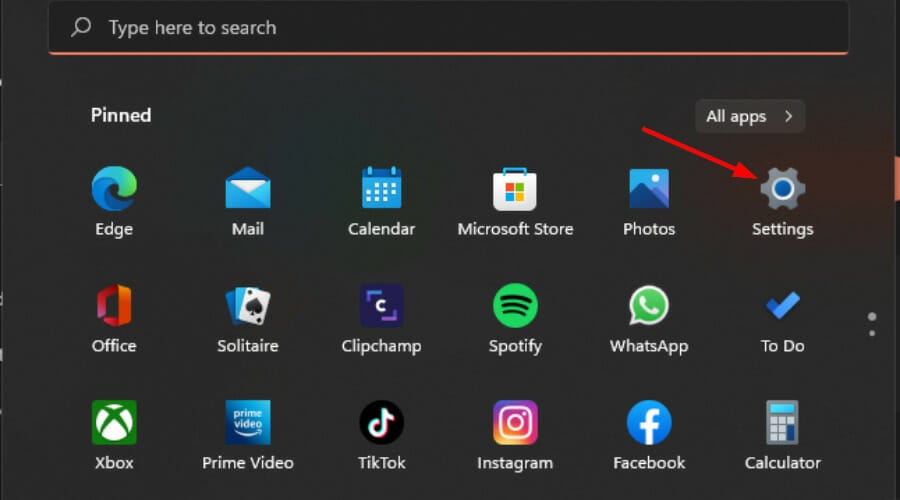
Press the Start Menu key and select Settings.
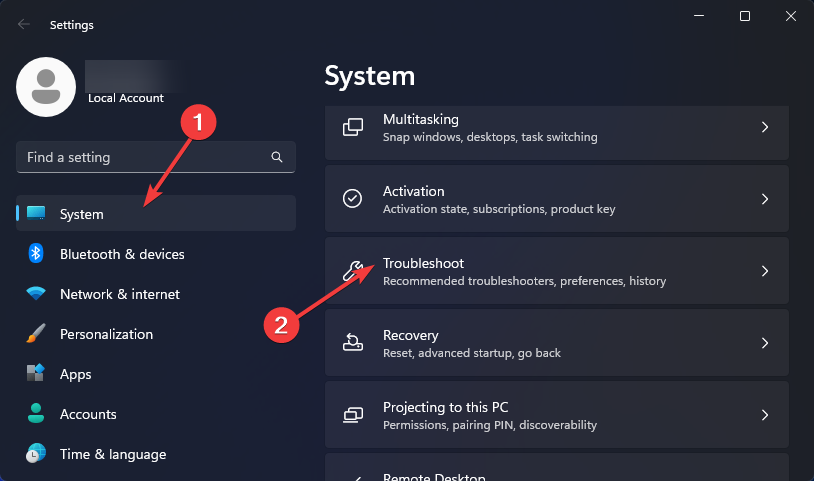
Click on System on the left pane, then Troubleshoot on the right pane.
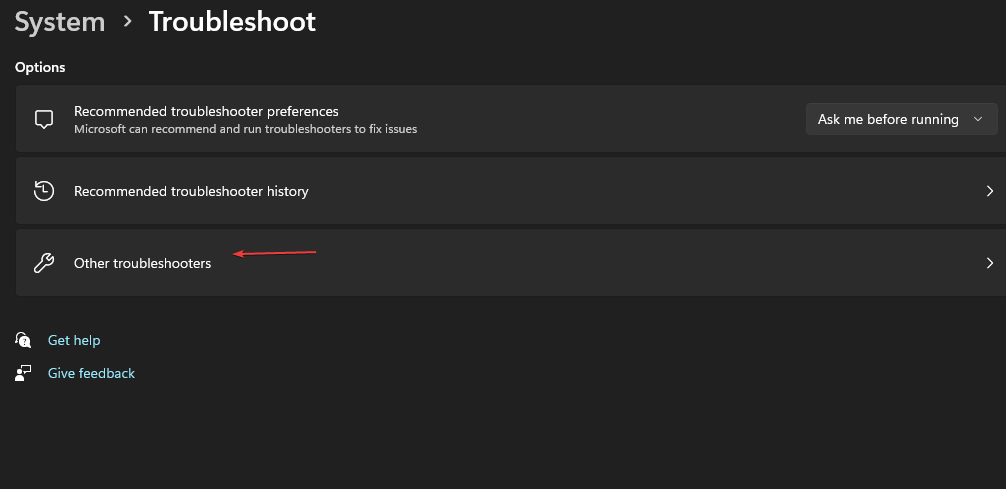
Select Other troubleshooters.
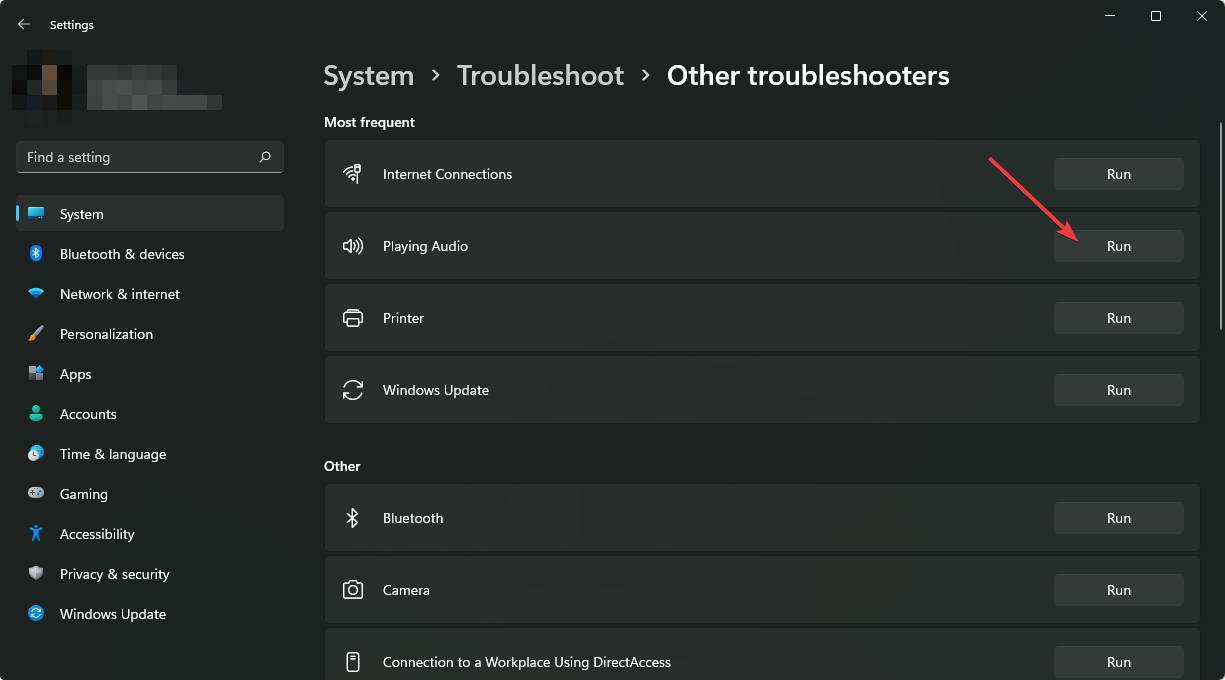
Locate the Playing Audio troubleshooter, and click on the Run button next to it.
If the troubleshooter reveals everything is working fine, try testing out your audio devices. If possible, try them on other PCs too if available and play audio from different applications. This can help you narrow down the issue to either hardware or software issues.
4. Rollback previous audio driver
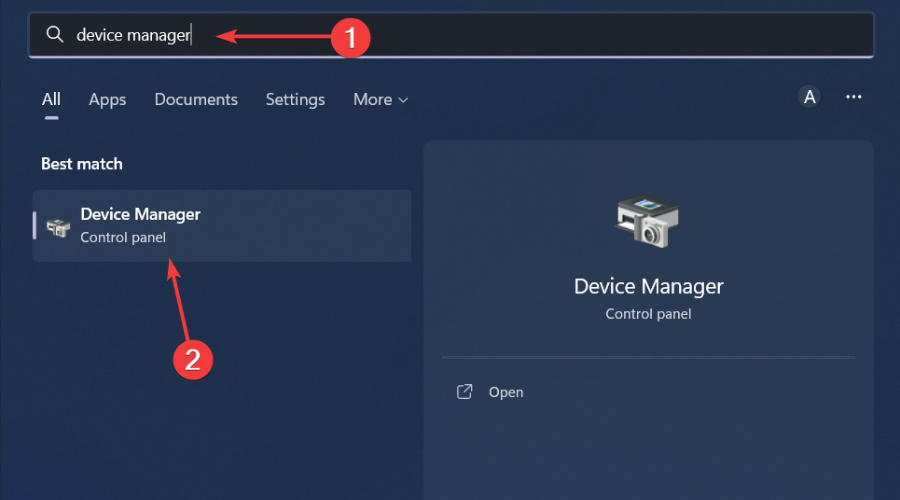
Hit the Windows key, type Device Manager, and click Open.
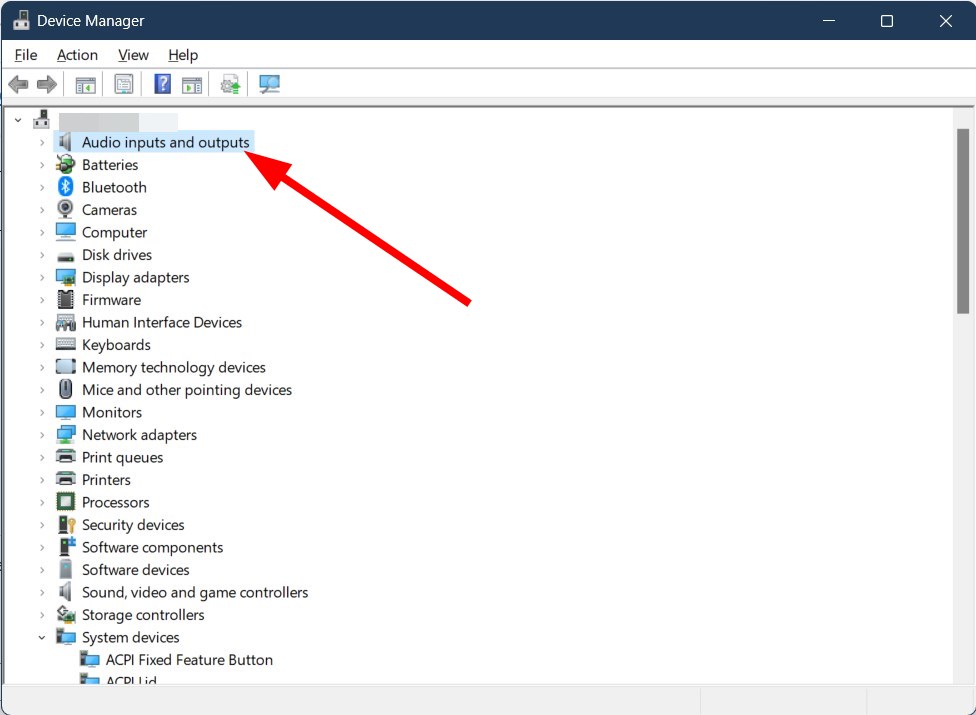
Expand the Audio inputs and outputs section.
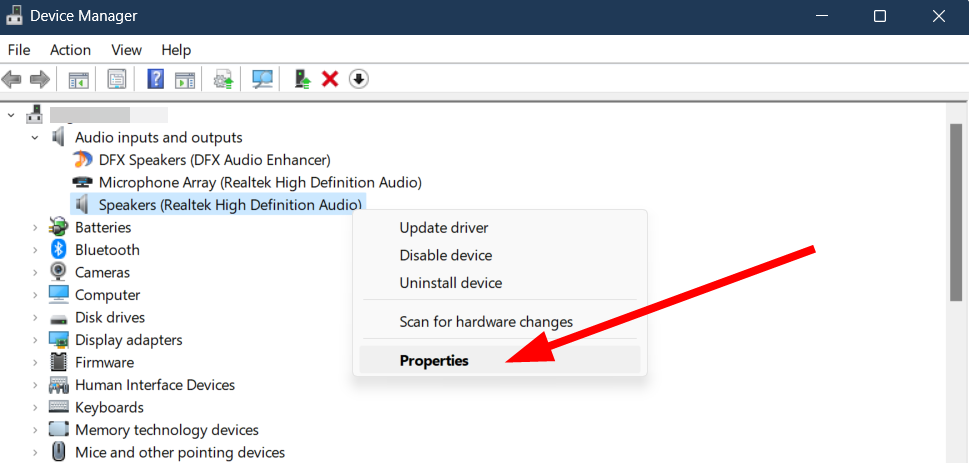
Right-click on your audio driver and select Properties.
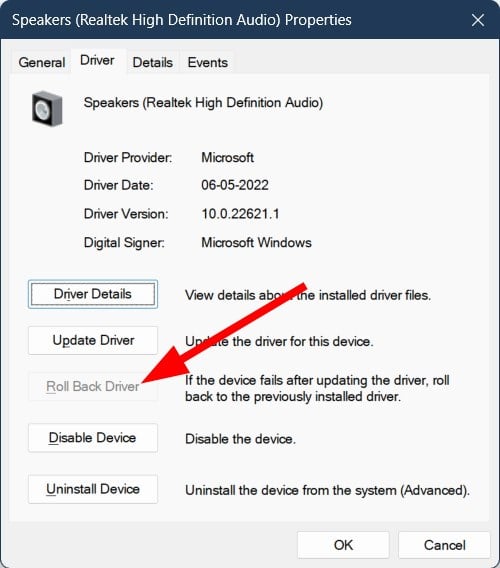
Hit the Roll Back Driver button.
5. Reinstall audio drivers
Hit the Windows key, type Device Manager in the search bar, and click Open.
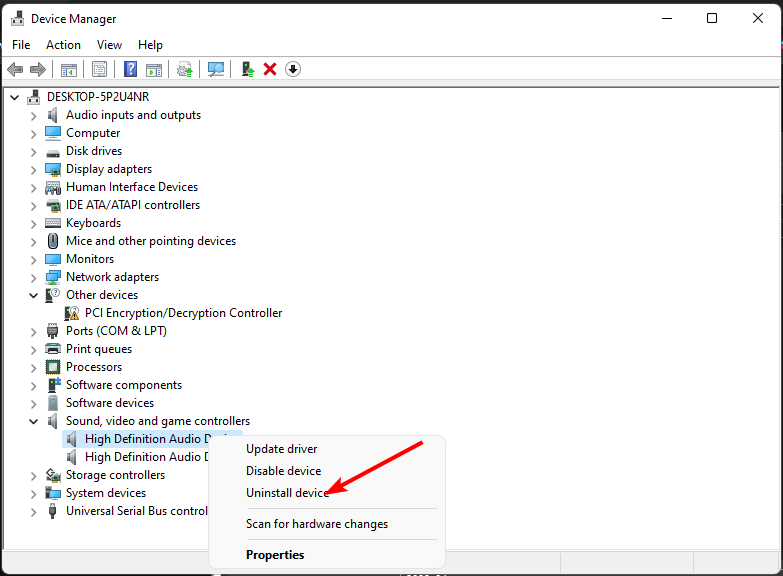
Navigate to Sound, video, and game controllers to expand, right-click on your audio device, and select Uninstall device.
Confirm on Uninstall.
Restart your device, and the drivers will automatically reinstall themselves.
Hit the Windows key, type Device Manager in the search bar, and click Open.
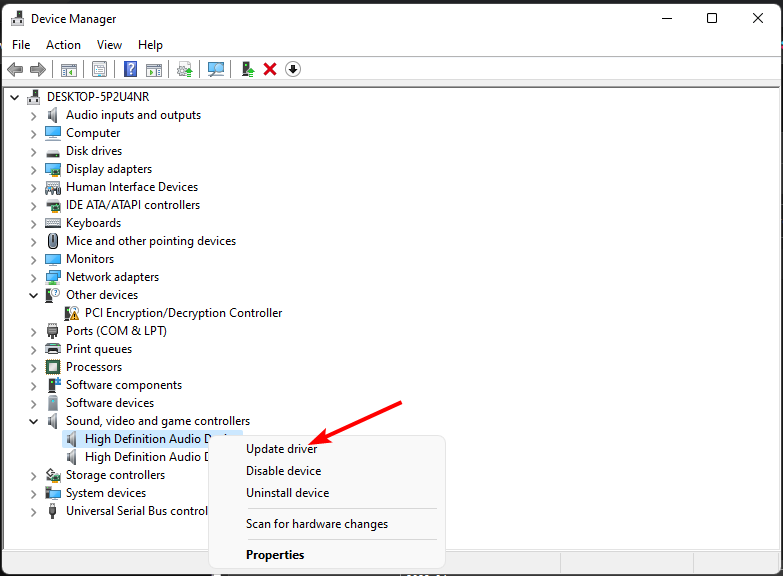
Navigate to Sound, video, and game controllers to expand, right-click on your audio device, and select Update driver.
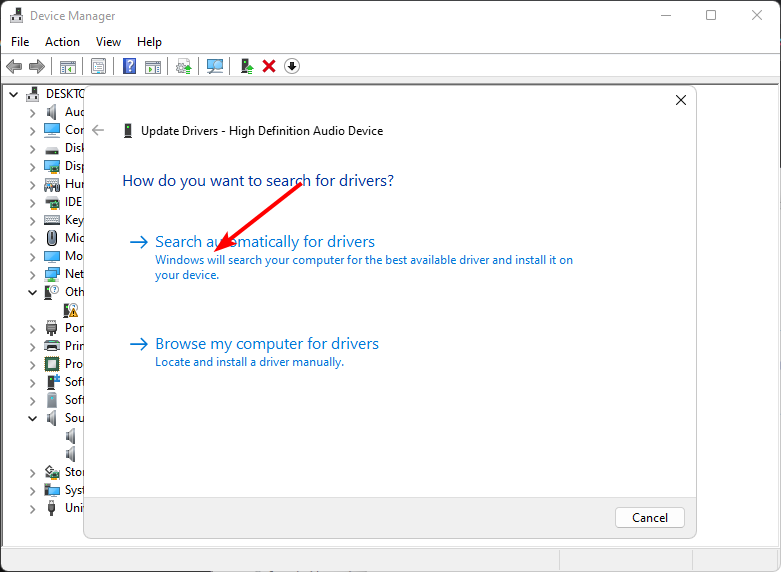
Select Search automatically for drivers.
Restart your PC and try reconnecting.
7. Enable audio for the line-in connection
Click the Cortana button on the taskbar, and then enter audio devices in the search box.
Select Manage audio devices to open the window below.
Click the Playback tab, select Speakers (or another external audio device), and press the Properties button.
Next, select the Levels tab, and then you can check the Line in option to enable line-in connection sound.
You can then connect your audio input and see if it works.
Enabling the Line In input option brings in another audio input source. This can be useful if you want to test whether the issue of the Realtek Audio Console connecter not retasking is present on all audio devices.
Also, note that enabling the line-in option may not be available on every device. If this option is missing, no need for alarm. It just means your sound card does not support it.
Finally, if you’ve tried all the above troubleshooting steps but still no luck, reach out to Realtek for additional support.
That’s all we had for your Realtek Audio Console connector failing at retasking. For any additional thoughts or comments, do leave a comment down below.
Copilot in PowerPoint will be updated to turn PDF documents into presentations in seconds. According to the latest entry in the Microsoft 365 Roadmap, the new capability will be added to the AI model next month, so users won’t have to wait too long.
Alongside its editing and summarization capabilities, Copilot in PowerPoint is already capable of turning Word documents into presentations, so it was just a matter of time until it would support PDF documents.
Copilot in PowerPoint will now be able to support automatically generating a presentation based on a PDF file. This is in addition to the existing support for automatically generating a presentation based on a Word document.
Microsoft
The capability will be generally available to all Web and Desktop-based PowerPoint users and is probably one of the most useful. Sure, Copilot in PowerPoint is already useful, as we mentioned earlier, but this one will make it easier to sketch a presentation in seconds without having to spend time copying and pasting information from the PDF to the slide manually.
Microsoft will also update Copilot everywhere with the new GPT-4o, the newer and better AI model, which means converting your PDF into a PowerPoint presentation will be more accurate, correct, and intuitive. So, in the end, you might not need to modify the presentation, as you can read it once, and you’re good to go.
Speaking of PDFs, Microsoft might soon update Copilot to convert non-editable PDFs into editable Word documents, or any documents for that matter, while keeping their original layout and design. Though dozens of converters are on the market, no one manages to convert a document entirely while keeping its original layout.
The technology is still at the level of being patented, but the Redmond-based tech giant is thinking about it. Interestingly enough, it does mention converting a non-editable PDF into a PowerPoint presentation, as well, so Copilot’s ability to do that partially leads to thinking Microsoft might release that capability sooner than expected.
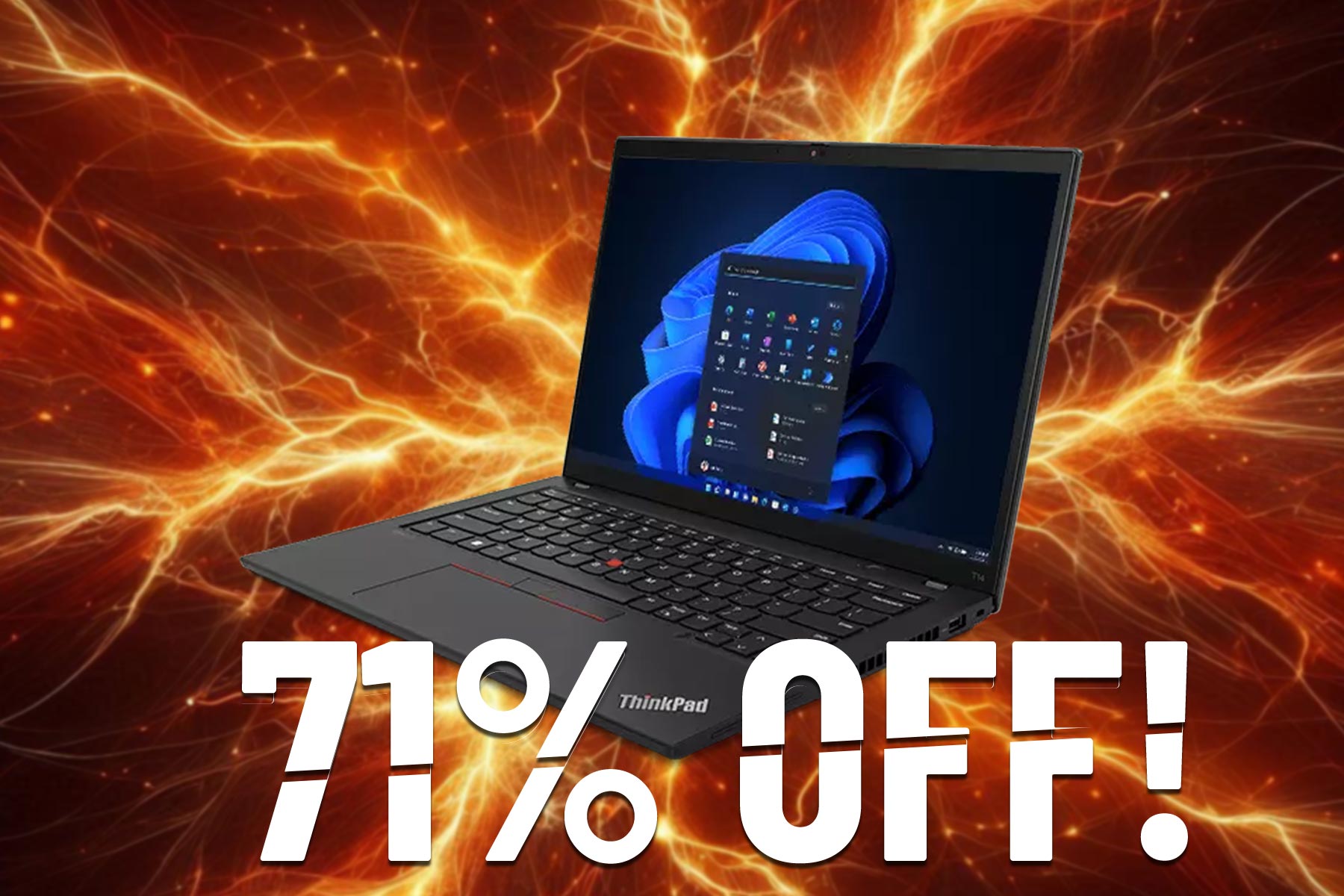
Lenovo has amazing devices, and if you’re looking to get a new laptop for everyday use you might be interested in ThinkPad T14 Gen 3.
This might not be the latest model, but it’s available at a massive discount, so it might be perfect for your needs.
ThinkPad T14 Gen 3 laptop is available with $1,901.28 off!
In case you’re not familiar with this model, here’s a quick rundown:
Display:
14-inch, 2240 x 1400, IPS display
CPU:
12th Gen Intel Core i5-1240P up to 4.40GHz
GPU:
NVIDIA GeForce MX550 2GB GDDR6
RAM:
8 GB SODIMM + 8 GB soldered, 3200MHz
Storage:
512 GB SSD M.2
Battery:
4 Cell Li-Polymer 52.5 Wh
Connectivity:
2x USB-A 3.2 Gen 1 ports, 2x Intel Thunderbolt 4, RJ45, HDMI 2.1, SIM card slot, Smart card reader, headphone/mic combo, Intel Wi-Fi 6E AX211 2×2 AX, Bluetooth 5.1
This is a solid laptop, and the only drawback is its GPU. While it can handle some light gaming, it’s significantly weaker than its RTX counterparts.
However, for everyday tasks, school, or office work, this is an incredible device, and with a $747.72 price tag, it’s a steal. If you’re interested, you can get this model from Lenovo’s website.
If you are looking for a mid-range gaming laptop, don’t settle for less. Because, at a 25% discount, the Dell Alienware x14 R2 wouldn’t burn a hole in your pocket and let you enjoy all your favourite titles. Originally priced at $1999.99, the Dell Alienware x14 R2 is now available for only $1499.99!
Not to forget, Dell is offering a Price Match Guarantee. This means that if you can find the laptop for a lower price online, Dell will match it!
As for the gaming laptop’s performance, there’s an Intel Core i7-13620H processor and the GeForce RTX 4060 graphics card. The AI-powered graphics are an added advantage. So, even for the most demanding games, the Alienware x14 R2 will deliver smooth gameplay and graphics.
Coming to the design, the laptop features a smooth metallic finish. It’s easy to carry around and weighs only 4.22 lbs. I like the Alienware x14 R2 because the ports are positioned at the back end, reducing clutter around the desk.
For a gaming laptop, the Alienware x14 R2 also has an impressive battery life, boasting up to 6.5 hours of seamless gameplay. And with the Gallium Nitride power adapter, you can quickly charge the laptop. Although, if you are away, any Type-C charger will do!
Dell Alienware x14 R2’s specifications
Processor
13th Gen Intel Core i7-13620H (24 MB cache, 10 cores, 16 threads, up to 4.90 GHz Turbo)
In case you want a more performance-oriented laptop, get the Dell Alienware x16 R2 for $2199 instead. It’s powered by the Intel Core Ultra 7 processor 155H.
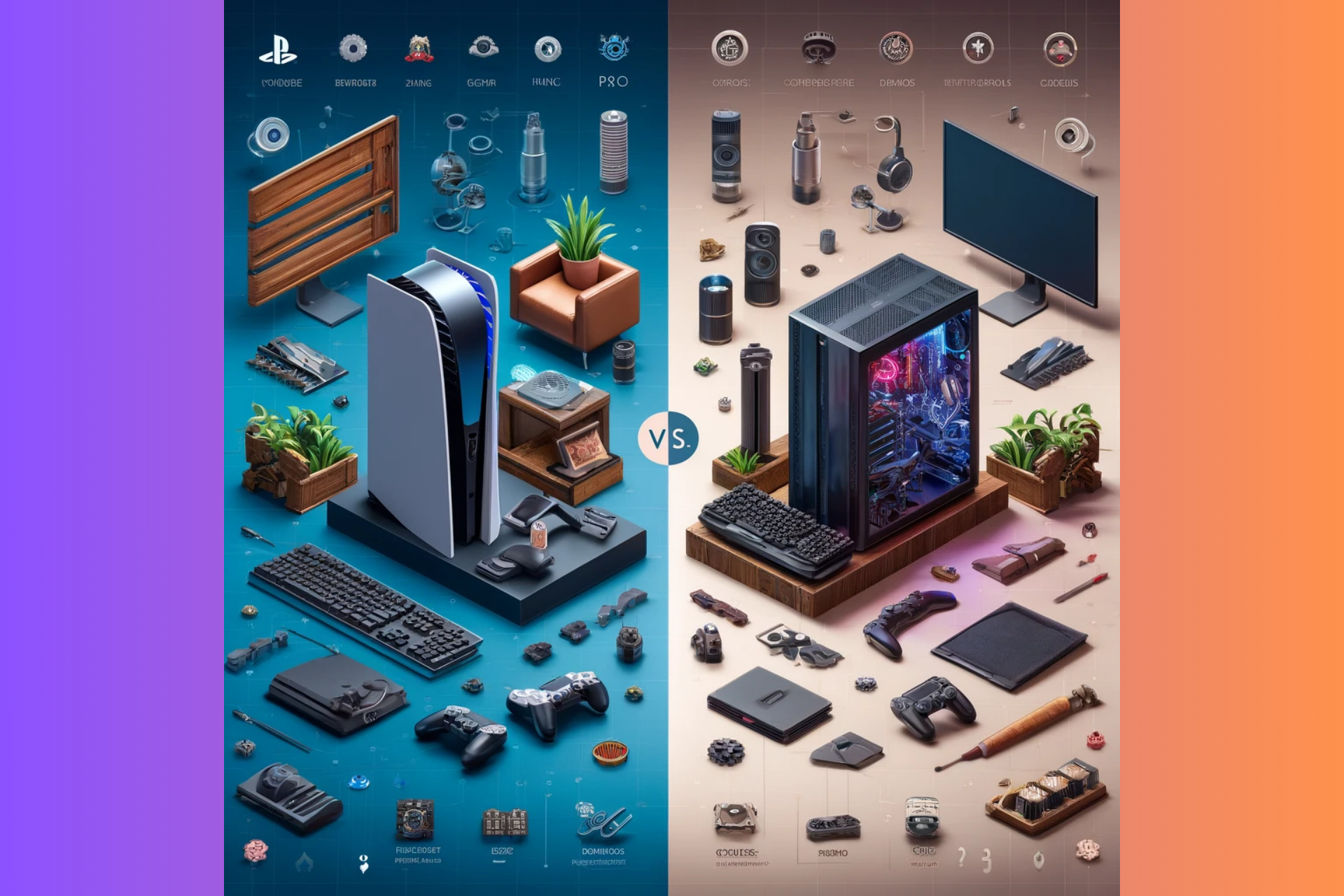
In a new console saga twist, the soon to be PlayStation CEO Hermen Hulst, stepped up and dropped a bomb on gamers in a recent keynote:
We are releasing our titles simultaneously, so day and date, on PlayStation 5 and PC, but with out tenpole titles we’re taking a more strategic approach and we introduce our new franchises to new audiences. We’re finding new audiences that are potentially going to be very interested in playing, for example, sequels on the PlayStation platform.
Hermen Hulst
What’s the new PlayStation strategy on releasing games on PC?
In a more simple, non-formal translation, Hulst believes that bringing those titles to PC will eventually lure you into buying a PlayStation console because you will want to play some sequels to those games. So, if we’ve got this right, the strategy is pretty obvious: get the first game on PC to make players interested and know about your games, then drop the sequel exclusive to PS 5. So, if you really like the game and want to see what’s going on next, you’ll need to hit the store and buy a PlayStation.
While we understand the business model for this strategic move, there might actually be two outcomes here. In the first one, it might really work and some of the players will really go and buy those PS 5 consoles.
The second scenario is grimmer because if the players don’t know from the start that the sequels will only be featured on PS 5, Sony will deal with many angry gamers.
If we didn’t understand the strategy correctly and Sony will keep launching the sequels to the same title on PC, why would players flock to buy a PlayStation 5 console? PC players are usually tech savvy and nowadays, they can build gaming rigs that are a lot more powerful than a PS 5.
We’ve learned about this whole story from Tom Warren X post and the gamers’ comments point out exactly the same arguments:
Entice PC players to spend another $500 on a system weaker than the one they prefer to play on. Okay. Lol.
In the end, the gamers will actually decide if this strategy is right or wrong, but it’s potentially damaging to lure players this way, unless you clearly point out that the sequels will be exclusive titles.
It’s a lot to debate on this, so let’s talk about it in the comments below.
YouTube is constantly adding and testing new features to improve its service, and recently the company started testing something that nobody expected.
So what is this new feature? For the first time, you can finally play games directly on YouTube.
Playables are finally available on YouTube, here’s what you should know
According to the YouTube support page, the company is testing games, known as Playables, on both desktop and mobile devices.
The feature was tested by a limited group of users, and now it’s available for testing to more users in the US, Great Britain, Canada, and Australia.
You can find Playables in the Explore menu or you might see the games in the Home feed or search results.
It’s worth mentioning that you can view and control the Playable’s history and progress through the YouTube History section.
Regarding the available games, the YouTube blog states that there are more than 75 games to choose from, including classics such as Angry Birds Showdown, Cut the Rope, Trivia Crack and more. You can even share games with your friends using the three-dot menu.
If you ever get tired of watching videos and you want to relax, be sure to give these games a try, if you’re in a region that has them available.
Google has started to work to warn Manifest V2 Extensions deprecation in Chrome Canary, beta, and dev versions. Chrome will begin alerting about these extensions in June 2024.
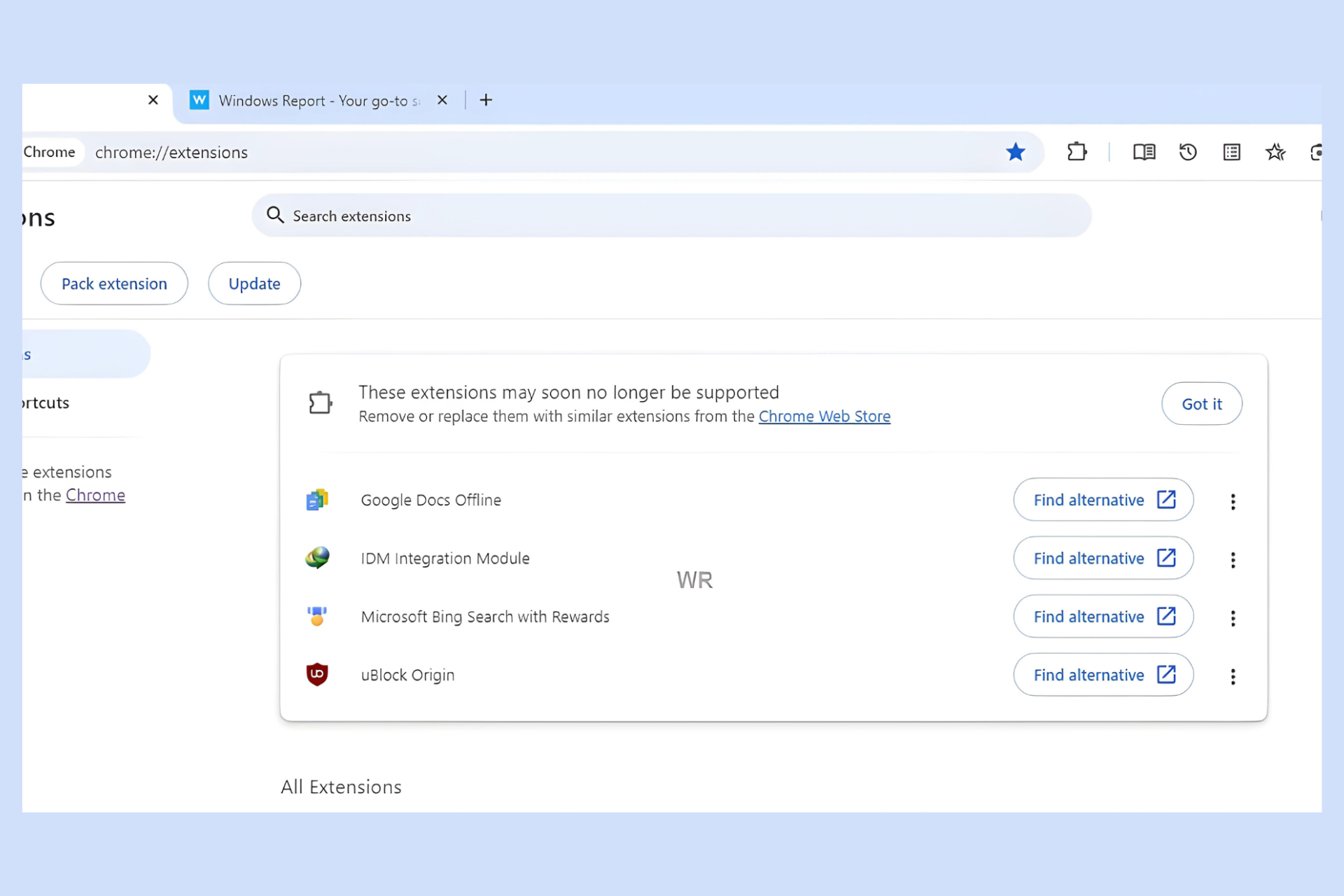
Guess what, Chrome Canary has already started alerting users that UBlock Origin and other MV2 extensions may soon no longer be supported, with alternate and other options for you to act on.
Chrome and the Chrome Web Store are transitioning from Manifest V2 to Manifest V3 for extensions, citing performance and security improvements. According to the proposed timeline, Google will disable Manifest v2 extensions in Chrome 127, starting with Canary, Dev, and Beta channels.
This means affected extensions will be disabled, and users will no longer be able to install Manifest v2 extensions from the Chrome Web Store.
Chrome Canary will display a header at the top of the chrome://extensions page warning users that these extensions may soon no longer be supported. The message will suggest removing affected extensions or replacing them with similar ones from the Chrome Web Store.
For each affected Manifest v2 extension, Chrome will offer a Find Alternative link on the Web Store alongside menu options to Keep for now and Remove from Chrome. Selecting Keep for now removes the warning for the specific extension, but it may reappear in the future and eventually lead to the extension being disabled entirely.
The curious case of UBlock Origin
As shown in the screenshot above, UBlock Origin, which relies on Manifest v2, is included in the list of affected extensions. This has caused concern among users and developers, including those associated with UBlock Origin. While Google seems to be favoring Manifest v3 extensions, you might still be able to use UBlock Origin temporarily. However, it’s likely to become incompatible eventually.
UBlock Origin Lite
The developer has prepared a Manifest v3 version of UBlock Origin called UBlock Origin Lite. However, as the name suggests, this is a basic version and may not offer the same functionality as the full UBlock Origin extension.
Are you using UBlock Origin? What do you think about Chrome blocking the Manifest v2 extension? Let’s talk about it in the comments below.
Microsoft discovered Moonstone Sleet, a group of hackers from North Korea. Their malware and ransomware are similar to the ones used by the Lazarus Group. On top of that, the group of cyber terrorists targets individuals and organizations related to technology, education, and more.
How does the Moonstone Sleet operate?
The wrongdoers from the Moonstone Sleet use fake identities or businesses to attract their targets. Then, they send trojanized versions of legitimate tools. In addition, the attackers created a playable malicious game and a new custom ransomware.
Moonstone Sleet uses a mix of malware and techniques. Some are unique to the group, while others are similar to the ones used by other hacking groups from North Korea, such as the Lazarus Group. For example, the wrongdoers from Moonstone are reusing the code of the Comebacker malware.
The members of the Lazarus Group previously used Comebacker in Python and npm packages. This allowed them to download malicious tools from a server controlled by them.
The wrongdoers targeted IT workers using popular platforms
In August 2023, the Moonstone Sleet started using Linkedin, Telegram, and developer freelancing platforms. This way, they tricked IT workers into downloading a trojanized version of PuTTY, an open-source terminal emulator.
For instance, in most cases, the threat actors sent a .zip file containing two files: a trojanized version of putty.exe and an url.txt with an IP and password. If the target typed the data from the url.txt, the malicious code would have started decrypting a hidden payload. Then, the malware would allow the Moonstone Sleet to steal data, access the system, or deploy more viruses.
The trojanized version of PuTTY also drops another malware known as SplitLoader. During the last stage of infection, the virus drops a trojan that decompresses, decrypts, and executes a PE file received from a C2 server.
Besides using the PuTTY malware, the hackers from Moonstone Sleet also sent .zip files containing malicious npm packages, claiming they were technical skills assessments. Once executed, the packages connected to an actor-controlled IP address and deployed payloads similar to SplitLoader.
In addition, the Moonstone Sleet deployed malicious npm loaders that facilitated credential theft via Windows Local Security Authority Subsystem Service (LASS).
The attackers developed a malicious game
These threat actors developed a game that works, known as DeTankWar, and distributed it through emails and messaging platforms. Also, they set up fake websites and X accounts for the game.
The group often presented itself as a game developer looking for investments or developer support. Additionally, they either disguised as legitimate companies or created fake ones. For example, they used the name C.C. Waterfall and sent the malicious game to developers pretending to be a blockchain-related project.
The .exe file of the game contained YouieLoad, a malware that loads next-stage payloads into the memory. On top of that, it creates viruses for network and user discovery and data collection.
Moonstone Sleet had another fake company known as StarGlow Ventures. They pretended to be a software development company seeking collaborations for web apps, mobile apps, blockchain, and AI.
The hackers from the Moonstone Sleet also targeted a defense technology company with the FakePenny ransomware and asked for a $6.6 million ransom in Bitcoin.
Ultimately, to protect your company from threat actors like the Moonstone Sleet, Microsoft advises you to be on the lookout for supply chain attacks. In addition, you should use antimalware software and inform other people working with you about ransomware and malware. After all, your whole network might be affected.
Do you think that the Moonstone Sleet is a real threat? Let us know in the comments.
Logitech announced the release of the second version of its popular MeetUp camera, MeetUp 2, which will be released in August. It can already be pre-ordered here.
The new camera costs around $899.00, and if you think that is way too much for such a tool, you’re not entirely wrong. But Logitech says it’s worth it.
MeetUp 2 is an AI-enhanced camera prepared for use in different situations. It can be connected to a PC-based setup, but it will also work in a bring-your-own-device (BYOD) situation. It also has a speaker with a bass reflex enclosure and patented suspension design, microphones with AI-powered noise reduction and echo cancelation, and voice detection.
The entire list of specifications can be found on the official site, but they’re many and varied, and Logitech made sure its new MeetUp 2 camera meets the current expectations of AI technologies.
Interestingly enough, MeetUp 2 might be the right camera for Microsoft Teams. Like its predecessor, this camera is compatible with the platform, but its new AI capabilities might make a perfect match with Teams.
As you already know, Teams has dozens of AI capabilities for peripheral tools, such as cameras. One of them is called Intelliframe, and with it, Microsoft Teams can automatically detect who’s speaking following the participants in a meeting.
It uses the camera to visualize the participant, and then it looks for that participant in the meeting database, automatically identifying them and displaying them from various perspectives. Intelliframe was announced last June, but it was only added to Teams in November 2023, so the capability is still new.
Using a camera such as MeetUp 2, Teams’ Intelliframe will be enhanced to provide an almost natural interaction of a hybrid setting, bringing these sorts of meetings closer to face-to-face meetings.
Logitech seems to be pointing in that direction, too, with the newest AI-powered capabilities of the MeetUp 2 camera, RightSight 2, and RightSsound 2. Both will create a natural-looking and sounding perspective, even when from afar.
Unlock AI video and audio features through the built-in CollabOS operating system. Additionally, users can experience integrations with Microsoft, Zoom, and Google for a more intelligent meeting experience.
Logitech
If your organization already uses Teams as its main productivity platform, consider getting one later this year.
After they departed from Rocksteady, Sefton Hill and Jamie Walker, the co-founders of the gaming studio, created a new one named Hundred Star, and Xbox Gaming Studios offered them a deal for a new game. It should be a AAA-standard, single-player, action-adventure game based on Unreal Engine 5.
The new game from Hundred Star and Xbox might be similar to Batman: Arkham
There aren’t many details about the game. It could be related to Batman: Arkham. Yet, the chances are slim because Rocksteady might be working on it. However, now, they are focused on updating Suicide Squad: Kill the Justice League.
Even if the game created by Hundred Star with the help of Xbox Gaming Studio isn’t related to Batman: Arkham, we might see some gameplay similarities.
Because Xbox Gaming Studio is financing the game from Hundred Star, it can be a platform exclusive. Yet, it might become available on PC. However, Xbox is trying a multiplatform approach with some games like Hi-Fi Rush. So, after a while, other consoles might receive the game.
Hundred Star has around 100 employees, and 20 of them previously worked on Suicide Squad: Kill the Justice League. Besides, Sefton Hill is responsible for some of the best games from Rocksteady, such as Batman: Arkham Asylum, Batman: Arkham City, and Batman: Arkham Knight. So, the new game made by Hundred Star in collaboration with Xbox is in good hands.
Hundred Star is hiring
According to Great Place to Work, employees at the Hundred Star are happy with the company. If you want to work with them, go to their website. However, to find details about their careers, you will have to send an email to [email protected] or [email protected].
We might hear more about the new Hundred Star game from the Xbox Games Showcase on June 9, 2024. In addition, we will most likely see new games from Activision, Blizzard, Bethesda, and Xbox Game Studios.
Ultimately, the new game from Hundred Star, funded by Xbox Gaming Studios, could become the next big title. After all, the co-founders of the studio are experienced. We can’t wait for the Xbox Games Showcase, and we hope that they will tell us more details about this project.
Do you think the new game will be similar to Batman: Arkham Knight? Let us know in the comments.
If you were wondering how often to clean the Xbox consoles, there’s no one-size-fits-all answer. As long as the console is in a well-ventilated environment with minimal airborne dust, perhaps once every few years. But if you are a heavy smoker or the console is in a dusty area, consider cleaning it once or twice a year.
Most of us often forget to do so because the console doesn’t show any signs of malfunction. Remember, dust accumulation, in the early stages, causes issues like minor overheating and stuttering in games.
The real problem appears later down the line when the air vents get choked, impacting effective heat dissipation. If you haven’t woken up by this point, the fan, optical drive, or internal components run the risk of getting damaged.
But why discuss it today? That’s because I recently came across a post on Reddit where a user who goes by the name DarthLigMauI shared a rather frightening experience, at least to me, it is!
DarthLigMauI lent the Xbox to a brother and, upon receiving it a year later, found that it kept shutting down automatically when overheating. Out of curiosity, he opened the console up and was shocked to find a significant dust buildup.
One look at the photo got me wondering how the device ever turned on in the first place!
This is your reminder to regularly clean the Xbox console. And if you are not sure how to do so, perhaps get in touch with a professional. Although, a brush and a can of compressed air should be sufficient to clear minor dust deposits.
Unbated dust accumulation can also trigger the Xbox ventilation error, which is another sign to clean the console!
When was the last time you cleaned the Xbox console? Share with us in the comments section.
Dragon Age series has introduced modern audiences to the fantasy RPG genre, and it’s no surprise that many are waiting for the latest installment impatiently.
Speaking of which, it seems that the game was spotted on the Xbox app and it reveals some important information.
Dragon Age: Dreadwolf is coming this summer, Xbox app reveals
As Gamereactor reports, a few keen-eyed users spotted the new Dragon Age game on the Xbox app for mobile.
If you search for the game, you can see its page in the app with the option to download it to the console. Of course, this option doesn’t work since the game isn’t out yet.
However, there’s a description available that states Full release summer 2024. This is exciting news if it turns out to be true, however, Bioware is keeping all the information under wraps.
Many are hoping that the game will be shown during Xbox Games Showcase on June 9th and that we’ll finally get the official release date.
There is nothing worse than trying to launch Tarkov and getting hit with error 103003. Being a multi-player game, this means you’ll be missing out on all the online matches fun.
Typically, the error 103003 means you’re unable to connect to the servers so always check for a maintenance or downtime schedule. If everything checks out, it could indicate an issue with the game files or an antivirus that is blocking the connection.
How do I fix error 103003 in Tarkov?
1. Run the BSG launcher as administrator
Open File Explorer and navigate to: C:/Battlestate Games/BsgLauncher/
Right-click on the BSGLauncher.exe and open Properties.
Choose the Compatibility tab. Check the Run this program as an administrator and click Apply and OK to save changes.
Now start the Tarkov game again and check if the error 103003 makes an appearance.
2. Adjust your resolution settings
Press the Win + I buttons to open Settings.
Select Display.
From the Display resolution drop-down, select the resolution that matches your Tarkov game.
3. Reset game settings
Hit the Windows + E keys to open File Explorer.
Navigate to the following folder: C:\users\USERNAME\documents\escape from tarkov
Locate the local.ini and shared.in files then delete them. If you can’t find them in this folder, do a search in all drives.
Try launching Tarkov again and see if the error 103003 reappears.
Whereas tailor-made configurations can make the game more enjoyable, some may conflict with each other and throw up errors. Deleting these files will reset the game to its default configurations and the deleted files will be recreated.
Locate Tarkov, right-click it, and choose Properties.
Navigate to Local Files. Next, click on Verify integrity of game files.
Wait for the process to complete.
Once finished, check if the problem is resolved.
5. Bypass firewall
First, you’ll need to have total control over the Escape From Tarkov folder.
Go to the Escape From Tarkov folder on your computer.
Right-click the folder and in the context menu, select Properties.
Click on the Security tab.
Under the Security tab, click Advanced.
Click Change next to the owner’s name near the top.
In this new window, click Advanced.
Now in another new window, click Find Now.
Locate your username and then click the OK button.
Click OK in this new window.
Click Apply in the following window and then close everything.
Now search for and open Windows Defender Firewall on your computer.
Click Advanced Settings on the left-hand side.
In this new window, click Inbound Rules on the left-hand side.
Select New Rule on the right hand side.
In Rule Type, select Program and click Next.
Click This program path and then Browse. Locate the Escape From Tarkov file.
Once you’ve found Escape From Tarkov and added it to the Inbound Rule, click Next.
If you’re using a private computer, click Allow the connection. Or if you prefer, Allow the connection if it is secure – for that extra level of security.
Click Next when done.
Select when to apply the rule.
Give a name to the rule and a description if you like. Then click Finish.
6. Reconfigure the NVIDIA 3D settings
NOTE
This solution only applies to PCs with the NVIDIA graphics card.
Open the NVIDIA Control Panel, expand 3D Settings, and then click on Manage 3D settings.
Click on the Restore button.
Choose the appropriate response in case a confirmation prompt appears.
The NVIDIA Control Panel ensures that the game’s graphic settings are optimized for compatibility and performance purposes. Over time, these settings may become incompatible especially with software conflicts so resetting it to default will clear any issues and reset values to their default state.
You can also try using another VPN or reinstalling the game and see if the error 103003 disappears. Sometimes, when the server is overloaded, Tarkov may fail to launch or experience packet loss. Changing servers can help address such issues or the backend error.
Another frequent problem is Tarkov error 228, which you can fix with a few quick steps.
When it comes to Escape from Tarkov, errors on post are quite common but we’ve narrowed down the causes and how to fix them.
To minimize the occurrence of such errors, ensure to keep your game updated at all times, and regularly check the server status for any updates.
If you have managed to fix this error with any of the solutions above, let us know in the comment section below. And if you have any other solution not mentioned here, do let us know.
Windows Autopilot has been around since 2017, helping IT administrators set up new devices. Over the years, it has undergone some change, but this time around, Microsoft is rolling out the next generation of Windows Autopilot device preparation with a wide array of new features.
With the next-generation Windows Autopilot device preparation, Microsoft plans to simplify the experience for existing customers and cater to a new segment, the government cloud customers. And the Redmond-based tech giant has confirmed that none of the existing features are being deprecated. Instead, they will be available alongside the latest innovations.
The improvements include profile configuration from a single screen, simplifying adding devices to groups, and better reporting with more detailed reports. Exhaustive reports will allow you to quickly identify what went wrong with the deployment and fix it, if that’s the case.
Using the upgraded Windows Autopilot device preparation, admins can now specify apps that must be installed during out-of-box experience (OOBE). This way, the critical apps are present on the device before it’s ready for use!
Microsoft also improves the OOBE for end users, allowing them to monitor the progress as the device is set up. And, there will be more recovery options.
Besides, Microsoft is committed to bringing additional features to the next-generation Windows Autopilot device preparation. These include,
1. Customize OOBE and rename devices during provisioning based on organizational structure. 2. Self-deploying and pre-provisioning mode. 3. Additional admin-specified configurations delivered before allowing desktop access. 4. Enhanced optional desktop onboarding experience inside the Windows Company Portal app. 5. The ability to associate a device with a tenant.
Right now, Microsoft is asking for your suggestions and feedback. You could share them in the comments section on Microsoft’s official blog. Perhaps your suggestion would make it to the new Windows Autopilot device preparation.
Everyone wants to convert non-editable PDFs to editable documents as seamlessly as possible, but currently, no one on the market has a converter that turns a PDF (or any other document) into an editable file while preserving its original layout.
Microsoft knows it, so the Redmond-based tech giant has been working on a technology that does that: converting non-editable documents into editable documents while preserving all of their original aspects, including fonts, colors, layouts, and visual elements such as images of different formats.
The system looks at the non-editable document and figures out the arrangement of various elements (like text, images, and tables), and it determines the positions and sizes of these elements using bounding boxes.
As used herein, the terms “non-editable document”, refers to an electronic document that cannot be edited by word proessing, presentation or design creation applications. Examples of non-editable documents include images (e.g., jpeg, GIF, PNG, etc) and PDF documents.
The system identifies the fonts used in the text within the non-editable document and then uses the AI model to choose the color scheme based on the colors used in the original document.
The system creates a new, editable document using the identified layout, fonts, and color scheme. This new document maintains the look and feel of the original non-editable document but allows for editing.
The technology converts non-editable PDFs into editable documents while keeping their original elements, but it also allows for resizing them while keeping everything intact.
In some implementations, the technical solution also offers automatic resizing of the editable document by preserving resizing the document in a manner that preserves aspect ratio of various elements in the document.
The technology would be a game changer for various reasons. It allows for faster conversion without worrying about misplaced parts or wrong fonts. Even though there are currently dozens of PDF converters on the market (we even have some recommendations for you), none truly converts a non-editable document into an editable one while keeping it intact.
Plus, the tech’s innovation lies in its resizing and visual preserving, which could be quite useful in a handful of situations, from preserving and editing archived files to giving new life to old documents.
Mini PCs might not be the most popular choice, especially when it comes to gaming, but ASUS plans to change that.
The company has unveiled a new mini-PC that packs quite a punch and can handle the latest games without breaking a sweat.
ASUS NUC 14 Performance announced, here’s what to expect
As reported by NotebookCheck, ASUS has unveiled a new high-end mini PC that is similar to ROG NUC. Regarding the specs, here’s what you can find:
CPU:
up to an Intel Core Ultra 9 185H, 16 cores (6 performance and 10 efficiency) and 22 threads, up to 5.1GHz
GPU:
up to an Nvidia RTX 4070 laptop
RAM:
up to 64 GB of DDR4-4400
Connectivity:
4x USB 3.2 Gen 2 Type-A ports One HDMI 2.1 port 2x DisplayPort 1.4a Thunderbolt 4 USB-C, 2.5G Ethernet port SD Express slot Audio combo jack
Weight:
800 g
Power supply:
330W
ASUS NUC 14 Performance offers an incredibly small and light design, so it can easily fit on any desk, and unlike its ROG counterpart, it has a sleeker design, so it’s suitable for business environments.
Sadly, there’s no information about the price, but it’s expected to be similar to ROG NUC, with a starting price of around $1600.
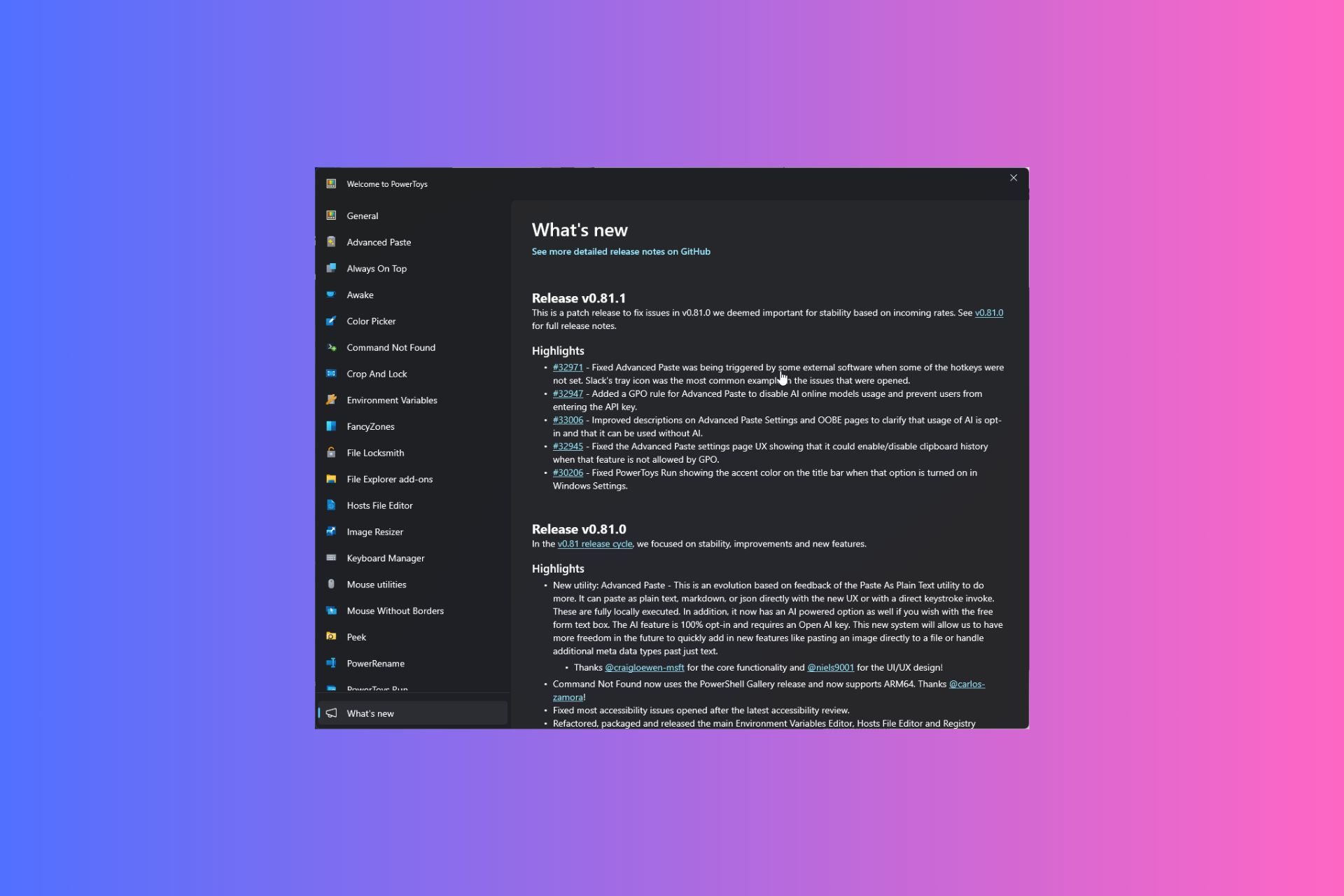
Last week, the PowerToys 0.81 version was released. A significant update introduced a new AI feature, Advanced Paste, which can convert anything you copy into another format.
Soon after the release, many users complained about issues with the newly added feature. One of the users, brainfoolong reported the issue on GitHub, in his comment, he mentioned:
Microsoft PowerToys version 0.81.0
Installation method – PowerToys auto-update
Running as admin – None
Area(s) with issue? – Advanced Paste
Steps to reproduce
I attach a video the shows the behaviour. On Windows, when i have closed slack into systray and then open a chat window, all clipboard data is automatically inserted into slack. Even files i have copied in file explorer.
This does not happen when i just minimize to task bar instead of systray.
I do not press any key. Just open with a click on the systray icon.
The only plugin i have activated is Advanced Paste (Screenshot bellow). If i disable just this plugin or close power toys, the auto insert is gone.
This started immediately after todays update to 0.81.0.
This behaviour can lead to serious data breach if you do not pay attention.
Once he mentioned the issue, many other users shared their experiences and issues with Advanced Paste. Therefore, the developers worked on the issues and released an update fixing them.
Here is the complete changelog for PowerToys version 0.81.1:
Fixed Advanced Paste was being triggered by some external software when some of the hotkeys were not set. Slack’s tray icon was the most common example in the issues that were opened.
Added a GPO rule for Advanced Paste to disable AI online models usage and prevent users from entering the API key.
Improved descriptions on Advanced Paste Settings and OOBE pages to clarify that usage of AI is opt-in and that it can be used without AI.
Fixed the Advanced Paste settings page UX showing that it could enable/disable clipboard history when that feature is not allowed by GPO.
Fixed PowerToys Run showing the accent color on the title bar when that option is turned on in Windows Settings
You can get the latest version of PowerToys from GitHub or download it from Microsoft Store. However, if you already have PowerToys, launch it, go to Settings> General, and click Check for updates to install the newest version.
Were you also facing issues with PowerToys’ Advanced Paste function? If so, download the latest update and share your experiences with our readers in the comments section below.
In the last month, several reports have emerged of a potential HubSpot acquisition by Google, talks for which are reportedly ongoing.
Yesterday, CNBC’s David Faber also hinted at an acquisition. He said,
There have been many reports about HubSpot being in conversations with Google. My understanding is absolutely true, all-stock deal for Alphabet to acquire HubSpot.
Following these reports, HubSpot stocks jumped 9% in Tuesday’s trade.
The potential HubSpot acquisition by Google was first reported by Reuters in April’24. It mentioned that Google’s parent company, Alphabet, had reportedly met with investment bankers at Morgan Stanley to discuss a suitable offer and whether the regulators would green-light the deal.
Sources privy to the matter suggest that negotiations between Google and HubSpot are ongoing, but a deal hasn’t been finalized yet. Another potential buyer may also emerge, according to a report in Bloomberg.
If it goes through, the deal would be the biggest this year and in Alphabet’s history, given HubSpot’s market evaluation of roughly $30 billion. However, both the involved parties have remained tight-lipped about the ongoing negotiations. A HubSpot spokesperson told Reuters,
As standard practice, HubSpot does not comment on rumors or speculation. We continue to focus on building a great business and serving our customers.
Google’s HubSpot acquisition a concern for Microsoft:
For the unversed, HubSpot develops marketing software for small and medium-scale enterprises, a key factor setting it apart from companies like Salesforce and Oracle, which specifically cater to large-scale clients.
It is HubSpot’s inherent focus on smaller companies that makes it a perfect investment for Google, which itself is eying a comfortable position in cloud computing, a landscape where Microsoft Azure poses a formidable challenge to Google Cloud and AWS (Amazon Web Services).
According to Statista, in Q1 2024, AWS, the biggest in the space, commands a 31% market share, followed by Microsoft Azure’s 25% and Google Cloud’s 11%.
Microsoft, in many recent collaborations, has had its partners switch their services to Microsoft Azure, including Seimens and Khan Academy.
With the acquisition in place, Google’s parent company, Alphabet, would make inroads into the small and mid-sized client base, in addition to providing it with crucial data that would help streamline the integration of AI in the native search engine.
As of now, we can only wait for an official confirmation from Google or HubSpot about the ongoing negotiations. But given how these deals usually proceed, it could take a while!
Do you think Google’s acquisition of HubSpot, if it goes through, would affect Microsoft’s standing? Share with our readers in the comments section.
Since the pandemic, Microsoft Teams has been facilitating hybrid work and communication, intending to make them more seamless and inclusive than ever before, whether it is creating meaningful connections via end-to-end event platforms, large-scale one-to-many digital events, or one-to-one meetings.
Microsoft introduced a new digital streaming event solution focusing on large events, Town Hall, in September 2023, and the Redmond tech giant has been working on evolving it with new and exciting features, including bringing multiple presenters on stage, accessing real-time health analytics for events and sending attendee emails,
This time, the company discussed its plans for Teams’ digital event platforms for the upcoming year, including two big news.
Based on customer feedback, Microsoft plans to support Teams Live Events until Town Hall gets the new features mentioned on the Town Hall adoption page, which are:
Engagement capabilities (certain Q&A functions: voting, filters, sorting, and archive questions; export questions to CSV/download Q&A report)
Device capabilities (MTR-W support for presenters and attendees and CVI and VDI support)
Advanced production experiences (producer role, queuing shared content, and preview scenes)
This shows the company’s commitment to making the transition seamless and useful for customers. Earlier, Microsoft was planning to retire the Teams Live Events in September 2024 but according to this new update, you can continue to use it to schedule instances beyond this date.
However, the company encourages users to upgrade to Town Hall and take advantage of new features as and when they are ready for the transition.
If you want to learn more about the upcoming update and feature timelines, you can check the Town Hall adoption page. For information related to Teams Live Events plans, you can read blogs, MC posts, and other relevant channels.
To conclude, Microsoft is working on adding new features and capabilities to Town Hall to enhance the streaming digital event experience, thereby making it more impactful for presenters and attendees. The company mentioned an increase in new customers trying Town Hall, total usage, and the number of hosted events, looks like there are on the right path.
What are your thoughts on the matter? Share your views with our readers in the comments section below.