How to Fix the Sea of Thieves Kiwibeard Error

A Kiwibeard error in Sea of Thieves could be an indication of server-related issues or you have multiple Gamertags accounts signed to your console.

Usually, if the server is down for maintenance, you’ll just have to wait it out but if it’s other issues like corrupt cache, you can troubleshoot it yourself and get back to playing.

How do I fix the Sea of Thieves Kiwibeard error?

1. Clear cached data

1.1 PS5

  1. Go to PS5 Settings and select Console Storage.ps5 storage
  2. Click Saved Data and Game/ App Settings.
  3. Check the boxes beside the files you intend to delete.
  4. Click on Delete to confirm the process. games and apps ps5

1.2 Xbox

  1. Press the Guide button on your controller.
  2. Navigate to Settings and select System Settings.
  3. Click on Storage.
  4. Highlight a storage device then press the Y button on your controller to open Device Options.
  5. Click on Clear System Cache under Device Options screen.
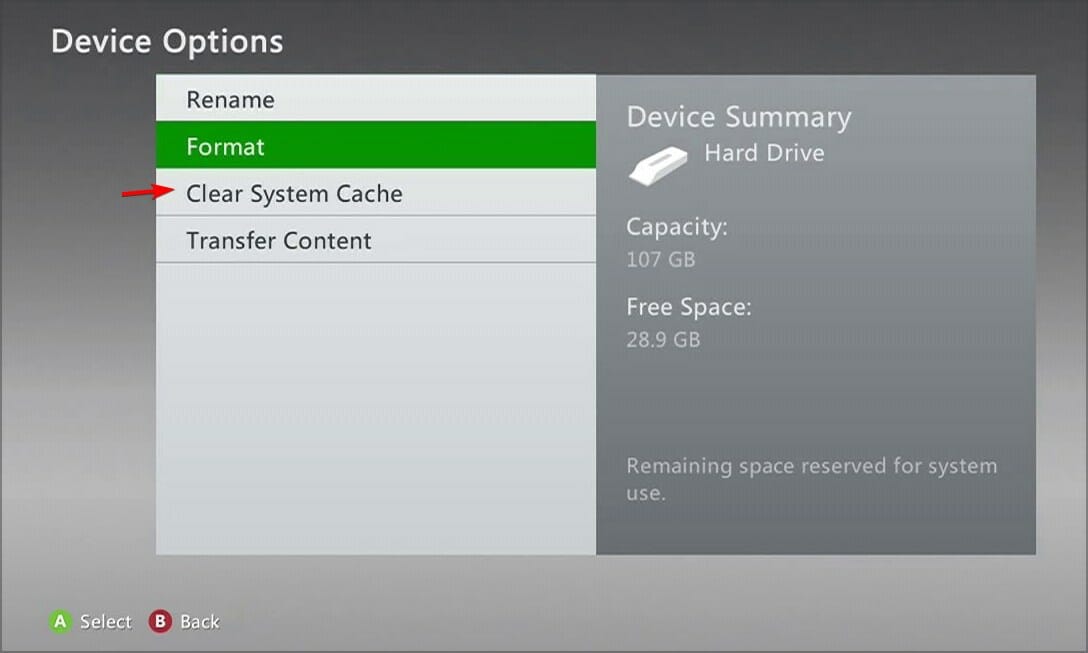
  6. Click Yes when the confirm storage device maintenance prompt pops up.

If you’re playing Sea of Thieves on your PC, proceed to clear your computer cache and restart your device. Also, verify that the server status is active as sometimes, there’s too much traffic and the servers can get overwhelmed.

2. Unlink Steam and Xbox Live account then relink it

  1. Start the Sea of Thieves game.
  2. On the Start Game screen or main menu, select Sign Out. 
  3. You’ll be asked to confirm that you want to sign out of your Xbox account. Select Yes.
  4. Check if the problem is resolved.

3. Reset your console

3.1 Xbox

  1. On your controller, press the Xbox button, and on the menu, click the System tab to open Settings.
  2. Select System, then click on Console info.
  3. Click on Reset console.
  4. Choose Reset and keep my games & apps.

3.2 PS5

  1. From the PS5 Home Screen locate and select Settings.
  2. Next, go to System and select Accessories.
  3. Here select General and Bluetooth Accessories.
  4. Under the heading Registered Accessories locate and select your controller.
  5. From the menu choose Delete.
  6. When prompted to forget the device, select OK.
  7. After that, pair your controller once again.

If none of these solutions come to aid, perhaps a little patience will do you some good. Sometimes it’s just a temporary error and waiting it out when the servers aren’t overloaded can fix the issue.

You can also get in touch with their support page or visit the community page where other players who have encountered the Sea of Thieves Kiwibeard error have come up with workarounds.

Other related issues include the alabasterbeard error which prevents you from running the game. And if you encounter any other issues where Sea of Thieves is not launching, we have a detailed guide on how to fix it.

Have you come across this error before? Is there any other solution you’d recommend that’s missing from our list? If so, drop us a comment down below. We’d love to hear your thoughts.

Meta brings much-needed generative AI tools for advertisers to boost revenue

Artificial Intelligence is finding increased applications in the advertising domain. It started with Microsoft Advertising, and now Meta has launched generative AI tools for advertising to help you create impressive ad variations and automate a significant part of the process.

This reduces the time spent creating ads and allows advertisers to focus more on running the campaign, helping them achieve the desired results.

Meta’s generative AI tools for advertisers

Starting with the most essential addition, Meta is introducing AI-powered image generation to advertising. You can now create full image variations and generate different backgrounds for the focus image.

Based on the example shared by Meta in the official blog post, generative AI does a fine job of creating multiple backgrounds.

Image source: Meta

The feature is already available, and in the coming months, you should be able to use text prompts to refine the variations further.

Next on the list is the ability to add text overlays to images used for ad campaigns. There are over a dozen popular pre-set fonts to choose from.

Besides, Meta is bringing image expansion to advertising. From now on, you will be able to create compelling ads with aspect ratios that perfectly fit every display, be it a laptop, mobile, or tablet.

Last on the list is AI-powered text generation, where Meta’s generative AI will suggest captivating variations for the ad’s headline and the text within. In the future, it will be able to recommend variations that align with the brand’s voice and tone based on the previous campaigns.

Highlighting the increase in revenue after using Meta’s generative AI tools for advertising, Wesley Ng, Founder and CEO of Casetify, said,

Meta’s investments in AI for advertisers have resulted in consistent performance for our business and allowed Casetify to focus on more creative and strategic work like building a creative diversification strategy. We continue to prioritize more of our advertising budget to tools like Advantage+ shopping campaigns and when we recently tested Meta’s GenAI Background Generation feature we saw a 13% increase in our return on ad spend. Meta’s investments in generative AI are helping businesses to make more ads faster and optimize their performance with the Advantage suite.

Meta has started rolling out all the generative AI features, which are accessible from Advantage+ Creative in the Ads Manager. It’s a gradual rollout, and everyone is expected to receive the new features by the end of 2024.

The improved Meta Advantage’s feature set, coupled with generative AI features, will streamline ad creation by automating the challenging aspects, help advertisers reach a wider audience, and, in turn, boost ad performance and revenue.

Meta is also planning to employ Llama 3, a language model that outperforms most of the available options, to build generative AI features targeting ads. So, advertising on Meta is about to get a lot more interesting!

What do you think about Meta introducing generative AI in advertising and whether it will help advertisers? Share with our readers in the comments section.

HUAWEI launches new laptop lineup: MateBook X Pro & MateBook 14

Despite the ban in the US, HUAWEI launched two new stunning laptops, the MateBook 14 and MateBook X Pro (2024), in other regions of the world.

The MateBook X Pro (2024), the superior version, comes with a magnesium alloy body with a matte finish and is available in Morandi Blue, Black, and White colors.

You can purchase this lightweight and thin laptop with 16GB/1TB for €2,000 and 32GB/2TB for £2,100 (only available in UK)

The MateBook 14 is a more affordable variant than the MateBook X Pro, but it is also a bit heavier and thicker.

This amazing laptop is available in Mystic Silver, Space Grey, and Green colors, and it will cost €1,100, while the 16GB/1TB variant (available in the UK) will cost £1,200. Remember that these prices are not universal and may vary depending on currency and region.

Also, you won’t find the MateBook X Pro 32GB/2TB variant and Matebook 14’s 16GB/1TB variant outside the UK.

Let us take a closer look at the technical specifications of both the MateBook X Pro & MateBook 14:

MateBook X ProMateBook 14
Memory 32 GB / 16 GB16 GB Dual-channel
memory
Processor Intel Core Ultra 9 processors 185H (Series 1)
Intel Core Ultra 7 processors 155H (Series 1)
Intel Core Ultra 7 processor 155H
Intel Core Ultra 5 processor 125H
GraphicsIntel Arc graphicsIntel Arc graphics
Storage 2 TB / 1 TB NVMe PCIe SSDA high-speed PCIe SSD up to 1 TB.
Screen ResolutionOLED, 3120 × 2080, 264 PPIOLED 2880 × 1920, 243 PPI
150-nit brightness
1920 Hz high-frequency PWM dimming
Screen-to-body Ratio: 91%
Display Screen size – 14.2 inches
Refresh Rate -120 Hz 
Maximum brightness: 1000 nits
10-point multi-touch sensitive screen
Screen size – 14.2
Refresh Rate – up to 120 Hz
Maximum Brightness – 450 nits
10-point multi-touch sensitive screen with finger gesture screenshot
Compatible with the HUAWEI M-Pencil (3rd generation) but needs  HUAWEI M-Pencil (3rd generation) suite
PortsThunderbolt 4 × 2 (Left)
USB-C × 1 (Right)
Support camera privacy switch × 1 (Right)
USB-C × 1
HDMI × 1
USB 3.2 Gen 1 × 2
3.5 mm audio jack × 1
Operating system Windows 11 Home/Windows 11 ProWindows 11 Home
Dimensions Width – 310 mm
Depth – 222 mm
Height – 13.5 mm
Weight – 980 g
Width – 312.6 mm
Depth – 226.8 mm
Height – 14.5 mm
Weight – 1.31 kg (including battery)
Battery life Material -Lithium polymer
70 Wh, which can last up to 19 hours, and with power saving mode, you get an extra 90 mins
Material -Lithium polymer
70 Wh, which can last up to 19 hours, and with power saving mode, you get an extra 90 mins
Connectivity WLAN : IEEE 802.11a/b/g/n/ac/ax,160MHz
2.4 GHz/5 GHz/6 GHz*
*Wi-Fi 6E connectivity may vary by region and local network.
This function can be added via OTA whenever available.
2 × 2 MIMO
WPA/WPA2/WPA3
Bluetooth: 5.3
WLAN: IEEE 802.11a/b/g/n/ac/ax, 160MHz
2.4 GHz and 5 GHz
2 × 2 MIMO
WPA/WPA2/WPA3
Bluetooth: 5.1
Keyboard

Touchpad with Multi-touch and HUAWEI Free Touch
Huawei Share Built-in
1.5 mm key travel
Full-size Backlit Chiclet Keyboard
Full-size Backlight Keyboard
Touchpad with Multi-touch
Power buttonFingerprint Power ButtonFingerprint Power Button
Camera1080P HD camera1080P HD camera
AudioSpeaker × 6
Microphone × 4
Microphone × 2
Speaker × 2
In the BoxHUAWEI MateBook X Pro
90 W / 65 W USB-C Power Adapter 
Charger cable (Type C)
HUAWEI USB-C OTG Cable 
Quick Sart Guide 
Type-C digital headset
HUAWEI MateBook 14
65 W USB-C Power Adapter (integrated connection between adapter and charging cable)
Quick Start Guide

What do you think about Huawei’s new lineup, MateBook X Pro and MateBook 14? Share your opinions with our readers in the comments section below.

Turtle Beach Recon Xbox controller is available at a 25% discount

When it comes to controllers, having a good and reliable controller is crucial for gaming sessions and Turtle Beach is well-known for its devices.

If you’re looking for a new wired controller, you’ll be pleased to hear that Turtle Beach Recon is available at a discount.

You can get Turtle Beach Recon Xbox controller at a great discount

Turtle Beach Recon is a wired controller, and it works with Xbox One, Series X|S, and PC. It comes with a 3.5mm headset jack allowing you to use various built-in Turtle Beach audio enhancements.

Unlike with regular controllers, you can change equalizer presets, game or chat volume, or monitor your microphone level right from the controller.

The controller also has a Superhuman Hearing feature that offers immersive audio and a potential advantage in gaming.

In addition to standard buttons, it also has two programmable buttons at the bottom that you can use to enable Pro-Aim Focus Mode or configure them any way you like.

This is an amazing controller because it provides an easy way to configure your audio and volume levels making it perfect for all users with a headset.

If you need a multi-platform wired controller, go to Amazon and grab it while the discount lasts. In case you prefer a classical controller, you can now access Star Wars Outlaws themes in Xbox Design Labs.

That’s not all, Microsoft dropped its latest controller tagline after fan backlash, so maybe the Turtle Beach Recon controller doesn’t sound like a bad alternative?

Clippy’s new job is to debloat your Windows, but it’s still annoying

If you used Windows computers in the 1990s or early 2000s, you must have seen Clippy, a paperclip-shaped digital assistant that helped you perform tasks in Office versions from 1997 to 2004. I remember it as a cute little thing that used to bounce around and offer suggestions while using Microsoft Office.

However, the Redmond tech giant removed Clippy in 2007 due to complaints that it was irritating and unhelpful. Fast forward to 2024, and it has made a comeback, but not with Windows; instead, it is through an open-source third-party utility called Winpilot.

Recently, Winpilot’s latest update introduced Adblocker for Windows 11. The app is known to remove bloatware and ads from Windows 11 computers.

Winpilot, designed by German developer Belmin Hasanovic in 2023, was previously called BloatyNosy, and with the 2024.5.6 version, it added Tiny11builder, a utility that can help you customize your Windows 11 install ISO.

Furthermore, it included turning off personalized ads, removing preloaded bloatware, restoring full context menus, and disabling Bing Cloud content search. Now, you must be wondering how Clippy fits into this. To help you navigate the several features of Winpilot, Clippy and its interaction bubble sit at the top of the app’s user interface.

Same as before, it will probe you by suggesting activities with phrases like Debloat my system or Check the Windows version.

If you want to choose any of the options, you might get a random suggestion or comment, and sometimes these comments are hilarious.

Alternatively, perform an action like removing bloatware. You will see the task confirmation or status at the bottom of the speech bubble, where you generally see comments by Clippy.

It could be helpful for someone who wants to have fun with the software or loves to read the quirky comments, but apart from that, after all these years, Clippy is still annoying.

And, when you close the speech bubble, you may see a text box saying – Ask the savvy Clippy, which indicates that it could help you search features in Winpilot using natural language. However, the search is very basic and doesn’t usually come up with results.

If you want to try Winpilot, you can download it from its GitHub page, but remember that it is third-party software, so you need to be careful when installing it on your device.

Once installed, the app automatically turns off all types of ads and helps you customize your Windows according to your needs.

Have you tried Winpilot’s latest feature yet? If so, share your experience with our readers in the comments section below.

A weird bug auto changes the desktop wallpaper to a Minecraft-themed one, leaving folks confused

In the last few days, we have come across a few reports of Windows users finding a Minecraft-themed desktop wallpaper. On subsequent reboots, the problem seems to disappear, but only after leaving everyone thoroughly confused. And instances of the bug keep increasing with each passing day!

So far, Microsoft hasn’t officially acknowledged the bug or shared a patch.

The problem with such bugs is that they are awfully similar to a successful hacking attempt. When threat actors gain access to your PC, you often see a different desktop wallpaper. And this time too, a similar pattern is observed, although it’s not a result of hacking.

The desktop wallpaper bug is leaving everyone perplexed

When we started researching, several users took to Microsoft’s dedicated forum to share their experience of seeing a Minecraft wallpaper automatically set on the desktop. Here’s what they wrote,

I restarted my computer the other day. Today, I log in and everything looks normal, even my desktop background. I just closed all my tabs and was SO confused when my background was an image of Steve playing in a field with Minecraft bees. Am I going insane? Did someone change my background? What is going on??

I feel like normally it changes every day, but it’s been minecraft for several days now.

Normally the automatic wallpapers are a random landscape or landmark or something! The fact that it was a branded image like that literally made me think it was malware of some sort.

How do I get rid of Minecraft-themed desktop wallpapers?

As of now, there’s very little information about the issue, making it tricky to identify the underlying cause. But disabling Windows Spotlight or uninstalling Minecraft might help.

  • Disable Windows Spotlight: Press Windows + I to open Settings > go to Personalization from the left pane > click on Background > select Picture from the Personalize your background dropdown menu > choose any desktop wallpaper.
  • Uninstall Minecraft: Press Windows + I to open Settings > go to Apps > select Installed apps > locate Minecraft > click on the ellipsis (three dots) next to it > choose Uninstall > confirm the change.
Setting a picture as the desktop wallpaper

If Windows Spotlight sourced a Minecraft-themed desktop wallpaper, disabling it would do the trick. And if the bug lies in the game itself, uninstalling it is the best option right now.

When nothing works, discover our verified solutions to prevent the desktop wallpaper from changing automatically.

If you have been affected by the automatic Minecraft desktop wallpaper bug, share your experience with our readers in the comments section.

Why is Microsoft switching the RAM speed measuring to MT/s? What does that mean?

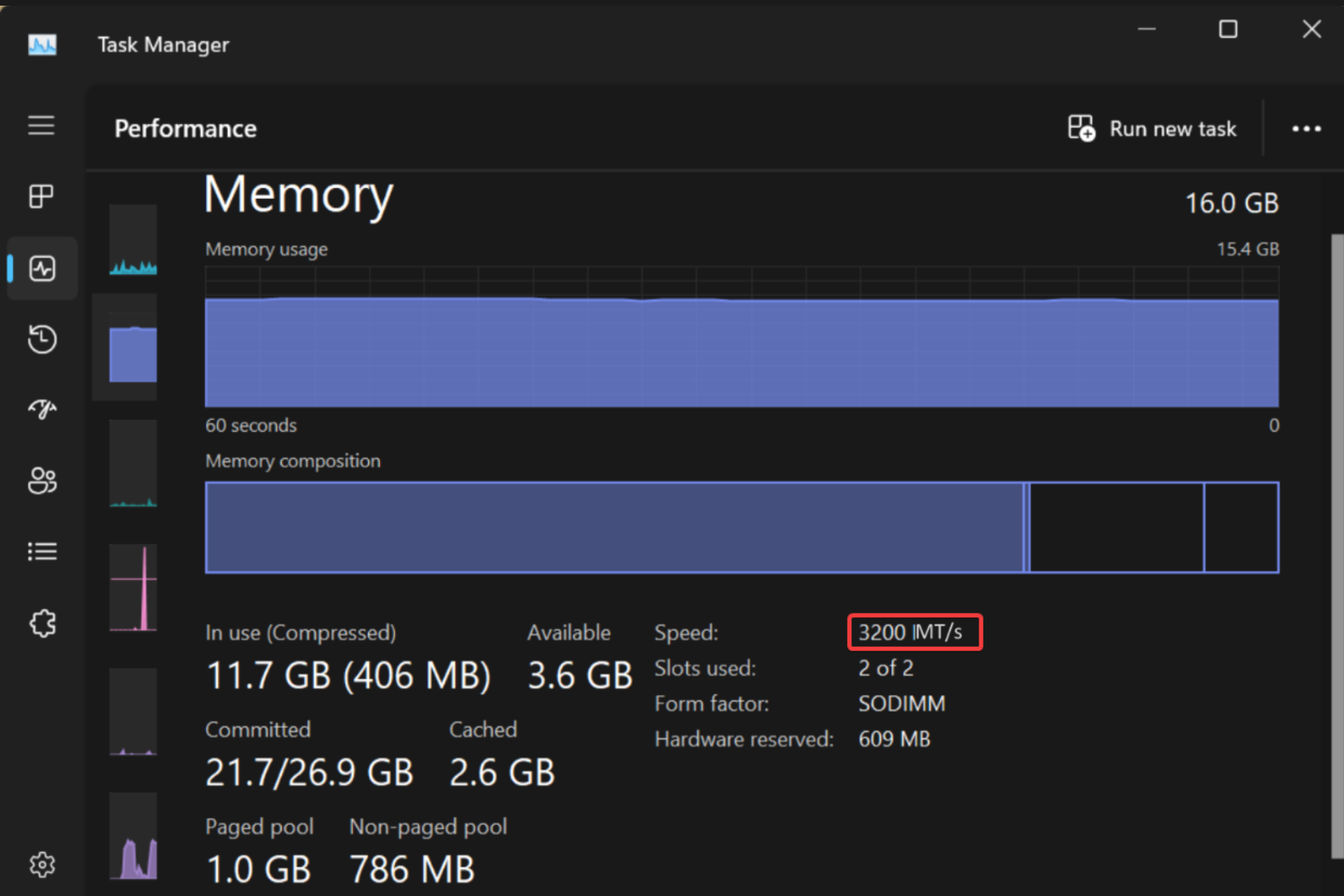
Microsoft recently improved Task Manager with a few important changes and one of them is that soon, it will show you the RAM speed in MT/s instead of MHz. However, the change might be confusing for many, so let’s clear this matter a bit.

Why is the MHz to MT/s RAM speed switch so important?

Well, it’s about understanding what’s under the hood of our computers. When you’re upgrading your RAM or troubleshooting performance issues, knowing the real transfer speeds can help make more informed decisions.

Back in the day, when SDRAM was the norm, MHz was a fine measure because it matched the number of transfers per cycle. But then DDR (Double Data Rate) RAM came along, and with it, the transfers per cycle rate doubled. Basically, the MHz count doesn’t quite reflect the whole story. For instance, what was advertised as 6000 MHz was really 3000 MHz in terms of clock speed but could handle 6000 MT/s. And with advancements like GDDR5X and GDDR6 in graphics cards, using MHz or GHz became even more misleading.

So, Microsoft’s shift to MT/s in Task Manager is not a cosmetic update, but a switch that is absolutely needed for the sheer accuracy of the RAM speed. If you want to see this change, it’s rolling out to beta users first, with plans to extend to all Windows 11 users eventually.

Interestingly, this update comes at a time when Windows 11’s market share is seeing a bit of a dip. Some users are switching back to Windows 10, possibly due to the increase in ads within the OS.

The bottom line is that this change is not going to affect the average Windows user. Whether it’s MHz or MT/s, what really matters is how well your system meets your needs, right? Tell us your opinion in a comment below.

Microsoft changes its controller tagline after fan uproar

We saw all sorts of controllers from Xbox, and the company has recently added a new controller to the Fire Vapor series.

Unfortunately, the launch of this controller was met with controversy, so here’s what happened.

Recently announced Xbox controller drops the Feel the burn tagline

As you may know, Microsoft has recently closed several Xbox game studios, and this decision left many gamers upset because their favorite studios shut down.

To make matters worse, Microsoft has announced a new member of the Fire Vapor Special series of Xbox controllers on the same day, with a tagline Feel the burn today.

Following the closure of several beloved studios, this tagline didn’t sit well with gamers, so Microsoft was quick to drop it.

We don’t know if this was Microsoft being cheeky with its tagline or if was it unintentional because the controller has a distinct fiery design.

However, it’s certain that fans didn’t find this amusing, and the tagline has since been removed.

In other news, the Elite Wireless Controller Series 2 paddle problem is now resolved, so you can go back to gaming.

That’s not all, new Xbox update preview makes finding deals easier for Insiders, so you might want to check it out.

OpenAI’s Media Manager tool will allow you to protect your AI generations

OpenAI is developing Media Manager with the help of creators, content owners, and regulators. The tool will allow them to identify AI generations and control how others use their content. Thus, the manager will let them choose if they want their content included or excluded from AI training. Also, the company wants to bring the new tool in 2025.

Could OpenAI’s Media Manager reshape the AI industry?

Even with the existing rules, the content of creatives is not safe from AI data scraping. So, they need new ways to protect their creations. Thus, OpenAI believes that the Media Manager will set new standards for the AI industry and bring the fair use of AI.

Last summer, OpenAI showed its support by applying web crawler permissions for AI. The process is similar to using robots.txt files on a website. If you didn’t know, these files prevent the web crawlers from accessing specific parts of websites. Thus, the Media Manager could have this feature.

Unfortunately, it is difficult for creatives to control online content. After all, it spreads through shares, reports, quotes, and many other methods. For example, a reverse image search will show multiple sources for the same picture. So, to make the Media Manager efficient, it is mandatory to train it to identify copyrighted content from various places.

One of the goals of OpenAI is to empower content creators. In addition, the company wants to enhance user experience by focusing on quality over quantity. Thus, OpenAI will bring more transparency about its practices and collaborate with data sources.

Can ChatGPT provide links to the sources it uses?

The Media Manager might receive a feature for enhanced source linking since OpenAI added it to ChatGPT. Also, this method facilitates the opportunity for users to connect with publishers. On top of that, the company announced new partnerships with global news publishers such as the Financial Times to share their content on ChatGPT.

In addition, OpenAI will train its AI models on more diverse datasets featuring various languages and cultures to strengthen inclusivity. This method will boost AI’s abilities to help a broader audience. On top of that, this procedure could help mitigate cultural bias.

In a nutshell, OpenAI’s Media Manager could change the AI industry and start a new trend that protects generated content from AI scraping. Also, source linking could benefit publishers who are afraid that people won’t interact with their content due to the use of AI.

What do you think? Will the Media Manager tool help its users? Let us know in the comments.

ASUS might have 14 new AI-ready laptops packed with AMD Strix Point APUs and NVIDIA RTX 40 GPUs

According to leaked information from ITHome ASUS is making waves with its ambitious plan to launch a whopping 14 next-gen laptops across its ROG, TUF, and ProArt lines, all powered by AMD’s cutting-edge Zen 5-based Strix Point APUs. This news has tech enthusiasts buzzing, especially with the promise of these laptops being equipped with NVIDIA’s RTX 40 GPUs, a combination that spells a significant leap in computing and gaming performance.

ASUS’s lineup is not just about sheer numbers; it’s a showcase of diversity and power. From the gaming-centric ROG Zephyrus G16 models to the robust TUF Gaming series and the creatively inclined ProArt laptops, ASUS seems to have something for everyone. Each model is tailored to meet the specific needs of its target audience, whether it’s for high-octane gaming sessions, content creation, or professional workloads, ensuring that no matter your passion, there’s a laptop for you.

What’s all the buzz around the new Asus laptops?

What’s particularly exciting is the technical prowess these laptops promise. The AMD Ryzen Strix Point APUs, belonging to the Ryzen 9000 series, are expected to feature a hybrid design that combines the power of Zen 5 and Zen 5C core architectures. This means we’re looking at chips that are not only more powerful but also more efficient, thanks to their 4nm design. Add to this the support for LPDDR5X memory and an XDNA 2 NPU capable of delivering up to 50 AI TOPS, and you’ve got the recipe for some seriously fast and smart laptops.

Here’s the upcoming ASUS laptop lineup according to ITHome:

ASUS ROG Zephyrus G16 (AMD Edition)

  • GA605WU: Strix Point + RTX 4050
  • GA605WV: Strix Point + RTX 4060
  • GA605WI: Strix Point + RTX 4070

ASUS TUF Gaming (A14 Series)

  • FA401WU: Strix Point + RTX 4050
  • FA401WV: Strix Point + RTX 4060
  • FA401WI: Strix Point + RTX 4070
  • FA401UU: Hawk Point + RTX 4050
  • FA401UV: Hawk Point + RTX 4060
  • FA401UI: Hawk Point + RTX 4070

ASUS TUF Gaming (A16 Series)

  • FA608WU: Strix Point + RTX 4050
  • FA608WV: Strix Point + RTX 4060
  • FA608WI: Strix Point + RTX 4070

ASUS Creator ProArt P16

  • M7606WU: Strix Point + RTX 4050
  • M7606WV: Strix Point + RTX 4060

ASUS Creator ProArt X13

  • HN7306WU: Strix Point + RTX 4050
  • HN7306WV: Strix Point + RTX 4060
  • HN7306WI: Strix Point + RTX 4070

So, if you’re in the market for a new laptop in the second half of 2024, the choices are about to get a lot more interesting. Whether you’re a gamer looking to enjoy the latest titles at their absolute best, a creator in need of powerful yet portable hardware, or a professional seeking a reliable workhorse, ASUS’s upcoming range seems poised to deliver. Allegedly, the new laptops might be revealed at the upcoming Computex 2024, which is just around the corner.

We’ve learned about this from Wccftech. What are your thoughts on the new ASUS AI laptops? Let’s talk about this in the comments below.

The 17″ LG Gram Pro gets a price cut, available for just $1999

If you are looking for a sleek and powerful laptop with a big display, the search ends here with the 17″ LG Gram Pro, an ultra-thin and lightweight laptop in the premium segment. With a regular price of $2199.99, you can get this LG laptop for just $1999.99 during the limited-period Amazon deal.

Powered by an Intel Core Ultra 7 Evo Edition processor and Intel Arc graphics, the laptop is designed to deliver performance on the go. It weighs only 3 lbs, which is surprisingly low for a powerful 17″ laptop!

Even with its sleek and lightweight design, the laptop is sturdy and durable. The LG Gram Pro conforms to the US military standard and has passed 7 durability tests.

With the larger, crystal-clear, non-reflective display, your gaming experience is headed for an upgrade. It’s the perfect laptop for gamers.

Besides, multitasking on the LG Gram Pro won’t feel like a hassle anymore. You can run as many programs as you want and spread them across the screen for a seamless experience.

When we checked the user reviews, most were surprised by the fact that LG could fit such high-performance components into a laptop this thin and light. Others were all praises for the sound quality delivered by the LG Gram Pro.

Some buyers did raise concerns about the fragility of the laptop, but it looks more that way than it actually is.

LG Gram Pro’s specifications

ProcessorIntel Core Ultra 7 Evo Edition
Graphics‎Intel Arc
Storage2 TB SSD
RAM‎32 GB LPDDR5X
Operating SystemWindows 11 Home
Display‎17″, 2560×1600 pixels, up to 120 Hz refresh rate
Battery backup14+ hours in tests (‎23.5 hours claimed)

If interested, get the LG Gram Pro from Amazon today. And hurry up, it’s a limited-time deal!

Or if you want to explore other options, discover our top picks for performance-oriented laptops under $1500!

What are your initial thoughts on the laptop? Share with our readers in the comments section.

OpenAI and Stack Overflow partnership will make the job easier for developers

If you’re a developer, you’ve most likely used Stack Overflow when researching a certain problem.

In the era of AI, more and more developers tend to rely on ChatGPT and other tools, and this is why OpenAI and Stack Overflow decided to form a partnership.

OpenAI and Stack Overflow collaboration aims to improve AI for developers

OpenAI and Stack Overflow have just announced their partnership that should help OpenAI improve its services with a better understanding of programming questions.

As MSPowerUser writes, this partnership comes as a surprise since Stack Overflow banned ChatGPT due to the possibility of low-quality responses.

AI has changed the development process, and fewer developers rely on Stack Overflow for answers, so over the years the service has lost a lot of traffic and users.

According to Stack Overflow’s post, OpenAI will be able to access OverflowAPI and provide users with accurate data that has been validated by millions of developers who have contributed to Stack Overflow over the years.

Regarding the partnership, Prashanth Chandrasekar, CEO of Stack Overflow, said the following:

Through this industry-leading partnership with OpenAI, we strive to redefine the developer experience, fostering efficiency and collaboration through the power of community, best-in-class data, and AI experiences.

Our goal with OverflowAPI, and our work to advance the era of socially responsible AI, is to set new standards with vetted, trusted, and accurate data that will be the foundation on which technology solutions are built and delivered to our user.

This is exciting news for all developers and we expect to see the first set of integrations and new features in the first half of 2024.

In other news, OpenAI is getting sued over copyright infringement, but that won’t affect future projects in any way.

Speaking of plans, OpenAI’s search engine is ready, and it’s launching soon, so stay tuned for more news.

Microsoft Word has a new default paste option for Insiders

Good news for Microsoft 365 Insiders! Microsoft has taken the feedback sent into account and has worked on improving the default paste options in Word for Windows. The change was made after the feedback was sent to the team.

Ali Forelli, a Product Manager on the Word team, said in the official blog:

Paste is one of the top user actions in Word, but it can also take up a lot of time. Do you ever paste content into your document, only to spend countless minutes manually fixing all the formatting of the pasted content? Do you wish you could bring content into your document and have it match the look and feel of the rest of your content?

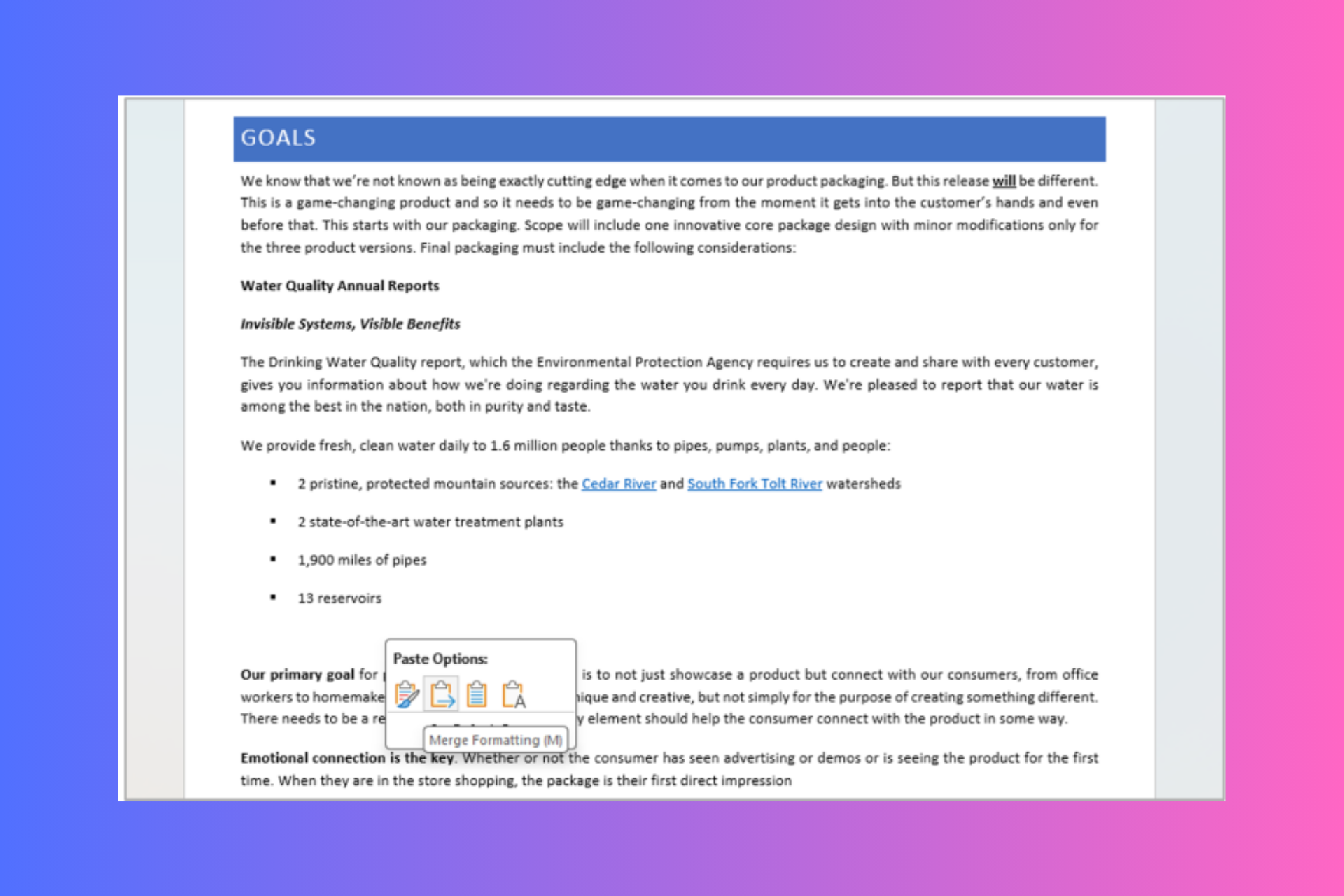
We’ve heard from many of you that the current Keep Source Formatting default setting is not meeting your needs, and you would prefer for the default option to be Merge Formatting when pasting from other programs.

We heard you and are happy to deliver!

Microsoft also shared a tweet from a Word user who was not happy with the source formatting feature.

So, that you know about Merge Formatting, let us check out how it works

You can open an existing Word document or create a new one. Copy text that you want to paste from another program or browser (it should not be from another Word document). Now press Ctrl + V to paste the content into the Word document, and you will see the Merge Formatting option being used.

You can always change the paste option by pressing Ctrl on the keyboard or clicking Paste Recovery Floatie and selecting one of the other options available.

In case you don’t like the change and want things to be as they were, In a Word document, you can head to File>Options>Advanced>Cut, copy, and paste>Pasting from other programs down arrow. Now, choose Keep Source Formatting in the list and click OK.

If you are looking forward to using the feature, make sure you have Windows  Version 2405 (Build 17624.15020) or later. Also, currently, the feature is limited to Windows.

In case you are confused about the pasting options present in Microsoft Word, let us take a quick look at what these options are and what they mean:

Paste optionsDescription
Original web contentAn Internet article with bolded and shaded text, a list, and links.
Keep Source Formatting Keeps all original formatting and layout properties of the original source content intact, including font color, spacing, bold, etc.
Merge Formatting Keeps formatting from the original content that has meaning (bold, underline, list and table structure, etc.) but matches the formatting of the destination content before your cursor (font family, size, color, etc.)
Keep Text OnlyKeeps just the text and removes items like bullets, table structure, and images. Pasted text will match the formatting of existing text before your cursor.

Are you happy with Word’s new default paste option? If so, share your experiences with our readers in the comments section. If not, you can always send Feedback to Microsoft using Help > Feedback in Word.

Microsoft offers teams participating in DARPA’s AI Cyber Challenge access to its latest AI models

With AI emerging as the ultimate tool for cyberattacks, the technological marvel is ironically finding increased applications in combatting the problem.

In a bid to develop advanced solutions that will protect critical infrastructure from AI-powered attacks, the Defense Advanced Research Projects Agency (DARPA) is organizing the AI Cyber Challenge (AIxCC), and Microsoft has committed to offering its latest AI models in Microsoft Azure to all the participants.

William Chappell from Microsoft, in an official blog post, confirmed that the participants can leverage Azure’s AI capabilities to build their entire system from scratch or fine-tune it using the wide array of language models. Microsoft recently added Mistral Small to its portfolio of language models.

Besides, Microsoft will offer teams up to $150,000 worth of Azure credits, with access to Auzre and OpenAI, and Microsoft business products worth $200,000, including GitHub Enterprise.

The AI Cyber Challenge (AIxCC) organized by DARPA, spanning over two years, will witness experts and enthusiasts in AI and cybersecurity develop cutting-edge solutions to augment the existing security infrastructure and prevent critical and national infrastructure from being compromised.

Microsoft itself promotes the use of AI in combating cyberattacks and has introduced solutions like Spotlighting to minimize the success rate of attacks.

Do you think Microsoft offering access to AI models will help teams participating in DARPA’s AI Cyber Challenge? Share with our readers in the comments section.

Microsoft’s latest offering, Mistral Small, is perfect for low-latency workloads

In February 2024, Microsoft signed a $2.1 billion deal with Mistral AI, a France-based company, to enhance its cloud computing platform, Microsoft Azure. Leveraging the partnership, Microsoft has added another one of Mistral AI’s language models, Mistral Small, to its portfolio.

Mistral Small, available in the Azure AI model catalog, is the smallest LLM developed by Mistral AI so far.

According to Microsoft’s official blog post, the language model offers the following advantages over the other options:

1. A small model optimized for low latency: Very efficient for high volume and low latency workloads. Mistral Small is Mistral’s smallest proprietary model, it outperforms Mixtral 8x7B and has lower latency.
2. Specialized in RAG: Crucial information is not lost in the middle of long context windows. Supports up to 32K tokens.
3. Strong in coding: Code generation, review and comments with support for all mainstream coding languages.
4. Multi-lingual by design: Best-in-class performance in French, German, Spanish, and Italian – in addition to English. Dozens of other languages are supported.
5. Efficient guardrails baked in the model, with additional safety layer with safe prompt option.

You can try out Mistral Small through Models as a Service (MaaS) in Azure AI Studio today. It’s a highly efficient option that is best suited for high volume and low latency workloads. And, as was the case with previous models, deploying the language model is effortless and doesn’t take more than a few seconds!

Mistral’s documentation says the language model is suitable for simpler tasks that can be done in bulk. Examples include text generation, customer support, and classification.

The Redmond-based tech-giants AI push in recent years has delivered results, with Microsoft Azure’s growth rate towering over AWS and Google Cloud. We will have to wait and see what impact Mistral Small has on the future growth rate!

Do you think Microsoft Azure improved after AI integration? Share with our readers in the comments section.

CORSAIR releases ONE i500, a small form factor gaming PC

CORSAIR is known for its outstanding gaming peripherals, but the company has recently introduced a new PC.

This model comes with a sleek design and offers great performance, so let’s take a closer look at it.

CORSAIR has introduced ONE i500, a gaming PC powerhouse

As BetaNews writes, CORSAIR has introduced a new compact PC called ONE i500. This PC comes with a small form factor, and it’s 30% smaller than traditional desktop PCs.

Despite its small size, this PC comes with an incredible design that features an aluminum chassis with FSC-Certified real wood panels.

If you’re a gamer, you’ll be pleased to hear that ONE i500 comes with customizable underglow and front-panel lighting, as well as a touch-sensor spotlight.

Regarding the specs, this model packs quite a punch and it comes with the following:

CPU:Intel Core i9-14900K
Graphics:NVIDIA GeForce RTX 4090
Memory:16GB DDR5
Storage:2TB NVMe SSD
Cooling:Liquid cooling
Connectivity:Front: 2x USB 3.2 Gen 1 Type-A ports, USB 3.2 Type-C port, headphone/mic jack
Back: 4x USB 2.0 ports, USB 3.2 Gen 2×2 Type-C port, USB 3.2 Gen 2 Type-A port, 2x USB 3.2 Gen 2 Type-A ports, integrated graphics HDMI 2.1 port / DisplayPort 1.4, 3x DisplayPort 1.4a, 1x HDMI 2.1 port

In case you need more power, this model can handle up to 192GB of DDR5 and 24TB of storage which should be more than enough for everyone’s needs.

Overall, this is an amazing PC, however, to make the most of it, you’ll likely need a RAM upgrade. As for availability, you can get this model in dark and light colors from Amazon.

In case you’re looking for other CORSAIR devices, you might be interested in Corsair HS35 v2 headsets.

If you’re tight on the budget and in need of something less stylish, then consider getting ASUS ROG G13CH at a discount.

Microsoft and OpenAI establish a $2 million Societal Resilience Fund to boost awareness around AI

In 2024, when more than 60 countries are heading to polls, the emergence of AI has caused more problems than many would have expected. The use of Artificial Intelligence in deceiving unsuspecting minds through edited photos, videos, and audio has become a challenge globally.

In an effort to combat the problem and increase literacy around AI, Microsoft and OpenAI are setting up a $2 million Societal Resilience Fund. The move is in line with Microsoft’s and OpenAI’s commitment to reducing misinformation spread amongst voters via the use of Artificial Intelligence, including deepfake.

Previously, the generative AI tools from Microsoft and OpenAI have been used to spread election-related misinformation.

As per Microsoft’s official blog, grants from the Societal Resilience Fund will go to several organizations, including Older Adults Technology Services from AARP (OATS), Coalition for Content Provenance and Authenticity (C2PA), International Institute for Democracy and Electoral Assistance (International IDEA), and Partnership on AI (PAI), amongst others.

OATS will hold in-person and virtual training programs for US citizens above the age of 50 to help them understand the concept of AI, its use in spreading misinformation, and how they can identify such instances.

Speaking on the occasion, Tom Kamber, Executive Director, OATS from AARP, said,

As AI tools become part of everyday life, it is essential that older adults learn more about the risks and opportunities that are emerging.  We are pleased to work with Microsoft and OpenAI on this vital project to make sure that older adults 50+ have access to training, information, and support—both to enhance their lives with new technology, and to protect themselves against its misuse.

Other organizations, too, will organize similar training and awareness programs aimed at spreading information about the changing digital landscape, the misuse of AI, and the best practices. PAI, on its part, will use proceeds from the grant to augment its Synthetic Media Framework.

Last month, Microsoft brought Content Integrity tools to the EU to help users identify whether an image was in its original form or created/altered using AI. Besides, tech corporations across the globe, including Microsoft, are making it harder for threat actors to use AI to create deepfakes.

In a few months, it will be evident how effective the move turns out to be. For now, we can just hope that the Societal Resilience Fund, established by Microsoft and OpenAI, plays its part in raising awareness.

What do you think is a practical solution to the increasing use of AI in spreading misinformation? Share with our readers in the comments section.

Microsoft uses AI to design new ways to improve accessibility and inclusion

AI can help us address critical issues such as accessibility and inclusion. With AI tools, we could potentially fix social inequities. After all, the use of AI is becoming increasingly widespread across the globe. Also, tools like Seeing AI and Voiceitt are improving the lives of thousands.

Copilot and other generative AI assistants have additional capabilities that promote accessibility and inclusion. For example, they won’t get mad if someone asks them the same question. They don’t work on a schedule and are available 24/7.

How does generative AI help with accessibility?

Generative AI could enhance people’s perspective about the world by generating creative descriptions. As a result, this technology could change how we interact with objects like paintings, sculptures, and other works of art. However, that’s just one of its many uses.

Microsoft partnered with the Rijksmuseum, and the disability community to generate an exquisite experience for the people that are blind or have low vision. The final AI product describes various pieces of artwork in detail and increases their overall accessibility. Additionally, there are some 3d models available to help you feel the paintings.

During the pandemic, museum employees managed to describe 300 artworks. However, the number is small, and it took them an hour per description. Yet, with Copilot, they can do it for more than one million pieces.

Copilot has a record of being a game-changer for us. On top of that, it significantly improved the accessibility of Microsoft tools and services. Also, if you have spare time or want to know more, you can check This is my Copilot on YouTube to witness some personal stories.

Besides improving accessibility for people with disabilities, generative AI makes life easier for neurodivergent people. For example, Copilot can transcribe and summarize meetings for someone with ADHD.

Microsoft and Global Symbols are working on a project to offer people who can’t use their voice more easily understood symbols. In addition, they want to include more cultures and languages. Thus, fewer people will feel left behind.

The European Disability Forum considers AI a possible help. Yet, for it to be what we need, it is crucial to include many people from different backgrounds while testing and improving it. After all, the assistant has to learn how to handle specific situations to solve accessibility and inclusion-related issues.

What is Microsoft doing for accessibility?

Microsoft also supports the Zero Project initiative from Austria which contains various research on accessibility innovation and disability policies. In addition, most resources are highly accessible and available in different formats. Also, the project uses AI to make the best accessibility practices available for policymakers, tech innovators, and the disability community.

Ultimately, Microsoft uses its AI to help companies and organizations with their projects meant to improve accessibility and inclusion. Furthermore, thousands are using AI to aid them daily. However, we are far from fixing social inequities. Yet, AI can speed up the process and find the best ways towards that goal.

What are your thoughts? Can AI improve accessibility and inclusion? Let us know in the comments.

Microsoft Edge looks to reduce memory drain with Sleeping Tabs feature

With Microsoft Edge version 125 in beta, Microsoft is testing a feature called Sleeping Tabs intended to prevent memory being taxed by the browser from unused tabs.

Sleeping Tabs made its first appearance during Edge development back in 2020 as part of documentation for Microsoft’s browser feature-roadmap. Since 2020, Microsoft has slowly been testing the efficacy of Sleeping Tabs and it seems the company is closing in on the confidence to release its to all Edge users soon.

Sleeping Tabs acts as an automatic pausing features for unused tabs in the Edge browser where a new AutoDiscardSleepingTabsEnabled policy kicks in and gradually reduces the memory consumer by the browser as tabs are essentially discarded or put into ‘Sleep Mode’ for more than a day and a half of inactivity.

The new policy will only trigger if the previous ‘SleepingTabsEnabled’ policy is currently active, otherwise, unused tabs will continue to draw on memory resources in a tombstone state.

To clarify, Sleeping Tabs will be the opening salvo as part of a memory resource reducing effort by the Edge team that combines both Sleeping Tabs and Discarded Tabs technology to gradually pause and then eventually discard unused tabs that exist beyond the current day and a half time.

Microsoft hasn’t stated whether the day and half-time frame before a tab fully drops its claims to memory resources and eventually fully discard, can be adjusted by the user or website host.

While most users may never hit the day and a half time limit before their tabs are closed, the autonomous nature of Sleeping Tabs and Discard Tabs will come as a shock to others. Just because a tab has been revisited in two days doesn’t necessarily mean a user’s is done with engaging with it, especially when the only other option is to fully reload it.

On a positive note, this level of autonomous resource saving will further benefit Windows users in whole and perhaps especially for people picking up ARM based devices over the next few where memory allocation and dedicated neural processing units will be working in tandem on a single SoC.

Sleeping Tabs is currently in beta testing in the Microsoft Edge Insider channel with no clear date for general availability listed.

How to Scan on HP Deskjet 3755

The HP Deskjet is an all-in-one printer and compact for everyday tasks like scanning. If you’ve been wondering what’s the most convenient way of scanning your documents, we show you just how easy it is.

How do I scan on HP DeskJet 3755?

By using the HP Smart app

  1. Power on your HP DeskJet 3755 printer and load paper.
  2. Press the WiFi button on the printer and hold for three seconds.
  3. Wait for a blue light to indicate your printer is ready to connect.
  4. On your phone or PC, launch the HP Smart app. If you don’t have it, you’ll have to download it.
  5. Click on Add printer or Add new printer
  6. Locate the HP DeskJet 3755 and click on it.
  7. Tap Yes to confirm an automatic connection to your WiFi.
  8. Once it is connected, the WiFi icon on your printer will stop blinking and you should hear a sound.
  9. Now follow the on-screen prompts to complete the setup.
  10. Next, launch the HP Smart app again and tap on Printer Scan.
  11. Your app will prompt you to feed the document to the scanner. Load it and ensure it is properly aligned and the printer grasps it.
  12. Now tap on the Scan on your phone and begin scanning. If it is more than one page, tap on the Batch option.
  13. You can also tweak the settings if you wish to change the page size, color and quality settings.

Additional tips and troubleshooting common scanning issues

  • Paper jams – This is the most common issue but usually, it’s just an incorrect placement of the document on the scanner. Ensure you’re properly feeding the document into the scanner to avoid jams.
  • Scanner not detected – Your HP scanner not being detected by your PC or phone could indicate a network issue. Ensure your HP Deskjet 3755 is on the same network connection or restart your router then re-establish the connection.
  • Poor scan quality – Always clean your scanner from any debris or accumulated dust to ensure a clean scan job. Alternatively, you can adjust the quality settings just before you scan to a higher quality for a clearer document.
  • Printer not working – Your HP Deskjet 3755 may stop working if the printer firmware has not been updated in a while. Keep your software up-to-date including your OS and use the HP Print and Scan Doctor troubleshooting tool where necessary.

For efficient scanning,

  • Keep your printer drivers up-to-date and keep the printer’s scan feeder dust-free for clean scan jobs.
  • Preview your documents before scanning and optimize scan settings for optimal scans.
  • Keep your scanned copies on your cloud as backup or for collaboration.

If the HP Deskjet 3755 is not your cup of tea, we have other all-in-one printers with more advanced features that may tickle your fancy.

Further, when scanning documents, you may be more inclined to choose a printer with an automatic feeder scanner to minimize errors so check out our comprehensive list of some viable solutions.

Have you been able to scan documents on your HP Deskjet 3755? How easy or difficult was it? Drop us a comment below on your experience.

Did you know that Windows 11 is encrypting your disks during installation?

As you clean install Windows 11, it may automatically encrypt all drives without your consent or awareness. This notable change might catch you off guard. Encryption can enhance security, but it also poses risks.

This shift has been implemented since build 25905 came out in July 2023, and Microsoft announced the same at the same time:

Starting with this build, we have adjusted the prerequisites (removal of Modern Standby/HSTI validation and untrusted DMA ports check) for enabling device encryption so that it is automatically enabled when doing clean installs of Windows 11.

The main concern is the lack of transparency during the installation process, as users may not notice their drives are encrypted until they face difficulties accessing their data at a later date.

Without clear notification or explicit consent, users may now lose their data during reinstallation or system resets, as they might not have the decryption keys handy.

Furthermore, there is no option to opt-out, which means users have limited control over their encryption preferences, raising usability and privacy concerns.

However, you can prevent it during the installation process in two ways: either you can tweak the registry entry during the onboarding experience or modify the install image, so let’s check them out.

Preventing automatic encryption: Two approaches

Method 1 Disable encryption via Windows Registry

When you are in the initial setup stage, press Shift + F10 or Shift + Fn + F10 to invoke Command Prompt. Type regedit, and press Enter to launch the Registry Editor. Now navigate to this path: Computer\HKEY_LOCAL_MACHINE\SYSTEM\CurrentControlSet\BitLocker. Here, right-click BitLocker and select New>DWORD (32-bit Value). Now, name it PreventDeviceEncryption. Once created, double-click it, set its Value data to 1, and click OK to save. Close Command Prompt and Registry Editor.

Now proceed with the installation process as usual. Once you have installed Windows, let us check if the drives are encrypted. Type the command prompt in the search bar and select Run as administrator to run it with admin privileges. Type manage-bde -status, and you will get the list of your drives. Go through the list and check the Conversion Status; it should be Fully Decrypted.

Method 2 Modify a Windows 11 Image using Rufus

First,  download Rufus from its official website, then download the Windows 11 image from the official website.

Next, connect a USB drive, choose Windows 11 image, and click Start. You will get a pop-up box with a few options to enhance user experience during the process. Look for Disable BitLocker automatic device encryption and make sure it is unchecked. Click OK.

Once the process is complete, install Windows 11 on your computer in the normal way.

So, these are ways that you can use to control the disk encryption preferences on your device while installing Windows 11.

We understand that Microsoft thinks the user’s device security is paramount, but automatic encryption implementation is a little far-fetched. Also, the absence of an option to opt-out is annoying and risky, as the user’s data could be at stake.

We believe that the Redmond tech giant should keep these settings optional and let the users decide whether they want the drives to be encrypted, thereby fostering a secure and transparent environment.

What are your thoughts on this matter? Share your opinions with our readers in the comments section below.

Microsoft closes several Xbox game studios including Arkane Austin, Tango Gameworks, and Alpha Dog

Microsoft joins the downward trend of video game related layoffs as it shutters several gaming studios including Arkane Austin, Alpha Dog, and Tango Gameworks.

According to a report from IGN.com, an internal email sent to employees from Xbox Game Studio head Matt Booty details the list of studios on the chopping block as well as other changes to come because of a “reprioritization of titles and resources.”

As Booty puts it, Arkane Austin “will close with some members of the team joining other studios to work on projects across Bethesda.” Arkane Austin’s latest game, Redfall, is no longer being worked on and its previous update will be the last gamers receive. However, the servers for Redfall remain online with Microsoft providing ‘make-good’ offers to gamers who recently bought Hero DLC for the game.

It’s unclear how long Microsoft plans to maintain the servers for Redfall.

Next up is Alpha Dog Studios, which is also ending with Mighty Doom sun setting on August 7, 2024, along with nixing the ability for gamers to make any future purchases in game.

As for Tango Gameworks, it follows the same fate as Alpha Dog with an official closure and no mention of current employees being shifted to other Xbox Game Studio properties. As for the indie hit Hi-Fi Rush, Microsoft says the game will “continue to be available to players on the platforms it is today.”

Microsoft will be folding Roundhouse Games into the larger ZeniMax Online Studios (ZOS) portfolio to help build out The Elder Scrolls Online experience.

In less cutthroat news, Arkane Lyon, id Software, and Machine Games survive this round of cuts as they work to publish titles based on Marvel’s Blade Character and a new Indian Jones game title Indiana Jones and the Great Circle.

Booty ends his devastating email with several mentions of consolidation that will help Xbox Game Studios be “well-positioned to build new IP, explore new game concepts, and expand on our existing franchise.”

On the other side of things, Arkane Lyon Chief Dinga Bakaba fired off a series of tweets calling out Microsoft’s hypocrisy in spending almost $70 billion on games while also ushering in steep cuts to the same studios they just paid for.

The massive closure news follows a heads up from Microsoft signaling a plan to cut 1,900 jobs from its gaming workforce back in January 2024.

Microsoft is working on easier integration of SharePoint files into the Teams mobile app

Microsoft is working to add SharePoint files to Teams easier on your mobile devices. The feature is already available on the desktop version of Teams and will soon make its way to the mobile app as well.

According to the Feature ID: 395375 entry on the Microsoft 365 roadmap site, the Redmond tech giant will soon let you select and attach files from SharePoint sites in the Teams mobile app. Here is the detailed description mentioned on the Microsoft 365 Roadmap site:

Users will be able to browse, multiselect and attach files from SharePoint Sites to a chat or channel conversation in the mobile app.

This feature is expected to be generally available in June 2024. It will be available on various cloud instances and for both Android and iOS devices.

In another development, Microsoft Teams will now allow organizations to develop Approval APIs for secure environments. Check out the detailed story here.

Also, if you wish to see all the changes made to Microsoft Teams in April 2024, including the Multi-turn conversation with Copilot in chats and channels, the ability to use a custom chat profile picture, and more, read the detailed story here.

What do you think about it? Share your thoughts and opinions with our readers in the comments section below.

Lords of the Fallen & Sniper Ghost Warrior Contracts 2 coming to Xbox Game Pass

Xbox Game Pass is perfect if you want to have access to a fresh list of titles on your console, and speaking of which, it seems that two new games are being added.

So which games are making their way to Game Pass, and more importantly, when can we see them?

Lords of the Fallen and Sniper Ghost Warrior Contracts 2 are coming to Xbox Game Pass

Xbox Game Pass is constantly getting new games, and as Neowin writes, we should see two new games available: Lords of the Fallen and Sniper Ghost Warrior Contracts 2.

In case you’re not familiar, Lords of the Fallen comes from Hexworks and it’s a soulslike game made in Unreal Engine 5. The game offers a unique “two-world” mechanic and it recently got a massive update called Master of Fate.

If you prefer something different, Sniper Ghost Warrior Contracts 2 is a tactical stealth game in which you’re tasked to eliminate enemy targets using a sniper or your close combat and infiltration skills.

These two games are a great addition to Game Pass, but unfortunately, we don’t know when they will be added, so keep your eyes open for the announcement.

If you’re looking forward to new games, Xbox has many games releasing in the second half of the year, so don’t miss them.

In other news, the Elite Wireless Controller Series 2 paddles issue is now fixed, so you can get back to gaming.

Chrome will get native support for chapters in all embedded videos

Chrome is a great browser because it constantly gets new features, and speaking of which, Google is working on a new multimedia feature.

So what’s this new feature, and how does it affect multimedia? Keep on reading to find out!

Chrome will add native support for video chapters

According to BleepingComputer, Google is working on a new feature in Chrome that will bring support for video chapters. This feature has been present on YouTube for a while, and now it will be available for any embedded video.

With this feature, users will be able to break a video into different sections, each with its preview, thus allowing users to find a specific part more easily.

This feature is a part of the MediaMetadata interface for the Media Session API, and according to Google, it will be added to the blink layer based on the processed W3C API update.

According to the Chrome Platform Status page, we can expect the following:

The corresponding implementation on the blink layer based on the w3c api change, which is to add the `ChapterInformation` attribute in the existing `MediaMetadata`. ThisChapterInformation applies to audio as well as video, since MediaSession is for both audio and video.

Regarding the availability, we expect to see this feature in Chrome for Desktop 126. As for other news, Chrome’s Safety Hub will be able to stop abusive notifications soon.

That’s not all, as the company is testing a new performance feature in Chrome that will alert you if your CPU usage is high.

Microsoft is working on a neuroergonomic system capable of measuring your stress at work

The concept of neuroergonomics is relatively new, and if we are to trust Wikipedia, it applies neurosciences to ergonomics, to improve workspaces to fit the brain functions of all employees for a better and healthier performance, all around.

It seems that Microsoft is looking into developing such a neuroergonomic system, according to a patented technology published recently in a paper.

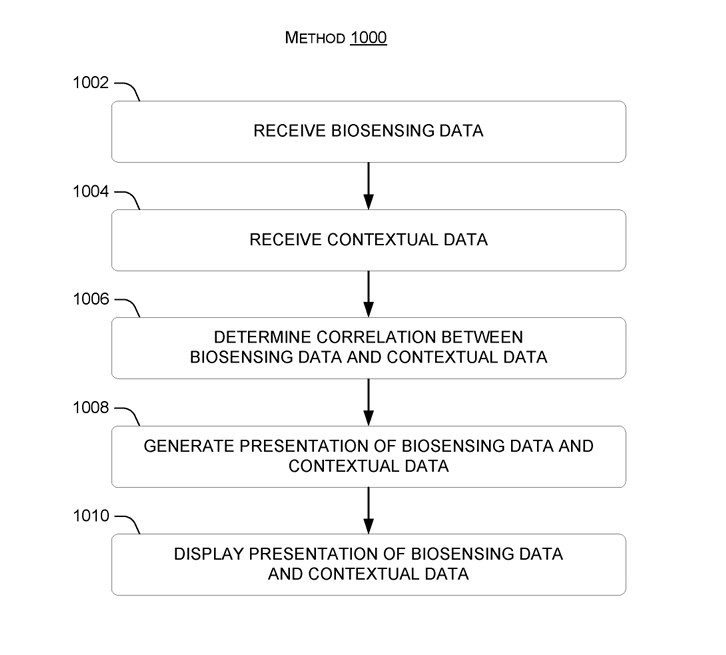
The technology describes it as a system that measures biological signals (like heart rate, pupil size, stress level, etc.) and links them to events happening at the same time. These measurements and events can be shown as they happen or as a summary of past data.

The present concepts inbolve presenting biosensing data in context such that useful knowledge, including neuroergonmic insights, can be gained. For instance, bio-sensing measurement associated with one or more users can be presented in conjunction with events that occurred when the biosensing measurements were taken, so that the viewer can observse how the users responded to the events.

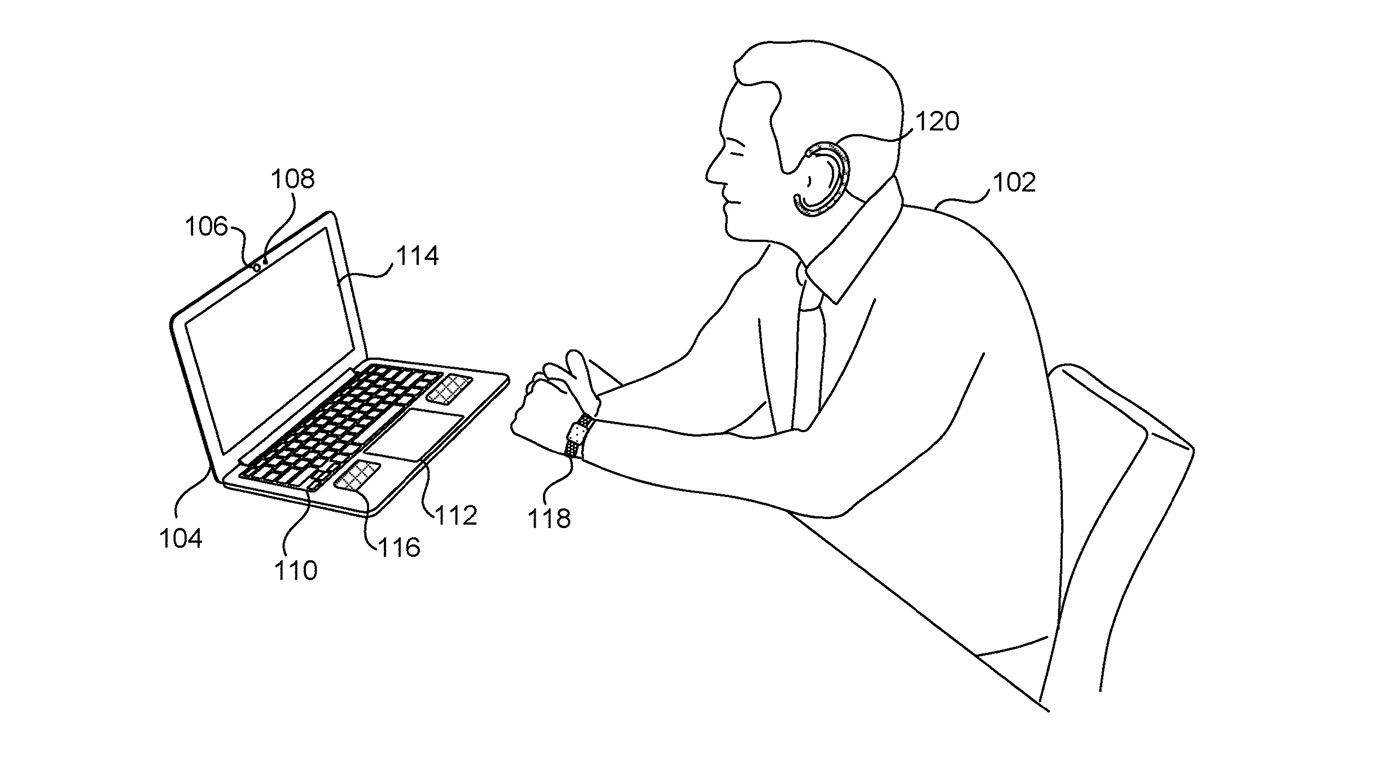
The system would use several other devices to measure these emotions based on biosensors. So, devices such as smartwatches can measure the pulse and heart rate and send that information to the system. The microphone in a laptop can record breathing sounds, and send the data to the system, again.

Other peripherals, such as the web camera, can gather data about the eye pupil size and body temperature, and send that data to the system.

The system, then, will process all of the data gathered around from various devices., while also figuring out exactly when those peaks or lows in biosensors happened. In other words, the system can tell you were nervous in a videoconference, stressed when performing a work task, or even bored when watching a video presentation.neuroergonomics microsoft

The present concepts involve presenting biosensing data in context such that useful knowledge, including neuroergonmic insights, can be gained. For instance, bio-sensing measurement associated with one or more users can be presented in conjunction with events that occurred when the biosensing measurements were taken, so that the viewer can observse how the users responded to the events.

This way, users can easily understand which events caused which physical responses. However, Microsoft doesn’t want the neuroergonomic system to stop here. Aside from using AI to offer valuable information about one’s mental state when working, the system also recommends various actions that can provide a better environment for the users.

The biosensing data taken during a videoconference meeting, during a speech, while an advertisement is being presented, or while playing a movie, can provide insights into how to improve the meeting, the speech, the advertisement, or the movie, respectively.

This helps users to change their behavior, improve their work process, design better products or services, increase their happiness and well-being, be more productive and earn more, and avoid things that negatively affect their feelings and mental state.

The system is presented using SDK (software development kit) technologies to customize the criteria that should be taken into consideration, thus making it fit specific environments, from corporate organizations to educational organizations, or even healthcare, or social services.

Microsoft envisions this neuroergonomic system as an independent app, but it could also be integrated into existing platforms or operating systems, such as Microsoft Teams or Windows.

The Redmond-based tech giant is no stranger to developing technologies that aim to improve the mental state of employees, with Microsoft Mesh being one of them, for instance. However, this system would be far better, as it offers real and pragmatic data to organizations seeking to make work for employees less stressful, or even stress-free.

The full paper can be read here.

What do you think about it?

New Xbox update preview makes finding better deals easier for some Insiders

Microsoft released a new Xbox Update Preview to the Alpha ring, which promised you to find better deals from the Microsoft Store or even the home screen or search. However, for now, only some of the Insiders will be able to notice this change. Here is what it said in the official blog:

Finding a great deal shouldn’t be difficult, so we’ve made it easier. With today’s update, a random subset of users will notice an improved experience, making it easier to identify sales and take advantage of them. In addition to searching the Microsoft Store, more information regarding sales will now be visible when selecting a game on Home and when searching from Home or the guide.

Here are the System Update details mentioned on the support Xbox website:

  • OS Version: XB_FLT_2406ZN\25398.4801.240502-2000
  • Available: 2:00 p.m. PT – May 6, 2024
  • Mandatory: 3:00 a.m. PT – May 7, 2024

Furthermore, a new Xbox Wireless Controller firmware version was made available, including several fixes and enhancements. Here is the list of changes done:

  • Fixes to address the Xbox Elite Wireless Controller Series 2 paddles remaining active with the default profile.
  • Fixed an issue with unexpected input behavior when using a 3.5mm and USB joystick together with the Xbox Adaptive Controller.

If your controller needs an update, you will get a prompt to install it once you have it turned on and connected to your console.

However, you can also open the Xbox Accessories app to instrall the update manually if you accidentally missed the notification.

Apart from these, the blog on the Xbox support website, also mentioned the fixes and improvements which were introduced due to feedback provided by the Xbox Insiders:

Game Card

  • Fixed an issue where the game card could close unexpectedly shortly after launching.

System

To ensure you get the latest updates as they release, turn on Keep my console up to date. However, if don’t prefer that, you can also press the Xbox button on your controller and navigate to Profile & system > Settings > System > Updates to install them manually.

If you are wondering how to become an Xbox Insider, you must know that the Alpha Skip-Ahead ring on Xbox is an exclusive testing group, and you need to enroll to get the pre-release versions. As these builds might be prone to errors, Microsoft keeps it invite-only.

However, if you are interested in joining the group, navigate to Xbox Insider Hub> Activities > Available > Joining new rings from your console, then complete the survey.

The Xbox Wire post also encouraged Xbox Insiders to visit the community subreddit if they need any support.

If you are already a part of the program and facing some issues with the new build, you can use Report a Problem to send feedback to Xbox staff.

Also, to stay informed about the Release Notes on Xbox Insider features, you can follow Xbox Insider on X (formerly known as Twitter).

Have you opted in Xbox Insider Program? If yes, share your experience using new features in the preview with our readers in the comments section below. 

Microsoft Defender XDR’s new AI features will block malicious OAuth apps

Threat actors are increasing their efforts to hack into cloud-based systems and applications. Some of their campaigns are using malicious OAuth apps. Thus, Microsoft improved its Defender XDR with automated attack disruption capabilities to prevent intrusion attempts.

OAuth, long-form Open Authentication standard, applications allow you to log on to multiple accounts without requiring your credentials every time. Also, you can use them to protect your data. Thus, the new features will block malicious OAuth apps with the help of AI and machine learning.

How does the automated attack disruption work?

The automated attack disruption feature of the Defender XDR operates by correlating signals from many sources into a single incident. According to Microsoft, the feature uses insights from endpoints, identities, email and collaboration tools, and SaaS apps. On top of that, it identifies assets controlled by the attacker. Afterward, it uses relevant Microsoft Defender products to isolate the attack and affected assets.

The new automated attack disruption capabilities of Defender XDR prevent hackers from further exploitations. As a result, they won’t be able to access your data. Also, according to Dark Reading, the Microsoft XDR can stop ransomware, business email compromise, and credential-stuffing attacks in less than three minutes.

How do hackers use malicious OAuth apps?

Cybercriminals can access your account and retain access to various applications if you enter your credentials on malicious OAuth apps. However, you can prevent their attacks with defense suites like Defender XDR.

Unfortunately, wrongdoers can also use corrupted OAuth apps to gain control over your system. After all, they can create, modify, and grant broad privilege access using the breached user accounts for Microsoft cloud services.

In addition, if you lack strong authentication measures like MFAs, threat actors could use phishing and password-spraying attacks. On top of that, with elevated permissions, they could launch various spam campaigns.

Microsoft added more protections and features to the Defender XDR to deal with other issues. For example, now, the platform has native protections for operational technology (OT) and industrial control systems (ICS). Thus, defenders can deal with OT system threats and verify their ICSes directly from the Defender XDR portal.

In a nutshell, Microsoft keeps enchanting its security systems with AI features. Also, the Defender XDR can protect you from malicious OAuth apps and other malware. On top of that, AI technologies are faster than classic methods and can defend you in real-time. So, their development is crucial since hackers can perform a complete attack chain in two hours.

What are your thoughts? Are you using Defender XDR or an alternative? Let us know in the comments.

Surface Laptop Studio May update brings audio and display fixes

Microsoft released a May 2024 firmware update for Surface Laptop Studio, and it brought a lot of other changes, including game improvements and fixes related to audio, network, and display, which will enhance the performance of your device for several games.

Here is what the changelog mentioned on the official blog says:

  • Improves the audio quality of calls and recordings.
  • Provides a more enjoyable and smoother gaming experience for the latest games including Mortal Kombat 1, Lies of P, and Starfield, enabling support for 8 new G-SYNC.
  • Fixes problems associated with the second monitor display flickering and not working when the device is connected to Surface Dock 2.
  • Addresses issues related to recovery of Wi-Fi and Bluetooth connections when device is on Standby, enhancing connection reliability.

The release contains the following components, and the components are installed on the basis of your device’s configuration:

Windows Update NameDevice Manager
Intel – System – 2334.5.1.0Intel(R) Management Engine Interface – System devices
Surface – Firmware – 15.0.2473.3Surface ME – Firmware
Surface – Firmware – 25.100.143.0Surface UEFI – Firmware
MBIHV – Firmware – 1.7.1.16Quectel MSFT MBIHV Mobile Broadband Firmware Device – Firmware
Surface – Firmware – 2.23.139.0Surface Pen Cfu Over Ble LC Connection – Firmware
Surface – Extension – 1.22.139.0Surface Pen0C0F Cfu Over BleLc Extn Package – Extensions
Surface – Extension – 1.22.139.0Surface Pen0C0F Firmware Update – Extensions
Intel – Software Component – 1.70.101.0Intel(R) iCLS Client – Software components

To install this update, your Surface Laptop Studio must be running on Windows 10 October update, version 22H2 or higher, or Windows 11  version 22H2 and newer.

You can download the update from the official website; the update size is 1.4 GB. So far, no known or reported issues or bugs are associated with the update.

Have you installed the update so far, and can you see the changes? If so, share your experience with our readers in the comments section below.

Star Wars Outlaws controller themes are now available on Xbox Design Labs

Star Wars fans are eagerly waiting for the Star Wars Outlaws game, and if you’re a fan of the franchise, you might be interested in some custom controllers.

Ubisoft and Xbox have teamed up, and they have brought new themes to Xbox Design Labs inspired by the upcoming game.

Two new Start Wars Outlaws controller themes are available on Xbox Design Labs

It’s no surprise to see custom controllers coming from Xbox, and this time we got two new controller themes inspired by Star Wars Outlaws, as Game Rant writes.

As you know, Star Wars Outlaws is coming on August 30, and if you’re a fan of the game, you might be interested in some custom controllers.

These controllers can be built by Xbox Design Labs, and the first controller recreates the color scheme of the Star Wars Outlaws cover art with a black base, orange thumbsticks and bumpers, and a metallic D-Pad.

This color scheme is available only for the Standard Xbox Controller. If you want an Elite controller, it comes with its theme with a teal background, white face buttons and sticks.

Of course, crafty users can copy the color scheme of one controller to another and circumvent this limitation.

In other news, Star Wars Jedi: Survivor is now available on EA Play and Game Pass, so don’t miss it, if you haven’t played it already.

Microsoft Edge’s latest video translation capability will use AI-generated voice dub

There is no doubt that Microsoft Edge has some good translation capabilities: from the live translation of its PDF reader to the more advanced video translation enhancements that effectively allow users to translate audio or subtitles while watching videos in the browser, Microsoft wants to make sure no one feels left behind.

This is most likely why the Redmond-based tech giant is bringing AI-generated voice dub translations to videos, according to the latest post from software enthusiast @Leopeva64.

In other words, you’ll be able to listen to video translations rather than reading them on Microsoft Edge, all due to a new enhancement that uses AI to generate that audio translation.

According to the enthusiast, Microsoft Edge will have AI generate different voices for dubbing the translation based on who’s speaking. For instance, if a man is speaking in the video, AI will generate a male voice, and if a woman is speaking, then a female voice will be generated.

Here’s another example of Edge’s video translation feature, this time with a female voice (the AI uses female voices if the voice in the video is female), the first video has the original audio and the second the dubbed audio:

Leopeva64

The capability is currently live in Edge Canary, and it supports voice translation from English, Spanish, and Korean to German, Spanish, Hindi, Italian, and Russian.

For now, however, the capability is laggy, and it crashes constantly: Currently the translation is constantly interrupted (you can hear it in the video) and the browser crashes and lags a lot when enabling this feature, says the software enthusiast, but there is no doubt Microsoft will remedy this when the capability reaches its general availability.

However, the AI-generated video translation will be a game changer for Microsoft Edge users, as it broadens accessibility to visually and hearing-impaired individuals.

The capability should make it to the stable channel in the following weeks.

You’ll soon be able to perform device management directly in the Microsoft Teams Admin Center

It’s no surprise Microsoft wants to enhance Teams to allow admins and managers to perform management on the platform, as well: let’s just take, for instance, a recent addition to the Microsoft 365 Roadmap, unveiled that the Redmond-based tech giant will allow admins to manage the deployment of each app in the platform, individually.

The new method will ensure the Teams environment is aligned, while also providing a safer and more secure infrastructure.

But, Microsoft is not stopping here. Another entry to the Microsoft 356 Roadmap that was recently added says that the company wants to allow admins, and managers to cancel scheduled device operations through Teams admin center.

In other words, you’ll be able to perform device management directly in the Microsoft Teams Admin Center. This could allow the handling of specific situations such as canceling operations when they are no longer needed.

Microsoft says updates to various devices from the organization can be canceled, as well as canceling specific actions such as restarting a device.

If a device operation is no longer required, admins will be able to cancel scheduled device operations like, Software update and device restart, through Teams admin center.

Microsoft

Performing device management directly from the Teams Admin Center could be an easier way to deal with unexpected situations or outdated devices.

If certain updates are no longer needed, or some devices are scheduled for automatic restart, these actions can now be canceled directly from here, without having to access other platforms, such as Intune, for instance.

According to the Roadmap, this new enhancement will be added to the Microsoft Teams Admin Center in June 2024, and it will be generally available on the web version of the platform.

What do you think about it? Could this be a new way to plan device management? Let us know.

I Am Your President game is finally coming to Xbox platform

There is no shortage of interesting games, and if you ever want to take the role of a US president, this game will allow you to do so.

This game is called I Am Your President, and it’s finally launching on the Xbox platform, so let’s see what it offers.

I Am Your President is set to launch on Xbox tomorrow

According to GamingLyfe, I Am Your President is coming to the Xbox platform, and in case you’re not familiar, this game puts you in the shoes of the newly-elected US president.

During your tenure, you need to attend press conferences, manage crises, manage your social media, and govern the entire nation.

Each decision you take will affect your political compass thus swaying you to Democrat or Republican party. You can even adopt some radical stances if you choose to.

The game offers various random events, so no two playthroughs are the same. Overall, this sounds like an interesting concept, and if you want to try it, the game will be available on Xbox Series X|S and Xbox One starting from May 8th.

That’s not all from Xbox, as the Xbox Update preview is here, and it brings a wide array of new features. If you’re interested in new releases, Xbox has many games coming in the second half of 2024, so stay tuned.

How to Know if Your Discord Message Has Been Blocked

Discord is gamers’ way of communicating, but sometimes, you need the reassurance that it’s a two-way communication hence the need to know whether your message has been blocked.

If you sent a message and it’s been days before you got a reply, you may have been blocked. There’s no native way to tell that your Discord message has been blocked but with a few tips, you can make this assumption.

How do you tell if you’ve been blocked on Discord?

  • Direct messages – If you suspect that your messages have been blocked, try sending another. The message will not go through if you’ve been blocked. Another tell-tale sign is that you can no longer react to previous messages with emojis.
  • Friends list – Since you have access to your friends list, you can always check whether your suspected friend blocked your message. If they’re no longer in the list, then your messages have been blocked. Another trick is to try and search for their username and send a friend request. If it goes through, something must have happened with their account but if you encounter an error, you’ve been blocked.
  • Mutual servers – Try and check whether you can see their messages on mutual servers on the community tab. It may be a long shot but if they were previously active and now all of a sudden they’re quiet, chances are you’ve been booted.
  • Contact a mutual friend – If you share any mutual friends, you can request them to try sending a message and see if they get the same response. Remember, Discord has no read receipts so the only way to know is if they respond. This should tell you that you have been blocked.

What are other signs of a blocked message on Discord?

  1. Delayed response – If you chat with the Discord user regularly but all of a sudden your messages have overstayed without a response, you could have been blocked.
  2. Empty profile – If you click on the Discord user’s profile and there’s little to no information but previously there was, they may have blocked you.
  3. No status indicators – Statuses like Online or Typing indicate that the Discord user can see your message and may respond. However, if these indicators have been absent for a while, your messages may have been blocked.

Discord is a social app that values privacy. After all, you can get hacked on Discord so it’s a win-win. Still, you can’t be 100% sure your message has been blocked. If it’s really bothering you, you can contact the user using other ways and ask them directly if they’ve blocked you.

As far as safeguarding your privacy, you’d be happy to know that people can’t tell what servers you’re in. It also doesn’t show games you’re playing especially if you’re a rookie and don’t want people to know.

Have you had a message on Discord blocked before? If so, how did you discover it was blocked? We’d love to hear about any additional tips so drop us a comment down below.

Microsoft Edge makes it easier for users to work on Purview

Days after releasing Edge Beta 125, which brought some interesting features to the browser, such as dedicated colors for workspaces, among many other features, Microsoft released another version of the build, bringing it to 125.0.2535.29.

According to the official changelog, 125.0.2535.29 will improve the Purview experience for all Microsoft Edge users. In other words, those accessing Microsoft Purview on Edge will notice a change in how they can copy/paste information around.

The Redmond-based tech giant says this new change will greatly improve the user experience on the platform when accessing it on Edge. The cut/copy/paste experience will become more intuitive and user-friendly, with new dialog boxes that will vanish when the operation is successful.

Improved user experience for Purview copy/paste controls in Edge. Our Purview cut/copy/paste experience is now more user friendly with self-dismissing dialogs on successful paste. The existing “Paste to supported browsers” setting allows organizations to classify and protect the content that end users can paste – both to specific websites and through supported browsers. You can follow the instructions in Use Endpoint data loss prevention (DLP) to create the DLP policy.

Microsoft

So, if you don’t have access to the Microsoft 365 app, where you can access Purview, Microsoft has made sure you can properly access it on Edge.

It’s a smart move, as those individuals who are tied to the platform to their organizations are now encouraged to access it on Edge, rather than other browsers.

It’s well known that Microsoft Edge is gaining ground in the browser market, and it’s already above Safari, Mozilla, or Opera, being the second most used browser behind the more popular Google Chrome. But Edge has come a long way in just under a year: in 2023, the browser was failing behind Safari, and now it has overtaken it.

If it continues this way, Chrome might soon have a serious competitor in Edge. And it seems Microsoft wants it that way, too.

Get this power-packed 15″ HP laptop for just $519

When it comes to laptops, HP remains one of the most dependable brands worldwide. And if you can get an HP 15-fd0097nr laptop for only $519, it’s a deal you can’t miss. With a regular price of $839.99, you will end up saving $320.99 in this limited-period deal.

Powered by the 13th Gen Intel Core i7 processor and Intel Iris Xe graphics, this is the perfect laptop for browsing and running low resource-intensive apps. Say, browsing the web, watching videos, or creating a quick PowerPoint presentation. With the keyboard featuring a Num Pad, your gaming experience will go up a notch.

And you will never run out of storage with the built-in 512 GB SSD!

The best part is that the HP 15-fd0097nr supports Copilot, Microsoft’s native AI-powered chatbot. So, tasks like searching for information, creating images, and generating summaries can all be done from the desktop.

If you are often on video conferences, the laptop features a 720p webcam with a privacy shutter. What more could you ask for $519?

When we checked the user reviews, most liked the laptop’s sleek design, performance, and storage capabilities. A few said it was the perfect laptop for working from home!

HP 15-fd0097nr’s specifications

Processor13th Gen Intel Core i7-1355U
GraphicsIntel Iris Xe (integrated)
Storage512 GB M.2 SSD
RAM16 GB DDR4
Operating SystemWindows 11 Home
Display15.6″, FHD, 1920 x 1080, Micro-Edge Display
SoundStereo speaker, dual mics
Battery Backup7-9 hours

If you are interested, get the HP 15-fd0097nr from B&H. And hurry up, the offer is valid until stocks last!

Or if you want to explore other options in the price range, check our top picks for Windows 11 laptops under $500.

Do you think the HP 15-fd0097nr for just $519 is a value-for-money deal? Share with us in the comments section.