Microsoft Planner in Teams now comes with Copilot in preview

Recently, Microsoft Planner in Teams was rolled out for the general public, and now Microsoft has announced Copilot in Planner (preview) for users with a Project Plan 3 or Project Plan 5 license.

Using generative AI capabilities, Copilot in Planner simplifies the process of planning, managing, and executing tasks, thereby ensuring you stay updated as you move towards your objectives.

With the integration of Copilot into Planner, Teams can revolutionize the workflow and enhance collaboration on projects.

How does Copilot in the new Planner work?

Copilot in the new Planner can help you plan, manage and track projects. Here is how it helps:

With Copilot in Planner, teams can generate and add tasks, goals, and buckets based on user prompts. It is even capable of creating a full plan, including all the elements needed. So, this means first, set the correct goals, use prompts to instruct the Copilot, and you can get a full plan without much effort.

Managing is the next step in achieving the set goals; the Copilot in Planner helps you identify how to streamline the process and what tasks you should take up next so that you can stay on track.

And, if your plans need adjustments, like scope expansion, Copilot can set new goals, helping you tackle the problem at hand.

To make the whole process flow smoothly, Copilot tracks your progress and answers questions related to priorities, workload, and more.

How can I check if Copilot in Planner is available for me?

The final price for Copilot in Planner has not been revealed. However, if you have Project Plan 3, Project Plan 5, or a premium license trial, you will be able to access the preview of Copilot in Planner in Teams.

In case you don’t have a premium Project license, you can click the diamond icon within the app and get the free 30-day trial which includes Copilot

To use it, you need to launch the new Planner in Teams and then create a new premium plan or open an existing one.

If you have access to Copilot, you will see the Copilot preview button in the upper right corner. In case you don’t, you might have to wait, as the feature will be rolled out in the coming weeks.

What is new with Microsoft Planner?

With this announcement, Microsoft also mentioned that the new Planner now includes top-requested capabilities; here is the list:

– Timeline & Dependencies* – You can now easily manage and track projects timeline in a Gantt chart to quickly determine when a project is expected to be done accounting for all the dependencies of tasks within it.
– Sub tasks* – breaking down complex work into more granular steps is easy with subtasks. Using a premium plan, you can create and assign subtasks to different people and set different dates to track.
– Team workload* – In a premium plan, you can use the people view to easily assess the team workload, where team members may be over or under allocated, to drive better workload balance accordingly.
– Custom fields* – Each project has its own unique goals and needs and with custom fields in premium plans you can easily track the unique elements that are most important to your project. You can create different types of fields like date fields, multi-choice fields, text fields and more.
– Tasks conversations* – Using a premium plan that’s added as a tab in a Teams channel, your team can start Teams chats in the context of tasks in the plan. Easily @ mention other team members, use emojis, gifs and all the other Teams chat features you know and love.
– Task History* – When you need a quick way to review all the changes that occurred on a task, including other depend tasks changes you need to be aware of, view task history in a premium plan to easily review the list of changes others completed to help determine where things are at and what requires more follow up.
– My Tasks – Keeping track of everything you need to get done is now easier with My Tasks. You can manage all the emails you flagged for follow up. You can also look up all the tasks that have been assigned to you across premium plans, basic plans, Loop components, Teams meeting notes and more.
– Simpler and Faster – One of the top requests we got is to make the app simpler, less complex and faster to use. This has been one of the major focus areas of improvement in the app by simplifying the overall navigation UI, making it easier for you to find the capabilities you need when you need them, removing dead ends, and improving the overall performance.
– Enhancements for organizations with frontline workers – In addition, last week we posted about additional improvements designed for organizations with frontline workers also included in the new Planner in Teams.

Microsoft also informs that Planner will be getting more fixes features soon, including the ability to upgrade a basic plan to a premium plan, faster My Day and My Tasks, the ability to see Project for the web tasks \ premium plan tasks in My Tasks and UI enhancements and the grid view included in a basic plan.

Do you think Copilot in Planner in Teams can make your tasks easier? Share your opinions with our readers in the comments section below.

Introducing GitHub Copilot Workspace: Microsoft aims to increase developers’ efficiency

With the dynamic advancements in Generative AI, Microsoft strives to enhance the utility and efficiency of its products. From the inception of GitHub Copilot in 2022, followed by GitHub Copilot Chat in 2023, to the recent introduction of GitHub Copilot Workspace: native developer environment, it is evident that the Redmond tech giant is committed to providing users with top-tier tools.

What is GitHub Copilot Workspace?

GitHub Copilot Workspace is a developer environment where developers can brainstorm, plan, build, test, and run code in natural language.

With this, Copilot agents are with you every step of the way, but the control remains in your hands. Copilot Workspace demonstrates a new way of developing software with natural language. As mentioned in the GitHub blog,

Copilot Workspace is expressly designed to deliver–not replace–developer creativity, faster and easier than ever before. With Copilot Workspace we will empower more experienced developers to operate as systems thinkers, and materially lower the barrier of entry for who can build software.

How does GitHub Copilot Workspace work?

GitHub Copilot Workspace will accompany you from the very start, whether it is within a GitHub Repository or when addressing a GitHub issue. This means that the Copilot agents will assist developers from the inception of an idea or project, functioning as a second brain.

It offers you a strategic strategy to resolve an issue based on its deep understanding of the codebase, issue, replies, and more.

GitHub Copilot Workspace provides you with everything you need to validate the plan and test the code in one comprehensive list in natural language.

Every plan, code, and other suggestion provided by the Copilot Workspace is editable so that you can ensure that you are on the right path.

While full control of the plan or code remains with you, Copilot Workspace takes the stress off your mind, making you more efficient.

Once you decide to proceed with the plan, you can execute your code within Copilot Workspace. However, if you want to modify or make other changes to it, you can do that in the underlying GitHub Codespace until you get the desired outcome.

You can then, share the workspace with your team via a link for them to view, check, and provide their input.

The next step is to submit your pull request, execute your GitHub Actions and security code scanning, and then request your team to review the code.

Furthermore, your team members can also use Copilot Workdpace to understand the code better and gain insights into the process of transforming ideas into code.

Microsoft has made GitHub Copilot Workspace compatible with mobile devices so that you can access it anywhere you work, whether on your desktop, laptop, or mobile device.

As of now, GitHub Copilot Workspace is available as a technical preview version. You can sign up to access the preview at GitHub’s website. So far, we don’t know when it will be available for general use or how much it will cost.

How GitHub Copilot Workspace is beneficial?

  • Provides guidance and support through the entire development process, empowering developers of all skill levels
  • With assistance from brainstorming to code execution, it streamlines the development process, reducing time and effort.
  • Allows you to share workspaces with team members to promote collaboration and allows for collective input, fostering a cohesive development environment.
  • Offers suggestions tailored to the specific context, helping you achieve effective solutions through its deep understanding of codebases and issues.
  • Generates code snippets and solutions so that developers can focus on innovation and higher-level problem-solving.
  • Compatible with mobile devices, which allows you to work from any of the devices without any restrictions.

With GitHub Copilot gaining traction and hitting the 1.3 million users milestone, the introduction of a new service could further solidify its position as an indispensable tool in the developer community.

However, if they want developers to rely heavily on GitHub AI tools, the Redmond tech giant should ensure the occurrence of incidents like Hackers abusing GitHub comments to push malware using Microsoft repo URLs are minimized.

Would you give GitHub Copilot Workspace a try? Share your thoughts with our readers in the comments section below.

Price drop alert: Get the Dell Alienware M18 for just $1999, save 14%

If you are planning to upgrade to a power-packed gaming laptop, the Dell Alienware M18 r1 is the perfect choice. Available at just $1999.97 during the Amazon Gaming Week sale, this is a value-for-money deal you can’t miss!

The gaming beast is powered by the 13th Gen Intel Core i7-13700HX processor and NVIDIA GeForce RTX 4070 8GB GDDR6 graphics, offering unbeatable gameplay in the price range.

It supports NVIDIA’s latest innovations, including RTX Ray Tracing, DLSS 3, and Reflex, to deliver crystal-clear graphics.

Besides, the laptop features an 18″ display, a NumPad on the keyboard, and a 14% bigger touchpad to provide better controls and graphics.

You can also set the performance parameters on the Dell Alienware M18, overclock the CPU, and personalize the keyboard’s RBG lighting, all through the Alienware Command Center, a built-in application on the Alienware series.

When we checked the user reviews, most were of the opinion that the laptop can run all modern games with ease. Even while multitasking or running resource-intensive apps, the laptop doesn’t lag. Although, with the size and weight being on the higher side, portability remains a concern for a few!

Dell Alienware M18 r1’s specifications

Processor13th Gen Intel Core i7-13700HX (30 MB cache, 16 cores, 24 threads, 5.00 GHz)
GPUNVIDIA GeForce RTX 4070 8GB GDDR6
Storage1 TB, M.2, PCIe NVMe SSD
RAM16 GB (2 x 8 GB) DDR5, 4800 MHz Memory
Operating SystemWindows 11 Home
Display18″ QHD (2560 x 1600) 165Hz, 3ms, ComfortView Plus, NVIDIA G-SYNC + DDS, 100% DCI-P3
Weight‎8.9 pounds
Information source: Dell

If interested, get the Dell Alienware M18 r1 from Amazon today, as it’s a limited-time deal!

Other exciting deals to look out for during the Amazon Gaming Week

In case you are more of a gaming desktop fan and prefer customizing the setup, take a look at the two most sought-after gaming PCs during Amazon Gaming Week:

We also searched for discounts on accessories and found the perfect ones for you:

This Amazon Gaming Week, make the most of the available deals and get the products you have been delaying for so long. Because the prices couldn’t be lower!

If you want to explore budget options, discover our top picks for gaming laptops under $800.

Do you think the Dell Alienware M18 r1 and other deals listed here are value for money? Share with our readers in the comments section.

OneDrive receives a host of improvements this year, set to boost productivity

Microsoft’s native cloud storage, OneDrive, has significantly improved over the years, introducing a wide array of new features. And 2024 is no different!

Microsoft, in an official blog post, lists out all the features brought to OneDrive and the planned enhancements, including the integration of Copilot, Microsoft’s AI-powered chatbot.

New features on OneDrive in 2024

In February’24, Microsoft announced Copilot for OneDrive, and it’s finally happening, with the AI-backed tool coming to OneDrive this summer. The exact date is yet to be revealed!

With Copilot in OneDrive, you can quickly generate summaries for documents (even while sharing Word files for others to first see the summary), ask questions about the content within files, compare two or more documents, create FAQs and a lot more!

Next comes the improved File Viewer in OneDrive, which allows you to preview over 300 different file types at 2x speed compared to the previous version. Besides, the File Viewer will have Copilot built-in for quick access. So, working on OneDrive is about to get a lot more seamless!

New File Viewer in OneDrive with Copilot (Image source: Microsoft)

Microsoft is also improving collaboration in OneDrive. The native cloud storage now features a more straightforward Share dialogue box where all the vital options are optimally placed. Besides, sending an email invitation has become more secure.

Another vital improvement to OneDrive’s collaboration capabilities is the Branded External File Request feature. With it, organizations can design a personalized landing page featuring the brand logo and necessary information and seamlessly collect documents and files from other stakeholders.

Branded External File Request in OneDrive

This way, you can maintain a consistent identity and promote the brand, all while collaborating with partners.

Improvements in OneDrive for Web

OneDrive for Web, too, received a host of new capabilities, including a browser-only offline mode and 3x faster file loading. The search functionality in OneDrive for Web is also more enhanced than ever. Microsoft’s official blog lists the following improvements to be brought to OneDrive in August’24:

1. New filters: Added filters for different file types to help you find exactly what you need.
2. Date filter: Narrow down your search results by files created or modified within a specific timeframe.
3. Scoping options: Easily conduct precise searches within specific folders, sites, or document libraries.
4. Updated interface: Visual enhancements and more metadata help you locate your files more quickly.

In addition to these, Microsoft has introduced the ability to colour code folders to Windows File Explorer, a feature first brought in OneDrive for Web. Choose different colours for work-related and personal folders!

You will also find a new Media View option in the navigation pane to browse through all available images and videos. Besides, you can create new files in one click or choose from a wide array of pre-set templates made available by the organization.

For administrators, Microsoft will soon bring Graph Data Connect to quickly gather and analyze the OneDrive sync health data.

With these enhancements, all OneDrive users stand to benefit from improved search, faster load time, seamless and secure collaboration, an offline mode for the web version, and the biggest of all, Copilot integration!

Some of these features are not free and will be included with a Microsoft 365 OneDrive subscription.

If you are still unsure about choosing one, read our comprehensive comparison of cloud storage services.

What do you think about the new features in OneDrive? Share with our readers in the comments section.

Chrome’s Clear Browsing Data dialog to make Time Range selection mandatory

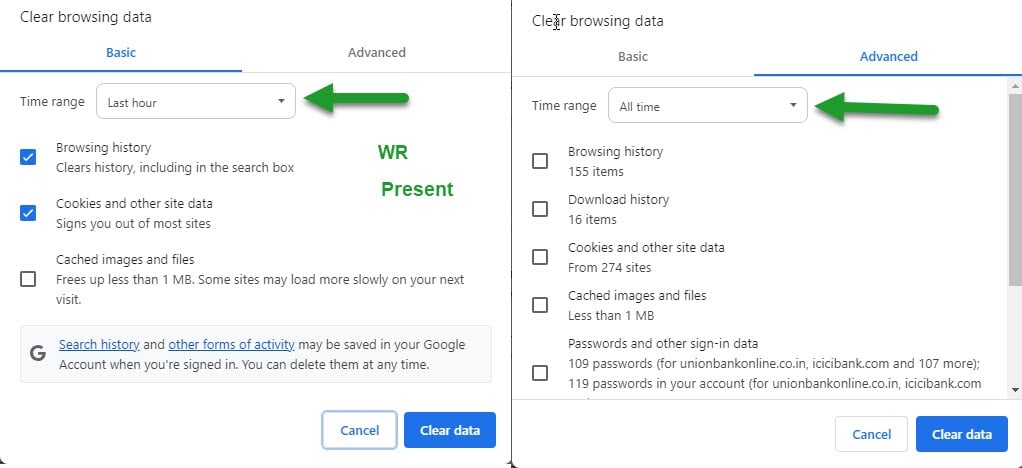
In a move aimed at improving user control and preventing accidental data loss, Google is testing an update to Chrome’s clear browsing data (CBD) dialog. The proposed change would require users to actively select a time range before clearing their browsing history. By default, the dialog would prompt users to choose a specific timeframe, ensuring that data deletion becomes an intentional choice rather than an accidental error. This change is being tested in Canary as well as in field trials.

Generally, when users initiate the clear browsing data (CBD) process, the basic section of the dialog box defaults to the Last hour time range, with the Clear data button ready for action. In contrast, the advanced section starts with All time as the pre-selected option, with a highlighted Clear data button. This design has occasionally resulted in users, who intended to clear a specific portion of their data, accidentally erasing either the last hour’s worth or their entire browsing history.

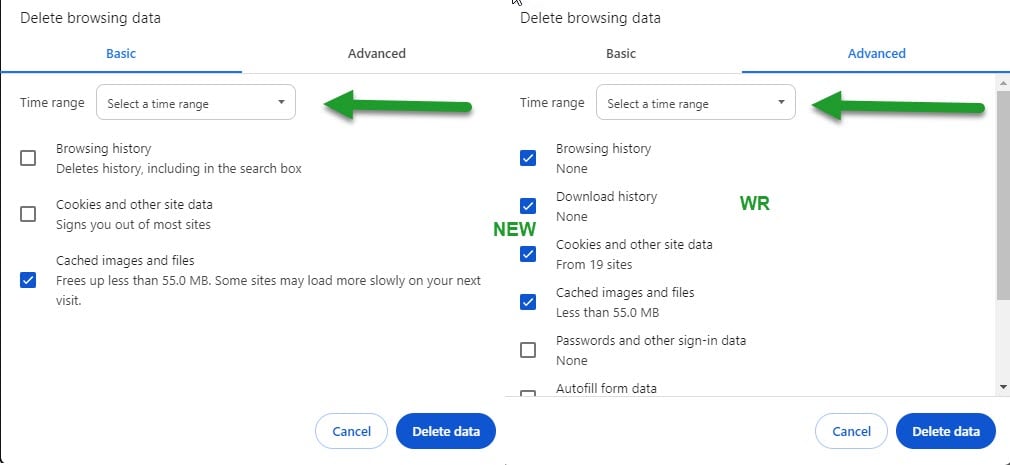
Chrome’s Clear browsing data may default to the Select a time range option

To address this issue and prevent such accidental deletions, Google is testing a thoughtful update to the CBD dialog. This experiment also includes the option to clear the last 15 minutes of browsing data from Chrome on desktop.

The new ‘select a time range’ default option in the ‘Delete browsing data’ dialog requires users to actively choose a time frame before any data can be deleted. This additional step ensures that users make the right choice regarding the amount of data they wish to remove, thereby reducing the risk of unintentional data loss.

Google is currently conducting a field trial for the CBD Timeframe Range experiment. Based on feedback and outcome, they may add the ‘Last 15 minutes’ option and make ‘Select a time range‘ the default in the ‘Delete browsing data’ dialog.

When Google approves the change, in the future, when you open the ‘Delete browsing data’ dialog and accidentally click Delete data, nothing will happen with the Select a time range set by default. You must choose a value from the time range and click Delete data; only then your browsing history will be cleared. This is a thoughtful step taken by Google to safeguard your data from accidental deletions in Chrome.

Apart from this, Google is working to make managing certificates easier in Chrome as well as improve its startup performance with the help of Microsoft.

Muddling Meerkat hackers manipulate DNS records for unknown reasons

Cybersecurity researchers discovered a group of threat actors tied to China called Muddling Meerkat. In addition, they believe that the Chinese state supports them. The team of hackers began their operations in 2019. However, they became more active in 2023 when they found a way through China’s Great Firewall (GFW).

How do Muddling Meerkat cybercriminals operate?

Muddling Meerkat manipulates a specific part of DNS known as Mail Exchange (MX) records by inserting fake MX responses through China’s Great Firewall. If you didn’t know, the MX records are responsible for routing emails to specific mail servers. Also, the DNS is responsible for translating domain names into IP addresses.

China’s Great Firewall is the country’s internet censorship system. Usually, when you try to access a site blocked by the government, the GFW returns an IP address. In addition, it will do the same if you request services that don’t run on a domain. However, Muddling Meerkat operatives found a way to bypass this function. Thus, the researchers from Infoblox discovered mail records from domains without mail systems.

What is the reason behind the hacking operations?

The reason behind Muddling Meerkat’s actions is unknown. According to Renée Burton, the group may be trying to elaborate a plan for a denial-of-service (DoS) attack. Through it, the group of threat actors could try to block access to specific sites by flooding them.

Burton also said that Muddling Meerkat is not a typical group of average cybercriminals. They specialize in DNS. So, their behavior needs further research, especially since they could become a real threat. However, even if their method is complex, they use it for testing operations.

Muddling Meerkat targets domains with short names registered before 2000. After all, they are less likely to be on DNS blocklists. On top of that, most domains are either abandoned or repurposed for suspicious reasons.

In a nutshell, the final goal of the Muddling Meerkat group is unknown. However, cybersecurity researchers should further research their tactics, especially since they are specialists in DNS. Also, recently, hackers from China started various operations. So, cybersecurity specialists are on high alert.

What are your thoughts? What do you think is the reason behind Muddling Meerkat’s operations? Let us know in the comments.

Edge Beta 125 gives workspaces a dedicated color which can be seen on the browser’s window

Microsoft just released Edge 125 to the Beta Channel, and the patch comes with some important features for workspaces. According to the official changelog, Edge workspaces will get two major changes.

The first introduces new dedicated color displays for Edge workspaces, and those colors will appear in the browser outline so that users can notice them right away. Microsoft says this new change is on a controlled rollout, and it advises users to check the browser again in a few days if they didn’t get it now.

New Workspaces color display: browser window outline. Workspaces each have a dedicated color, and that color is now displayed as an outline on the browser window. The previous experience applied the color across the entire tab strip in horizontal tab orientation, and across the title bar in vertical tab orientation. Note: This feature is a controlled feature rollout. If you don’t see this feature, check back as we continue our rollout.

Edge

The second introduces a full favorite bar within Edge workspaces, giving users access to all their favorite tools, files, and folders. This too will be released in a controlled manner, so if you’ve just updated to Edge Beta 125 and haven’t gotten the feature, check it out again in a few days.

Full Favorites Bar available in Workspaces. Workspaces now display a user’s full set of favorites in the Favorites Bar, with a dedicated workspace folder accessible from the bar. The previous experience replaced the Favorites Bar with the workspace favorites folder. Note: This feature is a controlled feature rollout. If you don’t see this feature, check back as we continue our rollout.

Edge

The version also introduces the useful Auto-discarding Sleeping Tabs capability. We talked about it a while ago: this capability will finally discard inactive/sleeping tabs automatically, and users can reload them back anytime.

You can update to Edge Beta 125 now, but before doing so, make sure to read the full changelog here.

Microsoft Edge embraces modern standards: Legacy properties out, high-contrast themes in

Microsoft announced the deprecation of the CSS -ms-high-contrast media query and -ms-high-contrast-adjust property.

The Redmond tech giant mentioned that they shifted their focus to the standard-based forced colors feature, introduced in Chromium-based browsers in 2020.

What is it all about?

Earlier, Microsoft Edge and Internet Explorer with the EdgeHTML engine supported these legacy features, which let sites fine-tune their appearance based on the user’s contrast theme settings.

However, with the transition to a Chromium-based browser, Microsoft strived to standardize support for contrast themes according to the new forced colors feature. The feature ensures compatibility across different browsers and extends support to Firefox.

In the Microsoft Edge blog, the company offered information on the forced colors feature:

Microsoft also mentioned that to avoid the interoperability issues and to gather feedback, the company is planning to slowly deprecate the legacy -ms-high-contrast media query and -ms-high-contrast-adjust property in Microsoft Edge.

They further mentioned that by Edge 138, they aim to disable the legacy implementation completely; however, the company may delay it depending on the feedback received during the deprecation period.

How can I test the deprecation early?

Launch the browser and open a new window or tab to disable the legacy implementation locally in Microsoft Edge. In the address bar, type edge://flags/#edge-deprecate-ms-high-contrast

Next, enable the Deprecate ‘-ms-high-contrast’ and ‘-ms-high-contrast-adjust’ flags, and then restart your browser.

This deprecation process will include a warning in the DevTools Console tool for any websites that use legacy properties in their stylesheets, starting with Microsoft Edge version 126.

How does Microsoft plan to phase out the legacy implementation?

To phase out the legacy implementation and ensure your site functions well after it’s deprecated, Microsoft is bringing Origin Trial to Edge 132.

The Redmond tech giant also plans to contact accessibility testers and websites that are using legacy properties to avoid breakages when the properties are deprecated.

How can I update styles to the new forces colors standard?

In case your website relies on the legacy -ms-high-contrast media query and -ms-high-contrast-adjust property to edit styles when Windows’ contrast theme, Microsoft advises you to transition to the new forced colors mode standard before the legacy properties become obsolete.

The table shows the way legacy properties transferred to the new standards:

With Internet Explorer and Microsoft Edge with the EdgeHTML engineWith Microsoft Edge and other browsers that support forced colors
@media (-ms-high-contrast: active) {}@media (forced-colors: active) {}
@media (-ms-high-contrast: black-on-white) {}@media (forced-colors: active) and (prefers-color-scheme: light) {} Note: this is not exactly equal to the legacy black-on-white media query, which matched only specific default contrast themes. The new implementation will observe the luminosity of the user’s background color to determine whether prefers-color-scheme: light/dark is appropriate to match. In Chromium, a forced background with a luminosity of <0.33 will be a match for dark color schemes; otherwise, prefers-color-color-scheme: light will match.
@media (-ms-high-contrast: white-on-black) {}@media (forced-colors: active) and (prefers-color-scheme: dark) {} Same note as the previous row.
-ms-high-contrast-adjust: none;forced-color-adjust: none;

If you want to test forced colors mode on your website, you can change the Windows Settings on your device to use a contrast theme. For Windows 11, launch Settings> Accessibility > Contrast themes, choose a theme from the Contrast themes drop-down menu, and click Apply.

If you are using Windows 10, navigate to this: Settings>Accessibility>High contrast, then select Turn on high contrast.

What do you think about this change? Share your experience with our readers in the comments section below.

Microsoft Edge will show you search suggestions based on the content you looked for

If you’ve been using Edge PWA (progressive web application), then you’ll want to hear this: Microsoft is testing a new feature on Edge that will show you search suggestions based on the content you’re interested in directly in the title bar of the PWA.

This new option was discovered by tech enthusiast @Leopeva64, and it seems that the Redmond-based tech giant won’t make it a mandatory one. You’ll still be able to disable it directly from Edge’s Settings page.

The tech enthusiast posted a few examples where the PWA started to show specific suggestions related to content searched before. If you’ve been looking at daily shows, Edge will show you suggestions related to daily shows, and it will allow you to click on the button to start the search for related content.

The description of the setting to enable/disable the feature makes it more clear:

Search suggestions. Get suggestions from content that may interest you. Seamlessly search for relevant keywords in the side panel without interrupting your viewing.

Edge

This means browsing on Edge PWA could become a smoother experience, as the intention is to create a seamless internet browsing experience.

The new option has been spotted in Edge Canary, meaning it will be released to the general audience in a few weeks.

This wouldn’t be the first feature spotted recently that provides such a seamless experience: Windows Share was also spotted by the same tech enthusiast, and it’s coming back to Microsoft Edge, after 3 years.

As the capability has gained more ground in Windows 11, going as far as being enhanced with a QR code, it’s only natural that the Redmond-based tech giant would bring it back.

However, for now, Microsoft is still testing it, so it might not be released to the stable channel, ultimately. But one can hope, right?

Arc says it is the best replacement for Chrome and Edge, and it’s now available on Windows

For those of you who are looking to scour the Internet on a brand-new browser, well, we got some good news: Arc is now finally available to all Windows users, after it entered its Beta phase, earlier this year. And, according to its website and its trailer, the browser is already making some bold statements.

The Browser Company, the organization behind this brand-new browser, says that Arc is a browser that doesn’t just meet your needs — it anticipates them. What does the company mean by this? Well, it seems that if you’re inclined to look for images, Arc will swiftly follow along with tools that let you download those images.

The trailer, which you can watch below, comes with an even bolder (and quite funny, to be honest) statement: it shows someone deleting Microsoft Edge, in favor of Arc.

And it makes sense: while Edge is quite fast, and performant, the browser is full of side panels that open all sorts of plugins, and options of AI models. In contrast, one look at the official Arc website, and it’s quite a delight: the browser is going for a lighter, more carefree approach to browsing the internet.

Arc features built-in apps including a built-in ad blocker and a virtual notebook, and users can customize it to suit their personal aesthetics.

The browser also supports integration with Google apps like Gmail and Google Calendar and will use Google Search as the default search engine. Before being available to Windows, the Arc browser has been an alternative to macOS and iOS Safari for years now.

It comes with a lot of Windows-themed designs as well: you’ll be able to choose the Mica effect, which gives it a translucent look, and its simplistic UI could be easier on you than those of Edge, or Chrome.arc browser windows

Plus, you’ll be greeted with an awesome card, when you join up.

So, will you try it? You can download it from the official website.

Microsoft Teams will let organizations develop Approvals APIs for more secure environments

Microsoft Teams will soon allow developers to create Approvals Graph APIs, which effectively allows them to manage approvals from every application. The Redmond-based tech giant announced it through the addition of an entry to the Microsoft 365 Roadmap, stating:

The Approvals Graph APIs allows developers to create and manage Approvals from any application. This set of APIs allows users to integrate Approvals with line of business application and automate creation and updates of approvals.

Microsoft

As the company says, the new Approvals Graph APIs let organizations integrate their Microsoft Teams app management within other business platforms, allowing managers, IT admins, or even executives to personally approve the installation of new apps in the platform from other platforms.

In turn, this will lead to the organization providing a safer working environment. We all know by now just how fragile and susceptible to cyberattacks Microsoft 365 is: in 2022, alone, over 80% of accounts were hacked at least once.

Phishing attacks on Teams are some of the most popular and used forms of attacks on this platform, and they often require the installation of an unknown app that might be automatically set up only by accessing chat links.

This is where a Microsoft Teams Approvals API can save the day: by enabling this policy, managers can quickly oversee the installation of unknown apps on Teams from different platforms and can act swiftly if such a situation happens.

The Microsoft Teams Approvals API can also allow discreet app management and could be a solution to catch bad actors.

The new capability will be introduced in Teams in June 2024, and it will be generally available for all versions of the platform. Organizations will only need to instruct developers to create such APIs, first, and they can be integrated with the company’s infrastructure.

What do you think about it?

Outlook’s new enhancements to RSVP invitations drastically improve the experience of answering them

The new Outlook will be getting a handful of useful capabilities in the next months. In May, Microsoft will bring Copilot to the platform with all of its existing capabilities (at least, the ones currently available in Microsoft Teams).

One month later, in June 2024, the Redmond-based tech giant will make it easier for the New Outlook users to swiftly answer RSVP invitations. How swift? Well, what about a few seconds?

According to the latest entry to the Microsoft 365 Roadmap, Outlook users will be able to respond to meeting invitations directly from the Calendar surfaces, and all of the RSVP options can be found on the first level of the menu.

Additionally, this new update also includes enhancements to the options menu: they will be displayed separately, and users will be able to choose to respond to either all events in the series or just the current instance.

Here’s what the entry says:

Changes to the event’s right-click context menu will make it easier to respond to meeting invitations from the Calendar surface. All RSVP options will be on the first level of the menu. There will be also separate options to respond to either all events in the series or just the current instance. This update will be available in the new Outlook for Windows and web. #newOutlookforWindows

Microsoft

Now that Outlook’s context menu is updated to support easier and simpler ways to respond to meeting invitations, the new version should be intriguing enough for users still on the classic Outlook to migrate to it.

As you might know, people are not entirely pleased with the new version of Outlook, and many users are still lashing out at it, despite being around for quite some time now.

Microsoft sort of warned users that the classic Outlook might be reaching its end soon, but the company has decided to turn it into a web app, instead, and support it until 2029. So there is more than enough time to migrate to the new version.

Classic Outlook will get Copilot with all of its current capabilities

It’s been a while since Microsoft teased Copilot coming to classic Outlook, and when it did, the company announced that the AI model would have limited capabilities on this version of the popular emailing platform.

However, it seems that the Redmond-based tech giant has changed its mind. According to the latest entries to the Microsoft 365 Roadmap, Copilot is set to be accessible on both the classic and the new Outlook for Windows, in all of its glory.

This Copilot will have the same capabilities as the one currently present in Microsoft Teams, but it will be arriving on different dates: for the new Outlook for Windows and Web, it will be released in May 2024, but for the classic Outlook for Windows and web, it will be coming 2 months later, in July.

The same Microsoft Copilot experience you can get from the Microsoft Teams app, at copilot.microsoft.com (“Work mode”), and in many other places is now available from within Microsoft Outlook for Windows and web. You can find the Copilot app in the left app bar. #newoutlookforwindows

Microsoft

The same Microsoft Copilot experience you can get from the Microsoft Teams app, at copilot.microsoft.com (“Work mode”), and in many other places is now available from within classic Microsoft Outlook for Windows. You can find the Copilot app in the left app bar.

Microsoft

The classic version of Outlook was supposed to be retired by 2025, but the announcement of Copilot coming to it made many wonder if Microsoft indeed wants to retire the version. It will exist as a web platform, and the Redmond-based tech giant will support it until 2029.

With Copilot with all of its capabilities coming to this version of Outlook, users should be excited. Besides the existing summarising capabilities, Copilot will also search for information in existing emails, help you compose them, and even come up with drafts of its own.

Copilot will come up with Smart Reminders that will increase form engagement

Days after announcing that Copilot would act as an assistant capable of providing an interactive tutorial to new Microsoft Forms users, the Redmond-based tech giant updated the Microsoft 365 Roadmap to announce that the platform will have Copilot come up with Smart Reminders to increase form engagement.

According to the entry, if any of your Microsoft Forms projects don’t do well, or don’t meet the expectations, you’ll be able to set up Copilot to send Smart Reminders to users.

How? Well, the AI model will constantly keep an eye out for Microsoft Forms projects’ engagements and submission status. If they are low, Copilot, with the manager’s consent, will auto-notify those participants who didn’t fill out the form or have forgotten to do so.

This way, Copilot will be proactively checking the status of forms made on the platform, and through Smart Reminders, it will take actions to increase their engagements.

This is not all, though. According to the entry, which you can read below, forms’ owners will be notified when there is enough data to conclude.

Copilot smart reminder will monitor and proactively share engagement and submission status to a form’s owner in order to suggest follow-up actions. For example, when there is low engagement from audience, with the owner’s consent, it will auto-notify unresponded or all participants to pay attention and fill in the forms or quizzes. Also, Copilot smart reminder can remind owners to check the form’s insights when there are sufficient responses to make decisions.

Microsoft

Microsoft Forms will allow Copilot to send out Smart Reminders starting next month, in May 2024. It is unclear if it’s a gradual or immediate rollout. Still, keeping the tradition of the other features released so far, these Smart Reminders will most likely be released gradually.

The feature will be quite useful to marketers, managers, and admins using Microsoft Forms for internal or external quizzes, forms, questionnaires, and so on.

Acer Predator Triton 14 gaming laptop is currently available at 47% off

Gaming laptops might not be the most affordable devices, but many of them often go on sale and this is exactly what happened with this model.

Acer Predator Triton 14 is currently available with a hefty discount on Amazon, so don’t miss it.

You can get Acer Predator Triton 14 with a massive discount

According to the PC Guide, you can get  Acer Predator Triton 14 for 47% off on Amazon. In case you’re not familiar with this model, here are the specs:

CPU:13th Gen Intel Core i7 CPU
GPU:NVIDIA GeForce RTX 4050 GPU
Display:14-inch WUXGA IPS display, 2560 x 1600, resolution, 165Hz refresh rate
Memory:16GB of LPDDR5 RAM
Storage:512GB PCIe Gen 4 SSD
Wi-Fi:Intel Killer Wi-Fi 6E AX1675
Connectivity:USB 3.2 Gen2, Thunderbolt 4 USB-C, HDMI 2.1, MicroSD card slot

This is a solid gaming laptop, however, 512GB of storage won’t be enough for any dedicated gamer, so you might want to consider upgrading it.

Overall, it’s an amazing laptop, and you can get it for $799.99, so be quick and don’t miss it! In case you’re looking for something different, you can get Surface Laptop Studio 2 or Lenovo Legion Pro 7i at a discount.

Microsoft’s Sigma is here and it helps you with tasks in real time

Microsoft released the Situated Interactive Guidance Monitoring and Assistance (SIGMA), an open-source research prototype system for real-world tasks. Also, it combines mixed reality with AI tech to assist us with daily tasks. In addition, according to Microsoft, the system will give you instructions based on your skill set and adapt to any of your mistakes. Thus, SIGMA will make us fix objects around the house, cook, and build furniture.

How can you access Micosoft’s SIGMA?

SIGMA is available on GitHub, and you can access it right away. However, you will need HoloLens 2 because the system relies on the sensing and rendering capabilities of the headset. Also, it uses large visual models like Detic and SEEM to scan your environment for useful objects. On top of that, Sigma provides answers with the help of LLMs (large language models) like GPT-4.

Even if anyone can use SIGMA, the system is for researchers. In addition, Microsoft made it open-source to speed up the process by allowing them to avoid basic engineering. Thus, they can focus on the features instead.

Additional features for researchers

The developers of SIGMA built it on top of another open-source project known as the Platform for Situated Intelligence framework. Additionally, it provides tools for visualization, debugging, and maintenance. Also, the system has a client-server architecture.

Due to its PSI framework, SIGMA enables fast prototyping that allows researchers to create prototypes of AI assistants. Furthermore, they can use the built-in features to replay data collected.

Because of its architecture, SIGMA bypasses device limitations by sending various data streams containing RGB (red-green-blue), depth, audio, head, hand, and gaze tracking information to a desktop server. So, a more powerful device does the processing. Thus, in the future, it might become possible to use the system on other devices as well.

Ultimately, SIGMA is one more step forward in the AI race for Microsoft. Also, this system could eventually revolutionize research and bring AI assistants closer to us. After all, who wouldn’t like an assistant capable of providing professional answers at any time? In addition, it can be a great help in finding the objects that we need.

What are your thoughts? Are you going to try SIGMA? Let us know in the comments.

Get the Spiderman-themed ZOTAC MEK Hero G3 gaming PC for just $956.99 on Amazon

This is for every Spiderman franchise fan out there! The Spiderman-themed ZOTAC MEK Hero G3 gaming desktop just received a 15% discount during Amazon Gaming Week and is now available for $956.99, down from its regular price of $1,119.39.

Powered by the AMD Ryzen 5 7600X processor and NVIDIA GeForce RTX 4060 Ti GPU, this PC is the perfect option in the under-$1000 range to enjoy a seamless gaming experience. It also features NVIDIA’s Ampere Architecture and real-time Ray Tracing for enhanced gameplay.

The ZOTAC MEK Hero G3 gaming PC ships with Windows 11 Home pre-installed, so you can start using it right away, saving valuable hours.

As for the cooling capabilities of this much-talked-about PC, it comes with an advanced All-in-One (AIO) liquid cooling system to keep the temperature under check and facilitate the effective dissipation of heat.

Upon checking the user reviews, we found that buyers were satisfied with the performance, both during gaming and multitasking, with the ZOTAC MEK Hero G3 showing no lags or crashes. So, at just $956.99, the gaming PC is a steal deal, in our opinion!

ZOTAC MEK Hero G3 A7646I’s specifications

ProcessorAMD Ryzen 5 7600 (6-core/12-thread, 3.8GHz)
GraphicsNVIDIA ‎GeForce RTX 4060 Ti
Storage‎1 TB SSD
RAM16 GB DDR5
Operating SystemWindows 11 Home
Display Resolution‎7680 x 4320 (maximum)
Port count4 x USB 2.0, 5 x USB 3.0

If you are interested, get the ZOTAC MEK Hero G3 from Amazon today, as it’s a limited-time deal!

Or, if portability is a concern, discover our top picks for gaming laptops under $800. You could move them around the house and carry on vacations.

Do you think this is a value-for-money deal, given the high configurations of the gaming PC? Share with us in the comments section.

How to Print Envelopes on HP Printer [Step-by-Step]

Don’t know how to print envelopes on an HP printer? We’ve got you covered.

Find below all you need to know, from how to set up your tray, what envelope sizes to pick, and how to select envelope in the printer software. Let’s get started.

How to print envelopes on an HP printer

Here’s all you need to know:

1. Position your envelope in the printer tray

Here’s how to load envelopes depending on printer type, based on the information provided by HP:

  • Inkjet printers with front tray: front of envelope facing down and flap to the left
  • Inkjet printers with rear tray: front of envelope facing up and the flap to the left
  • LaserJet printers with a front tray: front of envelope facing up and the flap to the left

Note that for some models these rules may not apply. For the best experience, check the Loading Paper, Envelopes page for your specific model on the HP support website.

2. Figure out the size of your envelope

No matter the mode of your printer, the HP software will allow you to pick from multiple envelope sizes. Knowing the correct size is essential if you want professional-looking results.

Here’s a quick breakdown so you can pick the one that best suits your envelope:

  • #10 Envelope:  4.125 x 9.5 inches (105 x 241 mm).
  • DL Envelope: 4.33 x 8.66 inches (110 x 220 mm).
  • C5 Envelope: 6.38 x 9.02 inches (162 x 229 mm).
  • A2 Envelope: 4.375 x 5.75 inches (111 x 146 mm).
  • A6 Envelope: 4.75 x 6.5 inches (121 x 165 mm).
  • A7 Envelope: 5.25 x 7.25 inches (133 x 184 mm).

Some HP printers allow you to set a custom size. So even if your envelope doesn’t strictly fit the preset options, you can manually create a profile for it.

3. Set up your document and printer software

  1. Open the document you want to print.
  2. Go to Preferences/File and select Print.print document
  3. Select Properties.
    printing properties
  4. Go to the Paper/Quality Tab and click on Advanced.advanced printing properties
  5. Pick a fitting Envelope Size from the drop-down menu next to Paper size.paper size envelope hp printer
  6. Save your changes and click OK to start printing

If the result doesn’t turn out as expected, cancel printing and double-check the envelope size settings.

We’re confident that with the guidelines above, you can easily print envelopes on your HP printer, whether you’re using an Inkjet or LaserJet.

All you have to do is position the paper correctly, pick a suitable paper size, and set up your software. If you need any more information, don’t hesitate to use the comment section.

After Microsoft’s handheld survey, many are hoping for a portable Xbox

The PC handheld market is exploding and it seems that more and more companies are developing their handheld devices.

Speaking of which, Microsoft recently had a survey regarding handheld devices, which left many users speculating about the Xbox handheld.

Microsoft’s survey leads many to believe we might see a handheld Xbox

Not long ago, Phil Spencer was asked about handheld Xbox, and while we didn’t get any concrete information, it seems that we might be a step closer to getting an answer.

This was reported by Gameranx, and it seems that Microsoft is doing market research and analyzing if there’s an interest from its users in a handheld device.

The survey contains all the usual questions regarding the demographics, and the type of owned devices, consoles, and operating systems. There are also questions regarding Xbox Game Pass membership and ownership of handheld consoles.

Some questions are related to using Xbox Game Pass on gaming handhelds, and the importance of streaming cloud games to handhelds.

Users were also asked if they prefer handhelds over other devices for gaming, and if a handheld is their primary gaming device.

And lastly, Microsoft wanted to know if your gaming habits would change if you had a dedicated Xbox handheld.

Unfortunately, this survey gives us more questions than answers, but many are speculating that a potential handheld device could be targeted specifically toward Xbox owners.

It would be exciting to see an Xbox handheld, and we hope Microsoft decides to make one, but that is currently wishful thinking.

In case you’re looking for an already existing handheld, you’ll be pleased to hear that MSI Claw has a new firmware that boosts performance, so you might want to consider getting it.

China’s SenseNova 5.0 AI model outperforms ChatGPT-4

In a significant development in the AI landscape, China’s SenseNova 5.0, developed by SenseTime, has surpassed other commonly available AI models, including ChatGPT-4 Turbo.

SenseNova 5.0 beats ChatGPT-4 Turbo when it comes to tasks like logical reasoning, creative writing, and complex mathematical problems.

As for logical reasoning, the AI model can effectively analyze intricate scenarios and come up with apt conclusions. Even in creative writing, the model delivers a perfect blend of cultural and technical references, making every piece of work a worthy read. And when it comes to mathematical problems, it can quickly solve even the most complex ones.

While highlighting the improvements in SenseNova 5.0 over the previous iterations, the official announcement read,

In terms of linguistic and creative capabilities, the creative writing, reasoning, and summary abilities of SenseNova 5.0 have significantly improved. Given the same knowledge input, it provides better comprehension, summarization, and question and answers, providing strong support for vertical applications such as education and the content industries. On its scientific capabilities, SenseNova 5.0 boasts best-in-class mathematical, coding and reasoning capabilities, providing a solid foundation for applications in finance and data analysis.

SenseNova 5.0 also excels at text-to-image generation, a feature that recently made its way to OpenAI’s ChatGPT and Microsoft’s Copilot.

On the multimodal capabilities of the AI model, SenseTime’s official blog reads,

SenseNova 5.0 is also equipped with superior multimodal capabilities in product application. It supports high-definition image parsing and understanding, as well as text-to-image generation. In addition, it extracts complex data across-documents and summarizes answers to questions, possessing strong multimodal interaction capability.

While SenseTime doesn’t share the actual scores attained in multimodal rankings, it does claim that the native AI model has scored highly in most, including getting the highest aggregate score on MMBench. The other multimodal rankings SenseTime mentioned are MathVista, AI2D and ChartQA.

A report from Bloomberg tells us that SenseTime’s stocks rose by 36% after it released SenseNova 5.0, highlighting the craze around AI in China. But the generative-AI company has been blacklisted by the US, dampening its prospects of collaborating with firms in the Western world.

Nevertheless, SenseTime is keen on making further enhancements to SenseNova and releasing improved iterations on the way, all in an effort to deliver a more user and market-oriented AI model. Besides, it also unveiled a text-to-video platform, much like OpenAI’s Sora AI, which will soon be available to users!

What do you think about SenseTime’s AI model, SenseNova 5.0? Share it with our readers in the comments section.

Can People See What Discord Servers You’re In? [We Answer]

Discord is one of the few apps that keeps a majority of your information private so if you’ve been wondering whether someone can see what Discord servers you’re in, the answer is no.

While there is no native way to tell what Discord servers you’re in, there are some tell-tale signs that can hint where you are.

Is my Discord server public?

No, your Discord server is private and only you as the user can see what server you are in. The only other way to tell what server anyone else of interest is in is if you’re the server administrator or assigned special permissions by the administrator. Otherwise, you’ll just have to ask them directly.

However, if this information is not readily availed by your friend and you’re dying to know, some hints to look out for include:

  • Mutual servers – Once you join a server, you can see other members on the same server. Therefore, if your friend is on the same server, you can clearly see them.
  • Community forums – Some Discord users like to give updates on anything interesting happening on their servers. If you follow closely from their status updates, you can almost guess accurately what Discord server they are in.
  • Online status – If your friend updates their Discord status and gives hints on what is happening in their Discord world, this might be another clue on what server they currently are in.

What are the associated risks of server visibility?

  • Cyberhacking – Revealing your server membership could expose you to cyber criminals who follow your tracks and could engineer targeted phishing attacks. It is easy to get hacked on Discord so you need to take all precautions to safeguard your account.
  • Intrusiveness on privacy – Discord has users from all walks of life so exposing your details to everyone could expose you to stalkers and anyone else with ill intentions.
  • Security risks – Having your server publicly known could expose your account or even device to potential security risks especially if any vulnerabilities are exposed and taken advantage of.

Discord also hides read receipts if you don’t want people to know you’ve read their messages or just take away from the pressure of responding immediately. However, if you take too long, one would assume you’ve blocked their Discord message.

Elsewhere, if you want to keep the games you’re playing a secret until you master the ins and outs, Discord allows you to do so too.

That being said, we hope you’re using Discord to its full potential. You can put more emphasis on your messages by bolding letters.

If you want to enhance your experience and create your own Discord app or a bot, don’t miss our latest guide on Discord Developer Portal.

Have you had any issues with Discord public servers and would you wish for them to show you members of the server? Share your thoughts with us in the comment section below.

ID@Xbox Digital Showcase: What’s new in the second edition

Microsoft’s IGN x ID@Xbox Digital Showcase ended, and the Redmond tech giant introduced many indie games with two montages that will soon be coming to Xbox One, Xbox Series X/S, and Windows PC.

Here is the list of games that would be available along with their compatible platform:

GamePlatform availablePlayed onOther information
33 Immortals Game PassXbox One, Xbox Series X|S, PCDeveloper – Thunder Lotus
It is a co-op action-roguelike for 33 players
All You Need Is HelpGame PassXbox One, Xbox Series X|S, PCDeveloper: Q-Games Ltd
It is a a quirky multiplayer co-op puzzle game
Astor: Blade of the Monolith–Xbox One, Xbox Series X|S, PCDeveloper: C2 Game Studio
Publisher: Versus Evil, tinyBuild
It is a fast-paced action RPG
Expected date of release – May 30, 2024
Centum– Xbox Series X|S, PCDeveloper: Hack the Publisher
Publisher: Serenity Forge
It is a narrative-driven adventure game
CommandosGame PassXbox One, Xbox Series X|S, PCDeveloper: Claymore Game Studios
Publisher: Kalypso Media
It is a reboot of Commandos
Dungeons of Hinterberg Game Pass Xbox One, Xbox Series X|S, PCDeveloper: Microbird Games
Publisher: Curve Games
It is a role-playing adventure video game
Date of release – July 18, 2024
Fera: The Sundered Tribes–PCDeveloper: Massive Damage Games
It is a co-op survival crafting RPG
DepersonalizationGame PassPC
The RewinderGame PassXbox One, Xbox Series X|S and PCDeveloper: Misty Mountain Studio
A 2D puzzle adventure game
FireworkGame PassPCDeveloper: Shiying Studio
A horror puzzle game
KeplerthGame PassPCDeveloper: TARO
A 2D sandbox RPG
Volcano PrincessXbox Series XIS and PCDeveloper: Egg Hatcher
A fantasy parenting simulator
Hangry Xbox One, PC  Developer: Game Pill
HumanityGame Pass Xbox One, Xbox One Series X|S, PCDeveloper: tha ltd., Enhance
Publisher: Enhance
A puzzle-solving and action-platforming
Expected on be released on May 30
Jackbox Naughty Pack– Xbox One, Xbox Series X|S, PCDeveloper: Jackbox Games
Keylocker– Xbox Series X|S, PCDeveloper: Moonana Games
Publisher: Serenity Forge
A bizarre and colorful turn-based rhythm JRPG
Lost Records: Bloom & Rage–Xbox Series X|S, PCDeveloper: Don’t Nod Montreal
A narrative adventure game
PalworldGame PassXbox One, Xbox Series X|S, PCDeveloper: Pocketpair
An action-adventure, survival, and monster-taming game
Promise Mascot Agency–Xbox One, Xbox Series X|S, PCDeveloper: Kaizen Game Works
An adventure, indie, RPG, simulation game
Stampede: Racing Royale–Xbox Series X|S, PCDeveloper: Sumo Leamington
Publisher: Secret Mode Limited
A online karting battle royale game
Sulfur–Xbox One, Xbox Series X|S, PCDeveloper: Perfect Random
A first-person shooter mechanics
Tails of Iron 2: Whiskers of Winter–Xbox One, Xbox Series X|S, PCDeveloper: Odd Bug Studio
Publisher: United Label
An action-RPG
Times & Galaxy–Xbox One, Xbox Series X|S, PCDeveloper: Copychaser Games
Publisher: Fellow Traveller
A space journalism adventure
Vampire SurvivorsGame PassXbox One, Xbox Series X|S, PCDeveloper: Poncle
Available now
It includes two new characters, two new stages, two new weapons, one new evolution, and 1 new passive.

So, these are the games that you can expect to be available this year on play on your Xbox and to know more, you can check the Xbox Wire website. 

Which of these new exciting games in ID@Xbox Digital Showcase interests you? Share your thoughts with our readers in the comments section below.

Latest MSI Claw firmware and driver update boosts performance across the board

The handheld market is exploding, and we now have several major manufacturers developing handheld gaming devices.

Speaking of which, MSI Claw has received new firmware, so let’s see what this update brings.

MSI Claw just got a new firmware and driver updates

It’s no secret that a firmware update can boost the performance of a handheld, and this is what happened after the ASUS ROG Ally update.

MSI has been busy as well, and it has released a firmware and GPU driver update for its MSI Claw as TweakTown writes.

The company claims that these updates bring smooth gameplay across the 100 most popular titles on Steam.

According to tests by MSI, we can see improved framerate across the board, with 7 Days to Die getting up to 150% more frames.

On the other hand, Cyberpunk 2077 got a 58% framerate improvement while GTA V got 40%.

The tests were performed with the following settings:

  • Performance Mode at 1080p
  • Low graphics quality
  • XeSS upscaling set to Performance
  • V-Sync disabled
  • FPS limitation disabled

The new firmware brings a lot of improvements, and you can download it from the MSI firmware page. In other news, Phil Spencer commented on handheld Xbox ideas, so we might see it someday.

Chrome 124 and Edge 124 can’t handle TLS connections due to quantum-resistant encryption key

Chrome’s latest version, 124, comes with a new, quantum-resistant encryption mechanism known as X25519Kyber768. This feature, designed to protect against future quantum computer attacks, might be a double-edged sword, causing more immediate connectivity issues than it aims to prevent.

An admin posted this issue on Reddit, pointing to the TLS 1.3 Hybridized Kyber Support:

Apparently Chrome 124 changed a setting “TLS 1.3 Hybridized Kyber Support” from disabled to enabled as the default. This appears to break the TLS handshake for servers that do not know what to do with the extra data in the client hello message.

If you mysteriously have a broken web application and the server is sending a reset directly after the client hello, try turning this setting off. In our testing IE mode works as well, probably because this extra data is not transmitted in IE mode while it is in normal Edge.

Later in the thread, another user confirmed that he has the same problem on Edge version 124.

Why do we need TLS key encapsulation in Chrome and Edge?

Google embarked on this quantum-resistant journey back in August, testing waters with a post-quantum secure TLS key encapsulation mechanism. Fast forward to now, and it’s a standard feature in Chrome 124, aiming to shield users from potential store now, decrypt later attacks. This type of attack is where bad actors collect encrypted data with the hope of decrypting it in the future when quantum computing or new decryption methods become available. The idea is to future-proof our digital communications against quantum cryptanalysis, a noble goal, indeed.

However, as with any major technological shift, there are growing pains. System administrators from various corners of the digital world have reported dropped connections post-update, a problem stemming not from a bug in Chrome, but from web servers that can’t handle the new, larger ClientHello messages required for post-quantum cryptography. This issue isn’t isolated to obscure parts of the internet; it affects a wide range of devices and services, including those from big names like Fortinet, SonicWall, Palo Alto Networks, and AWS.

The solution is a bit of a patchwork for now. Users experiencing these connectivity issues can disable the TLS 1.3 hybridized Kyber support in Chrome via the chrome://flags/#enable-tls13-kyber flag. System administrators, on the other hand, are encouraged to reach out to their vendors for updates to make their servers and network devices post-quantum-ready. Microsoft Edge users, facing similar troubles, have been given guidance on controlling this feature through Edge group policies.

It’s clear that the road to quantum-resistant encryption is a bumpy one, with immediate challenges overshadowing long-term benefits. Google has hinted at a future where disabling this feature won’t be an option. And let’s face it, security in the digital world is a race around the clock to counter present and even future attacks.

We’ve heard about this story from Bleeping Computer. If you encountered this issue yourself and have a better solution, share it with other readers in the comments below.

ChatGPT Plus subscribers get access to Memory, but users in Europe and Korea miss out

Initially released in February’24, the Memory feature in ChatGPT allows users to control what information is stored by the chatbot, facilitating seamless conversations and eliminating the need for repetition. Now, OpenAI has expanded access to Memory to all ChatGPT Plus subscribers, except those based in Europe and Korea!

OpenAI announced the expansion in a post on X (formerly Twitter).

With Memory in ChatGPT, your interactions with the AI-powered chatbot will be more personalized and natural. On the other hand, if you don’t want ChatGPT to remember a conversation, disabling Memory is just as easy!

Enabling/disabling Memory from Personalization settings in ChatGPT

In the official blog post published in February, OpenAI explains the Memory feature as,

Memory brings additional privacy and safety considerations, such as what type of information should be remembered and how it’s used. ChatGPT’s memory will get better the more you use it and you’ll start to notice the improvements over time.

Those left out are upset, and rightly so

While OpenAI claims to have expanded accessibility of the Memory feature to all ChatGPT Plus subscribers, that’s not really the case, as those in Europe and Korea are left out, reportedly due to the existing regulations in the regions.

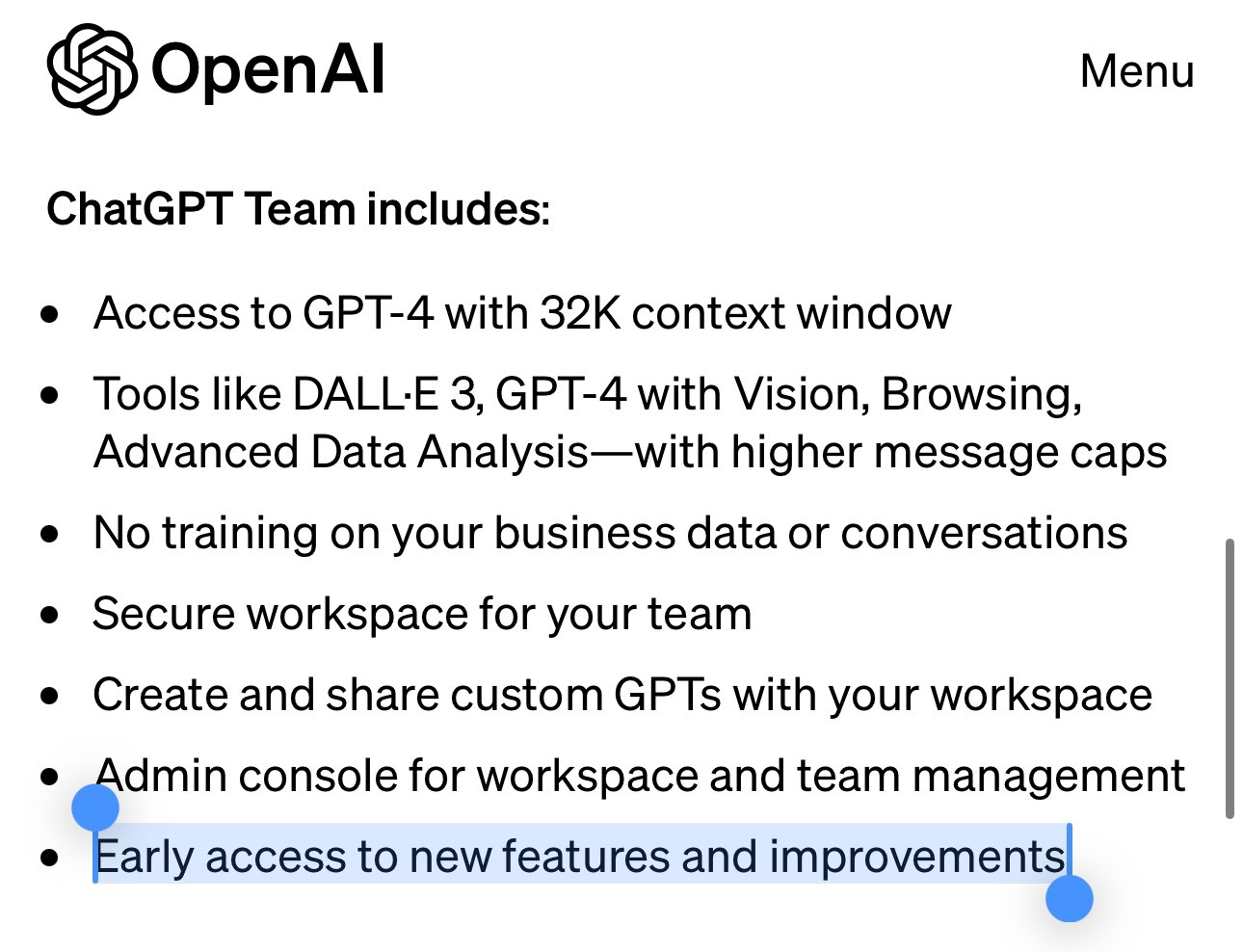
Besides, even ChatGPT Team and Enterprise subscribers didn’t make the cut. It infuriated them, and many cited their subscription details, which promised early access to new features and improvements.

ChatGPT Team subscription details

Many took to X and Reddit to express their exasperation over being excluded.

How does it make sense that you release new features to Plus, but not to Team or Enterprise?

Teams subscribers were promised early access to new features … but we actually are getting delayed access?

Teams users aren’t getting access? Not a good way to treat customers that pay extra for the promise of early access to new features.

Of course, not in Europe. May I ask why? Is it due to brilliant “EU regulations”?

Let’s see when Memory is made accessible to all ChatGPT subscribers globally. Our guess is that it would take at least a few more weeks as the AI laws in the region are rather strict when it comes to compliance.

Also, OpenAI confirmed that the Memory feature for user-created GPTs will be released soon!

Earlier this month, ChatGPT eliminated the need for an account, allowing everyone to access the AI-based chatbot.

What’s your take on Memory in ChatGPT? Share with our readers in the comments section.

Microsoft and Alphabet are heavily gaining revenue from AI investments

Microsoft and Google’s owner, Alphabet, reported a significant growth in their revenue. The financial results exceeded initial expectations. After all, Alphabet’s stocks grew by over 10%, and Microsoft’s shares increased by 5%. In addition, their AI investments influenced Amazon shares by 3% and Nvidia’s by 6%.

The entire AI sector benefits from Alphabet and Microsoft

Microsoft and Alphabet’s heavy investments in AI development made some of their investors skeptical. However, they deemed the AI sector promising after seeing the results. After all, the cloud computing businesses highlighted the importance of this technology. On top of that, there were various corporate requests for their services.

To Alphabet’s surprise, Google’s advertising revenue grew. So, AI chatbots can’t surpass search engines yet. Also, according to euronews.com, the company’s revenue rose by 15%, the fastest quarterly growth in two years. On top of that, Alphabet announced its first dividend payout, and the company’s market value surpassed $2 trillion.

Besides Alphabet, Microsoft had a revenue increase due to its AI services. Also, they further increased the importance of the company. After all, Azure, the company’s cloud platform that heavily uses AI tech, had significant growth and seized some of the market share of its competitors. Besides that, Copilot contributed to the company’s revenue increase because other companies started using it.

Is Meta still losing money?

Similarly to Microsoft and Alphabet, Meta also joined the AI race. According to the Financial Times, the company’s stock price dropped by 11%. However, this drastic decrease might suggest that Meta started investing in AI. Yet, this could be a tricky move for the company because it doesn’t have a proven track record of financial returns from AI services. But, if the promised free AI is successful, Meta will most likely snatch some of the market share from competitors.

Microsoft and Alphabet are going to increase their investments in AI infrastructure. The reasons differ, but the goal is overall the same. Microsoft needs to grow its research capacity to continue its AI development at a fast rate. So, the company will fund more research centers. On the other hand, Google is behind in the AI race and needs to invest to catch up with Microsoft.

The AI advancements require a lot of components. Thus, most of them became scarce. Additionally, according to Nvidia chief Jensen Huang, if a company doesn’t engage aggressively with AI, it might lose its standing because its competitors will.

In a nutshell, Microsoft is way ahead of its competition, especially since Alphabet struggled with Gemini’s problems. On top of that, the Azure cloud platform is constantly benefiting from AI improvements. However, soon, we might see companies like Meta rising to the top. After all, it’s a battle of AI services and features. Also, AI might improve the quality and efficiency of your business. So, don’t hesitate to use it.

What are your thoughts? Are you using any AI tools? Let us know in the comments.

6 Simple Ways to Fix The Xbox Error Code 0x80070490

We all love the convenience of the Xbox app but when it throws the error code 0x80070490 at any attempt to download a game, it can be quite annoying.

The error can appear on your Xbox console or your Windows device on the Xbox app. When you’re attempting to download, update or install any game, the Xbox app fails to download. This can be due to cached files or incorrect configuration.

How do I fix the Xbox error code 0x80070490?

1. Power cycle your console

  1. Press and hold the Power button for 10 seconds to turn off your console.
  2. Disconnect the power cable from the back of the console and from the outlet.
  3. After a minute, reconnect the power cable, then wait another minute to power up your console.

2. Run the Xbox offline troubleshooter

  1. Click the Xbox OSU1 link to download the Xbox Offline System Update file.
  2. Once the file is downloaded, connect your USB drive to a USB port of your computer.
  3. Right-click the OSU1 file and select Extract All from the pop-up menu to unzip it.
  4. Locate and copy & paste the $SystemUpdate file to your flash drive.
  5. Now, from the system tray on your PC, locate the USB flash drive icon, right-click, and choose Eject USB drive.
  6. Plug the USB drive into your console and restart it.
  7. On the Something unexpected happened… 0x80070490, choose Troubleshoot to access the Xbox Startup Troubleshooter.
  8. Choose Offline System Update to start the update with the file you saved on your USB drive.Offline System update - system error code e106 xbox one

Running the offline troubleshooter has more to do with Xbox updates but it’s still beneficial as it checks a wide range of issues. Perhaps the update failed and corrupted some crucial files that are interfering with the download process.

3. Reinstall the Gaming Services app

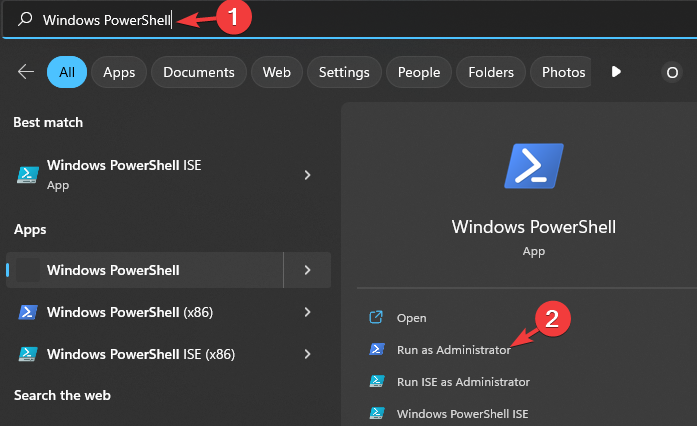
  1. Click on the Start menu in the taskbar and type Windows PowerShell in the box and select Run as administrator.
  2. Select Yes when the User Account Control (UAC) prompt appears.
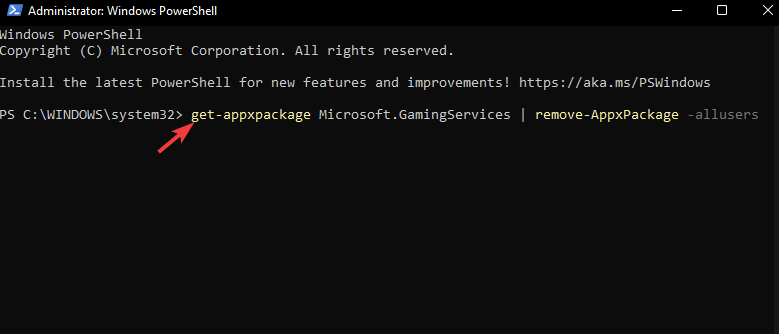
  3. Key in the following command in the console and press Enter to uninstall the Gaming Services app: get-appxpackage Microsoft.GamingServices | remove-AppxPackage -allusers
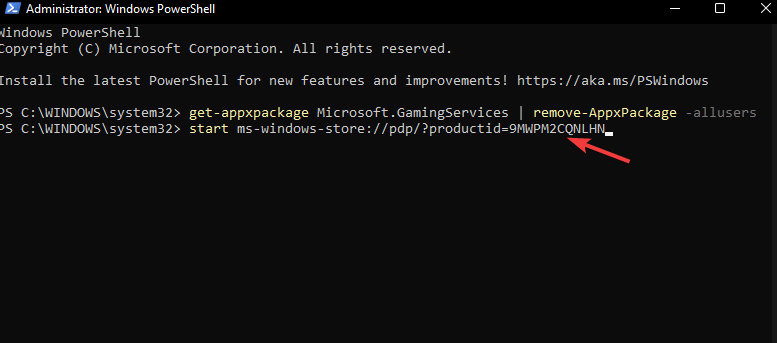
  4. Now, run the following command to open the Gaming Services app page in Microsoft Store: start ms-windows-store://pdp/?productid=9MWPM2CQNLHN
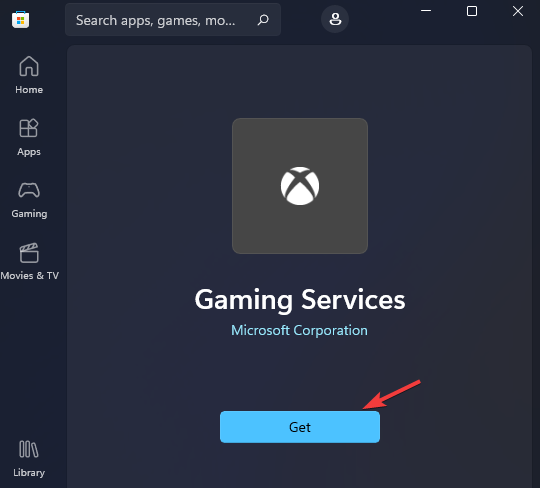
  5. Finally, click on the Get button to download the Gaming Services app once more.

4. Reset your Xbox console

  1. On your controller, press the Xbox button, and on the menu, click the System tab to open Settings.
  2. Select System, then click on Console info.
  3. Click on Reset console.
  4. Choose Reset and keep my games & apps.

5. Reset your PC

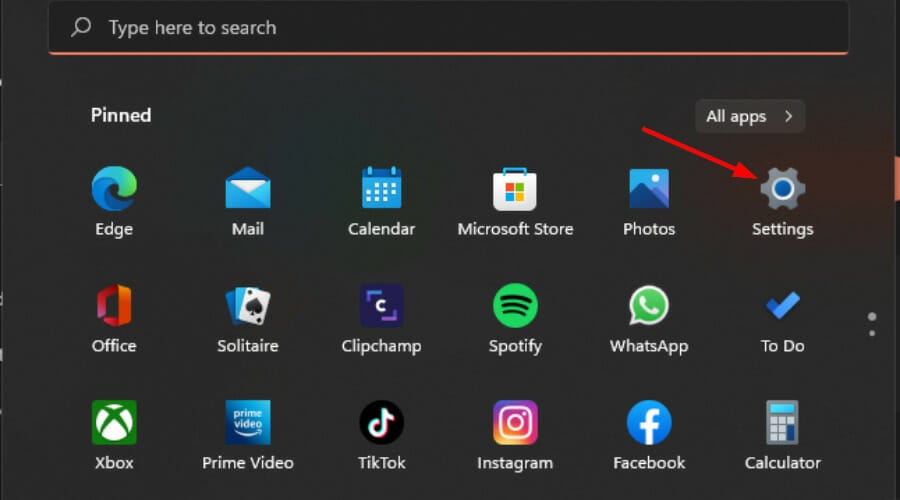
  1. Hit the Windows key and select Settings.settings windows 11
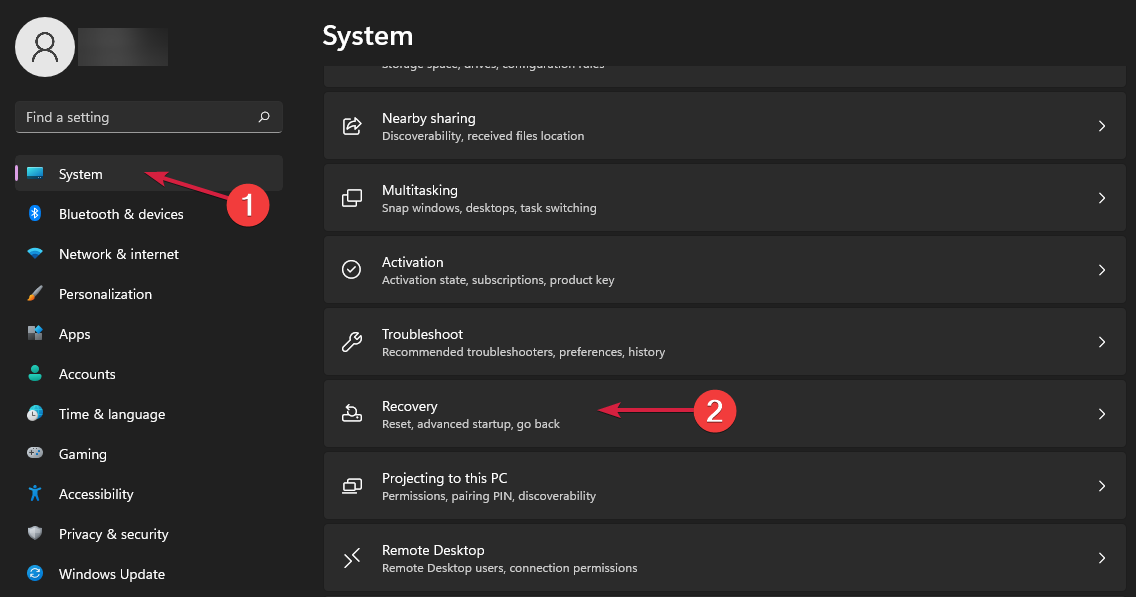
  2. In the left window pane, select System, then click on Recovery on the right pane.
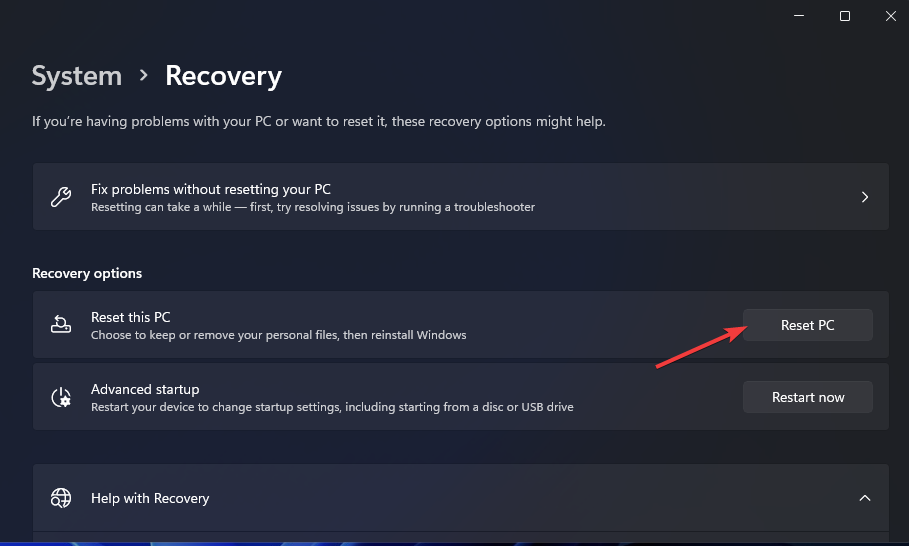
  3. Click on Reset PC from the right side.reset
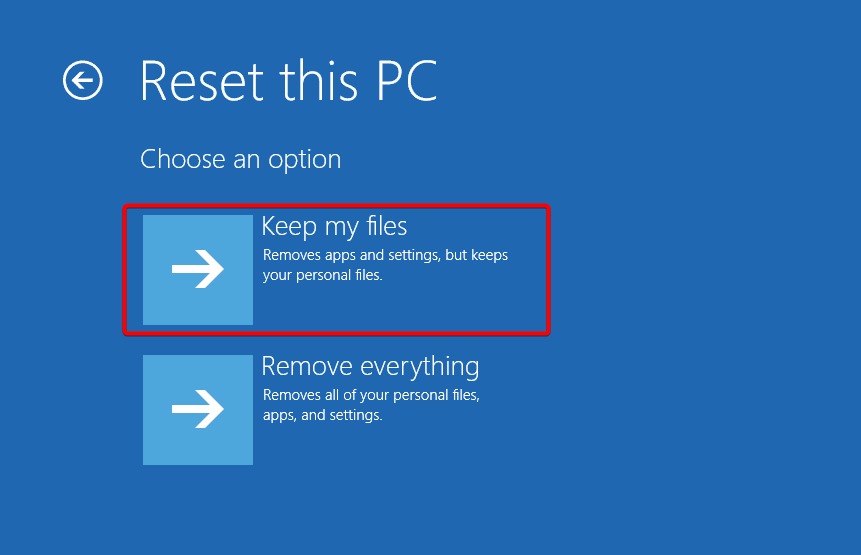
  4. Choose the type of factory reset you need. You can keep your files or completely delete all the files, apps, and settings on the PC.keep-files sfc scannow not working
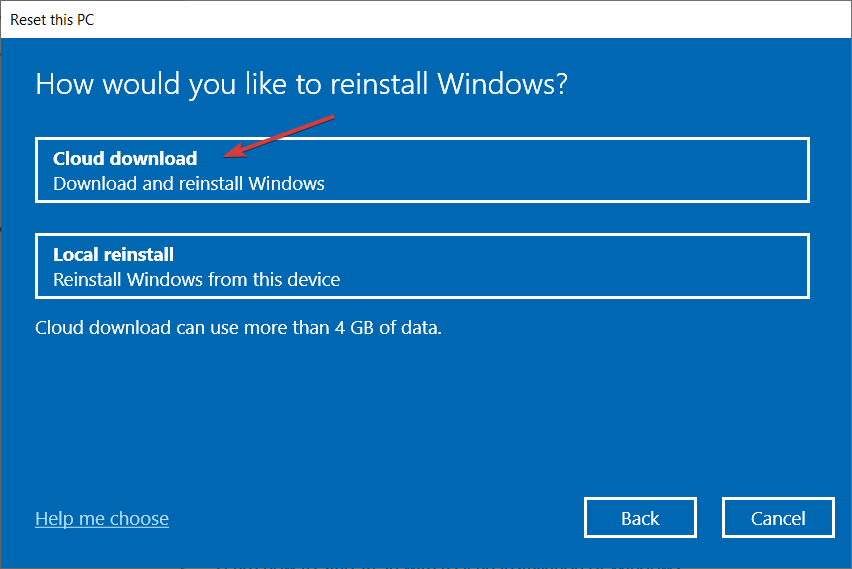
  5. Select the option you want to reinstall Windows: Cloud download or Local reinstall.choose cloud download windows 10
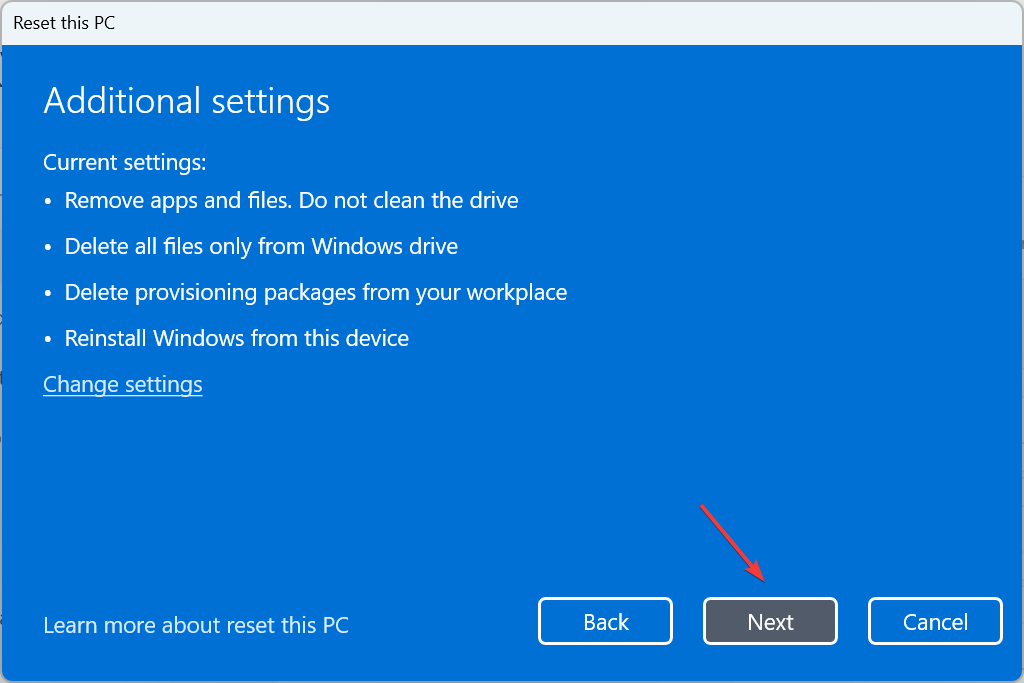
  6. Click on Next.verify details
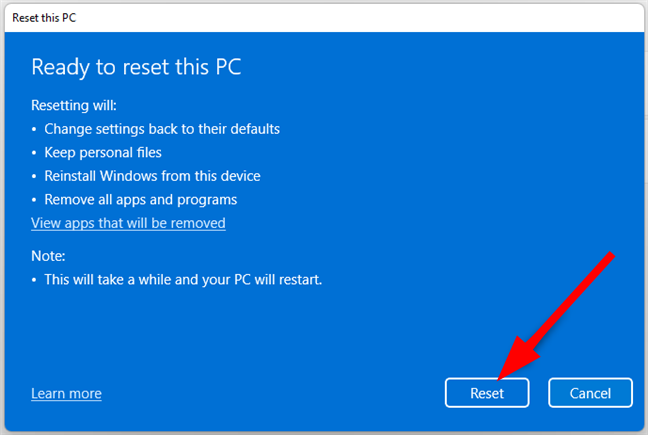
  7. Finally, press the Reset button.

6. Perform an in-place upgrade

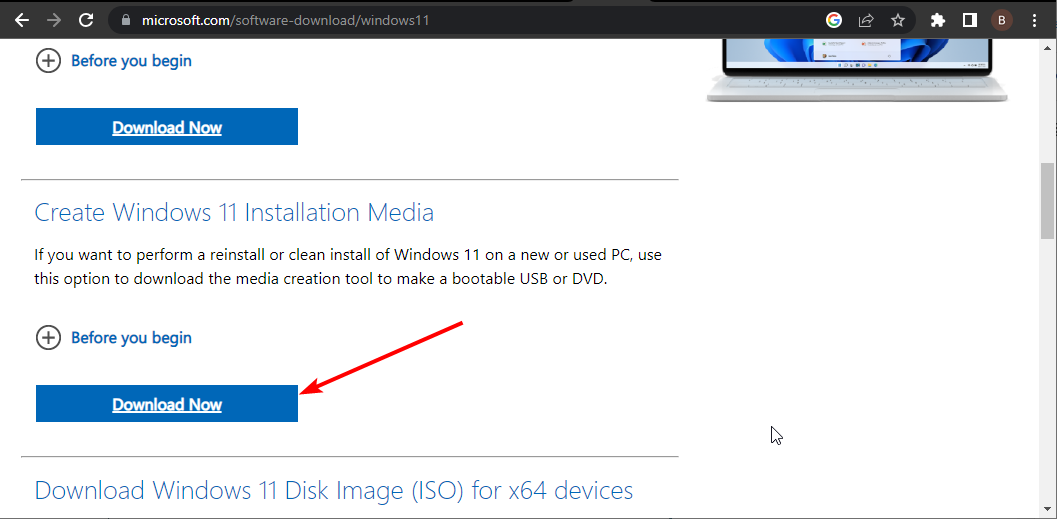
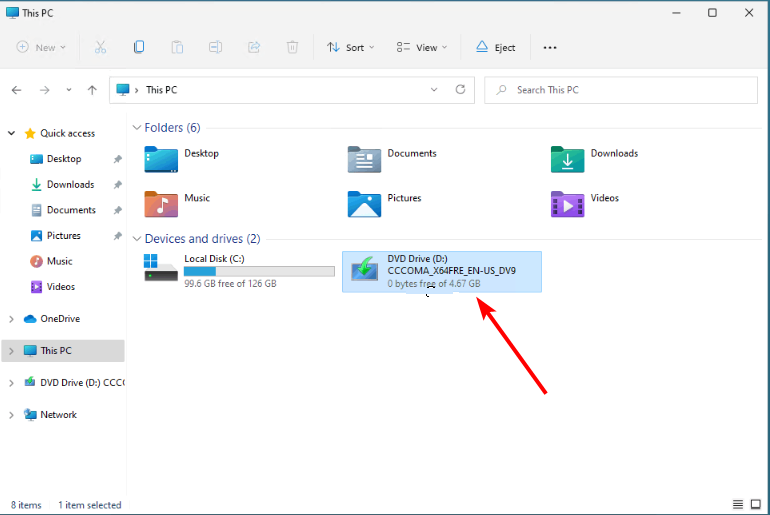
  1. Go to the official Windows 11 download website and click Download Now under the Create Windows 11 Installation Media section.
    download now 0x8031004a
  2. Double-click the downloaded file to run it.
    click
  3. Now, wait for Windows to prepare the setup and click Yes when prompted.
  4. Next, accept the Licence Agreement and wait while Windows downloads the required updates.
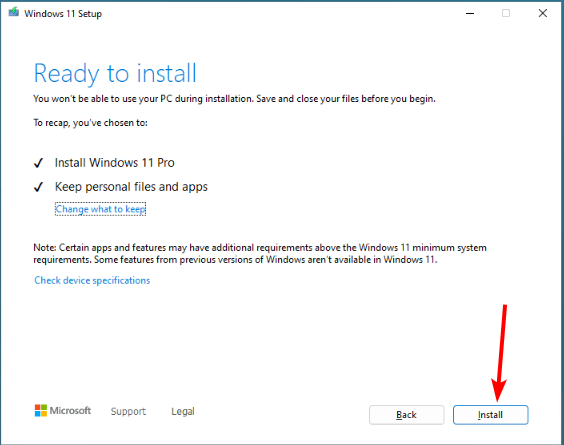
  5. Select between keeping your files and apps and removing them. Since you want to perform an in-place upgrade, leave the recommended settings, i.e., keep your files and apps.
  6. Now, click the Install button to start the in-place upgrade.
    install
  7. Finally, wait for Windows to copy the necessary files to upgrade your device and restart your PC.

An in-place upgrade is essential in resolving the Xbox error code 0x80070490 because it will repair any corrupt system files that were causing compatibility issues.

It will also remove any cached files that could potentially interfere with the download and installation of new games without losing your files. And if after fixing this issue your Xbox is slow in downloading games, we have the remedy for this.

Still, you may not be out of the woods. You may be successful in downloading and the Xbox games fail to launch. Lucky for you, we have an expert article on how to bypass this error.

Hopefully, one of the above solutions has gotten rid of the 0x80070490 error and you can now download and update your Xbox games with no issues.

If you have any additional thoughts on this topic or any other solution worth checking out, feel free to drop us a comment down below.

Tiny11 Builder just got better with the ability to disable telemetry

Let’s be honest, Windows 11 can feel a bit bloated with all the built-in features and functionalities that most of us rarely use.

If you’re looking for something lightweight, you’ll be pleased to know that a new version of Tiny11 is available, and it will make your Windows installation even smaller.

Tiny11 now allows you to disable telemetry on Windows 11

Windows 11 is notorious for gathering user data, and if you aren’t happy with that, you’ll be pleased to hear that Tiny11 can help you put an end to this.

According to Neowin, Tiny11 Builder has been updated, and you can now use it to disable telemetry and other tasks associated with it.

According to the developer, this will disable the Application Compatibility Appraiser, Customer Experience Improvement Program, and more.

This is the only change included in this version, and if you’re not comfortable with Microsoft gathering your data, you might want to give this version a try.

In case you missed it, Tiny11 Builder can now debloat any version of Windows 11, so it doesn’t have restrictions like in the past.

If you want to learn more, we have a great guide on Tiny11 vs Bloatynosy on Legion GO, so don’t miss it for more information.

Oracle boosts its AI cloud services struggling to keep up with Microsoft and Amazon

It’s not a secret anymore that Microsoft is leading the next wave of AI cloud services and their latest investments in this field paid off. Oracle is trying to ride this wave as well, and they’ve been busy boosting their cloud services with some pretty advanced generative AI capabilities.

This isn’t just a small upgrade; we’re talking about a significant leap that’s pushing their cloud revenue up by a whopping 25% to $5.1 billion.

In fact, according to latest Gartner report, Gen AI is the main focus of the big cloud services companies:

We are seeing a cycle of story, plan, execution when it comes to GenAI. In 2023, enterprises were telling the story of GenAI and in 2024 we are seeing most of them planning for eventual execution in 2025. Technology providers are required to be a step ahead of this cycle and are already in the execution phase. They are bringing GenAI capabilities to existing products and services, as well as to use cases being identified by their enterprise clients. 

John-David Lovelock, VP Analyst at Gartner

Will Oracle manage to keep up with the AI race?

Now, why is all this AI talk important? Well, Oracle is integrating generative AI into its applications, which is a game-changer for productivity and cost reduction. Imagine having AI that can not only predict outcomes but also generate human-like responses and solutions. That’s the kind of synergy Oracle is aiming for by combining predictive analytics with generative AI. And guess what? They’re not stopping there. According to CNBC, in March, Oracle expanded its AI features across various applications, following an announcement in January about implementing generative AI across its technology stack.

But here’s the kicker: Oracle’s cloud infrastructure backlog is massive, and AI is expected to drive even more revenue in the future. They’re also focusing on sovereign AI cloud solutions, which means they’re building a data center in Salt Lake City and negotiating with countries to meet specific data storage requirements. This is a big move towards providing more secure and localized AI services.

Oracle’s generative AI push is all about staying competitive and even more. With their data and installed base, they’re in a strong position to monetize AI in ways their competitors can’t. And with the AI boom driving demand for cloud computing services, Oracle’s strategic investments in AI are set to pay off big time.

So, what does all this mean for us? Well, as Oracle and others ramp up their AI capabilities, we can expect to see more innovative services and solutions that can transform how businesses operate. Whether it’s improving productivity, reducing costs, or creating more personalized customer experiences, AI is the future, and it’s happening now.

What do you think about the increasing investments in AI cloud services? Let’s talk about it in the comments section below.

Microsoft 365 Insiders can now convert their handwriting into text on Excel

Recently, Mark Rideout, a product manager on the Office AI team, announced the availability of Ink to Text Pen for Microsoft Insiders on Microsoft Excel. The tool was earlier introduced in Word, PowerPoint, and OneNote.

With the Ink-to-Text Pen tool, you can transform your handwriting into text using your digital pen or stylus, which will help you enter content into cells efficiently. It also allows you to use pen gestures to choose and delete content in a cell.

It is important to remember that the Action Pen in Excel is no longer available; it has been replaced by the Ink to Text Pen tool.

How does it work?

To use the Ink to Text Pen tool, go to the Draw tab and choose the Ink to Text Pen tool. Now, zoom in on the sheet to make the specific cell visible and start writing over a cell; this will replace any existing content.

If your device is touch-enabled, you will see the Draw tab in Excel. If you don’t find the Draw tab, you can navigate to File>Options>Customize Ribbon and select the Draw box.

To select a cell, you can tap a single cell or use the Straight line select gesture to choose multiple cells at once.

If you want to delete text, you can draw up and down squiggles to use the Scratch-out gesture through one or more cells.

In the Microsoft Insider blog, the scenarios that were mentioned to try are:

  • With the Ink to Text Pen tool selected, start writing over a cell in a new or existing spreadsheet.
  • Select multiple cells with the Straight line gesture and apply formatting to all of them at once.
  • Delete a cell’s content with the Scratch-out gesture.

There is also a known issue mentioned in the blog:

The Ink to Text Pen tool may not work correctly in a spreadsheet that has frozen panes.

To use the Ink to Text Pen tool, you should have a stylus or digital pen and the latest version of Windows 11 (23H2) with the October 31, 2023 update (KB5031455).

This feature is available to all Microsoft Insiders using Excel with all the other requirements mentioned above.

Have you used the Ink to Text Pen tool in Excel, Word, or OneNote yet? If so, share your experience with our readers in the comments section below.

All PCs shipped by 2030 will be powered by AI, suggests report

AI-capable PCs will soon be hot-selling products as manufacturers continue integrating more AI-oriented features into devices!

A report by Canalys shares a projection of an increased adoption rate for AI PCs among users.

It predicts that 19% of the PCs sold in 2024 will have Artificial Intelligence capabilities, increasing to 37% in 2025, followed by 53% in 2026 and 60% in 2027. And by 2030, nearly 100% of those shipped will be AI PCs!

Image source: Canalys

While these figures may look far-fetched to a few, Microsoft has already called 2024 the year of AI PCs.

The Redmond-based tech giant’s idea of an AI PC includes an NPU (Neural Processing Unit) chip, Microsoft Copilot, a dedicated Copilot key, and the latest CPU and GPU to perform resource-intensive tasks seamlessly.

Manufacturers like Intel and AMD are already working alongside Microsoft in the push for AI PCs. With these becoming mainstream, Intel and AMD stand a chance to recover the losses accrued over the last few years.

Image source: Intel

In 2024, everyone is competing in the AI race. Microsoft is planning to purchase 1.8 million AI chips, Intel is unveiling AI-oriented chips, and AMD is bringing new AI-powered processors.

Besides, we can’t forget NVIDIA, a company whose stock value surged ever since the AI revolution, and it soon became the third-largest company globally in terms of market capitalization.

With features like Copilot and AI Explorer (to be released soon) in Windows and Microsoft’s plans to invest more in the technology, the aim of AI-powered PCs in every home will be achieved sooner than many expected. Maybe not by 2030, but the day is not too far away!

It looks like no one, be it the manufacturer or buyers, wants to miss out on AI!

What’s your projection for the adoption rate of AI PCs? Share with our readers in the comments section.

Opera’s Aria AI can now generate images and has voice output

We have covered the evolution of Aria, Opera browser’s AI bot but until now, it was only a chat bot. According to the latest release, Aria is now able to generate image from text and can voice the answers to your prompts.

Moreover, if you forgot so generate an object in an image, Aria comes with a Regenerate command to correct your output. You will have 30 free image opportunities daily and Aria will use Google’s Imagen2 to generate them.

How do I use the new Aria text-to-image generator?

To generate an image, open a chat with Aria from the sidebar or in the Command Line by pressing Ctrl + / (Cmd + / on macOS). Then write the prompt to generate an image followed by a description, just like you do on any other AI generators out there.

But that’s not all. Opera’s Aria also comes with a voice output feature. This means Aria can read text answers aloud, making information accessible in a whole new way.

Here’s the bad news: To access these features, you’ll need the Developer version of the Opera browser. This is not such a setback, however. You can download it for free and join the developer program in just a few seconds.

What do you think about the new features of Opera and Aria AI? Let us know in the comments below.

Chrome and Edge to gain startup speed boosts on Windows, thanks to Microsoft

Chromium browsers are used by many, and while they are great in general, some users can experience slow startup while using them.

It seems that this might finally change thanks to Microsoft’s contributions to the Chromium project.

Chrome and Edge will start faster, thanks to Microsoft

Microsoft is actively contributing to the Chromium project, and the company has implemented SingletonHwnd, a window handler, that improves the browser startup time and responsiveness.

Microsoft has found that the traditional approach of creating individual message-only windows for components like BatteryStatusManagerWin that are listening to system events caused the bottleneck, especially during the startup.

This added a 1-10 millisecond delay for each window created. This issue was acknowledged on the Chromium project page.

The current implementation of BatteryStatusManagerWin creates message-only windows to listen for events from Windows. This impacts performance at startup where we have to pay the cost of creating the window to listen.

As a solution, Microsoft suggested the migration of BatteryStatusManagerWin to utilize SingletonHwnd. This is a shared handler and is a part of ui/gfx/win directory.

The new handler will work as a centralized listener for various system components such as SystemMessageWindowWin, ScreenlockMonitorWin, and PowerMonitorDeviceSource.

These changes will impact improved startup time for Chrome and Edge, as well as other Chromium browsers.

Instead use Singleton HWND in the implementation of this component to allow sharing a single HWND. We typically see 1-10ms costs for creating an HWND in startup, so sharing the Singleton HWND will lead to modest but measurable startup improvements.

SingletonHwnd is a design pattern within the Chromium project that should improve efficiency during the startup by reducing the overhead associated with handling system events.

This was also discussed by the Chromium developers:

Various components create message-only windows to listen for events/messages from Windows.  These include SystemMessageWindowWin, BatteryStatusManagerWin, ScreenlockMonitorWin, PowerMonitorDeviceSourceSingletonHwnd currently resides in ui/gfx/win.  Moving this to base would allow all the abovce components to share a single HWND.  Creating these various windows at startup does impact perf, so sharing a single HWND would be beneficial.

This is a welcome change, but this is currently in the development stages, so we won’t see it in action for some time.

In other news, Chrome makes managing certificates easier with the new UI, and Windows Share might come back to Edge, after 3 years.

Microsoft brings offline mode to OneDrive for Web, improves loading time by 3x

The latest in the series of improvements to Microsoft’s native cloud storage, OneDrive for Web, is an offline mode. This comes on the heels of UI enhancements to OneDrive!

Last year, we reported that Microsoft was working on an offline mode for OneDrive. It’s now being rolled out to OneDrive work and school users globally.

In its official blog post, Microsoft lists the following functions of offline mode in OneDrive for Web,

1. Open and interact with OneDrive’s “Home,” “My files,” “Shared,” “Favorites,” “People,” and, “Meeting” views.
2. View your folders, file names, and metadata such as file owner, size, recent activity, last open date, and more.
3. Use the “My files” view of OneDrive for web to rename, sort, move, or copy files and have those changes sync to your OneDrive when you reestablish an internet connection.
4. Open locally stored Office and non-Office files (files marked as “available offline”) in their native app and make and save edits.

Any changes made in offline mode will be synced when you reconnect to the Internet.

Image source: Microsoft

Besides, even OneDrive for Web‘s offline mode with an Internet connection comes with a series of improvements,

1. You can designate files or folders as available for offline access directly from OneDrive for web.
2. You can free up local storage space by making your local files or folders online only directly from OneDrive for web.
3. You will experience up to 3X faster loading times when viewing and interacting with your files in OneDrive in your browser and in the OneDrive app in Microsoft Teams and Outlook.

The latest changes also enhance OneDrive’s Files On-Demand, a functionality critical to the cloud storage for both Windows and Mac users.

As for the performance improvements in OneDrive for Web, they are a direct result of leveraging the local cache. Microsoft explains it in the official blog post.

Offline mode uses your device’s local storage to store certain file information such as file name, size, author, last date accessed, etc. By accessing your content from your local cache instead of fetching it from a cloud server, data retrieval speeds are significantly improved. Furthermore, this enhancement has the added advantage of bypassing cloud service-related throttling issues.

The offline mode for OneDrive doesn’t kick in and has to be manually set up. You can do so by opening OneDrive for Web and following the on-screen instructions. Also, you will need the latest OneDrive sync app.

Remember, the offline mode in OneDrive for Web is being gradually rolled out. So, everyone won’t get it at the same time!

In recent months, Microsoft has also integrated Copilot into OneDrive for Web, and more AI-powered features are on the cards.

For those new to Microsoft’s cloud storage service, read our comprehensive guide on using OneDrive.

What’s your review of offline mode in OneDrive for Web? Share with our readers in the comments section.

Loongson announces 3B6600 and 3B7000 CPUs, available only on the Chinese market

AMD and Intel dominate the current CPU market, but that doesn’t mean there aren’t any competitors available.

It seems that homegrown Chinese CPUs are catching up in performance to their global counterparts, and speaking of which, Loongson has just announced two new models.

Newly announced Loongson CPUs can allegedly rival Intel 10th Gen CPUs

Loongson has revealed its next-generation octa-core CPUs, 3B6600 and 3B7000, that are intended for the Chinese market, as Tom’s Hardware writes.

It is no surprise to see more Chinese CPUs after China banned Intel and AMD chips in government PCs.

According to the manufacturer, its CPUs are behind the competition regarding multicore performance, however, single-core performance has been improved, and it’s allegedly 20 times better than before.

Regarding the available cores, the CPUs offer the following:

  • 3B6600 – eight LA854 CPU cores and LG200 iGPU clocked at 3.0 GHz
  • 3B7000 – eight LA864 cores clocked at 3.5 GHz, undisclosed iGPU

Other features include the following:

Supported interfaces:PCIe 4.0, SATA III, USB 3.0, GMAC, HDMI output
Graphics:OpenCL 3.0 computing and OpenGL 4.0 graphics acceleration
Graphics performance:up to 256 GFLOPs, up to 1TFlops with discrete graphics
RAM support:SRAM, SDRAM, DDR2, DDR3, and DDR4

While these CPUs sound decent, they are outshined by AMD and Intel with ease. As for availability, we expect to see them available in China someday in the future.

In other news, China has acquired Nvidia AI chips, circumventing the US export ban.

Bringing exclusives to PlayStation and Nintendo worked for Xbox, more games on the cards

When Microsoft announced bringing Xbox-exclusive games to PlayStation and Nintendo, it left everyone by surprise. But the move turned out great for Microsoft!

The Redmond-based tech giant reported an increase in revenue from gaming, with the Activision Blizzard acquisition being a key factor. Recently, we also found that more Xbox games featured in the top 25 list on the PlayStation Store.

Microsoft’s CEO Satya Nadella had earlier said,

We’re expanding our games to new platforms, bringing four of our fan-favorite titles to Nintendo Switch and Sony PlayStation for the first time. In fact, earlier this month, we had 7 games among the top 25 on the PlayStation store, more than any other publisher.

Now, at a time when Xbox console sales are at a record low, it only makes sense for Microsoft to bank on the revenue from Xbox content and services, which reported a 62% increase in Q3 2024.

Microsoft to bring more Xbox-exclusive titles to PlayStation and Nintendo

After releasing several games on PlayStation and Nintendo, Microsoft is now planning to bring a few more titles to the two. While there has been no official confirmation from the Xbox division, a report from ComicBook suggests that Senua’s Saga: Hellblade II and Indiana Jones and the Great Circle are on the cards!

But it’s Halo that everyone is talking about. An Xbox exclusive for over a decade (amongst consoles, a PC version is available), Halo could be the turning point, providing Microsoft with a much-needed boost in the gaming division.

Both Halo Infinite and Halo: The Master Chief Collection, if brought to PlayStation and Nintendo, would break all records and be amongst the top pre-ordered games, as was the case with Sea of Thieves.

Reports earlier suggested that the success of Sea of Thieves could pave the way for more Xbox exclusives on PlayStation. Now that Sea of Thieves hit 40 million users, other titles could be just months away, including the much-hyped Halo series!

Low console sales remain a concern for Xbox

Although Xbox is generating more revenue than ever from its games, console sales are at an all-time low in recent years. Retailers are cutting back stock as gamers prioritize PlayStation and PC over the Microsoft console. And with exclusivity out of the picture, more gamers could jump ship!

In recent years, Xbox sales have shown no signs of recovery, and many fear that game developers could soon abandon the platform due to reduced profits. A few more years of similar sales figures, and it would be nearly impossible for Xbox to recover.

Do you think bringing more Xbox games to PlayStation will help Microsoft? Share with our readers in the comments section.