XBOX CEO Asha Sharma is facing growing criticism from fans following reports of additional layoffs and potential studio closures across Microsoft’s gaming division. The latest cuts have reignited concerns about the future direction of XBOX and whether Microsoft’s focus on financial discipline could come at the expense of game development talent.
The controversy comes as industry analyst Joost van Dreunen argues that Sharma was brought in to make XBOX a leaner and more sustainable business. Writing in his SuperJoost Playlist newsletter, van Dreunen described Sharma’s mission as “whipping XBOX back into shape” during a period of major change for the gaming industry.
According to van Dreunen, the gaming market has entered what he calls a “disruption cycle” rather than a traditional “content cycle.” In previous years, gaming companies primarily competed by producing blockbuster titles and expanding their content portfolios. Today, he argues, investors increasingly reward companies that streamline operations, reduce costs, and improve efficiency.
XBOX Restructuring Sparks Fan Concerns
Van Dreunen believes the recent XBOX layoffs fit into this broader industry trend. While many fans have criticized Microsoft’s decision to cut jobs and potentially close studios, supporters of the restructuring argue that the company must improve profitability after decades of heavy investment in its gaming business.
The latest reports have led some players to compare Sharma’s leadership unfavorably to the later years of former XBOX chief Phil Spencer. During Sharma’s first few months in the role, many believed she would continue Microsoft’s existing gaming strategy. However, the recent layoffs have revived concerns that XBOX may be shifting toward a more aggressive cost-cutting approach.
Those concerns gained additional attention after Sharma reportedly acknowledged in a message to employees that XBOX is not currently in a healthy business position. The statement reinforced the view that significant changes could be necessary to improve the division’s financial performance.
Long-Term Questions Remain
The broader concern among fans and industry observers is whether Microsoft’s current strategy risks weakening XBOX’s long-term competitive position. Studio closures and layoffs can reduce costs, but they may also eliminate experienced developers responsible for creating future exclusives and new franchises.
For now, Microsoft has not publicly outlined a detailed roadmap explaining how the latest restructuring fits into XBOX’s long-term plans. As the company continues to adjust its gaming business, the success or failure of Sharma’s strategy will likely depend on whether XBOX can balance financial sustainability with the creative output needed to remain competitive.
The coming months may provide a clearer picture of whether Microsoft’s restructuring efforts strengthen XBOX’s future or deepen concerns about the platform’s direction.
Microsoft is reportedly considering using a self-hosted version of DeepSeek’s V4 model for Copilot Cowork, according to a report from Axios. The move comes just weeks after Microsoft expanded Copilot Cowork availability to all Microsoft 365 users and could signal a broader shift in how the company manages the growing costs of enterprise AI.
According to Axios, Microsoft is exploring alternatives as the cost of using advanced AI models from OpenAI and Anthropic continues to rise. The company has also reportedly restricted the use of Anthropic’s Claude Fable 5 model because of concerns related to data retention policies.
As enterprise AI adoption accelerates, token consumption has become a major financial challenge. More advanced agentic workflows, coding assistants, and automation tools require significantly more processing than traditional chatbot interactions, increasing operational expenses for AI providers and customers alike.
AI Token Costs Are Becoming a Growing Concern
The report notes that several companies have already encountered unexpectedly high AI bills as employees and automated systems increase their usage of large language models.
At the same time, OpenAI and Anthropic are reportedly introducing higher enterprise pricing while placing greater limits on token consumption. These changes have pushed some organizations to reevaluate which AI models they use and how they deploy them internally.
Copilot Cowork combines Microsoft’s enterprise Copilot capabilities with advanced AI models designed for workplace automation, collaboration, and agentic workflows. As these workloads become more demanding, maintaining flat-rate subscription plans becomes increasingly difficult.
Microsoft is reportedly moving Copilot Cowork toward a metered pricing structure based on total token usage, aligning costs more closely with actual consumption.
Why DeepSeek V4 Could Appeal to Microsoft
A self-hosted deployment of DeepSeek V4 could offer Microsoft a way to lower inference costs while retaining control over infrastructure, deployment, and data handling.
The approach would not necessarily eliminate political concerns, however. DeepSeek is widely viewed as a China-linked AI company, and any significant Microsoft partnership involving its technology would likely attract attention from lawmakers and regulators in Washington amid ongoing scrutiny of Chinese AI platforms.
Enterprise AI Economics Are Changing
The reported discussions highlight a broader trend across the AI industry. As model capabilities improve, operating costs continue to rise, forcing both providers and customers to rethink pricing structures.
For Microsoft, finding lower-cost alternatives could become increasingly important as enterprise customers scale AI-powered automation across large organizations.
If Microsoft ultimately adopts DeepSeek V4 for Copilot Cowork, it would demonstrate that even one of OpenAI’s largest partners is actively exploring cheaper AI options as enterprise demand grows and token costs continue to climb.
The development also follows other recent AI-related controversies. Anthropic recently restricted access to its Mythos-class Fable 5 model for non-US citizens following concerns about advanced cyber capabilities, while Microsoft continues to face scrutiny over the billions of dollars it has invested in AI infrastructure and services, including a recent report that the company faces a shareholder lawsuit over AI spending and Azure growth.
Microsoft has confirmed that it is working on a security update for a newly disclosed Microsoft Defender zero-day vulnerability known as RoguePlanet, which can reportedly grant attackers SYSTEM-level privileges on fully patched Windows 10 and Windows 11 systems.
Microsoft is actively working on a fix for the RoguePlanet Defender zero-day
The vulnerability, now tracked as CVE-2026-50656, affects the Microsoft Malware Protection Engine used by Microsoft Defender. Security researcher Nightmare Eclipse disclosed the flaw, describing it as a race condition that allows attackers to spawn command prompt windows with elevated SYSTEM privileges.
According to the researcher, the exploit can be unreliable because it depends on precise timing. However, they claim the vulnerability works even when Microsoft Defender’s real-time protection feature is disabled, potentially expanding the number of affected systems.
Microsoft initially acknowledged the report and said it was investigating the claims. The company has now confirmed that CVE-2026-50656 is an elevation of privilege vulnerability and stated that it is working on a high-quality security update to address the issue.
At the time of writing, Microsoft has not released a security patch for CVE-2026-50656. The company has not provided a timeline for when the fix will become available.
The disclosure also highlights the long-running history between Microsoft and Nightmare Eclipse. Microsoft did not credit the researcher in its advisory. The two have previously clashed over vulnerability disclosures, including Microsoft’s decision to ban Nightmare Eclipse from GitHub after a series of Windows exploit releases and an earlier dispute in which Microsoft later backtracked on legal threats related to the YellowKey zero-day disclosure.
Follows recent Defender security fixes
The new vulnerability comes shortly after Microsoft addressed several other Microsoft Defender-related security issues during the June 2026 Patch Tuesday updates.
Those updates included fixes for the previously disclosed GreenPlasma, MiniPlasma, and YellowKey proof-of-concept exploits, along with more than 200 other vulnerabilities across Microsoft’s software portfolio.
Security researchers and system administrators are now waiting for Microsoft’s upcoming update to determine how broadly RoguePlanet can be exploited in real-world attacks and whether any temporary mitigations will be recommended before a patch becomes available.
Prime Minister Keir Starmer announced the proposal following a national consultation that received more than 116,000 responses. The government says nine out of ten parents supported a social media ban for under-16s, while around two-thirds of young people agreed that younger users should be excluded from at least some platforms.
If approved, the regulations are expected before Christmas, with enforcement scheduled to begin in spring 2027.
New Users Could Face ID and Facial Verification
Under the proposal, social media companies would need to verify that new users are at least 16 years old before allowing them to create accounts.
Platforms may require users to upload government-issued identification or complete facial age-estimation checks. Existing long-term accounts are expected to receive exemptions under the current framework.
The proposal could effectively end anonymous account creation on many major social networks in the UK, particularly for new users.
Adults may avoid additional checks if they have older accounts, linked payment methods, or previously verified email addresses. However, anyone creating a new account would likely need to complete direct age verification.
Instagram, TikTok, YouTube and X Included
The proposed rules would apply to social platforms built around social interaction and algorithmic content feeds.
The government specifically named Instagram, TikTok, Snapchat, Facebook, YouTube, and X.
Messaging services such as WhatsApp and Signal would remain exempt. The government also plans exemptions for educational platforms, music streaming services, e-commerce websites, and YouTube Kids.
Restrictions Will Extend Beyond Social Media
The proposals go beyond account creation limits.
The government wants to restrict features such as livestreaming and communication with strangers for children across a wider range of online services, including gaming platforms.
Restrictions on livestreaming and stranger contact would also apply by default to users aged 16 and 17.
The government is also considering additional measures, including:
Overnight social media curfews for minors
Mandatory breaks from infinite scrolling
Stronger protections against unwanted contact
Wider controls on algorithmic recommendations
AI Companion Chatbots Face New Rules
The plans also target AI-powered companion services.
AI romantic companion chatbots would have to enforce a minimum age of 18. Intimate or relationship-focused chatbot features would face broader restrictions for anyone under 18.
The move forms part of a wider UK push toward online age verification and digital identity systems, including future digital identification initiatives.
Privacy and Security Concerns Remain
The proposal has already drawn criticism from privacy advocates, digital rights groups, and security researchers.
Critics argue that protecting children could result in a broader requirement for all internet users to verify their age before accessing online services.
Researchers have warned that collecting government IDs or biometric data creates additional privacy and cybersecurity risks. Potential concerns include identity theft, data breaches, and misuse of sensitive personal information.
The Open Rights Group has warned that many users over 16 could end up handing personal documents or biometric data to third-party age-verification providers.
Some experts also question how effective the measures will be, arguing that teenagers may simply migrate to less-regulated platforms.
Enforcement may prove difficult because VPN services can allow users to bypass geographic restrictions and age controls.
The UK government has said it does not currently plan to ban VPNs outright, although officials have explored options to limit their use by children.
Any future attempt to restrict VPN access could create additional age-verification requirements for VPN users themselves, raising further privacy concerns.
The UK’s proposal follows a similar path to Australia’s under-16 social media ban, which took effect in late 2025, but the British government says its approach will extend protections to a wider range of online services and digital features.
As the rules move toward formal legislation, the debate is increasingly shifting from child safety toward a broader question: how much personal identification people should need to provide before accessing the modern internet.
Microsoft has launched the new Surface Pro 12 in the United States, and to mark its arrival, the company is offering a limited-time promotion that includes a free Surface Pro Keyboard with every purchase, as Windows Central reports.
The offer runs from June 16 through June 30 and applies to eligible Surface Pro 12 purchases made through the Microsoft Store. Customers who buy the new 13-inch Surface Pro during the promotional period will receive a Surface Pro 13-inch Keyboard at no additional cost.
The bundled keyboard normally sells for $170, making the promotion one of the more significant Surface discounts available at launch.
Microsoft Addresses a Long-Standing Surface Complaint
For years, one of the most common criticisms of the Surface Pro lineup has been that the keyboard is sold separately despite being a key part of the device’s 2-in-1 design.
While the Surface Pro can function as a standalone tablet, many users rely on the detachable keyboard for productivity tasks such as writing, web browsing, and office work. The additional cost of purchasing a keyboard has often pushed the total price higher than expected.
By including a keyboard for free, Microsoft effectively lowers the entry cost for customers who want the complete Surface Pro experience.
What Keyboard Is Included?
The promotion includes the standard Surface Pro Keyboard rather than Microsoft’s premium keyboard model.
The basic keyboard lacks several premium features found on Microsoft’s higher-end accessories, including Surface Pen storage and charging support, more premium materials, and an enhanced trackpad design.
Despite those omissions, the keyboard still provides the core laptop-style experience that most Surface users expect. It also serves as a protective cover for the display when the device is not in use.
Offer Ends June 30
The free keyboard promotion is scheduled to end on June 30. After that date, the Surface Pro Keyboard will once again become an optional accessory sold separately.
For customers planning to purchase a Surface Pro 12, the promotion provides an opportunity to save $170 on an accessory that many consider essential.
Earlier this month, Microsoft released June 2026 Patch Tuesday update, KB5094126 and KB5093998, for Windows 11 version 23H2, 24H2 and 25H2. Initially, the company mentioned that there are no known issues linked with this update.
However, it has now updated the official changelog and has acknowledged a bug that might cause Microsoft Office apps fail to open from some third-party apps. The same issue may trigger for Windows 10 users who have installed the latest ESU KB5094127.
The problem affects software that relies on OLE automation, a long-standing technology used by third-party applications to communicate with Office programs like Word, Excel, PowerPoint, and Access. In some cases, users may click a file or launch command, and nothing happens at all, with no error message appearing on screen.
Microsoft says reports point to several affected applications, including CCH Engagement, Workpaper Manager, Zotero, and dental practice software such as Dentrix and Softdent. The company notes that other apps using similar integrations could also run into the same issue.
Speaking of impact, the bug appears to surface only when users attempt to open Office apps or documents from within affected third-party software. Launching Word, Excel, or other Office apps directly continues to work normally.
Microsoft is currently working on a fix and says it will be released via future Windows update. The company has not shared a timeline for the rollout.
Until then, Microsoft recommends opening Office applications or documents directly instead of launching them through third-party tools. Organizations experiencing widespread issues can also contact Microsoft Support for Business to receive an enterprise workaround. Speaking of bugs, Windows 11 KB5094126 is reportedly also causing BSODs, random freezes, and OneDrive issues for many.
Back in April, GitHub officially apologized to users for frequent outages in the recent past, and promised that it is making foundational changes to lower such incidents going forward. Now, it seems Microsoft is stepping in by partnering with its immediate rival to keep things smooth for developers out there.
GitHub is reportedly adding capacity from Amazon’s cloud to address frequent outages amid massive demand
According to a new report from Business Insider Africa, Microsoft is partnering with Amazon Web Services (AWS) to help GitHub manage a surge in AI-driven demand that has reportedly stretched its infrastructure to the limit. The move marks a notable shift for Microsoft, which has long planned to migrate GitHub fully onto Azure by 2027.
Rather, the software giant is now embracing a broader multi-cloud approach as AI coding assistants dramatically increase developer activity across the platform. Not to forget, GitHub has struggled with reliability issues throughout 2026, with multiple service disruptions affecting developers. The pressure appears to stem from the rapid rise of AI-powered coding tools, which are enabling engineers to generate and commit code at unprecedented rates.
Microsoft and Amazon remain tight-lipped about the partnership
In a statement to Business Insider, a Microsoft spokesperson confirmed that the company is working with multiple cloud providers, though it declined to comment specifically on Amazon’s involvement.
“The incredible spike in agentic development that began late last year has tested our infrastructure’s limits,” the spokesperson told to the news outlet. Microsoft adds that it is “both accelerating our move to Azure and continuing to explore a multi-cloud strategy to ensure we have the future capacity, compute elasticity and horizontal scale required to support continued growth.”
Amazon is reportedly also mum to discuss individual customers but said, “customers choose AWS because they need global infrastructure that performs reliably, securely, and efficiently at scale, and we’re committed to providing the best performance no matter the workload.”
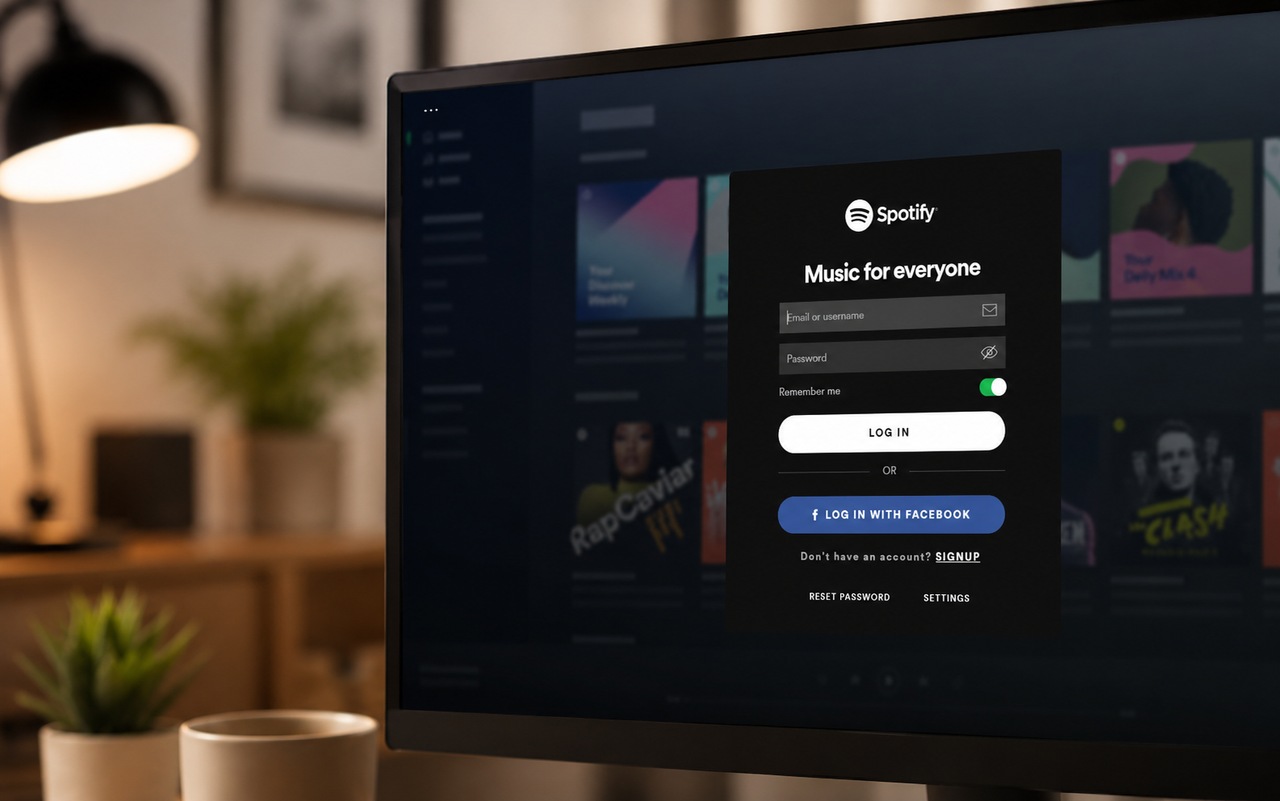
Spotify will stop supporting username-based sign-ins later this year, requiring users to log in with their email address instead, as reported by 9to5Google.
Login Changes Take Effect in September 2026
According to an email sent to subscribers, the change takes effect on September 1, 2026. After that date, Spotify usernames will no longer work for account sign-ins. Users will need to use the email address associated with their account when logging in.
Spotify currently supports several authentication methods, including usernames and passwords, email addresses and passwords, and third-party sign-in options through services such as Google and Apple. The company confirmed that Google and Apple login methods will remain available after the transition.
Users who are unsure which email address is linked to their account have a little over two months to verify or update their information. Spotify advises subscribers who prefer a different email address to change it through their account settings before the September deadline.
The company has not yet published a formal announcement about the change on its official blog or community forums. Instead, affected users learned about the update through direct email notifications.
What Users Need to Do
Spotify users should verify which email address is connected to their account before September 1 and update it if they no longer use the current address.
They should also make sure they can still access that email account, as it will be needed for future sign-ins and account recovery requests.
Those who prefer using Google or Apple sign-in can continue doing so after the change. Accounts that already rely on email-based logins or social sign-in methods are not expected to experience any disruption.
Other Spotify Updates
The company recently defended its use of AI-generated music on the platform amid ongoing industry debate around artificial intelligence and music creation.
At the same time, Spotify has increased efforts to combat misleading AI-generated podcast content, including the use of verification badges to help users identify legitimate creators.
Spotify has also introduced Clips for podcasts, a feature that allows users to share specific moments from podcast episodes more easily across social platforms and messaging apps.
The new sharing tool aims to improve podcast discovery while giving creators another way to reach listeners.
Overall, Spotify’s decision to phase out username-based logins is likely to be a positive change for most users. By standardizing account access around email addresses and established identity providers such as Google and Apple, the company may be able to strengthen account security, simplify account recovery, and reduce potential risks associated with older authentication methods.
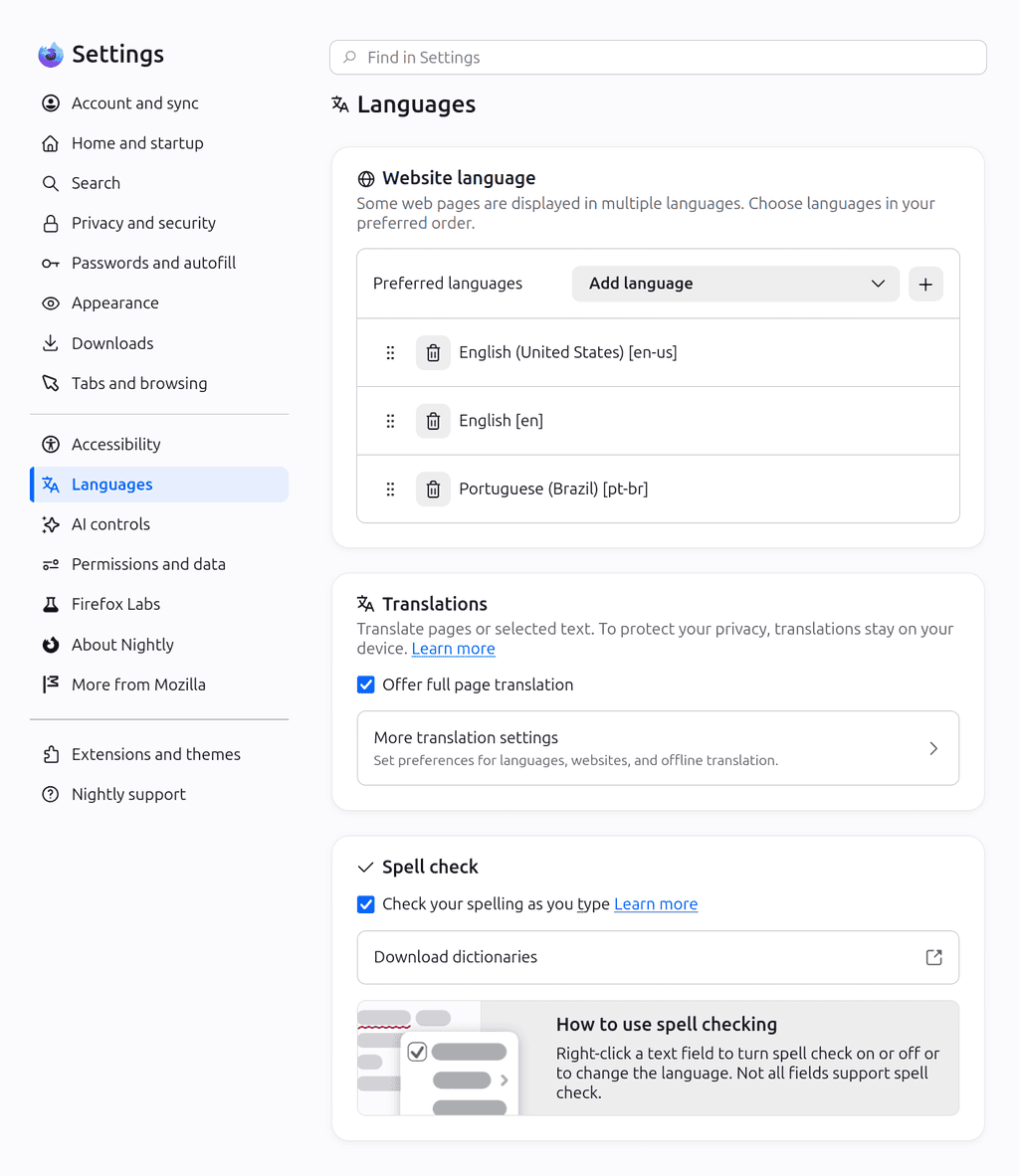
Mozilla is rolling out Firefox 152 to users with a redesigned settings experience, new privacy controls, expanded translation support, and several quality-of-life upgrades that makes everyday browsing faster and less frustrating.
Firefox 152 gets revamped Settings menu
As part of the version 152, Firefox gets a completely overhauled Settings menu. Mozilla says the redesigned interface introduces clearer categories, streamlined navigation, and a more organized layout that makes browser customization easier to manage.
Image credit: Mozilla
As usual, this update also focuses on Privacy features. Firefox users can now temporarily disable tracker blocking on individual sites when strict protections cause pages to break. Rather than forcing users to dig through menus, Firefox will display a prompt offering to reload the page with relaxed tracking protections while keeping all other safeguards active.
Image credit: Mozilla
Mute noisy tabs with simple commands
Moving on, Firefox 152 also brings a new shortcut for silencing noisy tabs. Users can type “mute,” “shush,” or “sssh” into the address bar to instantly mute all tabs playing audio across every open Firefox window.
Speaking of productivity, Firefox now lets Windows and Linux users copy links directly from the tab context menu without opening the page first. A new “Send Tab” toolbar button is also available through the customization menu.
Traslations now support more languages
The update also expands Firefox Translations with support for Basque and Galician while adding built-in spellcheck dictionaries for several languages, including Turkish, Persian, Welsh, Croatian, Tamil, and Georgian. Meanwhile, Firefox Labs now includes experimental support for JPEG XL, a next-generation image format designed to deliver better compression than JPEG, PNG, GIF, and WebP.
Other improvements include finer zoom controls, smarter PDF downloads, multiple bug fixes, WebAuthn enhancements for passkeys, and support for notification action buttons across the web. Not to forget, Mozilla has announced a public Firefox roadmap to keep users informed about upcoming features and ongoing development.
Threat actors have been abusing Steam Workshop to distribute malware disguised as Wallpaper Engine wallpapers, according to security researchers from Kaspersky.
The campaign targets users of Wallpaper Engine, a popular Steam application that allows animated and interactive desktop backgrounds. While most wallpapers are harmless, the software also supports application wallpapers, which are executable Windows applications capable of running code on a user’s system.
Researchers warn that this functionality creates a built-in security risk that attackers have been exploiting since at least late 2025.
Malicious Wallpapers Uploaded to Steam Workshop
The attackers uploaded malicious wallpapers to Steam Workshop and disguised them as legitimate user-created content. Researchers identified dozens of infected application wallpapers, some of which accumulated thousands or even tens of thousands of downloads before being removed.
The malware was either bundled directly inside the wallpaper package or hidden within password-protected archives. In some cases, users were tricked into manually opening the archive, while other payloads could execute automatically when the wallpaper was installed.
One analyzed sample impersonated a game called NTRaholic. The wallpaper appeared to function normally, helping it avoid suspicion, but it secretly installed the DarkKomet backdoor in the background.
Multiple Malware Families Detected
Researchers found several malware families distributed through the malicious wallpapers.
These included the DarkKomet backdoor, the Lumma and Vidar information stealers, cryptocurrency miners, botnet loaders, RanEngine malware, and ransomware payloads.
In one case, attackers used a modified AggregatorHost.dll file to search for Steam account data and steal user credentials.
The wide range of payloads suggests the campaign was designed for multiple objectives, including credential theft, financial fraud, system compromise, and ransomware deployment.
Potential Impact on Victims
Users who install infected wallpapers could face a variety of security risks, including Steam account theft, credential harvesting, unauthorized remote access, cryptocurrency mining abuse, botnet infection, and ransomware attacks.
Researchers noted that application wallpapers are particularly dangerous because users may not realize they are installing executable software rather than simple image-based backgrounds.
Steam Removes Identified Threats
Steam has removed the malicious wallpaper applications identified during the investigation. However, researchers warn that similar malicious uploads are likely to appear again in the future.
Users are advised to download Steam Workshop content only from trusted creators and exercise caution when installing application wallpapers. Security experts also recommend scanning downloaded content with an up-to-date antivirus solution before running it.
Mozilla has officially announced what’s next for Firefox. Alongside the release of Firefox 152, the company has also introduced a new public roadmap that offers users an early look at upcoming features raging from AI, privacy, productivity, and performance.
In the official blogpost, Mozilla says the roadmap will give Firefox users a chance to see what’s in development, share feedback earlier, and help influence future updates.
What’s on Firefox roadmap
Although Mozilla previously announced AI kill switch, it isn’t stopping to integrate features in the latest version of Firefox. Mozilla confirmed that a new feature called Quick Answers, which lets users ask questions using their voice and receive AI-generated responses with linked sources directly inside the browser.
The company is also expanding Smart Window, its optional privacy-focused AI browsing experience, which no longer requires a waitlist. Speaking of privacy, Mozilla plans to bring its built-in VPN to mobile devices and integrate Multi-Account Containers directly into Firefox. Thus apparently eliminates the need for a separate extension.
Other features on the roadmap include customizable keyboard shortcuts, advanced PDF editing tools, and a new Power Saving Mode designed to reduce the impact of resource-heavy tabs on mobile devices.
Firefox 152 is here with some useful features
Meanwhile, Firefox 152 is coming with multiple new features. First of all, Tab Groups are now rolling out to Android as part of Firefox 152 update. This allows users to organize related tabs with custom names and colors. Mozilla has also redesigned Firefox settings to make browser customization easier. In addition, a new Blocked Tracker Widget shows users exactly how many trackers Firefox has stopped in real time.
Typing the same Copilot prompts into Excel over and over again may finally become a thing of the past. Microsoft is rolling out two major upgrades designed to make its AI assistant far more consistent when editing spreadsheets.
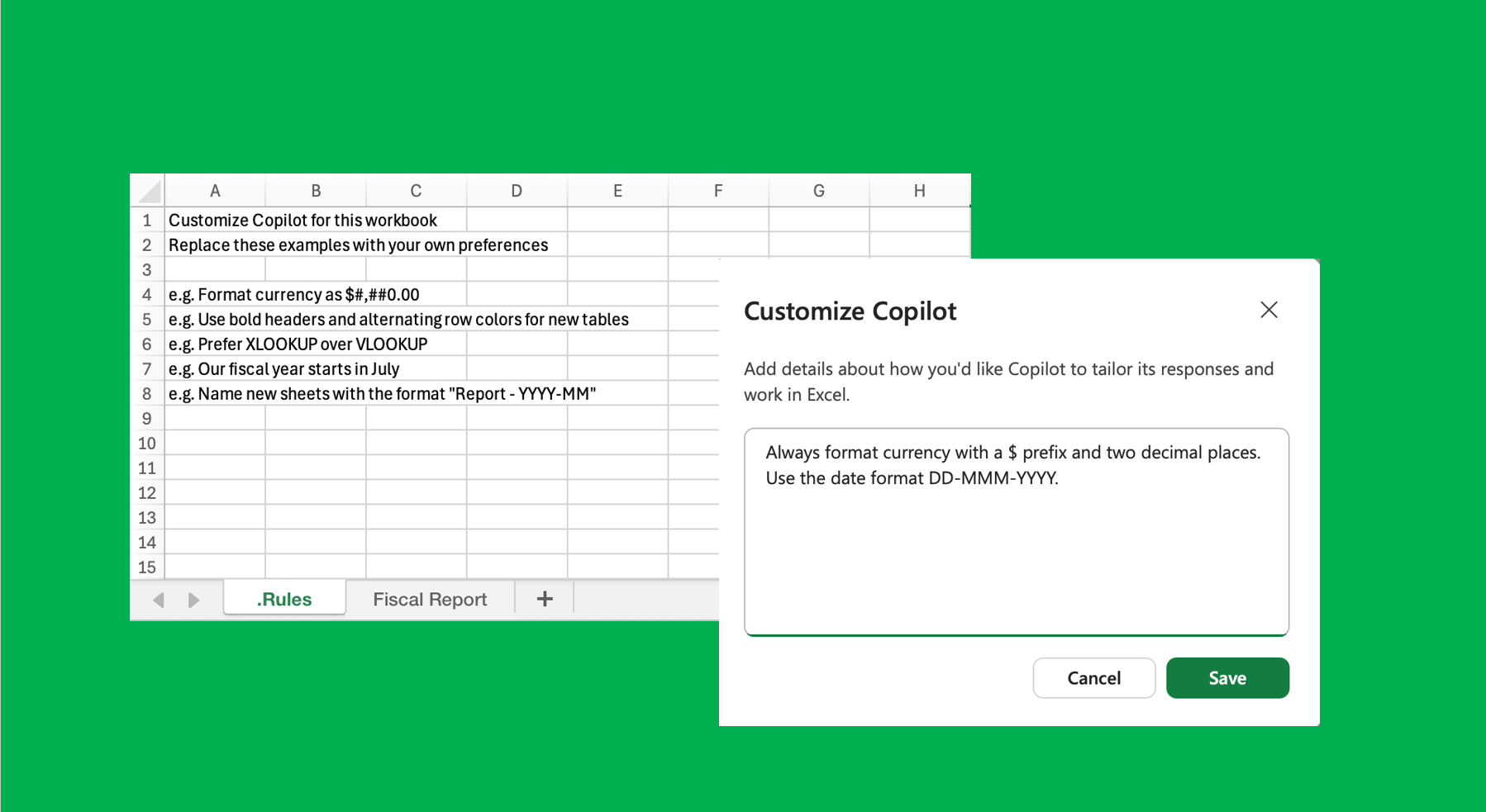
The new features, called Personalization and Workbook Rules, allow users to define how Copilot should format, organize, and structure workbooks before any edits happen. Rather than repeatedly prompting the AI to avoid merged cells, use specific naming conventions, or apply preferred formulas, users can now set those preferences once and let Copilot handle the rest.
Image credit: Microsoft
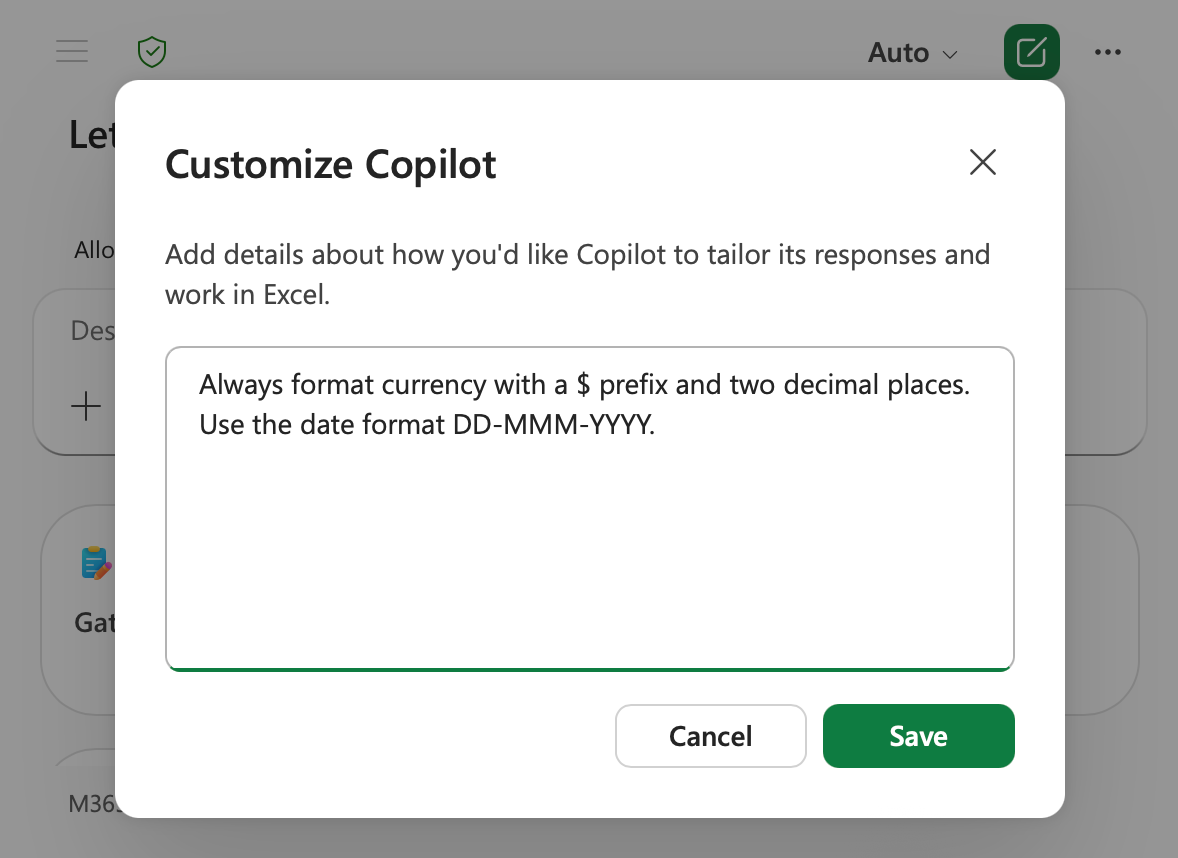
Personalization is available now across Excel for Web, Windows, and Mac. The feature lets users create persistent instructions that follow them across every workbook they open. Preferences can cover everything from chart colors and currency formatting to table names, formulas, and PivotTable layouts.
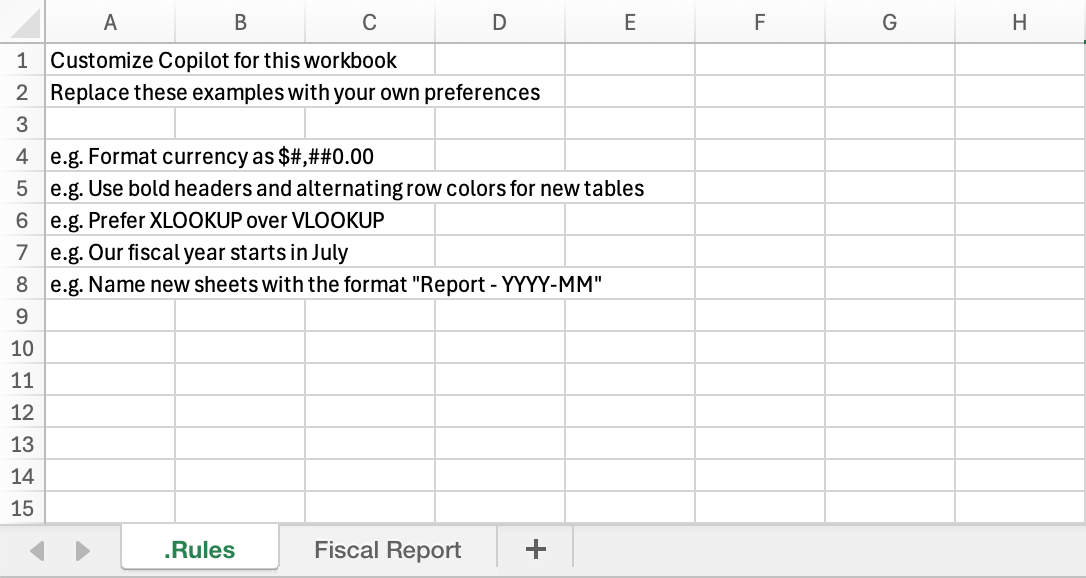
Workbook Rules take a different approach. Rather than following an individual user, these instructions live inside the workbook itself and travel with the file when it is shared. Teams can create a dedicated “.Rules” sheet that tells Copilot exactly how the workbook should look and behave, helping organizations maintain consistent standards across projects.
Microsoft says the feature can even tap into Excel’s calculation engine, allowing rules to change dynamically based on formulas, cell values, or project status. Users can create rules manually in plain language, point Copilot to sample ranges for reference, or ask the AI to generate rules automatically from existing worksheets.
While Personalization is generally available now, Workbook Rules are currently available via the Insiders channel on Windows and Mac and will roll out widely in the coming weeks.
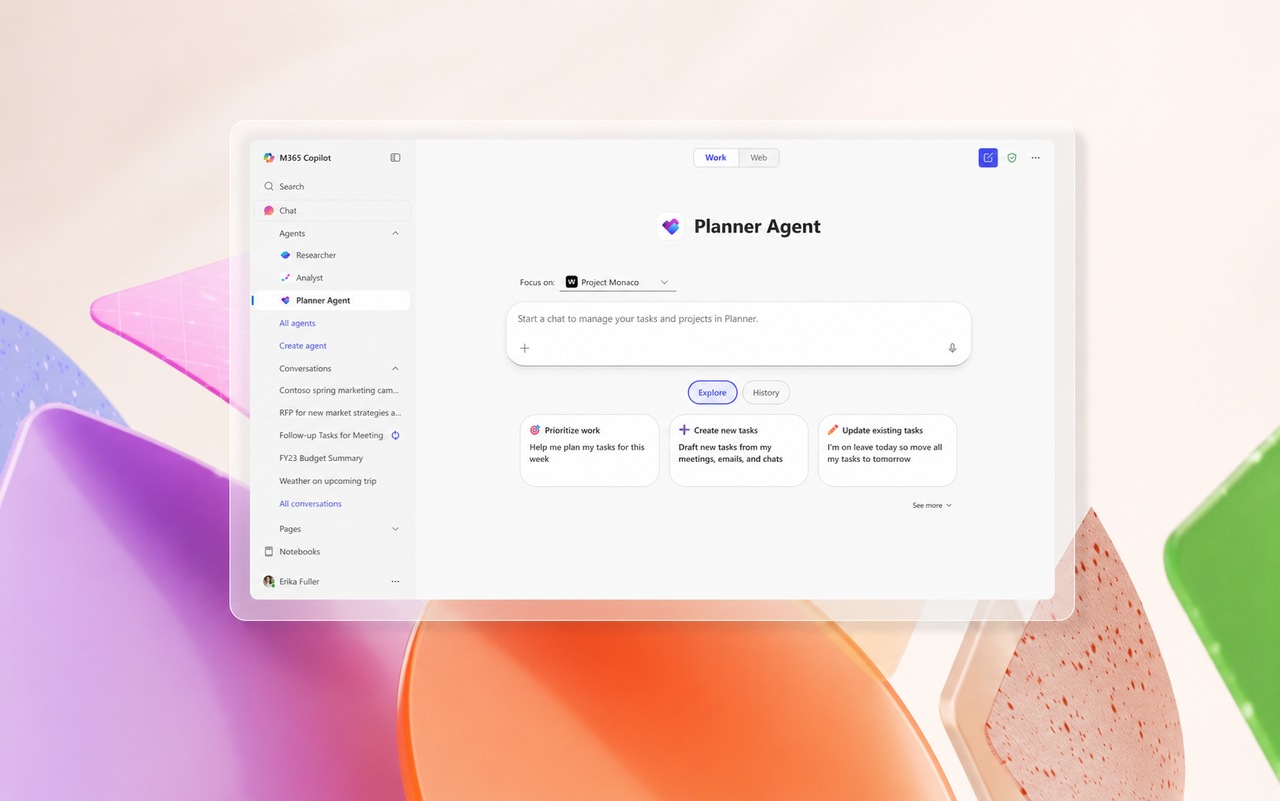
Microsoft has officially launched Copilot Cowork worldwide, giving Microsoft 365 Copilot customers access to an AI assistant designed to carry out complex tasks across multiple apps and workflows.
Unlike traditional chat-based assistants, Copilot Cowork is built to manage work that unfolds over hours or even days. Users can assign tasks in natural language, while the AI plans, coordinates, and executes actions across Microsoft 365 services, including Outlook, Teams, Word, Excel, and calendars. Every action remains visible to users, who can review and approve steps along the way.
The launch follows a three-month preview period through Microsoft’s Frontier program. According to Microsoft, more than half of the Fortune 500 have already tested Copilot Cowork, alongside organizations including Accenture, Avanade, Capital Group, and Zurich Insurance.
Copilot Cowork also reflects Microsoft’s broader multi-model strategy. The company says customers won’t be locked into a single AI model, with support for different models based on workload requirements, performance needs, and cost efficiency. Microsoft is preparing to launch its own fine-tuned Cowork 1 model in the coming weeks, designed to handle tasks at a lower operating cost.
Speaking of cost management, Microsoft is directing customers to new Copilot Credits tools that provide greater visibility into usage and spending as AI workloads scale across organizations. As enterprise AI competition intensifies, Copilot Cowork signals Microsoft’s ambition to turn AI from a productivity assistant into a full-fledged execution layer for modern work.
As new games flood into XBOX Game Pass, another batch is preparing to leave the library. Microsoft has confirmed that eight titles will exit the service on June 30, giving subscribers just a couple of weeks to finish unfinished campaigns, wrap up achievements, or purchase their favorites at a discounted member price.
Here’s the full list of games leaving XBOX Game Pass on June 30:
Mecha Break
Payday 2
Rise of the Tomb Raider
Tomb Raider
Slay the Spire
Ultimate Chicken Horse
Volcano Princess
Unpacking
The Tomb Raider departures are especially notable, as both titles have been among the service’s most-played action-adventure experiences in recent months. That being said, XBOX Game Pass members can still purchase any of these games at a reduced price before they leave the catalog.
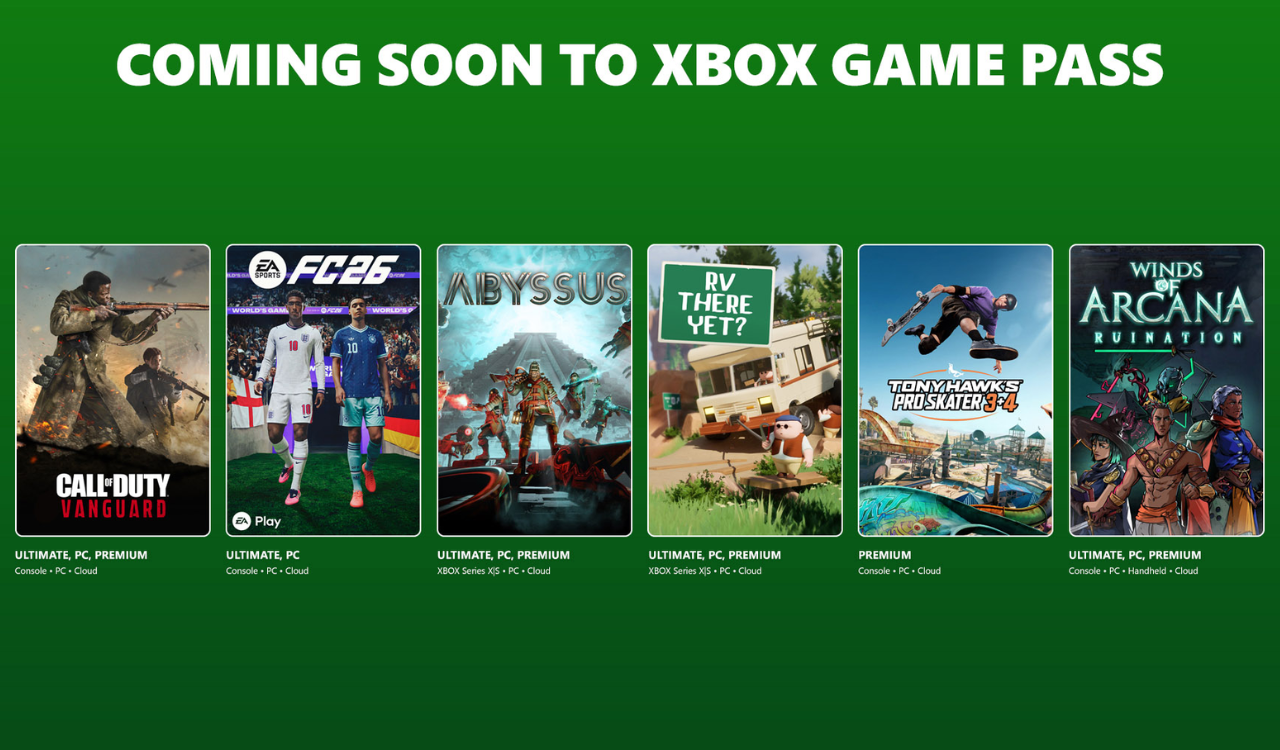
With major additions like EA Sports FC 26, Tony Hawk’s Pro Skater 3 + 4, and Call of Duty: Vanguard are also joining over the coming weeks, subscribers won’t be short on new experiences, but the clock is ticking for anyone hoping to clear these outgoing titles from their backlog.
Microsoft has announced June 2026 Wave 2 lineup for XBOX Game Pass members. The latest lineup brings a mix of major sports titles, returning fan favorites, fresh day-one releases, and a long-awaited skateboarding comeback. EA Sports FC 26 leads the lineup later this month, while Tony Hawk’s Pro Skater 3 + 4 rolls into the service on launch day. As expected, Call of Duty: Vanguard is also joining Game Pass, continuing to expand the franchise’s presence across Game Pass.
Several indie titles are also joining the lineup, including underwater roguelite shooter Abyssus, survival road trip horror game RV There Yet?, and the fully voiced action Metroidvania Winds of Arcana: Ruination.
Games coming to XBOX Game Pass over the next few weeks:
Title
Release Date
Junkster
Available Now (June 16)
Call of Duty: Vanguard
June 17
EA Sports FC 26
June 18
Abyssus
June 25
RV There Yet?
June 30
Tony Hawk’s Pro Skater 3 + 4
July 2
Winds of Arcana: Ruination
July 6
XBOX is also expanding its live service offerings. Sea of Thieves Season 20 launches on June 18 with the new Custom Seas mode, while Call of Duty: Black Ops 7 Season 04 is available now with new maps, weapons, and a roguelite Zombies mode. Game Pass Ultimate members can also access the EA Sports College Football 27 early access trial beginning July 2. Last but not least, XBOX Game Pass members are also losing eight games on June 30.
Valve’s upcoming Steam Machine has surfaced once again on Geekbench, this time running SteamOS instead of Windows. The new benchmark entries add fresh evidence that Valve continues testing the device ahead of its expected launch later this summer.
Two new Geekbench results for the device, identified under the codename “Fremont,” were uploaded on June 15.
What makes the latest entries more notable is the operating system. While the earlier benchmarks ran on Windows, the new results explicitly list SteamOS, Valve’s Linux-based gaming platform that also powers the Steam Deck.
According to the benchmark database, Valve Fremont continues to use an AMD Custom CPU 1772 processor. The chip features six cores, 12 threads, 16MB of L3 cache, and a reported boost frequency of 4.86 GHz.
SteamOS Performance Remains Close to Previous Windows Results
The two latest SteamOS benchmark runs produced single-core scores of 2,282 and 2,334 points. Multi-core scores reached 7,392 and 7,316 points.
For comparison, earlier Windows-based Fremont benchmarks recorded scores of 2,412 and 2,304 in single-core testing, alongside multi-core results of 7,451 and 7,117.
The numbers suggest that overall performance remains largely unchanged between the two operating systems.
SteamOS Listing Adds Weight to Launch Expectations
Valve has already categorized Steam Machine as a SteamOS-powered device, making the appearance of SteamOS in public benchmark records particularly significant.
The timing also aligns with ongoing speculation that review hardware may already be circulating among selected testers ahead of launch. While Geekbench results alone cannot confirm that review units have been distributed, they do indicate that Valve continues testing the hardware and software configuration.
Pricing Still Unknown
Valve has not announced pricing, specifications, or a release date for the Steam Machine. However, expectations remain that the device will cost more than the Steam Deck.
Recent Steam Deck price increases have also fueled speculation that Valve could position the Steam Machine as a more premium SteamOS gaming system.
For now, the latest Geekbench listings provide another glimpse at Valve’s upcoming hardware, but official details regarding retail availability and final specifications remain under wraps.
Security researchers have uncovered Windows variants of the SprySOCKS malware that were used in attacks against government organizations across multiple countries. The malware, linked to the China-aligned threat group Earth Lusca, targeted government entities in Taiwan, Thailand, Pakistan, and Honduras between 2023 and 2024.
According to a new report from ESET, the Windows versions significantly expand the capabilities of the previously known Linux-based SprySOCKS malware. The attacks primarily focused on organizations involved in foreign affairs, technology, and telecommunications.
Two Windows Variants Identified
ESET identified two distinct Windows versions of the malware, named WIN_DRV and WIN_PLUS.
WIN_DRV is the more advanced variant and includes kernel-level components that provide rootkit-like functionality. WIN_PLUS operates as a simpler backdoor but still offers extensive remote access capabilities.
Both versions support communication over TCP, UDP, and WebSocket protocols and include more than 30 command-and-control functions. Attackers can use the malware to collect system information, manage processes and services, and perform a wide range of file operations.
The malware can list, create, delete, upload, download, copy, rename, and execute files. It also includes SOCKS proxy functionality, allowing compromised systems to act as network relays.
Advanced Stealth Features
The most notable addition in the Windows variants is the introduction of kernel-level stealth mechanisms.
WIN_DRV loads a driver called RawWNPF directly into memory through another kernel driver known as DriverLoader, or fsdiskbit.sys. Researchers found that DriverLoader was signed using a leaked certificate associated with the GitHub PastDSE project.
Once active, the driver enables the malware to hide processes, files, Registry entries, and network connections from security tools and system administrators.
The malware also includes surveillance features capable of recording keystrokes, capturing clipboard data, and monitoring active window titles.
Persistence and Covert Communications
WIN_DRV establishes persistence using scheduled tasks and Image File Execution Options tied to vds.exe. Meanwhile, WIN_PLUS achieves persistence by registering itself as a Windows Print Processor named VSPMsg.
Researchers also discovered a covert networking feature within WIN_DRV. The malware can inspect incoming TCP traffic and redirect specially crafted packets to the backdoor, allowing attackers to communicate through random TCP ports without exposing the malware’s actual listening port.
This technique makes detection significantly more difficult and helps conceal malicious activity on compromised systems.
Possible UEFI Component Discovered
ESET’s investigation also uncovered telemetry that suggests Earth Lusca may be experimenting with a UEFI bootkit component. While researchers did not confirm the existence of a fully deployed bootkit, the findings indicate ongoing efforts to expand the group’s persistence and stealth capabilities.
The report includes detailed technical analysis and indicators of compromise that organizations can use to identify and mitigate infections.
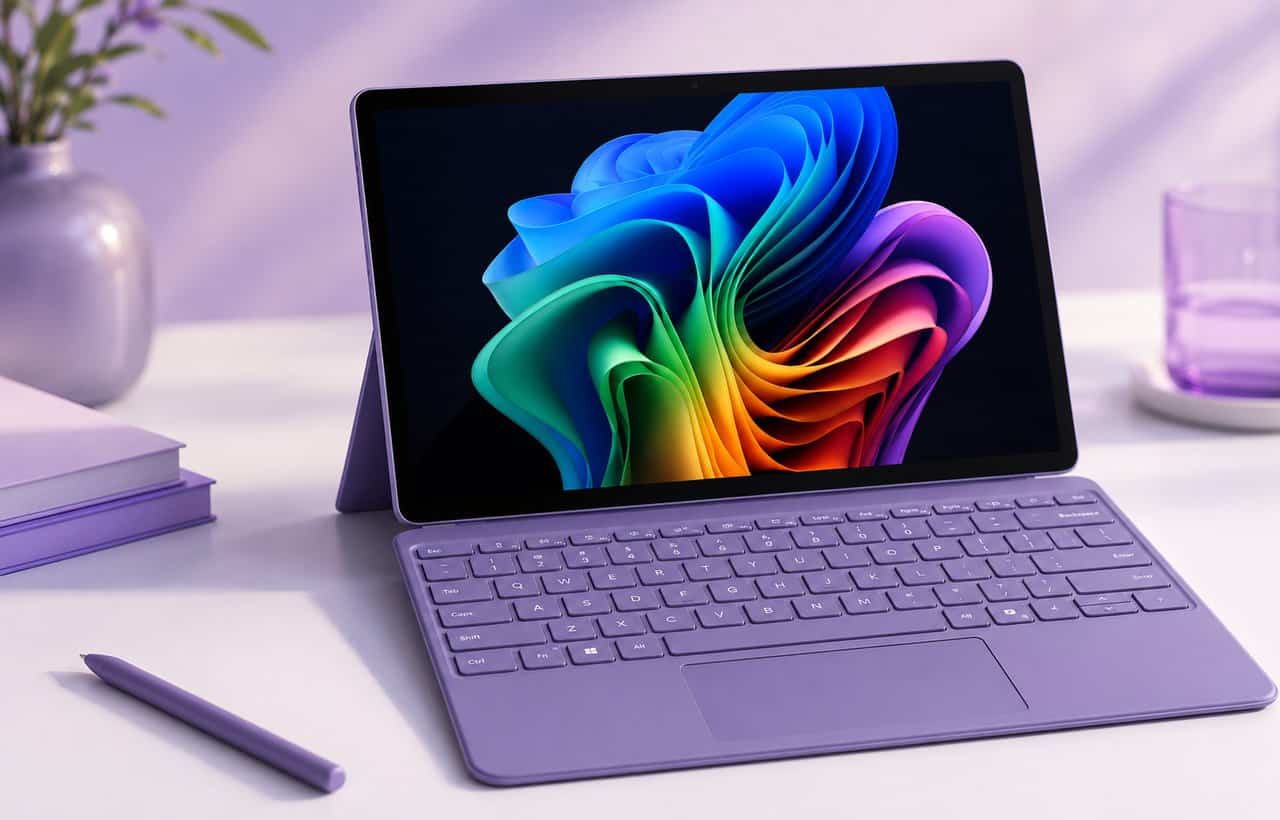
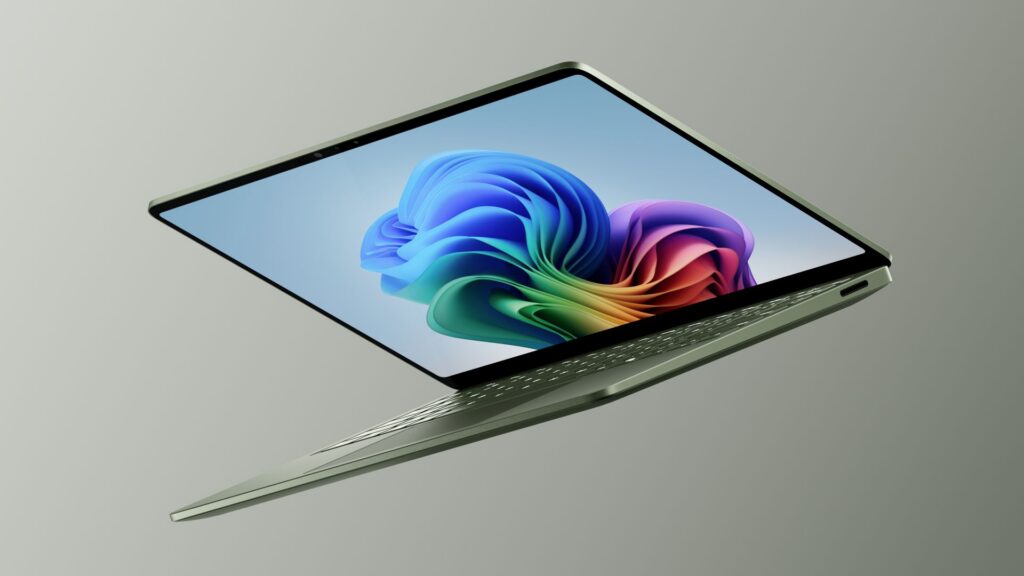
After leaking in full last month, both the Surface Pro 12 (13″) and Surface Laptop 8 (13.8″ and 15″) have been finally announced by Microsoft today. The trio of new Surface PCs are powered by Qualcomm’s latest Snapdragon X2 processors and designed around Microsoft’s growing AI ambitions.
Surface Pro 12th Edition 13-inch
Leading the lineup is the new Surface Pro 13-inch, which starts at $1,499 and comes in a 2-in-1 design and runs Windows 11 out of the box. In the announcement blogpost, Microsoft claims the the device offers up to 53% faster graphics performance than the previous generation, alongside up to 15.5 hours of battery life and a new 1440p Quad HD ultrawide camera designed for sharper video calls.
The optional OLED display promises deeper blacks and improved color accuracy, while the redesigned Surface Pro Flex Keyboard is now available in a new Dune finish.
Image credit: Microsoft
Surface Laptop 8 comes in two sizes
Next up, you’ve the updated Surface Laptop which starts at $1,599 and comes in 13.8-inch and 15-inch sizes. According to Microsoft, both models offer up to 58% better graphics performance, with battery life reaching up to 20 hours on the 13.8-inch model and 19 hours on the 15-inch version.
Image credit: Microsoft
Microsoft has also improved the 15-inch display, increasing its pixel density from 201 PPI to 262 PPI for sharper visuals. Alongside Platinum, Black, and Dune, the 13.8-inch model introduces a new Jade color option. On top of raw performance, Microsoft is marketing the new Surface lineup as a foundation for AI-powered work. Both devices feature dedicated neural processing units (NPUs) designed to handle AI tasks locally while seamlessly shifting more demanding workloads to the cloud.
The company is also bringing advanced haptic feedback to the Surface Laptop touchpad and Surface Slim Pen experience, aiming to make interactions across Windows feel more responsive and intuitive. The company also says that the new Surface devices are built with sustainability in mind, featuring enclosures made from 100% recycled aluminum and support for guided repairs through its new Surface Repair Tool.
As far as availability is concerned, the new Surface Pro and Surface Laptop will be available to buyers starting today, June 16. Meanwhile, the Surface for Business models are scheduled to launch on July 14. Looking ahead, Microsoft confirmed that the broader Surface roadmap includes the upcoming Surface Laptop Ultra and the new RTX Spark Dev Box, a dedicated AI development machine designed for local compute workloads.
AI-driven tools are gradually becoming part of everyday digital production workflows. Video creation, in particular, has seen steady changes as automation becomes more common in content development processes.
Within this shift, AI video generator technology is being adopted to support faster and more flexible video production across different digital platforms.
The Growing Role of AI Video Generator Tech in Digital Content Production
AI video generator technology is increasingly used in digital content production, particularly in workflows where speed, consistency, and scalable video output are required across multiple platforms and publishing channels. Its adoption is driven by the growing demand for frequent short-form video content, where traditional production processes can be too time-consuming to sustain.
In practical applications, platforms such as Facefame are being used to support structured content creation for social media, marketing campaigns, and digital communication needs. These implementations typically focus on streamlining repetitive production tasks while maintaining consistent visual output across different content formats.
How AI Video Generators Are Reshaping Content Creation Workflows and Scalability
These AI video generators are gradually changing content production structures by improving efficiency, scalability, and adaptability. They are typically integrated into existing workflows rather than used as standalone systems.
Faster Content Production Cycles
AI Video Generator tools reduce production time by automating parts of the creation process. This automation allows creators to move from initial concept to final output without facing local hardware bottlenecks.
Scalable Output for Multi-Platform Use
These tools make it easier to produce multiple video variations simultaneously. This capability supports consistent publishing schedules across different social media channels, websites, and marketing campaigns.
Integration with Existing Workflows
AI video generation functions alongside traditional editing software. Editors integrate automated rendering and keyframing features directly into their current production pipelines to handle repetitive tasks.
Lower Technical Barriers
By simplifying specific steps in video creation, these systems reduce the need for advanced editing skills. This change makes high-quality content production accessible to a broader range of users.
Adaptation to Short-Form Demand
With the rise of short-form video platforms, creators face pressure to publish frequently. AI tools help teams meet this demand by generating short, optimized clips at a faster rate.
Practical Uses of AI Video Generators in Content Production
Beyond workflow improvements, AI video generators are being applied in real production scenarios across different industries. Their role is generally supportive rather than fully replacing traditional production methods.
Social Media Content: AI Video Generators are commonly used to produce short-form videos for platforms like TikTok, Instagram Reels, and YouTube Shorts.
Marketing Campaign Materials: Brands use AI-generated videos to create variations of promotional content for different audience segments.
Educational Content: Some organizations apply AI tools to transform structured information into visual learning and training materials.
Product Visualization: AI Video Generators help create simplified visual representations of products or services for online presentation.
Wrapping Things Up
AI Video Generator technology is increasingly integrated into modern digital content production workflows. Its primary value lies in improving efficiency, scalability, and content flexibility rather than replacing existing systems. As adoption grows, platforms like Facefame and related tools show how AI-assisted video creation is becoming a practical part of everyday digital media production.
Microsoft has released a new round of Windows 11 Insider Preview updates, including Beta Build 26220.8680, Experimental Build 26300.8687, and new Release Preview builds.
The latest Media Player update includes bug fixes and improvements, but performance remains a concern for many users.
Performance Still Falls Behind Alternatives
Testing shows that Media Player can still take several seconds to launch and begin playing video files. By comparison, VLC Media Player and the legacy Windows Media Player open the same files almost instantly.
Memory usage is another area where the newer app struggles. While sitting idle, the modern Media Player consumed around 377 MB of RAM. The legacy Windows Media Player used roughly 103 MB under similar conditions.
The performance gap reflects a broader trend across Microsoft’s modern app ecosystem. Several newer applications have faced criticism for feeling heavier and slower than their legacy counterparts. Similar complaints have been raised about the new Outlook experience, particularly when opening emails from notifications.
Microsoft has been gradually shifting Windows apps toward native WinUI development, and Media Player could benefit from future platform improvements. A more efficient WinUI implementation may help reduce startup times and memory consumption.
Codec Support Remains Limited
Media Player also continues to lag behind VLC in codec support. One of the biggest limitations involves HEVC (H.265) video playback, a format commonly used by modern smartphones, including many iPhone and Android devices.
Windows users often need to purchase the HEVC Video Extensions package from the Microsoft Store to play certain files natively. VLC avoids this issue by including support for a wide range of codecs out of the box.
As video formats continue to evolve, Microsoft may face increasing pressure to provide broader codec support without requiring additional purchases. Doing so could improve the out-of-box experience for Windows users who regularly work with modern video files.
The June 12 Insider updates deliver useful fixes and improvements across Windows 11 and its app ecosystem. However, Media Player still has work to do before it can match the speed, efficiency, and compatibility offered by established alternatives such as VLC.
Moving years of Outlook data (OST/PST) to Microsoft 365 is rarely as simple as it sounds. PST files pile up over time and mailboxes reach huge, often unmanageable file sizes.
When it comes to actually migrating that data to the cloud, Microsoft’s native tools (Import/Export wizard) quickly show their limits. There’s no support for OST/PST files, a 50GB file cap, and a process that demands far more manual effort than most IT teams can spare.
Stellar Migrator for Outlook promises to solve exactly that. In this hands-on review, I put it through its paces as a dedicated PST to Office 365 migration tool. I test everything from single mailbox imports to multi-user migrations with filtering and mailbox mapping.
What is Stellar Migrator for Outlook?
Stellar Migrator for Outlook is a utility that helps businesses and IT administrators migrate Outlook PST and OST mailbox data to Microsoft 365, Live Exchange Server, or PST files.
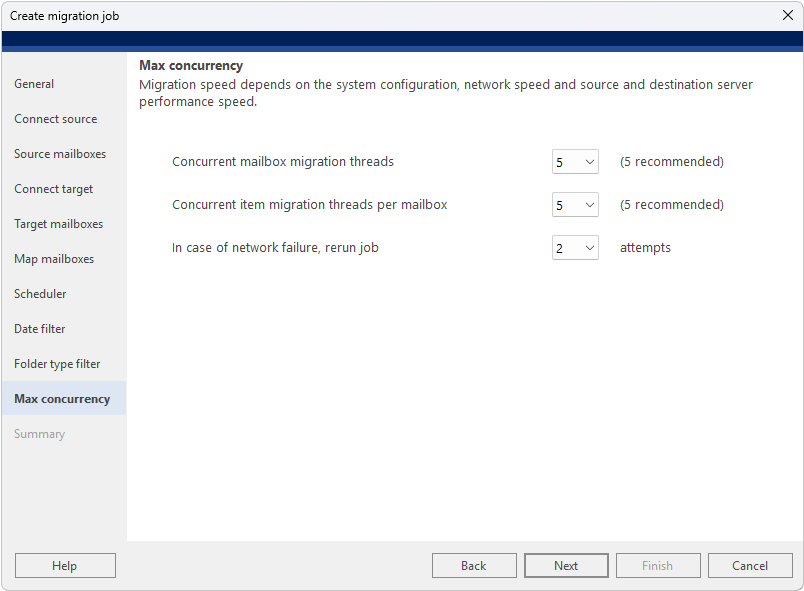
It offers a wide range of features to make migration go smoothly, including loading mailboxes using CSV files, both auto and manual target mailbox mapping, and concurrency settings to make the most of your system resources. Moreover, you get the freedom to filter the mailbox items to be migrated and select the target folder structure.
You can also run incremental migration, so only new mailbox data is transferred each time.
A migration job summary and completion reports let you know exactly how the job is to run and whether it was successful.
The versatile tool is suitable for both small migrations and larger organizational deployments, and you can sign up for a free demo before committing to a premium license.
Migrate PST/OST to Office 365
The software’s primary function is mailbox migration. You can select multiple source mailboxes, and it will migrate the entire mailbox data while preserving folder structures and organization. Emails, attachments, contacts, calendars, and other mailbox items transfer directly into Microsoft 365 accounts.
To get a better understanding of how Stellar Migrator for Outlook works in practice, I set up a small migration project to import PST to Office 365.
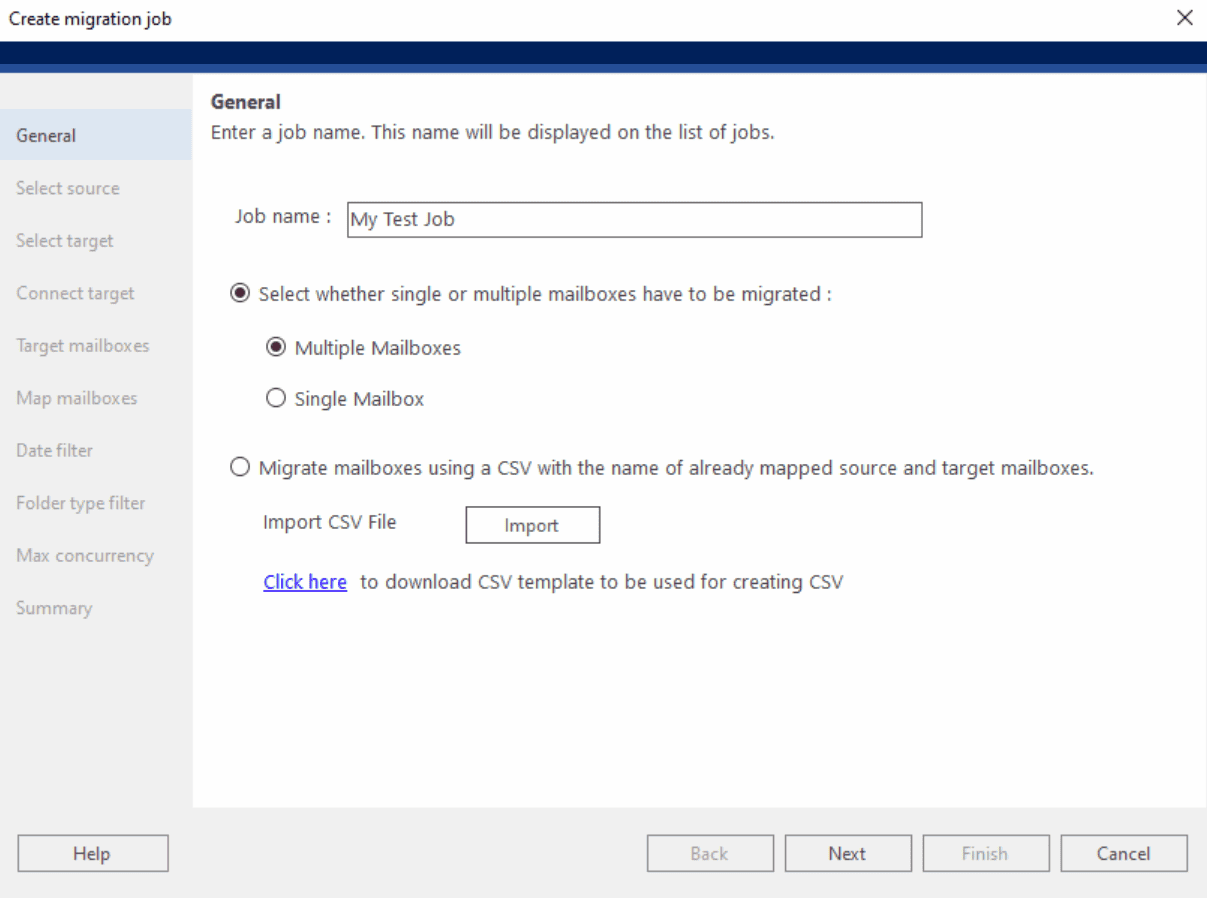
Step 1: Create a New Migration Job
After launching the software, I started by creating a new migration job. Here you give the job a name and choose whether you’re handling one or more mailboxes and if a CSV will be used.
CSV is useful when migrating dozens or hundreds of mailboxes, as it allows IT teams to build migration lists in advance and maintain a clear record of which users are included in each migration batch.
On the other hand, I like that CSV is an option but not mandatory like Microsoft 365’s Import Service.
Right from the start the wizard-based setup keeps things straightforward, guiding you through each stage of the migration rather than presenting dozens of settings at once.
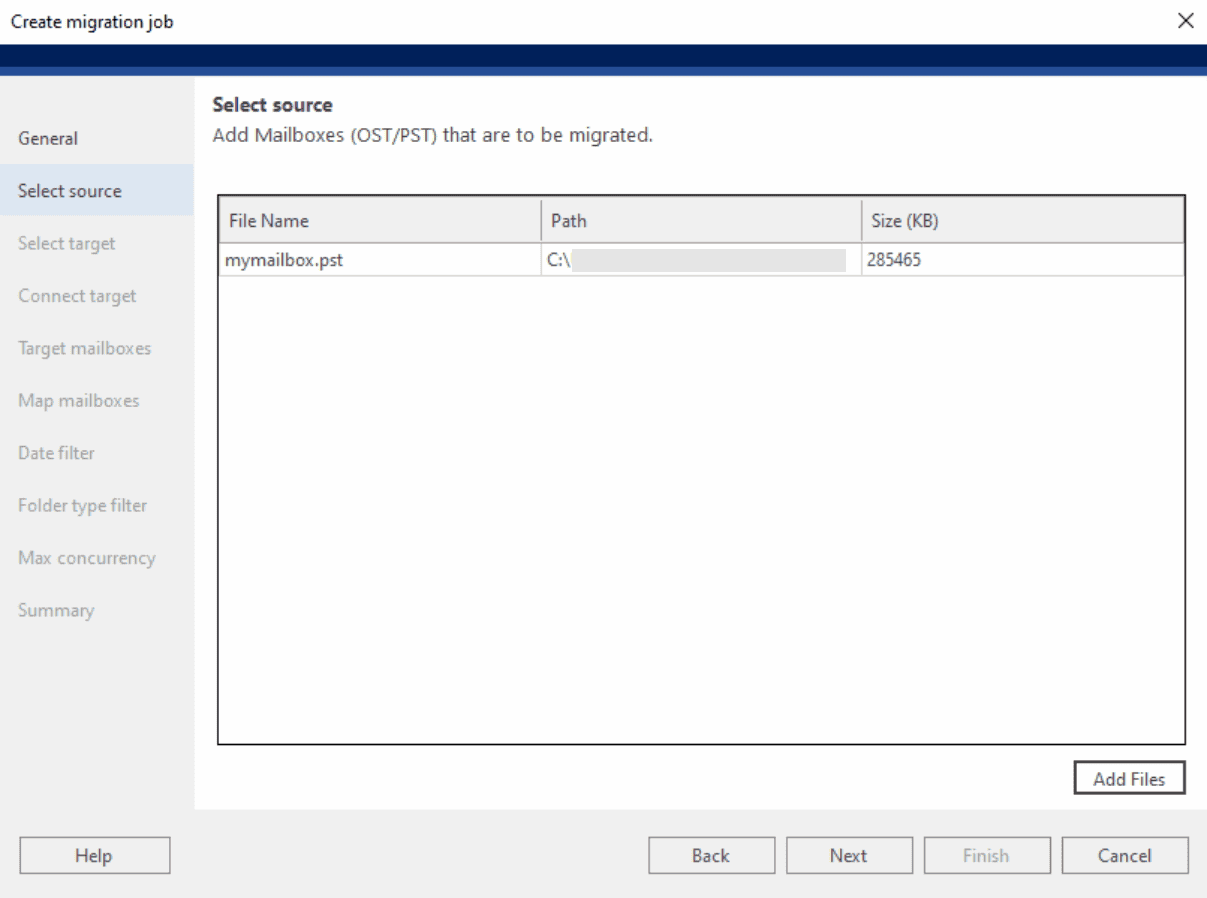
Step 2: Add Source PST or OST Files
I added the PST files to be migrated (also supports OST). It shows the filename, path, and size, so you know they’re the right ones before proceeding.
Stellar Migrator for Outlook can handle large files up to 45GB before they are auto-split, more than double the Microsoft 365 Import Service’s 20GB limit.
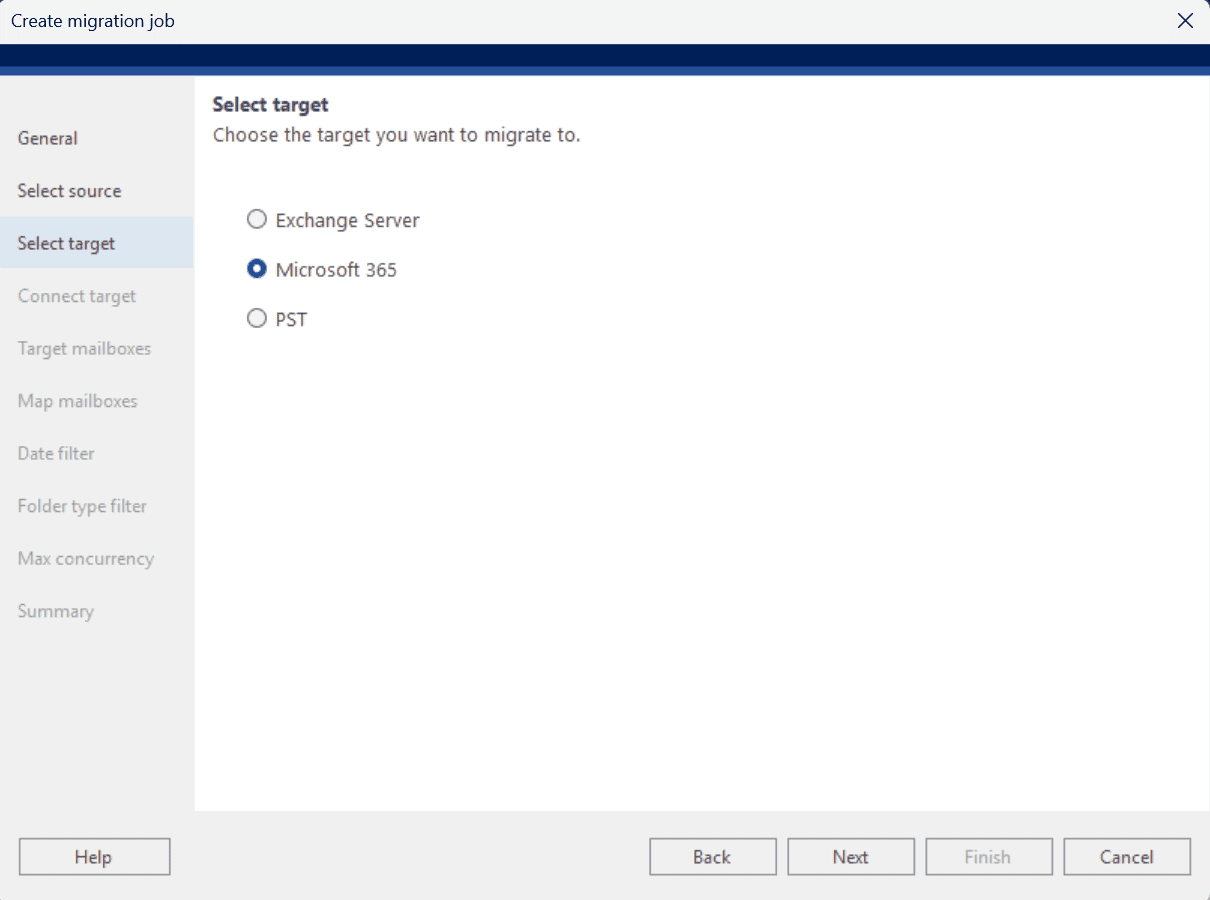
Step 3: Select Target
In this case, I chose Microsoft 365 as the target, but Exchange Server is also available, or PST for archiving data.
Step 4: Connect the Target
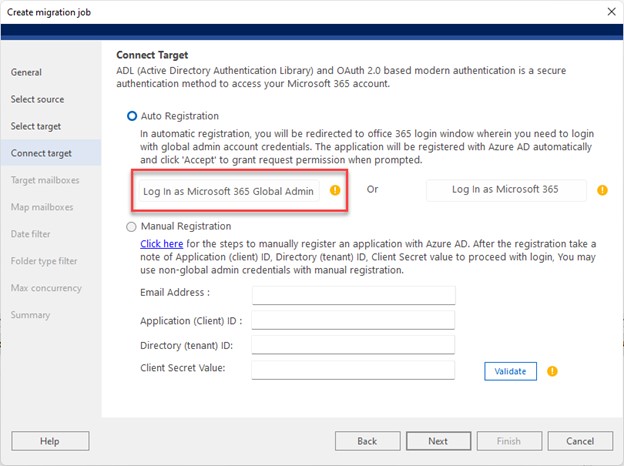
Next, I connected the target Microsoft 365 environment using administrator credentials. The software supports both automatic and manual registration.
Auto Registration is obviously the quicker option, automatically discovering the Microsoft 365 environment after authenticating with a browser prompt.
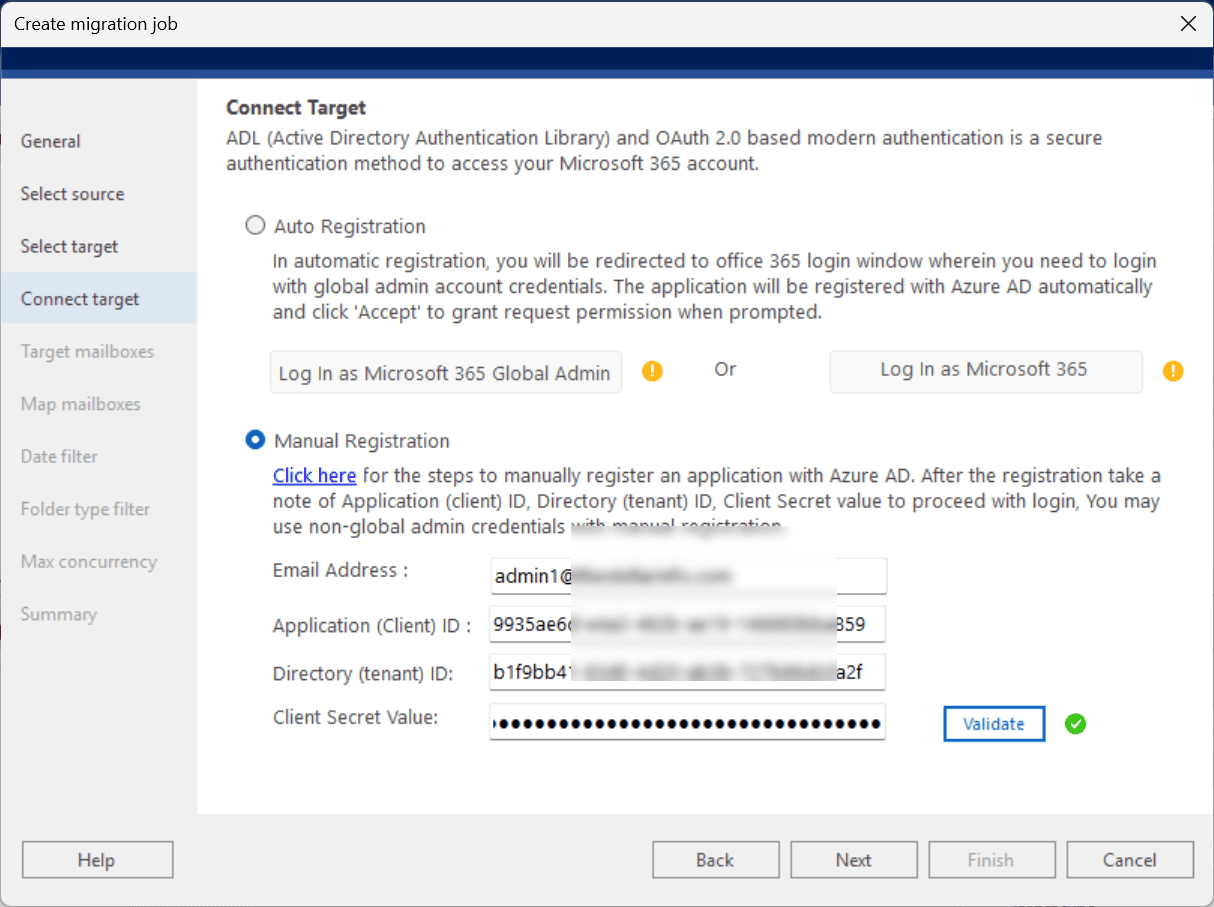
Manual Registration is also available when tighter control is required. Instead of allowing the software to create the Entra ID application automatically, administrators can create and manage the app registration themselves, entering the Application ID, Tenant ID, and Client Secret into the required fields.
Unfortunately, the tool doesn’t currently save connection details, so every new job requires fresh authentication even on the same server.
Step 4: Mailbox Mapping
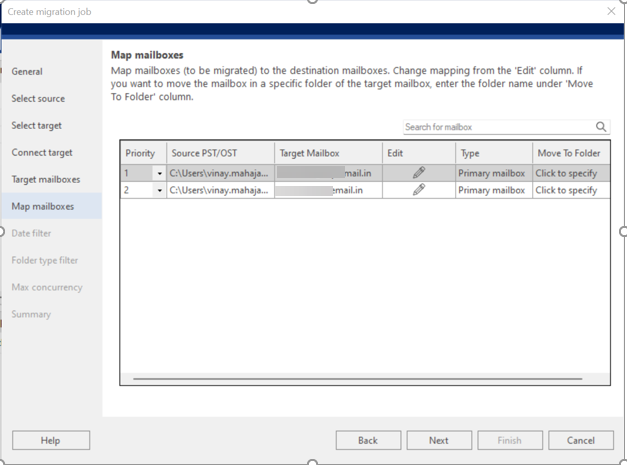
This is where Stellar can save time when you’re migrating a lot of mailboxes. Mine were automatically mapped to their Microsoft 365 counterparts by matching email addresses. Successfully matched accounts are clearly displayed, while any unmatched mailboxes can be assigned manually.
You can also define the type of mailbox, including the default primary, archive, or even public folders. However, you cannot create new mailboxes from scratch based on the source; they have to be mapped to existing ones at the target.
Step 6: Configure Filters and Migration Options
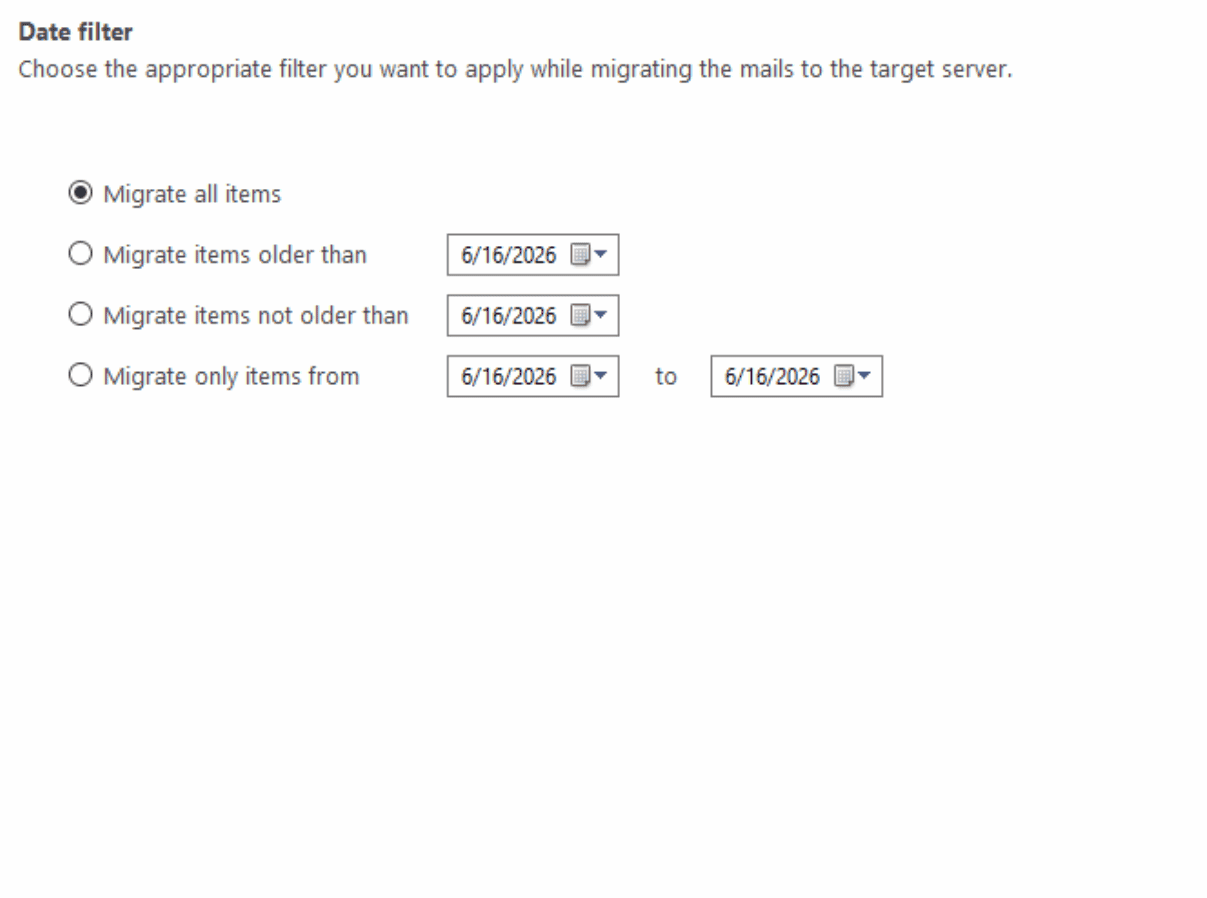
Before starting the migration, I experimented with several filtering options. The date filter allowed me to migrate only recent mailbox data rather than importing years of historical emails.
This feature also provides flexibility during phased migration projects where historical data may be imported separately from active mailbox content.
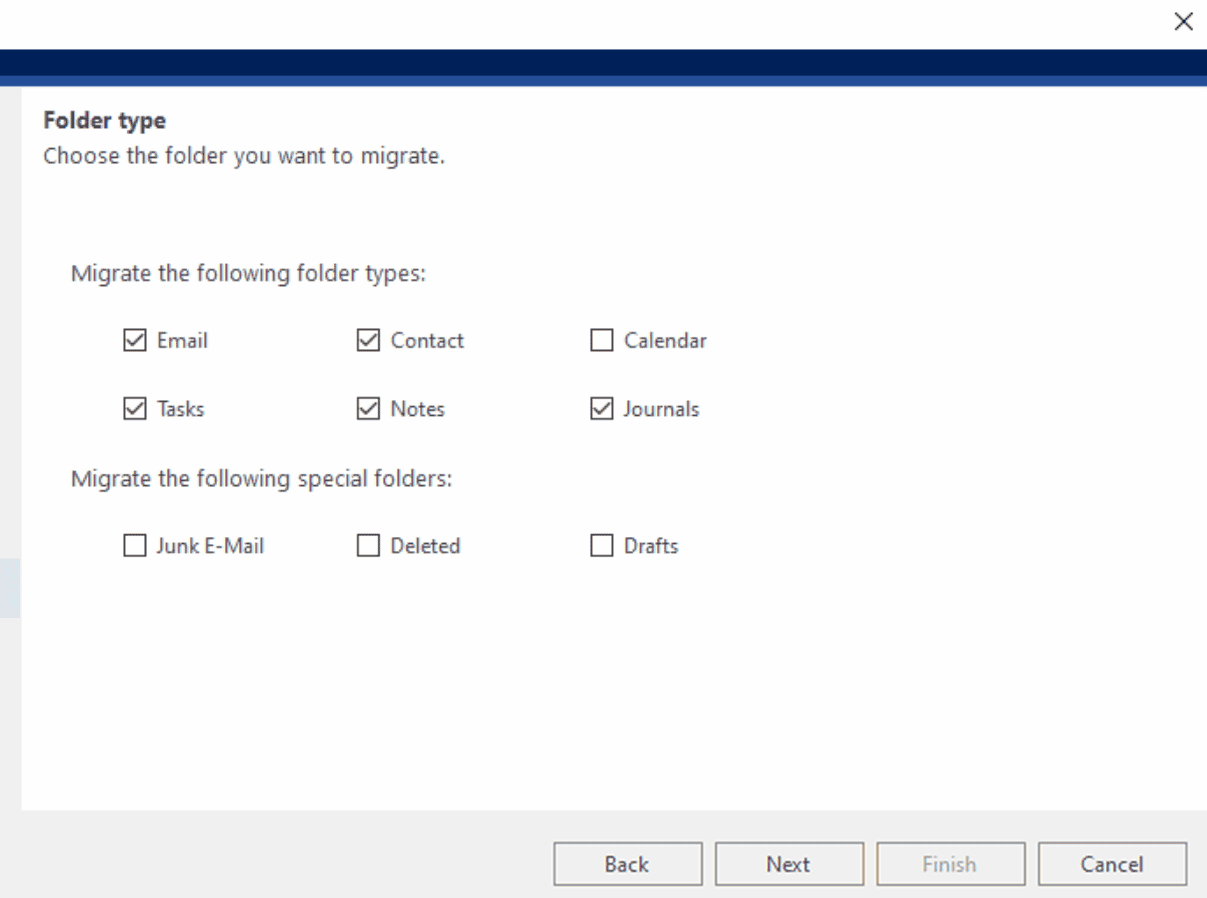
Another useful filter is “folder types”. Here you can choose the precise data/folders to be included. I.e., email, contact, calendar, tasks, notes, and journals. In my case, past calendar data is not important and only takes up space. Likewise, I ensured Junk E-Mail, Deleted, and Drafts remained unchecked.
In future it would also be nice to see the option to exclude file attachments.
Step 7: Complete Migration
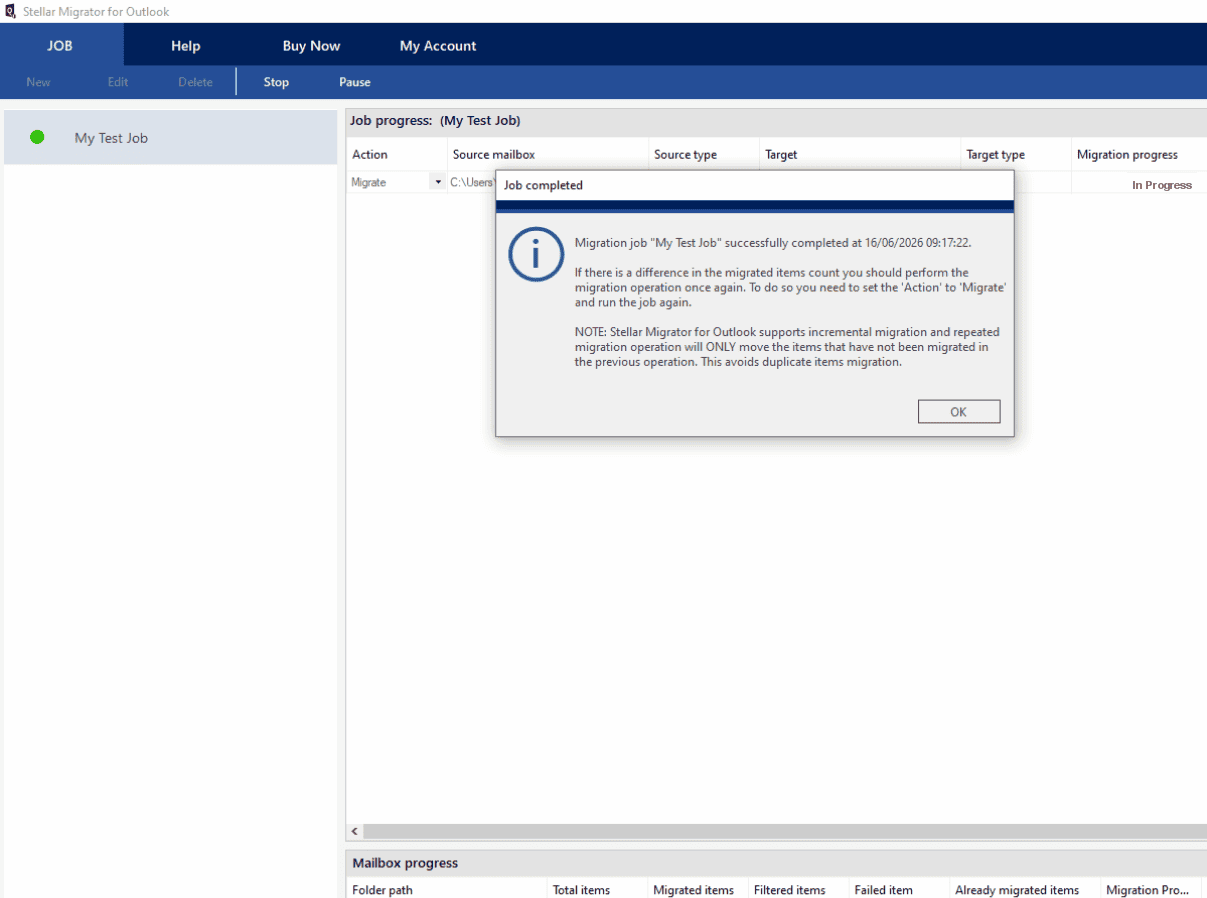
Once everything was configured, I checked the summary and started the migration job. Progress was displayed in real time, showing mailbox status, completed items, and any warnings encountered during the process.
The migration completed without issue, and mailbox content appeared correctly within Microsoft 365. What stood out most was how little manual intervention was required once the job had been configured.
Other Useful Features
Depending on what you need from migration, these other features may come in handy:
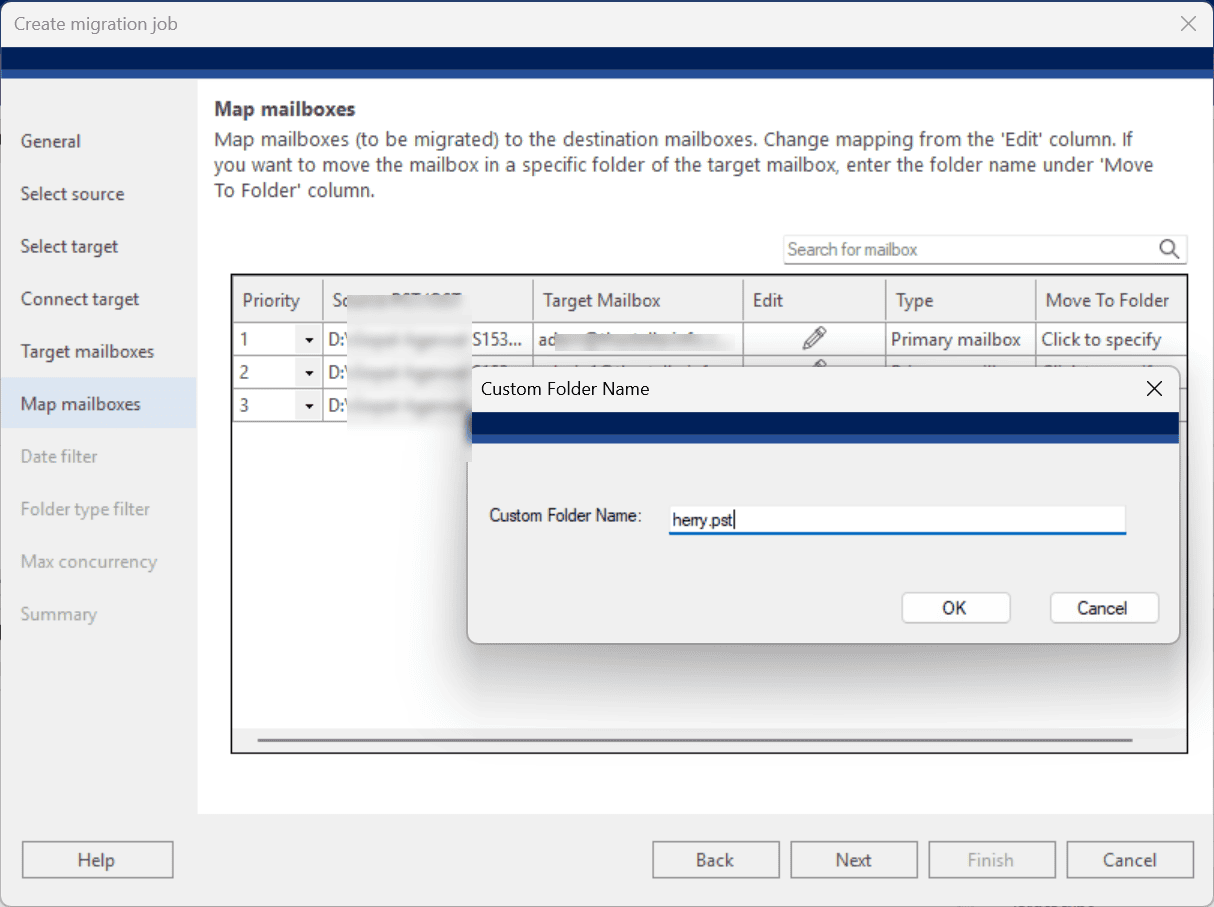
Move to Folder Option
The Move Folder feature provides additional flexibility when importing mailbox data.
Rather than simply transferring data into the default mailbox structure, users can choose a specific folder within the destination mailbox where the imported data should be stored. The destination folder name can also be customized during the migration process.
This is particularly useful when importing historical archives, department mailboxes, or legacy PST files that need to remain separated from active mailbox content.
Set the Priority
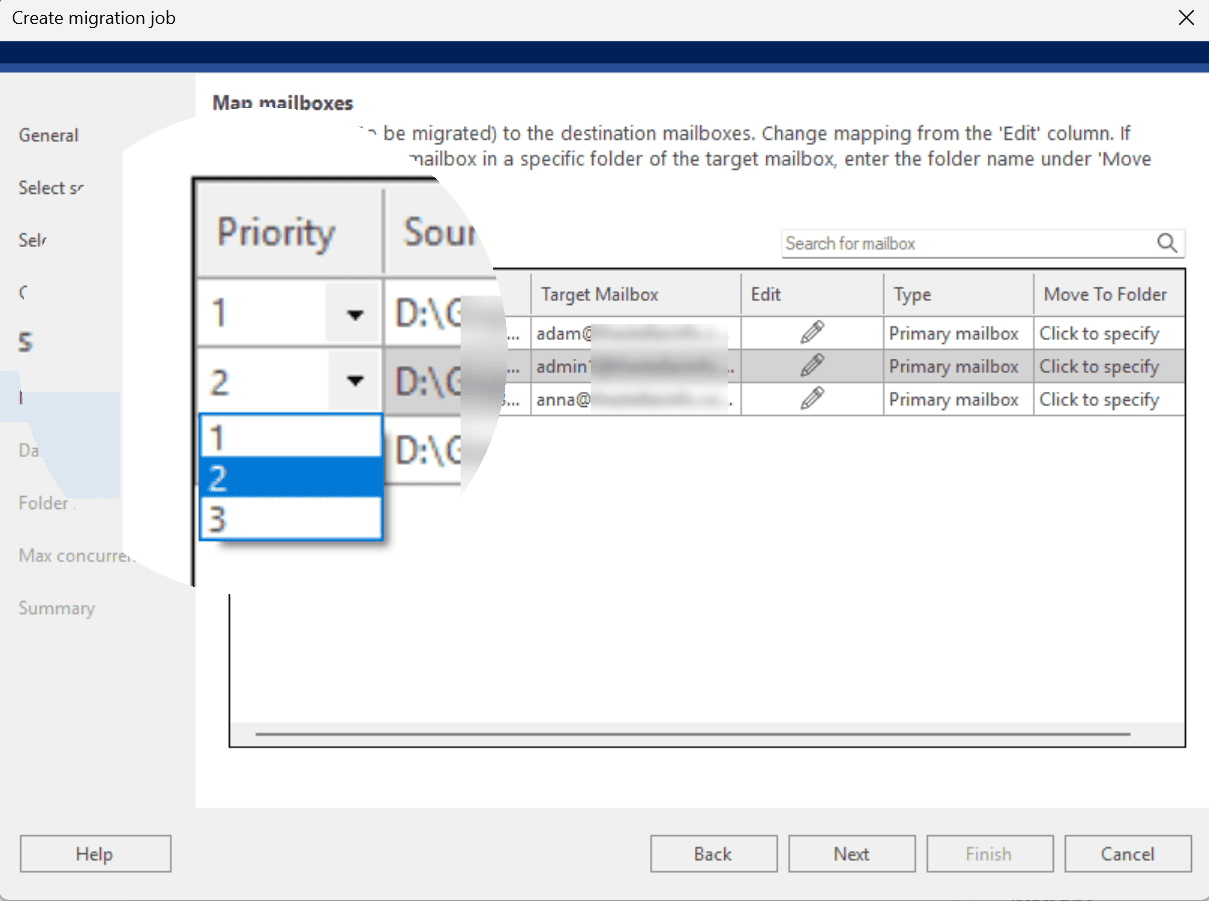
If you need certain mailboxes migrated before others, Stellar offers a mailbox prioritization feature.
You can assign priority levels to individual mailboxes, determining the order in which migrations are processed. For example, assign a mailbox a priority value of “1” and it will be migrated first. The remaining mailboxes are assigned subsequent priorities automatically.
This ensures key personnel, executives, or business-critical departments get access to migrated data before the rest of the organization.
Set Concurrent Mailbox Migration Limit
For larger migrations, performance and resource management can be important.
The software includes concurrency settings, allowing administrators to determine how many mailboxes should be migrated simultaneously. This helps balance migration speed against available network bandwidth, server resources, and Microsoft 365 throttling limitations.
Smaller organizations may choose to migrate only a handful of mailboxes at once, while larger IT departments can increase concurrency to accelerate migration projects.
Pricing
Stellar Migrator for Outlook lets you sign up for a free demo to test whether the interface is right for you.
Pricing is based on the number of mailboxes that need migrating, starting at 5 and reaching more than 500. The more mailboxes, the cheaper the price per mailbox. For example:
· 5 Mailboxes for $79.99 ($15.99 per mailbox).
· 500 Mailboxes for $995 ($1.99 per mailbox).
Stellar Migrator for Outlook Review – Verdict
Stellar Migrator for Outlook succeeds in making what is often a complicated process much more straightforward. Its clean step-by-step interface, auto mailbox mapping, and useful filters provide an accessible solution for small and large migration jobs alike.
Moreover, the ability to use incremental migration is extremely valuable for enterprise IT teams carrying out large-scale jobs.
While reauthenticating the connection to 365 can be annoying and it lacks a simple way to exclude email attachments, the pros definitely outweigh any minor cons.
Ultimately, it gives you more control over the precise data to transfer than Microsoft’s native solutions and handles large multi-mailbox projects much more efficiently.
If your organization needs to migrate multiple mailboxes and archive data while remaining in data compliance, this powerful local tool is well worth considering.
Security researchers at Symantec have uncovered a previously unseen backdoor that disguises malicious communications as legitimate Microsoft Teams traffic, giving attackers a powerful new way to remain hidden inside compromised networks (via Bleeping Computer).
Backdoor.Turn Malware Abuses Microsoft Teams to Target Corporate Users
The malware, dubbed Backdoor.Turn, was discovered during a recent DragonForce ransomware campaign that combined data theft with file encryption. According to researchers at Symantec’s Threat Hunter Team, the backdoor is deployed after the ransomware payload executes, suggesting it may be used to maintain long-term access, support future intrusions, or even resell compromised networks to other threat actors.
What makes Backdoor.Turn particularly concerning is how it communicates. Rather than connecting directly to attacker-controlled infrastructure, the Go-based malware first requests an anonymous visitor token from Microsoft’s Teams and Skype backend services. It then leverages legitimate Teams-associated TURN relay infrastructure to establish outbound connectivity before switching to a direct QUIC session with a malicious command-and-control server.
The technique, inspired by the “Ghost Calls” research presented at Black Hat 2025, effectively masks malicious activity as trusted Microsoft traffic. According to Symantec, this is the first known instance of malware using this specific approach.
Once active, Backdoor.Turn can execute commands, create processes, steal browser credentials, scan networks, perform LDAP and Active Directory searches, and move laterally across enterprise environments using compromised credentials.
Researchers also observed DragonForce exploiting the Havoc Process Terminator driver before it was publicly known to be vulnerable, highlighting the group’s growing technical sophistication.
Active since at least June 2023, DragonForce has evolved beyond a traditional ransomware-as-a-service operation into what researchers describe as a highly organized cyber cartel. The addition of Backdoor.Turn, and its advanced evasion capabilities further cement the group’s reputation as one of the most capable ransomware threats operating today.
Symantec researcher Thibaut Passilly is expected to present additional findings on the campaign at the Area41 Cybersecurity Conference in Zurich on June 18.
In other Teams news, Microsoft has also confirmed that the app will get a Wi-Fi-based location tracking feature, though thankfully, it will remain optional for users. At the same time, the company revealed major performance upgrades for Teams across desktop, web, and mobile, suggesting that Microsoft is still focused on making the app faster and more reliable while expanding its workplace-focused features.
Grand Theft Auto 6 is currently scheduled to launch on November 19, and attention is already turning to how many copies Rockstar’s next blockbuster could sell during its release window.
Forecast Points to 46 Million Copies Sold
According to a new forecast from investment bank Piper Sandler, GTA 6 could sell more than 45 million copies at launch. The estimate, highlighted by Wccftech, is based on an analysis of community activity surrounding the game.
Piper Sandler examined traffic data from the GTA 6 subreddit and compared it with visitor trends from previous major game launches. The firm found what it describes as a strong historical relationship between subreddit engagement and launch sales.
One model assumes the r/GTA6 subreddit reaches roughly 1.3 million weekly visitors around launch and applies a 35x sales multiplier. A second model uses the subreddit’s current estimated traffic of about 870,000 weekly visitors and applies a 53x median multiplier. Both approaches produce a similar result of approximately 46 million copies sold.
The firm considers its traffic-growth assumptions conservative. Growing from around 900,000 weekly visitors to 1.3 million would represent an increase of roughly 49%, a figure Piper Sandler believes is achievable given the game’s popularity.
According to the analysis, subreddit traffic showed a 94% correlation with launch sales in launch-period data and a 73% correlation when measured five months before release. The research covered 18 AAA game launches from the past eight years.
A Record-Breaking Launch?
Even with GTA 6’s unprecedented hype, the forecast remains extremely ambitious.
For comparison, Grand Theft Auto V sold 11.21 million copies on its first day in 2013. GTA 6 benefits from more than a decade of anticipation, the continued success of GTA Online, and a significantly larger global audience than Rockstar had during GTA 5’s release.
At the same time, several factors could limit sales. GTA 6 is launching exclusively on current-generation consoles, meaning its day-one audience may be smaller than the broader install base available when GTA 5 launched. Higher console prices may also discourage some players from upgrading in time for release.
If GTA 6 were to sell 46 million copies at a standard $70 price point, the game would generate roughly $3.22 billion in gross revenue before additional spending from microtransactions, premium editions, or future PC sales.
Such a result would likely make GTA 6 the largest entertainment launch in history, surpassing records set by previous games, films, and other major media releases.
In related news, Take-Two Interactive has reportedly used AI-generated content in some of its game advertisements. The reports have sparked discussion among players as the publisher prepares for what is expected to be the biggest game launch of the decade.
Going to the store to purchase a greetings card can be a lacklustre experience. They often have limited designs, and the only personalization comes from a handwritten message.
Fortunately, there are now many online card makers and services that offer both physical and digital delivery.
Top 6 Online Card Makers
The following 6 sites all allow you to create personalized greetings cards, but they each stand out in their own way.
1. Greetings Island – Best Overall Online Greetings Card Platform
Greetings Island is my current go-to, thanks to a perfect mix of creative freedom and professional delivery. Whether you’re designing a birthday card, wedding invitation, or anything in-between, the platform offers thousands of professionally designed templates to get started.
Moreover, I found the editor to be intuitive enough for beginners while still offering enough flexibility for creatives to produce something truly unique.
For example, you get full control over the card type, colors, orientation, text and fonts, and many designs let you upload a custom photo.
For those who prefer the homemade touch, it stands out by providing high-quality, print-ready PDFs complete with cut marks. This makes it simple to produce professional-looking cards at home.
Alternatively, the premium Print & Ship service allows your cards to be professionally printed and mailed directly to recipients, eliminating the need to handle printing and postage yourself.
The platform, which is also available on Android, is equally impressive when it comes to digital delivery. Its advanced eCards offer engaging features like animated envelope openings and background music. Recipients can receive cards via email, WhatsApp, or text message, while senders can monitor when the card has been opened.
Overall, Greetings Island bridges the gap between traditional print and digital delivery better than any other service right now. What’s more, it’s free to try, allowing you to browse templates, personalize text, upload photos, and preview designs before committing to a premium option.
Unlike many online card makers that rely heavily on stock templates, Cardly works with independent artists to offer a large collection of unique, hand-crafted designs. These cover birthdays, anniversaries, thank-you messages, sympathy cards, and more.
The platform makes personalization simple. You can add your own message and upload photos on selected designs. Then choose whether to send the card directly to the recipient. I particularly liked the quality of the artwork, which felt more distinctive and thoughtful than many mass-produced alternatives.
Cardly also takes care of printing and mailing, making it a convenient option for users who want a physical card without dealing with stamps or post office visits. The ordering process is straightforward, and cards can be sent both domestically and internationally.
While it doesn’t offer the same level of design customization as Greetings Island or Canva, Cardly excels at providing beautiful artist-created cards with realistic handwriting.
3. Moonpig – Best for Licensed Designs and Pop Culture
Moonpig has become one of the most recognizable online card services thanks to its huge selection of greetings cards and easy-to-use personalization tools. The platform covers virtually every occasion, from birthdays and anniversaries to weddings, graduations, and seasonal celebrations.
Its biggest strength is the variety of licensed designs available. I found cards featuring popular television shows, films, sports teams, and well-known brands that simply aren’t available through many competing services. This makes Moonpig particularly appealing if you’re buying for someone with a specific hobby, fandom, or sense of humor.
Personalization options include custom messages and photo uploads, while selected cards can also include gifts such as chocolates, flowers, and keepsakes. Once your design is complete, Moonpig handles printing and delivery directly.
The editor is simple enough for beginners, though it offers less creative flexibility than dedicated design tools. Still, for users who want a professional-looking card delivered quickly, Moonpig remains one of the most convenient options on the market.
Blue Mountain focuses on digital greetings cards, making it an excellent choice for users who want to send thoughtful messages instantly. The service offers a large collection of eCards covering birthdays, holidays, anniversaries, congratulations, and many other occasions.
What stands out most is the quality of the animations and interactive elements. Many cards include music, narration, animations, and personalized messages that make them feel much more engaging than a standard email greeting.
The platform makes scheduling easy, allowing you to prepare cards in advance and have them delivered automatically on a chosen date. This is useful for birthdays and recurring events that are easy to forget.
Blue Mountain also includes reminders and calendar features to help users keep track of upcoming celebrations throughout the year.
While it lacks physical printing services, it excels as a digital-first platform. If your priority is sending personalized greetings instantly to friends and family anywhere in the world, Blue Mountain remains one of the strongest eCard services available.
5. Minted – Best for Additional Stationery and Art Prints
Minted takes a more premium approach to greetings cards and is well known for its variety of elegant wedding supplies.
Its catalog of cards feels more sophisticated and design-focused than many mainstream alternatives. Whether you’re creating holiday cards, announcements, invitations, or thank-you notes, Minted’s templates are beautifully crafted and highly customizable.
It offers a wide range of paper stocks, foil finishes, and premium printing options that help cards feel genuinely special. The company also extends beyond greetings cards into invitations, wedding stationery, art prints, and home décor.
The design process is straightforward, although the service is generally more expensive than competitors focused on budget-friendly cards.
For users who value premium materials and elegant designs, Minted is one of the best options available for creating high-quality printed cards and stationery.
6. Postable – Best for Realistic Handwriting Fonts
Postable is designed for people who love the idea of sending physical cards but dislike the time-consuming process of handwriting, addressing, and mailing them. The platform specializes in creating cards that feel personal while automating much of the work behind the scenes.
Its standout feature is a collection of highly realistic handwriting fonts. After creating a message, Postable can print it in a style that closely resembles handwritten text, helping cards feel more personal than standard printed greetings.
The service handles everything from printing and addressing to postage and delivery. During testing, I found the process remarkably simple, requiring only a few minutes from selecting a design to placing an order.
Postable offers cards for birthdays, holidays, thank-you messages, sympathy cards, and other common occasions. The designs themselves are clean and modern, with enough variety to suit most recipients.
While customization options aren’t as broad as some competitors, the convenience factor is hard to ignore. For users who want the personal feel of a handwritten card without the effort, Postable is an excellent choice.
Conclusion
While all of these picks have something special to offer, Greetings Island stands out by combining the best elements of them all. You can make personal card designs for printing at home, sending digitally, or they will handle postage for you. With a wide range of templates and affordable pricing, it’s currently the best all-rounder.
However, the artistry from Cardly cannot be ignored. Moreover, Moonpig is a great choice for those that want officially licensed designs from pop culture.
What online greetings card service is your favorite? Let use know in the comments below!
Now, the MSI Claw 8 EX AI+ has appeared on MSI’s official U.S. store, revealing a significantly higher price than many expected.
According to a listing spotted by VideoCardz, MSI’s official store currently lists the Claw 8 EX AI+ CG3EM for $1,799. The price is notably higher than earlier expectations, which suggested the handheld would launch closer to the $1,500 mark.
The MSI Store listing also comes in above prices previously seen at major retailers. Best Buy recently listed the handheld for $1,699, while Newegg’s product page does not publicly display a price. However, Newegg’s AI shopping assistant reportedly returns a $1,699 price when users ask about the device and links directly to the product page.
At the moment, MSI has not announced any special bundle, accessories, or premium package that would explain the $100 difference between its own store and third-party retailers.
Pricing Raises Questions Ahead of Launch
The pricing positions the Claw 8 EX AI+ among the most expensive gaming handhelds announced to date. While premium handheld gaming PCs have continued to rise in price, the Claw 8 EX AI+ enters the market well above most competing devices.
MSI is expected to reveal additional details about availability and final retail configurations closer to launch. It remains unclear whether the official MSI Store pricing reflects the final MSRP or if retailer listings will ultimately become the standard launch price.
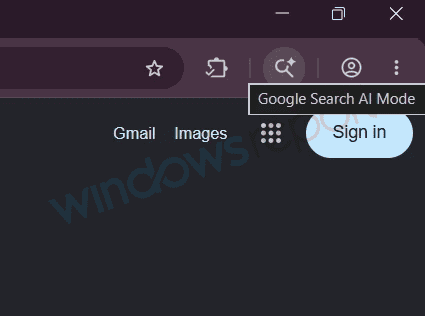
Google has made AI Mode part of the search experience and integrated it into Chrome as well. Now, Google wants to make it unavoidable in Chrome by allowing users to pin the Contextual Tasks button labeled “Google Search AI Mode” to the toolbar, thus providing quick access to Google Search’s AI Mode.
Chrome already offers AI Mode via an address bar shortcut and a button under the New Tab page search bar. Recently, we came across Google testing sending Chrome searches to AI Mode instead of traditional Google Search results. It clearly shows Google is prioritizing AI Mode search over traditional search.
Another push to make AI Mode more prominent is to allow users to pin Contextual Tasks to the Chrome toolbar so that users can instantly dive into AI Mode for the current page and start asking questions and adding files for AI Mode to answer.
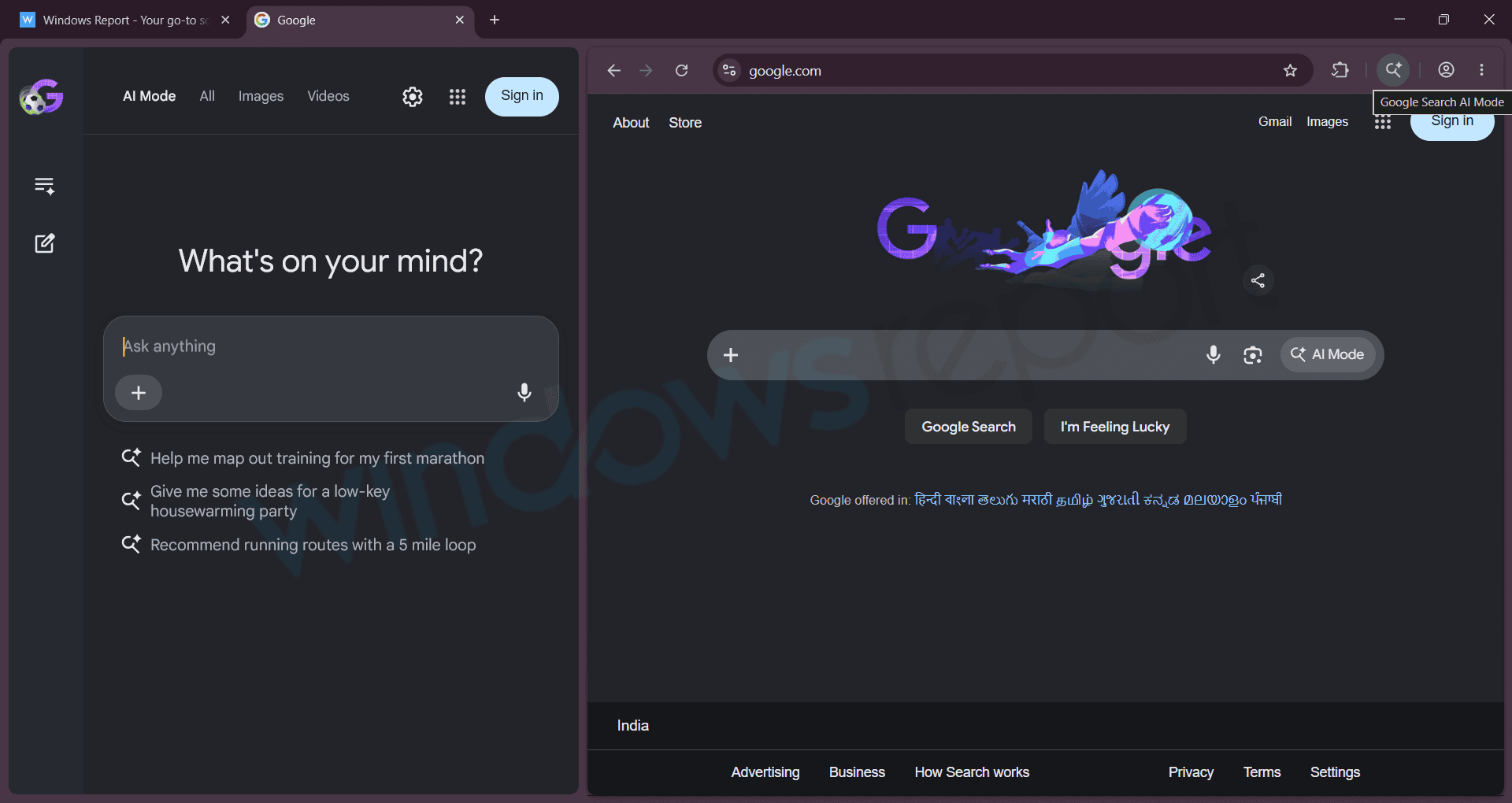
In Chrome, when you click the AI Mode button, Contextual Tasks open in a separate tab. To avoid this, as spotted by Windows Report, Google is working on adding a “Google Search AI Mode” button to the toolbar. Once added via the customization dialog in Chrome, it appears as the familiar AI Mode icon and opens Contextual Tasks in a side panel alongside the current page.
Google tested this in the past in Chrome Canary, but it was short-lived. Now, Chrome is making the AI mode (aka Contextual Tasks) button an integral but optional part of the Chrome toolbar.
How to Add the “Google Search AI Mode” Button to the Toolbar in Chrome
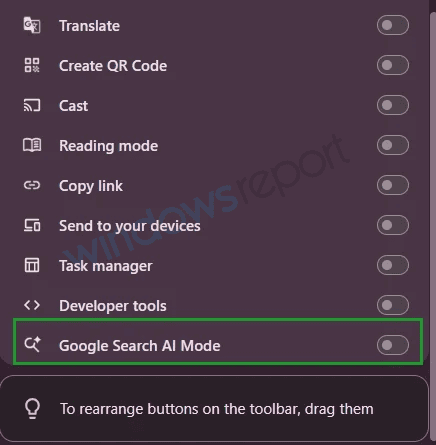
To enable this feature, you need to activate the “Contextual Tasks Pin Button In Toolbar” flag. First, open Chrome Canary and go to chrome://flags. Search for “Contextual Tasks Pin Button In Toolbar” and enable it.
Image Credit: Venkat | Windows Report.
Next, click the Customize button on the New Tab page and scroll down to Toolbar. Select and enable the “Google Search AI Mode” option at the bottom to make it appear on your toolbar.
Image Credit: Windows Report.
Click on it to open AI Mode for the current page in Chrome, and you can then ask questions about the page and add files for AI Mode to answer.
This is currently tested behind a flag for Chrome on Mac, Windows, Linux, ChromeOS, and Android that “Enables the pin button in the toolbar for contextual tasks”. Windows Report can confirm the flag is already live in Chrome Canary on Android as well.
Image Credit: Venkat | Windows Report.
Note: It’s worth noting that Google is experimenting with the toolbar option label as “Browse with AI” or “Google Search AI Mode”, and neither could be the final name. However, the aim is clear: to allow users to open AI Mode directly from the Chrome toolbar.
Mark Gordon, Treyarch’s longtime studio head, has retired after 22 years with the Call of Duty developer, marking the end of an era for one of the franchise’s most influential studios.
Treyarch announced the news on social media and praised Gordon for his leadership, dedication, and lasting impact on the studio. The company credited him with helping shape Treyarch’s culture and guiding the team through some of its most successful years.
New Leadership Takes Over at Treyarch
During his time at Treyarch, the studio worked on several major entries in the Call of Duty series, including Call of Duty 2: Big Red One, Call of Duty 3, Call of Duty: World at War, and multiple games in the hugely successful Black Ops franchise.
Gordon played a key role in Treyarch’s evolution from a supporting developer into one of Activision’s core Call of Duty studios. Following Microsoft’s acquisition of Activision Blizzard, Treyarch also became an important part of Xbox’s first-party gaming division.
Kevin Hendrickson and Yale Miller will serve as co-studio heads following Gordon’s retirement. Both are longtime Call of Duty veterans with extensive experience across the franchise and will oversee Treyarch’s future projects moving forward.
The studio is expected to continue leading development on future Black Ops titles while also supporting broader Call of Duty initiatives alongside other Activision teams.
A Major Legacy at Treyarch
Gordon spent more than two decades at Treyarch and helped oversee some of the most successful releases in Call of Duty history.
During his tenure, Treyarch established itself as one of the franchise’s flagship studios, with the Black Ops series growing into one of the biggest and most recognizable brands in gaming. His leadership helped guide the studio through multiple console generations and major shifts within the gaming industry.
His departure leaves behind a significant legacy at both Treyarch and the wider Call of Duty franchise.
Gordon’s retirement comes amid broader changes at Xbox. The move follows the recent departure of the head of Xbox Game Studios and ongoing reports of restructuring across several Microsoft-owned studios.
For now, Treyarch appears unaffected by the reported changes and continues to be one of Xbox’s most important studios due to its central role in the Call of Duty franchise and the continued success of the Black Ops series.
Meta has announced a bunch of new AI features for Facebook that completely overhaul how you search, create, and share content across the platform.
Facebook gets its own AI Mode
Among the biggest additions is the AI Mode. Just to be clear, it’s not Google’s AI Mode. It is a new search experience powered by Meta AI and its new Muse Spark model family. Rather than sending users to a page filled with links, AI Mode in Facebook will surface answers based on publicly shared conversations, recommendations, videos, and opinions from Groups, Reels, and other content across Meta’s apps.
Image credit: Meta
Meta says Muse Spark is designed to help AI Mode better understand context, trends, and community sentiment, which allows you to find information through real-world experiences rather than generic search results.
Looking for travel advice, restaurant recommendations, fitness tips, or opinions on the latest gadgets? Meta wants users to ask Facebook directly and receive answers shaped by the conversations already happening across its platform.
New AI creative tools
Alongside the new search experience, Meta is introducing a slew of new AI-powered creative tools. You will start seeing optional camera roll suggestions that automatically generate collages and stylized video montages based on recent memories, such as gatherings with friends or recent trips. Meta says these suggestions remain entirely opt-in and can be disabled at any time.
Image credit: Meta
Facebook Stories and profile pictures are also getting new AI editing presets. You can virtually change outfits, hairstyles, and accessories, while sports fans can create team-inspired looks through a new “Wear It” option available inside the AI Edit menu.
Image credit: Meta
With Muse Spark now embedded directly into Facebook, Meta is narrowing the gap with AI-powered search rivals like Google, OpenAI, and Perplexity by transforming its vast social graph into an answer engine. Not to forget, Meta also recently announced that its AI now uses height and bone structure to spot underage accounts on Instagram and Facebook.
XBOX is reportedly considering the sale or closure of at least three first-party studios: Ninja Theory, Double Fine, and Compulsion Games, according to a new report from The Verge.
Studios Reportedly Facing Uncertain Futures
The report claims that employees at Ninja Theory have been informed that the studio is facing closure. The developer is reportedly seeking a buyer who could keep the team operating independently rather than shutting down completely.
Ninja Theory joined Microsoft in 2018 and is best known for the Hellblade series. The studio recently appeared during XBOX’s Summer Game Fest showcase, where it revealed a new project currently targeting a 2027 release.
Double Fine is also reportedly discussing its future. Instead of closing, the studio is said to be exploring a management buyout that would allow it to separate from Microsoft and continue operating independently.
Founded by Tim Schafer, Double Fine is known for games such as Psychonauts, Psychonauts 2, Brütal Legend, Broken Age, and the recently announced Keeper.
Compulsion Games could face a similar outcome. The Montreal-based developer, known for Contrast, We Happy Few, and South of Midnight, is reportedly being evaluated for either a sale or closure. Earlier reports suggested that Compulsion Games could be among the studios affected by Microsoft’s restructuring efforts.
According to the report, several other XBOX Game Studios teams are also negotiating their futures, raising concerns about broader restructuring efforts across Microsoft’s gaming division.
Microsoft began aggressively expanding its first-party portfolio in 2018 through acquisitions that included Ninja Theory, Compulsion Games, Playground Games, and Undead Labs. The company later completed much larger deals, including the acquisitions of ZeniMax Media and Activision Blizzard.
Since then, Microsoft’s gaming business has undergone multiple rounds of layoffs as the company looks to reduce costs and improve profitability. Reports suggest that XBOX employees are preparing for additional job cuts in 2026 following an internal memo from XBOX leadership.
Broader Changes Across Microsoft’s Gaming Division
The studio uncertainty comes during a period of significant change for Microsoft’s gaming division.
Microsoft has fixed a critical vulnerability in Microsoft 365 Copilot Enterprise Search that could have allowed attackers to steal sensitive corporate data with a single click.
The flaw, dubbed SearchLeak (CVE-2026-42824), was discovered by Varonis. Microsoft has already deployed a backend fix, and customers do not need to take any action.
Researchers said the issue could have exposed emails, passwords, access codes, meeting details, calendar entries, SharePoint documents, and OneDrive files.
How SearchLeak Worked
Varonis found that attackers could abuse a search parameter in Copilot Enterprise Search URLs to inject instructions into the AI system. A victim only needed to click a specially crafted Microsoft link.
The attack could instruct Copilot to search a user’s mailbox, extract data, and send it through an external image request without further user interaction.
Three Vulnerabilities Chained Together
SearchLeak combined:
Parameter-to-prompt injection via the Copilot search query parameter
An HTML rendering race condition
A Bing Search by Image SSRF technique that bypassed Content Security Policy protections
Together, these flaws enabled silent data exfiltration from Microsoft 365 environments.
The final stage used Bing’s image analysis infrastructure to fetch image URLs server-side, allowing sensitive data to reach attacker-controlled logs.
The incident highlights how attackers can combine traditional web vulnerabilities with AI-specific weaknesses to target enterprise AI systems.
Microsoft is facing a shareholder class action lawsuit over its AI strategy, Copilot rollout, and cloud business performance, according to Reuters.
The complaint was filed in a Seattle federal court by the City of St. Clair Shores Police and Fire Retirement System. Shareholders allege that Microsoft intentionally promoted its AI momentum while downplaying slower Azure growth and rising infrastructure costs.
Lawsuit targets Microsoft’s AI spending
The lawsuit focuses on Microsoft’s Copilot strategy and its partnership with OpenAI. Plaintiffs claim the company did not clearly explain how much capital spending would be needed to support AI services at scale.
Microsoft has been investing heavily in data centers, GPUs, and custom silicon to train and run large language models. In its Q2 2026 earnings report, the company reported $37.5 billion in quarterly capital expenditures, up 66% year over year.
Azure growth raised investor concerns
The complaint also points to Azure’s slowing growth. Microsoft said Azure revenue growth slipped to 39% in Q2 2026, down from 40% in the previous quarter.
The company also told investors to expect Azure growth of 37% to 38% in the following quarter. After the earnings call, Microsoft’s stock fell 10%, wiping out $357 billion in market value.
Shareholders argue that Microsoft used AI optimism to distract investors from those cloud business pressures.
Microsoft later showed stronger AI momentum
Microsoft’s later Q3 2026 results showed stronger demand for AI services. The company said its AI business had reached a $37 billion run rate, suggesting that enterprise demand for AI infrastructure remained strong.
The lawsuit now centers on whether Microsoft properly disclosed the costs and risks tied to its AI expansion.
Nintendo has officially rolled out a fresh software update for both the Switch 2 and the original Switch, and while the version number is the same, the changes are anything but same. Version 22.5.0 is now available globally, marking the first system update for both consoles since April. If the update hasn’t popped up for you automatically, you can install it manually by heading to System Settings > System > System Update.
The Nintendo eShop color will now reflect the theme color if your theme in System Settings is set to “Basic Dark.”
User-Verification PIN can now be used to confirm when “Accessing Nintendo eShop” and “Using Saved Payment Methods.”
Added the ability to rewind 10 seconds/advance 10 seconds with the ZL and ZR Buttons when watching a full-screen video in News or Nintendo eShop.
General system stability improvements to enhance the user’s experience.
The new PIN verification option adds an extra layer of protection for purchases, while the redesigned eShop finally brings a more consistent look for players using the system-wide dark theme. In a separate news, Nintendo also recently confirmed that it will launch a refreshed version of Switch 2 with a replacable battery in the EU.
Visual Studio 2026 now lets developers review Git Pull Requests directly inside the IDE. The feature is available in Visual Studio 2026 version 18.7 and supports a more complete Git workflow without switching to a browser.
Developers can open Pull Requests from Visual Studio, review changed files, inspect commits, leave comments, reply to discussions, and approve changes. The IDE also shows review details such as status checks, conflicts, and required approvals.
Visual Studio 2026 improves Pull Request reviews
The new Pull Request review experience works with GitHub and Azure DevOps repositories. Developers can review code changes inside Visual Studio while keeping their current branch and local work untouched.
For deeper checks, users can still check out the Pull Request branch and use Visual Studio’s build, navigation, and debugging tools. This makes the feature useful for both quick reviews and more detailed code inspections.
Theme colors are now easier to customize
Microsoft also added new theme customization options in Visual Studio 2026 version 18.7. A new page is available under Tools > Options > Environment > Visual Experience > Theme colors.
Developers can customize accent colors, hover states, tab headers, window headers, and other UI elements using hex color codes. Changes made in the IDE apply immediately without restarting Visual Studio.
Custom themes are saved per theme
Visual Studio now saves custom color settings per theme instead of globally. This means users can have separate color settings for Dark, Light, and tinted themes.
Microsoft also added a per-color reset option, so developers can revert one color token without resetting the full theme.
Custom themes are stored as JSON files in the ColorThemes folder under the Visual Studio local app data directory. Because the files use JSON, developers can share themes with others or override existing themes.
Microsoft says this is a major improvement over the older system, where users often needed extensions to replace or heavily modify Visual Studio themes.
If you have been trying to access XBOX services but haven’t been able to do so, it’s because XBOX is down for everyone else and not just you.
After multiple reports surfaced on Reddit and other social media channels like X (AKA Twitter), XBOX confirmed the outage. In a post on X, the Xbox support account wrote, “Hey Xbox Members, we’re tracking an issue that will impact your ability to connect to the Xbox Network. Our teams are hard at work getting things fixed.”
If you are also facing issues accessing XBOX, make sure to keep your eyes on the official XBOX status dashboard. Earlier today, Downdetector also showed a huge spike, suggesting that players are facing issues accessing XBOX services. Players have reported issues with game launches, server connections, and login.
Image credit: Downdetector
Last Friday, similar issues bugged XBOX players, but it was remedied quickly. As of now, it seems the latest outage has been resolved, and you should be able to access XBOX services. If you can’t, let us know in the comments below.
The feature lets users create, update, and review tasks using natural language prompts inside Microsoft 365 Copilot, instead of opening Planner separately.
The general availability release also adds several new features, including a plan picker, draft mode for AI-generated tasks, and a new goals bucket for organizing work around larger objectives.
Microsoft Planner Agent brings task management to Copilot
Planner Agent is designed to make Microsoft Planner easier to use inside daily Microsoft 365 workflows.
Users can ask Copilot to create new tasks, change task names, update statuses, set due dates, and adjust priorities. This should reduce app switching for teams that already use Copilot as part of their daily work.
That makes Planner Agent more than a simple task-entry tool. It acts as a conversational layer for planning, tracking, and reviewing work.
New plan picker helps users find the right plan
One of the main additions in the general availability release is a new plan picker.
The plan picker lets users search and filter plans by name before making changes. This should help users find the correct plan faster, especially in organizations with multiple departments, teams, and project spaces.
Planner Agent can update task details directly
Planner Agent now supports direct updates to important task fields.
Users can update task names, statuses, due dates, and priorities through Copilot. This means a user can type a simple request, such as changing a task deadline or marking an item as complete, and Planner Agent can handle the update.
This could be especially useful during meetings, project reviews, and follow-up conversations. Instead of manually opening Planner, finding the task, and editing the fields, users can make quick updates from the Copilot chat interface.
AI-generated plans and tasks start in draft mode
Microsoft is also adding a review step for AI-created work.
AI-generated plans and tasks are created in draft mode by default. This gives users a chance to review the results before saving them to Planner.
This should make Planner Agent safer for business use, especially in larger teams where incorrect task assignments or deadlines could cause confusion.
Goals bucket helps organize tasks around objectives
Planner Agent also introduces a new goals bucket.
The goals bucket lets users group tasks under specific goals, making it easier to connect daily work to broader project outcomes. Instead of only organizing tasks by standard categories, teams can structure work around objectives.
This gives teams a clearer way to track progress against larger priorities, not just individual assignments.
Planner Agent can build plans from Office files
Planner Agent can also create plans from Word, Excel, and PowerPoint files.
This means users can turn documents, spreadsheets, and presentations into structured task plans. A project document can become a list of action items.
This feature could save time for teams that already store project information in Microsoft 365 files. Instead of manually copying details into Planner, users can ask Copilot to create a plan based on the file content.
The feature works across Teams, Loop, SharePoint, and other Microsoft 365 apps, giving users several entry points for creating and managing tasks.
Microsoft expands Copilot across Microsoft 365
Planner Agent is not the only Copilot-related update.
For Microsoft, the global rollout of Planner Agent is showing that Copilot is moving beyond simple chat responses. It is becoming a workspace assistant that can act across Microsoft 365 apps and help users turn conversations, documents, and project files into structured work.
Valve has officially kicked off Steam Next Fest June 2026, opening the doors to nearly 5,000 free demos for upcoming PC games. The event runs through June 22, giving players a chance to sample some of this year’s biggest releases before the Steam Summer Sale arrives just days later on June 25.
Thousands of free demos are available right now to try
Unlike traditional showcases, Steam Next Fest focuses entirely on hands-on experiences. Developers release limited-time demos, host livestreams, and answer player questions directly through the platform. The sheer scale of this year’s event makes it difficult to know where to start, but several high-profile games are already drawing attention.
The Sinking City 2 is up for trial with a one-hour demo ahead of its August 18 release on PC, PlayStation 5, and Xbox Series X|S. The Lovecraft-inspired survival horror sequel was recently showcased during Summer Game Fest and marks the latest project from Ukrainian developer Frogwares.
Other standout demos include Onimusha: Way of the Sword, Valor Mortis, Warhammer 40,000: Boltgun 2, EMPULSE, 1666: Amsterdam, and The Guild – Europa 1410. EMPULSE, the upcoming multiplayer shooter from 1047 Games, may be particularly worth a look. The Titanfall-inspired title launches later this month and promises wall-running, giant mechs, and no microtransactions.
However, with thousands of free demos available and the Summer Sale just around the corner, this might be the best time all year to discover your next obsession. Here is the complete lineup on the official Steam Next Fest page for you to check.