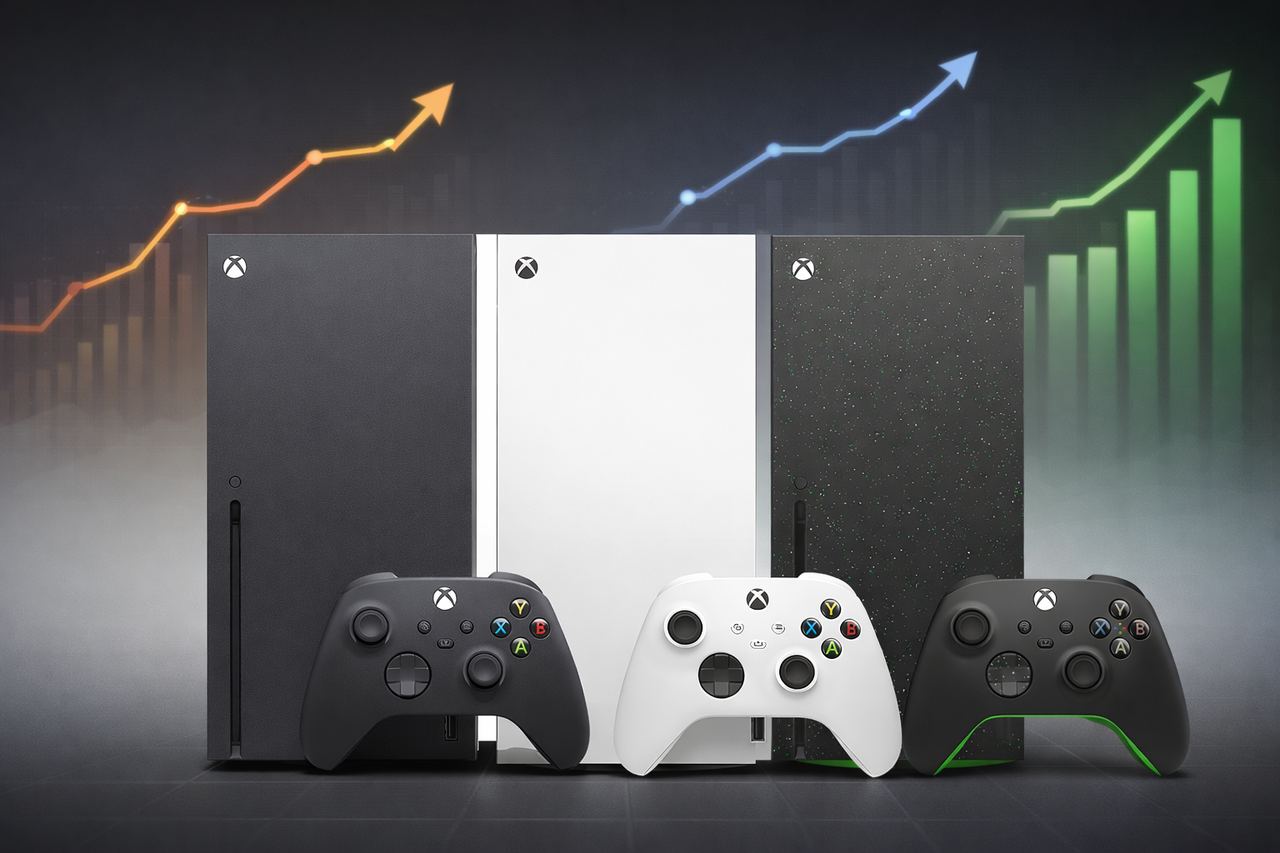
Gamers love free rewards, and after the Fortnite Winterfest 2025 update, players uncovered a new way to score V-Bucks at a steep discount. Some Fortnite fans now claim they can get 1,000 V-Bucks for almost nothing by using a subscription bundle tied to Xbox Game Pass.
Disclaimer: If you don’t want to risk getting banned from Fortnite or Xbox Game Pass, it’s probably best not to use this exploit.
How the Fortnite V-Bucks loophole works
Players discovered that Fortnite Crew now comes bundled with Xbox Game Pass Ultimate. Since Game Pass Ultimate offers a $1 introductory deal, users can sign up, launch Fortnite, and instantly receive the Fortnite Crew rewards.
Those rewards include 1,000 V-Bucks along with the usual Fortnite Crew perks. After claiming them, players cancel the subscription before the next billing cycle. This approach drops the effective cost of 1,000 V-Bucks to about $1, roughly nine times cheaper than the standard price.
Notably, the method does not require a brand-new account. Players report that it also works with existing Fortnite Crew accounts, which makes the loophole even more appealing.
Community reaction and uncertainty
The discovery sparked debate across the Fortnite community. Some players view this as a harmless use of bundled perks, while others worry about potential consequences. Questions remain about whether Epic Games or Microsoft might reverse the rewards or flag accounts if they close the loophole.
So far, neither company has commented on the situation. Until an official response arrives, players continue to speculate about whether this counts as an exploit or simply smart timing with subscriptions.
Lenovo appears to have a bunch of new products to showcase at CES 2026, and most of them are laptops. Thanks to folks at Windows Latest, we now know some of the interesting concept devices as well as consumer-facing products Lenovo will be launching in 2026. Among the ones mentioned in a massive leak shared by the news outlet, ThinkBook Plus Gen 7 Auto Twist is one of the interesting ones.
Image credit: Windows Latest
Although Lenovo teased the ThinkBook Auto Twist Concept 2-in-1 as a concept last year, Windows Latest now reports that the company has “managed to make it a consumer product.” As mentioned earlier, it’s called Lenovo ThinkBook Plus Gen 7 Auto Twist. The said ThinkBook laptop is a Copilot+ PC that uses the Intel Core Ultra 3 SoC under the hood for performance needs.
As far as other specs are concerned, the Lenovo ThinkBook Plus Gen 7 Auto Twist reportedly flaunts a 14” 2.8K OLED display. There are also front-facing speakers with Dolby Atmos support that rotate along with the screen. The news outlet also mentions the inclusion of a 75Wh battery that can power the rotation for a long time.
But the interesting thing about this laptop is that it can rotate the display faster than the concept, thanks to a new electromotor. The laptop also reportedly uses a quieter and more durable motorized dual-rotation hinge while converting from “notebook, tablet, and sharing modes.” Lenovo wants the display to automatically adjust to “your posture, presentation angle, or for the three modes.”
It’s ideal to think that such a futuristic laptop would cost bonkers, right? Well, it doesn’t, at least according to the news outlet, which reports a starting price of approximately $1,499 USD. All that said, it’ll be interesting to see if it captures the interest of customers once the device is up for sale in June 2026.
ThinkBook Plus Gen 7 Auto Twist Specifications of the
Xbox is pushing cloud gaming further into the living room. As of December 23, 2025, Xbox Cloud Gaming is now available directly on select Amazon Fire TV smart TVs. The latest Fire TV 4-Series and Fire TV Omni QLED Series models now come with the Xbox app built in.
Amazon says that the support is coming to more models down the line. With a compatible controller and an Xbox Game Pass subscription, players can access hundreds of cloud-enabled titles straight from their TV.
Image: Amazon
This move builds on Xbox Cloud Gaming’s existing support for Fire TV streaming devices. The service was already available on current-generation Fire TV 4K streaming media players, ranging from the Fire TV Stick 4K Select to the Fire TV Cube. The new smart TV integration makes the experience even more seamless, especially for users who want gaming baked directly into their display.
Amazon reports a surge in interest in cloud gaming on Fire TV. Speaking with Thurrott.com, Amazon said that “cloud gaming usage on Fire TV more than doubled this year compared to last year.” Alexa+ integration is also playing a role. Users can simply say, “Alexa, open Xbox app,” and jump straight into a game.
You can download the Xbox app from the Amazon Appstore, sign in with a Microsoft account, and connect a Bluetooth controller. Supported options include the Xbox Wireless Controller, Xbox Adaptive Controller, DualSense, and DualShock 4.
Xbox Cloud Gaming on Fire TV is now live in 29 countries, with recent expansions including India and Brazil. For many players, it’s a cheaper, cleaner path into the Xbox ecosystem.
Microsoft is working on a major Copilot upgrade for Microsoft 365, and it’s all about putting smarter “Agents” inside its most-used apps. According to the official Microsoft 365 roadmap, Excel, PowerPoint, and Word are each getting dedicated Copilot Agents designed to handle heavy lifting while users focus on ideas and decisions.
The Excel Agent has entered preview in November 2025, with a wider rollout starting in February 2026. Its focus is data storytelling. The agent can help turn raw numbers into charts, summaries, and clear insights using built-in formulas and logic. Microsoft says it will streamline data prep and visualization, while multi-turn chat lets users refine results before opening them directly in Excel for deeper editing and collaboration. It’s aimed squarely at forecasts, project planning, and decision-making work.
Next up is the PowerPoint Agent, also previewing in November 2025 and rolling out in February 2026. This one targets presentation fatigue. It helps with research, layout, formatting, and visual structure, allowing users to focus on the message rather than the mechanics of the slides. Users can iterate through chat prompts, then jump into PowerPoint to fine-tune the deck with teammates.
Finally, the Word Agent brings Copilot deeper into long-form writing. Designed for dense documents like policy papers, technical reports, and strategic plans, it assists with research, structure, and formatting. Drafts can be refined through conversation, then opened in Word for full control and collaboration.
Notably, Microsoft says all three Agents will be available to Microsoft 365 users, even without a Copilot license. If that holds, 2026 could mark a big shift in how everyday Office work gets done.
Generative AI remains one of the most contentious topics in modern game development, and Clair Obscur: Expedition 33 unexpectedly found itself at the center of that debate this year. The RPG developed by Sandfall Interactive had two Indie Game Awards wins quietly revoked.
The title originally won Game of the Year and Best Debut Game, but organizers later pulled both awards following concerns over alleged generative AI use. No detailed explanation was provided at the time, which only fueled speculation.
The decision was especially jarring given the game’s wider success. Having awards removed retroactively sparked backlash from players and reignited wider industry debates about transparency and AI boundaries. Well, the game director has finally issued a statement.
“Everything in the game is human-made,” Broche said. He acknowledged that the studio briefly experimented with AI tools in 2022, when the technology was still emerging. However, he described the use as limited and short-lived.
“We tried it, and we didn’t like it at all. It felt wrong,” Broche explained. AI-generated textures were used temporarily as placeholders and removed once proper assets were ready. According to Broche, all final artwork, voice acting, and content were created by humans.
Broche also made it clear Sandfall has no plans to revisit AI tools, even as larger studios increasingly adopt them. For many players, Clair Obscur: Expedition 33’s handcrafted feel is exactly what sets it apart.
IO Interactive has announced a delay for 007 First Light, pushing the game’s release back by two months. The upcoming James Bond title is now set to launch on May 27, 2026, according to a new update shared by the studio.
In the statement, IO Interactive described 007 First Light as its most ambitious project to date, confirming that the team decided to ensure the game meets quality expectations at launch. While delays are never ideal, the studio says the extra development time will be used to further polish and refine the overall experience.
According to IO Interactive, the game is already fully playable from start to finish, with core systems and content in place. The additional months are intended to improve performance, fine-tune gameplay elements, and deliver the best version version on day one.
007 First Light aims to deliver a full-scale James Bond experience, combining globe-trotting locations, action-heavy sequences, spycraft, gadgets, and cinematic set pieces. As an independent developer and publisher, IO Interactive noted that delaying the release gives the team greater flexibility to hit its internal quality bar without compromise.
The studio also emphasized that development is progressing well and expressed confidence that the delay will benefit the game’s long-term success. IO Interactive thanked players for their patience and continued support since the project was first revealed.
No new gameplay footage or feature details were shared alongside the announcement. However, IO Interactive confirmed that more updates on 007 First Light will be revealed in early 2026, suggesting a renewed marketing push closer to launch.
Xbox Countdown Sale 2025 is underway, and early sales data already highlight which titles players buy the most. The rankings show strong demand for both new releases and long-standing fan favorites, with the list remaining consistent across regions.
ARC Raiders leads the sales charts
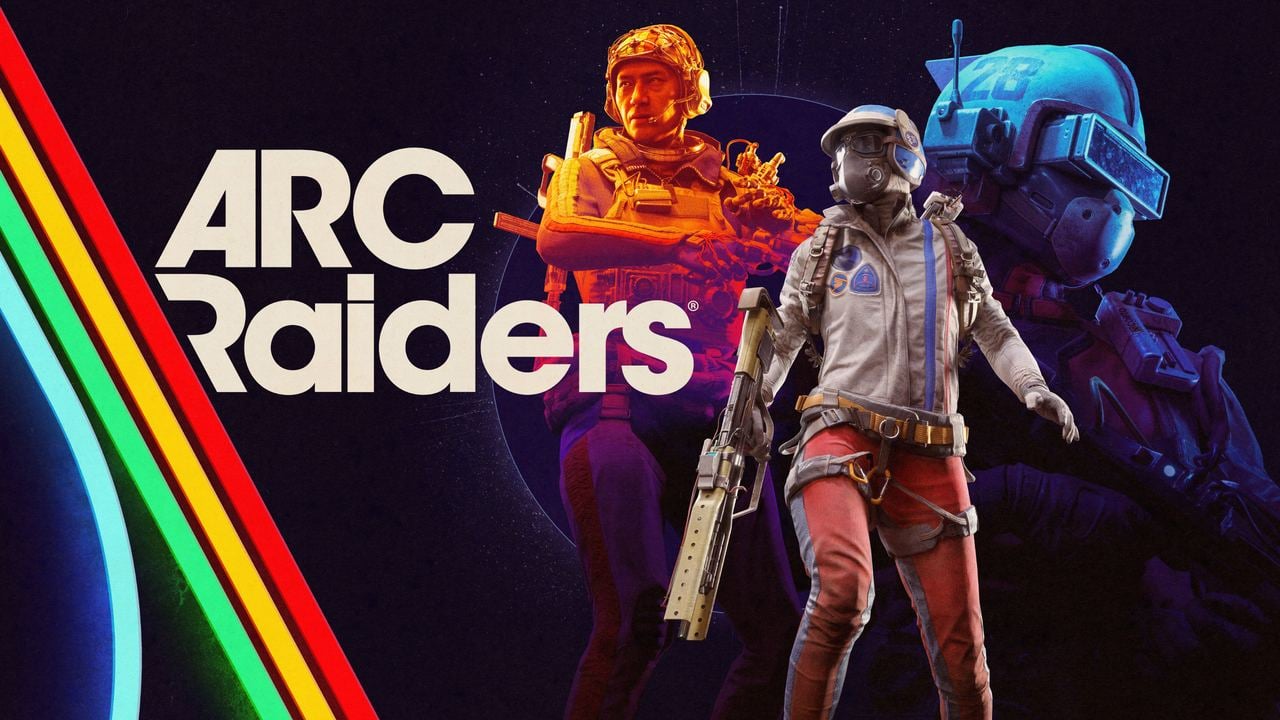
ARC Raiders currently tops the Xbox Countdown Sale rankings. The cooperative extraction shooter continues to attract attention, pushing it ahead of major sports and shooter franchises during the holiday sale period.
Close behind, EA Sports FC 26 secures second place, while EA Sports Madden NFL 26 follows in third. Sports titles once again prove their ability to dominate large-scale sales events.
Shooters and deluxe editions dominate the top 10
The Call of Duty: Black Ops 7 Vault Edition Upgrade also ranks high, showing strong interest in premium upgrades. Tactical shooter Ready or Not and blockbuster Battlefield 6 both place among the best sellers.
Fantasy RPG fans continue to support Hogwarts Legacy: Digital Deluxe Edition, which holds a spot in the top 10. Other notable entries include EA Sports College Football 26, Batman: Arkham Collection, and Forza Horizon 5: Standard Edition.
Strong activity beyond the top 25
The Top Paid list continues with Phasmophobia, Kingdom Come: Deliverance 2, Resident Evil 4: Gold Edition, and NBA 2K26. Beyond the top 25, several high-profile releases still show strong momentum. These include Clair Obscur: Expedition 33, Silent Hill 2, Monster Hunter Wilds, and Avatar: Frontiers of Pandora.
The Xbox Countdown Sale runs until January 7, 2026, and rankings may shift as more players jump in. The charts remain identical across the US and UK, suggesting broad global interest in the same titles. PlayStation players can also take advantage of a major PlayStation Store sale running in parallel.
Salesforce is changing how it uses artificial intelligence, signaling a notable shift in enterprise AI strategy. While many companies double down on large language models, Salesforce now takes a more cautious and pragmatic path.
According to NewsBytes, Salesforce has reduced its reliance on large language models (LLMs) after encountering reliability and trust issues in real-world enterprise environments. Company executives say confidence in generative AI declined over the past year, especially when deployed at scale with paying customers.
Why Salesforce is prioritizing deterministic AI
Instead of open-ended generative workflows, Salesforce is refocusing its flagship AI product, Agentforce, on rule-based and deterministic automation. This approach favors predictable outcomes over flexible but inconsistent responses.
Salesforce executives argue that enterprise customers value reliability more than creativity. When AI handles customer support, billing, or workflow automation, even small errors can turn into major financial and reputational risks.
AI-driven layoffs revealed both gains and limits
Salesforce CEO Marc Benioff recently disclosed that support staff dropped from roughly 9,000 employees to about 5,000 after deploying AI agents. Automation delivered clear efficiency gains, but it also exposed weaknesses.
The company found that AI agents struggled with complex or nuanced instructions. In enterprise settings, these failures can directly impact revenue and customer satisfaction.
Real-world failures pushed Salesforce to adjust
One notable issue involved Vivint, where AI systems failed to consistently send customer satisfaction surveys. Salesforce replaced generative logic with deterministic triggers to guarantee execution.
Internally, Salesforce also observed AI “drift,” where chatbots gradually lost focus during conversations. This behavior reduced consistency and undermined trust in automated systems, especially during long or complex interactions.
Salesforce’s move reflects a wider reassessment across the enterprise software industry. Companies still want automation benefits, but they increasingly demand systems that behave consistently and remain auditable.
As Salesforce pulls back from heavy LLM dependence while Microsoft accelerates Copilot adoption, a key question remains: will other enterprise software companies follow Salesforce’s more cautious approach, or will they continue to push forward with large language models despite their growing pains?
Microsoft continues to expand Copilot across Windows and Microsoft 365, and new accessibility-focused upgrades are now rolling out to Word and PowerPoint. According to a recent Microsoft 365 Insider blog post, Copilot+ PCs now support automatic alt text generation for images, helping users create more accessible documents with less effort.
On-device AI powers faster and more private accessibility features
The new feature relies on the Neural Processing Unit (NPU) built into Copilot+ PCs, which delivers more than 40 TOPS of AI performance. Instead of sending images to the cloud, Word and PowerPoint generate alt text directly on the device. This approach improves processing speed, protects user privacy, and reduces power consumption during AI workloads.
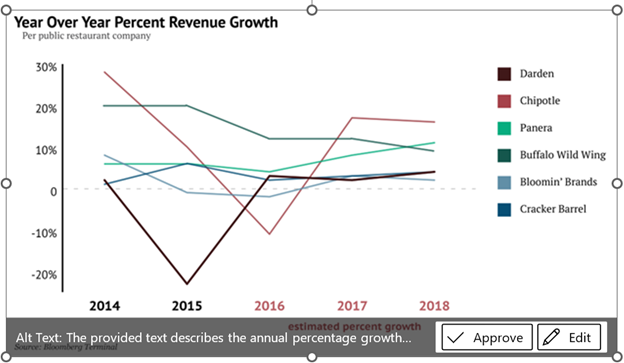
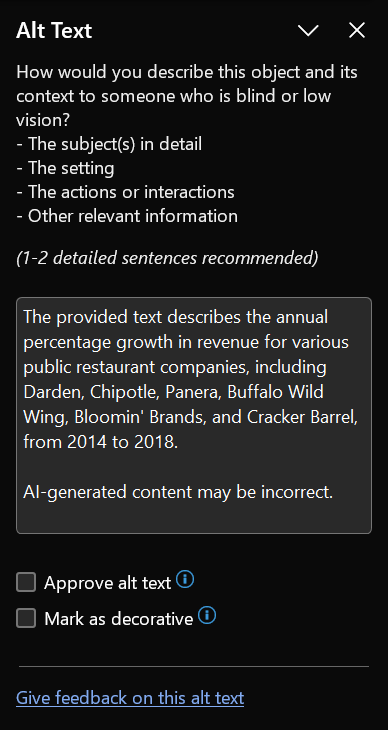
Once you insert an image into a document or presentation, Word or PowerPoint automatically suggests alt text. The description appears at the bottom of the image, where you can accept it immediately or open the Alt Text pane to adjust the wording.
Works for new and existing images
Microsoft also designed the feature to handle existing content. You can select any image and generate contextual alt text through the Picture Format > Alt Text menu. Another option sits under Review > Check Accessibility, where the Missing Alt Text tool prompts Copilot to create a suitable description.
Users who prefer manual control can disable the feature at any time. Open File > Options > Accessibility and uncheck the AI alt text option to turn off automatic generation.
Automatic alt text generation already ships to Microsoft 365 subscribers running Version 2512 (Build 19530.20006) or newer on a Copilot+ PC. With this update, Microsoft strengthens its push toward on-device AI while making Word and PowerPoint documents more accessible by default.
The Xbox Countdown Sale is live, and it brings major discounts on hundreds of games across the Xbox Store. One of the standout deals this year features Coral Island, which has dropped to its lowest price ever on Xbox.
Why this deal matters for Xbox players
Coral Island is currently 30% off, making this a great time to jump into the cozy farming simulator. The game blends classic farm-building with villager relationships, seasonal activities, and deep exploration systems, including underwater areas and caves. Many players compare it to Stardew Valley, especially as its developer recently shared details about the upcoming Stardew Valley 1.7 patch.
This discount also gives players a strong reason to revisit Coral Island after it left Xbox Game Pass in April 2025. Those who dropped the game earlier can now return at a lower cost and continue building their farm without subscription pressure.
Coral Island offers an enormous amount of content. A full playthrough can take 200 to 300 hours, which explains why the game’s Xbox achievement completion rate sits at around 1%. Long-term goals, slow progression systems, and time-intensive tasks make it a commitment-heavy experience.
The Xbox Countdown Sale runs until January 7, 2026, giving players plenty of time to explore deals. Non-Xbox users should also note that Sony currently runs a large PlayStation Store sale, offering similar holiday discounts.
Windows users have a wide set of logo makers to choose from, each offering different strengths in speed, customization, template variety, and branding support. Whether you’re building a new company, upgrading a brand identity, or testing visual directions, these nine platforms deliver some of the strongest logo design capabilities in 2026.
Logo Maker
Quality
Customisation
Template Library
Branding Tools
Design.com
⭐⭐⭐⭐⭐
⭐⭐⭐⭐⭐
⭐⭐⭐⭐⭐
⭐⭐⭐⭐⭐
Tailor Brands
⭐⭐⭐⭐
⭐⭐⭐
⭐⭐⭐
⭐⭐⭐
Wix Logo Maker
⭐⭐⭐⭐
⭐⭐⭐
⭐⭐⭐⭐
⭐⭐⭐⭐
Adobe Express Logo Maker
⭐⭐⭐⭐
⭐⭐⭐⭐
⭐⭐⭐⭐
⭐⭐⭐⭐
Designs.ai
⭐⭐⭐⭐
⭐⭐⭐
⭐⭐⭐⭐
⭐⭐⭐⭐
Canva Logo Maker
⭐⭐⭐⭐
⭐⭐⭐⭐
⭐⭐⭐⭐
⭐⭐⭐⭐
Logo.com
⭐⭐⭐
⭐⭐⭐
⭐⭐
⭐⭐
Hatchful (Shopify)
⭐⭐⭐
⭐⭐⭐
⭐⭐
⭐⭐
Looka
⭐⭐⭐
⭐⭐⭐
⭐⭐⭐
⭐⭐
1. Design.com
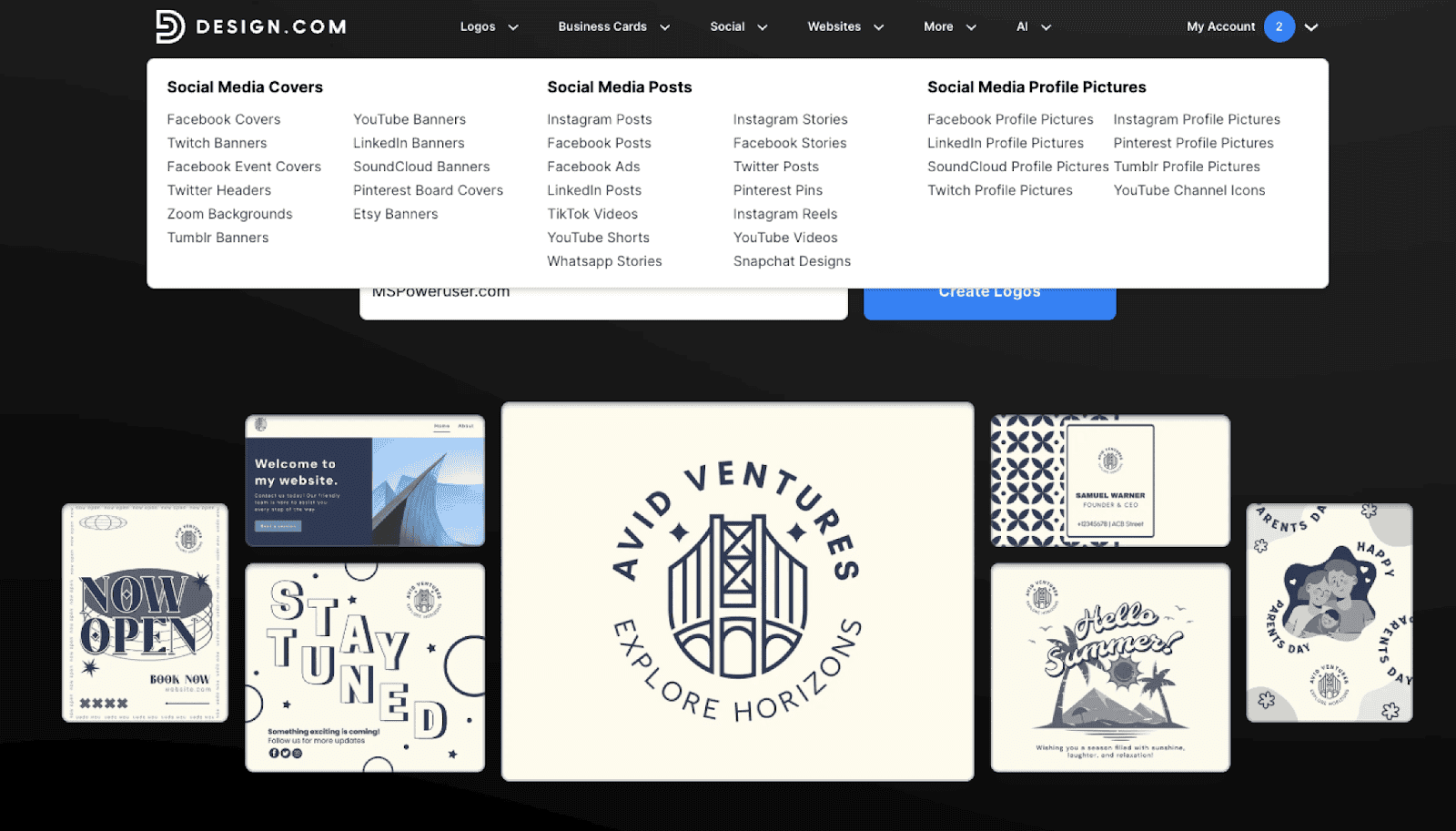
Design.com delivers one of the most complete branding experiences available today. Instead of acting as a simple logo generator, it provides a professional grade ecosystem backed by 360,000+ logo templates, over 1 million design templates, and a large collection of exclusive creative assets. Windows users benefit from an editor that balances simplicity with depth, allowing fine control over spacing, color, fonts, and icon adjustments without requiring advanced design knowledge.
The AI Logo Generator produces polished concepts within seconds and draws from a rich library that includes 62,000+ exclusive vector shapes, 750+ fonts, and 525+ exclusive typefaces. All logos and templates are commercially safe and manually checked for quality, which is something many automated tools do not guarantee. After creating a logo, users can build a full visual identity using over 50 integrated branding tools, covering business cards, social media templates, presentations, posters, flyers, menus, letterheads, QR codes, and more. Every template automatically inherits logo colors and typography, creating instant brand consistency.
Design.com also includes a free website builder, free link in bio, and free digital business card in every plan. These freemium tools feature a Design.com footer but allow users to launch a basic online presence at zero cost. Logo exports include SVG, EPS, PDF, PNG, JPG, GIF, and MP4, ensuring compatibility with print and digital platforms. Domain registration, printed merchandise with free delivery, multi language support, and 24-hour chat and email assistance create a user friendly environment for businesses at any stage.
Its collaboration features, such as voting polls and favorites lists, make it convenient for Windows users working with teams. With powerful design automation, asset extensibility, and an unmatched template library, Design.com sits at the top of today’s logo makers.
Notable Features
Very fast AI logo generation
360,000+ logo templates and 1M+ design templates
Exclusive fonts, icons, and shapes
Automatic brand style inheritance
50+ branding tools
Vector and animated logo downloads
Built in website, digital card, and link in bio tools
Domain registration and merchandise printing
24/7 chat and email support
Multi language platform
2. Tailor Brands
Tailor Brands emphasizes a structured approach to logo creation built around guided questions and style preferences. Windows users follow a step based workflow that narrows down icons, fonts, and color moods, resulting in designs that feel curated rather than randomly generated. The platform includes basic branding extensions for social media graphics and simple business materials.
The overall experience is streamlined, making it a good fit for users who prefer direction over broad template browsing. While the template library is more limited compared to larger platforms, the core editor remains easy and approachable.
Notable Features
Guided style and branding flow
Clean and accessible editor
Social and business materials
Additional small business tools
3. Wix Logo Maker
Wix Logo Maker pairs well with the Wix website builder, which is ideal for Windows users planning to build their brand and website in the same environment. The logo generator asks for design preferences and brand traits before creating several customizable concepts. The integration with Wix’s website system makes it easy to apply the new logo directly to site templates.
The editing tools allow changes to fonts, colors, icons, and spacing, and the visual results adapt well to digital uses. While it is strongest within the Wix system, it remains flexible enough for standalone branding use.
Notable Features
Smooth integration with Wix websites
Easy logo refinement
AI based concept generation
Good for digital branding
4. Adobe Express Logo Maker
Adobe Express Logo Maker brings Adobe’s design sensibility into a streamlined interface optimized for quick branding tasks. Windows users gain access to refined templates, strong typography tools, and a familiar design language without needing Photoshop or Illustrator. The logo generator provides modern, balanced layouts that can be customized with solid color and font options.
Once the logo is created, Adobe Express provides a wide selection of matching social, print, and presentation templates. The export system is reliable and supports professional formats suitable for both digital and printed applications.
Notable Features
Adobe-grade design templates
Excellent font options
Strong social and print asset support
Smooth Windows performance
5. Designs.ai
Designs.ai offers a multi tool creative system that covers logos, videos, ads, and marketing graphics. Windows users who want a single hub for multiple branding components may find this platform convenient. The logo generator creates clean AI assisted designs and allows users to modify icons, color palettes, and layout compositions.
The broader environment includes marketing kits and content creation tools that help maintain visual consistency across campaigns. While some tools have varying depth, the overall platform remains efficient and practical.
Notable Features
Multi tool design ecosystem
Modern templates
Fast and simple AI generation
Integrated marketing tools
6. Canva Logo Maker
Canva Logo Maker is well known for its beginner friendly design experience. The drag and drop editor gives Windows users full control over icons, shapes, fonts, and layouts without needing design experience. The template library is extremely large and covers most industries, making it easy to find aesthetic directions.
After creating a logo, users can build matching social posts, flyers, posters, presentations, and more using Canva’s extensive template system. This makes it a flexible option for quick branding or social campaigns.
Notable Features
Very large template library
Easy drag and drop editing
Flexible design system
Good for social content
7. Logo.com
Logo.com aims for simplicity and speed. The platform generates logo ideas instantly and offers a lightweight editing panel for adjusting fonts, icons, and colors. Windows users who want an uncomplicated creation process can produce usable logos quickly.
It includes a small set of branding materials, such as social content and basic brand guidelines. While the ecosystem is smaller, the platform remains useful for fast turnaround projects.
Notable Features
Very fast output
Simple editor
Clean visual style
Basic brand materials
8. Shopify Logo Maker
The Shopify Logo Maker provides a clear, guided interface designed primarily for entrepreneurs and small businesses. Windows users answer questions about industry, mood, and visual preferences before receiving collections of matching logo concepts. The platform organizes design categories well, making it easy to browse styles.
Brand asset packages include social graphics and lightweight marketing visuals that complement the generated logo. It is particularly suitable for users who appreciate structured workflows.
Notable Features
Step based design flow
Organized style categories
Simple editor
Social media asset bundle
9. Looka
Looka offers an AI assisted logo generator based on style preferences, color selections, and brand personality options. The step driven flow produces clean concepts, and the editor supports essential refinements. Windows users can generate brand kits that include social and web ready graphics.
While the library and customization controls are more limited compared to larger platforms, the interface remains easy to navigate and suitable for users who prefer a guided approach.
Notable Features
Guided AI logo generation
Clean modern layouts
Basic brand asset bundle
Approachable edito
In 2026, the best AI logo generators for Windows offer more than quick visuals—they provide scalable branding systems. Design.com leads with unmatched depth and flexibility, while tools like Canva, Adobe Express, and Wix suit simpler workflows. The right choice depends on how much control, consistency, and long-term branding support you need.
Choosing a logo maker for Windows depends on the quality of templates, file exports, branding tools, and how much control the editor gives you. Before exploring the full list, here is a quick comparison of three important features where these platforms differ the most.
Design.com stands out as a powerful end to end branding platform that goes far beyond what typical logo generators provide. It has the largest logo library on the internet, offering more than 360,000 professionally designed logo templates and over one million total design templates. For Windows PC users who want the most complete creative experience, the platform combines AI speed with professional grade assets.
The AI Logo Generator produces a high volume of polished concepts in seconds and draws from 62,000+ exclusive vector shapes, 750+ fonts, and 525+ exclusive typefaces. Unlike many tools, the designs available on Design.com are exclusive, commercially safe, and manually checked for quality. The refinement process is straightforward: users can adjust typography, color palettes, icon proportions, spacing, and layout. For deeper customization, the advanced editor retains flexibility without requiring the learning curve of traditional design software.
What makes Design.com particularly valuable for Windows users is how it builds a complete brand system, not just a standalone logo. Every logo you generate instantly extends into a full brand kit, including business cards, flyers, posters, presentations, menus, letterheads, QR codes, websites, social media content, and more. More than 50 additional design and branding tools are integrated into the same interface, allowing the entire identity to remain visually consistent. The platform automatically syncs logo colors, fonts, and styling across all templates so that brand materials align without additional setup.
Design.com also includes a free website builder, free digital business card, and free link in bio tools on every plan. These freemium versions include Design.com branding in the footer but make it easy to establish an online presence. Logos can be downloaded in all essential formats, including SVG, EPS, PDF, PNG, JPG, GIF, and MP4, with options for transparent backgrounds and icon only exports. Users can also register a domain, print branded merchandise, and take advantage of worldwide shipping with no extra delivery fees.
Because Design.com supports multiple languages, accepts payments in major global currencies, and offers 24 hour email and live chat assistance, it works well for individuals and teams building a brand from any location. The platform’s favorite lists and voting polls make collaboration simple, which is especially helpful for remote Windows users working across multiple devices or teams.
Tailor Brands offers a structured branding experience driven by a questionnaire that guides the entire logo creation process. Windows users who prefer a linear, step based workflow often appreciate the simplicity of the guided questions and style prompts. The logo editor provides essential adjustments while keeping the interface uncluttered.
The platform also provides a range of business and brand management tools that support early stage entrepreneurs. The design variety is moderate but neatly organized, making it easy to create a consistent visual identity.
Wix Logo Maker excels when paired with the Wix website builder, making it convenient for Windows users who want branding and website creation in the same environment. The AI asks for style preferences and generates ideas based on mood and tone selections.
The customization panel offers flexibility in fonts, colors, and layout changes. Once the logo is ready, you can integrate it directly into any Wix site without additional formatting.
Designs.ai provides a multi tool creative suite that includes logos, videos, marketing materials, and more. Windows users who want a unified workspace for several types of creative assets find the platform practical. The AI generator produces modern concepts that can be refined through a streamlined editor.
The collection covers marketing layouts, posters, and other branded elements. While some tools are more developed than others, the workflow stays smooth and consistent.
Adobe Express Logo Maker brings Adobe level design refinement into a lightweight interface that performs well on Windows PCs. The platform includes high quality templates and strong typography tools that reflect Adobe’s design standards.
After logo creation, the branding process continues seamlessly inside Adobe Express, allowing users to build matching social media graphics, posters, and marketing materials. The blend of simplicity and refined design features makes it appealing to users who want more polish without complexity.
Canva Logo Maker is popular among Windows users for its drag and drop simplicity and enormous template library. The editor allows quick experimentation with colors, fonts, icons, and shapes without requiring any design knowledge.
Once a logo is created, users can apply the same visual style to Canva’s social media layouts, presentations, and print materials. This creates a straightforward path to maintaining consistency across multiple content types.
Notable Features
Very large template collection
Beginner friendly drag and drop editor
Easy customization
Strong integration with social and presentation tools
Looka provides an AI guided logo creation flow that focuses on style preferences, color direction, and mood selection. The step based process is clear and approachable for Windows users who like structured branding choices. The editor supports basic refinement without overwhelming tools.
The brand packages include digital ready assets such as social banners and simple marketing variations. The tool suits users who want a guided workflow instead of browsing or customizing large template libraries.
Notable Features
Step driven AI creation
Clean logo ideas
Brand asset bundles
Simple editing options
For Windows users in 2026, the best logo maker depends on how far you want to take your brand. Design.com delivers the most complete, professional ecosystem, while Canva, Adobe Express, and Wix suit faster workflows. Choose the tool that matches your customization needs, branding goals, and long-term growth plans.
Google has created a new Chrome Platform Status entry for Global Privacy Control (GPC). That entry shows Google Chrome and the wider Chromium project are preparing to support a browser-level privacy signal with legal weight under California law.
When enabled, Global Privacy Control lets a browser automatically tell websites not to sell or share a user’s personal data.
The entry does not list a release date or testing milestone. Even so, it aligns with California privacy rules that already recognize Global Privacy Control as a valid opt-out signal and, from 2027, will require browsers used in the state to offer a built-in way to send it.
GPC works at the browser level. Once it is turned on, the browser sends an opt-out signal to websites automatically. Users do not need to interact with cookie banners or repeat the same choice on every site.
This sets GPC apart from earlier privacy signals that relied on voluntary cooperation.
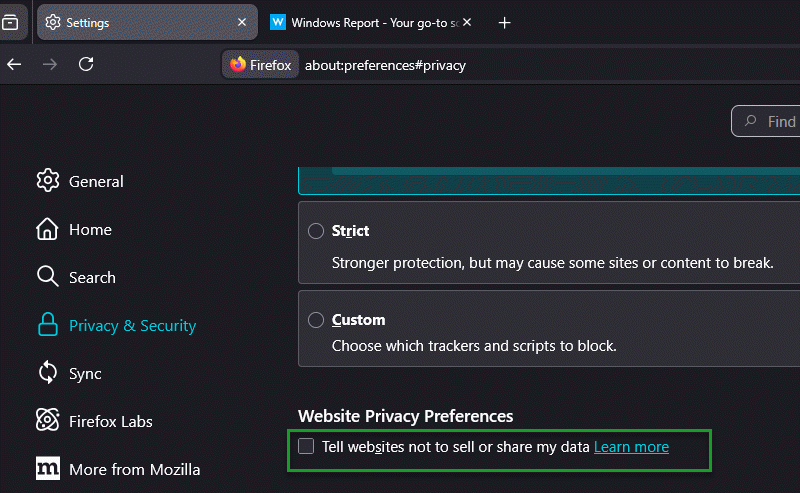
Chrome already supports Do Not Track (DNT), but it was never backed by law. Websites could ignore it, and many did. Mozilla Firefox removed DNT and now offers a Global Privacy Control opt-in setting instead. GPC is recognized under California privacy law, while DNT was not.
Firefox shows a Global Privacy Control option in its privacy settings. Image Credit: Venkat | WindowsReport.
Chrome catching up on Global Privacy Control
Chrome’s planning entry, spotted by WindowsReport, confirms alignment with the official W3C Global Privacy Control specification. The work includes:
A user preference to enable GPC
Sending the Sec-GPC header with web requests
Exposing the signal through navigator.globalPrivacyControl
This places Chrome on the same path Firefox and other privacy-focused browsers took earlier.
The Chrome Platform Status page labels this work as “Chromium catches up.” There are no flags, no Canary versions, and no shipping target listed.
The future of Do Not Track in Chrome
Chrome’s work on Global Privacy Control also raises the question of the future of Do Not Track inside the browser.
DNT remains available in Chrome today, even though it lacks legal relevance. By contrast, GPC is tied to opt-out rights that the law already enforces.
Chrome’s Platform Status entry does not mention DNT or outline any related changes. For now, it only documents work to add GPC support. Any decision about how Chrome handles DNT alongside GPC is not described in the current plans.
Privacy advocates are likely to question Google’s intent, given its role in online advertising. This is not a feature announcement. It is a directional signal.
Microsoft responds to report claiming aggressive 30% Xbox profit goal
The controversy began with a report from Bloomberg, which suggested that Microsoft’s CFO advocated for a 30% profit margin goal for the Xbox business. According to the report, this alleged target exceeded normal expectations for the gaming industry and may have played a role in recent restructuring decisions. Several industry insiders later echoed similar claims, saying they heard about ambitious margin expectations tied to Xbox.
Microsoft directly addressed the report in a statement to CNBC. The company said the specific 30% margin figure was incorrect and emphasized that no such fixed target applied to the Xbox division. Microsoft acknowledged that it sets challenging performance goals across its businesses but clarified that the reported number did not reflect internal planning for Xbox.
The original Bloomberg narrative pointed out that most gaming companies operate with margins between 17% and 22%, making a 30% target unusually high for the sector. Microsoft did not reveal what profit benchmarks it uses internally for Xbox, leaving questions about its long-term financial strategy unanswered.
Well, the developer of the game found itself in a fresh controversy after players of Battlefield 6 are now facing accusations of using generative AI in a new bundle (via The Gamer), despite earlier promises that the game would avoid AI-generated content.
The controversy revolves around the “Windchill” store bundle, which is priced at 900 Battlefield Coins and includes a player card sticker called “Winter Warning.” Per this Reddit post, players have spotted visual inconsistencies in the sticker’s artwork, including:
A rifle that appears to have two misaligned barrels
A distorted scope lens that isn’t properly circular
For those unaware, these inconsistencies are commonly associated with AI-generated images. While the issue involves a single bundle, backlash has grown due to wider industry scrutiny around AI use in games.
Fans are fuming, especially because Battlefield Studios Europe head Rebecka Coutaz previously stated that players wouldn’t see AI-generated content in the final game. She further stated that AI was used only in early development for exploration.
Do you actually care if generative AI is used for an optional bundle in Battlefield 6, or is the real issue about transparency and trust rather than gameplay impact? We’d love to hear your thoughts in the comments below.
ARC Raiders Expedition Project has officially entered a new phase as Embark Studios activates the latest Expedition departure window, letting players complete their first full Expedition and leave Speranza.
According to in-game activity and player reports, the next Expedition window appears scheduled for late February 2026, continuing ARC Raiders’ prestige-style progression system.
Expedition Project cycle resets player progress
Once players complete an Expedition in ARC Raiders, the game resets most core progression. Characters return to level one, stashes empty, and all unlocked skills clear.
In return, players receive long-term benefits, including temporary buffs, a stash capacity boost, and an exclusive “Patchwork” cosmetic skin. These rewards carry forward into future cycles and define the Expedition Project’s prestige mechanic.
Players can prepare immediately for the next Expedition
After departure, players can immediately start building toward the next Expedition caravan. Resource gathering resumes right away, allowing players to work toward the upcoming cycle’s requirements without delay.
Each Expedition cycle typically runs for about two months, followed by a short departure window where players must commit to leaving Speranza.
February 22, 2026 window spotted through in-game timers
Some players discovered a workaround that reveals future Expedition timers and map conditions by adjusting their system date while in-game. While this method does not alter official schedules, it exposed a countdown pointing to February 22, 2026, as the next expected Expedition window.
Embark Studios has not confirmed this date publicly, and Expedition schedules can still change before launch.
First Expedition ran in December 2025
Before this second cycle surfaced, ARC Raiders launched its first Expedition window between December 17 and December 22, 2025, following a brief delay. That initial run established the core loop of gathering, departing, resetting, and rebuilding across cycles.
If you’re a fan of the Nintendo Switch 2 + Mario Kart World bundle, there’s some bad news coming for you. Nintendo has reportedly ended production of the Nintendo Switch 2 + Mario Kart World Bundle. That’s according to a leaked internal memo seen by GameStop (via GamesRadar).
Per the leaked memo, the bundle SKU has reached its end of life cycle. But the real problem is that there are no future plans to release any units. The company has also reportedly advised retailers to expect restocks to happen with the base console only. Meaning, no console Mario Kart World bundle is coming with newer units.
That being said, Nintendo had previously labeled the bundle as “limited time production through Fall 2025.” The company offered the bundle on console purchase for $50, which is a $30 discount for a standalone purchase.
The good news is that the bundle is still available at some retailers, including Nintendo’s store. So now is the time to act, because once the stock is gone, there’s no guarantee you’ll be able to get the bundle again. Also, let’s not forget that Nintendo is also facing the heat as the production cost of Switch 2 has bumped up due to rising prices of RAM prices globally.
What do you think about this plan by Nintendo? Do you think removing the bundle would hamper the sales numbers of the Switch 2? Drop your thoughts in the comments below.
Hackers are abusing a legitimate Microsoft authentication feature to break into enterprise Microsoft 365 accounts, even when multifactor authentication is enabled.
Security researchers warn that attackers have begun exploiting Microsoft’s OAuth 2.0 device authorization flow, a process designed for devices like smart TVs or IoT hardware with limited input options. By misusing this workflow, attackers can gain direct account access without stealing passwords or intercepting MFA codes.
How the OAuth device code attack works
The phishing campaigns rely on tricking users into entering a device code on Microsoft’s real verification page. Victims receive messages presenting the code as a one-time password or urgent verification request.
Once the user enters the code, Microsoft’s system authorizes an access token for the attacker. This immediately grants control of the victim’s account, allowing data theft, lateral movement across corporate systems, and persistent long-term access to enterprise resources.
Because the login occurs on a legitimate Microsoft domain, many traditional phishing detection tools fail to flag the activity.
Widespread campaigns and state-backed activity
Researchers from Proofpoint have tracked multiple threat clusters using this technique since at least September 2025. These include both financially motivated cybercriminals and state-aligned actors.
Two phishing toolkits dominate these campaigns:
SquarePhish2, which includes QR code-based lures
Graphish, which automates the OAuth device code attack process
Financially motivated groups, such as TA2723, use themes like salary updates, benefits notices, and document sharing to lure victims. Proofpoint also identified Russia-aligned operations, including UNK_AcademicFlare, using similar methods.
Why is this attack hard to stop
This technique highlights a broader shift in cybercrime. Instead of stealing credentials, attackers now exploit modern authentication workflows themselves. Since MFA remains technically “enabled,” organizations may overlook the breach until significant damage occurs.
Experts warn enterprises must monitor OAuth device code usage closely, restrict unnecessary authentication flows, and educate users never to enter unsolicited verification codes, even on legitimate login pages.
We have previously reported on hints about January Developer Direct, where Forza Horizon 6 and Fable are most likely to be announced by their respective studios. Moving on, games including MIO: Memories in Orbit & Nova Roma are now confirmed to join Xbox Game Pass the same month. On top of that, High on Life 2 and REPLACED will be joining the gaming service in February and March of next year.
If you are wondering what other titles are dropping in 2026 or due to be announced, here’s a list of all the games joining Xbox Game Pass next year.
Month / Status
Game Title
Release Date/Year
January
Mio: Memories in Orbit
January 20, 2026
Nova Roma (Early Access)
January 22, 2026
February
Menace
February 5, 2026
High On Life 2
February 13, 2026
Death Howl (Console Release)
February 19, 2026
March
Replaced
March 12, 2026
TBA 2026
Halo: Campaign Evolved (Remake)
2026
Gears of War: E-Day
2026
Subnautica 2 (Early Access)
2026
Forza Horizon 6
2026 (Rumored Early 2026)
Fable
2026
Witchbrook
2026
Snap and Grab
2026
Beast of Reincarnation
2026
Planet of Lana 2
2026
Resonance: A Plague Tale
2026
There Are No Ghosts at the Grand
2026
Aphelion
2026
Super Meat Boy 3D
2026
At Fate’s End
2026
Outbound
2026
Freestyle Football 2
2026
Denshattack
2026
Tropico 7
2026
Wildekin
2026
Beastro
2026
TCG Card Simulator
2026
Mixtape
2026
Erosion
2026
Roadside Research
2026
Echo Generation 2
2026
Armatus
2026
Vampire Crawlers
2026
Which games are you eagerly waiting for and why? Drop your thoughts in the comments below.
Microsoft has officially slowed things down for the holidays, as the company pauses new Windows Insider Preview builds until early next year. This means KB5072043 stands as the final Insider build of the year, with no new releases expected for the remainder of 2025.
No new Windows Insider builds until 2026
Windows Insider testers will not receive new preview features, fixes, or experimental changes until development resumes in early 2026. Microsoft follows this pattern almost every year, as engineering teams wrap up milestones and prepare for the next major development cycle.
While the pause may disappoint Insiders waiting for fresh features, it gives Microsoft time to stabilize upcoming updates and plan larger changes for next year’s releases.
Microsoft often reduces or fully pauses Insider activity near the end of the year. The company uses this period to finalize internal goals, review feedback, and allow developers to take time off during the holiday season.
Although the break isn’t unusual, it still stands out for users actively testing preview builds and tracking weekly changes.
If you missed the final build of the year, KB5072043 introduced several notable changes for Windows 11 users. The update brings Ask Copilot directly to the Taskbar, making AI assistance easier to access without opening separate apps.
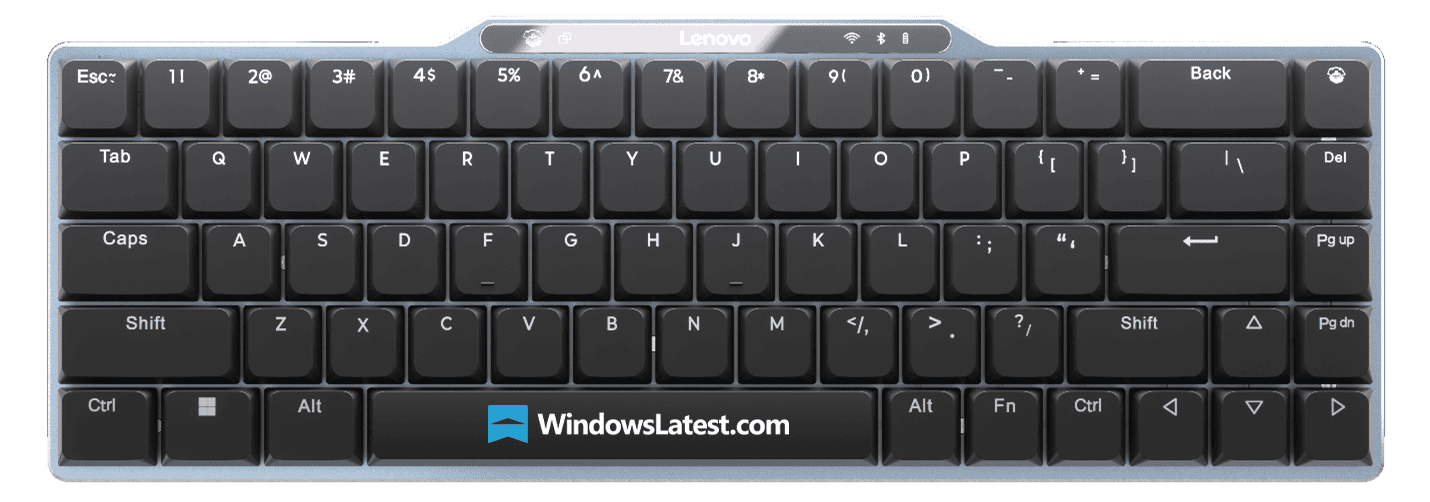
Now, Windows Latest has leaked the Lenovo Adaptable Keyboard. It’s a concept keyboard, which might be showcased at the CES 2026. But there are multiple new keyboard and mouse concepts Lenovo is working on, according to their sources.
Speaking of the Lenovo Adaptable Keyboard Concept, it can change the keystroke actuation force based on usage. That’s not all; you’ll also be able to switch between lighter, faster keypresses for gaming and tighter, more precise keypresses for work.
The keyboard reportedly uses optical actuation controls to adjust how keys feel. It features a compact layout with no numpad and minimal frame around the keys. Do note that the Adaptable Keyboard doesn’t include a Windows Copilot key.
Image credit: Windows Central
From the image above, you can tell that the keyboard also comes with support for Wi-Fi, Bluetooth, battery, and smart connectivity features. Among them all, the most interesting thing Lenovo is working on is the Lenovo Self-Charging Kit Concept. That’s a keyboard and mouse combo that never needs charging.
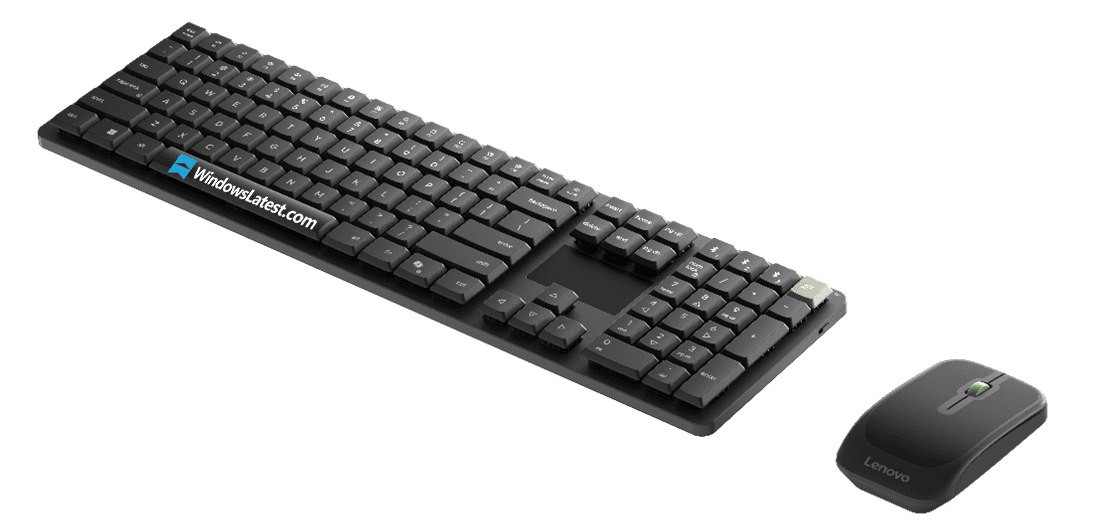
This said kit uses next-generation light-harvesting technology that works even under very low indoor lighting (as low as 50 lux). The concept is similar to what Logitech’s new K980 Solar+ keyboards offer. The solar component may be integrated subtly above the arrow keys. Lenovo calls this concept both convenient and environmentally sustainable.
Image credit: Windows Latest
A third product has also leaked, the Lenovo 900 Wireless Low-Profile Mechanical Keyboard & Mouse, which isn’t a concept and is expected to launch, according to the news outlet. It features a translucent design, available in Thunder Grey and Cloud Grey. The keyboard reportedly also uses Lenovo’s custom 4-point mechanical switches and supports multi-device pairing via 2.4GHz dongle or dual Bluetooth.
What do you think about these new keyboards? We’d love to hear your thoughts in the comments below.
Microsoft is continuing to refresh the Xbox Game Pass catalog, and this week brings a small but diverse lineup of new titles. Due to the holiday season, the number of additions is limited, but subscribers can still expect a mix of horror, platforming, and casual games over the next few days.
New Xbox Game Pass games releasing this week
The following titles are scheduled to join Xbox Game Pass before the end of the week:
Injection π23: Tabula Rasa – A classic survival horror experience that focuses on puzzle solving, atmosphere, and strategic gameplay.
Abyss DX – A 2D platformer where players explore deep, dark environments while overcoming challenging obstacles.
Pinball Jam – A collection of 12 pinball tables designed as faithful reproductions of real-world pinball machines.
Hidden Legends – A charming hidden object game that tasks players with finding cute characters across a fantasy-themed world.
Injection π23: Tabula Rasa arrives first on December 23, followed by Abyss DX and Pinball Jam on December 25. Hidden Legends rounds out the lineup with a December 26 release.
Holiday deals offer more reasons to play
While this week’s Game Pass additions are modest, Xbox players can still take advantage of the ongoing Xbox Countdown Sale. The promotion includes major discounts on a wide range of popular titles, making it a good time to expand your library.
PlayStation users are not left out either, as Sony is also running the PlayStation Store January Sale, which features thousands of discounted PS4 and PS5 games.
[ORIGINAL STORY] Lenovo is preparing a new experimental laptop called the ThinkPad Rollable XD Concept, according to a recent report from Windows Latest. The device is expected to make its public debut at CES 2026, continuing Lenovo’s push into unconventional laptop form factors.
A vertical rollable display designed for productivity
Unlike earlier rollable laptops that expand horizontally, the ThinkPad Rollable XD Concept uses a vertical expansion mechanism. In its compact form, the laptop features a 13.3-inch display, which keeps the device portable and closer to traditional ThinkPad dimensions.
With a simple gesture, the screen extends upward into a 16-inch vertical workspace. This design targets everyday productivity tasks like document editing, coding, and multitasking, rather than gaming or widescreen media use.
Transparent lid reveals the rollable OLED panel
One of the most striking design choices involves the laptop’s lid. Lenovo reportedly uses a transparent back cover made from Corning Gorilla Glass Victus 2, allowing users to see the rollable OLED panel beneath it.
Instead of retracting into the base, the display flows onto the back of the lid when folded. This creates a secondary, outward-facing screen that remains visible even when the laptop is closed.
World-facing display and AI-focused features
The rear display supports glanceable content such as Lenovo’s AI chatbot, calendar alerts, and other notifications. Users can check updates quickly without opening the laptop, turning the lid into what Lenovo describes as a world-facing display.
The ThinkPad Rollable XD Concept also supports swipe gestures, touch input, and voice controls. These features allow users to launch apps, switch modes, or interact with on-screen information even when the lid stays closed.
Still a concept, with many details unknown
Lenovo has not shared any hardware specifications, pricing, or release plans. The company plans to showcase the device purely as a concept at CES 2026, so commercial availability remains uncertain.
Netflix continues to push deeper into the gaming market with a new strategic acquisition. The streaming giant has acquired Ready Player Me, a company best known for its cross-platform digital avatar technology.
The move highlights Netflix’s growing focus on gaming and interactive entertainment, as it looks to build a broader ecosystem beyond TV shows and movies.
Netflix doubles down on gaming and interactivity
Ready Player Me allows users to create a single digital avatar that works across multiple games and platforms. Netflix plans to integrate this technology into its gaming offerings, giving subscribers more personalized and connected experiences across titles.
This acquisition follows Netflix’s broader gaming push, which already includes mobile games available to subscribers at no extra cost. The company also plans to publish a new FIFA game, signaling ambitions well beyond casual experiments.
What changes for Ready Player Me users
Ready Player Me confirmed that its existing services will shut down on January 31, 2026. Out of the company’s four founders, only CTO Rainer Selvet will join Netflix as part of the deal.
Netflix did not disclose financial details, but the acquisition clearly points toward long-term investment in gaming infrastructure rather than short-term releases.
A step toward becoming a gaming publisher
With avatar technology, original game publishing plans, and a massive global user base, Netflix now positions itself closer to a full-fledged gaming publisher. The company can leverage its IP, data, and distribution power to compete in a crowded market dominated by established players.
Whether this strategy turns Netflix into a major force in gaming remains to be seen, but the direction looks increasingly clear.
What are your thoughts on Netflix becoming a gaming publisher and joining the gaming sphere? Let us know in the comments.
Clair Obscur: Expedition 33 dominated major award shows in 2025, including The Game Awards 2025 and the Indie Game Awards 2025. However, the game ultimately lost its Indie Game Award after organizers ruled it ineligible due to the use of AI-generated assets, handing the title to Blue Prince instead.
Why Clair Obscur was disqualified
The Indie Game Awards enforces a strict rule that bans any use of generative AI during development. According to the organizers, this rule applies regardless of how minor or unnoticeable the AI-generated content may be.
While Clair Obscur: Expedition 33 initially claimed it did not use AI during development, further review revealed that some assets relied on generative AI. Even though these elements were barely noticeable, they still violated the competition’s eligibility requirements.
As a result, the jury disqualified the game from the final award consideration.
Blue Prince confirmed a no-AI development process
Following the decision, publisher Raw Fury addressed the situation directly. In a public tweet, the company stated that Blue Prince used no generative AI tools at any stage of its development, which kept it fully compliant with Indie Game Awards rules.
For people that need confirmation: There is no AI used in Blue Prince. The game was built and crafted with full human instinct by Tonda Ros @dogubomb & his team. It is the result of eight years of development, fuelled by imagination and creativity, and we are extremely proud of… pic.twitter.com/zdbqp6xnKy
That confirmation cleared the way for Blue Prince to receive the award after Clair Obscur’s removal.
What this means for indie game development
The ruling does not question the quality of Clair Obscur: Expedition 33. Many players and critics still consider it one of the strongest indie releases of the year. However, the decision highlights how firmly some award bodies draw the line on AI usage.
As AI tools become more common for coding, writing, and asset creation, indie developers now face a growing challenge. They must decide whether to use AI for efficiency or avoid it entirely to remain eligible for certain awards.
This case also raises a broader question for the industry: how will players, critics, and award shows treat games that rely partially on AI as these tools become standard?
The change comes alongside a deadline for older systems. As previously announced, Valve says Steam will continue to receive updates on 32-bit versions of Windows until January 1, 2026. After that, support will stop. While you can stay on the 32-bit Windows 10 and install/purchase games, you should expect problems down the line. Putting it simply, you’ll have no other option than to switch to a 64-bit OS.
Speaking of fixes and improvements, the latest Steam client update comes with fixes for Game Recording issues that caused failures when copying clips to the clipboard or exporting H265 videos on PCs running NVIDIA RTX 50-series graphics cards.
Following the update, you can also report suspicious or abusive group messages directly from the conversation via Steam’s chat system. You’ll also find quick options to block or unfriend the sender. Moving on, Big Picture Mode has also received a fix for intermittent in-game purchase failures for some games.
Here’s the full changelog for the December 19th Steam Client Update (unchanged):
A new Steam client has been released and will be automatically downloaded.
General
The Steam client is now 64-bit on Windows 11 and Windows 10 64-bit.
Systems running 32-bit versions of Windows will continue receiving updates to the 32-bit Steam client until January 1, 2026.
Fixed non-Steam browser windows erroneously being created sometimes when steamwebhelper is restarted.
Game Recording
Fixed errors copying to the clipboard or exporting H265 videos on systems with an NVIDIA 50xx series GPU.
Friends & Chat
Suspicious or harassing group chat messages can now be reported directly in the chat window by right-clicking the message. You can optionally block and/or unfriend the other user while submitting the report.
Big Picture Mode
Fixed intermittent in-game purchase failures for some games.
Remote Play
Fixed being unable to move the mouse to another monitor when using touch controls on the Steam Link app.
Steam Input
Added support for Nintendo Switch 2 controllers connected over USB on Windows
Added support for GameCube adapters in Wii-U mode with rumble on Windows
Added an “Invert Input” toggle in “Regular Press” activator settings. When enabled, this causes button presses to generate releases, and vice versa.
Promoted the newer gyro modes from beta to the default gyro modes loaded. Older configuration that are using the older modes will still see the option and you can also enable Steam Input dev mode under Settings->Developer to keep them visible all the time.
Adjusted Dualsense “Create” and “Options” glyphs for better recall.
In all Gyro Modes, when selecting multiple gyro activation buttons, you can also choose whether “Any” or “All” buttons are required to Enable/Suppress/Toggle the gyro.
Gyro Haptic On/Off effect is now separated from Gyro Haptic Rotation Effect.
Gyro to Joystick Deflection Mode: Added “Use Relative Roll” & “Use Relative Pitch” toggles. When enabled, this makes the output Joystick deflection relative to the controller’s pose since the Gyro’s activation. i.e., turning on the gyro will always center the stick output. When disabled, the deflection angle is absolute vs. the controller’s gravity sensor. Previously, this was only possible for “Pitch” (old name: “World Auto Tilt”), but it’s now available for Roll as well.
Gyro to Joystick Deflection: “Relative Roll” and “Relative Pitch” toggles are only available if a Gyro Activation Button is selected, because the angles are relative to the pose of the controller each time the Gyro is activated.
Fixed a case where the desktop version of the configurator could unexpectedly close when trying to preview a configuration for another game on the Search tab
Fixed Dualsense Edge, Xbox Elite, Nintendo JoyCons in paired mode not finding the correct config to edit.
Fixed Gyro to Joystick Deflection: Lock Extents not working as intended.
Fixed Gyro to Joystick Deflection: Some combinations of “Relative Roll” and “Relative Pitch” toggles resulted in zero joystick output.
Controller support also expands with this release. Steam Input now recognizes Nintendo Switch 2 controllers connected over USB on Windows and adds rumble support for GameCube adapters running in Wii U mode. Valve also refined gyro behavior, input options, and controller configurations, resolving several long-standing issues across popular gamepads.
The holiday season brings major discounts across gaming platforms, and Sony is joining the action in a big way. The PlayStation Store January Sale is now live, offering massive price cuts on more than 6,000 PS5 and PS4 games.
This January promotion ranks among the largest and most important PlayStation Store sales of the year, making it a prime opportunity for players to expand their libraries at reduced prices.
One of the biggest PlayStation Store sales of the year
Sony has discounted thousands of titles across every major genre, from blockbuster AAA releases to popular indie games. If you own a PlayStation 5 or PlayStation 4, this sale delivers one of the strongest lineups seen outside major holiday events.
The discounts apply directly in the PlayStation Store, with deals available worldwide for a limited time.
Notable PS5 and PS4 games on sale
Among the standout titles currently discounted, players can find:
Silent Hill F
Resident Evil 4
God of War Ragnarök
Kingdom Come: Deliverance 2
Marvel’s Spider-Man 2
Sea of Thieves
These titles represent only a small portion of the overall catalog, as thousands of additional games also feature discounted prices.
Sale end date and availability
The PlayStation Store January Sale runs until January 8, giving players a limited time to browse deals and secure their favorite games. With such a large selection available, now is an ideal moment to pick up long-awaited titles or discover new ones.
If you’re an Xbox gamer, don’t miss the Xbox Countdown sale and get your favorite games at a discount.
If you are mulling over the idea of buying a brand new LCD Steam Deck (the cheapest of all), you should act now. That’s because Valve has quietly stopped production of its cheapest Steam Deck.
If you visit the Steam Deck store page right now, you’ll see a notice that confirms the 256GB LCD Steam Deck is no longer in production and will disappear once remaining stock is gone.
In the U.S., that appears to have already happened because the model has been showing as out of stock for weeks now. Valve, however, notes existing LCD units will continue to receive full support, and refurbished models could return at some point if inventory allows.
For those unaware, Valve recently dropped the price of the LCD model, with a new pricing set for $320. Since launching in 2021, Valve kept the $399 price intact, even after upgrading the base storage from 64GB eMMC to 256GB NVMe.
With the LCD version gone, the Steam Deck OLED now becomes the starting point for new buyers. That’s a clear shift in Valve’s hardware strategy. The company is no longer chasing the lowest possible price, and wants to lean more premium Steam Deck lineup.
BitLocker is widely used to protect sensitive data, but faster NVMe SSDs exposed a growing performance problem. Many users noticed higher CPU usage and slower disk operations when encryption stayed fully software-based.
Microsoft now aims to fix that with a major BitLocker upgrade focused on hardware acceleration.
Hardware-accelerated BitLocker explained
Microsoft recently announced new BitLocker improvements that shift encryption work away from the CPU. The company designed these changes to reduce bottlenecks and bring encrypted storage performance closer to unencrypted systems.
The update introduces two key features.
Crypto offloading reduces CPU load
With crypto offloading, BitLocker moves bulk encryption tasks from the CPU to a dedicated cryptographic engine on the system-on-chip.
This change:
Frees up CPU resources
Improves system responsiveness
Reduces power consumption
Extends battery life on laptops
Hardware-protected keys improve security
BitLocker also gains hardware-wrapped encryption keys when supported by the SoC.
This approach:
Protects keys from CPU and memory-based attacks
Builds on existing TPM security
Pushes BitLocker toward removing keys from CPU and RAM entirely
Big performance gains in benchmarks
According to Microsoft’s internal benchmarks, the new BitLocker implementation delivers major improvements, such as faster sequential read and write speeds, and better random read and write performance.
This results in up to a 70% reduction in CPU usage compared to software-only BitLocker. In many scenarios, performance comes close to running without BitLocker enabled.
Availability and system requirements
Initial support launches on Intel vPro devices and requires Intel Core Ultra Series 3 processors, Windows 11 version 24H2 or later, and XTS-AES-256 encryption, enabled by default.
Microsoft plans to expand support to more capable PCs over time.
More Windows improvements on the way
Microsoft continues to refine Windows security and AI features. The company recently added new AI agent launchers in the KB5072043 update, further signaling ongoing platform enhancements.
If you ever wondered how your daily driver browsers like Chrome, Edge, and others hold up when it comes to your privacy, a new report by iGaming software provider Digitain sheds light on it, and the findings will shock you. ChatGPT Atlas, which OpenAI recently launched to take on the likes of Perplexity’s Comet AI browser and others, is reportedly the latest private browser tested.
Digitain says that it analyzed 13 popular browsers using dozens of technical privacy and security checks. The findings suggest that newer AI-powered browsers may trade convenience for weaker user protection. Per the report, ChatGPT Atlas failed every state partitioning test.
In simple words, this means that websites can track users across browsing sessions without any issues. The browser scored just 1 out of 100 for anti-fingerprinting protection and 0 for tracker blocking, resulting in a near-maximum Privacy Risk Score of 99.
Surprisingly, Google Chrome ranked as the second-worst browser for privacy, grabbing a risk score of 76. While Chrome performed moderately in preventing browser identification, it scored zero for blocking trackers. Microsoft Edge, Vivaldi, and Opera followed closely, all showing limited blocking measures against data collection despite small improvements in certain areas.
On the other hand, Brave and Mullvad reportedly offered the best privacy protections. Both successfully blocked trackers and minimized fingerprinting across tests. You can check the list of browsers with the highest privacy risks:
Speaking of the findings, Digitain’s digital marketing lead, Paruyr Harutyunyan, warned that AI features don’t automatically translate to safer browsing. AI systems, as you may know, depend on large data sets, which can increase data exposure if protections are weak.
All that said, AI browsers may feel futuristic, but when it comes to privacy, traditional privacy-first tools still are on top. For users concerned about tracking, the smartest upgrade might not involve AI at all.
Microsoft keeps developing GroupMe after acquiring it alongside Skype. While Skype shut down, GroupMe continues to gain new features, and the latest update shows that Microsoft still sees long-term value in the group messaging app.
Three new features land in GroupMe
Microsoft has released three major updates for GroupMe, signaling continued support and active development. The update focuses on faster communication, easier ways to catch up on conversations, and improved photo sharing for group events. Together, these changes aim to modernize GroupMe and keep it competitive with other popular messaging platforms.
Voice messages make chatting quicker
GroupMe now supports voice messages directly inside chats. Users can press and hold the microphone icon in the compose field to record a message, then release to send it. This feature works similarly to voice messaging in other apps and helps users respond faster when typing feels inconvenient, especially in active group conversations.
Copilot chat summaries help users catch up
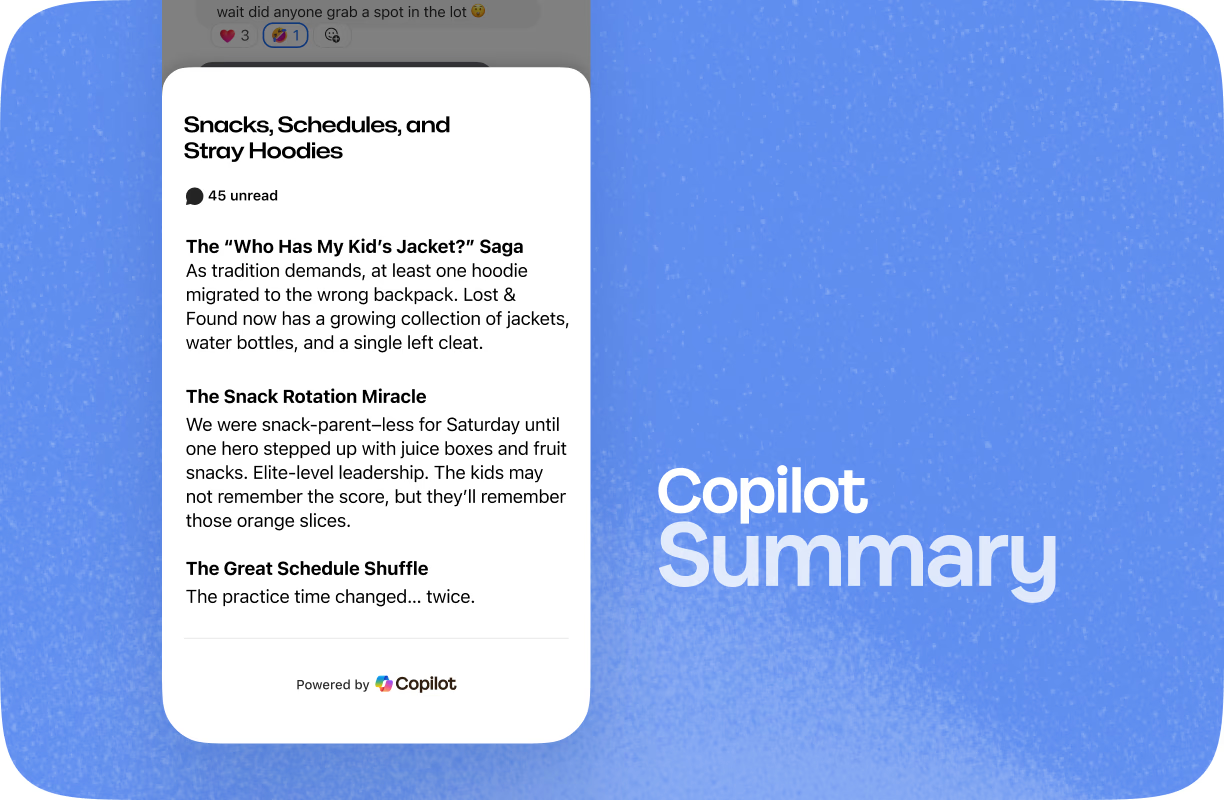
GroupMe now includes AI-powered chat summaries powered by Copilot. This feature helps users understand what they missed in busy group chats without scrolling through long message histories. It works particularly well for large groups, school chats, or event planning threads.
To use chat summaries, users only need to tap the summary banner when it appears. GroupMe then generates a short recap that highlights key points from the conversation.
Event albums simplify photo sharing
GroupMe now automatically generates Event Albums for GroupMe events. The app collects photos and videos from gatherings into a single shared album, which makes browsing and sharing media easier for everyone involved. Users can also share these albums outside GroupMe on social media or other platforms.
A new Copilot feature is now rolling out to PowerPoint, and it’s designed to make complex and confusing presentations easier to understand. Dubbbed “Explainer,” the new tool breaks down complex concepts directly within slides. This helps users get an understanding of content without leaving their workflow.
The Explainer feature is great for presentations that feel overloaded with acronyms, technical jargon, or are overly text-heavy. Rather than searching online or rereading slides, you can now get instant explanations curated to the content in front of them.
How Explainer Works in PowerPoint
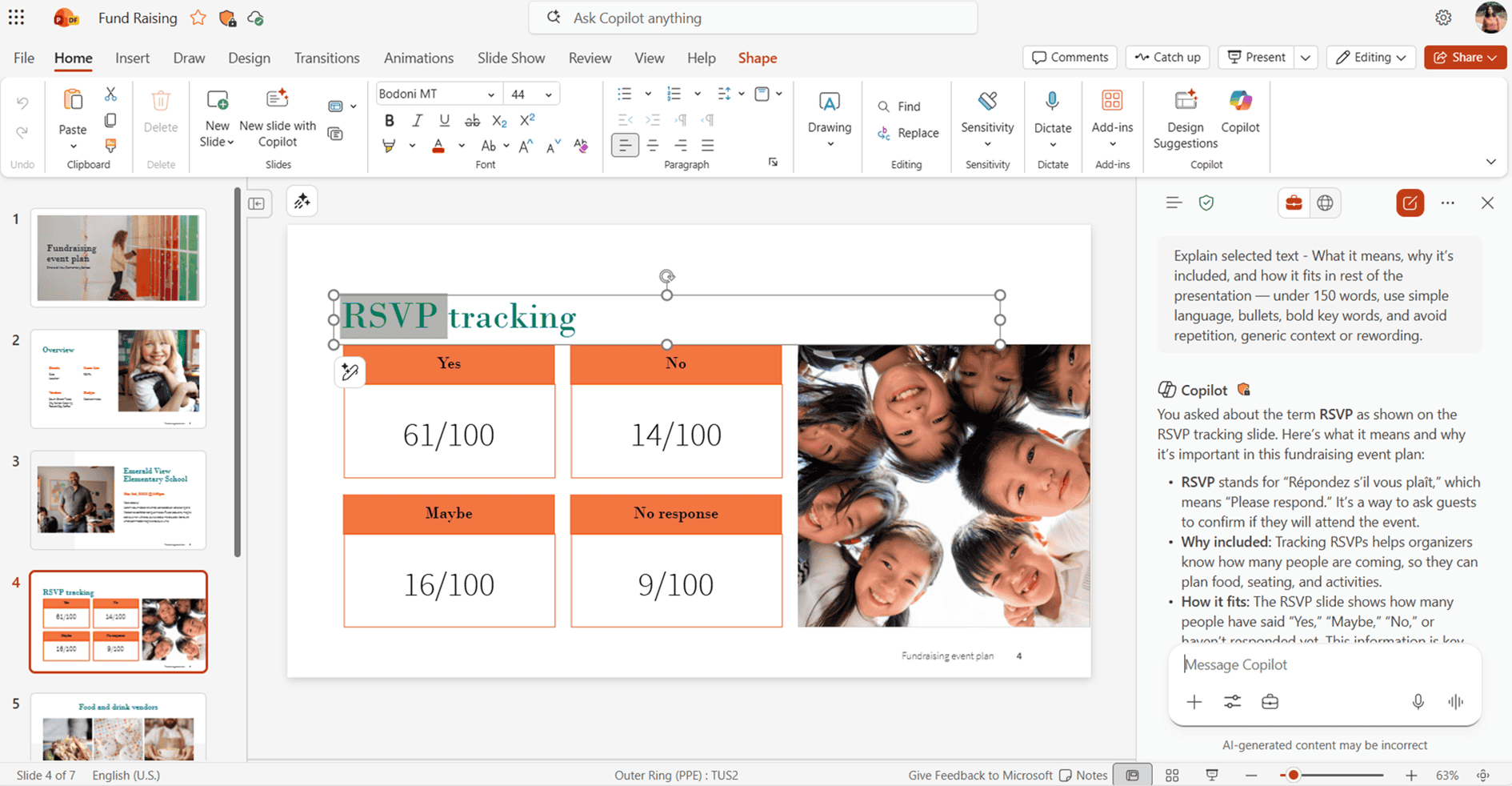
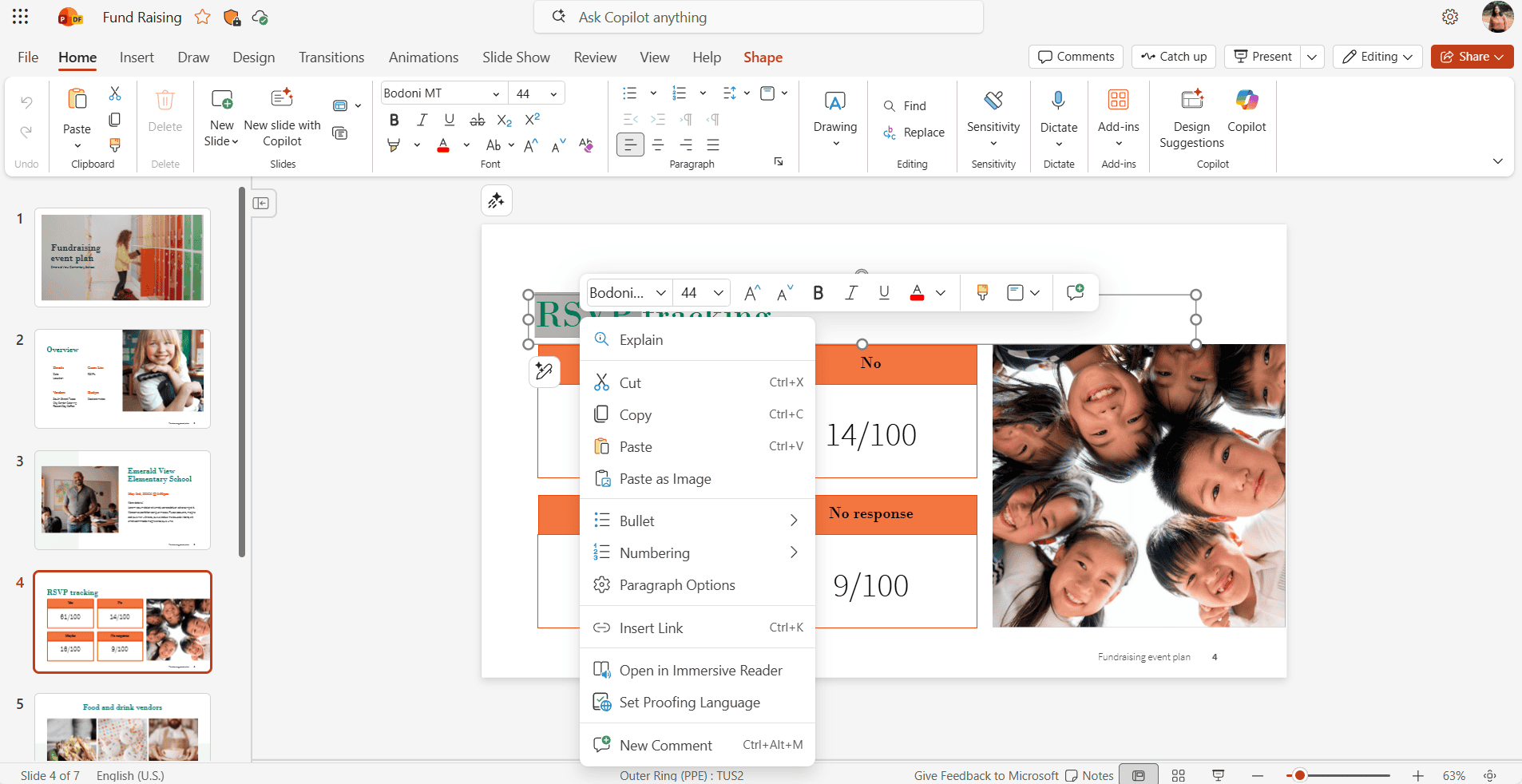
You can open a presentation on Windows or Mac, then right-click on a slide, text box, table, or selected text. From there, choose the option “Explain.” Next, you’ll see Copilot do its magic. It analyzes the selected content and provides a concise explanation in the Copilot side pane. This keeps the slide canvas clean while offering helpful context exactly where it’s needed.
Microsoft says Explainer focuses on slide-specific insights rather than generic summaries. This eventually makes explanations more relevant and easier to follow. The company further adds that this feature helps improve comprehension while keeping users focused on the presentation itself.
Availability and Requirements
The Explainer feature is now available to PowerPoint users with a Microsoft 365 Copilot license. On Windows, it requires Version 2510 (Build 19328.20072) or later. On Mac, users need Version 16.103 (Build 25110343) or later. Not to mention, Microsoft, as always, asks for feedback from you.
Google has been working on the Chrome New Tab page for some time, and recent Canary versions show that the design is now stable and the AI features behave consistently, with fewer unfinished elements or inactive options.
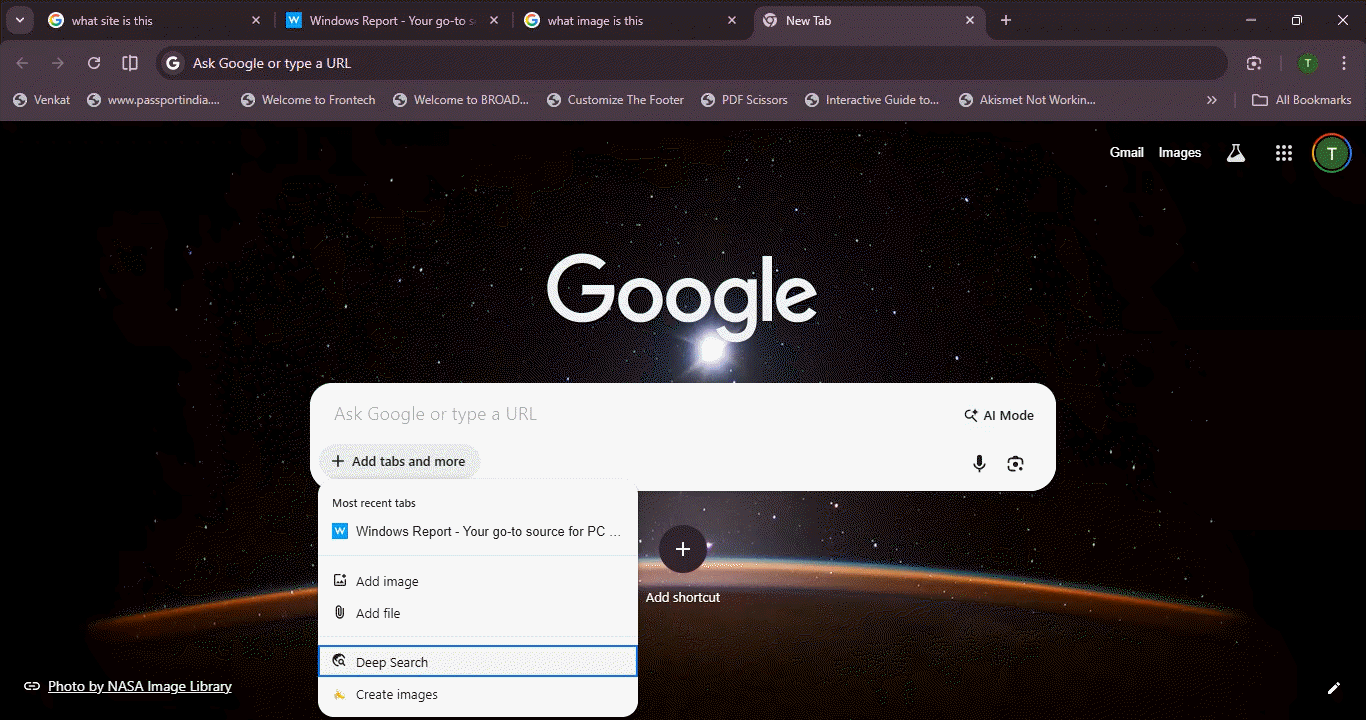
On desktop, the New Tab search box includes a fully active + menu. You can add images, files, start a Deep Search, or create images directly from the field. All options open the expected flows rather than placeholder screens or partial experiences.
The New Tab search box now shows a fully active + menu with file, image, and AI options. Image Credit: Venkat | WindowsReport.
Chrome now lets AI Mode work with your Tabs
AI Mode on desktop also adds a new context feature. When opened from the address bar, Chrome shows an Ask-style panel with suggested actions rather than a simple text prompt. One of these is a new “Ask Google about previous tab” option, which lets AI Mode use the page you were just reading as context.
The option allows you to ask questions about the page you were just viewing without switching tabs or copying content. The AI panel reacts to recent browsing activity and does not depend only on typed input. This makes it easier to continue a task across tabs.
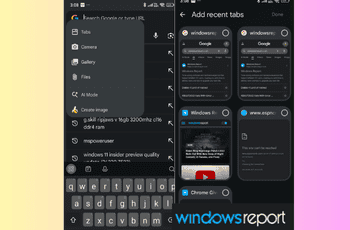
Chrome adds a related feature on Android. In the mobile app, the + button inside the address bar now includes a Tabs option. The option appears next to camera, gallery, and file inputs.
Selecting it opens a recent tabs screen with page previews. You can pick a tab and attach it to your query, similar to adding an image or file, and then continue inside AI Mode.
Chrome Canary on Android now lets you add recent tabs to an AI query through the + menu.
Chrome also makes a small but clear change to how AI Mode appears in the address bar. When users start AI Mode from the New Tab page search box, the address bar no longer shows a chrome://contextual-tasks URL. Instead, it displays a simple “AI Mode” label. This removes a developer-style address and makes it clearer that users are in AI Mode.
Across desktop and Android, AI Mode can now start with recent tabs instead of relying only on keywords, even though the idea shows up through different interfaces on each platform.
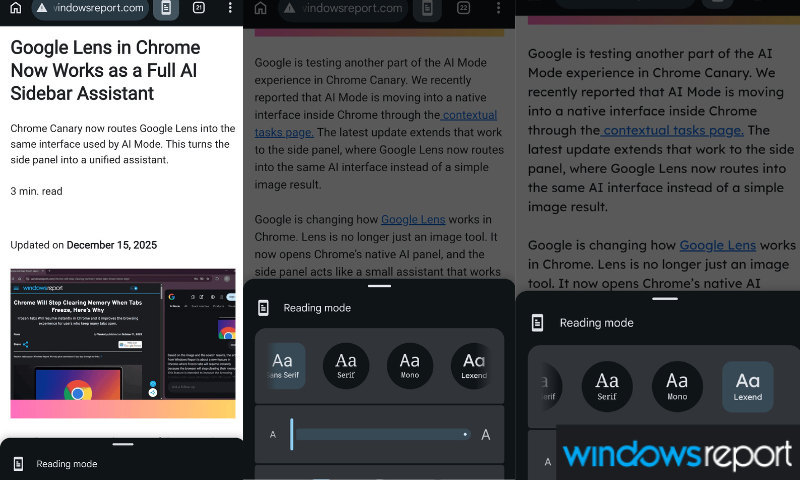
Google is improving Reading mode in Chrome across platforms. Recently, Chrome on Android gained new Reading mode customization options. Google is now adding a new font called “Lexend” to Chrome’s Reading mode on Android in Canary. The font uses clear letter shapes and spacing, which can help with reading long articles on a phone.
Lexend is available through Google Fonts. It is described as a font intended to reduce visual stress and support more comfortable reading, especially on pages with dense text.
Lexend Arrives in Chrome’s Reading mode on Android
Reading mode strips away page clutter and shows articles in a simple layout. On mobile, it currently offers a small set of generic options such as Sans, Serif, and Mono. Lexend now appears as an additional, named option in that list.
Lexend is already available in Chrome’s Reader mode on desktop. This is its first appearance on mobile. The change may matter more on phones, where smaller screens can make long articles harder to read.
The font appears inside the Reading mode controls in the bottom sheet. Users can switch to Lexend with a tap, change text size, and adjust the background without leaving the page.
Chrome Canary on Android shows the Lexend font option inside Reading mode controls. Image Credit: Venkat | WindowsReport.
The option is available in Chrome Canary behind a feature flag called “Reader mode support new fonts”. Google is still testing the change, and there is no word yet on when it will reach the stable release.
The Reader mode support new fonts flag. Image Credit: Venkat | WindowsReport.
Chrome already offers reading controls such as text size, contrast, and themes. Lexend adds another choice for people who read often on their phone.
Even small font changes can affect reading comfort on mobile. Lexend helps mobile Reading mode match the desktop version and can make long articles easier to finish.
Reading Mode needs to be enabled before it appears. Users can turn it on from Chrome’s menu by selecting “Show Reading Mode.” The feature itself is still behind a flag in Chrome Canary.
The change is currently limited to Chrome Canary on Android. Google has not shared any details about when or if it will arrive on iOS.
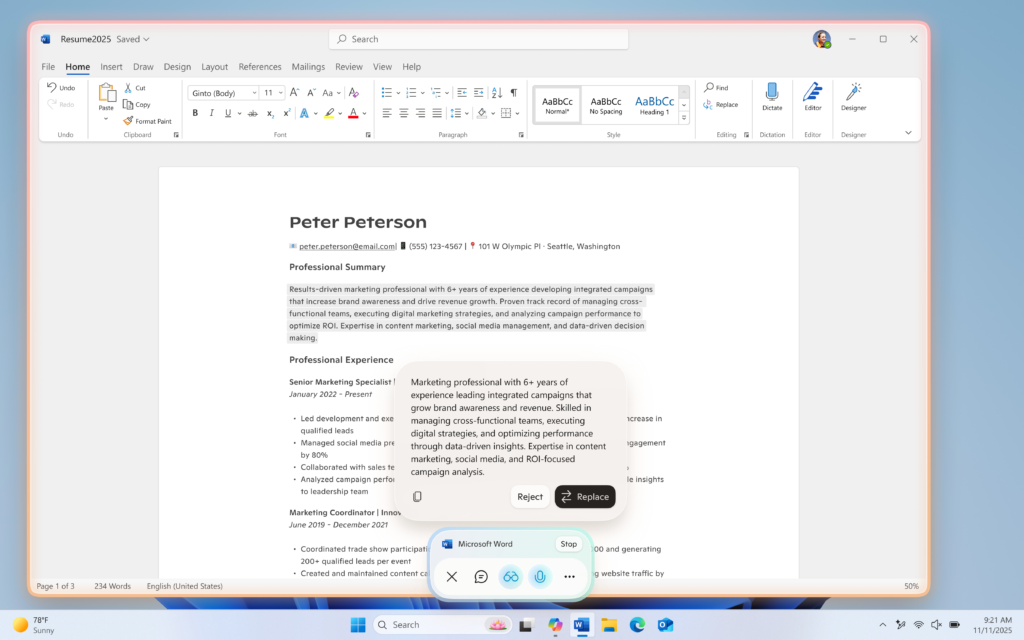
Microsoft is rolling out a new Copilot update on Windows, and it’s live for Insiders in all channels. As part of the update, Insiders get a quicker way to edit text directly in their workflow, thanks to Copilot Actions.
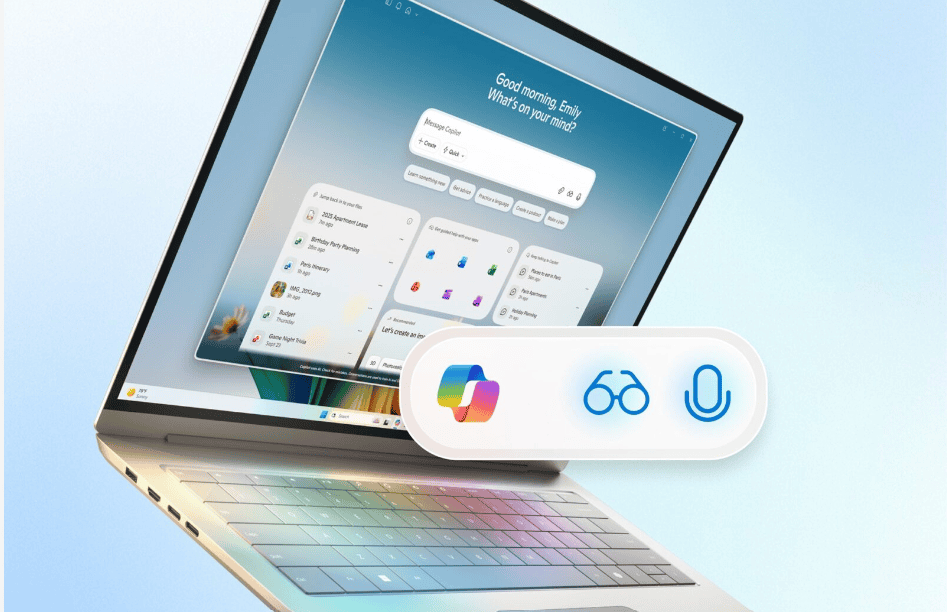
With this feature in place, Insiders can edit text, rewrite, enhance, or simplify text during Copilot Vision sessions. You can start it by opening the the Copilot app and clicking the glasses icon in the chat bar. Next, simply share the window with your document or app, place the cursor in a text field, and speak naturally.
Image: Microsoft
Microsoft notes that commands like “make this clearer” or “rewrite to be more formal” prompt Copilot to suggest edits immediately. You can preview suggestions before applying them, making sure your workflow stays smooth without switching windows. For the uninitiated, Copilot Vision is fully opt-in and only activates when chosen.
Not to forget, text editing requires the Copilot Actions toggle on in the app settings. When you enable the option, it gives access to Copilot Actions for long-running tasks, a separate feature in Copilot Labs.
The new features are included in Copilot version 1.25121.60.0 and higher, and it’s now rolling out to all Insider Channels via the Microsoft Store.
Well… it’s a new day, and a new outage has kicked in, unfortunately (via Bleeping Computer). In a post on X from moments ago, Microsoft has confirmed that Teams is facing an outage (phew!) right now. So, if you are wonsering why Microsoft Teams isn’t working as usual, you know the reason now.
“We’re investigating an issue in which users may be experiencing Microsoft Teams messaging delays and problems with other service functions. We’re observing recovery in our telemetry and are continuing our analysis to identify the impacted scenarios and determine the cause of this issue. Further information can be found in the admin center under TM1200517,” Microsoft said.
We’ll be updating this story if Microsoft adds new updates.