Microsoft Edge adds a mute button to the media controls menu

Those who use Microsoft Edge, and are also fans of dozens of open tabs (I’m one of them), will be glad to hear that Microsoft will be adding a mute button to the media controls menu in the Windows taskbar.

The new feature was spotted in Windows Canary by tech enthusiast @Leopeva64, and it appears alongside the usual control media buttons.

With the new mute button on Microsoft Edge’s media controls menu, users can easily manage between multiple tabs, and mute the ones they want without having to pause or close them.

This could be interesting when watching live streams in Edge, while also doing something else. The tab displaying the live stream can be simply muted while reading information from other tabs, and when that is done, you can go back, unmute the tab, and continue watching the live stream.Microsoft Edge media control

Microsoft Edge debuted some new media controls shaped from the ones already existing in Google Chrome, allowing you to control media playback directly from the browser toolbar, similar to the experience in Chrome.

However, the new muted button is integrated into the media controls menu available on the Windows taskbar. That means you can easily access these tabs, by hovering over the Windows 11 taskbar and selecting the preferred tab to mute.

The feature is currently available in Edge Canary, and it will released to the stable Edge version in the following weeks. And, as we mentioned above, this could end up being one of the most useful perks around, especially for those who like to keep dozens of tabs open at the same time.

This feature should make it easier to manage different tabs, and it will definitely enhance the browsing experience in Microsoft Edge

What do you think of this upcoming feature? Let us know your opinion in the comments section below.

Microsoft adds a new option in Windows 11 enabling ads in Start Menu

Remember when we told you that Microsoft is adding an option allowing users to see app recommendations from the Redmond-based tech giant in Windows 11’s Start Menu?

Well, buckle up, because the company will be adding ads to this option as well, so, you know, your experience of opening the Start Menu can be fully complete.

Spotted by Windows Insider @XenoPanther, and then confirmed by Windows enthusiast Albacore with a screenshot, Microsoft is not shying away from allowing Windows 11 users to plaster their operating system with ads in the Start Menu.

For now the word ‘ads’ is hidden, but Albacore says it can be uncovered by enabling a special command with the third-party app, ViveTool.

Enabling the command (which we don’t advise if you’re not entirely familiar with the app), will prompt the word to be added to the command which now reads:

Show recommendations for tips, shortcuts, new apps, ads, and more.

Microsoft

Fortunately, the setting is optional, meaning the Redmond-based tech giant lets users do what they want: they can enable/disable it at will, and Windows 11 will act accordingly.Windows 11 start ads

To showcase ads on Windows 11’s Start Menu, Microsoft will make use of Edge, as Albacore mentions that the feature uses the EdgeMicrosoftUserId command, meaning the Redmond-based tech giant will most likely use data from your Microsoft account on Edge to show you personalized ads in the operating system.

It would be quite frustrating if it happened. Currently, the setting is in the Windows Insider Program, so there is no doubt Microsoft will release it to the Stable channel one way or the other.

But with Copilot, and the looming presence of an AI File Explorer, Windows getting plastered with ads will infuriate a lot of users who might migrate to other operating systems.

We’ve heard Linux has been having quite a year, thanks to Microsoft, and if the Redmond-based tech giant continues this way, 2024 could be the Linux year for many Windows users.

Germany has a grant to promote game development, aiming to emerge as a hub

The gaming industry is worth hundreds of billions, and in a bid to tap into the market, Germany started a grant to promote game development in the country. It even began hosting an award show to felicitate developers from across the globe, and it included cash prizes.

The cash prizes are to incentivize and encourage developers in Germany to release exciting titles. According to a report published in PC Gamer, Michael Kellner, Parliamentary State Secretary at the Federal Ministry for Economic Affairs and Climate Action, wants games like Baldur’s Gate 3 to be developed in Germany.

Wide range and creativity of games developed in Germany must be expanded further, and the potential of the industry must be utilized even more. As the federal government, we want to make an important contribution to this through our new games funding. The funding is to help ensure that games such as this year’s best international game also go on to be developed in Germany.

This year, Baldur’s Gate 3 won the Best International Game at the German Computer Game Awards!

A report from Game Developer suggests that Germany will spend €100 million ($106.92 million) over the next three years to promote game development. This year, the government will disburse $36.2 million, one-third of the three-year target!

By pumping huge amounts of money into gaming, the German government wants to develop an ecosystem at par with countries like Canada, the UK, and France, considered pioneers in the gaming space.

Whether Germany succeeds in its plans for a flourishing game industry with the sizable grant will be evident in a few years. But they can still develop a Baldur’s Gate 3 sequel since Larian has stepped away!

Do you think the grant will help Germany gain prominence in the gaming industry? Share with our readers in the comments section.

Here Are The Microsoft Graph Command Line Tools & Their Uses

Microsoft Graph has a set of command line tools that can be integrated into Microsoft 365 to manage users and apps as well as automate tasks. For an organization with a Microsoft 365 tenant, managing users and all the data involved can become cumbersome.

Microsoft has an excellent ecosystem of apps and services that help improve workflow and enhance productivity but separate apps can be tough to manage with lots of data involved. Developers can leverage Microsoft Graph’s framework and cut out the development time of an app.

What are the Microsoft Graph Command Line tools?

1. Microsoft Graph PowerShell SDK

PowerShell as a built-in command line tool in Windows can be used to perform all sorts of advanced tasks. Its capabilities are superior to the Command Prompt and is based on the .NET framework.

As a command line tool for Microsoft Graph, developers can leverage its cmdlets to interact with Microsoft 365 apps by creating scripts and executing them.

For an organization managing a large number of users, setting policies and managing individual users can be a time-consuming task.

For instance, assigning and revoking permissions would require you to update each user individually. However, with Microsoft Graph PowerShell SDK, you can execute some of the predefined cmdlets.

2. Microsoft Graph Command Line Interface (CLI)

This is yet another command-line tool. Almost similar to the PowerShell SDK with some distinct differences. It still has a set of commands that perform various actions all targeted at user and data management.

The commands for Microsoft Graph CLI are however extensive compared to PowerShell SDK and can therefore perform a host of operations across the Microsoft ecosystem.

As for differences, PowerShell is primarily used on Windows. This limits it to one operating system and whereas PowerShell is open-source and can be used on other OSes, the limitations may outnumber the benefits.

The good thing about the CLI is that it is cross-platform and supports a wide range of programming languages. As a developer, each programming language is suitable for a specific project so the CLI being compatible with most makes it highly flexible.

Additionally, if you were ever to upgrade, it is extremely crucial to have a project that can easily adapt to evolving technological changes and advancements without requiring a complete overhaul.

3. Microsoft Graph Explorer

Of all the Microsoft Graph command line tools, the Microsoft Graph Explorer is arguably the most important. As a developer, it is important to test whatever code at endpoints.

If you’ve been creating APIs, before rolling them out or integrating them with apps that contain data, it is important to explore their functionality and verify that it is reliable. Microsoft Graph Explorer is a web based interface that helps developers test Microsoft Graph API endpoints before integrating them into applications. You can also learn more about how it works in this detailed guide on the Microsoft Graph Explorer.

For an organization that stores large data sets, it is important to first test out and check for any security vulnerabilities. If there are any potential risks, the developer will keep working on it to address these loopholes.

Additionally, testing also checks for compatibility and performance. How well does the API perform? Are there any bottlenecks that could impact its performance?

Addressing such issues will ensure you cover all aspects such that even if you were to scale up, you’d already have anticipated its needs and worked on how to accommodate it.

What are the benefits of using Microsoft Graph Command Line tools?

  • Automation – Anyone will tell you how automation lessens the workload so any chance you get to automate your tasks, take it. Complex operations can be time-consuming and have high chances of errors when done manually. With the help of scripts, this increases the level of accuracy.
  • Enhanced efficiency – Microsoft Graph Command Line tools provide efficiency especially, for the Microsoft ecosystem that has several apps and services. Each would require a custom app tailored to cater for its varied needs. However, since these tools are integrated, it makes it easier to manage from one interface.
  • Integration – Because command-line tools are cross-platform, they easily integrate with other tools. This seamless integration allows for continued workflow regardless of the working environment. In turn, it also opens up collaboration opportunities.
  • Development – Command-line tools are powerful which gives developers a chance to explore just how extensive the Microsoft Graph API capabilities are. Continued use can improve operations in a tenant.

Speaking of APIs, especially for teams, we’re sure you’ll be interested in enabling your API key for Microsoft Teams. This will be your passport to accessing Microsoft Teams APIs, creating new experiences and extending the capabilities of the communication tool.

And as a developer, having the right tools is a step closer to achieving your goals so why not work with the best browsers for developers?

Have you explored any of the Microsoft Graph Command Line tools? What was your experience? Let us know in the comment section below.

Epic Games has blocked certain emotes in Fortnite to stop player harassment

Online communities can be toxic and gamers will often find different ways to flame and provoke other players.

Fortnite is notorious for its less-than-admirable community, and Epic Games will try to change that by allowing users to block certain emotes.

You can now block certain emotes in Fortnite to stop other players from flaming

It’s no secret that the gaming community can be toxic, and some players will use emotes or other in-game features to harass others.

Epic Games is aware of that, and it has made some recent changes in Fortnite to prevent that as Ars Technica writes.

This was added in the v29.30 update, and according to the Fortnite blog post, there’s a new setting available called See Confrontational Emotes. You can find this setting in the Social Privacy section.

When enabled this setting will block the following emotes from being shown:

  • Laugh It Up
  • Take the L
  • Whipcrack
  • Make It Plantain

By default, this setting is set only to show these emotes from friends in your party, but you can block them for all players.

If you have this setting enabled, you won’t see other players performing the emote or hear the sound associated with it.

The emotes are still in the game, and everyone can perform them, but players won’t be able to see them by default.

This has sparked a bit of controversy, as some players think they need a refund after buying these emotes.

In other gaming news, the new Xbox console will be more like a PC as the lines between the two platforms are blurring.

Microsoft has teamed up with Meta to bring an Xbox VR headset that will change the metaverse gaming realm, so stay tuned for more news.

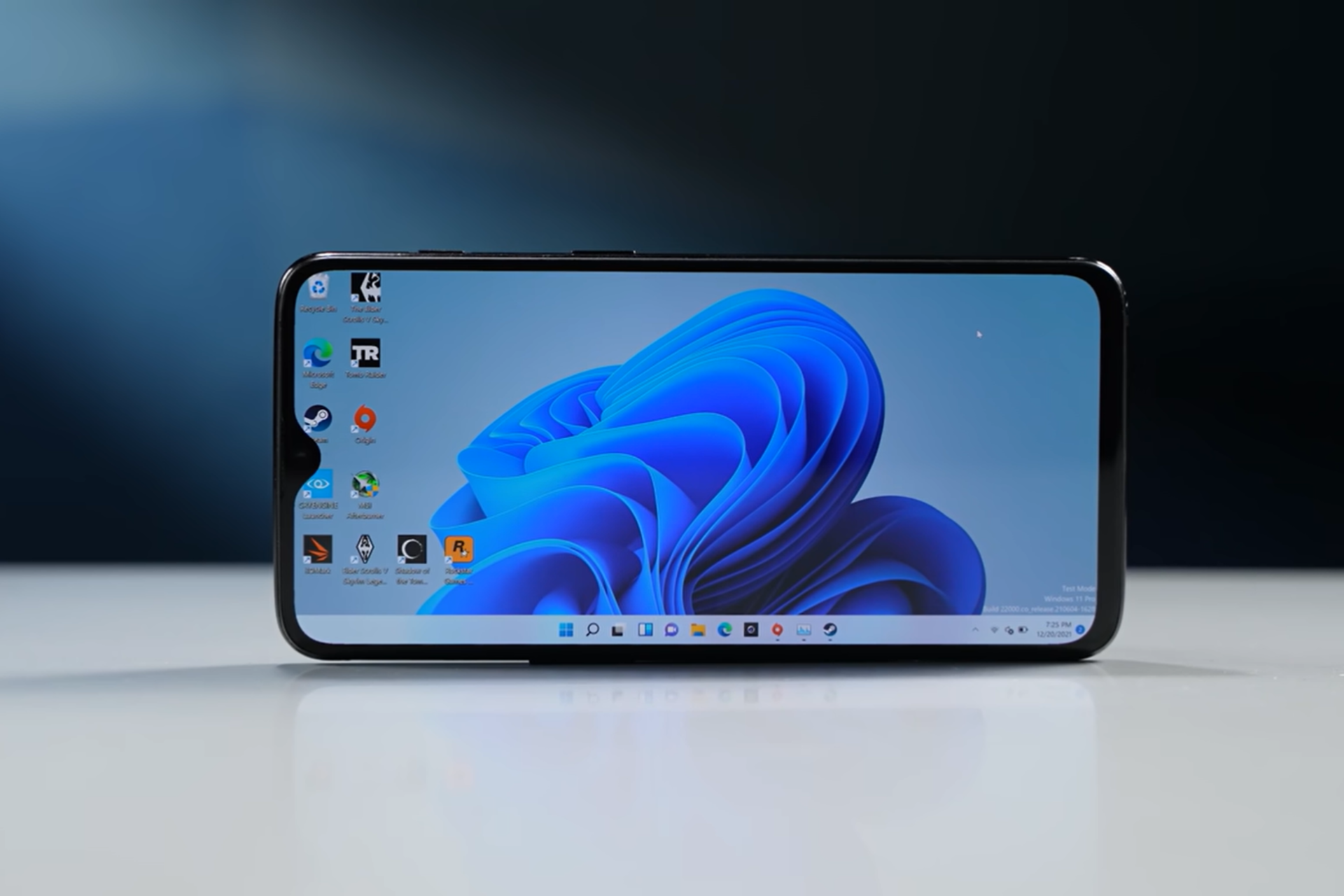
You can install Windows 11 on smartphones and even play games, thanks to Project Renegade

When Microsoft discontinued Windows as an OS for smartphones, many of us were disappointed. Windows on a smartphone is a memory I still cherish!

With all hopes of Microsoft ever reviving a Windows phone slowly dying, Project Renegade came to the rescue. It facilitates installing Windows 10 and Windows 11 on mobile phones and even playing popular games with ease.

While Microsoft builds Windows for ARM-based processors, available on both laptops and mobile phones, the problem with installing Windows on the latter lies in the absence of UEFI. And this is where Project Renegade, an open-source project, comes into the picture!

You will find its files on GitHub, and the Windows installation process for Android smartphones is detailed on the official website.

Several tech enthusiasts and YouTubers, including Geekerwan, have tried out Project Renegade and installed Windows 11 on a smartphone. The results are surprisingly good, though you may encounter constant errors and BSoD (Blue Screen of Death) errors!

Gaming on a smartphone powered by Windows 11

As for gaming, Windows 11 on a decent smartphone should be able to run Crysis 3, one of the most resource-intensive games. When Geekerwan tried Crysis 3 on the OnePlus 6T, it wasn’t the most seamless experience, but the game did run. However, the smartphone started to heat up quickly.

Running Crysis 3 on a Windows-powered OnePlus 6T (Image source: Geekerwan)

For other popular titles like CSGO and Tomb Raider, the gameplay was a lot smoother!

If you are wondering about devices supported by Project Renegade for running Windows, the developers have shared an extensive list.

Image source: Project Renegade

The bad news is that Project Renegade doesn’t allow installing Windows on iOS, as none of the iPhones make it to the list.

Even Android users shouldn’t get too excited because it’s not that simple. You will have to spend hours making rather complex changes to install and run Windows 11 on a smartphone with Project Renegade. Besides, with a small display, low performance, and frequent errors, it might not be worth all the effort, at least for some of you!

In the recent past, a concept Windows 12 phone got users excited about the prospects. Then, there was hype around foldable Windows smartphones due to a bigger display, but Microsoft has yet to confirm any such developments. So far, the community is doing all the work!

What are your thoughts about running Windows 11 on a smartphone? Share with our readers in the comments section.

Join the giveaway for the chance to win this X-Men 97-inspired Xbox Series X

If you were a 90’s kid, you’re probably familiar with the X-Men animated show. The show has been revived recently and released as X-Men ’97 on Disney Plus.

To celebrate the show, Microsoft is collaborating with Marvel on a new giveaway.

The latest giveaway gives you a chance to win X-Men 97 Xbox Series X

Xbox is collaborating with Marvel in a giveaway that lets you win a unique limited-edition Xbox Series X. The console is wrapped in an X-Men comic book written by Rich Douek and artist Paco Diaz.

The comic tells a 2-page story in which Cyclops leads his team in a battle against Sentinels and Master Mold.

That’s not all, the console is accompanied by a set of controllers inspired by the characters from the X-Men ’97 show.

There are 11 controllers available, and while they are colorful, they look a bit bland compared to the flashy Series X console.

To join the giveaway, you just need to follow Xbox on X and retweet the giveaway post. The giveaway will last until May 19, so don’t hesitate to join. For more information, visit the Xbox Wire page.

In other news, Microsoft and Meta are collaborating on an Xbox VR headset that should revolutionize the gaming realm. In case you need a new controller, why not get an Asus ROG Raikiri Pro? It’s available at 27% off!

Dell has a guide on how to identify an AI PC and confirms that AI Explorer is exclusive to Snapdragon X Elite CPUs

We’re not alone in thinking that the concept of AI PC is still unclear. Dell’s recent support page breaks down what it means for a computer to be AI-enabled, highlighting that it’s not just about having the latest software but also about the hardware that powers those intelligent tasks we’re all excited about. So, let’s dive into what makes a computer smart in the eyes of Dell and how you can check if yours makes the cut.

According to DELL, at the heart of an AI PC lies the NPU, or Neural Processing Unit. This piece of tech is essentially the brain behind the operations, optimized to handle the heavy lifting required by AI tasks like understanding human speech or analyzing images. The NPU works alongside the CPU, making your computer not just smarter but also more energy-efficient when it comes to AI-based tasks.

Now, if you’re wondering if your PC or laptop has an NPU, it’s simpler than you might think to check it. Windows 11 has baked in requirements for certain features like Windows Studio Effects, which include goodies like background blur and voice focus, demanding a dedicated NPU.

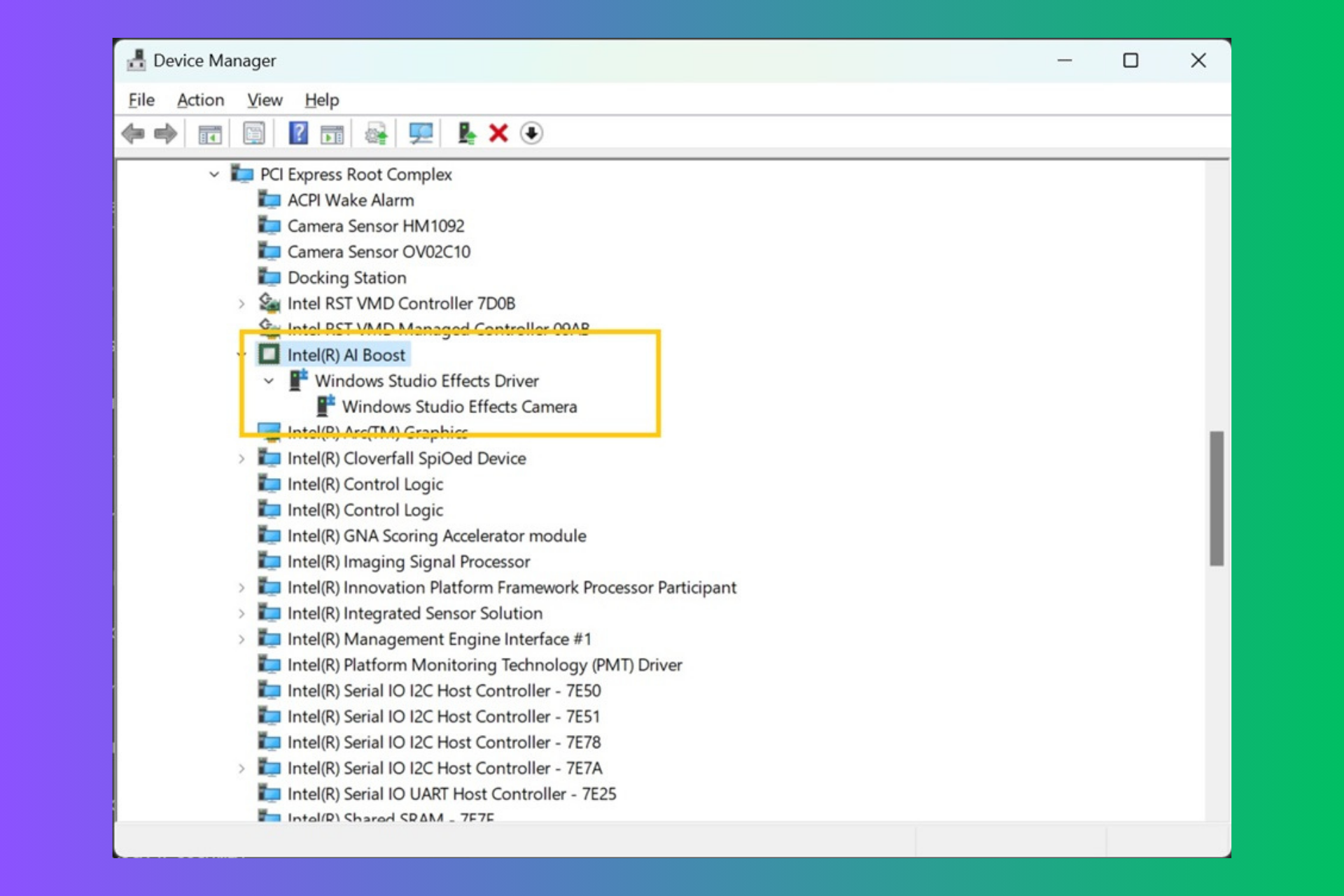
But, fear not, as checking for an NPU’s presence is as easy as launching the Task Manager and heading over to the Performance tab. If you see NPU 0 listed next to your CPU and memory stats, you’re in business. Alternatively, a quick trip to the Device Manager and a look for Intel AI Boost or AMD IPU Device will tell you if your system is equipped with the necessary hardware. And for those on Qualcomm chips, your drivers are already waiting for you via Windows Update. If you have trouble following these indications, we have a dedicated guide on how to check if your PC has an NPU.

Dell isn’t just throwing around the term AI-enabled for the fun of it. Their latest computers, powered by Intel’s Core Ultra processors, boast up to 38% more battery life during Zoom calls by offloading tasks to the NPU. This means less strain on your CPU and a smoother experience during those endless video meetings. Dedicated Neural Processing Units are found in the latest offerings from Intel, AMD, and Qualcomm, ensuring that if you’re buying a new PC, you’re likely getting one that’s ready for the future of AI.

But Dell’s vision doesn’t stop at just making your current tasks more efficient. With the upcoming next-gen Windows 11 features, like the rumored AI Explorer, the role of the NPU is set to become even more central. This aligns with Dell’s broader view that soon, every PC will be an AI PC, whether we realize we need it or not. The push towards AI-enabled devices is part of a larger trend, with manufacturers betting big on AI to drive the next wave of computing.

Dell also confirmed in this guide that Explorer AI is exclusive to computers running Windows 11 on ARM64 PCs boasted by the latest Snapdragon X Elite CPUs. It’s all about TOP’s AI processing speed.

Well, now you know about Dell’s vision about AI PCs, but it doesn’t include a Copilot key into the recipe. Will you get an AI PC or laptop? Tell us all about that in a comment below.

Mechrevo reveals two high-end gaming laptops, both with external water-cooling

Gaming laptops are great if you want to experience the latest games, but don’t have enough space to store a desktop computer.

It’s important to mention that these kinds of laptops are prone to high temperatures, however, Mechrevo has two new models that try to address this issue.

New Mechrevo gaming laptops come with external water-cooling

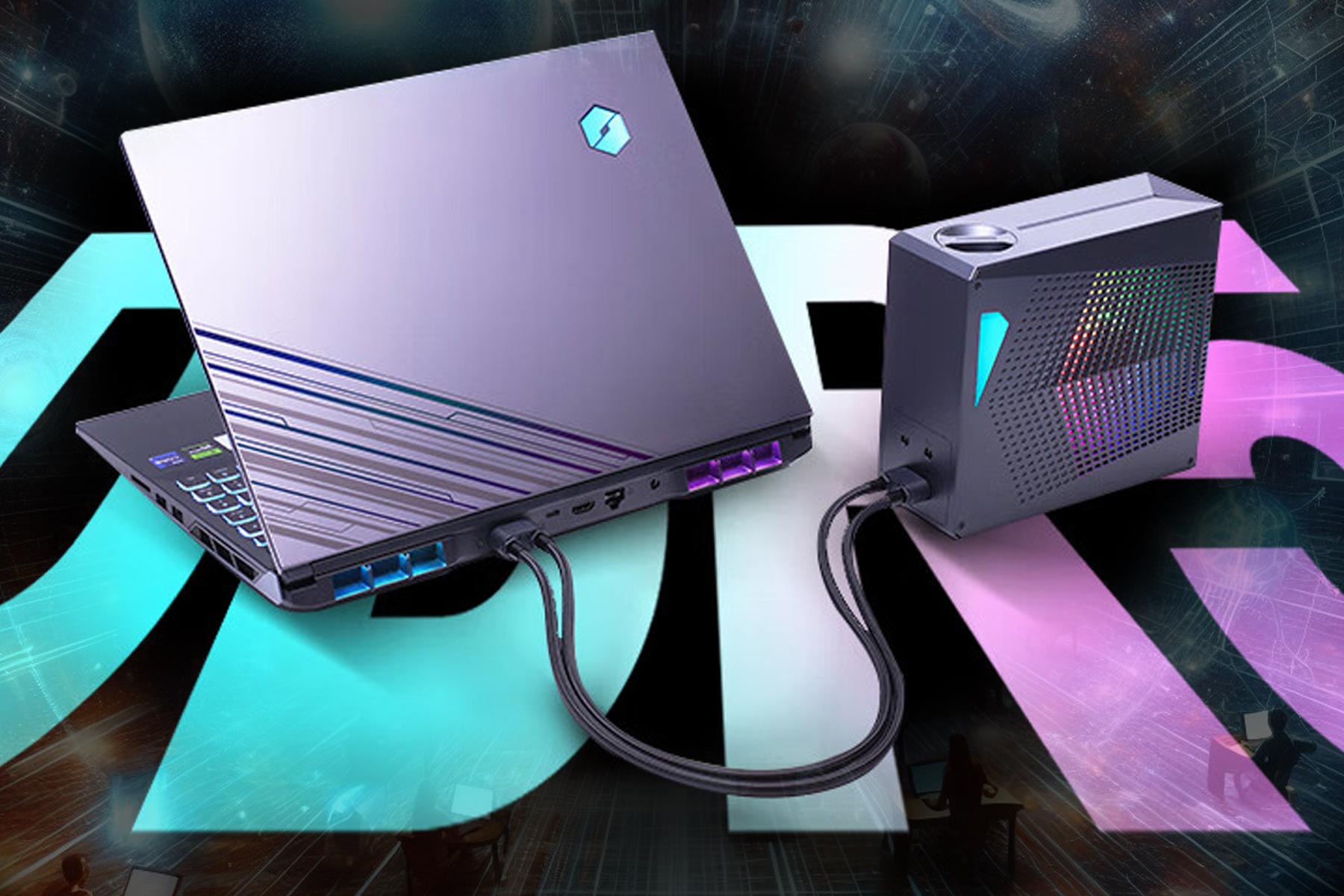
According to TweakTown, Mechrevo has announced two new laptops, the Kuangshi 16 Super and the Yanshi 16 Super Supreme.

Both models use Intel Core i9-14900HX 5.8GHz Raptor Lake CPU with 24 cores. As for graphics, you can choose between GeForce RTX 4090 or GeForce RTX 4080.

A 16-inch display with 2560 x 1600 resolution and 240Hz refresh rate is available on both models. Regarding the connectivity, there’s HDMI 2.1 and Thunderbolt 4.

As for memory, one model comes with 64GB of DDR5 RAM and 2TB of storage, while the other has 32GB RAM and 1TB SSD.

What separates these laptops from the rest, is cooling, and while you can use the dual-fan cooler, there’s an external water-cooling system you can attach to the back of the device.

By doing so, you can rest assured that your device will stay in optimal temperature range even during the most intense gaming sessions.

These are impressive laptops, and you can get a basic model for around $2070, while the other is priced at $2760. These models are available in China, and we doubt that we’ll see them available worldwide.

In case you want something available in your region, you can consider getting the Acer Predator Triton 14 for 38% off, or the HP Pavilion x360 Convertible with a a 42% discount.

Navigating compatibility challenges – Windows on ARM devices and x86-64 software

The hype of Windows on ARM devices is gaining traction, which has also brought questions about their compatibility with x86-64 software.

Although Microsoft has assured that most apps will work perfectly on ARM-based systems, driver compatibility is still a concern.

According to Microsoft’s Windows Arm-based PCs FAQ:

Peripherals and devices only work if the drivers they depend on are built into Windows 11, or if the hardware developer has released Arm64 drivers for the device.

This warning is relevant when you take third-party hardware into consideration, which depends on certain drivers communicating with the operating system.

According to a recent review, running x86-64 software on Windows on ARM devices could cause compatibility issues if the manufacturers don’t compile compatible drivers for the ARM 64 architecture. This could lead the devices not to be able to communicate with third-party hardware, probably hindering necessary functions.

Despite the concerns about potential compatibility issues highlighted, you should not worry too much about using Windows on ARM devices, and there are reasons for this.

First, basic peripherals like wireless printers usually work fine with these devices, and Windows 11 can recognize and work with these devices, thanks to Microsoft’s built-in drivers.

The second thing is even gadgets like colorimeters used for display benchmarking seem to work well with Windows on Arm devices

While some bumps might be in the road, they could be considered the exception instead of the rule. Also, during testing, no serious obstacles could indicate the prevention of using essential accessories in conjunction with Windows on Arm devices.

Having said that, the user must stay vigilant as the absence of ARM64 drivers from manufacturers could lead to unanticipated challenges.

Also, with the evolution of technology, manufacturers will have to emphasize the development of compatible drivers for Windows to have a smooth experience on ARM devices.

What are your views on the matter? Share your opinions with our readers in the comments section below.

Planning to buy a Hisense TV? It’s triggering weird problems on Windows PC

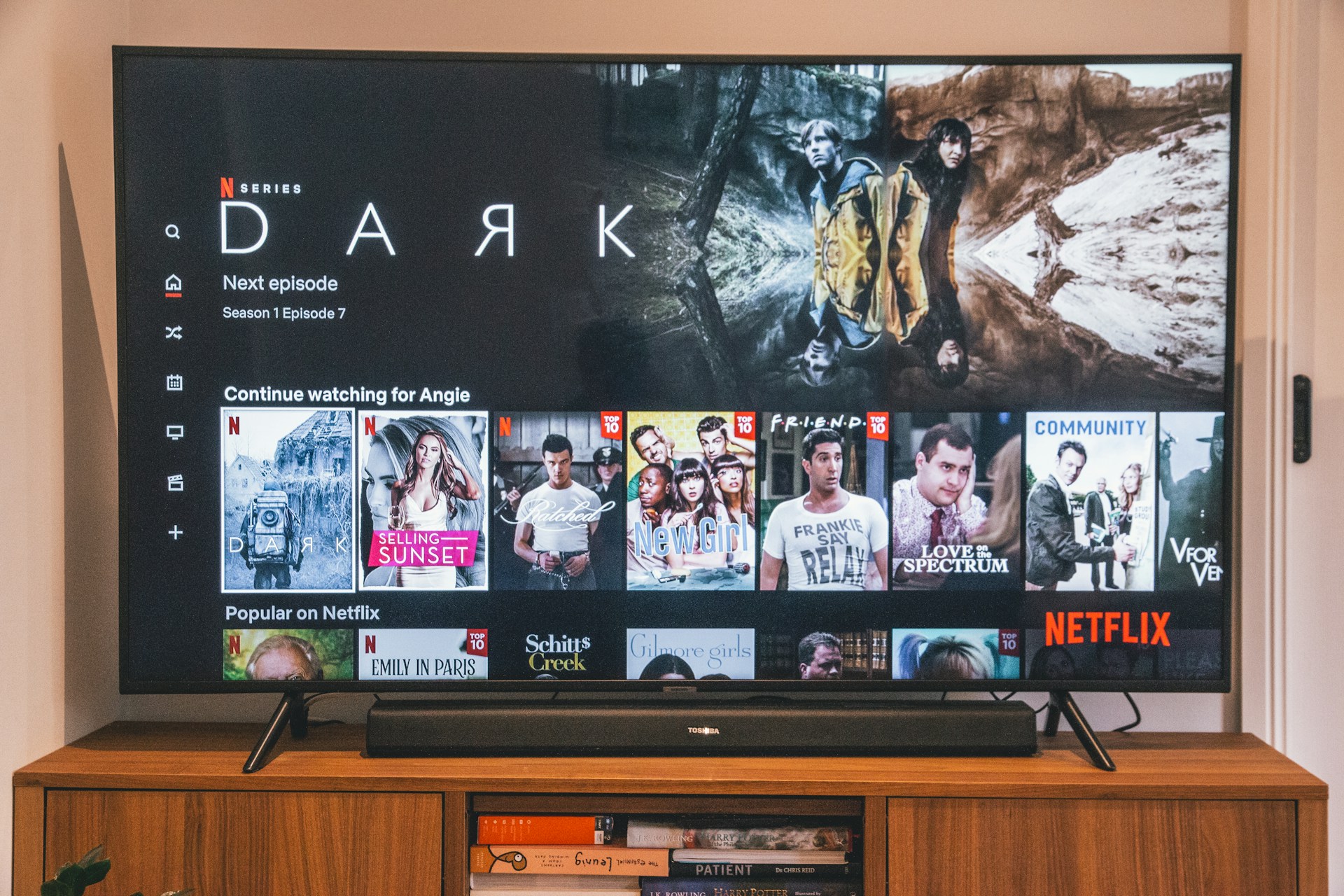
We recently came across another instance validating the statement, Too much of a good thing can be bad, when applied to technology. This time around, it’s a Hisense smart TV conflicting with a Windows PC!

Over the years, a few users have reported a series of mysterious issues with their Windows computers. For instance, problems with network discovery, Settings app not opening, a missing Taskbar and Start Menu, Task Manager persistently hanging, inability to set up Remote Desktop, and screen flickering.

Updating the OS or reinstalling Windows often worked as a short-term solution, but nothing would last for long. And that set of users couldn’t find a solution. No matter what they did, the problem simply reappeared!

Until one day when Priscilla Snow, a musician and composer, tried to get to the bottom of things. This venture of her’s led to a series of mind-boggling revelations!

Unravelling the mystery connection between a smart TV and Windows PC

When Snow set out to uncover what was actually causing the problem instead of, yet again, reinstalling Windows or replacing the PC altogether, she came across a Reddit thread where a Windows user detailed encountering a similar scenario.

This ultimately led her to a Microsoft forum where another user had discovered the underlying cause. And to everyone’s surprise, it was a Hisense Android Smart TV!

Narayan B, the user credited with identifying the problem, explained what caused it in the first place,

The root cause is the TV generates random UUIDs for UPNP network discovery every few minutes. That means it poses as a new device. This caused windows to add it to the device list (Device Association Framework, aka DAF) as a new device. This means now 1000s of devices (which is the same device) filled the device tree causing it to enumerate forever. Thus the “deadlock”.

TaskManager uses DasHost to enumerate devices for some reason, so that hangs.

Bluetooth relies on device discovery, so that also hangs, and Settings app along with it.

Network discovery in file explorer obviously also needs Device discovery, so that also hangs.

And Priscilla Snow had a Hisense 50Q8G- 50″ Smart 4K ULED Android TV!

It also came as a relief that Narayan B already knew the solution and had shared it in detail on the forum. It involved initially disabling the Device Association Service, opening the Registry Editor as with the SYSTEM user, and deleting all DAFUPnPProvider keys under the following path:Computer\HKEY_LOCAL_MACHINE\SYSTEM\ControlSet001\Services\DeviceAssociationService\State\Store

Deleting keys in the Registry Editor

Narayan B discovered similar keys under other locations in the Registry, so you have to delete them all, then reboot the PC, and finally, run the Device Association Service.

Enabling/disabling the Device Association Service
Tip icon Tip
Since the Registry Editor holds critical information, it’s vital to back up the data before deleting any of the keys. Although, you can always restore the Registry without a backup.

Once Priscilla Snow was done with changes, to her surprise, everything started working, be it the Settings app, remote desktop setup, Bluetooth functionality, or the Task Manager. It seemed like her PC had come back to life!

You can read Priscilla Snow‘s experience on Cohost.

But even now, many questions remain unanswered. Why did the Hisense smart TV affect only one of the Windows PCs for every user? Why not the others? Are other devices, like smartphones, also prone to this issue? If yes, what exactly goes wrong with them?

Besides, the whole episode serves as a reminder that devices within the household conflict a lot more than we know. Because we never realize there’s a problem until something stops working altogether!

What’s your take on the Hisense smart TV conflicting with Windows PCs for some? Share with our readers in the comments section.

Lenovo ThinkPad P1 Gen 7 is the first AI laptop to get the LPCAMM2 ultra-fast memory

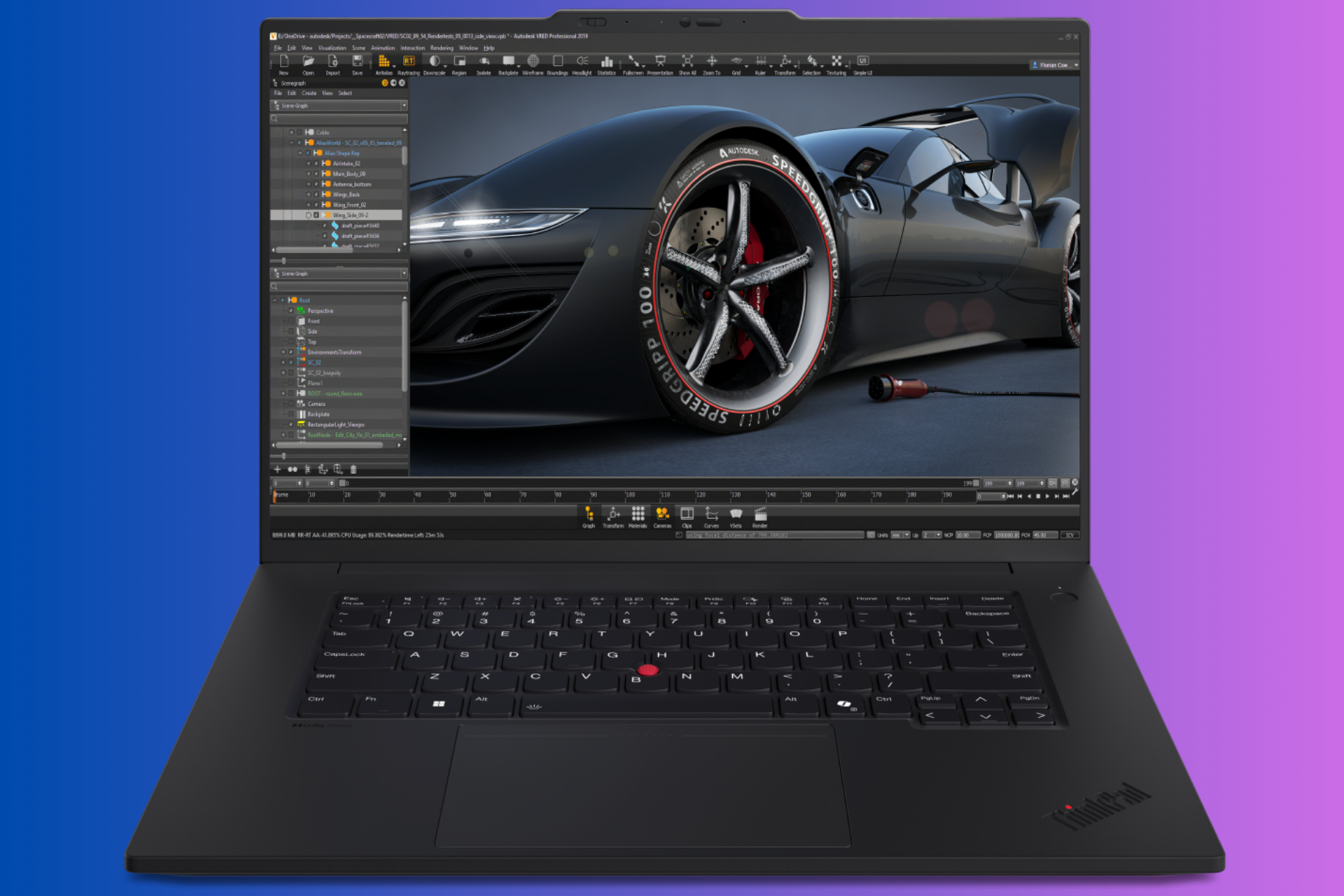
Lenovo has just lifted the curtain on its latest mobile workstations (a fancy name for powerful laptop), the ThinkPad P1 Gen 7, and it’s nothing short of a powerhouse. And by all means, it’s an AI laptop, because it has an NPU on board. Besides ThinkPad P1 Gen 7, this new lineup includes P16v i Gen 2, P16s i Gen 3, and P14s i Gen 5.

What is so special about Lenovo’s ThinkPad P1 Gen 7?

Well, for starters, it’s powered by Intel’s latest Core Ultra processors, which come with an integrated neural processing unit (NPU) designed to handle AI tasks more efficiently. This, combined with NVIDIA’s RTX Ada Generation GPUs, means you’re looking at a machine that’s not just fast, but smart fast.

But Lenovo didn’t stop there. They’ve also introduced the world’s first LPCAMM2 memory in collaboration with Micron. A LPCAMM2 module can have up to 64GB of memory that consumes up to 61% less power and takes up 64% less space compared to traditional DDR5 SODIMM modules. This means you get a laptop that’s not only powerful but also efficient and slim.

ThinkPad P1 Gen 7 doesn’t disappoint when it comes to the display either. With a 16-inch display boasting a 91.7% screen-to-body ratio and the option for an OLED touchscreen, your visuals will be as stunning as your performance.

Here are the main tech specs from Lenovo:

  ThinkPad P1 Gen 7ThinkPad P16v i Gen 2
PerformanceProcessorsIntel Core Ultra processors up to Core Ultra 9 185H
OSWindows 11 Pro, Linux® certified8
MemoryUp to 64GB LPCAMM2 LPDDR5x 7467MT/sUp to 96GB DDR5 5600Mhz
Storage2 x PCIe 4×4 M.2 2280 SSDP1 Gen 7: Up to 8TBP16v Gen 2: Up to 4TB
Graphics OptionsIntegrated Intel ArcNVIDIA RTX 1000/2000/3000 Ada Generation GPUNVIDIA GeForce RTX 4060/4070 GPUIntegrated Intel ArcNVIDIA RTX 500/1000/2000/3000 Ada Generation GPU
Display Options16-inch 16:10, 91.7% STB ratio·        FHD+ IPS, 400nit, 100% sRGB, Low Blue Light·        QHD+ IPS, 500nit, 165Hz, 100% sRGB, Low Blue Light·        UHD+ OLED Touch, 400nit, 100% DCI-P3, Low Blue Light, HDR400, Dolby Vision16-inch 16:10, 83.9% STB ratio·        FHD+ IPS, 300nit, 45% NTSC·        FHD+ IPS Touch, 300nit, 45% NTSC, Low Blue Light·        FHD+ IPS, 400nit, 100% sRGB, Low Blue Light·        UHD+ IPS, 800nit, 100% DCI-P3, Low Blue Light, HDR400, Dolby Vision
AudioDolby Atmos® Speaker SystemDual MicsDolby Audio®Dual Mics
CameraFHD RGB (P16v i Gen 2 only) or 5MP RGB+InfraRed with privacy shutter
Battery90Whr (Customer Replaceable Unit)90Whr

As you would expect, ThinkPad P1 Gen 7 is not very cheap, starting at $2,619, but it’s not budget-breaking either if you’re looking for a fast AI laptop. Availability is set for May 2024, so there’s some time to save up or convince your IT department that it’s a worthy investment.

Lenovo’s new ThinkPad P1 Gen 7 might get pretty good reviews thanks to the LPCAMM2 memory, but we’ll have to wait and see about that in the near future.

Fallout franchise had 5 million players in a single day, here’s why

War never changes, but the number of players sure does, and recently the Fallout games got a massive spike in popularity.

What is the reason for this change in number of players? Join us while we take a closer look at it.

Fallout games have amassed almost five million players in a single day

As Neowin writes, the Fallout franchise is seeing a spike in popularity, and the games saw almost five million players in a single day.

Bethesda shared this information on a Fallout Twitter page:

According to the tweet, Fallout 76 saw over one million players logging into the game in a single day.

As for other games, there were almost five million players across all Fallout games.

…and almost five million across all Fallout games in a single day!

According to SteamDB’s data, Fallout 76 broke its record of all-time concurrent players with 75,000 active players on Steam.

As for Fallout 4, there were 165,000 players, and Fallout New Vegas had 43,000 active players.

Do keep in mind that these are just Steam numbers, and they don’t include players on other platforms. So, what’s the reason for the rising popularity of Fallout games?

Fallout TV show was recently released on Amazon Prime and it was a smashing success praised by both critics and the fans of the games alike.

The popularity of the TV show brought a lot of new players to the franchise, and many older fans wanted to revisit the wasteland once again.

Fallout franchise also had a massive discount recently, which brought more players to the franchise. In case you’re itching for more Fallout, Fallout 4 next-gen version is going to be released soon.

Massive discounts on the Razer Blade series, save up to 25%

If you are planning to get a mid-budget gaming laptop, nothing beats the Razer Blade series. And with heavy discounts across the lineup during the limited-time deal, there couldn’t be a better time to upgrade to a Razer Blade laptop for gaming!

Boasting high-end performance, ideal screen size, excellent graphics, optimal storage capabilities, and solid RAM, the Razer Blade series is one of the top-performing when it comes to gaming laptops.

With all purchases, you get a 1-month Xbox Game Pass subscription for free!

Starting with the Razer Blade 14 (powered by AMD Ryzen 9 7940HS) at $1999.99, models from the series have been discounted by up to 25%. The best part is that the series is customizable, meaning you can choose the desired GPU, storage options, and RAM size.

Specifications for the Razer Blade series

Razer Blade 14Razer Blade 14Razer Blade 15Razer Blade 16
ProcessorAMD Ryzen 9 7940HS (8-Cores /16-Threads, 16MB L3 Cache, Up to 5.2 GHz max boost)AMD Ryzen 9 7940HS (8-Cores /16-Threads, 16MB L3 Cache, Up to 5.2 GHz max boost)13th Gen Intel Core i7 Processor (14-core) i7-13800H, 2.5 GHz with Turbo Boost up to 5.2 GHz13th Gen Intel Core i9-13950HX 5.5 GHz, Boost up to 5.5 GHz, 24 Cores/32 Threads
GraphicsGeForce RTX 4060GeForce RTX 4070GeForce RTX 4070GeForce RTX 4080
Storage1 TB SSD1 TB SSD1 TB SSD1 TB SSD
RAM16 GB 5600 MHz16 GB 5600 MHz16 GB DDR5 5200 MHz32 GB DDR5 5600MHz
Operating System Windows 11 HomeWindows 11 HomeWindows 11 HomeWindows 11 Home
Display14-inch QHD+ 240Hz, 2560 x 160014-inch QHD+ 240Hz, 2560 x 160015.6″ QHD 240Hz, 100% DCI-P3, G-Sync16″ QHD+ 240 Hz, 16:10 (2560 x 1600)
Price$1,799.99$2,099.99$2,099.99$2,999.99
Information source: Razer

You can buy any Razer Blade laptop from the official website before the deal ends:

Note icon NOTE
Keep in mind that prices are subject to change, and they might be altered in the future.
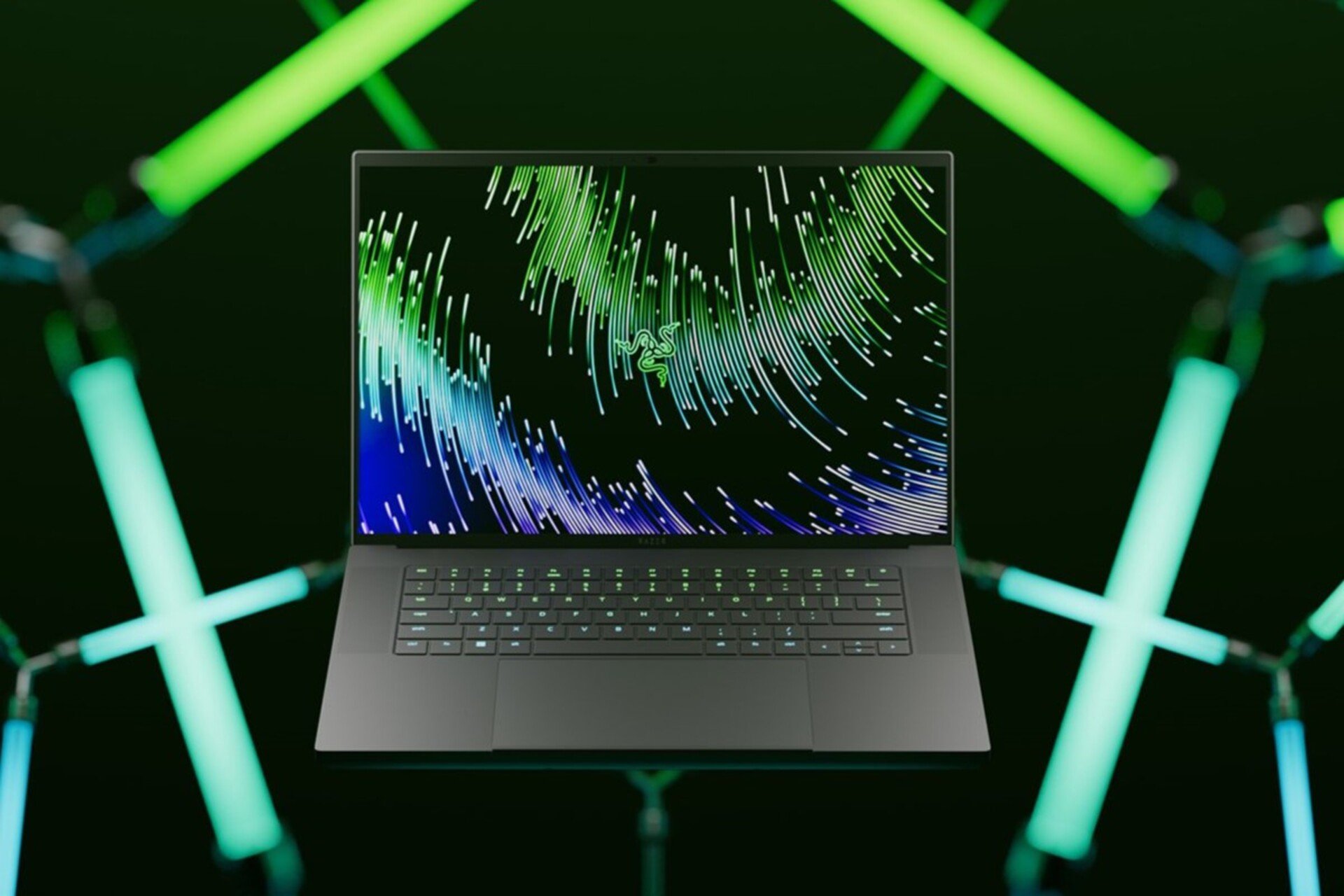
Razer Blade 15 (Image source: Razer)

These aren’t the only discounts, as you can configure your hardware specifications on Razer’s website, so you can build the laptop that suits your needs without breaking the bank.

The Razer Blade series delivers a seamless gaming experience across a wide range of titles, including resource-intensive games like Baldur’s Gate 3 and Diablo 4!

In case you’re looking for Razer peripherals, you can get the Razer Basilisk V3 at a discount, so don’t miss it.

If you are on a budget, discover our top picks for gaming laptops under $800. For even more discounts, you might want to consider getting MSI Cyborg RTX 4060.

What’s your review of gaming on the Razer Blade series? Share with our readers in the comments section.

Razer VIPER V3 PRO gaming mouse promises that perfect headshot with a new optical sensor

Razer has once again upped the ante with its latest creation, the Viper V3 Pro wireless mouse for hardcore gamers. Crafted with the input of professional eSports gamers, this mouse is a dream come true for those who take their gaming seriously. Weighing in at a mere 54 grams for the black version and 55 grams for the white, it’s designed to move as swiftly as your in-game character.

What is new about the Razer VIPER V3 PRO gaming mouse?

What truly sets the Viper V3 Pro apart is its heart – the Razer Focus Pro 35K Optical Sensor Gen-2. This cutting-edge sensor boasts a staggering 99.8% resolution accuracy and allows for 1-DPI incremental adjustments, ensuring that your movements are tracked with unparalleled precision.

Now, let’s talk about connectivity. The Viper V3 Pro supports Razer’s HyperPolling Wireless Dongle, sold separately, which can boost the mouse’s wireless polling rate to an impressive 8,000 Hz. This means lower latency and more responsive gaming, which can be crucial in competitive settings. The mouse also comes with eight programmable buttons, giving you plenty of options to customize your gameplay. Plus, with a battery life of up to 95 hours on a single charge, you’re all set for extended gaming sessions.

The design of the Viper V3 Pro has also seen some thoughtful updates. A higher rear-shifted hump ensures better comfort during long gaming marathons, while the main buttons feature finger grooves for improved grip. And for those who appreciate aesthetics, the mouse is available in both black and white for $160 on Razer’s website.

But is it worth the investment? For gamers who demand the best in terms of speed, precision, and customization, the Razer Viper V3 Pro is a compelling choice. Its lightweight design, high-end sensor, and wireless capabilities make it a formidable tool in any gamer’s arsenal. Whether you’re a professional eSports athlete or a gaming enthusiast, the Viper V3 Pro is designed to elevate your gaming experience.

What do you think about the new Razer VIPER V3 PRO? Tell us all about it in the comments section below.

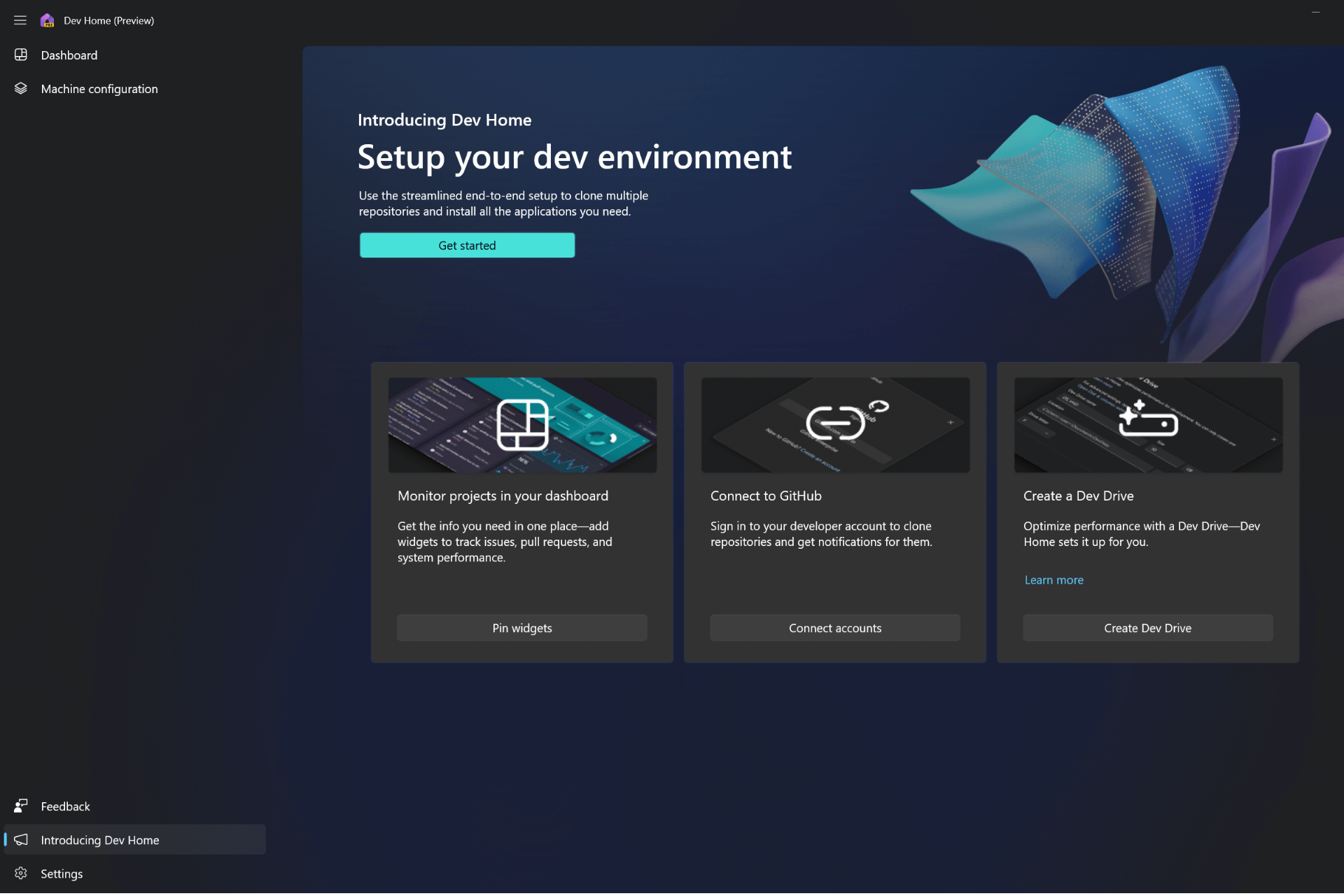
Dev Home Preview v0.13 is out and has brought a lot of improvements & customizations

Microsoft announced the release of a new version of the Dev Home app for Windows 11/10 users, and the update brings in changes like Windows customization options, widget improvements, accessibility fixes, and more.

Here are the changes introduced with the version 0.13 of Dev Home:

  • The memory widget now displays utilization percentage
  • Environments are now available in Dev Home, providing the ability to create, manage, and configure Hyper-V VMs and Microsoft Dev Boxes.
  • Files ending in *.winget can now activate the Configuration file flow in Machine Configuration.
  • Windows customization is now available, with options to change File Explorer settings, access Dev Drive insights, and quiet background processes.
  • The extensions page navigation item is now in the navigation footer.
  • When cloning through the Machine Configuration tool, Dev Home can now detect configuration files in the repository.
  • You can now generate a configuration file from the setup flow in Machine Configuration.
  • Small widgets no longer display graphs.
  • When using a configuration file in Dev Home, you can now see a summary view of the file before running it.

It also comes with accessibility fixes:

  • Narrator should now announce the headings of button groups and repository names within Machine Configuration.
  • Narrator should now announce the titles of the banners.
  • The popular apps pane should now look better in high contrast and Narrator should now read the class name instead of the settings card header in Machine Configuration.
  • Widgets should now look better in high contrast.
  • Narrator should now announce when a widget is removed from the dashboard.
  • Narrator should now announce the name of the Dashboard page.
  • You can now select widget size while now in scan mode.
  • Extensions page should no longer have clipped text.
  • The Learn more link on the Introducing Dev Home page should no longer get cut off.

There are bug fixes:

  • The Add Widget dialog now respects Windows theme changes.
  • The scroll bars no longer overlap page content.
  • Dev Home should no longer crash when attempting to add a repository at certain screen resolutions.

To download the latest version of Dev Home on your Windows 10 or 11, you can head to GitHub, go to Assets, and click Windows.DevHome_0.1301.477.0.msixbundle to initiate the download.

Have you downloaded this newest version of Dev Home? If so, share your experience with our readers in the comments section below.

Microsoft Edge gets a new sleek and streamlined Tab Actions Menu, currently testing in Canary

Microsoft Edge has gone through various changes over the years, and Microsoft is constantly working on new features trying to improve it.

It seems that the redesigned Tab Actions Menu is being tested in Edge, so let’s dive in and see what’s new.

The new Tab Actions Menu is currently being tested in Edge Canary

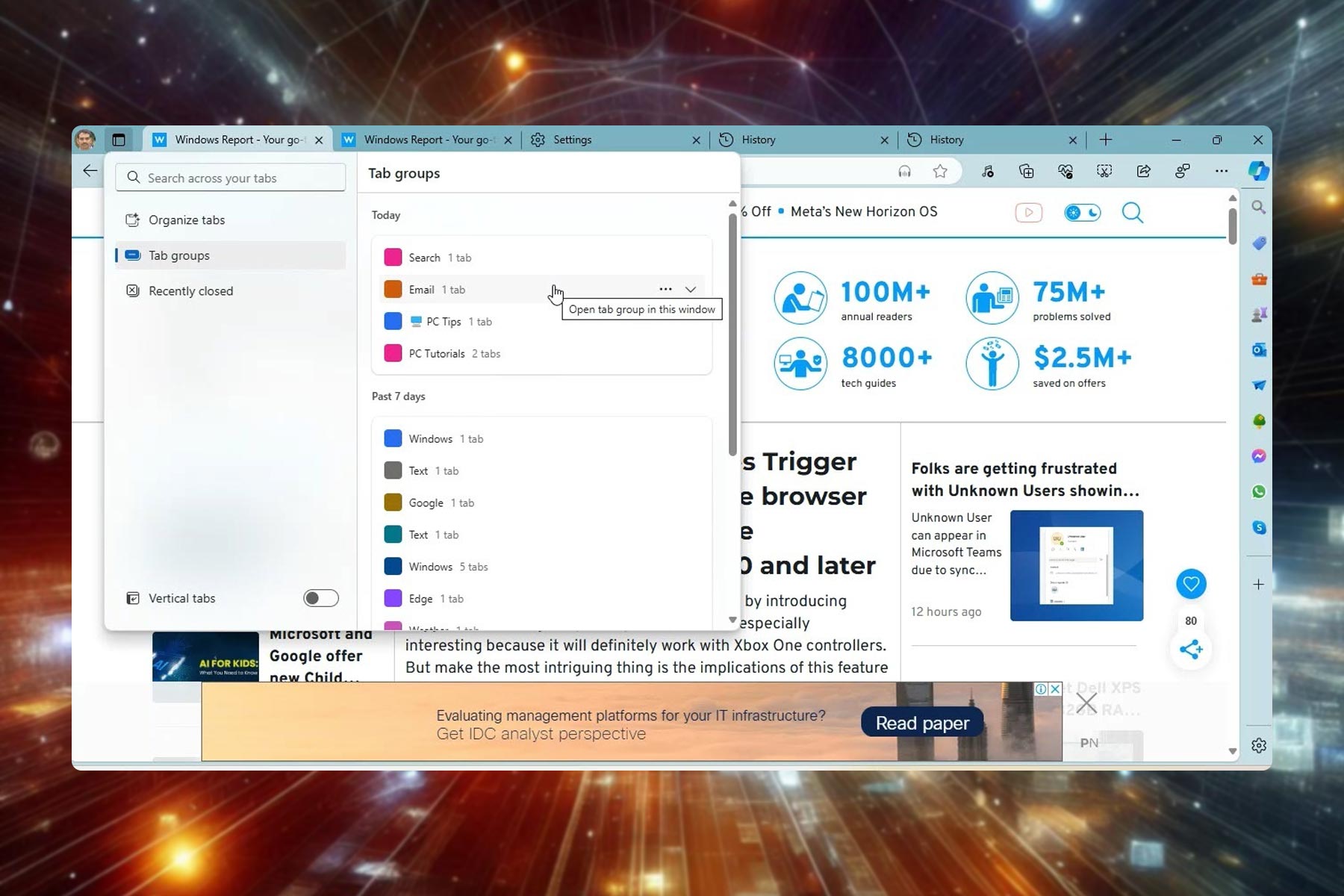
Tab Actions Menu allows you to organize and manage tabs in Edge, and this feature has been redesigned.

The menu now has a built-in search allowing you to easily find any open tab, as well as the option to access recently closed tabs.

That’s not all, as you can also access tab groups that were created last week or last month. This is a new feature since Edge didn’t have access to tab groups based on a timeframe.

Last but not least, the option to toggle vertical tabs is still here, allowing you to quickly switch between two different tab layouts.

This isn’t the first time Microsoft decided to redesign the Tab Actions Menu, but the current iteration looks sleeker and more streamlined than its predecessors.

We have noticed that certain options are missing compared to the previous versions, such as Tabs from other devices and the ability to move tabs to a new workspace.

We assume they were removed because they weren’t used as much as other options. Do keep in mind that this isn’t the final design, so these options might be back.

Compared to the previous version, this one is more streamlined, and it doesn’t open various features across the browser thus cluttering the interface.

For example, tab search is now integrated into the Tab Actions Menu, and it doesn’t open a new menu in Edge like before.

The recently closed section also works differently, and it doesn’t open in the History flyout, since it’s fully integrated into the Tab Actions Menu.

This is a welcome improvement, and it’s enabled by default in Edge Canary. If it’s not available for you, this might be due to A/B testing, and in that case, you just need to wait for a bit longer.

As for other incoming features, Edge will feature buttons on websites to directly install web apps. In case you looking for some recently released features Edge just got rewriting with Copilot and better pen support among other features.

A working trick to make your incompatible device fit to install Windows 11

As Windows 10 approaches its end of life, many users wonder about and explore options. If you don’t want to ditch your device yet but want to use the latest Windows operating system, you should consider Windows IoT editions (previously known as Windows Embedded).

With this new trick, you can easily bypass the Windows 11 system requirements check at the time of installation. All you need to do is select the Windows 11 IoT Enterprise LTSC edition, a special OS version designed for specific hardware. Your device doesn’t have to go through a hardware compatibility check by choosing this option.

The LTSC version, or Long-Term Servicing Channel edition, is for organizations that don’t want to install Windows updates frequently; therefore, they get a major version upgrade every 2 to 3 years. You get five years of mainstream support plus five years of extended support.

In a recent tweet, Bob Pony mentioned on X (Formerly known as Twitter):

In the Windows 11 LTSC Setup OS selection page. When Windows 11 Enterprise LTSC is picked, it checks for the system requirements just like regular Windows 11 does, meanwhile picking Windows 11 IoT Enterprise LTSC will just skip the system requirement checks without workarounds!

First, he mentioned if you pick Windows 11 Enterprise LTSC as the version you want to install, the setup will check the system requirements.

However, after checking the Windows 11 IoT Enterprise edition (non-LTSC), he confirmed that the trick worked on them, too. Here is what he said:

Just found out that it also applies for the regular Windows 11 IoT Enterprise edition (non-LTSC) when picked in the Windows Setup. It’s pretty clear that IoT Enterprise is the SUPERIOR edition of Windows 11, no need to bypass any system requirements B.S. with any workarounds!

Remember, the IOT edition of Windows is similar to regular Windows versions, but it allows you to modify the OS for compact hardware with smaller storage limits.

Windows IoT gives the same experience as regular Windows editions, and you can now install them on your old devices as well.

Would you try the new trick to bypass Windows 11 system requirements restrictions? Share your opinions with our readers in the comments section below.

After massive demand, NVIDIA’s GB200 AI server chips will get into production in September

After announcing the GB200 AI server chips under the Blackwell platform, NVIDIA received a lot of orders from Microsoft, Google, Amazon AWS and Meta. Now, according to UDN, they are gearing up to enter mass production in September 2024. Quanta Computer has bagged its first order of these chips, touted as the most powerful AI chip on Earth. The anticipation is palpable, with mass production set to increase quarter by quarter into 2025.

Why does everyone wants the GB200 AI chips?

Now, why is this such a big deal? Well, for starters, the GB200 AI server chips are not just any chips. They’re expected to revolutionize the way we think about server capabilities, especially in AI. With giants like Microsoft, Google, Amazon AWS, and Meta lining up, it’s clear that these chips are in high demand. The reason? We’re seeing an explosion in the use of large language models (LLMs) and an insatiable demand for AI training servers. It’s a trend that’s only going to grow, with UDN reporting that AI server revenue expected to leap from more than 20% in 2023 to over 50% in 2024 and beyond.

But here’s where it gets even more interesting. The NVIDIA GB200 AI servers aren’t just about raw power. They’re also about efficiency and innovation in cooling technologies. For the first time, these servers will use water cooling, a system developed by Werder Technology. It’s a move expected to push water cooling into the mainstream for data center cooling markets. This is a big step, considering the power these AI GPUs consume—up to 1200W depending on the configuration. This is not necessarily good news since we know that water consumption for cooling AI-related devices is already really high.

Quanta also partnered with Singtel to build a sustainable data center in Singapore, aiming to super-speed AI development for the Singaporean government.

So, what does all this mean for the future of AI and server technology? It’s clear that NVIDIA and Quanta are pushing the boundaries, not just in terms of power but also in sustainability and efficiency. The GB200 AI server chips are set to become a cornerstone in the AI technology landscape, powering everything from cloud services to advanced AI research.

Things are not so bright because at least Microsoft has a big plan to lower its dependence on Asian markets for chips. Recently, they made a deal for AMD server chips and it also has a strong collaboration with Intel for the same goal. After all, Microsoft has plans to acquire 1.8 million AI chips this year alone.

In the meantime, NVIDIA’s GB200 AI server chips are like a breath of fresh air for all the players in the AI market. Let’s see if all or who will grab them first. We’ve learned this from TweakTown.

Leave your thoughts about the new developments in the comments section below.

Microsoft’s efforts to take down the unrefined WizardLM 2 go in vain, many upload it to GitHub and Hugging Face

In an embarrassing moment for Microsoft, the Redmond-based tech giant had to take down the much-publicized AI model, WizardLM 2, within hours of launch. Now, the official announcement stands deleted, and the AI model’s files have been removed from GitHub and Hugging Face.

This was confirmed by the developers in an official post on X (formerly Twitter).

But within those few hours, several users downloaded the AI model and uploaded it across different distribution channels.

All of Microsoft’s efforts to prevent an untested (for toxicity testing) version of the WizardLM 2 AI model from making it to a wider audience were rendered moot, since it spread like wildfire ever since the tech giant took it down.

Now, it’s available on GitHub and Hugging Face from unofficial sources, and there’s even a download link on the WizardLM Discord channel. We even found links to these sources on multiple Reddit threads.

As for those believing that the initially released version was entirely uncensored, that’s untrue. The WizardLM 2 AI model only lacked toxicity testing, a critical requirement for all new models. Other measures were all in place!

We will have to wait for the re-release of WizardLM 2, though a timeline for it has not been provided yet.

Last year, the WizardLM accused Phind of stealing their work and not giving credit.

What’s your take on WizardLM 2 being taken down and the chaos that ensued? Share with our readers in the comments section.

Microsoft rolls out KB5036979 (OS Build 19045.4355) for Windows 10 to everyone

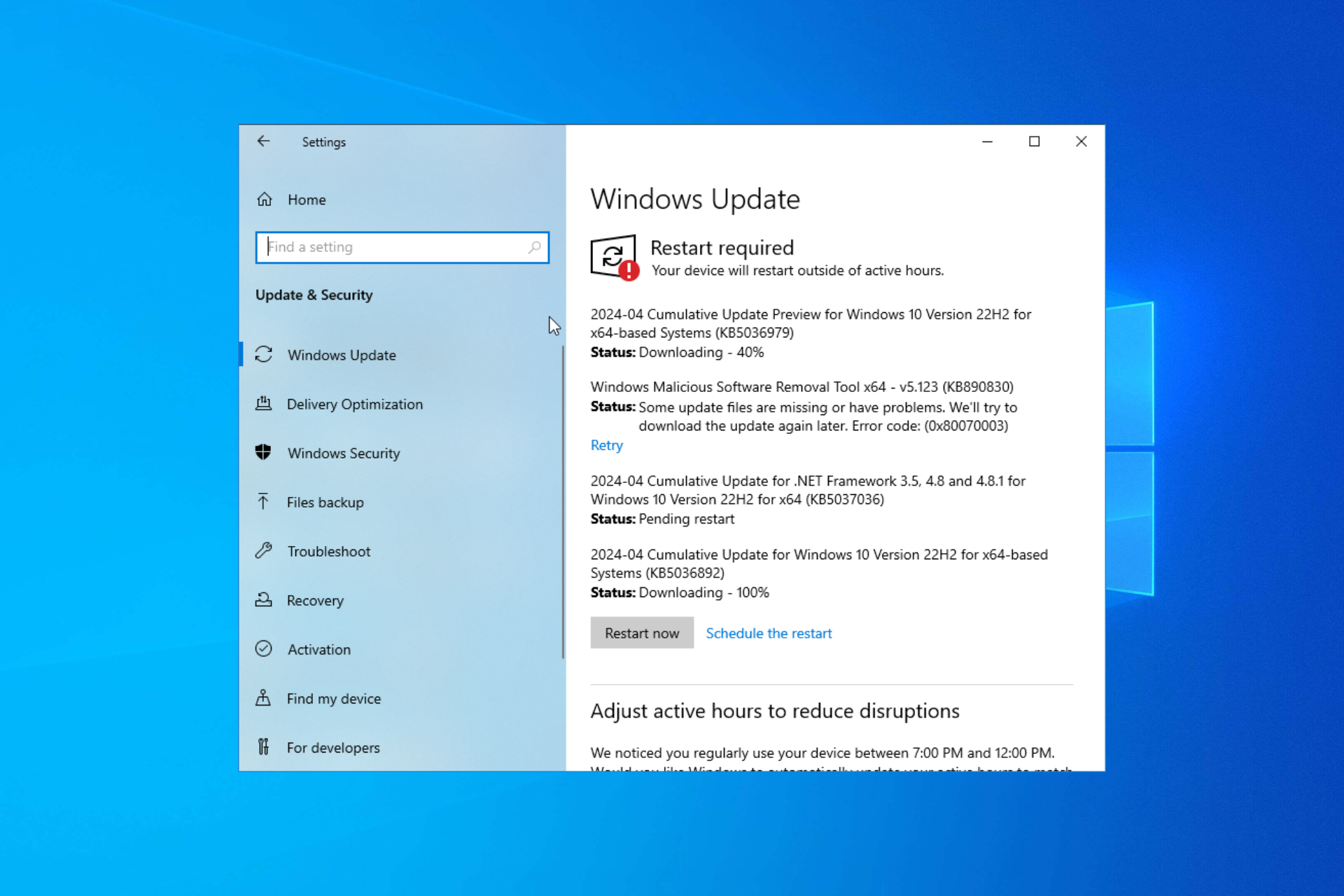
Microsoft released an optional patch, KB5036979, for Windows 10 for everyone on April 23, 2024, which brings the OS build to 19045.4355. As it is an optional update, it will not download on its own.

With this update, you will get account-related notifications for Microsoft accounts in Settings > Home section. The feature was earlier released in the Preview Channel for Windows Insiders using version 22H2 on April 15, 2024.

Microsoft accounts connect Windows to your apps, back up all data, and help manage your subscriptions. The update also makes the Widgets on the lock screen more reliable and of improved quality. This patch also fixes the issue of Bluetooth connections not being stable.

Furthermore, the update brings changes to Windows Search, making it more trustworthy and intuitive to find an app once you install it from the Microsoft Store, thereby giving you a customized search experience.

Here are the improvements added to the update:

  • New! Starting April 23, 2024, the LCU will no longer have the reverse differentials. The client will generate the reverse update data. This change will help to reduce the LCU package size by about 20%. This change also offers a few advantages. It:
    • Reduces bandwidth usage
    • Provides faster downloads
    • Minimizes network traffic
    • Improves performance on slow connections.
  • This update addresses an issue that affects apps licensing. Because of this, Copilot in Windows (in preview) does not work as you expect.
  • This update addresses an issue that occurs when your device resumes from Modern Standby. You might get the stop error, “0x9f DRIVER_POWER_STATE_FAILURE.”
  • This update addresses a race condition that might stop a machine from starting up. This occurs when you set up a bootloader to start up multiple OSes.
  • This update affects media allocations. It improves their memory granularity for some hardware setups. This lowers overcommitment. Also, performance is more efficient.
  • This update addresses an issue that affects an accelerator backing store management path. A memory leak occurs that affects some devices.
  • This update makes Country and Operator Settings Asset (COSA) profiles up to date for some mobile operators.
  • This update addresses an issue that affects the container networking Address Resolution Protocol (ARP). It returns the wrong Virtual Subnet ID (VSID) for external ports.
  • This update affects hypervisor-protected code integrity (HVCI). It accepts drivers that are now compatible.
  • This update includes quarterly changes to the Windows Kernel Vulnerable Driver Blocklist file, DriverSiPolicy.p7b. It adds to the list of drivers that are at risk for Bring Your Own Vulnerable Driver (BYOVD) attacks.
  • This update addresses an issue that affects Protected Process Light (PPL) protections. You can bypass them.
  • This update addresses an issue that affects the Distributed Transaction Coordinator (DTC). A memory leak occurs when it retrieves mappings.
  • This update addresses an issue that affects Windows Local Administrator Password Solution (LAPS). Its Post Authentication Actions (PAA) do not occur at the end of the grace period. Instead, they occur at restart.

The Redmond tech giant says that if you have installed all the updates prior to this, only the new update in this package will be installed on your machine.

Currently, the KB5036979 update is optional, but it will become a mandate with the Windows 10 May 2024 Patch Tuesday.

If you have Windows 10 22H2 or older version on your computer, you can install the patch today. To install the update, launch the Settings app, then navigate to Windows Update, then click Check for Updates.

However, if you want to install the update manually, you can go to Microsoft Update Catalog, search for KB5036979, and click Download. Then, run the downloaded file and follow the on-screen instructions to complete the process.

Once you install the update, you will get a notification to sign in to your Microsoft account to back up files and photos to the cloud to keep them safe.

You can either click the X button to make the alert disappear or click Sign in now, which will redirect you to the Windows Backup window.

If you want to disable notifications, go to Settings, then Privacy & Security>General. Now, look for the Show me notifications in the Settings app. When off, required notifications are still shown option, so disable it. Toggle off all the options to turn all the alerts on your device.

What do you think about these latest changes & updates, given that Windows 10 is approaching its end of life? Share your opinions with our readers in the comments section below.

The latest Edge update brings rewriting with Copilot, better pen support, and more

Microsoft is constantly testing new Edge features, and we’re pleased to say that some of these features have left the testing stage.

The browser just got updated, and we have an array of new features, mostly related to text input, so let’s see what’s new.

Microsoft Edge just got several new text-inputting features

Microsoft’s browser is constantly getting updates and new features, and we recently wrote about Edge 124 which was released to the stable channel.

According to the Windows Blog page, it seems that Edge was enhanced with some new features, so let’s take a closer look at them.

Rewrite with Copilot

With this feature, you can easily rewrite text from any text field on any page. Simply select the text from an input field and click the Copilot icon.

Now choose the desired tone, format, or length to rewrite the text with the AI. There’s also a new HTML attribute named writingsuggestions that can help you disable this feature on certain elements.

Digital pen support for all text fields

Microsoft Edge now fully supports Windows Ink in the text input fields as well as the address bar. However, for this feature to work, the input element needs to have a contenteditable attribute.

The feature allows you to enter text by writing with a pen next to an input field. You can also delete words by scribbling over them or add and remove spaces by drawing vertical lines. As for line breaks, you can add them by drawing horizontal lines.

If you don’t want to use this feature, you can disable it by doing to the following page:

edge://settings/content/HandwritingToText

Support for advanced input methods

Edge now uses EditContext API that allows developers to receive text input events directly through API, thus simplifying the code, and enhancing accessibility.

Improvements when copying HTML

Copying HTML is now easier with the introduction of unsanitized option in the navigator.clipboard.read() method.

By doing so, web apps can choose what type of HTML content they want to receive. This allows you to paste full HTML content or the browser-sanitized version of HTML.

Developers can also use ClipboardItem.supports() to check for supported clipboard formats before writing data.

As for upcoming features, Edge will make deleting browser history easier, and we’ll also get buttons in Edge that can directly install related web apps.

TikTok loses another battle in the US as Senate clears bill to ban the app

In a blow to TikTok, the US Senate passed a controversial bill that seeks to ban the app by 360-58. It is now headed to US President Joe Biden, who has previously committed to signing the bill.

Lawmakers in the US tied the bill with foreign aid packages to Ukraine, Taiwan, and Israel, amongst other allies, which led to it being taken up earlier than expected.

Lawmakers have previously raised concerns about TikTok sharing data of its US users with the Chinese government, owing to the national security law in China. ByteDance has repeatedly refuted the allegations.

Once the bill is signed by the US President, ByteDance will have 9 months to divest investments in TikTok or face a nationwide ban. If there’s progress, the President has the power to grant an additional 3 months, taking the total to 12 months.

According to The Verge, Maria Cantwell, Senate Commerce Committee Chair, highlighted the national security aspect of the bill, citing that it would prevent espionage and surveillance.

Congress is not acting to punish ByteDance, TikTok or any other individual company. Congress is acting to prevent foreign adversaries from conducting espionage, surveillance, maligned operations, harming vulnerable Americans, our servicemen and women, and our U.S. government personnel.

Mark Warner, Senate Intelligence Committee Chair, said,

The truth is, these Chinese companies at the end of the day, they don’t owe their obligation to their customers, or their shareholders, but they owe it to the PRC government. In the context of social media platforms used by nearly half of Americans, it’s not hard to imagine how a platform that facilitates so much commerce, political discourse, and social debate could be covertly manipulated to serve the goals of an authoritarian regime, one with a long track record of censorship, transnational repression, and promotion of disinformation.

TikTok set to take the fight to court

Even though the bill has been passed by the US Senate and is expected to be soon signed by the President, TikTok isn’t easily going to cede to the demands. As reported in Bloomberg, TikTok is planning to approach the US courts.

In a memo to the staff, Michael Beckerman, Head of Public Policy at TikTok, said

This is an unprecedented deal worked out between the Republican Speaker and President Biden. At the stage that the bill is signed, we will move to the courts for a legal challenge. We’ll continue to fight. This is the beginning, not the end of this long process.

If TikTok obtains an injunction from the court, ByteDance won’t be forced to sell its stake, and the app can operate in the US for at least another few years.

TikTok had previously urged users in the US for support in its fight against the bill. Users across the US received notifications on the phone encouraging them to call their representatives and voice their opinions against the bill.

Experts believe that TikTok and the US government are headed for a prolonged legal battle, as it happened under the previous administration when efforts were made to ban TikTok and WeChat.

Do you believe TikTok will be banned in the US? Share your views with our readers in the comments section.

Forest Blizzard or APT28(STRONTIUM) abuses a Windows Print Spooler vulnerability, says Microsoft

Recently, Microsoft has warned that the Russian APT28 hackers group is exploiting a Windows Print Spooler vulnerability. This abuse includes elevating privileges and stealing credentials & data using a hacking tool, GooseEgg.

Microsoft mentioned in the report that:

Since at least June 2020 and possibly as early as April 2019, Forest Blizzard(APT28) has used the tool, which we refer to as GooseEgg, to exploit the CVE-2022-38028 vulnerability in Windows Print Spooler service by modifying a JavaScript constraints file and executing it with SYSTEM-level permissions. 

How does this work?

Microsoft also said that they noticed Forest Blizzard using GooseEgg as a part of its post-compromise activities. They target a range of organizations, including governmental and non-governmental entities, educational institutions, and transportation sector organizations in Western Europe, Ukraine, and North America.

GooseEgg appears to be a simple launcher app; however, it has the capacity to initiate other apps as specified through the command line with elevated rights. This empowers threat actors to facilitate several follow-on objectives, including deploying a backdoor, remote code execution, and traversing an infected network laterally.

Forest Blizzard (APT28), previously known as STRONTIUM, which is associated with the Russian General Staff Main Intelligence Directorate (GRU) by both the United Kingdom and United States governments, mainly targets strategic intelligence objectives.

Moreover, it differs from other GRU-affiliated groups, Seashell Blizzard (IRIDIUM) and Cadet Blizzard (DEV-0586), and its focus is on collecting strategic intelligence.

The US National Security Agency informed the company about this flaw, and the Redmond tech giant fixed the flaw during the Microsoft October 2022 Patch Tuesday. However, Microsoft has not confirmed any instances of it being actively exploited in the security update guide.

Microsoft is committed to informing about detected malware activities and is keen on sharing insights on threat actors to help organizations protect themselves from these threats.

To prevent your organization from being a victim, you must apply the CVE-2022-38028 security update. Also, Microsoft Defender Antivirus identifies the specific Forest Blizzard capability as HackTool: Win64/GooseEgg. If you want to learn more about Forest Blizzard and GooseEgg, you can read the official security blog by Microsoft.

Apart from applying the patch, here are some other recommendations suggested by Microsoft in the security blog:

Reduce the Print Spooler vulnerability

Microsoft released a security update for the Print Spooler vulnerability exploited by GooseEgg on October 11, 2022 and updates for PrintNightmare vulnerabilities on June 8, 2021 and July 1, 2021. Customers who have not implemented these fixes yet are urged to do so as soon as possible for their organization’s security. In addition, since the Print Spooler service isn’t required for domain controller operations, Microsoft recommends disabling the service on domain controllers. Otherwise, users can install available Windows security updates for Print Spooler vulnerabilities on Windows domain controllers before member servers and workstations. To help identify domain controllers that have the Print Spooler service enabled, Microsoft Defender for Identity has a built-in security assessment that tracks the availability of Print Spooler services on domain controllers.

Be proactively defensive

  • For customers, follow the credential hardening recommendations in our on-premises credential theft overview to defend against common credential theft techniques like LSASS access.
  • Run Endpoint Detection and Response (EDR) in block mode so that Microsoft Defender for Endpoint can block malicious artifacts, even when your non-Microsoft antivirus does not detect the threat or when Microsoft Defender Antivirus is running in passive mode. EDR in block mode works behind the scenes to remediate malicious artifacts that are detected post-breach.    
  • Configure investigation and remediation in full automated mode to let Microsoft Defender for Endpoint take immediate action on alerts to resolve breaches, significantly reducing alert volume. 
  • Turn on cloud-delivered protection in Microsoft Defender Antivirus, or the equivalent for your antivirus product, to cover rapidly evolving attacker tools and techniques. Cloud-based machine learning protections block a majority of new and unknown variants.

Microsoft Defender XDR customers can turn on the following attack surface reduction rule to prevent common attack techniques used for GooseEgg. Microsoft Defender XDR detects the GooseEgg tool and raises an alert upon detection of attempts to exploit Print Spooler vulnerabilities regardless of whether the device has been patched.

As mentioned earlier, if you suspect that your system is compromised, you can run Microsoft Defender Antivirus, which can detect threat components such as HackTool: Win64/GooseEgg.

Microsoft Defender for Endpoint and Microsoft Defender for Identity can also alert you to indicate threat activity related to this Forest Blizzard, which includes CVE-2021-34527 exploitation, spoolsv.exe’s suspicious behavior, and suspected elevation of rights through print filter pipeline service.

To conclude, organizations are advised to stay vigilant and implement the security measures mentioned by Microsoft to avoid falling into a trap by such threat actors.

What do you think about this attack? Share your opinions with our readers in the comments section below.

Microsoft and Google offer new Child Safety Commitments for AI

Two of the biggest brands offering generative artificial intelligence services have come together to address the harm their AI platform can pose to child safety.

In a post from the Microsoft on the Issues blog, the company announced its partnership with Thorn, a non-profit organization committed to protecting children from sexual abuse, and All Tech Is Human which aims to tackle risks generative AI poses to children.

As part of a new security pact dubbed Safety by Design, Microsoft has committed to the following three tenants to help transparently address its process towards protecting children from harm by its own AI services.

  • DEVELOP: Develop, build and train generative AI models to proactively address child safety risks
  • DEPLOY: Release and distribute generative AI models after they have been trained and evaluated for child safety, providing protections throughout the process.
  • MAINTAIN: Maintain model and platform safety by continuing to actively understand and respond to child safety risks

Across the business divide, Google also penned an update to its Safety and Security blog that echoes Microsoft’s committed partnership with Thron and All Tech Is Human.

Google’s voluntary commitment to address AI-generated child sexual abuse material (CSAM) with Thorn and All Tech Is Human includes:

  • Training datasets: We are integrating both hash-matching and child safety classifiers to remove CSAM as well as other exploitative and illegal content from our training datasets.
  • Identifying CSAE-seeking prompts: We utilize our machine learning to identify CSAE-seeking prompts and block them from producing outputs that may exploit or sexualize children.
  • Adversarial testing: We conduct adversarial child safety testing across text, image, video and audio for potential risks and violations.
  • Engaging experts: We have a Priority Flagger Program where we partner with expert third parties who flag potentially violative content, including for child safety, for our teams’ review.

Google is building on its decades of work with other liked-minded NGO’s, industry peers, and law enforcement to combat CSAM by allowing greater access to its dedicated APIs from its free-to-license Child Safety Toolkit. Third party partner organizations can utilize Google’s CST APIs to monitor and report child abuse and exploitation (CSAE) that could occur because of its generative AI services.

Microsoft is also looking to engage with policymakers to cement future standards for addressing CSAM in lieu of expanding AI capabilities that are producing undreamt of outcomes.

We will also continue to engage with policymakers on the legal and policy conditions to help support safety and innovation. This includes building a shared understanding of the AI tech stack and the application of existing laws, as well as on ways to modernize law to ensure companies have the appropriate legal frameworks to support red-teaming efforts and the development of tools to help detect potential CSAM.

Courtney Gregoire – Chief Digital Safety Officer

Microsoft expands Coca-Cola partnership to the tune of $1.1B for Azure and AI Services

Microsoft and Coca-Cola have just inked a new five-year deal where the two will partner up to the tune of $1.1B for cloud and generative artificial intelligently led services.

According to a press release from Microsoft, the strategic partnership between the two companies includes a $1.1B commitment from Coco-Cola to Microsoft who will in turn provide the technological underpinnings for the beverage company’s cloud and AI future.

“Through our long-term partnership, we have made significant progress to accelerate system-wide AI Transformation across The Coca-Cola Company and its network of independent bottlers worldwide,” said “We are proud to support Coca-Cola as it continues to embrace the era of AI and looks to solutions like Azure OpenAI Service and Copilot for Microsoft 365 to drive innovation across every area of its business.”

Judson Althoff, executive vice president and chief commercial officer at Microsoft.

The new $1.1B deal comes as an expansion of an initial $250M investment Coca-Cola placed with Microsoft back in 2020. Coca-Cola has been using Microsoft’s Azure cloud services for over the past couple of years and began utilizing the company’s AI platforms last year to help reimagine its own marketing, manufacturing processes and supply chain protocols among other tasks.

Today’s announcement will help accelerate Coca-Cola’s exploration of Azure OpenAI Services to aid in “customer service experiences, streamline operations, foster innovation, gain a competitive advantage, boost efficiency, and uncover new growth opportunities”, according to Microsoft.

While it’s still unclear how much Microsoft has invested into AI over the years, deals such as this $1.1B with Coca-Cola helped to justify the company’s bullishness on the technology and its continued exploration of the sector.

Here’s What You Need to Know About Discord’s Read Receipts

Read receipts revolutionized communication enabling you on the other end to tell whether your sent message has been opened. However, for one social app, Discord, this is a dream yet to come true.

Can you see if someone has read your message on Discord?

There is no native way to tell whether someone has read your message on Discord. It’s a bummer but it also has its disadvantages for users who do not wish this information to be public.

Still, there are some subtle tell-tale signs that can help ease your mind. Observing these actions can help you conclude that your message has been received on the other end.

  • Active status – If the user is active, they may have read your message. However, this is not a very accurate metric because some users may be online but not active per se.
  • User typing – If the recipient of the message has a typing status just next to their name, it is a positive that they have read yours and are currently composing a response.
  • Reactions – If the user reacts to your message with an emoji, it means they’ve read it. You can also react to theirs as a reminder but if you can’t, they’ve probably blocked your Discord message.

How do you know if someone ignores you on Discord?

  • Delayed response – If you sent the person on the other end a message a long time ago and they are taking their sweet time to respond, it could be that they are ignoring you.
  • Online status – If the person has not been online for a prolonged period of time, then they are not ignoring you. Their Discord account could’ve been banned or suspended for all you know. However, if they’ve been online a couple of times since you sent a message and they are yet to respond, chances are that you are being ignored.
  • Server interactions – Discord has public servers and channels where you and your friend could be part of. If they’re engaging on the server but not responding to your messages, then you’re definitely being ignored.

Read receipts is a feature that Discord users have been raving about for years but it seems the developers are not too keen to include it.

Luckily, being an open-source app, fans can explore a read receipt bot or include a functionality that would inform one that your message has been read as long as it doesn’t go against the Discord guidelines.

Although Discord has no read receipts, you can try other social apps that do have read receipts. You can always message your friends there if it gives you peace of mind.

While still here, perhaps hiding games you’re playing on Discord may be fun. This comes in handy if you’re learning to play a new game and don’t want your friends challenging you.

You can also create a Discord rules channel but while you’re at it, take precautions. There are a lot of cyberhackers so you need to avoid being hacked on Discord.

Are there any other tips you have that could help other Discord users know when their messages have been read? If so, let us know in the comment section below.

TPM-WMI 1796 Error: 4 Easy Ways to Fix it

Many users noticed an event in the Event Log called TPM-WMI 1796, which usually appears right before the system crashes. So today, we’re going to take a closer look at this error and see how to fix it.

What is the TPM-WMI error crash?

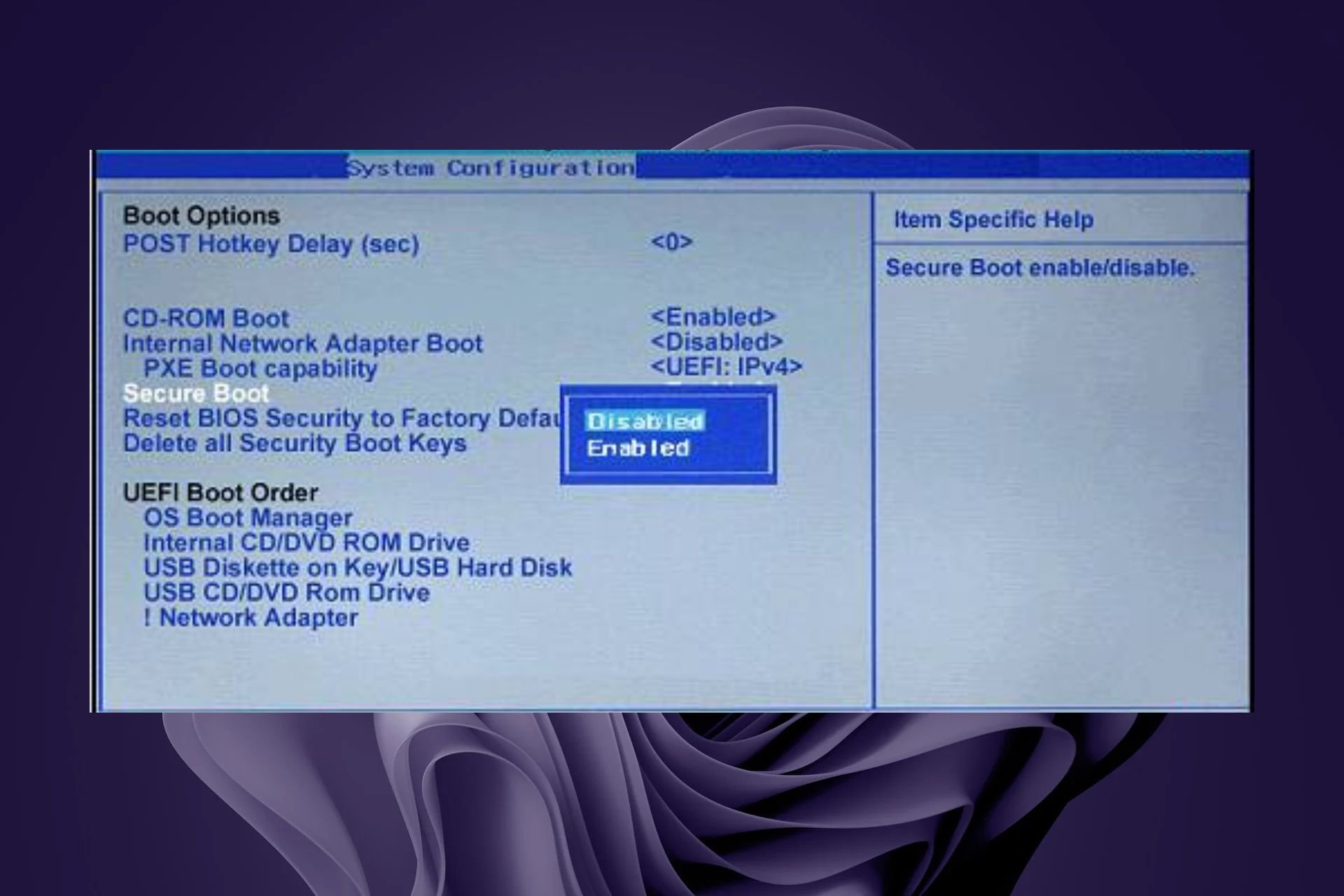
This error appears if Secure Boot isn’t properly enabled. Sometimes damaged installation or certain applications can also cause it.

How do I fix error TPM-WMI 1796?

1. Enable Secure Boot and disable NX Mode

  1. Restart your computer. During startup, you need to press a key designated by the OEM or computer manufacturer to access the UEFI settings. For HP, it is F10; for Dell, it is F2.
  2. You will enter the UEFI settings. Locate the Security or System Configuration section.
  3. Now look for Secure Boot or UEFI Secure Boot, select it, and change the status to Enabled.disable secure boot winload.efi
  4. Once done, Save & Exit to save the changes.
  5. Restart your computer.

If the problem still persists, disable NX Mode by doing the following:

  1. Access BIOS again.
  2. Next, go to Advanced settings and choose OC.
  3. Select Advanced CPU Configuration and from there disable NX Mode.

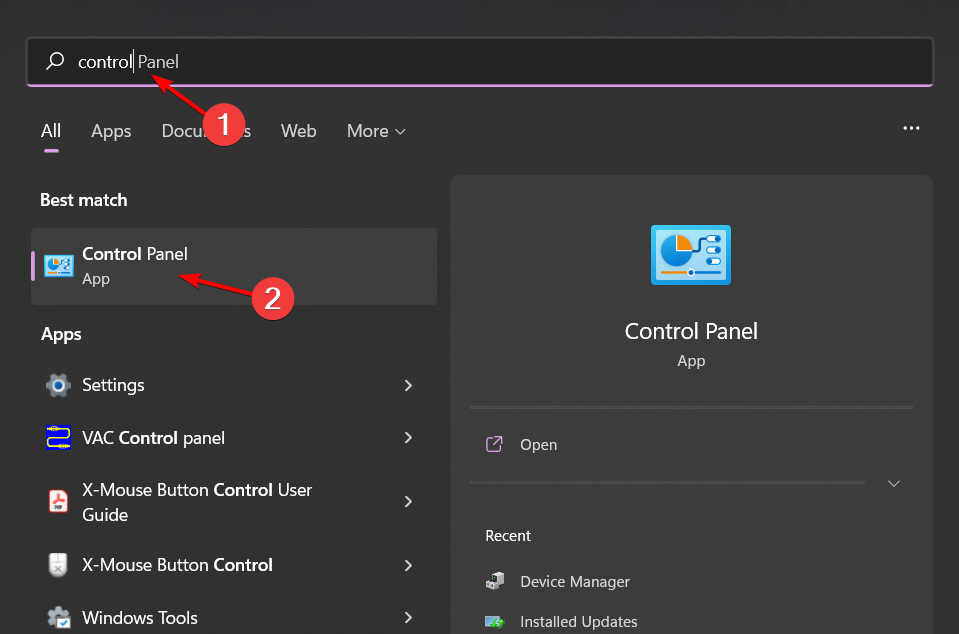
2. Reinstall problematic software

  1. Click on the Start Menu icon, type Control Panel on the search bar, and click Open.control-panel-search fallout new vegas runtime error
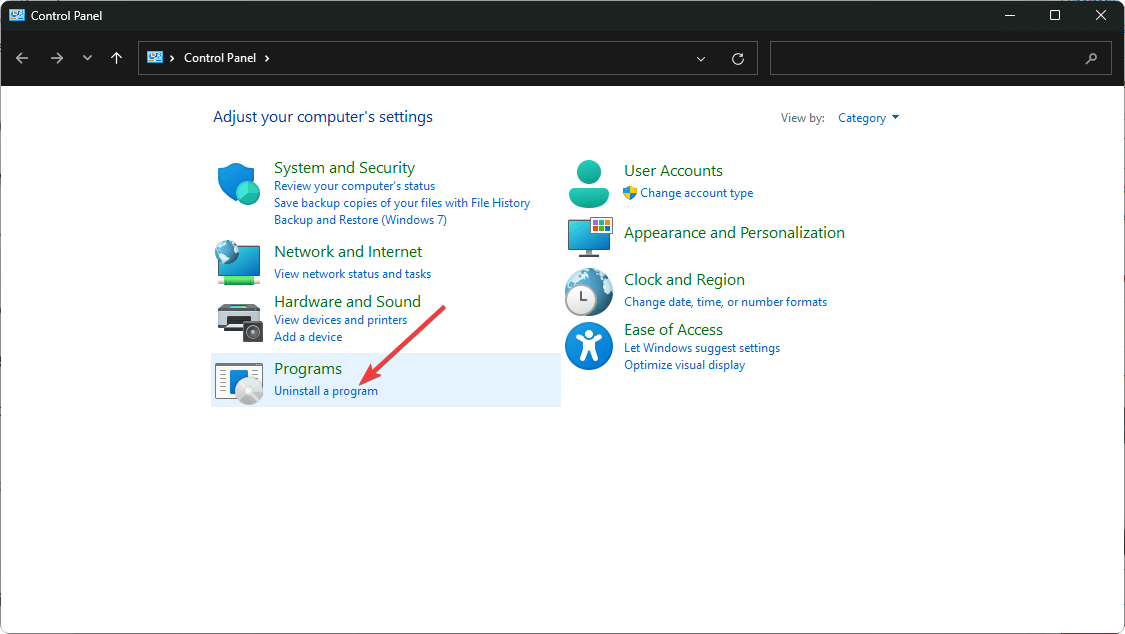
  2. Select Uninstall a Program under Programs.going uninstall program control panel
  3. Find the problematic app, click on it, and select Uninstall.
  4. Confirm uninstallation in the next pop-up.

Common apps throwing the tpm-wmi 1796 error were the BattleEye anti-cheat software and the Terraria game. From the trend, it indicates that games and gaming software could be behind the PC crash.

3. Scan your PC

  1. Press the Windows key + S and type cmd. Choose Run as administrator.
    cmd run as administrator w11
  2. Run the following command: dism /online /cleanup-image /restorehealth
    dism restorehealth
  3. Wait for the scan to finish.
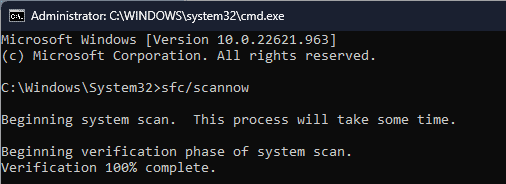
  4. Next run sfc /scannow 
    SFCSCANNOW CMD
  5. Wait for the scan to finish.

4. Check your hardware

  1. If you have more than one memory module, try removing it and checking and that solves the problem. Do this for all modules. You can also scan your modules with MemTest86+.
  2. Clean your CPU cooler and radiator. Sometimes overheating can lead to this issue.
  3. Check if the problem is gone.

Hopefully, one of the above solutions has fixed this error. Still, we’re open to hearing any additional thoughts you may have on this error. Drop us a line below.

This isn’t the only issue, and we also covered event ID 15 TPM error as well as error code 80090034 in TPM.

Former Meta executive has joined Microsoft’s supercomputing team

It’s no secret that tech giants are having an AI race, and speaking of which, it seems that Microsoft has added some new members to its team.

Microsoft has managed to hire a former Meta expert, and here’s what we know so far.

Former Meta executive joins Microsoft in effort to push the frontier of AI forward

Former Meta executive, Jason Taylor, has joined Microsoft as The Verge writes. According to a LinkedIn post from Microsoft CTO, Taylor will be assigned the role of corporate vice president and deputy CTO.

With Tylor’s involvement, Microsoft plans to “build the next set of systems that will push the frontier of AI forward”.

As for Tylor, he worked at Meta from 2009 to 2022, and his most recent position was the company’s vice president of infrastructure.

He was in charge of handling AI, data, privacy infrastructure, and managing server budgets, so it’s no wonder that Microsoft offered him this position.

With Microsoft building a $100 billion Stargate supercomputer, it needs all the help it can get.

That’s not all, as the EU has greenlit Microsoft’s $13 billion investment in OpenAI. The company has also invested $1.5 billion in G42 in an attempt to push AI in the Middle East, Central Asia and Africa.

Ransomware victims paying threat actors fall to 28%, improved security infrastructure a key factor

In the past few years, ransomware attacks have increased exponentially, with companies usually paying up right away to prevent misuse of data. However, in Q1 2024, the number of ransomware victims paying up has dropped to 28%. In the last quarter, i.e., Q4 2023, the figure was 29%.

The report published by Coverware, which sheds light on the figures, attributes this fall to enhanced security systems set up by companies that help them avert threats like encryption attacks, recover the data, and quickly restore their operation, thus negating the need for a decryption key.

Besides that, there’s an emerging trend of threat actors publishing the data or auctioning it on the web even after organizations pay the ransom. As a result, organizations are starting to refuse to pay up, realizing that it would have little to no effect.

The average ransomware attack payment, too, took a hit and fell 32% to a low of $381,980. This is also a result of threat attackers demanding a lower sum initially to keep affected parties engaged rather than the latter walking away from the negotiation altogether, says Coverware.

As for the most common ransomware variants in 2024, Akira tops the list with a 21% market share, while Black Basta and Lockbit 3.0 take up the second and third spot with 9% each.

The report looks promising, but companies need to bolster efforts

Until a few years ago, cyber and ransomware attacks were limited and usually targeted specific industries.

But with AI-powered cyberattacks gaining prominence, detecting and averting threats will become more challenging than ever. Threat actors will be able to identify and exploit any existing vulnerabilities quickly!

This will increase the number of attacks and affect industries like Healthcare that were not previously targeted. A recent report by Microsoft states that 87% of the companies in the UK are unprotected against AI cyberattacks.

So, companies must ramp up their security infrastructure and hire trained analysts to protect the data. Microsoft is using AI to tackle AI-powered cyberattacks, an approach replicated by many in the security landscape.

What do you think is the best way to prevent ransomware attacks? Share with our readers in the comments section.

Star Wars Jedi: Survivor comes to EA Play, but only in certain regions

Star Wars Jedi: Survivor was a massive hit when it was released, and it was well-received by Star Wars fans.

If you never played the game, you’ll be pleased to hear that it’s now available as a part of EA Play in certain countries.

Star Wars Jedi: Survivor is now available on EA Play in certain regions

As IGN reports, Star Wars Jedi: Survivor is now a part of EA Play on PlayStation in the UK and several other regions. Of course, Xbox and PC users won’t miss out, since the game will be available via EA Play on Game Pass as well.

It is speculated that this is due to new EA Play subscription costs. The monthly price will change from $4.99 to $5.99 while the yearly will increase from $29.99 to $39.99 for the Standard subscription.

Gamers aren’t too happy with this change, but maybe bringing last year’s hits will change their mind. The game should now be available in certain regions on PlayStation while Xbox users will get the chance to enjoy it on April 25th.

This isn’t the only EA title that came to Game Pass, and we saw PGA Tour being added to Xbox Game Pass not that long ago.

Microsoft’s latest patent generates hyperreal virtual avatars based on users’ faces

Microsoft has a thing with virtual avatars: its recently-released Mesh platform lets Teams users create avatars to engage in so-called virtual immersive spaces, which are contexts where employees can hang out together, virtually, even though they are miles away apart.

Microsoft Mesh is indeed a fun platform, and the Redmond-based tech giant says it’s working: many Microsoft employees feel a sense of bonding while hanging out there. But at the same time it feels off: the cartoon-like avatars, while cute and everything, seem displaced.

However, it seems that the Redmond-based tech giant might already be working on an update. The company recently published a patent that describes a technology capable of generating hyperreal virtual avatars based on users’ faces.

The technology is called Multi-modal Three-Dimensional Face Modeling and Tracking for Generating Expressive Avatars and describes a computer system that creates expressive avatars using 3D face modeling and tracking.

The computer system has a processor and a storage system of its own, which processes and keeps data needed to model the hyperreal virtual avatar. It also keeps instructions on how to render them.

The processor then receives initialization data, which is the starting look of a face model, and additional multi-modal data signals, which can be audio data (such as the voice of the user), that will be used to create a hyperrealist model of the face.

Multimodal 3D face modeling and tracking techniques can utilize multiple different sensor devices, each providing one or more input signals and/or measurements for a user’s face to detect, model, track, and/or animate a three-dimensional face model graphically as an avatar.

Microsoft

The initialization and multi-modal data are then taken by the system and are processed together in a fitting process. This process adjusts the data to fit the model. Based on the fitting process, the system then determines a set of parameters, which are used to describe the hyperreal virtual avatar.

3D face modeling and tracking techniques createe 3D vertices based on a user’s face and apply transformations to the vertices from a neutral face to depict expressions on a digital face model (e.g., an avatar representation of the user’s face).

Microsoft

The system uses deep learning to come up with a detailed virtual avatar that looks, acts, and is capable of facial expressions similar or identical to the user’s face. Deep learning is a form of AI technology that seeks to emulate the human brain as much as possible, and Microsoft has been investing in it over the last few years.

The framework utilizes deep learning techniques and forward modeling to perform a parametric fitting process that translate the multi-modal data signals into a set of parameteres or expression code that can be used to generate an expressive 3D facial model.

Microsoft

Since this is a computer system, the paper mentions the ability to integrate it on a plethora of devices, from VR/AR/MR headsets to mobile phones, laptops, gaming consoles, tablet computers, and many more, meaning users could have a device ready to transport their virtual avatars into a Meta-like or Mesh-like virtual space.

Microsoft might seek to implement this new hyperreal virtual avatar system in existing platforms, such as Microsoft Teams, Microsoft Mesh, or even Windows.

Even though virtual spaces already exist, they are not that popular, for now, due to their limiting capabilities, but a system like this one can encourage more people to join virtual spaces.

The gaming industry could also benefit from this technology, allowing users to customize their characters based on their looks, providing a highly personalized gaming experience, as well.

The full paper can be read here.

After WDC, Seagate increases SSD and HDD prices effective immediately

We have been monitoring reports of increasing SSD prices for the last few months, and all major corporations now seem to be onboard with the plan. It started with Western Digital Corporation (WDC) announcing a price hike on April 18, 2024, followed by Seagate apprising retailers about the same.

Seagate’s letter to retailers cites growing global demand and inflation as the reasons behind raising the prices of its storage drive. This hike will be effective immediately on new orders and for demand over and above previously committed volumes, confirms Seagate.

seagate letter to retailers
Image source: TrendForce

Seagate also informs retailers that prices for SSDs and HDDs will continue to rise in the coming quarters, given the ongoing supply chain constraints, according to TrendForce.

As of now, there’s no official confirmation about the exact increase in price after the hike, but reports suggest that it would be in the 5%-10% range for HDDs and in a similar bracket for SSDs.

What fueled the rise in SSD prices?

There are several factors involved, from increased demand for Artificial Intelligence to companies recovering a share of the losses accrued over the years to accounting for inflation. AI coming into the mainstream is also the reason for the anticipated hike in PC prices.

Experts have previously warned against raising the prices of SSDs and HDDs, citing that it would affect the demand and, subsequently, result in more losses. They believe that companies must readjust production and only hike prices when absolutely essential, and that, too, by a small margin!

Whether or not to get an SSD right now is a gamble. What if you can get one, and the prices fall due to reduced demand? On the other hand, what if you wait and manufacturers continue raising the prices, as detailed in Seagate’s letter to retailers?

There are a ton of factors to consider, including analyzing the cost implications and exigency for an HDD or SSD. Although second-hand SSDs and used HDDs always remain a viable option!

What do you believe is the best way to tackle an increase in SSD price? Share with our readers in the comments section.

Microsoft’s new Phi-3 LLM is small and trained with bedtime stories but it still packs a punch

Microsoft released its latest artificial intelligence model, Phi-3 Mini and if you’re a tech connoisseur, you can jump straight to the technical report. Phi-3 Mini is Microsoft’s smallest AI model yet, but don’t let its size fool you. It packs a punch with 3.8 billion parameters, making it a powerhouse capable of performing tasks close to models ten times its size. What’s even more fascinating is how this model was trained. Inspired by the simplicity and effectiveness of children’s bedtime stories, developers created a unique curriculum that simplifies complex concepts, making Phi-3 not just smart but also incredibly user-friendly.

Why would Microsoft invest in a small LLM?

Well, it turns out that smaller AI models like Phi-3 Mini are not just cheaper to run; they’re also more efficient on personal devices like phones and laptops that can run it locally. This is a game-changer for smaller organizations or individuals who previously found the cost of using large language models prohibitive. Microsoft’s move to develop Phi-3 Mini and its upcoming siblings, Phi-3 Small and Phi-3 Medium, is a strategic step towards democratizing AI technology.

About competition, Phi-3 Mini is in a league of its own. While other LLMs focus on specific tasks like document summarization or coding assistance, Phi-3 Mini shines with its versatility and performance, rivaling larger models in tasks ranging from math to programming to academic tests. And the best part? It can do all this directly on your smartphone, without needing an internet connection.

Microsoft’s approach to training Phi-3 Mini is nothing short of innovative. By asking another LLM to create children’s books with over 3,000 words, they’ve managed to teach the model in a way that’s both effective and endearing. This method not only enhances the model’s coding and reasoning abilities but also makes it more relatable and easier to interact with.

Phi-3 Mini is now available on platforms like Azure, Hugging Face, and Ollama, making it accessible to a wide range of users eager to explore its capabilities. We look forward to the release of Phi-3 Small and Phi-3 Medium, because that’s what’s coming next. Running a LLM locally on a smartphone sounds very exciting.

What do you think about Microsoft’s Phi-3? Share your thoughts in a comment below.

The repairable Lenovo ThinkPad T14 G5 & ThinkPad T14s Gen 5 are now available in the US

With the demand for Right to Repair gaining more traction, Lenovo revealed its new productivity-focused model, the Thinkpad T series, about two months ago. These models come with a repairable design in the form of a user-replaceable battery, keyboard, and upgradable RAM.

The new Lenovo ThinkPad T14 Gen 5 and ThinkPad T14s Gen 5, the thinner and more premium version of the Lenovo ThinkPad series, are now available in the United States market.

Both these models feature a 14-inch screen, and the starting price of the Lenovo ThinkPad T14 Gen 5 is $2,559, while the base price of the ThinkPad T14s Gen 5 is $2,729.

The entry-level Thinkpad T14 Gen 5 has an Intel Core Ultra 5 125U processor, 16GB of DDR5-5600 RAM, and a 512GB PCIe Gen 4 SSD, while the highest configuration has an Intel Core Ultra 7 155U processor, 32GB of RAM, and 1TB of storage, which could cost you $3,409.

The slim ThinkPad T14s Gen 5 has the same configuration but comes with superior battery life and wireless connectivity.

Both devices have smaller screen bezels, a black debossed ThinkPad logo, and a camera bump, which gives them a stunning look.

Here are the detailed specifications of both models:

 ThinkPad T14 Gen 5 (14” Intel) LaptopThinkPad T14s Gen 5 (14” Intel) Laptop
ProcessorIntel Core Ultra 5 125U Processor (E-Core Max 3.60 GHz, P-Core Max 4.30 GHz with Turbo Boost, 12 Cores, 14 Threads, 12 MB Cache)
Intel Core Ultra 5 135U Processor with vPro (E-cores up to 3.60 GHz P-cores up to 4.40 GHz with Turbo Boost, 12 Cores, 14 Threads, 12 MB Cache)
Intel Core Ultra 7 155U Processor (E-Core Max 3.80 GHz, P-Core Max 4.80 GHz with Turbo Boost, 12 Cores, 14 Threads, 12 MB Cache)
Intel Core Ultra 7 165U Processor with vPro (E-cores up to 3.80 GHz P-cores up to 4.90 GHz with Turbo Boost, 12 Cores, 14 Threads, 12 MB Cache)
Intel Core Ultra 5 125U Processor (E-Core Max 3.60 GHz, P-Core Max 4.30 GHz with Turbo Boost, 12 Cores, 14 Threads, 12 MB Cache)
Intel Core Ultra 5 135U Processor with vPro (E-cores up to 3.60 GHz, P-cores up to 4.40 GHz with Turbo Boost, 12 Cores, 14 Threads, 12 MB Cache)
Intel Core Ultra 7 155U Processor (E-Core Max 3.80 GHz, P-Core Max 4.80 GHz with Turbo Boost, 12 Cores, 14 Threads, 12 MB Cache)
Intel Core Ultra 7 165U Processor with vPro (E-cores up to 3.80 GHz P-cores up to 4.90 GHz with Turbo Boost, 12 Cores, 14 Threads, 12 MB Cache)
Operating SystemWindows 11 ProWindows 11 Pro
GraphicsIntel Integrated GraphicsIntel Integrated Graphics
MemoryUp to 32GB DDR5, 2x SODIMM (5600MHz)Up to 32GB LPDDR5X (6400Mhz)
StorageUp to 1TB M.2 PCIe SSD Gen4 PerformanceUp to 1TB M.2 PCIe Gen 4 x 4 SSD, 2280 compatible
Battery52.5Whr (customer replaceable unit)
Rapid Charge (60 minutes = 80% capacity) with 65W or higher adapter
58Whr
Rapid Charge (60 minutes = 80% capacity) with 65W or higher adapter
Audio2 x 2W speakers (user-facing)
Dolby Audio
Dolby Voice
Dual-array mics
2 x 2W speakers (user facing)
Dolby Audio
Dolby Voice
Dual-array mics
Camera5MP RGB & infrared (IR) with webcam privacy shutter5MP RGB & infrared (IR) with webcam privacy shutter
Ports/Slots2 x USB-C Thunderbolt 4, 40Gbps
2 x USB-A, 5Gbps
HDMI 2.1 (supports resolution up to 4K@60Hz)
Headphone/mic combo
Optional: Nano SIM
Optional: Smart card reader
2 x USB-C Thunderbolt 4, 40Gbps
2 x USB-A, 5Gbps
HDMI 2.1 (supports resolution up to 4K@60Hz)
Headphone/mic combo
Optional: Nano SIM
Optional: Smart card reader
WirelessIntel WiFi 6E 802.11AX (2 x 2)

Optional WWAN: 5G sub-6 eSIM**
Optional WWAN: 4G LTE (CAT6 eSIM)**
Bluetooth 5.3
Intel WiFi 6E AX211 802.11AX (2 x 2)

Optional: 5G LTE (with Eclipse Black)
Optional: 4G LTE (CAT6) (with Eclipse Black)
Bluetooth 5.3
Supported DockingUSB-C 3.0 dock
USB-C Thunderbolt 4 dock
USB-C 3.0 dock
USB-C Thunderbolt 4 dock
Display14″ WUXGA (1920 x 1200) IPS, antiglare, 400nits, 45% NTSC, 3M Dual Brightness Enhancement Film (DBEF5), Eyesafe certified low blue light, on-cell touchscreen

14″ WUXGA (1920 x 1200) IPS, antiglare, 400nits, 45% NTSC, 3M Dual Brightness Enhancement Film (DBEF5), Eyesafe certified low blue light
14″ WUXGA (1920 x 1200) IPS, 400nits, 45% NTSC, antiglare, 3M Dual Brightness Enhancement Film (DBEF5), on-cell touchscreen (OCT)

14″ WUXGA (1920 x 1200) IPS, 400nits, 45% NTSC, antiglare, 3M Dual Brightness Enhancement Film (DBEF5)
Dimensions (H x W x D)17.7mm x 315.9mm x 223.7mm / 0.70” x 12.44” x 8.81”Eclipse Black – 16.9mm x 313.6mm x 219.4mm / 0.67″ x 12.3″ x 8.6″
Luna Grey – 16.6mm x 313.6mm x 219.4mm / 0.65″ x 12.3″ x 8.6″
WeightStarting at 1.31kg / 2.96lbsStarting at 1.24kg /2.73lbs
KeyboardOptional: backlit with white LED lighting
Dual-function TrackPoint: navigate cursor or double-tap to open TrackPoint Quick Menu
Spill-resistant
TrackPad with 3 buttons (120mm / 4.72″)
ThinkPad TrackPoint Keyboard (1.5mm travel)
Optional: Backlit with white LED lighting
Dual-function TrackPoint: navigate the cursor or double-tap to open TrackPoint Quick Menu
Spill-resistant
TrackPad with 3 buttons (120mm / 4.72″)
ThinkPad TrackPoint Keyboard (1.5mm travel)
ColorEclipse Black (recycled carbon fiber)Eclipse Black (recycled carbon fiber)
What’s in the BoxThinkPad T14 Gen 5 (14” Intel)
52.5 Internal Battery
65W AC Adapter
Quick Start Guide
ThinkPad T14s Gen 5 (14″ Intel)
USB-C 65W AC adapter (65W supports Rapid Charge)
Internal Battery
Quick Start Guide

If you want to purchase any of the devices, we advise you to wait a couple of weeks, as the manufacturer usually offers discounts after launching the new devices.

Which one would you prefer between the ThinkPad T14 G5 & the slim ThinkPad T14s Gen 5? Share your opinions with our readers in the comments section below.

Be quick and get Helldivers 2 for 15% off on Steam

Helldivers 2 has become a hit after its release thanks to its intensive action and third-person shooting mechanics.

If you wanted to give the game a try, but you didn’t due to its price, we’re happy to inform you that the game is available at a discount for a limited time.

You can get Helldivers 2 with a 15% discount on PC

If you’re not familiar, Helldivers 2 is a third-person co-op shooter inspired by Space Troopers in which you fight the hordes of robots and aliens to protect democracy and Super Earth.

The game was well received by both critics and gamers alike due to its high-intensity action and atmosphere.

If you’re looking to give the game a try, it’s now available at 15% off at CDKeys as Digital Trends writes. Keep in mind that this discount is only for the Steam version of the game, so if you’re on a PlayStation 5, you’re out of luck.

The game isn’t available on Xbox, but many have signed a petition to bring Helldivers 2 to Xbox. In other news, Arrowhead CEO had to comment on the Helldivers and Halo comparison that many gamers are making.