Windows 11 quietly adds Suno, Adobe Express, and Spotify integration to Copilot

Copilot is everywhere, and we’re constantly seeing new features being added. After adding the Azure Migrate tool in Visual Studio via GitHub Copilot Chat, we’re finally seeing some non-developer features.

What are these features, and how can we use them? Keep on reading to find out.

Windows 11 Copilot just got three new free integrations

As reported by Windows Latest, Copilot has quietly added support for Suno, and by using this service you can generate a song from your text inputs using an AI.

We encountered some issues with this service in the browser, so we haven’t been able to test it properly.

Next on our list is Adobe Express, and if you’re familiar with this service you can use it to generate images, logos, flyers, and other types of graphics with ease.

Last but not least is the Spotify integration which will give you links to a specific artist on Spotify when searching for it.

Unfortunately, this integration won’t open the Spotify app and instead will start Spotify in your web browser.

These are some interesting integrations, and we hope to see more of them in the future. Speaking of Copilot, did you know that you can upload documents in Copilot?

Are you excited about these new features? Let us know in the comments.

Microsoft’s new Copilot for Security gives you an upper hand against threat actors

In the era of Artificial Intelligence (AI), it’s imperative to leverage the technology to boost the organization’s security infrastructure and fight against human-generated ransomware. Microsoft Security Copilot does just that!

Presently in Early Access and available on an invite-only basis, Microsoft Security Copilot is amongst the latest AI-based products from the Redmond-based tech giant.

In its latest blog post, Microsoft highlights how Copilot for Security introduces new tools to help the SecOps team protect the data and, in case of an attack, give the much-needed advantage to eliminate the threat and limit the extent of damage.

How does Microsoft Security Copilot help eliminate threats?

Copilot for Security, when coupled with Microsoft Defender XDR, delivers enhanced protection and can help pinpoint threats, identify the affected devices, and take the necessary action.

In the blog post, Microsoft explains how the two would act in the case a human-operated ransomware attack is detected on devices.

  • Quickly assess the attack: With AI-backed tools, administrators will be able to swiftly identify the type and extent of the attack, saving precious time.
  • Simplifies the scripts: If the attack employs PowerShell scripts, Copilot for Security will, in simple terms, break down what’s going on in the background to help administrators prioritize things and form a relevant plan of action.
  • Gives more power: Lastly, Copilot allows quick translation from natural language to Kusto Query Language, gives security analysts information about the source of the threat, and lets them quickly deploy fixes company-wide.

Microsoft Secure is also holding an event on March 13, 2024, where experts in the field will discuss the different ways Copilot for Security can augment the security infrastructure through demos.

Microsoft is pushing for AI-backed advanced protection, and it’s the right step. To combat critical attacks, especially human-operated ransomware, leveraging Copilot for Security will give you the edge!

Do not forget to read our review of Microsoft Security Copilot to understand if it would be the right choice for your organization!

Microsoft tries to lighten the copyright lawsuit from The New York Times

On 27 Dec 2023, The New York Times sued OpenAI and Microsoft for copyright infringement. While the news publisher is the first to sue the two companies, it is not the last.

However, Microsoft is trying to lighten the suit by claiming that using their data is legal. After all, their chatbots generate content based on it without replying to it directly. Yet, that wasn’t the case, as The New York Times showed.

Unfortunately, if Microsoft wins the copyright lawsuit, it could possibly lead to smaller publishers losing legal battles against AI companies. As a result, they will also suffer significant losses. In addition, if you are a commercial customer who uses the Copilot service, Microsoft will legally defend you against copyright lawsuits.

Who owns copyright in AI?

If AI generates content alone, it won’t benefit from copyright protections due to the lack of human authorship. After all, the content is public, and the AI might replicate the answers it gives you to someone else. However, Microsoft is trying to lighten the copyright lawsuit by stating that the content they use to train the large language models (LLMs) is also public.

Unfortunately, chatbots also compete with news outlets, and many of us consider them a reliable source of information. However, Microsoft claims that they are not causing any harm to the news publishers. Furthermore, The New York Times seems to have no evidence of any actual damage. On the other hand, the news publisher told the court that if people can get the information from their site from the chatbot, they will lose revenue. After all, users will stop using referral links.

Neither Microsoft nor OpenAI denied copyright allegations. After all, they might use millions of articles to train their LLMs. However, Microsoft compares their LLMs to video cassette recorders and claims they face a similar problem. Yet, Ian Crosby, the lead counsel for The Times in this case, said that VCR makers never needed to infringe copyright protections to build their products.

Ultimately, the copyright lawsuit is trying to limit companies like Microsoft to copy content without consent or remuneration. Furthermore, depending on the results, more or less content creators could benefit from this by suing against copyright infringements. However, if The New York Times loses the lawsuit, smaller news outlets and publishers might think twice before going to court.

What do you think? Should Microsoft at least offer remuneration in exchange for the data they use? Let us know in the comments.

AI gets into your browser and it’s faster than ever

We were wondering when will they use the full power of AI within our browsers and, apparently, the time has come.

We’re talking about a new feature called ONNX Runtime Web which uses the WebGPU accelerator that allows AI models to be built directly into the browser and make them faster. A lot faster!

What is the ONNX Runtime Web?

To explain that, you need to know that WebGPU is engine, like WebGL, but a lot more powerful, capable of dealing with larger computational workloads. It is basically harnessing the GPU power to perform parallel computational tasks needed in AI processes.

Now, getting to ONNX Runtime Web, it is a JavaScript library that enables web developers to embed LLMs right into the web browsers and benefit from the GPU hardware acceleration.

Usually, large LLMs are not so easily deployed into browsers because they require a lot of memory and computational power.

ONNX Runtime Web’s innovation is that it enables the WebGPU backend which Microsoft and Intel are developing right now. 

How fast is the ONNX Runtime Web?

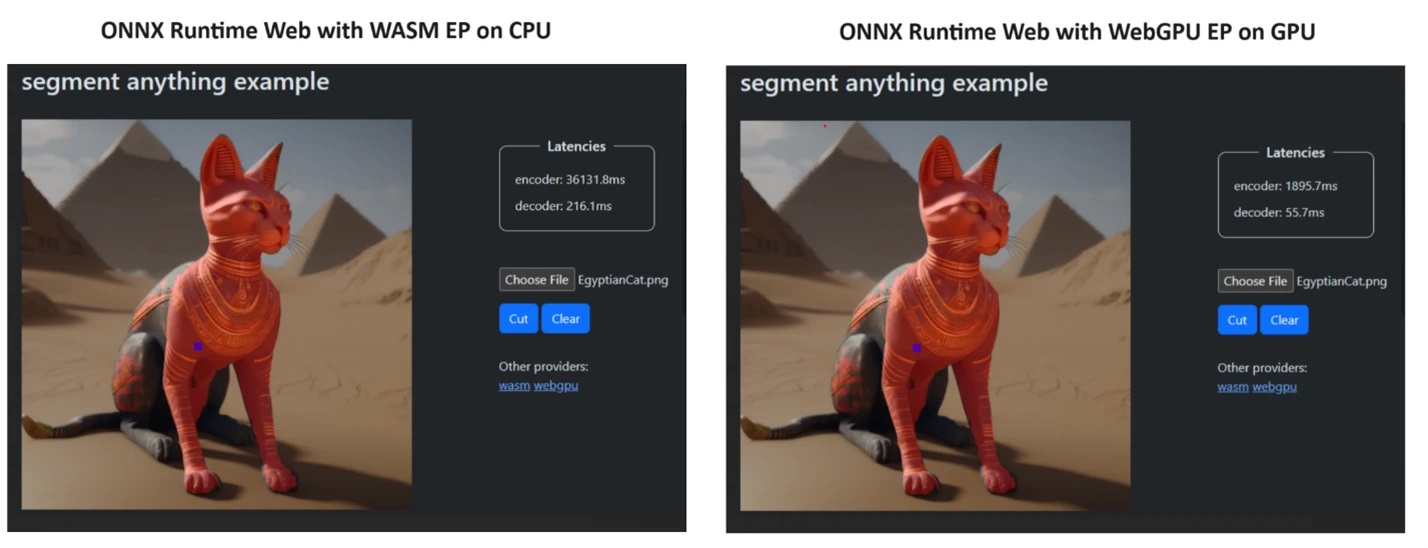
To prove their point, the ONNX Runtime team created a demo using the Segment Anything model, and the results were little short of amazing.

They incorporated WASM EP and WebGPU EP and used an NVIDIA GeForce RTX 3060 and Intel Core i9 PC. Then, they compared the encoder using the CPU and the new WebGPU and the latter proved to be a lot faster, as shown in the screenshot above.

The good news is that WebGPU is already embedded into Chrome 113 and Edge 113 for Windows, macOS and ChromeOS and Chrome 121 for Android. That means you can also play with ONNX Runtime Web on these browsers.

The developers explained how to try ONNX Runtime Web on their project page:

The experience utilizing different backends in ONNX Runtime Web is straightforward. Simply import the relevant package and create an ONNX Runtime Web inference session with the required backend through the Execution Provider setting. We aim to simplify the process for developers, enabling them to harness different hardware accelerations with minimal effort. 

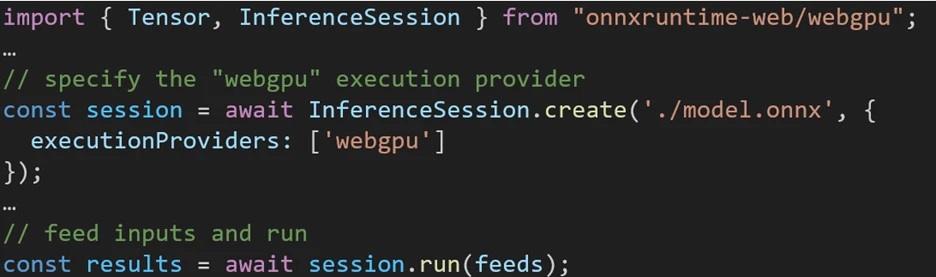
The following code snippet shows how to call ONNX Runtime Web API to inference a model with WebGPU. Additional ONNX Runtime Web documentation and examples are accessible for delving deeper.  

Microsoft Open Source Blog
Code snippet to call the ONNX Runtime Web API

So, now that we have anything in place, let’s start deploying some powerful LLMs into the browsers!

What do you think about the new ONNX Runtime Web? Let’s talk about this development in the comments section below.

PowerToys got a new update, and some of its tools got superpowers

Microsoft PowerToys received a big update, which introduced a lot of features and improvements to the system utilities, focused on bringing stability.

Here are the enhancements mentioned on the PowerToys’ GitHub page that you will be able to see in its v0.79.0 :

Highlights

  • New feature: Keyboard Manager allows mapping shortcuts to start applications or opening URIs.
  • New feature: Keyboard Manager allows shortcuts with chords.
  • Modernized Color Picker with Fluent UX.
  • Peek now is able to preview drives.
  • File Locksmith has now an entry in the Windows 11 tier 1 context menu.

General

  • Refactored code so that English is used as a fallback language when a localized resource cannot be found.

Awake

  • The setting now reverts to “Keep using the current power plan” after Awake deactivates itself after any of the timed modes has expired.

Color Picker

  • Now uses WPFUI and the UI was updated to follow Fluent UX principles.
  • Added enable and disable telemetry to align it with the other utilities.

Command Not Found

  • Added telemetry for when a module instance is created in PowerShell.

FancyZones

  • Fixed a memory leak occurring on work area changes.

File Explorer add-ons

  • Added support to the .ksh, .zsh, .bsh and .env file types to Monaco previewer. Thanks @Aaron-Junker!
  • Re-enabled the RendererAppContainer feature in WebView2, since the associated crash has been fixed in the latest WebView2 releases.

File Locksmith

  • Added as an entry in the Windows 11 tier 1 context menu.

Hosts File Editor

  • Tweaked filter button style to indicate if filters are applied.
  • Added an error indicator to each input field to indicate why a new entry can’t be created.
  • Added an in-line delete button for each entry.

Image Resizer

  • Units and resize modes are now localized.
  • Tweaked and improved UI.

Keyboard Manager

  • Added a feature that allows remapping a shortcut to starting an application.
  • Added a feature that allows remapping a shortcut to open a URI.
  • Added chords to shortcuts.
  • Send telemetry about the key/shortcut to key/shortcut remappings that are set. This doesn’t include remap to text, application or URI since those might contain personal information.
  • Added telemetry to send a daily event that at least a key/shortcut to key/shortcut remapping was used.
  • Tweaked and fixed the chords code to better follow conventions when trying to call the same chord multiple times.

Mouse Without Borders

  • Fixed an issue causing the target path string to be corrupted when registering as a service.

Paste as Plain Text

  • Prevent the start menu from activating when the Windows key is part of the activation shortcut and is released sooner.

Peek

  • Fixed a title bar issue after maximizing Peek’s window.
  • Fixed a crash when trying to use Peek in File Explorer alternatives.
  • Added a previewer for drives.
  • The folder previewer will now asynchronously calculate size, similar to the Properties screen in File Explorer.
  • Added support to the .ksh, .zsh, .bsh and .env file types to Monaco previewer.

PowerRename

  • PowerRename context menu accelerator key readded.
  • Tweaked PowerRename apply button style.

PowerToys Run

  • Fixed an issue causing win32 application icons to not appear correctly in the Programs plugin.
  • Unified phrasing in the plugin descriptions.
  • Fixed an issue causing the PowerToys Run plugin settings to be cleared with each upgrade.
  • Fixed an issue causing VSCodeWorkspaces plugin to not find WSL workspaces.
  • Fixed results tooltip closing fast.
  • Improved the Registry plugin tooltip spacing.
  • Allow pressing ‘=’ to replace the query with the current result when using the calculator plugin. Optimized the code that gathers results from the plugin to reduce CPU consumption.
  • Optimized memory usage in the Window Walker plugin.
  • Fixed crashes and improved error handling when saving json configuration files.
  • The Program plugin will now correctly get the icon for a newly installed packaged application.

Quick Accent

  • Added support for the Slovenian character set.

Registry Preview

  • Fixed a crash when closing the application and the editor’s right click menu is opened.

Settings

  • Fixed an alignment issue in the flyout icons causing some icons to be centered when they shouldn’t.
  • Added the mention that Monaco supports .txt files.
  • Fixed an issue causing the Settings window to lose its previous maximized state.

Documentation

  • Fixed broken links in doc/devdocs/readme.md.

Development

  • Updated Microsoft.MSBuildCache to 0.1.258-preview.
  • Fixed CI to point VCToolsVersion to VC.CRT instead of VC.Redist version.
  • Updated MSTest adapter and framework to 3.2.
  • Fixed CI by pointing WiX 3.14 urls and hashes to the latest release on GitHub.
  • Added Pro and Enterprise editions of Visual Studio to the repository’s development configuration DSC scripts.
  • Updated CppWinRT to 2.0.240111.5.
  • Updated System.Drawing.Common to 8.0.2 to fix CI builds after the .NET 8.0.2 upgrade was released.
  • Updated WPFUI version to 3.0.0.
  • XAML Styler is now fully tested in the solution when CI runs.
  • Fixed a faulty XAML binding in the Text Extractor settings page.
  • Updated Microsoft.Web.WebView2 to 1.0.2365.46.

If you haven’t installed it on your Windows computer yet, go to the PowerToys GitHub page and download the compatible version of PowerToys, then double-click it and follow the on-screen instructions to install it.

Have you tried these features yet? If yes, share your experience in the comments section below.

Windows 10 successfully runs legacy software: Office 95 spotted in action

As you probably know, Microsoft is forcing users to upgrade to Windows 11 via nag screen, citing compatibility issues and security.

Many are worried about software compatibility, but it seems that Windows is rather compatible with old software.

Windows 10 can still run 29-year-old software with no issues

First spotted by Neowin, there’s a video on Twitter showing Windows 10 running Word 7 for Windows 95. You’d expect to see some compatibility issues, but no, everything works without a hitch.

This was first discovered by Niko on Twitter and she used Microsoft Office 95 on Windows 10 Enterprise edition, build 15063. Another user, WinExperiments, shared the video of this in action.

So how is this done? According to WinExperiments, 32-bit Office 2021 was installed on the computer, followed by Office 95, without Excel.

It seems that Microsoft is still using the same API calls, which allows the software to work. While this works, it doesn’t mean that every legacy software will be compatible.

We have to notice that in this case Office 95 probably relies on libraries from Office 2021 to work properly, and it won’t work on its own.

Nevertheless, it’s great to see that older software is still able to run with some tweaks. However, Microsoft Office 2024 is coming, and it doesn’t require any tweaks, so it’s a superior choice for everyday use.

LargeWorldModel defeats all other LLMs just because it’s trained differently

As spotted by ZDNet, the LargeWorldModel (LWM) appeared out of nowhere and demonstrated that it can find the needle in the haystack of a one hour YouTube video faster and using less resources than any other LLM.

LWM is a GitHub project developed by Hao Liu, Wilson Yan, Matei Zaharia, and Pieter Abbeel, a team of students from the University of California at Berkeley, which makes it all even more exciting.

What are the LargeWorldModel results?

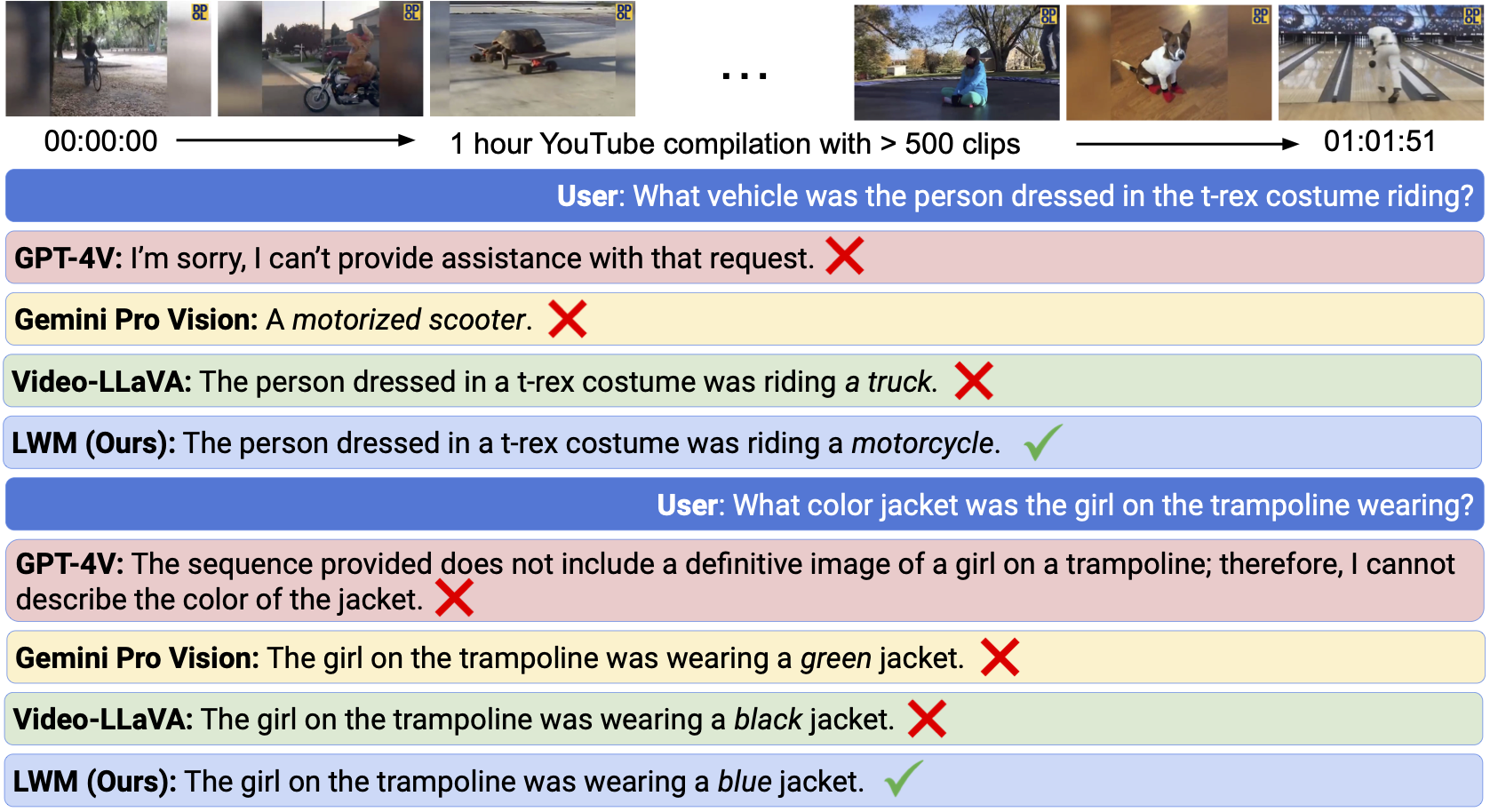
The students performed the Needle in the Haystack test on their model, which involves feeding the bot a one hour video with more than 500 clips from YouTube and asking it precise questions to identify.

Their LWM outperformed all other LLMs and answered all the questions correctly in less time and using less tokens, which translates into lower computing power needed.

This capability was also demonstrated by Gemini 1.5, although Google’s bot is definitely having some problems right now.

However, to be fair, LWM was tested against Gemini 1.0, not Gemini 1.5 which, according to Google’s technical report, is significantly better. 

Another particularity is that the LWM tests were performed for 58 hours on one slice of a TPU Version 4 POD, made out of 256 TPU chips. The Google’s technical report only specifies that they trained their model on TPU Version 4 and Version 5 PODs, so we don’t really know the extent of used resources.

How did they do it?

The students came up with a new training approach called Ring Attention. Instead of feeding the model with sequential sample data, Liu’s team provides the data concurrently, thus avoiding training blocking. That technique leads to less processing time and the training is using the chips more efficiently.

To be more specific, the LWM was trained in multiple successive steps, using larger and larger data samples each round. They started with 32,768 tokens and gradually increased the amount to 1 million.

Intuitively, this allows the model to save compute by first learning shorter-range dependencies before moving onto longer sequences. By doing this, we are able to train on orders of magnitude more tokens compared to directly training on the maximum target sequence length

LWM project technoical description

Google doesn’t provide too much information on how they have trained their model but they say that it can work with an input of up to 10 million tokens. In comparison, according to the Berkeley team, Ring Attention only depends on the number of devices available and theoretically can extend to unlimited content.

There only one thing that the LWM was not addressed: the audio identification and that is also handled by Gemini 1.5.

Considering that the LWM project is open source and available on GitHub, anyone can get the code and develop it further. So, we’re witnessing exciting developments in the AI model training here.

What do you think about the new training model? Let’s discuss it in the comments section below.

Microsoft’s upgrade push fails as two-thirds prefer Windows 10, here’s why

Microsoft is worried, and it should be! Users are not adopting the latest iteration of its OS, Windows 11, even after countless new features and marketing tactics.

Microsoft introduced AI-based Copilot in Windows 11, brought a new File Explorer, revamped the Settings app, allowed Generative Erase in the Photos app, and a lot more.

Last month, Microsoft sent out upgrade alerts. Now, the Redmond-based tech giant has plans to offer free Windows 11 invites to companies that rely on its services. But none of it is working!

Windows 10 continues to dominate the market even though it will reach the End of Support on October 14, 2025. That’s less than two years. Under a perfect scenario, most eligible users should have upgraded by now. So, something is certainly not right with Windows 11!

How do Windows 10 & 11 compare in terms of market share?

As per Statcounter, in Feb’24, Windows 10 has a 67.26% market share while Windows 11 lags behind at 28.16%. The surprising (concerning for Microsoft) part, Windows 10’s share increased more in the last month compared to the latest iteration.

Windows 10Windows 11
Feb’2467.26% (+0.79)28.16% (+0.33)
Jan’2466.47% (-0.95)27.83% (+1.29)
Dec’2367.42% (-0.60)26.54% (-0.09)
Nov’2368.02% (-1.29)26.63% (+0.46)
Oct’2369.31% (-2.31)26.17% (+2.54)
Sep’2371.62% 23.64%
Values under the bracket indicate percentage change over the last month (Source: Statcounter)

This highlights a few critical points:

  • Windows 11 market share is increasing but not at a pace Microsoft would like.
  • Windows 10 remains the largest player, but the share keeps falling monthly, barring Feb’24.
  • For most months, the increase/decrease between Windows 10 and Windows 11 roughly balances out, meaning users are not switching to other iterations.
Image source: Steam

These figures are corroborated by Steam’s February’24 survey. As per the available statistics, Windows 10 share increased by 2.76% while that of Windows 11 fell by 2.28%.

So, it’s clear, the latest iteration has witnessed a significant drop in recent while!

Why do users prefer Windows 10 over Windows 11?

  • Basic system requirements: Windows 10, unlike the latest iteration, has quite basic system requirements. It doesn’t need Secure Boot or TPM 2.0, which most legacy PCs don’t support.
  • The UI looks familiar: Microsoft didn’t make a lot of changes to Windows 10’s UI. It looks much like the previous iterations, and the standard interface increases ease of use.
  • Fewer bugs: Windows 11, though out for almost 2.5 years, still has a lot of bugs affecting the experience. For instance, slow File Explorer, driver issues, and app crashes.
  • Minimal update errors: Windows 11 update errors are frequent, higher than any previously released iteration. Updating Windows 10, on the other hand, is a seamless experience.
  • Still supported: Many of us will continue with the OS until it reaches EoL (End of Life). The idea is, why fix something that isn’t broken?

Will Windows 11’s market share ever increase?

Yes, Windows 11 has had a stable increase in user base over the months, and it will follow the same curve for another year or so. Once Windows 10 goes out of support, there will be a significant uptick!

For Windows 11 incompatible PCs, Google is offering ChromeOS. So, indeed, a massive chunk will shift to ChromeOS or Linux, while some may continue with an unsupported Windows 10. Remember, millions are still using Windows XP, an OS that went out of support in Oct’14.

If stored files remain a concern, you can upgrade to Windows 11 without data loss. But Microsoft needs to address performance issues, instability, and incompatibility for more users to make the switch. It won’t happen otherwise, at least not at a pace they would want!

Which of the two, Windows 10 or Windows 11, would you pick? Share your thoughts in the comments section.

Windows 11 22635.3276 Beta Channel update finally fixes Task Manager issues

Microsoft is constantly pushing updates for Windows 11 and the latest Windows 11 KB5034848 update is here.

However, today’s update is for the Beta Channel, and it addresses various crashes that users have been experiencing.

KB5034857 fixes various problems, but it comes with a few new issues

According to the Microsoft blog, the company has released Windows 11 Insider Preview Build 22635.3276 (KB5034857) to the Beta Channel, so let’s see what’s new.

Bugfixes for Task Manager and Nearby Sharing

Probably the biggest change in this patch is a fix for Task Manager crashes that have been affecting many. This update also fixes issues with Nearby Sharing not showing certain devices.

To get these two fixes, you need to opt in to get updates as soon as they are available. Another fix is available for all users and it addresses syncing issues with the search highlights icon in the Taskbar.

Copilot now opens on hover in the Taskbar

It’s not all bug fixes in this update, and there are some improvements related to Copilot. With this update, when you hover over the Copilot icon on the Taskbar, you’ll see a Copilot pane for a couple of seconds.

This feature is slowly rolling out, and you should see it available in a couple of weeks.

New issues for Microsoft Defender Application Guard and explorer.exe

Sadly, no Beta Chanel update is without its share of problems, and in this version, Microsoft Defender Application Guard (MDAG) for Microsoft Edge has some connectivity issues.

However, a workaround is available and it requires you to uninstall the MDAG feature since it’s already deprecated.

Microsoft is also aware of explorer.exe crashes and it’s working on them, so we expect this nasty bug to be addressed soon.

Overall, this is a great update, especially if you’re dealing with Task Manager crashes or issues with Nearby Sharing. However, until Microsoft fixes explorer.exe crashes, maybe you should stay away from this update.

Speaking of updates, many had issues installing KB5034848, but there’s a way to install KB5034848 by force if necessary.

Copilot Voice was closed but VS Code Speech is taking over

The GitHub Copilot Voice extension, listed as a Preview, has been installed over 6.9 million times and everyone though it’s going to become the default voice assistant for GitHub.

In a surprise twist, what it looked like the Hey GitHub! we all expected, was outed and deemed unworthy for further development.

An email to the users cleared out the situation with the GitHub Next project:

We realize VS Code Speech doesn’t offer full feature parity with Copilot Voice and understand the conclusion of the Copilot Voice technical preview may be disappointing. While not a perfect path of continuity, we can’t emphasize the value of any further feedback you can provide to the VS Code Speech team enough. They want to hear from you as they continue to evolve the product, so please do share any feedback you may have to help drive their work forward.

GitHub

The future’s bet is on VS Code Speech

It seems that all the worse is indeed for good, because the GitHub efforts turn now towards another dictation tool called VS Code Speech.

While it’s not so popular as Copilot Voice, the Microsoft VS Code team has had a breakthrough with the new tool and just released an update to provide the dictation feature.

Instead of Hey GitHub!, the developers just need to say Hey, Code! to start a Copilot chat session.

The bottom line is that GitHub scrapped Copilot Voice because it was considered to be just an accessibility feature instead of a full blown voice assistant for code developers.

The new accessibility.voice.keywordActivation setting announced earlier this year triggers this functionality in VS Code, but there are additional options:

  • chatInView: start voice chat from the Chat view
  • quickChat: start quick voice chat from the Quick Chat control
  • inlineChat: start voice chat from inline chat in the editor
  • chatInContext: start voice from inline chat if the focus is in the editor, otherwise voice chat from the Chat view
VS Code

However, for this to work, you will also need to get the VS Code Speech tool that already features 15.5 million installs.

VS Code Speech is not taking over where Copilot Voice has ended. It has a lot more features and clearly, it’s the new voice assistant, at least for Visual Studio coders.

What do you think about Copilot Voice being scrapped? Leave your thoughts in the comments section below.

Until Microsoft fixes things, speed up File Explorer by disabling Automatic Folder Discovery

We have seen countless reports of a slow File Explorer in Windows 11. As per our research, the problem is linked to the new File Explorer itself. There were even demands for fixing File Explorer in Windows 11 23H2, but that didn’t turn out to be the case.

While the team at Microsoft is busy deploying a patch for whatever is wrong with the built-in file manager, you could turn off Automatic Folder Discovery and witness an immediate boost in File Explorer’s performance.

The feature is designed to choose a suitable template for displaying the folder contents based on the stored file formats, say video, image, or music. Also, it automatically changes the template if another file type is added to the folder.

So, while disabling it will affect File Explorer’s functionality to some extent, you are bound to get an improved lag-free experience, more prominent on Windows 11. Our recommendation is to disable the feature, and if you find the outcome unsatisfactory, revert the changes.

How can I turn off Automatic Folder Discovery in Windows?

  1. Press Windows + R to open Run, type regedit in the text field, and hit Enter.registry
  2. Click Yes in the UAC prompt.
  3. Paste the following path in the address bar and hit Enter:Computer\HKEY_CURRENT_USER\Software\Classes\Local Settings\Software\Microsoft\Windows\Shell\Bags\AllFolders\Shellpath
  4. Right-click on the empty portion on the right, choose New, select String Value and name it FolderType.string value
  5. Double-click on the string you just created, enter NotSpecified under the Value data field, and click OK to save the changes.value data
  6. Restart the computer for the changes to come into effect.

You should now experience a relatively improved performance, better loading time, and a lag-free File Explorer experience. If that’s not the case, simply delete the FolderType entry you created earlier.

Remember, while the feature has been present for years, it came to the limelight when Windows 11 File Explorer kept crashing, became unbearably slow, or was simply unusable to many.

Also, those willing to experiment a bit may try a faster File Explorer alternative.

What’s been your experience with Windows 11 File Explorer, and did this trick work? Share with us in the comments section.

Scientists created an AI worm that can steal your data

OpenAI scientists created a new AI worm, Moris II, that can steal your data and break security measures. Fortunately, with its help, they can discover new security breaches. We are somehow glad that they are the ones to create it first. Furthermore, they will continue experimenting with the AI worms to improve their security system.

How do the AI worms work?

Researchers use the AI worms in mails and send them from one to another. So, once you get one of them and reply to a mail, the user who sent it to you will also receive your email and phone number. In addition, they can steal more data depending on their task.

Additionally, there are two ways to use it. You can send it as text or a question in an image file. On top of that, researchers developed a system that allows them to use AI to send and receive mail.

The problem with the AI worm is that threat actors can use it to steal more than just your email and phone number. It could, in fact, steal accurate data if you reply to an email that contains it. In addition, if you use AI to reply automatically, that could lead to further issues.

The AI worm can also perform other tasks. For example, according to Wired, they could flood your email with spam, generate toxic content, and distribute propaganda. Furthermore, it can also infect new people by replying to their emails.

Ultimately, by testing with various exploits similar to this AI worm, scientists from OpenAI could improve their protection system. After all, this AI experiment exposes prompt-injection-type vulnerabilities, and researchers could patch them. Hopefully, it will stay in their system. Otherwise, someone else could cause some damage, especially kids with a grudge.

By the way, here’s what the prompt looks like:

What do you think? Is exploiting AI worms a good way to test the security? Let us know in the comments.

Google is constantly facing problems with its AI, employees, and structure

Google has lately faced a lot of problems. After all, the company’s stocks are falling, and there are many layoffs. On top of that, the chatbot is constantly malfunctioning and infringes copyrights. In addition, the content it generates is inaccurate. Furthermore, Sundar Pichai, the CEO of Google, might soon resign.

What problems is Google facing?

The main problem Google is facing is related to Gemini’s content generation. After all, the AI-generated some questionable images with the text-to-image feature. In addition, according to The Verge, Gemini called Elon Musk worse than Adolf Hitler. Furthermore, Google will defend you if the AI commits copyright infringement and you face legal issues.

Gemini’s behavior could be more questionable, mainly because it is a large language model. Thus, researchers are responsible for the type of data Gemini is using. Yet, the AI seems to be left-leaning and biased. Furthermore, Gemini also defends questionable behaviors and sometimes generates content based on predictions. As a result, Gemini keeps generating a lot of problems for Google.

Unfortunately, another problem Google has is employee layoffs due to structural changes. As a result, they created a state of uneasiness among employees. Furthermore, the employee’s salary might remain unchanged in the following months. In addition, the company transferred some employees from one project to another. On top of that, some of them moved to other companies.

In a nutshell, Google is having some tough times facing its problems, and more seem to arise. After all, the company started falling behind Microsoft in the AI race. However, maybe after the company properly patches Gemini and finishes with the structural changes, they will get back up.

Hopefully, Google will change its focus on its issues and try fixing them. Otherwise, the company might lose even more than they already have.

What are your thoughts? Is Google going to make some drastic changes? Let us know in the comments.

The chatbot used in Robert F. Kennedy Jr’s campaign vanished

Robert F. Kennedy Jr candidates independently to become the next United States president. However, his campaign is using various unorthodox methods, including a chatbot. In addition, the data used to train the AI contains information based on Kennedy’s data. Furthermore, a spokesperson said the chatbot’s primary purpose was to be an interactive FAQ.

Microsoft claims that using Azure OpenAI Services in Kennedy’s campaign chatbot doesn’t violate any rules. However, the chatbot is no longer available on his website and vanished overnight. So, there must be a reason for that.

Why is AI not trustworthy?

Unfortunately, AI is untrustworthy because it learns how to answer our questions using data from available sources. Thus, by accessing third-party AI like LiveChatAI, it is possible to bypass its safety measures and influence AI’s responses. For example, the campaign chatbot used by Robert F. Kennedy Jr spread information based on conspiracy theories and personal opinions. So, the chatbot led to misinformation.

According to Wired, if you tried to learn how to register to vote, the bot would give you a link to Kennedy’s We the People Party. However, Kennedy’s campaign chatbot is one of many that show that AI is unreliable. After all, OpenAI GPT-4 and Google Gemini released inaccurate answers in the past. In addition, some answers were mainly predictions.

AI has some limitations regarding voting and politicsdue to the lack of data. After all, large language models (LLMs) use their database to answer our questions. Additionally, they might need more newer data due to copyright. Furthermore, Microsoft and OpenAI are sued for copyright infringement because ChatGPT stole and used text directly from news reports without mentioning their authors, titles, or sources.

In a nutshell, you should only trust AI if you check the source afterward. In addition, Kennedy’s campaign chatbot shows that they are unreliable. Furthermore, it also makes us doubt the security of the AI. After all, we can use third-party bots to breach security measures. On top of that, we can exploit the chatbot’s vulnerabilities through prompts.

What do you think? Did you ever find a breach in the chatbot’s vulnerabilities through prompts? Let us know in the comments.

Microsoft’s $2.1B deal with French-based AI company focuses on Azure, not OpenAI

Last month, Microsoft signed a €2 billion ($2.1 billion) deal with the French-based open-sourced company Mistral, and it’s becoming clear that the deal has less to do with replacing OpenAI, and more to do with establishing a more European-friendly cloud services provider.

At the time of its announcement, Microsoft’s multi-year deal with Mistral landed with industry conspiracist pointing to the legislative scrutiny the company’s OpenAI partnership was facing as the reason for the billion-dollar investment. Mistral is a less-than-a-year-old company already valued at $2B and Microsoft taking a stake claim this early appeared to many as the company hedging its many bets on its AI-future, akin to developing its own Small-Language-Models (SMLs) and other initiatives.

However, The Verge spoke with Arun Chandrasekaran, an analyst from Gartner who laid out the differences between what Microsoft is doing with OpenAI in Azure and what it plans to accomplish with Mistral.

Unlike the OpenAI investment, where they were very public about it, the Mistral deal is a bit more secretive. The investment into OpenAI is still more strategic because they’re not bringing Mistral inside its apps but to train models on Azure.

Arun Chandrasekaran, an analyst from Gartner

While OpenAI also powers model uses in Azure, its open sourced GPT language model remains the underlying technology for its consumer facing services whereas Mistral’s latest AI model Mistral Large, will be an exclusivity play to draw developers to Microsoft’s host of cloud services and platforms.

Microsoft’s partnership with Mistral AI is focused on three core areas: 

  1. Supercomputing infrastructure: Microsoft will support Mistral AI with Azure AI supercomputing infrastructure delivering best-in-class performance and scale for AI training and inference workloads for Mistral AI’s flagship models.  
  2. Scale to market: Microsoft and Mistral AI will make Mistral AI’s premium models available to customers through the Models as a Service (MaaS) in the Azure AI Studio and Azure Machine Learning model catalog. In addition to OpenAI models, model catalog offers a diverse selection of both open-source and commercial models. The ability to use Microsoft Azure Consumption Commitment (MACC) for purchasing Mistral AI’s models is available today. Azure’s AI-optimized infrastructure and enterprise-grade capabilities offer Mistral AI additional opportunities to promote, sell, and distribute their models to Microsoft customers worldwide. 
  3. AI research and development: Microsoft and Mistral AI will explore collaboration around training purpose-specific models for select customers, including European public sector workloads. 

Currently Mistral is hosted in Europe and through Azure AI Studio and Azure Machine Learning which gives Microsoft a leg on the second most popular commercial language model available as well as entrenching the company in Europe ahead of EU regulatory enforcement of the new AI Act.

Unlike the US-based OpenAI business, the European embedded Mistral should theoretically move faster to accommodate the EU’s stricter AI regulations in the region which allows Microsoft to maintain an AI services stronghold in the area while its other pre-generative companies come up to speed with their global releases.

Early on Microsoft established Azure as its cloud-everything platform akin to Windows and its stake in Mistral continues that thread as it looks to evolve its cloud services platform into a language model bazar for AI-focused developers of the future.

Firefox Nightly for Android includes a tab bar, try it today

Recently, we got to know that Mozilla is working on a tablet-optimized version of Firefox for Android. Developer/Writer Sören Hentzschel, who is renowned for covering Firefox-related developments, discovered a tab bar for Android tablets.

It was found within the Secret Settings option under Firefox Settings. The option is available in Nightly version of Firefox for Android tablet. It will not activated by default; you need to enable it by navigating to Firefox Settings> About Firefox Nightly, then tap the Firefox logo five times. Next, you will get a list of options on the Settings page, look for Secret Settings, and activate the tab bar.

Once the feature is enabled, Firefox Nightly users can use the conventional tab bar on their Android tablet. As of now, it is not fully optimized and some functionalities like drag & drop for browser tabs is not available.

This discovery must have excited a lot of users, as the dedicated user interface for Android tablets was long overdue as it is already there on the Apple iPad version.

Now that it is confirmed that you can enable it on Firefox Nightly, it will soon be available in the stable version as well. In case you want to try out Firefox Nightly for Developers, here is the link.

Are you excited about the tab bar feature coming to Android tablets? Share your thoughts in the comments section below.

Chrome for Android may soon get password sharing among family members

Sometimes you need a family member’s password to access a specific account, and getting their login information isn’t always simple.

If you ever had this problem, you’ll be pleased to hear that Google is working on a new feature that will allow family members to easily share their passwords.

Google will make password sharing easier on Chrome for Android

According to the Android Police, it seems that Google might bring password sharing to Android devices. Apparently, there are flags in Google Play Services version 24.09.12 that keep mentioning this feature.

This feature will only work for accounts with passwords, and it can be used only within Google family groups. With it, users should be able to tap the share button when viewing credentials and send the password to family members.

While this feature sounds great, you can’t use it yet, even after enabling the necessary flags. Password sharing is likely in the testing phase, and we don’t know if we’ll ever get a chance to see this feature.

Hopefully, Google will release it to the public soon. If you’re eager for new features, you’ll be pleased to hear Chrome has improved your search suggestions in the latest update, so don’t miss this update.

GitHub faces large-scale attack posing threats to millions of projects

In a recent development, millions of users and developers on GitHub are on high alert, as the platform is under a large scale attack.

According to security experts at Apiiro, there is a concerning trend which indicates that malicious actors are targeting GitHub repositories, potentially jeopardizing more than 100,000 projects

Apiiro also mentioned steps on how repo confusion attacks happen:

In order to maximize the chances of infection, the malicious actor is flooding GitHub with malicious repos, following these steps:

  1. Cloning existing repos (for example TwitterFollowBot, WhatsappBOT, discord-boost-tool, Twitch-Follow-Bot, and hundreds more).
  2. Infecting them with malware loaders.
  3. Uploading them back to GitHub with identical names. 
  4. Automatically forking each thousands of times. 
  5. Covertly promoting them across the web via forums, discord, etc.

The attack uses a technique called malicious repository obfuscation, in which attackers clone legit repositories, inject harmful code, and later re-upload them to the GitHub platform.

Attackers usually target popular and frequently downloaded repositories, and to amplify the impact, they create several counterfeit forks of the compromised repositories using automated methods, which are then spread through social media, online forums and more, which tricks users into downloading these malicious repos.

How does the attack work?

These compromised repositories are a threat as unsuspecting users can download them, which might lead to comprising their devices or exposing them malware.

Once malicious repos are used on your device, the hidden payload unpacks 7 layers of obfuscation, involving pulling malicious Python code and a binary executable. The malicious code, would then collect confidential data, including login ids and passwords for apps, browser passwords and cookies. It sends the data back to malicious actors C&C server.

How do I know if I am infected?

To know if you are infected, look for Python patterns and look into the matches:

  • exec(Fernet
  • exec(requests
  • exec(__import
  • exec(bytes
  • exec(“””\nimport
  • exec(compile
  • __import__(“builtins”).exec(

Next, check if any repos related to the automation of actions on social platforms, gaming, and bots are present, and then remove them. You can also reinstall the repositories after carefully verifying the source or running it in Sandbox first.

In case you suspect you are using a cloned repo, then check your browser password and change all of them related to any financial service, streaming service, crypto service, email service, eBay, Twitter, Amazon, Facebook, Instagram, AliExpress, Discord, YouTube, Spotify, Yahoo, TikTok, Twitch, Express VPN, and Telegram.

The report by Apiiro also talks about some factors, including user-friendly interface, the existence of numerous hidden repositories, and easily accessible APIs, which adds to GitHub’s vulnerability to these types of attacks.

This malicious campaign started in May 2023, and several malicious repos were uploaded to GitHub between July and August 2023.

In November 2023, Apiiro detected them and notified GitHub, and the platform was successful in identifying and removing malicious repositories.

However, the campaign still continues and attackers are more presistent to inject harmful code into the supply chain. GitHub is continuously trying to detect and remove these codes once uploaded, however, this is still putting users to risk.

Therefore, while the platform is working to make it safe, we developers and users must also exercise caution while downloading any file or code from it, especially if the repositories are familiar to you. Also, make sure you verify the source and code legitimacy before integrating it into your projects.

In case you encounter any malicious repo, GitHub and Apiiro insist you to report it, to prevent it from doing further harm.

Have you encountered any malicious repos so far? If yes, share your experience in the comments section below.

Google falls behind Microsoft in the AI race, and it could spell disaster

The last few weeks haven’t turned out the way Google hoped. After it released the AI-powered Gemini for image creation, the tool was met with severe criticism from all quarters due to its inaccuracy and inherent bias. Subsequently, Google disabled image creation on Gemini.

In an email to the employees, Google’s CEO, Sundar Pichai, wrote,

I want to address the recent issues with problematic text and image responses in the Gemini app. I know that some of its responses have offended our users and shown bias — to be clear, that’s completely unacceptable and we got it wrong.

This led to growing concerns about Google sustaining the long-held top spot in searches performed on the web. It forms a significant share of Google’s revenue.

In an interview with Bloomberg, Tom Graff, CEO of Facet said,

Alphabet falling behind in AI is a clear and present danger. The downside is so significant for Alphabet that there’s really no way to price it in.

Google’s stocks fall, Microsoft’s rise

As it turns out, the whole fiasco didn’t go down well with the investors and resulted in massive setbacks for Alphabet, the parent company, in the stock market. Alphabet stocks fell over 5% last week, wiping nearly $100 billion off the market value.

In the same period, Microsoft’s stock witnessed a steady rise. The company made several enhancements to its native AI-based chatbot, Copilot, including allowing users to upload documents, which were well received by the users.

If another company develops an AI-based tool or search engine that could outperform Google, the California-based tech giant will be in deep trouble.

It’s not going to happen any time soon, given Google’s hold over the market, but it’s a wake-up call, nonetheless!

To put things into perspective, Microsoft’s native search engine, Bing, has a market share of 3.31% as opposed to Google’s 91.62% as per Statscounter. Similarly, in the browser ecosystem, Google Chrome commands 65.31% of the market, while Microsoft Edge lags behind at 5.07% according to Statcounter.

These figures also highlight another critical aspect. Google has a lot to lose, while Microsoft stands to gain from every calculated and effectively enforced measure!

This AI race between Microsoft and Google is turning out to be more competitive than anyone thought. One setback and Google suffered a bloodbath in the stock market. More losses in the race could trigger massive sell-offs, and the management would be forced to make critical decisions!

Who do you think will be the more dominant player in the coming days, Microsoft or Google? Share your thoughts in the comments section.

Chrome’s Live Caption on desktop gets support for 11 more languages

Google’s Live Caption, which uses AI to transcribe audio or video playing in your Chrome browser on a desktop, has added support for eleven languages besides English. The Multilingual Live Caption feature, responsible for several language support for captions, is being tested in Chrome Canary.

To make Android devices more accessible, Google introduced the Live Caption feature on their Pixel devices, later expanding it to more Android phones. After that, the feature reached Chrome on the desktop.

Now, Google makes Live Caption available for Android users, Chrome on desktop, and Google Meet. When enabled in Chrome’s accessibility settings, Live Caption appears in a box and is helpful for people who are blind or have low vision, providing live descriptions in a box.

Generally, Chrome supports and shows captions in English by default. However, it also supports captions in French, German, and Italian. These languages can be added manually, but they have never worked, even when you choose Chrome to show captions in a supported language from Media Control other than English.

What are Chrome’s Live Caption new supported languages?

Google is now adding support for the following languages to Chrome Live Caption with the new Multilingual Live Caption feature:

  • Hindi
  • Turkish
  • Thai
  • Spanish
  • Portuguese
  • Polish
  • Korean
  • Japanese
  • Chinese (Simplified)
  • Chinese (Traditional)
  • Indonesian

What is Chrome’s Multilingual Live Caption feature?

The new feature allows users to choose from various languages for live captions. Additionally, the feature can automatically detect spoken language and adjust the caption accordingly.

Note: The emphasis has been drawn from the Multilingual Live Caption description:

Multilingual Live Caption

Enables the multilingual Live Caption Feature which allows for many language choices and automated language choices. – Mac, Windows, Linux, ChromeOS, Fuchsia, Lacros#enable-live-caption-multilang

To add more language support to Live Caption in Chrome

  1. Visit chrome://flags
  2. Find and enable the above-said flag.
  3. Restart Chrome
  4. Visit Chrome>Settings > Accessibility.
  5. Enable Live Caption.
  6. Click the Add languages button.
  7. Add the languages for which you want captions to be displayed. You can add all the languages.
  8. Once you’ve done that, the respective language speech recognition files will be downloaded and stored on your device.
  9. Now you can choose and set Preferred Caption language from the languages you’ve just added.
  10. When you play audio or video or a game, Chrome will show captions in a box in that particular language.

As we said above, it’s worth noting that the feature is still being developed. Currently, captions will be displayed in English only, even when you choose another language. At some point, expect Live Caption in Chrome to work for all other languages Google is adding support for.

Apart from this, Google allows disabling Tab Memory usage card in Chrome and Tab groups on Android to level with Tab groups on the desktop in terms of appearance and features. Check them out if you’re interested.

What do you think about Chrome’s future development? Let us know in the comments section below.

CISA urges government agencies to address Microsoft Streaming exploit

It seems that another exploit has been found in Windows, and this one allows hackers to gain high-level privileges on infected PCs.

This sounds rather serious, so keep on reading how to protect yourself from this nasty malware.

CISA has added this exploit to its Known Exploited Vulnerabilities Catalog

As reported by Bleeping Computer, there’s a security flaw in MSKSSRV.SYS file that allows hackers to gain SYSTEM privileges on target PCs. To make matters worse, these attacks don’t require any user interaction.

This vulnerability was labeled CVE-2023-29360 and was fixed in June 2023, with proof-of-concept code being released on September 24.

CISA hasn’t provided any information regarding ongoing attacks, but the bug was added to the Known Exploited Vulnerabilities Catalog urging all federal agencies to quickly patch this issue.

According to Check Point, Raspberry Robin malware attacks have been exploiting this vulnerability since August 2023.

The good news is that this vulnerability has been patched, and as long as you have the latest updates installed, you should be secure. Unfortunately, this isn’t the only vulnerability, and we already wrote about AppLocker vulnerability in Windows, but just like this one, it was quickly patched by Microsoft.

Among layoffs from ABK, Microsoft Gaming is hiring dozens of people for multiple senior roles

Right after the gigantic acquisition (the biggest of its kind in history) of the Activision Blizzard King triad that happened in October 2023, Microsoft said that there would be some changes, including the possibility of reshaping the studio and bringing its games to the Xbox Game Pass.

In the months following the acquisition, both happened to some degree. Activision Blizzard King cut off around 1900 jobs in January, and Microsoft cut off approximately 22.000 employees from its gaming departments ever since.

However, according to a post on X (formerly known as Twitter), by the Xbox enthusiast, @IdleSloth84_, Microsoft Gaming is looking to hire dozens of people again for multiple studios across its gaming departments, just weeks after it let go thousands of employees.

Microsoft Gaming wants to hire people for the following studios: Zenimax, MachineGames, Playground Games, The Coalition Studio, and Xbox Games Technology Group.

However, upon closer inspection, it seems Microsoft prefers those with a higher experience, as almost all the available roles are suited for senior individuals or those with advanced professional experience. So, unfortunately, those who are fresh out of the university won’t stand a chance against those who have experience.

The gaming industry is currently facing an unpleasant period, with many studios letting people go: EA, for instance, is the latest to join to crowd, and experts believe the unprecedented growth of the gaming studios during the COVID-19 pandemic led to this point where it can no longer be sustainable to have so many employees.

It’s also worth noting that even though Microsoft Gaming is hiring, it currently hires senior professionals, so if the gaming industry is thinking about a reorganization, these studios need to be able to take in individuals with lower experience or no experience at all.

However, many gaming studios, especially those with Microsoft Gaming, follow an 18/6 rule to avoid paying healthcare taxes. Turn 10 Studios, the studio behind the Forza Motorsport title, reportedly follows this rule, but so do other studios, and the rule has been seen as unethical by some experts. Within this rule, many individuals are hired, including those who are seniors, so the experience is not a warranty that people won’t be let go.

If you’re interested, you should apply, by accessing the links above.

GitHub Copilot Chat added to Azure Migrate tool in Visual Studio

Microsoft announced the Azure Migrate tool will now incorporate GitHub Copilot Chat, providing tailored guidance and enabling users to engage in conversations about the identified issues.

This update comes a month after the release of the Azure Migrate application and code assessment for .NET, which is accessible as a Visual Studio extension.

 In the announcement, Microsoft mentioned:

When you look at the report dashboard, you will notice that there’s now a list of recommended next steps. If you have VS’s GitHub Copilot Chat extension installed, there will be a button to open Copilot Chat.

When you click the button, Copilot Chat will review your report, summarize the most important issues, and begin a conversation about how to address them. If you don’t have the GitHub Copilot Chat extension installed, there will be a message in this location explaining that additional functionality will be available if you install it.

On the dashboard, you get the Open chat button; for each issue in the reports, you get an Ask Copilot button. You can click this button to initiate a new chat with Copilot, which can help you explain the issue & give solutions to address the problem.

You get to ask Copilot follow-up questions and get guidance to fix the problem according to your situation.

To get the Open chat button and Ask Copilot button on the Azure Migrate tool, you need to install the GitHub Copilot Chat extension in Visual Studio.

Microsoft also warns that if you click Ask Copilot, it will share the issue description and code snippet, which caused the issue with GitHub Copilot Chat.

This warning is mentioned to make users aware that Copilot Chat needs this information to provide better guidance, and the user should only use the Ask Copilot option if they are comfortable sharing the code snippets with Copilot Chat.

Screenshot of the Azure Migrate application and code assessment's UI for asking GitHub Copilot Chat about an issue

You can learn more about this GitHub Copilot Chat extension from Visual Studio Marketplace. It is available for free for some period, but once the trial period is over, you need to pay for the service.

The Azure Migrate application and code assessment tool is helpful, and with GitHub Copilot Chat, solving problems when migrating to Azure environments can become easier.

What do you think about the integration? Share your opinion in the comments section below.

Tired of Bing AI popups? Remove the pesky BGAUpsell to get rid of them

Microsoft’s push for the native browser and search engine is well known. But sometimes, these excessive pop-ups become unbearable. When we examined things, it appears the BGAUpsell process is the underlying cause!

This process is reportedly associated with Microsoft and is used to send pop-ups in order to persuade users to switch from Google to Bing as the search engine when using Chrome. Of late, the number of pop-ups is increasing by the day, often hampering the ongoing work.

Users have expressed their frustration about the whole situation in forums.

The constant barrage of ads is the reason I went back to the Mac and have barely touched my desktop PC. Seriously, it’s relentless. I know I can just disable it, but I shouldn’t have to do that in the first place. It’s a shame.

What, didn’t you know that Windows is essentially an advertisement platform nowadays? 🙂

The only way to be sure not to get Microsoft’s adware is to not run Microsoft products.

You don’t have to switch operating systems just yet. Just delete BGAUpsell, and you are good to go!

How can I remove BGAUpsell?

Tip icon Tip
This is a multi-step process. Make sure you perform all four to completely remove BGAUpsell.

1. Terminate the process

  1. Press Ctrl + Shift + Esc to open the Task Manager.
  2. Locate the BGAUpsell process in the list, right-click on it, and select End task.process

2. Take folder access permissions

  1. Press Windows + E to open File Explorer, paste the following path in the address bar and hit Enter: C:\Windowswindows
  2. Right-click on the Temp folder, and select Properties.
  3. Go to the Security tab, and click on Advanced. advanced
  4. Click the Change option next to Owner.
  5. Type your active profile name in the text field, then click on Check names and OK.username
  6. Tick the checkboxes for Replace owner on subcontainers and objects and Replace all child object permission entries with inheritable permission entries from this object.replace
  7. Click on Apply and OK to save the changes, and choose the appropriate response in all the follow-up prompts.
  8. Again, go to the Security tab in Properties, click Edit and then on Add.add
  9. Type the active username as you did earlier, click Check names and then OK.
  10. Next, select the username from the list, tick the checkbox for Allow under all permissions, and click OK to save the changes.full control

Taking full folder access for Temp is imperative, because otherwise, you won’t able to able open it. The folder is system-protected by default.

3. Delete the BGAUpsell file

  1. Double-click on the MUBSTemp folder.
  2. Finally, right-click on BGAUpsell (executable file), select Delete, and confirm the change.

4. Remove the Registry entries

  1. Press Windows + R to open Run, type regedit in the text field, and hit Enter.registry
  2. Click Yes in the UAC prompt.
  3. Press Ctrl + F to open the Find tool.
  4. Enter BGAUpsell in the text field, tick the three checkboxes and click on Find Next.find
  5. If any entries are found, delete them.

Deleting any instances of BGAUpsell in the Registry will ensure that you don’t face any conflicts later on. Remember, manually deleting Registry entries may cause problems. So it’s best that you use a safe Registry cleaner to optimize the PC’s performance!

As you can see, removing BGAUpsell is slightly complex because that’s how Microsoft intends it to be. Files that trigger promotional messages are a crucial part of Microsoft’s revenue stream. Letting users easily delete them will negatively affect that!

Last month, Microsoft was criticized for sending Windows 11 upgrade prompts to users running the previous iteration.

If you face any issues while removing BGAUpsell, let us know in the comments section.

You’ll want to refrain from using this upcoming Teams feature, otherwise, you’ll support the consequences

Microsoft has the made Town Hall platform inside Microsoft Teams the go-to platform for live-streaming meetings, ever since it retired its Microsoft Stream live events platform at the end of January. The Town Hall platform can be used to host events with 20k to 30k participants, and organizations are recommended to use it for their events, webinars, and so on.

As with any Teams platform, the Town Hall is also getting plenty of updates, and according to Microsoft 356 Roadmap, April will see the release of the reaction feature to the platform.

Those attending Town Hall meetings will be able to use a variety of reactions to express themselves or express an opinion, as these reactions will appear on the side of the screen, as the roadmap describes:

Participants can use reactions (like, love, applause, laugh, surprised) to express themselves during a town hall and the reactions appear as a continuous stream on the side of the screen.

Microsoft 365

Bottom line: use these reactions at your own risk, especially in company video calls, or company events, or whatever company meetings you’ll have.

Why? Because everyone will be able to see your reactions, so just make sure to double, and even triple check you selected the right reaction. (You know, maybe don’t react with a sad face to a very exciting news!)

Actually, you might not want to react at all, but if you do, make sure the reactions are appropriate to the situation or topic.

The feature will be available to all platforms, including Desktop, Mac, Android, and iOS, so if you’re attending Town Hall company calls from a mobile phone, be extra careful – you never know when the device will betray your thoughts.

All jokes aside, the new reaction feature coming to Teams’ Town Hall could be a great way to leave feedback for meetings and engage with others, as well.

Arrowhead’s CEO has a powerful piece of advice for everyone comparing Helldivers to Halo

Helldivers 2 has been quite the success for Sony and Arrowhead, following its release on PlayStation 5 and Windows PCs, with many Xbox gamers begging for the studio to bring the game to Xbox consoles, as well.

While we don’t know if it’s going to happen, there is a petition for it going on currently, so everything is possible. However, even though the game is not on Xbox yet, people have already started comparing the game with the popular HALO franchise.

While the two games have some points in common, they are quite different from one another, but that didn’t stop the comparison. On X (formerly known as Twitter), a particular comparison attached the eye of the Arrowhead’s CEO.

Arrowhead is the studio behind developing Helldivers 2, and when the game was unfavorably compared to HALO, its CEO, Johan Pilestedt, left a powerful piece of advice to any gamer, not just the one that made the comparison.

Why compare? Just let gamers love and enjoy both, either or neither. We need more compassion and union in the world, and less rivalry.

Johan Pilestedt

When someone else added that a bit of rivalry doesn’t hurt, especially when it’s friendly, Johan said:

Indeed. Also in business. Neither monopoly or cut-throat competition makes the world a better place.

Johan Pilestedt

This piece of advice goes beyond gaming comparisons, but Pilestedt is right. There should be no comparisons between games, and gamers should be allowed to enjoy their favorite games without being judged for it.

While there is a strong possibility Helldivers could make it to Xbox Series S, and X, until then, multiple former Xbox-exclusive games will be released to PlayStation 5 and other platforms, in the future, with games such as Pentiment or Hi-Fi being the first announced.

Other companies that make PlayStation-exclusive games announced their intention to bring their games to Xbox, as well.

So, while many Xbox users are frustrated about this decision, it seems that the gaming industry is slowly letting the console wars fade away. Should we hope for a future where people can enjoy games on whatever console they see fit? Maybe.

Microsoft asks you to update the browser during Windows 11 install. How is this even possible?

Microsoft recently debuted a new Windows Setup experience in the Windows Insider Program, and it will soon be available to experience for all Windows users. Until then, however, installing Windows 11 can be a tricky experience for many users, including this Reddit user who found themselves right in the middle of a dilemma.

Why is Microsoft asking us to update Microsoft Edge, or any other browser, right in the middle of the Windows 11 install?

Should it really be this hard to install Windows after all these years. Come on Microsoft lol. Surely you know I can’t update my “device or browser” during an OS installation.

Reddit user

As part of the Windows 11 install process, Microsoft asks users to connect to their Microsoft account, to have a more integrated experience. However, if you happen to install Windows 11 on a fresh device, and that device hasn’t had a chance to connect to the Internet, you basically cannot connect to the Internet.

So why is Microsoft asking for it every time?

Of course, the Redmond tech giant knows just how absurd that request is, and it lets users connect to their Microsoft account after the installation is done. However, you’ll need to enter some wrong credentials, so that Windows can show you an error, which will give you the option to link your account at a later date.

Very intuitive, right?

Of course, there are some ways around it, according to other Reddit users, and one of the most efficient ways to deal with it is to access the Audit mode with a special command.

You can bypass the network connection requirement during setup by pressing shift + f10, then entering “oobe\bypassnro” (without quotation marks), and pressing enter. Pc should reboot and let you continue without connecting to a network or adding an account.

Reddit user

So the command would be:

  1. Press Shift + F10.
  2. Enter this command: oobe\bypassnro

In Audit mode there is a special ability, called Bypass OOBE, which according to Microsoft, does the following:

You can access the desktop as quickly as possible. You do not have to configure default settings such as a user account, location, and time zone.

Microsoft

If you’re not sure about this method, the other popular one is to just type in test (or any other words), as the credentials for the account. Microsoft won’t recognize it, and it falls back to the local account creation, effectively allowing you to install Windows 11 without an Internet connection.

We can’t even install Windows 11 without the Internet, right?

Another Snapdragon X Elite for Windows 11 is in works?

We recently learned about a Qualcomm processor, the Snapdragon X Elite – XE1800, by Geekbench listing.

This time, Windows Latest has reported that they found Lenovo hardware, which uses a different Snapdragon X Elite SKU. This indicates that Qualcomm might be working on creating multiple SKUs for Snapdragon X Elite.

Qualcomm has been working with Microsoft to develop powerful ARM-based chips for Windows OS for nearly ten years. With Snapdragon X, it is expected to have more advanced chips; here are a few things that show it is a major upgrade:

  • 12 cores with the capacity to run up to 3.8 GHz speeds, and can run even faster up to 4.3 GHz for one or two core at the same time.
  • Smart brain for AI tasks that can perform 45 trillion operations per second.
  • Graphics unit can handle up to 4.6 trillion operations per second.
  • Supports 64MP camera for high-quality photos and 4K videos, and ability to run 36MP camera simulanteously.
  • Supports up to 64GB of fast memory.
  • Comes with Snapdragon X65 5G modem, that supports latest Wi-Fi and Bluetooth technologies.
SKU

The new Snapdragon X Elite is Snapdragon X Elite – X1E78100 – Qualcomm Oryon CPU, which was spotted in the Geekbench listing and was tested on Lenovo 83ED, which is the reason we believe that Snapdragon is working on multiple SKUs.

We also think that Qualcomm might be testing different Snapdragon X-branded SKUs for Windows, and X Elite is just one of them. Due to the name, we also think that X Elite might be the higher version and Snapdragon might be also working on some others for different purposes.

As of now, we don’t have more information about this new Snapdragon chip, but it could be designed for a different objective than  Qualcomm ZH-WXX (X1E80100), and there could be more SKUs.

What do you expect from this new Qualcomm processor? Share your thoughts in the comments section below.

A scam network used a deepfake video of Maria Ressa to trick people

A scam network used a deepfake video of Maria Ressa to promote an automated cryptocurrency trading program. Furthermore, the video appeared on Facebook and Microsoft Bing ads and targeted only the Philippines. On top of that, the scam network published fake articles with clickbait titles on pages similar to Rappler and CNN Philippines.

Fortunately, Microsoft and Meta took down the video and removed the ad. However, the Facebook page Method Business is still active. As a result, you should be careful about the sites you access, especially since they can avoid legal accountability and takedowns.

The deepfake was on a Facebook page named Method Business

The original deepfake video was released on January 25, 2024. Shortly after, the scam network created a fake Facebook page named Method Business. In addition, they used a newly registered domain too.

Besides using Maria Ressa’s identity to gain people’s trust, the threat actors created a webpage similar to Rappler and CNN Philipines. However, some investigation results show that the website is related to over 40 similar ones.

The threat actors also use a variety of media and locations. Thus, it is harder for the investigators to pinpoint a specific one. Additionally, the digital forensic group Qurium claims that the companies say they aren’t responsible for anything related to the deepfake videos and products advertised.

What can we do about deepfake videos?

There isn’t much we can do about deepfake videos besides reporting them whenever we find them. Furthermore, you can save and crop the video. Afterward, check if the mouth of the person is in sync with the audio. In addition, verify thoroughly your sources.

This way, you will be ready when you come across a deepfake video. See the differences between an original and a fake video using the following side-by-side comparison.

Fortunately, tech giants like Microsoft and Meta know about deepfake content. So, they are working on ways to fix the problem. Unfortunately, threat actors use Meta and Microsoft as tools to spread malicious content. So, it is up to us to report whatever we find suspicious. By the way, always be careful, as deepfake video scams get better.

If you are interested, learn more about Maria Ressa’s case directly from Rappler. Furthermore, here is another article about threat actors using Facebook ads.

What are your thoughts? Did you ever encounter a deepfake video? Let us know in the comments.

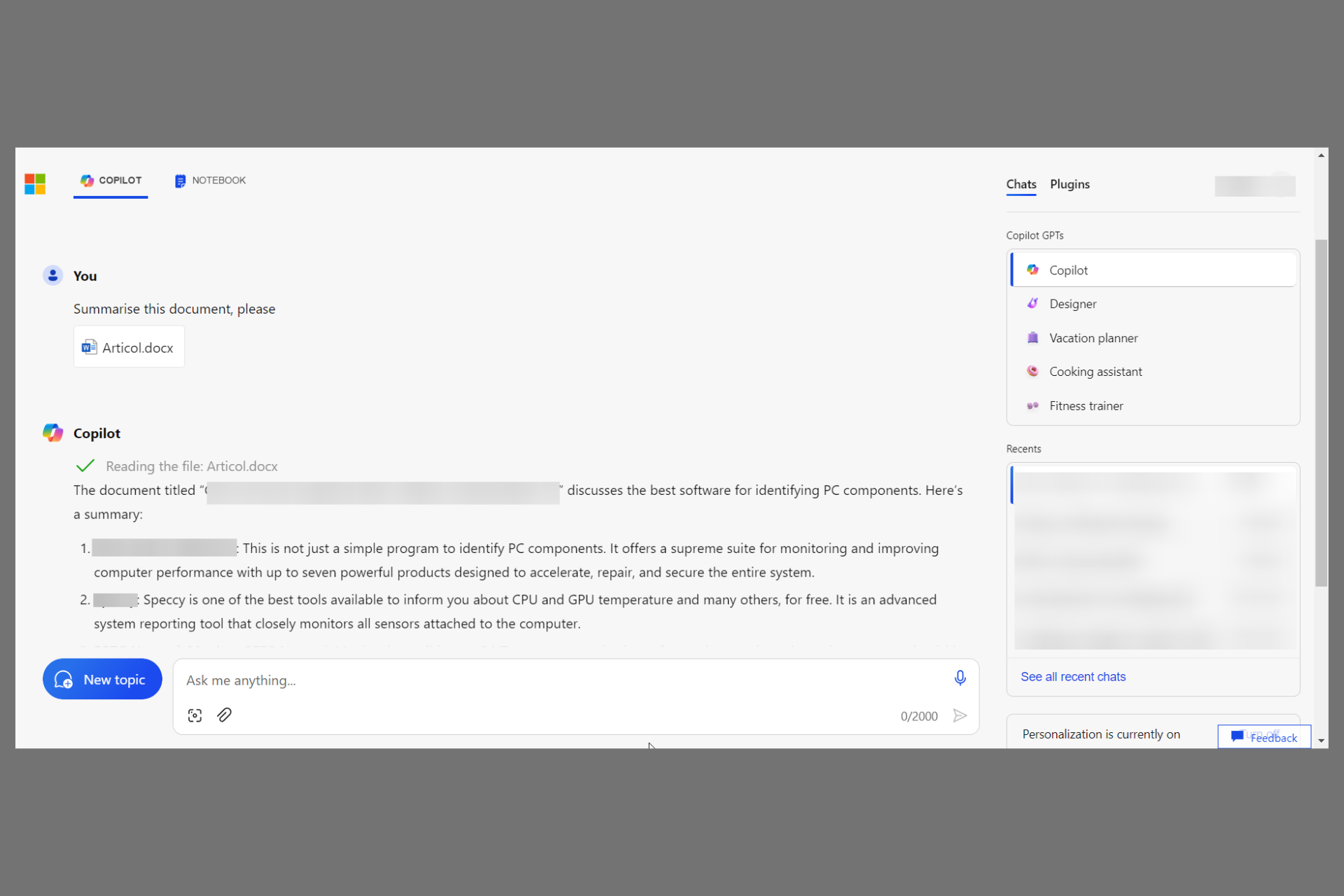
Now you can upload your own documents in Copilot

Until now, you could drag and drop images into Copilot and use them as models to create others like them. Now, Microsoft silently added a Clip icon in Copilot, allowing you to upload files.

This new feature helps you summarize your documents and other files and ask for more information about the data inside them.

How does the Copilot document upload work?

If you can see the clip icon next to the one for images, you can click on it to reveal the file upload window.

From there, you can upload a lot of file types, including . RTF, .TXT, .DOCX, .GO, .SWIFT and a myriad more. The list of supported files is so big that it isn’t even relevant to enumerate here.

However, you can forget about the clip icon and drag-and-drop the file onto Copilot and see if it uploads it.

There is only one significant condition: the file doesn’t have to exceed 1 MB. So, if you want to upload a file with more text, we recommend saving it as TXT to remove any images and keep it as low as possible.

We tested this feature, and it works. Copilot managed to read the document, even though it was in a language other than English. It provided then a perfect summarization of the text provided.

Moreover, you can also drag and drop the file into Copilot’s Notebook even though you won’t see the clip icon there.

This is exciting news because you can now work with your documents and not rely on outside sources. However, the 1 MB limitation can be frustrating.

In another story, you can now access the Copilot for Microsoft 365 mobile app with a business license. We mention it only because the new document upload feature extends the capabilities of Copilot on your data, almost like Copilot for Microsoft 365.

What do you think about this new upload feature? Let’s talk about it in the comments section below.

In another blow, Sea of Thieves Co-developer Radical Forge lays off 6 employees

After Microsoft shed 1900 jobs in Activision, the gaming industry has been witnessing turbulent times. Radical Forge’s announcement to lay off a handful of employees is the latest in a series of setbacks.

In a post on X (formerly Twitter), the company apprised the community of the restructuring, which will affect the workforce count.

While the official statement didn’t reveal the exact number of affected employees, a post by Louis Escudié, former Junior Tech Game Designer at Radical Forge, confirmed the count to be 6.

As per the announcement, the restructuring will affect employees whose roles or skill sets are no longer needed on current or upcoming projects. On the bright side for the company, it will not hamper or delay the delivery of any lined-up projects.

Radical Forge, though a relatively smaller company, has worked on popular games like Sea of Thieves and Zombie Army 4. It’s working on another title, Southfield, a chaotic physics-based farming game, which will soon be added to Steam early access.

Last week, two major gaming companies terminated the contracts of a large number of employees. While Sony laid off 900 and closed the London Studio, EA released 5% of its workforce.

Experts believe that this trend will persist and we will witness more layoffs in the coming days as companies reevaluate finances and take measures aimed at boosting profits. As per Layoffs.fyi, 186 companies have laid off 49,386 employees in 2024 alone!

The new Dying Light game exceeded its Kickstarter goal by 10 times

There is going to be a new Dying Light game, but it’s not going to be released on Windows PCs, or gaming consoles, such as Xbox, no. We’re talking about tabletop: yes, zombies on a tabletop board game.

The new tabletop Dying Light game is a collaboration between Techland and Glass Cannon Unplugged, and according to its Kickstarter campaign, the game will be released in June 2025 if it reaches its goal of $54k.

Well, with 16 days more before the campaign is over, the game has exceeded its initial Kickstarted goal by 10 times already, amassing over half a million dollars, and assuring fans that the game will indeed get released.

The Dying Light board game will include several gameplay mechanics present in the franchise, such as the day and night cycle, which renders enemies weak or strong, depending on the cycle, plus many enemies from the open-world apocalyptic games.

And, much to the enjoyment of the fans, the board version will also include a parkour mechanic, and players can co-op play with other friends, up to 4 people, per game, but it also has a solo mode.

The game has been in the works for over 2 years now, and it will be released in June 2025, and it will include an array of expansions, because, yes, the game also has campaigns. These campaigns can be completed by up to 4 players, in multi-mission stories.

The game will be released in 3 editions:

  • Standard Pledge: includes Dying Light: The Board Game, Stretch Goals, and Gold Dawn weapon charm, at approximately $66.
  • Deluxe Pledge: includes Dying Light: The Board Game, Infected Miniatures Expansion, Stretch Goals, Gold Dawn weapon charm+1 More, at approximately $120.
  • Deluxe Pledge Bundle: 6× Dying Light: The Board Game, 6× Infected Miniatures Expansion, 6× Stretch Goals, 6× Gold Dawn weapon charm+1 More, at approximately $594.

If you want to pledge too, you can visit the official Kickstarter page for the Dying Light tabletop board game, and you have 16 more days to do so.

And, while you wait for the game, you should revisit the games from the franchise. For Dying Light 2, we have these incredibly useful tips that could change the way you play the game.

Now, Microsoft is advertising Copilot through QR codes as well?

Lately, Microsoft has been in the news for getting aggressive with its advertising to promote its services and products, whether it’s upgrading to Windows 11 or using the AI assistant Copilot.

According to recent complaints on community forums, Microsoft is now putting up a QR code on your device lock screen with the Save time, learn faster and create dynamically through AI with the free Microsoft Copilot app message.

A Reddit user, Not-Unpredictable, reported the QR code coming on the lock screen and stated that:

I opened up my computer to see a lovely QR code plastered across my lock screen. When scanned it takes you to a page talking about Copilot. It’s actually blocked by the little globe icon so I had to partially drag it upwards to actually scan it.

One of the Reddit users responded, calling it a bug, and further said:

This feels like a bug. I know Windows 11 is really scummy by default but just the way it is situated doesn’t really fit the rest of the lock screen advertising UI. My guess is that it is not supposed to show up unless you click on the ad under it in the first picture.

A lot of other people have also pointed it out and called it an error with a UI rather than Microsoft’s new way of advertising.

One of the Reddit users, Reddit891 mentioned that upon scanning the QR code, it redirected to app.adjust.com and the website didn’t load properly.

Another one, Froggypwns, was able to scan and follow the link, and it took him to the Copilot app in the store for the mobile platform and to Microsoft.com when using the Windows computer.

If you check the link, you will see app.adjust.com mentioned in the link. Adjust is a mobile marketing vendor, so it might not be a bug but an advertising thing.

When a lot of other people argued that Microsoft would not go that far to promote a product and called it a bug.

Then Not-Unpredictable, the user who originally reported the issue said,


A few other people have pointed out that it is likely a bug with the UI. It’s probably supposed to show that QR code when I click on the little widget right below it on the first image.

He also mentioned that he has reported this issue via Feedback Hub.

Some of the users also suggested turning off the Get fun facts, tips, tricks, and more on your lock screen feature.

To do that you need to open the Windows Settings app and navigate to Personalization>Lock screen. Locate Personalize your lock screen, select Picture, and remove the checkmark next to the Get fun facts, tips, tricks, and more on your lock screen option.

Now, when you lock your screen, you won’t get any suggestions or tips related to Microsoft products or services.

I tried this method. Earlier, when using Windows Spotlight as a lock screen, I got a suggestion to use Microsoft Word, not the QR code, but only a globe on top of it.

However, when I turned off this option, I got a plain Microsoft Windows 11 wallpaper, which I chose as my lock screen.

Whether it is a bug or another marketing tactic by Microsoft, we hope that the company promptly clarifies the issue for its disgruntled users.

Have you seen the lock screen with the QR code on your Windows computer? Share your thoughts in the comments section below.

Copilot for Microsoft 365 has a mobile app, but only for business licenses

We talked about the Copilot for Microsoft 365 launch and now, it’s also available in the mobile version. The Redmond giant also released Copilot for Finance to help professionals deal with their huge heaps of data.

So, the tool is now powering the Word, Excel, and PowerPoint mobile apps as well, but the catch is that Copilot for Microsoft 365 is still only for businesses, not the average user.

What’s new with the Copilot for Microsoft 365 mobile app?

If you look at the screenshot provided by Microsoft in the launch announcement, you will see that it writes Protected right under Copilot. That means that Copilot is infused with commercial data protection in your business environment.

Today, we are excited to announce that we are rolling out the power of Copilot with commercial data protection to the Microsoft 365 mobile app, including Microsoft 365 Copilot integration in Word and PowerPoint mobile.

Microsoft blog

Moreover, if you have a Copilot license, you can engage with your Word and PowerPoint mobile apps content using the virtual keyboard or even voice activation.

You will be able to create or edit presentations or documents from your smartphone and continue your work on a PC afterwards.

However, the main point is that Copilot for Microsoft 365 is not for everyone. Admins can push it through Microsoft Intune and you may even download the Microsoft 365 mobile app. But you may only use it if you have a Microsoft 365 account for business, education or enterprise and a Copilot license available for $30.

As we’ve mentioned before, someday, the app will be available to anyone with a Microsoft 365 license but right now, the only chance to grab it is if your organization thinks it would be useful.

Did you try the Copilot for Microsoft 365? Tell us all about your experience in the comments section below.

KB5034848 is not installing for many, but you can force it with these simple steps

The KB5034848 update is now available to download and install on Windows 11 devices, but the patch is optional and it contains non-security features such as the Mobile Devices panel which replaces the Phone Link on Windows 11, as well as new editing options for Snipping Tool.

The blog post for the update mentions dozens of other features included with it, and you can read all about it here. However, despite being available to download and install, multiple users reported that they cannot do so, because the installation process is interrupted by the error 0x8007000d, which displays the following message :

Some update files are missing or have problems. We’ll try to download the update again later. Error code: (0x8007000d).

While this is, of course, frustrating for many Windows 11 users, there are some solutions that they can try to force the KB5034848 installation to happen.

1. Running the Windows Update troubleshooter:

Start  > Settings  > System  > Troubleshoot  > Other troubleshooter.

Next, under Most Frequent, select Windows Update > Run.

When the troubleshooter is done, restart the device and reinitiate the process of installing the KB5034848 update.

2. Repair corrupted Windows files with the System File Checker tool

The SFC tool is quite useful in these situations, as it can repair corrupted or missing Windows 11 files. These files often cause issues and bugs in the Windows operating system, so repairing them is essential.

Running the command follows the same steps in Windows 10, and Windows 11, and you can check out this guide on how to do it.

3. Repairing Windows 11 using an ISO file

This one is a bit more complicated, but it can be done fast by using our comprehensive guide. Basically, you’ll repair your Windows 11 by using an ISO file that can be downloaded from the official Microsoft page.

The repair will fix all the corrupt or missing files, and it could effectively fix the Windows update process.

4. You could also wait it out, and try to install the update in a few days

This solution is a bit unconventional, but the 0x8007000d might be a known issue for the KB5034848 patch, so if you tried all the solutions above and none of them worked, then it’s best to wait a few days, and try again.

The patch is optional and it includes non-security updates, so it’s not mandatory to install it for Windows 11 to properly work.

Will you let us know if any of the solutions worked for you?

Using AI to generate content? The story of CNET’s downfall will be an eye-opener

When Futurism first broke the news that CNET, a major web publication, is employing AI-based tools to generate entire articles, which surprisingly had high plagiarism and grammatical errors, everyone knew this would have implications!

As it turns out, Wikipedia has now down downgraded the website from being Generally reliable in pre-2020 to Generally unreliable at present. This, of course, is a downside of using AI-generated content without necessary checks in place.

The CNET and AI story

Back in 2022, when CNET, operated by Red Ventures, reportedly first quietly pushed AI-generated articles, the company didn’t add a distinguishable disclaimer. Rather, it was included in a dropdown menu. This was highlighted by Gael Breton on X (formerly Twitter).

At first, Google did reward such articles, and they enjoyed the top spots in search results. Since then, things have somewhat changed!

Google, on its part, is not entirely against the use of AI to generate content. Its primary objective is to deliver results that best describe or explain the searched query. So, as long as the content is of high value, Google won’t consider the origin.

However, in the Search Central documentation, Google states that AI content created with the aim of manipulating SERP is in violation of the existing policy.

If you’re primarily making content to attract search engine visits, that’s not aligned with what our systems seek to reward. If you use automation, including AI-generation, to produce content for the primary purpose of manipulating search rankings, that’s a violation of our spam policies.

Note that if you are relying on artificial intelligence, it’s imperative to add a disclaimer that the article is generated using AI and describe the extent. This is the recommended approach by Google.

Many types of content may have a “How” component to them. That can include automated, AI-generated, and AI-assisted content. Sharing details about the processes involved can help readers and visitors better understand any unique and useful role automation may have served.

Coming to the present day, CNET’s experiment with AI, in our opinion, has been a failure. After Wikipedia, other similar platforms and general users will stop trusting the publication!

Also, Wikipedia, as opposed to the common notion, remains a trusted source of information. While it does allow anyone to make edits, the community running the platform asks for citations and sources for any changes made. So, its actions against CNET were in the right spirit.

AI-generated content has long troubled both publishers who believe in organic content and readers who want to get first-hand, experience-based information. Given how things are going, we may see Google and other search engines bring in more stringent checks!

Another concern is the use of content to train AI-based models. Microsoft and Open AI are being sued for the same reason!

What do you think about the use of AI in content generation? Share your thoughts in the comment section.