Get ESET Antivirus Home for 20% Off With Multiyear License

Keeping your PC safe from online threats should be your priority, and this is why ESET products are the antivirus of choice for millions of users worldwide.

Speaking of ESET, the company offers massive discounts for Cyber Weekend, so let’s see what products you can get for this shopping season.

Improve your PC security with these amazing ESET Cyber Weekend deals

How can I get ESET Cyber Weekend deals?

ESET Cyber Weekend deals will last from November 24, 2023, until November 28, 2023, at 11:59 PM. This is a limited-time offer, and you can get 20% off on all ESET home products when you buy a two-year or three-year license.

ESET Antivirus

Experience professional protection against all types of malware with ESET Antivirus software.

ESET HOME Security Essential

  • Malware, antispyware and ransomware protection
  • Machine learning to recognize threats
  • Anti-phishing
  • UEFI, memory, and WMI scanner
  • Cloud-powered scanning
  • Exploit blocker
  • Registry scanning
  • Protection against scrip-based attacks
  • Lightweight
  • Gamer Mode

ESET HOME Security Premium

  • All features from ESET HOME Security Essential
  • Brute Force Attack protection for your passwords
  • Banking and Payment Protection for secure payments
  • Firewall
  • Parental Control
  • Antispam, webcam, network protection

ESET HOME Security Ultimate

  • All features from ESET HOME Security Premium
  • LiveGuard feature that will scan threats in the sandbox cloud environment
  • Password manager to keep all your passwords safe and unique
  • File encryption for files and removable storage

Have you tried any of the ESET products in the past? If not, use this limited offer and get 20% off for ESET Home Antivirus with every two-year or three-year license.

Best Pc Case Fan Deals With A Discount This Year

It is commonly known that your PC needs powerful fans that function properly to give you the best possible performance.

PC case fans are on sale as well for anyone that needs to improve PC speed and performance with premium magnetic low-noise fans.

If you know that your PC requires another ventilation system, and you must change the case fans now, you should take action to find the most helpful choices out there.

There are great options on the market, thus you can benefit from magnetic levitation technology for lower noise and PC high performance, plus a longer lifespan.

What are the best deals for case fans this year?

All these items have special prices.


There are various options you can choose from, as you can see. According to your needs, find valuable PC fans that offer Custom Rotor Design, 2.000 RPM control range, replaceable corners with anti-vibration rubbers, and more.

Consequently, be aware of the products description available on Amazon and choose the PC fans that suit your needs.

You already tried them? Don’t hesitate to share your experience with us in the comments below.

Best Synology Router Deals To Check Out

With a lot of people working from home during the pandemic, sharing one Wi-Fi connection may not be the ideal situation for a couple of people in the same house. 

For optimum performance, you need better connectivity to carry out your tasks. Getting the right router is not always easy but with the Synology router, you can. What’s even better, now you can get it at a much affordable price.

The main advantage of Synology routers is that they come with a core processor that guarantees you optimized, uncompromised performance with a coverage area of over 3000 square feet.

Besides the powerful processing speed, owning a router from Synology ensures amazing customer service at all times, and even guarantee in some cases, so you can rest assured that you will have the best wireless experience on the market.

If you dislike a lot of cables when setting up, this is yet another reason why one of the Synology routers should make its way to your cart. It is easy to set up and offers you the opportunity for remote management whether on the web or via the app.

What are the best Synology routers?

All these routers are up for sale at discounted prices.

Although specifications may vary for these routers, some of the key functions found in each include:

  • Fast processor
  • Dedicated Tri-band
  • Remote management
  • Wide coverage

For a detailed list of the product descriptions, visit the Amazon page and check for device support and compatibility. Be sure to get a router that suits all your needs especially if you have children, those with parental management will come in handy.

Got your eye on any of these routers? Let us know in the comment section below.

These Cool HTC Vive Vr Headsets Can Be Yours [Buying Guide]

VR is the hottest technology trend at the moment, but very few people can actually afford to buy VR devices. The price tag for VR headsets is pretty high, but if you really want to purchase one of these state-of-the-art pieces of hardware, now is the time to act.

HTC announced that fans can buy the impressive Vive VR headset for $699. The regular price tag for this device is $799, and we’re sure the $100 discount will convince many people to purchase it.

If you’re still undecided, take into account the fact that the offer is valid while supplies last.

To get your jump on Virtual Reality this season, wherever Vive is sold, purchasers can receive $100 off their Vive purchase (while supplies last) on this year’s Christmas sale.

In addition, Vive owners can build up their VR library with some of the most popular titles with big discounts through HTC’s Viveport app store, with bundle deals, in-store cashback offers, and a 50% off sale running through the weekend.

The good news doesn’t end here because HTC is offering big savings for popular VR apps, such as Soundstage, Arcade Artist, and Lumen. Viveport, HTC Vive’s VR store, is also offering 50% discounts on more than 20 VR games. To check out the full list of titles, go to this HTC blog post.

The HTC Vive is currently the most expensive VR headset, even with the $100 discount Sony’s PlayStation VR and the Oculus Rift are cheaper.

Which are the best HTC Vive deals?

HTC Vive products

If you want to buy a Vive VR headset this year, you can do that much cheaper than a few years ago. For example, back in 2016, just a few months after its official release, HTC Vive had a $699 price tag.

Now, you can grab it for only $499.00. from Vive’s official website.

If you prefer the Pro version, you should know that the HTC Pro VR can be yours for $699.00 (available on the official website).

If it’s simpler for you to get this amazing VR headset from Amazon, then follow the links listed below to purchase the HTC Vive version of your choice:

HTC Vive VR headsets

If you’re planning to get a VR headset this year, we recommend keeping an eye on these HTC devices and accessories:

Speaking of VR, Christmas is just a few weeks away. If you want to play some VR games in your new HTC Vive, here are some suggestions:

The Black Friday HTC Vive deals will be available online and in all retail locations where Vive is sold, including Microsoft Stores, Amazon, Gamestop, Newegg, and Vive.com.

Posted in VRTagged

Photo Scanner : Grab The Best Deals!

When it comes to preserving and restoring important memories, photo scanners are crucial.
Scanners, unlike traditional photo printers, can convert or revive old photographs or documents with the press of a button.

There are several picture scanners available, ranging from flatbeds to automated feeds, as well as those that can scan from prints or negatives.

It is important to seek Photo Scanners rather than multi-function printers since scanners contain drivers or firmware that allow for considerably finer scanning control. 

Moreover, specialized photo scanners handle older photos in less-than-ideal settings better than multi-functional printers, which sometimes lack built-in color correction and dust/scratch control.

What are the best photo scanners with deals?

All these items have special prices.


As you may have observed, there are several sorts of scanners available in the Amazon Black Friday Picks bargains. These scanners are certain to have the finest discounts this year, depending on your demands and the amount of money you can invest.

Check the specifics of each product available, since the various scanners have distinct features and usability.

Which option was the greatest fit for you? We’d love to hear from you in the comments section down below.

Best Revo Uninstaller Deals

Removing stubborn applications can sometimes be a real hassle. Certain programs cannot be simply uninstalled with Add/Remove utility in Windows Settings.

This is where dedicated software comes into play, and one of the best such tools on the market is Revo Uninstaller.

Revo scans your PC and displays a list of all programs you have installed. You just have to select which one you want to uninstall, and Revo will remove it completely.

Revo Uninstaller also has a positive impact on your PC’s performance because it detects and removes any files left behind, thus keeping your PC clean of unnecessary junk.

We have gathered the best deals for Revo Uninstaller, so if you were planning on getting a software removal tool, check the offers below.

What are the best Revo Uninstaller deals?

For this limited period of time, you can get Revo Uninstaller products at 70% discounts.

  • Revo Uninstaller Pro 1 year license costs $24.95 $7.49
  • Revo Uninstaller Pro Portable 1 year license costs $29.95 $8.99

The difference between these two plans is that Revo Uninstaller Pro Portable can be used on an unlimited number of devices and can be used on a USB stick.

Revo Uninstaller Pro

Remove all traces of unwanted software, clean your browser and increase your PC’s performance.

Besides the app uninstaller toolset, Revo Uninstaller Pro also includes a browser cleaner, an autorun manager (for configuring auto-run apps), and a backup manager.

Revo Uninstaller most notable features:

  • Detects lefover files and removes them from your PC
  • Easy to manage installation log
  • Free technical support
  • Forced uninstall for malicious or damaged apps that can’t be removed otherwise
  • Quick/Multiple Uninstall
  • Multi-level backup system

Both plans have a 60-day money-back guarantee, so there’s no risk in taking advantage of this limited offer.

Best Wi-Fi 6 Router Deals To Get

Fed up with the slow Internet connectivity? It’s time you upgrade your router. And, what’s better than buying the new-age Wi-Fi 6 router at the lowest prices this season?

A Wi-Fi 6 router, an upgrade over the previous ones, offers certain enhancements in terms of speed and performance. Though you may not notice any immediate changes, it will boost the overall experience.

With Wi-Fi 6, the difference between the speed in Ethernet and wireless network narrows further, thereby making it suitable who still relied on wired connections when it came to heavy gaming or downloading stuff.

Added to this element, it reduces the interference that can happen between networks, making it the best choice for living in apartment buildings or working in an office building.

To save you time and effort, we went the extra mile and compiled a list of the best router deals this year.

Which router is best for Wi-Fi 6?

All these items have special prices.

Note: All the prices and offers in this article are subject to change, so be sure to check the official product page to get the latest deal. If the product or offer you’re looking for is no longer available, you can try to find it on its official manufacturer page or get another one from our list.

These are the best Wi-Fi routers you can grab at discounted rates. Also, check out our compilation of leading tri-band wireless routers to buy.

We recommend you check the warranty, customer reviews, and compatibility before purchasing. Tell us the Wi-Fi 6 router you purchased in the comments section below.

Best Deals On Portable Ssds

Running out of storage on your PC? An external hard drive is your best bet. Why not check out the best portable SSDs available at huge discounts this Black Friday.

An SSD (Solid State Drive) is much faster than the conventional HDD (Hard Disk Drive), offers enhanced performance, and is relatively compact in size. Also, with the price gap between the two further narrowing due to advancements in technology, an SSD is no more a luxury but a necessity.

And, what’s better than a portable SSD? You can use it across devices, store and share files, and due to its compact size, keep it in the side pocket of your backpack.

This type of storage is a lot more durable than HDDs, while also providing better encryption for your data. SSDs don’t have any internal moving parts, making them less susceptible to being damaged by dropping them, or other similar shocks.

If you are planning to purchase a portable SSD this Black Friday, we have compiled a list of the best deals you can grab.

What are the best portable SSDs to purchase this Cyber Monday?

All these items have special Black Friday prices.


These are the best deals on portable SSDs exclusively this Christmas Grab them without any delay for maximum savings. Also, check out our collection of the best storage devices for more options to pick from.

Tell us which portable SSD you purchased this sale season and your experience of it in the comments section below.

5 Best Portable Printers On Sale

It’s that time of the year again where people make merry and capture memories in the form of images. While most of the people will be reaching out for their phones for such moments, you can stand out from the crowd and have a print-out of your photos.

Wouldn’t it be nice to capture a moment and instantly print it? A physical hard copy picture is a great way of savoring some of your favorite memories this holiday season and what better way than getting one of the portable printers already up for sale?

It seems this is one of the highly coveted pieces so you may want to hurry up and scoop one of them while the offer lasts.

First off, let’s have a look at some of the undeniable deals up for sale.

What are the best portable printers to get?

All these items have special prices.

Apart from the obvious reason that you can carry it with you anywhere and it’s already up for sale at a discounted price, they come with amazing features you cannot afford to let pass you by.

You can print from your social media pages and via Bluetooth. This means anyone in close proximity who also wishes to print can do so.

You don’t have to worry about cartridge and ink as the portable printers come with a zero-ink technology feature.

On-the-go printing. If you loathe the messy, lengthy printing process via the computer where you have to connect cables and press multiple buttons, you will love this wide range of portable printers. They are palm-sized so you won’t have to carry bulky items and you can print your pictures with just a click of a button.

High resolution and crisp images are yet another advantage of these portable printers. The pictures printed are glossy, vivid, colorful, and water-resistant that will last you a lifetime while maintaining spectacular quality.

The printers are also compatible with both Android and iOS phones, Windows, Linux and so many more so your printing source list is pretty much unlimited.

The battery capacity is pretty good so you can print a good number of pictures before you have to recharge.

The options are endless on these portable printers so make sure you take advantage of this annual Christmas sale before they run out of stock.

Do you see a portable printer that you would like to check out in your cart? Let us know in the comment section below.

Elegoo 3D Printer: Best Deals Now

ELEGOO has been providing cutting-edge, user-friendly, and high-quality consumer 3D printers at an industry-leading rate since 2015.

While assuring high-quality goods, selecting ELEGOO lets you experience the delight of 3D printing at the most affordable price on the market. It has always been a desire for them to make 3D printing technology more accessible to everyone.

So, this season, they’ve lined up some excellent deals for you, so you may start your journey in 3D printing with the most wanted printers on the market.

Furthermore, the discounts are only valid until November 27th, so take advantage of this offer while it is still around on Amazon.

What are the best ELEGOO Black Friday 2022 deals?

All these items have special prices.

3D printing is exciting and creative, but it must be done with caution and attention at all times. So, put on your suit, get the greatest offer, and have a good time during the holidays!

Furthermore, after purchasing, you will receive full assistance, join a community of professionals and beginners, and share your work. However, if you run into difficulties while printing, there are tutorials available on the official website.

Let us know in the comment section below what models you chose from the ELEGOO Black Friday sale, and which printer you like best!

Wondershare Filmora Deals [Limited Offer]

Wondershare Filmora is simple to use and definitely capable of giving your video a professional aesthetic, as well as audio editing.

Filmora is designed for newcomers who want a lot of templated material, an easy interface, and don’t want to spend time customizing or learning more sophisticated stuff. 

Since we are at the Black Friday & Cyber Monday deals, we are thrilled to say Wondershare Filmora has the biggest sale of the new year. So grab the offer now, and enjoy fun video editing!

What are the best Wondershare deals this year?

This year, choosing the annual plan couldn’t be more on the spot. The discount of 43% for Filmora Annual Plan and 43% for Filmora Perpetual Plan should you take advantage of this offer right away.

Filmora is a simple video editing program with an intuitive user interface, a variety of editing tools, and a plethora of video effects. Besides, the new Filmora X for Windows V10.5.5 is now available, so you can work less and create more.

Filmora usability:

  • An easy-to-use video editor for users of entry levels.
  • Explore Filmora-exclusive creative transitions, filters, titles, and motion components.
  • Change the backgrounds and add additional effects to reimagine your environment.
  • Add excitement to your tale by using several screens and color correction.

FilmoraPro is a professional video editing program with extensive capabilities that allow you to have greater control over your videos and editing tools.

Wondershare Filmora Pro key features:

  • Keyframes to make your own animations to increase visual engagement.
  • With Motion Tracking, for straightforward object tracking
  • Audio-ducking to fade music and enhance speech
  • Video effects, green screen, split screen
  • Color grading, speed control, through shortcut keys

Wondershare Filmora Pro

Editing should be a creative adventure, and Filmora offers the tools to make it such, and the offer is too good to resist!
Get 43% OFF Visit website

If your video is intended to communicate information and does not require extensive editing, Wondershare Filmora will suffice. The interface is clean and simple to use, so even those with no prior expertise in video editing can get started quickly using Wondershare Filmora.

Grab the deal while is still hot, and begin your journey into the creative worlds of artists!

Application Load Error 5:0000065434 in Steam: 4 Ways to Fix

Many Steam users have reported an Application load error 5:0000065434  message that prevents the game from loading.

Here’s how one user described the problem in specialized forums:

When I start the game from Nexus Mod Manager, it gives me Application load error 5:0000065434. The game loads fine if I start it from Steam, but obviously that means playing without the QOL mods.

You can follow a series of steps to make running these games possible.

What causes Application load error 5:0000065434?

You should remember that today’s error can occur for several reasons. Because we want to help you as much as possible, we’ve compiled the most popular ones.

  • User privilege levels – To get a smooth and complete experience while running Steam, it is always important to access it through admin privileges. Otherwise, you risk facing errors like the one presented today.
  • File misplacement errors – This problem can be caused because the game’s installation is probably not in the same folder as Steam’s installation.
  • Bad or corrupt files – This error might also appear due to faulty game files that need to be redownloaded or simply a cache that needs reset.

Of course, the Application Load Error 5:0000065434 is not the only one you can encounter on Steam. Because it’s essential always to have options to solve any potential problems, we’ve prepared a list of the most common ones:

Now, let’s discover how to fix this annoying error in a matter of time.

How can I fix the Steam Application load error 5:0000065434?

1. Run Steam as an administrator

  1. Locate Steam’s shortcut or .exe file, then right-click on it.
  2. To run Steam as administrator, just select Run as administrator.

2. Delete the appcache folder

  1. Open File Explorer using Windows + E.
  2. Go to Steam’s installation directory. By default, it should be the path below:
    C:\Program Files (x86)\Steam
  3. Find the appcache folder in the Steam folder.
  4. Right-click on it, then choose to Delete it.
  5. Close the Steam client and then open it back to see if it made any changes.

3. Copy Steam.exe into the game’s folder

  1. Click on the Steam shortcut, then choose to Open file location.
  2. Find Steam.exe, then right-click on it, and select Copy.
  3. Open the folder containing the game that can’t be opened, then right-click in a free space of the folder and select Paste.
  4. Try opening the game to see if it works.

4. Verify the integrity of game files on Steam

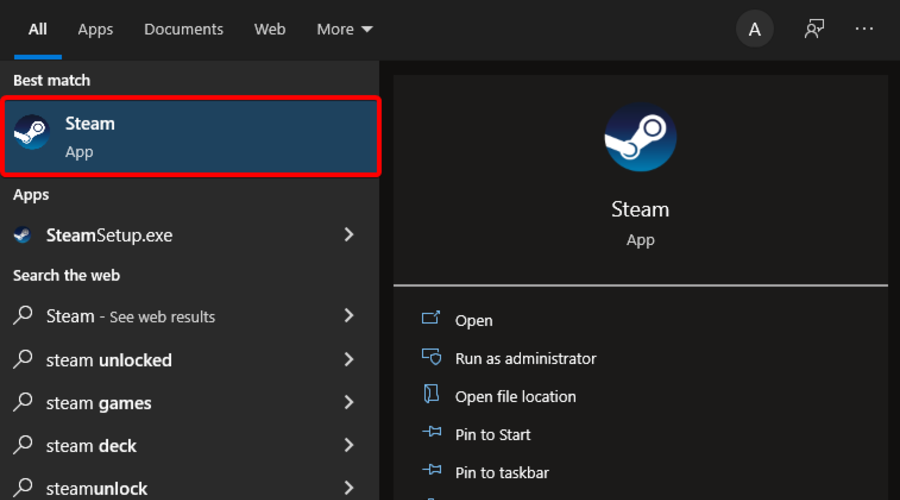
  1. Press on the Windows key, type Steam, then open the app.
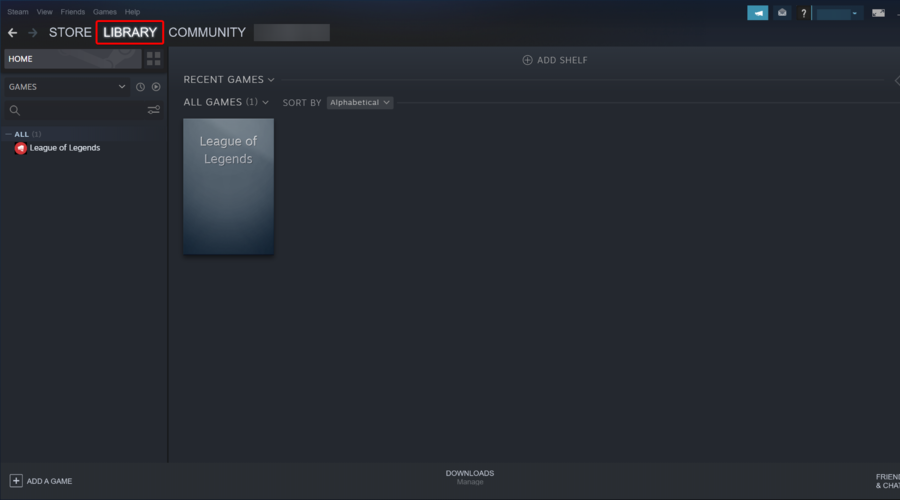
  2. From the top menu, navigate to Library.
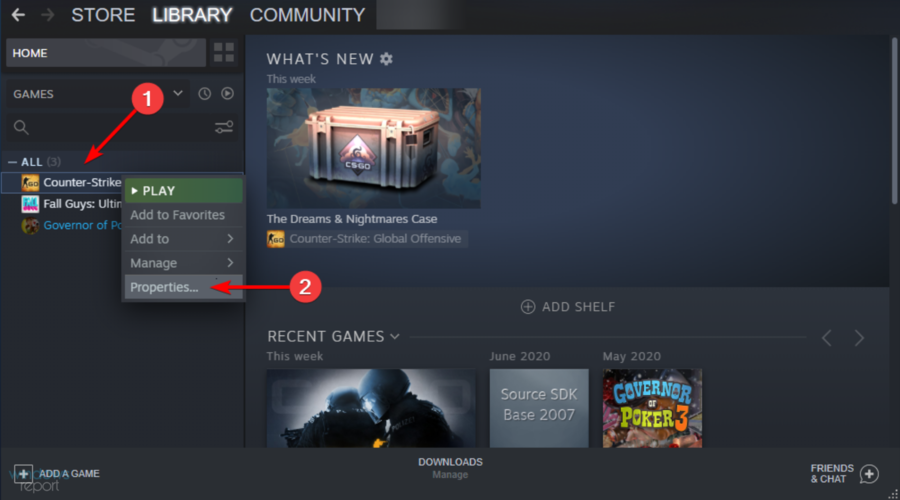
  3. Right-click on the game you need, then select Proprieties.
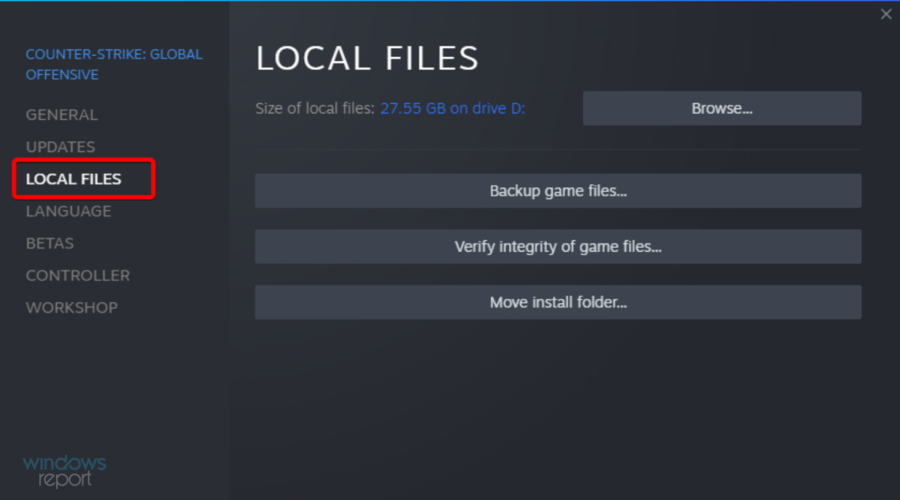
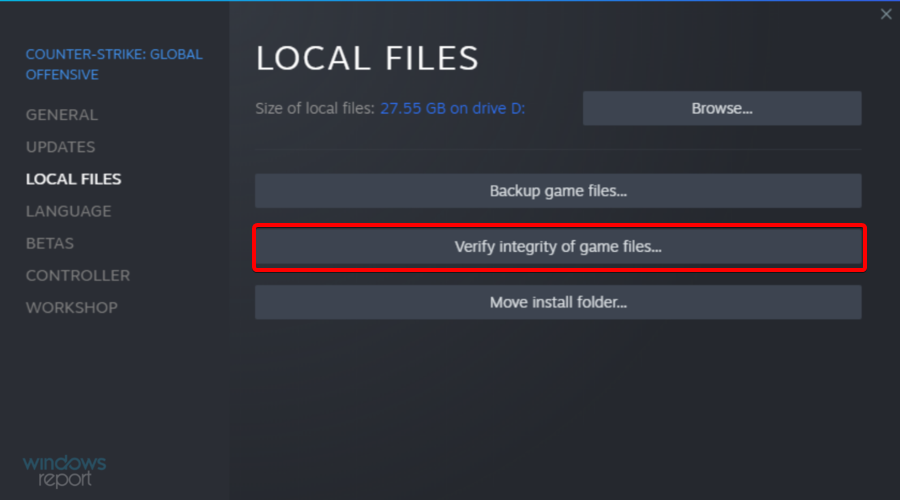
  4. Look at the left window pane, then select the Local files.
  5. Now, click on Verify integrity of game files…
  6. Wait for the process to finish, then relaunch the game to see if it works.

We hope our guide on fixing the Application Load Error 5:0000065434 on Steam. Users with the Oblivion application load error will also find this helpful guide.

If you found this article helpful, comment in the comment section below.

5 Best ViewSonic Cyber Monday Deals [x10, 4k, M1]

Projectors are great additions to your home or office and most of them are great for educational purposes as well.

You can connect your device, use Alexa or Google Assistant, take photos and enjoy outdoor scenery while watching your favorite TV show.

We’ve compiled a list of the best ViewSonic projectors that you can use, and we hope that it will help you select the perfect one for you.

Note: All the prices and offers in this article are subject to change, so be sure to check the official product page to get the latest deal. If the product or offer you’re looking for is no longer available, you can try to find it on its official manufacturer page or get another one from our list.

What is the best ViewSonic I can buy?

ViewSonic X10-4K

  • Compatible with Alexa
  • Big screen home theater
  • Portable design
  • Too much light

ViewSonic X10-4K is a lovely projector that is compatible with both Amazon Alexa and Google Assistant.

It’s perfect for projecting movies or documentaries at home while creating the theater atmosphere.

When it comes to audio, it won’t let you down here as well thanks to the built-in dual Harman Kardon Bluetooth speakers that will help fill an entire room.

View Sonic M1

  • Portable
  • Bluetooth speakers
  • Smart TV enabled
  • Does not support subtitles

The next great projector that anyone should try is View Sonic M1 which comes with a long battery life that will provide up to 6 hours of power.

You can also use it to charge your mobile device thanks to the USB C type, as long as the adaptor is plugged in.

Moreover, the integrated Wi-Fi will allow you to stream your favorite Youtube videos or any other preferred movies and TV shows.

ViewSonic PS600X

  • Lovely visual features
  • Easy to setup
  • Flexible connectivity
  • The image is not easy to adjust

ViewSonic PS600X 3500 is the perfect projector to use at home for watching movies or documentaries or at the office for various projects.

Due to its compact design, it will fit perfectly in almost any place and the audio technology it comes with will fill all the room area.

It’s a projector easy to use and install, you won’t spend too much time connecting it to the desired devices.

ViewSonic M2

  • Bluetooth speakers
  • Big screen
  • Integrated Wi-Fi
  • 32 GB Micro SD limitation

If you ever wondered how it would be to go on a camping trip and see a movie outside, then this is the perfect projector to use.

ViewSonic M2 has a lovely design, it’s compact and easy to carry around as it does not occupy too much space.

Thanks to the Harman Kardon feature the audio will be high quality enough even if you are outside or in a bigger room, inside your house or office.

ViewSonic3600

  • High brightness
  • Advanced visual features
  • Flexible connectivity
  • Remote only works while pointing at front of the unit

ViewSonic3600 is our final top 5 best projectors recommendation that we think is worth giving a try.

It comes with some really nice, advanced visual features that are perfect to be used when presenting a project in order to make it more interesting.

It’s easy to connect and set up, you will not have to spend hours trying to figure out what to do next.

Thanks to the 3-year warranty you can rest assured that if anything is to happen you will benefit from the necessary support.

With this, we have concluded our list of the best 5 ViewSonic projectors to use at home as well as at the office.

We hope that our list has helped you with the information needed in order to choose the most suitable one for you.

Aomei Deals [Make sure you don’t miss them]

AOMEI offers a wide range of partition management utilities, backup software, and recovery tools. All these utilities offer everyday users the support they need to safely manage their personal computers. These products simplify and automate tasks that are otherwise complicated and risky. 

All AOMEI products have top-level premium versions that will help you safely manage your disks, create backups, and recover your system. Read on to find out which AOMEI Black Friday deals you can get in 2022.

Note: All the prices and offers in this article are subject to change, so be sure to check the official product page to get the latest deal. If the product/offer you’re looking for is no longer available, you can try to find it on its official manufacturer page or get another one from our list.

What are the best AOMEI Black Friday 2022 deals?

Luckily, all premium products are discounted in this period. You can get great bundle deals, as well as individual software discounts.

Bundles:

  • PC Utilities: AOMEI Partition Assistant Professional+ Backupper Professional+ Onekey Recovery Professional for $144.85 $57.94 (60%OFF)
  • Technician Toolkit: AOMEI Partition Assistant Technician+ Backupper Technician Plus+AOMEI OneKey Recovery Technician for $2197.00 $988.65 (55%OFF)

AOMEI PC Utilities Bundle

Take advantage of this deal and get advanced partition management, backup, and recovery utilities.

The bundles offer by far the best value for your money, but if you don’t need the whole package, you may benefit from the generous 1+1 free or single deals. Here is a brief of what will you find in the link above:

1+1 Free deals:

  • AOMEI Backupper Pro+ AOMEI Backupper Pro free $99.90 $49.95
  • AOMEI Backupper Pro+ AOMEI Partition Assistant Pro free $104.90 $49.95
  • AOMEI Backupper Server+ AOMEI Backupper Server free $538.00 $269.00
  • AOMEI Backupper Technician Plus+ AOMEI Partition Assistant Technician $1598.00 $899.00

Single Deals:

  • AOMEI Partition Assistant Professional: $54.95 $41.21(25% OFF)
  • AOMEI Partition Assistant Server: $249.00 $161.85  (35% OFF)
  • AOMEI Partition Assistant Unlimited $499.00 $324.35 (35% OFF)
  • AOMEI Partition Assistan Technician $699.00 $454.35 (35% OFF)

You can also apply discount codes to single products that save you 25% for Assistant Professional and 35% for Server and Higher editions.

AOMEI products notable features:

  • Easy disk management features
  • File backup and sync
  • Disk clone software
  • Recovery partition management
  • Recovery solutions for servers
  • Lifetime upgrades for each individual software

There is a 90-day money-back guarantee for all packages and individual products.

Top Deals On Wi-Fi Printers

Since the start of the pandemic, remote work has been largely accepted and the transition has been smooth so far. For some people though, a lot of tasks requiring printing have been left unattended.

If you were in such a funk, here is a chance to redeem yourself. The current Black Friday deals on Wi-Fi printers are just something you cannot afford to let pass you by. You must get one of these before time runs out.

The majority of these Wi-Fi printers have all-in-one functions which make them perfect for the remote worker. Some even have instant ink ready so you can rest assured you will never have the ink issue mid-printing.

Using the voice control feature, you can easily print documents just by using your phone. Besides, Alexa will also let you know when the device is running low on ink.

There is also a USB option and you can print directly from the cloud such as Google Drive and iCloud.

To add the icing on the cake, the majority of the Black Friday Wi-Fi printer deals come with free ink for up to 4 months!

What are the best Cyber Monday deals on Wi-Fi printers?

All these items have special Black Friday prices.

Some of the main features of the Wi-Fi printers include;

  • Wireless printing
  • Copying
  • Scanning
  • Airprint

The WI-Fi printers are wireless so if you are not good at cable management, this is your go-to printer. It is made easy for contemporary work from home employees.

The Wi-Fi printers come with a one-year hardware warranty so you are covered. This is your chance to get these amazing deals so hurry up before the stock clears out.

Remember to check for features specific for each printer as some have additional functions such as AirPrint, a built-in ADF, and auto power On/Off.

Be sure to let us know which of the Wi-Fi printers tickles your fancy in the comment section below.

Best Document Scanner Deals

We reckon that after considering your options, you’ve decided to purchase a document scanner and begin scanning the paper files in your workplace in order to reap the many benefits of going paperless.

However, there are so many different document scanners to pick from that it’s difficult to know where to begin looking.

Before purchasing a document scanner, it is vital that you assess your wants and expectations, just like you would with any other purchase.

When shopping for a desktop scanner, one of the most important things to remember is that the daily duty cycles advertised by the scanner makers are far too high.

Even if you can physically scan 4,000 pages per day with a desktop scanner, you’ll have to be prepared to stay at the office all night scanning.

We’ve prepared below a list of the best document scanner deals that are on the market.

What are the best document scanners to get?

All these items have special Christmas prices.


There are numerous advantages to using scanners, whether you are looking for more productivity in the business or increased functionality in the home.

Today’s multifunction printers are frequently fitted with powerful scanners, allowing you to take advantage of these machines without having to purchase other accessories or take up additional space, so making them more useful and valuable than ever before.

Scanners currently deliver high-quality resolution for both color and black-and-white documents, regardless of the type of document being scanned.

Aside from that, they have enough detail and resolution to deal with pictures like photographs, graphics, and designs. This feature distinguishes them from a fax machine, which will often have difficulty reproducing color graphics and photographs.

Scanners, in contrast to fax machines, do not require the use of a phone line. Aside from that, there is no other end that is required to receive your scanned document in order for a successful transfer to be accomplished.

If you’ve finally decided to purchase one but are experiencing difficulties with it, learn how to resolve issues that prevent documents from being scanned properly.

Quickly take advantage of these fantastic offers while you still have the opportunity!

Fixed: Error 0x000007b Application Unable to Start Correctly

Some Windows users complained that every time they try to open a particular program or game, an error message 0x000007b occurs.

If you see this message on your computer, something went wrong while the operating system was running.

What does 0x000007b mean?

There are a few causes for it, but the two main reasons include:

  • Wrong configuration – Error code 0x000007b is an issue caused by misconfigured system files in your Windows operating system.
  • Conflicting program standards – Running a 32-bit program on 64-bit Windows or vice-versa can cause this problem.

How can I fix error 0x000007b?

Note icon NOTE
Before you start with these solutions, ensure you do not mix system and program architectures. Various factors could cause this error, but mixing 32-bit and 64-bit environments is the most common. For example, when a 32-bit application loads a 64-bit DLL, error 0x000007b will show up.

1. Reinstall .NET Framework

  1. Navigate to the official .Net Microsoft site.
  2. Download any of the versions you need.
    0x000007b
  3. Run the installer from the download menu and install it. Side note: If it gets stuck, don’t worry, the installation will continue.

The most common solution for this error is simply the re-installation of the .NET Framework.

You can easily download .NET Framework 4.5 installation, but if you’re using an older version, just browse the internet for the proper installation file.

Download the latest release if the .NET Framework 4.5 is below the minimum requirements. Once you’ve installed it, the program should be able to start without the Error 0x000007b.

2. Reinstall the troubled application

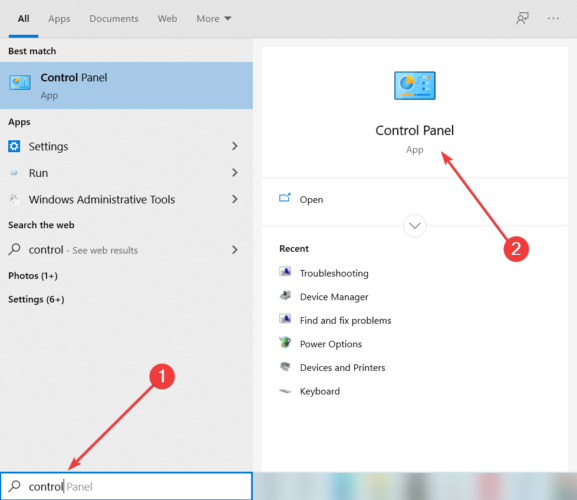
  1. In the Windows Search bar, type Control and open Control Panel.
  2. Open Uninstall a program from the Category view.
  3. Click on the troubled program and select the Uninstall option.
    0x000007b
  4. Restart your PC.
  5. Install the program and look for changes.

If the re-installation of the .NET Framework didn’t work, you can try re-installing a program or game that gives you this error. This should resolve the majority of system-imposed issues.

When you uninstall a program, there is a chance that some leftovers of the software will remain on your PC. Thus, we recommend you use a third-party solution.

⇒ Get IObit Uninstaller

3. Run the installer in the compatibility mode

  1. Right-click on the installation setup file (most of the time, it has the EXE extension) and open Properties.
  2. Select the Compatibility tab, check the Run this program in compatibility mode for, then from the drop-down menu, select an older Windows iteration, and finally, check the Run this program as an administrator box.
  3. Confirm changes and try installing the program again.

4. Run the Troubleshooter

  1. Press Windows + I to open the Settings app.
  2. Click on Updates & Security.
  3. Click on Troubleshoot, then find the Program compatibility troubleshooter, click it, and select Run the troubleshooter.
  4. Follow further on-screen instructions and let the wizard find any issues.
  5. Restart your computer.

5. Run SFC scan

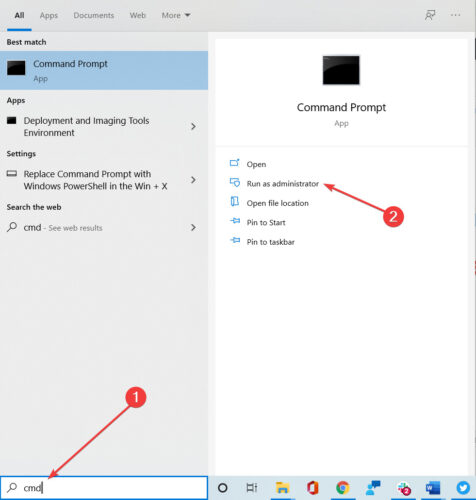
  1. Go to Search, type cmd, and open Command Prompt as Administrator.
  2. Enter the following line and press Enter:
    sfc/scannow
  3. Wait for the process to finish.
  4. Restart your computer.

6. Run DISM

  1. Go to Search, type cmd, and open Command Prompt as Administrator.
  2. Enter the following command on the command line:
    • DISM.exe /Online /Cleanup-image /Restorehealth
  3. If the DISM can’t obtain files online, try using your USB or DVD installation. Insert media and type the following command:
    • DISM.exe/Online /Cleanup-Image /RestoreHealth /Source:C:RepairSourceWindows /LimitAccess
  4. Make sure to replace C:RepairSourceWindows path of your DVD or USB.

DISM (Deployment Image Servicing and Management Tool ) is another great built-in tool from the Windows platform that can be used to repair your Windows OS.

That would be all, I hope that at least one of these many re-installations will help you to solve the problem with error 0x000007b.

These solutions will come in handy for different variations of the error including Office error 0x000007b and error 0x000007b in GTA 5.

If you have any comments or suggestions, or you maybe know some other re-installation we could add to this article, write to us in the comments section below; we would love to read it.

Top Mini Projectors Deals To Get Now

Mini projectors are quickly gaining traction in the market right now. Ideally, they are quite cheaper compared to their full-sized competitors. Besides, they provide the users with a lot of conveniences because they can be carried outside.

Mini projectors come with a lot of features such as, wireless streaming functionality that makes them the perfect fit for watching music videos, TV series and movies outdoors to be enjoyed amongst friends.

That being said, mini projectors’ features and price ranges can vary considerably, depending on the clarity of the image, connection types, format, and many other features.

That said, the lower-priced mini projectors come at an expense. there is a great compromise in terms of image quality and brightness.

There are a couple of features that you should look out for when you want to buy a mini projector. Some of the main ones are:

➡ Portability

Mini projectors are easy to carry around, this enhances their usability. It is small, light and at the same time produces quality content. However, projectors that come with higher resolutions are quite bigger and heavier. Also, ensure that you get one that comes with a detachable battery for outdoor use.

➡ Brightness

In most cases, mini projectors are used in space where one cannot exactly control the light. Therefore, it is important to ensure that the quality of the image is not compromised and that it is bright enough. Low transmission of single-panel LCD projects is a clear indication that they cannot compete with DLP mini projectors

➡ Resolution

Getting a mini projector does not necessarily mean that it is a bad projector. On the contrary, this is dependent on technology, optical elements in the lens, and the light source.

Note: All the prices and offers in this article are subject to change, so be sure to check the official product page to get the latest deal. If the product/offer you’re looking for is no longer available, you can try to find it on its official manufacturer page or get another one from our list.

What are the best deals on mini projectors?

All these items have special Christmas prices.

We hope that the above tips will help you narrow down your choices. Amazon has a lot of Christmas deals on tab revolving around mini projectors.

Which device did you get? Let us know what you settled on in the comment section below.

10+ Best USB 3.0 External Hard Drive [Cyber Monday Deals]

USB 3.0 external hard drive can be a quite useful device, especially if you need to back up your files.

Today we’re going to show you the best USB 3.0 external hard drive deals that you can get for this shopping season.

Note: All the prices and offers in this article are subject to change, so be sure to check the official product page to get the latest deal. If the product or offer you’re looking for is no longer available, you can try to find it on its official manufacturer page or get another one from our list.

What is the best USB external USB hard drive?

Toshiba Canvio Advance 4 TB

  • 4 TB capacity
  • Toshiba storage security software
  • Toshiba 2 year standard limited warranty
  • Sleek, minimalistic design
  • Can be pretty fragile

Toshiba Canvio Advance 4 TB comes with a minimalistic design aluminum case. This SSD offers automatic backup and password protection for your data through the Toshiba Storage Backup Software.

The device offers a huge, 4 TB storage capacity in a compact device, which should be more than enough for all types of users.

Seagate Backup Plus Portable 5TB

  • 2-year Rescue Service
  • One-year subscription to Mylio Create and a two-month membership to Adobe Creative Cloud Photography Plan
  • Polished aluminium enclosure
  • 120 MB/s transfer speed
  • Can be considered expensive

How do you feel about a 5 TB drive to store all your valuable documents, photos, and videos? That is all about the Seagate Backup Plus Portable that comes with a 120 MB/s transfer speed.

It’s portable and it comes with a one-year subscription to Mylio Create and a two-month membership to Adobe’s Creative Cloud Photography. That’s what we call a bargain.

LaCie Rugged Mini 5TB

  • Drop/shock, dust and rain resistant
  • Speeds of up to 130MB/s
  • One month membership to the Adobe Creative Cloud
  • Two-year warranty
  • The design is a bit bulky

An HDD is a delicate device and you have to handle it with great care. That’s why the LaCie Rugged Mini 5TB external HDD has a strong, ruggedized case that can protect the drive from 4 ft drops, rain, dust, and pressure.

Its 5 GB capacity is great for any backup tasks whether it’s photos, videos, or any important data that you need to keep protected. The drive comes with a one-month membership to the Adobe Creative Cloud.

WD-Black 5TB P10-Game Drive

  • Compatible with Playstation, Xbox, PC, & Mac
  • 5 TB capacity
  • Portable and durable form factor with top metal cover
  • Only 5400 RPM HDD

WD-Black 5TB P10 is a portable external HDD advertised for gaming purposes but it can be used for any possible storage tasks.

However, Western Digital also guarantees compatibility with Xbox and Playstation game consoles and the rugged design is typical for a gaming setup.

The 5 TB capacity and the 130 MB/s transfer speeds are on par with any usage whatsoever.

Silicon Power A30 1TB

  • Rugged design
  • Included USB 3.0 cable attached to the drive
  • LED indicator
  • 3-year manufacturer warranty
  • Problematic software from the manufacturer

The Silicon Power A30 is all about protection because the manufacturer says that the drive comes with military-grade shockproof protection.

Moreover, the gadget is backed by a 3-year warranty that guarantees complete services and technical support.

The only downside of this portable drive is the capacity of only 1TB but it compensates with an excellent price.

Seagate Expansion 4TB

Seagate Expansion 4TB is a USB 3.0 external hard drive and it’s fully compatible with USB 2.0 and USB 3.0 devices.

It’s worth mentioning that this device can work with both Windows and Mac computers, but you’ll need to reformat it if you want to use it on a different platform.

We have to say that transfer speed might not be the best, but this device makes up for it with its capacity.

⇒ Buy it now from Amazon

WD 2TB My Passport X

usb 3.0 external hard drive black friday

WD 2TB My Passport X offers a stylish design and solid transfer speed, which makes it perfect for file backup.

This hard drive can also work with Xbox One, but if you want to use it with your Xbox, you’ll need to reformat it first.

With its 2TB capacity and compact design, this hard drive will be perfect for all users.

⇒ Buy it now from Amazon

WD 4TB Elements Portable

usb 3.0 external hard drive black friday

WD 4TB Elements Portable hard drive is fully compatible with USB 3.0 and USB 2.0 devices and with its small size and great design it will look amazing next to your PC or laptop.

The device has 4TB of storage, which should be more than enough for both basic and advanced users alike.

⇒ Buy it now from Amazon

Toshiba Canvio Basics

usb 3.0 external hard drive black friday

Toshiba Canvio Basics comes with a sleek matte smudge-resistance finish, so it will be a perfect addition to your PC or laptop.

The device uses a USB cable for powering and data transfer, so you won’t need to deal with additional adapters.

This hard drive is also fully compatible with Mac devices, but in order to use it with a Mac device, you’ll need to reformat it beforehand.

⇒ Buy it now from Amazon

WD 6TB Elements Desktop Hard Drive

usb 3.0 external hard drive black friday

WD 6TB Elements Desktop Hard Drive offers amazing capacity, and with 6TB of storage, this device will offer enough storage even for the most advanced users.

This hard drive fully supports USB 3.0, but it also works with USB 2.0 devices.

Speaking of compatibility, this device can also work with Mac devices, but you’ll need to reformat it before you can use it on Mac.

⇒ Buy it now from Amazon

G-Technology G-DRIVE USB 3.0 External Hard Drive

usb 3.0 external hard drive black friday

G-Technology G-DRIVE USB 3.0 External Hard Drive comes with a solid but stylish aluminum case, and with the 4TB capacity, it will be perfect for all your needs.

This device is preformatted to work with Mac computers, but if you want to use it with Windows PC, you just need to format it and you’re good to go.

⇒ Buy it now from Amazon

WD 3TB My Passport Wireless Pro

usb 3.0 external hard drive black friday

WD 3TB My Passport Wireless Pro is a truly portable hard drive, and unlike other entries on our list, this hard drive comes with wireless support so you can stream your content with ease.

The device has a 6,400 mAh battery so it can also work as a power bank. If you want a truly portable hard drive, then this device might be perfect for you.

⇒ Buy it now from Amazon

G-Technology G-Drive ev RaW

usb 3.0 external hard drive black friday

G-Technology G-Drive ev RaW is a durable hard drive, and it comes with a polycarbonate enclosure rubber bumper that provides drop protection up to 1.5m.

This device uses a USB 3.0 port, but it comes with all the necessary cables. It’s worth mentioning that this device is preformatted for Mac computers, but with a quick format, you can use it on your PC as well.

⇒ Buy it now from Amazon

WD 4TB White-Gold My Passport Ultra

usb 3.0 external hard drive black friday

WD 4TB White-Gold My Passport Ultra offers an amazing design with its metal and matte finish. The device also has some advanced features such as 256-bit AES hardware encryption.

In addition, there’s an automatic backup feature as well as social media and cloud storage import features.

Overall WD 4TB White-Gold My Passport Ultra offers an amazing design and advanced features, so it will be perfect for all users.

⇒ Buy it now from Amazon

These are some of the best USB 3.0 hard drives that you can get for this shopping season, so be sure to get them while the discounts last.

Luminar: Best Deal To Catch

Luminar is among the top applications that people use to edit and enhance their photographs. Read on to find out which are the best Luminar Black Friday deals for 2022.

Is Luminar AI worth buying?

Luminar is supported both on Windows and Apple devices. Moreover, it is equipped with AI technology that allows it to produce results similar to Photoshop software within a short time.

Users can either use it as a stand-alone application or incorporate Photoshop and Lightroom as part of the editing and image enhancement applications.

The AI-technology editing feature allows Luminar to stand out from the rest, the one-of-a-kind editing features allow the users to manipulate the editing and enhancement process, ultimately producing amazing photographs.

Users can either let the software make adjustments to the photo they wish to edit automatically or make the changes manually according to one’s preferences.

Luminar Black Friday 2022: key features of the tool

  • AI Structure – This feature helps photographers magnify details in the images captured and helps make blurred photos clearer.
  • AI Sky Replacement – Luminar allows users to change the sky in any photo by the click of a button, thanks to the AI sky replacement tools. there is no need to go through the tedious process of masking, blending, and cutting out skies in Photoshop.
  • AI Skin & Portrait Enhancer – The tool helps photographers smoothen out the skin and clear out any blemishes in the photos. Therefore, you do not need to make any manual adjustments once you have this feature.
  • AI Smart Contrast – The tool helps enhance the quality of images by making a few clicks. However, you should be cautious when using this feature because it can potentially ruin the entire photo. With the smart contrast feature you can now comfortably apply the contrast feature and it will make the changes selectively where applicable.

These are just but a few of the many features you stand to enjoy once you get the software during this year’s Luminar Black Friday 2022 sale. Head on to their official website and make your purchase today!

⇒ Get Luminar

Which feature stands out the most for you from Luminar? Let us know in the comment section below.

Best Deals On Netgear Routers

When it comes to routers, what’s the first name that comes to your mind? For most, it’s Netgear. In the following sections, we have compiled a list of the best deals on Netgear routers along with their benefits.

Netgear has developed some of the best routers in the market that offer both, enhanced speed and connectivity. It’s one of the most trusted and leading names in the industry.

If you are planning to make an upgrade, try the Netgear routers for the best performance. It caters to all kinds of requirements, be it budget, high speed, more number of connected devices, along with both Wi-Fi 5 and Wi-Fi 6 versions.

So, you are more likely to find the right router during the Christmas deals on Netgear than any other brand. We went through the trouble and compiled a list of the best deals you will find.

Note: All the prices and offers in this article are subject to change, so be sure to check the official product page to get the latest deal. If the product/offer you’re looking for is no longer available, you can try to find it on its official manufacturer page or get another one from our list.

What are the best deals on Netgear router?

All these items have special prices.


These are the best deals on Netgear routers this season. Grab them for maximum savings while the discount season lasts.

Also, check out our extensive list of best Wi-Fi router deals this Cyber Monday, and enjoy a stable and seamless connection.

Let’s know which Netgear router appealed the most and your experience of it in the comments section below.

Best Bluetooth Portable Projector Deals

Portable projectors are extremely convenient if you’re on the go, but you still want to show certain content to others. Due to their size, they are quite compact, and can easily fit in a bag, so you can carry them with you at all times.

Picking the right model isn’t always easy, and you need to take several factors into consideration. The most important factor is the brightness, and it determines how well will your image look in certain under various conditions.

Resolution is also important, and the higher the resolution, the better your image will look. Display size should be taken into consideration as well, and a larger display size means that you can view the projection from a bigger distance.

Connectivity is especially important, and when picking a projector, make sure that your device has multiple ports and not just HDMI. Many models support Bluetooth and wireless connection, and we’ll focus on these models.

Now that you know what to look for, here are some of the best Bluetooth portable projectors that you can buy this season.

Note: All the prices and offers in this article are subject to change, so be sure to check the official product page to get the latest deal. If the product/offer you’re looking for is no longer available, you can try to find it on its official manufacturer page or get another one from our list.

What are the best Bluetooth portable projector deals?

All these items have special prices.


Picking the best portable projector isn’t always easy, but as long as you follow our guidelines, you should be able to find the suitable model for your needs.

Before making a purchase, be sure to do your research properly and check if the model you choose has all the required features.

What is your projector of choice? Let us know in the comments section below.

Best Portable Power Station Deals

As a result of the carbon monoxide emissions from generators, you must take crucial safety precautions, such as operating the equipment outside and at least 20 feet from any structure.

If we live in an age where we can charge our smartphones with a battery pack that fits inside a jeans pocket, shouldn’t there be a more straightforward approach to restore power in the aftermath of a hurricane?

How about powering a campsite without having to deal with the continual hum of a gas-fueled generator?

Portable power stations, often known as battery-powered inverter generators, have the potential to fulfill this promise. On the surface, they’re just big, bulky rechargeable batteries roughly the size of a countertop microwave oven, which you can charge up by plugging them into a standard 110-volt outlet.

Note: All the prices and offers in this article are subject to change, so be sure to check the official product page to get the latest deal. If the product/offer you’re looking for is no longer available, you can try to find it on its official manufacturer page or get another one from our list.

What are the best server racks up for sale this Christmas?

All these items have special Christmas prices.

Because it emits no pollutants, you can securely operate a portable power station inside when the situation calls for it on duty.

These batteries have enough capacity to run a couple of small appliances for a short period of time. With a variety of outlets (regular 120v outlets, USB ports, and DC chargers), you may use the station to charge your electronics as well as your phone or tablet.

Furthermore, portable solar panels are frequently included with the units, allowing for increased charging capabilities and runtime.

Portable power stations, unlike their gasoline-fueled counterparts, require a transfer switch if you want to use them to power items like your furnace, overhead lighting, or anything else in your home that is hardwired.

For example, if you completely charge the battery before a forecasted weather occurrence, a portable power station may be able to provide you with many hours of electricity to run a refrigerator or another vital equipment.

If you are considering acquiring additional portable useful devices, we recommend that you read our article on four of the greatest wireless power strips.

Do you have a portable power station in your wish list that you would like to check out? Please share your thoughts in the comment area below.

Onikuma Gaming Headset Deals

The new Onikuma Black Friday deals are now available. WindowsReport brings you an exclusive deal for the ONIKUMA I and ONIKUMA II stereo gaming headsets that you really don’t want to miss.

Which are the best Onikuma Black Friday 2022 deals?

Onikuma Gaming Headset with Noise Canceling

  • Works on Windows PC, Mac OS PC, iOS, Android, PS and Xbox
  • Maximizes the clarity of sound with 7.1 Surround technology
  • Strong cords and joints and features long-lasting durability
  • Adjustable and flexible to pick up sound in 360 degree
  • Doesn’t come with adapters for a lot of supported devices

This headset offers perhaps the best quality/ price ratio for a gaming headset. It features enhanced 7.1 surround sound for the best audio experience during your gaming sessions.

The noise-canceling microphone isolates all the noise around you so that you can communicate with the other members of your game team without any problems.

The soft breathing earmuffs have a nice ergonomic design. The headset features a thick over-ear ergonomic ear cup that successfully isolates ambient noise. We guarantee you that this headset won’t cause any ear discomfort. You can play your favorite Xbox and PC games for hours on end.

After a few minutes, over-the-ear headphones are really painful to use especially if you wear glasses. This is not the case with the ONIKUMA headsets. Simply extend the headset and you can play with your glasses on without any problems.

ONIKUMA headsets are equipped with top-notch neodymium magnets that deliver crystal-clear bass sounds. Moreover, you can adjust them in any direction, they’re flexible and they support 360 degrees of sound pick-up.

The cords and joints are super strong. They won’t break even after years of intense usage.  Moreover, ONIKUMA offers a 24-month money-back guarantee and a free replacement policy.

Onikuma Gaming Headset 7.1 Surround

  • Works on all current PC, mobile, and console OS, so it can be used everywhere
  • Supports 7.1 Surround technology for amazing immersiveness
  • Strong cords and joints and features long-lasting durability
  • The amazing sound quality in both headphones and microphone
  • Doesn’t come with adapters for a lot of supported devices

If you prefer LED light headsets, you can then purchase the ONIKUMA II headset model. This headset version has all the features listed above plus better looks.

The glaring LED lights on the earmuffs make the headset look very cool especially when you play your favorite games in a low-light environment.

So, what are you waiting for? Grab this headset before the offer expires.

Valorant not Updating: 6 Methods Get the New Update

If Valorant is not updating, this article will help you clear the issues. The update problem might reflect different ways, such as the downloading speed stuck at 0.1kb/s, Valorant not downloading, etc.

Why is Valorant not updating? While there may be diverse reasons that may trigger this problem, from user feedback, we narrow it down to these few principal elements:

  • Poor or unstable internet connection.
  • An outdated OS can be a possible cause for update issues on Valorant.
  • Some issues with the Riot Vanguard may make updates on Valorant impossible.

What can I do if Valorant isn’t updating?

For easier troubleshooting, you can watch the helpful video below for better visual steps:

Before you go into any of these complex solutions, try restarting the PC, using a different profile, and changing to a steady network connection.

1. Remove & Reinstall Vanguard

  1. Close Vanguard using the System Tray icon.
  2. Navigate to the Command Prompt by using the search feature in Windows. Type “Command Prompt” in the search bar.
  3. Run the Command Prompt with elevated privileges by selecting “Run as Administrator.”
  4. In the Command Prompt window, enter sc delete vgc and hit the Enter key.
  5. Next, input sc delete vgk in the Command Prompt and press Enter.
  6. Proceed to reboot your computer.
  7. Again, make sure Vanguard is not running in the System Tray.
  8. Open File Explorer and go to the following directory: C:\Program Files\Riot Vanguard. Once there, remove the Vanguard folder.
  9. Start Valorant to prompt an update or reinstallation of Vanguard. Follow the on-screen instructions which will include a system reboot.
  10. After restarting your computer as instructed, open Valorant. It should now launch without issues.

After these steps, Valorant should update itself without any issues. If this doesn’t solve the problem, feel free to use the other methods.

2. Allow Valorant through Firewall

  1. Press the Windows key + R, type control panel, and hit Enter.
  2. Change View by to Large icons.
    Valorant not updating
  3. Select the Windows Defender Firewall option.
  4. Click Allow an app or feature on the left pane through Windows Defender Firewall.
    Valorant not updating
  5. Press Change Settings on the new page. This will let you add Valorant.
  6. Click Allow another app, search for Valorant, and click the open button.
    Valorant not updating
  7. On the next screen, click the Add button, then tick the two boxes next to add, and you are done with the firewall settings.

Allowing Valorant through the firewall can solve the problem of stuck Valorant updates.

These three significant ways force Valorant to update and relaunch your game. However, here are some other fixes you can try if none work.

Some users claim that these are the fixes that worked best for them. Hence, you can try them out, too.

3. Repair Valorant game files

  1. Open Riot client, and click the profile icon on the top right-hand corner of the screen.
  2. Then click settings.
  3. In settings, select Valorant, then click the Repair button.

Some game files might be corrupt or even deleted. So, you should run a diagnostic scan to know where and what to repair.

4. Allow Valorant to run administrator

  1. Press the Windows key and input Valorant, and click the Valorant app.
  2. On the right pane of the screen, select the Run as administrator option.

Enabling the administrator privilege for your game can help it function better. This usually gives the game the power to overwrite permissions that could have affected its performance. So, this should solve the Valorant not downloading or getting stuck at 0.1kb/s.

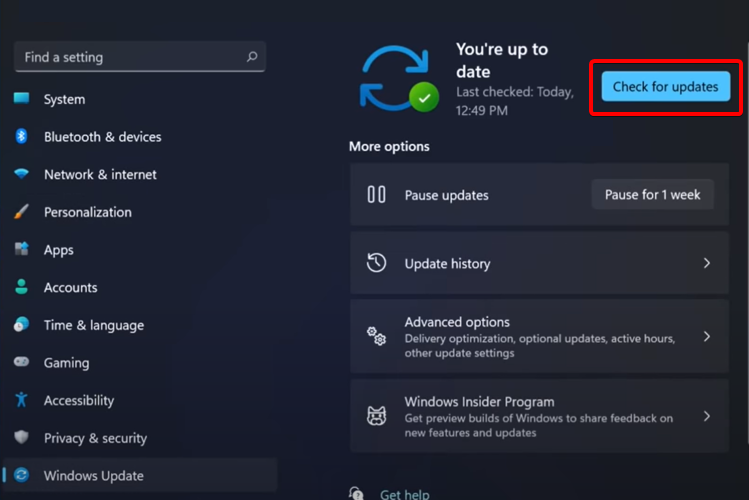
5. Update Windows

  1. Press the Windows key + I to open the Settings app.
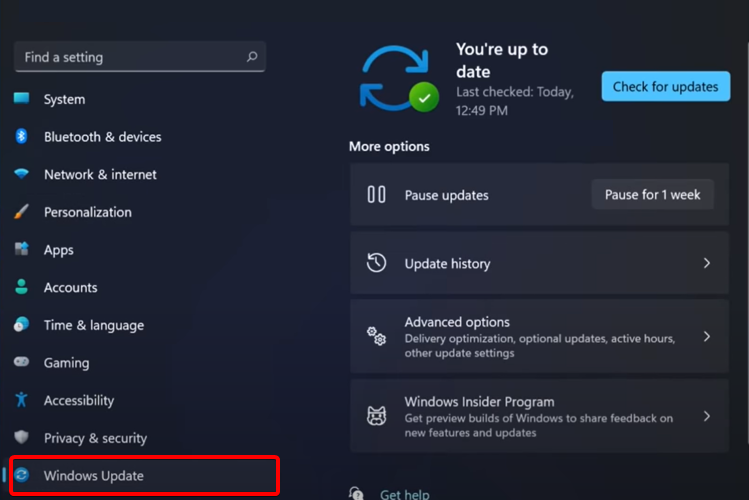
  2. Then select Windows Update.
  3. Click check for updates.
  4. If there’s any update available, download and install it
  5. After the update is complete, restart your PC.

Incompatibility is often a massive problem for games with advanced games like Valorant. It would help if you had a Windows that meets all the requirements for the game.

6. Uninstall and reinstall Valorant

  1. Press the Windows key + R, type control panel, and hit Enter.
  2. Change View by to Category.
  3. Click on Uninstall a program.
  4. Select Riot Vanguard from the list, then click the Uninstall button.
  5. Go to the official site for Valorant and download and install the game.

Uninstalling your game might delete your saved progress and information if not backed up. Therefore, it should be the last option you should try on this list. This will automatically fix the Valorant update and any other issues affecting it.

This can also help you fix similar errors like a critical error that has occurred in Valorant; read this guide to learn more about it.

In a nutshell, Valorant is not updating, or several conditions can cause a stuck Valorant update. The above fixes are available to see which one works perfectly for you.

You can leave your questions and suggestions below in the comments section. We would love to know which of the fixes worked for you.

5 Best Xbox Wireless Headsets To Buy This Year

If you’re an Xbox gamer, you know-how intensive and loud the action can get sometimes, and this is why many are using headphones while gaming.

They allow you to fully immerse yourself in the game without having to cause any additional noise in your home. There are various types of headphones, but the most convenient ones are the wireless models.

When buying headphones, you should pay close attention to the range of the device, but in most cases, the headphones will work perfectly in the room where your console is.

Battery life is important since you don’t want to run out of power while playing your favorite game, so keep a close eye on that.

The quality of the speakers is another important feature, but you should also look for a headset that has a mute option, so you can mute your microphone when you’re not using it.

Now that you know what to look for, we’ll give you our top 5 wireless headsets for Xbox.

What are the best Xbox wireless headset deals?

All these items have special prices.


A wireless headset is one of the best accessories that you can get for your console, especially if you enjoy late-night gaming sessions or if you want to completely immerse yourself in the game you’re playing.

These are some of the best headsets for this season, so be sure to consider all of them for your Xbox.

What is your device of choice? Let us know in the comments section below.

Cyber Monday: Best Surge Protectors Deals this Year

Voltage spikes can cause permanent damage to your electrical devices. This is why an extra layer of protection is never a bad idea.

Using a surge protector is your best bet because spikes in voltage are not necessarily foreseeable events and can happen for various reasons.

These appliances protect your devices permanently by reducing the voltage below a safe threshold. They are relatively cheap solutions that can significantly prolong the life of your devices.

There are different types of surge protectors including whole-house appliances, surge protector strips, wall mount protectors, and more.

You can even find weatherproof tools, and even device-specific surge protectors specifically configured to ensure the safety of use for one particular device category.

We gathered some of the best surge protectors for this year’s sales. You will find below generous discounts for top-quality products.

What are the best surge protector deals?

All these items have special Cyber Monday prices


We picked some of the best deals that offer great value for money. The list contains various types of surge protectors, so make sure to check them all and pick the one that’s best for you.

The Amazon listings offer in-depth details on everything you need to know about the products. Make sure to carefully read them and make an informed decision.

If you have any suggestions or want to share which one of the above-mentioned products you decided on using, feel free to use the comment section below.

Best Movavi Video Suite Discounts

Movavi editors stand out for extremely good video, photo, and digital art editing software, allowing you to get that sharp clarity and insane project layouts and designs.

It is very easy to browse on the Movavi intuitive interface. In addition, during operation, step-by-step instructions are provided immediately on the screen.

You can consider yourself lucky to get this deal from Movavi sales! You can get everything at a low price if you hurry up and don’t miss it!

Note: All the prices and offers in this article are subject to change, so be sure to check the official product page to get the latest deal. If the product/offer you’re looking for is no longer available, you can try to find it on its official manufacturer page or get another one from our list.

What are the best deals from Movavi?

Get the special offers from Movavi regardless of you need to edit videos, convert files, record computer screens, create slideshows, edit photos, and work with PDFs. Everything is at great discounts starting from 35% off up to 85% off!

The best deal to make for yourself is Movavi Unlimited that provides all Movavi programs in one bundle, with an 85% discount. This is great if you want to want to wake the professional editor in you and want results that spark the eye.

Movavi Unlimited provides all the tools you need to be able to edit video and audio files, convert between 180+ media types, capture VHS output and TV signals, and much more. The screen-recording software included in the bundle allows you to record everything in Full HD or 4K resolution.

In addition to artistic setups, provides significant business and learning options, such as the ability to deal with PDF files and burn data to CD/DVD. Unlimited is more than just video editing software; it integrates all Movavi tools and gives you complete access to the effects collection.

Movavi Video Suite

Use stickers, titles, transitions, and backgrounds to make your videos unique and memorable. New handcrafted effects are added every month!
Check offers Visit website

Of course, other deals are great as well and provide you with tools that you can use in photo editing, or vlogger bundles, and digital media creations.

Take advantage of this awesome offer and purchase those great video editors for a very nice price tag.

Best Dell devices to buy this season [Cyber Monday]

If you’re a DELL fan, we’ve got an exciting piece of news for you: the company has revealed its deal lineup. The offer includes laptops, desktop deals, gaming laptop deals, monitors, audio deals, keyboards and more.

You can now save hundreds of dollars and get the DELL products that you’ve been waiting for.

Without further ado, let’s dive in and check out these amazing Dell deals.

Here are the best Dell deals to get

Dell Laptop Deals

Inspiron 15 Touch Laptop (1)

The DELL Inspiron 15 Touch starts from $529.99. This 15-inch laptop is optimized for fast and smooth performance to keep you connected, and it runs great thanks to the AMD Ryzen 5000 Series processors.

A lid-open sensor gets the laptop started when opened, even if completely off or hibernating, and an optional fingerprint reader will verify identity quickly for login using Windows Hello.

And, if you’re always on the move, the ExpressCharge feature minimizes the time you spend tethered to an outlet and will recharge your battery in a flash (up to 80% in 60 minutesi).

If this is the choice for you, hurry up and seal the deal before the offer expires on the 27th of November.

⇒ Get the DELL Inspiron 15” Touch laptop

Check out the complete list of laptop deals on DELL’s official website.

Dell Desktop Deals

XPS Desktop

DELL has tons of interesting Desktop deals, so all that remains to be done is draw up a budget and shop. 

Check out this XPS Desktop, for example, device that delivers outstanding performance with the power of up to 11th Gen Intel Core i9 K-series processors, featuring 10 cores and 20 threads.

Now you can blaze through system-intensive applications like video editing, HD video playback, gaming, and VR capable graphics options from NVIDIA or AMD.

It’s designed to be quiet, and it also has a state-of-the-art cooling system, so you don’t have to worry about intensive gaming or editing.

And the best part is that this bad boy is on sale right now, so you can take it home for $734.99, which is much less than it’s worth.

⇒ Get the DELL XPS Desktop

Also, don’t forget to check out all the other desktop deals on DELL’s official website.

Dell monitor deals

Dell 27 Curved Gaming Monitor

If you consider yourself to be even just a little bit of a gamer, you really need to check out DELL’s monitor deals. 

We know how important a monitor is for a gaming setup, some of DELL’s products are going even for 50% less.

This curved monitor is an expansive 27” Full-HD display with remarkably vivid visuals that draw you deeper into the game.

The 1500R curved screen creates a more realistic field of vision for an incredibly immersive viewing experience.

Also, the NVIDIA G-SYNC Compatible Certification and AMD FreeSync Premium Technology minimizes graphic distortions like screen tearing and stuttering for smoother, fluid gameplay and extraordinary image quality.

And we didn’t even get to the best part yet. If you areally want this for your current setup, you can have it for only $219 during this discount period. 

⇒ Get the DELL 27 CUrved Gaming Monitor

It would take us hours to talk about DELL’s deals. If you’re interested in purchasing a specific Dell product, go to the company’s deal page.

Happy shopping!

Note icon NOTE
Deals are subject to change. Sometimes, some of the deals listed in our guides may no longer be available by the time you hit the buy button. So, hurry up and grab them while they’re hot.

Cyber Monday: best Elgato Stream Decks Deals to Consider

Elgato Stream Deck offers a live production controller with 15 LCD keys and an adjustable stand with trigger actions in OBS studio, plus Twitch and YouTube.

Streaming devices will exponentially grow your productivity while streaming on your favorite platforms online. If you are a full-time streamer or really passionate about it, this offer is what you need.

You can entertain your audience instantly by creating quality content, using this device helpful customizable actions onto keys.

Hence, anytime you have to perform certain actions like media launching or social media posts, adjust audio, you only need to press a button. There are endless benefits you can explore, and grow your community online in an instant.

What are the greatest Elgato stream decks with deals?

All these items have special prices.

You can therefore find the device that suits your needs perfectly. There are numerous stream decks on the market, yet if you want to invest in qualitative and long-lasting gadgets be sure to check these products.

More so, a good idea would be to read the description of each product on Amazon and see what you can best use for your streaming activity.

If you already decided, please tell us in the comment what products you prefer the most.

Bitdefender Not Installing: 3 Easy Solutions You Can Use

Bitdefender is one of the popular antivirus solutions for Windows 10 and 11 users. However, some users have reported that Bitdefender is not installing on their computers.

This article will explore this problem, point out possible triggers, and recommend valid solutions. Let us get to it.

Why is Bitdefender not installing?

From the experience of other users, we have gathered that there may be a few causes of this problem. On top of the list are the following elements:

  • Third-party antivirus – Sometimes, you may be using other antivirus software. If they are not compatible with Bitdefender, you may expect this problem. Alternatively, disable Windows Defender or unblock the Bitdefender installer.
  • Corrupt files – You may be trying to install a bad software executable file.
  • Conflicting installations – For some users, if an older version of the antivirus is already installed, it will trigger this problem.
  • Insufficient storage – There is a minimum storage requirement for the installation; if your PC does not meet it, it will not install.

Regardless of your unique situation, the solutions we recommend should come in handy.

How can I fix Bitdefender if it’s not installing?

Before you start with any of these solutions, you should take note of the following:

  • Wait out any ongoing installation.
  • Ensure that there is no older version of the software already installed.
  • Ensure that there is enough disk space to accommodate the installation.

1. Turn off the Windows Defender real-time protection

  1. Type Windows Security in the Search bar, and click on the relevant search result.
  2. Click on Virus and Threat Protection.
  3. Scroll down, and click on Manage Settings under Virus and Threat protection.
  4. Finally, turn off Real-time protection.
  5. Try installing Windows Defender again and check for any improvements.

Microsoft Windows comes with a built-in security program with real-time protection. However, to install a third-party antivirus solution, you must first turn off the Real-Time Protection. 

2. Unblock Bitdefender installer

  1. Make sure you have the latest version of Bitdefender installer downloaded.
  2. Right-click on the Bitdefender installation file and select Properties.
  3. Click on the Unblock button under the Advanced button in the bottom right corner.
  4. Lastly, click Apply and OK to save the changes.
  5. Now run the Bitdefender installer again and check for any improvements.

Microsoft Windows may block or prevent the installation of security programs to protect the computer. However, following the aforementioned steps, you can easily unblock the Bitdefender installer.

3. Repair Bitdefender Client

  1. Exit Bitdefender if running.
  2. Press Windows Key + R to open Run, type control panel, and press hit Enter.
  3. Now, go to Programs, then Programs and Features.
  4. Select Bitdefender from the programs list and click on the Uninstall button.
  5. Follow the on-screen instructions and select Repair.
    Bitdefender repair
  6. Finally, relaunch Bitdefender and try to install the pending update.

Bitdefender not installing can be caused by leftover files on your computer. Using a specialized tool is the easiest way to eliminate unwanted software.

We hope these solutions fixed your Bitdefender installing problem. Lots of things cause your issue, so make sure you follow the steps provided.

Lastly, feel free to leave feedback regarding the subject and your experience with these antivirus tools in the comment section below.

Best Deals On All-In-One Printers

This year, Cyber Monday is coming with a bang! You can get your hands on practically anything. It is definitely time for you to get your hands on that all-in-one printer that you have been saving for but at a discounted price this time.

The all-in-one printers come with an array of advantages, the main one being the provision of a single support center. The feature combines several machines, ultimately creating one productivity center for the user.

Even more, this type of printer also enables you to save space, coming in handy no matter how much of it you have to spare. Of course, this feature becomes even more important if you’re office is on the smaller side,

Furthermore, the all-in-one feature helps reduce the cost incurred when it comes to maintenance. it is way cheaper to maintain one machine as compared to doing it separately.

Besides, the machine comes with one warranty that covers the entire combination.

What is the best all-in-one printer to purchase?

All these items have special prices.

Note: All the prices and offers in this article are subject to change, so be sure to check the official product page to get the latest deal. If the product or offer you’re looking for is no longer available, you can try to find it on its official manufacturer page or get another one from our list.

The specifications of the devices listed above do vary, therefore, you need to take your time to select the one that suits you most. All-in-one printers come with the following features:

  • faxing
  • scanning
  • copying capabilities
  • color photo printing

Aside from that, be sure to read the product descriptions from Amazon and see which one fits your needs, as compatibility will vary from one product to another

Ideally, this is supposed to provide you with the opportunity of making an informed decision when it comes to all matters of purchases. Be sure to get your hands on one today!

Don’t hesitate to share your choice and reason for purchase by leaving a comment in the section found below this guide.

5 Best G-Sync Monitor Deals To Get Now

Gaming is no longer just a recreational activity. It even became a sport where players are competing against each other to get the best performance and results.

In order to play at a high-level, you need a powerful computer that can run every game at maximum graphical settings. However, besides the computer, you also need a good monitor that has fast response times and eye-catching colors.

The best display technology out there is the G-Sync from NVIDIA. It is used in certain PC monitors to fight screen tearing, stuttering, and juddering, especially during fast-paced games or videos.

Note: All the prices and offers in this article are subject to change, so be sure to check the official product page to get the latest deal. If the product/offer you’re looking for is no longer available, you can try to find it on its official manufacturer page or get another one from our list.

What are the best G-Sync monitor deals?

ASUS VG278QR

  • 27-Inch Full HD display with 165Hz refresh rate
  • G-SYNC compatible technology with DisplayPort and HDMI
  • Extreme low motion blur technology
  • ASUS Eye Care technology to minimize eye fatigue
  • Supports DisplayPort 1, HDMI, and DVI-D
  • Narrow viewing angles

Our best budget-oriented choice from the list is the ASUS VG278QR, which comes equipped with both G-Sync and Free-Sync. The monitor can be mounted on the wall as well as on a stand, and it is fully adjustable.

Gamer-centric features like ASUS GamePlus enhance your in-game experience, while GameVisual provides various pre-set display modes to optimize visuals for different types of games.


Razer Raptor

  • 27-Inch WQHD IPS-Grade display
  • 144Hz refresh rate
  • 95% DCI-P3 Color Gamut and HDR 400
  • Razer Chroma RGB and built-in cable management
  • Razer Synapse integration
  • User must manually switch between SDR and HDR modes

Razer Raptor is the best product on our list, offering fantastic build quality with an aluminum stand, and a sharp display. The Raptor is the ultimate e-sports gaming monitor, created to perform with extreme speed and clarity.

The no-compromise display produces breathtaking visuals with the use of deep vibrant colors and a natural life-like image for a truly immersive gaming experience.


Dell S2417DG

  • 24-Inch QHD resolution
  • Anti-Glare coated display with 3H hardness
  • G-Sync Variable Refresh Rate
  • Supports HDMI and DisplayPort
  • 165Hz refresh rate
  • Poor native contrast ratio

The Dell S2417DG is a great gaming monitor that offers a good experience for its mid-range price.

The monitor has a high refresh rate and a sturdy stand which lets you tilt, pivot, and swivel it however you like.

The ultrathin bezels allow you to enjoy a seamless dual-monitor or triple-monitor setup for complete immersion.


LG 27GL83A-B

  • 27-Inch QHD display
  • 144Hz refresh rate
  • Nvidia G-Sync compatible
  • Adjustable stand
  • Underwhelming contrast ratio

The LG 27GL83A-B is a good mid-range choice, having a 1440p resolution and an IPS display. The monitor has remarkable motion handling, ensuring there is little to no motion blur during intensive gaming or watching videos.

The product has wide viewing angles, and its size and resolution make it a great choice for those who are interested in media creation. The Free Sync and G-Sync create an ultra-fast response time.


LG Ultragear

  • 27-Inch FHD IPS Display
  • 144Hz refresh rate
  • G-Sync compatible
  • Radeon Free-Sync technology
  • Adjustable stand
  • Can't display wide color gamut for HDR

The last product on our list is the LG Ultragear gaming monitor, which is available in Full HD and in curved Ultrawide. The monitor is capable of HDR and it has thin bezels for a wider display.

The viewing angles are wide and it has an excellent response time. The factory settings of the display are great so you don’t need to tweak them for better image quality.


This article should have you covered with all the information you need to buy the G-Sync monitor best suited for your needs.

Feel free to leave any feedback regarding G-Sync and Free-Sync monitors in the comment section below.

[wl_navigator]

Best Asus Routers Deals To Get Now

Have you been on the lookout to boost your Wi-Fi performance? Are you missing out on fun games because of poor Wi-Fi performance? Well, this Christmas is your chance to scoop one of the Asus routers on sale.

Since the release of Windows 11, developers have been releasing games that will require powerful Internet connectivity to avoid lagging.

The Asus routers are your best bet because of their AiMesh technology that boosts its performance by allowing you to establish a much stronger connection with 802.11ax technology/

One thing you won’t have to worry about is stability regardless of the distance in your house or wherever you will be using it. With their wireless backhaul, these routers can transmit data between two  RT-AX92U.

Depending on the exact model you’re interested in, the performance of Asus routers beats the competition overall. These performant devices ensure amazing game traffic speeds of up to 1.8 GHz. Even though this will depend on the model itself, you can rest assured that your Asus router will work better than any other in that price range.

What’s even better, is that you can forget about all the complicated technical stuff that will require you to get an expert. Setup is simple and easy made for the common man with basic skills.

Another advantage that definitely makes it a must-add in your cart is its advanced monitoring and control of bandwidth utilization per device as well as usage prioritization. You can cap how many devices you want to use the router.

If you are not big on pressing controls, you are in luck because you can add voice control by connecting to an Alexa-enabled device.

Note: All the prices and offers in this article are subject to change, so be sure to check the official product page to get the latest deal. If the product/offer you’re looking for is no longer available, you can try to find it on its official manufacturer page or get another one from our list.

What are the best deals on Asus routers?

All these items have special prices.

Each router has its own unique features so make sure to check your priority list before purchasing one.

Also, check for the product description for compatibility with your devices and go forth and acquire the Asus router of your dreams only this time at a steal.

Share with us your must-have Asus router and why it’s your choice in the comment section below.

Best Pc Power Supplies Deals To Get Now

The power supply is one of the least fascinating, but critically important components of a computer.

PCs, of course, require electricity to operate, and that electricity is not always delivered directly from the wall to every component within the PC’s chassis.

Instead, electricity is converted from alternating current (AC) supplied by the power provider to direct current (DC) needed by PC components at the appropriate voltage.

It’s tempting to just buy any old power supply to power your computer, but that’s not a sensible decision in this case. A power source that does not provide steady or clean power can result in a variety of problems, including instability that can be difficult to diagnose and diagnose.

In reality, a failing power supply frequently results in other issues such as odd resets and freezes, which can normally go unnoticed due to their strange nature. To prevent that, check out the best Christmas offers below.

Note: All the prices and offers in this article are subject to change, so be sure to check the official product page to get the latest deal. If the product/offer you’re looking for is no longer available, you can try to find it on its official manufacturer page or get another one from our list.

What are the best PC power supplie deals this Christmas?

While there are several significant elements to consider when selecting a power supply, just as there are when selecting any other PC component, determining one of the most crucial factors is surprisingly straightforward and straightforward.

Obviously, there is a lot to consider when selecting a power supply, and it is a critical step in the process of building a new PC.

In the long run, however, investing a little time upfront to ensure that your power supply provides your PC components with dependable, consistent, and safe power will save you a significant amount of time while also making your computer a better and more efficient machine.

After you have purchased your desired PC power supply, you may use the best software programs to easily test the power supply of your computer.

Do you have a PC power supply in your shopping basket that you would like to add to your order? Please share your thoughts in the comments box below.

Filmora not Opening on Windows 11: Make It Work in 4 Steps

With its great capabilities, Filmora uses a delightfully intuitive design that makes it easy for anyone without that much experience required.

Even if this is one of the most popular editing programs, some users reported that sometimes it is not opening on Windows 11. This issue occurs most of the time on the latest version, called Filmora X. It is worth noting that this applies to software that doesn’t have an active license.

Why is Filmora not opening on Windows 11?

  • Viruses and malware – The first important reason Filmora can not open on Windows 11 OS is diverse viruses and malware, which can seriously harm your video editing app. We strongly suggest looking at the best antivirus options for Windows 11 to try out today.
  • Poor updates – Another important reason Filmora could not open on Windows 11 is the poor updates on your operating system. In these terms, we can talk about general Windows updates, but the ones related to your video and graphics drivers are more significant.
  • Antivirus software – You should also remember that if you use a cracked version, antivirus software can sometimes delete files from Filmora.

Having these as a foundation, we selected the best solutions that will repair Filmora crashes in Windows 11.

How can I fix Filmora if it’s not opening on Windows 11?

Before you move to any solutions, try the workaround below.

  • Restart your Windows computer.

If, after a restart, the error continues, you may proceed to the solutions below.

1. Check for Windows updates

  1. Open Settings.
  2. Go to Windows Update.
  3. Select Check for updates.

Checking for general OS updates is a mandatory first action for any trouble you have on your computer.

Some issues might be caused because your components are not constantly updated. Thus, it would be best to ensure Windows automatically downloads and applies the latest patches.

However, if this option doesn’t work, keep reading this guide to discover the option that will help if Filmora is not opening in Windows 11.

2. Run the troubleshooter

  1. Open Settings, then go to System, and select Troubleshoot.
  2. Select Other troubleshooters.Other troubleshooters
  3. Search for Program Compatibility Troubleshooter, then click on the Run button.

The OS troubleshooter will automatically scan, recommend, and fix Filmora-related troubles. If your app is still not working, check the options listed below.

3. Update the related drivers

  1. Right-click on the Start menu and select Device Manager.
  2. Expand Display adapters, right-click on the needed graphics driver, and select Update driver.
  3. Select Search automatically for drivers.

As you’re probably used to automatic driver updates, you should know that you’ll also be able to perform them in Windows 11.

Driver update producers are preparing the latest releases, so keep an eye on our articles to get the biggest news. Until then, you should check the best driver update software for Windows 10.

The newest updates will work similarly to the previous OS version. So, looking at the above article will help you prepare for Windows 11 models.

4. Uninstall and reinstall the program

  1. Open Settings, and click on Apps.
  2. Search for Filmora, click on the three vertical dots, then select Uninstall.
  3. Access the manufacturer’s website, then download the version you want.
  4. Follow the on-screen instructions to reinstall the program.
Note icon NOTE
It would be best if you also tried to install Filmora on a different drive other than the C drive. This method has proven useful for other users.

We made sure to select only reliable solutions for the times when Filmora is not opening in Windows 11. Thus, at least one of these will work for your particular situation.

You should also look at how Wondershare Filmora X made video editing easy and discover some of its greatest new features.

In addition, because your feedback is important to us, do not hesitate to share it in the comment section below.