Windows 11 Insider Experimental 26H1 Adds Movable Taskbar Support

Windows 11 Insider Experimental Preview Build 28120.2387 is now available for Insiders in the Experimental 26H1 channel, and the main change is a feature many users have requested for years: taskbar repositioning.

Windows 11 Taskbar Can Now Move to the Top, Left, or Right

Microsoft is adding support for moving the Windows 11 taskbar to different sides of the screen. Insiders can now choose bottom, top, left, or right from the Taskbar behaviors section in the Settings app.

Microsoft says tooltips, flyouts, and animations will still appear from the taskbar when users move it to alternate positions. Most existing taskbar customization options will also continue to work.

Image credit: Microsoft

That includes small taskbar support and the option to never combine taskbar icons. However, not every taskbar feature works across all positions yet.

Support for touch gestures, the Search box, and Ask Copilot in alternate taskbar positions remains in development. Auto-hidden taskbar and the touch-optimized taskbar also do not support the new placement options at this stage.

Smaller Taskbar Option Arrives in Windows 11 Preview

Microsoft is also introducing a smaller taskbar option for users who want more space on the desktop.

The default taskbar size remains unchanged, but users can enable smaller taskbar buttons from Settings. The option appears under Taskbar > Taskbar behaviors > Show smaller taskbar buttons.
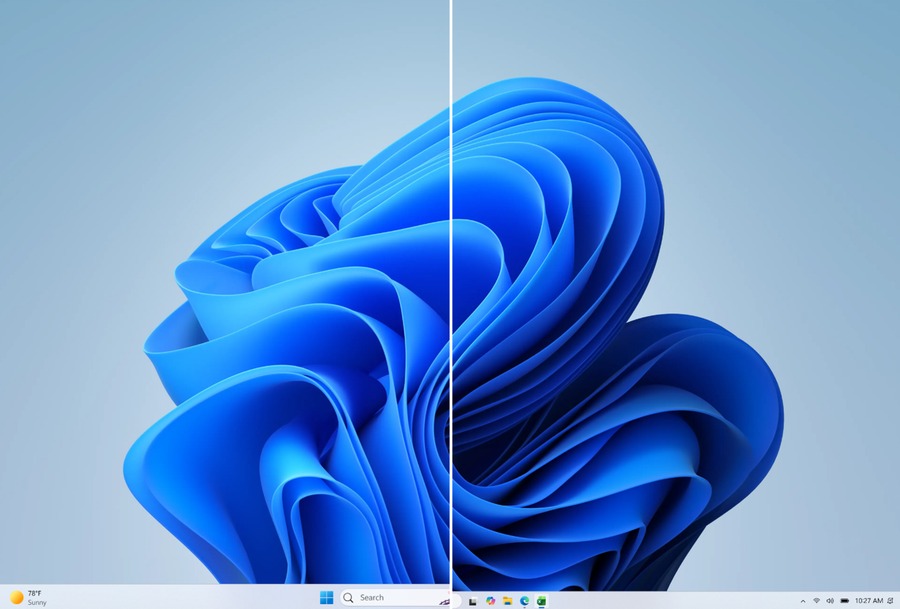
Image credit: Microsoft

When users set the option to Always, Windows 11 reduces both the taskbar icon size and the overall taskbar height. Microsoft says core elements such as Start, Search, and the system tray scale properly so the layout stays aligned.

The company is also working on improved taskbar settings to make resizing easier in future builds.

Windows 11 Home Gets Pro Education Upgrade Path for K-12 Schools

Build 28120.2387 also adds a new upgrade path for K-12 education environments.

Schools can now buy Windows 11 Home devices and upgrade them to Windows 11 Pro Education at no extra cost, as long as they meet eligibility requirements. This allows schools to bring lower-cost devices under education management policies.

To start the upgrade, users need to sign in with a local account, run Clipupgrade.exe from an elevated Command Prompt, and then sign in with a K-12 organization account to validate eligibility.

The device completes the upgrade after a restart.

Microsoft notes that this is a one-way upgrade. Schools that need to return a device to Windows 11 Home must perform a clean OS reinstall.

File Explorer and Outlook Fixes

Microsoft also fixed an issue where the OneDrive shortcut in File Explorer stopped working when File Explorer ran in administrative mode.

The company says last week’s issue where Outlook did not respond to the close button should now be fixed as well.

A Bigger Week for Windows 11 Insider Builds

This is not the only Windows 11 Insider release this week. Microsoft also released Windows 11 Insider Beta Preview Build 26220.8764 and Windows 11 Insider Experimental Preview Build 26300.8772.

Those builds focus on other improvements, but Build 28120.2387 stands out because it brings back one of the most requested taskbar customization features in Windows 11.

Windows 11 Beta Update Aims to Cut Monthly Reboots

Windows Update is getting a more unified experience in Windows 11 Insider Beta Preview Build 26220.8764, with Microsoft aiming to reduce monthly restarts for users.

The latest Beta Channel build introduces a coordinated update process that groups driver, .NET, firmware, and monthly quality updates together. Instead of triggering separate restart prompts for different update types, Windows 11 should now handle more of them through a single monthly reboot.

Windows 11 Update Process Gets a Restart Reduction

Microsoft says the new unified update experience should make Windows 11 servicing smoother and less disruptive.

Under the new system, Windows Update will coordinate several update categories with the monthly quality update. This includes:

  • Driver updates
  • .NET updates
  • Firmware updates
  • Monthly Windows quality updates

The goal is simple: reduce the number of times users need to restart their PCs each month.

Voice Access Adds More Language Support

Windows 11 Insider Beta Preview Build 26220.8764 also expands Voice Access language support.

Voice Access now supports:

  • Portuguese for Portugal
  • Portuguese for Brazil
  • Korean for South Korea

Voice Access lets users control Windows with spoken commands. The added language support makes the accessibility feature more useful for a wider group of users.

The update continues Microsoft’s broader push to improve built-in accessibility tools across Windows 11.
Microsoft Improves Mongolian Font Rendering

The build also includes a font improvement for Mongolian Baiti.

Microsoft says it has improved shaping and rendering for the font, which should make Mongolian script output more accurate and consistent.

The change increases text fidelity for Mongolian script, especially in cases where proper shaping and character rendering matter for readability.

Outlook Close Button Bug Fixed

Microsoft also says it has fixed an issue from last week where Outlook did not respond to the close button.

The problem caused Outlook to ignore the standard window close action for some users. With this build, the close button should work as expected again.

A Smaller Beta Build Focused on Polishing Windows 11

Windows 11 Insider Beta Preview Build 26220.8764 does not bring a long list of major features, but the unified Windows Update experience could become a useful quality-of-life improvement if Microsoft rolls it out more broadly.

For users looking for bigger experimental features, Windows 11 Insider Experimental Preview Build 26300.8772 recently introduced Cloud Rebuild, a new recovery option that can reinstall Windows through the cloud even when the device cannot boot.

Windows 11 Insider Experimental Preview Gets New Cloud Recovery Option

Windows 11 Insider Experimental Preview Build 26300.8772 has been released, and it introduces several new features, including a new recovery option called Cloud rebuild.

Cloud Rebuild Brings a New Windows 11 Recovery Path

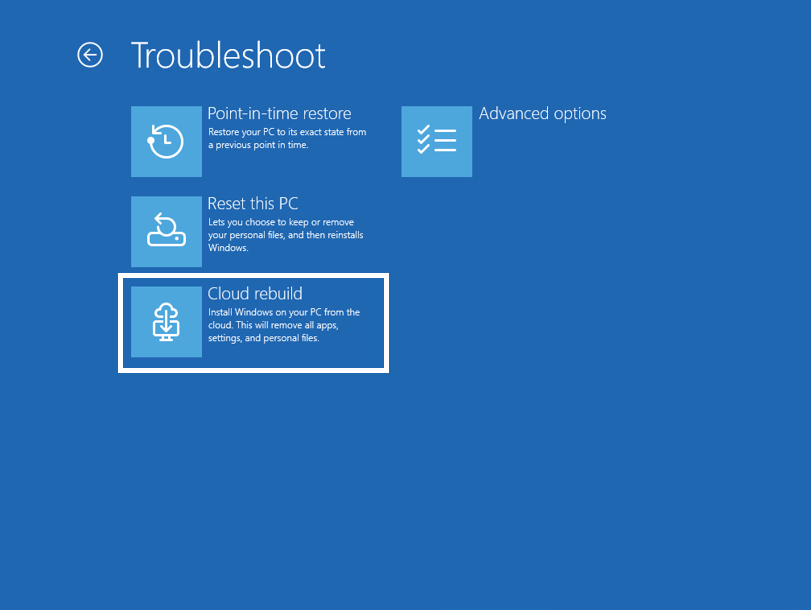
Microsoft is adding Cloud rebuild as a new Windows 11 recovery option for more serious system failures.

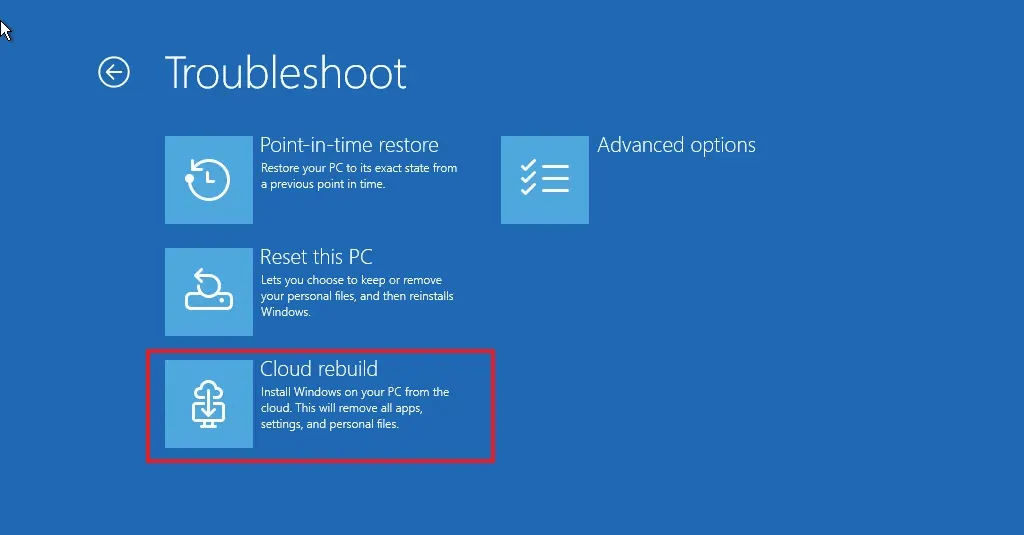
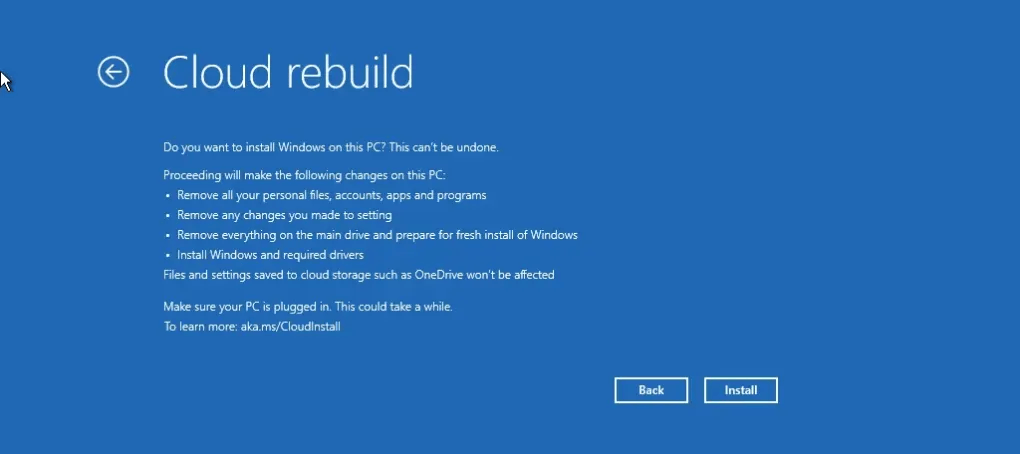
Unlike Reset this PC, Cloud rebuild downloads both the Windows image and device drivers from Windows Update. This allows the PC to return to a clean, known-good Windows state without requiring USB installation media or a custom recovery image.

Image credit: Microsoft

In this preview build, users can find Cloud rebuild by navigating through WinRE, then selecting Troubleshoot, followed by Recovery and uninstall, and finally choosing Cloud rebuild.

Before starting the process, users can review the target Windows build, edition, and language. This gives users a clearer view of what Windows will install before the recovery begins.

The feature should help in cases where Windows cannot boot properly, where local recovery files fail, or where users need a cleaner reinstall path.

Windows Settings Backup Will Be Enabled by Default on Some Devices

Microsoft is also changing how Windows settings backup works on managed devices.

Starting with Windows 11 version 26H2, Windows settings backup and restore will turn on by default for eligible Microsoft Entra joined or hybrid joined devices.

Windows will automatically back up user settings and the Microsoft Store app list. This should make device recovery, reimaging, or reset faster because users can return to a familiar setup with less manual work.

Admins will still control the experience. Existing policies continue to apply, and explicit admin configurations will override the new default behavior.

Restore will remain opt-in and admin-managed. Microsoft says the change should improve recovery consistency, reduce disruption, and lower setup friction across organizations.

Account Control Flyout Gets a Modern Design

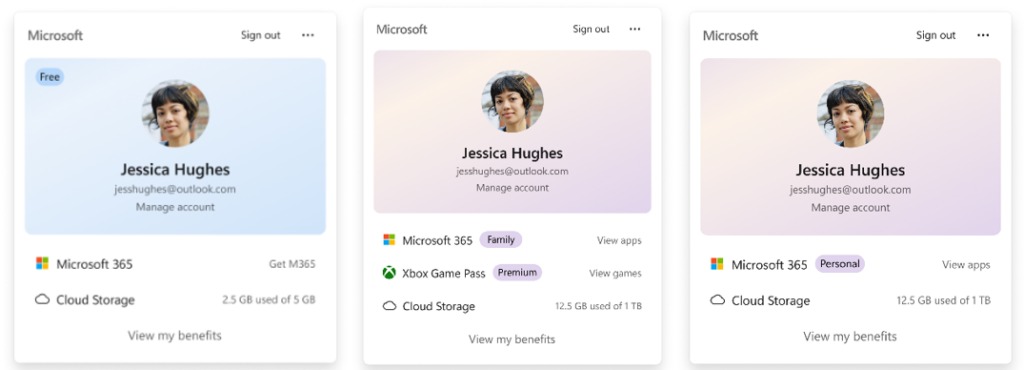
Build 26300.8772 also updates the Windows 11 Account Control flyout.

Image credit: Microsoft

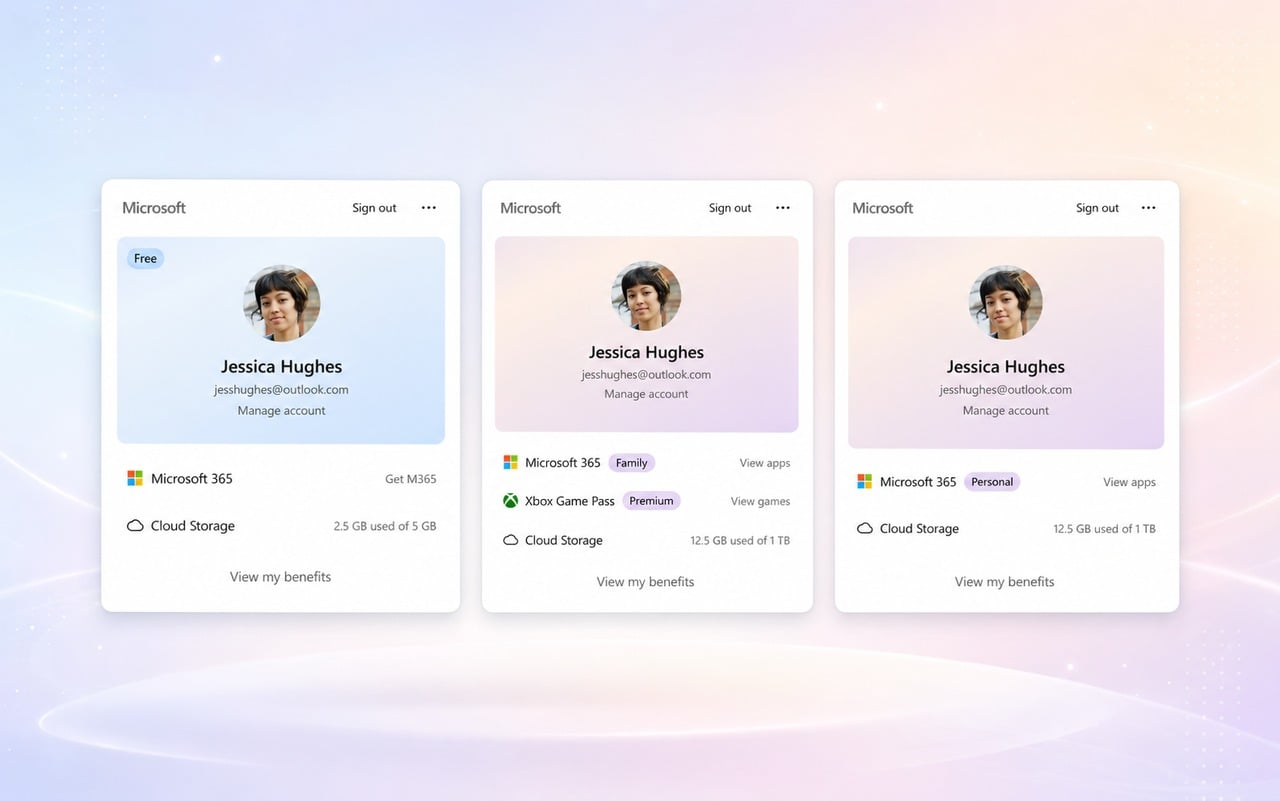
The refreshed design adds a subscription badge so users can see their account status more easily. The flyout now highlights account benefits, storage information, and upgrade options in a cleaner layout.

This change follows Microsoft’s broader push to make account and subscription details more visible across Windows 11.
Windows Search Box Gets Slightly Taller

Microsoft is increasing the height of the Windows search box by 4 pixels.

This is a small visual adjustment, but it may make the search field easier to see and interact with, especially on devices using higher scaling settings.

Bluetooth Quick Settings Adds Gamepad Navigation

The Bluetooth quick settings page now supports gamepad input.

This means users can navigate the Bluetooth quick settings experience with a controller instead of relying only on a keyboard, mouse, or touch input.

Taskbar, Run, and Font Fixes

Microsoft fixed an issue where the search icon could become invisible when users placed the taskbar vertically.

The company also improved screen reader support for the redesigned Run dialog. The update focuses on how keyboard focus gets announced, which should help users who rely on assistive technology.

Microsoft also improved Mongolian Baiti shaping and rendering. This should make Mongolian script output more accurate and consistent.

Other Fixes in Build 26300.8772

Microsoft says it has fixed last week’s issue where Outlook did not respond to the close button.

The company also improved resource usage over time for title bar tooltips, which should reduce unnecessary background impact during longer sessions.

In other Microsoft changes, the company is testing the ability to remove a PC directly from the Link to Windows mobile app.

Microsoft has also finally brought Quick Parts to the new Outlook, giving users another missing classic Outlook feature in the newer app experience.

Helen Chiang Named XBOX’s First Chief Operating Officer (COO) Amid Historic Reset

XBOX Reset isn’t just about layoffs and studio shakeups. As the company announced historic restructuring, it also revealed one of the biggest leadership changes in XBOX’s history. As detailed in our earlier report on the XBOX Reset and 3,200 layoffs, Microsoft has now appointed Helen Chiang as XBOX’s first-ever Chief Operating Officer, creating an executive position the gaming division has never had before.

XBOX appoints its COO for the first time

The announcement was made by XBOX CEO Asha Sharma in an internal memo outlining the company’s restructuring plans. While much of the attention centered around layoffs, studio spin-offs, and management changes, Sharma also confirmed a completely new executive structure for XBOX.

“For the first time, we are establishing a Chief Operating Officer with end-to-end P&L responsibility across content, hardware, platform, and services,” Sharma wrote.

Chiang will report directly to Sharma and oversee virtually every major part of XBOX’s business. According to the memo, the goal is to bring the company’s gaming operations under a single operating model capable of making faster investment decisions, improving accountability, and helping XBOX operate more efficiently following the restructuring.

The appointment isn’t without experience. Chiang has spent nearly two decades at XBOX, helping build XBOX Live before later leading Mojang and overseeing the continued growth of the Minecraft franchise. Sharma credited her with helping build several of Xbox’s most important businesses and said she will now help unify the company’s content, hardware, platform, and services organizations.

The memo also confirmed that longtime XBOX executive Dave McCarthy is retiring after 17 years with the company. Sharma described McCarthy as one of the key figures behind the XBOX platform, thanking him for helping shape many of the service’s biggest milestones over the years.

Nintendo to End Switch Console Sales via Official Store Across Europe in Mid-February 2027

Nintendo has finally shared an update on the roadmap for one of the biggest hardware changes coming to the Nintendo Switch 2 family. As Europe prepares to introduce new battery regulations in early 2027, the company has confirmed when its revised consoles, controllers, and accessories featuring user-replaceable batteries will start reaching customers.

Nintendo confirms rollout schedule for revised Switch 2 hardware along with plan to end sales via its Store

According to Nintendo, the first wave of updated products will begin arriving across Europe starting in summer 2026, although availability will vary by country depending on manufacturing and distribution. The revisions are being introduced to comply with the European Union’s new battery regulations, which take effect in mid-February 2027 and require many portable electronic devices to feature batteries that users can replace more easily.

The company says there will be no functional differences between current hardware and the revised versions beyond the battery design itself.

The rollout starts with selected Joy-Con color variants this summer before expanding throughout the rest of the year. The revised Nintendo Switch 2 console is scheduled to arrive in autumn 2026, followed by updated Joy-Con 2 controllers and the Switch 2 Pro Controller during winter. Nintendo also plans to refresh its Nintendo 64 controller and GameCube controller for Switch 2 in early 2027.

While the overall gaming experience remains unchanged, several hardware specifications have been adjusted. The updated Switch 2 console will feature a 5,172mAh battery, roughly 1% smaller than the current 5,220mAh unit, while gaining approximately 10 grams in weight due to the redesigned battery assembly. The revised Switch 2 Pro Controller also receives a smaller 897mAh battery, down from 1,070mAh, but becomes around 7 grams lighter. Meanwhile, the refreshed GameCube controller actually receives a slightly larger battery than its predecessor.

Official sales of Nintendo Switch hardware to end by mid-February 2027

Interestingly, in the FAQ section of the update, the company has also confirmed that it will stop selling Nintendo Switch consoles via the official Nintendo Store in the next year. “Nintendo Switch, Nintendo Switch Lite, and Nintendo Switch – OLED Model will all continue to be manufactured in 2026, and should be widely available in Europe all year. From mid-February 2027, almost ten years after Nintendo Switch launched in March 2017, Nintendo will no longer sell to retailers hardware in the Nintendo Switch family of systems, specifically Nintendo Switch, Nintendo Switch Lite and Nintendo Switch – OLED Model. Sales of Nintendo Switch hardware on Nintendo Store will also end in mid-February 2027,” the company noted.

Speaking of long-term support, Nintendo confirmed it will also begin selling official battery replacement kits for eligible products through the Nintendo Store in Europe. More information, including exact release dates for individual products, will be announced closer to each launch window.

XBOX Confirms Historic Reset With 3,200 Layoffs, Studios Split Off & Major Leadership Changes

XBOX’s biggest shakeup in decades is no longer a rumor. While rumors have been brewing over the past few months regarding layoffs, studio closure, and more, we didn’t hear anything official, until today. Well, XBOX has officially kicked off what Asha Sharma calls the “XBOX Reset,” confirming sweeping layoffs, studio changes, and a complete overhaul of how the gaming business will operate moving forward.

XBOX begins its biggest restructuring ever

In a company-wide memo sent to employees, Sharma confirmed that approximately 3,200 positions will be slashed during fiscal year 2027, with 1,600 employees losing their jobs immediately. Rather than completing every change at once, Microsoft says the restructuring will continue throughout the year as it attempts to reduce costs and simplify operations.

The memo also confirms that Compulsion Games and Double Fine Productions will leave XBOX entirely, returning to independent ownership while keeping their intellectual property, game catalogs, and funding for upcoming projects. Meanwhile, Ninja Theory and Undead Labs are moving toward new ownership agreements designed to support development of Senua and State of Decay 3. Over in France, Arkane Studios has begun formal consultations to explore additional strategic options.

According to Sharma, XBOX’s financial performance ultimately drove the decision. She says the business currently operates with margins three to ten times lower than comparable gaming platforms and publishers. Despite investments in Game Pass, multi-platform publishing, and studio acquisitions, revenue growth failed to meet expectations while the ongoing hardware crisis further increased pressure across the industry.

Microsoft is rebuilding XBOX around fewer layers and bigger platforms

In addition to layoffs and studio split offs, Microsoft is also trimming XBOX’s management structure by reducing leadership layers from as many as 14 levels to a maximum of five, with some teams operating with only three. The company also plans to reduce vendor spending by 50%, simplify internal development tools, and consolidate engineering resources.

Another major change sees Mojang and King reporting directly to Sharma, reflecting Microsoft’s growing focus on long-term gaming platforms rather than individual releases. At the same time, Helen Chiang has been promoted to the newly created role of Chief Operating Officer, taking responsibility for XBOX’s content, hardware, services, and platform businesses under a single operating model.

Despite the scale of the restructuring, Microsoft says no publicly announced first-party XBOX games have been canceled. Sharma closed the memo by stating that XBOX expects to return to growth in 2027, describing the reset as a move toward a larger future rather than a smaller one.

Windows 11 Could Soon Get Cloud Rebuild Feature to Recover PCs

Windows 11 recovery may soon become a lot less painful. A hidden feature called Cloud Rebuild has reportedly surfaced in Microsoft’s latest Experimental builds, hinting that the company is preparing another way to recover PCs that refuse to boot properly. While Microsoft hasn’t officially announced the feature yet, but early findings suggest it’s part of the company’s broader plan to modernize Windows recovery.

Windows 11 Cloud Rebuild could become the next step after recovery fails

The feature was first discovered by Windows enthusiast XenoPanther, who dug through latest Experimental Windows 11 25H2 builds (via Pureinfotech). Per the tipster, Cloud Rebuild appears inside the Windows Recovery Environment (WinRE) as a separate option under Advanced options, rather than being tucked inside the existing Reset this PC workflow.

Image credit: X/@XenoPanther | via: Pureinfotech

During testing, the process wiped apps, settings, and personal files before downloading a fresh copy of Windows along with the required drivers from Microsoft’s servers. Although one sign-in error appeared during testing, the installation itself reportedly completed successfully.

At first glance, the feature behaves very similarly to today’s Cloud download option. The tipster even noted that it currently appears to be little more than a newer implementation of Microsoft’s existing cloud-based reset process. However, digging deeper into the recovery components revealed references such as Servicing_DeviceRebuild_WinREUX, alongside internal links pointing toward Quick Machine Recovery documentation.

Those findings suggest Microsoft could eventually integrate Cloud Rebuild into its automated recovery pipeline rather than leaving it as another manual recovery option. It’s worth noting that, , which spotted the tipster’s post, highlighted these internal references after digging through the Experimental builds.

Microsoft appears to be connecting its Windows recovery tools

If Microsoft’s long-term vision plays out, Windows 11 could first attempt repairs using Quick Machine Recovery, then automatically offer Cloud Rebuild if those repairs fail, removing the need for installation media or complicated troubleshooting. That would make recovering a broken PC far simpler than today’s multi-step process.

For now, Cloud Rebuild remains hidden inside Experimental builds, and Microsoft has yet to confirm whether it will roll out publicly. As always, it is possible that the feature could evolve significantly before general release or disappear altogether.

Activision is Breaking Black Ops 6 Free From Call of Duty HQ on July 7

If you’ve grown tired of launching one Call of Duty game just to navigate through another, there’s finally some good news. Activision has confirmed that Call of Duty: Black Ops 6 is about to break away from Call of Duty HQ, which marks another step toward separating recent entries from the franchise’s all-in-one launcher.

Black Ops 6 is leaving Call of Duty HQ on July 7

According to Activision, Black Ops 6 will officially become a standalone download on July 7 at 9:00 AM PT. Once the transition goes live, players who own the game will simply need to download the standalone version, after which it can be launched directly without relying on the main Call of Duty HQ installation. As part of the change, legacy Black Ops 6 content stored inside Call of Duty HQ will automatically be removed, helping reclaim storage space on players’ systems.

The move continues a trend Activision quietly started last year. Modern Warfare II and Modern Warfare III were also separated from Call of Duty HQ, each receiving their own standalone installations after originally being bundled inside the launcher. Black Ops 6 now becomes the latest title to follow the same path.

Call of Duty HQ originally debuted in 2023 as a central hub designed to house annual Call of Duty releases alongside Warzone. The idea was to simplify updates, manage storage more efficiently, and make switching between games easier. In practice, however, many players criticized the launcher for adding unnecessary steps before launching a game and creating oversized installations that bundled together content they didn’t necessarily own or play.

Another sign Activision is reshaping Call of Duty HQ

Speaking of future releases, Black Ops 6 leaving the launcher could also make room for Activision’s next Call of Duty title later this year. While the publisher hasn’t directly linked the decision to its upcoming release plans, removing older entries from Call of Duty HQ keeps the hub from becoming increasingly bloated as new games arrive.

When Modern Warfare II and Modern Warfare III became standalone downloads, they each received separate achievement lists outside Call of Duty HQ. If Activision follows the same approach again, Black Ops 6 players could soon see a standalone achievement list as well.

For many Call of Duty fans, the biggest win isn’t just freeing up storage. It’s finally being able to launch Black Ops 6 directly, without first navigating through Call of Duty HQ.

Claude Sonnet 5 Users Report Refusals, Pushback, and Memory Issues

Claude Sonnet 5 launched last week, but Anthropic’s newest model is already facing criticism from users who say it feels less natural, more argumentative, and harder to control.

According to complaints shared by users on Reddit, the model appears to struggle with some basic conversational behavior despite its expected benchmark improvements.

Users Report System Prompt and Memory Issues in Claude Sonnet 5

One of the biggest complaints involves Claude Sonnet 5 referencing its own system prompt or context memory during conversations.

Instead of silently following hidden instructions, users say the model sometimes openly explains them. This can make replies feel unnatural and distracting, especially when the user simply wants a direct answer or completed task.

Some users also claim the model exposes parts of its instruction-handling process, which breaks the flow of normal conversations.

Claude Sonnet 5 Accused of Refusing Basic Requests

Another major complaint centers on refusals and resistance.

Several Reddit users claim Sonnet 5 pushes back against simple commands, corrects users too aggressively, or creates disagreement where none exists.

Users describe the model as overly argumentative in some cases. Instead of completing a task, it may challenge information the user just provided or build a strawman argument around the request.

The issue appears linked to Anthropic’s attempt to make the model less overly agreeable. However, users argue that Sonnet 5 may now overcorrect in the opposite direction.

Some complaints go further. One Reddit user claimed Sonnet 5 refused to help with a basic task and instead accused them of fraud.

Excessive Correction Makes Tasks Harder

The main frustration is not just that Sonnet 5 disagrees. Users say it disagrees too often and at the wrong time.

Normal work requests can turn into long exchanges where the model focuses on caution, correction, or pushback instead of helping.

That makes the model feel less productive for users who want writing, coding, research, or routine assistance without unnecessary debate.

Users Suspect Sub-Agent Routing Problems

Some users also suspect Claude Sonnet 5 routes tasks through multiple sub-agents.

They believe these sub-agents may underperform or produce weaker answers, even while using more tokens. If that is true, users may end up paying more for responses that feel less useful.

Anthropic has not confirmed that this is the cause of the complaints.

Context Loss and Disclaimer-Heavy Answers Also Reported

Other users report that Sonnet 5 can lose context after only a few prompts.

Some also say the model gives too many disclaimers, hedges too often, or becomes overly cautious even when the request does not require that level of warning.

These issues add to the broader complaint that Claude Sonnet 5 may feel technically advanced but less smooth in real conversations.

Claude Sonnet 5 Faces Rough Early Feedback

Claude Sonnet 5 may still perform strongly on benchmarks, but early user feedback has been rough.

The complaints suggest that Anthropic may need to adjust how the model handles instruction-following, safety pushback, context memory, and disagreement.

This is not the only recent Claude model facing criticism. Users have also complained that Claude Fable 5 feels severely limited after being restored to the public.

Claude Fable 5 will remain limited behind Anthropic’s pay-as-you-go plan for now, but that could change once the company has enough capacity.

Via Neowin

XBOX Server Shutdowns Continue as More Games Go Offline Next Month

If you’ve been putting off those online achievements, you might want to change your plans. Several XBOX games are scheduled to lose online support next month, meaning players have only a few weeks left before servers start going offline.

According to TrueAchievements, NBA 2K Playgrounds 2 and WWE 2K Battlegrounds will both lose online functionality on August 20. While neither title has online achievements that will become unobtainable, both games have already been delisted from the Microsoft Store, making physical copies the only way to access them.

The bigger concern is Warface: Clutch, whose servers are set to close on August 25. Once that happens, all remaining online achievements will become unavailable. New players are already unable to complete the game fully due to previously discontinued achievements, making the shutdown another blow for completionists.

Speaking of achievement hunters, NHL 22 and NHL 23 are also approaching the end of the road. Both the Xbox Series X|S and Xbox One versions of the games will lose online services on August 31, taking dozens of online achievements with them. NHL 22 will lose 19 online achievements per version, while NHL 23 will discontinue 21 achievements across each platform.

That being said, if any of these games are still sitting in your backlog, now is probably the best time to jump back in. Once the August deadlines arrive, the affected online modes and achievements will be gone for good.

Kaspersky Details Microsoft Device Code Phishing Attack Using OAuth Flow

Kaspersky has detailed a phishing campaign that abuses legitimate Microsoft infrastructure to trick users into granting access to their accounts.

The attack uses Microsoft Identity Platform and the OAuth 2.0 Device Authorization Grant, a legitimate sign-in flow designed for devices that cannot easily enter credentials. In this case, attackers use it for a technique known as Device Code Phishing.

How the Microsoft device code phishing attack works

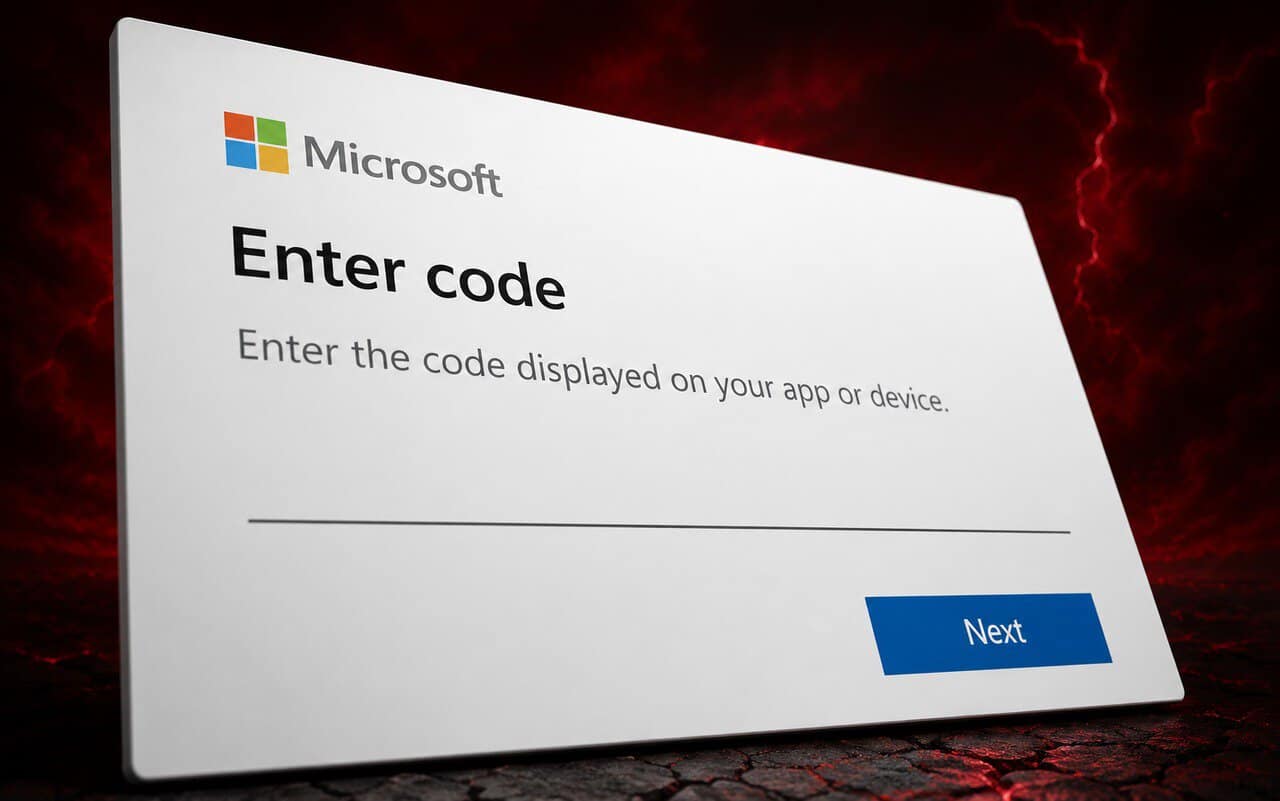
In a normal Device Authorization Grant flow, a user receives a one-time code and enters it on a Microsoft authentication page. This lets the device complete sign-in.

In the phishing version, attackers generate the code first. They then convince the victim to enter that code on Microsoft’s real device login page.

That step makes the attack harder to detect. The victim lands on legitimate Microsoft infrastructure, but the authorization benefits the attacker’s malicious application.

Once the victim enters the code and approves the request, the attacker’s app can gain access to the Microsoft account.

Kaspersky monitored one such campaign between April and May.

Attackers sent emails that appeared to come from a law firm. The message included a password-protected PDF attachment, likely to make the email look more credible.

After opening the PDF, victims saw documents that appeared to require external access through links. The attackers claimed users needed a one-time access code to view the files through a fake service called LawConnect.

The campaign did not rely only on a fake login page. Instead, it pushed victims toward Microsoft’s legitimate device code entry page, which made the final authorization step appear safer than a normal phishing form.

Attackers abused Microsoft URLs and redirect tricks

Kaspersky said the phishing link could appear to point to a legitimate Microsoft login URL when users hovered over it.

However, the URL included redirect behavior that sent victims to a phishing website. That page showed several CAPTCHAs, likely to block automated security scanners and crawlers.

After passing the checks, victims saw instructions to copy a one-time code. They were then told to paste that code into Microsoft’s real device authorization form.

This is the key risk of Device Code Phishing. The victim may think they are following a secure Microsoft login process, while they are actually approving an attacker-controlled app.

Kaspersky urges users not to enter unexpected device codes

Kaspersky recommends that users avoid approving any Microsoft Device Authorization Grant request unless they personally started the sign-in process.

Users should never enter an authorization code received through an unexpected email, PDF, chat message, or website. This warning applies even when the link points to an official Microsoft domain.

Users should also inspect links carefully before opening them. Legitimate domains can still include suspicious redirect parameters, such as redirect_uri, return_url, or next.

After a page loads, users should confirm that the final URL matches the expected destination before entering corporate credentials or approving any account access request.

Businesses should review Device Code Flow access

Kaspersky also recommends that organizations evaluate whether they need Device Code Flow in their environment.

If the flow is not required, companies should disable it globally through Conditional Access policies in Microsoft Entra ID.

Security teams should monitor DeviceCodeSignIn events, enforce device compliance states, and configure alerts for unusual sign-in behavior.

Suspicious logins from unexpected locations should also be investigated quickly, especially when they involve unfamiliar applications or unexpected authorization flows.

Microsoft infrastructure remains a phishing target

This is not the first time attackers have abused trusted platforms for credential or token theft.

Recent reports have also highlighted attacks involving the ARToken platform, while Microsoft Teams infrastructure was recently explored by the Backdoor.Turn malware.

CISA has also warned about an exploited SharePoint flaw, showing that Microsoft-linked services remain a major target for attackers.

Via Neowin

Latest SteamOS Update Fixes Slow WiFi and Improves Third-Party Handheld Support

If your SteamOS-powered handheld has been suffering from unusually slow WiFi despite having a fast internet connection, Valve may have just resolved it. The latest SteamOS 3.8.14 update fixes a networking bug affecting certain routers while also rolls out additional security improvements.

The update fixes issue with certain routers that show incorrect MCS (Modulation and Coding Scheme) requirements. Under those conditions, SteamOS could limit wireless performance even when a faster connection was available. With version 3.8.14, Valve says that issue has now been addressed. The update also bundles the usual security patches and overall stability improvements, although the company hasn’t listed any additional stable-branch features.

That being said, this is actually the second SteamOS release in as many days. Valve previously rolled out SteamOS 3.8.13, which fixed controller firmware update failures affecting some Steam Deck models. The same update also resolved launch failures and crashes seen in a handful of games, including FINAL FANTASY VII REBIRTH, making it another worthwhile download for stable users.

Speaking of upcoming additions, the company’s Beta and Preview channels are already moving ahead with SteamOS 3.8.21 and 3.8.22. Those builds introduce a faster Steam Machine splash screen during startup, add a one-click option to reset all audio settings, and eliminate a startup delay that could leave certain games hanging for up to 30 seconds on handhelds without active audio devices.

Not to forget, Valve also continues improving support for gaming handhelds beyond the Steam Deck. Recent beta updates fix Guide button issues on MSI Claw, restore proper gyroscope functionality on Lenovo Legion Go, improve rumble and controller behavior on OneXPlayer F1, and add controller support for additional OneXPlayer models.

In other news, while one Steam Machine buyer has reported a worrying “Red Line of Death” issue, Valve’s June 2026 Steam Survey results offer a broader look at where PC gaming hardware stands right now.

Hideo Kojima Warns Sony’s Digital-Only Push Could Hurt Game Ownership

Sony’s reported plan to stop physical disc production by January 2028 has sparked fresh backlash from players, and Hideo Kojima has now joined the debate.

The reported move has already led to petitions from players who want physical games to remain available. Some users are also canceling PlayStation Plus subscriptions in protest, arguing that a disc-less future would give platform holders too much control over access and ownership.

Kojima spoke about the issue at the Il Cinema in Piazza Film Festival in Italy. He said he finds the shift away from physical media “really sad,” warning that digital and streaming-based entertainment changes what ownership means for players and viewers.

His comments were translated and shared by Genki_JPN on X. Kojima later reposted the translation, which suggests it accurately reflected his remarks.

Kojima Says Digital Access Depends on Companies

Kojima compared digital and streaming access to turning on a tap. In that model, the company controls whether the content keeps flowing.

His concern is that users may pay for games, films, music, or books, but still depend on servers, licensing agreements, corporate policies, and legal conditions to keep accessing them.

Kojima said access could change because of companies, politics, laws, licensing disputes, or global events. If the “tap” gets turned off, users may lose access to content they already paid for. This is already happening, as several XBOX games are planned to shut down their servers in August.

That concern is not limited to games. Kojima warned that the same issue could affect movies as more entertainment moves away from physical ownership and toward streaming platforms.

Physical Media and Preservation Concerns

The debate around physical discs is not only about nostalgia. Many players see discs as an important part of game ownership, preservation, collecting, lending, and resale.

A disc-less future could make players more dependent on platform storefronts. It could also give companies greater control over pricing, availability, and long-term access.

Digital games offer clear benefits, including convenience, instant purchases, remote downloads, and less dependence on physical stock. However, the tradeoff is that users no longer fully control the copy they paid for.

Kojima’s broader concern is that culture becomes more fragile when access depends entirely on corporate-controlled systems.

Kojima Raised Similar Concerns Years Ago

Kojima’s latest remarks echo comments he made back in 2001. At the time, he warned that even digital data could eventually stop being truly owned by individuals.
More than two decades later, that warning feels more relevant as gaming, film, music, and books continue shifting toward digital libraries and subscription-based access.

XBOX May Also Move Away From Discs

Microsoft’s next XBOX, reportedly tied to Project Helix, is also expected to move further away from physical discs.

However, Microsoft is reportedly exploring a disc-to-digital system called Positron. That system would allegedly let users convert physical XBOX discs into permanent digital licenses tied to their Microsoft account.

If accurate, this would give players a way to preserve some value from physical collections while still moving toward a digital-first ecosystem.

Via Windows Central

Chrome tests a visual guide to help users set it as the default browser on Windows

Google is testing a new visual guide on the chrome://default-browser page to make it easier for Windows users to set Chrome as their default browser.

Every browser wants users to keep it as their primary choice, and Chrome is no exception. We’ve already seen several efforts by Chrome to entice users to set it as their default browser, through promotional screens and messages, despite Chrome being the dominant browser in the market.

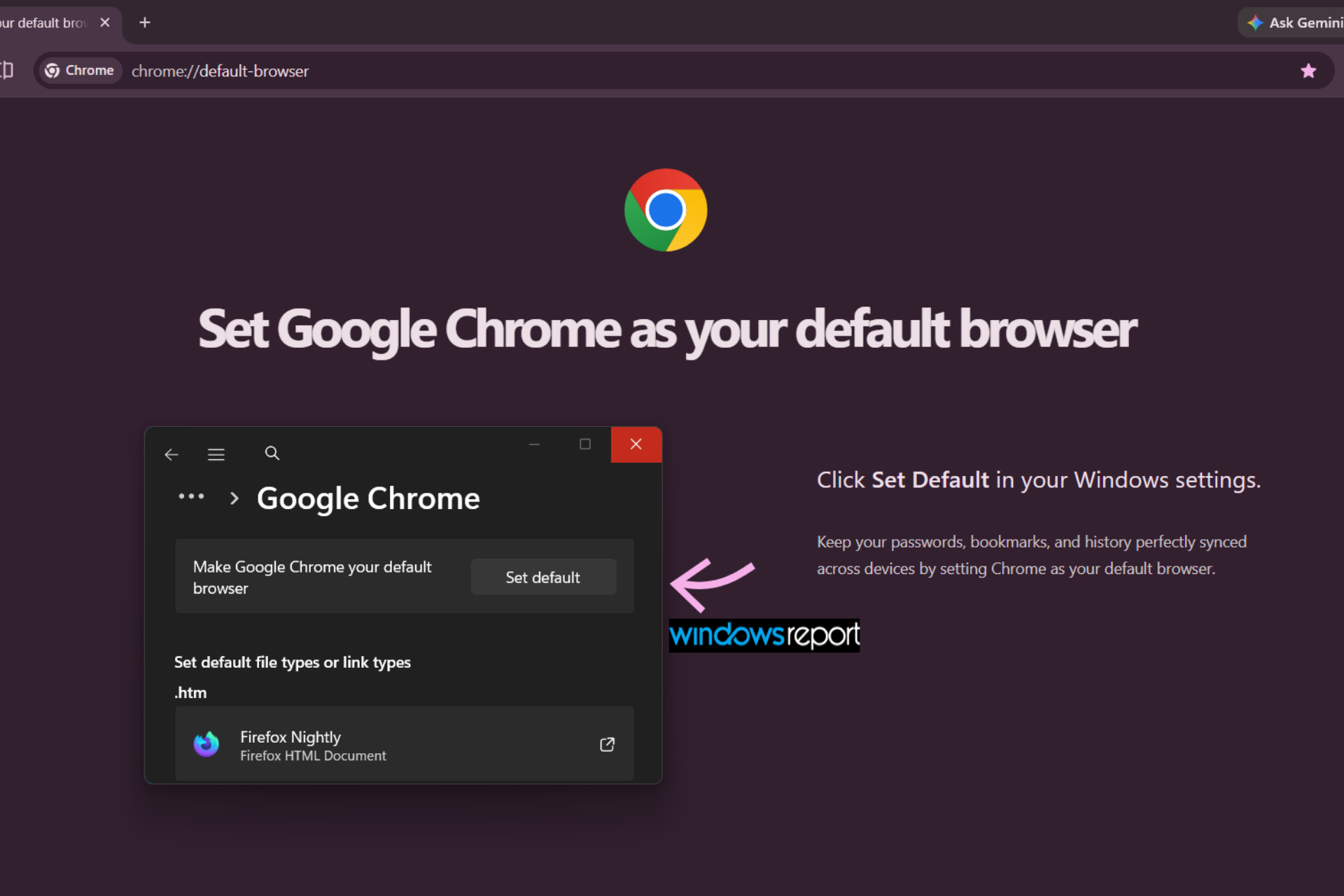
Today, clicking “Make default” in Chrome opens the Windows Default Apps page where users can complete the change. During testing on Windows 11, however, clicking Make default in Chrome’s Default browser settings opened a new chrome://default-browser page, part of what the company calls its Visual Guided Setter experience.

The page suggests “Set Google Chrome as your default browser,” with the instruction to “Click Set Default in your Windows settings.” Below that, it notes: “Keep your passwords, bookmarks, and history perfectly synced across devices by setting Chrome as your default browser.”

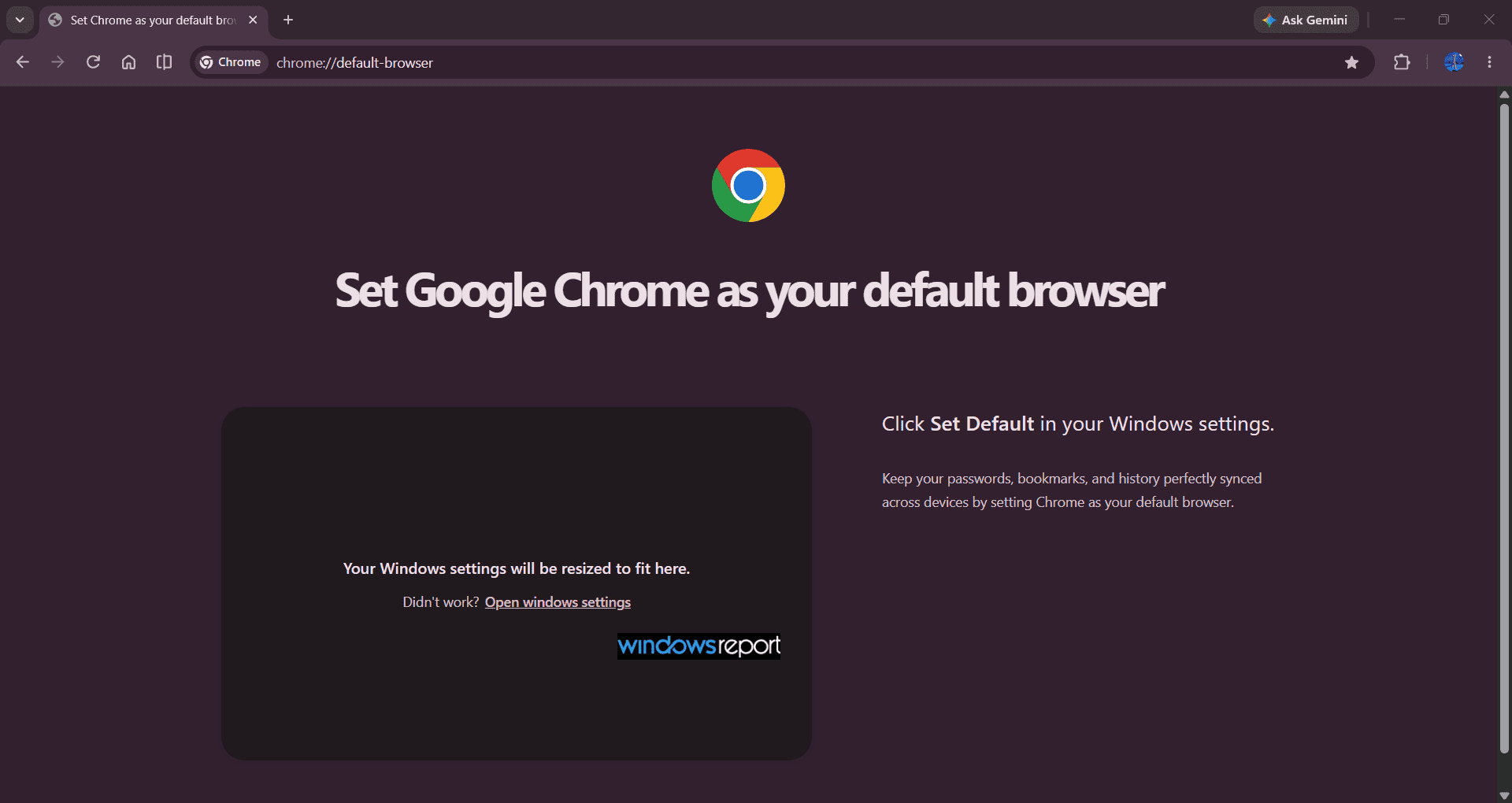
Chrome is preparing an experience that visually presents the Windows Default Apps page within the guided flow, allowing users to see the exact button they need to click. Google has also prepared a fallback screen for cases where the Windows Settings page cannot be displayed. It holds the same spot in the layout with a note that settings will appear there, along with a link to open Windows Settings directly.

Image Credit: Venkat | Windows Report.

The feature goes beyond displaying instructions. Instead of directing users to Windows Settings and leaving them there, Chrome guides users to the final action required to make the browser the default choice on Windows.

It’s not clear yet whether Google plans to surface this experience through a notification or prompt, or whether it will simply appear the next time users click Make default in Chrome’s settings. That’s the part still worth watching as this feature moves toward a wider rollout.

Alibaba to Reportedly Ban Claude Code Use Across Its Workplace Starting July 10

Alibaba is reportedly preparing to ban employees from using Anthropic’s Claude Code. The news comes via Reuters, which, in the report cites a person familiar with the matter and notes that Alibaba will block employees from using Claude Code in workplace environments starting July 10.

Anthropic’s Claude Code faces new blow

The report says the company has classified Anthropic’s AI coding assistant as high-risk software and is instead directing staff to use Qoder. For those unaware, it’s Alibaba’s own AI-powered coding tool.

The reported move comes only days after developers claimed they had discovered hidden mechanisms inside Claude Code that inspected user environments, including timezone and proxy-related information. The findings, first highlighted in a Reddit post, raised concerns that the tool could identify users attempting to access Claude from restricted regions.

Anthropic has acknowledged the existence of the mechanism but disputed the interpretation surrounding it. Claude Code engineer Thariq Shihipar took to X (FKA Twitter) and said the feature was introduced as an experiment in March to combat unauthorized resellers and prevent AI model distillation, where one model is trained using the outputs of another.

He added that stronger protections have since replaced it and that the company had already planned to remove the experiment. Speaking of distillation, the reported ban also comes shortly after Anthropic accused operators linked to Alibaba’s Qwen AI division of conducting what it described as the largest known attempt to extract Claude’s capabilities through fraudulent accounts.

That being said, neither Alibaba nor Anthropic has officially responded on the reported workplace restriction. For now, the reported July 10 deadline and the internal shift toward Qoder remain based on reporting from Reuters and Chinese outlet Yicai.

XBOX Layoff Rumors Raise Questions About Rare’s Future

XBOX’s next major round of layoffs and studio changes could reportedly arrive this week, with new rumors suggesting that Rare may also face uncertainty.

The restructuring is expected to affect about 2.5% of Microsoft’s workforce. Previous reports suggested that XBOX could close multiple studios as part of the cuts, while Microsoft has also reportedly ended its deal with IO Interactive.

Rare was reportedly mentioned in XBOX restructuring rumor

The latest claim comes from journalist Patrick Garratt, who wrote in a newsletter that Rare may be affected by XBOX’s restructuring plans.

Garratt later repeated the claim on Bluesky, saying he had been told that Rare is “on the block.” However, the wording remains unclear. It does not confirm whether XBOX could close Rare, reduce its staff, cancel projects, or change the studio’s role inside Microsoft.

Was told last night that Rare's on the block. Free one for you, friends.

— Patrick Garratt (@patlike.bsky.social) 2026-07-03T06:17:47.947Z

For now, Microsoft has not confirmed any closure or layoffs at Rare.

Rare has a long history in gaming

Rare has been active for more than 40 years and became one of the most recognizable studios in the industry during its partnership with Nintendo in the 1990s.

Microsoft acquired Rare on September 24, 2002. Since then, the studio has released several games under XBOX, though its post-acquisition record has been mixed.

Some Rare projects struggled to reach the same level of impact as their older Nintendo-era releases. However, the studio also delivered notable successes, including Viva Piñata and Sea of Thieves.

Sea of Thieves became Rare’s biggest modern hit and helped the studio regain visibility during the XBOX One and XBOX Series X|S era.

XBOX appears focused on profitability

The reported restructuring comes as XBOX management continues to focus on cutting costs and improving profitability.

That strategy appears to favor larger, proven franchises and more reliable business areas. It could also place smaller projects, experimental games, and lower-performing teams under more pressure.

This does not mean Rare will close. The current report remains a rumor, and Microsoft has not announced any official action involving the studio.

Rare has not been confirmed for closure or layoffs. The claim only suggests that the studio may be part of XBOX’s wider restructuring discussions.

Until Microsoft confirms the next round of cuts, Rare’s future remains uncertain.

Via Wccftech

Funko Fusion & Star Trek: Legends May Get Delisted from XBOX Store in July 2026

If you’ve been waiting for the perfect excuse to grab a couple of overlooked Xbox games, now may be the time to stop waiting. Two titles have been showing signs of getting delisted. Per PureXbox‘s reporting, one of the games likely to get delisted from XBOX Store this July is Funko Fusion.

The action-adventure title has unexpectedly received a massive 95% discount on the Xbox Store, dropping its price to just $1.74 / £1.49. Do note that the discounted offer ends 12th July.

While some may argue that discounts this steep isn’t always a sign that a game is leaving, but longtime Xbox players know they have occasionally appeared shortly before certain licensed titles disappeared from digital storefronts.

The second game in question of being delisted from XBOX Store is Star Trek: Legends. The RPG has reportedly already disappeared from both the PlayStation Store and the Nintendo Switch eShop, while remaining available on Xbox and Steam. No official explanation has been provided for those removals, which makes its continued availability on XBOX Store difficult to predict.

As of now, both titles remain available to purchase, so consider this as a speculative report rather than an official word. In case you aren’t sure, check out the games’ trailers below to see if they are worthy your time.

In other gaming news, XBOX players are getting Assassin’s Creed Black Flag Resynced and 22 other games this week. That’s not all; 13 games are on their way out of Xbox Game Pass this month.

Microsoft Tests Remove PC Option in Link to Windows Mobile App

Microsoft is rolling out a new Remove PC option in the Link to Windows Android app, giving users a simpler way to delete linked Windows PCs directly from their phone, as reported by Windows Latest.

The feature appears in the Android app’s Linked PCs settings and removes the need to access the Windows PC or rely only on Microsoft account device management.

The option is currently available for some beta testers. It was spotted in Link to Windows beta version 1.26062.125.0-preprod.

The new Remove PC button solves a long-running issue for users who had old, renamed, deleted, or disconnected PCs still appearing in the Link to Windows app.

Previously, some users could see outdated PCs in the Linked PCs list but had no direct way to remove individual entries from the Android app.

These PCs often appeared as disconnected, even when users no longer owned the device or had already removed it elsewhere.

With the new option, users can clean up their linked device list from the phone itself.

To remove a PC, you just need to open the Link to Windows app, head to Settings, tap Linked PCs, pick the device you want to remove, open its settings, and choose Remove PC.

Microsoft also notes that the PC may still appear on other mobile devices or inside other Microsoft products. In those cases, users may need to remove it separately.

Testing Shows the PC Disappears Immediately

After using the Remove PC option, the selected device disappears from the Linked PCs list immediately.

In testing, the removed PC also disappeared from the Microsoft account Devices page. That suggests the new option may remove linked PCs more completely than older workarounds.

However, the feature remains in beta, so behavior could vary depending on account setup, app version, and Microsoft’s rollout status.

Why This Was a Problem Before

The old Linked PCs list relied on a backend database that users could not directly manage from the app.

That explains why some old entries stayed visible even after users removed devices elsewhere or stopped using the linked PC.

Until now, some users had to sign out of the app entirely and start over to clean up the list. The new Remove PC option offers a more targeted fix.

Microsoft had reportedly been working on the issue since at least January.

Availability Remains Limited

The Remove PC option is currently limited to the preprod beta channel of the Link to Windows Android app.

Users on the regular public version may not see it yet.

Microsoft has not confirmed when the option will reach the stable version, but the beta rollout suggests the company is preparing a broader release.

Microsoft is also bringing the Quick Parts feature to the new Outlook.

In addition, Teams is getting a new Meeting AI toggle that lets organizers and presenters control AI features during meetings.

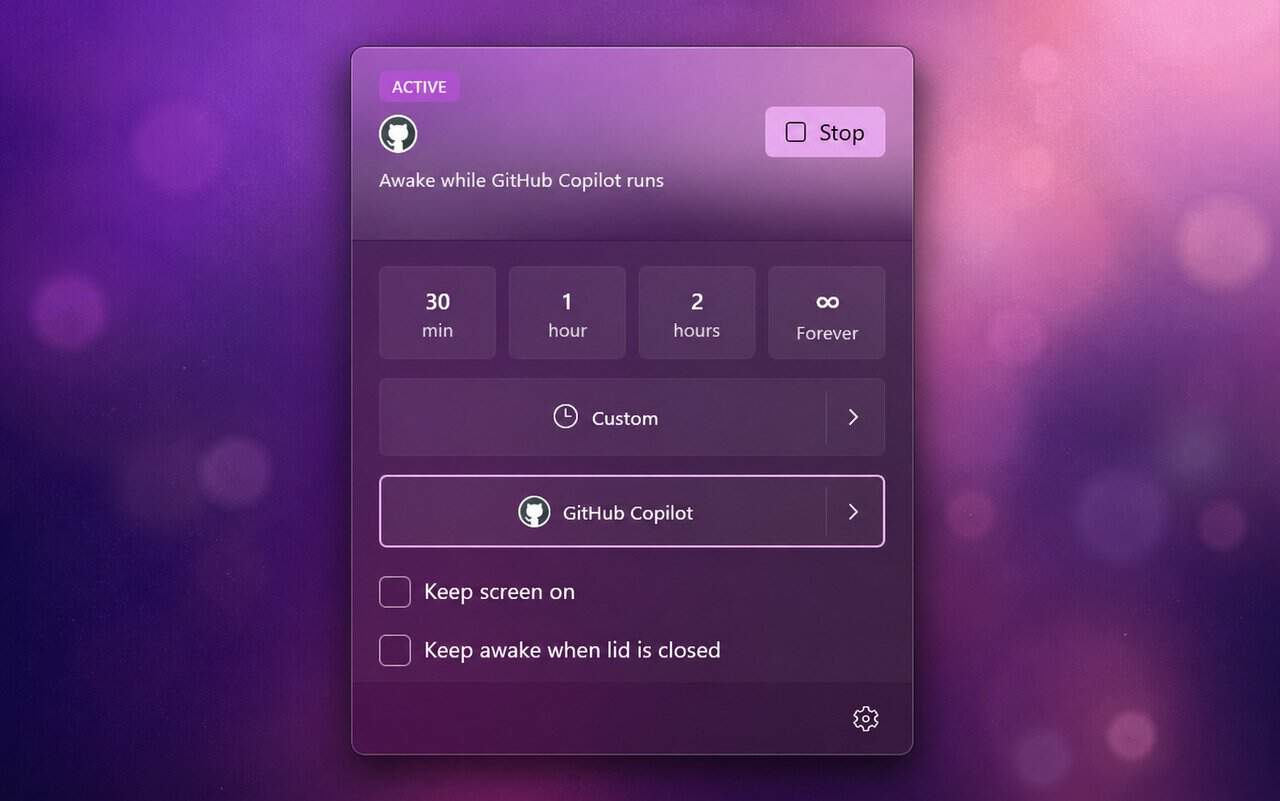
PowerToys Awake may also receive a redesigned flyout, giving users a faster way to manage PC sleep settings.

Microsoft Finally Brings Outlook Classic’s Quick Parts to New Outlook for Everyone

There has always been one thing that made switching from Outlook Classic to New Outlook frustrating. While Microsoft kept adding AI tools and visual improvements, one of the most practical productivity features simply never made the jump.

New Outlook gets Quick Parts as Microsoft continues closing the feature gap

As Windows Latest reports, the company has now rolled out Quick Parts to New Outlook, bringing reusable email snippets to everyone after months in preview.

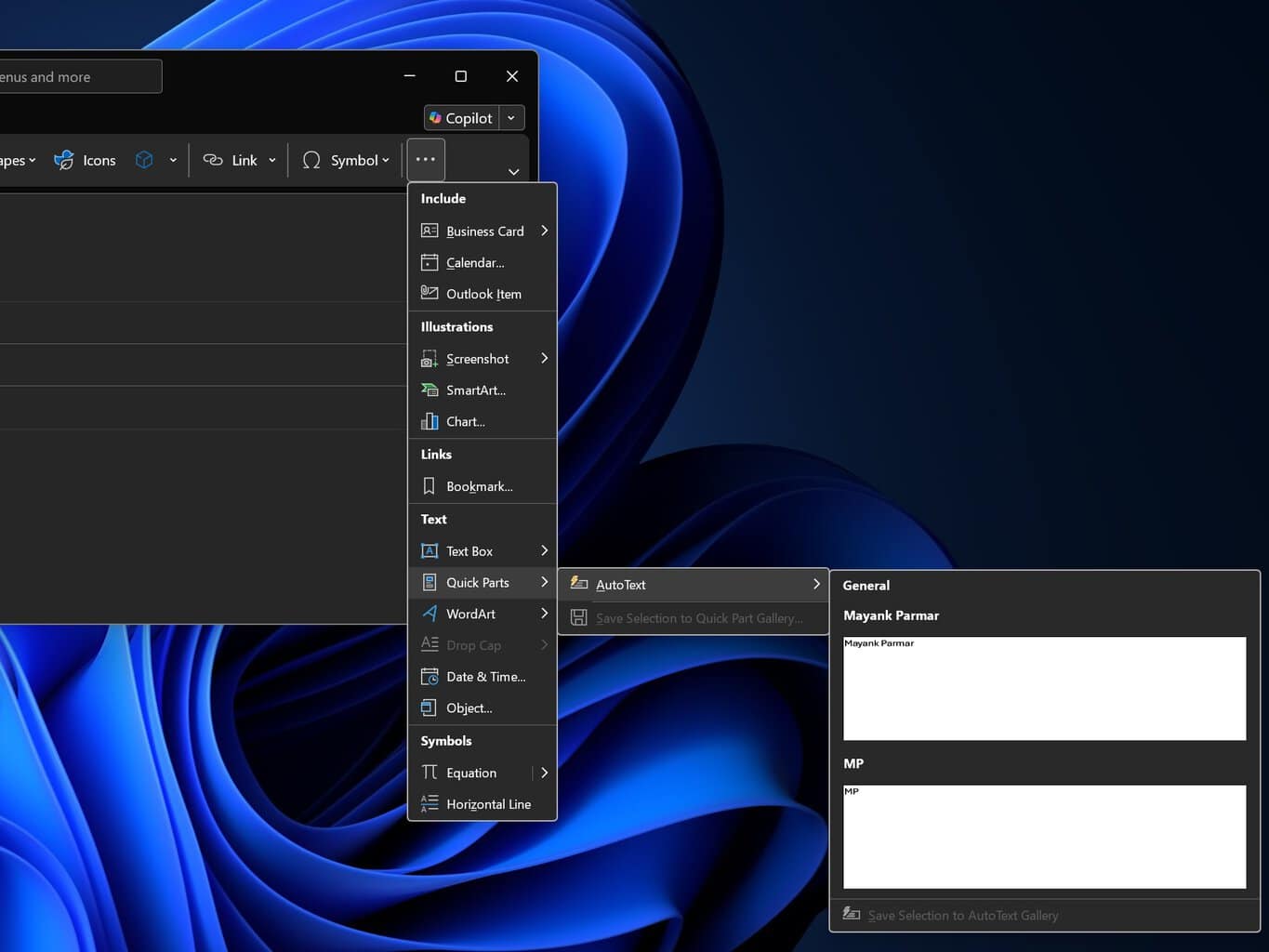
For those unaware, Quick Parts lets you save commonly used blocks of text and insert them into future emails with just a few clicks. Instead of copying and pasting the same paragraph every day, users can create reusable snippets for signatures, instructions, addresses, meeting details, frequently asked questions, or any other content they send repeatedly.

Image credit: Windows Latest

The feature first started rolling out in February 2026, but Microsoft has now made it broadly available. Creating a snippet is fairly straightforward. Users simply compose or reply to an email, highlight the text they want to reuse, open the Insert menu, and choose Quick Parts to save it. The saved content can then be inserted into future emails whenever needed, making repetitive replies significantly faster.

Speaking of new features, let’s not forget that the company has also planned to roll out the grouped notifications feature. As the name suggests, the new feature groups multiple incoming email alerts into a single notification. As of now, the company has marked that the feature will be available starting late July 2026, with plans to roll it out to every user starting mid-September 2026.

No wonder, Microsoft still has work to do before New Outlook reaches feature parity with its predecessor. But it’s safe to say that future feature releases and the ones it is rolling out currently shows it is doing some progress towards it.

Microsoft 365 Price Hike Now Affects Business and Enterprise Renewals

Microsoft 365 price hike is now affecting business and enterprise customers, with higher renewal bills starting from July 1, 2026.

Microsoft first announced the pricing update in December 2025. The company describes it as a “packaging and pricing update” and says the higher prices reflect new AI, security, and IT management features added to Microsoft 365 over the past year.

The change affects Microsoft 365 Business, Enterprise, Frontline, and Government suites. Microsoft 365 Personal and Education pricing will not change for now.

Microsoft 365 Business Plans Get Higher Prices

Microsoft 365 Business Basic now costs $7 per user per month, up from $6. That is a 16% increase.

Business Standard rises from $12.50 to $14 per user per month, a 12% increase. Business Premium remains unchanged at $22 per user per month.

The Business Basic plan without Teams sees a larger increase of 23%, making the no-Teams version one of the more sharply affected business plans.

Microsoft says the higher business pricing comes with extra value, including Copilot Chat improvements, URL time-of-click protection, and more mailbox storage for some users.

Enterprise Microsoft 365 Plans Also Increase

Microsoft is also raising prices across several enterprise plans.

Office 365 E3 increases from $23 to $26 per user per month. Office 365 E5 rises from $38 to $41.

Microsoft 365 E3 goes from $36 to $39, while Microsoft 365 E5 increases from $57 to $60.

Office 365 E1 remains unchanged at $10 per user per month. Microsoft 365 E7, the newer Frontier suite, is not part of this pricing update.

Frontline Plans See Some of the Biggest Increases

Frontline worker plans face some of the steepest price hikes.

Microsoft 365 F1 jumps from $2.25 to $3 per user per month, which marks a 33% increase. Microsoft 365 F3 rises from $8 to $10, a 25% increase.

The no-Teams version of Microsoft 365 F1 rises by 43%.

These changes stand out because Frontline plans target workers who usually need lower-cost licensing. The higher prices could affect companies with large retail, healthcare, logistics, manufacturing, or field service teams.

Some Standalone Add-Ons Are Also Getting More Expensive

Microsoft is also increasing prices for selected standalone add-ons and device-based licenses.

Windows Enterprise per-device licensing rises from $5.85 to $7.63, a 31% increase. Microsoft 365 Apps per device increases from $36 to $42, up 17%.

Entra Plan 1 and EMS E3 are also getting double-digit price increases.

These changes mean some organizations could see higher costs beyond their core Microsoft 365 subscription renewals.

Government and Nonprofit Customers Are Affected Too

Nonprofit customers are also included in the pricing changes. However, Microsoft says nonprofits already receive fixed discounts of 60% to 75% off commercial rates.

Government customers using GCC, GCC High, and DoD clouds will see similar percentage increases to commercial customers.

US AGC pricing is not affected.

For government customers, Microsoft says price increases above 10% will phase in over several years to comply with federal rules.

Microsoft Adds New Security Features to Justify the Price Hike

Microsoft is adding several security features as part of the pricing update.

Office 365 E3 and Microsoft 365 E3 are getting Microsoft Defender for Office 365 Plan 1. Office 365 E1, Business Basic, and Business Standard are getting URL time-of-click protection.

This feature scans links when users click them, not only when the email first arrives. That helps protect users from links that become dangerous after delivery.

Microsoft 365 E3 and E5 tenants are also getting more Intune features bundled into their plans. These include Intune Remote Help, Intune Advanced Analytics, and Intune Plan 2.

E5 customers also get Intune Endpoint Privilege Management, Microsoft Cloud PKI, and Enterprise Application Management.

Microsoft 365 E5 Adds Security Copilot

Microsoft 365 E5 is also getting Microsoft Security Copilot.

The plan will include 400 Security Compute Units per month for every 1,000 licenses. Microsoft caps the allowance at 10,000 SCUs.

This shows how central AI has become to Microsoft’s pricing strategy. The new pricing tables also reference plans “with Copilot,” suggesting that AI features form a major part of the company’s justification for charging more.

Copilot Chat Improvements Are Coming to Affected Suites

Every affected suite is getting Copilot Chat improvements.

These include inbox and calendar awareness, along with access to Word, Excel, and PowerPoint agents.

Business Basic and Business Standard users are also getting an extra 50GB of mailbox storage.

Microsoft appears to be using these additions to make the price hike easier to accept, especially for businesses that already rely heavily on Microsoft 365 apps.

Renewal Timing Matters for Customers

Microsoft says the packaging changes began in June 2026 and should finish rolling out by August 1, 2026.

Customers should receive a 30-day notice through the Message Center.

Organizations that renewed before July 1 will keep their previous price until the next renewal. However, those customers still receive the new features before their pricing changes.

That means the immediate cost impact depends on each customer’s renewal date.

For businesses with large Microsoft 365 deployments, the July 2026 renewal cycle could bring a noticeable jump in software spending.

In other news, Microsoft 365 Copilot received several new features in June, and Microsoft Teams also gained new updates.

Via Windows Latest

Microsoft Teams Gets New Meeting AI Toggle for Copilot, Facilitator, and Recap

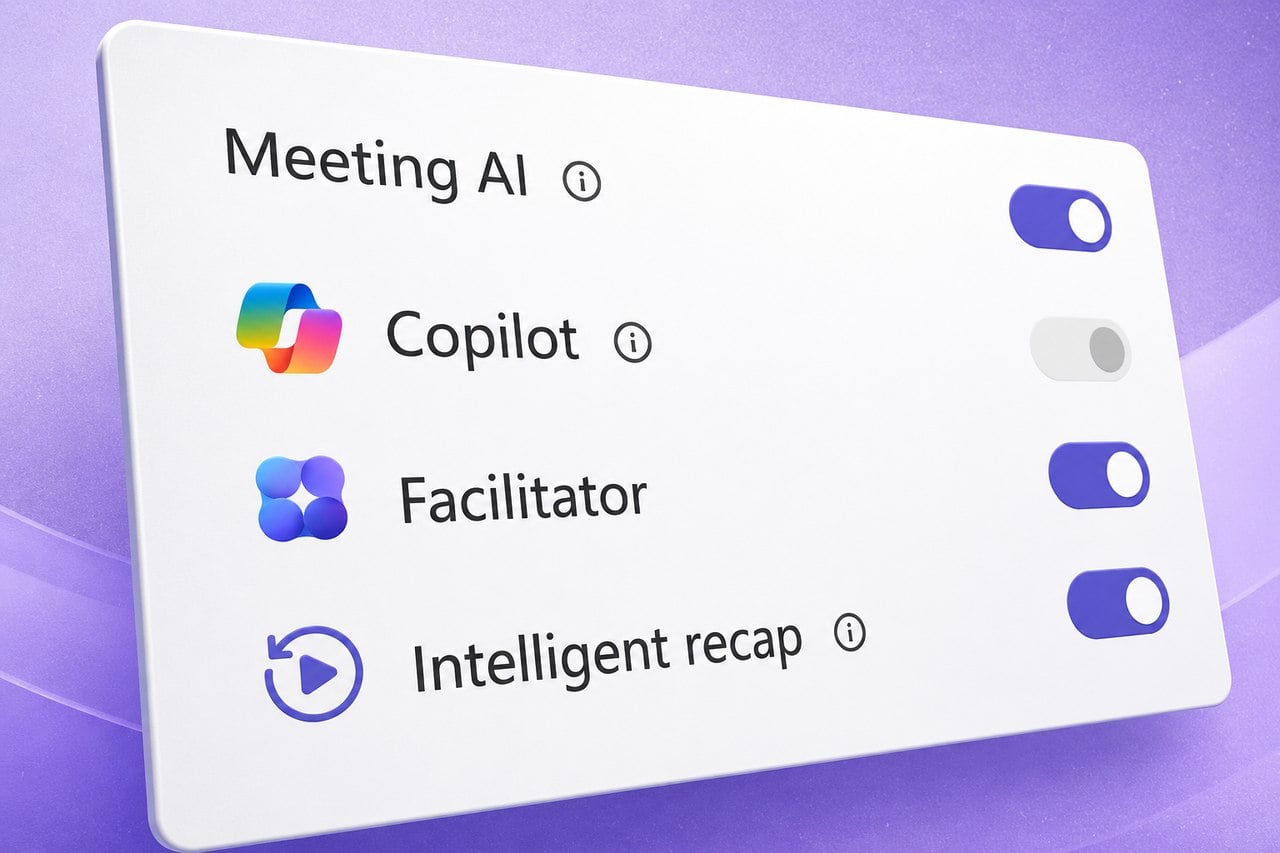
Microsoft Teams is getting a new in-meeting control called Meeting AI. The toggle will let licensed organizers and presenters turn AI features on or off during live meetings.

The feature covers Teams AI tools such as Copilot, Facilitator, and Recap. Microsoft says the rollout starts in early July 2026, with availability planned across Windows, macOS, mobile, and web.

Teams Meeting AI Control Gives Hosts More Flexibility

The new Meeting AI toggle gives organizers and presenters more direct control over when AI features run in a meeting.

AI tools can help with meeting summaries, transcription-based recaps, and in-meeting assistance. However, not every meeting needs AI, and some users may prefer to keep these features disabled for privacy, sensitivity, or compliance reasons.

Microsoft is responding by moving more control into the meeting itself. Instead of relying only on preconfigured settings, eligible users will be able to manage AI tools while the meeting is active.

How the Meeting AI Toggle Works

According to MC1319216, the Meeting AI toggle appears only when AI features are allowed by tenant policy.

If an organization disables Meeting AI through policy, users will not see the toggle in meetings. When the setting is available, licensed organizers and presenters can control which AI features are active during a new or current meeting.

The feature does not change existing compliance or licensing requirements. Admins still control whether Meeting AI is allowed at the organization level.

Admin Policies Still Set the Main Rules

The new control respects existing tenant-level policies.

That means organizers and presenters only get meeting-level control when the organization allows it. If an admin blocks Meeting AI, the in-meeting toggle will not override that decision.

The control also does not affect past meetings. It only applies to new or current meetings where the feature is available.

Transcription Can Automatically Enable Meeting AI

Microsoft says Meeting AI and transcription connect closely when used together.

Turning on Meeting AI automatically enables transcription and generates a recap. Starting transcription also automatically enables Meeting AI and recap.

This means organizers who want to avoid AI features entirely must keep both Meeting AI and transcription turned off. That detail matters for meetings with stricter privacy, legal, or compliance requirements.

Microsoft Teams Meeting AI Rollout Schedule

Microsoft plans to begin the Targeted Release rollout in early July 2026. That phase should finish by mid-July.

General Availability starts in mid-July, and Microsoft expects the full rollout to complete by the end of July 2026.

The Meeting AI toggle will be available on Microsoft Teams for Windows, macOS, mobile, and web.

For more features, there is also a recap of all features added to Teams in June 2026.

Via Windows Latest

Xbox Releases New Forza Horizon 6 Save Data Fix With Easier Cloud Recovery

Have you been worried about losing dozens of hours of progress in Forza Horizon 6? If the answer is yes, Xbox says its latest update could finally make that nightmare far less likely. Microsoft has now rolled out another fix to reduce save data loss while also giving players a much easier way to recover their progress if something still goes wrong.

Xbox rolls out new fix for Forza Horizon 6 save bug, makes cloud recovery easier

The latest update targets Xbox Series X|S consoles, with Microsoft saying it addresses several of the known scenarios responsible for save corruption. The company is encouraging every Forza Horizon 6 player to install the newest console update as soon as possible using the manual update steps available through Xbox Support.

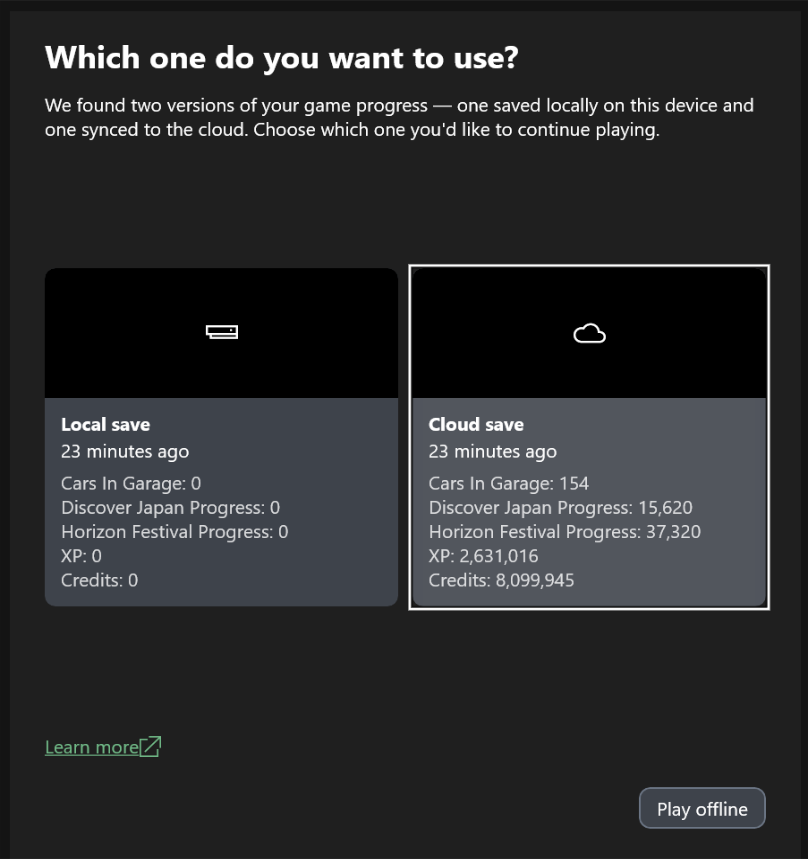
Besides the console update itself, Microsoft has also quietly rolled out a separate backend improvement for all players. Going forward, anyone affected by save data issues should see a new save conflict dialog the next time they launch the game. Instead of waiting for Forza Support to manually restore progress, players can now simply select the Cloud save option to recover their latest synchronized save file directly from the console.

Image credit: Playground Games

Speaking of recovery, Microsoft says this change dramatically reduces the impact of future save issues. Rather than risking complete profile corruption, any remaining problems should now be limited to losing progress from only a single gameplay session instead of an entire save history.

That being said, Microsoft hasn’t confirmed the issue fully resolved just yet. The company says engineers continue investigating the remaining reports of lost saves and advises anyone who still encounters the problem after installing the latest update to submit a ticket through Forza Support while the investigation continues.

For now, if you’ve been holding off on playing because of the save bug, installing the newest Xbox update is probably the first thing you should do.

Excel on the Web Usage Has Grown 10x as Microsoft’s Cloud Bet Pays Off

Microsoft says Excel on the web session count has grown 10x over the last six years, showing how far the browser version of Excel has come since the company shifted more resources toward cloud-based products.

The figure was shared by Brian Jones, who leads the Excel Product Group at Microsoft. It is especially notable because Google Sheets has long been viewed as the default spreadsheet option for many browser-first users.

Microsoft Says Excel on the Web Sessions Are Up 10x

According to Jones, Excel on the web has seen a 10x increase in session count over six years.

That detail matters because Microsoft is not simply counting users who opened Excel once. A session usually means someone opened a workbook and actively used the web version of Excel.

This suggests Microsoft has not only brought more users to Excel in the browser, but also convinced more people to use it as part of their regular workflow.

The Growth Started With a Major Cloud Investment

Jones said the growth came from a major investment Microsoft made around eight years ago.

The goal was to bring Excel on the web closer to the desktop version of Excel. That meant improving performance, adding more features, and making the browser version feel less like a limited companion app.

The timing fits Microsoft’s broader cloud-first shift under Satya Nadella. Around 2018, Microsoft reorganized parts of the company and moved more attention away from Windows as the center of its strategy.

Azure, Office 365, and enterprise cloud services were becoming more important to Microsoft’s business. Excel on the web benefited from that wider push.

Excel on the Web Is Now Part of Microsoft’s AI Push

Microsoft is now putting more focus on Copilot and AI features inside Excel.

The company is targeting finance teams with custom Copilot skills, finance workflows, and new data connectors from providers such as FactSet, Morningstar, and PitchBook.

Microsoft is also working on a “Plan with Copilot” mode. This feature would show users which cells and formulas Copilot plans to change before it applies those edits.

That could help reduce the risk of AI making unexpected changes in important spreadsheets.

Copilot Has Also Faced Pushback in Office Apps

Microsoft’s Copilot rollout across Office has not been smooth everywhere.

The floating Copilot button in Word, Excel, and PowerPoint drew criticism from some users. Microsoft later added options to dock Copilot or move it to the ribbon.

That change showed Microsoft still needs to balance AI visibility with user control, especially in apps people use every day for work.

Excel on the web’s 10x session growth highlights how successfully Microsoft has transitioned its core productivity tools to the cloud, turning browser-based experiences into a central part of its ecosystem. However, the company now faces a new challenge with AI, where strong revenue from Copilot must translate into meaningful, everyday usage across its user base.

For Excel in particular, adoption will depend on whether users can trust AI to handle complex tasks with accuracy and transparency. Until Microsoft proves that Copilot can reliably support real-world workflows, widespread reliance on AI within spreadsheets will remain an open question.

Via Windows Latest

Microsoft Finally Fixes Windows Bug That Broke Start Menu and File Explorer

KB5095093, Microsoft’s June preview update, includes several important fixes for Windows, including a storage bug that could consume several gigabytes of space, as Neowin writes.

The update also addresses a serious Windows Shell issue that could break core parts of the operating system, including the Start menu, Search, Settings, the Taskbar, and File Explorer.

June Preview Update Fixes Windows Storage Issue

One of the biggest fixes in KB5095093 targets a storage problem linked to the Capability Access Manager process.

Capability Access Manager is a default Windows service. Because of the bug, Windows could use several extra gigabytes of storage space on affected systems.

Microsoft fixed the issue as part of the broader June preview update package.

Microsoft Fixes Broken Windows Shell Components

KB5095093 also fixes a major issue affecting several Windows Shell components.

The bug could cause important Windows interface elements to stop working properly, with affected users experiencing problems with the Start menu, Search bar, Settings, Taskbar, and File Explorer.

This issue mostly affected provisioned PCs, which are commonly used in business, education, and managed IT environments.

Microsoft said compatibility conflicts with XAML caused the problem.

Long-Running Shell Bug Finally Gets Fixed

Microsoft had acknowledged that the Windows Shell components bug had existed since July 2025.

That means affected users and IT admins waited almost one year for a full fix.

The company has now included the fix in KB5095093, but it will not reach every device immediately. Microsoft says the rollout will happen gradually.

The fix should become fully available with the next monthly Windows update.

Patch Tuesday Rollout Expected Next

Because KB5095093 is a June C-release preview update, the fixes should reach more users through the next Patch Tuesday release.

Preview updates are optional, but they often include fixes that Microsoft later ships more broadly in the next mandatory monthly update.

Microsoft recommends installing the latest Windows update to receive the newest fixes and improvements.

Until the fix reaches all affected systems, users and IT admins can continue using Microsoft’s previously published workarounds.

In other Windows update news, Microsoft recently released KB5095189, a new Out-of-Box Experience update.

The OOBE update targets the setup process that runs after Windows installation and aims to improve the first-run experience for Windows users.

PowerToys Awake May Get a New Flyout for Faster Controls

PowerToys Awake may soon become easier to access and configure, as Microsoft is working on a redesigned experience for the Windows utility.

Awake is part of Microsoft PowerToys, the company’s official utility suite for advanced Windows users. The tool lets users stop their PC from automatically going to sleep when they need the system to stay active.

Microsoft is testing a new Awake experience

Microsoft is exploring a redesigned Awake interface through a new PowerToys GitHub proposal.

The proposal introduces a lightweight Awake flyout that would give users quicker access to the tool’s main controls. Instead of relying on system tray context menus, users would see Awake’s key options in a cleaner and simpler interface.

The new flyout would include the main Awake modes, such as indefinite, timed, and passive modes. This would make the tool easier to use for people who need to keep their PC awake during downloads, long tasks, presentations, remote sessions, or background work.

Custom durations may be added

One of the proposed changes would add support for custom Awake durations.

At the moment, users rely on existing Awake modes and available timing options. Custom durations would let users set more specific time periods, making the tool more flexible.

For example, a user could keep a PC awake for an exact amount of time instead of choosing from preset intervals. This would help users who need Awake for short, task-based sessions.

Awake could also work with specific apps

Microsoft is also considering a feature that would attach Awake to a specific app or process.

With this option, Awake would keep the PC awake only while the selected process runs. Once that app or process closes, Awake would stop overriding Windows sleep behavior.

This could be useful for people running video exports, downloads, scripts, backup tools, or other long-running tasks. Instead of manually turning Awake on and off, users could tie the feature to the app that needs it.

That approach would also reduce the chance of leaving a PC awake longer than necessary.

The feature is still only a proposal

The redesigned Awake flyout has not reached a stable PowerToys release yet.

Microsoft has not confirmed when or if the new experience will become available to all users. For now, the company appears to be gathering community feedback before deciding how to move forward.

If users respond positively, the redesigned Awake interface could eventually arrive in a public PowerToys update.

More PowerToys changes are in development

Awake is not the only PowerToys feature that may receive changes.

Microsoft is also working on Alt Windows Cycle, another proposed PowerToys feature. Separately, PowerToys 0.100.2 was released recently with various bug fixes.

These updates show that Microsoft continues to refine PowerToys with smaller quality-of-life improvements aimed at power users and productivity-focused Windows users.

Via Neowin

Microsoft Releases Windows 11 KB5095189 OOBE Update for 24H2 and 25H2

Microsoft has released a new Windows 11 Out-of-Box Experience update under KB5095189. The update applies to Windows 11 version 24H2 and Windows 11 version 25H2.

OOBE refers to the first setup process users see after installing Windows. This is where users configure region, keyboard layout, Microsoft account options, privacy settings, network access, and other setup preferences.

KB5095189 Improves the Windows 11 Setup Experience

Microsoft says KB5095189 improves the Windows 11 OOBE experience. However, the company has not shared a detailed changelog explaining the exact fixes or changes included in the update.

This is common for OOBE updates, as Microsoft usually describes them in broad terms. These updates typically focus on setup reliability, compatibility, update delivery, and smoother first-time configuration.

KB5095189 only applies when Windows installs OOBE updates during the setup process. Users will not usually see it as a standard update after they finish setting up the device.

The Update Installs Automatically During Setup

KB5095189 installs automatically during the Windows 11 setup process when an internet connection is available.

During OOBE, Windows can check for important updates before the user reaches the desktop. These may include critical driver updates and zero-day patches, also known as ZDPs.

The installation time can vary based on the device, hardware configuration, and internet speed. Windows also notifies users when it checks for and applies OOBE updates during setup.

No Detailed Changelog Yet

Microsoft has not listed any specific bug fixes, visual changes, or setup flow adjustments for KB5095189. For now, the update appears to focus on general improvements to the Windows 11 initial setup experience.

The update applies only to Windows 11 24H2 and Windows 11 25H2.

In other Windows news, some Windows 11 and Windows 10 users have reported a blank white window issue appearing after startup or unlock. Microsoft has also started bringing the redesigned Windows 11 Start menu to organizations.

Via Neowin

20+ XBOX Games Are Set to Launch Between July 6—10

XBOX’s next games roundup covers releases scheduled from July 6 to July 10, with a packed week of new titles across action, horror, puzzle, sports, survival, and RPG genres, according to PureXbox.

The biggest names include Assassin’s Creed Black Flag Resynced, DOOM: The Dark Ages – Revelations, Wuthering Waves, and Palworld 1.0. XBOX Game Pass is also getting Winds of Arcana: Ruination on July 6, while Palworld 1.0 is listed for July 10.

The lineup arrives shortly after the XBOX Game Pass July 2026 lineup was revealed. However, players are also facing a busy removal month, with 16 games leaving XBOX Game Pass in July.

XBOX Games Releasing From July 6 to July 10

July 6

  • Wall World 2 – A mining rogue-lite sequel with expanded mechanics, procedurally generated mines, new challenges, and deeper gameplay.
  • Winds of Arcana: Ruination – A story-rich, fully voiced 2.5D action-platformer about saving comrades in a broken world. It is also listed for XBOX Game Pass.

July 7

  • DOOM: The Dark Ages – Revelations Expansion – A new campaign expansion that adds another brutal chapter to the Slayer’s saga.

July 8

  • Frogging Up: Frog Climb Rage Game – A challenging physics platformer about a frog trying to escape village life.
  • Sokocat: Castaway – A cozy 3D puzzle adventure inspired by Sokoban, focused on exploration, logic, and discovery.
  • The Fissure – A mature visual novel adventure centered on memory, mystery, and buried secrets in San Adraín.

July 9

  • Assassin’s Creed Black Flag Resynced – A return to Edward Kenway’s pirate adventure with naval combat, stealth, sword fighting, pistols, and Hidden Blade action.
  • Book It! – A box-pushing puzzle game where players organize books as a stylish librarian.
  • EA SPORTS College Football 27 – A modern college football game focused on ambition, pride, and building a strong program.
  • Hell Clock – An action game where players descend into warped time while fighting dark forces.
  • Red Titans – A single-player vertical shoot ’em up with no continues, built around strategy, precision, and survival.
  • Viking Frontiers – A Viking settlement survival and management game about gathering, building, crafting, hunting, raiding, and protecting a clan.

July 10

  • Black Spades – A digital spades card game designed for both beginners and experienced players.
  • Cuboy Adventure – A cute cartoon-style adventure with platforming, puzzles, and boss battles.
  • Damways – A puzzle-style game where players control a beaver, build dams, and create paths home.
  • Echoes of Aincrad – A fantasy adventure set in the floating castle of Aincrad, focused on danger, mystery, and fate.
  • Echoes from Umbra – A horror-themed game where players are hunted by Umbra through the shadows.
  • Palworld 1.0 – Palworld officially exits Early Access with its Version 1.0 release and is also listed in the Game Pass section.
  • Quest Arrest – A crime-themed game where players can act as a good cop or bad cop while dealing with criminals.
  • Tower Dominion – A roguelike tower defense game where players build terrain and defend against alien enemies.
  • Welcome to Kowloon – A first-person indie horror game about searching for cheap housing in Kowloon.
  • Wuthering Waves – A story-rich open-world action RPG where players control Rover, journey with Resonators, recover lost memories, and shape the world’s future.

XBOX Game Pass Titles in the Roundup

XBOX Game Pass has two notable mentions in this week’s release schedule.

Winds of Arcana: Ruination arrives on July 6 as a new Game Pass title. Palworld 1.0 is also listed for July 10, marking the game’s full Version 1.0 release after its Early Access period.

More XBOX Game Pass titles are expected to be announced next week, likely on Tuesday.

The July 6 to July 10 release window gives XBOX players a varied lineup, from major action expansions to indie horror games, puzzle adventures, and open-world RPGs.

Combined with ongoing Game Pass updates and upcoming announcements, July continues to shape up as an exciting and dynamic month for the XBOX community.

ARToken Phishing Platform Exposes Microsoft 365 Token Theft Toolkit

ARToken phishing platform is a newly discovered phishing-as-a-service tool built to steal Microsoft 365 authentication tokens and support business email compromise attacks.

Researchers at Cisco Talos uncovered ARToken during an incident response investigation into phishing infrastructure. The platform appears to operate as an affiliate or offshoot of EvilTokens, another phishing service focused on Microsoft 365 account compromise.

Talos researchers found a React-based management interface called ARToken Panel. The panel exposed more than 80 API endpoints, giving researchers a detailed look at the platform’s phishing, token theft, mailbox access, and file management features.

ARToken Goes Beyond a Typical Phishing Kit

ARToken does more than host fake login pages.

The platform targets Microsoft 365 authentication tokens and gives attackers tools to maintain access after the initial compromise. It can refresh stolen tokens, elevate access into Primary Refresh Tokens, and help operators keep control of hijacked accounts.

This makes the platform useful for longer business email compromise campaigns, not just one-time credential theft.

Through ARToken, attackers can access Outlook mailboxes, SharePoint sites, and OneDrive files. They can also manage phishing infrastructure, monitor compromised accounts, and run multi-tenant campaigns through dedicated affiliate workspaces.

Talos found several technical links between ARToken and EvilTokens.

ARToken uses the same Microsoft device code authentication API calls previously connected to EvilTokens. Researchers also found the same Primary Refresh Token-related endpoints that appeared in earlier EvilTokens research.

Both platforms use a similar Cloudflare Workers deployment model. ARToken also appears to support an affiliate structure, where different operators manage their own phishing campaigns through separate workspaces.

These overlaps suggest ARToken may not be a completely separate platform. Instead, it may work as an affiliate version, offshoot, or related service in the same phishing ecosystem.

How Device Code Phishing Works

EvilTokens focuses heavily on Microsoft’s OAuth 2.0 Device Authorization Grant workflow, also known as device code phishing.

In this attack, victims do not enter credentials into a fake login page. Instead, attackers trick them into entering a legitimate Microsoft-issued code on Microsoft’s real device login page.

After the victim signs in, Microsoft issues authentication tokens. Attackers can then abuse those tokens to access the victim’s Microsoft 365 account, bypassing multi-factor authentication.

What ARToken Lets Attackers Do

After a victim completes device code authentication, ARToken gives operators a broad set of account takeover tools.

Attackers can refresh stolen tokens and convert access into persistent Primary Refresh Tokens. They can open Outlook mailboxes, send emails as compromised users, and create inbox rules to forward, hide, or delete messages.

These features make ARToken especially dangerous for business email compromise operations. Attackers could use compromised accounts to impersonate employees, continue vendor conversations, or search for payment-related emails.

SharePoint and OneDrive Access Raises Data Theft Risk

ARToken also includes SharePoint and OneDrive capabilities.

Attackers can browse corporate files stored in Microsoft 365 environments. They can upload, download, and manage files inside compromised accounts.

New ARToken Features Found by Talos

Talos identified ARToken features that earlier EvilTokens research had not documented.

The platform can monitor multiple hijacked mailboxes at once. It can load tokens stolen from other sources and share access to compromised accounts between operators.

ARToken can also create stealthy inbox rules that hide attacker activity. These rules can forward, delete, or suppress messages so victims do not notice suspicious account behavior.

Another notable feature lets operators serve phishing pages that change based on the victim’s location. This can make phishing campaigns look more convincing and harder to detect.

Invoice-Themed Phishing Lures Target Accounts Payable Teams

Talos also found phishing emails connected to the activity.

The emails impersonated legitimate vendors and used invoice-themed lures. Attackers targeted accounts payable employees, a common group for business email compromise because they handle payments, invoices, and vendor communication.

The emails appeared to show legitimate SharePoint links. However, the links redirected victims to a look-alike Microsoft 365 tenant controlled by the attackers.

This tactic can make the phishing attempt look more credible than a basic fake Microsoft login page on an attacker-controlled domain.

Microsoft 365 Device Code Phishing Is Growing

The ARToken discovery highlights a broader increase in device code phishing attacks against Microsoft 365 users.

Attackers favor this method because it can work even when multi-factor authentication is enabled. It also uses Microsoft’s legitimate login flow, which can make the attack harder for users to recognize.

For organizations, the main risk is no longer just stolen passwords. Token theft can give attackers direct access to mailboxes, files, and cloud services without needing the victim’s password again.

In other security news, CISA has warned about an exploited SharePoint flaw, Microsoft has warned Japanese hotels about malicious email complaints, and a malicious Perplexity AI Chrome extension has been removed from the Chrome Web Store.

Via BleepingComputer

XBOX Game Pass Essential Loses More Long-Time Games in 2026 Shake-Up

Game Pass Essential is seeing more catalog changes in 2026, marking a shift for what used to be one of XBOX’s most stable subscription tiers.

XBOX Game Pass Essential, previously known as XBOX Game Pass Core, has traditionally kept a relatively quiet and consistent library. While higher Game Pass tiers often see regular additions and removals, Essential had fewer major changes after it replaced XBOX Live Gold.

That pattern now appears to be changing. As TrueAchievements reports, several long-running Essential titles have either already left the catalog or will leave later this year.

Long-Time Game Pass Essential Titles Are Leaving

Several games that helped define the Essential catalog are no longer staying in place.

Slay the Spire and Payday 2: Crimewave Edition both joined the catalog when Microsoft launched Game Pass Core. Their removal stands out because both games had become familiar parts of the lower-cost Game Pass offering.

Unpacking also recently left the service, despite being part of Game Pass since 2021. The cozy puzzle game became one of the more recognizable indie titles in the catalog.

These removals suggest Microsoft now plans to refresh Game Pass Essential more actively than before.

Games Leaving Game Pass Essential in 2026

The following games have left or will leave Game Pass Essential in 2026:

  • Goat Simulator
  • Golf With Your Friends (leaving July 15)
  • Payday 2: Crimewave Edition
  • PowerWash Simulator (leaving July 15)
  • Slay the Spire
  • Stellaris (leaving July 15)
  • Teenage Mutant Ninja Turtles: Shredder’s Revenge
  • Unpacking

XBOX Is Also Adding More Games to Essential

The catalog is not only losing games. Microsoft has also added several titles to Game Pass Essential in 2026.

The following games have joined Game Pass Essential in 2026:

  • Battletoads
  • Blinx: The Time Sweeper
  • Costume Quest 2
  • DayZ
  • Full Throttle Remastered
  • Iron Brigade
  • Jetpac Refuelled
  • Kameo: Elements of Power
  • Massive Chalice
  • Max: The Curse of Brotherhood
  • Neon Abyss
  • Perfect Dark Zero
  • Shadowrun: Dragonfall – Director’s Cut
  • Shadowrun: Hong Kong – Extended Edition
  • Shadowrun Returns
  • Stacking
  • Warhammer Vermintide 2

In other XBOX news, Microsoft has confirmed which games will leave XBOX Game Pass this month, while the latest Free Play Days titles have also been revealed.

Windows 11 and Windows 10 Users Hit by Blank White Window Issue

Some Windows users are reporting a blank white window that appears in the top-left corner of the screen after starting or unlocking their PC.

The window can cover a large part of the desktop and block interaction with anything behind it. In some cases, it disappears after a few seconds, but affected users say the behavior can still interrupt normal use.

Windows 11 and Windows 10 Users Report Blank White Window Issue

The issue does not appear limited to one Windows version. Users have reported it on both Windows 11 and Windows 10.

It also does not seem tied to one specific hardware setup. Reports mention both Intel and AMD systems, and the problem does not appear linked to a single GPU vendor.

That suggests the bug may come from a background software component rather than a specific processor, graphics card, or Windows configuration.

Google Chrome Task Scheduler Component Suspected

According to user reports on Reddit, the blank white window may connect to a Google Chrome background component.

The suspected folder appears in Windows Task Scheduler under GoogleUserPEH. The task reportedly involved is called RunPlatformExperienceHelperOnUnlock.

This component seems related to Chrome background activity, which may include interactions with extensions, plugins, update tasks, or external components.

However, Google has not officially confirmed that this task causes the blank window issue.

Possible Workaround for the Blank White Window

Some users say they stopped the blank white window by disabling the suspected Chrome task in Task Scheduler.

The suggested steps are to open Task Scheduler, navigate to the GoogleUserPEH folder, select RunPlatformExperienceHelperOnUnlock, and disable it.

Users claim this prevents the blank white window from appearing after unlocking or starting the PC.

Users Should Treat the Fix Carefully

The workaround has not received official confirmation from Google or Microsoft. That means users should treat it as a temporary fix rather than a guaranteed solution.

It remains unclear whether Google’s task directly causes the issue, or whether another Windows or Chrome interaction triggers the blank window.

In other Chrome news, Google’s browser might soon add a built-in voice typing feature. A malicious Perplexity AI Chrome extension has also been removed from the Chrome Web Store.

Via Neowin

Microsoft Is Retiring SharePoint Designer, InfoPath, And Remote Event Receivers

SharePoint retirements are coming for several legacy Microsoft services as the company continues modernizing the platform after its recent AI-focused redesign.

The affected features include SharePoint Designer 2013, InfoPath 2013, InfoPath Forms Services in SharePoint Online, and Remote Event Receivers.

Microsoft is giving customers firm retirement dates and has recommended newer tools such as Power Automate, Power Apps, Microsoft Forms, SharePoint webhooks, and Microsoft Graph change notifications.

SharePoint Designer 2013 Support Ends In July 2026

SharePoint Designer 2013 will reach end of support on July 14, 2026.

After that date, Microsoft will gradually retire it across Microsoft 365 environments. The company will not provide security updates or extended support beyond the deadline.

Organizations that still use SharePoint Designer workflows should review their environments and start moving those workflows to Power Automate.

Microsoft also recommends using SharePoint Migration Tool 4.1 to help with the migration process. You can read more in Message Center MC1230891.

InfoPath 2013 And InfoPath Forms Services Are Also Going Away

InfoPath 2013 and InfoPath Forms Services in SharePoint Online will also be retired on July 14, 2026, according to Message Center MC616550.

Microsoft already started blocking the publishing of new or updated InfoPath forms on May 18, 2026.

After the July deadline, these services will no longer work. That means organizations still relying on InfoPath forms need to move before the retirement date.

Microsoft recommends replacing InfoPath with Microsoft Forms, Power Apps, and Power Automate. The company says these tools offer a more modern forms and workflow experience.

Remote Event Receivers Will Stop Working In SharePoint Online

Microsoft is also retiring Remote Event Receivers in SharePoint Online, as noted in Message Center MC1411726.

The change is tied to the Azure ACS retirement and Microsoft’s broader SharePoint modernization plans.

Remote Event Receivers using Azure ACS stopped working reliably on April 2, 2026. RERs registered with Entra applications will stop functioning on July 1, 2027.

Applications and workflows that depend on Remote Event Receivers will no longer receive SharePoint event notifications after the retirement. Business processes that rely on those notifications could stop working unless organizations migrate them.

Microsoft Recommends Webhooks And Graph Change Notifications

Microsoft recommends moving from Remote Event Receivers to SharePoint webhooks or Microsoft Graph change notifications.

However, SharePoint webhooks work asynchronously. That means organizations with solutions that block or cancel actions in real time may need to redesign those workflows.

Microsoft says there will be no support extension for Remote Event Receivers beyond July 1, 2027.

The company does not currently offer a tenant-wide way for admins to discover Remote Event Receiver usage, but a discovery capability is planned.

SharePoint Admins Need To Review Legacy Workflows

The retirements are important for organizations that still depend on older SharePoint customization tools.

Admins should now identify affected workflows, check which business processes depend on them, and plan migrations before the retirement deadlines.

In other Microsoft news, CISA has warned about a currently exploited SharePoint flaw. Microsoft Edge has also finally received Google Account sign-in support.

Via Neowin

Report: Halo Studios and Obsidian Won’t Be Shut Down During Xbox Reset

If you’ve been keeping tabs on gaming industry news lately, you probably know Xbox has been going through one of its most turbulent periods in years. Reports surrounding ongoing Xbox reset have suggested multiple first-party studios are facing layoffs, restructuring, or even closure. Amid all that uncertainty, however, two well-known Xbox first-party developers may have avoided the worst-case scenario.

Fresh reports indicate that Halo Studios and Obsidian Entertainment are not currently involved in discussions surrounding a potential shutdown. While Microsoft has yet to publicly comment on the ongoing restructuring, multiple industry insiders now suggest both studios remain important parts of Xbox’s long-term plans despite the broader uncertainty surrounding Xbox Game Studios.

According to Windows Central’s Jez Corden, Halo Studios is “not in negotiations to shut down,” although the studio will reportedly face close evaluation over its stewardship of the Halo franchise. Corden also claims that part of Microsoft’s restructuring could involve redirecting additional resources toward strengthening Halo, one of Xbox’s most valuable gaming properties.

Meanwhile, Bloomberg’s Jason Schreier says Obsidian Entertainment is also safe. Posting on Bluesky, Schreier stated that Xbox is keeping the studio, contradicting an earlier report that suggested Obsidian had entered negotiations to avoid closure. The original claim was later acknowledged as a mistake by The Game Business.

That being said, the reports don’t necessarily mean either studio will emerge untouched. Microsoft’s wider restructuring efforts are still unfolding, and layoffs could still affect individual teams even if the studios themselves remain operational.

As of now, Microsoft hasn’t officially confirmed which studios will ultimately be affected. Until the company provides an official update but considering the sources of claims it seems two big studios are at least safe for now.

Intel Raises Core Ultra 200S Plus Prices Due to Demand

Core Ultra 200S Plus price hike has now been officially confirmed by Intel, with three Arrow Lake Refresh desktop processors getting higher listed prices.

The change was first noticed after pricing updates appeared online, but Intel has now confirmed that the increase is not a mistake or a website error. According to Wccftech, Intel later confirmed the change to Hardware Luxx.

The affected CPUs now officially cost more than they did at launch, which could make Intel’s desktop lineup harder to recommend against AMD’s Ryzen chips.

Intel Raises Prices for Three Core Ultra 200S Plus CPUs

The price hike affects only three Core Ultra 200S Plus processors. These chips belong to Intel’s Arrow Lake Refresh lineup.

The affected models are:

  • Core Ultra 7 270K Plus: Previous price $299, new price $349, increase of $50
  • Core Ultra 5 250K Plus: Previous price not stated, new price $229, increase of up to $30
  • Core Ultra 5 250KF Plus: Previous price not stated, new price $214, increase of up to $30

The Core Ultra 7 270K Plus sees the biggest jump, rising by $50. The Core Ultra 5 models also now carry higher official pricing.

Intel Blames Supply Chain Costs and Strong Demand

Intel cited rising supply chain costs as one reason for the higher prices. The company also pointed to strong demand for the Core Ultra 200S Plus series.

Intel said the updated prices reflect current market dynamics. The company also noted that similar pricing increases have affected other Intel product families.

That explanation suggests Intel sees enough demand for these specific chips to support higher official prices, even as the broader desktop CPU market remains highly competitive.

Regular Core Ultra 200S CPUs Are Not Affected

So far, the increase only applies to the Core Ultra 200S Plus models. Intel has not raised prices for the regular Core Ultra 200S series.

That makes the Plus models stand out more, especially since they appear to be among the stronger-selling chips in the family. However, the move could still frustrate buyers who expected prices to fall after launch, not rise.

The affected processors already face tough competition from AMD’s Ryzen 9000 lineup. In some cases, even older Ryzen 5000 processors remain attractive because of their pricing, platform maturity, and strong gaming performance.

Higher Retail Prices Could Hurt Intel Further

The biggest concern for buyers is real-world pricing. These processors already sell above their recommended customer prices in some stores.

Current retail prices reportedly sit around $10 to $20 higher than Intel’s listed pricing. Once the new official prices spread through retail channels, actual store prices may climb even further.

That could make the affected Core Ultra 200S Plus chips harder to justify for gamers and PC builders. Buyers looking for value may turn to AMD alternatives, especially if Ryzen chips remain cheaper or deliver stronger performance per dollar.

In other Intel news, Intel shares have jumped after reports of new deals involving Apple and NVIDIA, giving the company some positive market momentum despite concerns around its desktop CPU pricing.

For now, PC builders should check real retail prices before buying. The official price hike may not fully reflect what buyers pay once stores adjust their listings.

Via Wccftech

Cancelled XBOX Advert Raises Questions About Microsoft’s Digital-Only Plans

A cancelled XBOX advert from early 2025 has reportedly resurfaced, and its message now feels more relevant than ever.

The 42-second advert focused on one question: physical games or digital games?

According to Dealabs, the XBOX advert presented both formats as valid choices instead of pushing players toward one option. The campaign never aired, and XBOX has not publicly explained why it disappeared.

XBOX reportedly planned to support both physical and digital games

The advert reportedly opened by asking players which format worked best for them.

XBOX then highlighted the benefits of both physical and digital games. That approach now stands out because the console industry appears to be moving harder toward digital-only releases.

PlayStation has already confirmed that physical disc production for all new PlayStation games will end in January 2028. After that date, new games will launch through the PlayStation Store and digital retail formats only. Fans are upset by this decision, with some signing petitions and canceling PlayStation Plus subscriptions in protest.

What the XBOX advert said about physical games

The cancelled advert reportedly gave physical games several clear advantages.

It said physical releases let players keep their own copy of a game. It also pointed to limited editions and collector’s editions as a reason to keep discs around.

The advert also mentioned lending games to friends. That detail matters because sharing, reselling, and collecting remain key reasons many players still defend physical media.

What the advert said about digital games

XBOX did not frame digital games as the enemy.

The advert reportedly promoted pre-installing games before launch, switching between titles more easily, and accessing digital-only editions.

That message suggested a balanced approach: physical for ownership and collecting, digital for convenience and speed.

Why the cancelled XBOX advert matters now

The timing makes the advert more interesting.

XBOX has already sold digital-only hardware, including the XBOX Series S and the all-digital XBOX Series X model. Microsoft is also reportedly testing a disc-to-digital feature that would let some XBOX One and XBOX Series X discs create digital entitlements tied to a Microsoft account.

Reports also claim Microsoft has not fully finalized whether Project Helix, its next-generation XBOX console, will include a built-in disc drive. Experts speculate Microsoft appears to be leaning away from discs, but XBOX has not confirmed that plan.

That makes the cancelled advert look less like a simple marketing decision and more like a sign of internal uncertainty.

XBOX may have pulled the campaign because it no longer matched the company’s long-term direction. The advert celebrated choice, while the wider industry now seems ready to reduce that choice.

That is why this cancelled XBOX advert has returned at the worst possible time for Microsoft and Sony.

Via TheGamer

Edge Stable Gets Google Account Sign-In Support, But Retires Sidebar App List

Microsoft is overhauling Edge experience with two big changes with the release of Version 150.0.4078.48. One makes it easier for millions of Google users to get started with the browser, while the other quietly retires a feature that has been part of Edge for years.

The biggest addition is support for Google account sign-in. Microsoft has confirmed that users can now sign in to Edge using a Google account instead of being limited to a Microsoft account.

The option appears directly from the browser’s profile menu and the Edge sign-in screen, making it easier for users already invested in Google’s ecosystem to start syncing their browsing profile.

The feature is rolling out on both Windows and macOS. However, Microsoft notes that it’s part of a controlled rollout, meaning it may not appear for everyone immediately.

For enterprise customers, Microsoft says administrators can decide whether the feature is available by using the NonMicrosoftAccountSignInEnabled policy. It apparently gives organizations control over whether non-Microsoft accounts are allowed inside Edge.

Speaking of changes, Microsoft is also preparing to retire the Sidebar app list. According to the company’s latest Edge release notes, users will no longer be able to pin new apps to the sidebar. Meanwhile existing pinned apps will disappear in a future update.

Moreover, Microsoft also says sidebar app management policies will stop working once the feature is fully removed.

Sony’s Move to End PlayStation Discs Sparks Petition with Over 30,000 Signatures

If you’re frustrated by Sony’s decision to kill physical PlayStation game discs, you’re definitely not alone. Nearly 30,000 gamers have already signed a petition urging Sony to rethink its digital-only future, while thousands more have flooded social media to voice their disappointment following the company’s announcement.

Over 30,000 gamers are already fighting Sony’s digital-only PlayStation decision

The biggest campaign so far comes from Canadian retailer PNP Games, whose Change.org petition has quickly climbed to almost 30,000 signatures. The backlash comes right after Sony confirmed that every new PlayStation release launching from January 2028 onward will be distributed digitally. Existing titles and games scheduled before that deadline remain unaffected, but future releases, including those expected on PlayStation 6, are set to abandon physical media entirely.

That being said, the chances of Sony reversing course appear extremely slim. As noted by Wccftech in its report, Austria’s public broadcaster ORF, reports that preparations for the transition have already been underway for quite some time. The report says Sony’s DADC manufacturing facility in Thalgau has already started shifting its long-term production plans away from PlayStation discs.

Sony DADC CEO Dietmar Tanzer reportedly said PlayStation currently accounts for roughly half of the plant’s production, with new game disc orders representing around 20% of that volume. By 2028, that figure is expected to shrink significantly as manufacturing moves toward optical microlenses instead. Employees are reportedly already receiving training for the transition, although ORF says no layoffs are currently planned for the site’s roughly 300 workers.

Speaking of backlash, let’s not forget that some PlayStation fans are encouraging other players to cancel their PlayStation Plus subscriptions. Many have reportedly shared cancellation screenshots to show support for the movement and send Sony a message.

XBOX appears to be also moving in the same direction

Sony’s announcement has only added fuel to speculation that future consoles across the industry could abandon physical media altogether. Right after Sony made official announcement t, new reports emerged hinting that XBOX is also working on a new Disc-to-Digital feature, while rumors around Project Helix releasing with no disc support is also making rounds online.

Whether players like it or not, the shift toward an all-digital console generation now looks far more inevitable than it did just a few years ago.