According to recent statements shared via Windows Latest, Microsoft’s March Rogers said the company plans to review and update all UI components across the operating system. This includes not only frequently used elements but also rarely seen interfaces that have largely gone untouched for years.
The goal is to improve visual consistency and modernize legacy surfaces that no longer match Windows 11’s design language.
Even hidden screens are getting attention
One notable example is the Windows 11 installation screen, which appears when users reinstall the OS using the Media Creation Tool or an ISO file. This interface still reflects older design principles and does not align with the current Windows 11 aesthetic.
Microsoft confirmed that a redesign is planned, although it remains a lower priority compared to more visible parts of the system.
@zacbowden This screen is on our craft list. It's very rarely seen so we've prioritized other UI craft projects above it, but we'll get there.
Historically, Microsoft placed less emphasis on maintaining a unified design across all system components. As a result, Windows 11 still includes a mix of modern and legacy UI elements.
Now, the company appears to be shifting its approach by addressing even minor or rarely accessed parts of the interface, signaling a more comprehensive design strategy.
Microsoft’s updated direction suggests a long-term effort to unify the Windows 11 experience. While changes will roll out gradually, the focus now extends beyond surface-level updates to include deeper system consistency and usability improvements.
One of those tiers is reportedly called Triton, which would include Microsoft’s first-party catalog from franchises like Halo, Fable, etc. Meanwhile, the second tier, namely Duet, hints at a potential bundle with Netflix. As of now, there are no concrete details to support this rumor.
Well, what’s confirmed is that the new Xbox CEO Asha Sharma is quite vocal on the Internet and is leading from the front.
Game Pass’s assessment from an ex-PlayStation executive draws a response from the Xbox CEO
Asha Sharma has directly responded to comments from a former PlayStation executive who did not hold back in his assessment about Xbox Game Pass.
Over on LinkedIn, replying to one of the Xbox Game Pass-related posts, Shawn Layden commented, “They are trying so hard to will this into health, despite unfavorable diagnostics and a grim prognosis. A clarifying postmortem would do the entire industry some good.”
It looks like Layden believes the Game Pass subscription model may be under deeper strain than it appears. It also hints at wider concerns about sustainability across the gaming industry. That being said, what followed next caught attention. Given the rivalry in the gaming space, one would think that Sharma may have pushed back on the comments. Instead, she responded publicly, saying she would “love to chat sometime” with Layden to hear more of his perspective.
Ex-CEO of PlayStation Shawn Layden critiques Xbox Game Pass on LinkedIn, and Xbox CEO Asha Sharma says: pic.twitter.com/iIZcBiGHKK
The response suggests a different tone from Xbox leadership, one that appears open to outside criticism rather than dismissing it. At a time when subscription services are under pressure to prove long-term value, it hints at internal evaluation rather than outright defense.
Rumors regarding Call of Duty games skipping day on Xbox Game Pass release
All that said, it’s good to see Sharma addressing some pain points within the Xbox ecosystem. Only time will tell if the rumored internal discussions will have an immediate positive effect on Xbox Game Pass pricing. Not to forget, Asha Sharma also recently responded to a player who claimed that a new achievement update “bricked” their console.
Dave Plummer, the engineer behind the original Windows Task Manager, has clarified how CPU usage is actually calculated, highlighting why the numbers users see can sometimes feel misleading.
Why CPU usage is more complex than it looks
As reported by Tom’s Hardware, Plummer said that CPU usage is not a simple “busy vs idle” measurement. What appears as a straightforward percentage is actually the result of deeper system-level accounting.
Task Manager does not track instantaneous CPU activity. Instead, it relies on periodic sampling and calculations over short time intervals.
How Task Manager calculates CPU usage
Task Manager operates as a timer-driven tool rather than a real-time monitor. It gathers CPU time data for each process, including both user and kernel activity.
It then compares the current reading with the previous one, calculates the difference, and determines usage within that interval. Finally, it divides this value by the total CPU time consumed by all processes.
This method ensures consistency and avoids relying on potentially uneven UI refresh timing.
Why the numbers can feel inaccurate
Because Task Manager shows averaged values between refresh intervals, it does not reflect sudden spikes or short bursts of activity.
Users may notice a mismatch between what they see and how the system feels. A system can feel slow even if CPU usage appears moderate, or vice versa.
Modern CPUs make it harder to measure
Today’s processors introduce additional complexity. Features like dynamic frequency scaling, turbo boost, thermal throttling, and deep idle states all affect how CPU time translates into actual work.
As a result, CPU time no longer directly represents performance in a simple way.
A simplified view of a complex system
Plummer notes that an ideal metric would measure work completed versus maximum possible output. Current CPU percentages do not fully capture that.
Task Manager is not incorrect. It presents a simplified, consistent interpretation of a much more complex system that has evolved beyond a single easy-to-understand metric.
A long-running rumor has finally turned into something real for Dragon Ball fans. After years of speculation, Dragon Ball Xenoverse 3 has now been officially announced, putting an end to nearly a decade of waiting since its predecessor launched back in 2016. The reveal took place during the Dragon Ball Games Battle Hour 2026 in Los Angeles, giving fans their first proper confirmation.
Xenoverse 3 finally confirmed with 2027 release window and new story details
As of now details are limited, but Bandai Namco has confirmed that Xenoverse 3 is targeting a 2027 release. The game is set to release on PC via Steam, alongside PlayStation 5 and Xbox Series X|S.
Interestingly, this is not the first time players have technically seen the game. Earlier this year, Bandai Namco dropped a “New Game Project Age 1000” trailer, which now appears to have been an early tease for Xenoverse 3.
According to opfficial press release, the game will let players “explore and uncover exciting new stories in West City, the vibrant new world set in AGE 1000. Guided into the ranks of the Great Saiyan Squad, you’ll fight alongside allies as events there begin to take shape. The game combines an epic story-driven RPG experience that will take DRAGON BALL fans on an unforgettable, action-packed journey into this new universe and its cast of characters.”
That being said, the long gap since Xenoverse 2 raises expectations. The sequel will likely need to deliver meaningful upgrades, not just more content. Do note that Bandai Namco has promised many more exciting details about this new entry in the DRAGON BALL XENOVERSE series in the months to come.
Are you excited for Dragon Ball Xenoverse 3? Let us know in the comments below.
Microsoft has rolled back a problematic service update that left some users unable to launch the Microsoft Teams desktop client. The issue, tracked as TM1283300, caused the app to get stuck on a loading screen or display an error message preventing access.
Teams stuck on loading and error messages reported
Affected users reported that Teams would remain frozen on the loading screen or show the message, “We’re having trouble loading your message. Try refreshing.” This effectively blocked access to chats and workspaces, disrupting normal usage.
Root cause linked to client caching regression
Microsoft traced the issue to a transient problem in its service infrastructure. Older Teams client builds entered what the company described as an “unhealthy state,” which was later linked to a regression in the client build caching system that interfered with startup processes.
Microsoft rolls back update and deploys a fix
To address the issue, Microsoft reverted the faulty service update. The company noted that automated recovery systems helped mitigate part of the disruption while the rollback resolved the underlying problem.
Restart required to restore functionality
Users still need to fully close and relaunch the Teams client to ensure the fix applies locally. Without a restart, affected systems may continue to experience the same loading or error issues.
Monitoring ongoing as impact remains unclear
Microsoft is continuing to monitor telemetry and gather feedback from users. The company has not disclosed how many users were affected or which regions experienced the issue.
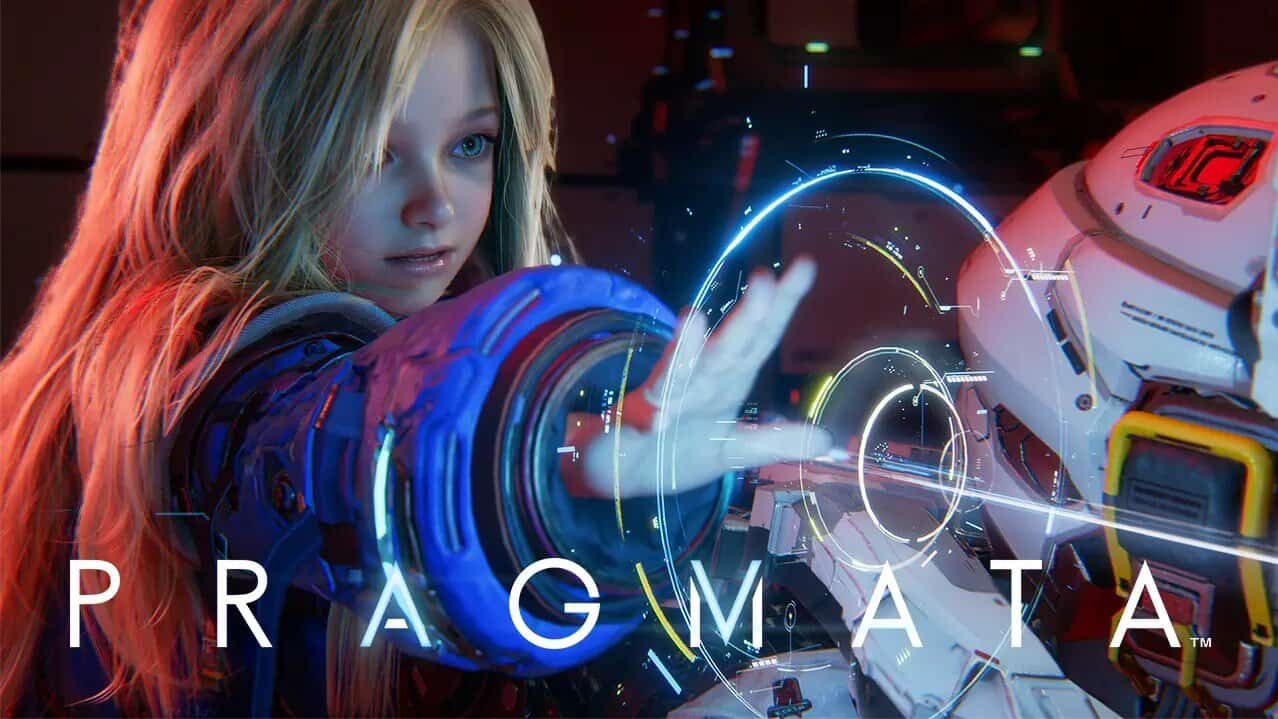
Capcom’s new IP PRAGMATA is off to a strong start right out of the gate. Earlier today, the company confirmed that the game has crossed one million units sold worldwide in just two days. For a brand-new IP with no built-in audience, that is a solid opening, to say the least.
For those who don’t know, PRAGMATA is a sci-fi action adventure that follows Hugh Williams and an android named Diana in a near-future lunar setting. The game mixes action with puzzle elements, something Capcom has been pushing as its core hook.
Capcom has further confirmed that the Nintendo Switch 2 version in Japan and other parts of Asia is releasing on April 24.
Speaking of game’s performance, PRAGMATA is off to a strong start on Steam, currently sitting at an “Overwhelmingly Positive” rating with 97 percent positive reviews. Over on Metacritic, the reception is holding up as well, with a Metascore of 86, placing it among the top-rated releases of 2026 so far, currently around 11th on the charts.
The reviews match the early hype around the game, but it will be interesting to see whether the game manages to keep players glued in the coming weeks. We’ll be updating the details regarding the game’s performance and players’ reviews down the line. Stay tuned!
A newly discovered security flaw in the TRIXX.sys driver used by GPU-Z is raising concerns after researchers confirmed it allows deep system-level access, as IT Home reports. The issue stems from improper IOCTL handling and weak access validation, opening the door to potential abuse in advanced attack scenarios.
Improper IOCTL handling enables direct hardware access
The vulnerability allows user-mode applications to interact directly with sensitive low-level hardware functions. Researchers found that attackers can access PCI configuration space and manipulate Base Address Registers (BARs), which control how devices communicate with system memory.
This level of access can enable reading physical memory, modifying memory mappings, and potentially bypassing operating system protections. While the flaw does not allow remote exploitation, it becomes dangerous once an attacker gains local execution on a system.
Signed driver increases risk in BYOVD attacks
The TRIXX.sys driver carries a valid Extended Validation (EV) certificate, meaning Windows trusts and loads it without warnings. This makes it a viable candidate for Bring Your Own Vulnerable Driver (BYOVD) attacks, where threat actors deploy legitimate but flawed drivers to escalate privileges or disable security protections.
Proof-of-concept exploits already demonstrate that the vulnerability can be used in real-world attack chains, especially in targeted environments.
Fix in progress as users urged to stay cautious
The GPU-Z developer has acknowledged the issue and is currently working on a fix. Until a patched version becomes available, users should avoid running unknown executables and remain cautious with third-party utilities that rely on low-level drivers.
Although the vulnerability presents limited risk for everyday users, it poses a higher threat in compromised systems or enterprise environments where attackers can leverage it for deeper access.
DDR5 prices looked like they were finally cooling down last month, but that window didn’t last long. New retail data coming out of Germany now shows that memory prices have bounced right back, wiping out hopes of a steady decline. Adding to that concern, a new report from Nikkei Asia suggests that memory crunch may last years as supply is only expected to meet only 60 percent demand by 2027.
DDR5 prices jump back in Germany after brief dip
According to prices tracked by 3DCenter, average DDR5 kit prices are now sitting at roughly 410 percent of July 2025 levels. That is a sharp rebound after March briefly broke the upward streak. The peak still sits around early 2026, when prices reportedly climbed as high as 410 percent. March brought that down slightly, but April data suggests the market has already reversed course.
Image credit: 3DCenter
Looking closer, not every kit moved the same way. Some lower-capacity modules saw minor adjustments, but higher-end kits, especially 48GB DDR5-6400 variants, recorded some of the biggest increases. That lines up with demand patterns, where larger capacities are seeing stronger pressure.
Image credit: 3DCenter
The numbers come from multiple German retailers, which gives a fairly reliable look of how pricing is behaving at the retail level. While this is region-specific, similar patterns have been observed across North America and other markets as well.
What stands out is the lack of stability. Prices are not just high, they are moving unpredictably, making it harder to expect any consistent drop in the near term. Speaking of expectations, earlier assumptions pointed toward gradual normalization later this year. That now looks less certain, especially with ongoing demand pressures linked to AI and data center expansion.
According to industry insiders, the memory crunch isn’t easing anytime soon. Although we do hope that the situation eases soon, new estimates coming through estimate that things may actually get tighter before they improve. At a time when AI demand keeps accelerating, DRAM makers are struggling to keep up, despite ramping up production and building new fabs. The concern now is not just short-term supply, but a multi-year imbalance that could stretch well into the latter part of the decade.
Here’s why RAM shortage may not ease anytime soon
According to a new report from Nikkei Asia, global DRAM supply is expected to meet only around 60 percent of demand by 2027 (via The Verge). That gap highlights just how aggressive data center expansion has become, with AI workloads consuming massive amounts of memory capacity.
That being said, companies like Samsung, SK Hynix, and Micron are already scaling up operations. New factories are in the works, and production lines are expanding, but these projects take time and won’t deliver immediate relief.
Speaking of priorities, most new capacity appears focused on high-bandwidth memory used in AI systems. This shift is quietly pushing traditional DRAM like DDR4 and LPDDR4 further out of focus.
Back in earlier cycles, legacy memory helped stabilize pricing. Now, with companies scaling back those segments, it appears the pressure on pricing may continue. Estimates suggest production needs to grow by about 12 percent annually to balance demand. However, current growth rates sit closer to 7.5 percent, according to Counterpoint Research report.
That gap may not sound huge, but over time, it compounds into a serious supply issue. It will be interesting to see whether the industry can close that gap fast enough, or if memory shortages will quietly become the new normal for the next few years. As a reminder, DDR5 prices have skyrocketed again in Germany after a brief cooldown period.
Windrose, the new pirate-themed survival game from Kraken Express, is off to a massive start following its April 14 release. The title quickly climbed the charts and now ranks among the most-played games on Steam.
Strong launch performance on Steam
The open-world PvE survival crafting game has reached over 220,000 concurrent players, placing it fourth on Steam’s most-played list. While it still trails major esports titles, the ranking highlights a powerful debut for a new IP.
The game’s commercial performance is just as impressive. According to Insider Gaming, Windrose has already surpassed 1 million copies sold, alongside more than 7,000 user reviews and a “Very Positive” rating.
Developer response and ongoing fixes
Kraken Express acknowledged the strong reception and thanked players for their support. The studio also confirmed that it is actively working on fixes and improvements to address early issues reported by the community.
Despite some technical problems, players have shown patience, with engagement levels remaining high since launch.
A breakout success with momentum to maintain
Windrose stands out as one of the biggest surprise hits on Steam this month. Its mix of pirate-themed exploration, survival mechanics, and crafting systems has resonated strongly with players.
The game’s long-term success will depend on how quickly developers roll out updates and maintain player interest in the weeks ahead.
Intel appears ready to enter the handheld gaming market, with new leaks pointing to a reveal of its Arc G3 chip lineup at Computex 2026, which matches with previous Q2 release rumors. The move signals a stronger push into portable gaming hardware.
Arc G3 chips aim to power next-gen handhelds
According to a report from VideoCardz, Intel plans to introduce two variants: Arc G3 and Arc G3 Extreme. The company is also shifting away from its previous Core G3 branding, aligning the chips with its Arc graphics identity.
The new lineup is expected to remain relevant from Q2 2026 through Q2 2027, giving partners a full product cycle to build and ship devices.
Performance targets and power range revealed
The Arc G3 chips are designed with flexibility in mind. They feature a configurable base TDP of 25W, while turbo power could scale between 65W and 80W depending on the device.
Intel is also refining its GPU naming. Earlier references to Arc B380 and B360 have reportedly shifted to B390 and B370. This change aligns with a broader Series 3 branding strategy across Intel’s graphics lineup.
OEM partners already preparing devices
Several major manufacturers are expected to adopt the new chips early. MSI and OneXPlayer are among the first names mentioned, alongside GPD, Acer, and even Microsoft, based on earlier showcases.
However, companies like ASUS and Lenovo have not yet been confirmed as partners.
Launch timeline and availability
Intel could unveil the Arc G3 chips at Computex 2026, with retail devices expected to follow weeks or months later. Reports suggest that silicon is already finalized and has passed internal testing.
If accurate, Intel’s entry could shake up a market currently dominated by AMD-powered handhelds, bringing more competition and potentially better performance options for gamers on the go.
Windows Task Manager is useful for a quick system snapshot, but it doesn’t show you all the information and often misses the bigger picture.
In this AppControl review, we explore how the third-party tool offers much deeper insight into your PC’s activity over time. It helps you identify problems, the events that may have caused them, and gives you more freedom to manage apps and processes.
More About AppControl
AppControl is a free Windows system monitoring tool designed as a more insightful alternative to Task Manager. While Task Manager only shows real-time activity, AppControl logs a rolling 72-hour history of system performance, including CPU, RAM, GPU usage, temperatures, and app activity.
It helps you investigate past slowdowns, spikes, or unusual behavior. The tool also reveals short-lived background processes, tracks hardware access like microphone or webcam usage, and translates technical data into clear explanations.
Beyond monitoring, AppControl helps stop processes, manage startup apps, and prevent unwanted programs from running, giving you more visibility and control over your system.
The latest update in April 2026 also introduces AI integration, so you can ask questions about your system and its data and get meaningful responses.
Features
AppControl features a lightweight and intuitive interface divided into activity, alerts, apps, and events tabs. This makes it easy to navigate system data, spot issues quickly, and understand PC behaviour at a glance.
Activity Timeline
Upon launch you are greeted with the activity window that functions like Task Manager’s processes and performance tabs combined. However, unlike Task Manager’s real-time approach, it displays an initial 5-minute timeline alongside immediate readings. You can then use the dropdown box to extend the timeline to 3 hours, 1 day or 3 days.
A dropdown on the right side lets you sort the list of apps by type, publisher, or activity usage. Meanwhile, the activity type can be switched between CPU, GPU, Memory, or Disk, by using the tabs at the top.
Other useful information displayed includes hardware temperatures and thermal patterns, as well as apps with webcam, mic, and location access.
For example, to monitor GPU activity, choose the GPU tab at the top, sort by GPU activity, and you can hover along the timeline for a duration of your choosing. The preview shows the top 4-5 apps based on your sorting choice, while clicking shows a full snapshot in a list below. Simply right-click to go back to the real-time readings.
I found this layout far more practical than Task Manager because it adds context over time. With Task Manager, short spikes or background activity can easily be missed if you’re not watching at the exact moment they happen. Here, the timeline lets you go back and pinpoint exactly when something changed.
This is especially true for temporary processes that start and terminate within seconds, as well as background launches and silent installs. This is often the type of activity you suspect is happening but can’t prove it with the regular Task Manager.
It also reduces guesswork. Instead of manually checking multiple tabs and trying to interpret raw data, everything is organised in one place with clear sorting and visual feedback. You can quickly identify which apps were responsible for a spike and when it occurred, without needing to recreate the issue.
Of course, much like Task Manager, you can click to view more details about an app and its processes, as well as killing it if it’s a resource hog or problematic. However, you can also click disable to prevent it from running again. This applies to everything, not just startup programs.
App Monitoring
The Apps section separates individual applications from overall system activity, giving you a more focused view of what each program is doing over time. I like that instead of seeing a long list of individual apps or processes, they are organized under their respective publishers (e.g. Microsoft, Google). This helps to quickly identify trusted software versus unfamiliar entries.
It also highlights unsigned applications, which are programs that don’t have a verified digital signature. These stand out because they can pose a higher risk or simply be less trustworthy.
While the Activity window is built for real-time monitoring with a timeline overlay, Apps is more about breaking down behavior on a per-application basis.
You can dig deeper into specific programs, view their historical usage, and understand how they’ve impacted system resources without the noise of everything else happening at once. It’s especially useful for spotting patterns, such as an app consistently using high memory or triggering background activity.
Again, you can easily kill or disable each app, but you can also do this at the publisher level. For example, if a specific vendor’s software is causing high usage or behaving unexpectedly, you can kill the entire group in one action, saving time and ensuring nothing is missed. It also helps with removing bundled background services that often run under the same publisher but appear as separate processes.
Events
Another area AppControl stands out is event monitoring. This section displays logs of system and privacy data that Task Manager typically ignores.
It includes when apps and processes are launched (specifically flagging first-time launches) or when they are updated in the background. It also captures driver installations, service changes, and the execution of unsigned applications.
To demonstrate how comprehensive this is, it picked up the suspicious installation and quick removal of the kslD.sys driver, which I had no idea existed. Turns out, this is part of a Windows Defender mechanism for preventing malware.
AppControl also logs exactly when and for how long an application accesses your webcam, microphone, or location.
Overall, the events area is an excellent way to go back through the string of activity that may have led up to a problem. Usually, if your computer freezes for 10 seconds and then recovers, the culprit is often gone by the time you open Task Manager. With AppControl, you can see exactly which event occurred at that millisecond. E.g., Windows Update started or Unsigned app ‘X’ launched.
It also translates cryptic process names into understandable categories, like our driver example.
All this makes it much easier to spot unexpected behaviour, understand what triggered a change, and investigate issues that would otherwise remain invisible.
Alerts
To keep you informed about your system, AppControl supports custom alerts that can be viewed in their own tab. Alerts include camera access, mic access, services changes, unsigned app launches, app updates, location tracking, new apps launching, and suspicious apps.
As well as being logged, a system tray popup alerts you immediately if you’re currently using the computer.
If you don’t want to be distracted, you can always set a 3 hour do not disturb window by right clicking the system tray icon.
Combined with AppControl’s historical tracking, alerts help bridge the gap between real-time awareness and post-event investigation. It makes it easier to both react quickly and understand what caused the issue.
Nonetheless, it isn’t an antivirus and doesn’t provide threat protection, but its value as an accompanying tool cannot be ignored.
AI Integration
With April 2026’s update, AppControl is now doing some exciting things with AI. The MCP integration introduces AI agents that can interact directly with your system history, turning raw data into answers you can simply ask for.
I.e., instead of manually digging through timelines and logs, you can connect AI tools like Claude or Gemini and ask natural questions such as “what caused a temperature spike”, “which apps ran while I was away”, or whether anything accessed your webcam. The AI then analyzes the data and provides clear and tailored explanations.
Importantly, this feature is fully optional and user-controlled, with data remaining local unless explicitly shared. It shifts system monitoring from the user analyzing graphs and events to a built-in expert that can explain everything in an even more accessible way.
To get started:
Open AppControl’s settings and enable the AI Assistant Integration option.
Download the required bridge files from the official GitHub repository.
Link your preferred AI tool (for example, via Extensions in Claude Desktop or by adding a new server in Cursor or Windsurf).
Start querying your system, e.g., “What caused the most CPU spikes while I was away?”
As with all good AI implementation, the longer your chosen model has access to AppControl and the longer AppControl itself has been running, the more data it has to work with. Therefore, detail and accuracy improve over time.
Although setting up the AI isn’t quite plug-and-play, the payoff is a more efficient and user-friendly way to understand your system once everything is configured.
Other Notable Features
Multi-language support – Available in Chinese, French, Polish, Russian, Dutch, Turkish, and more, making it accessible to a global audience.
Growing Community – Users engage in the official AppControl forum and Discord, where developers also take notes for future improvements.
Lightweight background operation – Designed to run continuously without major system impact
Themes – Choose between light and dark.
Intel Partner – Gets the seal of approval as an Intel Partner Alliance member, meaning it’s technically aligned with Intel’s hardware standards. This ensures it runs efficiently in the background without becoming a resource hog itself.
AppControl vs Windows Task Manager
Feature
Windows Task Manager
AppControl
Data Visibility
Real-time snapshots only
72-hour rolling activity history
Privacy Monitoring
No privacy tracking
Monitors camera, microphone, and location access
Security Alerts
No active alerts
Custom real-time alerts
Control Capability
Temporary task termination (“End Task”)
Permanent blocking and disable controls
Pricing – Is AppControl Free?
Yes, AppControl is completely free and does not offer any paid or premium features. It requires no user account and isn’t bundled with unwanted software, ensuring a lightweight, safe system footprint.
User Support
AppControl offers several support methods if you need help with the software or wish to report bugs. You can find detailed documentation on the official site’s help pages and info on new updates on the blog.
For community interaction, you can join the active forum and dedicated Discord server to ask questions and share feedback with the development team.
If you need direct assistance, you can reach out via the contact page.
AppControl Review – Verdict
AppControl’s biggest advantage is its ability to show not just what’s happening, but what already happened—and why.
For everyday users, it is a great way to understand why a PC feels slow, overheats, or behaves unexpectedly, without needing deep technical knowledge.
For more advanced users, it offers deeper visibility into system behavior, background processes, and hardware access, along with the knowledge to take direct action.
It’s also a strong fit for privacy-conscious users who want to monitor things like webcam, microphone, and background app activity.
In many ways it’s a system transparency tool, giving you all the information that Windows actively hides or makes difficult to find or understand.
Combined with its intuitive interface and growing AI integration, it turns system monitoring into a much more useful experience.
Ultimately, it’s the Task Manager Windows should’ve had!
Microsoft has just addressed major Patch Tuesday issues with an emergency update, but a new problem has already surfaced. The latest Windows 11 update, KB5083769, is now causing serious boot failures for some users.
Users report “death loop” after installing update
According to reports on Microsoft Learn Q&A, several users encounter a “death loop” after installing KB5083769. Affected systems fail to boot properly and repeatedly enter recovery mode.
Users describe seeing a pixelated “mosaic” screen before being redirected to a blue recovery screen. From there, devices get stuck in an endless boot or automatic repair loop.
Systems fail to boot, businesses also impacted
The issue prevents systems from loading into Windows entirely. In some cases, even the recovery environment becomes unusable, making troubleshooting more difficult.
Reports mention affected devices such as HP Pavilion 590-p0044 and certain Dell desktops. Some companies also confirm multiple machines experiencing the same failure.
Workarounds exist, but not for all users
A few users managed to fix the issue by uninstalling the latest quality update. This workaround restores system functionality in less severe cases.
However, when the recovery environment breaks, users cannot access standard repair options. That leaves limited paths to recovery without external tools.
Possible AMD link, but no confirmation yet
Early reports suggest the issue may affect AMD-based systems more frequently. Still, Microsoft has not confirmed any hardware-specific cause.
The root cause remains unclear, and the company has not issued an official statement or fix so far.
The problems originated from updates KB5082063 and KB5082142, which introduced severe stability and installation issues across supported Windows Server versions. Microsoft acted quickly after reports surfaced from enterprise environments experiencing widespread disruptions.
One of the most serious bugs caused domain controllers to repeatedly restart. The issue triggered LSASS crashes, which are critical to authentication processes in Windows environments.
As a result, affected systems experienced repeated restarts, authentication failures, and major directory services disruptions. In enterprise setups, this led to users being unable to log in, access resources, or maintain stable connections across domains.
These failures left systems partially updated or stuck in unstable states, increasing the risk of further issues and complicating patch management efforts in production environments.
OOB updates restore stability and fix core issues
The newly released OOB updates include quality improvements from KB5082063 and directly target the root causes of these failures. Microsoft confirmed that the patches resolve startup issues, stop the domain controller restart loops, and restore normal authentication behavior.
Additionally, the updates fix installation problems, allowing affected systems to successfully apply updates without errors.
Overall, Microsoft’s rapid response helped contain a critical situation for enterprise users. With these emergency patches, server stability has been restored and core services are functioning normally again.
Users upgrading from Windows 10 to Windows 11 are reporting significant SSD performance drops, according to findings highlighted by Neowin. The issue appears to affect certain NVMe drives, with one widely shared case involving the Samsung 970 Evo.
SSD Speeds Drop After Upgrade
After upgrading, a user tested their drive using CrystalDiskMark and recorded dramatically reduced speeds. Sequential read performance dropped to around 897 MB/s, while write speeds reached only 859 MB/s.
These figures fall far below the expected performance range for the Samsung 970 Evo, which typically delivers up to 3400 MB/s read and 2500 MB/s write speeds under normal conditions.
Driver Update Fixes the Issue
The problem did not appear to stem from hardware limitations. Instead, installing updated SSD drivers restored performance almost immediately. Post-update benchmarks showed a roughly fourfold increase in read speeds and a threefold improvement in write speeds, bringing the drive closer to its expected capabilities.
Interestingly, random read and write performance remained mostly stable throughout, suggesting the issue primarily impacted sequential operations.
Likely Cause: Missing or Outdated Drivers
The root cause appears linked to missing or outdated storage drivers following the OS upgrade. In some cases, firmware differences between Windows versions may also contribute to degraded performance.
Since system responsiveness relies heavily on disk I/O, such slowdowns can noticeably affect overall user experience, especially during tasks like file transfers, application loading, and system boot.
Broader Context
The issue highlights a common risk associated with major operating system upgrades: hardware may not perform optimally without proper driver support. Updating drivers and firmware remains a critical step after moving to a new OS.
As Wccftech writes, Microsoft has confirmed that its Fairwater AI datacenter is now operational ahead of schedule. The announcement came directly from Satya Nadella, marking a major milestone in the company’s global AI infrastructure expansion.
A massive AI facility in Wisconsin
The new facility is located in Mount Pleasant, Wisconsin and is expected to become one of the most powerful AI datacenters in the world. Microsoft designed Fairwater to support next-generation artificial intelligence workloads at an unprecedented scale.
Our Fairwater datacenter in Wisconsin is going live, ahead of schedule.
As the world’s most powerful AI datacenter, it will bring together hundreds of thousands of GB200s into a single seamless cluster.
The datacenter runs on hundreds of thousands of NVIDIA GB200 GPUs, built on Blackwell architecture. These chips connect into a single, unified cluster, enabling significantly faster data processing and model training.
Microsoft claims the system can deliver up to ten times the performance of today’s top supercomputers.
Built for scale, efficiency, and sustainability
Fairwater introduces a fully liquid-cooled, closed-loop system that does not require additional water once construction is complete. This design comes as Microsoft faces ongoing scrutiny over datacenter water usage, making the approach a notable shift toward more sustainable infrastructure.
The facility also adds roughly 2 gigawatts of AI capacity, comparable to the output of two nuclear power plants. Microsoft says the datacenter relies on renewable energy sources, including a 250-megawatt solar project in Portage County.
To address concerns about local impact, the company stated it is pre-investing in energy infrastructure. This approach aims to prevent increased electricity costs for nearby communities while maintaining environmental protections.
Powering next-generation AI workloads
Microsoft built Fairwater to handle advanced AI training and support agentic AI systems. These workloads require massive compute power and highly efficient data processing pipelines, which the new infrastructure is designed to deliver.
The launch aligns with Microsoft’s broader strategy to expand its AI footprint globally. The company plans to replicate similar facilities across more than 70 regions, adding to its existing network of over 100 data centers.
Industry context and ongoing debate
The scale of Fairwater highlights growing pressure on energy grids and supply chains as AI demand accelerates. While Microsoft emphasizes sustainability and cost stability, large-scale AI infrastructure continues to raise questions about long-term environmental and economic impact.
Separately, Sam Altman recently dismissed claims about excessive water usage tied to AI systems like ChatGPT, adding another layer to the broader discussion around AI resource consumption.
Microsoft’s latest move shows how rapidly the AI race is reshaping global infrastructure, with performance, efficiency, and sustainability now competing priorities.
Microsoft is rolling out updates to Microsoft Rewards while also introducing a separate Xbox-focused feature that changes how players spend their points.
The update allows users to use Microsoft Rewards points as a payment method at checkout on Xbox consoles. Instead of redeeming points for gift cards first, players can now apply their balance directly when purchasing items from the Xbox Marketplace.
Spend Rewards Points Directly on Xbox
With the new system, buying content with points becomes more seamless. Players can select a game or add-on in the Store, choose their available points at checkout, and complete the purchase without leaving the flow.
This effectively turns reward points into a built-in wallet for Xbox purchases. However, the feature comes with one key limitation, as points cannot be used for subscription services.
New Tiers and Boosted Earnings
Microsoft is also expanding the Rewards program with new earning tiers tied to Xbox Game Pass subscriptions. Users on higher tiers will earn points at a faster rate.
Game Pass members benefit from multipliers, with Premium tier users earning double points and Ultimate subscribers earning up to four times more. This change aims to encourage engagement across the Xbox ecosystem.
To put the value into perspective, around 5,000 points still converts to roughly a $5 Xbox gift card, maintaining a familiar baseline for users.
More Ways to Earn Points
The update also highlights additional earning options, including the Xbox Mastercard. This card allows players to accumulate points faster while also unlocking Level 2 Rewards benefits automatically.
Microsoft has not shared an exact release date for the new system, but the feature is expected to roll out in phases.
Overall, the changes signal a shift toward making Microsoft Rewards more integrated and flexible on Xbox, reducing friction between earning and spending points.
[UPDATE 4/20/2026 | 4:53 PM GMT+1] According to Pure Xbox, a wider rollout is expected in May 2026, but so far, US availability isn’t confirmed. The update also brings Bing STAR bonus, which allows users to earn up to 2100 points per month. Instead of instant rewards, the points are tracked via a monthly progress system and redeemed at the end of the month.
[ORIGINAL STORY] Microsoft is rolling out a major overhaul to its Microsoft Rewards program, introducing new membership tiers and updated earning mechanics as the company continues refining its loyalty system.
New membership tiers reshape Rewards structure
According to reports from Windows Central, the updated system introduces three membership levels: Member, Silver, and Gold. This change expands on the previous structure and aims to create a more progression-based experience for users.
The new tiers appear designed to reward consistent engagement, with higher levels unlocking better earning potential and additional bonuses over time.
More ways to earn points, but with trade-offs
Microsoft is also increasing the number of ways users can earn points. Monthly bonuses are now part of the system, and users in the Gold tier can reportedly earn up to seven times more points depending on activity and available offers.
However, these changes come alongside recent adjustments that have not gone unnoticed. Users have already seen increased Xbox gift card redemption costs and a rollback of certain daily set point bonuses, which has led to concerns about the overall value of the program.
Gradual rollout across regions
The updated Rewards system is not launching everywhere at once. It is already live in regions like Mexico and is gradually expanding to countries including Germany, France, Thailand, and the United Kingdom.
Microsoft has been quietly testing and rolling out elements of this system for over a year, suggesting this is part of a longer-term strategy rather than a sudden shift.
Mixed user reactions to the update
Early feedback from users has been mixed, with some calling the update “not so good” and questioning whether the new structure actually benefits the average participant. While higher tiers promise better rewards, reaching those levels may require more consistent engagement than before.
Overall, Microsoft appears to be repositioning Rewards toward a more gamified, tier-based system, but user sentiment suggests the company may still need to fine-tune the balance between effort and reward.
According to Neowin, Microsoft also issued a set of Dynamic Updates targeting both Windows 11 and Windows 10. These updates aim to improve the Windows Recovery Environment (WinRE) and ensure smoother upgrade processes.
Dynamic Updates work behind the scenes during installation or upgrades. They enhance the recovery process while preserving important components like language packs and Features on Demand, which often break during major updates.
April 2026 updates improve WinRE reliability
Microsoft released several updates on April 14, 2026, each focused on strengthening recovery and setup stability across different Windows versions.
KB5083817 targets Windows 11 version 26H1 and brings improvements to the Windows Recovery Environment. KB5083826 delivers similar WinRE enhancements for Windows 11 versions 24H2 and 25H2.
For Windows 10, KB5087371 updates the recovery environment for versions 21H2 and 22H2. This update also applies Safe OS update KB5082241 and requires at least 250 MB of free space in the recovery partition to install successfully.
Microsoft also released KB5082240, which serves as a Safe OS Dynamic Update for Windows 10 version 1809 and Windows Server 2019.
Updates install automatically during upgrades
These recovery and setup improvements do not require manual installation. Windows Update applies them automatically during system upgrades or installations, ensuring users receive a more stable recovery experience without additional steps.
Overall, Microsoft continues refining upgrade reliability and recovery tools alongside its regular Patch Tuesday releases. These changes focus on reducing installation failures and preserving system components during major updates.
Microsoft is continuing its push into AI-powered productivity, this time targeting financial professionals with a quiet acquisition that could reshape how research gets done inside Office apps.
The company has reportedly acquired Fintool, a startup focused on AI-driven research tools for finance teams. While Microsoft has not officially announced the deal or disclosed financial terms, the move fits closely with its broader strategy of embedding intelligent agents across Microsoft 365.
What Fintool Brings to Microsoft 365
Fintool built its platform around AI agents designed to handle complex financial analysis tasks. These agents can read earnings call transcripts, analyze company filings, and synthesize large volumes of data into concise insights. The goal is to reduce the time analysts spend digging through documents and instead surface actionable information automatically.
At the center of the platform sits Fintool V5, which introduces autonomous workflows that run in the background. Rather than relying on manual prompts, these AI systems can continuously monitor, analyze, and update research outputs, effectively acting as always-on assistants for finance professionals.
Why Microsoft Made the Move
Microsoft’s interest in Fintool appears strategic. Many of the startup’s users already rely on Microsoft products like Excel, Teams, and other Microsoft 365 tools. By integrating Fintool’s technology directly into its ecosystem, Microsoft can deepen its presence in enterprise workflows while making its AI offerings more specialized and valuable.
The initial integration is expected to focus on financial services, where demand for fast, accurate analysis remains high. Over time, however, the same technology could expand into other industries that depend on heavy research and data interpretation, including consulting, legal services, and corporate strategy.
Expanding AI Across Office Apps
This acquisition also comes shortly after Microsoft introduced sensitivity labels in Office web apps, reinforcing its focus on enterprise readiness. By combining data protection features with advanced AI capabilities, the company continues to position Microsoft 365 as a central hub for secure, intelligent work.
The broader direction is clear. Microsoft is investing heavily in AI agents that go beyond simple assistance and move toward autonomous task execution. With Fintool now part of its ecosystem, the company takes another step toward turning Office apps into fully AI-driven productivity platforms.
Microsoft’s overhaul of the Xbox achievement system has started rolling out to Xbox Insiders, but one early report suggests the update may have caused a serious issue for at least one user.
The long-awaited revamp aims to modernize achievements and improve how players track progress across games. However, shortly after the rollout, an Insider flagged a critical problem that quickly gained traction within the community.
Reported console issue raises concerns
According to Windows Central, an Xbox Insider user known as @1tristan claimed that the new achievement update “bricked” their console. The term typically refers to a device becoming completely unresponsive, effectively unusable without repair or replacement.
While isolated reports are not uncommon during Insider testing phases, this case stood out due to its visibility and the severity of the claim.
Rare executive response from Xbox leadership
What made the situation more notable was the direct response from Asha Sharma, who publicly acknowledged the issue and stated that the team is “looking into this.”
Direct engagement at this level remains unusual, especially for Insider-related bugs, which often receive standard support responses rather than executive attention. The reply signaled that Microsoft is actively monitoring feedback from its testing community.
Insider feedback shaping Xbox updates
Xbox Insider builds often include experimental features that may introduce bugs or instability. Most reported issues remain within forums or support channels, but highly visible cases can escalate quickly, especially when they involve potential hardware impact.
The achievement system overhaul itself has been one of the most requested updates from the Xbox community, with players asking for improved tracking, rewards, and UI changes for years.
A shift toward community-driven development
This incident highlights a broader trend within Xbox, where user feedback appears to play a more central role in shaping updates. Faster acknowledgment and visible responses suggest a stronger focus on transparency and community trust.
Microsoft has not confirmed whether the reported console issue links directly to the update, and no widespread problems have surfaced so far. As with all Insider features, users should expect potential instability until broader testing concludes.
Microsoft could be preparing a major shake-up for Xbox Game Pass after ongoing criticism that the service has become too expensive. A new leak suggests the company is exploring alternative tiers that could lower costs, but with notable trade-offs.
According to a report from VideoCardz, information shared by leaker redph points to new subscription tiers currently under internal consideration. While nothing is confirmed, the direction hints at a more segmented and flexible pricing model.
New tiers could focus on first-party games and bundled services
One of the rumored tiers, called Triton, would focus heavily on Microsoft’s first-party catalog. This includes major franchises such as Halo, Doom, Fable, Fallout, Gears, Hellblade, Ori, Psychonauts, State of Decay, and The Elder Scrolls Online. The goal appears to center on delivering core Xbox experiences at a lower price point.
Another tier, Duet, could introduce a broader entertainment angle. Early speculation suggests a potential bundle with Netflix, although no concrete details support this yet. If true, this would signal a shift toward combining gaming and streaming into a single subscription offering.
Cloud gaming limits may be introduced for the first time
The most notable rumored change involves cloud gaming. Unlike current Game Pass plans, which offer unlimited cloud streaming, the new tiers could introduce monthly usage caps. This would mark a significant shift in how Microsoft delivers cloud access.
The strategy mirrors models already used by services like NVIDIA’s GeForce NOW, which limits streaming time to control infrastructure costs. Microsoft may adopt a similar approach to balance performance demands with pricing flexibility.
Strategy points to cost control and broader accessibility
This potential restructuring suggests Microsoft is trying to make Game Pass more accessible while managing rising operational costs. By splitting features across tiers, the company could appeal to both casual players and dedicated users without maintaining a one-size-fits-all model.
For now, Microsoft has not confirmed any of these changes, and the details remain speculative. Still, the leak aligns with recent comments about pricing concerns and signals that adjustments may be on the horizon.
Microsoft has confirmed a new issue affecting the Microsoft Teams desktop client, and the root cause points directly to a recent Microsoft Edge update. The problem highlights how deeply Edge components are integrated into Microsoft’s apps, sometimes leading to unexpected breakages.
Right-click paste broken in Teams chats
Users report that the right-click Paste option appears greyed out in Teams conversations, preventing them from inserting content through the context menu. The issue affects text, URLs, and even images, making everyday communication more difficult.
The bug has been observed on version 26072.519.4556.7438 and appears to impact both corporate environments and individual users. Standard troubleshooting steps, such as reinstalling Teams or clearing the cache, do not resolve the problem.
Edge update identified as the cause
Microsoft confirmed that a code regression introduced in a recent Edge update caused the issue. Because Teams relies on Edge-based components for rendering parts of its interface, changes in the browser can directly affect how the app behaves.
This dependency continues to expose Teams to side effects whenever Edge updates introduce regressions.
Workaround available for affected users
While the right-click option remains broken, users can still paste content using keyboard shortcuts. Copying and pasting with Ctrl and V on Windows or Command and V on macOS continues to function normally, offering a temporary way to bypass the issue.
Fix rolling out gradually
Microsoft has already identified the root cause and started deploying a fix in phases. The company is monitoring telemetry to ensure the solution works as expected before it reaches all users.
There is currently no confirmed timeline for when the fix will be fully available, leaving some users dependent on workarounds in the meantime.
Microsoft’s latest Patch Tuesday update for Windows 11 is drawing attention after it began automatically launching Microsoft Edge on some PCs following installation. The behavior appears on the first restart after applying the April update, where users are greeted with a full-screen Edge experience instead of a typical system notification.
Edge opens automatically after update
According to Windows Latest, the issue triggers immediately after the first reboot. Instead of staying within the operating system interface, Windows opens Edge and displays a page informing users that their update is complete.
The page includes a “Next” button and encourages users to explore the latest Windows features. However, the experience feels more like a guided walkthrough than a simple update confirmation.
No easy way to dismiss the screen
Users report that the page lacks a visible close button, forcing them to exit the browser entirely to dismiss it. Clicking anywhere on the screen advances the flow, leading through several steps.
The sequence typically requires around six clicks on “Next” before reaching a final “Start browsing” button, which opens a new tab in Edge. This behavior has raised concerns, as it resembles a promotional flow rather than a neutral update summary.
Shift from standard Windows behavior
Traditionally, Windows surfaces update highlights through in-system banners or built-in apps like “Get Started” or “Get Help.” In this case, Microsoft opted to deliver the experience through a browser page instead.
This shift stands out because it pulls users outside the core OS interface and into Edge, blurring the line between system messaging and product promotion.
Part of a broader push toward Edge
The move aligns with Microsoft’s ongoing efforts to increase Edge adoption. The company has recently promoted features like vertical tabs shortly after similar functionality appeared in competing browsers.
Microsoft has also been running a $1 million sweepstakes aimed at encouraging users to switch to Edge, signaling a broader campaign to drive engagement with its browser.
While the feature may aim to highlight new capabilities, the forced nature of the experience could frustrate users who expect a more streamlined update process. Opening a browser automatically and requiring multiple clicks to exit may feel intrusive, especially for those who prefer alternative browsers.
For now, the behavior appears limited to certain systems following the April update, but it highlights Microsoft’s increasingly aggressive approach to promoting its ecosystem within Windows 11.
Anthropic has introduced a new Claude Design workspace, a tool built to speed up UI prototyping and design workflows using AI. Powered by Claude Opus 4.7, the workspace focuses on turning simple text prompts into fully functional interface designs that can move directly into development.
AI-driven design and prototyping
Claude Design acts as a full prototyping engine rather than a simple image generator. It can generate complete UI layouts such as landing pages, dashboards, and slide decks based on natural language input.
The system allows users to refine designs through direct edits, inline comments, and natural language instructions. An integrated AI slider helps adjust layout elements like spacing and structure without manual tweaking, making iteration faster and more intuitive.
Built for real workflows, not just mockups
The workspace supports deeper integration into existing workflows. It can ingest codebases and design files, then apply brand elements such as colors, typography, and component libraries automatically.
For teams, this means prototypes stay consistent with existing design systems while reducing manual setup.
From design to working code
One of the key features is the “handoff bundle,” which connects directly to Claude Code. This allows generated designs to convert into working code, bridging the gap between design and development.
The platform also supports exporting projects in multiple formats, including PDF, PPTX, standalone HTML, and editable drafts through Canva integration.
Availability and enterprise controls
Claude Design is rolling out to Claude Pro, Max, Team, and Enterprise plans. For enterprise customers, the feature remains disabled by default and requires admin activation.
Anthropic positions Claude Design as part of an AI-assisted design-to-development pipeline rather than a replacement for traditional design tools. The focus stays on accelerating workflows and reducing friction between design and engineering teams.
In related developments, Claude Opus 4.7 has also become available on Microsoft Foundry, expanding its presence across enterprise AI platforms.
The update brings several user interface refinements aimed at improving usability. Microsoft has renamed the Drag Tray to Drop Tray and moved its controls to Settings > System > Multitasking. The feature now uses a smaller peek view, which reduces accidental openings and makes it easier to dismiss.
AI agents on the taskbar
Microsoft is introducing deeper AI integration directly into the taskbar. Windows now supports both first-party and third-party agents, with the Researcher agent in Microsoft 365 Copilot as the first example. These agents can show real-time progress, allow users to hover for updates, and send notifications when tasks are completed. Developers can access this functionality through the new Windows.UI.Shell.Tasks API.
Performance and gaming improvements
File Explorer receives performance upgrades, offering faster navigation and improved responsiveness during everyday use. Microsoft is also testing an Xbox Mode experience, suggesting future gaming-focused optimizations for Windows 11.
Enterprise and IT improvements
The update expands enterprise management capabilities. Enterprise State Roaming can now be managed through Windows Backup for Organizations. IT administrators can also remove preinstalled apps using policy-based controls tied to package family names through Group Policy, although this is not yet available in the Intune Settings Catalog.
Security enhancements
Microsoft is tightening its driver policies by removing default trust for cross-signed drivers. The system now allows only WHCP-certified drivers and a trusted legacy list, with a transition period of over 100 hours and three reboots before enforcement. Batch file security also improves with a new locked execution mode that prevents scripts from being modified while running, enabled through a registry setting.
Additional improvements
The update includes better targeting for Secure Boot certificate rollouts, using a phased approach based on update success. Windows Security logging has also been enhanced for CVE-2024-30098, now including affected app names to help identify issues with smart card certificate applications.
Alongside KB5083631, Microsoft also released KB5083726 for the Dev Channel and KB5083728 for the Beta Channel, while Canary users received KB5083725 with Build 29570.
With the latest Windows 11 24H2 and 25H2 builds, Microsoft isn’t just making File Explorer Snappier or adding Xbox mode, it is also rolling out a wave of under-the-hood improvements across core areas of the operating system. Starting with the Microsoft Store, the KB5083631 update reduces unexpected errors during app downloads and installs, specifically addressing issues related to error codes like 0x80070057, 0x80240008, and 0x80073d28.
KB5083631 brings bunch of improvements across key areas of Windows 11
Moving on, the Leelawadee UI font family has been updated to better support Thai, Lao, Khmer, and Lontara scripts, with improved glyph positioning and rendering. On the audio side, compatibility with third-party drivers using midisrv.exe has been improved, which should reduce inconsistencies for certain setups.
Microsoft is also refining reliability across the system. The taskbar’s system tray should now load more consistently, while Windows Hello sees upgrades to both facial recognition and fingerprint persistence after updates. Storage performance also gets a boost, especially when navigating large volumes in advanced settings. Notably, the FAT32 formatting limit via command line has been expanded from 32GB to 2TB.
That being said, performance optimizations continue in the background. Delivery Optimization now uses memory more efficiently, reducing the chances of unexpected spikes. Meanwhile, display and graphics settings also benefit from better handling of color profiles on supported monitors.
For enterprise and specialized setups, kiosk mode is getting easier to configure, especially when Microsoft Edge is involved. Additionally, Microsoft has also improved performance of launching startup apps after boot. Last but not least, this update “brings underlying changes to help improve explorer.exe reliability, including on login, when interacting with taskbar flyouts and task view, when unpinning items from File Explorer’s Quick Access, and more.”
Microsoft has rolled out Builds 26100.8313 and 26200.8313 (KB5083631) for Windows 11, version 24H2 and 25H2, respectively. The latest builds introduce the new Xbox mode, which is now landing across PCs, laptops, and tablets.
As you may know, Xbox mode offers a full-screen, controller-first interface that cuts background clutter and puts games front and center. You can jump into it via the Xbox app, Game Bar settings, or simply press Win + F11. Notably, Xbox mode is also rolling out for Canary Insiders via Build 29570.1000.
Aside from gaming, the new Release Preview Builds add noticeable improvements to File Explorer. Microsoft notes that folder viewing consistency has been improved. As a result, “customized settings (such as sorting files by name or adjusting icon size) now apply across all ways you open a folder. When you open the same folder from another app, such as a web browser, your preferences persist automatically.”
This is especially useful helpful in the Downloads folder when Group by date is turned off. Besides that, Microsoft has improved speed and performance of File Explorer launch and also fixed the annoying white flash in dark mode. A new “preview anyway” button has been added to help you quickly inspect downloaded files after warnings. Moving on, support for more archive formats is expanding, and overall reliability of explorer processes appears to be improving.
On the input side, the update introduces haptic feedback support for select pens and accessories. It adds subtle physical responses when snapping windows or aligning objects, which may feel more natural over time. Voice typing is also getting a cleaner, less intrusive design that keeps you focused on the task. Speaking of usability, Microsoft is improving keyboard experiences as well. A legacy Arabic layout returns, and several reliability fixes target emoji navigation, dictation, and niche keyboards like ADLaM.
Speaking of new updates, let’s not forget that Microsoft has also rolled out a separate update, KB5083725, for Canary channel Insiders that bumps their system to Build 28020.1863. This update improves the system and fixes an issue that has troubled Insiders.
Here’s the changelog of Windows 11 Insider Canary Preview Build 28020.186 (KB5083725):
Changes and Improvements gradually being rolled out with toggle on
This update includes a small set of general improvements and fixes that improve the overall experience for Insiders running this build on their PCs.
[General]
Fixed an issue that prevented some apps from signing in due to a false report of no internet connectivity.
Notably, this update includes platform changes in moving to a new active development build. Alongside, it brings a mix of gaming, system, and UI changes across Windows 11. First up, the update adds Xbox mode, now available across PCs, laptops, and tablets. Inspired by the Xbox experience, it delivers a full-screen, controller-first interface that puts games front and center while cutting background distractions. You can launch it through the Xbox app, Game Bar settings, or by pressing Win + F11.
Moving on, Microsoft is adding support for a dynamic app removal list under the “Remove Default Microsoft Store packages” policy. This allows enterprise admins remove additional MSIX and APPX apps using Group Policy, although it’s not yet supported in Intune and needs manual validation.
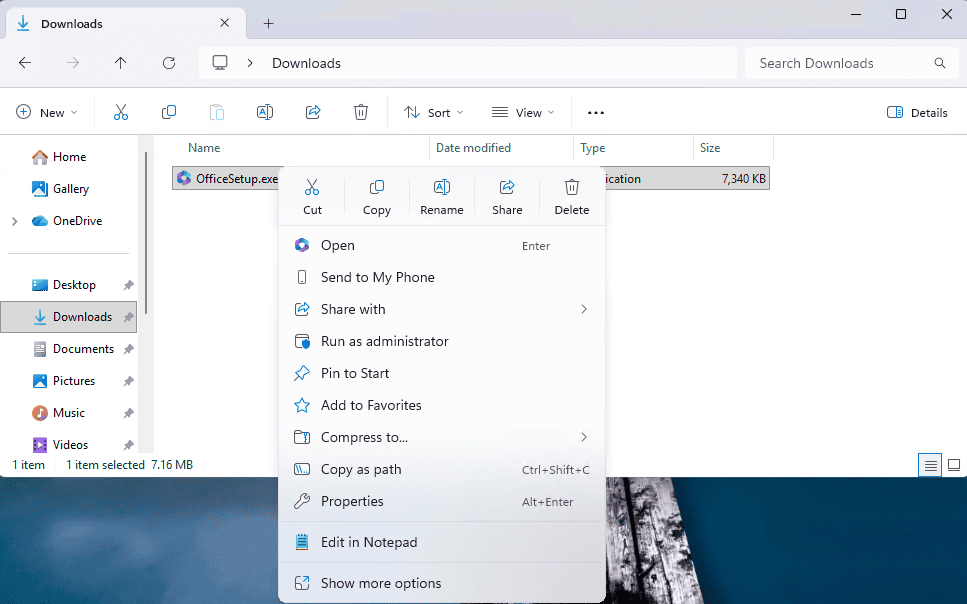
File Explorer’s context menu is also getting a small visual update. When you right-click on .exe, .bat, or .cmd files, the “Open” option will now match the icon of the default app, making things look more consistent. Here’s a snapshot of the change you can expect post installing Canary Build 29570.1000:
Image credit: Microsoft
Next up, there’s a new touchpad setting under Bluetooth & Devices that lets you adjust the size of the right-click zone. You can choose between default, small, medium, or large, depending on your device. If your manufacturer already offers custom settings, Windows will preserve that as a “Custom” option.
The update also expands lock screen widgets beyond earlier limited regions. You can now add, remove, and rearrange widgets like Weather, Sports, Traffic, and more, as long as they support small sizing. Last but not least, pen input is getting a minor refinement. Moreover, there’s a new option that allows the pen tail button behave the same way as the Copilot key, making shortcuts more flexible across devices.
Microsoft is wrapping this week with bunch of new Windows 11 builds. Speaking of which, the company is rolling out KB5083726 and KB5083728 for Dev and Beta channel Insiders, which bumps systems to Build 26300.8276 and Build 26220.8271, respectively. Notably, both Dev and Beta channel Insiders get similar changes and improvements.
Starting with Settings, Microsoft is making location controls easier to understand. If Location services are turned off, related options like Default location and Allow location override will now appear greyed out, making it clear they are inactive.
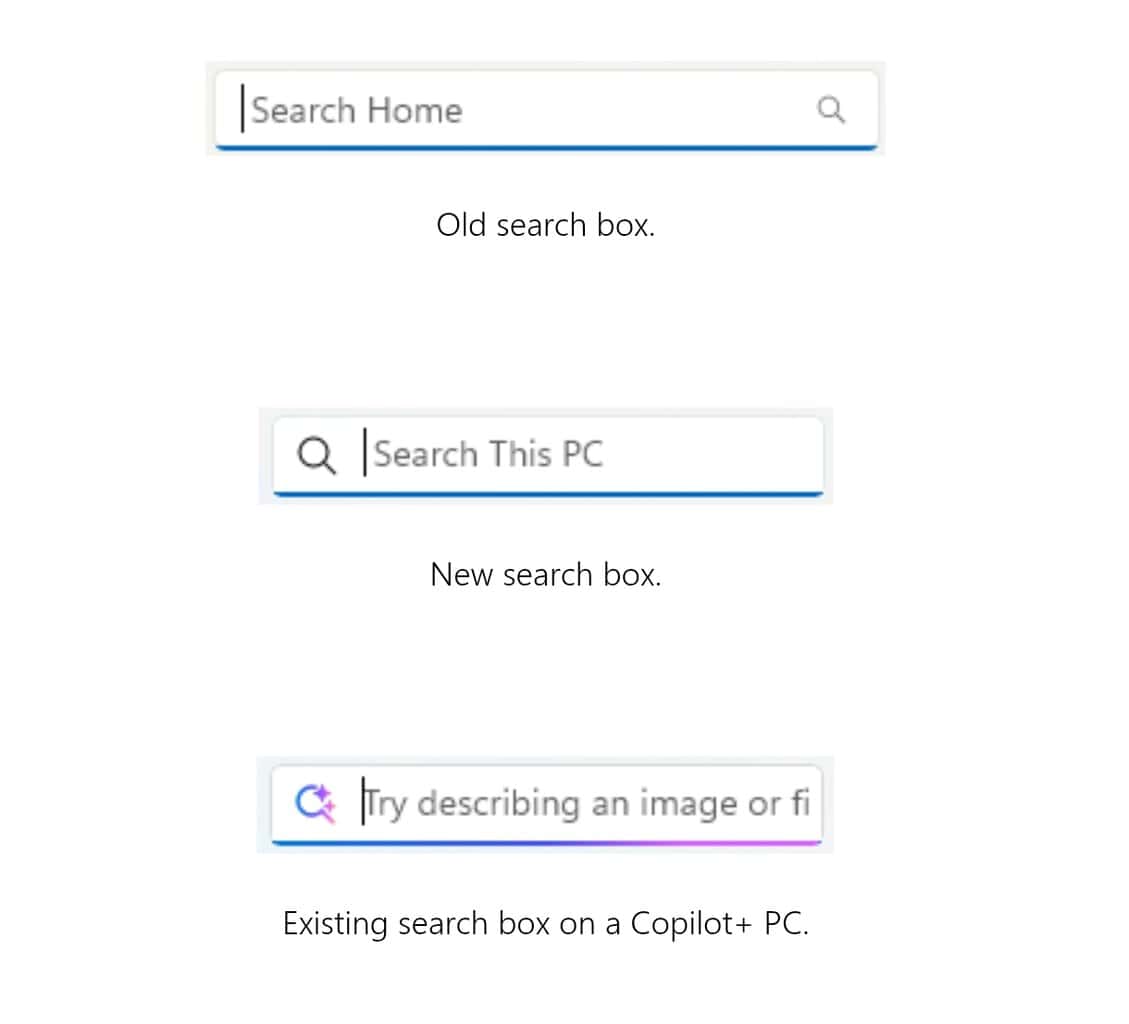
The company has also improved the reliability when navigating to Installed apps. Meanwhile, File Explorer is getting a small visual tweak. Microsoft has adjusted the search box icon placement to keep things consistent across different PCs.
Image credit: Microsoft
Besides that, overall File Explorer reliability has been improved, and Voice Access users should find the navigation pane easier to use.
Moving on, Windows Hello fingerprint performance has been improved, especially after waking the device from sleep. Clipboard history should now open faster, and there are also font updates, including improvements to the Leelawadee UI family for Thai, Lao, Khmer, and Lontara scripts to enhance rendering and readability.
A newly released proof-of-concept exploit called RedSun is raising serious concerns around Microsoft Defender security. The exploit allows attackers to gain full SYSTEM-level access even on fully updated Windows systems.
Security researcher Chaotic Eclipse published the PoC, demonstrating how the vulnerability can be abused for local privilege escalation. The flaw affects Windows 10, Windows 11, and Windows Server 2019 and newer, meaning a large number of systems remain exposed despite having the latest April 2026 updates installed.
Exploit bypasses Defender protections using file rewrite behavior
RedSun takes advantage of how Microsoft Defender handles flagged malicious files. Instead of permanently blocking or isolating them, Defender can restore files back to their original location under certain conditions, which opens the door for abuse.
The exploit chain combines multiple techniques, including the use of the Cloud Files API, a Volume Shadow Copy race condition, and directory junctions or reparse points. By chaining these elements together, the attacker redirects a file overwrite operation into a protected system path.
As a result, a malicious executable gets written into a system directory and executes with SYSTEM privileges, effectively giving full control over the machine.
Confirmed working and difficult to detect
Security expert Will Dormann independently confirmed that the exploit works as described, successfully demonstrating full privilege escalation in real-world conditions. This validation increases the severity of the issue, as it confirms that exploitation does not rely on theoretical assumptions.
Some antivirus solutions can detect the exploit, but only because it includes the EICAR test string, a standard marker used to trigger AV detection. Attackers can easily bypass this by encrypting or modifying the string, making detection unreliable in real scenarios.
RedSun remains unpatched as concerns grow
Microsoft has not yet released a patch for the RedSun vulnerability, leaving systems at risk even if they are fully updated. This situation highlights ongoing concerns about Defender’s internal behavior and how certain design decisions can be leveraged for privilege escalation.
This exploit follows the recent release of BlueHammer, another Defender-related vulnerability. Together with other emerging threats, there are now three major exploits circulating in the wild, with RedSun being one of the most critical due to its effectiveness on fully patched systems.
First of all, you have Kiln. The game, showcased by Double Fine Productions at Xbox’s January Developer Direct, is launching day one on Game Pass on April 23. You can pre-order it now at a discounted price of $17.99. For those unaware, it is a pottery power-fantasy game that celebrates both Creativity and Destruction. You can read more about it here. But before that, joining Xbox on April 21 is Vampire Crawlers: The Turbo Wildcard from Vampire Survivors.
Besides the one mentioned above, there are twenty eight additional games that will drop on Xbox through the next week. Here’s a list of games with their release date.
Threat actors are actively exploiting multiple Windows vulnerabilities to gain elevated, even SYSTEM-level privileges on affected machines. The exploits, released publicly by a researcher known as Chaotic Eclipse (also called Nightmare-Eclipse), have already appeared in real-world attacks.
The release reportedly came as a protest against Microsoft Security Response Center practices, but the impact quickly moved beyond theory into active exploitation.
Three Exploits Target Windows Defender
The campaign revolves around three vulnerabilities affecting Microsoft Defender:
RedSun – Another privilege escalation vulnerability
UnDefend – Disables Defender definition updates
All three initially surfaced as zero-day exploits, meaning no patches were available at disclosure.
Security researchers from Huntress Labs confirmed that attackers are already using these tools in the wild, with BlueHammer exploitation observed since April 10.
The Huntress SOC is observing the use of Nightmare-Eclipse's BlueHammer, RedSun, and UnDefend exploitation techniques.
Investigations show that attackers have used these exploits in actual breaches, not just proof-of-concept scenarios. In one case, a compromised SSL VPN account allowed threat actors to gain access and escalate privileges using the newly released tools.
Analysts also observed hands-on-keyboard activity, suggesting direct human control rather than automated malware. This type of interaction often points to targeted attacks rather than broad, automated campaigns.
Patch Status Leaves Systems Exposed
Microsoft has released a fix for one of the vulnerabilities, specifically BlueHammer tracked as CVE-2026-33825. However, RedSun and UnDefend remain unpatched, leaving a significant portion of the attack surface exposed.
This partial mitigation increases risk, particularly for environments that depend heavily on Microsoft Defender as a primary security layer.
Microsoft Responds to Public Exploit Release
Microsoft confirmed that it is investigating the remaining vulnerabilities and reiterated the importance of coordinated disclosure practices. The company emphasized that releasing exploits publicly before patches are available can increase exposure for users.
Despite that, confirmed in-the-wild activity indicates that attackers have already moved quickly to take advantage of the situation.
Ongoing Risk for Windows Users
With two vulnerabilities still unpatched and active exploitation underway, the threat level remains high. Systems with compromised credentials or weak access controls face the greatest risk, especially in enterprise environments.
Users and administrators should apply available patches as soon as possible and monitor systems closely while waiting for fixes for the remaining vulnerabilities.
In other news, Microsoft is also warning users about a macOS-focused attack campaign that spreads through fake job interview offers.
Microsoft is preparing a redesigned Start menu for Windows 11, focusing on speed, customization, and overall usability. The changes are part of a broader effort to improve system quality and responsiveness.
New Start Menu Built on WinUI 3
According to Windows Central, Microsoft is developing a new Start menu powered by WinUI 3. This update aims to modernize the interface while improving performance across different system conditions.
Users will gain more control over how the Start menu looks and behaves. The redesign introduces manual layout selection, allowing users to choose between smaller or larger Start menu sizes instead of relying on automatic scaling.
More Customization Options
Microsoft is also expanding customization features, giving users the ability to toggle entire sections on or off. This includes options to disable the Recommended feed, pinned apps, or even the full app list.
All these controls will live inside the Windows Settings app, using simple toggles for easier access. This approach makes personalization more straightforward without requiring deep system changes.
Performance and Responsiveness Improvements
The redesigned Start menu focuses heavily on performance. Microsoft aims to eliminate common issues such as delayed opening times and missed keystrokes during search.
The new version should remain responsive even under heavy CPU load. Users will be able to start typing immediately after opening the menu, with no lag or input delays.
Faster Search Experience Also in Development
The Start menu improvements are part of a larger initiative internally referred to as “Windows K2.” This project focuses on improving stability, performance, and overall user experience across Windows 11.
Alongside the new Start menu, Microsoft is also working on enhancing Windows search. The company plans to deliver faster and more accurate results, addressing long-standing complaints about sluggish search performance.
At the same time, a new movable Taskbar has been spotted in development, suggesting Microsoft is exploring additional UI flexibility beyond the Start menu.
Overall, Microsoft’s upcoming changes show a clear shift toward making Windows 11 more responsive, customizable, and efficient for everyday use.
A new analysis covered by That Privacy Guy argues that Google Chrome still does very little to protect users from browser fingerprinting. The report says Chrome lacks meaningful native anti-fingerprinting defenses and continues to trail privacy-focused rivals such as Brave, Firefox, and Tor Browser.
Fingerprinting remains one of the harder privacy threats to avoid online because it works quietly in the background. Instead of relying on cookies alone, websites and scripts can combine details such as your operating system, GPU, CPU, installed fonts, audio stack, WebGL behavior, and other signals to build a unique identifier.
Why browser fingerprinting matters
That matters because modern browsers store far more than just open tabs. They often hold passwords, session tokens, browsing history, saved payment details, and other sensitive data tied to a user’s online identity. When fingerprinting enters the mix, anonymity becomes much harder to maintain.
The report argues that this kind of tracking blends into normal browser functionality, which makes it more difficult to spot than obvious malware or suspicious downloads. In that sense, the browser itself can become part of the privacy problem.
Chrome’s privacy protections fall short
According to the analysis, Chrome still leaves several key fingerprinting surfaces too exposed. The report points to APIs and browser components such as Canvas, Audio, WebGL, fonts, and speech synthesis as areas where websites can extract highly distinctive device information.
That Privacy Guy also claims Google’s Privacy Sandbox efforts have effectively been abandoned or weakened to the point where current protections no longer offer meaningful privacy gains against fingerprinting. If true, that leaves Chrome users with few built-in defenses against one of the web’s most persistent tracking methods.
By comparison, Firefox offers a privacy.resistFingerprinting setting through about:config, while Brave includes its Farbling system, which randomizes some fingerprinting data and disrupts tracking attempts. Microsoft Edge also includes Tracking Prevention, though the report suggests its fingerprinting protections remain partial rather than comprehensive.
Other browsers are doing more
The broader takeaway from the report is that Chrome now looks like one of the weakest major browsers when it comes to anti-fingerprinting protection. Brave, Firefox, and Tor Browser all provide stronger privacy tools out of the box or through settings that give users more control.
That comes at a time when browser-related threats continue to grow. Recent reports have highlighted malware such as VoidStealer, which was used to extract encryption keys from memory, showing how valuable browser-stored data has become. Separately, more than 100 malicious extensions were recently found on the Chrome Web Store, adding to concerns around browser security and privacy.
In other news, Google continues to roll out new user-facing features in Chrome, including vertical tabs, while Microsoft uses the moment to promote Edge, highlighting that it has offered similar functionality for years.