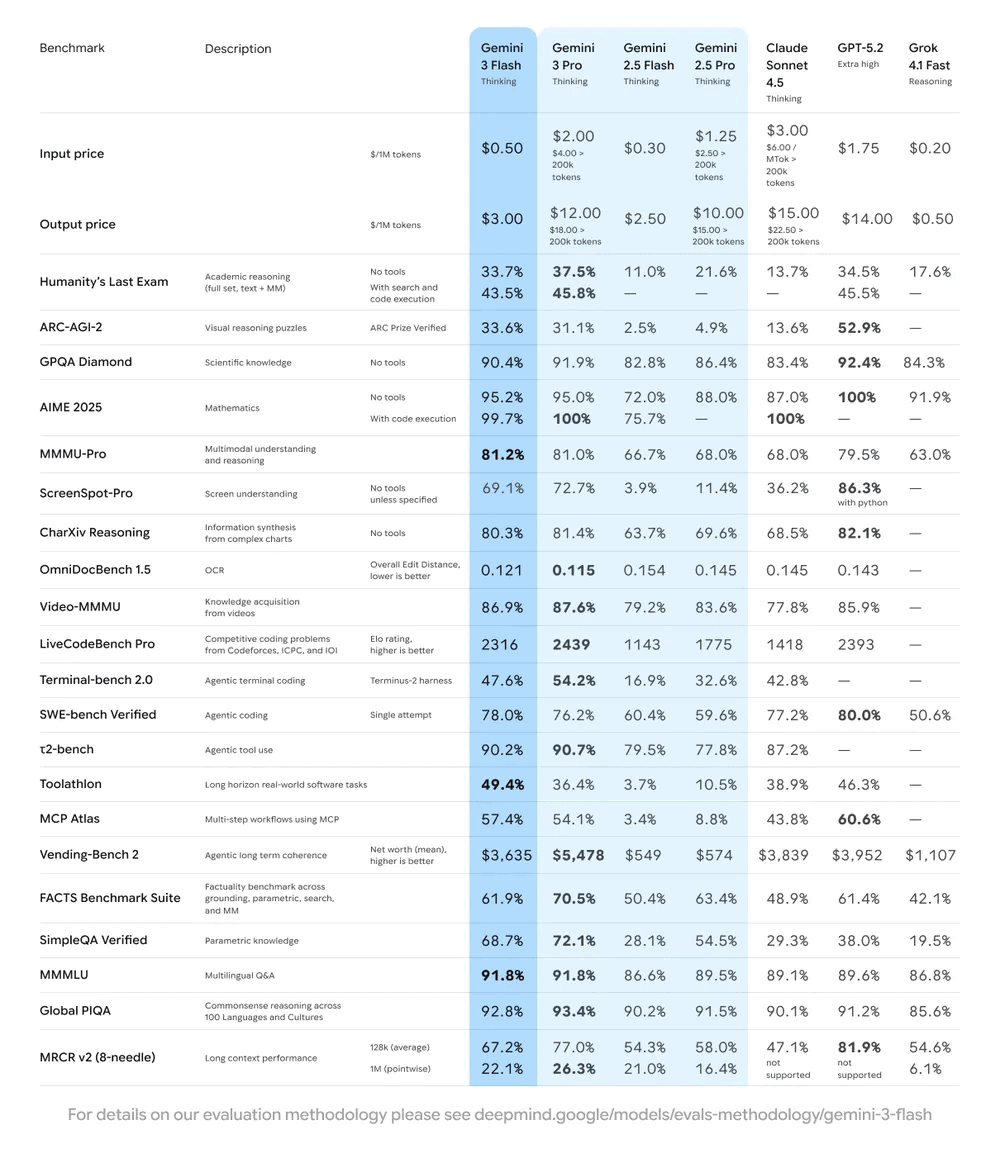
Today, Google launched Gemini 3 Flash, the newest member of its Gemini AI lineup that is now available to developers. Google says that it offers super-fast and cutting-edge intelligence.
The new model is based on Gemini 3 Pro, which allows for faster speed performance, rich multimodal understanding and cheaper cost that is suitable for coding, gaming and enterprise applications. Gemini 3 Flash, at it’s heart is the Pareto frontierof efficiency and capability.
According to benchmark results, Gemini 3 Flash is three times more efficient than Gemini 2.5 Pro, nine times faster, and all that at less than a quarter of the cost of Gemini 3 Pro. The model also includes powerful visual and spatial reasoning, as well as code execution capabilities that enable developers to query, manipulate, and edit visual inputs.
Image: Google
For developers, Gemini 3 Flash supercharges agentic coding skills. Tools like Google Antigravity can now write more code faster than ever before. The company says that game studious are already experimenting with its power in game development.
Aside from gaming, Gemini 3 Flash is also being used in deepfake detection, and legal document analysis. The resemblance AI uses multimodal reasoning for speedy forensic analysis and Harvey AI to expedite contract processing, which provides greater accuracy of reasoning without losing speed.
The Gemini 3 Flash model is available via Google AI Studio, Gemini API, Antigravity, Gemini CLI, Android Studio and Vertex AI, with an initial price of $0.50 per million input tokens and $3 per million output tokens.
Rematch has officially kicked off Season 2, and the update is all about improving gameplay. You’ll feel better responsiveness around dribbling, alongside better ball control that makes quick movements and close play more reliable.
Goalkeepers have also received attention from developers this season. You’ll come across new animations, which are designed to improve realism and readability during high-pressure moments. A Season 2 trailer is available now, offering a quick look at the updates in action. Check it below:
Season 2 also introduces new arenas, so you can get a different look and atmosphere while playing. On the outfit side, the Season 2 update brings the Ugly Sweater Bundle, adding a hint of festive touch.
In the coming days, Rematch will see a few more additions. For example, a new 1v1 Duels mode is on the way. Besides that, Fireball Mode is also set to return.
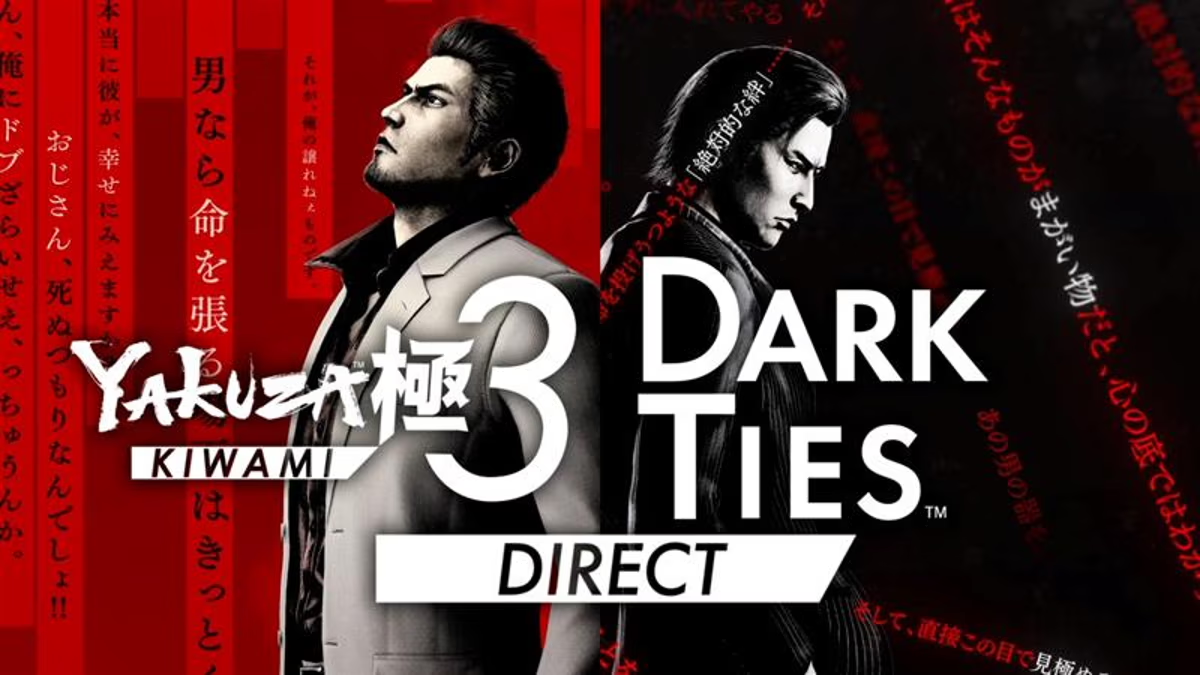
SEGA and Ryu Ga Gotoku Studio are about to give fans a closer look at their upcoming two-in-one release, Yakuza Kiwami 3 & Dark Ties. The developers today announced that a dedicated Direct will air on Tuesday, December 23 at 01:00 GMT.
This Direct will highlight both Yakuza Kiwami 3 and Dark Ties. The latter is a standalone story focusing on Yoshitaka Mine, one of the antagonists from the original Yakuza 3. Players You can expect dive into character development, combat updates, and other new experiences across the combined release.
SEGA will live stream Direct on its official YouTube and Twitch channels. For the uninitiated, Yakuza Kiwami 3 & Dark Ties is set to launch on PlayStation 5, PlayStation 4, Nintendo Switch 2, Xbox Series X|S, and PC (Steam) on February 12, 2026.
Are you excited for the Direct? What do you expect to see? Let us know in the comments below.
Even years after its release, Hogwarts Legacy continues to appeal global players. That’s because Warner Bros has shared a massive milestone, confirming the game has now sold over 40 million copies on consoles and PC. There has been an addition of six million copies sold since March 2025.
Just to be clear these figures reflect full game sales, excluding subscriptions like PS Plus. If you are a long time Hogwarts Legacy fan, you must be aware that the game blends immersive storytelling, highly detailed environments, and more. That keeps players coming back.
Avalanche Software is reportedly also working on a sequel, which might launch in the coming years. While some additional content for the original game was shelved, the focus now is on expanding the wizarding universe further.
It will be interesting to see whether Netflix’s massive acquisition of Warner Bros will play a part in bringing that sequel soon, or will it push it back, only time will tell.
Microsoft has been quite optimistic about the Xbox Play Anywhere program, and November 2025 was a big month in relation with that. According to Microsoft, more than 40 new titles joined the program, bringing cross-buy, cross-play, and the convenience of playing on both console and PC to even more games.
For those unaware, Xbox Play Anywhere is exactly what it sounds like. You buy a game once, play it on both Xbox and Windows 10/11 PCs, and carry your progress across devices. All your achievements, saves, and DLCs carry over seamlessly, which makes it one of the most user-friendly cross-platform experiences in gaming today.
November’s additions include some popular titles, including Silent Hill 2, Football Manager 26, and Dave the Diver, alongside a mix of indie and niche titles. Here’s a complete list of games added to Xbox Play Anywhere in November, take look:
1000xResist
A Pizza Delivery
Bioprototype
Bioweaver
Brotherhood
Bucketcrusher
Build a Bridge!
Cat God Ranch
Chopper Strike!
CloverPit
Cricket 26 – The Official Game of the Ashes
Dark Light
Dave The Diver
Dead Static Drive
Diamond Painting ASMR
Dragon Ruins II
Egging On
El Coco
Football Manager 26 Console
Football, Tactics & Glory – Treble Deluxe Edition
Heroes of Mount Dragon
Hide ‘N Seek!
Kentum
Kill It With Fire! 2
Let Them Come: Onslaught
Lost Ember: Rekindled Edition
Love is all around 2
Morsels
Nice Day for Fishing
Pigeon Simulator
Pocket Minigolf
Sailing the Winds
Schildmaid MX
Silent Hill 2
Snake.io
Street Racer Collection (QUByte Classics)
Suzerain
Syberia
Total Chaos
Trivia: Knowledge Trainer – the Quiz Game
Wild West: Hidden Objects
Winter Burrow
Young Suns (Game Preview)
The announcement was made by Microsoft as part of Xbox December update. Let’s not forget that Microsoft also pushed a firmware update for Xbox Wireless Headset that adds Bluetooth LE Audio support, better battery life.
The holiday season is officially here, and there would be many parents who may have plans to gift Xbox to their kids. However, if your kids are new to gaming, it’s your responsibility to set up a safe and fun experience. No wonder, it can feel overwhelming, but thankfully Xbox makes it simple with tools that give parents control without killing the fun vibe.
In a guide published today, Microsoft says that parents first need to make sure to set up a dedicated child account during console setup. This ensures your child gets a personalized experience, from what they can play to who they can interact with, all while keeping your own account safe.
Image: Microsoft
Next, the Xbox Family Settings app is a must-have if you are a parent. It’s available on Android and iOS and allows parents to manage screen time, approve or reject extra playtime requests, and even pause games remotely. That’s not all; access to content filters allow you to block age-inappropriate games, while purchase controls ensure no surprise charges increase your bills.
Image: Microsoft
Moving on, you can also control with how your kids can communicate. You can restrict chats to friends only, review incoming friend requests, or block messaging entirely. There are weekly activity reports to tell exactly what your child played, for how long, and any requests they made. Notably, Xbox Series X|S consoles offer a variety of settings to make gaming inclusive for all children.
Although it sounds promotional, which it isn’t, Xbox Game Pass offers hundreds of family-friendly games, from action-packed adventures to educational titles that gives your kids a safe space to explore, learn, and play together.
So, have you already set up your kids Xbox account? If not, what’s stopping you? You should do it now.
The new year is just around the corner, and if you are eager to know what’s coming to Xbox Game Pass, you’ve landed to the right place. A few days back we reported that MIO: Memories in Orbit & Nova Roma will join Xbox Game Pass in January 2026. Also, let’s not forget that we have two another confirmed titles, High on Life 2 and REPLACED, which will join Xbox Game Pass in February and March of 2026, respectively. Notably, both titles will land as day-one launches.
First up is High on Life 2, which lands on Xbox Game Pass on February 13. The sequel will be available across Xbox Series X|S, Xbox on PC, and Xbox Cloud Gaming, with access included for Game Pass PC and Game Pass Ultimate subscribers on day one. It’s a wide rollout, and Microsoft is clearly treating the follow-up as a major early-year release.
The original High on Life became a surprise hit thanks to its irreverent humor and talking-weapon gimmick. Xbox is now betting on the same momentum going forward. Only time will tell if it turns out to be a fruitful bet.
A few weeks later, REPLACED joins Xbox Game Pass on March 12, 2026. The game will be available for Xbox Series X|S, Xbox One, and Xbox on PC. Like High on Life 2, it will also launch day one on Game Pass for PC and Ultimate.
Among these two, which are you moat excited for and why? We’d love to hear your take, don’t forget to comment below.
UNDERWARD is expanding, as the developer INTENSE has confirmed that the cooperative horror exploration game is launching on Nintendo Switch 2 on December 18. So, you’re in for tense underground survival experience to Nintendo’s latest console.
The Switch 2 version comes with the version 2.0 update, titled “LASTBOSS, Genius Gyaru Doctor.” For the uninitiated, it rolled out back in September. Omexof tge interesting partvis that it comes with Cross-play. Meaning, Switch 2 players can now team up with users on other platforms.
UNDERWARD originally debuted on PC via Steam in February, followed by a PlayStation 5 release in June. But the title gradually solidified its place in the teamwork-driven horror segment.
Speaking of features, UNDERWARD is designed around one-to-four-player cooperative play. The story revolves around dropping investigators into a labyrinthine underground hospital. The objective is simple; all you have to do is locate capsules containing “TEST-SUBJECT” monsters and haul them back to an elevator. Here’s what you can expect within the game:
Randomized, labyrinthine underground hospital floors (with some areas that don’t feel like a hospital at all).
Deadly and seductive nurse monsters that hunt you.
Vicious hunters that can be unleashed over time.
Retrieve capsules containing “TEST-SUBJECT.”
Supply Machine System: Exchange retrieval rewards for randomized items.
“Connected Carry” system for high-speed carry with multiple players.
Various useful items that can be carried over to the next floor.
Total wipeout = all is lost. How far can you descend?
With cross-play, new content baked in, and Switch 2 support arriving day one, UNDERWARD’s latest release looks positioned to bring its claustrophobic horror to a wider audience just in time for the holidays.
Are you diving in with friends, or brave enough to face the hospital alone?
EA’s Battlefield 6 is turning out to be the biggest game of 2025 in the United States, at least according to Circana’s November report that dropped earlier today. Per the report, the title is now “extremely likely” to finish the year as the top-selling game by dollar sales (via IGN). This comes despite Black Ops 7 strong launch.
In the Circana’s latest report, Black Ops 7 grabs the seventh best-selling game year-to-date. Meawhile, Battlefield 6 currently holds the top spot, followed by NBA 2K26 and Monster Hunter Wilds. Borderlands 4, EA Sports College Football 26, and Madden NFL 26 also sit ahead of Call of Duty: Black Ops 7.
Circana also reports a double-digit decline in Call of Duty franchise sales compared to November last year. Black Ops 7 sold less during its launch window than Black Ops 6 did in the same period. Activision has already acknowledged the softer performance.
Black Ops 7 faces a rather unique hurdle despite launching day one on Xbox Game Pass. Not to forget, after a massive baclash, Activision announced to roll out free trial, which is now live through December 22. So, if you still have doubts, this is your chsnce to try Black Ops 7 right now.
This would not be the first time Call of Duty loses its annual crown. Hogwarts Legacy pulled it off in 2023. Before that, only some popular titles like GTA 5 and Red Dead Redemption 2 managed to achiveve that feat.
December 2025 Patch Tuesday Updates at the Center of the Issue
The problem ties directly to the December 2025 Patch Tuesday security updates, specifically KB5071546, KB5071544, and KB5071543. Microsoft says the issue affects enterprise systems running Windows 10 22H2, Windows Server 2019, and Windows Server 2016. Personal devices running Windows Home or Pro editions remain very unlikely to see any impact.
MSMQ Queues and Enterprise Applications Affected
In impacted environments, MSMQ queues can become inactive, which prevents enterprise applications from writing to queues or operating normally. This behavior can break internal workflows and disrupt services that depend on message-based processing.
Administrators have also reported IIS websites failing with “insufficient resources” errors. These failures occur even when servers have sufficient disk space and memory, suggesting the issue stems from the MSMQ disruption rather than actual hardware limitations.
Microsoft has acknowledged the bug but has not shared a permanent fix or an estimated release timeline. The company continues to investigate while collecting data from affected enterprise customers.
Microsoft Recommends Contacting Support for Workarounds
Because environments vary widely, Microsoft recommends that enterprise IT teams contact Microsoft Support for Business to receive tailored workaround instructions. These temporary fixes depend on system configuration and deployment specifics.
As a temporary measure, organizations may also consider rolling back the problematic December updates to restore MSMQ functionality. IT teams should balance this approach against the security risks of removing recent Patch Tuesday fixes.
Elden Ring Nightreign continues its rapid rise in popularity, and FromSoftware has released a new patch that expands gameplay while addressing a wide range of issues. The update focuses on Deep of Night mode, quality-of-life improvements, and stability fixes across core systems.
New content added to Deep of Night mode in patch 1.03.1
The patch introduces additional targets, landmarks, and raid events. Shifting Earth encounters now appear in Deep of Night mode when players match with others who also own the DLC. This change increases encounter variety and replay value for coordinated groups.
Night Aspect boss fights also receive an update. When all players in a session own the DLC, the boss gains additional attack patterns, making encounters more challenging and rewarding for experienced teams.
UI and quality-of-life improvements
This update delivers several usability enhancements aimed at improving combat clarity and inventory management. Players now see stack count displays on certain damage icons, along with rarity colors when pinning items.
Other notable changes include:
Near-death animations for specific revival effects
Automatic merging of consumable stacks in equipment menus
Expanded hidden clue ranges on Great Hollow Shifting Earth maps
Full remapping support for the Map Display key on keyboard and mouse
These tweaks improve readability, reduce friction, and make exploration smoother.
Bug fixes and stability updates
The patch resolves numerous bugs across combat, skills, relics, enemies, and expedition systems. Developers fixed issues with unintended enemy spawns, bosses failing to despawn, missing UI icons, and broken lock-on behavior for near-death allies.
Multiplayer matchmaking and progression conditions now behave more reliably. Several Great Hollows Shifting Earth blockers, including stuck characters and missing rewards, have also been eliminated.
These highlights cover only the most notable changes. For full details, players should review the official patch notes. If you haven’t already unlocked a Scholar in Nightreign, don’t miss our guide to learn how to do it.
For Windows users seeking a quick, efficient, and cost-effective way to create professional branding, Design.com offers one of the most powerful and user-friendly browser-based solutions. With its AI logo generator, brand identity tools, and streamlined customization options, Design.com provides a full suite of features to build a brand, whether you’re a freelancer, small business owner, or entrepreneur.
In this comprehensive review, I’ll dive into Design.com’s strengths, highlighting how it performs for Windows users specifically. I’ll focus on the Logo Maker, the extensive suite of branding tools, customization options, and overall usability, all from a Windows user perspective.
What is Design.com? An Overview
Design.com is the world’s best logo maker, trusted by millions of creators and businesses, with over 3,000+ Trustpilot reviews and an impressive 4.7/5 rating. It combines professional design quality with the largest logo library on the internet, backed by cutting-edge AI tools. Design.com’s AI logo generator delivers studio-quality branding in minutes, whether you’re creating a logo, designing business cards, or building a full brand identity.
What makes Design.com stand out is its exclusive templates, the speed of its AI tools, and the depth of its branding features. Whether you’re using it for a quick logo creation or a comprehensive brand kit, Design.com provides an all-in-one platform for Windows users without requiring advanced design skills or the need for expensive software.
50+ branding tools: business cards, social posts, presentations, websites, and more
Automatic brand consistency across all templates
Free printing and domain registration
24/7 support with live chat and email
Now that we’ve set the stage, let’s explore how Design.com delivers in practice for Windows users.
1. Fast, High-Quality Logo Creation
Speed and Efficiency
One of the standout features of Design.com is itsAI logo generator. With just a few clicks, you can generate a wide variety of logos that are clean, professional, and industry-specific. The platform is incredibly fast, and Windows users will appreciate how quickly they can move from concept to logo.
In my testing, after entering the business name and selecting an industry, the platform generated dozens of logo concepts within seconds. There were options to match different styles, whether you wanted a minimalistic wordmark, a bold emblem, or a vintage badge-style design. The variety was impressive, and most designs looked polished enough to be used right away.
What sets Design.com apart from other platforms is the largest logo library in the world. With over 360,000 templates and 1 million total design templates, you’re not limited to a handful of generic designs. This vast library ensures that you can generate a logo that matches your brand’s personality, whether you’re in tech, fashion, food, or any other industry.
360,000+ logo templates
1 million+ design templates across all marketing assets
The library’s diverse options help ensure that theAI logo generator produces relevant and customizable logos to your specific brand needs.
2. Customization & Editing Tools
User-Friendly Editing
Once you’ve chosen a logo design, Design.com’s customization tools let you tweak everything. From text adjustments to color changes, the platform provides an intuitive drag-and-drop editor that’s accessible even for non-designers.
You can:
Change fonts: Choose from 750+ fonts, including 525+ exclusive fonts that aren’t available anywhere else.
Modify color schemes: Pick from curated color palettes or create your own.
Adjust icon placement: Move the icon, text, and slogan to create a unique layout.
This simplicity is crucial for Windows users who want flexibility but don’t have the time or design skills to learn complex software like Illustrator or Photoshop. The automatic color detection and unlimited revisions make it easy to adjust the logo in a way that feels tailored to your business.
Advanced Editing
For more advanced customization, Design.com includes an Advanced Editor, giving you greater control over:
Spacing between letters and elements
Element proportions
Alignment of icons and text
This additional flexibility is perfect for Windows users who want a high degree of control without relying on expensive or complicated design software.
3. Branding Ecosystem: Beyond the Logo
A Full Brand Kit in Minutes
After you’ve finalized your logo, Design.com’s AI tools go a step further by creating a complete brand kit. You don’t have to manually design each asset or switch between multiple platforms. Everything you need for consistent branding is automatically generated.
You can create:
Business cards
Flyers and posters
Social media posts and stories
Email signatures
Presentations
Letterheads and menus
One of the best features is that all of these templates inherit your logo colors and fonts automatically, ensuring brand consistency across all your materials.
Seamless Brand Continuity
As a Windows user, you’ll appreciate how Design.com’s system helps ensure that your branding remains seamless. For every piece of marketing material, from print to digital assets, your brand identity is consistent and ready to use immediately. You don’t need to manually adjust colors or fonts, making the branding process faster and more streamlined.
4. AI Website Builder & Additional Branding Tools
Building a Website with Your Logo
Another benefit for Windows users is the AI-powered website builder. Once your logo and brand kit are ready, you can carry over the design into a fully functional website. The platform automatically applies your logo, colors, and fonts to your website, so you don’t have to worry about creating a cohesive web presence from scratch.
If you need a landing page or full website, Design.com makes it easy. It integrates seamlessly with your logo and brand assets, and you don’t need to know coding to build a website. This feature is perfect for Windows users who need a professional web presence without hiring a web developer or using complicated website-building software.
More Tools for Complete Branding
Design.com doesn’t just stop with logos and websites. It offers more than 50 additional branding tools, such as:
Business cards, digital business cards, and letterheads
Social media posts, stories, and presentations
Flyers, posters, and QR codes
All these templates are automatically designed to match your brand’s look and feel. So if you’re creating a social media campaign, flyer for an event, or business presentation, you can rest assured everything will look consistent and on-brand.
5. Affordable Pricing & Great Value
One of the most attractive aspects of Design.com for Windows users is its affordable pricing. Compared to hiring a professional designer or purchasing expensive software, Design.com delivers tremendous value.
The platform offers three pricing tiers:
Starter — $5/month (billed annually) This plan includes unlimited edits, business cards, high-res logo downloads, email signatures, letterheads, and access to over 1 million design templates.
Value — $6/month (billed annually) Everything from Starter, plus the AI website builder.
Premium — $7/month (billed annually) Everything in Value, plus digital business cards and link-in-bio pages.
Free Logos and Design Materials
For Windows users who are on a tight budget, Design.com offers completely free logos, business cards, websites, and other design assets. While these free versions may be somewhat limited in features, it’s a fantastic option for startups or side projects where you want to explore Design.com without any upfront costs.
6. Export Options & File Formats
Another reason Design.com is excellent for Windows users is the variety of export formats. Once your logo is ready, you can download it in several file formats to ensure it’s versatile for both web and print.
The available formats include:
Vector files: SVG, EPS, PDF
Raster files: PNG, JPG
Animated files: GIF, MP4
Transparent backgrounds
Icon-only files
Having access to high-quality vector files is particularly valuable if you need to scale your logo for large formats like posters or signage. Additionally, the inclusion of animated formats like GIF and MP4 makes this platform ideal for digital branding.
7. Customer Support: Always There When You Need It
Another major pro for Windows users is the 24/7 customer support that Design.com offers. Whether you need help with logo creation, customizing templates, or technical questions, Design.com’s support team is just a message away. The availability of live chat and email support ensures that you’re never left hanging.
Conclusion: Why Windows Users Should Choose Design.com
For Windows users, Design.com is an exceptional solution for creating and managing a complete brand identity. Its combination of AI-powered tools, easy-to-use interface, and affordable pricing makes it accessible for anyone, whether you’re a beginner or a seasoned entrepreneur.
With high-quality logos, comprehensive branding tools, automated brand consistency, and the ability to generate website assets in minutes, Design.com delivers a one-stop-shop for branding without the need for advanced software or design expertise.
In short, Design.com allows Windows users to create a polished brand identity, quickly and professionally, all within a single platform. Whether you’re starting a new business, building a personal brand, or working on a creative project, Design.com provides the tools and resources you need to succeed.
YouTube has always focused on video, but Google now wants to push the platform beyond that core format. The company has confirmed a new experiment that introduces image-based posts directly into the Shorts feed, signaling a notable shift in how creators can reach audiences.
Image posts coming to the Shorts feed
As part of the test, YouTube plans to surface image posts created using the Create button inside the Shorts feed. During the experiment, all eligible image posts may appear alongside short-form videos, giving creators another way to gain visibility without publishing video content.
Creators can include up to 10 images or animated GIFs in a single post, making the feature closer to carousel-style social updates seen on other platforms. At launch, image posts do not support background audio, but YouTube plans to add audio support in a future update.
AI-powered Portraits feature explained
In parallel, YouTube continues to expand its AI efforts with a feature called Portraits. This tool lets users interact with an AI representation of a creator, designed to answer questions and guide viewers toward topics related to that creator’s content.
The feature focuses on helping creators understand audience interests while giving viewers a more interactive way to explore creator-focused topics.
Limited testing and availability
YouTube has onboarded a small group of creators to test Portraits. If you are 18 or older and live in the United States, you may already see a Talk to Creator’s Portrait option on the desktop version of YouTube.
For now, YouTube has not shared details about a wider rollout or a public release timeline. These experiments suggest the platform is actively exploring new formats and engagement tools as competition across social platforms continues to grow.
As the holiday season approaches, Xbox is reminding parents to focus on creating safe, child-friendly gaming experiences when setting up a new console. In a recent blog post, Microsoft outlined clear guidelines designed to help families manage screen time, content access, and online interactions from day one.
Microsoft outlines guidelines for kids and parents for this holiday season
During the initial console setup, Xbox recommends selecting “Yes” when asked if the device will be used by kids. This option unlocks child-focused settings that allow parents to tailor the experience based on age and maturity level. Instead of letting children use an existing adult profile, Microsoft strongly encourages creating a separate child account. This approach gives parents better oversight and ensures games, features, and interactions stay age-appropriate.
To simplify management, Xbox also points parents to the Xbox Family Settings app, available on both Android and iOS. The app lets parents control their child’s gaming activity remotely and in real time. You can set daily screen time limits, approve or deny requests for extra playtime, and pause gaming sessions instantly if needed.
The app also allows parents to restrict games and media based on selected maturity ratings, approve or block purchases to avoid surprise charges, and manage online communication settings. Options range from blocking all chat features to allowing interactions with friends only. Weekly activity summaries provide insight into what games children play and how much time they spend on them.
Microsoft says these steps help create a safer and more balanced Xbox experience for kids. With more than 20 new games coming to Xbox, now is a good time for families to set up the right controls before the holiday rush begins.
Steam Replay 2025 is now live, and the data paints a clear picture of how PC gamers actually spend their time. Despite a steady flow of new releases, most players continue to invest their hours in older, familiar games rather than chasing the latest launches.
Only 14% of playime was spent on new titles according to Steam Replay
According to Steam Replay 2025 statistics shared via TweakTown, only around 14% of total Steam playtime in 2025 went to games released this year. That means brand-new PC games account for a surprisingly small slice of overall engagement, even with major launches throughout the year.
The majority of playtime landed elsewhere. Roughly 44% of total hours went to games released between one and seven years ago, while about 40% went to titles that launched eight or more years ago. This trend makes sense when you consider how many long-running multiplayer games fall into that older category, including competitive shooters, MOBAs, and live-service titles that still attract massive player bases.
Steam Replay 2025 also highlights how focused player habits have become. The median number of games played per user sits at just four, suggesting most players stick closely to a small rotation of favorites instead of constantly jumping between new releases. PC gamers appear far more likely to replay trusted titles than experiment with unfamiliar ones.
Overall, the data reinforces a long-standing trend on PC: longevity matters more than novelty. Developers that support games over many years continue to benefit, while new releases face a tough battle for attention in an ecosystem dominated by established hits.
Microsoft is adding more flexible proofing language controls in OneNote on Windows, aiming to make multilingual work simpler and more predictable for users who switch between languages daily.
How do the new proofing settings work in OneNote?
Until now, OneNote has applied the proofing language on a per-paragraph basis and linked it directly to your keyboard input language. That behavior often caused inconsistent spellcheck and grammar results, especially when users changed keyboard layouts mid-session. Microsoft now addresses this limitation with expanded proofing options.
With the new update, users can apply a proofing language to an entire page. Once set, all text on that page follows the same language rules for spelling and grammar, regardless of how or when the content was added. This change helps writers, students, and professionals maintain consistency in long notes or shared documents.
Microsoft also introduces a default proofing language setting that stays active even when the keyboard language changes. By disabling the “Follow keyboard input language” option, users can ensure OneNote keeps using the selected language for all new content. This feature proves especially useful for multilingual users who write in one language while typing with multiple keyboard layouts.
How to enable the new proofing language controls
Open OneNote on Windows
Go to Review > Language > Set Proofing Language
Select your preferred language
Choose Apply to whole page to affect the entire page
Uncheck “Follow keyboard input language” to set a persistent default
Users can still override these settings by selecting specific text or paragraphs and changing the proofing language manually when needed.
The update is rolling out to OneNote on Windows version 2512 (Build 19515.20000) and later. Microsoft plans general availability by the end of January 2026. For additional details, users can review the official Microsoft blog post.
Valve has released a new Steam Deck Beta Client update to users on the Preview and Beta channels, introducing several fixes and usability improvements. Valve re-released the update shortly after its initial rollout to resolve a regression that caused client crashes, and the company acted quickly to stabilize the build.
Steam Deck beta update improves controller pairing and accessibility
One of the key changes focuses on Bluetooth controller pairing. The Steam Deck now detects when users attempt to connect an Xbox controller running outdated firmware that cannot pair correctly. The system shows a warning message, helping users avoid repeated connection failures and confusion.
Valve also refined accessibility controls for external gamepads. The Screen Reader’s Stop Talking function now maps to the X button, which keeps the Quick Access Menu accessible when using a controller. This adjustment improves navigation for users who rely on screen reader features during gameplay.
New chat reporting tools and Steam Link fix
The update adds new safety tools for Steam group chats. Users can now report suspicious or harassing messages directly from the chat window, along with options to block or unfriend other users. These changes make it easier to manage unwanted interactions without leaving the conversation.
Valve also fixed a Steam Link issue where touch controls could not move the mouse cursor between monitors. This fix improves the experience for players using multi-monitor setups while streaming games.
Available only on Beta and Preview channels
This release applies only to the Steam Deck Beta and Preview Client channels and has not reached the Stable public version yet. Users who want early access to these changes must opt into Valve’s testing channels.
Microsoft has confirmed a major privacy-related change for Windows 11 that directly addresses growing concerns about AI integration and file access. Going forward, Windows 11 will ask for explicit user consent before any AI agent can access personal files stored in key system folders.
Microsoft clarifies how AI agents access files in Windows 11
Under the updated approach, AI agents cannot access files by default. Windows 11 will display a clear consent prompt whenever an AI feature requests access to files located in the Desktop, Documents, Downloads, Music, Pictures, or Videos folders. These six “known folders” store most personal data, and Microsoft now blocks AI access unless users manually approve it.
This change follows public backlash over Microsoft’s earlier messaging, which many users described as vague and misleading. Privacy advocates raised concerns that AI agents could quietly scan personal files without proper disclosure.
Granular controls for each AI agent
Microsoft now gives users the ability to manage permissions on a per-agent basis. You can grant or deny file access separately for agents such as Copilot, Researcher, or Analyst. When an agent requests access, Windows 11 will prompt you to allow access once, always allow it, or deny it entirely.
Even if you enable experimental agentic AI features, file access does not activate automatically. Microsoft emphasized that AI agents remain inactive unless users explicitly opt in and approve permissions.
Part of a broader AI rollout across Windows and Office
Microsoft describes agentic AI as tools that can interact with files, apps, and system settings on a user’s behalf. The company plans to expand these capabilities across its ecosystem, including Agent Mode in Excel, which will also require file access approval.
While this update improves transparency, skepticism remains high. Recent controversies, such as Copilot appearing on LG TVs without clear opt-out options, continue to shape public trust.
Microsoft calls this change a step toward responsible AI deployment, but many users will closely watch how these permissions evolve in future Windows 11 updates.
After the upcoming changes for Microsoft Teams, the company also plans to add improvements to Excel in the form of better Copilot integrations, so let’s see what we can expect to see.
Agent Mode and New COPILOT Function Coming Next Year
As we know, Copilot is heavily integrated into the majority of Office applications. We also know that Microsoft is bringing Copilot for meetings to classic Outlook, but it seems that Excel is getting enhanced as well, with new tools designed to simplify complex workflows and data-related tasks.
Agent Mode is coming to Copilot in Excel, and this feature will be available on both Windows and Mac. Using it, users will be able to build and edit workbooks with Copilot more efficiently, especially when working with large datasets or complex spreadsheets.
Users will be able to choose between OpenAI and Anthropic models, as long as they have an eligible license. It’s also worth mentioning that this feature is coming to Excel for GCC, and according to the Microsoft 365 Roadmap, it will start rolling out in January 2026.
Another new feature is the =COPILOT function, which you’ll be able to use directly in your formulas in Excel to generate, classify, or summarize data. This could be particularly useful for users who regularly work with reports, analytics, or large amounts of structured information. Unfortunately, not much information is available about this feature yet, but it should start rolling out in February 2026.
Agent Mode for Excel seems like a great addition, and we can’t wait to see how it works in action. What about you? Are you excited about these upcoming features?
Microsoft is constantly improving its software, and the company has some interesting plans for Microsoft Teams, so let’s see what Microsoft has in store for its users.
Meeting Notes for Instant Messages and Branded Meeting Reactions Coming to Teams
Teams meeting notes are powered by Loop, and they will become available for instant calls and meetings, similarly to those that are started from Meet now. This means users won’t need to schedule a formal meeting in advance to take advantage of structured meeting notes.
Since Notes are Loop components, users will be able to create and collaborate on their meeting agenda, notes, and action items in real time. Everyone involved in the meeting will be able to contribute, as long as meeting settings are configured to allow this. This makes it easier to keep discussions organized and ensure that important points aren’t missed.
Notes will sync across all places they’ve been shared, so the entire team will be able to access them on any device, whether they’re using Teams on desktop, web, or mobile. Of course, notes can be edited and shared right from the Loop app in your web browser if needed, making them accessible even outside of Teams.
Another upcoming feature is branded reactions, and with it, companies can now add their visual identity to meetings. Admins will be able to upload custom reaction icons, and they will be instantly available to all participants, helping organizations reinforce their branding during calls and meetings.
Both of these features sound interesting, and they strive to improve collaboration within teams by making meetings more interactive and organized. These features are currently in development, but according to the Microsoft 365 Roadmap, they should start rolling out in February 2026.
Copilot is heavily integrated into Microsoft’s ecosystem, and it’s everywhere, from Windows to Microsoft Office apps. Speaking of Office, Microsoft is continuing to expand Copilot support to more apps, bringing AI-powered features to more of its apps.
Copilot is coming to help you prepare for meetings in classic Outlook
As you may know, there are two versions of Outlook: new and classic, and this update is coming specifically to classic Outlook. While Microsoft has been pushing users toward the new Outlook experience, classic Outlook remains widely used, especially in business and enterprise environments.
Users will now be able to prepare for meetings in classic Outlook by using Copilot. Sometimes it’s hard to stay organized, especially when dealing with multiple meetings throughout the day, and this is where Copilot can come in handy. Instead of manually going through emails, calendar entries, and attachments, Copilot can help streamline the process.
Copilot will help you prepare for meetings by providing real-time insights and summarizing context, tasks, documents, and other meeting resources. This includes pulling relevant information from emails and files related to the meeting. As a result, users can prepare more effectively by chatting directly with Copilot and asking questions before the meeting starts.
This feature isn’t new, as it’s already available in Outlook for the web, Mac, and mobile, but now it’s coming to classic Outlook for Windows. This expansion ensures that users who prefer or rely on the classic Outlook interface won’t miss out on Copilot’s capabilities. To use the feature, you’ll need an active Microsoft 365 Copilot license.
As for availability, according to the Microsoft 365 Roadmap, the preview should be available in January, while the full rollout is expected in March.
Microsoft has announced that it will block mobile devices running outdated email software from accessing Exchange Online starting March 1, 2026. The change targets older implementations of Exchange ActiveSync and aims to reduce security risks tied to legacy protocols.
What exactly is changing with Exchange Online
Microsoft will prevent devices using Exchange ActiveSync (EAS) versions older than 16.1 from connecting to Exchange Online. EAS 16.1 launched in June 2016 and no longer meets modern security expectations.
Only native email apps that rely on legacy EAS versions face impact. Outlook Mobile users will not see any disruption because the app does not use the EAS protocol.
Who is affected and who is not
Mobile devices using built-in or older email clients that still depend on pre-16.1 EAS versions may lose access after the cutoff date. Older Android mail apps fall into this category unless vendors update them in time.
Apple’s iOS Mail app already supports EAS 16.1 on iOS 10 and newer, so most iPhone users should continue working without issues. Google and Samsung have confirmed they are updating their native email apps to support the newer protocol.
On-premises Exchange Server installations are not affected by this change.
Tools for IT administrators
Microsoft shared a PowerShell command that allows administrators to identify devices still connecting with older EAS versions. This gives organizations time to audit users, notify employees, and enforce upgrades before March 2026.
Many organizations already block legacy EAS clients and require Outlook Mobile for improved security controls and device management. Because of that, the upcoming block does not come as a surprise for enterprise IT teams.
Why Microsoft is enforcing this now
Legacy EAS versions lack modern security protections and management features. By enforcing EAS 16.1 or newer, Microsoft reduces exposure to vulnerabilities and aligns Exchange Online with current security standards.
The company continues to push users toward supported clients and actively maintained apps, especially as cloud security threats keep increasing. In other news, Microsoft has added DeepSeek-V3.2 models to Azure, so if you use this platform, be sure to give them a try.
Mozilla has a new CEO, Anthony Enzor-DeMeo, and one of his first major signals points to a future where Firefox leans heavily into AI integration.
According to Enzor-DeMeo, Firefox will gradually evolve into an AI-powered browser over the next three years. Mozilla plans to position these features as optional, giving users full control to disable AI if they choose.
Firefox’s AI future: What Mozilla confirmed
Mozilla says Firefox will remain the company’s core product while expanding into a broader ecosystem of “trusted software.” AI tools will play a key role in that strategy, but Mozilla insists it won’t force them on users.
This stance may reassure some users, especially after recent backlash against unavoidable AI features elsewhere. Many still reference Microsoft Copilot appearing on LG TVs without an uninstall option as an example of AI overreach.
Mozilla wants to avoid that perception by keeping AI features opt-in rather than baked into the core experience.
Community backlash grows despite opt-in AI
Despite Mozilla’s reassurances, online reaction has skewed heavily negative. Longtime Firefox users argue that Mozilla misunderstands its audience.
Many Firefox fans describe themselves as privacy-focused, technically savvy users who value a lightweight browser without unnecessary features. For them, any AI integration feels like bloat, even when optional.
Some users warn that prioritizing AI could push Firefox loyalists toward alternative browsers that promise a cleaner, simpler experience. Critics also say that optional AI still adds development overhead and shifts Mozilla’s focus away from performance and privacy.
A wider industry trend and growing resistance
Mozilla’s situation mirrors a broader trend across the tech industry. Companies continue to push AI deeper into operating systems, browsers, and apps, often triggering strong user backlash.
Microsoft faced similar criticism over its aggressive push of AI features, with many users calling those changes intrusive or unnecessary. The Firefox response suggests that resistance to heavy AI integration continues to grow, especially among power users.
For Mozilla, the challenge now lies in balancing innovation with the values that made Firefox popular in the first place.
What do you think about AI features coming to Firefox? Will you stick with it, or consider switching browsers?
The Elder Scrolls 6 remains one of the most anticipated games ever, and Bethesda has finally shared a an update on its development. After years of silence, studio leadership confirmed that the team is deliberately taking its time to deliver a game that meets massive expectations.
Bethesda explains why The Elder Scrolls 6 is taking so long
Bethesda developers said they will not rush The Elder Scrolls VI or commit to a release date. The studio prioritizes quality over speed and wants to avoid shipping a game that feels unfinished or compromised.
According to Bethesda, The Elder Scrolls 6 entered early development in 2023, with early internal builds already playable as of March 2024. Despite this progress, the project remains far from completion.
GTA 6 delay used as a key example
Studio leadership referenced Grand Theft Auto 6 as an example of why patience matters. Rockstar Games recently delayed GTA 6 again, with a new release date set for November 19, 2026.
Bethesda sees this move as a smart decision that allows large-scale games to receive the polish they need. Developers emphasized that delays can improve overall quality and long-term reception.
Todd Howard urges fans to stay patient
Todd Howard confirmed that most of Bethesda’s development team now focuses on The Elder Scrolls 6. He acknowledged steady progress but stressed that the game still needs significant time.
Howard described TES VI as “still a long way off” and encouraged fans to remain calm. He added that he does not want players to feel anxious or pressured by the lack of a release window.
Expectations remain sky-high for TES VI
Bethesda revealed The Elder Scrolls 6 nearly eight years ago, which explains the intense anticipation surrounding the project. With expectations at historic levels, the studio aims to deliver a fully realized experience rather than a rushed release.
While Bethesda has not shared a launch window, the latest update makes one thing clear: The Elder Scrolls 6 will arrive only when the team believes it truly meets the legacy of the franchise.
Microsoft is testing a new way for users to switch between Copilot mode and normal browsing in Edge. The change is now visible in Edge Canary, where a new menu toggle lets users turn Copilot mode on or off without digging through Settings.
Copilot mode is a browsing mode in Edge that changes how the browser behaves. When it is turned on, Edge places Copilot more prominently across the interface. New tabs follow a Copilot-focused layout, and AI features receive more visual priority during browsing.
When Copilot mode is turned off, Edge returns to its regular layout and behavior. Copilot prompts no longer take priority, and browsing works the same way it did before the mode was enabled.
This makes Copilot mode feel more like a separate browsing mode than a background feature.
A new Copilot mode toggle in the menu
Until now, managing Copilot mode required navigating through Settings. With this change, Edge adds a Copilot mode toggle directly to the three-dot menu.
Edge Canary shows a new Copilot mode switch at the top of the browser menu. Image Credit: Venkat | WindowsReport.
The switch appears at the top of the menu after enabling a Canary flag called “Edge Copilot Mode More Menu Toggle”. From there, users can turn Copilot mode off instantly and return to normal browsing.
Image Credit: Venkat | WindowsReport.
Microsoft is testing multiple placements for this toggle, including a version above the Settings entry. At the moment, the top-of-menu version appears to be the most active and working. The alternate placement may arrive in later Canary versions.
Turning Copilot mode off triggers a reminder
After Copilot mode is turned off, Edge may show a reminder when the user opens a new tab.
The prompt invites users to “Turn Microsoft Edge into your AI browser powered by GPT-5.” It also offers a clear Not now button. This confirms that Copilot mode is not forced and can be ignored without affecting normal browsing.
The flow suggests Microsoft wants users to be aware of Copilot mode without locking them into it.
The menu toggle is not the only way to control Copilot mode in Edge.
Users who want more detailed control can visit Settings > AI innovations, where Edge groups Copilot-related options in one place. From here, users can manage Copilot mode itself, control how the Copilot new tab page behaves, and review related features such as Journeys and Actions.
This section also includes Copilot mode preferences. It lets users manage how the browser behaves while Copilot mode is active. Compared to the quick menu switch, these settings offer a deeper way to customize the Copilot experience.
If Steam isn’t loading, your library won’t sync, or multiplayer suddenly dropped, don’t panic. Valve has taken Steam offline for its regular weekly maintenance window, something that happens like clockwork every Tuesday.
The downtime usually begins around Tuesday evening (US time) and affects logins, friends lists, store access, and online play. In most cases, the disruption lasts 20 to 60 minutes, though some regions may see spotty service for a bit longer while servers come back online.
This routine maintenance has been part of Steam’s backend upkeep for years. Valve uses the window to roll out small server-side updates, database cleanups, and stability fixes that keep the platform running smoothly. Steam also pushed a Beta update today. You can check details here.
For now, this looks like a standard maintenance cycle rather than a broader outage. If Steam doesn’t come back within an hour, it’s usually worth checking Valve’s server status or community reports.
Until then, it’s a good excuse to grab a coffee, stretch your legs, or play something offline. Steam should be back before you know it.
Multiplayer access is at the front and center during the free trial. Players can jump into select modes and maps, including Nuketown 2025, which a revamped take on the classic fan favorite. The map has been rebuilt with modern visuals and combat flow.
Image: Activision
The trial also leans into the holiday season. To mark CODMAS, Activision is rolling out Sleighjacked, a festive version of an existing Multiplayer map dressed up with seasonal flair. There’s also Holiday Havoc, a limited-time moshpit that blends popular modes with a holiday twist.
Image: Activision
Zombies fans aren’t left out either in this free trial, allowing players to try the thriller-themed scenario Ashes of the Damned. It’s a good chance to sample the mode’s atmosphere, mechanics, and pacing before committing to the full game.
Image: Activision
Altogether, the trial features more than 20 Multiplayer maps, along with a rotating set of modes and Zombies content. As with previous Call of Duty free access events, some restrictions apply. Players may need to link a mobile phone number to their Activision account to participate.
If Black Ops 7 has been sitting on your wishlist, this is the easiest way to see whether it deserves a spot in your library. Just don’t wait too long, though as it the free trial will end on December 22.
Are you dropping into Nuketown 2025 first, or heading straight into Zombies? Let us know.
Microsoft appears to be exploring a surprisingly new, or rather, a more practical way to bring AI into Windows. According to a new patent spotted by Windows Central on the US Patent Office, the company appears to be working on an AI-powered Clipboard feature that could convert copy-and-paste into a real productivity tool.
The idea is to introduce system-level integration between the Windows Clipboard and a large language model, which I’m assuming is Copilot, in this case. What’s interesting is that instead of pasting content exactly as it was copied, you might be able to make some changes on the fly using simple prompts or suggested actions.
The patent outlines several use cases of AI inside the Clipboard. For example, AI can help you convert copied text instantly into bullet points, tables, summaries, or structured formats. Rather interesting, tables could be transformed into HTML for web editing.
If you’re a developer, you might be able to convert copied code between programming languages or formats without opening a separate tool. Microsoft wants to help users make quick changes right at the pasting stage.
Images are also part of the plan, by the way, as the patent hints at features like automatically removing backgrounds from copied images. Microsoft’s design would analyze clipboard content temporarily, suggest multiple AI-driven conversions, and let users preview results before inserting them.
Image credit: Windows Central
The patent even hints at batch processing, allowing multiple copied items to be transformed and pasted together. While Microsoft has experimented with AI-assisted copy-and-paste inside apps like Word, this might be the first practical upgrade that users might like amid backlash around the company’s AI push.
As with all patents, there’s no guarantee whether the feature will roll out; it could just be a concept that the company might be mulling over.
[UPDATE Dec. 16, 2025] Valve has released Steam Replay 2025 earlier than anticipated. While there’s no official announcement, multiple reports (1) (2) (3) suggest it’s out now. You can jump directly to this section to check your Replay Stats.
[ORIGINAL STORY | Dec. 15, 2025] We are almost at the end of this year, when most of us look back at the year and think about life choices. And if you’re into console and handheld gaming, you must have heard about PlayStation Wrap Up, Nintendo Year in Review, and Xbox Year in Review.
However, those who prefer PC gaming are now looking forward to Steam Replay 2025 (aka Steam Wrapped 2025). As we are approaching the end of 2025, Steam Replay 2025 feels a little closer, as it is one of those end-of-year rituals for PC games out there. It’s the annual recap of how many games you played, how many hours vanished into your backlog, and whether those Steam sale purchases were really “worth it.”
When is Steam Replay 2025 coming out
Based on previous patterns, Steam Replay 2025 is expected to go live around December 18. Valve has been remarkably consistent lately. Steam Replay 2023 launched on December 18, followed by the 2024 edition on the same date.
Assuming that, the highly possible release date is December 18, though nothing has been confirmed by Valve yet. Unless something unexpected derails the plan, PC players should be refreshing Steam around that date to see their year in numbers.
How to check your Steam Replay stats
Once Steam Replay 2025 goes live, checking your stats should be straightforward:
Scroll through your recap and share it with your gaming buddies or on social channels.
At the moment, the page still points to the 2024 version, but that will change once the new Replay goes live.
What Steam Replay Stats actually shows you
Steam Replay 2025 will compile your personal gaming stats into a shareable recap. That includes the games you played most, total hours logged, achievements earned, and how your playtime stacked up across the year. One glance is usually enough to remind you just how much time your Steam Deck or PC has been quietly consuming in the background.
Which stat are you most excited to check when Steam Replay 2025 goes live? We’d love to hear in the comments below.
[UPDATE 7:52 PM IST | Dec 16, 2025] In a post on X, the Stalker team has announced a delay. Here’s what the post reads: “Due to the last-minute complications, we have to delay the Stories Untold update by a couple of days. You can expect it to release on PC, Xbox Series X/S, and PlayStation 5 on December 18. We appreciate your patience and are also sorry for possible frustration. It will be worth it, though — we promise!”
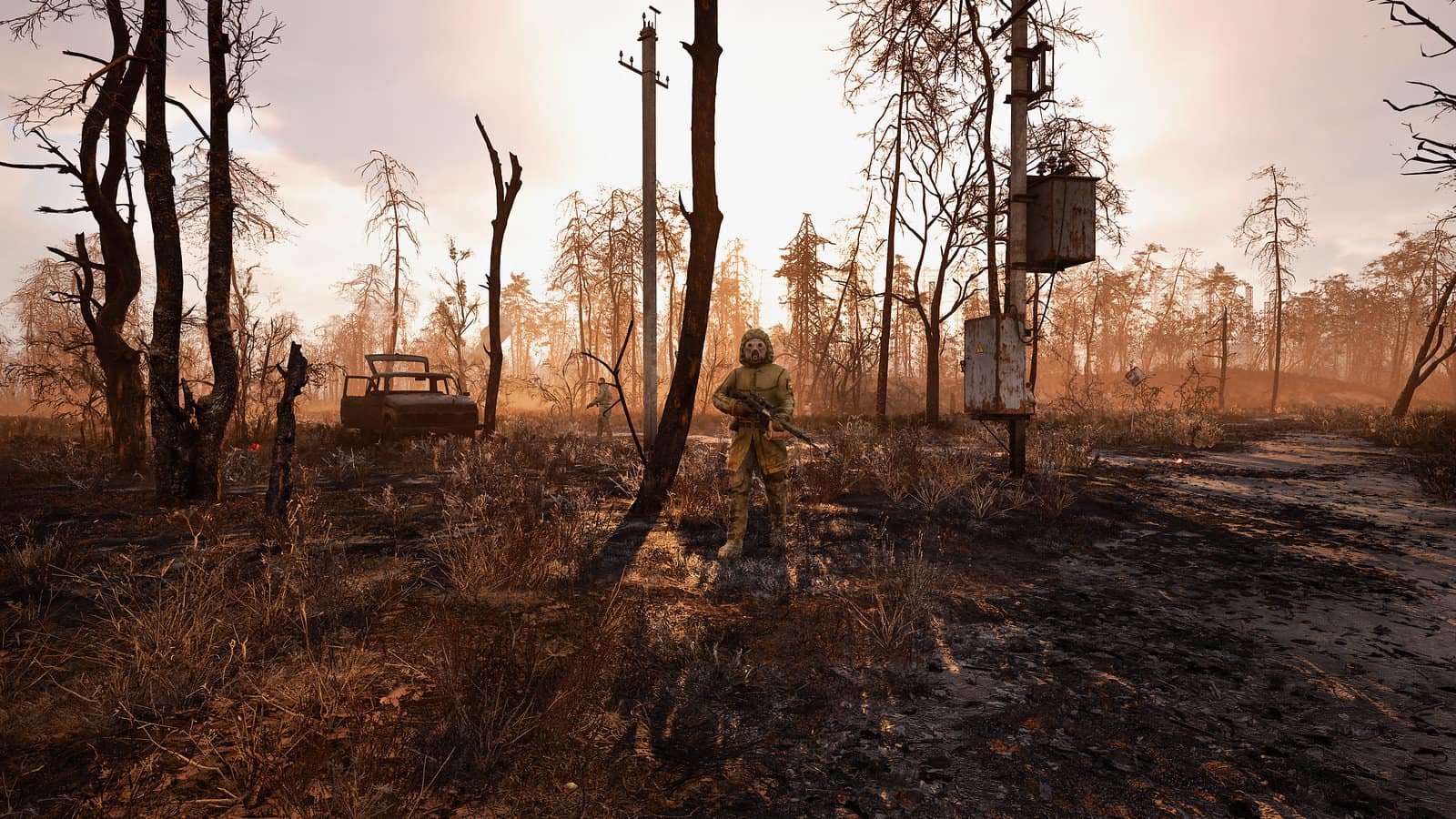
[ORIGINAL STORY | Dec 15, 2025] S.T.A.L.K.E.R. 2: Heart of Chornobyl is about to get an important content update, and the good news is that it’s not locked behind a paywall. GSC Game World has confirmed that a free story and content update drops tomorrow. You are in hours of new, additional gameplay for all existing players.
The upcoming update brings a new storyline that revolves around strange radio signals near Malachite in the western Zone. These signals, as announced, interfere with PDAs and cause hallucinations, nosebleeds, and severe headaches among stalkers.
As far as the content upgrade is concerned, you can expect eight new quests that can take several hours to finish, seven new or expanded locations, and six new characters, each with their own backstories. Some familiar areas will feel very different, too. The studio mentions that the previously abandoned locations are now being re-inhabited by stalkers.
In addition to the above changes, tomorrow’s update will also introduce the GP37V2. It’s a modified rifle designed for tactical play and comes with a pre-installed suppressor, a low-magnification scope, and supports single and burst fire only.
Image: GSC Game World
“The cost of failure is higher, but in the hands of a skillful operator, the GP37V2 can reward you with its precision and power. And even if that somehow doesn’t sound like the best fit for your playstyle, you still have 30+ weapons (plus attachments) in S.T.A.L.K.E.R. 2 to choose your favorite from,” the PlayStation blog post reads.
Veteran stalkers will also notice the Zone doesn’t feel quite as empty anymore. Areas you may have crossed before, from Car Dump to the Army Warehouses, will show signs of life again. The story intentionally pulls you back through familiar ground, including the City Boiler Room, the Rail Depot near Malachite, and Volkhov SAM, but each location comes with new dangers, new faces, and a different tone than before.
All that said, the new hub has to be one of the most interesting additions. It can appear in the Burnt Forest region based on your choices. If unlocked, it becomes a fully functional base with traders, a technician, a medic, guides, and a safe place to rest and stash gear.
Image: GSC Game World
In short, the new storyline update will add the following:
8 quests that can take hours to complete
7 locations to explore
6 characters with their own backgrounds and stories
OpenAI has just dropped GPT Image 1.5. That’s the company’s new AI image model that can generate high-fidelity images with strong prompt adherence, preserving composition, lighting, and fine-grained detail. As part of the upgrade, a new version of ChatGPT Images is rolling out today, and it’s powered by the company’s latest flagship image model.
You can expect faster, more precise image creation and editing within ChatGPT. If you’re someone who likes to start editing from scratch or on uploaded photos, the new image model is highly reliable. The standout feature, according to OpenAI, is that it preserves the details that matter.
Details including lighting, composition, and how people look in the generated image are preserved well in the generated image. You can also expect ChatGPT to now generate more realistic clothing try-ons, improved stylistic filters, and conceptual transformations that finally look and feel original.
When it comes to text rendering, the new model excels in that part. The editing tools have also been updated to help you add, remove, combine, or transpose elements with precision. In short, this update makes ChatGPT a mini editing studio that you can access anywhere you go.
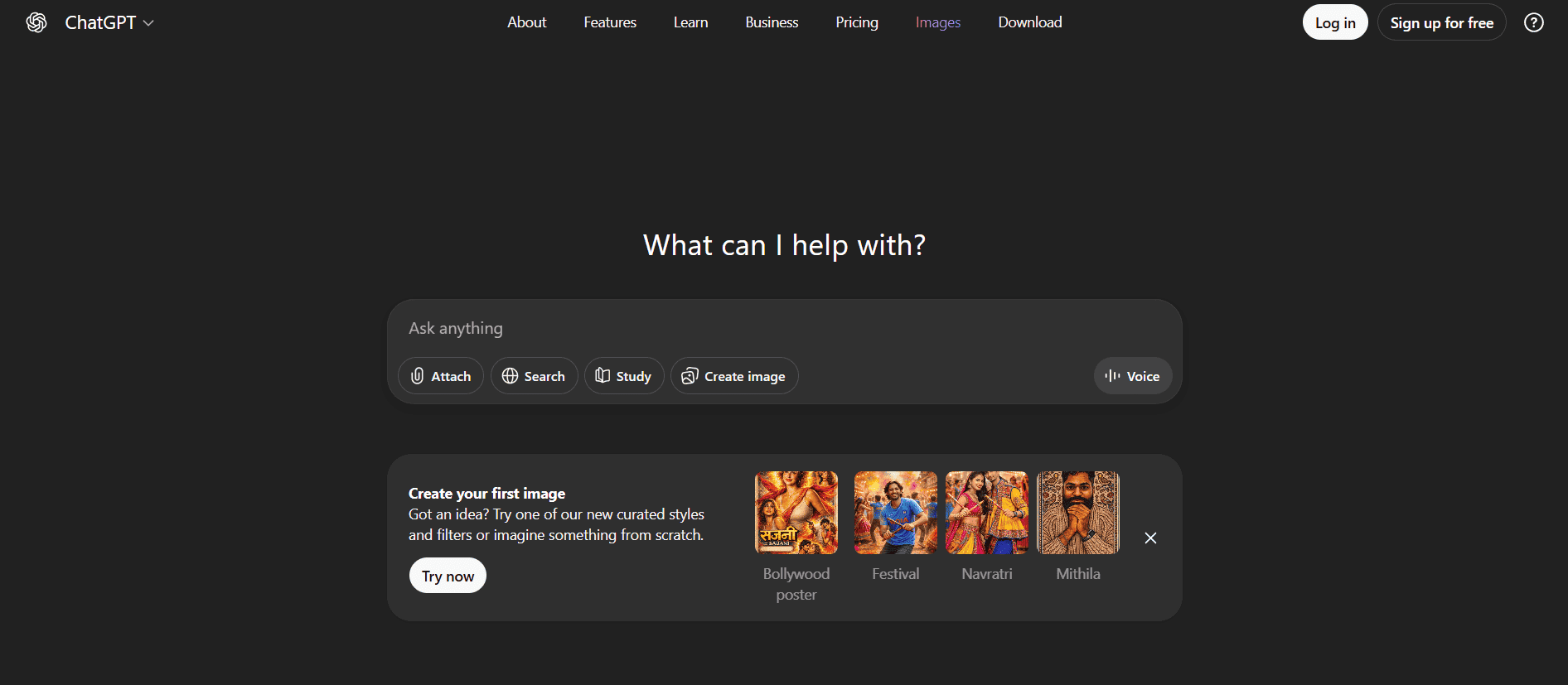
Not to forget, there’s also a new Images feature in ChatGPT. You can access it via the sidebar on the mobile app and chatgpt.com. It comes with a handful of preset filters and prompts for inspiration.
Image credit: Rishaj Upadhyay | Windows Report
The latest update is available to all ChatGPT users and API users worldwide, and it works seamlessly across models. Have you already tried the new image model? What are the differences or improvements you feel are now there? Drops your thoughts below.
Microsoft has officially announced that the Xbox Wireless Headset is finally getting the upgrade that you wanted all this time. According to the announcement, a new firmware update is now rolling out for the latest Xbox Wireless Headset, which adds support for Bluetooth Low Energy (LE) Audio.
The update was developed in close partnership with Windows and is designed to improve the audio experience on modern Windows 11 devices. As Xbox gaming expands to Windows 11 systems, including upcoming handhelds like the ROG Xbox Ally and Ally X, the headset is being positioned as a single audio solution across platforms.
Bluetooth LE Audio brings more than just an efficiency boost. One of the biggest improvements Microsoft highlights is reduced latency. You can expect better audio synchronization with on-screen action, which is especially noticeable in fast-paced games where timing matters.
Microsoft says the new standard offers high-fidelity wireless sound with less delay than traditional Bluetooth audio. Meanwhile, battery life also gets a boost, all thanks to improved power efficiency. Post firmware update, you can expect longer sessions between charges. If you’re into gaming marathons, the headset should feel more practical to you.
The latest update also enables super wideband stereo voice. It simply allows clearer and richer chat audio while gaming with friends. Unlike older Bluetooth implementations, this doesn’t come at the expense of overall sound quality.
Moving on, Windows 11 users also get access to a preview feature called Broadcast Audio. As the name suggests, this one allows game audio to be shared across multiple compatible Bluetooth accessories. In short, it opens up new options for local multiplayer or shared listening setups.
Do note that you can enjoy the above features only if you have the following:
Firmware update: Available now via the Xbox Accessories app on your console or Windows 11 device. Make sure you’re using the latest Xbox Wireless Headset (launched October 2024).
Bluetooth LE Audio: Requires a Windows 11 device that supports Bluetooth LE Audio.
Super wideband stereo audio: Requires the latest updates to Windows 11, version 24H2 or later, and audio driver support from your PC manufacturer. Coming soon to ROG Xbox Ally and ROG Xbox Ally X.
Shared audio (preview): Currently available to Windows Insiders on select Windows 11 PCs.
Have you already updated your Xbox Wireless Headset, or are you still using it mainly on console? Let us know how it sounds.
If you live in the UK and have subscribed to Microsoft 365 plans, there is some bad bews for you. According to an email seen by Windows Central, Microsoft has started reminding UK users about incoming Microsoft 365 price increase.
The emails are apparently being sent to users who are due for next renewal, according to the news outlet. Putting it simply, Microsoft 365 is getting more expensive, and the higher price will kick in soon unless subscribers take action.
To catch you up, Microsoft announced the pricing change months ago, and the updated pricing has already applied to new customers for some time. What’s different now is the reminder. The email lands just weeks before renewal, giving users a small window to either accept the increase or cancel recurring billing.
Starting February 14, 2025, Microsoft 365 Family will cost £104.99 per year in the UK. A jump of £25 per year, from previous £79.99 per year price. If you don’t do anything, Microsoft will automatically charge the new rate using the payment method. If you don’t want to be charged the new rate, you must cancel or modify the plan at least two days before their billing date.
Here’s the original email copy shared by the news outlet:
Thank you for being a valued Microsoft 365 subscriber. To reflect the value we’ve added over the past decade, address rising costs and enable us to continue delivering new innovations, we’re increasing the price of your subscription.
Effective 14 February 2025, the price for Microsoft 365 Family subscriptions will increase from GBP 79.99* per year to GBP 104.99* per year. To continue with the new price, no action is needed—your payment method on file will be automatically charged. To make changes to your subscription plan or turn off recurring billing, visit your Microsoft account at least two days before your next billing date.
By maintaining your subscription, you’ll enjoy secure cloud storage, advanced security for your data and devices and cutting-edge AI-powered features, along with all your other subscription benefits. Experience a whole new life for your favourite apps with Microsoft Copilot in Word, Excel, PowerPoint, OneNote and Outlook, plus create stunning designs and edit photos in a flash with Designer. Thank you for choosing Microsoft.
When it comes to discounts UK users have one workaround for the time being. You can bundle the subscription, which allows you to extend Microsoft 365 for up to five years by redeeming discounted codes in advance. Whether that means paying more, locking in time early, or walking away entirely depends on how essential Microsoft 365 still feels in 2025.
Are you sticking with Microsoft 365 at the higher price, or is this the push you needed to cancel? Let us know in the comments.
The details were shared by Larian CEO Swen Vincke in an interview with Bloomberg earlier today. Those unaware, some fans questioned whether the studio might move away from its traditional combat design in favor of a more action-driven approach. Well… Vincke’s words finally indicate that that won’t be the case.
In a recent interview with IGN, Vincke had also confirmed that the studio is doubling down on turn-based gameplay. He described Divinity as a project that builds on everything players already associate with the developer.
Vincke said that the game will be unlike Baldur’s Gate 3, which, to remind you, was built around the Dungeons & Dragons ruleset. Divinity is fully owned by Larian, by the way. That freedom allows the studio to make changes and experiment with whatever it can without external limitations.
The game is being developed as a single-player experience with cooperative multiplayer support, following the structure that worked well in Baldur’s Gate 3. Vincke also suggested that Divinity will be bigger than Baldur’s Gate 3, though he stopped short of explaining how that scale will be expressed. Whether that means a larger world, deeper systems, or more reactive storytelling remains unclear for now.
Larian is also considering an early access release, but no final decision has been made yet. Does sticking with turn-based combat make you more excited for Divinity, or were you hoping for a change? Let us know in the comments.
Sony has confirmed the next batch of games leaving the PS Plus Extra catalog. As spotted by PushSquare, the service’s “Last Chance to Play” section includes the following:
Like a Dragon Gaiden: The Man Who Erased His Name
SD Gundam Battle Alliance
Sayonara Wild Hearts
Monopoly Plus
The aforementioned games leave on January 20, 2026. And unlike PS Plus Essential, games in the Extra tier are only playable while they stay in the catalog. Once these titles leave, access will be removed unless they’re purchased separately.
Given the date, there’s still plenty of time left for you to plan ahead. If you haven’t touched Sayonara Wild Hearts, it’s best to give it a try, as it is one of the shortest among those leaving in January.
If any of these are sitting in your backlog, you might want to jump into them right now; the deadline is approaching.
So, which one are you planning to get around this Christmas season? Let us know in the comments below.
Ashes of Creation Early Access started a few days ago, and many new players are discovering that the game’s progression goes far beyond combat. Alongside traditional classes, Ashes of Creation features a deep artisan system that drives crafting, gathering, and the entire player-driven economy.
This guide explains how artisan classes and professions work, how you level them, and why early choices matter.
What are artisan classes and professions in Ashes of Creation?
Ashes of Creation separates artisan progression from combat entirely. Artisan professions focus on gathering resources, processing raw materials, and crafting finished items used across the world.
These professions form the backbone of the in-game economy. Weapons, armor, consumables, building materials, and trade goods all come from player artisans rather than NPC vendors. Because of this, artisans play a key role in player interaction, node development, and long-term progression.
All professions are split into three categories, with 22 different professions available to choose from.
How artisan leveling works
Every artisan profession uses a learn-by-doing system. You gain experience by actively performing tasks related to that profession, just like in any other MMORPG.
The progression flow works like this:
Perform profession tasks to earn experience
Gain progress until you unlock a Skill Point
Spend Skill Points in the Artisan Skill Tree
Improve efficiency, quality, or unlock new abilities
This system rewards consistent play and encourages players to focus on the professions they enjoy most.
Profession certification and promotion
As you level up, you must formally upgrade your profession rank. To do this, visit a professional or specialist NPC in a settlement who represents that specific profession.
Only the relevant artisan NPC can promote your Profession Certification. Without promotion, your profession progression remains capped, even if you earn enough experience.
Demotion and certificate limits
Ashes of Creation also limits how many profession certificates a character can hold; for example Apprentice can hold 5 certificates, while a Grandmaster can have only 2. As you advance, you may want to demote a Profession Certificate to free up space for another specialization.
This system adds flexibility but also reinforces meaningful choices. Switching roles takes effort and planning rather than instant respecs.
Tools, gear, and processing stations
Most professions require specific tools or gear, which you equip directly in your inventory. You start with basic tools, but you will eventually need to replace or repair them as they wear out or become outdated.
Some professions work differently. Instead of tools, they rely on processing stations found in settlements. These professions take raw gathered materials and convert them into usable crafting components or finished goods through node-based infrastructure.
With Early Access now live, the artisan system already shapes how the world evolves. Node growth, trade routes, and player economies depend heavily on artisan activity. Players who invest early in professions can gain long-term advantages as demand for crafted goods increases.
Ashes of Creation’s artisan system doesn’t treat crafting as a side activity. It places professions at the core of progression, making every gatherer, processor, and crafter an essential part of the world.