The ongoing memory crunch situation and rising hardware component costs were among the reasons cited for the delay. In the past, similar reasons have been linked to the delayed release of the PS6.
Popular tipster shots down PS6’s latest delay rumor
The post thread has quite a few interesting reasons as to why Sony might stay away from delaying the PS6 that long. A user named Bojji noted:
“Delaying the console when it’s basically done doesn’t make any sense. They have a TSMC contract for the production of APUs, maybe even GDDR7 contracts with memory makers, and R&D that cost them a few hundred million dollars. PS5 sales are slowing down, and there is no guarantee that memory prices will drop between now and 2030. Releasing it in 2027 means several million units sold before 2030. When memory prices drop, you just lower the price of the console and gain massive market share, on top of what you already sold. Releasing it in 2030 means no sales. In 2030, memory prices could be lower, the same, or even higher. You start from scratch.”
The comments hint that XBOX is indeed targeting a launch for Project Helix in the midst of the global memory crunch. If Sony doesn’t match the XBOX Project Helix timeline, it might fall far behind in the next-gen console race.
All that said, take all the rumors and speculation with caution since the release date of the PS6 hasn’t been confirmed by Sony yet. What are your expectations for the PS6? Let us know in the comments below.
Retro gaming fans may soon have another reason to clear some shelf space. According to a new report by Notebookcheck, a new leak from tipsters DarthBeardBrix and TheBrickNews suggest that LEGO is preparing to launch a brick-built version of Sony’s original PlayStation console later this year.
Rumored LEGO PlayStation 1 set may launch in late 2026 with nearly 2,000 pieces
Per the leakers, the rumored set will have the moniker “Sony PlayStation 1 Console” and feature 1,911 pieces. The model is reportedly assigned set number 72306 and could retail for $159 or €159.
While LEGO has yet to officially announce the product, multiple reports point to a release window between October and December 2026, with some sources specifically suggesting a holiday launch.
The rumored project appears to trace its roots back to the LEGO Ideas platform, where creator AirBricks95 previously submitted a detailed PlayStation 1 concept that attracted more than 10,000 supporters. It remains unclear whether the original designer is involved in the final product.
If the leak proves accurate, the PlayStation 1 would join an increasingly popular collection of retro gaming replicas. That’s not all; besides the included controller, fans are hoping LEGO adds interactive details inspired by the original hardware, including a working disc tray, movable buttons, or hidden Easter eggs.
For now, there are no official images or product details. However, with multiple leakers pointing to the same launch window, the iconic gray console could soon be making a comeback in brick form.
One of Microsoft’s longest-serving gaming veterans is stepping away from the company. Earnest Yuen has announced his retirement after spending 31 years at Microsoft, bringing an end to a career that spanned some of XBOX’s most recognizable franchises.
According to Pure Xbox, Yuen joined Microsoft in 1994, long before the launch of the original XBOX and during a period when both the internet and game development looked very different from today.
In a retirement message shared with colleagues and the gaming community, Yuen reflected on his decades at Microsoft and thanked teams across Microsoft, XBOX, World’s Edge, and the broader games industry for their support throughout his career.
A Career Spanning More Than 50 Games
During his time at Microsoft, Yuen contributed to more than 50 game projects across multiple generations of XBOX hardware and PC gaming.
Many players know him best for his work on Killer Instinct and for helping revive the Age of Empires franchise. His contributions also extended to several other notable Microsoft-published titles, including Age of Mythology: Retold, Kameo: Elements of Power, Doritos Crash Course, and Blinx: The Time Sweeper.
Over the years, Yuen built a reputation as a respected figure within the XBOX community, earning praise from both fans and colleagues for his involvement in a wide range of beloved franchises.
End of an Era for Microsoft’s Gaming Division
Yuen’s retirement marks the end of a significant chapter for Microsoft’s gaming business. His departure comes at a time of major changes across XBOX and Microsoft Gaming.
Adding to those concerns, one of XBOX’s founding team members recently shared worries about the future of dedicated gaming hardware, highlighting the broader challenges facing the console market.
According to a Radeon subreddit post, Valve reportedly pushed a Proton Experimental manifest containing an FSR 4.1.1 INT8 build before removing it shortly after. Some users claim they downloaded the manifest before it disappeared.
The leaked package reportedly includes amdxcffx64.dll, a file tied to AMD’s FSR upgrade path. The same post claims the DLL is signed, which could make it useful in games that check DLL signatures before loading upscaling files.
FSR 4.1 Leak Points to Early Proton Work
The timing is notable because AMD has already confirmed plans to bring FSR 4.1 to older Radeon hardware. Radeon RX 7000 series GPUs based on RDNA 3 are expected to receive support in July 2026, while RDNA 2 hardware, including Radeon RX 6000 series cards, is planned for early 2027.
That makes the Proton Experimental leak more interesting for Linux users. It suggests Valve may already be preparing Proton support ahead of AMD’s wider FSR 4.1 rollout.
The build was reportedly labeled “FSR 4.1.1 INT8.” This matters because RDNA 3 uses an INT8 path instead of the FP8 model associated with newer RDNA 4 hardware.
RDNA 3.5 Testing Raises New Questions
Community testing reportedly shows the leaked FSR 4.1 INT8 build working on RDNA 3.5 hardware, including the Radeon 890M iGPU. AMD has not officially confirmed FSR 4.1 support for RDNA 3.5.
AMD’s Frank Azor recently said no final decision had been made about excluding RDNA 3.5 from FSR 4.1 support, leaving the door open for future support.
For RDNA 3 users, the leak may simply offer an early look at AMD’s official July update. For RDNA 3.5 users, it is more interesting because it suggests the INT8 version can run on that architecture.
Most Users Should Wait for the Official Release
The leaked build will likely appeal most to Linux users, modders, and enthusiasts who already experiment with Proton, OptiScaler, and DLL replacement tools.
However, most Radeon users should wait for AMD’s official rollout and proper driver support. Leaked builds can behave unpredictably, and Valve removed the manifest shortly after it appeared.
Still, the brief appearance of FSR 4.1.1 INT8 in Proton Experimental suggests Valve and AMD may be moving closer to broader FSR 4.1 support on Linux.
Long before XBOX became one of gaming’s biggest brands, some inside Microsoft questioned whether the company should build a console at all. One of those voices now believes those concerns are returning with even greater force.
XBOX founding member says soaring AI hardware costs may recreate old hardware problems for Microsoft
Laura Fryer, a founding member of the original XBOX team and former Director of the XBOX Advanced Technology Group, says rising hardware costs and AI-driven component shortages are putting Microsoft’s gaming strategy under renewed pressure.
In a recent YouTube video spotted by folks at Windows Central, Fryer talked about Microsoft’s decision to enter the console business in the early 2000s and revealed she was among its most vocal skeptics.
“I was one of the biggest skeptics on the team… I was worried that a software company like Microsoft would always struggle with the insane costs and risks of hardware. Twenty-five years later, those early fears are coming back stronger than ever.”
Fryer explained that her doubts stemmed from Microsoft’s dominant position in PC gaming at the time.
“My thinking at the time was that Windows was already the dominant gaming platform with over 90% of PCs running it… Remember, this was when Steam didn’t exist. I felt like we were abandoning the most successful gaming platform in the world for a risky bet that we weren’t ready for.”
While she eventually joined the effort and helped shape the original XBOX, Fryer now believes the economics of gaming hardware are becoming increasingly difficult.
“Those early fears that a software company would struggle to master the hardware cycle, those are more relevant now than ever. And with AI-driven component shortages, the hardware gamble is becoming unsustainable.”
Fryer thinks Microsoft won’t give up on XBOX
Despite her concerns, Fryer doesn’t expect Microsoft to abandon gaming or spin off XBOX. Instead, she believes the company is refocusing on its traditional strengths: Windows, software, cloud services, and a broader gaming ecosystem that extends beyond consoles.
“The studios need to focus on nurturing the talent that they have. They need to make games that are both award-winning and financially successful. That’s the opportunity. That’s the bet that Asha is making, and I hope it works out because I like competition. It means more choice for gamers.”
If you want to take a look at the video, we’ve embedded it for you below:
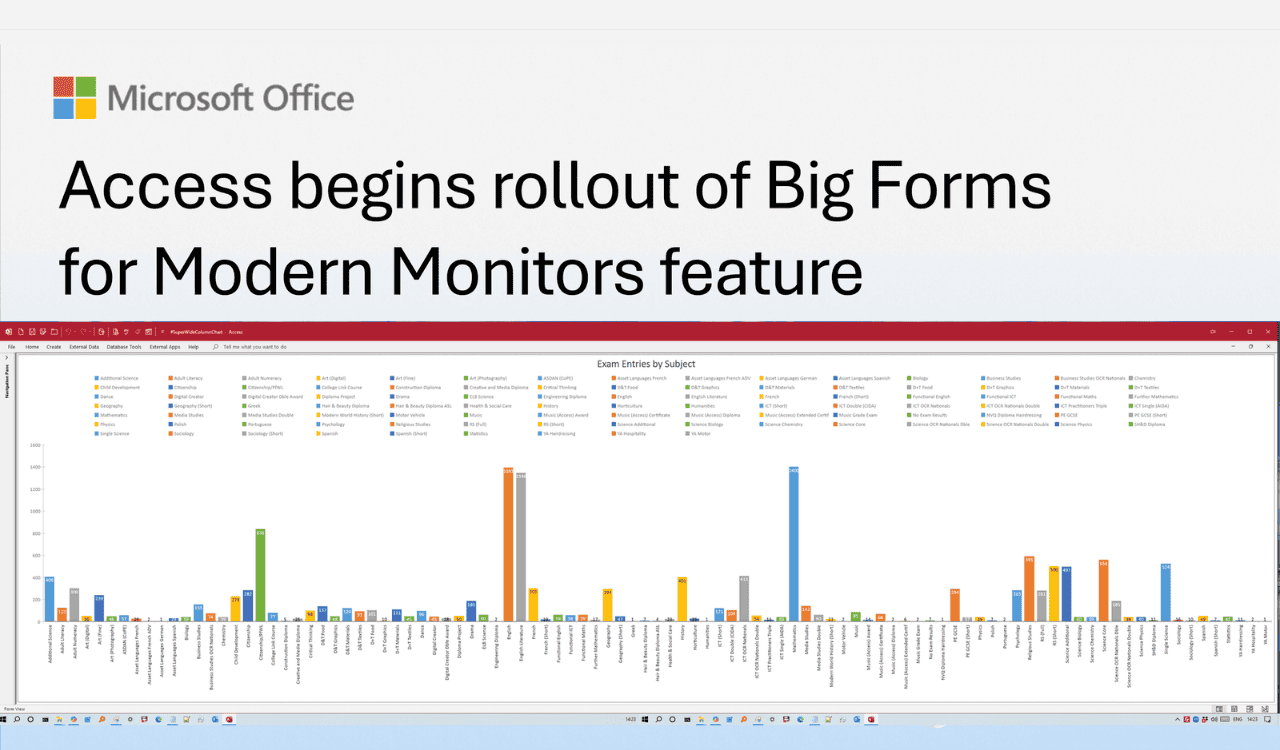
Microsoft Access is finally leaving one of its oldest design restrictions behind. The company has started rolling out support for larger forms in Microsoft Access, removing a limitation that dates back more than two decades. The feature is currently available in Beta and is heading to Current Channel Preview users with Version 2607 by July 21, 2026.
For years, Access developers have been forced to work around a maximum form size of roughly 22 inches, a constraint originally introduced when CRT monitors dominated the workplace. While display technology evolved rapidly, the underlying limitation remained unchanged.
That created growing challenges as dual-screen setups, ultrawide monitors, and high-resolution 4K displays became standard across many businesses.
With the latest update, Access forms can now extend beyond the historical 22-inch boundary. Developers can place controls further across a form, build larger sections, and design more complex layouts without splitting information across multiple screens.
Image credit: Microsoft
The change is expected to benefit organizations that rely on Access for inventory management systems, customer relationship management tools, dashboards, and operational workspaces where displaying large amounts of information simultaneously is essential.
Microsoft says the update should also reduce excessive scrolling and improve efficiency during data entry and review tasks. Besides productivity benefits, the company highlighted accessibility improvements. Larger form layouts give developers more flexibility to increase spacing between controls, use larger text, and reduce visual clutter for users who benefit from magnified content or enhanced readability.
According to Microsoft, support for larger forms has been one of the most requested features from the Access community and a top-voted request on the Access feedback forum. Not to forget, Microsoft Access also recently got new zoom controls for forms, tables, and queries.
XBOX Game Pass has become one of the gaming industry’s most influential subscription services, but Moon Studios CEO Thomas Mahler believes its growth has slowed because Microsoft has not delivered enough top-tier exclusive games.
Speaking about the service’s current position, Mahler argued that subscription platforms depend on a steady stream of premium content that creates a fear of missing out among players. Without major releases that users feel compelled to play immediately, he believes many subscribers will eventually question the value of paying a monthly fee.
According to Mahler, Game Pass can only remain attractive if Microsoft consistently delivers high-quality first-party titles. He suggested that several XBOX-owned studios have not produced enough standout releases to keep momentum behind the service.
Subscription Services Need Strong Content
Mahler emphasized that subscription models rely heavily on exclusive and highly anticipated software. While Game Pass offers hundreds of titles, he argued that quantity alone is not enough to drive long-term growth.
Players, he said, are unlikely to maintain subscriptions out of loyalty to a platform. Instead, they need compelling reasons to stay subscribed, particularly new releases that generate excitement and encourage continued engagement.
I mean, the Gamepass strategy could've worked if people would've shown up for it. Problem is: They didn't and the software catalogue was just nowhere near good enough to make people happily pay the subscription every month.
It's the same as with streaming in the film business:…
He also suggested that weak incentives can lead to lower effort and weaker results over time, arguing that successful subscription businesses must constantly provide content that customers feel they cannot afford to miss.
Comments Come During Major XBOX Restructuring
Mahler’s criticism arrives at a difficult time for Microsoft’s gaming division.
The broader restructuring follows comments from Microsoft leadership about the need for XBOX to become financially sustainable. Rising development costs, slower industry growth, and increasing pressure to improve profitability have placed a greater focus on the performance of Microsoft’s gaming business.
Last week, Rockstar Games finally announced GTA 6 pre-orders date, but it didn’t mention anything about price. Now that fans have a date in hand, the only question that remains is what the price of the game will be. Days after confirming that pre-orders begin on June 25, early French retailer listings may have just leaked Rockstar’s pricing plans for GTA 6.
GTA 6 may cost more than fans expected, leaked retail listings suggest
French retailer Fnac has listed GTA 6 for €89.99, according to folks at GamesRadar+. While direct currency conversions briefly fueled fears of a $100 standard edition, regional pricing trends suggest the U.S. version may land closer to $90. That would still place GTA 6 above the current $70 standard adopted by most major publishers.
The listing reportedly includes four additional editions priced at $99.99, $109.99, $119.99, and $199.99. Rockstar has yet to confirm what these editions include, but the highest-priced version is widely expected to be a collector’s edition.
Questions around pricing have followed GTA 6 for months, especially as rising development costs, supply chain challenges, and increasing game budgets continue to reshape the industry. For now, all leaked pricing should be treated with caution until Rockstar makes an official announcement.
After two delays pushed the game to November 19, 2026, anticipation remains sky-high. If history is any indication, price concerns may do little to slow demand once pre-orders open later this month. Speaking of demand, a recent report predicted that GTA 6 might sell over 46 million units on launch day.
AI industry giants are doing their every bit to keep their dominance intact in the industry. These days it’s not about just developing the smartest model. In fact, the fight in the AI industry is all about who controls access, who sets the prices, and who earns the public’s trust.
Satya Nadella, whose company Microsoft, is among the race, has recently laid out a sharply different vision for the future of artificial intelligence, pushing back against an industry narrative centered around ever-larger models, soaring infrastructure costs, and warnings about mass job losses.
Speaking to The Wall Street Journal, Nadella argued that the next phase of AI should focus on lower costs, broader access, and giving customers more control over how they use the technology.
“You can’t say, hey, all white-collar jobs are gone, and this could even be a weapon, and we will use all the power to build data centers,” Nadella said. Without naming rivals directly, Nadella appeared to challenge the growing influence of frontier model developers such as OpenAI, Anthropic, and Google.
He warned that the public would not accept a future where only a handful of companies are “doing all of the learning for the world.” The comment from the CEO comes as Microsoft expands its own multi-model strategy. The company recently introduced Copilot Cowork, an autonomous AI agent platform that allows customers to choose between different models based on cost and performance requirements.
In the last week, reports also hinted that Microsoft is mulling over hosting DeepSeek models. If the company does that, it would be a move a move that could intensify pricing pressure across the AI industry.
Nadella has also pushed back on the idea that AI should primarily be used to eliminate jobs. “No, how about we think about reorganizing the jobs?” he said. According to Nadella, companies need to combine human expertise with what he described as “token capital,” creating organizations that continuously learn through both people and AI systems. “We now have to do the hard work in earning the social permission,” Nadella said.
Microsoft is making it easier for Unreal Engine developers to bring their games to XBOX on PC. According to a report from Windows Central, XBOX has introduced a new set of Unreal Engine 5.8 plug-ins designed to simplify development workflows and reduce platform-specific complications.
The update addresses one of the biggest pain points for developers targeting XBOX on PC. Until now, studios typically needed to use the Windows Gaming Development Kit (WinGDK) platform when building XBOX-compatible PC games. While functional, WinGDK often introduced compatibility issues and required developers to maintain separate workflows compared to other PC storefronts.
New Plug-ins Remove the Need for WinGDK Builds
With Unreal Engine 5.8, developers can remain on the standard Win64 platform instead of switching to a dedicated WinGDK target. This change allows studios to continue using existing third-party plug-ins and tools without extensive modifications.
Microsoft says the goal is to make XBOX on PC development feel much closer to publishing on other PC storefronts while still providing access to XBOX services and features.
The new toolkit consists of several plug-ins:
Microsoft GDK Store: The Microsoft GDK Store plug-in allows developers to configure XBOX on PC settings directly within Unreal Editor. Developers can generate XBOX-compatible PC packages through Project Settings without requiring a separate platform workflow.
Microsoft GDK Runtime: The Microsoft GDK Runtime plug-in provides runtime access to XBOX services and APIs. Supported features include Xbox-compatible cloud saves, user selection, and integration with Xbox system user interface components.
Online Subsystem GDK: Online Subsystem GDK connects Unreal Engine’s platform abstraction layer to XBOX services. Developers can implement features such as Achievements, Friends, Presence, and other XBOX network functionality using familiar Unreal Engine systems.
Online Subsystem Selector: One of the most notable additions, introduced with Unreal Engine 5.8. The feature allows developers to ship a single executable across multiple PC storefronts. Depending on where the game is launched, the plug-in can automatically switch online subsystem behavior to match the storefront’s requirements.
This could significantly reduce maintenance overhead for developers releasing games across XBOX, Steam, Epic Games Store, and other PC platforms.
Part of Microsoft’s Broader PC Gaming Strategy
Microsoft has also published documentation to help developers adopt the new plug-ins and migrate existing projects.
The move fits into Microsoft’s broader effort to simplify XBOX game development on PC and reduce barriers between the Xbox ecosystem and traditional Windows gaming platforms.
The changes may also support Microsoft’s longer-term Project Helix ambitions, which are expected to bring XBOX and PC hardware experiences closer together while making cross-platform development easier for studios.
As Microsoft continues investing in PC gaming, lowering development complexity could encourage more developers to support XBOX services and features without maintaining separate builds for different storefronts.
The announcement follows several recent XBOX platform updates. Microsoft recently expanded handheld compatibility support with 58 additional games, introduced a new XBOX Handheld badge on select game pages, and is preparing 24 new game releases for XBOX players this week.
Valve appears to be taking another step toward improving gaming performance on Linux and SteamOS devices, with new evidence suggesting that support for AMD’s latest FidelityFX Super Resolution technology could be on the way.
According to information spotted on SteamDB and highlighted by VideoCardz, Valve has added an FSR4-related DLL file to the latest Proton Experimental bleeding-edge builds. The discovery has sparked speculation that Valve and AMD are working together to bring newer FSR upscaling capabilities to Proton, the compatibility layer that allows Windows games to run on Linux.
FSR4 DLL Appears in Proton Experimental
The change was detected in Proton Experimental manifests dated June 22. The relevant application is listed under app ID 1493710, while the primary Linux 64-bit content depot is identified as 1493711.
Valve just added the version of AMD’s FSR4 that was announced last month and adds support to older GPUs rather than just RDNA4
This DLL file, added to Steam, and coming to Proton Experimental will likely allow Steam Machine/SteamOS users to “upgrade” FSR3 supported games to FSR4 pic.twitter.com/kNNhMDS34D
The file that attracted attention is amdxcffx64.dll, a component associated with AMD’s FSR 4 upgrade path.
Unlike earlier versions of FSR, this DLL is not part of AMD’s publicly available open-source releases. However, it has previously appeared in community Proton builds and third-party tools such as OptiScaler, where enthusiasts have experimented with enabling FSR 4 functionality in supported games.
At the moment, the file only appears in Proton Experimental and has not been added to Proton Stable.
Valve Has Not Announced FSR4 Support
Valve’s latest public Proton changelog does not mention the addition of the new AMD DLL.
The most recent update focuses on newer development versions of vkd3d-proton, DXVK, vkd3d, dxvk-nvapi, and FEX. As a result, Valve has not officially confirmed that FSR 4 support is being integrated into Proton.
Even so, the presence of the DLL inside official Proton Experimental depots strongly suggests active testing behind the scenes.
Experimental builds often serve as a proving ground for features before they arrive in broader Proton releases, making this discovery particularly noteworthy for Linux gamers.
Timing Aligns With AMD’s FSR 4 Expansion
The discovery arrives shortly after AMD confirmed plans to expand FSR Upscaling 4.1 support to additional graphics hardware.
AMD recently announced that Radeon RX 7000 series GPUs are scheduled to receive support in July 2026. Radeon RX 6000 series graphics cards are expected to follow in early 2027.
So far, AMD has only specifically confirmed support for Radeon RX 7000 and RX 6000 desktop graphics cards. The company has not provided details about support for integrated RDNA 3 or RDNA 3.5 graphics solutions.
That uncertainty has led to questions about potential support for upcoming SteamOS-powered handheld devices and other AMD-based gaming hardware.
What It Could Mean for SteamOS and Future Handhelds
While nothing has been officially confirmed, broader FSR 4 support in Proton could benefit a growing range of Linux gaming devices, including future SteamOS systems.
Recent reports have suggested that Valve’s upcoming Steam Machine hardware uses graphics technology comparable to Radeon RX 7600M-class Navi 33 GPUs. If AMD’s compatibility plans extend beyond currently announced products, such hardware could potentially benefit from newer FSR features.
For now, the addition of amdxcffx64.dll does not guarantee that full FSR 4 support will arrive in Proton Stable anytime soon. However, it represents one of the strongest indications yet that Valve and AMD are actively preparing the groundwork for next-generation upscaling support on Linux.
The timing is especially interesting as interest in SteamOS continues to grow ahead of the expected launch of Valve’s new Steam Machine hardware later this summer. Valve recently confirmed that the Steam Machine is launching this summer, while the hardware also surfaced in benchmark listings as launch preparations continue.
Microsoft appears to be taking another step toward making handheld gaming a bigger part of the XBOX ecosystem.
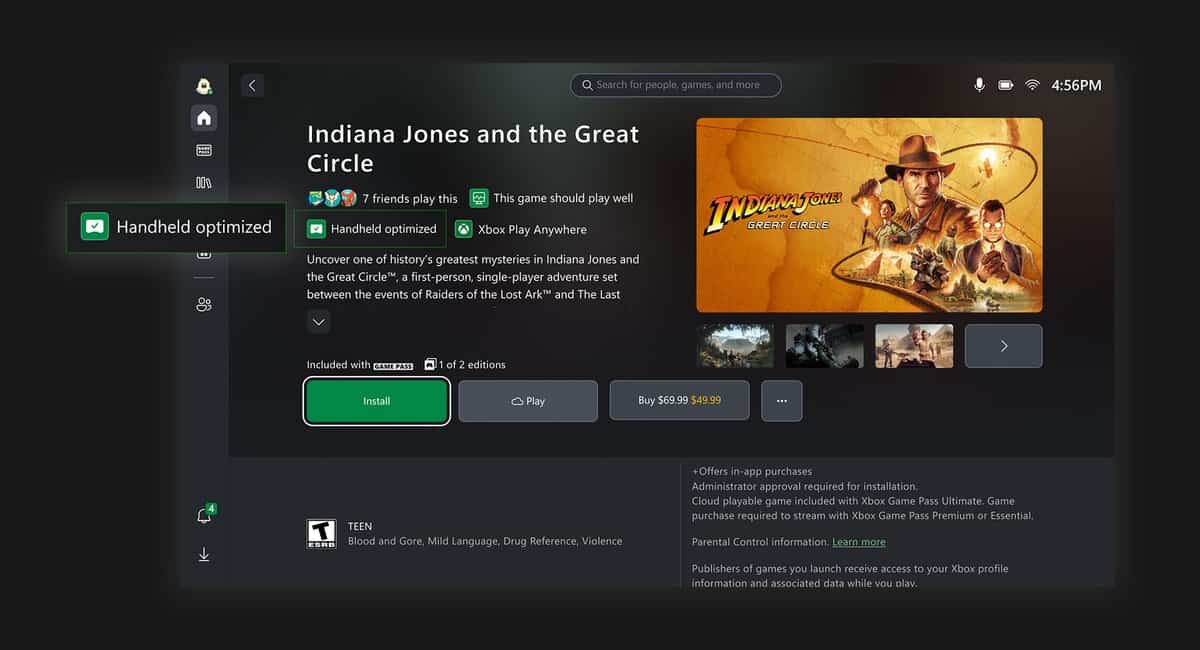
After recently adding handheld support to 58 additional titles in the XBOX Store, the company has now started displaying a new “XBOX Handheld” logo on official game pages, according to VideoCardz. The badge has already appeared on several high-profile titles, including Gears of War: E-Day, Halo: Campaign Evolved, and State of Decay 3.
The new label is visible in the “Ways to play” section of supported games. It appears alongside existing platform badges such as XBOX Game Pass, XBOX Series X|S, XBOX on PC, and Steam.
New Badge Could Make Handheld Compatibility Easier to Spot
The addition of a dedicated handheld logo gives players a clearer way to identify games that are designed to work well on portable Windows gaming devices.
Some game pages displaying the badge also reference devices such as the ROG XBOX Ally and ROG XBOX Ally X, suggesting that Microsoft wants to make compatibility information more visible for handheld users.
Image credit: VideoCardz
While Microsoft already operates a handheld compatibility program, it previously lacked a prominent badge that could quickly communicate support directly on game store pages.
For players browsing the XBOX Store, the new label could remove much of the guesswork when deciding whether a title is suitable for gaming on the go.
More Signs of Microsoft’s Handheld Strategy
The new branding arrives as Microsoft continues to invest in portable gaming experiences.
Although the badge does not confirm reports of a dedicated first-party XBOX handheld, it adds to growing speculation that Microsoft is laying the groundwork for broader handheld gaming ambitions.
By introducing clearer compatibility labels and expanding the number of supported titles, Microsoft appears to be building a more recognizable ecosystem around handheld gaming devices that run XBOX experiences.
The company has not announced any new handheld hardware alongside the badge, but the move suggests that portable gaming is becoming a more visible part of the XBOX strategy.
XBOX Continues Highlighting New Features and Games
The handheld badge is not the only recent change users have noticed. Microsoft has also started highlighting XBOX exclusives more prominently on the dashboard, making it easier for players to discover platform-specific titles.
Microsoft is continuing to simplify Edge by removing several built-in features, and the latest casualty is Drop, the browser’s cross-device file-sharing tool.
According to Windows Latest, Microsoft is retiring the Drop feature from Edge. The tool allowed users to send files, images, and text between devices signed into the same Microsoft account. It worked across Windows PCs, Android devices, and iPhones, using OneDrive storage behind the scenes.
Drop became a convenient alternative to services such as Phone Link, allowing users to quickly transfer files or notes from a desktop PC to a mobile device without leaving the browser.
Edge Canary Confirms Drop Retirement
The latest Edge Canary builds now display a warning informing users that Drop is being retired. Microsoft has also introduced a new “Download text” button, giving users a way to export any notes stored in Drop before the feature disappears.
Users who do not save their notes before the shutdown may lose access to text previously shared through the service.
Microsoft has not yet announced an exact removal date, but the warning suggests the feature will disappear in a future Edge update.
Another Feature Leaving Edge
Drop is not the only feature facing removal. Microsoft has also been scaling back other Edge components, including the Sidebar and Collections.
Microsoft has increasingly positioned Copilot as the centerpiece of its software strategy. As a result, several traditional Edge features are being phased out in favor of a more AI-centric experience.
Whether users welcome the changes remains to be seen, but the retirement of Drop marks another step in Microsoft’s ongoing transformation of Edge.
Edge Also Gains Google Account Sign-In Support
In separate Edge news, Microsoft is finally adding support for signing into the browser using a Google Account. The change should make it easier for users who primarily rely on Google’s ecosystem while still using Microsoft Edge as their main browser.
XBOX is continuing to expand support for handheld gaming devices, adding 58 more titles to its growing list of games designed to work on handheld PCs, as True Achievements writes.
Microsoft introduced the Handheld Optimized and Handheld Compatible labels to help players identify which games offer the best experience on portable devices.
Handheld Optimized titles are expected to run properly out of the box on XBOX Ally devices without requiring additional configuration. Handheld Compatible games should also work on handheld systems, although players may need to adjust settings or controls to achieve the best experience.
One of the most notable additions in the latest batch is The Blood of Dawnwalker. Although the game has not been released yet, it already carries the Handheld Optimized label, suggesting developers are preparing strong support for XBOX Ally devices ahead of launch.
New Handheld Optimized Games
The latest Handheld Optimized additions include:
70s-style Robot Anime Geppy-X
Anubis Dungeon (Windows)
Beatdown City Survivors
Bobobby 3D: Stranded Rush (Windows)
Do You Really Know About Soccer? (Windows)
Duskfade
Far Cry 3 Blood Dragon
Final Fantasy Resonance
Gears 5
Ghost at Dawn
Holdfast: Nations At War
Jurnal Risa: Dark Destiny
Kitsune Kaeru (Windows)
Limbot
Mechaconda
One Move Away
Operencia: The Stolen Sun
Ride 6
Shoot The Wall
Soccer Kid Collection
Spot Challenge Vol. 2
Spot Stories Vol. 1
Techtonica (Game Preview)
Teenage Mutant Ninja Turtles Arcade: Wrath of the Mutants
Teller’s Duty
The Blood of Dawnwalker
The Crown of Wu
The Wandering Village
The Wild at Heart
Trident’s Tale
Vaporum: Lockdown
Viewfinder
Void Bastards
What Remains of Edith Finch
Winds of Arcana: Ruination
Winter Burrow
World War Z
New Handheld Compatible Games
The following titles were added to the Handheld Compatible category:
Microsoft has attributed the Mastra AI npm supply chain attack to the North Korean threat group Sapphire Sleet (BlueNoroff), according to BleepingComputer.
Attackers compromised more than 140 npm packages in the Mastra AI ecosystem, distributing malware that stole credentials, cryptocurrency wallet data, and development secrets.
Attack Started With a Compromised npm Maintainer Account
Microsoft says the attackers gained access to the npm maintainer account ehindero, which had publishing privileges for the @mastra package scope.
They then pushed malicious updates to more than 140 npm packages. The updates included easy-day-js, a typosquatted package impersonating the legitimate dayjs library.
The package contained malicious code that executed when developers installed or updated affected packages.
Malware Downloaded Additional Payloads
The malicious dependency launched a post-installation script that disabled TLS certificate verification, connected to attacker-controlled servers, downloaded a second-stage payload, and executed it.
The second-stage malware was a cross-platform information stealer for Windows, Linux, and macOS.
Researchers found it collected system information, browser history, installed applications, running processes, credentials, API keys, authentication tokens, and cryptocurrency wallet data.
The information stealer harvested host and system information, browser history and stored data, installed applications, running processes, stored credentials and passwords, API keys and authentication tokens, as well as cryptocurrency wallet information.
Cryptocurrency Wallets Were a Primary Target
Microsoft found the malware checked for 166 cryptocurrency wallet browser extensions, including MetaMask, Phantom, Coinbase Wallet, Binance Wallet, and TronLink.
The targeting aligns with Sapphire Sleet’s history of attacking cryptocurrency platforms, exchanges, developers, and digital asset holders.
Persistence Techniques Varied by Operating System
The malware employed different persistence mechanisms based on the victim’s operating system to ensure it remained active after installation.
On Windows systems, it created Registry Run keys that allowed the malicious code to execute automatically whenever the device started.
For macOS users, the malware established LaunchAgents to launch its components during login, while on Linux systems it installed malicious systemd services designed to restart the malware and maintain long-term access across system reboots.
Additional Post-Compromise Activity
Microsoft observed additional activity linked to Sapphire Sleet, including the deployment of a PowerShell backdoor, the creation of Microsoft Defender exclusions, the use of additional persistence mechanisms, and the installation of a malicious Windows service running with SYSTEM privileges.
Microsoft said the same PowerShell backdoor, command-and-control infrastructure, and techniques appeared in previous Sapphire Sleet campaigns.
Microsoft Connects Attack to Previous Sapphire Sleet Operations
Sapphire Sleet is a North Korean hacking group known for targeting financial institutions and cryptocurrency organizations.
Microsoft also attributed an npm supply chain compromise involving the Axios HTTP client in April 2026 to the group.
The findings indicate Sapphire Sleet is continuing to target open-source software ecosystems and developer environments.
npm Security Improvements Are Underway
The incident highlights the risk of software supply chain attacks that abuse trusted packages to distribute malware.
GitHub is developing npm v12, which is expected to include security improvements for package integrity and developer protection.
The XBOX Summer Sale 2026 is expected to begin in the coming weeks, bringing significant discounts on hundreds of digital games, downloadable content, and add-ons. While Microsoft has not officially announced the event, historical trends suggest that XBOX players will not have to wait much longer, as PureXbox writes.
Often referred to as the Ultimate Game Sale, the annual promotion is one of the largest discount events on the XBOX Store. The sale typically runs for around two weeks and features deals across a wide range of genres, from blockbuster AAA releases to smaller indie titles.
Expected XBOX Summer Sale 2026 Dates
Last year’s XBOX Summer Sale started on July 17 and continued until August 1. During that period, Microsoft offered more than 1,000 discounts across XBOX consoles and PC. Looking at previous years, the event has generally launched in mid-to-late July, making a similar timeframe likely for 2026.
Based on past sales schedules, industry observers expect this year’s XBOX Summer Sale to begin either on July 16 or July 23. Microsoft often launches major XBOX Store promotions on Fridays, although some events have occasionally started earlier in the week.
Before the main event arrives, XBOX users may see a smaller promotional campaign known as the XBOX Summer Sale Teaser. This early-access sale is typically reserved for XBOX Game Pass subscribers and offers a preview of selected discounts before the full event begins.
XBOX Summer Sale Teaser and What to Expect
Last year’s teaser sale launched more than a week before the main Summer Sale and included only a portion of the final lineup. If Microsoft follows a similar pattern, the 2026 teaser event could start around July 7 or July 14.
Historically, teaser sales have featured roughly 25% to 50% of the discounts that later appear in the full Summer Sale. This gives Game Pass members an opportunity to secure some deals early while providing a glimpse of what may be included in the larger promotion.
Until Microsoft reveals official details, XBOX players can still take advantage of the ongoing mid-June XBOX Store sales, which continue to offer discounts across various games and downloadable content.
The coming weeks are expected to be busy for XBOX fans. Reports suggest that 24 new games will launch on XBOX next week, while eight titles are currently scheduled to leave XBOX Game Pass before the end of June. Combined with the anticipated Summer Sale, July could become one of the busiest periods of the year for XBOX users looking to expand their digital libraries.
XBOX players have a busy week ahead, with 24 new games scheduled to launch between June 22 and June 26, according to PureXbox. The lineup includes everything from fighting games and roguelite shooters to simulators, horror titles, RPGs, and puzzle adventures.
Among the biggest releases are Dead or Alive 6 Last Round and EMPULSE, while two of the upcoming titles will also launch through XBOX Game Pass.
Highlights of the Week
One of the most notable releases is EMPULSE, which arrives in Game Preview on June 24. The game is a fast-paced 6v6 movement shooter that focuses on mobility and competitive multiplayer action.
Another major launch is Dead or Alive 6 Last Round, arriving on June 25. The fighting game brings back the franchise’s signature 3D combat system along with its well-known roster of characters.
Meanwhile, Abyssus launches on June 25 as a brinepunk-themed FPS roguelite that supports one to four players. The title also joins XBOX Game Pass on day one.
Games Launching on June 23
Age of Empires Mobile: PC Edition (XBOX Game Pass)
Ashwood Valley
Chico’s Delivery
Deer & Boy
Rally Car Mechanic Simulator
Games Launching on June 24
EMPULSE (Game Preview)
GHOST at DAWN
Mousebusters
Rat Protocol
The Necromancer’s Tale
Games Launching on June 25
Abyssus (XBOX Game Pass)
Damways
Dead or Alive 6 Last Round
Doki Monsters: Quest
Kitsune Kaeru
Murder on the Disorient Express
The Backrooms: Forsaken
Games Launching on June 26
Acorn Avengers
Alchemist: Journey of the Soul
Axel Quest
Death Run – Round 1
Punch Monkey Revenge
Shoot the Wall
Wild West Supermarket Simulator
Word Quest: Nature
A Diverse Week for XBOX Players
The week is also notable for Game Pass subscribers, with Age of Empires Mobile: PC Edition arriving on June 23 and Abyssus joining the service on June 25.
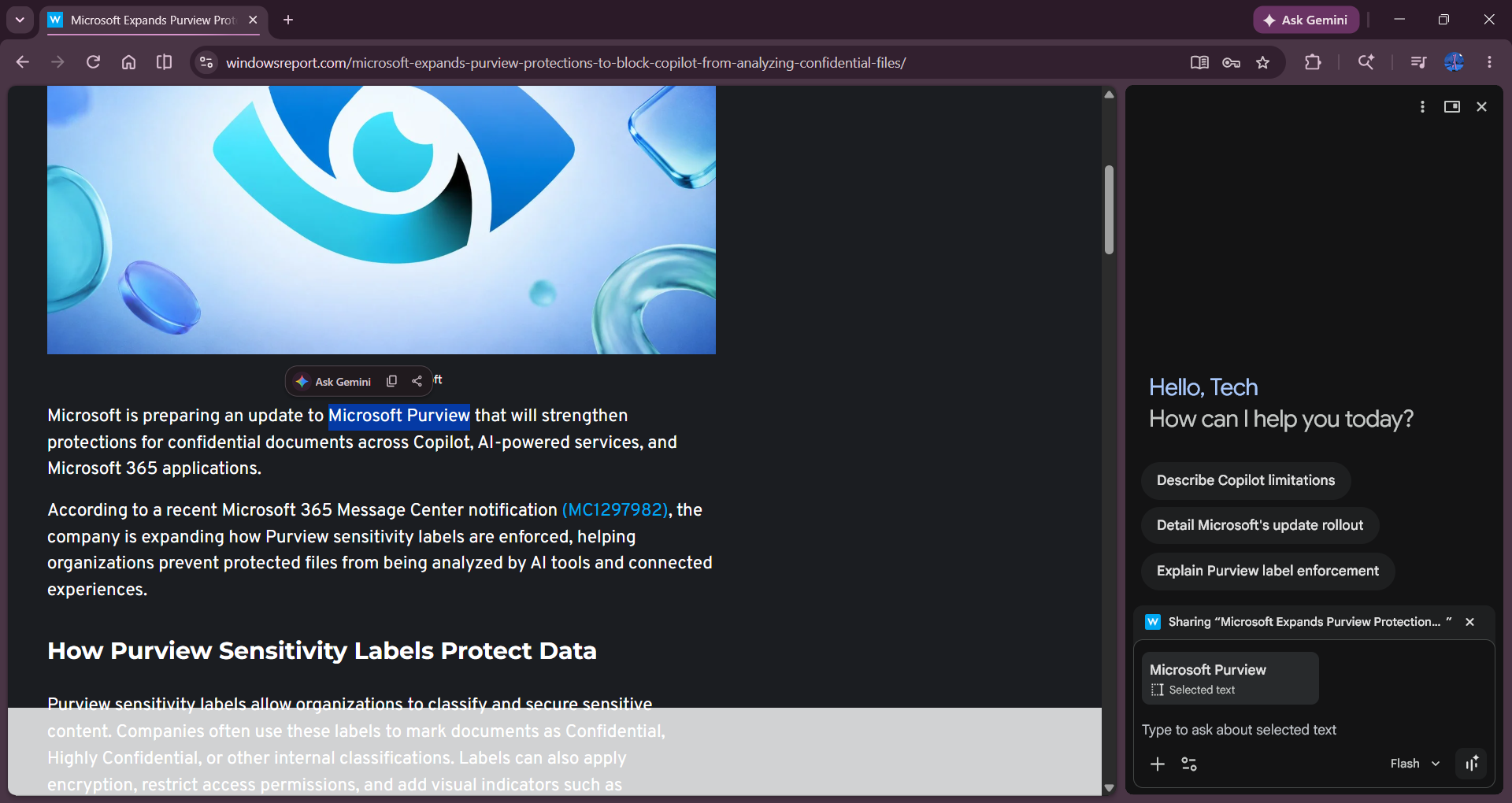
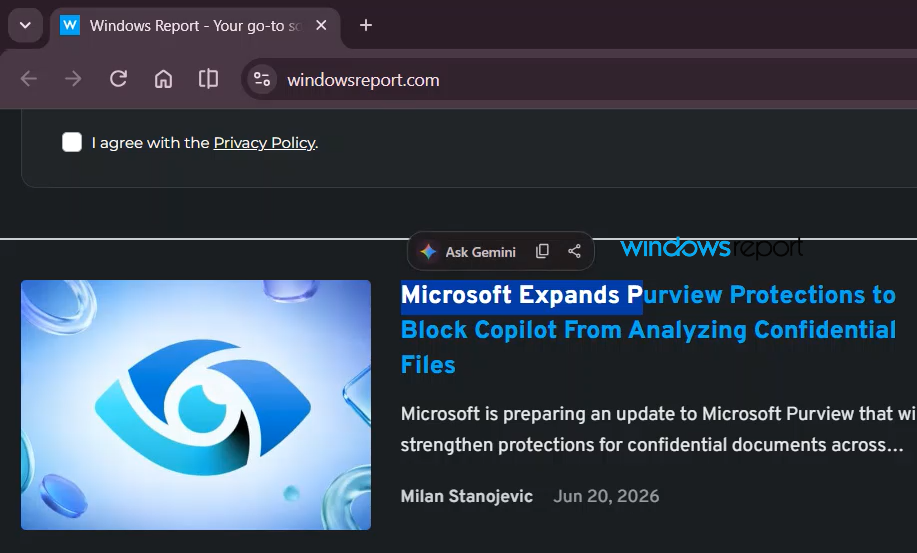
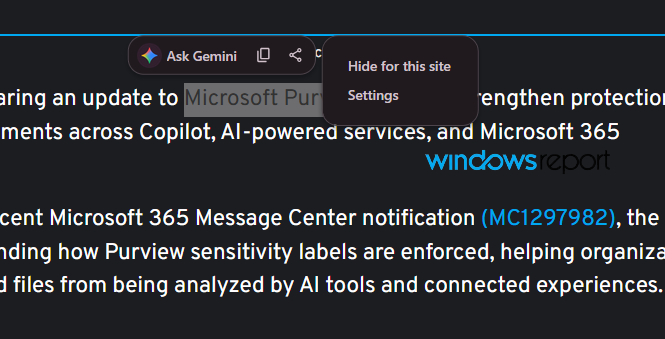
Google is integrating Gemini more deeply into Chrome, this time through text selections on web pages. The company is testing a floating Ask Gemini toolbar in Chrome Canary on desktop that appears when you select text. It shows Ask Gemini, Copy, Share, and a three-dot menu, and it sends selected text straight into the Gemini side panel for follow-up questions.
Google has been steadily adding Gemini entry points in Chrome. The @gemini address bar shortcut was one step, and this text selection feature continues that push by reducing the steps needed to ask AI questions inside the browser.
How Ask Gemini for Selected Text Works in Chrome
Chrome already offers copy and “copy link to highlight” through right-click menus, but this new toolbar brings those actions closer to the text itself. It also puts Ask Gemini front and center, so users can jump into Gemini without opening another menu first.
Image Credit: Venkat | Windows Report.
The three-dot menu includes “Hide for this site” and“Settings”. Hide for this site is meant to suppress the Ask Gemini popup on that site, while Settings currently opens Chrome’s regular content settings page rather than a dedicated Gemini page.
Image Credit: Windows Report.
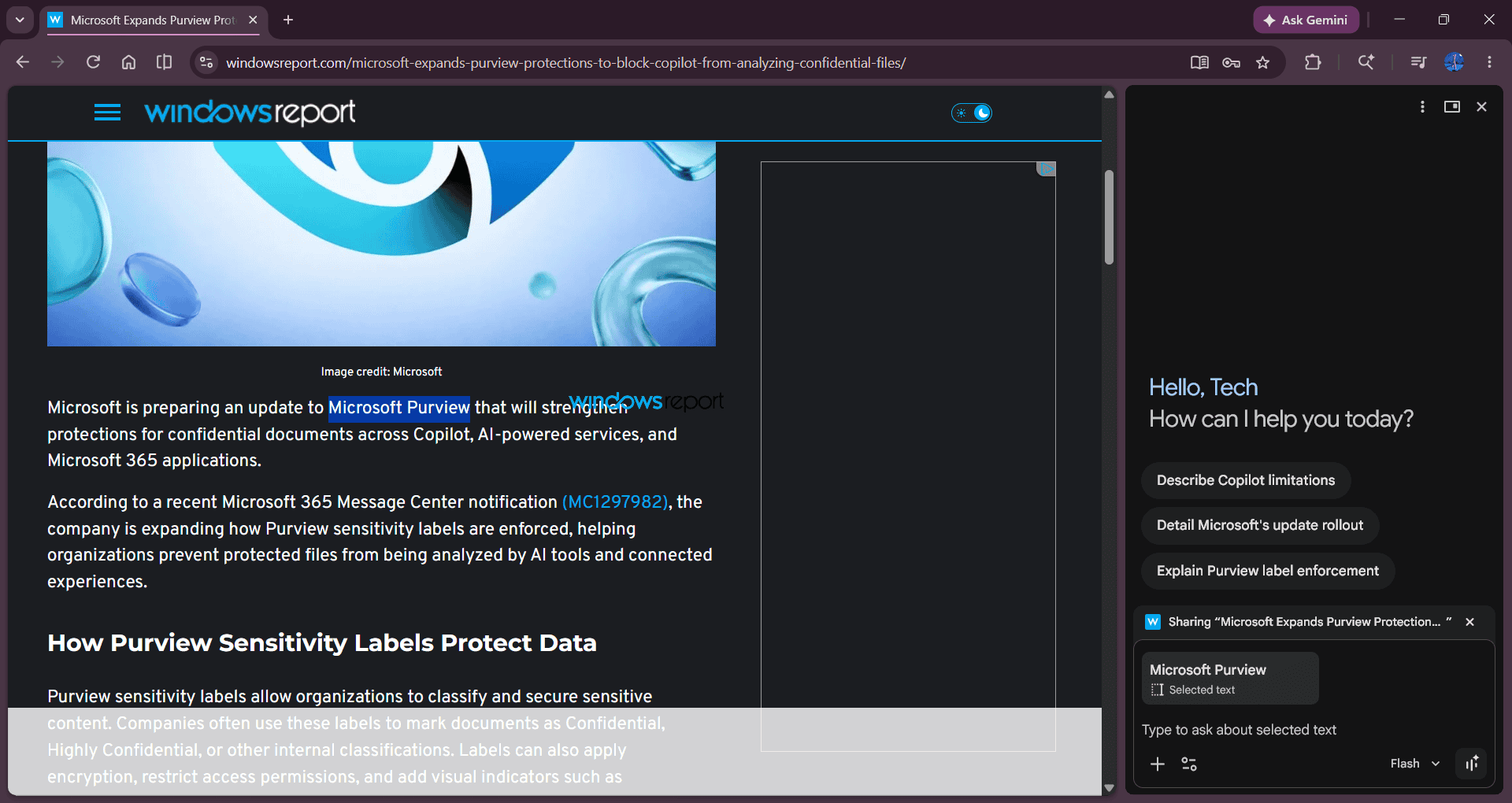
Ask Gemini is the main part here. Click it, and Chrome sends the selected text to the Gemini side panel, where it displays a contextual prompt and lets you continue with follow-up questions.
Image Credit: Windows Report.
The experience feels like more than a shortcut. Instead of copying text into Gemini manually, Chrome is starting to treat highlighted text as something it can hand directly to AI.
It also matches Chrome’s push to bring Gemini deeper into the browser. Chrome is clearly making Gemini a bigger part of the experience, but it’s still early.
For users, the appeal is clear: highlight a passage, ask a question, and keep moving without switching tabs or opening another app. For Chrome, it is another sign that Gemini is becoming a more natural part of the browser, not just an optional assistant on the side.
This is still early work. The Ask Gemini conversation itself works well, but preferences, settings, and other surrounding pieces still look unfinished. Google hasn’t announced this publicly, and, like most Canary experiments, there’s no guarantee it will reach stable Chrome.
Update: Windows Report has found additional Chromium code showing that Google internally refers to the Ask Gemini text-selection feature as “Inline Cue Menu.” The company is also building a dedicated settings page and an exception list for sites where users choose to hide the prompt.
A newly discovered ransomware operation called Prinz Eugen is taking an unusual approach to file encryption, according to new research from Malwarebytes’ ThreatDown team.
Unlike many ransomware families that leave ransom notes and immediately announce their presence, Prinz Eugen focuses on silently encrypting recently modified files, likely to maximize disruption by targeting the most valuable and actively used business data.
Prinz Eugen targets recently modified files
ThreatDown researchers say Prinz Eugen appears to prioritize files that organizations are currently working with rather than encrypting data indiscriminately. This strategy can increase operational damage because recently modified files often contain active projects, financial records, and other business-critical information.
The ransomware appends the “.prinzeugen” extension to encrypted files and uses strong encryption methods. Researchers found that the malware verifies files can be decrypted before removing the original copies, helping ensure victims cannot easily recover their data without the attackers’ involvement.
Attackers appear to operate manually
According to the report, Prinz Eugen does not appear to function as a typical ransomware-as-a-service (RaaS) platform. Researchers found no evidence that the operators are recruiting affiliates or offering the malware to other cybercriminals.
Instead, the group seems to rely on a hands-on-keyboard approach, where attackers manually control significant portions of the intrusion. Initial access is believed to occur through compromised Remote Desktop Protocol (RDP) credentials.
In one investigated incident, the attackers deployed RemotePC remote management software and created a hidden administrator account to maintain access to the compromised network.
No ransom note, no wallpaper changes
One of the most unusual aspects of Prinz Eugen is what it does not do.
The ransomware does not drop a ransom note and does not replace the victim’s desktop wallpaper, two tactics commonly used by ransomware groups to announce an attack and provide payment instructions.
Researchers believe this may be intentional. By avoiding traditional ransom notes, the attackers leave behind fewer forensic artifacts and reduce the chances that automated security tools will immediately identify the attack as ransomware.
Instead, victims may receive extortion demands through direct emails, phone calls, or dedicated dark web communication portals.
Malware attempts to remove evidence
The ransomware is written in the Go programming language and recursively scans directories without major exclusions or depth limitations.
After completing encryption, Prinz Eugen attempts to cover its tracks. Researchers observed the malware wiping encryption keys from memory and deleting its own executable from disk, making forensic investigations more difficult.
The group’s public leak site currently lists only three victims. However, ThreatDown believes the actual number is likely higher.
Researchers identified at least five affected organizations, including Standard Bank. In that case, the attackers reportedly demanded 1 Bitcoin as ransom, but the payment request was refused.
Indicators of compromise published
To help organizations defend against the threat, ThreatDown has released indicators of compromise (IOCs) and technical details that security teams can use to detect Prinz Eugen activity within their environments.
The researchers recommend monitoring for suspicious RDP activity, unauthorized administrator account creation, unexpected remote management software installations, and files carrying the “.prinzeugen” extension.
Microsoft is preparing an update to Microsoft Purview that will strengthen protections for confidential documents across Copilot, AI-powered services, and Microsoft 365 applications.
According to a recent Microsoft 365 Message Center notification (MC1297982), the company is expanding how Purview sensitivity labels are enforced, helping organizations prevent protected files from being analyzed by AI tools and connected experiences.
How Purview Sensitivity Labels Protect Data
Purview sensitivity labels allow organizations to classify and secure sensitive content. Companies often use these labels to mark documents as Confidential, Highly Confidential, or other internal classifications. Labels can also apply encryption, restrict access permissions, and add visual indicators such as watermarks and headers to remind users that the content requires special handling.
Until now, organizations could apply sensitivity labels to files, but some connected experiences and AI-powered services could still process or analyze the content under certain circumstances. This created concerns for companies that rely on data loss prevention (DLP) policies and strict compliance requirements, especially as AI tools become more deeply integrated into workplace productivity workflows.
Expanded Restrictions for Copilot and AI Services
With the upcoming change, Microsoft will enforce an existing Purview sensitivity label setting more consistently across connected services. As a result, files protected by the relevant sensitivity label configuration will be blocked from use in Copilot and other AI-powered experiences.
The updated behavior will also extend to core Microsoft 365 applications, including Word, Excel, and PowerPoint. Organizations that already use the applicable sensitivity label settings will not need to take any action for existing documents. Protected files will automatically receive the enhanced safeguards once the rollout reaches their tenant.
What Organizations Need to Know
Microsoft is encouraging IT administrators to prepare for the change by informing helpdesk staff and compliance teams, reviewing sensitivity label configurations, and updating internal documentation where necessary. The company notes that users may notice differences in how protected files interact with AI and connected experiences after the update becomes available.
The rollout will apply only to commercial customers who have a Microsoft Purview license. Microsoft plans to release the update in phases, with general availability expected to be completed by the end of next month.
The change reflects Microsoft’s broader effort to strengthen enterprise data protection as organizations increasingly adopt AI-powered productivity tools while maintaining compliance and security requirements.
Windows 11 26H2 has been officially confirmed by Microsoft, and the update should be easier to install than a traditional feature release.
Microsoft confirmed Windows 11 version 26H2 in a new Windows Insider announcement, marking the first official mention of the next annual update. The company says the release will arrive through an enablement package, also known as an eKB. Microsoft also shared additional details in its IT Pro blog post about Windows 11 version 26H2.
That means Windows 11 26H2 will not work like a full operating system upgrade for supported PCs. Instead, it will activate features and changes that already exist in the OS code after previous cumulative updates.
Windows 11 26H2 will use a smaller update package
The enablement package approach should make the upgrade faster and less disruptive for most users. Microsoft says this works because Windows 11 version 26H2 shares the same servicing branch as Windows 11 version 25H2.
In practice, this should mean a simpler installation process, fewer upgrade steps, and a familiar restart-based experience. For many users, the update may feel closer to a regular monthly Windows update than a major feature upgrade.
This also gives IT teams a more predictable deployment path. Organizations that already manage Windows 11 25H2 devices should be able to test and roll out 26H2 using existing tools and update rings.
Windows 11 26H1 devices cannot upgrade to 26H2
Microsoft also clarified an important exception. Devices running Windows 11 version 26H1 will not be able to upgrade directly to Windows 11 version 26H2.
The reason is technical. Windows 11 26H1 uses a different Windows core than versions 24H2, 25H2, and 26H2. Because of that branch difference, 26H1 devices will need to wait for a future Windows release instead.
This could create some confusion because 26H1 sounds older than 26H2 by name. However, Microsoft designed 26H1 for a separate device and platform track, while 26H2 will serve as the next standard annual feature update for most Windows 11 users.
Windows 11 26H2 will reset the support clock
Windows 11 26H2 will also reset the support lifecycle for supported editions.
Home, Pro, Pro EDU, and Pro for Workstations editions will receive 24 months of support. Enterprise, Education, IoT Enterprise, and Enterprise Multi-session editions will receive 36 months of support.
That makes the release important even if the visible feature changes look modest at launch. For businesses, the support reset affects update planning, compliance, security servicing, and long-term device management.
Microsoft has not shared a release date yet
Microsoft has not announced a public release date for Windows 11 26H2. The company only says the update is coming soon.
Based on Microsoft’s usual Windows 11 release cadence, the rollout could begin around late September or early October 2026. Windows 11 version 25H2 arrived at the end of September 2025, while Windows 11 version 24H2 began rolling out in early October 2024.
Until Microsoft shares a final release schedule, users should treat that timing as an estimate rather than a confirmed date.
IT admins should start testing now
Microsoft is encouraging IT administrators to begin preparing before the public rollout. That includes testing Insider builds, reviewing app compatibility, planning phased deployment rings, and checking existing update management policies.
Even though 26H2 will use a smaller enablement package, organizations should not ignore testing. Monthly cumulative updates may already contain much of the code that 26H2 will activate later, so early validation remains important.
For regular users, Windows 11 26H2 should be a relatively smooth update when it arrives. For IT teams, it is another annual checkpoint that requires planning, even if the installation process looks lighter than a traditional feature update.
A key improvement in this update targets Windows accessibility features. Microsoft has enhanced caption style responsiveness by ensuring captions are redrawn immediately when users make changes to caption styles. Additionally, if no caption is currently visible on screen, Windows will now display a sample caption string, allowing users to preview style changes instantly without waiting for live captions to appear.
The update also includes improvements to the reliability of the inbox HD Audio driver. While Microsoft hasn’t provided details, it’s intended to deliver a more stable audio experience across supported devices.
According to Microsoft, the Build 28120.2315 also includes a small number of additional bug fixes and under-the-hood improvements to enhance system stability. Not to forget, Microsoft has also released Build 28020.2308 for Insiders in the Windows 11 Beta (26H1) channel. Alongside, Microsoft has also released three different builds for Windows 11 Insiders in the Beta, Beta (26H1), and Experimental channels.
A bunch of audio settings improvements land for Insiders
The highlight of Experimental (Future Platforms) Build 29613.1000 is a series of enhancements to Settings > System > Sound, based on feedback from Windows Insiders. Microsoft has updated the “All sound devices” page, allowing users to change their default audio devices directly from the page without navigating through additional settings menus.
The company has also added live volume meters next to each listed device, making it easier for users to identify which audio device is actively playing sound in real time. To improve usability, the page now includes filters that let users switch between viewing input and output devices. Additionally, new toggles allow users to hide or display disabled, disconnected, and unplugged audio devices, helping keep the interface organized.
Another useful addition is expanded hardware information on device properties pages. Input and output audio device settings now display jack information where applicable, providing users with more detailed connection information.
Let’s not forget that Microsoft has also released three different builds for Windows 11 Insiders in the Beta, Beta (26H1), and Experimental channels.
Among the five builds released today, the Build 26300.8697 is landing in the Windows 11 Experimental channel. Microsoft has confirmed that it has fixed the Hypervisor and KMODE crash errors and improved reliability of File Explorer, Sttart Menu, Taskbar, and Settings. Here’s everything include in the latest Windows 11 Experimental Build.
Windows 11 Experimental Build 26300.8697 released with reliability improvements
After installing this update, Windows Insiders will see Windows 11 version 26H2 under Settings > System > About and in the winver dialog. In addition, the latest build also includes multiple quality-of-life improvements across the operating system. In File Explorer, Microsoft has improved the visual consistency and reliability of the Copy dialog when using Dark mode, including enhancements to its launch experience and expanded progress view.
Start menu reliability has also been improved, ensuring newly installed or removed applications appear correctly without requiring users to sign out or restart their PCs. Additionally, the company has enhanced the reliability of the Settings > Apps > Startup page.
Taskbar users benefit from a fix addressing an issue with the new smaller taskbar option, where the system tray could become cut off or pushed off-screen.
Last but not least, this build includes a fix for a critical virtualization-related issue that caused some Insider devices to experience system crashes after installing recent builds. The problem could trigger bugchecks citing HYPERVISOR_ERROR (0x20001) and KMODE_EXCEPTION_NOT_HANDLED (0x1E) during system restarts, virtual machine operations, or while running certain gaming applications. Not to forget, the latest Build 26220.8690 also fixes the same issue for Windows 11 Insiders in the Beta Channel.
In addition to the Beta Preview Build 26220.8690, Microsoft has also released Beta (26H1) Build 28020.2308. There isn’t much going with this build. Microsoft has listed a small set of changes in the changelog, which can check below:
Changes and improvements
This update includes a small number of minor bug fixes and improvements.
[Audio]
This update improves the reliability of the inbox HD Audio driver.
Apart from these changes, Microsoft has fixed a critical issue that caused some devices to experience system crashes after installing recent Insider flights.
On top of that, Microsoft has also released Build 26300.8697 and 28120.2315 to the Experimental (Dev) and Experimental (26H1) channels.
Microsoft is wrapping up the week with a bunch of new builds. Speaking of which, the company has released Windows 11 Insider Beta Preview Build 26220.8690 with a few stability fixes. Here’s everything you need to know about the latest Beta preview build.
Windows 11 Beta Build 26220.8690 fixes virtualization bug checks
Microsoft has confirmed that this build addresses a critical issue that caused some devices to experience system crashes after installing recent Insider flights. Affected users reported bugchecks referencing HYPERVISOR_ERROR (0x20001) and KMODE_EXCEPTION_NOT_HANDLED (0x1E) during system restarts, virtual machine operations, and while running certain gaming applications.
Microsoft says the latest update resolves these virtualization-related problems, which should improve overall system stability for users who rely on Hyper-V, virtual machines, or gaming workloads.
The company has also improved the reliability of the Windows 11 Start menu. Previously, some users experienced delays in the Start menu reflecting newly installed or removed applications, often requiring a sign-out or system restart before changes appeared correctly.
With Beta Build 26220.8690, app additions and removals should now be displayed more consistently without requiring users to restart their sessions. Last but not least, Microsoft has introduced additional reliability improvements to the Settings > Apps > Startup page. While the company did not provide specific technical details, the update is intended to improve the stability and responsiveness of startup app management. Not to forget, Microsoft has also released Build 28020.2308 for Insiders in the Windows 11 Beta (26H1) channel.
Migrating mailboxes, especially Exchange to Office 365 migration, can be a frustrating task. Between complex data mapping, inconsistent synchronization, and performance problems, errors and downtime are common.
I recently got to try Stellar Migrator for Exchange, which aims to simplify the process. The guided migration platform is suitable for both small business migrations and large-scale enterprise deployments and supports migration across Exchange Servers and Microsoft 365.
What is Stellar Migrator for Exchange?
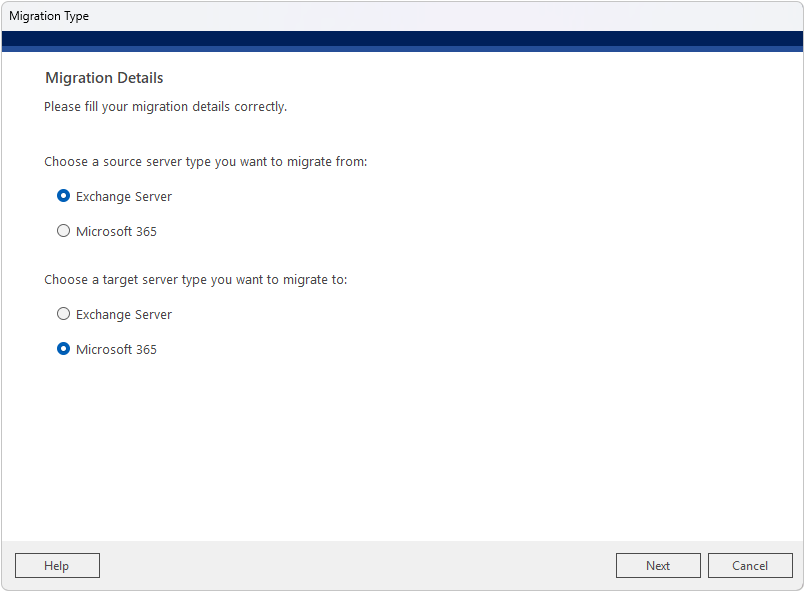
Stellar Migrator for Exchange is a comprehensive mailbox migration solution that enables seamless mailbox migrations between Exchange Server and Microsoft 365, including Exchange-to-Exchange, Exchange-to-Microsoft 365, Microsoft 365-to-Exchange, and Microsoft 365 tenant-to-tenant migration scenarios. It also supports Exchange upgrade within the same domain.
It supports primary mailboxes, shared mailboxes, archive mailboxes, and public folders, while providing features such as automatic mailbox mapping, scheduling, and concurrency controls.
You can try the tool for free on two mailboxes before purchasing a plan scaled to your needs. Here’s everything you need to know.
Main Features
One of the biggest strengths of Stellar Migrator for Exchange is the range of migration controls available. Rather than simply moving mailbox data from one location to another, the software gives you full control over how migrations are planned, executed, and managed.
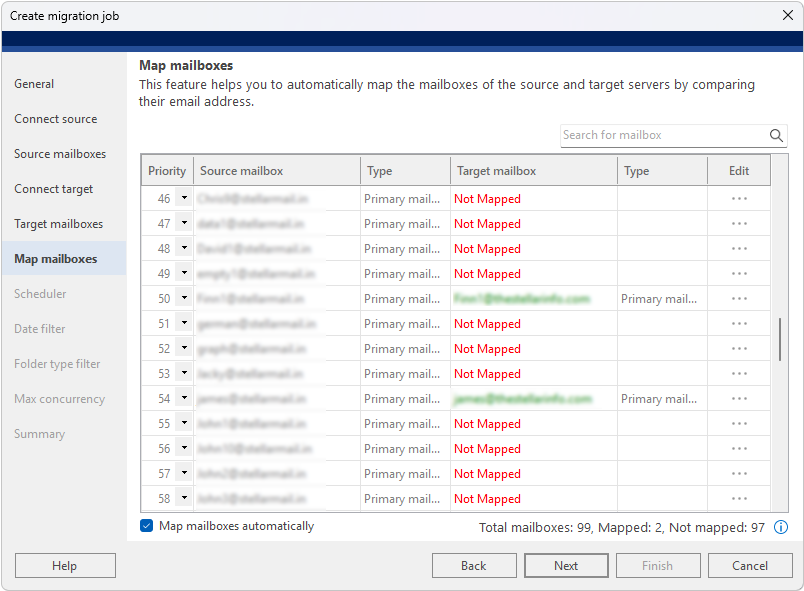
Automatic Mailbox Mapping
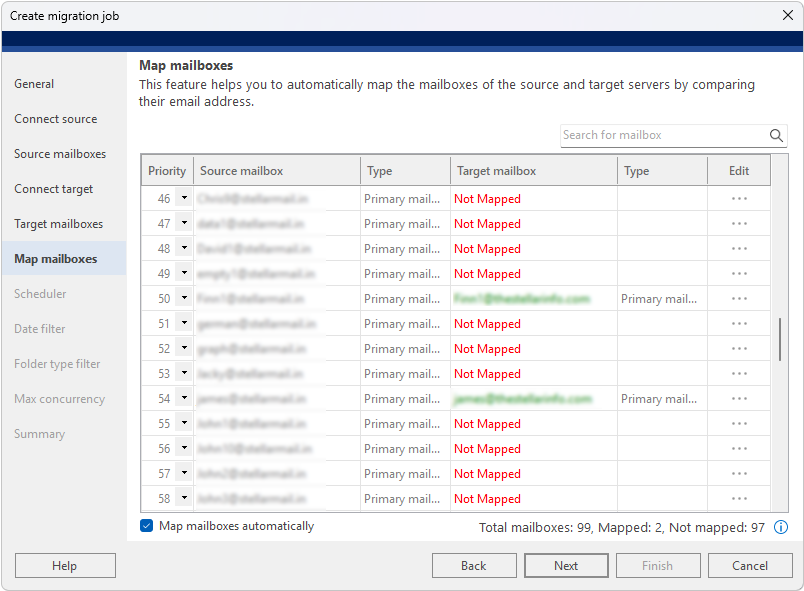
Stellar Migrator for Exchange simplifies mailbox mapping by automatically matching source and target mailboxes based on email addresses.
During testing, this significantly reduced setup time. Successfully matched mailboxes are displayed in green, making them easy to identify, while any unmatched mailboxes appear in red with a “Not Mapped” status. This visual approach helps you quickly identify any issues before migration begins.
For situations where automatic mapping isn’t possible, the software also supports manual mailbox mapping. This flexibility is particularly useful when email addresses have changed or when migrating between environments with different naming conventions.
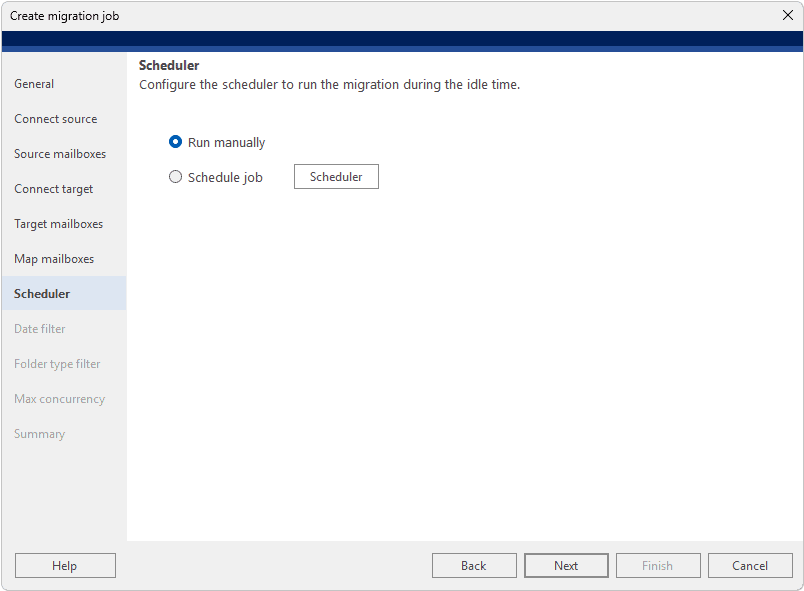
Scheduler
The built-in Scheduler is one of the most useful features for organizations that need to perform migrations outside business hours.
Administrators can choose between:
Run Once
Daily
Weekly
Monthly
Schedules can be configured with custom start and end times, allowing migrations to run during evenings, weekends, or maintenance windows.
This level of automation helps minimize disruption for end users while reducing the need for manual intervention. For larger migration projects that may take days or weeks to complete, scheduling provides a much more manageable workflow.
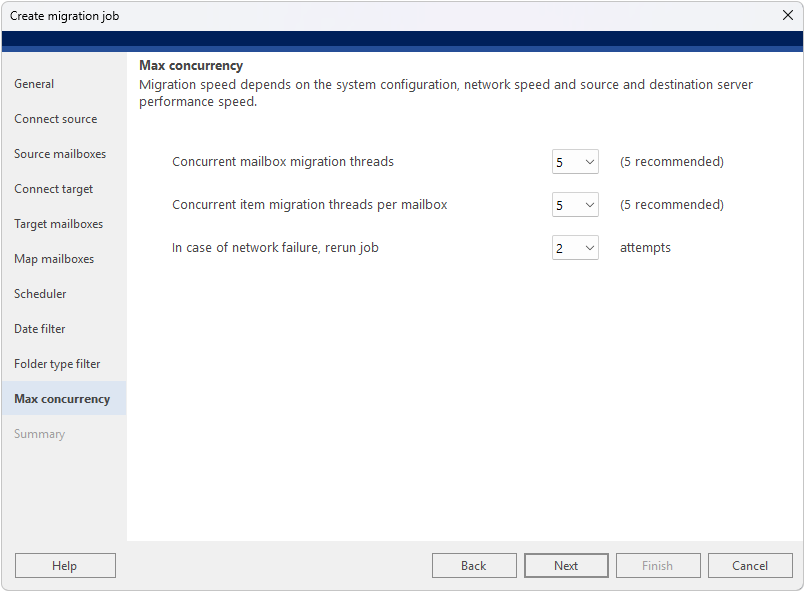
Max Concurrency Settings
Migration speed can vary dramatically depending on network conditions, server resources, and mailbox sizes.
Stellar Migrator for Exchange includes detailed concurrency controls that allow administrators to optimize performance by configuring:
Concurrent mailbox migration threads
Item migration threads per mailbox
Retry attempts during network interruptions
These settings make it possible to balance migration speed against available resources. I.e., Smaller organizations can use conservative settings to reduce server load, while larger environments can increase concurrency to accelerate migrations.
The ability to control retry attempts helps migration resume even if temporary network issues occur.
Delta Migration
In traditional migration projects, rerunning a migration can involve reprocessing large amounts of data that have already been transferred. Delta Migration avoids this by identifying only new or modified mailbox items since the previous migration.
This significantly reduces migration times during subsequent synchronization cycles while also conserving bandwidth and server resources.
Delta Migration is particularly useful during staged and hybrid migration projects where users continue working while mailbox data is being synchronized. Instead of repeatedly migrating the entire mailbox, only changes are transferred.
Supported Migration Scenarios
Stellar Migrator for Exchange supports a wide variety of migration scenarios, making it suitable for organizations at all stages of their cloud adoption journey.
Supported scenarios include:
Exchange to Exchange
Exchange to Microsoft 365
Microsoft 365 to Microsoft 365
Microsoft 365 to Exchange
In the tool’s latest release, you can also perform Exchange-to-Exchange Server Subscription upgrade migration. This is a feature that many competing migration tools do not support and can be extremely valuable during server upgrades or infrastructure modernization projects.
The broad compatibility means organizations can continue using the same migration platform regardless of future migration requirements.
Supported Migration Types
The software also supports several common migration strategies.
These include:
Cutover Migration
Staged Migration
Hybrid Migration
Public Folder Migration
This flexibility allows organizations to choose a migration approach that best suits their environment and business requirements.
Public Folder Migration deserves special mention. Many migration tools focus solely on user mailboxes, but Stellar Migrator for Exchange also supports the seamless migration of Public Folders alongside mailbox data. This helps ensure organizational data remains accessible after migration.
Hosted Exchange to Microsoft 365 Migration
Another useful capability is support for Hosted Exchange environments.
Even when administrators have limited access to the Hosted Exchange infrastructure, the software allows mailboxes to be connected individually using user credentials. This makes migration possible in situations where traditional administrative access may not be available.
For organizations working with third-party hosted Exchange providers, this can significantly simplify migration planning.
Getting Started
The Exchange Migration Tool is surprisingly easy to use and guides you through every step. Follow these general steps to begin migration:
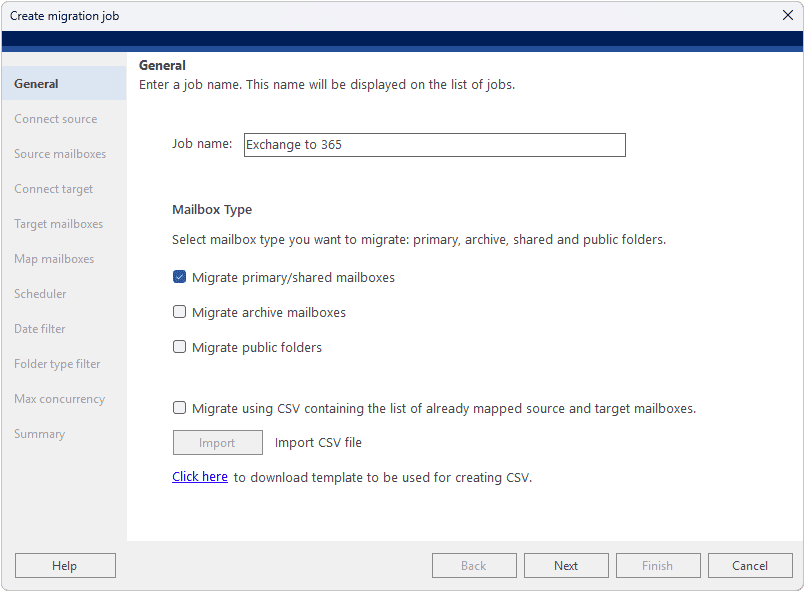
1) Create the migration job and select the migration and mailbox types. You can also import a CSV file with pre-mapped mailboxes.
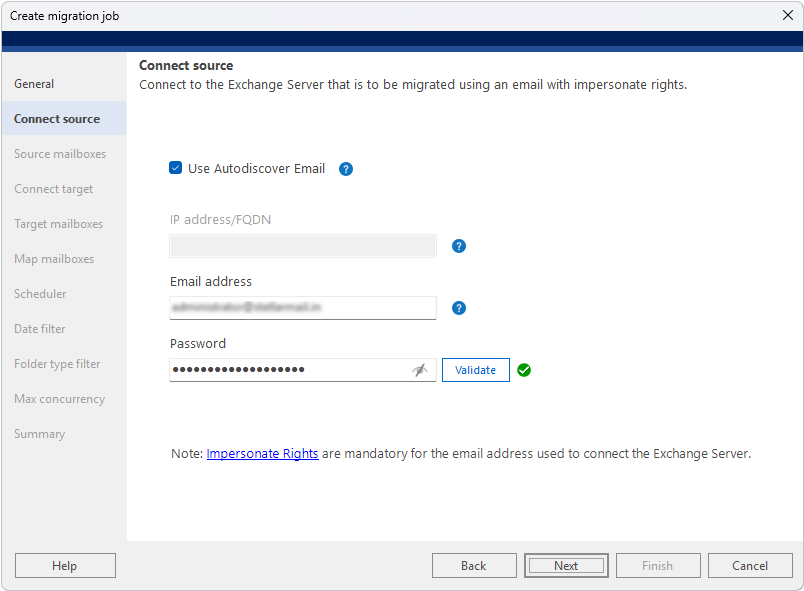
2) Connect to your source Exchange Server by entering the account credentials.
During my testing, enabling Autodiscover was the quickest option, as the software automatically located the server after I entered the email address and password. Alternatively, you can manually specify the server address if required.
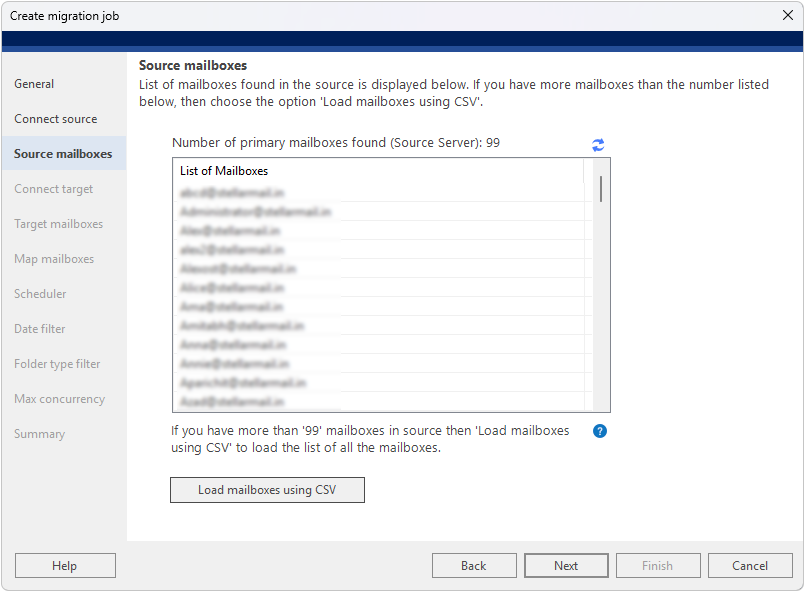
3) Review your list of source mailboxes and follow the instructions if you have more mailboxes than listed.
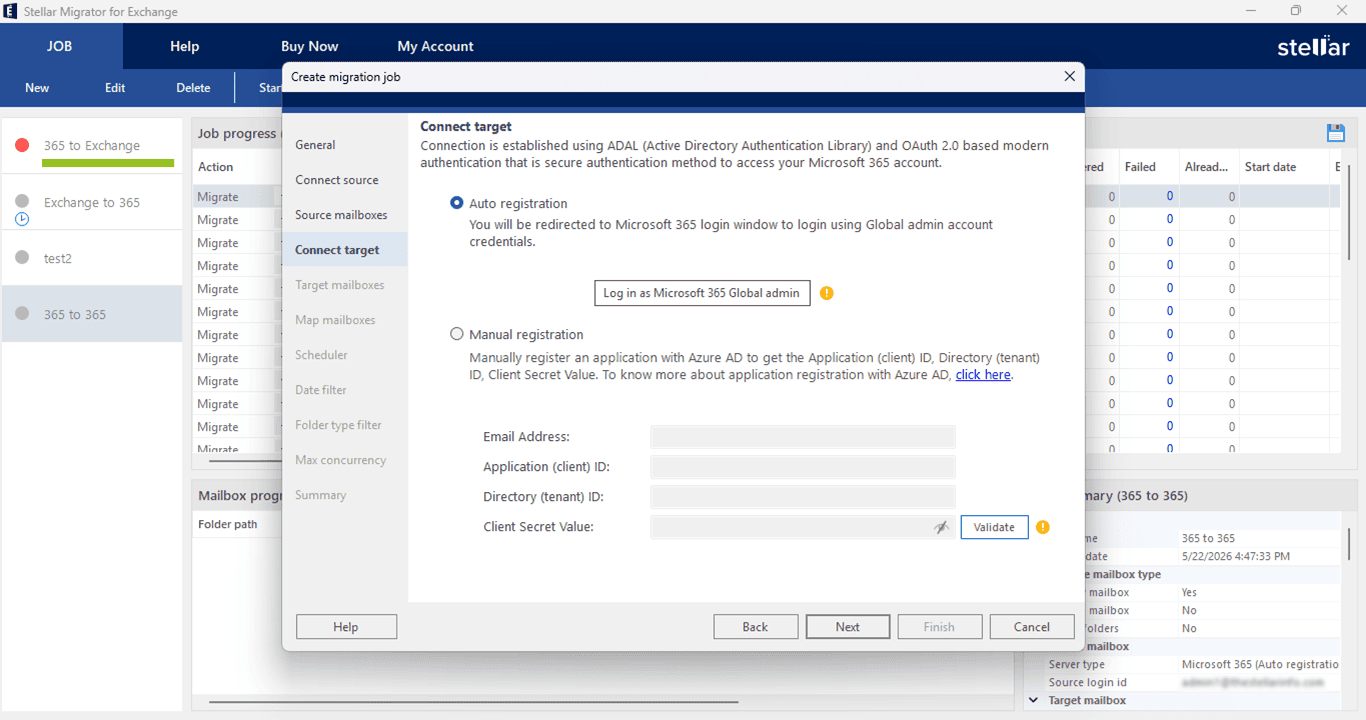
4) Connect to the target via the desired method. Auto Registration is the simpler option, redirecting you to a Microsoft 365 Global Admin sign-in page and automatically configuring the connection.
Manual Registration is available for organizations that prefer to manage their own Entra ID app registration and requires the Application ID, Tenant ID, and Client Secret.
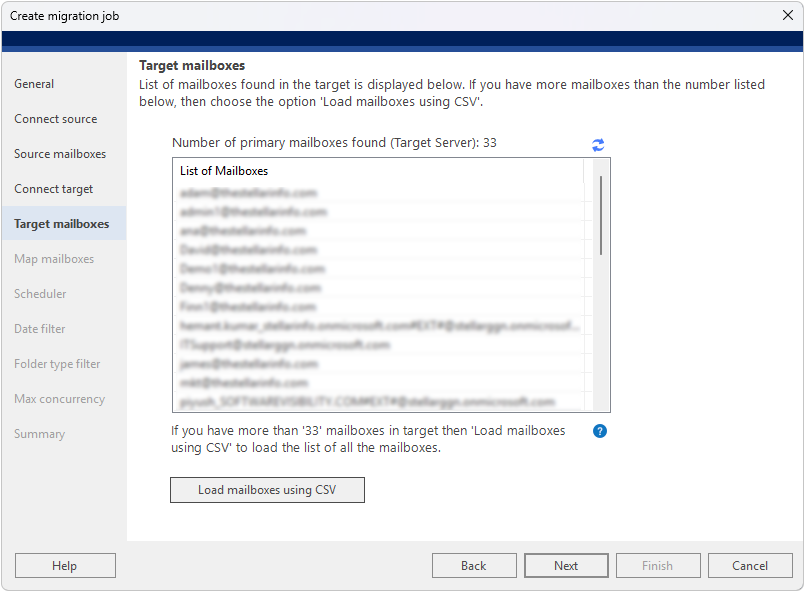
5) Review discovered Target mailboxes.
6) Map any mailboxes missed by auto-mapping. Usually they are matched by email address, but any that fail are displayed in red and can be configured by clicking edit.
7) Use the Scheduler to choose between running the job immediately, at a future date, or at regular intervals.
8) The Date filter lets you choose whether to migrate all data or data from a set period of time, while the Folder Type filter lets you choose the specific mailbox items to migrate. E.g., Contacts, Calendars, Notes, etc.
9) Configure Max Concurrency settings, which control how many mailboxes are migrated simultaneously.
Increasing the value can speed up large migration projects by processing multiple mailboxes at once, while lower settings help reduce the load on your network, Exchange Server, and Microsoft 365 tenant.
10) Review the migration job and click start.
11) Perform Delta Migration synchronizations if required.
The interface remains clean throughout the process and avoids overwhelming users with unnecessary complexity.
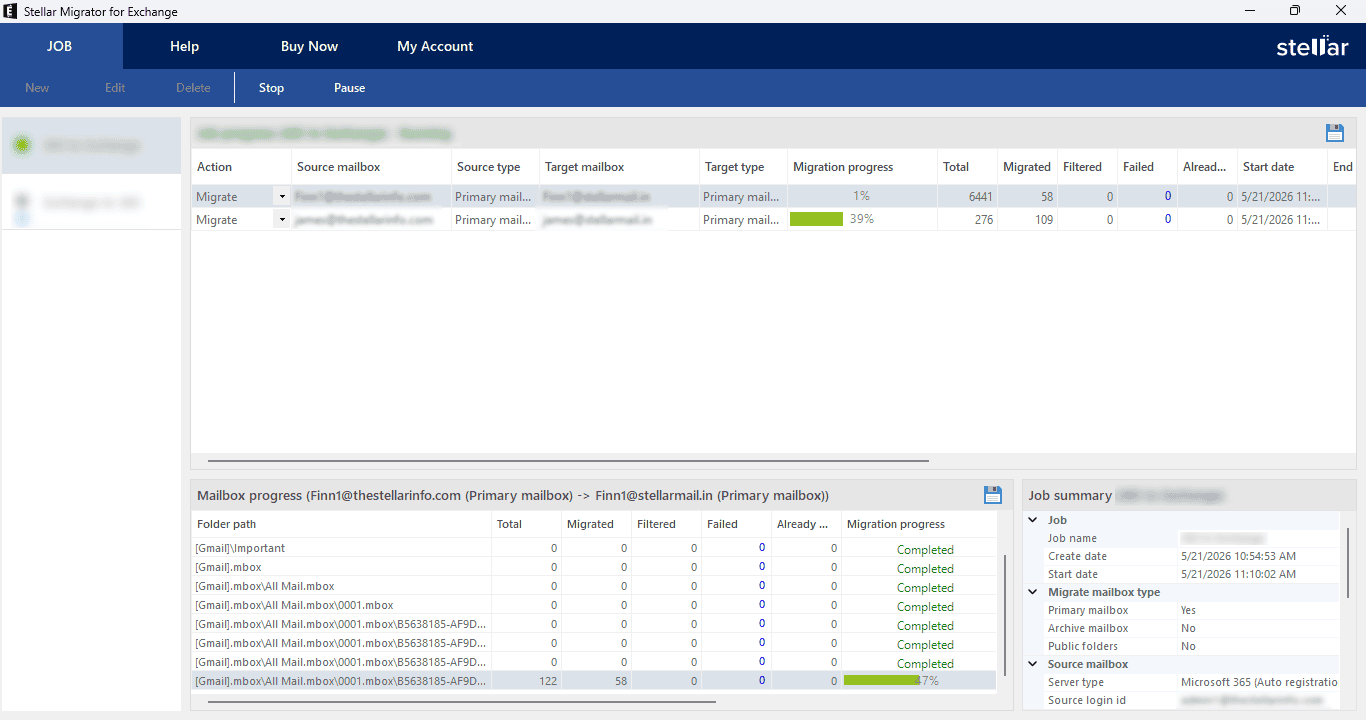
Migration progress is clearly displayed, allowing administrators to monitor mailbox status, completed items, failed items, and overall progress in real time.
While the software includes advanced configuration options for experienced users, most migrations can be configured using the default workflow with minimal training.
Pricing
Stellar Migrator for Exchange is available in multiple licensing options depending on migration requirements and mailbox volumes.
You can try it for free on 2 mailboxes before choosing a paid plan from 25 to more than 500 mailboxes. The more mailboxes, the cheaper the price per mailbox. For example:
25 Mailboxes for $250 ($10 per Mailbox).
500 Mailboxes for $1,500 ($3 per Mailbox).
Stellar Migrator for Exchange Review – Verdict
Mailbox migrations are rarely straightforward, especially when dealing with large user counts, public folders, archive mailboxes, or ongoing user activity during the migration process.
After testing Stellar Migrator for Exchange, I found it to be a well-designed solution that balances ease of use with the level of control IT administrators typically need.
Features such as automatic mailbox mapping, Delta Migration, scheduling, and concurrency controls help simplify migration planning while reducing the manual effort often associated with Exchange and Microsoft 365 projects.
The support for multiple migration scenarios—including Exchange to Microsoft 365, Microsoft 365 tenant-to-tenant, and Exchange Server upgrades—also makes it versatile enough for a wide range of environments.
While organizations should always validate any migration tool in a pilot deployment before a large-scale rollout, Stellar Migrator for Exchange performed reliably during testing and offered a straightforward migration experience with minimal complexity.
If you’re planning an Exchange Server upgrade, a move to Microsoft 365, or a tenant-to-tenant migration, Stellar Migrator for Exchange is a solution that’s worth evaluating, particularly for organizations looking to reduce migration effort without sacrificing flexibility and control.
RAM price increases are no longer limited to desktop memory kits. The shortage is now affecting complete laptops, and buyers may soon see higher prices across mainstream PC models.
The cheapest 32GB DDR5 kit reached around $439 on June 15. Last year, similar kits were often available for roughly $80 to $120, meaning memory prices have increased by around three to four times.
AI demand is driving the RAM shortage
The biggest reason behind the price jump is demand from AI data centers. Large U.S. tech companies are expected to spend about $650 billion on AI infrastructure in 2026, which is putting heavy pressure on the memory supply.
Samsung, SK Hynix, and Micron are shifting more production toward high-bandwidth memory, or HBM. This memory type brings higher margins, but it also uses much more wafer space than standard DRAM.
As a result, AI-focused memory production is reducing the available supply of commodity DDR5 memory used in PCs and laptops.
Laptop makers are already raising prices
HP told investors that memory now accounts for about 35% of a PC’s component cost. That is up from roughly 15% to 18% just two quarters earlier.
Dell, Lenovo, Acer, and ASUS have reportedly increased laptop prices by 15% to 30%. A midrange laptop that previously cost around $900 could now move above $1,200.
The shortage may also push manufacturers back toward 8GB notebooks to keep prices lower. That would reverse the recent shift toward 16GB RAM as the mainstream laptop standard.
Relief may not arrive soon
Analysts do not expect meaningful relief before late 2027, and the shortage could continue into 2028. New memory fabs take time to build and reach volume production.
Gartner estimates that combined DRAM and SSD prices could rise by more than 130% by the end of 2026. The firm also expects average PC prices to rise by 17%, while global PC shipments could fall by 10.4%.
For buyers, the message is simple: if you need more RAM, storage, or a new laptop soon, upgrading earlier may be safer than waiting for prices to normalize.
Microsoft is expanding Windows 11’s graphics troubleshooting capabilities with a new DirectX feature designed to make GPU-related crashes easier to diagnose.
The company has announced DirectX Dump Files, a new DirectX 12 API feature that captures detailed snapshots of GPU execution when graphics crashes, hangs, freezes, or timeout events occur. The technology is currently available in preview and is expected to see broader adoption around the release of Windows 11 version 26H2 in fall 2026.
Graphics driver failures remain one of the more difficult issues for developers to investigate. Many of these problems stem from Timeout Detection and Recovery (TDR), a Windows mechanism that resets the graphics driver when the GPU becomes unresponsive. While Microsoft already improved TDR diagnostics through WDDM 3.2 in Windows 11 24H2 and 25H2, the company now wants to simplify the entire crash analysis process.
DirectX Dump Files aim to simplify GPU crash investigations
When a graphics-related failure occurs, DirectX Dump Files generate a single .dxdmp file containing diagnostic information gathered from across the graphics stack.
Rather than forcing developers to compare logs from multiple debugging tools, the new system consolidates critical crash data into one package. The dump files can include details about the GPU, graphics driver, Windows environment, and the application involved in the crash.
Microsoft says the feature should help developers identify the root cause of graphics failures faster and with greater accuracy.
The dump files can capture low-level GPU hardware state information, including GPU register values, shader program counters, page fault addresses, shader memory contents, and command buffer data.
In addition, they can store DirectX runtime and kernel-level information such as D3D objects, pipeline state objects, device error information, graphics adapter details, and CPU call stacks.
Designed for both developers and end users
Microsoft built DirectX Dump Files around two primary scenarios.
The first is retail device removals, which allow developers to collect graphics crash information from end-user systems in the field. This can help identify issues that may not appear during internal testing.
The second is local device removals, which target developers and QA teams investigating crashes on test machines.
To provide additional context, developers can also attach up to 2 MB of custom application-specific data through new D3D12 APIs.
Three levels of crash data collection
Microsoft is introducing three different dump collection modes, allowing developers to balance diagnostic depth with performance impact.
NO_OVERHEAD — Captures crash information without affecting runtime performance
MEDIUM_OVERHEAD — Collects additional diagnostic data with moderate performance impact
HIGH_OVERHEAD — Captures the most detailed GPU and driver state information with higher runtime overhead
On compatible Tier 2 hardware, Microsoft says zero-overhead dump collection will be enabled by default. As a result, developers may receive useful crash diagnostics even if they have not added special support to their applications.
AMD currently leads support
DirectX Dump Files are currently available through preview releases.
At the moment, AMD is the only vendor offering a compatible AgilitySDK Developer Preview driver. Support is available through AMD driver version 26.10.07.02.
Microsoft expects support from additional hardware vendors as the feature moves closer to general availability.
The announcement represents another effort by Microsoft to improve Windows troubleshooting tools. The company is also preparing a Windows 11 update that will allow users to disable Bing web results in Start menu search, while separately working on a fix for the recently acknowledged Recycle Bin bug introduced by the June updates.
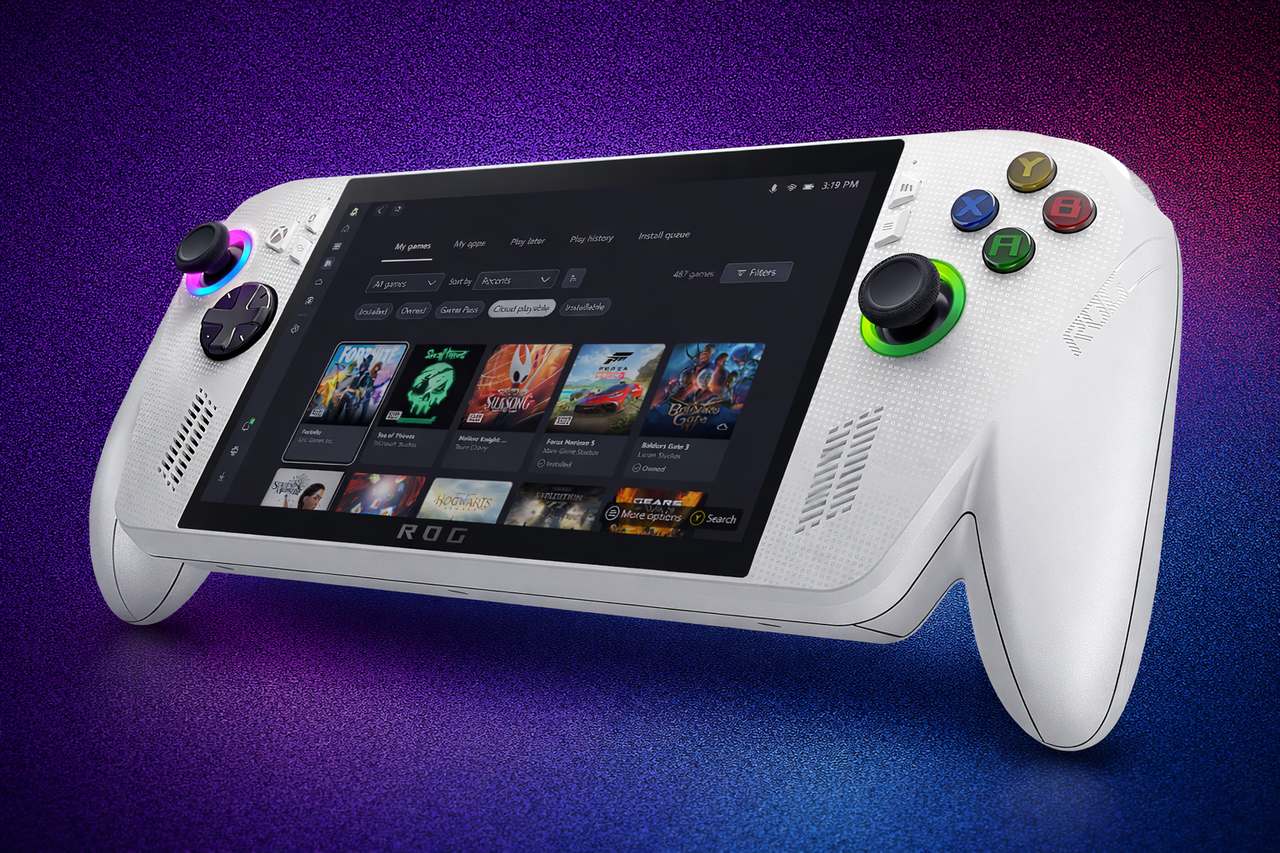
XBOX‘s handheld ambitions took a major leap forward last month when ASUS and Microsoft jointly unveiled the ROG XBOX Ally X20. For those unaware, it’s a more powerful follow-up to the existing ROG XBOX Ally lineup designed around a deeper XBOX experience.
ASUS says ROG Xbox Ally X20 was built “extremely fast, extremely early” but it could end up denting your wallet
While Microsoft and ASUS stopped short of announcing a release date or price during the reveal, new comments from ASUS suggest the company moved unusually fast to bring the device to market, and buyers may need to prepare for a premium price tag.
Announced on June 1, the ROG XBOX Ally X20 builds on the current Ally X with a larger display, an OLED panel, upgraded TMR joysticks, and several hardware refinements aimed at improving both gaming performance and long-term durability.
Speaking to Forbes, Gabriel Meng, ROG’s Director of Product, Gaming, explained why ASUS accelerated development on the handheld (via PureXbox). “What I would call the opportunity of a lifetime showed up,” Meng said. “There was an opportunity to seize and bring it to the market extremely fast, extremely early.”
Those comments strongly suggest the device remains on track for a 2026 launch window, even though ASUS has yet to confirm a specific release date. Pricing, however, remains a major question mark. The gaming industry is currently facing the heat of rising memory costs and ongoing component shortages, which also had some analysts believe that Sony’s PS6 release could slip into 2028 or 2029.
Speaking of the effects, Meng adds that ASUS may have little choice but to pass those costs on to buyers. “If those components end up costing us more, then that’s unfortunately something that’s going to be unable to be subsidized,” Meng said. “That will pass through the consumer.”
Speaking of pricing, ASUS has not revealed how much the ROG XBOX Ally X20 will cost. However, with upgraded hardware and growing supply chain pressures, expectations are already pointing toward a significantly higher price than the current Ally X lineup.
OpenAI is reportedly exploring an X-like social network built around ChatGPT, according to a new report by The Verge, which cited multiple sources familiar with the matter.
OpenAI is reportedly working on a social media platform around ChatGPT
While the project remains in its early stages, an internal prototype is said to combine ChatGPT’s image-generation capabilities with a social feed where users can share and interact with AI-created content. Not to forget, Google recently also announced a collab with media artist Refik Anadol to open a new AI art muesum, Dataland, in Los Angeles tomorow.
Speaking of OpenAI’s social platform, CEO Sam Altman has reportedly been seeking feedback from people outside the company, though it remains unclear whether OpenAI plans to launch a standalone social app or integrate the experience directly into ChatGPT.
Considering the growth of ChatGPT and user base, the launch of a social feed could be a win-win situation for the company. If the idea comes into futition, OpenAI’s social platform could rival Elon Musk’s X (FKA Twitter) and Meta AI’s reported social media platform.
As reported, OpenAI is mulling over a prototype is that lets the use of AI to help users create more engaging posts. As one person working at a rival AI lab put it: “The Grok integration with X has made everyone jealous.” In the past, Sam Altman also teased that the company might introduce “a social app,” especially after reports of social platform for Meta AI.
For now, there’s no guarantee the project will ever see light of the day. However, the fact that we have the first report detailing tidbits of it hints that OpenAI could be serious about challeging Elon Musk at his own game, and beef up the rivalry even more following Musk’s recent loss in the landmark lawsuit. In a related company news, OpenAI has also introduced a World Cup hub and other new features to ChatGPT with the latest update.
What do you think about social platform around ChatGPT? Let us know in tge comments below.
Intel shares surged in premarket trading after President Donald Trump claimed that both Apple and Nvidia had agreed to work with Intel on chip manufacturing projects in the United States.
According to CNBC, Intel stock rose nearly 10% in premarket trading following Trump’s comments. Apple shares also moved higher, gaining around 0.3% before the opening bell as investors reacted to the announcement.
Trump said Apple has agreed to work with Intel to design and manufacture chips in the United States, a move that could represent a significant milestone for Intel’s foundry business. He also claimed that Nvidia plans to produce its “first level chips” with Intel, potentially giving the company two of the technology industry’s most valuable customers.
The remarks come at a time when Intel has been working to transform itself into a major contract chip manufacturer capable of competing with global foundry leaders. For years, the company struggled after losing its dominance in the semiconductor market and falling behind competitors during the early stages of the artificial intelligence boom.
Intel Foundry Business Gains Momentum
Intel has spent billions of dollars expanding its manufacturing capabilities while searching for major external customers to validate its foundry strategy. Until now, much of the foundry operation has focused on producing chips for Intel’s own products.
The company appears to be making progress under CEO Lip-Bu Tan, who took over leadership early last year. Since then, investor confidence has improved significantly as Intel pushed forward with its manufacturing roadmap and secured support from major industry and government stakeholders.
Trump also revealed details about a project called TerraFab, which he described as the largest chip factory in the world. According to his comments, Elon Musk has agreed to build the facility using Intel’s technology team and manufacturing expertise.
If confirmed, TerraFab would represent the first major external commitment to Intel’s foundry business and could become a major catalyst for future growth.
Intel Market Value Continues to Climb
Investor enthusiasm has fueled a dramatic rally in Intel shares over the past year. The stock has gained approximately 464% during the last 12 months, pushing the company’s market capitalization to about $608.7 billion.
Trump used the announcement to criticize previous U.S. administrations, arguing that they allowed countries such as Taiwan to dominate semiconductor manufacturing. His administration has repeatedly emphasized domestic chip production as a strategic priority.
For Intel, the reported partnerships could help validate years of investment in advanced manufacturing facilities and support the company’s ambition to become a leading U.S.-based foundry for both domestic and international technology firms.
Digital storefronts run sales almost constantly, but figuring out whether a discount is genuinely worth grabbing still feels like guesswork. XBOX seems to be aware of that and could be preparing to change that.
Xbox Store may soon show the lowest recent prices for games and DLC
A new discovery from X user @redphx suggests Microsoft is testing a feature that would display a game’s lowest recent price directly on XBOX Store listings. The post first spotted by Windows Central suggests that the feature reportedly appeared in backend code and could help players figure out whether a title is actually at its cheapest price before they hit the buy button.
While Microsoft has yet to announce the feature publicly, the move would bring the XBOX Store closer to platforms like Steam and PlayStation, which already display price history information, at least in some regions.
Image credit: X/@Redphx
Speaking of storefront changes, this isn’t the first XBOX backend update uncovered by @redphx in recent weeks. Earlier this month, the same tipster spotted references to a new “Buy Now, Pay Later” option linked to payment providers including PayPal and Klarna. While Microsoft hasn’t announced this feature publicly, we spotted the new option on XBOX store.
As things stand, it seems Microsoft appears to be rethinking how players shop on XBOX. Flexible payment options could make purchases easier, while price history tracking would add a layer of transparency that many digital stores still lack.
For now, the lowest-price indicator appears to remain hidden from public view. If it rolls out to the masses, it could become one of the most useful additions to the XBOX Store in years.
What do you think about the price tracking indicator? Let us know in the comments below.
When you download a file in Chrome with Enhanced Safe Browsing enabled, the browser checks if the file is malicious. That part you probably know. What you might not know: Chrome could soon send information about your antivirus product on Windows to Google during that check, part of the Chrome antivirus telemetry feature being tested in Canary.
Windows Report discovered this by analyzing Chrome’s source code. Google is building a system to collect which antivirus software you have on your Windows PC and send that information to Google servers when you download files.
Quick note on Safe Browsing: Chrome has Safe Browsing turned on by default for all users. This protects you from malicious sites and downloads. Enhanced Safe Browsing is an optional upgrade that shares more data with Google for stronger protection. Most users don’t have Enhanced Safe Browsing enabled, as it’s not the default.
This feature is only for Enhanced Safe Browsing users. If you’re on regular Chrome with default Safe Browsing (not Enhanced), this won’t happen.
In plain English, Chrome will tell Google not just about the file you’re downloading but also about your antivirus software, such as Windows Defender, McAfee, or Malwarebytes.
This is currently testing only in Chrome Canary. If you’re on the stable version of Chrome, this isn’t happening yet.
The evidence: three things we found
Chrome’s code changed to include antivirus info. Chrome sends a message to Google when checking downloads, and Google’s code now adds a new field for an antivirus product to that message. This isn’t local data. It’s prepared to be sent to Google.
Google’s own commit documentation states:
“This CL modifies ClientDownloadRequest to support adding antivirus product info download protection pings for ESB users.”
Chrome’s own flag confirms it. Chrome is testing this behind a flag called “Antivirus telemetry for downloads.” The flag description says: “Enables antivirus product info to be included in download pings.”
When the flag is enabled, Chrome will attach your antivirus product name when contacting Google about downloads.
Antivirus telemetry for downloads flag in Chrome Canary. Image Credit: Venkat | Windows Report.
Chrome has to get your antivirus info first. Chrome doesn’t already know your antivirus name. It has to ask Windows for that information, then send it to Google. Google is measuring how long this takes to make sure it doesn’t slow down downloads.
The privacy trade-off you didn’t know about
Here’s the irony. You enable Enhanced Safe Browsing for stronger protection, thinking you’re protecting yourself from malware. But if this ships, you’ll also share more data with Google: your browsing history, download URLs and file names, plus which antivirus software you use. This would be new.
Important: Most Chrome users don’t have this risk because Enhanced Safe Browsing isn’t enabled by default. Safe Browsing is on by default, but Enhanced is optional.
The question: Is better malware detection worth sharing your antivirus product name with Google?
What you can do right now
If you’re on Chrome Canary, the testing version, go to chrome://flags/#antivirus-telemetry-for-downloads. You’ll see the flag “Antivirus telemetry for downloads.” Set it to “Disabled” if you don’t want this when testing.
If you’re on the stable version of Chrome, this feature isn’t available yet. Nothing to do right now.
What we don’t know yet
Several questions don’t have answers. When will this ship to regular Chrome? Will users get a choice to disable this without turning off Enhanced Safe Browsing? Does Chrome plan to send just your antivirus name, or more details like version? Has Google made a public statement?
The code is public, the flag exists, but Google hasn’t officially said anything.
What we can confirm
Based on source code alone, Chrome is adding support to collect antivirus product information on Windows. Chrome plans to include that information in download protection pings when the flag is enabled. This is for Enhanced Safe Browsing users if it ships.
The question isn’t whether Chrome might ship this. The question is whether you’ll know about it when it does.
According to PureXbox, Fogpiercer and The Planet Crafter are joining XBOX Game Pass later this month, giving subscribers access to two very different experiences. One focuses on strategic roguelike deckbuilding aboard a train, while the other challenges players to transform a hostile alien world into a habitable planet.
Fogpiercer arrives on XBOX Game Pass July 17
The first addition is Fogpiercer, a sci-fi roguelike deckbuilder scheduled to launch on July 17. The game will be available through Game Pass for PC and will debut directly into the subscription service on release day.
Fogpiercer takes place in a dangerous world overrun by bandits, where players must build and expand a train while fighting to survive. The game combines deckbuilding mechanics with tactical combat that emphasizes positioning and environmental interactions.
Players can trigger chain reactions, carefully place units, and use terrain advantages to overcome increasingly difficult encounters. The roguelike structure also means every run offers different challenges and opportunities.
The Planet Crafter joins on July 21
A few days later, on July 21, The Planet Crafter will make its XBOX debut through Game Pass. The game will be available on XBOX Series X|S, PC, and Cloud.
Unlike Fogpiercer, The Planet Crafter focuses on exploration, survival, crafting, and large-scale terraforming. Players begin on a hostile planet with limited resources and must gradually transform it into an environment capable of supporting human life.
The title has already built a strong following on PC, where it currently holds an Overwhelmingly Positive rating on Steam based on more than 36,000 user reviews.
More Game Pass titles on the way
The additions of Fogpiercer and The Planet Crafter expand what is already shaping up to be a busy month for XBOX Game Pass subscribers. Both games will launch directly into the service on day one, continuing Microsoft’s strategy of using Game Pass as a platform for new releases alongside established titles.
According to Microsoft, the issue dates back to July 2025, when the company changed newer versions of Windows 11 to use the JScript9Legacy engine by default. The change affects Windows 11 version 24H2 and later releases, including Windows 11 25H2.
Microsoft introduced the newer engine as part of its ongoing effort to improve security and reduce risks associated with legacy scripting technologies. The updated jscript9legacy.dll component enforces stricter execution policies and improves object handling behavior, helping reduce exposure to vulnerabilities such as cross-site scripting (XSS) attacks.
Legacy Apps Can Break After JScript Engine Changes
While the security improvements provide better protection, they also create compatibility problems for some older applications and web-based components.
Microsoft says that JScript global definitions and execution context may fail to persist across scripts under the newer engine. Older applications often relied on behavior found in the previous jscript9.dll implementation, which retained global definitions and execution state between script executions.
Because JScript9Legacy disables that persistence by default, applications that depend on shared execution context, polyfills, or legacy scripting behaviors may stop working correctly. This can lead to failures in older enterprise software, internal web applications, and other legacy workloads.
Microsoft Provides Registry-Based Workaround
Microsoft says the compatibility issue was addressed through update KB5077241. However, the fix is not enabled automatically in subsequent Windows updates.
Administrators who need to restore the previous behavior must manually enable persistent JScript execution context through the Windows Registry using the FEATURE_ENABLE_PERSISTENCE key.
The workaround supports both application-specific and system-wide configurations:
Enable persistence for individual applications by creating a DWORD value for each target process and setting it to 1.
Enable persistence for all processes by creating a value named * and setting it to 1.
Restart affected applications after applying the registry changes.
Microsoft recommends that administrators carefully test the workaround before deploying it broadly across production environments.
For detailed instructions on configuring the workaround, administrators can consult Microsoft’s official support documentation.