Xbox Cloud Gaming Adds 40+ Streamable Games With New Expansion

Microsoft is expanding its cloud ecosystem as Xbox rolls out over 40 new titles to its streaming library (via True Achivements), alongside broader updates to Xbox Game Pass for May 2026.

Recently, part of the Xbox Game Pass May lineup was revealed, while separately, over 45 games were confirmed to be coming to the Xbox platform. These are part of different updates but highlight the scale of new content arriving across the ecosystem.

The latest wave focuses on flexibility, giving players more ways to access both subscription titles and games they already own.

Xbox expands “stream your own game” feature

The update builds on the “Stream Your Own Game” (SYOG) feature, which allows users to stream purchased digital titles without needing local installs.

Players with an active Game Pass subscription can now access these games across phones, laptops, and other supported devices. This removes hardware limitations and shifts Xbox further toward a device-agnostic platform.

The expansion adds 42 titles released between April 16 and April 30, continuing Microsoft’s strategy of gradually enabling cloud support for both new and older games.

Full list of newly supported cloud games

Albion OnlineAlphadia IIIAlphadia Neo
Ambition RecordAnkora: Lost DaysAphelion
Asdivine SagaBandit TrapBox Align X
Bus BoundCall of Duty: Modern WarfareChristmas Mutilator
Classic Snake Adventures (Cross-Buy)Creepy Redneck Dinosaur Mansion 3Destroy All Humans! 2 – Reprobed
DETECTIVE – Rainy NightDoki Doki Literature Club Plus!Dragon Blaze
Foot ClinicFrogo DeluxeHextreme Void
I’m in Love With Your Dead GrandmotherINK ENIGMA: Hidden Object ChallengesinKONBINI: One Store. Many Stories.
JellyCar WorldsKilnMega Mall Story 2
MotoGP 26MOUSE: P.I. For HireMy Life: Farm Vet
Not Not 2 – A Brain ChallengePocket MinigolfRecord of Lodoss War-Deedlit in Wonder Labyrinth-
SlimebooSnaky SnakesSpotCat vs The Cheddar Mafia Back To Past
Stacky DashThe NomTotally Normal Journey: The Interactive Musical
Treasure DropVampire Crawlers: The Turbo Wildcard from Vampire SurvivorsWings of Endless

Older titles gain new life in the cloud

A clear trend continues with this update. Many older titles now receive cloud support years after their original release.

This approach increases the long-term value of digital purchases and encourages players to revisit existing libraries without additional downloads or storage limits.

Xbox pushes toward a device-agnostic future

Microsoft keeps positioning Xbox Cloud Gaming as a platform that works across devices rather than staying tied to consoles.

The combination of Game Pass and owned-game streaming signals a broader shift. Players no longer need high-end hardware to access large libraries, as long as they maintain a stable internet connection.

In parallel, reports suggest that the upcoming Game Pass Starter Edition roster may include more than 50 titles, pointing to an even broader expansion of Microsoft’s subscription ecosystem in the near future.

Before you go, don’t miss the recently revealed Xbox Free Play Days lineup.

Satya Nadella Admits Microsoft Must Fix Windows, Xbox, and Bing

Microsoft is shifting its focus back to core consumer experiences, with CEO Satya Nadella acknowledging that the company needs to improve key platforms like Windows, Xbox, Bing, and Edge, as Windows Central reports.

The statement reflects a broader internal reset, as Microsoft looks to rebuild trust and strengthen its position across consumer-facing products.

Microsoft refocuses on fundamentals across consumer platforms

Nadella said the company is now doing “foundational work” to win back users, with a clear priority on quality and core experience rather than rapidly shipping new features.

This shift targets several major platforms, including Microsoft Windows, Xbox, Bing, and Microsoft Edge.

The goal centers on improving usability, stability, and consistency, areas where user feedback has highlighted gaps in recent years.

Windows improvements already underway

Microsoft has already started implementing changes within Windows 11, focusing on performance and reliability.

Key improvements include better performance on low-memory devices, a more streamlined Windows Update experience, and renewed attention on core system features. These efforts align with the company’s internal “Windows K2” plan, which aims to modernize the platform while reducing friction for everyday users.

The company also confirmed that Windows now runs on over 1.6 billion monthly active devices, reinforcing its scale despite growing competition.

Xbox strategy shifts back to core players

On the gaming side, Microsoft is repositioning Xbox around its core audience.

The company introduced a new “We Are Xbox” branding direction, signaling a renewed focus on players and community. Adjustments to Xbox Game Pass are also underway, shaped directly by user feedback.

Microsoft reported record engagement, with rising monthly active users and increased game streaming hours, suggesting that the platform continues to grow even as strategy evolves.

Internal changes signal long-term shift

Nadella’s comments point to deeper internal changes in how Microsoft teams operate. The company is placing stronger emphasis on customer value, product quality, and meaningful innovation rather than feature volume.

This shift comes after a period of user dissatisfaction tied to design changes, performance concerns, and perceived over-complexity across products.

Microsoft now aims to simplify experiences and reinforce the strengths of its ecosystem across both productivity and gaming.

In other news, Microsoft has recently reported its 2026 Q3 earnings, offering further insight into how these strategic changes may impact its business performance moving forward.

Sony Breaks Silence on PlayStation DRM Timer, Confirms One Time License Check

Since early this week, the PlayStation DRM system has been a major talking point in the gaming industry following the discovery of a 30-day timer on digital game licenses on both PS4 and PS5. The finding, first reported by YouTube channel Modded Hardware, has triggered worries among players regarding offline play.

The problem was related to license information that displayed a “valid period” with a countdown clock. Apparently, the countdown clock was linked with titles that were bought post the March 2026 system update, raising doubts about changes to digital ownership.

Sony claims that only a single license check is done

Well, the good news is that Sony has stepped in with a clarification. In a statement shared with GameSpot, Sony said players can continue accessing purchased games without interruption (via Kotaku). The company confirmed that only a one-time online check is required to validate the license.

Players can continue to access and play their purchased games as usual. A one-time online check is required to confirm the game’s license, after which no further check-ins are required.

After this initial verification, no further check-ins are needed. This implies that the countdown timer in this regard has more to do with a one-time validation process than anything else.

The conflicting responses from PlayStation support added to the uncertainty. Some replies suggested the system was intentional, while others denied repeated checks were required.

Sony’s explanation suggests the license becomes permanent after the first verification. Although Sony provided a statement, it didn’t explain why the feature was introduced without any announcement. The change appears to be a quiet crackdown on refund exploits.

PowerToys Gets Bug Fixes for Command Palette and Input Issues

Microsoft has released PowerToys 0.99.1 shortly after version 0.99, addressing several bugs that affected newly introduced features. The update focuses on stability improvements and fixes for tools like Command Palette, Grab and Move, and Power Display.

The release comes as a quick follow-up after users reported issues with crashes, input conflicts, and inconsistent settings behavior. This patch aims to make the latest additions more reliable in everyday use.

Command Palette fixes

The Command Palette received multiple fixes targeting stability and usability problems:

  • Fixed a startup crash caused by null DockSettings
  • Resolved issue where dock label settings did not persist across sessions

Grab And Move improvements

Microsoft also addressed input-related issues in the Grab And Move tool:

  • Fixed bug where releasing the Alt key blocked input in other apps
  • Prevented dragging system surfaces like the Start menu
  • Resolved conflict where the “G” key was blocked or triggered Xbox Game Bar

Power Display updates

Power Display saw several improvements focused on reliability and user safety:

  • Added diagnostic logging for display detection issues
  • Set default states (input source, color temperature, power) to off
  • Introduced confirmation dialog for disruptive display changes
  • Improved localization for built-in display names

Availability and context

PowerToys 0.99.1 is available through GitHub and the Microsoft Store. This update does not introduce new features but refines the experience introduced in version 0.99.

Microsoft continues to iterate quickly on its developer tools. Alongside this release, updates for Visual Studio Code and new Excel features were also rolled out recently, showing a broader push toward improving productivity tools across its ecosystem.

Via Neowin

Microsoft Added These New Features to Excel in April 2026

Microsoft has rolled out several Excel updates this month, among which deeper Copilot integration is integral part of it. At a time when AI tools are becoming more embedded in productivity software, Microsoft appears to be taking Excel towards automation. Speaking of which,

Copilot becomes more interactive inside Excel

The biggest change comes with “Edit with Copilot,” which now includes a chat and edit switcher. This lets users decide how Copilot behaves inside a workbook, either answering questions only or actively making changes like formatting, formulas, and content creation.

Plan mode adds another layer, allowing Copilot to map out step-by-step actions before making any edits. Users can review and adjust the plan, which is designed to make complex spreadsheet changes more predictable and controlled.

Copilot also now highlights all changes directly in the spreadsheet, marking modified areas with clear visual cues so users can track edits in real time. This helps reduce confusion when multiple changes are made in a single session.

Excel now supports Python directly inside Copilot workflows. This allows users to perform advanced data analysis, generate visualizations, and run multi-step tasks without leaving the spreadsheet. Copilot can also invoke Python automatically when needed, making it part of the editing process itself.

iOS and collab updates round out the release

On iPhone, Excel is getting a redesigned comments experience. The updated interface makes comment threads easier to navigate, read, and respond to, especially in collaborative documents.

Speaking of which, Copilot’s “agentic” capabilities are now generally available across Office apps, including Excel. Meanwhile, Copilot Cowork is available through the Frontier program. It can turn user goals into multi-step plans and execute them across apps like email, meetings, documents, and workflows, with oversight.

All that said, Excel is moving beyond a spreadsheet tool and becoming a more active AI-powered workspace, where planning, editing, and analysis all happen inside the same environment.

GitHub Patches Severe RCE Flaw Impacting Enterprise Server Deployments

GitHub has patched a critical remote code execution vulnerability tracked as CVE-2026-3854. The flaw allowed attackers with push access to potentially compromise repositories and infrastructure using a single malicious command.

The vulnerability was discovered by Wiz through a bug bounty submission on March 4, 2026. GitHub confirmed the issue within 40 minutes and deployed a fix to GitHub.com in under two hours, highlighting the severity and urgency of the flaw.

Single git push could trigger full compromise

The exploit relied on a crafted git push command that abused improper sanitization of user-supplied options. Attackers could inject malicious input into internal server metadata and chain values to bypass sandbox protections.

Once triggered, the vulnerability enabled remote code execution on GitHub infrastructure. In practical terms, this could grant full read and write access to private repositories and expose sensitive enterprise codebases.

Security researcher Sagi Tzadik confirmed that the exploit path could access repositories hosted on affected nodes. For GitHub Enterprise Server deployments, the risk extended further, with potential for full server compromise and access to secrets.

Enterprise systems faced highest risk

The vulnerability impacted multiple GitHub environments, including GitHub.com, GitHub Enterprise Cloud, and GitHub Enterprise Server. While GitHub.com received a rapid fix, on-premises GHES deployments depended on administrators applying updates.

Initial data suggested that around 88% of exposed GHES instances remained unpatched shortly after disclosure. This significantly increased risk for organizations running self-hosted environments.

GitHub has since released patches across multiple supported GHES versions and urged administrators to update immediately to mitigate exposure.

No evidence of active exploitation

Despite the severity, GitHub stated there is no evidence that the vulnerability was exploited in the wild before disclosure. Only Wiz researchers executed the exploit during testing, and no customer data was accessed or exfiltrated.

The issue still ranks among the most serious SaaS vulnerabilities identified in recent years due to its potential impact on global enterprise infrastructure and source code security.

GitHub shifts focus after recent incidents

Alongside the security update, reports indicate that GitHub is preparing changes to its Copilot pricing model. The service is expected to move toward token-based pricing starting June 1.

GitHub is also prioritizing service availability following recent outages, signaling a broader effort to improve reliability across its platform.

Via Bleeping Computer

Visual Studio Code Update Adds Remote Copilot Control and Enterprise AI Restrictions

Microsoft has rolled out Visual Studio Code 1.118, just days after releasing version 1.117, continuing its rapid update cycle with a strong focus on AI-powered development and enterprise controls.

Remote Copilot control expands flexibility

One of the most notable additions in this release is Remote Copilot CLI control. Developers can now monitor and manage Copilot sessions directly from GitHub.com or even a mobile device. This removes the need to stay connected to the original machine where the session started.

To use the feature, users need to enable the appropriate setting and run the /remote command. The functionality builds on deep integration with GitHub Copilot, aiming to make AI-assisted workflows more flexible across devices.

Enterprise governance gets stricter

Microsoft also introduced tighter enterprise-level controls for AI features. Organizations can now restrict access to chat and Copilot tools unless users sign in with an approved GitHub organization account.

These controls rely on device-level policies and block access entirely until compliance requirements are met. The change reflects growing demand from enterprises for stronger oversight and governance of AI usage in development environments.

AI efficiency improvements target lower costs

Version 1.118 includes several under-the-hood improvements designed to optimize token usage and reduce operational costs tied to AI features.

Microsoft implemented better prompt caching and introduced strategic cache breakpoints, including a “last-two-messages” strategy to improve efficiency without affecting output quality. Updates also include cache-stable system prompts, improved tool list handling, and background compaction enhancements.

These changes aim to strike a balance between performance and cost, especially for teams relying heavily on AI-assisted coding.

Focus remains on AI-driven development

Overall, Visual Studio Code 1.118 continues Microsoft’s push toward AI-first development workflows. The update combines improved flexibility for individual developers with stricter controls for enterprise environments.

The release follows closely behind the recent Visual Studio 2026 update, which also emphasized cloud agents and Copilot integration, signaling a broader shift across Microsoft’s developer ecosystem.

Separately, GitHub is also working on improving service reliability and availability, further supporting the growing reliance on AI-powered development tools.

Windows Server 2025 Upgrades Now Available via Windows Update

Microsoft has introduced a new upgrade path for Windows Server 2025, allowing administrators to perform in-place upgrades directly through Windows Update, removing the need for installation media and simplifying deployment across environments.

In-place upgrades now available through Windows Update

The new capability supports upgrades from Windows Server 2019 and Windows Server 2022. Instead of mounting ISO files or relying on external media, admins can now trigger the upgrade through the familiar Windows Update interface. This change streamlines the process, especially for organizations managing large fleets of servers.

Microsoft notes that most applications and services should continue working after the upgrade. However, full compatibility is not guaranteed, so validation remains essential before rolling out the update broadly. The company advises IT teams to approach the process carefully, especially in production environments.

Before starting the upgrade, administrators should plan maintenance windows, verify activation methods such as KMS, and confirm sufficient disk space. Proper Group Policy configuration also plays a role in ensuring the upgrade completes without interruptions. Testing the process in a lab environment remains a key recommendation to avoid unexpected issues.

There is one critical limitation. Microsoft explicitly warns against using in-place upgrades for Domain Controllers. These systems should instead follow a clean installation approach to avoid potential risks to directory services and authentication infrastructure.

Deployment strategy and post-upgrade checklist

For deployment, Microsoft recommends starting with less critical servers. This staged rollout allows teams to identify and resolve issues early. The upgrade process takes around two hours per server on average, though actual duration depends on workload and system configuration.

After the upgrade completes, administrators should verify that all applications and services function correctly. Activation must be confirmed using KMS, AD-based activation, or MAK, depending on the setup. Teams should also review telemetry settings, check for additional updates, and remove the Windows.old folder to reclaim disk space. Evaluating security features such as Secured-core and UEFI Secure Boot is also part of the post-upgrade checklist.

Overall, the new Windows Update-based upgrade path simplifies what has traditionally been a more complex process. At the same time, it still requires structured planning and validation, especially for production systems.

In related developments, Microsoft recently addressed an issue that was triggering unintended Windows Server 2025 automatic installations. The company has also released emergency updates to resolve server crash problems, signaling continued focus on stabilizing the platform.

Via Neowin

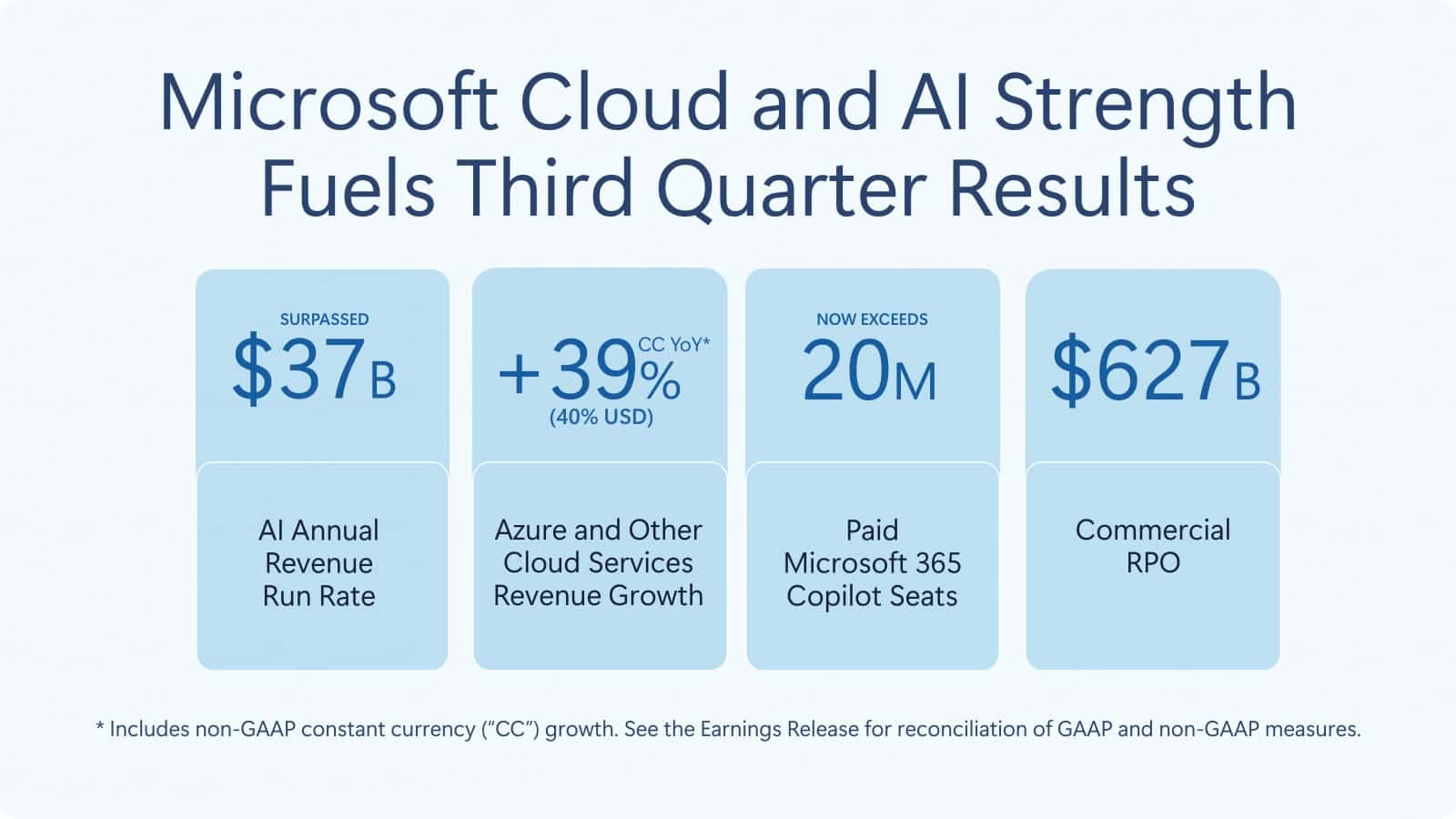
Microsoft’s Q3 2026 Revenue Jumps 18% Fueled by Cloud & Azure Growth

Microsoft has reported its fiscal year 2026 Q3 earnings with revenue $82.9 Billion, rising $12.8 billion (18%) YoY, driven primarily by growth in Microsoft Cloud services. Specifically, Intelligent Cloud revenue increased, supported by continued strength in Azure (up by 40% YoY). Meanwhile, Productivity and Business Processes also grew, fueled by Microsoft 365 Commercial cloud adoption.

Azure and Cloud push Microsoft growth as Xbox weakens further

However, More Personal Computing revenue declined due to lower hardware sales across Devices and Gaming, although Search advertising growth helped offset part of the drop. Meanwhile, Windows OEM and Devices revenue fell 2%, reflecting continued pressure in Microsoft’s hardware segment.

Moving on, gaming revenue declined 7%, while Xbox content and services revenue dropped 5%. As expected, Xbox hardware revenue plunged 33%, marking the steepest decline across Microsoft’s consumer portfolio.

In addition, cost of revenue increased $4.9 billion, representing a 22% rise, mainly due to higher demand and expansion across Microsoft Cloud. As a result, gross margin increased $7.9 billion, up 16%, with gains across all major segments. That said, gross margin percentage declined due to continued investment in AI infrastructure and rising AI product usage, though efficiency gains across Microsoft Cloud helped reduce the impact.

Image credit: Microsoft

Notably, Microsoft Cloud gross margin percentage decreased to 66%, reflecting heavier AI-related spending. Even so, efficiency improvements in Azure and Microsoft 365 Commercial cloud partially balanced the pressure from increased usage and infrastructure costs.

At the same time, operating expenses rose $1.5 billion, up 9%, driven by ongoing investments in research and development, compute capacity, AI talent, and data required for product development. Despite this, total company headcount declined year over year, showing tighter workforce management alongside rising investment intensity.

Furthermore, operating income increased $6.4 billion, up 20%, supported by strong growth in Productivity and Business Processes and Intelligent Cloud segments. Foreign exchange also played a role, contributing a favorable impact of 3% on revenue, 3% on gross margin, and 4% on operating income, while cost of revenue saw an unfavorable impact of 2%. Finally, net income and diluted EPS were impacted by OpenAI-related investment losses.

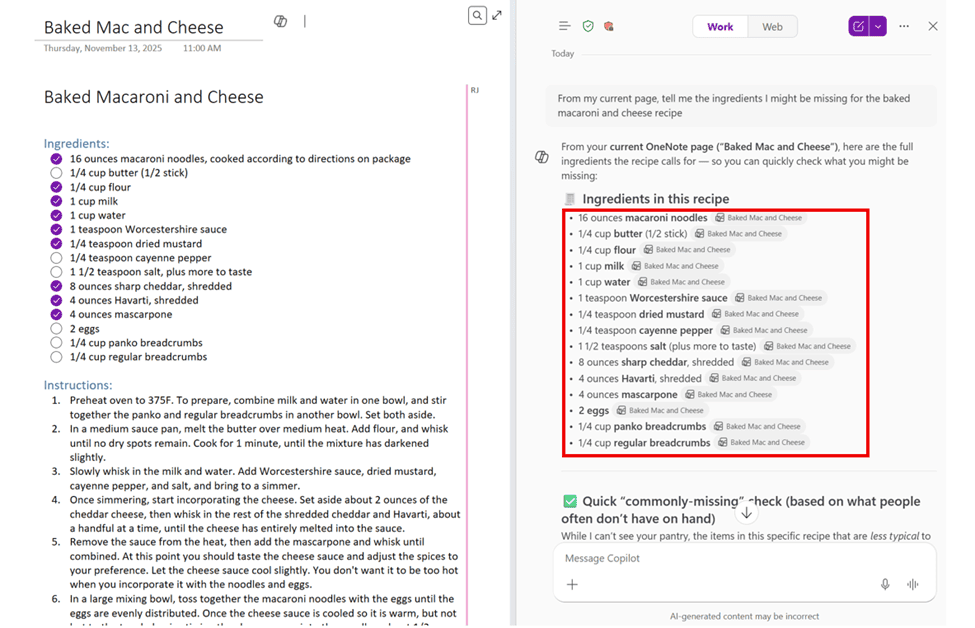
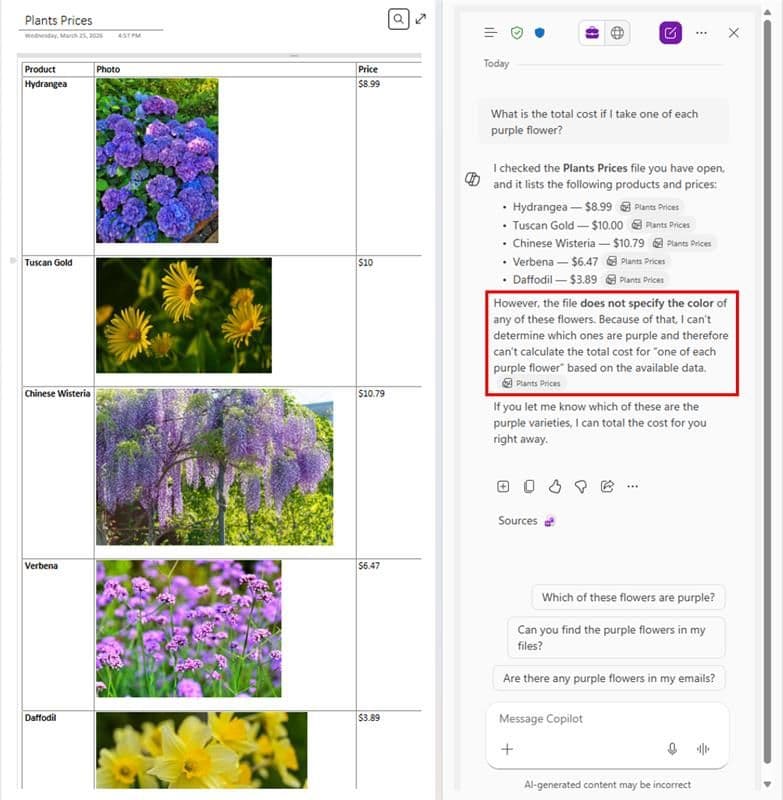
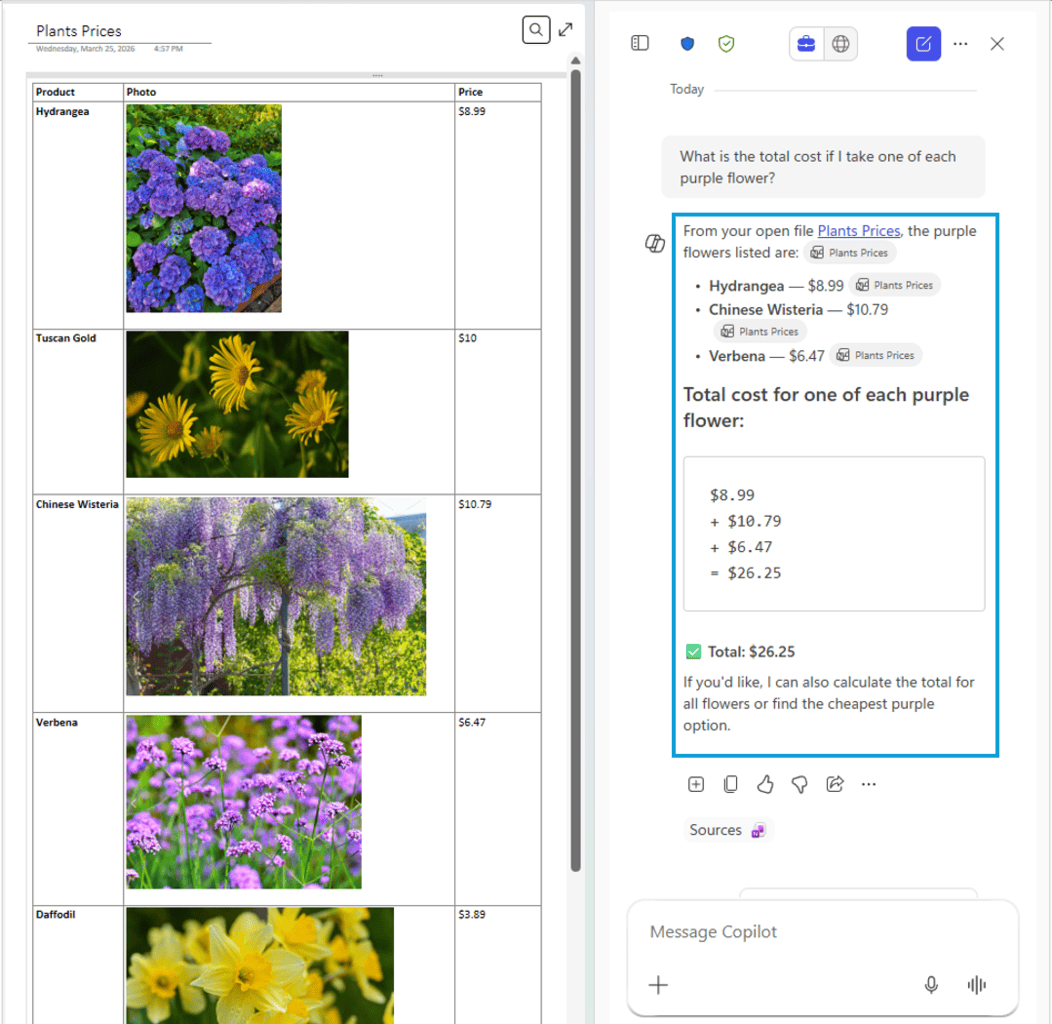
Copilot in OneNote Now Understands Images, Tables & Note Tags to Offer Better Responses

Microsoft has upgraded Copilot in OneNote, improving how it understands and processes notebook content. The change allows Copilot to interpret full page content, including images, tables, note tags, and inked notes. It can now connect multiple elements on the same page and generate responses without requiring users to isolate or reformat information.

Copilot in OneNote now reads images, tables, and note tags for context

Microsoft says Copilot now uses broader page context to improve accuracy. The AI assistant can also continue follow-up questions using the same note content without losing reference to earlier inputs. Previous behavior limited Copilot when dealing with structured elements like tables and checklists.

Those elements were often treated separately, which reduced the depth of responses. The updated system improves recognition across multiple content types, including visual and handwritten notes.

Microsoft is rolling out the feature to Microsoft 365 Copilot users across OneNote on Windows, Mac, and iOS. Windows users need Version 2601 (Build 19628.20128) or later. Mac and iOS users require Version 16.106 (Build 26020821) or later.

Notably, the feature is available for users with Microsoft 365 Copilot licenses, including supported Premium and Basic tiers. No additional configuration is required beyond installing the supported update versions.

The update is part of Microsoft’s ongoing effort to extend Copilot’s capabilities across its productivity tools. OneNote is being enhanced with deeper content understanding to support more complex note-based workflows. As a remind, Microsoft OneNote and Samsung Notes sync support is ending soon. You can read more about it here.

Teams Phone User Multi-Line Now Lets Admins Assign Up to 10 Numbers Per User

Microsoft has announced general availability of Teams Phone User Multi-Line. With the new update, users will be able to link multiple phone numbers with their account without having to use a different account or workaround. This suggests that Microsoft is moving towards turning Teams into the hub for business calling.

Multiple phone numbers within one Teams account

Microsoft allows assigning up to 10 phone numbers to one account. Each phone number represents another role, department, or region of the company. Users are able to make and receive phone calls through their multiple numbers right within the Teams interface. There will be no need for account switching or using multiple devices.

Microsoft also offers support for localized caller IDs. Users are able to choose different phone numbers depending on the country they call in.

The function is available both in Teams desktop app and Teams Phone devices. Users do not need to sign in again to use another number. The admins handle all numerical values centrally, making it more flexible yet requiring more configuration responsibilities in large environments.

In older systems, there was heavy dependence on hardware facilities. Teams shift this into a cloud-based setup with more control through software. Not to forget, the feature supports users managing multiple roles, departments, or regions from one account. It keeps communication structured without fragmentation.

Let’s not forget that Teams is soon getting improved download manager, faster call transfers, and AI meeting notes. While Microsoft is continuously improving Teams, a persistent banner to “Unlock Premium” is being criticized lately. You can read more about it here.

Xbox Employees to Reportedly Get Xbox Email Addresses from Microsoft Next Month

Microsoft is reportedly giving Xbox employees an Xbox email address as part of a renewed internal branding push announced last week by Asha Sharma and Matt Booty. As part of the major Xbox reset plan, the new CEO scrapped the Microsoft Gaming identity. That means Microsoft’s gaming division will now be only called “Xbox,” like it used to be in the old days.

Microsoft is reportedly giving Xbox employees @xbox.com emails as part of internal branding pivot

It seems the “We are Xbox” tagline is being taken seriously, as Tom Warren from The Verge reports that Microsoft be handing Xbox employees an @xbox.com email address next month. This will reportedly replace the @microsoft.com address as the default send-from identity. However, employees can still opt out and continue using their Microsoft email as the default.

Per the report, Mojang employees will also get an @mojang.com email address, while still retaining their Microsoft email address. The planned changes were detailed in internal Xbox communications seen by The Verge, which talk about strengthening the Xbox identity both inside and outside Microsoft. At a time when Microsoft’s gaming divisions span multiple studios and brands, the change appears aimed at presenting a more unified front.

Other Xbox-linked studios like Activision and Bethesda already use their own domain names, so this move brings Microsoft’s internal structure closer in line with that approach. Some employees had previously been able to request Xbox email addresses, but this is the first company-wide rollout.

Ever since Asha Sharma assumed the role of Xbox CEO, the chatter around the platform has grown in the online space. These days, fans are often seen tagging Xbox executives, especially CEO Asha Sharma, to directly convey feedback and requests. Sharma, doing her part, has been quite responsive on multiple occasions. Earlier this week, the CEO also confirmed that Xbox is working on a dynamic background for the new logo in response to a fan request.

Gemini Now Lets You Generate Docs, Sheets, Slides, and PDFs Inside Chat

Google has introduced a new feature in Gemini that allows users to generate downloadable files directly from a chat prompt. Announced by CEO Sundar Pichai on X, the latest update removes the need to copy content into external apps or manually format documents.

Gemini now supports direct creation of Docs, Sheets, Slides, PDFs, and more from chat

Gemini can now create multiple file types, including PDFs, Microsoft Word documents (.docx), Excel spreadsheets (.xlsx), CSV files, and Google Workspace formats such as Docs, Sheets, and Slides. It also supports LaTeX, Markdown, plain text, and rich text formats.

The feature is designed to convert prompts into structured outputs instantly. For example, a user can request a budget sheet and receive a formatted Excel file, or turn notes into a Word document or PDF.

Once generated, files can be downloaded directly or exported to Google Drive, depending on the format. This reduces the need for switching between apps during basic document creation tasks.

The feature is now available globally to all Gemini app users. Google positions Gemini more directly against productivity tools by combining AI chat with file generation in one workflow. It also extends its compatibility across both Google Workspace and Microsoft Office formats.

All that said, it is still unclear how well the system handles complex formatting or large, detailed documents in practical use cases.

PS Plus May 2026 Games Lineup Officially Announced

Sony has just revealed the PlayStation Plus Monthly Games lineup for May, and it includes a bunch of fan favorites. EA Sports FC 26, Wuchang: Fallen Feathers, and Nine Sols will be available to subscribers starting May 5. The selection mixes a major sports title with a Soulslike RPG and a 2D action platformer.

EA Sports FC 26 headlines the drop

EA Sports FC 26 is the star of the lineup, thanks to its enhanced Football Ultimate Team modes and improved gameplay mechanics. Like previous entries, it emphasizes scale, offering thousands of characters, teams, and tournaments. Additionally, it offers an exclusive PlayStation Plus Icons Pack while it is available.

Wuchang: Fallen Feathers offers a Soulslike adventure set in the late Ming Dynasty, where players must explore, fight, and transform through the power of an unknown illness.

Nine Sols offers a 2D action-platforming game with deflectable attacks and handcrafted art, placing emphasis on precise gameplay and mythology-driven narrative.

Well, there are a few games leaving the subscription too. PlayStation Plus subscribers have until May 4 (Monday) to add Lords of the Fallen, Tomb Raider I-III Remastered, and Sword Art Online Fractured Daydream to their collection.

The May lineup will be available to all PlayStation Plus subscribers beginning on May 5.

Microsoft OneNote & Samsung Notes Sync Support Is Reportedly Ending Soon

Microsoft and Samsung have been close partners for a long time. Their collab has mainly focused on bridging mobile and desktop experiences, especially through productivity tools. One of the most useful outcomes of that partnership has been the seamless syncing between Samsung Notes and Microsoft OneNote. Well, that integration is reportedly coming to an end, according to SamMobile.

Samsung Notes and Microsoft OneNote Sync ending starting this August

The news outlet spotted a post on X by user @kro_roe, who noted that syncing between Samsung Notes and Microsoft OneNote will stop in July 2026. When folks at SamMobile checked on a Galaxy S26 Ultra, the Samsung Notes app itself confirmed the change, displaying a message that syncing support will end “after July.” Take a look at the shared screenshot below:

Image credit: SamMobile

At a time when cross-device productivity has become more important than ever, the end of this integration could cause disruption for users who rely on both platforms. As of now, notes created in Samsung Notes can appear directly in OneNote and vice versa, helping users move between mobile and PC workflows smoothly. Once the feature ends, that continuity will break completely.

In other words, users will need to manually manage their notes or switch to alternative solutions if they want cross-platform access.

For many, this change could feel like a step backward in a space where ecosystem integration is becoming a key selling point. Samsung and Microsoft have not yet provided a detailed reason for ending the feature, which leaves room for speculation about backend changes or shifting strategic priorities.

CISA Orders Urgent Patch for Actively Exploited Windows Shell Vulnerability

Microsoft has released an urgent fix for a Windows Shell vulnerability that is now actively exploited in the wild, raising concerns despite its relatively low severity score.

The flaw, tracked as CVE-2026-32202, has been added to the Known Exploited Vulnerabilities catalog by the Cybersecurity and Infrastructure Security Agency, triggering a directive that requires U.S. federal agencies to apply patches by May 12. Microsoft confirmed active exploitation on April 27, marking a significant escalation from what initially appeared to be a limited issue.

Incomplete patch led to a new attack path

The vulnerability traces back to an earlier flaw, CVE-2026-21510, which Microsoft attempted to fix in February 2026. That update successfully addressed a remote code execution risk but failed to fully eliminate an authentication bypass vector. This oversight allowed attackers to continue exploiting the system through a different path.

Security analysis later confirmed that the incomplete fix left systems exposed to a zero-click attack scenario, where users do not need to open or execute any files to be compromised.

Zero-click exploit via Windows Explorer

The attack method relies on malicious shortcut (.LNK) files placed inside folders. When a user simply browses the folder using Windows Explorer, the system automatically processes embedded UNC paths within the shortcut.

This triggers a connection to an attacker-controlled server over SMB, leaking the user’s NTLMv2 hash without any interaction. Because the process happens silently, users receive no warning or prompt.

Real-world impact outweighs severity score

Although the vulnerability carries a CVSS score of 4.3, typically classified as medium severity, its real-world implications are far more serious. Attackers can capture NTLMv2 hashes and use them in relay attacks across networked systems.

This opens the door to lateral movement, privilege escalation, and potential full network compromise. In some cases, attackers may also crack stolen credentials offline, further increasing the risk.

Security researchers have validated this attack chain in real-world scenarios, confirming that the leftover vector from the earlier patch remains highly exploitable.

Patch now available, but not without issues

Microsoft addressed the vulnerability on April 14 with a fix included in the KB5083769 update for Windows 11 versions 24H2 and 25H2. Systems that do not install this update remain vulnerable to the zero-click exploit.

However, the rollout has not been entirely smooth. Some users, particularly on HP and Dell devices, have reported boot loop issues after installing the update. Microsoft has provided recovery guidance for affected systems, but the issue adds friction to an already urgent patching process.

Broader security pressure builds

The patch arrives as Microsoft continues pushing users from Windows 11 24H2 to 25H2 ahead of the October 13 support deadline. Systems that delay updates now face increased exposure, especially with confirmed active exploitation in the wild.

This vulnerability also comes amid a broader wave of security alerts. The Cybersecurity and Infrastructure Security Agency has recently issued additional warnings, including directives to patch the BlueHammer flaw, highlighting a growing urgency around timely updates.

Organizations and individual users should prioritize installing the KB5083769 update immediately. Despite reported installation issues on some systems, the risk of leaving systems unpatched remains significantly higher.

Where update-related problems occur, Microsoft advises following official recovery steps to stabilize affected devices while maintaining protection against active threats.

Via Notebook Check

PlayStation 5 Can Now Run Linux, But Only on Specific Firmware

A new method from Andy Nguyen allows users to run Linux on the PlayStation 5, opening the door to advanced customization and experimentation. The setup works only on specific firmware versions and requires a jailbreak, making it strictly an enthusiast-level project for now.

Nguyen’s approach boots a full Linux environment directly on the console, showing how far the modding community has pushed the system beyond its intended gaming use.

How the PS5 Linux mod works

The method relies on a disc-version PS5 running firmware between versions 3.00–3.21 or 4.00–4.51. Users must apply a jailbreak and inject custom payloads before launching Linux.

Once completed, the console boots into Ubuntu 26.04, running on a modern Linux kernel. The system behaves like a standard Linux machine, accessible through terminal commands and configuration files.

This is not a permanent modification. Each reboot resets the system, requiring users to reapply the jailbreak to access Linux again.

What you can do in the Linux environment

The Linux build already includes several hardware-level controls that go beyond basic functionality. Users can adjust VRAM allocation, control fan speeds, and toggle boost performance modes.

These features allow for deeper system tuning, closer to a PC-like experience rather than a traditional console setup. However, most controls still require manual configuration.

Current limitations and missing features

Despite the progress, the project remains experimental. Driver support is incomplete, and some hardware features do not work reliably.

Wireless networking may require manual restarts, and the DualSense controller does not function through its built-in wireless connection. External adapters provide a workaround.

Display output currently caps at 60 Hz across resolutions, including 1080p, 1440p, and 4K. Higher refresh rates such as 120 Hz may arrive later as development continues.

Not a permanent mod

This Linux setup qualifies as a soft mod. It does not overwrite or damage the PS5’s original system software.

Users can return to the standard console experience simply by rebooting. That flexibility lowers the risk compared to permanent modifications, though the process still requires technical knowledge.

Experimental, but promising

Running Linux on the PS5 marks a significant milestone for console modding. It shows that modern systems can support alternative operating systems with the right exploits.

At the same time, the setup remains limited to older firmware and requires ongoing development to improve stability and hardware support.

In related news, reports suggest Sony may introduce a 30-day online license check for newer digital purchases, possibly as a measure to reduce refund abuse.

Via TechPowerUp

Windows 11 Update Sizes Pass 5GB, Fueled by AI and Cumulative Updates

Microsoft’s latest Windows 11 updates are growing rapidly in size, with full catalog packages now reaching between 4GB and 5GB, and expanding to nearly 9GB once extracted, as WindowsLatest writes. That sounds massive, but it doesn’t reflect what most users actually download.

The difference comes down to how Microsoft delivers updates behind the scenes. While the full package includes everything, Windows filters out unnecessary components and only installs what each system needs.

Catalog size vs real download size

The large numbers tied to Windows updates refer to catalog packages used for enterprise deployment and offline installs. These include all components, configurations, and historical fixes bundled together.

In real-world scenarios, most users download around 1.5GB to 2GB. Microsoft achieves this through Express updates and Unified Update Platform (UUP) filtering, which tailor downloads based on hardware and system configuration.

Why Windows updates are so large

The biggest driver behind update size growth is the shift to cumulative updates. Each update includes all previous fixes instead of just new changes. This approach improves reliability and simplifies patching, but it also increases package size over time.

AI-related components also contribute to the growth. Microsoft has started bundling technologies tied to semantic search and on-device AI, including elements like PSTokenizer, image search features, and the Onyx runtime. These additions alone account for several gigabytes inside the full package.

However, not every system installs these components. Windows selectively deploys them depending on hardware support, which keeps actual downloads smaller for most users.

Why Microsoft doesn’t shrink updates further

Microsoft prioritizes compatibility across a wide range of devices. Windows must support different CPUs, GPUs, drivers, and firmware configurations, which requires broader packaging.

Enterprise needs also play a role. Organizations rely on tools like WSUS and Configuration Manager to distribute updates internally, which means full packages must remain available.

Offline installation support adds another layer of complexity. Systems without consistent internet access still need complete update bundles to function properly.

Enterprise storage impact

The growing size of updates creates a noticeable impact in enterprise environments. Annual storage requirements have increased significantly, rising from roughly 11GB per year per architecture to around 52GB.

This increase affects how organizations manage update distribution, storage planning, and infrastructure costs.

A growing trend

Windows update sizes have expanded quickly over the past few years. In 2024, updates typically ranged between 200MB and 500MB. By 2025 and beyond, they commonly reach 3GB to 4GB in packaged form.

The pattern mirrors what happened with Windows 10, but the growth rate appears faster this time.

What could change next

Microsoft could eventually separate AI-related components into optional downloads, which would reduce base update sizes. Another possibility involves introducing new checkpoint-based systems that minimize how much data gets bundled each time.

For now, large package sizes remain part of the trade-off. Microsoft favors stability, compatibility, and flexible deployment over smaller downloads.

The growing complexity of updates comes as users continue to report issues tied to recent patches. Some have experienced Background Intelligent Transfer Service failures linked to update KB5083769, affecting how updates download and install.

At the same time, Microsoft is preparing UI changes in Windows 11. The company plans to remove the legacy loading spinner and replace it with a more modern visual. There are also early signs that AI features could expand into tools like Focus Mode, aligning with Microsoft’s broader push toward on-device intelligence.

Despite the increasing size of update packages, most users won’t feel the full impact directly. The system still downloads only what it needs, even as the underlying architecture continues to grow.

Take-Two CEO Vaguely Reconfirms GTA 6 Release Date & Hints at Pricing Approach

GTA 6 is undoubtedly one of the most anticipated games of this year. Every now and then, we keep hearing rumors and leaks about the game, with delay speculation constantly popping up these days.

Fortunately, multiple recent reports have pushed back against those claims, suggesting the November 19 release date is still on track. That’s especially after Take-Two’s CEO vaguely reconfirmed that GTA 6 remains set for a November 19 release.

Take-Two CEO sort of reconfirms the GTA 6 release date and provides pricing update

The news comes via IGN, which reports that speaking at iicon, Take-Two CEO Strauss Zelnick not only talked about GTA 6 pricing but also jokingly reaffirmed that the game will be out on November 19. Here’s what he said:

“What we think about is making the most spectacular piece of entertainment on Earth, in history – and it’s a pretty daunting challenge. If we do that, and if we’re of service to our customers, then the upside will take care of itself. [He] thinks a lot of people will be calling in sick on November 19.”

That witty remark is enough to debunk all the rumors going around about a delay for the game. In the context of GTA 6 pricing, Zelnick reportedly said, “Consumers pay for the value that you bring to them, and our job is to charge way way way less of the value delivery. How you feel about something you buy is the intersection of the thing itself and what you pay for. Consumers need to feel like the thing itself is amazing and the price they were charged was fair for what they got.”

Earlier this year, Zelnick also referred to a price point of $70 to $80 as the standard rate for premium titles. However, at the time, he didn’t explicitly link the pricing to GTA 6. Given the recent comments, it seems GTA 6 will be easier on players’ wallets, at least when compared to the value delivered by the game.

Microsoft Teams “Unlock Premium” Banner Sparks User Backlash

Microsoft has introduced a new interface change in Microsoft Teams that is drawing criticism from enterprise users, as Neowin writes. The update moves the “Unlock Premium” option out of the overflow menu and places it directly in the title bar as a persistent banner.

The redesign replaces a previously hidden option with a visible prompt marked by a diamond icon. When selected, it opens a pop-up that highlights Premium features and offers a 60-day free trial without requiring a credit card.

Banner replaces hidden menu option

In earlier versions, users accessed the Premium upsell through the three-dot menu. The new design surfaces it at all times in the main interface, making it a constant presence during daily use.

Microsoft prices Teams Premium at $10 per user per month. The placement suggests the company wants to increase visibility and encourage more users to explore the paid tier.

Enterprise users push back

The reaction from enterprise users has been largely negative. Many argue that the banner feels misplaced in a product designed for professional environments. The inability to remove or hide it has become a central concern, especially for organizations that value clean and distraction-free interfaces.

Users also point out that most employees cannot approve purchases or upgrades. In most companies, IT departments handle licensing decisions, which makes direct prompts to end users less relevant and, in some cases, frustrating.

UX concerns and “dark pattern” criticism

The wording of the feature has also sparked debate. The term “Unlock” suggests enabling something already included, rather than purchasing a separate subscription. This has led some users to describe the design as misleading.

Critics argue that this approach resembles a “dark pattern,” where interface elements guide users toward a specific action without clearly communicating its implications. Concerns around trust and transparency have surfaced as a result.

Microsoft’s likely strategy

The change appears to align with a broader push to drive product adoption from within organizations. By exposing Premium features directly to employees, Microsoft may be aiming to generate internal demand that eventually reaches decision-makers.

This strategy shifts part of the sales process into the product experience itself, relying on visibility rather than traditional administrative channels.

The backlash has continued for over a month, and there is still no official option to disable or remove the banner. Microsoft has not indicated whether it plans to revise or roll back the change.

Broader Teams issues and upcoming features

The controversy arrives alongside other challenges affecting Teams. Some users recently encountered issues where accounts became unreachable, while security researchers reported that attackers have used the platform to distribute Snow malware and target sensitive data.

At the same time, Microsoft continues to expand the platform. Upcoming updates are expected to introduce an improved download manager, more reliable call transfer options, and additional usability improvements.

For now, the “Unlock Premium” banner remains in place, and the debate continues over whether increased visibility justifies the disruption to the user experience.

GitHub Puts “Availability First” as It Rethinks Scaling Priorities Following Recent Outages

GitHub has provided an update following two recent outages and admitted that none of them was acceptable. In an update from earlier today, GitHub’s CTO, Vlad Fedorov, even apologized saying, “we are sorry for the impact they had on you.”

As you may know, the company is currently experiencing an increased demand due to AI-driven/agentic development workflows. In fact, GitHub initially thought that the 10x increase would be enough to keep up with demands; however, it seems like a much larger increase will be necessary.

GitHub reveals plan for huge scale-up

GitHub says that it began preparations for infrastructure scaling as early as October 2025. However, the company understood that it may require building systems able to process up to 30x more loads by February 2026. As activity in repositories, pull requests, and automation keeps increasing rapidly, such a scale-up is required.

Image credit: GitHub

As mentioned above, the company sees the issue not only in volume but in complexity as well. For example, a single pull request affects a number of systems including storage, APIs, search, and background services. When the volume becomes high, such inefficiencies may result in serious issues very quickly.

Outages revealed some weaknesses

The first outage occurred on April 23 and concerned the functionality of the merge queue feature. According to GitHub, some pull requests generated merge commits incorrectly if the changes had been grouped into one merge commit. Over 650 repositories and 2,000 pull requests were involved in the problem, but there was no loss of data.

The second outage occurred on April 27 and affected the search features of the service. The malfunction was associated with an overloaded Elasticsearch cluster, which resulted in partial failures to display results. However, the core operations of Git did not suffer in any way.

Having said that, now GitHub is actively working on its system’s reliability. For example, the company looks to ensure isolation of critical services, minimize risks of a single point of failure, and switch to a multi-cloud strategy. In addition, it is expected to increase transparency in case of future outages.

With all that in mind, it is yet to be seen whether these efforts will suffice as GitHub moves toward further scalability of its platform. As a reminder, GitHub recently announced a major change as to how Copilot will be priced and billed, as it is moving the product from its current request-based model toward full usage-based billing starting June 1, 2026.

Article feature image source: GitHub

Windows 11 Clock Focus Mode Could Get a Major AI-Powered Upgrade

As WindowsLatest writes, Microsoft is working on a major overhaul of the Focus feature in the Windows Clock app, aiming to turn it into a more powerful productivity hub. Early previews show a cleaner design, deeper task management, and early AI-driven capabilities.

The update is still in development, with several features incomplete or disabled. However, it already signals a shift toward a more intelligent and customizable focus experience in Windows.

Redesigned UI and improved customization

The new Focus interface introduces a modern look with rounded corners and a cleaner layout. Microsoft focuses on simplicity while adding more personalization options.

Users will be able to control music playback, adjust volume, and set custom background images during sessions. The mini floating focus timer remains available for quick access without disrupting workflows.

Custom session lengths and break durations are also supported, along with basic sound options for focus and break periods.

Deeper Microsoft To Do integration

Microsoft is expanding integration with Microsoft To Do, making task management a core part of the Focus experience.

The updated layout includes a larger task pane that can take up to half the screen. Users can sort tasks by title, creation date, or due date.

Tasks now support more detail, including steps, attached files, notes, and deadlines. This makes it easier to plan and execute work directly within a focus session.

Early AI features and productivity tracking

Microsoft has started testing AI-powered features, although they remain in early stages. The system may suggest task steps automatically, helping users break down complex work into manageable actions.

Some of these features could rely on NPUs available in newer PCs, hinting at on-device AI processing.

A new “Reflection” feature allows users to rate their focus sessions, from deep focus to distracted. Over time, this data could help identify productivity patterns and improve work habits.

An Insights page is also planned, but it is not yet available in current builds.

Future integrations and limitations

Microsoft is exploring integrations with e-learning platforms such as Canvas and Moodle. These could enable assignment-based focus sessions, especially useful for students.

Despite the improvements, the current version has performance drawbacks. Early builds show that the updated Clock app uses nearly twice the RAM compared to the previous version.

Many features remain placeholders, and Microsoft has not shared a release date yet.

Broader Windows changes in development

Alongside the Clock app overhaul, Microsoft continues to modernize other parts of Windows. The company plans to remove the legacy spinner, introduce a redesigned Run dialog, and improve the Windows 11 installation experience.

These updates reflect a broader push toward a more consistent and modern interface across the operating system.

Salesforce Hits Microsoft with Antitrust Lawsuit in the UK Over Teams Bundling

Just a week ago, the UK’s Competition Appeal Tribunal allowed a case against Microsoft involving Windows Server to proceed to trial. Well, Microsoft is in hot water in the UK yet again, this time for Teams bundling.

Slack legally challenges Microsoft over Teams bundling

As per Reuters report from earlier this week, Salesforce, the parent company behind Slack, filed an antitrust complaint against Microsoft for bundling Teams with their products.

According to the lawsuit, Slack accuses Microsoft of having “tying and bundling arrangements” in connection with Teams. Interestingly, Slack had brought forward the similar accusation in a separate complaint submitted to the European Commission back in 2020.

The company argues that the problem lies in the way Teams are integrated with other Office products, which allegedly gives Teams an advantage over non-integrated solutions such as Slack.

Well, Microsoft has already responded, arguing that the allegations presented in the complaint are groundless, and that Slack failed to keep up with Microsoft due to the quality of its product rather than bundling. In a statement to Reuters, the company’s spokesperson said, “Slack’s lackluster growth, compared to Zoom and Teams, was based on inferior capabilities when COVID-19 hit in ​2020, and had nothing to do with Microsoft.” ​

Last year in May, Microsoft managed to avoid an antitrust fine from the EU when it agreed to bundle Office software without Teams at a reduced price. It’ll be interesting to see the outcome of Salesforce’s lawsuit this time around.

Visual Studio 2026 April Update Focuses on Cloud Agents and AI Workflows

Microsoft has released the April update for Visual Studio 2026, introducing a wave of AI-focused improvements aimed at modern development workflows. The update places strong emphasis on cloud-based agents, tighter GitHub Copilot integration, and enhanced tooling for complex codebases.

Cloud agents bring scalable AI workflows to Visual Studio

At the core of this release is cloud agent integration, which allows developers to run AI agents on remote infrastructure. These agents operate in scalable and isolated environments, helping teams offload tasks without impacting local performance. Developers can start sessions directly within Visual Studio by selecting the “Cloud” option from the agent picker in the Chat window, provided they are working within a GitHub repository with the necessary permissions.

The feature builds on GitHub Copilot capabilities, extending its reach beyond local assistance into distributed workflows. By moving compute-heavy processes to the cloud, developers can focus on critical tasks while agents handle automation and background operations.

Custom agents and C++ tools get major upgrades

Microsoft has also expanded support for custom agents. Developers can now define agents at the user level instead of limiting them to individual repositories. This change allows agents to move across multiple projects while retaining key capabilities such as workspace awareness, code understanding, tool usage, model selection, and MCP connections to external data sources.

C++ development sees notable improvements in this update. The Copilot agent mode for C++ is now generally available, offering more advanced code navigation features. Developers can explore class hierarchies more efficiently and follow function calls across large codebases, making it easier to manage complex applications.

Debugger agent and usability improvements refine workflows

Another major addition is the new Debugger Agent. This tool helps validate fixes by testing them against actual runtime behavior. It allows developers to confirm whether issues have truly been resolved, reducing the risk of incomplete or ineffective fixes.

The update also introduces smaller but meaningful refinements. Users can now customize Copilot keyboard shortcuts, giving them more control over their workflow. Microsoft has also adjusted suggestion priorities, ensuring IntelliSense recommendations appear before Copilot completions based on developer feedback.

Overall, the April update signals Microsoft’s continued push toward deeper AI integration in software development. The focus on automation, scalability, and intelligent tooling reflects a broader shift toward AI-assisted coding environments.

In related updates, Microsoft has also rolled out new PowerToys and Visual Studio Code releases, and expanded its AI ecosystem by bringing GPT-5.5 to Microsoft Foundry.

Via Neowin

[UPDATED] PlayStation May Require 30-Day Online Check for New Digital Games

[UPDATE: 29 April 2026, 10:48 AM UTC] Sony’s new DRM change appears to be a crackdown on refund exploits. The system reportedly uses a temporary license during the initial 14-day refund window. Players may need to go online once in that period to validate the game. After that, the license is said to switch to a permanent one with no further checks. However, Sony has yet to confirm this, so the details remain based on user findings. You can read our detailed follow-up story here.


[ORIGINAL STORY] Reports suggest that Sony may have introduced a 30-day online license check for newer digital purchases on PlayStation consoles. The claims, highlighted by VideoCardz, point to a potential change affecting both PlayStation 4 and PlayStation 5 users.

According to user testing, games purchased after a March 2026 system update may stop launching if the console remains offline for more than 30 days. Reconnecting to the internet reportedly restores access, suggesting a periodic license validation system.

Mixed Reports Suggest Limited or Gradual Rollout

The reports remain inconsistent. Some users claim they experience the restriction, while others report no issues at all. This variation suggests the feature may still be rolling out or undergoing testing.

Additional details from Dot Esports cite a support chat where the behavior was described as intentional. The support response allegedly stated that the check applies only to newer digital purchases, and setting a console as primary does not bypass the requirement.

Independent Testing Points to Online Validation Requirement

Content creator Spawn Wave conducted independent testing to verify the claims. The test involved taking a console offline and removing the CMOS battery to reset the system date. Under those conditions, newer digital titles failed to launch without reconnecting online, while older purchases and physical discs continued to work normally.

While the test supports the reported behavior, it does not confirm whether this is an official policy or a temporary system change. Sony has not publicly acknowledged the feature or provided clarification.

Concerns Grow Over Digital Ownership and Offline Access

The situation has raised concerns among players. Many point to reduced usability for offline gaming, especially for travelers or users with limited internet access. Others highlight long-term preservation issues tied to digital-only libraries.

The reports also reinforce an existing limitation of digital ecosystems. As outlined in Sony’s terms, digital purchases function as licenses rather than full ownership, which allows for access conditions like periodic validation.

For now, the feature remains unconfirmed. User reports and testing indicate that it may already affect newer purchases, but official details from Sony are still pending.

In other news, Sony has increased hardware prices in Southeast Asia and expanded PSSR 2.0 support to more games.

Sony’s New DRM Could Be a Quiet Crackdown on Refund Exploits

Earlier this week, a new claim around Sony’s PS5 DRM started making rounds online, suggesting players might need to go online every 30 days to keep access to digital games. The findings were first shared by YouTube channel Hikikomori Media, and the news spread like a wildfire among players who, now, are worried about offline play.

Sony’s DRM could be working differently than everyone expected

Well, follow-up testing from a ResetEra user, andshrew, suggests the system may not be as strict as players have thought (via TechPowerUP). By comparing two copies of the same game across different PSN accounts, the user claims the behavior shifts after the early purchase window.

According to the findings, Sony is likely issuing a temporary license during the first phase after purchase. Within the 14-day refund window, users may need to connect online at least once to validate the game. Once that period ends, the license is said to switch to a permanent one, removing any further online requirement.

At a time when digital ownership is already under pressure, this approach appears aimed at closing a potential loophole. The idea is simple. Prevent users from buying a game, refunding it, and continuing to play offline using an exploit.

I am speculating that perhaps people were exploiting the fact that you could purchase a game, grab the indefinite license file for the thing off of an exploitable PS4 and then refund the purchase – and Sony is currently mitigating this issue by time limiting the initial license that you are issued.

— andshrew on RestEra

No official word yet

Sony has not officially confirmed any of this. There is no clear mention of such a system on PlayStation’s official channels, which leaves most of the discussion based on community testing and speculation.

Even if permanent online checks are not part of the system, the initial validation step could still be an issue for users with limited internet access. In other words, missing that window may temporarily restrict access. For now, it appears Sony is quietly adjusting how digital licenses are handled. If we hear anything from Sony on this matter, we’ll update this article.

Microsoft Teams Glitch Makes Users Unsearchable and Unreachable

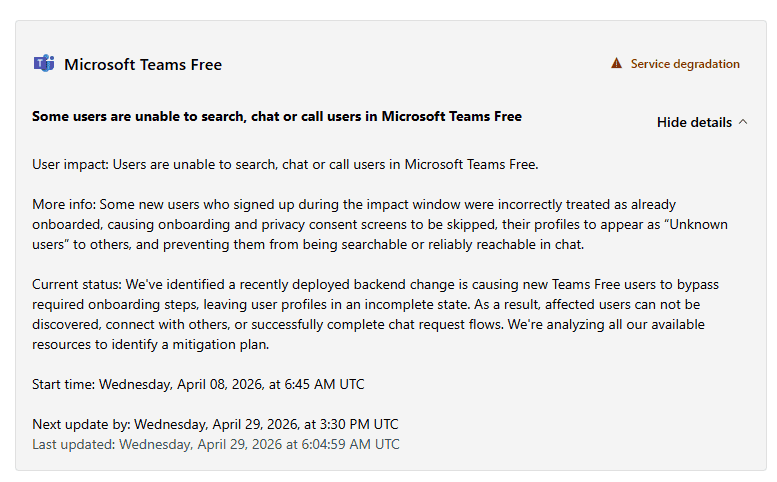
Microsoft is investigating a bug affecting Microsoft Teams Free users that prevents some from chatting or calling others. The issue leaves profiles showing as “Unknown users,” making them unsearchable and unreachable across the platform.

Backend change caused onboarding failure

Microsoft says the problem comes from a recent backend change that skipped critical onboarding and privacy consent steps. Because of this, affected accounts remain in an incomplete state and fail to connect properly with others.

According to the company, new users were incorrectly treated as already onboarded. This broke core functionality, including user discovery, connection requests, and chat initiation.

Ongoing issue since early April

The issue was first reported on April 8 and remains unresolved for some users. Microsoft has classified it as a service degradation rather than a full outage, which means the platform still works but with limited functionality for impacted accounts.

The company has not confirmed how many users or regions are affected, suggesting the scope is still being assessed.

Fix in progress, more updates expected

Microsoft is actively working on a fix and continues to investigate the root cause. The company expects to provide additional updates as progress continues, but no exact timeline has been shared yet.

The onboarding bug is not the only problem users are facing. Some report that right-click paste no longer works properly, while others experience issues accessing meetings after a recent Microsoft Edge update.

These problems suggest broader compatibility or regression issues following recent updates.

Source: Microsoft Service Health Status

Security concerns add to pressure

At the same time, security researchers warn that threat actors are abusing Microsoft Teams to deploy Snow malware. Attackers reportedly use the platform to trick users into downloading malicious files, which can lead to data theft and system compromise.

The combination of reliability issues and emerging security threats puts additional pressure on Microsoft to stabilize and secure its collaboration service quickly.

Via Bleeping Computer

Snapchat’s New AI Sponsored Snaps Turn Chat Into Ad Space for Brands

Snapchat has started rolling out a new ad format called AI Sponsored Snaps, which puts branded AI agents right into Chat. The rollout comes as the platform continues to focus on conversational AI. This comes after recent successful launch of My AI. Snap says that in the first quarter of 2026, users sent over 950 billion chats, and since My AI launched, over 500 million people have used it.

The update is all about ads that act like conversations. AI Sponsored Snaps let brands show up in Chat as interactive AI agents that users can talk to in real time, instead of just being static ads. The company says this method makes interacting with the brand feel more natural because Chat is where users spend most of their time.

The new format is meant to increase engagement even more than Sponsored Snaps, which Snapchat says get 22% more conversions and cost 20% less per action. It is also said to get twice as many conversions per full-screen ad view as other placements.

Snapchat adds sponsored AI agents to power brand conversations

Snap says the feature allows companies to plug in their own AI agents and interact with users across the full funnel, from discovery to purchase. Rather than getting redirected to external sites, users can ask questions, explore products, and get recommendations inside Chat itself.

Image credit: Snap

Speaking about the latest rollout, Ajit Mohan, Chief Business Officer at Snap Inc., says, “Conversation is becoming the most valuable real estate in advertising. AI is accelerating that shift, turning chat into the place where people discover products, ask questions, and make decisions in real time. The real opportunity isn’t just putting ads into those environments, it’s designing formats that feel native to how people already talk. That’s what AI Sponsored Snaps are about – pairing the scale of nearly a billion monthly users with AI-powered conversations that drive real engagement and action.”

Notably, Snapchat has confirmed an upcoming alpha rollout in partnership with Experian, a data and technology firm. Moreover, the company says this is just the start, as more brands are expected to explore AI-driven conversational ads on the platform. Speaking of other features, let’s not forget the company recently launched AI Clips. It has also laid off 1,000 employees as it leans into AI-driven efficiency.

Steam Machine and Steam Frame Prices Expected to Rise Amid RAM Shortage

Valve confirmed that its new Steam Controller will retail for $99 USD, acknowledging that the final price is higher than initially planned. The company pointed to increased global shipping costs as the primary reason behind the controller’s pricing shift, rather than memory-related components.

Despite the higher cost, the controller is set to arrive on schedule, becoming the first piece of new Steam hardware to reach the market amid ongoing supply challenges.

RAM Shortages Slow Down Steam Hardware Rollout

While the controller avoids heavy reliance on memory components, other devices in Valve’s lineup face more serious pressure. Reports cited by Wccftech, based on insights from Brad Lynch, suggest that internal pricing for both the Steam Machine and Steam Frame has increased.

The main driver is a global DRAM shortage, which continues to push memory prices higher. Steam Machine appears to be the most affected, as it relies more heavily on RAM, while Steam Frame faces milder cost increases.

Shipping expenses also contribute to the rising costs, adding further pressure on final retail pricing across Valve’s hardware lineup.

Higher Prices Could Impact Adoption

The combination of memory shortages and logistics costs suggests that upcoming Steam hardware may launch at significantly higher prices than originally expected. Final pricing for Steam Machine and Steam Frame remains unconfirmed, but early indicators point to increases beyond Valve’s initial targets.

This raises concerns about adoption, especially if pricing moves beyond what mainstream gamers are willing to pay.

Valve is not alone in facing these challenges. Broader industry reports indicate that other upcoming hardware, including Project Helix, could also see pricing and availability impacted by ongoing memory supply constraints.

Xbox Starts Rolling Out Game Package Manager to All Developers This Week

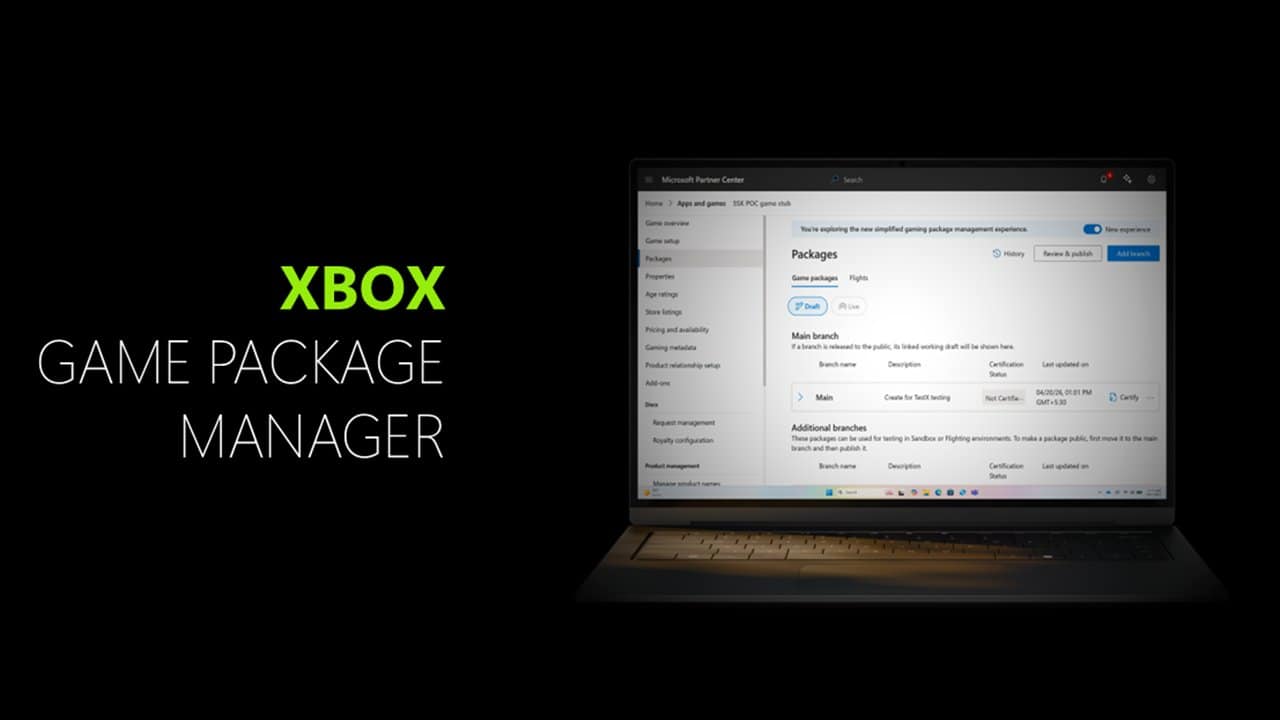
Xbox has started to roll out its new Game Package Manager to developers who use Partner Center. For those unaware, the tool makes it easier to prepare, review, and publish games on the platform by replacing the old Packages module. It comes at a time when Microsoft is changing its developer ecosystem to make publishing easier and more efficient for studios of all sizes.

Game Package Manager starts rolling out this week for all Xbox developers

Developers who are setting up or adding new products for Xbox publishing will automatically get the new Game Package Manager. Microsoft says the completion of rollout will take a few weeks, and during that time, the developers will likely still see the old interface. Existing packages, certification pipelines, and publishing history are not affected, which helps keep things running smoothly during active development cycles.

Game Package Manager makes it easier to upload and share files by giving you a more organized space to work in. Following the rollout, developers can handle packages, check the status of certifications, and keep track of publishing history all in one place. Microsoft is calling this a foundational upgrade that will make it easier for Xbox to use new publishing tools and improve its workflow in the future.

The update also includes a number of changes that make the tool easier to use. A branch gallery makes it easier to tell the difference between draft and live builds, which makes testing and releasing less confusing. The layouts of packages have been changed to make them easier to scan for large projects by grouping them more clearly. Built-in validation tools can also find mistakes earlier, which could lower the number of failed certification submissions and speed up release cycles.

Microsoft also says that during the transition periods, developers will still be able to switch back to the old interface if they need to. That flexibility might be helpful for teams that are in the middle of a release or getting used to the new layout.

Google Signs Classified AI Deal With Pentagon Despite Employee Opposition

Google has reportedly signed a deal with the Pentagon that allows its AI models to be used on classified government systems.

According to The Information, the agreement permits Google AI to be used for “any lawful government purpose,” placing the company alongside OpenAI and xAI, which have also expanded their work with U.S. defense agencies.

The reported deal highlights the growing role of commercial AI systems inside national security operations, including sensitive areas such as mission planning, intelligence work, and weapons targeting.

Google AI could be used on classified networks

The Pentagon has been pushing major AI companies to deploy models inside classified environments with fewer restrictions than those used in consumer or enterprise tools.

Google’s reported agreement would allow government agencies to request adjustments to AI safety filters. It would also prevent Google from vetoing lawful operational decisions once the technology is deployed.

However, the deal reportedly includes limits. Google AI is not intended for domestic mass surveillance, and it cannot be used for fully autonomous weapons without human oversight.

Employees push back against the deal

The agreement has reportedly triggered internal backlash at Google. More than 600 employees signed a letter to CEO Sundar Pichai opposing the company’s involvement in classified military AI workloads.

Workers raised concerns that the technology could support unethical or harmful uses. They also urged Google not to help build AI systems for classified defense operations.

The criticism comes after Alphabet removed some restrictions on AI use in weapons and surveillance, a move that already raised questions about the company’s changing stance on military applications.

AI companies move deeper into defense work

The deal reflects a broader shift across the AI industry. The Pentagon previously signed AI contracts worth up to $200 million each with major labs, including Anthropic, OpenAI, and Google.

Google said it supports government work on classified and non-classified projects while following responsible AI standards and industry safeguards.

The Pentagon maintains that it does not intend to use AI for mass surveillance of Americans or fully autonomous lethal weapons. Still, the reported agreement leaves much of the enforcement control with the government.

In other AI news, OpenAI models are now available in AWS Bedrock, further showing how major AI providers are spreading across government and enterprise cloud systems.

Via The Guardian

Mozilla Rolls Out New Firefox Update With Key Fixes and Relay Upgrade

Mozilla has released a new maintenance update, Firefox 150.0.1, focused on stability, bug fixes, and security improvements after the release of Firefox 150. The update addresses several user-reported issues while also expanding features for Firefox Relay.

The release targets common usability problems and includes important vulnerability patches, making it a recommended update for all users.

Bug fixes improve browsing stability

Firefox 150.0.1 resolves multiple issues that affected everyday browsing. One of the most notable fixes targets website loading problems on platforms like Facebook, particularly for users running Bitdefender antivirus.

Mozilla also fixed an issue where users repeatedly received geolocation permission prompts even after denying access. Another fix improves tab management by resolving bugs that prevented tabs from being added to older saved tab groups.

Additional UI-related fixes include correcting drop-down menus that expanded incorrectly and addressing zoom-related visual glitches. These glitches caused missing borders and outlines on both macOS and Windows systems.

Firefox Relay gets a major free-tier upgrade

Mozilla has significantly expanded the capabilities of Firefox Relay, its email masking service designed to protect user privacy.

Free users can now create up to 50 email masks, a major increase from the previous limit of five. Paid users continue to receive unlimited masks, with pricing set at $0.99 per month on annual plans or $1.99 per month when billed monthly.

This change makes Firefox Relay more competitive in the growing privacy tools market and offers more flexibility for users managing multiple online accounts.

Security updates address critical vulnerabilities

Security remains a key focus in this release. Firefox 150.0.1 includes fixes for multiple memory-related vulnerabilities, which are often exploited in browser attacks.

Mozilla patched five high-severity vulnerabilities and one critical flaw, reinforcing the browser’s defenses against potential exploits. Users are strongly encouraged to update to the latest version to stay protected.

Focus remains on reliability and user experience

This update does not introduce new features but instead strengthens the browser’s core performance and reliability. Mozilla continues to prioritize a stable browsing experience while incrementally improving its privacy tools.

In other developments, Mozilla recently criticized Microsoft over its push to integrate Microsoft Copilot more deeply into its ecosystem, raising concerns about user choice and platform control.

The update is now rolling out to users globally.

Via Neowin

Anthropic Launches Claude for Creative Work Inside Popular Design Tools

Anthropic is embedding its Claude AI directly into popular creative platforms, aiming to make AI a natural part of existing workflows instead of a separate tool.

The initiative focuses on helping creators move faster, reduce repetitive work, and expand what they can build without changing how they already work.

Claude integrations target real creative workflows

Instead of introducing a new standalone app, Anthropic is connecting Claude to widely used tools across design, music, and 3D production.

Key integrations include platforms like Adobe Creative Cloud for visual content, Autodesk Fusion for 3D modeling, Ableton for music workflows, and Blender for advanced scene creation and scripting.

Additional support extends to tools such as Splice, SketchUp, and Affinity.

The goal stays consistent across all integrations: enhance what users already do instead of forcing them into new environments.

From prompts to production-ready output

Claude’s integrations enable context-aware assistance by using data directly from each platform. This allows creators to interact with tools using natural language while maintaining precision and control.

In 3D environments like Blender, users can generate and modify scenes through conversational prompts. Designers can move from idea to concept faster, while automation handles repetitive tasks like batch edits and file organization.

Anthropic also introduced a new feature called Claude Design, built to support rapid ideation and concept development across different creative formats.

Automation and efficiency take center stage

The production benefits center on speed and scalability. Batch processing and automated project setup reduce manual effort, especially in complex workflows.

This approach allows creators to focus on high-level decisions while AI handles routine execution. Instead of replacing creative roles, the system acts as a productivity layer across tools.

Anthropic also joined the Blender Development Fund as a patron, signaling deeper involvement in the open-source creative ecosystem.

Expanding into education and future development

The company is also pushing adoption through education. Partnerships with institutions like Rhode Island School of Design, Ringling College of Art and Design, and Goldsmiths, University of London, give students and faculty direct access to Claude and its integrations.

Feedback from these programs will help shape future development and refine how AI fits into creative workflows.

A broader shift toward embedded AI

This move reflects a wider industry trend. AI is increasingly built into professional tools instead of existing as standalone applications.

Anthropic’s strategy centers on seamless integration, betting that creators will adopt AI faster when it enhances familiar workflows rather than disrupting them.

The company positions Claude as a creative partner that supports ideation and execution, not as a replacement for human creativity.

In other news, reports indicate the Mythos AI model has been accessed by a third party, while Anthropic has also expanded its partnership with Amazon.

Via Neowin

AWS Brings OpenAI Models and Agentic AI to Bedrock in Preview

Amazon Web Services is expanding its AI platform by introducing OpenAI models and agentic AI capabilities to Amazon Bedrock in a limited preview. The move follows a shift in the partnership between Microsoft and OpenAI, allowing broader deployment of OpenAI technologies beyond Azure.

This update signals a deeper collaboration between Amazon Web Services and OpenAI, giving enterprises more flexibility in how they build and deploy AI systems.

OpenAI Models Arrive on Amazon Bedrock

With this integration, businesses can access OpenAI’s latest models, including GPT-5.5, directly through Amazon Bedrock. These models sit alongside other AI providers already available within the platform.

Organizations can use them while keeping full control over security, governance, and operational policies. AWS integrates these models with its native infrastructure, including IAM-based permissions, PrivateLink connectivity, encryption, and CloudTrail logging.

Usage also counts toward existing AWS cloud commitments, which makes adoption easier for enterprise customers already operating within the ecosystem.

Codex and Developer Tools Expand on AWS

AWS is also bringing OpenAI Codex into Bedrock, allowing developers to run coding-focused AI tools within AWS infrastructure.

Codex will support multiple access points, including a CLI tool, desktop applications, and integrations such as Visual Studio Code. Authentication runs through AWS systems, which ensures consistency with enterprise workflows and access policies.

This setup allows teams to build, test, and deploy AI-assisted development tools without leaving their existing AWS environments.

Managed Agents Introduce Enterprise-Ready AI Automation

Another major addition is Amazon Bedrock Managed Agents powered by OpenAI’s agent framework. These agents are designed for more complex, autonomous workflows.

Each agent includes persistent memory, task handling capabilities, identity management, and detailed logging. AWS keeps all inference within Bedrock, ensuring data control and compliance.

Enterprises can assign specific roles and permissions to each agent, which makes it easier to deploy AI across departments without compromising security.

Broader AI Strategy and Future Expansion

AWS describes this rollout as the beginning of a deeper partnership with OpenAI. Future updates are expected to bring more advanced reasoning models and expanded agent capabilities to Bedrock.

The move also reflects a broader shift in the AI landscape, where model providers and cloud platforms are becoming more interconnected rather than exclusive.

In related developments, OpenAI has also introduced its GPT-image-2 model to Microsoft Foundry, further expanding its ecosystem across multiple platforms.

Via Neowin

Windows 11 KB5083769 Update Causes BITS Failures and System Issues

Microsoft’s latest Patch Tuesday update for Windows 11 is causing problems for some users, according to reports highlighted by Neowin. The update, identified as KB5083769, appears to introduce issues affecting system downloads, core services, and stability.

BITS and Download Services Affected

One of the most widely reported problems involves the Background Intelligent Transfer Service (BITS), which Windows uses to handle background downloads such as updates and app installations. Users say downloads fail during automatic updates, while SOAP-based requests also experience timeouts.

Reports on Microsoft Learn Q&A indicate that commands like bitsadmin /list /allusers may freeze entirely. In many cases, restarting the system temporarily restores functionality, but the issue returns after the device remains idle for some time.

Some affected users confirmed that removing the update KB5083769 resolves the problem completely. This points to a potential flaw in networking or BITS-related components introduced with the patch.

Additional Software and System Problems

The update does not only affect background services. Some users report that AutoCAD Advance Steel fails to open drawings after installing the patch, suggesting compatibility issues with certain professional software.

Other complaints include Remote Desktop interface glitches and unexpected BitLocker recovery prompts. In more severe cases, users describe recovery loops that prevent normal system access.

These reports suggest that the update may impact multiple parts of the operating system rather than a single isolated feature.

Workarounds and Temporary Fixes

For users unable to uninstall the update, a temporary workaround involves disabling BITS through the Windows Services panel. While this may prevent certain failures, it can also limit background updates and downloads.

Another option is to pause updates through Windows Update settings until Microsoft releases a fix. This approach helps avoid additional disruptions, especially in enterprise environments where stability is critical.

Despite these issues, Patch Tuesday updates remain essential for maintaining system security. They often include critical fixes for vulnerabilities, meaning skipping them entirely can expose systems to risk.

For now, users experiencing problems may need to balance stability and security while waiting for an official response or patch from Microsoft.

NVIDIA launches GeForce RTX 5070 Laptop GPU with 12GB GDDR7 model

NVIDIA has quietly expanded its mobile GPU lineup, as it has officially launched the new RTX 5070 Laptop GPU configuration with 12GB of VRAM. The official launch, first reported by VideoCardz, follows a March product page leak originating from ASUS and Lenovo websites pointing towards an RTX 5070 with a 12GB GDDR7 model.

GeForce RTX 5070 Laptop GPU gets expanded 12GB variant

The new 12GB model uses 24Gb GDDR7 modules, while the existing 8GB version relies on 16Gb modules. NVIDIA appears to be balancing supply constraints by diversifying memory types rather than altering core GPU specs.

In a statement provided to the news outlet, NVIDIA said, “Demand for GeForce RTX GPUs remains strong, and memory supply is constrained. In order to maximize memory availability, we are releasing the GeForce RTX 5070 Laptop GPU 12GB configuration with 24Gb G7 memory. This gives our partners access to an additional pool of memory to complement the 16Gb G7 supply that currently ships with most GeForce GPUs. The 12GB configuration will exist alongside the current 8GB configuration, and allows our partners to bring a broader range of GeForce RTX 5070 laptops to consumers.”

As of now, it is unclear which laptops will ship with the new variant. However, considering previous leaks, it appears that ASUS, Lenovo, and MSI could be among the first OEMs to adopt it once availability scales.

Just to be clear, NVIDIA is not changing the core architecture, bandwidth, or memory bus with this update. That means performance differences between the 8GB and 12GB versions are expected to come mainly from memory headroom rather than raw compute changes.

All that said, NVIDIA is likely aiming to keep its mobile GPU pipeline steady without disrupting existing product lines by introducing a second VRAM configuration. For now, the 12GB RTX 5070 Laptop GPU sits as a parallel option rather than a replacement, giving laptop makers more flexibility in a memory market that has been under significant pressure.