Microsoft continues to undergo notable leadership changes, with two long-time Xbox executives now confirmed to be leaving the company. The updates come shortly after recent shifts involving Phil Spencer’s departure and the arrival of Copilot leader Mustafa Suleyman.
According to reports from Pure Xbox, both Lori Wright and Haiyan Zhang are stepping down after spending nearly a decade each at Microsoft, marking another moment of transition within the company’s gaming division.
Lori Wright Departs After Years Leading Xbox Partnerships
Lori Wright, who served as Corporate Vice President of Partnerships, Business Development & Marketing at Xbox, played a central role in shaping the platform’s global strategy. Her responsibilities included overseeing platform partnerships, content licensing, developer programs, and expanding Xbox’s market reach.
Wright shared a message on LinkedIn reflecting on her time at Microsoft, expressing gratitude to colleagues and partners she worked with throughout her tenure. Her departure appears to be on positive terms, with no indication of internal issues.
Haiyan Zhang Leaves Xbox Gaming AI Role for Netflix
Haiyan Zhang, who held the role of General Manager & Partner of Gaming AI at Microsoft Gaming, is also moving on. During her time at Xbox, Zhang contributed across multiple areas, including serving as Chief of Staff and Innovation Director at Xbox Game Studios.
In her statement, Zhang described leaving Microsoft as “the hardest decision of my life,” highlighting the emotional weight of the transition. She is set to join Netflix, where she will focus on advancing the company’s gaming initiatives.
Alongside her new role, Zhang plans to continue her nonprofit work through the Thriven Foundation, which focuses on using AI for social impact.
Departures Reflect Personal Moves, Not Internal Issues
Both exits appear to be amicable and driven by personal career decisions rather than broader organizational challenges. Microsoft has not indicated any restructuring tied to these departures.
The news adds to a growing list of recent developments within Microsoft, as the company continues to evolve its leadership across gaming and AI divisions.
More Changes Across Microsoft
Beyond these departures, Microsoft has also recently brought in talent from Cove AI, signaling ongoing investment in artificial intelligence capabilities. At the same time, reports suggest potential legal tensions between Microsoft and OpenAI related to an AWS deal, pointing to broader strategic shifts across the company’s ecosystem.
As Microsoft balances leadership transitions with new hires and partnerships, the company’s direction in gaming and AI remains closely watched.
Crimson Desert removes Intel Arc block, support update now in the works
Last week, reports floated on the Internet suggesting that the game blocks Crimson Desert players using Intel Arc GPUs. The game reportedly refused to start on the specific Intel hardware, and developers suggested that affected players request refunds.
Previously, as an answer to one of the FAQs for the game, “Does Crimson Desert support Intel Arc?” read, “No, Crimson Desert currently does not support Intel Arc graphics cards. If you purchased the game expecting Intel Arc support, please refer to the refund policy of the platform where the game was purchased for available options. We apologize for any inconvenience caused.”
The studio faced a massive backlash last week and over the weekend for the same reason. Now, it seems Pearl Abyss is changing its course and walking back its earlier stance on Intel Arc support for Crimson Desert. The studio has now updated the answer to the same question mentioned above. Now, it reads, “We are currently working on compatibility and optimization support so that Crimson Desert can also be enjoyed on Intel Arc GPU systems. We are preparing to provide a smooth and stable gameplay experience, and we would appreciate your patience until the support update becomes available.”
This suggests that player pressure has worked, with the studio now working to bring support for Intel Arc GPUs, despite the game initially launching without compatibility.
As noted by VideoCardz, Crimson Desert now boots on Intel Arc systems, including Intel Arc B580. However, users also complain of rendering issues, white or blue screens, and general instability once the game gets past the previous hardware block. It appears the update is more of a partial unlock rather than a full fix, which may disappoint some users.
The studio has released a new patch for the game
For now, it looks like Pearl Abyss is taking a gradual approach, focusing on post-launch optimization rather than immediate fixes. Speaking of which, let’s not forget that the studio has already released a major update with gameplay, performance, and UI improvements. Whether this effort leads to a stable experience on Intel Arc GPUs remains to be seen.
Microsoft has introduced a new “Just For You” Xbox sale that targets selected users with personalized discounts, but it has also sparked a bigger question among players about when the Xbox Spring Sale 2026 will officially begin.
The company has not confirmed a launch date yet, but early signals suggest the full sale may be right around the corner.
Xbox Spring Sale 2026 is likely to land in early April
Based on previous years and expectations shared by Pure Xbox, the Xbox Spring Sale usually begins in the first half of April. Microsoft typically schedules these events on Fridays, which suggests a few likely windows early in the month. Based on past trends, the sale is expected to begin around April 3, April 10, or April 17.
Last year offers a useful comparison, as the 2025 sale started with a preview phase in early April that included hundreds of discounted titles before expanding into the full promotion shortly after. A similar rollout could happen again in 2026.
The early April window is still the strongest prediction
Even without official confirmation, past patterns strongly suggest that the Xbox Spring Sale will arrive within the first two weeks of April. The timing aligns with Microsoft’s usual cadence for major seasonal promotions and matches expectations across the gaming community.
For those outside the Xbox ecosystem, the Steam Spring Sale offers a solid opportunity to grab PC games at discounted prices.
If you’ve been planning to upgrade your gaming console, a new Xbox Series X deal on the Microsoft Store may be worth checking out. As reported by folks at PureXbox, some Reddit users (1) (2) have spotted a “Just For You” discount that reportedly slashes prices by as much as 50%.
Xbox Series X ‘Just For You’ discount offer appears to be targeting Xbox One users
The catch is that the deal is not widely available and only shows up for some accounts. According to user reports, the deal appears to be available for specific users based on factors like subscription history, usage patterns, and past purchases. Per user reports, the 1TB Xbox Series X Digital Edition is being discounted by over $250, which is one of the heavy discount seen for the console in recent months.
It appears Xbox One users may be the primary target group, possibly as part of an effort to push upgrades to the newer generation. Existing Xbox Series X and Series S users, on the other hand, may not receive the same deal, which makes the rollout feel limited and somewhat unpredictable.
For those looking to check eligibility, the process is fairly simple. Users need to open the Microsoft Store app on their console, scroll down to the “Consoles and Accessories” section, and then browse available Xbox consoles. If the deal is active for the account, it should appear there.
Speaking of availability, it is still unclear whether this promotion is restricted to the United States. Some early reports point in that direction, but Microsoft has not officially confirmed regional limits. There is a chance the offer could expand to more markets over time, though that remains uncertain for now.
Xbox players have a packed week ahead, with 43 new games arriving across Xbox Series X|S, Xbox One, and PC. The latest lineup also includes two fresh Xbox Game Pass additions, giving subscribers even more to play alongside this week’s standalone releases.
Xbox sees a massive wave of new games arrive this week
According to TrueAchievements, the new batch rolls out between March 24 and March 27, covering everything from roguelites and city-builders to simulators, puzzle games, and narrative adventures. Players can also track achievements, wishlist titles, and purchase them through the Microsoft Store.
One of the highlights is Absolum, a side-scrolling roguelite launching on March 25 and joining Xbox Game Pass the same day. It is followed by Nova Roma (Game Preview) on March 26, a historical city-builder also launching directly into the service.
March 24 releases
Only one title is launching on March 24, and that is Cipher Monk: Ancient Calculus, kicking off the week with a quieter start before the larger wave of releases.
Nintendo is reportedly preparing a revised Switch 2 model for Europe, focusing on regulatory compliance rather than performance upgrades.
According to a report from The Verge, the updated version would introduce a user-replaceable battery for both the main console and Joy-Con controllers. This change aligns with upcoming European Union regulations that aim to improve device repairability and reduce electronic waste.
EU regulations push design changes
The new EU rules require that batteries in portable electronics can be removed using common household tools. Manufacturers must avoid using heat, solvents, or specialized equipment during the replacement process.
These requirements will officially take effect on February 18, 2027, giving companies time to redesign products that do not comply.
The current Switch 2 design reportedly falls short of these standards. Its battery is glued in place, making removal difficult without pry tools and isopropyl alcohol. This approach would not meet the EU’s new repairability guidelines.
Revised Switch 2 model targets compliance
To address this, Nintendo is expected to introduce a revised internal design for the European market. The updated model would allow users to access and replace batteries more easily, both in the console and its controllers.
The change appears to be purely compliance-driven, rather than a full hardware refresh. There are no indications of improved performance, display upgrades, or new features tied to this revision.
Regional differences likely
Reports suggest that Japan will retain the existing Switch 2 design, with no immediate plans for modification. It remains unclear whether other regions, such as North America, will receive the revised model or continue with the current version.
Nintendo has not officially confirmed the existence of an EU-specific Switch 2 variant, so details could change as the regulatory deadline approaches.
Last Friday, the President of Microsoft’s Windows + Devices division, Pavan Davuluri, outlined a massive roadmap plan to fix Windows 11. Most of the changes announced by Davuluri are based on user feedback. You can read all of that in our separate article, but this piece focuses on what Microsoft has planned for Windows 11’s performance throughout 2026.
Microsoft lays out its Windows 11 performance plan for 2026
Microsoft is now committed to making the system faster, smoother, and more consistent for daily use. As of now, these changes are rolling out gradually, but the intent is clear. The broader plan, which Davuluri says will span the entire year, focuses on system performance, app responsiveness, File Explorer, and even the Windows Subsystem for Linux.
Microsoft faces growing pressure over Windows laptop performance
Not to forget, the announcement around Windows 11 performance comes at a time when the MacBook Neo has become a favorite for many, including the former Microsoft chief, with Windows laptops getting bashed online for weaker performance. Meanwhile, users have been unhappy about RAM management, reliability, and the increasing reliance on Electron-based apps.
Windows 11 will focus on lower resource usage and better responsiveness
Well, it seems Microsoft is well aware of such issues in Windows laptops. Speaking of which, Davuluri notes that the company is looking to reduce resource usage at the OS level, which should free up more power for apps and active workloads. Early improvements are already showing up, with faster launch times in apps like File Explorer and a lower baseline memory footprint across Windows.
That said, performance consistency appears to be the bigger priority. Windows 11 is being reworked to stay responsive even under load, which should benefit users who multitask. App interactions are also getting attention, with Microsoft moving core experiences to the WinUI 3 framework. According to the company, this should help reduce interaction latency and make elements like the Start menu feel faster, though the transition is still ongoing.
File Explorer is getting speed and reliability improvements
File Explorer, which is a key app in Windows 11, is another major focus of Microsoft’s roadmap. The company says it is working on making search, navigation, and context menus snappier, while also improving reliability in file operations. Copying or moving large files should become faster and more stable, and common file tasks are expected to feel more responsive overall.
WSL and enterprise features are also part of the roadmap
Addressing concerns from developers, Davuluri also says that the Windows Subsystem for Linux is getting performance and integration upgrades, including faster file handling between Linux and Windows, improved network throughput, and a more streamlined setup experience. It appears Microsoft is also bolstering enterprise controls around security and governance.
Overall, this appears to be the right direction for Microsoft, though some believe this optimization should have been a priority much earlier.
Despite the rocky start, the developers are moving quickly to address concerns. A new patch, update 1.00.03, is now rolling out with a wide range of gameplay, performance, and quality-of-life improvements.
Crimson Desert 1.00.03 Patch Notes
New features and content updates
Added Private Storage at Hernand lodgings and Howling Hill Camp
Expanded Abyss Nexus fast travel locations across Pywel
New food items at Hernand Tavern with improved healing
Added destructible enemy stronghold facilities with gameplay effects:
Infirmary: prevents enemy revival
Storage: reduces enemy max health by 10%
Barracks: reduces enemy attack by 5%
Added an indestructible brazier at Lioncrest Watchtower
Improved Trading Post UI to show companion horse inventories
Gameplay and balance changes
Increased healing from food and ingredients
Reduced stamina usage for blocking and Nature’s Grasp
Lowered enemy and boss health/attack values
Increased boss stun buildup after parries
Adjusted boss (Kearush the Slayer) behavior
Reduced difficulty of ambushes and minigames
Simplified tree cutting and logging mechanics
Earlier access to Force Palm ability
Faster knowledge acquisition and easier skill observation
Updated bismuth ore system (auto petrification + standard tool mining)
Microsoft is continuing to phase out legacy security features, and the company has now retired another capability alongside the previously announced Access Database Compare Tool removal. This time, the change impacts endpoint-sensitive data alerting in the Microsoft Defender portal.
Defender alerting feature officially retired
According to the Microsoft 365 Admin Center (Message ID MC1217649), endpoint-sensitive data alerting in Defender has officially reached its end of life. Organizations must now transition to Microsoft Purview Data Loss Prevention (DLP) for alerting and enforcement going forward.
The update directly affects endpoint DLP monitoring workflows. Existing alert policies configured in Microsoft Defender will no longer generate alerts, effectively disabling a key layer of visibility for organizations that relied on these controls.
The retirement process rolled out in stages. Microsoft first removed the ability to create new policies on February 16, signaling the beginning of the transition. As of today, the process is complete, and all existing policies have been fully disabled.
This change primarily impacts organizations that used Defender XDR for monitoring sensitive data on endpoints, as well as administrators responsible for managing alert policies within the Defender portal. Without migration, these environments may lose critical monitoring coverage.
Microsoft pushes organizations to adopt Purview DLP
Microsoft says the move is part of a broader effort to consolidate data loss prevention capabilities under Microsoft Purview. By centralizing DLP, the company aims to deliver a more consistent experience, improved enforcement options, and deeper investigation tools that integrate with Defender XDR.
To avoid disruptions, Microsoft recommends that organizations take immediate action. Admins should review their existing Defender alert policies, recreate necessary configurations in Purview DLP, and notify security operations and helpdesk teams about the transition. Internal documentation should also be updated to reflect the new workflow.
Failure to act quickly could result in gaps in data protection and reduced visibility into sensitive data activity across endpoints.
If you’re creating or updating your resume in 2026, there are a lot of pitfalls that can leave you in the rejection pile. That’s where professional resume builders come in.
Choosing the right builder isn’t just about design, it’s about ensuring your resume is readable, keyword-optimized, and formatted correctly.
Let’s explore the best resume builders that balance style, AI automation, and ATS compatibility, so you stand the best chance of getting the job!
8 Best Resume Builders
While these sites provide lots of different tools, we paid special attention to the resume builders and features. Here’s everything you need to know:
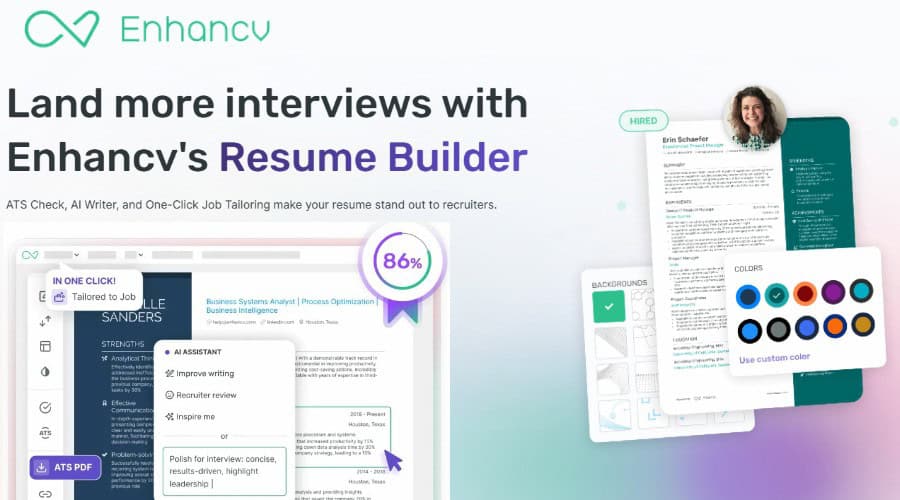
Enhancv is a comprehensive online resume building platform that offers striking modern templates, useful AI tools, and ATS optimization. It also acts as a hub of information, educating users on current best practices, formats, and how to truly stand out in the sea of other candidates.
Unlike a lot of CV building sites, Enhancv isn’t a glorified template mill that churns out endless variations. Instead, it provides approximately 20 professionally designed resume templates that you can then modify to fit your needs.
These base templates include styles suited to both creative and traditional industries, balancing visual appeal with practicality. They are all built to be ATS-friendly and highly customizable, allowing you to adjust the number of columns and layout, colors, fonts, sections, and more.
This is done using an intuitive point-click and drag-and-drop editor. No design skills are necessary.
You can follow the structure and paste your info or write directly in the template. However, Enhancv really shines by importing your existing resume and using AI to automatically populate the template, while also proofreading for typos and grammar.
What’s more, the AI assistant offers suggestions for improving job descriptions, strengthening bullet points, and tailoring them to specific jobs. It also highlights missing sections and potential formatting issues.
I was particularly impressed by its ability to suggest relevant skills for your chosen industry or job.
Alongside the resume builder, Enhancv also handles cover letters by analyzing your resume and the job description. The AI-generated draft follows a standard professional structure and can be edited afterwards.
Other notable Enhancv features:
Import resume from LinkedIn profile.
Paste a job description for one-click resume tailoring.
Generate a tailored resume summary based on the job title or job description.
Free AI resume checker with 16 criteria, including an ATS score.
Enhancv offers a 7-day free trial that includes all templates, basic sections, and design tools.
Premium plans start at $24.99/mo with discounts for committing to a longer period upfront. This removes Enhancv branding and unlocks real-time AI content suggestions and full ATS checking.
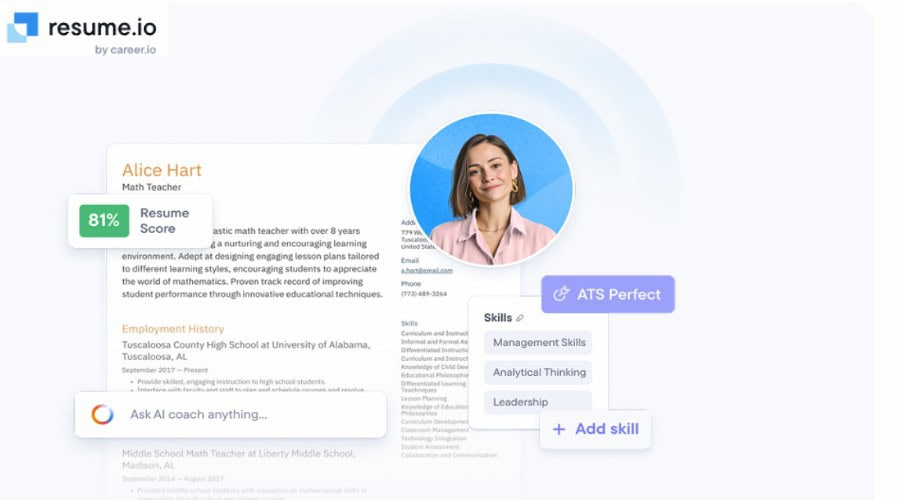
The Resume.io resume builder guides you through each section with a pre-formatted structure, so it meets current content standards. Its biggest strength is the variety of templates, ranging from minimalist designs to more modern styles, all optimized for readability and ATS.
Its integrated AI assistance actively helps you write, not just format. You can input basic experience (or even speak it), and the AI generates polished bullet points, summaries, and skills tailored to the role. It can also analyze job descriptions and automatically insert relevant keywords to improve ATS compatibility.
A key advantage is flexibility across platforms. Many templates can be downloaded as PDF or DOCX (Word) files, making them suitable for employer requirements and easy editing later.
It also offers Google Docs-compatible templates, allowing you to edit, share, and update resumes online with minimal effort.
Resume.io is available free, but this plan limits you to a single resume in only TXT format. I.e., you will have to copy and paste it accordingly.
However, you can unlock all premium features for 7 days with a $2.95 payment. This includes an unlimited number of resumes, all templates and formats, and full AI access.
To continue using premium, it then costs $49.95 every 3 months.
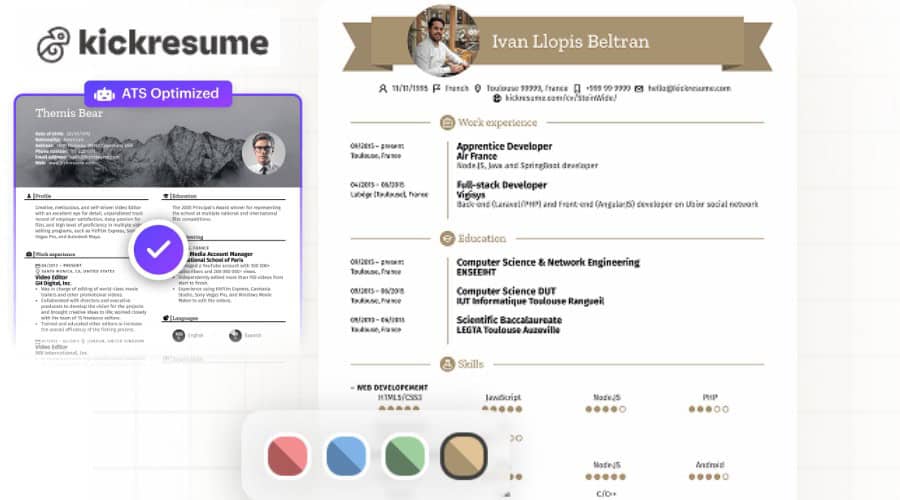
Kickresume’s resume builder is designed to help you create professional, ATS‑friendly resumes and cover letters quickly. It offers a wide selection of templates that guide you through each section, and everything can be exported in Word DOC or PDF.
Instead of leaving you to craft every bullet point, the AI can generate tailored content based on your job title, experience, and desired industry. It writes summaries, skills, achievements, and even role‑specific responsibilities.
Every template is fully customizable with colors, fonts, sizes, and layout, while maintaining professional, ATS-friendly formatting.
If you need some inspiration or just want to see what Kickresume can do, it lets you view a large library of real resume examples across many industries and roles.
These examples show how to organize experience, phrase accomplishments, and format sections in a way that appeals to recruiters and ATS systems alike. You can even download and modify them to your liking.
Kickresume provides a full suite of resume tools, although you can get started for free by uploading an existing resume and checking it against ATS and content quality factors.
The free tier is limited to 4 resume templates and cover letters. Premium starts at $24/mo and unlocks all templates, AI features, and other tools.
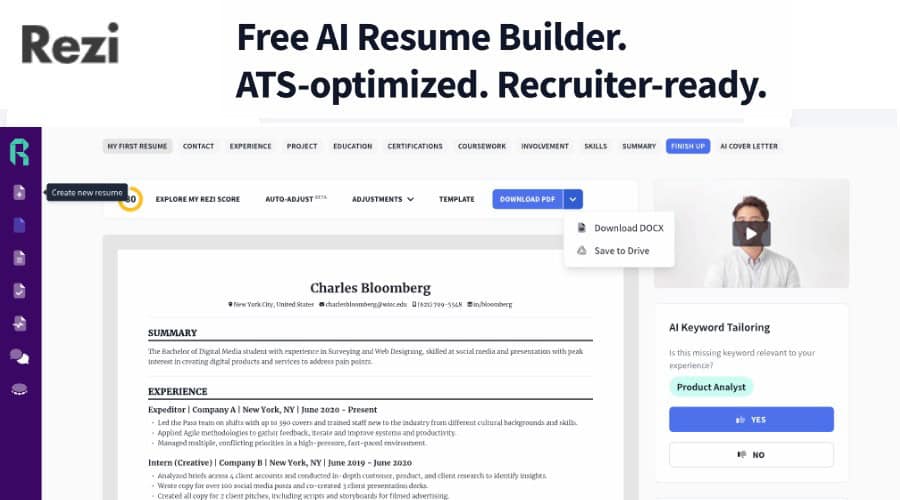
Rezi’s resume builder focusses on AI‑assisted writing and ATS‑friendly formatting. You can quickly build professional resumes from scratch or refine existing content based on AI feedback.
It guides you step by step, generating tailored bullet points and summaries based on your input. It then suggests relevant keywords from job descriptions to improve screening outcomes. Real‑time feedback and a score is also given across multiple criteria so you can fine‑tune content as you go.
The templates Rezi offers are clean, simple, and optimized to pass applicant tracking systems. Finished resumes can be exported in common formats like PDF or DOC.
While the AI output is occasionally generic and may require edits, its integrated writing support makes building a tailored resume much faster than doing it by hand.
Furthermore, while it doesn’t allow for extensive templates tweaks (like changing fonts or colors), you can adjust sections, reorder them, and tweak wording to match your experience.
Rezi lets you build a resume for free to test the platform. However, to download it in DOC or PDF, you must purchase the $29/mo or one-off $149 PRO plan.
This lets you create unlimited resumes and unlock all features, including AI cover letters, multiple checking tools, and even interview practice.
MyPerfectResume is a comprehensive resume toolset that helps you build from scratch or improve your existing resume.
If starting from fresh, simply choose from a large library of templates and follow the structure. By using its AI suggestions, you can populate sections with content relevant to your experience or targeted job in minutes.
The intuitive editor checks for spelling and repetitive or unimpactful wording and gives you full control over content. You can also tweak the template design while adhering to professional ATS standards.
If starting with an existing resume, upload the file and it will be passed through its ATS checker. Highlighted issues can either be autocorrected or manually edited with guidance.
When happy, export and download your perfected resume in PDF, DOC, or TXT format.
MyPerfectResume stands out with over 1,200 designs across lots of different industries and categories. You can also switch between American style resume standards and British style CV standards.
As well as resumes, you can also generate cover letters based on your experience and the job description.
The free version of MyPerfectResume supports one resume and must be exported as a TXT file. The $23.95/mo premium version offers unlimited resumes and cover letters, along with full access to the template library.
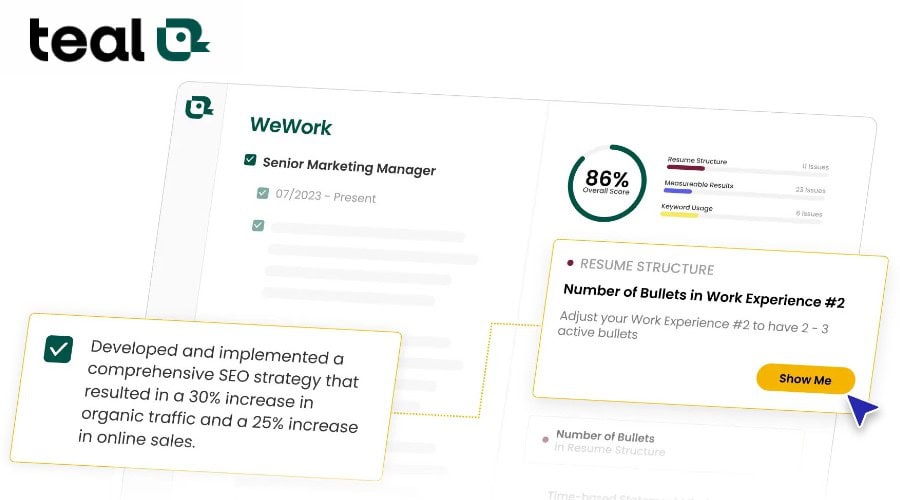
The Teal resume builder allows you to import your work history from LinkedIn or a traditional resume and receive a quality score. This includes ATS checks, structure, relevant keywords, and measurable achievements.
Its AI assistant highlights all areas of improvement, which you can then edit manually or automate with one-click suggestions. You can even tailor the entire resume for different job descriptions.
Design Mode is for changing colors, fonts, or reorganizing sections, while maintaining current resume standards.
Overall, Teal works best with an existing resume. However, you can use its structure and editor to write the resume from scratch. Once enough content is visible, the AI starts to work its magic. You can also switch between different base templates.
As well as the main resume builder, Teal provides individual tools for generating impactful bullet points, resume summaries, and keyword scanning.
It offers a generous free plan with unlimited resumes. However, each is restricted to the top 5 keywords, basic improvement suggestions, 10 bullet points.
Upgrading to Teal+ for $13 per week provides unlimited access to everything.
Meanwhile, all users get free access to a huge resources section, full of resume examples, career guidance, and other tips to help you land your dream job.
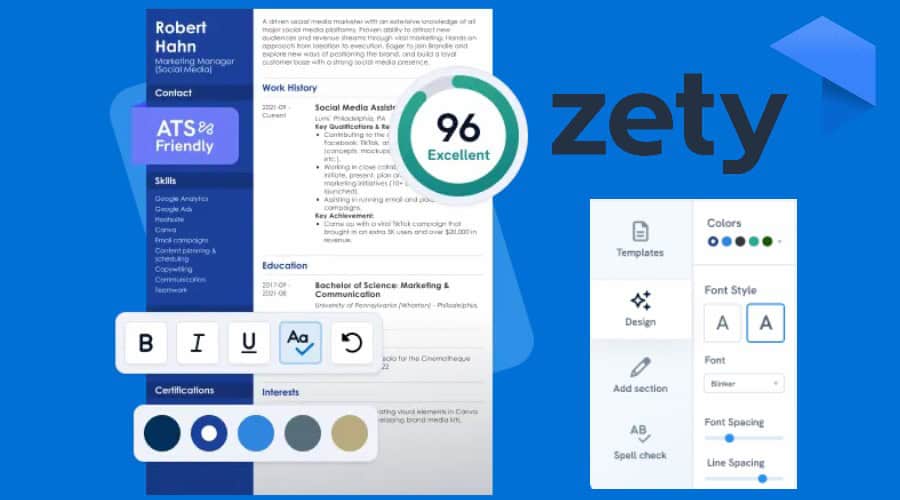
Zety’s Resume Builder uses a guided wizard interface that prompts you to input your details section by section. You can choose between resume or CV standards, depending on the job market you’re targeting. Alternatively, users can upload and work on an existing resume.
AI then makes content suggestions. When you enter a job title, the system uses machine learning to suggest thousands of pre-written bullet points based on real-world job descriptions.
As you progress, you get a strength score to help improve the impact of each entry.
One of its standout features is a library of over 20 professionally designed templates that are pre-optimized for ATS. This ensures that formatting remains intact when scanned by employers.
You can also modify colors, fonts, and layout elements for any template.
While the platform allows you to create and customize a resume for free, downloading a finished document in PDF or DOC format requires a $5.95/mo paid subscription.
As well as unlimited usage, this also gives you access to a cover letter builder, resume checker, and job matching tools.
Overall, Zety is a strong choice for users who want a structured, easy-to-follow resume builder that focuses on both writing quality and professional formatting.
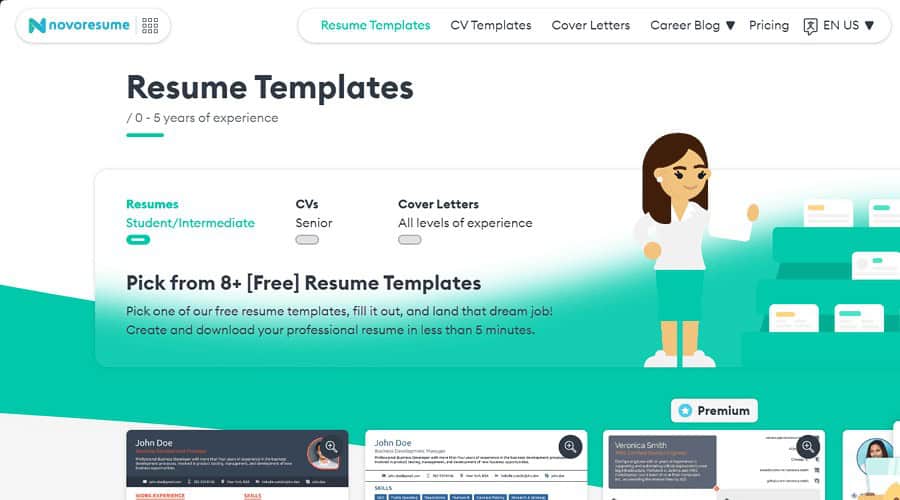
NovoResume stands out in the crowded resume builder market by focusing on clean structure and professional design. Instead of allowing messy drag-and-drop layouts, it keeps your content organised within an ATS-friendly format, reducing the risk of formatting issues when editing your resume.
The builder includes a real-time content optimiser that gives useful AI suggestions, such as improving weak sections or adding missing details. It also offers a range of templates, from simple to more creative styles, while automatically adjusting the layout as you add or remove content. Pre-written suggestions are available to help users write stronger descriptions and overcome writer’s block.
NovoResume does a good job of improving existing resumes, but it also lets you start from scratch with the AI assistant helping you at every step. AI cover letters are also available.
The free version is quite generous, allowing you to create and download a one-page resume as a PDF using selected templates. While features like multi-page resumes and additional styling options require a $21.99 paid plan, the free tier is more than enough for many entry to mid-level job seekers.
Unlike other resume builders, NovoResume doesn’t offer many other extra tools beyond resume building itself.
Verdict – Best Resume Builders
Overall, the best resume builder for you depends on how much guidance you want and whether you need to start from scratch.
Enhancv takes the top spot for its balance of modern ATS-compliant templates, customization, and strong AI content suggestions.
Resume.io isn’t far behind with its structured builder and reliable, ATS-friendly templates. Kickresume is also up there, offering a high-level of customization and actionable guidance.
Together, these platforms represent the best options for building a resume that is both effective and easy to create.
A new Chrome-targeting infostealer has emerged, raising fresh concerns about browser security and evolving attack techniques.
VoidStealer bypasses Chrome security protections
According to Gen Digital, a malware strain known as VoidStealer can bypass Google Chrome’s Application-Bound Encryption (ABE), a key security feature designed to protect sensitive user data.
VoidStealer has operated as a malware-as-a-service (MaaS) offering since late 2025, but its newly discovered version 2.0 introduces a significantly more advanced bypass method. The malware specifically targets Chrome’s encryption system by extracting the v20_master_key directly from browser memory.
This approach marks the first known case of an infostealer using hardware breakpoints instead of traditional techniques like code injection or privilege escalation.
New stealth technique avoids detection
VoidStealer’s method focuses on stealth and precision. Instead of modifying system behavior in obvious ways, it relies on debugging mechanisms that are far harder to detect.
The malware launches a hidden and suspended Chrome process, then attaches to it as a debugger. Once connected, it waits for critical browser components to load before placing hardware breakpoints on carefully selected instructions.
When Chrome briefly decrypts sensitive data during startup, the master key appears in plaintext in memory. VoidStealer captures that moment and extracts the key using memory reading techniques.
Researchers note that this attack is most effective during browser startup, when encrypted data is actively being processed.
Attack method
The attack works by performing a series of low-level actions inside the browser process, allowing it to capture sensitive data at the exact moment it becomes accessible. Here’s the breakdown of the processes:
Malware launches a hidden, suspended Chrome process
Attaches the process as a debugger and monitors DLL loading
Sets hardware breakpoints on specific instructions
Captures the master key during the decryption phase
Extracts the key directly from memory
Ongoing security arms race
Although similar concepts have circulated in security research for over a year, this is the first confirmed real-world use of such a technique. Previous mitigation efforts by Google have not stopped attackers from refining their methods.
At the time of reporting, Google has not issued a statement regarding this specific bypass.
The discovery highlights the growing sophistication of infostealers, especially those distributed through MaaS platforms, which lower the barrier for cybercriminals.
Broader cybersecurity concerns continue
The VoidStealer findings come amid a wave of new security threats across the industry.
As attackers continue to innovate, security experts warn that both users and companies must remain vigilant, as traditional protections may no longer be enough against emerging threats.
In the world of online gaming, the skin market is not just for decorating weapons or characters. Each item has its value and history. Players worldwide contribute to a vibrant in-game economy by buying, selling, and trading skins.
Prices for items can fluctuate daily. For example, a rare knife may cost hundreds of dollars, while the value of a mass-market collection can plummet after a new case is released. This is why you need to know how the CS market works. You also need to see how game updates, player activity, and major tournaments affect it.
Analyzing these factors helps you buy skins profitably and informs long-term investment decisions. This minimizes risk and increases your chances of profiting from rare items. Collectors and traders need to understand the market to stay on top of the latest trends and use them to their advantage.
Supply and Demand: New Cases and Older Skins
Each major game update introduces new cases and skin collections. Players look forward to new paint jobs, exclusive knives, and limited editions. These items immediately impact the prices of existing ones.
When a new case containing a rare, flashy series is released, the prices of many older skins tend to fall as players focus on the new release. Sometimes, skins from older collections start rising in value once players notice their uniqueness and scarcity.
Such fluctuations can easily be tracked on the DMarket website. The platform shows detailed price histories, the number of items listed for sale, and market depth. This allows you to act with confidence. To clearly see trends, it’s worth noting that:
new cases generate interest;
rare, older skins rise in price;
mass releases push market levels down;
popular items remain stable;
limited drops increase value;
in-game events influence demand.
The balance between supply and demand shifts with each new collection. Players and collectors should closely monitor new releases to buy skins at a good price—or sell them at the right time.
It’s especially important to pay attention to rare items. Their value can increase several times after the release of limited-edition cases or new updates.
Major Tournaments: How Big Events Move the Market
Large tournaments like Majors always boost activity in the skin market. Stacked capsules and event-specific stickers become temporarily scarce and in demand. During tournaments, players actively search for skins of their favorite teams, which increases their value.
You can monitor these changes in real time on DMarket. The platform provides data on market offers and prices for stickers and cases, both of which directly impact skin prices. Experienced traders plan their purchases around such events. They do so to maximize profits.
Additionally, tournament skins often remain popular even after the competition ends, transforming into valuable collectibles. This is especially true for rare stickers or skins autographed by professional players. They become true collectibles over time.
Investing: The Basics of Long-Term Investing
If you’re considering skins as investments, it’s important to understand a few basic principles. Don’t buy everything. Focus on hard-to-find and limited-edition skins because they can increase in value over time. Consider not only rarity but also the popularity of the collection and the price history of the items.
Here’s what people looking to make quality investments should do:
buy rare and limited-edition skins;
monitor the popularity of collections;
consider the price history of items;
avoid mass-market low-price releases;
hold items until demand increases;
reinvest profits in new cases.
Long-term investments require patience but can be very profitable. Skins from older collections can be worth several times more than their original price years later.
On DMarket, investors can track trends and analyze past price movements. This format helps minimize risks and plan future transactions. This approach turns skin trading into a strategic game. Success depends on attentiveness and market knowledge.
Tracking Prices: How to Be a Successful Trader
Data is the key tool for successful trading. Decisions are difficult to make in the absence of accurate information on prices, market depth, and item popularity.
DMarket offers detailed charts, trade history, and market indicators for each skin. This allows you to:
track price changes;
compare current and past listings;
analyze market activity;
plan purchases and sales;
find the best deals;
make informed decisions.
The platform helps both beginners and experienced traders navigate market dynamics. Using these tools, you can predict the rise or fall of skin prices, promptly list your items for sale, and avoid unprofitable trades. Essentially, DMarket makes trading simple.
Conclusion
The CS2 skin market is dynamic and complex. Prices depend on updates, the number of players, and tournaments. Players and collectors can generate returns and minimize risk by understanding supply and demand, the impact of major events, and a disciplined investment approach.
Platforms like DMarket offer transparent processes and convenient tools for price tracking and market analysis. Those who wish to stay competitive in both gameplay and trading must follow these trends if they want to succeed.
Shortly after the update rolled out, users began reporting sign-in failures across several Microsoft services. The issue triggered a misleading “no Internet connection” error, even on devices with fully working connectivity.
This bug prevented users from accessing essential apps, including Microsoft Teams, OneDrive, Copilot, Excel, Word, and Edge. The problem appeared tied specifically to Microsoft Account authentication, as enterprise users with Microsoft Entra ID accounts were not affected.
Microsoft pushes out-of-band update KB5085516
As Neowin writes, Microsoft released update KB5085516 as an out-of-band fix for affected systems. The update resolves the authentication issue and restores normal access to Microsoft services.
The fix is now available in the following Windows 11 builds:
26200.8039 for Windows 11 25H2
26100.8039 for Windows 11 24H2
Users can install the update manually through the Optional updates section in Windows Update.
The sign-in bug was not the only issue tied to the March update. Some users also reported failures when installing the update KB5079473, with crashes and installation errors preventing completion.
These issues add to growing concerns around update stability, especially when critical services like authentication are affected.
Microsoft has not shared full details on what caused the problems, but moved quickly to address the most disruptive bug with the out-of-band release.
Microsoft has just released City Update 14 for Flight Simulator, and this time the focus is entirely on the Netherlands and Belgium. The development team upgraded the visual quality of ten specific locations across both countries. Players can now download this free content and fly over highly detailed, realistic versions of several major European cities. This scheduled release drops right alongside a major weekend flight simulation conference.
Exploring the upgraded locations in the Netherlands
The Netherlands receives the biggest share of the visual upgrades in this latest patch. Eight specific areas got a massive visual boost using fresh surface texturing data. You can explore three updated sections in Amsterdam alone. The developers also included Breukelen, Brielle, Eindhoven, Rotterdam, and Utrecht in the package. Each city features accurate buildings, famous monuments, and properly mapped street layouts.
Fans of the game will notice a huge difference when flying low over the famous canals, busy shipping ports, or taking off from local airports. The terrain textures look much sharper than before, giving virtual pilots a great reason to revisit the region.
Checking out the detailed changes across Belgium
Belgium gets its own share of improvements with two fully updated locations added to the map. Players can now cruise over Antwerp and Bruges to see the new details from above. Both cities feature incredible historic architecture that looks much closer to reality. Antwerp shows off its massive, busy port, while Bruges highlights its classic medieval streets and waterways.
This update is completely free for everyone who owns the base game or plays through a subscription. You simply need to open the in-game marketplace, find the new city update, and hit download.
It works well on both the older version and the newer release across all compatible computers and gaming consoles.
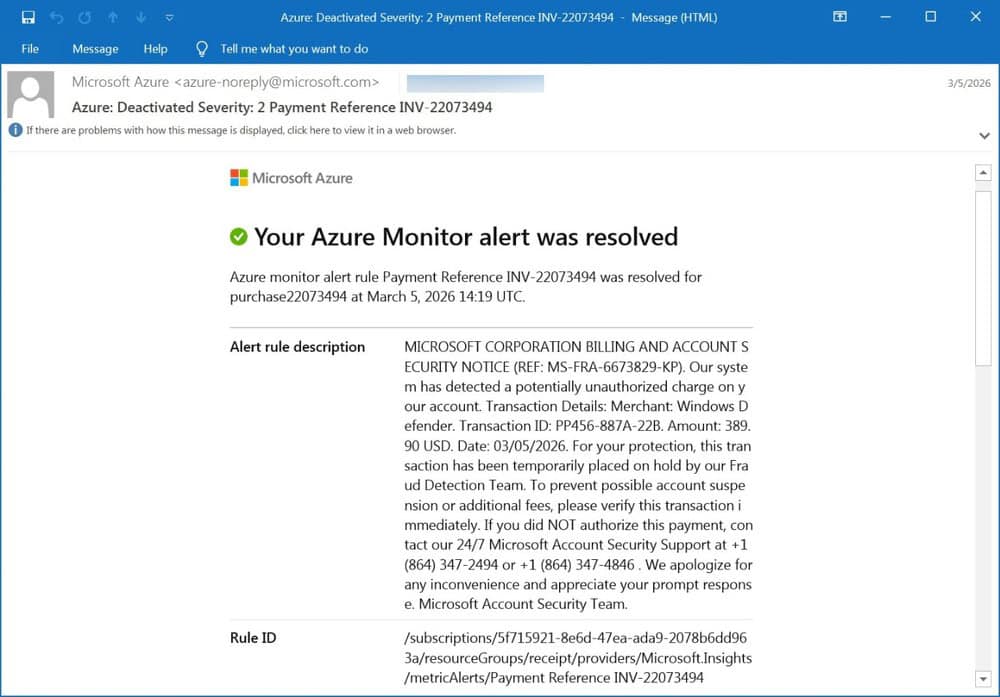
Microsoft Azure Monitor is being abused in a new phishing campaign that makes malicious emails appear fully legitimate. Attackers are leveraging the service to send callback phishing emails that look like official Microsoft security alerts.
Attackers impersonate Microsoft in a billing alert scam
According to BleepingComputer, threat actors are impersonating the Microsoft Security Team in fake billing notifications. These emails warn users about supposed unauthorized charges and push them to call a phone number to resolve the issue.
The approach relies on urgency, pushing victims to act quickly without verifying the message through official channels.
How the Azure Monitor phishing attack works
Attackers create Azure Monitor alerts with custom malicious descriptions
Alerts are triggered by common activities such as invoices, orders, or payments
Emails are sent to attacker-controlled mailing lists, then forwarded to victims
This preserves authentic Microsoft headers and trusted delivery paths
Because of this method, phishing emails are sent from a legitimate Microsoft address ([email protected]) and pass SPF, DKIM, and DMARC checks. This allows them to bypass many traditional email security filters.
Why is this attack especially dangerous?
This technique gives phishing emails a high level of credibility. Messages come from a trusted Microsoft domain, which increases the chances that users will believe them and follow the instructions.
Source: BleepingComputer
Callback phishing adds another layer of risk. Victims may end up sharing credentials, authorizing fraudulent payments, or installing remote access tools during the call. In enterprise environments, this could lead to broader network compromise.
What to watch for
Users should treat unexpected billing alerts with caution, especially if they include a phone number or push immediate action. Messages that ask you to call instead of using official Microsoft support channels should raise suspicion.
Verifying alerts directly through official Microsoft portals remains the safest approach.
What users should do
Users should not rely on the sender address alone when evaluating emails. Even messages that pass authentication checks can be malicious if the underlying service is abused.
Always verify billing alerts through official Microsoft websites or account dashboards, and avoid calling numbers included in unsolicited emails.
Microsoft recently outlined future plans for Windows 11, focusing on optimizing a wide range of features, including performance, AI capabilities, and ads. At the same time, the company is reconsidering one of its most controversial changes after months of user backlash. The requirement to sign in with a Microsoft account during setup could see adjustments, though nothing is finalized.
Microsoft acknowledges Windows 11 setup frustration
The controversy began when Microsoft removed a popular workaround that allowed users to install Windows 11 without a Microsoft account. That move frustrated many users who prefer local accounts for privacy or simplicity.
According to Windows Central, Microsoft’s Vice President Scott Hanselman publicly responded to the criticism on X, stating: “Ya I hate that. Working on it.”
His response confirms that Microsoft is aware of the issue and is actively discussing possible changes internally.
Internal debate could reshape Windows 11 onboarding
Microsoft has not committed to removing the requirement, but internal discussions are ongoing. Some teams reportedly support relaxing or modifying the policy.
Any change would require coordination across multiple departments, making it a complex decision. Windows setup touches security, cloud integration, and user experience, which means no single team can decide alone.
This explains why no official plan or timeline exists yet.
Microsoft continues refining the Windows 11 setup experience
While the account requirement remains in place, Microsoft has made smaller improvements to the setup process. One recent update allows users to change their user folder name during installation, addressing another long-standing complaint.
These incremental updates suggest Microsoft is open to feedback, even if larger changes take longer.
Microsoft pushes deeper account integration across services
This move signals a broader strategy to unify services under a single account system, even as criticism around Windows 11 setup persists.
No confirmation yet, but change remains possible
Microsoft has not confirmed any changes to the Windows 11 account requirement. However, leadership acknowledgment and internal discussions suggest the policy could evolve.
For now, users must continue using a Microsoft account during setup, but future updates may offer more flexibility if Microsoft decides to act on feedback.
Microsoft has confirmed that it will retire the Database Compare tool in Microsoft Access, marking the end of a long-standing utility used by developers and IT professionals.
The tool allowed users to compare two Access databases, making it especially useful for tracking schema changes and identifying structural differences between files.
Why Microsoft is removing the feature
Microsoft says the tool depends on outdated components that no longer meet the requirements of modern Office environments.
Because of this, the company cannot maintain or reliably support it going forward, leading to its removal from future Office distributions.
Users can continue using the tool until June 20, 2026. After that date, it will be fully discontinued and no longer available for download or use.
Affected Office and Access versions
The change impacts multiple versions across the Office ecosystem.
Affected versions include Access 2019, Access 2021, Access 2024, Microsoft 365 subscriptions, and standalone Office 2021 and Office 2024 releases.
Microsoft also confirmed that supporting DLLs and configuration files located in the DCF folder will be removed.
Alternatives users should consider
Microsoft advises customers to prepare migration plans to avoid disruptions.
Recommended alternatives include AccessDiff, AccdbMerge, DataWeigher, and Total Access Detective, which provide similar database comparison capabilities.
Broader Microsoft changes continue
The decision reflects Microsoft’s ongoing effort to streamline Office and remove legacy components that are difficult to maintain.
Intel just rolled out a new processor for laptops without making a big fuss about it. The new chip is called the Core i7-13645HX. It belongs to the older Raptor Lake family of processors. This means it is not built on the absolute newest technology Intel has to offer.
Instead, it looks like this part is specifically designed to power affordable gaming laptops. Consumers will likely see it popping up in mid-range machines soon.
How it stacks up against older models
The Core i7-13645HX shares a lot of DNA with the older i7-13650HX. Both chips feature 14 cores and 20 threads. They use a split design that includes six performance cores and eight efficiency cores. The maximum boost speed stays at 4.9 GHz, and the base power requirement remains at 55 watts.
There are a few notable upgrades here. The new processor supports faster memory speeds, bumping the limit up to DDR5-5600. It also doubles the core count on the integrated graphics unit from 16 to 32. This gives the chip a nice boost in basic graphical tasks. However, since most gaming laptops use a dedicated graphics card anyway, that specific graphics upgrade might not matter much to the average gamer.
It might seem strange for Intel to release a chip based on an older architecture in 2026. The company already rebranded its laptop lineup under the Core 200 series name. Putting out a new Raptor Lake processor under the older naming scheme makes the product catalog a bit confusing.
Despite the odd timing, the strategy makes sense for the budget market. Using an established chip design allows manufacturers to keep costs down. This helps hardware makers build cheaper laptops that still deliver solid performance for everyday use and modern games.
Gamers have been waiting a decade for the next Grand Theft Auto, and the rumor mill has been spinning out of control. One of the biggest fears was that Rockstar might charge an absurd amount for the game, with some analysts predicting a price tag as high as a hundred dollars.
Now, a recent interview with the head of the company making the game has given us our best clue yet about what it will actually cost when it finally arrives in late 2026.
The seventy to eighty dollar clue
Take-Two Interactive CEO Strauss Zelnick recently sat down for an interview. The topic of conversation was actually about putting advertisements inside video games. Zelnick said it would be unfair to force players to watch pop-up ads in a game they already paid 70 or 80 bucks to buy.
Since Take-Two owns Rockstar Games, fans immediately connected the dots. While this was not a formal price announcement, it is the clearest signal we have received so far. It suggests the company views 70 to 80 dollars as the standard rate for their premium titles.
It comes under the standard price range
A lot of players were genuinely worried about getting priced out of the biggest game of the decade. Video game budgets have exploded, and inflation has hit everything from consoles to PC hardware. Hearing the CEO casually use a much more normal price range is a huge relief for anyone planning to buy the game.
He also confirmed that players will not have to deal with annoying commercial breaks interrupting their gameplay.
The game is currently reportedly scheduled to hit shelves on November 19, 2026. We still have a long time to wait before we can explore the new version of Vice City. At least we now have a solid idea of how much cash to set aside for the big day.
Microsoft has unveiled a comprehensive roadmap aimed at dramatically improving the quality, reliability, and usability of Windows 11. In a blog post published today, Pavan Davuluri, Executive Vice President of Windows and Devices, detailed a sweeping set of changes that prioritize user control, system performance, and a more refined desktop experience.
The initiative marks a significant shift in Microsoft’s development philosophy, moving away from major feature integration and toward polishing the core foundation of the operating system.
Microsoft is listening to the Community as highly requested features return
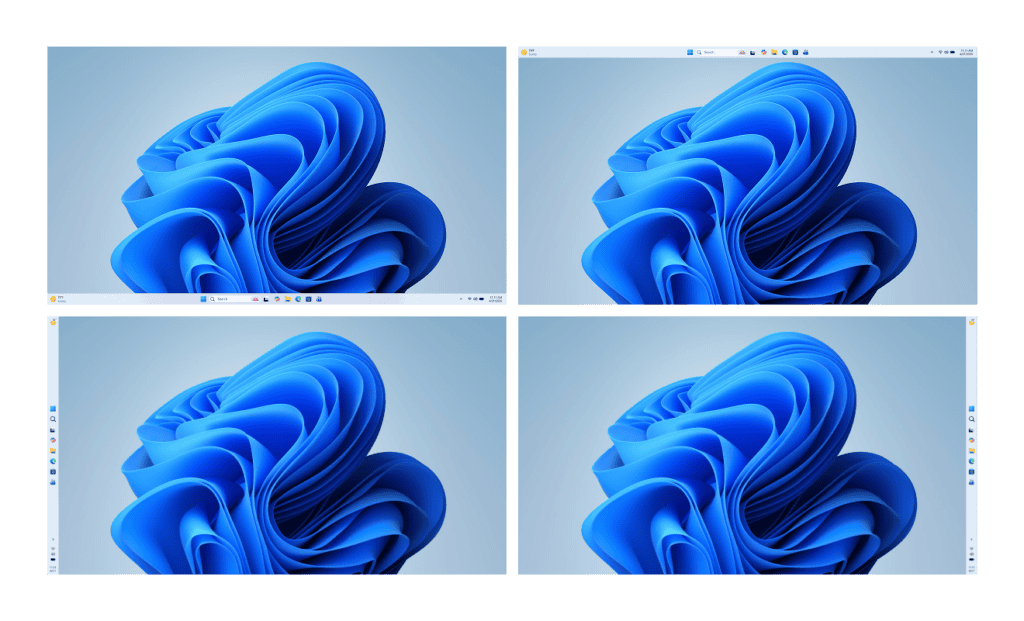
For months, the Windows Insider community has been vocal about its problems with certain Windows 11 design choices. Microsoft is finally answering the call, starting with one of the most highly requested features: taskbar customization. Upcoming Insider builds will reintroduce the ability to reposition the taskbar vertically on the left or right sides of the screen, as well as at the top, allowing users to personalize their workspace to fit their workflow.
Image credit: Microsoft
Furthermore, Microsoft is taking a step back to reassess its aggressive artificial intelligence rollout. Davuluri noted that the company will be “more intentional” about where Copilot integrates into the OS.
To reduce clutter, Microsoft is removing unnecessary Copilot entry points from everyday apps like Snipping Tool, Photos, Widgets, and Notepad, focusing instead on implementations that are “genuinely useful and well-crafted.”
Microsoft will take the pain out of Windows updates
Windows updates have long been a source of disruption for users. To combat this, Microsoft is overhauling the update experience to give users far more control. Changes include:
Setup Bypass: The ability to skip updates during initial device setup to reach the desktop faster.
Power Options: Users can once again choose to restart or shut down their PCs without being forced to install pending updates.
Extended Pausing: More flexible options to pause updates for longer periods, coupled with a reduction in automatic restarts and nagging notifications.
The broader strategy is built on three pillars: Performance, Reliability, and Craft
Beyond immediate UI tweaks, Microsoft outlined a broader strategy for 2026 built on three foundational pillars:
Performance:
Microsoft is targeting the sluggishness that has created problems for some Windows 11 machines. The company is actively working to reduce the operating system’s baseline memory footprint and resource usage. Core Windows experiences, such as the Start menu, are transitioning to the WinUI3 framework to drastically reduce interaction latency.
Additionally, the sluggish File Explorer is receiving a major under-the-hood rewrite to deliver faster launch times, smoother navigation, and substantially lower latency for search and file operations. Developers will also see elevated performance and network compatibility in the Windows Subsystem for Linux (WSL).
Reliability:
System stability is a major focus of the new roadmap. Microsoft is working closely with ISV and OEM partners to reduce OS-level crashes and improve driver quality. Users can expect smoother connections with Bluetooth accessories, fewer USB-related crashes, and more consistent device wake from sleep states.
Windows Hello biometric authentication is also getting an upgrade, with a promise of faster and more dependable fingerprint and facial recognition. Gamers will even see tailored improvements, like full gamepad support for secure PIN sign-in on handhelds like the ROG Xbox Ally X.
Craft:
Defining “craft” as the discipline of turning functional products into loved ones, Microsoft aims to reduce noise and distractions across the OS. The Widgets board, often criticized for being overwhelming, will now feature quieter defaults and more granular controls over what content is displayed.
Device setup on new PCs will be streamlined with fewer pages, and system-wide search will be enhanced to deliver clearer, faster, and more accurate results. It will distinctly separate local files from web results.
Microsoft will revamp its Insider Program
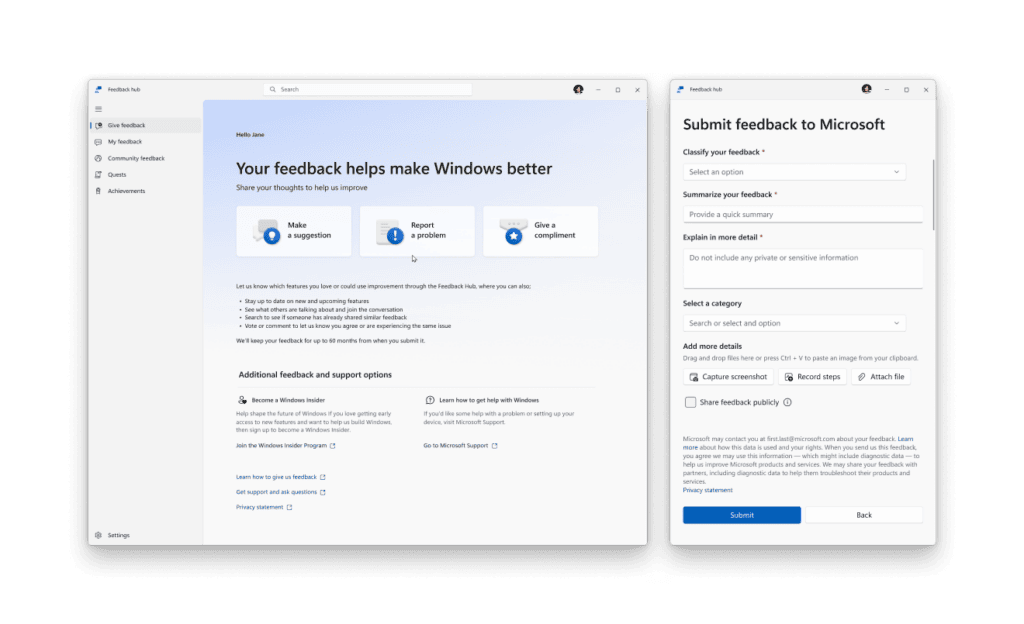
To facilitate these changes, Microsoft is completely redesigning the Feedback Hub app, making it faster and more intuitive for users to report bugs and share ideas.
Image credit: Microsoft
The Windows Insider Program itself is being restructured to provide clearer channel definitions, higher-quality builds with deeper real-world validation before release, and better visibility into how user feedback actually shapes the OS.
“Windows is as much yours as it is ours,” Davuluri stated, emphasizing the company’s commitment to strengthening the operating system’s foundation.
The first wave of these quality-of-life improvements will begin rolling out to Windows Insiders throughout March and April of 2026, with deeper architectural changes expected to debut over the course of the year.
The highly anticipated open-world game Crimson Desert is finally out, but things are not going well on PC. After six years of waiting, the massive release is struggling hard to keep players happy. A giant wave of problems just pushed the game to a mixed rating on Steam, with over forty percent of all user reviews currently sitting in the negative category. Fans are clearly making their voices heard.
Why are players leaving negative scores
While most players agree that the giant world looks beautiful, the actual gameplay is causing a lot of headaches. According to recent data from Steam, over eight thousand people have left a thumbs down on the store page. Many buyers are complaining about annoying inventory menus and clunky controls that make moving around feel like a chore.
Gamers are also unhappy with the main story and the overall pacing. One player even summed up the experience by calling it completely tedious and simply not fun to play. Because the game carries a heavy seventy-dollar price tag, buyers are naturally expecting a lot more than just a pretty background to look at. It’s worth mentioning that the game doesn’t support Intel Arc graphics.
It has received mixed reactions across all platforms
The developers at Pearl Abyss are already pushing out software updates to fix the broken inventory screens and smooth out the messy controls. However, changing a boring storyline or fixing the core pacing of a campaign is nearly impossible after a game launches. The mixed feelings are not just coming from PC players, either.
Console players on the PlayStation 5 are also running into problems, with some fans comparing the console graphics to much older games from the PlayStation 3 era. Even though the game had a massive amount of hype before release, it is clear that the studio has a lot of work left to do.
The highly anticipated open-world game Crimson Desert finally launched this week on PC. While many players are jumping right into the action, anyone using an Intel Arc graphics card is completely locked out.
The game simply refuses to start on these specific machines. Instead of promising a quick software fix, the developer is now telling those affected buyers to go ask for their money back.
Why the game will not run for some players
The developers at Pearl Abyss apparently built the game to actively reject Intel hardware. When users with an Intel Arc GPU try to boot the game, they just get a simple error message stating their graphics device is not supported. This hard block impacts both dedicated graphics cards and the integrated graphics found inside many modern Intel computer processors.
Normally, if a game does not officially list a specific card in its system requirements, players can still try to run the software. They might just deal with lower frame rates or minor visual glitches. Simply blocking a major hardware brand entirely from launching the application is a very rare move in the PC gaming space.
Angry fans and no clear fix in sight
The biggest source of frustration for the community is how the studio handled the news. Pearl Abyss did not warn anyone about this total block before the game actually became available to buy. The developer only quietly updated its official website after launch to confirm the lack of support.
That newly added page offers a blunt solution to the problem. The studio tells anyone who bought the game expecting it to work on Intel hardware to check their store’s refund policy.
Because the developers are pointing people straight to the refund page instead of talking about future patches, many gamers feel the studio has no real plans to ever fix the compatibility issue.
Microsoft just sent out a new update for people testing early versions of Windows 11. If your computer is set to the Canary channel, you can now download build 29553. While some updates hide changes deep inside the system code, this one puts a big visual change right on your screen. The company completely rebuilt the Feedback Hub app to make reporting bugs a lot less annoying.
The new Feedback Hub makes bug reports easier to handle
If you have ever tried to tell Microsoft about a glitch in the past, you know the old app was pretty clunky. It had too many menus and was hard to navigate. The new version fixes this by cleaning up the main screen. When you open it up, you just get a simple text box to type out your problem.
The side menu is also much smaller now. You can jump straight to your profile to see if developers actually read the reports you sent them last week. The design team removed the old announcement pages that used to take up space. This gives you more room to scroll through ideas from other testers and vote on the things you want to see fixed first.
The update makes attaching pictures much easier
Sometimes explaining a computer problem with words is just too hard. The updated app makes attaching pictures much simpler. It includes better screenshot tools built right into the submission page. You can take a quick picture of your screen, draw a circle around an error message, and cross out any private information before you hit send.
The app also loads faster when you are working on a slower computer. If you do not have a bug to report but just want to say you like a new menu layout, there is now a dedicated button just to send a compliment directly to the design team.
Talking about the new updates, Microsoft has also released the Windows 11 Canary KB5081339 update as well. It also brings the same new Feedback Hub, but also comes with new, improved controls while sharing audio wirelessly.
Microsoft just dropped a new update for Windows 11 testers in the Dev channel. The KB5079483 download, which brings the system to build 26300.8085, focuses heavily on making the screen easier to see and navigate. The biggest change is a brand new accessibility feature called the point indicator. This tool is designed to help anyone who has trouble finding their mouse cursor on a busy desktop.
Point Indicator gives users more control over how the cursor is highlighted
Losing track of your mouse pointer happens to everyone, especially if you use multiple large monitors. To fix this, Microsoft added a visual point indicator that you can turn on in the main settings menu. When you enable this feature, the system places a bright, easy-to-see circle right around your mouse cursor. This helps your eyes snap right to the pointer without having to wiggle your mouse around to find it.
Everyone has different visual needs, so Microsoft has made sure you can adjust how this tool looks. Inside the accessibility menu, you can pick different colors for the indicator ring so it stands out against your favorite background.
You can also change the overall size and thickness of the circle. If you only want the ring to appear when you actually click on something, there is a setting for that specific behavior as well.
Beyond the new visual tools, this update includes a few other minor system adjustments. Microsoft fixed a background bug that occasionally caused the system clock to freeze. They also slightly improved the search bar loading speed and tweaked the start menu layout, apart from adding a redesigned Feedback Hub.
Microsoft just released a fresh software update for Windows 11 users currently enrolled in the Beta testing channel. The new KB5079482 download officially bumps your operating system version to build 26220.8079.
This specific release focuses entirely on fixing a few annoying bugs related to typing tools and wireless internet connections, rather than adding any major visual changes or new features to your computer.
The update fixes confusing Wi-Fi menus
A key part of this release addresses a strange issue in the network settings. Before this patch, the Network and Sharing Center would sometimes glitch when you changed your wireless connection. It would display two active Wi-Fi networks at the exact same time, even if you just dropped one to connect to the other.
Microsoft corrected this display error. The menu will now accurately show only a single active Wi-Fi connection right after you switch to a new network.
Smoother typing and voice controls
The other fixes deal directly with how you input text. The company has improved the overall stability of the file explorer. The update specifically stopped crashes that happened when people closed the text input flyout window.
It also smoothed out the voice typing tools. If you use the Windows key and H shortcut to speak your sentences out loud, the fluid dictation option is now much more reliable to set up in your main settings menu.
Apart from this build, Microsoft has also released new Windows 11 Canary & Dev Updates, which carry the build numbers KB5081339 & KB5079483, respectively. They bring an all-new Feedback Hub. The new Canary build also brings improved controls while sharing audio with multiple devices.
Microsoft is rolling out a new test version for Windows 11 users in the Canary channel. The new KB5081339 update brings a very handy fix for people who like to listen to music or watch movies together. Sharing your computer audio with a friend just got a lot better, so you will no longer have to fight over how loud the volume should be.
Here’s how the new audio sharing works
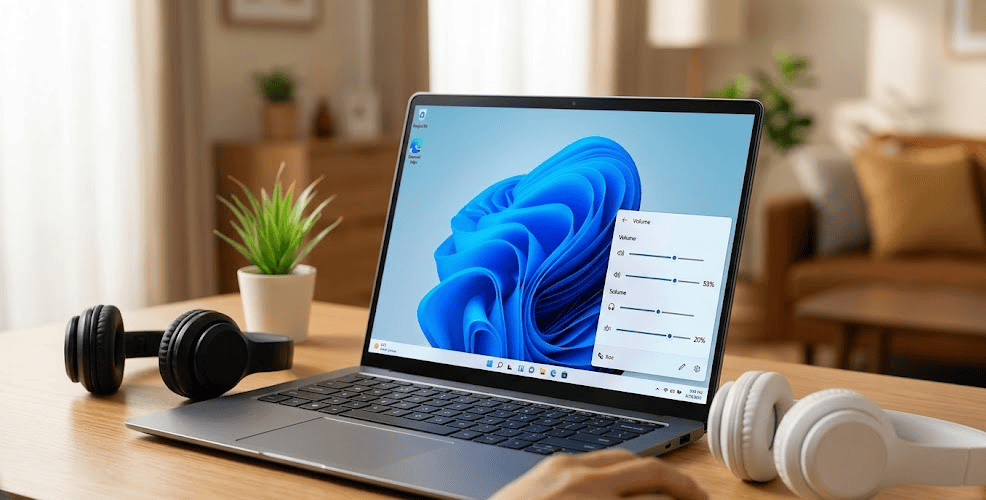
Connecting two pairs of Bluetooth headphones to one laptop is great for traveling or quiet spaces. Before this Windows 11 update, changing the volume meant both people had to listen at the exact same level. Now, Windows 11 gives you separate volume sliders for each connected headset. You can easily turn up your own sound while your friend keeps theirs turned down low.
It brings easy controls right on your screen
Finding these new controls is very simple. You just click on the sound icon in the bottom corner of your screen to open the quick settings menu. The audio panel now shows individual bars for every device actively playing sound. This small change makes sharing a screen much more comfortable for everyone involved.
Alongside the audio tweaks, this update completely redesigns the Windows 11 Feedback Hub. Microsoft cleaned up the main page to make it much easier to report bugs and suggest new ideas. The new layout features a simple submission form, an updated side menu to track your past reports, and better built-in tools for highlighting areas in your screen grabs.
Microsoft is sending out a fresh test build for Windows 11 users right now. If you are part of the Canary testing channel, you can download build 28020.1743 under the KB5081339 update. The biggest change in this specific release is a completely rebuilt Feedback Hub.
The company wants to make it much easier for regular users to tell them about bugs or suggest new ideas.
A completely fresh look for the feedback hub
The old feedback app could feel a bit cluttered, so Microsoft gave it a much cleaner home page. When you open the new version, you will see a simpler form for typing out your thoughts. Instead of jumping through different menus, everything uses one simple layout.
You can also easily search through different categories to see if someone else has already reported your exact problem. For the first time, Microsoft even added a specific button just to send a compliment if you actually like a new feature.
The menu on the side is also much easier to read now. You can find your own past reports instantly under a dedicated tab. The old announcements page is completely gone, which leaves more room for you to look through community posts and vote on problems that need fixing.
Better tools for screenshots and quick ideas
Sometimes you just want to point out a tiny glitch without opening a massive app window. To fix this, Microsoft added a small, focused feedback box. It pops up quickly, so you can share a fast thought and get right back to your work. If you need to add a picture, the built-in screenshot tools are much better now.
Beyond the new feedback tools, this update brings a few other helpful tweaks. The shared audio feature now has separate volume sliders, letting two people listen on different Bluetooth headphones at their own preferred loudness. The right-click menu will now correctly show the proper app icon next to the open button.
Finally, the file explorer is much better at unblocking and previewing files downloaded from the internet.
Crimson Desert players on PS5 are running into an unexpected visual issue, as reported by IGN. Just a day after launch, reports of blurry graphics have started surfacing, quickly becoming a major talking point across the community.
PS5 players may have found a quick fix for blurry visuals
The issue is being widely discussed across social media, Reddit, and Discord, with players claiming the game looks noticeably blurry regardless of which graphics mode they use. Interestingly, some users say the game appears significantly sharper on the PS5 Pro, which has only added to the confusion.
At a time when launch performance is under heavy scrutiny, players may have found a possible workaround. Many are suggesting that disabling “Enable 120Hz Output” in the PS5’s system settings improves image clarity. The theory is that the game struggles when the console forces 120Hz on displays that do not fully support 4K at that refresh rate.
That explanation lines up with comments from Digital Foundry’s John Linneman, who said the problem appears to be tied to displays that accept a 120Hz signal only at lower resolutions. In those cases, the system may be dropping the resolution to maintain the higher refresh rate, which could explain the blurry visuals.
The issue may not be limited to consoles, either. Some PC players are also reporting similar problems, although the fixes there appear to be less consistent. A few users say adjusting settings and restarting the game helps, while others have reportedly requested refunds over the game’s visual quality.
For now, it remains unclear whether this is a widespread bug or a hardware compatibility issue. With Crimson Desert already facing mixed early reviews, these technical concerns could put even more pressure on the developers.
Apple’s MacBook Neo has become a hot topic online among those looking for a budget-friendly laptop. If you have been wondering whether Apple’s entry-level MacBook can handle Windows 11 apps, Parallels Desktop may have just provided the much-needed answer. For those unaware, Parallels is one of the most popular apps for virtualization on macOS.
Parallels says the MacBook Neo can run Windows 11 apps
Last week, Windows Central reported that Parallels Desktop developers confirmed the MacBook Neo can run Windows 11 apps, but warned that 8GB of RAM may not be enough for heavy workloads. After initial compatibility checks, the company has published performance insights, and the results are a bit mixed.
According to the developers, Parallels Desktop runs Windows 11 smoothly on the MacBook Neo through virtualization. In fact, the company claims the device delivers around 20% higher single-core CPU performance compared to a Dell Pro 14 running Windows 11 natively with Intel’s Core Ultra 5 235U chip (via Windows Central).
That sounds impressive on paper, especially given Apple silicon’s strong single-core performance. However, multi-core performance is reportedly around 40% lower, largely due to the six-core setup and virtualization overhead.
Graphics performance is also affected, with the company noting that GPU performance is roughly 50% lower, which makes the MacBook Neo a poor fit for demanding workloads like 3D rendering or CAD applications.
In terms of real-world use, MacBook Neo is decent for productivity software, as Microsoft Office, email, and web apps appear to run fine. In fact, Apple has showcased this by adding Microsoft Office apps in its recent promotional video.
Speaking of heavier workflows or apps that rely on strong multi-core performance, Parallels Desktop suggests MacBook Neo may struggle. That’s mostly because of the amount of memory Apple offers in its entry-level MacBook.
While the base 8GB unified memory works, Parallels Desktop suggests 16GB or more is required for a smoother experience, especially when running macOS and Windows together. The MacBook Neo’s passive cooling system may also throttle performance under sustained load.
While MacBook Neo can handle light Windows 11 apps, it won’t be able to replace modern PCs, especially when it comes to heavy workloads.
DLSS 5 has remained controversial since its reveal, which prompted the NVIDIA CEO to address the criticism. NVIDIA has now stepped in with a clearer explanation of how the technology works. While the company aimed to address confusion, the details appear to reinforce many of the concerns raised by gamers.
DLSS 5 relies only on a 2D rendered frame
According to information shared via VideoCardz, DLSS 5 works by using a single 2D rendered frame combined with motion vectors. Unlike previous expectations, the model does not access deeper data from the game engine, such as geometry, depth buffers, or material maps.
NVIDIA confirmed that the system does not read metallic, roughness, or normal map data. Instead, it derives all visual understanding directly from the final rendered image, which represents a major shift from traditional rendering pipelines.
The AI infers details instead of reading real data
DLSS 5 analyzes the image and attempts to reconstruct scene elements through inference. It can recognize characters, hair, skin, and fabric, as well as different lighting conditions such as front-lit or back-lit scenes.
However, because the model relies entirely on interpretation rather than actual scene data, it effectively predicts how elements should appear rather than reproducing them exactly as designed by developers.
Concerns grow over altered visuals
This approach has raised new concerns, especially after early preview footage surfaced. Some clips appear to show noticeable changes in facial features, hair detail, and even subtle “makeup-like” smoothing effects.
NVIDIA maintains that the underlying geometry remains unchanged, but the final output can still look different. For many players, this creates uncertainty around whether DLSS 5 preserves the original artistic intent of a game.
Developers have limited control over AI output
NVIDIA also clarified that developer control remains relatively limited. Developers can adjust parameters such as contrast, saturation, gamma, and blending, or apply masking to disable effects in certain areas.
However, they cannot directly correct specific AI-generated changes. If the system alters a face or adds unintended detail, developers must rely on indirect methods like reducing intensity or masking the feature entirely.
DLSS 5 operates only in screen space
Another important detail is that DLSS 5 works entirely in screen space. It has no awareness beyond the current frame and does not maintain a deeper understanding of the scene across frames.
This means the AI generates its output based only on what it sees in a single image, without access to the full context of the game world.
NVIDIA defends the vision, but backlash continues
NVIDIA positions DLSS 5 as a tool designed to enhance artistic vision using generative AI. The company highlights its ability to improve perceived detail and visual quality.
However, the community reaction remains mixed, with ongoing concerns about AI altering original art direction and the lack of precise control. There is also no confirmation yet on whether DLSS 5 will support hardware-agnostic standards like DirectML.
A major shift with uncertain reception
DLSS 5 represents a significant evolution in rendering technology, moving beyond upscaling into full AI-driven image generation. While the approach opens new possibilities, it also introduces questions about accuracy, consistency, and creative control.
NVIDIA’s clarification answers how DLSS 5 works, but it does little to ease the backlash that has followed the technology since its announcement.
Now, we have yet another game confirmed drop for Xbox Game Pass, scheduled later in April. Here, I’m talking about Vampire Crawlers: The Turbo Wildcard. Yesterday, the release date trailer for the game went live, confirming that the game will land on April 21st across Xbox Series X|S, Xbox Game Pass, PS5, Nintendo Switch, and PC (via Steam). You’ll also be able to buy it for $9.99 / £9.99 / €9.99.
Next up, you have Subnautica 2, which, according to IGN, will enter early access in May (via PureXbox). Meaning, it will launch as part of the Xbox Game Preview program. To catch you up, the game was already confirmed to land on Xbox Game Pass last year. For now, the exact release date of the game isn’t available.
Crimson Desert is now available on Xbox Series X and Xbox Series S, and the launch momentum is hard to ignore. The game has already crossed more than 400,000 preorders on Steam, signaling strong anticipation even before release.
After launch, the title quickly gained traction across both Steam and Twitch, with viewership and player counts surging. The early hype positioned Crimson Desert as one of the most talked-about releases in recent months.
However, alongside the excitement, early reviews introduced some uncertainty, especially around performance consistency and gameplay expectations.
Xbox Series X performance modes look strong overall
Most modes deliver solid results, with good visual clarity and relatively stable performance. The 1080p mode, however, feels less polished compared to higher-resolution options.
Xbox Series S shows compromises in visuals
On Xbox Series S, the experience shifts toward more noticeable trade-offs. While the game remains playable, visual fidelity drops, especially in Performance mode.
Available modes include:
Quality: 1080p
Performance: 720p
Quality mode offers the best balance, delivering cleaner visuals and a more consistent experience.
Crimson Desert Xbox FPS comparison
Here’s how the game performs across both consoles based on early testing:
Console
Mode
Resolution
Frame Rate
Xbox Series X
Performance
Upscaled 4K
~45–60 FPS
Xbox Series X
Balanced
Upscaled 4K
~40 FPS
Xbox Series X
Quality
Upscaled 4K
~30 FPS
Xbox Series S
Performance
720p
~40 FPS
Xbox Series S
Quality
1080p
~30 FPS
Performance breakdown: what to expect
Xbox Series X delivers the best overall experience, combining strong visuals with flexible performance modes. Players can prioritize higher frame rates or better image quality without major drawbacks.
Xbox Series S, on the other hand, maintains stable frame rates but sacrifices visual detail. The lower resolution in Performance mode makes the downgrade more noticeable.
Despite strong player interest and impressive launch numbers, early critical reception appears mixed. Shortly after launch, the developer’s stock reportedly dropped by around 30%.
The combination of high player interest and mixed early reviews creates a complex launch picture, one that could evolve significantly as updates and community feedback shape the game’s future.
NVIDIA has officially unveiled DLSS 5 at GTC 2026, introducing generative AI into real-time rendering and triggering a strong reaction from the gaming community. Following the backlash, CEO Jensen Huang stepped in to clarify how the new technology works and address growing concerns.
DLSS 5 marks a major shift from traditional upscaling and frame generation. Instead of simply enhancing existing frames, the new system generates image content using AI, making it a more active participant in the rendering pipeline.
Developers retain control over AI rendering
According to NVIDIA, DLSS 5 remains developer-controlled despite its AI-driven nature. Studios can train models on original game assets to preserve visual identity. Developers also get access to adjustable parameters such as contrast, blending, and saturation, along with masking tools that prevent AI from modifying specific parts of the image.
Early reception turns overwhelmingly negative
However, the early reception has been overwhelmingly negative. As reported by Guru3D, the main reveal video has received only around 16% positive feedback, with more than 82,000 dislikes despite surpassing one million views.
The sentiment extends across multiple demo showcases. The Resident Evil Requiem demo sits at roughly 14.9% positive feedback, while Starfield reached about 18.2%. Hogwarts Legacy and EA Sports FC demos follow similar trends, with approval ratings below 20%. Even the Zorah Unreal Engine demo, which performed better, still failed to achieve a positive ratio, landing at around 37%.
Community concerns over AI and authenticity
Much of the criticism centers on fears that AI-generated visuals could alter artistic intent. Players worry that synthetic elements might replace handcrafted details, fundamentally changing how games look and feel.
There are also broader concerns tied to the growing role of AI in gaming. Some users link DLSS 5 to rising GPU costs and increasing competition for hardware resources, as AI workloads continue to demand more compute power.
NVIDIA’s vision vs community expectations
NVIDIA positions DLSS 5 as the next step in real-time graphics evolution. The company argues that generative AI can unlock new levels of visual fidelity and performance.
Still, the early response highlights a clear disconnect between NVIDIA’s vision and community expectations, suggesting that adoption may depend heavily on how developers implement and control the technology moving forward.
Pearl Abyss’ stocks took a massive hit and dropped nearly 30% following early reviews of Crimson Desert. That’s mostly because the game secured a lower-than-expected score, falling short of the 90+ range that shareholders were reportedly anticipating. The title holds a Metacritic score of 78, based on multiple reviews. Some outlets have rated it highly, while others have been more critical.
That said, Crimson Desert is off to a flying start, at least in terms of early player interest. The game, which launched yesterday across Xbox Series X|S, PS5, PC, and Mac (Steam, Epic Games), is reportedly already pulling big numbers across streaming and PC platforms.
As reported by folks at Insider Gaming, Crimson Desert dominated Twitch, as it has become the most-watched title on the platform with close to 500,000 viewers. That’s a significant spike for a new release, especially for a single-player-focused experience. On Steam, the numbers also look solid. According to SteamDB data, at its peak, the title saw nearly 240,000 concurrent players, placing it among the most-played titles on the platform right now.
Image credit: SteamDB
It is worth noting that the title is holding onto players’ interest despite getting mixed reviews. At the time of writing this, SteamDB data shows that the game has nearly 128,000 concurrent players on Steam.
No doubt, it’s still early days for the title. Strong launch numbers often reflect curiosity and hype, not necessarily sustained engagement. However, high visibility on Twitch and solid player counts on Steam could help the title drive more attention in the coming days.
With big numbers at launch but reviews holding it back, it’ll be interesting to see whether Crimson Desert manages to convert early hype into long-term success.
The update marks AMD’s push toward machine learning-powered upscaling, positioning FSR closer to competing technologies.
FSR 4.1 Focuses on Image Quality and Performance
FSR 4.1 introduces ML-based upscaling designed to deliver sharper visuals and better temporal stability. Players can expect clearer textures, improved fine details, and smoother motion across supported titles.
AMD also claims noticeable performance gains, especially when using Ultra Performance mode. This makes the feature more viable for demanding workloads like high-resolution gaming and ray tracing.
FidelityFX Ray Regeneration 1.1 Enhances Lighting
Alongside FSR 4.1, AMD updated its FidelityFX toolkit with Ray Regeneration 1.1.
The update improves how lighting behaves in real time, especially reflections and global illumination. Scenes now appear more consistent and realistic, particularly in complex environments that rely on ray tracing.
New Game Support Arrives at Launch
The Adrenalin 26.3.1 driver adds early support for major upcoming titles.
Crimson Desert and Death Stranding 2: On the Beach can already take advantage of FSR 4.1 and the updated FidelityFX features. This ensures better performance and improved visuals from day one.
Stability Fixes Target Major Issues
AMD addressed several bugs and performance problems affecting both games and system stability.
Resolved crashes and driver timeouts in Cyberpunk 2077 with path tracing
Fixed mouse and keyboard input issues in Adrenalin software
Eliminated crashes when changing settings or alt-tabbing on RX 7000+ GPUs
Improved Noise Suppression stability on RX 6000+ GPUs
Known Issues Still Affect Some Titles
AMD also acknowledged several ongoing issues that users may still encounter.
Crashes and instability in Battlefield 6 on certain systems
Texture flickering during recording or streaming in Battlefield 6
FSR and Frame Generation appear inactive on RX 9000 GPUs in Battlefield 6
Crashes in Death Stranding 2 on RX 5000 GPUs
Stability issues in RoadCraft on RX 9000 GPUs
FSR 4.1 Moves From Modding Scene to Official Release
Before this release, modders had already experimented with early versions of FSR 4.1 on RDNA 2 and RDNA 3 GPUs. The official rollout now brings optimized support and broader compatibility.
This shift highlights AMD’s growing focus on AI-assisted rendering and next-generation graphics technologies.
FSR 4.1 represents a major upgrade in AMD’s graphics stack. It combines machine learning, improved rendering techniques, and better performance scaling.
Future updates will likely refine stability, expand support, and further strengthen AMD’s position in the upscaling space.
CD Projekt Red, the studio behind Cyberpunk 2077, has quietly confirmed that a new game is on the way. In its latest FY2025 earnings update, the studio revealed plans to release an unannounced gaming project in the coming quarters.
CD Projekt Red hints at mystery release in pipeline
Image credit: CD Projekt Red | via: X/@SynthPotato
As of now, it’s unclear what this project actually is. That said, the timing has already sparked speculation online. Some reports suggest it could be related to The Witcher 3: Wild Hunt, possibly in the form of a new expansion. However, there is no official confirmation to support that claim yet.
The majority remain focused on larger projects like Cyberpunk 2077 sequels, The Witcher 4, and the new IP codenamed Hadar. That being said, this mystery release could be part of the studio’s strategy to maintain a steady output between its biggest launches. Whether it turns out to be a smaller standalone title, an expansion, or something entirely new remains to be seen.