King’s Schools uses Microsoft Sway to let students express themselves more easily

If you’ve been a part of the school system for the past decade or so, you’re painfully familiar with the routines of making a PowerPoint presentation. Looking for templates, working out the placement of your content, fussing with the particulars of design and all around having to roll your eyes at least once per project. While PowerPoint has made strides in the past few years, it still doesn’t quite hit the mark for many students and professors who are looking for a much different kind of presentation software.

In an attempt to cater to that search, Microsoft has been working more on its new Sway software, a presentation program that takes a much different approach than PowerPoint. One school system that has embraced Sway’s unique style of presentation is King’s Schools, a Seattle-based network of schools that teaches from preschool all the way up to High School. To give us a better idea of why the school decided to embrace Sway, King’s academic technology coordinator David Harcrow came to write up a post on the Office Blogs page.

David started teaching in 1998, just as the internet and technology were off to a slow start. It took years for him to finally get his hands on a projector for his classroom and when he did, he was able to open up his students to a whole new style of education, going online to find course materials, running class journals on Word and more. David was later picked up by King’s Schools and took it upon himself to bring the school into a more networked world using Live@Edu, which eventually became Office 365 Education.

When Sway came onto the scene, it looked like an excellent choice for David to embrace. In David’s words, the program “was a presentation tool that seemed to have it all: a small learning curve, the ability to share and edit with peers easily and quick setup with less attention to detail and more attention to content.” He found that students were no longer sweating the details about formatting, but were now focusing on making sure that they were filling their presentation to the brim with content, and learning about that content in the process.

Sway is a constantly evolving project that seems to have been successful so far. The fact that it’s getting attention from school systems already is a testament to its quality as a program and how willing to evolve these institutions are. Hopefully, this is just the start of good days ahead for Sway.


Microsoft highlights how Office 365 Education helps keep students focused and teachers inspired

For parents, teachers, faculty, and students, it’s back to school season and that usually means time to buy or replace all of the educational necessities lost or ruined during last year’s academic journey. Back to school listing purchase toppers for parents typically include backpacks, laptops, books, clothes and the odd ends of pens, erasers, markers, etc.

While companies such as Microsoft, Google, and Apple would love to be among the list of hardware purchases for the season, many are now dividing their attention among the sale of tablets and laptops also to focus on the intangible value of software for education. Microsoft has been making some headway with its Office 365 Education offerings and the company would now like to highlight some specialized services within its educational offerings.

Today, we’re highlighting some exciting new features of Office 365 Education for the upcoming school year – Microsoft Classroom, School Data Sync, Microsoft Forms, OneNote ink and Learning Tools. And remember, Office 365 Education is free for students and teachers.”

Some additional detailed highlights of Office 365 Education include Microsoft’s Classroom interface that enables teachers to manage classes and assignment workflows from a single integrated UI.

With Microsoft Classroom, teachers can use the Office documents and class materials they already have –  or create new ones using familiar Office applications like Word, Excel and PowerPoint as well as exciting new applications OneNote Class Notebook and Sway. With this one-stop destination, educators get back precious instructional time so they can focus on what they’re truly passionate about – transforming the lives of students.

OneNote Classroom
OneNote Classroom

Educators can also look forward to Windows 10 Anniversary update-enabled specialties such as enhanced pen support for tackling handwriting and mathematical equations.

Today, we are announcing that OneNote ink now includes new features exclusive to Windows 10, like ink effects and ink math assistant, that not only support student creativity by letting students shade, sketch, draft, save and share ideas with their favorite rainbow colors (a student’s request), it recognizes math equations.

This sets the stage for a revolution in math instruction, allowing students to show their thought process, and teachers to identify gaps in understanding. Check out the new ink page at OneNote.com/ink and learn more about the power of digital ink in this new era of computers, straight from students.”

InktoMath_Commercial-1
OneNote enhanced pen support

The list of new features to Office 365 Education goes on and for more information about the specific details regarding Skype Virtual Adventures, easy to setup School Data Sync, and getting involved with Microsoft’s Innovative Educator (MIE) Expert and Showcase Schools program, visit Microsoft’s Educator blog.

As was said before, while half the battle for competing tech companies is to get their hardware into the schools and mindsets of educators and students alike, the other half seems to be getting those institutes comfortable using the software that spans beyond classroom and devices. Microsoft’s Office 365 Education software appears to be a great value proposition for both teachers and students.

New Xbox One indie game I, Hope aims to lift spirits of children in the hospital

Whether you play video games or not, it’s hard to deny that they have become an very important medium. Some people may see them as pure entertainment while others may consider them as a form of art, but in the end it’s pretty clear that video games can be a fantastic way to tell stories and take you to new places, literally (if you ever played Pokemon GO, you’ll probably agree) or figuratively.

Today, Microsoft published a lengthy profile of Kenny Roy, an indie developer who is currently developing I,Hope, a game designed to help children in their journey combating cancer. The ID@Xbox title was developed with the help of the European ANOMALIA community and the GameChanger charity, and 100% of the profits generated by I,Hope will go to supporting children with life threatening illnesses and their families.

Kenny Roy from the Arconyx game studio.

From the beginning, Roy knew that he wanted to develop an adventure game that would deliver a very impactful experience. He explained:

As much as I love Shoot ‘Em Ups, big explosions and arcade experiences, I believe that games can be so much more. There are real positive experiences to gain from gaming, and I wanted the public to experience that. With I, Hope, I want to move minds.

In I, Hope, gamers will play as a young girl called Hope who is battling “Cancer,” an evil creature which has destroyed her island home. Before being able to confront the monster, players will have to travel to different fantasy islands through a journey full of perils and rewarding moments. Roy added that he wanted to “create a great game that was fun for everyone, while still delivering a powerful, meaningful message to kids struggling in hospitals around the world.”

Roy started developing games in 2014 using the Unity engine, and after coming around the idea for I, Hope he launched a Kickstarter campaign to fund development of the game. After getting the support from Unity and the GameChanger charity, he submitted the game to the ID@Xbox program and Microsoft was really supportive of his project. Katie Stone Perez, Senior Programme Manager at ID@Xbox shared:

I, Hope is an amazing example of a game that is expanding the content that we have on the platform while also providing such support for those who are dealing with such a difficult disease. We are truly honoured to have this amazing game coming to Xbox One and to support this amazing group of developers who are using their talents for such a noble cause.

While I, Hope is expected to be released on the Xbox One in 2017, Roy is already considering sequels which could have a bigger scope than his first essay at a game with a game with a “socially conscious angle.” As the game developer is well aware that cancer always affect the entire family, he is looking for a way to bring Hope’s family into the game and explore their perspective as members of a family where one member is battling cancer. You can get more information on Kenny Roy’s project on the website of the Acornyx game studio, let us know what you think about I, Hope in the comments below.

Microsoft testing tool to fix Windows 10 Anniversary Update freezing problems

Since the Windows 10 Anniversary Update launched earlier this month, some users have been reporting issues with freezing. Microsoft recognized this issue a little over a week after the update began rolling out, and said they were investigating. There have also since been some potential workarounds announced by Microsoft.

Now it looks like Microsoft is testing a tool to help those affected with freezing. The tool appeared today on a Microsoft Community post by someone from the Windows Insider community.

Windows Self Healing Tool

Screenshot of the Windows Selfhealing patch
Screenshot of the Windows Self-healing patch

The user says he had reached out to Microsoft to deal with the Anniversary Update’s freezing issues, specifically, his notifications were freezing. After speaking with tech support, he says he was directed to try out a tool Microsoft was using to fix what they said was a “known issue.”

The Windows Insider then posted a link to the tool in a Microsoft Community post. As this is not a post by an official Microsoft employee, and by his own admission, Microsoft says they are still only testing the tool, it’s not concrete that this fix will work for everyone experiencing freezes with the Windows 10 Anniversary Update. It may be worth a shot for some, but proceed with caution. It turns out there may be some very good reasons why this patch hasn’t been generally released yet by Microsoft.

First, it took the Windows Insider about 40 minutes and a couple of reboots to apply the fix. And when it finished patching Windows 10, there was a brand new issue that the Insider feels is the result of the applying the patch. The new issue was a random flashing on the screen. So the fix may not work for some, or just replace one issue with another. If you are inclined to give it a shot, just make sure you play it safe. Patience for a generally released patch might be a better bet, and if this tool is in testing now with Windows Insiders, that general patch might not be too far away.

EA releases new Battlefield 1 gameplay trailer

Gamescom 2016 is just right around the corner and EA is wasting no time by releasing the first campaign trailer of its new game, Battlefield 1. We saw footage for the first time back at E3 2016, but this new trailer from our point of view, is far more interesting.

In the trailer, we get to see men riding on horseback while shooting, stabbing, and blowing things up. We knew horseback gameplay would be an important aspect of the game, but this is the first time EA and DICE decided to show in-game footage of the whole thing in action.

Apart from horsing around, the new Battlefield 1 trailer showed a lot of action where tanks and bi-planes are concerned. These tanks are not the of the same caliber as World War 2 tanks, or those of today, but nevertheless, they sure pack a punch.

When it comes down to the planes, these things have dangerous machine guns, but they can also drop torpedo bombs to take out enemy ships. We have seen this in the trailer, and it got our blood pumping. Still, we doubt players will be able to take out ships with torpedo bombs in multiplayer.

Next up, we saw an armored train. A train like this played a big role in World War 1, so we’re happy to see it make its way to the game.

Overall, great trailer from start to finish. EA and DICE could be sitting on a billion-dollar game right now. If information released by folks who played the multiplayer holds true, then fans of the franchise should embrace Battlefield 1 with wide open arms.

READ ALSO:

Battlefield 1 gameplay trailer now available: move fast or die

Windows 10 v1607 (Anniversary Update) includes new delivery optimization feature


Microsoft places Azure Search blob and table indexer portal support in preview

 a Software Engineer at Azure Search, has taken to the official Microsoft Azure blog to announce that Microsoft has placed Azure Search blob and table indexer portal support into a preview.  

Portal support for Azure Search blob and table indexers (Image from Microsoft)

This support means that Office documents, HTML,  PDF, and many other documents are now searchable from the Import Data Wizard.  Seen above, the support comes in the form of a simple user interface which is designed to help users pick and choose accounts and containers from within a subscription. Ultimately, though, the blob indexer can detect metadata fields, suggest indexes, and open all documents and extract text into the content field.

For the complete directions on how to use Azure Search blob and table indexer portal, head over to these official Microsoft webpages for indexing table and blob storage and Azure Search in the Portal. Once you’ve checked the features out, please be sure to comeback to WinBeta and let us know what you think by dropping us a comment below.

UK Microsoft Store drops Elite X3 price to match HP.com, including Desk Dock

The HP Elite x3 will soon become available to purchase in select markets this month, and the UK will be one of the first countries to be served. While the Windows 10 Mobile high-end handset is currently available to pre-order in the country on HP.com, Clove and the Microsoft Store, the latter has just cut the launch price of the device from £749 to £706.80 (via Neowin):

The HP Elite x3 on the UK Microsoft Store.

While HP’s Desk Dock will still be included in the Business Pack, the UK Microsoft Store has now pushed back the shipping date of the handset from today August 18 to Monday, August 22. On HP.com, the Elite x3 is also priced at £706.80 including the Desk Dock, though HP is less clear about the shipping date as the store listing only mentions “delivered in 5-10 Working days”:

The HP Elite x3 on HP.com.

Lastly, Clove still plans to start shipping the handset tomorrow August 19 though the retailer has now increased the price of the Business Pack to £700 (previously £680):

The HP Elite x3 at UK retailer Clove.

The HP Elite x3 is mainly targeted at business customers and the company previously labeled the handset as the first “3-in-1” device, though it could also appeal to Windows 10 Mobile enthusiasts looking for a more versatile option that Microsoft’s 2015 high-end Lumia devices. Stay tuned on Winbeta to get the latest news on the HP Elite x3 in the coming days.

Rogers Sportsnet app launches on Xbox One

Ever since the Windows 10 Anniversary Update made it’s way over to the Xbox One, a select group of UWP Apps has become usable on Microsoft’s gaming console. An eagle-eyed Redditor noticed one of these apps and took to the r/xbox one community to spread the news that the Rogers Sportsnet app is now available on the One.

Sportsnet, image from u/xwt-timster on Reddit
Sportsnet. Image from u/xwt-timster on Reddit

The availability of the app means that those who live in Canada can now watch their favorite Sportsnet channels and clips directly from their Xbox One. It is worth noting that the app does not require you to be a Sportsnet subscriber to view video highlights or clips. However, streaming features in Rogers Sportsnet is only available for those with Rogers Cable, Bell, Shaw, Telus, Cogego, SaskTel, or Source, as a TV provider.  As per this FAQ Page, streaming from within the app is also only available in Canada, and the app will not allow streaming if you download from outside Canada or move your console outside Canada.

So, will you give this app a try? Let us know your thoughts on this app by dropping us a comment below!

Windows 10 app devs will soon be able to send notifications to select users

Windows 10 apps will soon allow developers to send push notifications to specific groups of users via an upcoming customer segmentation feature that’s currently being tested in the Windows Dev Center Insider Program.

This new functionality, once enabled, will categorize app users based on pre-selected criteria that can be customized by the app’s developer. For example, a business may want to target a specific gender or age group or maybe even all of the app users who have or haven’t made a product purchase through the app. Once the categories are created, the app can send push notifications (if enabled by the user) to each group. It will create a more targeted marketing experience.

Once the feature rolls out, it should be very easy for developers to take advantage of. “When defining a customer segment, you first select a specific app. Then you can create AND/OR queries that include or exclude customers based on attributes such as app acquisitions, acquisition source and demographic criteria, with options to refine further,” The Windows App Team explains. “You can also select criteria related to first time purchase status, total Store spend, and total spend within the app you’ve selected.”

The segment will only include customers who have acquired your app on Windows 10

There is a limit to the data that can be collected from all of the app users though. If someone is running the app on a pre-Windows 10 operating system, for example, the feature won’t work at all. The Windows App Team explains, “The segment will only include customers who have acquired your app on Windows 10; if you support older OS versions, downloads on those older OS versions will not be included in any segments you create.  You won’t be able to create customer segments that don’t meet a minimum size threshold, and only adult age groups are included in any customer segment.”

What do you think about app user segmentation? Like it or hate it, let us know in the comments below.

Titanfall 2 to begin multiplayer tests on Xbox One this weekend

Game developers, Respawn Entertainment, will be holding two technical tests for their upcoming video game, Titanfall 2, to test the servers that they’ll be using for online multiplayer. The first test will be on the weekend of August the 19th through 21st and the second will be on the following weekend on August 26th through 28th.

Starting on August 19th, All Xbox Live Gold subscribers can download the game for free and play it during the previously mentioned test days. Outside of the set days, access to the game will be restricted.

During the first technical test weekend, players will be given the following in-game;

  • Player Abilities: Pulse Blade, Grapple, Holo Pilot, and Stim.
  • Titans: Ion and Scorch.
  • Modes: Pilots vs. Pilots and Bounty Hunt.
  • Maps: Boomtown, Homestead, and Training.
  • Primary Weapons: R-201, CAR, Spitfire, LSTAR, Kraber, and Double Take.

Here’s the official description for Titanfall 2: From Respawn Entertainment, the studio that brought you the award-winning Titanfall, comes Titanfall™ 2. In single player, an aspiring Pilot and a veteran Titan combine forces to save their own lives and combat a powerful enemy against all odds. Multiplayer offers brand new Titans, expanded Pilot abilities, and deeper customization to elevate the fast-paced and exciting gameplay fans expect from the series.

Titanfall 2 is set to launch on October 28th. The game can currently be pre-ordered in a Standard Edition and a Deluxe Edition. Pre-orders of the Standard Edition come with the full game and the Titanfall 2 Nitro Scorch Pack which adds a Warpaint customization for the Scorch Titan and a unique callsign. The Deluxe Edition comes with both the game and Nitro Scorch Pack as well as a variety of additional customization options for the player’s Titans. Are you going to buy Titanfall 2? Let us know in the comments below.

Windows 10 Mobile Anniversary Update breaks many phones

The Windows 10 Mobile Anniversary Update is finally available for download, but many users who have already installed it on their phones would probably advise you to think twice before you press the upgrade button.

When Microsoft announced it had begun rolling out the Anniversary Update for Windows phones, users rushed to install and test out the update. Unfortunately, they were in for an unpleasant surprise: the Windows 10 Mobile AU has broken their phones. Many users are complaining they can’t launch any apps because their terminals always bring them back to the start screen.

Windows 10 Mobile Anniversary Update breaks many phones

Just updated my Lumia 640 and the phone has stopped working. Any app I try to open just  brings me straight to the home screen. Can’t even make a phone call. Any answers please.

Users have also noticed their phones are running on a local account after installing the update, instead of their regular Microsoft accounts. This could probably explain why they can’t use their devices anymore. Moreover, those who have been able to get into  the Settings menu found the menus are all in code.

Fortunately, according to users, a hard reset fixes this issue. However, if you’ve encountered this problem and decided to perform the hard reset, prepare to wait for a couple of hours for the process to complete.

Have you installed the Windows 10 Mobile Anniversary Update on your phone? Did you encounter any issues or is everything running smoothly on your terminal? Tell us more about your experience in the comment section below.

RELATED STORIES YOU NEED TO CHECK OUT:

How to uninstall the Windows 10 Mobile Anniversary Update

Microsoft has finally begun rolling out the Windows 10 Mobile Anniversary Update to its users, promising to take the Windows 10 phone experience to the next level. Shortly after installing the Mobile Anniversary Update, many users are now desperately trying to uninstall it due to various issues.

We could say the Windows 10 Mobile Anniversary Update has quite a short life span for some users. What was supposed to be an upgrade, has turned out to actually be a bug generator, and determined many users to roll back to their previous OS.

Windows phone owners are hurrying to uninstall the Anniversary Update

“After updating my Lumia phone all message notifications stopped working, also email stopped functioning. How can I uninstall the update?”

If your decision is final, and you don’t want to give the Windows 10 Mobile Anniversary Update a second chance, follow the steps listed below to roll back to your previous Windows Mobile OS. Don’t forget to back up your data before you downgrade.

How to uninstall the Windows 10 Mobile Anniversary Update

Solution 1 – Use the Windows Device Recovery Tool for Lumia phones

1. Download and install the Windows Device Recovery Tool on your PC.

2. Launch the Windows Device Recovery Tool > connect your phone when the software tells you to.

If your Lumia isn’t automatically detected, disconnect all peripherals from your PC and click on My phone was not detected. Wait a few minutes for your phone to connect to the software, and if this doesn’t happen, restart your terminal.

3. Keep your phone connected to your computer > hold the Power and Volume down buttons at the same time.

4. Release them when the phone starts vibrating.

5. Select Install software to install the previous OS to your phone.

6. Follow the instruction prompted on the screen to complete the downgrade process.

Solution 2 – Use the Windows Device Recovery Tool for Nokia phones

  1. Download and install the Nokia Software Recovery Tool on your PC.
  2. Launch the Nokia Software Recovery Tool >  connect your phone to the computer. If prompted, select the proper USB mode on your phone: Nokia Suite or Modem.
  3. Follow the instructions given by the Nokia Software Recovery Tool to complete the downgrade.

RELATED STORIES YOU NEED TO CHECK OUT:

Microsoft Sway gets some new templates and design tips

Sway has been out for just over a year and it seems to have been a relatively solid success when it comes to web based presentation platforms The program allows people to create interactive presentations, offering a solidly stylistic solution for people who want to go above and beyond the PowerPoint. Whereas PowerPoint tends to be used for more traditional presentations, Sway opens up the door to doing things like newsletters and personal pages in a way that looks good and can be packed to the brim with features.

In the program’s year out in the wild, the Sway team got a number of requests to make some of its feature sets more apparent. In the hopes of doing that, the Sway team just put out a blog post revealing some tips as to how to effectively use the program. Along with these tips, the team also informed users that there are a few more templates that have recently been released, which can all be found right now under the “Start from a template” option Sway.

The new Sway guide went over a few key features that might make the experience more convenient and fruitful for users who have been trying to get the most out of the program. The guide goes over the remix function, the design button, extra customization options and layout choices in just enough detail to clear things up a bit. If you’ve been use Sway for any amount of time, a quick read over the blog post should give you a good idea on how to better manage its feature list. If the blog post is not enough or too dense for your liking, go ahead and take a look at the video above, which should give you a bit more detail.

Download the Windows 10 Mobile Anniversary Update now

The long wait is over – Microsoft has begun rolling out the Windows 10 Mobile Anniversary Update and you can finally install the OS on your phone. Just like in the case of the Windows 10 PC Anniversary Update, this update is also going to roll out in waves.

This means the update may not be visible for you yet, and you should run the update check a little bit later. Patience is the best course of action because Microsoft needs some time to push this update to all its global users, as Dona Sarkar explains:

The Windows 10 Anniversary Update has begun rolling out for Windows 10 Mobile. The Anniversary Update includes additional features and improvements for your Windows 10 phone. […] Note that availability may vary by manufacturer, model, country or region, mobile operator or service provider, hardware limitations and other factors.

The Windows 10 Mobile Anniversary Update brings a series of hot features that will definitely make the Windows mobile experience more appealing to users. The double-tap to wake feature is once again available forLumia 950 and Lumia 950XL users, alongside other improvements.

Other interesting features and fixes include:

  • Better Wi-Fi reception.
  • High battery drain fix. This is one of the most awaited fixes since users have been complaining about battery drain issues for many months.
  • Find my phone/Ring my phone is now available through Cortana.
  • You can now send pictures from your phone to your PC through Cortana.
  • 5-inch devices like the Lumia 640 and 830 can now also use the one-handed keyboard.

The Windows 10 Mobile Anniversary Update brings 140 new features which will definitely satisfy even the most demanding users.

What are you waiting for? Go to Settings > Update and Security > Phone Update > Check for updates and install the Windows 10 Mobile Anniversary Update on your terminal.

RELATED STORIES YOU NEED TO CHECK OUT:

Medelinked personal health platform now supports Microsoft Health and Band

Medelinked provides a personal health record platform aimed at helping users maintain and view a host of personal health information such as step counts, workouts, and sleep quality. The service offers a mobile app and web dashboard with easy-to-understand graphs and charts to provide a deeper understanding of ongoing fitness levels.

Today, Medelinked announced that they’re adding Microsoft Health and the Microsoft Band fitness tracker/smartwatch hybrid device to their list of supported platforms. As the company stated in their press release:

Microsoft Health and Band enable users to collect and view their data about step counts, workouts, and even sleep quality in the mobile app and web dashboard. Vivid, easily-understandable charts help users get to know their current fitness level, and discover changes at a glance.

Integration with Medelinked also provides peace of mind that if they need urgent medical treatment at home or abroad, their secure medical history can be quickly and safely accessed and shared from their iOS or Android mobile device.

Microsoft’s fitness- and health-related products and services join Garmin Connect, UP by Jawbone, Samsung S Health, and others in providing integration with Medelinked’s services. Data is pulled directly from these partner services and devices and injected directly in the Medelinked’s secure cloud platform, to go along with the complete range of health data already maintained in the service such as allergies, conditions, immunizations, and more.

According to Ian Gallifant, Medelinked founder and CEO:

“We are now seeing a dramatic shift in healthcare – individuals have a heightened interest in their own wellbeing and are increasingly interacting with personal technology to manage their lives.

Making a difference starts with such health information being stored in an easily accessible way and providing users with the ability to add to their records and share information easily with the healthcare professionals they locate and choose – to ensure the best advice is given based on previous history, wherever they are around the world.

Adding Microsoft Health and Band to the host of apps, sensors and devices that integrate with Medelinked ensures customers are in control of their health and personal, portable electronic health records are the way forward for improved healthcare and better outcomes in the future.”

As always, we’re excited to see more services support Microsoft Health and the Band line of devices. Let us know in the comments if you’re a Medelinked customer and will be using the service with your Band or Microsoft Health.

Aaron Greenberg calls Xbox ecosystem “healthy” – thinks Project Scorpio will be “a pretty big success”

Microsoft’s Xbox team kicked off its Xbox Fanfest at Gamescom 2016 in Cologne, Germany today, and Head of Xbox Games Marketing Aaron Greenberg gave an interview to Engadget to talk about the growth of the Xbox ecosystem. The interview is very interesting, and the Xbox exec shared that he is satisfied with the current state of the Xbox ecosystem and he also reiterated his confidence that the upcoming Project Scorpio will be the best gaming console to be released next year.

In the meantime, the Xbox One is still trailing behind Sony’s very successful Playstation 4. While the Xbox One is reportedly selling better than the Xbox 360 at the same point in their lifecycle, Microsoft no longer discloses its console sales numbers and now considers that engagement on Xbox Live is a more important metric. When asked by

When asked by Engadget how the Xbox team plans to close the gap with Sony, Greenberg answered:

We’re focused on a few things. I’d say first we’re focused on growing the userbase of our games, bringing our games to as many gamers as possible, that’s why you see a lot of our big franchises on Windows 10. That allows more gamers than ever before to play titles like Gears of War, Forza Horizon, etc. From a console ecosystem standpoint, we’re seeing really healthy console sales, really healthy engagement. Year-over-year for the month of July we saw Xbox One usage up 18 percent, so also really healthy.

Sony’s had a lot of success as well. I think what you’re seeing is that the console market is really healthy, console sales are doing really well in general, software sales are strong. It’s been a good industry for both of us, and we’re innovating in different ways. We’re innovating in a way where we know a lot of gamers are multi-device gamers, they don’t just buy one system, and so we want to be able to have the same types of experiences on Xbox Live, the same games, the same friends, both in the living room on their console or at work, on vacation or at school on their PC. You should be able to stay connected, and play the same games through things like Play Anywhere. That’s really been where we’ve been focused on.”

And so, it seems that Greenberg and the Xbox team believes that “Xbox” is now bigger than the Xbox One and turning into a true gaming ecosystem that aims to deliver a consistent gaming experience across devices. Xbox Play Anywhere, which will soon allow you to buy a game once and play it on both your Xbox One and your Windows 10 PC, is certainly a big incentive to join the Xbox crowd, but it remains to be seen if other game studios will follow the steps of Microsoft Studios which for now is the only game developer backing the initiative.

As console manufacturers are also iterating faster during this hardware generation, Engadget also asked Greenberg if this could be the last console generation before we see consoles upgrades continually happening. Here is Greenberg’s answer:

For us, we think the future is without console generations, we think that the ability to build a library, a community, to be able to iterate with the hardware, we’re making a pretty big bet on that with Project Scorpio. We’re basically saying ‘this isn’t a new generation, everything you have continues forward and it works.’ We think of this as a family of devices.

But we’ll see, we’re going to learn from this, we’re going to see how that goes. So far I’d say based on the reaction there appears to be a lot of demand and interest around Project Scorpio, and we think it’s going to be a pretty big success. If the games and the content deliver, which I think they will do, I think it will change the way we think about the future of console gaming.”

While we don’t know a lot about Project Scorpio yet, the Xbox team previously revealed during E3 2016 that the upcoming console will be 4K-ready with 6 Teraflops of computing power, but there would be no exclusives “Project Scorpio” games though. However, Sony is reportedly getting ready to introduce its Playstation 4 NEO next month, and the new console is expected to support 4K TV sets as well as Sony’s own virtual reality platform, the Playstation VR.

Overall, does Microsoft really needs to catch up to Sony in console sales? As of today, playing games on Xbox is a great experience. The Xbox One S is the best Xbox ever, Microsoft is also iterating fast with the Xbox system software, and the console is already getting the first Universal Windows Platforms apps. If you own a Windows 10 PC, it’s even better as you can stream games from your Xbox One to your PC, and soon you’ll be able to play some Microsoft Studios games on both platforms.

Microsoft would really need to worry if game developers were no longer willing to develop games for the Xbox, or if Xbox and Windows 10 exclusives could not match the quality of Playstation 4 exclusives. So far, however, that doesn’t seem to be the case.

Are you as confident as Aaron Greenberg for the future of the Xbox ecosystem? Let us know your thoughts in the comments below.

Here’s the winning Windows Insider t-shirt design

Earlier today, Dona Sarkar pushed out Windows 10 Insider Preview Build 14905 for PC & Mobile.  At the end of the post that announced the Build was a small message announcing the winning Windows Insider t-shirt design.

Winning t-shirt


The winning t-shirt, which can be seen above, was designed by E. Bautista from right here in the United States. After a few weeks of voting, the winning design was selected from a group of five finalists, and will soon be available on Microsoft’s eCompanyStore.

According to Dona, more details on when the shirt will be available will come soon.  So, what are your thoughts on this winning t-shirt? Are you a fan of its design? Is the Logo fancy enough for your fashion sense? Will you be purchasing one once it’s on sale? As always, please let us know your answers to these questions and your other thoughts by dropping us a comment below!

Windows 10 build 14905 brings new keyboard support for Edge and more to Fast Ring PCs

With both the PC and Mobile versions of the Windows 10 Anniversary Update essentially out the development door for the Windows team, it seems it’s now time for Insiders to get back to work helping shape the next update of Windows 10.

Despite the warnings of a staggered releases cycle for PC and Mobile builds as the Windows team focuses on further developing Windows 10’s OneCore plumbing, it seems Insiders will be getting their hands on both a PC and Mobile release at the same time today.

Lead of the Windows Insider program, Dona Sarkar just announced Windows 10 Insider Preview build 14905 for PC and Mobile Fast Ring participants.

Here’s what’s been fixed and improved upon for PCs getting the new build today:

Improvements and fixes for PC

  • We have fixed an issue causing a large blank space to appear between the address bar and web content after the address bar moves back to the top when opening a new tab in Microsoft Edge.
  • We have updated Narrator Scan mode for table navigation to now support CTRL + ALT + HOME to go to the beginning of the table CTRL + ALT + END to go to the end of the table.
  • Microsoft Edge now supports the CTRL + O keyboard shortcut for setting focus to the address bar.
  • We fixed an issue resulting in Sketchpad and Screen Sketch crashing after trying to change the ink color twice in a row when the ruler was visible.

Fast Ring Insiders are encouraged to visit their Update Settings page to start the download and install of PC build 14905.

Happy downloading, Insiders!

Electronic Frontier Foundation says Windows 10 upgrade tactics are “annoying to downright malicious”

In case you did not already know, the free update offer to Windows 10 ended over three weeks ago on July 29th. Even though the free update is now over, the folks over at the Electronic Frontier Foundation are still blasting Microsoft.

Overall, the Electronic Frontier foundation finds that the free Windows 10 Upgrade violated the two key areas of user choice and user privacy. When it comes to user choice, the group finds that, “the tactics Microsoft employed to get users of earlier versions of Windows to upgrade to Windows 10 went from annoying to downright malicious.” Meanwhile, with user privacy, the group finds that, “by default, Windows 10 sends an unprecedented amount of usage data back to Microsoft.”

As what can be seen as an added bonus, the group also wants Microsoft to “come clean” with the community  and, “acknowledge its missteps and offer real, meaningful opt-outs to the users who want them, preferably in a single unified screen.”

Do you agree or disagree with the EFF? Be sure to voice your opinion in a comment below.

Fix: Ghost Whisperer doesn’t work In Windows 10

In “Ghost Whisperer”, players are able to communicate with the spirits though Melinda, but some of them have trouble communicating with their own computers running on Windows 10. Some players have complained on Microsoft’s forums that after they’ve bought Ghost Whisperer and tried to play it on their Windows 10 computers, the game didn’t work, and they’ve asked other users why this was happening.

Ghost Whisperer is a game inspired from the CBS supernatural television drama with the same name, starring Melinda Gordon played by Jennifer Love Hewitt. The game was released by Legacy Games in August 2012 and it offers two cases to solve: “Forgotten Toys” and “A Brush with Death”. One of those who paid $6.95 on the game and had problems playing it was JanetStrathern.

She posted on May 8, 2016, that “I have recently bought a pc game “Ghost Whisperer”. I can not play it on my Windows 10. Can you tell me why this is happening please”. The answer came two days later, from ThofikhAhamad, Microsoft Support Engineer, who asked her if she received any error message.

Microsoft Support Engineer said that:

This could be a compatibility issue. I suggest you to install the game in a compatibility mode and check if this helps.
Compatibility mode runs the program using settings from a previous version of Windows.

Follow some steps in order to install the drivers in compatibility mode:

  • The first step is to get the driver from the manufacturer’s website;
  • Next, click on Properties after right-clicking on the driver setup file;
  • Then, click on “Compatibility”, check the box which reads “Run this program in compatibility mode for” and when the drop down menu appears, select Windows 8/8.1.
  • Start the installation;
  • Restart the PC and see if the problem has been solved.
Posted in Fix

Canadian CTV and TSN GO apps now available on Xbox One

CTV and TSN have just launched official apps for both CTV and TSN channels on the Xbox One. The TSN GO Xbox One app allows Canadian TSN subscribers to view live broadcasts of TSN’s five national feeds, TSN1, TSN2, TSN3, TSN4, and TSN5, as well as watch on-demand episodes of over 60 different programs. The CTV GO app is free and offers on-demand viewing of the channel’s last seven days of broadcasts. Subscribers of participating networks gain access to additional media as well as livestreams.

The President of Distribution and Pay at Bell Media, Tracey Pearce, said of the app launches, “Today’s announcement solidifies our commitment in making our leading TV Everywhere products available to as many viewers possible. Xbox One delivers an amazing user-friendly design that will elevate the CTV GO and TSN GO experience and will offer Canadians exceptional programming at their fingertips.”

Here’s the official description of the TSN GO app: With the TSN GO app, TSN subscribers can live stream TSN’s five national feeds – TSN1, TSN2, TSN3, TSN4, and TSN5 – plus access a slate of bonus content available only on the app, including live sports such as SUPER RUGBY, breaking news conferences, and more. Through the TSN GO app, TSN subscribers can also watch nightly editions of SPORTSCENTRE – Canada’s #1 sports news and information show – and access up-to-the minute scores and stats and analysis from TSN’s all-star roster of Insiders and experts.

Here’s the official description of the CTV GO app: CTV GO is a free app allowing Canadians to access CTV’s #1 television lineup on-demand for seven days following a television broadcast. Additional content is available exclusively to Canadians who subscribe to participating TV service providers, allowing them extended catch-up viewing windows, as well as live streams of CTV and CTV Two broadcasts. Currently, participating service providers include Bell TV (Satellite and Fibe), Bell Aliant,  Access Communications, Cable Cable, CCAP, Eastlink, Execulink, Gosfield North, Hay Communications, Mitchell Seaforth, Nexicom, MTS, Northwestel, NRTC Communications, Rogers, SaskTel, Shaw (Shaw Cable and Shaw Direct), Tbaytel, Tuckersmith Communications, Telus, Vianet, V Media, Wightman TV, and WTC Communications.

Both apps can be found in the Apps section of the newly redesigned Store on Xbox One consoles which are set within the Canadian region. Are you a CTV GO and TSN GO viewer and have you been looking forward to these apps launching on the Xbox One? Let us know in the comments below.

This Windows 10 app lets users talk to Batman

The third-party Cortana expansion app, Cortanium, has just updated and added a rather entertaining feature; the ability to receive phonecalls from up to 40 different characters such as Batman, the Ninja Cat, Betty Rubble, and even Beyonce.

Cortanium essentially expands the functionality of Cortana but added extra commands and tasks to the virtual assistant. The Cortanium app doesn’t even have to be open to take advantage of its features, it just needs to be downloaded on the Windows 10 device.

Some of the features currently supported by Cortanium include asking Cortant to find movie and TV show recommendations, starting a timer with any standard format, receive and schedule fake phone calls from famous (and not-so-famous) people, retrieve OneDrive storage information, view and check in SharePoint documents, watch random videos and get random interesting facts, create new and random passwords, check into Foursquare or even get your Klout scores, interact with the Microsoft Band, check a user’s Microsoft Health or Fitbit summary, inspect the latest Xbox gamer stats, easily shutdown, restart, suspend, and log off your device, and more.

Here’s the official app description: Ready to take your device to the next level by leveraging the power of Cortana? You’ve come to the right place!

Cortanium adds over 25 new commands to Cortana, to use with voice or text, making your experience even simpler and more intuitive!

Easily do things via Cortana like get movie and TV recommendations, get today’s horoscope, check in a document in SharePoint, see how much OneDrive space you have available, or even get your Microsoft Band information, Xbox gamer information, and do a quick Foursquare check in!

There are tons of great things you can do with Cortanium, and lots more to come! Enjoy!

Have you tried Cortanium yet? Let us know which calls you’ve called yourself with in the comments below.

Cortanium
Cortanium
Developer:
Liquid Daffodil
Price:
Free

Baila Latino is a new Kinect dance game that just launched on Xbox One

A new Kinect dance game has just launched on the Xbox One, Baila Latino. Obviously drawing gameplay and visual style inspiration from Ubisoft’s popular Just Dance game series, Baila Latino also revolves around players mimicking the dancer onscreen and being scored by the Xbox One’s Kinect sensor. Xbox One owners without a Kinect can still play through the use of the official Xbox One Smartglass app but that will require players to hold onto their device the entire time while playing.

Here’s the official description: A fun dance game for all your family and friends! Latin American music is suitable for all ages, and makes children and adults dance, creating an atmosphere of great amusement in front of the TV. There are 20 hit songs to choose from, and the game’s choreography has been created by professional dancers, Carlo Romano and Vera Sokolova from the “Carolyn Smith Dance Academy”. You can play alone or with friends, up to four players at the same time. The lyrics of the song will appear on the TV screen so while you are dancing, others can sing!

Buy Baila Latino on Xbox One

Do you enjoy playing dance games on the Xbox One? Let us know your favorites in the comments below.

Skylake processors will be supported on Windows 7 and 8.1

Back in January, Microsoft was announcing that Windows 10 will support future processors, and it was a total surprise when the company has published on its Windows blog an update to its “silicon support policy”, adding support for 6th generation Intel Core (Skylake) processors in Windows 7 and 8.1.

At the beginning of the year, Microsoft’s announcement was interpreted by users as another attempt from the company to get them to upgrade to Windows 10 or to spend a lot of money on devices that come pre-installed with the latest operating system. Initially, Microsoft said that Intel Skylake processors will be supported on a limited number of business devices, until mid-2017, but listening to feedback, the company has decided to support these processors on Windows 7 until January 14, 2020 and Windows 8.1 until January 10, 2023.

Microsoft has agreed to support Skylake systems Windows 7 and Windows 8.1 because Intel and OEM partners “will be performing security update validation testing and upgrade testing for 6th Gen Intel Core systems running Windows 7 or Windows 8.1”. Before jumping to wrong conclusions, we must clarify that Intel’s upcoming seventh generation Kaby Lake processors and AMD’s seventh gen processors (Bristol Ridge) will be also supported on the aforementioned versions of Windows. Microsoft has stated that the upcoming processors families will be supported only on Windows 10, but it’s not sure if users will be able to install Windows 7 or 8.1 operating systems on devices powered by the 7th generation processors, or only the business world will benefit from this support.

If Microsoft will choose the second option, then it will block customers from installing Windows 7 or 8.1 on devices that will run on the upcoming processors. This will force them to either buy the latest devices that will run on these processors and install Windows 10, or to switch to another OS (Linux).

RELATED STORIES TO CHECK OUT:

Windows 7, 8.1 will get Monthly Update Rollups from October 2016

Microsoft has changed the manner in which it pushes security and reliability updates to Windows 7 and 8.1. Starting from October 2016, the company will roll out Monthly Rollups for security and reliability issues, following users’ feedback.

If you haven’t upgraded to Windows 10, rest assured Microsoft still has your back. The tech giant implemented the Convenience Rollup for Windows 7 back in May, and has now changed the way it releases multiple patches for Windows 7 and 8.1.

The new rollup model allows Microsoft to simplify the servicing experience for Windows 7 and 8.1, and implement a similar update servicing model for all its OS versions. This means that users will manage fewer updates, and it will be easier for them to keep their systems updated.

A single Monthly Rollup eliminates update fragmentation, providing more proactive patches for known issues. As usual, the Monthly Rollup will be available via Windows Update, WSUS, SCCM, and the Microsoft Update Catalog.

From October 2016 onwards, Windows will release a single Monthly Rollup that addresses both security issues and reliability issues in a single update. […] Each month’s rollup will supersede the previous month’s rollup, so there will always be only one update required for your Windows PCs to get current. i.e. a Monthly Rollup in October 2016 will include all updates for October, while November 2016 will include October and November updates, and so on. Devices that have this rollup installed from Windows Update or WSUS will utilize express packages, keeping the monthly download size small.

Microsoft’s plans don’t end here as the tech giant is also intending to proactively add patches to the Monthly Rollups  released in the past. The end goal is to include all of the patches released in the past since the last baseline, so that the Monthly Rollup becomes fully cumulative. In this manner, users only need to install the latest single rollup to keep their computers fully up to date.

Speaking of updates, makes sure you’ve downloaded the latest cumulative updates recently rolled out to Windows 7, 8.1 and Windows 10. You can learn more about these updates from our articles:

Fix: Realtek Ethernet adapter doesn’t work after Windows 10 Anniversary Update

Microsoft released the Anniversary Update two weeks ago, but complaints about various issues caused by the second major update for Windows 10 keep coming in. Latest reported problem that bothers some users who installed the Anniversary Update is the problem with Realtek Ethernet.

Namely, a few users said that once they installed the Anniversary Update, they just lost internet connection from their Realtek Ethernet adapter. So in this article, we’ll try to find a cause and a possible solution for this issue.

What to do if Realtek Ethernet adapter stops working after the Anniversary Update

Solution 1 – Update drivers

Usually, the first solution for hardware-related problems is updating drivers, and that’s what we’re going to try in this case, as well. There’s a chance that your old Realtek drivers simply don’t go along with the Anniversary Update, which prevents you from connecting to the internet.

To update your Realtek Ethernet drivers, do the following:

  1. Go to Search, type device manager, and open Device Manager
  2. Find your Realtek Ethernet dervice, right-click on it, and select Update driver software…
  3. If any updates are found, wait for the wizard to fininsh installation
  4. Restart your computer

Once your driver is updated, try to connect to the internet, and see if anything’s different. However, if all your drivers are updated, but you’re still unable to connect, try some of the solutions listed below.

We also recommend a third-party tool (100% safe and tested by us) to automatically download all the outdated drivers on your PC.

Solution 2 – Update Windows

Since Realtek is a big company with a lot of users, it occasionally provides updates through Windows Update. So, if you weren’t able to solve the problem by updating your drivers manually, try running Windows Update.

If you notice that a Realtek driver is available to download through Windows Update, download the update, finish the installation, and restart your computer. But if you didn’t receive an update for your Realtek Ethernet driver via Windows Update, try other solutions from this article.

Solution 3 – Uninstall Driver

Another driver-related solution. If updating your Realtek Ethernet driver didn’t fix the problem, try with reinstalling. Users who faced problems with Realtek Ethernet driver before said that this solution worked quite well for them, so you can also give it a try.

In case you’re not sure how to reinstall your Realtek Ethernet driver, do the following:

  1. Go to Search, type device manager, and open Device Manager
  2. Find your Realtek Ethernet dervice, right-click on it, and select Uninstall
  3. Wait for the wizard to uninstall your driver
  4. Restart your computer
  5. Once your driver is fully uninstalled, get back to Device Manager
  6. Click on ‘Scan for hardware changes’
  7. You computer will recognize that Realtek Ethernet driver is missing, and it will automatically download it

As we said, some people confirmed this as a proper solution for our problem, but that doesn’t mean it will work for you. If you’re still unable to connect to internet with your Realtek Ethernet adapter after performing all these driver-related solutions, try some of the workarounds listed below.

Solution 4 – Antivirus

The conflict between the Anniversary Update and a certain antivirus program can cause various issues in Windows 10. We already reported some problems caused by antivirus programs in Windows 10 version 1607, so it could easily be the case with Realtek Ethernet, as well.

In case you tried all the solutions from above, try disabling your antivirus program, and see if you’re now able to connect to the internet.

Solution 5 – Try solving other network problems

If absolutely none of the solutions from this article helped you address the issue with Realtek Ethernet adapter in your Windows 10 computer, you should try some advanced solutions for networking problems. Some time ago, we wrote a massive article with numerous fixes and workarounds for various internet problems in Windows 10, so check it out, and you may find a proper solution.

That’s about it, we hope at least one solution from our article(s) helped you deal with the Realtek Ethernet adapter problem. If you have any comments, questions, or suggestions, just let us know in the comments below.

Fix: Windows 10 build doesn’t update or hangs

Microsoft has already started rolling out new builds to Fast Ring Insiders, marking the debut of the Restone 2 build program. Many Insiders have already reported they can’t install the first Redstone 2 build on their computers, and we expect this issue to be present on the upcoming builds as well.

Actually, it’s not far-fetched to say that every time Microsoft launches a new build, the first problems to plague Insiders are the annoying installation bugs.

Here’s how users describe build install bugs

“My problem, the update downloads, then I restart the computer to install the updates. At 23% it freezes. The little circle thing stops turning. I left it on for 48 hours to see if it would do anything, but it did not – it stayed stuck at 23%.”

Fix: Windows 10 build doesn’t update/ hangs

In case the latest Windows 10 build doesn’t update or simply hangs, follow the steps described below to fix these issues.

Solution 1 – Make sure you’ve logged in with your Microsoft Account and you’re on the Fast Ring

You need to log in using your Microsoft Account to be able to download and install updates. Also, go to Settings > Accounts > click on the Verify button to make sure your account is verified on your computer.

verify microsoft account windows 10

Thirdly, make sure you’re on the Fast Ring, the first ring to which Microsoft deploys its updates. If you’re not already on the Fast Ring, and you switched to it today, bear in mind that it can take almost 24 hours for Microsoft to take into account the change. Therefore, you’ll need to wait a bit longer to be able to detect and download the latest builds.

Solution 2 – Delete the  $WINDOWS.~BT folder

After each unsuccessful build install attempt, delete the $WINDOWS.~BT folder, reboot your computer and try again to download the build. To locate the default Windows Update folder, follow this guide:

  1. Go to This PC
  2. Click on the View Menu > select Show/ Hide
  3. Check the Hidden items checkbox

show hidden files windows 10

4. Once the option is activated, all the hidden files will appear on the list with a slightly transparent font.

windows 10 update tool default location


5. Delete the $WINDOWS.~BT folder.

Solution 3 – Switch from Fast Ring to Slow Ring and then return to Fast Ring

As simplistic as this action may appears, it really works for some users, as they confirm: “Not sure if it was a coincidence or not, but after I went into advanced options and changed from FAST to SLOW, and then back again to FAST, and then after a restart, [build] started downloading.”

  1.  Go to Windows Update from the Settings page
  2.  Go to Advanced options and change the Update Fast Ring option to Slow Ring
  3. Close the window and open the Windows Update Center again
  4. Go to Advanced options and change back to Fast Ring. Next time you open the Windows Update Center, the update procedure will start immediately.

Solution 4 – Run the Windows Update Troubleshooter

Download the Windows Update Troubleshooter, run the tool and then try to install the build again.

Solution 5 – run the SFC /Scannow command

Press Windows Key + X and select Command Prompt (Admin). Once the Command Prompt window opens, enter sfc /scannow and press Enter to run it. Wait until the command is completed, and then try to download and install the build.

Solution 6 – Delete the content of the SoftwareDistribution folder

  1. Go to C:WindowsSoftwareDistributionDownload folder and delete everything in that folder.
  2. Launch Command Prompt Admin > run the command wuauclt.exe /updatenow
  3. Wait for the command execution to complete > try again to download and install the build.

Solution 7 – Restart the BITS, Cryptographic, MSI Installer and the Windows Update Services.

  1. Launch Command Prompt (Admin)
  2. Type the following commands to stop the BITS, Cryptographic, MSI Installer and the Windows Update Services. Press ENTER after each command.

net stop wuauserv
net stop cryptSvc
net stop bits
net stop msiserver

3. Type the following commands to rename the SoftwareDistribution and Catroot2 folder. Hit Enter after you type each command.

ren C:WindowsSoftwareDistribution SoftwareDistribution.old
ren C:WindowsSystem32catroot2 Catroot2.old

4.Type the following commands to restart the BITS, Cryptographic, MSI Installer and the Windows Update Services. As always, hit ENTER after you type each command.

net start wuauserv
net start cryptSvc
net start bits
net start msiserver

5. Type Exit > restart your computer > try again to install the build.

We hope one of these solutions help you to fix these build install issues, so that you can test out the latest features in Windows 10.

RELATED STORIES YOU NEED TO CHECK OUT:

Install Windows 10 Mobile Anniversary Update on older Lumia devices

Although Microsoft initially promised the Anniversary Update for Windows 10 Mobile to arrive shortly after the PC version, we’re still waiting for it to be released. While some owners of newer Windows 10 Mobile devices will surely get it, once it becomes available, owners of older Windows 10 Mobile devices, whose phones are not compatible with the Anniversary Update will be left off once again.

However, even if you’re using a Windows 10 Mobile device that officially isn’t compatible with the Anniversary Update, there’s still a chance for you to install the second major update for Windows 10 Mobile on your phone. Dormant Hackers Team from XDA forums, managed to create a tool which will help older Lumia devices install the Anniversary Update.

Of course, this is not the official way to install Windows 10 Mobile Anniversary Update on your device, but can get the job done. It’s still better than not having the Anniversary Update installed on your phone at all.

When installed, the app tricks Windows Update that a device it’s installed on is actually a Lumia 950. Since Lumia 950 is perfectly compatible with the Anniversary Update, you’ll be able to install the upgrade on your device, even if it’s not officially compatible.

Here’s how to use the app:

  • “Make sure you didn’t changed your DeviceTargetingInfo keys, after that check the Backup my phone .

  • Information of your devices will shown up in application

  • Choose you device type (Single Sim or Dual Sim)

  • Tap on Allow update (this will set your phone to a 950xl as I said before)

  • Now you can use Windows Insider to choose your Insider Ring and upgrade your phone .

  • Better to Restore backup of your device after upgrade”

The app currently doesn’t work on devices with 512MB or RAM, but the developer promised that will be changed in some of the future versions. Also, the app can’t upgrade your Windows Phone 8.1 device to Windows 10 Mobile, so if it’s incompatible with the system, there’s nothing you can do about it.

If you like the idea, and want to install Windows 10 Mobile on your device, even if it’s not originally compatible, you should give this tool a try. However, you should be very careful, since this is not Microsoft’s app, and could do some damage to your data or phone. So, before trying anything with this app, make sure you created a backup copy of all your stuff.

RELATED STORIES YOU NEED TO CHECK OUT:

Microsoft celebrates three years of ID@Xbox indie game excellence

Indie games are a huge part of the gaming industry, now more than ever. Since Kickstarter came knocking on our doors a few years ago, the interests of core gamers became much more relevant, and the wishes of independent developers suddenly became feasible financially. The Oculus Rift, which started the VR craze that Steam and Sony jumped on to, never would have happened without ambitious independents who had a dream and the drive to realize it.

3 years ago during Gamescom, Microsoft announced the ID@Xbox program, which was made to help indie developers get their games out onto Microsoft platforms. Chris Charla, Director of the ID@Xbox program, put out a post to celebrate the anniversary and talk about the success that the program has had so far. It’s a victory lap that’s long overdue, and it gives much-needed recognition to a team that’s made success possible for tons of titles.

Ark: Survival Evolved, Three Fourths Home, Lifeless Planet, SMITE, #IDARB, Far, INSIDE, and Cuphead were all cited as successes or soon-to-be-successes from the project, and that’s a pretty good list to be touting. Bigger games like SMITE and Ark deserve a spot on that list, INSIDE has proven to be an instant classic, and Cuphead is undoubtedly an indie darling in the making, having gotten tons of attention over the past few years we’ve collectively had our eyes on it.

The post was wrapped up by the announcement that Everspace, an upcoming ID@Xbox title, is going to be making its way onto Windows 10 as the first Game Preview on the Windows 10 store. For those of you who are unfamiliar with Game Preview, it’s a system that lets you pick up a game before it comes out, playing it as the game is developed and offering your feedback to help shape what it ends up becoming. Many PC gamers will be familiar with this system as a parallel to Steam’s Early Access, and should certainly get a kick out of the games headed their way on Windows 10.

Xbox One owners can get a taste of Beam, Microsoft’s new live streaming service using Edge on the console

About a week ago, Microsoft acquired the live streaming service, Beam. The move by Microsoft reaffirmed its comment to further developing its gaming platform as the Beam acquisition looks to help bolster a sense of community sharing among PC and presumably Xbox One console owners in regards to video content.

Bean offers its users the ability to watch or cast live streams of gameplay regardless of what platform, but the services specialty is more centered around interactivity. In real-time, viewers and casters can interact with one another in any game stream with little to no latency.

Unfortunately, being a web-based solution means the convenience of console ownership will be augmented by having to navigate and use the devices web browser rather than a specialized app.

Co-Founder of Beam Moto/Jen reached out to greet new Xbox One users with a tweet instructing them to make use of the Edge browser to use Beam and earn their ‘Sparks now.’

It’s unclear whether or not the company has any plans to deviate from its standard Web-based origins and create a new Xbox One or dedicated Windows 10 app, but being supported and presumably financially backed by Microsoft has many anticipating a possible development.

Coupling statements released last week during the joint announcements, indicating that Beam will continue to be cross-platform but sees the new support as a way to expand, and Microsoft’s continued effort to bridge a gaming platform gap, users, could see an app or app integration from the two companies shortly.

Microsoft expands Azure cloud certifications in seven countries, adds four new ones

For most companies, the move to the cloud isn’t simply about reducing on-premises space for storage and computing, but about making sure the data flowing in and out is just as secure as it would be hidden away in businesses underground bunker. To that end, Microsoft’s Azure team is not only expanding the functionality, flexibility, and reliability of the service but also its list of security, compliance, privacy, and transparency certifications.

azure-ad
Azure Active Directory sign in

Alice Rison, a senior director of Microsoft’s Azure service, took some time out today to highlight the newly received certifications to the company’s cloud platform while also touting the expanded certifications customers have been able to count on.

We continue to maintain the largest portfolio of cloud certifications. In the first half of 2016, we achieved four new international certifications as well as renewed and expanded other certifications in seven countries. Here is a quick recap of our international compliance activities:

New certifications

Japan: We achieved Cloud Security Mark Gold Level accreditation and announced our alignment to the My Number Act on protecting personal data in Japan. Cloud Security Mark by Japan Information Security Audit Association (JASA) is the standard required by the government for cloud procurement.

Spain: Microsoft is the first global cloud service provider that achieved the Spain Esquema Nacional de Seguridad certification, which reiterates the effectiveness of our security controls implemented to protect customer data.

United Kingdom: We are also the first public cloud to gain the Federation Against Copyright Theft (FACT) certification. This accreditation proves our compliance with established media-industry security best-practices, including Content Delivery and Security Association’s (CDSA), Content Protection and Security (CPS) Standard, and the Motion Picture Association of America’s application and cloud security guidelines.

Expanded certifications

China: Microsoft Azure operated by 21vianet upgraded our Multi-Layer Protection Scheme (MLPS) classification from level 2 to level 3 and also added a new service to our Trusted Cloud Services certification.

Canada: We announced the alignment of our approach to protecting customer data with recommendations from the Canadian privacy commission on related privacy laws. Based on the shared responsibility principle, customers that want to use cloud services should also go through self-assessment to ensure proper planning and adherence to the laws.

New Zealand: Our responses to New Zealand’s Cloud Computing Information Security and Privacy Considerations have been updated for new services in scope for the new question set.

Singapore: Microsoft’s Multi-Tier Cloud Security Singapore Standard:584 (MTCS SS:584-2015) certification has been upgraded to the 2015 version at Tier 3 with expanded scope of services. We also published a whitepaper in the context of Singapore compliance for Azure to help our customers address questions from MTCS and PDPA.

United Kingdom: Our UK G-Cloud has been expanded to cover all services that are in-scope for ISO 27001:2013 and updated to address the latest version of cloud security principles at OFFICIAL level.

Looking beyond the headlines of whose cloud platform is beating whose regarding broad appeal, it’s clear that all service providers are and should be working hard to ensure the data they are housing and trafficking is meeting national and international standards. Microsoft’s Azure team appears dedicated and committed to meet the compliance and security measures imposed by its customer’s regulatory requirements as they find themselves embarking on a long road of transition with companies seeking to invest in the cloud.

NVIDIA releases new GeForce Game Ready Driver, version 372.54, including optimizations for No Man’s Sky

A number of games have been released for the PC lately that are pushing the boundaries of GPU performance. One of them is No Man’s Sky, a title that has been received better on the PS4 console than it has on Windows PCs, due in part to performance issues. NVIDIA understands these issues, and with that in mind has issued a new GeForce Game Ready Driver aimed in part at improving that game’s performance.

Here’s the complete changelog for NVIDIA GeForce Ready Driver version 372.54:

GeForce Game Ready Driver
Game Ready Drivers provide the best possible gaming experience for all major new releases, including Virtual Reality games. Prior to a new title launching, our driver team is working up until the last minute to ensure every performance tweak and bug fix is included for the best gameplay on day-1.

Game Ready
Provides the optimal experience for No Man’s Sky, Deus Ex: Mankind Divided, Obduction, F1 2016, and the Open Beta for Paragon

Gaming Technology
Supports the new GeForce GTX 10-series GPUs powering the ultimate gaming notebooks

Open up the NVIDIA Control Panel or head over to the NVIDIA support site to download the drivers. Once you’ve installed the update, let us know in the comments if it’s improved performance for any of your favorite games.

Microsoft’s Internet Explorer turns 21 today

Microsoft Edge, a brand new browser built on the Universal Windows Platform, has finally become a solid option to browse the web on Windows 10 PCs with the Anniversary Update. However, for all those of you who didn’t upgrade to Windows 10 yet, Microsoft is still supporting its legacy Internet Explorer browser that just celebrated in 21th birthday today.

Internet Explorer was released in the Windows 95 era and quickly managed to beat Netscape as the most popular browser on Windows PCs. In the early 2000’s, the browser was challenged by Mozilla Firefox, a leaner and customizable browser that quickly become popular among power users. As Google also launched its own Chrome browser in 2008, Microsoft was forced to iterate faster to stay relevant but the company could never match the fast release cycle of its competitors who release important updates every six weeks or so.

Today, Internet Explorer 11 is the last version of the browser that is still supported by Microsoft mainly for enterprise purposes. Microsoft Edge is now the main focus of the company and the browser really shines on the company’s hybrid tablets.

Do you still use Internet Explorer on your Windows PC? If so, let us know why in the comments below.

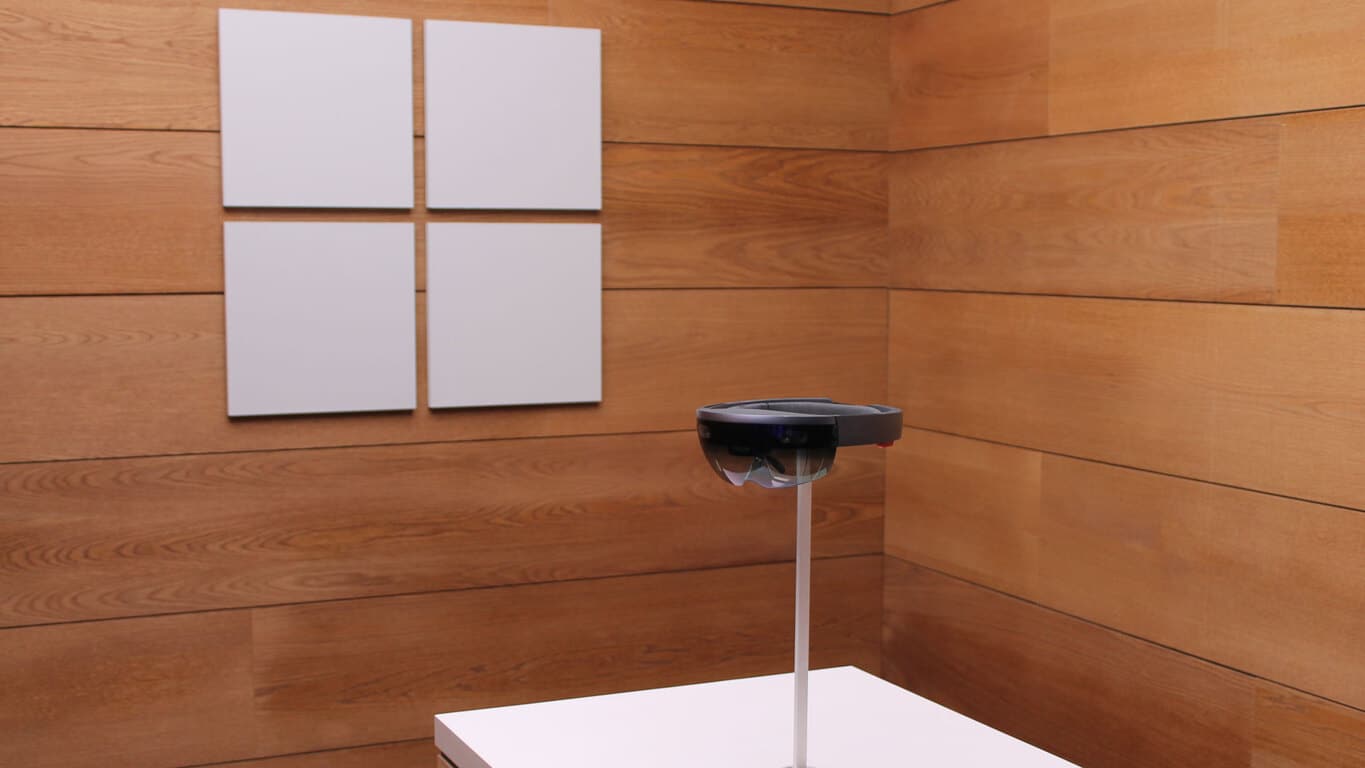
Microsoft is bringing Windows Holographic Shell to all Windows 10 PCs next year

Earlier this year, Microsoft announced that it would open up Windows Holographic so OEMs could build for lower price points and create devices with bigger fields of view. Today the folks over at VentureBeat have learned that Microsoft is furthering its HoloLens plan and is bringing a Windows Holographic Shell to all Windows 10 PCs next year.

Update: Microsoft has published a Terry Myerson blog post detailing the news, along with this showcase video:

The Windows Holographic Shell is one of the parts of a combined mixed reality effort by both Microsoft and Intel, and will apparently be released later next year.  Intel’s own Project Alloy virtual reality headset, meanwhile, is due to work with the Shell and will be released in December of 2016 at Microsoft’s WinHec event in China.

Similar to Microsoft’s own Hololens, Project Alloy uses completely wireless technology, and is an all in one device with all cameras, sensors, and input controls built in.  Project Alloy also relies on hand-tracking as input, and utilizes a 1080p camera and infrared cameras and lasers.

Microsoft shows off Gears of War 4, ReCore gameplay at Gamescom

While Microsoft’s Xbox Fanfest at Gamescom 2016 won’t kick off until tomorrow August 17, the Xbox team has premiered today new gameplay trailers for Gears of War 4 and Recore. The two Xbox One and Windows 10 exclusive titles are set to be released in the coming weeks and they definitely look to be strong titles that could help the brand new Xbox One S get some momentum before the holiday season.

The following 10-minute-long Gears of War 4 trailer has been captured on a Windows 10 PC in 4K resolution with an NVIDIA GTX 1080 GPU. Director of Community at The Coalition Adam Fletcher also explained in a blog post on Xbox Wire that the game is “powered by a completely new rendering engine, with the Windows 10 version supporting comprehensive video settings, increased texture resolutions, dynamic resolution support up to 4K and more.”

Here is the official trailer description:

In this short gameplay demo through the “Rescue” chapter of Gears of War 4, our heroes JD, Kait and Del are chasing an unknown enemy through an old fort. Along the way, they encounter two fierce Swarm enemies – Drones and Pouncers – for the first time.

The game looks really great in glorious 4K, and if you’re looking forward to playing it on your PC later in the fall, then Fletcher has also shared the game’s minimum, recommended, and ideal specs:

Minimum, recommended and ideal specs for playing Gears of War 4 on Windows 10.

Recore looks like an entirely different beast, and the futuristic action-adventure game follows the story of one of the last remaining humans on a planet controlled by robots out to kill you. Here is the official description of the gameplay trailer:

Join Joule Adams as she leads a group of Corebot companions on an adventure to save mankind in the dangerous world of Far Eden. From the legendary creator Keiji Inafune, and the makers of Metroid Prime comes ReCore, an action-adventure crafted for a new generation.

Recore will be available on September 13 on both the Xbox One and Windows 10 while Gears of War will be released on October 11 on both platforms. Let us know what you think of these new trailers in the comments below.

Xbox to expand wireless ecosystem with new PCs and accessories

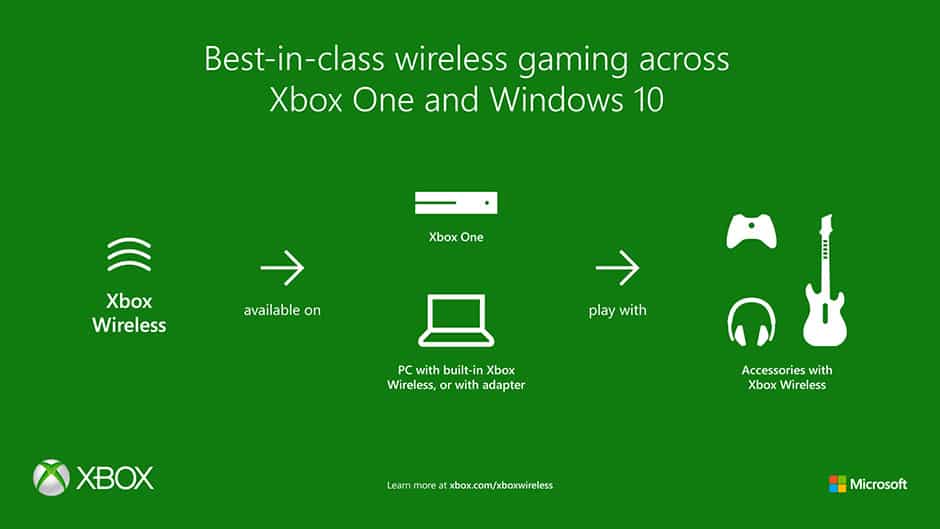
Earlier today we reported that Lenovo was introducing two new  gaming/VR Windows 10 desktop powerhouses. One of those new PC’s, the Lenovo IdeaCentre Y710 Cube, features built-in support for all Xbox Wireless accessories straight out of the box without the need for any adapters or wires. In line with this, Microsoft has announced that Xbox will expand on this wireless ecosystem and will bring the Xbox Wireless technology to new PCs and accessories.

Ultimately, this means that Microsoft will work with partners such as Astro, HyperX, Lenovo, Mad Catz, PDP, Plantronics, Razer, SteelSeries, and Turtle Beach to bring a seamless way for gamers to play with accessories across devices. Microsoft also notes that gamers should expect to see the technology in new PCs and new accessories moving forward.

For those unfamiliar with the technology, the company also offers up the following explanation and benefits of Xbox Wireless:

Xbox Wireless provides you with a best-in-class wireless gaming experience across Xbox One and Windows 10 PCs. Designed specifically for gaming, Xbox Wireless provides advantages over other connection methods, such as:

  • Low-latency and high-quality wireless gameplay for up to 8 devices at once.
  • Cross-platform use across Xbox One and Windows PCs.
  • Wireless support for stereo sound through a headset
  • Eliminating the need for multiple adapters or wires for each device.
Xbox Wireless Logo
Xbox Wireless Logo

The exact implementation of Xbox Wireless will vary depending on the type of device, and the partner themselves. In fact, Microsoft even hopes to one day enable direct integration of Xbox Wireless into motherboards though hardware partners.

Until then, you can be on the lookout for above Xbox Wireless support logo on accessories such as headsets, joysticks, and other input devices, or even the latest Xbox Wireless accessory, the  Rock Band Rivals Band Kit. You can even go ahead and purchase a Xbox Wireless Adapter for Windows, in order to bring the power of Xbox Wireless to your PC.