U.S. tariff policy continues to shape Big Tech strategy, and a new report suggests potential relief for companies tied to Taiwan Semiconductor Manufacturing Company.
According to Windows Central, U.S. economic policy remains one of the biggest constraints for major technology firms. The Trump administration’s tariff measures on foreign goods have disrupted supply chains and raised costs across industries.
Report suggests potential tariff exemptions for TSMC
Citing sources familiar with the matter, the Financial Times reports that the U.S. administration may allow TSMC to grant exemptions to specific companies under an updated tariff framework.
The White House reportedly aims to encourage large-scale domestic chip manufacturing. In response, TSMC has pledged up to $165 billion in future U.S. investments. The proposed tariff carve-outs would tie directly to how Taiwan allocates capital toward expanding U.S.-based fabrication facilities.
However, sources say discussions remain in flux. Both the White House and TSMC declined to comment on the matter.
Microsoft’s reliance on TSMC
Microsoft depends heavily on TSMC for its custom AI silicon. The company uses TSMC to manufacture its Maia 100, Maia 200, and Cobalt 100 data center chips, which power its expanding AI infrastructure. Microsoft also confirmed the supply of SK Hynix HBM3e memory for these AI accelerators.
Beyond custom silicon, Microsoft indirectly relies on TSMC for additional chip production tied to its broader cloud ecosystem.
If tariff exemptions materialize, they could ease cost pressures for companies building AI infrastructure at scale. That relief may help stabilize pricing for enterprise cloud services and AI products over time.
While investors may view the report as encouraging, consumers could also benefit if reduced tariff burdens prevent future price increases across AI-driven services and hardware.
The hype around Grand Theft Auto 6 continues to grow, even though GTA 6 already has a confirmed November release window. Now, fresh trailer speculation has the community dissecting every comment from industry insiders.
Tom Henderson’s GTA 6 trailer prediction sparks confusion
According to Gameranx, industry insider Tom Henderson shared his personal expectations about the next GTA 6 trailer during the Insider Gaming Weekly podcast.
Henderson said he does not expect new GTA 6 footage until the first week of August. He connected that timing to Take-Two Interactive’s earnings call schedule, suggesting that Rockstar Games could drop a trailer either the same day or shortly before an investor call.
The reasoning? Generate maximum hype right before discussing financial results.
Not a leak, just an opinion
The comments quickly went viral, and many fans treated them as insider information. However, content creator Videotechuk clarified that Henderson was offering an opinion, not leaking confidential details. Henderson later confirmed that clarification.
The situation highlights how eager the community is for any GTA 6 news. Even personal predictions can snowball into full-blown “leaks” within hours.
For a game of this scale, that decision reinforces Rockstar’s traditional, handcrafted approach to open-world design.
With November approaching, fans likely won’t have to wait much longer for official updates. Whether Henderson’s timing guess proves accurate remains to be seen, but one thing is clear: every GTA 6 rumor now moves the internet.
Although Windows 10 is no longer in mainstream support, Microsoft continues to deliver security patches and known issue fixes through Extended Security Updates.
Parental Controls Bug Allowed Temporary Third-Party Browser Access in Windows 10
In June 2025, Microsoft confirmed a bug tied to Web Filtering under parental controls.
Web Filtering is designed to control the content children can access in Microsoft Edge. When it comes to third-party browsers such as Google Chrome or Vivaldi, the system normally requires parental consent before launch.
However, a bug caused newer versions of certain third-party browsers to appear temporarily unblocked. This behavior could allow children to access the web without intended restrictions.
Microsoft stated that the issue resulted from how newer browser versions were recognized under Web Filtering policies.
Server-Side Fix Rolling Out Automatically
Microsoft has now resolved the issue through a server-side fix. The rollout began in early February 2026 and will continue over the coming weeks.
Affected devices will receive the correction automatically. Users do not need to install a Windows update or take any additional action.
The company also issued a statement regarding expiring boot certificates, warning administrators to review their environments and apply recommended updates to avoid potential boot-related issues in the future.
Despite its aging status, Windows 10 continues to receive targeted fixes and security updates, particularly for systems enrolled in Extended Security Updates.
Intel has been in the spotlight lately, from reports about Nova Lake-S CPUs potentially drawing up to 700W to fresh security updates developed with Google.
Intel and Google strengthen TDX security on Patch Tuesday
According to Neowin, Intel has published new security findings as part of Windows Patch Tuesday after a joint review with Google. The collaboration focused on improving Intel Trust Domain eXtensions, also known as Intel TDX, a confidential computing technology built into modern Intel Xeon processors.
Intel TDX protects sensitive workloads even when running in environments that could be compromised. This approach plays a major role in cloud and multi-tenant enterprise systems, where isolation and data integrity remain critical.
TDX enables Confidential Virtual Machines, also referred to as Trust Domains. These virtual machines enforce hardware-level confidentiality and integrity protections, blocking even privileged layers like hypervisors from accessing protected memory. Google Cloud already offers Confidential VMs powered by Intel Xeon CPUs, while Microsoft Azure also provides Confidential VMs based on Intel technology.
Five vulnerabilities patched after joint review
The five-month collaboration in 2025 involved Google’s Cloud Security team and Intel’s INT31 research group. The review targeted TDX Module 1.5, which manages high-level TDX functionality.
Engineers evaluated advanced features such as Live Migration, which allows a Trust Domain to move between hosts while running, and TD Partitioning, which enables nested virtual machines inside Trust Domains.
Google used manual code reviews, custom bug-finding tools, and AI tools, including Gemini Pro. The process uncovered five vulnerabilities and 35 additional weaknesses or improvement opportunities. Intel has patched all five vulnerabilities in the latest TDX Module release.
As a result, Google Cloud Confidential VMs backed by Intel TDX now benefit from enhanced protections. Meanwhile, Intel continues to face hardware headlines, with fresh reports about Arrow Lake Refresh and new Core Ultra 5 250K Plus benchmark leaks adding to the conversation.
Microsoft is preparing an unusual Windows 11 26H1 update for release this Spring. Unlike traditional H2 feature updates, 26H1 arrives as a first-half release with limited scope.
The company has already begun testing 26H1 with Windows Insiders, signaling that development is well underway.
Windows 11 26H1 targets select Snapdragon X2 devices
According to Microsoft’s latest blog post, Windows 11 26H1 is described as a “scoped” release rather than a broad feature update. That means it will not roll out to the general Windows 11 install base.
Microsoft has confirmed that only devices powered by Qualcomm Snapdragon X2 Series processors will receive 26H1. Existing PCs running Windows 11 24H2 or 25H2 will not be eligible for this release.
Devices that ship with 26H1 will continue receiving standard monthly cumulative updates. However, they will not qualify for the upcoming 26H2 update.
Separate Windows core blocks direct upgrade to 26H2
Microsoft says Windows 11 26H2 is based on a different Windows core. Because of this architectural shift, devices running 26H1 cannot directly upgrade to 26H2.
The company has promised a future upgrade path for 26H1 devices, though it has not confirmed whether that will come in the form of 27H1 or another release cycle.
Security updates for 26H1 remain manageable through standard enterprise tools. However, hotpatch updates will not be supported on this version.
Enterprise customers advised to stay on 24H2 or 25H2
Microsoft advises organizations not to change purchasing or deployment strategies because of 26H1. The company continues to recommend Windows 11 24H2 and 25H2 for standardized enterprise environments.
Those releases offer broader hardware compatibility and align better with large-scale IT rollouts.
Windows 11 26H1 appears positioned primarily for early adopters and users exploring new silicon advancements, particularly on next-generation Snapdragon platforms.
Microsoft has confirmed the shutdown of Exchange Web Services in Exchange Online and reminded customers about the upcoming retirement. As reported by Neowin, the company has now shared more details about how the phase-out will unfold.
Phased retirement of EWS begins in 2026
The phased retirement of Exchange Web Services in Exchange Online will begin in October 2026. Full shutdown across Microsoft 365 and Exchange Online will follow in 2027.
EWS in on-premises Exchange Server will not be affected. The changes apply only to Exchange Online in Microsoft 365.
Microsoft will manage the transition on a tenant-by-tenant basis using the EWSEnabled policy starting October 1, 2026. Until that date, EWS access will remain allowed regardless of the EWSEnabled value.
From October 2026 onward, if EWSEnabled is set to True, only applications on a newly introduced AppID Allow List will retain access. If it is set to False, all EWS access will be blocked. When EWSEnabled is left as Null, EWS access will remain allowed and the Allow List will be ignored.
Allow List, deadlines, and final shutdown
IT administrators will manage the AppID Allow List through Exchange Online PowerShell. If EWSEnabled is set to True but no Allow List is configured, Microsoft will automatically generate one.
If admins configure EWSEnabled as True before September 2026, Microsoft will not automatically switch it to False in October. Even if Microsoft sets it to False during the phased period, admins can manually re-enable it until April 1, 2027.
After April 1, 2027, admins will no longer be able to modify EWSEnabled. At that point, EWS in Exchange Online will be permanently disabled, with no exceptions or extensions granted.
Microsoft also plans to run temporary “scream tests” by disabling EWS to help organizations identify dependencies. Tenants with EWSEnabled set to True will not be included in these tests.
The company strongly advises IT admins to audit current EWS usage, configure the Allow List if required, and migrate applications to Microsoft Graph as soon as possible, which offers near feature parity and a modern API experience.
There are countless options for managing and retouching your photos on Windows, but Adobe Lightroom continues to set the bar high. However, one contender worth exploring is Zoner Studio, which boasts powerful AI tools, layer editing, and a user-friendly interface.
In this Zoner Studio vs Adobe Lightroom comparison, we take a closer look at their core features, so you can decide which is the best for you.
Zoner Studio vs Adobe Lightroom: Overview
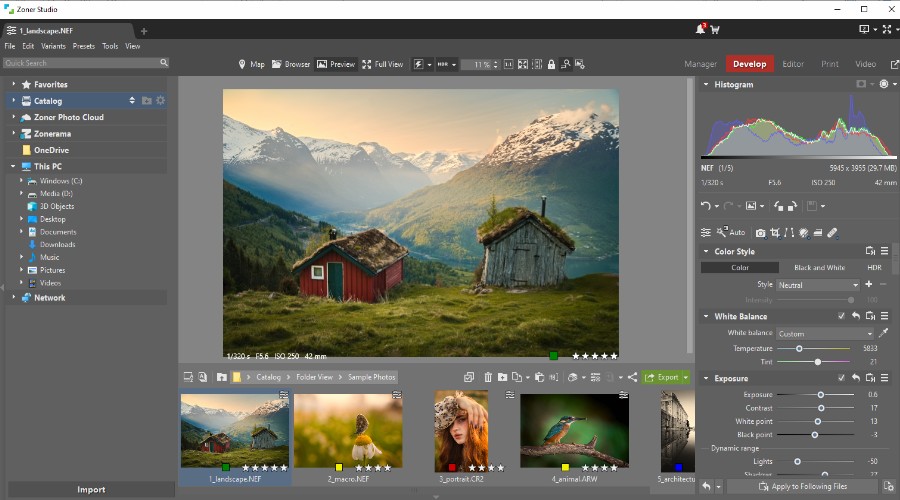
Zoner Studio is an all-in-one photo suite for Windows, allowing you to organize and edit your photos non-destructively, without getting overwhelmed by unnecessary bloat.
Its AI tools are gimmick-free, providing genuine one-click results for upscaling and masking, instantly isolating the subject, background, sky, and objects in your photos.
It supports RAW processing, Photoshop like layering, and a wide range of adjustments, enhancements, and effects.
Zoner Studio is arguably the best value on the market, starting at just $5.99/mo or $59/yr. This makes it a great choice for beginners and hobbyists alike.
On the other hand, Adobe Lightroom is a bulkier and somewhat more advanced solution, aimed at professionals, available on Windows/Mac and with cross-platform support.
It benefits those already invested in the Adobe ecosystem, as a companion to Photoshop and Firefly, and is still widely considered the standard for those working in the industry.
On its own, Lightroom starts at $17.99/mo or $119.88/yr. The price soon shoots up when including Photoshop or a broader Creative Cloud subscription.
Key Takeaway: Zoner Studio represents the best value for Windows users. The free download for Windows provides a 7-day free trial.
Interface and Ease of Use
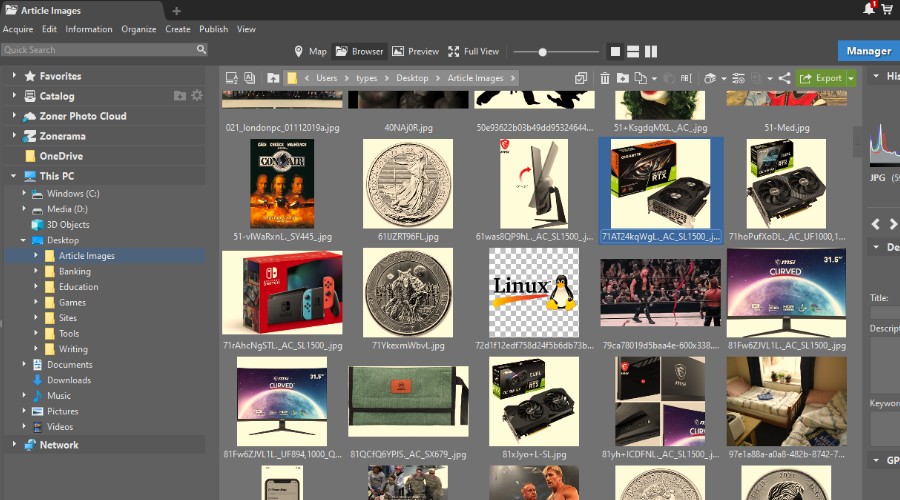
Like Lightroom, Zoner Studio acts as the central hub for managing all your photos. Unless you’re sourcing straight from your camera’s SD card, you don’t need to directly import them as it automatically recognizes image files via the navigator on the left. Simply browse through your PC folders and any photos will be displayed as thumbnails.
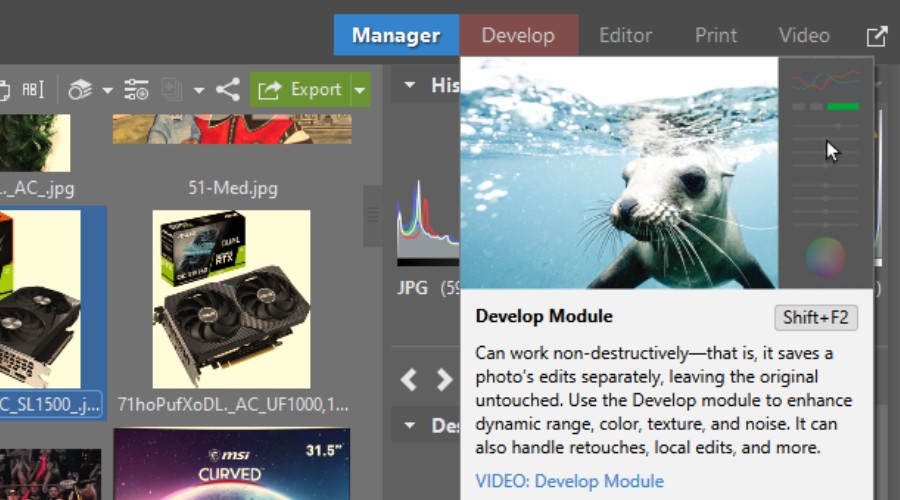
Double clicking a thumbnail automatically opens the photo in the flagship Develop module, which is where the bulk of RAW editing takes place. For special use cases, you can make further layered edits in the Editor module.
You can quickly switch between modules at the top of the toolbar on the right.
The Manager module is for Digital Asset Management, where you browse, tag, cull, and organize your photos. You’ll also see a search bar and the ability to filter by image format, text descriptions, keywords, rating, color label, location, and other parameters like GPS coordinates.
Its metadata filtering options will also allow you to filter by lens and camera model, which is commonly included in photo EXIF data.
You can check and manage metadata, like the camera model, using the File Information function (`Ctrl+Shift+Enter`).
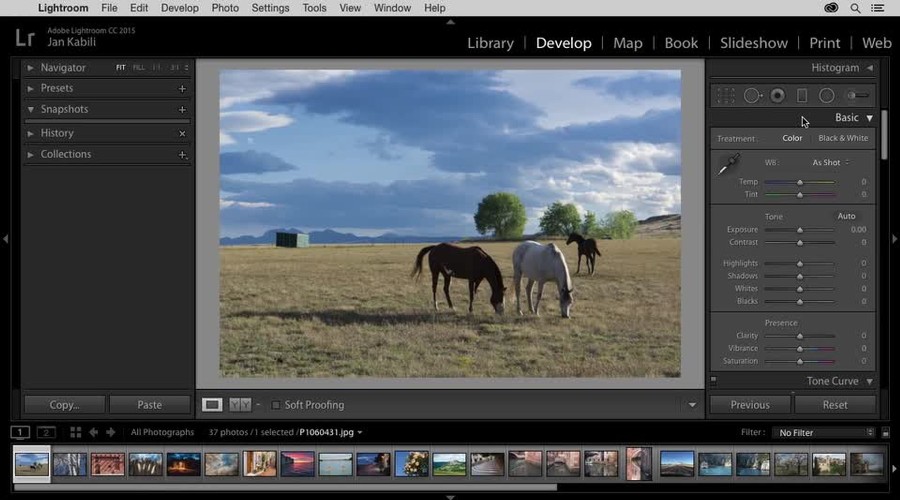
This is all very similar to Lightroom, which has its Develop module for RAW editing and Library module for organization. Its search is only slightly more advanced, with object filtering.
Overall, using Zoner Studio is a straightforward and intuitive experience. I like that you can work on multiple photos, switching between them like browser tabs. It also features multiple viewing modes, including full screen with fly-in editing panels, and a compare view for multiple images.
You get full control over the editing process, with an undo arrow and a dropdown history panel. Like lightroom, double clicking an adjustment slider will also reset the adjustment.
Even if you get stuck, you get robust support and there are lots of tutorials and help info on the site.
Both Lightroom and Zoner Studio support all common RAW formats (including DNG) and Bitmap formats (including HDR such as AVIF and JXL).
Key Takeaway: Comparable interfaces, ease of use, and image formats.
Develop
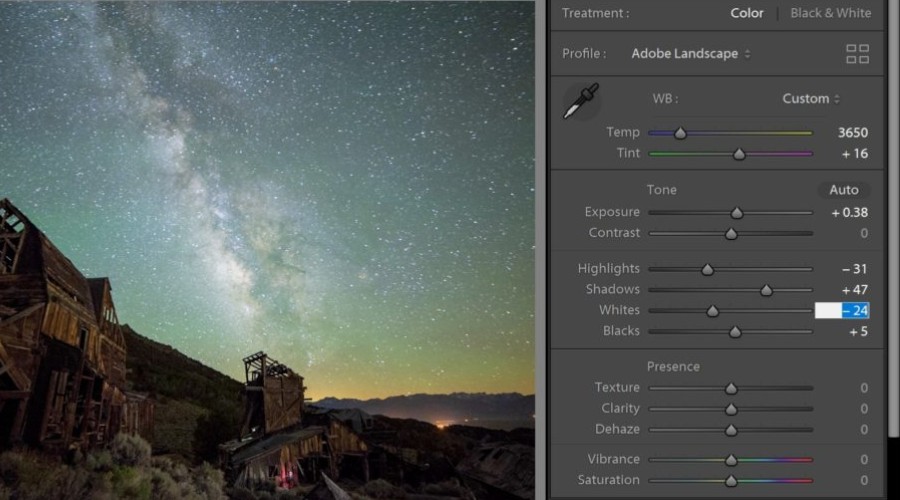
In Lightroom, the Develop module represents the main editing space for retouching photos. Here you can correct the exposure and white balance, reduce noise and sharpen the image, perform color grading, tone curve, and HSL, as well as cropping and rotating.
Its masking tools allow you to apply edits to specific areas. This can be done manually with brush, gradient, and radial tools, while its AI auto detects the subject, sky, and background.
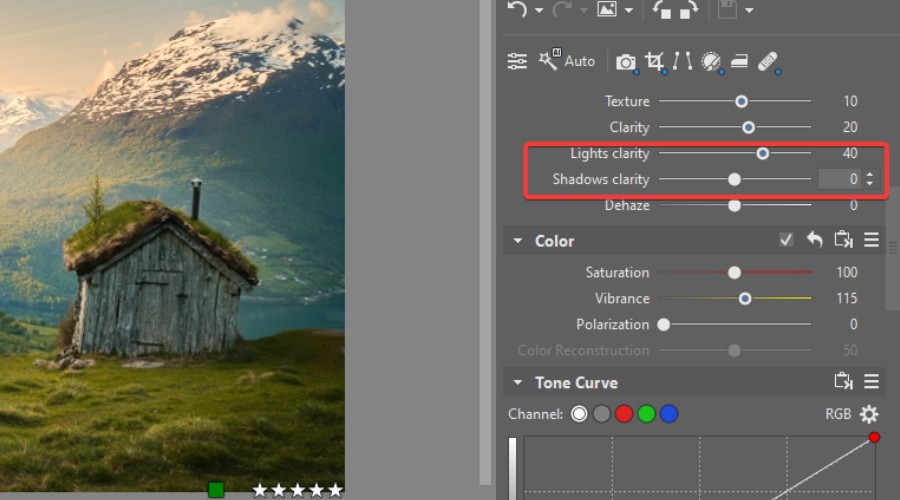
Zoner Studio offers a functionally similar set of Develop features, excelling at color shifting and effects like vignetting, halation, and glow. The clarity settings under Exposure stand out by allowing you to tweak the clarity of lights and shadows in a subtler way than Lightroom.
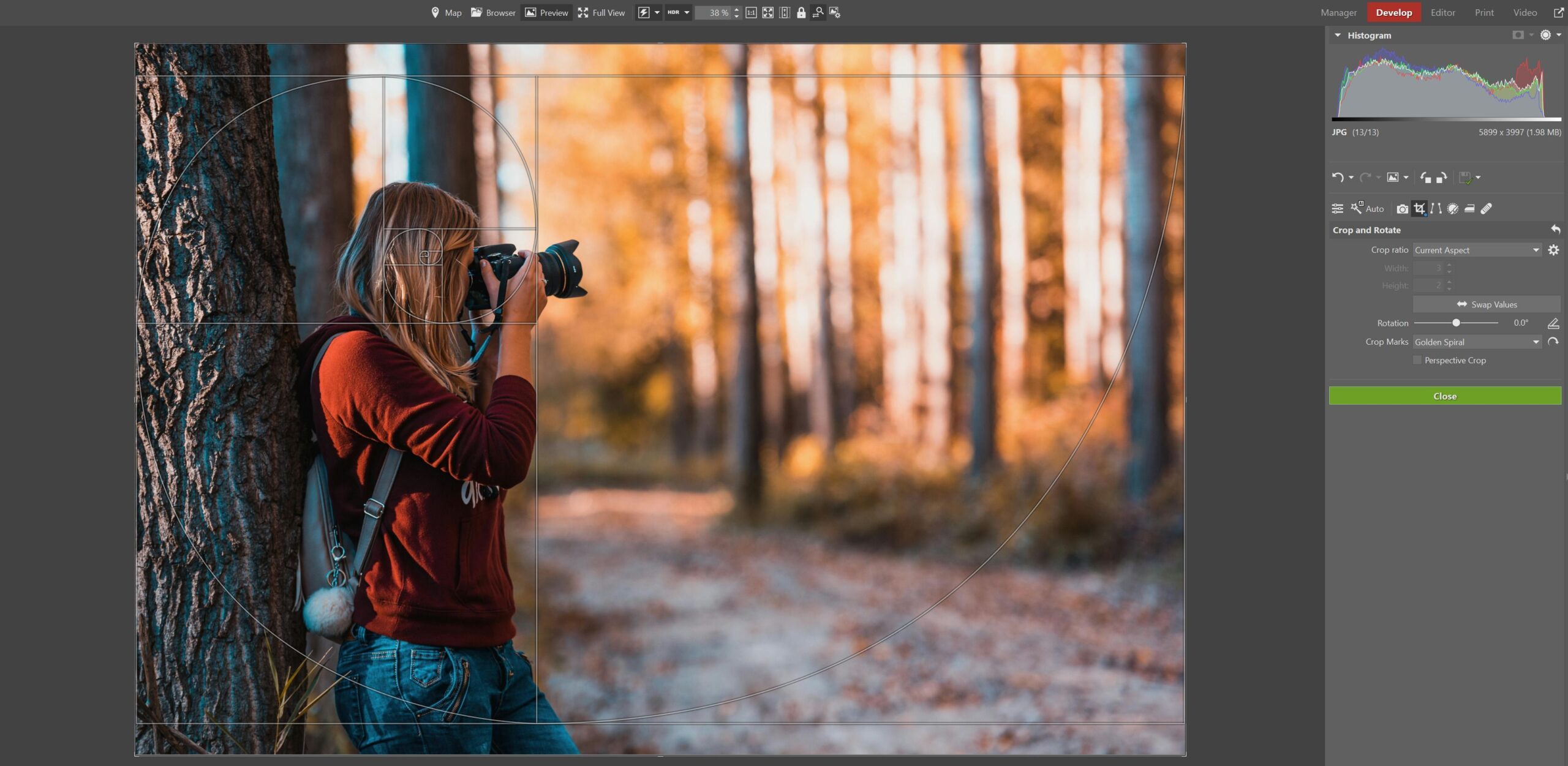
Its cropping and rotating are also good but lacks lightroom’s auto-horizon.
Both support auto-corrections based on lens profiles, though Lightroom seems to be a bit more effective in this area.
Zoner Studio is particularly useful for the ability to create local AI, brush, gradient, color and luminance mask layers, within the Develop module.
All things considered, Zoner Studio holds strong against Lightroom, and any differences are mostly superficial. What Zoner Studio lacks in preset variety or some advanced options is countered by ease of use and its own exclusive settings.
Key Takeaway: Zoner Studio is more refined for beginners and intermediates.
Layer Editing
Where Zoner Studio really shows its value is via its separate Editor module. This goes beyond RAW processing into the realm of layered pixel editing. You can stack image layers, add text and objects, use retouching and drawing tools, and masks for precise control.
Each layer can be edited independently with adjustments, blending modes, and effects. Unlike Lightroom, which requires Photoshop for this level of work, Zoner includes it all in one package.
Other standout editing tools include red eye reduction, line straightener, and liquify, which includes AI facial enhancements.
Key Takeaway: Zoner Studio includes full layer editing.
Note: Zoner Studio uses its own layered image format ZPS and cannot work with Photoshop’s PSD format.
AI Tools
Zoner Studio has now mostly caught up with Lightroom when it comes to AI-powered masking. You can use traditional lasso tools, but the AI has the ability to recognize the main subject of the photo or faces that may have blinked, any individual object such as birds, vehicles (even airplanes), the background, and the sky.
This lets you make quick adjustments to the different elements of your photo or remove them altogether. All it lacks is generative erase and replace, where Lightroom integrates with Firefly to generate entirely new objects and details for your selections.
That said, I find Zoner Studio does a better job of recognizing faces, allowing independent retouching of face shape, eyes, nose, and mouth.
It also offers a powerful AI Resize tool, which essentially upscales the resolution without sacrificing sharpness and quality.
Key Takeaway: Choose Zoner Studio for faces or Lightroom for generative AI.
Performance and Storage
Lightroom CC offers seamless cross-platform functionality, allowing users to edit, organize, and sync photos across Windows, macOS, iOS, Android, and web browsers using Adobe Creative Cloud.
Zoner Studio is only compatible with Windows 10 and 11, but you can access cloud storage via the web.
It is surprisingly well optimized on Windows and I found it runs faster than Lightroom on my lower end system with 8GB of RAM (both recommend 16GB). Zoner Studio also takes up less disk space (2GB), while Lightroom requires 10GB to complete the installation process.
Registered users get 20GB of storage via the Zoner Photo Cloud. This is personal storage, whereas Zonerama is your free online gallery with unlimited space. Albums can be password protected or public and there are lots of sharing and engagement features.
You will also notice a Print module within the software for physical print projects like photo books and calendars. Zoner Studio itself offers 15 free photo prints per year.
Lightroom CC comes with personal cloud storage, which varies depending on the plan. While you can share photos and galleries with others, this is more restrictive than Zonerama.
Zoner Studio vs Adobe Lightroom – Final Verdict
In conclusion, Zoner Studio has everything you need for photography in one place. This includes most of the key capabilities of Lightroom, while also offering layering and basic pixel editing tools that Adobe users would have to switch to Photoshop for.
That coupled with a more affordable price, makes it a no-brainer for beginners and hobbyists that aren’t already entrenched in the Adobe ecosystem, and want an accessible solution on Windows.
Get Zoner Studio with a full 7-day free trial, no strings attached!
Nonetheless, those that favor Mac, need cross-platform support, or want more advanced editing via Photoshop, should still strongly consider Lightroom.
Tuesday was a bit of a mixed bag for Microsoft (NASDAQ: MSFT), with the stock closing at $413.27, down by 0.08%. Investors are trying to balance the scary reality of rising AI costs against the hope for big earnings down the road.
But, it wasn’t just Microsoft, the market was soft, with heavyweights like Apple and Alphabet also seeing some pressure. This tells the volatility across the whole tech world right now. It was a busy day on the floor, too. Trading volume hit 44.6 million shares, which is way above the three-month average.
In case you missed, today, Microsoft stock opened at $419.62 and shot up to $423.68 before easing a little. As of midday U.S. time, it’s around $419.92, up 1.5% on the day. That’s above yesterday’s close, showing buyers are stepping in.
But, wait, is the AI hype finally cooling off? Some analysts think so. Melius recently downgraded the Microsoft stock to “hold” because they’re worried about how those aggressive investment plans will affect cash flow.
As reported by The Motely Fool, Stifel analyst Brad Reback went even further, cutting his price target by nearly 30% and suggesting that the stock needs a break from all the AI madness.
With all this action and volatility, what do you think, is Microsoft stock still a buy, or is it time to wait and watch? Let’s engage in discussion in the commennts below.
Disclaimer: This article is for informational purposes only and does not constitute financial or investment advice. Stock market investments carry risk, and readers should conduct their own research or consult a qualified financial advisor before making any investment decisions. As always, stock prices and percentages are based on the time of writing and are subject to change due to market volatility. Please verify current quotes before making any investment decisions.
Overwatch Season 1 is now live. The update introduces five new heroes, revamped competitive modes, a complete UI overhaul, and seasonal events that promise a full reset to the game. Players can jump in today and experience a fresh start for the franchise. Here’s the biggest highlights from the massive patch notes.
Five New Heroes
As part of the massive Season 1 update, Blizzard has added Domina, Emre, Mizuki, Anran, and Jetpack Cat, as new heroes in Overwatch, with each bringing unique abilities and playstyles. Domina is a high-tech tank, who dominates the battlefield with her Barrier Array and Panopticon ultimate, controlling space like no other tank before her.
Emre, a cyber-enhanced damage hero, thrives on fast-paced attacks and life-stealing bursts, perfect for aggressive plays. Mizuki mixes healing and crowd control, giving support players more versatility. Anran, aligned with Overwatch, wields fire-based attacks and can self-revive, making her a dangerous threat on the frontline. And then there’s Jetpack Cat, a mobile support hero who heals allies while dodging enemies midair. Not to forget, Hero Trials for Anran started February 5, which gave players get an early impression before the season officially kicked off.
Image: Blizzard
Role Subdivisions Add Depth
Season 1 isn’t just about new heroes. Blizzard has reworked core roles into sub-roles with passive abilities. Tanks, Damage, and Support now have Bruisers, Flankers, Medics, Tacticians, and more. Team composition is more strategic than ever, and every choice carries weight.
Moving on, a five-week Conquest meta event allows players fight for Overwatch or Talon, completing missions for lootboxes, faction-themed skins, and exclusive titles. Competitive play also resets, introducing the Crimson Wolf weapon, Diamond+ Doomfist skins, and dynamic Top 500 titles. The stakes for top players just got higher.
UI Overhaul and Stadium Updates
Menus, hero galleries, and lobbies get a full UX refresh, including a 3D lobby and streamlined navigation. The Hero Builder now offers recommended builds based on global data, letting players plan strategies while keeping control. Praise, post-match accolades, and improved sound settings make matches more rewarding and interactive.
Skins, Mythics, and Collaborations
From February 10–23, Overwatch teams up with Hello Kitty & Friends, adding six themed skins. Mythic skins for Mercy and Juno debut this season, with more planned throughout 2026. Faction rewards, lootboxes, and seasonal events round out the update, keeping content fresh for both casual and competitive players.
Putting it simply, Season 1 is more than just a reset, it’s a full relaunch. New heroes, systems, and seasonal events make it the perfect time for veterans and newcomers alike to jump into Overwatch.
Blizzard has just released Heroes of the Storm patch notes, detailing new skins, balance changes, map improvements, and hero adjustments that promise to improve gameplay experience. Players will notice everything from new audio cues to fully reworked abilities. Here’s the full breakdown.
Heroes of the Storm Full Patch Notes
General Updates
New Skin: Toon’Dan Gul’Dan has arrived for players looking to add a fun twist to their collection.
Milestone Protection: All quests that can lose stacks no longer allow players to fall below milestone thresholds.
Mythic Rewards: Pinnacle Rewards are now officially called Mythic Rewards, adding that signature Blizzard flair.
Summoned Unit Changes: Health now decreases each second for multiple summons, including Creep Tumors, Demon Lieutenants, Ultralisk, and more. Total Health and Duration have been adjusted to compensate.
Structures: Structures now target Summoned Units first when no minions remain. Summoned Units no longer take half damage from Structures.
XP Feedback: XP Globe pickup sound now triggers when killing a minion that instantly gives XP.
UI & Music: Homescreen and startup music have been updated for a more polished experience.
Map Updates
General
Watch Towers reset to neutral after 45 seconds of inactivity.
Volskaya Foundry
Triglav Protector bonus damage and cooldown speed increased from 25% to 40% with two players inside.
Protector attacks now scale higher, dealing +100% damage to structures.
Base attack damage decreased slightly from 155 to 130.
Warhead Junction
Burn duration now displayed on affected structures.
Hero Balance Changes
Azmodan
Globe of Annihilation [Q]: Now deals 50% damage to non-Heroes and no longer reduces damage at 225 Annihilation stacks.
Summon Demon Warrior [W]: Damage massively increased for minions and mercs. Warriors now lose 26 health per second, no longer have Immolation, and gain 2 charges.
Talents: Wrath reworked; Art of Chaos and Master of Destruction nerfed; Hell Rift damage reduced; Inescapable Annihilation adds unlimited range.
Deathwing
Attack damage slightly reduced.
Form Switch removed. Molten Flame, Incinerate, Lava Burst, and Onslaught adjusted for balance.
Cataclysm [R]: New quest rewards stacking damage up to 2,500% on structures and minions.
Jaina
Frostbite [Trait]: New quest grants Improved Ice Block, later upgraded to Ice Cold with protection.
Level 16 Wintermute nerf; Ice Lance and Numbing Blast adjusted.
Muradin
Storm Bolt [Q]: New quest introduced with stacking bonuses. Cooldowns, range, and damage updated.
Level 1–20 talents reworked including Dwarf Block and Perfect Storm.
Murky
Gains 35% shield on revive.
Spawn Egg [D]: Faster regeneration.
Slime [Q] & Pufferfish [W]: Damage now applies to structures. New quest adds stack-based scaling.
Sylvanas, Thrall, Tyrande
Multiple talents and abilities updated for Mythic Rewards scaling, mana adjustments, and chain effects.
Bug Fixes
Alarak: Deadly Charge now properly triggers.
Ana: Aim Down Sights can now toggle while silenced.
Microsoft has issued a warning about an upcoming security change that could quietly affect millions of Windows PCs over the next year. Here we are talking about Secure Boot, the low-level protection that checks system integrity before Windows even starts.
Microsoft prepares for June 2026 Secure Boot certificate expiration
In a dedicated blog post, Microsoft has once again confirmed that the original Secure Boot certificates, first introduced more than a decade ago, will begin expiring in June 2026. When the cutoff date comes, devices that haven’t transitioned to newer certificates won’t suddenly fail, though. Windows will still boot, and apps will still run, but security won’t be the same.
According to Microsoft, affected systems will move into a reduced protection mode. That means future boot-level defenses may no longer apply, leaving devices increasingly exposed as new threats emerge. For those unaware, Secure Boot operates at the firmware layer. It’s designed to stop malicious code from loading before the operating system has a chance to respond. Over time, however, cryptographic credentials age.
Microsoft says keeping outdated certificates in place would eventually weaken the entire trust chain. To avoid that, updated certificates are already being distributed through standard monthly Windows updates on supported versions of the OS. For most users, the transition happens automatically and requires no interaction.
Risks for unsupported systems and older hardware
Worth noting that systems running unsupported Windows versions won’t receive the update. This includes Windows 10 PCs that haven’t joined Microsoft’s Extended Security Updates program. While those PCs may continue to function, they’ll be locked out of future Secure Boot protections.
Microsoft notes that this could also lead to compatibility problems down the line. New firmware, hardware, or security-dependent software may refuse to load on systems stuck with expired credentials. Behind the scenes, Microsoft has been coordinating with major PC makers to smooth the rollout. Dell, HP, and Lenovo say newer devices already ship with updated certificates, covering most systems released since 2024.
Meanwhile, older PCs may need a separate firmware update from the manufacturer before Windows can apply the new certificates. Microsoft is urging users to check OEM support pages and keep firmware current. That’s not all; the company has said that in the coming months, Windows will also surface certificate status inside the Windows Security app, which would give users clearer visibility.
Last month, Microsoft released KB5073724 as Windows 10’s first Extended Security Update for 2026. It’s February, and now we have another Patch Tuesday update for Windows 10 users under the Extended Security Updates program. The latest patch comes as KB5075912, with build number 19045.6937. The update lands alongside February 2026 Patch Tuesday updates, KB5077181 & KB5075941, for Windows 11 version 24H2 & 25H2 and 23H2, respectively.
Besides the security improvements and bug fixes, this update kicks off the rollout of Secure Boot certificate updates. These updates are required to keep your PC safe and compatible with software that relies on Secure Boot.
Here’s what’s fixed and updated according to the update’s changelog:
[Fonts] This update includes changes to Chinese fonts to meet GB18030-2022A compliance.
[OS Security (known issue)] Fixed: After installing the Windows security update released on or after January 13, 2026, some Secure Launch-capable PCs with Virtual Secure Mode (VSM) enabled are unable to shut down or enter hibernation. Instead, the device restarts.
[Folders] Fixed: This update fixes an issue that affects folder renaming with desktop.ini files in File Explorer. The LocalizedResourceName setting was ignored, so custom folder names did not show. Now, custom folder names appear as expected.
[Graphics] Fixed: A stability issue affecting certain graphics processing units (GPUs) configurations.
[Secure Boot] With this update, Windows quality updates include a broad set of targeting data that identifies devices and their ability to receive new Secure Boot certificates. Devices will receive the new certificates only after they show sufficient successful update signals, which helps ensure a safe and phased rollout.
As always, this update is also available via Windows Update and the Microsoft Update Catalog for offline installation.
After a wild start to the year with the faulty January 2026 Patch that triggered multiple issues in Windows 11, Microsoft has just rolled out the February 2026 Patch Tuesday updates for Windows 11 25H2, 24H2, and 23H2.
The February 2026 patch for Windows 11 version 25H2 and 24H2 updates has been released under KB5077181, which bumps the systems to builds 26200.7840 and 26100.7840, respectively. Meanwhile, Windows 11 23H2 is receiving KB5075941, which will make your system jump to build 22631.6649.
According to the changelog shared by Microsoft, the following issues have been fixed in versions 24H2 and 25H2 of Windows 11:
[Gaming] Fixed: This update addresses an issue that determines device eligibility for the full-screen gaming experience.
[Networking] Fixed: This update addresses an issue that prevented some devices from connecting to certain WPA3‑Personal Wi‑Fi networks. The issue might occur after you install KB5074105.
[Secure Boot] With this update, Windows quality updates include a broad set of targeting data that identifies devices and their ability to receive new Secure Boot certificates. Devices will receive the new certificates only after they show sufficient successful update signals, which helps ensure a safe and phased rollout.
As far as Windows 11 23H2 is concerned, Microsoft has shared the following changelog:
[Secure Boot]
This release will execute updates in the Boot Manager on devices that already have the Windows UEFI CA 2023 certificate in their Secure Boot Signature Database (DB). It replaces the 2011 signed bootmgfw.efi with the 2023 signed bootmgfw.efi. Be advised of the consequences of resetting the DB or turning Secure Boot on or off, as this can cause a “Secure Boot violation” issue. In those rare cases, the solution is to create the Secure Boot recovery media.
With this update, Windows quality updates include a broad set of targeting data that identifies devices and their ability to receive new Secure Boot certificates. Devices will receive the new certificates only after they show sufficient successful update signals, which helps ensures a safe and phased rollout.
[Display & Graphics] Fixed: This update addresses an issue caused the Desktop Window Manager (DWM) process to re‑start unexpectedly.
[File Explorer] Fixed: This update addresses an issue where folder renaming with desktop.ini files in File Explorer isn’t work correctly. The LocalizedResourceName setting is ignored, so custom folder names don’t appear.
[Fonts & Display] Updates the Chinese fonts to support the GB18030‑2022A standard for character coverage and display.
[Graphics] Fixed: This update addresses an issue where certain GPU configurations might recently have experienced a system error related to dxgmms2.sys, resulting in the KERNEL_SECURITY_CHECK_FAILURE error.
[OS Security (known issue)] Fixed: After installing the Windows security update released on or after January 13, 2026, some PCs which run Virtual Secure Mode (VSM) are unable to shut down or enter hibernation. Instead, the device restarts.
[Windows Security] Fixed: This update addresses an issue that affected Microsoft Defender SmartScreen Application Reputation (AppRep) events from being logged. This interrupted event tracking used for advanced threat investigations.
[Secure Boot] With this update, Windows quality updates include a broad set of targeting data that identifies devices and their ability to receive new Secure Boot certificates. Devices will receive the new certificates only after they show sufficient successful update signals, which helps ensures a safe and phased rollout.
Per the company, there’s no known issue with this update. As always, these updates should install automatically via Windows Update.
Microsoft stocks (NASDAQ: MSFT) are seeing solid upside momentum in today’s session, with the stock climbing shortly after the market opened and briefly touching an intraday high of $423.68 before easing slightly.
As of around midday trading, Microsoft is sitting near $419.92, up about 1.5% on the day, extending yesterday’s rebound and signaling continued buying interest early in the week.
The rally picked up soon after the open, with the stock price jumping from an opening price of $419.62 and pushing higher through the morning. While the stock has pulled back modestly from its peak, it remains comfortably above yesterday’s close of $413.60, suggesting buyers are still in control so far.
Today’s move builds on improving sentiment around large-cap tech, with investors selectively rotating back into established names after recent volatility. Broader market strength has also helped support the upside, keeping Microsoft firmly in positive territory despite some intraday cooling.
Even with today’s gains, Microsoft is still trading well below its longer-term highs, leaving room for debate on whether this is the start of a sustained recovery or a short-term relief rally. For now, the stock is holding its ground near session highs, and all eyes are on whether momentum can carry into the afternoon.
Disclaimer: This article is for informational purposes only and does not constitute financial or investment advice. Stock market investments carry risk, and readers should conduct their own research or consult a qualified financial advisor before making any investment decisions. As always, stock prices and percentages are based on the time of writing and are subject to change due to market volatility. Please verify current quotes before making any investment decisions.
Microsoft’s stock (NASDAQ: MSFT) enjoyed a solid uptick on Monday, with shares climbing more than 3% in afternoon trading as markets broadly moved higher. The rally comes amid a wide tech stock rebound, where investors are snapping up shares that had been hit hard during recent volatility.
Microsoft shares jump as sentiment improves, but stock remains below recent highs
Microsoft closed around $413.60, up about 3.1% on the day, with profit extending into overnight trading, which is a notable move after weeks of choppy performance. According to market analysts, a key driver behind the rebound appears to be a shift in sentiment among institutional buyers.
Recent weakness pushed Microsoft’s stock into oversold territory, prompting opportunistic buying as part of a wider rotation back into established tech leaders. The uptick also comes as major indexes like the Dow Jones and S&P 500 showed strength, adding to positive market momentum on Tuesday.
Despite yesterday’s upward trend, Microsoft’s share price still sits well below its recent highs. Some Wall Street voices point to broader concerns around the tech sector’s sell-off, driven by heavy AI spending and slower growth in key cloud segments, which has pushed valuations lower and dampened investor enthusiasm.
That said, the rebound shows that buyers are still interested in betting on Microsoft’s long-term position in cloud and AI. Whether this recent push marks a sustainable uptrend or just a short-term bounce remains a key question for investors watching tech markets closely.
[UPDATE: 10 Feb 2026]
Missed the MSFT open? You missed a volatile start to the day. Microsoft shares hit an intraday high of $423.68 before cooling off, as the tech sector tries to shake off the recent sell-off. Is the ‘oversold’ narrative finally taking hold?
Disclaimer: This article is for informational purposes only and does not constitute financial or investment advice. Stock market investments carry risk, and readers should conduct their own research or consult a qualified financial advisor before making any investment decisions. As always, stock prices and percentages are based on the time of writing and are subject to change due to market volatility. Please verify current quotes before making any investment decisions.
[UPDATE: 10:58 PM IST, Feb 10, 2026] Microsoft has shared an update on X, noting that the company has “remediated the issue with the Microsoft 365 admin center and confirmed resolution through monitoring and customer reports. More details can be found under MO1230320 in the admin center.”
[ORIGINAL STORY] Microsoft is yet again dealing with a service disruption affecting Microsoft 365 Business and Enterprise customers in North America, with some users currently unable to access the Microsoft 365 admin center.
According to Microsoft’s Service Health Status page, the issue surfaced on February 10, 2026, and remains under active investigation. While the problem doesn’t appear to be a full outage, Microsoft confirms that admin functionality has degraded for affected users.
Microsoft 365 Admin Center Partially Unavailable
The company says users in the North America region may be blocked from accessing the admin center entirely. Even those who can log in may experience reduced functionality, including issues managing settings or submitting support tickets through the portal.
Microsoft also notes that access to the Microsoft 365 (M365) app may be impacted for some users as a result of the same issue.
Investigation Focuses on Infrastructure Load
Microsoft says it is currently analyzing diagnostic data from the Microsoft 365 admin center infrastructure. The investigation is focused on usage patterns and CPU utilization levels, suggesting a possible capacity or load-related issue.
We're investigating an issue with the Microsoft 365 admin center. More information is provided under MO1230320 in the admin center, or https://t.co/uSHwRmXFJZ.
In addition, Microsoft is reviewing HTTP Archive (HAR) files submitted by impacted users to better understand the root cause.
North America Impact Confirmed
At this stage, Microsoft says the scope of impact appears limited to North America. The company hasn’t shared an estimated time for a full resolution, but has committed to providing updates as soon as more details are identified.
The next status update is expected by 5:30 PM UTC.
Starting in March, Discord plans to roll out age checks globally, expanding a system that was previously limited to users in regions like the UK and Australia. What was once a decision linked to local regulations is now becoming a platform-wide requirement. Now, that decision is drawing critism from Discord users.
As reported by TheGamer, Discord users have begun cancelling their Nitro subscriptions in protest, openly saying that the upcoming age verification policy is the reason. Screenshots of cancelled memberships is being widely shared across social platforms.
Those protesting against Discord’s decision say that privacy is their real concern, even though Discord says the verification process won’t store personal data, claiming selfies won’t leave users’ devices, and submitted information won’t be retained. But many users aren’t trusting the company’s word, especially after it was shaken last year when a third-party provider used for age checks was breached, reportedly exposing verification data belonging to tens of thousands of users.
For long-time users, especially paying subscribers, the idea of handing over sensitive data to prove their age feels like a line being crossed. On top of that, users are also wary of Discord’s plan to estimate users’ ages using existing account data.
According to the company, behavioral patterns may be used as an initial signal before prompting verification. All that said, it will be interesting to see whether subscription cancellations and public pressure are enough to force a rethink remains unclear.
What do you think of age verification check in Discord? We’d love to hear your thoughts in the commets below.
Microsoft has reportedly introduced a new open-source operating system project called LiteBox. The news first came via Phoronix, which reported that LiteBox was announced by James Morris, Microsoft’s lead for Linux OS security and open-source engagement.
For those curious, LiteBox is a security-focused library OS written in Rust that leans heavily on Linux Virtualization Based Security (LVBS). The core idea is simple but ambitious: use virtualization hardware to let LiteBox act as a secure kernel that protects a normal guest kernel running underneath it.
Microsoft describes LiteBox as a sandboxing library OS that dramatically reduces the interface exposed to the host system. By shrinking that interface, LiteBox cuts down the attack surface, which is increasingly critical in mixed OS and cloud-heavy environments. The project is designed to work across both kernel and non-kernel scenarios, rather than being locked into a single use case.
At a technical level, LiteBox exposes a Rust-style “North” interface inspired by nix and rustix, while relying on a platform-specific “South” interface underneath. This North–South design allows LiteBox to bridge different environments cleanly, making it flexible enough to plug into a wide range of platforms.
Microsoft highlights several potential use cases, including running unmodified Linux applications on Windows, sandboxing Linux apps on Linux, running workloads on top of AMD SEV-SNP, supporting OP-TEE programs, and operating directly on LVBS.
LiteBox is fully open-source under the MIT license and is already available on GitHub. There’s no stable release yet, but active development is underway.
The entertainment discovery platform says it’s working directly with OpenAI to experiment with how ads might function inside a conversational AI environment, marking one of the earliest real-world uses of ads inside ChatGPT. The pilot remains limited, but it gives a clearer picture of where OpenAI is heading with monetization.
Under the pilot, Fever’s ads will only appear to logged-in adult users on ChatGPT’s Free and Go tiers. OpenAI maintains that ads won’t influence ChatGPT’s responses and will always be clearly labeled as sponsored, staying visually separate from AI-generated answers.
Fever’s VP of Marketing, Javier Macías, described the moment as similar to the early days of digital advertising, when formats and benchmarks hadn’t yet been established. According to him, the lack of a playbook is exactly what makes the pilot valuable, allowing companies like Fever to help shape what works and what doesn’t before the model scales.
Unlike traditional ad platforms, this test is less about reach and more about context. The pilot is designed to explore which formats, messages, and placements feel useful inside a chat-based interface, where users are actively asking questions rather than passively scrolling.
The pilot is still in its early stages, but Fever’s involvement confirms that advertising inside ChatGPT is no longer hypothetical. It’s already being tested, quietly, with select partners. Just in case, you’re not interested in seeing ads, you can avoid it by tweaking a few settings.
We know that Starfield could receive a major overhaul, and signs point to an announcement happening soon. However, that reveal may not land where some fans expect it.
Starfield PS5 version skips State of Play
According to PushSquare, Starfield will not appear during this week’s State of Play, despite ongoing speculation around a PlayStation 5 release. Instead, a new rumor suggests that Bethesda plans to unveil its next move sometime next month.
The claim comes from insider shinobi602, who has a solid track record and rarely shares information unless confident. This timeline lines up with a recent report stating that Starfield could launch on PlayStation 5 in early April.
Bethesda may be preparing a bigger relaunch
Bethesda typically keeps a short gap between announcements and releases, which strengthens the case for a near-term reveal. Reports suggest the announcement could arrive through a standalone Bethesda showcase or as part of an unannounced Xbox-related event.
Importantly, the upcoming reveal likely goes beyond a simple PS5 port. Sources indicate that Starfield 2.0 will take center stage, with major overhauls planned for existing gameplay systems. A second expansion may also appear, based on earlier reports.
These moves suggest Bethesda wants to reposition Starfield and spark renewed interest after its mixed launch reception. How deep the changes will go remains unclear, but expectations point toward a substantial refresh rather than minor tweaks.
More concrete details should emerge once Bethesda makes the announcement official.
The latest Xbox Ally update reportedly adds new console-style system sound effects, which give the handheld a more familiar Xbox Series X|S feel when navigating menus and the Xbox PC app.
The news comes via Windows Central, citing Jez Corden’s findings, which he shared on X earlier today. The update is currently rolling out to Windows Insiders. While the changes aren’t massive on paper, early impressions suggest the Xbox Ally’s interface feels snappier overall, with smoother navigation and more responsive interactions.
Quick Xbox Ally update!
Not sure if this is part of the Windows Insider ring, Xbox Insider ring, or whatever else, but the Xbox Ally now has the Xbox Series X/S navigation sounds when you use a controller.
Pretty small change that makes it feel way more like "an Xbox."
One of the notable features is the new audio feedback when moving through menus. These sound effects closely mirror what players are used to on Xbox consoles, helping the Ally feel less like a Windows PC and more like a dedicated Xbox device. If that’s not your thing, Microsoft has made sure the feature is optional. Users can lower the volume or disable the sounds entirely through settings.
The update appears to go beyond the handheld itself. The Verge’s Tom Warren has shared the same sound effects appearing in the Xbox PC app, hinting at Microsoft’s effort to standardize the Xbox experience across platforms. More importantly, the sounds only trigger when using a controller or a handheld device, so mouse and keyboard users won’t hear them during normal navigation.
Microsoft has added Xbox console navigation sounds to the Xbox PC app. You'll hear these sounds when you're using a controller or handheld pic.twitter.com/12ib9TJYAo
According to TechCrunch, YouTube has begun rolling out AI-powered playlist creation for Premium users on both iOS and Android. The feature allows users to build playlists using text or voice prompts, turning music discovery into a more interactive experience.
Users can describe genres, moods, activities, or even abstract ideas, and YouTube generates a playlist that matches the request. This approach removes the need to manually search for tracks or artists when creating a new playlist.
How to access the new feature
To use AI playlists, users need to open the Library tab in the YouTube app, tap “New,” and select the “AI playlist” option. From there, they can enter a prompt or speak it aloud to start generating a custom playlist instantly.
YouTube Premium and @YouTubeMusic Premium users can now instantly turn an idea, mood or genre into a personalized playlist using our new AI playlist feature 🎧
Here's how to use it:
1. On Android & iOS, tap the “New” button in the Library tab of YouTube Music 2. Select “AI… pic.twitter.com/YR1GVCqwvu
The feature integrates directly into the existing playlist creation flow, making it easy to try without changing how users normally navigate the app.
YouTube has experimented with AI-driven music features before. In July 2024, the company tested prompt-based custom radio stations in the United States, signaling early interest in generative tools for music discovery. The new playlist feature appears to build on those earlier tests.
Premium push and tighter restrictions
The AI playlist tool also strengthens YouTube’s Premium offering. Recently, the company removed mobile background playback workarounds, making Premium the only way to listen with the screen off. By pairing convenience features with AI-powered discovery, YouTube continues to push Premium as the best way to access its evolving music experience.
As streaming platforms compete on personalization, AI-generated playlists are quickly shifting from experimental features to core subscription benefits.
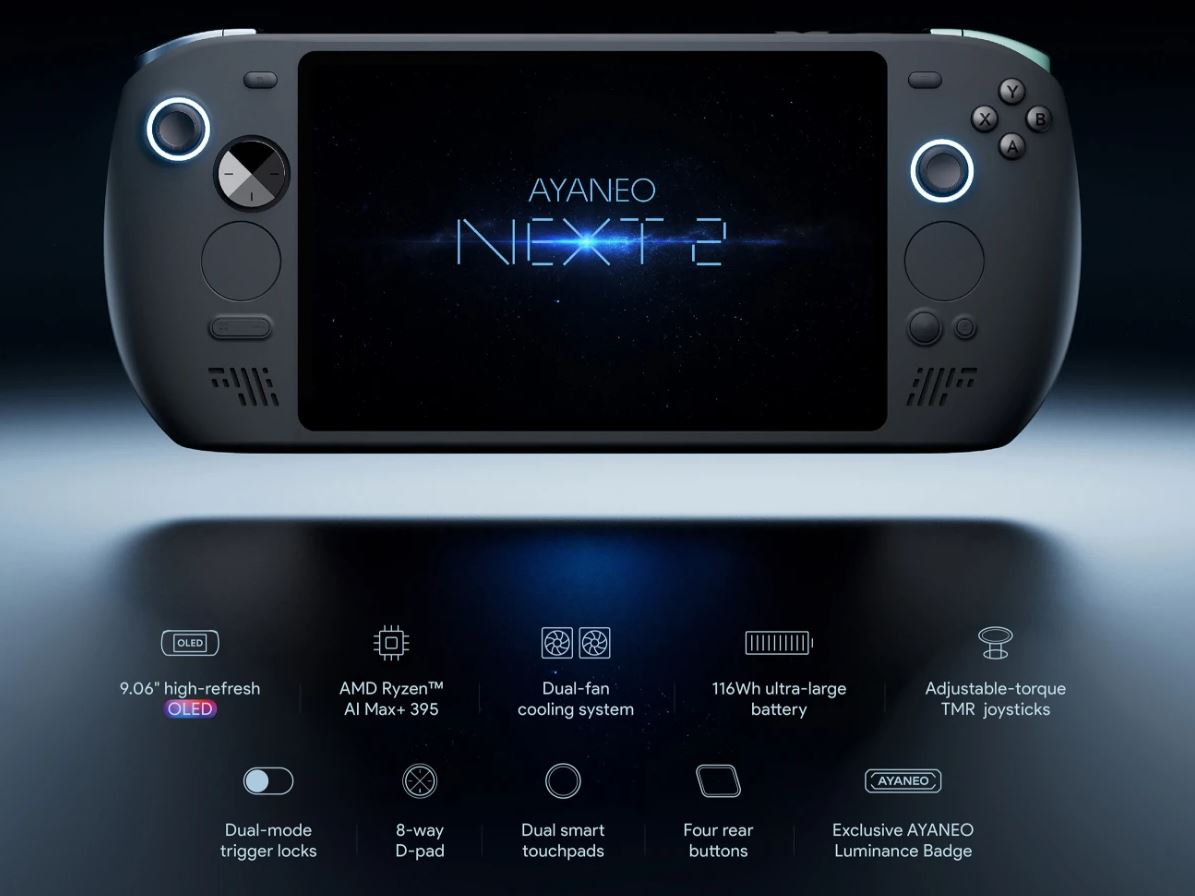
AYANEO is officially stepping into ultra-premium territory with the launch of its NEXT 2 gaming handheld. After months of teasers and gradual spec reveals, the company has finally opened its Indiegogo campaign. We now have the pricing, configurations, and full hardware details.
Early backers can grab the most powerful configuration, featuring 128GB of RAM and 2TB of storage, for $3,499 under the Early Bird offer. Not to forget, the launch price is planned as high as $4,299.
AYANEO NEXT 2 handheld is a massive 9.06-inch OLED display, which is easily one of the largest ever seen on a Windows-based handheld. It runs at 2400 × 1504 resolution with a 165Hz refresh rate. Performance-wise, AYANEO is giving buyers a choice.
Image credit: AYANEO
The base model comes with Ryzen AI Max 385 with Radeon 8050S graphics, while higher-end models jump to the Ryzen AI Max+ 395, based on Zen 5. That chip brings RDNA 3.5 graphics with up to 40 compute units, positioning the NEXT 2 closer to compact gaming laptops than traditional handhelds.
The AYANEO NEXT 2 handheld starts at 32GB and goes all the way up to 128GB of LPDDR5X, clocked at 8533 MT/s. Storage choices include 1TB or 2TB PCIe 4.0 NVMe, depending on configuration. Under the hood, the next Windows handheld packs a 116Wh battery, which is unusually large even by gaming laptop standards.
The big battery comes with a tradeoff, which is weight. At roughly 1.4kg, the NEXT 2 is far from lightweight. All that said, AYANEO clearly isn’t chasing the mainstream here. The NEXT 2 feels designed for enthusiasts who want desktop-class power in a handheld form, and are willing to pay for it.
Are you interested in buying AYANEO NEXT 2 for the price mentioned above? Let us know in the comments below.
Helldivers 2 had a strong launch, with reports suggesting sales momentum peaked early, even before Sony fully took the reins. Since then, the publisher has worked to reignite interest, and today’s new update aims to do exactly that with a large-scale community-driven event.
According to the PlayStation Blog, Helldivers 2 has received a major update titled Machinery of Oppression, and it is available now on all supported platforms.
New Helldivers 2 update takes you to the streets of Cyberstan
The update introduces a brand-new playable environment set on Cyberstan, featuring massive urban and industrial factory cities. Missions now unfold across dense city maps packed with hazards, tighter combat corridors, and vertical layouts that demand smarter positioning and squad coordination.
Players also gain access to a new community-driven objective system. Instead of following a fixed path, the global player base decides which cities to target and dismantle. Progress depends on physically destroying buildings and factories piece by piece, with primary objectives focused on shutting down enemy production facilities. Optional objectives include leveling large factory complexes and eliminating key landmarks.
New enemies and global consequences
Three new enemy types expand the battlefield. Agitators function as commanders who adapt enemy tactics in real time. Cyborg Radicals push aggressive melee pressure, while the Vox Engine arrives as a mobile boss unit armed with multiple heavy weapons.
A new Galactic Reinforcement Counter raises the stakes further. Every player’s death reduces a shared global pool, and if it hits zero, the entire event fails. This system shifts the meta toward survival, defensive play, and minimizing losses.
The update also introduces the Siege Breakers Warbond with defensive-focused gear, including the new G/SH-39 Shield, alongside the War Horses armor set in the Superstore.
Intel’s Arrow Lake Refresh for Core Ultra Series 2 is shaping up as a carefully tuned update rather than a full architectural overhaul. Instead of introducing new silicon, Intel appears to focus on changes it can deliver within the existing Arrow Lake-S platform.
Arrow Lake Refresh focuses on core balance, not redesign
According to Guru 3D, Intel plans to adjust two key areas with Arrow Lake Refresh: E-core counts and shared L3 cache capacity. These changes allow Intel to improve performance in real-world workloads without reworking the underlying die.
Earlier rumors suggested three unlocked “Plus” models, including a Core Ultra 9 290K Plus. Newer information now indicates that Intel may have dropped that SKU, leaving two unlocked refresh CPUs in the lineup: the Intel Core Ultra 5 250K Plus and Core Ultra 7 270K Plus.
Core Ultra 5 250K Plus targets multitasking gains
The Core Ultra 5 250K Plus reportedly serves as a direct upgrade to the Core Ultra 5 245K. Intel keeps the same 6 P-core configuration but increases the E-core count to 12, adding an extra Skymont E-core cluster.
This setup aims to improve mixed workloads such as multitasking, background tasks, streaming, and productivity applications. The L3 cache also sees a rumored jump from 24 MB to 30 MB, while maximum P-core boost reaches 5.30 GHz, roughly 100 MHz higher than the 245K.
Core Ultra 7 270K Plus fills the gap below Ultra 9
The Core Ultra 7 270K Plus appears positioned as a “full configuration” Arrow Lake-S part. Reports suggest it enables all 8 P-cores and all 16 E-cores available on the die, paired with the full 36 MB L3 cache.
Peak P-core boost reportedly lands at 5.50 GHz, below the 5.70 GHz boost of the Core Ultra 9 285K. Intel may also disable Thermal Velocity Boost to keep a clear separation from higher-end models and support more aggressive pricing.
Overall, Arrow Lake Refresh looks designed to rebalance resources across tiers rather than chase major frequency increases. By adding E-cores and cache selectively, Intel can refine performance scaling while maintaining its existing platform.
In related developments, specifications for Intel’s upcoming 900-series chipsets have also leaked, hinting at broader platform changes arriving alongside future desktop CPUs.
Intel has released a new wireless driver package, Intel Wireless Wi-Fi Drivers 24.20.0, to expand support for its latest Wi-Fi 7 hardware alongside reliability and connectivity improvements for Windows users. The update officially adds driver support for Intel’s newest Wi-Fi 7 adapters, including the Intel Wi-Fi 7 BE211 and BE213, while continuing support for a wide range of Wi-Fi 6 and Wi-Fi 6E products.
Here’s a list of supported Intel Wireless Adapters
Intel Wi-Fi 7 BE213
Intel Wi-Fi 7 BE211
Intel Wi-Fi 7 BE202
Intel Wi-Fi 7 BE201
Intel Wi-Fi 7 BE200
Intel Wi-Fi 6E AX411 (Gig+)
Intel Wi-Fi 6E AX211 (Gig+)
Intel Wi-Fi 6E AX210 (Gig+)
Intel Wi-Fi 6 AX203
Intel Wi-Fi 6 AX201
Intel Wi-Fi 6 AX200
Intel Wi-Fi 6 AX101
Intel Wireless-AC 9560
Intel Wireless-AC 9461 / 9462
Intel Wireless-AC 9260
Intel, in its release notes, mentions that the drivers are validated for Windows 10 and Windows 11, with confirmation that newer releases are now aligned with Windows 11 version 25H2.
That said, Intel once again makes it clear that Wi-Fi 7 features are best experienced on Windows 11. While the adapters technically work on Windows 10, functionality is limited. Full Wi-Fi 7 capabilities, including access to the 6GHz band, require Windows 11 24H2 or newer.
On the fixes side, driver version 24.20.0 introduces a new advanced setting that lets users toggle Channel-Load usage for access point selection during roaming, which should help improve connection behavior in crowded networks. Intel also notes improved system stability, more reliable wireless connectivity, and enhanced Wi-Fi sensing functionality across both Windows 10 and Windows 11.
As part of Intel’s ongoing cleanup, the package continues to exclude drivers for several discontinued wireless products, including older Wireless-AC and Dual Band adapters, which now require separate legacy downloads. Moreover, Intel recommends updating to the latest version to benefit from performance, stability, and functional improvements
AMD is expanding its game bundle lineup, and the upcoming action RPG Crimson Desert is now part of a new promotion tied to high-end Ryzen processors, Radeon graphics cards, and select gaming laptops.
According to VideoCardz, retailers have started listing an AMD Rewards bundle that includes a free copy of Crimson Desert. The promotion runs from February 10, 2026, at 15:00 CET through April 25, 2026, while code redemption remains open until May 23, 2026.
Eligible desktop CPUs and GPUs for Crimson Desert bundle
AMD targets enthusiasts with its latest hardware in this promotion. On the CPU side, only Ryzen X3D models qualify, focusing on gaming performance. For graphics, eligibility covers the latest Radeon RX 9070 series.
Eligible desktop CPUs:
Ryzen 9 9950X3D
Ryzen 9 9900X3D
Ryzen 7 9850X3D
Ryzen 7 9800X3D
Eligible desktop GPUs:
Radeon RX 9070 XT
Radeon RX 9070
Eligible AMD gaming laptops
AMD is also extending the Crimson Desert bundle to a wide range of gaming laptops. Eligibility depends on specific SKUs and participating retailers, even when models share the same name.
Participating retailers provide a coupon code at purchase, which users must redeem through AMD Rewards. AMD requires the qualifying CPU, GPU, or laptop to be installed in the system used during the redemption process. MSI has already noted that availability varies by region, with certain countries excluded from the promotion, even before the May 23, 2026 redemption deadline.
This bundle is not the only Crimson Desert-themed hardware initiative. SAPPHIRE is reportedly preparing a Crimson Desert–themed Radeon RX 9070 XT aimed at fans of the game. Meanwhile, recent reports suggest AMD’s upcoming Ryzen AI MAX 500 series will adopt LPDDR6 memory and RDNA 5 graphics, pointing to another major platform shift on the horizon.
As reported yesterday, ChatGPT has officially started showing ads to users on its free tier. Fortunately, OpenAI has also quietly added a way to opt out without upgrading to a paid plan. The catch? You’ll have to accept reduced message limits.
Ads are currently rolling out to logged-in free users in the US. As mentioned by OpenAI, they appear as clearly labeled sponsored sections, just below responses, not inside the AI’s answers. OpenAI says the ads are visually separated and won’t influence how ChatGPT responds to questions.
If you don’t want to see ads and don’t want to pay, there is an alternative.
Here’s how to avoid ads on ChatGPT for free
OpenAI now lets free users switch to an ad-free experience by reducing how many messages they can send. Here’s how it works:
Open ChatGPT and go to Profile
Tap Settings
Select Ad controls
Choose Change plan to go ad-free
Confirm Reduce message limits
Once enabled, ads disappear, but ChatGPT will cap how many back-and-forth messages you can send. OpenAI hasn’t disclosed the exact limits yet, and restrictions may vary as the rollout continues.
Paid plans remain fully ad-free
If you want unlimited access without ads, OpenAI wants you to choose paid subscriptions. ChatGPT Plus, Pro, and business or education plans remain completely ad-free, starting at $20 per month. The newer $8 ChatGPT Go plan, however, still includes ads.
One more workaround to avoid ChatGPT ads
You can also avoid ads by using ChatGPT without signing in. That said, OpenAI hasn’t confirmed how long this option will remain available, and it comes with trade-offs like losing personalization and memory-based improvements.
OpenAI says this ad rollout is still a test, and changes are likely. For now, free users have a choice: ads, fewer messages, or a paid subscription.
The February Wave 1 lineup for Xbox Game Pass is now live, bringing a fresh batch of games for subscribers. Alongside the new releases, Microsoft has expanded its Stream Your Own Game Library feature with 40 additional titles, giving players more flexibility across devices.
This first wave adds several notable games to the catalog, continuing Microsoft’s steady content cadence for early 2026. The expanded streaming library also signals a stronger push toward cloud-based play, letting users access owned games without local installs.
Microsoft might be planning Game Pass tier changes
Not all the news sounds straightforward. According to reports from The Verge, later corroborated by Windows Central, Microsoft is exploring potential changes to the Game Pass subscription structure.
Sources describe early-stage discussions around a possible merge between PC Game Pass and Xbox Game Pass Premium. The talks remain exploratory, and insiders do not expect major Game Pass changes this year.
Pricing and access questions
Today, PC Game Pass costs roughly $16.50 per month, while Xbox Game Pass Ultimate sits at $30 per month. Xbox Game Pass Premium costs $15 but lacks full PC Game Pass coverage and day-one first-party releases.
A merged tier could raise costs for PC users if pricing stays flat, while also changing which games PC subscribers can access. Microsoft has not confirmed any plan to remove day-one releases from PC Game Pass, though future tier adjustments could shift some first-party titles toward Ultimate exclusivity.
In related updates, the Xbox app has now launched on ARM-based PCs. The information comes via VideoCardz, adding another step toward broader Windows gaming support.
For now, Microsoft has announced no official pricing or tier changes, so subscribers will need to wait and see how these discussions evolve.
Microsoft has rolled out PowerToys version 0.97.2 that focuses entirely on fixes and stability improvements rather than new features. The release follows last month’s PowerToys 0.97 update, which introduced major changes to Command Palette and added new tools.
PowerToys 0.97.2 fixes issues with multiple tools
The 0.97.2 update addresses crashes, UI glitches, and other issues across several existing PowerToys modules. Advanced Paste, for example, now avoids a crash that could occur in its settings page due to null values during JSON deserialization.
As part of this update, Microsoft has also rolled out fixes related to Explorer-dependent tools. A crash affecting Quick Access and Measure Tool when Explorer wasn’t running has been fixed alongside a contrast issue in the Color Picker interface that impacted readability.
Command Palette, the popular PowerToys tool, has received a localization fix, which ensures extension strings display correctly across languages. Light Switch now applies the correct theme more reliably at startup, while Workspaces no longer suffers from overlay positioning issues caused by DPI mismatches.
Moving on, Cursor Wrap now lets you disable wrapping when only a single monitor is connected. That’s not all; Microsoft also fixed a bug where Cursor Wrap’s auto-start setting wouldn’t persist when turned off. As with most of the maintenance updates, there are no new tools in this release.
Moreover, you can download the PowerToys 0.97.2 update via the Microsoft Store and GitHub. Not to forget, this one is a recommended update if you’re already on the 0.97 branch.
We know that AMD FSR 4 will focus on RDNA 4, but new details now shed light on AMD’s future Ryzen AI MAX SoCs and their memory roadmap.
According to Wccftech, AMD’s next-generation Ryzen AI MAX processors, codenamed Medusa Halo, are expected to support LPDDR6 memory. This would mark a major platform shift for AMD’s super-premium AI PC lineup.
From Strix Halo to Medusa Halo
The current Strix Halo SoCs sit at the very top of AMD’s mobile portfolio. Before Medusa Halo arrives, AMD plans a refresh known as Gorgon Halo, branded as Ryzen AI MAX 400. This update will push higher CPU and GPU clocks while improving memory speeds beyond today’s designs.
Medusa Halo, marketed as the Ryzen AI MAX 500 series, will act as the true successor. Reports suggest a 2027–2028 launch window, with Zen 6 CPU cores and RDNA 5 GPU cores leading the platform.
LPDDR6 and bandwidth leap
Medusa Halo platforms are expected to adopt LPDDR6, which JEDEC has already confirmed at speeds up to 14,400 MT/s. With a potential 256-bit memory bus, Medusa Halo could reach around 460 GB/s of bandwidth, an increase of roughly 80% over Strix Halo.
This leap would place AMD well ahead of current designs and help close gaps with platforms like Intel Panther Lake.
The added bandwidth should significantly boost integrated GPU performance, which matters as iGPUs approach console-class results. Recent tests even show Arc iGPUs rivaling the Xbox Series S in some scenarios. It’s worth noting that B390 has performed better on gaming benchmarks on Linux than AMD, which means that AMD has to improve in order to compete.
Ryzen AI MAX 500 Medusa Halo now shapes up as a major step forward for AI PC and gaming performance alike.
Intel plans to release Nova Lake-S desktop CPUs in two main variants, according to Wccftech. The single compute tile version will scale up to 28 cores, while the dual compute tile model could reach an eye-catching 52 cores.
These chips will debut Intel’s in-house big bLLC cache design. Cache capacity may climb to 144 MB on single tile models and up to 288 MB on dual tile configurations, pushing desktop cache sizes into workstation-class territory.
Power consumption reportedly exceeds 700W
Well-known insider Kopite7kimi claims that dual compute tile Nova Lake-S CPUs show extremely high power consumption under full load. The top Nova Lake-K model allegedly exceeds 700W when fully saturated.
The power consumption of a full-load NVL-K is over 700 watts.
For context, Intel’s current flagship Arrow Lake Core Ultra 9 285K typically reaches around 370–400W when fully unlocked during stress tests. The jump aligns with Nova Lake’s more than doubled core count and massive cache expansion.
Because of this, sources suggest treating dual compute tile Nova Lake CPUs more like HEDT-class products rather than standard mainstream desktop chips.
Thermals, cooling, and platform details
Jaykihn previously reported early thermal behavior details for Nova Lake-S. Temperature sensors reportedly support readings from -64 °C to 100 °C, with negative temperature reporting enabled. Intel does not support TJMax offsets or disabling thermal throttling, so cooling will directly affect sustained performance.
NVL-S, preliminary (TJMax value).
TJMax cannot be offset and thermal throttling cannot be disabled.
The thermal sensor can report from -64C to 100C (TJMax) if Negative Temperature Reporting is enabled.
Despite the changes, Nova Lake-S package dimensions remain the same as Arrow Lake, meaning existing coolers should fit mechanically. However, new IHS offset tuning may become necessary to achieve optimal cooling results.
Each 8+16 compute tile measures roughly 94 mm², placing dual tile CPUs near 190 mm² total die area. Intel expects Nova Lake-S CPUs and 900-series motherboards to launch later in 2026.
A user known as Charlie L. has spotted references to GPT-5.3 inside OpenAI’s public GitHub repository, suggesting that the general-purpose version of the model is already in development.
The discovered code does not reveal technical details, benchmarks, or new capabilities. However, it explicitly lists GPT-5.3 as a separate model alongside GPT-5.3-Codex, confirming that OpenAI internally recognizes it as a distinct release rather than a Codex-only update.
What we know from GPT-5.3-Codex
So far, OpenAI has remained silent on GPT-5.3, offering no official roadmap or release window. By contrast, GPT-5.3-Codex is already live inside GitHub Copilot, where OpenAI claims it delivers roughly 25% faster performance on complex, agent-driven coding workflows.
That rollout has fueled speculation that the standard GPT-5.3 model could arrive sooner rather than later, potentially bringing broader improvements beyond developer-focused tools.
In parallel, OpenAI has begun testing advertisements inside ChatGPT, marking a notable shift in how the platform may be monetized going forward. While unrelated to GPT-5.3 directly, the move highlights a period of rapid experimentation and expansion.
For now, GPT-5.3 remains unannounced, but its appearance in OpenAI’s own code strongly suggests that a wider release is only a matter of time.
ARC Raiders developer Embark Studios is encouraging players to team up with complete strangers in a new limited-time in-game event, according to Insider Gamer. The event, titled Shared Watch, launches on February 10 and will remain active for two weeks, concluding on February 24.
Embark revealed Shared Watch through a short social media trailer posted on X, offering only a small glimpse of what players should expect. While the trailer avoids showing specific mechanics, its messaging focuses heavily on cooperation, shared objectives, and coordinated action against hostile machines.
Shared Watch points toward an ARC Raiders PvE mode experience
The language used by Embark strongly suggests a cooperative structure similar to an ARC Raiders PvE mode, where players work together instead of competing directly. The studio hints that participants will fight machines alongside unfamiliar teammates, reinforcing the idea of a shared survival challenge.
You watch my back, I'll watch yours – that’s how Speranza keeps ticking 🫶 Join your fellow Raiders in celebrating the Shared Watch; team up with strangers, turn your barrels on the machines, and earn rewards in the process.
Although many players have asked whether PvP elements will appear during the event, Embark has not provided clarification. Until official details surface, the emphasis on teamwork and shared threats makes PvE-focused gameplay the most likely direction.
Expedition 2 sign-ups open after the event ends
Once Shared Watch concludes on February 24, players will be able to sign up for Expedition 2 starting February 25. The second Expedition officially begins on March 1, and Embark has confirmed that it will offer permanent rewards, making participation especially important for dedicated players.
Outside of Shared Watch, ARC Raiders has remained active in recent weeks. Players recently discovered that some blueprints were being sold outside the game for real money, drawing community attention. Embark has also addressed a no maps condition issue, releasing a fix to improve stability ahead of the upcoming events.
According to Neowin, Discord will begin a global rollout next month that defaults every account to a teen-appropriate experience, regardless of age. The platform will automatically adjust communication settings and enforce content filtering by default.
Under the new setup, Discord will blur sensitive content and block access to age-restricted servers, channels, and app commands. Direct messages from unknown users will go to a separate inbox, while friend requests from unfamiliar accounts will trigger warning prompts. Teen users also won’t be able to speak on stage in servers.
Discord previously tested this teen-focused experience in the UK and Australia last year. The company’s decision to expand it globally suggests those trials met internal safety goals.
How age verification will work for adult users
Adult users who want to access a non-teen experience may need to verify their age. Discord plans to offer multiple verification methods. One option uses facial age estimation through a short video selfie that stays on the user’s device. Another requires submitting identification documents to third-party vendors, which Discord says deletes the data shortly after verification.
Instead of storing an exact age, Discord assigns users to an age group. If the system can’t determine an age with confidence, it may request additional verification steps. Discord may add more verification options later, and users can appeal and retry the process if they believe the platform assigned them to the wrong age group. Age verification status will remain private.
GitHub is starting the rollout of GPT-5.3-Codex, OpenAI’s newest coding-focused AI model, bringing improved performance and reasoning to GitHub Copilot across multiple platforms.
According to GitHub, GPT-5.3-Codex achieved higher internal benchmark scores, with stronger reasoning and execution in complex, long-running, tool-driven workflows. The company says the model delivers around 25% faster performance on agentic coding tasks compared to GPT-5.2-Codex.
The model targets developers working on large codebases, automated refactoring, and complex software architecture, where multi-step reasoning and lower latency matter most.
Availability and supported platforms
Access to GPT-5.3-Codex requires a Copilot Pro, Pro+, Business, or Enterprise subscription. Users can select the model from the Copilot model picker in Visual Studio Code, where it works across chat, ask, edit, and agent modes.
GitHub also confirmed availability on:
github.com
GitHub Mobile for iOS and Android
GitHub CLI
GitHub Copilot Coding Agent
The rollout is gradual, so not all users will see the new model immediately. For Copilot Business and Enterprise plans, administrators must explicitly enable the GPT-5.3-Codex policy in Copilot settings.
GitHub highlights that GPT-5.3-Codex is optimized for agentic workflows, reducing latency in large-scale, tool-driven AI code generation. This makes it better suited for scenarios where Copilot needs to plan, execute, and iterate across multiple tools and files.
Developers can submit feedback through the GitHub Community, while official documentation and technical guides are expected to receive updates following the broader rollout.
Separately, OpenAI has also begun testing ads in ChatGPT, marking another notable shift in how its AI products may evolve.