No one uses Microsoft Store because its essential apps are unpopular choices, users agree

Even though Microsoft has released dozens of updates to the Microsoft Store, effectively making it faster, smarter, and more intuitive to users, many of them still question the platform’s popularity and practicability.

In one of the latest rants on Reddit, Microsoft Store is analyzed from the perspective of its Essential Apps panel, and many users agree the platform is a mess.

Many say that the essential apps, which are supposed to enhance the experience of using Windows, are nothing but a bunch of useless social media platforms, and apps Windows users won’t probably even open.

This is the reason no one takes the Microsoft Store seriously. The “Essential apps” they choose to advertise on the homepage are 3 social media apps and the useless Adobe Acrobat Reader.

Reddit user

The Reddit user then posted a screenshot of their Microsoft Store homepage, and the Essential Apps panel featured TikTok, Adobe Acrobat Reader, LinkedIn, and Threads, as the first 4 apps.

With that in mind, we wanted to take a closer look and find out if Microsoft Store’s Essential Apps are essential enough, and the answer is… no, not really. So, this rant is justified.

Let us explain: Microsoft says the essential apps are there to enhance the Windows experience, so, these apps must be those we use on a daily basis, on our laptops. For example, Facebook Messenger can be an essential app, as we all spend a lot of time on Facebook, and communicate with friends, and family.

WhatsApp is another essential app, for the same reasons, and the ability to connect your phone to your desktop device to easily catch up on friends while doing other tasks is quite useful.

Spotify, Wikipedia, Skype, Netflix, or Disney+ can also be essential apps, especially when you want to listen to some music, or watch something.

The thing is that Microsoft Store includes these apps in the panel, but users have to slide over and over to find them. For instance, we had to slide 6 times until we found WhatsApp, and 7 times until we found Skype, which are two of the most popular apps for desktop devices, and communication.

On the other hand, when we first opened the Microsoft Store, the Essential Apps panel displayed the following apps: TikTok, Adobe Acrobat Reader, LinkedIn, Threads, BreeZip, and Adobe Photoshop Elements.microsoft store essential apps

I’ll give you that, Adobe Acrobat Reader is useful, but why is Microsoft choosing to display it when the company tells you Edge is the recommended PDF reader on Windows, we don’t know.

The same goes with BreeZip. Windows already has the native ZIP reader, which is extraordinary in its own right.

As for the other ones, Threads, TikTok, or LinkedIn. The first two are much more intuitive on mobile phones, while LinkedIn can be easily accessed from the browser.

Adobe Photoshop Elements? Sure, but Windows Photos App, or even Paint should be more than enough to do the job. And we all know Photoshop is not entirely user-friendly.

Microsoft might want to reevaluate the concept of essential apps in regard to user preferences, and if Microsoft Store can already handle AI capabilities, the Redmond-based tech giant can enhance it to take into account users’ activity and showcase relevant suggestions.

Otherwise, an essential app is too strong of a word for an app such as TikTok, which is the first suggestion of the panel.

What do you think about it?

We might see Perfect Dark showcased next month, rumors say

Perfect Dark is a popular shooter from Nintendo 64, and its reboot has been in the works for a while.

According to the latest rumors, it seems that we might get the first glimpse of the game as early as next month.

Perfect Dark might appear during Xbox Games Showcase

Microsoft recently closed several Xbox studios and this has many worried about the future of Perfect Dark.

As Wccftech reports, a well-known leaker, Jeff Grubb, said that the Perfect Dark reboot is in a rough spot after the shutdown of these studios.

However, this information was contradicted by another insider called Nate the Hate stating the following:

If we go the entire year without seeing Perfect Dark in any form, then I think that conversation of concern has to come up, but at this point, I fully expect that we will see Perfect Dark next month and that some of the more recent rumors may have been outdated information perhaps. I have been hearing things this week that Perfect Dark is not in that bad of a state.

Grubb later clarified that the information he had represented the opinion of a single developer and not the entire development team.

However, Grubb wasn’t the only person who shared this information, other insiders also spoke negatively about the state of the reboot.

None of this information is confirmed, so maybe we shouldn’t rush to conclusions just yet. As for the Xbox Games Showcase, it will be held on June 9th, so stay tuned for more information.

Xbox has many games coming out in the second half of 2024, so who knows, maybe we’ll get to see Perfect Dark after all.

In other news, Xbox is in bad shape, and many are blaming Phil Spencer for it, so we’ll see what the future of Xbox holds.

Get the MSI Cyborg RTX 4060 gaming laptop with 15.6″ 144Hz display for only $800

With the advent of new AI laptops on the horizon, the stores are seriously slashing the prices on old rigs. It’s the same with the MSI Cyborg gaming laptop, with its RTX 4060 graphics card, now available at Best Buy for a whopping $300 off its original price. That’s right, you can snag this beauty for just $799.99, down from $1,099.99. Now, isn’t that a deal to get excited about?
Why would I buy the MSI Cyborg gaming laptop?

This MSI Cyborg isn’t just any gaming laptop. It’s a mid-range powerhouse perfect for 1080p gaming. With its 12th-generation Intel Core i7-12650H processor and Nvidia GeForce RTX 4060 graphics card, it promises smooth and immersive gaming experiences. And let’s not forget the 15.6-inch full HD screen with a 144Hz refresh rate and 3 ms response time, ensuring that you won’t miss a beat during those intense gaming sessions.

But, it’s not all about the specs, right? The MSI Cyborg also sports a stylish look with RGB lighting on its keyboard, striking the perfect balance between performance and aesthetics. Here’s the catch: MCI Cyborg comes with only 8GB RAM, a bit low for any of the latest games. However, you have the option to upgrade the RAM later, so with a few extra bucks you can bring it to today’s standards.

Now, we know what you’re thinking. Amazon’s Prime Day is approaching, so you could also keep your budget for a better opportunity. However, deals like this one are not so easy to ignore. And who knows? This might just be the sign you’ve been waiting for to finally make that purchase.

You should also check another great deal on the Lenovo Legion Slim 5 laptop if your budget is slightly bigger.

Do you already own a MSI Cyborg gaming laptop? Let us know about your experience in the comments below.

Fix: Stuck on Retrieving Information From Microsoft Store

Can’t get past the Retrieving information from Microsoft Store message when installing an app? Quite a few users report having the same problem, no matter the app they’re trying to get.

Luckily, with a few simple steps, you should get rid of this problem within minutes. Here’s what to do:

How to fix Retrieving information from the Microsoft Store

Let’s start with the basics:

  • Run a speed test on your internet to make sure it’s working properly
  • Make sure you’re logged into an account with admin permissions, otherwise you may not be able to install any app
  • Sign out and log back into your Microsoft account

Ruled everything out and still having issues? Keep reading.

1. Reset the Microsoft Store App

  1. Type Windows key + i to open the Settings app.
  2. Select the Apps submenu.apps settings in windows
  3. Select Installed Apps.installed apps
  4. Type Microsoft Store in the Search bar or scroll down in the list of apps until you find it.
  5. Click on the three dots next to it and select Advanced Options.advanced options for microsoft store settings
  6. Scroll down and click the Reset button.reset button for microsoft store
  7. Confirm your choice and check if the issue persists.

? Note: if you can’t find Microsoft Store in the Apps list, you probably have a Windows version that separates default Microsoft Apps from third-party apps in Settings. If that’s the case, try this:

Go to Settings> System> System Components> Microsoft Store>Click the 3 dots> Advanced Options> Reset.

2. Reset the Microsoft Store cache

  1. Press the Windows key + R to open the Run dialog box.
  2. Type wsreset.exe and press Enter.wsreset.exe in run
  3. It will open the Microsoft Store Window. It might appear blank for a while until all apps load. Just wait it out and try installing or running downloaded apps again.

3. Re-register the Microsoft Store app

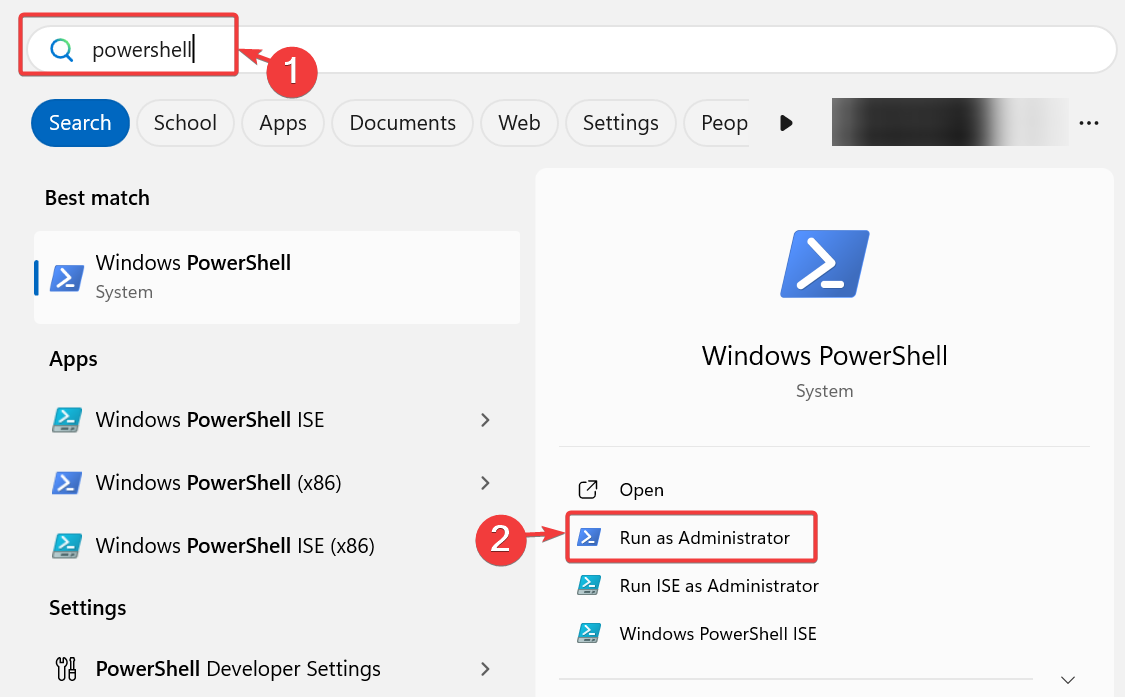
  1. Type Powershell in the Windows search bar.
  2. Select Run as administrator.run windows powershell as administrator
  3. Enter the command below and press Enter:
    Get-AppxPackage -AllUsers *WindowsStore* | Foreach {Add-AppxPackage -DisableDevelopmentMode -Register "$($_.InstallLocation)\AppXManifest.xml"}windows store reset in powershell
  4. After the process is complete, reboot your PC and try using the Microsoft Store again.

4. Run the Windows Store app troubleshooter

  1. Press Windows key + i to open Settings.
  2. Go to System and select Troubleshoot.troubleshoot settings windows
  3. Under Find and fix other problems, click on Windows Store Apps.
  4. Click Next to run the troubleshooter.
    windows store apps troubleshooter
  5. Wait for the scan to complete and follow the on-screen instructions to complete the process.
  6. Restart your PC and check if Microsoft Store is still stuck on Retrieving information.

The new version of Microsoft Store supports more apps and has an easier-to-navigate design.

However, it’s also throwing some users off track with the app not opening, not downloading games, and most recently with the Retrieving information from Microsoft Store messages.

We didn’t single out one clear cause for the issue, but following the guidelines above should get rid of it.

Lowest ever price alert: Get the Lenovo Legion Slim 5 for $1155

If you are looking for a budget gaming laptop but don’t want to compromise on performance or design, this is the perfect deal for you. The Lenovo Legion Slim 5 is now available for just $1154.99 (excluding tax) on Newegg.

Simply use the ZIP payment option during checkout and apply the ZIPLENOVO coupon code to get 13% off up to $100 on the Lenovo Legion Slim 5‘s current price of 1254.99!

The gaming laptop is powered by the AMD Ryzen 7 7735HS processor and features the NVIDIA GeForce RTX 4070 graphics for seamless gaming. With such power-packed performance, multitasking or running resource-intensive editing/rendering apps on the laptop won’t be a problem either.

As for the display, it comes with a 16″ screen supporting up to a 165 Hz refresh rate. Even the latest graphics-oriented games will run smoothly on the Lenovo Legion Slim 5. And due to its compact size, you won’t have trouble packing the laptop for vacations and playing even when on the go!

The gaming laptop also features AI Engine+ and LA1 AI chips for AI-fueled gaming. You are about to witness a massive upgrade in terms of gaming performance on this laptop.

Upon checking the product’s review, we found that the Lenovo Legion Slim 5 can easily run games like Helldivers 2, Cyberpunk, and Titanfall 2. The battery backup turned out to be another attraction, with the laptop easily delivering up to 6 hours under regular use.

Lenovo Legion Slim 5’s specifications

ProcessorAMD Ryzen 7 7735HS Processor (3.20 GHz, up to 4.75 GHz Max Boost, 8 Cores, 16 Threads, 16 MB Cache)
GraphicsNVIDIA GeForce RTX 4070 Laptop GPU 8GB GDDR6 (140W), 2175MHz boost clock
Storage1TB M.2 2280 PCIe SSD (Gen 4)
RAM16GB of DDR5-4800 (expandable up to 64 GB)
Operating systemWindows 11 Home
Display16″ WQXGA (2560 x 1600) IPS; 16:10 ,165Hz refresh rate, 350 nits
Battery4-cell 80Whr
Information source: Lenovo

If you are interested, get the Lenovo Legion Slim 5 from Newegg for just $1154.99 today, as the coupon code is valid for a limited period!

Amongst the downsides, a few reported that the laptop froze for a few seconds when performing resource-intensive tasks. The lack of customizations for the colours and patterns is another common concern.

If you wish to explore other options, discover our top picks for gaming laptops under $1000!

What are your first thoughts about the Lenovo Legion Slim 5? Share with our readers in the comments section.

Another advertisement spotted in Windows 11: This time, it is in Settings app

Microsoft has been quite hefty in its advertisements promoting Windows and Microsoft Office products.

First, Copilot, Word, and Excel were on the lock screen, followed by a QR code to encourage users to download Copilot.

Then, the Redmond tech giant targeted the Start menu by adding a Recommended section within it. Users have not welcomed all these and have called them invasive and annoying. They are also known to disrupt workflow.

However, this has not stopped Microsoft from trying; a new advertisement was spotted in Windows 11. This time, it is on the Settings app’s Home page. It is for the GamePass subscription service, which the company is calling the new Game Pass recommendation card. The ad was found in Windows 11 Insider Preview Build 26120.470 (KB5037864) in the Dev channel.

In an official blog, Microsoft stated:

We are introducing a new Game Pass recommendation card on the Settings homepage. The Game Pass recommendation card on Settings Homepage will be shown to you if you actively play games on your PC. As a reminder – the Settings homepage will be shown only on the Home and Pro editions of Windows 11 and if you’re signed into Windows with your Microsoft account.

According to Microsoft’s previous statements and plans about the growth of GamePass among PC users, this move is supposedly an effort to expose more Windows 11 users to gaming.

The ad will only appear on Windows 11 Pro and Home versions and sign in to Windows using a Microsoft account or if you have already been using the subscription service. Microsoft will show you new or recommended games in the section.

Unfortunately, since these are more targeted ads, you won’t be able to remove them from the Settings app. What do you think about this new advertisement? Share your opinions with our readers in the comments section below.

Windows 10 21H2 Enterprise & Education editions will reach end of support in June

Windows 10 is a great operating system, however, Microsoft is determined to retire it in favor of Windows 11.

Speaking of retirement, Windows 10 21H2 Enterprise and Education versions have almost reached the end of support, so here’s what that means.

Windows 10 21H2 end of support is coming early next month

Next month, the Windows 10 21H2 version is scheduled to reach the end of servicing as BetaNews reports. This includes the following editions: Enterprise, Education, and IoT.

This isn’t anything new, and we already wrote that Microsoft plans to Windows 10 21H2 Education and Enterprise editions.

As for extended support, only Windows 10 Enterprise LTSC 2021 and Windows 10 IoT Enterprise LTSC will get it, and it will last until January 12, 2027.

According to Microsoft, the end of support is coming on June 11, so here’s what will happen:

On June 11, 2024, Enterprise, Education, and IoT Enterprise editions of Windows 10, version 21H2 will reach end of servicing. The upcoming June 2024 security update, to be released on June 11, 2024, will be the last update available for this version. After this date, devices running this version will no longer receive monthly security and preview updates containing protections from the latest security threats.

While version 21H2 won’t receive updates, non-managed systems will be automatically updated to Windows 10 version 22H2.

As for the managed systems, they will have to manually update or switch to Windows 11. Unfortunately, even after installing the 22H2 update, the end of Windows 10 support is coming in October 2025.

If you wish to continue using Windows 10, you’ll need to join the ESU program but be warned that Windows 10 ESU prices will double every year.

Speaking of which, it seems that Microsoft is prioritizing commercial organizations for ESU, so home users should consider upgrading to Windows 11.

Microsoft Store is throwing a “Retrieving information” error, preventing folks from downloading anything

Microsoft Store is the one-stop solution for most of us when downloading apps. I prefer it due to the pre-installation compatibility checks and seamless installation. But lately, I have been getting a weird issue. Whenever I try to install an app, it reads Retrieving information from the Microsoft Store.

The frustrating part is that it stays the same for hours, i.e., the information never gets retrieved!

This happens when I first download the app’s installer from the Microsoft Store website and then try installing the app using the setup.

At first, I thought it was a PC or account-related issue. But signing out and then signing back in or clearing the Microsoft Store cache didn’t work. Then I realized that it’s not just me!

Several reports emerge of the Retrieving information error in Microsoft Store

Upon checking the dedicated Microsoft forum, I found countless reports of users facing the same error. And it wasn’t just one app. Be it Xbox, Prime Video, Bluemail, or Windows File Recovery, none moved past the Retrieving information screen in Microsoft Store.

Im trying to use windows file recovery because I have lost some important files through my carelessness.
When I have tried downloading the program it has been stuck on “Retrieving Information from the Microsoft Store”

When I attempt to install the Apple Devices app on Win10, it never gets past the initial splash screen with message, “Retrieving Information from the Microsoft Store…”.

I cannot install any apps from the Microsoft Store. I can only download installers but they all open up and will not get past the following message: Retrieving information from the Microsoft Store.
This happens to ALL apps. I have also opened the appropriate ports on my router to allow communication with the store.

I am facing this issue for Prime Videos for Windows. This app has stuckforever on this page.

Download the app from within Microsoft Store

I did manage to find an easy workaround to get rid of the Retrieving information error in Microsoft Store. All you have to do is launch the PC version of Microsoft Store and install the app directly from there instead of downloading the setup from the web version.

Installing apps directly from Microsoft Store

Another option is to use the offline installer for the Microsoft Store app. Just get the app’s web link and then download the offline installer from the Adguard website.

The error, most likely, arises due to an issue with Microsoft Store, given the high number of reports on both Windows 10 and Windows 11. We will have more information as soon as Microsoft acknowledges the bug and starts working on a fix.

Until then, you will have to keep installing apps directly from the PC version of Microsoft Store or use the offline installer!

If you go with the former, discover our top-rated tips to speed up app downloads on Microsoft Store.

Drop a comment and let us know if our workarounds for the Retrieving information error in the Microsoft Store worked for you.

Microsoft PC Manager has a new Files Cleanup feature for your device

Microsoft added new options to its PC Manager app. If you didn’t know, the tool has various features and some Windows functions. For example, you can use it to free up space, boost your performance, do health checks, block popups, and more. The newest feature, Files Cleanup, makes PC Manager similar to CCleaner.

A small group of Microsoft engineers from Asia developed the PC Manager app because they saw an opportunity to create a better tool than the ones available on the market. After all, most of us used, at least once, a PC health checker, a cleaning app, or a boosting tool. So, there was a need for an app that holds all of these features together.

What does the File Cleanup feature of the PC Manager do?

The File Cleanup feature added to the Microsoft PC Manager helps free up your memory and boost your RAM. Also, you can use it to clean your device for more storage space. Additionally, you can use this feature to manage download files, look for the large ones, and delete duplicates.

PC Manager Files Cleanup options

Microsoft’s PC Manager can search through all your storage partitions. Thus, if you have forgotten any large files, the tool can find them. Besides, it can categorize most files. On top of that, the app opens a new window for most of its features.

The new version of the app has additional quality-of-life improvements. For example, it has a dark mode option and a better UI. Also, the tool has a feature to enable an updated Desktop toolbar with an incorporated Bing search bar.

You can download the PC Manager directly from the Microsoft Store. Moreover, it has plenty of positive reviews. By the way, the app has plenty of features. So, if you are curious, check them out.

Ultimately, the PC Manager app from Microsoft is a potential competitor for CCleaner due to its new Files Cleanup function. In addition, it brings various features in one place. Also, its UI is clear and very accessible. On top of that, the app can function as a performance booster. Besides, PC Manager could be safer than the other cleaning apps.

Are you going to use the tool? Let us know in the comments.

Why are games taking up huge amounts of space on our hard drives?

Recently, I installed Palia, a free and cozy MMO with nice graphics. I wanted to unwind, listen to some great music, and not feel the pressure of fast-game pacing that is dominating the space nowadays. However, I just realized that my 512 GB SSD is full with only a handful of apps and games. However, when I looked at all the data usage, I found that the games were the most space-consuming.

So, have you ever wondered why the games we love are demanding more and more space on our hard drives? This question has been bugging me for a while, and after diving into the topic, I’ve discovered some fascinating insights. However, the immediate answer is pretty simple. Game devs have to keep up with game fidelity and performance, and it’s mostly all about improving graphics. Let’s break down the reasons behind these ballooning file sizes and what it means for gamers like us.

4K resolution and fancy audio are mostly to blame

As games aim for more lifelike visuals, the resolution of textures has skyrocketed. We’re talking about 4K textures that are so detailed they require four times the space of their 1080p counterparts. For instance, Call Of Duty: Black Ops Cold War, which was supposed to take up 125 GB of hard drive space, reached 250 GB after some optimization patches. That is a ridiculous amount of space even for a game of its genre.

Another great example is Far Cry 6, which is 171 GB, but only the HD Texture Pack is 62 GB of the game. But if you want to see the great detail on your brand new 4K monitor, you do have to think about hard drive space.

However, graphics are not the only culprit. Audio plays a huge role in game file sizes too. High-quality voice acting and immersive sound effects are key to the gaming experience, yet they demand significant storage. And it’s not even fancy music and effects, it’s also about the game language. If you translate the game in more languages than English, boom, your hard drive is full. For example, 17 GBs from Baldur’s Gate 3 is covered by audio files.

Then, there’s also about optimizing the performance by adding redundant files. Let’s say that in a game, you have 10 levels and a few files are common for all of them. If the developer duplicates the same files for each level, they will load faster and you get a smoother experience. But yeah, as you would correctly assume, they will take up more space.

We are finally getting to optimization of the saves. What data does the game stores when you’re creating a save? That also depends on how fast you need them to load. Some games may have saves ranging from a few hundreds of KB to tens of MB. And they all add up in your profile. In the meantime, as you’re playing, the developer is adding new content through patches: characters, weapons, textures, objects and even whole missions through DLCs. You end up with a game that can suck all the free space on your drive in a matter of weeks.

So, what does this mean for us gamers? Well, it seems we’re in a bit of a pickle. As game file sizes grow, so do our storage solutions. The days of fitting dozens of games on a 1 TB drive are slipping away, pushing us towards larger and, unfortunately, more expensive storage options. It’s a trend that doesn’t show signs of slowing down, especially as developers continue to prioritize visual fidelity and performance.

Is there a way to make everything better?

However, I will close up with a nice example of how a developer can also be merciful to your resources. Although I wrote in the beginning that Palia filled up my drive, it turned out that it only took up 22 GB on my drive. It can run at 4K resolution, has breathtaking graphics and audio, and has awesome mechanics. I remind you that Palia is an MMO running on Unreal Engine that can now even run in a browser.

Well, it seems that Palia’s developers found a way to restructure everything by using a data first vs. schema first strategy:

To increase the ease with which game engineers and technical designers could work, we decided on a different model in which the structure of the data would be decided in C++ structs directly within Unreal and then marshaled and persisted in the database as a binary blob (using the Flexbuffer format). The schema is the struct declaration itself and we use Unreal’s runtime type reflection system to export the schema to our database.

Palia software architecture

So, yeah, we can blame graphics, audio, loading times and whatnot, but eventually it’s all about coding all these together. That doesn’t mean I blame the developers. Microsoft closing up gaming studios is further adding pression on the already stressed out coders in the industry. They have tight deadlines and saving you some space on your hard drive is probably not their no.1 priority in a schema of delivering a game.

For us, the gamers, it’s a balancing act between enjoying the latest games and managing our digital real estate. Perhaps it’s time to consider that next hard drive upgrade or, for some, to start being selective about which games to keep installed. Or, finally, the age of running all the games from the cloud is near, and soon we won’t have to go through all that again.

What do you think about this matter? Let us know in the comments below.

KB5036980 continues to cause problems, this time with install failures for some

Ever since KB5036980 was released, users have been in distress. First, it was the Account picture error with error code 0x80070520. Microsoft acknowledged the issue and issued a workaround as well.

Many users have reported that they cannot install Windows 11 Update Version 23H2 KB5036980. Here is what one of the users on Microsoft Community posted:

I’ve been repeatedly trying to install this update, but each time I try to launch the update, it will suddenly stop at 96% and tell me there was something wrong with the install and my PC files would return to the previous “un-updated” state.

I’ve tried every method I could easily find online (Removing all non-essential hardware, did clean boot into Windows, et cetera.), but none of them fixed the isue and I’m suspecting it’s a deeper, less common issue.

How can I fix KB5036980 install issues?

First, check your internet connection or try switching to a stronger connection. Next, ensure you have enough storage space on the system drive, then run the SFC scan to rule out system corruption issues.

If these don’t help, try the following things:

  • Run Windows Update Troubleshooter – Press Windows + I to open Settings. Go to System>Troubleshoot> Other troubleshooters>Windows Update>Run. Now, follow the on-screen instructions to complete the process.
  • Reset Windows Components – Press Windows + X to open the context menu, then select Terminal (Admin); in Terminal, press Ctrl + Shift + 2 to open Command Prompt. Now type these commands one by one and press Enter:
Net Stop bits
Net Stop wuauserv
Net Stop appidsvc
Net Stop cryptsvc
Ren %systemroot%SoftwareDistribution SoftwareDistribution.bak
Ren %systemroot%system32catroot2 catroot2.bak
Net Start bits
Net Start wuauserv
Net Start appidsvc
Net Start cryptsvc

You can also try to install this update manually via Microsoft’s Update Catalog website. All you need to do is head to the website, type in the update name, and search for it. Once located, click Download. Now, double-click the downloaded file and install the update.

All these bugs and the inability to download Windows updates started with KB5036893, which was released on April 9 and continued even after KB5036980.

Other issues, like black screens and BSoD, were reported after KB5036980 (the optional update) was released. If you are one of them, you might want to try these BSoD fixes to eliminate the problem.

Are you also facing the same issue in the Windows 11 KB5036980 optional update? If yes, did you try the above workaround? Let us know in the comments below.

Microsoft Edge now casually asks users to sign in to access Copilot experiences in the browser

Microsoft might start to show up an annoying land page when you open Edge without being signed in the browser.

According to a screenshot taken by Windows enthusiast, @TheBobPony, the Redmond-based tech giant will start asking Edge users to sign in to the browser to access the AI-powered experiences with Copilot.

The company then goes on to give potential users a few examples of how they can use Copilot: for instance, you can use the AI tools to find the best deals on a lot of things, such as TVs, or gaming consoles, which is quite useful if you ask us.

But you can also use it to plan your trips, or even write short stories for your kids (but be aware, OpenAI did it first with ChatGPT). You’ll only have to log in and sync your data, which is also useful if you’re coming from Google Chrome.

However, fortunately, signing in on Edge to use Copilot is optional, and Microsoft will allow users to choose a Not now button – but that doesn’t mean the Redmond-based tech giant won’t try to persuade you any further.

It’s still good to know that currently you can use Copilot on Edge without having to sign in to the browser. You have the sidebar extension, but you can also access Copilot via https://copilot.microsoft.com/, and you’ll pretty much have the same capabilities.

The web version of the AI model even supports plugins, as the company updated it recently, and you’ll be able to Designer, the image editor, as well. Plus, the web version also has three modes of interaction and Copilots for each activity: fitness instructor, vacation planner, and cooking assistant.

So, if you don’t want to sign in to Edge, you won’t lose anything important. But being signed in means that Copilot can answer you more specifically with outputs tailored to your search history, which can also be a great thing.

Plus, when using Copilot while not logged in with your Microsoft account, you’ll be limited to 5 prompts.edge copilot sign in

Ultimately, this is your choice, but Microsoft will remind you of it every now and then.

RAM Stress Test Software: 5 Best Tools for Reports and Tests

A reliable RAM stress test software can consistently identify issues with your computer’s memory. I tested over 20 software and picked the best five for your convenience.

Read on to learn more about them!

5 Best RAM Stress Test Software

Here are my top five picks:

1. AIDA64 Extreme – Detailed Testing and Reporting

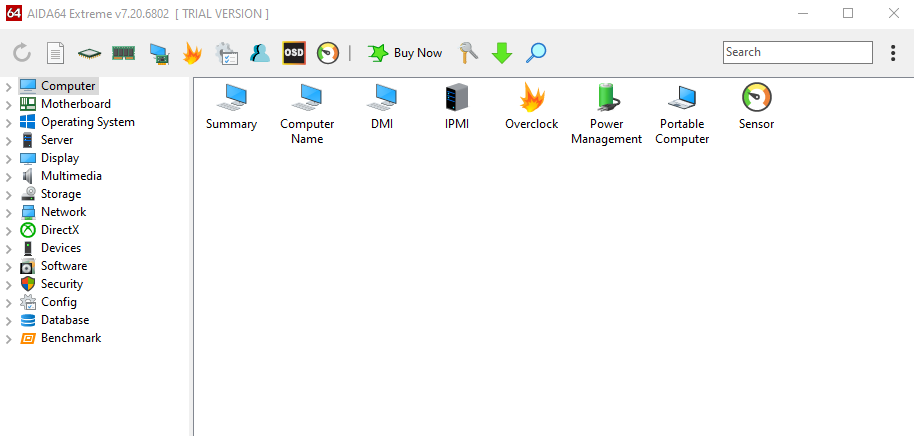
AIDA64 Extreme

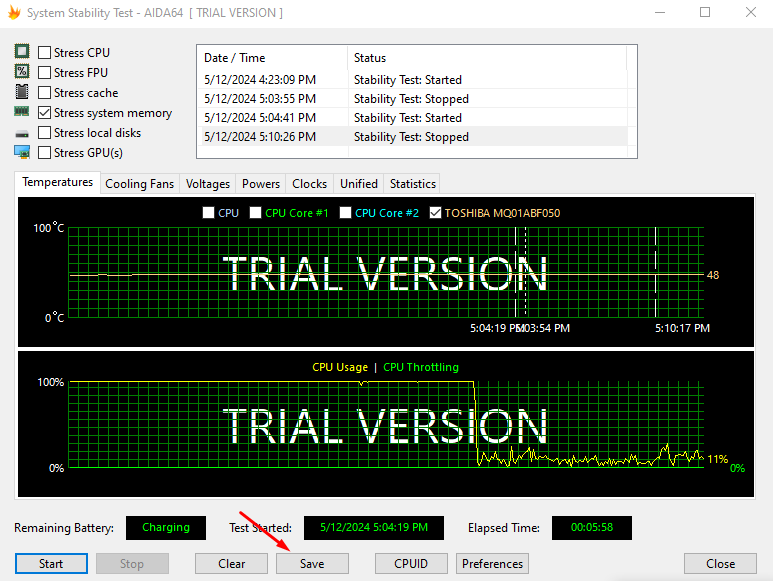
AIDA64 Extreme is a premium software that will help you test your CPU and RAM effectively. You can also take advantage of the trial version to test RAM stress. Moreover, it can work with your FPU, cache, local disks, and GPU(s).

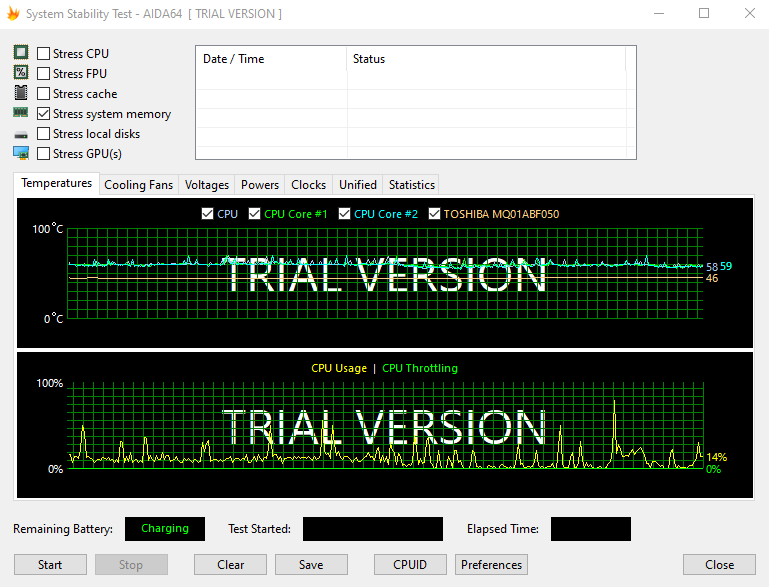
You can decide to check all the boxes if you want to test RAM stress plus other hardware.

Stress system memory

Every test is recorded with date/time and status. You can test the temperature, cooling fans, voltages, powers, clocks, and more. Additionally, it allows users to save all the results for future use.

Test results

Pros:

  • Detailed reporting with timestamps and status for each test.
  • A trial version is available.
  • Allows customization of tests to suit specific requirements.
  • Offers extensive monitoring of system parameters like temperature, fan speeds, voltages, etc.

Cons:

  • It’s paid software and it may not be affordable for all users.
  • Limited trial functionality compared to the full version.

Get AIDA64 Extreme

2. Karhu’s RAM Test – Best Portable Option

Karhu RAM Test

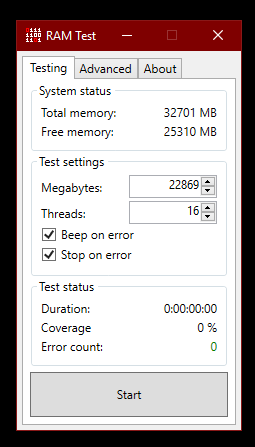
Karhu’s is a RAM stress test app that will help you detect hardware faults within your RAM and evaluate its performance after overclocking. Its user-friendly graphical interface simplifies the testing process, making it accessible for users of all levels.

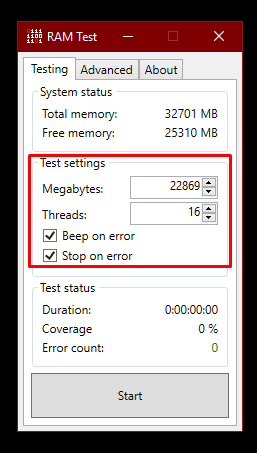
Moreover, it can efficiently handle memory configurations with up to 8 TB of RAM and 64 threads. You can also allow it to beep, stop, or both when it detects an error.

Customize settings

Additionally, its portability lets you run tests directly from a USB flash drive.

Pros:

  • User-friendly interface suitable for users of all levels.
  • Supports large memory configurations and multiple threads.
  • It can be run directly from a USB flash drive.

Cons:

  • Paid software, though it offers a trial version.
  • Lacks extensive reporting features as other tools.

Get Karhu’s RAM Test

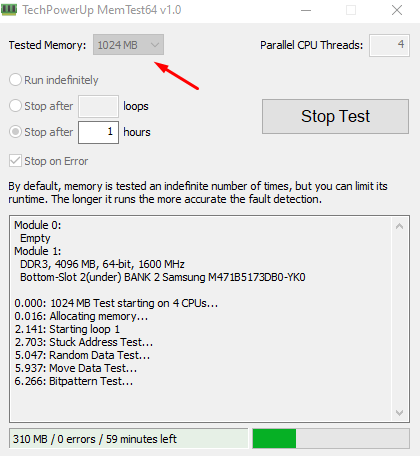
3. MemTest64 – Great Windows and Processor Compatibility

MemTest64

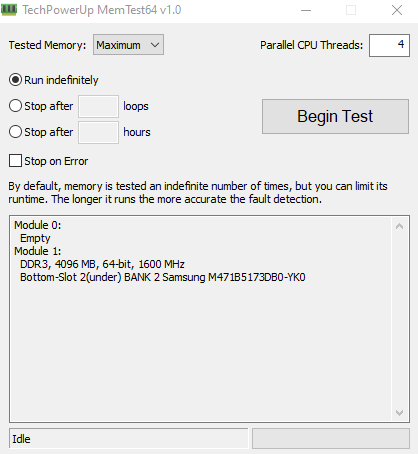
MemTest64 is a free RAM stress test software with a beginner-friendly interface. You don’t need to deal with bootable setups to use it. The program tests your RAM using different patterns to find any problems. 

It’s compatible with Windows XP to 11 (64-bit only) and supports modern processors like AMD Ryzen and Intel Core. Furthermore, you can decide how much memory to test, which helps lessen its impact on your computer’s performance. It also allows you to schedule the test to stop after a certain number of loops.

Test in progress

Pros:

  • Free to use.
  • Beginner-friendly interface.
  • Compatible with a wide range of Windows operating systems and modern processors.
  • Allows scheduling tests to stop after a certain number of loops or hours.

Cons:

  • It doesn’t have advanced features compared to some paid alternatives.
  • It may not provide as detailed reporting as other tools.

Get MemTest64

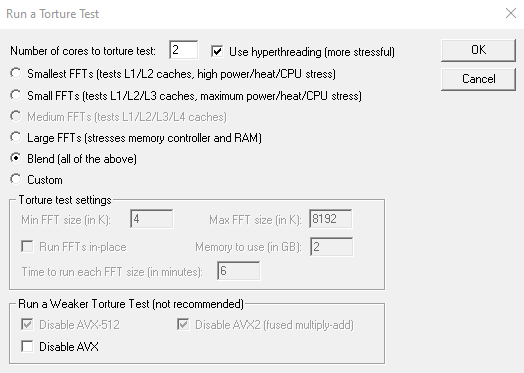
4. Prime95 – Best Beginner-Friendly Option

Prime95

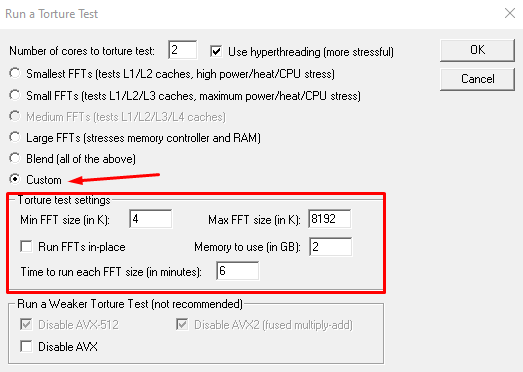
Prime95 is a software mainly designed to stress test and benchmark computer hardware, including RAM. This tool has several settings with “Blend (all of the above)” set by default. It’s the recommended setting if you’re new to it since it’ll fully test the RAM.

However, you can customize it to fit your preferences by selecting “Custom” and modifying the torture test settings.

Prime95 customize settings

Pros:

  • Free to use.
  • Customizable settings for different testing scenarios.
  • Recommended for beginners with its default “Blend” setting.

Cons:

  • The user interface is plain and unappealing.
  • Some users report high power consumption and heat generation during testing.

Get Prime95

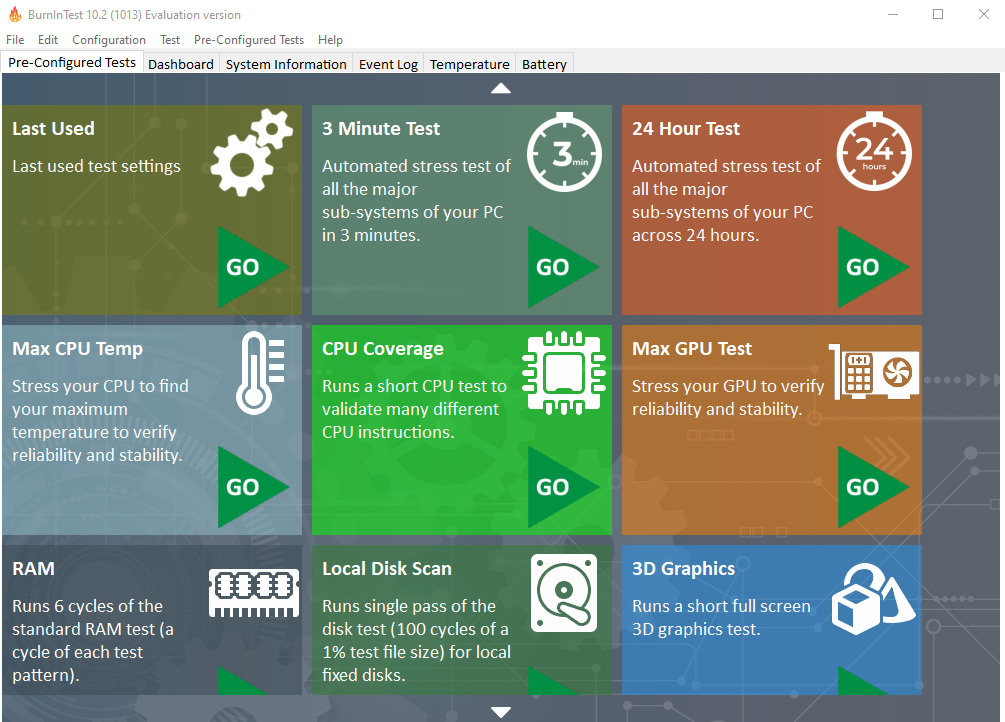
5. BurnInTest – Best Free Version

BurnInTest

BurnInTest is a software designed to stress test computer hardware components, including your CPU, RAM, storage devices, graphics cards, and more. It thoroughly evaluates system stability by subjecting the hardware to intense workloads over an extended period.

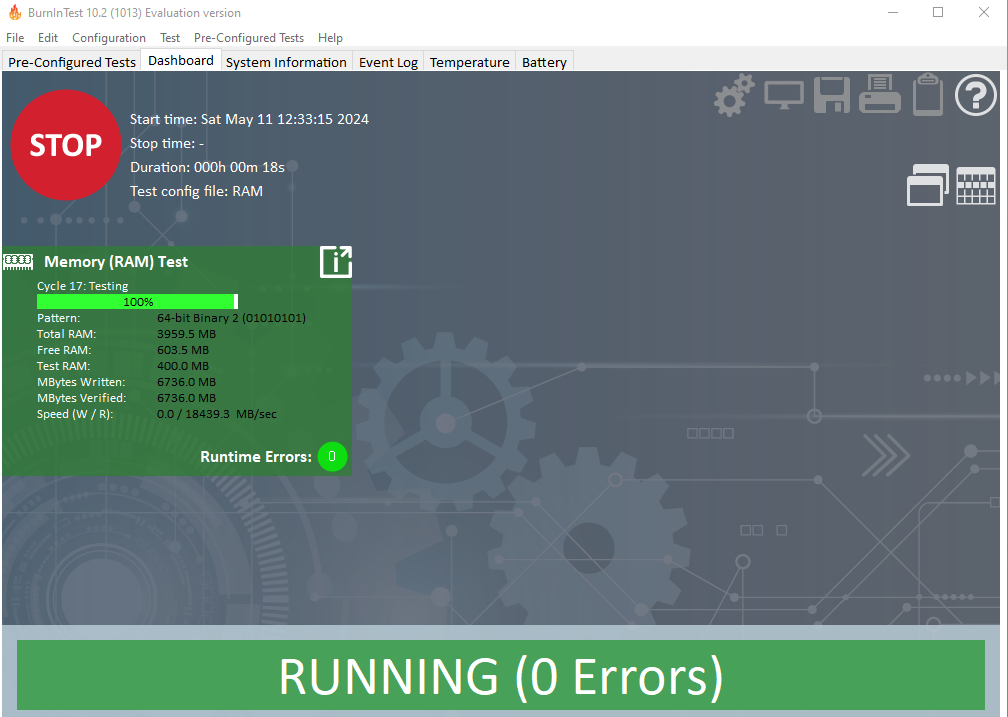
During the test, you’ll get information about the total, free, and tested RAM.

BurnInTest testing

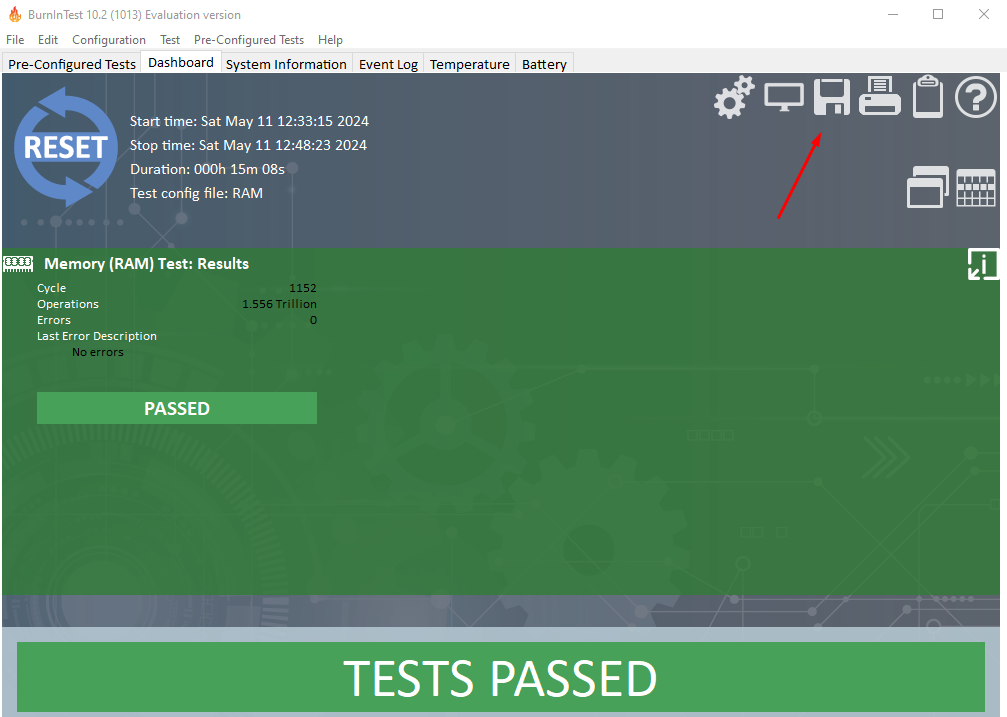
Additionally, the tool records the exact time you started and ended the test and then gives you the total duration. After completing the process, you can save, copy, or print the report.

BurnInTest results

Pros:

  • Detailed reporting with information on total tested RAM, duration, etc.
  • Flexible testing options and customization features.
  • Supports a wide range of Windows operating systems.
  • Allows saving, copying, or printing test reports for further analysis.

Cons:

  • Requires a bit of a learning curve due to several features and options.

Get BurnInTest

How I Chose the Best RAM Stress Test Software?

I considered several factors to determine the best tools for the job:

  • Intuitive interfaces and user-friendly features make it accessible to beginners and experienced users.
  • Highly compatible software to ensure you can use it on different Windows versions.
  • Customization options and reporting capabilities so users can modify different settings and get detailed reports.
  • Reliability and accuracy for thorough RAM module tests for potential faults or errors.
  • Cost-effectiveness to accommodate different budgets.

With the right RAM stress test software, you’ll be able to monitor and solve several errors on your computer. And with the right RAM management software, you can keep a close eye on further developments!

Out of the five options above, which one have you worked with? Feel free to share your experiences in the comment section below.

N64Recomp lets you recompile and run almost any Nintendo 64 game on a PC

Nintendo 64 was one of the most popular consoles in the late 90’s with many memorable games, and many gamers can experience those titles on PC thanks to the emulation.

It seems that emulation won’t be necessary anymore as enthusiasts have found a way to recompile the games and run them natively on the PC.

The latest project allows you to run Nintendo 64 games natively on a PC

As Tom’s Hardware writes, Mr-Wiseguy on GitHub has developed a tool called N64Recomp that allows you to port almost any Nintendo 64 game to a PC, and run it natively.

The same user also released the Zelda64Recomp project, which brings The Legend of Zelda: Majora’s Mask to the PC.

So why is this important? By recompiling the games, you can run them natively on your PC, without having to use an emulator.

This allows games to maximize performance and effect accuracy of the original consoles while experiencing the same benefits that come with PC emulation.

N64 Recompiled uses RT64 as a renderer, allowing you to experience enhancements such as higher resolution, widescreen support, and 60+ FPS.

This tool is perfect because manually decompiling games is a long and tedious process, and this tool manages to fully automate it, Mr-Wiseguy has tested it with multiple titles.

We still don’t know how Nintendo will respond to this, but we do know that the latest leaked information claims that Switch 2 will have 8GB of RAM and an 8-inch display.

There are also rumors that Switch 2 will be backward compatible, so you can continue playing your favorite games.

Snipping Tool gets enhanced with a Visual Search with Bing capability

Microsoft has quietly updated the Snipping Tool with several features over the last few Insider Builds. Some of these features were released last week and included automatic QR code detection, a new keyboard shortcut for the ruler tool, as well as the ability to modify the opacity of outline colors with a new slider.

However, the version 11.2404.37.0 brought up some unlisted enhancements, as well. According to tech enthusiast, @PhantomOfEarth, the Snipping tool will soon have a Visual Search with Bing capability.

The feature is not rolling out yet, according to the enthusiast, but it should be available to all insiders within the next weeks.

If that is so, it could be a total game-changer for Bing, as a search engine. Let us explain. Snipping Tool is a very intuitive tool used to screenshot and record your current screen on Windows. With a simple shortcut, the tool can be used to take these screenshots in seconds, and they’re also automatically copied to the clipboard.

With the new capability, users can essentially visual search with Bing for everything they screenshot. For example, you can screenshot a mobile phone in a YouTube video, right-click on the screenshot image, and within seconds, you can use Visual Search with Bing to look up that mobile phone.

The capability is very similar to Google Images, or Google Lens. If Lens lets you take a picture of anything, or use existing screenshots on your mobile phone to look for essentially anything, Visual Search with Bing will do a similar job in the Snipping Tool on Windows.

It’s basically Google Lens for Windows users. It could also help Bing become more dominant in the search engine market, which Google currently dominates.

As we mentioned earlier, this new enhancement should be out in a couple of weeks, and generally available to Windows users, later this year.

CISA releases advisory on Black Basta ransomware that targeted 500 industries, including the recent Ascension attack

CISA, in collaboration with the FBI (Federal Bureau of Investigation), HHS (Department of Health and Human Services), and MS-ISAC (Multi-State Information Sharing and Analysis Center), recently released an advisory on the Black Basta ransomware highlighting the attack details and mitigations.

According to the CISA’s advisory, threat actors used Black Basta to encrypt and steal data from 12 of the 16 critical industries. This includes the Healthcare and Public Health (HPH) sector.

Describing Black Basta, the advisory reads,

Black Basta is considered a ransomware-as-a-service (RaaS) variant and was first identified in April 2022. Black Basta affiliates have impacted a wide range of businesses and critical infrastructure in North America, Europe, and Australia. As of May 2024, Black Basta affiliates have impacted over 500 organizations globally.

The advisory also delves into the modus operandi of the Black Basta affiliates. It suggests that threat actors first breach the systems through known vulnerabilities, then both extract and encrypt the data, forcing organizations to cede to their demands.

The ransom amount is not shared right away, but affected organizations are instructed to contact the Black Basta affiliates through a .onion link, which is only accessible via the Tor browser. Then, affected parties have 10-12 days to pay the ransom or risk having the data posted on the Black Basta TOR website.

Amongst all the industries, healthcare remains the primary target for threat actors linked to the Black Basta ransomware due to the critical information involved and the scale of disruption it causes, the Ascension attack being a recent example. It led to the non-profit diverting ambulances from hospitals following the attack, according to CNN.

Ascension didn’t share any more information about the attack but confirmed working alongside the FBI and CISA to ascertain the extent of the attack and identify if any personal information was compromised.

Although the CISA advisory didn’t directly connect Black Basta affiliates with the Ascension attack, reports suggest that threat actors linked to the ransomware were responsible.

Previously, the UnitedHealth Group faced a similar attack and had paid $22 million to threat actors in a bid to protect the user’s data. It was one of the biggest attacks in recent times, affecting a third of Americans, according to CNN.

Mitigations against Black Basta ransomware shared by CISA

The joint advisory by CISA and FBI lists a series of mitigations that will help protect the systems against the Black Basta ransomware.

  • Make sure you are running the latest version of the operating system, firmware, and software.
  • Enable Multi-factor authentication for all critical services.
  • If using a remote access software, make sure it’s completely secure.
  • Create regular backups of critical data so you don’t lose it in case of a ransomware attack.
  • Hold training programs to apprise users about the source of ransomware attacks, steps to limit the extent of the attacks early on, and who to report them to.

Cyber attacks have increased exponentially in recent years, primarily due to AI reaching into the hands of threat actors. While Microsoft has committed to safeguarding AI from threat actors, the situation on the ground is different.

We will have to wait and see what impact the CISA’s Black Basta ransomware advisory has and whether it leads to fewer attacks in the coming days.

What do you think? Share with our readers in the comments section.

Skype 8119 introduces a refreshed call panel design for the mobile web that that of the mobile app

You won’t miss pretty much anything if you decide to access Skype on the web from your mobile phone, instead of downloading the app, as Microsoft released Build 8119 to the platform that offers a uniform experience to all Skype users, regardless of the method of login.

According to the official changelog, the refreshed call panel design for mobile web now matches the one of the mobile app, enabling a polished call experience where your mobile web calls are just as smooth as on the app, says Microsoft.

As you can read below, the Redmond-based tech giant introduces a plethora of new design changes to make that happen, including:

  • Unified Experience: Enjoy a seamless transition between the mobile app and mobile web with consistent, unified designs. ?
  • End Call Button Redesign: The End Call button now sits perfectly in the header, making it more intuitive and accessible. ?
  • Focused Flex Layout: Effortlessly switch to focus mode, centering on what’s important in your call. ?
  • Footer Controls Update: The call controls in the footer are updated for a more user-friendly experience, mirroring the mobile app layout. ?
  • Light/Dark Theme Support: Your call panel now adapts to your theme preference, delivering a consistent and eye-friendly look. ?☀️
  • Performance Boost: Code cleanup ensures a faster, smoother call experience. ?
Skype

Skype 8119 also enhances the experience of using the platform on mobile devices, whether we’re talking about Android or iOS phones. For instance, the latter will get a picture-in-picture call monitor, allowing for seamless calling experiences even when switching between apps.

The former, on the other hand, will display some useful notifications when messaging invalid numbers, letting users know that no credit was wasted.

For Windows users, Skype now offers a clearer and simplified audio device selection, allowing them to choose the exact device for microphones and speakers.

It’s been just a couple of weeks since Skype 8118 was released, but it’s nice to see Microsoft working hard to bring a unified experience for all users.

Not only will you not miss the Skype app when accessing the platform from your phone, but it will consume fewer resources, meaning your phone will have more space to perform better without relying on independent apps to keep in touch with your Skype colleagues or friends.

Bungie’s first game, Marathon is now available on Steam, for free

Bungie is well-known for its popular franchises such as Halo or Destiny, but the company has released other games before them.

If you’re feeling nostalgic, you’ll be pleased to hear that Bungie’s first game is now available on Steam, for free.

Marathon is now available on Steam, and it’s completely free

In case you’re not familiar with earlier works of Bungie, their first game was a first-person shooter called Marathon. The game was released for Apple Macintosh in 1994 and it was Mac’s answer to Doom.

As TweakTown writes, Bungie is developing a new entry in the Marathon series, and it should be a PvP extraction shooter.

If you want to know about the series, or you are just a fan of retro shooters, you’ll be pleased to hear that Marathon has been remastered by Aleph One Developers and brought to Steam, for free.

The game uses an open-source Aleph One engine, original game data with new 3D filtering, and positional audio. The game also brings support for 60+ FPS, modern hardware, and widescreen resolution.

The developers also plan to remaster other entries from the series, so be sure to keep an eye out. In other news, Witcher 3 REDkit is coming soon, so you’ll be able to craft your adventures from scratch.

It’s also worth mentioning that Sony has removed Ghost of Tsushima from countries without PSN access, and players who bought the game can expect a refund.

Microsoft will update Universal Print to allow Android users to print documents directly from their phones

Good news for all Microsoft 365 Universal Print users: the Redmond-based tech giant will update the capability to allow Android users to print documents directly from their phones, as long as the printers are installed on their devices.

The announcement was made in the latest entry to the Microsoft 365 Roadmap, last week, and users will be able to integrate their Android devices with the Universal Print platform through the Microsoft 365 apps, allowing them to easily add work/school printers.

Integration of Universal Print with the Microsoft 365 mobile app will enable users to add work/school printers to their Android phones. Once the printers are installed on the phone, the user can print to them from any phone app that has a print action.

Microsoft

According to the entry, Android users will have to wait, though, as the Redmond-based tech giant will only preview it at the end of the year, in December 2024, followed by a general release sometime in 2025.

However, to prepare users for it, Microsoft will release another capability for IT managers in Universal Print, called Pull Print queues. Basically, this upcoming policy will allow IT admins to customize and offer a simple view of all print solutions, based on their locations or regions, so that other users can use them.

This new policy will be previewed in June 2024, followed by a general release in August 2024, and it might affect the date of the other capability.

Pull Print enables IT Pros to offer their end users a simplified view of the print solution. Specifically, IT Pros can set up virtualized printer(s) per location or region so that end users only need to know the name of one printer. Those users can securely release their own print jobs at any printer at that location or region, depending on the setup.

Microsoft

This is quite useful considering that employees won’t have to depend on other people to print documents at work. They can easily do so by accessing the Microsoft 365 App and searching for and connecting to the nearest available printer, and that’s it.

The new Pull Print policy will also be available on Mac, following the general preview of the Universal Print capability on these devices earlier this year.

And given that the Redmond-based tech giant recently announced it would offer a staggering 1900% increase of print jobs to A3 and A5 licenses, easing the job of doing so means that number soon won’t be enough.

You can now directly copy files from Windows Share, Microsoft rolls out the option in Insider Preview Build 22635.3575

Windows Share has been receiving a wide array of upgrades in recent months. In the latest update to the Beta channel, Windows 11 Insider Preview Build 22635.3575 (KB5037862), Microsoft has brought a new Copy button in the Windows Share popup.

Located next to the file name on the Windows Share screen, clicking/tapping the Copy button will, as expected, copy the file. Surprisingly, this is the only new feature in Windows 11 KB5037862, according to Microsoft’s official blog. The rest are all patches for previously reported bugs!

Image source: Microsoft

We agree that this isn’t the quickest way to copy a file in Windows 11, especially when you could simply do so from the right-click context menu. Also, there was no apparent need for a Copy button in Windows Share.

While Microsoft hasn’t shared a reason for introducing the feature, reports suggest that it’s more aligned with the needs of touchscreen Windows device users who frequently use Windows Share to transfer files.

The feature is currently exclusive to Windows 11 Insiders who have turned on the toggle for Get the latest updates as soon as they’re available. If you don’t see the update yet, wait for a while, as it’s a gradual rollout.

Get the latest updates as soon as they’re available

In recent months, Microsoft improved Windows Share to send emails to self quickly. Besides, you can now generate QR codes for URLs and cloud file links to facilitate seamless sharing between devices.

Why do you think Microsoft introduced a Copy button in Windows Share? Tell us your thoughts in the comments section.

VESA’s DisplayHDR specifications update raises the bar for low end monitors

Video Electronics Standards Association (VESA) announced a significant update to its DisplayHDR specification. With DisplayHDR version 1.2, VESA introduces tighter performance requirements across various aspects such as luminance, color gamut, and bit depth, alongside several new test requirements aimed at improving color accuracy, contrast ratio, black levels, and reducing subtitle flicker.

How will DisplayHDR 1.2 will impact low end displays?

Here’s how this goes: With this update, VESA has tightened the noose around performance requirements, ensuring that displays must now achieve higher standards of luminance and color accuracy to bear the DisplayHDR certification. Right now, on some displays that bare the VESA DisplayHDR certification logo display sub par, washed out images. Well, with DisplayHDR 1.2 if a manufacturer wants to sell their display under VESA’s HDR certification, they will have to meet a higher standards bar.

We will go through the most important changes of the new DisplayHDR 1.2 standard, as highlighted by VESA.

Enhanced color accuracy and contrast

One of the standout features of DisplayHDR 1.2 is its focus on enhancing color accuracy. With new comprehensive color accuracy tests, displays will now be evaluated across a broader spectrum of colors at different luminance levels. This means that whether you’re gaming, watching a movie, or working on a photo or video editing, the colors you see will be more accurate and consistent. Moreover, the introduction of new tests for static contrast ratio and black levels is set to improve the depth and detail of the visuals, ensuring that dark scenes in movies or games are more immersive and detailed.

Local dimming and subtitle flicker tests

For those who crave the ultimate HDR experience, particularly in higher-tier displays, DisplayHDR 1.2 requires the incorporation of 2D local dimming technology. This technology allows different sections of the screen to be lit independently, significantly improving contrast and making for a more dynamic viewing experience. Additionally, the new subtitle luminance flicker test addresses a common annoyance many have experienced – the distracting flicker when subtitles appear and disappear in dark movie scenes.

However, the changes will not be implemented right away. VESA has provided manufacturers with a transition period. They can continue certifying products under the previous DisplayHDR 1.1 specs until May 2025 for monitors, and May 2026 for laptops.

In conclusion, the rollout of DisplayHDR 1.2 by VESA will especially impact the low end monitors that will have to comply to these minimum requirements. Will the changes affect the product prices? That remains to be seen. In the meantime, you might be interested in our guide on how to calibrate HDR on Windows 11. You will also learn if your display can handle HDR or not.

What do you think about VESA’s new DisplayHDR 1.2 specifications? Let’s talk about this in the comments below.

New Recall and snapshots settings spotted in Windows 11 Build 26212

Microsoft is constantly improving Windows 11 with new features, and speaking of which, the new Build 26212 for Windows 11 was recently released to the Canary Channel.

The new build has some new hidden features, related to user privacy and AI, so today we’re going to take a closer look at them.

Windows 11 Build 26212 comes with new AI privacy and security settings

According to Windows Latest, there’s a new option in Privacy & security settings in this build called Recalls and snapshots.

This was first spotted on X, formerly Twitter, by user Albacore.

It is speculated that this section will be used for tweaking privacy settings on the upcoming AI integration.

Recall AI has also been spotted on LinkedIn profiles of alleged Microsoft employees, which leads many to speculate what this could be. Many believe that Recall could be used for branding the AI integration in Windows 11.

This build also fixes File Explorer bugs, so be sure to get it if you’re on the Canary channel. Microsoft has also released Windows Server Preview Build 26212, so don’t miss it.

Why is Windows Defender blocking ExplorerPatcher?

Modifications to Windows are getting trickier with each passing day, as Microsoft introduces more checks. The latest in the series is Windows Defender blocking ExplorerPatcher!

Upon closely monitoring the issue, it appears that Microsoft is blocking customization apps on the latest version of Windows 11. As a result, you will see an ExplorerPatcher block notification from Windows Defender. This has been going on since February’24, as is evident from the GitHub forum post.

Even StartAllBack users are reporting similar problems!

We reported earlier that ExplorerPatcher could no longer get the Windows 10 taskbar on the latest iteration. Soon, the developers dropped the functionality in the newly released version.

In recent days, we have seen several reports of the issue. For many users, Windows Defender identifies ExplorerPatcher as HackTool:Win64/ExplorerPatcher!MTB. A few were unable to update or install Windows 11 if ExplorerPatcher was installed on the PC because it caused security or performance issues.

Windows Setup throws an error when ExplorerPatcher is installed

Some reports suggest that changing the name of the ExplorerPatcher executable file (.exe) would allow you to run the application without Windows Defender blocking it. But that might trigger other issues.

So, whitelisting the app is a viable option for now!

How do I unblock ExplorerPatcher in Windows Defender?

  • Open Windows Security > go to Virus & threat protection > click on Manage settings under Virus & threat protection settings > click Add or remove exclusions > choose Yes in the UAC prompt > click on Add an exclusion > choose File > go to the designated folder > select the ExplorerPatcher’s executable file > click Open.
Whitelisting an app in Windows Security

From now on, Windows Defender won’t block ExplorerPatcher, but you might still face issues while upgrading the OS if the app is installed.

The latest version of ExplorerPatcher reportedly fixes the issue, so you might consider installing it. But we can’t say with certainty that it won’t trigger problems in future Windows builds, the way ExplorerPatcher caused a transparent taskbar in KB5035853.

In my opinion, the best option is to switch to another reliable Windows customization software until the ExplorerPatcher developers figure out a fix!

What problems did you face with ExplorerPatcher? Share with us in the comments section.

    Microsoft to soon add an AI theme generator in the Edge browser

    Microsoft is planning to add an AI-based theme generator in the Edge browser. It is not new to say that the company is running the ongoing AI race at an absolute pace. It has been adding new AI features in almost all its products including Microsoft Edge. 

    While you can access the Copilot chatbot from the sidebar of the company’s first-party web browser, it seems Microsoft is planning to add a new feature powered by AI. 

    Microsoft Edge will soon get an AI theme generator

    A new listing added to the Microsoft 365 Roadmap website spotted by Neowin mentions that Microsoft Edge will soon get an AI theme generator.

    In the new listing, Microsoft explains what Edge browser’s AI theme generator will be like. 

    Microsoft Edge will include an AI theme generator, that allows users to input a text prompt and generate a series of images to preview as browser themes. Applying the theme includes setting the generated image on the Edge new tab page, and applying the image’s dominant color to the browser frame.

    Microsoft further explains that there’s a provision to limit the use of AI theme generators in the Edge browser. Admins who oversee Microsoft Edge for companies/organizations can restrict the use of the theme generator using the AIGenThemesEnabled policy.

    It is worth noting that the rollout of AI theme generators is scheduled for June. However, there’s no mention of an exact rollout date by the company. In January, Microsoft added a similar feature in Teams. The feature allows users to create AI-generated backgrounds when attending Teams video meetings. 

    Let’s not forget that the Edge browser already let users set themes of their choice for years now. However, the AI theme generator will be an interesting addition as it would power users to set customized themes in the Edge browser.  

    It won’t be wrong to say that Microsoft has been constantly improving the Edge browser for its users. More recently, the Redmond giant updated Microsoft Edge to fix two security vulnerabilities and added an internet speed tester.

    What do you think about the upcoming AI feature in Microsoft Edge? Will you use it when it is available? We’d love to hear your thoughts, please comment below. 

    Microsoft fixes two security vulnerabilities with the latest Edge update

    Microsoft recently rolled out a second security update for the Edge browser in the Stable Channel this month. The news comes via Neowin which reports the latest Edge version 124.0.2478.97 is out now and resolves two security vulnerabilities reported by the Chromium team.

    In the release notes for Microsoft Edge security updates, the company says:

    Microsoft has a fix for CVE-2024-4671 to Microsoft Edge Stable Channel (Version 124.0.2478.97) and Extended Stable channel (Version 124.0.2478.97), which has been reported by the Chromium team as having an exploit in the wild. For more information, see the Security Update Guide.

    This update also contains the following Microsoft Edge-specific update:

    Worth noting that both security vulnerabilities have been detailed on the official CVE website. The CVE-2024-4671 vulnerability is the one with high severity. It lets remote attackers possibly exploit heap corruption using a crafted HTML page.

    Google further reported that the exploit exists in the wild which means the same has already been used for malicious activities. Therefore, installing the latest security update as soon as possible is important for users.

    That said, the second vulnerability CVE-2024-30055 is of low severity. It is a spoofing vulnerability exclusive to Microsoft Edge which requires users to click a specific link to exploit it. Even if the attacker exploits the same, they can only access limited information from the prey’s browser.

    Earlier this month, Microsoft also fixed two additional vulnerabilities and added a speed tester in the Edge browser.

    ChromeOS to soon feature Spatial Audio for an immersive listening experience

    Google is reportedly working on adding Spatial Audio feature to ChromeOS allowing users to enjoy a more immersive listening experience. If you are unaware of Spatial Audio, allow us to explain a bit.

    Usually many smartphones and wireless earbuds these days come with a Spatial Audio feature to offer an immersive sound experience while enjoying favorite playlist, movies, or games. Not to forget, there are a few devices out there that also support head-tracking. This allows you to enjoy truly immersive audio as you move your head.

    Google could be readying Spatial Audio feature for ChromeOS

    Now it seems Spatial Audio could make its way to ChromeOS. According to the latest report by 9to5Google, the company is working towards enhancing entertainment options on Chromebooks by adding Spatial Audio. The publication managed to spot a new code change which points out towards the feature. As with the new features, it is currently locked behind an option in the chrome://flag.

    When an user enables it, the new toggle option for Spatial Audio appears on the Audio page of the Settings app in Chromebook. Users can enable or disable the Spartial Audio feature using the same toggle in Chromebooks powered by ChromeOS. This means Chromebook users will be able to enjoy the Spatial Audio feature in compatible earbuds down the line.

    Worth noting that the Spatial Audio feature in ChromeOS is work in progress and is far from being ready. 9to5Google further adds that the feature isn’t even available in the latest ChromeOS Canary channel. However, the publication managed to showcase the toggle on where and how it would look via an screenshot which it calls an altered mockup . You can check it out below.

    Spatial Audio feature in ChromeOS
    Image source: 9to5Google

    As we write, there’s no exact information on how Spatial Audio would work in ChromeOS. However, one can imagine how the feature would work based on what how it works on Android devices. It is possible that Spatial Audio on ChromeOS could work with Bluetooth as well as wired earphones offering immersive audio.

    All that said, the official rollout date for the Spatial Audio feature in ChromeOS is unknown as we write. However, the feature could land in Chromebooks later this year.

    Would you love to have Spatial Audio feature in Chromebook? Please share your thoughts in the comments below.

    Microsoft rolls out more improvements to ink annotations in OneNote

    Microsoft announced that additional improvements for ink annotations are coming to OneNote for Windows, starting 10th May 2024. These latest improvements for ink annotations in OneNote are available for all Microsoft 365 Insiders using Windows 10 or 11 running version 2403 (Build 17407.17623) or later.

    Microsoft introduces even more improvements to ink annotations in OneNote

    Microsoft listed the additional ink annotations improvements coming your way in its recent blog post which reads:

    Earlier this year, we released the ability to keep ink annotations with images and PDF printouts. Based on your feedback, we are making additional improvements:

    • Better tracking of annotations for scenarios where PDF printouts and images might be moved due to content layout updates.
    • Enhanced ink annotation tracking for in-line content.
    • Fixed general issues and polished overall experience.

    The company has also added how these features work in OneNote for Windows. It mentions:

    How it works

    1. Go to the Insert > File Printout or Insert > Picture to insert a PDF printout or an image.
    2. Start inking on the PDF printout or the image.
    3. Tap to select both the PDF printout or the image and the handwritten ink using touch, your digital pen, or your mouse.
    4. Move the PDF printout or the image somewhere else on the page. 
    Ink annotations in OneNote | Image: Microsoft

    Worth noting that the Redmond giant has been constantly improving its note-taking app OneNote for a while now. Earlier this year in February Microsoft added a new way to relocate ink annotations in OneNote alongside PDFs or images they are linked to. Besides, it added a new handwriting straightening feature in OneNote for Windows in the last month.

    What do you think about the new ink annotations improvements coming to OneNote on Windows? Pour in your thoughts in the comments below.

    Steal the deal: Razer Basilisk V3 gaming mouse is now available at a 20% discount

    If you have been eyeing a gaming mouse with a heavy discount, the Razer Basilisk V3 gaming mouse is an out-and-out winner. What’s more interesting? The price of this beast of a gaming mouse has plunged by 20%. Yes, you read that correctly.

    Why should you pick Basilisk V3 as a gamer?

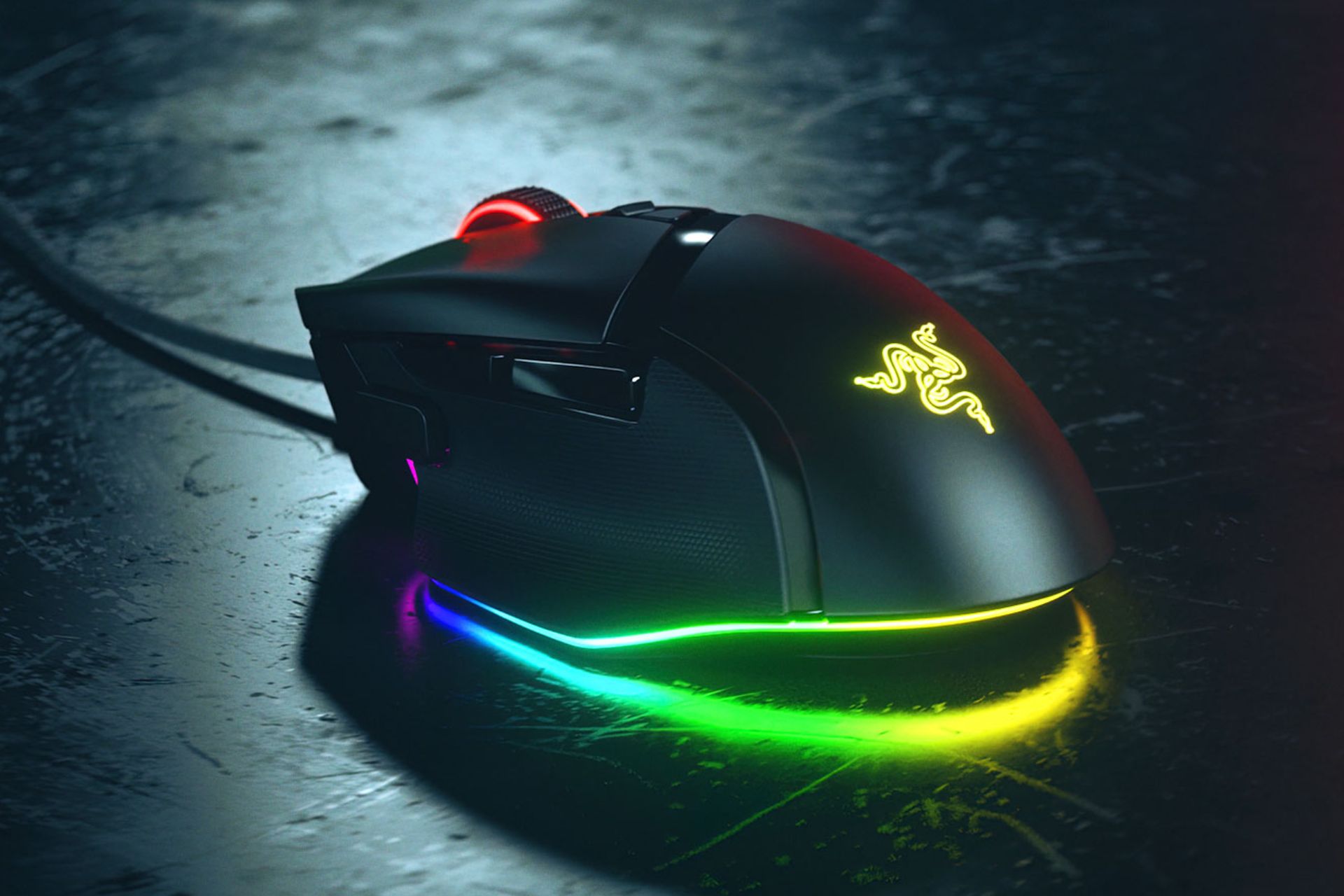
    Let’s talk about design first. It is a sleek and feature-packed gaming mouse with a solid matte plastic body. You’ll find three side buttons on the left and a right-handed shape with a thumb rest.

    That said, don’t worry about being left-handed. The discounted Razer Basilisk V3 gaming mouse is perfect for all grip types and almost every hand size.

    The Razer Basilisk V3 also features 11 programmable buttons and a Hyperscroll tilt-wheel that offers a smooth scroll. Let’s not forget that this gaming mouse comes with a 26,000 DPI optical sensor for precision and flawless track movements.

    Did we mention about the Razer Chroma RGB lighting? Well, it is something you’d love the most. The RGB lighting in the Razer Basilisk V3 mouse is not just any RGB lighting.

    You get to customize each zone from over 16.8 million color options and several lighting effects. Not to forget the customized light reacts dynamically with over 150 Chroma-integrated games.

    Given the customizable buttons, cool lighting, and superb gaming performance, the Razer Basilisk V3 is one of the best mice for gaming out there.

    Grab the discounted Razer Basilisk V3 gaming mouse now!

    The Razer Basilisk V3 gaming mouse is now available on Amazon for just $49.99 after a 20% discount on its original $69.99 price tag. That sounds like a deal, right? Hurry up and grab it before the discount offer is over.

    If you are into precision games or e-sports, don’t forget to check out Razer VIPER V3 PRO.

    AT&T users face Microsoft 365 email delivery delay

    If you are amongst the AT&T customers who are facing delays in Microsoft 365 email delivery, AT&T has its say about the issue. 

    The news comes via BleepingComputer which reported that AT&T servers refused the connection and wouldn’t accept the email for delivery.

    AT&T customers face delays in Microsoft 365 email delivery

    The issue has plagued many customers who tried emailing an address at @att.com, @sbcglobal.net, or @bellsouth.com. Besides, customers reported that they saw the following reasons for the delay in email delivery:

    Reason: [{LED=450 4.4.316 Connection refused [Message=Socket error code 10061] [LastAttemptedServerName=att.net] [LastAttemptedIP=144.160.159.21:25][SmtpSecurity=-2;-2] [MW2NAM10FT061.eop-nam10.prod.protection.outlook.com 2024-05-08T15:33:54.328Z 08DC6E49E2071EB6]};{MSG=Socket error code 10061};{FQDN=att.net};{IP=144.160.159.. OutboundProxyTargetIP:144.160.159.22. OutboundProxyTargetHostName: att.net

    Reason: [{LED=450 4.4.316 Connection refused [Message=Socket error code 10061] [LastAttemptedServerName=bellsouth.net] [LastAttemptedIP=144.160.159.22:25] [SmtpSecurity=-2;-2] [CO1NAM11FT004.eop-nam11.prod.protection.outlook.com2024-05-08T15:54:34.984Z 08DC6EC21DF48CA1]};{MSG=Socket error code 10061};{FQDN=bellsouth.net};{IP=. OutboundProxyTargetIP: 144.160.159.22. OutboundProxyTargetHostName: bellsouth.net

    One of the AT&T Community Forums users who self-claims as an IT system admin explains the above message. The user mentions that the message trace seen above hints that Microsoft 365 is unable to deliver an email to an ATT.net domain.

    The reason for that is the connection is refused by the mail server of the recipient. It could be due to some configuration issue or firewall settings implemented by AT&T, the user adds.

    Multiple AT&T customers reported email delays

    Many AT&T customers are quite frustrated with the Microsoft 365 email delivery delay and have created multiple topics highlighting it. One such post is from the company’s forum user @silicondt who says:

    Same problem. Can’t send from multiple 365 accounts or gmail…only to att.net domain… Hey ATT… I can’t even email your SALES guys… get this working…

    It is worth noting that the issue is not only limited to Microsoft 365 customers, it also affects Gmail. One affected user posted:

    I’m having the same problem: nothing from a Gmail account is getting into my email account (sbcglobal.net), and nothing is being bounced back to the sending Gmail accounts. It’s just vanishing. Yet everything was working a few hours ago. I haven’t changed ANY settings, have no blocked accounts, etc, etc. It was working this morning; it’s not working this evening. NOTHING I can do on my end will “fix” this issue. 

    Come on, AT&T, get it together and fix the problem.

    AT&T confirms the issue

    AT&T has confirmed that an unusually high volume of spam that emerged from Microsoft’s server is eventually causing the email delivery delay. Talking more on it, the AT&T spokesperson further added:

    This incoming spam is an industry-wide issue that affects multiple email services. We thank our customers for their patience as we work with Microsoft to help protect them from fraud

    When the publication reached out to AT&T, Microsoft, and Google about the email delay issue, no further information was obtained. Worth noting that last month Microsoft announced that it would fight back against spam by adding a limit to the amount of bulk emails users send via Exchange Online.

    Are you also facing a similar issue? If so, please let us know in the comments below.

    Nvidia RTX 5080 & 5090 announcement likely on the same day, leaker says

    According to the latest reply to a post on X by leaker XpeaGPU, Nvidia is reportedly set to make the announcement of RTX 5080 and 5090 at the same time. If the leaker’s words are true, the details about the upcoming graphics cards will be out the same day.

    The announcement of the upcoming Nvidia RTX 5080 and 5090 could be on the same day

    Earlier to this, reports were hinting that Nvidia could announce one of its new GPUs before the end of this year. If that goes on to be the case, the RTX 5090 would easily make it to our best GPU roundup. However, this is the first time we’ve heard the company will announce both RTX 5080 and 5090 on the same day.

    The recent claim comes from prominent GPU leaker @XpeaGPU who replied to a post by another leaker @kopite7kimi. The X user kopite7kimi mentioned that Nvidia could announce the RTX 5080 earlier than the 5090.

    However, replying to the post, XpeaGPU added that RTX 5090 and 5080 should be announced at the same time. The leaker further added that Nvidia could separate the availability of both GPUs by a few weeks.

    For those uninitiated, Nividia followed the same pattern with the RTX 4080 and 4090 GPUs. Both GPUs were announced on the same day, but RTX 4090 was available first followed by 4080 after a few weeks.

    Let’s not forget that previously XpeaGPU has also claimed that the Nvidia RTX 5080 outperforms the 4090 at ray tracing. Besides these claims, other rumors are also doing rounds on the internet. For example, the RTX 5090 will be the only GPU Nvidia will announce in 2024, and more.

    We urge you to take the rumors around the Nvidia RTX 5080 and 5090 announcements with a grain of salt. Nvidia hasn’t confirmed anything yet, so you’ll have to wait for official confirmation. If there’s any official word in the future, we’ll update you with a separate article.

    US revokes Intel & Qualcomm’s licenses for exporting chips to Huawei

    The Biden administration recently revoked some licenses of popular companies like Intel and Qualcomm restricting them from shipping chips to Huawei Technologies. The US Commerce Department confirmed that it has revoked a few licenses but didn’t name the companies.

    However, the statement from Qualcomm and Intel confirms that they are the ones whose licenses got revoked.

    The US government revoked the licenses of Intel and Qualcomm

    Last week, Qualcomm and Intel were notified about their licenses being revoked with immediate effect. Notably, the news comes after Huawei unveiled its first AI-powered laptop, the MateBook X Pro powered by Intel’s new Core Ultra 9 processor.

    Following the announcement, the Republican lawmakers criticized the launch of the Intel-powered laptop. They felt that the department had given the green signal to Intel to ship the chip to Huawei.

    Let’s not forget that Reuters first reported the news about the revoked license of Intel and Qualcomm. The news agency says the decision came after consent pressure from Republican lawmakers who urged the Biden Administration to take strict action against Huawei.

    A Republic Congresswoman Elise Stefanik issued a statement in which she said:

    This action will bolster U.S. national security, protect American ingenuity, and diminish Communist China’s ability to advance its technology.

    Well, the license cancellation of Intel could hurt Huawei as it is dependent on Intel chips for its laptops. That’s not all, this decision might have also hurt other US companies working closely with Huawei.

    Reuters has also quoted a statement by the Chinese foreign ministry which reads:

    China resolutely opposes the United States overstretching the concept of national security and abusing export controls to suppress Chinese companies without justification.

    Both companies say that the recent decisions made by the US Commerce Department are a hurdle to their business growth. Qualcomm confirmed that its shares took a massive dip after the US government revoked one of its licenses for Huawei. Intel, on the other hand, saw a drop of 2.9% last week.

    Microsoft Edge is bringing back Clutter-Free Printing

    Websites these days are filled with ads and distractions, making it difficult to print articles properly without an ad blocker. Microsoft is now working on a feature called Smart Print in the Edge Canary browser. This feature, which previously existed in Edge Legacy as the “Clutter Free Printing” option, removes ads and prints only the web content you want to save as a PDF or on paper. This saves ink and paper as well.

    Edge Legacy’s Clutter-Free Printing Option

    It’s late, but better late than never. Microsoft has ported most of the features from the discontinued Edge Legacy to the new Microsoft Edge browser based on Chromium. You might have definitely noticed the clutter-free printing option Edge Legacy offered when available. Microsoft has promised it will offer this at some time in the future.

    New Microsoft Edge’s Smart Print

    Now, it is making its way into Edge (sort of). The company is indeed testing the feature that removes ads from webpages you want to print, named Smart Print, which is disabled by default.

    Like in Edge Legacy, it may work on only some websites, but in our testing, it worked on most sites we tried to print.

    Here is how to use Smart Print or Clutter-Free Printing in Microsoft Edge

    1. Visit any webpage
    2. Click on the menu and select Print (Alt+P)
    3. Depending on whether you need to save as PDF or print to paper, choose your printer
    4. Select All or choose the ‘odd Pages only’ or ‘even Pages only’ option or enter the page numbers range you want to print
    5. Click ‘More settings’ and select ‘Pages Per sheet’ and set the margins
    6. Enable the Smart Print toggle
    7. Click Save or Print

    The output produced PDF or paper will have no advertisements or other distractions, just pure text.

    Here is another option you can try:

    Printing in Reader Mode or Immersive Reader

    You can print pages when they are in Reading Mode or when you use Immersive Reader. As this feature is designed to remove clutter including ads, you get only text or essential content. We noticed that the format of the output when using Smart Print looks much better compared to when you use Printing while using Immersive Reader.

    Guess what, the Smart Print option is not available when using Immersive Reader, which also makes sense.

    On the other hand, Microsoft is improving memory while using Edge with Sleeping Tabs. You may also want to know how to use or disable the Copilot Rewrite feature.

    Sony removed Ghost of Tsushima from the countries without PSN access

    Sony removed Ghost of Tsushima Director’s Cut from the countries without PlayStation Network (PSN) access. This decision came after the company included a mandatory account linking as a requirement to play the multiplayer Legends mode. However, as a result, gamers won’t be able to enjoy the game’s single-player content either. So, it’s a lose-lose situation for the game developers and those waiting for the game.

    Why did Sony add the linking requirement for Ghost of Tsushima?

    The company might have added the PSN account linking requirement for the multiplayer Legends mode of the Ghost of Tsushima to protect our safety and security. On top of that, according to CNET, this is Sony’s way to prevent players from griefing. But many of us know that the company had several breaches, and hackers stole player data. Thus, gamers don’t want to link their accounts to the PlayStation Network.

    According to the email shared by the Reddit user freakshow9009, you will receive a refund in 5 to 7 days if you are from a restricted country. Hopefully, the company will change its decision and bring back Ghost of Tsushima Director’s Cut before its official release on May 16.

    Sony didn’t learn from the Helldivers 2 uproar

    Sony also tried to remove Helldivers 2 from 177 countries after the company wanted to include mandatory PSN account linking. However, players review-bombed the game with thousands of negative ratings. Yet, after Sony added the game on Steam again, users started giving positive reviews. So, there is a possibility that Ghost of Tsushima Director’s Cut will suffer from the same treatment.

    Unfortunately, even if the company claimed it learned from the player’s feedback for Helldivers 2, they made the same mistake with Ghost of Tsushima. In addition, it seems that Sony doesn’t know what’s best for its PC players. After all, they are repeating the same scenario.

    Ultimately, we can all review-bomb Ghost of Tsushima Director’s Cut before it launches on PC. However, this time, Sony might keep their requirement. Yet, if you are from a restricted country, know that the game has plenty of single-player content for you to enjoy.

    What are your thoughts? Are you going to get Ghost of Tsushima? Let us know in the comments.

    Microsoft is looking to develop native eye-tracking technologies for a variety of displays. Is this the end of the touchscreen?

    Eye-tracking technology is not entirely new, and the concept has been around for a while now, with Microsoft releasing it on its HoloLens 2 headsets. However, there are tons of other third-party software such as Tobii, that can be integrated into an array of XR/VR/AR headsets.

    The Redmond-based tech giant has even released a form of eye-tracking technologies for displays, back in Windows 10, to help those affected with certain conditions (such as ALS, which is a neurodegenerative disease affecting muscles).

    However, back then, the technology was not entirely native, as it required a compatible eye tracker, such as the one mentioned earlier.

    In a surprising, but expected turn of events, it seems that Microsoft is looking into developing a native eye-tracking technology for displays on Windows, but not limited to it.

    The Redmond-based tech giant recently published a paper describing a system that uses eye-gaze technology to select items on a user interface (UI). The native system would be different from the current eye-tracking technologies.

    While it would still use the data of your gaze to let you choose items on a screen with your eyes, the technology comes with a unique characteristic: it lets users customize and configure the selection regions on displays, for exact eye-tracking.

    The intelligent UI element selection system disclosed herein provides for automatically configuring or adjusted selection regions of boundaries. Selection regions may be applied to a set of UI elements and selection boundaries may be applied to a individual UI elements.

    Another interesting thing is that the technology would assign a score to your gaze, as a way to stop it from accessing everything in your way. The system also assigns a score to each item on the current display, whether we’re talking about an application, browser, or the operating system itself.

    It then proceeds to compare these scores: the more you look at an item on the screen, the higher the score gets, and if it surpasses the score of that item, then that item will be selected.

    This is not all, though. The technology also has an intelligent UI system that intuitively finds out what you are about to type in with your eyes and emphasizes those regions so that your gaze can be better captured, resulting in a faster and more streamlined experience. Microsoft calls it eye-typing.

    If a user is eye-typing a word that starts with ‘q’, then the selection region for the letter ‘u’ may be enlarged, since that letter is statistically more likely to follow the letter ‘q’ than other letters.

    Microsoft

    The Redmond-based tech giant is developing it to support a variety of applications: users can control audio settings with their gaze, and also look out for radio channels. Through a video interface, it can also be used to control video recordings, or streamings by simply looking at them.

    The paper also theorizes that the eye-tracking-based display system can be used to access external memory sticks and storage, and it can used independently and locally: it can run on batteries, and in cases where the system is tied to a network, and the network goes down, all the devices will still be able to run it.

    If Microsoft ends up releasing it, and this is most likely to happen, the technology can become the industry’s standard, and could effectively replace the classic touchscreen. And there is a pattern: mobile phones, for instance, have not been using buttons for more than a decade, as touchscreen took over everything.

    Then tablets (which are by themselves mini PCs) came around, and the tech industry realized that laptops could have a touchscreen as well.

    And while all computers today, including laptops, are released with the classic keyboard, there is a reason for it. Writing on a touchscreen still requires you to use your hands, and on a laptop, the design makes it quite impractical to do so, hence keeping the classic keyboard around.

    But eye-typing? If done seamlessly, which this system promises to do, it can be a total game-changer. Sure, the industry will have to find something to keep our hands busy (maybe hand-gazing?), but it could greatly improve productivity.

    However, most likely the eye healthcare industry will benefit from this technology, as well.

    AMD Zen 5 CPU architecture will not support Windows 10 drivers

    According to a recent revelation by Lenovo China’s manager on Weibo, AMD’s next-generation Zen 5 core architecture promises an incremental leap in performance, quashing earlier rumors of a substantial 40% improvement.

    He said, as translated in English:

    Where does the 40% come from? What I saw is that Zen5 has a 10% increase in IPC compared to Zen4. In the CR23 1T test, the increase was more than 10%. In addition, Win10 enthusiasts please note that starting from Strix Point, AMD will not provide Win10 drivers.

    Contrary to rumors suggesting a 40% increase in IPC (Instructions per cycle), Lenovo’s internal testing reveals a generous 10% improvement compared to the Zen4 architecture. This revelation seems more realistic and aligned with industry expectations.

    He also mentioned that it is not possible to dramatically achieve such significant performance boosts within a single generation, and the 10% improvement achieved in the upcoming generation is noteworthy. However, it could disappoint people who believe in the previous speculations.

    During the Cinebench R23 1T (Single-Thread) test, the instructions per cycle (IPC) increase was more than 10%. As the previous results show, AMD’s Zen core architectures have also performed well in Cinebench tests, irrespective of them being multi-thread, single-thread, or IPC figures. Let’s look at the IPC for all the Zen architecture generation.

    ArchitectureIPC
    Excavator To Zen 152% IPC Increase
    Zen 1 To Zen+3% IPC Increase
    Zen + To Zen 215% IPC Increase
    Zen 2 To Zen 319% IPC Increase
    Zen 3 To Zen 413% IPC Increase
    Zen 4 To Zen 510% IPC Increase

    Lenovo China’s manager also mentioned that AMD has decided to end Windows 10 driver support for its upcoming Strix Point APUs. This move indicates a shift that shows the manufacturers are prioritizing the latest Windows 11 version compatibility, i.e., 24H2, which aligns with AMD’s focus on AI performance and integration of NPUs in the forthcoming processors.

    The upcoming Strix Point Ryzen AI HX APUs indicate AMD’s commitment to preparing processors for AI-driven technologies. They will have innovative AI capabilities, up to 45 AI tera operations per second (TOPs), and 77 platform TOPs.

    As computing technology is becoming AI-driven, AMD’s move to progress toward the latest Windows version is justified. Still, it would pose compatibility challenges for Windows 10 users looking to integrate these advanced processors into their systems.

    What do you think of this development? Share your opinions with our readers in the comments section below.

    OpenAI’s deepfake detector can identify images generated with DALL-E 3

    AI gives us many opportunities to generate, enhance, and modify content. In addition, AI models are evolving fast, and their content is becoming more qualitative. However, while artificial intelligence can be a great assistant, wrongdoers can use it to generate deepfakes. So, OpenAI decided to launch a deepfake detector.

    Deepfakes are nothing new. They’ve been around for a while now. Yet, in the past, they weren’t so accurate. After all, even if we had the tools to edit photos, videos, and audio tapes, the process took a while and was costly. But, the AI solved those issues. For example, Sora AI can generate high-quality videos in a few minutes. 

    When can the deepfake detector from OpenAI do?

    The deepfake detector from OpenAI can discover images generated with DALL-E 3. In addition, it can check for AI’s assistance. Also, according to OpenAI, the tool successfully identified 98% of the cases. Yet, it incorrectly tagged 0.5% of the results as DALL-E 3 products.

    OpenAI trained the deepfake image detector to spot content created with their tools. So, unfortunately, it might not be able to detect AI images generated with other tools. Additionally, the classifier handles AI content with modifications such as cropping, compression, and saturation, but it is less proficient with others.

    Do AI images have metadata?

    Besides the deepfake detector, OpenAI acknowledged introducing C2PA metadata to the images and with DALL-E 3. On top of that, the company will add it to Sora. However, skilled threat actors could remove the metadata.

    In addition, OpenAI incorporated audio watermarks into the content generated with their Voice Engine. However, like Sora, their voice model is still under development, and it will take a while before it becomes available.

    Ultimately, the deepfake image detector from OpenAI will help us detect DALL-E 3 and Sora creations once released. According to OpenAI, it will be available for a limited number of testers, research labs, and research-oriented journalism nonprofits. If you think the tool can help you, you can apply to become a tester for the DALL-E detection program.

    What are your thoughts? Are you going to apply? Let us know in the comments.