Microsoft Edge embraces modern standards: Legacy properties out, high-contrast themes in

Microsoft announced the deprecation of the CSS -ms-high-contrast media query and -ms-high-contrast-adjust property.

The Redmond tech giant mentioned that they shifted their focus to the standard-based forced colors feature, introduced in Chromium-based browsers in 2020.

What is it all about?

Earlier, Microsoft Edge and Internet Explorer with the EdgeHTML engine supported these legacy features, which let sites fine-tune their appearance based on the user’s contrast theme settings.

However, with the transition to a Chromium-based browser, Microsoft strived to standardize support for contrast themes according to the new forced colors feature. The feature ensures compatibility across different browsers and extends support to Firefox.

In the Microsoft Edge blog, the company offered information on the forced colors feature:

Microsoft also mentioned that to avoid the interoperability issues and to gather feedback, the company is planning to slowly deprecate the legacy -ms-high-contrast media query and -ms-high-contrast-adjust property in Microsoft Edge.

They further mentioned that by Edge 138, they aim to disable the legacy implementation completely; however, the company may delay it depending on the feedback received during the deprecation period.

How can I test the deprecation early?

Launch the browser and open a new window or tab to disable the legacy implementation locally in Microsoft Edge. In the address bar, type edge://flags/#edge-deprecate-ms-high-contrast

Next, enable the Deprecate ‘-ms-high-contrast’ and ‘-ms-high-contrast-adjust’ flags, and then restart your browser.

This deprecation process will include a warning in the DevTools Console tool for any websites that use legacy properties in their stylesheets, starting with Microsoft Edge version 126.

How does Microsoft plan to phase out the legacy implementation?

To phase out the legacy implementation and ensure your site functions well after it’s deprecated, Microsoft is bringing Origin Trial to Edge 132.

The Redmond tech giant also plans to contact accessibility testers and websites that are using legacy properties to avoid breakages when the properties are deprecated.

How can I update styles to the new forces colors standard?

In case your website relies on the legacy -ms-high-contrast media query and -ms-high-contrast-adjust property to edit styles when Windows’ contrast theme, Microsoft advises you to transition to the new forced colors mode standard before the legacy properties become obsolete.

The table shows the way legacy properties transferred to the new standards:

With Internet Explorer and Microsoft Edge with the EdgeHTML engineWith Microsoft Edge and other browsers that support forced colors
@media (-ms-high-contrast: active) {}@media (forced-colors: active) {}
@media (-ms-high-contrast: black-on-white) {}@media (forced-colors: active) and (prefers-color-scheme: light) {} Note: this is not exactly equal to the legacy black-on-white media query, which matched only specific default contrast themes. The new implementation will observe the luminosity of the user’s background color to determine whether prefers-color-scheme: light/dark is appropriate to match. In Chromium, a forced background with a luminosity of <0.33 will be a match for dark color schemes; otherwise, prefers-color-color-scheme: light will match.
@media (-ms-high-contrast: white-on-black) {}@media (forced-colors: active) and (prefers-color-scheme: dark) {} Same note as the previous row.
-ms-high-contrast-adjust: none;forced-color-adjust: none;

If you want to test forced colors mode on your website, you can change the Windows Settings on your device to use a contrast theme. For Windows 11, launch Settings> Accessibility > Contrast themes, choose a theme from the Contrast themes drop-down menu, and click Apply.

If you are using Windows 10, navigate to this: Settings>Accessibility>High contrast, then select Turn on high contrast.

What do you think about this change? Share your experience with our readers in the comments section below.

Microsoft Edge will show you search suggestions based on the content you looked for

If you’ve been using Edge PWA (progressive web application), then you’ll want to hear this: Microsoft is testing a new feature on Edge that will show you search suggestions based on the content you’re interested in directly in the title bar of the PWA.

This new option was discovered by tech enthusiast @Leopeva64, and it seems that the Redmond-based tech giant won’t make it a mandatory one. You’ll still be able to disable it directly from Edge’s Settings page.

The tech enthusiast posted a few examples where the PWA started to show specific suggestions related to content searched before. If you’ve been looking at daily shows, Edge will show you suggestions related to daily shows, and it will allow you to click on the button to start the search for related content.

The description of the setting to enable/disable the feature makes it more clear:

Search suggestions. Get suggestions from content that may interest you. Seamlessly search for relevant keywords in the side panel without interrupting your viewing.

Edge

This means browsing on Edge PWA could become a smoother experience, as the intention is to create a seamless internet browsing experience.

The new option has been spotted in Edge Canary, meaning it will be released to the general audience in a few weeks.

This wouldn’t be the first feature spotted recently that provides such a seamless experience: Windows Share was also spotted by the same tech enthusiast, and it’s coming back to Microsoft Edge, after 3 years.

As the capability has gained more ground in Windows 11, going as far as being enhanced with a QR code, it’s only natural that the Redmond-based tech giant would bring it back.

However, for now, Microsoft is still testing it, so it might not be released to the stable channel, ultimately. But one can hope, right?

Arc says it is the best replacement for Chrome and Edge, and it’s now available on Windows

For those of you who are looking to scour the Internet on a brand-new browser, well, we got some good news: Arc is now finally available to all Windows users, after it entered its Beta phase, earlier this year. And, according to its website and its trailer, the browser is already making some bold statements.

The Browser Company, the organization behind this brand-new browser, says that Arc is a browser that doesn’t just meet your needs — it anticipates them. What does the company mean by this? Well, it seems that if you’re inclined to look for images, Arc will swiftly follow along with tools that let you download those images.

The trailer, which you can watch below, comes with an even bolder (and quite funny, to be honest) statement: it shows someone deleting Microsoft Edge, in favor of Arc.

And it makes sense: while Edge is quite fast, and performant, the browser is full of side panels that open all sorts of plugins, and options of AI models. In contrast, one look at the official Arc website, and it’s quite a delight: the browser is going for a lighter, more carefree approach to browsing the internet.

Arc features built-in apps including a built-in ad blocker and a virtual notebook, and users can customize it to suit their personal aesthetics.

The browser also supports integration with Google apps like Gmail and Google Calendar and will use Google Search as the default search engine. Before being available to Windows, the Arc browser has been an alternative to macOS and iOS Safari for years now.

It comes with a lot of Windows-themed designs as well: you’ll be able to choose the Mica effect, which gives it a translucent look, and its simplistic UI could be easier on you than those of Edge, or Chrome.arc browser windows

Plus, you’ll be greeted with an awesome card, when you join up.

So, will you try it? You can download it from the official website.

Microsoft Teams will let organizations develop Approvals APIs for more secure environments

Microsoft Teams will soon allow developers to create Approvals Graph APIs, which effectively allows them to manage approvals from every application. The Redmond-based tech giant announced it through the addition of an entry to the Microsoft 365 Roadmap, stating:

The Approvals Graph APIs allows developers to create and manage Approvals from any application. This set of APIs allows users to integrate Approvals with line of business application and automate creation and updates of approvals.

Microsoft

As the company says, the new Approvals Graph APIs let organizations integrate their Microsoft Teams app management within other business platforms, allowing managers, IT admins, or even executives to personally approve the installation of new apps in the platform from other platforms.

In turn, this will lead to the organization providing a safer working environment. We all know by now just how fragile and susceptible to cyberattacks Microsoft 365 is: in 2022, alone, over 80% of accounts were hacked at least once.

Phishing attacks on Teams are some of the most popular and used forms of attacks on this platform, and they often require the installation of an unknown app that might be automatically set up only by accessing chat links.

This is where a Microsoft Teams Approvals API can save the day: by enabling this policy, managers can quickly oversee the installation of unknown apps on Teams from different platforms and can act swiftly if such a situation happens.

The Microsoft Teams Approvals API can also allow discreet app management and could be a solution to catch bad actors.

The new capability will be introduced in Teams in June 2024, and it will be generally available for all versions of the platform. Organizations will only need to instruct developers to create such APIs, first, and they can be integrated with the company’s infrastructure.

What do you think about it?

Outlook’s new enhancements to RSVP invitations drastically improve the experience of answering them

The new Outlook will be getting a handful of useful capabilities in the next months. In May, Microsoft will bring Copilot to the platform with all of its existing capabilities (at least, the ones currently available in Microsoft Teams).

One month later, in June 2024, the Redmond-based tech giant will make it easier for the New Outlook users to swiftly answer RSVP invitations. How swift? Well, what about a few seconds?

According to the latest entry to the Microsoft 365 Roadmap, Outlook users will be able to respond to meeting invitations directly from the Calendar surfaces, and all of the RSVP options can be found on the first level of the menu.

Additionally, this new update also includes enhancements to the options menu: they will be displayed separately, and users will be able to choose to respond to either all events in the series or just the current instance.

Here’s what the entry says:

Changes to the event’s right-click context menu will make it easier to respond to meeting invitations from the Calendar surface. All RSVP options will be on the first level of the menu. There will be also separate options to respond to either all events in the series or just the current instance. This update will be available in the new Outlook for Windows and web. #newOutlookforWindows

Microsoft

Now that Outlook’s context menu is updated to support easier and simpler ways to respond to meeting invitations, the new version should be intriguing enough for users still on the classic Outlook to migrate to it.

As you might know, people are not entirely pleased with the new version of Outlook, and many users are still lashing out at it, despite being around for quite some time now.

Microsoft sort of warned users that the classic Outlook might be reaching its end soon, but the company has decided to turn it into a web app, instead, and support it until 2029. So there is more than enough time to migrate to the new version.

Classic Outlook will get Copilot with all of its current capabilities

It’s been a while since Microsoft teased Copilot coming to classic Outlook, and when it did, the company announced that the AI model would have limited capabilities on this version of the popular emailing platform.

However, it seems that the Redmond-based tech giant has changed its mind. According to the latest entries to the Microsoft 365 Roadmap, Copilot is set to be accessible on both the classic and the new Outlook for Windows, in all of its glory.

This Copilot will have the same capabilities as the one currently present in Microsoft Teams, but it will be arriving on different dates: for the new Outlook for Windows and Web, it will be released in May 2024, but for the classic Outlook for Windows and web, it will be coming 2 months later, in July.

The same Microsoft Copilot experience you can get from the Microsoft Teams app, at copilot.microsoft.com (“Work mode”), and in many other places is now available from within Microsoft Outlook for Windows and web. You can find the Copilot app in the left app bar. #newoutlookforwindows

Microsoft

The same Microsoft Copilot experience you can get from the Microsoft Teams app, at copilot.microsoft.com (“Work mode”), and in many other places is now available from within classic Microsoft Outlook for Windows. You can find the Copilot app in the left app bar.

Microsoft

The classic version of Outlook was supposed to be retired by 2025, but the announcement of Copilot coming to it made many wonder if Microsoft indeed wants to retire the version. It will exist as a web platform, and the Redmond-based tech giant will support it until 2029.

With Copilot with all of its capabilities coming to this version of Outlook, users should be excited. Besides the existing summarising capabilities, Copilot will also search for information in existing emails, help you compose them, and even come up with drafts of its own.

Copilot will come up with Smart Reminders that will increase form engagement

Days after announcing that Copilot would act as an assistant capable of providing an interactive tutorial to new Microsoft Forms users, the Redmond-based tech giant updated the Microsoft 365 Roadmap to announce that the platform will have Copilot come up with Smart Reminders to increase form engagement.

According to the entry, if any of your Microsoft Forms projects don’t do well, or don’t meet the expectations, you’ll be able to set up Copilot to send Smart Reminders to users.

How? Well, the AI model will constantly keep an eye out for Microsoft Forms projects’ engagements and submission status. If they are low, Copilot, with the manager’s consent, will auto-notify those participants who didn’t fill out the form or have forgotten to do so.

This way, Copilot will be proactively checking the status of forms made on the platform, and through Smart Reminders, it will take actions to increase their engagements.

This is not all, though. According to the entry, which you can read below, forms’ owners will be notified when there is enough data to conclude.

Copilot smart reminder will monitor and proactively share engagement and submission status to a form’s owner in order to suggest follow-up actions. For example, when there is low engagement from audience, with the owner’s consent, it will auto-notify unresponded or all participants to pay attention and fill in the forms or quizzes. Also, Copilot smart reminder can remind owners to check the form’s insights when there are sufficient responses to make decisions.

Microsoft

Microsoft Forms will allow Copilot to send out Smart Reminders starting next month, in May 2024. It is unclear if it’s a gradual or immediate rollout. Still, keeping the tradition of the other features released so far, these Smart Reminders will most likely be released gradually.

The feature will be quite useful to marketers, managers, and admins using Microsoft Forms for internal or external quizzes, forms, questionnaires, and so on.

Acer Predator Triton 14 gaming laptop is currently available at 47% off

Gaming laptops might not be the most affordable devices, but many of them often go on sale and this is exactly what happened with this model.

Acer Predator Triton 14 is currently available with a hefty discount on Amazon, so don’t miss it.

You can get Acer Predator Triton 14 with a massive discount

According to the PC Guide, you can get  Acer Predator Triton 14 for 47% off on Amazon. In case you’re not familiar with this model, here are the specs:

CPU:13th Gen Intel Core i7 CPU
GPU:NVIDIA GeForce RTX 4050 GPU
Display:14-inch WUXGA IPS display, 2560 x 1600, resolution, 165Hz refresh rate
Memory:16GB of LPDDR5 RAM
Storage:512GB PCIe Gen 4 SSD
Wi-Fi:Intel Killer Wi-Fi 6E AX1675
Connectivity:USB 3.2 Gen2, Thunderbolt 4 USB-C, HDMI 2.1, MicroSD card slot

This is a solid gaming laptop, however, 512GB of storage won’t be enough for any dedicated gamer, so you might want to consider upgrading it.

Overall, it’s an amazing laptop, and you can get it for $799.99, so be quick and don’t miss it! In case you’re looking for something different, you can get Surface Laptop Studio 2 or Lenovo Legion Pro 7i at a discount.

Microsoft’s Sigma is here and it helps you with tasks in real time

Microsoft released the Situated Interactive Guidance Monitoring and Assistance (SIGMA), an open-source research prototype system for real-world tasks. Also, it combines mixed reality with AI tech to assist us with daily tasks. In addition, according to Microsoft, the system will give you instructions based on your skill set and adapt to any of your mistakes. Thus, SIGMA will make us fix objects around the house, cook, and build furniture.

How can you access Micosoft’s SIGMA?

SIGMA is available on GitHub, and you can access it right away. However, you will need HoloLens 2 because the system relies on the sensing and rendering capabilities of the headset. Also, it uses large visual models like Detic and SEEM to scan your environment for useful objects. On top of that, Sigma provides answers with the help of LLMs (large language models) like GPT-4.

Even if anyone can use SIGMA, the system is for researchers. In addition, Microsoft made it open-source to speed up the process by allowing them to avoid basic engineering. Thus, they can focus on the features instead.

Additional features for researchers

The developers of SIGMA built it on top of another open-source project known as the Platform for Situated Intelligence framework. Additionally, it provides tools for visualization, debugging, and maintenance. Also, the system has a client-server architecture.

Due to its PSI framework, SIGMA enables fast prototyping that allows researchers to create prototypes of AI assistants. Furthermore, they can use the built-in features to replay data collected.

Because of its architecture, SIGMA bypasses device limitations by sending various data streams containing RGB (red-green-blue), depth, audio, head, hand, and gaze tracking information to a desktop server. So, a more powerful device does the processing. Thus, in the future, it might become possible to use the system on other devices as well.

Ultimately, SIGMA is one more step forward in the AI race for Microsoft. Also, this system could eventually revolutionize research and bring AI assistants closer to us. After all, who wouldn’t like an assistant capable of providing professional answers at any time? In addition, it can be a great help in finding the objects that we need.

What are your thoughts? Are you going to try SIGMA? Let us know in the comments.

Get the Spiderman-themed ZOTAC MEK Hero G3 gaming PC for just $956.99 on Amazon

This is for every Spiderman franchise fan out there! The Spiderman-themed ZOTAC MEK Hero G3 gaming desktop just received a 15% discount during Amazon Gaming Week and is now available for $956.99, down from its regular price of $1,119.39.

Powered by the AMD Ryzen 5 7600X processor and NVIDIA GeForce RTX 4060 Ti GPU, this PC is the perfect option in the under-$1000 range to enjoy a seamless gaming experience. It also features NVIDIA’s Ampere Architecture and real-time Ray Tracing for enhanced gameplay.

The ZOTAC MEK Hero G3 gaming PC ships with Windows 11 Home pre-installed, so you can start using it right away, saving valuable hours.

As for the cooling capabilities of this much-talked-about PC, it comes with an advanced All-in-One (AIO) liquid cooling system to keep the temperature under check and facilitate the effective dissipation of heat.

Upon checking the user reviews, we found that buyers were satisfied with the performance, both during gaming and multitasking, with the ZOTAC MEK Hero G3 showing no lags or crashes. So, at just $956.99, the gaming PC is a steal deal, in our opinion!

ZOTAC MEK Hero G3 A7646I’s specifications

ProcessorAMD Ryzen 5 7600 (6-core/12-thread, 3.8GHz)
GraphicsNVIDIA ‎GeForce RTX 4060 Ti
Storage‎1 TB SSD
RAM16 GB DDR5
Operating SystemWindows 11 Home
Display Resolution‎7680 x 4320 (maximum)
Port count4 x USB 2.0, 5 x USB 3.0

If you are interested, get the ZOTAC MEK Hero G3 from Amazon today, as it’s a limited-time deal!

Or, if portability is a concern, discover our top picks for gaming laptops under $800. You could move them around the house and carry on vacations.

Do you think this is a value-for-money deal, given the high configurations of the gaming PC? Share with us in the comments section.

How to Print Envelopes on HP Printer [Step-by-Step]

Don’t know how to print envelopes on an HP printer? We’ve got you covered.

Find below all you need to know, from how to set up your tray, what envelope sizes to pick, and how to select envelope in the printer software. Let’s get started.

How to print envelopes on an HP printer

Here’s all you need to know:

1. Position your envelope in the printer tray

Here’s how to load envelopes depending on printer type, based on the information provided by HP:

  • Inkjet printers with front tray: front of envelope facing down and flap to the left
  • Inkjet printers with rear tray: front of envelope facing up and the flap to the left
  • LaserJet printers with a front tray: front of envelope facing up and the flap to the left

Note that for some models these rules may not apply. For the best experience, check the Loading Paper, Envelopes page for your specific model on the HP support website.

2. Figure out the size of your envelope

No matter the mode of your printer, the HP software will allow you to pick from multiple envelope sizes. Knowing the correct size is essential if you want professional-looking results.

Here’s a quick breakdown so you can pick the one that best suits your envelope:

  • #10 Envelope:  4.125 x 9.5 inches (105 x 241 mm).
  • DL Envelope: 4.33 x 8.66 inches (110 x 220 mm).
  • C5 Envelope: 6.38 x 9.02 inches (162 x 229 mm).
  • A2 Envelope: 4.375 x 5.75 inches (111 x 146 mm).
  • A6 Envelope: 4.75 x 6.5 inches (121 x 165 mm).
  • A7 Envelope: 5.25 x 7.25 inches (133 x 184 mm).

Some HP printers allow you to set a custom size. So even if your envelope doesn’t strictly fit the preset options, you can manually create a profile for it.

3. Set up your document and printer software

  1. Open the document you want to print.
  2. Go to Preferences/File and select Print.print document
  3. Select Properties.
    printing properties
  4. Go to the Paper/Quality Tab and click on Advanced.advanced printing properties
  5. Pick a fitting Envelope Size from the drop-down menu next to Paper size.paper size envelope hp printer
  6. Save your changes and click OK to start printing

If the result doesn’t turn out as expected, cancel printing and double-check the envelope size settings.

We’re confident that with the guidelines above, you can easily print envelopes on your HP printer, whether you’re using an Inkjet or LaserJet.

All you have to do is position the paper correctly, pick a suitable paper size, and set up your software. If you need any more information, don’t hesitate to use the comment section.

After Microsoft’s handheld survey, many are hoping for a portable Xbox

The PC handheld market is exploding and it seems that more and more companies are developing their handheld devices.

Speaking of which, Microsoft recently had a survey regarding handheld devices, which left many users speculating about the Xbox handheld.

Microsoft’s survey leads many to believe we might see a handheld Xbox

Not long ago, Phil Spencer was asked about handheld Xbox, and while we didn’t get any concrete information, it seems that we might be a step closer to getting an answer.

This was reported by Gameranx, and it seems that Microsoft is doing market research and analyzing if there’s an interest from its users in a handheld device.

The survey contains all the usual questions regarding the demographics, and the type of owned devices, consoles, and operating systems. There are also questions regarding Xbox Game Pass membership and ownership of handheld consoles.

Some questions are related to using Xbox Game Pass on gaming handhelds, and the importance of streaming cloud games to handhelds.

Users were also asked if they prefer handhelds over other devices for gaming, and if a handheld is their primary gaming device.

And lastly, Microsoft wanted to know if your gaming habits would change if you had a dedicated Xbox handheld.

Unfortunately, this survey gives us more questions than answers, but many are speculating that a potential handheld device could be targeted specifically toward Xbox owners.

It would be exciting to see an Xbox handheld, and we hope Microsoft decides to make one, but that is currently wishful thinking.

In case you’re looking for an already existing handheld, you’ll be pleased to hear that MSI Claw has a new firmware that boosts performance, so you might want to consider getting it.

China’s SenseNova 5.0 AI model outperforms ChatGPT-4

In a significant development in the AI landscape, China’s SenseNova 5.0, developed by SenseTime, has surpassed other commonly available AI models, including ChatGPT-4 Turbo.

SenseNova 5.0 beats ChatGPT-4 Turbo when it comes to tasks like logical reasoning, creative writing, and complex mathematical problems.

As for logical reasoning, the AI model can effectively analyze intricate scenarios and come up with apt conclusions. Even in creative writing, the model delivers a perfect blend of cultural and technical references, making every piece of work a worthy read. And when it comes to mathematical problems, it can quickly solve even the most complex ones.

While highlighting the improvements in SenseNova 5.0 over the previous iterations, the official announcement read,

In terms of linguistic and creative capabilities, the creative writing, reasoning, and summary abilities of SenseNova 5.0 have significantly improved. Given the same knowledge input, it provides better comprehension, summarization, and question and answers, providing strong support for vertical applications such as education and the content industries. On its scientific capabilities, SenseNova 5.0 boasts best-in-class mathematical, coding and reasoning capabilities, providing a solid foundation for applications in finance and data analysis.

SenseNova 5.0 also excels at text-to-image generation, a feature that recently made its way to OpenAI’s ChatGPT and Microsoft’s Copilot.

On the multimodal capabilities of the AI model, SenseTime’s official blog reads,

SenseNova 5.0 is also equipped with superior multimodal capabilities in product application. It supports high-definition image parsing and understanding, as well as text-to-image generation. In addition, it extracts complex data across-documents and summarizes answers to questions, possessing strong multimodal interaction capability.

While SenseTime doesn’t share the actual scores attained in multimodal rankings, it does claim that the native AI model has scored highly in most, including getting the highest aggregate score on MMBench. The other multimodal rankings SenseTime mentioned are MathVista, AI2D and ChartQA.

A report from Bloomberg tells us that SenseTime’s stocks rose by 36% after it released SenseNova 5.0, highlighting the craze around AI in China. But the generative-AI company has been blacklisted by the US, dampening its prospects of collaborating with firms in the Western world.

Nevertheless, SenseTime is keen on making further enhancements to SenseNova and releasing improved iterations on the way, all in an effort to deliver a more user and market-oriented AI model. Besides, it also unveiled a text-to-video platform, much like OpenAI’s Sora AI, which will soon be available to users!

What do you think about SenseTime’s AI model, SenseNova 5.0? Share it with our readers in the comments section.

Can People See What Discord Servers You’re In? [We Answer]

Discord is one of the few apps that keeps a majority of your information private so if you’ve been wondering whether someone can see what Discord servers you’re in, the answer is no.

While there is no native way to tell what Discord servers you’re in, there are some tell-tale signs that can hint where you are.

Is my Discord server public?

No, your Discord server is private and only you as the user can see what server you are in. The only other way to tell what server anyone else of interest is in is if you’re the server administrator or assigned special permissions by the administrator. Otherwise, you’ll just have to ask them directly.

However, if this information is not readily availed by your friend and you’re dying to know, some hints to look out for include:

  • Mutual servers – Once you join a server, you can see other members on the same server. Therefore, if your friend is on the same server, you can clearly see them.
  • Community forums – Some Discord users like to give updates on anything interesting happening on their servers. If you follow closely from their status updates, you can almost guess accurately what Discord server they are in.
  • Online status – If your friend updates their Discord status and gives hints on what is happening in their Discord world, this might be another clue on what server they currently are in.

What are the associated risks of server visibility?

  • Cyberhacking – Revealing your server membership could expose you to cyber criminals who follow your tracks and could engineer targeted phishing attacks. It is easy to get hacked on Discord so you need to take all precautions to safeguard your account.
  • Intrusiveness on privacy – Discord has users from all walks of life so exposing your details to everyone could expose you to stalkers and anyone else with ill intentions.
  • Security risks – Having your server publicly known could expose your account or even device to potential security risks especially if any vulnerabilities are exposed and taken advantage of.

Discord also hides read receipts if you don’t want people to know you’ve read their messages or just take away from the pressure of responding immediately. However, if you take too long, one would assume you’ve blocked their Discord message.

Elsewhere, if you want to keep the games you’re playing a secret until you master the ins and outs, Discord allows you to do so too.

That being said, we hope you’re using Discord to its full potential. You can put more emphasis on your messages by bolding letters.

If you want to enhance your experience and create your own Discord app or a bot, don’t miss our latest guide on Discord Developer Portal.

Have you had any issues with Discord public servers and would you wish for them to show you members of the server? Share your thoughts with us in the comment section below.

ID@Xbox Digital Showcase: What’s new in the second edition

Microsoft’s IGN x ID@Xbox Digital Showcase ended, and the Redmond tech giant introduced many indie games with two montages that will soon be coming to Xbox One, Xbox Series X/S, and Windows PC.

Here is the list of games that would be available along with their compatible platform:

GamePlatform availablePlayed onOther information
33 Immortals Game PassXbox One, Xbox Series X|S, PCDeveloper – Thunder Lotus
It is a co-op action-roguelike for 33 players
All You Need Is HelpGame PassXbox One, Xbox Series X|S, PCDeveloper: Q-Games Ltd
It is a a quirky multiplayer co-op puzzle game
Astor: Blade of the Monolith–Xbox One, Xbox Series X|S, PCDeveloper: C2 Game Studio
Publisher: Versus Evil, tinyBuild
It is a fast-paced action RPG
Expected date of release – May 30, 2024
Centum– Xbox Series X|S, PCDeveloper: Hack the Publisher
Publisher: Serenity Forge
It is a narrative-driven adventure game
CommandosGame PassXbox One, Xbox Series X|S, PCDeveloper: Claymore Game Studios
Publisher: Kalypso Media
It is a reboot of Commandos
Dungeons of Hinterberg Game Pass Xbox One, Xbox Series X|S, PCDeveloper: Microbird Games
Publisher: Curve Games
It is a role-playing adventure video game
Date of release – July 18, 2024
Fera: The Sundered Tribes–PCDeveloper: Massive Damage Games
It is a co-op survival crafting RPG
DepersonalizationGame PassPC
The RewinderGame PassXbox One, Xbox Series X|S and PCDeveloper: Misty Mountain Studio
A 2D puzzle adventure game
FireworkGame PassPCDeveloper: Shiying Studio
A horror puzzle game
KeplerthGame PassPCDeveloper: TARO
A 2D sandbox RPG
Volcano PrincessXbox Series XIS and PCDeveloper: Egg Hatcher
A fantasy parenting simulator
Hangry Xbox One, PC  Developer: Game Pill
HumanityGame Pass Xbox One, Xbox One Series X|S, PCDeveloper: tha ltd., Enhance
Publisher: Enhance
A puzzle-solving and action-platforming
Expected on be released on May 30
Jackbox Naughty Pack– Xbox One, Xbox Series X|S, PCDeveloper: Jackbox Games
Keylocker– Xbox Series X|S, PCDeveloper: Moonana Games
Publisher: Serenity Forge
A bizarre and colorful turn-based rhythm JRPG
Lost Records: Bloom & Rage–Xbox Series X|S, PCDeveloper: Don’t Nod Montreal
A narrative adventure game
PalworldGame PassXbox One, Xbox Series X|S, PCDeveloper: Pocketpair
An action-adventure, survival, and monster-taming game
Promise Mascot Agency–Xbox One, Xbox Series X|S, PCDeveloper: Kaizen Game Works
An adventure, indie, RPG, simulation game
Stampede: Racing Royale–Xbox Series X|S, PCDeveloper: Sumo Leamington
Publisher: Secret Mode Limited
A online karting battle royale game
Sulfur–Xbox One, Xbox Series X|S, PCDeveloper: Perfect Random
A first-person shooter mechanics
Tails of Iron 2: Whiskers of Winter–Xbox One, Xbox Series X|S, PCDeveloper: Odd Bug Studio
Publisher: United Label
An action-RPG
Times & Galaxy–Xbox One, Xbox Series X|S, PCDeveloper: Copychaser Games
Publisher: Fellow Traveller
A space journalism adventure
Vampire SurvivorsGame PassXbox One, Xbox Series X|S, PCDeveloper: Poncle
Available now
It includes two new characters, two new stages, two new weapons, one new evolution, and 1 new passive.

So, these are the games that you can expect to be available this year on play on your Xbox and to know more, you can check the Xbox Wire website. 

Which of these new exciting games in ID@Xbox Digital Showcase interests you? Share your thoughts with our readers in the comments section below.

Latest MSI Claw firmware and driver update boosts performance across the board

The handheld market is exploding, and we now have several major manufacturers developing handheld gaming devices.

Speaking of which, MSI Claw has received new firmware, so let’s see what this update brings.

MSI Claw just got a new firmware and driver updates

It’s no secret that a firmware update can boost the performance of a handheld, and this is what happened after the ASUS ROG Ally update.

MSI has been busy as well, and it has released a firmware and GPU driver update for its MSI Claw as TweakTown writes.

The company claims that these updates bring smooth gameplay across the 100 most popular titles on Steam.

According to tests by MSI, we can see improved framerate across the board, with 7 Days to Die getting up to 150% more frames.

On the other hand, Cyberpunk 2077 got a 58% framerate improvement while GTA V got 40%.

The tests were performed with the following settings:

  • Performance Mode at 1080p
  • Low graphics quality
  • XeSS upscaling set to Performance
  • V-Sync disabled
  • FPS limitation disabled

The new firmware brings a lot of improvements, and you can download it from the MSI firmware page. In other news, Phil Spencer commented on handheld Xbox ideas, so we might see it someday.

Chrome 124 and Edge 124 can’t handle TLS connections due to quantum-resistant encryption key

Chrome’s latest version, 124, comes with a new, quantum-resistant encryption mechanism known as X25519Kyber768. This feature, designed to protect against future quantum computer attacks, might be a double-edged sword, causing more immediate connectivity issues than it aims to prevent.

An admin posted this issue on Reddit, pointing to the TLS 1.3 Hybridized Kyber Support:

Apparently Chrome 124 changed a setting “TLS 1.3 Hybridized Kyber Support” from disabled to enabled as the default. This appears to break the TLS handshake for servers that do not know what to do with the extra data in the client hello message.

If you mysteriously have a broken web application and the server is sending a reset directly after the client hello, try turning this setting off. In our testing IE mode works as well, probably because this extra data is not transmitted in IE mode while it is in normal Edge.

Later in the thread, another user confirmed that he has the same problem on Edge version 124.

Why do we need TLS key encapsulation in Chrome and Edge?

Google embarked on this quantum-resistant journey back in August, testing waters with a post-quantum secure TLS key encapsulation mechanism. Fast forward to now, and it’s a standard feature in Chrome 124, aiming to shield users from potential store now, decrypt later attacks. This type of attack is where bad actors collect encrypted data with the hope of decrypting it in the future when quantum computing or new decryption methods become available. The idea is to future-proof our digital communications against quantum cryptanalysis, a noble goal, indeed.

However, as with any major technological shift, there are growing pains. System administrators from various corners of the digital world have reported dropped connections post-update, a problem stemming not from a bug in Chrome, but from web servers that can’t handle the new, larger ClientHello messages required for post-quantum cryptography. This issue isn’t isolated to obscure parts of the internet; it affects a wide range of devices and services, including those from big names like Fortinet, SonicWall, Palo Alto Networks, and AWS.

The solution is a bit of a patchwork for now. Users experiencing these connectivity issues can disable the TLS 1.3 hybridized Kyber support in Chrome via the chrome://flags/#enable-tls13-kyber flag. System administrators, on the other hand, are encouraged to reach out to their vendors for updates to make their servers and network devices post-quantum-ready. Microsoft Edge users, facing similar troubles, have been given guidance on controlling this feature through Edge group policies.

It’s clear that the road to quantum-resistant encryption is a bumpy one, with immediate challenges overshadowing long-term benefits. Google has hinted at a future where disabling this feature won’t be an option. And let’s face it, security in the digital world is a race around the clock to counter present and even future attacks.

We’ve heard about this story from Bleeping Computer. If you encountered this issue yourself and have a better solution, share it with other readers in the comments below.

ChatGPT Plus subscribers get access to Memory, but users in Europe and Korea miss out

Initially released in February’24, the Memory feature in ChatGPT allows users to control what information is stored by the chatbot, facilitating seamless conversations and eliminating the need for repetition. Now, OpenAI has expanded access to Memory to all ChatGPT Plus subscribers, except those based in Europe and Korea!

OpenAI announced the expansion in a post on X (formerly Twitter).

With Memory in ChatGPT, your interactions with the AI-powered chatbot will be more personalized and natural. On the other hand, if you don’t want ChatGPT to remember a conversation, disabling Memory is just as easy!

Enabling/disabling Memory from Personalization settings in ChatGPT

In the official blog post published in February, OpenAI explains the Memory feature as,

Memory brings additional privacy and safety considerations, such as what type of information should be remembered and how it’s used. ChatGPT’s memory will get better the more you use it and you’ll start to notice the improvements over time.

Those left out are upset, and rightly so

While OpenAI claims to have expanded accessibility of the Memory feature to all ChatGPT Plus subscribers, that’s not really the case, as those in Europe and Korea are left out, reportedly due to the existing regulations in the regions.

Besides, even ChatGPT Team and Enterprise subscribers didn’t make the cut. It infuriated them, and many cited their subscription details, which promised early access to new features and improvements.

ChatGPT Team subscription details

Many took to X and Reddit to express their exasperation over being excluded.

How does it make sense that you release new features to Plus, but not to Team or Enterprise?

Teams subscribers were promised early access to new features … but we actually are getting delayed access?

Teams users aren’t getting access? Not a good way to treat customers that pay extra for the promise of early access to new features.

Of course, not in Europe. May I ask why? Is it due to brilliant “EU regulations”?

Let’s see when Memory is made accessible to all ChatGPT subscribers globally. Our guess is that it would take at least a few more weeks as the AI laws in the region are rather strict when it comes to compliance.

Also, OpenAI confirmed that the Memory feature for user-created GPTs will be released soon!

Earlier this month, ChatGPT eliminated the need for an account, allowing everyone to access the AI-based chatbot.

What’s your take on Memory in ChatGPT? Share with our readers in the comments section.

Microsoft and Alphabet are heavily gaining revenue from AI investments

Microsoft and Google’s owner, Alphabet, reported a significant growth in their revenue. The financial results exceeded initial expectations. After all, Alphabet’s stocks grew by over 10%, and Microsoft’s shares increased by 5%. In addition, their AI investments influenced Amazon shares by 3% and Nvidia’s by 6%.

The entire AI sector benefits from Alphabet and Microsoft

Microsoft and Alphabet’s heavy investments in AI development made some of their investors skeptical. However, they deemed the AI sector promising after seeing the results. After all, the cloud computing businesses highlighted the importance of this technology. On top of that, there were various corporate requests for their services.

To Alphabet’s surprise, Google’s advertising revenue grew. So, AI chatbots can’t surpass search engines yet. Also, according to euronews.com, the company’s revenue rose by 15%, the fastest quarterly growth in two years. On top of that, Alphabet announced its first dividend payout, and the company’s market value surpassed $2 trillion.

Besides Alphabet, Microsoft had a revenue increase due to its AI services. Also, they further increased the importance of the company. After all, Azure, the company’s cloud platform that heavily uses AI tech, had significant growth and seized some of the market share of its competitors. Besides that, Copilot contributed to the company’s revenue increase because other companies started using it.

Is Meta still losing money?

Similarly to Microsoft and Alphabet, Meta also joined the AI race. According to the Financial Times, the company’s stock price dropped by 11%. However, this drastic decrease might suggest that Meta started investing in AI. Yet, this could be a tricky move for the company because it doesn’t have a proven track record of financial returns from AI services. But, if the promised free AI is successful, Meta will most likely snatch some of the market share from competitors.

Microsoft and Alphabet are going to increase their investments in AI infrastructure. The reasons differ, but the goal is overall the same. Microsoft needs to grow its research capacity to continue its AI development at a fast rate. So, the company will fund more research centers. On the other hand, Google is behind in the AI race and needs to invest to catch up with Microsoft.

The AI advancements require a lot of components. Thus, most of them became scarce. Additionally, according to Nvidia chief Jensen Huang, if a company doesn’t engage aggressively with AI, it might lose its standing because its competitors will.

In a nutshell, Microsoft is way ahead of its competition, especially since Alphabet struggled with Gemini’s problems. On top of that, the Azure cloud platform is constantly benefiting from AI improvements. However, soon, we might see companies like Meta rising to the top. After all, it’s a battle of AI services and features. Also, AI might improve the quality and efficiency of your business. So, don’t hesitate to use it.

What are your thoughts? Are you using any AI tools? Let us know in the comments.

6 Simple Ways to Fix The Xbox Error Code 0x80070490

We all love the convenience of the Xbox app but when it throws the error code 0x80070490 at any attempt to download a game, it can be quite annoying.

The error can appear on your Xbox console or your Windows device on the Xbox app. When you’re attempting to download, update or install any game, the Xbox app fails to download. This can be due to cached files or incorrect configuration.

How do I fix the Xbox error code 0x80070490?

1. Power cycle your console

  1. Press and hold the Power button for 10 seconds to turn off your console.
  2. Disconnect the power cable from the back of the console and from the outlet.
  3. After a minute, reconnect the power cable, then wait another minute to power up your console.

2. Run the Xbox offline troubleshooter

  1. Click the Xbox OSU1 link to download the Xbox Offline System Update file.
  2. Once the file is downloaded, connect your USB drive to a USB port of your computer.
  3. Right-click the OSU1 file and select Extract All from the pop-up menu to unzip it.
  4. Locate and copy & paste the $SystemUpdate file to your flash drive.
  5. Now, from the system tray on your PC, locate the USB flash drive icon, right-click, and choose Eject USB drive.
  6. Plug the USB drive into your console and restart it.
  7. On the Something unexpected happened… 0x80070490, choose Troubleshoot to access the Xbox Startup Troubleshooter.
  8. Choose Offline System Update to start the update with the file you saved on your USB drive.Offline System update - system error code e106 xbox one

Running the offline troubleshooter has more to do with Xbox updates but it’s still beneficial as it checks a wide range of issues. Perhaps the update failed and corrupted some crucial files that are interfering with the download process.

3. Reinstall the Gaming Services app

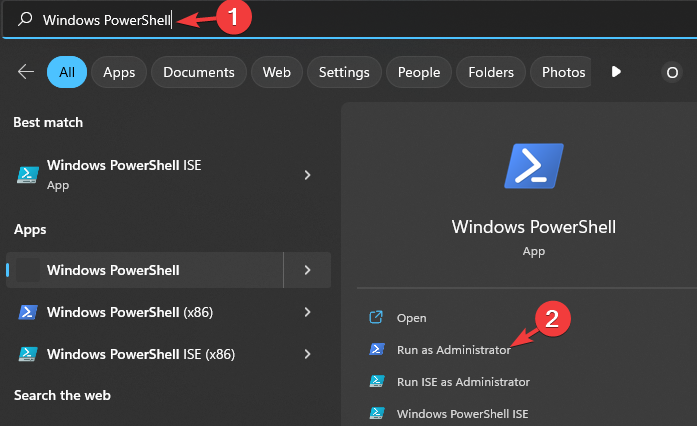
  1. Click on the Start menu in the taskbar and type Windows PowerShell in the box and select Run as administrator.
  2. Select Yes when the User Account Control (UAC) prompt appears.
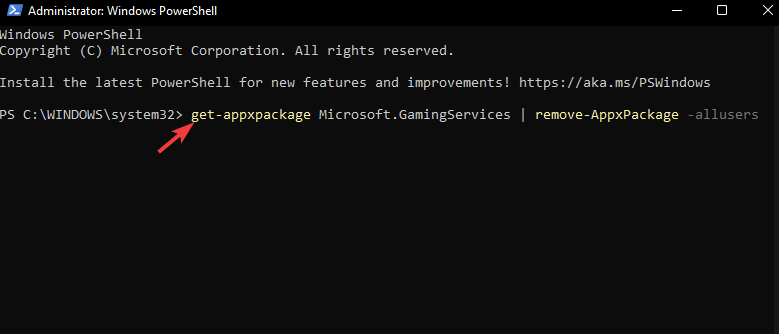
  3. Key in the following command in the console and press Enter to uninstall the Gaming Services app: get-appxpackage Microsoft.GamingServices | remove-AppxPackage -allusers
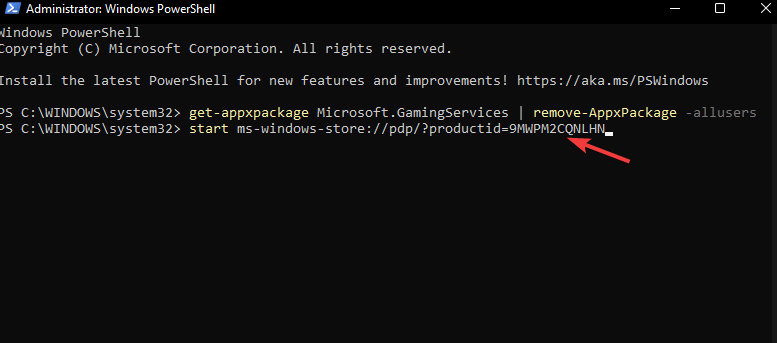
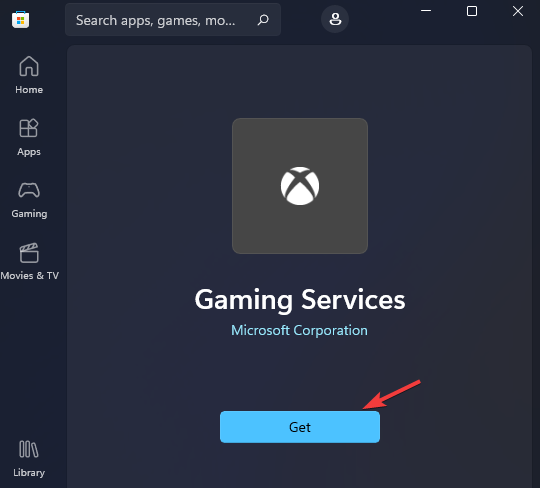
  4. Now, run the following command to open the Gaming Services app page in Microsoft Store: start ms-windows-store://pdp/?productid=9MWPM2CQNLHN
  5. Finally, click on the Get button to download the Gaming Services app once more.

4. Reset your Xbox console

  1. On your controller, press the Xbox button, and on the menu, click the System tab to open Settings.
  2. Select System, then click on Console info.
  3. Click on Reset console.
  4. Choose Reset and keep my games & apps.

5. Reset your PC

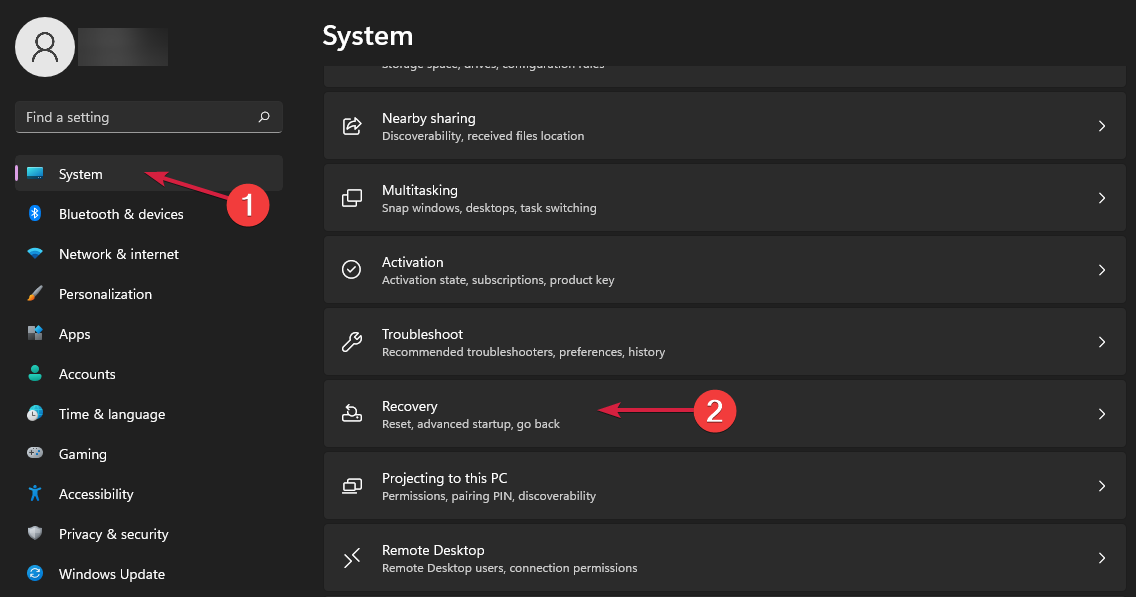
  1. Hit the Windows key and select Settings.settings windows 11
  2. In the left window pane, select System, then click on Recovery on the right pane.
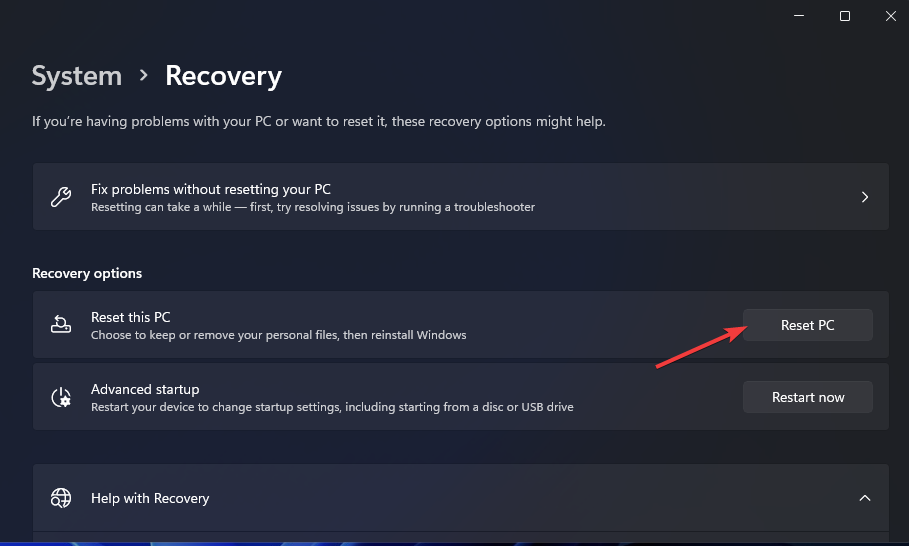
  3. Click on Reset PC from the right side.reset
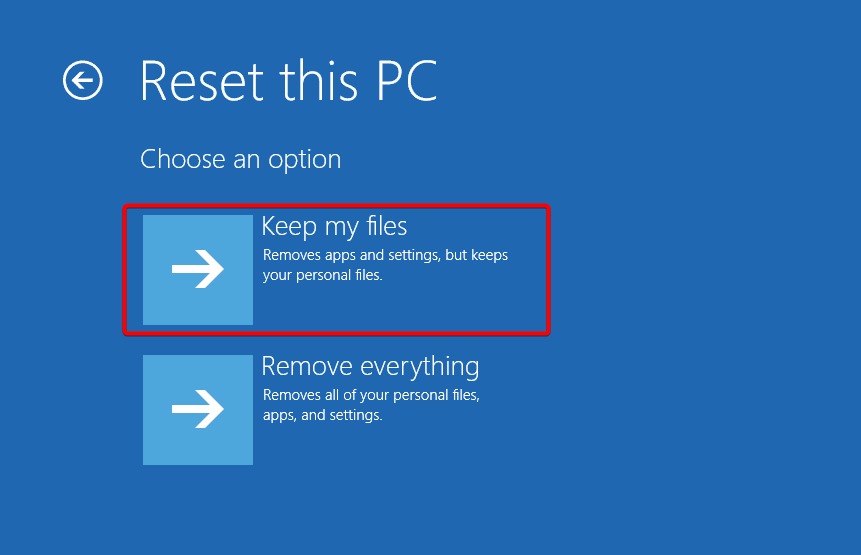
  4. Choose the type of factory reset you need. You can keep your files or completely delete all the files, apps, and settings on the PC.keep-files sfc scannow not working
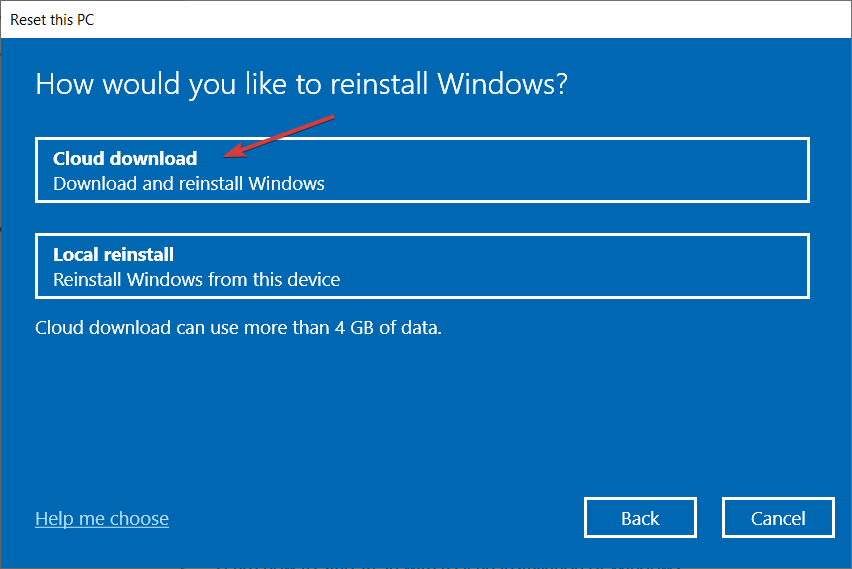
  5. Select the option you want to reinstall Windows: Cloud download or Local reinstall.choose cloud download windows 10
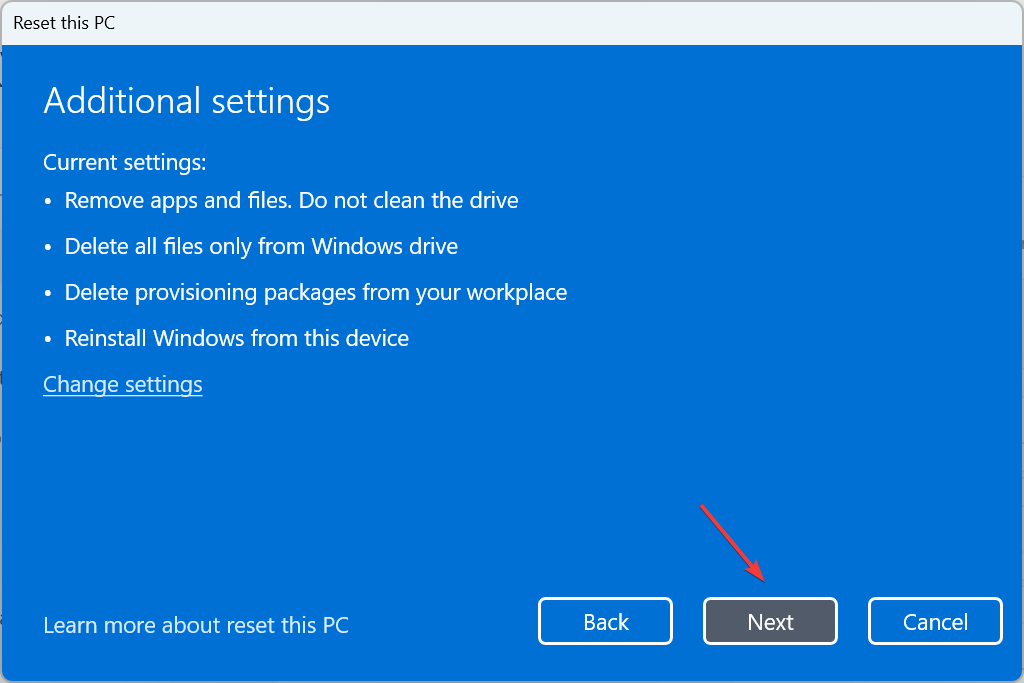
  6. Click on Next.verify details
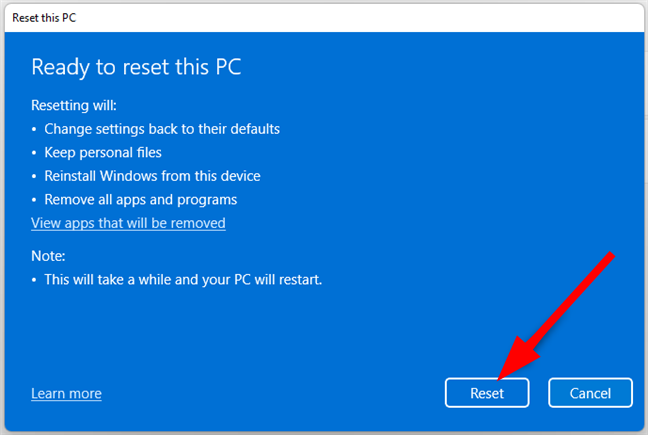
  7. Finally, press the Reset button.

6. Perform an in-place upgrade

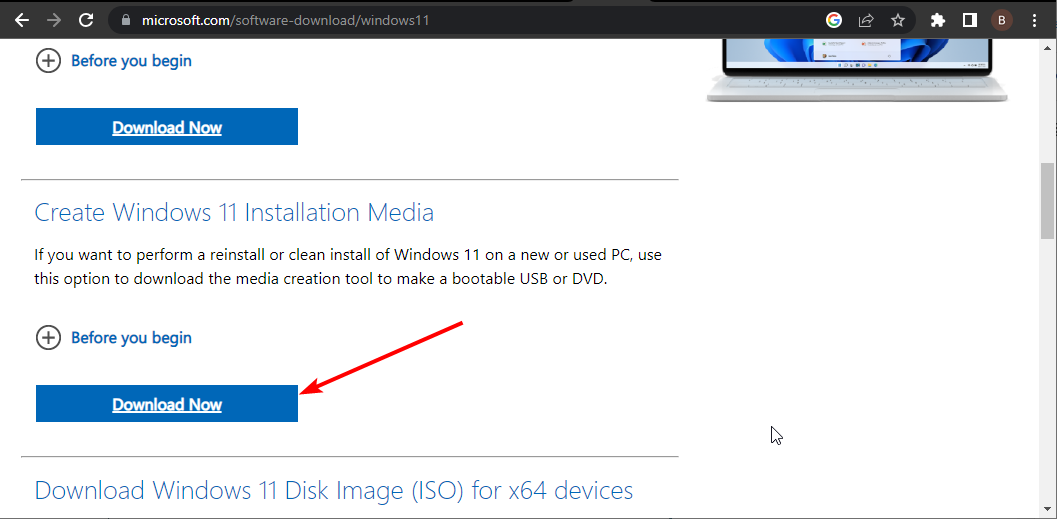
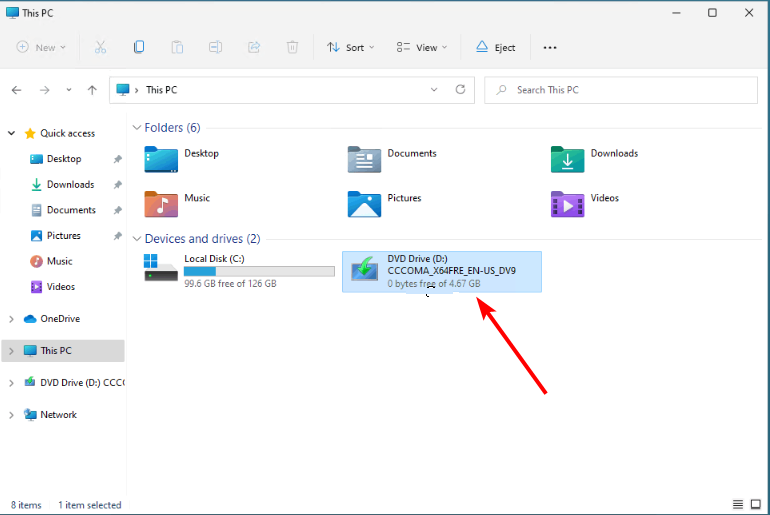
  1. Go to the official Windows 11 download website and click Download Now under the Create Windows 11 Installation Media section.
    download now 0x8031004a
  2. Double-click the downloaded file to run it.
    click
  3. Now, wait for Windows to prepare the setup and click Yes when prompted.
  4. Next, accept the Licence Agreement and wait while Windows downloads the required updates.
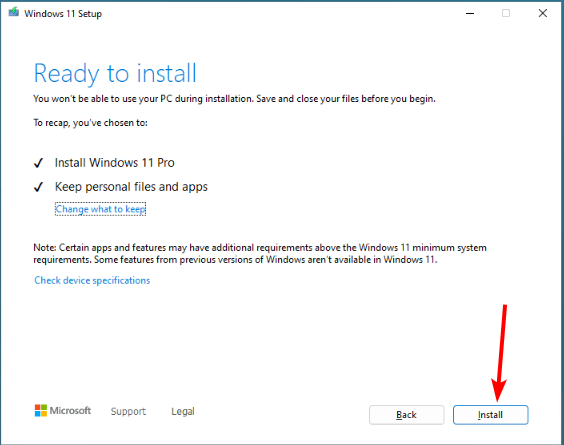
  5. Select between keeping your files and apps and removing them. Since you want to perform an in-place upgrade, leave the recommended settings, i.e., keep your files and apps.
  6. Now, click the Install button to start the in-place upgrade.
    install
  7. Finally, wait for Windows to copy the necessary files to upgrade your device and restart your PC.

An in-place upgrade is essential in resolving the Xbox error code 0x80070490 because it will repair any corrupt system files that were causing compatibility issues.

It will also remove any cached files that could potentially interfere with the download and installation of new games without losing your files. And if after fixing this issue your Xbox is slow in downloading games, we have the remedy for this.

Still, you may not be out of the woods. You may be successful in downloading and the Xbox games fail to launch. Lucky for you, we have an expert article on how to bypass this error.

Hopefully, one of the above solutions has gotten rid of the 0x80070490 error and you can now download and update your Xbox games with no issues.

If you have any additional thoughts on this topic or any other solution worth checking out, feel free to drop us a comment down below.

Tiny11 Builder just got better with the ability to disable telemetry

Let’s be honest, Windows 11 can feel a bit bloated with all the built-in features and functionalities that most of us rarely use.

If you’re looking for something lightweight, you’ll be pleased to know that a new version of Tiny11 is available, and it will make your Windows installation even smaller.

Tiny11 now allows you to disable telemetry on Windows 11

Windows 11 is notorious for gathering user data, and if you aren’t happy with that, you’ll be pleased to hear that Tiny11 can help you put an end to this.

According to Neowin, Tiny11 Builder has been updated, and you can now use it to disable telemetry and other tasks associated with it.

According to the developer, this will disable the Application Compatibility Appraiser, Customer Experience Improvement Program, and more.

This is the only change included in this version, and if you’re not comfortable with Microsoft gathering your data, you might want to give this version a try.

In case you missed it, Tiny11 Builder can now debloat any version of Windows 11, so it doesn’t have restrictions like in the past.

If you want to learn more, we have a great guide on Tiny11 vs Bloatynosy on Legion GO, so don’t miss it for more information.

Oracle boosts its AI cloud services struggling to keep up with Microsoft and Amazon

It’s not a secret anymore that Microsoft is leading the next wave of AI cloud services and their latest investments in this field paid off. Oracle is trying to ride this wave as well, and they’ve been busy boosting their cloud services with some pretty advanced generative AI capabilities.

This isn’t just a small upgrade; we’re talking about a significant leap that’s pushing their cloud revenue up by a whopping 25% to $5.1 billion.

In fact, according to latest Gartner report, Gen AI is the main focus of the big cloud services companies:

We are seeing a cycle of story, plan, execution when it comes to GenAI. In 2023, enterprises were telling the story of GenAI and in 2024 we are seeing most of them planning for eventual execution in 2025. Technology providers are required to be a step ahead of this cycle and are already in the execution phase. They are bringing GenAI capabilities to existing products and services, as well as to use cases being identified by their enterprise clients. 

John-David Lovelock, VP Analyst at Gartner

Will Oracle manage to keep up with the AI race?

Now, why is all this AI talk important? Well, Oracle is integrating generative AI into its applications, which is a game-changer for productivity and cost reduction. Imagine having AI that can not only predict outcomes but also generate human-like responses and solutions. That’s the kind of synergy Oracle is aiming for by combining predictive analytics with generative AI. And guess what? They’re not stopping there. According to CNBC, in March, Oracle expanded its AI features across various applications, following an announcement in January about implementing generative AI across its technology stack.

But here’s the kicker: Oracle’s cloud infrastructure backlog is massive, and AI is expected to drive even more revenue in the future. They’re also focusing on sovereign AI cloud solutions, which means they’re building a data center in Salt Lake City and negotiating with countries to meet specific data storage requirements. This is a big move towards providing more secure and localized AI services.

Oracle’s generative AI push is all about staying competitive and even more. With their data and installed base, they’re in a strong position to monetize AI in ways their competitors can’t. And with the AI boom driving demand for cloud computing services, Oracle’s strategic investments in AI are set to pay off big time.

So, what does all this mean for us? Well, as Oracle and others ramp up their AI capabilities, we can expect to see more innovative services and solutions that can transform how businesses operate. Whether it’s improving productivity, reducing costs, or creating more personalized customer experiences, AI is the future, and it’s happening now.

What do you think about the increasing investments in AI cloud services? Let’s talk about it in the comments section below.

Microsoft 365 Insiders can now convert their handwriting into text on Excel

Recently, Mark Rideout, a product manager on the Office AI team, announced the availability of Ink to Text Pen for Microsoft Insiders on Microsoft Excel. The tool was earlier introduced in Word, PowerPoint, and OneNote.

With the Ink-to-Text Pen tool, you can transform your handwriting into text using your digital pen or stylus, which will help you enter content into cells efficiently. It also allows you to use pen gestures to choose and delete content in a cell.

It is important to remember that the Action Pen in Excel is no longer available; it has been replaced by the Ink to Text Pen tool.

How does it work?

To use the Ink to Text Pen tool, go to the Draw tab and choose the Ink to Text Pen tool. Now, zoom in on the sheet to make the specific cell visible and start writing over a cell; this will replace any existing content.

If your device is touch-enabled, you will see the Draw tab in Excel. If you don’t find the Draw tab, you can navigate to File>Options>Customize Ribbon and select the Draw box.

To select a cell, you can tap a single cell or use the Straight line select gesture to choose multiple cells at once.

If you want to delete text, you can draw up and down squiggles to use the Scratch-out gesture through one or more cells.

In the Microsoft Insider blog, the scenarios that were mentioned to try are:

  • With the Ink to Text Pen tool selected, start writing over a cell in a new or existing spreadsheet.
  • Select multiple cells with the Straight line gesture and apply formatting to all of them at once.
  • Delete a cell’s content with the Scratch-out gesture.

There is also a known issue mentioned in the blog:

The Ink to Text Pen tool may not work correctly in a spreadsheet that has frozen panes.

To use the Ink to Text Pen tool, you should have a stylus or digital pen and the latest version of Windows 11 (23H2) with the October 31, 2023 update (KB5031455).

This feature is available to all Microsoft Insiders using Excel with all the other requirements mentioned above.

Have you used the Ink to Text Pen tool in Excel, Word, or OneNote yet? If so, share your experience with our readers in the comments section below.

All PCs shipped by 2030 will be powered by AI, suggests report

AI-capable PCs will soon be hot-selling products as manufacturers continue integrating more AI-oriented features into devices!

A report by Canalys shares a projection of an increased adoption rate for AI PCs among users.

It predicts that 19% of the PCs sold in 2024 will have Artificial Intelligence capabilities, increasing to 37% in 2025, followed by 53% in 2026 and 60% in 2027. And by 2030, nearly 100% of those shipped will be AI PCs!

Image source: Canalys

While these figures may look far-fetched to a few, Microsoft has already called 2024 the year of AI PCs.

The Redmond-based tech giant’s idea of an AI PC includes an NPU (Neural Processing Unit) chip, Microsoft Copilot, a dedicated Copilot key, and the latest CPU and GPU to perform resource-intensive tasks seamlessly.

Manufacturers like Intel and AMD are already working alongside Microsoft in the push for AI PCs. With these becoming mainstream, Intel and AMD stand a chance to recover the losses accrued over the last few years.

Image source: Intel

In 2024, everyone is competing in the AI race. Microsoft is planning to purchase 1.8 million AI chips, Intel is unveiling AI-oriented chips, and AMD is bringing new AI-powered processors.

Besides, we can’t forget NVIDIA, a company whose stock value surged ever since the AI revolution, and it soon became the third-largest company globally in terms of market capitalization.

With features like Copilot and AI Explorer (to be released soon) in Windows and Microsoft’s plans to invest more in the technology, the aim of AI-powered PCs in every home will be achieved sooner than many expected. Maybe not by 2030, but the day is not too far away!

It looks like no one, be it the manufacturer or buyers, wants to miss out on AI!

What’s your projection for the adoption rate of AI PCs? Share with our readers in the comments section.

Opera’s Aria AI can now generate images and has voice output

We have covered the evolution of Aria, Opera browser’s AI bot but until now, it was only a chat bot. According to the latest release, Aria is now able to generate image from text and can voice the answers to your prompts.

Moreover, if you forgot so generate an object in an image, Aria comes with a Regenerate command to correct your output. You will have 30 free image opportunities daily and Aria will use Google’s Imagen2 to generate them.

How do I use the new Aria text-to-image generator?

To generate an image, open a chat with Aria from the sidebar or in the Command Line by pressing Ctrl + / (Cmd + / on macOS). Then write the prompt to generate an image followed by a description, just like you do on any other AI generators out there.

But that’s not all. Opera’s Aria also comes with a voice output feature. This means Aria can read text answers aloud, making information accessible in a whole new way.

Here’s the bad news: To access these features, you’ll need the Developer version of the Opera browser. This is not such a setback, however. You can download it for free and join the developer program in just a few seconds.

What do you think about the new features of Opera and Aria AI? Let us know in the comments below.

Chrome and Edge to gain startup speed boosts on Windows, thanks to Microsoft

Chromium browsers are used by many, and while they are great in general, some users can experience slow startup while using them.

It seems that this might finally change thanks to Microsoft’s contributions to the Chromium project.

Chrome and Edge will start faster, thanks to Microsoft

Microsoft is actively contributing to the Chromium project, and the company has implemented SingletonHwnd, a window handler, that improves the browser startup time and responsiveness.

Microsoft has found that the traditional approach of creating individual message-only windows for components like BatteryStatusManagerWin that are listening to system events caused the bottleneck, especially during the startup.

This added a 1-10 millisecond delay for each window created. This issue was acknowledged on the Chromium project page.

The current implementation of BatteryStatusManagerWin creates message-only windows to listen for events from Windows. This impacts performance at startup where we have to pay the cost of creating the window to listen.

As a solution, Microsoft suggested the migration of BatteryStatusManagerWin to utilize SingletonHwnd. This is a shared handler and is a part of ui/gfx/win directory.

The new handler will work as a centralized listener for various system components such as SystemMessageWindowWin, ScreenlockMonitorWin, and PowerMonitorDeviceSource.

These changes will impact improved startup time for Chrome and Edge, as well as other Chromium browsers.

Instead use Singleton HWND in the implementation of this component to allow sharing a single HWND. We typically see 1-10ms costs for creating an HWND in startup, so sharing the Singleton HWND will lead to modest but measurable startup improvements.

SingletonHwnd is a design pattern within the Chromium project that should improve efficiency during the startup by reducing the overhead associated with handling system events.

This was also discussed by the Chromium developers:

Various components create message-only windows to listen for events/messages from Windows.  These include SystemMessageWindowWin, BatteryStatusManagerWin, ScreenlockMonitorWin, PowerMonitorDeviceSourceSingletonHwnd currently resides in ui/gfx/win.  Moving this to base would allow all the abovce components to share a single HWND.  Creating these various windows at startup does impact perf, so sharing a single HWND would be beneficial.

This is a welcome change, but this is currently in the development stages, so we won’t see it in action for some time.

In other news, Chrome makes managing certificates easier with the new UI, and Windows Share might come back to Edge, after 3 years.

Microsoft brings offline mode to OneDrive for Web, improves loading time by 3x

The latest in the series of improvements to Microsoft’s native cloud storage, OneDrive for Web, is an offline mode. This comes on the heels of UI enhancements to OneDrive!

Last year, we reported that Microsoft was working on an offline mode for OneDrive. It’s now being rolled out to OneDrive work and school users globally.

In its official blog post, Microsoft lists the following functions of offline mode in OneDrive for Web,

1. Open and interact with OneDrive’s “Home,” “My files,” “Shared,” “Favorites,” “People,” and, “Meeting” views.
2. View your folders, file names, and metadata such as file owner, size, recent activity, last open date, and more.
3. Use the “My files” view of OneDrive for web to rename, sort, move, or copy files and have those changes sync to your OneDrive when you reestablish an internet connection.
4. Open locally stored Office and non-Office files (files marked as “available offline”) in their native app and make and save edits.

Any changes made in offline mode will be synced when you reconnect to the Internet.

Image source: Microsoft

Besides, even OneDrive for Web‘s offline mode with an Internet connection comes with a series of improvements,

1. You can designate files or folders as available for offline access directly from OneDrive for web.
2. You can free up local storage space by making your local files or folders online only directly from OneDrive for web.
3. You will experience up to 3X faster loading times when viewing and interacting with your files in OneDrive in your browser and in the OneDrive app in Microsoft Teams and Outlook.

The latest changes also enhance OneDrive’s Files On-Demand, a functionality critical to the cloud storage for both Windows and Mac users.

As for the performance improvements in OneDrive for Web, they are a direct result of leveraging the local cache. Microsoft explains it in the official blog post.

Offline mode uses your device’s local storage to store certain file information such as file name, size, author, last date accessed, etc. By accessing your content from your local cache instead of fetching it from a cloud server, data retrieval speeds are significantly improved. Furthermore, this enhancement has the added advantage of bypassing cloud service-related throttling issues.

The offline mode for OneDrive doesn’t kick in and has to be manually set up. You can do so by opening OneDrive for Web and following the on-screen instructions. Also, you will need the latest OneDrive sync app.

Remember, the offline mode in OneDrive for Web is being gradually rolled out. So, everyone won’t get it at the same time!

In recent months, Microsoft has also integrated Copilot into OneDrive for Web, and more AI-powered features are on the cards.

For those new to Microsoft’s cloud storage service, read our comprehensive guide on using OneDrive.

What’s your review of offline mode in OneDrive for Web? Share with our readers in the comments section.

Loongson announces 3B6600 and 3B7000 CPUs, available only on the Chinese market

AMD and Intel dominate the current CPU market, but that doesn’t mean there aren’t any competitors available.

It seems that homegrown Chinese CPUs are catching up in performance to their global counterparts, and speaking of which, Loongson has just announced two new models.

Newly announced Loongson CPUs can allegedly rival Intel 10th Gen CPUs

Loongson has revealed its next-generation octa-core CPUs, 3B6600 and 3B7000, that are intended for the Chinese market, as Tom’s Hardware writes.

It is no surprise to see more Chinese CPUs after China banned Intel and AMD chips in government PCs.

According to the manufacturer, its CPUs are behind the competition regarding multicore performance, however, single-core performance has been improved, and it’s allegedly 20 times better than before.

Regarding the available cores, the CPUs offer the following:

  • 3B6600 – eight LA854 CPU cores and LG200 iGPU clocked at 3.0 GHz
  • 3B7000 – eight LA864 cores clocked at 3.5 GHz, undisclosed iGPU

Other features include the following:

Supported interfaces:PCIe 4.0, SATA III, USB 3.0, GMAC, HDMI output
Graphics:OpenCL 3.0 computing and OpenGL 4.0 graphics acceleration
Graphics performance:up to 256 GFLOPs, up to 1TFlops with discrete graphics
RAM support:SRAM, SDRAM, DDR2, DDR3, and DDR4

While these CPUs sound decent, they are outshined by AMD and Intel with ease. As for availability, we expect to see them available in China someday in the future.

In other news, China has acquired Nvidia AI chips, circumventing the US export ban.

Bringing exclusives to PlayStation and Nintendo worked for Xbox, more games on the cards

When Microsoft announced bringing Xbox-exclusive games to PlayStation and Nintendo, it left everyone by surprise. But the move turned out great for Microsoft!

The Redmond-based tech giant reported an increase in revenue from gaming, with the Activision Blizzard acquisition being a key factor. Recently, we also found that more Xbox games featured in the top 25 list on the PlayStation Store.

Microsoft’s CEO Satya Nadella had earlier said,

We’re expanding our games to new platforms, bringing four of our fan-favorite titles to Nintendo Switch and Sony PlayStation for the first time. In fact, earlier this month, we had 7 games among the top 25 on the PlayStation store, more than any other publisher.

Now, at a time when Xbox console sales are at a record low, it only makes sense for Microsoft to bank on the revenue from Xbox content and services, which reported a 62% increase in Q3 2024.

Microsoft to bring more Xbox-exclusive titles to PlayStation and Nintendo

After releasing several games on PlayStation and Nintendo, Microsoft is now planning to bring a few more titles to the two. While there has been no official confirmation from the Xbox division, a report from ComicBook suggests that Senua’s Saga: Hellblade II and Indiana Jones and the Great Circle are on the cards!

But it’s Halo that everyone is talking about. An Xbox exclusive for over a decade (amongst consoles, a PC version is available), Halo could be the turning point, providing Microsoft with a much-needed boost in the gaming division.

Both Halo Infinite and Halo: The Master Chief Collection, if brought to PlayStation and Nintendo, would break all records and be amongst the top pre-ordered games, as was the case with Sea of Thieves.

Reports earlier suggested that the success of Sea of Thieves could pave the way for more Xbox exclusives on PlayStation. Now that Sea of Thieves hit 40 million users, other titles could be just months away, including the much-hyped Halo series!

Low console sales remain a concern for Xbox

Although Xbox is generating more revenue than ever from its games, console sales are at an all-time low in recent years. Retailers are cutting back stock as gamers prioritize PlayStation and PC over the Microsoft console. And with exclusivity out of the picture, more gamers could jump ship!

In recent years, Xbox sales have shown no signs of recovery, and many fear that game developers could soon abandon the platform due to reduced profits. A few more years of similar sales figures, and it would be nearly impossible for Xbox to recover.

Do you think bringing more Xbox games to PlayStation will help Microsoft? Share with our readers in the comments section.

Hackers can use the PlugX USB worm to steal data from various countries

The PlugX USB worm is malware that can infect various devices when it connects to them through their USB ports. It doesn’t need any end-user interaction to work. In addition, it can self-replicate and spread to new USB devices automatically. On top of that, its original creators abandoned it, and its botnet is dead. However, according to Sophos researchers, anyone could use it to send commands or repurpose it for malicious activities. Yet, they would need to have access to its server.

After thorough research, Sekoia researchers discovered that their server receives between 90,000 and 100,000 distinctive PlugX requests daily from unique IP addresses. So, they concluded that the malware spread to millions of devices.

Who uses the PlugX USB worm?

The first version of the PlugX malware appeared in 2008. Back then, Chinese threat actors used it in a campaign against government-related users and an organization from Japan. Afterward, the virus mainly stayed in Asia until 2012, but then it spread to other parts of the world. Yet, various companies changed the PlugX malware and developed new versions, such as the worm. Also, most cybercriminals have ties with the Chinese Ministry of State Security.

The PlugX USB worm allows hackers to steal data, perform remote commands, upload and download files, and execute programs on the device. To install it, they used the DLL Side-Loading technique. Through it, the virus could infiltrate a system by hiding inside a DLL file.

How can we get rid of the PlugX malware?

There aren’t too many options to get rid of the PlugX USB worm. However, it has a built-in self-delete feature. Yet, the self-destruction option might result in legitimate data loss. On top of that, there is a risk of reinfection since disinfection might not reach all affected devices.

Fortunately, the Sekoia team took action and proposed to Law Enforcement Agencies and national Computer Emergency Response Teams to remove the PlugX USB worm remotely. Additionally, they record the information to keep track of the virus. In addition, the researchers will use their removal payloads and commands on the requests from the systems marked for disinfection to speed up the process.

Ultimately, cybersecurity experts from different countries will decide how to deal with the PlugX USB worm. After all, none of the existing methods represents is free of risks. Thus, it might be hard to figure out what to do. Also, since the PlugX USB malware might exist on external devices that won’t take part in disinfection, the virus might resurface in a while. Also, another version of the malware could infect devices in its absence.

What are your thoughts? What should experts do? Let us know in the comments.

How to Disable the Touchpad on ASUS Laptops [4 Working Methods]

Want to disable the touchpad on your ASUS laptop? Look no further. Doing this will stop accidental touches, save battery, and make using external devices easier.

Sometimes, you might not get it right on the first try, so I’ve listed a few different ways you can explore. You’ll surely find one that works.

How to disable the touchpad on ASUS

Here are a few methods to turn off your touchpad in a matter of minutes:

1. Use function key

  1. On your keyboard, locate a key with a touchpad icon. Most ASUS models have it on the top row (F1-F12).
asus touchpad function key
  1. Look for the Fn key, usually located in the bottom left corner of your keyboard.
fn key on asus keyboard
  1. Press and hold the Fn key, then press the key with the touchpad icon.

Repeat the same process if you want to re-enable the touchpad.

2. Use Windows settings

  1. Pres the Windows key + i to open the Settings app.
  2. Go to Bluetooth & devices.
bluetooth and devices
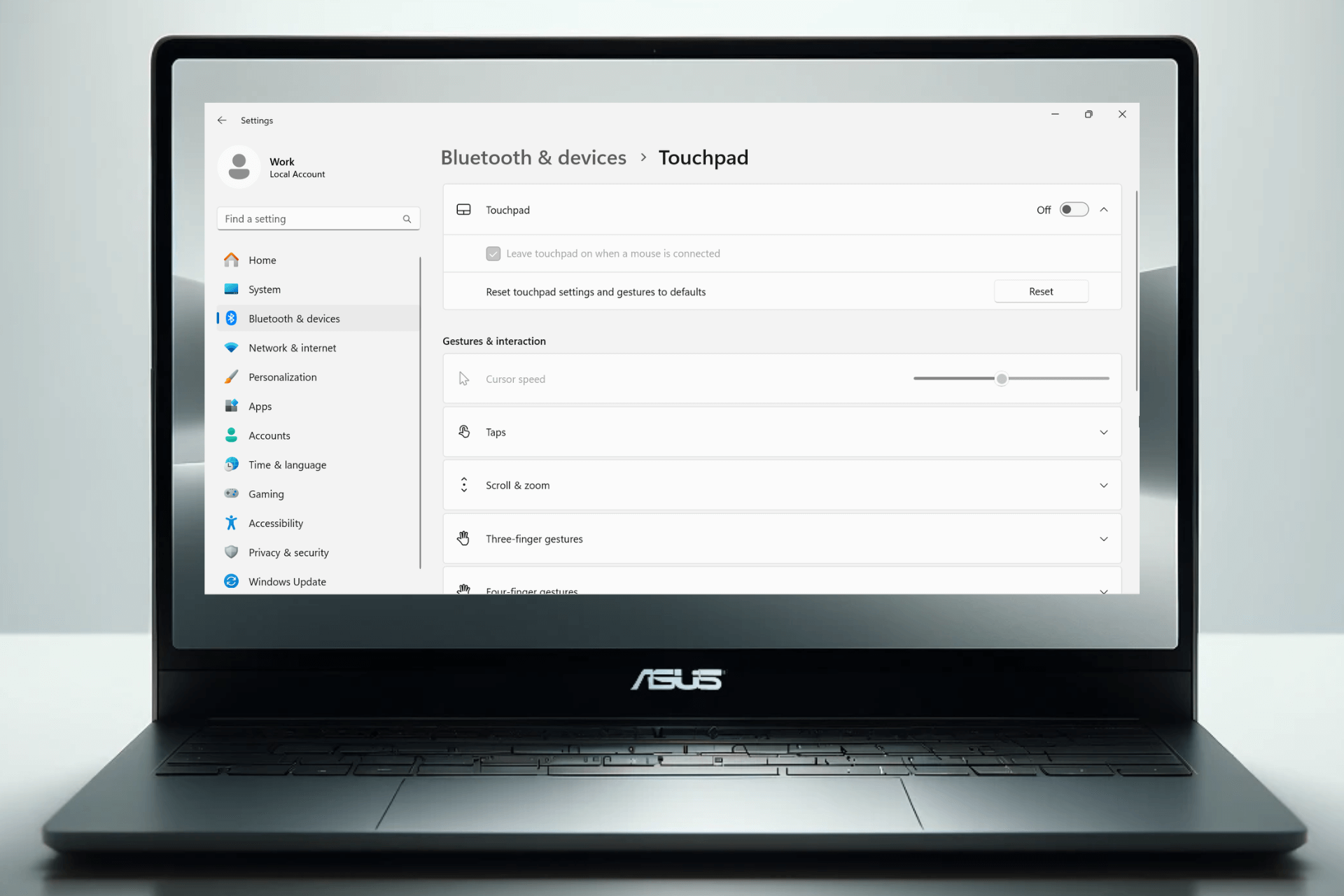
  1. Select Touchpad.
touchpad settings in windows
  1. Toggle off.
disable touchpad from windows settings

3. Disable via the MyASUS app

  1. Search for MyASUS in the Windows search bar and open the app.
opening the myasus app
  1. Go to My ASUS Devices.
my asus devices
  1. Pick the touchpad and select Lock to disable it.

4. Use Device Manager

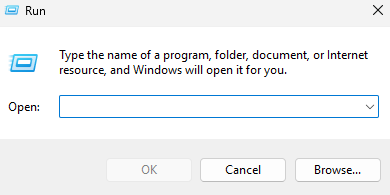
  1. Press the Windows key + R.
run dialog box
  1. Type devmgmt.msc and press Enter to open Device Manager.
devmgmt.msc
  1. Locate Mice and other pointing devices and expand the list.
mice and other pointing devices
  1. Find the touchpad. It’s usually labeled HID-compliant touchpad.
  2. Right-click on it and select Disable.

? If your ASUS model doesn’t have a regular touchpad, but a ScreenPad, you may not be able to locate it under Mouse/Touchpad settings. Instead, it will be listed under Display adapters in Device Manager and in Display> Multiple Displays in Windows Settings.

Once you’ve disabled the ASUS touchpad using any of these methods, you can easily re-enable it by following the same steps and selecting Enable device or toggling the option back on in the settings menu.

Disabling and re-enabling the ASUS touchpad may also help if it’s not working on Windows 11.

Wrapping up

Disabling the ASUS touchpad is no rocket science and if one method isn’t working, you have enough alternatives. Using the function key, settings app, the dedicated MyASUS app or Device Manager will help you achieve this in just a few steps.

Xbox Game Pass gets Little Kitty, Big City on the day it drops

Developer Double Dagger Studios announced on X (formerly known as Twitter) that Little Kitty, Big City will be available on Xbox Game Pass, Steam, and Nintendo Switch on May 9. Here is the post:

This adventure game will be available on Game Pass, which means it will be released on every compatible device. Subscribers playing on Xbox Series X|S consoles can get immediate access and enjoy this latest release on the same day.

This game is about a cat lost in a city whose objective is to make its way back home. In this third-person adventure video game, players assume control of a black domestic cat lost in a Japanese city. The objective is to guide the cat back to its home.

Along the journey, players can interact with the city, performing typical cat actions such as jumping into boxes, catching mice or birds, playing with its tail, and even stealing food.

Additionally, players can communicate with other animals living in the city and may also dress the cat in various hats.

With this latest announcement, May is shaping up to be an even more thrilling month for gaming enthusiasts, especially since another big release, Hellblade 2: Senua’s Saga, will happen this month.

Are you excited to play this cute, adventurous game with the little kitty? Share your thoughts with our readers in the comments section below.

Microsoft’s MS-DOS 4 open-source release stirred nostalgia but now is on fire due to flaws

Recently, Microsoft announced the release of the source code for its iconic 1986 MS-DOS 4 operating system and made it publicly available on GitHub for all to edit, study, or distribute.

Microsoft’s intended motive was to stir nostalgia and celebrate retro computing. However, little did they know it quickly turned into a controversy when developers and enthusiasts discovered critical flaws in the release.

A popular developer, Michal Necasek, who is known for OS/2 Museum, listed the issues he found in the release in a blog post, How Not To Release Historic Source Code.

He praised the decision to release the code but was not happy with its execution. He mainly lambasted the use of Git, a version control system, as it failed to preserve the timestamps and converted files to UTF-8 format.

In his blog post, he mentioned:

This source code will be an excellent reference of modern-ish DOS until Microsoft officially releases the long ago leaked MS-DOS 6.0 source code. The source code includes all required build tools, which makes building it (compared to many other source releases) extremely easy.

But please please don’t mutilate historic source code by shoving it into (stupid) git.

First of all, git does not preserve timestamps, which causes irreversible damage. Knowing when a source file was last modified is valuable information.

Second of all, the people releasing the source code clearly thought, hey, it’s source code, let’s shove it into git, what could possibly go wrong.

The repercussions of these harmless actions were serious. Let us tell you how. In the MS-DOS era, the text files were usually encoded in ASCII or a similar coding scheme. However, Microsoft converted the source files to UTF-8, which encodes diverse Unicode characters, which is not compatible with MS-DOS environment.

And, as UTF-8 was not available in the times of MASM 5.10 and Microsoft C 5.1, old tools can’t deal with it; hence making them unreadable.

The byte length of MS-DOS 4’s MASM compiler was 512 bytes and by converting the files to UTF-8, they brought some files above that limit.

Some of the core system files managed to survive the conversion without any harm, however the conversion multilated others, resulting into inconsistencies between the original disk image files and released source code.

Necasek also mentioned that the source code released is not the MS-DOS 4.00 but a less-known version, 4.01, which wasn’t available directly, but was shipped to PC OEMs. The 4.01 version included important bug fixes.

Here is the proof, in the  SETENV.BAT file, there is a line mentioning just that:

echo setting up system to build the MS-DOS 4.01 SOURCE BAK...

In the end of the blog post, Necasek also suggested that the source code should be made available as an rchive of files, ZIP or similar format, with all the timestamps preserved and each byte kept the way it was. Also, he mentioned that Git is not the right tool for this.

Once the article went live, one of the MS-DOS 4 release co-developer Connor Hyde, also known as Starfrost commented that due to legal constraints inclusion of timestamps can’t happen.

He said:

The reason I cannot do timestamps is because data protection law mandates anonymisation of source files, at least that is the policy.

Note that this is far better than the CHM “preservation”.

To which Michal Necasek responded:

Do you know how the files survived? On floppies or on some hard disk backup? If on disks, then releasing the disk images would be terrific. But really anything that builds without having to be edited would be good.

There’s probably some way to fix the files in git as well? As I said they’re not plain ASCII (most are, but not all of them) and they must not be converted to UTF-8.

He further added,

Let’s hear it for idiotic corporate policies! Obviously not your fault.

But I have to point out that in the Multitasking DOS release, there are source files on a floppy image, with original timestamps…

Yes, the CHM release of DOS source code was… not ideal.

Then, there was a brief debate in the comments section, between Necasek and Starfrost about the source code and the way it was release, which concluded when they agreed on talking over email in private.

As of now, the developer community is waiting for resolution so that they can enjoy using the legendary operating system in its former glory.

Have you checked the source code  MS-DOS 4.00 or 4.01 until now? If so, share your experience with our readers in the comments section below.

Dell joins the list of manufacturers using Snapdragon X Elite in its upcoming devices

Lately, we have been hearing a lot about Snapdragon X Elite being tested on several devices; after Samsung, Surface, and Lenovo, the latest name added to the list is Dell.

As spotted first by Windows Latest in the Geekbench benchmark latest report, the device used for testing is Dell Inc. Inspiron 14 Plus 7441.

Here is the detailed information about the same:

System Information

System Information
Operating SystemMicrosoft Windows 11 Pro (64-bit)
ModelDell Inc. Inspiron 14 Plus 7441
MotherboardDell Inc. 032Y94
Power PlanBalanced
CPU Information
NameSnapdragon X Elite – X1E80100 – Qualcomm Oryon CPU
Topology1 Processor, 12 Cores
IdentifierARMv8 (64-bit) Family 8 Model 1 Revision 201
Base Frequency3.42 GHz
Cluster 18 Cores
Cluster 24 Cores
Memory Information
Size16.00 GB

During testing, the single-core and multi-core scores were 1765 and 4367, respectively, which are lower than those of other OEM devices as per the Geekbench listing.

A second test was run on the same device, and the scores were even lower than the previous ones, 1773 (single-core) and 4101 (multi-core). Here are the details of this one:

System Information

System Information
Operating SystemMicrosoft Windows 11 Pro (64-bit)
ModelDell Inc. Inspiron 14 Plus 7441
MotherboardDell Inc. 032Y94
Power PlanBalanced
CPU Information
NameSnapdragon X Elite – X1E80100 – Qualcomm Oryon CPU
Topology1 Processor, 12 Cores
IdentifierARMv8 (64-bit) Family 8 Model 1 Revision 201
Base Frequency3.42 GHz
Cluster 18 Cores
Cluster 24 Cores
Memory Information
Size16.00 GB

When we compare it with SAMSUNG ELECTRONICS CO., LTD. Galaxy Book4 Edge, whose base frequency is 4.01 GHz and uses the same Snapdragon X Elite – X1E80100 – Qualcomm Oryon CPU, we see that it scored 2785 (Single-Core), and 13925 (Multi-Core), which is quite high.

After basic analysis, we found only one difference: the base frequency or clock speed, which was 4.01 GHz for the Samsung device and 3.42 GHz for the Dell device.

This makes us wonder whether the testing was done with the correct settings. Also, power configuration or other incorrect benchmark settings could be the reason for such low scores.

So, we think these tests are inaccurate, but they only prove that Dell is also working on bringing a Windows 11 AI-powered PC to stay in the competition.

What are your thoughts on the matter? Share your opinions with our readers in the comments section below.

Gaming Services timeout error prevents you from searching in Windows 11, here’s what to do

A weird issue is plaguing several Windows 11 devices as I write. Many of you have reported being unable to type into the Search Bar, the Microsoft Store, or even the Settings app on the latest iteration after playing a game from the Xbox PC app, all due to the Gaming Services timeout error!
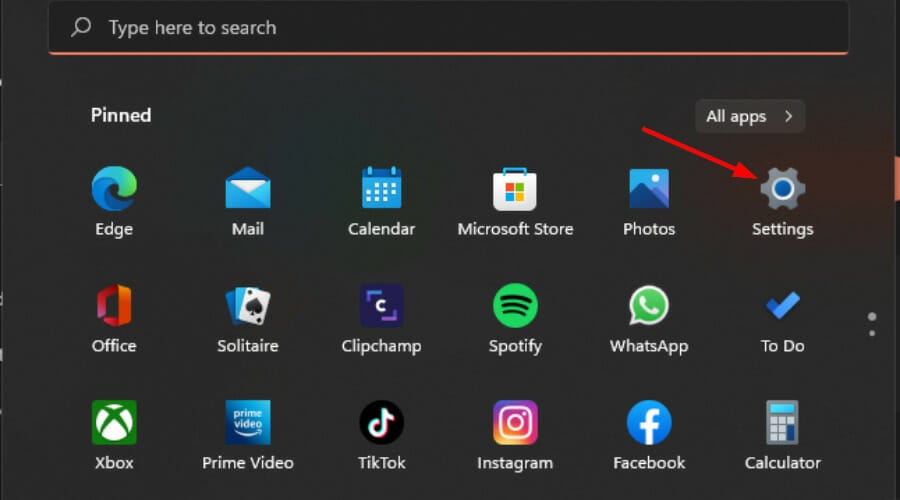
The error message when you check the Windows 11 error logs reads,

A timeout (120000 milliseconds) was reached while waiting for a transaction response from the GamingServices service.
Note icon NOTE
The time period listed within the brackets in the error message varies for every user.

As long as you don’t play any Xbox games on the PC, it all works. The search functionality across the device will run fine. But upon loading a game, then terminating it and restarting the PC, you won’t be able to type in any of the search boxes, including the one within the game.

Here’s what a few users wrote on the dedicated Microsoft forum:

I have an issue where I cannot type in windows 11 search bar, windows store search, settings search, in some games like Minecraft windows edition (bedrock). Everywhere else I can type fine, browser, notepad etc. Everything is then fine, if I don’t load a Xbox Game pass game. If I load eg, Minecraft Launcher, all still works ok, play game, exit game, do some work etc. But when I shut down the computer and boot back up, I can no longer type in the search boxes.

As of now, Microsoft hasn’t acknowledged the software conflict and released a patch, but we did find a few workarounds to get rid of the Gaming Services timeout error.

How can I fix the Gaming Services timeout error on Windows 11?

  • Disable fast startup: Open the Control Panel > go to System and Security > click on Change what the power buttons do under Power Options > click on Change settings that are currently unavailable > untick Turn on fast startup > click on Save changes.
  • Terminate Gaming Services in Task Manager: Press Ctrl + Shift + Esc to open the Task Manager > select the Gaming Services entry > click on End task. (It’s a temporary solution, the problem soon reappears)
  • Repair/reset the Gaming Services: Press Windows + I to open Settings > go to Apps > select Installed apps > click on the ellipsis next to Gaming Services > choose Advanced options > click individually on Repair and Reset.
  • Disable Gaming Services from running in the background: In Advanced Options for Gaming Services, choose Never from the dropdown menu under Background app permissions.
Changing background app permissions for Gaming Services

While I can confirm that the issue is not affecting my Windows 11 device, it’s still out there, as is evident from the Gaming Services’ reviews on the Microsoft Store. The app’s ratings are tanking with each passing day!

In case these workarounds don’t help, keep checking for any available updates to the Gaming Services and install them right away to get rid of the timeout error.

If you know of any other workarounds, share them with our readers in the comments section.

Quality Mode is working as intended in Fallout 4 on Series X, Bethesda confirms

Fallout has been in the spotlight recently after the release of the TV show, and we even got a next-gen release of Fallout 4.

The release was followed by some issues, however, Bethesda decided to chime in and give us more information about them.

Fallout 4 next-gen on Xbox isn’t bugged, Bethesda says

A few days ago, we wrote how Quality Mode isn’t working in Fallout 4 next-gen version on Xbox. Many users reported that switching to Quality Mode doesn’t affect the framerate, leading them to believe this feature doesn’t work.

However, as Game Rant writes, that isn’t true, and the feature works as intended. Apparently, on Xbox Series X, both Quality and Performance Mode run at 60fps.

This was even confirmed by Bethesda on its X account:

According to Bethesda, the difference between the two modes is that Performance Mode is more aggressive in lowering settings to achieve 60fps.

This wouldn’t be an issue if Bethesda had disclosed this in patch notes, but in the end, all that matters is that the game works as intended on Series X.

On the other hand, PC users weren’t as lucky as Fallout 4 next-gen brings widescreen issues. Speaking of Fallout, we got some fresh rumors stating that Fallout 5 might come sooner than expected, but this is just speculation at the moment.