Razer Blade 16: One of the most expensive gaming laptops is now on discount; grab it while you can

The Razer Blade 16, a robust gaming laptop with a powerful Nvidia GeForce RTX 4090 graphics card, originally cost $4300, but it is now available for $3900, as Razer is offering a $400 discount. It is still pretty expensive, but it is worth every penny. Let us know how.

As we mentioned, the Razer Blade 16 comes with an Nvidia GeForce RTX 4090 graphics card accompanied by NVIDIA Studio, a 13th-generation Intel Core i9 processor, a maximum Clock Speed of 5.8 GHz, 24 cores, 32 threads, and 32 GB RAM, making it an excellent assembly for gaming and animation.

Along with a powerful processor, RAM, and graphics card, the laptop has a 16-inch Samsung OLED display with 2560 x 1600 resolution, 240 HZ Refresh rate, and 1M:1 Contrast ratio, which provides sharp visuals, making it perfect for gaming enthusiasts.

The laptop has an Aircraft-grade Aluminium unibody design and a 100% pure titanium anti-flex plate, making it quite sturdy. It also comes with an up to 330 W GaN charger, which is power-efficient and is smaller in size.

Furthermore, Razer Blade 16 comes packed with Windows 11 Home, the latest operating system, and 2TB SSD storage space, enough to store your hefty games. To learn more and buy the device, visit the official Razer website.

If you don’t want to invest so much in this laptop, check out the other gaming laptops mentioned in this detailed guide.

Was this gaming laptop on your wishlist? If so, grab it at a discounted price and share your experience with our readers in the comments section below.

5 Quick Ways to Solve ChatGPT Internal Server Error

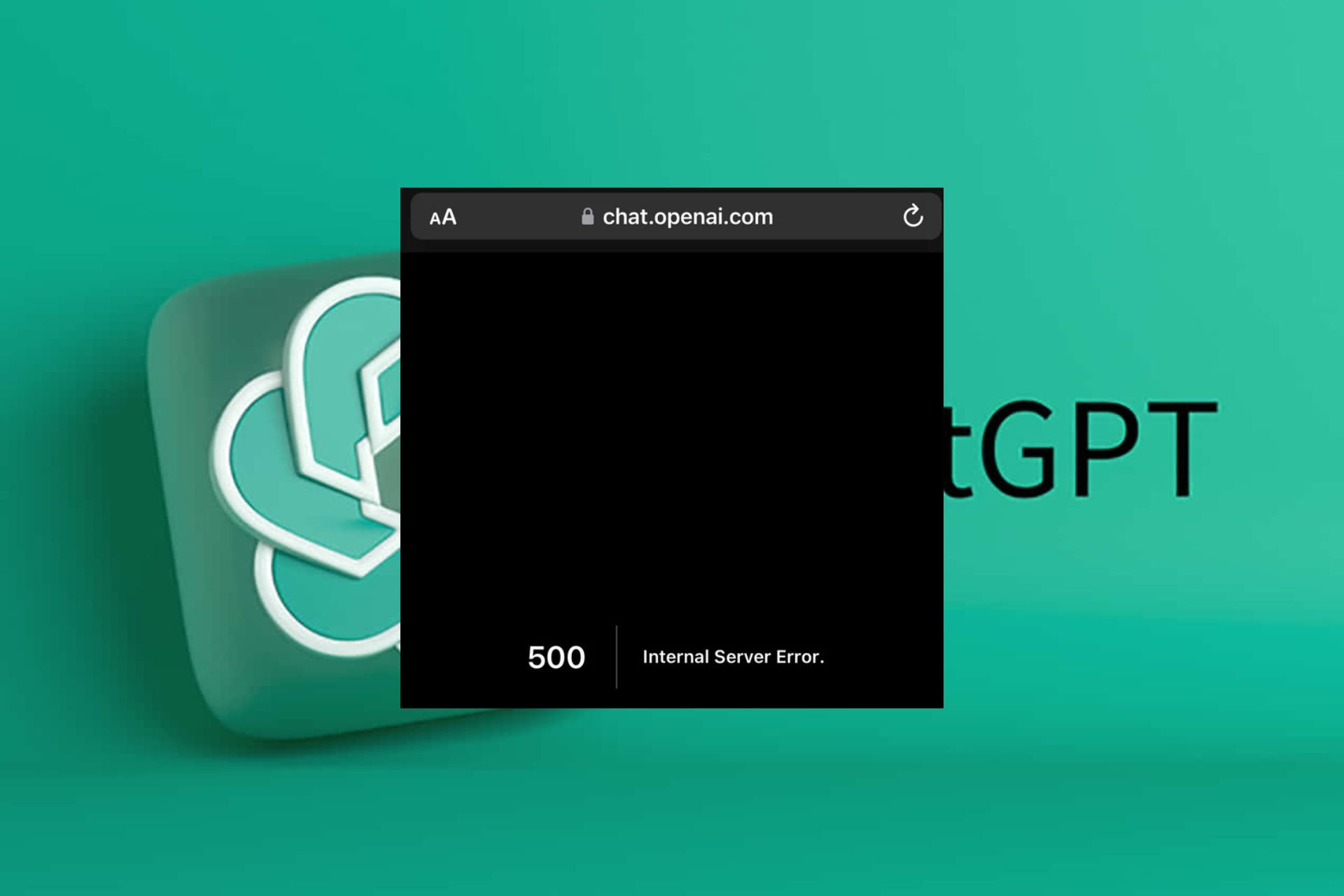
A ChatGPT internal server error means that the query you entered could not bring up a response. This could be due to server-side issues like too much traffic or maintenance. However, you must first establish everything is right on your side.

How do I fix the ChatGPT internal server error?

1. Clear the browser cache

  1. Launch your browser, and for this step, we shall be using Google Chrome.
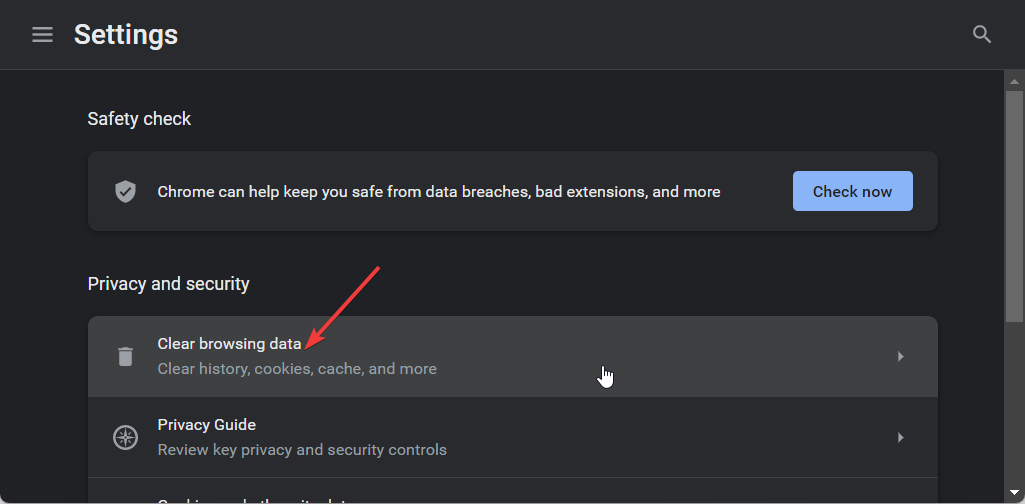
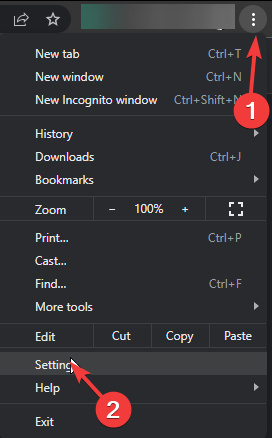
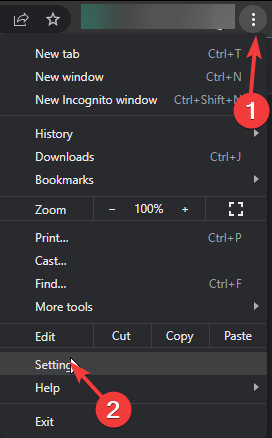
  2. Click the three horizontal dots and select Settings.
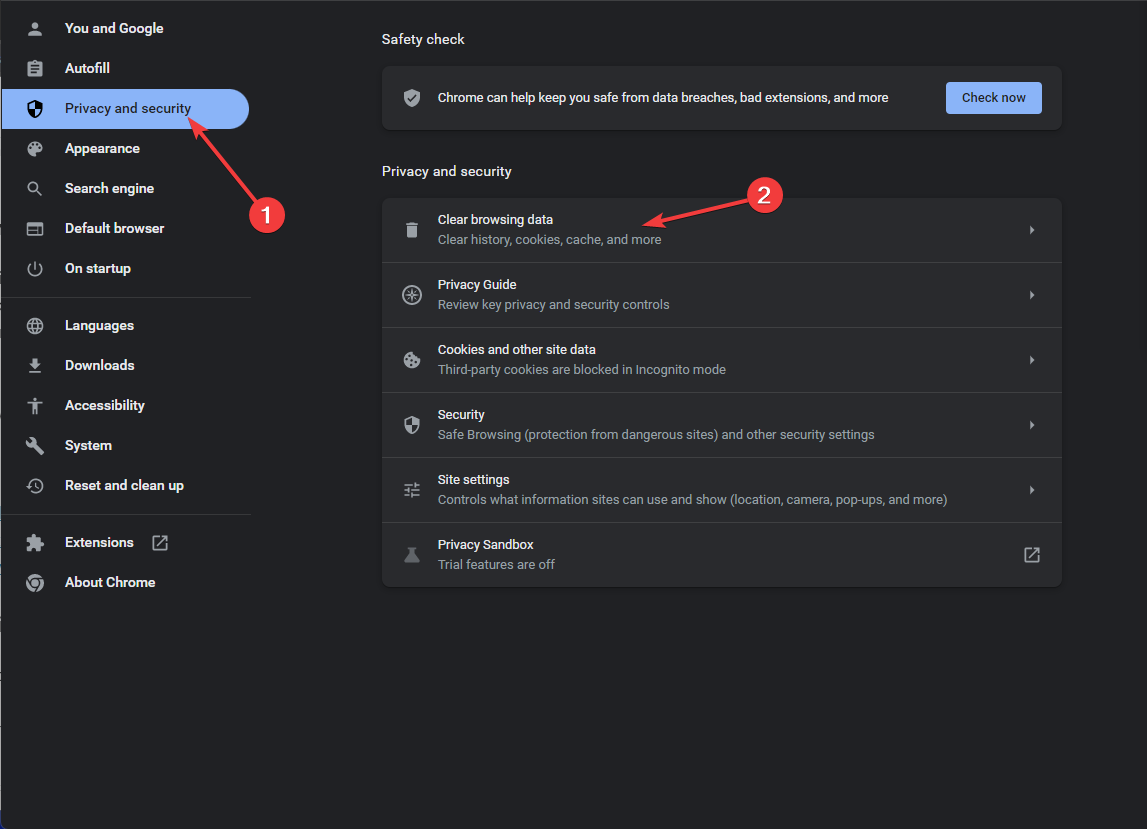
  3. Go to Privacy and security and click Clear browsing data.
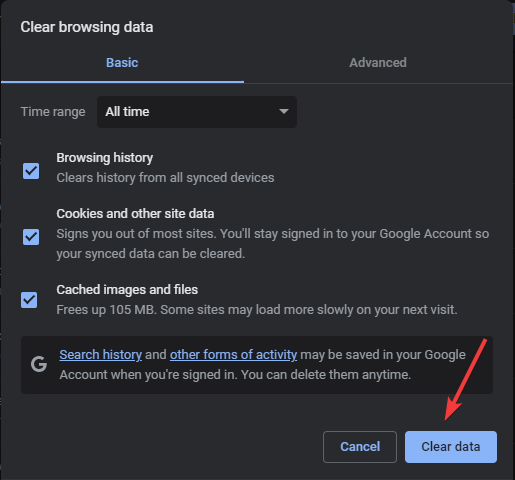
  4. Select Browsing history, Cookies and other site data, & Cached images and files, then click Clear data.

Like issues like the Janitor internal server error may be caused by corrupt cache especially if not cleared in a while. Ensure you restart your browser and try again. Also, check the OpenAI server status and ensure it is up and running.

Cache or server interruptions can also trigger the Chat GPT error in message stream, so if clearing your browser data does not help, check that guide for more fixes.

2. Disable browser extensions

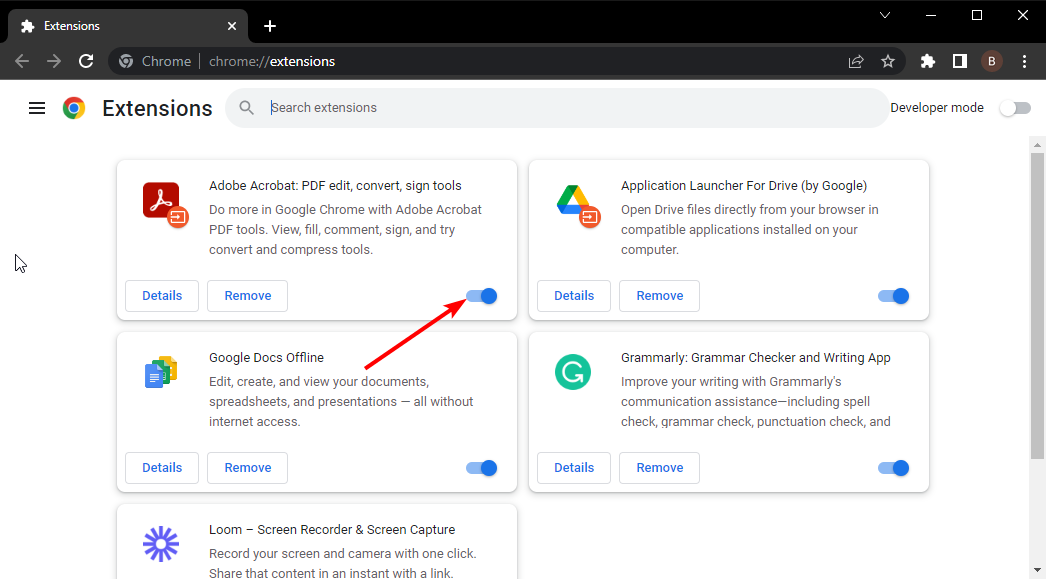
  1. Launch your Chrome browser, and in a new tab, enter the following address:chrome://extensions/
  2. Peruse through your extensions and toggle the Disable button for any suspicious-looking ones.
  3. Repeat this step until you find the culprit.

Some browser extensions habitually alter how your browser works or interfere with select sites. You can install ChatGPT browser extensions that enhance your experience but be careful not to install too many because they may not all work together simultaneously.

3. Reset your browser 

  1. Open your Chrome browser and click on the three vertical ellipses at the top right corner.
  2. Select Settings.Settings CHrome
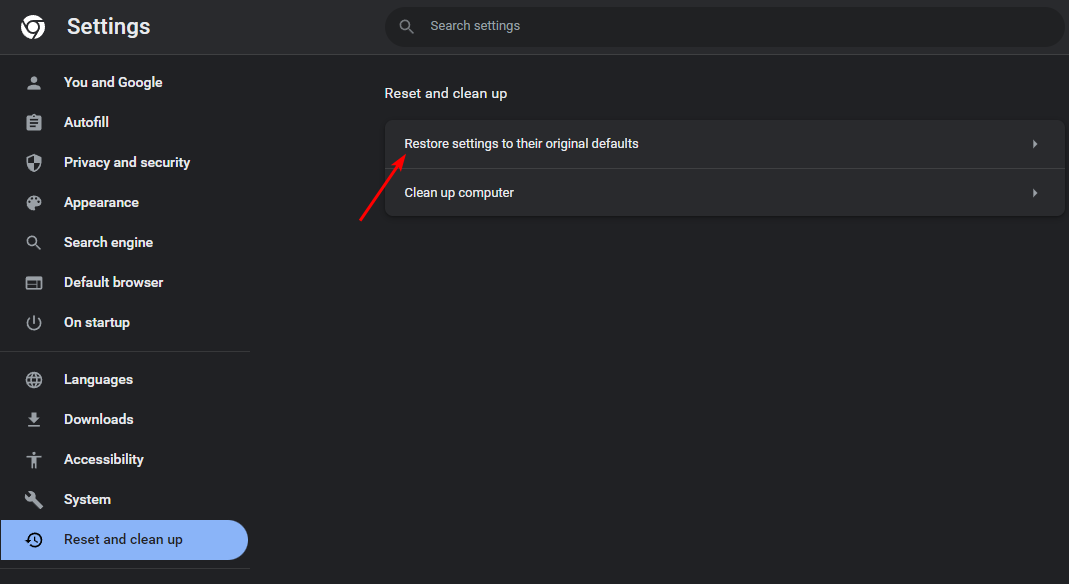
  3. Next, click on Reset and cleanup, then select Restore settings to their original defaults.
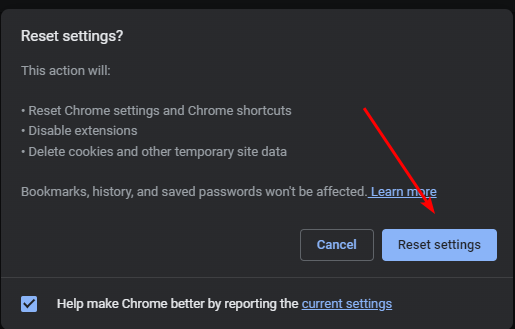
  4. Confirm Reset settings in the next dialog box.
  5. If this doesn’t resolve the issue, reinstall your browser.

A reinstallation will ensure your browser is up-to-date especially if new updates were not properly installed. If this doesn’t work, try with another browser just to verify there’s nothing wrong with it. If it works on a new one, your browser may have issues. You can try again later to see if it is a temporary issue.

4. Disable your VPN 

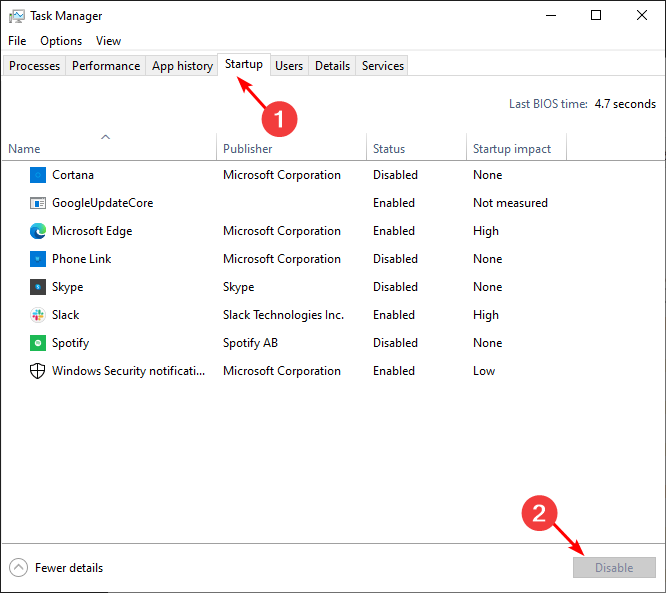
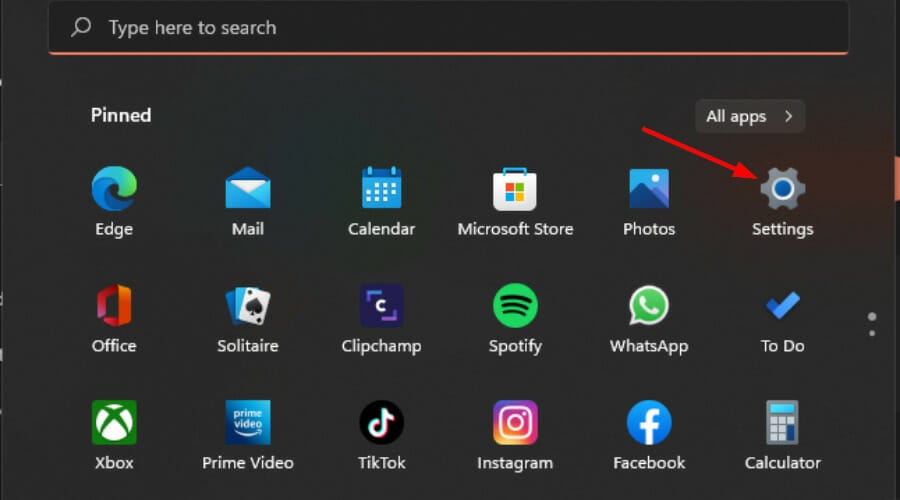
  1. Press the Windows key and select Settings.settings windows 11
  2. Next, select Network & internet and click on VPN in the right-side menu.
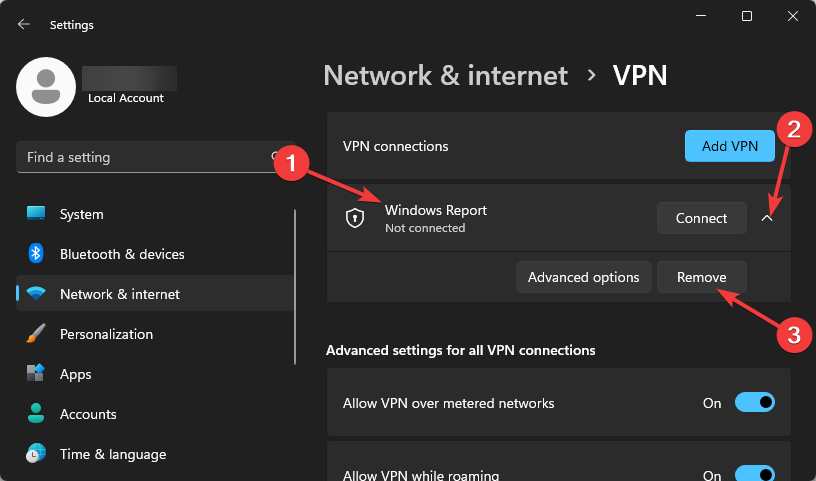
  3. Select the VPN connection you want to disable, click on the drop-down and select Remove.remove VPN

VPNs and proxies are great when you want to secure the privacy and security of your connection. However, these configurations may inadvertently block some ports, which can lead to errors. In some cases, you might even encounter issues like the ChatGPT route error 400, where invalid requests prevent the tool from responding correctly. Disabling VPNs or proxies often resolves these problems.

5. Disable your Proxy 

  1. Press the Start Menu icon and select Settings.settings windows 11
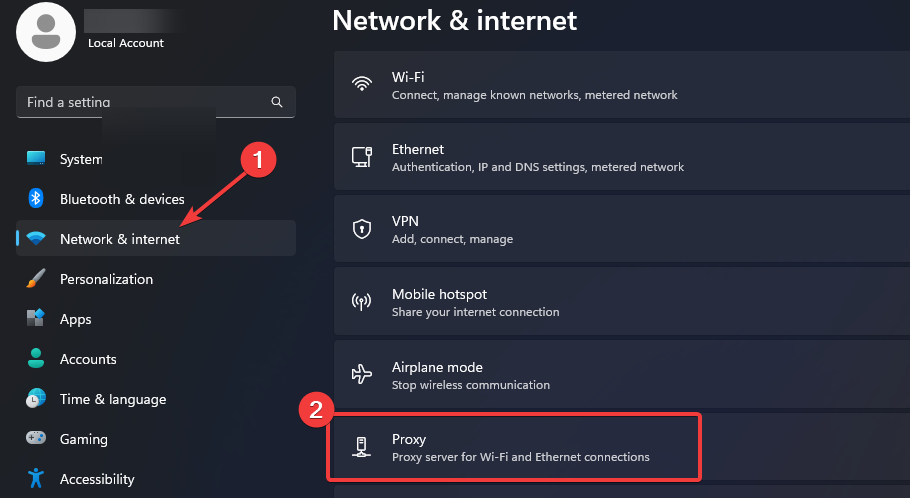
  2. Click on Network & Internet on the left pane, then scroll down and click Proxy on the right pane.Network proxy settings
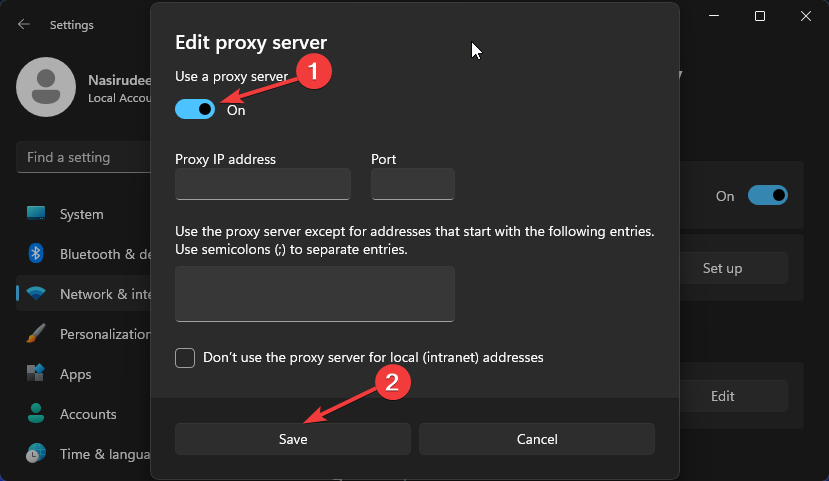
  3. Select Edit next to Use a proxy server option in the Manual proxy setup section, toggle off Use a proxy server and click on Save.Disable proxy server

VPNs and proxies are great when you want to secure the privacy and security of your connection, However, these configurations may inadvertently block some ports hence why ChatGPT is unable to fulfil some requests resulting in an internal server error.

Alternatively, you may choose to upgrade to a different version of ChatGPT. ChatGPT Professional gives you access to premium services and may resolve the internal server error.

If the issue behind this problem is an overloaded server, another premium server may have evenly distributed traffic. Further, premium versions tend to be optimized and their performance is much better.

Remember the premium version comes at a cost so if you’re not willing to purchase and you’ve attempted all the above solutions unsuccessfully, you’ll just have to wait it out. In the meantime, you can try out other ChatGPT alternatives.

When using ChatGPT, remember to adhere to terms and conditions because any suspicious activity detected could end up in you being restricted or banned from using the service.

Error 1015 in ChatGPT is also causing a lot of trouble for many ChatGPT users, but we have a guide that addresses it, so don’t miss it.

That’s a wrap from us but do let us know of any other tips you may have regarding this error in the comment section below.

Microsoft warns game devs about stereotypes & “exaggerated body proportions”

If we’re honest, we all have seen ridiculously drawn characters in games that have nothing to do with reality. But should we be really concerned about this? Microsoft issued a Product Inclusion Action letter to developers warning them about stereotypes and disproportionate human traits in their games.

What is even more interesting is that Microsoft treats these issues from a business-oriented perspective. The Redmond giant references a few studies from 2021-2023, from which they concluded that people don’t play many games because they don’t represent them.

Why is Microsoft pushing devs to create politically correct games?

According to Microsoft’s letter, the U.S. is the leader in media content, with 80% created inland, but the content needs to be dedicated for the broad consumer.

​​​​​​​Research shows that players prefer to play characters that look like them and are more likely to purchase and play experiences where they align to the characters identity.

  • 57% of players in the broader gaming market didn’t play certain games because the games weren’t made for them. Over half of the global gaming market.
  • 53% of developers felt diversity in storytelling should be a priority and it was ranked as the third most important factor in industry growth.
  • 41% of retail consumers have shifted 10% or more of their business away from brands that do not reflect their value in diversity & inclusion.

So, the point is that the gaming industry is losing a lot of potential players and, implicitly, money because the games need characters and stories to reflect diversity.

Microsoft’s Product Inclusion Action already stirred a pretty hot discussion on X about all the arguments related to the story.

The Infinitale: Chronicles developer responded with strong arguments in favor of the game creators:

These ideologues have infiltrated, hijacked, & destroyed this medium. Videogames are an outlet of escapist fun. Nothing more. Nothing less. Can they be used to tell stories and educate? Sure, but that’s NOT their primary role.

Microsoft asks developers watch out for gender stereotypes and exaggerated body proportions

Microsoft also added some guiding questions developers should refer to when creating a game. The arguments range from moral dilemmas and politically correctness to gender equality:

Are you reinforcing any negative gender stereotypes?  

  • Are you unnecessarily introducing gender & gender barriers into your code or design?
  • Are you creating playable female characters that are equal in skill and ability to their male peers. Are your female characters equipped with clothing and armor that fits their tasks?  Do they have exaggerated body proportions?
  •  When the story allows, do you show male characters who display a full range of emotions, including joy, sadness, and vulnerability?

Another commenter, emphasized on the above-mentioned X thread that looks are not important in the development of a game:

I couldn’t care less if fictional women are in realistic equipment or not. Personally, as a woman who plays games, I prefer them not in hideous full suits of armor. That’s just me though. I’m also sick of it always being only how the women look that’s a problem & needs “fixing.”

This discussion goes way back. For instance, five years ago, Sony introduced censorship in their Japanese games.

A Reddit thread from seven years ago stirred the same attention about political correctness ruining the game industry.

This is a never-ending story, but you should always remember that for huge gaming hubs, the focus is and always will be profit. That also means bringing everyone to gaming and make sure they enjoy their experience so that they come for more titles. It’s one of the golden rules of business and if Microsoft want to bring Xbox to every screen, the developers will have to become more flexible and become more open to these suggestions.

Will this ruin the titles for the gamers who are already onboard? That’s also a great argument to consider and from the looks of it, the gamers are not pretty happy about the changes.

What do you think about Microsoft’s Product Inclusion Action letter? Let’s talk about this in the comments section below.

Is Xbox in trouble? Retailers cutting back stock, third-party publishers prioritizing PS5 and PC

The last few years haven’t been an easy ride for console manufacturers. The sales for all three Xbox, PlayStation, and Nintendo have witnessed a decline, at least compared to the projections. The global chip shortage added to the woes. But the situation seems far worse for Xbox!

Chris Dring, Head of GamesIndustry.biz, in a podcast available on YouTube, shared his experience at the GDC (Game Developers Conference) and talked about the troubles mounting for Xbox in Europe.

As per Dring, many retailers have either already started or are planning to cut back the stock of Xbox consoles in their stores.

Third-party developers, too, shared reservations about releasing games on Xbox Series S and Xbox Series X. According to Chris, publishers believe that it’s too much effort tailoring the game for Xbox when PS5 and PC serve as a more viable and profitable market.

He also heard publishers claim that most Xbox exclusives will soon end up on PS5 and that Game Pass wasn’t as big a success as Microsoft had expected.

Chris Dring went on to say,

And with Xbox putting some of the games on PS – from what I understand the majority of them will be coming across at some point, assuming it progresses as Xbox believes it probably will, I think Xbox is in real trouble as a hardware manufacturer, and that was the thing that came out of GDC for me. I thought it would be fine, but then I didn’t really factor in that some developers and publishers might just go, ‘yeah I don’t, you know, is there any point?’ And that is when you can lose it.

That’s true! Hardware and software upgrades to Xbox will only work if retailers and publishers are interested. The moment their interest starts to wane, Xbox will lose the console war or at least be on the back foot.

Xbox’s position in the market and future projections

If we look at the sales figures for Xbox vs. PlayStation, the latter has a significant lead. PlayStation has so far sold over 500 million units, while Xbox stands at a feeble 180 million in comparison.

In the handheld console market, where Xbox plans to make an entry, Nintendo Switch commands the top position with over 139 million units sold. Beating it would prove to be a challenge!

As for the new Xbox console under development, we will have to wait to find out what it has to offer. For Xbox to survive in the current market dynamics, its upcoming console should be a match for Sony’s PS5 Pro.

Besides, Microsoft should go for AI integration in Xbox. We recently reported that attackers manipulated Xbox’s automatic banning system to get accounts suspended, and this is something artificial intelligence can help with.

With this and other similar features, Xbox could make a comeback in the hardware market, where it’s reportedly in trouble. As for game development and publishing, Microsoft’s recent acquisition of Activision does put it in a secure position, at least in the near future!

What changes would you recommend to Xbox to get out of this trouble? Share with our readers in the comments section.

Microsoft is under fire in the EU again, this time regarding Entra ID and 365

Microsoft had its share of trouble with the EU recently, but it seems that the company isn’t out of the woods yet.

The EU is currently looking into Entra ID and 365 services after claims of anticompetitive practices.  

Microsoft is under the spotlight by the EU, yet again

As TechRadar writes, Microsoft is being investigated by the EU antitrust regulators as Amit Zavery, VP/GM and Head of Platform for Google Cloud claims.

Microsoft is accused of forcing users to use Entra ID to access Microsoft services. Zavery claims that Microsoft can remove interfaces and APIs thus preventing users from using other authentication methods.

That’s not all, system administrators familiar with Microsoft’s ecosystem claim that Entra ID is the primary method for accessing Microsoft 365, thus raising concerns.

One system administrator claimed the following:

As soon as you create a 365 tenancy, it also creates an Entra ID as your ID, they are intrinsically linked.

Microsoft also released a statement regarding this probe:

Like other cloud SaaS services, Microsoft has built-in identity capabilities which ensure our customers can securely access our cloud services. We also provide open APIs, enabling seamless integration with third-party identity services like Ping and Okta as well as with security providers to allow our customers to choose the solution that best fits their needs.

As we said earlier, this isn’t the first time that the EU and Microsoft have clashed regarding unfair business practices.

Microsoft had to comply and it now allows you to remove Edge and Bing from Windows. As for this probe, we’ll just have to wait for the official results from the EU.

Forget Dragonflight, this Microsoft Dragon Simulator X is the real way to ride dragons

Ever since Game of Thrones ended, and House of the Dragon began airing, dragons have been a thing: even the world’s most popular MMORPG, World of Warcraft, released a dragon-themed expansion, Dragonlflight, finally allowing players to ride dragons after almost 20 years of existence.

While riding dragons in WoW is definitely fun, this Microsoft Dragon Simulator X takes it to the next level, with hyper-realistic dragons soaring through the skies, and making the ground beneath feel like a playground. Fortunately, there is a way to witness the Dragon Simulator X. Unfortunately, there is no real way (yet) to play it.

The Microsoft Dragon Simulator X was developed by Reddit user, Sidenius, and it looks breathtaking, to say the least.

In almost 2 minutes, you can see a dragon flying through the sunny skies, before diving, and soaring again, and it looks incredible.

It’s currently under development, but the user felt that the Simulator is good enough to be displayed: it currently runs on Unreal Engine and it uses an aerodynamics model, and procedural animations to simulate the experience of a dragon flying.

The developer says the Simulator is far from its finished version, but even in this state, it looks incredible.

The flight simmers are gonna love this one. It’s a little project in Unreal Engine I’ve been working on recently which uses a simple aerodynamics model and procedural animations to simulate a highly dynamic dragon flying experience. It’s still very much a WIP (anyone noticed the map borders?) but good enough to showcase.

Sidenius on Reddit

The developer also said the Simulator will be upgraded to support fire-breathing capabilities (cool, right?), so that means potential players will be able to use their dragon to wreak havoc on those pitiful mortals down below (we’re kidding).

For now, it’s just a personal side-project, but the developer hopes to find some devs to take it to the next level, a mod for Microsoft Simulator (after all, Microsoft did release a Dune-themed expansion for it), or even a game on its right.

It’s just a personal side project so far, but I might look into opportunities for funding and potential dev buddies to make it into a real game. The purpose of this post was partly to gauge interest and it seems like a lot of people like it, so I’ll definitely keep working on it for now at least.

Sidenius

Meanwhile, while most of the Reddit community finds it absolutely breathtaking (and for good reason), there are some criticisms: the dragon is not really a dragon, but a wyvern, and this is an important distinction, a Reddit user says.

If it only has four limbs, it’s a wyvern. I adore wyverns, but it’s an important distinction to me. Also, I absolutely love dragons with wings that feel big enough to be real.

Reddit user

Microsoft Dragon Simulator X or Microsoft Wyvern Simulator X, whatever your heart desires, but can we have it already? Can we play it already? Pretty please.

Solved: Cross Device Experience Host Not Installing

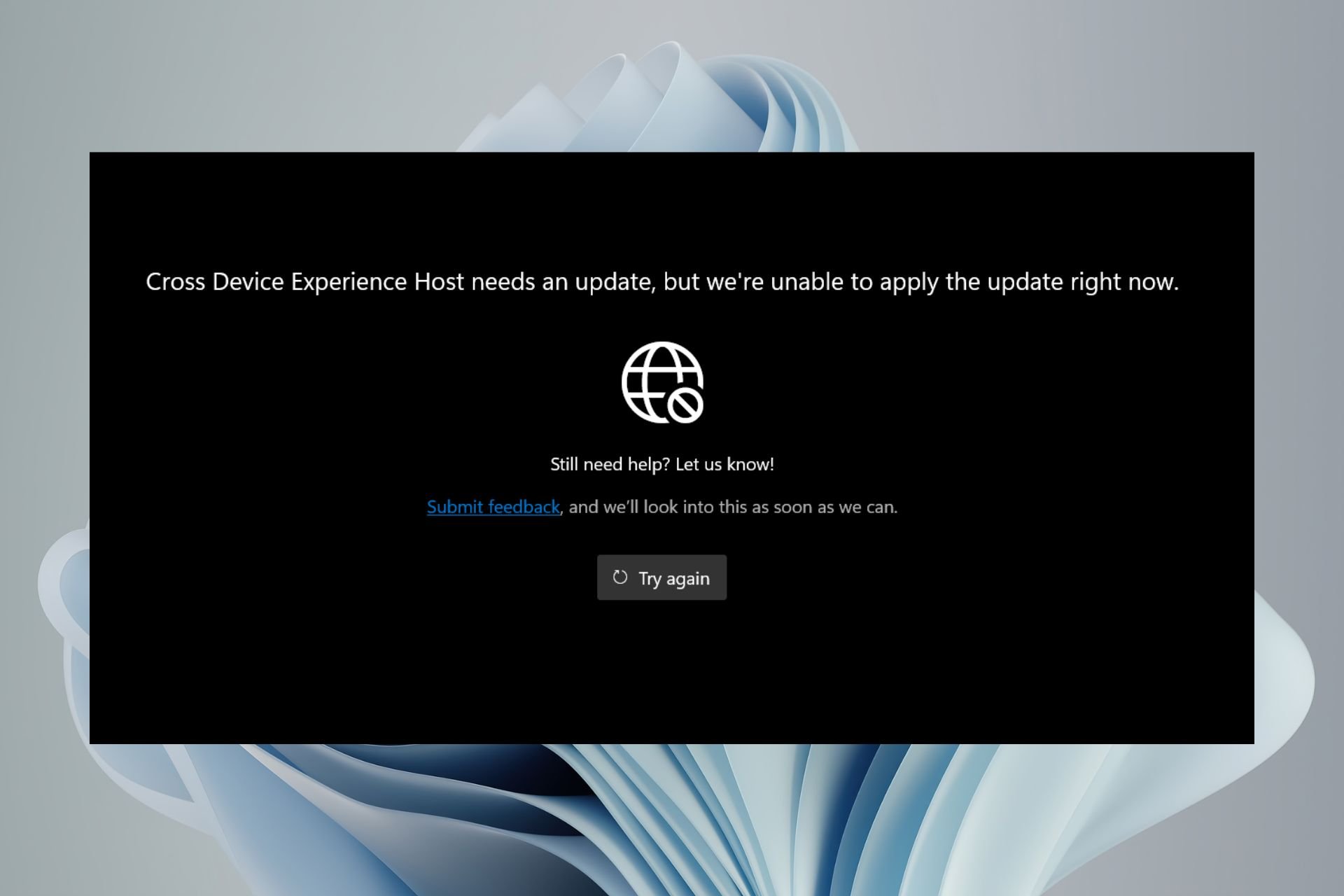
Microsoft has done great in connecting your phone as a webcam on your PC with the Cross Device Experience Host but it not installing was probably not on your bingo card.

The Cross Device Experience Host not installing or stuck at pending is probably just an installation glitch. Your Microsoft Store cache might be corrupted, you have a storage or connection issue.

What can I do if I can’t install the Cross Device Experience Host?

1. Run the Windows Store Apps troubleshooter 

  1. Hit the Windows key and click on Settings.settings windows 11
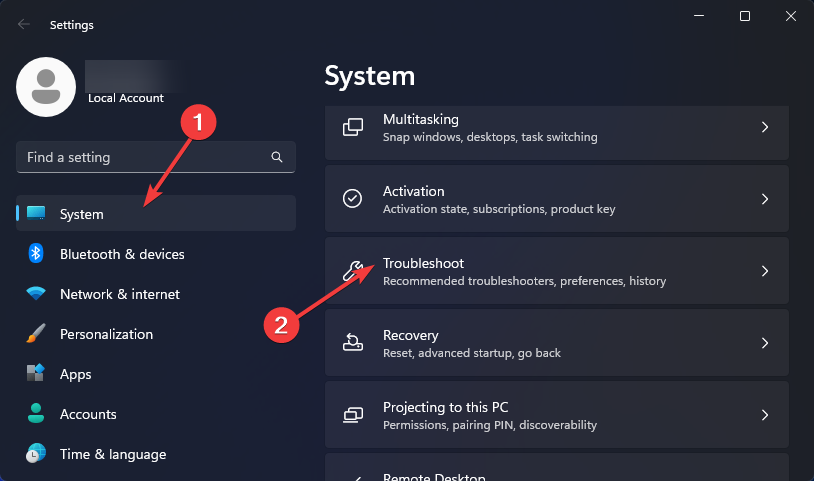
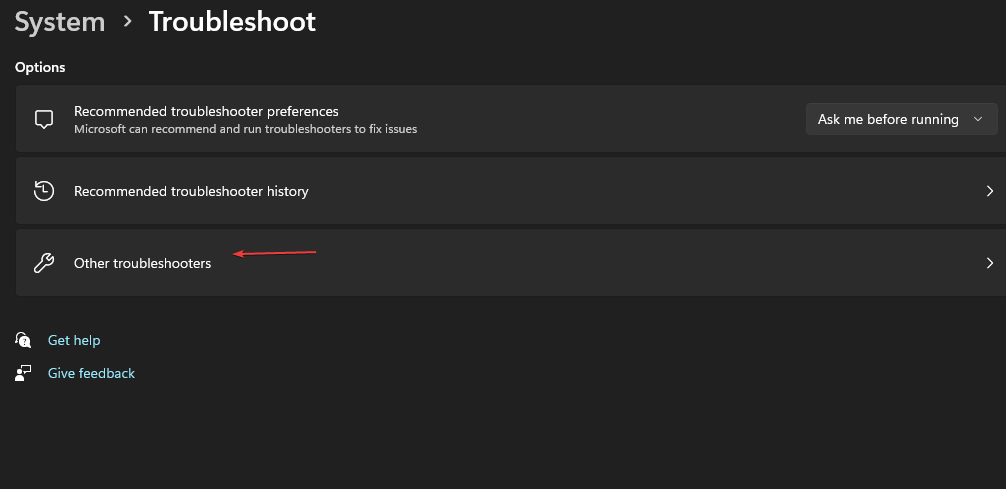
  2. Click on System and select Troubleshoot.Open system troubleshooter
  3. Navigate to Other troubleshooters.other troubleshooters
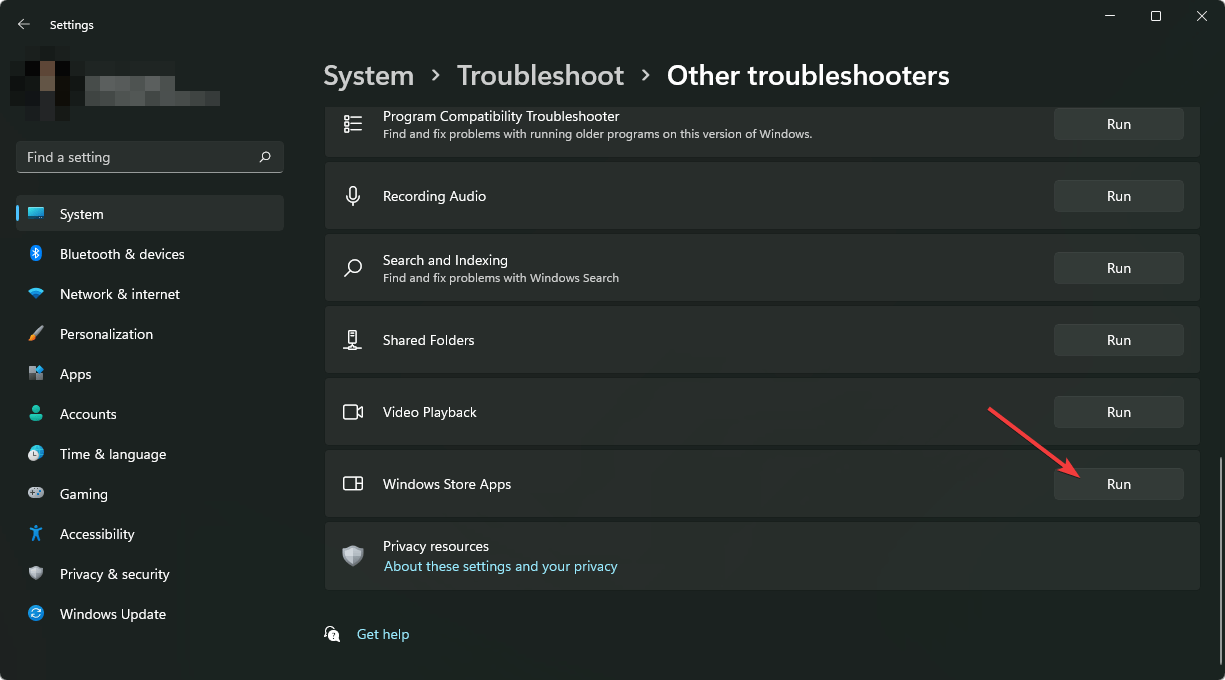
  4. Click the Run option for the Windows Store Apps troubleshooter.clicking run windows store apps troubleshooter

If the Windows Store apps has no issues, ensure you have a working and stable internet connection and do a Disk Cleanup. Sometimes, apps have trouble installing because there’s insufficient space or the connection keeps dropping interrupting the download.

2. Install the app from a command line

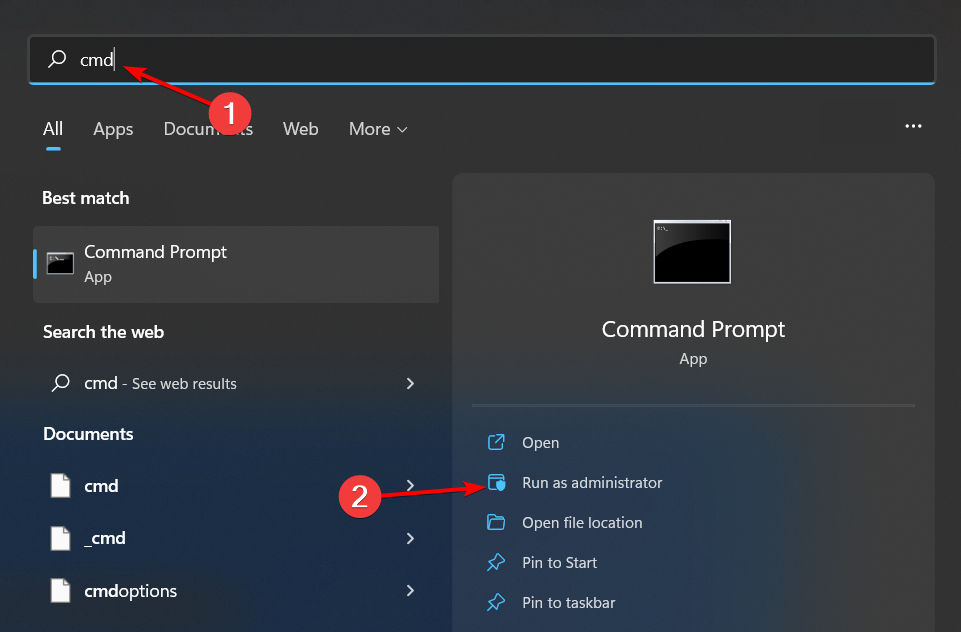
  1. Hit the Windows key, type cmd in the search bar, and click Run as administrator.cmd-run-admin-w11 unexpected kernel mode trap windows 11
  2. Type and Enter the following command: winget install 9NTXGKQ8P7N0

3. Set system drive as default storage location for apps

  1. Press Windows + I to launch the Settings app.settings windows 11
  2. Click on Storage from the list of options available on the right in the System tab.
  3. Select Advanced storage settings under Storage management.
  4. Click on Where new content is saved from the list of options that appear.Where new content is saved 0x80242020
  5. Select the dropdown menu under New apps will save to select your system drive usually C.
  6. Click on Apply for the changes to come into effect.
  7. Restart the computer and try installing the Cross Device Experience Host.

Changing the drive location could potentially address any storage or drive issues that could be causing the installation to be stuck.

4. Reset the Microsoft Store cache 

  1. Hit the Windows key, type cmd in the search bar, and click Run as administrator.cmd-run-admin-w11 unexpected kernel mode trap windows 11
  2. Type the following command and hit Enter: WSreset.exe

It’s possible that there’s a built-up of cache from the Microsoft Store. Clearing this temporary data may recreate the cache afresh and resolve any issues with downloads.

5. Run DISM and SFC scans

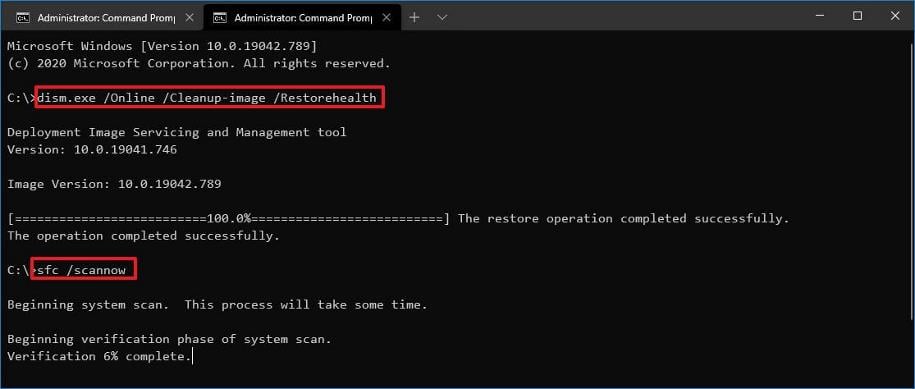
  1. Hit the Start Menu icon, type cmd in the search bar, and click Run as administrator.cmd-run-admin-w11 unexpected kernel mode trap windows 11
  2. Type the following commands and press Enter after each one:DISM.exe /Online /Cleanup-Image /Restorehealth sfc /scannow

Any corrupt system files may be preventing the successful installation of the Cross Device Experience Host so these scans can repair these files and allow installation to carry on.

6. Perform clean boot

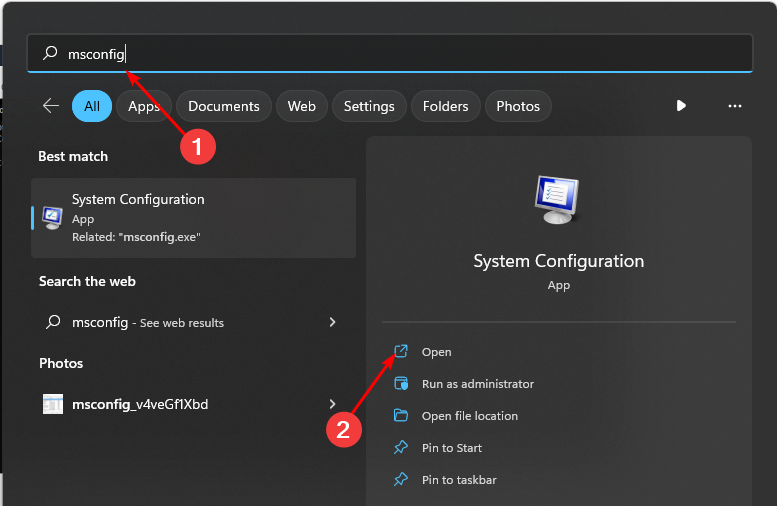
  1. Hit the Windows key, type msconfig, and open System Configuration.
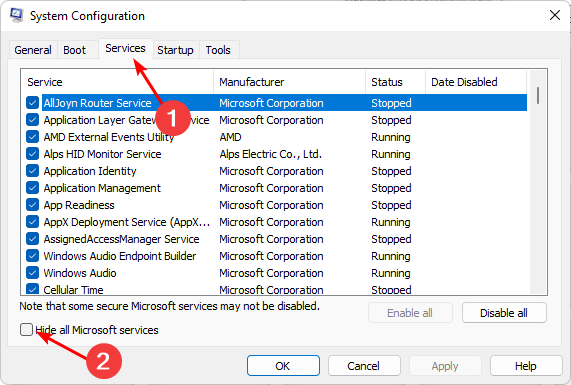
  2. Switch to the Services tab and select Hide all Microsoft services.
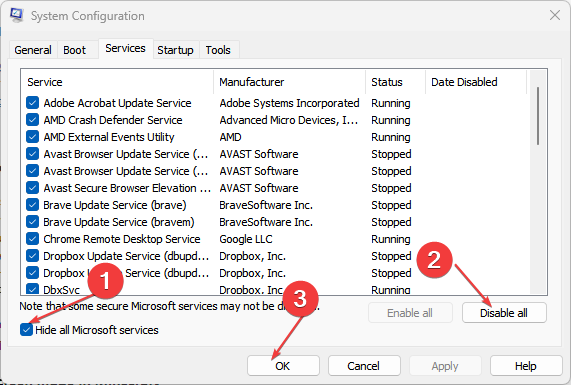
  3. Click on the Disable all button, then hit the Apply button to save the changes.
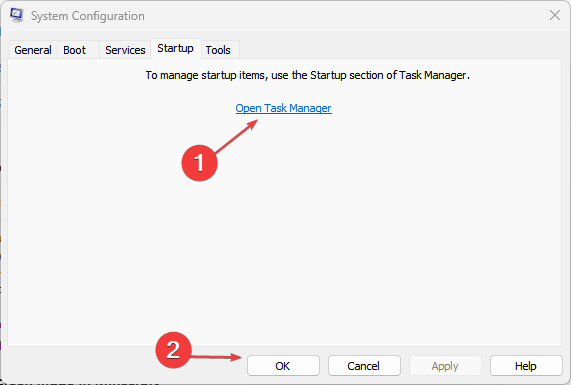
  4. Go back and click on the Startup tab, select Open Task Manager then click OK.
  5. In the Startup tab of the Task Manager, Disable all the Enabled startup items.
  6. Close Task Manager and restart your PC.

If you’re unlucky with all the above, you should try installing Microsoft Store apps without the store. Sometimes it’s just a temporary glitch with the store so if you really need the app, you can opt for the alternative.

There are also other ways to use your phone as a webcam without relying on PhoneLink or the Cross Device Experience Host. The feature is fairly new so as you wait for an official fix, having alternatives is great.

Have you come across this issue? Any additional tips you may have to offer? Share them with us in the comment section below.

Surprisingly, the Format Drive dialog box has been the same since 1994

The Windows operating system has undergone many user interface changes and improvements, and after 30 years, with Windows 11, one thing that hasn’t changed is Format Drive.

Former Microsoft programmer Dave Plummer posted on X (formerly Twitter) about the interesting fact about Format Drive:

This made us realize that our Format Dialog box was never there to say, as it wasn’t elegant enough. It was a temporary one until the elegant user interface was released.

And 30 years later, the UI never made it, to which Dave W Plummer said:

That was some 30 years ago, and the dialog is still my temporary one from that Thursday morning, so be careful about checking in “temporary” solutions!

Once he mentioned this in the post, a lot of X users, including Tom Warren, Senior Editor at The Verge, expressed their thoughts.

Thomas Entner, CEO – Entner Electronics said:

This is exactly like I imagined that most of Windows was designed…

To which Dave W Plummer responded:

It wasn’t, most of it was very well thought out. It’s not fair to extrapolate from an edge case like this to the rest of the product, and that’s kinda the point of the story.

You can check out the whole conversation here to learn what everybody else said about this on X. Once the conversation started, people started talking about other old features and UI that were made to Windows 11 after all these years.

On one hand, Microsoft has been constantly making changes to make Windows more customizable, and with AI integration, it is all ready to step into the future; however, it has been steady with the changes when it comes to Control Panel features migration to Settings, letting people getting accustomed with the new UI.

Honestly, the current UI for format drive works efficiently, and as Dave W Plummer said, if it had been bad, Microsoft would have changed until now. With so many changes, some of us like to stay connected with old Windows features like they were, as a makeover of the format drive could agitate people more than get excited.

Do you want to see UI and other changes to the Format drive dialog box? Share your thoughts in the comments section below.

Microsoft is planning to bring almost all the Xbox games on PlayStation; is this the end of the console war?

We know by now that Microsoft has expressed its desire to make Xbox games multiplatform and bring them to other consoles, such as PlayStation.

The Redmond-based tech giant has started this process by announcing the release of two of its most popular games on Xbox, Pentiment and Hi-Fi Rush, on PlayStation, and Switch.

Pentiment was released on PlayStation 5, Switch, and PlayStation 4 on February 22, and much to the enjoyment of the PlayStation users, and the dismay of Xbox lovers, the game seemed to run better on PlayStation than it does on Xbox consoles.

Hi-Fi Rush was released to PlayStation 5 a week ago, on March 19, 2024, and Microsoft wants to bring other popular Xbox games to other platforms. We’re talking about Grounded, and Sea of Thieves, both of which will be released on PlayStation 5, PlayStation 4, and Switch on April 16, and April 30, 2024, respectively.

However, more Xbox titles will become multi-platform, as Microsoft is reportedly looking to bring almost all of the Xbox games to other consoles, mainly PlayStation 5, according to GamesIndustry.biz head Chris Dring, who admitted that Xbox is in real trouble as a hardware manufacturer, at last week’s GDC.

Dring also says he heard from important companies in the gaming industry that Xbox is struggling in Europe. We’ve sort of known for a while that the console is not doing well in regions such as Europe, where PlayStation is more popular. But Xbox has been gaining some steady ground in Japan, and it’s definitely the leading gaming console in the NA region.

Dring says the majority of the Xbox titles will be available on PlayStation at some point in the future:

And with Xbox putting some of the games on PS5—from what I understand the majority of them will be coming across at some point, assuming it progresses as Xbox believes it probably will—I think Xbox is in real trouble as a hardware manufacturer, and that was the thing that came out of GDC for me.

Chris Dring

However, this doesn’t come as a surprise, at least, not now. Phil Spencer said, back in February, that dozens of other Xbox titles will ultimately become multiplatform, and the Xbox business strategy included making Xbox exclusives available to PlayStation.

But this could definitely hurt the console in the long run, and many people won’t see the need to purchase Xbox consoles if all of its games can be played on other consoles.

So is this the end of the console war, as we know it? Well, some say that the war is already over, as PlayStation is clearly the winner, and it overtakes Xbox when it comes to sales.

But, yes, it could be the end of the console war, unless Microsoft approaches it with some innovative ideas: the next Xbox console is reportedly the biggest technological leap in the console’s history, so that might stir up the war a little.

So even if the Xbox titles will be available to PlayStation, many of them will be native to Xbox, and this means they will run much better on Xbox consoles. Plus, the additional perks such as the Microsoft Xbox Rewards, or the Xbox Games Pass are also worth considering, especially if the budget is limited.

Ultimately, I don’t think a console with a 20+ years history can just disappear from the market, and even if it’s not winning the console war, Xbox will always have a community of players. If almost all of its titles will be available on PlayStation, then it is a good thing for Microsoft, as well, financially speaking.

Unleash the power of the AI to scan pages with AI Page Context in Opera Developer

Opera is working hard on integrating AI into its browser, and speaking of AI, we finally have the chance to try some of the new features.

The new Opera One Developer version was just released, so let’s see what’s new with it.

Opera One Developer allows you to quickly analyze pages with AI

As you already know, Opera has an AI Features Drop program that allows users to test new AI features. According to the latest Opera blog post, the new Developer version is here, and it comes with some interesting features.

The first one is Ask Aria which will allow you to access the command line without having to use a keyboard shortcut.

This is a minor improvement, but the highlight of this update is the new AI Page Context mode. This feature is an improvement of an already available AI Prompts feature.

To use this feature, you need to do the following:

  1. Start the latest Opera Developer version.
  2. Use the Ctrl + Windows shortcut to open the AI prompt.
  3. Now press Tab to switch to context mode.
  4. Type your input.

With this feature, you can easily summarize the text of the page, or translate it to a different language. You can also use AI Page Context to obtain specific information right from the currently opened page.

This is an amazing feature and if you want to try it, you need to use Opera Developer v110.0.5104.0.

Speaking of Opera updates, Opera for Android 81 was just released, and it brings several AI improvements as well.

Hisense teams up with Xbox to bring you gaming-ready laser TVs

Not long ago, Microsoft made a promise to bring Xbox to every screen. Now, it’s working on a handheld console, but we wouldn’t imagine that screens are also coming to Xbox.

The Chinese electronics manufacturer Hisense will bring its A-game in cutting-edge Laser display technology to enhance your Xbox gaming experience.

Hisense’s press release doesn’t cover much from the tech specs of the alleged laser TV’s, but we do know that they will be over 100 inch in diagonal:

Hisense aims to provide not only superior products but an entire experience that’s designed specifically for gaming and home entertainment. Our partnership with the Designed for Xbox Program seeks to truly level up the gaming experience and allow people all over the world to enjoy a larger-than-life experience with more than 100-inch of image display.

Jerry Liu, Vice President of Hisense International

What are laser TVs and why do I need one for Xbox?

First, we need to make things a bit more clear. What Hisense calls laser TVs are actually short-throw laser video projectors. However, instead of just selling the projector, they also throw in the projection screen which is especially made to optimize the image quality.

The so-called TV display is created especially to work best with the projector and it also features a Hisense patented ambient light rejecting technology that provides a glare-free picture even if you watch it in a lit environment.

Now, the advantage of a short-throw projector like the ones from Hisense is that it can create a huge 100-120-inch screen from just a couple of inches from the projection screen. And that increases the light output that reaches the screen.

Hisense laser TVs also feature 4K UHD and HDR technology, and MEMC, a technology that minimizes the lag and creates a smooth motion of the elements on the screen. The projectors also have an Auto-Low Latency Mode (ALLM) that automatically detects when you’ve powered on your gaming console and optimizes the settings to provide a lag-free gameplay.

So, that’s what Hisense is bringing up to help your Xbox experience. The Chinese don’t mention what are the products optimized for Xbox, but they will most likely have a green Xbox sticker saying Designed for Xbox on it.

Until the new Xbox Hisense laser TVs show up in stores, you can take a look at our best 4K projectors selection.

Would you buy a Hisense laser TV for Xbox? Tell us all about it in the comments section below.

Developers share plans to bring Final Fantasy XVI to Xbox after Windows release

Final Fantasy XVI, released in June’23 for PlayStation, could soon make its way to the Xbox ecosystem. Developers have confirmed plans to start working on bringing Final Fantasy XVI to other platforms.

In an interview with Noise Pixel, developers Naoki Yoshida (Producer) and Takeo Kujiraoka (DLC Director) said,

It’s not over in the sense that we have the PC version. Once the PC version is released, we’re thinking about hopefully moving to other platforms as well. However, that’s not really talking about the story; it’s more about moving it onto different platforms. So, there is a sense that while the project is still going, there is not that sense of being sad and having to leave them yet. But I’m pretty sure that once everything is released and we’ve moved on to the next project, that would be the time where it kind of hits us that, “Oh, it’s really it’s over?”

While Naoki Yoshida didn’t hint at an Xbox release, he’s mostly talking about the platform because that’s still a significant untapped market waiting for the release of Final Fantasy XVI.

The game could be released on Nintendo Switch as well, but experts believe that developers would prioritize Xbox over the handheld console.

PC version of Final Fantasy XVI in the final stages, to be out soon

Speaking on the release of the PC version of Final Fantasy XVI, Naoki Yoshida confirmed that the game will be released within a year.

As per Yoshida, game development is going on smoothly and the remaining work should be completed in the next few months. Developers are currently focused on optimization work.

Also, Yoshida confirmed speculations that Final Fantasy XVI will have a demo (trial) version for the PC. It will help you ascertain the game’s performance on your machine and identify any compatibility issues before purchase.

For now, Final Fantasy XIV was released on Xbox, but to the player’s dismay, the game uses a new currency, FFXIV.

Have you played Final Fantasy XVI on PlayStation? If yes, share your review with our readers in the comments section.

Opera for Android 81 brings AI-powered browsing with Ask Aria

Opera has been present on the browser market for decades, and the Android version of the browser just got updated with some new features.

Opera seems determined to fully utilize the power of AI, and this update does just that, so let’s dive into it and see what’s new.

Opera for Android 81 comes packed with AI features

Not long ago, we wrote about the AI Features Drop program that allows users to test AI features in Opera. According to the Opera’s latest blog post, we finally have the chance to see some of these features in action.

The first option is Ask Aria which will appear every time you select a text. With this feature, you can instantly open Aria and ask it to summarize the selected text or to give you more information about it.

All of that is possible with just two taps on the screen, which makes this feature rather intuitive. This isn’t the only change, Aria AI now supports voice input.

To use it, simply start it, and tap the microphone icon in the input field and Aria will use voice recognition to generate your input.

In addition to AI improvements, Opera for Android 81 also has an advanced Speed Dial menu that you can use to get suggestions for the Speed Dial. You’ll also be able to add features to Speed Dials for quick access.

Overall, this is a great update if you’re using Aria AI frequently, so if you’re on Android, be sure to get it today.

Microsoft’s new ray-tracing tech will make your games look better with less VRAM

A new patent from Microsoft showcases a way to reduce ray-tracing memory usage and boost overall performance. This technology is a great discovery because the VRAM requirements are increasing, especially for newer games. So, we need a common ground because getting a new GPU is expensive, especially with over 10GB of VRAM. That’s why the new Microsoft Tech patent proposes using Level of Detail (LOD) techniques in the RT process.

How will the new Microsoft ray-tracing technology work?

The Microsoft ray-tracing technology uses the relation between your character and the position of the elements. So, the effect will be similar to the viewing distance. As a result, the system will use more resources to trace closer elements with high details. Also, it will use less memory to performlow tracing on the further elements.

Additionally, the patent for the ray-tracing technology will use a residency map corresponding to a Bounding Volume Hierarchy to determine the importance of the objects. On top of that, the elements that require more rays will be the first ones on the list.

By the way, did you know that game developers are also using the LOD technique in 3D games to minimize resource usage? For example, you might have noticed a performance boost while looking underneath your character or above to decrease the amount of details rendered. After all, this is one of the easiest ways to get rid of lag in crowded places.

Ultimately, this technology could help gaming consoles with less memory use the ray-tracing technology without sacrificing performance. In addition, it could save us from upgrading our hardware for newer games. After all, it could make high-end specifications more bearable. However, Microsoft should allow us to switch from dynamic to high-tracing.

What are your thoughts? Are you going to try the ray-tracing technology if it becomes available? Let us know in the comments.

This trial will let you play Cyberpunk 2077 completely free on Xbox

If you’ve never played Cyberpunk 2077 before, but want to see if it’s worth the money (some say it’s worth it, others don’t agree), you can now play it for 5 hours, completely free, by signing up for this trial that takes over this weekend (March 28th – March 31st).

You’ll have more than 4 days to try it out on your Xbox console, and the 5 hours of gameplay should be enough to give an idea if you want to purchase the game or not. Worry not: it is completely free, and you don’t need any subscriptions.

The only thing that you’ll need, however, is 5 hours of your weekend.cyberpunk 2077 xbox

The free trial for Cyberpunk 2077 can be experienced on Xbox Series S or X, or, if you have a PlayStation, you can play on that console, as well.

Another interesting fact is that you don’t have to play the 5 hours of the game all at once. Since there is no lock on progress, you can take your time 5 hours with the game, and play it in a way that fits you the best.

Back when it was released in 2020, Cyberpuk 2077 was available on a plethora of devices, and platforms, including Windows 10, and the now-defunct Stadia, but now, after several update patches, the game looks quite impressive on the current-gen consoles, so this game could be a totally different experience compared to what it was nearly 4 years ago.

Either way, after experiencing the trial, you can choose to buy the Cyberpunk 2077, and you can get it from the Xbox store at $59.99 if you’re going for the Standard edition, or $79.99 if you’re going for the Ultimate edition.

Looks like you’ve gotten yourself a busy weekend, but don’t worry: it will only take 5 hours to decide if this game is worth your time.

New Lenovo YOGA lineup is just around the corner, supercharged by Microsoft’s Copilot

At CES 2024, Lenovo announced a brand new laptop series specifically designed to enhance AI experiences and improve productivity.

As the Lenovo Innovation Technology Conference is a couple of weeks away, let’s discuss the new Lenovo Yoga lineup and its capabilities.

We have already discussed the Lenovo Yoga Pro 9 series and how its Intel Core Ultra 9 185H processor, RTX 4070 GPU, and 3.2K Mini LED display make it a powerful machine. The laptop weighs only 1.93kg and comes with a hefty 84Wh battery to keep in the game for longer. Let’s talk about them individually.

The Yoga 9 series consists of powerful laptops: Lenovo Yoga Pro 9i (16”, 9) and Lenovo Yoga 9i 2-in-1 (14”, 9). These are MIL-STD-810H1 rated for durability and include Intel Core Ultra Processors for super-fast speed.

The Lenovo Yoga 9i 2-in-1 (14”, 9) comes with a Core Ultra 7 155H processor and a 3840×2400 OLED panel, weighs around 1.3 kg

A physical Lenovo AI Core Chip makes it better for AI functionality and comes packed with robust batteries.

The company has included Lenovo X Power, a tuning solution, to boost the power of the AI core chip and powerful processor in Lenovo Yoga Pro 9i.

ML powers this tuning solution and allocates processing power to help boost performance, cooling efficiency, and battery life, thereby enhancing creative tasks like film color correction.

Both models come with a Copilot key, which helps you stay in touch with your AI companion more easily. The Lenovo Yoga 9i 2-in-1 (14”, 9) also comes with a Lenovo Smart Pen and Sleeve.

Another laptop in the Yoga series is the Lenovo Yoga Slim 7i (14”, 9), which is a thin and light Intel Evo edition premium laptop with Intel Core Ultra Processors and a WUXGA (1920 x 1200 resolution) OLED screen, weighing 1.4kg approx and with 65W charging support.

If you are into content creation, the all-new Lenovo Yoga Pro 7i (14”,9)​ and Lenovo Yoga Pro 7 (14”,9) are designed for you. They can be equipped with either Intel Core Ultra Processors or AMD Ryzen processors up to 7 8845HS.

If you opt for Intel, you will get an NVIDIA GeForce RTX 4060 GPU and 32GB LPDDR5x RAM with NVIDIA Studio validation.

With AMD, you will get an NVIDIA GeForce RTX 3050 GPU and 16GB LPDDR5x RAM. Both will have a 3K 120Hz touch IPS screen and a 73Wh battery with an OLED 3K or PureSight Pro LCD screen.

Next comes the Lenovo Yoga Book 9i (13″, 9), which can come with Intel’s new Core Ultra Processors, a rotating Bowers & Wilkins soundbar, and a PureSight OLED 2.8K screen.

Lastly, the convertible laptops in the lineup, Lenovo Yoga 7i 2-in-1 (16”, 9) and Lenovo Yoga 7i 2-in-1 (14”, 9), have Copilot keys that enable creators to access the AI assistant quickly.

Lenovo Yoga 7i 2-in-1 (14”, 9) will be available in Intel and AMD chips with up to Intel Core Ultra 7 155H with 32GB LPDDER5x-7467 memory or the Ryzen 7-8840HS with 16GB LPDDR5x-6400 memory.

However, the display is what sets them apart. The Intel one has a 2.8K 120Hz OLED, but the AMD comes with a WUXGA (1920 x 1200) 60Hz OLED.

Lenovo Yoga 7i 2-in-1 (16”, 9) will also have both AMD and Intel versions, with support for up to R7-8840HS or Intel Core Ultra 7 155U.

Both Lenovo Yoga 7i 2-in-1 (16”, 9) and Lenovo Yoga 7i 2-in-1 (14”, 9) houses a 71Wh battery. However, the 14” version weighs 1.49kg, and the 16” version weighs approx 1.99 kg

The company also boasted about making the Yoga laptop series recyclable, as the chassis is made of recycled aluminum, and the black 45 ~ 100W power adaptor cases are made of 90% PCC plastic.

  • Yoga Book 9i (13”, 9) –  a cover made of 100% recycled aluminum
  • Yoga Pro 9i (16”, 9) and Yoga 9i 2-in-1 (14”, 9) – Carbon Neutral verified by TUV

The rest of the other Yoga laptops also contain 50% recycled aluminum in the base cover. All of these robust devices will be released at the Lenovo Innovation Technology Conference on April 18.

Are you excited about this new Yoga lineup, & which is your favorite? Share your thoughts in the comments section below.

Microsoft Teams will finally get the Intelligent message translation in chats feature for desktop

At the last year’s end, we reported about an inline translation feature on Microsoft Teams for Android. The capability is included in the desktop app as well, but you need to click on the More options… prompt on top of the message and select Translate.

Microsoft will soon finally roll out what it calls Intelligent message translation in chats on the Microsoft Teams desktop client. This feature will automatically offer instant suggestions, as described in the Microsoft 365 roadmap page.

When you get a message in a different language, you will see translation suggested to help you understand it better. In the settings, you can select which languages you don’t want to translate, and whether to translate messages automatically.

How does the new Intelligent message translation work?

The Redmond doesn’t offer too much information about this feature that will start rolling out in April. However, if it’s anything like the mobile feature they announced two years ago, we have a pretty good idea on how it works.

When you receive a message in a language you don’t understand, you will automatically be prompted to translate it into the default language of your Teams app.

However, on the mobile version, you also get the option to never translate that language if you can understand it.

You can also set up the translation features within the Settings menu under the Translation section. From that menu, you will also set up the client to translate the messages automatically.

Microsoft Teams supports translation to and from more than 100 languages already in the desktop client, so you won’t have any problems in this department.

So, Teams already had a translation feature in its desktop client, but now, it will all get a lot more easier.

How do you feel about the new Intelligent message translation in chats? Let’s talk about that in the comments section below.
You can earn upto 275 reward points with Xbox Weekly Console Bonus

In recent months, Microsoft has made several changes to rewards on Xbox. Recently, it discontinued the Xbox Rewards app and replaced it with Rewards Hub, a one-stop solution. A few months ago, Microsoft introduced Weekly Console Bonus, but it was limited to a few.

Now, as per reports, the Xbox Weekly Console Bonus will be available for everyone starting April’24. The bonus rewards players for being active participants in the Xbox ecosystem and playing games.

All you have to do is play any game on the Xbox console for 5 days a week. You don’t even have to spend too much time. Just open the game for a few seconds, and you will see a notification confirming that the activity has been completed.

After completing the weekly task, you can win 250 reward points. Xbox Game Pass Ultimate members will get an additional 25 points, taking their total to 275.

Weekly Console Bonus

A few have had the Xbox Weekly Console Bonus for a few months now, while others should start receiving the new rewards soon.

Xbox Weekly Bonus is still a work in progress

As per the initial reviews, we can confirm that a few issues exist with the new rewards, and it doesn’t automatically register the activities.

This bonus has been on my account for a month or two now. The “5-days” and “play on console” stuff doesn’t seem to register right away. Sometimes it doesn’t show as counted until several hours later or even the following day.
I have also suspected that the gamepass daily play quest might not count towards the other activities, so I always make sure to play at least 2 games. (But this is just a suspicion. I have no proof.)

Others, too, have echoed similar concerns. In a few cases, players had to wait 6-12 hours to redeem the coins.


I’ve had access to this bonus for over a month now. 10 minutes is all it takes. Streaming games through the Game Pass app counts. I play about 10 to 15 minutes of “A Little to the Left” and it’s redeemable when I’m done. The app has run in to issues where it doesn’t automatically redeem, but I’ll check in about 6 to 12 hours later and it’s redeemable.

With the Rewards Hub, Microsoft aims to streamline the process and focus on games and fun activities. And we should hopefully see that happening!

Also, a simpler and straightforward rewards system will help Microsoft gain the players’ trust. Besides, suddenly discontinuing exciting and high-value rewards sends a wrong message, as was the case several times last year.

If your rewards points regularly expire, set up auto redeem and avail an additional discount!

What do you think of the Xbox Weekly Console Bonus? Share with our readers in the comments section.

Did you know that you can launch Edge from another browser? Here’s how

Microsoft Edge is the default browser on Windows 10 and newer operating systems, and it’s a solid browser overall.

While most users are familiar with Edge, did you know that there’s a secret way that lets you launch the browser?

Here’s how you launch Edge directly from another web browser

You heard us right, it’s possible to open Edge from any other web browser if you ever need to do so. The question remains, would you ever need to do such a thing?

If you can’t find your Edge shortcut or if the application goes missing, then this workaround might come in handy. To open Edge from another browser, you just need to do the following:

  1. Open your browser of choice.
  2. Open the following URL: https://www.microsoft.com/en-us/edge/launch/EdgeLaunch
  3. Optional: Bookmark the URL for future use.
  4. You should now see a pop-up window. Click on the Open Microsoft Edge or Open Link button.

You’ll see a different button depending on your browser, Chrome will show Open Microsoft Edge while Firefox will show Open Link button.

Some users choose to remove Edge in favor of another browser, but removing Edge can break Windows 11 apps and widgets.

Some apps, such as new Outlook won’t work without Edge, so it’s best to keep it installed since it’s an integral part of the operating system.

If you ever encounter issues with Edge and you can’t find it, be sure to use this trick to start it again.

Microsoft Edge now supports Copilot’s Notebook, an AI tool that lets users ask questions without using prompts

Recently, we reported that Copilot in Microsoft Edge is getting the Notebook feature. This feature allows you to write long prompts without the need to start a new chat or topic repeatedly.

It is now supported in Edge releases and other pre-release versions, such as the Beta, Dev, and Canary channels. Microsoft Copilot’s Notebook is another AI feature that lets you ask questions without using prompts.

Unlike regular Copilot, Notebook has a massive character limit of 18,000. The Notebook interface provides a side-by-side editing experience, allowing you to view the prompt on the left side and the generated content on the right side.

Until now, Notebook has been available on the Copilot website and other platforms, but not directly within Microsoft Edge when using Copilot. However, Microsoft is now bringing it to Edge. By default, Notebook is not available in the release version.

If you don’t see the Notebook option in Copilot’s More Options Menu, you can enable it using the following steps:

  1. Close Microsoft Edge if it’s already open.
  2. Right-click on its shortcuts and select Properties.
  3. In the Target field, add a couple of spaces and then include the following code: --enable-features=msEdgeChatNotebookHeaderIconMicrosoft Edge Copilot Notebook
  4. Click OK and Apply. 

When Copilot’s Notebook is enabled it should look like this in Microsoft Edge.

The Microsoft browser recently added the useful Tear of the Web App Tabs option, which allows users to move webpages from one window to another, and if Edge suddenly crashes the webpages in a browsing session, the browser will no longer ask users to restore the pages, as it will restore them automatically.

So, as you can see, the Redmond-based tech giant is improving Microsoft Edge with not just interesting features, but also useful ones that can greatly improve the browsing experience all around.

Will you use this new feature? Let us know in the comment section below.

Microsoft Teams has a new look and it changes the way personal profiles can use it

Those who use Microsoft Teams for personal matters will be surprised to find out that the Redmond-based tech giant introduced a new look for the platform for personal users.

So what are the changes? Well, in a blog post, Microsoft said personal users on Teams will now be able to use bigger emojis and reactions, and there will be more space to manage the apps on the platform; plus, the platform will also have a new color, so users will be able to feel a new experience every time they log in.

We’ve been hard at work behind the scenes, and we’re excited to unveil the latest visual improvements that will make your experience even more delightful. We’re bringing people closer with larger, more engaging avatars and bigger reactions. We’ve added space between elements in the app and updated the color and material throughout Teams for personal use, to create a simpler, more inviting experience.

Microsoft

The new updates are now available in Microsoft Teams for Insiders on Windows 11, and according to the Redmond-based tech giant, more updates will be coming.microsoft teams personal users

Speaking of a new Teams experience, Microsoft recently unveiled that users on Teams will be able to easily switch between their personal and professional accounts in Windows 11. The feature will be released with the 2024 Update, which is going to come out later this year.

The Redmond-based tech giant is calling the experience a unified Teams experience, and it can be done in a matter of seconds:

Starting with Windows 11, version 24H2, Teams users will get access to a preview experience of the new, unified Microsoft Teams experience on Windows. In this preview, Microsoft Teams will be available as a single application, enabling users to seamlessly switch between multiple cloud environments, tenants, and account types across personal and work. This new, unified application will soon be rolled out to commercial customers as well, through the normal update process. To add or access additional accounts, select your profile picture at the upper right corner of Teams when you sign into Teams.

Microsoft

So, as you can see, there are a lot of new features to be excited about!

Intel, AMD and NVIDIA have new drivers to boost your game performance

Windows 11 and 10 recently got new driver updates from Intel, AMD, and Nvidia. They will improve your device’s performance and fix bugs and issues like black screens or broken visuals. Thus, you can expect games and other applications to run better on your device. In addition, the updates will be available through Windows Update, but if you can’t access them, select Check for updates from settings. Also, you can either wait for them to roll automatically or get them from the manufacturer’s website.

Do drivers update automatically?

Windows 11 and 10 will automatically update drivers unless you use a third-party application to block them. The most notable driver update comes from Intel because it brings more features than AMD and Nvidia. However, all of them are going to increase your performance while gaming. On top of that, the updates will fix issues like freezing, stuttering, and fps drops in some games.

AMD Driver Version Update

The AMD driver update brings Adrenalin Edition 24.3.1. If you had problems previously with the AMD Fluid Motion Frames, this version is tailored for you because it fixes micro stutters and other performance issues.

The new driver version makes games like Helldivers 2 and WoW open faster. Also, you could get the AMD chipset driver version 6.02.07.2300, but it has some drawbacks, such as problems with the Ryzen PPKG installation or update.

Nvidia GeForce Update

Nvidia GeForce version 551.86 will fix a few issues for your notebook, such as wake-up problems. On top of that, it brings support for the DLSS 3 technology to some games and fixes video display issues in the Edge browser. Also, it mends PC freezes caused by some settings.

You can install the new Game Ready Driver version 551.86 using GeForce, the Nvidia app, or the offline installer. By the way, you can use a third-party program like DDU uninstaller for a clean installation.

Intel Driver Update

Unlike the other companies, the graphics driver update from Intel supports more hardware, such as Arc, Iris Xe, and Core Ultra. Also, the GPU driver version 31.0.101.5379 improves your performance in Diablo IV, The Legend of the Condor Heroes, and more.

Also, if you are a fan of Sons of the Forest and Granblue Fantasy: Relink, the new driver update will surprise you by boosting your performance. As before, you can update it via the offline installer. But, if you didn’t know, Intel has a Driver & Support Assistant that works well. Thus, you can use it to update all of your Intel drivers.

There are some downsides to the new version, too. So, if you are using Intel Arc or Core Ultra, consider downgrading if you encounter crashes in Counter-Strike 2, DOTA 2, and Serif Affinity Photo 2.

Ultimately, the AMD, Nvidia, and Intel driver updates for Windows 11 and 10 focus on improving the performance of newer and older games. However, there are some setbacks because they might cause some applications to crash. Yet, they will fix multiple bugs and issues causing freezing, stuttering, and fps drops.

What are your thoughts? Are you going to update your drivers? Let us know in the comments.

Microsoft found its Panos Panay replacement for Windows and Surface businesses

Microsoft has tapped twenty-three-year company veteran Pavan Davuluri as the new corporate vice president of Windows + Devices business following Panos Pany’s departure last year.

Microsoft shuffled the decks last year when its head of Windows and Surface hardware business moved on to work at Amazon. During the past year, Microsoft appointed its former consumer marketing lead with the task of managing the Windows and Surface business while Mikhail Parakhin oversaw a team dedicated to Windows and web experiences exclusively.

However, as The Verge is reporting, Davuluri will now be tackling the whole enchilada that is both Microsoft’s Windows and Surface businesses while Mikhail will now report to Kevin Scott as he presumably transitions out of the company to explore “new roles”.

To christen the new appointment, recently promoted Rajesh Jha penned a company memo detailing the changes occurring with its Windows and Surface hardware.

I want to share an update on the Windows and Web Experiences (WWE) team following last week’s announcement and the creation of the Microsoft AI organization.

Mikhail Parakhin has decided to explore new roles. Satya and I are grateful for Mikhail’s contributions and leadership and want to thank him for all he has done to help Microsoft lead in the new AI wave. He will report to Kevin Scott while supporting the WWE transition.

As part of this change, we are bringing together the Windows Experiences and Windows + Devices teams as a core part of the Experiences + Devices (E+D) division. This will enable us to take a holistic approach to building silicon, systems, experiences, and devices that span Windows client and cloud for this AI era. Pavan Davuluri will lead this team and continue to report to me. Shilpa Ranganathan and Jeff Johnson and their teams will report directly to Pavan. The Windows team will continue to work closely with the Microsoft AI team on AI, silicon, and experiences. 

The Web Experiences team will report into Mustafa in the new Microsoft AI organization.

Jordi Ribas will lead Search, Maps, and Platforms with Andrey Proskurin, Fatima Kardar, and Nick Lee reporting to him.

Rukmini Iyer will lead Advertising with Paul Viola and Weiqing Tu reporting to her.

Mike Davidson continues to lead Design and will work with Pavan and team on how to realign Windows design.

Ali Akgun, Kya Sainsbury-Carter, Qi Zhang, and Rajesh Sundaram’s roles remain unchanged. They will join the Microsoft AI leadership team along with Jordi, Mike, and Rukmini, all reporting to Mustafa.

We are excited for this team to help Microsoft AI achieve its bold ambition to build world-class consumer AI products. And I very much look forward to closely partnering with Mustafa and the team as we bring our AI products, including Copilot, to the breadth of our E+D products and services.

Thanks,

Rajesh

Last week, Microsoft held another reorg where it appointed Google DeepMind co-founder Mustafa Suleyman as its new CEO of Microsoft AI business, which converged its Bing, Copilot, and Edge divisions under a single hierarchy.

Microsoft establishing its AI business before it settled on a clear direction for Windows raised a lot of eyebrows last week, however, flash forward 72 hours and the company has delivered its vision for the future of Windows and Surface for the near future.

Microsoft 365 mobile app’s new Create section allows users to create and edit documents in seconds

The Redmond-based tech giant introduced a new Create section to the Microsoft 365 mobile app that is easing the way users can create, edit, and share documents with others. The new Create button will function on platforms such as Word, Excel, or PowerPoint.

One interesting and quite useful feature is that the new Create button will also allow users to scan, sign, edit, and convert PDF files to Word documents with just a few taps. This could become one of the most popular features of the Microsoft 365 mobile app down the road, as it can be excellent in time-tight situations.

On the other hand, this new section will also allow Android users to preview Microsoft Designer, the AI image editor the Redmond-based tech giant released in 2023. Designer AI will let users quickly come up with designs for their projects: all AI generated according to the scope of their projects.

A preview of the Designer AI is now available for free within the new Create section of the Microsoft 365 mobile app, but moving forward, a Microsoft 365 subscription will be required to continue using some of these features post-preview, says the Redmond-based tech giant in a blog post.

Other than the new Create section, the Microsoft 365 mobile app also introduced an enhanced Copilot which now uses the latest OpenAI models, GPT-4 and DALL·E 3 to answer users’ prompts and tasks. The app is also making it easier for users to intuitively use the AI model when working in Word, Excel, or PowerPoint.

The new Microsoft 365 app look and feel makes it easy to find Copilot alongside your content, apps, and shortcut to create something new. 

Microsoft

The app also has an enhanced OneDrive which offers a variety of ways to search and look up files and documents.

The Microsoft 365 mobile app lets you access and seamlessly store all your content in OneDrive for easy access from anywhere. It  offers a list of files you  recently opened, a list of all files stored in your OneDrive under My files,  and access to all your offline and favorite content. You can also use the search capability to find to the content you are looking for. 

Microsoft

According to Microsoft, all these mobile enhancements and features will be available to consumer accounts by the end of April or sooner.

You can read the full blog post here.

Windows Subsystem for Linux (WSL) now enables DNS Tunneling, providing a more stable, but vulnerable Internet connection

Microsoft has enabled DNS Tunneling in Windows Subsystem for Linux (WSL), and with it, the Redmond-based tech giant is providing a more stable Internet connection to a platform that has been plagued with various Internet connection issues: from users not being able to access the Internet, to the Windows host being blocked due to a variety of issues, such as firewall settings, VPNs, or others.

Even more, the Redmond-based tech giant is also integrating DNS Tunneling with Windows Subsystem for Linux native Docker, making it even better and more suitable for the platform.

The entire changelog can be seen on GitHub, but we’ll add it here, as well, since it’s quite short:

  • Enable DNS tunneling by default
  • Integrate DNS tunneling with Linux native Docker
  • Change the default reclamation mode to drop cache
  • Fix hang when the guest crashes during distro initialization
  • Retry when hitting errors that could indicate that an installation is in progress (solves #11282)
  • Remove the MSIX package before ‘CreateShortcuts’ runs during MSI installation (solves #11252,#10872)
  • Update Microsoft.WSL.Kernel to version 5.15.150.1-2
    • Enables CONFIG_HIDRAW and CONFIG_USB_HIDDEV
  • Update WIL to 1.0.240308.1

It’s also worth mentioning that DNS tunneling is used by hackers to embed malicious code or programs into messages that could seem to be DNS requests. They do so by exploiting all sorts of Trojan horses that allow them to easily override certain networks.

This could potentially leave the platform in a vulnerable state, in which networks could be compromised. Even though DNS tunneling, per se, is not part of the malicious strategy, it can be used as a tool to spread malicious software into the platform.

The Windows Subsystem for Linus will soon be integrated into the Dev Home platform, as well, according to the latest reports, and the WSL is known for helping Linux gain its largest market share in history, although it’s still far behind Microsoft’s Windows.

The latest 2.21 update for WSL can be downloaded from GitHub.

You can open the old Windows 11’s Task Manager by using this simple trick

Even though it’s been a while since Microsoft debuted new UI options for Windows 11’s Task Manager, not everybody has gotten used to the new layout, even though it displays useful information such as app history, or performance, in a way that feels more intuitive.

But worry not: if you want to access the old Windows 11 Task Manager UI, you can do so by employing a simple trick.

You’ll need to open up Command Prompt, and you’ll need to run a special command, thanks to tech enthusiast λlbacore (@thebookisclosed on X, formerly known as Twitter), we have the command that once you run it, it will take you back to the old UI.

  1. Open up Windows 11’s Command Prompt.
  2. Once there, type in the following command: taskmgr -d
  3. This will automatically open up Task Manager, but without the new UI options, as you can in the image below.Windows 11 task manager

However, you have to keep in mind that you’ll need to repeat the process every time you want to open Windows 11’s Task Manager this way. If you use the classic way: CTRL + Alt + Delete, Windows 11 will open the new Task Manager, so in the end, it’s not really intuitive, even though, practically, it offers a more compact view of the ongoing processes taking place.

The spotter is not entirely sure when this new command was added, and we’re running it on a device with the latest Dev updates installed, so it’s working in the Dev channel within the Windows Insider Program.

Microsoft must’ve added the option to offer more versatility to those Windows 11 users not used to the new UI changes that took place with the latest 23H2 update. However, it would be nice to have an option to automatize the command, without having to run it through Command Prompt every time.

If you want to purchase a Windows 11 laptop, then this deal will also get you a free Samsung tablet

If you finally made up your mind to buy a Windows 11 laptop so you can benefit from its AI capabilities, such as Copilot, why not get free perks, such as a Samsung tablet, as well?

Can I do this? Yes, of course. However, you’ll have to hurry, as this Samsung deal is only available for the next 2 days, until March 27.

If you want to purchase a new Windows 11 laptop, you’ll need to pick the newest Galaxy Book laptop – you’ll have 4 options here: Galaxy Book4 Pro (16″, Core Ultra 7, 16GB), Galaxy Book4 Pro (14″, Core Ultra 7, 16GB), Galaxy Book4 Ultra (16″, Core Ultra 9, 32GB), and Galaxy Book4 Ultra (16″, Core Ultra 7, 16GB).

Choosing one of these 4 will also come with a completely free Tab S9 FE worth £389, and again you’ll have to hurry: the offer is ending in 2 days.

We exclusively reported about the new Galaxy Book lineup, last year, when we found out that the Samsung laptops are quite powerful to operate on. The new laptops are a real competitor to Microsoft Surface laptops or Apple’s MacBooks, and they can be used for a variety of tasks: from light gaming sessions to ultra-productive sessions, as well.

It’s also worth mentioning that these Windows 11 Samsung laptops are ultraportable, and can be carried away easily.

The Windows 11 Samsung laptops deal comes with a Tab S9 FE, which is a powerful device in its own right: it has a design similar to Apple’s iPad, and it features a 10.9-inch LCD display with an Exynos processor. Its design also includes a single-lens camera, and it is IP68 water resistant, which is excellent when dealing with unexpected situations.

While its 128 GB of storage might be small, its large 8,000mAh battery will make up for it, as you can use the tablet all day without having to recharge it. The tablet will also connect with the Galaxy Book Windows 11 laptops easily, so you won’t have to stress about not being able to access the videos or pictures you took with it on your new laptop.

The Windows 11 Samsung laptop deal is also quite good: you can get two excellent devices at a relatively good price.

Hurry up and purchase them!

You can find all about the deal here.

This New Zeeland-only Xbox contest that makes your console look very funky should allow global participants

Do you remember that cool Xbox contest taking place in Australia and New Zealand that would give Aussie and New Zealand Xbox users a chance to gain a very funky-looking Xbox console?

The contest is back, but now only New Zeeland Xbox users can participate. Arnott’s Shapes, in collaboration with Xbox New Zeeland, is running a contest between 25th March and 9th June 2024 that will give participants a chance to win the green-wrapped Xbox console, as you can see in the image above.

The cool fact is that the two companies are basically giving an Xbox Series S console with 512 GB storage every single day of the contest, so you can have more than one chance to win it. There are also instant prizes in the form of a 10,000 Xbox 1-month Game Pass.

To enter the contest, all you need to do is buy a bag of Arnott snacks, keep the receipt, and upload it to https://www.shapeswin.com/. You can do so every day, but certain terms and conditions will apply.

And for those who are big fans of the Shapes snacks, the New World, Pak N Save, and Four Square customers will have extra chances to win the Xbox Series X consoles, as well, as the unique Barbecue-themed wrapped Xbox Series X consoles.

Arnott’s are excited to once again be teaming up with Xbox ANZ on this epic collaboration to bring joy to our loyal Shapes fans. In addition to providing Kiwis with the opportunity to win an Xbox Series X every day, we’re also excited to offer true Shapes fanatics a one-of-a-kind custom-wrapped console through our exclusive Foodstuffs campaign, offering something truly unique and exciting for gamers and snack enthusiasts alike.

Arnott

All we can say is that we wish this contest was generally worldwide, right?

Nvidia won’t update its RTX 4060, 4060 Ti, and 4070, but it will label them as such, and charge users for it

A new lineup of changes and upgrades is coming to the popular Nvidia RTX 4060, 4060 Ti, and 4070, however, the tech giant won’t really update them, even though it’s labeling them as such and will most likely charge potential users for it.

Spotted by a tech enthusiast @Zed__Wang, who goes by the name of MEGAsizeGPU on X (formerly known as Twitter), a series of changes and updates will indeed hit the popular GPUs, but practically these updates won’t do anything, as you can see in the image below:Nvidia RTX 4060 4070

As you can see the new 4060 GPU will be released with the AD106-255 chip, which is currently used for the 4060Ti GPU, while the new 4060Ti GPU will use the current 4070’s AD104-251.

The new chips will most likely require more power when used, and some of them will even require a new cooler, as is the case with the new 4060Ti AD104. It’s also worth mentioning that according to the spotter, these new GPUs won’t be released with any new specs. They will only have a new chip and that’s all.

So, no 4070 with Bus 256 bit and 16GB VRAM: users won’t get new shaders, Tensor core mounts, or ray tracing.

However, Nvidia will most likely treat them as proper upgrades to the popular GPUs, and users will have to pay an extra price to get them, even though, practically, they won’t see any new upgrades. Currently, they cost around $385 – $525, so the new GPUs will most likely cost the same, but they wouldn’t be worth it, with no benefits around.

You might want to wait. as the tech giant will release a new lineup of the popular RTX 4060, and RTX 4070 GPUs in the following months, ahead of its Blackwell mid-range cards (Nvidia will also release a Blackwell chipset in collaboration with Microsoft, and it will be an AI processor).

But for now, it’s not worth it.

Microsoft unites political parties over Bing’s China-backed censorship

Microsoft has managed to unite polarized political parties with Democrat and Republican Senators Mark Warner and Marco Rubio respectively calling for the company to pull its search engine from China.

Following an investigative report published by Bloomberg Businessweek a few weeks ago which detailed Microsoft’s censoring practices with its Bing search engine to comply with China’s laws, Rubio emailed a statement to Bloomberg which reads,

Every company doing business in China makes concessions to a genocidal, authoritarian regime. American companies try to rationalize their choices to US lawmakers and regulators, but there is no defending censorship at the behest of the Chinese Communist Party.

In addition, Warner also called on Microsoft to reconsider providing Bing services to China on similar grounds of opposition to state-sponsored censorship. Warner is cognoscente of the decisions other US-based companies have made in regard to pulling services in China rather than remaining complicit with censorship and human rights abuses perpetrated by the country and suggests that Microsoft “should consider doing the same.”

While most international companies based outside of the country find the digital “Great Firewall of China” cumbersome to providing services, there are a handful of other businesses that continue to jump through the censorship hurdles to provide services to the region.

Microsoft, despite recent bi-partisan pressure, seems resolute in it continues business relationship in China, responding to questions from Bloomberg on the matter with the following statement:

We only censor a result in response to a narrow legal order that we conclude obligates us to do so, and we regularly push back when we believe an order doesn’t comply with proper interpretation of Chinese rules. The alternative is to leave the market which would only serve to cut people off from information they otherwise have through Bing.

Dissecting the word salad provided by Microsoft; the company is under the impression that Bing’s presence in China is less of puppet service but a lifeline to Chinese locals to the outside world. Microsoft, Bing, and China have cuddled up to controversy over the years with the US-based software company reported to have censored terms in its autosuggestion model back in 2022, and providing pro-state results a decade earlier.

Microsoft is being called upon by interim China director at Human Rights Watch Maya Wang, to be more transparent when it’s asked to participate in censoring content from its search engine. Additionally, Wang is also suggesting Microsoft point to other local providers that have a vested interest in protecting human rights.

Amazon, Google, Facebook, and Yahoo famously pulled its service portfolio out of China due to similar state-requested censorship request, while Apple and Microsoft continue to offer products and services to the country for the time being.

Horizon Forbidden West is a smashing hit on PC, give us Bloodborne next, users say

Horizon Forbidden West was a highly anticipated game, and it was released just a few days ago.

It seems that PC gamers love the game, and they are clamoring for additional ports from PlayStation.

Forbidden West is a hit on PC, and gamers expect to see more ports in the future

As you may know, Horizon Forbidden West had a rocky launch on PC, and the game was cracked on the release day.

We’re not sure how big of an impact this had on PC sales, but despite this, Steam users are thrilled with this PC port, as Game Rant writes.

The game has an overall Very Positive score on Steam with 93% of the 2819 reviews giving it a positive review.

Interestingly, the reviews are filled with comments asking Sony to port Bloodborne to the PC, since the developers did such an amazing job with Forbidden West.

The team behind this port is Nixxes Software and they already have a great track record with ported games such as Spider-Man Remastered, Ratchet & Clank: Rift Apart, and the upcoming Ghost of Tsushima: Director’s Cut.

If anyone can bring Bloodborne to the PC, it’s them, and hopefully, Sony will listen to the fans and finally release the game for PC as well.

Have you tried Horizon Forbidden West already? If you haven’t, be sure to check the game’s official hardware requirements before diving in.

With this deal, ASUS ROG Strix G16 laptops might be out of stock really fast

With a 15% discount, these two ASUS ROG Strix G16 laptops, which are arguably the lineup’s best gaming laptops, can be purchased on Amazon at just $1,299, and $1,699, respectively, and you should get them now.

Why should you? Well, because these metal-designed laptops are usually quite expensive, for the rest of the year, it could be a good opportunity to save some money, while getting the best of the best.

The ASUS ROG Strix G16 laptops are known to sport some impressive specs that will make your gaming sessions run smoothly and perfectly. The laptops come with the popular RTX 4060 and RTX 4070 GPUs that are excellent not only for gaming but for content creation as well – you could literally have your own video editing studio within one device.

Both ROG Strix G16 gaming laptops are equipped with 1TB of PCIe NVMe Gen 4 SSDs, 16GB DDR5 RAM – which is a faster type of RAM, and Wi-Fi 6E adapters, for incredible Internet connections. If you have the budget, try to go for the ASUS ROG Strix G16 with RTX 4070 GPU, but the other version should do just as fine, especially if you’re looking to get great gaming experiences for a lower price.

Plus, one thing that is good to know is that these laptops are specifically made for long gaming sessions: as such, they are equipped with some very performant cooling systems, each carrying no less than 3 fans which will keep your device at a good temperature, all the time.

There is no word on how much these deals will be up, but you should definitely buy one of these, especially if you’ve been saving up for a good gaming laptop. These two are not just good, they are some of the best out there.

Microsoft is planning on enhancing Xbox consoles and games with AI

Soon, Microsoft will add AI features to its games and consoles. The technology is already present in most of their software and hardware products. Also, the company is hiring members for their Gaming AI team. This indicates that they have great plans for the future of gaming. In addition, some games already use AI for their NPCs’ behavior, especially in their interaction with players.

AI NPCs will make your game experience more pleasant because you won’t have to go through the same dialogue. However, the training process for the large language model will be tedious because the AI NPC needs to follow a strict conduit. Otherwise, it might result in unwanted exploits. For example, imagine a character telling you where are all the secret items from the game.

Does Xbox have an AI?

Xbox consoles don’t have AI. However, this is subject to change. The newest console might support AI in games. Additionally, according to Microsoft, it will be the most powerful Xbox. Unfortunately, it will have no CD-ROM and will be fully digital.

The future of Microsoft gaming is AI because the company keeps trying to bring such experiences to Xbox games and engines. In addition, the company will focus on gamers and developers to offer them a better sense of community. Also, Microsoft founded an Xbox Gaming AI group that will use advanced LLMs for gaming. Now, the company is looking for a Senior Director of Applied Sciences for the team, who will work with multiple studios to bring AI to games.

Last but not least, we can’t wait to see the future of Microsoft AI Gaming, and we hope that the new console will have at least some new features. After all, AI NPCs in gaming will finally change the way we interact with monotonous dialogues. Furthermore, imagine the bosses from Souls games learning our fighting patterns to counter our attacks. By using generative AI in games, Microsoft might create a new difficulty level.

What are your thoughts? What features would you like to see improved by AI in games? Will you buy the new fully digital console if it uses AI? Let us know in the comments.

VLC maker put on the spot by Microsoft & Google, says app stores were a mistake

When Apple was accused by developers that they don’t open up their store to more apps, or that they need to comply to almost unattainable conditions to do so, Microsoft and Google were on developers’ side.

Recently, the U.S. Government went after all the big tech companies, including Apple, Amazon and Google regarding monopoly concerns, according to abc News. There are obviously higher issues at stake but it all starts with the small developers asking for help and recognition.

Now, the French from VideoLAN (the developers of the VLC media player) are complaining on X that they cannot update their app on Google Play and Microsoft Store because the tech companies refuse to help them. The developer clearly is fed up with the big companies’ lack of cooperation or flexibility, asking for attention on social media.

VideoLAN has also posted an update about their problems on updating their VLC Android app:

If you wonder why we can’t update the VLC on Android version, it’s because Google refuses to let us update:

– either we give them our private signing keys,

– or we drop support for Android TV before API-30, and all our users on TV API<30 can’t get fixes.

From what we understand, the issue is not really about updating the app, but in fact about reducing security or dropping a lot of users, as the VLC officials mention in the X post.

So, about the Android version, VideoLAN says that the update would mean dropping support for Android TV before API-30 and leaving the Android TV users without fixes for their potential problems.

A similar issue is also reported for the Microsoft Store platform, as posted by VideoLAN on X:

If you do wonder why we don’t update VLC on the Windows Store or why VLC/iOS can’t connect properly to OneDrive shares, it’s because Microsoft Kafkaïesque bureaucracy refuses to help us. We’re only trying to contact someone since 2years… Any day now…

To this accusation, the French finally got a reaction from Rudy Huyn, Principal Architect from Microsoft. In his reply, the official said that there is a misunderstanding on VideoLAN’s part and they need to log into the Cloud AI Partner Program using a Microsoft Entra ID account, not a personal, MSA account.

VLC replied later to say that this approach isn’t working either, issuing another cry for help.

Setting the technical problems aside, the VideoLAN representative said that they asked for help repeatedly for a year without any results from either companies.

Is it just a misunderstanding or is it the fact that Google and Microsoft don’t really care about solving some issues for a French developer who is offering a free media player? We can’t make assumptions or put anyone in the corner but most of the times, there isn’t smoke without fire.

And the most affected by this issue are really the VLC users who can expect instability and security issues in the absence of an update. Fortunately, the Windows users can still download the latest VLC version directly from the dedicated website. However, there is no download link for the Android app on their website.

What do you think about this whole situation? Let us know about your opinion in the comments section below.
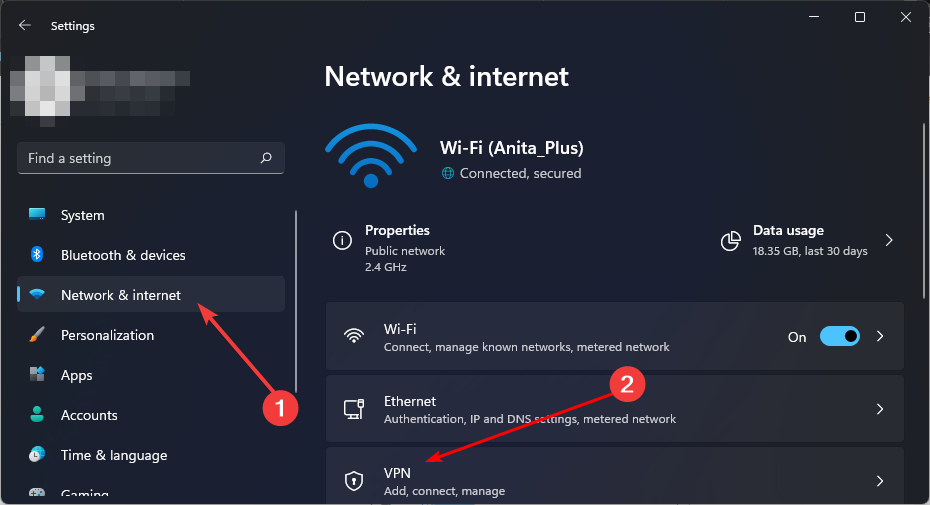
After becoming independent from Microsoft, Toys for Bob is working on games with Microsoft again

Toys for Bob, the game studio behind the popular Skylanders series, announced its independence from Microsoft earlier this month, with its founders stating that they’re excited to work on new games independently, again.

However, Toys for Bob had only good words for the Redmond-based tech giant, and the game studio said that if given the opportunity of a partnership between the two companies, it would take the chance of working with Microsoft on new games.

Well, less than a month after they went independent, Windows Central reports the sources confirmed to the publication that Toys for Bob is indeed working with Xbox on new games after they finalized an agreement with Microsoft to fund their new title.

According to Windows Central, some Microsoft representatives revealed at a recent town hall meeting that the Redmond-based tech giant has finalized a deal with the game studio, and it should see the release of new games that would follow Toys for Bob’s past games.

It will be similar to games Toys for Bob has made in the past.

Microsoft

There aren’t many details about the new title, but it could reportedly end up being available on Game Pass, as Windows Central says.

Microsoft has been focusing on strengthening Xbox’s business strategy: the Redmond-based tech giant is expected to release a new Xbox console by the end of this year, which will be the biggest technological leap in the console’s history.

The tech giant will also release several ABK titles to Game Pass, after acquiring the company last fall, and the first to be released will be Diablo IV.

Microsoft is also experiencing major success with the recently released Palworld, which took the gaming industry by storm and will continue to do so until PocketPair releases its other platforms.

So, in a way, it’s good that Toys for Bob has forged a partnership with Microsoft, but this time, keeping their independence. It could greatly benefit the small game studio.

The ARM laptops boosting Snapdragon X Elite will run PC games with emulation

We have reported about the Snapdragon’s X Elite new chip and its mighty power. However, we found out, as highlighted by The Verge, that Snapdragon brought up a new feature of their CPU at GDC 2024.

Up until now, if you had an ARM machine, you couldn’t run a Windows x86 or 64-bit app unless the developer ported it. Microsoft already created a way to port Windows 11 apps to ARM using ARM64EC a few years ago. However, the developers were not that enthusiastic about this method.

Now, Snapdragon announced that one of the perks of the new Snapdragon’s X Elite chip is that it can run native Windows games and apps using a built-in emulator.

Will the Windows games run on ARM laptops at the same speed?

Qualcomm admitted that the built-in emulator is not capable of running the games at full speed but they will be close to that. The performance issue will occur when the emulator translates the code at the game’s start.

They also mentioned that they are working on a way to include the anti-cheat drivers that most of today’s games require.

The most important fact is that it will be a lot easier to run native Windows applications on ARM laptops outfitted with the new Snapdragon X Elite clips.

The chipmaker is now testing many titles from Steam with confidence that they will run well enough to get the gamers interested.

Are you interested in buying an ARM laptop? Tell us more about your decision in the comments section below.