Windows 11 Insider Preview build 26085 patches the known errors that affect games and more

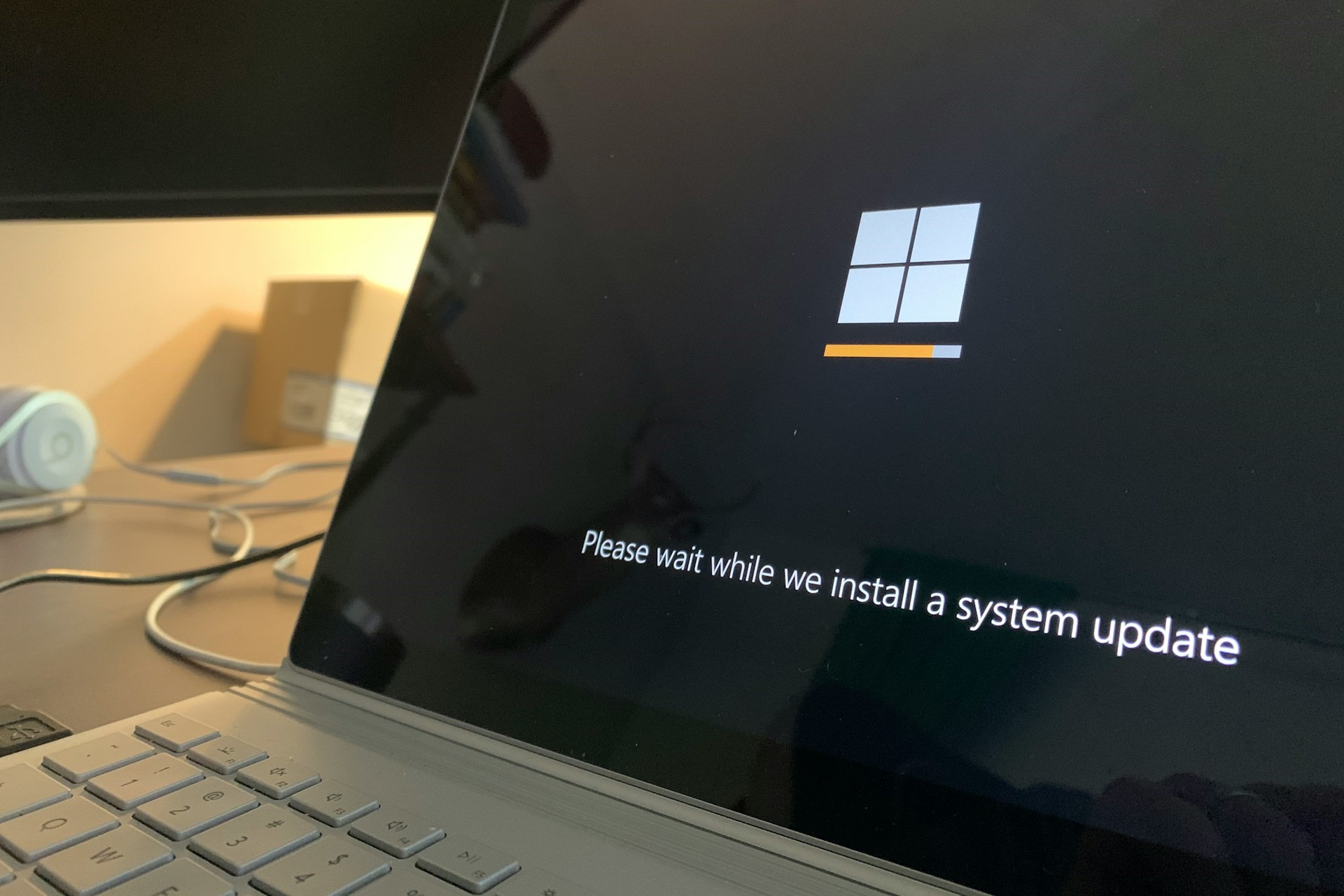
Windows 11 Insider Preview Build 26085 was recently released to the Canary and Dev Channels. It brought many changes and improvements, including issues with the most popular games.

The Redmond tech giant has mentioned an important note for gamers in the Insider blog:

Most popular games should work correctly again in the most recent Insider Preview builds in the Canary and Dev Channels.

They also urged you to submit feedback in Feedback Hub on any issues you face while playing games on the latest builds.

Microsoft also mentioned that the company is investigating reports of rollbacks with error code 0xC1900101 while installing the latest build.

They are also informed that they are working on a fix for an issue in which some Insiders see File Explorer using the old design, and the tabs are also missing in the latest builds.

The new build temporarily turns off a new pointer indicator accessibility setting for low-vision Windows users. Microsoft introduced this feature with build 26052, and the company plans to enable it.

Furthermore, Insiders with Bluetooth LE Audio capable assistive hearing devices can set up and manage their devices through Settings>Accessibility>Hearing aids.

Here are the known issues and the fixes applied after the new build mentioned in the blog post:

[General]

  • Fixed the underlying issue believed to be the cause of shutdown and hibernation not working in the previous flight.

[File Explorer]

  • Fixed an issue where the context menu in File Explorer was missing an acrylic background.
  • Fixed an issue where when opening the context menu in File Explorer, the icons might appear out of place and overlapping text.
  • Fixed an issue which was causing File explorer to leak GDI objects and heap memory for every folder navigation, leading to stability and rendering issues over time.
  • Fixed a memory leak when interacting with archive folders in File Explorer.
  • Fixed an issue causing thumbnails in File Explorer to sometimes unexpectedly be black in the previous flight.

[Sudo]

  • Fixed an issue believed to be the cause of the setting to enable sudo (under System > For Developers) not working for some Insiders.
  • Fixed an issue where if you ran the command “sudo pwsh”, it wasn’t working properly in recent builds.

[Windows Security]

  • Fixed a high hitting Windows Security app crash in the previous flight, which is believed to potentially be the cause of Insiders reporting that the Windows Security app icon in the system tray was sometimes missing in that flight.

[Input]

  • With this build, the recent issues with the mouse cursor disappearing, and other recent issues related to the mouse cursor behaving abnormally should be fixed.

[Settings]

  • Fixed an underlying issue which was causing Settings to freeze sometimes so you couldn’t interact with any of the pages.
  • Fixed an issue where the list of Bluetooth devices under Bluetooth & Devices wasn’t being read out by screen readers in recent builds.

[Windows Update]

  • Fixed the issue causing Insiders in the Dev Channel to see error 0x80070002 when trying to install cumulative updates.
  • Fixed an issue where using “Update and Shutdown” wasn’t shutting down your PC upon completion.

[Other]

  • Fixed an issue that was causing some Insiders to see bugchecks with CRITICAL_STRUCTURE_CORRUPTION recently.
  • Fixed an issue which was causing Voice Access to crash on launch for some Insiders in recent builds.
  • Fixed an issue where after renaming your printer, it might not work with print support app association.

The Windows Insider blog post also mentioned problems related to Copilot in Windows, including Voice access and Windows Ink. They also acknowledged the issues with Copilot resizing issues and missing bring focus to and refresh buttons.

Soon, all Windows features in the Canary and Dev Channels will be released for general availability. However, to experience them before the public release, you must join the Windows Insiders program.

Are you facing any issues while using the new build? If so, we encourage you to report them on Feedback Hub or mention them in the comments section below.

Experience enhanced precision with controller support on Call of Duty Warzone Mobile

Call of Duty Warzone Mobile, one of the most talked about mobile games, offers controller support. Just connect your gaming controller and play as if you were on an actual console.

Activision disclosed the information when they revealed the March 21 release date in the official blog.

Soon, CharlieIntel, a platform covering games-related news, took to X (previously Twitter) to share about controller support in Call of Duty Warzone Mobile with the community.

According to CharlieIntel, controller support will be present in Call of Duty Warzone Mobile since launch. As per reports, the game supports the following controllers (and more):

To connect your controller, put it in Pairing Mode > open the Bluetooth settings > select the controller name from the list > follow the on-screen instructions to complete the process > launch Call of Duty Warzone Mobile to use the controller.

In another blog post, Activision highlights that some of the game’s functionalities, say, picking a playlist, can only be modified via the touch screen or any native controls.

The developers also underline the fact that, in the initial days after launch, players using controllers and the native touch functionality will be a part of the same matchmaking pool. Later, changes can be expected as the developers analyze things.

At worldwide launch, players using native touch controls, or any type of controller, will be matchmade together in the same pool of recruits. As the game evolves, we will evaluate balancing player matchmaking pools by native touch and controllers, as well as, potentially implementing different rules for control playstyles in competitive play.

Controller support on Call of Duty Warzone Mobile is a welcome step. In a few days, it will be clear how well the feature has been implemented. Similarly, cross-progression between different platforms, too, will undergo scrutiny.

Share your review of using a controller in Call of Duty Warzone Mobile in the comments section.

Running out of space on your Xbox? Get 20% off the WD_BLACK 1TB C50!

Having enough storage on your Xbox is crucial, especially if you tend to download games frequently.

If you’re not too keen on deleting your games, you can easily expand your storage space during Amazon’s Big Spring Sale.

You can get a WD_BLACK 1TB C50 storage expansion card for 20% off on Amazon

Amazon is currently having a Big Spring Sale, with a wide array of products being on a discount, including the WD_BLACK 1TB C50.

As 9to5Toys reports, this model usually costs $150, but it’s currently on sale and you get it for $129.99. The card rarely goes on sale, and it currently costs less than other similar models.

Regarding the features, this card uses Xbox Velocity Architecture and it provides the same performance as the internal storage.

The card is officially licensed with Xbox, so you won’t have any compatibility issues. As for the setup, it’s pretty simple, you just plug it into your console and that’s it!

So, what are you waiting for, head to Amazon and get this expansion card while the discount lasts!

If you’re tired of your Xbox, there are rumors that we might get a handheld gaming PC from Microsoft someday in the future, so stay tuned for more news.

Intel Game On driver 31.0.101.5379: Boosts performance by 174%, adds support for 4 new titles

With Windows emerging as the preferred platform for gaming, developers are more focused than ever on fine-tuning every aspect of their products. The latest Intel Game On driver version 31.0.101.5379 is an example of that!

The Game On graphics driver is focused on gaming, delivering significantly improved performance compared to the previous version. The latest driver also complements the Intel Arc A-Series and Core Ultra, boosting their output.

Improvements in Intel Game On driver version 31.0.101.5379

Support for four new games

The latest driver introduces support for the following games on Intel Arc A-series Graphics:

  • Diablo IV Ray Tracing Update
  • Dragon’s Dogma 2
  • Horizon Forbidden West
  • The Legend of the Condor Heroes

Boost in performance

As per the Intel release notes, the latest Game On driver results in the following improvements on Intel Arc A-Series Graphics compared to the previous version:

  • Assassin’s Creed Origins (DX11)
    • Up to 35% average FPS boost at 1080p with Ultra High settings.
  • Conqueror’s Blade (DX11)
    • Up to 54% average FPS boost at 1080p with Highest settings.
  • Detroit: Become Human (VK)
    • Up to 137% average FPS boost at 1080p with Ultra settings.
    • Up to 172% average FPS boost at 1440p with Ultra settings.
  • Dragon’s Dogma 2 (DX12)
    • Up to 36% average FPS boost at 1080p with High settings and Progressive Rendering Mode.
    • Up to 31% average FPS boost at 1440p with High settings and Progressive Rendering Mode.
  • Fortnite (DX12)
    • Up to 6% average FPS boost at 1080p with Epic settings.
    • Up to 6% average FPS boost at 1440p with Epic settings.
  • God of War (DX11)
    • Up to 36% average FPS boost at 1080p with Ultra settings.
  • Granblue Fantasy: Relink (DX11)
    • Up to 174% average FPS boost at 1080p with Ultra settings.
  • Horizon Forbidden West (DX12)
    • Up to 6% average FPS boost at 1440p with High settings.
  • Sons of the Forest (DX11)
    • Up to 8% average FPS boost at 1080p with Ultra settings.
    • Up to 9% average FPS boost at 1440p with High settings.

Similarly, the improvements on Intel Core Ultra with built-in Intel Arc GPUs compared to the previous driver version are also profound.

  • Assassin’s Creed Origins (DX11)
    • Up to 117% average FPS boost at 1080p with Medium settings.
  • Conqueror’s Blade (DX11)
    • Up to 27% average FPS boost at 1080p with Medium settings.
  • Dragon’s Dogma 2 (DX12)
    • Up to 18% average FPS boost at 1080p with Low settings and Progressive Rendering Mode.
  • Fortnite (DX12)
    • Up to 6% average FPS boost at 1080p with High settings.
  • God of War (DX11)
    • Up to 17% average FPS boost at 1080p with Original settings.
  • Granblue Fantasy: Relink (DX11)
    • Up to 29% average FPS boost at 1080p with Standard settings.
  • Sons of the Forest (DX11)
    • Up to 5% average FPS boost at 1080p with Low settings.

The list of supported products for Intel Game On driver version 31.0.101.5379 can be found on the download page. Known issues with the latest driver can be checked in the release notes.

The latest Intel Game On graphics driver, though compatible with both Windows 10 and Windows 11, may deliver superior results with the latter. Because, as per reports, the latest iteration, Windows 11, is better for gaming!

Has the latest driver improved gaming performance on your PC? Share with our readers in the comments section.

Is it Safe to Use a Second-Hand SSD? (Pros & Cons)

SSDs are known for their reliability and efficiency, but they’re not exactly cheap. As such, you may want to acquire a second-hand SSD card to meet your storage needs.

With faster write speeds and quick boot times, it’s a no-brainer why one would choose an SSD over an HDD. However, because of budget constraints, not everyone may be able to afford a new SSD.

Used or refurbished SSDs are a fraction of the cost of new ones; if you’re lucky, they work just as well.

What should I look out for when purchasing a second-hand SSD?

  • Compatibility – Your second-hand SSD must augur well with your hardware and OS. If not, you’ll experience a lot of performance issues and risk losing data when an inevitable catastrophic crash happens.
  • Health – We all know SSDs have a lifespan so purchasing a second-hand one means that its health is not at 100%. Luckily, you can check its health status and optimize it if need be to stretch out its lifespan a little longer.
  • Manufacturer – A well-known and reputable brand is more likely to sell high-quality second-hand SSDs than unknown brands. Before settling on one, make it a point to check for reviews from previous buyers.
  • Warranty – Just because it’s a second-hand SSD doesn’t meet it shouldn’t have a warranty. This coverage ensures your SSD is covered for any damages for a limited time while you use it.
  • Security – A second-hand SSD should be appropriately formatted and all data from the previous user wiped out. This ensures your data will be secured once you store it.

What are the pros and cons of using a second-hand SSD?

Pros

1. Inexpensive

Used or refurbished SSDs are a fraction of the cost of new ones. To put it in perspective, you’d probably get a 2TB second-hand SSD for the price of a 256GB new SSD. Therefore, you’re getting more for less and excellent performance.

2. Sustainability

Getting a second-hand SSD extends the lifespan of these devices and aids in the recycling of electronic devices, promoting environmental sustainability. This circulation ensures minimal environmental impact when manufacturing new products.

3. High-performance metrics

Although used, a second-hand SSD is still far better than an HDD. SSDs are widely compatible with many devices, and their performance metrics are commendable. You also save on energy, as HDDs are energy monsters compared to SSDs.

Cons

1. Reduced lifespan

A used SSD has a finite lifespan because of the limited write cycles. Other factors like environmental factors, power surges and the workload also greatly reduce the lifespan.

You’re also unaware of the previous owner’s usage patterns and whether the SSD was exposed to excessive stress. If your refurbished SSD has been through a lot of wear and tear, you may only use it for a short period before it gives in and dies.

2. Compatibility issues

Whereas SSDs are compatible with most hardware, second-hand SSDs are usually older models incompatible with newer hardware. Further, they’ve been reconfigured and may lose some functionality that makes it harder to work with your device.

3. Hidden defects

Because a second-hand SSD had a previous owner, you can never be too sure whether you’re getting a legitimate product. There may be hidden defects even after passing all your inspection tests. What’s worse is that these defects may even be unknown to the reseller.

Over time, these defects may start manifesting slowly, and once your SSD starts to malfunction, your data will be at risk.

4. Short warranty period

New SSDs have a warranty period ranging from three to five years. Second-hand SSDs, if you’re lucky, have a warranty period of six months to one year.

Such short periods expose you to additional costs if the SSD malfunctions after the warranty period expires.

5. High risk of data loss

If you purchase your second-hand SSD from an unreliable or unauthorized reseller, there is a chance that previous data was not properly wiped out. Since such resellers do not have quality control, there’s a high risk that your SSD could be counterfeit.

If there is no quality control, there is no guarantee that your data will be safe. Your sensitive information could be exposed to unauthorized parties and risk data corruption from residual data or even software that collects it.

How long does a used SSD last?

Newer SSDs have a longer lifespan compared to used SSDs. However, depending on usage history, environmental conditions, workload, and overall health at purchase, your used SSD can last for a decent time.

Still, there are some best practices you can implement to get more out of your refurbished SSD, such as:

  • Regularly update firmware – Your SSD manufacturer will release performance updates and bug fixes to enhance compatibility and reliability. Keeping up-to-date will extend its lifespan.
  • Perform TRIM – Check how often you should perform a TRIM on your SSD to ensure garbage collection is done in time. This ensures your SSD has no unused data blocks.
  • Back up data – You can never predict an SSD failure but when it slows down, you can assume these are symptoms. A reliable backup software can help mitigate any data loss risks.
  • Data protection – Because you’re unaware of the SSD’s history, it’s good to have SSD encryption software to prevent any data breaches.
  • Check health status regularly – Refurbished SSDs require health monitoring twice as much as new ones. You can use diagnostic tools to monitor health status and reliability.

Overall, purchasing and using a second-hand SSD is compelling, but you have to consider the pros and cons before making that decision. If it were up to us, we’d say go for it. Just emphasize acquiring reliable and functional products.

You’ll be saving money and still getting a high-performance and efficient product. However, if you’re not a fan of used products, we have a collection of the largest SSDs you can get your hands on so feel free to check it out.

For more second-hand items, you can also get your hands on a second-hand RAM or second-hand HDD.

We’re curious. Have you used a refurbished SSD before? What was your experience, and how long did you use it (or are you still using it?)? Share your experience with us and any pointers you would like us to know in the comment section below.

I’ve preloaded Dragon’s Dogma 2 on my Xbox and PS5. Here’s how

Dragon’s Dogma 2 is a highly anticipated game, and many are eager to try it. With the game releasing tomorrow, many want to get a head start and preload the game on their console.

This is pretty simple to do, and it doesn’t require any additional configuration. In this article, we’re going to show you how to properly do that.

Here’s how to preload Dragon’s Dogma 2 on Xbox Series X/S and PS5

As Beebom writes, to preload the game, first you need to pre-purchase it, regardless of the platform you’re using. After that, you just need to follow the steps for your console of choice.

On Xbox Series X/S

  1. Navigate to the Microsoft Store on your console.
  2. Locate Dragon’s Dogma 2 in the store and select it.
  3. Choose the Pre-Install option and wait for the game to download.

Keep in mind that the game requires 69.95 GB of storage space before you can install it. If you’re low on storage, you can get WD_BLACK 1TB C50 for 20% off on Amazon.

On PlayStation 5

  1. Navigate to your library on PS5.
  2. Locate Dragon’s Dogma 2.
  3. Select it and choose the Download option to start the process.

Note that the PS5 version requires 65+ GB of storage available to preload the game.

As the game is releasing tomorrow, by preloading it, you’ll be able to start as soon it launches, without having to wait for the game download first.

Are you excited for Dragon’s Dogma 2? If so, make sure you preload the game and be the first to try it!

Make your Windows desktop look like a Mac with ObjectDock

Stardock, known for making the best customization tools for Windows, has released an update for ObjectDock, making it compatible with Windows 11 and 10. This will make it look like a Mac and help you access your frequently used apps and files.

Here are the list of features added:

  • Allows you to quickly access & launch your frequently used apps, shortcuts, and files.
  • Enables you to create a dock to customize your desktop with various content types and styles.
  • Can change a dock’s size, color, transparency, font, and background
  • Add a tabbed dock to your desktop to keep frequently used apps, files and links.
  • Allows you to add multiple docks to your desktop.
  • Advanced customization tools to set dock on top or hidden when using other apps.
  • Adjust the icon size, effect, transparency and more to change the effects of a dock.

So, whether you are using Windows 10 or 11 for gaming or school or want to keep your desktop organized for better accessibility, ObjectDock can help you make your Windows desktop manageable. It acts as a complete replacement.

For more information, you can visit the official website of ObjectDock. You can try it for 30 days and purchase it for up to 5 active installs.

It now comes in 64-bit, with improvements to animations like Zoom, support for UWP applications, high-resolution displays, and more.

Would you use ObjectDock on your Windows computer? If so, share your thoughts about the readers in the comments section below.

Microsoft, Meta, Epic Games, & Spotify join forces to challenge Apple’s pricing policies

Apple is notorious for its high store fees, and this sparked trouble between Apple and the EU in the past.

This is just the beginning, Epic Games has already filed a lawsuit against Apple, but now it seems that other tech giants are joining in.

Four additional tech companies are joining the fight against Apple

Apple Store policies have been criticized for a while, and as MSPowerUser writes, it seems that Meta, Microsoft, Spotify, Match Group, and Epic Games are teaming up to challenge them.

The main concern is Apple’s commission fees which can reach up to 30% for in-app purchases. Apple already had legal issues due to this, and to address them, it allowed the developers to include a single link to an external payment system.

Other tech giants are arguing that this decision doesn’t follow the court’s decision because the external links don’t allow users to learn properly about different and cheaper alternatives.

Although many are criticizing the high fees, Apple was quick to defend them stating that they are necessary to cover the costs of development, security, and maintenance of the App Store.

Department of Justice is still deciding whether to file an antitrust lawsuit against Apple, and we expect to find out the official verdict soon.

As for Apple and its problems with the EU, after Apple complied with the DMA the number of Opera users is rising which leads us to believe that Apple, like many other tech giants, is using unfair business practices.

Channels and calls made fun with Xbox’s Discord Voice – Soundboard Audio feature

Yesterday, Xbox rolled out a series of new features and bug patches to the Alpha Skip-Ahead ring, Build 2408.240318-2200. What caught our attention was the Discord Voice – Soundboard Audio feature.

The official description read,

Xbox players who have joined Discord Voice will now be able to hear soundboard audio from others in the channel or call. A mute button for soundboard audio can be found in the Discord Voice options in the Guide. At this time, you cannot trigger soundboard audio from the console.

Soundboard lets users play pre-recorded short audio clips, often used to express emotions. It enhances the fun element in calls. And with Soundboard coming to Xbox, you should be in for an exciting ride!

Also, Xbox has introduced a mute button for anyone not in the mood for some playful or weird sounds.

The only problem we see right now is that players on the Xbox console can’t trigger soundboard audio. But with Xbox making strides, extensively introducing new features and enhancing the existing ones, you should, most likely, be able to prompt soundboard audio in future updates.

Details for the update introducing Discord Voice – Soundboard Audio:

  • OS Version: XB_FLT_2408GE\26085.1502.240318-2200
  • Available: 2 P.M. PT – 20 March’24

For more information about Discord Voice – Soundboard Audio on Xbox or to discover the latest fixes, check the release notes.

Recently, Xbox introduced many changes in 2404.240314-2000, including improved search in the Microsoft Store. You can expect more features and enhancements to be included in the coming days!

What do you think of the Discord Voice – Soundboard Audio feature? Share with our readers in the comments section.

Microsoft confirms KB5035857 is riddled with bugs, triggers memory leaks & reboots on DCs

Every few months, the release of a Windows update makes it to the news for all the wrong reasons. This time, it is Windows Server 2022, KB5035857, on OS Build 20348.2340!

Released on March 12, 2024, the buggy security update only affects environments on the Windows Server platform and not home devices.

On the official bug reporting page, the KB5035857 report titled Issue with Kerberos requests on domain controllers may cause LSASS memory leaks reads,

Following installation of the March 2024 security update, released March 12, 2024 (KB5035857), Local Security Authority Subsystem Service (LSASS) may experience a memory leak on domain controllers (DCs). This is observed when on-premises and cloud-based Active Directory Domain Controllers service Kerberos authentication requests.

Extreme memory leaks may cause LSASS to crash, which triggers an unscheduled reboot of underlying domain controllers (DCs).

Affected platforms, as reported by Microsoft, include Windows Server 2022, Windows Server 2019, Windows Server 2016, and Windows Server 2012 R2.

The good news, Microsoft has identified the underlying cause and is working on developing and deploying a patch. Microsoft says all memory leaks, random crashes, and reboot issues with KB5035857 should be resolved in a few days.

Have you faced the same problems with KB5035857? Share with our readers in the comments sections.

Say goodbye to typos in Notepad as Microsoft is testing a new spell-check feature

Notepad has been an integral part of Windows for decades, and it was left unchanged until Windows 11 came.

We saw an array of new features being added to Notepad, and it seems that the most known text editor will get a spell-check feature in the future.

Microsoft is currently testing a spell-check feature for Notepad in Windows 11

Notepad recently got Copilot support with the Explain with Copilot feature,  but Microsoft has additional features planned for it, according to the XDA Developers.

This feature was first discovered by PhantomOcean3 on X, and we can see the new Spelling section in the Notepad settings.

Users will have the option to use spell check along with the autocorrect feature, so they won’t have to worry too much about spelling.

The spell check settings can be expanded and you can choose the file types that you want to use spell check for.

This feature is available in Notepad 11.2402.18.0, but currently, there’s no information regarding its release date.

These brand-new laptops from Lenovo might last for years, with a 9/10 iFixit repairability score

If you are planning to get a new laptop, Lenovo’s latest ThinkPad L series and X13 series would be the perfect pick. Equipped with powerful processors, these two are designed using recycled materials and have an iFixit repairability score of 9/10.

The 13″ Lenovo Thinkpad X13 series comprises the ThinkPad X13 Gen 5 and ThinkPad X13 2-in-1 Gen 5, both featuring similar specifications with the exception of storage. You get up to 1 TB for the former, while the latter offers up to 2 TB. Details of the ThinkPad X13 series:

  • Lenovo ThinkPad X13 Gen 5: Available from April’24, priced at $1239
  • Lenovo ThinkPad X13 2-in-1 Gen 5: Available from April’24, priced at $1399

Need to store more files, go with the latter!

As for the Lenovo ThinkPad L series, it features a 16″, 16:10 ratio display and comes with new tactile markings on the keyboard to help people with blurry vision. The series comprises of:

  • Lenovo ThinkPad L14 i Gen 5: Available from April’24, priced at $1179
  • Lenovo ThinkPad L14 Gen 5 AMD: Available from Mar’24, priced at $999
  • Lenovo ThinkPad L16 i Gen 1: Available from April’24, priced at $1179
  • Lenovo ThinkPad L16 Gen 1 AMD: Available from Mar’24, priced at $999
  • Lenovo ThinkPad L13 Gen 5: Available from April’24, priced at $1199
  • Lenovo ThinkPad L13 2-in-1 Gen 5: Available from April’24, priced at $1319
Tactile markings on keys (Source: Lenovo)

All laptops from the ThinkPad L and ThinkPad X13 series are designed for the latest OS, Windows 11. These feature an NPU (Neural Processing Unit) to boost the machine learning and AI capabilities. Soon, NPUs will become a vital part of PCs, given Microsoft’s push for AI-driven features.

For more information about the series or specifications, check the official blog post.

Why should you care about the iFixit repairability score?

The iFixit repairability score highlights how easy it will be to repair the laptop. The higher the score, the easier it would be!

Devices with higher scores tend to have a simpler design, easy component replacement, and sufficient information from the manufacturer to facilitate third-party repair. This increases the life span of the device by a few years.

Besides, you won’t be forced to contact the manufacturer for every hardware issue, thus saving a significant amount in the long run. Third-party repairs are both quicker and cheaper!

Ever since the right-to-repair movement gathered momentum, we have become more careful with our choices, especially when it comes to expensive electronics like mobiles and laptops. And it makes sense. If you are spending $1,000-1,500 on a device, it should last 5-7 years.

Experts recommend you go for devices with an iFixit repairability score of 7 or higher.

What’s the repairability score of your current device? Share with our readers in the comments section.

Microsoft Edge Super Drag and Drop now supports Google search (sort of)

Edge is constantly getting new features, and not that long ago we wrote about Edge’s Super Drag and Drop feature.

This feature has been improved, and now it allows you to change its default search engine and use something other than Bing.

Super Drag and Drop in Edge now works with Google Search

For the longest time, Microsoft has been trying to push Edge and Bing to unsuspected users. We already wrote how Edge imports Google tabs without the user’s knowledge.

But that’s not all, there are reports that Microsoft is showing Bing pop-ups in Chrome in an attempt to make users switch.

If you’re not familiar with the Super Drag and Drop feature, it allows users to drag and drop links and text anywhere on the page to open in a new tab.

Currently, when users perform this action a new tab will open and Bing will search for the dropped text, ignoring your currently selected default search engine.

Well, that has finally been changed, and Microsoft is testing the feature that will allow you to change the default search engine that Super Drag and Drop uses in Edge Canary.

You can change the default search engine by doing the following:

  1. Open Edge and navigate to edge://flags
  2. Now locate Microsoft Edge Super Drag Drop, enable it, and restart the browser.
     
  3. Next, open Settings and go to Appearance. Select Super Drag and Drop.
  4. Choose Configure Super Drag and Drop.
  5. Set Search mode to Using Default Search Engine.

After that, you’ll finally get rid of Bing and you’ll be able to use your preferred search engine with this feature.

We’re glad that Microsoft is finally giving users the option to properly switch to a different search engine, and we can’t wait to see this feature available to the stable version of Edge.

Amazon Spring Sale brings the Surface Pro 9 to an incredible price

Surface Pro 10 will soon be here, but there aren’t details about its release date. Yet, while waiting for it, you could get the Surface Pro 9 from Amazon for $1,100.49. Additionally, you can buy the keyboard too for $122.99. Also, you could get the keyboard with the signature reader for $124.00 and the Surface Pen 2 for $89.97. However, if you have a Surface device on your wishlist, hurry to get a Pro 9. They might run out of stock soon.

Is Microsoft Surface Pro 9 worth buying?

There are a few things that make Microsoft Surface Pro 9 worth buying. The first one is the Amazon Spring Sale. After all, it’s the reason the price of the tablet dropped by 28%. With the new price, you could get the keyboard too. So, you would have the full utility.

Specifications

Processor12th Gen Intel Core i5-1235U
OSWindows 11 Home
Display13 inches
Resolution2880 x 1920
Storage256 GB
Memory (RAM)16 GB
Battery lifeUpto 15.5 hours
CameraFront: 5 MP, Rear: 10 MP

If you attach the keyboard to a Surface Pro 9, it feels similar to a 2-in-1 laptop. In addition, its selling point is the ultra-portable feature. After all, it weighs less than 1kg and has a long battery life. So, it is a perfect fit if you are working on the run or from various locations. It has decent internal audio capabilities and a good camera. Thus, you can join meetings from anywhere.

Another great feature of the Surface Pro 9 is the display because it is a bright 2880 x 1920 panel with a 120Hz refresh rate. The only downside is the reflectiveness of it. Performance-wise, it is not the greatest tablet. However, it will get office tasks done at the expense of a lot of fan noise.

In a nutshell, the tablet is worth it, especially if you are a Microsoft fan. It can do a lot of tasks, and depending on its specifications, you can increase its performance. While it might fall a bit under other tablets, it gains bonus points for its display and portability.

Alternatively, you can get the tablet and keyboard combo from Best Buy.

What are you thinking? Are you going to buy the tablet and keyboard? Let us know in the comments.

Is It Safe to Buy & Use Second-hand RAM? Here’s What to Look For

It is debatable whether it is safe to buy and use second-hand RAM. While it might not damage your device, it could have other specifications. Also, if you buy it from an unknown seller, test it first. Otherwise, you could even end up with fake RAM. Yet, it isn’t always that bad, but the quality is very different from the real deal.

How to spot fake RAMs?

Only try to cut costs by buying second-hand RAM from somewhere, or you might get a fake one. However, there are a few methods to ensure the authenticity of the new stick. For example, you could search the product for tampering, such as misspellings. A Redditor discovered one with HyperX is a dimsion of Kingston written on its sticker instead of HyperX is a division of Kingston.

Another thing you could do is to paste the following command in the command prompt: wmic memorychip get capacity, manufacturer, speed, tag. It will show you all kinds of information about the component. So, if there is a mismatch, try to refund it. After all, it is not worth using a product that doesn’t meet the showcased specifications. Another way to avoid scams is to check the second-hand RAM code on the manufacturer’s website.

Of course, you should check the integrity of the RAM before buying it. For example, the printed circuit board (PCB) could be chipped or damaged, or the RGB lights could not work. While all of the occurrences mentioned are rare, they could happen. Yet, the sticks are some of the most durable components of a PC.

Is it OK to use second-hand RAM?

If the component is in good condition, it is okay to use second-hand RAM. After all, it is cheaper, and you can guarantee it works. However, you could search for some with available warranties. Also, consider checking for refurbished sticks because you might find them cheaper.

In summary, consider all of the above when buying and using second-hand RAM. To ensure the transaction goes well, you can try using a payment method that protects the buyer, such as PayPal. The company will try to get your money back if the product needs to be fixed. Also, if you want to build more than one PC, second-hand RAM sticks could save you a small fortune.

Speaking of second-hand items, you may also be interested in a second-hand SSD in case yours is dead or need a cheaper replacement.

By the way, if you have any problems, such as RAM not being detected or the PC not using all of it, we’ve got you covered.

What do you think? Will you buy and use second-hand RAM? Let us know in the comments.

WebGPU API will endanger your data while boosting your performance

The WebGPU browser API presents a high risk for your device. Even if the tool boosts your graphics performance while browsing, hackers can use it against you. After all, some browsers ask for your permission to access hardware to enable various tools and services. However, not all of them will need your input. So, by exploiting their vulnerabilities, wrongdoers can access your data and perform side-channel attacks.

What is a GPU attack?

A GPU side-channel attack allows threat actors to use your hardware against you, stealing sensitive data. However, they usually require your approval to access your hardware, which can be tricky for you. After all, sites ask for your permission to enable their APIs and Tools, such as the WebGPU API.

So, when you accept their request, hackers can use the software to access your GPU. Then, using its compressing tools, wrongdoers can steal bits of the data it uses. In addition, attackers abuse how the GPU workloads impact the timing and cache state to spy on you.

According to CyberKendra, one of the GPU methods used by researchers in their WebGPU API study was an inter-keystroke timing attack. The technique allows them to measure the time it takes for your GPU to process keyboard inputs. Thus, by using it, they can figure out if you use common characters or special ones. Also, the code of the attack runs in JavaScript, and researchers can use it more easily than the side-channel attack.

Researchers tried to make tech companies and browser vendors prioritize security. To do this, they showed their proof of concept attacks. However, they weren’t successful because letting us make security decisions we don’t understand could negatively impact our perception. So, they prefer the performance benefits of WebGPU API.

In summary, even if researchers found security vulnerabilities in WebGPU API, tech companies leave this matter in our hands. To protect your data, use a complicated password and only approve some requests from browsers. Additionally, there are a few ways to defend from browser attacks.

What are your thoughts? Will you continue using the WebGPU browser API to boost your performance? Let us know in the comments.

Nvidia launched its Cloud Quantum-Computer Simulation Microservices

Nvidia broke the ice with its new cloud quantum computing services. After all, they allow researchers to use advanced software to explore scientific domains, such as biology, science, and chemistry. The cloud from Nvidia will work as a simulation platform. So, researchers could use it to build and test algorithms and applications with tools for hybrid quantum-classical programming.

According to Nvidia, three-quarters of the companies developing quantum processing units use their CUDA-Q quantum computing platform. Also, it is the first platform that allows hybrid quantum-classical programming. Additionally, it integrates QPUs, quantum emulation, GPUs, and CPUs in one system. On top of that, Nvidia based its Quantum Cloud on that technology.

Does Nvidia have a quantum computer?

Tim Costa revealed to Bloomberg that the company lacks a quantum computer. However, it will provide access to a third-party quantum computer in the future. Until then, they will use a data center stacked with AI chips and systems.

Compared to other companies, Nvidia needs to catch up in quantum computing. Yet, their platform gives researchers a chance to grow. In addition, around fifty quantum computers are available publicly, and over 500,000 researchers. Thus, there is a high demand for quantum clouds. Also, according to Costa, Microsoft and other tech giants will incorporate the Nvidia Quantum Cloud simulator into their plans.

The Quantum Cloud from Nvidia uses powerful features and third-party software integrations to accelerate scientific explorations. The first one is The Generative Quantum Eigensolver, which allows the quantum computer to use a large language model (LLM) to find the ground-state energy of a molecule.

The second tool is Classiq’s integration with CUDA-Q, which lets researchers generate sophisticated quantum applications and analyze and execute quantum circuits. The last tool is the QC Ware Promethium, which deals with complex quantum chemistry problems like molecular simulation.

Ultimately, the Quantum Cloud from Nvidia will allow researchers from different domains to simulate quantum computers. By doing this, they will contribute to the advancements in the quantum field. Furthermore, many tech giants will incorporate the Nvidia Quantum Cloud simulator into their offerings. So, we might see it next to the scalable quantum computer from Microsoft.

By the way, you can apply for the Nvidia Quantum Cloud!

What are your thoughts? Did Nvidia manage to impress you with their Cloud? Let us know in the comments.

Europe approved the AI Act meant to protect us from the risks of AI

AI is everywhere nowadays, especially since Microsoft forces Copilot onto us with every Windows update. Yet, while technology can help us work more efficiently, it is also responsible for sharing factual information.

On top of that, some of us put too much trust in AI models. As a result, they believe everything the AI generates without second-guessing it. So, the European Parliament approved the Artificial Intelligence Act (EU AI Act) to reduce the risks.

What is the EU AI Act 2024?

The new EU AI Act is similar to a rulebook for AI and its developers and provides specific requirements and obligations. For example, developers must ensure their products respect the law before publicly releasing them. In addition, the AI Act classifies AI models using a risk-based approach. According to the EU AI Act, there are four types of risks: minimal, limited, high, and unacceptable.

You can use minimal-risk AI freely. The law doesn’t restrict them because they perform actions such as upscaling graphics and filtering spam emails, similar to plugins and add-ons. However, that’s not the case for limited-risk AI. The new legal framework applies to them. Thus, chatbots need to tell users that they use artificially generated content and notify users that they are talking with a machine.

The EU AI Act considers various AI technologies part of the high-risk category. Some of the most commonly encountered are the ones for scoring exams, transport, evaluation, health care, and border control management. To reduce the chances of a dangerous outcome, developers have to assess them and provide detailed documentation on their system and usage.

Unlike the previous types, the AIs that fall under the unacceptable category, such as the ones used by China for social scoring, will be banned.

Ultimately, the EU AI Act protects us from the risk of using AI without thinking. Additionally, the framework aims to introduce transparency obligations for all AI models. Also, the legislation is future-proof. After all, it verifies the products and obliges developers to thoroughly asses them and their future updates. By the way, the laws could be implemented globally.

What are your thoughts? Is the EU AI Act too strict? Let us know in the comments.

Microsoft AI consumes more water than 670 families a year

Large language models (LLMs) will require more energy than we can generate, and there are other problems. AI consumes large quantities of water daily for the cooling process. After all, according to Jez Gorden, the LLMs from Microsoft and OpenAI use a water bottle to cool down after each query. Also, models like ChatGPT have over 10 million queries daily.

Small towns like Phoenix, Arizona, cannot handle AI’s demands without help. After all, the AI generates a lot of wastewater. Microsoft’s Goodyear facility will use 56 million gallons of drinking water, which is enough for 670 families yearly.

How much water does AI consume?

AI consumes a lot of water, and the amount is hard to quantify. It uses it in two ways: directly for on-site server cooling and indirectly to cool power plants. The technology is still in its early phase, and every advancement requires more resources. Unfortunately, this could lead to dire consequences for the environment. Additionally, according to Shaolei Ren, water scarcity is already one of the most important global challenges.

Local communities are at risk, mainly when data centers use their systems to deal with water waste. In addition, cities like Phoenix, Arizona, are already fighting droughts. Some regions even need to share their drinking water with tech giants, which leads to conflicts. In West Des Moines, Iowa, an AI data center cluster consumed 6% of the district’s water in a month in 2022.

By 2030, tech giants like Microsoft, Google, and Meta plan to replenish more water than they use. On top of that, Microsoft wants to build a few more data centers in Phoenix, and this time, they plan on using air cooling systems. This solution will decrease AI water consumption. However, it will increase the amount used by power plants.

Ultimately, AI consumes more water than companies can replenish. This issue creates tensions between communities and tech giants, and it could lead to significantly higher prices and other water system-related problems.

What are your thoughts? Did you think of any ways to reduce AI water consumption? Let us know in the comments.

Microsoft Edge updated with new AI features in latest release

Microsoft’s Edge browser continues to gain more features with a new stable version testing a beefed-up magnifying experience alongside incorporating the more robust Notebook AI feature that boasts support for a larger character count when prompting.

New Magnify Image experience

Twitter user @leopeva64 spotted some new features in Microsoft Edge that include an expanded character count for Copilot prompts, the addtion of Microsoft Designer as well and a new Magnifying Image experience.

Microsoft recently rolled out an updated build to the Stable Microsoft Edge Insider channel that brings Magnify Image to the browser’s context menu as well as support for the feature through key commands. Most Windows 11 users should be able to test out the new Magnify Image experience today by simply right-clicking on an image or double pressing Ctrl.

The new feature is highlighted with a NEW label next to it in the context menu to help easily identify it and also supports left-click gestures to zoom in for users who prefer a less tactile method with custom mice. There are also options to zoom in and out with a normal click of the mouse, located in the bottom right corner of images that are presented in a popped-out light box experience.

Microsoft Designer on its way to Edge

Microsoft is also looking to bundle much of its new AI-led Microsoft Designer features into the image experience of Edge. Users can now use a similar order of operations to summon the basic Image editing features produced in a similar light box UI when clicking the Edit Image selection from the context menu.

The browser-based version of Image Edit consists of many from the first-party Windows 11 Photos platform such as Crop, Filters, Markup, rotation, and Adjustments to Brightness, Exposure, Contrast, Highlights, Shadows, and more.

However, there is now an additional way to bring up the branded version of Microsoft Designer in Canary Edge builds that includes the following steps:

  1. Type Edge Canary in the Start menu and click the Open file location option.
  2. Next, Right-click on the Microsoft Edge Canary shortcut and select Properties.
  3. Go to the target field and type –enable-features=msEditImageWithDesigner after the path.
  4. Hit Apply and then OK.
  5. Re-launch Edge Canary. Right-click on an image and select the Edit image from the context menu.
  6. A branded version of Microsoft Designer will load.

Users will now be able to edit an image and immediately transfer it into Microsoft Designer for further work with more AI tools.

Large character counts in prompts

Also in the Canary build version of Edge Microsoft is testing a Notebook AI version of Copilot in the browser. As previously mentioned, the Notebook AI version of Copilot allows for more characters in the prompt window. Notebook AI for Edge will accompany the growing list of supported apps that make up the sidebar in Edge if users aren’t already hiding the side toolbar by default.

Unlike the Magnify Image feature, the Notebook version of Copilot or unbranded Microsoft Designer isn’t being automatically pushed to users. Instead, Edge Canary users will need to manually update their browser to enable the more robust version of Microsoft’s AI assistant.

To try out the upgrade to Copilot for Edge browser

  1. Type Edge Canary in the Start menu and click the Open file location option.
  2. Next, Right-click on the Microsoft Edge Canary shortcut and select Properties.
  3. Go to the Target field and type –enable-features=msEdgeChatNotebookHeaderIcon after the path.
  4. Hit Apply and then OK.
  5. Re-launch Edge Canary and click the Copilot icon.
  6. Switch to the newer version by clicking the ellipses in the top corner and select Notebook.

The current consumer version of Edge with Copilot only supports up to four thousand characters per prompt while the Notebook version should allow for 18,000-character prompt limits.

Microsoft continually adds features to Edge, but it has yet to be seen how these new additions will affect performance as the browser gets weighed down with increased experiences.

Meet AutoDev: Microsoft’s AI-driven software development framework

Microsoft researchers revealed AutoDev, an AI-powered software development framework allowing AI agents to tackle various software development tasks autonomously, including complex code editing, advanced Git operations, and comprehensive testing.

The framework is designed to promote autonomy, efficiency, and security. AutoDev leverages Docker containers to perform housing operations to ensure streamlined and secure development processes, securing user privacy and project integrity.

This approach to security showcases Microsoft’s commitment to providing developers with a robust and reliable solution for modern software development challenges.

The primary purpose behind AutoDev is its ability to delegate complex engineering tasks to AI agents equipped with diverse tools and operations.

These AI agents efficiently navigate tasks with exceptional autonomy, seamlessly managing operations like compiling code, editing files, or executing tests.

The automation of these tasks can revolutionize the way developers work. This will allow them to focus on higher-level strategic tasks while AI agents handle the small tasks.

AutoDev Architecture

AutoDev Features

Here are the features of the framework mentioned on GitHub:

  • Languages support: Java, Kotlin, JavaScript/TypeScript, Rust, Python, Golang, C/C++/OC, or others…
  • Auto development mode.
    • AutoCRUD(Spring framework). With DevTi Protocol (like devti://story/github/1102) will auto generate Model-Controller-Service-Repository code.
    • AutoSQL. Context-aware SQL generation.
    • AutoPage. Context-aware Page generation.
    • AutoTesting. create unit test intention, auto run unit test and try to fix test.
    • AutoDocument. Auto generate document.
    • AutoArkUI. Auto generate HarmonyOS ArkUI code.
  • Copilot mode
    • AutoDev will help you find bugs, explain code, trace exceptions, generate commits, and more.
    • Pattern specific.Based on your code context like (Controller, Service import), AutoDev will suggest you the best code.
    • Related code. Based on recent file changes, AutoDev will call calculate similar chunk to generate the best code.
  • Chat mode
    • Chat with AI.
    • Chat with selection code.
    • Chat with code context-aware (To be implemented).
  • Customize.
    • Custom specification of prompt. For example, Controller, Service, Repository, Model, etc.
    • Custom intention action. You can add your own intention action.
    • Custom LLM Server. You can customize your LLM Server in Settings -> Tools -> AutoDev
    • Custom Living documentation.
    • Team prompts. Customize your team prompts in codebase, and distribute to your team.
    • Custom AI Agent. You can integrate your own AI Agent into AutoDev.
    • Prompt override. You can override AutoDev’s prompt in your codebase.
  • Infrastructure / DevOps
    • CI/CD support. AutoDev will auto generate CI/CD config file.
    • Dockerfile support. AutoDev will auto generate Dockerfile.
  • DevIns language
    • Executable AI Agent language.
  • Built-in LLM Fine-tune

AutoDev is another sign of advancement in the field of software development. With the framework, AI’s capabilities are extended beyond simple code suggestions, which means we can expect a more efficient, robust, and secure approach while handling software engineering.

To learn more about it, you can visit AutoDev’s GitHub page. What do you think about this new framework? Share your opinions with our readers in the comments section below.

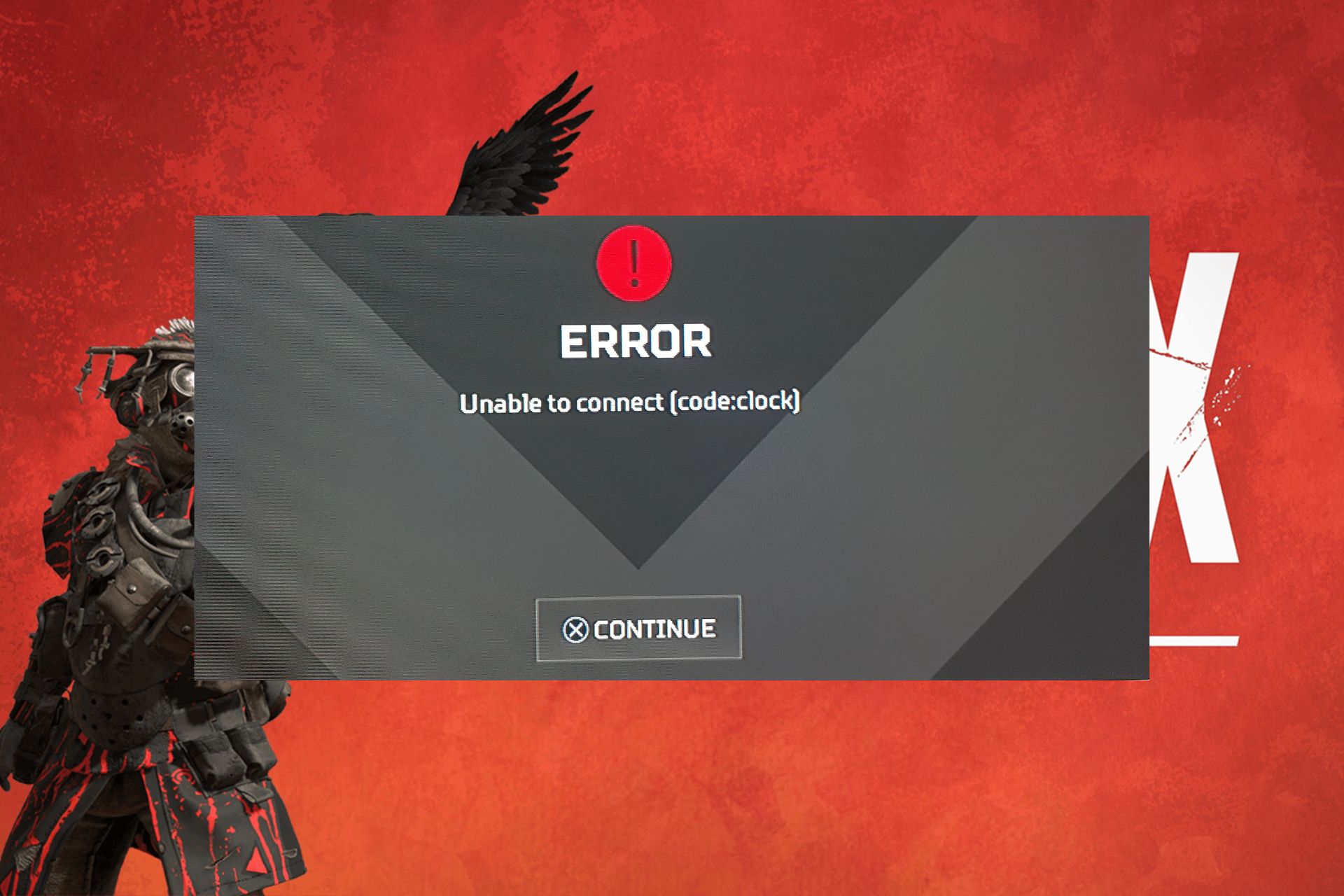
5 Simple Ways to Fix the Apex Error Code Clock

Apex fanatics are in for the latest headache as code Clock appears on your screen when you’re trying to connect.

When you’re unable to connect to the game server, especially after a long wait time, it probably has to do with an overloaded server or maintenance issues. It is also possible that your internet connection dropped at some point or there’s a time synchronization issue.

How do I fix Apex error code clock?

1. Run the game as administrator

  1. Press the Windows key + S keyboard shortcut to open the search tool. Enter Apex Legends as the search keyword. Right-click it and select Open file location.
  2. Next, right-click the Apex Legends EXE to select Properties.
  3. Click the Compatibility tab then select the Run this program as administrator setting and select the Disable fullscreen optimizations option.
  4. Click the Apply option and press OK to exit the window.

Before you relaunch the game, ensure your internet speeds are optimal, you’re running the latest version of Apex, and all drivers are up-to-date.

2. Synchronize Windows Time

2.1 Restart the Windows Time service

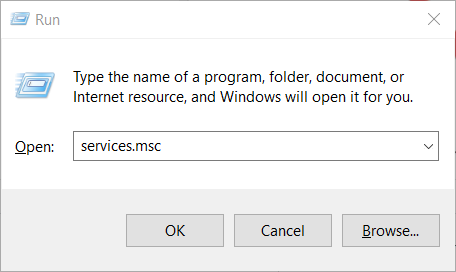
  1. Press the Win + R keys to open the Run dialogue.
  2. Execute the below command. services.msc
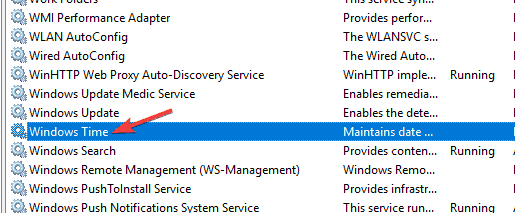
  3. On the right side, locate the Windows Time service and double click on it.Windows Time service not installed
  4. Under Startup type, select Automatic.
  5. Also, click the Start button.
  6. Click Apply and OK to save changes.

Over time, your system’s clock may steer away from the correct time and become inaccurate even by a few seconds or minutes. This can be pinned on deteriorating hardware or third-party software.

If such discrepancies are registered and are contributing to errors like the Apex clock code error, restarting the service can fix this issue.

2.1 Force a time sync

  1. Click on Start.
  2. Search for Command Prompt and run it as administrator.Command prompt
  3. Execute the below commands one by one. net stop w32time w32tm /unregister w32tm /register net start w32time w32tm /resync
  4. Restart your PC.

There may be a mismatch between your system clock and the game servers which is causing the Apex error code clock. Forcing a time sync may potentially resolve the issue and get you connected.

2.3 Switch to a different server

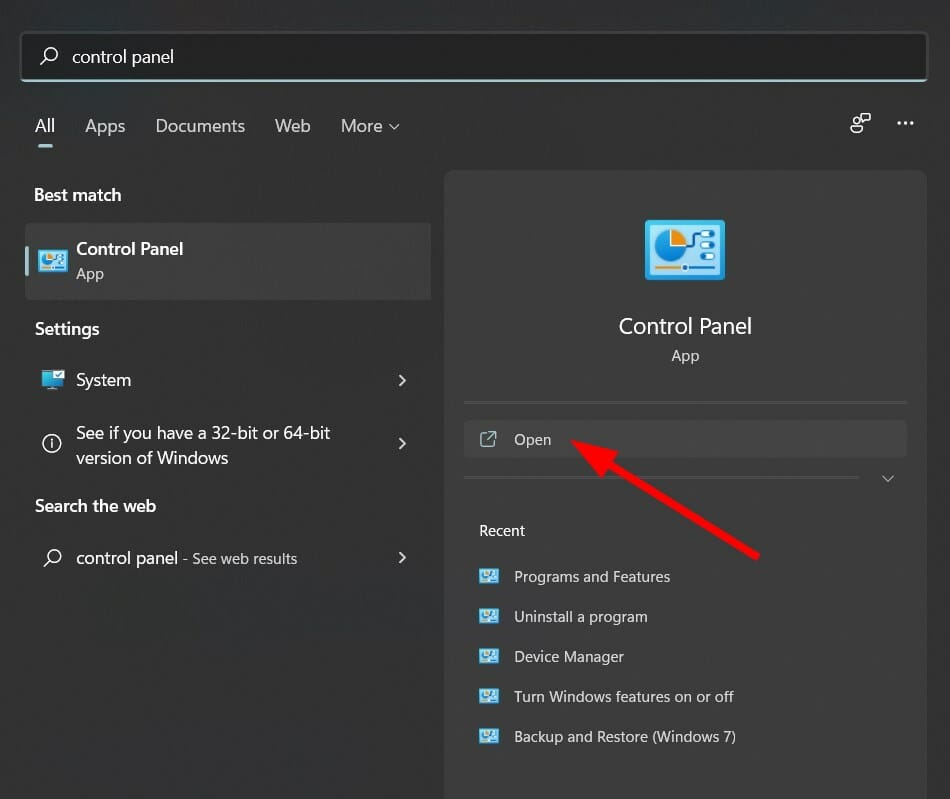
  1. Open the Start menu.
  2. Search for Control Panel and open it.control panel
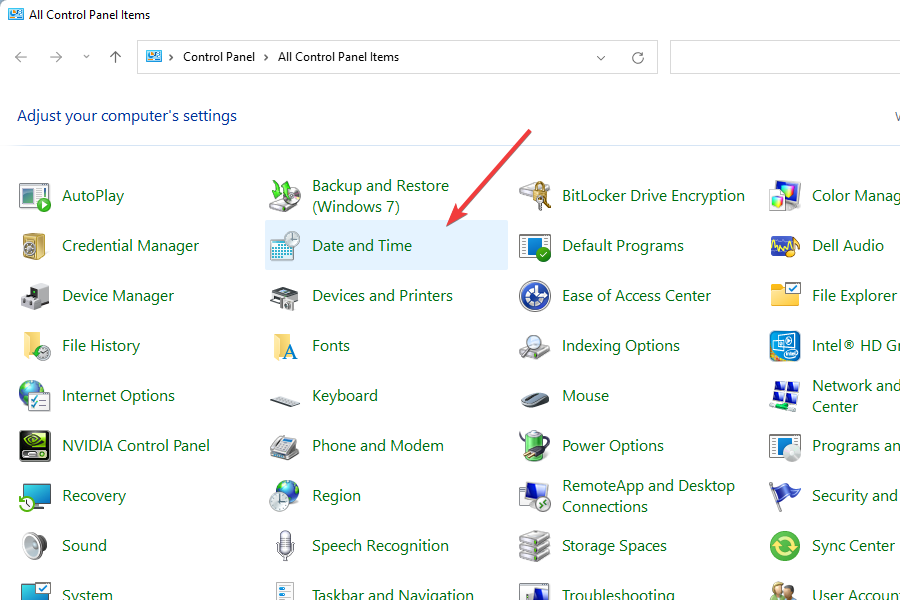
  3. Click on Date and Time.open date and time to from control panel
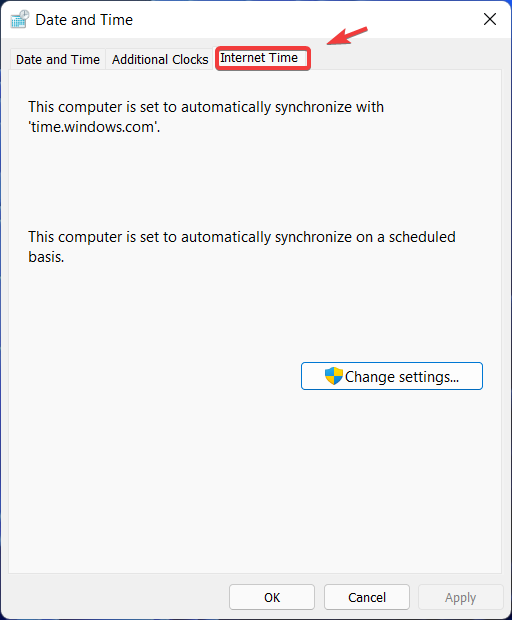
  4. Switch to Internet Time.Internet Time tab
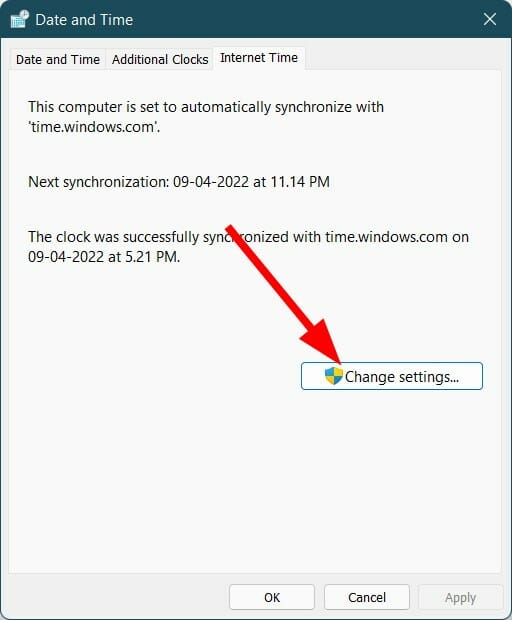
  5. Click on Change settings.
  6. Select time.nist.gov as the Server and click the Update now button.

Although time servers are almost always identical, some offer better synchronization. This is especially true if one server is facing network issues, instability or congestion. A switch can offer better stability and hence better gameplay.

3. Clear game cache

3.1 Clear Apex cache

  1. Press the Windows + R to open the Run dialog box. Type %ProgramData%/Origin in the text field.
  2. Next, in the opened directory, delete all the folders except for the LocalContent folder.
  3. Then, open the Run command dialog box again. Type %AppData% in the text field, and clear the  Origin folder.
  4. Alternatively, open the Run command dialog again, and type %userprofile% in the box.
  5. Open the AppData folder, navigate to the Local folder, and delete the Origin folder.
  6. Restart your PC.

3.2 Clear Steam cache

  1. Press the Windows + R to open the Run dialog box. Type %ProgramData%/Origin in the text field.
  2. Next, in the opened directory, delete all the folders except for the LocalContent folder.
  3. Then, open the Run command dialog box again. Type %AppData% in the text field, and clear the  Origin folder.
  4. Alternatively, open the Run command dialog again, and type %userprofile% in the box.
  5. Open the AppData folder, navigate to the Local folder, and delete the Origin folder.
  6. Restart your PC.

If synchronization to game servers cannot happen because of corrupted data, clearing cache may help resolve this issue. In future, since you already know Apex Legends is a CPU-hogger, you can make it a point to clear cache regularly.

4. Repair game files

  1. Press the Windows key, type ea, and click Open.
  2. Click My Collection from the left pane.
  3. Locate Apex Legends and click the three dots icon to open Settings.installed files - repair the files -  apex legends memory could not be read
  4. Choose Repair.

Repairing game files may also help with other like errors like the code:clock in Apex.

5. Contact support

If there’s no luck with any of the above solutions, reach out to EA support. They will be able to offer expert assistance and clarify whether the Apex error code clock is a server-side issue or maintenance activity.

Further, they may also be able to give a timeline for the expected downtime. If not, a support assistant may be able to take you through troubleshooting steps you’re yet to try and hopefully get you playing again.

There may also be instances where Apex is not using the GPU, so don’t hesitate to check out our expert article to address this issue. For other Apex server-related errors, check out our detailed guide for more tips.

Have you encountered the Apex error code clock before? Is there a solution that helped you missing from this list? We’d love to hear about it. Drop us a line below.

Xbox 2404.240314-2000 brings Soundboard Audio in Discord & improved search in Microsoft Store

Xbox Update Preview was recently released, and the version was upgraded to 2404.240314-2000 for Xbox Insiders enrolled in Skip Ahead, Alpha, Beta, and Delta channels. The update introduced two new features and made several improvements.

Here are the features introduced mentioned:

New Features and Experiences

We have exciting news! Beta users can expect something new coming to their Xbox Update Preview.

Discord Voice – Soundboard Audio

Xbox players who have joined Discord Voice will now be able to hear soundboard audio from others in the channel or call. A mute button for soundboard audio can be found in the Discord Voice options in the Guide. At this time, you cannot trigger soundboard audio from the console.

Microsoft Store – Improved Search

Today, a new search experience enhanced by AI is available to a random selection of players. This experience provides improved results and greater flexibility, allowing you to search for any feature or criteria you can imagine, including concepts like “cozy games” or “arcade racers.” To get started, launch the Microsoft Store, and try searching for something new!

We want your feedback on this new experience! If you notice anything unexpected or see results that are not quite what you were looking for, please let us know by filing feedback with Report a Problem.

  • Note: In the new experience, you’ll see a “New” tip just below the search bar.

Settings – Access Restrictions

We have added two new access restrictions options for installing and uninstalling games and apps. To find them, navigate to Settings > System > Access restrictions.

Here are the fixes mentioned in the changelog:

Fixes Included

Thanks to all the great feedback Xbox Insiders provide and the hard work of Xbox engineers, we are happy to announce the following fixes have been implemented with this build:

System

The release notes also mentioned the known issues previously mentioned with the update released on March 14, 2024, including audio and networking issues. They said that Xbox engineers are working on them, and it might take some more time to fix these problems.

The guide also mentioned reporting the issue or providing feedback using the Report a Problem option. For more support, visit the community subreddit.

All the changes will eventually be released to the Stable channel. We can expect to use them in a month or so.

But if you want to experience all the new features before general availability and become a part of the Xbox Insider program, visit the official Insider program page on Microsoft.

Are you part of the Xbox Insider Program? If so, please share your experience with our readers in the comments below.

Here’s what NOT to do when updating a Razer Blade’s firmware

Updating your firmware comes with certain risks, and if you don’t perform it properly you can cause damage to your PC or even file loss.

This is exactly what some users experienced with their Razer Blade 14, so let’s take a closer look at this case and see what went wrong.

Do the following to avoid bricking your Razer Blade 14 during a firmware update

Updating your firmware is important, but if it goes wrong, you might find yourself in trouble, and this is exactly what happened to one unlucky Reddit user. Here’s how he described his issue:

I wanted to update the firmware so went to razer’s official website and downloaded the latest firmware updater.

I installed it alongside synapse and proceeded with the update. It said that the update was successful but after the restart the second attached image appeared saying new CPU is installed and that fTPM is corrupted. I hit N but the system restarted and gave me the same screen so l hit Y and it boot windows but my windows hello was gone.

Luckily for him, this was expected because when you update the laptop firmware, the fTPM that is inside the firmware sometimes gets changed as well, and it needs to be reset to work.

When you updated your laptop’s firmware the fTPM changed so the fTPM needs to be reset to generate a new TPM key.

You’ll need to sign in with your password and reset the PIN. Before you do that make sure that you have pressed “Y” during that warning screen in the second picture to reset the TPM key, otherwise, you might have trouble resetting the PIN.

This can fix the problem with the PIN, but as users write, updating firmware can also affect BitLocker:

Security features that rely on the TPM key like BitLocker will stop working because they were set up with the old key and you’ll have a new key now.

When fTPM changes, you won’t be able to bypass BitLocker, and you’ll likely have to use your recovery key to get access, so maybe disabling BitLocker before the firmware update can help you.

It’s important to mention that some updates will affect TPM while others won’t, so always read the release notes and prepare yourself properly.

It depends on the bios update. Some clear your TPM and others don’t. It’ll usually mention it in the release notes if it will.

Some users are blaming Razer for this problem, saying that this is a common glitch with Razer software and devices:

Just don’t use razer software, I stopped when they rolled out the update which disabled razers’ 7.1 spatial sound drivers on headsets that were marketed to support them

Speaking of firmware new Alienware AW3225QF firmware was just released, and it fixes various issues, so be sure to get it.

Overwatch developer update: No BattlePass needed and new Mythic skins introduced

Good news for Overwatch 2 heroes fans: In the first Overwatch 2 developer update 2024, Aaron Keller, the game director, said that starting with the upcoming hero Venture, Overwatch 2 heroes will no longer need a Battle Pass at launch, and this includes all previous Overwatch 2 heroes. Moreover, the new heroes will be available for all gamers to play simultaneously.

With this, the company also introduced a new method to unlock and upgrade Mythic skins in Overwatch, intending to empower players to choose which Mythic skin to work towards.

In addition, with season 10, you will get a Mythic Shop, enabling you to acquire Mythic skins even from previous seasons you missed.

Furthermore, various new maps are under development, with some scheduled to launch with the upcoming seasons of the game, like a new Push map, Runasapi (Peru), coming in Season 11

Blizzard Entertainment is taking feedback on current maps like Havana so that they can improve them for the upcoming seasons.

Most game enthusiasts have asked developers to devote time to live maps while they focus on making new ones, and Aaron Keller promised to work on this.

He also mentioned that the developers would be working on Colosseo in Season 11, and after Season 12, we can expect them to be focused on reworks on the existing maps, like Dorado, Havana, Circuit Royal, and Numbani.

In the update, Overwatch also mentioned a new game mode, Clash, and informed us that we can expect two new maps to be released later this year.

Aaron Keller said they will run a limited-time Clash playtest on Hanaoka at the beginning of Season 10.

With all the information about the upcoming seasons and changes we can expect, the game director mentioned that the Overwatch community is on track to cross 100 million players by next season.

He mentioned that we, the gamers, are the main focus. The developers at Overwatch create the game around us, and feedback is used to improve the game with every season.

If you want to learn more about it in detail, check this video:

With this promise and dedication, Overwatch 2 seems to have won hearts, and its ability to reach 25 million players just after its launch in 2022 is proof of this.

These new changes are probably targeted at the regular players, but possibly for the ones who have yet to try the game or get the old players on board again.

What are your thoughts on the matter? Share your opinions with our readers in the comments section below.
343 Industries is dropping hints that Halo 7 is in development and it might be released soon

The world has yet to see an official announcement on the upcoming Halo 7 video game, which at this point everyone is wondering about. While we reported about a potential Halo 7 release date for 2025, back in January, 343 is dropping other hints that the game could actually be in development already.

How so? Well, on X (formerly known as Twitter), Brian Jarrard, Community Director at 343 Industries, announced that the studio is looking for talented people to work on the next Halo titles. While Jarrard doesn’t explicitly mention Halo 7, the future of the Halo franchise automatically includes the title, so it is mostly likely that the studio is already working on it.

It’s been a difficult and heartbreaking stretch for the game industry. If it can be of any help to anyone, please note there are currently open roles here at 343 Industries working on the future of the Halo Franchise (including a few just added today).

Brian Jarrard

343 Industries is currently looking for a Lead Level Designer, Lead Gameplay Designer, Lead Game Designer, Audio Director, Studio Technical Art Director, and Lead Game Systems Designer.

Back in January, several 343 Industries employees revealed on LinkedIn that they were working on a future Halo title, although other details weren’t revealed. However, with this announcement coming from a 343 Industries exec, it’s clear that the future of Halo is in the works.

A possible release date for Halo 7? Well, 2025 seems most likely, and it would be about time, as the last Halo title was released back in 2021.

As we all know, Halo Infinite was released almost 2 years ago, in 2021, 20 years after the first Halo game. The video game was well received, with some even calling it a return to the form for the series. Commercially, it had a lot of success, and by January 2022, a month after its release, Halo Infinite crossed the 20 million players mark.

However, if the team is already working on Halo 7, we should expect some first teasers later this year. Maybe some images, or even a teaser trailer.

Google calls the $271M fine disproportionate, agrees to changes demanded in future negotiations

Google has been hit with a €250 million ($271 million) fine in France due to the way it conducted negotiations with publishers. It was also found to have used news content to train the native chatbot, Gemini, without informing the publisher or authority!

The same French Competition Authority had previously fined Google $500 million for similar violations. France has stringent copyright laws to prevent big corporations from exploiting small publishers.

Google’s response to the fine

In the official blog post, Google confirmed that it would accept the changes recommended by the French competition authority to put an end to the ongoing matter.

The ADLC also demanded changes in the way we negotiate, which we accepted as part of an agreement reached to finally close this file which has been open for too long. We have compromised because it is time to turn the page and, as our numerous agreements with publishers prove, we want to focus on sustainable approaches in order to connect Internet users with quality content and work constructively with publishers.

Later in its response, Google called the fine disproportionate and highlighted the effort it put into the hearing and the negotiations.

But it is also important to note that we consider that the amount of the fine is disproportionate in view of the breaches noted by the ADLC. It does not take sufficient account of the efforts we have made to respond to the various comments – in an environment where it is very complicated to define a course of action when we cannot anticipate a precise direction.

Google also shared the enforced negotiation methodology, which it calls non-discriminatory and transparent.

Lately, tech giants have been cautious about their operations in the EU, especially after the Digital Markets Act (DMA) came into force. Microsoft allowed users to uninstall Edge, and Apple let them change the default browser on iOS.

Do you believe the €250 million fine imposed on Google is justified? Share with our readers in the comments section.

Forza Horizon 5 Deluxe has a 50% discount, but you have one day to get it before the deal expires

If you’re looking to play some Forza Horizon games, then you should know that the fifth title of the series, Forza Horizon 5, currently has a 50% discount on Steam.

The purchase costs around $40 and will get you the Forza Horizon 5 Deluxe version of the game, which includes a car pass, 42 new cars (one car will be introduced each week), and 8 Formula Drift Cars available right from the start.

The Deluxe edition also comes with an expanding garage that will see users customize their cars while driving the vast Mexican roads.

You’ll want to try this game if you haven’t done so far: it has the biggest map of the entire Horizon series, and its open-world approach to the racing genre has made it a gem of the franchise. You’ll be able to drive through jungles, hills, and mountains, to desserts, modern cities, and ancient places.

Plus, gamers have the freedom to explore the game as they wish: from multiplayer races to single-player exploration or completion of the campaigns, there is a lot to do in this game.

Forza Horizon 5 Deluxe can be played on Xbox One, Xbox Series S, and X, as well as Windows devices, for half the price, for a limited time. On Steam, for instance, gamers can still get the game at $39.99 price for the next 29 hours, at the time this article is released.

The game was available at this price on Amazon, as well, earlier this week, but that deal is gone. Steam has shortly followed up with an identical deal that also sees major discounts for the other editions of the game.

For example, you can also get the Premium edition at a 50% discount, or you can get the Ultimate Driving Bundle at a 62% discount, as well.

Speaking of discounts, you can also get a lifetime license of Windows 11 Pro, at just $30, a staggering discount of 80%.

It’s a good week for taking advantage of these discounts, right?

You access the special Steam offer here.

Get ready for more visual clutter with new Windows 10 lock screen cards

Microsoft is focusing its efforts on Windows 11, and the previous version isn’t getting any new features, or so we thought.

The latest update brings some changes to the lock screen allowing you to see various information at a glance.

This preview update brings MSN information cards to the lock screen

KB5035941 update for Windows 10 has been released to the Release Preview channel and according to MSPowerUser, it brings more information to your lock screen.

As spotted by PhantomOcean3 on Twitter, you now have additional cards on your lock screen.

According to Microsoft, this feature is slowly rolling out and it might not be available to everyone just yet. However, you can enable it with vivetool if you’re eager to try it.

As for available information, you’ll see current weather, traffic, market information, and sports news.

Unfortunately, it’s not possible to customize which cards you want to show, since all four of them are available as Weather and more.

While it’s great that Windows 10 is still getting some new features, this feature in its current form doesn’t feel too useful since it doesn’t allow you to customize or hide the cards.

Hopefully, that will be changed before it’s released to the public. We also have to mention that this update will show a nag screen asking you to upgrade to Windows 11, so be prepared for some shameless promotion if you choose to install it.

How to View & Download Microsoft Teams Version History

Microsoft Teams has evolved but even so, there are times you may need to roll back to a previous version. This may be occasioned by the instability of the app or frequent app glitches.

If you’re looking for a particular version with specific features, you’ll need the version history so that you can download that specific version.

How do I access Microsoft Teams version history?

1. Access the release notes

Microsoft keeps a database of release notes for each version of Teams released. The notes contain changes, updates, and new features from the previous version. After examining the release notes, you can now proceed to note down the version number.

Microsoft also has a dedicated site with the version history complete with the release date and version number to make it easier to download previous versions.

Once you’ve settled on the version you wish to download, you can proceed. Unfortunately, Microsoft does not keep older versions of Teams on their website. You can only access the preceding version but for any other older version, you’ll need to download from third-party sites.

2. Download the desired version

Note icon NOTE
WindowsReport is not affiliated with the Uptodown.com site. Do your due diligence and ensure you have an antivirus before downloading any files from this site.
  1. Launch your web browser and navigate to the Uptodown site.
  2. Scroll down and click on Older versions.
  3. With the version number you noted down in the version history, CTRL + F then paste it to locate it faster.
  4. Wait for the download to complete then follow the on-screen prompts to install Teams.

Pros and cons of reverting to older Teams version

Pros

  • Stability: Most updated versions have stability issues because they come with new features that are yet to be tested by the general public. Reverting to an earlier version restores stability.
  • Compatibility: Newer updates sometimes upset the status quo and birth compatibility issues with devices especially older hardware. Downgrading ensures continued usage.
  • Retain functionality: Upgrades aren’t always welcome as some users may prefer to retain the older UI, features, or functionalities of an older version. Rolling back allows you to keep using these preferred functionalities.

Cons

  • High-risk exposure: Newer versions are patched with security updates so downgrading exposes your device to potential vulnerabilities.
  • Compatibility and support: Older versions may lack support or be incompatible with your hardware. You may also be unable to communicate effectively when using different versions.
  • Data loss: You risk data corruption and loss when downgrading especially since the version is not from Microsoft.

Ultimately, viewing the Microsoft Teams version history should be for information purposes and not to downgrade. Microsoft Teams not working or any other issues you may be experiencing with the latest version can usually be resolved by a restart, repair or reinstallation.

For advanced troubleshooting, consider reaching out to Microsoft directly before opting to downgrade. However, if you must roll back, ensure you back up any critical information to minimize the risk of data loss or security vulnerabilities then upgrade as soon as possible.

Alternatively, you can install two Microsoft Teams apps to avoid losing data. Hopefully, you’re now in a better position to assess the changes within Teams and make an informed decision.

Have you downgraded your Teams app before? Would you say it helped enhance your communication? Let us know in the comment section below.

Microsoft’s newest Garnet will make your Windows run faster than ever before

Microsoft announced the release of Garnet, a new cache-store system that effectively makes every platform and service it integrates with run faster, by deploying new cache-store methods to deal with cache-related issues and algorithms.

Garnet addresses a series of limitations of the current methods, and it is capable of further optimizing the processes that deal with storing cache data resulting in a faster performance overall.

We’re not talking about a specific platform, but a variety of them, and the Redmond-based tech giant says Garnet can be integrated into Windows, and its Web Experiences Platform, such as Copilot, or Microsoft Edge, but it can also make software developing-oriented platforms, such as  Azure Resource Manager, and Azure Resource Graph, run faster.

The Redmond-based tech giant made Garet open-source (Microsoft also made Retina, another Azure service, open-source, as well) and it is available to download and integrated with applications on GitHub.

According to Microsoft, Garnet offers multiple benefits compared to the legacy cache-store methods, including, but not limited to:

  • Orders-of-magnitude better server throughput (ops/sec) with small batches and many client sessions, relative to comparable open-source cache-stores.
  • Extremely low single operation latency (often less than 300 microseconds at the 99.9th percentile) on commodity cloud (Azure) machines with accelerated TCP enabled, on both Windows and Linux.
  • Better scalability as we increase the number of clients, with or without client-side batching.
  • The ability to use all CPU/memory resources of a server machine with a single shared-memory server instance (no intra-node cluster needed).
  • Support for larger-than-memory datasets, spilling to local and cloud storage devices.
  • Database features such as fast checkpointing and recovery, and publish/subscribe.
  • Support for multi-node sharded hash partitioning (Redis “cluster” mode), state migration, and replication.
  • Well-tested with a comprehensive test suite (thousands of unit tests across Garnet and its storage layer Tsavorite).
  • A C# codebase that is easy to evolve and extend.

In a blog post, Microsoft details the struggles of coming up with an innovative way of dealing with cache-store, including the possibility of developing a method that offers faster optimization and would consume fewer resources.

The Redmond-based tech giant says it has been working on Garnet since 2021, and based on their previous work, the open-source  FASTER embedded key-value library, they managed to come up with a new remote cache store that had all the necessary features to replace existing cache stores.

Most of the current technology, and Windows devices should be able to make use of Garnet to provide a faster experience to users, but Microsoft is also hoping that the open-source community will contribute to making Garnet even better than it is now.

You can read the full blog post here.

Microsoft plays defense while pointing fingers at Google’s data collection to distract the EU regulators

Microsoft has told European antitrust regulators that Google has vast data collection capabilities and possesses AI-optimized chips, which gives the search engine company a competitive edge.

The Redmond tech giant also mentioned that tools like ChatGPT and Gemini can produce human-like content in response to prompts; however, there is a huge concern about misinformation and copyright violations.

In its report to the commission, Microsoft said:

Today, only one company – Google – is vertically integrated in a manner that provides it with strength and independence at every AI layer from chips to a thriving mobile app store. Everyone must rely on partnerships to innovate and compete.

The Redmond tech giant mentioned that Google’s investments in AI semiconductors will keep it ahead of the game for the foreseeable future.

Moreover, with the vast reserves of data sourced from its search engine and YouTube, the video platform, the company can train large language models to empower Gemini.

Microsoft wrote:

YouTube provides an unparalleled set of video content; it hosts an estimated 14 billion videos. Google has access to such content; but other AI developers do not.

The report also said with Google Assistant and Apple’s Siri, Google and Apple have the edge over the AI companies, and they are

well-positioned to evolve and leverage their respective existing voice assistants into leadership positions in generative AI. New entrants and competitors of Google and Apple will not enjoy the same advantages.

On these claims, Google also said:

“We hope the Commission’s study will shine a light on companies that don’t offer the openness of Google Cloud or have a long history of locking-in customers – and who are bringing that same approach to AI services.

Antitrust regulators in the European Union have inspected Microsoft’s investment of over $10 billion in OpenAI, which they believe could lead to market dominance and anticompetitive behavior.

In response, Microsoft is addressing these concerns about the new partnerships made between tech companies like itself and startups like OpenAI. It further explained that their motive is not to kill the competition but to foster innovation within the tech industry.

Microsoft said:

All of these startups relied on different forms of investments and partnerships that enabled them to enter and expand in the space.

Encouraging pro-competitive partnerships in the AI space is an effective way to prevent companies from becoming vertically integrated in a manner that would result in an anti-competitive advantage.

Well, Microsoft is trying to make the EU regulators believe that the investments made by the tech giant are for innovation, collaboration, and consumer welfare, but at the same time, pointed its finger toward Google as it has a trove of data as its call. Doesn’t seem fair?

What are your thoughts on the matter? Share your opinions with our readers in the comments section below.

Microsoft hires DeepMind Co-founder Mustafa Suleyman, but he reportedly wasn’t the first choice

Mustafa Suleyman, a pioneer in the field of artificial intelligence, has joined Microsoft as the CEO of Microsoft AI.

Suleyman took to X (previously Twitter) to share the update. His work at Microsoft will focus on consumer AI products and research, primarily Copilot, Edge, and Bing. These three were Microsoft’s first foray into AI.

Suleyman confirmed that Karén Simonyan and a few other teammates from InflectionAI, his latest venture, will also be joining the team at Microsoft. InflectionAI will now be headed by another CEO, who will be appointed soon. For the unversed, InflectionAI is the lab behind Pi, a highly personalized chatbot.

Satya Nadella initially wanted Sam Altman to head Microsoft AI

As per reports in Business Insider, Suleyman wasn’t Microsoft’s first choice. Nadella instead wanted Sam Altman, CEO of OpenAI, to be at the helm of the company’s AI push.

This was reportedly when Sam Altman was ousted from OpenAI for a brief period. Nadella even hired Altman to lead a new advanced AI research team, but that, too, never really took shape.

Soon, Altman was reinstated as the CEO. Reports tell us, Satya Nadella had a significant role to play in Altman’s return.

Given Microsoft’s deep interest in OpenAI, it didn’t matter much where Sam Altman worked as long as he was onboard. At the time, Satya Nadella, in an interview with Bloomberg, said,

We really want to partner with OpenAI, and we want to partner with Sam, and so irrespective of where Sam is, he’s working with Microsoft.

The sequence of events does highlight Microsoft’s intent to get someone popular to lead the AI team. And hiring Mustafa Suleyman, the brains behind DeepMind and InflectionAI, suits that purpose!

Besides, Microsoft now has both OpenAI and Mustafa Suleyman. Its multi-billion dollar partnership with OpenAI allows it to leverage the latter’s technology. And with Suleyman leading the AI division, it could compete with long-time rivals like Google.

Soon after Suleyman and Karén joined Microsoft, Satya Nadella sent out a memo to employees.

I’m very excited to announce that Mustafa Suleyman and Karén Simonyan are joining Microsoft to form a new organization called Microsoft AI, focused on advancing Copilot and our other consumer AI products and research.

What do you think of Mustafa Suleyman joining Microsoft and its effects on the AI space? Share with our readers in the comments section.

Boost your browser experience: Meta Quest Browser extension support is coming

Meta Quest has been present for years on the market, and while it is a solid device, its web browser has been uneventful, just like any other VR browser.

The company is determined to change that, and it’s going to do that by adding extension support to Meta Quest Browser.

Extension support is in beta, but we might see it available soon

Browser extensions are an essential part of a web browser since they allow users to customize their browser and enhance it with additional functionality.

While VR browsers might be lacking in this regard, the Meta Quest Browser is looking to change that according to Mixed Reality News.

With the beta version 32.1 users can now finally install browser extensions to Quest Browser. While this sounds great, currently only the LastPass extension is available.

However, if this feature takes off, we expect to see other extensions available as well. This feature is available only to selected users, but hopefully, we should see it available someday in the future.

Meta also introduced its Meta Quest+ service that works as a Game Pass, so if you haven’t already, be sure to give it a try.

How to Use Microsoft Outlook Reactions on Emails

When sending and receiving emails on Outlook, not every message requires a written response. Sometimes a quick reaction will do and here’s the rundown on how to use Microsoft Outlook reactions.

How do I use reactions in Outlook?

  1. Launch your Outlook desktop app or on the web.
  2. Click and open an existing email message.
  3. On top of the floating button of the message, you shall see a reaction button and once you click on it, several reactions will appear.
  4. Select a reaction to respond to the message and it will appear next to your message at the right end.
  5. You can change your reaction by clicking on it again to deselect then respond with another.

You’re also at liberty to choose a skin colour for your thumbs-up reaction. Simply click on your reaction and the various options will appear.

How do I disable Outlook reaction notifications?

  1. Log into your Outlook account via web.
  2. Locate the Settings icon and click on it.
  3. Go to General>Notifications.
  4. Uncheck the Notify me when someone reacts to my message box and hit Save.

If you don’t want to get notified every time someone reacts to your message, quieting the notifications may do you some good. Reactions are mostly used as an acknowledgement for situations like when you receive and play a video on Outlook Microsoft Stream. They don’t need a reply.

However, if you’re looking to add a little bit of liveliness to your emails, perhaps using emojis on Outlook is what you need. Reactions are limited but with emojis, there’s an array of choices that can add that extraness you’re looking for.

For the over-the-top users, GIFs in Outlook may be your thing just use them in moderation as too many and frequent use can be misinterpreted in a corporate setting.

Aside from reactions, you can also set up automatic replies on Outlook whenever you’re away from your desk.

That’s all we had to using reactions in your Microsoft Outlook email. Have you used them before? Would you say they’re effective in communication? Let us know in the comment section below.

Google’s advanced Personal Health LLM will check on your sleep patterns to help you sleep better

Google announced the development of the Personal Health LLM in collaboration with fitness tech company, Fitbit. The two companies are working on the AI model and it will be released in the following months.

According to the tech giant, Personal Health LLM is an advanced AI model capable of coming up with personalized health and wellness profiles for each user. The model can be easily accessed through the existing Fitbit app and will act similar to a digital fitness trainer.

Fitbit and Google Research are working together to build a Personal Health Large Language Model that can power personalized health and wellness features in the Fitbit mobile app, helping people get even more insights and recommendations from the data from their Fitbit and Pixel devices. 

Google

Google envisions the Personal Health LLM as a model that can fit each user’s needs and fitness goals: it will offer highly personalized training sessions, and it will also be able to analyze sleep schedules and sleep patterns to come up with recommendations regarding working out.

For example, this model may be able to analyze variations in your sleep patterns and sleep quality, and then suggest recommendations on how you might change the intensity of your workout based on those insights.

Google

The tech giant incorporated the Gemini AI into the model and it was fine-tuned in a diverse set of health signals from high-quality research case studies, all of them approved by health experts and accredited coaches.

Google also says that the companies are testing the performance of the Personal Health LLM using sleep medicine certification exam-like practice tests, and the models show promising results.

With Personal Health LLM, Google plans to take on Microsoft’s Copilot GPT Fitness trainer, a similar AI model, but with less advanced capabilities. In fact, even though Microsoft Copilot can end up being your fitness trainer, the model won’t be capable of analyzing sleep patterns, and it won’t be able to offer you more than just regular workout suggestions.

However, Microsoft might end up updating its fitness-oriented Copilot to do that. Until then, however, Google’s Personal Health LLM sounds quite promising.

You can read the full blog post here.