Exclusive: Legion Go’s leaked official skins are grippy, scratch-resistant, and only 0.17 mm thick

We were the first to bring you exclusive images of the new official Lenovo Go handheld console skins, last week when, thanks to our trusted source, we unveiled no less than 5 versions.

Now, we’re bringing you even more details about them: their names, design, and benefits, because there are quite a few perks of wrapping your Legion Go with one of these.

First, let us remind you how these skins look, and thanks to our sources, we now have official names for them. Without further ado, here we go:

The first one is called Luna Grey: as we mentioned before, this one has a quiet design, nothing fancy, but quite good-looking. If you’re a gamer who doesn’t like attention, this one is for you.

Coming right up is the Circuit official skin: chipset-themed skin that would suit Legion Go users who are always on the run.legion go official skins

The third of the Legion Go official skins is the Legion Hero, a gorgeous red and blue anime-inspired skin that looks quite impressive, as you can see below. legion go official skins

Universe is another official skin, and this one will make your Legion Go stand out everywhere you take it.legion go official skins

And finally, the last of these official Legion Go skins is White, which could help you identify the console way more easily if you ever lose it. legion go official skins

According to our sources, these skins are made up of TPU (Thermoplastic polyurethane), which is a plastic known for its resistance to grease, oil, and abrasion, as well as its elasticity and shock absorption. The official skins have a thickness of just 0.17mm (the ones sold by third-party manufacturers are ~ 0.40 to 0.63 mm thicker), making them ultra-sleek at touch.

Why does it matter? Well, the TPU design will make them perfect for when you use the Legion Go console on the go, as, you know, it’s intended to be used. But we all know that these situations often put our devices at risk for scratches, broken screens, and so on.

These skins not only offer additional protections when taking the console anywhere, but their slim design will make them perfect for gaming marathons. The Legion Go console will feel comfortable in your hands, for hours.

With these skins, Lenovo is trying to make the Go a bit more rugged. Maybe the users’ complaints finally made sense for the company and the original material choice wasn’t the best one, after all; at least not for such a big handheld.

It’s also worth mentioning that each of the 5 official Legion Go skins is a node to the fervor and intensity of gaming, and users with different personalities have more than enough options to choose from.

However, I don’t see a world in which the white skin doesn’t get full of smudges after the first week of usage, despite its wear-resistant capabilities. But we’ll just have to wait and see if Lenovo’s approach is better than the usual skins we can already find on the market.

And, if they sell well, the tech giant might be releasing additional skins in the future. Should we expect skins for Lenovo laptops as well? That only time can tell.

However, what we can tell you, for now, is that these official Legion Go skins will come with an easy-to-use installation kit, a scrapper card, a cleaning cloth, wet wipes, and finally, the skins, themselves: a top and bottom strip, a trackpad, skins for the right and the left controllers, and skins for the kickstand, and for the back.

We don’t have any info about a release date, or a price, but it will mostly cost around $40, and they will be released soon in the US and Canada regions.

Will you get one of these?

Equall brings SauLM-7B, a tailored AI-based solution for legal problems

In the past, we have had instances of AI-based chatbots cooking up legal precedents that never existed, highlighting how the available options didn’t meet the standards of the legal industry. Mistakes in court filing can prove catastrophic for both lawyers and clients!

As a result, the release of SauLM-7B, an open-source large language model (LLM) curated for legal applications, by Equall is turning a lot of heads.

You can simply present your legal problem, and the AI-based text generator will respond, as is the case with any chatbot. The only difference, it’s tailored for the legal side of things!

In an interview with The Register, a spokesperson for Equall said,

LLMs and more broadly AI systems will have a transformative impact on the practice of law that includes but goes beyond marginal productivity. Our focus is on creating end-to-end legal AI systems guided and controlled by lawyers.

The team further adds how SauLM-7B will prove more effective at legal problems than generally available options.

Our belief — based on data and experience — is that systems specialized for the legal domain will perform better than generalist ones. This includes greater precision and more useful tools to help lawyers focus on what they enjoy most and do best, which is to exercise legal judgment and help their clients with advice.

The team, after evaluating SauLM-7B with lawyers, confirmed that it performed far better than regular AI-based chatbots, didn’t provide as many inaccuracies and was less prone to hallucinating (cooking up concepts) when talking about specific legal topics.

Since it’s in the early stages, we recommend cross-checking any information or suggestion provided by SauLM-7B with a legal expert. Law is a complex and ever-evolving field where recent developments play a critical role. So, it’s imperative that you verify things!

If SauLM-7B, named after the popular show Better Call Saul, turns out to be as accurate and effective as advertised, it will be a game-changer and will aid the less fortunate who can’t employ the services of a lawyer.

What do you think about it? Share with our readers in the comments section.

NVIDIA is limiting your GPU power on Linux laptops, users claim

Linux is a great alternative for Windows, for the most part, but the system has its share of driver and compatibility issues.

Speaking of which, there are claims that NVIDIA is reducing your laptop’s performance on Linux. This seems like a serious issue, so let’s see why this happens.

NVIDIA is reducing your laptop performance on Linux, allegedly

According to users on Reddit ever since version 530.41, NVIDIA has been preventing some laptop GPUs from achieving their maximum power.

In addition, the nvidia-smi command is also removed, thus preventing users from manually adjusting the power limit.

This is a problem since your device will be underclocked, and not utilize its maximum power, thus reducing your performance.

This bug has been reported on GitHub since 2023, and it hasn’t been fixed for a year.

You can test if your device is affected

You can test if your device is affected by connecting it to a power outlet and running nvtop

The command will display your current GPU power as well as the maximum allowed power. If this value is different from the maximum TDP in your laptop’s hardware specifications, it means your device is affected.

Alternatively, you can use sudo nvidia-smi -q -d POWER

With this command, you’ll get the GPU’s maximum power limit and its “default” power limit. If the second value is lower than the first, your device is affected.

Is there a way to fix this issue?

There are partial workarounds available, that partially address the issue. You can enable dynamic boosting that will make your GPU draw more power with the following command:

sudo systemctl enable --now nvidia-powerd.service

You can also roll back to an older driver and use the following command to set the power limit manually: sudo nvidia-smi -pl your-power-limit-in-W

Many users are affected by this, and some reported this issue only in Ubunutu:

I had this issue. For some reason, the drivers were unlocked all the way TDP-wise in Fedora, but not Ubuntu.

It was a 4060 laptop, and under Ubuntu I had my GPU capped at 80W out of the 140W maximum.

As for affected cards, this issue appears only on the 20, 30, and 40 series, according to users:

The workaround will only work on Ampere or later cards. I have not seen any 10 series users complaining about this anywhere. All of them so far have been 20, 30 and 40 series users. But it is pretty easy to check if you’re affected.

As for the drop in performance, users reported that this issue caused them to lose about 20% or more of maximum power.

NVIDIA has released Game Ready Driver 551.76, but unfortunately, it doesn’t address this issue. We just hope that NVIDIA will address, or at least acknowledge this issue soon.

WordPress plugin vulnerability exploited: 3,300 sites compromised so far

Hackers have once again exploited a vulnerability in outdated versions of the Popup Builder plugin of WordPress sites. According to PublicWWW, this malicious code has infected 3300 websites by this new campaign.

The flaw used to attack the websites is CVE-2023-6000, a cross-site scripting (XSS) vulnerability affecting Popup Builder versions 4.2.3 and older. The information was disclosed first in November 2023.

This vulnerability was also used in the Balada Injector campaign and infected 6700 sites, which indicates site administrators haven’t taken the necessary actions to prevent it from happening.

Sucuri was the first one to report the new campaign and the code injections related to it are found in 3329 WordPress websites.

When Sucuri used their remote malware scanner, they found the malware on more than 1,170 sites. The blog post also mentioned:

These attacks are orchestrated from domains less than a month old, with registrations dating back to February 12th, 2024:

  • ttincoming.traveltraffic[.]cc
  • host.cloudsonicwave[.]com

Details of Injection

The attacks leveraged a known vulnerability in the Popup Builder plugin to infect the Custom CSS or Custom JavaScript section of the WordPress admin interface. However, the malicious code is internally stored in the wp_postmeta database table.

The main feature of the injected code is to work as event handlers for several Popup Builder plugin events, including sgpb-ShouldClose, sgpbWillClose, sgpb-ShouldClose, gpb-DidClose, sgpb-WillOpen, sgpbDidOpen and sgpb-ShouldOpen.

Now, when a pop-up opens or closes or if a specific action is performed, the malicious code will be executed along with it.

However, Sucuri didn’t mention the exact actions of the code, but one of the main aims of the injections could be redirecting site visitors to an infected website or malicious destinations, including malware-dropping sites, phishing pages, etc.

In some instances, the “hxxp://ttincoming.traveltraffic[.]cc/?traffic URL was seen injected as a redirect URL parameter for a contact form-7 pop-up.

This injection retrieves the malicious code snippet from an external and injects it into a web page’s header, which enables its execution by the browser.

Mitigation and removal

As mentioned earlier, the attack originated from incoming.traveltraffic[.]cc and host.cloudsonicwave[.]com, so the first step is to block these domains.

Next, if you are using the Popup Builder plugin on your website, update it to the latest version, which is 4.2.7. This will fix CVE-2023-6000 and previous security issues.

According to WordPress statistics, it has 80,000 active sites, which are 4.1 and older versions of Popup Builder, so the number of sites getting infected could go higher.

If your site is already infected, you need to delete the malicious entries from the Popup Builder’s custom sections. Furthermore, scan your site at both client and server levels for hidden backdoors and other possible security issues.

The persistent and stronger malware attacks are a scary reminder for all WordPress users not to use an outdated version of any plugin or tool on the site. Moreover, you should also keep scanning the site and install all the latest security updates as they are available.

What are your thoughts on the matter? Share your opinions in the comments section below.

How to Change Your Profile Picture in Microsoft 365

On any platform, a profile picture lets the person on the other end establish a human connection. With Microsoft 365, once you change your profile picture, it reflects on all its associated apps.

How do I change my profile picture on Microsoft 365?

1. By using your Microsoft account

  1. Navigate to your browser and sign in to Microsoft 365.
  2. On the top right corner, click on your profile picture. If you don’t have one, it will show your initials.
  3. Click on My profile.
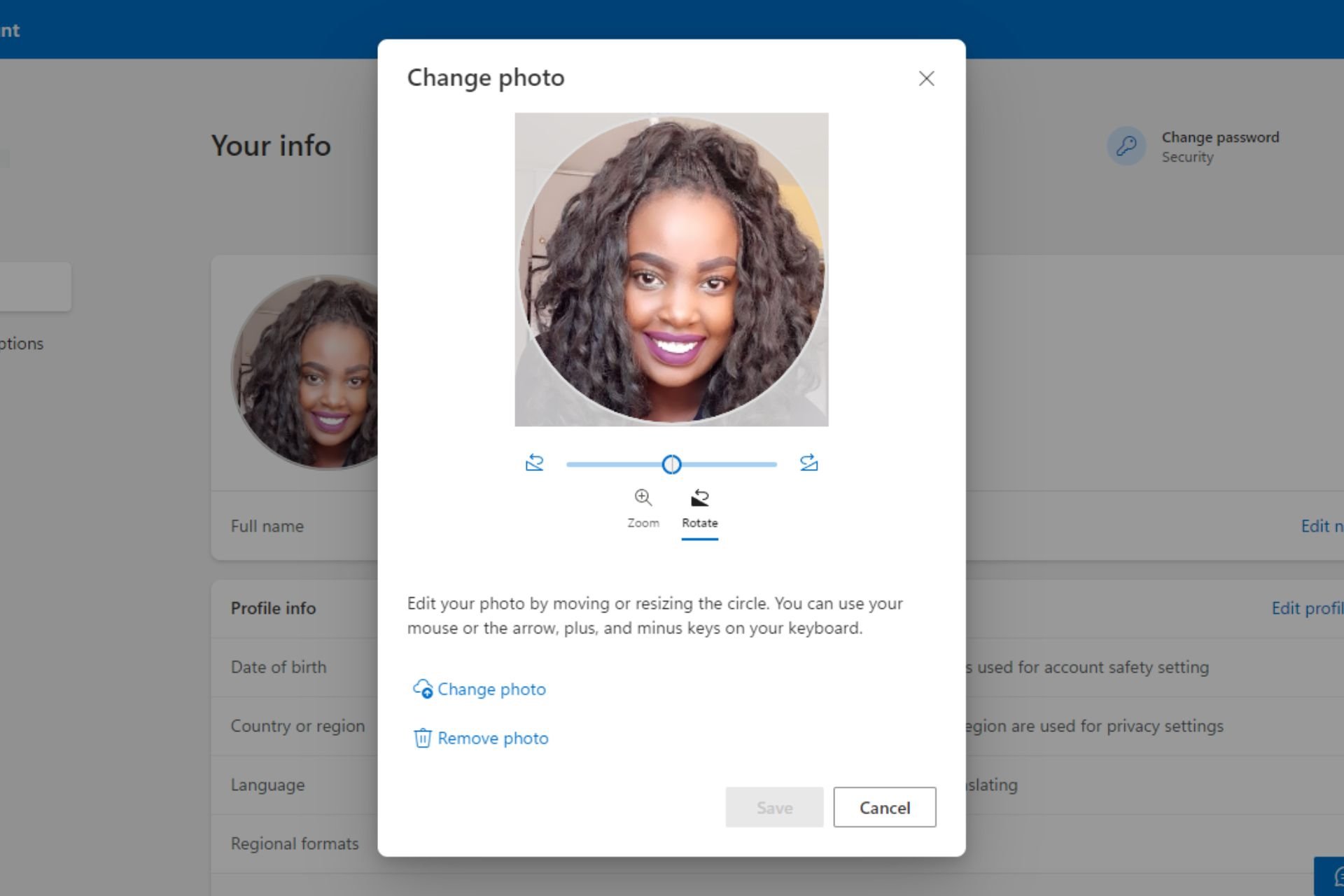
  4. Hit the Change your photo button.
  5. In the pop-up window, select Change photo and upload a new one. Zoom in or out until you achieve your desired size then hit Save.
  6. Once you’re done, you should get a variation of the following message.

2. By using your Teams account

  1. Log into your Teams account on your browser.
  2. Click on your profile picture or initials and select Manage account.
  3. Navigate to Your info and hit the Change your photo button.
  4. In the pop-up window, select Change photo and upload a new one. Zoom in or out until you achieve your desired size then hit Save.

3. By using your Outlook account

  1. Log into your Outlook account on a web browser.
  2. Click on your profile picture in the top right corner and select My profile.
  3. Navigate to Your info and hit the Change your photo button.
  4. In the pop-up window, select Change photo and upload a new one. Zoom in or out until you achieve your desired size then hit Save.

Aside from the three listed Microsoft 365 apps, you can also log into any other app and change your profile picture from there.

The change is reflected throughout but it may take some time to be uniform across all platforms. So if your Microsoft Teams profile picture is not showing after you’ve made this change, give it a few minutes and refresh the page again.

Elsewhere, if your profile picture is not updating in Windows 11, we’ve outlined various ways to make it reflect on your device.

When changing your profile picture, ensure that you select a high-resolution image. Low-quality images may be unclear since the photo is cropped further to a small icon. Also, try to stick to portrait and up-close pictures to avoid further image deterioration in quality.

That’s all we had for this article but do let us know what is your preferred route to change your profile picture in Microsoft 365 down below.

Google takes after Microsoft and integrates Gemini in Sheets

Google integrates Gemini in Sheets and follows in Microsoft’s footsteps. After all, they did it first with Copilot in Excel. So, it looks like the competition between the companies is getting fierce. In addition, this is a great opportunity for us. After all, Gemini will get additional options. Furthermore, you can use the Ask Gemini option to access various features.

How do I use Gemini AI in Google Sheets?

You might need to wait a while to use Gemini AI in Google Sheets. After all, the feature is new and not available to all users. Fortunately, according to Google, it is in the rollout phase. However, once it becomes available, you will have a Gemini button in Sheets.

Once you click the Gemini button, its interface will open. Furthermore, the AI will generate a summary of your sheet if you are not using a new one. Afterward, Gemini will create a list of suggestions. On top of that, Gemini can generate tables and formulas.

However, according to research, large language models need to understand structured data properly. Thus, we recommend you double-check the information provided. In addition, you can use Gemini in Sheets to explain and simplify the data for you. So, if you are working with a lot of information, this feature will be helpful.

In addition to the mentioned features, you can refresh Gemini to generate new suggestions. On top of that, you can contribute to its growth by sharing feedback with the team. Also, please feel free to rate the suggestions as good or bad. In addition, you can clear the history of Gemini to protect your data.

Ultimately, Google’s decision to implement Gemini in Sheets is a quality-of-life upgrade for AI. Furthermore, the option is very accessible. In addition, we won’t have to go from one tab to another. On top of that, the new features will make our work more efficient.

What do you think? Are you going to try Gemini in Sheets? Let us know in the comments.

If AI would design a bridge, would you dare to cross it?

I don’t know about you, but the math teachers I’ve met would scold us to study hard because we would need to build a bridge one day, and if we messed it up, people would die. That’s a perfect point for all the professionals who rely on math and have huge responsibility, not only construction engineers.

But now, AI is everywhere, including in industry where public safety is a critical issue. According to Ankin, the impact of AI in construction reached $22B in 2022 and is expected to grow at 20% of the compounded annual growth rate through 2023 based on improved efficiency and productivity through optimization of project scheduling, resource allocation, and task management, leading to shorter timelines and reduced costs.

So, AI is swiftly pulling its weight in the construction industry but it’s definitely not going to build a bridge on its own. However, it can very well perform all the calculations on its own and there are already some AI bots which can help.

Can I build a bridge using AI?

You can start off by getting some figures about the budget you will need for the project. For instance, Civis.ai has a bridge design calculator where you can input the length of the bridge, its type, and the region in which you want to build it.

You will get an estimation on the quantity of materials you will need to use, how long will it take and, most importantly, how much will approximately cost. Then, if you scroll down, you will see a list of examples of similar projects and you will be able to research about their development as well.

However, it’s less known that a pedestrian bridge was already designed based on AI, as reported by Medium. In fact, researchers from ETH Zürich developed a method to use Artificial Intelligence (AI) to change the traditional design process.

They rely on first studying the performance parameters and then go to the design process instead of the classic mode that is reversed. This approach, apparently, cuts from the costs and time needed for the whole process.

The swiss, then, developed a whole construction engineering toolbox based on the Conditional Variational AutoEncoder (CVAE) learning model.

How can AI improve the construction industry?

It’s easy to understand how AI can help with the design and costs part, but there are a lot of other aspects it can improve on.

For instance, the AI can analyze building codes, zoning regulations and environmental obstacles that could hinder the project. Furthermore, it can assess the costs and distribution of labor in the area where your project will be developed.

Lastly, it can underline the possible safety risks on the construction site and even simulate any problems within the construction before you even start the project.

We don’t think we need to hold our breath until we see the first 10 mile bridge designed entirely by AI, but it already helping engineers all over the world building them.

So, would I cross that AI-generated bridge? Yes, I would, but only if expert humans still supervised and approved every detail. How about you? Write down your thoughts in the comments section below.

Apple Music is a nightmare on Windows and Android, users say

Apple Music is one of the best streaming services in the world and direct competition with Spotify and YouTube Music.

Although this service has a lot to offer, many reported a disappointing experience, especially when using it on Android and Windows.

Apple Music is filled with bugs on Windows and Android, according to users

Many aren’t too pleased with Apple Music, and some users had to voice their displeasure on the Apple Music subreddit.

While the service offers a better sound quality, it’s filled with numerous bugs according to disgruntled users. Here’s what users had to say:

The Windows app is terrible, extremely buggy (eg. deleting songs from playlists on Windows keeps returning an error, and the tracks stay in the playlist).

It gets even stranger with some mind-boggling bugs:

If I delete an album I added to library from said library, it also deletes any song from said album from every playlist that I’ve created. Whose brilliant idea was that?

There are issues with the equalizer, and it’s not working at all. Playlists also don’t work well, and the playback stops after the selected song stops playing:

When in playlist and I select a song to play, it doesn’t go beyond the search to shuffle my playlist, just stops completely post the song.

Speaking of playlists, transferring playlists between apps is cumbersome, and it’s not possible to set favorite playlists. Search in playlists also works rather poorly:

Search function within playlists is broken, needs the exact spelling to return any results and doesn’t search by album name.

These are some of the main complaints, and other users were quick to chime in:

As a Mac user I can tell you, Apple is not treating Windows and Android as it’s ugly deformed stepchildren, the Mac app is almost exactly the same in terms of bugs and glitches and weird behaviour.

Others were quick to defend the app stating that the Android and iOS experiences are almost the same:

AM on Android is as good as iOS buddy. Don’t know what are you on about. Using since 2017. It was much worse initially, but since 2020/21 it is on par.

Others complained that it’s almost impossible to get a subscription without an iOS device:

nah its a nightmare to even buy a subscribtion without an ios device. Get this, i bought a family membership and they just dont allow windows and android users to add family members

These are some of the experiences that users had but bear in mind that many other users never experienced issues such as these.

It remains a mystery why doesn’t Apple optimize Apple Music, but we still hope that some of these issues will be resolved.

With Apple giving up on the electric car, and a canceled Apple spring event, the company might address some of these issues someday.

Windows may soon feature AI-based webcam filters, will turn your feed into a cartoon

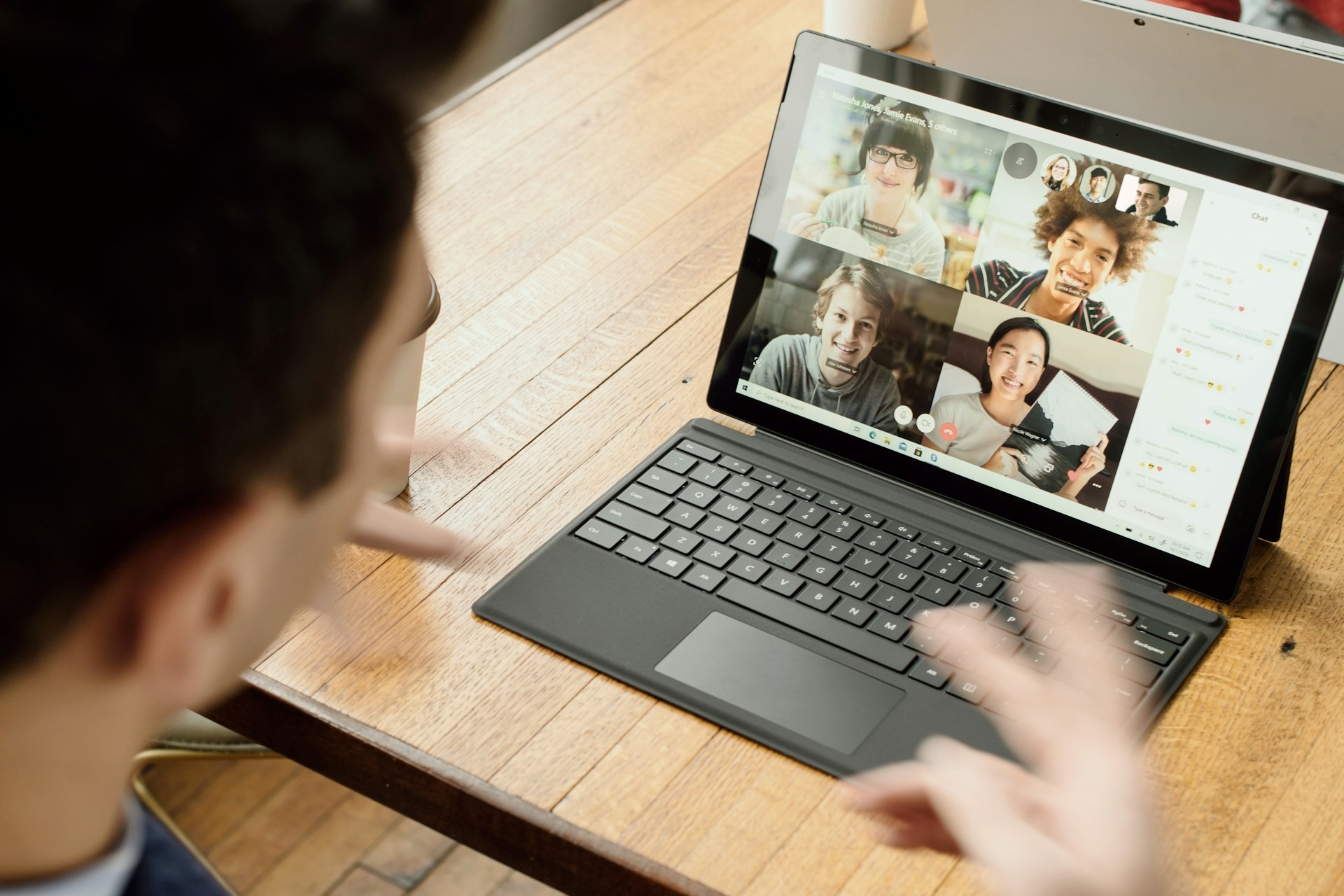
Microsoft’s push for Artificial Intelligence is evident, and Windows is getting several new AI-powered features. In the latest developments, reports suggest that Windows could soon bring AI-based webcam filters that will allow turning your video call feed into cartoons, drawings, and watercolour paintings.

First reported on X (formerly Twitter) by XenoPanther, several new files have emerged in Windows 11, Version 26079, that hint at these changes.

As pointed out by Zac Bowden on X, these are a part of the improved AI-powered Studio Effects. It’s a collection of features aimed at personalizing and improving the video feed. These use NPU (Neural Processing Unit), a piece of hardware designed for AI and machine learning applications.

Currently, Studio Effects offers the option to blur the background, improve eye contact by making the necessary adjustments so that your eyes appear directed at the camera instead of the screen, automatically zooming and capturing only the relevant part of the feed, and filtering background noise.

It’s not yet guaranteed that webcam-based AI filters will make it to Windows 11, but as Microsoft is, every day, rolling out more and more AI-based features, we could get an enhanced Studio Effects in Windows 11 24H2, set to be released later this year.

We will have to wait and watch if Microsoft makes an official announcement regarding it!

Wouldn’t you want to turn your feed into an animated format on calls? Share your views on the feature in the comments sections.

AI is becoming the ultimate tool for cyber attacks

For most of us, OpenAI’s ChatGPT was the first encounter with AI. But it’s far more complex and dangerous!

As it turns out, threat actors have, in the last few years, utilized AI to perform cyber attacks of larger scale and intensity. Countering these has become a challenge for experts.

Cyber attacks are no longer limited to hacking accounts or stealing data from websites. These pose security concerns, as independent and state-backed hackers now use AI to attack the national infrastructure.

Microsoft confirms that AI-based cyberattacks are usually originating from Russia, China, North Korea, and Iran. Microsoft’s President Bradd Smith also highlighted the challenges posed by AI and called for immediate regulations to counter the threat.

How is AI helping threat actors deploy advanced attacks?

AI has allowed threat actors to scale up attacks and develop malware that can go undetected in conventional security systems that aren’t up-to-date with the latest standards. Here are a few ways AI is fueling cyber attacks:

  • Create phishing emails: AI-based chatbots allow hackers to create phishing emails identical to actual ones. You no longer see scam emails from Norton or the evergreen, stranded prince in need of money stories. It’s much more personalized and challenging to identify!
  • Password hacking: With AI-based tools, threat actors stand a better chance of identifying your password through brute force attacks. The more the data fed to the tool, the better the output!
  • Identifying vulnerabilities: AI-based tools allow hackers to quickly identify vulnerabilities in a system, which can then be exploited to deploy large-scale attacks.
  • Creating advanced malware: AI allows threat actors to develop advanced malware, often ones that can automatically change their code and design, making their identification extremely difficult.
  • Scaling up the intensity of attacks: With AI, hackers can automate cyber attacks and deploy them at a much larger scale. Besides, with real-time adaptation, malware can further multiply and corrupt the entire system.
  • Deepfake: While Microsoft has taken measures to counter deep fakes, other AI-based tools continue being used to create audio and video clips for the purpose of impersonation and to step up disinformation campaigns.

AI-based cyberattacks pose a threat to national security

Of late, several reports have emerged of state-backed threat actors using AI to attack another nation’s security, military, and civilian infrastructure.

Researchers at MIT have been able to simulate attacks that could trigger explosions in household and industrial items, say, valves, motors, and pumps. It is done by jamming the equipment or causing the temperature control mechanism to malfunction.

At a time when a large part of the world is embroiled in violence, either directly or indirectly, such attacks pose an imminent threat!

Surprisingly, the answer to AI-based cyber attacks is also AI

Microsoft, the company leading the AI push, is using AI to combat such cyber attacks. Its latest offering, Copilot for Security, quickly assesses the type and scale of the attack, breaks down the script, and provides analysts with the option to quickly deploy the relevant fix, all using AI!

So, if threat actors are using AI for cyber attacks, you will have to defend with AI-based security tools to stand a chance at beating them. The one with more advanced tools and a comprehensive understanding should win!

At present, our options to minimize the risk of AI-backed cyberattacks are to raise awareness amongst the masses, regulate the use of AI, and deploy advanced defence mechanisms in critical infrastructure that quickly detect and eliminate such threats.

On March 13, 2024, Microsoft Secure is holding an event to highlight ways to effectively deal with the situation. Join it to find out more about AI-powered cyberattacks!

Do not forget to share your views on AI and its use by threat actors in the comments section below.

If Microsoft asks you to buy the HEVC codec, don’t!

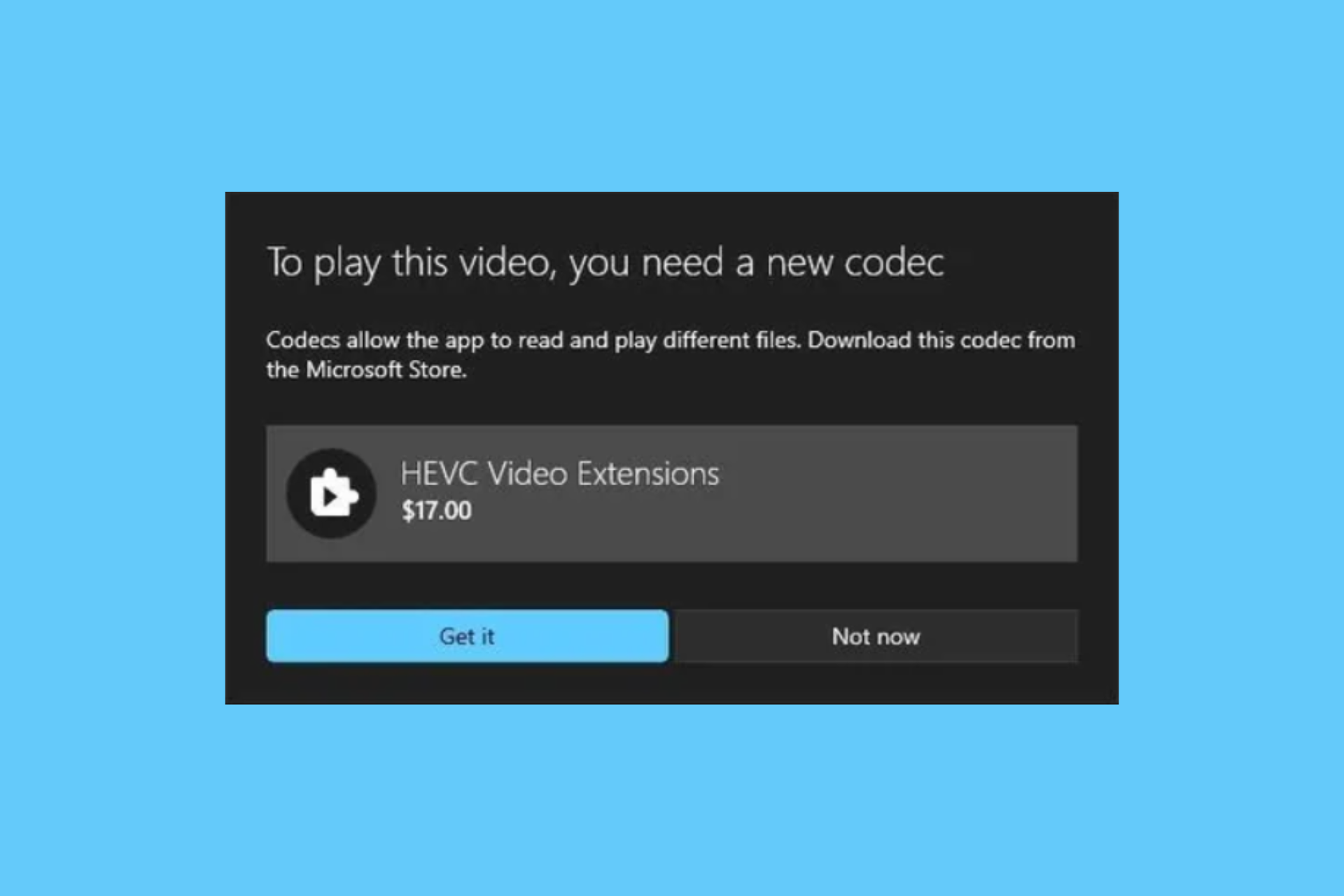
A Reddit user stumbled across what he described ironically as the funniest thing he saw on Windows. When he tried playing a HEVC-coded video, the message on the screen pointed him towards a $17 MXN ($0.99 USD) purchase of the codec.

However, this is not outrageous because Windows doesn’t come with the HEVC codec. In his defense, tech-savvy users know that this purchase can be clearly avoided because you can get the codec for free.

Why shouldn’t I but the HEVC codec?

The first reason is that if you download VLC for free, you can see HEVC-coded videos. The French company that owns VLC reverse-engineered the codec as FFMPEG, so you don’t need to get anything else.

And even if you don’t want to use VLC, you can still download the K-Lite Codec Pack for free and take care of this problem right away.

Truth be told, if you’re looking for the HEVC extension on Microsoft Store, you will still find the $0.99 from Microsoft.

So, the question is: Why is Microsoft making us pay for something that should be readily embedded into Windows, which we paid for? The answer is pretty simple: Microsoft is still paying for a license to use the codec.

Therefore, the right thing to do here would be to reach an agreement with the Joint Collaborative Team on Video Coding (JCT-VC), who standardized it and then embed it in their video player.

We don’t know why they did that, but there are a lot of other players out there which can play HEVC videos besides VLC, so you shouldn’t rush in taking your card out for this payment.

In fact, we have a full guide on how to play HEVC videos on your PC.

Funny or not, this is the whole story around this HEVC problem on the Movies & TV video player app.

Did you buy the HEVC codec to play your videos? Tell us all about that in the comments section below.

Test new AI features in Opera with AI Features Drop program

Opera is a great browser, with many innovative features, so we were not surprised to see that Opera now has a built-in AI chatbot.

The company plans to enhance this feature by bringing more AI features to its users for testing.

Opera now allows you to test new AI features in the browser

Opera is known for its unique features, and just recently it introduced its Heartblocker plugin. Today the company is setting its sights on AI.

As reported by PhoneArena, it seems that Opera has plans to enhance its Aira AI. In case you’re not familiar, this feature is available in Opera One, and it works similarly to GPT, with additional support for real-time web data.

To improve on its AI, Opera is introducing an AI Feature Drops program that will allow users to test new AI features on a bi-weekly basis.

Opera’s spokesperson said the following regarding AI Feature Drops:

AI is moving fast and so are we. We’ve started the AI Feature Drops Program to allow people to test our newest AI explorations that either will or won’t make it to the official version of Opera One. We are excited to let our most engaged users test and share their feedback and suggestions with us

This program is available in early access in the Opera Developer variant, so if you’re an AI enthusiast, you might want to give it a try.

New Copilot features are coming to Galaxy Book4

Recently, Samsung introduced the Galaxy Book4 series laptops with Intel Core Ultra processors on its website. The product page shows a deeper integration of next-generation Copilot on Windows 11 with Android phones.

According to the Geekbench, a benchmarking site, a Snapdragon X Elite power Samsung Galaxy Book4 Edge laptop could also be available. However, the company has not officially announced it.

Samsung has added infographics about Windows Copilot and its new features on the product page.

The Copilot comes with personalized AI assistance, which can summarize your messages from your Android device and send text messages directly from your computer. Here are a few other things that you can do:

  • Manage tasks on your PC.
  • Copy a link from a message on your Android phone
  • Ask Copilot to remind you about a message or task.
  • Copy an email address from your Android phone.
  • Compose an email using Copilot and send it using Outlook.

To use these features of Copilot with your phone, you need to link your Galaxy phone to your Windows 11 laptop.

Apart from the Copilot features, the Buds Auto Switch, Multi-Control, Second screen, Samsung Studio and Quick Share are other top features highlighted on the product page of the website.

To disclose more about the product and the upcoming features, Microsoft is holding an event on March 21st.

What are your thoughts on the matter? Share your opinion in the comments section below.

Soon, Microsoft will replace classic Outlook with a web app

Microsoft wants to replace classic Outlook with a web app. However, they will have to be careful about its implementation. After all, we like the desktop app and don’t want an inferior version. Furthermore, the web app lacks some classic Outlook features. Yet, Microsoft might implement them later on.

Fortunately, we can use the preview option to familiarize ourselves with the new web app. So, if you want to try it, press the toggle button from the top right corner.

Is Microsoft getting rid of Outlook desktop app?

Microsoft still needs to remove the classic Outlook desktop app, but they will soon switch to the web app. However, it will take a while for them to ditch the desktop app. After all, the classic Outlook is better than the web app, and Microsoft keeps adding features. Furthermore, many of us are using it, especially since it has many features.

The migration will happen in a few phases. Thus, it will be easier for us to switch apps. The three phases are Opt In, Opt Out, and Cutout. We can opt in and out of the web app during the first two phases. However, the Cutout phase will force us to replace the classic Outlook with the web app. In addition, if you install Windows 11 again, you might have the web version as default. You will be able to change it to the classic Outlook.

Fortunately, Microsoft announced that they will support the classic Outlook until 2029. Thus, you don’t have to rush to use the web app. Unfortunately, they might stop bringing new features to the classic Outlook. In addition, we will have a 24-month notice before the Cutover phase.

Ultimately, we must switch from the classic Outlook to the web app. However, we have enough time to do it. Furthermore, the new app is slow and feels like a downgrade. Thus, Microsoft might rethink its schedule. After all, they might try to avoid what happened with OneNote.

If you want to learn more check out the following video.

What are your thoughts? Are you going to give it a try? Let us know in the comments.

Exciting new features coming to Microsoft Teams in April, here’s what to expect

Microsoft is relentlessly working on Teams, and speaking of which, April will be an exciting month for all Teams users.

We expect to see many new features rolling out in April, so without further ado, let’s see what we can expect to see.

These 5 features are coming to Microsoft Teams in April

Several new features are coming to Teams this April, according to the Microsoft 365 roadmap, and here are the most important ones.

Copilot in Teams meeting will be available on the mobile after the meeting

Currently, you can access Copilot in Teams during a meeting on a mobile device. Once this feature is released, you’ll be able to access Copilot in Teams and ask about eligible meetings even after the meeting has ended.

Regarding the availability, this feature is coming on iOS and Android.

Citations for Copilot in Teams meetings on mobile

Each Copilot response will now have a citation number at the end that provides the users with details on the meeting artifact and source used for the response. This should work similarly to a meeting transcript.

Users will be able to select the citation and see the user that is associated with it, as well as the exact quote and timestamp.

Shared call history for delegates and delegators

With this change call delegators and delegates will be able to see shared call history records for a shared line. This feature will be available on Mac and Desktop.

You can now open Teams Meeting chat from Outlook

If a meeting was created as a Teams Meeting, you’ll have the option to open Teams chat right from the meeting event in the Outlook calendar. Using this option will automatically open the chat in the Teams app.

Regarding availability, this feature is coming to iOS and Android.

Ability to transfer Team calls to mobile calls

Last but not least is the ability to transfer your ongoing Teams call to your phone’s native dialer. This won’t cause any disruptions or loss of context.

All of these features will start rolling out in April, but the official release date is still not known, so it might take a while before we see them in action.

This isn’t all, you can now send video clips in replies to channel posts in Teams, and the Town Hall Teams feature is also coming in April.

Those who are on the risky side can now join Teams meeting in the car, but if you choose to do so, be sure that you’re safe.

Microsoft files patent for a foldable phone in the US, gets users excited about Surface Duo 3

After Microsoft decided to discontinue its flagship foldable phone, Surface Duo, many believed that the Redmond-based tech giant would, in the future, revive the series. Ever since reports of Microsoft filing a foldable phone patent in the US emerged, enthusiasts have been nothing but excited!

Previously, when Microsoft discontinued the Duo series, it was reported that the company would switch to the conventional single-foldable screen design.

While the latest patent filed by Microsoft, titled Foldable Computing Device Spine Cover Plate, doesn’t feature the exact same design, it’s quite similar.

Image source: USPTO (Patent number: US-20240069605-A1)

The abstract from the Microsoft’s foldable phone patent reads,

A computing-device includes a first display-supporting frame rotatably coupled to a second display-supporting frame along a hinge axis via a hinge assembly comprising a central spine extending parallel to the hinge axis. A flexible display is supported the first display-supporting frame and the second display supporting frame. A spine cover plate extends over the central spine and is moveably coupled to the hinge assemble for translation relative to the central spine as the first display-supporting frame is rotated relative to the second display-supporting frame.

What makes the idea interesting is that Microsoft’s design features a spine cover plate which will automatically adjust on folding and unfolding the phone, leaving a negligible gap, minimizing the visible crease, and preventing the entry of unwanted materials.

Image source: USPTO

Previously, the idea of a Windows foldable phone was doing the rounds, and it got everyone hyped up!

As expected, the patent doesn’t detail the software side of things, and it would be interesting to see which OS comes installed on the device. While Surface Duo 2 shipped with Android, we will have to see if Microsoft makes any changes here.

What do you think about Microsoft’s new foldable phone patent? Share with our readers in the comments section.

OneDrive is plagued by the Entry point not found error again, latest update is to blame

OneDrive is an essential tool for many users, but users reported messages stating OneDriveSetup.exe – Entry Point not Found.

This issue will prevent users from using OneDrive entirely, but what’s causing it, and is there a way to fix it?

Many users are experiencing Entry Point not Found in OneDrive error

The issue was reported on Microsoft Answers forums and here’s what users had to say:

Further testing I am getting the error on our windows 10 IOT Version 1607 LTSB terminals.

The issue is that the update for onedrive is attempting to make a call to GetUserDefaultGeoName that did not get added to into until windows 10 version 1709. Hence the error.

It’s not just Windows 10 IOT users that are having this problem, it also happens on Windows Server.

I just wanted to point out that this is also happening on Windows Server 2016: Version 1607 (OS Build 14393.6709).

“Upgrade Windows” isn’t really going to be practical. I suspect the updater was changed without testing on older windows versions.

We already tackled a similar issue in the past in our OneDrive.exe Entry Point not Found guide, so be sure to check it out for potential solutions.

Users also found a workaround on their own that you can try:

It looks like you can just disable the Scheduled Task that has the name that starts with “OneDrive Standalone Update Task”. Would probably need to watch for updates to see how to get to the next version when it comes out.

In case you aren’t using OneDrive, Microsoft confirmed that you can uninstall OneDrive, so be sure to try that as well.

Windows Backup is gone on incompatible devices, yet it lingers in the background

Backing up your files is important, and Microsoft has special software that can help you back up your settings and files to the cloud.

While the Backup app is useful, it doesn’t work on every PC that has it installed, so Microsoft decided to fix that with the latest update.

Windows Backup won’t appear on incompatible devices anymore

When first introduced, Windows Backup was supposed to appear only on personal computers and allow users to back up their files.

According to Microsoft, this feature isn’t available to Azure Active Directory and Active Directory users, however, many reported that it still appears to them. When attempting to run the app, users received a message stating that this feature isn’t supported by their organization.

According to Windows Latest, Microsoft acknowledged and fixed this issue in the Windows 11 KB5034848 update.

This feature will no longer appear for Active Directory users or for users who have their Microsoft account blocked by Group Policy.

The app is now hidden, and you won’t be able to find it, however, it will stay installed and running in the background.  While this seems like an odd decision, Microsoft defends it by stating that other features rely on Windows Backup to work properly.

We never used this feature, and we’re not too keen on it, so we hope that Microsoft will give us the option to remove it, just like it gave users the option to remove OneDrive from their PCs.

Microsoft complies with DMA, introduces easy Edge removal and more to Windows 10 & 11

Microsoft is the latest company to announce changes to its native OS, Windows, in a bid to comply with the DMA (Digital Markets Act) in the EU, a law that tends to ensure fair competition and prevents giant corporations from creating a monopoly-like situation.

The changes apply to both Windows 10 and Windows 11, the two most popular iterations of OS. Even in the recent updates to Windows 11, Microsoft has been careful to include DMA-compliant features.

What changes is Microsoft making in response to DMA?

In the official blog post, Microsoft highlights how it has always been supportive of third-party developers, even before DMA came into effect, allowing them to deploy applications and app stores on Windows without any interference.

Besides, developers enjoy a direct commercial relationship with users, letting them choose the preferred lost-cost payment options and other critical services, even if it’s outside the Windows ecosystem.

The changes to Windows for DMA-compliance include:

  • You can now uninstall Edge and Bing web search using the built-in settings. Earlier, the option was greyed out.
  • Third-party web search application developers can now utilize the Windows search box in the taskbar using the instructions provided by Microsoft and choose any web browser to show results from the web.
  • Microsoft will no longer sign-in users to Edge, Bing, and Microsoft Start services during the initial Windows setup experience.
  • Data collected about the functioning of non-Microsoft apps, primarily bug detection and its effects on the OS, from Windows PCs will not be used for competitive purposes.
  • Microsoft, from now on, will need explicit user consent before combining data from the OS and other sources. It will also deliver new consent screens where required.
Uninstall option for Microsoft Edge greyed out

These changes are only applicable to users in the EEA. For those outside the region, Windows will continue to function as it is!

The Redmond-based tech giant has already started rolling out the DMA-compliant versions of Windows to users in the EEA (European Economic Area). To get it right away, simply turn on the Get the latest updates as soon as they’re available feature in the Windows Update settings.

Windows Update settings

After these are reviewed, the European Commission will host a workshop on March 26, 2024, from 13:00 to 18:00 hours (CET) to allow developers to clarify any concerns or share their feedback on the changes.

While Microsoft has abided by the rules of the DMA, other tech giants weren’t too enthusiastic about it. Earlier, Apple had a tussle with the EU over DMA and the Cupertino-based tech giant was slapped with a fine to the tune of $2 billion.

Do you believe these changes should be rolled out to users worldwide? Share with our readers in the comments section.

Don’t want to use OneDrive? Microsoft confirms that you can now uninstall it

If you’re not a fan of cloud storage and OneDrive in particular, you’ll be pleased to hear that you can now easily remove OneDrive from your Windows 11 PC.

That’s right, and this has been acknowledged by Microsoft, and it can be done in a matter of minutes.

The latest documentation from Microsoft describes how to remove it

While OneDrive can be useful, many simply don’t use cloud storage or they don’t prefer using OneDrive. In the past, removing OneDrive was next to impossible, and if you didn’t want to use it, Microsoft advised you to keep it unliked on your PC.

This would make OneDrive disabled, but it would still be available on your PC if you ever change your mind. Well, that’s about to change according to the Neowin.

Recently, Microsoft’s official documentation for OneDrive has changed, and in the past, it only had information on how to unlink your account.

Now there’s a new section on the bottom that tells you how to remove OneDrive on Windows 10 and 11.

You can now remove OneDrive, just like any other installed application right from the Settings app and it will be gone for good.

This is great news for all users who don’t use cloud storage or OneDrive, and we wish this option was available sooner.

Speaking of OneDrive, the upload via URL feature is being retired in OneDrive, so use it while you still can.

Bad news for Halo: MCC fans, no more game updates as Microsoft ends support

For the past few months, rumours were rife about Microsoft dropping development and support for Halo: The Master Chief Collection after an image was posted by a 343 developer online. The image in question showed a plaque and a Thank You card.

The date on the plaque intrigued many. It read, Finished The Fight. Halo: The Master Chief Collection 11/2014 – 07/2023. Soon, the same was shared by several developers on their official X (formerly Twitter) handles.

As it turns out, these rumours were true!

Rebs Gaming, in a YouTube video, confirms, through sources, that Microsoft has stopped development for Halo: The Master Chief Collection.

The two primary reasons cited behind the decision to halt development are the lack of a revenue stream and an impending economic recession. The game does feature a built-in store but since it relies on in-game currency, profitability remained a concern.

Microsoft, in May last year, first shared the decision with the developers and expressed its inability to renew the contracts. Then, sometime around mid-July, the contracts ended and were never renewed, thus finally putting a stop to Halo: The Master Chief Collection’s development.

This was also the time we saw the last major content update. Since then, there haven’t been any!

Will Halo: The Master Chief Collection still be available?

As per the report by Rebs Gaming, a few full-time developers continue to work on Halo: The Master Chief Collection to ensure optimal functionality and deliver minor updates to the collection.

Also, there’s a chance of the collection being revived sometime down the line, either through a collaboration between Microsoft and 343 Industries or individually by the latter, if a viable revenue stream can be generated. So, all hope is not lost!

If the companies are looking for a revival, it’s critical to polish the collection and eliminate all existing bugs, primarily the ones responsible for Halo MCC not loading.

What do you think of the decision by Microsoft to end development for Halo: The Master Chief Collection? Share with our readers in the comments section.

LLMs need new prompting techniques to understand structured data

Large Language Models (LLMs) are facing challenges when they have to deal with data from tables. Furthermore, it is unknown if they comprehend it or not. Thus, a research team tries to verify the capability of AI to understand structured data by using a new benchmark system. Furthermore, they want to discover prompt techniques to improve the understanding of the LLMs.

Can LLMs be trained on structured data?

You can train LLMs on structured data. However, it is still being determined to which degree the LLM can learn and understand it. Thus, researchers are trying to figure out the best prompt techniques to teach LLMs how to handle data from tables and test which tables work best.

Researchers created a new benchmark called Structural Understanding Capabilities (SUC) to test the capability of LLMs to understand data from tables. Furthermore, to gather results, they used SUC and various prompting techniques.

To verify the efficiency of the structured data prompting techniques, researchers used the benchmark on both GPT-3.5 and GPT-4. Furthermore, they figured out that the results differ based on table format, content order, and partition marks. In addition, they used HTML tables, comma-separated values, and tab-separated values for the table format.

Results

HTML tables are the most efficient for the LLMs between all of the formats. Also, according to their research, the highest accuracy across seven tasks is only 65.43%. As a result, LLMs are far from perfect when it comes to structured data, and they need much more improvement. However, it is possible to enhance them with the right prompting techniques.

Researchers used a combination of self-augmented prompting with structured data to improve the LLM’s understanding of tables. Furthermore, they did this in three steps. The first step was to ask the AI to analyze a table, the second step was for the AI to generate a description based on the data, and the last step was to create a description using the previous information.

In a nutshell, LLMs are not yet ready to properly understand structured data. However, according to the research, you can train LLMs to understand data from tables using various input factors and self-augmented prompting. Furthermore, researchers will continue to study efficient ways to make LLMs understand tables better by integrating structural information to improve the LLMs’ performance with different structured data types.

This research could also help visual language models that use LLMs to improve prompt learning.

What are your thoughts? Is this research going to help LLMs? Let us know in the comments.

CEO Sam Altman rejoins the OpenAI’s board with three new members

OpenAI announced that CEO Sam Altman rejoined its board of directors alongside three new members. The decision came right after the conclusion of an internal investigation by US law firm WilmerHale. In December, OpenAI hired the law firm to investigate the abrupt termination and immediate rehiring of Altman as OpenAI’s CEO. 

OpenAI shared the findings of the WilmerHale investigation and reinstated Sam Altman to the board

Here’s the list of newly announced board members along with CEO Sam Altman:

  • Dr. Sue Desmond-Hellmann, former CEO of the Bill and Melinda Gates Foundation 
  •  Nicole Seligman, former President of Sony Entertainment
  •  Fidji Simo, CEO of Instacart 

The WilmerHale review concluded that Altman’s termination was a “consequence of a breakdown in the relationship and loss of trust” between him and previous board members.

OpenAI didn’t release the full report but it summarized WilmerHale’s findings in its recent blog post. 

According to the released summary, the law firm reviewed over 30,000 documents and conducted interviews with prior OpenAI board members, OpenAI executives, board advisors, and several witnesses.

It is worth noting that the transitory board appointed after Altman’s removal will stay in place. It includes Adam D’Angelo, Larry Summers, Bret Taylor, and Greg Brockman. That means there will be a total of eight OpenAI board members.

The newly appointed board members have agreed to adopt a few things to improve OpenAI’s governance structure. Talking of the same in the blog post, OpenAI mentions:

The Board also announced the adoption of important improvements to OpenAI’s governance structure. Key enhancements include:

  • Adopting a new set of corporate governance guidelines;
  •  Strengthening OpenAI’s Conflict of Interest Policy;
  •  Creating a whistleblower hotline to serve as an anonymous reporting resource for all OpenAI employees and contractors; and
  •  Creating additional Board committees, including a Mission & Strategy committee focused on the implementation and advancement of the core mission of OpenAI. 

The comeback of Altman is good news for OpenAI and its stakeholders. Time will tell if things will remain smooth between him and new board members going down the line.

Microsoft confirms Midnight Blizzard has access to its source code

In January, Microsoft confirmed Midnight Blizzard, a Russian hacking group, aka NOBELIUM, attacked its corporate system. Initially, the hackers accessed the corporate email accounts of the company’s senior leadership team members.  

It seems that Microsoft is unable to contain the Midnight Blizzard attack as of now. In a recent blog post, the tech giant mentioned Kremlin-backed threat actor has access to some of its source code.

The blog post further mentions that the hacker group also accessed Microsoft’s internal systems. However, there is no evidence that Microsoft-hosted customer-facing systems have been hacked.

Here’s what Microsoft says in its blog post about source code theft.

In recent weeks, we have seen evidence that Midnight Blizzard is using information initially exfiltrated from our corporate email systems to gain, or attempt to gain unauthorized access. This has included access to some of the company’s source code repositories and internal systems.

Microsoft further adds that the hacker group has also accessed some secrets shared between customers and the company in emails. The tech giant believes that NOBELIUM is trying to use different types of secrets it accessed recently.

That’s not all, it adds that Midnight Blizzard has ramped up password spray attacks by as much as 10-fold last month compared to what it saw in January 2024.

The company didn’t add any details about the source code Midnight Blizzard has accessed, nor did it talk about the secrets and scale of compromise in the blog post.

ChatGPT gets multi-factor authentication for additional security

Using generative AI models like ChatGPT is fun. However, a concern around data security and unauthorized access is always there. Keeping that in mind, OpenAI has recently released a new multi-factor authentication feature for ChatGPT and API accounts.

On March 8, OpenAI announced the new feature via a tweet from the official X (formerly Twitter) account. According to the tweet, every user can enable the multi-factor authentication, aka 2FA, option. Enabling this feature will prevent any unauthorized access to your user account.

Here’s how to enable multi-factor authentication in ChatGPT 

Note: You’ll have to first log into your ChatGPT account to set up this security feature.

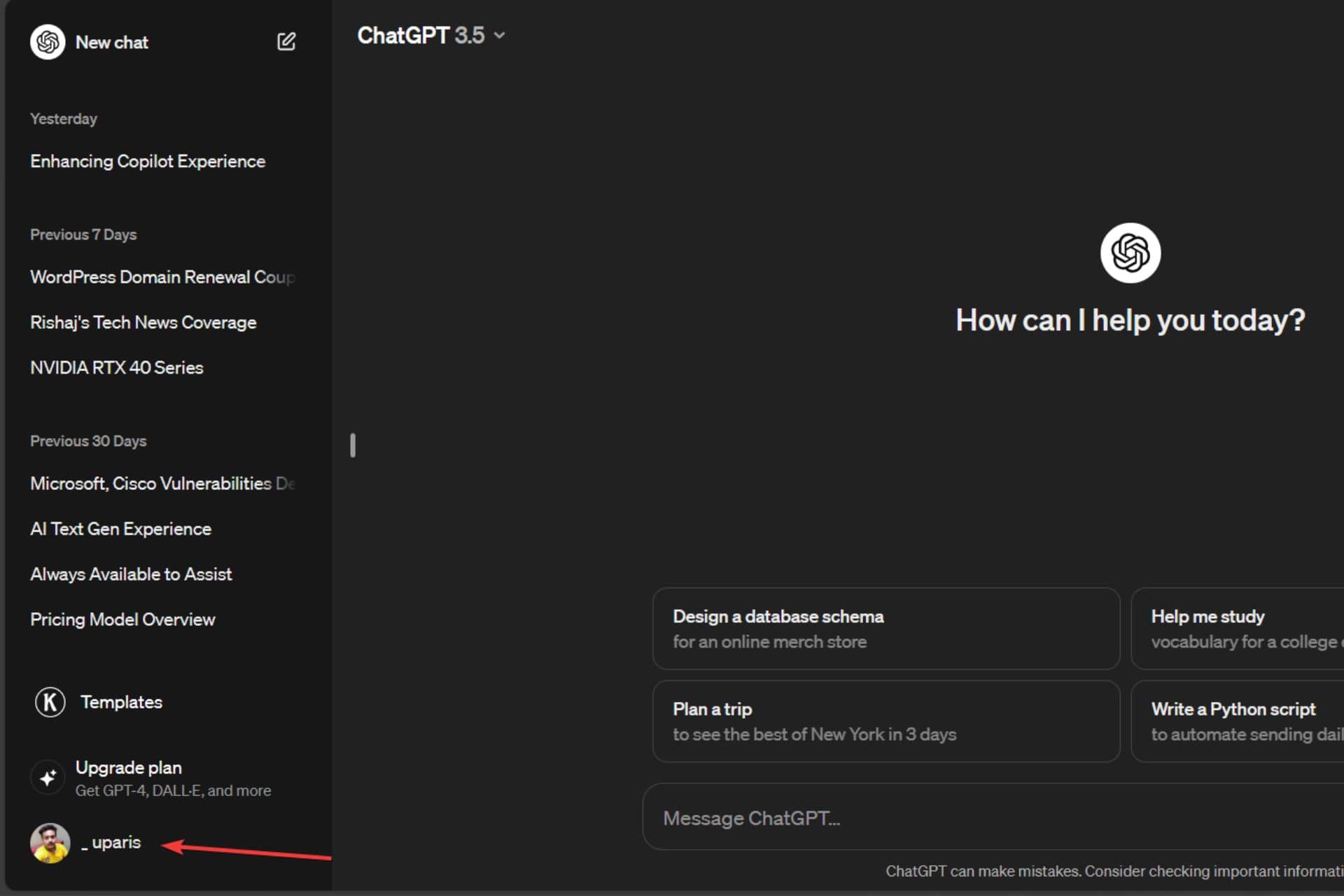
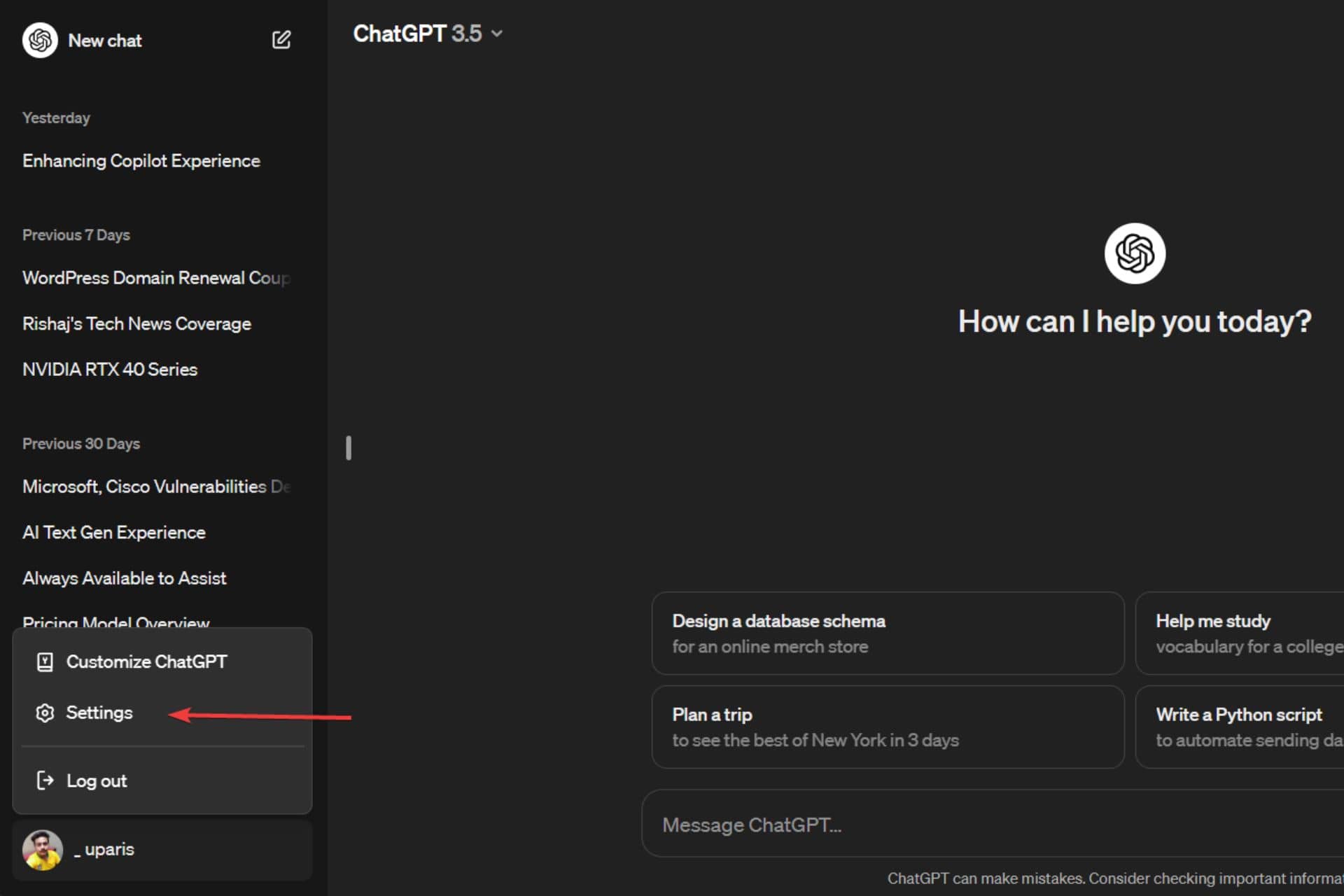
1. First, click on your name, as seen in the bottom left-hand corner of the screen.

First step to enabling Multi-factor authentication - Click on user name

2. Next, click on Settings.

Click on Settings

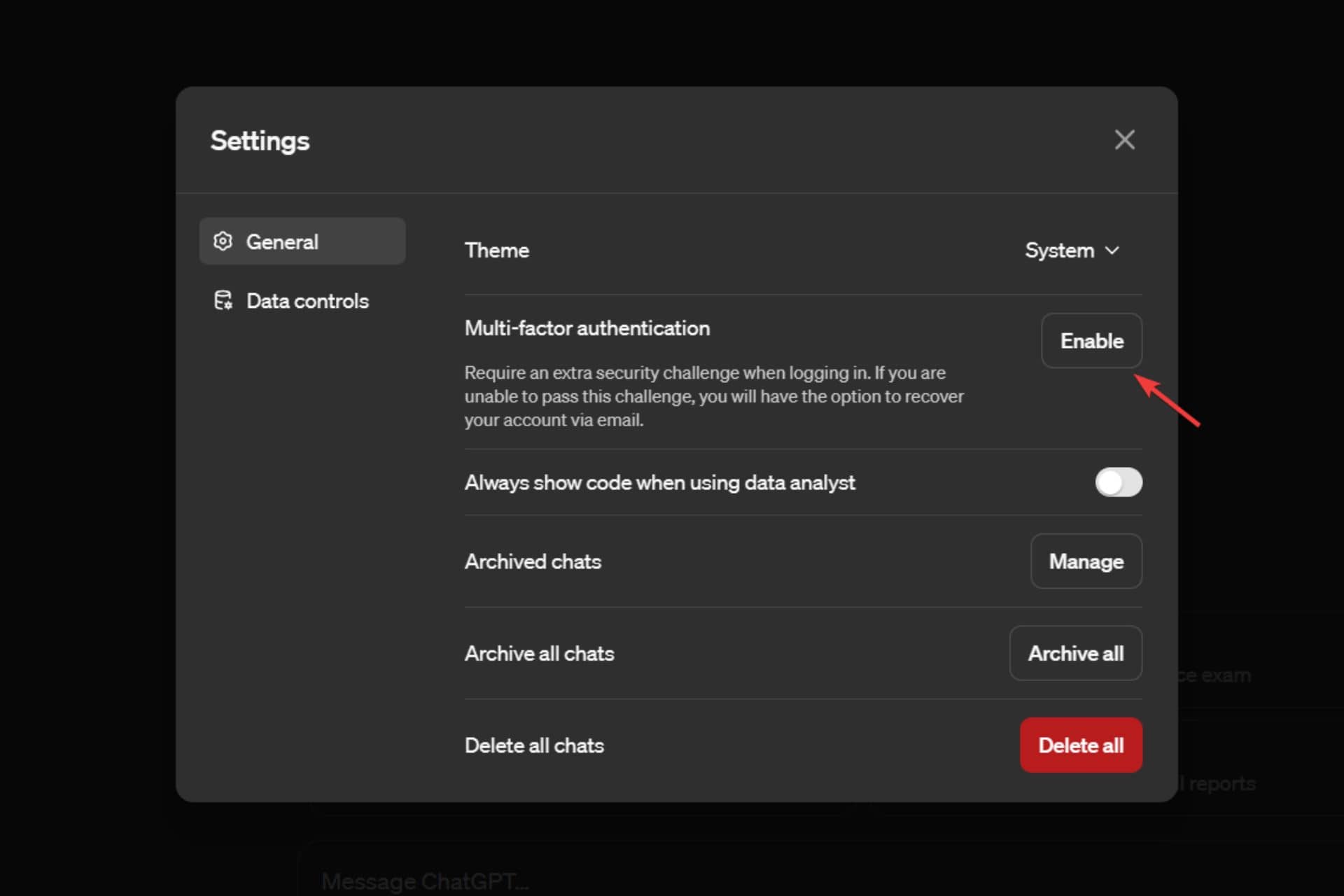
3. Then click on Enable beside the Multi-factor authentication.

Click on Enable beside Multi-factor authentication

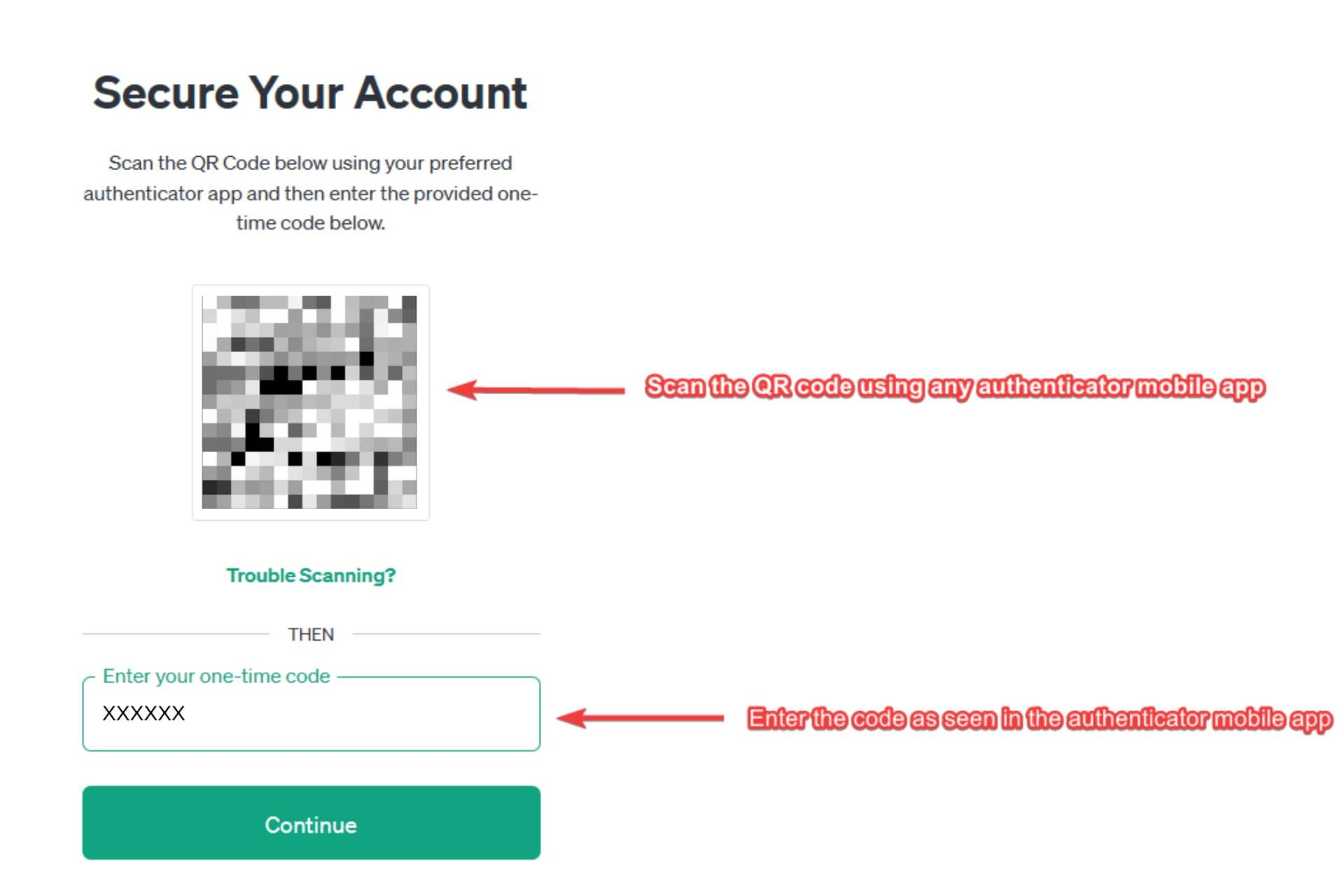
4. Now, you’ll see a secure your account page with the option to scan the QR code and enter the code from an authenticator app.

5. Then, scan the QR code using an authenticator app and enter the code seen in the authenticator app. You can use different authenticator apps like Google Authenticator, Microsoft Authenticator, etc.

Secure your account page

5. Then, click on Continue.

Click Continue

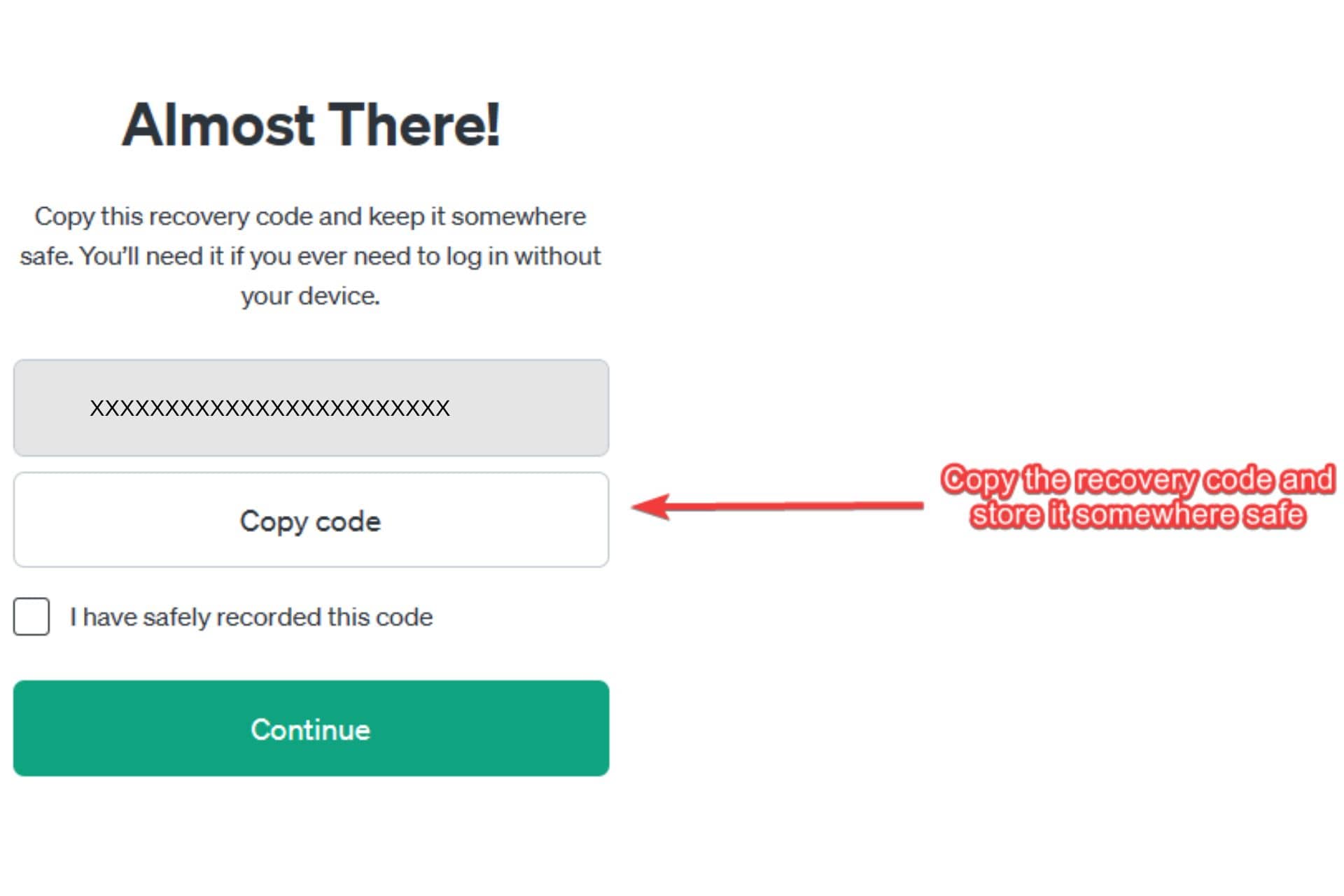
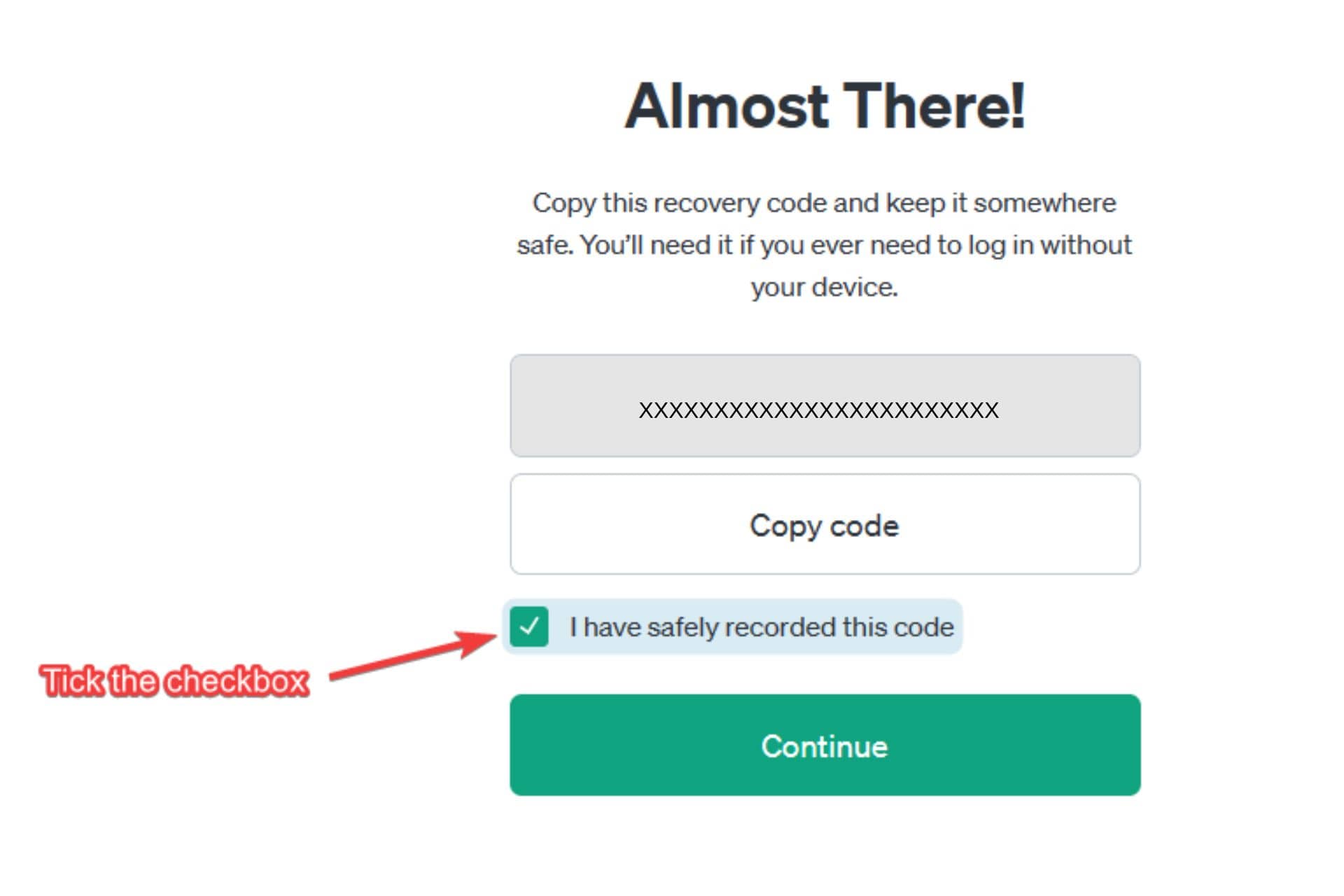
6. On the next screen, you’ll see a recovery code that you can use to log into your account when your device isn’t with you. Now copy the code and keep it safe somewhere.

Copy the recovery code

7. Now tick the checkbox beside I have safely recorded this code option.

Tick the checkbox

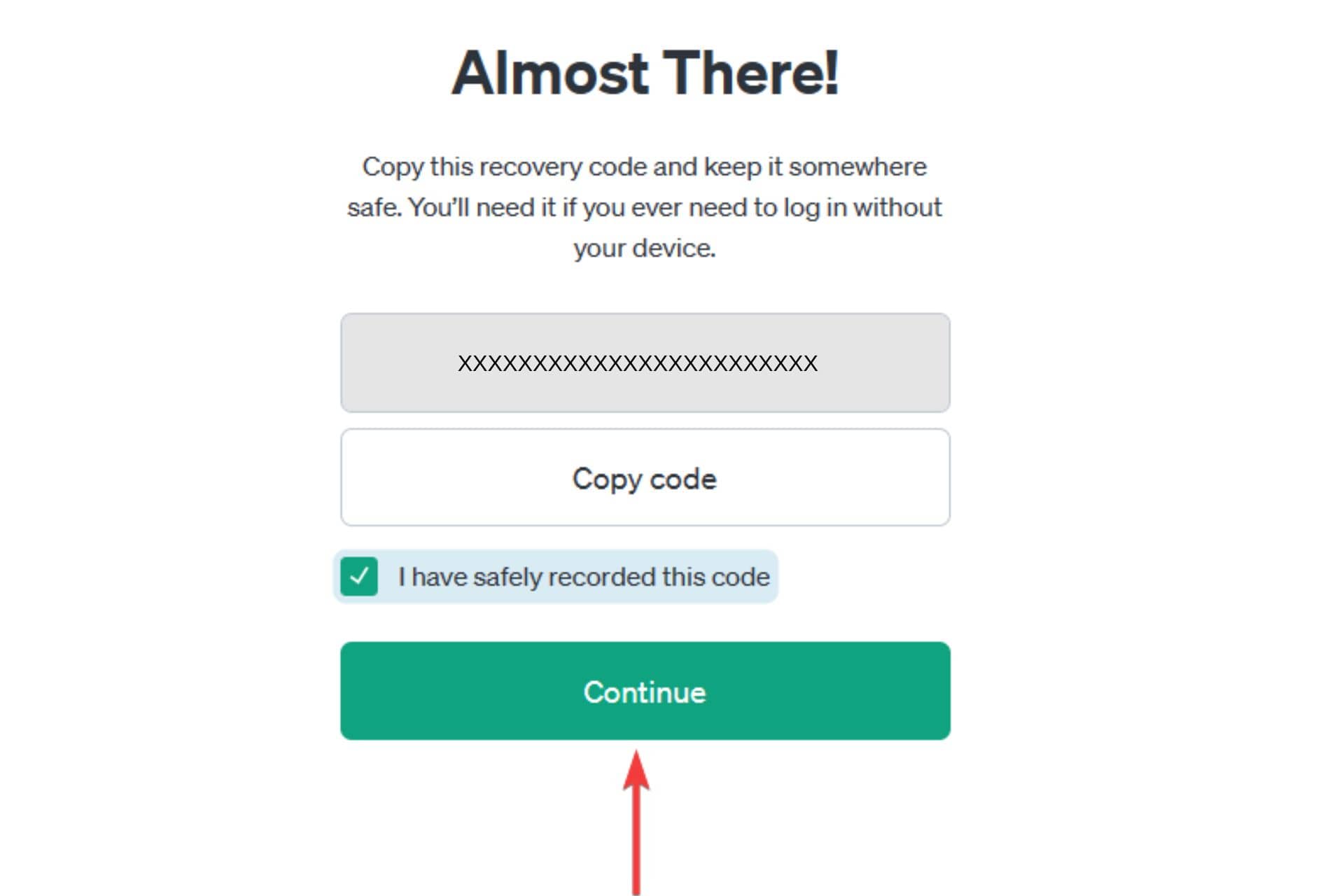
8. Then, click on Continue.

Click continue (1)

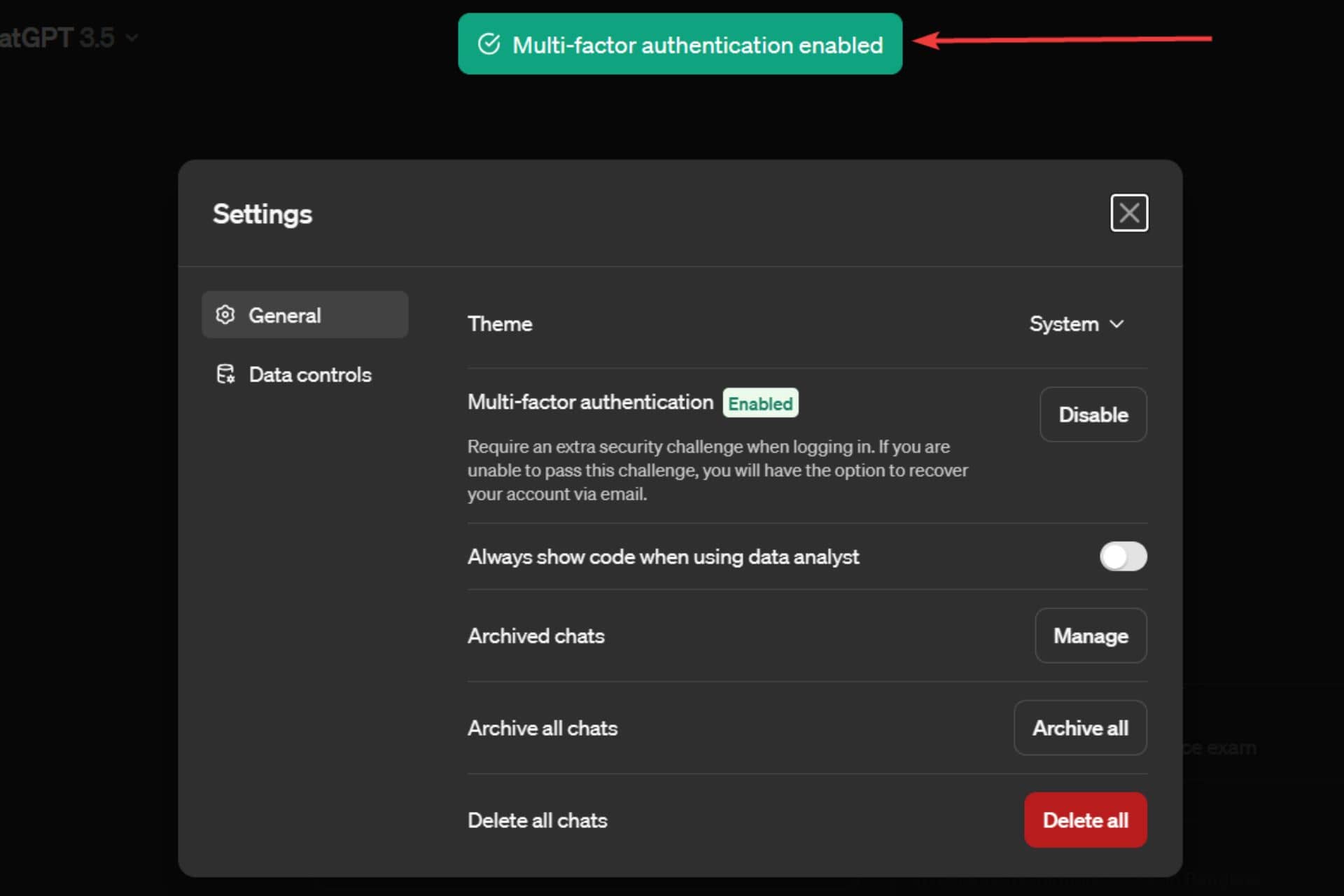
9.  On the next screen, a confirmation message – Multi-factor authentication enabled will be seen.

Multi-factor authentication confirmation message page

Once you enable the feature, you might have to log back in or land on the Settings page inside ChatGPT. If you don’t want to enable ChatGPT’s multi-factor authentication feature, think again as it could help you secure your account and ensure peace of mind.

Microsoft is rolling out GPT Builder’s access for more Copilot Pro users

Microsoft has started rolling out GPT Builder’s access for more Copilot Pro subscribers. In the beginning of 2024, Microsoft rolled out a slew of new features related to Copilot. The announcement of Copilot GPT Builder was one of them.

For those uninitiated, Copilot GPT Builder works similarly to the Open AI’s GPT Studio. The priority access to GPT Builder lets users build their custom chatbots even if they come from a non-coding background. 

Microsoft gave us a glimpse of the same back in February. It rolled out several Copilot GPTs, which could help you with fitness training, cooking, and planning vacations. 

More Copilot Pro users can now access GPT Builder

Now, it seems Microsoft is rolling out GPT Builder for more Copilot Pro subscribers. In a recent tweet, Michael Schechter, VP of Microsoft Bing, hinted that the tech giant rolled out preview access to even more Copilot Pro users.

It is still unknown how many Copilot Pro users will get to access the GPT Builder. However, we expect the feature to roll out in a phased manner. If you are a Copilot subscriber but don’t see the option “Create a New Copilot GPT” in the preview (as shown here), sadly, you’ll have to wait longer to gain access. 

Have you subscribed to Copilot Pro? Tell us your experience in the comments section below.

Microsoft releases Windows 11 Insider Beta Channel Build 22635.3286

Microsoft has released a new Beta Channel Build 22635.3286 (KB5035950) for Windows 11 Insiders. With the recent update, the company introduced a few changes to the Copilot experience and rolled out different fixes. Here are all the changes you will see.

Improvements in the Copilot experience

Microsoft aims to improve the Copilot experience in Windows by incorporating several features that streamline your workflow and boost productivity. Updating to the new Beta Channel Build 22635.328, under KB5035950, displays helpful actions in the Copilot AI assistant when you copy a text.

In the recent Windows Insider Blogs, Microsoft says the Copilot icon changes its appearance and animates. It will do so to indicate that it can help with several actions as you copy the text. You can ask it to summarize or explain the copied text. The option will be there as you hover your mouse over the Copilot icon in the taskbar. When you select an action on the menu, Copilot launches and starts the action you chose from the menu.

Moreover, the Beta Channel Build brings a new feature that allows launching Copilot by dragging an image file onto the Copilot icon in the taskbar. Once the Copilot opens, you can drop the image in the text box and define an action you want to take.

Bug fixes introduced by Windows 11 Insider Beta Channel Build 22635.3286 (KB5035950)

Apart from several enhancements to the Copilot experience, this Beta Channel Build aims to address two specific issues. The first one is related to the Nearby Share. The new update will fix the issue that caused Settings to crash for several Windows 11 Insiders when heading to Settings > Nearby Sharing. 

This update fixes another issue related to Search that caused explore.exe to crash for some insiders in the Beta Channel. Unlike the fix for Nearby Share, which is exclusive to the Beta Channel with toggle on, this one is available for everyone in the Beta Channel. 

What do you think about the new features and bug fixes by Microsoft? Do let us know by commenting below. Also, you can check our guide to download Insider Preview Builds for Windows 11 if you don’t know it yet.

Alpha Skip-Ahead 2408.240306-2200 update rolled out for Xbox Insiders

Microsoft has recently released a new Xbox Update preview 2408.240306-2200 update to the Alpha Skip-Ahead ring. The update introduces a new feature to Capture and Share and improves the Xbox Wireless Controllers.

The new Alpha Skip-Ahead update brings improvements to the Xbox Wireless Controller and Capture & Share

The recent update includes a new Xbox Wireless Controller firmware version that aims to fix unexpected disconnections when using a wired headset. With the Alpha Skip-Ahead 2408.240306-2200 update, you will notice some improvements in the gameplay experience if you faced issues earlier.

If your controller requires an update, you’ll see a prompt to install it. It will only happen when a powered-on controller connects to your gaming console. If you missed or accidentally dismissed the prompt, you can open the Xbox Accessories app to update the firmware manually.

Apart from improving Wireless Controllers, the Alpha Skip-Ahead 2408.240306-2200 update adds a new change to Capture & Share. If you’re running low on space, you’ll see a toast notification after uploading a new game clip or screenshot to OneDrive.

Moreover, the update also fixes an issue where odd texts appear on your Xbox Home Dashboard. Microsoft says that the odd-shaped text is commonly called “pseudo-loc” or text that is yet to get localized for the specific language/region.

Are you an Xbox Insider and noticing any problems with the new Alpha Skip-Ahead 2408.240306-2200 update? If yes, Microsoft asks to report the problem to address it in the next update.

Microsoft is blocking Copilot prompts that generate inappropriate images

Microsoft seems to have blocked many Copilot prompts that led generative AI tools to create sexual, violent, and other illicit images. The tech giant started blocking these terms amid a heavy backlash after its generative AI tool generated inappropriate images.

Earlier, an in-house engineer, Shane Jones, outlined these concerns in a letter to the Federal Trade Commission (FTC). In the letter, he listed severe concerns that include Copilot’s capability of generating violent as well as illicit images.

Microsoft attempts to block prompts that generate harmful images by displaying a warning message in Copilot

As reported by CNBC, entering words like “pro choice,” “four twenty,” or “pro life” as prompts in Copilot now displays a warning message that says those prompts are blocked. The generative AI tool further warns users that repeated violations can result in suspension of users. 

Here’s what the actual Microsoft Copilot warning message says:

This prompt has been blocked. Our system automatically flagged this prompt because it may conflict with our content policy. More policy violations may lead to automatic suspension of your access. If you think this is a mistake, please report it to help us improve.

Earlier, Copilot users could input prompts to generate images of children playing with firearms such as assault rifles. However, users who try to input such a prompt are getting warnings about violating Copilot’s ethical and Microsoft policies.

When CNBC reached out to Microsoft to ask about the changes, one of the company’s spokesperson said:

We are continuously monitoring, making adjustments, and putting additional controls in place to further strengthen our safety filters and mitigate misuse of the system.

Despite Microsoft’s attempt to block Copilot prompts, CNBC says users can still generate violent images using terms like “car accidents,” “bike accidents,” and more.

Let’s not forget that Microsoft is not the only one having issues with its generative AI tool. Recently, Google Gemini has also halted the image generation feature for users amid historical accuracy controversy. 

Microsoft’s pondering Xbox console future according to former executive

There seems to be a reoccurring conversation following each release of a new gaming console as to whether Microsoft should exit the gaming business due to dwindling public perception of competitiveness in the market.

Former Xbox executive Peter Moore sat down with IGN to rekindle talks of a possible console exit for Microsoft this time around that circumvents the traditional competitive argument in favor of a more nuanced examination of the economic future the entire industry.

Rather than pointing to 1:1 console sale between Microsoft and its next biggest competitor in Sony, Moore posits the theory that the company is currently having internal debates on whether it should stay in the console game now that it represents itself as the largest game publisher in the industry.

As someone who sat as the president of Sega America during the untimely demise of the Dreamcast console, Moore has a specific insight into the tough decisions that prelude ending years of investment in console gaming.

According to Moore, there is an effect that is currently happening that undergirds a subtle shift in the way people game today than in years prior and that evolution is a signal for Microsoft to initiate conversations about the ultimate future of Xbox.

I don’t think people are gaming less, they’re just gaming differently. And more and more you’re seeing a generation coming through that is not about to sit down for an evening in front of the television with whatever the game du jour is this week.
And it’s always, as we had suggested and thought — maybe feared — going to be snack-size stuff. What can I do in the next 10, 12 minutes? What can I do on my lunch break? And there’s so much pressure on the gaming experience from everything else in this world, this unbelievably and perhaps overconnected world dominated by social media content, TikTok videos. Gaming, while still robust — let’s not forget, we’re probably $200 billion this year — it’s fragmented across regions, across different content, and there’s only so many hours in a day and there’s so many choices for us to use those hours.

Peter Moore – Former Xbox Executive

Moore even digs up the corpse of Zune to illustrate how bespoke hardware eventually gets assimilated and that the Xbox as bespoke piece of gaming hardware will soon run up against an expiration date thanks to things like game streaming or TVs with chips in them specifically for gaming.

The broader picture — and we certainly feared during my time even at Microsoft — we were saying then, in 2007, is this the last console generation? Do televisions start to come with chips that can play games and you just need a controller? Is the PC, as it was then, a renaissance? And why do you need a bespoke piece of hardware that costs us, Microsoft, billions upon billions of dollars to install, and you hope to hell you get an attach rate of software and something out of your Xbox Live, your connected service, that would justify the losses, the hemorrhaging of cash that hardware costs you?

When asked about console making for the “next generation,” Moore ponders what the industry will look like in five years as to whether it even makes sense for Sony to be producing hardware as well.

But I think it’s a real serious question that’s being asked I’m sure in Tokyo, in Redmond, Washington, in Kyoto. That’s what everybody’s working on right now, because when you start off that next generation, you’ve got to be ready to absorb billions of dollars in losses. And is the industry, given all the layoffs and everything we’re going through right now, is the industry ready for that? Look at Sony laying off 900 people — a lot there in the UK. My two eldest daughters work at EA, they’re all right, but they’re always looking over their shoulder.

Beyond industry headwinds, Moore points out that Microsoft, at its core, remains a software company and the acquisition of Activision Blizzard combined with its deep investments in Azure cloud services presents the company a potentially lucrative off-ramp from producing consoles while still remaining in the gaming sector.

I think the words first party and third-party may just disappear. It’ll just be, we make great games, and we deliver a phenomenal service on which you can play our games, and first-party and third-party, those are legacies of hardware.

But the challenge will undoubtedly be coming from Nadella: what does it look like without hardware? And so that’s going on right now, and what do we look like if we’re more like EA than we are Sony? So that’s what I’m sure is going on.

Buttressing his point, Moore also posits a conversation between Microsoft CEO Satya Nadella and head of Xbox Phil Spencer in which Nadella asks Spencer how he and his team plan to further ingratiate itself with the larger world of Azure. How does Xbox, as the now largest gaming publisher in the market, continue to make games dogfooding its increasingly expansive AI footprint, how can the company’s expanded gaming arm make games “faster, cheaper, with less people?”

Evident by the kerfuffle Microsoft’s news about releasing a limited number of first party exclusives cross platform as a weather balloon project caused, the company is navigating some uncharted waters with the eye on its ultimate gaming future.

Microsoft sunk close to $70B into gaming with the expectation that it can return value to investors at some point. However, adding another few billion to that $68B total in the form of R&D for a loss-leading hardware effort every few years makes less financial sense than leveraging digital platforms already bought and paid for by Microsoft.

It is already coming to pass that gamers are beginning to explore outside the traditional walls of console gaming with experiences across mobile, PCs, streaming platforms, and handhelds which can dovetail nicely into Microsoft’s new plan to be a game publisher to all gamers and not just Xbox consoler owners.

Claude 3 outperforms GPT-4, could spell trouble for Microsoft and Azure

Anthropic has developed a new model called Claude 3, and it’s already better than GPT-4 in almost every regard.

This could be a problem for Microsoft Azure, especially if the company doesn’t respond with a new AI model.

Claude 3 can be a problem for Microsoft Azure, and here’s why

For a long time, Microsoft and GPT-4 dominated the AI market, but that might soon change according to Analytics India Magazine.

We already wrote how Claude 3 surpasses all other AIs on the market and dominates GPT-4 in MMLU and HumanEval benchmarks.

This technology is already being used by Amazon Bedrock and Google Cloud Vertex AI Model Garden in private preview.

It’s important to mention that Claude 3 can process images which allows it to analyze charts, graphs, reports, and other visual elements with ease.

On the other hand, Microsoft and Google working on smaller language models, such as Phi-2 and Gemma that can’t compete with Claude.

In the past, Microsoft teamed up with Mistral AI to bring Mistral Large on Azure as MaaS and Azure Machine Learning model.

However, that was before Claude 3 dropped and outperformed both Mistral AI and GPT-4. Google is also on the offensive and Claude 2 and Gemini 1.5 offer a context window of 1 million tokens, which is almost 10 times more than GPT-4 Turbo.

Mind you, that’s Claude 2, and we can’t wait to see what Google will come up with after utilizing Claude 3. It remains to be seen what will Microsoft do regarding the release of Claude 3, and hopefully, GPT-5 will help it stay in the race.

This might not be as easy, since Microsoft and Open AI are sued for copyright infringement and there are also claims that OpenAI is contributing to election disinformation. All this trouble could potentially delay GPT-5.

What will happen with Microsoft and its AI, remains to be seen, so stay tuned for the latest news.

Teams Toolkit 17.9 version for Visual Studio comes with new exciting features

In a blog post, Microsoft announced that Teams Toolkit for Visual Studio 2022’s new version, 17.9, is out. The version has new features, including an AI Bot template, Adaptive Card previewer, and Teams Bot Test tool that can help .NET developers. It also has bug fixes and improvements to enhance the development experience.

AI bot template

AI bot template
  • Helps developers build intelligent chat bots that can process information and provide responses to queries, leveraging the power of OpenAI.
  • Uses the Teams AI library and AI components, which makes creating bots that use Azure OpenAI or Azure OpenAI easy to offer an AI-driven conversational experience.

Teams Bot Test Tool

Teams Bot Test Tool
  • Allows developers to debug, preview, and test the Teams Bots app in a simulated Teams chat environment, even without logging in to the Teams web client.
  • To use it, you can choose your debug profile as Teams App Test Tool and start debugging.

CodeLens support for the lifecycle steps

CodeLens support for the lifecycle steps
  • Allows developers to configure and view lifecycle actions and settings directly within the teamsapp.yml file.
  • Enables developers to easily access and execute the lifecycle actions already defined in the YAML configuration file, ensuring a streamlined development process.

Adaptive Card Previewer

Adaptive Card Previewer
  • Helps developers preview and edit Adaptive Cards in a more user-friendly way.
  • To use the feature, select the Preview button at the top left corner of the Adaptive Card’s definition file. The preview will appear on the right.

Access to the Teams Toolkit documentation

Access to the Teams Toolkit documentation

With this version, you can now access Teams Toolkit documentation by navigating to Project>Teams Toolkit> Teams Toolkit Documentation

So, these are the generally available features of Teams Toolkit, but these are not all. You can get various others in the preview, including the new Microsoft Copilot template and AI Assistant bot template.

If you want to test these preview features, navigate to Tools> Options, then click Preview Features from the left panel, then from the list, choose the ones you want to try out.

Another exciting feature for developers in the preview is Custom Search Results, which empowers them to extend Copilot for Microsoft 365, providing a customized search experience. To check out the feature, select Teams Toolkit: Develop Copilot Plugin from the Preview Features option.

Teams Toolkit: Develop Copilot Plugin

Once enabled it, restart Visual Studio, and while you are creating a new project, choose Microsoft Teams App > Custom Search Results.

Custom Search Results.

Microsoft has also asked developers to share feedback and issues related to this version on GitHub or send an email to the product team at [email protected].

Do you think these new features of Teams Toolkit 17.9 could help you? Share your thoughts in the comments section below.

The new Adobe Express App brings Firefly and more to your mobile

The Adobe Express App allows you to create, edit, and generate content with the help of AI. Furthermore, the app has Firefly and lets you use creativity on the go. In addition, the app is very handy because it allows you to collaborate with desktop-based users through the cloud. Also, with it, you can create social media posts, banners, and posters. On top of that, you can edit Photoshop and Illustrator files from your phone.

Is Adobe Firefly available on mobile?

With the Adobe Express App, Firefly is available on mobile. Thus, you can use it to generate AI content. Also, you have a lot of its features available, such as text-to-image effects and generative fill. On top of that, you can use additional tools like the background remover or the eraser. Additionally, the app gives you access to various templates, video features and settings, thousands of fonts, and Adobe stock content. Moreover, the app has a content scheduler, quick actions, and brand kits.

According to The Verge, if you used Adobe in the past, know that you won’t see your projects in the app right away. After all, it takes some time for their integration. So, you need to wait until Adobe Express App leaves the beta. Furthermore, you need the beta version of the app to access the same platform as the desktop users.

Is Adobe Express app free?

You can get the Adobe Express App for free. However, to generate images, you will need to use credits. Fortunately, you will get 25 monthly as a beta user. Yet, after the beta period ends, you will need a $9.99 subscription to continue using the premium features.

Unfortunately, not every smartphone is compatible with the beta app. Thus, you will have to check if yours matches the requirements. Also, while the Adobe Express App is available in the Google Play Store for Android if you are using iOS, you will need to sign up.

Ultimately, if you use the Adobe Express App, you will benefit from most of its features from your phone. In addition, you will be able to edit content before meetings. On top of that, you can use it to help your team from anywhere. Furthermore, it is great that it works for Android and iOS.

By the way, the app is not the only amazing Adobe tool. After all, the company also released the AI Assistant tool for Adobe Reader and Adobe Acrobat.

What are your thoughts? Are you going to use the Adobe Express App? Let us know in the comments.

Windows 11’s CLAT functionality is expanded to support non-cellular network interfaces

Microsoft announced that it will expand the Compatibility Layer for Address Translation (CLAT) functionality to support non-cellular network interfaces, as part of its goals to improve the IPv6 networks.

CLAT can be used to connect devices to IPv4 networks using IPv6 addresses, and it enables Windows 11 devices to connect to networks that use the IPv6 internet protocol. As the world is moving away from IPv4 networks, CLAT comes in as a liaison to enable such connections.

Microsoft will add support to relevant parts of RFC 7050, RFC 8781, and RFC 8925 standards, as you can see below. It’s worth mentioning that the Redmond-based tech giant will make them available in the Windows Insider Program first.

We are committing to expanding our CLAT support to include non-cellular network interfaces in a future version of Windows 11. This will include discovery using the relevant parts of RFC 7050 (ipv4only.arpa DNS query), RFC 8781 (PREF64 option in RAs), and RFC 8925 (DHCP Option 108) standards. Once we do have functionality available for you to test in Windows Insiders builds, we will let you know.

Microsoft

However, you’ll have to keep in mind that CLAT has some limitations in Windows 11, and it might not automatically work with other network interface types, such as Wi-Fi, for instance. In this case, you might be put in a situation where you’ll have to enable and configure the functionality manually.

To do it, you’ll need to:

  1. Open Windows 11’s Command Prompt as Admin.
  2. Type in the following command: netsh interface ipv6 show prefixpolicies
  3. Look for 464XLAT and enable it.

Windows users are pleased with Microsoft’s decision to expand this functionality’s support, with some of them stating that it will make IPv6-only networks more viable.

While I’ll readily admit to being a critic of Microsoft’s missteps (particularly regarding IPv6 support), that means I also have to acknowledge the wins, too. Thank you for listening to the community on this! This will make IPv6-only networks a lot more viable.

Windows user

Power BI gets chat-based capabilities with Public Preview Copilot

Microsoft announced in a blog on the Power BI website that the Copilot pane in Power BI is now available in public preview in both view & edit mode and has new capabilities. You can now ask Copilot for insights, summaries, and answers from your report content.

Copilot in View mode and Edit mode

In view mode, with a few clicks, Copilot can

  • Get summaries of your report content.
  • Streamline the process and provide you with an overview to understand key trends, insights, and patterns.
  • Get an overview of their report page and ask questions about the data on the page.
  • Empowers you to dig deeper into their data.

All you need to do is start with the prompts like:

  • Create a bulleted list of insights 
  • Summarize visuals on this page 
  • Give an executive summary of this report 
  • What are some key sales insights on this page?
  • What is the relationship between product type and revenue? 

Copilot will scan the report page visuals and promptly answer the request in natural language, which will help you analyze the report in an easier manner

You can also copy & paste the replies by Copilot into your emails, Teams threads, or PowerPoint slides and share the summaries and insights of the report with everyone on your team.

To conclude, Copilot integration to Power BI can revolutionize how you handle your data. The intelligent and prompt AI assistant streamlines analysis, provides you with insights, and facilitates exploring and extracting meaningful information from the reports.

Furthermore, its real-time responsiveness to your questions provides an additional layer of interactivity, making the process more efficient.

This could be a transformative shift for Power BI users as it can change how they navigate and derive insights from their data.

Currently, no official date of release is mentioned for its general availability. Microsoft has also mentioned the support pages for creating reports and summarizing reports with the help of Copilot to facilitate people who want to use it.

What are your thoughts on the matter? Share your opinions with our readers in the comments section below.

With Inflection-2.5, Pi, your personal AI, is set to take on ChatGPT and Gemini

In a significant development, Pi, an AI-based chatbot that primarily focuses on being empathetic and helpful, will now use an upgraded LLM, Inflection-2.5, which will significantly enhance its capabilities.

In an official blog post, the company announced that the new Inflection-2.5 LLM would allow you to search the web in real time to deliver up-to-date, accurate information, in addition to performing intricate coding and mathematical operations.

All this was achieved with just 40% of the resources and work, as compared to OpenAI’s GPT-4!

The company claims that with Inflection-2.5, Pi stands very close to GPT-4, achieving 94% of the average performance.

Source: Inflection’s official blog

We asked Pi how Inflection-2.5 added to its capabilities, and its response sheds some light on the upgrades.

Inflection-2.5 adds to my capabilities in several ways:

1. Enhanced accuracy: Inflection-2.5’s updated training data and algorithms enable me to provide more precise information, which is especially useful when answering questions or providing recommendations.

2. Better understanding: The improved language processing in Inflection-2.5 helps me understand context and nuances in conversations better, allowing me to provide more relevant and personalized responses.

3. Increased knowledge: With Inflection-2.5, I have access to a wider range of information and knowledge, which means I can assist you in more subjects and topics than ever before.

Overall, Inflection-2.5 makes me a more knowledgeable, reliable, and engaging AI assistant!

The introduction of Inflection-2.5 will enhance the skill set of the AI-based chatbot while maintaining the warm, helpful and empathetic nature that initially captivated users. The rollout of Inflection 2.5 is complete, and you can experience it on the website, mobile app, and desktop app!

Pi, at present, is free, but the company is looking for ways to monetize it, and a paid subscription could be introduced soon. Though there’s no official confirmation on the subscription fee. Nevertheless, we expect a free model to remain available, as is the case with OpenAI’s ChatGPT.

If you have tried Inflection-2.5, share your thoughts on the enhanced capabilities with our readers in the comments section.