Hackers Abuse Microsoft Teams to Deploy Snow Malware and Steal Domain Credentials

Threat group UNC6692 is using social engineering attacks through Microsoft Teams to deploy a custom malware suite called Snow, with the goal of stealing sensitive data after deep network compromise.

According to Mandiant, owned by Google, the campaign starts with email bombing. Attackers flood the victim’s inbox, then contact the target through Microsoft Teams while pretending to be IT helpdesk staff.

The goal is to convince victims that they need support. From there, attackers trick them into granting remote access through tools such as Quick Assist.

This abuse of Microsoft Teams is not new. Microsoft was previously warned that Teams has been used in similar threat campaigns, but the company is now working on new anti-phishing tools expected to roll out to Teams in June 2026.

How the Snow Malware Attack Works

Once attackers gain the victim’s trust, they send a fake “anti-spam patch” link. The victim clicks it and installs a dropper that runs AutoHotkey scripts.

Those scripts deploy SnowBelt, a malicious Chrome extension that runs silently through headless Microsoft Edge. The malware also creates persistence through scheduled tasks and startup folder shortcuts.

The Snow malware suite includes several components. SnowBelt handles persistence and command relay, while SnowGlaze creates a WebSocket tunnel to hide command-and-control traffic and enables SOCKS proxy routing.

SnowBasin works as a Python-based backdoor. It executes CMD and PowerShell commands through a local HTTP server.

UNC6692 Targets Credentials and Domain Controllers

After infection, UNC6692 performs internal reconnaissance by scanning SMB and RDP services. The attackers then move laterally across the network and steal credentials by dumping LSASS memory.

The group also uses pass-the-hash techniques to access more systems and eventually targets domain controllers.

In the final stage, attackers use FTK Imager to extract the Active Directory database. They also steal SYSTEM, SAM, and SECURITY registry hives.

The stolen data gives attackers broad credential access across the domain. Data is then exfiltrated using LimeWire.

Snow Malware Can Steal Data and Control Systems

The Snow malware suite supports remote shell access, file download and management, screenshot capture, data exfiltration, and self-termination on command.

Mandiant’s report also includes Indicators of Compromise and YARA rules to help detect the Snow malware suite.

In other cybersecurity news, CISA has ordered an emergency patch for the BlueHammer zero-day exploit.

Via BleepingComputer

Valve Finalizing Steam Machine Pricing and Release Date for 2026 Launch

Valve’s next wave of Steam hardware is edging closer to launch, but key details like pricing and release timing still remain unclear.

According to a new report from Insider Gaming journalist Mike Straw, the company is finalizing internal decisions around its 2026 hardware lineup, which includes the long-awaited Steam Controller, Steam Machine, and Steam Frame.

Pricing for the Steam Machine is still undecided

Valve has yet to confirm official pricing for any of its upcoming devices. However, a previously leaked early review suggested that the new Steam Controller could cost $99.99. The figure has not been verified, and Valve has not commented publicly on it.

Internally, the company is reportedly exploring aggressive pricing strategies, especially for the Steam Machine. One option under discussion involves selling the hardware at a short-term loss to drive adoption, a tactic often used in the console market.

Delays tied to hardware supply issues

The timeline for Valve’s hardware rollout has faced setbacks due to ongoing memory and storage shortages. These supply constraints have impacted final pricing decisions and delayed announcements.

Despite this, Valve stated earlier this year that it still aims to release the Steam Controller, Steam Machine, and Steam Frame within the first half of 2026. With internal discussions nearing completion, an official reveal may not be far off.

Steam Machine specs aim for balance, not extremes

Leaked details suggest the Steam Machine will feature a semi-custom AMD setup designed to balance performance and cost rather than push high-end boundaries:

  • AMD Zen 4 CPU (6 cores / 12 threads)
  • RDNA 3 GPU with 28 Compute Units
  • 16GB DDR5 system memory
  • 8GB GDDR6 VRAM
  • Storage options: 512GB or 2TB NVMe

While these specifications place the device below cutting-edge gaming PCs, they could allow Valve to launch sooner and at a more competitive price point.

The broader question now centers on how Valve’s hardware will stack up against upcoming competitors. Rumors around Project Helix suggest performance that could rival high-end gaming PCs, raising expectations for next-generation systems.

For now, the company appears focused on finalizing pricing and launch details, with an announcement expected soon.

Via VideoCardz

Valve Steam Controller Leak Reveals $99 Price Ahead of Launch

Valve’s upcoming Steam Controller has surfaced in a leaked review video, offering an early look at the device ahead of its expected 2026 release. The leak comes after Valve previously announced three new hardware products targeting PC gamers this year.

According to reports highlighted by TechPowerUp, a YouTube review showcasing the new controller briefly appeared online before being taken down. At the same time, a Steam Controller unboxing video listing was spotted on SteamDB, further fueling speculation that the launch could be close.

Leaked specs point to familiar but refined design

Based on the leak, the new Steam Controller appears to build on Valve’s original concept while aligning more closely with the Steam Deck’s layout.

Key features reportedly include:

  • Dual trackpads for mouse-like precision control
  • Magnetic thumbsticks aimed at eliminating stick drift
  • Integrated gyro controls and haptic feedback
  • 8.39 Wh Li-ion battery
  • Design language similar to the Steam Deck

These additions suggest Valve continues to target PC gamers who prefer mouse-and-keyboard-style input, even when using a controller.

Mid-range pricing strategy expected

The leaked information points to a $99 price tag, placing the Steam Controller in the mid-range segment. This positions it between standard console controllers and premium pro-level devices, potentially making it attractive to a wider audience.

While Valve has not confirmed pricing, early impressions from the leaked review indicate the company may focus on balancing advanced features with affordability.

Other Valve hardware may face delays

Valve’s broader hardware lineup, which includes the rumored Steam Machine and Steam Frame, may not arrive as planned. Reports suggest memory and storage shortages could delay these devices.

As a result, Valve might prioritize releasing the Steam Controller first, while pushing back its more complex hardware projects.

Release timing still unconfirmed

Although the appearance of review content and database listings hints at an imminent launch, Valve has yet to make any official announcement. All leaked details, including specifications and pricing, remain unverified and should be treated with caution.

In other news, industry rumors suggest that Project Helix could rival high-end gaming PCs in terms of performance, potentially raising the stakes in the next generation of gaming hardware.

Xbox Game Pass May 2026 Lineup Revealed with Forza Horizon 6 and Subnautica 2

Xbox has announced its Xbox Game Pass April Wave 2 lineup, as well as titles coming to Xbox next week. As PureXbox has outlined the Xbox Game Pass lineup for May 2026, the service is already shaping up with a mix of major releases and indie titles.

The new additions will be available across Xbox Series X|S, PC, and Cloud, with most titles included in the Ultimate and PC tiers.

Xbox Game Pass May 2026 lineup

Microsoft confirmed the following titles for Game Pass so far:

  • May 5 – Final Fantasy V
  • May 7 – Mixtape
  • May 12 – Call of the Elder Gods
  • May 19 – Forza Horizon 6
  • May 21 – Beastro
  • May 26 – Luna Abyss
  • May 27 – Echo Generation 2
  • May 28 – Crashout Crew
  • May (TBD) – RV There Yet?
  • May (TBD) – Subnautica 2

All games are planned for Xbox Series X|S, PC, and Cloud support. While most will be included with Game Pass Ultimate and PC subscriptions, some titles may also be part of the Premium tier.

Highlights from the lineup

The Wave 2 selection includes several notable titles that could drive strong engagement.

Forza Horizon 6 stands out as one of the biggest releases in the racing genre, continuing one of Xbox’s flagship franchises. Meanwhile, Subnautica 2 is expected to attract survival game fans, building on the success of the original title.

Other entries like Mixtape and Echo Generation 2 add variety, bringing narrative-driven and indie experiences into the mix.

More games and changes expected

Microsoft noted that the lineup remains subject to change, with additional announcements likely throughout May. This rolling approach has become standard for Game Pass, allowing the company to introduce new titles mid-month.

At the same time, nine games are scheduled to leave the service by the end of May, although Microsoft has not yet detailed the full list.

The May Wave 2 lineup reinforces Microsoft’s strategy of blending major releases with smaller titles across genres. With support across console, PC, and cloud, the service continues to expand its reach and flexibility.

Subscribers can expect further updates in the coming weeks as Microsoft finalizes the full May 2026 Game Pass catalog.

Xbox Adds Dozens of New Games Between April 27 and May 1

Xbox players are getting a packed release schedule this week, as April Wave 2 for Game Pass has been announced. However, that’s not all, as dozens of titles are launching between April 27 and May 1. The lineup covers a wide range of genres, from indie projects to major expansions.

A Busy Week for Xbox Releases

According to PureXbox, this is one of the most crowded release windows in recent months. The schedule brings daily drops, with April 28 and April 30 standing out as the busiest days.

The rollout also aligns with ongoing updates to Xbox Game Pass, which continues to expand its catalog.

Xbox Game Releases by Date

April 27

  • Minos Trials

April 28

  • Aphelion
  • Arc Seed
  • Diablo IV: Lord of Hatred
  • Drill Core
  • Elementallis
  • Rival Stars Horse Racing
  • Spy Drops
  • The Confinement
  • Word Quest: Cyberpunk
  • Word Quest: Horror

April 29

  • Cozy Valley Life
  • CyberBlocker Complete Edition
  • Magin: The Rat Project Stories
  • MotoGP 26
  • Peter Pan: Hidden Objects
  • ScooterFlow
  • Zoo Orbs: Safari

April 30

  • Adorable Adventures
  • Bandit Trap
  • Bus Bound
  • Dungeon Clawler
  • Fool’s Pub
  • inKONBINI: One Store. Many Stories
  • Invincible VS
  • Lord Ambermaze
  • Monster Crown: Sin Eater
  • Sledding Game
  • Strange Antiquities
  • Survivor Legion
  • Survivor Mercs
  • TerraTech Legion
  • The Coma 3: Bloodlines

May 1

  • Cat From Hell 2
  • Constance
  • Dr. Psycho: Hospital Escape
  • Moon Raider: Anniversary Edition
  • Pixie Plates
  • Plantera 2: Golden Acorn
  • This is Fine: Maximum Cope

Xbox is heading into one of its busiest release weeks in 2026, with dozens of games arriving across five days. The steady daily rollout gives players a constant stream of new titles to explore.

In other news, Xbox Game Pass pricing has dropped, but Call of Duty titles are not expected to launch as day-one releases on the service. Instead, Microsoft may bring back older entries from the franchise to strengthen the catalog.

Reports also suggest that Xbox could introduce a new “pick your own plan” subscription model, giving users more flexibility in how they access Game Pass.

Microsoft Tests New Screen Tint Feature in Windows 11 to Reduce Eye Strain

Microsoft is testing a new display feature in Windows 11 aimed at improving visual comfort. As reported by Neowin, the feature, called Screen Tint, remains hidden in preview builds.

The goal is simple: reduce eye strain and offer more control over how content appears on screen.

A More Flexible Alternative to Night Light

Screen Tint applies a full-screen color overlay, giving users more flexibility than the existing Night Light feature. Unlike Night Light, which focuses on warm tones, this new tool supports a wider range of colors.

Microsoft appears to target users who spend long hours in front of screens or experience visual sensitivity.

Available Preset Tint Options

The feature includes several preset tints designed for different scenarios. Calm amber supports long working sessions, while rose tint may help users sensitive to migraines. Soft yellow improves reading comfort, and cool blue works better in bright environments.

Other options include gentle green for reducing brightness sensitivity and natural grey for lowering contrast on harsh displays.

Custom Tint and Intensity Controls

Users can go beyond presets by creating a custom tint. An intensity slider lets them fine-tune how strong the overlay appears, offering precise control over the visual effect.

This level of customization positions Screen Tint as a more advanced accessibility tool rather than a simple display tweak.

Where Screen Tint Will Appear

Microsoft plans to place Screen Tint inside Accessibility settings. It will sit alongside existing tools like color filters, contrast themes, and Magnifier.

This placement reinforces its role as a feature designed for comfort and usability, not just aesthetics.

Still in Testing, No Release Date Yet

Screen Tint has not been officially announced. It was discovered in preview builds, and Microsoft has not shared a rollout timeline.

Features like this often evolve before release, so the final version may differ.

Why This Feature Matters

Screen Tint expands Windows 11’s accessibility toolkit with more personalized display options. It directly addresses eye strain, sensory sensitivity, and reading comfort.

The feature also aligns with Microsoft’s broader push toward health-focused usability improvements.

Screen Tint builds on existing display tools but adds meaningful flexibility. Multiple color overlays and fine-tuned controls could make a noticeable difference for everyday users.

In other news, Microsoft continues refining sharing with Drop Tray, while new Canary and Dev builds roll out to Windows Insiders.

Microsoft Fixes Windows 11 File Sharing With New Drop Tray Experience

Microsoft is renaming Windows 11’s Drag Tray to Drop Tray and redesigning it to feel less intrusive when users drag files near the top of the screen.

The updated feature is currently available in the Release Preview channel, with a wider rollout expected in May 2026. Windows Latest reports that Microsoft has made the tray smaller, cleaner, and easier to dismiss after complaints that the previous version appeared too easily during normal desktop use.

Drop Tray redesign focuses on usability

Drop Tray now uses a smaller peek view and removes instruction labels, giving it a more subtle appearance. The feature still appears when users drag files toward the top of the screen, but it now behaves more like the Snap Layout bar, activating only when the action feels intentional.

The previous Drag Tray could interfere with users who kept folders near the top of the desktop. In some cases, the sharing interface appeared while users were simply trying to move files into those folders.

Behavior changes reduce interference with desktop workflow

Microsoft has changed that behavior. Drop Tray no longer blocks desktop folders and now sits above them instead of covering them. This should make file sharing feel more natural while reducing accidental triggers.

Microsoft is also moving the feature’s settings. The old location was Settings > System > Nearby Sharing, but users will now find Drop Tray under Settings > System > Multitasking.

The change matters because it fixes a common workflow complaint without removing the sharing feature entirely. It also shows Microsoft refining Windows 11 around touch, gestures, and drag-based interactions.

In other Windows news, Microsoft is rolling out an improved Windows Update experience that gives users more control. The Windows Insider Program is also getting a new Experimental channel, which will replace Dev.

Entra ID Passkeys Arrive on Windows With Support for Personal and Shared PCs

Microsoft is rolling out passkey authentication for Microsoft Entra ID on Windows, expanding its push toward a fully passwordless ecosystem. The feature starts rolling out in late April 2026, with general availability expected by mid-June.

The update introduces support for device-bound passkeys, allowing users to sign in securely without passwords across corporate, personal, and shared Windows devices. A major shift comes from the added support for unmanaged devices, removing a key limitation from earlier implementations.

How passkeys work on Windows

Passkeys are stored locally inside the Windows Hello container and never leave the device. Users authenticate using face recognition, fingerprint, or a PIN, all backed by the FIDO2 standard.

This approach ensures that credentials remain cryptographically tied to the device, making them resistant to phishing attempts, credential theft, and even MFA bypass attacks.

Admin controls and requirements

IT admins can manage passkey usage through Entra Authentication Methods policies and Conditional Access rules. To enable the feature, organizations must allow passkeys within these policies and configure access controls accordingly.

Passkeys vs Windows Hello for Business

Unlike Windows Hello for Business, Entra passkeys do not require device registration. Users can create them independently, but they do not enable device-level sign-in or single sign-on.

Windows Hello for Business, on the other hand, requires device join and supports both login and SSO capabilities, making it more suitable for fully managed environments.

This rollout closes a long-standing gap where personal and shared devices relied heavily on passwords. With rising attacks targeting Entra accounts and credential-based SaaS breaches, Microsoft is moving quickly to strengthen authentication methods.

The update fits into a broader strategy to eliminate passwords entirely, following recent moves like mandatory MFA registration and passwordless defaults for new Microsoft accounts.

In other news, the Cybersecurity and Infrastructure Security Agency has ordered U.S. agencies to patch the “BlueHammer” zero-day vulnerability.

Via Bleeping Computer

Microsoft Teams Introduces Turn-Based AI Translation for Conversations

Microsoft is introducing a new interpretation mode in Microsoft Teams, bringing more structured, turn-based translation to meetings. The feature expands the capabilities of its Interpreter AI agent and is now available in Public Preview.

New consecutive interpretation mode explained

The new mode enables consecutive interpretation, where participants speak one at a time and pause for translation. This creates a more natural back-and-forth conversation flow, especially useful in smaller meetings or negotiations.

Users can activate the feature directly during a meeting by opening the More menu and selecting Turn on Interpreter. After that, they choose two languages and enable the consecutive interpretation option.

Unlike real-time translation, the AI waits for a speaker to finish before delivering the translated version. The next participant then responds, keeping the discussion organized and easier to follow.

How it differs from simultaneous translation

Microsoft Teams already supports simultaneous interpretation, where translations occur in real time while someone speaks. That approach works well for large events but can feel chaotic in discussions.

The new consecutive mode focuses on clarity. It ensures each speaker gets fully translated before the conversation moves forward, improving accuracy and reducing overlap.

Interpreter AI joins meetings as a participant

The Interpreter AI agent behaves like an active meeting participant. It appears on stage and delivers translations for everyone in the call.

It currently supports 10 languages, including English, French, German, Spanish, Chinese (Simplified and Traditional), Japanese, Korean, Italian, and Portuguese.

Microsoft also adds voice simulation features. The AI can mimic tone, pitch, and speaking style, making translations sound more natural. Participants can adjust audio balance between the original speaker and the translated voice.

Availability and requirements

The feature is currently in Public Preview and requires a Microsoft 365 Copilot license. Meeting organizers must enable it during sessions.

Consecutive interpretation fits scenarios where clarity matters more than speed. It works well for negotiations, interviews, and small group discussions where an accurate understanding is critical.

By shifting from real-time overlap to structured dialogue, Microsoft aims to make multilingual meetings less confusing and more effective.

Microsoft also recently warned that external chats in Microsoft Teams are being abused by threat actors, prompting new anti-phishing protections. At the same time, a recent browser issue involving Microsoft Edge has caused some users to experience problems joining Teams meetings.

Via Neowin

Windows Insider Program Gets Experimental Channel, Replacing Dev

Microsoft is overhauling the Windows Insider Program to better separate testing stages and reduce confusion. The biggest change introduces a new Experimental channel, effectively replacing the current Dev Channel.

The shift aims to create a clearer path between early experimentation and near-release features, giving users more control over stability versus cutting-edge updates.

A clearer channel structure replaces Dev

Microsoft is introducing the Experimental channel as a dedicated space for early-stage features and platform testing. This change repositions the Insider Program into more defined tiers, where each channel serves a specific purpose.

Under the new structure, the Beta Channel will continue focusing on features close to public release. Meanwhile, the Dev Channel transitions into Experimental, where riskier and less-polished features will appear first.

The company is also splitting Canary builds into more targeted Experimental tracks. Builds in the 28000 range will map to Experimental (26H1), while the 29500 series will shift toward Experimental builds focused on future platforms.

Gradual rollout with manual opt-in option

Microsoft plans to roll out these changes gradually over several weeks, starting with the Dev Channel moving into Experimental. Users who want to switch early can manually enable the new experience through Settings, under Windows Update and Insider Program feature flags.

This phased rollout ensures a smoother transition while giving users time to decide which channel best fits their needs.

Beta channel now focuses on near-release features

With the restructuring, the Beta Channel becomes more stable and predictable. It will prioritize features that are close to shipping, although minor adjustments may still occur.

Microsoft recommends that users who want uninterrupted access to experimental features move to the Experimental channel before the transition completes.

Release notes move to a centralized hub

Microsoft is also changing how Insider updates are documented. Release notes will move to a centralized documentation hub designed to improve navigation and accessibility.

The new hub supports better localization, dark and light modes, and improved linking between updates. While the Windows blog will still announce new builds, it will now direct users to the centralized notes for full details.

New Insider builds already rolling out

Alongside the announcement, Microsoft released several new builds across the updated structure. The Beta Channel received build 26220.8283, while Experimental builds include 26300.8289 for former Dev users.

There are also two new Canary builds available. Additionally, Microsoft has also improved the Windows Update experience, giving users more control over the update process.

Why this change matters

This restructuring introduces a more logical testing flow within the Windows Insider Program. By separating near-release features from early experiments, Microsoft reduces overlap and improves clarity for testers.

Users now gain more control over their experience, choosing between stability in Beta or early access in Experimental. At the same time, Microsoft benefits from more targeted feedback across different development stages.

Microsoft is refining the Windows Insider Program into a more structured and predictable system. The introduction of the Experimental channel marks a significant shift, signaling a move toward clearer development stages and better alignment with future Windows releases.

New Windows 11 Canary Builds Out with Better Sound Settings, Taskbar, Storage & More

Microsoft has released two Canary updates for Windows 11 Insiders, alongside Dev and Beta updates. First, Insiders in the regular Canary channel (aka Experimental (26H1)) are getting Build 28200.1873. Meanwhile, those who are on Canary 29500 series Channel (aka Experimental (Future platforms)) are getting Build 29576.1000.

Here’s the changelog for both the updates:

Windows 11 Insider Experimental (Future Platforms) Preview Build 29576.1000

[Sound settings]

We’ve been making some improvements to Settings > System > Sound in the latest Canary builds. This includes:

  • We’ve updated the design of the volume slider, so now if there is audio actively playing it will be displayed on the side.
    Screenshot that shows the new volume slider.
  • If your audio device supports hardware acceleration, an option to allow hardware acceleration has now been added to the Advanced section in Properties that device.
  • Configuring exclusive mode for an audio device is now available in the Advanced section of the Properties for that device, so you don’t have to navigate to Control Panel to do it.
  • Configuring adaptive communication sound levels (reducing volume of other sounds when communications activity is detected) is now available directly in Settings, so you don’t have to navigate to Control Panel to do it.
  • The option to set an audio device as default sound device for communication will now always display in Properties, just greyed out if the device is already the default (rather than the control hiding in this case).

[Point-in-time restore for Windows]

  • Point-in-time restore for Windows empowers you to quickly roll your device back to a previous state — helping minimize downtime and simplify troubleshooting when disruptions strike. Whether you’re dealing with a widespread outage or a one-off issue, point-in-time restore helps recover your system (including apps, settings, and user files) to get you back to productivity faster. For more details, check out our documentation.
Screenshot that shows the Point-in-time restore option shown in the Troubleshoot menu for Windows RE.

Point-in-time restore shown in the Troubleshoot menu for Windows RE

[Task Manager]

We’re making a few improvements to Task Manager: 

  • We’re updating Task Manager to provide better insight into NPU usage for PCs that include an NPU. New optional NPU and NPU Engine columns are now available on the Processes, Users, and Details pages. The Details page also adds NPU Dedicated Memory and NPU Shared Memory optional columns to give you deeper visibility into how workloads are using NPU resources. Additionally, if there are neural engines that are part of a GPU, they will now appear on the Performance page, providing a more complete view of AI‑related system activity.
  • We’re also adding a new optional Isolation column to the Processes and Details pages, allowing you to see which apps are running in an AppContainer.

Once these changes are available to you, you can add any of the new columns by right‑clicking a column header in Task Manager and selecting them from the menu.

[Other]

  • Fixed an underlying issue causing some rendering issues in certain apps with recent Canary flights.

Windows 11 Insider Experimental (26H1) Preview Build 28200.1873

  • This update includes a small set of general improvements and fixes that improve the overall experience for Insiders running this build on their PCs.

[Xbox Mode]

  • Xbox full screen experience is now Xbox mode
  • We’ve added an improved first run experience when entering Xbox mode

[Touch Keyboard Experience for Voice Typing]

  • We’re updating the experience when you use voice typing with the touch keyboard to make it feel more streamlined and intuitive. The new design removes the previous full‑screen overlay and instead shows voice typing animations directly on the dictation key, helping you stay focused on what you’re doing without extra visual distractions. 

Before the update:

Screenshot that shows the dictation overlay appearing when the dictation key is pressed.

After the update:

Screenshot that shows dictation animations on the key, without an overlay.

[Storage]

  • Improved the performance when navigating to see storage on large volumes via Settings > System > Storage > Advanced Storage Settings > Disks & Volumes.
  • Updated Settings > System > Storage, so rather than seeing a UAC prompt immediately when you go to the page, you’ll only see it when going to view temporary files.

[Network]

  • Fixed issue causing Settings > Network & Internet > Data Usage to show large unrealistic values in recent Insider builds.

[Other]

  • Improved performance of launching startup apps after boot (apps which display under Settings > Apps > Startup).

New Windows 11 Dev Build Out with Update Improvements & Insider Channel Transition

Microsoft is wrapping up this week with multiple builds for Windows 11 Insiders. Those in the Dev channel are getting Build 26300.8289 with a few changes around Windows Insider channel movement, improvements around Windows Update experience, and more. Meanwhile, some of the Dev channel changes and improvements will be identical for those in the Beta channel who are receiving Build 26220.8283 today.

The Dev update allows trying overhauled Windows Insider channel system

In the changelog for the update, Microsoft has confirmed that users in the Dev Channel will soon begin moving to a new Experimental channel, marking a shift in how early features are tested. Not to mention, this transition is happening in phases. Speaking of which, users who do not immediately see the new Experimental channel can manually enable it through feature flags in settings.

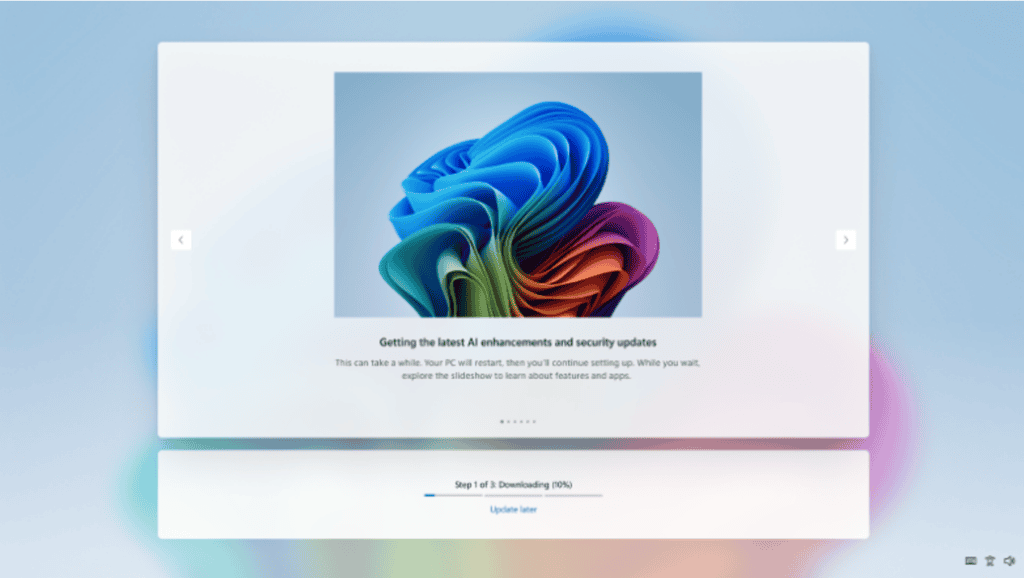
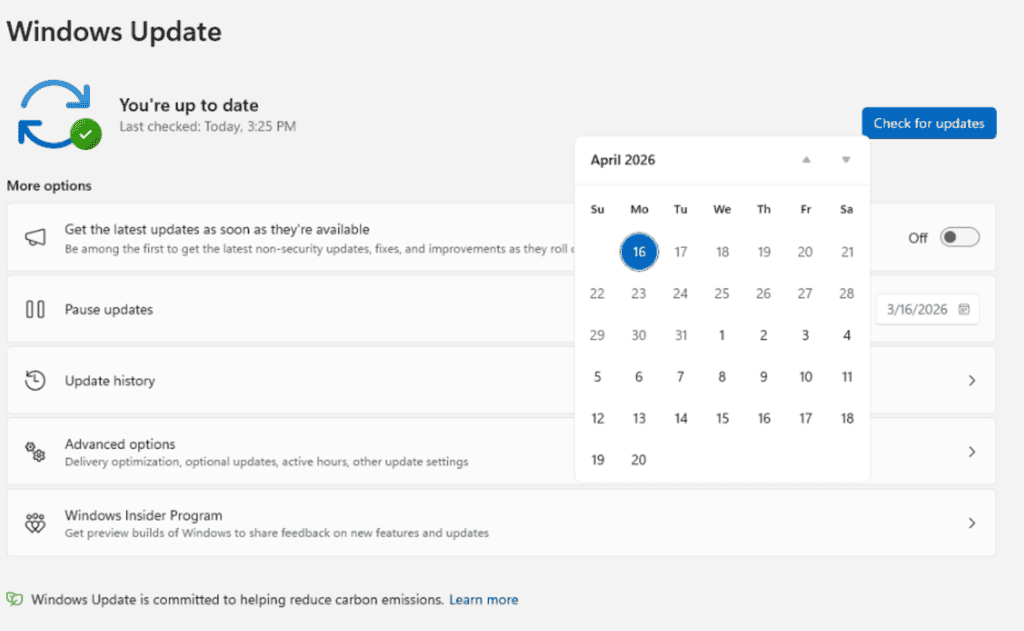
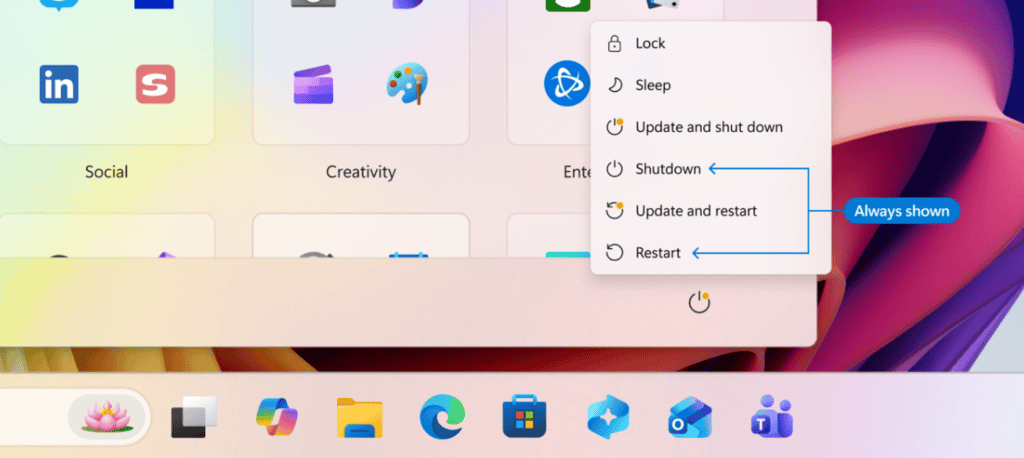
As part of the Dev update, Microsoft is also expanding control over Windows Update as it starts rolling out some improvements. As part of the rollout, the company is adding the ability to skip updates during the initial setup process, extend update pauses multiple times, and access clear shutdown or restart options without being forced into installing updates.

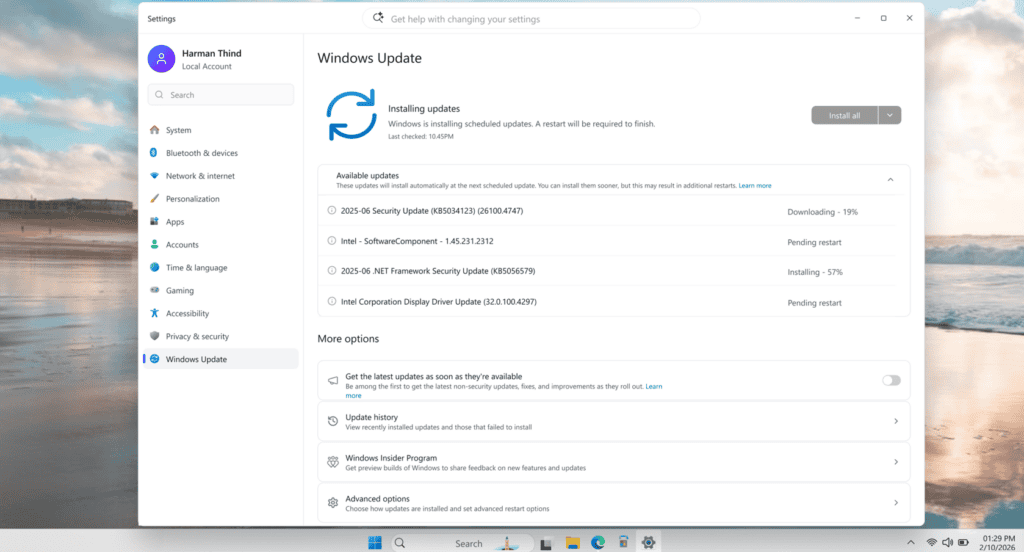
There is also more clarity being added to updates themselves. Users will now see better insights into what is being installed, helping them make more informed decisions before proceeding. You can read our detailed article around all the improvements here.

Smaller system tweaks and fixes also included

Besides Windows Update, Microsoft is making a few under-the-hood changes with the rollout of Build 26300.8289. The Start menu is getting improved edge detection, making it easier to open when taskbar icons are left-aligned. There are also updates to print drivers, with new hardware IDs being introduced ahead of broader changes to how printer drivers are handled in Windows. Additionally, Times New Roman has been updated to better support certain Unicode characters, especially across Greek and Cyrillic text. Notably all of the changes we just discussed are also rolling out to Insiders in the Beta channel with Build 26220.8283.

Do note that there’s a known issue related to feature flags in the Dev channel update. Microsoft notes, “Insiders who use Feature flags to enable the new WIP experience may see the feature state incorrectly marked as current, however changing state and applying changes will work as expected.”

Microsoft Starts Rolling Out Improvements to Windows Update Experience

Microsoft has just addressed one of the biggest pain points for Windows 11 users, as it today announced the rollout of several improvements to the Windows Update experience. The company says that the following improvements are based on thousands of feedback from users who have been dealing with poorly timed updates and limited control.

For a lot of people, Windows updates showing up at the wrong time has been a constant annoyance. It breaks your flow, forces restart, and sometimes just gets in the way when you need your PC the most. Well, Microsoft seems to be trying to fix exactly that.

The Windows Update experience is getting more control-focused changes

One of the biggest updates here is control during initial setup. You can now skip updates right during the out-of-box experience, which means you can get to the desktop faster and deal with updates later if you want. It’s a small change, but it could make a difference for first-time setup.

Image credit: Microsoft

On top of that, updates pause controls are getting expanded as part of the improved experience. You can now delay updates for up to 35 days and keep extending that pause if needed. That’s useful if you’re traveling, working on something important, or just don’t want interruptions.

Image credit: Microsoft

Microsoft isn’t just stopping there, as it has also tweaked the power menu. As part of the rollout, restart and shutdown options have been clearly separated from update actions, so your PC won’t suddenly decide to install updates unless you choose to. That alone might fix one of the most frustrating parts of Windows updates.

Image credit: Microsoft

Fewer restarts and clearer update details are also part of the plan

Another big focus here is reducing how often your system restarts. Microsoft says it is aligning driver, .NET, and firmware updates with monthly updates, which should cut down the number of reboots you see. There’s also better clarity around updates. Driver updates will now show more details, like whether they are for audio, display, or other components, so you actually know what’s being installed.

In addition to all that, Microsoft is also working on making updates more reliable. Updates will install in the background and even try to recover automatically if something fails, which could be helpful for slower connections.

All of this is starting to roll out to Windows Insiders, and it looks like Microsoft is finally taking a more user-first approach here. 

DeepSeek Previews New V4 Models That Rival World’s Top Ones in Performance

DeepSeek has just pulled the wraps off its latest AI model lineup, and it focuses on efficiency. The company has officially released DeepSeek-V4 Preview. Notably, it is open sourced with support for a massive 1M context length. The announcement came a day after OpenAI released GPT-5.5, which it says is its smartest model to date.

DeepSeek-V4 Preview goes live with focus on efficiency and scale

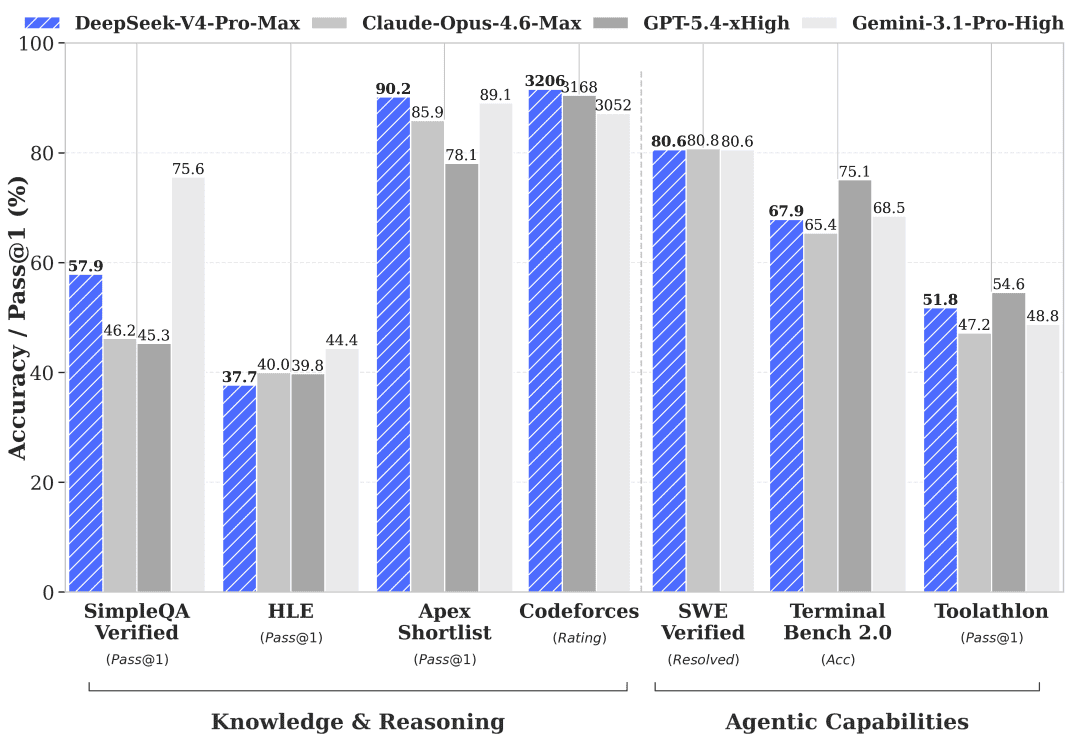
With the release of DeepSeek-V4 Preview, the company is looking to compete with both open and closed AI models around the globe. The new lineup includes DeepSeek-V4-Pro and DeepSeek-V4-Flash, each targeting different use cases while sharing the same core architecture.

DeepSeek-V4-Pro comes in with 1.6 trillion total parameters and 49 billion active ones. The company claims performance that rivals leading closed-source models, especially in reasoning-heavy tasks like coding, math, and STEM. It also reportedly leads most open models in world knowledge, trailing only top-tier systems like Gemini 3.1 Pro.

Image credit: DeepSeek

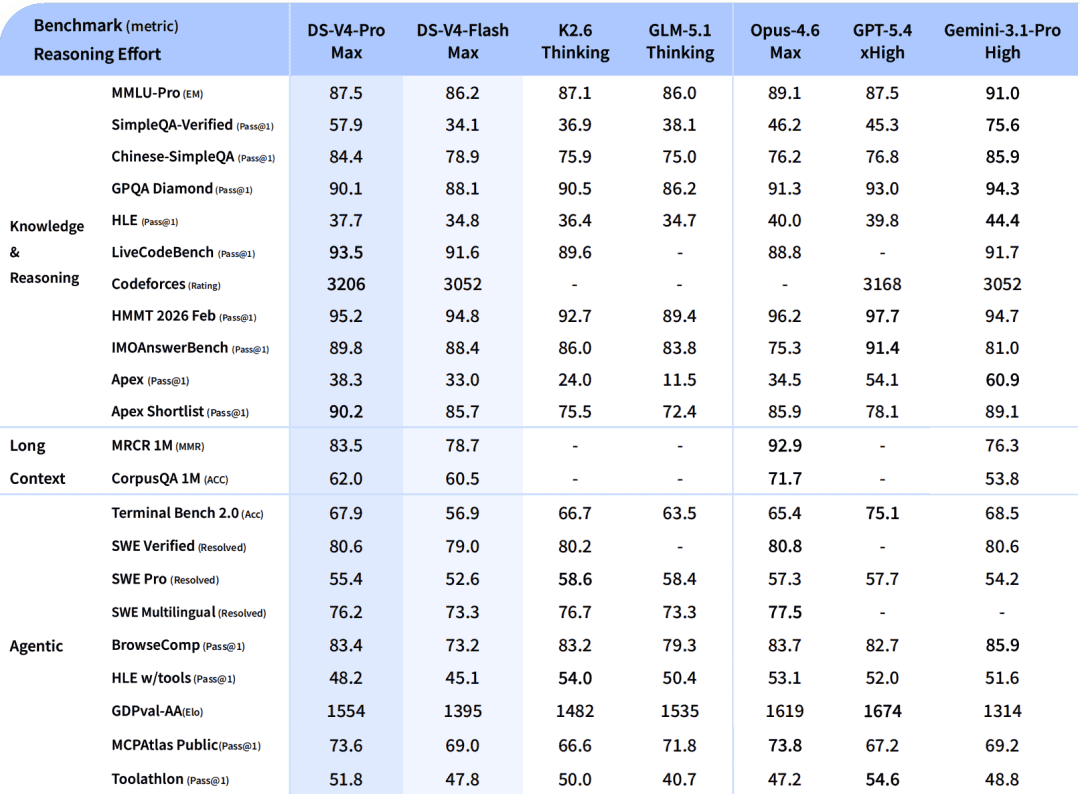
On the other hand, DeepSeek-V4-Flash focuses on speed and cost. With 284 billion total parameters and 13 billion actives, it is positioned as a faster and more affordable option. Interestingly, it still performs close to the Pro variant on simpler agent-based tasks, which could make it appealing for developers looking for efficiency without a big performance trade-off.

Image credit: DeepSeek

A push toward agentic AI and long-context workloads

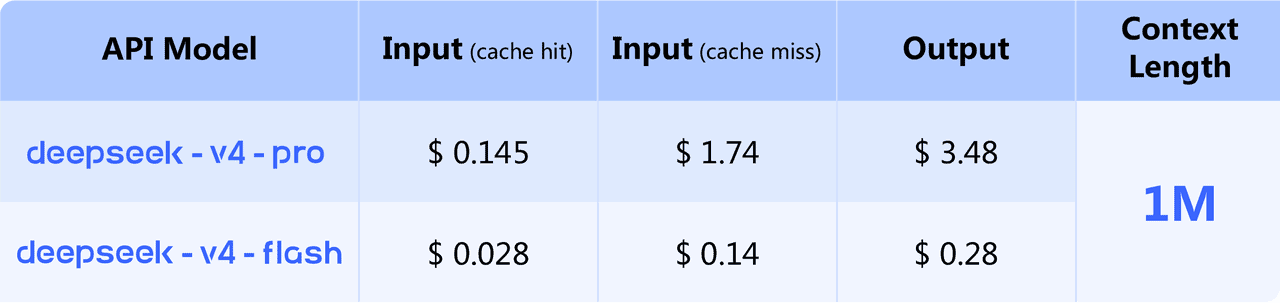
DeepSeek is also focused on agentic AI, as it says the new models are designed to handle multi-step reasoning and integrate with tools like Claude Code, OpenClaw, and OpenCode. That suggests a clear shift toward real-world task execution rather than just text generation. If you are wondering about the pricing, take a look at the chart below:

Image credit: DeepSeek

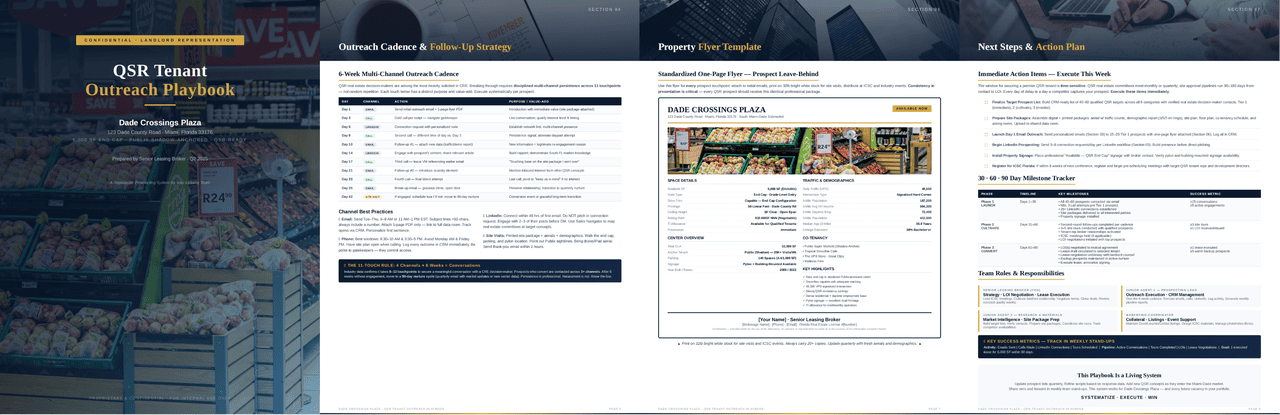
Moving on, the company is also introducing a new attention mechanism with token-wise compression and sparse attention, which reportedly reduces compute and memory costs while handling long contexts more efficiently. The company has also shared a sample PDF generated by DeepSeek-V4-Pro, which you can see below:

Image credit: DeepSeek

With API access already live and open weights available, DeepSeek seems to be betting big on accessibility and scale.

Meta Bets on AWS Graviton Chips to Power Growing Agentic AI Workloads

As every major tech giant around the globe, Meta has also been doubling down on its AI goals, even if it comes at a cost off laying off its talent pool. Yes, Meta has announced that it’ll cut 10% of its workforce as AI spending is mounting. Speaking of AI, Meta today confirmed a partnership with Amazon Web Services (AWS) to bring tens of millions of AWS Graviton cores into its compute portfolio.

Meta turns to Graviton cores amid growing AI workloads

The company says this deployment will start with tens of millions of Graviton cores, with room to scale further as its AI efforts grow. These systems rely heavily on CPUs for tasks like reasoning, planning, and executing multi-step workflows, rather than just traditional GPU-heavy training.

“This isn’t just about chips; it’s about giving customers the infrastructure foundation, as well as data and inference services, to build AI that understands, anticipates, and scales efficiently to billions of people worldwide. Meta’s expanded partnership, deploying tens of millions of Graviton cores, shows what happens when you combine purpose-built silicon with the full AWS AI stack to power the next generation of agentic AI,” said Nafea Bshara, Vice President and Distinguished Engineer at Amazon.

Meta also highlights that Graviton5 cores are designed for faster processing and higher bandwidth, which are key for handling continuous AI workloads at scale. Notably, the Graviton5 chip packs 192 cores and a cache that is five times larger than its predecessor, cutting communication delays between cores by up to 33%. That being said, the company is not relying on a single architecture.

A broader shift toward diversified AI infrastructure

What stands out is Meta’s broader approach to infrastructure. The company says no single chip can handle every workload efficiently, which is why it is investing across data centers, custom hardware, and cloud partnerships.

“As we scale the infrastructure behind Meta’s AI ambitions, diversifying our compute sources is a strategic imperative. AWS has been a trusted cloud partner for years, and expanding to Graviton allows us to run the CPU-intensive workloads behind agentic AI with the performance and efficiency we need at our scale,” said Santosh Janardhan, Head of Infrastructure at Meta.

With AI systems now expected to serve billions of users, Meta’s strategy appears to focus on flexibility as much as performance. Not to forget, Meta also recently announced partnership with Broadcom to build custom AI chips for next-gen infrastructure.

Microsoft Launches Copilot Keyboard for Windows With AI-Powered Japanese Input

Microsoft has released a new Copilot Keyboard for Windows, an AI-powered input method editor designed to improve Japanese typing. The tool focuses on smarter suggestions, modern vocabulary, and deeper Copilot integration across the desktop.

AI-powered typing experience for Japanese users

The Copilot Keyboard brings a major shift from traditional IMEs by using AI to suggest words and phrases dynamically. Instead of relying on static dictionaries, the system adapts to trending language, including terms commonly used on social media.

Users no longer need to manually update dictionaries to keep up with modern expressions. The AI continuously refreshes suggestions, making text input faster and more relevant.

In addition to predictive typing, the keyboard includes Copilot Search, allowing users to look up meanings directly without opening a browser. This keeps workflows uninterrupted and reduces context switching.

Microsoft also supports dictionary import from the legacy Microsoft IME, making migration easier for existing users. The standard IME remains available, and users can switch between them through Windows Settings.

Copilot integration and nostalgic touches

The new keyboard introduces a floating Copilot button that can be placed anywhere on the desktop. Users can drag and drop content into it to trigger AI actions, adding a more interactive layer to everyday tasks.

Customization options include replacing the Copilot icon with AI-themed characters. Microsoft also added a nostalgic element with “Kyle the dolphin,” a character that originally appeared in the Japanese version of Microsoft Office 97 before being retired years later.

Why this release matters

The Copilot Keyboard signals a broader move toward AI-driven productivity tools. By embedding AI directly into the typing experience, Microsoft shifts away from static input systems toward adaptive, real-time language assistance.

The release also highlights Microsoft’s continued focus on localization, delivering features tailored specifically for Japanese users rather than applying a one-size-fits-all approach.

In other developments, Microsoft has started giving IT admins the option to remove Copilot from enterprise PCs. At the same time, the company continues to expand its AI ecosystem with Copilot Agent Mode in Microsoft 365 and broader Copilot Checkout availability.

Via Windows Central

Microsoft Finally Lets IT Admins Remove Copilot From Windows 11

Microsoft has introduced a new policy that allows IT administrators to uninstall Microsoft Copilot from managed Windows 11 devices. The feature rolled out after the April 2026 Patch Tuesday update and targets enterprise environments that need tighter control over AI features.

The new policy, called RemoveMicrosoftCopilotApp, works through Group Policy and Policy CSP tools like Intune and SCCM. It applies to Windows 11 25H2 systems across Enterprise, Pro, and Education editions.

How the Copilot removal policy works

The system removes the Copilot app automatically when specific conditions are met. Both Microsoft Copilot and Microsoft 365 Copilot must be installed, and the user must not have installed Copilot manually. The app must also remain unused for at least 28 days.

Once enabled, the policy uninstalls Copilot silently in the background. Users still retain the option to reinstall it manually if needed, keeping flexibility intact while reducing unnecessary deployments.

Admins can configure the setting through dedicated policy paths:

/User/Vendor/MSFT/Policy/Config/WindowsAI/RemoveMicrosoftCopilotApp
/Device/Vendor/MSFT/Policy/Config/WindowsAI/RemoveMicrosoftCopilotApp

Microsoft first introduced the feature in Windows Insider builds earlier this year, and it has now reached general availability.

Why this change matters for enterprises

This update signals a shift in Microsoft’s approach to AI distribution on Windows. Instead of pushing Copilot broadly, the company now gives organizations the ability to remove unused AI tools and manage adoption at their own pace.

For IT teams, this reduces clutter, improves compliance, and ensures that only actively used features remain on company devices. It also helps organizations align AI usage with internal policies and security requirements.

In other news, Microsoft recently enabled Copilot Agent mode for Office in Microsoft 365 and expanded Copilot Checkout with additional capabilities.

Via Bleeping Computer

GPT-5.5 is Now Available in Microsoft Foundry for Enterprise Use

After weeks of leaks and rumors, OpenAI finally released GPT-5.5 yesterday. The company calls the new model as its smartest and the most intuitive to use model to date. Not to forget, there is a “Pro” model called GPT-5.5 Pro.

As Microsoft does everytime when a new model lands, it is bringing GPT-5.5 to Microsoft foundry for enterprise use. Starting today, GPT-5.5 is now available in Microsoft Foundry. Speaking of core features, the latest model is definutely an improvement over GPT-5.4 on paper.

The details shared by OpenAI in the announcement post indicates that GPT-5.5 advances with deeper long-context reasoning, more refined agentic execution, improved computer-use accuracy, and greater token efficiency. All of that makes it suitable for high-stakes professional workflows.

One of the standout points is that GPT-5.5 beats Anthropic’s latest Claude Opus 4.7 on almost every benchmark that the company tested it on. Worth noting that Claude Opus 4.7 is also available in Microsoft Foundry.

Image: OpenAI

Coming back to GPT-5.5, it’s handy in reasoning and professional workloads, especially in document-heavy and tool-using environments where models need to stay consistent across longer workflows. GPT-5.5 also shows strong performance in tasks that mirror real office environments like data analysis, reporting, and workflow automation.

OpenAI also says that GPT-5.5 matches GPT-5.4‘s latency in real-world use while offering higher-quality outputs. The model also shows stronger efficiency in coding workflows. As of the pricing, OpenAI will charge $5 per 1 million input tokens and $30 per 1 million output tokens, with a 1 million context window.

Image credit: Microsoft

Have you already tried GPT-5.5? If yes, let us know whether it’s a big improvement over GPT-5.4.

VS Code Update Brings More Flexible Copilot Integration and Faster Chat Experience

Microsoft has released Visual Studio Code 1.117, continuing its push to make Copilot more flexible and developer-friendly. The update builds on version 1.116, which introduced built-in Copilot Chat, and now focuses on control, performance, and usability improvements.

The update is available through automatic downloads on Windows and macOS, while Linux users must check for updates manually.

Copilot Gets “Bring Your Own Key” Support

One of the biggest changes in version 1.117 is the introduction of Bring Your Own Key (BYOK) support for Copilot. This feature is available to Copilot Business and Copilot Enterprise users.

Developers can now connect their own API keys instead of relying solely on Microsoft-managed infrastructure. Supported providers include OpenAI, Google, OpenRouter, and Ollama.

This shift gives companies more control over how AI is used inside their environments. It also allows teams to run local models or route requests through their preferred providers, reducing reliance on Microsoft’s compute resources.

Chat Feels Faster With Incremental Rendering

Microsoft is also testing a new experimental feature that improves how Copilot Chat responses appear. Instead of waiting for a full response, the system now streams content block-by-block.

This change makes interactions feel faster and more natural, even if the total response time remains similar. The smoother output flow improves readability and reduces friction during longer coding sessions.

Terminal Integration Now Works Across All Shells

Version 1.117 also fixes a long-standing issue with Copilot CLI in the terminal. Previously, the feature struggled with custom shells such as fish on macOS and Linux or Git Bash on Windows.

The update removes these limitations, allowing Copilot CLI to launch correctly regardless of the default shell configuration. This improvement ensures a more consistent experience for developers who rely on customized terminal setups.

Bigger Shift Around Copilot Continues

The release comes as Microsoft adjusts its broader Copilot strategy. The company recently limited access to GitHub Copilot due to demand, and reports suggest a move toward token-based pricing may follow.

Together, these changes signal a shift toward more flexible, usage-based AI development tools, with greater control placed in the hands of developers and enterprises.

Via Neowin

New Xbox Game Pass “Starter Edition” Will Be Free for Discord Nitro Subscribers, Leak Suggests

Earlier this week, Xbox CEO Asha Sharma teased a partnership with Discord around Xbox Game Pass. At the time, Sharma said “some of you might start to see some code in the wild,” but didn’t reveal everything, adding that “more details” will be shared soon. Well, it seems details have leaked ahead of the official announcement.

Fresh leak hints at free access to the new Xbox Game Pass (Starter Edition) plan for Discord Nitro subscribers

The news comes via The Verge, which spotted a post on X by the account DiscordPreviews detailing a new Xbox Game Pass “Starter Edition” perk for Discord Nitro users. As seen in the leaked image below, the new Starter Edition for Xbox Game Pass will include “50+ games like Stardew Valley, Fallout 4, and Grounded,” 10 hours of cloud gaming every month, and Xbox Rewards.

Image credit: X/@DiscordPreviews

Additionally, Discord Nitro subscribers will soon be able to use cloud gaming to play select games from their Xbox library. The leaker further adds Nitro subscribers will be able to “find details on how to activate Game Pass on your Nitro home once the feature rolls out.”

In addition to these details, the news outlet spotted another post by user redphx on X, that mentions “a lot of third-party games” will be part of the new Game Pass tier. So, it seems the new Game Pass tier won’t only include first-party titles. Apparently, Xbox Game Pass (Starter Edition) is the official name for the previously leaked Triton/Duo tier.

Xbox’s massive reset plan

The new Game Pass tier for Discord Nitro subscribers appears to be part of a massive Xbox reset plan that Asha Sharma and Matt Booty shared yesterday. Speaking of which, Microsoft Gaming branding has been scrapped entirely, as Sharma and Booty declared the “We are Xbox” message. In the same announcement, Xbox leadership also acknowledged that they have some work to do, while also confirming that their “new north star will be daily active players.” More importantly, Xbox wants to be a platform “where the world plays and creates.” It will be interesting to see how the new leadership steers Xbox toward a brighter future.


Microsoft to Shift GitHub Copilot to Token-Based Pricing

Microsoft is preparing a major pricing change for GitHub Copilot, moving away from fixed monthly limits as demand and infrastructure costs continue to surge, according to Where’s Your Ed At.

Token-based billing replaces request limits

The current $20–$30 monthly pricing model is no longer sustainable at scale. According to reports, Microsoft plans to introduce token-based billing starting June 1.

Instead of capped requests, users will pay based on actual usage. Pricing is expected to land around $2.50 per million input tokens and $15 per million output tokens. This aligns Copilot more closely with how modern AI services charge for compute.

Subscriptions will remain in place, but they will now include token credits rather than fixed usage limits.

New structure for individual and enterprise users

Under the new system, monthly plans will act as a base layer that provides credits. Once those credits are used, additional usage will incur extra costs.

For enterprise customers, Microsoft is expected to introduce pooled credits across teams. This allows organizations to distribute usage more flexibly instead of assigning strict per-user limits.

Reported pricing suggests Copilot Business could offer around $30 in credits for $19 per month, while Copilot Enterprise may provide roughly $70 in credits for $39 per month.

Why Microsoft is making the change

The shift reflects a broader trend in AI pricing. As tools like GitHub Copilot evolve from simple code autocomplete into full AI agents, compute requirements increase significantly.

Token-based billing gives Microsoft a way to better align revenue with actual infrastructure usage. Heavy users will pay more, while lighter users may end up paying less.

The trade-off comes in predictability, as monthly costs will now vary depending on usage patterns.

Bigger push toward AI infrastructure

This move fits into Microsoft’s wider AI strategy, which includes increasing investment in infrastructure and services. The company has already limited access to GitHub Copilot in some cases due to high demand.

At the same time, Microsoft is introducing new AI capabilities, such as hosted agents in its Foundry Agent Service, and implementing workforce changes, including voluntary buyouts in the U.S.

Together, these moves highlight a clear direction: scaling AI products requires both new pricing models and significant resource reallocation.

Via Neowin

Meta to Lay Off 8000 Employees in a Move to Offset Heavy AI Spending

Just last month, reports surfaced that Meta has laid off hundreds of employees across Facebook, Reality Labs, and other divisions. In what appears to be a separate company-wide layoff, Meta has reportedly told its staff that it will lay off 10% of its workforce, which translates to roughly 8,000 roles. This comes at a time when the company is trying to balance rising AI investments with operational efficiency.

Meta cuts 8000 jobs as AI spending climbs

Not to mention, many tech firms are doubling down on AI, which means spending has been at all-time high. Meta, who is among them, is apparently feeling the heat now and appears to be reshaping its workforce to keep up with the trend. Speaking of which, Meta is reportedly also developing an AI clone of CEO Mark Zuckerberg to interact with its staff.

Talking of layoff, Bloomberg reports that the job cuts are expected to take effect on May 20, while another 6,000 open roles will no longer be filled. That’s according to an internal memo seen by the news outlet.

The planned layoffs, reportedly confirmed by Meta’s Chief People Officer Janelle Gale, is related with Meta’s growing AI ambitions. The company has been pouring billions into infrastructure, talent, and partnerships to build large language models and AI-powered products. Now, that spending is starting to show pressure elsewhere.

“I know this is unwelcome news and confirming this puts everyone in an uneasy state, but we feel this is the best path forward, given the circumstances,” Gale wrote in the internal memo.

Meta CEO Mark Zuckerberg has also been pushing aggressively into AI, encouraging teams to adopt internal AI agents for coding and productivity tasks. Back in recent months, Meta also locked in multiple high-value AI deals, including the one with Broadcom, suggesting a long-term shift toward automation and advanced computing.

As usual, the company will be offering severance packages to affected employees

It’s worth noting that Meta will offer 16 weeks base pay plus two weeks for every year of employment. The company will reportedly also cover the cost of COBRA health care coverage for US employees and their families for 18 months. For employees outside the US, severance packages will be similar but vary by country.

Microsoft Prepares First-Ever Employee Buyouts Amid Massive AI Push

Microsoft is preparing voluntary buyouts for U.S. employees as part of a broader shift toward artificial intelligence investments, marking the first time the company has introduced a formal program of this kind.

Voluntary buyouts tied to AI strategy

The initiative comes as Microsoft continues to ramp up spending on AI infrastructure and services. According to details shared by CNBC, the program will target a portion of the company’s U.S.-based workforce, offering eligible employees a structured exit with financial support.

The move reflects a growing trend across the tech industry, where companies are reallocating resources to support large-scale AI development while managing operational costs.

Who qualifies for the program

The buyouts will apply to roughly 7% of Microsoft’s U.S. workforce. Eligibility focuses on employees at the senior director level and below, with an additional requirement that a worker’s age plus years of service equals at least 70.

Employees who participate in sales incentive plans are excluded from the offer. Microsoft is expected to release more detailed information about the program in May.

The effort is being led internally by Amy Coleman, who oversees human resources strategy at the company.

Compensation changes alongside buyouts

Alongside the buyout program, Microsoft is adjusting its compensation structure. The company is removing the requirement that ties stock awards directly to cash bonuses, giving managers more flexibility in how they reward performance.

At the same time, Microsoft is simplifying its pay structure by reducing the number of compensation options from nine to five. The changes aim to streamline decision-making and better align incentives with evolving business priorities.

AI investment driving workforce changes

The timing of the buyouts highlights Microsoft’s aggressive push into AI. The company has committed significant resources to building infrastructure, developing models, and integrating AI across its products and services.

Offering voluntary exits instead of layoffs allows Microsoft to reduce workforce costs while maintaining a more controlled and less disruptive transition. It also signals a shift toward roles that directly support AI initiatives.

Broader industry trend

Microsoft’s approach mirrors a wider pattern across the tech sector, where companies are restructuring teams and budgets to prioritize AI development. Voluntary buyouts provide a softer alternative to layoffs, while still enabling cost optimization.

The move underscores how AI spending is reshaping not just products, but also hiring strategies, compensation models, and long-term workforce planning.

Related developments

In parallel with these internal changes, Microsoft continues to expand its AI ecosystem. The company recently deepened its partnership with OpenAI with a focus on cybersecurity, acquired Fintool to enhance AI capabilities in Microsoft 365, and broadened its Copilot Checkout feature to support over 500,000 merchants.

Together, these developments reinforce Microsoft’s direction: a company increasingly centered on AI, with its workforce and structure evolving to match.

Via Neowin

CISA Orders Emergency Patch for “BlueHammer” Windows Zero-Day Exploit

The Cybersecurity and Infrastructure Security Agency (CISA) has ordered all U.S. federal agencies to urgently patch a critical Windows vulnerability already exploited in real-world attacks. The directive sets a strict two-week deadline, requiring remediation by May 7.

Critical flaw allows full system takeover

The vulnerability, tracked as CVE-2026-33825 and nicknamed “BlueHammer,” is a local privilege escalation (LPE) flaw. Attackers with limited access can exploit it to gain full SYSTEM-level control over affected machines.

Microsoft released a patch for the issue on April 14 as part of its Patch Tuesday updates. However, security researchers confirmed the flaw was already exploited before the fix became available, making it a zero-day vulnerability.

Active attacks raise concerns of targeted intrusions

Investigators observed real-world exploitation involving hands-on keyboard activity, suggesting attackers actively navigated compromised systems rather than relying on automated tools. Reports point to suspicious infrastructure and compromised VPN access, raising the possibility of coordinated or state-linked operations.

The severity comes from how attackers typically use such flaws. After gaining initial access, they deploy privilege escalation vulnerabilities like BlueHammer to take full control of systems and expand their reach across networks.

Additional threats complicate the situation

Alongside BlueHammer, researchers disclosed other dangerous Windows vulnerabilities, including RedSun, another privilege escalation flaw, and UnDefend, which can interfere with Microsoft Defender updates.

Not all of these issues have been fully patched, yet some already show signs of active exploitation in the wild. This combination increases the overall risk for enterprise and government environments.

Federal mandate: patch or disconnect

CISA added the vulnerability to its Known Exploited Vulnerabilities (KEV) catalog and issued binding instructions under BOD 22-01. Agencies must apply patches immediately or remove affected systems from networks if they cannot secure them in time.

The directive highlights the urgency. SYSTEM-level access effectively gives attackers full control over compromised machines, making this type of vulnerability especially dangerous for critical infrastructure and government systems.

Broader impact on enterprise security

This incident reinforces a familiar pattern. Attackers rarely rely on a single exploit. Instead, they combine initial access with privilege escalation to achieve deeper persistence and control.

For enterprises, the takeaway is clear. Even a single unpatched system can become an entry point for widespread compromise, especially when zero-day vulnerabilities are involved.

Via Bleeping Computer
Microsoft Edge Bug Breaks Teams Meeting Access for Some Users

Microsoft has confirmed a new issue affecting Microsoft Teams, caused by a recent Microsoft Edge update, marking another regression tied to the browser’s integration with the collaboration platform.

Teams meeting access disrupted by Edge regression

The problem, tracked under TM1288497, prevents some users from joining Teams meetings. Reports indicate that both scheduled meetings and access via direct meeting links can fail, disrupting normal workflows in enterprise environments.

According to Microsoft, the root cause is a regression introduced in a recent Edge release. The company has not provided deeper technical details yet, but it is actively analyzing diagnostic data and monitoring recent service changes to isolate the issue.

For now, the only available workaround involves restarting the Teams client. This fix may restore functionality in some cases, but Microsoft warns that it does not work consistently for all users.

Ongoing investigation as Teams issues continue

The issue is currently classified as an advisory, meaning it has limited scope, but its impact remains significant for affected organizations. When meeting access breaks, productivity can stall quickly, especially in remote or hybrid work setups that rely heavily on Teams.

This incident also highlights a broader pattern. Recent Edge updates have triggered multiple issues within Teams, including a previously reported bug affecting right-click paste functionality. The growing link between browser updates and core enterprise tools raises concerns about stability in tightly integrated ecosystems. Microsoft has not shared a timeline for a fix.

In parallel, the company recently rolled back a separate Teams update that prevented the app from launching for some users. At the same time, Microsoft continues to expand Teams with new anti-phishing protections and an upcoming Efficiency Mode aimed at improving performance.

Via Bleeping Computer
Microsoft Engineer Reveals Real Cause of Earlier File Explorer Crashes

Microsoft engineer Raymond Chen recently shared a debugging story that explains a wave of mysterious File Explorer crashes, and it turns out Windows wasn’t to blame.

The issue first appeared as a sudden spike in crashes, leading engineers to suspect a flaw inside the operating system. However, deeper analysis of crash dumps revealed something unusual: the failures came from the 32-bit version of File Explorer running on 64-bit Windows systems.

Legacy component exposed the real problem

Windows still includes a 32-bit version of File Explorer for compatibility with older apps. Under normal conditions, modern systems rarely use it.

In this case, a third-party uninstaller forced the system into that legacy path. That’s where things started to break.

Faulty code caused memory corruption

The root issue came down to how the uninstaller interacted with system APIs. It used the wrong function calling convention and mishandled stack parameters.

Each failed operation removed stack data incorrectly. Because the process repeated in a loop, memory corruption built up over time. Eventually, the stack pointer drifted into active code, triggering a crash in File Explorer.

Why the issue looked like a Windows bug

From the outside, the behavior mimicked a typical OS failure. File Explorer crashed repeatedly, giving the impression of system instability.

In reality, the operating system only surfaced the consequences of faulty third-party code. The bug originated outside Windows, but the symptoms appeared inside a core component.

Broader lesson for Windows users
Chen highlighted a key reality of the Windows ecosystem: with billions of devices and countless applications, not every crash points to Microsoft.

Third-party software can destabilize even core system processes if it misuses system-level APIs. Proper debugging requires analyzing root causes, not relying on assumptions.

While this case clears Windows itself, other problems remain. The recent update KB5083769 introduced Remote Desktop UI issues on multi-monitor setups with mismatched scaling.

Microsoft is also addressing separate Windows Server crashes through an emergency update.

A crashing Windows component doesn’t automatically mean a Windows bug. As this case shows, external software can quietly trigger deep system instability, and only careful debugging reveals the truth.

Via Neowin

Microsoft KB5083769 Update Causes Remote Desktop UI Issues on Multi-Monitor Setups

Microsoft rolled out update KB5083769 as part of the April 2026 Patch Tuesday cycle, adding new Remote Desktop (RDP) safeguards. The update specifically targets CVE-2026-26151, aiming to block malicious or spoofed RDP file attacks that could trick users into unsafe connections.

The change strengthens how Windows handles RDP files, reducing the risk of attackers exploiting remote access workflows.

New bug affects Remote Desktop warning window

As Neowin reports, shortly after installation, users began reporting a new issue impacting the Remote Desktop warning dialog. The bug causes visible UI problems, including overlapping text, cut-off buttons, and broken layout elements.

The issue makes the prompt difficult to read and interact with, especially in security-sensitive scenarios where users must confirm connection details.

Multi-monitor scaling triggers the issue

The bug appears under specific display conditions. Systems using multiple monitors with different scaling settings, such as 100% on one display and 125% on another, trigger the UI glitch.

This mismatch causes the Remote Desktop window to render incorrectly, leading to misaligned elements and unusable controls.

Workarounds available for affected users

Users can reduce the impact of the issue by applying a few temporary fixes.

Adjust display scaling so all monitors use the same percentage value through Settings, then Display, then Scale & Layout.

Alternatively, users can rely on keyboard navigation. Press Tab to move between options and Space to confirm selections when buttons are not clickable.

Microsoft investigating, fix expected soon

Microsoft has acknowledged the issue and is currently investigating. A permanent fix will likely arrive in a future update, possibly alongside an upcoming performance-focused release.

Update linked to additional system issues

KB5083769 is also associated with other reported problems. Some users experienced unexpected BitLocker recovery prompts after installing the update.

In more severe cases, systems entered endless boot recovery loops, preventing normal startup and requiring manual intervention.

While KB5083769 improves RDP security against spoofing attacks, it introduces usability and stability concerns. Users relying on multi-monitor setups may face immediate friction until Microsoft delivers a fix.

Xbox Announces Major Reset Plan & Branding Shift, Asha Sharma Says “We Are Xbox”

Xbox has undergone major leadership shakeup earlier this year. Now, the gaming division of Microsoft has a new CEO, Asha Sharma. Ever since Sharma assumed the role of Xbox CEO, a lot has happened. Sharma led the move to scrap the “This is an Xbox” campaign, announced price cuts for Xbox Game Pass, teased partnership with Discord over Game Pass, and even commented on Xbox’s mobile store. Worth noting that she is also overseeing the development of Project Helix, the next-gen Xbox console.

Xbox acknowledges shortcomings and player frustration as it announces branding shift and big reset plan

Not to mention, Asha Sharma is quite serious about taking Xbox in the right direction. Speaking of which, Microsoft Gaming is now being scrapped and, just like it used to be, the gaming division in Microsoft will now be called “Xbox” going forward.

In a published internal memo, Xbox CEO Asha Sharma and head of Xbox Game Studios Matt Booty, not only announced the branding shift but also acknowledged areas where Xbox has “work to do.” Players are frustrated, and Xbox is openly acknowledging it. The internal message does not sugarcoat where things stand right now, pointing to slower console updates, a weaker PC presence, and pricing that is becoming harder for users to keep up with.

Xbox leadership goes on to admit that “core experiences like search, discovery, social, and personalization still feel too fragmented.” Developers and publishers are also constantly looking for better tools, clearer insights, and a platform that actually helps them grow instead of slowing them down.

What stands out is how much player behavior has shifted underneath Xbox’s feet. A new generation of users is coming in with very different expectations, split across games, media, and social platforms, with no real attachment to a single ecosystem. That is something Xbox needs to catch up with. The leadership also goes on to acknowledge that “the model that got [Xbox] here won’t be the one that takes [Xbox] forward.” As Sharma and Booty reflected back on the journey and shortcomings of Xbox, they also shared a comprehensive plan on how the company is looking to move Xbox toward the right direction.

Asha Sharma wants Xbox to be a “place where the world plays and create”

Xbox will be shifting toward a global play and creation platform, where it connects users across console, PC, mobile, and cloud. Console stays the premium base while cloud removes device limits. “Xbox will be built to be affordable, personal, and open. We will offer flexible pricing so it’s easy to get started and keep playing. The experience will adapt to you, letting you customize how you play, helping you find what you’ll love, and connecting you with the right people. And we will be open to all creators, from individuals to the largest studios, giving anyone the tools to reach a global audience and keep their games growing over time,” notes Xbox leadership.

Wondering how Xbox will achieve all this? Well, the gaming division has a comprehensive plan for it, take a look below:

Hardware

  • Stabilize Gen9 as a healthy and high-quality base 
  • Deliver Project Helix to lead in performance and play your console and PC games
  • Lead in comfortable, personal, high-performance accessories
  • Build a strong ecosystem that expands choice and reach

Content 

  • Grow and extend an enduring portfolio of franchises players love
  • Evolve our 3P partnerships and strengthen our 5-year slate
  • Expand into China, emerging markets, and mobile-first audiences 
  • Maintain and grow in live games and long-term stewardship
  • Elevate creator-centric platforms like Minecraft, The Elder Scrolls, and Sea of Thieves

Experience

  • Fix the fundamentals for players and partners 
  • Make Xbox the best place for developers and creators to build and grow 
  • Overhaul discovery, customization, social and personalization to connect the community 

Services

  • Fortify Game Pass with clear differentiation and sustainable economics 
  • Return the business to durable growth with strong cost discipline 
  • Make cloud play feel native, fast, and reliable across TVs and low-cost devices
  • Use M&A deliberately to accelerate growth where organic paths are too slow

The company will also reassess its approach around exclusivity, windowing, and AI. All that said, the plan does look promising, and if the new Xbox CEO along with the team manages to deliver what they said in the internal memo, Xbox will be able to reach new heights.

Every Game Announced at ID@Xbox Spring 2026 Showcase

The latest ID@Xbox Showcase delivered a packed slate of indie games headed to Xbox and Game Pass. Microsoft highlighted both playable titles and upcoming 2026 releases, reinforcing its push to turn Game Pass into a major discovery platform for indie titles.

Many of the showcased games will support Xbox Play Anywhere, which lets players buy once and access their games across console and PC.

Several games are already available

The event included a few titles that players can jump into right now. Albion Online and Vampire Crawlers: The Turbo Wildcard are already playable, while Solo Leveling: Arise Overdrive is currently available on PC, with a console release planned later.

That immediate availability helped balance the showcase between present and future releases.

2026 lineup spans multiple genres

The broader 2026 lineup showed a wide mix of genres and styles. Action and adventure titles like Aphelion, Kalanoro, and Vapor World: Over The Mind highlight a strong cinematic and exploration focus.

RPG and strategy elements also featured heavily, with Echo Generation 2 and Beastro representing the role-playing and deckbuilding side of the lineup. Multiplayer experiences remain a priority as well, with games like Deep Dish Dungeon, Crashout Crew, and RV There Yet? targeting cooperative and social gameplay.

On the narrative and puzzle side, Escape Academy 2: Back 2 School and Inkonbini: One Store. Many Stories bring slower-paced, story-driven experiences. Meanwhile, lighter and more experimental titles such as Golf With Your Friends 2, SpeedRunners 2: King of Speed, and Totopia round out the offering.

Standout concepts push creative boundaries

Several games stood out due to their unique ideas. Screenbound introduces a hybrid gameplay system that blends 2D and 3D perspectives at the same time, creating a distinct visual and mechanical identity.

Lofsöng focuses on sound-driven exploration, while There Are No Ghosts at the Grand mixes musical elements with horror themes and hotel renovation gameplay. Starseeker: Astroneer Expeditions also drew attention with its co-op space exploration focus.

Release windows begin to take shape

Microsoft confirmed a number of early release dates for the lineup:

  • April 30: Inkonbini
  • May 27: Echo Generation 2
  • May 28: Crashout Crew
  • May: RV There Yet?
  • July 2026: Mistfall Hunter and SpeedRunners 2
  • Summer / Fall 2026: Kalanoro, Golf With Your Friends 2, and Deep Dish Dungeon

These dates suggest a steady cadence of indie releases throughout 2026.

Game Pass drives discovery

Game Pass remains at the center of Xbox’s indie strategy. Many of the showcased titles will launch day one on the service, making it easier for players to try new games without upfront risk.

This approach continues to position Game Pass as a primary hub for discovering indie experiences rather than relying on traditional storefront visibility.

Overall, this showcase delivered one of the stronger indie lineups in recent Xbox presentations. The variety of genres, creative concepts, and clear release schedule give Xbox solid momentum heading into 2026.

At the same time, Microsoft’s strategy remains clear. Game Pass continues to evolve into the default platform for discovering indie games.

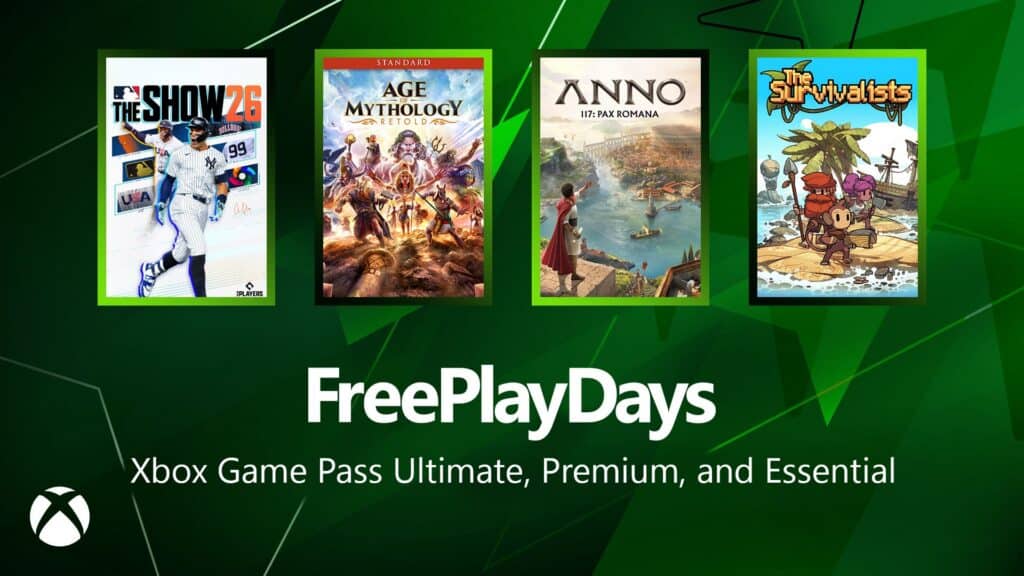
In other gaming news, Xbox Free Play Days titles have been announced, while Assassin’s Creed Black Flag Resynced has also been officially revealed.

OpenAI Releases GPT-5.5 (Spud), Its Most Capable Model Yet

As rumored earlier, OpenAI has released GPT-5.5, codenamed “Spud.” The company says it’s a major upgrade over GPT-5.4. The latest model is now rolling out across ChatGPT and Codex, with enterprise and API access coming soon.

OpenAI is positioning GPT-5.5 toward more autonomous AI, where systems don’t just respond but actively complete full tasks. That includes coding, research, and tool-based workflows with less human guidance.

Benchmark results show GPT-5.5 is a clear step up

On performance benchmarks, GPT-5.5 consistently comes out ahead of GPT-5.4 across most categories. In coding-heavy evaluations, it shows stronger results in multi-step problem solving, terminal-based tasks, and real-world software engineering challenges. The model beats Anthropic’s Claude Opus 4.7 and Gemini 3.1 Pro on all major benchmarks.

Image credit: OpenAI

In reasoning and professional workloads, GPT-5.5 also edges forward, especially in document-heavy and tool-using environments where models need to stay consistent across longer workflows. It is also reported to handle computer-use tasks more reliably, where earlier versions often struggled with continuity.

Across knowledge work simulations, GPT-5.5 shows gains in tasks that mirror real office environments like data analysis, reporting, and workflow automation. The improvements are not just about accuracy but also efficiency, with fewer retries and reduced token usage for the same tasks.

Efficiency and real-world performance shift

One of the key changes is speed consistency. OpenAI says GPT-5.5 matches GPT-5.4 latency in real use while delivering higher-quality outputs. That balance between speed and capability is becoming central as models grow more complex. The model also shows stronger efficiency in coding workflows, as it completes tasks with fewer tokens while maintaining output quality. That being said, benchmark gains don’t always translate perfectly into messy real-world environments.

Availability and pricing

OpenAI is rolling out GPT‑5.5 to Plus, Pro, Business, and Enterprise users in ChatGPT and Codex, and GPT‑5.5 Pro is rolling out to Pro, Business, and Enterprise users in ChatGPT. In ChatGPT, a dedicated “Thinking” mode is available for deeper problem solving, while GPT-5.5 Pro helps with more demanding workflows that require higher precision and reliability.

In Codex, the model is available across multiple plans including Plus, Pro, Business, Enterprise, Edu, and Go, with support for a large 400K context window. A faster mode is also included, which boosts generation speed at a higher usage cost.

For developers, GPT-5.5 will soon be released in the API through both Responses and Chat Completions endpoints. OpenAI will charge $5 per 1M input tokens and $30 per 1M output tokens, with a 1M context window.

Microsoft and OpenAI Expand Partnership to Boost AI Cybersecurity

OpenAI and Microsoft are stepping up their cybersecurity partnership as AI models are being used for both cybersecurity and threat actors. Both companies say they will work more closely to apply advanced AI systems to real-world security challenges.

OpenAI gives Microsoft access to advanced cyber models

OpenAI will provide Microsoft with access to its most cyber-capable models through its Trusted Access for Cyber program. In return, Microsoft will use its security teams to help protect OpenAI’s models, infrastructure, and shared customers.

This builds on existing efforts like Microsoft’s Secure Future Initiative, which focuses on improving security across its ecosystem. The companies say they want to improve the security across software systems as AI technology continues to improve.

As artificial intelligence is used by threat actors, the partnership looks to keep cybersecurity teams ahead. The companies also noted that they plan to work with other companies to improve protection across open-source and enterprise environments.

Focus moves to AI-driven defense

Both companies suggest that AI will play a larger role in cybersecurity going forward. Instead of working separately, they are aligning resources to respond faster to emerging threats.

Details are still limited, but the direction is clear. As AI models get more powerful, companies are moving toward deeper collaboration to manage risk and improve defense systems.

The question now is whether these joint efforts can keep pace as AI-driven threats continue to evolve. OpenAI has already launched GPT-5.4-Cyber to deal with emerging threats, and Anthropic is doing something similar with Claude Mythos.

However, it’s worth noting that Mythos isn’t publicly available, but a third party has managed to access it, and Anthropic is investigating the incident.

Assassin’s Creed Black Flag Resynced Gets Official Release Date, Coming to Xbox Series X|S, PS5/Pro & PC

Ubisoft has officially revealed Assassin’s Creed Black Flag Resynced and confirmed development from ground up using the latest Anvil engine. As leaked earlier, the game will release on July 9, 2026, on PS5/PS5 Pro, Xbox Series X|S, and PC via Ubisoft Store, Epic Games and Steam/Steam Deck. The game will also be available on NVIDIA GeForce Now and Blacknut.

Here’s what’s new in Assassin’s Creed Black Flag Resynced

Set in the Caribbean, the Assassin’s Creed Black Flag Resynced follows Edward Kenway as he becomes drawn into the Assassins and Templars conflict. He also meets pirates like Blackbeard while exploring Havana, Kingston, and Nassau, each shaped by trade and power struggles.

As noted by Ubisoft, visual upgrades are in for the remake. You can expect high-res textures, improved lighting, dynamic weather, and expanded underwater exploration. The world of Assassin’s Creed Black Flag Resynced is designed to feel seamless, with cities and open seas flowing together more naturally than before. Underwater exploration also feels more detailed and expansive than before.

Image: Ubisoft

Combat has been reworked

Combat, which is a major part of the gameplay, has also been reworked into a faster, more reactive system. Players chain attacks, land perfect parries for instant kills, and use environments in fights. Stealth now includes free crouching and improved eavesdrop missions that react instead of failing instantly.

Additionally, naval gameplay returns with upgraded ship called Jackdaw, adding new weapons, upgrades, and tactical flexibility. Players can recruit officers with unique abilities and companion pets like cats and monkeys. Ubisoft has also confirmed that early feedback has shaped the remake.

Image: Ubisoft

As previously reported, the game developers say that the game remains a solo story-driven experience. Notably, it’s not an RPG. Assassin’s Creed Black Flag Resynced will launch day one on Ubisoft+, with preorders now live.

Xbox Free Play Days Adds MLB The Show 26 & More This Weekend (April 23-26)

Microsoft has announced this weekend’s Xbox Free Play Days lineup, and it includes a mix of sports, strategy, and survival titles for Game Pass subscribers. The limited-time window runs from April 23 through April 26, allowing players to jump into games without buying them upfront.

You can try four games for free this weekend

The games available this weekend are MLB The Show 26, Anno 117: Pax Romana, and The Survivalists.

All three are available for Xbox Game Pass Ultimate, Premium, and Essential members during the Free Play Days window. Meanwhile, Age of Mythology: Retold is open to all Xbox players, regardless of subscription.

MLB The Show 26 focuses on updated gameplay systems and franchise modes. Meanwhile, Anno 117 is more about city-building within the Roman Empire. Finally, The Survivalists offers a sandbox-style co-op survival experience.

Three of the above titles are also available at discounted prices during the event. There’s no discount for Anno 117: Pax Romana, though. That’s not all; progress, achievements, and Gamerscore earned over the weekend will carry over if you decide to purchase them later.

Which off the games are you most excited to try this weekend? Let us know in the comments below.

Meta Gives Parents a Weekly Look at Topics Asked by Teens During AI Interaction

Meta is rolling out a new AI supervision tool that gives parents more visibility into how teens interact with its AI assistant. The update is now live in select regions with a global rollout expansion planned in the coming weeks.

Meta adds AI conversation insights for parents

The latest update brings a new “Insights” tab inside supervision settings across Facebook, Messenger, and Instagram. From here, parents can now see the general topics their teen has been asking Meta AI about over the past seven days. These topics range across categories like school, entertainment, lifestyle, and health.

Image credit: Meta

The idea is to give parents a clearer picture without exposing full conversations. Rather than showing exact messages, Meta surfaces topic-level summaries, which keeps the privacy intact while still offering oversight. Parents can also tap into each topic to explore subcategories like fitness, travel, or mental health.

At a time when teens are increasingly turning to AI for answers, this kind of visibility may matter more than ever. That being said, Meta is also bolstering safeguards around sensitive areas. The company says it’s working on alerts that notify parents if teens attempt to engage in conversations related to self-harm or suicide.

Besides weekly insights, Meta is also trying to help parents start better conversations. The company has partnered with the Cyberbullying Research Center to introduce guided conversation starters. These are designed to help parents discuss AI usage with teens in a more open and non-judgmental way.

Focus shifts toward safer AI use for teens

Speaking of safety, Meta has also introduced a new AI Wellbeing Expert Council. The group includes experts from institutions like the University of Michigan and the University of Texas and will help shape how AI experiences evolve for younger users. While the tools are still evolving, it appears Meta is taking a more structured approach to teen safety in AI. Speaking of AI, let’s not forget that Meta is also partnering with Broadcom to build custom AI chips for next gen infrastructure.

NVIDIA GeForce NOW Gets Xbox Game Pass and Ubisoft+ Library Labels

NVIDIA has just improved how players navigate its cloud library with this week’s GeForce NOW update. According to the company, GeForce NOW incudes clearer in-app labeling, which reduces the confusion around what you actually own, stream, or access through subscriptions.

New labels make cloud libraries easier to navigate

To catch you up, the feature was first showcased at this year’s GDC. As part of the roll out, new in-app labels will be displayed across GeForce NOW to highlight games linked to services like Xbox Game Pass and Ubisoft+. The idea is to make it easier to instantly identify what’s playable without digging through menus.

Image credit: NVIDIA

With cloud libraries growing more than, the new feature will be appreciated by gamers. As you may know, players often juggle multiple subscriptions, and it’s not always obvious which titles are included where. With these new labels, supported games now clearly show their source directly on the game tile or details page. Here’s a snapshot of what the labels would look like:

Besides rolling out the new in-app labels, the company has also shared details about the games joining the GeForce Now library this week.

Games joining GeForce Now this week:

Last but not least, NVIDIA is also adding a Thor Midgard Umber skin in Marvel Rivals. Premium users get it today, while free users can claim it from April 24. The new skin will be available until May 23 via the GeForce NOW portal.

GTA 6 Trailer Hints at Advanced Gameplay Systems, Fans Debate Key Scene

Rockstar Games is closing in on the launch of Grand Theft Auto 6, with the highly anticipated release expected on November 19, 2026. As hype builds, fans continue to dissect every frame of the game’s second trailer, searching for clues about what is real gameplay and what is scripted.

Trailer 2 mixes gameplay and cinematics

Trailer 2, released in May 2025, blends cinematic sequences with gameplay elements. Rockstar already confirmed that parts of the footage come directly from gameplay, but the studio did not specify which scenes.

As ScreenRant writes, this approach leaves room for interpretation, especially for moments that blur the line between in-engine cinematics and real-time gameplay.

The Jason driving scene sparks debate

One moment, in particular, has become the center of discussion. The scene shows Jason driving while a non-playable character casually greets him with “Hi Jason!”

That short interaction triggered widespread speculation about deeper gameplay systems and world reactivity.

Why some believe it’s real gameplay

Many players argue the scene reflects actual gameplay. They point to subtle animation flaws, including slightly off hand placement and minor inconsistencies that suggest real-time rendering.

These imperfections often appear in gameplay rather than polished cinematic sequences, leading to the idea that the footage comes from a work-in-progress build.

Why others think it’s scripted

Other fans remain skeptical. The NPC interaction feels perfectly timed, and Jason’s reaction appears controlled and deliberate.

This has led to theories that the moment is scripted or semi-scripted, possibly part of an introduction or guided gameplay segment designed to showcase the world.

Why the distinction matters

The debate goes beyond a single scene. If the moment represents real gameplay, it could signal a major leap in NPC behavior within Grand Theft Auto 6.

Persistent character recognition and more dynamic interactions would make the world feel significantly more alive compared to previous entries.

Rockstar keeps things intentionally vague

Rockstar confirmed that gameplay footage exists in the trailer, but it has not clarified which scenes are gameplay and which are cinematic.

This ambiguity continues to fuel speculation across the community as fans analyze every detail.

With the expected launch approaching, the answer will likely come through a dedicated gameplay showcase or the next trailer.

Until then, the “Jason driving” moment remains one of the biggest unanswered questions surrounding GTA 6.

In other developments, a recent Rockstar Newswire post has added more fuel to ongoing speculation about the game’s features and world design.