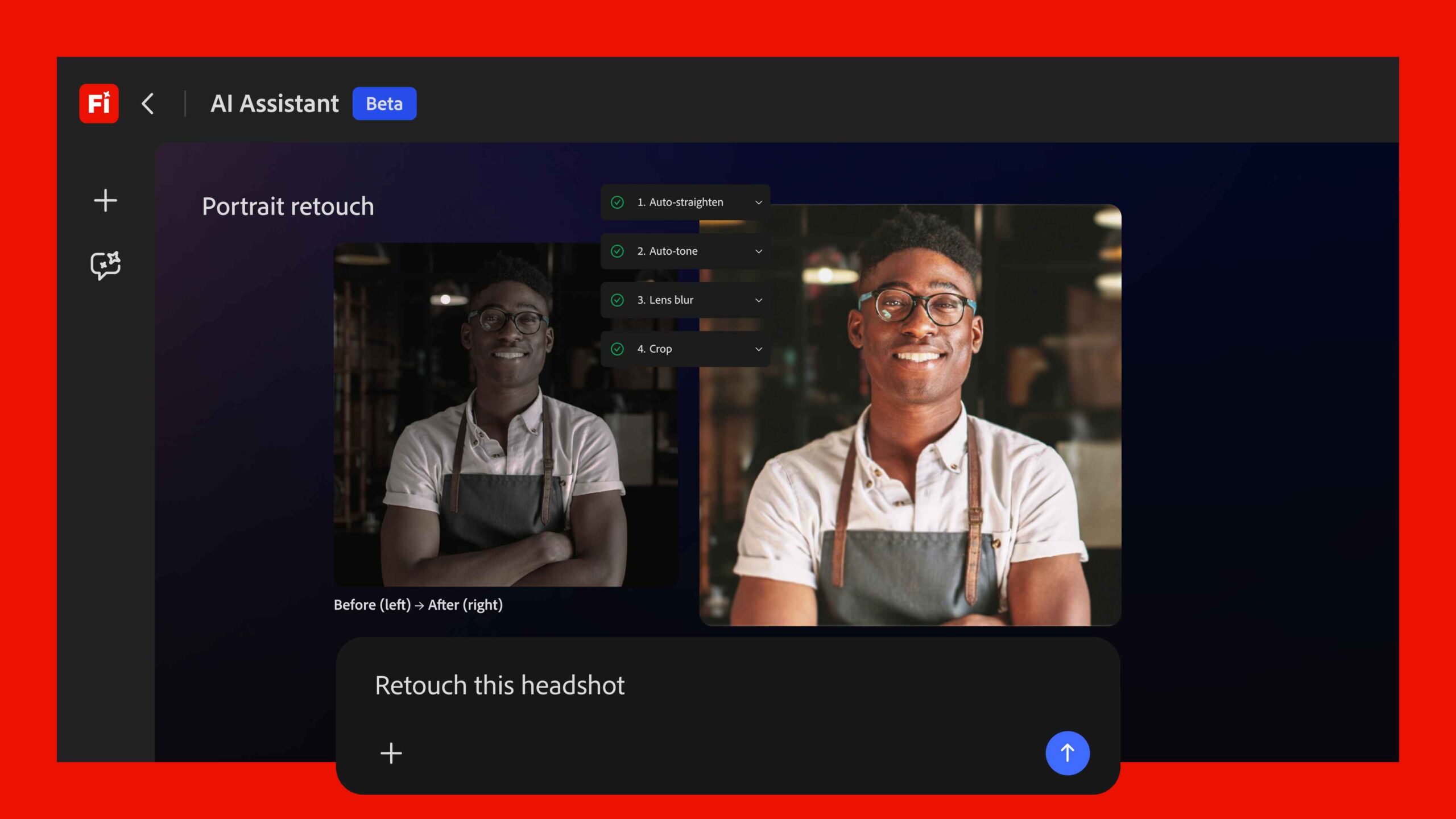
Adobe’s New Firefly AI Assistant Turns Prompts into Full Creative Workflows Across Apps

Adobe is pushing deeper into agentic AI with a major update to Firefly. The company today announced a new AI Assistant designed to handle complex creative workflows across its ecosystem. The feature will change how users interact with Creative Cloud apps, as it blends conversational prompts with automated execution across Photoshop, Premiere, Illustrator, and more. The announcement comes a few weeks after Adobe updated its Firefly AI image generator to let users train the system on their own artwork.

Firefly AI Assistant is here to redefine creative workflow

The company says the Firefly AI Assistant will allow creators to simply describe what they want, while the system orchestrates multi-step tasks across Adobe’s suite. This includes generating assets, editing video, refining images, and managing project flow without switching between multiple tools.

At a time when AI-assisted production is becoming central to creative software, Adobe is positioning this as a shift toward “agentic creativity.” That means users guide the vision, while the assistant handles execution and workflow coordination in the background.

Adobe says the assistant will support conversational creation, personalized workflows, and context awareness across projects. It will also integrate with Frame.io for feedback loops, allowing changes to be applied automatically based on review input. Early capabilities will include pre-built “Creative Skills” for tasks like retouching, social content generation, and multi-step editing sequences.

The company is also expanding Firefly’s video and image tools, adding features like enhanced audio cleanup, color grading controls, and deeper Adobe Stock integration. New precision editing tools, including prompt-based variation sliders and brush-driven AI markup, aim to give creators more direct control.
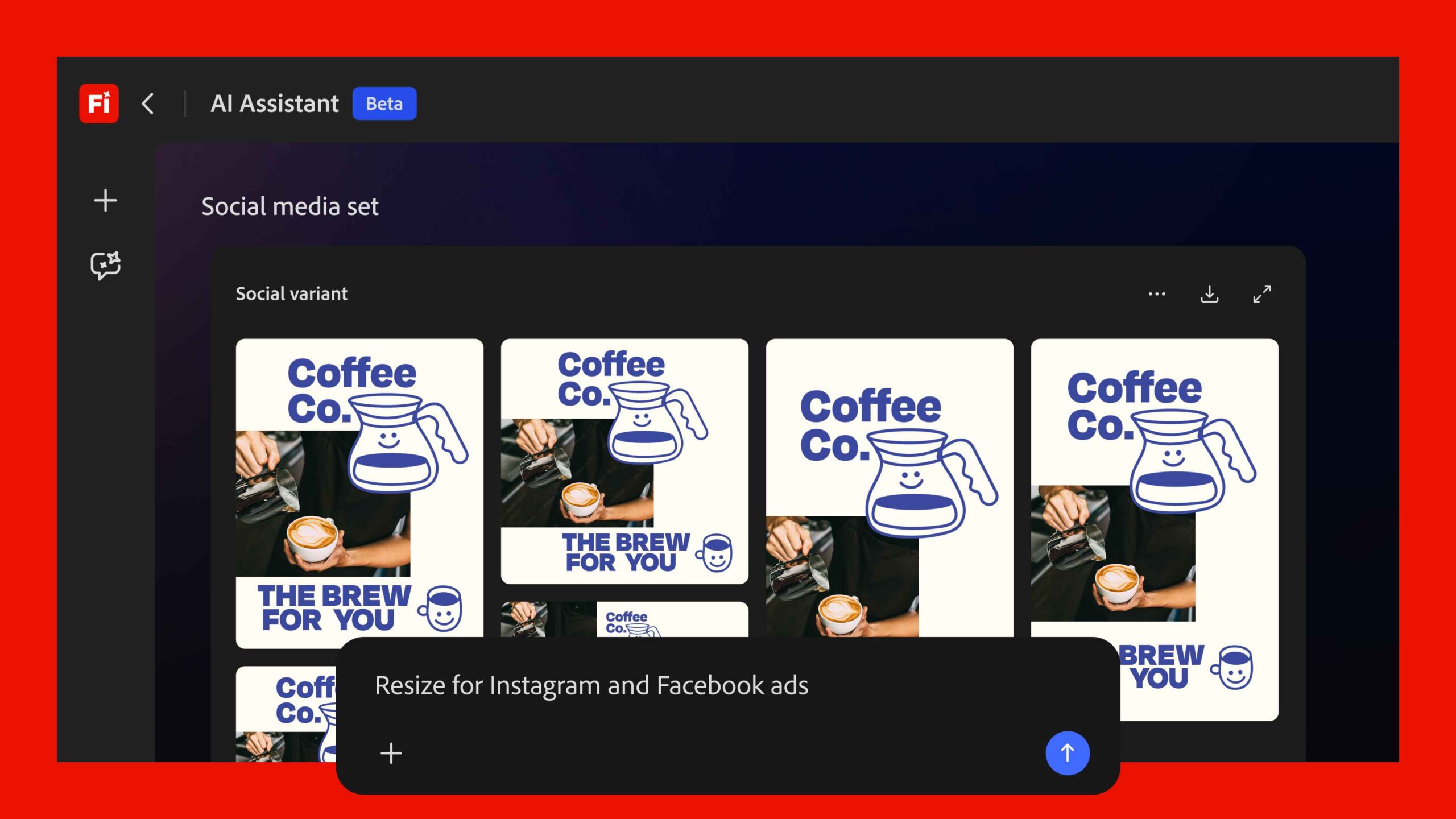
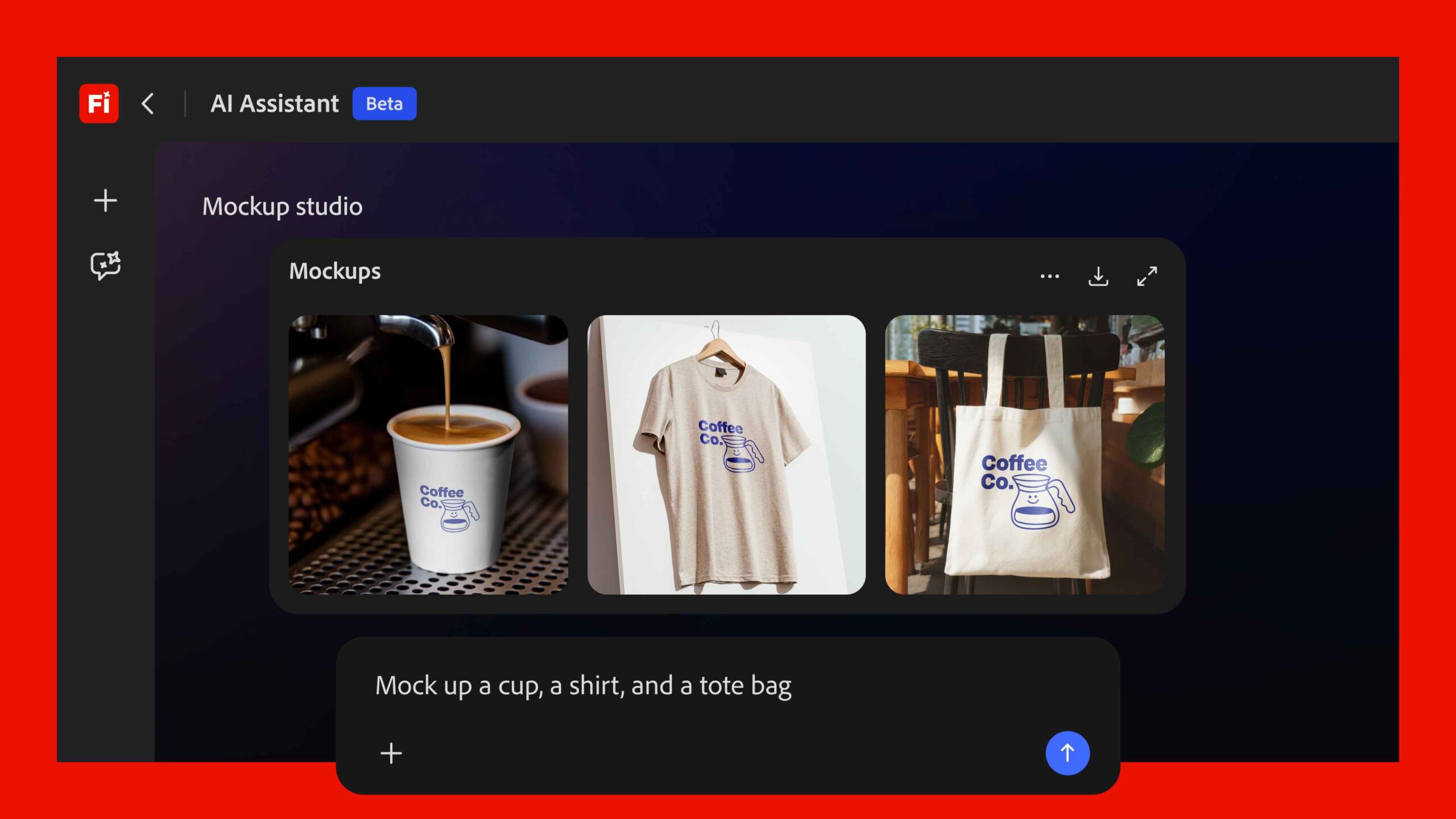
Image credit: Adobe

Expanded AI models and creative tools roll out

Firefly is also getting support for additional third-party AI models, including Kling 3.0 and Kling 3.0 Omni, alongside existing integrations from Google, Runway, and other providers. Adobe says this broad model access is meant to give creators more flexibility depending on project needs.

Firefly AI Assistant will enter public beta in the coming weeks, while the expanded editing tools and model integrations are available now for Firefly subscribers.

OpenAI Launches GPT-5.4-Cyber, Expands Trusted Access for Cyber Defenders

OpenAI has announced a new cybersecurity-focused model called GPT-5.4-Cyber and confirmed controlled rollout as it doubles down on defensive AI use cases. The variant arrives as AI companies increasingly position their systems not just for productivity, but also for security workloads. Notably, the announcement comes days after Anthropic announced Project Glasswing.

OpenAI introduces GPT-5.4-Cyber for defensive use cases

The company says GPT-5.4-Cyber is a customized version of its flagship model, designed specifically for cybersecurity defenders. It will initially be available only to vetted security vendors, approved organizations, and selected researchers under its Trusted Access for Cyber (TAC) program.
OpenAI is also scaling TAC to thousands of verified individual defenders and hundreds of security teams working on critical infrastructure. Users in higher verification tiers will gain access to more capable and less restricted versions of the model, including GPT-5.4-Cyber itself.

According to OpenAI, the goal is to support defensive workflows like vulnerability analysis, code review, and reverse engineering of compiled software. At the same time, access is being tightly controlled due to the sensitive nature of cyber-related capabilities. The company also notes that GPT-5.4-Cyber lowers refusal boundaries for legitimate security tasks, which allows researchers to work more efficiently in areas like malware analysis and system hardening.

Scaling TAC access and cybersecurity tools

OpenAI says the TAC program is being expanded with more structured tiers, where stronger identity verification unlocks higher capability levels. The company is leaning on automated verification systems, arguing that manual approvals don’t scale as demand grows across the security space.

Alongside this, OpenAI is pushing tools like Codex Security, which scans codebases, flags vulnerabilities, and suggests fixes automatically. The system has already helped resolve thousands of high and critical security issues across open-source projects, according to the company. All that said, access to more permissive models like GPT-5.4-Cyber will remain limited for now, especially in environments where user intent or system visibility is harder to verify.

Claude Desktop On Windows Hit By Crashes And Performance Issues


Claude Desktop on Windows is facing widespread issues, with users reporting installation failures, crashes, and serious performance problems across different setups. Reports surfaced on Reddit and quickly gained traction among developers and enterprise users, even as Claude expands its reach with availability inside Microsoft 365.

Installation and stability issues surface early

Users report that installing Claude Desktop often redirects them to the Microsoft Store, where no official app is available. This creates confusion and blocks installation for many users.

Even when installed, the app frequently crashes on launch. Some users say they must reboot their system just to get it running again, which significantly disrupts workflow.

Compatibility problems affect core features

Several features fail to work properly on certain Windows configurations. The Cowork feature, for example, crashes on Windows 11 Home systems due to missing Hyper-V support.
To bypass restrictions, some users attempt to enable Developer Mode for sideloading, but this adds complexity and does not guarantee stability.

WSL and development environments hit hardest

Developers using Windows Subsystem for Linux and Visual Studio Code report some of the most severe issues.

Problems include:

  • Freezing during large file writes or code generation
  • “Not responding” errors in the VS Code extension
  • WSL2 crashes linked to heap exhaustion after recent updates
  • Path conflicts between Linux and Windows environments

In some cases, users observed excessive resource usage, including dozens of PowerShell instances spawning simultaneously, along with memory leaks reaching over 20GB.

Performance issues and bugs raise concerns

Additional complaints point to:

  • Input lag of up to 30 seconds
  • High CPU and memory usage
  • Task Manager crashes on Windows 10
  • OAuth authentication flows are breaking app functionality

Some users also report that Claude consumes usage limits too quickly on paid plans, with the issue still unresolved.

Community reaction and concerns

The Reddit thread discussing these problems received strong engagement, with many users criticizing the lack of stability on Windows systems.

Some developers expressed concern that enterprise environments heavily depend on Windows, making these issues particularly problematic. Others noted that several reported bugs were closed as “not planned,” raising questions about long-term support.

There is currently no official timeline for fixes. However, expectations remain that Anthropic will address these issues, especially given growing adoption among developers.

In other news, Anthropic recently unveiled Project Glassgow, which is not yet publicly available, and brought in a former Microsoft Azure AI veteran to lead its infrastructure team.

Via Neowin

Snap to Lay Off 1,000 Employees as It Bets on AI Efficiency

AI has been at the center of recent layoffs across the tech industry. In the recent past, we have come across reports about layoffs within Amazon, Meta, and many other big tech giants, including Microsoft. This time, it’s Snap Inc, the parent company behind Snapchat, which has announced fresh layoffs affecting 1,000 employees, roughly 16% of its global workforce.

AI push reshapes Snap’s internal structure

The news comes via Business Insider, which cites an internal memo attached to the public filing by the company earlier today. Per the memo, Snap cites “rapid advancements” in AI, and that shift is now directly impacting headcount. Snap CEO Evan Spiegel told employees that smaller, AI-assisted teams are becoming more efficient, reducing the need for repetitive roles.

Besides announcing layoffs, Snap also suggests that it will close more than 300 open roles. Notably, affected US employees are reportedly being offered four months of severance, healthcare coverage, and continued equity vesting during the transition period.

Internal investor notes suggest Snap expects around $500 million in annual cost savings from the restructuring. Not to mention, the move comes at a time when the company is looking to stay competitive in a crowded social and advertising market.

The company’s transition to an AI-first approach is also evident in the recent features it has pushed to Snapchat. Late last month, Snapchat announced a new feature called AI Clips, which allows users to take any standard picture from their camera roll and transform it into a short, five-second video. With AI becoming mainstream, companies are now doing their best to cut costs, which ultimately is bad news for the human workforce.

Snap CEO Evan Spiegel’s internal memo:

Dear Team,

Today we are announcing changes that will impact approximately 1,000 team members at Snap, including 16% of our full time employees, in addition to closing more than 300 open roles. This is an incredibly difficult decision, and I am deeply sorry to the colleagues who will be leaving us. You have made important contributions to Snap, and we are committed to supporting you through this transition.

Last fall, I described Snap as facing a crucible moment, requiring a new way of working that is faster and more efficient, while pivoting towards profitable growth. Over the past several months, we have carefully reviewed the work required to best serve our community and partners, and made tough choices to prioritize the investments we believe are most likely to create long-term value. As a result of these changes, we expect to reduce our annualized cost base by more than $500 million by the second half of 2026, helping to establish a clearer path to net-income profitability.

While these changes are necessary to realize Snap’s long-term potential, we believe that rapid advancements in artificial intelligence enable our teams to reduce repetitive work, increase velocity, and better support our community, partners, and advertisers. We have already witnessed small squads leveraging AI tools to drive meaningful progress across several important initiatives, including Snapchat+, enhanced ad platform performance, and efficiency improvements in our Snap Lite infrastructure.

If you are part of our North America team, please work from home today. In the US, impacted team members will receive an email notification within the next hour, including information about next steps. For non-US locations, you will receive additional details about next steps from leadership and HR.
To our departing colleagues: thank you. Your hard work has helped shape Snap, and we are deeply grateful for your contributions. For U.S.-based team members who are leaving, we will provide four months of severance, healthcare coverage, and equity vesting, along with career transition support. Outside the U.S., we will follow local processes and seek to provide comparable support aligned with local norms.

To everyone continuing on this journey: change of this magnitude and at this speed is never easy and it will not be seamless. Thank you for your resilience, compassion, and commitment to one another, and to the community and partners we serve. Our responsibility is to move forward with clarity, empathy, and determination as we build a faster, stronger, and more durable Snap for the long term.

Evan

Article feature image source: Snap Inc.

SQL Server Management Studio Gets New Migration Hub and Copilot Updates

SQL Server Management Studio (SSMS) version 22.5 is now available, bringing a mix of new features, usability improvements, and ongoing integration with AI tools. The update focuses on simplifying database migrations while improving everyday workflows for developers and administrators.

SSMS remains one of the most widely used tools for managing SQL infrastructure and handling database operations, and this release reflects Microsoft’s push toward faster iteration cycles.

New migrations page centralizes key workflows

One of the biggest additions in version 22.5 is a dedicated Migrations page. This feature acts as a centralized hub for managing database migration tasks.

Users can access it by right-clicking on a SQL Server instance and selecting the “Migrate SQL Server” option. From there, they can run assessments, configure migration targets, and monitor progress in one place.

Microsoft noted that this page will continue to evolve in future updates, suggesting more automation and deeper integration over time.

SQL projects get preview improvements

The update also introduces several enhancements to SQL Projects, currently available in preview. Users can now import objects directly from existing databases, which simplifies project setup and reduces manual work.

The Advanced Publish settings dialog has been improved, offering a clearer configuration experience. New templates and an updated icon round out the changes, making the feature more accessible and polished.

Small usability changes aim to reduce confusion

SSMS 22.5 includes smaller tweaks designed to improve everyday usability. One notable change affects the “Friendly Name” field, which now clears automatically when connection details change.

This adjustment prevents mismatches between saved names and actual connection settings, a common source of confusion in previous versions.

Copilot expands into the result pane

Microsoft continues to expand AI features within SSMS, with GitHub Copilot now supporting interactions directly in the result pane. This allows users to query and interpret results more dynamically.

The company notes that prompt phrasing can significantly impact output quality. It also highlights that Copilot Free, Pro, and Pro+ tiers may use interaction data for training by default, unless users choose to opt out.

Faster updates bring both benefits and challenges

This release includes roughly a dozen bug fixes alongside the new features. Microsoft also acknowledged that SSMS now follows a faster release cadence compared to version 20 and earlier.

While this approach delivers features more quickly, some users may find it harder to keep up with frequent changes. Microsoft expects the process to stabilize as users adapt to the new update rhythm.

In other news, Microsoft recently improved protections against phishing attacks using RDP files and addressed 167 vulnerabilities in its latest Patch Tuesday updates. The company has also extended support for Windows 10 LTSB, signaling continued investment in long-term enterprise environments.

Disney Quietly Removes 15 Games from Steam, Including Classic Star Wars Titles

If you recently hopped on Steam searching for popular Disney-owned games, you might notice some of them missing. Well, that’s not a coincidence. In fact, Disney has reportedly pulled a batch of its older titles from the platform without any prior notice.

Disney quietly removes multiple games from Steam with any warnings

The news first highlighted by Bluesky user wario64, suggests that the latest round of removals includes around 15 titles that have now been marked as “retired” on Steam’s backend (via Kotaku). Among them are a couple of classic Star Wars games, including Star Wars: Rebellion and the original version of Star Wars: Dark Forces.

Besides that, the list mostly consists of older Disney games like Pirates of the Caribbean: At World’s End, Bolt, Tangled, and Treasure Planet: Battle of Procyon. These aren’t exactly top sellers in 2026, but they were still available for purchase until now. You can check all the delisted Disney games from Steam in the screenshot below.

Image credit: Steam | via: Bluesky/@wario64

As of now, there’s no official explanation from Disney about why these games were removed. The delisting also appears to have happened quietly, with no warning for users or store page notices.

Existing owners unaffected, new buyers locked out

If you already own any of the aforementioned titles, nothing changes on your end. You can still download and play them as usual. However, new users won’t be able to purchase these games anymore. Even if these are older titles, removing them from storefronts limits availability and raises questions around long-term game preservation.

Notably, speculation around licensing issues is already making the rounds online, though nothing has been confirmed yet. If Disney officially confirms anything regarding this matter, we’ll update this piece. For the time being, it’s unclear if more Disney titles will follow or if this was a one-off cleanup.

Microsoft Fixes 167 Vulnerabilities in April 2026 Patch Tuesday Updates

Microsoft released its April 2026 Patch Tuesday updates, addressing a large set of security vulnerabilities across Windows systems. The updates include Windows 11 KB5083769 and KB5082052, along with Windows 10 KB5082200 (ESU), and fix a total of 167 vulnerabilities.

According to Bleeping Computer, this month’s rollout includes two zero-day vulnerabilities and eight classified as critical, making it one of the more important security updates in recent months.

The update does not include earlier fixes released for Mariner, Azure, or Bing, nor the 80 Chromium vulnerabilities patched separately by Google that also affect Edge.

Breakdown of Vulnerabilities

The April release covers a wide range of security issues across different categories. Elevation of privilege vulnerabilities account for the largest portion, followed by remote code execution and information disclosure flaws.

Remote code execution remains one of the most dangerous categories, with 20 such vulnerabilities fixed. Attackers can exploit these flaws to execute malicious code remotely, often without user interaction.

Critical vulnerabilities include seven remote code execution issues and one denial of service flaw, highlighting the severity of this release.

Actively Exploited and Public Zero-Days

Microsoft addressed two zero-day vulnerabilities in this update. One of them has already been exploited in real-world attacks.

CVE-2026-32201 affects Microsoft SharePoint Server and enables spoofing attacks. Threat actors can use it to access sensitive information or modify data, making it particularly dangerous for enterprise environments.

The second zero-day, CVE-2026-33825, impacts Microsoft Defender and allows elevation of privilege to the SYSTEM level. Microsoft fixed it in Defender Antimalware Platform version 4.18.26050.3011, which updates automatically through Windows Security.

Microsoft Office Security Risks

This Patch Tuesday also includes multiple remote code execution vulnerabilities affecting Microsoft Word and Excel. Attackers can exploit these flaws simply by opening malicious files or even through the preview pane.

These risks increase exposure for everyday users and organizations, especially those handling external documents. Immediate updates are strongly recommended to reduce the attack surface.

With 167 vulnerabilities fixed and active threats already observed, this release stands out as a critical security update. Systems that remain unpatched face increased risk, particularly in enterprise environments where attackers often target privilege escalation paths.

In addition to these fixes, Microsoft has also introduced improvements to Remote Desktop Protocol security, adding new protections against phishing attacks delivered via .rdp files.

Overwatch Season 2: Summit Massive Patch Notes Details Plenty of In-Game Changes

Blizzard has released massive patch notes for Overwatch Season 2: Summit update, and it brings new hero, map changes, and a long list of balance tweaks. The update is now live and is one of the most content-heavy patches in recent months.

New Damage hero Sierra leads Overwatch Season 2 push

The biggest addition here is Sierra, a new Damage hero linked to the Operation: Grand Mesa event. The event runs for three weeks and gradually unlocks challenges, rewards, and story details tied to Talon’s latest attack.

Players can earn loot boxes, Battle Pass skips, and Sierra-themed cosmetics just by progressing through the event. Blizzard is clearly leaning into narrative progression again, which hasn’t always been consistent in past seasons.

Besides that, Post-Match Accolades are back. This time, they come with MVP voting, 3D hero showcases, and voice lines. It’s a clear attempt to bring back social interaction after matches, something the game has been missing. Map-wise, Antarctic Peninsula has been reworked, and a new Lijiang Night Market map joins the Stadium mode. Map voting also gets updates, including a new “Random” option and bonus XP for newer maps.

Balance changes hit mobility and hero kits

That being said, most of this patch is focused on balance. Several hero perks are now part of base kits, while others are reworked or removed entirely. Mobility is getting toned down across multiple heroes. For example, Kiriko’s teleport range is reduced, while Pharah can now move during her ultimate but deals less damage.

Tank and Damage heroes also see notable adjustments. Roadhog’s hook cooldown is longer, Soldier: 76 can reload while sprinting, and Winston deals more damage to deployables. On the support side, heroes like Lifeweaver and Mercy receive buffs to healing and utility, though some mobility trade-offs remain.

A shift toward 6v6 balance?

Speaking of gameplay, Blizzard continues to improve balance separately for 6v6, which is still being actively supported alongside 5v5. It appears the studio is trying to stabilize both formats rather than fully committing to one in Overwatch Season 2. That could keep things flexible, but it may also split balancing priorities over time.

Google Chrome Gets “Skills” to Let You Save & Reuse AI Prompts Instantly

These days you’d find bunch of AI features inside Google Chrome, and if you use them, you probably find yourself repeating the same prompts again and again. Whether it’s comparing products or summarizing pages, the process usually involves typing the same thing multiple times. Now, Google appears to be working on fixing that.

Chrome introduces “Skills” to reuse AI prompts instantly

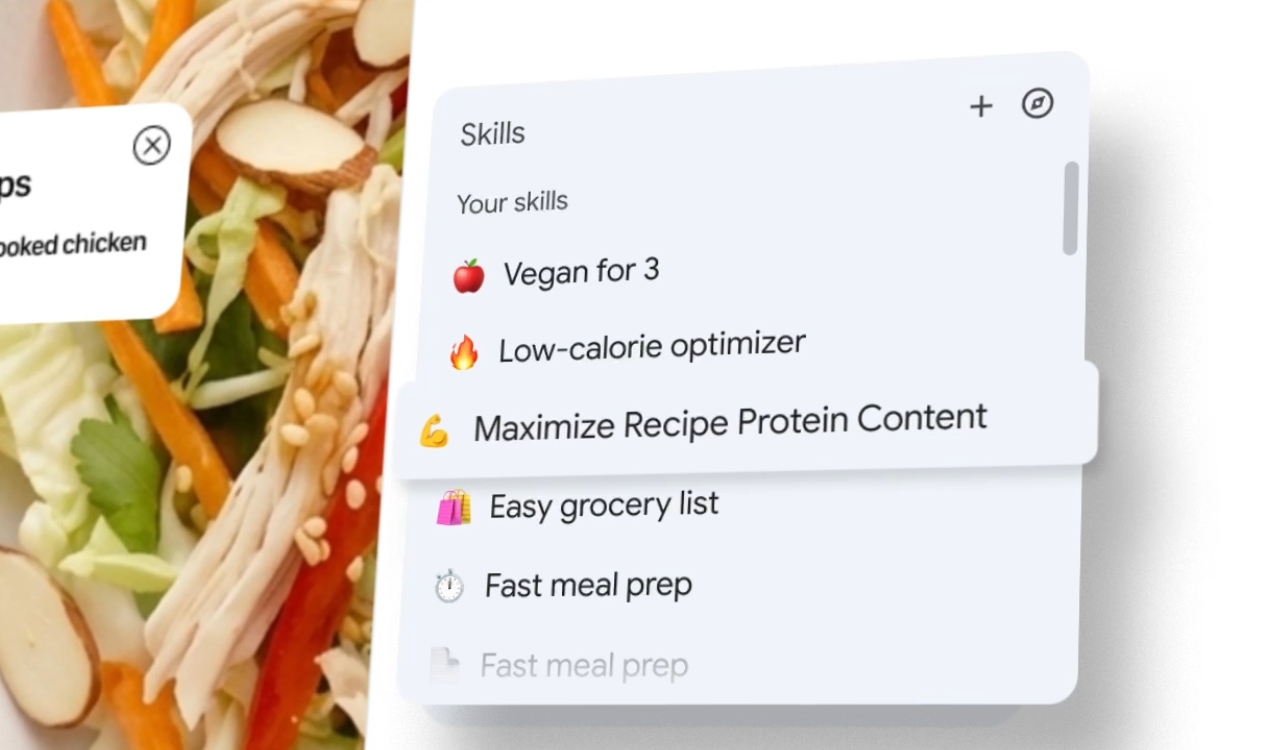
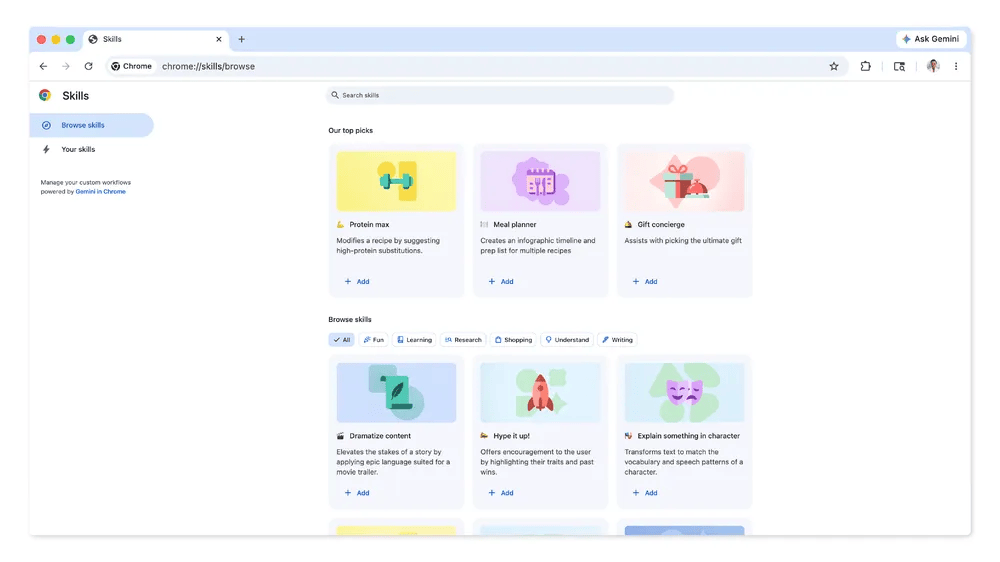
Google has started rolling out a new feature called “Skills” for Gemini in Chrome. Rather than re-entering prompts, you can now save them and reuse them with a single click across different tabs. Once a prompt is saved as a Skill, it can be triggered directly while browsing.

You can access it by typing a slash command or using the add button inside Gemini. The saved prompt then runs on the current page or even across multiple selected tabs. As Google notes in the announcement blogpost, this feature could be useful for tasks like comparing specs, scanning long documents, or even analyzing product details. You can further edit saved Skills anytime, so workflows can be adjusted based on needs.

Image credit: Google

Built-in library and control features included

Besides custom Skills, Google is also introducing a library of ready-made options. These are designed for common use cases like shopping comparisons or breaking down product information. If a prebuilt Skill fits your use case, you can add it and modify it later. That means you don’t have to start from scratch every time.

On the control side, Google says Skills follow the same privacy and security rules as Gemini prompts. That means some actions will still require confirmation from your side, especially if they involve things like sending emails or adding calendar events. Google says that the feature is rolling out gradually, so not everyone will see this feature yet.

Speaking of Chrome, let’s not forget that over 100 Web Store extensions are reportedly attempting to steal sensitive user data, including Google OAuth2 bearer tokens, which can allow attackers to access accounts without needing login credentials.

Microsoft Introduces Fast-Track Process to Restore Suspended Developer Accounts

Microsoft suspended developer accounts tied to major tools like WireGuard and VeraCrypt last week, disrupting updates and driver releases.

According to Bleeping Computer, several prominent projects were affected, including WireGuard, VeraCrypt, MemTest86, and Windscribe. The suspensions targeted developer accounts enrolled in Microsoft’s Windows Hardware Program, effectively blocking them from publishing drivers and pushing Windows updates.

Sudden suspensions tied to verification rules

Microsoft later clarified that the suspensions stemmed from incomplete identity verification requirements. These rules, communicated back in October 2025, apply to developers distributing drivers due to the high level of system access involved.

Scott Hanselman explained that drivers operate at the kernel level, making them a prime target for abuse by threat actors. As a result, stricter verification ensures only trusted developers can publish such sensitive components.

Fast-track recovery process introduced

In response to the backlash, Microsoft rolled out a temporary fast-track process to restore affected accounts.

Developers now need to open a support case through the Windows Hardware Program and provide a clear business justification for regaining access. Once reinstated, they must still complete all pending compliance and verification requirements.

Microsoft also advised developers to double-check they are using the correct account when submitting tickets. In some cases, tools like Microsoft Copilot can assist in generating support requests, while alternative support channels remain available if standard routes fail.

Temporary fix with no clear timeline

The recovery process currently has no confirmed end date, and Microsoft has urged impacted developers to act quickly to avoid prolonged disruptions.

The situation highlights growing pains in tightening platform security, especially as driver-level access remains one of the most sensitive areas in Windows.

In other recent developments, Microsoft introduced stronger protections against phishing attacks through RDP files and improved performance in Windows 11 Storage settings within Insider builds. At the same time, longstanding issues persist, including outdated UI elements and design inconsistencies that still trace back to older versions of Windows.

100+ Malicious Chrome Web Store Extensions Found Stealing User Credentials & Browsing Data

If you use Google Chrome, you probably rely on multiple extensions for different tasks. However, these days, not all of them can be trusted. A new report has now highlighted a large-scale campaign involving malicious extensions operating directly via the Chrome Web Store.

Over 100 Chrome extensions flagged in coordinated attack

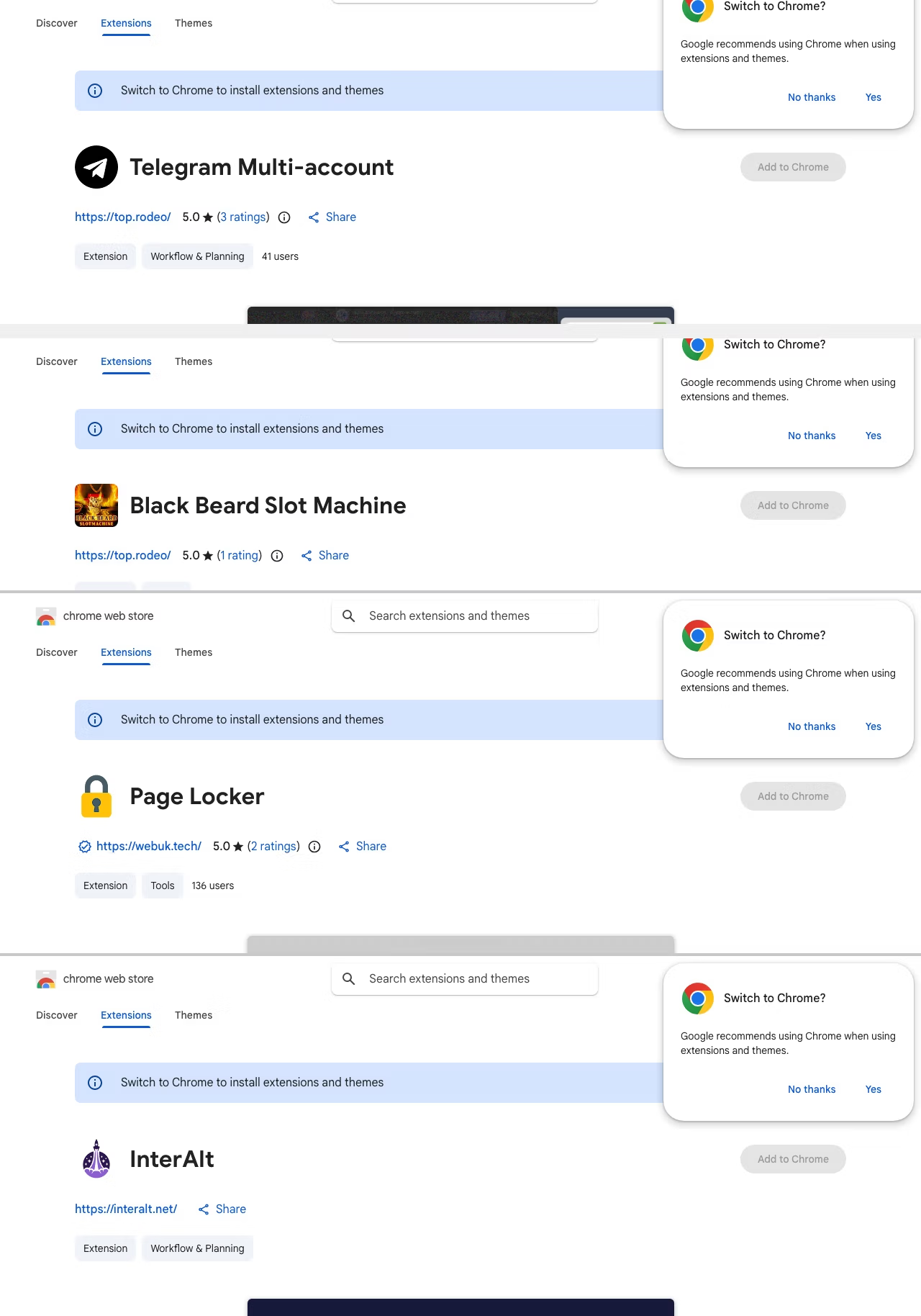
The findings come from a cybersecurity firm, Socket, which says more than 100 Chrome extensions are actively attempting to steal sensitive user data (via Bleeping Computer). These include Google OAuth2 bearer tokens, which can allow attackers to access accounts without needing login credentials.

According to the report, these extensions were published under multiple developer identities and span different categories. That includes Telegram tools, gaming add-ons, YouTube and TikTok enhancers, and even translation utilities.

The campaign reportedly runs on a shared command-and-control infrastructure hosted on a VPS, with different subdomains handling tasks like session hijacking and data collection. Researchers also point to possible links with a Russian malware-as-a-service operation based on code patterns.

Image credit: Socket

Extensions can hijack sessions and run in background

Some of the extensions reportedly inject malicious code directly into the browser interface, while others use Chrome APIs to collect personal details like email, profile info, and account IDs. In several cases, extensions can run hidden functions on startup, allowing them to execute commands without user interaction.

One of the more serious examples involves a Telegram extension that reportedly steals session data every few seconds and can even replace it remotely. This could allow attackers to switch accounts without the user noticing.

Many extensions still live on the store

Despite being reported, many of these extensions are still available on the Chrome Web Store at the time of writing this piece. Therefore, you are advised to review installed extensions and remove anything suspicious. All that said, it’s unclear how quickly this issue will be addressed, but the situation raises fresh concerns about how secure browser extension ecosystems really are.

Windows 11 Now Supports macOS-Style Click Desktop Feature With PeekDesktop

Windows 11 users can now replicate a familiar macOS feature thanks to a small third-party tool. As reported by Neowin, a new app called PeekDesktop brings the “click desktop to show desktop” behavior to Microsoft’s OS.

PeekDesktop brings macOS-style desktop interaction to Windows 11

PeekDesktop, created by Microsoft engineer Scott Hanselman, runs quietly in the background without a traditional interface. The app allows users to click on an empty area of the desktop wallpaper to instantly minimize all open windows.

Clicking again, or interacting with the taskbar or any open app, restores everything to its previous state. This mirrors the behavior macOS users have relied on for years, making it easier to quickly access desktop icons without manually minimizing windows.

Simple tool with flexible behavior options

Despite its lightweight nature, PeekDesktop includes several customization options. Users can choose how windows behave when clicking the desktop, including a macOS-style animation where apps “fly away,” or the classic Windows “Show Desktop” action.

The app also lets users switch between single-click and double-click activation. This helps prevent accidental triggers, especially for users who frequently interact with desktop files or drag items around.

Why this feature improves usability on Windows 11

PeekDesktop offers a more practical alternative to the small “Show Desktop” button located in the bottom-right corner of the taskbar. The larger clickable desktop area makes the feature easier to use, particularly on larger monitors.

At the same time, the tool avoids interfering with everyday actions like dragging files or organizing icons. This makes it feel like a natural extension of the operating system rather than an intrusive add-on.

While it remains a third-party solution for now, the feature highlights a small but meaningful usability improvement. Many users hope Microsoft will eventually integrate similar functionality directly into Windows 11 or include it in PowerToys.

In other news, Microsoft recently released Windows 10 KB5082200 and Windows 11 updates KB5083769 and KB5082052, bringing several improvements, including enhanced RDP security protections.

Meta Partners With Broadcom to Build Custom AI Chips for Next-Gen Infrastructure

Recently, we saw Meta exploring AI-powered versions of Mark Zuckerberg, and now the company is moving deeper into hardware. Meta has partnered with Broadcom to develop its next-generation Meta Training and Inference Accelerator, also known as MTIA chips.

The partnership focuses on building custom silicon that can power AI across Meta’s platforms and services. This approach allows the company to strengthen its long-term infrastructure while supporting AI delivery at a global scale.

Four new MTIA chip generations planned

Meta is planning an aggressive roadmap that includes four new generations of MTIA chips within the next two years. The collaboration with Broadcom is expected to speed up both development and deployment.

These chips will handle both training and inference tasks, which are essential for running large-scale AI systems efficiently. Meta aims to support billions of users, which requires significant improvements in compute performance and scalability.

Broadcom takes a central role in development

Broadcom will contribute across multiple areas, including chip design, advanced packaging, and networking infrastructure. The work builds on Broadcom’s XPU platform and its expertise in high-performance Ethernet technologies.

This setup will enable high-bandwidth communication between large AI clusters, forming the backbone of what Meta describes as a massive computing foundation for future AI workloads.

Zuckerberg outlines long-term AI vision

According to Mark Zuckerberg, the company plans to deploy more than one gigawatt of custom silicon initially, with expansion to multiple gigawatts over time. The broader goal centers on delivering what he calls “personal superintelligence” to users worldwide.

At the same time, Hock Tan will step down from Meta’s board and move into an advisory role. He will continue to guide the company’s custom silicon roadmap as the partnership evolves.

Wider changes inside Meta continue

The announcement comes amid broader shifts within Meta. The company has reportedly laid off hundreds of employees across several divisions as part of ongoing restructuring.

In parallel, Meta is testing new features and services, including a rumored Instagram Plus offering. These developments suggest the company is balancing cost adjustments with continued investment in AI and new product experiences.

Via Neowin

Assassin’s Creed Black Flag Resynced Leak Reveals New Characters and Storylines

Rumors suggest the Assassin’s Creed 4: Black Flag remake, titled “Resynced,” is currently in development and may be officially announced on April 16. New details from a recent Indonesian rating listing point to expanded content and a deeper narrative experience.

IGRS Listing Hints at New Characters and Story Content

According to information surfaced via the Indonesian Game Ratings System (IGRS) and reported by TweakTown, the remake will introduce new characters alongside additional storylines.

Source: TweakTown

The original cast, including Edward Kenway, Blackbeard, and Adewale, remains one of the most iconic in the franchise, which means Ubisoft will need to carefully balance new additions without disrupting the tone that defined the original game.

Expanded Narrative and Caribbean World Potential

The reference to “new stories” suggests the remake will go beyond a visual overhaul. Ubisoft appears to be expanding the narrative with additional missions and deeper questlines, potentially using the Caribbean setting to introduce new locations or perspectives.

Any expansion will need to stay consistent with established Assassin’s Creed lore, especially given how closely fans associate the original story with its characters and world.

Platforms and Rating Details

The IGRS database lists the game with an 18+ rating in Indonesia, indicating that mature themes from the original will likely remain intact. The listing also confirms releases for PC, PlayStation 5, and Xbox Series X/S, while a Nintendo Switch 2 version is not mentioned at this stage.

With April 16 rumored as the reveal date, official confirmation could arrive soon. If the listing proves accurate, Assassin’s Creed 4: Black Flag Resynced may follow the current trend of remakes that combine upgraded visuals with meaningful new content, aiming to appeal to both longtime fans and new players.

Microsoft Blocks RDP Phishing Attacks With New Windows Security Update

Microsoft has introduced new security protections aimed at blocking phishing attacks that abuse Remote Desktop Protocol (RDP) files, following growing concerns around enterprise-targeted threats. The changes arrive with Windows 10 KB5082200 and Windows 11 updates KB5083769 and KB5082052, as first reported by BleepingComputer.

RDP files become a growing attack vector

RDP (.rdp) files play a key role in enterprise environments, allowing users to quickly connect to remote systems. However, attackers have increasingly exploited them to trick users into connecting to malicious servers.

These files can silently redirect local resources such as drives, clipboard data, and even authentication methods. In phishing scenarios, this opens the door to credential theft, file exfiltration, and unauthorized access to corporate systems.

Security researchers have observed campaigns where malicious RDP files connect victims to attacker-controlled machines, capture sensitive clipboard data like passwords, and abuse authentication features, including smart cards and Windows Hello.

New security prompts and connection transparency

To address these risks, Microsoft now introduces a series of user-facing protections designed to increase awareness and reduce accidental exposure.

When opening an RDP file, users will now see a one-time educational prompt explaining the potential risks. The system requires explicit acknowledgment before proceeding.

Before every connection, Windows also displays a detailed security dialog. This interface clearly shows the remote system address, the publisher’s verification status, and a full list of any requested resource redirections.

Safer defaults and stronger warnings

Microsoft has tightened default behavior by disabling all resource redirection options unless explicitly allowed. This change limits what a remote system can access by default.

Unsigned RDP files now trigger a prominent warning labeled “Caution: Unknown remote connection,” while signed files display verified publisher information. Even with signed files, Windows still urges users to confirm the connection’s legitimacy.

These protections apply strictly to RDP files opened manually. Direct connections initiated through the Remote Desktop client do not trigger the same safeguards.

Admin controls remain available

For enterprise environments that rely on custom workflows, Microsoft allows administrators to temporarily disable the new warnings via the Windows Registry. This requires modifying the Terminal Services client policy key and setting the RedirectionWarningDialogVersion value.

Despite this option, Microsoft strongly recommends keeping the protections enabled, emphasizing the long history of RDP-based phishing attacks.

A step forward, but broader issues remain

The update marks a meaningful improvement in Windows security, especially for organizations heavily reliant on remote access tools. By surfacing connection details and limiting silent redirections, Microsoft reduces the risk of users unknowingly exposing sensitive data.

At the same time, Windows 11 continues to face criticism for its inconsistent design and legacy interface elements. Microsoft has already acknowledged these issues and confirmed that UI improvements remain in progress, suggesting that security and usability updates will continue to evolve side by side.

Surface Hub Reportedly Dead as Microsoft Ends Hub 3 Production, Future Models Not Coming

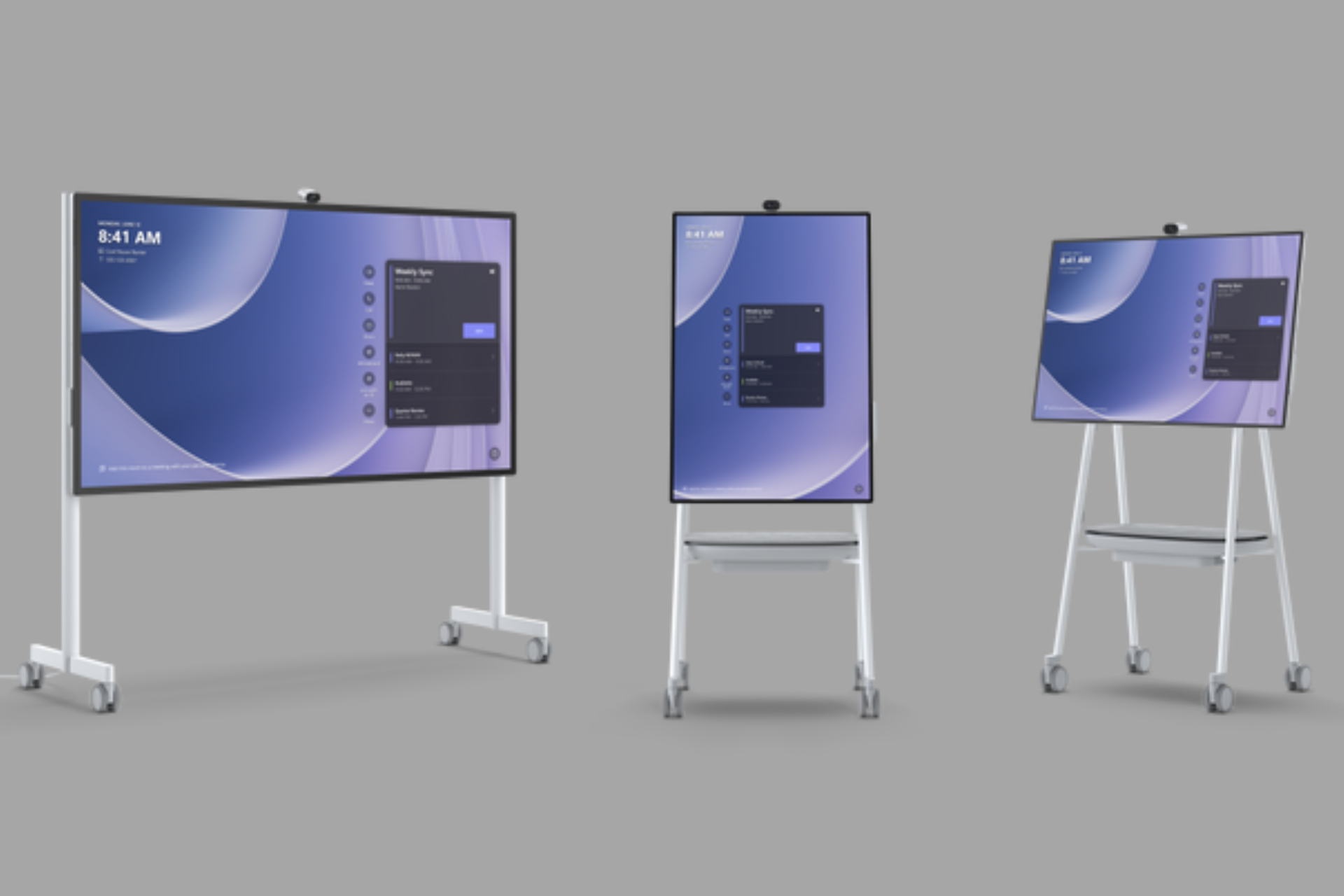
Microsoft has reportedly discontinued its Surface Hub lineup. If you are unaware, Surface Hub devices were designed for enterprise use, primarily as large collaboration displays for meeting rooms.

The news comes via Windows Central, which citing unnamed sources, reported that Microsoft has ended production of the Surface Hub 3 and has scapped plans for any future models. In other words, Microsoft won’t launch the Surface Hub 4.

To catch you up, the Surface Hub 3 launched in 50-inch and 85-inch sizes, with pricing starting around $8,000 and beefiest model going up to an whopping $20,000. While some units are still available through Microsoft and retail partners, the lineup will effectively be retired once existing stock runs out.

Notably, the Surface Hub lineup was popular among business users for its modular design. The display and compute components were separate, allowing businesses to upgrade hardware without replacing the entire unit.

Microsoft even used this approach once by offering a compute upgrade for Surface Hub 2 users to transition to Hub 3. Despite the discontinuation, Microsoft will officially continue to support Surface Hub 3 with OS and firmware updates through 2030. This ensures that existing enterprise customers can continue using the devices without immediate disruption

It remains to be seen whether Microsoft will return to large-format collaboration devices in the future. But for now, the Surface Hub line appears to be coming to a complete shutdown.

Google Desktop App for Windows Launches Globally with AI Mode & Upgraded Features

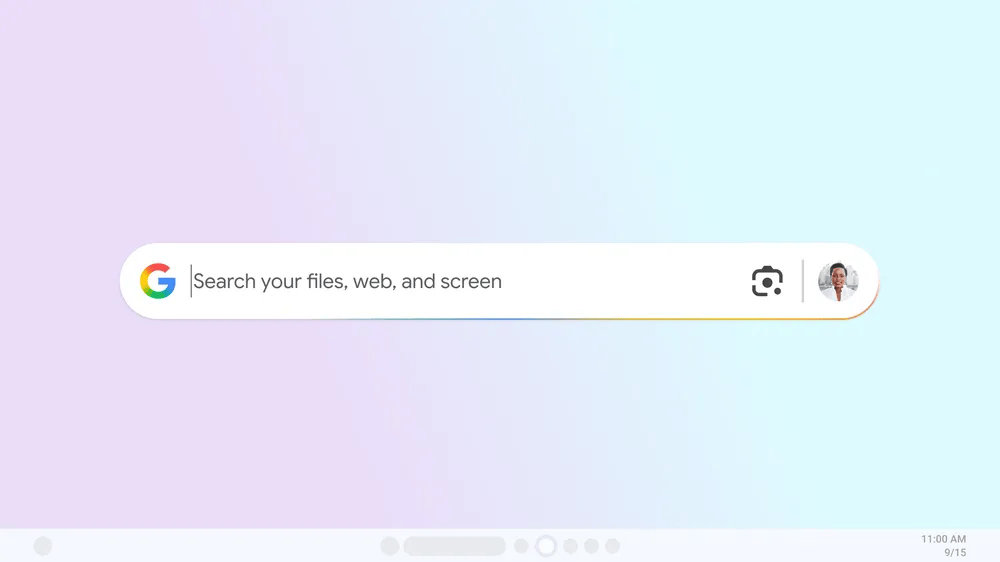
After testing the new Google desktop app for Windows, the company has now officially launched it globally. The move brings a more integrated Search experience directly to the desktop, with AI features baked in. With the latest rollout, the Google app for desktop is now available in English for Windows users (download here).

At the center of the browser-free web browsing experience is AI Mode, which allows you to ask questions and get AI-powered responses alongside relevant web links. Google wants to keep everything in one place without needing to jump between apps or browser tabs.

One of the key highlights is quick access through a keyboard shortcut. Users can simply press Alt + Space to open the search box and instantly look for anything. That includes web results, local files, installed apps, and even content from Google Drive.

Another feature Google is pushing here is screen sharing support. You can select a specific window or even your entire screen while asking questions, which means you don’t have to break your workflow just to search something. It appears Google wants this to feel more like a continuous assistant rather than a separate tool.

Speaking of convenience, the app also brings Lens integration to desktop. That means you can select anything visible on your screen and search it instantly. From translating text in images to getting help with problems, this feature goes beyond standard search.

Will you be using the standalone Google app, or will you stick to the browser as you always have? Let us know in the comments below.

Windows 10 KB5082200 Patch Tuesday Update Fixes Login Errors for ESU Users

Microsoft has released KB5082200 for Windows 10 ESU, bringing important security updates, sign-in fixes, and enterprise-focused improvements across supported versions.

The update targets systems still under Extended Security Updates (ESU), while continuing Microsoft’s push to stabilize legacy environments with modern security enhancements.

Supported builds and versions

KB5082200 applies to the following OS builds: 19045.7184 and 19044.7184.

Supported versions include Windows 10 22H2 and Windows 10 21H2 (Windows 10 Enterprise LTSC 2021, and Windows 10 IoT Enterprise LTSC 2021).

The update also includes improvements previously released with the March 10, 2026 Patch Tuesday update (KB5078885).

Key fixes and improvements

  • Sign-in
    • Fixes an issue blocking Microsoft account login
    • Resolves “No Internet” error despite active connection
    • Addresses issues affecting apps like Microsoft Teams
  • Remote Desktop
    • Improves phishing protection for .rdp files
    • Displays full connection settings before connecting
    • Adds a one-time security warning
    • Settings remain disabled by default
  • Secure Boot
    • Introduces dynamic status reporting in Windows Security
    • Fixes BitLocker Recovery issues after Secure Boot updates
    • Improves certificate rollout with better device targeting
    • Enhancements remain disabled by default on commercial devices and servers

Additional changes for Windows 10 21H2

  • Licensing / DISM
    • Fixes issue blocking offline security updates via DISM
    • Enables adding security packages during image creation
    • Supports:
      • Windows 10 IoT Enterprise LTSC 2021
      • Windows 10 Enterprise G SKU
      • Windows 10 Enterprise N LTSC

Availability and rollout

KB5082200 is now available through Windows Update and the Microsoft Update Catalog. Microsoft focuses this release on security, reliability, and smoother enterprise deployment scenarios.

In other news, Microsoft has expanded ESU support to Windows 10 Enterprise 2016 LTSB, extending the lifecycle of older enterprise systems.

At the same time, the company recently pushed the KB5083769 Patch Tuesday update, continuing its monthly security rollout strategy alongside ongoing improvements for both Windows 10 and Windows 11 users.

Windows 11 KB5083769 & KB5082052 April 2026 Patch Tuesday Updates Released

Microsoft has just released April 2026 Patch Tuesday update, KB5083769, for Windows 11 version 24H2 and 25H2. The latest security patch bumps the system of Windows 11 version 24H2 to Build 26100.8246 and version 25H2 to Build 26200.8246. Meanwhile, Windows 11 version 23H2 is getting KB5082052 that bumps the system to Build 22631.6936. Here’s a summary of what the changelog for the update details:

Starting off, with the latest security patch, Microsoft is now adding better visibility into Secure Boot certificate updates. You may start seeing status alerts inside the Windows Security app, although these are disabled by default on commercial devices. Alongside, Windows is also improving how devices receive new Secure Boot certificates, using a phased rollout approach based on update reliability signals.

Speaking of fixes, Microsoft has also addressed an issue where some devices could unexpectedly enter BitLocker Recovery after Secure Boot updates. That should now be resolved with this release. On the networking side, the KB5083769 April 2026 Patch Tuesday update improves reliability for SMB compression over QUIC. In simpler terms, file transfers using this method should now complete more consistently, with fewer timeouts and smoother performance overall.

There are also some notable changes to Remote Desktop. When opening .rdp files, users will now see all connection settings upfront, with everything turned off by default. Additionally, a one-time security warning will appear, aimed at reducing phishing risks tied to malicious RDP files.

Finally, Microsoft has fixed a known issue with “Reset this PC.” Some users previously reported failures when choosing “Keep my files” or “Remove everything,” especially after a recent Hotpatch update. That issue should be fixed after installing the April 2026 Patch Tuesday update.

For Windows 11 version 23H2 users, all the improvements mentioned above applies, except for the PC Reset issue. Instead, the KB5082052 update fixes an issue where, after installing the March 10, 2026, update or later, some users could not sign in to apps with a Microsoft account. Even with a working internet connection, a “no Internet” error would appear during sign-in, blocking access to services like Microsoft Teams.

It’s recommended to install this patch from the Windows Update settings or the official Microsoft Update Catalog website (KB5083769 & KB5082052).

Microsoft Teams Starts Rolling Out ‘Video Recap’ to Catch Up on Meetings

Microsoft Teams just got a smarter way to replay meetings without you having to watch long meeting recording. The company has started rolling out a new video-based feature called video recap, which focuses on turning full meetings into short, watchable highlights.

Teams video recap turns long meetings into quick highlights

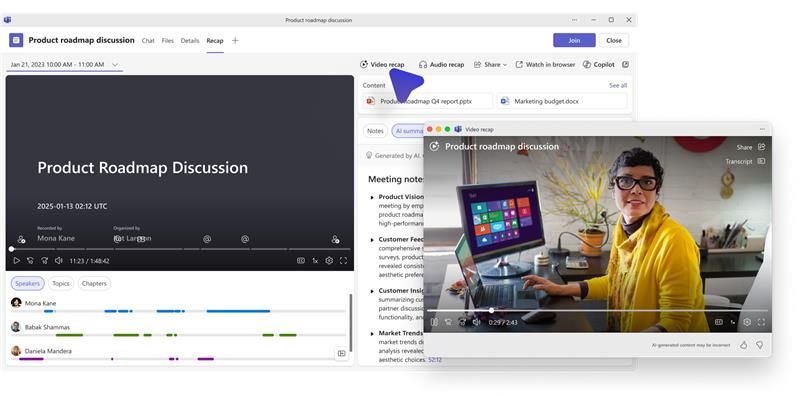
The new video recap feature is designed to help users quickly revisit meetings without going through the entire recording. Rather than scrubbing through long videos, Teams now creates narrated highlight clips that focus on key moments and discussions.

As noted by Microsoft in the official announcement, video recap combines short video segments with a summary-style narration. That means you not only see what happened but also get a sense of the tone and context of the meeting. It’s basically a quicker way to understand what was discussed without sitting through an hour-long call.

You can expect it to highlight things like shared slides, visuals, and important discussion points. The idea here is simple. Rather than watching everything, you just get the parts that matter the most.

How video recap works and what to expect

Using the feature is fairly straightforward. Once a meeting recording is available, you can head to the recap page in Teams and tap on the video recap option. The system then generates a condensed version of the meeting with selected clips.

Image credit: Microsoft

That said, there are a few limitations for now. The feature only works for meetings between 10 and 90 minutes long. Also, meetings that only have transcripts without recordings won’t support video recap. Another thing to note is that the recap doesn’t show up instantly. It can take around 10 to 15 minutes after the recording is uploaded before the video recap becomes available.

As of now, the feature is rolling out gradually on Teams on Windows, Mac, and the web. That also means not everyone will see video recap in Teams right away. Microsoft also notes that some parts of the experience could change as it continues testing performance and quality.

Office Web Apps Now Support Sensitivity Labels with User-Defined Permissions

Microsoft is quietly improving how security features work across its web apps, and this time the focus is on reducing reliance on desktop software. The company has now started rolling out support for applying sensitivity labels with custom permissions directly in Office for the web.

Office web apps now handle permissions natively

Until now, users working in Word, Excel, or PowerPoint on the web could only open files that already had custom permissions applied. Any changes or new labels required switching to desktop apps, which slowed things down.

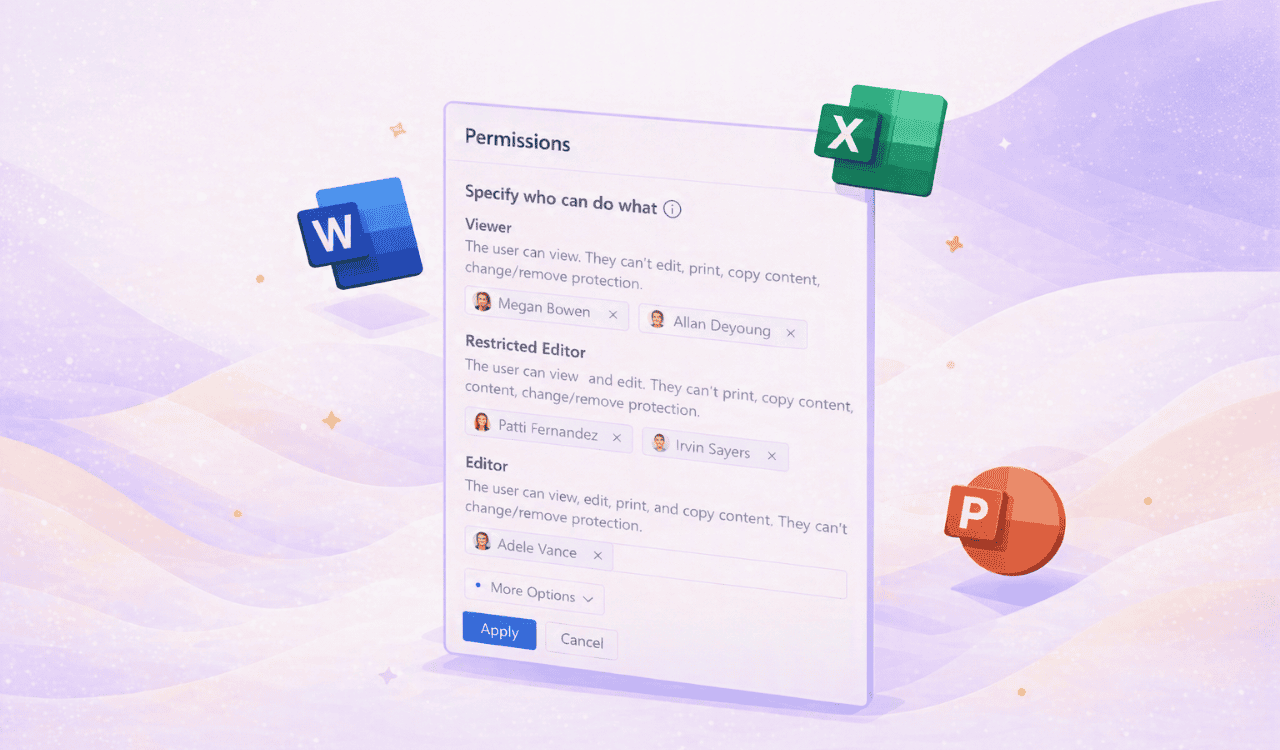
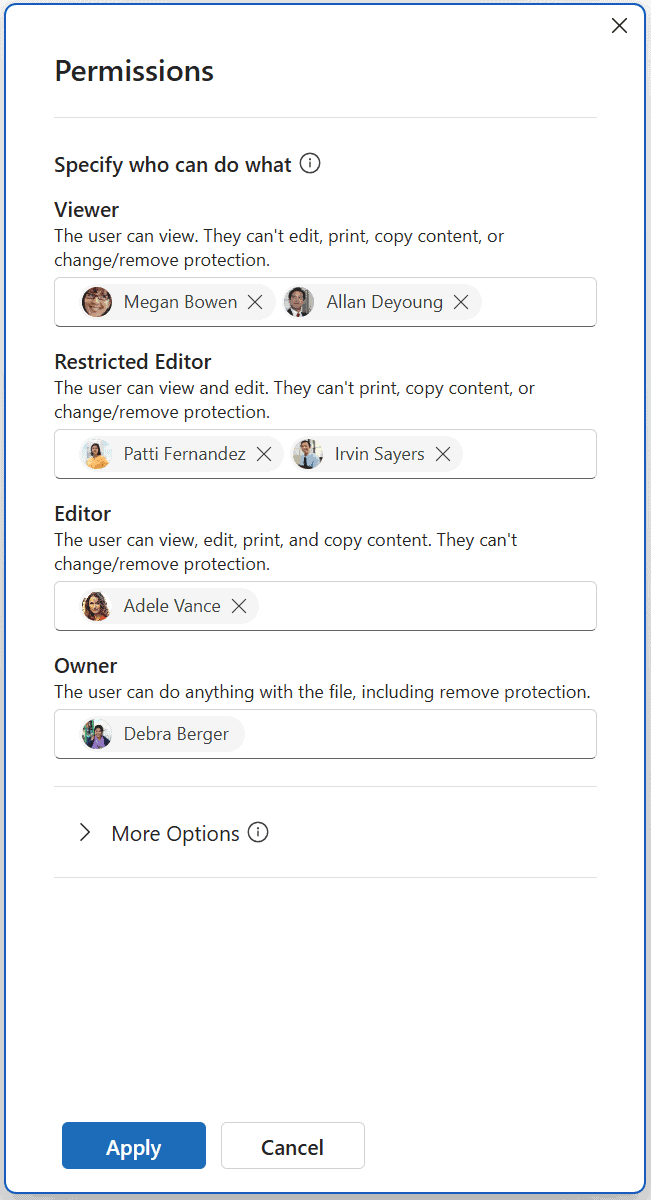
With this update, users can now apply sensitivity labels and manage permissions directly in the browser. Once a label is selected, a permissions dialog appears, letting users choose who gets access and what level of control they have.

Options include assigning roles like Viewer, Editor, or Owner, along with adding specific users or even entire domains. There are also additional settings, such as adding a contact email for access requests, though features like custom expiration dates are still not available in web apps.

Image credit: Microsoft

Microsoft aligns web and desktop experiences

This update brings the web experience closer to what users already get on Windows apps. The same permission levels and terminology are now consistent across platforms, which should reduce confusion.

That said, enforcement still depends on existing configurations set through Microsoft Purview. Policies, encryption settings, and auditing remain unchanged behind the scenes. From an admin standpoint, this removes an extra step. Users no longer need to switch apps just to apply or modify permissions, which could improve adoption of these security features.

Pragmata is Free With RTX 50 Series GPUs in New NVIDIA Bundle

NVIDIA has announced a new game bundle for Pragmata, just days before its newly moved release date. The promotion arrives as anticipation builds for the title’s launch on April 17, including its debut on Xbox platforms.

The bundle gives players a way to access the game alongside NVIDIA’s latest hardware, positioning the release as a showcase for next-generation performance.

Bundle Includes PRAGMATA With RTX 50 Series Hardware

Starting April 14, NVIDIA is offering a free digital copy of PRAGMATA Standard Edition on Steam with select purchases. The offer applies to eligible GeForce RTX 50 Series GPUs, desktops, and laptops, while supplies last.

Qualifying GPUs include:

  • GeForce RTX 5090
  • GeForce RTX 5080
  • GeForce RTX 5070 Ti
  • GeForce RTX 5070

Laptop variants of these GPUs are also eligible. Notably, the RTX 5060 Ti meets the game’s minimum requirements but is excluded from the bundle itself.

Promotion Timeline and Redemption Details

The promotion runs from April 14 through May 12, 2026, with a redemption deadline set for June 9, 2026.

To claim the game, users need to redeem it through the NVIDIA app, log in with a valid Steam account, and ensure they are using a system equipped with a qualifying GPU.

Regional restrictions apply, meaning availability may vary depending on location.

Performance Targets Highlight Next-Gen Focus

NVIDIA also shared recommended performance tiers for PRAGMATA, offering insight into expected hardware demands.

  • Minimum: RTX 5060 Ti
  • Recommended: RTX 5070 Ti
  • Ultra settings: RTX 5080

These tiers suggest the game aims to take advantage of modern GPU capabilities, especially at higher fidelity settings.

Game Ready Driver Incoming Before Launch

Ahead of the April 17 release, NVIDIA is expected to roll out a dedicated Game Ready Driver to optimize performance and stability for PRAGMATA on PC.

With the bundle now live and the launch just days away, the company is clearly positioning PRAGMATA as a key title for its latest RTX 50 Series lineup.

Via VideoCardz

Is Xbox Bringing Back Exclusives? New Dashboard Ad Fuels Debate

Rumors suggest Xbox is holding “very big discussions” about its exclusivity strategy, just as players spotted a renewed emphasis on exclusives directly on the Xbox Series X and Xbox Series S dashboard.

The timing has sparked fresh debate about whether Xbox could be reconsidering its recent shift away from traditional exclusivity.

Dashboard Ad Sparks Questions

According to Pure Xbox, discovery came from an in-dashboard ad tied to Xbox Game Pass. Players found it under the “Make the most of your Game Pass membership” section, where the text references playing Forza Horizon 6 alongside “Xbox exclusives.”

While the wording caught attention, the message does not confirm that Forza Horizon 6 itself is exclusive. Instead, it points broadly to the availability of exclusive titles within the Game Pass library.

Not Just a One-Off

Reports indicate that the same phrasing appeared in other regions, including Korea, through official Xbox channels. That consistency suggests a coordinated, global marketing message rather than an isolated test.

For many observers, that detail strengthens the idea that Xbox deliberately reintroduced exclusivity-focused language into its ecosystem.

Community Reaction Remains Mixed

The response from players has been divided. Some find the messaging surprising, especially after Xbox spent recent years moving toward a more platform-agnostic approach.

Others argue that the brand never fully abandoned exclusives. First-party titles still launch within the Xbox ecosystem, even if some later expand to other platforms.

What This Could Signal

The reappearance of “exclusives” in official messaging raises two main possibilities. It may simply reflect a marketing push designed to reinforce the value of Game Pass by highlighting unique content.

At the same time, it could hint at internal discussions about adjusting Xbox’s broader strategy around platform availability and first-party releases.

For now, Xbox has not provided any official confirmation, leaving the meaning open to interpretation.

In other developments, discussions around Game Pass pricing continue, with leadership acknowledging concerns that the service has become too expensive for some players. Meanwhile, April is shaping up to be a busy month for subscribers, with 17 new titles expected to join the library.

Xbox Reportedly Holding “Very Big Discussions” Internally on Game Exclusivity

Ever since Asha Sharma assumed the role of Xbox CEO, Microsoft’s gaming division has suddenly been popping up in the news often lately. Be it Sharma’s last month’s internal discussion featuring CEO Satya Nadella or the internal memo that leaked yesterday hinting at the new Xbox CEO’s thoughts about Game Pass being too expensive. Now, it seems exclusivity is becoming a major internal talking point at Microsoft.

Xbox is reportedly in the middle of major internal discussions around game exclusivity

The news comes from industry insider and Windows Central’s executive editor, Jez Corden. In a recent podcast episode (timestamped below) on YouTube channel The XB2, Corden said that there are “very very very big discussions” happening behind the scenes around how Xbox should handle exclusives going forward. Here’s an excerpt from the podcast:

There are very very very big discussions about the exclusivity stuff going on right now. They do recognise the value – it’s just about what kind of company you want to be, at the end of the day. Do you want to be an ecosystem company first, or do you want to be a publishing company first?

The core debate reportedly centers on whether Microsoft wants to position itself primarily as an ecosystem company or focused on traditional publishing. Corden further suggested the company understands the value of exclusivity. However, the direction it wants to move towards reportedly isn’t finalized as of now.

Here it’s worth noting that Microsoft has already been moving closer to a publishing-first approach in recent years, especially following major acquisitions like Bethesda and Activision Blizzard. However, whether that direction continues or is rethought under new leadership remains to be seen.

Not everything is expected to become exclusive

Corden also notes that while some internal conversations are ongoing, not everything is expected to become exclusive. In his view, major franchises like Call of Duty and Forza are unlikely to be locked down fully. However, smaller single-player titles could be treated differently depending on strategy. He further speculates that Microsoft may start drawing clearer lines between flagship live-service titles and narrative-driven releases when it comes to platform availability.

Corden’s comments suggest the company is still weighing both sides rather than committing to a single path. As of now, nothing is final, but the conversation itself hints at a potential turning point in how Xbox handles its biggest games. For now, it remains unclear which direction Microsoft will ultimately choose. But if these discussions do lead to change, the impact on future Xbox releases could be significant.

Here, it’s also worth noting that Xbox appears to be entering a more console-focused phase in 2026 under new leadership, with Asha Sharma now overseeing Microsoft’s gaming division. The new CEO is internally leading the development of a next-gen Xbox console, codenamed Project Helix. Reportedly, the upcoming console is on track for a late 2027 launch.

Blizzard Revives Overwatch for Switch 2 With Big Season 2 Update

Blizzard Entertainment is reverting Overwatch 2 back to Overwatch, marking a major shift for the franchise as it expands to new hardware. The relaunch arrives alongside the game’s debut on the Nintendo Switch 2, bringing both a rebrand and fresh content on April 14, 2026.

Overwatch returns as Blizzard rebrands the sequel

The decision to drop the “2” signals a return to the series’ original identity, even as Blizzard continues to build on the sequel’s systems and seasonal model. The timing aligns with Season 2: Reign of Talon, giving the rebrand a strong content-driven push rather than a simple name change.

At the same time, the launch on Nintendo Switch 2 introduces the game to a new generation of portable hardware, aiming to deliver a smoother and more consistent experience compared to the original Switch version.

Switch 2 version brings performance upgrades

Blizzard positions the Switch 2 version as a significantly improved way to play on the go. The game supports up to 60 FPS in both docked and handheld modes, alongside enhanced visuals and higher fidelity audio.

The developer also emphasizes cross-platform play, allowing players on Switch 2 to join matches with friends across other platforms without restrictions. This approach keeps the player base unified despite the new hardware release.

Season 2 introduces Sierra and new event content

Season 2: Reign of Talon adds Sierra, a new DPS hero and the first addition following the initial batch of five heroes introduced in Season 1. Blizzard ties her release to a limited-time event, Operation: Grand Mesa, which runs for three weeks.

Players can unlock lore tied to Sierra through event challenges, expanding the narrative focus around the Talon faction. The update also brings back the post-match accolades system, a feature many players had requested since its removal.

Gameplay updates and hero balance changes

The Antarctic Peninsula map receives a rework designed to improve flow and clarity during matches. Blizzard focuses on cleaner engagements, smoother team pushes, and better flank routes to reduce chaotic encounters.

Several heroes also receive balance adjustments, including Ramattra, Pharah, Reaper, Soldier: 76, and Mercy. These changes aim to refine the current meta while addressing long-standing community feedback.

Cosmetics and progression updates

As expected, the new season introduces additional cosmetics tied to the battle pass. Players can unlock these rewards through regular progression, continuing Blizzard’s seasonal monetization model.

The relaunch comes amid wider discussion around Blizzard, as a former Overwatch director recently shared details about his departure from the company, adding context to ongoing changes within the studio.

Meanwhile, Nintendo’s new console continues to generate headlines. Reports suggest separate pricing for physical and digital games, along with a potential price increase for the Switch 2 itself.

With the rebrand, new content, and a major platform launch happening simultaneously, April 14 could mark a turning point for Overwatch as Blizzard looks to refresh interest in the long-running hero shooter.

Via Wccftech

GTA 5 Among the Games Most Likely to Leave PlayStation Plus Extra in May 2026

PlayStation Plus Extra subscribers are now being warned ahead of a possible rotation in May 2026 after reports from earlier this month hinted about six titles leaving the service mid-April. Among the big games that are most likely to leave PlayStation Plus Extra in May 2026 are GTA 5 and Red Dead Redemption.

The news comes via GamingBible, which spotted a post from Reddit user u/bahia80002 that details the names of games possibly leaving in May. For those unaware, games on PlayStation Plus Extra are usually removed once licensing deals expire, which typically lasts for 6, 12, or 24 months.

From the six-month window, the most likely candidates to leave PlayStation Plus Extra are GTA V, Red Dead Redemption, and Moto GP 25. The list further mentions Tomb Raider Anniversary, Thank Goodness You’re Here!, Insurgency: Sandstorm, Still Wakes The Deep, and Pacific Drive. However, the possibility of these titles leaving the service is slim.

Speaking of the 12-month cycle, games such as Sand Land, Battlefield V, and Granblue Fantasy Versus are most likely to leave the PlayStation Plus Extra catalog next month. Among the other names in the list are Gloomhaven, Stalker Trilogy, Soul Hackers 2, Five Nights at Freddy’s: Help Wanted, Humankind, Story of Seasons: A Wonderful Life, and Battle Engine Aquila.

Last but not least, from the 24-month group, Crime Boss: Rockay City, Cat Quest, Cat Quest 2, and The Settlers: New Allies are the ones most likely to leave the service.

Keep an eye on the “Last Chance to Play” section

That being said, nothing is confirmed yet, as Sony usually finalizes removals closer to the monthly update when the “Last Chance to Play” section goes live. For now, take these details with a grain of salt. We’ll keep monitoring the “Last Chance to Play” section and update this article when we have concrete information about titles leaving PlayStation Plus Extra in May 2026.

Halo Studios Faces Fresh Allegations as New Report Backs Former Developer Claims

With Halo Campaign Evolved reportedly on the horizon, excitement around the franchise continues to grow. At the same time, Halo Studios finds itself at the center of renewed controversy following serious allegations from former employees.

According to Windows Central, Glenn Israel, a developer with more than 17 years of experience on Halo projects, recently left the studio after raising concerns about favoritism, cronyism, and broader workplace misconduct. Microsoft responded briefly, stating that it does not publicly discuss individual employee issues.

New Report and Internal Concerns

A new report from Rebs Gaming has since expanded on those claims, suggesting that some of Israel’s concerns may have merit. Another former employee, Tyler Davis, echoed frustration with leadership, saying staff had been treated poorly, pointing to deeper internal dissatisfaction.

Israel also described witnessing behavior he considered unethical and potentially illegal. He chose not to report the incident, citing concerns about proving the issue, fear of retaliation, and a lack of confidence in internal HR protections. His comments raise questions about how effectively employees can escalate concerns within the organization.

Hiring Practices and Wider Impact

The report also points to possible issues in hiring practices. Several leadership roles in the art department were reportedly filled by individuals with prior connections to existing leadership, despite limited public job postings. Israel characterized this as a pattern that could conflict with company standards and expectations for fair hiring.

Separate concerns involve the Halo Digsite team, a group of community modders known for restoring content from earlier Halo builds. According to the report, the team was eventually disbanded, with claims that contributors were not compensated for their work. One member described interactions with leadership as dismissive, adding to concerns about how external collaborators are treated.

The timing of these allegations creates an uncomfortable backdrop for the franchise, especially as anticipation builds for new Halo content. At the same time, Xbox leadership has acknowledged broader concerns around its ecosystem, including pricing discussions about Game Pass and potential future changes.

In other news, Xbox is also preparing for the upcoming Metro 2039 Showcase, signaling that major announcements for the platform are still on the way despite ongoing controversies.

As more details emerge, attention now turns to how Microsoft addresses these concerns and whether further responses will follow.

Microsoft Tests OpenClaw-Inspired Features to Make 365 Copilot Always-On AI Agent

Earlier this year, OpenClaw took the Internet by storm, and now every other AI company is trying to develop features it helped popularize. Microsoft appears to be one of them, with reports now suggesting the company is exploring a new direction for 365 Copilot, using OpenClaw-style features to expand its AI assistant.

The news comes via The Information, which suggests that with this move, Microsoft is looking to push Copilot toward a more autonomous model that can run continuously in the background and handle tasks on behalf of users (via The Verge).

Microsoft looks to push Copilot toward always-on AI agents

The report claims that Microsoft wants 365 Copilot to eventually operate as an “always-on” assistant. In other words, with the planned integration, 365 Copilot will reportedly be capable of monitoring workflows and completing tasks without constant prompts. This includes automating tasks like checking Outlook inboxes, tracking calendar events, and more.

Speaking with the news outlet, Omar Shahine, Microsoft’s corporate vice president, said the company is “exploring the potential of technologies like OpenClaw in an enterprise context.” To catch you up, Shahine recently hinted at a focus on developing OpenClaw and advancing personal AI agents within Microsoft 365. For those unaware, OpenClaw is an open-source platform that allows users to build AI agents that run locally on devices. However, it has already raised security concerns as adoption grows.

The report further notes Microsoft is opting for “safer” versions of the concept, likely with robust controls and enterprise-focused safeguards. Besides general automation, Microsoft is also reportedly experimenting with role-specific agents for areas like marketing, sales, and accounting.

It’s worth noting that these agents would likely be tightly limited in scope, with restricted permissions designed to keep them isolated from unrelated business systems. The idea appears to be reducing risk while still allowing Copilot to act more independently inside structured workflows, especially in large organizations where data access needs better control.

Build conference could preview what’s next

The Information further notes that Microsoft could showcase early versions of these features at its Build conference, which kicks off on June 2nd. If Microsoft manages to execute these changes without major hiccups, Copilot could move beyond a reactive assistant and start behaving more like a persistent digital operator inside Microsoft 365.

Microsoft Admits Windows 11 Still Has Outdated UI Elements, Fixes Coming

Microsoft has acknowledged that parts of Windows 11 still rely on outdated design elements, with fixes now actively in development, as Windows Latest writes.

The issue gained attention on X, where users highlighted inconsistencies across the operating system. Microsoft design leadership responded, confirming that improvements are underway.

Legacy UI Still Present Across Windows 11

One of the most visible examples is the input method switcher, which still uses a Windows 8-style design. It appears on the login screen before sign-in and does not match Windows 11’s Fluent Design with rounded visuals.

Other outdated elements remain scattered across the system. The Windows Recovery Environment continues to use older UI frameworks, while the familiar “Please wait” screen with rotating dots has remained largely unchanged since Windows 8.

Users also encounter legacy tools like Registry Editor and Device Manager, alongside the classic context menu that appears under “Show more options.” These elements create a mixed experience that blends Windows 11, Windows 10, and even older design styles.

A System Split Between Old and New

Windows 11 still shows a clear divide between modern and legacy interfaces. The newer Settings app follows Microsoft’s Fluent Design principles, while the Control Panel remains rooted in older UI concepts.

This split highlights one of Microsoft’s biggest challenges. Fully replacing legacy components proves difficult due to deep system dependencies and long-standing user workflows.

Why Microsoft Hasn’t Removed Old UI Yet

Backward compatibility remains a key priority for Windows. The system must support older drivers, enterprise tools, and legacy workflows that many businesses still rely on.

Low-level components such as boot, recovery, and login environments also require careful handling. Redesigning them without breaking compatibility takes time and extensive testing.

Microsoft Signals a Push for UI Consistency

Microsoft has now placed the input method switcher on its internal “craft list,” meaning active work has started to modernize it.

The company has also shown a stronger willingness to act on user feedback, suggesting a broader effort to unify the Windows experience.

Recent Insider builds already reflect this direction, with improvements like faster navigation in Storage settings. More visual and performance updates are expected as Microsoft continues refining Windows 11.

Microsoft Speeds Up Windows 11 Storage Settings in New Insider Builds

Microsoft is rolling out notable storage improvements in Windows 11 Insider builds, significantly boosting performance and usability in key areas of the Settings app.

The changes, included in updates KB5083635 and KB5083632, focus on faster navigation, reduced system delays, and fewer interruptions when managing disks and storage.

Faster storage settings performance

According to Windows Latest, one of the most noticeable improvements appears in the path Settings > System > Storage > Disks & Volumes. Opening disk properties, which previously could take up to 15 seconds, now loads almost instantly, even on lower-end systems.

The performance boost stands out especially on devices with large drives, multiple storage devices, or traditional mechanical HDDs. These setups previously struggled due to how the Settings app handled background queries.

Microsoft likely addressed the issue by improving how disk data gets processed and reducing blocking operations that slowed down the interface.

FAT32 limit extended to 2TB

Microsoft has also removed the long-standing 32GB formatting limitation for FAT32, which many users considered artificial. With the latest changes, users can now format drives up to 2TB using command-line tools.

FAT32 has always supported larger volumes internally, but Windows restricted formatting to smaller sizes. This update eliminates the need for third-party tools when working with larger drives.

However, FAT32 still carries a 4GB file size limit, which makes it less suitable for modern workloads involving large files such as videos or backups.

UAC behavior refined for storage access

Another improvement targets User Account Control behavior. Previously, opening storage settings could trigger an immediate UAC prompt, interrupting the workflow.

Now, Windows only shows the UAC prompt when users attempt admin-level actions, such as accessing temporary files or making system-level changes.

This change builds on earlier adjustments introduced in KB5074105 and improves the overall experience by reducing unnecessary prompts.

More improvements planned for Settings

These updates are part of a broader effort by Microsoft to modernize the Settings app in Windows 11. The company continues to address performance bottlenecks and usability issues across different sections.

For now, the improvements remain available only in Insider builds, and Microsoft has not confirmed when they will reach stable releases.

Arc Raiders New Patch Fixes Crashes, Audio & Visual Bugs Ahead of Riven Tides Update

Following last week’s update, Embark Studios has now started rolling out Patch 1.24.0 for Arc Raiders players across all platforms. The latest update introduces a fresh batch of fixes, shop updates, and a few quality-of-life tweaks for Raiders out there. Notably, players also get the Nascosto Set and Scrappy Speckled Set in the in-game store after updating the game.

Arc Raiders Patch 1.24.0 brings stability fixes and gameplay improvements

This update fixes several crash-related issues previously reported by players that were affecting gameplay sessions. It also fixes a bug where the Vanguard Set was causing model stretching issues for other players.

Notably, the latest patch also balances in-game audio, fixing an issue where players and ARC units could sound quieter than intended when there was no line of sight on Stella Montis. Besides that, a visual fix resolves blurry image quality when AMD FSR Frame Generation is enabled.

Movement and interaction systems have also seen improvements after the update. An edge case involving ziplines placed on carriables near ledges has been resolved. Another fix addresses an issue where hold-to-use items like bandages could trigger automatically if a quick-swap was interrupted by a fire input. As usual, don’t forget to restart Arc Raiders to download and apply the patch for an improved gameplay experience.

Here’s what’s next for the Raiders

Do note that players who contributed to the Weather Monitor Station Project but didn’t complete it in time are also advised to check their in-game inbox over the coming days. Moving on, the High-Gain Antenna Project will also expire before the upcoming Riven Tides update.

The Arc Raiders team has further confirmed there will be a store rotation next week, but no additional patch is planned ahead of the Riven Tides update. To catch you up, the update is expected at the end of April.

Google Cracks Down on “Back Button Hijacking” as Part of New Spam Policy

Yesterday, Google announced a new spam policy that targets a deceptive web practice known as “back button hijacking.” The company says that the update expands its “malicious practices” rules and will officially start treating the technique as a policy violation starting June 15, 2026.

Google to start taking action against sites using deceptive back button hijacking technique

When someone hits the browser back button, they expect to return to the previous page instantly. Google says some sites are interfering with that flow. Rather than going back, users are reportedly being redirected to unrelated pages, ads, or forced recommendation screens. In some cases, the normal browsing path is disrupted entirely, making navigation feel broken or manipulated.

Google says this behavior creates a mismatch between what users expect and what actually happens. That, according to the company, leads to user frustration and reduced trust in search results over time. In an update, the company also notes that this type of manipulation has been increasing, prompting it to formally classify it under malicious practices.

“Pages that are engaging in back button hijacking may be subject to manual spam actions or automated demotions, which can impact the site’s performance in Google Search results,” notes the company in a blogpost from yesterday.

Notably, websites found using these methods may face manual actions or algorithmic demotions in Search. That being said, Google isn’t just targeting intentional abuse. It also warns that third-party scripts, ad networks, or embedded tools could be responsible without the site owner realizing it.

As part of the policy update, Google also advises publishers to audit their setups and remove any code that interferes with browser navigation. That means if you have hidden or third-party components in your website, it may also need reviewing. Moreover, Google has also confirmed a grace period before the crackdown begins, giving site owners time to adjust before penalties take effect.

Article feature image source: Unsplash

Microsoft Surface Lineup Hit by Memory Crunch, Prices Increase Across the Board

In the past few months, multiple reports hinted that mainstream PCs will likely get price hikes due to an ongoing memory crunch. Well, the day is here it seems, as Microsoft has quietly increased the prices of its Surface laptops. The news comes via Windows Central, which reports that the new prices are now visible on Microsoft’s official online store.

Microsoft Surface prices jump sharply across lineup

Per the report, the biggest price jump hits flagship devices like the Microsoft Surface Laptop 7 and Microsoft Surface Pro 11. Both premium Surface laptops are now starting roughly $500 higher than their original launch prices. That is not a small bump, especially for devices that were positioned as premium yet competitive options.

The latest price hike has also affected midrange models like the 12-inch Microsoft Surface Pro, which now starts at $1,049, up from $799. Meanwhile, the base 13-inch Microsoft Surface Laptop has been increased to $1,149 from $899. That effectively pushes what used to be mid-tier pricing into flagship territory.

Moving on, the 13.8-inch flagship Surface Laptop, which launched at $999, is now priced at $1,499, while the larger 15-inch variant now starts at whopping $1,599. Here’s a closer look at the Surface laptops affected by the latest price hike:

CategoryStarting price in 2024Starting price in 2025Starting price in 2026
Surface Pro 13-inch$999 for Snapdragon X Plus, 16GB RAM, 256GB SSD$1,199 for Snapdragon X Plus, 16GB RAM, 512GB SSD$1,499 for Snapdragon X Plus, 16GB RAM, 512GB SSD
Surface Pro 12-inchN/A$799 for Snapdragon X Plus, 16GB RAM, 256GB UFS$1,049 for Snapdragon X Plus, 16GB RAM, 256GB UFS
Surface Laptop 13-inchN/A$899 for Snapdragon X Plus, 16GB RAM, 256GB SSD$1,199 for Snapdragon X Plus, 16GB RAM, 256GB SSD
Surface Laptop 13.8-inch$999 for Snapdragon X Plus, 16GB RAM, 256GB SSD$1,199 for Snapdragon X Plus, 16GB RAM, 512GB SSD$1,499 for Snapdragon X Plus, 16GB RAM, 512GB SSD
Surface Laptop 15-inch$1,299 for Snapdragon X Elite, 16GB RAM, 256GB SSD$1,499 for Snapdragon X Elite, 16GB RAM, 256GB SSD$1,599 for Snapdragon X Elite, 16GB RAM, 256GB SSD
Source: Windows Central

In a statement to the news outlet, a Microsoft spokesperson confirmed that the latest price hikes for Surface laptops are the result of “recent increases in memory and component costs, Surface is updating pricing on Microsoft.com for its current‑generation hardware portfolio. We remain committed to delivering value to customers and partners while upholding our standards for quality and innovation.”

That said, it’s unclear whether upcoming Surface laptops will stick to these higher price tiers or push even further. If component costs remain high, Microsoft may have little room to adjust downward in the near term. Not to forget, recently ASUS’ ZenBook laptops saw price hike right after reviews went live. However, the company later clarified that the reflected increases were an error on part of BestBuy.

Metro 2039 Story Leaks Ahead of April 16th Xbox Showcase

Right after Microsoft confirmed Xbox First Look: Metro 2039 showcase for April 16th, early story details for the game have leaked, revealing key narrative beats ahead of its official reveal. If you have been waiting for the next chapter in the Metro series, you might want to avoid spoilers for a few days. Speaking of leaks, a massive leak originating from Indonesia recently leaked over an hour-long footage of the James Bond game 007: First Light.

Metro 2039 story details surface ahead of official reveal

Coming back to Metro 2039, the leak comes from IGDB, which shared the game’s synopsis, which outlines a darker and more intense storyline than previous entries. At the time of writing this, the synopsis has been pulled from the IGDB site, but folks at Insider Gaming were quick to pull the details. So, here it is in case you’re wondering what the game will be all about:

METRO 2039 is the next landmark FPS from acclaimed storytellers, 4A Games. Journey into the dark heart of post-apocalyptic Moscow in a harrowing conflict for the very soul of the Metro. The year is 2039. For a quarter century, the last survivors of nuclear war have been locked in bitter conflict deep in the Metro tunnels beneath the poisoned city of Moscow. Now, finally, they have been united by a single leader, a fanatical Spartan known as Hunter. But this is no peace: Hunter’s Novoreich regime rules through propaganda and fear, subjugating the population in the name of a new war for the surface against a dark and terrifying enemy. In the wilderness beyond the city, the reclusive Stranger is haunted by violent waking nightmares. When the ghosts of his past force him out of exile, he must undertake a harrowing journey into the shattered ruins of Moscow, to the one place he swore he’d never go. The Metro. Experience the most shocking METRO adventure yet in a powerful single-player story that weaves exploration, survival, combat, and stealth across a hauntingly beautiful but deadly world with unparalleled immersion. Inspired by the worldwide best-selling METRO book trilogy by Dmitry Glukhovsky.

As of now, it’s unclear how much of this leaked synopsis reflects the final version. That’s because studios often revise story elements late in development, especially for narrative-heavy games. With the official reveal just around the corner, will this leak end up spoiling major moments, or is there more that Metro 2039 is still keeping under wraps? That’s something we’ll learn on Thursday.

Are you excited for Metro 2039? Let us know in the comments below!

Viva Engage Live Events Shutdown Announced, Teams Town Hall Takes Over

Microsoft is continuing to reshape its enterprise collaboration tools, and the latest change affects live event capabilities inside Viva Engage.

According to a Microsoft 365 Admin Center update (Message ID: MC1227085), the company will retire certain live event features powered by Teams Live Events in Viva Engage, pushing organizations toward a newer solution.

Viva Engage live events retirement begins in April 2026

Microsoft confirmed that starting April 15, 2026, users will no longer be able to schedule new live events using Teams Live Events within Viva Engage.

This marks a clear shift away from the legacy live events model that has powered large-scale broadcasts inside Microsoft’s ecosystem for years.

Existing events scheduled before the cutoff date will continue to function, but only for a limited time. Microsoft says these events will remain supported until February 28, 2027, giving organizations a transition window of nearly a year.

Microsoft pushes Teams Town Hall as a replacement

To replace the retiring functionality, Microsoft is directing users to adopt Teams Town Hall, which is positioned as the next-generation solution for large and hybrid events.

The company says Teams Town Hall delivers an improved experience for hosting structured broadcasts, webinars, and company-wide communications.

In terms of capabilities, the platform matches the standard attendee capacity of Teams Live Events, supporting up to 3,000 interactive participants.

For organizations that require larger reach, Microsoft offers an optional Attendee Capacity Pack, which expands event size to as many as 100,000 attendees.

Admins urged to migrate and prepare users

Microsoft is advising administrators to begin transitioning both existing and future events to Teams Town Hall as soon as possible.

Recommended actions include updating internal documentation, informing users about the change, and ensuring that teams understand how to use the new event system.

The retirement aligns with Microsoft’s broader strategy of consolidating features into fewer, more modern tools across Microsoft Teams.

More Teams updates on the way

Beyond this change, Microsoft continues to expand Teams with new features. The company is currently working on privacy-focused Copilot meeting recaps and new pre-call tools, including the ability to test your microphone before joining meetings.

These updates suggest Microsoft is doubling down on improving both usability and compliance across its communication platform.

Via Neowin

Microsoft Urges Shift to Microsoft 365 Ahead of Office LTSC 2021 Deadline

Microsoft is preparing to end support for Office LTSC 2021, marking another major shift toward its cloud-based productivity ecosystem. As reported by Neowin, the standalone Office version will officially reach the end of support on October 13, 2026.

After this date, the apps will continue to function, but Microsoft will stop delivering security updates, bug fixes, and technical support. This change could also lead to growing compatibility issues as newer versions of Windows roll out.

What Happens After Support Ends

Once support expires, organizations using Office LTSC 2021 will face increasing risks and limitations. Without security updates, systems become more vulnerable to threats, while the lack of bug fixes may impact stability over time.

Compatibility will also become a concern. As Microsoft continues updating Windows and its cloud services, older Office versions may gradually lose full functionality or integration support.

Office LTSC 2024: A Short-Term Alternative

For organizations that rely on on-premises deployments, Microsoft offers Office LTSC 2024 as a replacement. This version includes updated editions of core apps, along with newer versions of tools like Visio and Project.

However, this option may only delay the inevitable transition. Office LTSC 2024 is scheduled to reach the end of support on October 9, 2029, giving organizations just a few more years before facing another migration cycle.

Microsoft Pushes Toward Microsoft 365

Microsoft continues to encourage businesses to move to its Microsoft 365 ecosystem. The company positions these subscriptions as the long-term solution, offering continuous updates and cloud-based features.

Small businesses with fewer than 300 users are directed toward plans such as Microsoft 365 Business Premium, Business Standard, or Microsoft 365 Apps for business. These plans require cloud connectivity but provide easier deployment and management.

Larger organizations are advised to adopt enterprise-grade solutions like Microsoft 365 E3, Office 365 E3, or Microsoft 365 Apps for enterprise. These options deliver advanced security, compliance tools, and centralized IT control.

More Microsoft Product Retirements in 2026

The end of Office LTSC 2021 aligns with a broader wave of product retirements planned for 2026. Microsoft is gradually phasing out several legacy tools as it streamlines its ecosystem.

Among the products being retired are Access Database Compare, Microsoft Publisher, and Outlook Lite. In addition, Microsoft has already discontinued the semi-annual Enterprise channel in the Office Customization Tool.

Microsoft’s roadmap makes one direction clear. The company is steadily moving away from traditional perpetual-license software and pushing organizations toward cloud-first solutions.

For businesses still relying on Office LTSC 2021, the approaching deadline leaves limited time to evaluate upgrade paths and plan a transition strategy.