Take Two: Is Windows 10 October Update finally coming in November?

Good news for everyone waiting for the Windows 10 October Update aka Windows 10 v1809, although I am not sure if anyone really waits for the updates, let’s be honest.

Tomorrow is the second Tuesday of the month, which means it’s security update time. And it looks like the October Windows Update may well be included in the November patch.

Microsoft Re-Releases Windows 10 October Update in November?

The release of the Windows 10 October update 1809 was problematic to say the least. A couple of days after it had been released, the reports started appearing online of files being deleted by a bug, including people’s documents.

windows 10 delete file bug


What has annoyed many people in this round of updates is that things have been done so poorly. The Windows 10 October update 1809 affected many but Microsoft only released the fix to Windows Insiders in the Slow and Release Review rings. Microsoft didn’t think it was worth releasing it to everyone else who may have lost folders, files, and documents.

  • READ ALSO: Windows 10 October Update install fails for many users

Also, Windows has made almost no pronouncements about this. Really, in this day and age of instant communication, customers expect more. Why companies don’t admit they screwed up, and tell people they are working on a fix (preferably with daily updates), continues to astound me.

It Isn’t Difficult to keep People Happy

It really isn’t that difficult to keep most people happy. Tell them what went wrong with the Windows 10 October Update, apologize that it happened, tell them what you are doing to fix it, and then fix it. I am sure that is how companies behaved in the past. Not sure why it can’t be like that now.

I am a great fan of Windows. In fact, I have a brilliant story concerning Bill Gates, a schooner in Guernsey, and a missed opportunity to travel the world teaching two young kids, but I won’t go into that now. However, sometimes being a fan of Windows is quite tiring!

What I will say is that many people remember companies that led by a long way, only to come crashing to earth. Let’s hope that Microsoft doesn’t forget that, with its shambolic Windows 10 October update , customers still have value. And that what happened to Perrier Water in 1992, for example, could happen to any company.

Anyway, enough ranting. Here is the updates page where you can check out what’s what. As always, let us know when you update, or re-update (is that a word?) your Windows 10 machine, and whether you have any problems or not. We are always very happy to hear from you.

RELATED POSTS TO CHECK OUT:

Upcoming Office 365 “migration experience” from Google G Suite looks to recapture lost productivity marketshare

The battle for productivity software supremacy is heating up as both Microsoft and Google converge on overlapping audiences.

For sometime now, small to medium sized business and start ups relied on the flexible pricing of Google’s G suite to power their offices and boost their employee productivity. Aiming for the smaller fish allowed Microsoft to keep entrenched larger businesses while simultaneously serving the needs of individual consumers who might be in education. The entire pool was a seemingly copesetic relationship for both Google and Microsoft.

However, there are rumblings as of last week that point to Microsoft coming up with a new “migration experience” for Google G suite customers.

ZDNet’s Mary Jo Foley recently wrote about an internal roadmap that points to a Q2 release of a new Office 365 migration experience for former Google G suite customers.

“We’ve heard the feedback and we’re excited to announce the new G Suite migration experience which will allow you to directly migrate email, calendar and contacts from Google G Suite to Office 365! Our highly secure solution ensures your data is directly migrated to Office 365, with no resting points along the way. We’re also adding support for migrating mailbox in batches.”

As of now, it seems Google is drawing first blood with its own Exchange migration tool and has been for some time, however, based on this leak it seems Microsoft is aware that its own limited IMAP mailbox transfer solution is in need of some bolstering to regain lost productivity marketshare.

Microsoft has yet to confirm the leak and may never publically announce it, as it servers as more of a tool for its sales team and partner solutions.

Latest Insider update for Microsoft To-Do brings some Smart List improvements

Microsoft keeps iterating fast on its new cross-platform To-Do app, and the team has recently released a new version of the app for Windows Insiders which brings some improvements to Smart Lists (via Aggiornamenti Lumia). First of all, you can now customise your Planned Smart List with a selection of themes, like you can already do in your different lists and “My Day” section. For now, the “Important” Smart List still doesn’t support Themes, but this may well be coming in a future update

The “Planned” Smart List now supports themes.

Next, there is a new option in Settings for automatically hiding the “Planned” and “Important” Smart Lists in the left panel when they’re empty. You could already disable these two Smart Lists in settings if you have no use for these features.

Lastly, this update brings the usual performance and sync improvements, which are always welcome. We now have the version 1.43.1811.9001 on our Insider machine, which should be coming to non-Insiders in the coming weeks.

Windows 10 news recap: Alexa for PC now available on the Microsoft Store, Microsoft may separate Cortana from Windows Search and more

Welcome back to our Windows 10 news recap, where we go over the top stories of the past week in the world of Microsoft’s flagship operating system.

Some new Windows devices are shipping with unsupported software

PC manufacturers are apparently feeling nervous over the pulled and delayed Windows 10 October 2018 update. The update has experienced numerous issues, leading Microsoft to pull it. However, for PC manufacturers, they are now having to release hardware on an operating system that the hardware has not been tested with, potentially causing compatibility issues.

man beginning a fight

Microsoft might be separating Windows Search from Cortana in Windows 10 19H1

In Windows 10 19H1, it appears that Microsoft is working on, or at the very least testing, separating Cortana from Windows Search. A new “Conversation Canvas” could house Cortana, similar to how other assistants work, like Google Assistant.

The Alexa for PC app is now generally available on the Microsoft Store

Users who have opted for Alexa as their virtual assistant of choice will be happy to hear that the Alexa app is now available in the Microsoft Store.

Microsoft brings dark theme support to the OneDrive Windows 10 desktop client

The trend of adding a dark theme to everything continues to expand. Microsoft has now added a dark theme option to the OneDrive desktop client on Windows 10.

That’s it for this week. We’ll be back next week with more Windows 10 news!

Ori and the Blind Forest, Ori and the Will of the Wisps are both coming to Xbox Game Pass

Ori fans will be delighted to hear that the next game in the Ori series, Ori and the Will of the Wisps, is coming to Microsoft’s Xbox Game Pass subscription service. In addition, Ori and the Blind Forest is also on the way.

Ori and The Blind Forest Xbox Game Pass

Ori and the Blind Forest will be available to Xbox Game Pass members on December 20.

Ori and The Will of The Wisps Xbox Game Pass

Likewise, for those wanting the next instalment to the series, Ori and the Will of the Wisps will be available on launch day to Xbox Game Pass members. The expected release date is sometime in 2019.

Are you excited to delve into the new Ori game through Xbox Game Pass? Let us know in the comments!

Hellblade: Senua’s Sacrifice is coming to Xbox Game Pass next month

At its XO18 event, Microsoft is bolstering its Xbox Game Pass library, adding titles such as PUBG, to entice more users to subscribe to the service.

Yet another new addition to the library is Hellblade: Senua’s Sacrifice from Ninja Theory. Normally available for $29.99 from the Xbox Store, the game will be available to all Xbox Game Pass subscribers for free.

From the developers of well-known games such as Devil May Cry, Hellblade will take you back into the Viking age. Here’s an excerpt from the official game description:

Set in the Viking age, a broken Celtic warrior embarks on a haunting vision quest into Viking Hell to fight for the soul of her dead lover.

Created in collaboration with neuroscientists and people who experience psychosis, Hellblade: Senua’s Sacrifice will pull you deep into Senua’s mind.

Hellblade: Senua’s Sacrifice will be available to Xbox Game Pass members on December 17.

Microsoft acknowledges major SSD encryption security issue

Microsoft recently issued a Security Advisory (ADV180028) warning for users of self-encrypted solid state drives (SSDs) using Bitlocker encryption systems.

This security advisory came after two security researchers from the Netherlands, Carlo Meijer and Bernard van Gastel, issued a draft paper outlining vulnerabilities they discovered. Here is the abstract summarising the problem:

We have analyzed the hardware full-disk encryption of several SSDs by reverse engineering their firmware. In theory, the security guarantees offered by hardware encryption are similar to or better than software implementations. In reality, we found that many hardware implementations have critical security weaknesses, for many models allowing for complete recovery of the data without knowledge of any secret.

If you have seen the paper, you can read about all the different vulnerabilities. I will concentrate on the two main ones.

SSD Hardware Encryption Security

Microsoft knew there was a problem with SSDs. So in cases of self-encrypted SSDs, Bitlocker would allow the encryption used by the SSDs to take over. Unfortunately, for Microsoft, this didn’t solve the problem. More from Meijer and van Gastel:

BitLocker, the encryption software built into Microsoft Windows will rely exclusively on hardware full-disk encryption if the SSD advertises supported for it. Thus, for these drives, data protected by BitLocker is also compromised.

security advisory on SSD

The vulnerability means that any attacker who can read the SEDs user manual, can access the master password. By getting access to the master password, attackers can bypass the user-generated password and access the data.

Fix Master Password Vulnerabilities

In reality, this vulnerability would seem to be quite easy to fix. Firstly, the user can set their own master password, replacing the one generated by the SED vendor. This user-generated password would not then be accessible to an attacker.

The other option would seem to be to set the Master Password Capability to ‘maximum’, thus disabling the master password altogether.

Of course, the security advisory comes from the assumption that the average user believes that an SED would be safe from attackers, so why would anyone do either of these things.

User Passwords and Disc Encryption Keys

Another vulnerability is that there is no cryptographic binding between the user password and the disc encryption key (DEK) used to encrypt the password.

In other words, someone could look inside the SED chip to find the values of the DEK and then use those values to steal the local data. In this case, the attacker would not require the user password to get access to the data.

Not All SSDs May Be Affected

However, I would like to point out two things. Firstly, Meijer and van Gastel only tested a fraction of all SSDs. Do the research of your SSD and see if it may have a problem. Here are the SSDs the two researchers did test:

security advisory on SSD

Attackers Need Local Access

Also note that this needs local access to the SSD as attackers need to access and manipulate the firmware. This means that your SSD and the data it holds is, theoretically, safe.

Having said that, I don’t mean that this situation should be treated lightly. I will leave the last word to Meijer and van Gastel,

This [report] challenges the view that hardware encryption is preferable over software encryption. We conclude that one should not rely solely on hardware encryption offered by SSDs.

Wise words indeed.

Have you discovered an unlisted SSD that has the same security issue? Let us know in the comments below.

RELATED POSTS TO CHECK OUT:

“I Hate Santa” is a great game that brings snowball fight to VR

Winter is a wonderful season! Starting snowball fights is one of the funniest winter activities for many people. Now you can start your own snowball fights from the comfort of your house. I hate Santa is a funny Christmas game that lets you shoot, dodge, and level up to defeat crazy kids in epic snowball fights.

You can even battle fireworks and a monster house. When you finish this game, you’ll find out Santa’s dark secret.

Move your head to dodge incoming attacks, and counter their snowballs with yours. Don’t be shy, show off your excellent snowball fighting skills. Compete with other players and see who can score the highest. Do your best to rank yourself as high as possible on the leader board.

I hate Santa is a game designed for VR and supports both HTC Vive and Oculus Rift. You don’t need any keyboard or controllers, and you’ll quickly get the hang of it. I hate Santa is a fun and entertaining game for the whole family.

I Hate Santa system requirements:

  • OS: Windows 7, Windows 10
  • Processor: Intel i3-6100 / AMD Fx4350 or greater
  • Memory: 2000 MB RAM
  • Graphics: Nvidia 960 or greater
  • DirectX: Version 11
  • Storage: 500 MB available space.

I Hate Santa review

I found the game to be different in a good way, yes i know wave shooters take a lot of flak lately […].
The aiming mechanic, looking to aim at targets, I find refreshing, it has been about spot on for aiming. The Dodge feature is a nice touch also.
There seems to have been definate work put into the game, runs well ,looks good, and its stable.
Some days one needs something that isn’t a hyper reallistic shooter, dashing for cover and gunfire all around. Instead, pelt elves, with snowballs.

You can purchase I Hate Santa for only $2.99 from Steam.

Meanwhile, I hate Santa also got an update that makes the game even better and more fun to play. Here’s what’s new:

  • Achievements support
  • The game ending has been polished to make the plot less obscure following players‘ feedback.
  • The jet pack dropper has been improved. If you manage to hit them, you’ll in for a nice surprise. Several attempts may be necessary as this is not an easy task.
  • The visual glitches on game tips  and leader board have been fixed.

If you’re looking for more VR games, you can check out our list of the best Christmas VR games to play in December.

RELATED STORIES YOU NEED TO CHECK OUT:

Track Santa Claus with these cool Windows 10 apps

The season’s upon us, and the world’s favorite white beard is preparing for taking off. As you probably know, Santa always knows what you’re doing, and whether you were a good boy or girl this year. But did you know you can keep track of what Santa’s up to, as well?

Best apps to track Santa’s journey

1. Track Santa by NORAD

track santa norad

North American Aerospace Defense Command (NORAD) keeps track of Santa for years. And they’re keen to share the results of their research with people worldwide.

In that manner, NORAD has launched a unique service called Track Santa. The Santa tracker is available on NORAD’s official website, as well as all major platforms, including Windows 10.

Santa takes off December 24th, on the Christmas Eve. But NORAD allows you to keep your eye on Santa’s village way before. When you visit NORAD’s website, or download the Windows 10 app, you’ll find yourself in Santa’s village, where you can get busy doing different holiday activities.

You can watch videos about Santa Claus, read interesting stories, listen to Christmas music, and more. And when the big day finally comes, you’ll be able to watch every Santa’s move. The journey will start from the North Pole, and won’t stop until Santa delivers all the gifts.

NORAD has been tracking Santa since 1955, but it all started accidentally. It all begun when a local advertisement directed kids to call Santa directly.

However, the phone number was misprinted, and kids ended up calling the Crew Commander on duty at the Continental Air Defense Command Operations Center. And, that’s how this great idea was born.

You can download NORAD Santa Tracker from the Windows Store, it’s completely free. Or you can follow Kris Kringle directly from your web browser, by visiting NORAD’s official website.

UPDATE: The NORAD Santa Tracker app is no longer available in the Microsoft Store. However, you can still access its content by visiting NORAD’s official website.

And in case you want to bring the holiday spirit to your computer, make sure to check out the best Christmas themes for Windows 10.

2. Where is Santa – Santa Tracker

Where is Santa - Santa Tracker

Fortunately, we found another useful Windows 10 app to track Santa Claus with. With the help of this app, you can follow Santa’s every move at any time — not just near Christmas.

Simply launch a scan and you’ll receive a dynamic report of Santa’s location and activities. Moreover, based on your location, the app will also tell you when Santa should arrive at your house.

The sophisticated system will also display both locations of Santa and Yourself. On top of that, it also finds out the estimated Santa’s arrival time with a counting down timer.

Download Where is Santa – Santa Tracker

RELATED SANTA STORIES YOU NEED TO CHECK OUT:

Call Santa Claus with these apps and surprise your kids

Thousands of children send letters to Santa Claus in December. If your child doesn’t want to wait until Santa replies, you can simply let them speak to Father Christmas instead.

All you need to do is to install the Santa Calls app on your Windows 10 phone, a cool app that makes it look like you are getting a phone call from the man himself.

Call Santa Claus app

The Call Santa Claus app tells your kids if they’ve been naughty or nice.

call santa app

If you want to get an immediate call from Santa, simply pin a call to your start screen. The best part is that pinned calls have a different picture of Santa to indicate which list your children are on.

In this manner, your children will have direct confirmation that Santa is really watching them and that they’d better be good if they want presents this Christmas.

Of course, you will not actually be able to speak to Santa, but this app fakes it pretty well. You can successfully use the Santa Calls app in response to your children either being naughty or nice. You simply show them who’s calling and pretend to speak to Santa to inform him about the good or bad deeds of your children.

Parents simply love this app and their reviews confirm it:

My son was shocked when Santa called my phone! He couldn’t believe it, and his reaction was priceless. Now he’s on his best behaviour because he thinks Santa calls me to make sure he’s behaving himself. Lol. This app is awesome and worth twice the price, easily.

You can purchase the Santa Calls app for $0.99 from the Windows Store.

Video Santa Call

Video Santa Call app

UPDATE: We found another interesting app that allows you to contact Santa using your PC or HoloLens device. It’s called Video Santa Call, and as its name suggests, it allows you to send and receive video calls from Santa.

Here’s how this Santa app works:

  1. Record your video message for Santa in English or French — up to 30 seconds.
  2. Purchase a postal stamp to send your video to Santa.
  3. Santa Claus will watch your video and then reply in less than 24 hours. There are no pre-recorded messages used as the reply is based on your initial message.

Download Video Santa Call from the Microsoft Store.

Have you used other apps or software to call Santa Claus? Tell us more in the comments below.

RELATED STORIES YOU NEED TO CHECK OUT:

Xbox holiday season heats up with next week’s release of Fallout 76, Hitman 2, more

There are several new game releases coming to Xbox One next week. As noted in a post on Xbox Wire, Xbox fans will see a few big-name titles, along with some old favorites coming, including four Xbox One X Enhanced game titles. Here’s a list of all the Xbox One game titles coming next week:

These two games are not available for purchase yet through the Microsoft Store, but should be released on Xbox One on their designated release dates:

  • The Long Journey Home – November 14, 2018
  • Youtubers Life: OMG Edition – November 14, 2018

Next week will certainly be an exciting week with blockbuster titles like Fallout 76 and Battlefield V coming to Xbox One. Fallout 76 will bring online multiplayer to the newest Fallout installment, using the same game mechanics seen in previous Fallout games. Fallout 76 B.E.T.A didn’t give fans enough time to experience the game, so it will be interesting to see if Bethesda was able to fix any game issues. We will have to wait and see if any serious game bugs will plague Fallout 76 at launch.

Battlefield V will leave World War I behind and we will see if EA will see the same game success the company had with Battlefield 1. Either way, it is sure to be a fun and exciting week for Xbox One fans everywhere.

Sunset Overdrive Xbox Achievements confirm Windows 10 version is on its way

We recently reported that Sunset Overdrive was coming to Windows 10, and now the game’s Xbox achievements list published by TrueAchievements confirms this to be true. According to the source, there are a total of 80 achievements that can be earned throughout the game, allowing the player to earn Gamerscore points on Xbox Live. And in addition to its Windows 10 release, the game is also reportedly coming to Steam as well (via Wccftech), which could potentially bring the game to Windows 7 and 8 gamers.

Sunset Overdrive is a first person shooter game developed by Insomniac Games. The game has been praised for its artistic design and humor, and is currently only available for those with an Xbox One console. Its release on Windows would greatly expand the available audience, and bringing it to one of the biggest gaming platforms out there only sounds logical for the company. Unfortunately, the Windows 10 version is unlikely to be an Xbox Play Anywhere title considering its achievement list is short of the 88 total available in the Xbox One version.

The title is currently available for $19.99 on the Xbox Store, but it’s currently free with Xbox Game Pass. We’re looking forward to seeing if the PC port will be as affordable as the Xbox One version.

Sunset Overdrive
Sunset Overdrive
Developer:
Microsoft Studios
Price:
Free

Microsoft to bring broadband internet to tribal lands in Montana and Washington with Airband Initiative

Microsoft is adding to its partner’s list with a new collaboration between the company and Native Network, a telecommunications company focusing on providing solutions to the underserved rural Indian Country that resides in the United States.

As part of a joint announcement, Microsoft and Native Network revealed that the two companies are poised to deliver internet access to approximately 73,500 people in local trials communities.

“Broadband is the electricity of the 21st century and is critical for farmers, small-business owners, health-care practitioners, educators and students to thrive in today’s digital economy,” said Microsoft President Brad Smith. “The partnership with Native Network will help close the digital divide in rural Montana and Washington, bringing access to approximately 73,500 people within and around the tribal communities.”

Beyond its immediate goal of internet access to 73,500 people in rural native counties in the northwest, the Microsoft and Native Network partnership looks to extend its ultimate reach to over 2 million people in unserved portions of rural America by July 4, 2020.

To do so, Native Network is taking the utmost advantage of Microsoft’s Airband Initiative which takes investment in not only its goal of providing broadband to rural America but also digital skills training for newly connected areas.

Furthermore, according to Microsoft, proceeds from Airband connectivity projects gets funneled back into the program for even more expanded broadband to rural areas.

Using a combination of Microsoft’s Airband Initiative and Native Network technologies, the two companies will provide “hybrid, fixed wireless broadband internet access, including TV White Spaces to Tribes within the Flathead Reservation in Montana as well as the Lummi Nation and Swinomish Tribe in Washington, according to Smith.

Microsoft’s Azure gets a big win with Gap cloud services deal

In addition to Samsung using Microsoft cloud services, Gap Inc. is another company that will start using Azure to help increase the company’s technology capabilities. Gap  intends to incorporate Microsoft Azure across all of its brands, including Old Navy, Gap, Banana Republic, Athleta, Hill City, and Intermix. As noted in a post on Microsoft Stories, the company  hopes its new partnership with Microsoft will allow it  to greatly improve customer experiences with the help of Azure and Microsoft 365.

Sally Gilligan, chief information officer at Gap Inc, sees the new Microsoft partnership will help her company do more to engage Gap customers.

“As we grow our value and active business and accelerate online and mobile, the ability to scale our technology in a secure environment to accommodate this growth is critical. The Microsoft Azure platform provides our teams the ability to deliver innovative and personalized capabilities for our customers with speed supported by a strong depth of technology expertise from the Microsoft team.”

Gap Inc. and Microsoft are working to move hundreds of applications to Azure. The company wants to focus on providing a seamless and personalized experience for their customers, both online and in-store. In the beginning stages, Gap looks to move to Azure to cut costs on the company’s on-premises data storage and services. Additionally, Gap is  also deploying Microsoft 365 solutions to help support its employees too. Microsoft 365 will help Gap Inc. employees better communicate and collaborate with each other company-wide.

Currently, stores operate in more than 90 countries with over of them 3,100 company-owned. By using Microsoft Azure, Gap Inc. can cut the time it takes to market new customer experiences and provide its customers easier ways to shop. They can utilize some of Azure’s most powerful tools, including advanced analytics and machine learning to get a better understanding of how its customers shop. Gap can then leverage that information to make more personalized shopping experiences for its customers.

Microsoft brings dark theme support to the OneDrive Windows 10 desktop client

The October 2018 update, which Microsoft has yet to re-release for all Windows 10 users will bring some improvements to the dark mode in Windows 10. The legacy File Explorer now supports dark mode, though we previously noted that the implementation was still quite inconsistent across the board.

The truth is, even with dark mode on on Windows 10, you’ll still encounter many Windows 10 components, legacy apps or UWP apps that will remain untouched. That was also the case for the OneDrive sync client on Windows 10, but Microsoft has quietly added dark mode support to this app in recent Insider builds.

We saw the sync client turn dark today on an Insider PC running the preview build 18272, so you apparently don’t need to have the latest 19H1 build to get it. The build number for the app is 18.212.1021.0007, which is as of this writing is more advanced than the latest OneDrive Insider build that Microsoft indicates on this support page.

The OneDrive sync client ships with Windows 10, but Microsoft uses three different rings of validation (Insiders, Production, and Enterprise) to push new updates. Like many other Windows 10 apps in dark mode these days, the OneDrive sync client uses different shades of dark grey, and it looks pretty good next to the dark File Explorer. It’s one of the thing that Microsoft can now remove from its Dark Mode checklist, but there is definitely still some room for more improvements in File Explorer and other parts of the OS.

Some new Windows devices are shipping with unsupported software

The delay of the Windows 10 October 2018 Update has apparently resulted in some unexpected frustrations for certain OEMs according to a report by Petri’s Brad Sams who has spoken to several company employees off the record.

The problems come as a result of hardware manufacturers building PCs on pre-release builds of 1809, the Windows 10 October 2018 Update, but are now being forced to release them with 1803, the current build of Windows 10, installed after that update was postponed.

Releasing hardware with a version of an operating system that it wasn’t tested on has the potential to cause some compatibility issues, particularly with those devices using a SnapDragon 850 processor such as Lenovo.

“The [SnapDragon] 850 is only designed to run on 1809 which is, right now, the Schrodinger’s version of Windows,” Sams states. “Which means that the devices that are being sold today, with a Snapdragon 850, are shipping with an untested iteration of Windows.”

It’s unclear how big of an issue this will be going forward but, since companies are going ahead and shipping their hardware anyway, it seems unlikely that this incompatibility will cause too many major problems for the average consumer. It will definitely be interesting to watch though.

What are your thoughts on this? Let us know in the comments below.

Original Crackdown video game is now free on Xbox One & Xbox 360 consoles

The original Xbox 360 Crackdown video is currently being given away for free in the Microsoft Store. The game can be played on both the Xbox 360 and Xbox One consoles, due to having backwards compatibility support, and is also Xbox One X Enhanced with some improved loading times and graphics when played on the Xbox One X.

No official reason has been given yet for Crackdown going free but it’s likely part of a push to promote the franchise and build hype for Crackdown 3 which is due out on the Xbox One in February 2019 and whose game page just went live on Xbox One and Windows 10 earlier today.

Crackdown 3 is expected to have a large presence at Microsoft’s XO18 Xbox event in Mexico this weekend.

Have you played the original Crackdown or will this be your first time? Share your thoughts with the community in the comments below and then follow us on Pinterest for more Xbox content.

Crackdown
Crackdown
Developer:
Microsoft
Price:
Free

Windows 10’s Twitter app gains DM and profile improvements in new update

The official Twitter app for Windows 10 PCs updated this week with some new features to improve direct messages and content discovery.

When viewing a Twitter user’s profile, the app will now display other accounts that you follow who also follow it. DMs have also been improved with drag-and-drop functionality added for media when composing a message and a new DM option for when sharing a tweet.

Here’s the full release notes for this latest update which should be live for most people already given the Progressive Web App (PWA) format of the app.

  • We added support for events that are happening on Twitter! Check this out by clicking or tapping on the search icon.
  • Direct message (DM) improvements: (1) you can now drag and drop 1 video or photo in a DM. (2) We improved the users recommended when you click on “Share via Direct Message” from the share menu on a Tweet.
  • We’ve added followers you know when you visit a profile or hover over a user’s handle or name. This gives you more context on who you might know from their followers.

Do you use the official Twitter app or do you prefer a third-party solution? Let us know in the comments below and then follow us on Twitter for more Windows app news.

Twitter
Twitter
Developer:
Twitter Inc.
Price:
Free

How to block personalized ads in Windows 10 apps

Advertising is one of the most annoying things about the internet, but when we are constantly bombarded by adverts in Windows 10, these ads are even more irritating. One way to get your revenge is by disabling personalized ads.

But first, it is quite amazing in how many places adverts can appear on your PC, and we are not talking just about your browser. As a quick reminder, adverts could be shown in any of the following places:

  • The Start menu
  • Cortana search
  • Action Centre
  • The lock screen
  • Live tiles
  • Apps showing ads
  • Microsoft Edge
  • Windows Ink

And all the ads you see in the above places will be personalised ads, meaning you have given permission for your personal information to be used by Microsoft, even if you didn’t know you had. And it’s not like we got the software for free; we paid for it.

All is not lost, though. With just a little bit of effort, we can get rid of personalised ads. In fact, it’s much easier than you may think. Just follow the steps listed below.

  • READ ALSO: Windows 10 Mail app displays annoying ads for Office 365

Steps to disable Windows 10 app ads

Case 1: Windows 10 Home Edition

  1. Open the Start menu and click on the settings cog.
  2. Search for ‘Privacy’ in the search bar.
  3. Toggle “Let apps use advertising ID…” to ‘Off’.

personalised ads

Case 2: Windows 10 Pro

If you use Windows 10 Pro, there is a different option that you can follow if you want.

  1. Hold down the Windows key, press ‘R’ and the Run command will open.
  2. Copy and paste ‘gpedit.msc‘ in the Run command and click OK to open the Local Group Policy Editor.
  3. Open the following folders till you get to User Profile:
    • Computer ConfigurationAdministrative TemplatesSystemUser Profile
  4. On the right, find and double-click the ‘Turn off the advertising ID policy’.turn off advertising ID windows 10
  5. Select ‘Disable’.
  6. Click Apply.
  7. Click OK.

Case 3: During Setup

You can also disable your ID in the final step of setting up Windows 10, but I am going to assume that it’s a bit late for that now; although, still worth remembering for the future.

Sadly, none of the above will stop ads appearing willy-nilly, but at least you have the satisfaction of knowing that you are not handing your personal info over to Microsoft.

Disabling Personalised Ads

Personally, I am not a big worrier about personalized ads. Most of us who have been using the internet since its inception were happily giving our personal info away long before we realized what the consequences were. Even later, we didn’t seem to be that bothered. After all, that’s how Facebook became so popular in the first place.

What do you think about sharing personal information? Should Microsoft be allowed to sell PCs with the default settings set the way they are?

Perhaps you think that companies should be forced to ask us to opt in to sharing our personal info rather than hiding away the option to opt out.

Let us know what you think about personalized ads in the comments below.

RELATED STORIES TO CHECK OUT:

Windows 10 doesn’t let you set certain apps as default apps

There are many age-old questions such as “How long is a piece of string?” and “Why won’t kids turn the lights off?” but one of the oldest age-old questions must be, “Why doesn’t Microsoft test it its updates before releasing them?”

Search “recent Microsoft updates screw ups”, and you get 78,000,000 results! And now file association has become the latest victim. Actually, this should come as no surprise as a recent survey confirmed that Windows updates trigger various bugs for 50% of users.

File Association No Longer Working

As far as I can work out, it was the boys at HTG who were the first to notice the file association bug. What they found out was that Windows 10 would allow file associations with certain apps but not others. For example, when trying to set Notepad++ as the default in the settings app, Windows 10 would completely ignore it and leave the default as Notepad.

This would also happen when selecting the ‘Open with…’ option. After right clicking on the files and choosing Notepad, and the selecting “Always Use This App”, the file would open in Notepad++.

However, when trying to open up the same file in Notepad++ again, it had reverted to Notepad. Strangely, it doesn’t seem to affect all applications. As HTG reported,

It doesn’t affect every application, but it does at least affect Photoshop and Notepad++. This bug does not appear to affect PCs running the October 2018 Update, which was pulled because of multiple data loss bugs and has not yet been re-released.

According to HTG, although they are not sure which update caused the bug, they believe it was was probably a result of the disastrous October 9 cumulative update.

I thought I would check to see if it (whichever update it was) had affected the file association on my computer and guess what..?

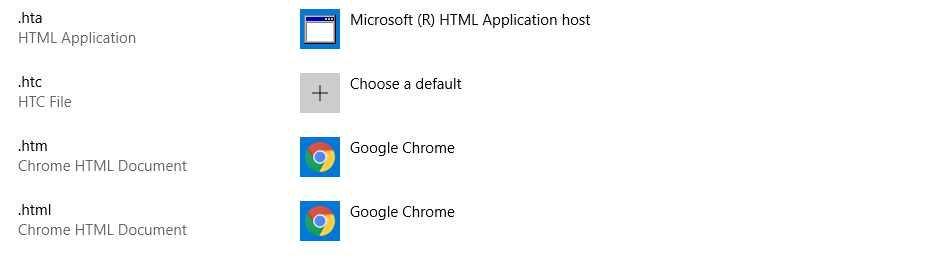
Google Chrome as default for .html files

file association

Firefox as default for .html files
file association
Notepad as default for .txt files (unchangeable)

file association

How to Fix the Problem. Er…

At the time of writing, there is no known way to fix the file association bug. As usual, those of you affected by this latest in a long line of Windows 10 cock-ups will just have to wait for the next update.

Maybe Microsoft should go for one more operating system release. They could repackage Windows 7 and sell it as Windows 17 (or whatever). There would probably be a lot more satisfied customers if they did.

Have you noticed the problem with file association on your machine? Why not check and leave a comment below if it no longer works.

RELATED STORIES TO CHECK OUT:

Forza Motorsport 7 players get free Hot Wheels cars on Xbox One & Windows 10

This year is the 50th anniversary of Hot Wheels, and to celebrate, Mattel and Microsoft are partnering to bring Hot Wheels themed cars to Forza Motorsport 7. Forza Horizon 3 also received a Hot Wheels expansion pack of its own, so it’s nice to see something similar come to Motorsport 7.

In addition to the new Hot Wheels Anniversary Pack DLC that is available now to owners of the game, players will also get seven additional free cars including older models like the ’69 Chevrolet Camaro as well as newer ones like the ’17 Rip Rod, all coming to Forza Motorsport 7. Additionally, five Hot Wheels driver suits are coming, and can be earned by completing various challenges throughout the game.

Microsoft says more cars based on the toys are coming to the game over the coming weeks, and a few are also coming to the latest Forza Horizon 4 series as well. Both games are also Xbox Play Anywhere titles, meaning the can be played on both Windows 10 or Xbox One as long the title is purchased digitally. What’s more is that Horizon 4 was the best selling game on Xbox last month.

Which Hot Wheels car is your favorite? And childhood favorite models you’d like to see added? Let us know in the comments down below.

Forza Motorsport 7
Forza Motorsport 7
Developer:
Microsoft Studios
Price:
Free


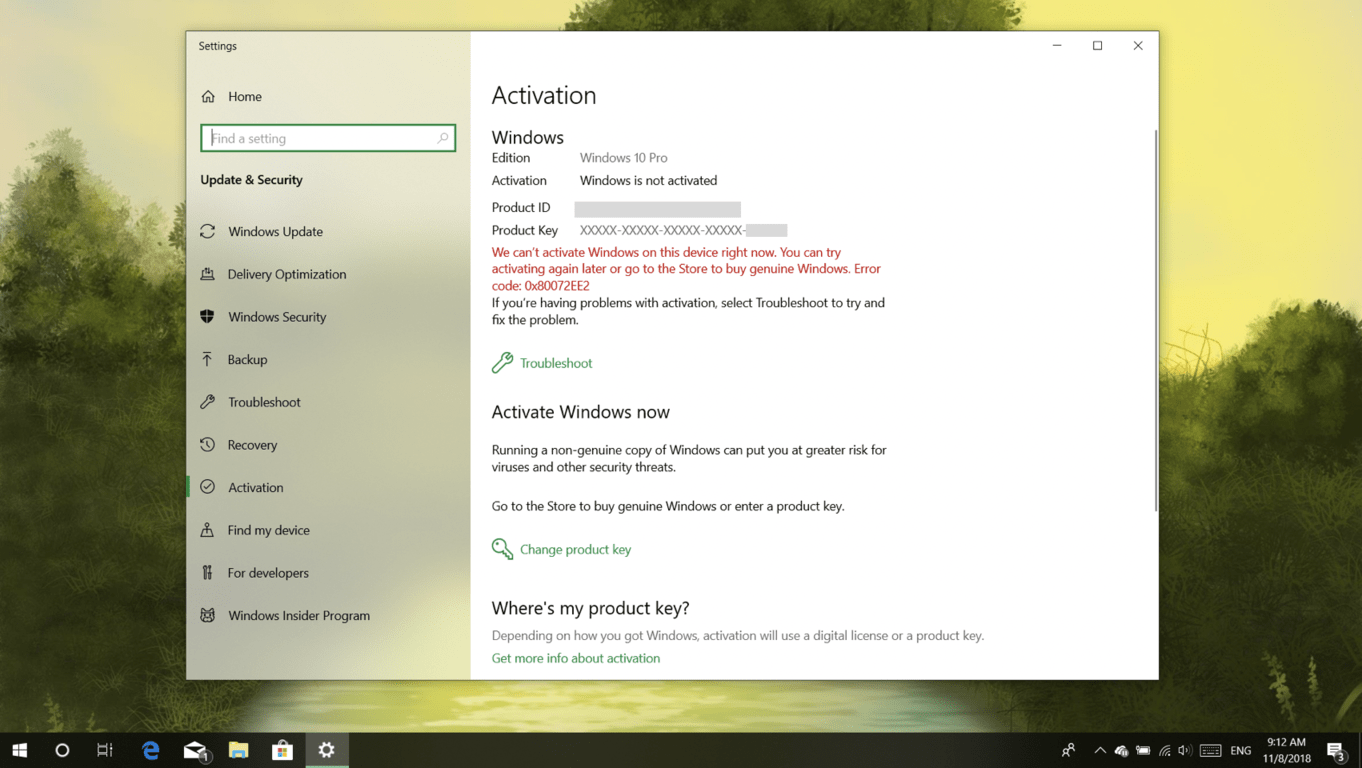
[Updated] Temporary issue with Microsoft’s activation servers causes Windows 10 Pro licenses to show as invalid

If you’ve been having issues with your Windows 10 Pro license not being recognized today, you’re not alone. A temporary issue with Microsoft’s activation server seems to be causing various problems with Windows 10 licenses today, and many users have been complaining that their Windows 10 Pro license has suddenly been downgraded to Windows 10 Home (via The Register).

The issue seems to be affecting Windows Insiders who have recently installed new builds, as well as non-Insiders running Windows 10 Pro. We saw this issue this morning on a Windows 10 Pro laptop showing an invalid license. Clicking the “Troubleshoot” button didn’t solve the problem, telling us instead that a Windows 10 Home license is associated to the laptop running on Windows 10 Pro.

While Microsoft has yet to comment on the issue, one user who contacted Microsoft’s tech support was told that the company is aware of the issue, and that it should be fixed “within one or two business days.” Here’s the full message:

Thank you for sharing, Daniel. Microsoft has just released an Emerging issue announcement about current activation issue related to Pro edition recently. This happens in Japan, Korea, American and many other countries. I am very sorry to inform you that there is a temporary issue with Microsoft’s activation server at the moment and some customers might experience this issue where Windows is displayed as not activated.
Our engineers are working tirelessly to resolve this issue and it is expected to be corrected within one to two business days, Daniel.

It’s still not clear if this activation issue is affecting a lot of Windows 10 Pro users, but it’s good to know that Microsoft is already working on a fix. Let us know in the comments if your Windows 10 Pro PCs have been hit by this activation bug today.

Update 11/9: Mary Jo Foley from ZDNet received yesterday the following statement from Jeff Jones, Senior Director, Microsoft, saying that the issue should be resolved for all affected users over the next 24 hours:

“A limited number of customers experienced an activation issue that our engineers have now addressed. Affected customers will see resolution over the next 24 hours as the solution is applied automatically. In the meantime, they can continue to use Windows 10 Pro as usual.”

You’ll soon be able to transfer Android phone calls to Windows PCs

Exciting news on the Android and PC front. Soon, you may be able to transfer your phone calls to your computer’s speakers using Your Phone app.

Your Phone App – Smartening Up Your Smartphone

For those of you who don’t know, Your Phone is an app that lets you transfer content between your Android phone and your PC.

I was going to add ‘easily’ to that last sentence but having to download the app from Microsoft Store onto your PC, and another app, called Your Phone Companion, from Google Play onto your phone, makes it a lot less easy. Still, maybe I am just being picky.

Before we move on, don’t download anything until you have checked your version of Android. If it isn’t 7.0 or later, you won’t be able to use Your Phone. Oh, and if you have an iPhone and want to link it to your computer using Your Phone, sorry but you can’t either.

Your Phone app - Linking smartphones to PC speakers

Originally reported on the Italian website Aggiornamenti Lumia, the March, 2019 update, Insider Windows 10 19H1, will include a new system app called “Windows.CallingShellApp“. There is also a screenshot of a notepad file named Microsoft.Windows.CallingShellApp with a string of phone and PC speaker references such as:

  • Transfer to PC
  • Speaker
  • Send to phone
  • Fold the device over to return to the call
  • Transfer
  • Couldn’t transfer

From this, the rumour has started to go round that a new feature of the Your Phone app will be the ability to transfer calls from your smartphone to your Windows 10 PC speakers.

Of course, as there has been no official word from Microsoft, all this is speculation. However, with the Your Phone app limited to messages and looking at photos, extending its functionality is something that Microsoft is keen on doing.

Have you been using the Your Phone app for messaging and photos? Would you use it for transferring phone calls to your computer’s speakers? Let us know what you think in the comments below.

RELATED STORIES TO CHECK OUT:

Microsoft is bringing a new To-Do feature to Word on Windows, Mac, and the web

Microsoft has been bringing several new AI-powered features to its Office apps in recent months, such as the new Ideas feature that can now provide intelligent suggestions to users working on Excel documents. Word also comes with Editor, an AI-powered writing assistant that can be a very helpful resource during the writing process.

AI can be great for providing intelligent suggestions, but it can also help to reduce distractions. As an example, when you’re working on a Word document, there are probably times where you have to interrupt your flow to look for additional information. “When this happens, you likely do what research tells us many Word users do: leave a placeholder in your document and come back to it later to stay in your flow,” explained Jared Spataro, Corporate Vice President for Microsoft 365.

Well, Microsoft wants to make it easier for users who regularly create these kind placeholders in Word documents to keep track of all of them. The company will add a built-in To-do feature to Word, and the app will be able to create placeholders automatically when users type “TODO: finish this section” or “<<insert closing here>>” in Word documents.

Once Word automatically creates these placeholders in a document, the app will keep track of all of them and also display them on a dedicated panel when users come back to the document. Even better, Word users will be able to @mention coworkers within placeholders to ask them for help.

“Over time, Office will use AI to help fill in many of these placeholders. In the next few months, Word will use Microsoft Search to suggest content for a to-do like <<insert chart of quarterly sales figures>>. You will be able to pick from the results and insert content from another document with a single click,” explained Spataro.

This AI-powered To-Do feature is available today in the latest Insider build of Office for Mac, and it’s coming soon to Word for Windows and the web. To try it on a Mac today, you’ll need to be an Office 365 subscriber and join the Office Insider Fast Ring in the Microsoft Auto Update app.

Need a rugged Windows 10 laptop built for extremes? Check out the new Panasonic Toughbook 31

Panasonic has announced their new ultra-rugged laptop, the Toughbook 31, with an extremely durable build and running the Windows 10 operating system.

Interestingly, the new model will come with optional 4G LTE-Advanced and GPS connectivity, and will also some with 32 GB of DDR4 RAM and a 256 GB solid state drive. It also comes with in either Core i5 or Core i7 variants, and can be configured with  more than a day of battery life with an optional second battery that can be inserted into the media bay.

The Toughbook 31 is primarily targeted towards multiple industries including police, military, construction, and manufacturing industries where a laptop could easily be destroyed in their kinds of work. The new machine is expected to be released for $3,699 in December.

Could you use an extremely durable laptop for your hobbies or work? Your thoughts are welcome in the comment section below this post.

The latest in Wi-Fi security, WPA3, could be coming to Windows 10 19H1

The upcoming “19H1” update for Windows 10 will apparently bring support for WPA3, the latest Wi-Fi security standard that will replace WPA2 in the near future. Traces of the upcoming support were found in the freshly released Windows 10 SDK Preview Build 18272, the first SDK for Windows 10 version 19H1.

As spotted by MSPoweruser, the API updates detailed in the release notes for this new SDK include something about Windows Networking Connectivity and WPA3. To our knowledge, Microsoft hasn’t discussed WPA3 on Windows 10 yet, but this new API is a pretty good hint that the new protocol will be supported in the next major update for Windows 10

The Wi-Fi Alliance initially announced the new WPA3 protocol back in June, and the new standard will bring enhanced security protections while retaining interoperability with WPA2 devices. The new protocol is currently an optional certification for Wi-Fi certified devices, but the Wi-Fi Alliance says that support will become mandatory once market adoption reaches a certain point.

Mass Effect: Andromeda now plays in 4K on Xbox One X consoles

As part of today’s N7 celebration for the series, Mass Effect: Andromeda is being updated to support the full 4K ultra HD capabilities on the Xbox One X console. The patch, at almost 1.7 GB in size, is available right now for the consoles, and officially makes the game an Xbox One X Enhanced title.

Mass Effect is BioWare’s sci-fi third person shooter game, and Andromeda is the fourth installment of the series and the story takes place in the galaxy of the same name. While earlier reviews of the older series were very positive, the Andromeda iteration received more negative feed back from critics. Of course, that’s for you to decide if you haven’t tried it, so if you’re interested, check out the video below.

BioWare’s update for the game suggests the company hasn’t forgotten about the series altogether, although November 7 is the official date the gaming company celebrates the franchise. Either way, fans of the series should be pleased with the new patch, especially those running Microsoft’s top-of-the-line 4K console.

Do you enjoy playing Mass Effect: Andromeda? Does the update significantly improve your experience? Let us know in the comments below.

GRIP video game launches on Xbox One and goes straight to Game Pass

A new racing video game, GRIP, has just launched on the Xbox One and is now available to play either as a full purchase or as part of the Xbox Game Pass subscription service.

In addition to being available on Xbox Game Pass, GRIP is also Xbox One X Enhanced and supports 4K graphics when played on the Xbox One X. GRIP allows for four player local multiplayer matches or games with up to 10 racers when played online.

As an extra bonus, the Pariah Garage Kit DLC, which allows for more customization options, is currently completely free for all Xbox One gamers (link below).

Here’s the official store description:

Scale walls, ceilings and anything else you can get your tyres on to… as you master tantalising tracks, tricks and perform mind-blowing stunts to race your way across the cosmos. Customise your vehicle, utilise devastating weapons and exploit a destructible environment to ensure not only victory, but the complete annihilation of your opponents. Harnessing gravity defying physics alongside a bristling arsenal of outlandish weapons, GRIP delivers the fastest, most competitive racing experience ever. Featuring a killer soundtrack, furious speeds and intense action, GRIP is guaranteed to generate unforgettable gaming moments – online or offline – with nail-biting split screen racing and tournaments.

Are you going to buy GRIP outright or will you give it a go on Xbox Game Pass? Let us know which method you’ve decided in the comments below and then follow us on Pinterest for more Xbox gaming content.

GRIP
GRIP
Developer:
Wired Productions
Price:
$39.99


Pariah Garage Kit
Pariah Garage Kit
Developer:
Wired Productions
Price:
Free

Microsoft kills hotfix service, here are the alternatives

It would seem that the end is nigh for system admins and individual users of hotfixes, the single issue updates released by Microsoft’s engineering team in charge of the codebase.

Hotfixes, while never meant to be a permanent solution to software problems, were very useful for users who were facing a single issue with a program. It meant minor fixes could be dealt with quickly without the need to download large updates.

Hotfixes were also popular with advanced users who had a Microsoft Premium Support agreement. It was possible to request specific hotfixes by filing a ‘Design Change Request’. These hotfixes were also delivered by the same engineering team responsible for codebases.

Microsoft’s hotfix service is no longer available

That has now all changed as recent attempts by users to download hotfixes have been greeted with the following message:

The Hotfix service is no longer available. Instead you can find your fix or patch by upgrading to the latest update available for your product.
You can also obtain Microsoft drivers, software updates, and other support files by downloading them from the Microsoft Catalog, the Microsoft Download Center, or upgrade to Windows 10. Windows 10 contains the most up-to-date security and other features built right in.

Hotfix Service from Microsoft No Longer Available

In recent statements issued by Microsoft, it has said that hotfixes (and easy fix solutions) will no longer be available.

For many computer users, hotfixes were never a great idea, mainly because they could negatively affect the computer, causing more problems than the problem they were meant to fix.

In fact, they normally came with a disclaimer stating that they hadn’t been properly tested and that the user should take due care when installing them .

It seems that this has been in the pipeline for awhile now. Microsoft issues major updates for its operating systems twice a year and there are frequent cumulative updates, which contain the fixes hotfixes used to address. As this is now the case, the need for hotfixes has largely disappeared.

For those of you suffering from hotfix withdrawal, there is still some good news. Previous hotfixes are still available from the Microsoft Update Catalog, with all the relevant KB articles.

How long they will remain available is anyone’s guess, but as they will presumably become redundant over time, not long I suspect.

RELATED STORIES TO CHECK OUT:

Microsoft backs off plans to email “tips” to Office 365 business users after complaints

After announcing its plans to send Office 365 users emails with product training and tips on how to use the service, Microsoft has been forced to change its mind following user backlash (via ZDNet). As it turns out, enabling this feature for all Office 365 commercial users probably wasn’t such a good idea, even though Office 365 admins could still disable this service in the Microsoft 365 Admin center.

“Based on your feedback, we’re making some updates to the plan for users to receive helpful product training and tips via email,” Microsoft said in a message to Office 365 admins. “We want to take time to review your suggestions, so we are pausing the release of this feature.”

On Reddit, many Office 365 were worried that these “tips” could appear as phishing attempts by uneducated users. “You know every time one of those emails go out you’re going to get 25 emails about it that are asking if it’s a phishing attempt or spam though,” wrote one user. Others in the same thread complained about not having any control over the kind of product training that these emails would include. “I dont want my users reading tips and suddenly feeling empowered to use the system in ways we havent instructed them to,” wrote another Reddit user.

Microsoft’s note to admins suggests that the company hasn’t entirely given up on the idea of sending tips to Office 365 users. It would certainly be a good thing to make this feature entirely opt-in, while also giving Office 365 admins some control over the content that gets pushed to end users. Microsoft says that it’s currently reviewing suggestions and will share details about its updated plans in a future post for Office 365 admins.

Microsoft supports Linux admins by porting famous Windows Sysinternals suite, beginning with “ProcDump”

Microsoft has announced it is working to port tools from its Sysinternals utility suite to Linux. The suite of applications has gained an almost legendary status amongst Windows system administrators.

Yesterday, Microsoft employee David Fowler announced the release of the first Sysinternals tool for Linux, process dump creation utility ProcDump. Microsoft executive Mario Hewardt, Principal Program Manager for Azure diagnostics also confirmed that other apps are in the works, including Sysinternals’ famed ProcMon process monitoring utility.

Sysinternals was originally developed by an independent company, Winternals. It began life in 1996 and has grown into an extensive catalogue of free Windows management tools, allowing admins to monitor Windows’ internal file, networking and processing operations. The suite also assists developers in debugging Windows applications and aids security researchers in tracking the activities of malware.

Microsoft acquired Winternals in 2006, bringing the Sysinternals suite in-house. Winternals cofounder Mark Russinovich is now the chief technical officer (CTO) of Microsoft’s Azure cloud division.

Screenshot of ProcDump for Linux

The move to bring Sysinternals to Linux is significant for Microsoft in its ongoing pivot to the cloud. Under CEO Satya Nadella, the company has moved to embrace the wider cloud ecosystem beyond its own Windows infrastructure. That’s meant increased investment in supporting Linux systems across Windows and Azure, giving developers more options when choosing their technology stacks.

These efforts have paid off. In September, Scott Guthrie, Microsoft executive vice president of cloud and enterprise, told ZDNet that half of all Azure virtual machines now run Linux. That figure has increased from just 20 percent in 2015. Without the increased support for Linux on Azure, many of those VMs may have been created on competing clouds instead.

The porting of Sysinternals to Linux is another way for Microsoft to increase its hospitality towards Linux developers and workloads. Developers will be able to use familiar Sysinternals tools on both Windows and Linux systems, removing the need to learn two applications.

ProcDump is just the first application to become available. Its functionality revolves around creating program dumps when certain conditions are met. Developers can set up criteria to automatically create a process dump, such as when CPU usage exceeds 50%. The resulting data can be invaluable in determining why the application is consuming so much processor time.

The Linux version of the ProcDump application is open-source and available for download now. Installation instructions can be found in the GitHub repository. There are currently a few limitations when compared to the Windows version but the core of ProcDump is already functioning.

Giants Walmart and Microsoft team up for technology hub expansion

After some fast and furious quarterly earnings announcements, industry analysts are now drawing clearer lines between Amazon and Microsoft’s cloud services competition.

Both Microsoft’s Azure and Amazon’s AWS cloud services had slow growth to report for their FY19 Q1 and third-quarter earnings, respectively. However, Microsoft continues to gain market share and seemingly at the cost of potential AWS growth.

As big-name companies such as Walmart partner with Microsoft to make use of Azure’s cloud services, the trend may become more evident over time.

Back in July, Microsoft and Walmart announced a new ‘cloud factory that is being co-engineered by developers from both companies and planted in Austin, Texas.

During the time of the announcement, there were few details about how the partnership would work or the specific technologies that would be put into place.

Fortunately, Microsoft author Vanessa Ho just posted a blog about the expansion efforts of Microsoft and Walmart’s ‘cloud factory’.

The Walmart-Microsoft team – known internally as “4.co” for its location at Fourth and Colorado streets – will initially focus on migrating Walmart’s thousands of internal business applications to Microsoft Azure. The team will also build new, cloud-native applications. The collaboration will be part of a multi-year journey to modernize Walmart’s enterprise application portfolio, create more efficient business processes and decrease operational costs associated with legacy architecture.

Roughly, 30 technologists with varying specialties are coming together to upgrade Walmart’s business platforms using Microsoft AI, an internal natural language processor to handle 40 terabytes of unstructured text and machine learning to modernize its customers shopping experiences.

During an interview, executive vice president and enterprise chief information officer at Walmart, Clay Johnson, offered some further details about the company’s decision to use Microsoft Azure solutions.

With this partnership with Microsoft, we started talking, ‘‘Hey, what’s the best way to accelerate all the stuff we’re doing here? We need help and expertise. We want to move fast. How do we partner our smart people with Microsoft’s smart people?”

Then it was obvious: ”Why don’t we just co-locate the teams together.” We haven’t done something like this before with co-location, but I think the outcomes are going to be huge and strengthen our partnership even more. You’re going to see a lot more co-innovation around IoT, computer vision, big data and real-time analytics.

Aside from the obvious benefits of upgrading its various platforms with Azure infused services, Microsoft and Walmart also share a common competitor in Amazon that may also be propelling this new partnership.

Microsoft benefits from the 4.co (the name of the Walmart/Microsoft partnership) by experiencing scale they may not have previously done when deploying Azure services. According to Johnson, Walmart has 11,200 global stores and 2.2 million associates that will be affected by the platform upgrade in one way or another.

Walmart has a vested interest in leveraging its Microsoft partnership in a bid  to direct the next phase of consumer shopping, one in which Johnson believes will be a blended physical and online instance rather than the mainly online one Amazon offers today.

I think you’re going to see an omnichannel-type world that is a blend of e-commerce and brick and mortar, where consumers can have access to things at any point, any time. They can order online and pick up in the store or have it delivered same-day. You can see we’re starting to do that with our online grocery right now.

Amazon has seemingly acknowledged that future with its recent purchase of Whole Foods retail locations as well as the company testing a small brick and mortar presence as of late. It’ll be interesting to see if Walmart can port its foot traffic into the digital world with this new investment as well see what new lessons Microsoft learns with deploying Azure to a Walmart level scale.

Parallels Toolbox 3 for Windows and Mac brings new useful utilities on Windows and Mac

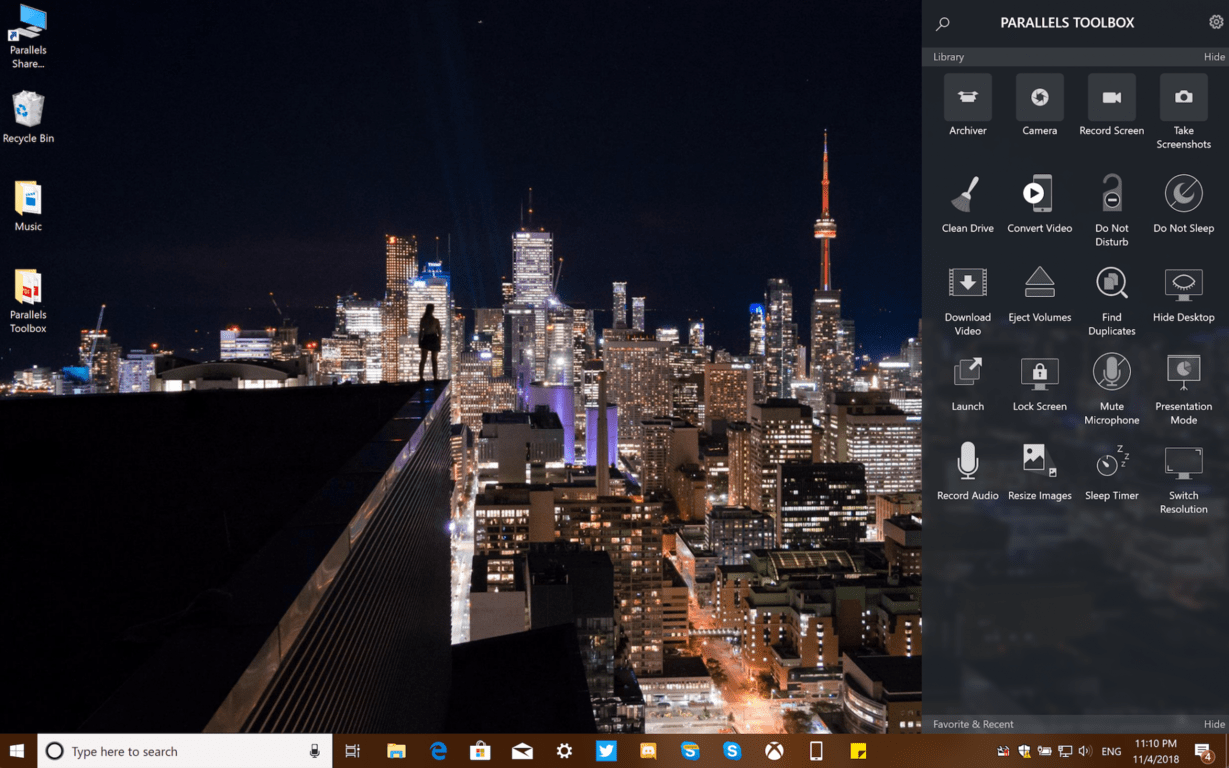
Parallels Toolbox 3, the latest version of Parallels’ suite of easy-to-use tools is launching today on Windows and Mac. Compared to the version 1.5 (for Windows) and 2.5 (for Mac) we tested last year, this 3.0 update brings a couple of useful new utilities on both platforms, as well as some welcome UI improvements.

“We’ve been getting very positive feedback from both PC and Mac users of Parallels Toolbox who consider it their “go-to” solution to quickly complete dozens of everyday computing tasks with a single click,” said Jack Zubarev, Parallels president. “Today’s customer-inspired new and enhanced tools added to Parallels Toolbox 3 make it an even more useful one-stop time-saving resource.”

First of all, Parallels Toolbox 3.0 comes with a new search bar on Windows and Mac, allowing users to easily find the tool they’re looking for. Moreover, it’s also possible to choose which utilities appear in the pop up window, as seen in the above image.

For Windows users, this version 3.0 introduces two new tools for easily finding duplicates and batch converting images. A new “Sleep Timer” has also been added, letting users configure a countdown before their PC will go to sleep or shut down.

Parallels Toolbox 3.0 for Windows also improves existing tools like Download Video, which now supports downloading 4K videos from the web. Additionally, the Record Audio tool is now capable of recording from an external mic, as well as saving recordings in MP3 format.

For Mac users, Parallels Toolbox 3.0 brings three new utilities for easily uninstalling apps, reveal hidden files in macOS and see local times around the world. This latest release also brings improvements to some features like Annotate Screenshots and Record Audio, and the Parallels Toolbox app also supports the new dark mode in macOS Mojave.

Parallels Toolbox 3.0 for Windows and Mac is still available as a $19.99 yearly subscription, which includes free updates several times during the year. There are really a lot of time-saving utilities included in Parallels Toolbox, and you download a free trial of the latest version on the company’s website.

Windows 10 devices & Xbox consoles to get shopping cart & wish list features

After a combination of leaks, private testing, and random public testing, Microsoft has finally made an official announcement about the new shopping cart and wish list features that are coming to the Microsoft Store on Windows 10 PCs, web, and Xbox One consoles.

Both features (see above image) work the same as most other shopping cart and wish lists online, i.e. product pages will now feature options to add an item to a shopping cart or wish list.

Xbox Insiders will gain access to the shopping cart today for testing on Xbox One consoles while Windows Insiders are expected to begin their testing in the very near future. Public users, i.e. the average user, will gain the shopping cart experience in a few weeks.

The wish list feature is expected to launch in the immediate future to everyone on Windows 10 and web while Xbox Insiders will also be able to begin their console testing at the same time. Public Xbox One users will gain access to the wish list in a few weeks.

Shopping list and wish list functionality has been a long time coming for Windows and Xbox as both are available on almost every other online shopping experience.

Are you excited for these new features or do they not really interest you? Let us know in the comments below and then follow us on Pinterest for more Microsoft content.

How Windows 10’s virtual desktops keep me productive all day long

Windows has long been considered the most appropriate platform for productive work. Prior to Windows 10 though, the core desktop experience had gone without major innovation for several years. Changes between Windows XP and 8 focused predominantly on visuals. While Windows 7’s new taskbar and window management capabilities aided productivity, they didn’t do much to alter the desktop’s purpose.

With Windows 10 and its “do great things” marketing campaign, Microsoft finally went back to work on the Windows desktop. Coming with the reinstatement of the Start menu, the company began adding new features to the shell. One of those in particular stood out for me, because it’s already a core component of rival desktop environments: Virtual Desktops.

Creating desktops

The concept behind virtual desktops is simple: you can setup multiple independent workspaces to house different sets of windows. It’s something which will already be familiar to most Linux desktop users. Windows formerly required specialist, often cumbersome third-party software to enable something similar, before Microsoft added the capability natively with Windows 10.

When you create a new virtual desktop (press Ctrl+Win+D), you’re given a blank canvas to open a new set of apps and windows. The apps you had open on your first desktop aren’t visible on the new one and won’t appear on the taskbar. Likewise, any apps you open on the new desktop will be invisible on the original.

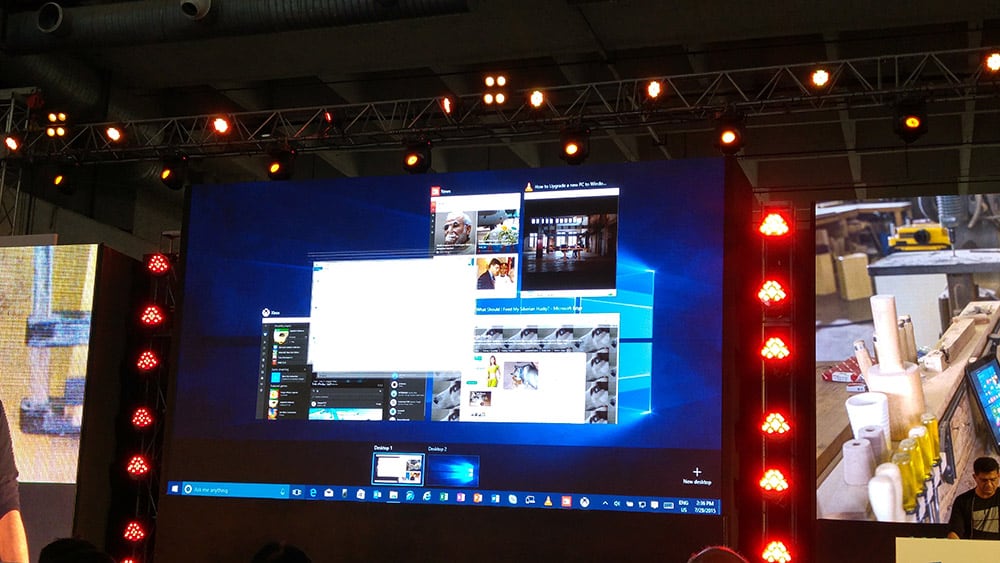
You can switch between virtual desktops using the Ctrl+Win+Left and Ctrl+Win+Right keyboard shortcuts. You can also visualise all your open desktops using Task View – either click the icon on the taskbar, or press Win+Tab. This gives you a handy overview of everything open on your PC, from across all your desktops. Hover over the desktop icons at the top of the screen to see the contents of each one. There’s buttons to add and close desktops if you’d rather not use the shortcut keys.

Virtual desktops in action

Enough of the feature recap – here’s why I place so much value on virtual desktops. I work at my desk for eight hours each day. During that time, I will usually work on multiple independent projects. Throughout the time, I’ve also got a set of open apps which I review during breaktimes and spare moments – OneNote, Outlook and a set of personal Firefox tabs. These are my primary windows, which aren’t connected to my work but are nonetheless referred to throughout the day.

Screenshot of Virtual desktops

As the day progresses, I’ll be switching between multiple ongoing web development projects. For each project, I open the source in my code editor, a set of console windows (using Windows Linux Subsystem to get a Linux shell), File Explorer to the project’s folder and a new Firefox instance for tabs specific to the project. Some projects may require additional apps.

I might work on two or three projects in a day and I don’t tend to close anything after it’s been opened. Many projects are interlinked, so I might need to refer back to something I worked on earlier in the day even after I switch project. With so many windows open, keeping everything organised would get cumbersome without virtual desktops.

Enter virtual desktops

The virtual desktop solution streamlines my entire workflow. Each project gets its own virtual desktop, housing only its windows. I can rapidly refer to other projects by just switching virtual desktop, without having to minimise or switch between apps. No matter how many windows I open on a desktop, they’re isolated and won’t appear anywhere else – keeping things controlled and avoiding the cognitive overload of having lots of visible tabs and windows.

On my first desktop, I keep my personal browser instance, ready to switch back to in the spare moments of the day. When on that desktop, I don’t see any work-related apps open, which makes it easier to disconnect for a moment and check my favourite blogs and forums.

Of course, some apps are useful to have on every desktop. One such example is Spotify. Although it’s not directly work-related, it’s useful to have Spotify available on all my desktops. Otherwise, I’d have to spend time switching to another workspace just to change tracks. A similar case is Outlook – I keep my inbox accessible on every desktop, to avoid unnecessary context-switching.

Screenshot of Virtual desktops

Fortunately, it’s easy to make a window visible on every desktop – just open Task View (Win+Tab), right-click the app and choose “Show this window on all desktops.” This will make the current window appear on every desktop – but not any future instances of the app. To make future instances show on every desktop (even after restarting your device), choose the “Show windows from this app on all desktops” option instead.

That’s it for me and virtual desktops, but I’d be interested to know how you use the feature. Although not an especially complicated concept, virtual desktops are more likely to be useful to power users and workers who spend all day on their device. If you only ever have a few apps open, you’re less likely to find the feature helpful.

For people like me who open dozens of windows during the day, virtual desktops provide a simple way to define contexts. There are several benefits to doing so, from faster window switching (it’s quicker to switch desktop than Alt-Tab through dozens of items), to reduced mental overheads. Too many windows and tabs affect your ability to focus on your current task – particularly when they’re spread across multiple distinct projects. With virtual desktops, the scope of my focus is always constrained to just the current project, as all unrelated windows are hidden out of sight and mind.

Windows 10 news recap: UWP bug allowed full file system access, Outings gets support for Windows Mixed Reality, and more

Welcome back to our Windows 10 news recap, where we go over the top stories of the past week in the world of Microsoft’s flagship operating system.

Outings, the mobile travel app from Microsoft Garage, is now compatible with Windows Mixed Reality headsets

The Microsoft Garage project, Outings, that acts as a personal travel guide, has now added support for Windows Mixed Reality, allowing you to discover places in Mixed Reality.

Legacy volume mixer may be getting muted in the future, replaced with a modern alternative in Windows 10 19H1

Microsoft looks to be getting rid of the classic Volume Mixer from Windows, as the latest Windows 10 Insider build brings a new, modern replacement to allow you to individually control the volume for different apps.

Windows 10 Volume Mixer

Windows 10 UWP bug allowed full file system access without asking permission

A bug in Windows 10 allowed UWP apps to access the full file system, except without the need for them to ask for permission. The bug is reported to have been fixed in the Windows 10 October 2018 update.

Family Guy Surface Product Plug

Two brothers steal 180 brand new Surface devices from Microsoft Building 88, get caught

You could say their crime was brought to the Surface. 2 brothers attempted to steal 180 brand new Surface devices, directly from Microsoft Building 88 in a bold move that got them caught. One of the brothers was a full-time Microsoft employee and used his keycard to gain access.

That’s it for this week. We’ll be back next week with more Windows 10 news!