Windows 10 Anniversary Update update KB4056890 patches the CPU vulnerabilities that could potentially allow hackers to steal data from your computer.
At the same time, the update also brings a few issues of its own, sometimes quite severe. Judging by user reports, there are two main issues affecting this release that we will describe below.
Windows 10 KB4056890 reported issues
1. Install fails
If you can’t install this update, well you’re not the only one. Sometimes the install process gets stuck or fails with various error codes such as 0x80070002.
KB4056890 has now failed to install four times and the last two times there has been an error 0x80070002. The registry entry is what another MS site says it should be and the anti-virus software is kts2016 (Kaspersky Total Security).
The good news is that we already published a guide on how to fix error 0x80070002. We hope that the solutions available in the respective article will help you fix the problem. You can also run the build-in Update Troubleshooter from the Settings page. Simply to to Settings >Update & Security > Troubleshoot > select the Update Troubleshooter and run the tool.
You can also check out the following troubleshooting guides:
Some users were unable to properly start their Windows session after installing the latest Windows 10 version 1607 update. The only solution to fix this problem was to perform a system restore.
After updating with KB4056890, my Asus suite 3 will not launch.So using system restore, it’s back to working fine. The trouble is this same update wants to reinstall itself. Is their a way of preventing this happening.
Just in case system restore fails to work for you, the guide below may help you:
As you likely know by now, some users with AMD Windows PCs were reporting boot up issues after installing Microsoft’s Meltdown security patch. This caused the company to eventually pause the update for AMD based PCs. Well, it looks as though Windows is not the only operating system impacted, as the Meltdown patch is also bricking some Linux Ubuntu systems.
Linux and Ubuntu users have apparently been venting about the “bricking” issue on the Ubuntu forums, and also contributing technical info about it on the Ubuntu Launchpad bug tracker. Supposedly only Ubuntu users running the Xenial 16.04 release are experiencing bricked systems after updating to kernel image 4.4.0-108.
Canonical originally released Kernel image 4.4.0.108 on January 9, and a security bulletin notes that this was to correct Meltdown. There have been subsequent Linux Kernel updates, including 4.4.109, and 4.4.0.109.114 which attempt to alleviate the bricking issue, though it has not worked for everyone. Others have also said that rolling back to the previous kernel image also resolves all problems, except for being protected from Meltdown and Spectre, of course.
A new video game based on the popular Sword Art Online anime series, Sword Art Online: Fatal Bullet is now available to pre-order on the Xbox One family of consoles. The new game is due for release on February 23rd this year and is a third-person action roleplaying game. Here’s the official game description.
Your fate has just begun… Experience an original story where you are the protagonist in the world of Gun Gale Online. Create your own avatar and explore devasted lands while experiencing exciting third person shooting in this action RPG. Encounter enemies and run into new and familiar faces from the Sword Art Online series.
Journey through a world of guns where after a chance encounter you’ll gain the help of a very rare AI, ArFA-Sys. Along the way, you will have to make choices. But every choice comes with a price… Will you bring hope or despair? This is your adventure… This is your story…
Pre-orders of Sword Art Online: Fatal Bullet will also receive two exclusive costumes and a unique weapon for use in-game. Are you a Sword Art Online fan and are you hyped for this game? Let us know in the comments below.
Put your themes on a schedule! You’ll soon be able to switch between light and dark themes based on time of day.
The notes are pretty self-explanatory. There will soon be a setting that Xbox One owners can enable that will automatically change the visual appearance of the console’s user interface at different times of day. This setting will be first offered to Xbox Insiders for testing and feedback and then rolled out to the average Xbox One owner soon afterwards.
Would you enable this feature on your Xbox One? Let us know in the comments below.
If you’ve read the latest news reports, you already know that when it comes to updating your Windows 7 computer, the best solution is to simply avoid installing the latest patches – at least for now.
User reports confirm that the latest Windows 7 updates are plagued by a bevy of issues than can sometimes brick your computer.
One of the most common issues caused by KB4056894 is the annoying error code 0x000000c4, as this user reports on Reddit:
This morning I came in to find 3 computers that would not boot – BSOD stop: 0x000000c4. All 3 machines are the same model – HP Compaq dc5750 with AMD CPUs. At first I tried my normal “it won’t-boot” troubleshooting steps and gradually worked my way out of ideas.
Fixing this error is not an easy task since common troubleshooting solutions such as launching various startup modes or reverting BIOS Settings to default won’t work.
How to fix Windows 7 error 0x000000c4
Press F8 during startup and select Repair Your Computer.
Launch Command Prompt and type the following command: dir d:
Hit Enter to run the command and check if the Windows drive is mapped correctly.
Using Command Promp, enter the following command: dism /image:d: /remove-package /packagename:Package_for_RollupFix~31bf3856ad364e35~amd64~~7601.24002.1.4 /norestart
A progress bar should now appear on the screen. The entire process should finish in about 10 minutes. When the progress bar disappears, restart Windows.
Go to the Windows update center and hide KB4056894 to prevent it from reinstalling.
You can also disable Windows Update to make sure that your computer won’t download any patches until you turn the update service back on.
Here’s how to block updates:
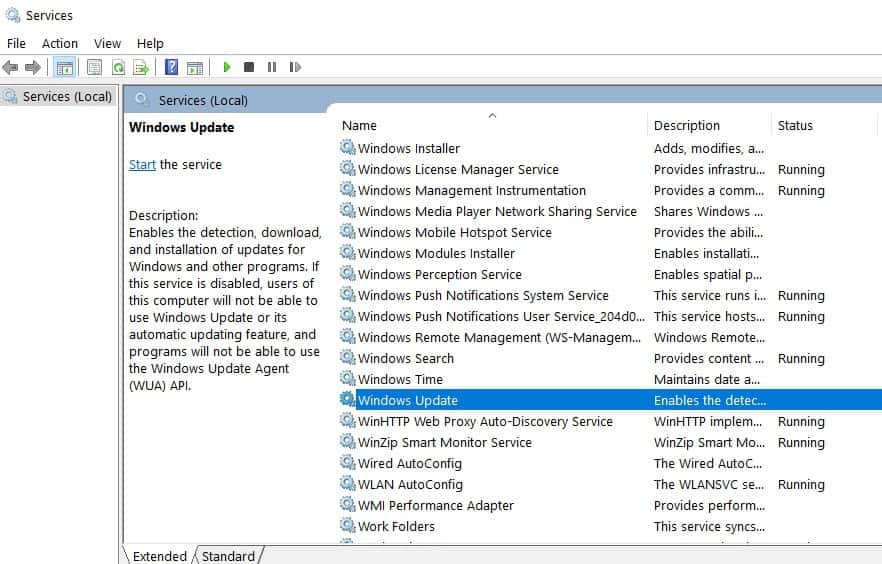
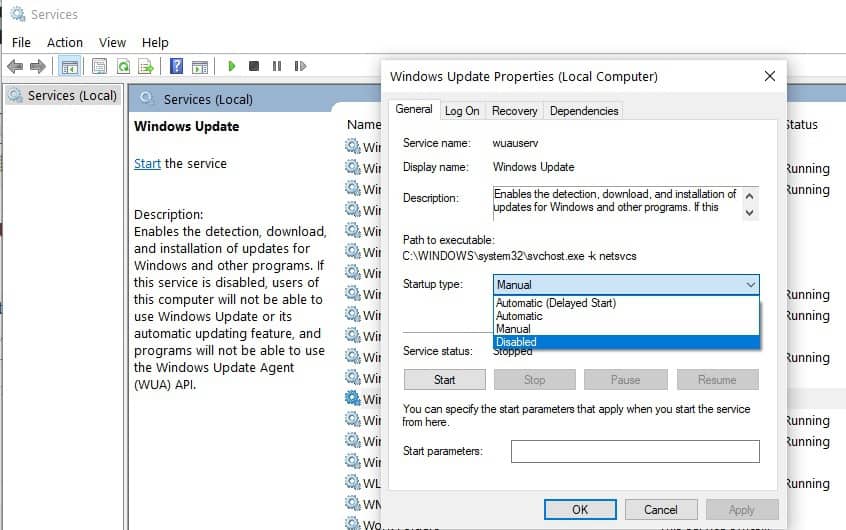
To to Start > type ‘run’ > launch the Run window
Typeservices.msc > hit Enter
Locate the Windows Update service > double click on it to open it
Go to the General tab > Startup Type> select Disable
Restart your computer > no updates should be installed until you turn on the Windows Update service again.
There you go, this is how you can fix error 0x000000c4 on Windows 7.
Use the comment section below to let us know if this solution fixed the problem for you.
Microsoft, Intel and PC manufacturers are still dealing with the Meltdown and Spectre CPU vulnerabilities these days, and contrary to Intel’s reassuring statements from last week, the fixes will have a performance impact, especially on older PCs. Microsoft chose to be transparent today, with Executive Vice President of the Windows and Devices Group Terry Myerson addressing the issue head-on in a detailed blog post.
The good news is that for Windows 10 PCs with modern Intel processors, the Windows security patches plus the additional firmware updates necessary for addressing a specific variant of the Spectre vulnerability won’t have a big impact on performance. However, for Windows 10 PCs with Intel Haswell CPUs or older as well Windows 8 and 7 systems using these same old processors, the performance impact will be much more significant. Moreover, Myerson added that the software and firmware updates may also cause a “more significant performance impact” on servers.
Here is a summary of what Microsoft’s latest research revealed:
With Windows 10 on newer silicon (2016-era PCs with Skylake, Kabylake or newer CPU), benchmarks show single-digit slowdowns, but we don’t expect most users to notice a change because these percentages are reflected in milliseconds.
With Windows 10 on older silicon (2015-era PCs with Haswell or older CPU), some benchmarks show more significant slowdowns, and we expect that some users will notice a decrease in system performance.
With Windows 8 and Windows 7 on older silicon (2015-era PCs with Haswell or older CPU), we expect most users to notice a decrease in system performance.
Windows Server on any silicon, especially in any IO-intensive application, shows a more significant performance impact when you enable the mitigations to isolate untrusted code within a Windows Server instance. This is why you want to be careful to evaluate the risk of untrusted code for each Windows Server instance, and balance the security versus performance tradeoff for your environment.
Overall, owners of modern Windows 10 PCs shouldn’t see a big difference after installing the software patches plus the Intel firmware updates. “For context, on newer CPUs such as on Skylake and beyond, Intel has refined the instructions used to disable branch speculation to be more specific to indirect branches, reducing the overall performance penalty of the Spectre mitigation,” Myerson explained. “Older versions of Windows have a larger performance impact because Windows 7 and Windows 8 have more user-kernel transitions because of legacy design decisions, such as all font rendering taking place in the kernel.”
A couple of days ago, Intel announced its plans to release firmware updates for 90% of processors from the past five years by the end of this week. Today, the company added in a press release that it will issue updates to the remaning 10% by the end of January, and also release patches for other products thereafter. “Based on our most recent PC benchmarking, we continue to expect that the performance impact should not be significant for average computer users,” the company explained. “This means the typical home and business PC user should not see significant slowdowns in common tasks such as reading email, writing a document or accessing digital photos.”
Terry Myerson wasn’t as optimistic today, and the exec promised that Microsoft will publish all of its data on benchmark performance in the coming weeks. “We’re also committed to being as transparent and factual as possible to help our customers make the best possible decisions for their devices and the systems that run organizations around the world,” Myerson added.
Apparently, Microsoft is looking to update Xbox Achievements with a new “Careers” system and other special Avatar bonuses. As noted by Windows Central, Microsoft is looking to enhance Xbox Achievements to complement the new Avatars that were originally slated to arrive in Fall 2017. Since the new Xbox Avatars won’t arrive until early 2018, it looks like Microsoft may be bringing new surprises with Xbox Achievements too.
Microsoft looks to be planning a new website too; “Career.XboxLive.com.” Although the website is not publicly accessible at the moment, the website may further describe how the upcoming Career system would work with Xbox Achievements. Based on the documentation that Windows Central received, here’s how the new Career system might work.
“It appears that players using this new Career system will be able to obtain levels, and even prestige ranks, obtaining rewards such as loot crates which come with cosmetic items for the new Avatars system. The Career system also comes with Quests to complete specific objectives, such as playing certain games, which will also come with crate and experience points as rewards.”
It is too early to know for sure how the new Xbox Career system will work, if it is ever implemented at all. It may come when the new Avatars are available, or Microsoft might hold off on releasing the Xbox Career system until later in 2018. Unless we get more concrete details or an official comment from Microsoft, nothing is known for certain how the Xbox Career system will work. However, it sure is exciting! Stay tuned!
M.io will help you stay connected and chat with your contacts regardless of what chat platform they use; Slack, SPark, HipChat, and more:
“M.io lets you chat with your contacts on any platform – all from within Microsoft Teams as your central messaging hub. For example, you can chat with your colleagues or external peers that are using Slack all from within Microsoft Teams. It’s some heavy duty magic we’ve been working on and we’re excited to start sharing with the community.”
If you are interested in becoming a beta tester for M.io, you can sign up using your email. It will be interesting to see how M.io works within Microsoft Teams, but it looks like it’ll be an even better way to stay connected and collaborate. Stay tuned for more information on this feature in an upcoming Microsoft Teams update!
Yesterday we reported that Microsoft would no longer accept Bitcoin as a form of payment online. Though the company said it was “temporary” measure Microsoft has since pushed back and restored the ability for users to reload their Microsoft account balances using Bitcoin (via Thurrott.com.)
Since the original reports surfaced, Microsoft apparently worked with their provider to correct any issues, and is now once again accepting Bitcoin. A statement from a Microsoft spokesperson confirmed this.
“We’ve restored Bitcoin as a payment option in our store after working with our provider to ensure lower Bitcoin amounts would be redeemable by customers.”
Bitcoin is a bit of a wild currency, especially because values tend to fluctuate higher and then lower every day, and because there is a transfer fee involved. Microsoft previously stopped accepting Bitcoin back in 2016, only to pull back and once again accept it two days later.
Yesterday reports surfaced on some AMD PCs not booting properly after installing the latest Windows 10 security patch. As a result, many Windows users with AMD powered PCs took to Microsoft’s support forums to complain about the issue. In the face of this criticism, Microsoft has halted the AMD Meltdown and Spectre patches, instead saying it is now working with AMD to resolve the problems and issue another update soon (via The Verge.)
The halt means that AMD PCs will no longer receive the KB4056892 patch which is causing some machines to become unbootable. In fact, the reason many were experiencing issues is that the AMD chipsets would not “conform to the documentation previously provided to Microsoft.”
“Microsoft has reports of customers with some AMD devices getting into an unbootable state after installing recent Windows operating system security updates. After investigating, Microsoft has determined that some AMD chipsets do not conform to the documentation previously provided to Microsoft to develop the Windows operating system mitigations to protect against the chipset vulnerabilities known as Spectre and Meltdown.”
The following security updates are also no longer being pushed to PCs with AMD processors:
January 3, 2018—KB4056897 (Security-only update)
January 9, 2018—KB4056894 (Monthly Rollup)
January 3, 2018—KB4056888 (OS Build 10586.1356)
January 3, 2018—KB4056891 (OS Build 15063.850)
January 3, 2018—KB4056890 (OS Build 14393.2007)
January 3, 2018—KB4056898 (Security-only update)
January 3, 2018—KB4056893 (OS Build 10240.17735)
January 9, 2018—KB4056895 (Monthly Rollup)
Those who already installed any of these updates are being urged to visit Microsoft’s support website. The website explains how a user can troubleshoot Windows 10, Windows 8.1, and Windows 7 in the event that the operating system is unbootable.
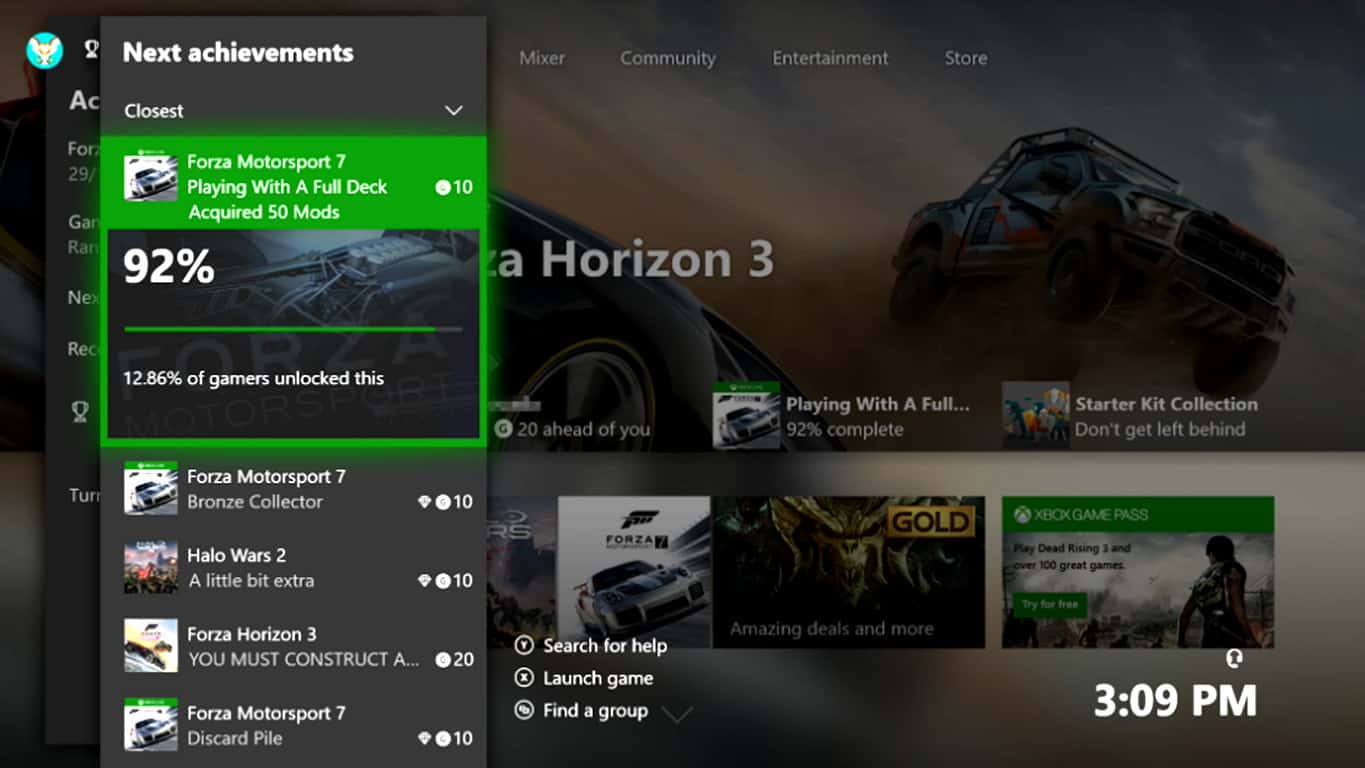
A new Preview Alpha build (1802.180105-1503) is now available for Xbox Insiders. This latest build adds several improvements to the Xbox One’s Guide (i.e. the pop-out menu) relating to Achievements and Game Hubs and also introduces the Do Not Disturb option which was used on the Xbox 360 but hadn’t been integrated into the Xbox One generation of consoles yet. This new option essentially disables notifications while turned on.
Other changes include improvements to the Community feed, inactivity shutdown, and a new avatar option in addition to a variety of bug fixes. Here’s the official release notes.
NEW FEATURES:
We’re excited to return in 2018 with new features that impact the way you access your games and Achievements, how you let your friends know whether you’re able to play, and much more. Over the next several weeks, Xbox Insiders will begin to see a variety of cool new features they can interact with and provide feedback on. Here’s a look forward at some of the excitement still to come:
Starting today at 6 p.m. PST, Xbox Insiders enrolled in the Alpha ring will receive the latest Xbox One system update (1802.180105-1503). With this update, you’ll be able to use the “Next Achievements” feature in the Guide, which enables you to view and sort a cross-games list of upcoming Achievements. Easily see which Achievements you are closest to, and quickly launch the game to obtain them. Sort filters allow you to prioritize next Achievements by closest, most common, rarest, most common rare, and highest Gamerscore.
Mini Game Hubs will soon be available right in the Guide. With this feature, you’ll be able to access great content for the games you’ve played recently from a Game Hub without ever having to leave the action. Mini Game Hubs provide an easy way to see friends who are currently playing, upcoming Achievements, Looking for Group posts, and more.
Sometimes all you want to do is avoid all distractions and focus entirely on your game. We’ll be including a “Do not disturb” online status, which will suppress notifications and let your friends know that you’re not available for another game or activity right now.
We’re tweaking the community feed to make it easier to view comments. You’ll soon be able to see a peek of the most recent comment on community posts, with comments rearranged to place those that are most recent at the top. You’ll also be able to see who has liked your comments.
To address user feedback, we’re adding additional inactivity shutdown options to the Power mode & startup menu. In addition to shutting down the console after one or six hours of inactivity, you will be able to select options for two, three, four and five hours.
Alongside the updates listed above, which will work their way naturally through the Xbox One Preview Update rings, a subset of users may also see additional experimental features. These features are only enabled for a portion of the Xbox Insider audience to gauge interest and collect feedback. Your participation in the Xbox Insider Program helps us make the work-in-progress content and features coming to Xbox even better
FIXES:
Narrator
Narrator can read large amounts of text.
KNOWN ISSUES:
Guide/Home crashing
We are aware of the Guide and Home crashing and determined the root cause. A fix is being worked on.
Workaround: In the interim please HARD Reboot (Hold the power button for ten seconds)the console to fix this issue.
Games Installation
Some users are encountering where some games that are installed are failing to launch.
Workaround : If the games are installed to an external drive please copy the game to the internal drive or attempt to delete the title and redownload to fix the launch error.
Display
We are investigating the inaccurate RGB colors that have been reported when displaying in 4K HDR mode when playing a UHD disc.
Tournaments
The left and right navigation for selecting date and time during Tournament creation is currently reversed when the console language is set to Arabic or Hebrew.
Left and right navigation in Tournament twists is reversed when the console language is set to Arabic or Hebrew.
Left and right navigation in the bracket view of Tournaments is reversed when the console language is set to Arabic or Hebrew
Avatars on Home
Users wishing to represent themselves as an avatar can do so by changing their settings under My profile > Customize profile > Show my avatar.
Are you an Xbox Insider? Let us know if you’re enjoying these new features in the comments below.
The USB-C connection is going to overtake and eventually replace the standard USB 2.0 technology. The newest MacBook models have only USB-C ports so it’s only a matter of time until this becomes mainstream technology.
But there is one question on the mind of many technology users, and especially laptop owners: ‘Where can I buy a USB-C universal receiver”?
In this article, we’re going to answer that question and offer you more information about this device.
USB-C universal receiver: Everything you need to know
There are many USB-C to USB adapters that you can use but they usually stick out too much from the side of the laptop, as users report:
Regular USB ports are disappearing. Logitech needs to have a USB-C unifying receiver and adapters aren’t a good solution because they stick out an inch from the side of the laptop. ONE MISTAKE where it catches something (a wall, the side of furniture, or anything else) and the laptop jack will be destroyed and most of the time that will take out the other USB-C jacks on that side of the laptop as well.
However, there is no USB-C universal receiver currently available on the market. But the good news is that hardware manufacturers acknowledged the need for such a device and will release it in the near future.
When exactly? Well, we can’t really answer that question either: it could be a few months, a year or even more. However, judging by the current trend and the number of user requests, we dare say that in one year’s time, USB-C universal receivers will be available everywhere.
Buy a USB-C mouse
If you don’t want to wait until a USB-C universal receiver is available on the market so that you can finally connect your mouse to the USB-C port of your laptop, then buy a brand-new USB-C mouse.
Update KB4056892 is perhaps the most hated patch of the moment. Many users reported that this update often breaks computers, leaving them unable to use their devices.
Taking into account this situation, users are looking for a quick way to prevent KB4056892 from installing on their computers.
KB4056892 is Awaiting restart. Unfortunately, when I did a restart it bricked my system. I had a large windows logo on the screen and it just sat there. I rebooted and was able to trigger a repair. The repair said it was backing out the last update as it would not be completely installed. With KB4056892 is Awaiting restart I did another restart and had the same problem. How do I block it so it doesn’t get installed if I have to reboot the machine?
Simply uninstalling the update doesn’t solve the problem as the OS will download it again and again. So, how exactly can you block KB4056892?
How to prevent KB4056892 from downloading and installing
1. Stop Windows Update
To to Start > type ‘run’ > launch the Run window
Type services.msc > hit Enter
Locate the Windows Update service > double click on it to open it
Go to the General tab > Startup Type> select Disable
Restart your computer > no updates should be installed until you turn on the Windows Update service again.
2. Pause updates
If you regularly install the latest updates on your computer, and you simply want to avoid installing KB4056892 in particular, then the best solution is to pause updates. Hopefully, this will give Microsoft enough time to fix the problematic updates.
Go to Settings > Updates & Security > Advanced Settings > Turn on the “Pause updates’ toggle
There you go, these two simple solutions should help you keep KB4056892 at bay. Although you can’t defer the update until an indefinite time, you can block it from installing on your computer at least for a few days.
Last week, Microsoft rolled out a series of updates aimed at fixing a major CPU security vulnerability affecting virtually all Windows computers.
Windows 7 KB4056894 is one of those patches, but judging by user reports, the update caused more harm than good. Many users complained that the update caused their computers to stop working.
As a quick reminder, another major update triggered similar results. Windows 10 version 1709 KB4056892 turned many computers into simple pieces of decoration. Read more about it in this round-up article.
So, if you’re planning to update your Windows 7 computer soon, read this article to learn what are the most common KB4056894 bugs reported by users. Maybe you’ll change your mind and postpone installing the updates, although this means making your PC vulnerable to the latest CPU cyber threats.
Windows 7 KB4056894 issues
1. BSOD and error 0x000000C4
By far, the most frequent KB4056894 bugs is the annoying Blue Screen of Death. Judging by the number of views that this thread got on Microsoft’s forum, there must be tens of thousands of users experiencing this problem.
After installing the latest Windows updates and rebooting, I got the following error:
*** STOP: 0x000000C4 (0X0000000000000091, 0x0000000000000000, 0xFFFFFF80002C4EFC0, 0x0000000000000000) I could not boot into Safe Mode. I was able to boot into the recover console and uninstall the latest update that was still in the “Install Pending” state
Somehow, the latest Windows updates appear to be incompatible with AMD CPUs. Although users have been reporting these problems for several days, Microsoft and AMD have yet to issue any comments.
This piece of advice coming from a Windows 7 user who already encountered many issues after installing the update perfectly resume the general user opinion:
Microsoft should update MS KB article 4056894 acknowledging the BSOD problem when KB4056894 is installed on affected AMD CPUs, which they have not yet done. In the meantime, Win7 users using any AMD processor (old or new) should avoid installing the KB4056894 update until MS issues a revised patch or a new one with a different KB number to address the blue screen crashes.
2. Computers won’t boot
Other Windows 7 users warned that installing KB4056894 may lead to boot up issues. More specifically, the OS fails to boot up with various error codes displayed on a black background, but the good news is that you can fix the problem.
Attention KB4056894 Security Update Will Make your AMD X2 Computer unusable Win7 Win 8.1 Win10 and Maybe Other System too
Here’s how to fix boot up issues after installing KB4056894:
Backup the HDD of the computer that won’t boot on another computer. The quickest way to do that is by using a dedicated back up software.
Connect the problematic HDD on a machine powered by an AMD CPU (AMD Phenom CPU Athlon X3 or similar)
Boot the problematic HDD on the second machine. If it fails, located the IDE AHCI Settings in Bios
When the computer boots up, Windows will download and install KB4056894
Uninstall the update and reboot your computer
Go to Windows Update and allow the system to check for new updates
If it finds KB4056894 again and possibly other driver updates, disable KB4056894 and driver updates
Shutdown your computer
Disconnect the problematic HDD from the second PC, connect it to the first machine
Start the computer and check if the issue persists.
In some case, the update seems to crash the display driver. Users report that every 15 minutes, the screen goes black without affecting the running programs. In most cases, the problem goes away after a few seconds.
I recently installed KB4056894 […] Prior to doing so, my Dell Inspiron 1420 laptop running Windows 7 Pro had been working just fine. Since the update was installed yesterday, every 10-15 minutes, my screen goes entirely black for about 3-5 seconds, as if the display driver is crashing and restarting. It doesn’t appear to affect any of my running programs, nor does it crash the computer. But clearly, it should not be causing the display to go black.
4. Software failure
If some of your programs recently stopped working after you installed the latest Windows 7 updates, you may want to uninstall the respective patches.
While not as frequent as the three issues listed above, this problem is indeed affecting quite a few users.
I am running Windows 7 Professional and the only recent Windows update was: 2018-01 Security Monthly Quality Rollup for Windows 7 for x64-based Systems (KB4056894).
These are the most common issues triggered by the latest Windows 7 updates. Have you encountered similar bugs after updating your computer?
Microsoft Store divided Windows 10 users, and both sides have good arguments to be for or against. However, even though you’re avoiding Windows Store apps like a plague, there are some apps that are irreplaceable for different niches. One such as is the Xbox App that’s basically there to improve overall Xbox experience and unite two Microsoft-powered platforms.
Today, we’ll talk a bit about Xbox app for Windows 10, its usability and design. Of course, we can’t skip on the way to remove it if you’re not really into gaming or not have anything in common with Xbox consoles. Something for everyone so do check it out below.
Why Xbox App is there on Windows 10 and why is/isn’t useful
1. Features and overall usability
Let’s break it simply for you. The cross-platform system that Microsoft offers makes this app quite useful for the Xbox gaming community. Because of that, this is basically a port from the Xbox interface. It’s arguably one of the most useful applications available at the Microsoft App Store, and that’s hardly a complimentary statement.
The main focus is on interactions with other players, stats tracking, and news curating similar to the ones on Steam, Origin, or Battle.net. However, besides being the main player hub, there are not so many extra-important features you can utilize with Xbox for Windows 10.
It’s basically like a niche-focused social network for gamers around the world, with forum-like Clubs you can join or create a one on your own. You can link your Twitter and Facebook accounts with Xbox app, in order to find friends that also play games on Microsoft platforms. You follow folks and gather followers, basically. The community is pretty respectable, but we can’t be certain how many of those community members use Xbox App for Windows 10 to enroll in Clubs and interact with other players.
There’s also a game library with all your games, In addition, you can track your in-game progress, compare stats with other players, and get yourself various achievements. Again, just like a Steam and similar desktop clients does.
Design-wise, Xbox App offers mediocre user-friendly experience, and we’re certain everything would be much better if the interface isn’t so much bloated with various game ads. Nonetheless, it does a fairly good job. The most distinctive feature that might make it worth a while is the cross-platform streaming from Xbox One to Windows 10 PC. There are a lot of similar solutions that’ll enable you to do so, but it’s a valuable asset, nonetheless.
You can improve your system performance further by reviewing optimized gaming settings for Windows 10 in this helpful Windows gaming settings guide.
READ ALSO: Microsoft Brings new Social features to Xbox App on Windows 10
2. How to use it
Thanks to Microsoft’s a ted forced diligence, you’ll find Xbox App just after you install Windows 10. You should find it in the Start menu with all other pre-installed apps. It’ll use your Microsoft Account to automatically sign in, but, of course, you can select an alternative account that’s related to Xbox Live.
Once you log in, you can immediately start with the profile customization. You can change your avatar, Gamertag, and the interface color. Everything is so similar to Xbox One control panel so players should have an easy time moving through the different categories.
READ ALSO: Xbox mouse support could land with the next Insider build
These are the options you can access from the main left pane:
Home
My Games – Games library which includes all supported games.
Achievements – Your stats, achievements, and current progress.
Game DVR – Screenshots and in-game recordings.
Clubs – Community where you can interact with like-minded players.
Trending – Curated news from the gaming world and interesting community content.
Microsoft Store – The shortcut to Microsoft Store > Games.
Search
Connection – This is where you can connect Xbox One to Windows 10 PC.
Settings
3. How to remove it if you’re not really into it
Even though there’s a lot of positive feedback, many users are still annoyed by the fact that Microsoft assumed the Xbox app needs to be pre-installed. Not everyone play games, combined with other lackluster built-in apps with even less importance, can make you mad.
To make the things even worse, Windows 10 won’t let you uninstall Xbox app from the system in the usual manner. We understand the product placement policy, but sometimes (most of the time) you need to give the user an opportunity to choose.
Once the process is finished, exit PowerShell and restart your PC.
That should relieve you of Xbox app for good. Of course, if you find it useful, you can download it later on from the Microsoft Store. And with that, we can wrap it up. If you have questions, suggestions or you’re willing to share your experience with Xbox in Windows 10, make sure to do so in the comments section.
A couple of days ago, Microsoft backed off adding Cortana integration to Dynamics 365 There was no definitive reason as to why this was occurring, and the company even noted: “we welcome your feedback and ideas.” Today the saga has developed a bit more, and Microsoft is now hinting at a more open integration in the future (via Neowin.)
The same blog post about Cortana integration with Dynamics 365 now headlines: “Work continues on Dynamics 365 digital assistant experiences.” Though not mentioned specifically, this does hints that Microsoft may be working to bring Alexa and Cortana together in Dynamics 365. See the statement for yourself below.
We are working to deliver a robust and scalable digital assistant experience across all of our Dynamics 365 offerings. This includes natural language integration for customers and partners across multiple channels including Cortana. To that end, we are discontinuing the current Cortana integration preview feature that was made available for Dynamics 365 and we are focusing on building a new long term intelligent solution experience, which will include Cortana digital assistant integration.
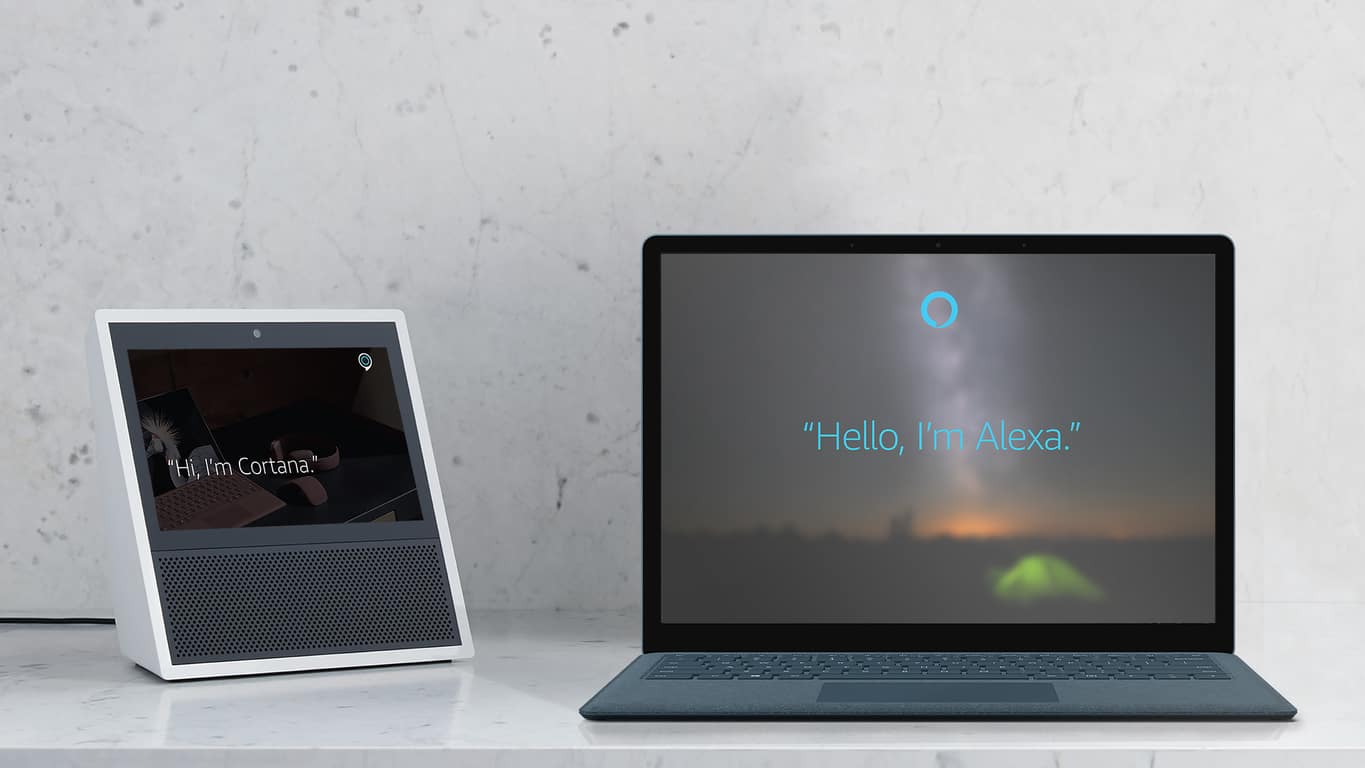
As you may recall, Microsoft previously detailed they would be working with Amazon to integrate Cortana with Alexa. The two companies missed the deadline, but Microsoft recently insisted that the two are still working on the integration. With this so, Dynamics 365 somehow could now be involved in the Cortana and Alexa partnership, especially because of the “long-term intelligent solution experience.” and “partners” phrasing.
Again, just speculating, as Microsoft has not said anything beyond the new statement seen in the blog post. It also could be the way of the company being more open to the competition, and allowing digital assistant integration to all, but there’s no telling, especially with the news that Amazon Alexa would be coming to some Windows 10 PCs.
According to a report from Bleeping Computer, Microsoft is temporarily no longer accepting Bitcoin as a form of payment. The reason is due to the “unstable state” of the cryptocurrency and worldwide payment system.
Bitcoin in Microsoft account (Image via Bleeping Computer)
This move from Microsoft makes sense, as Bitcoin values tend to fluctuate higher and then ower every day. The fluctuation also means that Microsoft could be taking up loses if they accept the payment.
This, along with high fees, is also why Steam recently stopped accepting Bitcoin as a form of payment. Anyway, the company is urging those who previously used Bitcoin as payment to consider using credit or debit cards, a PayPal account, or a direct bank account.
When word got out on an exploit in AMD and Intel Processors, Microsoft and other tech giants were quick to respond and patch their systems or devices. Although Microsoft issued an emergency Windows Update to address the issue, it is apparently causing more harm than good for those with AMD PCs (via Neowin.)
Some users are reporting that their older AMD based PCs with Athlon processors will no longer boot into Windows after installing the latest KB4056892 security patch. Their devices instead give a roll-back error, 0x800f0845, with no way to go back and restore. It’s an issue that is well noted on the Microsoft Support forum, where over 457 people have marked that they have the same question/problem.
Top comments in the forum state that the best fix for those experiencing the problem is to clean install Windows 10 and then disable or pause Windows Updates to prevent KB4056892 from being installed. Microsoft has yet to acknowledge the issues or reply the support forum, but that is likely to change soon. Be sure to keep tuned for more updates.
Many Windows 10 users reported that their computers won’t resume from hibernation. This issue has been affecting users ever since the first version of Windows 10 was launched.
There are also many errors codes that appear on the screen when this problem occurs, including error 0xC000009A, 0xc0000001, 0xc0000411 or error 0xc000007b.
In this article, we’ll list a few solution that will help you fix this issue and resume your Windows 10 session in no time. It is worth mentioning that this problem manifests itself in different ways for users: some may be stuck on the hibernating window and the PC doesn’t allow any commands, while others may have access to their session despite the initial error message.
How to fix Windows 10 failed to resume from hibernate
1. Turn off Ethernet connection
Many users confirmed that turning off Ethernet connection when waking up your computer reduces the number of instances where this issue occurs.
As simple as this solution may seem, it work wonders.
2. Remove the battery and AC adapter several times
Try removing the battery as well as the AC adapter. Then insert the battery back in and boot the device without connecting the power cable. When the hibernating screen appears, remove the battery again and reboot the device using only the power cord. Then boot the device using only the battery.
So, here’s a step-by-step guide:
Disconnect the power cord and boot your computer using only your laptop’s battery. The hibernating screen will appear shortly
Turn off the computer by pressing the power about for about 10 seconds
Remove the battery and plug the power cord
Boot up your computer. The hibernating screen will appear again
Unplug the powercord. Don’t press the power button. Simply interrupt electricity supply to your laptop.
Insert the battery again, press the power button to start your laptop.
This time, the log in screen should be available.
3. Check your disk for errors
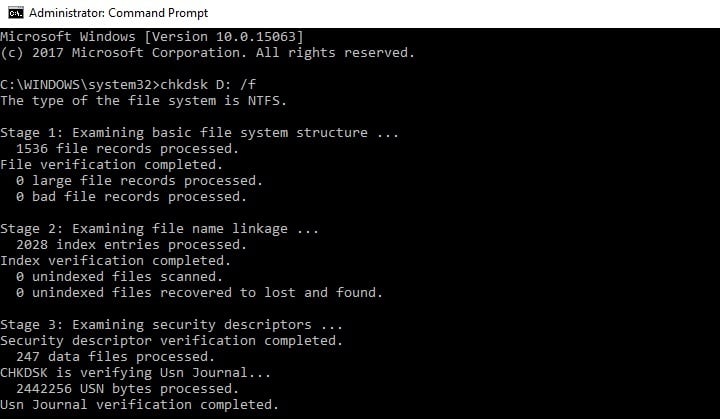
Start Command Prompt as administrator and type the chkdsk C: /f command followed by Enter. Replace C with the letter of your hard drive partition.
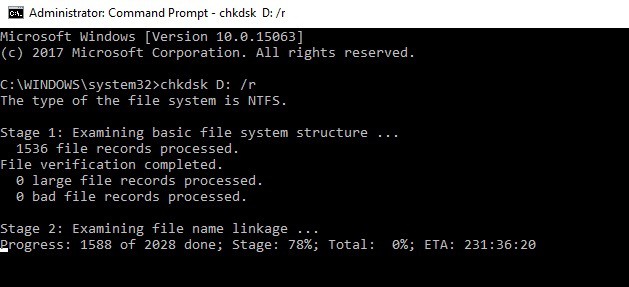
As a quick reminder, if you do not use the /f parameter, chkdsk displays a message that the file needs to be fixed, but it does not fix any errors. The chkdsk D: /f command detects and repairs logical issues affecting your drive. Then run the /r parameter as well to repair physical issues.
4. Repair your Windows Registry
The simplest way to repair your registry is to use Microsoft’s System File Checker to check for system file corruption. This tool verifies the integrity of all system files and repairs them if necessary. Here’s how to run an SFC scan:
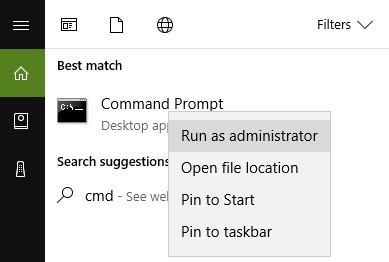
1. Go to Start > type cmd > right-click Command Prompt > select Run as Administrator
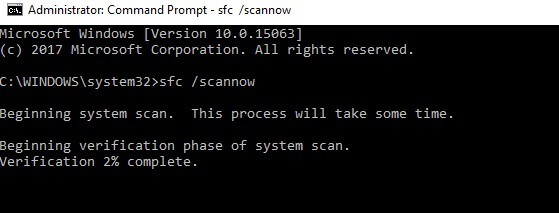
2. Now type the sfc /scannow command
3. Wait for the scanning process to complete and then restart your computer. All corrupted files will be replaced on reboot. You should now be able to resume your session.
5. Update your drivers/ Windows OS
If Windows 10 does not resume from hibernation, this issue is usually related to a driver problem. Make sure that you’ve installed the latest driver and well as Windows 10 OS updates.
The quickest and simplest way to do this is to go to Settings > Update & Security > and hit the ‘Check for updates’ button. Your computer will automatically install the latest OS version available, including the newest drivers.
You can also go to Device Manager and check if there is any yellow exclamation point next to your drivers. This indicates that the respective driver is not working properly and needs to be updated. To install the latest driver version, right-click on the respective driver and select ‘Update driver’.
Did any of these solutions fixed the problem for you? Let us know in the comments below.
Welcome to our weekly Xbox news recap series, where we go over the top stories of the past week in the world of Xbox. Let’s get started.
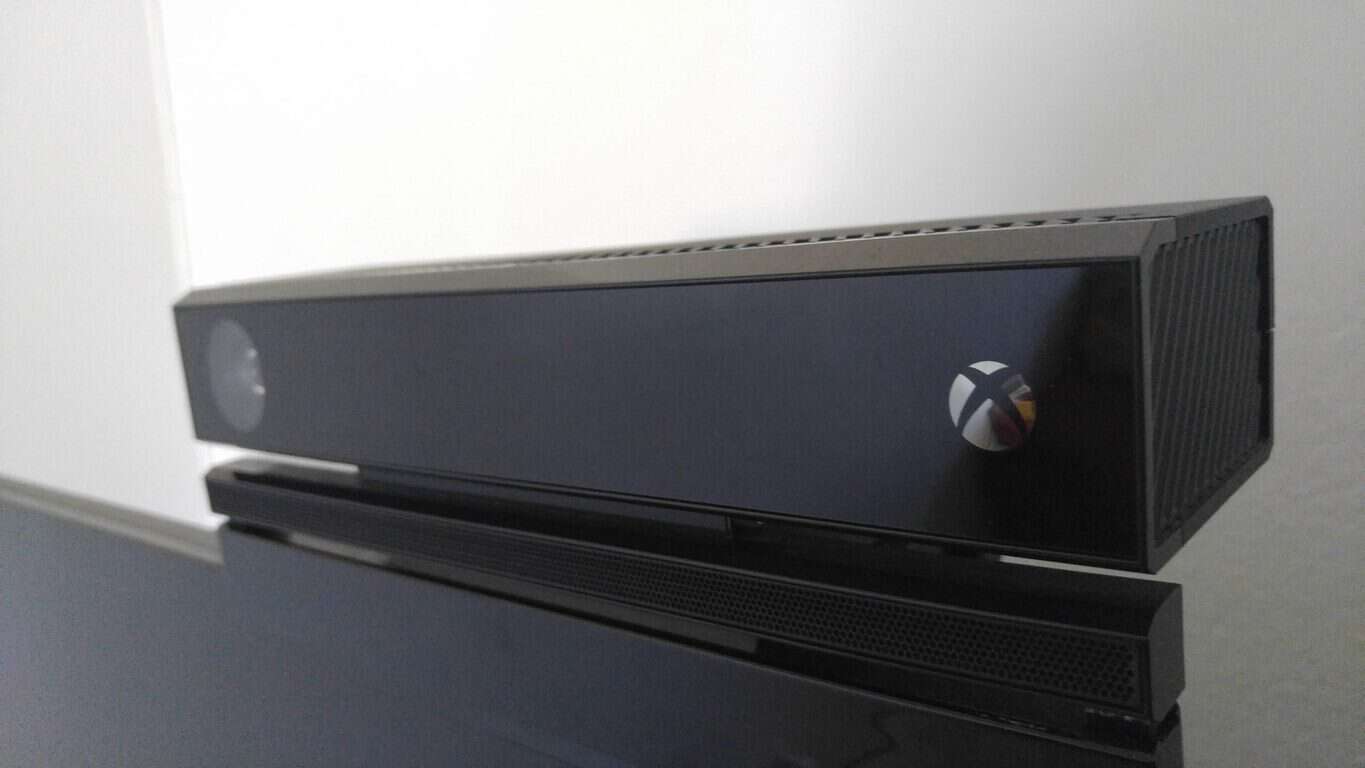
Kinect sensors cease production
After years of being brushed under the rug and being more or less forgotten by gamers at large, the Kinect has finally been shut down. It was announced by Microsoft this week that the little-peripheral-that-could would completely cease production. The sensor has been mostly irrelevant to the majority of Xbox gamers, but a significant community has broken out that uses it to develop all sorts of applications for other platforms.
PUBG has been one of the biggest things to happen to the gaming industry in the past few years – it’s a massive deal. The battle royale game became a massive success for both gamers and streamers, becoming one of the most successful titans of gaming culture right beside Overwatch and League of Legends. The game launched on Xbox in mid-December, and according to an interview with the CEO in charge of PUBG, the game will stay there for a while. Although it’s certain to come to other platforms at some point in time, the game will likely remain a console exclusive for a comfortable period of time.
PlayerUnknown’s Battlegrounds (PUBG) to be Xbox One exclusive for a while https://t.co/X9LbuBVCXb
Microsoft accused of dishonest advertising with Xbox One X and Kinect
With the Kinect being shut down, attention has been brought to some potentially dishonest advertising behaviors from Microsoft in regards to the Xbox One X. The console isn’t compatible with the Kinect sensor – and while that isn’t a massive problem in and of itself, it seems like most of the console’s advertising suggests otherwise. In several pieces of marketing, it’s suggested that “Xbox One accessories work with Xbox One X.” All of them. With the Kinect undoubtedly being an Xbox One accessory, it’s easy to see why some people are calling foul play on Microsoft’s advertising.
Sea Of Thieves custom controller available for pre-order
Looking for a new controller to fawn over? Sea Of Thieves is well on its way, and the custom controller that’s coming out to promote the game is one of the most gorgeous controllers I’ve seen so far. The controller is purple with spatterings of seafoam green, and compass markings surrounding the left stick. The controller also glows in the dark, for night owls who wanted to have some novelty with their gaming experience. The peripheral is pretty snazzy, and is available for pre-order for about $75.
Microsoft (MSFT) news recap is a weekly feature highlighting the top Microsoft news stories of the past week. Sit back, grab some coffee, and enjoy the read!
Microsoft backs off adding Cortana integration to Dynamics 365
Azure customers should not see a “noticeable performance impact” due to Intel, AMD CPU vulnerability patches
As news of 2 vulnerabilities in CPUs from Intel, ARM and AMD broke out, reports have suggested that the patches to resolve the flaws would deliver a performance hit of between 5% and 30%. Despite this, Microsoft is saying that its Azure customers should not see a “noticeable performance impact”.
That’s it for this week. We’ll be back next week with more Microsoft news.
Welcome back to our Windows 10 news recap. We are continuing the trend of our weekly “Windows 10 news recap” series where we go over the top stories of the past week in the world of Microsoft’s flagship operating system.
Windows 10 Mobile receives a new security update, potentially patches for Meltdown and Spectre flaws
Microsoft rolled out a series of Windows 10 updates a few days ago in order to patch the latest CPU security vulnerabilities identified by Google.
Unfortunately, many users reported that the latest Windows 10 updates often caused more harm than good. Microsoft already added a series of bugs on the list of known issues, but users revealed that the list is actually much longer than that.
We recently published an article listing the most frequent issues that users have experienced after installing the latest updates. The respective post echoed a lot of comments and we noticed that all of them referred to AMD CPUs.
Severe display problems on AMD computers
Our readers confirmed that AMD systems lock up with the Windows logo showing on a black screen as soon as they update their computers.
This problem is even more severe when office computers are affected, as this reader reports:
Know someone where all machines using AMD CPUs in their office have this issue. They can’t restore or anything. All Intel CPU machines updated fine.
Indeed, it seems that there is a compatibility issue between the latest Windows 10 updates and AMD CPUs. Intel machines don’t seem to be affected by this problem.
Microsoft has yet to issue any comments on this matter despite the significant number of user complaints.
This is not the first time when computers powered by AMD processors have been plagued by display issues. As a quick reminder, just one month ago thousands of users complained about display problems on AMD Radeon video cards.
Microsoft quickly released KB4057291 but even back then the update failed to fix the issue for all users. The nightmare is not over yet for AMD PC owners as January updates brought a new problem.
Have you encountered the same issues after installing the Windows 10 updates released this month? Did you find any workarounds to fix the problem?
Mozilla announced that it’s ending support for its Firefox web browser on Windows XP and Vista in 2018. Mozilla also announced a while back that users who were on these older versions of Microsoft’s operating system would be moved to something called Firefox Extended Support Release (ESR).
The company initially announced that support would be offered until September 2017, but later changed its mind, extending it to June 2018.
While we don’t know what the exact date will be, Mozilla should give users more details about it in the coming months. This way, users and organizations have more time at their disposal to move away from the two operating systems Microsoft stopped supporting back in April 2014 and April 2017.
Mozilla finally gives up on Windows XP and Vista
Firefox was one of the few browsers that continued to support Windows XP and Windows Vista. Mozilla also stated that Firefox users still lingering on these platforms should expect some security updates until then Users will not have to take any additional action in order to get those updates.
Upgrade your OS to avoid attacks and exploits
Mozilla advises users still running these old versions of Windows to consider upgrading. Users are strongly encouraged to upgrade their systems to a newer version of Windows that is safer and still supported by Microsoft. All unsupported OS will no longer receive security updates and they’ll become more favorable targets of cyber attacks and exploits.
Microsoft recently pushed KB4056892 to Windows 10 Fall Creators Update users in order to patch the Meltdown and Spectre CPU vulnerabilities.
The Redmond giant confirmed that the update also brings issues of its own — three of them to be more precise. However, recent user reports confirmed that KB4056892 causes more problems than initially acknowledged by Microsoft.
So, the question is: will you still install KB4056892 and patch those CPU security vulnerabilities knowing that the update may break your PC?
If you haven’t installed the latest Windows 10 updates yet, continue reading this article to learn what are the most common KB4056892 issues reported by users. If you already installed the update, well, reading this article may make you fell a bit better knowing that you’re not the only experiencing these problems.
KB4056892 reported bugs
1. KB4056892 won’t install
Many users can’t install the update because the install process gets stuck, fails with error 0x800f0845 or the computer suddenly uninstalls the update.
Okay, been trying this on my Toshiba laptop for the past few days, keeps getting to 30%, restarts, locks at the blue Window icon, I have to force a restart, and then after forcing a second restart, it then diagnoses the problem, uninstalls the update, and then does nothing. Error code is 0x800f0845. […] I have downloaded the manual install file, but it doesn’t appear to work either.
If you can’t install KB4056892 on your Windows 10 computer, the following troubleshooting guides may help you fix the problem:
Some users reported that the latest Windows 10 version 1709 update breaks browsers. More specifically, the browser window become white, it freezes for a few seconds and then the browser crashes completely returning to desktop.
After update KB4056892, this Chrome is crashed and auto quit, Firefox and Geforce Experience too, but gaming PUBG, BF1 and Overwatch are normal. How to fix it???
If you’re experiencing the same problem, the articles below may be of help:
Windows 10 users also reported that certain programs stopped running after they installed KB4056892. These include: SlimWare DriverUpdate, ASUS AI Suite 3, EPLAN, etc.
These updates cause SlimWare DriverUpdate program to stop running. With the updates installed a BugSplat error report is generated and the program will no longer run. I uninstalled the updates and the program ran perfectly until the updates got reinstalled by windows automatic update process.
We don’t have a solution for these program failures, but we do have a suggestion on how to solve the ASUS AI Suite 3 issue. So, to fix ASUS AI Suite 3 issues on Windows 10, first download the latest AI Suite 3, right click the zip file and select “Properties”.
Select the “Unblock” check box and hit OK. Unzip the zip file and run AsusSetup.exe as Administrator. Keep in mind that your need to unblock the ZIP first before you extract the files. Reboot your computer and the AI Suite 3 should work smoothly now.
4. KB4056892 bricks or locks up computers
According to user reports, this update sometimes freezes computers. When users boot up or restart their machines, the Windows logo just sits on the screen and the boot up process stops.
Unfortunately, when I did a restart it bricked my system. I had a large windows logo on the screen and it just sat there. I rebooted and was able to trigger a repair. The repair said it was backing out the last update as it would not be completely installed.
With KB4056892 is Awaiting restart I did another restart and had the same problem. At the end I was staring at a Windows logo that just sat there. Again I triggered a repair and the system is now usable.
5. The app list is unavailable
If the list of apps is nowhere to be found in the Start menu, you’re not the only one experiencing this issue.
Just got the January 3, 2018 KB4056892 update, and now my start button will not show app list in start menu any longer. I’ve already checked Settings, Personalization, Start and set & reset the option to “Show app list in start menu” with no luck. How do I fix this?
These are the most common KB4056892 issues reported by Windows 10 users. Did you encountered other bugs after installing the latest updates on your computer? Tell us more about your experience in the comments below.
Microsoft is offering a free Black Panther suit fr your Xbox Avatar in the Xbox Store. As noted via a Reddit post, all you need to do to don this Black Panther suit is TO head over to the Xbox Marketplace. It’s free, so you have nothing to lose by picking up this Xbox Avatar item.
There are separate Marvel Black Panther suits for your female and male Avatars, so obviously you can’t purchase both Black Panther suits from the Xbox Store.
Unfortunately, this free Marvel Black Panther suit is available for Xbox Avatars in the US only. So if you are in other regions, you are SOL. Possibly, Marvel may add Black Panther to its highly successful line of console games, so don’t be surprised if you see Black Panther on Xbox One sometime soon. You can go see Marvel’s Black Panther movie in theaters starting on February 16, 2018.
The Xbox One X launched last November in select markets across the world, but India was not included in the launch party. Noted by Digit, it turns out that Microsoft may have recently caused some false excitement and confusion in India, as the company briefly listed the Xbox One X launch on January 15th and then took the page down.
This page briefly had the Xbox One X at the price of Rs 44,990 (about $710 US), but it’s since gone offline. Microsoft also tells Digit that there is “nothing to share” at the moment in regards to the Xbox One X coming to India. The company instead recently put up the Xbox One S for sale in India at, which originally launched in the US back in 2016.
It’s still not certain if Microsoft will ever bring the Xbox One X to India, but some Indian gamers seemed angry at the high price noted on the since removed page. This, though, is not the first time that an Xbox related page has been pulled in a foreign country. As you may recall, Xbox Poland revealed keyboard, mouse support is coming for Xbox One consoles soon, but then pulled the page.
The recent discovery of serious security flaws in Intel, AMD and ARM CPUs hit the tech industry pretty hard this week. We recently learned that the Meltdown vulnerability affects nearly all Intel processors released since 1995, while the more serious Spectre vulnerability affects all modern Intel, AMD and ARM processors.
As you may know, Microsoft’s Xbox One family of consoles are powered by a custom AMD Jaguar CPU, and they run a customized version of Windows 10. In some reassuring news for Xbox gamers, Xbox head of engineering Mike Ybarra shared today that all Xbox One consoles are protected against these recently discovered CPU flaws:
FYI: The security architecture of Xbox already mitigates against the recent chip-related security vulnerabilities. #Xbox
While the tech industry is still figuring out how these two serious vulnerabilities will affect PCs, servers, smartphones, tablets and more, it’s good to know that our Xbox One consoles are safe to use. Overall, Microsoft has been pretty good at dealing with this concerning news so far, releasing an emergency Windows 10 patch earlier this week which was followed by new firmware updates for Surface devices. If you haven’t done it yet, we invite you to make sure that your Windows 10 PC or Surface device is up to date.
Microsoft recently ended support for the popular Groove music streaming service. Unfortunately, this decision lead to an annoying problem among Windows 10 users: Cortana can no longer recognize songs.
Microsoft’s virtual assistant music recognition feature is attached to Groove Music, but since the service has been retired, this also means that this option is no longer available.
Jason Deakins, who works on Cortana at Microsoft confirmed the bad news on Twitter:
What you are seeing is expected. Due to the shutdown of the Groove Music service Cortana music recognition has also been retired.
— Jason Deakins (@JasonDeakins) January 3, 2018
Now, when you try to use Cortana‘s music recognition icon, a “Song unrecognized” error message appears on the screen, informing you that “this service has been retired.”
Many Windows 10 users criticized this decision, saying that the removal of Groove Music is one of the worst decisions Microsoft has ever made. The company is always boasting about Cortana’s top-notch AI capabilities, but the decision to remove the music recognition feature makes the assistant less appealing to users. Indeed, there are many Windows 10 users who enabled Cortana exclusively for its music recognition feature.
Alternatives to Cortana’s music recognition service
The good news is that there are plenty of music recognition software out there that you can use for song identification.
As a matter of fact, Windows Report already compiled a list of the best music recognition tools that you can use on your Windows 10 computer.
Check out our list, read the description for each program and install the one that best suits your needs.
What do you think about Microsoft’s decision to remove Groove Music and its subsequent consequences?
Microsoft released a series of Windows 10 updates aimed at fixing the recently revealed security bug affecting Intel, AMD and ARM CPUs.
As a quick reminder, Google recently revealed more information about two security vulnerabilities (Meltdown and Spectre) that allowed hackers to abuse CPU data cache timing so as to leak information, leading to virtual memory read vulnerabilities across local security boundaries.
Microsoft fixed this security issue by releasing the following updates:
Windows 10 version 1703 KB4056891 (OS Build 10240.17738)
Windows 10 version 1607 KB4056890 (OS Build 14393.2007)
Windows 10 version 1511 KB4056888 (OS Build 10586.1356)
Windows 10 version 1507 KB4056893 (OS Build 10240.17738)
All the updates have a generic description:
Security updates to Microsoft Edge, Internet Explorer, Microsoft Scripting Engine, Windows Graphics, Windows Kernel, Windows Datacenter Networking, Windows Virtualization and Kernel, and the Windows SMB Server.
Windows 7 is also affected by this security bug. Microsoft also released a security patch for this OS version and you can download it automatically via Windows Update, or get the standalone package from the Microsoft Update Catalog website.
Before you hit the update button, you should know that all the patches listed above bring two issues of their own:
When calling CoInitializeSecurity, the call will fail if passing RPC_C_IMP_LEVEL_NONE under certain conditions. Microsoft is working to find a fix for this issue.
If you installed certain third-party antivirus solutions, the updates are only applicable to the machines where the antivirus ISV has updated the ALLOW REGKEY.
Microsoft advises you to contact your antivirus solution provider to confirm that their software is compatible and have set the following REGKEY on the machine: Key=”HKEY_LOCAL_MACHINE”Subkey=”SOFTWARE\Microsoft\Windows\CurrentVersion\QualityCompat” Value Name=”cadca5fe-87d3-4b96-b7fb-a231484277cc” Type=”REG_DWORD” Data=”0x00000000”
For the time being, users didn’t report any issues regarding the install process, so the download and install phase should go smoothly.
If you already installed the updates listed above and you encountered various bugs, describe the issues in the comments below.
Microsoft rolled out an important Windows 10 version 1709 update that makes Edge more stable, fixes server memory issues and patches a series of security vulnerabilities.
Update KB4056892 takes the build number version to 16299.192. You can download and install it automatically from Windows Update or get the standalone package from the Microsoft Update Catalog website.
KB4056892 changelog
Fixed the issue where event logs stop receiving events when a maximum file size policy is applied to the channel.
Printing an Office Online document in Microsoft Edge should now work as intended.
Touch keyboard now support the standard layout for 109 keyboards.
Addressed video playback issues, including in Microsoft Edge that prevented devices from playing video on multiple display configurations.
Fixed the bug where Microsoft Edge stops responding for up to 3 seconds.
The issue where only 4 TB of memory is shown in Windows Server version 1709 has been fixed. The Task Manager now displays accurate information about the installed, configured, and available memory.
Security updates to Windows SMB Server, the Windows Subsystem for Linux, Windows Kernel, Windows Datacenter Networking, Windows Graphics, Microsoft Edge, Internet Explorer, and the Microsoft Scripting Engine.
KB4056892 bugs
Unfortunately, KB4056892 also brings issues of its own. Microsoft listed three know issues on the list, which include:
Install may get stuck at 99% and may show high CPU or disk usage if a device was reset using the Reset this PC functionality after installing KB4054022.
When calling CoInitializeSecurity, the call fails if passing RPC_C_IMP_LEVEL_NONE under certain conditions.
The good news is that the first two issues can be quickly fixed using the workarounds that Microsoft posted on KB4056892’s support page.
Have you installed the latest Windows 10 Fall Creators Update patches on your computer? If you encountered other issues apart from the ones listed above, tell us more about your experience in the comments below.
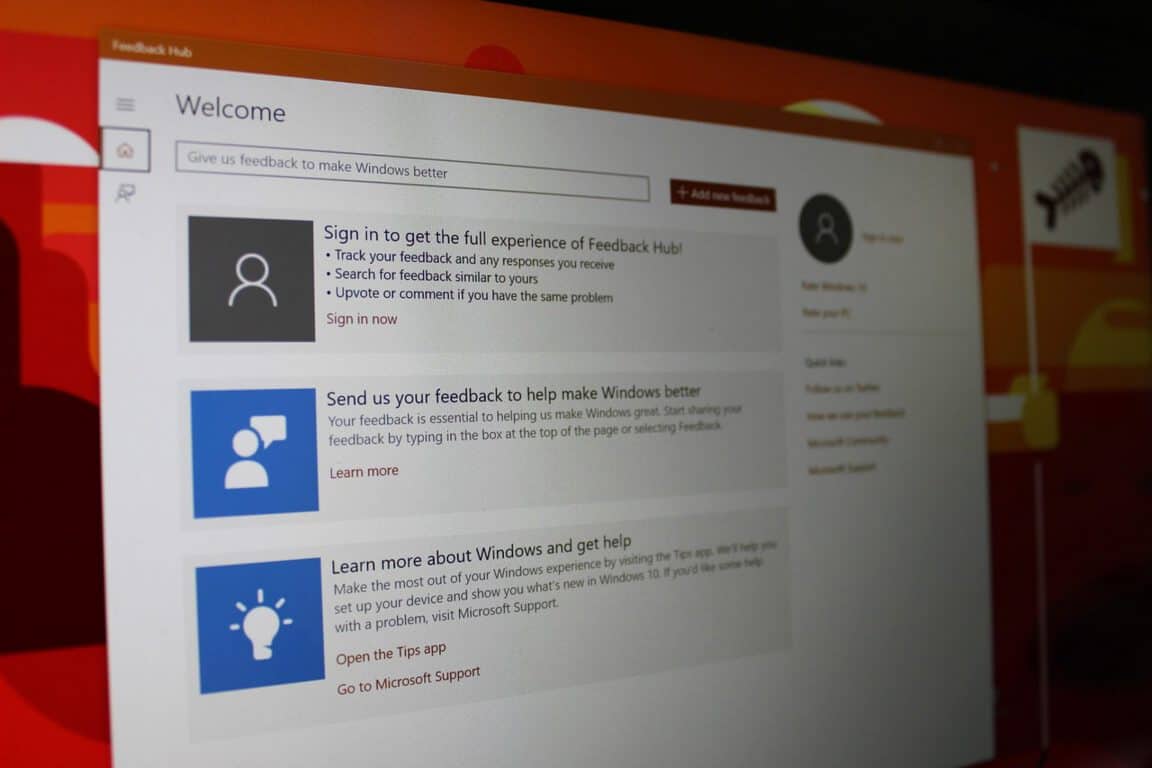
According to a report from Windows Latest, Microsoft has updated the Feedback Hub UWP app with support for multiple Microsoft accounts. The update applies to all devices and brings the Feedback Hub app to version 1.1711.3412.0. Have a look at what’s new below:
Read and comment on both mobile and PC feedback, whether you’re using your PC or mobile device
Easily switch between your Microsoft accounts while in Feedback Hub
Translate inline sticky comments with Bing Translate.
These are definitely some welcome changes, helping make the Feedback Hub a better place for interacting with both Microsoft and fellow Windows Insiders. It also comes right after Microsoft added a comment reply feature and new notification improvements in past updates.
With the events of 2017 way behind us, it’s time to look forward to 2018. As usual, Microsoft will be holding several pre-announced conferences this year in 2018: Build 2018, Inspire 2018, Ignite 2018, and more. There are also the usual non-Microsoft sanctioned events, and the “surprise” Windows 10 and Spring and Fall hardware events. Here is a look at the biggest events you can expect from Microsoft in 2018.
The Consumer Electronics Show, otherwise known as CES, is the world’s gathering place for all those who thrive on the business of consumer technologies. Microsoft normally does not have a direct presence at CES, but the company works with many of the OEMs and device manufacturers who have booths at the event. You can expect to hear more about upcoming Windows 10 PCs and devices, including Always Connected PCs. This year CES runs from January 9-12 in Las Vegas.
CES 2018
Redstone 4 or 2018 Surface Event (???):
Microsoft usually holds an event in New York City during the Spring or Fall to unveil upcoming Surface devices and show the world more about the next featured update to Windows 10. In 2017, the company held a Spring “Learn What’s Next” event on May 2 in New York. Last year this event was a bit of a surprise and was education focused, all about Windows 10 S, and the Surface Laptop.
Since the Spring of 2018 may be too early for any Surface Hardware, there might NOT be a dedicated Surface hardware event in NYC for the Spring of this year. Instead, maybe Microsoft could hold an event for Redstone 4 software, and save the hardware event for the Fall, but that’s just me speculating.
E3 is always a big spot on the calendar for Microsoft, as it is the stage for the company to show off the latest and greatest games in Xbox technology. Last year the company unveiled the Xbox One X at the event, and we’re still not certain what the company has planned this year. Anyway, it runs from June 12-14 in Los Angeles and is the must-attend and watch event for experiencing the future of Xbox.
At Microsoft Inspire (previously known as the Worldwide Partner Conference, WPC) Microsoft is focused on their global partner community. It’s Microsoft’s biggest partner and enterprise event, and partners learn more about Microsoft’s plans for the upcoming year. Microsoft specifically calls this “the event where the world meets to transform business.” Thousands of partners have the chance to connect with Microsoft personnel for a week of networking, innovation, and ingenuity. The 2018 event is co-located with Microsoft Ready, the company’s largest internal readiness event. Registration is now open.
Around 335,000 gaming fans from all over the globe attended Gamescom in 2017. This event is one of the world’s largest video gaming conventions. We usually see a lot of the same stuff unveiled at E3 during Gamescom, but it’s still exciting since it gives Europeans a chance to get hands-on with the latest video games and Xbox hardware.
Microsoft Envision and Ignite used to be separate events, but they were combined together under Ignite in 2017. At this event, Microsoft usually talks about cloud infrastructure, productivity, and how upcoming and current tech can be used by business leader and decision makers in the future. It ran from September 23-29 in Orlando, Florida in 2017. It’s confirmed that Microsoft Ignite will be returning to Orlando for 2018, and registration is now open.
Build is one of Microsoft’s biggest events. This annual conference is aimed at towards software engineers and web developers using Windows, Microsoft Azure and other Microsoft technologies. As 2017 showed, there’s also a consumer and Windows 10 side to things, where the company goes over features in the upcoming Windows 10 release. It first started in 2011 and has gone on every year since then. Build 2017 was held on May 10 – 12 in Seattle, and the company has not yet announced a date or venue for Build 2018, but we’re expecting to hear more soon.
Microsoft’s Future Decoded event is all about current and emerging trends at the cross over of business and technology. The event was held in London last year from October 31-November 1st. No official dates have been announced for 2018 yet.
Microsoft Connect() is the online event where Microsoft discusses how they are empowering developers to lead the new digital revolution with apps. We learned a lot about Visual Studio in this event in 2017 from November 15-17 , and you can expect more of the same in 2018 when it’s announced
Microsoft tech summit is a free technical learning event for IT decision makers, professionals, and developers. Those attending the events can connect with experts from Microsoft and ask questions, choose from a variety of learning opportunities, customize learning, and find the latest trends in tech. There are multiple cities and dates for Tech Summit, and most run in the Summer, though Irvine, Dallas, Burlington, Los Angeles, New York, Pittsburg, and more.
As usual, we’ll be here to cover all of these Microsoft events. There are definitely exciting times ahead this year, and we hope you keep tuned to us for all your Microsoft, Windows 10 news and information. Let us know in the comments below if you’re looking forward to any of these events!
Build 2018: TBA in TBA
Build is one of Microsoft’s biggest events. This annual conference is aimed at towards software engineers and web developers using Windows, Windows Phone, Microsoft Azure and other Microsoft technologies. There’s also a consumer and Windows 10 side to things, where the company goes over features in the upcoming Windows 10 release. It first started in 2011 and has gone on every year since then. Build 2017 was held on May 10 – 12 in Seattle, and the company has not yet announced a date or venue for Build 2018, but we’re expecting to hear more soon.
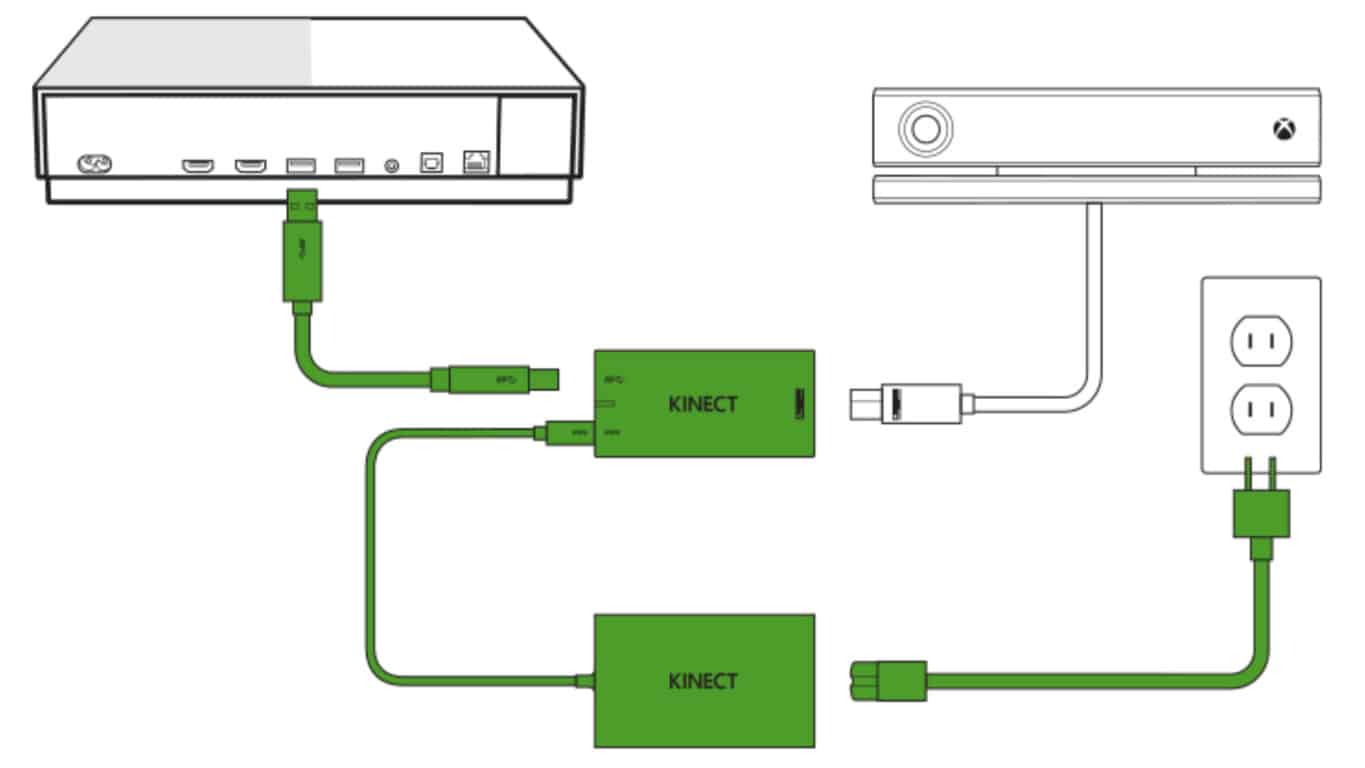
As a result of this demand, the most-popular trending suggestion over on Microsoft’s Xbox UserVoice website is now one about Xbox One X buyers and how they should be provided with a free Kinect Adapter as Microsoft likely stopped making them before the Xbox One X even came out. This means that any Xbox One console owner who is upgrading to an Xbox One X is essentially being forced to dump their Kinect sensor due to the newer console not featuring a Kinect port. A few lucky Xbox One X buyers have been fortunate enough to track down an elusive Kinect Adapter but most haven’t been either due to them all being sold out in stores being resold at prices as high as $399 on auction sites like eBay.
There also seems to be a few loyal Xbox gamers who had been planning to upgrade to an Xbox One X console but are having second thoughts due to its lack of Kinect support.
Microsoft choosing to discontinue the Kinect Adapter is definitely an odd decision given how in-demand the accessory is. One possible explanation could be that the company completely misread how many of its users actually use the Kinect sensors or factor its functionality into a new Xbox console purchase decision. Another could be that Microsoft is well-aware of the number of Kinect users but decided to deliberately force gamers off it in an attempt to push the market more towards traditional gaming titles and their new focus on 4K HDR and Windows 10 crossplay.
Let us know what you think the reason was for the dumping of Kinect and the Kinect Adapter in the comments below and head on over to the UserVoice idea and vote for it if you’d like to see more Kinect Adapters be made.
The PUBG Development and Community Team released some information on the next update for PlayerUnknown’s Battlegrounds (PUBG) Game Preview on Xbox One which is expected to be submitted to Microsoft for approval sometime during the next 24 hours and should go live for gamers to download soon after.
This next PUBG update is said to focus mainly on fixing the numerous crash issues that have been plaguing players and will also have some “quality of life improvements and gameplay adjustments.” Details on the latter weren’t specified though.
PlayerUnknown’s Battlegrounds was one of the biggest PC games of 2017. It came to Xbox One in Game Preview (aka open beta for testing) before the end of the year which made it the first home console to get the game. A physical disk version for the Xbox One has also been released in stores. The game itself is an online survival shooter and has already become one of the most-played titles on the Xbox One over the past few weeks since its launch.
Are you playing PUBG on your Xbox One? Let us know if you’re enjoying the experience in the comments below.
A few short hours ago, we noted that Microsoft was planning on releasing an emergency Windows Update to address the ongoing security concerns with Intel and AMD processors. According to multiple media outlets, including Windows Central, said KB4056892 update (OS build 16299.192) is now rolling out to Windows 10 users (though we’re not seeing it just yet on any of our machines here at OnMSFT.)
As we previously noted, the security update is set to automatically roll out to all Windows 10 desktops today starting at 5 PM ET, and later to other Windows 7 and Windows 8 on January 16th via a Patch Tuesday update. We’re not finding this update on any of our machines just yet, but Microsoft has released a changelog for it and also made it available via the Microsoft Update Catalog as a manual download.
Here’s a look at the changelog:
This update includes quality improvements. No new operating system features are being introduced in this update. Key changes include:
Addresses issue where event logs stop receiving events when a maximum file size policy is applied to the channel.
Addresses issue where printing an Office Online document in Microsoft Edge fails.
Addresses issue where the touch keyboard doesn’t support the standard layout for 109 keyboards.
Addresses video playback issues in applications such as Microsoft Edge that affect some devices when playing back video on a monitor and a secondary, duplicated display.
Addresses issue where Microsoft Edge stops responding for up to 3 seconds while displaying content from a software rendering path.
Addresses issue where only 4 TB of memory is shown as available in Task Manager in Windows Server version 1709 when more memory is actually installed, configured, and available.
Security updates to Windows SMB Server, the Windows Subsystem for Linux, Windows Kernel, Windows
Datacenter Networking, Windows Graphics, Microsoft Edge, Internet Explorer, and the Microsoft Scripting Engine.
If you installed earlier updates, only the new fixes contained in this package will be downloaded and installed on your device.
Importantly, this update carries a set of known issues and workarounds, relating to installation, and Antivirus software. Please see the known issues below. We invite you to check out Microsoft’s official changelog for more step by step details on how to resolve these issues, especially because the workarounds are rather technical.
Update installation may stop at 99% and may show elevated CPU or disk utilization if a device was reset using the Reset this PC functionality after installing KB4054022.
Windows Update History reports that KB4054517 failed to install because of Error 0x80070643.
When calling CoInitializeSecurity, the call will fail if passing RPC_C_IMP_LEVEL_NONE under certain conditions.
Due to an issue with some versions of Anti-Virus software, this fix is only being made applicable to the machines where the Anti virus ISV has updated the ALLOW REGKEY.
A Windows 10 Logo
Noted by The Verge, Microsoft also issued a statement about the processor exploits. The company addressed how it is an industry-wide issue, and how it has worked with chip manufacturers to test mitigations:
We’re aware of this industry-wide issue and have been working closely with chip manufacturers to develop and test mitigations to protect our customers. We are in the process of deploying mitigations to cloud services and have also released security updates to protect Windows customers against vulnerabilities affecting supported hardware chips from Intel, ARM, and AMD. We have not received any information to indicate that these vulnerabilities had been used to attack our customers.
It’s really great to see Microsoft stepping up here and supporting their consumers and customers. This processor exploit is rather worrying for the average consumer, and true or not, it’s nice that Microsoft is here to assure customers that they’re not being attacked as a result of the vulnerabilities.