As ComicBookMovie writes, NetEase Games, the developer of the game has confirmed that Marvel Rivals will be coming to PlayStation 5, Series X|S, and PC on the same date.
💥Marvel Rivals finally comes to PlayStation 5!
Venom and Adam Warlock unleash their powers! Watch as they lead their teams into an epic face-off with all-new Team-Up abilities and environmental destruction!
On the other hand, Microsoft has moved other experimental settings to default in the pre-release version of WSL.
You can now automatically release stored memory in WSL back to Windows with the following setting: autoMemoryReclaim=dropCache
Networking capability is improved on Windows 11 thanks to the dnsTunneling=true
There are some experimental features as well such as: – wsl --manage <distro> --set-sparse <true/false>
With it, you can enable automatic disk space reclaim. You can also use – wslconfig with networkingMode=mirrored
This will allow you to use new mirrored networking mode and new features such as IPv6 support.
The WSL Settings GUI app isn’t available yet, but it’s coming soon, so you won’t have to manually edit .wslconfig file anymore. Using the app, you’ll see WSL settings in labeled categories, making the management easier.
WSL in Dev Home is also still in development, so we have to wait for a bit longer before we see it in action.
Lastly, with WSL Zero trust comes the support for enterprises using WSL. Microsoft Defender for Endpoint’s WSL 2 support is generally available, and it’s now possible to manage WSL settings via Intune.
Lastly, Microsoft Entra ID will get integration with WSL as the public preview will start in July and August. This will allow users to use Microsoft’s Authentication Library to communicate with WSL securely.
Computex 2024 is next week, and Qualcomm will discuss the upcoming Copilot+ PC devices more. Since Microsoft unveiled the Copilot+ PC devices at its conference, Build 2024, the tech world has been in awe and shock. Right after the announcement, almost all of its OEM partners announced many new Copilot+ PC devices, all carrying the now-popular Snapdragon X Elite.
From Dell to Acer, Asus, HP, and others, Copilot+ PCs are set to be released in June. They will come with the controversial Windows Recall, a brand-new AI-powered tool that records everything you do on your Windows device.
However, as noted by many journalists, Microsoft has chosen not to send samples of these devices to the press, so there is little to know about them. If you’re interested in getting one, then you might be interested in joining the keynote from Qualcomm’s CEO and President Cristiano Amon.
MS makes you buy your next gen ARM based PC without relying on reviews. No samples available to press. Except a chosen few I guess. Devices are out on June 18. If you pre-order, you send $1000+ not knowing, what you'll get.https://t.co/uImgrL53r5
Joined by leaders from the global PC ecosystem, Amon will reveal what consumers can expect across productivity, creativity, and entertainment from a new category of Copilot+ PCs that today are only powered by Snapdragon® X Elite and Snapdragon® X Plus Platforms. Additionally, he will highlight how Copilot+ PCs powered by Snapdragon® X Series are setting new benchmarks in the industry and restoring performance leadership to the Windows PC ecosystem.
The keynote will focus on the new Snapdragon Elite X processor, with Qualcomm most likely discussing its strengths against upcoming, similar processors from Intel and AMD. The Snapdragon Elite X is already a powerful processor, and its benchmarks are quite impressive.
The Qualcomm keynote at Computex 2024 is a chance for the rest of us to witness the Copilot+ PC in full action and see if it’s worth the money.
While you wait, you might want to take a closer look at all the Copilot+ PCs coming in June:
GameSir, an emerging gaming controller manufacturer, has become immensely popular within a short period, competing with top brands due to its unique design and competitive pricing. So far, the only problem with GameSir controllers was the lack of official Xbox support.
That, too, is now a thing of the past, with GameSir launching two new controllers officially licensed for Xbox: Kaleid and Kaleid Flux!
Both the controllers feature GameSir’s conventional transparent design. However, while Kaleid has RBG LED lighting, the Kaleid Flux model features toned-down golden lights. You can always customize the lights using the GameSir Nexus app, which is available for download from the Microsoft Store.
One of the key features I personally like about new Xbox-compatible GameSir controllers is the anti-drift Hall Effective Sticks. This ensures a smoother gameplay for a longer period. Besides, with zero contact between the moving components, the wear and tear is minimal, thus enhancing the controller’s lifespan!
(Image source: GameSir)
The two controllers are similar in most aspects, but a few key specifications set them apart, which also results in different pricing. For instance, while GameSir Kaleid has a standard PCB pattern, the Flux model features a Damascus pattern, according to The Gadgeteer. Also, Kaleid uses Microswitch as the button type, while Kaleid Flux has Membrane buttons.
The only downside I see to these GameSir controllers is the wired functioning. That’s a major hindrance in the mass popularity of these cost-effective and performance-oriented controllers. It’s time GameSir releases one with wireless capabilities!
As for the pricing, the controllers won’t burn a hole in your pocket. These are just as competitively priced. While the GameSir Kaleid will cost you $49.99, the GameSir Kaleid Flux is slightly cheaper at $46.99!
The two controllers are also available on Amazon at the same price. Here’s the direct link:
GameSir’s offerings make it to our list of top gaming controllers, and newly released ones, officially licensed for Xbox, should soon be amongst the top entries!
What’s your review of the new Xbox-compatible controllers launched by GameSir? Share with our readers in the comments section.
Minecraft 1.21 Tricky Trials is a long-awaited update for the game, and it will be here in two weeks, on June 13, 2024. It will be available on both Java Edition and Bedrock Edition. The update will bring new structures, items, mechanics, mobs, blocks, and more.
This update brings trial chambers, structures filled with traps, mobs, and rewards. The challenges are supposedly tricky. According to Minecraft Wiki, you should challenge them when you reach mid-game.
The Minecraft 1.21 Tricky Trials update adds new spawners
The Tricky Trials update brings two new spawners. They will create mobs in waves, and the number will increase based on the player count. So, if you want to increase the difficulty, bring your friends. Also, if you have the Bad Omen status while passing by a trial spawner, it will turn into an Omunius one, which is more difficult to beat but gives better loot.
Minecraft 1.21 Tricky Trials introduces two new mobs: the breeze and the bogged. The breeze is a tricky mob because it can send you flying with its powerful projectile attack. However, once defeated, it will drop its wind charge, and you can use it to knock back enemies and activate redstone components.
The bogged spawns in swamps, mangrove swamps, and trial chambers. They shoot poisonous arrows, and you can shear them to gather mushrooms.
The Tricky Trials update also brings a new block named the vault. It drops new items, and you will need an Ominous or simple trial key to open it. To get the keys, you will have to clear trial spawners.
What do you need for automated crafting?
Another great feature of the Tricky Trials update is automated crafting. However, it requires a crafter you can make with five iron ingots, a dropper, and two redstone dust. You can combine it with hoppers and droppers to keep it loaded with items.
In a nutshell, Minecraft 1.21 Tricky Trials will enhance your experience, especially if you don’t use mods. After all, it introduces plenty of new items and blocks. For example, there is an upcoming hammer, but we will let you discover more when the update is out. Also, if you are a Minecraft builder, you might want to try the new copper blocks.
What are your thoughts about the Minecraft update? Let us know in the comments.
Dozens of Windows devices with NVIDIA GPU cards have been plagued by the Event ID 153 from source nvlddmkm error, preventing them from properly running video games. On official Windows forums, many users have been complaining about it.
When encountered, the error says:
The description for Event ID 153 from source nvlddmkm cannot be found. Either the component that raises this event is not installed on your local computer or the installation is corrupted. You can install or repair the component on the local computer.
If the event originated on another computer, the display information had to be saved with the event.
The following information was included with the event:
\Device\00000092
Reset TDR occurred on GPUID:100
The message resource is present but the message was not found in the message table
These errors usually involve the state of the NVIDIA GPU drivers. If this specific error is called Event ID 153, then you should know that there is also an Nvlddmkm Event ID 14 error, for which we already have a guide you can follow.
While these issues might be similar, they are varied. However, they all involve the GPU driver, and here is how to fix them.
Event ID 153 from source Nvlddmkm: Here’s what you can do
An initial solution would be to update your drivers to the latest version. There are many ways to do this, but if you don’t know where to start, this article offers many methods.
If that doesn’t work, uninstalling your NVIDIA drivers and performing a clean installation might. The company has a lengthy and detailed guide that you can follow step-by-step. Reboot your system and see if the issue persists.
There is also an unconventional fix that seems to be working for some Windows users, as stated by this user.
I had this exact same issue and just found a fix for it online!
Search for nvlddmkm.sys in C:\Windows\System32. Right click it and select Properties. Go to Security, and enable user permissions to full control. Click apply, and that’s it! Hopefully this should fix your issue as well!
Windows user
To enable full control over a folder or file in Windows, right-click on that file’s Properties > Security > Edit.
Select Allow > Apply > OK. As you can see in the image below, make sure the checkboxes in the Allow column are all checked and blue.
While it might not work for all users, you should at least try it. If it doesn’t work, then it’s best to reach NVIDIA’s customer support, or wait for the company to release new drivers for the GPU.
It’s also worth mentioning that you should update your Windows 10 or Windows 11 (depending on which one you use) to the latest version as possible.
After thorough research and testing, I compiled a list of six software that can help you scan your old photos efficiently and save them on your local system or cloud. I’ve also provided a step-by-step guide on how to use the software for digitizing your photo album.
Sounds good? Let’s start!
6 Best Software To Digitize Old Photos
Check out these amazing tools:
1. PhotoScan – Accurate Scan with Google Photos Integration
PhotoScan by Google is an app that lets you scan and digitize old photos. The objective behind it was to create a scanner that easily operates with existing sharing applications and photo storage.
This means you can capture your old photos and save them in Dropbox, Google Photos, or other cloud storage services.
While capturing photos, PhotoScan automatically adjusts perspective, corrects edges, and removes reflections and glare. More specifically, it uses the computational photography technique to scan the image from multiple angles or dots. Then, it stitches these scanned points into one complete photo, without any glare.
After scanning, you can apply filters, share it with others, or upload it to your cloud storage. Furthermore, you can sync it to the Google Photos app and edit it on your phone.
Pros:
Simple user interface
Scans images at 72 pixels per inch
Preserves original image quality
Automated yet smart photo editing
Cons:
Lighting and color can be a bit off
Physical features like white borders might be visible
To print scanned images, you may need a more high-resolution app
Output quality depends on device performance and positioning.
Microsoft Lens is a powerful tool that can scan, digitize, and organize documents including images right from your tablet or smartphone. To be more specific, it helps you capture a photo, rotate, crop, add text, or adjust its contrast and brightness for optimal clarity.
Moreover, it can assist you in organizingdocuments into categories and folders. It also adds several labels and tags for better searchability. In addition, this tool uses Optical Character Recognition (OCR) to convert scanned images into searchable and editable text.
Microsoft Lens has a user-friendly interface that integrates perfectly with Microsoft Office apps including Word and OneNote. It supports different file formats, such as PNG, JPG, Word, and PDF.
Pros:
Doesn’t require Microsoft or OneNote Accounts for configuration
Cleans up shots of whiteboards
Efficiently straightens angles
Easy to export images in multiple supported formats
Offers several editing options, including auto-crop, rotate, adding text, etc.
Cons:
Sometimes it crashes or even restarts itself
Takes a few seconds to reach the exact corners of the scanned image
Users with a private Microsoft account may find it difficult to set up.
CamScanner is another popular scanning application that allows you to efficiently scan, save, search, and upload documents. This app is designed for small to large-sized companies and is widely used by professionals working in different industries.
CamScanner’s advanced image enhancement feature can improve the legibility and clarity of the scanned old photos. Moreover, this app automatically adjusts contrast, sharpness, and brightness to provide professional-looking scanning results every time.
It also integrates with popular services, such as OneDrive, Dropbox, and Google Drive. It provides the option to back up important files in case of damage or data loss.
Notably, this app offers an educational version with all the free version features while removing watermarks and ads.
Pros:
Compatible with Google account for syncing
Offers good image-capturing options
User-friendly interface
Applies magic effects to highlight image content
Scans and outputs images in good quality
Having a separate web app makes it easier to manage scanned documents
Offers a 3-day free trial
Cons:
Sometimes struggles with adjusting the angles correctly
Its free version adds a watermark on the scanned document
ScanSpeeder is primarily used to scan multiple photos at once. Specifically, it has the option to directly scan from the photo album page.
This scanning software also offers you a 1-Click cycling option to import pre-scanned multiple images. It then automatically crops and straightens them into separate image files. Additionally, its One-Click Magic Wand and Advanced Photo Enhancement features bring your photos back to life.
Moreover, you can easily bulk-adjust your existing photo collections. For instance, it supports the options to add captions, tags, text, date taken, 1-click enhance and orient. Furthermore, you can correct skewing and orientation for multiple photos at once.
Overall, ScanSpeeder makes scanning your old photos much easier and faster.
Pros:
One-click restoration
You can adjust the color and brightness to fix washed-out photos
ScanPapyrus is appreciated by both beginners and advanced users because of its stand-out features. Its batch-processing mode makes the photo-scanning process quick and easier.
Furthermore, you can use this tool with your printer, MFP, or any other device that can print documents.
Besides, if you already have scanned images on your system, you can load them within ScanPapyrus for post-processing. This software supports loading images from multi-page TIFF files, PDFs, DjVu, BMPs, and other formats.
Pros:
Supports almost all scanners
High-speed, bulk photo scanning
Detects and scans individual images from bulk
Rotates as needed
Extensive format support
Considered the best option for PNG formatting
Cons:
Some users may not like the built-in scanner option
6. AutoSplitter – Splits and Organizes Scanned Images
AutoSplitter is another amazing photo-scanning application that automatically decides what your scanned images require. For instance, it identifies whether it needs adjustment related to orientation, alignment, cropping edges, or more.
In terms of functionality, Image Enhancement is the most popular feature. It can change the contrast of your images.
You can also scan several photos at once, which saves a lot of your time and effort. Moreover, AutoSplitter’s interface displays a preview and edits the scanned old images as you see fit.
However, compared to other software, AutoSplitter has an outdated interface which makes it a little bit challenging to use.
Pros:
Offers ten free scans in the free version
Allows you to change the metadata of your scanned image
Enhances contrast in older photos
Auto-detects and crops scanned images for individual files
Assists in restoring the color of images
Cons:
Adds watermark while scanning photo in free version
Its user interface might seem outdated to some users
I’ll demonstrate the process with CamScanner. Follow these steps:
1. Firstly, open CamScanner, and capture your required photo using the circle button.
2. After scanning the image, use the highlighted pointers to define the edges of the image and tap on Next.
3. From the next window, you can apply different effects to the scanned photo, like:
No shadow
Original
Lighten
Magic Scale
GrayScale
B&W
Eco.
Then, tap the tick button to save it to the gallery or share it with friends for collaboration.
How I Chose the Best Software To Digitize Old Photos?
During testing, I looked for the following points to select the finest apps. All tools need to:
Offer the option to scan a new photo or load a pre-scanned photo
Store data on the cloud and local system
Support bulk image processing
Export images in multiple formats
Auto-detect and crop the edges of the photo.
So now you’ve all the essential info related to choosing the most efficient software to digitize old photos. Feel free to let me know which options you liked the most in the comment section. I’ve also covered tools for colorizing images.
Following user uncertainty regarding the Windows Recall feature, Microsoft calmed everybody, stating that the data collected by Windows Recall is only available locally on your PC. However, what we didn’t know, and just found out from Kevin Beumont on X, that data is far from being safe.
Microsoft told media outlets a hacker cannot exfiltrate Copilot+ Recall activity remotely.
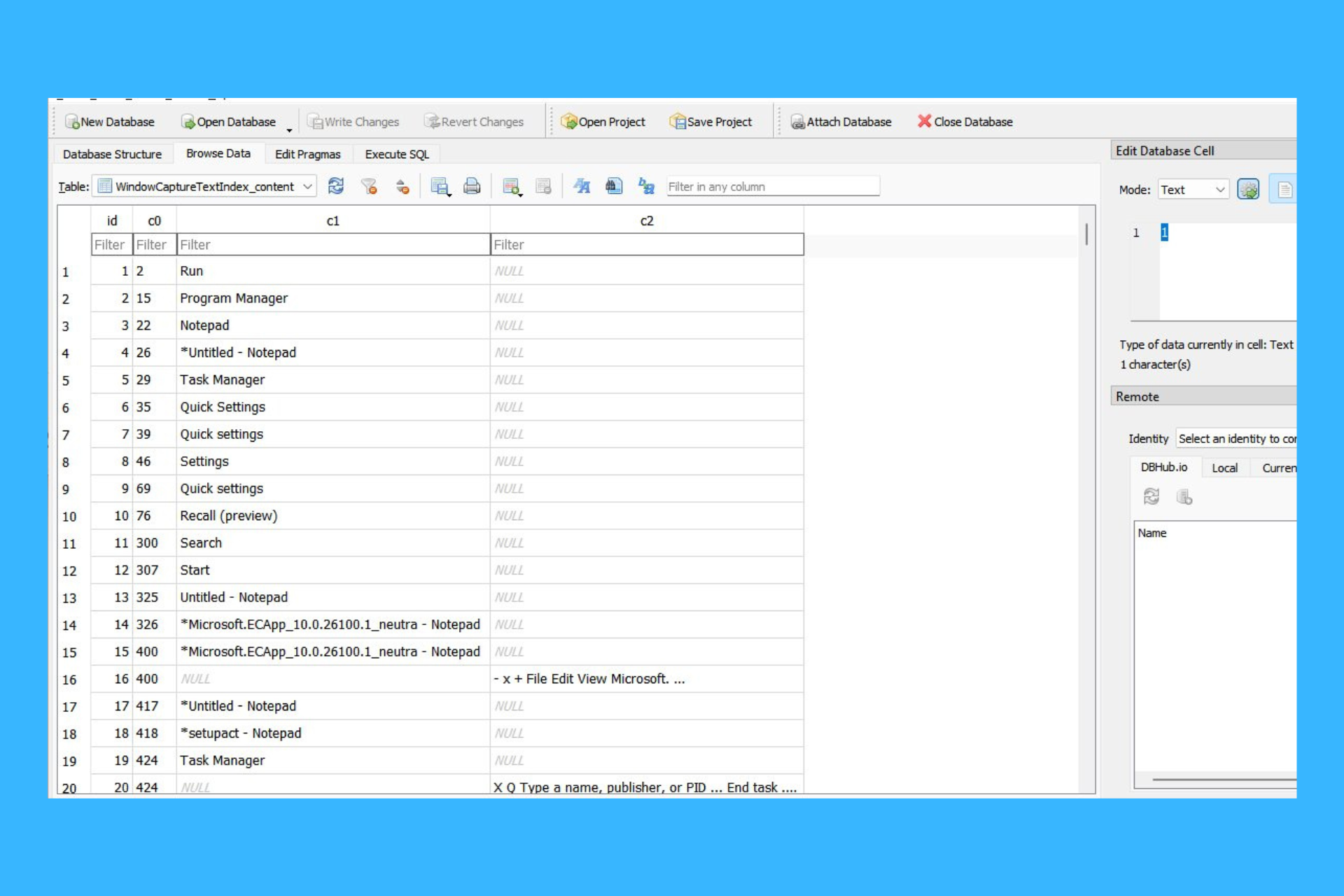
Reality: how do you think hackers will exfiltrate this plain text database of everything the user has ever viewed on their PC? Very easily, I have it automated.
Allegedly, the date is stored on a flimsy plain text database that can be grabbed with an automated tool as simple as picking apples from a tree.
The caption posted by Beaumont, we can see that he was able to access all PC actions and app usage with some detail on the side, to make everything even more spicy. The coder explains this simple hack in a later post:
It’s just an SQLite database, feature ships in a few weeks – I’ve already modded it into an Infostealer hosted on Microsoft’s Github (a few lines of code).
And this is not all! He states that even the WhatsApp, Signal and Teams messages are recorded by Windows Recall:
I’ve tested this with messaging apps like WhatsApp, Signal and Teams. Somebody message you with disappearing messages? They’re recorded anyway. Write a disappearing message? It’s recorded. Delete a message? It’s recorded.
Beaumont also described the whole process on a Mastodon thread, where Albacore confirmed this hack.
Long story short, someone would still hack into your machine or your network and if your PC has shared resources, all your history with actions and messages are up for grabs. So, no additional security protection? No kind of encryption? Well, until Microsoft makes things a lot more clear in this department, here’s our guide on how to disable Windows 11 Recall.
Will you keep the Windows Recall feature enabled? Write your thoughts in the comments section below.
Recently Microsoft has announced new Surface laptops that use an ARM platform and a dedicated AI chip.
As we await these devices to ship, many are wondering what’s the best store to buy the new Surface device from.
Get the new Surface laptop in a bundle to save money
As Windows Central writes, the new Surface device will have the same price at all stores, so if you want to get the most bang for your buck, you should look at bundles.
So where should you get this device from? BestBuy allows you to get Surface Pro 11th Edition in a bundle along with Insignia 50-inch Class F30 Series 4K UHD TV if you’re a Best Buy Plus member.
Since the Best Buy Membership is affordable, you can even sign up for it today and use it to get this bundle.
Microsoft has rolled out Edge version 127.0.2610.3 in the Dev Channel for users to test out the new features and patches. The Dev Channel, updated weekly, is relatively more stable than Edge Canary.
This time around, it’s evident that Microsoft is focused on patching bugs triggering crashes on the browser and fixing other minor issues. Although, Microsoft has introduced a user-oriented change in the browser’s Settings.
Here are all the changes in Microsoft Edge version 127.0.2610.3, according to the release notes:
Added Features: 1. Implemented a feature to include an icon accompanied by a tooltip to clarify why certain settings are inaccessible.
Improved Reliability: 1. Fixed a browser crash on android. 2. Resolved an issue when clicking the ‘Organize tabs’ button under tabs action menu caused browser to crash. 3. Fixed an issue causing the browser to crash upon clicking the ‘Switch’ button while awaiting the URL to load. 4. Resolved a bug that led to the browser crashing when closed while captions were running. 5. Resolved a bug that led to the browser crashing when duplicating the last tab in the tab strip through the tab group menu.
Changed Behavior: 1. Resolved a problem where the tooltip for the tab group header was appearing over the hover menu. 2. Resolved an issue that caused the extension’s updated details to display incorrectly on the detail page. 3. Resolved an issue when dragging a tab group containing the active tab and dropping it onto another group resulted in multiple tabs being added to the group. 4. Fixed an issue that resulted in insufficient spacing between tabs and other buttons. 5. Fixed an issue where the mouse gesture would close the entire tab instead of just the split-screen tab. 6. Fixed an issue where the New Tab Button at the bottom of the vertical tabs view was not aligned correctly with the other items.
Android: 1. Resolved a problem that caused the toolbar to vanish when altering the display mode on android. 2. Fixed an issue where selecting ‘Delete browsing data’ would navigate back to the previous page.
Mac: 1. Resolved an issue that resulted in the ‘alt’ attribute being incorrectly shown on macOS.
iOS: 1. Fixed an issue that caused a disruption in the full-page user interface, where a gap appeared between the QR code and chat content on iOS.
After installing this update, you might face issues using the taskbar. You might notice the taskbar temporarily glitching, not responding, disappearing, and reappearing automatically. Additionally, this issue might be reflected in the Event Viewer with Application Error ‘Event ID 1000’ under Windows Logs, listing ‘Explorer.EXE’ as the ‘Faulting application name’ and ‘Taskbar.View.dll’ as the ‘Faulting module name’.
Personally, I didn’t face any taskbar issues after installing the optional, non-security KB5037853 update for Windows 11. But many others I know have. Besides, the quick acknowledgement from Microsoft’s end, most likely, points to the fact that the issue is widespread!
Available solutions for taskbar issues after installing KB5037853
Tip
The Local Group Policy Editor (gpedit.msc) is not available by default on the Windows 11 Home edition. If you are using it, manually install gpedit.msc.
Deploy the KIR (Known Issue Rollback): Download the Microsoft-provided KIR > install it > open the Local Group Policy Editor (gpedit.msc) > go to Local Computer Policy/ Computer Configuration/ Administrative Templates/ KB5037853 240505_142035 Known Issue Rollback/ Windows 11 Version 22H2 > double-click the policy > select Disabled > click on Apply and OK to save the changes > restart the PC.
Uninstall the KB5037853 update: Press Windows + I to open Settings > go to Windows Update > select Update history > scroll down and choose Uninstall updates > click on Uninstall next to KB5037853 > confirm the change > restart the PC.
Deploying the Windows 11 KB5037853 KIR
If the taskbar issues in the Windows 11 KB5037853 update are not that troubling, perhaps wait for Microsoft to automatically deploy a patch. It should do so soon, within 24-48 hours, given that a KIR has already been released.
When Microsoft released the Windows 11 KB5037853 update, it was touted as one of the most feature-rich updates in recent times. Aspects like drag and drop in the File Explorer’s address bar, improvements to Windows Share, and the ability to generate QR codes were my personal favourites.
However, the bug causing taskbar issues in Windows 11 KB5037853 will certainly dampen the excitement for the affected user base. We can only hope such issues don’t arise in the future, although given Microsoft’s track record with Windows 11 updates, the chances are bleak!
Did the solutions fix taskbar issues caused by KB5037853 in Windows 11 on your PC? Share with us in the comments section.
Yes, you’ve read correctly! This 14-inch HP ZBook Firefly powerhouse laptop that was $3,271 is now only $1,109, thanks to this huge 66% discount from the company. Recently, we also wrote about another HP Pavilion Laptop 15 offer, but this offer is simply insane for such a top-quality laptop.
Left side: Smart Card reader, 1 HDMI 2.0b, 2 Thunderbolt 4 with USB Type-C 40Gbps signaling rate (USB Power Delivery, DisplayPort 1.4, HP Sleep and Charge) Right side : 1 headphone/microphone combo, 1 SuperSpeed USB Type-A 5Gbps signaling rate
Webcam
5MP HD IR camera
Wireless connections
Intel Wi-Fi 6E AX211 (2×2) and Bluetooth 5.3 wireless card (supporting gigabit data rate)
Battery
HP Long Life 3-cell, 51 Wh Li-ion
First of all, if you look at the tech specs above, you will notice that this laptop has an up to date configuration, featuring the 13th generation Intel Core i5 SoC helped by 32 GB of DDR5 RAM which makes it pretty powerful for any productivity applications.
Another top feature are the 14-inch touchscreen with 1920 x 1200 pixels resolution and the 5 megapixels integrated webcam that will perform greatly on any videocall. Then, there are the Wi-Fi 6E and Bluetooth 5.3 wireless connectivity that are on par with today’s standards. Even the 51 Wh battery looks like it could take a full day’s work until you need to plug its charger to the outlet.
The only slight downside would be the storage. The SSD’s 512 GB capacity could use a boost from an external drive.
Now, it’s up to you if you’ll hit the buy button or not, but you’ll have to take a quick decision because this HP ZBook Firefly is a bargain right now. If you’re looking for a gaming desktop instead, take a look at this fresh offer for the HP OMEN 40L RTX 4060 PC.
Do you already own this mobile workstation? Tell us all about your experience in the comments below.
Mistral AI, the French company, developed Codestral, its first coding large language model (LLM). The AI is fluent in over 80 programming languages, including Python, C, C++, Java, and JavaScript. Despite being a French model, Codestral masters English. So, if you are a developer, you can use it without any limitations to create AI applications.
How is Codestral different than other coding LLMs?
Codestral is a 22B model, and it is accessible through an API endpoint. Developers can use this LLM to write and interact with code. Besides, it can generate code from scratch, complete coding functions, write tests, and use its fill-in-the-middle feature to deal with partial codes.
In addition, developers will get code suggestions based on their queries, and its variety of programming languages will also help them code in different environments. Besides, the LLM from Mistral AI reduces the chances of encountering bugs and errors.
According to benchmarks, Codestral is better than the previous coding LLMs, such as CodeLlama 70B, Llama 3 79B, and DeepSeek Coder 33B. The coding LLM sets new standards in the performance/latency space. Compared to the others, it performed better in most Python benchmarks. However, DeepSeek Coder 33B scored better than Codestral in MBPP, and Llama 3 70B outperformed the new LLM by 3.6% in the Spider benchmark for SQL.
Codestral also fell slightly behind Llama 3 70B in the HumanEval benchmark for C+, C#, and Typescript. However, Codestral performed better than the other LLMs in Bash, Java, and PHP. On top of that, its average score in HumanEval was 0.3% better than Llama’s, which had 61.2%.
The coding LLM from Mistral AI works with some tools for developer productivity and AI application-making. For example, Llama Index and LangChain integrated the model to help you build agentic applications. In addition, Continue.dev and Tabrine let you use Codestral in VSCode and JetBrains environments to develop code.
How can you start using the Mistral AI coding LLM?
To start using Codestral for non-commercial research and test purposes, download it from HuggingFace. You can also find the coding LLM on two API endpoints: codestral.mistral.ai and api.mistral.ai.
The codestral.mistral.ai API endpoint is for users looking to use the Instruct or Fill-In-the-Middle routes inside their IDE. It also comes with an API key managed at a personal level. Yet, it will be free for eight weeks during the beta period. On top of that, MistralAI gated it behind a waitlist.
The api.mistral.ai. is a bit different because you need to buy tokens to use queries. Also, you don’t have to use an API key, and it is mostly for research, batch queries, or third-party application development. You can also use Codestral on LeChat, Mistral AI’s free conversational interface.
Ultimately, Codestral from Mistral AI has great potential to become one of the best coding LLMs on the market. However, the competition is fierce, especially since developers use ChatGPT and GitHub Copilot. Additionally, there are other small coding models available as well.
Will you try Codestral? Let us know in the comments.
If you’re wondering how to access Omegle with a VPN, you’re not alone. Accessing this social media platform can sometimes be a challenge due to regional restrictions or network blocks. Using a VPN (Virtual Private Network) can help you bypass these restrictions globally.
I’ll guide you through the steps below. Ready?
How To Access Omegle with a VPN
Follow the below steps to access Omegle with a VPN. I’ll use ExpressVPN for this example.
Choose a subscription plan that suits your needs and complete the sign-up process.
Download the ExpressVPN app for your device (available for Windows, macOS, Android, iOS, etc.). Ensure you pick an app that’s compatible.
Install the app following the on-screen instructions, launch it, and sign in using the credentials you created during the sign-up process.
Choose a server location from the list. For best results, select a server in a country where Omegle is accessible. Click the connect button to establish a VPN connection. I’ll pick a US server.
Once connected to the VPN, visit the Omegle website and start chatting without any restrictions.
That’s it! You can now enjoy Omegle.
Why Do You Need a VPN to Access Omegle?
You need a VPN to access Omegle because it can assign you an IP address where the platform is available. This will make Omegle think you’re in a country where its services are legal.
Additionally, a VPN enhances your privacy by encrypting your internet traffic. That makes it difficult for anyone to monitor your online activities. It’s useful for maintaining anonymity and protecting your personal information while using the social media platform.
However,not all VPNs can help you access Omegle. This platform has systems in place to detect a VPN connection that leads to a ban even if you connect to a country where the service is available. That’s why you’ll need a reliable VPN with obfuscation features like ExpressVPN.
So, now you know how to access Omegle with a VPN. You can have fun with the platform anywhere in the world without compromising your security.
HP is famous for its devices, and if you’re looking for a new gaming desktop, HP might have just what you need.
OMEN 40L Gaming Desktop GT21-1000m is currently at a discount, so let’s take a closer look at it, shall we?
OMEN 40L gaming PC brings solid performance at a discount
If you’re not familiar with this model, here’s a quick overview of its specs:
CPU:
AMD Ryzen 5 7600 up to 5.1 GHz, 32 MB L3 cache, 6 cores, 12 threads
GPU:
NVIDIA GeForce RTX 4060 8 GB GDDR6X
RAM:
Kingston FURY 8 GB DDR5-5200 MHz
Storage:
512 GB WD Black PCIe Gen4 TLC M.2 SSD
Connectivity:
1xUSB Type-C 10Gbps, 1xUSB Type-C 5Gbps, 2x USB Type-A 10Gbps, 2x USB Type-A 5Gbps, 2xUSB 2.0 Type-A, RJ-45, audio/microphone port, DisplayPort, Realtek RTL8852BE Wi-Fi 6 (2×2), Bluetooth 5.3
Overall HP OMEN 40L might not be the best gaming PC on the market, and its RAM and storage space leave a lot to be desired, but that can be expanded with ease.
Did you know Copilot can write emails in Outlook? You’ll have to enable the AI model in the platform first, but then Copilot can draft possible emails.
However, if you still like the human touch but lack inspiration for the perfect follow-up email, then we have good news.
According to the latest entry in the Microsoft 365 Roadmap, Outlook’s Copilot will soon be able to rewrite only parts of an email. You’ll have to highlight the part, and Copilot will do the rest.
You won’t have to worry about not getting your point across: you can give detailed suggestions to Copilot so that the AI tool can emulate your writing style to the best of its abilities. Microsoft teased this capability last November when the company released Copilot for Microsoft 365.
Copilot will take your Outlook email and re-write it to fit your tone and length criteria. Unfortunately, this enhancement will only be available to the new Outlook for Windows and the Web despite Copilot being available in classic Outlook.
Here’s what the entry says:
Similar to Microsoft Word, highlight and rewrite capabilities will allow users to select specific sentences in their email draft and have them rewritten by Copilot. Using highlight and rewrite when drafting with Copilot in Outlook, users will be able to give detailed instructions on how to rewrite and be able to modify tone and length. This feature will be available in the new Outlook for Windows and web. #newoutlookforwindows
Microsoft
This is not just a time saver but will also encourage more people to use Copilot in Outlook. The AI model, which will be updated to support GPT-4o, will also be quite effective. You won’t have to do much to make it understand what you’re trying to say, and it will also allow you to edit the email further.
How would you like a laptop with a 100-inch screen? No, we’re not talking about connecting your laptop to a video projector, or a physical screen. This story is about the new Spacetop G1, an AR laptop which might set a new hardware trend if it takes off.
Sightful, the start-up behind this new device demonstrated their Spacetop G1 AR laptop last year to a hand-picked tech experts crowd and now, the device is available for preorder.
What is all about the Spacetop G1 AR laptop?
As you probably figured out by now, Spacetop G1 is a laptop that replaces the physical display with AR glasses and a virtual screen of up to 100 inches. This way, the images won’t obstruct the reality around you, and you will have absolute privacy.
By ditching the display, the device becomes even more slim and portable, having just 3.08 pounds. Otherwise, its built like a regular laptop, with a 79-key keyboard and a multi-gesture trackpad, a Snapdragon QCS8550 SoC featuring an Adreno 740 GPU, Wi-Fi 7, Bluetooth 5.3, and 5G connectivity through a eSIM and Nano-SIM slot.
So, we can talk more about the screen, or more precisely the image you will see. The glasses show the image by using two Full HD (1.080p) OLED displays with 90 Hz refresh rate that will simulate a screen of up to 100 inches.
There are also some downsides to this system. For instance, it’s powered by the company’s SpaceOS, which, from what we can tell, it can run only web apps:
SpaceOS is built for the modern Web, so anything you do on the Web, you can now do – in space.
Another caveat is that the glasses are connected with the actual laptop with a cable. We get that it’s the best way to ensure seamless video and audio connections (for the microphone), but after a few hours of work, that cable will probably become a nuisance.
We don’t know yet if the experience is the same as the pretty images show it, but ultimately, that’s going to decide whether the Spacetop G1 AR laptop succeeds or not.
In the meantime, you can reserve your own AR laptop with a $100 refundable deposit for a $200 launch week discount on the original price tag of $1,900 on the company website.
What do you think about the new Spacetop G1 AR laptop? Let’s talk about this device in the comments below.
At this point, Microsoft Teams’ Copilot is definitely capable of many things, from summarizing to editing and composing messages and even acting as a co-worker with the help of the new Team Copilot capability.
However, Microsoft is also about to enhance it with time-traveling capabilities. Now, this might be a bit too much. We’re not talking literally about time traveling, but something more or less similar to it.
According to the latest entry in the Microsoft 365 Roadmap, Copilot will soon be able to answer your older requests. What does this mean? If you have asked a question in a Teams chat or channel left unanswered, you can now ask Copilot to answer it.
You can now ask Copilot in chat and channels to respond to questions regarding a conversation in a specific time period, for example: last month.
Microsoft
This is especially useful when tasks require reviewing information shared in the past in a certain Teams channel or chat. With Copilot in Microsoft Teams, you can have a valuable assistant who summarizes everything while considering multiple perspectives. So, it won’t only use files shared in a chat; it will consider the whole conversation around those files.
This means you can work on certain reports faster without manually looking for information shared in the past. So, no more endless scrolling and no more frustration.
Microsoft says the new enhancement is scheduled to be added in July 2024 on all versions of Microsoft Teams: from Android to Desktop devices, iOS, and Teams for Web.
Those who aren’t using Copilot in Microsoft Teams might change their minds, as this capability can be used to properly find information shared in chats and channel. Copilot can look it up and find it for you using natural language.
Quite an exciting enhancement, if you ask us, but what do you think about it?
The Realtek Audio Console program gives you the option to customize your audio inputs but when it fails to detect your Bluetooth headphones, you need to get to the root of the problem.
If your Bluetooth headphones are undetectable, they may have malfunctioned or you have not installed the right drivers. It could also be a case of interference from other devices or software conflict.
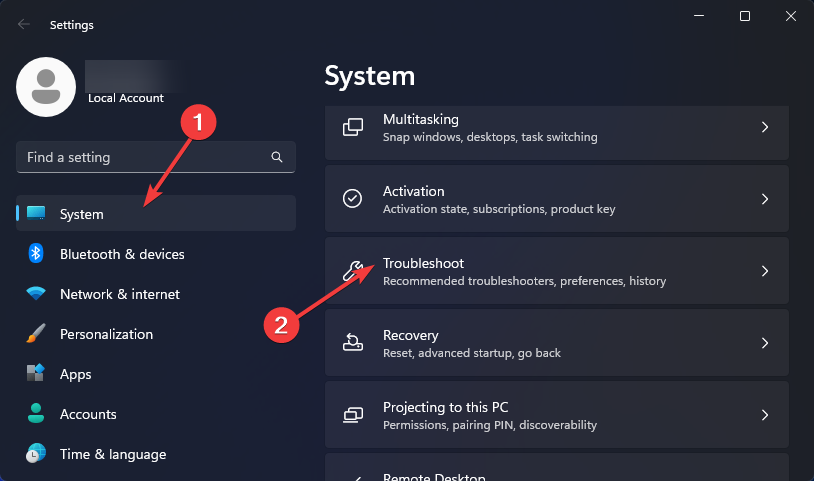
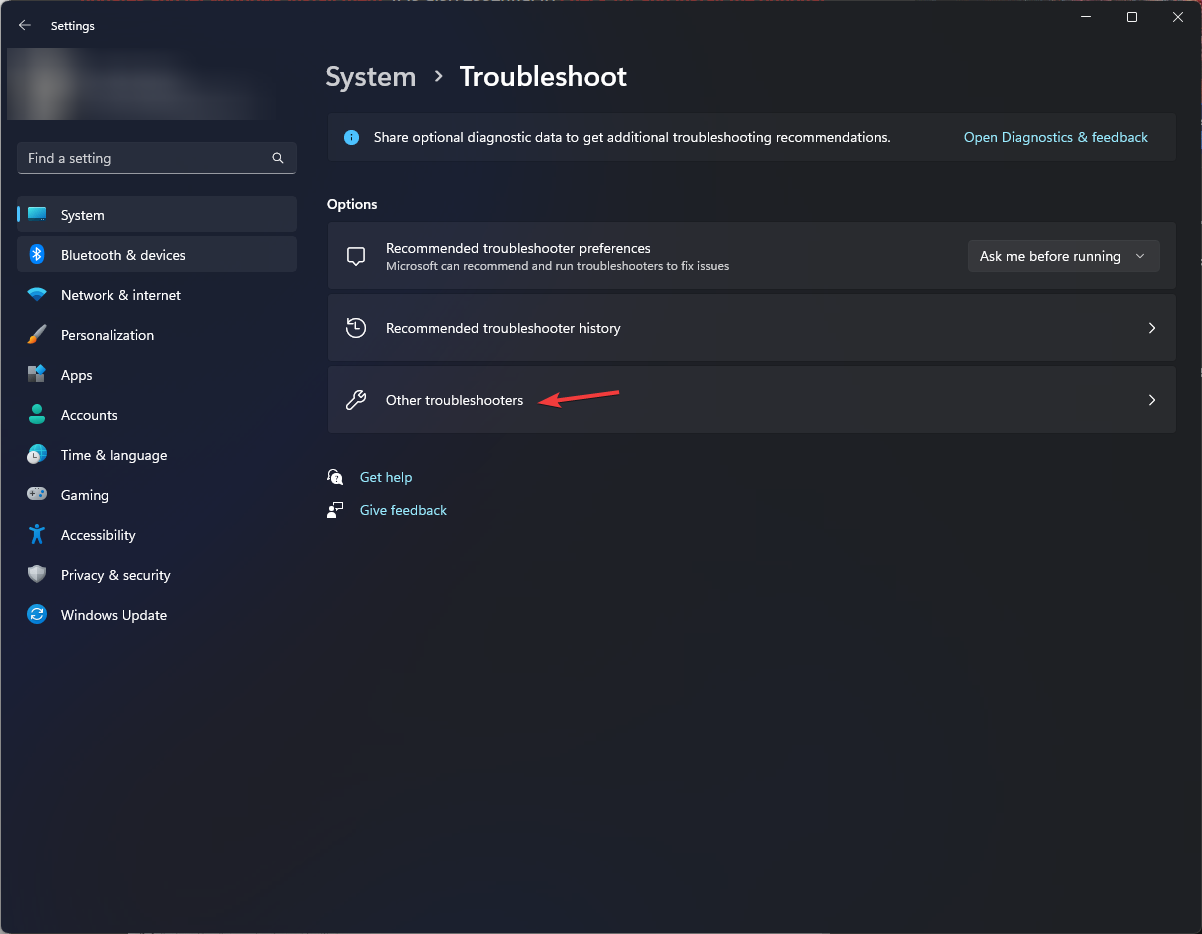
Click on System on the left pane then Troubleshoot on the right pane.
Select Other troubleshooters.
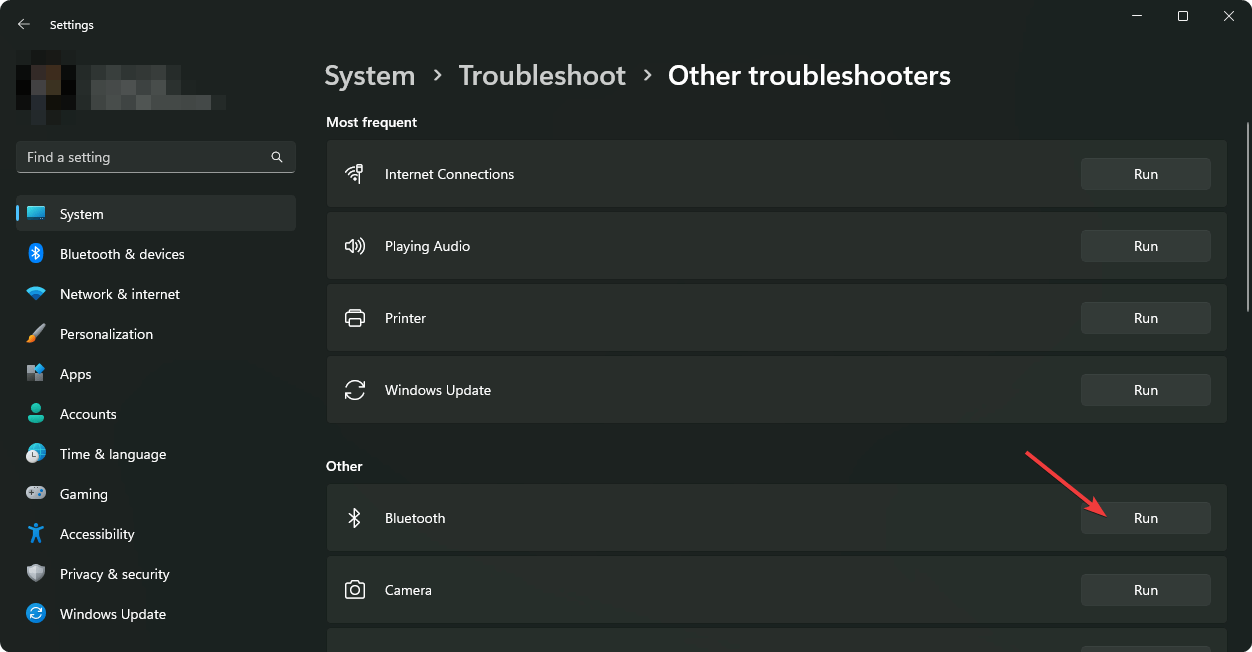
Locate the Bluetooth troubleshooter, and click on the Run button next to it.
1.2 Run the audio troubleshooter
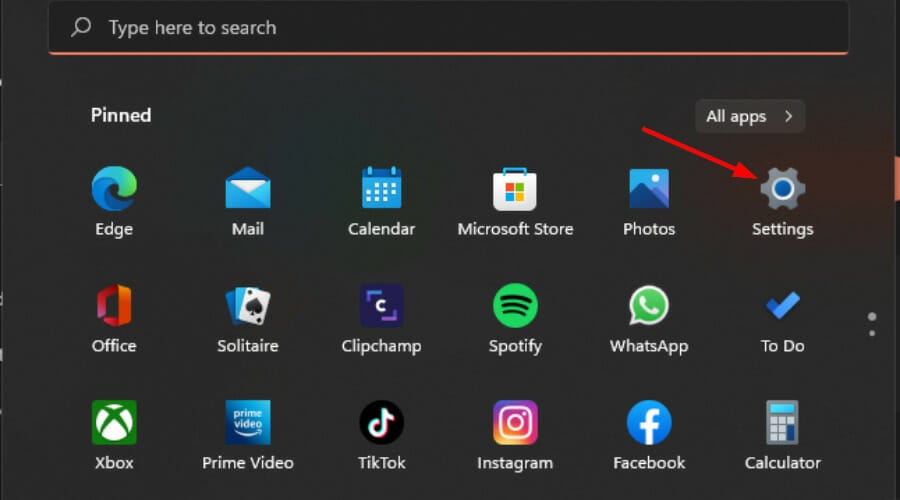
Press the Start Menu key and select Settings.
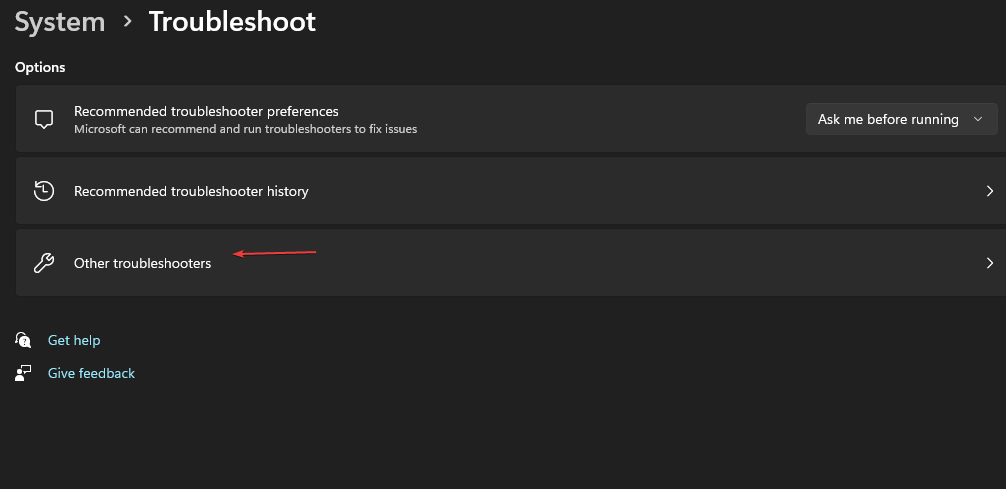
Click on System on the left pane, then Troubleshoot on the right pane.
Select Other troubleshooters.
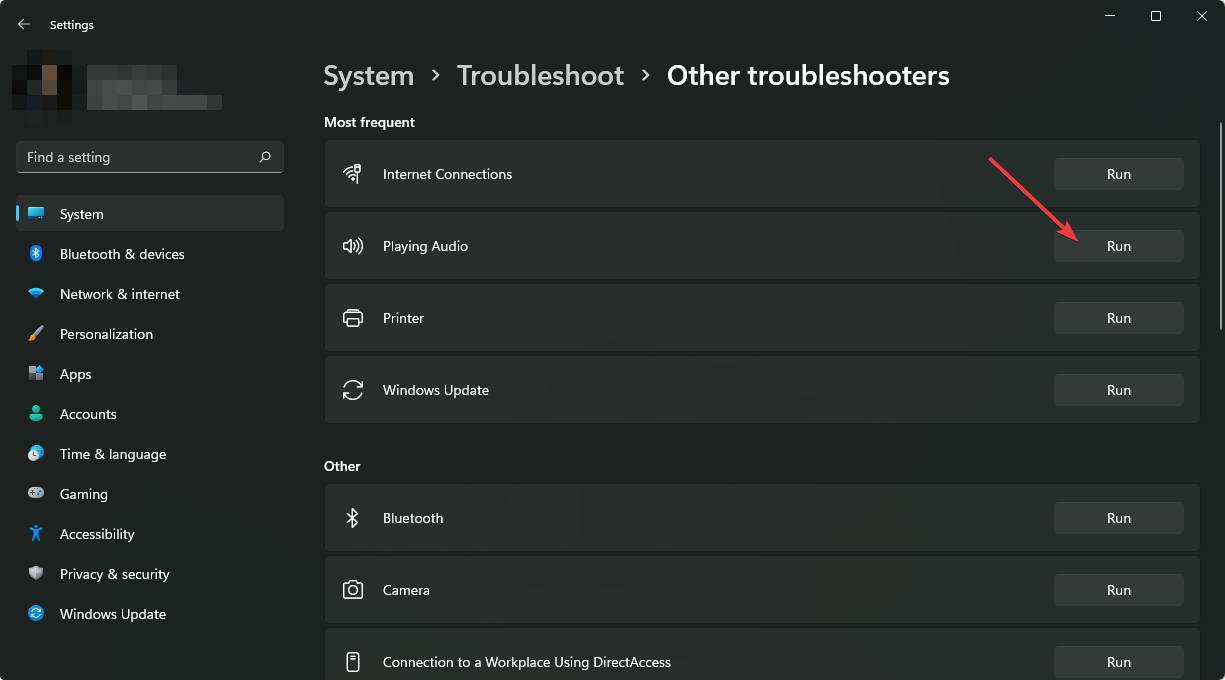
Locate the Playing Audio troubleshooter, and click on the Run button next to it.
1.3 Run the Hardware and Devices troubleshooter
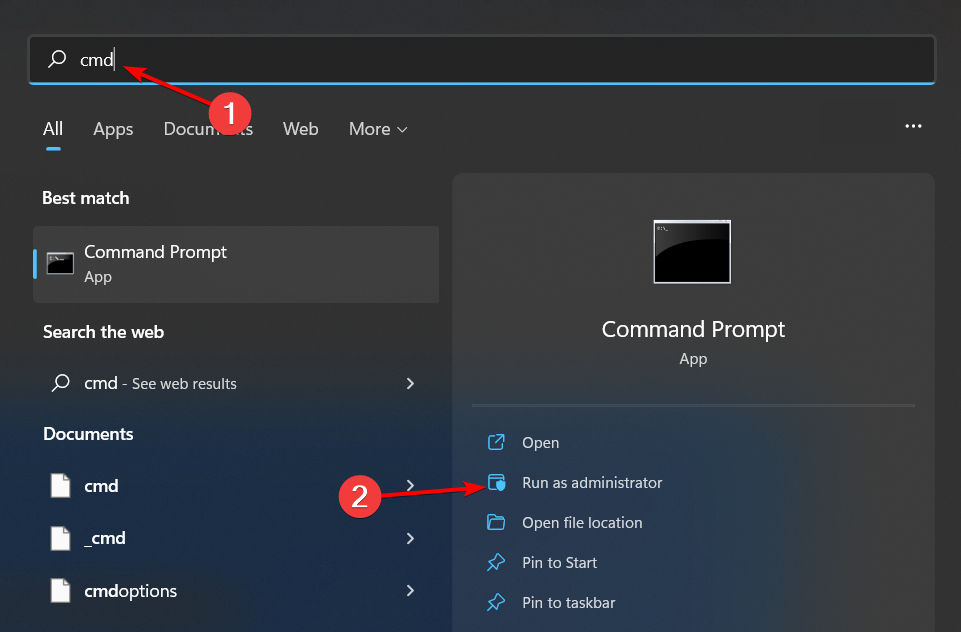
Hit the Windows key, type cmd, and select Run as administrator.
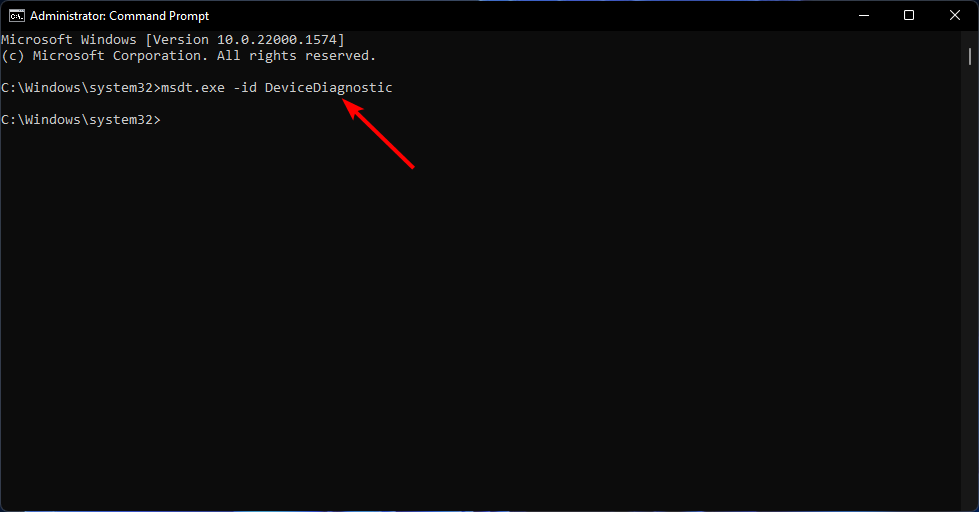
Type the following command and hit Enter: msdt.exe -id DeviceDiagnostic
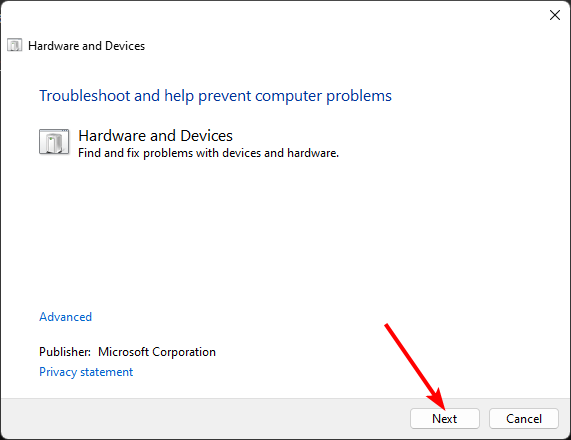
In the Hardware and Devices dialog that appears, click Next.
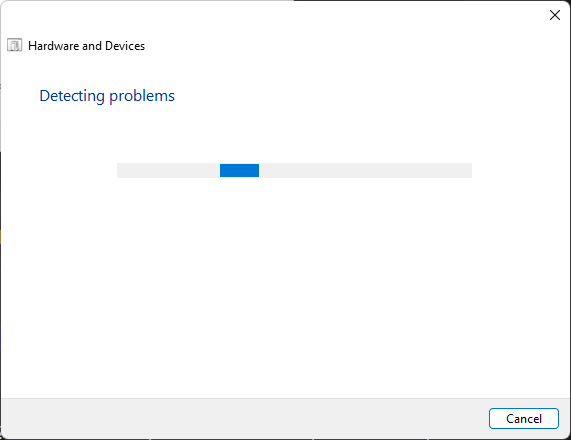
The tool will start scanning for any problems with your hardware and recommend a fix. After it is done, try again with Windows update and check if the error persists.
2. Restart the Bluetooth Service
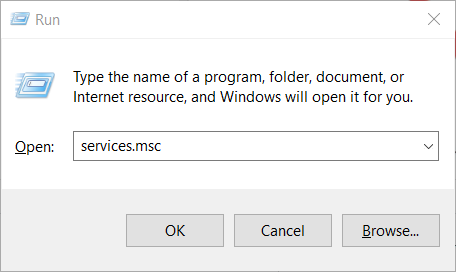
Press the Windows + R keys simultaneously to open the Run window.
Type services.msc in the Run dialog box.
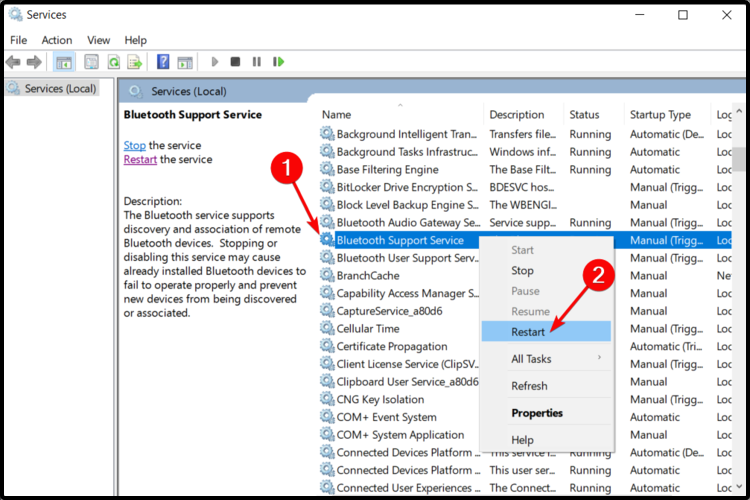
Find the Bluetooth Support Service, right-click, and select Restart.
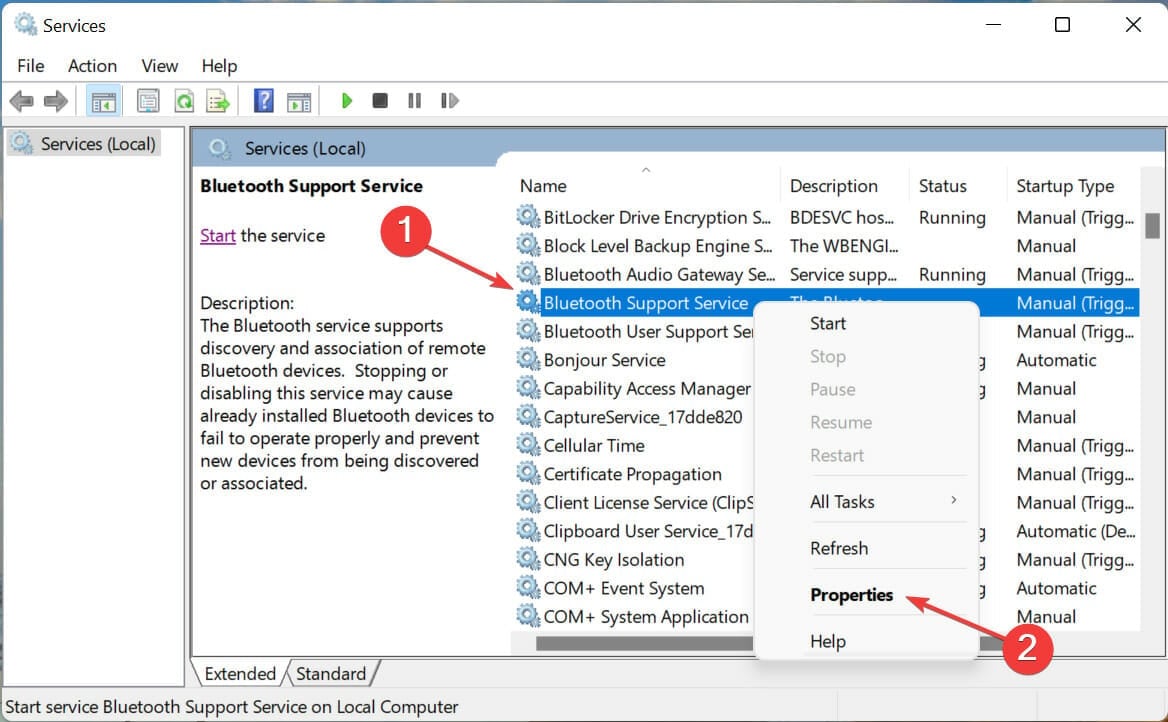
Right-click again and select Properties.
Under the General tab, select Automatic as the Startup type then click OK.
Try connecting again.
Restarting the Bluetooth service resets the connection. If there were any issues that may have misconfigured the settings, they’ll be resolved and possibly address why your Realtek Audio Console is not detecting your Bluetooth headphones.
3. Address driver issues
3.1 Update the Bluetooth driver
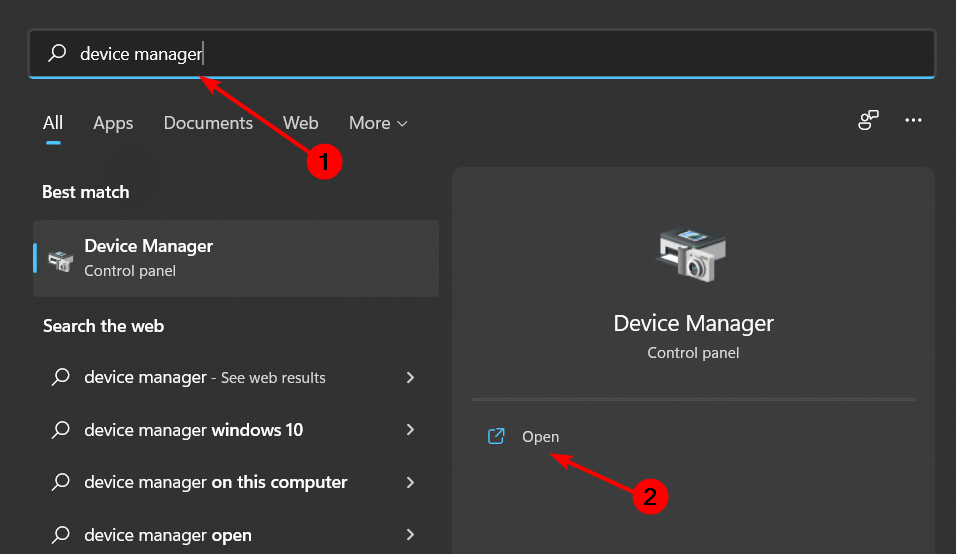
Hit the Windows key, type Device Manager in the search bar, and click Open.
Find your Bluetooth device, right-click and select Update.
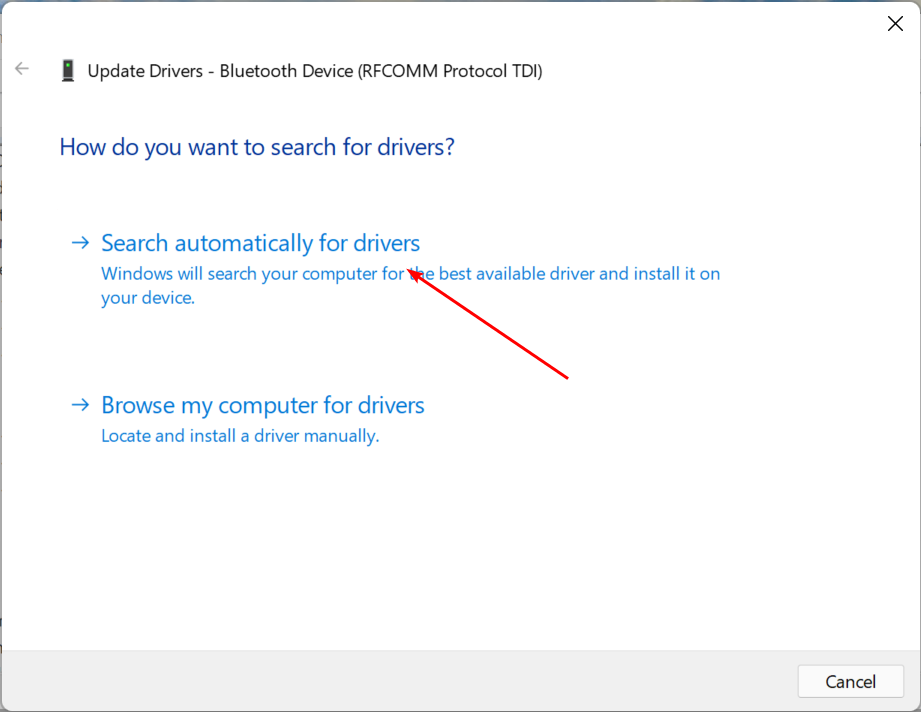
Select Search automatically for drivers.
Restart your PC and try reconnecting.
3.2 Reinstall the Bluetooth driver
Press the Windows key, type Device Manager in the search bar, and click Open.
Navigate to your Bluetooth device, right-click, and select Uninstall.
Check the Delete the driver software for this device box, and click Uninstall.
Restart your PC and the driver will automatically reinstall.
3.3 Rollback the Bluetooth driver
Press the Windows key, type Device Manager, and click Open.
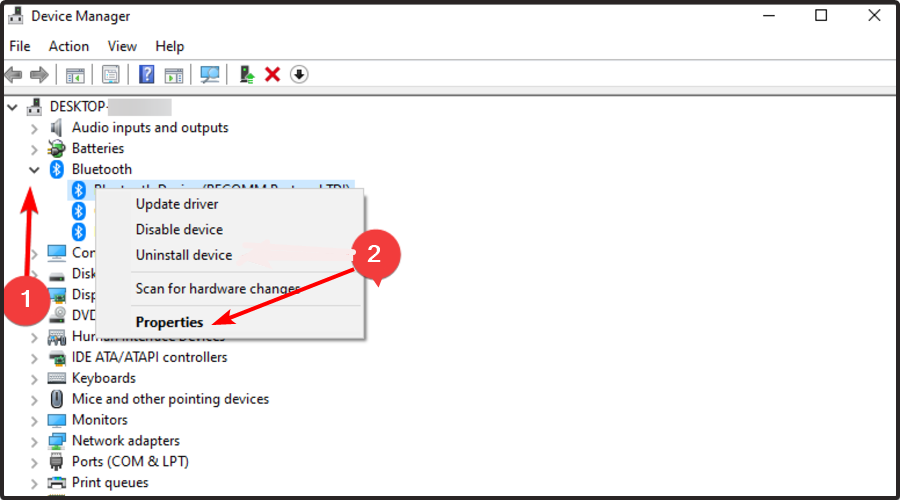
Right-click on your Bluetooth device and select Properties.
Click on the Driver tab, then click the Roll Back Driver button.
Select a reason for rolling back the driver.
Restart your PC.
If it’s a driver issue, using an older driver or updating to the latest one should fix any issues with Realtek Audio Console not detecting your Bluetooth headphones.
For a seamless connection, check for any firmware and driver updates. This will ensure your Bluetooth device pairs with no issues and is always discoverable.
Ensure your Bluetooth headphones are charged before pairing and utilize power-saving where necessary for battery longevity.
For sound stability, ensure your Bluetooth headphones are in close range and there are no interferences that could block the signal.
Once you’ve successfully resolved this issue, you can check out our recommended Realtek audio settings that promise to take your sound to the next level. Should you feel these settings are not up to par, you can try out other sound enhancers.
When it comes to wired vs wireless headphones, it all boils down to preferences. It doesn’t necessarily mean that your wired headphones will be automatically detected.
And it’s a wrap from us. Have you encountered this issue before? Do you have any other tips not mentioned here that you think could be helpful to our readers? If so, feel free to drop us a comment down below.
Firefox has always been the best alternative to Chromium browsers, with a dedicated fan base, and over the years, it has received various updates and features.
Speaking of which, Mozilla has recently released a list of improvements they are currently working on, so here’s what you can expect from Firefox.
Mozilla is currently working on tab and interface improvements
In a recent blog post, Mozilla revealed the features that they are currently working on. One of them is vertical tabs, and we already saw them in action in the Canary version of Firefox.
That’s not all, tab grouping and sidebar are also coming, allowing you to easily organize tabs. A new profile management system is also in the work so you can easily keep your personal, school, or work browsing separate.
Firefox prides itself on its privacy, and Mozilla is working on improved privacy settings that will be easier to configure and understand.
Other improvements include customizable wallpapers that will bring a wide array of images and colors. Menus will also be streamlined with less clutter allowing you to quickly and easily access the desired options.
In addition to new features, Mozilla is determined to optimize the performance by improving page load and startup time and it has reportedly improved the responsiveness of Firefox by 20% according to Speedometer 3.
The company is also ensuring that translation feature and PDF editing are taking place locally, so your privacy will never be compromised.
Lastly, Mozilla plans to bring AI features to the browser all while respecting your privacy at all times.
A recently published report sheds light on what caused over 600,000 ActionTec routers to stop functioning altogether, reports of which first emerged in October’23. The two router models primarily affected were ActionTec T3200 and ActionTec T3260!
According to the report by Lumen Technologies’s Black Lotus Labs, thousands of users, subscribed to a single ISP (Internet Service Provider), started facing issues with their ActionTec routers between October 25-27, 2023. They lost access to the Internet, and on checking, the router displayed a steady red light.
The company promptly replaced all the 600,000 affected routers, as the attack rendered them permanently inoperable.
During the investigation, this massive ActionTec router malfunction was attributed to an attack, codenamed The Pumpkin Eclipse, using Chalubo, a remote access trojan. According to the report,
This trojan, first identified in 2018, employed savvy tradecraft to obfuscate its activity; it removed all files from disk to run in-memory, assumed a random process name already present on the device, and encrypted all communications with the command and control (C2) server. Chalubo has payloads designed for all major SOHO/IoT kernels, pre-built functionality to perform DDoS attacks, and can execute any Lua script sent to the bot.
While the researchers haven’t yet been able to identify the vulnerability exploited by threat actors to gain access, they suggest it was either the weak credentials or an exposed administrative interface. According to the researchers,
When searching for exploits impacting these models in OpenCVE for ActionTec, none were listed for the two models in question, suggesting the threat actor likely either abused weak credentials or exploited an exposed administrative interface.
Researchers, on inspection, discovered that the attack was well-executed, leaving no traces of the Chalubo on the infected ActionTec devices.
However, one mistake by the threat actors helped researchers identify that the attack was linked to the Chalubo trojan. The report says,
The only mistake we observed on the threat actor’s part was in using the exact same encryption key and nonce that was previously documented in the 2018 report. Another oddity stood out during analysis as we identified a handful of commands related to DDoS functions, however, when we saw infected machines receive commands to launch DDoS attacks, they did not use the embedded binaries’ functionality.
Researchers at BlackLotusLabs highlight how the attack on ActionTec routers was unique for two reasons. First, it was the sheer scale that necessitated the replacement of over 600,000 routers, especially when the attack didn’t appear to have links with state-backed entities.
Second, the attack was limited to a specific ASN (Autonomous System Number) and single ISP, which usually isn’t the case.
Another concerning aspect of the recent Chalubo attack is that most of the affected users were located in rural parts, making the recovery phase a lot more challenging. Besides, the outage led to thousands losing access to the Internet, including emergency services and critical data.
At present, there is rather limited information about the Chalubo attack on ActionTec. We hope to get more insights in the coming days as further research is carried out around the attack.
The whole episode begs the question, are we doing enough to stop AI from falling into the hands of threat actors? Because it is, undoubtedly, the ultimate tool for cyberattacks!
What actions do you think will reduce the likelihood of similar attacks in the future? Share with our readers in the comments section.
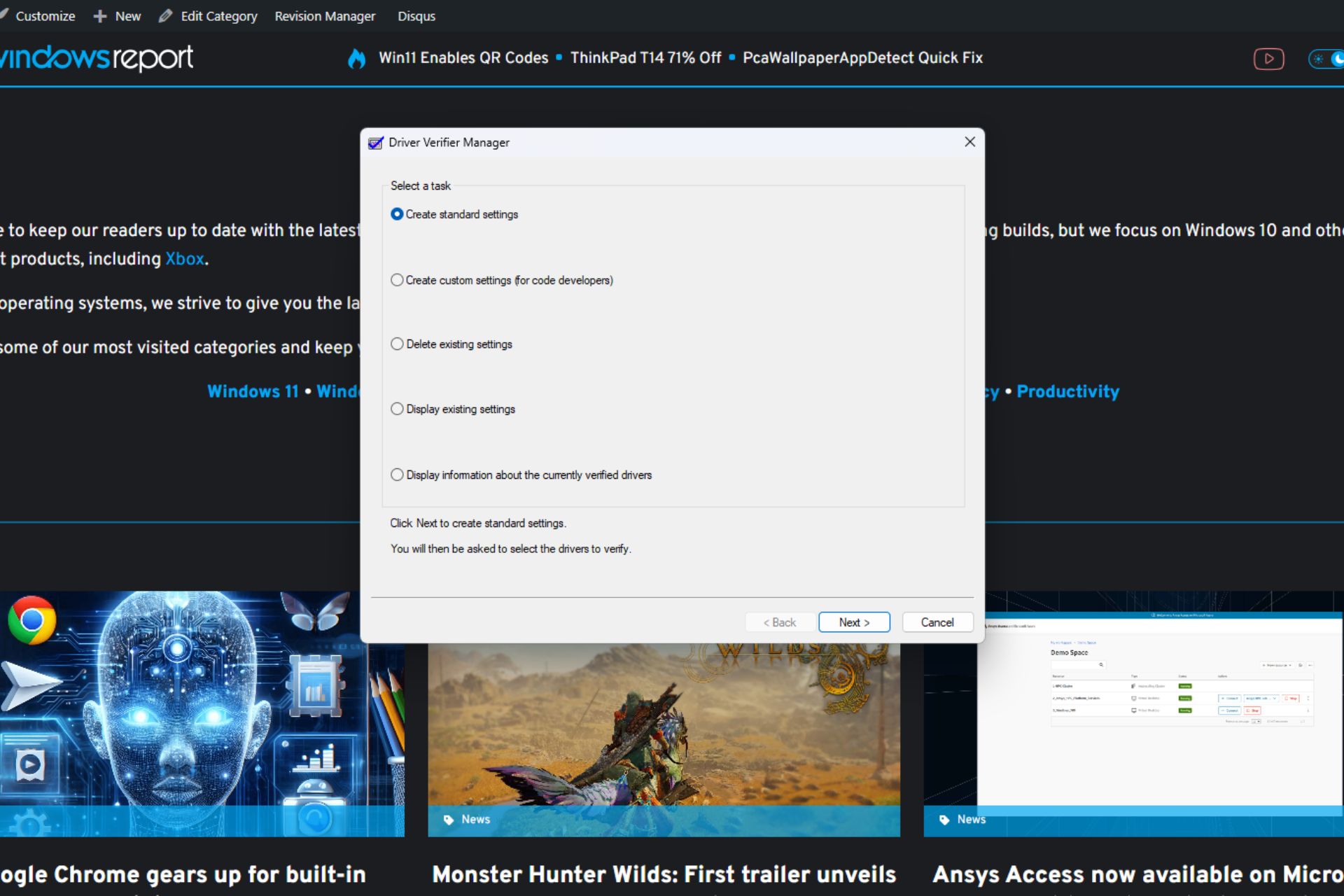
Windows will no longer have the Driver Verifier GUI, as the Redmond-based tech giant is set to deprecate it in the following months.
According to the official blog post, the capability, which can be used to find and fix various driver issues in the operating system, was added to the list of deprecated capabilities in Windows.
However, Microsoft has a solution: while you might no longer be able to use Driver Verifier GUI in Windows 10 and 11, the Redmond-based tech giant says you can use the Verifier Command Line instead.
The newer tool can be accessed just the same. Press the Windows Key + R to open the Run application. Once there, type in verifier.exe to open the Verifier Command Line.
On the other hand, you can still use the Driver Verifier GUI in Windows, as Microsoft hasn’t specified an exact date for the deprecation. Instead of the verifier.exe, type in verifiergui.exe, and it will open up just the same.
Driver Verifier GUI, verifiergui.exe, is deprecated and will be removed in a future version of Windows. You can use the Verifier Command Line (verifier.exe) instead of the Driver Verifier GUI.
Microsoft
The Redmond-based tech giant hasn’t specified any reasons for the deprecation, but given that the Verifier Command Line already exists and does the same job, it would have been a waste of resources to keep both up and running.
As driver issues in Windows are pretty common, there are also dozens of ways to deal with them, so the Redmond-based tech giant deprecating this particular tool shouldn’t be a problem. However, for those Windows users already used to how the Driver Verifier GUI works, this is indeed sad news.
For now, though, the best you can do is to take advantage of the tool while it still exists and maybe try the other tool.
At Google I/O 2024, Google announced plans to integrate its lightweight AI model, Gemini Nano, into the Chrome browser for desktops. This integration aims to enable on-device AI functionalities within Chrome, potentially offering several benefits.
Google Starts early testing
Google has already begun work on integrating Gemini Nano. One aspect of this is the “Prompt API for Gemini Nano” being explored in Chrome Canary. This flag is currently intended for developers and focuses on exploring potential use cases, not a finished feature for all users.
As mentioned above, Chrome on desktops and laptops will gain access to Gemini Nano in addition to the existing website functionality. Google has already started testing the Prompt API for Gemini Nano.
Benefits of On-Device AI
Faster Performance: Processing tasks locally with Gemini Nano can potentially lead to faster response times and a smoother user experience, especially for users with limited internet bandwidth.
Offline Functionality: Certain AI-powered features might become accessible even when you’re offline, which is beneficial for situations without internet access.
Privacy Advantages: Data processing happening entirely on your device could offer some privacy benefits compared to cloud-based models.
What to Expect from Gemini Nano in Chrome
While specific details haven’t been released, Chrome developers have mentioned potential use cases for Gemini Nano:
Summarization: Make long web pages shorter and easier to understand
Rephrasing: Help you rewrite sentences or paragraphs to make them clearer.
Classification: Organizing information based on relevant categories.
Limitations of the Prompt API
Google has revealed that the Gemini Nano Prompt API is not suitable for use cases that require factual accuracy, such as answering knowledge questions.
The Prompt API for the Gemini Nano flag provides the following details
Enables the exploratory Prompt API, allowing you to send natural language instructions to a built-in large language model (Gemini Nano in Chrome). Exploratory APIs are designed for local prototyping to help discover potential use cases, and may never launch. These explorations will inform the built-in AI roadmap [1].
This API is primarily intended for natural language processing tasks such as summarizing, classifying, or rephrasing text. It is NOT suitable for use cases that require factual accuracy (e.g. answering knowledge questions). You must comply with our Prohibited Use Policy [2] which provides additional details about appropriate use of Generative AI. – Mac, Windows, Linux, ChromeOS, Android, Lacros
In the future, we can expect to learn more details about how Gemini Nano works in Chrome and how users will interact with it.
Summary: Chrome might be getting a built-in AI assistant! A new flag hints at Google’s plans to integrate Gemini Nano for summarizing webpages, rephrasing text, and more – all within the browser.
The Monster Hunter series has been present for two decades, and over the years we have seen many great sequels.
If you’re a fan of the series, you’ll be pleased to hear that we finally get to have the first look at Monster Hunter Wilds.
Monster Hunter Wilds first trailer revealed
As Windows Central writes, the new Monster Hunter game was showcased during the PlayStation State of Play event.
The trailer for the games was released, and we finally had the chance to look at the game worlds as well as the creatures that inhabit it.
Not much information is available about the game, but we do know that you’ll be able to get bonuses if you still have saved data from Monster World Hunter or the Iceborne expansion.
Owners of Monster Hunter Wilds will get Felyne Leather armor and Felyne Acorn Spade weapon, while Iceborne owners will get Felyne Duffel armor set and Felyne Trekker Pickaxe weapon.
The game is set to release in 2025, and it will be available on Xbox Series X|S, PlayStation 5, and PC. In other news, the Dragon Age: Dreadwolf release window was revealed, and the game will come sooner than expected.
Whenever you log in or attempt to play any game, there’s a chance you may not be able to get in and error code cr901001 in Dragon Ball is one of them.
Error code cr901001 is a communication error that implies a server overload. It has nothing to do with your account so if you’re unable to log in, don’t fret. If you’re able to log in, your gameplay experience will be significantly downgraded as some online features may be unavailable.
How do I fix error code cr901001 in Dragon Ball Legends?
The error code cr901001 is proof that you cannot rely on online games. For instance, Dragon Ball Xenoverse issues range from bugs to screen flickering. While these games are great for online matches and interacting with other gamers, they can be unreliable at times.
Have you experienced this error code before? What troubleshooting steps did you take that you think we should know about? Let us know in the comment section below.
On May 29, 2024, Ansys announced the launch of Ansys Access on Microsoft Azure to facilitate seamless deployment in the Azure infrastructure. Starting May 30, Ansys Access will be available on the Microsoft Azure Marketplace.
With the collaboration in place, you can easily deploy pre-configured Ansys applications, developed for HPC (High Performance Computing) and VMs, on the Azure cloud.
Ansys, in its 50 years of existence, has aided clients by offering the power of simulation. Now, with the launch on Microsoft Azure, enterprises switching to cloud-based solutions can benefit from all the pre-tested applications Ansys Access has in store.
Speaking about launching Ansys Access on the Azure Marketplace, Shane Emswiler, Senior Vice President of Products at Ansys, said,
As computer-aided engineering moves farther into cloud computing, it is crucial that Ansys customers have the right tools to not only keep pace with this transition, but to thrive in this new era. With Ansys Access on Microsoft Azure, IT managers can use existing or new services and licenses in one place, keeping deployment costs low. This reduction in administrative and financial obligations opens the door for increased productivity and ultimately, more innovation.
Highlighting the benefits of the collaboration, Dominik Wee, Corporate Vice PresidentofManufacturing and Mobility at Microsoft, said,
This collaboration not only simplifies implementation for IT departments but also empowers engineers to unlock the advantages of high-performance Microsoft Azure virtual machines, enhancing engineering and IT workflows. As cloud computing gains traction across industries, Ansys Access on Azure makes it easier for organizations to scale simulations and accelerate product innovation.
You can read more about the collaboration in the official press release published by Ansys.
Microsoft released a new Canary build for Windows Insiders, including features like support for Emoji 15.1 and Suggested replies in Phone links for Android.
Most of the features and changes are mentioned in the changelog, however, some things were left to be discovered by enthusiasts. This time, the change was in mouse options in the Settings app.
Remember the mouse pointer precision enhancement and scroll direction settings in the Control Panel? They were lost somewhere between the transition from the Control Panel to Settings, but not anymore.
PhantomOfEarth noticed that if you enable a feature ID, you get these two options in the Settings app:
Enhance Pointer Precision toggle button – Adjusts mouse movement to be more precise
Scroll direction dropdown -Inverts the scrolling behavior of their mouse wheel.
Now, you can dynamically alter cursor speed based on how quickly the mouse is moved using the Enhance Pointer Precision toggle and change the scroll direction when using a touchpad instead of a mouse.
In his X (formerly known as Twitter), PhantomOfEarth wrote:
A toggle for “Enhance pointer precision” (an option currently only in the old mouse properties dialog) and a setting for mouse scrolling direction are being added to the Settings app. (disabled by default, build 26227.) vivetool /enable /id:50012660
As it is not mentioned in the release notes, you can use the ViVeTool app to enable it once you update your computer to build 26227.
First, download ViveTool from GitHub and extract the files. Now press Windows + X and select Terminal (Admin). Once the Terminal window is up, press Ctrl + Shift + 2 to open Command Prompt.
Go to the extracted files folder using the cd command, cd path to enter the directory. Next, type vivetool /enable /id:50012660 and press Enter. Once done, restart your computer.
Now, log in to your computer, press Windows + I to open the Settings app, go to Bluetooth & devices, then select Mouse. On the Mouse settings page, you will see both options.
If you want to get access to all new features before general availability, you can join the Windows Insider Program.
Have you ever used Enhance Pointer Precision and Scroll direction features? If so, share your experiences with our readers in the comments section below.
Microsoft releases Windows 11 Insider Preview Build 26227 to the Canary Channel. With this update, the Copilot app will now be pinned to the Taskbar on Windows. It also adds support for Emoji 15.1 and a new Linked devices page under the Settings app.
As part of this update, we’re also evolving the Copilot* experience on Windows as an app that will be pinned to the taskbar. This enables users to get the benefits of a traditional app experience, including the ability to resize, move, and snap the window – feedback we’ve heard from users throughout the preview of Copilot in Windows. This model also allows Microsoft to more agilely develop and optimize the experience based on user feedback.
As part of the evolution of the Copilot experience on Windows to become an app that is pinned to the taskbar, we are retiring the WIN + C keyboard shortcut. For new devices that ship with a Copilot key, this key will open Copilot. For existing devices without that key, using the WIN + (number position for Copilot pinned to your taskbar) is a great way to open Copilot.
[Emoji]
We’re adding support for Emoji 15.1 which introduces a small number of brand-new emoji such as head shaking horizontally and vertically, phoenix, lime, brown mushroom and broken chain. Other changes for Emoji 15.1 include Unicode’s decision to revert family combinations to symbol-like shapes. Windows has chosen to stay with our existing style that use people in family combinations. We are also supporting the new directionality updates for person/man/woman walking, kneeling, with cane, running, manual wheelchair and motorized wheelchair. You can now select right facing or the original left facing orientation for these emoji.
[Settings]
We are beginning to roll out a new Linked devices page under Settings > Accounts that allows you to manage PCs and Xbox consoles that you are signed in to with your Microsoft account. This settings page will only show on the Home and Pro editions of Windows 11 and if you’re signed into Windows with your Microsoft account.
Along with these changes, the Redmond tech giant also announced the addition of a new feature, Suggested Replies to the Phone Link for Android users
It is powered by a cloud-based intelligent suggestion model, which can make your messaging experience better and more efficient.
Now, whenever you receive a message, you will get 3 contextually relevant reply bubbles to choose from, and you can click on any of them to send it as a reply.
The feature is enabled by default and will begin to roll out for Windows Insiders of all channels. However, to use it, you need Phone Link version 1.24051.98 and higher.
Microsoft also introduced fixes for the known issues, here is the list:
[General]
Fixed an issue believed to be the underlying cause of some Insiders noticing stutters in some animations recently (dropping frames), particularly with Task View.
Fixed an underlying issue which could lead to some apps not starting on startup even though they were enabled as startup apps in Settings. It would show as Suspended in Task Manager, but not appear in the taskbar.
Fixed an underlying issue which could lead to the pop up asking for permission to use location not appearing, which could lead to app issues without location access.
[Windowing]
Fixed an issue related to showing tabs in Alt + Tab, which could lead to frequent explorer.exe crashes if you had a very large number of tabs.
[Widgets]
Fixed the issue causing the WIN + W keyboard shortcut to not work correctly and open the Widgets board.
[Other]
Fixed explorer.exe crashes impacting live captions and voice access.
So far, there are no known issues with Windows 11 Insider Canary Build 26227. However, there are reports that many Windows Insiders are stuck with Build 26040 or Build 23620 in the Canary and Dev channels and Microsoft is working on them.
However, if you are affected by the issue, you can download the latest ISO, perform a clean installation, and set your device to flighting in the Canary or Dev channel.
Also, if you encounter any other issues related to the new build, you can send feedback via Feedback Hub (WIN + F).
Have you installed the Windows 11 Insider Preview Build 26227? If so, share your experience with our readers in the comments section below.
Microsoft released new build of the next Windows Server Long-Term Servicing Channel (LTSC) Preview build 26227 for Windows Insiders.
The new build 26227 comes with Desktop experience and server code installaiton options for Datacenter and Annual Channel for Container Host and Azure Edition (for VM evaluation only).
A new account type known as delegated Managed Service Account (dMSA) is now available that allows migration from a traditional service account to a machine account with managed and fully randomized keys, while disabling original service account passwords. Authentication for dMSA is linked to the device identity, which means that only specified machine identities mapped in AD can access the account. Using dMSA helps to prevent harvesting credentials using a compromised account (kerberoasting), which is a common issue with traditional service accounts.
More Server Message Block (SMB) protocol changes.
Starting with Build 26097 and higher, we are introducing the following Server Message Block (SMB) protocol changes for QUIC, signing, and encryption:
SMB over QUIC client and server disable: Administrators can now disable the SMB over QUIC client and SMB over QUIC server options with Group Policy and PowerShell.
SMB over QUIC client and server connection auditing: Successful SMB over QUIC client and SMB over QUIC server connection events are now written to the event log to include the QUIC transport.
SMB signing and encryption auditing: Administrators can now enable auditing of the SMB server and client for support of SMB signing and encryption. This shows if a third-party client or server doesn’t support SMB encryption or signing. You can configure these settings with PowerShell and Group Policy.
Windows Server Flighting is here!!
If you signed up for Server Flighting, you should receive this new build automatically later today. For more information, see Welcome to Windows Insider flighting on Windows Server – Microsoft Community Hub The new Feedback Hub app is now available for Server Desktop users!
The app should automatically update with the latest version, but if it does not, simply Check for updates in the app’s settings tab.
The Redmond tech giant also mentioned the update’s known issues and assured these will be fixed in future release:
Secure-boot Gen2 VMs created using ISO media may not boot – Some users may face boot issues while creating secure-boot Gen2 VMs. You can disable secure boot to let the Gen2 VM to boot successfully.
Upgrade does not complete – You may encounter issues while upgrading wherein the download process doesn’t go beyond 0%. To overcome, you can use ISO media download option to upgrade.
Access denied error when using Diskpart –> Clean Image on Winpe.vhdx VMs created using WinPE – Microsoft is working on this issue and will fix it in next preview release.
Flighting – Just like previous version, the label for this flight may also be incorrectly referenced as Windows 11, however, when selected, Windows Server update is installed. So, just ignore the label and proceed with installation.
Setup – Some of you might encounter overlapping rectangle voids following mouse clicks during OOBE setup, it is a graphics rendering issue. It will not prevent setup completing.
WinPE – Powershell Scripts – Using the WinPE-Powershell optional component does not properly install Powershell in WinPE, resulting in Powershell cmdlets failure. So, if you use Powershell in WinPE often, don’t install this build.
Intermittent upgrade failures– If validating upgrades from Windows Server 2019 or 2022, Microsoft asked not to use this build as it could result in intermittent upgrade failures.
Wevetutil al command causes the Windows Event Log service to crash – Archiving eventlogs with Wevetutil al command makes the Windows Event Log service to crash and the archive operation to fail. You need to restart the service by running Start-Service EventLog command from Command Prompt with admin rights.
Also, if you Secure Launch/DRTM code path enabled, Microsoft recommended not to install this build. Here is the other information on the build:
Build
VHDX format
ISO format
Keys
Windows Server Long-Term Servicing Channel Preview
English
18 languages
MFY9F-XBN2F-TYFMP-CCV49-RMYVH
Windows Server Datacenter
English
English
2KNJJ-33Y9H-2GXGX-KMQWH-G6H67
Windows Server DatacenterAzure Edition Preview
English
English
No key
The official blog also mentioned that this Windows Server Preview will expire on September 15, 2024.
OpenAI signed a deal with Vox Media and The Atlantic to train ChatGPT using their articles. This decision could prevent further lawsuits caused by AI copyright infringement. Also, the chatbot will have better access to reliable sources of information.
According to Axios, ChatGPT will provide citations and links to the original articles from Vox Media and The Atlantic. This method will promote some publishers. However, it might also lower the traffic on their site. After all, fewer people will directly interact with their articles. So, OpenAI will need to find a way to compensate them.
AI-based searches might negatively affect small publishers
The future of search could be AI, but it is difficult to imagine how it will look for small publishers who don’t sign deals. For instance, ChatGPT could focus on sharing articles from one of OpenAI’s collaborators regardless of their rank in SERP. Besides, big publishers like Vox Media and The Atlantic could seize this opportunity to secure their spot in the future.
AI searches are already here and they focus on specific sites. For example, Bing’s AI-powered search focuses on giving answers from a few sources, but it also has a Learn More section that features the source, and additional articles.
Vox Media and The Atlantic have access to OpenAI’s technology
Vox Media and The Atlantic will get access to OpenAI’s technology. The two publishers already have some plans.
The Atlantic is developing a microsite Atlantic Labs to experiment with AI-driven products and features. Besides, the product team will give feedback to OpenAI based on their experiments and use cases.
On the other hand, Vox Media will use OpenAI’s technology to enhance Forte, its first-party data platform. The AI will improve its targeting capabilities. Also, the publisher wants to use AI to improve the content discovery on its pages.
Ultimately, more companies could strike deals with OpenAI in the future, like Vox Media and The Atlantic did. After all, there are benefits for both sites. However, others might follow the decision made by The New York Times and sue OpenAI for copyright infringement.
Do you think that more publishers will sign deals with OpenAI soon? Let us know in the comments.
Along with World of Warcraft, GeForce Now planned to add 17 games to the cloud service this month, out of which 7 will be available to stream this week.
With the games’ announcement, NVIDIA has also mentioned a chance to get a free in-game mount in Elder Scrolls Online by opting into GeForce NOW’s Rewards program.
Here is the list of new games added to GeForce Now in the last week of May 2024:
Games
Platform
Release date
The Rogue Prince of Persia
New release on Steam
May 27
Capes
New release on Steam
May 29
Lords of the Fallen
New release on Xbox, available on PC Game Pass
May 30
Soulmask
New release on Steam
May 31
World of Warcraft: Dragonflight
Battle.net
Released
World of Warcraft Classic
Battle.net
Released
World of Warcraft Cataclysm Classic
Battle.net
Released
Senua’s Saga: Hellblade II
New release on Steam and Xbox, available on PC Game Pass
Released
Serum
New release on Steam
Released
Tomb Raider: Definitive Edition
Xbox, available on PC Game Pass
Released
Palworld
Steam, and Xbox, available on PC Game Pass
Released
Some games, including Gestalt, Norland, and Sunnyside, were not released on the launch date and are expected to be released later this year.
And, this is the list of games you can expect coming in June 2024
Games
Platform
Release date
Autopsy Simulator
New release on Steam
June 6
Chornobyl Liquidators
New release on Steam
June 6
SunnySide
New release on Steam
June 14
Still Wakes the Deep
(New release on Steam and Xbox, available on PC Game Pass
June 18
Disney Speedstorm
Steam and Xbox, available on PC Game Pass
Date not mentioned
Farm Together 2
Steam
Date not mentioned
Resident Evil Village
Steam
Date not mentioned
Star Traders: Frontiers
Steam
Date not mentioned
Street Fighter 6
Steam
Date not mentioned
Torque Drift 2
Epic Games Store
Date not mentioned
Which is your favorite game from the list? Share your thoughts with our readers in the comments section below.
Microsoft’s Minecraft will join the echelon of adaptive game properties from the company following a joint announcement from Netflix earlier today.
While Microsoft sent out an email offering scant details on the Mojang Studios inspired project, Netflix released a 20-second trailer ala Pixar’s opening credits, that also teased the animated art style the series would follow.
In Microsoft’s email, the company explained that the series would follow an “original story with new characters,” as it attempts to portray “the world of Minecraft in a new light.”
While all of that sounds risky on Microsoft’s part, the company is still reaping the benefits of a critically successful launch and release of the adaptive Fallout series on Amazon as well as notching two seasons of a live-action adaption of its franchise shooter gamer Halo.
Minecraft fans can also seek a bit of solace that Netflix is using its in-house animation team which has worked on projects that include its Carmen San Diego show, Sonic Prime, Ninjago: Dragons Rising to helm the series.
WildBrain, the Vancouver based art studio is known for both its 2D and 3D animation projects with the latter earning them an Annie Award for Hubert’s Brain.
In addition, Microsoft and Netflix have successfully worked in the past to produce another animated project based on a first-party game from the company with the animated series Cuphead.
While there are no confirmed dates for the Netflix show, both companies have mentioned that the project is coming soon, and speculatively speaking, could be a precursor to the Warner Bros produced movie based on the same property.
Microsoft and Warner Bros also have mixed live action and CGI Minecraft movie slated for release in April 2025, whereby this Microsoft and Netflix announcement could serve as weather ballon for that movie and how it’s released next year.
Microsoft is also in talks to license out Gears of War for an adult themed animated series, perhaps in the same vein as Netflix’s Cyberpunk Edgerunners or Castlevania.
In the quest for higher resolutions and smoother frame rates, Microsoft has unveiled a groundbreaking solution, DirectSR that can revolutionize the gaming experience by seamlessly integrating super-resolution (SR) technologies across different GPU hardware vendors.
Developed in collaboration with DirectSR AMD, Intel, and NVIDIA, DirectSR focuses on setting a new standard for SR support in D3D12. This API seamlessly leverages the capabilities of their in-market upscaling technologies
Microsoft said:
DirectSR enables multi-vendor SR through a common set of inputs and outputs, allowing a single code path to exercise DLSS Super Resolution, FidelityFX™ Super Resolution, and XeSS. By exposing these technologies under one interface, SR integration becomes straightforward and scalable – developers can implement once and ship SR across the broad landscape of Windows devices!
DirectSR eliminates the need for developers to juggle multiple vendor-specific SDKs or libraries by simplifying the integration process.
Furthermore, the API provides inbuilt support for AMD FidelityFX™ Super Resolution (FSR) 2.2 and driver-level support for Intel XeSS and NVIDIA DLSS Super Resolution. This ensures that the DirectSR can adapt to various hardware configurations while maintaining gamers’ performance and quality demands.
Andrej Zdravkovic, Senior Vice President of GPU Technologies and Engineering Software, and Chief Software Officer at AMD said:
“It was a pleasure to collaborate with Microsoft on the design and development of DirectSR as a way to unify developer access to super resolution technologies across all platforms. We are excited to have AMD FSR 2.2 delivered as a built-in implementation in DirectSR as part of this preview release.
Jason Paul, Vice President, GeForce Platform Marketing at NVIDIA said:
NVIDIA DLSS Super Resolution is available in over 400 titles and has become a standard feature for gamers. We are excited to give developers even more ways to bring DLSS to the next generation of games
Alexander Kharlamov, Senior Director, Intel GPU Rendering said:
Intel strongly endorses Microsoft’s DirectSR specification, and the collaborative efforts involved in its creation – it simplifies the lives of game developers and ensures more gamers will experience Intel’s XeSS up-scaling technology on Intel GPUs.
The introduction of DirectSR looks promising, as it can seamlessly integrate SR technologies from different vendors and potentially elevate the gaming experience for all.
Moreover, the developer can use this API to deliver smooth performance with stunning visuals on various hardware configurations.
In a couple of weeks, it is expected that Apple CEO Tim Cook and other executives will make mention of their newly solidified partnership with OpenAI to help usher in a new artificial intelligence age for the company, and this prospect has Microsoft very concerned.
On the surface, Microsoft’s concerns over Apple leveraging OpenAI’s large language model ChatGPT to power its products and services can be taken as catty industry infighting, but the Redmond based software company is also apprehensive of the logistical issues this collaboration could cause.
According to The Information, Apple and OpenAI are nearing the end-of-the-road on a year-long negotiation talk that would result in former utilizing the popular ChatGPT LLM to spruce up several aspects of iOS, MacOS and iPadOS that include Apple Photos, Siri, iMessage, email, Settings, and more.
Apple is also rumored to be in talks with Google to leverage its Gemini LLM as well, but there have only been signs ChatGPT being tested in Siri thus far. Possible roadmaps for Apple’s new AI push could include OpenAI appearing at this year’s Worldwide Developer Convention (WWDC), with deeper Google integration showing up in iOS18 in late 2024 or 2025, and the eventual platform shift to a homegrown LLM that the company has been rumored to be working on since 2022.
Nevertheless, Microsoft is concerned about OpenAI’s partnership with Apple not because it has the potential to split its Copilot audience as it would directly battle possible AI enhancements in Copilot + PCs versus Macs or Office 365 versus iWorks, but both Apple and Microsoft server massive audiences to which capacity becomes an immediate issue.
OpenAI CEO Sam Altman is a rather busy man these past couple of years, but he recently spoke with Microsoft CEO Satya Nadella to assuage his concerns over support capacity and data centers as well as revenue splits to recoup the multi-billion-dollar investment from Microsoft.
In a way, OpenAI’s partnership with Apple has the potential to be a lucrative deal that puts even more money back into Microsoft’s wallet after its placed upwards of $12 billion into its partnership with the ChatGPT provider.
Altman and Nadella will need to come to consensus soon as Apple is rumored to showcase the benefits of its new agreement with OpenAI, in less than two weeks.
Visual Studio 17.10 was released publicly a week ago and brings an updated Extension Manager for all users. Last year, the updated Extension Manager was available as an optional preview feature for users to try and give feedback.
Based on that feedback, Microsoft will now offer the Extension Manager as the default preview feature with Visual Studio 17.10.
The new Extension Manager has all the necessary functions but also comes with a new, improved user interface, which makes discovering new extensions and managing the existing ones simpler.
This is what Microsoft mentioned in the official blog post,
We created the new Extension Manager to spotlight the most important content when searching for extensions, including a large pane for viewing detailed descriptions.
The left sidebar has lets you choose between primary views:
Browse the Visual Studio Marketplace for new extensions
View and manage your Installed extensions
Discover and install any available Updates for your extensions
Install any extensions for which you have Roaming enabled
In addition, to refine your search, you can click the filter icon next to the search box and access category and subcategory menus.
The new Extension Manager is available for all Visual Studio 17.10 users and is on by default. However, if you don’t like it and want to return to the previous one, go to Tools>Manage Preview Features, then uncheck the box next to Extension Manager UI Refresh. If you ever want to enable it, reverse engineer these steps and restart Visual Studio.
Have you tried using the new Extension Manager in Visual Studio? If so, share your experiences with our readers in the comments section below.
Are you looking for the best password manager with a VPN? You’re at the right place, then.
Password managers are useful on their own because they securely store and organize your passwords. However, using one with a VPN provides a double layer of security. It ensures your credentials are strong and safe, while the VPN protects your online data from prying eyes.
I tested over 25 tools and picked five that stood above the rest.
NordPass is a password manager developed by the team behind NordVPN. It ensures a high level of security with its strong encryption. I was able to add a master password before proceeding to protect all my passwords, notes, credit card information, and more.
It also has a Data Breach Scanner feature that scans the web to discover if your data has leaked. If there are leaks, it’ll notify you and experts will help you set a secure password. However, the feature is available for premium users.
It also has other tools like:
Password Generator (free to use) to help you come up with strong passwords
Email Masking (premium) to ensure it’s not exposed online
Password Health (premium) to check if you’re using weak or reused passwords.
Pros:
Easy to navigate and use for managing passwords.
Ability to set a master password for added security.
Scans the web for data leaks and notifies users of breaches.
Helps create strong passcodes
It evaluates the strength of your passwords and checks for reuse.
Cons:
Some features like Data Breach Scanner, Email Masking, and Password Health require a premium subscription.
Losing the master password could potentially lock users out of their accounts.
Dashlane stands out as one of the best password managers with a VPN for enhanced security. It offers strong authentication options, including two-factor authentication, Touch ID, and Face ID. Though it comes with a higher price tag compared to some competitors, it provides a free version for those looking to save money.
It also has a password generator that allows you to pick a length of up to 40 characters. You can include letters, digits, symbols, and similar characters.
Apart from generating passwords, I also tried the username generator which allowed me to select up to 40 characters. You can tick boxes for random characters, keywords at the end, and leetspeak to personalize it.
Passwarden is a password manager compatible with all major operating systems including Windows, macOS, Android, and iOS. It also offers browser extensions for Edge, Firefox, Chrome, and Safari. As part of the MonoDefense suite, it integrates with VPN Unlimited.
I found Passwarden’s interface easy to use, which is great for beginners and experts.
It has a Security Dashboard feature to check if your passwords are strong enough. Also, there’s a Dark Web Monitoring mode to send alerts when your log-ins leak online.
Moreover, it has a Duress mode that shows only selected vaults and hides the rest when you log in.
Pros:
Highly compatible with major operating systems and popular browsers
Easy-to-use interface suitable for beginners and experts
Has a Security Dashboard for monitoring password strength
Dark Web Monitoring alerts for leaked log-ins
Duress mode provides additional security by selectively hiding vaults
Sticky Password is ideal for users prioritizing security, though it isn’t the cheapest option. Fortunately, it offers a free version. This password manager tool partners with Ivacy VPN to ensure all credentials are safe from spying eyes.
What sets Sticky Password apart is its portable password feature. It allows you to select a device where the portable version will be saved.
I could also access the Security Dashboard with the password health feature to check their status. Moreover, it has Dark Web Monitoring to help send alerts if a password leaks online.
I also noticed its password-generating feature supports more characters than most competitors. You can generate a password with up to 99 characters. Additionally, it has an option to avoid similar characters.
Pros:
Portable password feature for flexibility
Security Dashboard for monitoring password health
Dark Web Monitoring for alerts on leaked passwords
Advanced password generator supporting up to 99 characters
Proton Pass is a reliable password manager with a VPN that supports major operating systems and browsers. I accessed its Pass Monitor which ensures safety by monitoring accounts for security threats. It includes Proton Sentinel, Password Health, Inactive 2FA, and Dark Web Monitoring alerts.
This app also allows you to import and export passwords from one manager to another.
Pros:
It Integrates with a VPN to offer an extra layer of online privacy and security.
Compatible with major operating systems and browsers.
Includes email aliases for enhanced privacy and a built-in 2FA authenticator.
Simplifies the process of transferring passwords from other managers.
Security features: Focused on strong encryption, 2FA, and dark web monitoring.
Integration with VPN: VPN support for additional online privacy.
User interface and usability: Prioritized user-friendly and intuitive interfaces.
Cross-platform compatibility: Support for multiple operating systems and browsers.
Additional features: Password generators, secure notes, and data breach scanners.
Cost and value: Evaluated the balance of premium features and subscription prices.
Overall, I’m confident this guide has provided you with the best options for choosing the right password manager with a VPN. These apps offer various features to help secure your passwords, so pick the one that suits you best.