Microsoft tests Draft with Copilot in Edge to write or reply to emails more easily

Copilot is everywhere as Microsoft is doing its best to integrate it into various services and products.

Speaking of which, Microsoft is bringing its Draft with Copilot feature to Edge.

Draft with Copilot is currently being tested in Edge

If you’re using the Edge Canary browser, you should have access to Draft with Copilot and use it to easily create drafts for Gmail or social networks such as Twitter.

This isn’t a new feature, and it has already been available to Microsoft 365 Copilot subscribers. With it, users can write emails more efficiently with the desktop version of Outlook, as the AI will suggest text, and complete sentences, and improve the clarity of the message.

Although this is an Outlook feature, Microsoft is now testing it in its basic form in Edge.

In the past, whenever you would hover the cursor over a text field in Gmail or Twitter, you would get a Rewrite with Copilot (Alt + I) option for highlighted text.

In Microsoft Edge you’ll now get the Draft with Copilot option, however, the keyboard shortcut will remain the same.

Using this feature, you can add your description, and adjust the tone, format, and length. After that, Copilot will generate the draft allowing you to review it before inserting it into the text field in question.

Once you add the draft, you can rewrite it again if needed. It’s important to mention that Draft with Copilot in Edge lacks certain functionality compared to its Outlook counterpart.

The Outlook version can write the email and send it automatically to the recipient, while this version isn’t automated, and requires user input.

On the other hand, this version doesn’t require a Microsoft 365 subscription, and during our testing, it worked perfectly with the web version of Outlook, Gmail, and Twitter.

That’s not all for Copilot, as Microsoft is testing Copilot prompts in Edge settings. As for other integrations, Copilot can also create images in Microsoft Word.

According to a Blizzard executive, Microsoft doesn’t mess with the developers. Yet!

Microsoft acquired Activision Blizzard in 2023. So, many of us were skeptical about the future of its games. After all, there were also employee layoffs. However, since then, things calmed down for both companies.

Blizzard benefits from the Microsoft takeover, especially since it feels like a partnership. According to Holly Longdale, the executive producer and vice president of World of Warcraft, the company shares information with Mojang and the Elder Scrolls Online team.

How does Microsoft influences Blizzard?

Based on Holly Logdale, Microsoft allows Blizzard to do whatever they want. In addition, World of Warcraft keeps having a steady player count. On top of that, the number of subscribers is slowly rising. Also, at the moment, WoW might have more than seven million players.

Microsoft might be able to make Blizzard shine again in the upcoming years. After all, three new World of Warcraft expansions will be available soon. The first one is The War Within and comes with the 20th Anniversary Collector Edition. Afterward, we are getting Midnight and The Last Titan.

By the way, you can register for the beta version of The War Within.

The War Within will happen in the underground kingdoms of Azeroth. On top of that, this expansion lets you play as an Earthen. However, Midnight and The Last Titan take place in the Old World.

Diablo 4 is getting its first expansion this year, known as Vessel of Hatred. It will bring a new class to the game and new areas. Also, this is just one of the two announced expansions.

As you can see, the reign of Microsoft over Blizzard is not that bad. The game developer can continue its work unbothered. Additionally, the company has more resources and help from developers who work under Microsoft.

In a nutshell, Microsoft is greatly helping Blizzard accomplish new heights. In addition, the company has more resources available. Unfortunately, the layoffs slowed down or stopped the work on some projects. Yet, we can hope Blizzard will bring more new games to their library. Also, Microsoft might revive some of the old franchises.

However, we do remember about the latest Microsoft guidelines for the developers to avoid gender stereotypes, so we’re not 100% sure that there is no implication from the software giant.

What are your thoughts? Do you think that Microsoft’s takeover benefits Blizzard? Let us know in the comments.

Is NVIDIA working on a gaming console? The new SFF ecosystem might lead to that

The featured image is generated using DALL-E and it’s not actually a prototype of NVIDIA’s gaming console.

NVIDIA is on a mission to revolutionize the Small Form Factor (SFF) gaming PC world, and it’s doing so by introducing a new ecosystem powered by what they’re calling SFF Enthusiast GeForce GPUs. This initiative isn’t just about shrinking the size of graphics cards; it’s about ensuring that these compact powerhouses can fit into the tiniest of spaces without compromising on performance.

According to WCCFtech, NVIDIA is collaborating with partners across the board, from graphics card makers to chassis and PSU manufacturers for this project that could become a game-changer for those of us who love our setups small yet mighty.

The beauty of SFF PCs lies in their ability to save space while allowing for creativity in assembly. However, the challenge has always been finding components that play well together in such tight quarters. NVIDIA’s new guidelines aim to simplify this process, offering builders a great way to create their dream rigs without the guesswork.

This initiative is particularly exciting because it opens up the possibility for more Mini-ITX and compact NVIDIA GeForce RTX GPUs, even though allegedly, NVIDIA won’t be producing these compact variants. Instead, it’s empowering its partners to innovate, which could lead to a wider range of options for SFF enthusiasts.

Is there an NVIDIA gaming console on the way?

NVIDIA RTX 4000 SFF

But here’s a thought: could this whole endeavor be a stepping stone toward a GeForce-powered console? The speculation isn’t too far-fetched, especially considering the potential for NVIDIA to shake up the console market. By setting new standards for SFF builds, NVIDIA is not just catering to PC builders but could also be laying the groundwork for its entry into the console space.

Imagine a future where NVIDIA competes with the likes of Microsoft and Sony, offering a console that leverages its GPU prowess. It’s an exciting possibility that could redefine gaming as we know it.

The SFF Enthusiast GeForce label isn’t limited to ITX options alone. NVIDIA’s initiative also accommodates enthusiast GPUs that fit within SFF PC chassis supporting 3-slot wide cards. This move is set to encourage innovation among partners, potentially leading to high-performance graphics cards that pair perfectly with ITX motherboards in SFF builds. The anticipation for this program to go live is palpable, and while there’s no set date yet, the promise of a new standard in SFF gaming PCs is on the horizon.

So, what does this mean for us, the gamers and builders? It’s a sign that the future of gaming PCs is not just about going bigger but smarter and more efficient. The push towards smaller, more powerful systems could revolutionize our setups, making high-performance gaming accessible in the smallest of spaces.

NVIDIA is already preparing a big AI CPU announcement soon, so we’ll see how it all turns out in the future.

What do you thing about the new SFF Enthusiast GeForce? Let’s talk about that in the comments section below.

Reports suggest Microsoft plans to acquire 1.8 million AI chips in 2026 for its AI plans

Microsoft is at the forefront of the AI revolution, integrating artificial intelligence into native tools and products. The release of Copilot, Microsoft’s AI chatbot, provided a much-needed boost. Now, in an effort to cement its position as the market leader, Microsoft has set a target to acquire 1.8 million AI chips by the end of the year.

First reported by Business Insider, acquiring more chips will allow Microsoft to make its AI offerings better, faster, and cheaper. Microsoft aims to triple the number of GPUs in 2024, with NVIDIA as the primary source!

The Redmond-based tech giant also plans to invest roughly $100 billion in GPUs and data centers by 2027 to ramp up the existing infrastructure.

Microsoft’s partnership with OpenAI also augments its AI push, though some employees have expressed concerns.

It remains to be seen whether NVIDIA will be able to fulfil Microsoft’s AI chip requirements. However, with its competitors making strides in the space, NVIDIA isn’t the only option now!

During Vision 2024, Intel released its Gaudi 3 AI accelerator, which the company claims delivers 40% higher power efficiency than NVIDIA H100, a chip crucial to Meta’s AI plans.

Microsoft is also bringing AI to manufacturing, helping industries streamline the process and increase profits.

What do you think is next on Microsoft’s list after acquiring 1.8 million chips? Share with our readers in the comments section.

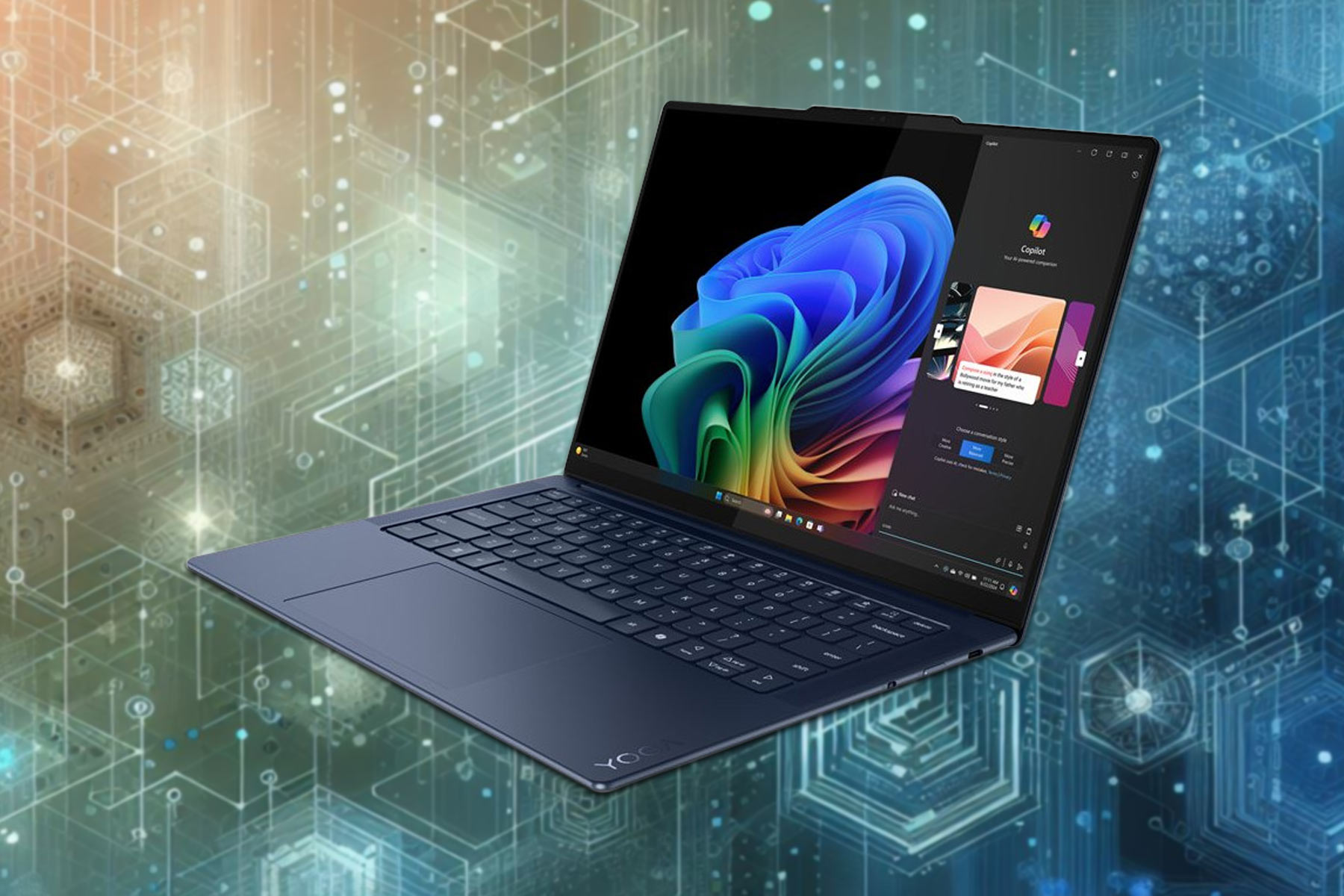
Latest leaks: Renders of Lenovo’s first Snapdragon X Elite CPU laptop

Lenovo is well-known for its outstanding devices, and many are eager to see a new series of laptops powered by Qualcomm’s Snapdragon X Elite processors.

If you’re impatient, today we have leaked renders of the upcoming model that you mustn’t miss.

Renders of the upcoming Lenovo Snapdragon laptop have just leaked

This was reported by Windows Central following a Twitter post from WalkingCat.

The user has posted four renders of the alleged Yoga Slim 7 14(.5) 2024 Snapdragon Edition on its account. Do keep in mind that neither Lenovo nor Qualcomm commented on this leak.

However, WalkingCat has a history of reliable leaks, so these renders may be real.

As for the design, this model looks similar to the Lenovo Slim 7i, also known as the Yoga Slim 7i. The design is amazing with a slim base, top speakers, rounded edges, and a dedicated Copilot button.

While specs aren’t known yet, according to the scraps of information that we have, we expect to see a high-end camera with a shutter, and three USB-C ports, most likely USB4.

Currently, this is just speculation, and we have to wait for an official announcement from Lenovo. As for other news, Lenovo has introduced three new AI PCs recently.

If you prefer desktop PCs, you might be interested in the Lenovo Legion T5 Gen 8 discount if you’re a gamer.

Sea of Thieves surpasses 40 million users, PlayStation release expected to drive it further

When it comes to Sea of Thieves, an exciting action-adventure title, the bar is never too high. The game is improving with each update and adding more players. And recently, Sea of Thieves crossed the 40 million user mark on Xbox, PC, and Steam.

As confirmed by the team in a blog post and on X (formerly Twitter), the game reached the 40 million user milestone, and we will soon have Season 12 of Sea of Thieves, along with the introduction of a wide array of new pirates.

On this occasion, Executive Producer Joe Neate also highlighted the contributions of the team,

I also want to take this opportunity to offer heartfelt thanks to the team, who’ve worked so hard to deliver over a hundred free updates since launch and have plenty more excitement and innovation on the horizon. 

Sea of Thieves is yet to release on PlayStation

With the game still in the pre-order phase on PlayStation, the 40 million user base is limited to Xbox, PC, and Steam. The PlayStation 5 release on April 30, 2024, is expected to significantly boost the numbers, given Sea of Thieves is the top pre-ordered game on the console.

So, you might soon see the Sea of Thieves team reaching the next 50 million players milestone.

Besides, the sales of Sea of Thieves on PlayStation will be keenly observed as it affects Microsoft’s decision to bring more Xbox titles to PS.

When released on Steam in June’20, Sea of Thieves received a massive response from users and, within days, became the global top seller. And a similar response is expected on PlayStation 5.

Would you buy Sea of Thieves on PS5? Let us know in the comments section.

Spatial Annotations in Teams seems like taken from a Sci-Fi movie

Have you ever wondered how the future of remote work and collaboration looks? Well, it seems Microsoft has been pondering that too and has come up with something quite intriguing. Microsoft Teams is introducing Spatial Annotations, a feature that’s set to revolutionize mixed reality (MR) collaborations.

Imagine being able to collaborate with your colleagues remotely, using 3D annotations on physical objects through your mobile device. Sounds like something out of a sci-fi movie, right? But it’s becoming a reality, and here’s how it’s shaping up.

First off, this feature is currently in public preview for iOS users, with Android enthusiasts expected to join the fun later this summer. The idea is simple yet powerful. By using the front-facing camera of your mobile device during a Teams call, you can share your view with remote participants.

How do I use Spatial annotations in Microsoft Teams?

This allows for real-time collaboration with 3D annotations overlayed on physical objects, enhancing understanding and communication. No more app switching or losing context; everything you need for effective collaboration is right there in the Teams environment. And guess what? The annotations stay anchored to the environment even as you move around.

If you’re thinking about possible security issues, Microsoft has got that covered too. The Spatial Annotations feature comes with end-to-end encryption, data loss prevention, and compliance certifications. This means not only is collaborating easier, but it’s also secure.

If you’re eager to dive in, you’ll need a valid Dynamics 365 Field Service, Guides, or Remote Assist license to access the feature. And if you’re wondering about the broader implications, integrating MR functionalities into mobile apps signifies Microsoft’s commitment to making these advanced tools more accessible. It’s a big step towards democratizing mixed reality, making it available to frontline workers across various industries.

We remind you that recently, Microsoft split Teams from their Microsoft 365 suite, so it’s available separately.

With Spatial Annotations in Microsoft Teams, it seems the future is not just near; it’s here. And it’s looking more interactive and immersive than ever. Tell us about your thoughts in the comments section below.

Get ready Assassin’s Creed fans! Mirage is now available for a free trial

Assassin’s Creed series has a long history, and the game’s latest installment was released last year.

If you ever wanted to try Assassin’s Creed Mirage, this might be the perfect time for it, since the game is available for a free trial.

Assassin’s Creed Mirage is available for a free trial until April 30

According to MySmartPrice, you can test Assasin’s Creed Mirage for free on all major gaming platforms.

The trial period has started on April 16th and it will last until the end of the month. Once you download the game, you can freely test it for up to 2 hours.

According to Ubisoft, you’ll need an active Internet connection to participate in the free trial, and you’ll see a countdown timer on the top right side of the screen showing how much time you have left.

If you decide to purchase the game, all your progress will be saved and you can continue where you left off.

Regarding the availability, you can try the game on Epic Games Store or Ubisoft Connect on PC. The free trial is also available on PS4, PS5, Xbox One, and Xbox Series X/S.

Many are wondering if the Xbox Series X is worth it in 2024, and if you decide to get one, you can get a Game Pass for 2 months free with Walmart Plus.

Manor Lords will soon have its early access launch on Xbox Game Pass

Gamers have been waiting for Manor Lords since its announcement in 2020 and it will finally be unveiled on April 26th on Steam. Another great surprise is that the Early Access version of Manor Lords will also be available on Xbox Game Pass from the first day of its launch.

For those who are less familiar with the title, Manor Lords is an indie a medieval city-building strategy game that surpassed anticipated titles like Silksong and Hades 2. What makes this even more impressive is that Manor Lords is the brainchild of a single developer, Greg Styczeń, known by his pseudonym Slavic Magic.

Through the support of Patreon and the publishing prowess of Hooded Horse, Styczeń’s vision is coming to life, offering gamers a chance to dive into the intricacies of medieval lordship with a focus on historical accuracy and strategic depth.

How can I get Manor Lords?

As we’ve mentioned above, Manor Lords will be available on Steam and Xbox Game Pass. The game promises a rich, immersive experience, blending city-building with real-time strategy elements, where every decision could lead to prosperity or ruin.

But before you dive in, it’s essential to ensure your gaming setup meets the requirements. Thankfully, Manor Lords is built on Unreal Engine 4, known for its scalability, meaning it should run smoothly on a wide range of systems, including older PCs. Whether you’re planning to engage in the ultra-hard variant for a challenging experience or prefer the peaceful city-building mode, Manor Lords aims to offer something for every type of player.

The game has been tested to run well even on modest hardware, with support for features like FSR and DLSS upscaling to boost performance without sacrificing visual quality. So, whether you’re playing on an aging desktop or the latest gaming laptop, Manor Lords is poised to offer a visually stunning and smooth gameplay experience.

The bottom line is that Manor Lords is shaping up to be a must-play title for fans of strategy and city-building games. If you don’t have an Xbox Game Pass account, rush in because it features tons of free games.

Are you into strategy city-building games? Tell us more about that in a comments below.

Baldur’s Gate III will have a sequel despite Larian stepping away from D&D

Baldur’s Gate III fans should rejoice because the game will get a sequel. However, it won’t be a part of Larian Studios. The Belgian video game developer will move from the D&D genre and bring something new. Some speculate that Larian could work on a new Divinity game, especially after Swen Vicke tweeted about it.

After gaining several awards for Baldur’s Gate III Hashbro wants to make a sequel. So, even if there won’t be any DLCs for the game from Larian, the universe won’t end. Hopefully, we won’t have to wait 25 years. Yet, the future of the game is a long way off.

Fortunately, the studio is in talks with multiple possible partners after its success. Also, according to Eugene Evans, the senior vice president of Digital Strategy and Licensing for Hasbro and Wizards of the Coast, Hasbro is figuring out where the series is going.

How long must you wait for the sequel of Baldur’s Gate III?

Eugene Evans said the company will take time to select the next partner. The company doesn’t want to make any rush decisions about the Baldur’s Gate III sequel and other products. So, the studio might take a while to work on a new game.

The sequel of Baldur’s Gate III will most likely bring back some of the characters we got close to, especially since they are a part of the D&D canon. Also, it is most likely to see them because they belong to Wizards of the Coast and not Larian. Additionally, the sequel might allow us to explore more stories that didn’t end in BG3.

Unfortunately, the bar for a Baldur’s Gate III sequel is high. Yet, according to a tweet from Swen Vincke, the CEO of Larian, Hasbro laid off many employees, and there aren’t many people left from the old team. So, the future BG3 projects could be a bit lacking.

Hasbro is investing in a new D&D game development. After all, there is a high demand for D&D and RPG games, and BG3 made this visible. In addition, based on the claims made by Eugene Evans, in the next five years, we will have a lot of upcoming D&D games while we are waiting for the sequel of BG3.

Ultimately, the sequel of Baldur’s Gate III is on its way, and it might have new D&D features. Also, we might have the option to play with past characters. However, it will take a long time to develop the new game. So, in the meantime, we could either replay BG3 and add mods to it or wait for a D&D game from another studio.

What are your thoughts? Are you going to add mods to BG3? Let us know in the comments.

Xbox Cloud Gaming just got better as more games offer mouse and keyboard support

Xbox Cloud Gaming is great if you want to play games from your console on your PC, and Microsoft wants to make it better by bringing mouse and keyboard support to Xbox Cloud Gaming.

Even though this feature is still in testing, we have exciting news about it.

More Xbox Cloud games are getting mouse and keyboard support

In the past, we wrote about mouse and keyboard support for Xbox Cloud Gaming. The feature is in the testing phase, and until now only 14 games had support for it.

According to Pure Xbox that number has changed, and an additional 14 games are now compatible with this feature. The list of new games includes:

  • Cities: Skylines – Mayor’s Edition
  • Cities: Skylines – Remastered
  • House Flipper
  • Inkulinati (Game Preview)
  • Mount & Blade II: Bannerlord
  • Norco
  • Pikuniku
  • Quake
  • Quake 2
  • Slime Rancher 2
  • State of Decay 2
  • Terraria
  • The Sims 4
  • Valheim (Game Preview)

This is great news, and we’re glad to see that developers are bringing support for keyboard and mouse to other titles as well.

If you’re still on the fence about Xbox, maybe this 10% discount on Xbox Series X will change your mind. That’s not all, you can also get a Game Pass for 2 months free with Walmart Plus, so don’t miss it!

Microsoft Edge Search bar on Windows 11 now allows to use Google Search right from the desktop

Michael Schechter, VP @Bing @Microsoft announced on X that Microsoft Edge Search bar is now available on Windows 11 with the ability to use your default search engine right from the desktop.

There is no surprise, this is another marketing gimmick from Microsoft to use Bing from a desktop on Windows 11 using Edge search bar. When you first launch it, it asks you to

try new Bing with search bar Search the web or chat with new AI-powered Bing right from your desktop with the Microsoft Edge search bar

How can I use the new Microsoft Edge Search bar?

To use it, open Microsoft Edge, click Settings > More tools, and select Launch Edge search bar. It will get auto-launched next time on Windows 11. Ensure you disable it if you don’t want that happening to you. It’s worth noting that the Edge search bar has integration with Copilot as well as a default search engine.

Yes, that’s right, you can use Google Search instead of Bing, if you set is as the default search tool. But if you do that, the search bar won’t show Copilot anymore. For all this to work, make sure that your Edge browser is updated.

After you enable the Edge search bar, you can also bring it up with the Win + Shift + F key combination.

However, take note that even if you set Google as the default search engine, the search result will appear in Microsoft Edge, not in Google Chrome, even if it’s your default browser. It’s pretty obvious since the Edge Search bar is from Microsoft’s browser.

What do you think about this new feature from Edge? Let us know in the comments section below.

Microsoft aims for AI in manufacturing, introduces industry-oriented solutions

The manufacturing sector, one of the largest and employing far more than any other, is set for an AI revolution. With artificial intelligence on the verge of becoming an integral part of our daily lives, industries, too, should be able to harness the power of AI, says Microsoft.

AI will aid innovations, boost efficiency, optimize operations, cut operating costs, and, in turn, increase revenue across the sector. To help achieve that, Microsoft is announcing AI and cloud-driven solutions for industries on the heels of Hannover Messe.

The Redmond-based tech giant introduces manufacturing data solutions in Microsoft Fabric and the Copilot template on Azure AI, both critical to harnessing the vast amount of data that is often lost.

With Microsoft Fabric, you will be able to integrate data from Information Technology (IT) and Operational Technology (OT) and get valuable insights to optimize the process.

The Copilot template will allow industries to create their dedicated Copilot for workers in cases such as knowledge discovery, root-cause analysis, issue resolution, asset maintenance, and training, amongst others, as per Microsoft’s official blog.

In the initial private preview, Intertape Polymer Group (IPG) is employing the Sight Machine’s Manufacturing Data Platform, while Bridgestone is collaborating with Avanade, an AI and cloud business service.

AI integration in manufacturing remains a key challenge

Every industry is unique, and so is the data originating from it. Deploying a universal AI solution won’t work in such scenarios and will instead be counterproductive.

To overcome the challenge and ensure that industries across the spectrum can harness the true potential of AI, Microsoft introduces the adaptive cloud approach. According to Microsoft’s official blog,

Our adaptive cloud is a framework to modernize edge infrastructure across operations, like factories, to take advantage of a modern, composable and connected architecture for your applications. Putting the adaptive cloud approach into practice, Azure IoT Operations leverages open standards and works with Microsoft Fabric to create a common data foundation for IT and OT collaboration.

Besides, Dynamics 365 Supply Chain Management will come with a preview of the Traceability add-in for effective and efficient event tracking.

As for the Dynamics 365 Field Service, it will get an improved Copilot and the ability to share links to work orders in the Field Service app in Microsoft Teams. Both these enhancements have been available to Dynamics 365 Field Service users since April 17, 2024.

AI has been a key component in manufacturing for quite some time now. Intel’s use of AI-based tools in designing processors, in addition to streamlining other workflows, is a testament to this.

Last year, Microsoft and Seimens built an industrial Copilot aimed at improving productivity. Microsoft’s AutoDev, another significant development in the AI landscape, is expected to relegate developers to the role of supervisors.

What do you think about the future of AI in industries and Microsoft’s contribution to it? Share with our readers in the comments section.

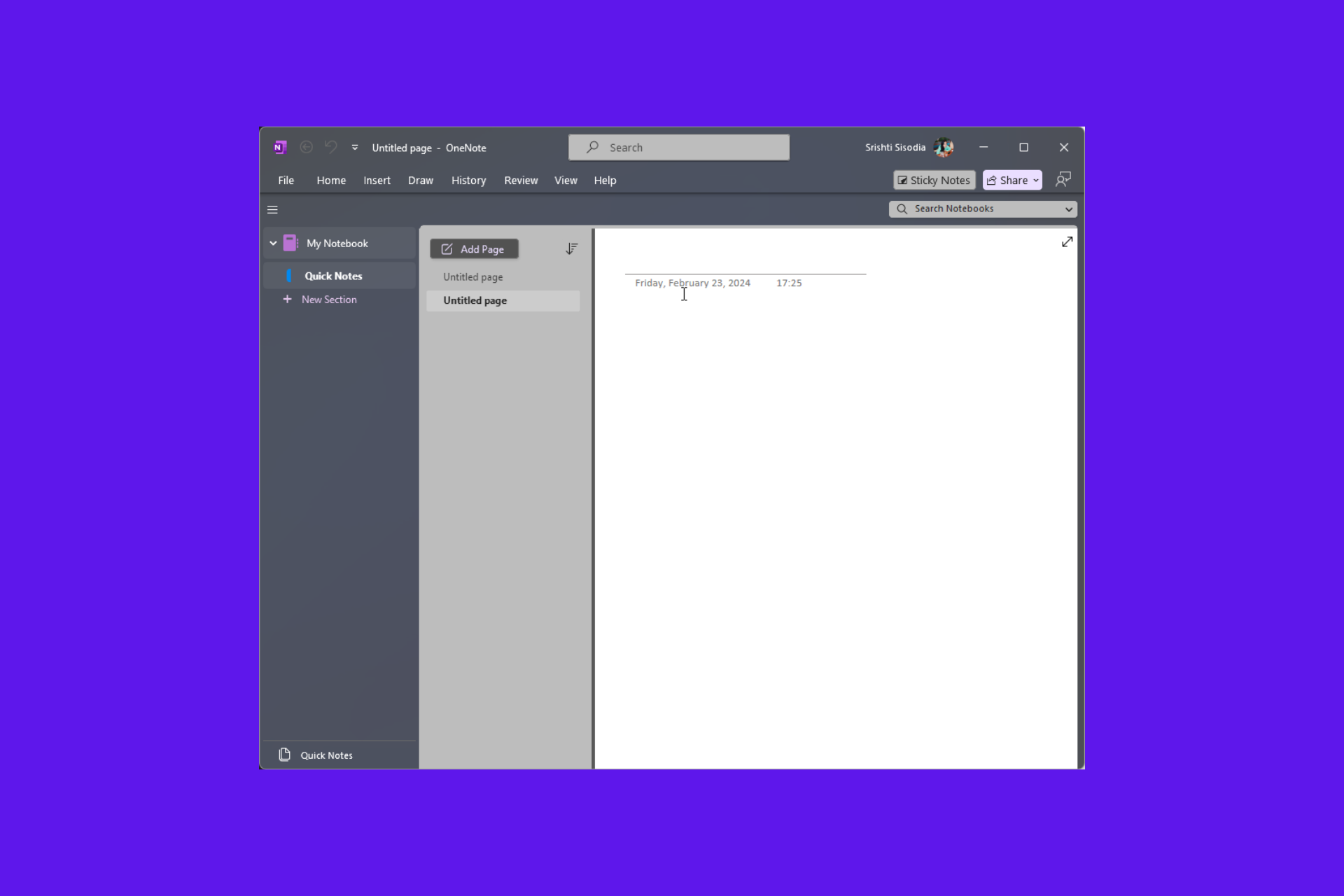
The all-new handwriting straightening feature in OneNote on Windows will enhance your inking

Microsoft announced the AI ink feature: handwriting straightening in OneNote on Windows. This AI feature can alter your handwritten, inked text into more visually organized text.

In the blog post,  Sofia Thomas, the Product Manager on the Office AI experiences team, said:

Animated image showing handwriting straightening in OneNote.

Handwriting straightening transforms your handwritten inked text, making it more visually organized and coherent. It also improves ink legibility in your notes without taking away from your handwriting’s style and personality, and offers a great way to quickly clean up notes before reading them back or sharing them out.

To use the feature, launch OneNote on Windows and open an existing notebook with ink. If you are using a new notebook, click the Draw tab and add ink to a page with a digital pen.

Tap on a line of text or use the Lasso Select tool to select the ink you want to straighten, then choose Straighten.

Currently, the feature doesn’t straighten individual words, formulas, tables, images, highlighter ink, or underlines. Also, it supports only languages written with the Latin alphabet.

The feature can be helpful for:

  • Cleaning up your personal notes after a lecture so that you can review them later easily
  • Organized inked meeting notes, which makes them look professional
  • Fixing the slanted writing

The handwriting straightening feature is available to Beta Channel users who are using OneNote on Windows version 2404 (Build 17530.20000) or later. Also, the feature is currently available for OneNote on Windows 11.

In other news, Microsoft is said to be working on a contextual note-taking app that automatically generates notes just by highlighting parts of the screen. This could be the next version of Sticky Notes or even a Copilot upgrade; read the whole story here.

Do you think the feature will be helpful for you? Share your opinions with our readers in the comments section below.

Microsoft Store’s new home page design prioritizes new apps over installed ones

Microsoft recently rolled out the latest version, i.e., 22403, of Microsoft Store to the general public. It majorly involved app performance and speed improvements.

Another interesting feature related to free apps displayed on the home page was disclosed by Rudy Huyn, Principal Architect at Microsoft and Microsoft Store development team member on his X (formerly known as Twitter) account.

In the post, he mentioned that due to the new update, any applications or games installed via the Store on the computer will not be as visible as on the Store’s Home page.

According to Huyn, the feature is meant to help you discover new apps easily within the Microsoft Store. However, as Huyn mentioned, you can see the full algorithmic app lists by clicking on the modular title.

Lately, the Microsoft Store has been getting all sorts of updates. In March 2024, it added a What’s New section that shows the latest apps on the store.

What do you think about this change? Share your thoughts with our readers in the comments section below.

Want to update and shut down your PC? Tough luck, as bugs still plague this feature

Microsoft is constantly releasing updates, and sometimes you just want to update your PC and shut it down so you choose the appropriate option, only for your PC to boot again.

If this ever happened to you, you’re not alone as many others are having the same issue all over the world.

The update and shut down option isn’t working properly for many Windows users

This issue was spotted by PC Gamer, but it seems that the issue has been present for a while now, and it was first reported on Microsoft Answers forums in 2021.

if I choose “update and shut down”, the PC will install updates, then restart, install rest of the updates and be back to log-in screen. SO it never shuts down unless I manually open the meny and press the shut-down button.

Recently, Reddit users also complained about this issue with one user stating the following:

It works around 50% of the time, but often the system would restart 2-3 times to finish applying update and end up at the login screen.

Users stated that this issue only started appearing in the last year and that it was working as intended before:

Years ago this was never a problem for me, but for the past year or so it’s becoming more common and I no longer just trust it will actually shut down when it’s done. This even happens on my desktop too.

Users speculate that this problem occurs if the update requires multiple shutdowns:

Previously it just shut down instead of restarting the first time. Now it restarts to finish updating and then shuts down. But I think if an update requires multiple restarts it will not shutdown after installation is complete but stay on login screen.

Sadly, Microsoft has been quiet on this issue, but we hope that they will finally address this inconsistency in future updates.

Speaking of Windows updates, maybe you shouldn’t rush to install them, especially because KB5036893 is full of bugs.

That’s not the only update with issues, and many reported that KB5036892 is not installing on their PC.

Microsoft says that installing Copilot in Windows Server was just a mistake

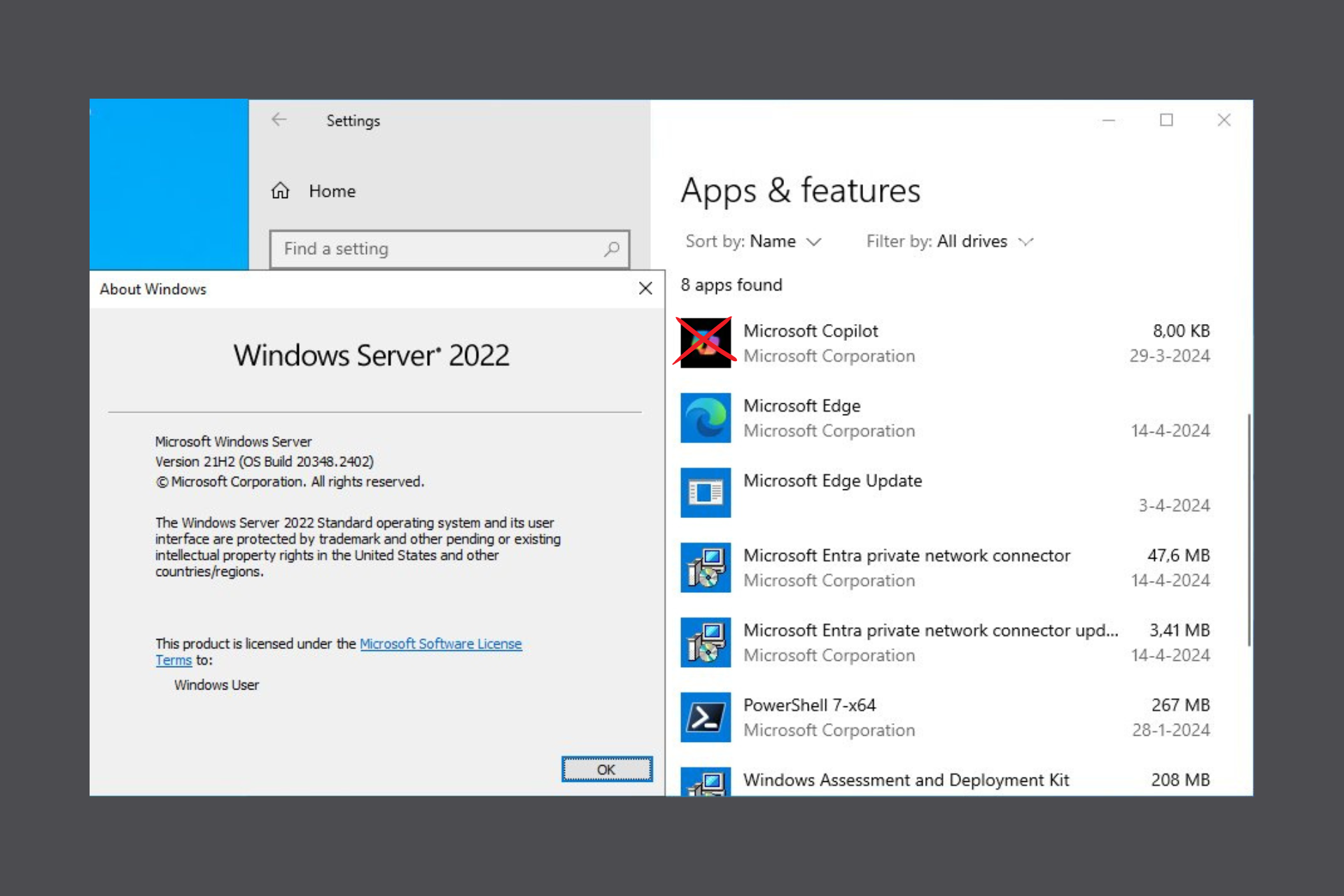
The hide and seek game of installing Copilot in Windows Server is finally over, or at least we hope so. After Windows Server 2022 users found an 8KB Copilot installation, Microsoft issued a note to clarify this issue.

As we correctly mentioned, that was not a full-fledge Copilot installation, but only a web API installed together with the latest version of Edge.

Updates to Edge browser version 123.0.2420.65, released on March 28, 2024 and later, might incorrectly install a new package (MSIX) called ‘Microsoft chat provider for Copilot in Windows’ on Windows devices. Resulting from this, the Microsoft Copilot app might appear in the Installed apps in Settings menu.

Microsoft note

Microsoft will remove the Copilot component in the next Edge update

Microsoft also noted that the Microsoft chat provider for Copilot doesn’t execute any code or process and doesn’t send any data to anyone. They also say that the package is a testbed for enabling Copilot for some Windows devices.

The Redmond giant will remove this component from all the systems that it wasn’t meant for, and that includes Windows Server.

This problem will be solved with a new update for Microsoft Edge in the near future. As we’ve also mentioned in our previous report, Windows Server wasn’t the only one affected by the problem, but also Windows 10 version 22H2 and Windows 11 versions 21H2, 22H2, and 23H2.

So, that’s that! Windows Server admins, you can rejoice again, because Copilot will not be on your machines soon. At least unless Microsoft will decide you really need it, in which case, we’ve explained how to uninstall it swiftly.

We’ll keep you posted when the new Edge update will show up to correct this issue, but you may also give us a few pointers in the comments below.

Intel deploys in-house AI tools to speed up processor designing, reduces time from weeks to minutes

The applications of Artificial Intelligence are increasing by the day, from something as simple as writing a short essay to utilization in industries. Recently, Intel shared an exciting update about using homegrown AI tools to speed up the designing of processors.

Intel claims that the AI tools helped engineers find the optimal positioning for heat-sensitive sensors on processors, a work otherwise done manually through previously available data and design-specific decisions. With AI, the design time has been reduced from up to 6 weeks to a few minutes.

Instead of using the term Artificial Intelligence, Intel goes with Augmented Intelligence, which it defines as a subset of the former, centered around interactions between humans and machines.

Intel explains how augmented intelligence aids in processor design

AI assists System-on-Chip (SoC) designers in finding the perfect spot for thermal sensors. Mark Gallina, CCG principal engineer, explains the previously employed process,

Client products like laptops rely heavily on turbo and peak frequencies. You want the SoC to burst to higher frequencies, which in turn generates thermal heat. That process takes a few weeks, and we are limited to looking into one or two workloads at a time.

Now, they don’t have to run a series of tests on input/output (I/O), CPU core, and other system functions. With the in-house AI tool, designers just put in all the boundary conditions and variables, and the tool comes up with optimal design suggestions within minutes.

Shedding light on the improvements, Mark Gallina says,

With augmented intelligence, we’re using computational machine learning combined with human engineering expertise to identify the best areas to invest our limited resources. This new tool has completely revolutionized the way we do thermals today. It’s so much more efficient and gives us so much more visibility to thermal risks before we turn the SoC on. We’ve been feeling our way in the dark, but with augmented intelligence, we’ve been given a flashlight to guide the way forward.

The AI tool that revolutionized chip design was developed by a team headed by Olena Zhu from Intel’s Client Computing Group (CCG).

Intel is also finding more applications for augmented intelligence in manufacturing and designing, thus improving process efficiency. For instance, AI has helped to reduce the time spent testing individual processors by 50%. Another automatic failure analysis tool improved efficiency gains by 60% for high-speed I/O design.

Intel has previously experimented with the augmented intelligence tool on the Meteor Lake family of processors, with the Lunar Lake series next in line. It will undoubtedly provide a boost to Intel’s expansion in the market for AI PCs!

To find out more about the developments, check Intel’s official blog.

Do you believe Intel employing AI for design and other tasks will help Intel compete with archnemeses like NIVIDA and AMD? Share with our readers in the comments section.

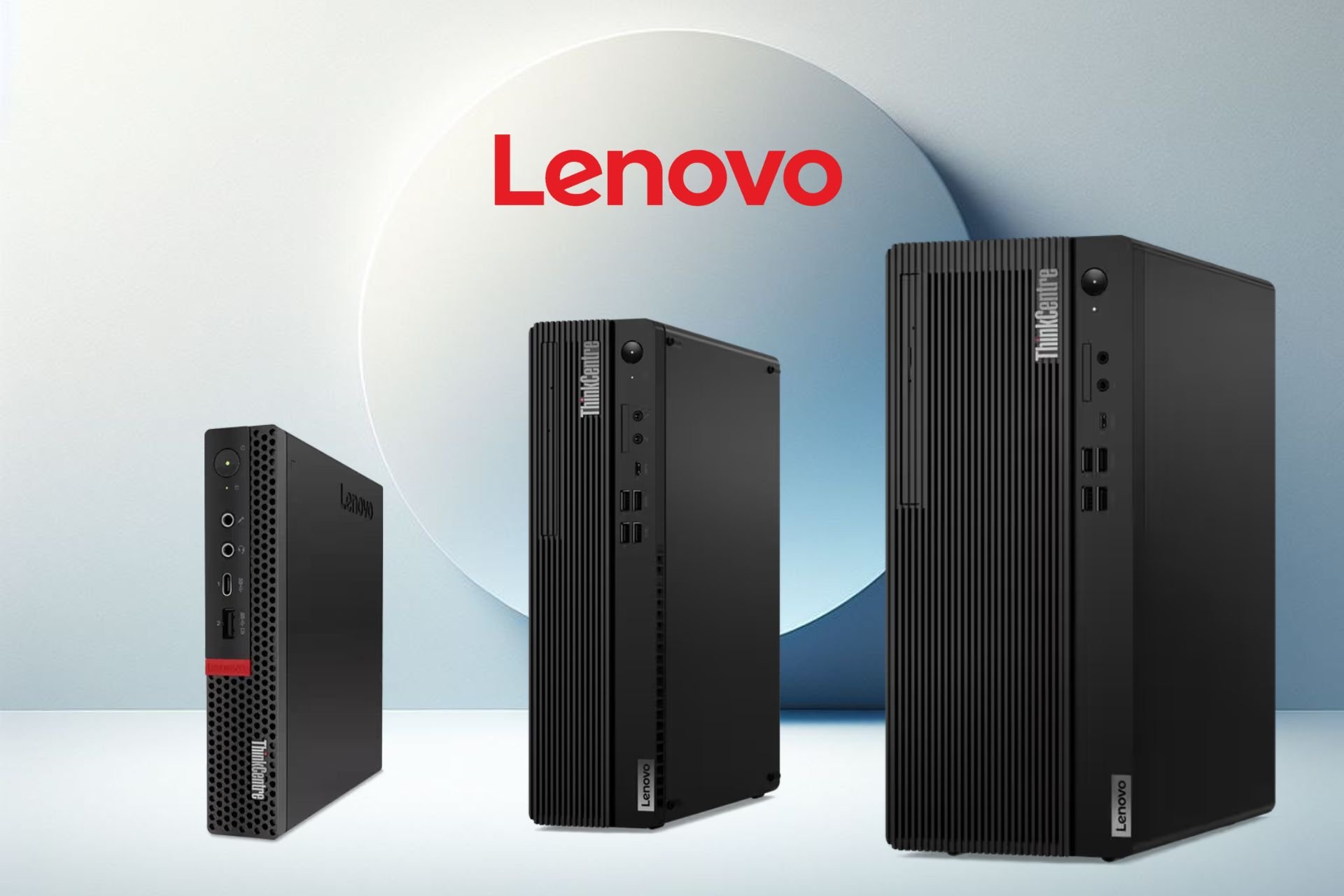
Lenovo brings three new AI PCs powered by the newest AMD chips

Lenovo revealed three new AI desktops featuring the latest AMD Ryzen chips. The company hopes that they are going to offer business customers future-proof AI PCs. However, AI technologies are advancing fast. So, soon, we might have devices that can run AI services locally. Yet, your PC needs at least 40 TOPS to run Copilot locally.

The AI PCs from Lenovo have AMD Ryzen Pro 8000 Series processors. They are great at handling AI workloads but have only 16 TOPS. Additionally, the AI features of three desktops will increase the video rendering performance, control fans during coding sessions, and enhance software efficiency.

According to Sanjeev Menon, VP and GM for Worldwide Desktop Business in the Intelligent Devices Group at Lenovo, the company is ready to embrace AI to improve the capabilities of its products. Thus, with AMD, Lenovo entered early on the AI PC market.

What’s the difference between the three AI PCs from Lenovo?

Each one of the new Lenovo AI PCs has its niche. The ThinkCentre M75t Gen 5 focuses on performance, the ThinkCentre M75s Gen 5 is flexible, and the ThinkCentre M75q Gen 5 is compact. Also, you can upgrade their components, expand the memory, and manage thermal cooling.

The ThinkCentre M75t G5 (tower) and ThinkCentre M75s G5 (small form) offer accelerated AI performance, and their integrated graphics use the AMD RDNA 3 technology. In addition, they have a 64GB DDR5 (5600MHz) memory and up to 2 TB Gen4 SSD storage. So, they are well-equipped to handle daily and data-intensive tasks.

Both Lenovo AI PCs have a flexible expansion slot, many USB ports, and the ability to support four displays. Also, with the ThinkCentre M75t Gen 5, you can use an AMD Radeon™ RX 550 4G or AMD Radeon RX 6600LE.

The ThinkCentre M75q Gen 5 is a compact Lenovo AI PC. Its design allows you to place it in small spaces. On top of that, it fits in banking, medical, and retail environments. It has an AMD Ryzen 7 PRO 8700GE desktop processor, can pack up to 64GB (5200MHz) of dual-channel DDR5, and its integrated graphics use the AMD RADNA 3 technology.

The small AI PC from Lenovo is a powerhouse. It has a few USB ports, enough space for two Gen 4 SSDs, and you can connect it with three displays. In addition, its built-in driver supports older OS versions.

Do you need extra security?

The ThinkCentre M75 Gen 5 AI PCs from Lenovo are great at security. They use the Microsoft Pluton security processor and have the highest Windows protection. Besides that, they come with the Lenovo ThinkShield that encrypts your data and passwords. Also, they have a BIOS-based Smart USB protection to prevent unauthorized access.

In a nutshell, the three AI PCs from Lenovo are great for office work. In addition, they come with security tools to protect your data. On top of that, you can customize and upgrade them. Moreover, they are energy efficient, and the AI features improve their performance. By the way, the ThinkCentre M75s Gen 5 will be around $709, the ThinkCentre M75q Gen 5 is around $749, and we don’t know the price of the M75t.

What do you think? Are you going to get one? Let us know in the comments.

Void Interactive was hit by a data breach, Ready or Not’s source code got stolen

Ready or Not is a rather popular first-person tactical shooter developed by an indie developer Void Interactive.

It seems that the company is in some trouble as the game’s source code was reportedly stolen by hackers.

Ready or Not’s source code gets stolen by hackers

According to Neowin, Void Interactive was a target of a data breach in March, but the information is only now available to the public.

The company was targeted by an undisclosed ransom group and the group has managed to obtain 4TB of data.

Void Interactive stated that the breach occurred due to critical vulnerabilities that were present in the TeamCity cloud services.

The breach affected the Xbox and PlayStation versions of the game, and some source code and directory information was stolen.

In addition, some screenshots of the top-level project and company-related information were obtained.

The spokesperson from Void Interactive stated that development assets, proprietary code and user data remain unaffected by this breach.

This is bad news for the developers and we hope that this data breach won’t drastically impact the future development of the game.

Unfortunately, security incidents can occur, and speaking of which, Microsoft accidentally left one of its Azure servers without a password.
In other cybersecurity news, CISA issued the ED 24-04 after a Microsoft breach that should prevent further security issues.

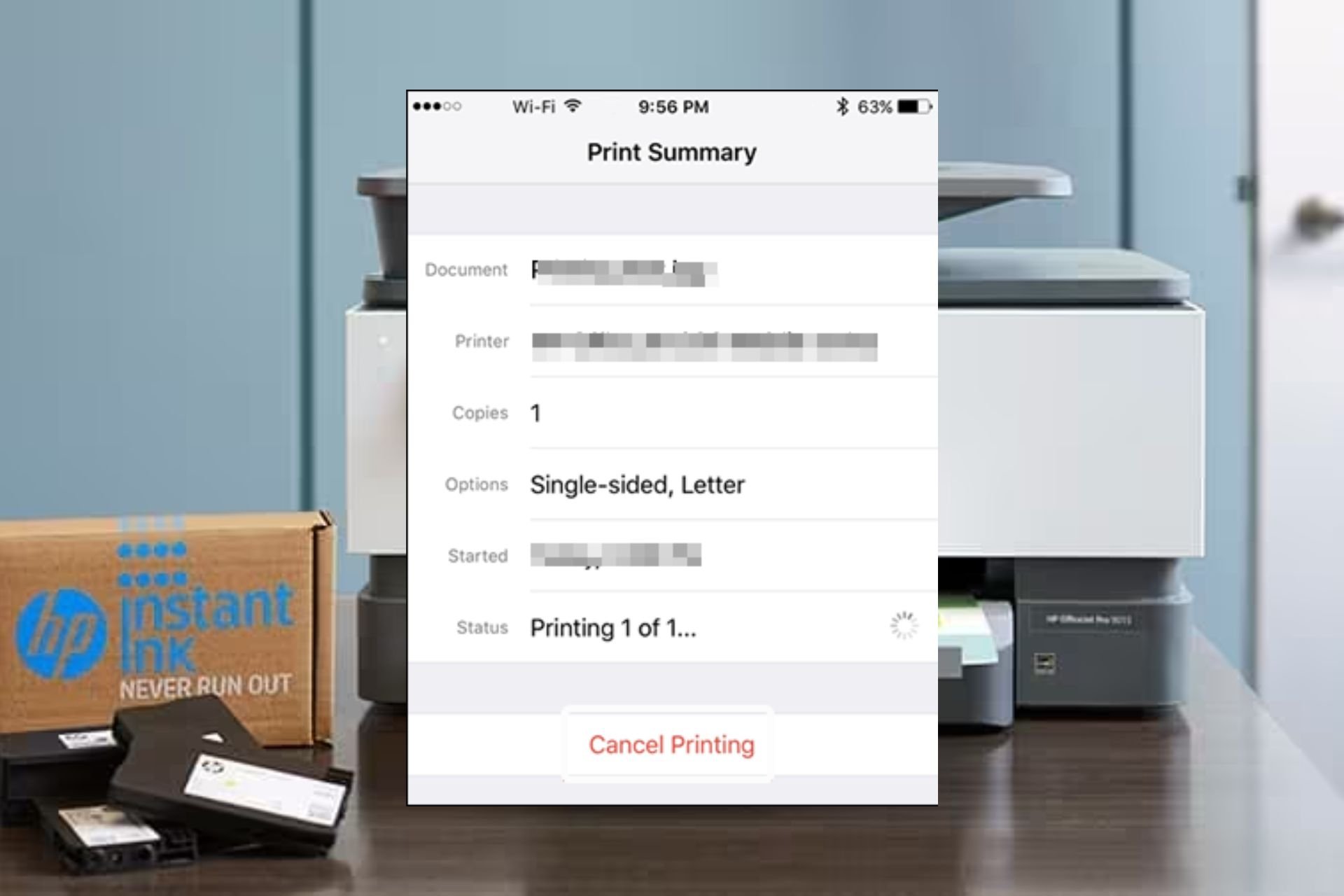
3 Simple Ways to Cancel Printing on an HP Printer

To maintain a steady and smooth workflow, cancelling printing on your HP printer may suffice if you make a mistake or want to prioritize more time-sensitive tasks.

It may be necessary to cancel a print job if you used incorrect print settings, inadvertently sent the wrong information to the printer or the print job is taking too long.

How do I cancel printing on my HP printer?

1. By using the Control Panel

  1. Press Windows + R to open Run, type Control Panel, and click OK or hit Enter.control panel
  2. Click on View devices and printers under Hardware and Sound.view devices and printers
  3. Now double-click on your HP printer.printer
  4. Cancel all the print jobs assigned to the printer.

Most HP printers also have their own control panel so depending on your model, you should be able to cancel printing by pressing the Cancel button or an X.

2. By using the HP Smart app

  1. If you’ve connected a wireless printer to your WiFi, launch the HP Smart App on your phone or PC.
  2. Select your HP printer and navigate to the Printer settings.
  3. Scan through the print queue and select the print job you wish to cancel.
  4. Click on the Cancel button.

3. By resetting the printer

  1. Power off the printer and disconnect the cable for at least 30 seconds.
  2. Reconnect the power cable, and turn on the printer while pressing the Resume button for 10-20 seconds.
  3. Once the Attention light turns on, release the Resume button.
  4. Now, wait a few moments while the Attention and Ready lights blink, indicating that the reset is in process.

Finally, all the above methods may be able to cancel printing on your HP printer but in case they fail, you can always pull out the paper tray and remove the sheets of paper. However, this should be a last resort as you risk damaging your printer if you pull out the tray while it is in the middle of printing.

Additional tips and troubleshooting printing errors

  • Most HP printers come with a preview function so using it could help minimize the number of times you may need to cancel a print job.
  • Always verify the print settings before printing to ensure the document comes out as intended. This will save you from wasted resources, especially in cases where you’re using the HP Instant Ink and it’s limited.
  • Consider installing printer management software to further enhance your print jobs and minimize mistakes.
  • Update your printer software, OS and necessary printer drivers to minimize any errors that may interrupt the printing process.
  • Where possible, consider double-sided printing for efficient use of resources.

Also note that when using a shared printer, you can only cancel print jobs from your computer.

Overall, whether your printer is printing gibberish, printing ASCII characters, or you want to change the paper size in the middle of printing, you should be able to cancel printing without too much fuss.

If you’re new to HP printers, we’ve got the HP 4155e which we think would be an excellent first printer choice. And to start you off for a seamless connection, we make it easier by telling you where to find your WPS PIN.

Have you had to cancel printing before? What’s the easiest method you’d recommend? Share your thoughts with us in the comment section below.

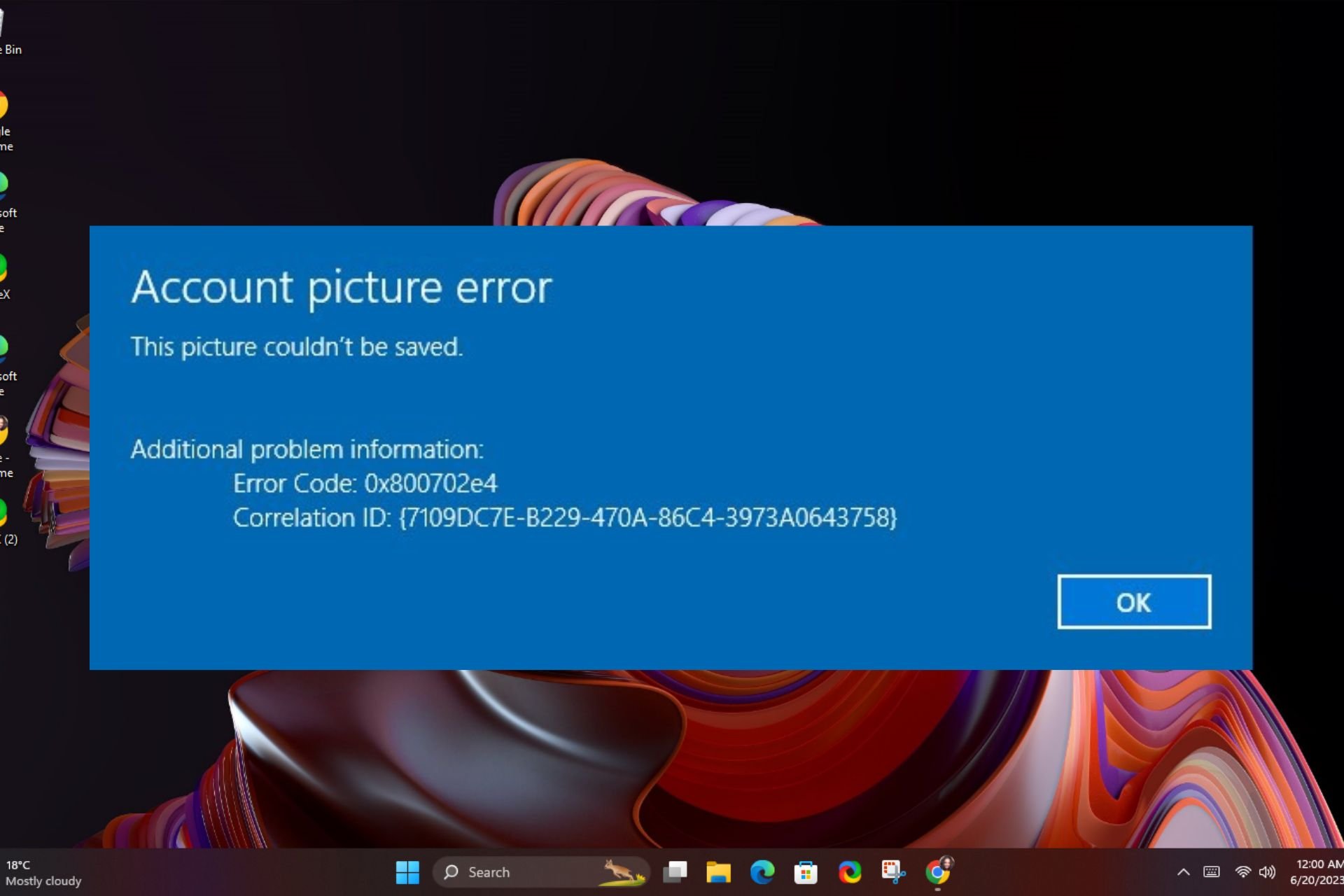
Solved: Account Picture Error This Picture Couldn’t be Saved

An Account picture error. This picture couldn’t be saved error message on your screen when you’re trying to set up a profile picture for your user account on Windows can happen to anyone.

Setting up a profile picture, aside from basic identification also helps you differentiate between the various local accounts on a PC.

If you’ve previously been able to do it but all of a sudden you get this error, it could be a corrupt Windows update, corrupt user account or system files.

How do I fix the Account picture error This picture couldn’t be saved error?

1. Delete the old pictures from your account

  1. Press the Windows + R keys to open the Run dialog box.
  2. Copy and paste the following directory into the text bar: C:\Users\yourname\AppData\Roaming\Microsoft\Windows\AccountPictures
  3. Note that the Yourname entry above should be changed to your username.
  4. Select and delete all the pictures in this account.
  5. Restart your PC and try changing your Windows profile picture to check if it updates.

2. Uninstall recent Windows update

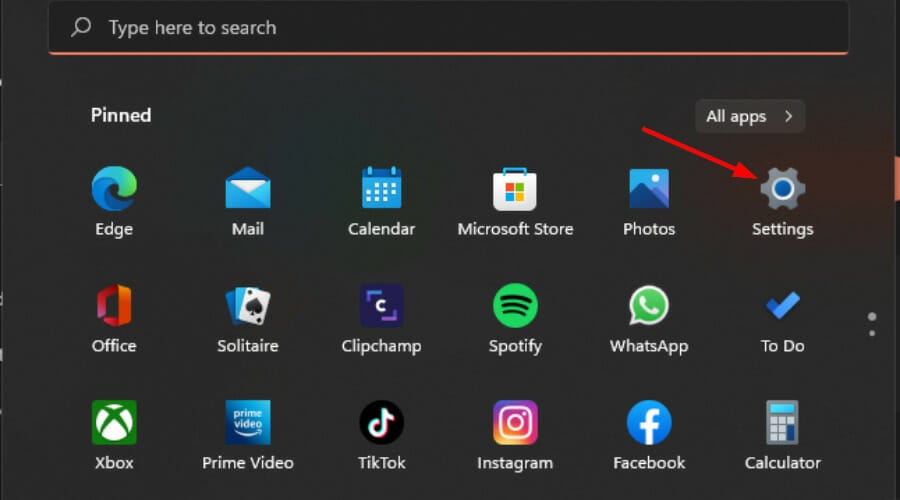
  1. Press the Windows + I keys simultaneously to open Settings.settings windows 11
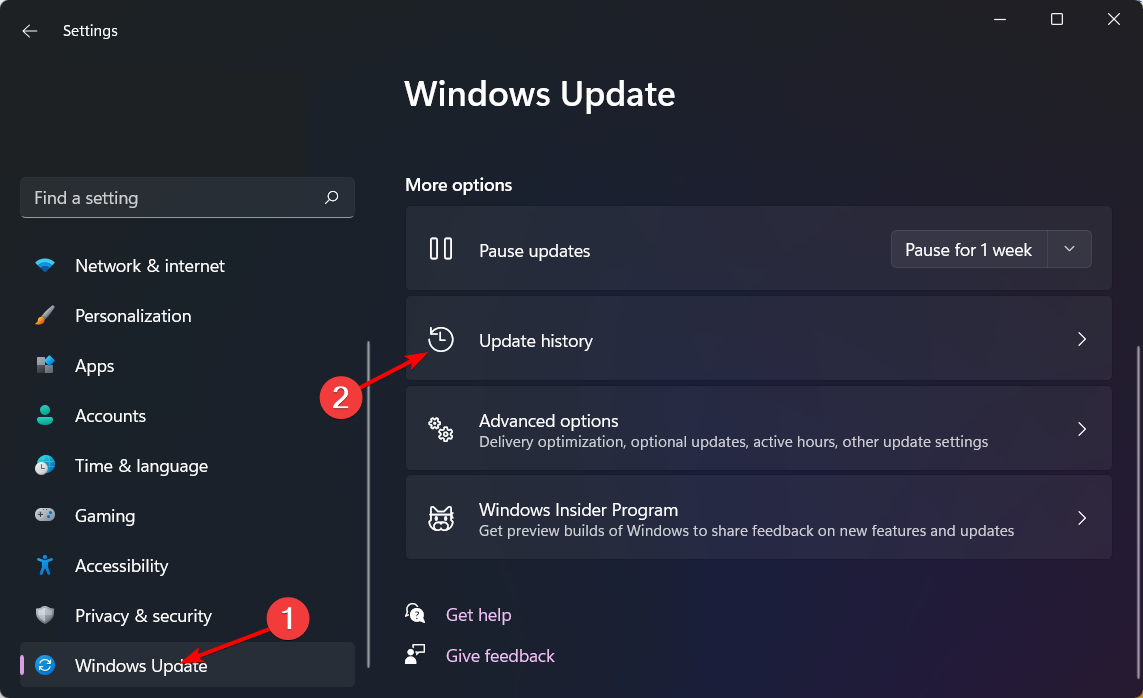
  2. Navigate to Windows Update, then go to Update history.windows-update-history logitehc unifying not working
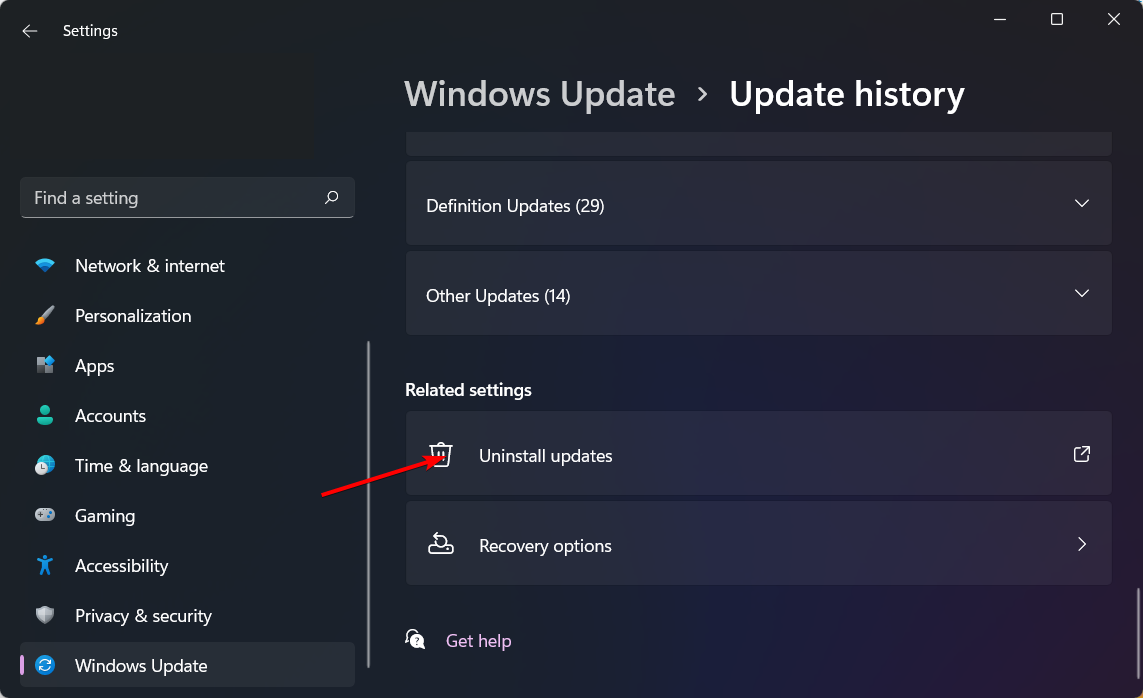
  3. Click on Uninstall updates.uninstall-updates-w11 computer-recognize-logitech-unifying-receiver
  4. Select the most recent update, then click Uninstall.

If after uninstalling the Account picture error. This picture couldn’t be saved message disappears, it is possible the latest patch updates were corrupts.

It’s risky to operate an out-of-date OS so keep an eye on Microsoft updates and see if they’ve released bug fixes and install the update once it’s available again.

3. Perform a DISM and System File Checker scan

  1. Hit the Start Menu icon, type cmd in the search bar, and click Run as administrator.cmd-run-admin-w11 unexpected kernel mode trap windows 11
  2. Type the following commands and press Enter after each one:DISM.exe /Online /Cleanup-Image /Restorehealth sfc /scannow

4. Repair the user profile

  1. Before you start making any changes, ensure you back up your Registry or create a restore point as some changes can make your PC unstable.
  2. Press Windows + R to open the Run dialog box. REGEDIT RUN COMMAND
  3. Type Regedit and click OK to open Registry Editor. 
  4. Navigate to this path: Computer\HKEY_LOCAL_MACHINE\Software\Microsoft\Windows NT\CurrentVersion\ProfileList
  5. Check the entries under ProfileList for duplicates. The entries will have similar names, and one will have a .bak file. Rename the .bak extension to .ba. If you can’t find your user profile in the Registry, check out our article.
  6. For the next duplicate entry, rename it but add the .bak extension. Remove all the other extensions if duplicate entries are present. Profile list user profile service failed sign-in windows 11
  7. Now delete the .Ba extension from the entry that you renamed
  8. Select the entry and double-click the State key from the left pane. Change the Value data from 1 to 0 and click OK. Change the value
  9. Now double-click RefCount and modify the Value data from 0 to 1. Click OK. 
  10. Close the Registry and restart your computer in normal mode. 

Repairing your user profile involves recreating your profile cache. if it was corrupt, rebuilding it could help reset specific settings and allow the system to recognize the changes being made the next time you try to change and save your profile picture.

However, if a repair doesn’t work, you can always copy your user profile to another and delete your old user profile or create another one altogether.

5. Create a new user profile

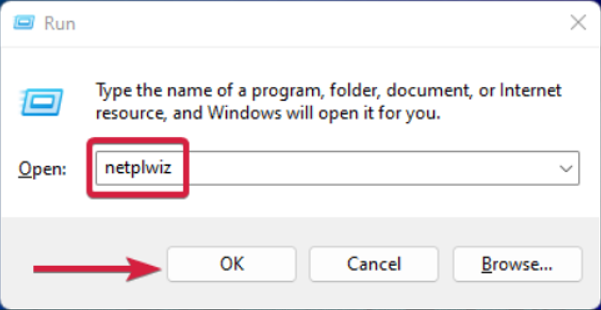
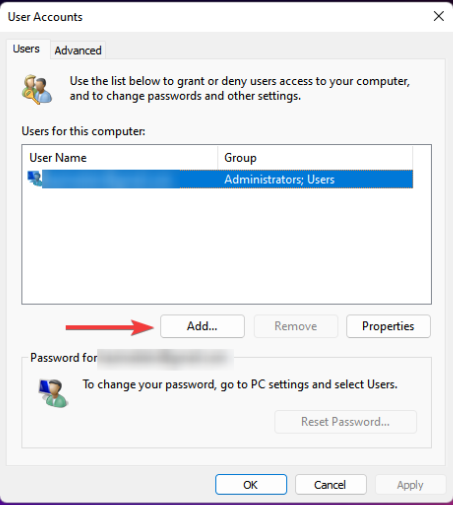
  1. Press Windows + R to launch the Run console, enter netplwiz in the text field, and click OK.
  2. Click Add in the User Accounts window.
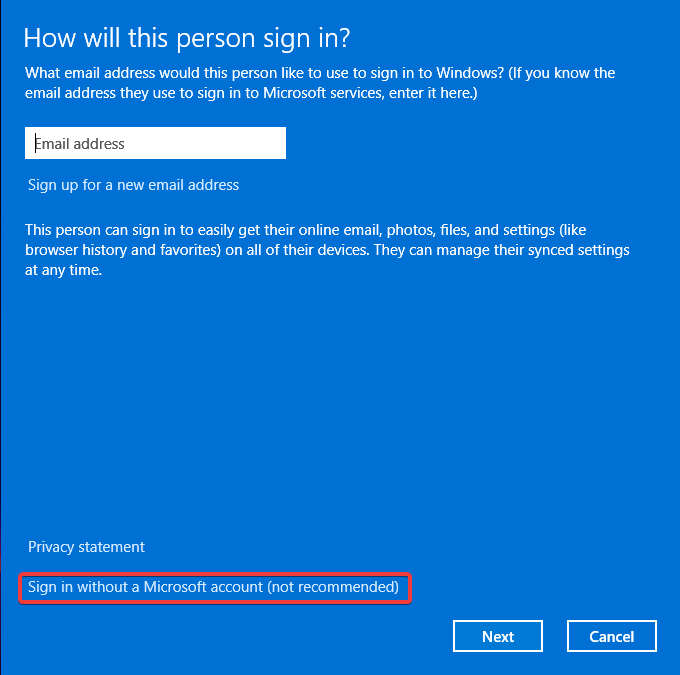
  3. Select Sign in without a Microsoft account (not recommended).
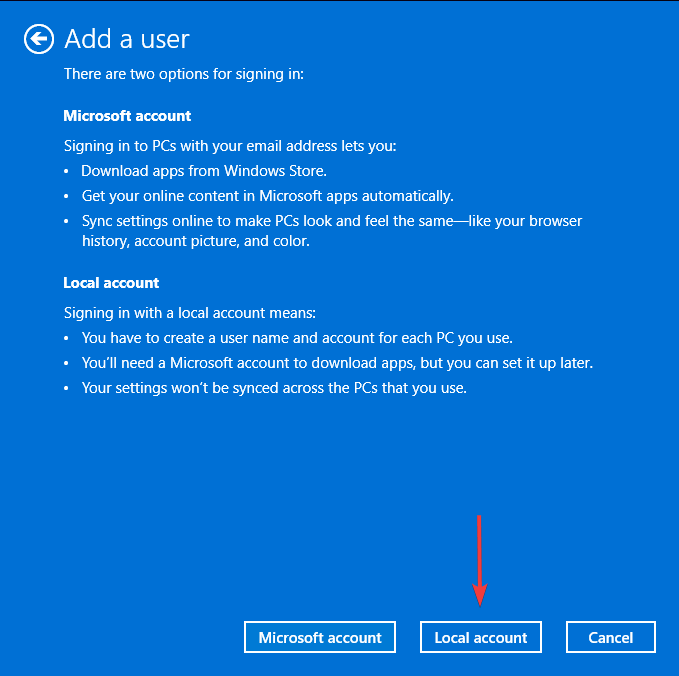
  4. Click on Local account button.
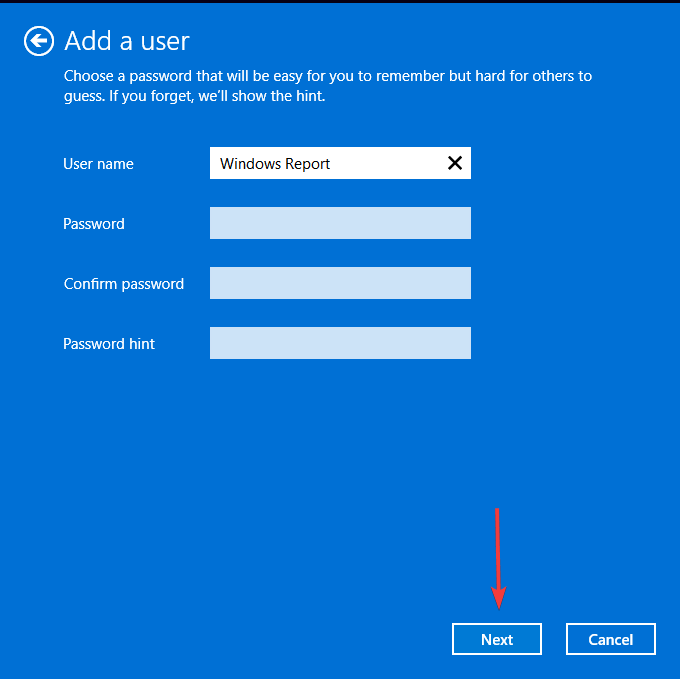
  5. Enter a username and password (optional) for the new user account, and a hint, in case you set a password. Once done, click on Next.
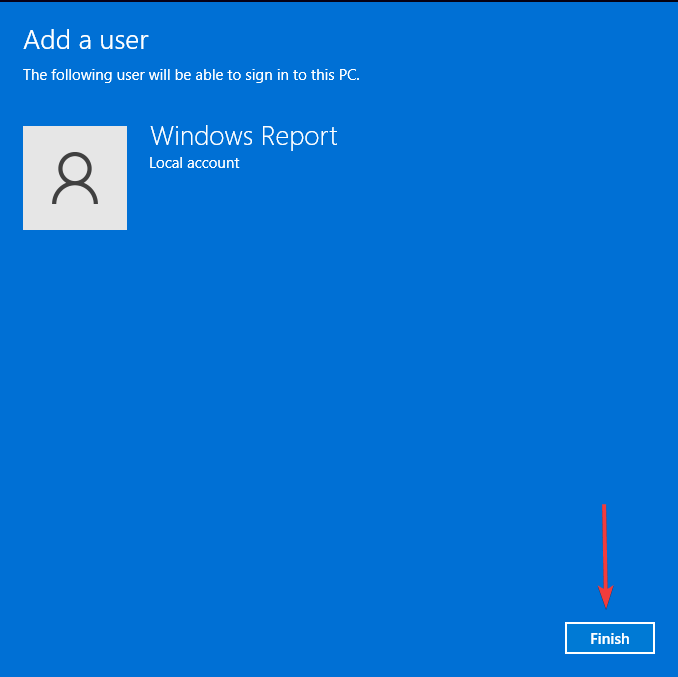
  6. Click on Finish to create the Local account.

The purpose of creating a local account is to isolate the Account picture error. This picture couldn’t be saved message. It could be a Microsoft-related issue preventing your profile picture from updating.

If a local account profile picture goes through, you can wait it out and try it later with the Microsoft account.

6. Perform a System Restore

  1. Press the Windows key, type Control Panel, and click Open.CP
  2. Select Large icons for View as and click Recovery. Recovery Control Panel user profile service failed sign-in windows 11
  3. Click Open System Restore. Choose a point
  4. Select Choose a different restore point in the System Restore window and click Next. Next Choose a different restore point
  5. Choose the restore point and click Next. Choose a point
  6. Click Finish, and the computer will restart. It will revert all system settings and changes in Registry values. Finish Restore point

Aside from your user account profile picture, you can also change your Microsoft 365 profile picture to reflect across all apps to maintain a uniform image.

That’s all we had for this article but if you have any other solutions that you think we should check out, feel free to leave a comment down below.

TA558 is exploiting Microsoft Word, affecting hundreds of companies globally

Researchers from Positive Technologies discovered a campaign known as SteganoArmor, in which hackers were using steganography to target hundreds of organizations in Latin America with remote access trojans (RAT), infostealers, and more.

Hackers use steganography, an obfuscation method, to hide data like malware inside benign files; therefore, email security solutions are not able to flag these files.

Researchers said a threat actor dubbed TA558 sent hundreds of phishing emails containing Microsoft Word and Excel files.

These files exploit a seven-year-old flaw tracked as CVE-2017-1182. To avoid the chances of the emails being flagged by email security solutions, cybercriminals send emails using compromised SMTP servers.

Once the affected person runs the file, a Visual Basic Script from the legit paste upon opening the file.ee service is downloaded. The script will also download a JPG file holding a base-64 encoded payload.

Then, the payload will download and install any of the malware variants:

Description
LokiBotSteals data like usernames, passwords, and other data from commonly used applications
AgentTesla Works as a keylogger and a credential stealer and can capture keystrokes, clipboard data, take screenshots and steal sensitive information
Snake KeyloggerLogs keystrokes, stores clipboard data, captures screenshots and steals credentials from web browsers
RemcosAllows attackers to manage the victim’s machine remotely, execute commands, capture keystrokes, turn on webcam and microphone for surveillance
GuloaderDownloader used to distribute secondary payloads
FormBookSteals credentials from various web browsers, collects screenshots, and  monitors & logs keystrokes
XWormRemote Access Trojan allows hackers to control the compromised device

The target was the entire world, but the organization in Latin America was most affected. More than 320 attacks have been discovered so far.

To avoid becoming the target of such attacks, you must always pay attention to the emails you open and the files you download. Don’t open the email if you don’t recognize the sender or find anything suspicious in your inbox. Also, ensure you have the recent version of Microsoft Office installed on your device.

Have you been a victim of a phishing attack? If so, share your experience with our readers in the comments section below.

Dell brings Apex File Storage for Microsoft Azure, delivering 6x cluster performance

Powered by PowerScale OneFS, a high-performance scale-out file storage solution according to Dell, the Apex File Storage for Microsoft Azure will be one of the advanced storage-as-a-service options.

In the official blog post, Dell highlights that with 87% of the companies opting for a multi-cloud approach, Apex File Storage for Microsoft Azure will serve as a more secure and cost-effective alternative.

By bringing the power of PowerScale OneFS to the Azure cloud, Dell enables customers to consolidate and manage data more effectively, reduce storage costs and enhance data protection and security—all while leveraging native cloud AI tools to arrive at insights faster. And Dell APEX File Storage for Microsoft Azure delivers the most advanced file storage capabilities in Azure.

With Apex Cloud Storage, Dell will harness the power of Artificial Intelligence and offer an unmatched experience to customers worldwide. When weighed against Azure NetApp Files, Apex Cloud Storage will deliver 6x greater cluster performance, up to 11x larger namespace, up to 23x more snapshots per volume, and 2x higher cluster resiliency, according to Dell.

The blog post later underlines the benefits of using Apex Cloud Storage.

• Simplicity with “multicloud by design”: Accelerate multicloud deployment with a consistent user experience across on-premises and cloud environments. Take advantage of automated replication tools without having to make any changes to the underlying storage in the cloud.
• Extreme flexibility: Seamlessly manage changing workload demands and rapidly growing datasets with advanced OneFS data services and scalable capacity of up to 5.6PiB.
• Data control: Leverage native AI tools to power the most demanding workloads.

Dell ties up with Intel to offer customers more choices

Last week, we told you about Intel launching the Gaudi 3 AI accelerator during Vision 2024. Now, a report from TechTarget suggests that Dell will offer the Gaudi 3 chip as an option for PowerEdge XE9680, alongside the presently available accelerators, NVIDIA HGX H100 and AMD Instinct MI300X.

Intel claims that its flagship AI accelerator is 1.5x faster to train than NV H100 and boasts 1.5x faster inference.

By increasing the number of available chips in PowerEdge XE9680 to three, Dell intends to give customers more choices so they don’t have to compromise on performance or need.

This also marks Intel’s entry into a landscape previously dominated by NVIDIA and AMD. Partnering with Dell in the early days may give Intel a much-needed headstart.

In recent months, the Artificial Intelligence sector has witnessed a significant boost. Chips like NVIDIA H100 are now available sooner, but the wait time is still 8-12 weeks.

What’s your take on Gaudi 3 and Dell APEX File Storage? Share with our readers in the comments section.

Microsoft announces WordPress on App Service free hosting plan is generally available

Microsoft released the public preview of a free hosting plan for WordPress on App Service on September 5, 2023. After months of previewing the service, Microsoft finally made it available to the general public.

Let’s talk about the features and what things you need to keep in mind while using the service.

Features & Limitations of the free hosting plan

Features

  • PhpMyAdmin for database management
  • Easy and Automated deployments from the Azure Portal
  • Accelerated WP Admin utilizing local storage caching
  • Inbuilt Redis cache

Things to keep in mind

  • App Service F1 plan has limited capabilities when compared to Shared, Basic, or Standard plans
  • With the free hosting plan, you don’t get integration with Paid services such as CDN, Blob Storage, Front Door, and Email Service
  • Azure Database for MySQL comes with 750 hours of Burstable B1ms instance for this free hosting plan
  • Local storage caching is limited to 500 MB. Therefore, it is advised not to exceed 500 MB in themes, content, and plugins.

Limitations

  • As you are using a free plan for App Service, you will not support Scale capability and the Always On feature, as they are disabled for F1 SKU.
  • No VNET support is included; therefore, you can’t configure your WordPress site on a free trial within a VNET, but you can configure the database behind the private endpoint to secure your data.

How can I monitor and track free service usage?

First, you will not be charged for the Azure App Service F1 SKU, which is free. In addition, you won’t have to pay for Azure Database for MySQL—Flexible Server services, which are included for free with your Azure free account unless you exceed the free service limits.

To track it, go to the Azure portal and click on Subscriptions. Then, choose the subscription created when you signed up for the free Azure account.

The page below shows your free service usage, including Spending rate and forecast, Cost by resource, Top free services by usage, Top products by number of resources, and Azure Defender coverage.

You can try out the free hosting plan by creating a student account using your college student/teacher/professor credentials. Else, you can create a free Azure account.

Let’s check out the hosting plans:

Hosting PlanWebApp ServerDatabase Server
FreeF1 Free Tier(60 CPU minutes per day, 1 GB RAM, 1 GB Storage)Burstable, B1ms Free trial(1 vCores, 2 GB RAM, 32 GB storage, 396 IOPS)
BasicB1(1 vCores, 1.75 GB RAM, 10 GB Storage)Burstable, B1s(1 vCores, 1 GB RAM, 20 GB storage, Auto IOPS)
StandardP1V2(1 vCores, 3.5 GB RAM, 250 GB Storage)Burstable, B2s(2 vCores, 4 GB RAM, 128 GB storage, Auto IOPS)
PremiumP1V3(2 vCores, 8 GB RAM, 250 GB Storage)General Purpose, D2ds_v4(2 vCores, 16 GB RAM, 256 GB storage, Auto IOPS)

The free hosting plan takes advantage of App Service F1 free tier and Azure Database for MySQL free trial. However, you need to check the eligibility, and it depends on your subscription type. Here is the list:

Subscription TypeApp Service F1Azure Database for MySQL B1ms
Free AccountFree Forever750 hours per month for 12 months
Student AccountFree Forever750 hours per month for 12 months
Pay as you go with Free OfferFree Forever750 hours per month for 12 months
Pay as you goFree ForeverChargeable

What do you think about the WordPress on App Service free hosting plan? Share your opinions with our readers in the comments section below

Get GeForce RTX 4070 Ti SUPER at 28% off for maximum gaming performance

GeForce is well-known in the gaming community for its high-quality GPUs and amazing performance.

Many were excited when the GeForce RTX 4070 Ti SUPER was released, and the GPU is now available with an amazing discount.

Don’t miss this amazing GeForce RTX 4070 Ti SUPER discount

GeForce RTX 4070 Ti SUPER offers amazing performance, and it’s about 10% more powerful than the regular model according to IGN.

Unlike the regular model that has only 12GB RAM, this one has 16GB allowing it to handle any task with ease.

As for gaming, it’s a great graphics card for 1440p resolution, but it can also handle some games in 4K as well. This is a PNY model that comes with triple fans and active cooling with an aluminum backplate.

Regarding connectivity, you can find three DisplayPorts and one HDMI 2.1 port. Dell currently has this card available at 28%, so you can get it for $749.99!

If you’re looking for a complete gaming desktop, then consider getting this HP OMEN 40L while the discount lasts.

If you prefer laptops, you can also get ASUS TUF A17 for $300 off, so don’t miss it!

Chrome is receiving Auto Picture-in-Picture for videos

Google is expanding the Auto Picture-in-Picture (Auto PiP) feature beyond video conferencing web apps to video playback in the Chrome browser on Windows, Mac, Linux, and ChromeOS.

The feature is currently being tested in the Canary channel, you can expect YouTube to support Auto PiP with videos in Chrome.

Auto PiP allows videos to automatically enter Picture-in-Picture mode when you switch tabs, creating a small overlay window that stays on top of other windows. Until now, the Auto PIP feature has been limited to video conferencing web apps but is now being worked on to make it compatible with videos also.

How to enable the Auto picture-in-picture for Video Playback in Chrome

  1. Launch Chrome.
  2. Visit chrome://flags.
  3. Find and enable the following flags:
    •   Auto picture-in-picture for video playbackChrome auto Pip
    •   Auto picture-in-picture video heuristics
  4. Relaunch Chrome.

Note: Auto picture-in-picture video heuristics flag must be also turned on for Chrome to determine appropriate times to trigger auto pip.

Auto picture-in-picture for video playback: Enables auto picture-in-picture for video playback.

It requires chrome://flags/#auto-picture-in-picture-video-heuristics to be enabled, and it is available on Mac, Windows, Linux, ChromeOS, and Lacros devices.

You can also find it with this flag: #auto-picture-in-picture-for-video-playback

Auto picture-in-picture video heuristics: Enables the use of video heuristics for tracking HTMLVideoElement visibility in Mac, Windows, Linux, ChromeOS, and Lacros devices.

The feature is not working right now, here is how it could.

If you switch tabs or navigate away from the video page, Chrome might automatically pop the video into a PiP window.

This PiP window would hover on top of other windows, allowing you to continue watching the video while working on other tasks.

This improves your YouTube experience if the site supports it and allows users to watch videos while multitasking. Users have full control over the auto pip feature for individual sites via site settings. These permissions and settings have been available since the introduction of Automatic PiP for Web Apps.

With the feature enabled, the ‘Automatic Picture in Picture’ permission and setting appear in the tuning icon.

Users can modify permissions for each site to ‘Ask,’ ‘Allow,’ or ‘Block’ by clicking on ‘Site Settings.’.

The main setting for ‘Automatic Picture in Picture’ is accessible via Settings > Privacy and security > Site settingsExpand ‘Additional Permissions’ and select ‘Automatic Picture in Picture.’

By default, Chrome permits sites to enter PiP mode automatically. Users can manage Auto PiP permissions for websites through the settings page.

Microsoft brings its note-taking app, OneNote, to Apple Vision Pro

When Microsoft shared plans to release native apps on Apple Vision Pro, users who often worked on the former’s ecosystem were excited. Now, within months of the announcement, Microsoft brings OneNote to Apple Vision Pro.

According to Microsoft’s official blog post, OneNote can be used alongside other native apps, say Word, Excel, and Teams, on Apple Vision Pro, boosting your ability to multitask.

Image source: Microsoft

The OneNote experience on the revolutionary spatial computer will be similar to an iPad, allowing you to make notes, write memos, and put down your thoughts.

You can also tag important notes or password-protect them while sharing for controlled access. Besides, you can sync notes to OneDrive and access them anywhere and on any device. OneNote on Apple Vision Pro supports hands-free keyboard and trackpad controls.

Microsoft also intends to soon bring Copilot support, the ability to insert from camera and photos, and 2FA (Two-factor authentication) to OneNote on the spatial computer.

Microsoft OneNote for Vision Pro is now available for download on the App Store!

At present, OneNote for Vision Pro doesn’t support work accounts managed by an organization. Only personal accounts and self-managed work accounts can be used to sign in.

Executives at Microsoft have been full of praise for Apple Vision Pro. The device truly is revolutionary, though high pricing makes it unaffordable to many, especially in lower-income regions!

How do plan to use OneNote on Apple Vision Pro? Share with our readers in the comments section.

Microsoft and Google are the top brands impersonated by scammers

In the digital world we navigate daily, the first quarter of 2024 has thrown a spotlight on a concerning trend in cyber security. Microsoft and Google have emerged as the top brands impersonated in phishing attacks, according to the latest findings from Check Point Research. This revelation underscores the evolving and sophisticated nature of cyber threats that prey on the trust users place in these familiar tech giants.

For those who might be wondering, phishing attacks are those sneaky attempts by cybercriminals to trick you into giving away personal information or login credentials. They often do this by masquerading as a trustworthy entity in an electronic communication. It’s like someone dressing up as your best friend to borrow money, only they’re not your friend, and they’re definitely not going to return the money.

Which are the top brands impersonated by scammers?

Source: Check Point

In a surprising twist, Airbnb also made its debut in the list of the top 10 most imitated brands, likely due to the increased travel activity around the Easter season. It’s a clear sign that cybercriminals are constantly looking for new opportunities to exploit, shifting their focus to sectors experiencing seasonal spikes in user engagement.

The report further highlights that the technology sector remains the most impersonated industry, followed by social networks and banking. This isn’t particularly shocking, given our heavy reliance on technology for both work and personal life. It’s a reminder of the lucrative opportunities these platforms offer to those with malicious intent.

One of the more alarming aspects of this surge in phishing attempts is the sophistication and variety of the attacks. From emails claiming to be from DHL, offering shipping updates, to fake Microsoft notifications urging action on a supposed document or invoice – the tactics are becoming increasingly difficult to spot.

It all starts from opening an URL in your email that closely resembles the original. For this, for instance, Edge for Android has now a website typo protection system that can detect such fake websites.

What can you do to protect yourself?

First and foremost, always be skeptical of unsolicited communications. Verify the sender’s information and avoid clicking on any links or attachments from sources you don’t fully trust. Implementing two-factor authentication on your accounts can also provide an additional security layer, making it harder for attackers to gain access even if they manage to phish your credentials.

The rise in phishing attacks highlights a critical need for vigilance and proactive security measures. By staying informed and cautious, we can collectively reduce the risk of falling victim to these cybercriminal tactics. Remember, in the vast ocean of the internet, it’s better to be a cautious navigator than an easy prey for phishing expeditions.

Have you been the victim of a phishing attack? Tell us all about it in the comments section below.

Microsoft Edge May Not Automatically Save Passwords

In the latest Edge Canary update, Microsoft made a big change to the Password Manager, which is related to how it saves passwords to the wallet on the Edge browser.

After this update, Edge will not automatically save passwords, and the settings regarding them will be grayed out by default. First, let us discuss the existing scenario.

When you go to a website that needs you to sign in, after entering the credentials, Microsoft Edge will ask if you want the browser to remember them. Therefore, when you visit the same site, the browser will autofill your username and password the next time. So, the ability to save passwords and the automatically saving password features were enabled by default.

If you wish to change the functionality, launch the Edge browser, click the three-dot icon, and select Settings>Profiles>Wallets.

From now on, Microsoft has decided not to save passwords automatically; ergo, the Automatically Save Passwords option is now grayed out by default.

Don’t get disheartened completely. You can still save passwords manually, and Edge will ask for your preferences when you browse.

You might wonder why this is happening; well, Microsoft has not offered any explanation for this upcoming change.

Some may not like to click that extra button to save the passwords, but Microsoft Edge provides better control over your data by allowing you to choose when you can save them.

Also, if you are working on a shared or public device, you will not want that device to remember your password. In short, Edge wants to make sure that users have full control over what credentials need to be stored instead of the browser making the choice for them.

If we don’t think of it as a hassle and talk about it in terms of privacy, I would say it is a good change that could improve privacy and promote transparency.

To conclude, when the feature is live, Microsoft Edge may not save passwords automatically and will prompt you to save them manually. So, you need to be a bit cautious while creating a new account and should ensure that you save the password if that’s your intent.

If you want to join the Edge Insider program to enjoy the benefits of using new features before general availability, check this guide.

What do you think about Microsoft’s latest development? Share your thoughts with our readers in the comments section below.

Microsoft Defender will flag AIR fixes as automated actions approved by SecOps

Microsoft Defender for Office 365 provides insights into fixes made by AIR and by the SecOps teams, and to many customers the differences between the fixes implemented by one party, and the other party are hard to tell.

Well, not anymore. According to the latest entry in the Microsoft 365 Roadmap, the Redmond-based tech giant is planning to make a set of changes to the infrastructure of Microsoft Defender’s fixes.

Starting in September 2024, fixes that happen in the platform because of an AIR action approval will be recorded as automated actions approved by SecOps, allowing for a better understanding of the situation.

Currently, Microsoft Defender labels all fixes made by AIR and approved by SecOps as manual fixes in the system. This change will help customers understand better by showing the difference between fixes made by AIR and those made by the SecOps teams on their own.

Here’s what the entry says:

The AIR attribution update will empower customers with enhanced insights by deciphering between remediations produced by AIR versus truly manual remediations initiated independently by SecOps teams. Presently, all actions produced by AIR and approved by SecOps are logged as manual remediations throughout the portal. With this update, messages that are remediated as a result of approval of an AIR action will be logged as SecOps approved automated actions.

Microsoft

The change will be implemented in Microsoft Defender for Office 365, and it’s going to impact all the web versions of the platform.

Aside from changes to its AIR fixes update, the Redmond-based tech giant is currently updating Microsoft Defender for Office 365’s submission results to improve the experience of submitting suspected spam, phishing, URLs, legitimate email getting blocked, and email attachments to Microsoft, by managers and IT admins.

This improvement should also enhance IT admins’ experience and efficiency in managing security tasks, resulting in fewer threats or situations where Microsoft accounts are compromised.

The Cyber Signals report reveals that Microsoft uses AI to detect fake identities

Microsoft recently released a sixth edition of their Cyber Signals, a cyber threat intelligence brief. The company shares its research results and insights about the current threats through it. This edition highlights the importance of securing AI to prevent state-sponsored cyber criminals from misusing it.

Cyber threats are becoming more frequent for various reasons, such as AI and technological advancements. Also, tech companies like Microsoft focus on AI development and features instead of improving their security systems.

As a result, threat actors are more active and keep finding ways to exploit vulnerabilities. Thus, we have to seek proactive measures to defend our data.

How are hackers using AI?

According to the latest Cyber Signals brief, hackers use large language models (LLMs) to enhance their capabilities. For example, they generate more accurate phishing emails, better code, and deep fakes. Also, recently, some researchers created an AI worm that bypasses security systems.

Both attackers and defenders are using AI. So, Microsoft plans to convince AI providers to start sharing their information and be transparent about their security-related findings.

Microsoft states in the Cyber Signals report that they target specific threats such as Advanced Persistent Threats, Manipulators, and Cybercriminal Syndicates.

In addition, the company discovers more than 65 trillion cyber security signals daily. Microsoft uses various AI methods like threat detectors, behavioral analytics, and machine learning to find cyber threats. On top of that, cyber security experts use Zero Trust Models because they need constant verification.

Based on the Cyber Signals report, Microsoft uses AI to detect fake identities and social engineering. On top of that, experts use Copilot to enhance security by helping engineers and analysts work faster and more efficiently.

Due to the lack of cybersecurity experts, we need to learn how to identify cyber threats. After all, hackers started using AI in simple but effective ways that don’t require bypassing complex security systems. Also, according to Microsoft, public awareness campaigns are the fastest way to educate us.

Ultimately, the Cyber Signals report from Microsoft provides many insights about threats, malicious groups like Forest Blizzard, and AI technologies. Also, it showcases the importance of cyber threat awareness and how AI could help us deal with attacks. Thus, consider reading it because it won’t take long.

What do you think? Will you give reading it a try? Let us know in the comments.

Step into Night City with this Cyberpunk 2077 browser mod for Opera GX

Opera GX is a unique browser with several great features and customization options.

If you’re looking to customize your browser, today we have something special for all Cyberpunk 2077 fans.

The new Opera GX mod lets you experience Cyberpunk 2077 in your browser

As you know, Opera GX is a browser dedicated to gamers, and with its gaming-inspired interface, it’s a perfect setting for this Cyberpunk 2077 mod.

As Bleeding Cool writes, this mod will bring animated wallpaper featuring V that you can customize as you want by changing its color, animation speed, music and shaders.

This mod also brings browser and keyboard sounds, so it feels like you’re using a browser in the world of Cyberpunk 2077.

This is a great mod if you’re a fan of Cyberpunk 2077, or if you just want a Cyberpunk theme for your browser. The mod is already available and you can get it from the Opera GX store.

That’s not all from Opera GX, and in case you missed it, the browser got the new Reaktinator feature. Opera also has an AriaScavengerHunt campaign, so you might want to join and try to win a prize.

Get Game Pass 2 months for free with Walmart Plus

Walmart has recently upped the ante for its Walmart Plus members by introducing a fantastic new gaming perk that’s bound to catch the eye of gaming enthusiasts. If you’re a part of this membership program, you’re now eligible to dive into a two-month free trial of Xbox Game Pass Ultimate. That’s right, no cost for two whole months! This is a deal that seems almost too good to be true, especially considering the usual $14.99 monthly fee attached to this premium service.

Xbox Game Pass Ultimate is often likened to a Netflix for games, offering subscribers access to a vast library of over 100 games. These aren’t just any games; we’re talking about a mix of brand-new releases, indie darlings, and timeless classics. Whether you’re itching to explore the galaxies in Starfield, dive into the depths of Diablo 4, or sail the seas in Sea of Thieves, there’s something for every type of gamer. And the best part? You can play these games on your PC, Xbox console, or even stream them to compatible devices like TVs, phones, and tablets.

How do I get Game Pass Ultimate for free?

Now, you might be wondering, how to get your hands on this deal. It’s quite simple. Head over to the offers section on your Walmart Plus membership page, and you should spot the option to claim your two months of Xbox Game Pass Ultimate. After snagging the promo code, all that’s left is to redeem it on your Microsoft or Xbox account, and voilà, you’re all set to enjoy your gaming spree.

But, there’s a tiny catch. This offer is exclusively for those who haven’t signed up for Xbox Game Pass before. And remember, the clock is ticking since the codes are only valid until August 2. Also, don’t forget to cancel your subscription before the trial ends unless you’re planning to continue.

If you’re not a Walmart Plus member yet, don’t worry. You can join now for $12.95 a month and still snag this deal, along with all the other perks Walmart Plus has to offer. From free shipping and fuel savings to early access to sales and a Paramount Plus subscription, it’s a package that’s hard to resist.

So, whether you’re a seasoned gamer or just looking for some new entertainment, this Walmart Plus perk is a golden opportunity to dive into the world of Xbox Game Pass Ultimate. Who knows? You might just discover your next favorite game.

Did you get Xbox Game Pass for free? Tell us if it worked for you in a comment below.

Duo falls victim to phishing, Cisco warns of increased future attacks

In recent months, more and more companies are falling prey to cyberattacks. The latest on the list is Cisco, which was attacked on April 1, 2024!

According to the notification sent out by Cisco, one of Duo’s telephony suppliers was attacked, and the MFA (Multi-factor Authentication) SMS message logs were accessed and downloaded by threat actors. The notification reads,

It is our understanding from the Provider that a threat actor gained access to the Provider’s internal systems, on April 1, 2024, using a Provider employee’s credentials that the threat actor illicitly obtained through a phishing attack and used that access to download a set of MFA SMS message logs pertaining to your Duo account. More specifically, the threat actor downloaded message logs for SMS messages that were sent to certain users under your Duo account between March 1, 2024 and March 31, 2024.

In the notification, Cisco goes on to assure that the stolen logs did not contain any contents but details pertaining to the end user, namely, phone number, carrier, country, and the message’s metadata. Also, the threat actors did not send out any messages after gaining access to the system.

In a statement to The Register, Cisco confirms that only 1% of the total user base was affected by the attack on Duo MFA, which hints at roughly 1000 of the total 100,000 Cisco customers worldwide.

Cisco is aware of an incident involving a single telephony supplier that sends Duo multifactor authentication (MFA) messages via SMS and VOIP to recipients based in North America. Cisco is actively working with the supplier to investigate and address the incident. Based on information received from the supplier to date, we assessed that approximately one percent of Duo’s customers were impacted. Our investigation is ongoing, and we are notifying affected customers via our established channels as appropriate.

Cisco warns of future large-scale brute force attacks

In a published report, Cisco cites the increase in brute-force attacks globally, warns users of similar attacks on its services, and provides a set of mitigations to prevent them and minimize the damage.

When reached out by The Register, an executive at Cisco said,

Cisco is aware of a global increase in brute-force attacks against a variety of targets, including virtual Private Network (VPN) services, web application authentication interfaces, and SSH services. Cisco Talos has noted that these attacks are not limited to Cisco products, but also third-party VPN services. To help keep our customers safe, we have published a Talos blog and Cisco support page with recommended guidance and mitigation steps. Please refer to the Talos blog and Cisco TechNotes support page for additional details.

Cisco highlights that one or more of its following services might be targeted with brute-force attacks, primarily originating from TOR exit nodes, which could lead to unauthorized access or render the service inaccessible to users :

  • Cisco Secure Firewall VPN
  • Checkpoint VPN
  • Fortinet VPN
  • SonicWall VPN
  • RD Web Services
  • Miktrotik
  • Draytek
  • Ubiquiti

Recently, we reported about an increase in cyberattacks driven by AI. Microsoft’s research states that 87% of companies in the UK are at risk of cyberattacks.

Even our cyberattack statistics for 2024 highlight a clear increase in the past couple of years, which is undoubtedly worrisome. Corporations must ramp up their security infrastructure to prevent any loss of data. The Redmond-based tech giant Microsoft is using AI to combat cyberattacks!

What do you think is the best solution for cyberattacks? Share with us in the comments section.

Unbeatable deal alert: $250 Price Drop on Asus ROG Zephyrus G16 OLED – Limited time offer!

Spring season is here, and so is the sale; this time, we will discuss the 16-inch powerful Asus ROG Zephyrus, a mighty gaming machine available at all-time low prices at Best Buy.

Best Buy is offering a $250 or 13% discount on the original price so that you can get your hands on the brand-new device powered by an Intel Core Ultra 9 Processor and NVIDIA GeForce RTX 4070. The original price is $1999.99, and after the discount, it is $1,749.99.

You can also get it with monthly payments of $145.84/mo through the site’s 12-month Financing scheme. Let’s take a look at the specifications of the laptop to help you decide whether it is for you:

ROG Zephyrus G16 (2024) GU605
GU605MY-G16.U94090
ColorEclipse Gray
Operating SystemWindows 11 Home
ProcessorIntel® Core Ultra 9 Processor 185H 2.3 GHz (24MB Cache, up to 5.1 GHz, 16 cores, 22 Threads); Intel AI Boost NPU
GraphicsNVIDIA® GeForce RTX™ 4070 Laptop GPU
ROG Boost: 1655MHz* at 105W (1605MHz Boost Clock+50MHz OC, 85W+20W Dynamic Boost)
8GB GDDR6
Neural ProcessorIntel AI Boost NPU
Advanced Graphics Rendering TechniquesDLSS 3 (Deep Learning Super Sampling), Ray tracing
Display2.5K (2560 x 1600, WQXGA) 16:10 aspect ratio
– DCI-P3:100%
Pantone Validated
– Support Dolby Vision HDR: Yes
Refresh rate: 240Hz
Touch Screen – No
Display typeOLED
Memory8GB*2 LPDDR5X 7467 on board(Rated speed of RAM module. Actual memory speeds may vary by CPU configuration.)
– Max Capacity:16GB
CPU Base Clock frequency – 2.3 gigahertz
CPU Boost Clock frequency – 5.1 gigahertz
Storage1TB PCIe 4.0 NVMe M.2 SSD
I/O Ports1x 3.5mm Combo Audio Jack
1x HDMI 2.1 FRL
2x USB 3.2 Gen 2 Type-A
1x Thunderbolt 4 support DisplayPort / power delivery
1x USB 3.2 Gen 2 Type-C support DisplayPort / power delivery
1x card reader (SD) (UHS-II, 312MB/s)
Keyboard and TouchpadBacklit Chiclet Keyboard 1-Zone RGB
Touchpad
Camera1080P FHD IR Camera for Windows Hello
AudioSmart Amp Technology
Dolby Atmos
AI noise-canceling technology
Hi-Res certification (for headphone)
Built-in 3-microphone array
4-speaker (dual force woofer) system with Smart Amplifier Technology, 2 Tweeters
Network and CommunicationWi-Fi 6E(802.11ax) (Triple band) 2*2 + Bluetooth 5.3 Wireless Card (*Bluetooth version may change with OS version different.)
Battery330 watts, 90WHrs, 4S1P, 4-cell Li-ion
CameraFront-Facing Camera: Yes
Front-Facing Camera Video Resolution: 1080p
Built-In Microphone: Yes
Power SupplyRectangle Conn, 200W AC Adapter, Output: 20V DC, 10A, 200W, Input: 100-240V AC, 50/60Hz universal
AURA SYNCYes
Device LightingSlash Lighting
Weight1.85 Kg (4.08 lbs)
Dimensions (W x D x H)35.4 x 24.6 x 1.49 ~ 1.64 cm (13.94″ x 9.69″ x 0.59″ ~ 0.65″)
Microsoft Office1-month trial for new Microsoft 365 customers. Credit card required.
Xbox Game PassXbox Game Pass Ultimate_3 months
SecurityBIOS Administrator Password and User Password Protection
Trusted Platform Module (Firmware TPM)
McAfee 30 days free trial
Included in the BoxROG Zephyrus G16 Sleeve (2024)
ROG Impact Gaming Mouse
TYPE-C, 100W AC Adapter, Output: 20V DC, 5A, 100W, Input: 100~240V AC 50/60Hz universal

What do you think about this Asus ROG Zephyrus G16 OLED gaming laptop? Share your thoughts in the comments section below.