Canada’s SMBs are slowly turning to AI to accelerate their growth

Artificial intelligence can increase the growth rate of small businesses. After all, this technology can handle repetitive tasks and guide us through administrative ones. In addition, AI allows us to increase our work efficiency, and with the remaining time, we can improve and implement other features in our SMBs. This technology will make our small businesses evolve continuously and keep pace with global competitors. However, many of us need to learn the value of artificial intelligence and its tools.

How can AI be used for small businesses?

On the market, there are various AI models that you can use to boost your small business. After all, they can do many tasks for you, especially repetitive ones like taking orders or answering customer’s questions. Additionally, you can allow AI to learn more about your SMB. Afterward, you can use it to gather all sorts of statistics. On top of that, while they could be better at structured data, they can handle simple spreadsheet tasks. Also, AI can generate promotional content such as text, videos, and images for your small business.

According to a study by Edelman Mexico and Microsoft, 78% of small businesses from Canada want to adopt AI, and 68% encourage their employees to use the tool. Additionally, over 66% of the companies using AI report that it improved their productivity and work quality.

Small businesses are an important part of Canada’s economy. According to research, they represent 98% of all employer businesses. On top of that, SMBs generate more than half of the GDP (gross domestic product) attributed to the business sector. Thus, by increasing the overall productivity of SMBs with AI, the whole country will benefit from economic growth.

Ultimately, Microsoft took this opportunity to help SMBs improve with the help of AI. As a result, the company offers business managers, owners, and employees tools and guides for a better understanding of artificial intelligence. By doing this, Microsoft ensures that some small enterprises attain AI-powered automation and properly use AI-driven analytics to improve their decision-making. As a result, Canada will be one step further in terms of full AI integration. Furthermore, small businesses will have the possibility to thrive in the global marketplace.

What are your thoughts? Are you going to integrate AI into your work? Let us know in the comments.

Google finally releases native ARM Chrome browser for Windows

As Microsoft’s Windows OEM partners prepare new ARM-based devices for release in a couple of months, Google is finally dropping its long-awaited ARM native Chrome browser.

Despite Microsoft providing an ARM-based version of Windows to the public for years, Google has been reluctant to produce its own ARM-native solution for browsing in Chrome.

However, over the past two months Google has been testing its native ARM Chrome variant in its Chrome Canary channel and ARM chip maker Qualcomm has confirmed that Google will start rolling out an official version “starting today.”

While Microsoft has dabbled with Windows on ARM for close to a decade, it wasn’t until the release of the Surface Pro X had the company seriously contended with its emulation layer of development to provide an Intel-like facsimile for users.

Two more devices in with an updated Surface Pro X and the eventual Surface Pro 9 ARM variant, the company has tweaked its emulation layer enough that its core OS and most of x86 developed apps operate feeling almost native to the platform without additional developer intervention.

With over sixty percent of the browser market in hand, Google Chrome has been a particular sticking point for Microsoft’s Windows on ARM ambitions due to its previously unoptimized experience.

However, with a native ARM Chrome release, Google’s browser experience will make for a bonus to these new devices Windows OEM plan to sell alongside the Snapdragon X Elite chips this summer.

We’ve designed Chrome browser to be fast, secure, and easy to use across desktops and mobile devices. Our close collaboration with Qualcomm will help ensure that Chrome users get the best possible experience while browsing the web on current Arm-compatible PCs.

Hiroshi Lockheimer – Google Senior VP Android, Chrome, ChromeOS

While Google has previously supported Chrome development for ARM based devices that run ChromeOS, this is the first time the company will address the much larger Windows-powered audience.

A native ARM based Chrome experience coupled with a soon to be released ARM-based version of DaVinci Resolve maybe the combo tech journalists and influential YouTuber’s need to start recommended Windows on ARM devices alongside or in replace of Apple M-Series computers.

Microsoft Copilot for Teams brings more AI features to chat

Microsoft’s Copilot platform will imbue its enterprise chat app with new additional AI features soon that include improved calls, meeting summaries, messaging composition, and more.

Since Copilot appeared on the scene, Microsoft has been quick to lean on its pre-generative artificial intelligence to boost new features in its services such as Teams, and soon the chat platform will gain the ability to support Intelligent call recaps, pre-messaging composition, a singular UI for both audio-translated scripts and written chats as well as a new hybrid camera tech that bounces between remote and at work attendees during calls.

Microsoft details the list of new features coming to Teams in the next few months on its Microsoft Teams blog titled, What’s New in Microsoft Teams | Enterprise Connect 2024 Edition.

The new blog post covers what Microsoft announced at its Enterprise Connect 2024 conference, starting with a new Discover Feed that, “is a personalized feed that surfaces the most relevant content in channels, based on the people you work with or the topics you might be interested in.”

Teams will also use AI and machine learning to beef up its Voice Isolation technology by recognizing a user’s voice profile and suppressing all other “unwanted background noise.” A version of voice isolation is currently enabled within Teams, but the feature looks to be getting an upgrade soon.

Microsoft is also looking to help users craft fewer meandering messages to other employees with its new Copilot Compose enhancements that will act like an AI enhanced auto fill. Users will simply be able to enter a few words and Copilot will attempt to write out a succinct message. In addition, users will also be able to direct the tone of an auto filled message with prompts that include “make it funny” or “add a call to action.”

Intelligent Call recap is another feature Microsoft showed off at Enterprise Connect 2024 that will craft AI generated notes and actions items pulled from screening calls. Microsoft plans to have Intelligent Call recap work across VoIP and PSTN call with transcripts and summaries support available in the first half of 2024 for Copilot for Microsoft 365 subscribers.

Microsoft’s Copilot AI will also soon take over Teams adjacent hardware with the new IntelliFrame feature which will enable automatic camera switching between the available cameras during a call. ” When IntelliFrame is enabled in a meeting, it will use Cloud AI to check if there is a better angle of someone who is blocked from sight, and switch to that video feed in the meeting stage.”

IntelligentFrame isn’t a one-way street with Microsoft Teams also providing support for Multiple Camera view selection. When there are multiple video feeds all pouring in from the same Teams Room instance, remote attendees will be able to switch from different views leveraging the cameras nearest by.

Microsoft will also leverage machine learning and AI to update its filters to include a new Frosted Glass background effect that “helps keep your meetings private and professional while enabling more customization in how you show up.” Frosted glass is as it sounds, it allows users to apply a bokeh-like effect that can be customzied with the use of a transparent PNG to tailor it to business or personal brands.

Lastly, there is the Live translation of captions coming to Teams in April. Soon organizers will be able to select up to 10 languages that will support the “live translation of captions in town halls that attendees can choose from for a more exclusive experience.”

Microsoft also announced another handful of features and support plans for Teams at Enterprise Connect 2024 that includes the expansion of Teams Phone Mobile support with AT&T Business, Odido.nl, Vodafone Business and Virgin Mobile + O2 in the UK.

Teams Rooms and Devices will get an update on Windows as well as get integrated into the general Teams app for Windows with support for configuring up to three additional languages.

Microsoft will also be cleaning up the UI in Teams Rooms for Windows with a new Join Meeting window layout, home screen for Teams Rooms on Android, Feedback Page for Android, and a new Microsoft Planner experience within Teams all set for availability next month.

Forget Amazon’s spring sale, this NAS crowdfunding lands you a slick 40% discount

UGREEN is well-known for its amazing products, and the company is currently working on its first NAS devices. What does UGREEN have in store for us? Keep on reading to find out!

Support UGREEN NAS on Kickstarter, and get it for 40% off on NASync

UGREEN NASync is the company’s first NAS series, and if you’re not familiar with NAS, it works as a data management center that allows users to access various data via the network.

NAS can be perfect for both home and business users alike since it allows easy and seamless data sharing in the entire network.

The company is working on 6 models, and all models are running on the UGOS Pro system and come with 8GB DDR5 RAM that can be easily expanded. Here’s a quick overview of all the models:

DXP2800

  • X86 12th Generation N Series with 4 cores and 4 threads
  • eMMC 32GB flash memory
  • RAM can be expanded up to 16GB
  • 2x SATA drive bays and M.2 SDD slots
  • Maximum storage capacity: 22T*2+4T*2
  • JBOD/Basic/RAID0/RAID1 support
  • Single 2.5GbE port.
  • 1xType-C Gen2 + 1xUSB3 Gen2 on the front
  • 1x USB3 Gen1 on the back
  • 4K HDMI support

DXP4800

  • Same CPU as the previous model
  • Same RAM and eMMC capabilities
  • 4x SATA bays and 2x M.2 slots
  • JBOD/Basic/RAID0/1/5/6/10 support
  • Maximum storage capacity: 22T*4+4T*2
  • Two 2.5GbE LAN ports
  • Same USB ports on the front, USB3.2 Gen1 on the rear
  • SD 3.0 card reader
  • 4K HDMI support

DXP4800 Plus

  • X86 12th Generation Intel® Pentium® Gold CPU with 5 cores and 6 threads
  • Up to 64GB RAM
  • 128GB SSD flash memory
  • Same number of SATA and M.2 ports as the previous model
  • RAID support is identical to the DXP4800
  • Max storage capacity is the same as on DXP4800
  • Same USB ports as the previous model
  • Same SD 3.0 and 4K support

DXP6800 Pro

  • X86 12th Generation Intel® CoreTM i5 with 10 cores and 12 threads
  • Up to 64GB RAM
  • 128GB SSD as flash memory
  • 6 SATA bays and 2 M.2 slots
  • Max storage is set at 22T*6+4T*2
  • Supported RAID modes: JBOD/Basic/RAID0/1/5/6/10
  • Two 10GbE LAN ports
  • Single PCIe X4 port
  • 2x Thunderbolt 4 ports
  • 2x USB3.2 Gen2 ports
  • SD 4.0 card reader
  • 8K HDMI support

DXP8800 Plus

  • Uses the same CPU as the previous model
  • Same RAM and flash memory capabilities as DXP6800 Pro
  • 8x SATA bays and 2x M.2 slots
  • The same RAID configuration as the previous model
  • Maximum storage capacity is 22T*8+4T*2
  • Two 10GbE LAN ports
  • Single PCIe X4 port for expansion
  • Same number of Thunderbolt 4 and UXB 3.2 Gen 2 ports as DXP6800 Pro
  • Same 8K HDMI and SD 4.0 card reader support

DXP480T Plus

  • Same CPU, RAM, and flash memory capabilities as the previous model
  • RAID support for JBOD/Basic/RAID0/1/5/6/10
  • 4x M.2 slots and 4T*4 maximum storage
  • 1x 10GbE LAN port
  • Two Thunderbolt 4 ports
  • Single USB 3.2 Gen2 panel on the rear
  • 8K HDMI support
  • Built-in Wi-Fi

It’s safe to say that this lineup of NAS devices looks incredible, and it’s perfect for both home and business users alike.

The Reddit community also voiced their opinion on the upcoming NAS, and a few of them are worried about the lack of video output which might troubleshooting the OS a bit harder.

Another small criticism is the lack of support for other operating systems, but we’re positive that UGOS Pro is more than capable of handling all tasks.

As we already said, UGREEN is currently fundraising on Kickstarter, and if you contribute, you can get 40% off on all modes, so if you’re looking to get a high-quality NAS, this might be the right choice for you.

Before you leave, you might also want to check our guide on the best NAS drives for media streaming.

Threat actors use Tycoon 2FA kits to steal your data via fake login pages

Hackers use the phishing-as-a-service (PAAS) platform known as Tycoon 2FA to target Microsoft 365 and Gmail accounts. Their method bypasses two-factor authentication (2FA) systems. Also, the PAAS tool is similar to other Adversary-in-The-Middle (AiTM) phishing platforms such as Dadsec OTT. Thus, cyber security specialists believe that cybercriminals reuse the code.

The Tycoon 2FA quickly became one of the most widespread AiTM phishing kits. As a result, more than a thousand domains are using it. Unfortunately, cybercriminals worked fast and updated their tool to a new version that enhances its obfuscation and anti-detection capabilities. Also, they added a feature that changes network traffic patterns.

How do the Tycoon 2FA attacks work?

Threat actors who use Tycoon 2FA send fake emails with embedded URLs or QR codes. By accessing them, you will get to a security challenge. After completion, they will extract your email address from the URL. Then, you will be redirected to a fake login page. Once you log in, you will encounter a fake two-factor authentication. From there, the hackers will get access to bypass security measures and steal your data. In the end, you will get to the official Microsoft site.

Unfortunately, the alleged developer of the Tycoon 2FA kit sells ready-to-use Microsoft 365 and Gmail phishing pages starting at $120 for ten days. However, the payment is subject to change based on the top-level domain. Also, according to Sekoia’s analysis, more than 530 crypto transactions covered over $120. On top of that, more threat actors are using the tool due to its low price.

Last but not least, hackers are using a newer version of Tycoon 2FA to trick you into stealing your login information. Then, they gain access to use it at will or to sell it. The tool is cheap, and many wrongdoers are using it. On top of that, the alleged developer sells phishing pages with different top-level domains. The whole stealing process starts with a fake email. Thus, always verify the source and never open or download files from unknown people. In addition, for your safety, check the URL of the web pages you visit, especially if you are in a hurry.

What are your thoughts? Do you ever check the source of your emails? Let us know in the comments.

Google’s new SGE feature promotes websites that use SEO-poisoning

Google’s new Search Generative Experience (SGE) feature uses AI to recommend similar sites to your query. However, the function could be more problematic because it features scam sites. Most of them have malware, and they will redirect you to fake giveaways, spam subscriptions, and unwanted extensions. Thus, if you use it, you could be tricked by the wrongdoers who exploit it to gain your trust, data, and access to your device.

How does SGE work?

The SGE feature makes searching for various content easier. It answers your questions and suggests follow-up queries to understand the topic better. Additionally, it showcases SEO-optimized sites with topics and keywords similar to your search. Unfortunately, cybercriminals discovered ways to exploit the Search Generative Experience feature and used search-poisoning techniques to get their articles featured. On top of that, the SGE feature will give you a limited amount of information to make you open the suggested sites.

Below, you can find an example from Lily Ray of how the Search Generative Experience works in favor of hackers.

What is search poisoning?

Threat actors usually conduct search poisoning campaigns. They make malicious websites and use SEO techniques to promote them. Also, most of them have similar goals. In addition, according to BleepingComputer, most websites showcased by the SGE are part of the same SEO poisoning campaign.

Some malicious sites use a feature similar to YouTube push notifications to make you subscribe and spam you with desktop notifications. Others will try to make you install extensions you don’t need. Some websites also try to sell you security software to gain affiliate commissions. They will also attempt to steal your data through random giveaways.

Ultimately, you could use security extensions and pop-up blockers to defend yourself from malicious websites if you want to use the SGE feature. Also, always doubt the AI. As you can see, it can generate problematic answers to your queries. So, until its official release, consider staying away from it. Hopefully, the anti-spam protections will work better for the official edition of the Search Generative Experience, especially since wrongdoers improve their techniques.

What are your thoughts? Are you going to use the SGE feature? Let us know in the comments.

Microsoft is working on a beefed-up local dimming technology for gamers, patent reveals

In a patent published recently, Microsoft is working on developing a so-called Pixel Luminesce for Digital Display technology, that would allow users to control each pixel of a display individually.

In other words, the technology would allow for a selective dimming option: one part of the display could be brighter, while another part would not be affected, all at the same time. According to the paper, this could obtained by controlling each pixel through a special part called an EM gate driver.

This part controls how bright the pixels are by sending them a signal. Then a luminance controller would tell the EM gate drivers to send a special kind of signal called a pulse-width modulated signal to the rows of pixels.

Some rows of pixels would get a signal that starts with an “on” pulse, and some would get a signal that starts with an “off” pulse. The intriguing part is that this can happen at the same time or at different times.

The selective display dimming would greatly enhance the performance of the device and it also comes with some exceptional perks, such as:

  • Brightness: The pulse-width modulated signal can control the brightness of the pixels. By changing the length of the “on” and “off” pulses, the display can make some of its parts brighter or dimmer, at the same time.
  • Color Accuracy: The timing of the signals can also affect the color of the pixels. If the signals are sent at the right times, the display can show the colors more accurately.
  • Refresh Rate: The rate at which the signals are sent can affect how quickly the display can change what it’s showing. This is important for things like watching videos or playing games, where the screen needs to change rapidly.
  • Power Consumption: The use of pulse-width modulation can also affect the power consumption of the display. Displays that use this technique can often save power, which can make the device’s battery last longer.

With selective dimming technology, Microsoft could greatly improve the quality of the display, making images look clearer, colors look more accurate, and videos play more smoothly.

Just imagine being able to dim certain parts of the screen while playing a horror video game: it would revolutionize the way immersion happens.

One of the greatest perks is that the device would use less power, allowing for more sustainable but performant displays.

This isn’t the first time Microsoft has been interested in selective display dimming technologies. Although not at this degree, Windows 11 already has an adaptive dimming option that dims the screen when the user is not looking at it.

The Redmond-based tech giant has also been updating Windows 11 with gaming-specific features, the latest being the AI-powered Auto Super Resolution, which greatly enhances gaming performances. So, this technology could be released with a future Windows update.

The paper can be read here.

GPT-5 and Llama 3 might be coming a lot sooner than expected. GPT-6 in the works!

According to Kyle Corbitt, former director at Y Combinator, engineer at Google, and co-founder at Emberall, who spoke to an alleged Microsoft engineer, GPT-5 might be coming out in late April.

In his post on X, Corbitt also said that Llama 3 will be released in June, and it will beat Mistral.

Apparently, the information leaked from a Microsoft engineer who is already working on GPT-6. In a later comment, Corbitt says that he is not sure that the new GPT version will be called GPT-5, GPT-4.5, or GPT-4J with enterprise extensions.

On another post, the former Google engineer disclosed the conversation with his Microsoft peer about GPT-6 and the problems they have with the new version.

Me: “why not just colocate the cluster in one region?”

Him: “Oh yeah we tried that first. We can’t put more than 100K H100s in a single state without bringing down the power grid.”

This reminds us of the power concerns about using AI and the fact that developing these models is becoming highly costly.

From our information, we know that Meta plans to launch Llama 3 in July, but it wouldn’t be such a big surprise to come a month earlier.

Again, Open AI just released GPT-4 Turbo for free and we already know that GPT-5 was planned for a release later this year. However, nobody expects a late April launch, although it’s not impossible.

What do you expect from GPT-5? Bring your thoughts to the comments section below.

Before opening PDF attachments, check it for embedded links

According to a recent report by Proofpoint researchers, the Iran-aligned TA450 hackers, who also go by MuddyWater, Static Kitten, and Mango Sandstorm, reportedly used a pay-related social engineering lure, i.e., embedded links in PDF attachments in their phishing campaigns.

The phishing campaign started on March 7, 2024, and continued until March 11, 2024. During this time, TA450 sent emails with PDF attachments that contained malicious links. This isn’t an unusual method for the TA450 hackers; earlier, they used to add malicious links to the email body directly.

This time, they evolved and added an extra step to make it undetectable. They used malicious links in this one as well but employed a slightly different technique. They sent multiple phishing emails with malicious PDF attachments and other embedded links to the same victims.

The links led to several file-sharing websites, such as Onehub, TeraBox, Egnyte, and Sync, and the researchers suspected that the email had also been compromised.

Suppose a victim opens the attachment and clicks on the link. In that case, it will download the Zip archive file, which consists of a compressed MSI that would install AteraAgent, a remote administration software that TA450 exploits.

Once installed, the software grants TA450 access to the victim’s device, leading to potential data theft and other malicious acts.

This method worked effectively on targeted Israeli employees at large multinational organizations, and the hackers’ group has been targeting  Israeli entities specifically since at least October 2023 with the start of the Israel-Hamas war.

The campaign’s success can be partially attributed to the use of sender email accounts that align with the lure’s content, thereby increasing the authenticity of these phishing emails.

This is the first time the group has used this method, which can be marked as an escalation of the sophistication of the attacks, making it quite difficult for average users to spot.

If you consider the impact, sending multiple phishing emails to the same targets increases the probability of successful infiltration.

Other new attacks also surfaced. One campaign employed an Office trick to fool the victims, and Perception Point spotted it; read the full story here.

With rising risks and increasing attack sophistication, we, the users, must always be cautious when opening unsolicited emails and documents. And, as for security researchers, they must also look out for these types of attacks more aggressively.

What are your thoughts on the matter? Share your opinions with readers in the comments section below.

Despite the security updates, using Edge Wallet is still very risky, says user

Later in 2023, Microsoft allowed Edge users to easily set up their Edge Wallet, a tool where credit cards, passwords, and other financial devices can be stored. It’s also available as a PWA, and that makes it easier to set it up in the Edge browser.

As per Edge’s updates, its Wallet is also getting security updates, and Microsoft makes sure users won’t be at risk when storing their sensitive information there.

However, despite the regular updates, some users still believe Edge Wallet is quite risky, and while it is a comfortable solution, users might be at risk of losing their credentials to hackers.

This Reddit user, for instance, has an alternative to Edge Wallet: the Microsoft Autofill extension. Released 2 years ago, the extension has become one of the most popular of its kind, and it can be used on all Chromium-based browsers, including Google Chrome, and Microsoft Edge.

What’s the difference between them? Well, the user says the extension is more secure than Edge Wallet because it requires more steps when authenticating, and Microsoft Autofill also doesn’t store sensitive data in plain text, something that Edge Wallet does.

While this extension is not ideal, one has to manually sync the passwords, but it provides a lot more security features on the local device, for one the data is not stored in plain text on the local device from what I have seen and one can set it to ask for a password confirmation of the main Microsoft account each time or once per session before it (i.e before the password is decrypted) autofills in the password.

Reddit user

The Edge Wallet is more risky because it doesn’t store passwords this way:

In Edge, only the password is encrypted in the local database, the rest of the credentials like website url, username, etc are stored in plain text. What is worse is that this local database also holds a list of websites in plain text for which a user has requested it not to store passwords.

Reddit user

However, if you don’t prefer either of the native Microsoft password managers, there are always third-party password managers that you can try. For instance, you could choose one of these password managers that are also capable of emergency access.

If your device is used by the whole family, these password managers specifically developed for this situation can also be of use.

However, if you don’t agree with the security of the Edge Wallet, and you don’t mind the extra steps, you could stay with Microsoft Autofill, as well. You know what they say, better safe than sorry.

Grab Surface Pro 9 with keyboard at just $999.99 from Best Buy

If you are always on the go and need a light 2-in-1 laptop without compromising on performance, the Surface Pro 9 is one of the best Windows tablets.

Right now, you can get the Surface Pro 9 and keyboard combo for just $999.99, down $540 from the regular price of $1539.99, at Best Buy.

This is the lowest price the combo has been listed for so far. But that’s not it!

You can save more by trading in another similar device. Also, you get 1 month of the Xbox Game Pass Ultimate membership and a 6-month subscription to Trend Micro – Internet Security. Added benefits alone help you save $30!

Surface Pro 9 specifications

Processor12th Gen Intel Core i5-1235U
OSWindows 11 Home
Display13 inches
Resolution2880 x 1920
Storage256 GB
Memory (RAM)16 GB
Battery lifeUpto 15.5 hours
CameraFront: 5 MP, Rear: 10 MP

With the keyboard attached, the Surface Pro 9 works like any regular 2-in-1 laptop. Remove it to use the device as a standalone tablet with the stylus that ships alongside, and get your creative juices flowing!

The firmware update for Surface Pro 9, released last month, improves the device’s performance and stability, making it the go-to option if you are on a budget. Surface Pro 9 has the perfect blend of performance and design!

You can get the Surface Pro 9 and keyboard combo from Best Buy at $999.99 today, down $540 from its original price of $1539.99!

This hack will fix lag and immediately boost FPS in Dragon’s Dogma 2

Dragon’s Dogma 2 has become an instant hit, breaking records within hours of release, be it on Steam, Xbox, or PlayStation. However, the game appears to have some bugs and performance issues. The good news, users have found a way to fix the lag, slow loading and FPS drop in Dragon’s Dogma 2.

The trick is to get rid of NPC (Non-player characters) because, as it turns out, these hog up the CPU and drastically reduce the performance.

After doing this, players have reported an immediate increase in FPS in the 15-30 range.

On the other hand, concerns have been raised about this approach, given that getting rid of NPCs also means reduced content. So, are you willing to compromise on that?

One user wrote on Reddit,

Since the way NPCs are handled is theorized to be very taxing on your CPU, killing off NPCs should boost your performance. However, what’s the point of killing off NPCs to boost your frame rate if you’re also killing content.

Since this is a new hack, players have gone all in. We have seen cases where players wiped out NPCs from entire towns in a bid to improve the FPS. Though the game’s performance was optimized, such drastic measures will affect the experience. So, try to find the perfect balance!

Besides, you won’t have to do this to fix Dragon’s Dogma 2 lag for long. Developers are already working on patches and will soon release them on all three platforms: Xbox, PlayStation, and Steam.

Basically, you have two options. Either wait for a patch or find a list of NPCs that can be cleared without affecting the game’s storyline and content. Several players are working on such a list, so it won’t be difficult to find one!

For Steam users, optimizing the OS settings for improved performance will help boost the gameplay.

Do you know of any fixes or workarounds for lag on Dragon’s Dogma 2? If yes, share with our readers in the comments section.

Meet Microsoft Rover, the original Microsoft Copilot, who turns 30 in 2026

Long before Copilot ever saw the light of day on Windows, Microsoft dabbled with the idea of a virtual assistant. If Clippy is on everybody’s mind when talking about old virtual Windows assistants, then you should know that it is not the oldest assistant created by Microsoft.

Instead, that title goes to Microsoft Rover, a cute virtual assistant dog that the Redmond-based tech giant first introduced in Microsoft Bob, a video-game-inspired Windows version that the company released in 1995 intending to make Windows a more friendly and family-oriented experience.

As you can see in the image below, Rover would appear on Microsoft Bob and would offer suggestions and recommendations to users while interacting with them.Microsoft Rover

Microsoft Rover was capable of many things, similar to what Copilot is capable of today in Windows 10, and Windows 11, however with a plethora of limitations, of course. But the tool was capable of finding files, editing them, showing users how to interact with Microsoft Bob, interacting with users, and even telling them jokes aka Rover’s Ramblings.

The Redmond-based tech giant later used the technology used to develop Rover for developing the more popular Clippy, which many Windows users now consider the original Copilot. Even though Clippy retained most of the Rover’s abilities, such as searching for files, editing them, and so on, Rover wouldn’t be entirely deprecated.

Instead, we can still experience the virtual assistant dog in Windows XP, where it is used in a more formal way to look around for files on Windows even search the Internet, or change certain preferences.

In a way, Microsoft Rover on Windows XP is a very rudimental, although effective Copilot, which helped XP users, back then, make sense of the new interface that Microsoft introduced with the legendary operating system.

Microsoft Rover is no longer available for newer Windows versions, such as Windows 7, 8, 10, or 11, and even though some users are willing to get it back, the Redmond-based tech giant hasn’t said anything about the old assistant.

However, in the age of Copilot, when Microsoft is flashing the AI tool up and down, it’s always good to remember that the company has been doing it for a long time: Rover, for instance, turns 30 years old in 2025.

So, while then it was maybe way too early for such technology, now it seems that the world is catching up.

Get Dell XPS 14 and XPS 16 at a flat $200 discount, bigger price cut on high-end models

If you are a fan of the Dell XPS 14 or XPS 16, released last month, there couldn’t be a better time to get one. The base model for both, XPS 14 and XPS 16, is available for a flat $200 discount!

During the sale, the base model of Dell XPS 14 will cost $1499 ((down from $1699), and Dell XPS 16 will cost $1699 (down from $1899).

The two laptops have received excellent reviews from buyers and are known to deliver top-notch performance paired with a bezel-less display.

The maximum discount you can get on Dell XPS 14 is $310 for the high-end model, while that for Dell XPS 16 is $510. For regular use, our recommendation is to get one of the lower-end models!

Specifications of Dell XPS 14 and XPS 16

Dell XPS 14Dell XPS 16
ProcessorIntel Core Ultra 7 Processor 155H (24MB Cache, 16 cores, up to 4.8 GHz)Intel Core Ultra 7 Processor 155H (24MB Cache, 16 cores, up to 4.8 GHz)
Operating SystemWindows 11 HomeWindows 11 Home
GraphicsIntel ArcIntel Arc
Memory16GB LPDDR5x Dual Channel at 6400MT/s16GB, LPDDR5X, 6400MT/s
Storage512GB M.2 PCIe NVMe Solid State Drive512GB M.2 PCIe NVMe Solid State Drive
Display14.5″ FHD+ (1920 x 1200) Infinity Edge, Non-touch16.3″ FHD+ (1920 x 1200) Infinity Edge, Non-Touch, Anti-Glare
Battery6-Cell, 69.5Whr6-Cell, 99.5Whr
Specifications for the base model

If you want to explore other models in the premium XPS series, the Dell XPS 17 is available at a $600 discount.

Which of the two, XPS 14 or XPS 16, do you think is a value-for-money purchase after the discount? Share with our readers in the comments section.

Razer Blade 16: One of the most expensive gaming laptops is now on discount; grab it while you can

The Razer Blade 16, a robust gaming laptop with a powerful Nvidia GeForce RTX 4090 graphics card, originally cost $4300, but it is now available for $3900, as Razer is offering a $400 discount. It is still pretty expensive, but it is worth every penny. Let us know how.

As we mentioned, the Razer Blade 16 comes with an Nvidia GeForce RTX 4090 graphics card accompanied by NVIDIA Studio, a 13th-generation Intel Core i9 processor, a maximum Clock Speed of 5.8 GHz, 24 cores, 32 threads, and 32 GB RAM, making it an excellent assembly for gaming and animation.

Along with a powerful processor, RAM, and graphics card, the laptop has a 16-inch Samsung OLED display with 2560 x 1600 resolution, 240 HZ Refresh rate, and 1M:1 Contrast ratio, which provides sharp visuals, making it perfect for gaming enthusiasts.

The laptop has an Aircraft-grade Aluminium unibody design and a 100% pure titanium anti-flex plate, making it quite sturdy. It also comes with an up to 330 W GaN charger, which is power-efficient and is smaller in size.

Furthermore, Razer Blade 16 comes packed with Windows 11 Home, the latest operating system, and 2TB SSD storage space, enough to store your hefty games. To learn more and buy the device, visit the official Razer website.

If you don’t want to invest so much in this laptop, check out the other gaming laptops mentioned in this detailed guide.

Was this gaming laptop on your wishlist? If so, grab it at a discounted price and share your experience with our readers in the comments section below.

5 Quick Ways to Solve ChatGPT Internal Server Error

A ChatGPT internal server error means that the query you entered could not bring up a response. This could be due to server-side issues like too much traffic or maintenance. However, you must first establish everything is right on your side.

How do I fix the ChatGPT internal server error?

1. Clear the browser cache

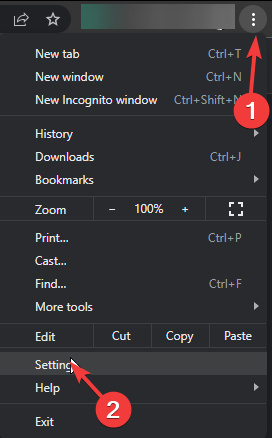
  1. Launch your browser, and for this step, we shall be using Google Chrome.
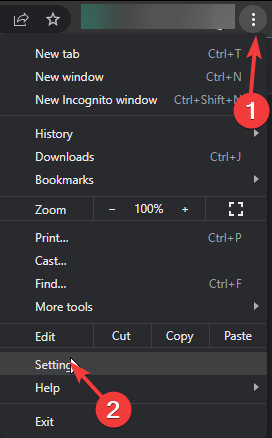
  2. Click the three horizontal dots and select Settings.
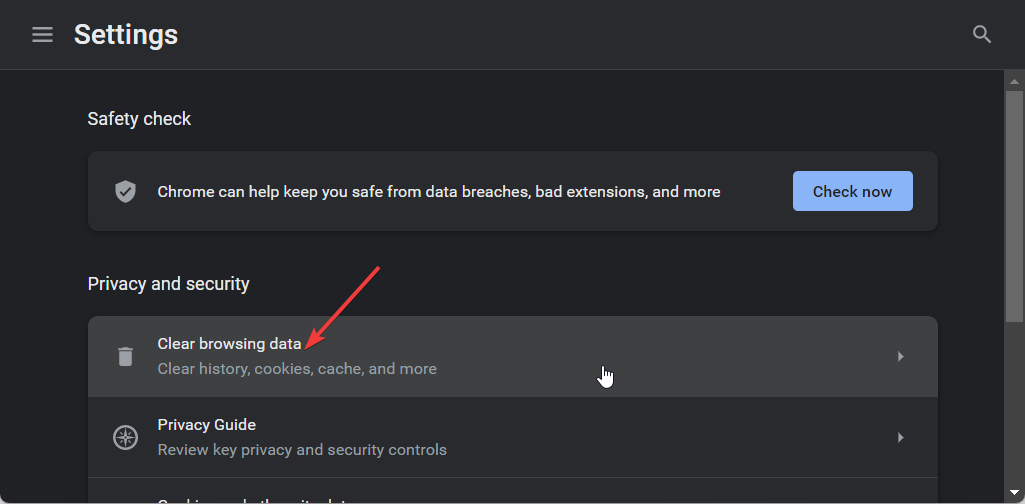
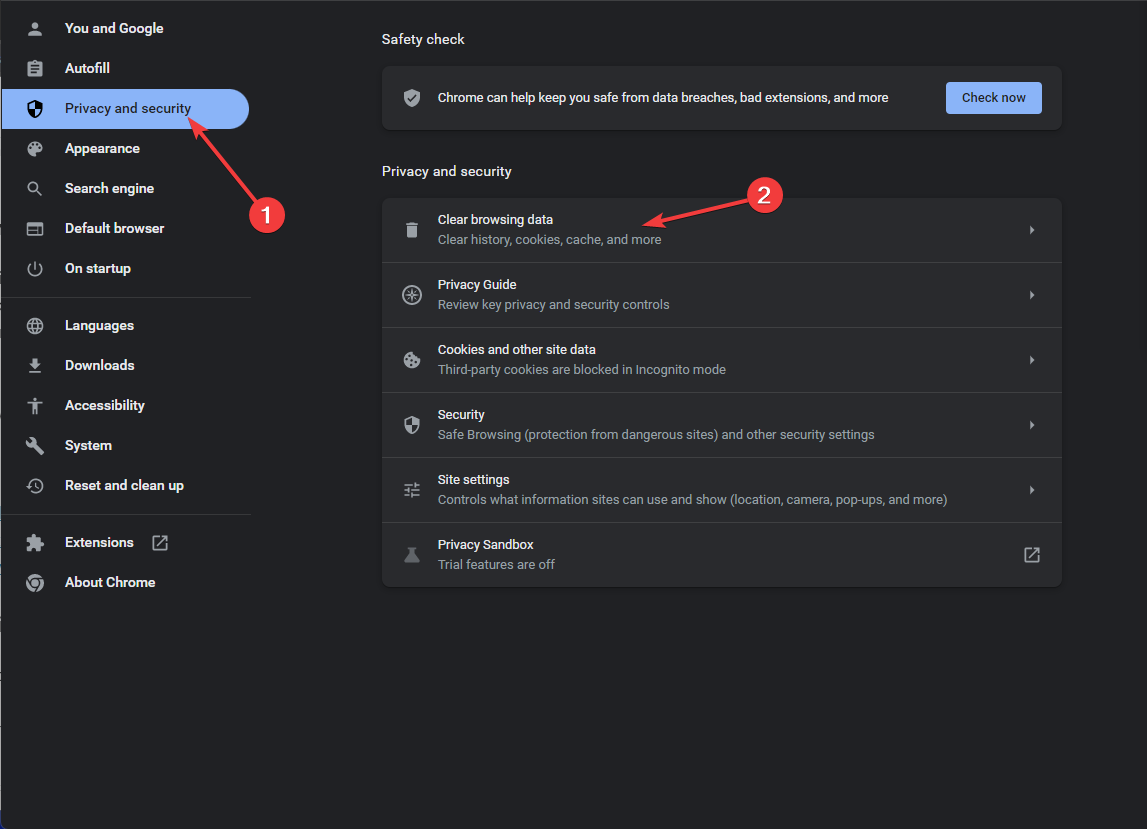
  3. Go to Privacy and security and click Clear browsing data.
  4. Select Browsing history, Cookies and other site data, & Cached images and files, then click Clear data.

Like issues like the Janitor internal server error may be caused by corrupt cache especially if not cleared in a while. Ensure you restart your browser and try again. Also, check the OpenAI server status and ensure it is up and running.

Cache or server interruptions can also trigger the Chat GPT error in message stream, so if clearing your browser data does not help, check that guide for more fixes.

2. Disable browser extensions

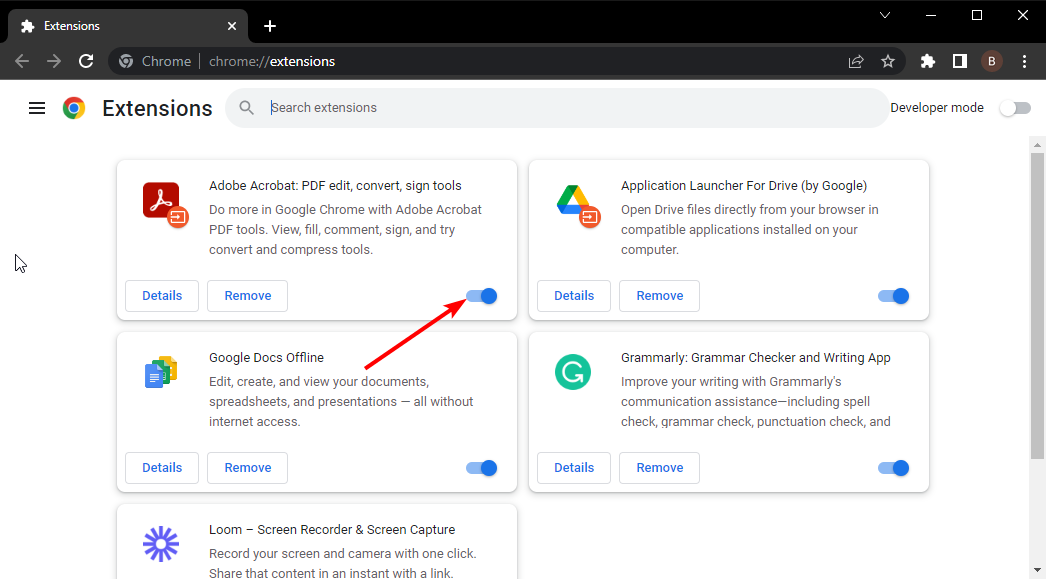
  1. Launch your Chrome browser, and in a new tab, enter the following address:chrome://extensions/
  2. Peruse through your extensions and toggle the Disable button for any suspicious-looking ones.
  3. Repeat this step until you find the culprit.

Some browser extensions habitually alter how your browser works or interfere with select sites. You can install ChatGPT browser extensions that enhance your experience but be careful not to install too many because they may not all work together simultaneously.

3. Reset your browser 

  1. Open your Chrome browser and click on the three vertical ellipses at the top right corner.
  2. Select Settings.Settings CHrome
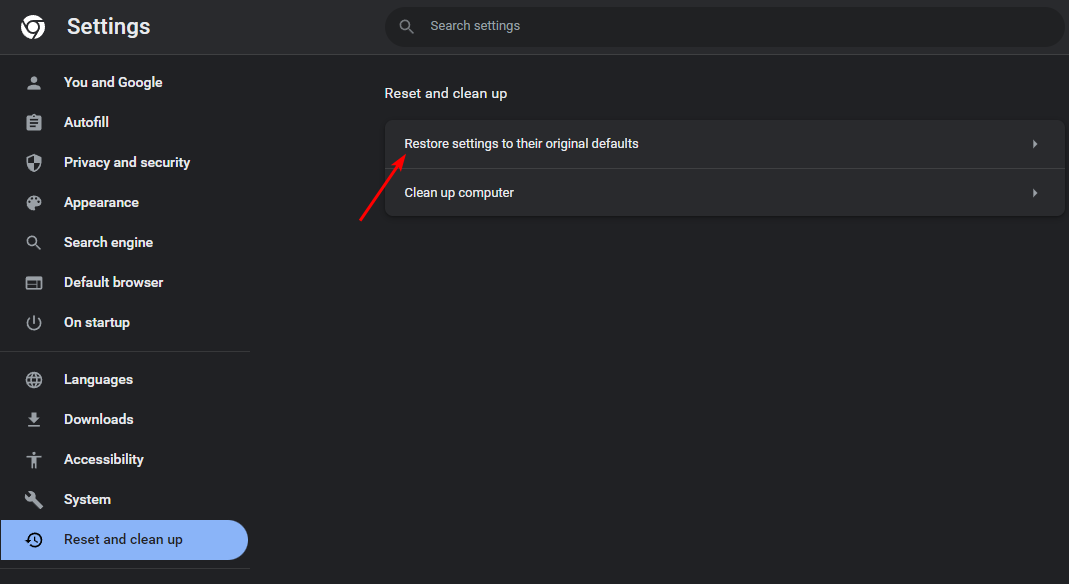
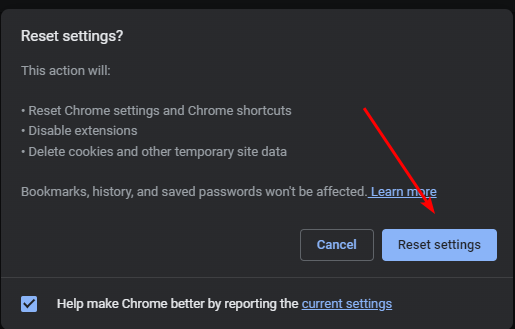
  3. Next, click on Reset and cleanup, then select Restore settings to their original defaults.
  4. Confirm Reset settings in the next dialog box.
  5. If this doesn’t resolve the issue, reinstall your browser.

A reinstallation will ensure your browser is up-to-date especially if new updates were not properly installed. If this doesn’t work, try with another browser just to verify there’s nothing wrong with it. If it works on a new one, your browser may have issues. You can try again later to see if it is a temporary issue.

4. Disable your VPN 

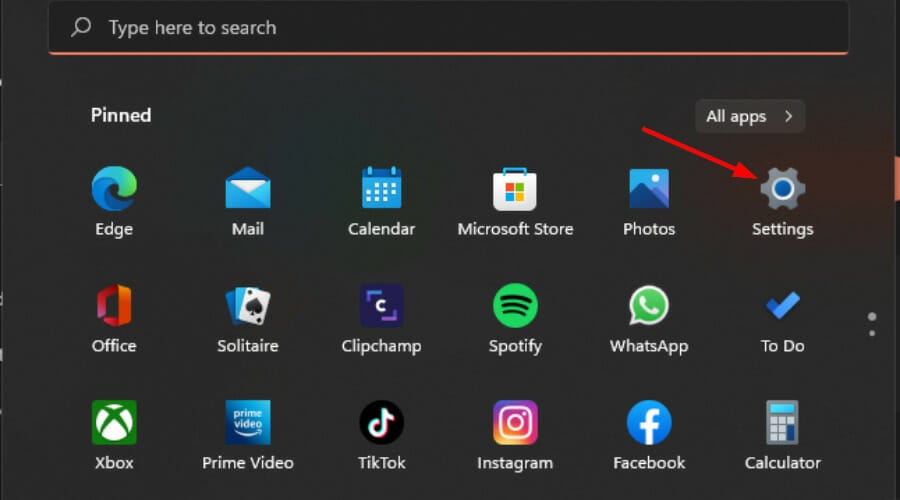
  1. Press the Windows key and select Settings.settings windows 11
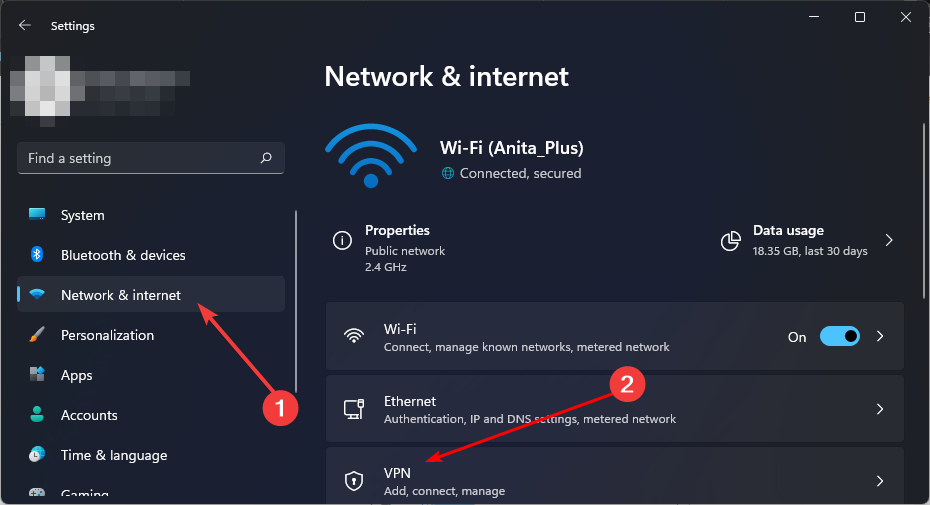
  2. Next, select Network & internet and click on VPN in the right-side menu.
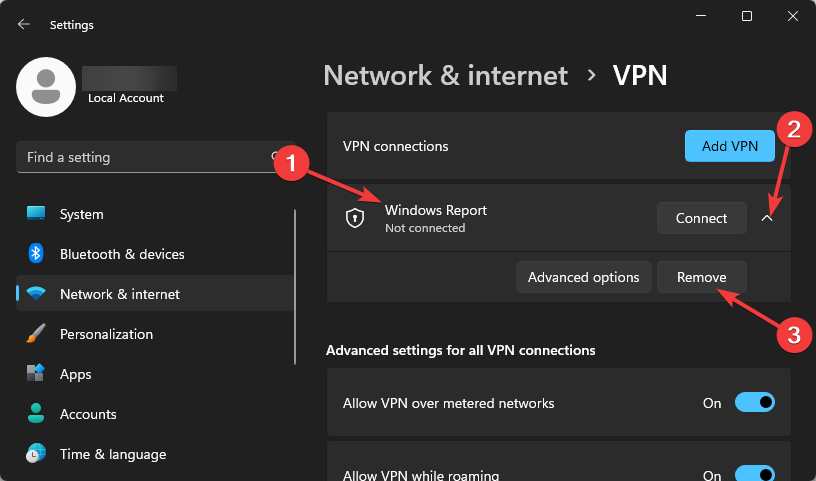
  3. Select the VPN connection you want to disable, click on the drop-down and select Remove.remove VPN

VPNs and proxies are great when you want to secure the privacy and security of your connection. However, these configurations may inadvertently block some ports, which can lead to errors. In some cases, you might even encounter issues like the ChatGPT route error 400, where invalid requests prevent the tool from responding correctly. Disabling VPNs or proxies often resolves these problems.

5. Disable your Proxy 

  1. Press the Start Menu icon and select Settings.settings windows 11
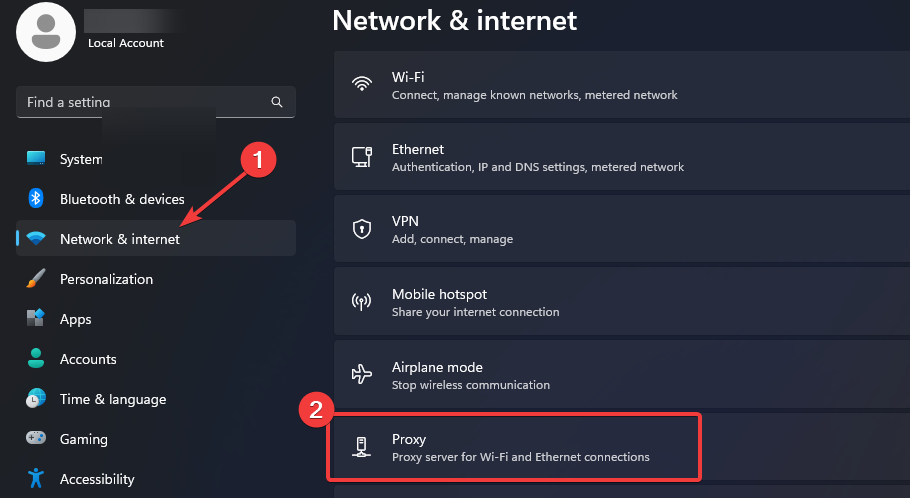
  2. Click on Network & Internet on the left pane, then scroll down and click Proxy on the right pane.Network proxy settings
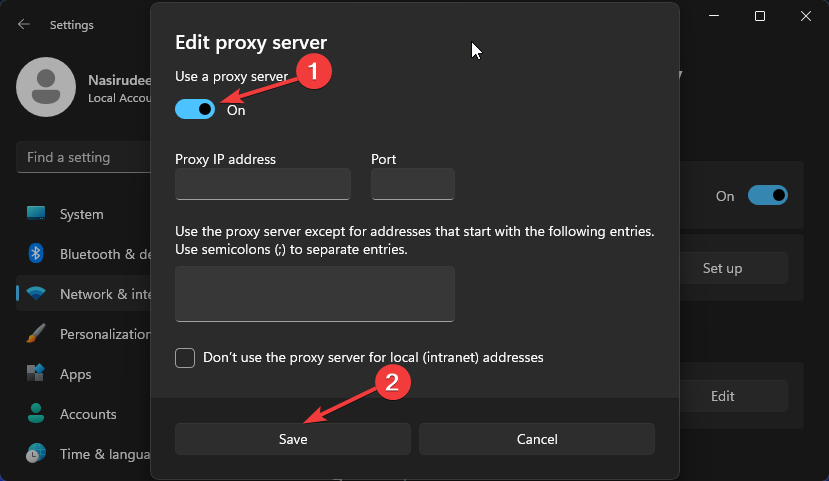
  3. Select Edit next to Use a proxy server option in the Manual proxy setup section, toggle off Use a proxy server and click on Save.Disable proxy server

VPNs and proxies are great when you want to secure the privacy and security of your connection, However, these configurations may inadvertently block some ports hence why ChatGPT is unable to fulfil some requests resulting in an internal server error.

Alternatively, you may choose to upgrade to a different version of ChatGPT. ChatGPT Professional gives you access to premium services and may resolve the internal server error.

If the issue behind this problem is an overloaded server, another premium server may have evenly distributed traffic. Further, premium versions tend to be optimized and their performance is much better.

Remember the premium version comes at a cost so if you’re not willing to purchase and you’ve attempted all the above solutions unsuccessfully, you’ll just have to wait it out. In the meantime, you can try out other ChatGPT alternatives.

When using ChatGPT, remember to adhere to terms and conditions because any suspicious activity detected could end up in you being restricted or banned from using the service.

Error 1015 in ChatGPT is also causing a lot of trouble for many ChatGPT users, but we have a guide that addresses it, so don’t miss it.

That’s a wrap from us but do let us know of any other tips you may have regarding this error in the comment section below.

Microsoft warns game devs about stereotypes & “exaggerated body proportions”

If we’re honest, we all have seen ridiculously drawn characters in games that have nothing to do with reality. But should we be really concerned about this? Microsoft issued a Product Inclusion Action letter to developers warning them about stereotypes and disproportionate human traits in their games.

What is even more interesting is that Microsoft treats these issues from a business-oriented perspective. The Redmond giant references a few studies from 2021-2023, from which they concluded that people don’t play many games because they don’t represent them.

Why is Microsoft pushing devs to create politically correct games?

According to Microsoft’s letter, the U.S. is the leader in media content, with 80% created inland, but the content needs to be dedicated for the broad consumer.

​​​​​​​Research shows that players prefer to play characters that look like them and are more likely to purchase and play experiences where they align to the characters identity.

  • 57% of players in the broader gaming market didn’t play certain games because the games weren’t made for them. Over half of the global gaming market.
  • 53% of developers felt diversity in storytelling should be a priority and it was ranked as the third most important factor in industry growth.
  • 41% of retail consumers have shifted 10% or more of their business away from brands that do not reflect their value in diversity & inclusion.

So, the point is that the gaming industry is losing a lot of potential players and, implicitly, money because the games need characters and stories to reflect diversity.

Microsoft’s Product Inclusion Action already stirred a pretty hot discussion on X about all the arguments related to the story.

The Infinitale: Chronicles developer responded with strong arguments in favor of the game creators:

These ideologues have infiltrated, hijacked, & destroyed this medium. Videogames are an outlet of escapist fun. Nothing more. Nothing less. Can they be used to tell stories and educate? Sure, but that’s NOT their primary role.

Microsoft asks developers watch out for gender stereotypes and exaggerated body proportions

Microsoft also added some guiding questions developers should refer to when creating a game. The arguments range from moral dilemmas and politically correctness to gender equality:

Are you reinforcing any negative gender stereotypes?  

  • Are you unnecessarily introducing gender & gender barriers into your code or design?
  • Are you creating playable female characters that are equal in skill and ability to their male peers. Are your female characters equipped with clothing and armor that fits their tasks?  Do they have exaggerated body proportions?
  •  When the story allows, do you show male characters who display a full range of emotions, including joy, sadness, and vulnerability?

Another commenter, emphasized on the above-mentioned X thread that looks are not important in the development of a game:

I couldn’t care less if fictional women are in realistic equipment or not. Personally, as a woman who plays games, I prefer them not in hideous full suits of armor. That’s just me though. I’m also sick of it always being only how the women look that’s a problem & needs “fixing.”

This discussion goes way back. For instance, five years ago, Sony introduced censorship in their Japanese games.

A Reddit thread from seven years ago stirred the same attention about political correctness ruining the game industry.

This is a never-ending story, but you should always remember that for huge gaming hubs, the focus is and always will be profit. That also means bringing everyone to gaming and make sure they enjoy their experience so that they come for more titles. It’s one of the golden rules of business and if Microsoft want to bring Xbox to every screen, the developers will have to become more flexible and become more open to these suggestions.

Will this ruin the titles for the gamers who are already onboard? That’s also a great argument to consider and from the looks of it, the gamers are not pretty happy about the changes.

What do you think about Microsoft’s Product Inclusion Action letter? Let’s talk about this in the comments section below.

Is Xbox in trouble? Retailers cutting back stock, third-party publishers prioritizing PS5 and PC

The last few years haven’t been an easy ride for console manufacturers. The sales for all three Xbox, PlayStation, and Nintendo have witnessed a decline, at least compared to the projections. The global chip shortage added to the woes. But the situation seems far worse for Xbox!

Chris Dring, Head of GamesIndustry.biz, in a podcast available on YouTube, shared his experience at the GDC (Game Developers Conference) and talked about the troubles mounting for Xbox in Europe.

As per Dring, many retailers have either already started or are planning to cut back the stock of Xbox consoles in their stores.

Third-party developers, too, shared reservations about releasing games on Xbox Series S and Xbox Series X. According to Chris, publishers believe that it’s too much effort tailoring the game for Xbox when PS5 and PC serve as a more viable and profitable market.

He also heard publishers claim that most Xbox exclusives will soon end up on PS5 and that Game Pass wasn’t as big a success as Microsoft had expected.

Chris Dring went on to say,

And with Xbox putting some of the games on PS – from what I understand the majority of them will be coming across at some point, assuming it progresses as Xbox believes it probably will, I think Xbox is in real trouble as a hardware manufacturer, and that was the thing that came out of GDC for me. I thought it would be fine, but then I didn’t really factor in that some developers and publishers might just go, ‘yeah I don’t, you know, is there any point?’ And that is when you can lose it.

That’s true! Hardware and software upgrades to Xbox will only work if retailers and publishers are interested. The moment their interest starts to wane, Xbox will lose the console war or at least be on the back foot.

Xbox’s position in the market and future projections

If we look at the sales figures for Xbox vs. PlayStation, the latter has a significant lead. PlayStation has so far sold over 500 million units, while Xbox stands at a feeble 180 million in comparison.

In the handheld console market, where Xbox plans to make an entry, Nintendo Switch commands the top position with over 139 million units sold. Beating it would prove to be a challenge!

As for the new Xbox console under development, we will have to wait to find out what it has to offer. For Xbox to survive in the current market dynamics, its upcoming console should be a match for Sony’s PS5 Pro.

Besides, Microsoft should go for AI integration in Xbox. We recently reported that attackers manipulated Xbox’s automatic banning system to get accounts suspended, and this is something artificial intelligence can help with.

With this and other similar features, Xbox could make a comeback in the hardware market, where it’s reportedly in trouble. As for game development and publishing, Microsoft’s recent acquisition of Activision does put it in a secure position, at least in the near future!

What changes would you recommend to Xbox to get out of this trouble? Share with our readers in the comments section.

Microsoft is under fire in the EU again, this time regarding Entra ID and 365

Microsoft had its share of trouble with the EU recently, but it seems that the company isn’t out of the woods yet.

The EU is currently looking into Entra ID and 365 services after claims of anticompetitive practices.  

Microsoft is under the spotlight by the EU, yet again

As TechRadar writes, Microsoft is being investigated by the EU antitrust regulators as Amit Zavery, VP/GM and Head of Platform for Google Cloud claims.

Microsoft is accused of forcing users to use Entra ID to access Microsoft services. Zavery claims that Microsoft can remove interfaces and APIs thus preventing users from using other authentication methods.

That’s not all, system administrators familiar with Microsoft’s ecosystem claim that Entra ID is the primary method for accessing Microsoft 365, thus raising concerns.

One system administrator claimed the following:

As soon as you create a 365 tenancy, it also creates an Entra ID as your ID, they are intrinsically linked.

Microsoft also released a statement regarding this probe:

Like other cloud SaaS services, Microsoft has built-in identity capabilities which ensure our customers can securely access our cloud services. We also provide open APIs, enabling seamless integration with third-party identity services like Ping and Okta as well as with security providers to allow our customers to choose the solution that best fits their needs.

As we said earlier, this isn’t the first time that the EU and Microsoft have clashed regarding unfair business practices.

Microsoft had to comply and it now allows you to remove Edge and Bing from Windows. As for this probe, we’ll just have to wait for the official results from the EU.

Forget Dragonflight, this Microsoft Dragon Simulator X is the real way to ride dragons

Ever since Game of Thrones ended, and House of the Dragon began airing, dragons have been a thing: even the world’s most popular MMORPG, World of Warcraft, released a dragon-themed expansion, Dragonlflight, finally allowing players to ride dragons after almost 20 years of existence.

While riding dragons in WoW is definitely fun, this Microsoft Dragon Simulator X takes it to the next level, with hyper-realistic dragons soaring through the skies, and making the ground beneath feel like a playground. Fortunately, there is a way to witness the Dragon Simulator X. Unfortunately, there is no real way (yet) to play it.

The Microsoft Dragon Simulator X was developed by Reddit user, Sidenius, and it looks breathtaking, to say the least.

In almost 2 minutes, you can see a dragon flying through the sunny skies, before diving, and soaring again, and it looks incredible.

It’s currently under development, but the user felt that the Simulator is good enough to be displayed: it currently runs on Unreal Engine and it uses an aerodynamics model, and procedural animations to simulate the experience of a dragon flying.

The developer says the Simulator is far from its finished version, but even in this state, it looks incredible.

The flight simmers are gonna love this one. It’s a little project in Unreal Engine I’ve been working on recently which uses a simple aerodynamics model and procedural animations to simulate a highly dynamic dragon flying experience. It’s still very much a WIP (anyone noticed the map borders?) but good enough to showcase.

Sidenius on Reddit

The developer also said the Simulator will be upgraded to support fire-breathing capabilities (cool, right?), so that means potential players will be able to use their dragon to wreak havoc on those pitiful mortals down below (we’re kidding).

For now, it’s just a personal side-project, but the developer hopes to find some devs to take it to the next level, a mod for Microsoft Simulator (after all, Microsoft did release a Dune-themed expansion for it), or even a game on its right.

It’s just a personal side project so far, but I might look into opportunities for funding and potential dev buddies to make it into a real game. The purpose of this post was partly to gauge interest and it seems like a lot of people like it, so I’ll definitely keep working on it for now at least.

Sidenius

Meanwhile, while most of the Reddit community finds it absolutely breathtaking (and for good reason), there are some criticisms: the dragon is not really a dragon, but a wyvern, and this is an important distinction, a Reddit user says.

If it only has four limbs, it’s a wyvern. I adore wyverns, but it’s an important distinction to me. Also, I absolutely love dragons with wings that feel big enough to be real.

Reddit user

Microsoft Dragon Simulator X or Microsoft Wyvern Simulator X, whatever your heart desires, but can we have it already? Can we play it already? Pretty please.

Solved: Cross Device Experience Host Not Installing

Microsoft has done great in connecting your phone as a webcam on your PC with the Cross Device Experience Host but it not installing was probably not on your bingo card.

The Cross Device Experience Host not installing or stuck at pending is probably just an installation glitch. Your Microsoft Store cache might be corrupted, you have a storage or connection issue.

What can I do if I can’t install the Cross Device Experience Host?

1. Run the Windows Store Apps troubleshooter 

  1. Hit the Windows key and click on Settings.settings windows 11
  2. Click on System and select Troubleshoot.Open system troubleshooter
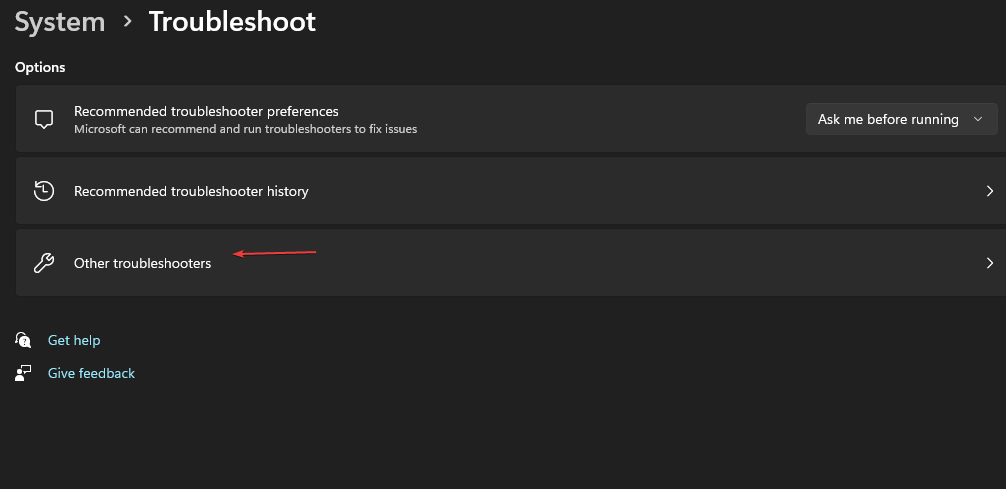
  3. Navigate to Other troubleshooters.other troubleshooters
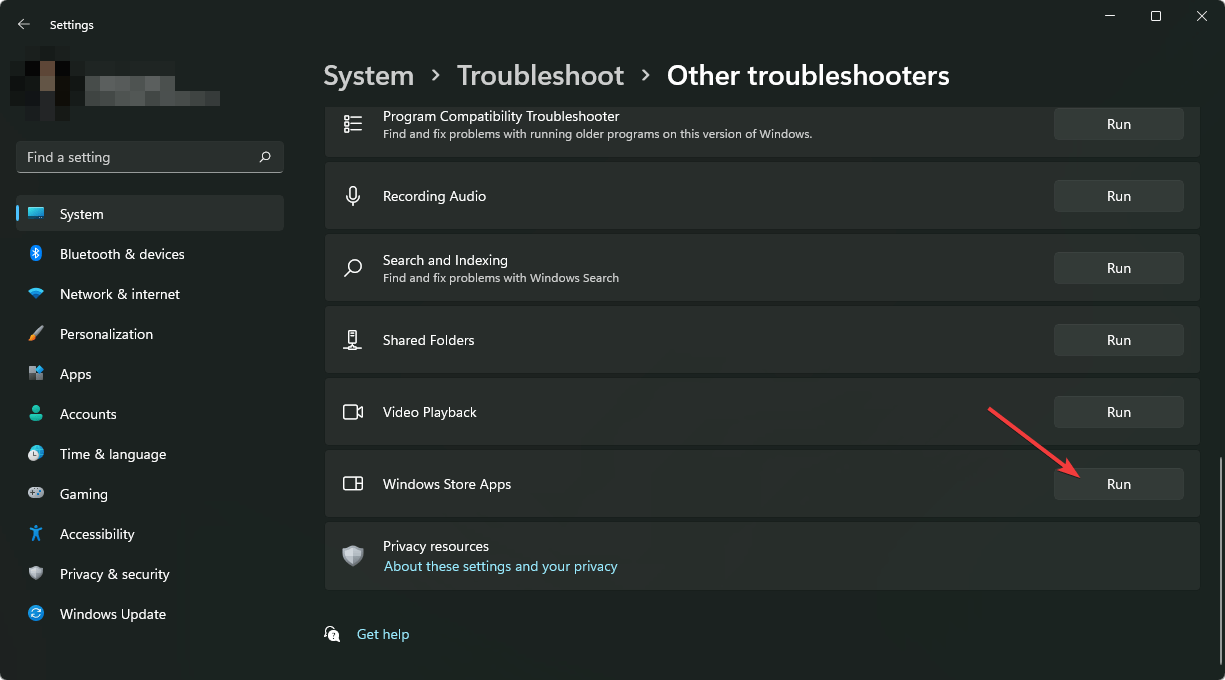
  4. Click the Run option for the Windows Store Apps troubleshooter.clicking run windows store apps troubleshooter

If the Windows Store apps has no issues, ensure you have a working and stable internet connection and do a Disk Cleanup. Sometimes, apps have trouble installing because there’s insufficient space or the connection keeps dropping interrupting the download.

2. Install the app from a command line

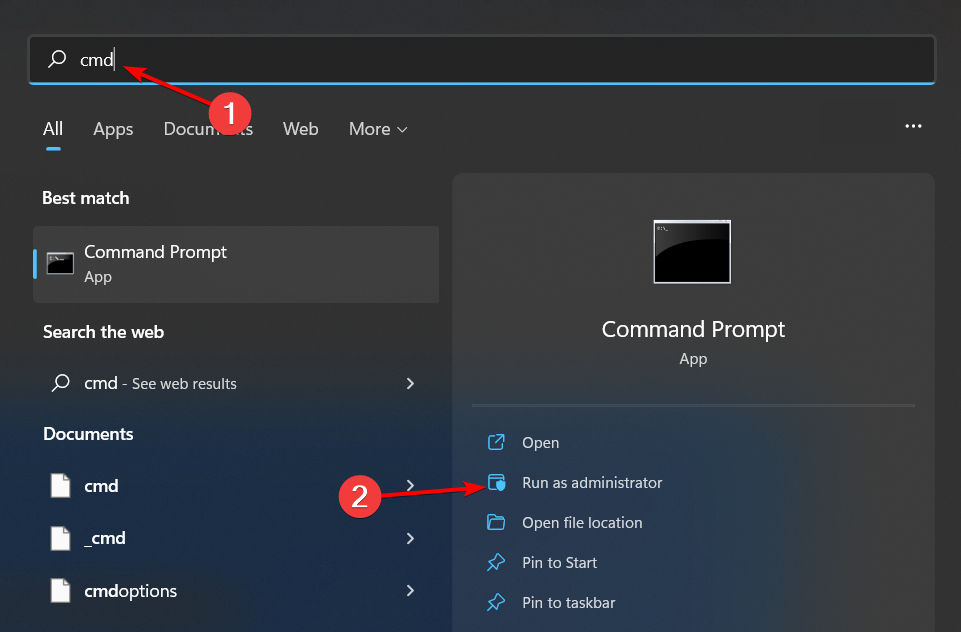
  1. Hit the Windows key, type cmd in the search bar, and click Run as administrator.cmd-run-admin-w11 unexpected kernel mode trap windows 11
  2. Type and Enter the following command: winget install 9NTXGKQ8P7N0

3. Set system drive as default storage location for apps

  1. Press Windows + I to launch the Settings app.settings windows 11
  2. Click on Storage from the list of options available on the right in the System tab.
  3. Select Advanced storage settings under Storage management.
  4. Click on Where new content is saved from the list of options that appear.Where new content is saved 0x80242020
  5. Select the dropdown menu under New apps will save to select your system drive usually C.
  6. Click on Apply for the changes to come into effect.
  7. Restart the computer and try installing the Cross Device Experience Host.

Changing the drive location could potentially address any storage or drive issues that could be causing the installation to be stuck.

4. Reset the Microsoft Store cache 

  1. Hit the Windows key, type cmd in the search bar, and click Run as administrator.cmd-run-admin-w11 unexpected kernel mode trap windows 11
  2. Type the following command and hit Enter: WSreset.exe

It’s possible that there’s a built-up of cache from the Microsoft Store. Clearing this temporary data may recreate the cache afresh and resolve any issues with downloads.

5. Run DISM and SFC scans

  1. Hit the Start Menu icon, type cmd in the search bar, and click Run as administrator.cmd-run-admin-w11 unexpected kernel mode trap windows 11
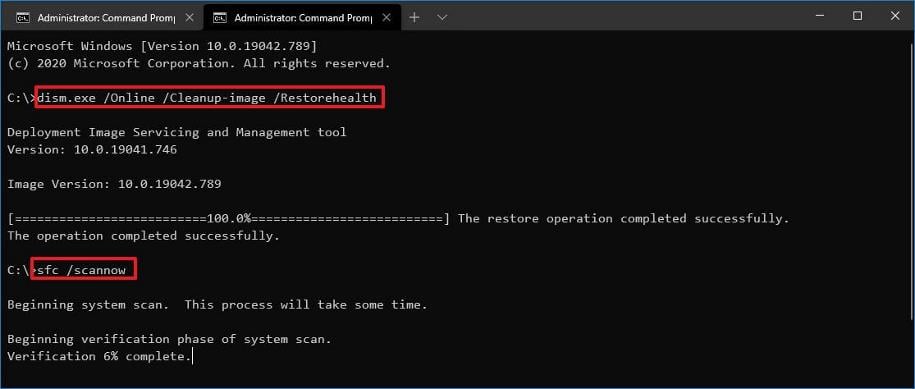
  2. Type the following commands and press Enter after each one:DISM.exe /Online /Cleanup-Image /Restorehealth sfc /scannow

Any corrupt system files may be preventing the successful installation of the Cross Device Experience Host so these scans can repair these files and allow installation to carry on.

6. Perform clean boot

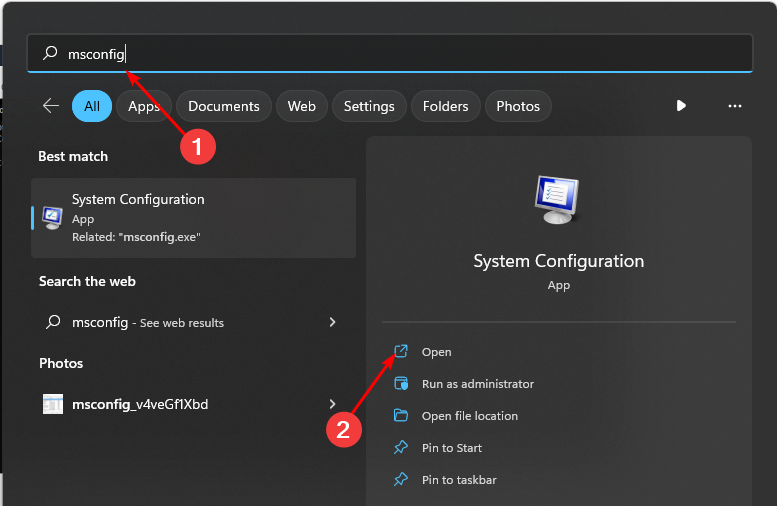
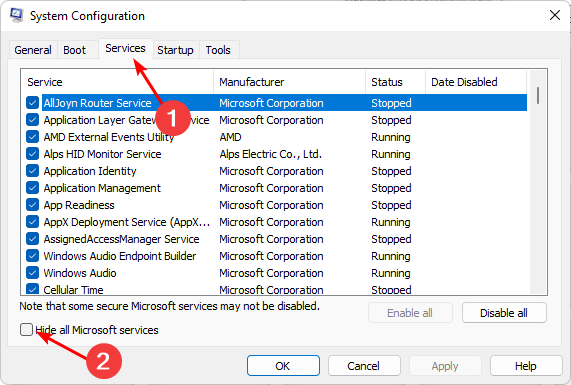
  1. Hit the Windows key, type msconfig, and open System Configuration.
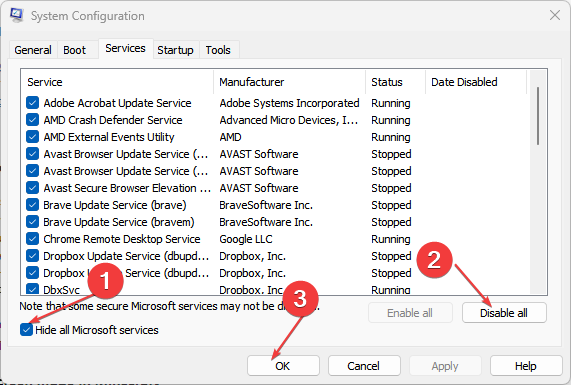
  2. Switch to the Services tab and select Hide all Microsoft services.
  3. Click on the Disable all button, then hit the Apply button to save the changes.
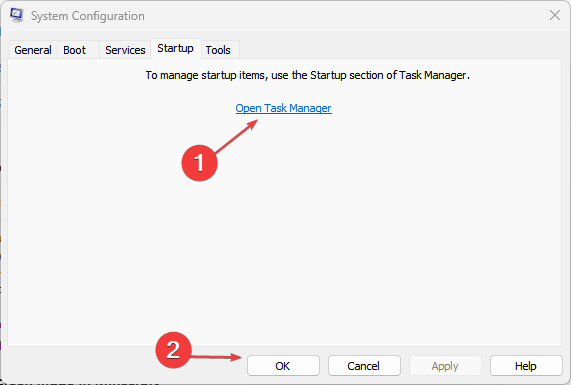
  4. Go back and click on the Startup tab, select Open Task Manager then click OK.
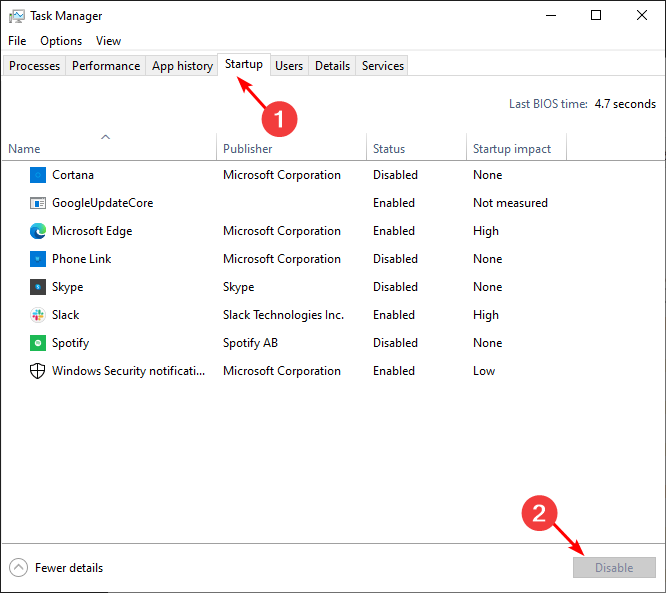
  5. In the Startup tab of the Task Manager, Disable all the Enabled startup items.
  6. Close Task Manager and restart your PC.

If you’re unlucky with all the above, you should try installing Microsoft Store apps without the store. Sometimes it’s just a temporary glitch with the store so if you really need the app, you can opt for the alternative.

There are also other ways to use your phone as a webcam without relying on PhoneLink or the Cross Device Experience Host. The feature is fairly new so as you wait for an official fix, having alternatives is great.

Have you come across this issue? Any additional tips you may have to offer? Share them with us in the comment section below.

Surprisingly, the Format Drive dialog box has been the same since 1994

The Windows operating system has undergone many user interface changes and improvements, and after 30 years, with Windows 11, one thing that hasn’t changed is Format Drive.

Former Microsoft programmer Dave Plummer posted on X (formerly Twitter) about the interesting fact about Format Drive:

This made us realize that our Format Dialog box was never there to say, as it wasn’t elegant enough. It was a temporary one until the elegant user interface was released.

And 30 years later, the UI never made it, to which Dave W Plummer said:

That was some 30 years ago, and the dialog is still my temporary one from that Thursday morning, so be careful about checking in “temporary” solutions!

Once he mentioned this in the post, a lot of X users, including Tom Warren, Senior Editor at The Verge, expressed their thoughts.

Thomas Entner, CEO – Entner Electronics said:

This is exactly like I imagined that most of Windows was designed…

To which Dave W Plummer responded:

It wasn’t, most of it was very well thought out. It’s not fair to extrapolate from an edge case like this to the rest of the product, and that’s kinda the point of the story.

You can check out the whole conversation here to learn what everybody else said about this on X. Once the conversation started, people started talking about other old features and UI that were made to Windows 11 after all these years.

On one hand, Microsoft has been constantly making changes to make Windows more customizable, and with AI integration, it is all ready to step into the future; however, it has been steady with the changes when it comes to Control Panel features migration to Settings, letting people getting accustomed with the new UI.

Honestly, the current UI for format drive works efficiently, and as Dave W Plummer said, if it had been bad, Microsoft would have changed until now. With so many changes, some of us like to stay connected with old Windows features like they were, as a makeover of the format drive could agitate people more than get excited.

Do you want to see UI and other changes to the Format drive dialog box? Share your thoughts in the comments section below.

Microsoft is planning to bring almost all the Xbox games on PlayStation; is this the end of the console war?

We know by now that Microsoft has expressed its desire to make Xbox games multiplatform and bring them to other consoles, such as PlayStation.

The Redmond-based tech giant has started this process by announcing the release of two of its most popular games on Xbox, Pentiment and Hi-Fi Rush, on PlayStation, and Switch.

Pentiment was released on PlayStation 5, Switch, and PlayStation 4 on February 22, and much to the enjoyment of the PlayStation users, and the dismay of Xbox lovers, the game seemed to run better on PlayStation than it does on Xbox consoles.

Hi-Fi Rush was released to PlayStation 5 a week ago, on March 19, 2024, and Microsoft wants to bring other popular Xbox games to other platforms. We’re talking about Grounded, and Sea of Thieves, both of which will be released on PlayStation 5, PlayStation 4, and Switch on April 16, and April 30, 2024, respectively.

However, more Xbox titles will become multi-platform, as Microsoft is reportedly looking to bring almost all of the Xbox games to other consoles, mainly PlayStation 5, according to GamesIndustry.biz head Chris Dring, who admitted that Xbox is in real trouble as a hardware manufacturer, at last week’s GDC.

Dring also says he heard from important companies in the gaming industry that Xbox is struggling in Europe. We’ve sort of known for a while that the console is not doing well in regions such as Europe, where PlayStation is more popular. But Xbox has been gaining some steady ground in Japan, and it’s definitely the leading gaming console in the NA region.

Dring says the majority of the Xbox titles will be available on PlayStation at some point in the future:

And with Xbox putting some of the games on PS5—from what I understand the majority of them will be coming across at some point, assuming it progresses as Xbox believes it probably will—I think Xbox is in real trouble as a hardware manufacturer, and that was the thing that came out of GDC for me.

Chris Dring

However, this doesn’t come as a surprise, at least, not now. Phil Spencer said, back in February, that dozens of other Xbox titles will ultimately become multiplatform, and the Xbox business strategy included making Xbox exclusives available to PlayStation.

But this could definitely hurt the console in the long run, and many people won’t see the need to purchase Xbox consoles if all of its games can be played on other consoles.

So is this the end of the console war, as we know it? Well, some say that the war is already over, as PlayStation is clearly the winner, and it overtakes Xbox when it comes to sales.

But, yes, it could be the end of the console war, unless Microsoft approaches it with some innovative ideas: the next Xbox console is reportedly the biggest technological leap in the console’s history, so that might stir up the war a little.

So even if the Xbox titles will be available to PlayStation, many of them will be native to Xbox, and this means they will run much better on Xbox consoles. Plus, the additional perks such as the Microsoft Xbox Rewards, or the Xbox Games Pass are also worth considering, especially if the budget is limited.

Ultimately, I don’t think a console with a 20+ years history can just disappear from the market, and even if it’s not winning the console war, Xbox will always have a community of players. If almost all of its titles will be available on PlayStation, then it is a good thing for Microsoft, as well, financially speaking.

Unleash the power of the AI to scan pages with AI Page Context in Opera Developer

Opera is working hard on integrating AI into its browser, and speaking of AI, we finally have the chance to try some of the new features.

The new Opera One Developer version was just released, so let’s see what’s new with it.

Opera One Developer allows you to quickly analyze pages with AI

As you already know, Opera has an AI Features Drop program that allows users to test new AI features. According to the latest Opera blog post, the new Developer version is here, and it comes with some interesting features.

The first one is Ask Aria which will allow you to access the command line without having to use a keyboard shortcut.

This is a minor improvement, but the highlight of this update is the new AI Page Context mode. This feature is an improvement of an already available AI Prompts feature.

To use this feature, you need to do the following:

  1. Start the latest Opera Developer version.
  2. Use the Ctrl + Windows shortcut to open the AI prompt.
  3. Now press Tab to switch to context mode.
  4. Type your input.

With this feature, you can easily summarize the text of the page, or translate it to a different language. You can also use AI Page Context to obtain specific information right from the currently opened page.

This is an amazing feature and if you want to try it, you need to use Opera Developer v110.0.5104.0.

Speaking of Opera updates, Opera for Android 81 was just released, and it brings several AI improvements as well.

Hisense teams up with Xbox to bring you gaming-ready laser TVs

Not long ago, Microsoft made a promise to bring Xbox to every screen. Now, it’s working on a handheld console, but we wouldn’t imagine that screens are also coming to Xbox.

The Chinese electronics manufacturer Hisense will bring its A-game in cutting-edge Laser display technology to enhance your Xbox gaming experience.

Hisense’s press release doesn’t cover much from the tech specs of the alleged laser TV’s, but we do know that they will be over 100 inch in diagonal:

Hisense aims to provide not only superior products but an entire experience that’s designed specifically for gaming and home entertainment. Our partnership with the Designed for Xbox Program seeks to truly level up the gaming experience and allow people all over the world to enjoy a larger-than-life experience with more than 100-inch of image display.

Jerry Liu, Vice President of Hisense International

What are laser TVs and why do I need one for Xbox?

First, we need to make things a bit more clear. What Hisense calls laser TVs are actually short-throw laser video projectors. However, instead of just selling the projector, they also throw in the projection screen which is especially made to optimize the image quality.

The so-called TV display is created especially to work best with the projector and it also features a Hisense patented ambient light rejecting technology that provides a glare-free picture even if you watch it in a lit environment.

Now, the advantage of a short-throw projector like the ones from Hisense is that it can create a huge 100-120-inch screen from just a couple of inches from the projection screen. And that increases the light output that reaches the screen.

Hisense laser TVs also feature 4K UHD and HDR technology, and MEMC, a technology that minimizes the lag and creates a smooth motion of the elements on the screen. The projectors also have an Auto-Low Latency Mode (ALLM) that automatically detects when you’ve powered on your gaming console and optimizes the settings to provide a lag-free gameplay.

So, that’s what Hisense is bringing up to help your Xbox experience. The Chinese don’t mention what are the products optimized for Xbox, but they will most likely have a green Xbox sticker saying Designed for Xbox on it.

Until the new Xbox Hisense laser TVs show up in stores, you can take a look at our best 4K projectors selection.

Would you buy a Hisense laser TV for Xbox? Tell us all about it in the comments section below.

Developers share plans to bring Final Fantasy XVI to Xbox after Windows release

Final Fantasy XVI, released in June’23 for PlayStation, could soon make its way to the Xbox ecosystem. Developers have confirmed plans to start working on bringing Final Fantasy XVI to other platforms.

In an interview with Noise Pixel, developers Naoki Yoshida (Producer) and Takeo Kujiraoka (DLC Director) said,

It’s not over in the sense that we have the PC version. Once the PC version is released, we’re thinking about hopefully moving to other platforms as well. However, that’s not really talking about the story; it’s more about moving it onto different platforms. So, there is a sense that while the project is still going, there is not that sense of being sad and having to leave them yet. But I’m pretty sure that once everything is released and we’ve moved on to the next project, that would be the time where it kind of hits us that, “Oh, it’s really it’s over?”

While Naoki Yoshida didn’t hint at an Xbox release, he’s mostly talking about the platform because that’s still a significant untapped market waiting for the release of Final Fantasy XVI.

The game could be released on Nintendo Switch as well, but experts believe that developers would prioritize Xbox over the handheld console.

PC version of Final Fantasy XVI in the final stages, to be out soon

Speaking on the release of the PC version of Final Fantasy XVI, Naoki Yoshida confirmed that the game will be released within a year.

As per Yoshida, game development is going on smoothly and the remaining work should be completed in the next few months. Developers are currently focused on optimization work.

Also, Yoshida confirmed speculations that Final Fantasy XVI will have a demo (trial) version for the PC. It will help you ascertain the game’s performance on your machine and identify any compatibility issues before purchase.

For now, Final Fantasy XIV was released on Xbox, but to the player’s dismay, the game uses a new currency, FFXIV.

Have you played Final Fantasy XVI on PlayStation? If yes, share your review with our readers in the comments section.

Opera for Android 81 brings AI-powered browsing with Ask Aria

Opera has been present on the browser market for decades, and the Android version of the browser just got updated with some new features.

Opera seems determined to fully utilize the power of AI, and this update does just that, so let’s dive into it and see what’s new.

Opera for Android 81 comes packed with AI features

Not long ago, we wrote about the AI Features Drop program that allows users to test AI features in Opera. According to the Opera’s latest blog post, we finally have the chance to see some of these features in action.

The first option is Ask Aria which will appear every time you select a text. With this feature, you can instantly open Aria and ask it to summarize the selected text or to give you more information about it.

All of that is possible with just two taps on the screen, which makes this feature rather intuitive. This isn’t the only change, Aria AI now supports voice input.

To use it, simply start it, and tap the microphone icon in the input field and Aria will use voice recognition to generate your input.

In addition to AI improvements, Opera for Android 81 also has an advanced Speed Dial menu that you can use to get suggestions for the Speed Dial. You’ll also be able to add features to Speed Dials for quick access.

Overall, this is a great update if you’re using Aria AI frequently, so if you’re on Android, be sure to get it today.

Microsoft’s new ray-tracing tech will make your games look better with less VRAM

A new patent from Microsoft showcases a way to reduce ray-tracing memory usage and boost overall performance. This technology is a great discovery because the VRAM requirements are increasing, especially for newer games. So, we need a common ground because getting a new GPU is expensive, especially with over 10GB of VRAM. That’s why the new Microsoft Tech patent proposes using Level of Detail (LOD) techniques in the RT process.

How will the new Microsoft ray-tracing technology work?

The Microsoft ray-tracing technology uses the relation between your character and the position of the elements. So, the effect will be similar to the viewing distance. As a result, the system will use more resources to trace closer elements with high details. Also, it will use less memory to performlow tracing on the further elements.

Additionally, the patent for the ray-tracing technology will use a residency map corresponding to a Bounding Volume Hierarchy to determine the importance of the objects. On top of that, the elements that require more rays will be the first ones on the list.

By the way, did you know that game developers are also using the LOD technique in 3D games to minimize resource usage? For example, you might have noticed a performance boost while looking underneath your character or above to decrease the amount of details rendered. After all, this is one of the easiest ways to get rid of lag in crowded places.

Ultimately, this technology could help gaming consoles with less memory use the ray-tracing technology without sacrificing performance. In addition, it could save us from upgrading our hardware for newer games. After all, it could make high-end specifications more bearable. However, Microsoft should allow us to switch from dynamic to high-tracing.

What are your thoughts? Are you going to try the ray-tracing technology if it becomes available? Let us know in the comments.

This trial will let you play Cyberpunk 2077 completely free on Xbox

If you’ve never played Cyberpunk 2077 before, but want to see if it’s worth the money (some say it’s worth it, others don’t agree), you can now play it for 5 hours, completely free, by signing up for this trial that takes over this weekend (March 28th – March 31st).

You’ll have more than 4 days to try it out on your Xbox console, and the 5 hours of gameplay should be enough to give an idea if you want to purchase the game or not. Worry not: it is completely free, and you don’t need any subscriptions.

The only thing that you’ll need, however, is 5 hours of your weekend.cyberpunk 2077 xbox

The free trial for Cyberpunk 2077 can be experienced on Xbox Series S or X, or, if you have a PlayStation, you can play on that console, as well.

Another interesting fact is that you don’t have to play the 5 hours of the game all at once. Since there is no lock on progress, you can take your time 5 hours with the game, and play it in a way that fits you the best.

Back when it was released in 2020, Cyberpuk 2077 was available on a plethora of devices, and platforms, including Windows 10, and the now-defunct Stadia, but now, after several update patches, the game looks quite impressive on the current-gen consoles, so this game could be a totally different experience compared to what it was nearly 4 years ago.

Either way, after experiencing the trial, you can choose to buy the Cyberpunk 2077, and you can get it from the Xbox store at $59.99 if you’re going for the Standard edition, or $79.99 if you’re going for the Ultimate edition.

Looks like you’ve gotten yourself a busy weekend, but don’t worry: it will only take 5 hours to decide if this game is worth your time.

New Lenovo YOGA lineup is just around the corner, supercharged by Microsoft’s Copilot

At CES 2024, Lenovo announced a brand new laptop series specifically designed to enhance AI experiences and improve productivity.

As the Lenovo Innovation Technology Conference is a couple of weeks away, let’s discuss the new Lenovo Yoga lineup and its capabilities.

We have already discussed the Lenovo Yoga Pro 9 series and how its Intel Core Ultra 9 185H processor, RTX 4070 GPU, and 3.2K Mini LED display make it a powerful machine. The laptop weighs only 1.93kg and comes with a hefty 84Wh battery to keep in the game for longer. Let’s talk about them individually.

The Yoga 9 series consists of powerful laptops: Lenovo Yoga Pro 9i (16”, 9) and Lenovo Yoga 9i 2-in-1 (14”, 9). These are MIL-STD-810H1 rated for durability and include Intel Core Ultra Processors for super-fast speed.

The Lenovo Yoga 9i 2-in-1 (14”, 9) comes with a Core Ultra 7 155H processor and a 3840×2400 OLED panel, weighs around 1.3 kg

A physical Lenovo AI Core Chip makes it better for AI functionality and comes packed with robust batteries.

The company has included Lenovo X Power, a tuning solution, to boost the power of the AI core chip and powerful processor in Lenovo Yoga Pro 9i.

ML powers this tuning solution and allocates processing power to help boost performance, cooling efficiency, and battery life, thereby enhancing creative tasks like film color correction.

Both models come with a Copilot key, which helps you stay in touch with your AI companion more easily. The Lenovo Yoga 9i 2-in-1 (14”, 9) also comes with a Lenovo Smart Pen and Sleeve.

Another laptop in the Yoga series is the Lenovo Yoga Slim 7i (14”, 9), which is a thin and light Intel Evo edition premium laptop with Intel Core Ultra Processors and a WUXGA (1920 x 1200 resolution) OLED screen, weighing 1.4kg approx and with 65W charging support.

If you are into content creation, the all-new Lenovo Yoga Pro 7i (14”,9)​ and Lenovo Yoga Pro 7 (14”,9) are designed for you. They can be equipped with either Intel Core Ultra Processors or AMD Ryzen processors up to 7 8845HS.

If you opt for Intel, you will get an NVIDIA GeForce RTX 4060 GPU and 32GB LPDDR5x RAM with NVIDIA Studio validation.

With AMD, you will get an NVIDIA GeForce RTX 3050 GPU and 16GB LPDDR5x RAM. Both will have a 3K 120Hz touch IPS screen and a 73Wh battery with an OLED 3K or PureSight Pro LCD screen.

Next comes the Lenovo Yoga Book 9i (13″, 9), which can come with Intel’s new Core Ultra Processors, a rotating Bowers & Wilkins soundbar, and a PureSight OLED 2.8K screen.

Lastly, the convertible laptops in the lineup, Lenovo Yoga 7i 2-in-1 (16”, 9) and Lenovo Yoga 7i 2-in-1 (14”, 9), have Copilot keys that enable creators to access the AI assistant quickly.

Lenovo Yoga 7i 2-in-1 (14”, 9) will be available in Intel and AMD chips with up to Intel Core Ultra 7 155H with 32GB LPDDER5x-7467 memory or the Ryzen 7-8840HS with 16GB LPDDR5x-6400 memory.

However, the display is what sets them apart. The Intel one has a 2.8K 120Hz OLED, but the AMD comes with a WUXGA (1920 x 1200) 60Hz OLED.

Lenovo Yoga 7i 2-in-1 (16”, 9) will also have both AMD and Intel versions, with support for up to R7-8840HS or Intel Core Ultra 7 155U.

Both Lenovo Yoga 7i 2-in-1 (16”, 9) and Lenovo Yoga 7i 2-in-1 (14”, 9) houses a 71Wh battery. However, the 14” version weighs 1.49kg, and the 16” version weighs approx 1.99 kg

The company also boasted about making the Yoga laptop series recyclable, as the chassis is made of recycled aluminum, and the black 45 ~ 100W power adaptor cases are made of 90% PCC plastic.

  • Yoga Book 9i (13”, 9) –  a cover made of 100% recycled aluminum
  • Yoga Pro 9i (16”, 9) and Yoga 9i 2-in-1 (14”, 9) – Carbon Neutral verified by TUV

The rest of the other Yoga laptops also contain 50% recycled aluminum in the base cover. All of these robust devices will be released at the Lenovo Innovation Technology Conference on April 18.

Are you excited about this new Yoga lineup, & which is your favorite? Share your thoughts in the comments section below.

Microsoft Teams will finally get the Intelligent message translation in chats feature for desktop

At the last year’s end, we reported about an inline translation feature on Microsoft Teams for Android. The capability is included in the desktop app as well, but you need to click on the More options… prompt on top of the message and select Translate.

Microsoft will soon finally roll out what it calls Intelligent message translation in chats on the Microsoft Teams desktop client. This feature will automatically offer instant suggestions, as described in the Microsoft 365 roadmap page.

When you get a message in a different language, you will see translation suggested to help you understand it better. In the settings, you can select which languages you don’t want to translate, and whether to translate messages automatically.

How does the new Intelligent message translation work?

The Redmond doesn’t offer too much information about this feature that will start rolling out in April. However, if it’s anything like the mobile feature they announced two years ago, we have a pretty good idea on how it works.

When you receive a message in a language you don’t understand, you will automatically be prompted to translate it into the default language of your Teams app.

However, on the mobile version, you also get the option to never translate that language if you can understand it.

You can also set up the translation features within the Settings menu under the Translation section. From that menu, you will also set up the client to translate the messages automatically.

Microsoft Teams supports translation to and from more than 100 languages already in the desktop client, so you won’t have any problems in this department.

So, Teams already had a translation feature in its desktop client, but now, it will all get a lot more easier.

How do you feel about the new Intelligent message translation in chats? Let’s talk about that in the comments section below.

You can earn upto 275 reward points with Xbox Weekly Console Bonus

In recent months, Microsoft has made several changes to rewards on Xbox. Recently, it discontinued the Xbox Rewards app and replaced it with Rewards Hub, a one-stop solution. A few months ago, Microsoft introduced Weekly Console Bonus, but it was limited to a few.

Now, as per reports, the Xbox Weekly Console Bonus will be available for everyone starting April’24. The bonus rewards players for being active participants in the Xbox ecosystem and playing games.

All you have to do is play any game on the Xbox console for 5 days a week. You don’t even have to spend too much time. Just open the game for a few seconds, and you will see a notification confirming that the activity has been completed.

After completing the weekly task, you can win 250 reward points. Xbox Game Pass Ultimate members will get an additional 25 points, taking their total to 275.

Weekly Console Bonus

A few have had the Xbox Weekly Console Bonus for a few months now, while others should start receiving the new rewards soon.

Xbox Weekly Bonus is still a work in progress

As per the initial reviews, we can confirm that a few issues exist with the new rewards, and it doesn’t automatically register the activities.

This bonus has been on my account for a month or two now. The “5-days” and “play on console” stuff doesn’t seem to register right away. Sometimes it doesn’t show as counted until several hours later or even the following day.
I have also suspected that the gamepass daily play quest might not count towards the other activities, so I always make sure to play at least 2 games. (But this is just a suspicion. I have no proof.)

Others, too, have echoed similar concerns. In a few cases, players had to wait 6-12 hours to redeem the coins.


I’ve had access to this bonus for over a month now. 10 minutes is all it takes. Streaming games through the Game Pass app counts. I play about 10 to 15 minutes of “A Little to the Left” and it’s redeemable when I’m done. The app has run in to issues where it doesn’t automatically redeem, but I’ll check in about 6 to 12 hours later and it’s redeemable.

With the Rewards Hub, Microsoft aims to streamline the process and focus on games and fun activities. And we should hopefully see that happening!
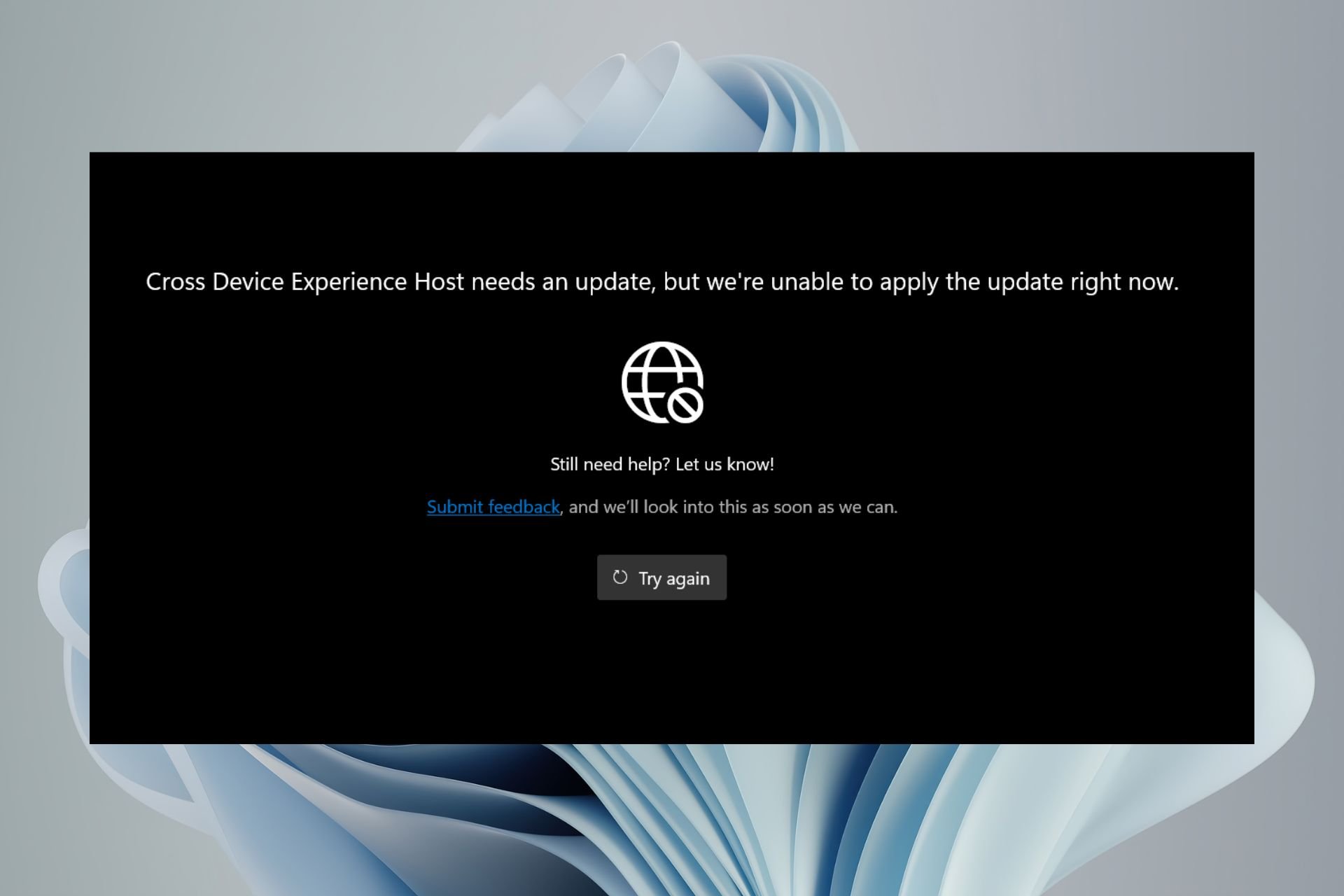
Also, a simpler and straightforward rewards system will help Microsoft gain the players’ trust. Besides, suddenly discontinuing exciting and high-value rewards sends a wrong message, as was the case several times last year.
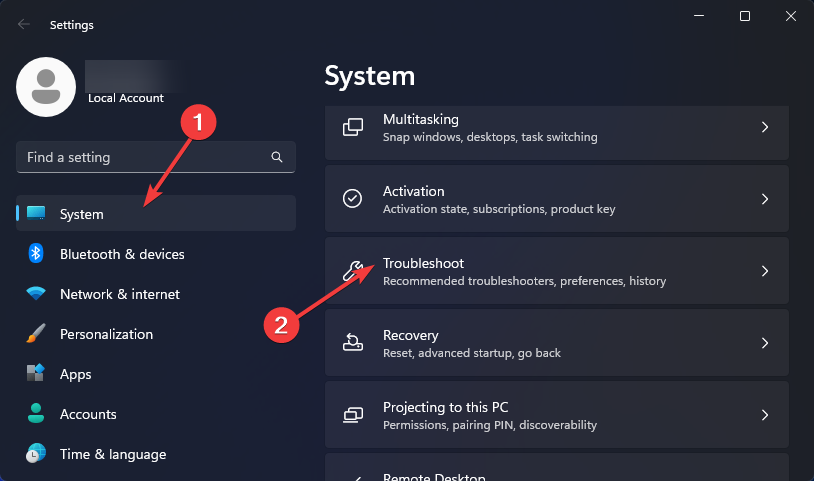
If your rewards points regularly expire, set up auto redeem and avail an additional discount!

What do you think of the Xbox Weekly Console Bonus? Share with our readers in the comments section.

Did you know that you can launch Edge from another browser? Here’s how

Microsoft Edge is the default browser on Windows 10 and newer operating systems, and it’s a solid browser overall.

While most users are familiar with Edge, did you know that there’s a secret way that lets you launch the browser?

Here’s how you launch Edge directly from another web browser

You heard us right, it’s possible to open Edge from any other web browser if you ever need to do so. The question remains, would you ever need to do such a thing?

If you can’t find your Edge shortcut or if the application goes missing, then this workaround might come in handy. To open Edge from another browser, you just need to do the following:

  1. Open your browser of choice.
  2. Open the following URL: https://www.microsoft.com/en-us/edge/launch/EdgeLaunch
  3. Optional: Bookmark the URL for future use.
  4. You should now see a pop-up window. Click on the Open Microsoft Edge or Open Link button.

You’ll see a different button depending on your browser, Chrome will show Open Microsoft Edge while Firefox will show Open Link button.

Some users choose to remove Edge in favor of another browser, but removing Edge can break Windows 11 apps and widgets.

Some apps, such as new Outlook won’t work without Edge, so it’s best to keep it installed since it’s an integral part of the operating system.

If you ever encounter issues with Edge and you can’t find it, be sure to use this trick to start it again.

Microsoft Edge now supports Copilot’s Notebook, an AI tool that lets users ask questions without using prompts

Recently, we reported that Copilot in Microsoft Edge is getting the Notebook feature. This feature allows you to write long prompts without the need to start a new chat or topic repeatedly.

It is now supported in Edge releases and other pre-release versions, such as the Beta, Dev, and Canary channels. Microsoft Copilot’s Notebook is another AI feature that lets you ask questions without using prompts.

Unlike regular Copilot, Notebook has a massive character limit of 18,000. The Notebook interface provides a side-by-side editing experience, allowing you to view the prompt on the left side and the generated content on the right side.

Until now, Notebook has been available on the Copilot website and other platforms, but not directly within Microsoft Edge when using Copilot. However, Microsoft is now bringing it to Edge. By default, Notebook is not available in the release version.

If you don’t see the Notebook option in Copilot’s More Options Menu, you can enable it using the following steps:

  1. Close Microsoft Edge if it’s already open.
  2. Right-click on its shortcuts and select Properties.
  3. In the Target field, add a couple of spaces and then include the following code: --enable-features=msEdgeChatNotebookHeaderIconMicrosoft Edge Copilot Notebook
  4. Click OK and Apply. 

When Copilot’s Notebook is enabled it should look like this in Microsoft Edge.

The Microsoft browser recently added the useful Tear of the Web App Tabs option, which allows users to move webpages from one window to another, and if Edge suddenly crashes the webpages in a browsing session, the browser will no longer ask users to restore the pages, as it will restore them automatically.

So, as you can see, the Redmond-based tech giant is improving Microsoft Edge with not just interesting features, but also useful ones that can greatly improve the browsing experience all around.

Will you use this new feature? Let us know in the comment section below.

Microsoft Teams has a new look and it changes the way personal profiles can use it

Those who use Microsoft Teams for personal matters will be surprised to find out that the Redmond-based tech giant introduced a new look for the platform for personal users.

So what are the changes? Well, in a blog post, Microsoft said personal users on Teams will now be able to use bigger emojis and reactions, and there will be more space to manage the apps on the platform; plus, the platform will also have a new color, so users will be able to feel a new experience every time they log in.

We’ve been hard at work behind the scenes, and we’re excited to unveil the latest visual improvements that will make your experience even more delightful. We’re bringing people closer with larger, more engaging avatars and bigger reactions. We’ve added space between elements in the app and updated the color and material throughout Teams for personal use, to create a simpler, more inviting experience.

Microsoft

The new updates are now available in Microsoft Teams for Insiders on Windows 11, and according to the Redmond-based tech giant, more updates will be coming.microsoft teams personal users

Speaking of a new Teams experience, Microsoft recently unveiled that users on Teams will be able to easily switch between their personal and professional accounts in Windows 11. The feature will be released with the 2024 Update, which is going to come out later this year.

The Redmond-based tech giant is calling the experience a unified Teams experience, and it can be done in a matter of seconds:

Starting with Windows 11, version 24H2, Teams users will get access to a preview experience of the new, unified Microsoft Teams experience on Windows. In this preview, Microsoft Teams will be available as a single application, enabling users to seamlessly switch between multiple cloud environments, tenants, and account types across personal and work. This new, unified application will soon be rolled out to commercial customers as well, through the normal update process. To add or access additional accounts, select your profile picture at the upper right corner of Teams when you sign into Teams.

Microsoft

So, as you can see, there are a lot of new features to be excited about!

Intel, AMD and NVIDIA have new drivers to boost your game performance

Windows 11 and 10 recently got new driver updates from Intel, AMD, and Nvidia. They will improve your device’s performance and fix bugs and issues like black screens or broken visuals. Thus, you can expect games and other applications to run better on your device. In addition, the updates will be available through Windows Update, but if you can’t access them, select Check for updates from settings. Also, you can either wait for them to roll automatically or get them from the manufacturer’s website.

Do drivers update automatically?

Windows 11 and 10 will automatically update drivers unless you use a third-party application to block them. The most notable driver update comes from Intel because it brings more features than AMD and Nvidia. However, all of them are going to increase your performance while gaming. On top of that, the updates will fix issues like freezing, stuttering, and fps drops in some games.

AMD Driver Version Update

The AMD driver update brings Adrenalin Edition 24.3.1. If you had problems previously with the AMD Fluid Motion Frames, this version is tailored for you because it fixes micro stutters and other performance issues.

The new driver version makes games like Helldivers 2 and WoW open faster. Also, you could get the AMD chipset driver version 6.02.07.2300, but it has some drawbacks, such as problems with the Ryzen PPKG installation or update.

Nvidia GeForce Update

Nvidia GeForce version 551.86 will fix a few issues for your notebook, such as wake-up problems. On top of that, it brings support for the DLSS 3 technology to some games and fixes video display issues in the Edge browser. Also, it mends PC freezes caused by some settings.

You can install the new Game Ready Driver version 551.86 using GeForce, the Nvidia app, or the offline installer. By the way, you can use a third-party program like DDU uninstaller for a clean installation.

Intel Driver Update

Unlike the other companies, the graphics driver update from Intel supports more hardware, such as Arc, Iris Xe, and Core Ultra. Also, the GPU driver version 31.0.101.5379 improves your performance in Diablo IV, The Legend of the Condor Heroes, and more.

Also, if you are a fan of Sons of the Forest and Granblue Fantasy: Relink, the new driver update will surprise you by boosting your performance. As before, you can update it via the offline installer. But, if you didn’t know, Intel has a Driver & Support Assistant that works well. Thus, you can use it to update all of your Intel drivers.

There are some downsides to the new version, too. So, if you are using Intel Arc or Core Ultra, consider downgrading if you encounter crashes in Counter-Strike 2, DOTA 2, and Serif Affinity Photo 2.

Ultimately, the AMD, Nvidia, and Intel driver updates for Windows 11 and 10 focus on improving the performance of newer and older games. However, there are some setbacks because they might cause some applications to crash. Yet, they will fix multiple bugs and issues causing freezing, stuttering, and fps drops.

What are your thoughts? Are you going to update your drivers? Let us know in the comments.