Copilot GPT Builder is now available but you can only use it on PC, for now

After being teased out over the past weekend, Copilot GPT Builder is now fully available to use for all Copilot Pro subscribers, with Jordi Ribas, Head of Engineering and Product for Copilot and Bing, stating on X (formerly known as Twitter):

Copilot GPT Builder is now available to all Copilot Pro subscribers. Copilot GPTs are custom versions of Copilot with specific instructions & docs for grounding (RAG) chat responses. Build one interactively in the Creative tab guided by Copilot, or directly in the Configure tab.

Jordi Ribas

According to a new Microsoft support page, specifically made for Copilot GPT Builder, the tool can only be accessed on PCs for now, meaning users can create, edit, and delete Copilot GPTs on their desktop computers. However, users can use and reshare Copilot GPTs on mobile devices and computers.

When you create a custom Copilot GPT, and it’s quite easy to do so, per the support page, you can publish and share it with other people even if they don’t have a Copilot Pro license. For example, someone already shared their bread-connoisseur Copilot, and the tool will tell you everything you need to know about… well, bread.

In case you don’t want to share your Copilot anymore, you can easily disable the sharing option, as well.

If you want to know how to properly create and edit your own Copilot within the GPT Builder platform, the official support page will tell you step-by-step what you need to do. However, keep in mind that you’ll need a Copilot Pro license, which costs around $20/month.

Copilot Pro comes with its own advantages, such as advanced AI capabilities, faster responses, and permanent availability even during peak hours. If you’re already using Copilot, getting Copilot Pro might be a good idea, since it’s superior.

So, how will you name your first Copilot?
The MediaPipe LLM Inference API lets you run LLMs on Android and iOS

Google’s Experimental MediaPipe LLM Inference API allows you to bring large language models to your Android and iOS devices. Furthermore, the experimental API can also run LLMs on web platforms. In addition, the API provides initial support for Gemma, Falcon, Phi 2, and Stable LM.

However, it is still under active development. On top of that, on Android devices, production applications with LLMs can use Android AICore to access Gemini API or Gemini Nano.

How do I run LLMs on Android/iOS?

To run LLMs on Android and iOS, you can use the MediaPipe LLM Inference API. However, there are other third-party applications, such as MLC LLM. Yet, the Android AICore facilitates the use of Gemini-powered solutions. Moreover, the AICore can use hardware-specific neural accelerators. You can also use a sample of the MediaPipe LLM Inference. In addition, if you have access to Partner Dash, you could try the Web Demo.

The MediaPipe LLM Inference API allows large language models to run entirely on-device across platforms. It is also easy to use in just a few steps, so you can use LLMs on devices with slightly lower specs. However, you shouldn’t expect them to work at maximum capacity unless your device is high-end. Hopefully, soon, they will add better optimizations and allow lower-spec devices, like phones, to run the LLMs smoother through the API.

The MediaPipe LLM Inference API allows you to run large language models on various devices. In addition, it is easy to use, and some Redditors consider it a great opportunity. Furthermore, the API is experimental and will receive more updates and features in the future. However, for now, you can use it for text-to-text generation. Also, it allows you to pick from multiple models to meet your specific needs.

By the way, if you encounter any compatibility issues, check out the LLM Conversion guide.

What do you think? Are you going to use the MediaPipe LLM Inference API? Let us know in the comments.

If Windows 11’s KB5036080 installation is stuck at 100%, here’s what you can try

Some Windows 11 updates can cause some serious havoc after installing them such as the KB5034765 patch, while others, such as the KB5036080, which is the Cumulative Update for Windows 11 Insider Preview (10.0.26058.1400), apparently don’t want to install at all.

When initiating the installation process, Windows Update will download KB5036080 but it will stop at 100% (although some users experienced lower percentages), and it won’t install at all. On Reddit, but also on official Microsoft forums, dozens of Windows 11 insiders are currently dealing with the issue.

Microsoft hasn’t officially said anything about this issue, and according to a blog post, KB5036080 is also a patch that only Insiders that have Virtualization-Based Security (VBS) turned on will receive, and they may not experience a restart upon installing the update.

Either way, if you’re experiencing the issue, you can try these solutions below.

KB5036080 stuck at 100%: Here’s what you can do

1. Run the Windows Update troubleshooter:

Settings > Update & Security > Troubleshoot > Additional troubleshooters > WIndows Update > Run the troubleshooter

Follow the troubleshooter, and wait for it to be completed.

When the troubleshooter is done, restart the device and reinitiate the process of installing the KB5036080 update.

2. Repair corrupted Windows files with the System File Checker tool

The SFC tool is quite useful in these situations, as it can repair corrupted or missing Windows 11 files. These files often cause issues and bugs in the Windows operating system, so repairing them is essential.

Running the command follows the same steps in Windows 10, and Windows 11, and you can check out this guide on how to do it.

3. Restart Windows Update Related Services

Open up Windows 10’s Run window, type in services.msc, and then hit Enter.

Windows 11’s Services will open up, and you’ll have to follow these steps:

Services > Windows Update > Startup type > Automatic > Service status > Start > Apply > OK.

Repeat the same steps with Background Intelligent service.

Services > Background Intelligent service > Startup type > Automatic > Service status > Start > Apply > OK.

4. Clear the Windows Update cache

This solution might be a bit hard to try, as it requires a bit of tech knowledge, so if you’re not tech-savvy, then don’t try it on your own.

That said, you can clear the Windows Update cache by accessing Windows PowerShell with admin rights and running the following commands, one at a time:

  • net stop bits
  • net stop wuauserv
  • net stop msiserver
  • net stop cryptSvc

After this, you’ll need to run the %windir%\SoftwareDistribution command to open the SoftDistribution folder, where you will delete all the files from there.

Then, go back to the Windows PowerShell and run the following commands to start the updating process again:

  • net stop bits
  • net stop wuauserv
  • net stop msiserver
  • net stop cryptSvc

5. Wait for the next Insider patch flight

According to one comment in an official Microsoft forum, people from the Windows Insider Teams, especially Jen Gentleman, are aware of this problem, and the advice is to wait for the next flight, which should resolve the installation process altogether by upgrading to Windows 11 to a different build.

According to JenG in a message on X, this should be fixed once a new full build is flighted (rather than a cumulative update) (her words).

Dan_AI4GK
 

Either way, let us know if any of these solutions worked, and if you’re currently dealing with the issue, but have found a solution, be sure to let others dealing with the same problem know about it.

Now you can uninstall Microsoft Edge and Bing with ease

Good news for people who want to remove Edge or Bing from their computers. All tech companies, including Microsoft, have to change their operating systems so that the devices comply with the Digital Markets Act, the new European legislation. The act has been applied since March 2024.

Microsoft already allows its users to install apps from platforms other than the official store and doesn’t have restrictions like macOS, so it is less impacted by the new act.

Still, the Redmond tech giant had to make a few changes. Microsoft says:

The Edge browser and Bing web search functionality have been redesigned so that users can uninstall these applications from Windows using the standard Windows mechanisms available for uninstallation if they choose to do so

After the changes, you can now uninstall Edge browser and Bing web search. To do that, on Windows 11, go to Settings>Apps>Installed Apps. Locate Edge, click the three-dots icon, and choose Uninstall.

Until now, the Uninstall option was grayed out, but with the changes, you can remove the browser without hassle. You can use the same process to uninstall Bing as well,

Earlier, you could remove the Microsoft Edge browser from your computer, but you need to follow 10 steps with a Registry entry modification.

Another change was the freedom to choose your search engine. Soon, you will be able to remove Bing search and select the search engine to add it to the Windows taskbar.

With this, DMA also forces a disconnection between Microsoft services. The Redmond tech giant stated:

Prior to DMA, Windows automatically connected users to other data-combining Microsoft products and services, including Edge, Bing, and the Microsoft “Start” service (e.g. News, Weather, etc.) when users were signed in to the first time to Windows. Windows will no longer automatically connect users to these services.

What are your thoughts on the DMA act, and how useful do you think it would be? Share your opinions with our readers in the comments section below.

Microsoft researchers discovered Generative Kaleidoscopic Networks, and it can drastically enhance AI’s creativity

In a recent research paper published by Microsoft, AI researchers funded by the Redmond-based tech giant discovered the Generative Kaleidoscopic Networks, a new concept that can drastically enhance AI’s creativity, and it might bring it a step closer to reaching AGI.

Harsh Shrivastava, the one behind the research, found out that Deep ReLU networks (also known as Multilayer Perceptron architecture) exhibit an interesting behavior called over-generalization.

We discovered that the Deep ReLU networks demonstrate an ‘over-generalization’ phenomenon. In other words, the neural networks learn a many-to-one mapping and this effect is more prominent as we increase the number of layers or depth of the Multilayer Perceptron architecture . We utilize this property of neural networks to design a dataset kaleidoscope, termed as ‘Generative Kaleidoscopic Networks’.

In simpler terms, these networks tend to learn a many-to-one mapping, which is an algorithm where multiple related entities share a common association.

This effect became more pronounced as the researcher added more layers or depth to the network. Ultimately, by using this property, the researcher was able to create a new concept called Generative Kaleidoscopic Networks.

These networks act like a dataset kaleidoscope, where a model can be trained from an input in a kaleidoscope manner. That means it will automatically apply the mapping function repeatedly until certain samples from the input can be observed.

Harsh Shrivastava discovered that the deeper the model, the higher the quality of recovered samples, and the researcher tried it with many examples, which you can see on GitHub: in one stance, the model was given 1000 images of dogs, and in another stance, 1000 images of celebrities. In both cases, the model was able to generate its images, although some results proved to have some issues.

Generative Kaleidoscopic Networks are actively observed in other deep-learning architectures like CNNs, Transformers, and U-Nets, and researchers are investigating these aspects, as well.

With enough research, the Generative Kaleidoscopic Networks can allow the exploration of neural network behavior and it could lead to enhancing AI with great creative capabilities.

A brief discussion about the research can be found here, and the full paper can be read here. You can also check out GitHub if you want to find out more about how these networks function.

Lower-end Windows 11 on ARM PCs may use another Snapdragon X chip

Qualcomm has been testing multiple Snapdragon X Elite SKUs for various devices, and Geekbench benchmark reports prove this.

A new leak discovered by WindowsLatest suggests that Snapdragon is developing a second chip, which will be called Plus.

However, unlike X Elite, X Plus may ship with lower cores and clock power, designed with affordable ARM PCs in mind.

So far, there is no news related to shipping the Snapdragon X Plus chip, but we do know that the company is planning to launch X Elite-based Windows 11 computers on ARM devices empowered with AI in mid-2024.

According to a post on Baidu forums, some testers mentioned Qualcomm is working on several SKUs under both X Elite and X Plus chips. Here are the names:

Snapdragon X EliteSnapdragon X Plus
X1E84100X1P64100
X1E80100X1P62100
X1E78100X1P56100
X1E76100X1P40100

They also mentioned that both X Elite and X Plus powered devices will have Qualcomm’s Adreno GPUs, which will support Vulkan.

Another interesting fact about the Snapdragon X lineup is that it will support several versions of DirectX, including the latest ones, DirectX11 and DirectX12.

We understand that the Snapdragon X Plus is for lower-segment devices, so it will have fewer cores or lower processing power.

However, we will have to wait for an official announcement from Qualcomm to learn how many cores it will have and what the processing power will be.

What are your thoughts on this matter? Share your opinions with our readers in the comments section below.

Microsoft 365 Community Conference: you should attend it if you plan to integrate AI within your organization

We’re already living in the age of AI, and Microsoft, arguably one of the tech leaders at the forefront of it, is placing all the bets on this relatively new technology. From Windows 11 to Microsoft 365, AI is everywhere, and Copilot is now as available in Microsoft Edge, as it is in Microsoft Teams.

Companies have a lot to gain from implementing AI in their infrastructure. Microsoft, for example, conducted many surveys and studies, showing just how much small companies, and big companies alike could gain by using AI.

With this said, if you plan to integrate AI within your organization but you’re not sure how, or you’re not convinced yet, you might want to attend the Microsoft 365 Community Conference, which will happen in less than 2 months, and it could be the experience that will finally make you see the advantages of using AI in your company.

So, where to, then?

Microsoft 365 Community Conference: When & where & what should we expect?

The event will be an in-person conference (so, no hybrid or digital), and it be held on April 30 – May 2nd, 2024, in Orlando, Florida, at the Swan & Dolphin Resort – Disneyworld.

  • When: April 30 – May 2nd, 2024.
  • Where: Orlando, Florida, at the Swan & Dolphin Resort – Disneyworld
  • Cost:  $1,899 – full conference (and Microsoft says this includes 3 continental breakfasts, 3 lunches, a T-shirt, and a backpack. Additional costs for full-day workshops.) Plus, You can use the MSFTCOMMUNITY discount code to save $100.

So what should you expect from this conference?

There will be 18 full-day workshops,  1 Microsoft keynote + 1 AMA || 150+ overall sessions – 88 Microsoft-led sessions.

Plus, the Redmond-based tech giant is sending over 175+ product makers to present and engage, which will help those who attend the conference with real-world solutions across keynotes, sessions, and pre/post-event deep-dive workshops to build their expertise.

The Microsoft 365 Community Conference will also focus on Copilot and AI, SharePoint, Teams, OneDrive, Viva, Power Platform, and related Microsoft 365 apps and services, with various keynotes and sessions to help attendees make decisions when it comes to integrating these platforms into their organization.

For example, according to the blog post, the Copilot session will include:

As you can see, the session is more than enough to get fully familiar with AI, even if you have no previous understanding of the concept.

You can find all the details about the conference, here.

PowerPoint for the Web users now animate their presentations in a whole new way

Microsoft has been updating its web versions of the Microsoft 365 apps with some really useful features lately. If Word for the Web got no less than 3 new exciting features last week, so this week is PowerPoint for the Web’s turn to shine.

The Redmond-based tech giant announced in a blog post that Power for the Web users will now have additional options when animating their presentations. These new options also come with a whole new way to animate PowerPoint presentations.

Through research, we have learned that the current animation creation workflow can be quite daunting and that many of you expect it to be less time consuming and easier to follow.

Microsoft

PowerPoint for the Web will now follow 3 rules when it comes to animating presentations:

  1. Intuitive: This promises to update experiences to better match how people expect the feature to work to help them stay in their creative flow.
  2. Quick&Efficient: This promises to focus on making animation flow more efficient, saving people time in completing their tasks.
  3. Simple workflow: This promises a simplified process when adding, modifying, removing, or reordering animations.

PowerPoint for the Web: This is how the new way of animating presentations works

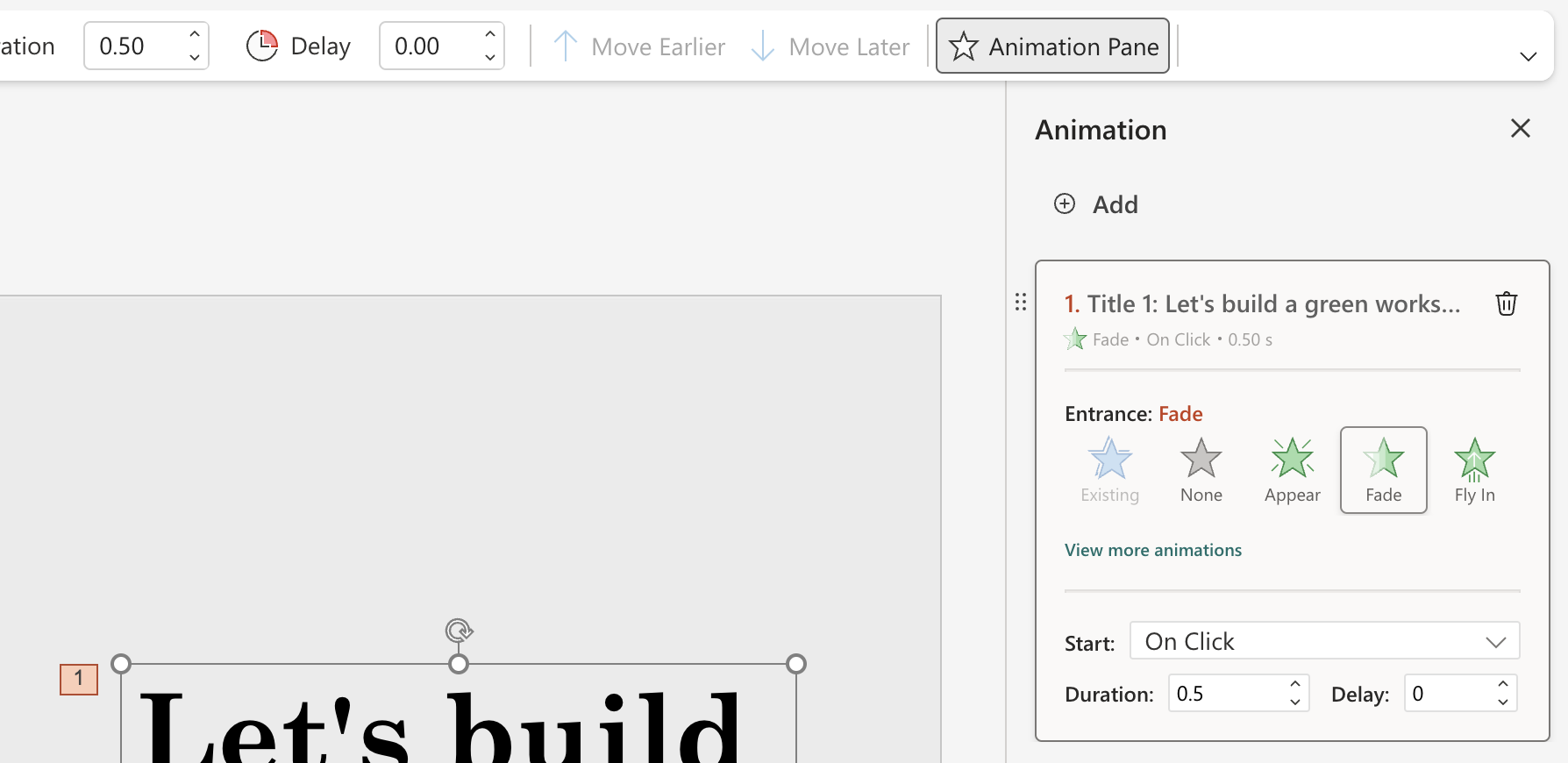
  • In an existing presentation, select any object you want to animate. 
  • Animations > Animation Pane. 
  • In the Animation pane, click the Add Animation button. 
Animation of adding an animation
  • Edit the animation properties as needed in the animation card.  
Animation card
  • You can add more animations by clicking the Add button.
Add more animations
  • You can delete animations by clicking the Delete icon.
Delete an animation
  • To reorder animations, select the six-dots icon, and drag the card to a new preferred position.
Animation of reordering animations

This is not all, though: the Redmond-based tech giant plans to add a Preview option that will let users preview the animations, before using them, so they can be sure it is the right one. However, this option will only be available in the coming weeks.

For now, though, you can try all the other new ways to animate your presentations on PowerPoint for the Web.

How to fix Rainbow Six Siege Error Code 3-0x00030089

Many users have encountered Rainbow Six Siege server connection error code 3-0x00030089 while trying to launch or play the game. The error is usually caused by connectivity issues or corrupted game files. To begin with, you can try restarting your router and computer, then check the game’s server status on the Ubisoft website.

Next, you need to ensure that your computer has an updated graphics driver, and no background application is interfering with te game.

How can I fix the Rainbow Six Siege error code 3-0x00030089?

1. Run the game client as administrator

  1. Go to the Steam shortcut, right-click, and choose Properties.
  2. Navigate to the Compatibility tab, and under Settings, place a checkmark next to Run this program as administrator.Rainbow Six Siege error code 3-0x00030089
  3. Click Apply and OK to confirm the changes. Follow the same steps to run Rainbow Six Siege as an administrator.

2. Verify the game files’ integrity

  1. Press the Windows key, type steam, and click Open.Steam Open -Rainbow Six Siege error code 3-0x00030089
  2. Navigate to Library, then locate the Rainbow Six Siege.
  3. Right-click it and select Properties.
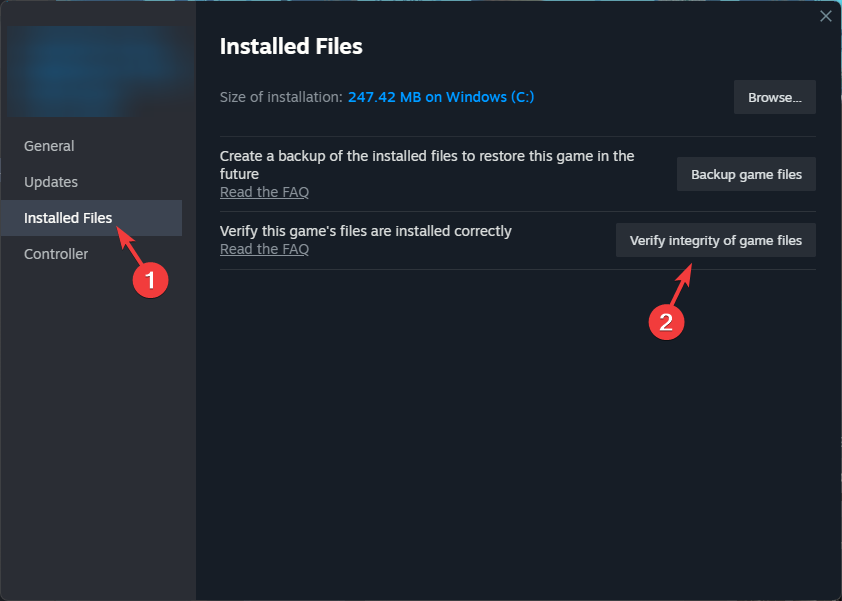
  4. Go to the Installed files tab, select Verify integrity of game files.Verify integrity

The file verification process will take some time, and once done, it will replace or restore the missing game files. Restoring the game files can also help you fix the Rainbow Six Siege won’t update issue.

Restoring the game files can also help you fix the Rainbow Six Siege error code 3-0x00030089 issue.

3. Turn off Windows Firewall

  1. Press the Windows key, type control panel, and click Open.Control Panel start menu - Rainbow Six Siege error code 3-0x00030089
  2. Select Category as View by and click System and Security.System and security
  3. Click Windows Defender Firewall.Windows Defender 
  4. Now, click Turn Windows Defender Firewall on or off from the left pane.Turn on or off, click OK
  5. Place a checkmark next to Turn off Windows Defender Firewall (not recommended) for both Private and Public network settings.

Now, try to launch the game, and if it is working, we will consider adding it to the Allowed Apps list of the Firewall. For that, follow these steps:

  1. Open the Control Panel again and go to System and Security.
  2. Click Windows Defender Firewall.  
  3. Now, click Allow an app or feature through Windows Defender Firewall.Allow an app - Rainbow Six Siege error code 3-0x00030089
  4. Select Allow another app.Allow another app
  5. Click Browse and select the app.
  6. Next, click Add.ADD
  7. Once added, make sure you check the Private and Public boxes in front of the Rainbow Six Siege.

4. Update the graphics drivers

  1. Press Windows + R to open the Run window. Device Manager Run command-  Rainbow Six Siege error code 3-0x00030089 
  2. Type devmgmt.msc and click OK to open the Device Manager window.
  3. Go to Display adapters.
  4. Right-click the graphics driver and select Update driver.Graphics Driver update
  5. Click Search automatically for drivers in the pop-up.Search automatically

Once updated, also check the network driver to ensure it is updated, as it might also cause other issues like error code 6-0x00001000

Having to update drivers manually can be quite frustrating. I recommend a handy driver updater to scan and update all your drivers automatically, plus it will ensure long-term maintenance so you never have to worry about drivers going out of date.

⇒ Get Fortect Driver Updater

5. Reinstall the game

  1. Press Windows + I to open the Settings app.
  2. Go to Apps, then select Installed apps.Apps, installed apps
  3. Locate Rainbow Six Siege, click the three dots icon and select Uninstall.Uninstall (2) -Rainbow Six Siege error code 3-0x00030089
  4. Once the game is removed from your device, press the Windows key, type steam, and click Open.
  5. Navigate to Library, then locate the Rainbow Six Siege and click Install.

You can also try reinstalling Steam by following the same steps from your Windows computer.

In conclusion, the Rainbow Six Siege error code 3-0x00030089 could occur due to a corrupted graphics driver, server maintenance, unstable network connection, or Firewall or antivirus software blocking the game.

To fix it, you can run the game and game client as admin, verify the game files’ integrity, turn off Windows Defender Firewall, and reinstall the game.

Furthermore, to ensure you can play the games on your computer smoothly, you must always close all running background applications so that you can prevent issues like Rainbow Six Siege’s slow loading.

Did we miss a step that helped you fix the issue? If so, feel free to share it in the comments section below.

C-Transformer chip: this ultra-low power consumption semiconductor might bring local AI to mobile phones

Korea Advanced Institute of Science and Technology (KAIST) has announced the development of a Complementary-Transformer AI chip (or C-Transformer chip), that is capable of processing LLMs (large language models) on ultra-low power consumption and it can be integrated into devices such as mobile phones.

According to a press release for The Korea Bizwire, the C-Transformer chip is capable of processing GPT-2 with a power consumption of only 400 milliwatts, and a high speed of 0.4 seconds.

The KAIST says the chip has a square form of 4.5 mm and was developed using Samsung tech; it has about 625 times less power consumption compared to Nvidia’s A-100 GPU – which needs approximately 250 watts of power to process GPT-2.

The C-Transformer chip is also 41 times smaller than the A-100 GPU, which makes it perfect for mobile phones.

KAIST, in an interview for The Korea Times, claims that the chip is also capable of neuromorphic computing, a sort of computing that mimics the structure and functions of the human brain, claiming that it is the first in the world to integrate such technology in a piece of hardware:

Neuromorphic computing is a technology that even companies like IBM and Intel have not been able to implement, and we are proud to be the first in the world to run the LLM with a low-power neuromorphic accelerator.

KAIST

Neuromorphic computing might be the key to unlocking the technology required for local AIs to properly run on small devices, such as tablets or mobile phones, without the need for an Internet connection. This would be preferable to the cloud-based AI services because it wouldn’t consume so much power and it would allow for a more sustainable way to approach and implement AI in the current technology.

It’s worth mentioning that not only KAIST is thinking this way: recently, Dell, another tech giant, stated that the future of AI is on-premises, and users will most likely want their AI products and services to run locally, rather than on-cloud.

This is also convenient: the new C-Transformer chip can be, theoretically speaking, integrated into mobile phones, so we might end up actually with phones that run local LLMs.

How to Add Your Xbox Friends on PS5

Aside from the thousands of games available on the top gaming platforms, the real thrill comes from making an online friend with whom you can play with. Since each gamer has their own preferences, it may not always be possible to add friends on different platforms.

While there’s no way to add Xbox friends on your PS5 or vice versa, you can leverage the cross-play feature and some in-game settings to get around this limitation.

How do I add an Xbox friend on PS5?

1. Check for requirements

  1. Select games that support the cross-platform feature. Most game details will have compatibility checks in their notes so verify before you try adding a friend.
  2. Some games require an extra step where you’re to set up accounts. For instance, Fortnite requires you to create and sign into your Epic account to play.
  3. Ensure you both have the latest version of the intended game. If either of you is using an outdated version, the game may be rendered incompatible with the platform and you may be unable to add a friend.
  4. Check the game servers and ensure they’re up and running. Finally, ensure you have a strong internet connection. When adding a friend, you’re playing in real-time and a stable connection is crucial to minimize lags, latency, and any delays. A poor internet connection puts you in a disadvantaged position to compete with your online counterpart.

Whereas you can play multiplayer games on the same platform, not all games on your Xbox support the cross-platform feature. Some notable games that you may be able to add Xbox friends to your PS5 include Fortnite, Call of Duty, and Minecraft among others.

2. Enable the crossplay feature

  1. Launch the game you wish to add your Xbox friend.
  2. Under Gameplay in the navigation pane, switch Crossplay to On.enable helldivers 2 crossplay

3. Link your account

  1. Go to the Epic Games website and sign in.epic games login
  2. Hover over your display name on the top right corner and then click Account.
  3. Click on Connected Accounts and select Link your account.
  4. You will be presented with an alpha-numeric code and a QR code
    • The alpha-numeric code can be entered at epicgames.com/activate
    • The QR code may be scanned with a mobile app to take you to the linking webpage, which will be pre-populated with the code provided in-game
  5. Log in with your account credentials to finalize the connection between your console game and Epic Games account.
  6. You will receive an in-game message that your account is now successfully connected.
  7. Sign in with your console account on the window that will pop up, and then hit Confirm.
  8. Your friends should follow the same steps and once they have linked their accounts, you can now use the in-game settings to add them as a friend within that specific game.

Potential problems and solutions when you add Xbox friends on PS5

  • Limited compatibility – Not all games support the cross-platform feature so if a developer is yet to avail this option, only a handful of games allow you to add friends.
  • Restrictive in-game settings – While Xbox and PS5 may share similar games on their platforms, they’re rivals and hence the platform-specific features. This can limit your gameplay which may put your opponent at an unfair advantage or disadvantage.
  • Technical failure – Common issues such as latency levels, lag, and low FPS may affect communication and hinder gameplay.

Admittedly, there are obvious differences between Xbox Series S and PS5 which we’ve covered in our in-depth comparison. Consequently, you are bound to encounter some challenges when it comes to cross-play in gaming.

Still, we have to admit that this is a thrilling experience we would encourage any gamer to explore. It might even come in handy when your Xbox friend list has disappeared or your invites are not going through.

And while both platforms are rivals, the future looks optimistic and instead of fighting each other with restrictive policies, they might have to embrace each other.

Would this be an adventure you’re willing to try? If not, do let us know your reservations in the comment section below.

Sea of Thieves becomes #1 pre-ordered game on PlayStation

Last month, Microsoft announced in the Xbox business Update podcast that it was planning to bring the exclusive Xbox games to PlayStation and Nintendo Switch. Sea of Thieves, Pentiment, Grounded and Hi-Fi Rush are the first four games that would become multi-platform.

One of the biggest games on Xbox, Sea of Thieves is very popular among Xbox and PC gamers, and according to the post shared Benji-Sales on X (formerly known as Twitter), it is already the #1 Best selling pre-order on PlayStation network in the United States.

Another video gaming experts on X have confirmed that it is getting good response in other territories, including UK, France, and Germany.

In countries like Spain and Canada, it is in the top five most pre-ordered games on the PlayStation Store. Sea of Thieves is the first Rare game to make it to the Sony platform

This might be the sign that Microsoft’s plan to extend Xbox exclusive games to a larger gaming community seems to work and if it is successful entirely, we might see more games on other platforms.

Sea of Thieves will be available on PlayStation 5 on April 30, 2024 and is already available on Xbox Series X/S, and PC and with Xbox Game Pass.

Microsoft is bringing AI to the healthcare industry through the TRAIN initiative

Microsoft said 2024 is the year of a new AI era with the release of the Copilot key, and the Redmond-based tech giant is keeping that promise up by announcing the new TRAIN initiative: Trustworthy & Responsible AI Network that aims to bring AI to every healthcare facility.

In a press release, Microsoft says TRAIN will see the deployment of safe and responsible AI in healthcare organizations to improve the quality, safety, and trustworthiness of AI in health. TRAIN sees the partnership of dozens of healthcare organizations across the US, including:

  • AdventHealth
  • Advocate Health
  • Boston Children’s Hospital
  • Cleveland Clinic
  • Duke Health
  • Johns Hopkins Medicine
  • Mass General Brigham
  • MedStar Health
  • Mercy
  • Mount Sinai Health System
  • Northwestern Medicine
  • Providence
  • Sharp HealthCare
  • University of Texas Southwestern Medical Center
  • University of Wisconsin School of Medicine and Public Health
  • Vanderbilt University Medical Center

The Redmond-based tech giant says that the network also includes partnerships with OCHIN, and TruBridge, two organizations that deal with medical technology, and community healthcare, assuring that every individual, regardless of income and resources, has access to the TRAIN technologies.

When it comes to AI’s tremendous capabilities, there is no doubt the technology has the potential to transform healthcare. However, the processes for implementing the technology responsibly are just as vital. By working together, TRAIN members aim to establish best practices for operationalizing responsible AI, helping improve patient outcomes and safety while fostering trust in healthcare AI.

Microsoft

AI in healthcare. What should people expect from TRAIN? Well, according to Microsoft, TRAIN members will work together to improve and quality of AI, and emphasize its adoption in the healthcare industry, by:

  • Sharing best practices related to the use of AI in healthcare settings, including the safety, reliability, and monitoring of AI algorithms, and the skillsets required to manage AI responsibly. Data and AI algorithms will not be shared between member organizations or with third parties.
  • Enabling registration of AI used for clinical care or clinical operations through a secure online portal.
  • Providing tools to enable measurement of outcomes associated with the implementation of AI, including best practices for studying the efficacy and value of AI methods in healthcare settings and leveraging privacy-preserving environments, with considerations in both pre-and post-deployment settings. Tools that allow analyses to be performed in subpopulations to assess bias will also be provided.
  • Facilitating the development of a federated national AI outcomes registry for organizations to share among themselves. The registry will capture real-world outcomes related to the efficacy, safety, and optimization of AI algorithms.

You can read all about the new TRAIN initiative from Microsoft here.

Microsoft home to the largest video game union in the US

Despite deeps cuts to its gaming work force recently, Microsoft has now become home to the largest video game collective bargaining effort in the United States with 600 Quality Assurance workers from Activision Blizzard unionized.

Early on during its initial attempts to court regulators over the Activision Blizzard acquisition, Microsoft gained the approval of the Communications Workers of America (CWA) by signing a labor neutrality agreement acknowledging ABK QA employees’ efforts to unionize.

While not our right support of the union labor effort, Microsoft’s LNA contract represented the company’s neutrality towards ongoing attempts and furthermore, stood as sign the company would not engage in any underhanded union-busting efforts like other companies or administrations.

Under former CEO Bobby Kotick, Activision Blizzard and its board had stalled efforts from its QA departments to unionize and gain barging representation within the company.

However, the long road to unionization is over for roughly 600 Activision QA personnel across studios in Austin, Texas; Eden Prairie, Minnesota; and El Segundo, California, as they tallied the final votes of 390 to 8 in favor of creating a union.

Several Activision QA spoke with Polygon following the unionization victory.

“Something we organized around is that in this industry, QA and customer service are the lowest paid jobs, and often looked down upon either within the industry or by customers,” Activision QA tester and organizing committee member Kara Fannon told Polygon. “It’s easy for people to say to QA, ‘Oh, I found a bug,’ even though we logged tens of thousands of bugs. So why is QA [unionizing], as opposed to other people in the industry? We have the weakest protections currently and we want to make sure that we’re strong so our work can keep going the way it is — we want to be supporting these games and working really hard on them.”

The newly minted 600 QA union workers from Activision Blizzard will join other unionized departments within Activision, Microsoft, ZeniMax, and Raven Software to form the single largest unionized force in gaming in the US now.

The CWA’s effort to help Activision QA employees gain representation comes at a pivotal time for workers in gaming which has taken blows over the past year with thousands being let go every few months.

Being part of a union may not guarantee work in the future, it can help mitigate losses both financially and to careers with negotiations around severance packages, non-compete clauses, and mandatory-minimum inform statues.

With the unionization vote out of the way, Activision’s QA union now preps for another tough battle with Microsoft negotiators over terms for a new contract. It is unclear what the period is for negotiations or when it’s set to begin.

Microsoft has had no comment on recent developments as of now.

Exclusive: Legion Go’s leaked official skins are grippy, scratch-resistant, and only 0.17 mm thick

We were the first to bring you exclusive images of the new official Lenovo Go handheld console skins, last week when, thanks to our trusted source, we unveiled no less than 5 versions.

Now, we’re bringing you even more details about them: their names, design, and benefits, because there are quite a few perks of wrapping your Legion Go with one of these.

First, let us remind you how these skins look, and thanks to our sources, we now have official names for them. Without further ado, here we go:

The first one is called Luna Grey: as we mentioned before, this one has a quiet design, nothing fancy, but quite good-looking. If you’re a gamer who doesn’t like attention, this one is for you.

Coming right up is the Circuit official skin: chipset-themed skin that would suit Legion Go users who are always on the run.legion go official skins

The third of the Legion Go official skins is the Legion Hero, a gorgeous red and blue anime-inspired skin that looks quite impressive, as you can see below. legion go official skins

Universe is another official skin, and this one will make your Legion Go stand out everywhere you take it.legion go official skins

And finally, the last of these official Legion Go skins is White, which could help you identify the console way more easily if you ever lose it. legion go official skins

According to our sources, these skins are made up of TPU (Thermoplastic polyurethane), which is a plastic known for its resistance to grease, oil, and abrasion, as well as its elasticity and shock absorption. The official skins have a thickness of just 0.17mm (the ones sold by third-party manufacturers are ~ 0.40 to 0.63 mm thicker), making them ultra-sleek at touch.

Why does it matter? Well, the TPU design will make them perfect for when you use the Legion Go console on the go, as, you know, it’s intended to be used. But we all know that these situations often put our devices at risk for scratches, broken screens, and so on.

These skins not only offer additional protections when taking the console anywhere, but their slim design will make them perfect for gaming marathons. The Legion Go console will feel comfortable in your hands, for hours.

With these skins, Lenovo is trying to make the Go a bit more rugged. Maybe the users’ complaints finally made sense for the company and the original material choice wasn’t the best one, after all; at least not for such a big handheld.

It’s also worth mentioning that each of the 5 official Legion Go skins is a node to the fervor and intensity of gaming, and users with different personalities have more than enough options to choose from.

However, I don’t see a world in which the white skin doesn’t get full of smudges after the first week of usage, despite its wear-resistant capabilities. But we’ll just have to wait and see if Lenovo’s approach is better than the usual skins we can already find on the market.

And, if they sell well, the tech giant might be releasing additional skins in the future. Should we expect skins for Lenovo laptops as well? That only time can tell.

However, what we can tell you, for now, is that these official Legion Go skins will come with an easy-to-use installation kit, a scrapper card, a cleaning cloth, wet wipes, and finally, the skins, themselves: a top and bottom strip, a trackpad, skins for the right and the left controllers, and skins for the kickstand, and for the back.

We don’t have any info about a release date, or a price, but it will mostly cost around $40, and they will be released soon in the US and Canada regions.

Will you get one of these?

Equall brings SauLM-7B, a tailored AI-based solution for legal problems

In the past, we have had instances of AI-based chatbots cooking up legal precedents that never existed, highlighting how the available options didn’t meet the standards of the legal industry. Mistakes in court filing can prove catastrophic for both lawyers and clients!

As a result, the release of SauLM-7B, an open-source large language model (LLM) curated for legal applications, by Equall is turning a lot of heads.

You can simply present your legal problem, and the AI-based text generator will respond, as is the case with any chatbot. The only difference, it’s tailored for the legal side of things!

In an interview with The Register, a spokesperson for Equall said,

LLMs and more broadly AI systems will have a transformative impact on the practice of law that includes but goes beyond marginal productivity. Our focus is on creating end-to-end legal AI systems guided and controlled by lawyers.

The team further adds how SauLM-7B will prove more effective at legal problems than generally available options.

Our belief — based on data and experience — is that systems specialized for the legal domain will perform better than generalist ones. This includes greater precision and more useful tools to help lawyers focus on what they enjoy most and do best, which is to exercise legal judgment and help their clients with advice.

The team, after evaluating SauLM-7B with lawyers, confirmed that it performed far better than regular AI-based chatbots, didn’t provide as many inaccuracies and was less prone to hallucinating (cooking up concepts) when talking about specific legal topics.

Since it’s in the early stages, we recommend cross-checking any information or suggestion provided by SauLM-7B with a legal expert. Law is a complex and ever-evolving field where recent developments play a critical role. So, it’s imperative that you verify things!

If SauLM-7B, named after the popular show Better Call Saul, turns out to be as accurate and effective as advertised, it will be a game-changer and will aid the less fortunate who can’t employ the services of a lawyer.

What do you think about it? Share with our readers in the comments section.

NVIDIA is limiting your GPU power on Linux laptops, users claim

Linux is a great alternative for Windows, for the most part, but the system has its share of driver and compatibility issues.

Speaking of which, there are claims that NVIDIA is reducing your laptop’s performance on Linux. This seems like a serious issue, so let’s see why this happens.

NVIDIA is reducing your laptop performance on Linux, allegedly

According to users on Reddit ever since version 530.41, NVIDIA has been preventing some laptop GPUs from achieving their maximum power.

In addition, the nvidia-smi command is also removed, thus preventing users from manually adjusting the power limit.

This is a problem since your device will be underclocked, and not utilize its maximum power, thus reducing your performance.

This bug has been reported on GitHub since 2023, and it hasn’t been fixed for a year.

You can test if your device is affected

You can test if your device is affected by connecting it to a power outlet and running nvtop

The command will display your current GPU power as well as the maximum allowed power. If this value is different from the maximum TDP in your laptop’s hardware specifications, it means your device is affected.

Alternatively, you can use sudo nvidia-smi -q -d POWER

With this command, you’ll get the GPU’s maximum power limit and its “default” power limit. If the second value is lower than the first, your device is affected.

Is there a way to fix this issue?

There are partial workarounds available, that partially address the issue. You can enable dynamic boosting that will make your GPU draw more power with the following command:

sudo systemctl enable --now nvidia-powerd.service

You can also roll back to an older driver and use the following command to set the power limit manually: sudo nvidia-smi -pl your-power-limit-in-W

Many users are affected by this, and some reported this issue only in Ubunutu:

I had this issue. For some reason, the drivers were unlocked all the way TDP-wise in Fedora, but not Ubuntu.

It was a 4060 laptop, and under Ubuntu I had my GPU capped at 80W out of the 140W maximum.

As for affected cards, this issue appears only on the 20, 30, and 40 series, according to users:

The workaround will only work on Ampere or later cards. I have not seen any 10 series users complaining about this anywhere. All of them so far have been 20, 30 and 40 series users. But it is pretty easy to check if you’re affected.

As for the drop in performance, users reported that this issue caused them to lose about 20% or more of maximum power.

NVIDIA has released Game Ready Driver 551.76, but unfortunately, it doesn’t address this issue. We just hope that NVIDIA will address, or at least acknowledge this issue soon.

WordPress plugin vulnerability exploited: 3,300 sites compromised so far

Hackers have once again exploited a vulnerability in outdated versions of the Popup Builder plugin of WordPress sites. According to PublicWWW, this malicious code has infected 3300 websites by this new campaign.

The flaw used to attack the websites is CVE-2023-6000, a cross-site scripting (XSS) vulnerability affecting Popup Builder versions 4.2.3 and older. The information was disclosed first in November 2023.

This vulnerability was also used in the Balada Injector campaign and infected 6700 sites, which indicates site administrators haven’t taken the necessary actions to prevent it from happening.

Sucuri was the first one to report the new campaign and the code injections related to it are found in 3329 WordPress websites.

When Sucuri used their remote malware scanner, they found the malware on more than 1,170 sites. The blog post also mentioned:

These attacks are orchestrated from domains less than a month old, with registrations dating back to February 12th, 2024:

  • ttincoming.traveltraffic[.]cc
  • host.cloudsonicwave[.]com

Details of Injection

The attacks leveraged a known vulnerability in the Popup Builder plugin to infect the Custom CSS or Custom JavaScript section of the WordPress admin interface. However, the malicious code is internally stored in the wp_postmeta database table.

The main feature of the injected code is to work as event handlers for several Popup Builder plugin events, including sgpb-ShouldClose, sgpbWillClose, sgpb-ShouldClose, gpb-DidClose, sgpb-WillOpen, sgpbDidOpen and sgpb-ShouldOpen.

Now, when a pop-up opens or closes or if a specific action is performed, the malicious code will be executed along with it.

However, Sucuri didn’t mention the exact actions of the code, but one of the main aims of the injections could be redirecting site visitors to an infected website or malicious destinations, including malware-dropping sites, phishing pages, etc.

In some instances, the “hxxp://ttincoming.traveltraffic[.]cc/?traffic URL was seen injected as a redirect URL parameter for a contact form-7 pop-up.

This injection retrieves the malicious code snippet from an external and injects it into a web page’s header, which enables its execution by the browser.

Mitigation and removal

As mentioned earlier, the attack originated from incoming.traveltraffic[.]cc and host.cloudsonicwave[.]com, so the first step is to block these domains.

Next, if you are using the Popup Builder plugin on your website, update it to the latest version, which is 4.2.7. This will fix CVE-2023-6000 and previous security issues.

According to WordPress statistics, it has 80,000 active sites, which are 4.1 and older versions of Popup Builder, so the number of sites getting infected could go higher.

If your site is already infected, you need to delete the malicious entries from the Popup Builder’s custom sections. Furthermore, scan your site at both client and server levels for hidden backdoors and other possible security issues.

The persistent and stronger malware attacks are a scary reminder for all WordPress users not to use an outdated version of any plugin or tool on the site. Moreover, you should also keep scanning the site and install all the latest security updates as they are available.

What are your thoughts on the matter? Share your opinions in the comments section below.

How to Change Your Profile Picture in Microsoft 365

On any platform, a profile picture lets the person on the other end establish a human connection. With Microsoft 365, once you change your profile picture, it reflects on all its associated apps.

How do I change my profile picture on Microsoft 365?

1. By using your Microsoft account

  1. Navigate to your browser and sign in to Microsoft 365.
  2. On the top right corner, click on your profile picture. If you don’t have one, it will show your initials.
  3. Click on My profile.
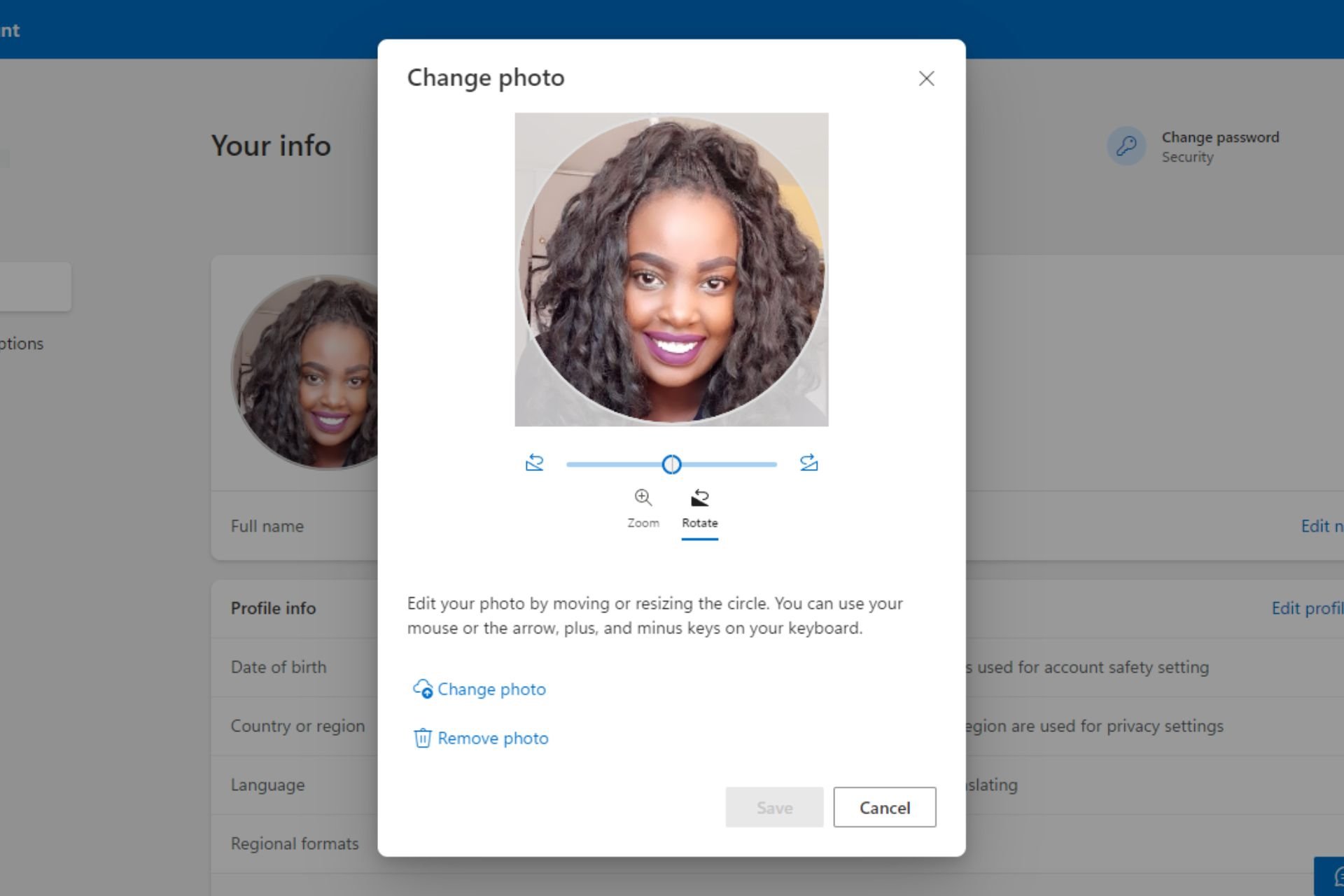
  4. Hit the Change your photo button.
  5. In the pop-up window, select Change photo and upload a new one. Zoom in or out until you achieve your desired size then hit Save.
  6. Once you’re done, you should get a variation of the following message.

2. By using your Teams account

  1. Log into your Teams account on your browser.
  2. Click on your profile picture or initials and select Manage account.
  3. Navigate to Your info and hit the Change your photo button.
  4. In the pop-up window, select Change photo and upload a new one. Zoom in or out until you achieve your desired size then hit Save.

3. By using your Outlook account

  1. Log into your Outlook account on a web browser.
  2. Click on your profile picture in the top right corner and select My profile.
  3. Navigate to Your info and hit the Change your photo button.
  4. In the pop-up window, select Change photo and upload a new one. Zoom in or out until you achieve your desired size then hit Save.

Aside from the three listed Microsoft 365 apps, you can also log into any other app and change your profile picture from there.

The change is reflected throughout but it may take some time to be uniform across all platforms. So if your Microsoft Teams profile picture is not showing after you’ve made this change, give it a few minutes and refresh the page again.

Elsewhere, if your profile picture is not updating in Windows 11, we’ve outlined various ways to make it reflect on your device.

When changing your profile picture, ensure that you select a high-resolution image. Low-quality images may be unclear since the photo is cropped further to a small icon. Also, try to stick to portrait and up-close pictures to avoid further image deterioration in quality.

That’s all we had for this article but do let us know what is your preferred route to change your profile picture in Microsoft 365 down below.

Google takes after Microsoft and integrates Gemini in Sheets

Google integrates Gemini in Sheets and follows in Microsoft’s footsteps. After all, they did it first with Copilot in Excel. So, it looks like the competition between the companies is getting fierce. In addition, this is a great opportunity for us. After all, Gemini will get additional options. Furthermore, you can use the Ask Gemini option to access various features.

How do I use Gemini AI in Google Sheets?

You might need to wait a while to use Gemini AI in Google Sheets. After all, the feature is new and not available to all users. Fortunately, according to Google, it is in the rollout phase. However, once it becomes available, you will have a Gemini button in Sheets.

Once you click the Gemini button, its interface will open. Furthermore, the AI will generate a summary of your sheet if you are not using a new one. Afterward, Gemini will create a list of suggestions. On top of that, Gemini can generate tables and formulas.

However, according to research, large language models need to understand structured data properly. Thus, we recommend you double-check the information provided. In addition, you can use Gemini in Sheets to explain and simplify the data for you. So, if you are working with a lot of information, this feature will be helpful.

In addition to the mentioned features, you can refresh Gemini to generate new suggestions. On top of that, you can contribute to its growth by sharing feedback with the team. Also, please feel free to rate the suggestions as good or bad. In addition, you can clear the history of Gemini to protect your data.

Ultimately, Google’s decision to implement Gemini in Sheets is a quality-of-life upgrade for AI. Furthermore, the option is very accessible. In addition, we won’t have to go from one tab to another. On top of that, the new features will make our work more efficient.

What do you think? Are you going to try Gemini in Sheets? Let us know in the comments.

If AI would design a bridge, would you dare to cross it?

I don’t know about you, but the math teachers I’ve met would scold us to study hard because we would need to build a bridge one day, and if we messed it up, people would die. That’s a perfect point for all the professionals who rely on math and have huge responsibility, not only construction engineers.

But now, AI is everywhere, including in industry where public safety is a critical issue. According to Ankin, the impact of AI in construction reached $22B in 2022 and is expected to grow at 20% of the compounded annual growth rate through 2023 based on improved efficiency and productivity through optimization of project scheduling, resource allocation, and task management, leading to shorter timelines and reduced costs.

So, AI is swiftly pulling its weight in the construction industry but it’s definitely not going to build a bridge on its own. However, it can very well perform all the calculations on its own and there are already some AI bots which can help.

Can I build a bridge using AI?

You can start off by getting some figures about the budget you will need for the project. For instance, Civis.ai has a bridge design calculator where you can input the length of the bridge, its type, and the region in which you want to build it.

You will get an estimation on the quantity of materials you will need to use, how long will it take and, most importantly, how much will approximately cost. Then, if you scroll down, you will see a list of examples of similar projects and you will be able to research about their development as well.

However, it’s less known that a pedestrian bridge was already designed based on AI, as reported by Medium. In fact, researchers from ETH Zürich developed a method to use Artificial Intelligence (AI) to change the traditional design process.

They rely on first studying the performance parameters and then go to the design process instead of the classic mode that is reversed. This approach, apparently, cuts from the costs and time needed for the whole process.

The swiss, then, developed a whole construction engineering toolbox based on the Conditional Variational AutoEncoder (CVAE) learning model.

How can AI improve the construction industry?

It’s easy to understand how AI can help with the design and costs part, but there are a lot of other aspects it can improve on.

For instance, the AI can analyze building codes, zoning regulations and environmental obstacles that could hinder the project. Furthermore, it can assess the costs and distribution of labor in the area where your project will be developed.

Lastly, it can underline the possible safety risks on the construction site and even simulate any problems within the construction before you even start the project.

We don’t think we need to hold our breath until we see the first 10 mile bridge designed entirely by AI, but it already helping engineers all over the world building them.

So, would I cross that AI-generated bridge? Yes, I would, but only if expert humans still supervised and approved every detail. How about you? Write down your thoughts in the comments section below.

Apple Music is a nightmare on Windows and Android, users say

Apple Music is one of the best streaming services in the world and direct competition with Spotify and YouTube Music.

Although this service has a lot to offer, many reported a disappointing experience, especially when using it on Android and Windows.

Apple Music is filled with bugs on Windows and Android, according to users

Many aren’t too pleased with Apple Music, and some users had to voice their displeasure on the Apple Music subreddit.

While the service offers a better sound quality, it’s filled with numerous bugs according to disgruntled users. Here’s what users had to say:

The Windows app is terrible, extremely buggy (eg. deleting songs from playlists on Windows keeps returning an error, and the tracks stay in the playlist).

It gets even stranger with some mind-boggling bugs:

If I delete an album I added to library from said library, it also deletes any song from said album from every playlist that I’ve created. Whose brilliant idea was that?

There are issues with the equalizer, and it’s not working at all. Playlists also don’t work well, and the playback stops after the selected song stops playing:

When in playlist and I select a song to play, it doesn’t go beyond the search to shuffle my playlist, just stops completely post the song.

Speaking of playlists, transferring playlists between apps is cumbersome, and it’s not possible to set favorite playlists. Search in playlists also works rather poorly:

Search function within playlists is broken, needs the exact spelling to return any results and doesn’t search by album name.

These are some of the main complaints, and other users were quick to chime in:

As a Mac user I can tell you, Apple is not treating Windows and Android as it’s ugly deformed stepchildren, the Mac app is almost exactly the same in terms of bugs and glitches and weird behaviour.

Others were quick to defend the app stating that the Android and iOS experiences are almost the same:

AM on Android is as good as iOS buddy. Don’t know what are you on about. Using since 2017. It was much worse initially, but since 2020/21 it is on par.

Others complained that it’s almost impossible to get a subscription without an iOS device:

nah its a nightmare to even buy a subscribtion without an ios device. Get this, i bought a family membership and they just dont allow windows and android users to add family members

These are some of the experiences that users had but bear in mind that many other users never experienced issues such as these.

It remains a mystery why doesn’t Apple optimize Apple Music, but we still hope that some of these issues will be resolved.

With Apple giving up on the electric car, and a canceled Apple spring event, the company might address some of these issues someday.

Windows may soon feature AI-based webcam filters, will turn your feed into a cartoon

Microsoft’s push for Artificial Intelligence is evident, and Windows is getting several new AI-powered features. In the latest developments, reports suggest that Windows could soon bring AI-based webcam filters that will allow turning your video call feed into cartoons, drawings, and watercolour paintings.

First reported on X (formerly Twitter) by XenoPanther, several new files have emerged in Windows 11, Version 26079, that hint at these changes.

As pointed out by Zac Bowden on X, these are a part of the improved AI-powered Studio Effects. It’s a collection of features aimed at personalizing and improving the video feed. These use NPU (Neural Processing Unit), a piece of hardware designed for AI and machine learning applications.

Currently, Studio Effects offers the option to blur the background, improve eye contact by making the necessary adjustments so that your eyes appear directed at the camera instead of the screen, automatically zooming and capturing only the relevant part of the feed, and filtering background noise.

It’s not yet guaranteed that webcam-based AI filters will make it to Windows 11, but as Microsoft is, every day, rolling out more and more AI-based features, we could get an enhanced Studio Effects in Windows 11 24H2, set to be released later this year.

We will have to wait and watch if Microsoft makes an official announcement regarding it!

Wouldn’t you want to turn your feed into an animated format on calls? Share your views on the feature in the comments sections.

AI is becoming the ultimate tool for cyber attacks

For most of us, OpenAI’s ChatGPT was the first encounter with AI. But it’s far more complex and dangerous!

As it turns out, threat actors have, in the last few years, utilized AI to perform cyber attacks of larger scale and intensity. Countering these has become a challenge for experts.

Cyber attacks are no longer limited to hacking accounts or stealing data from websites. These pose security concerns, as independent and state-backed hackers now use AI to attack the national infrastructure.

Microsoft confirms that AI-based cyberattacks are usually originating from Russia, China, North Korea, and Iran. Microsoft’s President Bradd Smith also highlighted the challenges posed by AI and called for immediate regulations to counter the threat.

How is AI helping threat actors deploy advanced attacks?

AI has allowed threat actors to scale up attacks and develop malware that can go undetected in conventional security systems that aren’t up-to-date with the latest standards. Here are a few ways AI is fueling cyber attacks:

  • Create phishing emails: AI-based chatbots allow hackers to create phishing emails identical to actual ones. You no longer see scam emails from Norton or the evergreen, stranded prince in need of money stories. It’s much more personalized and challenging to identify!
  • Password hacking: With AI-based tools, threat actors stand a better chance of identifying your password through brute force attacks. The more the data fed to the tool, the better the output!
  • Identifying vulnerabilities: AI-based tools allow hackers to quickly identify vulnerabilities in a system, which can then be exploited to deploy large-scale attacks.
  • Creating advanced malware: AI allows threat actors to develop advanced malware, often ones that can automatically change their code and design, making their identification extremely difficult.
  • Scaling up the intensity of attacks: With AI, hackers can automate cyber attacks and deploy them at a much larger scale. Besides, with real-time adaptation, malware can further multiply and corrupt the entire system.
  • Deepfake: While Microsoft has taken measures to counter deep fakes, other AI-based tools continue being used to create audio and video clips for the purpose of impersonation and to step up disinformation campaigns.

AI-based cyberattacks pose a threat to national security

Of late, several reports have emerged of state-backed threat actors using AI to attack another nation’s security, military, and civilian infrastructure.

Researchers at MIT have been able to simulate attacks that could trigger explosions in household and industrial items, say, valves, motors, and pumps. It is done by jamming the equipment or causing the temperature control mechanism to malfunction.

At a time when a large part of the world is embroiled in violence, either directly or indirectly, such attacks pose an imminent threat!

Surprisingly, the answer to AI-based cyber attacks is also AI

Microsoft, the company leading the AI push, is using AI to combat such cyber attacks. Its latest offering, Copilot for Security, quickly assesses the type and scale of the attack, breaks down the script, and provides analysts with the option to quickly deploy the relevant fix, all using AI!

So, if threat actors are using AI for cyber attacks, you will have to defend with AI-based security tools to stand a chance at beating them. The one with more advanced tools and a comprehensive understanding should win!

At present, our options to minimize the risk of AI-backed cyberattacks are to raise awareness amongst the masses, regulate the use of AI, and deploy advanced defence mechanisms in critical infrastructure that quickly detect and eliminate such threats.

On March 13, 2024, Microsoft Secure is holding an event to highlight ways to effectively deal with the situation. Join it to find out more about AI-powered cyberattacks!

Do not forget to share your views on AI and its use by threat actors in the comments section below.

If Microsoft asks you to buy the HEVC codec, don’t!

A Reddit user stumbled across what he described ironically as the funniest thing he saw on Windows. When he tried playing a HEVC-coded video, the message on the screen pointed him towards a $17 MXN ($0.99 USD) purchase of the codec.

However, this is not outrageous because Windows doesn’t come with the HEVC codec. In his defense, tech-savvy users know that this purchase can be clearly avoided because you can get the codec for free.

Why shouldn’t I but the HEVC codec?

The first reason is that if you download VLC for free, you can see HEVC-coded videos. The French company that owns VLC reverse-engineered the codec as FFMPEG, so you don’t need to get anything else.

And even if you don’t want to use VLC, you can still download the K-Lite Codec Pack for free and take care of this problem right away.

Truth be told, if you’re looking for the HEVC extension on Microsoft Store, you will still find the $0.99 from Microsoft.

So, the question is: Why is Microsoft making us pay for something that should be readily embedded into Windows, which we paid for? The answer is pretty simple: Microsoft is still paying for a license to use the codec.

Therefore, the right thing to do here would be to reach an agreement with the Joint Collaborative Team on Video Coding (JCT-VC), who standardized it and then embed it in their video player.

We don’t know why they did that, but there are a lot of other players out there which can play HEVC videos besides VLC, so you shouldn’t rush in taking your card out for this payment.

In fact, we have a full guide on how to play HEVC videos on your PC.

Funny or not, this is the whole story around this HEVC problem on the Movies & TV video player app.

Did you buy the HEVC codec to play your videos? Tell us all about that in the comments section below.

Test new AI features in Opera with AI Features Drop program

Opera is a great browser, with many innovative features, so we were not surprised to see that Opera now has a built-in AI chatbot.

The company plans to enhance this feature by bringing more AI features to its users for testing.

Opera now allows you to test new AI features in the browser

Opera is known for its unique features, and just recently it introduced its Heartblocker plugin. Today the company is setting its sights on AI.

As reported by PhoneArena, it seems that Opera has plans to enhance its Aira AI. In case you’re not familiar, this feature is available in Opera One, and it works similarly to GPT, with additional support for real-time web data.

To improve on its AI, Opera is introducing an AI Feature Drops program that will allow users to test new AI features on a bi-weekly basis.

Opera’s spokesperson said the following regarding AI Feature Drops:

AI is moving fast and so are we. We’ve started the AI Feature Drops Program to allow people to test our newest AI explorations that either will or won’t make it to the official version of Opera One. We are excited to let our most engaged users test and share their feedback and suggestions with us

This program is available in early access in the Opera Developer variant, so if you’re an AI enthusiast, you might want to give it a try.

New Copilot features are coming to Galaxy Book4

Recently, Samsung introduced the Galaxy Book4 series laptops with Intel Core Ultra processors on its website. The product page shows a deeper integration of next-generation Copilot on Windows 11 with Android phones.

According to the Geekbench, a benchmarking site, a Snapdragon X Elite power Samsung Galaxy Book4 Edge laptop could also be available. However, the company has not officially announced it.

Samsung has added infographics about Windows Copilot and its new features on the product page.

The Copilot comes with personalized AI assistance, which can summarize your messages from your Android device and send text messages directly from your computer. Here are a few other things that you can do:

  • Manage tasks on your PC.
  • Copy a link from a message on your Android phone
  • Ask Copilot to remind you about a message or task.
  • Copy an email address from your Android phone.
  • Compose an email using Copilot and send it using Outlook.

To use these features of Copilot with your phone, you need to link your Galaxy phone to your Windows 11 laptop.

Apart from the Copilot features, the Buds Auto Switch, Multi-Control, Second screen, Samsung Studio and Quick Share are other top features highlighted on the product page of the website.

To disclose more about the product and the upcoming features, Microsoft is holding an event on March 21st.

What are your thoughts on the matter? Share your opinion in the comments section below.

Soon, Microsoft will replace classic Outlook with a web app

Microsoft wants to replace classic Outlook with a web app. However, they will have to be careful about its implementation. After all, we like the desktop app and don’t want an inferior version. Furthermore, the web app lacks some classic Outlook features. Yet, Microsoft might implement them later on.

Fortunately, we can use the preview option to familiarize ourselves with the new web app. So, if you want to try it, press the toggle button from the top right corner.

Is Microsoft getting rid of Outlook desktop app?

Microsoft still needs to remove the classic Outlook desktop app, but they will soon switch to the web app. However, it will take a while for them to ditch the desktop app. After all, the classic Outlook is better than the web app, and Microsoft keeps adding features. Furthermore, many of us are using it, especially since it has many features.

The migration will happen in a few phases. Thus, it will be easier for us to switch apps. The three phases are Opt In, Opt Out, and Cutout. We can opt in and out of the web app during the first two phases. However, the Cutout phase will force us to replace the classic Outlook with the web app. In addition, if you install Windows 11 again, you might have the web version as default. You will be able to change it to the classic Outlook.

Fortunately, Microsoft announced that they will support the classic Outlook until 2029. Thus, you don’t have to rush to use the web app. Unfortunately, they might stop bringing new features to the classic Outlook. In addition, we will have a 24-month notice before the Cutover phase.

Ultimately, we must switch from the classic Outlook to the web app. However, we have enough time to do it. Furthermore, the new app is slow and feels like a downgrade. Thus, Microsoft might rethink its schedule. After all, they might try to avoid what happened with OneNote.

If you want to learn more check out the following video.

What are your thoughts? Are you going to give it a try? Let us know in the comments.

Exciting new features coming to Microsoft Teams in April, here’s what to expect

Microsoft is relentlessly working on Teams, and speaking of which, April will be an exciting month for all Teams users.

We expect to see many new features rolling out in April, so without further ado, let’s see what we can expect to see.

These 5 features are coming to Microsoft Teams in April

Several new features are coming to Teams this April, according to the Microsoft 365 roadmap, and here are the most important ones.

Copilot in Teams meeting will be available on the mobile after the meeting

Currently, you can access Copilot in Teams during a meeting on a mobile device. Once this feature is released, you’ll be able to access Copilot in Teams and ask about eligible meetings even after the meeting has ended.

Regarding the availability, this feature is coming on iOS and Android.

Citations for Copilot in Teams meetings on mobile

Each Copilot response will now have a citation number at the end that provides the users with details on the meeting artifact and source used for the response. This should work similarly to a meeting transcript.

Users will be able to select the citation and see the user that is associated with it, as well as the exact quote and timestamp.

Shared call history for delegates and delegators

With this change call delegators and delegates will be able to see shared call history records for a shared line. This feature will be available on Mac and Desktop.

You can now open Teams Meeting chat from Outlook

If a meeting was created as a Teams Meeting, you’ll have the option to open Teams chat right from the meeting event in the Outlook calendar. Using this option will automatically open the chat in the Teams app.

Regarding availability, this feature is coming to iOS and Android.

Ability to transfer Team calls to mobile calls

Last but not least is the ability to transfer your ongoing Teams call to your phone’s native dialer. This won’t cause any disruptions or loss of context.

All of these features will start rolling out in April, but the official release date is still not known, so it might take a while before we see them in action.

This isn’t all, you can now send video clips in replies to channel posts in Teams, and the Town Hall Teams feature is also coming in April.

Those who are on the risky side can now join Teams meeting in the car, but if you choose to do so, be sure that you’re safe.

Microsoft files patent for a foldable phone in the US, gets users excited about Surface Duo 3

After Microsoft decided to discontinue its flagship foldable phone, Surface Duo, many believed that the Redmond-based tech giant would, in the future, revive the series. Ever since reports of Microsoft filing a foldable phone patent in the US emerged, enthusiasts have been nothing but excited!

Previously, when Microsoft discontinued the Duo series, it was reported that the company would switch to the conventional single-foldable screen design.

While the latest patent filed by Microsoft, titled Foldable Computing Device Spine Cover Plate, doesn’t feature the exact same design, it’s quite similar.

Image source: USPTO (Patent number: US-20240069605-A1)

The abstract from the Microsoft’s foldable phone patent reads,

A computing-device includes a first display-supporting frame rotatably coupled to a second display-supporting frame along a hinge axis via a hinge assembly comprising a central spine extending parallel to the hinge axis. A flexible display is supported the first display-supporting frame and the second display supporting frame. A spine cover plate extends over the central spine and is moveably coupled to the hinge assemble for translation relative to the central spine as the first display-supporting frame is rotated relative to the second display-supporting frame.

What makes the idea interesting is that Microsoft’s design features a spine cover plate which will automatically adjust on folding and unfolding the phone, leaving a negligible gap, minimizing the visible crease, and preventing the entry of unwanted materials.

Image source: USPTO

Previously, the idea of a Windows foldable phone was doing the rounds, and it got everyone hyped up!

As expected, the patent doesn’t detail the software side of things, and it would be interesting to see which OS comes installed on the device. While Surface Duo 2 shipped with Android, we will have to see if Microsoft makes any changes here.

What do you think about Microsoft’s new foldable phone patent? Share with our readers in the comments section.

OneDrive is plagued by the Entry point not found error again, latest update is to blame

OneDrive is an essential tool for many users, but users reported messages stating OneDriveSetup.exe – Entry Point not Found.

This issue will prevent users from using OneDrive entirely, but what’s causing it, and is there a way to fix it?

Many users are experiencing Entry Point not Found in OneDrive error

The issue was reported on Microsoft Answers forums and here’s what users had to say:

Further testing I am getting the error on our windows 10 IOT Version 1607 LTSB terminals.

The issue is that the update for onedrive is attempting to make a call to GetUserDefaultGeoName that did not get added to into until windows 10 version 1709. Hence the error.

It’s not just Windows 10 IOT users that are having this problem, it also happens on Windows Server.

I just wanted to point out that this is also happening on Windows Server 2016: Version 1607 (OS Build 14393.6709).

“Upgrade Windows” isn’t really going to be practical. I suspect the updater was changed without testing on older windows versions.

We already tackled a similar issue in the past in our OneDrive.exe Entry Point not Found guide, so be sure to check it out for potential solutions.

Users also found a workaround on their own that you can try:

It looks like you can just disable the Scheduled Task that has the name that starts with “OneDrive Standalone Update Task”. Would probably need to watch for updates to see how to get to the next version when it comes out.

In case you aren’t using OneDrive, Microsoft confirmed that you can uninstall OneDrive, so be sure to try that as well.

Windows Backup is gone on incompatible devices, yet it lingers in the background

Backing up your files is important, and Microsoft has special software that can help you back up your settings and files to the cloud.

While the Backup app is useful, it doesn’t work on every PC that has it installed, so Microsoft decided to fix that with the latest update.

Windows Backup won’t appear on incompatible devices anymore

When first introduced, Windows Backup was supposed to appear only on personal computers and allow users to back up their files.

According to Microsoft, this feature isn’t available to Azure Active Directory and Active Directory users, however, many reported that it still appears to them. When attempting to run the app, users received a message stating that this feature isn’t supported by their organization.

According to Windows Latest, Microsoft acknowledged and fixed this issue in the Windows 11 KB5034848 update.

This feature will no longer appear for Active Directory users or for users who have their Microsoft account blocked by Group Policy.

The app is now hidden, and you won’t be able to find it, however, it will stay installed and running in the background.  While this seems like an odd decision, Microsoft defends it by stating that other features rely on Windows Backup to work properly.

We never used this feature, and we’re not too keen on it, so we hope that Microsoft will give us the option to remove it, just like it gave users the option to remove OneDrive from their PCs.

Microsoft complies with DMA, introduces easy Edge removal and more to Windows 10 & 11

Microsoft is the latest company to announce changes to its native OS, Windows, in a bid to comply with the DMA (Digital Markets Act) in the EU, a law that tends to ensure fair competition and prevents giant corporations from creating a monopoly-like situation.

The changes apply to both Windows 10 and Windows 11, the two most popular iterations of OS. Even in the recent updates to Windows 11, Microsoft has been careful to include DMA-compliant features.

What changes is Microsoft making in response to DMA?

In the official blog post, Microsoft highlights how it has always been supportive of third-party developers, even before DMA came into effect, allowing them to deploy applications and app stores on Windows without any interference.

Besides, developers enjoy a direct commercial relationship with users, letting them choose the preferred lost-cost payment options and other critical services, even if it’s outside the Windows ecosystem.

The changes to Windows for DMA-compliance include:

  • You can now uninstall Edge and Bing web search using the built-in settings. Earlier, the option was greyed out.
  • Third-party web search application developers can now utilize the Windows search box in the taskbar using the instructions provided by Microsoft and choose any web browser to show results from the web.
  • Microsoft will no longer sign-in users to Edge, Bing, and Microsoft Start services during the initial Windows setup experience.
  • Data collected about the functioning of non-Microsoft apps, primarily bug detection and its effects on the OS, from Windows PCs will not be used for competitive purposes.
  • Microsoft, from now on, will need explicit user consent before combining data from the OS and other sources. It will also deliver new consent screens where required.
Uninstall option for Microsoft Edge greyed out

These changes are only applicable to users in the EEA. For those outside the region, Windows will continue to function as it is!

The Redmond-based tech giant has already started rolling out the DMA-compliant versions of Windows to users in the EEA (European Economic Area). To get it right away, simply turn on the Get the latest updates as soon as they’re available feature in the Windows Update settings.

Windows Update settings

After these are reviewed, the European Commission will host a workshop on March 26, 2024, from 13:00 to 18:00 hours (CET) to allow developers to clarify any concerns or share their feedback on the changes.

While Microsoft has abided by the rules of the DMA, other tech giants weren’t too enthusiastic about it. Earlier, Apple had a tussle with the EU over DMA and the Cupertino-based tech giant was slapped with a fine to the tune of $2 billion.

Do you believe these changes should be rolled out to users worldwide? Share with our readers in the comments section.

Don’t want to use OneDrive? Microsoft confirms that you can now uninstall it

If you’re not a fan of cloud storage and OneDrive in particular, you’ll be pleased to hear that you can now easily remove OneDrive from your Windows 11 PC.

That’s right, and this has been acknowledged by Microsoft, and it can be done in a matter of minutes.

The latest documentation from Microsoft describes how to remove it

While OneDrive can be useful, many simply don’t use cloud storage or they don’t prefer using OneDrive. In the past, removing OneDrive was next to impossible, and if you didn’t want to use it, Microsoft advised you to keep it unliked on your PC.

This would make OneDrive disabled, but it would still be available on your PC if you ever change your mind. Well, that’s about to change according to the Neowin.

Recently, Microsoft’s official documentation for OneDrive has changed, and in the past, it only had information on how to unlink your account.

Now there’s a new section on the bottom that tells you how to remove OneDrive on Windows 10 and 11.

You can now remove OneDrive, just like any other installed application right from the Settings app and it will be gone for good.

This is great news for all users who don’t use cloud storage or OneDrive, and we wish this option was available sooner.

Speaking of OneDrive, the upload via URL feature is being retired in OneDrive, so use it while you still can.

Bad news for Halo: MCC fans, no more game updates as Microsoft ends support

For the past few months, rumours were rife about Microsoft dropping development and support for Halo: The Master Chief Collection after an image was posted by a 343 developer online. The image in question showed a plaque and a Thank You card.

The date on the plaque intrigued many. It read, Finished The Fight. Halo: The Master Chief Collection 11/2014 – 07/2023. Soon, the same was shared by several developers on their official X (formerly Twitter) handles.

As it turns out, these rumours were true!

Rebs Gaming, in a YouTube video, confirms, through sources, that Microsoft has stopped development for Halo: The Master Chief Collection.

The two primary reasons cited behind the decision to halt development are the lack of a revenue stream and an impending economic recession. The game does feature a built-in store but since it relies on in-game currency, profitability remained a concern.

Microsoft, in May last year, first shared the decision with the developers and expressed its inability to renew the contracts. Then, sometime around mid-July, the contracts ended and were never renewed, thus finally putting a stop to Halo: The Master Chief Collection’s development.

This was also the time we saw the last major content update. Since then, there haven’t been any!

Will Halo: The Master Chief Collection still be available?

As per the report by Rebs Gaming, a few full-time developers continue to work on Halo: The Master Chief Collection to ensure optimal functionality and deliver minor updates to the collection.

Also, there’s a chance of the collection being revived sometime down the line, either through a collaboration between Microsoft and 343 Industries or individually by the latter, if a viable revenue stream can be generated. So, all hope is not lost!

If the companies are looking for a revival, it’s critical to polish the collection and eliminate all existing bugs, primarily the ones responsible for Halo MCC not loading.

What do you think of the decision by Microsoft to end development for Halo: The Master Chief Collection? Share with our readers in the comments section.

LLMs need new prompting techniques to understand structured data

Large Language Models (LLMs) are facing challenges when they have to deal with data from tables. Furthermore, it is unknown if they comprehend it or not. Thus, a research team tries to verify the capability of AI to understand structured data by using a new benchmark system. Furthermore, they want to discover prompt techniques to improve the understanding of the LLMs.

Can LLMs be trained on structured data?

You can train LLMs on structured data. However, it is still being determined to which degree the LLM can learn and understand it. Thus, researchers are trying to figure out the best prompt techniques to teach LLMs how to handle data from tables and test which tables work best.

Researchers created a new benchmark called Structural Understanding Capabilities (SUC) to test the capability of LLMs to understand data from tables. Furthermore, to gather results, they used SUC and various prompting techniques.

To verify the efficiency of the structured data prompting techniques, researchers used the benchmark on both GPT-3.5 and GPT-4. Furthermore, they figured out that the results differ based on table format, content order, and partition marks. In addition, they used HTML tables, comma-separated values, and tab-separated values for the table format.

Results

HTML tables are the most efficient for the LLMs between all of the formats. Also, according to their research, the highest accuracy across seven tasks is only 65.43%. As a result, LLMs are far from perfect when it comes to structured data, and they need much more improvement. However, it is possible to enhance them with the right prompting techniques.

Researchers used a combination of self-augmented prompting with structured data to improve the LLM’s understanding of tables. Furthermore, they did this in three steps. The first step was to ask the AI to analyze a table, the second step was for the AI to generate a description based on the data, and the last step was to create a description using the previous information.

In a nutshell, LLMs are not yet ready to properly understand structured data. However, according to the research, you can train LLMs to understand data from tables using various input factors and self-augmented prompting. Furthermore, researchers will continue to study efficient ways to make LLMs understand tables better by integrating structural information to improve the LLMs’ performance with different structured data types.

This research could also help visual language models that use LLMs to improve prompt learning.

What are your thoughts? Is this research going to help LLMs? Let us know in the comments.