Microsoft Teams Plans Chat Organization Overhaul for May 2026

Microsoft is rolling out a new set of Microsoft Teams features aimed at improving chat organization and reducing clutter, according to the Microsoft 365 Roadmap. The updates are expected to begin rolling out in May 2026 and focus heavily on simplifying navigation and making important conversations easier to find.

New chat categories aim to reduce clutter

At the core of the update is a new chat categorization system designed to separate conversations by type. Muted chats will now appear in their own dedicated section by default, helping users keep low-priority discussions out of the main view.

Meeting chats will also get a separate section, although this feature will be optional and disabled by default, giving users more control over how their chat list is structured.

Unread toggle makes message tracking easier

Microsoft is also refining how unread messages are handled. A new eye icon will allow users to quickly toggle between unread and read messages within sections, removing the need for multiple clicks and making it easier to catch up on conversations.

This change should streamline workflows, especially for users managing high volumes of messages.

Visual indicators highlight important activity

Visual indicators are also getting an update. Unmuted chats will now feature a purple indicator, while mentions and followed threads will display purple counters.

These changes aim to make important interactions stand out more clearly, reducing the chances of missing key updates.

macOS gets improved sharing and annotations

On macOS, Microsoft is introducing the ability to share a single app window during meetings. This feature, which had previously been delayed, is now scheduled to roll out in May.

Participants will also be able to annotate directly on shared content, adding more interactivity to meetings on Apple devices.

Part of broader Teams usability improvements

Overall, these updates are part of Microsoft’s broader effort to clean up the Teams interface and improve usability across platforms. By reorganizing chats, enhancing visibility, and simplifying controls, Microsoft is continuing to refine the Teams experience for both casual and enterprise users.

In other news, Microsoft is adding a new Voice and Face enrollment dashboard for Teams admins, while also working on a chat-based workflow creation feature. At the same time, the company plans to retire legacy meeting controls in Teams.

Via Neowin
Microsoft Investigates Exchange Online Mailbox Access Issues After Incident Returns

Microsoft has confirmed that it will support Exchange Server until 2035, but Exchange Online is currently facing reliability problems. The company is now investigating an ongoing issue that affects mailbox access across several platforms.

Issue resurfaces after being marked resolved

The problem impacts users trying to access mailboxes through Outlook mobile apps and the new Outlook for Mac. Reports indicate that the issue has been occurring intermittently for several weeks.

Microsoft initially tracked the disruption under incident ID EX1256020 and marked it as resolved on April 1. However, the issue returned shortly after and is now being tracked again as EX1268771, suggesting that the underlying cause was not fully addressed.

Microsoft testing mitigation steps

The company believes the issue may be linked to a newly introduced virtual account. To mitigate the problem, Microsoft has started restarting the Notification Broker service in affected parts of its infrastructure.

These efforts aim to stabilize mailbox access, but Microsoft has not confirmed whether the mitigation fully resolves the issue.

Intermittent failures continue

Users affected by the incident experience intermittent mailbox access failures, making it difficult to reliably check emails. The issue does not impact all users consistently, which complicates troubleshooting and root cause analysis.

Microsoft has classified the situation as a service incident, indicating a serious disruption, and continues to investigate. The company has not shared details about the scale of the outage or which regions are most affected.

Microsoft is working on identifying the root cause and implementing a long-term solution to prevent similar issues in the future. Until then, users may continue to encounter occasional access problems.

In other news, Microsoft recently provided a workaround for an issue that prevents sending emails in Classic Outlook.

Via BleepingComputer

Microsoft Starts Upgrading All Unmanaged Home and Pro Windows 11 24H2 PCs to 25H2

Microsoft has started pushing the next Windows 11 update a bit more aggressively, and this time, many users won’t have much say in it. Devices running Windows 11 24H2 Home and Pro are now being automatically upgraded to version 25H2, as part of a broader rollout that kicked off this week (via Bleeping Computer).

At a time when update fatigue is already a concern, this move may catch some users off guard. Microsoft says the rollout is powered by its machine learning-based system, which has now expanded to cover all unmanaged devices running 24H2. In simple terms, if your device isn’t controlled by an IT admin, you’re likely in line for the upgrade.

The timing isn’t random. Windows 11 24H2 is set to hit end of support on October 13, 2026, which means devices staying on that version will soon stop receiving security updates, bug fixes, and even time zone changes. That’s likely why Microsoft is stepping in early to move users forward.

Speaking of the update itself, Windows 11 25H2 isn’t a massive overhaul. It’s a smaller release delivered through an enablement package, reportedly under 200 KB. That suggests most of the changes are already sitting in the system, just waiting to be turned on.

That being said, users still have some control over timing. You can choose when to restart your device or delay the update for a while. If you don’t want to wait, the update can also be installed manually through the Windows Update section in Settings.

On the flip side, delaying it too long isn’t really a long-term option. Once support for 24H2 ends, skipping the update could leave devices exposed to newer threats. Microsoft has also shared guidance for users who run into issues during the upgrade.

Microsoft Sends Publisher Retirement Notifications, Triggers Backlash

Last year, Microsoft announced that Microsoft Publisher would be retired in October 2026. The company is now moving forward with the process as Microsoft 365 users are seeing notifications about its retirement.

As Microsoft phases out Publisher, users respond with backlash

The notification states that Publisher will be removed from Microsoft 365, and users won’t be able to open Publisher files.

As Neowin reports, this has been met with major backlash. The biggest complaint is the inability to open previously saved files. However, Microsoft has already provided workarounds to export files to other Office apps. It’s worth noting that these workarounds might be hard to follow, especially for less tech-savvy users.

Despite Microsoft offering alternatives, users claim that these apps aren’t suitable for designing printed materials as they don’t have the necessary alignment tools.

Others are also criticizing Microsoft’s focus on cloud services because it allows the company to remove apps entirely without providing an alternative. Since this is a subscription service, it’s no surprise to see that users are frustrated by this decision.

Publisher is legacy software, and it’s not as popular as other Office tools. Therefore, it’s speculated that this is the reason for its removal. Unfortunately, users can’t do much about this decision, except migrate their projects to different software.

In related news, Microsoft added an array of new features to Excel last month. The company also plans to bring faster file search to Office apps.

Browser Choice Alliance Slams Microsoft’s Edge Auto-Start Test on Windows 11

Microsoft is testing a new behavior in Windows 11 that automatically starts Microsoft Edge when the system boots. The feature is currently in testing and not yet available to all users, but it has already triggered criticism.

According to early reports, users will receive a notification about the change and get the option to opt out. However, many see the default-enabled behavior as intrusive, especially since it promotes Edge regardless of existing browser preferences.

Critics say it undermines browser choice

According to Neowin, the Browser Choice Alliance has openly criticized the move, arguing that it introduces unnecessary friction for users who prefer other browsers. The group claims the opt-out model shifts control away from users and pressures them into using Edge.

Critics also point out that this approach contradicts expectations around default browser settings. Instead of respecting user choices, the feature may override them at startup, even if temporarily.

Not the first Edge-related controversy

This isn’t the first time Microsoft has faced backlash over Edge promotion tactics. Recently, the company changed how links from Outlook emails open, forcing them to launch in Edge via Copilot integration.

Microsoft Teams has also displayed prompts encouraging users to open links in Edge, adding to concerns about aggressive browser promotion across the ecosystem.

Since the feature remains in testing, Microsoft could still adjust or cancel it based on feedback. The company has not confirmed whether the behavior will ship in a future Windows 11 update.

For now, the reaction highlights ongoing tension between platform control and user choice, especially when it comes to default apps.

Anthropic Claude Code Leak Triggers Malware Campaign on GitHub

Anthropic accidentally exposed the source code for Claude Code via an npm package. The leak included around 513,000 lines of unobfuscated TypeScript code across 1,906 files.

The exposed code quickly spread across GitHub, where users forked and redistributed it widely. The scale and visibility of the leak made it an attractive target for cybercriminals looking to capitalize on the sudden interest.

Hackers weaponize leak with fake repositories

Security researchers at Zscaler identified an active malware campaign that uses the leaked Claude Code as bait. Attackers created fake GitHub repositories that impersonate the project and promise access to “unlocked enterprise features.”

These repositories aim to trick users into downloading malicious files by leveraging curiosity and urgency. This approach closely mirrors previous campaigns where attackers used trending tools or leaks to distribute malware.

How the attack works

The attack begins when a user downloads a malicious archive disguised as Claude Code. Inside, victims find a fake executable named ClaudeCode_x64.exe, which appears legitimate at first glance.

Once launched, the executable runs a Rust-based dropper that silently installs additional payloads on the system. The infection chain leads to the deployment of the Vidar infostealer, which targets credentials and sensitive data, along with the GhostSocks proxy tool that enables remote access and persistence.

Researchers noted that the malicious archive receives frequent updates, which indicates that the campaign remains active and continues to evolve.

Multiple repositories signal coordinated activity

Zscaler also detected a second repository using the same technique, suggesting a coordinated effort by the same threat actor. The overall pattern aligns with previous GitHub abuse campaigns, where attackers exploit viral topics to maximize reach.

This tactic is not new, as similar schemes have used fake installers for tools like OpenClaw to spread malware.

The Claude Code incident highlights a growing trend in cybersecurity. Attackers now move quickly to weaponize popular news, leaks, and developer tools to lure unsuspecting users.

Recent threats such as the Axios-related malware campaign and the VoidStealer attack, which could extract encryption keys from Chrome memory, show how rapidly these campaigns evolve.

Users should remain cautious and avoid downloading unofficial or leaked software from unverified sources, especially when it gains sudden attention online.

Via BleepingComputer

Copilot Recaps Are Getting Axed in Microsoft Loop Starting This May

Microsoft is quietly pulling back on one of its Copilot features in Loop, with AI-generated Recaps set to be retired by late May 2026 (via Neowin). The retirement is expected to begin in early May, affecting all Microsoft 365 users globally.

To catch you up, Microsoft recently confirmed that it will start to cut the Copilot clutter, but that’s mostly part of a bigger fix plan for Windows 11. Although there’s no exact explanation on why the company is pulling the feature, it’s important to note that Microsoft recently made internal changes to its M365 leadership group.

As part of the retirement, Microsoft Loop will no longer let users generate Recaps using Copilot, effectively removing the “With AI” option from the experience. The feature isn’t being replaced either, which raises some questions around its usage and long-term value.

Image credit: Microsoft

That being said, Recaps aren’t going away entirely. Users can still create and edit them manually, so the core functionality remains intact. Microsoft says the move is meant to simplify the experience, while it continues investing in other Copilot features across its ecosystem.

Back in earlier updates, Microsoft had been adding more AI-powered tools into Loop, making this shift feel slightly unexpected. It appears the company is now taking a more selective approach, focusing on features that deliver clearer value at scale.

It should be noted that the change will be applied by default, cannot be reversed, and requires no admin action. Other Copilot features in Loop will continue to work as usual, so this is a targeted removal rather than a broader rollback.

Steam Survey Shows Windows 11 Dominance Despite Slight Drop

Valve has released its latest Steam Hardware & Software Survey, and Windows 11 continues to lead as the most used operating system among gamers. However, the latest data shows a slight dip in its share, while Windows 10 continues its steady decline.

Windows 11 remains on top, but dips slightly

According to the newest survey, Windows 11 now holds 66.65% of the Steam user base. While it remains firmly in first place, the OS saw a minor decrease compared to the previous month.

Windows 10 sits in second place with 25.36%, continuing its downward trend as more users gradually migrate to Windows 11. Despite losing official support years ago, Windows 7 still maintains a tiny presence at 0.08%.

Looking at the broader OS landscape, Windows dominates Steam with a massive 92.33% share. Linux continues to grow slowly at 5.33%, while macOS accounts for 2.35% of users.

NVIDIA and mid-range hardware remain the standard

The survey also highlights the most common hardware configurations among Steam users, showing a clear preference for mid-range gaming setups.

The NVIDIA GeForce RTX 3060 remains the most popular GPU, used by 3.92% of players. This suggests that strong 1080p performance continues to be the sweet spot for most gamers.

In terms of memory, 16GB of RAM is now the standard, used by 40.97% of users. Most gamers are also running 6-core CPUs (27.77%), paired with GPUs that typically feature 8GB of VRAM (27.52%).

As expected, 1080p remains the dominant gaming resolution across the platform.

GPU and CPU market shares show tight competition

When it comes to overall GPU market share, NVIDIA continues to lead by a large margin with 72.83%. AMD follows with 18.55%, maintaining a steady but distant second place.

On the CPU side, the competition is much closer. Intel holds a slight lead at 54.98%, while AMD is not far behind with 45.02%, reflecting a more balanced market.

Valve’s ecosystem continues to expand

Beyond the survey, Valve is continuing to push forward with new hardware and platform updates. Reports suggest that a potential Steam Deck 2 could arrive in 2028, while a new Steam Machine has already been confirmed for release this year.

Valve has also introduced Android upload options ahead of the upcoming Steam Frame launch, signaling further expansion of its ecosystem.

As always, the Steam Hardware & Software Survey offers a valuable snapshot of current gaming trends, showing that while hardware evolves, the core setup for most players remains surprisingly consistent.

Via Neowin

Microsoft Adds Secure Boot Alerts in Windows 11 Ahead of 2026 Expiration

Microsoft has updated Windows 11 with new Secure Boot status alerts, helping users prepare for upcoming certificate changes in 2026. The move follows Microsoft’s earlier warning that Secure Boot keys, which have a 15-year lifecycle, will begin expiring this year.

The company has already started rolling out updated Secure Boot certificates through its February 2026 cumulative updates, and users are now encouraged to install the latest Windows updates before June 2026 to avoid potential issues.

Windows 11 now shows the Secure Boot status directly

As part of this update, Microsoft introduced a new visual status system inside the Windows Security app. This feature gives users a clear overview of their Secure Boot state without needing advanced technical knowledge.

The indicators are designed to simplify what was previously a complex process involving firmware and certificate validation.

Here’s how the new statuses work:

  • A green checkmark means everything is up to date and no action is required
  • A yellow warning indicates outdated certificates that require a Windows update
  • A red cross signals expired certificates and may require a firmware update

Additional system states highlight edge cases

Microsoft also included several additional system states to cover less common scenarios. These help users understand why Secure Boot may not be fully compliant.

For example, some systems may temporarily pause updates due to known issues, while others may require manual validation steps. Devices running unsupported hardware or older firmware may need intervention from the manufacturer.

In certain cases, systems may no longer qualify for updates altogether, which could leave them vulnerable if not addressed.

Why this update matters

Secure Boot plays a critical role in protecting Windows systems from bootkits and low-level malware attacks. By ensuring that only trusted software loads during startup, it maintains the integrity of the entire boot chain.

With certificate expiration approaching, Microsoft is taking a proactive approach by making Secure Boot status more visible and actionable for everyday users.

What users should do now

For most users, the solution is simple: install the latest Windows updates. These updates include the necessary Secure Boot certificates and updated boot manager components required for continued protection.

Users who see warnings or errors should follow the recommended actions shown in the Windows Security app, which may include updating firmware or checking device compatibility.

Microsoft confirmed that additional alerts, including system-level warnings, will begin rolling out in May 2026. These updates aim to further reduce confusion and ensure users remain protected as the Secure Boot transition progresses.

Via Neowin

Microsoft 365 Outage Hits Admin Center, Microsoft Restores Access

Microsoft has confirmed an outage affecting Microsoft 365 services, specifically impacting access to the Admin Center. The issue caused disruptions for users trying to manage their environments, but the company has now restored service.

Admin Center Access Issues Impact Central US Users

According to Neowin, the incident was tracked under ID MO1268822 and classified as a service degradation. Users reported being unable to access the Microsoft 365 Admin Center or experiencing significant delays when attempting to load it.

Microsoft noted that the issue potentially affected all users trying to access the Admin Center, although the impact appeared to be largely concentrated in the Central US region.

Microsoft Reroutes Traffic to Restore Service

To resolve the problem, Microsoft rerouted traffic to an alternate portion of its infrastructure. This mitigation helped stabilize access and allowed the service to recover.

Microsoft has confirmed that the Admin Center is now back online and operating normally.

Microsoft Continues Expanding Copilot Across 365

In other news, Microsoft 365 Copilot received several new features throughout March, expanding its capabilities across productivity workflows. At the same time, Microsoft is moving toward placing Copilot features in Office apps behind a separate subscription model.

Looking ahead, Microsoft 365 may also gain deeper AI integrations, including OpenClaw and more advanced AI agents designed to automate everyday tasks.

Microsoft Launches ‘MAI-Transcribe-1’ Model With Industry-Leading Speech-to-Text Accuracy

Microsoft has just unveiled MAI-Transcribe-1, its latest speech-to-text model that offers highly accurate transcription across real-world audio conditions. The model, developed by the Microsoft AI Superintelligence team, supports 25 languages.

Here’s the list of supported languages: English, French, German, Italian, Spanish, Hindi, Portuguese, Czech, Danish, Finnish, Hungarian, Dutch, Polish, Romanian, Swedish, Japanese, Korean, Chinese, Arabic, Indonesian, Russian, Thai, Turkish, and Vietnamese.

Additionally, the model is optimized for accents, dialects, and noisy environments, making it a versatile tool for developers building voice-enabled applications.

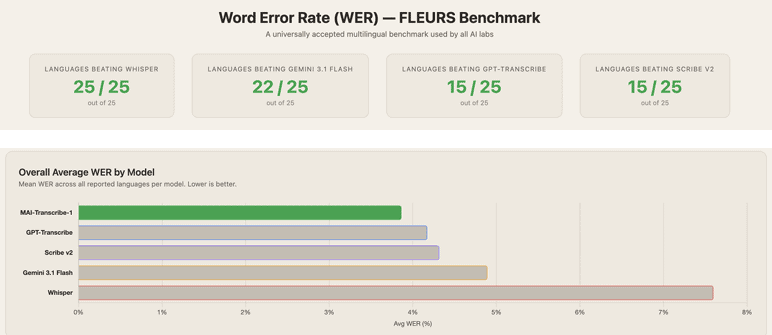
Microsoft said that MAI-Transcribe-1 outperforms competitors such as Scribe v2, Whisper-large-V3, GPT-Transcribe, and Gemini 3.1 Flash on the FLEURS benchmark, achieving best-in-class Word Error Rate across all supported languages.

Image credit: Microsoft

Its capabilities span live captions, call center transcription, video subtitling, accessibility tools, e-learning, media archiving, and market research, providing text alternatives that enhance usability and compliance. The model can automatically identify languages and is robust in real-world noisy situations, though some advanced features, including real-time transcription, speaker diarization, and context biasing, are slated for future releases.

MAI-Transcribe-1 accepts audio in WAV, MP3, and FLAC formats and is priced at $0.36 per hour of audio processed. Developers can access MAI-Transcribe-1 via Azure Speech, using either the Speech SDK or REST APIs when needed.

As of now, usage requires pointing to East US or West US regions, but Microsoft plans to expand global availability soon. With its strong transcription accuracy and broad language support, MAI-Transcribe-1 looks to power a range of applications from accessibility enhancements to content creation and customer service analytics.

PowerPoint Gets Smarter Contrast Checks for Transparent Backgrounds in Windows & Mac

Microsoft is rolling out a fresh update to PowerPoint for Windows that makes Accessibility Assistant smarter at spotting color contrast issues, especially when text appears over transparent backgrounds. The company says that this makes contrast checks reflect what users actually see, even on slides with layered visuals, gradients, or images.

Prior to this update, PowerPoint only checked contrast on solid backgrounds, which sometimes missed real-world visibility problems. Now, text on images, gradients, or other slide content will be evaluated correctly, helping creators ensure presentations are readable for people with low vision or color-vision deficiencies.

To try it, open any PowerPoint file, go to Review, select Check Accessibility, and choose Hard-to-read text contrast. Then, the tool will now flag text over transparent areas that might not meet accessibility standards.

This feature is available for Microsoft 365 subscribers running Windows Version 2603 (Build 19822.20114) or later, and Mac Version 16.108 (Build 26032513) or later. Like many preview features, Microsoft is gradually rolling out this one as well.

All that said, there are a few limitations. Microsoft says that contrast checks for transparent backgrounds do not yet apply to text in tables without a solid fill, nor to text in native chart elements like legends or data callouts.

Let’s not forget that you can now generate richer Alt Text in PowerPoint on Mac and use powerful new image editing tools. Moreover, Microsoft has also rolled out faster file search in the PowerPoint web app.

Microsoft’s Obsession With Edge Continues, Testing Default Auto-Launch on Windows 11 PC Startup

In the past, Microsoft had done everything possible to move Chrome users to Edge, be it pushing an “All in One Browser” banner on Chrome’s download page or putting Chrome at the top of the list on Edge’s import browser data page. Now, the company is going one step further in Windows 11. This time, it appears to be testing a new change that could make Edge a lot harder for you to ignore.

In the latest Edge Beta builds, the browser now shows a prompt suggesting it will automatically open every time you boot your Windows 11 PC. The news comes via Windows Central, which reports that unless you actively click the “No thanks” button in the banner, Edge automatically launches at startup by default. It should be noted that OnMSFT was first to spot this feature in Edge Canary earlier this month. The news outlet then reported that there’s a separate toggle in Edge setting to enable or disable the feature.

Image credit: OnMSFT

Early testing suggests the behavior may not strictly depend on whether Edge is your default browser, though it’s still unclear how broadly this will roll out. Microsoft has allowed users to manually enable startup behavior in the past, but this is something very new.

The worrying part about this test is that it’s opt-out and not opt-in. In simple words, if you don’t want Windows 11 to launch Edge at startup, you are forced to opt out. Interestingly, the changelog of the latest Beta build doesn’t even mention this behavior.

Microsoft’s similar behavior of pushing users towards Edge has drawn criticism from its rivals in the past. Opera, for example, sued Microsoft in Brazil back in July 2025 as part of its global fight for browser choice.

At the time, the company argued that “Microsoft sets Edge as the exclusively pre-installed and default browser across Windows devices and deploys tactics that confuse users and make it artificially difficult for them to access and use alternative browsers. Microsoft’s tactics are unjustified, frustrating to users, and only getting more severe.”

Although the final verdict of the lawsuit isn’t out yet, competitors haven’t been quite happy with the company’s tactics. Now, it’s giving yet another reason for them to be concerned. Since most of us eventually open a web browser, Microsoft seems to be betting on that behavior. That said, the fact that it’s enabled by default unless you decline it could be seen as a subtle push toward Edge adoption.

For now, this feature is reportedly in preview, which means it could change or even disappear based on feedback. But if it sticks, it would hint at a more aggressive approach from Microsoft in keeping Edge front and center on Windows 11.

Google Chrome May Add Native Lazy Loading for Video and Audio

Google Chrome and other Chromium-based browsers are preparing a major performance upgrade with native lazy loading for video and audio. The feature builds on existing lazy loading for images and iframes, aiming to improve speed and efficiency across modern websites.

The change comes from a proposal by developer Helmut Januschka and is already progressing toward a full rollout in upcoming Chrome builds.

What Native Lazy Loading Means for Media

Lazy loading ensures that media files load only when users scroll to them. This prevents browsers from downloading large video or audio files that users may never view.

Until now, developers relied on JavaScript solutions like Intersection Observer to achieve this behavior. That approach often added complexity and failed to integrate cleanly with browser-level optimizations.

With this update, developers can simply use a native HTML attribute:
loading=”lazy” on video and audio elements.

Why This Change Matters

The native implementation brings several immediate improvements. Pages load faster because browsers skip unnecessary media downloads during initial load. Bandwidth usage drops, especially on content-heavy websites filled with embedded media.

Performance also improves on lower-end devices, where handling multiple media assets can slow down rendering. Since the feature integrates directly with the browser’s preload scanner, it allows smarter, network-aware decisions.

Unlike JavaScript-based methods, the native approach avoids blocking page load events and handles autoplay and preload behavior more efficiently.

Development Timeline and Rollout

Work on the feature started in January, followed by deeper integration in February. By late March, the feature entered the shipping process and is now enabled by default in upcoming builds.

Google plans to roll out native lazy loading for video and audio broadly with Chrome 148, making it available to users without requiring any additional setup.

A Step Forward for Web Performance

This update signals another shift toward browser-native performance optimizations. By removing reliance on JavaScript workarounds, Chromium-based browsers continue to simplify development while improving real-world browsing speed.

In other Google-related news, the company recently patched multiple zero-day vulnerabilities and released an emergency update to address an active exploit. Chrome remains a frequent target for attackers, with threats like VoidStealer highlighting the importance of ongoing security improvements.

Via Windows Latest

Xbox Free Play Days Unlocks Assassin’s Creed Games for Free This Weekend

Xbox Free Play Days is now live from April 2 through April 6, 2026, and this time the event focuses entirely on the Assassin’s Creed series. Prior to the official announcement, Pure Xbox reported that players can jump into multiple entries from the long-running franchise without needing an active Xbox Game Pass subscription, making this one of the more accessible Free Play Days events in recent months.

No Game Pass Required This Time

Unlike most Free Play Days promotions, this weekend does not require an Xbox Game Pass membership. The event unlocks at 8 AM PT / 11 AM ET / 4 PM BST and gives players full access to several major Assassin’s Creed titles across the weekend. Available games include Assassin’s Creed Mirage, Odyssey, Origins, Unity, and Valhalla, covering both the newer RPG-style entries and older, more traditional stealth-focused experiences. Here, it’s worth noting that Assassin’s Creed Mirage is free for all Xbox members to try with a 2-hour limited timed trial during the Free Play Days period.

A Wide Range of Assassin’s Creed Experiences

This lineup offers a good mix of gameplay styles for both new and returning players. Mirage focuses on classic stealth and smaller-scale storytelling, while Odyssey and Valhalla lean heavily into open-world exploration, RPG mechanics, and large-scale combat. Origins and Unity sit somewhere in between, offering a balance of narrative, exploration, and classic Assassin’s Creed gameplay systems.

Progress Carries Over and Discounts Available

As with previous Free Play Days events, all progress carries over if you decide to purchase any of the games afterward. This makes it easy to continue your journey without losing any progress made during the free period. It also aligns well with the ongoing Xbox Spring Sale, where many of these titles are currently available at discounted prices.

The event comes alongside other Game Pass news, including the upcoming arrival of Might and Magic: Olden Era later this month, which will launch in Game Preview. At the same time, Microsoft has confirmed that several titles will be leaving Xbox Game Pass in April, so subscribers may want to check the list and play them before they are removed.

Steam Deck 2 Could Release in 2028, Though Valve May Delay It Due to Memory Crisis

If you have been wishing Valve to release the Steam Deck 2 early, there’s some bad news for you. A new claim about the Steam Deck 2 release window is making rounds online, all thanks to a well-known industry tipster who goes by the name KeplerL2 (via Wccftech).

According to the tipster, Valve is targeting a 2028 launch for its next handheld, though that timeline could still shift depending on how the broader hardware market evolves.

The details were shared by KeplerL2 in a recent NeoGaf discussion forum. When asked whether the next Steam Deck might slip to 2029, the tipster responded that Valve was aiming for 2028, but also pointed out that the ongoing RAM and NAND situation could delay things further. The same memory crunch has already affected the current Steam Deck lineup, which recently saw the LCD model quietly phased out in several markets.

Interestingly, a potential delay may not be entirely bad news. The insider noted that, unlike consoles such as PlayStation 6 or Project Helix, Valve is not tied to a semi-custom SoC approach. In simple terms, that gives the company more flexibility to improve hardware over time. If the launch slips, the Steam Deck 2 could actually end up with better specs than originally planned.

Speaking of handhelds, let’s not forget that Nintendo might increase the price of the Switch 2 down the line, according to a former sales lead. As for the Steam Deck 2, there’s no official word from Valve, but the direction seems clear. The Steam Deck 2 is still a few years away, and its final form may depend just as much on the memory market as Valve’s own roadmap.

Microsoft Explains PowerShell LTS Delay After Complex Release Issues

Microsoft has acknowledged delays in the release of PowerShell 7.6 LTS, citing a series of technical and logistical challenges that slowed development and final delivery. The company said the release process proved more complex than expected, especially given PowerShell’s cross-platform scope.

A complex release pipeline across platforms

Each PowerShell release involves a demanding pipeline with nearly 29 packages across eight formats. It supports four architectures, including x64 and Arm64, and runs on eight operating systems. In total, Microsoft executes more than 287,000 tests per release cycle to ensure stability.

Timeline of issues that caused delays

The delay dates back to October 2025, when a packaging bug broke Alpine Linux builds. In November, new compliance rules slowed down fixes, followed by a December holiday freeze that paused progress. January introduced glibc compatibility issues on RHEL 8, while February focused on extended validation and fixes before the release stabilized in March 2026.

Root cause: packaging and compatibility challenges

Microsoft said packaging changes became more complex than expected. Cross-platform compatibility issues added further complications, creating a chain of delays that required deeper changes to the release process.

To recover, Microsoft rebuilt packaging workflows across RPM, DEB, and PKG formats. The company prioritized reliability over speed and aligned release branches to improve coordination and reduce inconsistencies.

What Microsoft is changing going forward

Microsoft plans to introduce clearer ownership of releases and improve internal tracking. It will increase automation, deliver more consistent preview builds, and detect risks earlier in development. The company admitted that the lack of early warning signals significantly contributed to the delay.

In other news, Microsoft recently released the Canary update KB5079490 and teased long-awaited Taskbar customization features in Windows 11. The company is also testing new sponsored labels in Bing Search.

Via Neowin
Nintendo Switch 2 Will See a Price Hike, Says a Former Exec

Nintendo’s recent decision to lower digital prices for first-party Switch 2 titles has sparked debate among players and gaming industry watchers alike. The company even had to jump in with a clarification to make people understand that physical editions aren’t becoming more expensive. It’s the digital edition that’s getting cheaper.

That messaging has reportedly been repeated by a former Nintendo sales lead, named “Sean,” on the latest Kit & Krysta Podcast (via Insider Gaming). Sean reportedly praised the strategy as a “consumer-first” approach, noting it makes digital gaming more accessible. Interestingly, he further added that hardware itself may not escape future cost pressures. In other words, it means Nintendo is highly likely to increase the price of Switch 2.

It’s not the first time we have heard about a Switch 2 price hike. Reports from late last year hinted that Nintendo is dealing with higher Switch 2 production costs. Meanwhile, a new report from earlier this year suggested that the ongoing memory crunch is the reason Nintendo Switch 2 will see a price hike later this year. Although there’s no official word just yet, all the rumors point to an increasing price.

Adding about the hike, Sean, in the podcast said, “Eventually the hardware price is going to have to go up.” He suggested that reducing software prices digitally could help mitigate the impact of any potential price increase for the Switch 2.

PS5 consoles are also getting a price hike starting this month

It’s not just Nintendo making headlines; Sony also recently confirmed price adjustments across multiple devices in the PlayStation lineup, including both consoles and accessories. The PS5 Slim Digital will cost $599.99 (+$100), while the PS5 Slim Disc is now $649.99 (+$100). The PS5 Pro is priced at $899.99 (+$100), and the PlayStation Portal will retail for $249.99 (+$30).

Microsoft Brings Heroes of Might and Magic: Olden Era to Xbox Game Pass This Month

Microsoft has revealed another title heading to Xbox Game Pass this month, expanding its April 2026 lineup with a classic strategy revival.

According to True Achievements, Heroes of Might and Magic: Olden Era will arrive on April 30 for PC Game Pass and Game Pass Ultimate subscribers. The game launches in Game Preview, meaning players will be able to jump in early while development continues.

A return to classic turn-based strategy

Olden Era serves as a prequel to the long-running Heroes of Might and Magic series, bringing back the franchise’s signature turn-based strategy gameplay. Players begin with a single town, choose a faction, and explore a procedurally generated world while gathering resources and expanding their territory.

The core loop focuses on building and upgrading armies over time, staying faithful to the original formula that made the series popular while introducing modern systems and visual updates.

Tactical combat and early reception

Combat remains turn-based, with a strong emphasis on positioning, planning, and unit management. Players can face AI opponents or challenge others depending on the selected mode, and developers have already confirmed multiple gameplay modes.

A previously released demo has generated solid interest, earning Mostly Positive feedback from more than 5,000 user reviews on PC, suggesting a strong early reception among fans of the genre.

Game Pass updates and ongoing deals

As with every new addition, several titles are also expected to leave the Game Pass catalog soon, giving players limited time to try them before they are removed.

Meanwhile, the Xbox Spring Sale is already underway, offering discounts across a wide range of games, expansions, and bundles for those looking to expand their library.

With the Olden Era arriving at the end of April, the Game Pass lineup continues to deliver fresh content, especially for strategy fans looking for a modern take on a classic formula.

Microsoft Rewards Points Return to Normal After March Cut

Microsoft has quietly reversed a controversial change to its Microsoft Rewards program, restoring Daily Set points to their previous values after weeks of user backlash.

As True Achievements writes, the update brings Daily Set tasks back to 10 points each, undoing a March 2026 adjustment that had reduced them to just 5 points.

Microsoft Rewards Daily Set points return to normal

Back in March, Microsoft lowered the value of Daily Set tasks, effectively cutting potential yearly earnings in half. Users who completed tasks consistently saw their annual totals drop from around 10,950 points to roughly 5,475 points.

The change quickly sparked frustration among users, with reports coming in from multiple regions, including the US, UK, Canada, France, and Australia. Many felt the adjustment significantly reduced the value of engaging with the Rewards program on a daily basis.

Now, it appears Microsoft has rolled back that decision. Daily tasks are once again worth 10 points each, restoring earning potential to previous levels. The update seems to be rolling out globally, although Microsoft has not shared any official explanation for either the initial reduction or the reversal.

No official statement from Microsoft

Despite the widespread impact of the change and its reversal, Microsoft has remained silent on the situation. There has been no confirmation on whether the rollback is permanent or part of a temporary adjustment.

For now, users can once again earn points at the original rate, which may help restore confidence in the program after the recent controversy.

In other Microsoft-related news, the company is currently testing new sponsored labels in Bing Search, potentially changing how ads are displayed to users.

Meanwhile, Windows 11 may soon get a long-requested feature, as Microsoft recently teased a movable Taskbar in an early preview.

For gamers, the Xbox Spring Sale is now live, offering discounts on a wide range of titles, including full games, DLC, and bundles for a limited time.

GTA 5 Among the Five Titles Leaving Xbox Game Pass Mid-April

Continuing the monthly ritual, Microsoft has yet again confirmed games that will leave Xbox Game Pass in early April 2026. According to folks at PureXbox, five titles are set to depart from the gaming service, as they were flagged as “leaving soon” in the official Xbox mobile app.

So, when exactly are the games leaving, you may ask? Well, the following games are leaving on April 15th:

  • Ashen (Console, PC, Cloud)
  • Eiyuden Chronicle: Hundred Heroes (Console, PC, Cloud)
  • Grand Theft Auto V (Console, PC, Cloud)
  • My Little Pony: A Zephyr Heights Mystery (Console, PC, Cloud)
  • Terra Invicta (PC)

Well, there are still some days left before the aforementioned games actually leave Xbox Game Pass. If you haven’t completed the games, it’s the best time to do it. Also, if you plan to continue playing the games listed above, make sure to grab them now with at least a 20% discount. Notably, some games like GTA V and Eiyuden Chronicle are receiving major discounts, thanks to the Xbox Spring Sale 2026.

All that said, Microsoft is also bringing new titles to Xbox Game Pass, with seven confirmed as of now. Notably, Barbie Horse Trails joins the Game Pass library today alongside the award-winning Clair Obscur: Expedition 33.

Best Moderated Random Video Chats: How to Stay Safe on Windows

Random video chat apps and websites can be fun. They can also be unpredictable. For Windows users, the good news is that the operating system already includes tools that can help you stay safer while chatting online.

This guide explains why moderation matters, how it works, which platforms try to do it well, and — most importantly — how to use Windows features to protect yourself.

Why moderation matters

Moderation helps reduce harmful behavior in live video chats. Without it, users may run into inappropriate content, scams, or people trying to collect personal information.

Younger users are especially exposed. Many report uncomfortable or unwanted interactions online, which makes moderation a key safety layer — not just a bonus feature.

How moderation works (and why it’s not enough)

  • Automated systems scan video and chat in real time
  • Human reviewers handle complex or flagged cases
  • Reporting tools allow users to flag issues
  • Account verification reduces anonymous misuse

Even when platforms combine these systems, risk remains. That’s why your device-level protection on Windows matters just as much as platform moderation.

How Windows helps you stay safe

If you’re using a Windows PC, you already have several built-in protections:

Privacy settings (Camera & Microphone)
You can control which apps access your camera and microphone. If something feels off, disable access instantly.

Microsoft Defender SmartScreen
Helps block suspicious websites and phishing attempts when you open random chat links.

Browser permissions (Edge / Chrome)
Modern browsers on Windows let you:

  • Block camera access by default
  • Allow it only for trusted sites
  • Reset permissions anytime

App & browser isolation habits
Using video chat in a browser instead of installing unknown apps reduces risk.

Windows updates
Keeping your system updated ensures the latest security patches are active.

Which platforms actually try to moderate?

Some platforms invest in both automated detection and human moderation, while others rely mostly on basic filters.

For example, OMGfun reports improvements after combining AI tools with manual review, leading to fewer problematic interactions. At the same time, like any open chat platform, it still connects strangers with different intentions.

From a Windows perspective, it’s always safer to access such platforms via a browser with controlled permissions rather than installing unknown software.

Practical rules for Windows users

  • Keep your camera disabled until needed
  • Use browser-based chats instead of random downloads
  • Never share personal files or screen content
  • Don’t switch to external apps when asked
  • Use Windows Security to scan downloads if you receive any files
  • Block and report users directly on the platform

Simple rule: if something feels off — close the tab. On Windows, it takes one click.

Extra steps for teens (and parents using Windows PCs)

  • Use Microsoft Family Safety to manage screen time and app access
  • Keep devices in shared spaces
  • Talk openly about online risks and privacy

Education and awareness matter just as much as software protection.

What good moderation looks like

  • Fast response to reports
  • Clear rules and enforcement
  • Visible safety policies
  • Account verification options

Still, even the best moderation works better when combined with user-side controls — especially on Windows devices.

If something serious happens

  • Close the chat immediately
  • Take screenshots if safe
  • Report through the platform
  • Use Windows Security tools to check your system
  • Contact local authorities if needed

Final thoughts

Random video chats can be entertaining, but they require awareness.

For Windows users, safety isn’t just about choosing the right platform — it’s also about using the tools already available on your system. With proper settings, updated software, and basic caution, you can significantly reduce risks while chatting online.

Microsoft Launches Xbox Spring Sale 2026 With Massive Game Deals

After last week’s preview, the Xbox Spring Sale 2026 has officially gone live, bringing major discounts across the Xbox Store.

As reported by TrueAchievements, Microsoft is offering deals on hundreds of titles, including full games, DLC packs, expansions, and bundled editions. The sale is already available globally, although pricing may vary depending on your region.

Hundreds of deals across games, DLC, and bundles

The Spring Sale includes a wide range of content, from AAA blockbusters to indie titles. Players can find discounts on base games, add-ons, and complete editions, making it a good opportunity to expand existing libraries or pick up missed releases.

Microsoft has also included bundle deals, allowing users to grab multiple titles or full franchise collections at reduced prices.

The sale runs until April 16

The Xbox Spring Sale will remain active until April 16, 2026, giving players around two weeks to take advantage of the offers.

Users should note that prices differ by region, so switching the store region can help display accurate local pricing. You can find the following games and many others on discount:

GamePrice
Red Dead Redemption 2$14.99
The Witcher 3: Wild Hunt Complete Edition$9.99
Elden Ring$38.99
Cyberpunk 2077: Ultimate Edition$39.99
Grand Theft Auto V$19.99
Resident Evil 4 Remake$15.99
DOOM Eternal$9.99

If you’re gaming across platforms, it’s also worth noting that PlayStation Plus monthly games for April 2026 have already been revealed, giving PlayStation users their own set of titles to claim this month.

Microsoft Reportedly Testing Nearly Invisible Sponsored Labels in Bing Search

Microsoft is reportedly once again experimenting with the visibility of sponsored labels in Bing search results. This latest test involves labels that are nearly transparent, appearing as faint gray text that is difficult for users to notice. The test was spotted by Sachin Patel, who shared a screenshot on X highlighting how subtle the label appears (via Search Engine Roundtable).

Image credit: X/@SachuPatel53124

This isn’t the first time Microsoft has experimented with ad labeling. In the past, the company tested almost invisible sponsored labels and other subtle designs that blurred the line between ads and organic results. Many users previously criticized these designs, noting that such labeling can make ads harder to differentiate and raise concerns about user transparency.

Microsoft has responded to feedback on these tests before, hinting that it is exploring ways to balance ad visibility with search experience aesthetics. That said, it appears the company continues to refine the look and feel of sponsored labels, experimenting with different levels of opacity and placement to see what sticks.

With these ongoing tests, Bing users may notice that sponsored labels sometimes appear very faintly or hardly at all, depending on the experiment being run. It’s unclear when Microsoft will finalize a permanent design or if these subtle labels will become standard.

It’s not just ad labeling that has raised eyebrows. In the recent past, there have been several instances [1] [2] [3] of Microsoft trying to move Edge users away from Google Chrome. These tactics have also been heavily criticized by users.

What It Was Like Using Zawa to Create a Logo for A Coffee Shop

When you decide to open a coffee shop, you know the stressful parts would be the obvious ones. Rent. Equipment. Suppliers. Permits. Staffing. All the things people warn you about.

And yes, those things were stressful, just not all at once. Branding was different. Branding didn’t show up loudly. It waited until everything else felt almost done. Then it showed up quietly and asked a question you didn’t have an answer to. 

How I Actually Used Zawa, Step by Step

When I finally opened Zawa ( rebranded from X-Design), I didn’t treat it like a design project. I treated it like answering a few questions honestly.

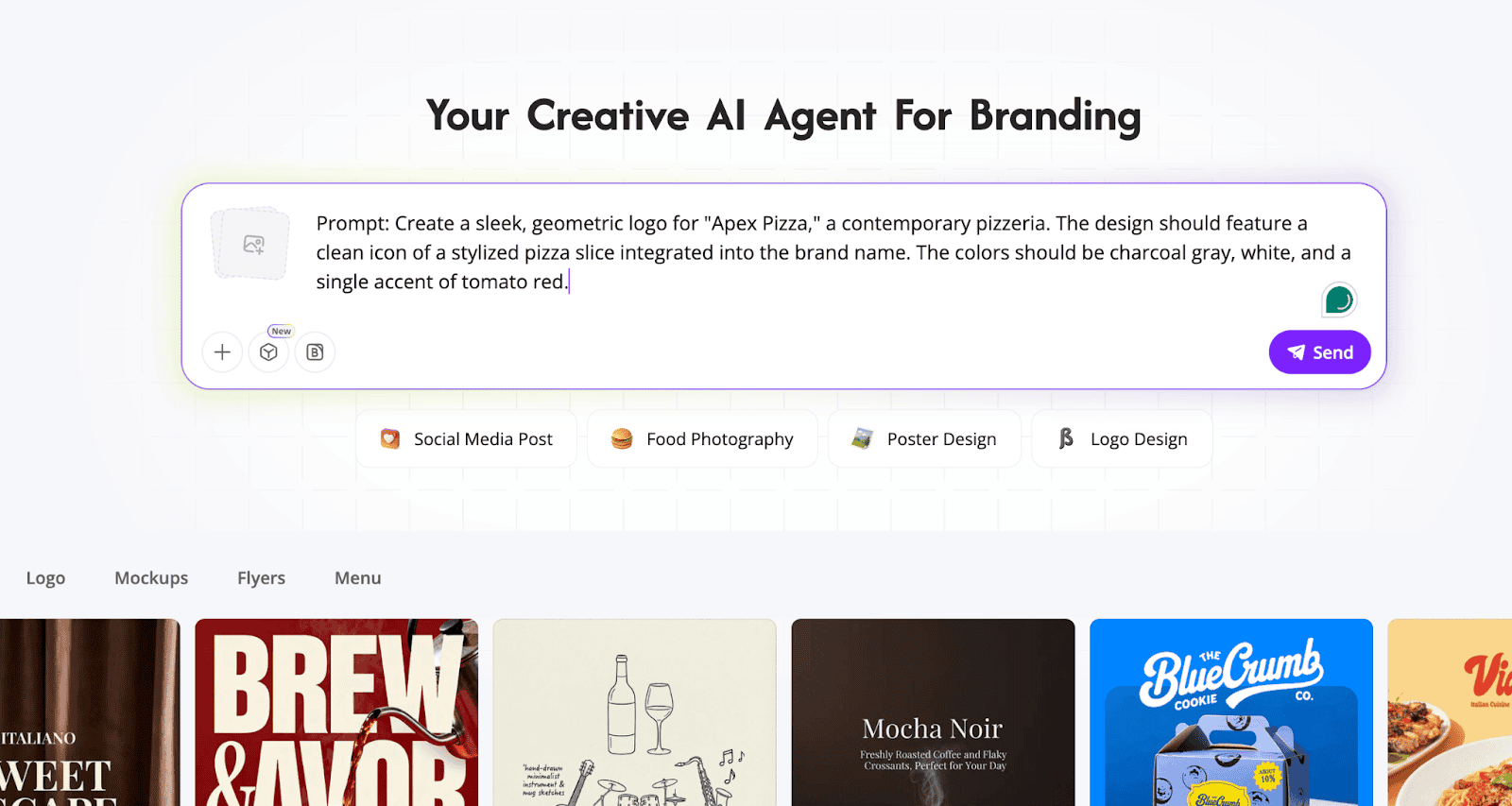
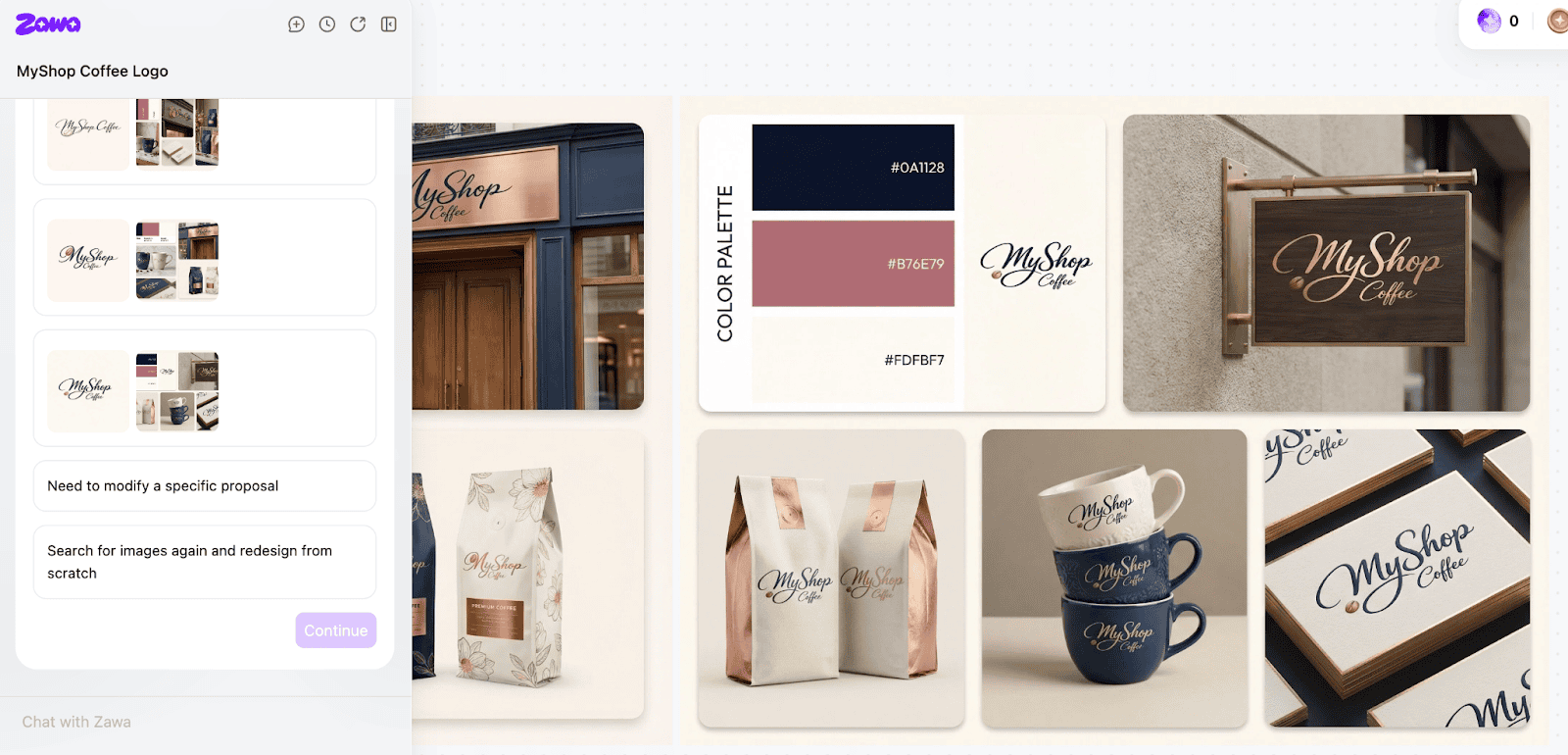
First, it asked me to describe the business. I didn’t try to sound clever. I wrote exactly what it was: The Signature: “A sophisticated logo for ‘MyShop Coffee’ featuring a hand-drawn, elegant script font. A small, minimalist coffee bean sits inside the loop of the ‘M’. Deep navy blue and rose gold color palette. Cream background, luxury boutique aesthetic.”

How to use Zawa AI to create branding

Next, I chose basic style preferences. Nothing technical. Softer colors. Simple typography. Less decoration. I avoided anything that felt trendy, even if it looked nice at first glance.

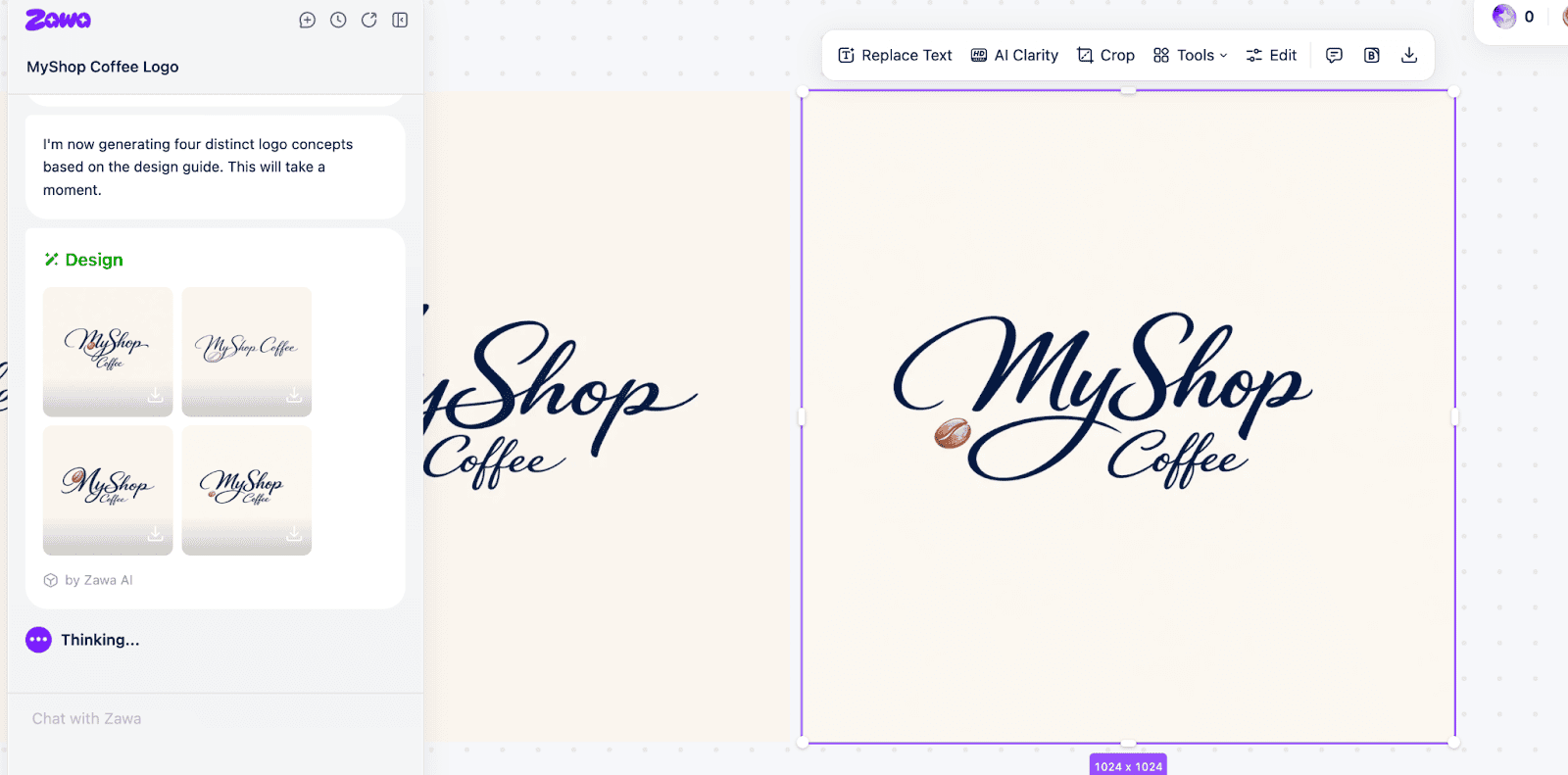
Then, the tool generated several logo options. My reaction was mostly neutral. They weren’t bad. They weren’t great. A few felt familiar. A couple made me think, “I’ve definitely seen this before.”

Zawa logo editor

But instead of getting frustrated, I treated it like flipping through early sketches. You don’t expect the first draft to be the answer. What made the process easier was the ability to tweak things quietly. I changed fonts. Adjusted spacing. Swapped colors back and forth. Undid changes without worrying about wasting anyone’s time or explaining my reasoning. I kept saving versions that felt close, even if I couldn’t explain why. Eventually, I exported three options and left them alone for a day.

Seeing the Logo Outside the Screen

This part mattered more than I expected.

A logo can look fine on a white background and fall apart everywhere else.

I dropped the designs onto cup mockups. I shrank them down to Instagram profile size. I imagined them printed above the door.

Preview logo

Some versions didn’t survive that test. Thin lines disappeared. Details felt messy. One design looked elegant on screen but oddly heavy once scaled up.

To clean things up, I ran the final file through an HD photo converter. I wasn’t expecting a miracle, but it sharpened edges and made the logo usable for print without changing its personality.

That’s when it stopped feeling theoretical. It wasn’t exciting. It was just… solid.

What Zawa Did Well

It wasn’t creativity.

It was speed.

I did not need to take a break from everything I was doing. Then I could open the tool late at night, play with it for ten minutes, close it down, and return the following day. I could explore without committing too early.

For someone who isn’t a designer, that freedom makes a big difference.

Where It Fell Short

Zawa doesn’t know why a place exists.

It doesn’t know the neighborhood. It doesn’t feel the room. It doesn’t understand emotional context.

Some designs felt safe. Some symbols felt empty. No amount of tweaking changed the fact that it was working from patterns, not experience.

If I were building a brand meant to scale or open multiple locations, I wouldn’t stop here. I’d eventually bring in a human designer.

But for a small first café, with a tight budget and a fixed opening date, it did enough.

How People Reacted

No one commented on the logo, now in more than 2 months.

At first, that bothered me. Then I realized it was probably a good sign. It didn’t distract. It didn’t feel out of place. It existed quietly in the space promoting my brand.

That was exactly what I wanted.

Would I Use It Again?

Yes. But not as a replacement for thinking.

I’d use it the same way, as a way to explore, not decide. To get unstuck, not to outsource judgment.

For small café owners, bakeries, or local shops trying to create something decent without overextending themselves, it can help.

Final Thought

Design need not be ideal to be effective. It just needs to feel honest.

Zawa didn’t give me a brand. It gave me a starting point. And at that moment, juggling permits, suppliers, and opening nerves, that was enough.

Microsoft Teams Adds New Voice and Face Enrollment Dashboard for Admins

Microsoft is removing legacy meeting controls from Teams, but the company is also expanding its admin capabilities with a new dashboard focused on biometric data. According to Microsoft 365 Admin Center ID MC1191921 and roadmap ID 506750, a new voice and face enrollment dashboard is on the way.

New dashboard focuses on biometric data visibility

Microsoft is rolling out a dedicated dashboard that gives admins insight into how voice and facial data are used across Teams. The rollout is scheduled between mid-March and mid-April 2026.

This dashboard allows administrators to monitor enrollment data tied to Teams’ AI-powered features, offering a clearer view of how users interact with biometric-based tools.

Supports growing use of AI-powered Teams features

The feature aligns with Microsoft’s broader push toward AI-driven collaboration tools. It specifically supports scenarios such as speaker attribution, voice isolation, and face-based meeting room experiences.

Admins can now track how widely these features are adopted across their organization, helping them understand usage patterns and optimize deployments.

Adds controls for privacy and compliance

In addition to visibility, Microsoft is introducing new controls for managing sensitive biometric data. Admins can review stored voice and facial data and remove it when needed.

This improves compliance capabilities and gives organizations more control over how biometric information is handled within Teams.

This update arrives as Microsoft continues to evolve Teams with new capabilities. The company is also working on chat-based workflow creation, expanding automation directly inside the app.

If you missed recent changes, Microsoft has introduced multiple Teams updates throughout March, focusing on AI, collaboration, and admin tooling improvements.

Via Neowin

Microsoft Shares Workarounds for Classic Outlook Bug That Doesn’t Allow Sending Emails

For some time now, Classic Outlook users have reported receiving a non-delivery report (NDR) error message when sending or replying to emails. Users affected by this Classic Outlook bug usually come across an error message that reads:

This message could not be sent. Try sending the message again later or contact your network administrator. You do not have the permission to send the message on behalf of the specified user. Error is [0x80070005-0x0004dc-0x000524].

Microsoft has now acknowledged the issue and noted that “the issue may happen more consistently if the Outlook.com account is in an Outlook Profile with another Exchange account.” While the company is investigating the issue and working on a permanent fix, it recommends a few workarounds for affected users (via Neowin).

Workaround 1:

  1. Compose a new email.
  2. Click the From dropdown, choose Other Email Address…, then select From….
  3. In the Address Book: field, pick the Global Address List for the other Microsoft 365 account in your profile. Select the email address that triggers the NDR, then click OK twice.
  4. Send the email.

Workaround 2:

  1. Remove the Microsoft 365 account Address Book so Outlook won’t check it when sending.
  2. Go to the Inbox of your Outlook.com account.
  3. On the Outlook ribbon, click Address Book under the Find column.
  4. Select Tools > Options > Custom.
  5. Remove all items linked to the Global Address List and click OK to save.
  6. For more details, see the forum thread: Error is [0x80070005-0x000004dc-0x00000524].

Workaround 3:

  • Verify the change by opening Address Book > Offline Address Book; once the Outlook.com account no longer appears, the NDR should stop..
  • Hide the Outlook.com contact from the Microsoft 365 Global Address List (GAL).
  • Sign in to the Microsoft 365 Admin Center with your admin account.
  • Navigate to Admin Centers > Show All > Exchange.
  • In the Exchange Admin Portal, select Contacts.
  • Find the contact linked to the NDR email address and open it.
  • Click Manage hide from GAL, toggle Hide from Global Address List to On, and save.
  • To update Outlook, go back to your profile, select the Microsoft 365 Inbox, then click Send/Receive > Send/Receive Groups > Download Address Book and confirm.

Besides these workarounds, Microsoft also recommends that affected users switch to Outlook on the web, create a fresh Outlook profile, or move to the new Outlook app for Windows to bypass the issue entirely. Speaking of issues, let’s not forget that Microsoft has finally fixed the Teams Meeting Add-in problem affecting Classic Outlook users.

Microsoft to Retire Legacy Teams Meeting Controls on Windows and macOS

Microsoft is continuing to evolve Microsoft Teams, but not all changes are additions. While the company recently introduced a new chat-based workflow creation feature, it is now preparing to remove an older capability that some users still rely on.

Legacy feature removal announced for Teams

According to the Microsoft 365 Admin Center message MC1266901, Microsoft will retire legacy external meeting controls in Teams on Windows 10, Windows 11, and macOS. The feature will be permanently disabled starting June 30, 2026.

This functionality allowed external tools and hardware integrations to control key meeting actions such as muting participants, raising hands, toggling cameras, applying background blur, sending reactions, and leaving meetings.

It was widely used by automation tools, custom enterprise setups, and third-party integrations that relied on external control of Teams meetings.

Microsoft says the feature no longer meets its current security standards. The company also cited concerns around long-term reliability and maintainability, suggesting that keeping the feature would introduce unnecessary risk and complexity.

What happens after June 30, 2026

Once removed, any external apps or tools that depend on these controls will stop working. Native controls inside Microsoft Teams will remain fully functional, and supported APIs like Microsoft Graph will continue to work as expected.

Microsoft is giving organizations more than 30 days’ notice, allowing time to adjust workflows or move to supported alternatives.

Microsoft has recently focused on expanding Teams capabilities, including new AI-driven features and chat-based workflow tools. The company has also fixed an issue with the Teams Meeting add-in that affected Classic Outlook users.

Via Neowin
Microsoft Quietly Upgrades Bing Maps Addresses With a Massive Data Overhaul

Microsoft has now completed a major upgrade to Bing Maps that it started back in mid-2025. The update brings in TomTom’s Orbis address data, which now powers most address results across Bing Maps, Azure Maps, Bing Search, and Copilot (via Neowin).

At a time when location accuracy matters more than ever, this is one of the biggest behind-the-scenes changes in years. With the fresh update, Bing Maps now offers better coverage, more accurate pin placement, and the latest data.

The new system keeps evolving as real-world locations change rather than relying on occasional updates.

Users can now notice more accurate address details across Microsoft’s location services, including Bing Maps, Bing Search, and Copilot. At the same time, Azure Maps is set to provide more reliable API results, powered by the updated Orbis data.

Microsoft started with a few European regions, then expanded gradually. According to the company, each phase involved testing data quality, checking accuracy, and only then pushing it live. It’s a slower process, but it likely helped avoid large-scale issues. Moreover, Microsoft says the work isn’t done yet, with more updates expected over time.

If you had trouble with exact location pinning in the past in Bing Maps, this update is most likely to fix that issue.

Microsoft Promotes Intune Over SCCM for Modern Update Control

Microsoft is continuing to reshape how Windows 11 updates are handled, and the company is now actively encouraging organizations to move away from System Center Configuration Manager (SCCM) in favor of Microsoft Intune. This change reflects a broader shift from manually pushing updates to defining policies that control how updates behave across devices.

Moving beyond SCCM’s manual approach

SCCM has long been the standard for enterprise update management, but it relies heavily on manual processes. IT teams had to package and deploy updates themselves, keep track of devices that missed updates, and troubleshoot issues individually. This approach often created delays and made it harder to maintain consistency across large environments.

Intune introduces a policy-driven model

With Intune, Microsoft is changing the model entirely by focusing on policy-based update management. Instead of pushing updates to devices, administrators define rules that determine when and how updates are installed. These policies control aspects such as timing, deferral periods, deadlines, and restart behavior.

The result is a system where devices automatically follow predefined update standards, reducing the need for constant manual intervention.

Focus on compliance and automation

Microsoft emphasizes that Intune gives administrators more control, not less. Rather than micromanaging every deployment, IT teams define the desired outcome and let the system enforce it. Devices are expected to remain compliant with update policies, and administrators only need to step in when something goes wrong.

This shift allows organizations to focus on exceptions instead of routine update management, improving efficiency and reducing operational overhead.

Intune also integrates with Conditional Access, making update compliance part of an organization’s overall security posture. Devices that fail to meet update requirements can be restricted from accessing corporate resources, ensuring that only secure and up-to-date systems remain connected.

A broader push toward cloud management

This move highlights Microsoft’s continued push toward cloud-based device management. By promoting Intune over SCCM, the company is steering organizations toward a more automated and scalable approach that aligns with modern security and management needs.

At the same time, Microsoft has been addressing misconceptions around updates themselves. Engineer Raymond Chen recently explained that updates are often blamed for issues that already exist on systems, with problems only becoming visible after a reboot.

In parallel, Microsoft has also retired older tools like the Support and Recovery Assistant, replacing them with newer command-line capabilities built into its modern support ecosystem.

Via Neowin
Microsoft Teases Long-Awaited Movable Taskbar for Windows 11

Microsoft is preparing a major push to improve Windows 11 quality in 2026, and one of the most requested features might finally arrive: taskbar customization.

According to Neowin, an early preview of the feature briefly appeared in a now-deleted video, giving us a glimpse of how it could work.

Taskbar customization is finally coming to Windows 11

The preview showed a simple way to reposition the taskbar using a right-click menu. Users could switch the taskbar’s position in just a few clicks, with smooth transition animations applied during the change.

However, this version was only a developer debug tool. Microsoft is expected to implement the final feature inside the Settings app instead of using a right-click menu.

The classic drag-to-move functionality, available in older Windows versions, may not return. There is currently no confirmation that Microsoft will support drag-based repositioning.

Taskbar will adapt to different positions

The updated taskbar is designed to work across multiple positions, including the top, sides, and bottom of the screen. The interface will dynamically adjust depending on placement, ensuring that icons and elements remain usable.

There are still some limitations, though. For example, the full search bar won’t be available when the taskbar is placed on the sides. Instead, it will collapse into a simple icon to save space.

The animations shown in the preview build are also not final. Microsoft is expected to refine them further before rolling out the feature publicly.

This feature is part of a broader effort by Microsoft to improve the overall Windows 11 experience. The company is reportedly building a dedicated team focused on quality, performance, and user feedback.

Taskbar customization has been one of the most requested features since Windows 11 launched, and its return signals that Microsoft is starting to address long-standing complaints.

If implemented well, this could be a meaningful step toward making Windows 11 more flexible and user-friendly.

Sony Reveals PlayStation Plus Monthly Games Ahead of April Release

Sony has officially announced the PlayStation Plus free games lineup for April 2026, confirming recent leaks. Players will be able to download the new titles starting April 7, 2026, with a mix of action, RPG, and classic remastered content.

Lords of the Fallen leads April lineup

As previously leaked, Lords of the Fallen headlines this month’s offerings. The game delivers a dark fantasy experience with souls-like combat, featuring punishing enemies, slow progression, and demanding boss fights that reward skill and patience.

Sword Art Online brings large-scale multiplayer

Another leaked title, Sword Art Online: Fractured Daydream, also joins the lineup. The game features 21 characters from across the franchise and offers both single-player content and large-scale online battles with up to 20 players.

It also introduces the “Galaxia” system, allowing players to revisit key moments and battles from the series in a new way.

Tomb Raider trilogy returns in remastered form

Fans of classic action-adventure games will get Tomb Raider I–III Remastered, which includes the original trilogy along with expansions and secret levels.

The collection lets players switch between classic and modern visuals and introduces a new Challenge Mode for added replay value.

Don’t forget to claim March games

Sony reminds subscribers that March 2026 PlayStation Plus titles must be claimed before April 7. Once the new lineup goes live, the previous games will no longer be available to add to your library.

Alongside the new additions, several games will be removed from the PlayStation Plus catalog in April. Sony has already shared a detailed list of titles leaving the service, so subscribers may want to check and play them before they’re gone.

Overall, April’s lineup offers a strong mix of challenging gameplay, anime-inspired multiplayer action, and nostalgic classics, making it a solid month for PlayStation Plus subscribers.

Windows Updates Aren’t Always the Problem, Microsoft Engineer Explains

Microsoft engineer Raymond Chen has pushed back on a common assumption among Windows users and IT teams that Windows Update is often to blame when systems break.

Reboots expose problems, they don’t create them

According to Chen, many issues that surface after Patch Tuesday updates are not actually caused by the updates themselves. Instead, the reboot that follows an update simply reveals problems that were already present in the system.

In enterprise environments, IT teams frequently point to Windows updates as the root cause when machines fail to start or behave unexpectedly after a restart. However, Chen explains that these systems often had underlying issues long before the update was installed.

What really causes the failures

The real culprits are usually earlier system changes that don’t immediately trigger visible problems. These include driver installations, newly deployed software, group policy updates, or manual tweaks to the registry and system settings.

These changes can silently destabilize a system over time. Since Windows typically runs without interruption for long periods, especially in enterprise setups, the system may appear stable — until a reboot finally occurs.

Why Windows Update gets the blame

When Windows Update installs patches, it often requires a restart. That reboot becomes the moment when hidden issues surface, making it seem like the update caused the failure.

Chen emphasizes that the update acts as a trigger, not the root cause. The timing simply creates a misleading correlation that leads users and administrators to blame the wrong source.

The same pattern can apply to home users as well. Various optimization tools, tweaks, or unofficial modifications can introduce instability that only becomes visible after a restart.

Could hotpatching fix the perception problem?

Chen suggests that technologies like hotpatching, which allow updates to be applied without requiring a reboot, could reduce these misunderstandings.

By eliminating the immediate restart, systems wouldn’t suddenly expose pre-existing issues right after an update, making it easier to separate actual update-related problems from unrelated system instability.

The timing of Chen’s comments is notable, as Microsoft recently had to pull update KB5079391 due to installation errors. The company later released KB5086672 to address those problems.

While some update-related issues are real, Chen’s explanation highlights that not every post-update failure should automatically be attributed to Windows Update itself.

Via Neowin
Microsoft 365 Set to Get OpenClaw and Personal AI Agents

Microsoft is quietly ramping up efforts to reshape Windows 11 and its AI ecosystem, with new hires and internal teams focused on performance, native apps, and next-generation automation.

Microsoft plans to bring OpenClaw to Microsoft 365 for personal AI agents

Microsoft is building a new internal team aimed at fixing long-standing Windows 11 issues, especially around performance and consistency. This move aligns with earlier efforts led by Rudy Huyn, who is already assembling a team dedicated to making Windows apps fully native.

The company wants to move away from mixed frameworks like WebView and Electron, which many users blame for sluggish performance and inconsistent UI. The new direction pushes for native development using frameworks like WinUI to deliver faster and more reliable experiences.

Omar Shahine joins to lead personal AI agent push

As Windows Central writes, Microsoft has also brought in Omar Shahine, who will focus on developing OpenClaw and advancing personal AI agents within Microsoft 365.
The goal is clear: build proactive assistants that don’t just respond to prompts, but actively complete tasks from start to finish. These agents aim to improve productivity by automating everyday workflows across apps and services.

OpenClaw aims to automate real-world work tasks

OpenClaw is shaping up to be a key part of Microsoft’s AI strategy. Early capabilities include managing inboxes, sending emails, organizing calendars, and even handling real-world actions like check-ins.

Microsoft has already developed a Teams plugin for OpenClaw, allowing users to interact with the system directly within their workflow. This suggests tight integration with Microsoft 365 services from the start.

Part of a broader shift toward “personal agents at work”

This initiative builds on Microsoft’s broader push into AI-powered productivity tools. The company recently introduced Copilot Cowork, but OpenClaw signals a deeper move toward fully autonomous “personal agents at work.”

If successful, these agents could redefine how users interact with software, shifting from manual input to fully automated task execution across the Microsoft ecosystem.

While details remain limited, Microsoft’s dual focus on fixing Windows 11 and advancing AI agents suggests a major shift in both user experience and workplace automation.

Raspberry Pi Launches 3GB Pi 4 at $83.75 & Increases Prices on Higher-Memory Models

Memory prices are hitting record highs, and Raspberry Pi is feeling the hit. The cost of LPDDR4 DRAM used in Pi 4 and 5 models has climbed seven-fold in the past year, according to industry trackers. To keep computing affordable, Raspberry Pi is adding a new 3GB Pi 4 at $83.75 while adjusting prices on higher-memory models.

Here’s a breakdown of the price jump:

ProductDensityPrice increase
Raspberry Pi 4 and 54GB$25
Raspberry Pi 4 and 58GB$50
Raspberry Pi 516GB$100
Raspberry Pi 500 (unit only and kit)–$50
Raspberry Pi 500+ unit only–$150
Raspberry Pi 500+ kit–$150
Compute Module 4 and 4S1GB$11.25
Compute Module 4, 4S, 52GB$12.50
Compute Module 4, 4S, 54GB$25
Compute Module 4, 4S, 58GB$50
Compute Module 516GB$100
Development Kit for Compute Module 5–$25
Raspberry Pi AI HAT+ 2–$50

Raspberry Pi 4 and 5 models with 4GB now cost an extra $25, 8GB sees a $50 bump, and the Pi 5 16GB version jumps $100. Other devices impacted include the Raspberry Pi 500 and 500+, Compute Module 4, 4S, 5, the Compute Module 5 Development Kit, and the Raspberry Pi AI HAT+ 2.

Raspberry Pi emphasizes that lower-memory models remain affordable. The Pi 400 with 4GB still costs $60, and 1GB–2GB versions of Pi 4 and 5 range from $35 to $65. Classic models including Pi Zero, Zero W, Zero 2 W, Pi 1, 3, 3B+, 3A+, and Compute Module 1 and 3+ are unaffected, as they use older LPDDR2 DRAM stock.

The company advises buyers to choose the memory they actually need rather than paying for excess. While current memory prices are high, these increases are seen as temporary, and Raspberry Pi plans to roll back price hikes once costs stabilize, keeping computing accessible and flexible across its product range.

PlayStation 6 Handheld Reportedly Outperforms Xbox Series S

Gamers are eagerly waiting for PlayStation 6, and while the information is scarce, we know that the upcoming console won’t lag behind Project Helix in terms of performance.

PS6 Handheld Could Outperform Xbox Series X, Leaks Claim

While the gaming community is focused on the next-gen home console, it seems that Sony is also working on a PS6 handheld, codenamed Project Canis.

The rumored specifications include:

  • 4 x Zen 6c Cores
  • 2 x Zen 6 LP Cores
  • 16 x RDNA 5 CUs
  • 192-bit LPDDR5X (24GB)
  • 135mm² TSMC 3nm

This information comes from a known leaker, KeplerL2, claiming that the PS6 handheld can outperform the Xbox Series S in both rasterization and ray tracing.

The report states that the handheld will use PSSR3 and outperform Nintendo Switch 2 and its DLSS implementation. It’s speculated that PSSR3 will outperform DLSS 4.5.

As for PSSR, it was recently added to PlayStation 5 Pro, improving performance and visual clarity. If you’re not familiar with the feature, PSSR uses similar tech to AMD FSR, and it can deliver a performance boost.

Keep in mind that this is rumored information, and Sony hasn’t released any official information. As for PS6, it is speculated that the new console could cost $699.

Via Wccftech