Candleman video game is coming to Xbox One, here’s the trailer

Candleman, a 3D platformer developed by Chinese indie game studio Spotlightor Interactive, may be one of the most interesting games to be released on the Xbox One this week. The game was first released in the Chinese market last year, but it will finally see a worldwide release on Wednesday, February 1.

In Candleman, gamers play a little candle that can only burn for 10 seconds, creating a gameplay that relies heavily on dynamic lighting effect. According to the game’s official website, the initial prototype was created in 2013 during a game jam themed with the topic “10 seconds.” After the idea received praise from gamers, the game studio joined the ID@XBOX program to pursue development of what became an “immersive fairytale that highlights everyday issues.” The official description notes:

A distinctive 3D platformer, Candleman’s action adventure gameplay uses the mechanics of light and shadow to tell an immersive story. Players take on the role of a lowly candle with the ability to burn for a meager 10 seconds. This power, though small, is Candleman’s only resource against the challenges and obstacles in the darkness ahead. Trapped in the darkness, Candleman must burn himself to illuminate the nearby environment and find the way out. A wide range of stunning environments provide the backdrop as players experience this unsettling yet intriguing adventure.

Candle will launch as an $14.99 Xbox One exclusive on Wednesday, but the developer shared that the game will be ported to other platforms “including PC, other consoles and handheld devices in due course.” Let us know in the comments if you’re looking forward to play that game on your Xbox One.

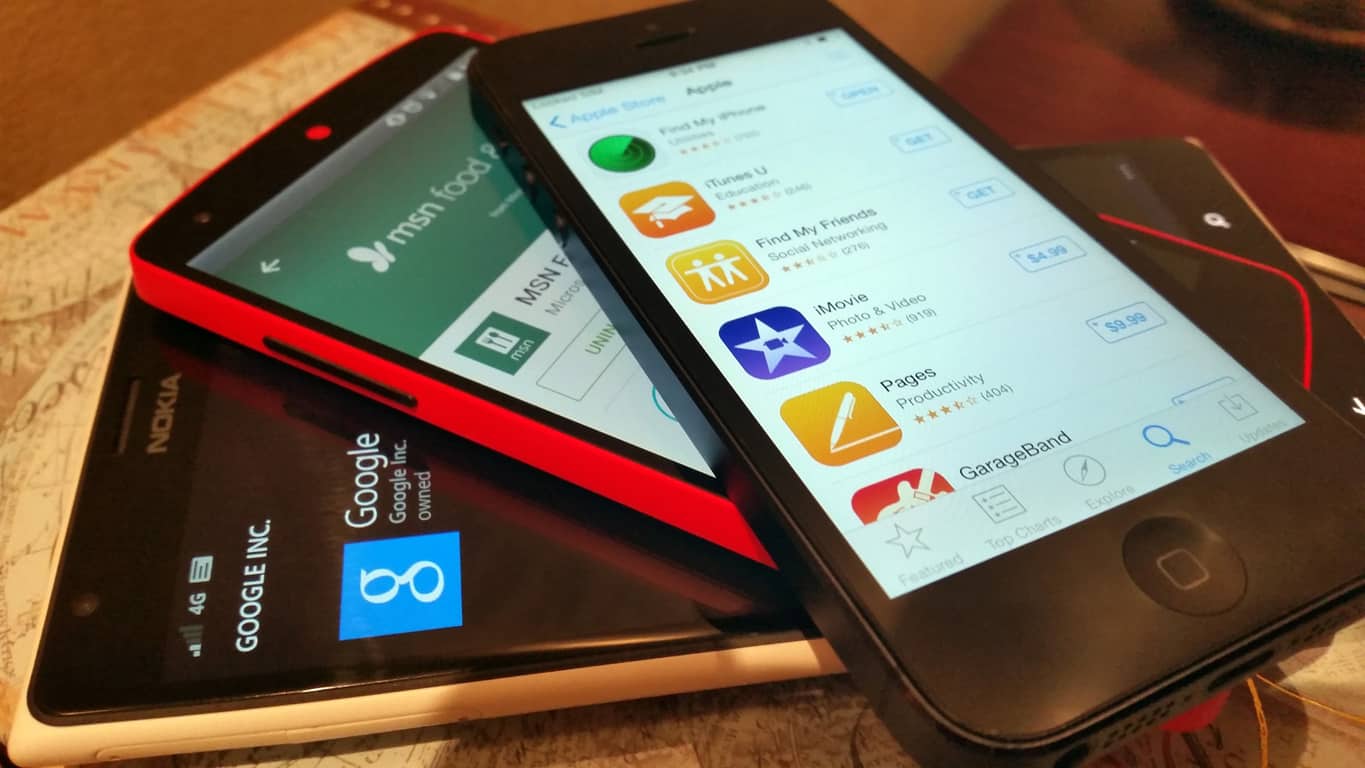
iOS will soon allow for icon changes like Windows 10’s Live Tiles

Apple appears to be taking some inspiration from Microsoft’s Windows 10 operating system with their next iOS update by introducing their own version of Live Tiles.

On Windows 10, Live Tiles are basically the app icons which display on the Start Menu/Screen. They can be resized and have the ability to update their visual appearance with text and images defined by the app developer. An example of this would be the Weather app tile which can display a location’s name, weekly forecast, and current temperature all without the need for opening the app.

Windows 10's Live Tiles can update with new information and images
Windows 10’s Live Tiles can update with new information and images

While Apple’s version won’t yet allow for the resizing of icons, a new post on the developer site shows that developers will soon, in iOS 10.3, be able to change the icon image without requiring users to update the app (as is done now). It’s highly likely that this will be used in a similar way to Windows 10’s Live Tiles but it will be interesting to see how it’s adapted given how small iOS icons are. The size could be rather limiting.

Let us know what you think. Is Apple taking inspiration from Microsoft? Are active iOS icons a good idea? What other Windows 10 features would you like to see on Apple products? Let us know in the comments below.

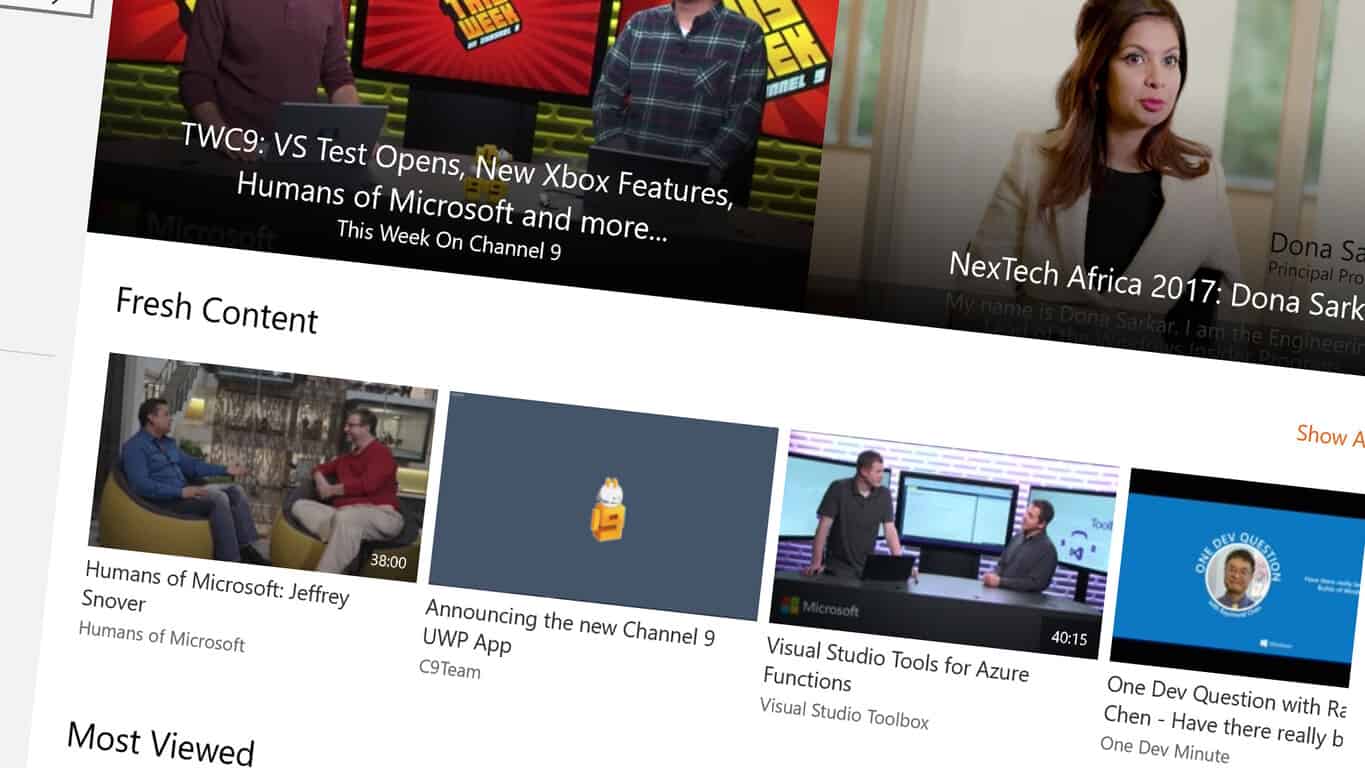
Microsoft launches new version of their Channel 9 media app

Microsoft has updated their Channel 9 app to the new Universal Windows Platform (UWP) app format and several new changes to the app’s design and features.

“As we continue to serve our mission to be a premier destination to learn and have transparent conversations that build insight and trust in technical communities, we are committed to improving the experience and reach users on every platform,” the official announcement reads. “Today, we are announcing a new Channel 9 UWP App, which provides improved search experience for non-English users who accept Language-Enabled, and features such as pin your favorite shows and keep up to date with Live Tiles, cast and watch videos on other devices on the network, and share the videos using Windows 8 Charm.”

Channel 9 is an official Microsoft service for hosting a variety of videos designed to assist developers in creating content for Windows 10 PCs and mobile devices, Xbox One consoles, and HoloLens. The app is free to use and all of the media is available to watch by anyone.

Are you a Channel 9 fan? Let us know what new features you would like in future updates in the comments below.

Channel 9
Channel 9
Price:
Free

This new Xbox One owner’s setup is truly bizarre

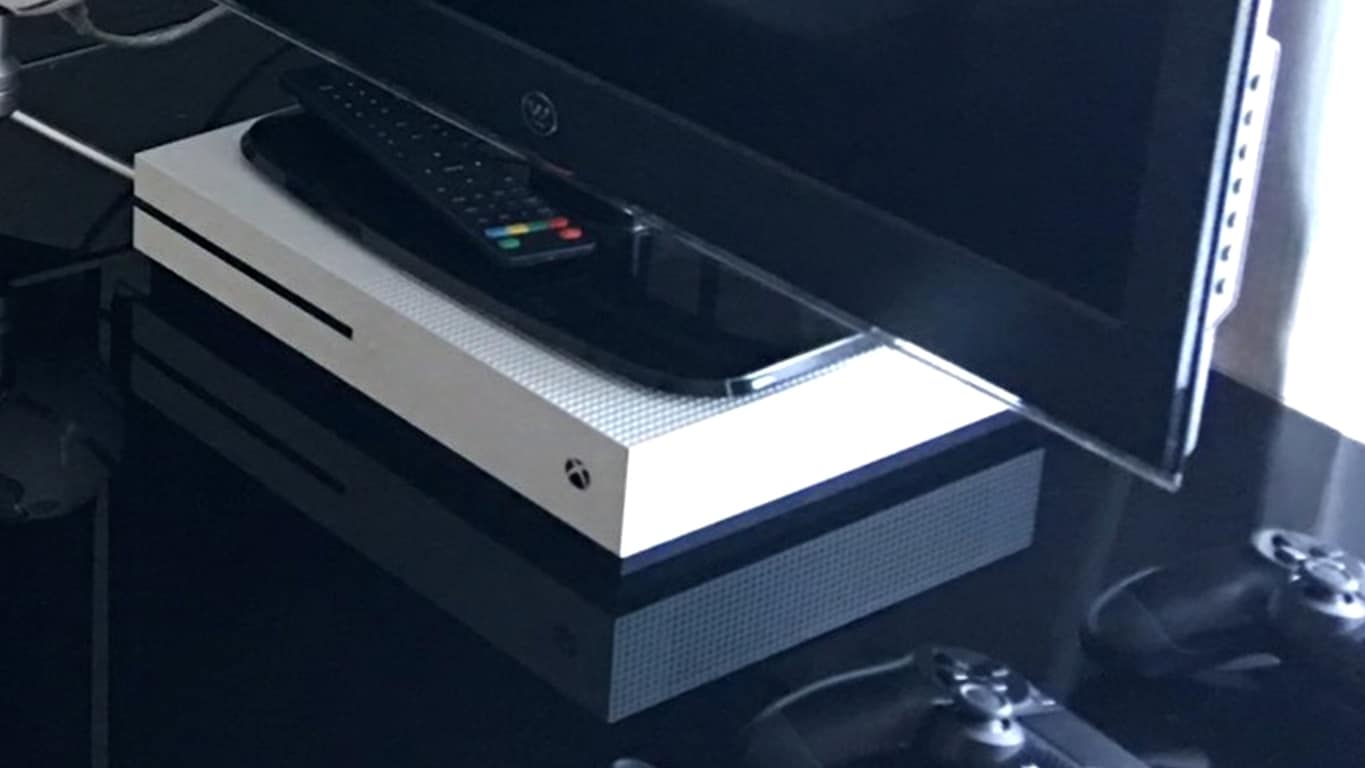
One of the best things about Microsoft’s new Xbox One S console is that it can be stored both horizontally and vertically depending on the owner’s preference. One way it’s not meant to be stored though is as a stand for a television set as seen by one Reddit user earlier today.

The photo comes from a Twitter account they follow (unfortunately not mentioned or linked to in the post) which tweeted the image of their gaming setup. While being fairly space-efficient, having a TV such as the one pictured on top of an Xbox One S is dangerous due to both the weight of the monitor and the fact that the stand is covering the console’s air vent which is used to cool its interiors.

Judging by the number of PlayStation controllers next to the TV, it’s possible the owner isn’t exactly a fan of Xbox and is trying to punish it but it’s also equally likely that this is an innocent mistake made by someone who doesn’t know any better. What do you think? Have you ever seen a bizarre video game console setup like this before? Share your theories and sightings with the site community in the comments below.

Xbox Live is about to get more expensive for Canadian gamers

Microsoft’s Xbox Live Gold subscriptions are getting a price change for Canadian users with the existing yearly fee of CAD$59.99 being increased by ten dollars to CAD $69.99. The subscription options for one, three, and six month packages are also increasing and will now be CAD $11.99, CAD $29.99, and CAD $44.99 from February 28th onwards.

This news was made in an email to Canadian members earlier this week which read, “After carefully evaluating the currency changes within Canada, and with the understanding that our offerings always provide a balance of service and value for our customers, we will be adjusting the price of our Xbox Live Gold subscriptions.”

Xbox Live Gold is a premium subscription service which allows Xbox 360 and Xbox One console owners to play video games online and also provides subscribers with access to four free titles (two Xbox One, two Xbox 360 backwards compatible) each month which are playable for as long as the user’s subscription fees are paid. Microsoft recently announced that the service reached the milestone of 55 million active users by the end of 2016.

Are you an Xbox Live Gold subscriber? Let us know what you think about the prices in the comments below.

Edit: Mistakenly referenced January 28th as the date change. It’s February 28th. Thanks Ken for noticing! 

Windows 10 news recap: Vivaldi CEO concerned about resetting default browser, native apps can’t be uninstalled and more

Welcome back to our Windows 10 news recap. We are continuing the trend of our weekly “Windows 10 news recap” series where we go over the top stories of the past week in the world of Microsoft’s flagship operating system.

Hands-on: Windows 10 Creators Update build 15019 for PC

This week saw the release of Windows 10 insider build 15019. It brought many improvements, namely Game Mode. Take a look as we show you what’s new and changed.

Vivaldi CEO is not happy about Windows 10 resetting default browser to Microsoft Edge

The CEO of Vivaldi, an up-and-coming web browser, has expressed concerns about Microsoft’s Windows 10 resetting the users default browser each time Windows 10 upgrades, or each time a new browser is install, forcing users PCs to reset to Microsoft Edge as being the default on a somewhat regular basis.

Some native Windows 10 apps can no longer be uninstalled in latest Insider builds

Some of the more recent Windows 10 Insider builds have begun restricting which native Windows 10 apps can be uninstalled, meaning that users are forced to have more default apps installed on their devices than they might personally want. Potentially, it is just a bug, however, it is unknown whether this function will be restored.

Uninstall stock Windows 10 Apps no more

Dell delivers new Windows 10 and Chromebook laptops

Dell has unveiled a series of new Latitude devices, sporting both Windows 10 and Chrome OS variants. The devices are aimed at teachers and students who need productivity on-the-go, particularly with one of the devices offering a “world-facing” camera for video.

Resident Evil 7 video game now available on Xbox One and Windows 10

As Microsoft continues its gaming push for Windows 10 with Game Mode in recent Insider builds, popular game franchise, Resident Evil, has released its latest installment, Resident Evil 7, to the Windows Store on Windows 10 PCs.

Resident Evil 7 on Xbox One

That’s it for Windows 10 news this week. We’ll be back next week with more!

Surface 3 removed from US Microsoft Store

In somewhat unsurprising news, Microsoft has removed the listing for its Surface 3 devices from the Microsoft Store website in the US. Additionally, the Surface 3 remains out of stock in other Microsoft Store’s (via Neowin).

Microsoft recently released its earnings report for FY17 Q2, in the report, the company noted falling sales for the Surface 3, stating that it was phasing the device out, with both the Surface Book and Surface Pro 4 being the newer devices.

With details of Windows 10 Cloud approaching, phasing out the Surface 3, Surface Phone rumors continuing and Windows 10 ARM in development, could we be expecting something big from Microsoft? We’ll have to wait and see, but everything points towards Microsoft working on something we haven’t seen before.

Give us your thoughts on what Microsoft might be aiming for in the comments below!

Fix: Windows 10 build 15019 install and audio issues

The latest Windows 10 build kicks off a new era in PC gaming. Windows 10 build 15019 brings a bevy of new game features, including the awaited Game Mode, a built-in Beam streaming, a new Games section in Settings, Windows Game bar improved full-screen support, and more.

Unfortunately, build 15019 fails to fix some annoying bugs from previous builds. The download progress indicator is still broken in build 15019. It may look like you’re getting stuck at 0% or at other percentages, although the install process advances in the background. If you’re experiencing this bug, simply ignore the indicator and be patient. After a few minutes, or hours in the worst case scenario, build 15019 should download fine and the installation should kick off.

Also, after updating to build 15019, nonstop exceptions in the Spectrum.exe service may occur, causing audio issues, high CPU usage and Edge crashes.

Here’s how Microsoft describes this bug:

As part of this build there is a known issue that will affect some users and we wanted to describe the issue and the simple workaround should you hit this bug after installing the new build.  Details are below:

Issue:
Some users may hit a bug that has several possible symptoms.  Each of these issues are caused by this same bug:
– No audio
– Continuous high CPU/disk usage
– Edge crashes when opening Settings inside the app

How to fix audio issues, high CPU usage and Edge crashes in Windows 10 build 15019


To bypass this bug, follow the troubleshooting steps listed below:

Solution 1

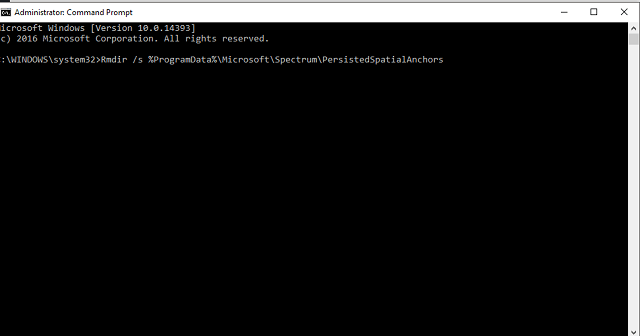
  1. Type cmd in the search menu > launch Command Prompt
  2. Paste the following:Rmdir /s %ProgramData%\Microsoft\Spectrum\PersistedSpatialAnchorsShutdown /r

Solution 2 

  1. Open File Explorer
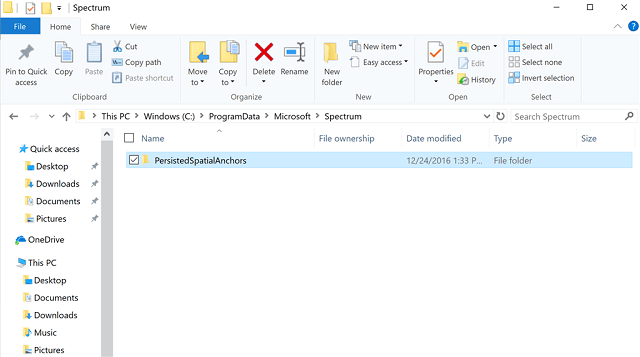
  2. Navigate to this folder: C:\ProgramData\Microsoft\Spectrum
  3. Select the “PersistedSpatialAnchors” folder > click Delete
  4. Reboot the PC.

Should you encounter a message saying “Files are in use” while trying to delete the folder, simply reboot your PC and try again.

RELATED STORIES YOU NEED TO CHECK OUT:

Satya Nadella comments on the U.S. Executive Order on Immigration, as Microsoft offers legal advice to employees

Microsoft CEO Satya Nadella has joined other tech executives like Google’s Sundar Pichai and Facebook’s Mark Zuckerberg in expressing concern about the sweeping executive order by Donald Trump that closes the United States’ borders to refugees and citizens from a number of countries.

Satya took to LinkedIn to share a memo sent by Brad Smith, President and Chief Legal Officer, to the entire Microsoft staff.

“As an immigrant and as a CEO, I’ve both experienced and seen the positive impact that immigration has on our company, for the country, and for the world. We will continue to advocate on this important topic.”

– Satya Nadella, CEO, Microsoft

In his email, Smith shares Microsoft’s view on the immigration issues, and defines the company’s role in providing legal advice and assistance to the affected employees. According to Smith, the action potentially applies to at least 76 known Microsoft employees, who are from one of the seven countries, all of whom have been contacted by the company.

From: Brad Smith (CELA)
Sent: Saturday, January 28, 2017 12:05 PM
To: Microsoft – All Employees
Subject:

Hello Everyone,
I wanted to reach out regarding the Executive Order signed yesterday in the United States relating to immigration. As you may have read in the press, this Order applies an immediate 90-day moratorium on admissions and reentry into the United States of all individuals who are not already U.S. citizens from seven countries – Syria, Iraq, Iran, Libya, Somalia, Yemen, and Sudan.

Our first priority whenever there is a change in immigration laws anywhere in the world is to address immediately the needs of our employees and their families. So most importantly, if you or a family member are a citizen of one of these seven countries and you’re not yet a U.S. citizen, I have some specific information for you.

Our goal as a company is to provide you with legal advice and assistance. We’re aware of 76 Microsoft employees who are citizens of these countries and have a U.S. visa and are therefore affected by this new Order. We’ve already contacted everyone in this group. But there may be other employees from these countries who have U.S. green cards rather than a visa who may be affected, and there may be family members from these countries that we haven’t yet reached. So if this impacts you or a family member and we haven’t yet been in contact with you, please send an email right away to the CELA U.S. Immigration Team. And of course, if you’re uncertain about whether you’re affected, use this same alias and let us know so we can work with you and answer your questions.

As we have in other instances and in other countries, we’re committed as a company to working with all of our employees and their families. We’ll make sure that we do everything we can to provide fast and effective legal advice and assistance.

More broadly, we appreciate that immigration issues are important to a great many people across Microsoft at a principled and even personal level, regardless of whether they personally are immigrants. Satya has spoken of this importance on many occasions, not just to Microsoft but to himself personally. He has done so publicly as well as in the private meetings that he and I have attended with government leaders.

As a company, Microsoft believes in a strong and balanced high-skilled immigration system. We also believe in broader immigration opportunities, like the protections for talented and law-abiding young people under the Deferred Access for Childhood Arrivals (DACA) Program, often called “Dreamers”. We believe that immigration laws can and should protect the public without sacrificing people’s freedom of expression or religion. And we believe in the importance of protecting legitimate and law-abiding refugees whose very lives may be at stake in immigration proceedings.

We believe that these types of immigration policies are good for people, good for business, and good for innovation. That’s why we’ve long worked to stand up for and raise these issues with people in governments. We will continue to do that.

There’s a monthly Employee Q&A scheduled for Monday. Both Satya and I look forward to addressing these topics further at that time. And we’ll continue to monitor all of these issues and work closely with employees and families that are affected.

Thanks.
Brad

Fix: Hearthstone daily quests don’t appear

Hearthstone is a very popular game with millions of active players. The title is a turn-based card game between two opponents using decks of cards that feature a selected hero with a unique power. Players use spells or summon minions to reduce the opponent’s health to zero.

Hearthstone is a stable and reliable game, but there are still some issues that sometimes limit the gaming experience. One of the most annoying bugs affecting the game prevents daily quests from appearing, an issue that has affected players for a long time yet with no permanent solution in sight.

Hearthstone daily quests won’t show up

Blizzard officially acknowledged the Hearthstone quest bug back in August and pushed out a hot fix that same month. Unfortunately, the update didn’t solve this problem completely: Many players continue to report they’re still not getting any daily quests.

Hi there, i wanna make a report of the daily quest. I never had a problem with daily quest but right now i dont get any daily quest after Mean Streets expansion. I tried to log out and in and i even reinstalled the game 2 times to see if it would work but nothing happend. im now 4 days in and still no new quest. Is this a bug or something else.

If your Hearthstone daily quests aren’t showing up, try changing to a different game region and then coming back to the one where you usually play on. Then, launch the game to see if this solution fixes the issue and refreshes the daily quests.

If you’ve come across other workarounds to fix this problem, list the troubleshooting steps in the comment section below.

RELATED STORIES YOU NEED TO CHECK OUT:

Gears of War 4 Bigelow error: No permanent fix in sight

Playing Gears of War 4 is a love-hate relationship for many gamers. Its fast-paced, challenging and addictive gameplay sometimes generates anger and frustration. Overall, GoW 4 is a stable game, but there are still many technical issues affecting it even today. One of these issues is the Bigelow error, an error message that randomly prevents players from connecting to GoW 4’s servers.

The bad news is that this error is affecting more and more people. Judging by user reports, it appears that Bigelow’s frequency has been on the rise since the beginning of 2017.

Gears of War 4 Bigelow error: Unable to connect to online services

This error can prevent players from connecting to GoW 4 servers for days on end, but there are also gamers who haven’t been able to play GoW 4 for months.

I’ve been getting this error for about a week now. The game loads fine and I can receive my daily rewards packs but when it comes to playing online multiplayer it will not connect. I have an xbox gold membership which is paid and up to date and all my other games work fine. […]  it’s really annoying to not be able to play my favorite game that I’ve paid $100 for. A lot of other people seem to have had the same issue as I searched “BIGELOW error” on this forum site and many complaints came up but no solutions that I saw. […]

Players have tried various workarounds hoping to fix the Bigelow error including uninstalling and reinstalling the game, using a different Box, and spending hours with tech support on the phone. Nothing works. Then, all of a sudden, the Bigelow error disappears and GoW 4 works again.

TC has only recently replied to player messages, confirming it’s investigating the issue:

Pez actually responded to a twitter message after I kept hounding him to respond.  This was his tweet to me “We are looking into the Bigelowe issues on our end but may require more info from users. Will provide an update once we have 1”
That doesn’t sound too promising. What does require more info from users mean? Seems like that have no idea what the problem is at the moment.
I just wish they would respond to an actual thread in their own technical support forum.

Hopefully, TC will soon roll out a hotfix for the Bigelow error. If by any chance you’ve come across a workaround to fix this error, feel free to list the troubleshooting steps in the comment section below.

RELATED STORIES YOU NEED TO CHECK OUT:

Xbox news recap: Project Scorpio more powerful than expected, custom Gamerpics coming soon and more

Welcome to our weekly Xbox news recap series, where we go over the top stories of the past week in the world of Xbox. Let’s get started.

Project Scorpio a full-blown upgrade to X1

The Xbox One isn’t just being one-upped by the upcoming Project Scorpio – it’s going to be fully upgraded. According to the developer of indie darling “Ori and the Blind Forest,” Scorpio “isn’t just a half-assed upgrade,” but instead a complete step up to the next generation of gaming hardware. It was also confirmed by Xbox boss Phil Spencer that, despite rumors on the contrary, Scorpio will support native 4k.

Custom Gamerpics on the way

A lot of people have been curious as to when custom gamerpics are going to arrive on Xbox, and it seems like their dreams will be coming true pretty soon. In a podcast, Major Nelson spoke about the future of Gamerpics and confirmed that the ability to upload your own is going to be available at some point during the Creators Update – certainly before E3. While some users might abuse this feature, many more will enjoy the freedom it provides on their profile.

Narrator exploit uncovers some secret achievements 

Earlier this week, some Xbox One users found out that, using the narrator feature, you can actually read out the descriptions of achievements that have been hidden away. Usually, secret achievements are kept that way in order to avoid spoiling games – or are there to make it harder to hunt down the achievement on purpose. While the exploit is likely being patched up right now, interested users should try and give it a shot.

Xbox Live has 55 million users, $1 billion made from digital transactions in Q2

The earnings report for the second quarter of fiscal year 2017 is hot off the presses this week, and we got an idea as to just how successful Microsoft has been in promoting the Xbox One, and pushing its new software. As it turns out, Xbox made a huge leap when it comes to the digital sale of games and the adoption of its Xbox Live service.

Q2 showed off an impressive all-time high of $1 billion made off of digital sales alone, and also showed Xbox Live hitting 55 million active users.

Xbox Insider rings based on a meritocracy

The Xbox Insider Program was announced recently as the future of the Xbox Preview, and it’s apparently going to be run much differently than Microsoft’s Windows Insider program, Unlike Windows Insider build rings, you don’t get to choose which ring you’re in. You will be put into the appropriate ring according to how much feedback you provide, this time around.

You can provide feedback and complete “quests” in order to advance through the rings, adding a layer of gamification to the Insider process.

Thanks for joining us. To keep up to date with all the latest Xbox news, keep a close eye on our Xbox One news hub.

How to use the on-screen Virtual Touchpad on Windows 10

For the upcoming Windows 10 Creators Update, Microsoft is adding several new ways to interact with your devices, like the Surface Dial for example or the Virtual Touchpad.

In the Insider Preview build 14965 for PCs, the company introduced a Virtual Touchpad that gives you an on-screen touchpad to replace mouse when necessary. The functionality is created especially for those moments that you don’t have a mouse, and also when hook up your tablet to a second display. Interestingly, the option went missing in build 15002, but was soon back.

To enable the Virtual Touchpad, press the Taskbar or right click on the Taskbar, and from the menu options, tap/click on the Show touchpad button.

This will display a Touchpad icon on the bottom right of the Taskbar, near the clock. Tapping or clicking the Touchpad icon, will display the Virtual Touchpad.

You can move around the on-screen touchpad by simply dragging it around. Once you’ve placed it where you wish, you can drag your finger on the touchpad for pointing and tapping and use Windows 10 gestures for scrolling etc. as well. Also, just like the physical touchpad on your laptop, you can configure the Virtual Touchpad with the same settings by navigating to Settings > Devices > Touchpad.

Have you tried the Virtual Touchpad on your Windows 10 PC or tablet? What are the different scenarios where this can come handy? Tell us in the comments.

Resident Evil 7 Biohazard characters: Here’s what you need to know about them

Resident Evil 7 Biohazard is a survival horror game that follows the story of Ethan Winters, a civilian who’s desperately looking for his wife, Mia. When he finally finds her, he realizes he’s been caught in a trap and must fight for his life.

Biohazard’s combat is not satisfying and deep enough as in previous Resident Evil games. Actually, the game no longer focuses on combat but on the story line itself and the relationships between characters. It has somehow adopted a more psychological approach to the series. After all, towards the end of the game, Ethan will face a tough choice: he must choose whether to save his wife, Mia or Zoe, the girl who’s been helping him to stay alive.

For this reason, it’s important to know what role each character plays in the game. In this article, we’re going to sketch a quick portrait of the main RE 7 characters.

Meet the characters from Resident Evil 7: Biohazard

Ethan Winters

  • He doesn’t have professional fighting skills, unlike previous RE protagonists.
  • He has superhuman tolerance to pain and continues to fight even after receiving blows that would normally knock a man unconscious.
  • He’s most likely infected with the Mold, which explains his incredible regenerative abilities.

Mia Winters

  • She’s been missing for three years when Ethan finds her.
  • She was injected with a special serum that pretty much makes her immune to attacks.
  • Mia was Eveline’s babysitter.

Eveline:

  • She is the carrier of the biological weapon that will wreck havoc in the Baker family.
  • Eveline and Mia are recovered by the Bakers following an explosion on the ship they were on.
  • Without medication, she ages 25 times faster than normal, gaining the appearance of an elderly woman. Remember that elderly woman confined in a wheelchair?
  • She loves manipulating people’s minds.

The Bakers

  • The Baker family mysteriously disappeared in 2014.
  • They are sometimes seen around the house, which made people believe their house is haunted.
  • The whole family has been infected by Eveline, who controls them.
  • They are sadistic cannibals who are trying to force Ethan to join the family.

Zoe Baker:

  • She is a very important supporting character in RE 7, helping Ethan when he has his back to the wall.
  • She realizes her family have been transformed into monsters, and wants to escape.

What’s your favorite RE 7 Biohazard character?

RELATED STORIES YOU NEED TO CHECK OUT:

The “best version ever” of Doodle God comes to Xbox One

JoyBits, the developer of the popular puzzle world-building game Doodle God, has been a long time supporter of the Windows platform. Today, the company announced that its pushing the Doodle series to the next level with the release of Doodle God: Ultimate Edition on the Xbox One, which it calls “the best version ever of Doodle God.”

In a blog post published on Xbox Wire, JoyBits Marketing Manager Paul Baldwin explained that the game has been in developement for the last three years. “Doodle God: Ultimate Edition, which started life as a pencil and paper game, has evolved as our studio has grown,” he explained. While the Xbox One version will retain the traditional building mechanics and four basic elements, player can expect a lot of novelties on this new console version:

  • With the Planet mode, gamers will be able to create elements such as volcanos and watch them come alive in their world
  • A new Mission mode has been added to help players learn how to create new elements and progress in the game
  • A PvP mode will also allow players to compete against each other
Doodle God Ultimate Edition Planet Mode
The new Planet Mode in Doodle God: Ultimate Edition

Last but not least, Baldwin explained that your imagination and creativity will be rewarded by “some hilarious wit and wisdom from some of the worlds greatest comedians and philosophers of all time.”

It’s great to see more casual games being released on the Xbox One, and Doodle God: Ultimate Edition will only cost you $9.99 on the Xbox Store. You can get the game from the download link below, sound off in the comments if you’re looking forward to play the game on your Xbox One.

Doodle God: Ultimate Edition
Developer:
JoyBits, Inc
Price:
$14.99

Days of War is a fun WW2 shooter in need of some patching

Days of War is a classic, fast-paced WW2 shooter that supports 32-player infantry combat taking place in various environments.

Unlike modern-day war games, Days of War forces players to fall back on their marksmanship, skill, map awareness and tactical cunning. You’ll have access to over 20 classic weapons, each with distinct strengths and weaknesses, which have been laser scanned to add more realism to the overall WW2 atmosphere.

There are nine classes that you can choose from, and you’ll need to thoroughly learn what each is capable of because in this team based game, it’s essential to know what your exact role is.

Days of War is still in Early Access and is still affected by many issues. We’re sure its developers will regularly roll out patches to fix the most common issues as quickly as possible.

Days of War reported bugs


Steam Overlay won’t work

When players want to open the Steam overlay in-game to check their friend’s list, all they see is the scoreboard.

I thought too, I restarted and it doesn’t make effect, on the game, this show the scoreboard only, for me the combo tab+alt don’t work
I tried on a other game after and it is working.


Days of War won’t open

Players report that when they hit the Play button, nothing happens. The game simply closes after a few seconds.


Days of War freezes

Other players report that the game freezes after a few rounds, forcing them to restart Windows.

i played 2-4 rounds but after a map change my game freezes and only a restart could make it . also in the task manager was nothing .. cant even click on it . only the windows keyboard key could help me …


Low-quality graphics

Gamers also report that Days of War suffers from terrible optimization on certain maps. Shadows and texture quality leave much to be desired.

I noticed massive performance hit when looking at smoke or walking into smoke etc Dropping effects to low boosted FPS didnt drop like before and I notice no change in quality.


These are the most common Days of War bugs reported by players. For more information about future updates, check out Days of War official Steam page.

RELATED STORIES YOU NEED TO CHECK OUT:

Windows 10 PCs are cutting into Apple sales in high-end market, says Microsoft CFO Amy Hood

PC sales have been on a steady decline for the last 5 years according to recent reports from Gartner and IDC, with the latter claiming that worldwide PC shipments totaled 70.2 million units in Q4 2016 (down 1.5 year-over-year). But after Microsoft released its FY2017 Q2 earning reports yesterday, it appears that PC OEMs are doing slightly better than expected.

Indeed, Microsoft reported yesterday that Windows OEM revenue increased 5% last quarter, but CFO Amy Hood share more details during the earnings conference call. According to Business Insider, Hood explained that “our partner ecosystem continued to see growth and share gains in the Windows premium device category,” hinting that high-end Windows PCs are cutting into Apple’s Mac sales. For Microsoft, “premium devices” are PCs in the $900-plus price range.

However, Bloomberg reporter Dina Bass added on Twitter that Hood did not provide hard data proving these claims:

As our computing devices are now becoming a commodity these days, you may think that it’s going increasingly difficult for PC OEMs to sell high-end, high-margin devices. But that’s not what Apple and Microsoft are doing, focusing instead on premium devices aimed at demanding consumers and creative professionals.

Overall, the it’s not the first time that the company appears confident to be able to beat Apple at its own game: back in November, Brian Hall, Corporate Vice President, Microsoft Devices Marketing (the exec left the company this week) explained that “the combination of excitement for the innovation of Surface coupled with the disappointment of the new MacBook Pro – especially among professionals – is leading more and more people to make the switch to Surface.” However, it’s worth reminding that Microsoft’s Surface division saw a 2% decline in profits during the company’s FY2017 Q2, earning $1.321 billion.

Still, we saw a lot of exciting high-end PCs during CES 2017, and we’re also looking forward to see refreshed Surface Pro and Surface Book models this year. Windows 10 is definitely helping to make PCs exciting again, and we hope that OEMs will be able to leverage the versatile platform to delight demanding consumers.

Office sees increased revenue and user installs for both commercial and consumer groups

Microsoft announced yesterday its earning reports for the second quarter of its 2017 fiscal year, with reveune in Productivity and Business Processes being once again a bright spot for the company. This reporting segment which covers Office commercial and consumer, Dynamics and LinkedIn generated $7.38 billion of revenue, and here is what Microsoft highlighted in its detailed results:

Office Commercial

  • Office commercial products and cloud services revenue increased 5% (up 7% in constant currency)
  • Office 365 commercial revenue grew 47% (up 49% in constant currency) driven by Office 365 commercial seats which grew 37%
  • Office commercial products revenue declined 13% (down 12% CC) reflecting continued adoption of cloud offerings by consumers
  • Continued installed base growth across Office, Exchange, Sharepoint, and Skype for Business
  • Now over 65M monthly active devices using Office on iOS and Android, more than doubling year-over-year

Office Consumer

  • Office consumer products and cloud services revenue grew 22% (up 21% CC) benefiting from recurring subscription revenue
  • Office 365 consumer subscribers now at 24.9 million

While Microsoft declined to share the total number of Office 365 commercial seats this quarter (up 37% year-over-year), the company revealed during its Ignite 2016 conference last year that the cloud productivity suite had reached 70 million commercial subscribers as of September 26. If you combine this number with the 24.9 million Office consumer subscribers, then it seems that Microsoft is probably pretty close to reach 100 million Office 365 commercial and consumer subscribers in total.

We’ll see if the company announces this new milestone in its next quarterly earnings reports, but overall it seems that Office’s transition from a big box purchase to a SaaS business model is going well.

Vivaldi CEO is not happy about Windows 10 resetting default browser to Microsoft Edge

Jon von Tetzchner, the founder and CEO of Vivaldi, has voiced his stance on Microsoft depriving Windows 10 users the choice of web browser. In a blog post, Jon refers to Windows 10 upgrade resetting the default browser to Edge and talks about how Microsoft’s anti-competitive practices create problems for users.

The blog post explains how every time Windows 10 upgrades, it changes the default browser to Edge. Same thing tends to happen when a new browser is installed – for some reason, it leads to restoring Edge as the default option. Not the new browser, and not even the browser that was there as a default one previously.

Jon is critical of Microsoft and has stated that while he has refrained from making any comments until now, his patience has run out. He states that Microsoft is concerned with the low usage of Edge, but instead of building a better browser, Microsoft is forcing its product onto people in the most unapologetic manner.

“So here is my question to you, Microsoft. Where has the user’s absolute prerogative to make a choice gone? It is time to do the right thing. Stop stealing the default browser, accept user choice and compete on the merits.”

While Jon is not incorrect in his observation, the criticism is a tad harsh. The resetting of the browser happens on a full upgrade – something which happens on first upgrade from Windows 7 or 8 to Windows 10, or major build upgrades like the Anniversary Update or the upcoming Creators Update. For most users, that happens once or twice a year – accompanied by resetting of your entire Windows experience, not just the browser.

Windows Insiders, of course, experience that more frequently as they upgrade builds often. However, one would expect the Insiders to be technology savvy and aware to realize the browser resetting, and go about changing it again if they so prefer.

Jon asserts that the goal of technology companies should be to provide great software to our users while accepting that some users prefer software created by other companies. He wishes companies, Microsoft in this case, are fair to the users driving the technology industry forward.

What are your thoughts about the ‘default browser’ resetting in Windows 10, and what has your experience been? Do you think Microsoft is anti-competitive (once again!) with the built-in Microsoft apps and services?

Microsoft’s Surface Pro 4 and Surface Book sales stay steady in FY17 Q2 report

Microsoft’s Surface efforts saw just a 2% decline in profits in the second quarter of the 2017 financial year (earning $1.321 billion) when compared to the same time period in 2015 ($1.352 billion).

According to the official report released by Microsoft, the release of the Surface Pro 4 and the Surface Book, both of which apparently replaced the Surface 3, are to thank for the continued success. There is no mention of the Surface Studio which is to be expected considering it only released in the last two weeks of the second quarter. It’s likely the premium device will have more of an impact in the current 2017 financial year third quarter and beyond.

Microsoft’s Phone division didn’t do nearly as well and saw an 81% drop in revenue while the Xbox department saw some minor losses but overall experienced growth in digital sales and user engagement that should lead to greater success later in 2017. The company’s biggest success was its Cloud initiatives which experienced strong growth and profit.

Are you surprised by these results? Let us know in the comments below.

Resident Evil 7 Bugs: How to Get Rid of These

Resident Evil 7 Biohazard is definitely the game of the moment. This title immerses players into an impressive horror world that almost feels real. Unfortunately, there are various technical issues, particularly bugs, that affect the Resident Evil 7 experience.

The bad news is that very few workarounds are available to fix these bugs besides the ones Capcom has already published that you can use on Windows PCs. But you could get things up and running within minutes if the right fix or workaround works out!

How do I fix Resident Evil 7 bugs?

Before we proceed to the slightly complex solutions, here are a few quick ones:

  • Make sure your PC meets the system requirements for Resident Evil 7. In case it doesn’t, you will likely experience FPS issues and frequent crashes.
  • Check whether the antivirus is blocking the game or is in some way affecting its functioning. You can disable the antivirus to confirm the same. If that works out, we recommend you switch to a more reliable antivirus solution.
  • Download the Media Feature Pack and install it, in case you are running the N or KN edition of Windows. This will help get rid of any sound bugs in Resident Evil 7.
  • Make sure you are running the latest version of Windows and the game.
  • Remove any overclocking on the PC. Though meant to boost performance, these settings often conflict with Resident Evil 7 and trigger a glitch.

If none work, head to the solutions listed next.

1. Update the graphics driver

  1. Press Windows + X to open the Power User menu, and select Device Manager.
  2. Expand the Display adapters entry, right-click on the graphics adapter, and select Update driver.update driver to fix resident evil 7 bugs
  3. Choose Search automatically for drivers and wait for Windows to install the best one.

When faced with performance bugs in Resident Evil 7, your primary approach should be to update the graphics driver. This boosts gaming performance and removes any trivial issues.

Besides, if an update can’t be found this way, you can visit the manufacturer’s website and manually install the latest driver.

Here are direct links to the driver download pages for the three major manufacturers:

2. Verify the game cache

  1. Launch Steam, navigate to the Library, right-click on Resident Evil 7, and select Properties.properties
  2. Go to the Installed Files tab, and click on Verify integrity of game files.game files to fix resident evil 7 bugs
  3. Wait for the process to complete.

Often, missing files tend to affect the gameplay and cause issues. So, to get past the bugs in Resident Evil 7, run a quick scan to ensure that all the game files are present locally.

3. Configure Resident Evil 7 to run on dedicated graphics

  1. Press Windows + I to open Settings, and in the System tab, click on Display.display
  2. Scroll down and click on Graphics.
  3. Select Resident Evil 7 from the list, and click on Options.
  4. Select High performance and click on Save.high performance

That’s it! With one of these tricks and workarounds, you should have been able to eliminate Resident Evil 7 bugs.

Before you leave, check the best graphics settings for gaming in Windows and enjoy the gameplay like never before.

If you know of other solutions, drop them in the comments section.

You can now move your game install folders using Steam

Although Steam helps you manage your vast collection of PC games, the tool has a limitation: It does not allow you to move game install folders in a straightforward way. Well, that has changed recently with a new update Valve rolled out to Steam. The new option is particularly useful in instances when you need to replace your hard disk or when the drive containing the games becomes full. Before, players had to locate the game folders in the Steam library and manually copy them.

How to move installed Steam games to a new folder

Before you can use the new option, make sure you have the latest version of the Steam client. Then, choose a new, large library destination where you intend to transfer your game install folders. To start transferring the install folders, follow these steps:

  1. Open the Steam client and go to Settings under the View menu.
  2. Click Downloads under the Settings window.
  3. Select Steam Library Folders and click Add Library Folder.
  4. Choose a new destination folder or another drive for your Steam games.
  5. Right-click on any installed game and open Properties from the context menu.
  6. Under the Properties window, switch to the Local Files tab and click on the new install folder option.
  7. Select the Steam Library location you have previously set as the destination folder for your games and click on the move folder button.

Take note that moving a game install folder to another location does not change the game’s status on Steam. The process offers a quick and easy way to move install folders for games on Steam. However, it would be more helpful if Valve also added the ability to batch-move a number of games.

Do you find the new option useful? Share your thoughts!

RELATED STORIES YOU NEED TO CHECK OUT:

Daily Mail for Windows 10 gets a face lift in version 2.0

DailyMail released its Windows 10 app quite a while ago, and it looked a whole lot different than it does now. The app used to look like a newspaper – something like the New York Times website. While it was designed competently enough, it didn’t really fit the site’s content matter all that well.

The new redesign of the DailyMail app makes it look a whole lot different and injects a ton of color and style into something that was previously devoid of both. The new update gives the entire website a brand new look and feel, offering users something that might better strike their fancy when they go to read an article on the DailyMail.

If you were previously put off by the design of DailyMail but want to check out a few articles, now seems like the perfect time to give the site another chance.

Daily Mail Online
Daily Mail Online

Microsoft launches new blockchain tracking service, Project Manifest

Microsoft’s new blockchain project could be a major game changer for retailers and distribution centers. According to a report from CoinDesk, a partnership with Mojix had culminated with Microsoft’s Project Manifest becoming the next best way to track products across the globe.

Project Manifest uses technology that was first developed to help NASA communicate with deep space probes. Now it has been brought down to Earth, using Radio Frequency Identification devices to locate goods. This is particularly useful to keep products on track during the supply chain and notifying immediately once an object is lost in shipment.

This technology can furthermore ensure quality goods and services from retailers acting like a “big brother” for ethical standards.

The venture takes advantage of the IoT platform behind the scenes. The data framework is powered by a noSQL database and integrates with the ethereum blockchain. As more RFID sensor devices become adopted by multiple industries, the stronger the system will eventually become.

Project Manifest already has a lot of industry interest. It has received over $40m in funding and some clients such as British Petroleum has already implemented the service.

Fast Company’s most creative people list includes four from Microsoft

This week, Fast Company announced the 170 new members of its Most Creative People in Business list, which highlights “influencers in business from across the economy and around the globe.” This year, four Microsoft execs made it to the prestigious list, which also includes people working at Google, Apple, Facebook, Slack, BuzzFeed, the US Digital Service and more.

In a separate blog post, Microsoft explained that “we are deeply honored and inspired to have four employees recognized for their achievements, ranging from our companywide initiative to make technology accessible, driving inclusion through the Autism Hiring Program and work on inclusive design, and advancements in artificial intelligence.”

Here are the four Microsoft execs that were recognized for their innovations and achievements by Fast Company:

Other high profile execs that were inducted into the community include Apple CEO Tim Cook and Google CEO Sundar Pichai and we invite you to check the full list of new members on Fast Company’s website.

More classrooms are going digital with Windows 10 and touch devices

As Chromebooks have been slowly taking over the education market in the US last year, it seems that Microsoft may still have some work to do to convince school admins that Windows 10 PCs with Office 365 are a more versatile combo. This week though, the company published a new customer testimonial explaining why a school district chose to leverage Microsoft’s education offerings to make its classrooms more connected.

As explained in the blog post, the River Dell Regional School District in New Jersey recently had to renew the computer equiment of its 1,700 students and 131 educators. Marianthe Williams, director of technology for the district, explained that the process led to the creation of a teacher and student committee, which helped to test different devices and form factors including Chromebooks and tablets. Ultimately,  the committee settled for touch-enabled Windows 10 devices for both students and teachers to be used with Office 365 and OneNote.

Teachers and staff were given Surface Pro 3 hybrid tablets while students were issued HP laptops with touchscreens, with full support for digital inking. “We were pleasantly surprised to find the HP devices offered the touchscreen features our students craved at a price point the district could afford,” explained Williams. While the director of technology praised the ability to take note by hand in certain subjects such as math and science, she also highlighted how OneNote Class Notebooks encouraged students to allowed students to work together on the same documents at the same time:

We’re all-in with Surface, HP, Microsoft Office 365 and OneNote. It’s exciting to see how our teachers and students have taken OneNote Class Notebook to be their digital curriculum. The technology helps us to extend learning beyond the instructional period.  Our students are finding new ways to collaborate and developing skills that will serve them well throughout their lives and careers.

While Microsoft’s education solutions remain highly competitive today, the company made two important announcements earlier this week: first of all, the company has partnered with third-party manufacturers to release new cheap Windows 10 PCs for the education market, with prices starting at $189. Lastly, the technology giant introduced Intune for Education, a could-based app that will help schools set up and manage classroom devices. Sound off in the comments if you think this will be enough to drive adoption of Windows 10 PCs in the education sector this year.

Don’t Starve Mega Pack announced for Xbox One

Klei Entertainment, the developer of popular survival game Don’t Starve has teamed up with published 505 Games to release Don’t Starve Mega Pack to Xbox One and Playstation 4 this spring. This bundle will include the original game plus all its DLCs including Don’t Starve Together (which brings a split-screen co-op mode), Don’t Starve: Reign of Giants and Don’t Starve: Shipwrecked. You can watch the announcement trailer below:

Don’t Starve was initially released on Steam back in 2013, but Xbox One gamers had to wait for the release of Don’t Starve: Giant Edition in August 2015 to play the game on their console. The Don’t Starve Mega Pack bundle will be available in both digital and physical editions, though publisher 505 Games has yet to announce the release date and pricing details. Let us know in the comments if you’re looking forward to purchase the definitive edition of the survival game this spring.

Here’s how to keep up with the latest Dota 2 updates

Dota 2 receives around three series of minor updates and fixes every week because its developers do their best to offer players the best possible gaming experience.

For example, up until the time of this article’s writing, Dota 2 has already received 12 updates this month that improve the game’s overall stability and performance. These frequent updates never pack new game features but rather focus mainly on fixing bugs reported by players.

Here’s where you can check the latest Dota 2 updates

When a new Dota 2 update is available, Valve publishes patch notes on the game’s official blog. In this manner, you’ll know exactly what the new fixes and improvements are.

When you connect to Dota 2’s official blog, you’ll see two options: Blog and Updates. If you click Blog, you can check all the major Dota 2 patches and read more about Update 7.00, the latest major Dota 2 patch. To check out the weekly update series, click Updates.

Many fans dislike the latest Dota 2 patch. They feel that the game has lost its identity because one of the main elements that represented Dota is gone. Fans believe that the current terrain doesn’t represent Dota, and some go as far as to say that the latest Dota 2 changes turn the game into a copy of League of Legends.

Valve labels Update 7.00 as a new chapter and strongly believes that the story of Dota is one of constant evolution.

RELATED STORIES YOU NEED TO CHECK OUT:

Windows 10 to begin testing Game Mode, Beam video game streaming this week

Microsoft will begin testing several features from its upcoming Creators Update with Windows Insiders later this week. The testing was originally planned to begin tomorrow but was delayed for some unknown reason. With only a few days left in the week though, it doesn’t appear as if Insiders will have to wait too much longer.

Among the features that will be available in the preview will be Windows 10’s new Game Mode, which will optimize PCs for playing video games, and the new integration of the Beam video game streaming service, which will add a new streaming option directly into the Windows 10 operating system and will not require users to install any additional software. The Xbox One console will also begin testing Beam streaming with Insiders soon but no specific date has been announced as of yet.

Windows Insiders are a select group of users who volunteer to test early versions of the Windows 10 operating system and features before they’re made available to the general userbase. Are you excited for these new features? Let us know which one excited you the most in the comments below.

Game Mode is coming in next Windows 10 PC Insider update, say reports

As you may recall, news emerged about a month ago that Microsoft was working on a “Game Mode” feature for Windows 10, which is designed to bring an enhanced gaming experience to the operating system. Since then, word got out that the “Game Mode” would also head to the Xbox and Project Scorpio games, and, more recently, some Windows Insiders even spotted hints of the feature in build 15007. Today, however, multiple reports are showing that the first version of Game Mode will be coming in the next Windows 10 PC Insider update.

According to Windows Central, the first version of the feature will come with build 15019 in the Windows 10 Fast Ring, with “further improvements already running on internal builds ready for the coming weeks.” Other websites such as Neowin, meanwhile, have pointed out that the feature may come tomorrow, though we can not verify this claim for ourselves. Citing a conversation with Kevin Gammill of the Xbox Platform team, Windows Central, gave a very a detailed description of how the feature will work:

Game Mode will prevent system tasks from stealing resources from your games, making frame rates and performance generally more consistent. You should see fewer dropped frames as a result of Game Mode, specifically during scenes and situations that are more intensive on your system’s hardware. Game Mode will also limit CPU thread contention between your games and existing system processes, helping to speed things up even further. The concepts behind Game Mode are already available on Xbox One, which gives games priority access to system resources.Enabling Game Mode will be as simple as flipping a switch via the Xbox Game Bar, found on Windows 10 by pressing the Windows key and G. Windows 10 will remember which games have Game Mode enabled until you turn it off.


Game Mode Windows 10

The report further explains that with Game Mode, users will also be able to disable the feature manually if they do not like it. Developers, meanwhile will not have to take any action to support Game Mode in their games, though Microsoft is trying to find ways for developers to get additional benefits from the feature. Additionally, Non-Windows Store games (available via Steam for instance) will be able to take advantage of the feature, although Windows Store games will see the biggest performance improvements.

Other key areas addressed by the report include how Game Mode might impact multi-tasking and the system in general. In this matter, it is pointed out that Game Mode will still allow for Cortana and other key Windows 10 features to work, including notifications.

I also asked to what extent Game Mode would degrade your system while enabled. For now, notifications will still pop, Cortana and other important Windows features you expect to work will still run. Microsoft is still iterating on just how much of your system it will impede when Game Mode ships fully this spring with the Windows 10 Creators Update. That said, Game Mode will dynamically disable itself when you minimize or set your game into the background, giving your system full access to your hardware while you begin multi-tasking. This is similar to how the Xbox One works today

It’s safe to say we will hear much more about Game Mode once build 15019 is released. Until then, keep it tuned to OnMSFT, as we will be here to update you on all your Windows 10 news and information.

Xbox Snap Mode is being replaced in the Creators Update, but by what?

The Snap feature on the Xbox One has always been a great way to multitask and expand the way you use the Microsoft gaming console, as it allows you to open apps side by side.  Unfortunately, a recent tweet from the head of Xbox Mike Ybarra has revealed that the much beloved Snap Mode will be replaced in the Creators Update. While the news is sad, there is more to the story, and some need to discuss what may be expected as a true replacement to the feature down the road.

According to Mike’s Tweet, Snap was replaced because it improves multi-tasking reduces memory use and helps the overall speed in the Xbox experience. This would make sense, as earlier this week it was revealed that the new Creators Update on Xbox is all about a boost in performance, and improved multitasking. But what is more interesting, however, is that Mike made mention that “bigger things” going forward.

Those words in mind, some on NeoGaf have pointed out, that the word “replacing” is entirely different from “removing” So, given these words,  and “bigger things” one could assume that Microsoft may be considering an alternate to Snap mode in the future. In fact, given that Universal apps don’t have access to the feature, and our report from two months ago, Microsoft may as well be replacing snap for a Picture-in-Picture mode.

What do you think will end up replacing Snap Mode? let us know your thoughts in the comments below!

Integration to the new Outlook.com is “nearly complete” – are you on the new version?

Outlook Mail has over 400 million users. That number is staggering, particularly when considering how long it might take to convert each of those users to a newer version. However, Microsoft has made a statement that announces that almost all 99.9% have been converted to Outlook.com (via ZDNet). Finally!

The migration started in May 2015 when Microsoft started migrating the first few. Granted, they did say that it would take quite a while for everyone to be on the same page. Features such as shared calendars made the task much more difficult than even the Redmond tech giant could have expected. Even the August 2016 anticipated deadline came and went with only 90% completion.

This led to a lot of unrest by users demanding answers to why they weren’t migrated yet. Social media blew up weekly with unhappy comments to display. But the number has been dwindling significantly as of late. Well, about this issue in particular.

Thanks to ZDNet sleuthing, it looks like another end date is nearing. According to the article, the Focused Inbox, a feature of the new Outlook.com, will be available to all users by April 2017.

“We have rolled this (Focused Inbox) out to tens of millions of (new Outlook.com) users already. We will continue rolling the feature out and it will be available to all users by April 2017. All supported Outlook.com accounts will be able to see Focused Inbox in the Mail app for Windows 10 starting in February 2017.”

We’ll have to wait and see if this date goes by with or without fanfare.Until then, we’d love to know how many of our readers have been migrated. Are you still waiting? Let us know in the comments below.

5 American trucking simulator games for Windows 10/11 users

Do you love trucks? If so, you should check out some of the truck simulator games for Windows 10 in which players ride trucks through 3D landscapes. Even if you don’t have a love affair with trucks, these simulators can still be a lot of fun as they showcase some of the USA’s most dramatic landscapes in glorious 3D.

American Truck Simulator

SCS’s American Truck Simulator is one of the latest and best truck simulator games for Windows with game mechanics based on Euro Truck Simulator 2. While Euro Truck Simulator 2 was a European trucking affair, American Truck Simulator takes players to the USA and includes the western states of California, Arizona and Nevada. American Truck Simulator currently retails at $19.99, and this game is compatible with Windows, Mac OS X 10.9 and Ubuntu (Linux).

Players who take American Truck Simulator for a spin can ride through many of Arizona’s, Nevada’s and California’s more breathtaking mountain, forest, desert and canyon landscapes, which are more diverse and detailed than those in Euro Truck Simulator 2. The game includes the Grand Canyon, Colorado River, Colorado Plateau, Route 66 vistas, State Route 1 and landmarks such as the Golden Gate Bridge. More recent updates have expanded the game’s map scale, and the developers have hinted they might also add New Mexico, Texas and maybe more of Canada and Mexico to American Truck Simulator. To quote the ATS website:

“We certainly don’t plan to stop working on the American Truck Simulator world with Arizona. However, please be aware that the road ahead of us is long, and it will take us years to cover the whole continent. It would be great to get the chance to reach the East Coast, it would be fabulous to be able to push north towards at least 60 degrees latitude and south towards the Equator.”

Players can select from a range of trucks among which are the Kenworth T680, Kenworth W900, Peterbilt 389 and Peterbilt 579. The game incorporates a business simulator that puts you in the seat of a trucker on the local freight market who delivers goods within a specified time frame. Players can also run their own trucking business with owned properties, which adds more variety to the gameplay.

Rig ‘n’ Roll

Rig ‘n’ Roll is the sequel to Hard Truck 2: King of the Road, so it’s effectively another installment to the Hard Truck series. This is a story-based truck simulator set in California that recreates many of California’s cities in glorious 3D. Although primarily a truck simulator, it also includes race events. This game retails for $9.99 on Amazon, and you’ll need a hefty 10 GB of storage space for it. Aside from that, its system requirements are fairly lightweight.

Rig ‘n’ Roll is about California’s highways, and the simulator includes all the state’s major freeways. Furthermore, the game has 40 Californian cities, among which are San Francisco, Los Angeles and San Diego. The game’s story is based on Nick Armstrong who establishes his own trucking company in California, making Rig ‘n’ Roll gameplay all about outrunning rival companies to deliver cargo on time and even going head-to-head in more direct truck races. In this way, Rig ‘n’ Roll could be considered a racing game that also offers players the chance to explore expansive environments with authentic Sterling, Kenworth, Peterbilt and Western Star truck models. You also get to run your own cargo transport company like in American Truck Simulator. Overall, Rig ‘n’ Roll effectively combines the simulator and racing game genres for a high-thrill truck romp across California.

18 Wheels of Steel: American Long Haul

Wheels of Steel is an SCS and ValuSoft truck simulator series that has had eight installments. One of those is American Long Haul, which isn’t the most recent Wheels of Steel game. However, this truck simulator has a fairly extensive roster of North American cities in the USA, Canada and Mexico with most of the more notable interstate highways included. American Long Haul is available for Windows, and the digital version retails for $9.99.

In American Long Haul, players can drive through 45 North American cities, mountain ranges, barren deserts and the Great Plains. Los Angeles, Dallas, Las Vegas and San Franciso are just a few of the more notable U.S. cities in the game. Having launched in 2007, this might be a slightly outdated truck simulator; but it still has pretty decent graphics with an impressive amount of detail and plenty of varied buildings and skyscrapers. The simulator also has some decent heavy snow, lighting and rain weather effects. The primary basis of the simulator’s gameplay is to run and expand a trucking business. Players get to ride up to 37 trucks and trailers with which to haul more than 45 types of cargo, but the management aspect of the game is little more extensive than merely delivering goods as you can also negotiate contracts and invest in new trucks and trailers.

18 Wheels of Steel: Extreme Trucker 2

Extreme Trucker 2 is another game in the Wheels of Steel franchise, and it’s the most recent addition to the series. The original Extreme Trucker game did not include any U.S. states. However, the sequel includes additional Montana and Bangladesh regions to ride through. So the Montana map adds a touch of America to the simulator. Extreme Trucker 2 currently retails for $9.99 on the publisher’s site.

Extreme Trucker 2 is not your typical truck simulator packed with major highways. Instead, you must drive across more extreme road conditions through scorching deserts, towering mountain ranges and rainforests. Montana, Australia, Northern Territories and Bolivia are some of the locations in the game. The trucks also carry much more extreme loads. The game gives players up to 35 alternative trucks to transport more than 70 types of cargo. This truck simulator probably offers players a little less in the way of American landscapes and cities than some of the others here, but the diverse terrains and road conditions make it a little more interesting.

Extreme Roads USA

Extreme Roads USA is another truck simulator with more extreme road conditions. The game has an extensive U.S. map and diverse terrain for players to ride across. The simulator retails for £6.99 (about $8.62) on Steam, and you can play it on both the Windows and Mac platforms.

Players can select from 10 trucks and trailers that each have extensive and unique designs. You can further customize those trucks with your own logo pictures for the door and window plates. In addition, you can configure the in-game trucks’ radios with your custom playlists. With their trucks, players must deliver all manner of cargo to various U.S. destinations across tricky routes. Extreme Roads USA also has bold physics and dynamic weather conditions that add a little extra gloss to the game.

Get a real taste of the open road with these American truck simulators. Of those, American Truck Simulator is probably the most extensive U.S. truck simulator as it includes three states, and with further planned updates it will only get bigger. When they’ve finished expanding that game, it might include most U.S. states.

Xbox One Creators Update: paving the way for a faster, smoother gaming experience on Xbox

Microsoft has begun unleashing the Xbox One Creators Update to some Xbox Insiders. This latest iteration of the Xbox One dashboard is set to bring some major improvements, some of which have already been announced, others are already available in the latest build.
A few of the features and changes expected in the Xbox One Creators Update include:

For some, however, the anticipation isn’t just for new features but instead for improvements to the current gaming experience. We took the first Xbox One Creators Update build for a spin on one of our own consoles in order to take a look at the overall performance of the dashboard and system in general.

To begin with, the performance of the Guide has been improved greatly. Previously, it could take several seconds for the Guide to load. Now, it will load almost instantly in 95% of cases; unfortunately, there’s still some sore spots where it will load slowly. Browsing through the Guide feels just as quick, too. All areas of it appear to load fairly quickly, even on a wireless internet connection. Take a look at the video above to see the speed for yourself.

Opening apps can sometimes take a little while, particularly after the console has been completely shutdown. For example, the video shows the Xbox Insider Hub taking an unusually long amount of time to fully load. Despite this, switching between apps and going from an app to Home feels very snappy overall and leads to a more consistent feel across different areas of the console.

It isn’t just general performance that Microsoft has been working on either. One thing that stuck out in particular while using the latest update is the improved transitions. When moving from one app to Home or to another app, or even opening the Guide overlay over an app, the transitions are much smoother and faster. With a gentle fade, it really makes the system feel quicker and more slick than previously. While not a big change, it is a nice improvement, especially for those who switch between tasks often.

This latest build ships with the new Guide overlay, although, it is missing the Game DVR features for now. Below are some screenshots of what to expect from the new Guide menu:

All in all, Microsoft is paving the way to provide a faster, smoother experience for gaming on Xbox One. The Creators Update’s first build has already tackled several core areas of performance problems and further builds are likely to tackle even more. There’s also a lot more coming to the Xbox One with the Creators Update, however, some of it is not visible changes; nonetheless, take a look at some of the other features here.

If you’re an Xbox Insider and haven’t received the Creators Update yet, don’t worry. It isn’t available for everyone just yet, but you can rest assured it will come to your console eventually.

Quick fix: Windows 10/11 build has no audio

Various issues are a common sight in Windows 10 Preview builds. That’s what the builds are, after all, to show Microsoft what needs to be improved and corrected.

The latest Windows 10 Preview build 15014 is not an exception from the rule, as it brings a few issues of its own. One of the issues from this build that Microsoft warned us about is the problem with audio playback. In fact, more than one audio-related problem may occur, including:

  • No audio
  •  Continuous high CPU/disk usage
  • Edge crashes when opening Settings inside the app

According to Microsoft, the workaround for this issue is simple, you just need to delete a few files, and everything should be back to normal. Here’s exactly what need to do:

  1. Open a command prompt
  2. Paste the following command:
    • Rmdir /s %ProgramData%\Microsoft\Spectrum\PersistedSpatialAnchors
    • Shutdown /r
  3. Reboot your computer

Or, you can delete the same file manually, by yourself:

  1. Open File Explorer
  2. Navigate to this folder:
    • c:\ProgramData\Microsoft\Spectrum
  3. Select the “PersistedSpatialAnchors” folder and click Delete
  4. Reboot the PC

After deleting “PersistedSpatialAnchors“, you shouldn’t have any problems with audio playback in Windows 10 Preview build 15014. On the other hand, if the problem still persists, the cause of the problem is different. In that case, make sure to check out our article about audio issues in Windows 10, for even more solutions.

Microsoft should fix this issue in the coming builds, anyway. So, you don’t have to fear you’ll be stuck with damaged audio forever.

Have you tried our solution to fix the audio issue in Windows 10 Preview build 15014? Was it helpful? Let us know in the comments below.

RELATED STORIES YOU NEED TO CHECK OUT:

Microsoft opens up Office 365 Germany, will keep all data within borders

Today, Microsoft Germany announced (English version) that Office 365 is available for their country as “Office 365 Germany”, with all  data is stored only within its borders.

This isn’t too surprising for business customers in Germany. According to the announcement, research shows that 76% of companies across all industries prefer to keep their data within the borders. Likewise, 65% of migrations to the public cloud want to use datacenters in Germany.

So the data storage in the Microsoft Cloud Germany will be restricted solely to their country’s data centers. More specifically, the Office 365 Productivity Management suite is now available through Frankfurt/Main and Magdeburg. This information will be protected and controlled by the German Data Retractor T-Systems International GmbH and will be available to business customers in German, EU, and in the European Free Trade Area (EFTA).

Because there is such a tight grip on the data, even Microsoft doesn’t have rights to retrieve data without the consent of the data receiver or the customers unless given strict limited-time permission. The security measures are necessary since much of the Office 365 Germany cloud is intended to be used for data sensitive areas such as the public sector, education, and the financial industry.