Xbox Series X is a great console, and if you’re an Xbox fan or just a gamer in general, you might be interested in some gaming accessories.
Today we have an amazing replica of Xbox Series X that doubles as a mini fridge. Better yet, it’s available at a massive discount.
This Xbox Series X hides a mini fridge inside
If you’re looking for gaming accessories, then look no further than this Xbox Series X mini fridge. According to TechRadar, it’s currently on a discount and you can get it for $39.94 from Walmart.
As for the fridge itself, it measures 14.4″ x 7.3″ x 7.3″, and when closed it looks the same as the Xbox console. On the inside, you’ll find the recognizable Xbox green color that makes the design stand out.
The fridge has a 4.5L thermoelectric cooler and it can hold up to eight 11oz soda cans. There’s also a mini snack shelf available on the door as well. As for cooling, this fridge can achieve about 36 degrees.
Lastly, the fridge uses a standard wall outlet for powering, but it has a passthrough 5V 2.1A USB Type-A port that lets you charge your electronics, so it’s a perfect addition to your gaming room.
Microsoft’s new Xbox Series X features an all-white exterior with no disc drive. There have been no modifications to the ports or peripherals. And the design is similar to the present Xbox Series X.
As for changes to the components, Exputer reports that there have been a few minor upgrades. For instance, the new all-digital Xbox Series X features an upgraded heatsink to cool down the console quickly and keep the temperatures under check.
Source: Exputer
The price for the new Xbox Series X is expected to be in the $399-$449 range. This is based on reports that the new console will cost $50-$100 lower than the present Xbox Series X.
The information presented here has so far not been corroborated by Microsoft, and there’s been no official statement. But with the photos emerging, it’s quite certain that this will be the new Xbox Series X.
Besides, Microsoft was expected to go all digital with the new console. 90% of the game sales last year were digital, with a similar pattern emerging across gaming platforms, including PlayStation and Nintendo.
With a digital console, you can play games on the cloud or download them on the built-in or external storage. So, the gameplay or experience remains unaltered. The only that changes is how you get the game!
What’s your take on the new white all-digital Xbox Series X console? Share with our readers in the comments section.
Now, we still have a lot of questions because in Microsoft’s announcement about Windows Server 2025 there is absolutely no information about Copilot and the fact that they’ve removed it.
So, was it a simple mistake to include Copilot in the first place in Windows Server? In Windows 11’s Insider Preview Build 26085, many of the users didn’t get Copilot yet because it’s rolling gradually based on the region. Is it the same for Windows Server 2025 and the admins will have another surprise to find Copilot once again?
This is yet to be uncovered but Microsoft didn’t say anything about this whole story yet.
As an admin, do you want Copilot on your Windows Server 2025 data center? Tell us about that in the comments section below.
The Unified Acceleration Foundation (UXL) will develop a competitor for Nvidia’s CUDA. Their main goal is to offer developers an open-source suite of software to make them switch sides. However, the goal is hard to attain because four million developers use the Nvidia CUDA architecture. After all, the company’s chips are superior to the ones made by other chipmakers. Yet, they are hard to come by due to their high demand.
Who is the UXL group?
The UXL group is a team of tech companies, and some of them are Intel, Google, and Samsung. Together, they work on a big project to develop a software suite similar to Nvidia’s CUDA but far less restraining for developers.
For this goal, Intel shared its OneAPI for the project, which removes barriers to hardware access. Thus, the new software will allow developers to run their code on various devices and chips. Also, with it, they will no longer need specific coding languages and code bases. In addition, the project will develop new tools for them. So, there is no longer any tie between developers and Nvidia’s tech.
However, the UXL group will support Nvidia when the time comes and try to partner with the company to create better chips. Thus, their other goal is to improve the whole chipmaking industry to power up future AI hardware. On top of that, the team seeks to aid other chipmakers and cloud-computing companies to ensure the deployment of their software and tools. Also, while Microsoft and AMD aren’t a part of the UXL group, they are trying to challenge Nvidia’s monopoly by working together on AI chips.
According to Reuters, Nvidia is looking forward to having competitors. After all, if developers gain access to new technologies, they will improve the industry quickly. Thus, Nvidia and other companies will discover more innovations in the field.
The UXL group plans to identify the technical specifications needed for the project during the first half of this year and make the software functional for developers by the end of the year.
In summary, the UXL group aims to bring a new open-source software suite to challenge Nvidia’s supremacy over AI chips. The UXL software will allow developers to use their code on different devices and chips, thus no longer needing Nvidia’s CUDA platform. Startups, small companies, and others will also have more chances to join the AI race.
What are your thoughts? Are you going to try the UXL software? Let us know in the comments.
Microsoft and Adobe collaborate to bring new capabilities to Copilot. With them, the AI assistant will help marketing companies to improve their workflow efficiency. In addition, they plan on using the Adobe Experience Cloud applications and Microsoft Dynamics 365 to bring us relevant marketing insights. As a result, we could use Copilot for creative brief generation, content creation, and more. Also, the two companies might devise a solution to allow us to share or manage our projects.
Why is Adobe helping Microsoft’s Copilot?
Adobe and Microsoft discovered an opportunity to join their software and services to create a better environment for marketers. After all, marketing has many specialized tasks that require specific tools. So, marketing specialists need to switch them frequently. Yet, working with multiple applications can decrease efficiency and slow the workflow. On top of that, according to a survey, 43% of marketing professionals consider that switching between applications is disruptive.
Microsoft will use Adobe’s Customer Journey Analytics and Workfront with Dynamics 365 to make Copilot a better assistant for marketing teams. With their help, the AI assistant will be capable of helping us with daily tasks, campaign execution, collaborations, and planning. Also, it will be able to manage our files more efficiently. So, it might break the barrier of using disconnected tools.
By the way, Adobe will not give up on its AI assistant for PDF documents. After all, there isn’t any official statement about replacing it. Additionally, the company tailored the AI assistant to support Adobe Acrobat and Reader. On top of that, Adobe wouldn’t want Microsoft’s Copilot merged with their tools, and some of us would highly dislike it. Moreover, if you use Adobe AI, you don’t have to share your data with Microsoft.
Ultimately, the collaboration between Microsoft and Adobe will bring a much-desired assistant to marketers. In addition, all of the new capabilities will turn Copilot into a better marketing assistant. Furthermore, it will help us with briefs, presentations, updates, emails, insights, and content. Moreover, the AI could notify us and summarize data from our clients, such as feedback. So, overall, Copilot will help us improve our marketing campaigns considerably.
What are your thoughts? Are you going to use the new capabilities of Copilot? Let us know in the comments.
The staggering increase in the use of AI in our lives presents a dual perspective: it has made us more efficient, productive, and time-saving while also potentially making us rather lazy and causing cognitive decline if we start relying on it completely.
With AI assistants like ChatGPT and Copilot gaining popularity and becoming a part of our day-to-day chores, yet concerns arise regarding their potential harm outweighing their benefits. They are like the untapped and unexploited reservoir that could be potentially exploited for nefarious purposes, raising concerns about privacy and security.
Despite these concerns, Microsoft is actively working on integrating Copilot in every facet of the Windows operating system. Soon, we might see an AI explorer with the upcoming releases.
With the release of ChatGPT 4, reliance on this OpenAI platform increased as it was more reliable than its previous iteration. However, Sam Altman, the CEO of OpenAI, acknowledges its limitations, citing issues with accuracy due to the heavy dependency on copyrighted material on the internet for training, which impacts the quality of the responses.
He also admitted that OpenAI’s GPT-4 model kind of sucks.
We are not saying using AI is entirely bad; you can use it for repetitive and mundane tasks to speed up and enhance productivity. However, depending on them for every other task is not ideal as it may lead to over-reliance, reduced critical thinking, and detachment from human interaction, thereby hindering innovation and personal development.
Also, a recent study by ScienceDirect suggests that frequent use of ChatGPT could negatively affect a person’s cognitive skills, potentially making us dumb.
There has always been a debate on the merits and drawbacks of using AI, but talks about AI’s usefulness and its impact on human intelligence spurred when one of the Reddit users, Jaydayl, posted:
I can really see that ChatGPT will make us more dumb as we will increasingly use AI without thinking and engaging our brain. Do other people share this opinion as well?
In response to this post, many Reddit users mentioned that they feel the same way. Jaydayl asked ChatGPT the same question: Will ChatGPT make humanity more dumb? Here’s the response he got:
While it is true that relying too heavily on AI and other technologies can lead to a decline in critical thinking and problem-solving skills, it is important to remember that these tools can also be used to enhance and augment human intelligence. For example, using a language model like ChatGPT to generate ideas for a bachelor thesis can save time and effort, and can even help to spark new and creative ideas. Ultimately, it is up to us as individuals to strike a healthy balance between using technology to assist us in our tasks, and engaging our own brains to think critically and solve problems.
Well, we understand these are some serious concerns, but when looking at the brighter side, we found ChatGPT has been helpful for students, as the platform assists them in understanding things better and quicker.
Here is the response by Honeybadger9, another Reddit user:
It has the opposite effect on me. In a way I can learn and understand things quicker because it has the ability to articulate things and make things easier to understand.
In a way I feel like we can offload a lot of the processing that we do when we have to think about a problem and try to figure out solutions to said problems. Less frustration.
Microsoft and OpenAI are both working on improving their products and have been introducing new features and updates to enhance the user experience. However, it is a long process, and they can’t guarantee that there won’t be any issues.
So, to conclude, yes, these platforms can be very useful and save us time, but excessive use doesn’t mean it can’t harm our cognitive capabilities. In addition, given the platforms’ inaccurate tendencies, we must always keep our eyes open while believing anything that appears as a response.
What are your thoughts on the matter? Share your opinions on the matter in the comments section below.
According to the SiSoft Sandra database, Samsung’s new Galaxy Book5 Pro laptop will be powered by the Lunar Lake 8-core, Intel’s next-gen CPU, and Arc Battlemage Xe2 GPU.
Intel is working on launching the next-gen low-power mobile chip, codenamed Lunar Lake. It could be the first processor outsourced completely, based on TSMC’s new N3 process node.
This is not the first time Samsung will use Intel processors; it has been doing the same for the Galaxy Book series. These new Lunar Lake CPUs will be the first processors packed with Xe2 GPU, and they will be exclusive, as per the announcement in 2024.
The upcoming laptop will include a Lunar Lake CPU with 8 cores and clock speeds between 1.6 GHz and 2.8 GHz. Let’s take a look at more information on CPU and GPU:
Intel Lunar Lake CPU core – Genuine Intel(R) 0000 1.60GHz (8C 2.8GHz/1.6GHz 75% OC, 5 x 2.5MB L2 + 2 x 12MB L3 cache)
According to these configurations, we can presume that Samsung is working on the Galaxy Book5 Pro laptop, which will come with an Intel Xe2 GPU with 512 shaders, 64 Vector Engines (Execution Units), and 4 x Xe2-Cores.
Here are the Intel Lunar Lake features mentioned:
4 Performance Cores (Lion Cove microarchitecture)
4 Efficiency Cores (Skymont microarchitecture)
Designed For Thin & Light Notebooks
8 Threads
836 KB L1 Cache
112 KB per P-Core
96 KB per E-Core
Battlemage Xe2-LPG GPU Architecture
14 MB L2 Cache
2.5 MB per P-Core
4 MB for 4 E-Cores
Up To 64 Execution Units
12 MB L3 Cache
On-Package LPDDR5x Memory
1.8 GHz Base Clock
Up To 3x Faster NPU Performance Versus Meteor Lake
2.8 GHz Boost Clock
We can expect the processor to be launched in late 2024 or at the start of 2025.
What are your thoughts on the matter? Share your opinions with our readers in the comments section below.
Microsoft Store is a platform that gets updated quite regularly. For instance, quite recently, Microsoft updated it with instant gaming & Apple-like arcade, with a dedicated page where users can play games without downloading.
However, whenever there is a new patch, it’s hard for regular users to see what’s changed, what’s new, and so on, as the platform doesn’t have a changelog. Well, someone thought about it and made one, and it looks quite impressive.
On X (formerly known as Twitter), @a_donglee shared a mockup of what a potential Microsoft Store changelog could look like.
Microsoft Store changelog view. Powered by CloudXaml (an internal framework to load dynamic XAML from their servers). pic.twitter.com/k1oWErzekA
The changelog is powered by CloudXaml, which is a declarative markup language, that when applied to the .NET programming model (speaking of .NET, Microsoft has announced .NET 7’s end-of-support is coming on May 14, 2024), simplifies creating a UI for a .NET app.
The result is quite impressive and it follows the Windows 11’s theme: sleek text, with labels for each update, change, or enhancement so that users can know more.
It can be scrolled down, and it presents itself every time a new patch of updates is installed. For those who are not into change logs, the design also comes with a Close button at the top-right of the panel.
The design is impressive and with some changes here and there, this can actually be used as a proper Microsoft Store changelog.
It looks modern, is in touch with the overall Microsoft theme, and most of all, quite useful for those who are interested in the technical parts of the updates.
Update: the changelog is indeed official, as confirmed by Microsoft’s Rudy Huyn, who introduced it a couple of hours after we published the article. The changelog is also available in the most recent builds of the platform.
A market research company, ETR’s report, Microsoft Teams, is the most used chat app in the Workspace, compared to Slack and other business text chat apps.
The report showcases that Microsoft Teams has surpassed Slack regarding daily use, adoption rate, and market share among organizations.
Microsoft Teams was launched in 2016, and while Slack popularized the concept of using chat over email, it looks like Microsoft Teams has become a popular choice.
The reasons could range from Teams being included in the Microsoft 365 bundle without extra cost to constantly adding impressive features to keep users hooked.
Office 365 is available in 53 languages and is used by renowned companies around the world. Microsoft Teams, the team collaboration application, is simple to use and has an intuitive interface.
Well, Teams has not only subsided Slack but also impacted Zoom and other collaborative tools businesses. But somehow, Slack and Microsoft Teams have always been neck to neck.
As Teams is available as a free add-on, Slack filed an EU antitrust complaint. The company justified the claim by saying the Redmond tech giant misuses platform power and urged the regulator to force Microsoft to remove it from the Office 365 bundle and offer it as a single service at competitive commercial prices.
All the video collaboration tools experienced a boost in usage and popularity. Still, Microsoft Teams’ growth was rapid, from 20 million users in November 2019 to 44 million in March 2020, then 75 million by April.
The software kept users with the platform even after the pandemic. As of 2023, Microsoft Teams has 300 million users, superseding Slack’s 18 million active users (as mentioned in the last report).
Microsoft Teams usage has exploded from 2 million users in 2017 to 300 million in 2022. Which platform do you prefer to chat with your co-workers, and why? Share your thoughts with our readers in the comments section below.
.NET 7 will be reaching its End of Support on May 14, 2024, announces Microsoft in a new blog post. The company advises users to migrate to .NET 8, as it will no longer provide servicing updates, including security fixes or technical support, for .NET 7.
As May 14 is a Patch Tuesday day, Microsoft says .NET 7 may be updated one more time, if there are any critical issues, but beyond that date, it’s dangerous territory for devs still using it. But despite the security issues, vulnerabilities, or even the lack of new features, applications that use this version of .NET will continue to run, according to Microsoft.
You can expect the following after .NET 7 reaches end of support:
Applications that use this version will continue to run.
No new security updates will be issued for .NET 7.
Continuing to use an unsupported version will expose you to security vulnerabilities.
You may not be able to access technical support for .NET 7 applications.
Microsoft
However, the Redmond-based tech giant advises users and devs to reach out to software vendors and ask them if the .NET 7-based apps will be updated to .NET 8. The company also advises devs to update their .NET 7-based apps to the new version, by changing the value of the TargetFramework property in their project file to net8.0.
The company also published a potential roadmap for the next .NET versions: .NET 8 will be supported well into 2026, .NET 9 is slated to be released later this year, in November 2024, while .NET 10 will be released a year later, in November 2025.
All of these future.NET versions will have standard term support for 18 months, right after they are released, followed by long-term support for 36 months. This means they will be well supported until the end of this decade.
However, for those devs who built apps using .NET 7, now it’s time to upgrade. And maybe you also want to try the new .NET Smart Components, which uses AI to boost productivity all around.
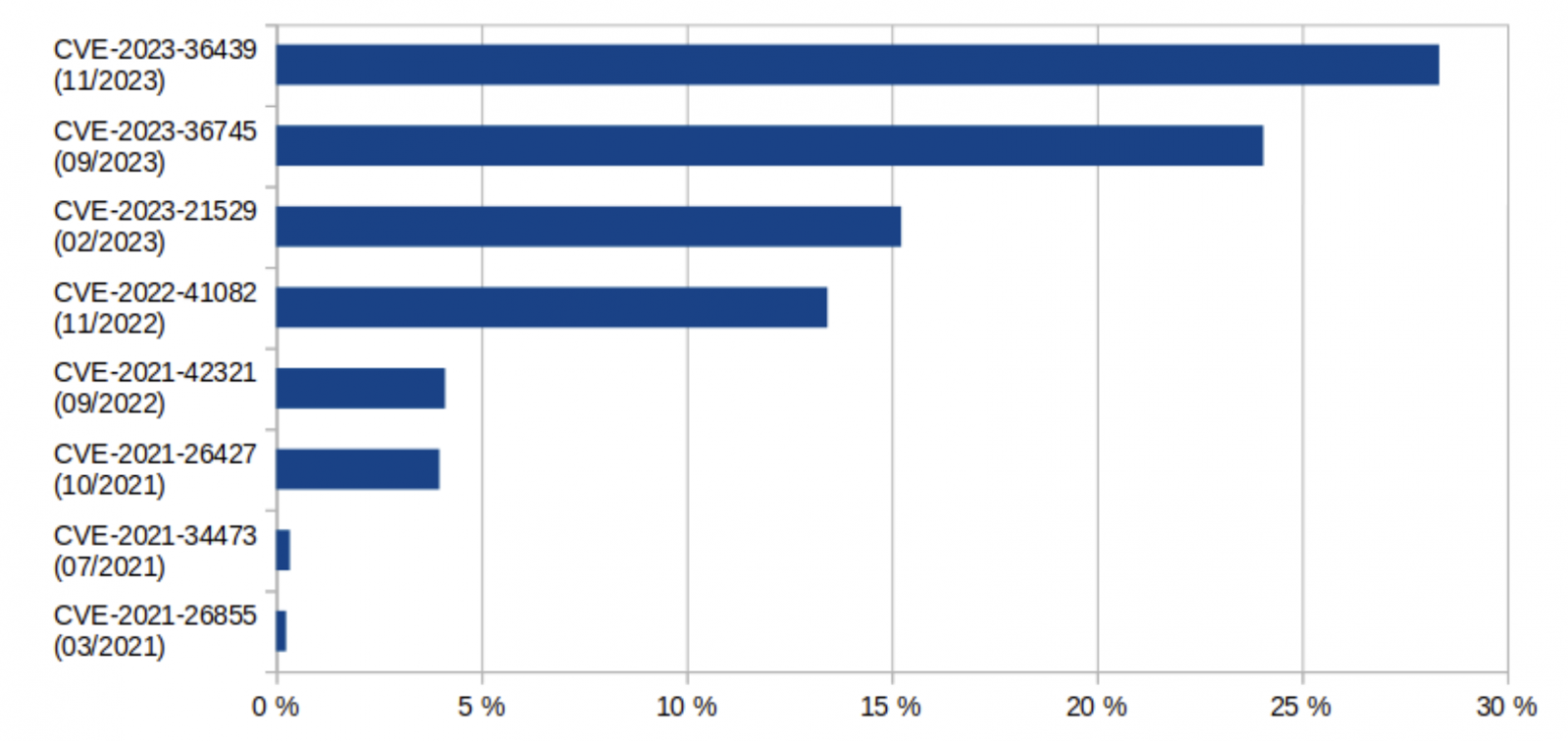
Recently, the German national cybersecurity authority alerted that more than 17,000 Microsoft Exchange servers in Germany are vulnerable to one or more critical security vulnerabilities.
As per the German Federal Office for Information Security (BSI), approximately 45000 Microsoft Exchange servers in Germany have Outlook Web Access (OWA) enabled and are accessible via the Internet.
Of these, 12% of servers have outdated versions of Exchange 2010 and 2013 and have not received security updates since October 2020 and April 2023, respectively.
If we talk about the newer versions, Exchange 2016 and 2019, 28% of these have not received any security update for four months and are vulnerable to one or more critical security flaws, which could be exploited in the prevalent remote code execution attacks.
Overall, at least 37% of Exchange servers in Germany (and in many cases also the networks behind them) are severely vulnerable. This corresponds to approx. 17,000 systems. In particular, many schools and colleges, clinics, doctor’s offices, nursing services and other medical institutions, lawyers and tax consultants, local governments, and medium-sized companies are affected.
As early as 2021, the BSI warned several times against the active exploitation of critical vulnerabilities in Microsoft Exchange and temporarily called the IT threat situation ‘red.’ Nevertheless, the situation has not improved since then, as many Exchange server operators continue to act very carelessly and do not release available security updates in a timely manner.
So, BSI recommended that admins of these unpatched servers must also keep the Exchange versions up to date and install all the security updates as soon as they are available.
The admins should also inspect whether all their systems are on the latest Microsoft Exchange patch level and whether the March security update is installed correctly on their machines. Here are the details of the version available:
Exchange Server 2019 CU14 Mar24SU (Build number 15.2.1544.9)
Exchange Server 2019 CU13 Mar24SU (build number 15.2.1258.32)
Exchange Server 2016 CU23 Mar24SU (build number 15.1.2507.37)
The BSI urged restricting access to web-based Exchange server series like Outlook Web Access to trusted source IP addresses or promoting using them only via a reliable VPN.
Microsoft has now automatically enabled the Extended Protection on Exchange Servers after the February 2024 H1 Cumulative Update (CU14). This step was taken when Shadowserver, a threat-monitoring service, alerted that 28,500 Microsoft Exchange servers were vulnerable to ongoing CVE-2024-21410 attacks.
What are your thoughts on the matter? Share your opinions with our readers in the comments section below.
Microsoft will deprecate Visual Studio App Center in a year, but that doesn’t mean the Redmond-based tech giant isn’t releasing new apps within its Visual Studio platform. Earlier today, the company announced the release of an experimental MSBuild editor to streamline and enhance productivity for developers all around.
To help developers better understand their project files and access advanced functionality that requires editing the project file directly, we’re releasing an experimental MSBuild editor that has a much richer understanding of MSBuild files than the current XML schema allows.
Microsoft
However, it’s worth mentioning that the Redmond-based tech giant will leave the fate of the new experimental MSBuild editor in the hands of those developers dealing with and working with csproj files. Based on their feedback, which Microsoft hopes for, the company will release the editor to all .NET developers.
Microsoft has equipped the experimental MSBuild editor with multiple capabilities. For instance, its Quick Info is not just for XML elements in MSBuild files, but also properties, items, and metadata in MSBuild expressions. And speaking about it, it also offers a richer development experience, with deep links to relevant documentation, and hyperlinks to references, as you can see in the image below.
It also has special support for NuGet packages, allowing developers to search for the package ID, and it provides IntelliSense capabilities almost everywhere in the file.
However, one of the most intriguing features of this new app is its ability to catch malformed conditions and expressions without having to run the build.
Microsoft says this new experimental MSBuild editor is powered by a new MSBuild-specific json-based schema format that allows defining documentation and type annotations for MSBuild properties, items, item metadata, and targets.
The Redmond-based tech giant is eager for all the feedback and based on it, the fate of the new experimental MSBuild editor will be decided. However, if the feedback is positive, Microsoft will make it available to all .NET developers.
To leave your feedback, Microsoft has released a survey that can be filled out here.
On March 22, 2024, Microsoft released Edge 123 (version 123.0.2420.53) on the Stable Channel, incorporating the Chromium project’s security updates. The update doesn’t seem normal without innovative features, but it included many bug fixes for enterprise features.
After installing Edge version 123.0.2420.53, some of the users noticed that Microsoft Copilot was listed in the Installed Apps section of Settings.
I also noticed the same Copilot app on my Settings app, and it appeared after the Edge update. Upon further checking, I learned that no Copilot app is available in the Microsoft Store, which made me more suspicious about whether it is legit.
However, apparently, the features were not available in the Stable Channel, so this mysterious entry of Microsoft Copilot made everyone suspicious.
Raelnor, a Reddit user from 2012, spotted the pullout:
I saw someone else was wondering about it and thought a post here might help Sysadmins/Users like me who are wondering about it.
Proof: You can’t download Edge 123 on the Enterprise Page anymore, newest one is 122. The Windows Server Update Services also recalled it, you can’t allow it for installation.
Also, a lot (not all!) of our machines can’t start Edge anymore if they have 123 installed, 122 runs fine. So if you have those problems it might be related.
I noticed that I can’t update to 123 at home either where I didn’t install Edge manually.
Would be cool to hear from others. I am wondering if there are other problems with the Version that might have prompted for a quick silent recall.
Up until now there is also no fix/update available to fix the not running version over the update service.
Neowin was also among the first few to highlight the issue, and they contacted Microsoft for comments. The Redmond tech giant explained that the program was supposed to power the new Copilot experience.
Deskmodder spotted the same Microsoft Copilot app in one of the Windows preview builds on March 21, 2024, so it might not be related to the Edge 123 update, but we don’t understand why it was installed silently.
In case you check the release notes on Microsoft Edge Security Updates, you will see that for March 26, 2024, it is mentioned:
Microsoft is aware of the recent exploits existing in the wild. We are actively working on releasing a security fix.
It is not the first time Microsoft has pulled out an Edge update. A similar incident happened when one of the updates broke websites with an out-of-memory error.
Now, when you check the version of Edge on the official website, as of now, it is 122.0.2365.106, and you can no longer update it to 123.0.2420.53. However, the 123.0.2420.65 is still available for Windows ARM64
Also, the company mentioned that the reason for pulling out the Edge 123 version is not associated with Copilot, and the spokesperson clarified:
The rollout for Microsoft Edge 123 was paused to ensure compatibility with certain enterprise configurations related to storage of user profile data. It was not related to Microsoft Copilot. We plan to resume the rollout of Edge 123 as soon as March 27, 2024.
If you are on Edge 123, you can check for Windows for Microsoft Copilot. To do that, head to Settings> Apps> Installed apps. Remember that removing the app will not affect Copilot’s usability in Windows 11.
Which version of Microsoft Edge are you running? Tell our readers in the comments section below.
HermitCraft is now being advertised in the Microsoft Store, when looking up Minecraft: Java & Bedrock Edition for PC, which includes an offer to select the preferred DLC at a 75% discount, and a free world from HermitCraft, according to the screenshot this Reddit user took.
For those of you who don’t know, HermitCraft is a private, whitelisted vanilla Minecraft server created specifically for YouTube content creators, and Twitch streamers, and as elusive as it might seem, it is a bit different from the regular Minecraft servers, as this Reddit user says in a post from 7 years ago:
HermitCraft is a Minecraft server and community of players that all produce social media output (especially YouTube videos). When agreed on by the player community, they start a new Seed, and change the season number. The current run is season five. New players are by invitation only, and few are added any given season.
The main series is always on a “Vanilla” server, but loot table edits and command blocks are used, but no mods. Key changes in the current season include drops for many mob heads, a one player sleeping skips the night rule, edited drops for the Dragon and Shulkers, and turned off fire spread and Endermen griefing.
The members of Hermitcraft often play together in side series which may be more vanilla or modded servers (such as Foolcraft)
Reddit user
If 7 years ago, HermitCraft was on its fifth season, it seems the season Microsoft Store advertises is the ninth one, so, as you can see, the server has been around for quite a while.
Xisuma, the developer and creator of the HermiCraft server, validated, under the same Reddit post, the partnership with Mojang, the studio behind Minecraft. The developer ultimately confirmed the presence of the server on the Microsoft Store, with a YouTube video, which you can watch below.
The S9 world download is being distributed for free via the marketplace later today. I will have a video on my channel with the full details. World downloads from our website will remain free and even improved in the case of the bedrock platform thanks to this collaboration. Our agreement with Mojang means the world will always be free and will now be easier to access from more platforms. 🙂
Xisuma
This means regular Minecraft players can now download the HermitCraft version of the game, for free, and enlist in the server to start to play it.
The Season 9 map can be downloaded from here. Also, make sure to use the Gaming Services Repair Tool before downloading the latest Minecraft updates, as they will wipe all your worlds.
It’s well known that Windows 11’s File Explorer does not always run at a preferable speed, and sometimes it can be quite slow, depending on the device. While there are many ways to make it faster, not every Windows user knows their way around registries or Task Manager.
If you’re willing to give our solutions a try, then you are welcome. However, there is another solution, which virtually any Windows 11 user can try, and it only requires 5 seconds of your time. We’re not exaggerating, we tried it and it literally took us 5 seconds to make File Explorer on Windows 11 faster.
The solution requires you to get File Explorer in Fullscreen Mode, and then get it out of the Fullscreen Mode. In seconds, you will notice a massive improvement in the File Explorer’s speed.
To do so, you’ll need to:
While in File Explorer, enter Ctrl + F11, and wait for Windows 11 to get it to Fullscreen Mode.
PressCtrl + F11, to disable the Fullscreen Mode.
Enjoy the results.
It is as simple as that. Whenever you notice the File Explorer running slow, you can try this method, and it should make it faster, these steps can be repeated every time it happens.
Preferably, you’ll have to look into your system, as well, and make sure it has the requirements to run Windows 11 on recommended settings. Also update your Windows 11 to the latest version, to make sure you have all the necessary features: sometimes some of them can naturally make File Explorer faster.
And when in doubt, try this solution. Nobody knows why it happens, but it does. Some folks on Reddit say that it’s a bug, and enabling/disabling Fullscreen Mode enables the bug, as well.
By some bug Microsoft already has a faster version of Explorer built in, but you have to do the maximize thing every time you launch explorer to go into this bugged fast state.
Microsoft has been updating Outlook with some really useful features lately, including the implementation of a brand-new UI, in March 2023.
However, despite the new interface, or the support for older formats (Outlook users are now able to access old emails), Outlook still lacked this simple feature that would allow users to find important documents in a matter of seconds.
But, according to the latest entry in the Microsoft 365 Roadmap, Outlook will finally let users do that by enabling them to add shared folders to favorites. The app already allows users to add folders to their favorites, however, those shared with multiple other users were not available.
Most of the time, these shared documents are also the most important ones, especially when talking about a working environment, where multiple users have to contribute to a document.
In time-tight situations, such as deadlines, or meetings, it’s also very important to have access to them easily, without wasting precious time. Well, according to Microsoft, this new feature will allow users to save the shared folders to favorites, ensuring quick access to them.
Plus, Outlook users won’t have to wait for long: the new capability will be available to them starting May 2024. There will be a preview first, most likely happening in early May, then the feature is going to be generally released later that month.
Customers will have the ability to add shared folders to their favorites. This enhancement offers users increased flexibility and convenience, allowing easy and quick access to important shared content directly from their Favorites list. #newoutlookforwindows
Microsoft
The Redmond-based agrees that adding Outlook’s shared folders to favorites will offer more options to users, and it will also enhance productivity all around, allowing them to quickly get work done.
Are you excited about this new feature coming to Outlook? Let us know in the comments section below.
Software piracy is a huge problem for developers since it allows users to use their software without a license.
Even though Copilot doesn’t promote piracy in any way, it can still help you find pirated software, if you know how and where to ask.
Copilot was caught showing links to piracy websites
We all know that Microsoft doesn’t condone piracy, and it came as a shock to us when we learned that Copilot can give you links to websites that are used for illegal file sharing.
This was first discovered by users on Reddit, if you type the right query into Bing, the Copilot will be happy to assist you with its suggestions.
We tested this, and while it didn’t work in Firefox, it worked perfectly in Microsoft Edge. Of course, users were quick to joke around that this is one way to attract users to use Edge on their PC.
Others were quick to point out that Bing is superior to Google, probably due to not censoring search results such as these.
nowaday Google is straight up trash as a search engine… when i need to do some search Bing is far superior…
Bing never complain whenever I’m using VPN and search something. Google will ask you a ton of stupid captcha that never get the correct answer, or very very slow verification.
However, the comments were filled with users suggesting to stay away from these types of websites since they are usually filled with malware.
This seems like a bug on Microsoft’s end, and during our testing, we were able to get these results from Copilot in Bing, but not from the Copilot web app. Hopefully, Microsoft will fix this bug soon.
Today, those Teams users working in customer care support have a reason to celebrate, because Microsoft just added the new Queues app to the platform’s roadmap, and it’s scheduled to be released in June 2024, according to the Microsoft 365 Roadmap.
So what is the new Queues app? The Queues app is a new tool for Teams that will bring together the customer support team to answer customer calls. The team can take incoming calls and make outgoing calls for the call queues or auto attendant they are assigned to.
They can also check how the status of the call queue and work smoothly with the manager and other team members to ensure the calls are resolved in a good manner.
People who have permission from Teams admins can watch their call queues and auto attendants in real time, make reports on how the queue and agents are doing, change their call queues and auto attendants using Teams settings, and add or remove team members to meet business needs.
The new Queues app is a solution for collaboratively handling customer calls natively in Teams. Starting with surfacing call queue calls, your team members can use the Queues app to handle inbound calls, be it PSTN or VOIP. They can make outbound calls on behalf of the call queues or auto attendant that they are assigned to. And they can review the call queue statistics and seamlessly collaborate with their lead and colleagues within the flow of work. Authorized users, with permissions from Teams admins, can monitor their call queues and auto attendants in realtime, generate reports on queue and agent performance, configure their call queues and auto attendants using Teams settings, and opt in or out their team members to optimize for business needs.
Microsoft
This is going to be a Premium-only feature, and it will be generally available to desktop platforms starting June 2024, as we mentioned earlier.
The Queues app can be a game changer and it is definitely going to provide a stress-free experience when handling customer calls, including difficult ones. Why? Well, difficult customers will be managed by a team of experienced customer care agents, instead of just one, and this automatically increases the chances of the issue being resolved right away.
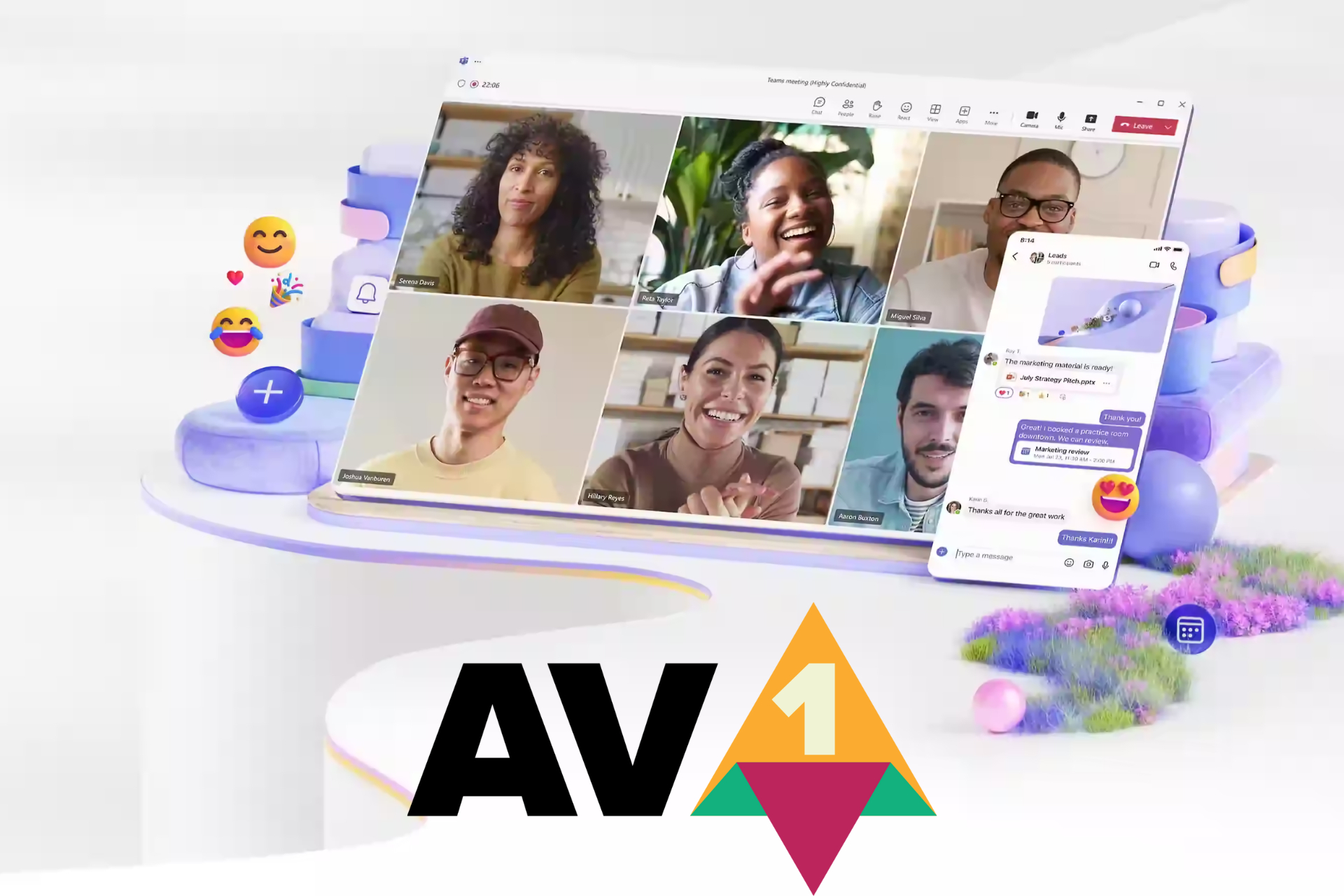
Besides the new Queues app coming to Microsoft Teams Premium, the Redmond-based tech giant unveiled that the platform is also getting the AV1 codec that only requires a 200 Kbps bandwidth for screen sharing. What does this mean? You will be able to experience sharp visual and fluid motion if you have a poor internet connection.
It’s quite exciting to be a Microsoft Teams user in 2024.
Ever since reports of Diablo 4 coming to Xbox Game Pass first emerged, users have been excited about the release. So are Microsoft and Activision Blizzard because this is the first release on the platform by the latter after the $69 billion acquisition.
But installing Diablo 4 on a PC using Game Pass won’t be as simple. You will need to download Battle.net beforehand, sign in with the credentials, and then proceed to the Diablo 4 installation!
How can I install Diablo 4 on the PC?
Launch the Xbox App on your PC and sign in with the account used for the Game Pass subscribtion.
Search for Diablo 4, and then click the Install button.
Now, click on Install Battle.net in the prompt that appears.
Wait for the download to complete.
Use your Battle.net login credentials to link it with your Microsoft account. If you don’t have one, sign up for a Battle.net account.
After connecting the accounts and downloading Battle.net, you can now install Diablo 4.
While it does sound like too much effort to get Diablo 4 on PC via the Game Pass, all this is a one-time thing and wouldn’t take more than five minutes. Even the Steam version of Diablo 4 needs a Battle.net account, although you are not required to download the app.
Can you imagine your boss reading an AI-generated review of your job performance, only to find that you might have not done your job well enough?
Well, if it sounds like a Black Mirror episode, then hold your horses, because the Redmond-based tech giant recently published a patent describing a technology that would intelligently identify a user’s relationship with a document.
The patent, which can be read in its entirety here, involves a technology that wants to understand what a user does with a document using an application.
The AI-powered technology collects data about the user’s activities on the document over a certain time. It then looks at this data to figure out what kind of activity the user is doing on the document. After that, it sends a signal that includes this information to a device where it’s stored with the document.
The technology’s main goal is to determine which individual contributed most to a document, especially shared documents in applications such as OneDrive, but it’s not limited to it. The inventors behind the technology claim that it would address the current limitations of not being able to compare activities made on a shared document.
Currently, a signal indicating creation and/or editing actions performed on the document may be stored with the documents, but this signal provides very limited information about the edits made to the document. It does not provide any information about the user’s relationship with the document, as it does not differentiate between a user that makes minor edits and one who contributes extensively to the content.
Since the technology is AI-based, it can be integrated into Copilot for platforms such as Microsoft 365, but it could backfire, especially when talking about employees’ activity. Why? Well, with this technology, Copilot in Microsoft 365 would be able to not only track their activity but also report on it, as well.
We’re talking about an AI tool that can track the time spent on your work but also analyze the quality of the work that you did based on certain parameters that can be customized to each situation.
Ultimately, it can generate a report of the activity for later use.
Is this useful? Well, yes, it is. It can easily streamline workflows, and emphasize productivity. It can used together with Microsoft 365, a productivity platform (its mobile app recently announced a new Create section), so that companies can reach their goals faster.
However, it could become a kind of dystopian situation, to say the least: your manager might use this technology to keep a closer eye on the performance of their employees.
Can you see yourself being fired at the hand of Copilot? Well, it could happen, but it’s worth mentioning that, for now, this technology is only at a patent level, so it might take a while until it gets integrated with existing tools.
When the MEGA Showcase Microsoft Xbox 360 Building Set was first released in Oct’23, Xbox and Lego fans were excited, but the price tag acted as a deterrent for many.
So, if you didn’t get the MEGA Showcase Microsoft Xbox 360 Building Set back then, you can buy it for $99.99 at Target, $50 down from the original price of $149.99.
It’s a Target-exclusive discount because when we checked the prices on Mattel Shop, it’s still $149.99.
The MEGA building set is the replica model of one of the most popular consoles to date, the Xbox 360, released in 2005. Besides the console, it also contains pieces for a light-fitted controller and a Halo 3 disc (almost pre-built).
The Xbox 360 building set includes an external hard drive, illuminated interiors, and a disc drive that lights up when you place the Halo 3 disc.
The Xbox 360 replica, comprising 1342 pieces, is identical to the actual console. Though building it takes time and effort, that’s something you won’t regret. The physical achievement notification shipped alongside the replica aptly reads, Achievement unlocked 75G – Build an Xbox.
We are always looking for ways to extend the battery life, from changing to built-in Windows settings to the BIOS configuration. You don’t need to worry about it anymore. Select Lenovo laptops now ship with an auto sleep sensor!
The sensor will initially be available in Lenovo’s ThinkPad X13 Gen 5, ThinkPad X13 2-in-1 Gen 5, and ThinkPad X1 2-in-1 Gen 9 14” laptops.
All about the auto sleep sensor on Lenovo ThinkPad X13 and X1
Developed by Elliptic Labs, the AI Virtual Human Presence Sensor detects when you are not present in front of the device and automatically enables sleep mode.
While it conserves battery life and reduces the power bill, another vital aspect can’t be ignored.
The auto sleep sensor in Lenovo laptops eliminates the possibility of unpermitted access. Anyone without login credentials can’t use the PC after you step away, which is a concern in organizations and co-working spaces.
The best part, the AI Virtual Human Presence Sensor is all software-based. Subsequently, integrating it with other PCs and laptops would be simple to implement. Besides, this will allow lower-end PCs to feature an auto sleep sensor, something currently exclusive to devices in the higher price range.
As per Business Wire, Laila Danielsen, CEO of Elliptic Labs, said,
Adding the Lenovo ThinkPad X13 Gen 5, ThinkPad X13 2-in-1 Gen 5, and ThinkPad X1 2-in-1 Gen 9 14” models to our growing list of laptops in the market is a clear sign of the PC industry’s attraction for our AI Virtual Smart Sensor Platform. With this announcement, we’re now shipping on (27) laptops models, and all of these are currently available in the market. For 2024, including this release, we’ve launched on nine total laptops. We remain focused to execute on the opportunity to bring more devices to market that are smarter, greener, and more human-friendly.
In the coming days, we should see more Lenovo laptops shipping with the AI Virtual Human Presence Sensor. Other manufacturers, too, are expected to adopt the technology, given the minimal cost implications.
If you are considering these Lenovo laptops for the auto sleep sensor, there’s another good news! The Lenovo ThinkPad X13 Gen 5 series, with an iFixit repairability score of 9/10, is expected to last for years without ever taking it to the certified service center.
Do you believe Elliptic Labs’ AI Virtual Human Presence Sensor will witness mass adoption? Share with us in the comments section.
Multimedia can be demanding on your device, especially on laptops, with video playback negatively impacting your battery life.
This is why Microsoft and Google are working together to implement a new feature that will improve battery life on laptops.
Chrome might soon use the Windows audio offload feature
When playing any audio in Chrome, the audio playback utilizes the CPU with small buffers. This results in frequent wakes, higher power consumption, and higher battery usage.
This isn’t efficient since the CPU isn’t optimized to handle audio tasks. To tackle this issue, Microsoft suggests using an audio offload feature along with large audio buffers.
This should move the audio processing to the dedicated hardware accelerators with larger buffers. As a result, the CPU should remain in a low-power state thus saving battery life.
Hackers targeted Top.gg, the Discord community with over 170,000 members. If you use the app, you might already know about the group. After all, they share many great bots you can use for various purposes, such as gaming, music, giveaways, management, and more. Thus, wrongdoers considered exploiting Discord bots to spread their malware and gain control over personal information from other groups.
In addition, the community promotes discord servers and acts like a store for the bots. Also, the platform enhances gaming experiences, provides moderation tools, and offers fun features for other gaming communities.
How did threat actors target the Discord Community?
To target Discord communities, threat actors used a supply chain attack. This method allowed them to sneak malware into the platform, affecting developers and other members. The ones responsible used various tactics in the past, such as stealing GitHub accounts, distributing malicious Python packages (PyPI), using a fake Python infrastructure, and social engineering. The main goals of the wrongdoers are to spread Discord bots with malware to steal data and sell it for money.
Unfortunately, according to BleepingComputer, cybercriminals started targeting the Discord community in 2022. At first, they used PyPI to upload malicious packages similar to open-source tools. While seeming legitimate, they contained malware.
As a result, some developers contacted the virus and got their accounts hijacked. Afterward, hackers altered the developer’s project files to spread the virus to other Discord bots. On top of that, they used fake dependencies to redirect the user to the attacker’s fake mirror. The fake mirror is a website or server that looks legitimate to trick you into downloading malware or sharing personal information.
Ultimately, wrongdoers target important Discord communities like Top.gg because other groups use their bots and tools. Thus, threat actors can use this opportunity to spread their malware and steal and sell our data. To defend against attacks, you can review your code, check the updates, scrutinize sources, and use code signing and multi-factor authentications. Furthermore, if you are a Discord server owner, consider verifying the bot’s reviews, ratings, and permissions.
What are your thoughts? How do you defend your community and work against cyber criminals? Let us know your practices in the comments.
Amongst all tech giants, Microsoft is pushing for artificial intelligence most extensively. It’s integrating AI into more and more products and improving the feature set on the native OS, Windows. Besides that, Microsoft has an ideal AI PC in mind, plans for which have already been shared with OEMs.
So far, Microsoft hasn’t disclosed these plans to Windows users. But, with each passing day, we are getting more and more information about Microsoft’s idea of AI PCs. It’s got both additional hardware and software support!
NPU is critical to the artificial intelligence capabilities of the PC since it aids in performing AI-related and machine-learning tasks. It’s a hardware chip embedded in the CPU. Only new-age PCs that boast AI capabilities ship with an NPU. Most older ones don’t have it!
The latest CPU (Central Processing Unit) and GPU (Graphics Processing Unit) requirements indicate Microsoft’s effort at delivering superior performance. Besides, the two, CPU and GPU, will complement the NPU, elevating the AI standard.
As for Copilot, it is Microsoft’s flagship AI-based chatbot set to take on the likes of Gemini. Microsoft has been focused on enhancing Copilot, adding more features, improving functionality, and boosting device support. The dedicated Copilot key will ensure easy access.
How are OEMs responding to the change?
OEMs have been enthusiastic about AI PCs as they have a chance to recover from losses accrued since the post-COVID era. AI support is one of the major reasons PC prices are expected to rise in 2024.
So far, we have seen significant developments at Intel’s end toward an AI PC. Its latest, the Intel Core Ultra series, codenamed Meteor Lake, adds AI capabilities to the PC. The recently released Lenovo ThinkPad X13 Gen 5 seriesships with the Meteor Lake processor.
Image source: Intel
Intel, in its official blog post, explains the idea of artificial intelligence on a PC,
Compared to generative AI and the massive large language models (LLMs) trained on tons of public data, the AI that will happen on your PC is more accessible on pretty much every level. The concept is easier to digest, and because it’s trained on your data, without needing to access the cloud, the benefits are more immediately appealing to a broader population.
Detailing how it would work, Intel’s blog post reads,
In the near-term, the AI PC world involves personal assistants and smaller AI models running directly on your PC, using your data to offer personal, private, more secure AI enhancements for things you already do every day – taking meeting minutes, organizing a fantasy football league, automating enhancements for photo and video editing, or laying out the perfect itinerary for a family reunion based on everyone’s arrival and departure times.
Image source: Intel
AMD has also been making strides in the field of AI. Results from several tests conclude that AMD Ryzen is better than Intel Core Ultra. Remember, the latter has only been out for a few months, and Intel has big AI plans. So, we may witness improved performance from Intel Meteor Lake.
However, there’s some apparent confusion between Microsoft and device manufacturers on the definition of AI PCs.
As per Microsoft, an AI PC has a dedicated Copilot key, which puts the Lenovo ThinkPad X13 Gen 5 and the Asus ROG Zephyrus series out of contention due to the absence of the Copilot key, even though they ship with AI capabilities. Other products released before Microsoft shared its guidelines will also miss the AI PC tag.
Microsoft’s own offering, the Surface Pro 10 and Surface Laptop 6, released recently, have an AI PC sticker, which aligns with the tech giant’s approach to promoting AI-ready PCs.
The cost of AI PCs is a concern
With additional hardware like NPU, the latest CPU and GPU, and changes to the design, the cost of production will increase. Subsequently, you will have to shell out a higher sum to get an AI PC compared to a regular PC now.
While an AI-powered PC will benefit some, it won’t make much of a difference for most of us. Besides, even PCs without an NPU can run Windows Copilot and other OS-oriented AI features. So you are not missing out on anything!
Are you willing to pay more for an AI PC? Share with us in the comments section.
Updating your Apex Legends game should come with new improvements but players are getting kicked out with an error code clog.
It is possible that the update files were corrupted during the installation preventing Apex from launching. And if there are compatibility issues with the new update and your hardware, you’ll also have difficulty logging in.
The server may also be experiencing downtime so be sure to check the server status for downtime and maintenance schedules.
How do I fix Apex error code: clog?
1. Clear game cache
1.1 Clear Apex cache
Press the Windows + R to open the Run dialog box. Type %ProgramData%/Origin in the text field.
Next, in the opened directory, delete all the folders except for the LocalContent folder.
Then, open the Run command dialog box again. Type %AppData% in the text field, and clear the Origin folder.
Alternatively, open the Run command dialog again, and type %userprofile% in the box.
Open the AppData folder, navigate to the Local folder, and delete the Origin folder.
Restart your PC.
1.2 Clear Steam cache
Press the Windows + R to open the Run dialog box. Type %ProgramData%/Origin in the text field.
Next, in the opened directory, delete all the folders except for the LocalContent folder.
Then, open the Run command dialog box again. Type %AppData% in the text field, and clear the Origin folder.
Alternatively, open the Run command dialog again, and type %userprofile% in the box.
Open the AppData folder, navigate to the Local folder, and delete the Origin folder.
Restart your PC.
At the same time, ensure your internet connection is working and stable.
2. Run the game as an administrator
Once you clear the cache, restart your PC, press the Windows key + S keyboard shortcut to open the search tool. Enter Apex Legends as the search keyword. Right-click it and select Open file location.
Next, right-click the Apex Legends EXE to select Properties.
Click the Compatibility tab then select the Run this program as administrator setting and select the Disable fullscreen optimizations option.
Click the Apply option then press the OK button to exit the window.
Locate Apex Legends and click the three dots icon to open Settings.
Choose Repair.
If none of these solutions works, try spamming. It may not be practical as there’s no given number of times you have to press Enter repeatedly to regain access but it’s worth a try. According to most players, this can range from four to fifty times or more.
If it’s too much work, you can wait it out or contact EA support. They may have more information on how to resolve the error code: clog and any other such as error code: clock.
It’s a wrap from us but we’re keen to hear from you. Those unorthodox or unusual fixes for this error are all welcome in the comment section.
It seems that Microsoft has another custom console ready, but this time for the new South Park game.
Join the giveaway and get the chance to win a custom Xbox Series X
We have seen several great South Park games in the past, and the latest game, South Park: Snow Day was just released, and to celebrate its launch, Xbox is having another giveaway, according to TrueAchivements.
As per Xbox’s recent tweet, there will be four consoles available, each with a unique design and controller.
Each console has one of the four main protagonists on its case and a custom controller to match. To join the giveaway, you just need to follow the official Xbox account on Twitter and repost the giveaway with the right hashtag.
The giveaway lasts until April 22nd, so if you’re a South Park fan, or if you just want a chance to win a new Xbox, be sure to join.
After Microsoft Teams received a design makeover, it now receives a well deserved improvement on how it encodes video in virtual meetings.
Up until now, Teams used the H.264 codec, which needs about 1.2 Mbps bandwidth for video broadcasting. Now, Microsoft introduced the AV1 codec to Teams, that only requires a 200 Kbps bandwidth for screen sharing which is a 63% lower.
That means you will be able to experience sharp visual and fluid motion if you have a poor internet connection.
What is the AV1 codec bringing for your organization?
We also need to look at the broader picture. This is not only about you having a video meeting in the middle of nowhere while having a weak connection.
The lower bandwidth requirements also prevent potential network congestions inside the local network of your organization. That translates into lower server load and, finally, to lower costs.
According to Microsoft’s announcement, this move will also impact energy consumption and reduce the carbon footprint of the organization.
However, obviously, the major benefit in adopting the AV1 codec is the improvement of the technical conditions of the video communication channel.
We can’t help to wonder why it took Microsoft so long to make this happen. Apple included the AV1 codec capability to the A17 Pro chip for iPhone 15 Pro and Pro Max since September, last year. In the same way, Google included the AV1 decoding capability in its Tensor G3 SoC chip.
The bottom line is that the AV1 codec and decoding is perfect for streaming and video transmissions and it will soon be available for all the video capable devices.
How do you feel about Teams using the AV1 video codec? Let’s talk about that in the comments section below.
Windows has a couple of built-in tools to help troubleshoot common issues but a dedicated app like Microsoft Support and Recovery Assistant is of great help for Microsoft-related programs and services.
What is the Microsoft Support and Recovery Assistant?
Overview
Microsoft has a handful of products and services under its belt and the Microsoft Support and Recovery Assistant is one of them. It is a dedicated tool that diagnoses and resolves any issues with Office, Microsoft 365, Teams and Outlook provided your device meets the system requirements.
Microsoft Support and Recovery Assistant takes away all the numerous trial and error steps involved whenever an error occurs by simplifying the troubleshooting process. You get to save time and effort and enhance your experience when using Microsoft products and services.
Main features
Auto-diagnosis – Instead of doing guesswork when you encounter an error on the Microsoft products covered, this tool will do an auto-diagnosis for you.
Troubleshoot – Once a diagnosis has been made and the issue identified, the tool will provide comprehensive troubleshooting steps as a resolution.
Monitoring -The tool works in the background to detect any issues and notify you of any problems in their infancy stage.
Detailed reports – When making the diagnosis, the tool gathers all relevant information about the issue. This can be helpful especially when communicating with IT professionals who may require this information.
How do I download Microsoft Support and Recovery Assistant?
Which problems can the Support and Recovery Assistant fix?
General system performance issues – If any of the covered Microsoft products and services are having performance issues like Outlook running slow, the Microsoft Support and Recovery Assistant can help with stability and optimization.
Application errors – Office error codes and crashes are also covered by the Microsoft Support and Recovery Assistant.
While the tool does offer comprehensive troubleshooting assistance, it does not have the capability of resolving every issue. Issues related to hardware, network errors or any other issue that is outside Microsoft’s scope may need additional assistance.
Your device’s manufacturer, IT support or even Microsoft support may be able to offer guided assistance in such cases.
And if you’re looking for an overall app that deals with speed, optimization and general performance enhancement, you need to check out PC Manager.
Have you tried the Microsoft Support and Recovery Assistant? Would you say it does what it’s supposed to do or is there room for improvement? We’d love to get your thoughts on this so do leave a comment down below.
Xbox Cloud Gaming has been present for years, but it seems that it will finally get some much-awaited features.
Microsoft is currently testing mouse and keyboard support for Xbox Cloud Gaming, and here’s what we know so far.
Mouse and keyboard support in Xbox Cloud Gaming is now available for testing
Currently, to use Xbox Cloud Gaming, you need to use an Xbox or a verified controller. This can be a problem for PC gamers who are used to a mouse and keyboard, but that won’t be a problem anymore as IGN writes.
According to Xbox Wire, you can now use a mouse and keyboard while playing games in Edge, Chrome, and Xbox app on your PC.
The feature is available only to users enrolled in PC Gaming Preview, and to use it you need to enable Preview features in the browser. This can be done on the Xbox Play page by going to your user settings.
Currently, there are only 14 games that support this feature and some of them include Fortnite (only in the browser), ARK Survival Evolved, Grounded, Sea of Thieves, Halo Infinite, Atomic Heart, High on Life, Sniper Elite 5, and more.
This is great news for all PC gamers who tend to use this feature, and we hope to see mouse and keyboard support available to everyone soon.
One of the most important is that now you can create folders into your workspaces, an feature that Microsoft says that came from the clients’ suggestions.
What is the Folder feature all about?
The problem is that while you develop a project in Microsoft Fabric, the workspace gets cluttered and you lose focus on certain items which become harder to find.
What Folder does is to help you group and categorize the fabric items into an efficient structure based on categories, deployment stage, quality of data and more.
Source: Microsoft
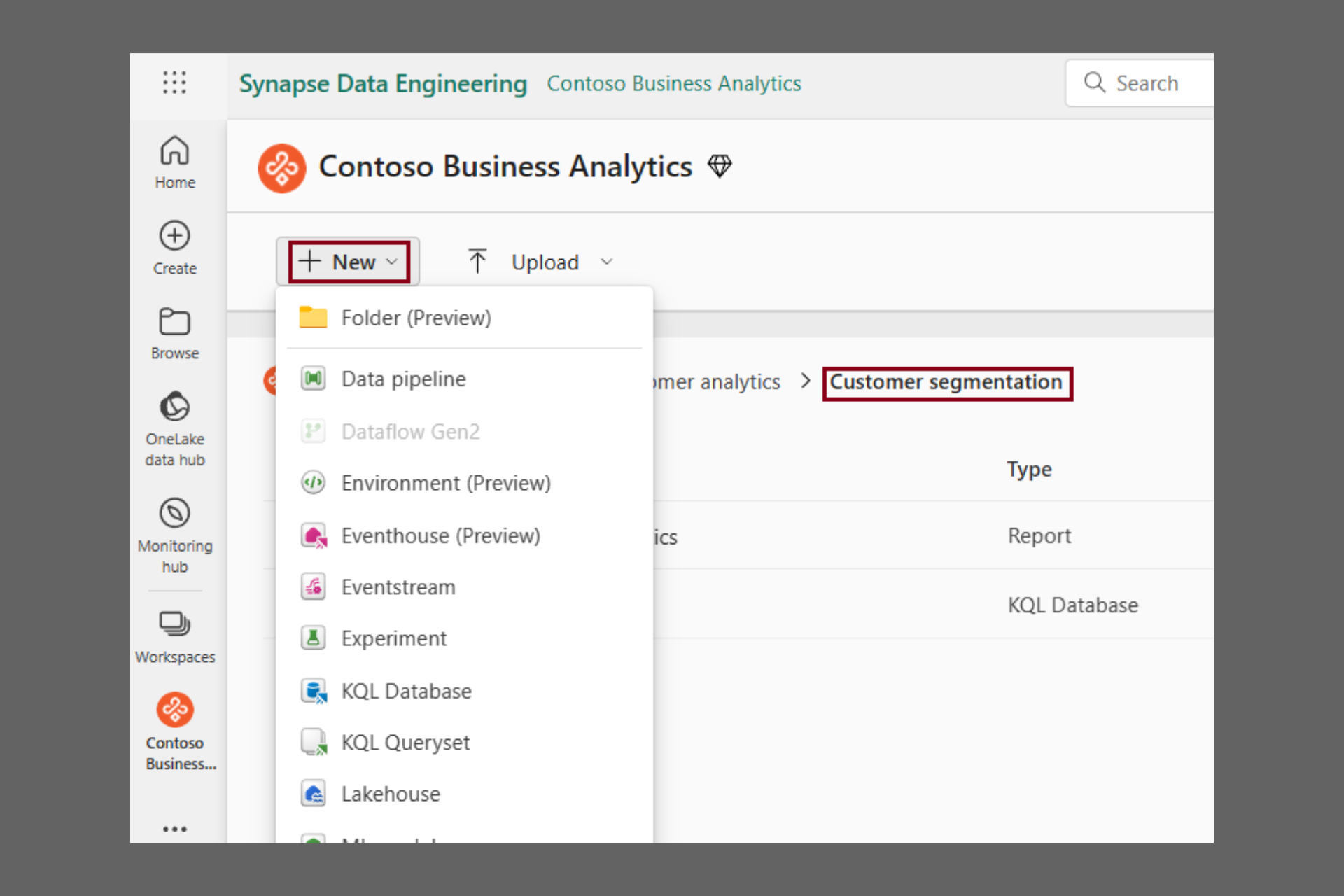
The usage is pretty simple: You can create a new folder from the +New menu. Then you can create subfolder for up to 10 levels deep.
You can add any type of Fabric item inside the folders and then, you can also move them one by one or by selecting multiple items.
According to Microsoft’s announcement, you may also create new items inside the folders from the same +New drop-down menu.
Also, if you’re a Power BI developer, there is also possible to upload .pbix files directly into a folder. However, you will have to wait a bit longer (in the following months, according to Microsoft) if you want to publish a report from Power BI Desktop to a folder in the workspace.
Of course, you may also delete, rename, or move a folder in a similar way to what you do in Windows Explorer or OneDrive, but only if the folder is empty.
What do you think about the new Folder feature in Microsoft Fabric? Let us know in the comments section below.
Lately, Microsoft has been rolling out a series of changes to enhance the Windows experience. The latest in the list is Microsoft allowing IT administrators to expedite obtaining and deployment of non-critical Windows 11 security updates.
According to the Redmond-based tech giant, expedited security updates via Intune and Microsoft Graph have been a success, and it’s time to extend the capability to non-security updates.
In its blog post, Microsoft explains the benefits of expedited non-security quality updates,
By expediting non-security quality updates, you can quickly obtain many fixes that are considered critical by your peers. Additionally, we want you to be able to deploy out-of-band (OOB) updates to devices faster than ever. In short, you can now improve the stability, performance, and functionality of devices by addressing quality issues before the next security update.
For now, expedited deployment of quality updates is limited to the latest iteration of the OS, i.e., Windows 11.
You could also use Microsoft Graph, but that is a slightly complex process with a long list of requirements.
With the ability to deploy Windows 11 quality updates as soon as they are released, you will be able to reduce crashes, enhance stability, and boost performance.
What’s your take on Microsoft allowing expedited non-security updates? Share with our readers in the comments section.
It seems that there’s a critical issue affecting Windows 10 Enterprise LTSC 2019 and Windows 10 IoT Enterprise LTSC 2019 domain controllers.
Microsoft was quick to respond, and it has already released an emergency update for it, so be sure to get it.
The latest update fixes the Local Security Authority Subsystem Service issue on Windows 10 LTSC
As MSPowerUser writes, the emergency update KB5037425 was just released for Windows 10 Enterprise LTSC 2019 and Windows 10 IoT Enterprise LTSC 2019.
The update addresses the bug in the Local Security Authority Subsystem Service (LSASS) that causes high memory usage and system crashes.
It seems that the problem was introduced in a previous update on March 12th, and it affects domain controllers who are in charge of user authentication in the network environment.
The KB5037425 update is available only via the Microsoft Update Catalog, but before you install it, ensure that you have Servicing Stack Update (SSU) KB5005112 installed.
Google is testing the ability to automatically archive and delete inactive tabs in Chrome on Android. The experimental feature, called Tab Declutter, aims to simplify tab management by automating the process.
This feature is very important since other browsers have similar features, and it will help reduce resource usage on your PC.
How does the new tab declutter feature work?
The mechanism is pretty simple. After a set period of inactivity, Chrome will automatically archive inactive tabs. You will no longer see the archived tabs but you will be able to retrieve them if needed.
As for deleting the tabs, you can set Chrome to remove them after a longer period of inactivity. This feature will free up memory and improve the browser’s performance.
Obviously, you will have control over the archival threshold and the period of time after which the browser takes action. Although the tab declutter option may be extremely beneficial, there is a fine line between conserving memory and that second you realize you’ve lost an important tab you forgot to bookmark.
Similar functionality in other browsers
It’s worth noting that Firefox on Android already allows moving tabs that haven’t been viewed for two weeks into an inactive section.
As we’ve mentioned, Chrome’s tab declutter is tested for the Android version but we have high hopes that it will be extended to the desktop version as well. That’s because we’ve seen a similar approach on the Arc browser’s desktop version (still under development when we wrote this article). The tool allows you to archive individual tabs and automatically archives unpinned tabs after 12 hours. Chrome’s approach to archiving tabs could be similar.
The specific details, user interface (UI), and options are still awaited as the feature is under development. We’ll have to wait to see how Chrome for tab decluttering feature evolves and we will keep you updated with its development.
Mozilla has a service called Monitor Plus that notifies users if their data is exposed to third parties online.
However, it seems that one of the partners on this service was involved in data selling which resulted in a swift ending of collaboration with Mozilla.
Mozilla cuts ties with Onerep after conflict of interests
We wrote about Mozilla Monitor Plus not that long ago, and while the service itself is great, it seems that some of its partners have been involved in data selling.
As Ars Technica reports, Mozilla had to cut ties with one of its key providers, Onerep. This comes after reports that Onerep CEO was the founder of dozens of people-search services since 2010.
Among these services is the notorious Nuwber which is known for selling the type of information that Mozilla Monitor Plus is trying to prevent.
Onerep’s CEO stated that he had an ownership stake in Newber, however, the aforementioned service had no information sharing with Onerep. He also stated that he’s no longer involved in any people-sharing sites.
Vice president of communications at Mozilla in his statement said the following:
Customer data was never at risk, the outside financial interests and activities of Onerep’s CEO do not align with our values.
Currently, Mozilla is working on a transition plan, and the service will continue to operate without any disruptions for the time being.
Amidst reports of trouble mounting for Xbox, with retailers cutting back the stock and publishers choosing other platforms, Phil Spencer, CEO of Microsoft Gaming, has an idea that could aid Xbox in reclaiming the lost glory.
In an interview with Polygon during the GDC (Game Developers Conference), Spencer talked about a less restrictive Xbox ecosystem where you can get games from different stores, unlike the present situation where you are restricted to one.
When asked if Itch.io and Epic Games Store could make it to Xbox, Spencer said,
Yes, [Consider] our history as the Windows company. Nobody would blink twice if I said, ‘Hey, when you’re using a PC, you get to decide the type of experience you have [by picking where to buy games]. There’s real value in that.
He believes players on Xbox should have the same experience. Basically, more freedom when it comes to picking up games, which benefits both the players and the console maker. Spencer went on to add,
If I want to play on a gaming PC, then I feel like I’m more a continuous part of a gaming ecosystem as a whole. As opposed to [on console], my gaming is kind of sharded — to use a gaming term — based on these different closed ecosystems that I have to play across.
Xbox isn’t the only console that limits your options. PlayStation and Nintendo do the same thing. So, if Xbox could make this multi-store thing a reality, the sales gap between Xbox and PlayStation consoles might narrow down.
And if we are talking about Epic Games and Itch.io, why not Steam? It has one of the biggest game collections and is compatible with most platforms. It would be our first choice for Xbox!